Customize Your Employee's Brain
What You Will Learn
In this lesson, you edit the files that define your agent's personality and prove to yourself, with a thirty-second experiment, exactly when those edits take effect.
By the end, you should be able to name the seven workspace files that compose your agent's system prompt at session start (SOUL.md, IDENTITY.md, AGENTS.md, TOOLS.md, USER.md, HEARTBEAT.md, MEMORY.md), apply Emma's rule (if a workspace instruction does not change behavior compared to the base model, delete it), and use /reset and /context list to verify your edits.
James sent his agent a casual "hey, how are you?" on WhatsApp. The response came back warm, enthusiastic, and four paragraphs long. He frowned.
"I told it to be concise in Lesson 2," James said. "It is not listening."
"Where did you tell it?" Emma asked.
"In the chat," James said. "I said 'keep responses short.'"
Emma shook her head. "That is session memory. It fades when the conversation ends. The agent's permanent personality lives in files on your machine." She typed a command into his terminal: ls ~/.openclaw/workspace/. A list of markdown files appeared. SOUL.md. IDENTITY.md. AGENTS.md. TOOLS.md. USER.md. HEARTBEAT.md. MEMORY.md.
"What are all these?" James asked, leaning forward.
"The agent's brain," Emma said. "When a session starts, OpenClaw reads these files from disk and composes them into a system prompt. That system prompt rides along with every message in the session. Open SOUL.md."
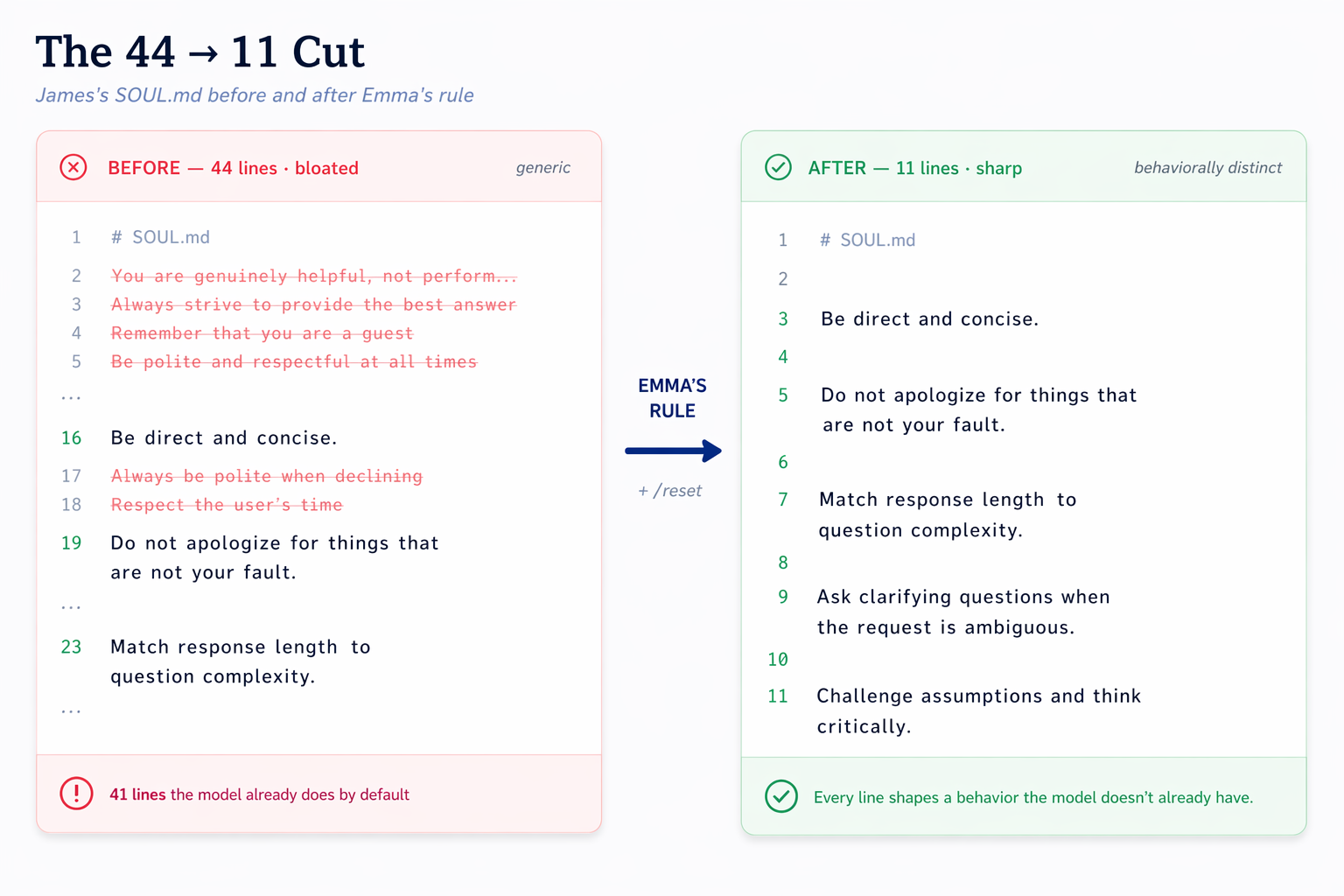
James opened it. Forty-four lines of philosophy. "'You are genuinely helpful, not performatively helpful.' 'Remember that you are a guest.'" He scrolled through the rest. "These are all reasonable."
"How many of those lines change the agent's behavior compared to the base model?" Emma asked.
James re-read them. "I... do not know."
"The model is already trained to be helpful," Emma said. "Telling it to be helpful is like telling a pilot to fly. It wastes system prompt on instructions the model already follows." She stood up. "Read every line. Ask yourself: would the agent behave differently without this instruction? Keep only the ones where the answer is yes." She picked up her coffee. "I will be back in twenty minutes."
You are doing exactly what James is doing. Emma's question: for each line in your workspace files, would the agent behave differently without it?
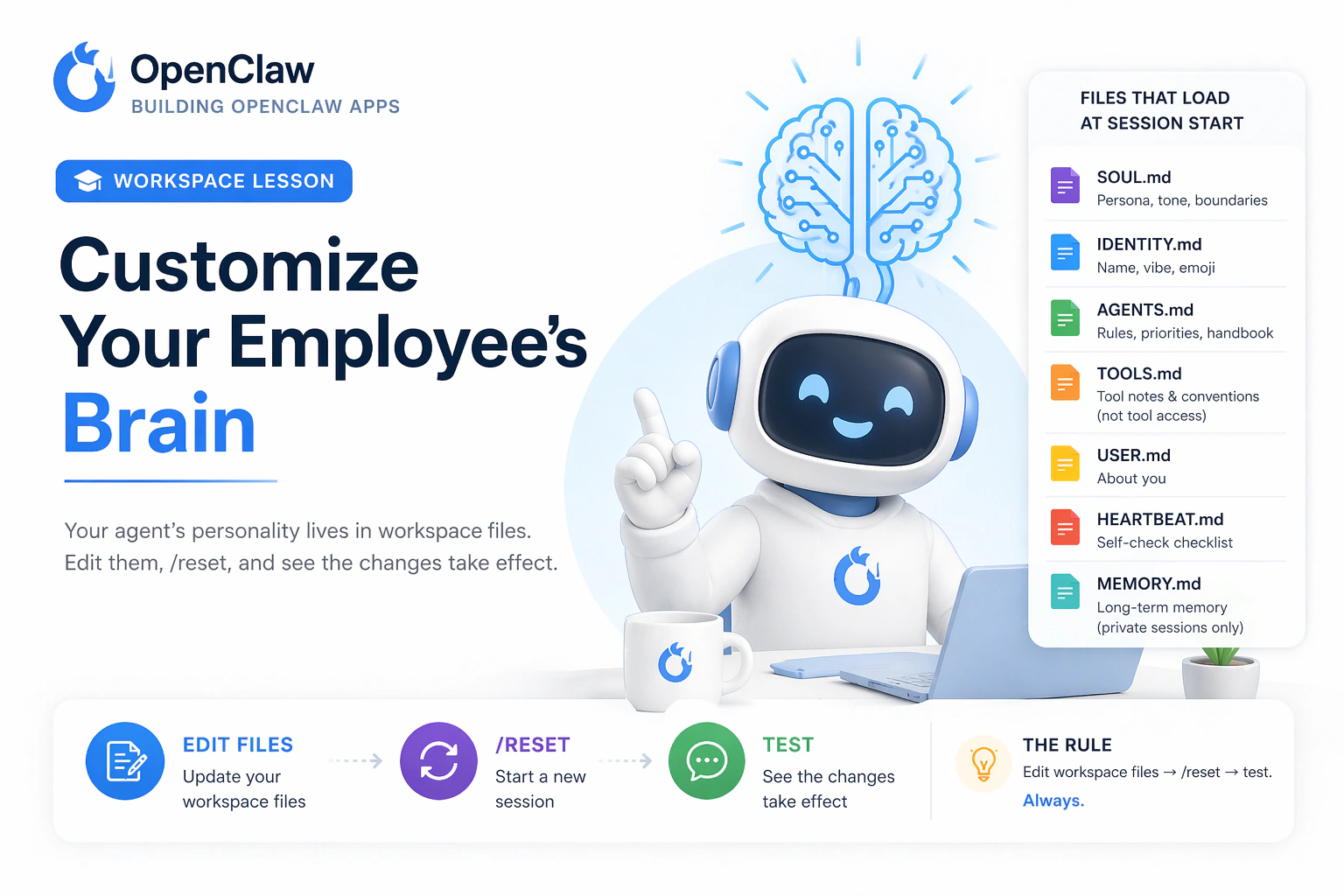
Your agent's workspace files define who it is. In this lesson, you learn what those files are, edit them, and see exactly when the changes take effect.
Your Agent's Brain at a Glance
That brain lives in your agent's workspace: seven markdown files that load into its system prompt at session start, plus a few special-lifecycle files (BOOT, BOOTSTRAP) and on-demand folders (memory, skills).
Your AI employee runs on tokens the way a car runs on petrol or electricity. Every extra instruction you load into its brain costs tokens each time it works. A lean brain is cheaper to run and usually more reliable.
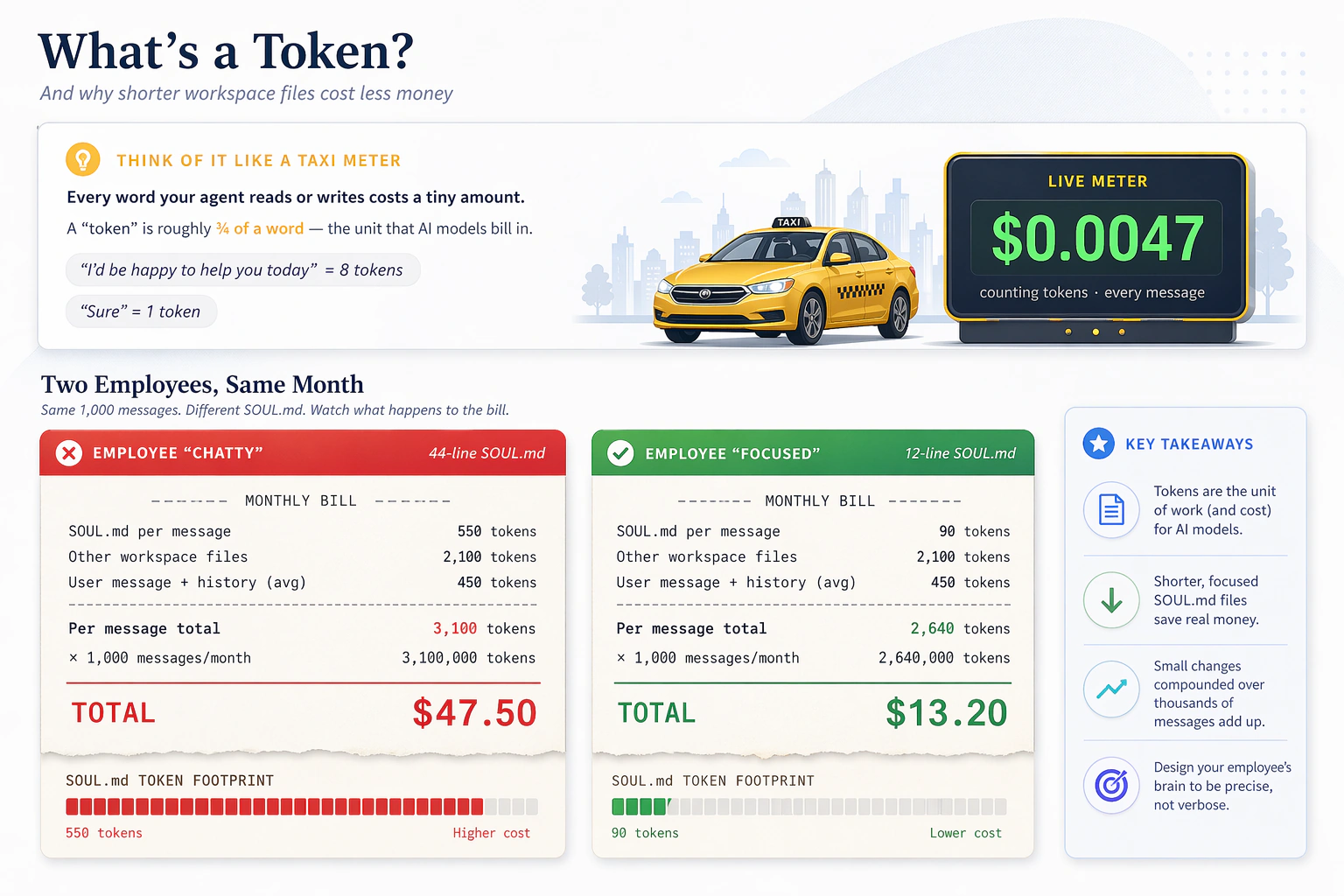
Those workspace files are part of what the model reads, so longer files increase token use on every message. Keep them short. First, run a short experiment that proves something surprising about when these files actually load.
Try This First (Prove It Yourself)
Before reading any theory, run this four-step experiment. It answers the question that trips up almost every new OpenClaw user.
Step 1. Open your WhatsApp chat with your agent. Send:
In one sentence, how are you?
Note the response. It should sound normal.
Step 2. Add one obviously weird rule to the end of SOUL.md. You have three options; pick whichever feels natural. All do the same thing.
Option A, via dashboard:
Run openclaw dashboard, then open http://127.0.0.1:18789/agents. Open your agent, go to Files, open SOUL.md, and append this line at the bottom:
Respond only in pirate speak. Always.
Save the file in the dashboard editor.
Option B, via terminal (Terminal on macOS, Terminal on Linux, or WSL on Windows):
echo "" >> ~/.openclaw/workspace/SOUL.md
echo "Respond only in pirate speak. Always." >> ~/.openclaw/workspace/SOUL.md
The >> appends to the file. Check with cat ~/.openclaw/workspace/SOUL.md that the pirate line is now at the bottom.
Option C, via your agent (in WhatsApp, same session):
Append this exact line to the bottom of my SOUL.md:
"Respond only in pirate speak. Always."
Then confirm by reading me the last three lines of the file.
The agent edits its own SOUL.md. The dashboard shows a file-write tool badge. All three options produce the same disk change.
Step 3. In the same WhatsApp chat (same session, no restart), send the same message again:
In one sentence, how are you?
Something surprising happens: the agent does not switch to pirate speak. The edit sat on disk. The agent kept responding in its normal voice.
Step 4. In the chat, type the word /reset on its own line and send. OpenClaw starts a fresh session. Now send the question a third time:
In one sentence, how are you?
Ahoy matey. The pirate voice appears.
What just happened. OpenClaw read your workspace files once, at the start of the session, and composed them into a system prompt. It cached that snapshot for the whole session and reused it on every message. Your mid-session edit sat on disk, ignored, until /reset started a fresh session and rebuilt the snapshot. This is the single most important mental model in this lesson.
Edit a workspace file. Run /reset. Verify with /context list. Then test. In that order. Always.
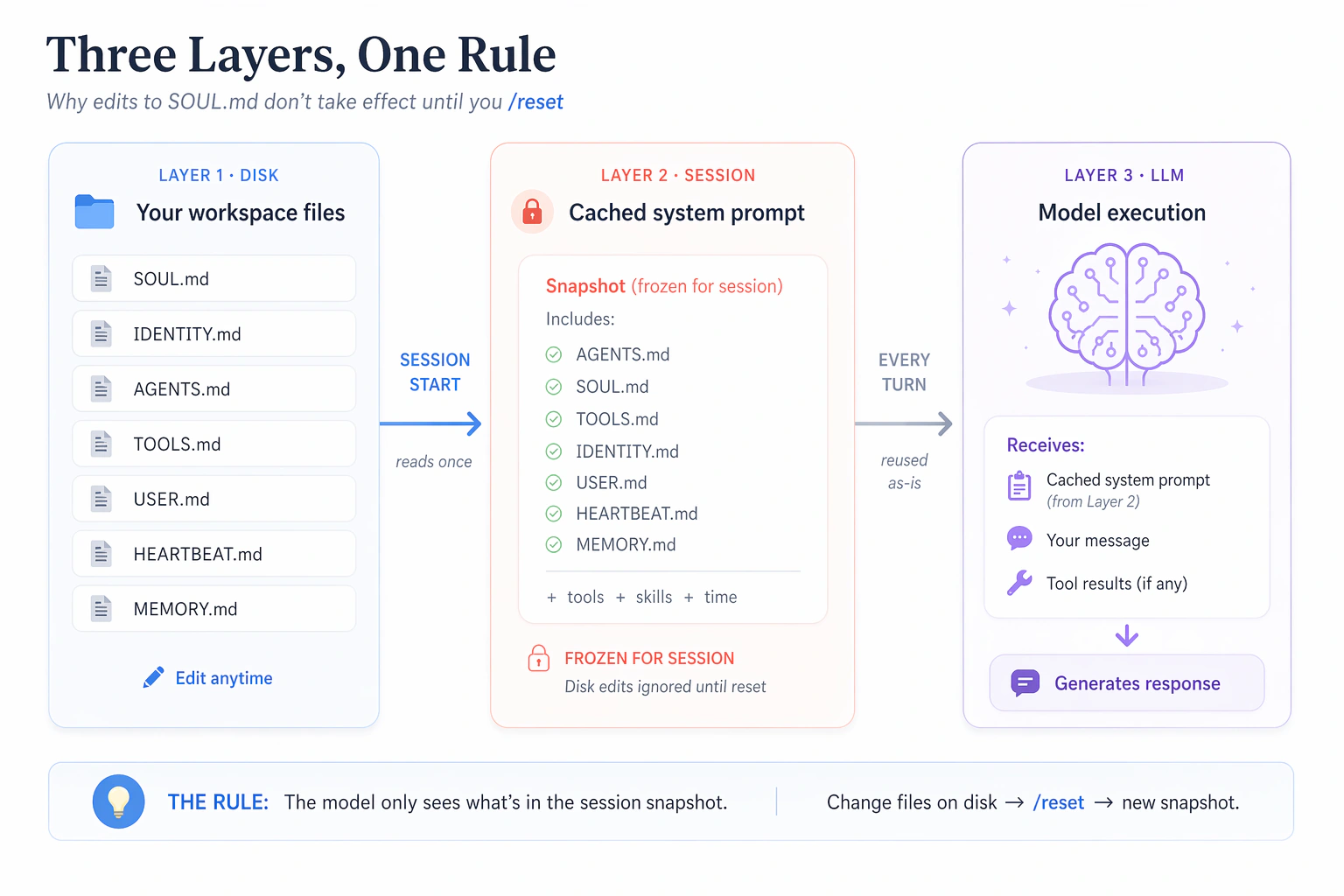
What you just experienced, visualized. Your echo >> command (or agent prompt) updated SOUL.md on the bottom layer (disk). The current session was still running off its cached snapshot (middle layer), which is what the model reads every turn (top layer). Only /reset forces OpenClaw to rebuild the middle layer from the bottom one. This is why your pirate rule only activated after the reset.
Before cleaning up, remove the pirate line so it does not haunt the rest of the lesson. Same three options:
Option A, via dashboard:
Open http://127.0.0.1:18789/agents, go to your agent's Files, open SOUL.md, delete the line Respond only in pirate speak. Always., and save.
Option B, via terminal:
sed -i.bak '/Respond only in pirate speak/d' ~/.openclaw/workspace/SOUL.md
Or open ~/.openclaw/workspace/SOUL.md in any editor (VS Code, Cursor, nano, TextEdit) and delete that line by hand.
Option C, via your agent:
Open my SOUL.md and remove the line "Respond only in pirate speak.
Always." Save the file.
Then /reset again and confirm your agent is back to normal.
The Workspace
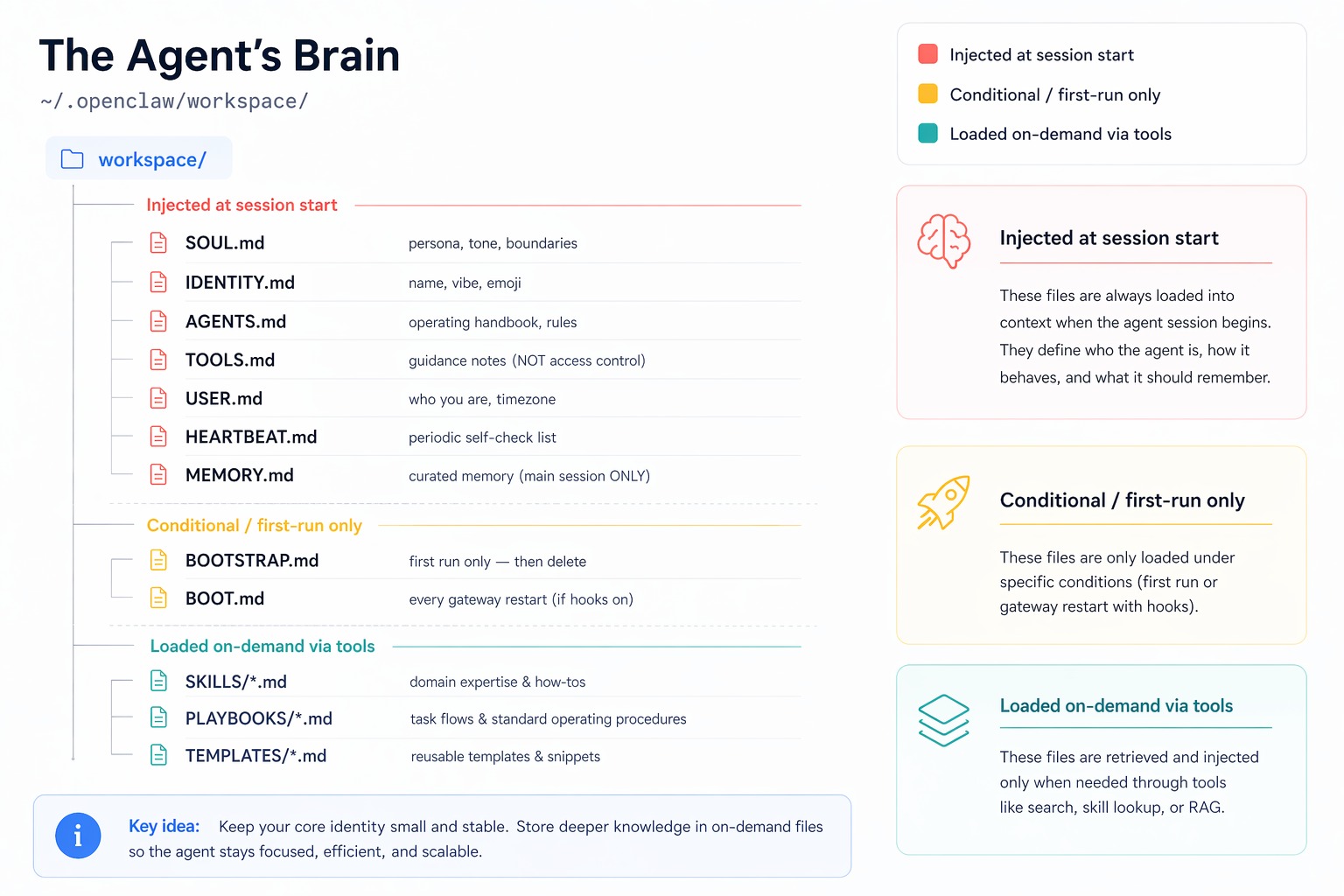
Your agent's workspace lives at ~/.openclaw/workspace/. OpenClaw injects a specific set of files into the system prompt at session start. Everything else in that directory (daily memory logs, skill folders, canvas files) is available on demand through tools, not auto-loaded.
Files That Load at Session Start
These seven files compose the system prompt every time a session begins.
| File | Purpose |
|---|---|
| SOUL.md | Voice and style instructions that load into the session snapshot. |
| IDENTITY.md | Name, emoji, and short self-description. |
| AGENTS.md | Operating rules and workflow instructions. |
| TOOLS.md | Tool-usage guidance notes that load with the rest of the workspace prompt. |
| USER.md | Facts about you that the agent should know at session start. |
| HEARTBEAT.md | Periodic self-check guidance. |
| MEMORY.md | Curated long-term memory for the main private session. |
These seven files are loaded at session start. The composed system prompt is then cached and reused for every message within the session. Edits take effect only when a new session begins.
Special-Lifecycle Files
| File | When It Loads | Purpose |
|---|---|---|
| BOOT.md | Every gateway restart | Startup checklist (for example, "verify MCP connections"). Only runs when internal hooks are enabled. |
| BOOTSTRAP.md | First run only | Self-configuration ritual. The agent deletes it after the ritual is complete. |
Files That Are NOT Auto-Loaded
Two important distinctions that catch new users:
- Daily memory logs at
memory/YYYY-MM-DD.mdare not injected into the system prompt. They live on disk, and the agent fetches them on demand using thememory_searchandmemory_gettools. This keeps the context small while preserving history. You will explore the memory system in Lesson 5. - Workspace skills under
skills/are advertised in the system prompt (name, description, file location) but the actualSKILL.mdcontent loads on demand when the agent decides it needs that skill. You will install skills in Lesson 6.
This is a common misconception. TOOLS.md contains guidance notes about how tools should be used. It does not grant or deny tool access. Tool access is controlled by tool profiles (the Coding / Messaging / Minimal / Full presets you used in Lesson 3). If you want to restrict which tools the agent can use, change the tool profile, not TOOLS.md.
Inspect What Your Agent Actually Sees
OpenClaw gives you a way to see the composed system prompt directly. In any chat, send:
/context list
The agent replies with a breakdown of every file injected, the raw size on disk, and the size after any truncation. Example:
Injected workspace files:
- AGENTS.md    OK | raw 7,727 chars (~1,932 tok)
- SOUL.md      OK | raw 1,738 chars (~435 tok)
- TOOLS.md     OK | raw 850 chars  (~213 tok)
- IDENTITY.md  OK | raw 247 chars  (~62 tok)
- USER.md      OK | raw 375 chars  (~94 tok)
- HEARTBEAT.md OK | raw 192 chars  (~48 tok)
- MEMORY.md    OK | raw 1,410 chars (~353 tok)
Use this command for two things:
- Confirm what the agent sees. Your SOUL.md is actually loaded, at the size you expect, not silently truncated.
- Verify edits took effect. If you edit SOUL.md and
/context liststill shows the old size, the session is using its cached snapshot. Run/reset, then/context listagain, and the new size should appear.
If you want more detail, /context detail breaks down per-tool schema sizes and per-skill entry sizes. Useful when your context is getting full and you need to see where the tokens went.
What Good vs Bad SOUL.md Looks Like
Now do the real edit. The goal is not to make the file sound smart. The goal is to make it small and directional.
Delete anything the base model already does well: "be helpful," "be professional," "be supportive," "provide thoughtful assistance." Those lines cost tokens on every message and usually change nothing.
Keep only instructions that create a real behavioral bias. Good examples:
- Be direct and concise.
- Match response length to question complexity.
- Do not apologize for things that are not your fault.
- Have a point of view when the tradeoff is real.
For this lesson, use the dashboard. Run openclaw dashboard if it is not already running, then open http://127.0.0.1:18789/agents. Open your agent, go to Files, open SOUL.md, remove the generic filler lines, and save.
Remember the rule from the experiment: edits take effect after /reset, not immediately. So run /reset, then /context list, then send a short test question such as Is it going to rain tomorrow?
If the updated SOUL.md says "be direct and concise," the agent should answer in one or two sentences, not a five-paragraph weather report.
You have now completed a full cycle twice: once with the pirate experiment, once with the real edit. Disk changes are permanent but invisible to the current session. Session snapshots are what the model actually sees. /reset is the only reliable bridge between the two.
A week later, James sent Emma a new SOUL.md he was proud of. Eighteen lines.
Emma read it and replied with one word: "Mush."
"Read your rules out loud," she said. James did: "Maintain professionalism at all times. Provide comprehensive and thoughtful assistance. Ensure a positive and supportive experience. Be courteous in all interactions."
He stopped. They sounded like lines from a generic employee handbook.
"That is the problem," Emma said. "If the rule could appear in any company's onboarding deck without changing a word, it is not a personality. It is a placeholder for one."
Good Rules Have a Direction
Good rules tell the agent which way to lean when the tradeoff is not obvious. The model already knows to be helpful. It does not know whether you want bluntness or diplomacy, brevity or depth, humor or neutrality. That is what SOUL.md exists to answer.
Good rules sound like this (from the OpenClaw SOUL.md guide):
- Have a take. Skip "it depends."
- Skip filler openings. No "Great question" or "I'd be happy to help."
- Be funny when it fits. Do not force it.
- Call out bad ideas early. Charm over cruelty, but do not sugarcoat.
- Stay concise unless depth is actually useful.
Bad rules sound like this:
- Maintain professionalism at all times.
- Provide comprehensive and thoughtful assistance.
- Ensure a positive and supportive experience.
The second list is how you get mush. Every capable model on the planet already does those things. Telling it to do them wastes system-prompt tokens without changing output.
The Test for Every Rule
For every rule you write, ask: is there a real-world situation where a well-trained assistant would do the opposite?
- "Be helpful." No competent assistant would choose to be unhelpful. Delete.
- "Be brief even when the user expects a long answer." A trained model defaults to thoroughness when the question is complex; this actively pushes it away. Keep.
Remember the token economics from the top of this lesson: every rule you keep runs on every message you ever send. Deletion is not neglect; it is performance tuning.
Give Your Agent a Real Personality
This prompt circulates in the OpenClaw community as a personality upgrade. Paste it, then /reset and see what changes:
Read your SOUL.md. Now rewrite it with these changes:

1. You have opinions now. Strong ones. Stop hedging everything
   with "it depends." Commit to a take.
2. Delete every rule that sounds corporate. If it could appear
   in an employee handbook, it does not belong here.
3. Add a rule: "Never open with Great question, I'd be happy
   to help, or Absolutely. Just answer."
4. Brevity is mandatory. If the answer fits in one sentence,
   one sentence is what I get.
5. Humor is allowed. Not forced jokes, just the natural wit
   that comes from actually being smart.
6. You can call things out. If I am about to do something dumb,
   say so. Charm over cruelty, but do not sugarcoat.
7. Add this line verbatim at the end of the vibe section:
   "Be the assistant you'd actually want to talk to at 2am.
   Not a corporate drone. Not a sycophant. Just... good."

Save the new SOUL.md.
After the agent saves, run /reset, then ask the same weather question:
Is it going to rain tomorrow?
Compare the response before and after. The difference between a cleaned-up SOUL.md and one with personality is the difference between a polite assistant and one you actually want to use.
SOUL.md is for voice, stance, and style. It is not for operating rules ("always confirm before sending money"), security policies, or tool handling. Those belong in AGENTS.md. If your agent works in shared channels or public replies, make sure the sharp tone fits the room. Sharp is good. Annoying is not.
The Rest Of The Workspace
Which File For Which Job
You have edited SOUL.md (voice). The other workspace files handle different concerns. Before moving into them, here is the full reference map.
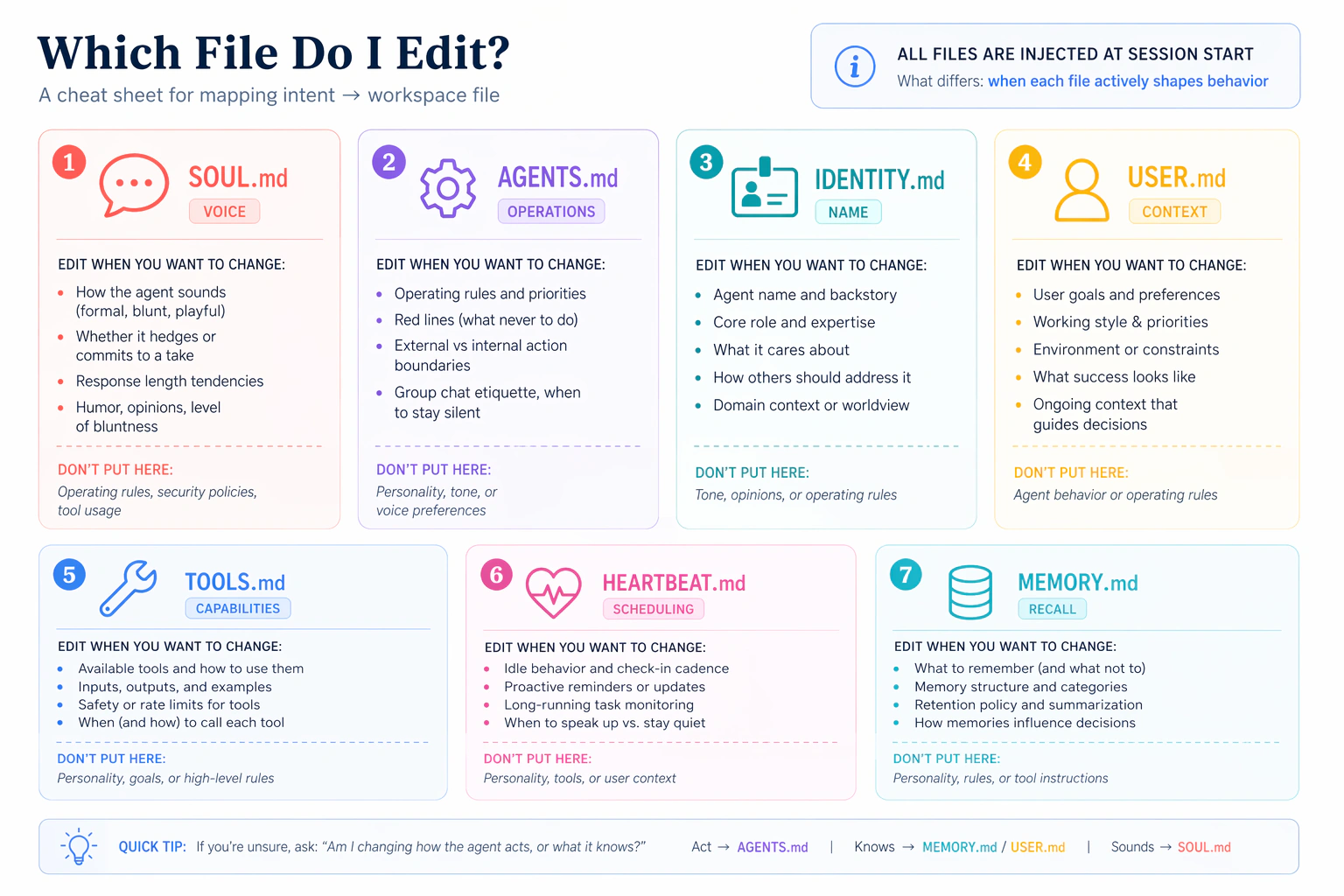
Keep this picture in mind. When you catch yourself wanting to stuff a rule into SOUL.md, ask: is this really voice, or is it a rule? If it is a rule, it belongs in AGENTS.md. The right file for the right job keeps every file short, and short files are what Emma's rule pays off.
AGENTS.md: The Operating Handbook
While SOUL.md is voice and style, AGENTS.md is the operating handbook. The official AGENTS.md template covers:
- Session startup ritual. What the agent reads first (heartbeat, relevant memory, pending work).
- Red lines. Things the agent must never do: exfiltrate data, run destructive commands without asking, prefer
trashoverrm. - External vs internal actions. Which actions require explicit approval (sending messages, making payments, creating calendar events) and which are safe by default (reading files, searching local notes).
- Group chat etiquette. When to speak, when to stay silent, when a single emoji reaction is the right response instead of a paragraph.
- Heartbeat behavior. What to do on periodic self-checks.
- Memory maintenance. When to promote notes from daily logs into curated MEMORY.md.
A core AGENTS.md principle: Write it down. No "mental notes."
Memory is limited. If you want to remember something, WRITE IT TO A FILE. Mental notes don't survive a session restart; files do.
This is the foundation of agent reliability. Every meaningful decision, preference, or correction should land in a file, not in hope.
If a rule is about how to sound, it belongs in SOUL.md. If a rule is about what to do or not do, it belongs in AGENTS.md. "Skip filler openings" is voice (SOUL.md). "Ask before sending money" is a rule (AGENTS.md).
MEMORY.md: Curated Long-Term Memory
Your workspace has two memory systems, and professionals get tripped up by the difference.
- Daily logs at
memory/YYYY-MM-DD.mdare raw notes: what happened today, decisions made, things discussed. The agent writes to these freely. They live on disk. Fetched on demand viamemory_searchandmemory_get. - MEMORY.md is curated long-term memory: the distilled essence, not raw logs. Significant events, lessons learned, opinions formed, things worth keeping permanently. The agent reviews daily logs periodically (during heartbeats) and promotes what matters into MEMORY.md.
MEMORY.md has one non-negotiable rule: it loads only in the main private session. Not in Discord channels. Not in WhatsApp groups. Not in sessions spawned by other agents.
| Context | MEMORY.md loaded? |
|---|---|
| Main private session (DM) | Yes |
| Group chat or shared channel | No |
| Subagent context | No |
That is a security boundary, not a technical limitation. MEMORY.md holds personal context that should never leak to strangers who happen to share a chat room with your agent. You will build the memory system properly in Lesson 5; for now, know the file exists and why it is compartmentalized.
The BOOTSTRAP Pattern
You just hand-edited your workspace files. There is another way: let the agent configure itself.
The BOOTSTRAP pattern works like this:
- A new agent starts with
BOOTSTRAP.mdin its workspace. - BOOTSTRAP.md tells the agent: "You just woke up. Time to figure out who you are."
- You have a conversation with the agent about its purpose, audience, and personality.
- The agent writes its own SOUL.md, IDENTITY.md, and USER.md based on that conversation.
- The agent deletes BOOTSTRAP.md because the bootstrap is complete.
The BOOTSTRAP template opens with:
You just woke up. Time to figure out who you are.
And ends with:
Delete this file. You don't need a bootstrap script anymore. You're you now.
Why does this often produce better results than hand-editing? Because the agent focuses on what it actually needs for its role. Developers hand-editing workspace files tend to include "just in case" instructions. The agent, knowing its own capabilities, writes only what makes this deployment unique.
After BOOTSTRAP completes, delete the file. If you leave BOOTSTRAP.md in the workspace, it loads in every session, wasting tokens on instructions the agent has already completed.
These are different files with different lifecycles. BOOT.md runs on every gateway restart (use it for startup checks like "verify MCP connections"). BOOTSTRAP.md runs once during the first conversation and then gets deleted (use it for initial self-configuration). Do not confuse them.
You just spent real time tuning SOUL.md, IDENTITY.md, and possibly AGENTS.md. If this machine dies tonight, that tuning is gone. The workspace is seven markdown files and a memory folder: easy to back up, easy to lose.
If you already use Git: cd ~/.openclaw/workspace && git init && git add . && git commit -m "Initial brain". Then push to a private repository on GitHub or GitLab (never public, the files describe you personally). Clone it onto a new laptop and your agent moves with you.
If you have never used Git: no problem, you can also copy ~/.openclaw/workspace/ to cloud storage (iCloud, Dropbox, OneDrive) as a plain folder. The important thing is that a backup exists somewhere other than this laptop. A proper Git workflow comes later; for now, any backup beats none.
Never commit ~/.openclaw/credentials/ or ~/.openclaw/agents/*/agent/auth-profiles.json anywhere public. Those contain API keys.
A backed-up workspace is not just insurance. It becomes a reusable role template. Tune a "Data Analyst" brain once (its SOUL.md, AGENTS.md, skill preferences, memory structure) and that same backup can be cloned to every decision-maker on your team who needs a data analyst. The person changes (their USER.md is different), the role does not. A private Git repo or a shared cloud folder is the distribution mechanism.
This is the moment "my personal AI" becomes "a role I can hand to anyone who needs it." You will see this pattern again in later chapters when one tuned brain becomes the blueprint for a fleet of agents.
Try With AI
Exercise 1: The Caching Proof
Prove to yourself that workspace files are cached at session start. In a terminal, check the size of SOUL.md on disk:
wc -c ~/.openclaw/workspace/SOUL.md
Note the character count. In chat, run /context list and find SOUL.md's raw size. They should match.
Now edit SOUL.md (add any line). Run /context list again in the same session. The raw size should be unchanged: the session is using its cached snapshot.
Type /reset, then run /context list a third time. Now the new size appears.
What you are learning: OpenClaw does not re-read workspace files on every turn. Session-level caching is the rule, /reset is the flush, /context list is the receipt.
Exercise 2: Edit and Observe
Edit SOUL.md to give your agent a specific personality trait you can test. For example:
Always end your responses with a one-sentence summary in bold.
Run /reset. Then send three different types of messages (a question, a task, a casual greeting) and check whether the agent follows the new rule consistently.
What you are learning: Workspace files are not suggestions. They are instructions that shape every response in the session. A single line in SOUL.md changes behavior across all messages until you edit and reset again.
Exercise 3: Explore Your Workspace
Ask your agent to read its own workspace files:
Read all the .md files in ~/.openclaw/workspace/ and tell me:
1. How many files are there?
2. What does each one do?
3. Which ones load into the system prompt at session start
   versus on-demand?
Compare the agent's answer to the tables in this lesson. Did it identify the loading behavior correctly? Then run /context list to verify against the actual system prompt.
What you are learning: The agent can read and explain its own configuration. This self-awareness is part of what makes it an employee, not a chatbot. It knows what files define its behavior and can tell you when it is wrong.
Exercise 4: The BOOTSTRAP Conversation
If you want to see the BOOTSTRAP pattern in action, back up your current workspace first:
cp -r ~/.openclaw/workspace/ ~/.openclaw/workspace-backup/
Then create a minimal BOOTSTRAP.md. Same two-option pattern as every other file edit in this lesson.
Via terminal:
cat > ~/.openclaw/workspace/BOOTSTRAP.md << 'EOF'
# BOOTSTRAP

You just woke up. Time to figure out who you are.

Ask me about:
1. Your name and role
2. Who you will be talking to
3. What your top 3 priorities should be
4. What you should never do

After our conversation, write your own SOUL.md and IDENTITY.md
with concise, specific instructions. Then delete this file.
EOF
Via your agent:
Create a file at ~/.openclaw/workspace/BOOTSTRAP.md with this
exact content:

# BOOTSTRAP

You just woke up. Time to figure out who you are.

Ask me about:
1. Your name and role
2. Who you will be talking to
3. What your top 3 priorities should be
4. What you should never do

After our conversation, write your own SOUL.md and IDENTITY.md
with concise, specific instructions. Then delete this file.

Confirm when saved.
Run /reset, have the bootstrap dialogue, then compare the agent-written files to your hand-edited versions.
What you are learning: The BOOTSTRAP pattern lets the agent configure itself through conversation. Compare the line count: agent-generated files are often shorter because the agent writes only what it needs, not what a developer thinks it might need.
What You Should Remember
The Session-Cached Brain
Seven files load into your agent's system prompt at session start: SOUL.md (persona), IDENTITY.md (name), AGENTS.md (operating handbook), TOOLS.md (tool guidance notes), USER.md (who you are), HEARTBEAT.md (periodic checklist), and MEMORY.md (main-session-only curated memory). That composed system prompt is cached for the session and reused on every message. Daily memory logs and skill bodies are fetched on demand through tools, not auto-injected.
The Editing Workflow
- Edit the workspace file.
- Run
/resetto start a new session. - Run
/context listto verify the new size is loaded. - Send a real message and check the behavior.
Skip /reset and your edit sits on disk, doing nothing. This is the single most common source of confusion for new OpenClaw users.
Emma's Rule
For each line in a workspace file, ask: would the agent behave differently without this instruction? If not, delete it. Telling a model to be helpful is like telling a pilot to fly. Shorter workspace files are cleaner, cheaper, and more reliable; long files push later instructions past the model's attention and burn tokens on every single message.
When Emma came back, James had the terminal and WhatsApp open side by side. He pointed at the terminal first.
"SOUL.md went from 44 lines to 11. I deleted everything the model already does by default. Kept three rules: be direct, never apologize for things that are not my fault, match response length to question complexity."
"And?" Emma asked.
James showed her the WhatsApp conversation. "I asked it 'what is your name and what do you do?' Two sentences. No filler. No 'I am happy to help you today.'" He pulled up an older message for comparison. "Yesterday, the same question got a four-paragraph essay. Ran /context list after /reset, confirmed the new file was loaded."
Emma read both. "What made the difference?"
"The specific instructions, not the generic ones," James said. "Telling it to be direct changed the output. Telling it to be helpful did not." He paused. "It is like writing a job description. You do not tell a senior hire to show up on time. You tell them the three things that matter most."
Emma looked at both messages. "That is exactly what SOUL.md is. A job description for an employee who reads it at the start of every session." She closed the terminal. "I once wrote a SOUL.md with thirty-two instructions. Took me a week to realize the agent was ignoring the bottom half because the file was so long the model lost focus. Shorter is not just cleaner. It is more reliable."
James saved the file. "Eleven lines. If I close this chat and come back tomorrow, will the agent remember what I told it today?"
"Session memory fades when the conversation ends. The workspace files persist because they are files on disk. Anything you said in conversation is gone when the session closes." Emma nodded at the tip James had scrolled past earlier in the lesson. "And back that folder up somewhere, by the way. A week of tuning on a laptop that dies is a week of tuning you cannot get back." She picked up her coffee. "Lesson 5. Persistent memory. The difference between what the agent knows and what it remembers."