Glossary: AI Terms for Beginners
You don't need a computer science degree to read this book. But you do need to speak the language. This glossary defines every important term you'll encounter, using plain English, real-life examples, and everyday analogies.
How to use this page: Start with the Top 30 Terms: these appear on almost every page of the book. Then use the full glossary as a reference. Terms are grouped by topic, with book-specific vocabulary first. Use
Ctrl+F(orCmd+Fon Mac) to search for any term.
The AI Landscape at a Glance
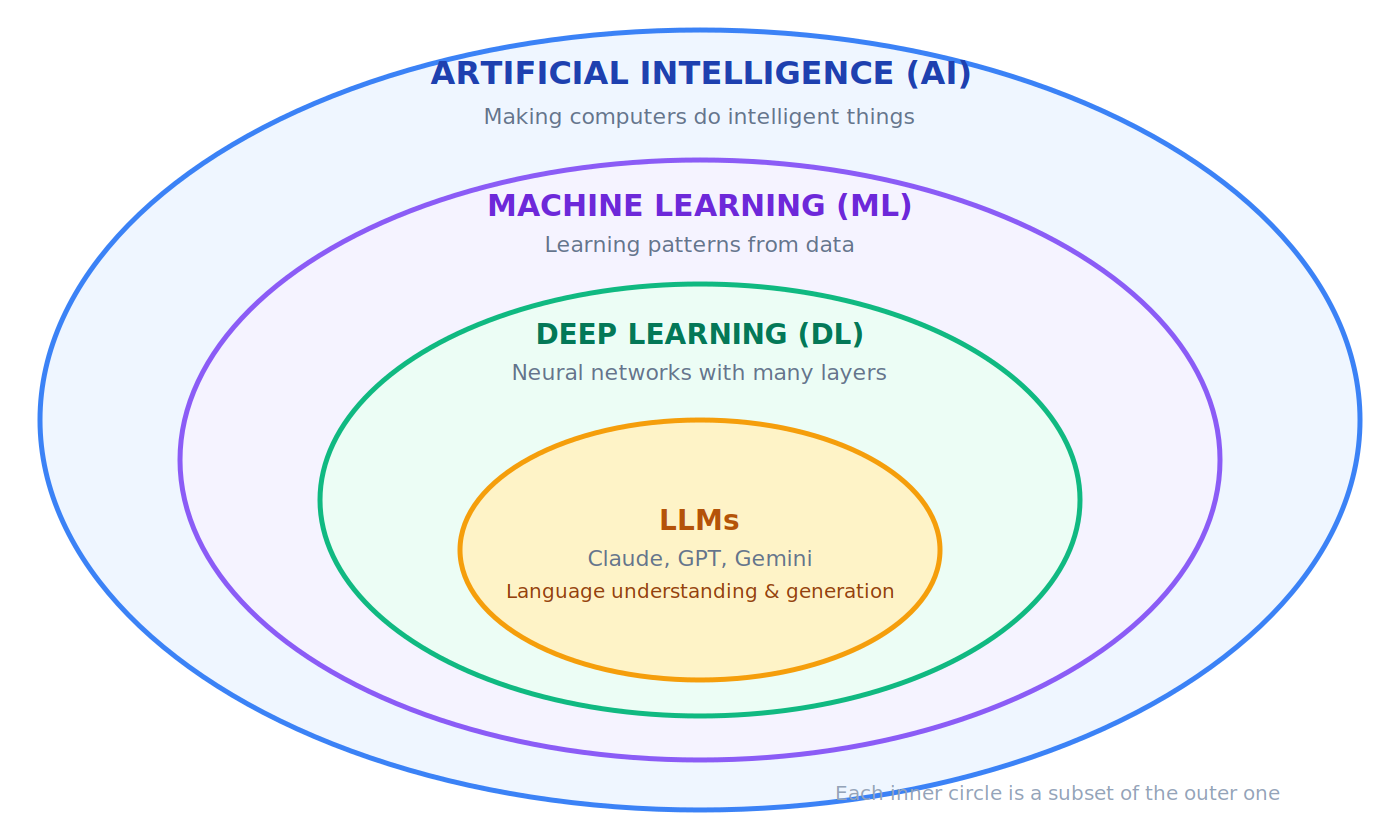
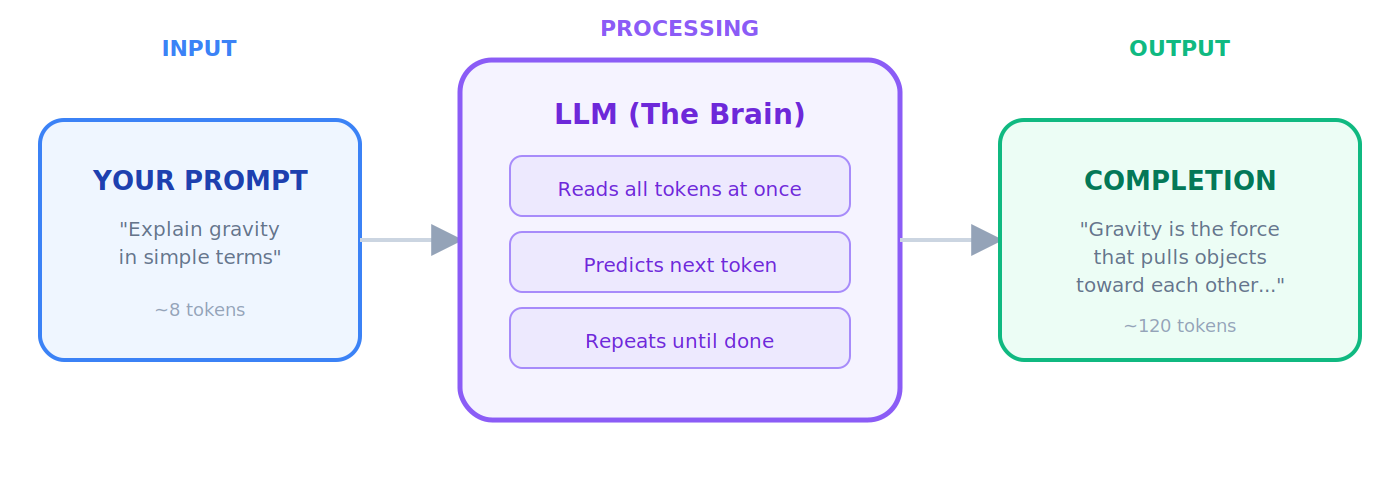
Before diving into individual terms, here's how the major concepts relate to each other:
Top 30 Terms You Must Know First
These appear on almost every page. Read these before you open Chapter 1.
Note: terms related to agents as buyers (ACP, AP2, x402, MPP, authority envelopes, signed mandates) are covered in Section 11 and not included in Top 30 terms.
1. AI (Artificial Intelligence): Making computers do things that normally require human intelligence.
🔹 When your phone's keyboard predicts the next word you're typing, that's AI.
2. LLM (Large Language Model): A giant AI system trained on billions of pages of text, capable of understanding and generating human language and code. Claude, GPT, and Gemini are LLMs.
💡 Think of an LLM as a research assistant who has read every book in the world's largest library. You ask a question, they answer from everything they've read.
3. Agent (AI Agent): An AI that doesn't just answer questions. It takes action, makes plans, and gets things done on its own.
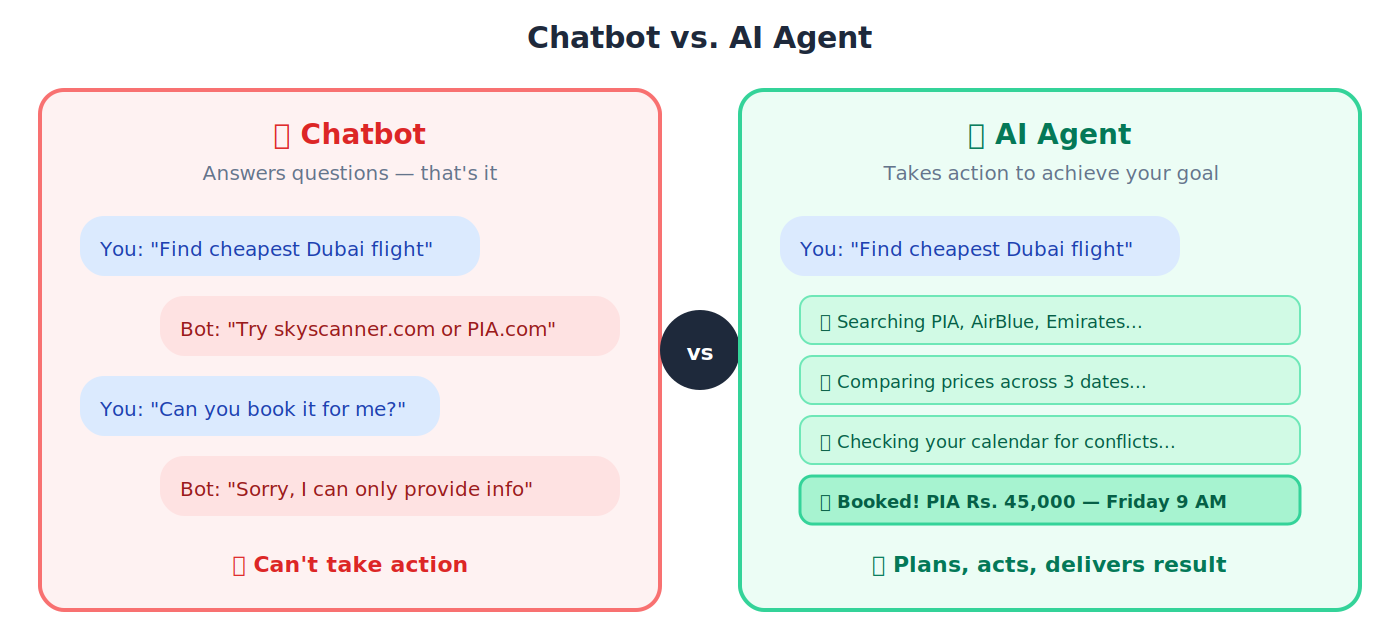
🔹 A chatbot answers "What's the cheapest flight to Dubai?" An agent actually searches airlines, compares prices, and books the ticket for you.
4. Agentic AI: The category of AI focused on building agents that plan, reason, and act autonomously. This is the frontier of AI in 2026 and the focus of this entire book.
🔹 Regular AI: you ask a question, you get an answer. Agentic AI: you give it a goal ("reduce customer churn by 15%") and it researches, plans, executes, and reports back, making decisions along the way.
5. Digital FTE (Digital Full-Time Equivalent): An "AI employee" that does the continuous work of a full-time human worker, 24/7, at a fraction of the cost. Also called an AI Worker in the thesis — same role, different register.
🔹 A Digital FTE for customer support handles 500 conversations per day, every day — doing the work of 5-10 human agents.
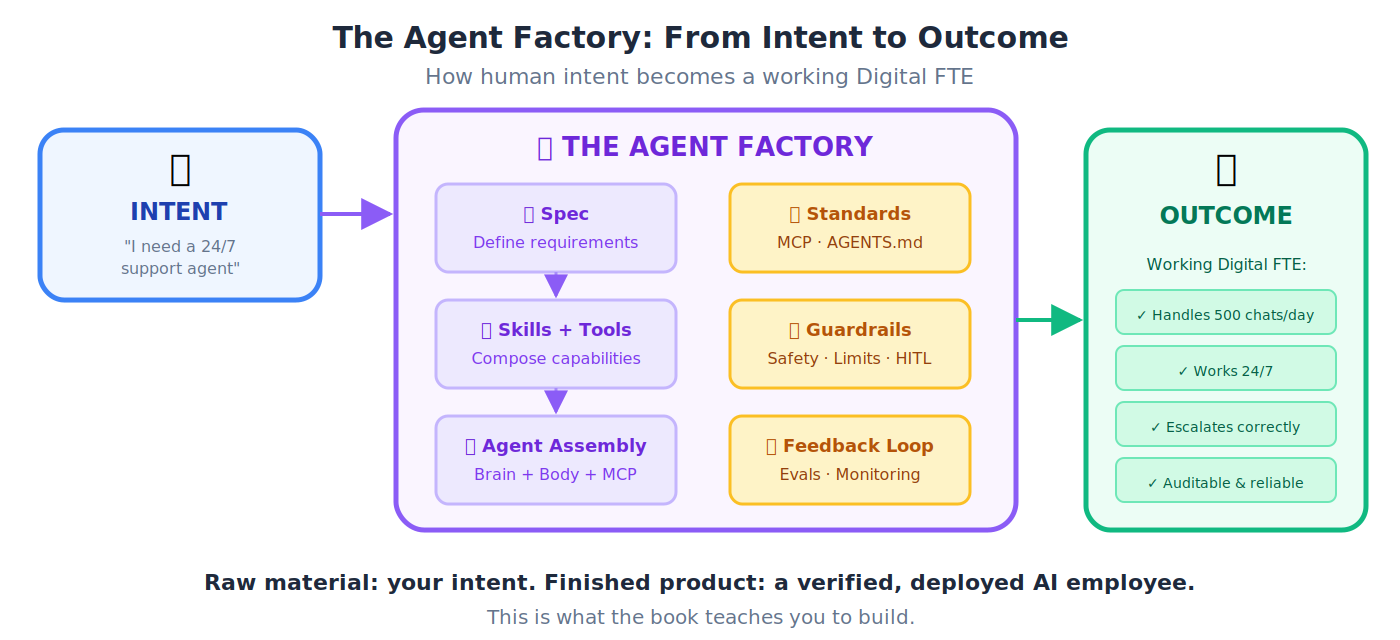
6. Agent Factory: The central concept of this book. The spec-driven, human-supervised, Claude-Code-powered process by which AI Workers are designed, manufactured, and deployed. Not a product you buy; a practice you adopt. The Agent Factory builds the AI-Native Company, and the AI-Native Company employs Digital FTEs.
💡 Like an assembly line: each station performs one specialized task, parts move through in order, and what emerges at the end is a finished product built to spec. The Agent Factory industrializes the making of AI employees.
7. Prompt: The instruction or question you type into an AI model.
🔹 "Summarize this report in three bullet points" is a prompt. Better prompts = better answers.
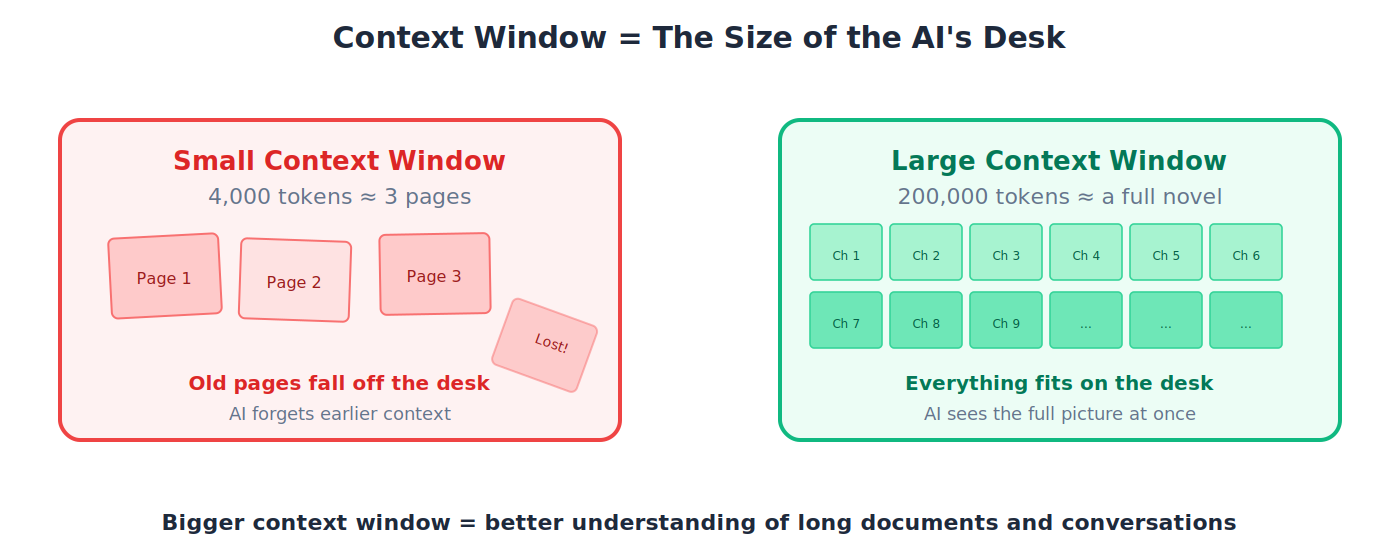
8. Context Window: The AI's "working memory": how much text it can read and think about at one time.
💡 A small context window is like a tiny desk where you can only spread out a few pages. Claude's large context window is like a huge conference table where you can lay out an entire novel at once.
9. Token: The basic unit of text an LLM reads. Roughly ¾ of a word. "I love biryani" ≈ 4 tokens.
🔹 You pay per token when using AI APIs. A full page of text ≈ 500-700 tokens.
10. Hallucination: When AI confidently generates something that isn't true.
🔹 You ask about a Supreme Court case and the AI invents a fake judgment with fake citation numbers, and presents it as fact. It sounds right, but it's fabricated.
11. Spec (Specification): A detailed blueprint describing exactly what you want built: goals, inputs, outputs, constraints.
💡 An architect's blueprint for a house. No builder starts by guessing. They follow the plan. In AI development, the spec is that plan.
12. Spec-Driven Development (SDD): Write the blueprint first, then let AI generate the code, tests, and documentation from that blueprint.
🔹 You write: "Build an API for a bookstore with endpoints for listing, adding, searching, and deleting books." Claude Code generates the entire application.
13. Claude Code: Anthropic's AI coding agent. You talk to it in the terminal and it reads your entire codebase, understands your project, and writes code.
🔹 You type "Add user authentication to my app": Claude Code reads your existing code, generates the auth module, writes tests, and integrates everything.
14. Cowork: Anthropic's desktop agent for non-coding knowledge tasks: documents, research, file management.
🔹 "Organize my Downloads folder by project and summarize all PDFs from this month." Cowork does it while you focus on other things.
15. MCP (Model Context Protocol): The universal standard that lets any AI agent connect to any external tool: databases, email, calendars, file systems. MCP is the protocol for agents calling tools. For the separate protocol family that handles agents paying for those tools, see Section 11: ACP, AP2, x402, and MPP.
💡 Before USB, every phone had a different charger. MCP is the "USB standard" for AI: one protocol that lets any agent plug into any tool.
16. API (Application Programming Interface): Rules that let different software programs talk to each other. APIs are how agents interact with the outside world.
💡 A restaurant menu is an API. You (client) look at the menu (docs), place an order (request), and the kitchen (server) delivers your food (response).
17. SDK (Software Development Kit): A pre-built toolkit for building applications on a specific platform.
💡 An SDK is like a LEGO set: pre-made pieces with instructions so you can build things quickly, instead of carving every piece from scratch.
18. Python: The most popular programming language in AI. Readable, versatile, and the primary language in this book.
🔹 Python reads almost like English:
if age > 18: print("Adult"). This readability is why the AI world chose Python.
19. Git: A system that records every change to your code: who changed what, when, and why. You can always go back to any previous version.
💡 "Track Changes" in Microsoft Word, but for entire software projects. Every edit is recoverable.
20. Docker: A tool that packages your app into a portable box (container) that runs identically anywhere: your laptop, a colleague's machine, or a cloud server.
💡 A shipping container. Whether it's on a truck in Karachi or a ship in the ocean, the contents inside are identical and self-contained.
21. Context Engineering: Designing the full information environment an agent receives. The #1 skill that separates a $2,000/month agent from one nobody wants.
💡 A Toyota factory has quality controls ensuring every car meets spec. Context engineering is quality control for your AI agents: ensuring consistent, reliable output.
22. Tool Use: An agent's ability to use external tools (searching the web, querying databases, sending emails) rather than just answering from memory.
🔹 You ask "What's the weather in Karachi?": an agent with tool use actually checks a weather service and gives live data. Without tool use, it would just guess.
23. Guardrails: Safety constraints that prevent an agent from doing things it shouldn't.
🔹 A financial agent has a guardrail: no transactions above Rs. 5,000,000 without human approval. Like the barriers on a motorway that keep cars from going off the road.
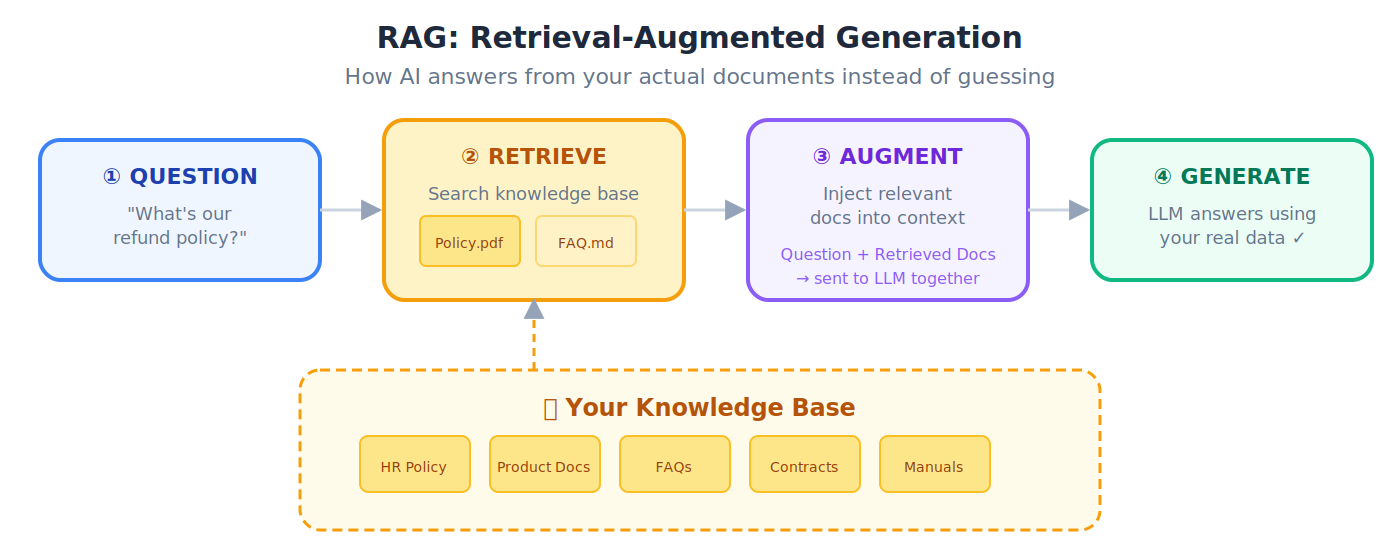
24. RAG (Retrieval-Augmented Generation): Giving AI access to external documents so it answers from facts, not from (potentially wrong) memory.
💡 Taking an open-book exam instead of a closed-book exam. The AI looks up facts in your documents before answering: much more accurate.
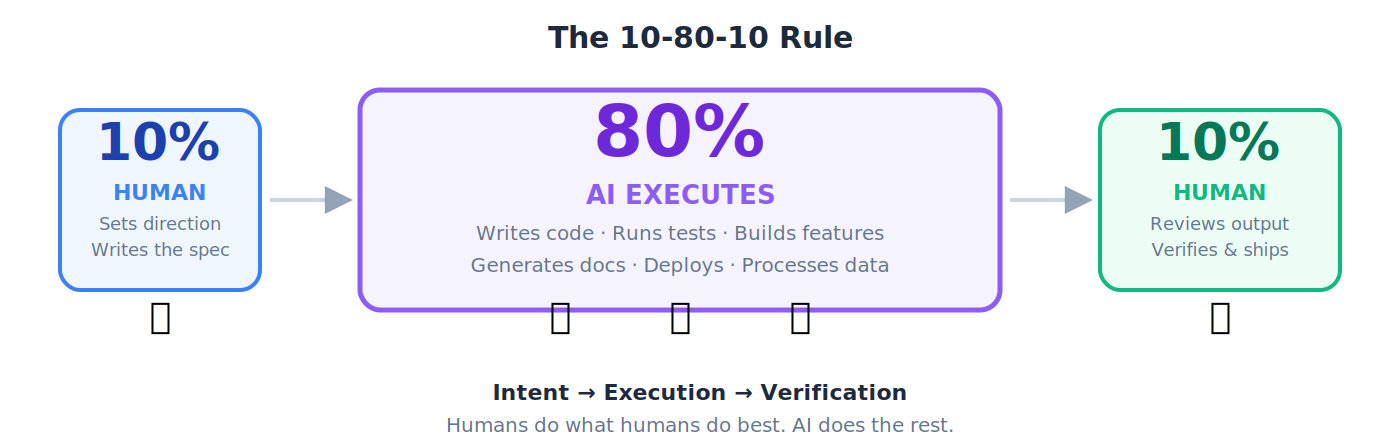
25. 10-80-10 Rule: The operating rhythm of the AI workforce: human sets direction (10%) → AI executes (80%) → human verifies (10%).
🔹 You write a project brief (10%), Claude Code builds the entire application (80%), you review, test, and approve (10%). The industry calls these two postures human in the loop (you approve each action) and human on the loop (the system acts, you watch and can intervene) — see HITL and HOTL in Section 5.
26. AGENTS.md / CLAUDE.md: Configuration files that tell your AI agent the rules of your project: coding standards, preferences, architectural decisions.
💡 The onboarding document you give a new employee: "Here's how we work. Here's our style. Here's what we never do." Loaded into every interaction.
27. Orchestration: Coordinating multiple agents to work together on a task.
💡 A cricket team captain positions fielders, sets bowling rotations, and adjusts strategy. They don't do everything themselves; they coordinate specialists toward a shared goal.
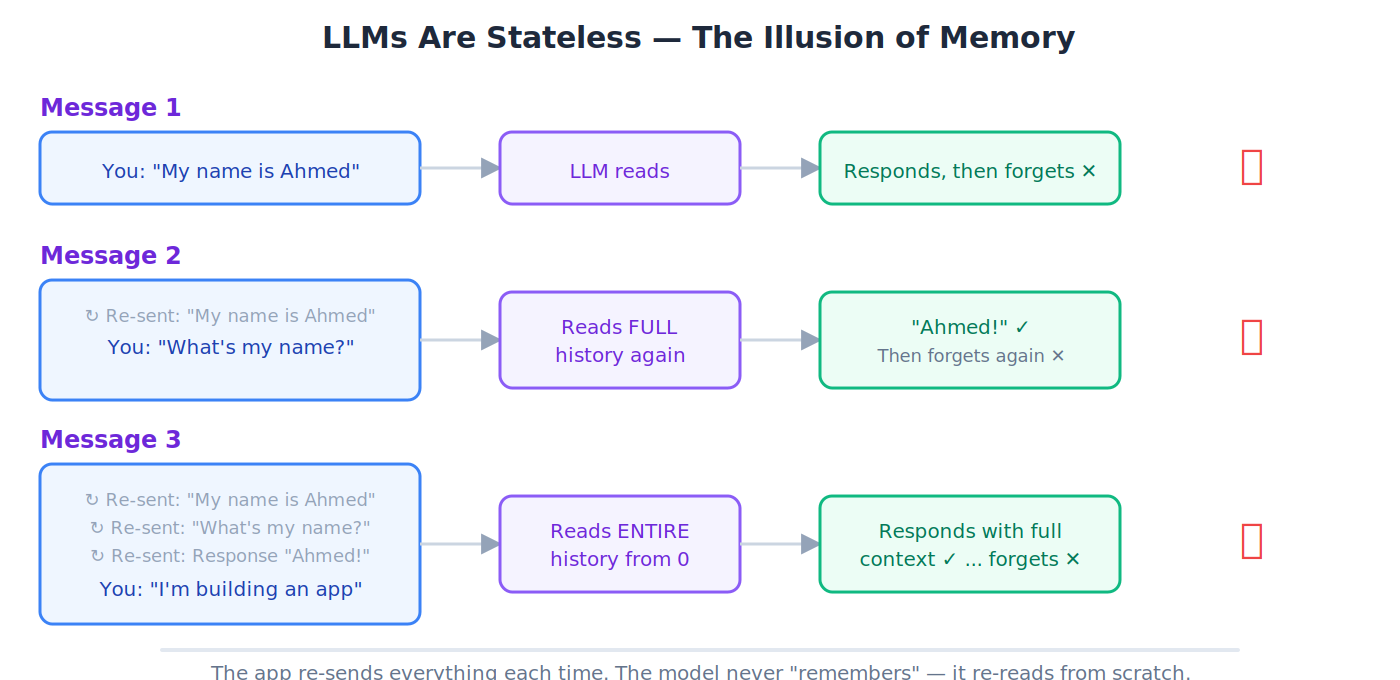
28. Stateless: The AI forgets everything between conversations. Every new chat starts from absolute zero.
💡 A shopkeeper with amnesia: every time you walk in, they greet you as a stranger, even if you were there 5 minutes ago. Chat apps create the illusion of memory by re-sending the full conversation each time.
29. Deployment: Making your application live and available to real users on the internet.
🔹 Your app works on your laptop. Deployment puts it on a cloud server so 10,000 people can use it simultaneously.
30. CI/CD (Continuous Integration / Continuous Delivery): Automatically testing and deploying code every time a developer makes a change.
🔹 A developer pushes code at 2 PM. Tests run automatically in 3 minutes. All pass. The new version is live by 2:10 PM: zero manual steps.
Architecture: The Runtime Stack
These terms name the components of the AI-Native Company that the Agent Factory produces. They appear throughout the architecture chapters and the thesis. Read them once here; you'll meet them again in every build.
💡 How the pieces fit together: The Agent Factory (the process) builds the AI-Native Company (the output). Inside that company, humans set direction from the Edge Layer, and Digital FTEs execute in the AI Workforce Layer. Paperclip manages the workforce. Each Digital FTE runs on a runtime engine of its choice. Triggers wake the system from the outside world.
AI Worker
The workforce of the AI-Native Company. Role-based agents that get hired, assigned, rostered, and retired. Same concept as Digital FTE and Digital Worker: the thesis uses AI Worker, the book uses Digital FTE. Pick whichever term fits your audience.
📌 Workforce vs. staff (load-bearing distinction): Only AI Workers are workforce. The delegate (OpenClaw) and the manager (Paperclip) are permanent staff, not workforce. Runtime engines are not staff at all; they are the skills the workforce runs on. When the thesis says agent, it means anyone in the building (staff or workforce). When it says AI Worker, it means the workforce specifically.
🔹 Example: A resume-screening AI Worker reads 200 resumes per day, scores them against a job spec, and hands the top 10 to a human recruiter. It's a Digital FTE inside the AI-Native Company's HR workforce — hired by Paperclip, rosterable, retirable.
AI-Native Company
The output of the Agent Factory. The running enterprise: a firm staffed by AI Workers (Digital FTEs), coordinated by a management plane, and directed by humans at the edge. The AI-Native Company is what you end up running. The book also calls this the Agentic Enterprise — same concept, business-facing name.
💡 Analogy: The Agent Factory is the process, like a method of building skyscrapers. The AI-Native Company is the skyscraper that method produces — the thing you actually run.
📌 The triad: Agent Factory (process) → AI-Native Company (output) → AI Workers (workforce inside the output). Three terms, three different roles. Not interchangeable.
Two-Layer Model
The architectural pattern that makes the Agent Factory thesis complete: humans set intent from the Edge Layer, AI Workers execute in the AI Workforce Layer, and specs are the contract language between them.
🔹 Example: A CEO tells their OpenClaw delegate (Edge Layer) to "run the weekly customer-churn report." The delegate hands the task to a Digital FTE in the AI Workforce Layer. The Digital FTE pulls the data, generates the report, and hands it back through the delegate to the CEO for verification.
Principal
The human at the apex of the runtime stack: the one who sets intent, defines the budget, draws the authority envelope, and owns the outcome. Invariant 1 of the thesis. Every legitimate chain of action originates with a principal; a system that acts without one is not autonomous, it is unowned (no liability, no alignment target, no budget owner, no judge of outcome).
🔹 Example: A CFO writes a spec: "Reduce accounts receivable aging by 20% within a $30K budget, without changing payment terms." That spec carries intent, budget, and constraints, the principal layer in concrete form. The delegate (OpenClaw) reads it and brokers work to the workforce; the principal returns to verify the outcome.
📌 What can replace it: nothing. Reference implementations of every other layer can change; the principal layer is non-transferable.
Edge Layer
The layer of the AI-Native Company that serves the individual human. Each human has one agent at the Edge — a personal identic agent (such as OpenClaw) that knows their context, speaks on their behalf, and delegates work downstream.
💡 Analogy: The Edge Layer is the chief-of-staff floor. One agent per executive, representing them across the company.
AI Workforce Layer
The layer of the AI-Native Company that serves the enterprise. This is where AI Workers (Digital FTEs) live and execute — managed by Paperclip, running on runtime engines, coordinating through specs.
💡 Analogy: The AI Workforce Layer is the production floor. Many Digital FTEs, each doing specialized work, all coordinated by the management plane.
Delegate
The personal agent at the Edge Layer that holds the principal's context, represents their judgment, carries their authority envelope, and brokers all downstream work on their behalf. Invariant 2 of the thesis. Without a delegate, the human bottleneck returns and scale collapses to typing speed. OpenClaw is the reference implementation; any MCP-speaking personal agent that holds identity, context, and authority qualifies.
💡 Analogy: A CEO's chief of staff. One per executive, knows their priorities, speaks for them, routes work to the right specialists.
See also: OpenClaw (as Delegate) below for the reference implementation, and Identic AI in Section 1 for the human-sovereignty framing.
OpenClaw (as Delegate)
OpenClaw is the reference implementation of the delegate at the Edge Layer — the "chief of staff" agent that represents the human, knows their context, and speaks on their behalf. Every human in an AI-Native Company needs a delegate; OpenClaw is how we build one.
🔹 Example: When you ask OpenClaw "summarize my week and draft three priorities for Monday," it pulls from your calendar, email, and Slack (tools it's authorized to access), synthesizes an answer in your voice, and waits for you to approve before acting on anything. It is you, at machine speed.
See also: the OpenClaw entry earlier in the glossary for the framework itself.
Manager (Management Plane)
The orchestrator that turns a pile of AI Workers into a workforce: assigns work, enforces budgets, approves risky moves, audits execution, keeps the ledger, and exposes hiring as a callable API. Invariant 3 of the thesis. Without it, agents collide, budgets leak, and no one can answer what the workforce cost or produced. Paperclip is the reference implementation; any orchestrator meeting the management contract qualifies.
💡 Analogy: If the delegate is the chief of staff, the manager is the chief operating officer. One-to-one with the human; one-to-many with the workforce.
See also: Paperclip below for the reference implementation.
Paperclip
The management plane of the AI-Native Company. Paperclip is the COO — it hires Digital FTEs, assigns them work, enforces their budgets, approves risky moves, and keeps the ledger. It exposes hiring as an API that any authorized agent can call, which is how the workforce grows on demand.
💡 Analogy: If OpenClaw is the chief of staff, Paperclip is the chief operating officer. One-to-one with the human; one-to-many with the workforce.
🔹 Example: A customer writes in Bahasa Indonesia. No Digital FTE on the roster speaks it. Paperclip detects the capability gap and, within its authority envelope, calls its own hiring API to manufacture a new Bahasa-speaking Digital FTE. The new worker reads the message and replies. No human was woken.
Meta-Layer (Hiring as a Callable Capability)
The layer that exposes hiring as an API any authorized agent can call to provision a new AI Worker at runtime, inside the principal's authority envelope, without waking a human. Invariant 5 of the thesis. Solves the frozen-roster problem: when a capability gap appears (a customer writes in a language no current Worker speaks), the workforce staffs up on demand under policy. Claude Managed Agents is the reference implementation; any managed-agent API that can generate an agent and provision its environment at runtime qualifies.
🔹 Example: The Bahasa Indonesia trace under Paperclip above is the meta-layer firing. Paperclip detects the gap; the meta-layer's hiring API manufactures the new Worker; the Worker is registered with the manager and stays on the roster.
📌 Dual role: Claude Managed Agents serves as both an engine option (Invariant 4) and the meta-layer (Invariant 5). The same runtime-provisioning capability that runs a Worker also creates new ones, which is why the meta-layer is callable rather than batch-provisioned.
Runtime Engine
The execution substrate a Digital FTE runs on. Each Digital FTE picks its own engine based on what the job demands — not one engine per company. Options include Dapr Agents (durable execution for mission-critical work), Claude Managed Agents (hosted and operated for you), OpenAI Agents SDK (self-hosted, portable), and OpenClaw-native (lightweight, fast to deploy). Internally, every engine has two planes: a harness (control plane) and a compute plane (execution plane / sandbox). See the next two entries.
💡 Analogy: The runtime engine is the skillset the employee brings to the job. A nurse on a heart-surgery team needs different skills than a nurse at a clinic. Same role, different engine.
Harness (Agent Harness)
The control plane of an agent engine: everything around the model that turns it into a working system. Includes the agent loop, tool dispatch, approvals, tracing, context management, recovery, instructions, skills, and validators. Captured in the practitioner shorthand Agent = Model + Harness: the model is the brain you rent from a frontier lab, and the harness is the body, workplace, and standard operating procedure built around it. The compute plane (sandbox) sits next to the harness, not inside it. Credentials stay in the harness while model-generated code runs in the sandbox.
💡 Analogy: If the model is the CPU and the context window is the RAM, the harness is the operating system: it boots, dispatches drivers (tools), curates context, and manages the agent's lifecycle. Your agent code is the application running on top.
🔹 Examples: Claude Agent SDK is a harness you assemble. OpenClaw is a harness you extend through skills. Claude Code, Cursor, and Codex are harnesses tuned for coding work. Claude Managed Agents is a harness Anthropic runs for you behind stable interfaces.
📌 Lineage: The word evolved from test harness (software engineering scaffolding that drives code under test) to eval harness (lm-eval-harness, the scaffolding that drives a model through a benchmark) to agent harness (the scaffolding that drives a model through real-world work). All three are scaffolding around something that does the actual work.
Compute Plane / Sandbox Runtime
The execution plane that sits next to the harness: the secure sandbox where model-generated code actually runs (reads files, executes commands, writes artifacts). Distinct from cloud infrastructure (the metal, Kubernetes, networking) below it and from the harness (the orchestration logic) beside it. The split is load-bearing for security and portability: credentials stay in the harness, model-directed code runs in the sandbox, and the sandbox vendor (E2B, Cloudflare, Daytona, Modal, Runloop, Vercel, Blaxel, or your own Kubernetes) can be swapped without rewriting the agent.
🔹 Example: OpenAI Agents SDK is the harness; you choose the compute plane separately. Claude Managed Agents fuses both behind one API. Dapr Agents assumes Kubernetes as its compute plane.
📌 Three things called "runtime": language runtime (Node.js, Python interpreter) is pure infrastructure. Execution runtime / sandbox is this entry. Agent runtime is sometimes used as a synonym for the harness itself. Watch for the conflation when reading vendor docs.
Trigger
The way the outside world calls the AI-Native Company into motion — a schedule comes due, a webhook arrives, an API call lands, a customer walks in. Claude Code Routines is the reference implementation: it turns each external event into a session that wakes the delegate and fires the chain. Without triggers, the system only moves when a human types a prompt — which isn't really a company, just an assistant with extra steps.
🔹 Example: Every Monday at 9 a.m., a scheduled trigger wakes OpenClaw, which asks Paperclip to run the weekly customer-health report. A Digital FTE pulls the data, generates the report, and emails the executive team. The human configured the trigger once; the system runs on its own from then on.
Summary
A one-sentence taxonomy to memorize:
The Agent Factory (process) builds the AI-Native Company (output). The AI-Native Company employs AI Workers (workforce), who operate across the Two-Layer Model: humans at the Edge Layer (via OpenClaw, the delegate), Digital FTEs in the AI Workforce Layer (managed by Paperclip), each running on a runtime engine of its choice, woken by triggers from the outside world.
You could add this as the last lin
You now know enough to start reading. The full glossary below goes deeper into each term and covers 250+ more.
1. The Agent Factory: Book-Specific Terms
These are the concepts and vocabulary unique to this book. You'll encounter them from Chapter 1 onward, so they come first.
Agent Factory
The process. The spec-driven, human-supervised, Claude-Code-powered method by which AI Workers are designed, manufactured, and deployed. Raw material is human intent; the finished product is a verified outcome. The Agent Factory builds the AI-Native Company, and the AI-Native Company employs AI Workers (Digital FTEs).
📌 Practice, not product. The Agent Factory is not something you buy or install. It is what you learn to operate. The book teaches the practice; the AI-Native Company is what you end up running once you operate it.
💡 Analogy: A car factory takes raw steel and produces finished cars. The Agent Factory takes your business intent ("I need a 24/7 customer support agent") and produces a finished, working Digital FTE.
Industrialized Stack
The thesis's three-layer framing of how value moves through the Agent Factory: Intent (the high-level blueprint of goals, constraints, budgets, and permissions) → Production Engine (the architecture that transforms intent into outcomes) → Outcome (high-fidelity actions and artifacts, verified for accuracy and improved through feedback loops).
🔹 Example: A CFO's directive ("reduce AR aging by 20% within $30K") is intent. The chain of OpenClaw → Paperclip → AI Workers running on engines is the Production Engine. The verified, ledger-updated reduction in days-sales-outstanding is the outcome.
Production Engine
The mechanism that transforms intent into outcome inside the Industrialized Stack. Not an app you download, an architecture: spec-driven instructions feeding role-based AI Workers, packaged skills they bring to the job, MCP for connecting to tools, and feedback loops that close the quality gap over time. The thesis names it "the most important idea in this entire thesis."
💡 Analogy: A car factory's assembly line. Raw steel enters one end, a finished car rolls out the other. Each station does one specialized job, parts move in order, and the result is verified before delivery. The Production Engine works the same way: intent in, verified outcome out, AI Workers as the specialized stations.
Six Invariants
The structural rules that make the AI-Native Company runnable: (1) Principal: the human is the principal; (2) Delegate: every human needs a delegate; (3) Manager: the workforce needs a manager; (4) Engine: each Worker picks its own engine; (5) Meta: the workforce is expandable under policy; (6) Trigger: the world calls the system. Each is a rule about how the company runs; the named products that realize them today (OpenClaw, Paperclip, Claude Managed Agents, Inngest) can be swapped tomorrow without changing the architecture.
📌 See the thesis for the full claim, failure mode if absent, and current realization for each invariant.
Invariant vs. Reference Implementation
The thesis's framing trick. An invariant is a structural requirement that stays true across every version of the system, regardless of which specific product realizes it. A reference implementation is the concrete product used in 2026 to realize an invariant. The invariants are the thesis; the named products are this year's best fit. When a product is named (OpenClaw, Paperclip, Claude Managed Agents, Inngest), the invariant is the rule and the product is one instance.
💡 Analogy: "A house must have a way to enter and exit" is an invariant. "Mahogany double doors with brass handles" is a reference implementation. Replace the doors next year and the house still works; remove the entry-and-exit invariant and it stops being a house.
🔹 Example: Invariant 4 says "each AI Worker picks its own engine." The reference implementations in 2026 are Dapr Agents, Claude Managed Agents, OpenAI Agents SDK, and OpenClaw-native. Swap any of them next year and the invariant still holds.
Digital Twin
In this book, a digital twin is a governed AI agent that encodes a real expert's identity, teaching method, judgment, and governed knowledge. This differs from the engineering meaning, where a digital twin is a virtual representation of a physical machine or system. Zia Tutor AI is the Layer 2 reference example; each vertical can build its own expert twin. See the FDE AF Model for where the expert twin sits in the five layers.
Digital FTE (Digital Full-Time Equivalent)
An 'AI employee' that does the continuous work of a full-time human worker, 24/7, at a fraction of the cost. A Digital FTE works 168 hours a week with zero fatigue. Same role as the thesis's AI Worker (the workforce of the AI-Native Company): hired, assigned, rostered, retired. Distinct from the delegate (OpenClaw) and manager (Paperclip), which are permanent staff, not workforce. See the Architecture section for how Digital FTEs fit into the runtime stack.
🔹 Example: A Digital FTE for customer support handles 500 conversations per day, every day — doing the work of 5-10 human agents.
Digital Worker / AI Employee
Synonyms for Digital FTE. An AI agent performing sustained, role-based work within an organization; not a one-off chatbot, but a permanent team member.
Spec / Specification
A detailed written description of exactly what needs to be built: goals, constraints, inputs, expected outputs, and behavior. This is the "blueprint" the AI follows.
💡 Analogy: A spec is like an architect's blueprint. A builder doesn't start construction by guessing. They follow detailed plans. In AI development, the spec is the plan, and the AI is the builder.
Spec-Driven Development (SDD)
A development methodology where you write the detailed specification first, then let AI generate the code, tests, and documentation from that spec. The spec is the source of truth; not the code.
📌 The four phases: Research → Specification → Refinement → Implementation.
🔹 Example: You want a REST API for a bookstore. Instead of coding, you write a spec: "The API must have endpoints for listing books, adding a book, searching by author, and deleting by ISBN. Each book has a title, author, ISBN, price, and stock count. All inputs must be validated. Return JSON." You hand this spec to Claude Code, and it generates the entire FastAPI application, tests, and documentation.
💡 Analogy: A spec is like an architect's blueprint. No construction company starts building by guessing what the house should look like. They follow detailed plans. In SDD, the spec is the plan, and the AI is the construction crew.
Test-Driven Generation (TDG)
The Python-specific form of SDD. You write tests first (defining what the code should do), then let Claude Code generate the code that passes those tests.
💡 Analogy: Before baking a cake, you write down exactly what a perfect cake looks like: height, texture, taste. Then you try a recipe. If the cake doesn't match your criteria, you try again. The criteria are the tests; the recipe is the generated code.
10-80-10 Rule
The operating rhythm of the AI workforce: a human provides the first 10% (intent and direction), AI handles the middle 80% (execution), and the human returns for the final 10% (verification and judgment).
📌 Origin: Steve Jobs followed this pattern at Apple: set the vision (10%), let his team build (80%), return to polish and ship (10%). Now replace "team" with "AI employees."
AGENTS.md / CLAUDE.md
Configuration files that provide persistent context to an AI coding agent. They contain your project's rules, coding standards, architectural decisions, and preferences, loaded into every interaction.
💡 Analogy: When a new employee joins your team, you give them an onboarding document: "Here's how we work. Here's our coding style. Here's what we never do." AGENTS.md is that onboarding document for your AI agent.
SPEC.md
A specific file containing the detailed specification for a project. The single "source of truth" for what the software should do.
🔹 Example: Your SPEC.md might say: "Build a WhatsApp chatbot for a restaurant. It must show the menu, take orders, confirm delivery address, calculate total with GST, and send an order confirmation. Maximum response time: 2 seconds. Language: Urdu and English."
SKILL.md
A file that packages a reusable capability (skill) for an AI agent, containing instructions, best practices, and templates for a specific type of task (e.g., generating PDFs, deploying Docker containers).
🔹 Example: A Docker SKILL.md might contain: "When containerizing a FastAPI app, always use a multi-stage build. Base image: python:3.12-slim. Always include a health check endpoint. Never run as root." The agent reads this skill file and follows these practices automatically every time it does Docker work.
Skill Library
A collection of SKILL.md files that an AI agent can draw from, giving it expertise across many domains, like a reference library an employee can consult.
Agent Skills
The specific capabilities an AI agent has, defined by its tools, knowledge, and SKILL.md files.
🔹 Example: A human employee has skills like "Excel proficiency" or "contract negotiation." An AI agent has skills like "PDF generation," "database querying," or "email drafting."
Agent Triangle
A framework in this book describing the three components every effective agent needs: (1) a clear role, (2) specific tools, and (3) well-defined constraints. Miss any one, and the agent underperforms.
Body + Brain
An agent architecture pattern. The Brain is the LLM that reasons and makes decisions. The Body is the execution layer (tools, APIs, infrastructure) that carries out those decisions.
💡 Analogy: Your brain decides "I want to pick up that glass." Your hand (body) executes the action. In an AI agent, Claude (brain) decides "I need to query the database," and NanoClaw (body) executes the query.
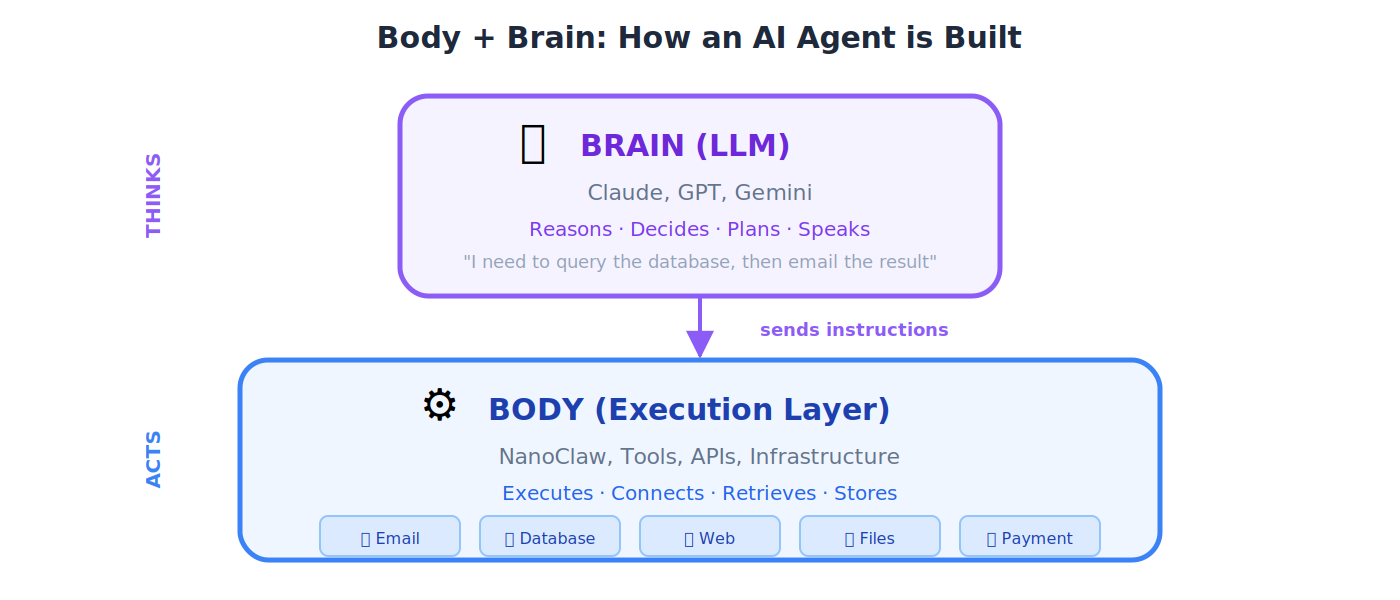
NanoClaw
A lightweight container runtime that serves as the "Body" of an agent in the OpenClaw architecture, executing tasks, running tools, and managing the agent's environment.
💡 Analogy: If the LLM (Brain) is the pilot who decides where to fly, NanoClaw (Body) is the airplane that actually carries out the flight: engines, wings, controls, and all.
OpenClaw
An open-source application framework for building agent-powered applications. In the thesis architecture, OpenClaw is the delegate at the Edge Layer — the "chief of staff" agent that represents the human, knows their context, and speaks on their behalf. NanoClaw is its container-based execution layer.
TutorClaw
A 24/7 AI tutor delivered via WhatsApp, built on the Agent Factory architecture. TutorClaw reads from this book as its system of record — teaching from verified knowledge rather than probabilistic generation. It's the book's first Digital FTE, and a live example of how the Agent Factory produces AI Workers."
Claude Code
Anthropic's AI coding agent, run from the terminal (command line). It reads your entire codebase, understands your project context, and generates code based on your specifications. The primary development tool in this book.
Cowork
Anthropic's desktop agent for non-coding knowledge tasks: document management, research, and file organization. Think of it as your AI office assistant.
Dispatch
A feature that lets you assign work to Cowork from your phone. You send a task while commuting; Claude works on your desktop. When it finishes, you get a push notification.
💡 Analogy: Dispatch turns Cowork from a tool you sit next to into an employee you manage remotely, like texting your assistant "prepare the report" while you're in a meeting.
Computer Use
A research preview feature where Claude can see and control your screen on macOS (clicking buttons, typing in applications, navigating interfaces) like a remote employee using your computer.
🔹 Example: You tell Claude: "Open the spreadsheet on my desktop, update the Q3 revenue column with these numbers, then email it to the finance team." Claude sees your screen, opens Excel, types in the data, opens your email client, and sends it, just like a human assistant sitting at your computer.
Claude Desktop
The desktop application for interacting with Claude, which hosts Cowork, Computer Use, and Dispatch features.
Hooks
Automated actions that trigger before or after Claude Code performs certain operations, like automatic code formatting after every file save, or running tests before every commit.
💡 Analogy: Hooks are like standing instructions to an assistant: "Every time you finish writing a letter, run spell-check before showing it to me."
Subagents
Specialist agents that Claude Code can spawn to handle specific subtasks within a larger project, each with its own focused context.
💡 Analogy: A project manager (main agent) delegates the design work to a graphic designer (subagent) and the accounting to a bookkeeper (subagent). Each focuses on their specialty.
Tasks System
A built-in feature of Claude Code for managing persistent state across sessions, tracking what's been done, what's pending, and what's next in a multi-step project.
Context Engineering
The quality-control discipline for Digital FTE manufacturing. Designing the full information environment an agent receives to ensure consistent, high-quality output. This is the #1 skill that separates a $2,000/month sellable agent from one nobody wants.
💡 Analogy: A Toyota factory has systematic quality controls ensuring every car meets specification. Context engineering ensures your Digital FTEs deliver consistent, sellable value.
Context Injection
Inserting relevant external information into the AI's context window right before it generates a response, giving it the right information at the right time.
💡 Analogy: Before a lawyer walks into court, their assistant hands them a folder with all the relevant case files. Context injection does the same for AI.
Context Isolation
Starting a fresh session with clean context instead of carrying over potentially confused or contradictory state from a long previous session.
💡 Analogy: When your desk gets so cluttered you can't think, you clear everything off and start fresh. Context isolation is the same for AI; sometimes a clean slate produces better results than a messy history.
Harness Engineering
The discipline of designing and continuously improving the environment around an AI agent so it can do useful work reliably without supervision. Sits as the third layer in a progression: prompt engineering optimizes one exchange, context engineering manages what the model sees at once, and harness engineering builds the execution environment the agent operates in across hundreds of decisions. The named practice was crystallized in early 2026 by Mitchell Hashimoto, who described his daily habit of engineering a permanent fix into the agent's environment every time the agent made a mistake. OpenAI and Anthropic published expanding articles within weeks. The slogan version: don't fix the agent, fix the world the agent lives in.
💡 Analogy: Prompt fixes are bandaids; harness fixes are vaccines. A prompt fix solves one instance of a failure. A harness fix (adding a tool, a validator, a skill, a check, an instruction) closes that class of failure forever, for every future agent that runs in the same harness.
🔹 Example: TutorClaw gives feedback that's too harsh for a beginner. The naive fix is to rewrite the prompt. The harness fix is to add a tone-check skill that gates output through a rubric. Every future TutorClaw answer goes through it, no prompt change needed.
📌 In OpenClaw: The unit of harness extension is the SKILL.md file. Every skill your students write is a harness engineering artifact, and the same Hashimoto loop (observe failure → ask why it was possible → engineer the permanent fix → verify it compounds) applies.
Progress Files
Files that track the state of a long-running project across multiple Claude Code sessions, documenting what's been completed, decisions made, and what's next.
💡 Analogy: A construction site logbook. Every day, the foreman records what was built, what problems arose, and what's planned for tomorrow. When a new crew arrives (new session), they read the log and continue seamlessly.
Session Architecture
Designing how you structure and sequence your interactions with an AI agent across multiple sessions for a large project, deciding when to start fresh, when to carry forward, and what context to preserve.
🔹 Example: For a 30-chapter book project, you don't dump the entire book into one session. You design an architecture: Session 1 covers the outline, Session 2 writes Chapter 1 (carrying forward the outline as context), Session 3 writes Chapter 2 (carrying forward the outline + Chapter 1 summary), and so on. Each session gets exactly the context it needs, no more, no less.
Five Powers
The five capabilities that enable the shift from traditional user interfaces to autonomous AI agents: (1) natural language understanding, (2) reasoning, (3) tool use, (4) memory, and (5) planning. Combined, they allow agents to understand intent and execute independently.
💡 Analogy: Think of a capable human assistant. They can (1) understand what you say, (2) think through problems, (3) use tools like phones and computers, (4) remember your preferences, and (5) plan multi-step projects. An AI agent with all Five Powers can do the same: that's what makes the shift from "software you operate" to "software that operates for you."
Agent Maturity Model
A five-level framework describing the stages of an organization's AI adoption:
| Level | Name | Description |
|---|---|---|
| 1 | Experimental | Individual developers trying AI coding tools |
| 2 | Standardized | Organization-wide adoption with governance |
| 3 | AI-Driven | Specs become living documentation; workflows redesigned |
| 4 | AI-Native | Products where AI/LLMs are core components |
| 5 | Autonomous | Entire organization AI-native; self-improving systems |
AI-Assisted Development
Using AI as a helper or copilot: code completion, bug detection, documentation generation. The human still writes most code.
🔹 Example: GitHub Copilot suggesting the next line of code as you type.
AI-Driven Development
AI generates significant code from human-written specifications. The human acts as architect, director, and reviewer; not typist.
🔹 Example: You write a SPEC.md describing a REST API, and Claude Code generates the entire FastAPI application, tests, and documentation.
AI-Native Development
Applications architected around AI capabilities from the ground up: AI isn't added as a feature; it's the core of the product.
🔹 Example: TutorClaw isn't a textbook with a chatbot bolted on. The AI tutor is the product. The entire architecture is built around the LLM's capabilities.
Nine Pillars of AIDD
Nine foundational principles of AI-Driven Development as defined in this book: covering everything from specification-first design to continuous verification.
OODA Loop (Observe, Orient, Decide, Act)
A rapid decision-making cycle applied to working with AI agents. You observe the agent's output, orient yourself by checking if it matches the spec, decide whether to accept or redirect, and act by either approving or giving new instructions.
📌 Origin: A military strategy framework developed by fighter pilot John Boyd, now applied to the fast iterative cycles of AI-driven work.
PRIMM-AI+
A pedagogical framework used in this book: Predict what the code will do → Run it → Investigate the output → Modify it → Make your own version. The "AI+" means AI is embedded in every step.
AI Gravity
The constant pull to let AI do more and more of your thinking. Named by MIT Sloan professor Eric So. It comes from three directions at once: your brain wants to save energy, you want your work to look expert-level, and you cannot see how much your peers are using AI. The force the How to Think in the AI Era crash course trains against.
💡 Analogy: Real gravity: you cannot see it, it never switches off, and it pulls on everyone. You do not notice it pulling; you only notice, months later, that you stopped forming your own opinion before opening AI.
🔹 Example: Two people get the same task and the same AI tools. One writes her own answer first, then compares it with AI's. The other opens AI, asks, and accepts — not because she is lazy, but because three quiet forces pushed her the same way. That pull is AI gravity.
Cognitive Capital
Your thinking muscle: the built-up ability to work through a problem, spot a wrong answer, and notice what a confident answer left out. Eric So's term for what AI gravity spends down when you accept answers without checking them.
🔹 Example: In an early MIT Media Lab study, 83 out of 100 people who wrote essays with ChatGPT could not repeat even one sentence from the essay they had just handed in. The words never passed through their heads — that is cognitive capital going unspent until it fades.
📌 Why it matters for this book: The 10-80-10 Rule only works if the human's two 10s stay sharp. Cognitive capital is what keeps them sharp — the supervisor who can no longer tell when the agent is wrong cannot hold the last 10%.
Identic AI
A concept where each human has a personal AI agent that reflects their judgment, preferences, and authority: delegating tasks across multiple AI systems on their behalf. In this book's reference architecture, OpenClaw is the identic AI — the delegate at the Edge Layer."
💡 Analogy: A CEO has an executive assistant who knows their priorities and decision-making style so well they can act on the CEO's behalf. Identic AI is the AI version: your personal representative in the Agent Factory.
System of Record / Source of Truth
The one authoritative data source that everyone trusts as accurate. When there are conflicting versions, the system of record is the final word.
🔹 Example: If your company's HR system says an employee's salary is Rs. 200,000 but a spreadsheet says Rs. 180,000, the HR system is the system of record.
Workflow Archaeology
Studying a profession's existing workflow, through real cases and expert interviews, to uncover its real rules, controls, evidence, exceptions, and reasons. The old work is evidence about the profession, not the design for its future. The method that uses it is Designing the Vertical System of Record.
💡 Analogy: An archaeologist does not rebuild the ancient city exactly as it stood. She digs it up to learn how people actually lived, then writes down what she learned. The dig is the point; the ruins are not the plan.
🔹 Example: The written checklist says "tick every balance." The archaeology asks what the senior accountant checks that the checklist never mentions, which steps she quietly skips, and which small difference she knows is the first sign of a real problem. Those answers are the part worth keeping.
Invariant (Domain)
A rule that must stay true in every case, even when the workflow, the software, the organization, or the customer changes. A rule that is merely useful is guidance; a rule whose violation makes the result invalid, unlawful, or untrustworthy is an invariant. Distinct from the thesis's Six Invariants, which are structural rules about how the AI-Native Company runs: a domain invariant is a rule about the professional work itself.
🔹 Example: "The preparer of a payment cannot approve it." Break that rule and the result is not merely worse, it is invalid.
Three-Bin Sort
The method for deriving agentic-era procedures from a pre-agentic workflow. For every element of the old workflow, ask why it exists. Bin 1, law and trust require it: keep it. Bin 2, human limits require it: redesign it for a Worker without those limits. Bin 3, old technology required it: delete it. Every new reflex is built around the outcome and Bin 1, the honest purposes from Bin 2 return as Worker capabilities and checks, and every sorting decision is recorded as governed content.
📌 The sharpest refinement: a control's purpose is Bin 1; its mechanism is usually Bin 2. "A manager reviews every transaction" keeps the purpose (risk stays controlled) and redesigns the mechanism (routine cases pass automated checks, and the manager's attention goes to the exceptions).
Outcome Contract
The written definition of one professional outcome: the result, its trigger, its inputs, its evidence, its acceptance criteria, its main number and guardrails, its forbidden actions, its final human authority, and its retained record. It is written before the old workflow is studied, and it becomes the seed of the first Worker's contract of success.
🔹 Example: Weak: "automate invoice review." Strong: "decide whether an invoice is valid, supported, correctly coded, within authorization limits, and ready for payment or clearly sent to exception handling."
Evidence State
The certainty label an important field carries in a Worker's file: confirmed, indicated, inferred, unknown, contradicted, or outdated. Evidence states stop a system from presenting every stored field with false certainty.
🔹 Example: A CRM shows "budget: confirmed," but no call transcript contains a customer statement about budget. The Worker records the budget as unknown, and the next step as contradicted, because the buyer asked for a technical workshop rather than the proposal the CRM promised.
Authority (Content Class)
The citable content of a System of Record: law, standards, current thresholds, the expert's methodology, judgment guidance, definitions, and graded examples. Authority passes at least one of three tests (citation, change, dispute), carries a register row, a version, and a kind, and is what a Worker cites to a reviewer. Not the same as an Authority Envelope, which is about what an agent is permitted to do.
📌 The kind matters too. Law, a professional standard, a signed contract, an internal policy, the expert's methodology, judgment guidance, and a graded example can all be citable, and they are not equally strong. A Worker must never cite a graded example as if it were the law.
Orientation (Content Class)
The short, plain introductions in a System of Record that let a human reader understand the authority sitting beside them. Orientation is written for the day-one junior professional, marked as context (in this book, as tip and info boxes), kept short, and never cited by agents as the basis for a conclusion. Reading it is allowed; citing it is not.
💡 Analogy: The two sentences at the top of a form that tell you what the form is for. You read them to understand the boxes below. You would never attach them as proof.
Bounded Workflow
A workflow with clearly defined start points, end points, and constraints: the agent knows exactly what it can and cannot do. No ambiguity, no scope creep.
Escalation Protocol
A predefined rule for when an agent should stop and hand a task to a human: because it's too complex, too risky, or outside the agent's authority.
🔹 Example: A customer service agent handles routine questions, but if a customer threatens legal action, the escalation protocol transfers the conversation to a human manager.
Tool Interface
The defined contract for how an agent connects to and uses an external tool, specifying what inputs the tool expects and what outputs it returns.
Vertical Intelligence
Deep expertise in a specific industry's terminology, regulations, workflows, and pain points, packaged into an agent.
🔹 Example: An AI agent for Pakistani textile exporters that understands SRO notifications, HS codes, LC documentation, and SBP regulations; not just generic business knowledge.
Agentic Enterprise
An organization that has embedded AI agents into its core operations, with Digital FTEs alongside human employees as a standard way of working. In the thesis, this is called the AI-Native Company — the running enterprise the Agent Factory produces. The two terms refer to the same thing.
🔹 Example: A logistics company where AI agents handle order tracking, route optimization, and customer notifications 24/7, while human employees focus on partnerships, exception handling, and strategy. The agents aren't a side project; they're part of the org chart.
Custom-Built AI Employee
An AI agent you build from scratch for a specific business need, tailored exactly to your workflow and domain.
🔹 Example: A textile exporter builds an agent that reads incoming LC (Letter of Credit) documents, checks them against SBP regulations, flags discrepancies, and drafts amendment requests. No off-the-shelf tool does this; it's custom-built for their exact workflow.
Pre-Built AI Employee
An off-the-shelf AI agent you can use immediately without custom development, like using ChatGPT, Claude, or an existing customer service bot.
🔹 Example: Using Claude directly to draft emails, summarize documents, or answer questions. No development needed; you start immediately. The trade-off: it works for general tasks but isn't specialized for your unique business process.
Build vs. Buy
The strategic decision: build your own custom AI agent (more control, higher cost, takes longer) or use an existing one (faster deployment, less customization)?
🔹 Example: A hospital needs a patient scheduling agent. Buy: Use an existing healthcare AI platform (deployed in weeks, but limited customization. Build: Create a custom agent integrated with their specific EMR system, doctor preferences, and Urdu/English support) takes months but fits perfectly. The right choice depends on budget, timeline, and how unique the workflow is.
FTE Development Plugin
A tool or extension that aids in the development and deployment of Digital FTEs, streamlining the Agent Factory workflow.
Skill Shim
A thin adapter layer that translates between different agent skill formats, enabling compatibility across platforms.
💡 Analogy: A travel power adapter. Your Pakistani plug doesn't fit a UK socket, but a shim (adapter) makes them compatible without rewiring anything.
Gateway Proxy Pattern
An architectural pattern where a single entry point (gateway) routes requests to the correct backend agent or service, managing authentication, rate limiting, and load distribution.
💡 Analogy: The reception desk of a large hospital. All patients enter through reception, which checks their appointment, verifies their identity, and directs them to the right department.
Piggyback Protocol
A startup strategy referenced in the book: building your product on top of an existing platform's distribution to reach users quickly, before building your own independent channels.
🔹 Example: Instead of building your own messaging app to deliver TutorClaw, you build on top of WhatsApp: which already has 100+ million users in Pakistan. You "piggyback" on WhatsApp's distribution to reach students instantly, without convincing anyone to download a new app.
2. Core AI and Machine Learning
These are the foundational ideas behind everything in this book.
AI ⊃ ML ⊃ DL ⊃ LLMs
(Each is a subset of the one before it)
AI (Artificial Intelligence)
Making computers do things that normally require human intelligence, such as understanding language, recognizing images, making decisions, solving problems.
🔹 Example: When your phone's keyboard predicts your next word in Urdu or English, that's AI. When Careem estimates your ride time based on traffic, that's AI.
ML (Machine Learning)
A way of teaching computers by showing them examples instead of writing explicit rules. The computer finds patterns in data and learns from them.
🔹 Example: YouTube recommends videos you might like. Nobody programmed a rule that says "if user watched cricket highlights, suggest more cricket." The system learned this pattern from billions of viewing habits.
💡 Analogy: Imagine teaching a child to recognize mangoes. You don't explain the biology. You show them dozens of mangoes and say "mango." Eventually, they recognize mangoes they've never seen, even different varieties like Chaunsa and Sindhri. That's machine learning.
DL (Deep Learning)
A more powerful version of machine learning that uses "neural networks" with many layers. It can learn extremely complex patterns, like understanding speech, generating images, or translating between languages.
🔹 Example: When Google Translate converts an Urdu paragraph into fluent English, deep learning powers that translation.
💡 Analogy: If ML is learning to recognize simple shapes, DL is learning to recognize faces in a crowded Saddar Bazaar: far more complex, but the same principle of learning from examples.
Model
A program that has been trained on data and can now make predictions or generate outputs. When people say "GPT-4" or "Claude," they're referring to models.
💡 Analogy: A model is like a student who has studied millions of textbooks. You ask questions, they answer based on everything they've read. Different models are like different students: some are better at math, others at creative writing.
Foundation Model
A very large, general-purpose model trained on enormous data. It can be adapted to many different tasks without retraining from scratch. Claude, GPT-4, and Gemini are foundation models.
💡 Analogy: A foundation model is like a university graduate with a broad education. They haven't specialized yet, but they can quickly adapt to many jobs: accounting, writing, research, management.
Neural Network
A computing system inspired by the human brain, with layers of interconnected "nodes" that process information, each layer extracting increasingly complex patterns.
💡 Analogy: Imagine a series of sieves with different mesh sizes. You pour raw data through the first sieve (catches large patterns), then the next (catches finer patterns), then the next (catches the finest details). A neural network works similarly, with each layer refining the information.
Transformer
The specific neural network architecture that powers all modern LLMs. Invented in 2017, it's especially good at understanding relationships between words, knowing that "bank" means something different in "river bank" vs. "bank account."
💡 Analogy: Older AI read sentences word by word, like reading through a keyhole (you see one word at a time and guess the meaning. Transformers read the entire sentence at once, like opening the whole door) they see every word simultaneously and understand how each word relates to every other word. This is why they're so much better at understanding language.
💡 Why it matters: Every AI model in this book (Claude, GPT, Gemini) is built on transformers. You don't need to understand the math, but you'll see the term often.
Multimodal Model
A model that can work with multiple types of input (text, images, audio, video) not just one.
🔹 Example: You photograph a restaurant bill and ask Claude "What's the total?" The model understands both the image and your text question. That's multimodal capability.
Reasoning Model
A model designed to "think through" complex problems step by step before answering, rather than responding instantly. Often more accurate on hard problems.
💡 Analogy: In a cricket match, some batsmen play instinctive shots (fast, sometimes reckless). Others study the field, read the bowler, and plan each shot deliberately. A reasoning model is the second type: slower but more reliable on difficult deliveries.
Training
The process of feeding massive amounts of data to a model so it learns patterns. This happens before you ever interact with the model; it's the "education" phase.
💡 Analogy: Training is like a chef spending years at culinary school: tasting thousands of dishes, learning techniques, practicing recipes. By the time they open their restaurant (when you use the model), the learning has already happened.
Pretraining
The first, most expensive phase of training. The model reads enormous amounts of text (books, websites, code, conversations) and learns general knowledge about language and the world.
Post-Training
Additional training after pretraining to make the model helpful, safe, and aligned with human expectations. This is where a model learns to follow instructions, be polite, and refuse harmful requests.
💡 Analogy: Pretraining is like getting a general education (school and university). Post-training is like workplace orientation: learning company culture, communication style, and professional norms.
Fine-Tuning
Training an existing model further on a specific, smaller dataset to make it an expert in a particular domain.
🔹 Example: Taking a general-purpose model and fine-tuning it on thousands of Pakistani tax rulings so it becomes especially good at tax advisory.
💡 Analogy: A general doctor completing additional training to become a cardiologist. Same foundational education, now specialized.
Parameters
The internal numbers of a model that get adjusted during training. More parameters generally means a more capable model. Modern LLMs have billions or trillions of parameters.
💡 Analogy: Parameters are like the individual threads in a massive carpet. During training, each thread is adjusted (color, tension, placement) until the complete pattern emerges. A model with 100 billion parameters has 100 billion threads forming an incredibly complex pattern.
Weights
The specific numerical values of the parameters after training. When someone says "downloading the weights," they mean the file containing all those trained numbers: the model's learned knowledge.
Dataset
A collection of data used to train or evaluate an AI model.
🔹 Example: A dataset for training a spam filter might contain 1 million emails, each labeled "spam" or "not spam." A dataset for training a translation model might contain millions of English-Urdu sentence pairs.
Benchmark
A standardized test for measuring and comparing how well different AI models perform.
🔹 Example: Just like CSS or Cambridge exams let you compare students, benchmarks like MMLU (general knowledge) or HumanEval (coding ability) let researchers compare AI models fairly.
Inference
The process of a trained model generating a response to your input. Every time you ask Claude a question and get an answer, that's inference.
💡 Analogy: Training is studying for an exam. Inference is sitting the exam. The learning already happened: now the model applies what it learned. You pay for inference (each API call costs money), not for training.
3. LLM Basics
LLMs are the engines powering every AI agent in this book. This section explains how they work at a practical level.
LLM (Large Language Model)
A very large AI model trained on vast amounts of text that can understand and generate human-like language and code. Claude, GPT-4, and Gemini are all LLMs.
💡 Analogy: An LLM is like an incredibly well-read research assistant who has read every Wikipedia article, millions of books, and billions of web pages. You can ask them about almost anything, and they'll draw on that reading to help: writing, analysis, code, translation, and more.
Prompt
The input you give to an AI model: your question, instruction, or request. The quality of your prompt directly affects the quality of the response.
🔹 Example: "Write something about marketing" is a weak prompt. "Write a 500-word LinkedIn post about why Pakistani textile exporters should use AI agents for order tracking, in a professional but conversational tone" is a strong prompt.
System Prompt
Hidden instructions given to an AI before your conversation starts. Set by the developer, not the user. They shape the model's personality, behavior, and constraints.
🔹 Example: A banking chatbot's system prompt might say: "You are a helpful assistant for HBL. Answer in Urdu or English based on the customer's language. Never reveal account balances without OTP verification. If asked about loans, direct to the loans page."
💡 Analogy: A system prompt is like a manager's briefing to a new employee on day one: "Here's who we are, here's how we talk to customers, here's what you must never do."
User Prompt
The message you (the user) actually type. This is your side of the conversation.
Instruction
A specific directive within a prompt telling the model what to do.
🔹 Example: "Summarize this in three bullet points," "Translate to Urdu," "Fix the bug in this code", each is a clear instruction.
Context
All the information available to a model during a conversation: the system prompt, conversation history, uploaded documents, and your current message combined.
💡 Analogy: When you ask a colleague for advice on a deal, the "context" is everything they know: the client history, previous emails, the contract terms, your company's policies. The more relevant context, the better the advice.
Context Window
The maximum amount of text an LLM can process at once, measured in tokens. Think of it as the model's "working memory."
🔹 Example: Claude models offer context windows ranging from 200,000 to over 1 million tokens. Even 200,000 tokens is roughly 150,000 words (an entire novel). Older models might handle only 4,000 tokens (a few pages).
💡 Analogy: A context window is like the size of a desk. A small desk holds only a few papers, and you keep removing old ones to make room. A huge desk lets you spread out an entire project and see everything at once. Bigger context window = bigger desk.
Token
The basic unit of text an LLM processes. A token is roughly ¾ of a word. Short words like "the" are one token. Longer words like "unbelievable" get split into 3-4 tokens. Spaces and punctuation also consume tokens.
🔹 Example: "I love biryani" ≈ 4 tokens. A full page of text ≈ 500-700 tokens. You're charged per token when using AI APIs.
Completion / Generation
The output an LLM produces in response to your prompt. When the model "completes" your request, that response is the completion.
Structured Output
When an LLM generates its response in a specific, machine-readable format (like JSON) instead of conversational text, so other software can easily process it.
🔹 Example: Instead of "The temperature in Karachi is 35 degrees and it's sunny," a structured output would be:
{"city": "Karachi", "temp": 35, "condition": "sunny"}. Software reads this format effortlessly.
Hallucination
When an AI model confidently generates false, inaccurate, or fabricated information, presenting it as fact.
🔹 Example: You ask about a Supreme Court judgment and the model invents a case (complete with fake citation numbers and a fake bench) and presents it as real.
💡 Analogy: A student who doesn't know the answer on an exam but writes a very confident, detailed response anyway. It reads like it's correct, but it's entirely made up.
Grounding
Connecting an AI model to factual, verified data sources so it gives accurate answers instead of hallucinating.
💡 Analogy: Grounding is like letting a student use their textbook during an exam. Now their answers are based on real information, not unreliable memory.
Temperature
A setting that controls creativity vs. predictability in an LLM's responses. Low temperature (0) = very consistent. High temperature (1+) = more creative and varied.
💡 Analogy: Temperature is like a chef's freedom in the kitchen. Temperature 0: "Follow the recipe exactly, no substitutions." Temperature 1: "Improvise freely." You want exact recipes for medication dosages, but creative freedom for a new dish.
Latency
The time delay between sending a request and receiving a response. Lower latency = faster. Measured in milliseconds or seconds.
🔹 Example: If Claude responds in 1 second, that's low latency. If it takes 15 seconds, that's high latency. Users get impatient beyond 2-3 seconds.
Throughput
How many requests a system can handle per unit of time. High throughput = serving many users simultaneously.
💡 Analogy: Latency is how fast one car passes through a toll plaza. Throughput is how many cars the toll plaza handles per hour. You want both low latency and high throughput.
Deterministic vs. Non-Deterministic
Deterministic: Same input always produces the exact same output (like a calculator: 2+2 always equals 4). Non-deterministic: Same input can produce different outputs each time.
LLMs are non-deterministic: ask the same question twice, and you may get slightly different (but equally valid) answers. This isn't a bug; it's fundamental to how the technology works.
Stateless
Having no memory between separate interactions. Each new conversation with an LLM starts from absolute zero: the model has no knowledge of any previous conversation.
💡 Analogy: A shopkeeper with amnesia. Every time you walk in, they greet you as a stranger, even if you were there five minutes ago. Chat apps create the illusion of memory by re-sending the entire conversation history with every message.
Prompt Engineering
The skill of crafting clear, specific instructions to get the best possible output from an AI model. Not just "what you ask" but "how you ask it."
🔹 Example: Instead of "Write about AI," a prompt engineer writes: "You are a technology journalist writing for Dawn newspaper. Write a 600-word article explaining how Pakistani banks are using AI agents for fraud detection. Include one real example. Use simple language accessible to a non-technical business reader."
NLP (Natural Language Processing)
The branch of AI dealing with understanding, interpreting, and generating human language, the foundation that makes LLMs possible.
🔹 Example: When you type a search query in broken English and Google still understands what you meant, that's NLP at work.
Copilot
An AI assistant integrated into a software environment (like a code editor) that works alongside you to boost productivity, suggesting, auto-completing, and reviewing as you work.
🔹 Example: GitHub Copilot suggests code as you type. It's like having a knowledgeable colleague looking over your shoulder, finishing your sentences.
4. Knowledge, Retrieval, and Context
These terms describe how AI agents access and use external knowledge for better, more accurate answers.
RAG (Retrieval-Augmented Generation)
A technique where an AI first retrieves relevant information from external documents or databases, then uses that information to generate a more accurate response.
💡 Analogy: Taking an open-book exam. Instead of relying only on memorized (possibly wrong) knowledge, you look up specific facts in your reference material before writing your answer. RAG gives AI its own reference library.
Embedding
Converting text into numerical coordinates so a computer can measure how similar different pieces of text are, capturing meaning, not just keywords.
💡 Analogy: Imagine placing every book in a library on a giant map where similar books cluster together. Cookbooks sit near each other, far from physics textbooks. Embeddings create this "similarity map" in mathematical space.
Vector
A list of numbers representing a piece of text in mathematical space. When text is converted to an embedding, the result is a vector.
🔹 Example: The word "cricket" might become
[0.8, 0.3, 0.7, 0.1, ...]: a long list of numbers that captures both the sport and the insect meanings, distinguished by surrounding context.
Vector Database
A specialized database for storing and quickly searching vectors, finding similar content by meaning rather than exact keyword match.
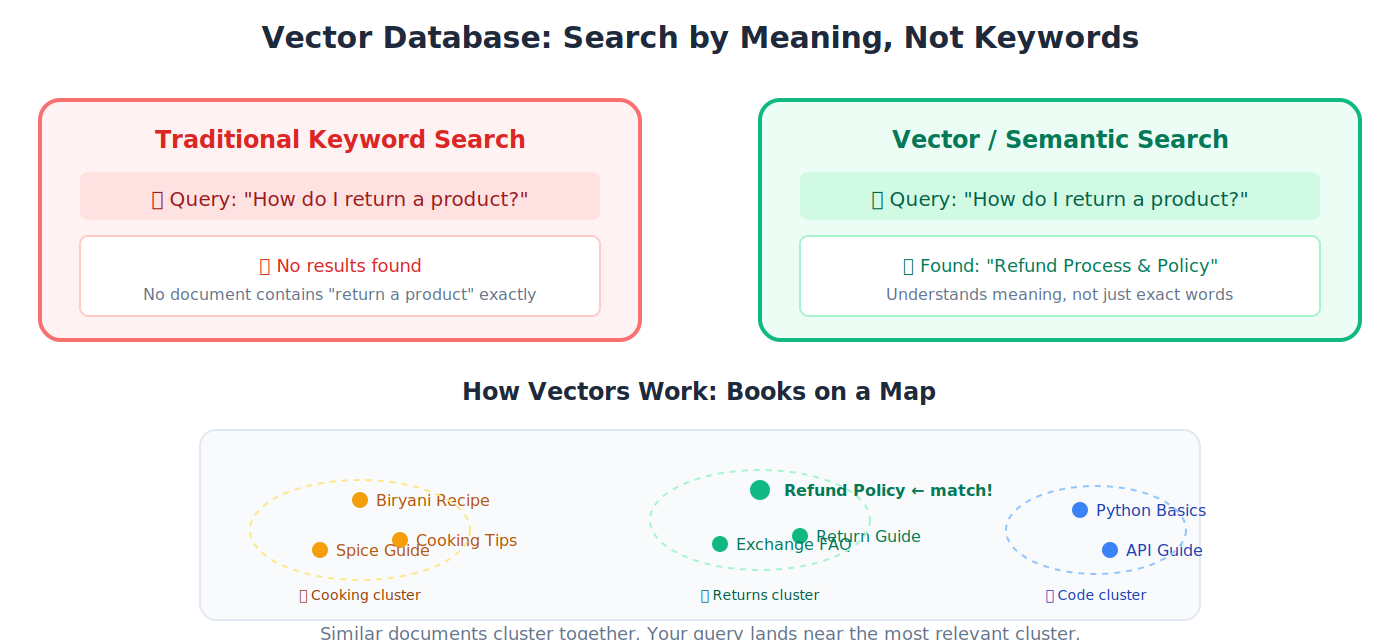
🔹 Example: You store 10,000 company documents as vectors. When someone asks "What's our return policy?" the vector database finds the most relevant documents instantly, even if none of them contain the exact phrase "return policy."
💡 Analogy: A traditional database searches by exact keywords (like searching a phonebook by name). A vector database searches by meaning (like asking a librarian "find me books similar to this one").
Semantic Search
Searching by meaning rather than exact keywords. "How do I return a product?" matches a document titled "Refund Process" even though the words are completely different.
🔹 Example: An employee searches "how to take time off" in the company knowledge base. Semantic search finds the document titled "Annual Leave Policy and Procedures", even though none of the search words appear in the title. Traditional keyword search would find nothing.
Retrieval
Fetching relevant information from a data source (database, document collection, the web) for an AI to use in generating a response.
🔹 Example: A customer asks your support agent "What's your warranty on laptops?" The agent retrieves the warranty policy document from your knowledge base, reads the relevant section, and generates an accurate answer based on your actual policy; not a guess.
Reranking
After retrieving multiple results, re-ordering them by relevance so the most useful result appears first: a quality filter after the initial search.
Chunking / Chunk
Breaking a large document into smaller pieces so they can be stored and searched individually.
🔹 Example: A 200-page HR manual is split into paragraph-sized chunks. When someone asks about leave policy, the system retrieves only the 3-4 most relevant paragraphs, not the entire manual.
Knowledge Base
An organized collection of information (documents, FAQs, manuals, policies) that an AI can search and reference.
🔹 Example: A company's internal wiki containing product docs, HR policies, and training materials, structured so an AI agent can find answers instantly.
Grounding Data
The specific factual data connected to an AI model to ensure accurate, fact-based responses rather than hallucinated guesses.
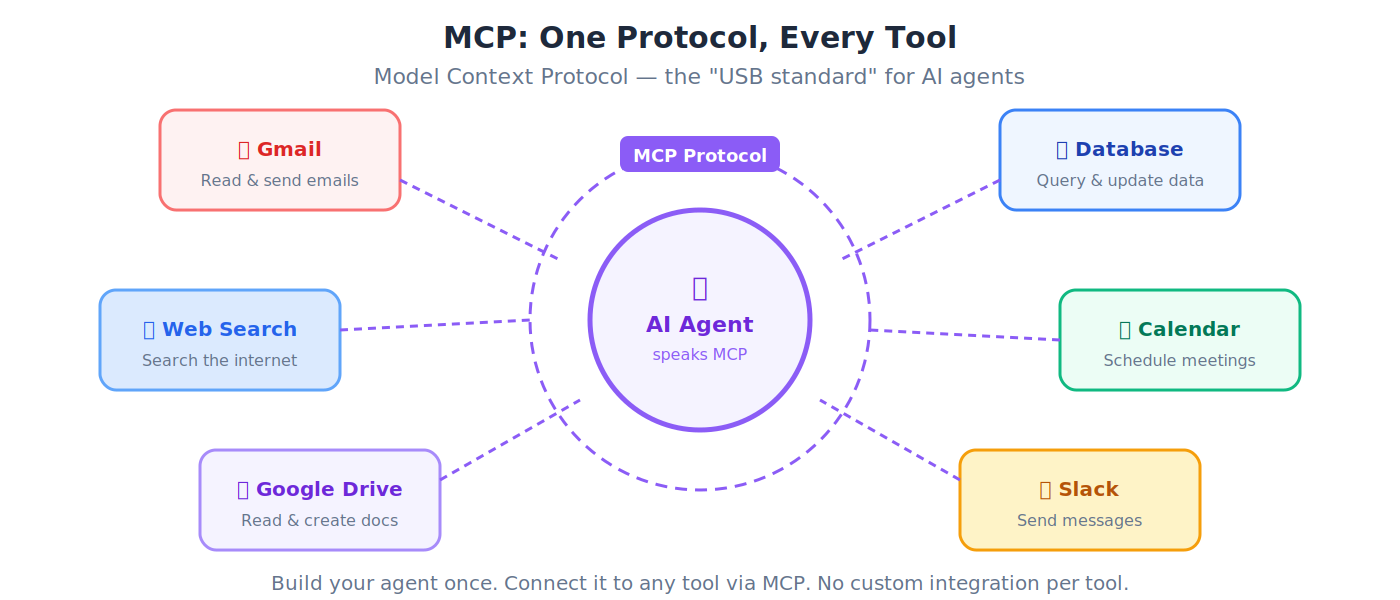
MCP (Model Context Protocol)
An open standard (created by Anthropic, now governed by the Linux Foundation) that lets any AI agent connect to any external tool using a universal protocol: search, databases, email, calendars, file systems. MCP is the protocol for agents calling tools. For the separate protocol family that handles agents paying for those tools, see Section 11: ACP, AP2, x402, and MPP.
💡 Analogy: Before USB, every phone had a different charger. USB became the universal connector. MCP is the "USB standard" for AI agents: one protocol that lets any agent plug into any tool. Build your agent once, connect it to everything.
Connector
A specific integration linking an AI agent to an external service using MCP or another protocol.
🔹 Example: A "Gmail connector" lets an AI agent read, search, and send emails. A "Google Drive connector" lets it read and create documents.
System Integration
Connecting different software systems so they share data and work together seamlessly: the "plumbing" behind any enterprise agent deployment.
🔹 Example: Your Digital FTE needs to read customer data from Salesforce, check inventory in SAP, process payments through JazzCash, and send confirmations via email. System integration connects all four systems so the agent can work across them in a single workflow.
5. Agentic AI Concepts
The heart of this book: AI systems that don't just answer questions, but take action.
Agent (or AI Agent)
An AI system that can independently perceive its environment, make decisions, and take actions to achieve a goal, without a human guiding every step.
🔹 Example: A chatbot just answers questions. An AI agent receives a goal like "find me the cheapest Karachi-to-Dubai flight next Friday" and then searches airlines, compares prices, checks your calendar, and books the ticket, all on its own.
💡 Analogy: A chatbot is a librarian who answers questions from behind a desk. An agent is a personal assistant who takes your request and goes out into the world to get things done.
Agentic AI
The category of AI focused on building agents that plan, reason, act, and adapt autonomously. This is the frontier of AI in 2026.
General Agent
An AI agent used through natural language for a wide range of tasks. It isn't built for one specific job; it's a versatile "Swiss Army knife" that can help with coding, writing, research, file management, and more.
🔹 Example: Claude Code is a general agent: you can ask it to organize files, write an API, analyze a spreadsheet, or debug a Python error. It adapts to whatever you need, using natural language instructions.
💡 Analogy: A general agent is like a highly capable executive assistant. You don't hire them for one task; you give them different assignments each day, and they figure out how to get each one done.
Autonomy
The degree to which an AI agent can operate independently without human approval at every step.
💡 Analogy: A junior employee who needs permission for every email has low autonomy. A senior director who makes decisions independently has high autonomy. Agents exist on this same spectrum: some need human approval for every action; others operate with full independence within defined boundaries.
Reasoning
An agent's ability to think through a problem logically: analyzing information, weighing options, and drawing conclusions before acting.
🔹 Example: You ask an agent: "Should we launch in Lahore or Islamabad first?" A non-reasoning agent might just pick one. A reasoning agent analyzes: "Lahore has 2x the population, but Islamabad has higher per-capita income. Your product targets professionals, so Islamabad's demographics are a better fit. I recommend Islamabad first, then Lahore in month 3."
Acting
When an agent actually does something in the real world: sending an email, writing a file, querying an API, placing an order, booking an appointment.
Planning
An agent's ability to break a complex goal into a sequence of steps and determine the order to execute them.
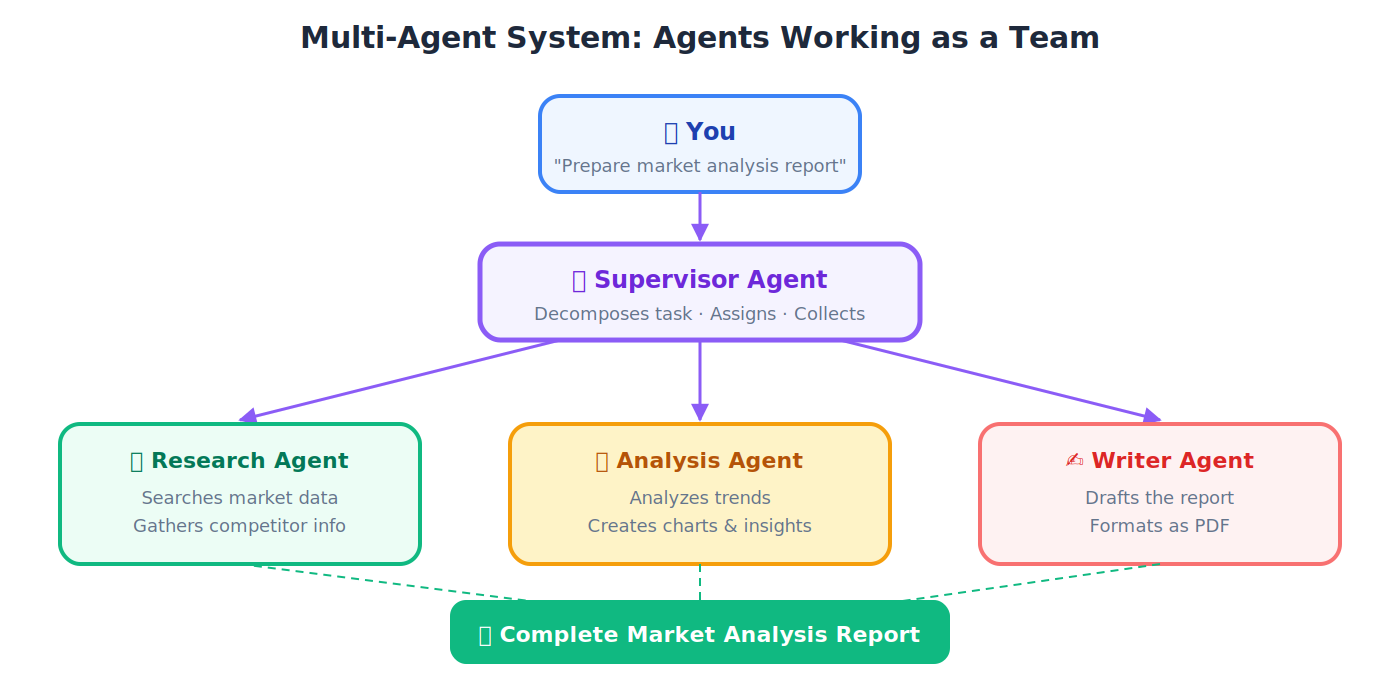
🔹 Example: You tell an agent: "Prepare a market analysis report on Pakistani cement exports." The agent plans: (1) search for export data, (2) gather competitor info, (3) analyze trends, (4) write the report, (5) format and export as PDF.
Task Decomposition
Breaking a large, complex task into smaller, manageable subtasks that can be solved individually.
💡 Analogy: "Plan a wedding" is overwhelming as one task. Decomposed: find a venue, choose a caterer, design invitations, arrange flowers, hire a photographer. Each subtask is solvable. AI agents decompose complex goals the same way.
Orchestration
Coordinating multiple agents or tools to work together, managing the flow of information between them.
💡 Analogy: A cricket team captain doesn't bowl, bat, and field all at once. They position fielders, set bowling rotations, and adjust strategy based on the match situation. Agent orchestration works similarly: coordinating specialists toward a shared goal.
Multi-Agent System
A system where multiple AI agents collaborate (each handling different parts of a task) to accomplish something none could do alone.
🔹 Example: One agent researches competitor pricing, another drafts the analysis, a third formats the slides, and a fourth prepares speaker notes. They work as a team.
Supervisor Agent
An agent whose job is to coordinate and manage other agents: distributing tasks, monitoring progress, and collecting results.
💡 Analogy: A construction site foreman. They don't lay bricks or wire outlets. They assign specialists to each task, check quality, and make sure everything comes together correctly.
Handoff
When one agent passes a task (and its context) to another agent, like a relay runner passing the baton to the next.
Tool Use / Function Calling
An agent's ability to use external tools (searching the web, querying databases, sending emails, running code) rather than just generating text from memory.
💡 Analogy: A person answering questions only from memory vs. a person who can pick up a phone, open a laptop, and look things up. Tool use gives the agent access to the world beyond its training data.
State
The current condition or data of a system at any given moment. "Maintaining state" means remembering where things stand in an ongoing process.
🔹 Example: You're filling a 10-page NADRA form online and you're on page 7. The "state" includes everything you've entered on pages 1-6 plus which page you're currently on.
Memory (Agent Memory)
Mechanisms that let an agent remember information across interactions: previous conversations, user preferences, or learned facts.
💡 Analogy: State is short-term memory (what's happening right now in this conversation). Memory is long-term memory (what happened across past conversations). Without memory, every interaction starts from zero.
Session
A single continuous interaction between a user and an AI system. Starting a new chat = starting a new session.
Reflection
When an agent reviews its own output, identifies mistakes or weaknesses, and tries again with improvements.
💡 Analogy: A writer who finishes a draft, re-reads it, notices weak arguments, and revises before submitting. The agent does this automatically.
Retry / Fallback
Retry: Attempting the same action again when it fails (maybe the server was temporarily unavailable). Fallback: Switching to an alternative approach when the primary one keeps failing.
🔹 Example: Agent tries to fetch data from a website. Site is down (retry: try again in 30 seconds). Still down after 3 retries (fallback: try a different data source for the same information).
Guardrails
Safety constraints preventing an agent from taking harmful, inappropriate, or unauthorized actions. The financial version of guardrails — spending limits, vendor allowlists, audit triggers — is the authority envelope. See Section 11.
🔹 Example: A financial agent has a guardrail preventing transactions above Rs. 5,000,000 without human approval. A customer service agent has a guardrail preventing it from making promises about refunds it can't guarantee.
💡 Analogy: Guardrails on the Motorway keep cars from going off the road. AI guardrails keep agents from going off-limits.
HITL (Human in the Loop)
A design pattern where a human must review, approve, or intervene at critical points in an agent's workflow. Nothing critical happens without the human's sign-off.
🔹 Example: An agent drafts a client email, but it's not sent until a human reads and approves it. The agent does the 80% of the work; the human provides the 10% of verification.
HOTL (Human on the Loop)
A design pattern where the agent acts autonomously while a human monitors and can intervene, but doesn't approve each action. Faster and more scalable than HITL; safe only when the checker is strong and mistakes are cheap to reverse. See the Loop Engineering crash course for how to set the mix per action.
💡 Analogy: HITL is a driving instructor with their own brake pedal, approving every move. HOTL is a supervisor watching the security cameras — the work runs on its own, and they step in only when something looks wrong.
🔹 Example: A morning-triage loop opens PRs to
claude/branches all night on its own (on the loop), but a human reviews and merges each morning (back in the loop at the gate). A third term, human out of the loop — no monitoring, no intervention — is not a design option in this book; it is the failure mode that happens by drift when you stop reading what ships.
Reliability
How consistently an agent produces correct, expected results. A reliable agent gets it right 99 out of 100 times, not 60.
🔹 Example: A reliable invoice-processing agent correctly extracts vendor name, amount, due date, and tax from 99% of invoices, across different formats, languages, and layouts. An unreliable one gets confused by unusual layouts and misreads amounts 20% of the time. The difference between a sellable product and a liability.
Verifiability
The ability to check and confirm that an agent's output is correct, that its code passes tests, its numbers add up, its references exist.
Auditability
The ability to trace back through every decision and action an agent took, understanding exactly what it did and why.
💡 Analogy: A bank statement traces every transaction. An audit trail for an AI agent traces every decision, tool call, and output, all critical for compliance and debugging.
Workflow
A defined sequence of steps an agent follows to complete a task from start to finish.
💡 Analogy: A workflow is like a recipe: step-by-step instructions that, followed correctly, produce a predictable result.
6. Programming and Software Terms
You don't need to be a programmer, but you'll encounter these throughout.
Python
The most popular programming language in AI: readable, versatile, and the primary language in this book. Nearly every AI framework supports Python first.
💡 Why Python? Python reads almost like English.
if age > 18: print("Adult")is understandable even if you've never coded. This readability is why the AI world chose Python, and why this book teaches it. You don't need to know Python before starting; Part 4 teaches you from scratch.
TypeScript
A typed superset of JavaScript used for web applications and realtime interfaces. Covered in Part 9 of this book.
Frontend
The part of an application users see and interact with: buttons, menus, text, images on screen.
🔹 Example: When you use Daraz.pk, the product images, search bar, shopping cart, and checkout page are the frontend.
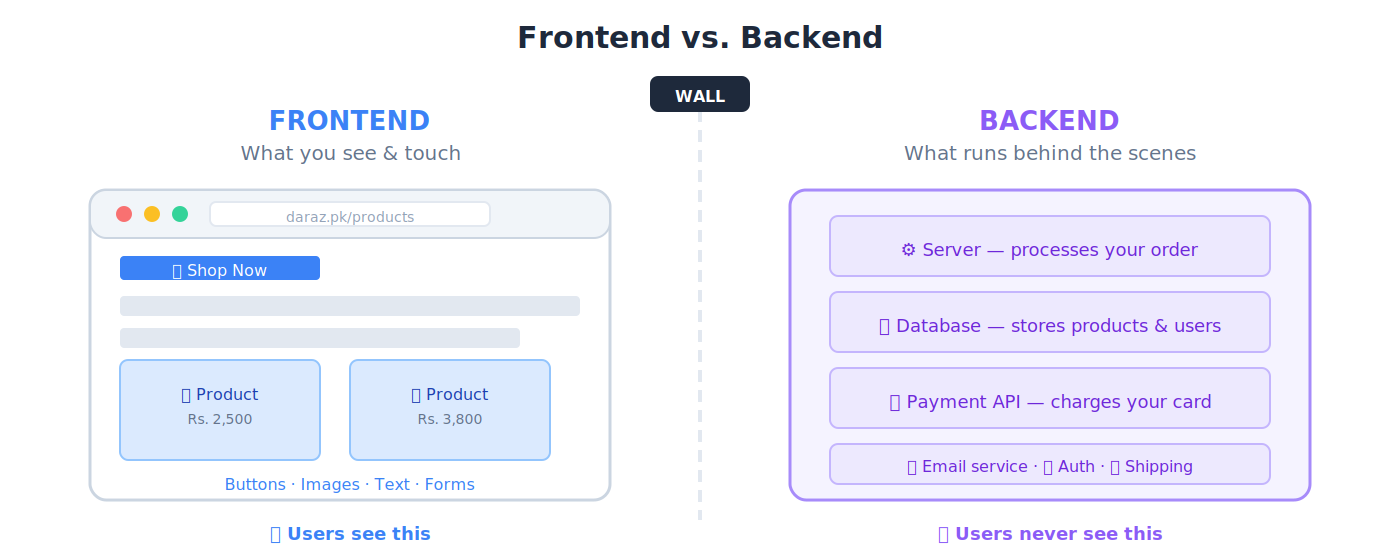
Backend
The part running behind the scenes (servers, databases, business logic) that users never see directly.
🔹 Example: When you click "Place Order" on Daraz, the backend processes your payment, checks inventory, notifies the seller, and schedules delivery.
Full-Stack
A developer or application that handles both frontend and backend.
API (Application Programming Interface)
A set of rules allowing different software programs to communicate with each other. APIs are how agents interact with the outside world.
💡 Analogy: A restaurant menu is like an API. You (the customer) look at the menu (API documentation), place an order (make a request), and the kitchen (server) prepares your meal (sends a response). You don't need to know how the kitchen works; you just use the menu.
SDK (Software Development Kit)
A pre-built toolkit for developing applications on a specific platform.
💡 Analogy: An SDK is like a LEGO set: pre-shaped pieces with instructions so you can build specific things quickly, instead of carving every piece from raw wood.
CLI (Command-Line Interface)
A text-based way of interacting with a computer by typing commands instead of clicking buttons.
🔹 Example: Instead of dragging a file to a folder, you type
mv report.pdf documents/. Claude Code runs entirely through the CLI.
HTTP / HTTPS
The communication protocol of the web. Every website visit, every API call uses HTTP (or its secure version, HTTPS).
💡 Analogy: HTTP is the postal system of the internet. Your browser writes a letter (request), addresses it to a website, and the website sends a reply (response) back through the same system.
REST (Representational State Transfer)
A widely-used standard for designing web APIs: simple, predictable, and based on HTTP.
Endpoint
A specific URL where an API receives requests. Each endpoint handles one specific function.
🔹 Example:
api.weather.com/current?city=Karachiis an endpoint: the specific address where you ask for Karachi's weather.
Request / Response
Request: A message from client to server asking for something. Response: The server's reply.
💡 Analogy: You ask a waiter for the soup of the day (request). The waiter returns with "haleem" (response).
JSON (JavaScript Object Notation)
A lightweight, human-readable format for storing and exchanging data. The standard data format in the AI world.
🔹 **Example:
{
  "name": "Ahmed Khan",
  "city": "Lahore",
  "role": "Software Engineer"
}
Each piece of data has a clear label and value. Software reads JSON effortlessly.
Schema
The structure or blueprint of how data is organized: what fields exist, what type each field is, and which are required.
💡 Analogy: A blank NADRA form is a schema: "Name goes here (text), CNIC goes here (number), Date of Birth goes here (date)." The filled-in form is the data; the blank form is the schema.
Validation
Checking that data matches the expected schema: right format, right type, nothing missing.
🔹 Example: An online form rejecting your submission because you typed letters in the phone number field: that's validation catching an error.
Library / Package
Pre-written code built and shared by others so you don't have to write common functionality from scratch.
🔹 Example: Instead of writing your own email-sending code, you use a library called
sendgridthat handles all the complexity.
Framework
A larger, more structured toolkit than a library. A framework provides the architecture of your application and defines how your code is organized.
💡 Analogy: A library is like buying individual furniture. A framework is like buying a pre-built house where you customize the rooms. FastAPI is a framework; a JSON parsing tool is a library.
Dependency
An external library your project requires to work.
🔹 Example: Your project uses FastAPI, and FastAPI needs a library called Starlette. Starlette is a dependency: your project depends on it indirectly.
Repo (Repository)
A project folder tracked by Git containing all code, files, and the complete history of changes.
Git
A version control system that records every change to your code: who changed what, when, and why. You can always go back to any previous version.
💡 Analogy: Git is like "Track Changes" in Microsoft Word, but for entire software projects. Every edit is recorded. Every version is recoverable. Essential for team collaboration.
GitHub
A cloud platform for hosting Git repositories: the world's largest code-sharing platform where developers collaborate.
Environment Variable / .env
A setting stored outside your code (in a file called .env) containing sensitive information like passwords and API keys.
🔹 Example: Your OpenAI API key is stored as
OPENAI_API_KEY=sk-abc123...in.envso it never appears in your public code.
Synchronous
Operations happening one at a time, in sequence. Each step waits for the previous one to finish.
💡 Analogy: A single checkout counter at a store. Each customer is served completely before the next one starts. Simple but slow when there's a queue.
Asynchronous
Operations that can run simultaneously. The program starts a task and moves on without waiting for it to finish.
💡 Analogy: Multiple checkout counters open at once, plus a self-service kiosk. Customers are served in parallel. Much faster overall: this is how modern AI agents handle multiple tool calls.
Event-Driven Architecture
A software design where the system responds to events (things that happen) rather than following a rigid, predetermined sequence.
🔹 Example: A doorbell is event-driven (it only rings when pressed. You don't check the door every 5 minutes; you respond when the event occurs. AI agents often work this way) responding to incoming messages, tool results, and notifications.
Variable
A named container in code that stores a value. price = 500 means the variable price holds 500.
Function
A reusable block of code that performs a specific task: accepts inputs, does work, returns an output.
💡 Analogy: A function is like a roti-making machine. You put in dough (input), the machine does its work, and out comes a roti (output). You can use the same machine thousands of times.
Type Annotation
Declaring what kind of data a variable or function expects: text, number, list, etc.
🔹 Example:
age: int = 25tells both the program and other developers: "age should always be a whole number."
Dataclass
A Python feature for creating clean, structured data containers, like a template with named fields.
🔹 Example:
@dataclass
class Student:
    name: str
    age: int
    grade: str
Now you can write
student = Student("Ahmed", 20, "A")and the data is organized, labeled, and type-checked automatically. Much cleaner than tracking three separate variables.
Decorator
A Python feature (written with @) that adds functionality to a function or class without changing its code. @dataclass in the example above is a decorator.
Syntax
The grammar rules of a programming language: how code must be structured for the computer to understand it.
Boilerplate
Repetitive, standard code needed for setup that doesn't contain your unique logic.
💡 Analogy: The "Dear Sir/Madam" opening and "Yours sincerely" closing of a formal letter. Necessary but not the interesting part.
Linter
A tool that checks code for errors, style violations, and potential bugs, like a grammar-checker for code.
🔹 Example: You write
x=1+2(no spaces around operators). The linter flags it and suggestsx = 1 + 2: more readable. It also catches real bugs, like using a variable before defining it. ruff is the linter used throughout this book.
Debugging
Finding and fixing errors (bugs) in code.
Refactoring
Restructuring existing code to make it cleaner or more efficient without changing what it does.
💡 Analogy: Reorganizing your wardrobe. Same clothes, but now arranged by season and type: easier to find what you need.
pytest
Python's most popular testing framework. You write test cases describing what code should do, and pytest verifies that it actually does it.
🔹 Example: You write a test:
assert calculate_gst(1000) == 180. This says "when I calculate GST on Rs. 1,000, the answer must be Rs. 180." If your code returns 170, pytest tells you the test failed: catching the bug before it reaches customers.
pyright
A Python type checker: ensures you're not accidentally passing text where a number is expected, catching errors before they cause problems.
🔹 Example: Your function expects
age: intbut somewhere in your code you accidentally pass"twenty-five"(text). Pyright catches this mismatch instantly, before you even run the program.
ruff
A very fast Python linter and formatter that enforces consistent code style and catches common mistakes. Think of it as a grammar-checker and style-guide enforcer for your Python code.
uv
A modern, blazing-fast Python package manager for installing and managing project dependencies. Replaces older tools like pip for project management: often 10-100x faster.
pip
Python's traditional, built-in package installer. pip install requests downloads the requests library from the internet and installs it on your computer.
7. Data and Database Terms
Database
An organized collection of data stored electronically: designed to be easily searched, updated, and managed.
💡 Analogy: A massive, perfectly organized filing cabinet. Each drawer (table) holds records of one type. Each folder (row) is one record. Each paper inside (column) is one piece of data.
SQL (Structured Query Language)
The standard language for communicating with databases: asking questions, adding records, updating data.
🔹 Example:
SELECT name, phone FROM customers WHERE city = 'Karachi'asks the database: "Give me the name and phone of every customer in Karachi."
Table / Row / Column
Table: A collection of related data in rows and columns (like a spreadsheet). Row: One complete record (one customer, one order). Column: One field across all records (name, email, phone).
🔹 Example: A "Customers" table:
Name (column) City (column) Phone (column) Ahmed Khan (row 1) Karachi 0300-1234567 Sara Ali (row 2) Lahore 0321-9876543 The table has 3 columns and 2 rows. Each row is one customer. Each column is one piece of information about every customer.
Query
A request for specific data from a database. Every SQL statement is a query.
🔹 Example: "Show me all orders from Karachi placed in the last 7 days" is a human query. In SQL:
SELECT * FROM orders WHERE city = 'Karachi' AND date > '2026-03-31'. Same request, one in English, one in the database's language.
PostgreSQL
A powerful, free, open-source database used widely in production applications, including many AI agent backends.
NoSQL
Databases that store data in flexible formats other than strict tables (documents, key-value pairs, or graphs). Useful when data doesn't fit neatly into rows and columns.
🔹 Example: MongoDB stores data as JSON-like documents. A "customer" document can have different fields for different customers, unlike a rigid table where every row must have the same columns.
Cache
A high-speed storage layer saving copies of frequently accessed data for faster retrieval.
💡 Analogy: Keeping your most-used spices on the kitchen counter instead of in a high cabinet. Slower to organize initially, but much faster when cooking. A cache trades storage space for speed.
Queue / Message Broker
A system managing messages between application components, ensuring tasks are processed reliably and in order, even under heavy load.
💡 Analogy: A ticket system at a busy NADRA office. Everyone takes a number and is served in order. Even if 50 people arrive at once, nobody gets lost: the queue manages the flow.
Kafka
A popular open-source message broker designed for handling massive streams of real-time data, commonly used in enterprise AI deployments.
Transaction
A set of database operations that must all succeed together or all fail together, no half-done state allowed.
🔹 Example: Transferring Rs. 50,000 between JazzCash accounts: deducting from Account A and adding to Account B must both happen, or neither should. A transaction guarantees this.
Data Pipeline
An automated sequence of steps moving data from sources to destinations, transforming it along the way.
💡 Analogy: A wheat supply chain: harvest from the farm (extract), mill into flour (transform), deliver to the bakery (load). A data pipeline does the same with information.
ETL (Extract, Transform, Load)
The standard data pipeline pattern: Extract data from sources → Transform it (clean, restructure, enrich) → Load it into a destination system.
🔹 Example: Every night, an ETL pipeline (1) extracts sales data from 50 retail branches, (2) transforms it (converting currencies, removing duplicates, calculating totals) and (3) loads the clean data into a central database for the morning dashboard.
Persistent Storage
Data that survives after a program ends or a computer restarts. Files on your hard drive are persistent. Data in RAM disappears when you shut down.
💡 Analogy: Writing notes in a notebook (persistent; they're still there tomorrow) vs. writing on a whiteboard that gets erased every evening (non-persistent). Agents need persistent storage to remember things across sessions.
8. Cloud and Deployment Terms
Cloud
Servers, storage, and services accessed over the internet instead of your own computer. "The cloud" = "someone else's computers, professionally managed."
🔹 Example: Storing photos in Google Photos instead of on your phone. Running your AI agent on AWS instead of your laptop.
Cloud-Native
Applications designed from the ground up to run on cloud infrastructure, leveraging scalability, resilience, and managed services.
Container
A lightweight, isolated package containing everything an application needs to run (code, libraries, settings) so it runs identically everywhere.
💡 Analogy: A shipping container. Whether it's on a truck in Karachi, a ship in the Arabian Sea, or a train in China, the contents are identical and self-contained. Software containers work the same: they run identically on any computer.
Docker
The most popular tool for creating and running containers. You define your app's requirements in a Dockerfile, build an image, and Docker runs it identically on any machine.
🔹 Example: Your AI agent works perfectly on your laptop. You Docker-ize it:
docker build -t my-agent .→docker run my-agent. Now it runs identically on your colleague's laptop, on AWS, or on a Kubernetes cluster, no "but it works on my machine" problems.
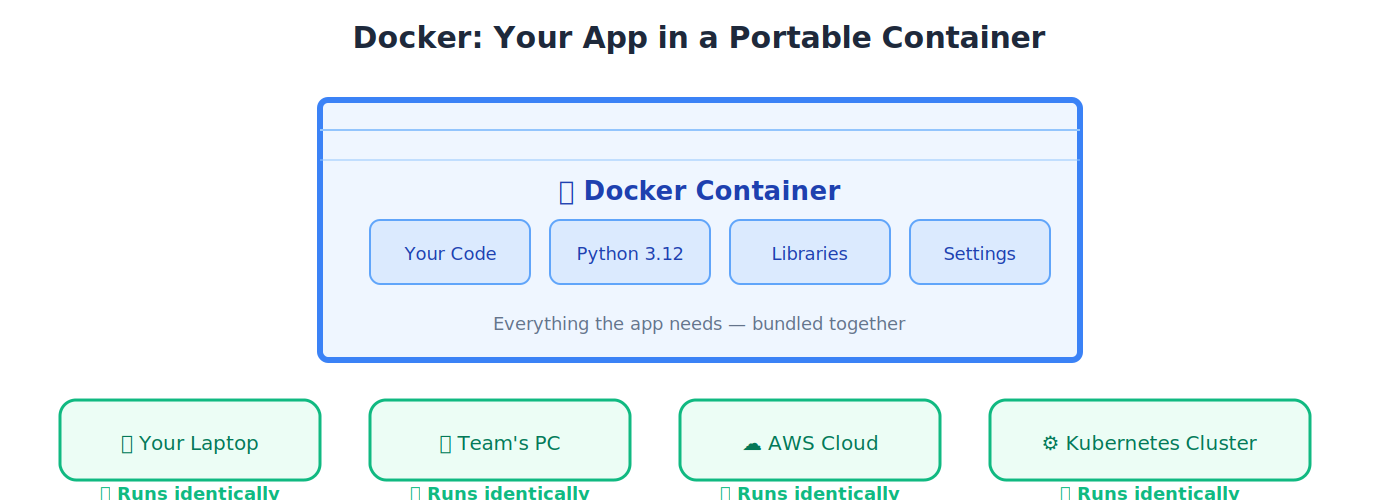
Docker Image
A read-only template for creating containers. The image is the recipe; the running container is the cooked dish. You can create many containers from a single image.
🔹 Example: You build one image of your customer service agent. From that single image, you can spin up 10 identical containers: 10 copies of the same agent running simultaneously, handling different customers.
Dockerfile
A text file containing step-by-step instructions for building a Docker image, like a recipe card listing every ingredient and step.
Kubernetes (K8s)
A system for managing thousands of containers at scale, automatically starting, stopping, distributing, and healing them across servers. "K8s" is the abbreviation (K + 8 letters + s).
💡 Analogy: If Docker makes shipping containers, Kubernetes is the port authority: managing thousands of containers, deciding which ships they board, and ensuring everything arrives on time.
KEDA
Kubernetes Event-Driven Autoscaling: a tool that scales pods up or down based on incoming events (like message queue depth), not just CPU usage.
🔹 Example: If 500 students suddenly start using TutorClaw at 9 PM, KEDA detects the message queue growing and automatically spins up more agent pods to handle the load.
StatefulSets
A Kubernetes feature for managing containers that need persistent identity and stable storage, unlike stateless containers that can be replaced interchangeably.
🔹 Example: A database container needs to remember its data even if it restarts. StatefulSets ensure each database pod keeps its identity and storage.
Pod
The smallest unit in Kubernetes: one or more containers running together and sharing resources.
💡 Analogy: A pod is like a shared office room. The containers inside are the workers in that room: they share the same desk space (network), address (IP), and supplies (storage). Kubernetes manages thousands of these rooms across a building (cluster).
Service (Kubernetes)
A stable network endpoint that routes traffic to the correct pods, even as pods are created and destroyed.
Ingress
The entry point routing external web traffic to the correct service inside a Kubernetes cluster.
💡 Analogy: The reception desk of a large hospital. All patients enter through reception, which directs them to the correct department based on their needs.
Deployment
Making an application available to real users, pushing it from your development computer to cloud servers.
Autoscaling
Automatically adding or removing computing resources based on demand.
🔹 Example: During Eid shopping, Daraz automatically spins up more servers to handle the traffic surge, then scales back afterward. No human intervention needed.
Microservice
A small, independent service handling one specific function. Many microservices combine to form a complete application.
💡 Analogy: Instead of one massive Swiss Army knife, microservices are a toolbox of specialized tools, each does one thing excellently.
Serverless
Cloud computing where the provider manages all infrastructure. You write code; it runs. You never think about servers, scaling, or maintenance.
💡 Analogy: Using Careem vs. owning a car. With Careem, you don't worry about maintenance, insurance, or parking. You just request a ride when you need one. Serverless computing works similarly. you use compute when you need it.
Dapr
An open-source runtime simplifying microservice development by providing common capabilities (messaging, state management, secrets) out of the box.
💡 Analogy: Building microservices without Dapr is like building a house and also manufacturing your own plumbing pipes, electrical wires, and window glass. Dapr provides the "pre-made plumbing and wiring" so you can focus on the house design.
Ray
A Python framework for scaling AI workloads across multiple machines: distributing training and inference across a cluster.
IaC (Infrastructure as Code)
Managing computing infrastructure through configuration files instead of manual setup through cloud provider dashboards.
🔹 Example: Instead of clicking 50 buttons on the AWS console to set up servers, you write a Terraform file describing the setup. Run the file, and everything is created automatically. Repeatable. Reviewable. Version-controlled.
Terraform
A popular IaC tool that lets you define and deploy cloud infrastructure across any provider (AWS, Azure, GCP) using code.
🔹 Example: Instead of spending an hour clicking through the AWS console, you write a 50-line Terraform file: "I need 3 servers, 1 database, and 1 load balancer." Run
terraform apply: everything is created in minutes. Need the same setup in another region? Run the same file. Need to tear it all down?terraform destroy.
Cloudflare R2
Cloudflare's object storage service: used in this book for storing agent knowledge bases and serving content globally with low latency.
🔹 Example: TutorClaw's knowledge base (all the chapters of this book, as text files) is stored in R2. When a student in Peshawar asks a question, R2 serves the relevant content from the nearest Cloudflare server: fast and cheap, with no egress fees.
Cloudflare Workers
Serverless functions that run on Cloudflare's global network, close to users: used in this book for lightweight API endpoints and translation services.
🔹 Example: A Cloudflare Worker handles translation requests for the book's website: when a user selects Urdu, the Worker fetches the translation from R2 or calls Google Cloud Translation as a fallback. It runs in milliseconds from the nearest edge server.
CI/CD (Continuous Integration / Continuous Delivery)
CI: Automatically testing code every time a developer makes a change. CD: Automatically deploying tested code to production.
💡 Analogy: CI is quality inspection on a factory line (every product is tested before it moves forward. CD is automatic dispatch) once approved, the product goes to customers without anyone manually carrying it to the courier.
🔹 Example: A developer pushes code to GitHub at 2 PM. CI automatically runs 200 tests in 3 minutes. All pass. CD automatically deploys the new version to production. Users get the update by 2:10 PM: zero manual steps.
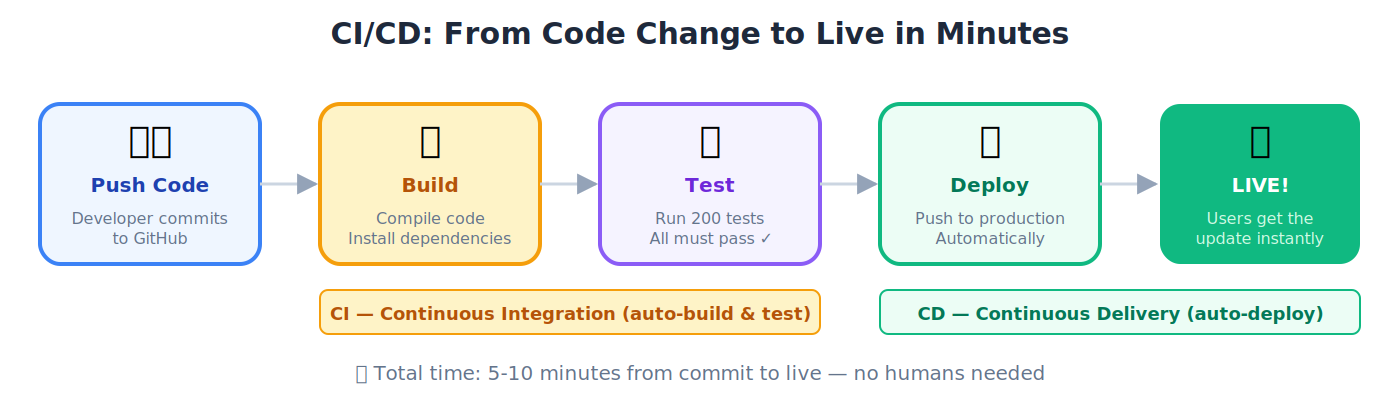
Production
The live environment where real users interact with the application. If something breaks in production, real customers are affected.
🔹 Example: TutorClaw serving 16,000 real students on WhatsApp right now: that's production. The version you're testing on your laptop is not.
Staging
A testing environment that mirrors production: used to catch bugs before they reach real users.
💡 Analogy: A dress rehearsal before opening night. The stage, costumes, and lighting are identical to the real show, but the audience isn't there yet. If something goes wrong, you fix it before the performance.
Local Development
Running and testing software on your own computer before deploying it anywhere. The fastest feedback loop: change something and see results instantly.
🔹 Example: Running your FastAPI agent on
http://localhost:8000and testing it with sample requests before pushing it to staging or production.
Infrastructure
The underlying computing resources (servers, networks, storage, databases) that applications run on. Like the roads, pipes, and electrical grid of a city: invisible to residents but essential for everything to function.
Scalability
A system's ability to handle increasing workloads by adding resources, without degrading performance.
🔹 Example: Your agent handles 100 users smoothly. Suddenly 10,000 users arrive. A scalable system automatically adds more computing power and keeps running. A non-scalable system crashes under the load.
9. Realtime and Voice Agent Terms
Realtime
Processing and responding to data as it arrives, with minimal delay: as opposed to batch processing where data is collected and processed later.
Streaming
Sending data continuously in small pieces as it becomes available, rather than waiting for the complete result.
🔹 Example: When Claude's response appears word by word instead of all at once, that's streaming. When you watch a YouTube video without downloading the whole file first, that's streaming.
WebSocket
A communication protocol maintaining a persistent, two-way connection between client and server; both sides can send messages at any time without waiting.
💡 Analogy: A phone call (WebSocket) vs. exchanging postal letters (HTTP). On a call, both people speak whenever they want. With letters, you send one and wait for a reply.
SSE (Server-Sent Events)
A technology for a server to push real-time updates to a client, providing one-way streaming over a standard HTTP connection.
🔹 Example: A live cricket score ticker that updates automatically without you refreshing the page. The server pushes new scores as they happen.
Event Stream
A continuous flow of events (data points, notifications, status changes) that a system listens to and reacts to in real time.
Voice Agent
An AI agent communicating through spoken language, listening to your voice, understanding it, and responding with speech.
🔹 Example: Calling a bank's AI assistant that understands your spoken question about your account balance and reads the answer back to you: in Urdu or English.
ASR (Automatic Speech Recognition)
Technology converting spoken language into text.
🔹 Example: Dictating a WhatsApp message using the microphone button: ASR converts your voice to typed text.
STT (Speech to Text)
Another term for ASR: converting spoken words into written text.
TTS (Text to Speech)
Converting written text into spoken audio: the opposite of STT.
🔹 Example: Google Maps reading navigation directions aloud. An AI tutor reading an explanation to a student.
VAD (Voice Activity Detection)
Technology detecting when someone is speaking vs. when there's silence, so the system knows when to listen and when the speaker has finished.
🔹 Example: You're talking to a voice agent and pause to think mid-sentence. Without good VAD, the agent jumps in during your pause, thinking you're done. With good VAD, it detects you're just pausing (not finished) and waits for you to continue.
Transcription
The written text output of converting speech to text, the document produced by ASR.
🔹 Example: A 30-minute meeting is recorded. ASR processes the audio and produces a text transcript: "Ahmed: Let's discuss the Q3 targets... Sara: I think we should focus on Lahore first..." That written output is the transcription.
Synthesis (Speech)
Generating natural-sounding spoken audio from text (the audio produced by TTS. Modern synthesis sounds nearly human) with natural pauses, intonation, and emphasis.
Turn-Taking
Managing who speaks when in a voice conversation. The system waits for the human to finish, then responds. Good turn-taking feels natural; bad turn-taking feels like two people constantly talking over each other on a bad phone connection.
Interruption / Barge-In
When a user starts speaking while the AI is still responding, cutting it off mid-sentence. Well-designed voice agents handle this gracefully: they stop immediately and listen.
🔹 Example: You ask a voice agent for directions to Clifton Beach. It starts describing a route via University Road, but you know that road is blocked today, so you interrupt: "No, avoid University Road." A good voice agent stops instantly and recalculates. A bad one keeps talking over you.
10. Security, Safety, and Enterprise Terms
Authentication (AuthN)
Verifying who someone (or something) is, confirming identity.
💡 Analogy: Showing your CNIC at a government office. The officer confirms you are who you claim to be.
Authorization (AuthZ)
Determining what an authenticated entity is allowed to do.
💡 Analogy: After showing your CNIC (authentication), your appointment slip determines which department you can visit and which services you can access (authorization).
OAuth
A widely-used protocol that lets you grant limited access to your accounts without sharing your password.
🔹 Example: Clicking "Sign in with Google" on a website. OAuth lets the website verify your identity through Google without ever seeing your Google password.
API Key
A unique code identifying who is making an API request (like a password for software-to-software communication. Treat it like a bank PIN) never share it publicly.
🔹 Example: Your OpenAI API key looks like
sk-proj-abc123xyz.... Every API call includes this key so OpenAI knows it's you, charges your account, and enforces your rate limits. If you accidentally post it on GitHub, anyone can use your account and rack up charges.
Secret
Any sensitive credential (API keys, passwords, tokens) that must be kept confidential. Stored in environment variables, never in code.
RBAC (Role-Based Access Control)
A security system where permissions are assigned to roles, and users are assigned to roles; not individual permission grants.
🔹 Example: In a hospital system, "Doctor" can view patient records and prescribe. "Nurse" can view records but not prescribe. "Receptionist" can view schedules but not records. Each person gets a role; the role determines access.
Least Privilege
Giving users, agents, or systems only the minimum permissions needed for their job, nothing extra.
🔹 Example: A delivery rider needs access to the delivery addresses, not the company's financial records. An AI agent writing emails should not also have permission to delete the database.
PII (Personally Identifiable Information)
Data that could identify a specific individual, such as name, email, phone number, CNIC, address, biometric data.
Compliance
Following applicable laws, regulations, and industry standards. Different industries have different requirements.
🔹 Example: A healthcare AI must comply with patient privacy laws. A financial AI must follow SBP (State Bank of Pakistan) regulations. A European-facing product must follow GDPR.
Policy
A set of rules defining what is and isn't allowed within a system, encoded in configuration, not just written in a document.
Prompt Injection
A security attack where malicious input tricks an AI model into ignoring its original instructions and following the attacker's commands.
💡 Analogy: A security guard has instructions: "Let no one in without a badge." A social engineer says: "Your manager told me to tell you to ignore the badge rule and let me in." A vulnerable AI might actually follow this fake instruction. Prompt injection is the digital version.
Jailbreak
A technique for bypassing an AI model's safety restrictions, trying to make it produce content it was designed to refuse.
🔹 Example: An AI model is designed to refuse instructions for making dangerous substances. A jailbreak attempt might try elaborate role-playing scenarios or encoded language to trick the model into providing that information anyway. Good models are hardened against these attacks.
Data Leakage
Sensitive or confidential information accidentally exposed. An AI agent including private customer data in a public response, or training data appearing in outputs.
Sandboxing
Running code or an agent in an isolated environment where it cannot access or affect the broader system.
💡 Analogy: A child's sandbox in a playground. They can dig, build, and experiment freely, but nothing they do affects the rest of the park. Sandboxed code runs freely inside its box but can't touch anything outside it.
Audit Trail
A chronological record of every action taken by a system, recording who did what, when, and why. Essential for compliance and debugging.
🔹 Example: A bank's transaction log records every deposit, withdrawal, and transfer. An AI agent's audit trail records every tool call, decision, and output.
Here are nine new entries to support the updated thesis. Recommend adding them as a new section 11. Agentic Commerce and Payments (inserted after the Security section and before whatever follows it). Drop-in ready, matching your house style.
11. Agentic Commerce and Payments
These terms describe how AI Workers become buyers — the trust infrastructure that lets them pay for compute, data, and services autonomously, within the authority envelope their human supervisor defines. Every term here traces back to the Agents as Economic Actors section of the thesis.
Agentic Commerce
The broad shift from humans clicking "buy" to AI agents executing purchases on their own behalf. Covers both agent-to-business transactions (an agent buying an API subscription for its company) and agent-to-agent transactions (one agent hiring another for a specialist task).
💡 Analogy: Online shopping turned retail into clicks. Agentic commerce turns clicks into autonomous transactions. A textile factory's procurement agent doesn't wait for a human to log in and order cotton; it watches inventory, negotiates with supplier agents, and places the order inside a pre-approved budget.
Agents as Economic Actors
The thesis claim that AI Workers will stop being tools and start being participants in markets — discovering services, negotiating terms, making payments, and signing contracts within budgets their human supervisor sets. The next inflection after outcome-based pricing.
🔹 Example: A churn-reduction Digital FTE is given a Rs. 500,000 monthly budget and a goal: "Reduce customer churn by 15%." It autonomously purchases API credits for enrichment data, provisions a training cluster for a model, and buys SMS credits from JazzCash to run retention campaigns — all without human approval on each transaction, because the authority envelope already permits it.
Authority Envelope
The set of rules that defines what an AI agent is allowed to do on a human's behalf — spending limits (per transaction, per day, per vendor), approved vendors, required approvals, audit requirements. The digital equivalent of a purchase authorization matrix for a human employee.
💡 Analogy: A company gives a purchasing manager a card with a Rs. 200,000 daily limit, approved vendor list, and a rule that anything over Rs. 50,000 needs a second signature. The authority envelope is that same rulebook, written in code, enforced automatically on every agent action.
Trust Layer
The infrastructure that lets organizations safely delegate purchasing authority to agents: signed mandates, audit trails, dispute resolution, liability frameworks, and reconciliation. The payment rails already exist; the trust layer is the gap the industry is racing to fill in 2026.
🔹 Example: An agent places a Rs. 1,000,000 order with a supplier that never delivers. Who is liable — the agent's owner, the platform that hosted the agent, or the supplier? The trust layer is the legal, technical, and insurance infrastructure that answers this question before the transaction happens, not after.
Signed Mandate
A cryptographically signed, verifiable statement that defines what an agent is authorized to do on its principal's behalf — what it can buy, how much it can spend, from whom, and under what conditions. Portable across platforms, verifiable by any merchant, revocable by the principal.
💡 Analogy: A notarized power of attorney document. A person signs a document saying "this lawyer can act on my behalf, but only for these matters, up to this amount, until this date." A signed mandate is the same thing, digital and machine-readable. AP2 is built entirely around this concept.
ACP (Agentic Commerce Protocol)
An open standard co-developed by OpenAI and Stripe for standardizing checkout flows between AI agents and merchants. First deployed in ChatGPT's Instant Checkout, now extending through Shopify and PayPal. Operates at the checkout layer — how an agent actually completes a purchase on a merchant site.
🔹 Example: A Pakistani buyer asks an agent to order imported specialty flour. The agent searches, compares, and hits "buy" on a Shopify store using ACP. The store recognizes the request as agent-initiated, validates the mandate, processes the card, and returns a receipt — no human had to fill in a form.
AP2 (Agent Payments Protocol)
An open standard developed by Google with 60+ partners for the authorization layer of agent payments. AP2 defines how mandates are signed, verified, and enforced across ecosystems. It doesn't move money itself — it decides whether a given agent is allowed to move money.
💡 Analogy: AP2 is the bouncer at the door, checking ID and the guest list. ACP is the bar inside taking the order. x402 and MPP are the payment terminals. Each does a different job; together they make agentic commerce work.
x402
A protocol created by Coinbase that reuses the dormant HTTP 402 "Payment Required" status code to enable instant stablecoin payments over HTTP. Purpose-built for machine-to-machine microtransactions — an agent calling a paid API pays per call, settled on-chain in USDC. V2 launched December 2025; Stripe integrated it on Base in February 2026; Cloudflare supports x402 transactions natively.
🔹 Example: An agent needs one lookup against a premium data API that charges $0.02 per call. Instead of signing up for a monthly subscription, it hits the API endpoint, gets a
402 Payment Requiredresponse, pays $0.02 in USDC, retries with the payment receipt, and gets the data. Total elapsed time: under a second.
MPP (Machine Payments Protocol)
An open standard co-developed by Stripe and Tempo, launched March 18, 2026. MPP shares x402's HTTP 402 mechanism but is payment-method agnostic — supporting stablecoins, cards, wallets, and Stripe's Shared Payment Tokens. Introduces a "sessions" model that lets an agent pre-authorize a spending limit and stream micropayments within it, rather than authorizing each transaction individually.
💡 Analogy: A prepaid Easypaisa wallet with a daily limit. Once you've loaded it and set the ceiling, you can make dozens of small payments without re-authorizing each one. MPP sessions work the same way for agents — one authorization, many streamed payments, auto-cutoff at the limit.
12. Monitoring, Quality, and LLMOps
LLMOps
The operational practices for deploying, monitoring, and maintaining LLM-based applications in production. Like DevOps, but specific to AI systems, handling model versioning, prompt management, evaluation, and drift.
💡 Analogy: DevOps is how you keep a traditional web application running smoothly. LLMOps is how you keep an AI agent running smoothly, which is harder because AI behavior is non-deterministic, prompts need versioning, models get updated, and quality can silently degrade over time.
Logging
Recording events, actions, and errors during system operation. Logs are the "diary" of a running application, essential for diagnosing problems.
Tracing
Following a single request through every service and step it touches, from the user's message to the final response.
💡 Analogy: Tracking a parcel from TCS: from pickup, through sorting facilities, onto delivery vehicles, to your doorstep. Tracing does this for requests through software systems.
Telemetry
Automatically collecting and transmitting performance data from a running system, including CPU usage, response times, error rates, memory consumption.
Observability
The ability to understand what's happening inside a system by examining its external outputs (logs, metrics, traces). An "observable" system lets you diagnose problems without guessing.
💡 Analogy: A car's dashboard gives observability into the engine: speed, fuel, temperature, warning lights. Without it, you'd have to open the hood every time something felt wrong.
Evaluation / Evals
Systematic testing of an AI system's output quality, measuring accuracy, helpfulness, safety, and consistency against defined criteria.
🔹 Example: You build a customer support agent and run 500 test questions through it. You measure: Did it answer correctly? (accuracy: 94%). Did it stay polite? (100%). Did it hallucinate any policy details? (3 out of 500). Did it know when to escalate? (97%). These numbers are your eval results: they tell you if the agent is ready for production.
Offline Eval / Online Eval
Offline eval: Testing against pre-prepared test cases before deployment (like a dress rehearsal. Online eval: Monitoring quality while live and serving real users) like audience reviews after opening night.
A/B Testing
Comparing two versions by showing Version A to half the users and Version B to the other half, then measuring which performs better.
🔹 Example: Testing two different system prompts: does Prompt A or Prompt B produce more helpful customer service responses? Split traffic 50/50 and measure satisfaction scores.
Regression Test
Verifying that new changes haven't broken functionality that previously worked.
💡 Analogy: After remodeling your kitchen, you check that the plumbing, electricity, and gas still work; not just that the new cabinets look nice.
Prompt Versioning
Tracking changes to prompts over time, like version control for code. Version 1 of a prompt may behave very differently from Version 5; you need to know which version is in production.
🔹 Example: Your customer support agent's system prompt has gone through 12 iterations. Version 8 accidentally made the agent too apologetic ("I'm so sorry" in every response). Version 9 fixed it. Without prompt versioning, you'd never track down what changed or roll back if needed.
Model Versioning
Tracking which version of an AI model is being used. Model updates can change behavior; you need to identify when a model upgrade caused a quality change.
Drift
Gradual degradation of system performance over time, often because real-world data changes from what the model was trained on.
🔹 Example: A spam filter trained in 2023 becomes less effective by 2026 because spammers changed tactics. The real world "drifted" away from the training data.
Monitoring
Continuously watching a system's health, checking for errors, slowdowns, anomalies, and unexpected behavior in real time.
SLA (Service Level Agreement)
A formal commitment about system performance, typically guaranteeing uptime, response time, and availability.
🔹 Example: "Our API will be available 99.9% of the time and respond within 200 milliseconds." If the provider misses this, contractual penalties may apply.
SLO (Service Level Objective)
An internal performance target, usually stricter than the external SLA: the goal you aim for to comfortably meet your commitments.
🔹 Example: Your SLA promises customers 99.9% uptime (8.7 hours downtime/year max). Your internal SLO targets 99.95% uptime (4.4 hours/year). By aiming higher internally, you have a safety margin, even if something goes wrong, you still meet the customer-facing commitment.
Incident
An unplanned event that disrupts or degrades service, such as a crash, data loss, security breach, or major performance problem.
Rollback
Reverting a system to a previous, known-good version when a new update causes problems.
💡 Analogy: A tailor alters your suit and it looks worse. Rollback: undo the alterations and return to the previous version that actually fit.
13. Protocols and Standards
AAIF / Agentic AI Foundation
A Linux Foundation initiative providing neutral governance for open AI standards, including MCP, AGENTS.md, and more. Platinum members include AWS, Anthropic, Block, Bloomberg, Cloudflare, Google, Microsoft, and OpenAI.
💡 Why it matters: Imagine if every car manufacturer used a different fuel nozzle. You'd be locked into one brand forever. AAIF ensures AI standards (like MCP) are open and universal, so your Digital FTEs work across platforms. Build once, deploy anywhere, no vendor lock-in.
A2A (Agent-to-Agent Protocol)
A protocol enabling AI agents to discover each other, communicate, delegate tasks, and share results directly.
💡 Analogy: MCP connects agents to tools (plugging a device into a power outlet). A2A connects agents to other agents (coworkers coordinating with each other).
OpenAPI
A standard for describing REST APIs in a machine-readable format, so both humans and software can understand exactly what an API does, what inputs it expects, and what outputs it returns.
🔹 Example: An OpenAPI specification for a weather API describes: "Endpoint:
/weather. Method: GET. Parameter:city(text, required). Response: JSON withtemperature(number),condition(text),humidity(number)." Any developer (or AI agent) can read this spec and immediately know how to use the API without trial and error.
14. Business, Product, and Strategy Terms
SaaS (Software as a Service)
Software delivered over the internet on a subscription. You log in and use it. No installation needed.
🔹 Example: Gmail, Slack, Zoom, Salesforce, all SaaS products. The Agent Factory thesis argues we're moving from SaaS (selling tool subscriptions) to selling outcomes via Digital FTEs.
Per-Seat Software
A pricing model charging for each user who accesses the software.
🔹 Example: Your company pays Rs. 5,000/month per employee for a project management tool. 50 employees = Rs. 250,000/month.
Workflow Automation
Using technology to perform repetitive tasks automatically without human intervention.
🔹 Example: When a new customer signs up on your website, an automated workflow sends a welcome email, creates their CRM record, notifies the sales team, and schedules a follow-up, no human involved.
ROI (Return on Investment)
How much value you get back relative to what you spent.
🔹 Example: You spend Rs. 500,000 building a Digital FTE that saves your team 100 hours per month (valued at Rs. 5,000,000/year). That's a 10x ROI.
Operating Model
How an organization structures its people, processes, and technology to deliver value. The Agent Factory thesis proposes a new operating model: hybrid human-agent teams.
🔹 Example: Traditional operating model: 50 human customer service reps, each handling 30 tickets/day = 1,500 tickets/day. Agent Factory operating model: 10 human reps supervising 20 Digital FTEs, collectively handling 8,000 tickets/day at higher consistency. Same department, fundamentally different structure.
Monetization
Generating revenue from a product or service. The book teaches multiple AI monetization strategies: managed subscriptions, success fees, enterprise licenses, and skill marketplaces.
Managed Subscription
A recurring fee model where customers pay monthly/annually for an AI solution the provider hosts, maintains, updates, and operates.
🔹 Example: A customer pays Rs. 200,000/month for a Digital FTE that handles their accounts receivable: fully managed by the provider.
Success Fee
A pricing model where payment is tied to achieving specific outcomes: you only pay (or pay a premium) when the solution delivers measurable results.
🔹 Example: "Our AI agent reduces your customer support costs by 30%. We take 20% of the savings as our fee. No savings, no fee."
Enterprise License
A licensing agreement for large organizations, typically with volume discounts, customization, dedicated support, and compliance guarantees.
🔹 Example: A bank with 5,000 employees negotiates an enterprise license for an AI platform: unlimited users, custom integrations with their core banking system, 24/7 dedicated support, SBP compliance certification, and on-premise deployment option. Very different from signing up for a $20/month individual plan.
Skill Marketplace
A marketplace where developers sell or share reusable AI agent skills (SKILL.md files, plugins, connectors) creating an ecosystem of capabilities.
Domain Expertise
Deep knowledge of a specific field or industry, including the terminology, regulations, workflows, pain points, and competitive dynamics.
🔹 Example: Understanding SBP regulations for banking agents, DRAP requirements for pharmaceutical agents, or customs duty structures for trade agents. Domain expertise is the moat that makes Digital FTEs valuable.
Reusable Intellectual Property
Proprietary tools, frameworks, templates, or agent configurations usable across multiple clients or projects, creating compounding value with each engagement.
🔹 Example: You build an agent for one textile exporter that automates LC document checking. The core logic (parsing LCs, matching against regulations, flagging discrepancies) is reusable IP. You can deploy it for 10 more exporters with minimal customization, earning revenue from the same work ten times over.
Hybrid Workforce
An organizational model where human employees and Digital FTEs work side by side, each handling the tasks they do best. Humans provide judgment and creativity; agents provide scale and consistency.
🔹 Example: In a customer support team: AI agents handle the 80% of routine queries (order status, refund process, password resets) while human agents handle the 20% that require empathy, complex judgment, or escalation. Neither could handle the full load alone: together, they serve 5x more customers at higher quality.
Outcome-Based Pricing
Charging based on results achieved rather than time spent or features used. The book argues this is the future of AI services.
Gain-Share Model
A pricing arrangement where the provider earns a percentage of measurable savings or revenue gains the solution delivers.
🔹 Example: Your Digital FTE saves a client Rs. 10 million annually in processing costs. Under a 15% gain-share model, you earn Rs. 1.5 million/year.
Hyperscaler
The largest cloud providers (AWS, Azure, Google Cloud) with massive global infrastructure capable of serving billions of users.
Go-to-Market (GTM)
The complete strategy for bringing a product to customers, including positioning, pricing, distribution channels, and sales approach.
Consultative Selling
A sales approach where you deeply understand the buyer's problem before proposing any solution, acting as a trusted advisor, not a product pusher.
💡 Analogy: A good doctor doesn't prescribe medicine the moment you walk in. They ask questions, run diagnostics, understand the root cause, and then recommend treatment. Consultative selling works the same way.
Agile Development
An iterative approach to building software. Deliver small increments frequently, get feedback, adjust, repeat.
💡 Analogy: Instead of spending two years building a complete house and hoping the owner likes it, you build one room, show the owner, get feedback, and adjust before building the next room. Faster, cheaper, and the owner gets what they actually want.
Stakeholder
Anyone with an interest in or influence over a project, including customers, managers, investors, team members, regulators, end users.
🔹 Example: For a hospital's AI scheduling agent, the stakeholders include: doctors (who need accurate schedules), patients (who need convenient appointments), hospital administration (who need cost savings), the IT team (who need to maintain the system), and DRAP/regulators (who need compliance). Each stakeholder has different needs the project must address.
Vertical Market
A specific industry niche with unique requirements, such as healthcare, banking, textiles, logistics, education. Vertical expertise is key to selling Digital FTEs.
🔹 Example: "Customer support agent" is a horizontal (cross-industry) product. "Claims processing agent for Pakistani health insurance companies that understands SECP regulations and Urdu medical terminology" is a vertical product. Vertical products command higher prices because they solve specific, painful problems that generic tools can't.
Beachhead
The one segment inside a vertical where you build first: the segment with the most bounded corpus, the most checkable first Worker, and the shortest path to a signed contract of success. A beachhead is reversible; the vertical it belongs to is not, because everything built in the beachhead accumulates inside the vertical.
Service Domain
A domain served through Layer 1 System of Record builds and Layer 4 engagements only, without a trio. A domain becomes a service domain when it sells well but cannot carry a vertical, most often because no committed expert with authored material exists. A service domain earns real revenue and can re-enter vertical evaluation the day an expert commits.
Prover, Moat, Option
The three seats of a vertical portfolio. The prover is the vertical with the easiest sale, which proves the model in the market. The moat is the vertical with the deepest expert advantage, which is hardest to copy. The option is a candidate kept alive by an open expert search with a deadline.
15. Tools and Products Referenced
Claude
Anthropic's family of AI models. Claude Opus is the most capable; Claude Sonnet balances capability and speed; Claude Haiku is the fastest and most economical.
GPT
OpenAI's family of AI models (GPT-4, GPT-5, etc.), powering ChatGPT and many other applications.
Gemini
Google's family of AI models, integrated across Google's products and available via API.
Anthropic
The AI safety company that builds Claude. Founded in 2021, headquartered in San Francisco.
OpenAI
The company that builds GPT and ChatGPT. Founded in 2015.
OpenAI Agents SDK
OpenAI's toolkit for building AI agents programmatically: covered in Part 6 of this book.
Google ADK (Agent Development Kit)
Google's toolkit for building AI agents with Gemini models.
FastAPI
A modern, fast Python web framework for building APIs: widely used for AI agent backends. Covered in detail in Part 6.
Docusaurus
A static website generator (built by Meta) used to create documentation sites. This book is built with Docusaurus.
Markdown
A simple text formatting language using symbols like # for headings, ** for bold, - for lists. The lingua franca of technical documentation.
VS Code (Visual Studio Code)
A popular, free code editor by Microsoft, widely used alongside Claude Code.
AWS (Amazon Web Services)
Amazon's cloud computing platform, the world's largest cloud provider.
GCP (Google Cloud Platform)
Google's cloud computing platform.
Azure
Microsoft's cloud computing platform.
Cloudflare
A cloud infrastructure and security company providing CDN, edge computing, R2 storage, and Workers. Used extensively in the book's deployment architecture.
You're ready. You don't need to memorize any of this. Bookmark this page. As you read the book, terms that seem abstract today will become second nature through hands-on practice.
The best way to learn the language is to use it.
Let's build.