AI Prompting in 2026: A Crash Course
13 Concepts, 80% of Real Use
Most people use AI like a Google search. They type a short question, skim the answer, and move on. That works for trivia. It fails for the work that matters.
Power users do something different. They brief AI the way they would brief a smart new colleague, with files, context, constraints, and a clear ask. They expect three options instead of one. They argue. They iterate. They check the work. The gap between a novice prompt and a power-user prompt is not cleverness. It is a handful of habits anyone can learn in an afternoon.
This page is that afternoon. Thirteen concepts in four short parts.
Before this page: read What AI Actually Is. That course explains what the machine is. This one teaches how to talk to it.
📚 Teaching Aid
View Full Presentation: the AI Prompting 2026 deck.
One fact sits under everything on this page. The model is stateless. It keeps no memory of its own between turns, and it answers each time using only the text in front of it right now. You met this fact in What AI Actually Is.
So almost every "advanced technique" here is one of two moves. Get the right context in, or keep the wrong context out. Read each section that way.
A note on tools: examples reference ChatGPT, Claude, and Gemini because most readers have one of those. The skills transfer to any modern chat AI. Where a feature is exclusive to one product, it is named explicitly.
Open a free account with Claude, ChatGPT, or Gemini in another browser tab right now. Each free tier takes about a minute to sign up for. You do not need to do anything in it yet. Read straight through once for the shape, then come back and try the prompts in the closing block. Reading gives you the words. Trying gives you the skill. One closing exercise asks you to compare two tools, so a second free account helps by then.
Quick glossary
Every word here is explained again where the page teaches it. Skip this block and come back when you need it.
- pretrained knowledge: what the model learned from its training text, with no lookup.
- knowledge cutoff: the date the training text stops. Nothing after it is inside the model.
- web search: the tool that fetches current web pages and puts them in front of the model.
- deep research: a mode that runs many searches for minutes and returns a report with sources.
- slop: AI text that is fluent on the surface and empty underneath.
- rubric: a list of specific things to check, each scored or answered on its own.
- sycophancy: the trained habit of telling you what you seem to want.
- context window: all the text the model can see while it writes one answer.
- system prompt: instructions the product puts into the context window before you type. In the stack picture they are layer 1, the bottom layer.
- stateless: the model keeps nothing of its own between turns.
- memory: a note the tool writes about you and puts in front of the model in every new chat.
- context rot: the drop in quality when one long chat carries many unrelated topics.
- compacting: the tool replacing older chat turns with a short summary to make room.
- projects: a workspace with standing files and instructions that every chat inside it inherits.
- reasoning: the working a model writes for itself before its final answer.
- extended thinking: the setting that lets the model reason for longer before it answers.
- brainstorm-iterate loop: load context, ask for options, give feedback, ask again, expand one.
- multimodal: working with images, audio, and files as well as text.
- diffusion model: an image generator that starts from noise and removes it step by step.
- artifact: a working object from the chat, in a side panel you can edit, share, and download.
- code execution: the tool that lets the model write a small program and run it on your data.
- AI desktop apps: apps on your computer that act on your files with your permission.
- jagged: uneven ability. Different models lead on different tasks, and the leader changes.
- model ladder: the fast, medium, and heavy models one company sells under one brand.
- model families: all the models from one company. Two from one family share blind spots.
- A/B test: sending the same prompt to two tools and reading the answers side by side.
- agent: an AI that carries out a job of many steps on its own instead of only replying.
- terminal: the plain text window where developers type commands to a computer.
- codebase: all the files of one software project.
- SVG: a picture format written as text, so an AI can type a drawing directly.
- CSV: a plain spreadsheet file of rows and columns that most apps can export.
- version control: software that saves every past version of a file.
- token: a chunk of text a little shorter than a word. Context sizes are counted in tokens.
- weights: the trained numbers inside a model. Public weights let you run the model yourself.
- API: a way for one program to call another, used here to reach a model over the internet.
- Arena: a public leaderboard where users vote on two unnamed answers.
- NDA: a signed agreement to keep information private.
A short note on what changed since you last looked
If you used ChatGPT in 2022 or 2023 and decided it was a clever toy, the tool you remember is not the tool you have now. What changed:
-
Context windows grew by roughly 1000x. A 2022 model held a few thousand words. A 2026 model holds hundreds of thousands, sometimes a million. So you can now put a whole book, several days of speech, or a folder of contracts into one prompt.
-
Reasoning became real. "Think step by step" used to be a magic phrase. Now models have thinking modes that run for seconds, sometimes minutes, and try several approaches before answering. A year ago the hardest task AI could finish reliably would have taken a person a few minutes. Today it would take a person an hour or more. Concept 5 has the numbers.
-
Web search became a built-in tool. The model decides when a question needs fresh information, runs a search, reads a few pages, and uses what it finds. A 2022 model could only answer from what it had memorized during training. A 2026 model can look something up while it answers. This matters most for anything that changes, such as news, prices, and recent rules.
-
Code execution became a built-in tool too. The model can write a small program, run it, and use the result in its answer. This matters most for anything it would otherwise estimate, such as arithmetic on real numbers or reading a spreadsheet. Both tools are mostly invisible, so most people cannot tell whether an answer came from memory, a web page, or a calculation. Once you notice, you can ask "did you actually search for this?" or say "run the numbers, do not estimate."
-
Images, files, and audio stopped being a sidebar. You can drop a photo, a PDF, a spreadsheet, or a voice memo into a prompt and ask questions about all of them at once.
-
The tools started remembering you. All three now write a short profile of who you are and how you work, and load it before every new chat. This is not the model gaining a memory. It is the product putting a note in front of it. Concept 4 covers what that changes.
-
Desktop apps appeared. A new kind of product (Cowork, OpenWork) can find your files, draft emails, and update spreadsheets with permission. That is closer to handing a small task to a coworker than to chatting.
-
Command-line agents appeared for developers. An agent is an AI that carries out a job of many steps on its own instead of only replying to you. Tools like Claude Code and OpenCode live in the terminal, which is the plain text window where developers type commands. They read a whole codebase, meaning all the files of one software project, edit many files, run tests, and report back.
The thirteen ideas in one line each
- A power-user prompt is not a cleverer question. It is a briefing.
- AI learned by reading, so it is strong where the internet is thick and weak where it is thin.
- An answer comes from training, a web search, or deep research, and your wording steers which.
- The model knows only what is in front of it, so what you put there decides the quality.
- Models can think for longer before answering, and you turn that on in plain language.
- Models lean toward agreeing, and neutral wording plus a scored rubric removes most of that lean.
- Good work comes from a loop: context, options, feedback, options again, then expand one.
- AI reads images and audio, and makes them, with different strengths in each direction.
- One prompt can build a small working app you can edit, share, and download.
- AI can run a program on your data, but only if you make sure it really runs.
- Desktop apps act on your files, so give them the smallest permission the job needs.
- Cost and speed differ a lot across text, audio, images, and video, and the leader keeps changing.
- With no expert in the room, models from different companies grading each other is your best signal.
Part 1: How AI knows things
1. Novice vs power user
These slides are for school students meeting AI prompting for the first time. They introduce Concept 1 with examples from school trips, homework help, and birthday parties, plus classroom exercises. Download PPTX for offline use.
Watch what changes between the two prompts. The question is the same. The briefing is not.
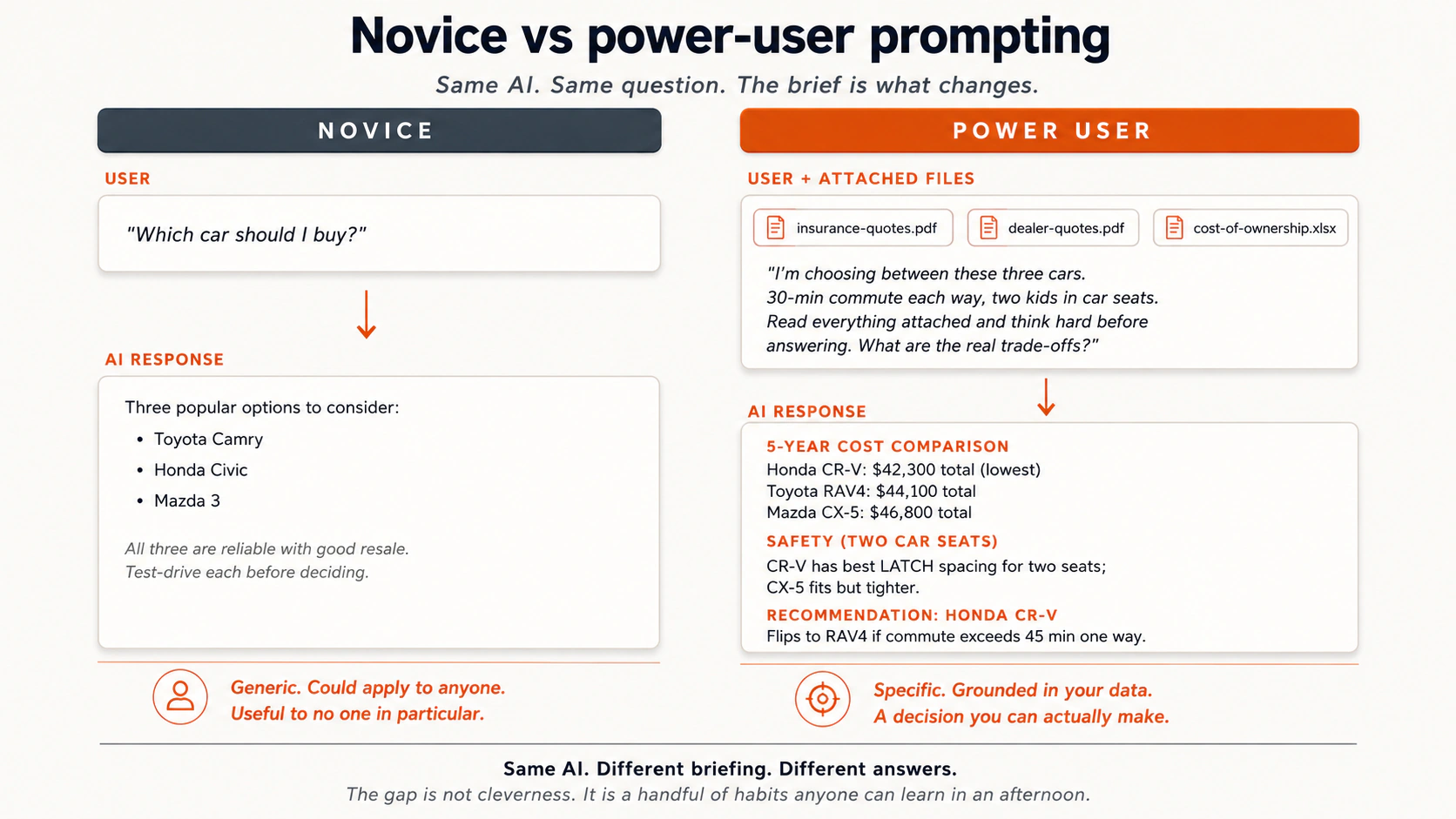
A few more real contrasts:
- Buying a car. Novice: "which car is best?" Power user: uploads spec sheets, dealer quotes, and insurance plans, then asks "what are the trade-offs? Read everything and think hard."
- Self-review at work. Novice: "write a self-review for my boss." Power user: uploads a screenshot of their project tracker, recent project docs, and a voice memo of notes, then asks for a draft.
- Critiquing a business idea. Novice: "I have a great business idea, mobile tie-dyeing, critique it." That is bait for sycophancy, which is the trained habit of telling you what you seem to want, so the AI mostly applauds. Power user: hands it a rubric, which is a list of specific things to check, each scored or answered on its own. "Analyze objectively. Use this rubric: is there a problem worth solving, is there a market, is there a competitive advantage?" The AI scored that idea 8 out of 100 and explained why.
- Writing a blog post. Novice: "write a blog post about the BlackBerry." What comes back is slop, which is AI text that is fluent on the surface and empty underneath. It is clean, faintly Wikipedian, full of phrases like "in today's fast-paced world," and it says nothing a reader would remember an hour later. AI writes it by default when you give it no context and no constraints. Power user: outline first, critique the outline, expand each heading into bullets, critique the bullets, and only then ask for prose.
One picture ties these together. AI is a very smart new colleague on their first day. It is highly motivated and knows nothing about you yet. The picture stops being exact in two places. A real colleague learns you over months, while this one starts from nothing in every new chat, so you give the briefing every time. A real colleague also asks when a briefing is unclear, while this one fills the gap with a guess and sounds just as sure. Before you press send, ask whether a new colleague could do this job well with what you gave them.
A briefing has four parts: the files, the goal, the limits, and the exact ask. A novice prompt carries only the last one.
Check yourself: what does a power user put in the prompt that a novice leaves out?
2. Pretrained knowledge
Pretrained knowledge is what the model can answer from its training text, with no lookup at the moment you ask.
These slides are for school students. They explain what AI learned in child-friendly words: AI learned by reading, not by living. They cover the "Loud, Quiet, Secret" framework, which sorts topics by how much the internet talks about them, three classroom games, and one key lesson: "Sounding sure is NOT the same as being right." Download PPTX for offline use.
AI did not learn by living in the world. It has no body and no senses. It learned by reading text about the world, in huge amounts: Reddit and Quora threads, Wikipedia, books, news articles, research papers, blogs, and forums.
How often a topic appeared in that text is roughly how reliable the answer is. So:
- Strong: cooking, celebrity gossip, common medical advice, top-1000 movies, popular programming languages, what is on the Voyager 1 record (a NASA spacecraft launched in the 1970s, now around 25 billion miles away, carrying greetings in 55 languages), why cats stare at walls.
- Sparse: quasars (very bright objects in the sky powered by black holes), Cantonese (under 0.1% of internet text), regional history, niche professional knowledge.
- Absent: your company's secret data, your private calendar, anything published after the model's knowledge cutoff, which is the date its training text stops, and anything nobody ever put on the public internet.
Two practical consequences:
Don't waste time fixing typos. AI was trained on internet text, which is full of typos. It handles misspelled prompts gracefully. Misspelling "definately" will not change the answer.
Watch for absorbed errors. AI also took in wrong beliefs and out-of-date information from those same sources. A confidently wrong forum post becomes a confidently wrong model. Check anything important against a primary source.
Spotting broken logic is its own skill, and the Thinking in AI Era Crash Course teaches it directly. The first place to look is a confident answer about a topic the internet barely covered. Confidence is not a signal of correctness.
A quick test before you trust an answer that came from training alone:
| Question type | How well-represented in training data? | Trust level |
|---|---|---|
| "How do I make a roux?" | Cooking is one of the most discussed topics on the internet. | High. |
| "Plot of a top-1000 movie." | Reviewed and re-reviewed thousands of times. | High. |
| "History of an obscure village." | Possibly only one Wikipedia paragraph, or none. | Low. Verify against a primary source. |
| "Recent regulatory change in my industry." | Almost certainly after the knowledge cutoff. | Trust nothing unless it looks it up. |
| "What did our company decide last quarter?" | Not in the training data at all. | Trust nothing. The model is guessing. |
This is not a rule to memorize. It is the question you would ask about any other source: "how would this person know that?" Ask it about AI too.
A non-software example. A reader asked an AI for the rules of a folk game played in their grandmother's village. The AI produced three confident paragraphs. The grandmother said they were almost entirely wrong. The game was barely on the internet, so the AI had blended descriptions of similar games from other regions. It did not lie. It generalized from thin data. The mistake was not asking. It was treating confidence as accuracy.
Curious why AI can sound completely sure and still be wrong? Elan Barenholtz's article "LLMs show language does not describe reality" (IAI, 2026) explains how these models work, in plain English. It also makes larger philosophical claims about human language. Take the part you find useful and leave the rest.
Reliability follows the training text. Common topics are strong, thin topics are weak, and private or recent facts are missing. Check important claims against a primary source.
Check yourself: why is an AI answer about an obscure village less trustworthy than one about cooking?
An interactive exercise for school students. Students sort topics such as pizza, dogs, a rare deep-sea fish, a WiFi password, and a family's own game rules into three zones. Loud means everyone talks about it, so AI knows it well. Quiet means few do, so AI might get it wrong. Secret means nobody wrote it down, so AI cannot know it. Play the Exercise Online | Download PPTX for offline use.
3. The 3 retrieval modes: pretrained, web search, deep research
When you ask a question, a modern AI tool chooses how to answer, usually without telling you. It answers from pretrained knowledge alone, or it runs a web search, which means fetching a few live web pages and reading them, or it runs deep research, which means spending several minutes across dozens of sources and writing a structured report.
Know which mode fired, because each fails differently.
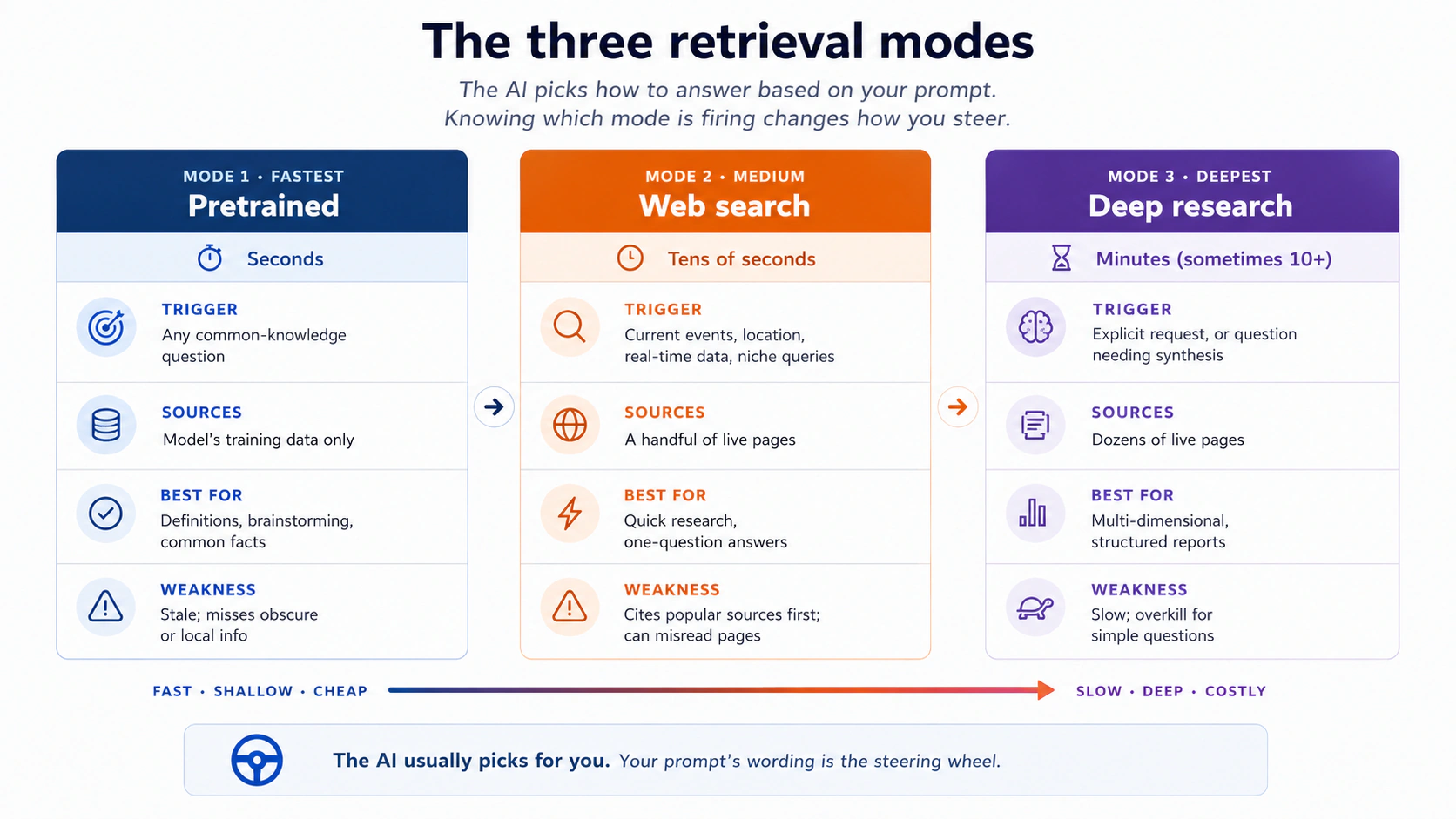
A few examples:
- Pretrained answers fine: "why do cats stare at walls," "what's on the Voyager 1 record," "summarize the plot of Hamlet." These do not change week to week.
- Web search rescues an out-of-date model: anything that appeared after the knowledge cutoff is invisible to the model. A meme, a regulation, a product launch. With web search, it pulls a recent article and answers correctly.
- Web search going wrong: a friend asked "where to run in Henderson, Nevada." The AI cited a 20-year-old web page and recommended a school that no longer opens to the public. Web search does not check whether a source is current.
- Deep research worth the wait: "plan a Halloween haunted house in our neighborhood, including permits, fire safety, and noise ordinances." The AI proposes a research plan, runs many searches at once, decides what to dig into next, and produces a multi-section report with checklists. That is closer to handing the work to a junior researcher for an hour than to asking a chatbot.
The mechanics vary by tool, and the shape is the same. A search-and-retrieval layer runs the searches, scans the results, pulls the most relevant pages, and cuts each one down to a short passage. That layer is often a separate, smaller model, and only its shortened version reaches the model that talks to you.
So the model that answers you often reads a summary rather than the page. That is why it sometimes reports a page wrongly. A summary loses detail.
One fix: name the kinds of sources to use. Instead of "are vaccines safe," try "use the World Health Organization, the FDA, the European Medicines Agency, and peer-reviewed studies. Do not use forums or personal blogs." By default these tools cite popular sources first, such as Reddit, Wikipedia, YouTube, and Yelp, which are often fine and not always safe for a high-stakes question.
A second fix: ask for quotes. "For each claim, quote the exact sentence from the source page that supports it." That brings the original wording back into view and catches a lot of summary drift.
A non-software example. A neighborhood-association volunteer used deep research to prepare for a town meeting on local water quality. Her prompt: "Research current water quality issues in [her city] over the last 24 months. Use the EPA, the city's public utility reports, and peer-reviewed studies. Avoid news editorials and forums. Produce a structured report with the three most-cited issues, data tables showing trends, and three concrete questions residents should put to the utility." Eight minutes later she had a briefing built on current local data. The question needed many sources and current facts, so deep research was the right tool.
Choosing a mode. You rarely pick a mode with a button. The AI picks, based on your prompt. But you can steer it:
| Phrasing pattern | What it usually triggers |
|---|---|
| "What is X" / "Summarize Y" | Pretrained only. |
| "What's the latest on X" / "Today" / "This week" / a specific city | Web search. |
| "Research X thoroughly," "produce a report with citations," "use these source types" | Deep research, or extended web search in tools without it. |
| Attaching files | Stays pretrained for the files. May also search the web if the prompt asks for current info. |
AI is not Google. Use Google for a quick scan, for reaching a known site, or for buying a thing, such as an air filter for a 2013 Honda Civic. Use AI when you need the pieces pulled together: pros and cons, a comparison across sources, a written analysis. The question is whether you want a link or an answer.
Side by side:
| Task | Better with Google | Better with AI |
|---|---|---|
| "Find the official IRS page for form 1040." | Yes. You want to land on a specific known site. | No. |
| "Compare three diabetes medications and what the recent evidence says." | Slower. You'll read 8 tabs. | Faster. AI synthesizes the evidence in one place. |
| "Buy a replacement charger for a 2018 ThinkPad." | Yes. You want a product link. | No. |
| "Plan a 4-day Lisbon trip with a 6-year-old, no museums." | Slow. You'll juggle blogs and reviews. | Fast. AI integrates constraints. |
| "What's the weather tomorrow?" | Either. | Either. |
| "Why are my tomato plant leaves yellowing?" | OK. Multiple gardening sites. | Better with a photo attached. |
If your question is "where is X," reach for Google. If your question is "given all this, what should I think," reach for AI.
Three modes answer you: training text, a live web search, or deep research. Your wording steers which one fires, so name the sources when the answer must be current.
Check yourself: which mode would you want for "what changed in my country's tax rules this year," and why?
How to get more reliable web-search results with AI
Three small habits raise the quality of a web-search answer:
- Name the sources you trust. "Use the WHO, the FDA, and peer-reviewed studies, not forums."
- Ask for a source after each claim. "Cite the source after each claim."
- Ask it to mark what it could not check. "If a claim cannot be supported by the cited sources, mark it 'unverified'."
Pasted into any web-search prompt, these three lines cut down the most common failure. That failure is the AI blending several sources into one confident sentence that no single source actually supports.
Part 2: Talking to AI well
4. Context is the whole game
A person holds only a handful of things in mind at once. Classic estimates say about seven, newer ones closer to four. A modern AI model can hold hundreds of thousands of words at once, sometimes a million. About 750,000 words is the first 4 to 5 Harry Potter books. The model can read all of it before answering, and it reads a full window less carefully than a short one.
But it can only read what you give it. The context window is everything the model can see while it writes one answer. Six things can land in it. The first is the system prompt, which is a set of instructions the company placed there before you arrived. Then come the descriptions of any tools the model can call, such as web search and code execution, which means writing a small program and running it. Then your prompt, the chat history of this conversation, and any file you uploaded. The sixth is newest. Memory is a note the tool writes about you and puts in front of the model in every new chat.
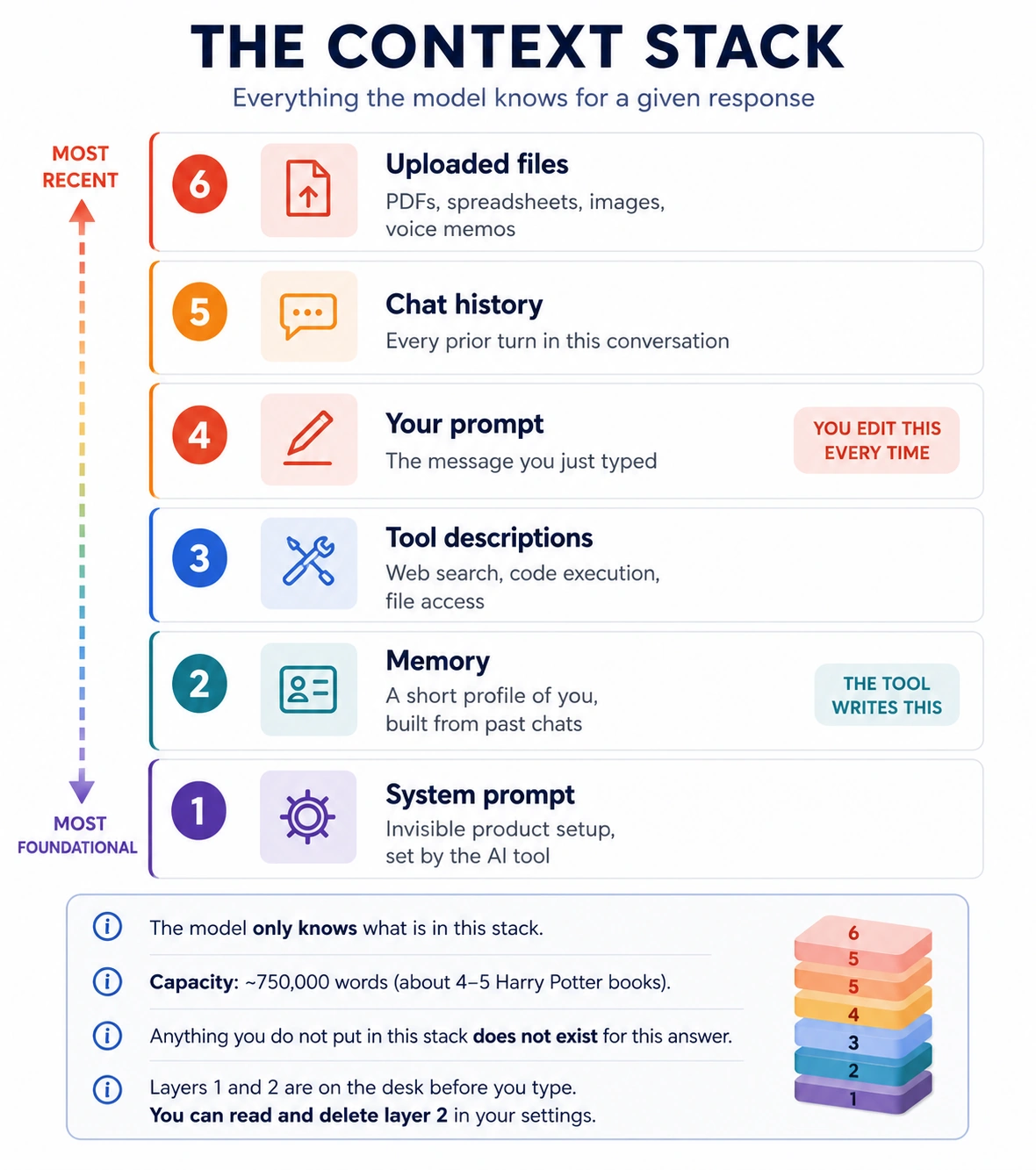
Think of the context window as a reading desk. Everything the model can use for this answer sits on that desk, and anything not on it does not exist for this answer. The picture stops being exact in two places. A real desk keeps what you put on it, while this one is cleared and rebuilt from stored text before every reply. A real desk also holds every page just as clearly, while the model's recall drops as the window fills. This concept comes back to that gap and names it. You met the same picture in What AI Actually Is.
Most people assume a fresh chat starts blank. It does not. Before you type a character, the company that built the tool has put instructions on the desk. In the picture above they are layer 1, the bottom and most basic layer. You never see them, and the model reads them before it reads anything you write.
Think of a restaurant owner briefing a new waiter before the first customer sits down. "Be friendly. Recommend the daily special. If someone asks about allergens, always check with the kitchen, never guess." The waiter follows those instructions at every table, and you never hear the briefing. The AI works the same way, and those invisible instructions are the system prompt. The picture stops being exact in one place. A waiter's briefing stays a short list of house rules, while written instructions pile up over time until someone prunes them. You will see that happen later in this concept.
What is usually in that briefing:
- How to behave (helpful, honest, careful).
- What to refuse (harmful content, dangerous instructions).
- What tone to use (formal, chatty, concise).
- When to add disclaimers ("I'm an AI and can't provide medical advice").
- What tools it can call (web search, code execution, file access).
This is why Claude, ChatGPT, and Gemini feel different when you ask them the same thing. The personality you sense is not built into the model. It is written into the instructions the company loaded before you arrived. Claude's instructions ask for careful thinking and honesty. ChatGPT's ask for warmth and broad helpfulness. Gemini's ask for short answers backed by sources. Same question, three briefings, three tones.
Try it. Ask all three to "explain why the sky is blue, in one paragraph." The facts will be similar. The tone, length, and style will not be. That difference is mostly the system prompt. It is also why the AI stays polite when you are rude, refuses some requests, and adds safety warnings you never asked for. These are not personality traits. They are instructions.
You can add your own layer. The company's system prompt is fixed, and most tools let you write your own instructions that load beside it in every chat. Write "I am a nurse, assume clinical vocabulary" in your instruction settings and you have added a line to the system prompt. The model reads it before every response, which is why it holds without repeating.
Where to find this in each tool:
| Tool | Setting name | Direct link |
|---|---|---|
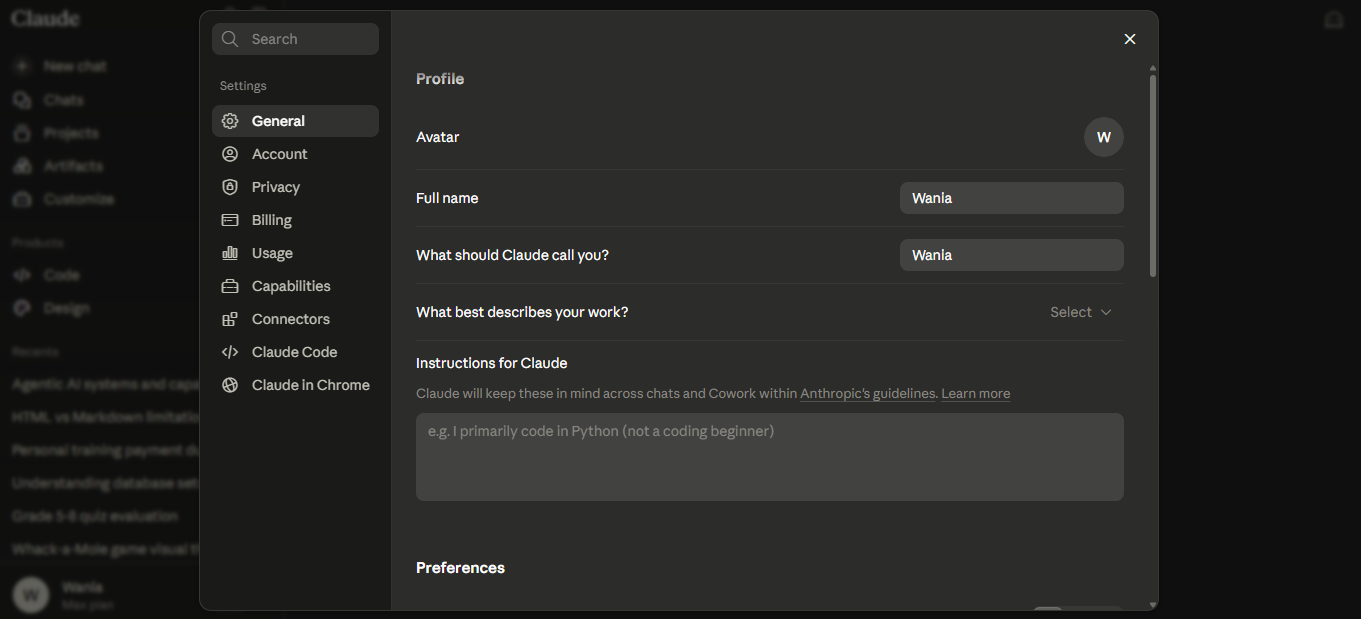
| Claude | Personal preferences (Settings > General) | claude.ai/new#settings/general |
| ChatGPT | Personalization (under Settings) | chatgpt.com/#settings/Personalization |
| Gemini | Personalization settings | gemini.google.com/personalization-settings |
Each page has a text box for your instructions, and every future chat then starts with them already in the context window. In Claude, that box is under Settings > General, labeled "Instructions for Claude."
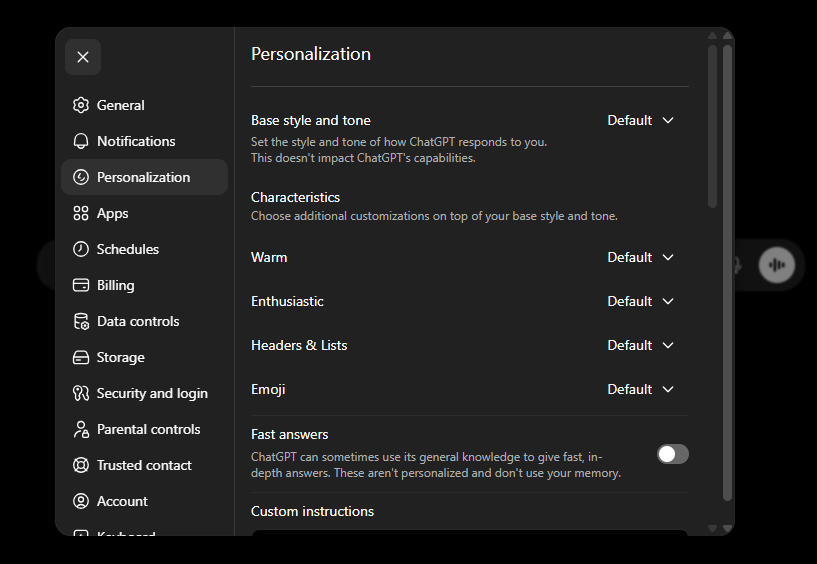
In ChatGPT, it is at the bottom of Settings > Personalization, under "Custom instructions."
In Gemini, open Personalization settings, turn the switch on, and click Add.
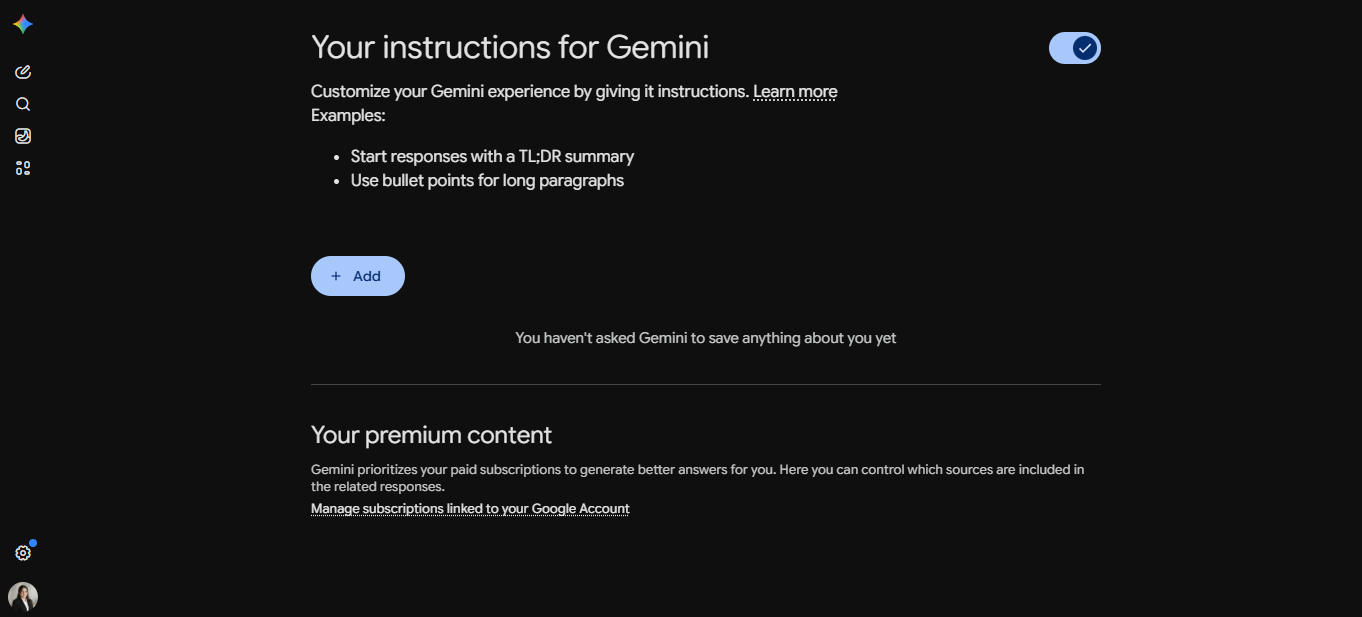
In all three, write a few sentences about who you are and how you want the AI to respond, then save.
A small example. A teacher sets her instruction to "I teach Grade 5 science. Explain everything at a 10-year-old's reading level. Never use jargon without defining it first." Those sentences now sit next to the company's instructions in every chat she opens. She never has to say "I am a teacher" again. The AI already knows, the same way the waiter already knows to check with the kitchen.
Because this layer loads before every chat, it is tempting to keep adding to it. One more line each time the AI does something you did not want. A year later you have twenty lines, and some contradict each other. Anthropic hit this inside its own products, and in July 2026 it deleted most of the standing instructions it had built up with no loss in quality.
Two habits keep this layer useful. Write what the AI cannot work out on its own, such as your job, your audience, and your hard limits. Then read the whole thing every few months and ask of each line: if I delete this, will the AI get something wrong? If not, delete it.
The model is stateless, which means it keeps nothing of its own between turns. So nothing outside this stack exists for this answer.
Compare two prompts:
- A bare prompt: "pros and cons of studying physics versus zoology." You get generic advice from a school counselor.
- A context-rich prompt: the same question, plus your career assessment results as a PDF and a screenshot of your high-school schedule. Now the AI can talk about your strengths, your course history, and which choice fits which.
Same model, same question, different answer. The difference is the context, not the prompt.
So before you press send, ask what a smart new colleague would need in front of them, then attach those things. They read carefully what you give them, and they cannot know your industry, your team's history, or yesterday's email thread.
A non-software example. A 7th-grade teacher asked AI to "draft a lesson plan on the water cycle." She got a generic plan from any textbook: definitions, a diagram, three discussion questions. The next day she tried again with three things attached. Her course syllabus, so the AI knew what came before and after. Last week's worksheets with the grades visible, so it knew which ideas had landed. And her school's test format. The new plan opened with a five-minute review of the two weak ideas, ran the new material through the test format, and closed with a check-for-understanding question matched to her next topic. The second prompt simply told the AI what a new colleague would have needed to know.
A checklist before any prompt that matters:
| Question | If yes, attach or describe it |
|---|---|
| Is there a document the answer should be consistent with? | Yes: attach it. |
| Is there a constraint the AI cannot infer (budget, time, who's on the team)? | Yes: state it. |
| Is there prior context (a previous decision, an existing process)? | Yes: summarize in one paragraph. |
| Is there an output format you want (table, email, bullet list)? | Yes: name it. |
| Is there an audience (a boss, a child, a stranger)? | Yes: name them. |
Five lines of context, well chosen, beat five paragraphs of cleverness.
Connects to: the AI Fluency course covers the same ground as a five-slot prompt template, with slots for role, context, task, constraints, and output format. This checklist sorts by what you might forget to attach, and the template sorts by where each line goes in the prompt. The habit underneath is the same.
The sixth layer: the AI now writes notes about you. Everything above is context that you put in the window. All three tools now add a layer they build themselves. As you work, the tool writes a short summary of who you are and how you like to work, and loads that summary at the start of every new chat.
This sounds like a contradiction. It is not, and the reason matters: memory does not give the model a memory. The model is still stateless and still answers only from what is in front of it. Memory is a note the tool keeps about you and places there before you type. It is a sixth layer on the stack, not an exception to it.
| Tool | What it is called | Where to control it | Clean-slate mode |
|---|---|---|---|
| Claude | Memory (separate from chat search) | Settings > Memory | Incognito chat |
| ChatGPT | Memory: saved memories plus past-chat reference | Settings > Personalization > Memory | Temporary Chat |
| Gemini | Personal context | Settings & help > Personal context | Temporary Chat |
Menu names move around, and Gemini's version needs a personal Google account with activity history on, so it will not appear on a school or work login. Check your own settings rather than this table.
Three habits and one warning:
- Read what it has stored, once. Open the memory panel and read it. Some of it is sharper than expected, and some is a preference you mentioned once that has shaped every answer since. You can delete any line.
- Correct it out loud. If an answer rests on something out of date, say so in the chat: "you are assuming I still work in retail, and I do not." That updates the note, with no trip to settings.
- Use the clean-slate mode when the context would mislead. A one-off question far from your usual work belongs in an incognito or temporary chat.
- The warning, for anyone who owes a duty of confidentiality. If you are a doctor, lawyer, accountant, or teacher, client and student details can build up in a memory note and come back in an unrelated chat months later. Keep identifying details out of memory, and do that work in a clean-slate chat or a scoped project.
Memory also softens the rule below. Context rot, which is the drop in answer quality when one long chat carries many unrelated topics, still applies. With memory on, a new chat is no longer blank. The noise of the old conversation goes and the summary of you stays. The exception is when the summary itself is the problem. If the AI keeps making the same wrong assumption in every new chat, stop rewriting your prompt and go fix the memory.
Context windows are large but not infinite, and the model's recall gets worse as one fills up. The most common mistake is keeping one very long conversation going across many unrelated topics. AI just helped you plan a workout, then you ask it to debug a spreadsheet, then you ask it to write a thank-you note to your aunt. The workout is still in there, pulling at the model. That is context rot.
So when the topic changes, start a new conversation. It is free, and the answers get visibly better.
Symptoms that tell you a conversation has gone stale:
- The AI starts referencing earlier parts of the chat that have nothing to do with what you just asked.
- Its answers get longer and vaguer over time, with more hedging.
- It contradicts a constraint you stated five turns ago.
- It starts apologizing repeatedly without making progress.
There is a mechanism behind this. Once a conversation gets long enough, most chat tools start compacting it, which means replacing the early turns with a short summary to make room. Claude shows a small "compacting" message. ChatGPT and Gemini do it without saying so. The story survives, and the details do not. The library you named three hours ago, the naming rule you agreed on, the limit you set in turn four: any of these can disappear into the summary. So a chat window is working memory, not storage. Anything that must survive one long session belongs in a project, an attached file, or a note you can paste again.
When you see these symptoms, the instinct is one more clarifying prompt. Resist it. Start the new chat instead, paste in the one or two facts that matter, and continue. The reset is almost always faster than the rescue. If the dead chat produced a plan, a draft, or a decision worth keeping, save it to a file first.
The checklist above raises an obvious question. If AI has to be briefed like a colleague every time, that is a lot of repeated typing. The answer most tools now ship is a feature called projects, which are workspaces you set up once with the files, instructions, and audience that always apply to one kind of work. Every chat you start inside one inherits that setup.
When to make a project. The moment you have pasted the same files, audience, or limits into two chats on one topic. That context belongs in a project, not a prompt.
Three examples of what a project earns you:
- A tax-filing project with last year's return, your W-2s and 1099s, and an instruction like "Assume I am a US filer with one dependent. Always show your math." Every question starts from that base.
- A school project with the syllabus and the school calendar, and an instruction like "Always check the date against the calendar before answering." Useful when "is there school on Monday?" comes up four times a year.
- A writing-voice project with three samples of your writing and an instruction like "Match the rhythm and word choice of the samples. Do not add hedging I did not use." Now every draft starts in your voice.
Projects also make the context-rot rule cheap to follow. Inside a project, a new chat drops only the noise of the last one. The standing files and instructions stay. You reset the chat, not the context.
Three tools, three names, one idea. Claude and ChatGPT both call it Projects. Gemini calls it Notebooks, which sync with NotebookLM, Google's separate research tool, so anything you add in one shows up in the other. All three hold files and instructions across many chats. They differ in emphasis.
- Claude and ChatGPT Projects lean toward instructions and behavior. You set the voice, the role, the rules, and the audience, and the model holds that character across every chat in the project. Best when how the AI responds matters as much as what it knows, such as writing in a set voice or keeping a brand tone.
- Gemini Notebooks and NotebookLM go further on sources. Drop in PDFs, Google Docs, web links, YouTube videos, or audio, and every answer comes back tied to those sources with citations you can click. The workspace also flows both ways: a chat inside a Gemini notebook becomes a source back in NotebookLM, so last week's chat is one more source this week can cite. NotebookLM also builds Audio Overviews, Mind Maps, Flashcards, and Slide Decks. Best when you study or research over many sessions.
A short rule. Reach for Gemini Notebooks or NotebookLM when the workspace will grow over time, such as study notes or ongoing research. Reach for Claude or ChatGPT Projects when the workspace is built around instructions you want the AI to hold across chats.
What is available where, as of mid-2026:
| Tool | What it is called | Free tier? |
|---|---|---|
| Claude | Projects | Yes. Up to 5 projects on the free plan, with unlimited files in each |
| ChatGPT | Projects | Yes. The free plan allows up to 5 files per project, and paid plans raise this to 25 or 40 |
| Notebooks (in Gemini) and NotebookLM | Yes, both are free. Paid tiers (NotebookLM Plus, Gemini AI Pro/Ultra) raise the source limits |
The free-tier caps have different shapes. Claude limits how many projects you can have, and ChatGPT limits how many files each project can hold. Plan around whichever cap will reach you first.
The model knows only what is in its context window for this one answer. Put the documents, limits, and audience there, keep unrelated topics out, and move repeated context into a project.
Check yourself: name the six things that can be in the context window when the model answers you.
5. Reasoning, or "think hard"
These slides are for school students. They introduce thinking modes as a two-speed model, quick answers against slow, careful thinking, and explain when to ask AI to "think hard" before answering. View Full Presentation
Until about 2023, the standard advice for a hard prompt was "think step by step." That advice is mostly out of date. Modern models have a built-in reasoning mode, which means the working the model writes for itself before its final answer. You turn it on directly.
Three ways to turn it on:
- Ask in plain language. Put "think hard" or "think carefully before answering" in your prompt. This works in every modern chat tool, with no special wording to remember.
- Use the thinking-mode switch in the interface, where one is offered.
- On some products you do not have to ask. The tool decides when a question is hard enough and turns thinking on for you.
Extended thinking is the name for the model reasoning for longer before it answers. With it on, the model can think for many seconds, and on hard problems sometimes more than ten minutes. It is not typing slower. It is trying several approaches and checking its own work before it writes the answer you see.
A 2025 METR study tracked the longest task a leading model could finish reliably. In mid-2024 that was a task taking a person around seven minutes. By early 2025 it was roughly an hour, and the length it measures doubles about every seven months. So hand AI real, hard tasks. It can carry more than your 2023 instincts suggest.
A power-user pattern that uses this well:
I'm choosing between two cars. Attached: spec sheets for both,
my insurance quote for each, and a spreadsheet of my driving
patterns over the last six months.

Read everything. Think hard. Then tell me:
1. The three trade-offs that actually matter for my driving pattern.
2. Which car you'd choose and why.
3. Under what conditions your recommendation flips.
That prompt loads the context, asks for thinking, and asks for a structured answer instead of a wall of prose.
Quick lookups, one-paragraph summaries, and casual idea-gathering. Thinking mode is slower and spends more of your usage budget. Save it for the questions where you would want a person to take their time.
Thinking mode is not faster. It handles the kind of question with many inputs and many trade-offs that you would otherwise hand to a colleague and wait two days for. You spend a few minutes and a little usage budget, and you get back something that would have taken you half a day.
So tasks you filed under "too complex for AI" two years ago are mostly ones AI can handle now, if you brief it well and turn thinking on. Re-test what AI can do every six months.
Ask the model to think hard when a question has many inputs or trade-offs. Leave thinking off for quick lookups, because it is slower and costs more.
Check yourself: name one question from your own week that deserves extended thinking, and one that does not.
6. Sycophancy and how to neutralize it
AI models are trained on human feedback, which means on which answers got a thumbs up. Across millions of users, agreeing gets more thumbs up than disagreeing. So models lean toward telling you what you want to hear. That lean is sycophancy.
A November 2025 Washington Post analysis of 47,000 ChatGPT conversations found the model opened by agreeing, with "yes" or "correct" or similar, about 10 times more often than it opened with "no" or "wrong." The common openings were phrases like "that's correct" and "you're on the right track."
Check it yourself. Same model, opposite wording:
- "Don't you think remote work is better than office work?" → AI agrees, lists reasons.
- "Is it true that office work is more productive?" → AI agrees, lists reasons.
The fix is not magic. It is neutral wording. The bait comes in two strengths, obvious ("don't you think X?") and quiet ("find evidence that X works"). Watch for both in your own prompts:
| Subtle bait you might write | What it signals to the AI | Neutral rewrite |
|---|---|---|
| "Find evidence that this strategy will work." | The conclusion is fixed, so AI fills in support. | "Evaluate this strategy. List the strongest arguments for and against." |
| "Why is approach A better than approach B?" | A wins, so AI lists reasons. | "Compare approach A and approach B. Score each on cost, risk, and time." |
| "Help me defend my decision to hire X." | Decision is locked, so AI supplies arguments. | "Here is my decision and the context. What's the strongest counter-argument I should be ready for?" |
| "Tell me my draft is ready to send." | AI tells you it is ready. | "Score this draft 1-10 on these 4 criteria. For each one, tell me the change that would raise the score the most. There is always a next level." |
| "Confirm that this code is correct." | AI confirms. | "Find any bug, edge case, or unstated assumption in this code. If there are none, say so." |
Any wording built on find, defend, confirm, prove, or support hands the AI a conclusion before the question. Use evaluate, compare, critique, find any, or list both sides instead. The model will still lean slightly toward agreement, but you have removed the loudest signal.
The rule: lay out both options without hinting at a preference, then ask for pros and cons of each. If you catch yourself writing "isn't X true," rewrite it as "to what extent, if at all, is X true?"
This concept is the cheap version of a deeper skill. The Thinking in AI Era Crash Course trains the deep version: how to ask questions that surface what you do not already know. Neutral wording gets you 80% of the way there for everyday use.
A non-software example. A founder asked AI: "I have a great business idea, mobile tie-dyeing for kids' birthday parties, critique it." The AI praised it warmly. The founder tried again with a rubric: "Analyze this idea objectively. For each of the following, score 1 to 10 and justify: is there a real problem here, is there a market willing to pay, is there a competitive advantage, what are the unit economics, what are the top three reasons this fails." The same AI gave it 8 out of 100 and explained why the founder should rethink it. Same model, same idea, opposite verdicts. Only the question changed.
Use a rubric. Ask AI to judge a draft, a plan, or an idea with no rubric and vague standards collapse into "great work." Named standards force it to look. Compare:
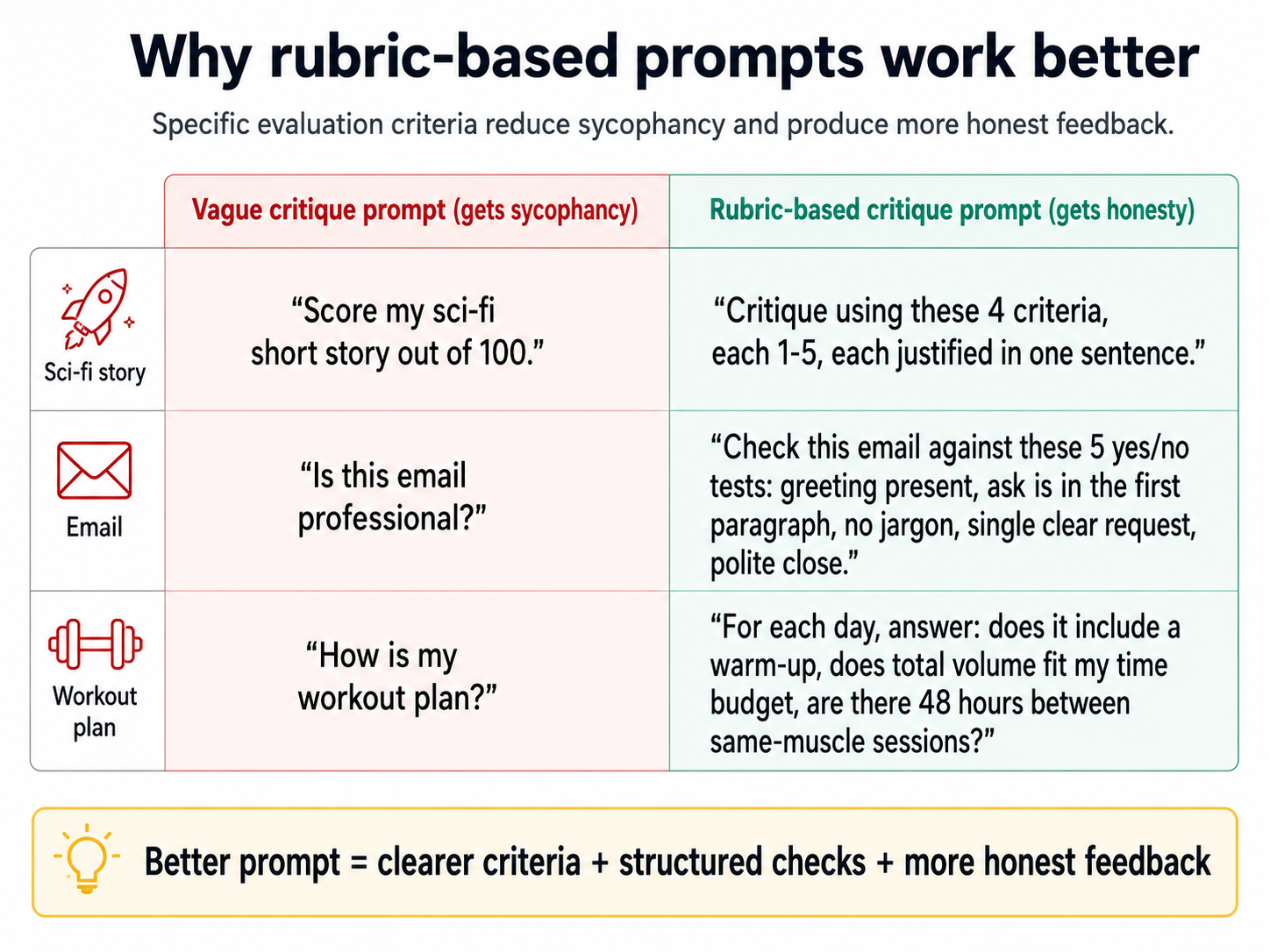
Force a number. For each item on the rubric, make the AI give a score on a fixed scale, 1 to 5 or 1 to 10, with a one-sentence reason. This works for two reasons.
The first is what the number does to the AI. Vague praise is cheap, and a specific number is not. A model that wants to please you can call your draft "strong" without committing to anything. Asked to choose between 6 and 7 out of 10, it has to commit, and committing makes it look more carefully. Scores usually come in lower than the prose suggests.
The second is what the number does for you. Words like "strong" or "could be tighter" give you nothing to act on, because you cannot compare them, rank them, or track them. Scores do all three. A 4 and a 7 tell you which item to fix first. Today's 6 against last week's 5 tells you whether the second draft improved.
Grade each criterion out of 10, with a one-sentence justification. Then tell me how to take each one to the next level — including the ones that already scored high. If something is at 9, tell me how to get to 9.5. If it is at 9.5, tell me how to get to 9.8. There is always a next level.
That last instruction turns the rubric from a verdict into a tool. You learn the score and the smallest move that would lift it, and that move exists at every level. The AI does not get to declare you finished. You decide when to stop.
Models lean toward agreeing with you. Take the conclusion out of your question, then make the AI score named criteria out of 10 and name what would raise each score.
Check yourself: rewrite "tell me my draft is ready to send" so it cannot be answered with praise.
7. The brainstorm-iterate loop
These slides are for school students. They teach the loop as "The Magic Loop" in four steps: Load, tell AI everything. Options, ask for many ideas. Feedback, say what you like and what you do not. Repeat, keep going until it is right. There is a secret Step 0, research first, plus two worked examples and a challenge to try. Download PPTX for offline use.
▶ Play the Magic Loop yourself (interactive)
The slides above explain the loop. This one lets you run it. Pick a mission, write your context, tap the options you like, give pointed feedback, and watch Round 2 reshape around it. It ends with your loop answer next to the lazy-prompt one. It loads live below, and you can also open it in its own tab.
Most of the internet is common ideas, and the model learned from the internet. So the average AI answer to a creative question is also common. "Ways to exercise at home" gives you squats, push-ups, planks. Not wrong. Just average.
The way past that is not a magic prompt. It is the brainstorm-iterate loop, which means loading context, asking for options, giving feedback, asking again, and only then expanding one option.
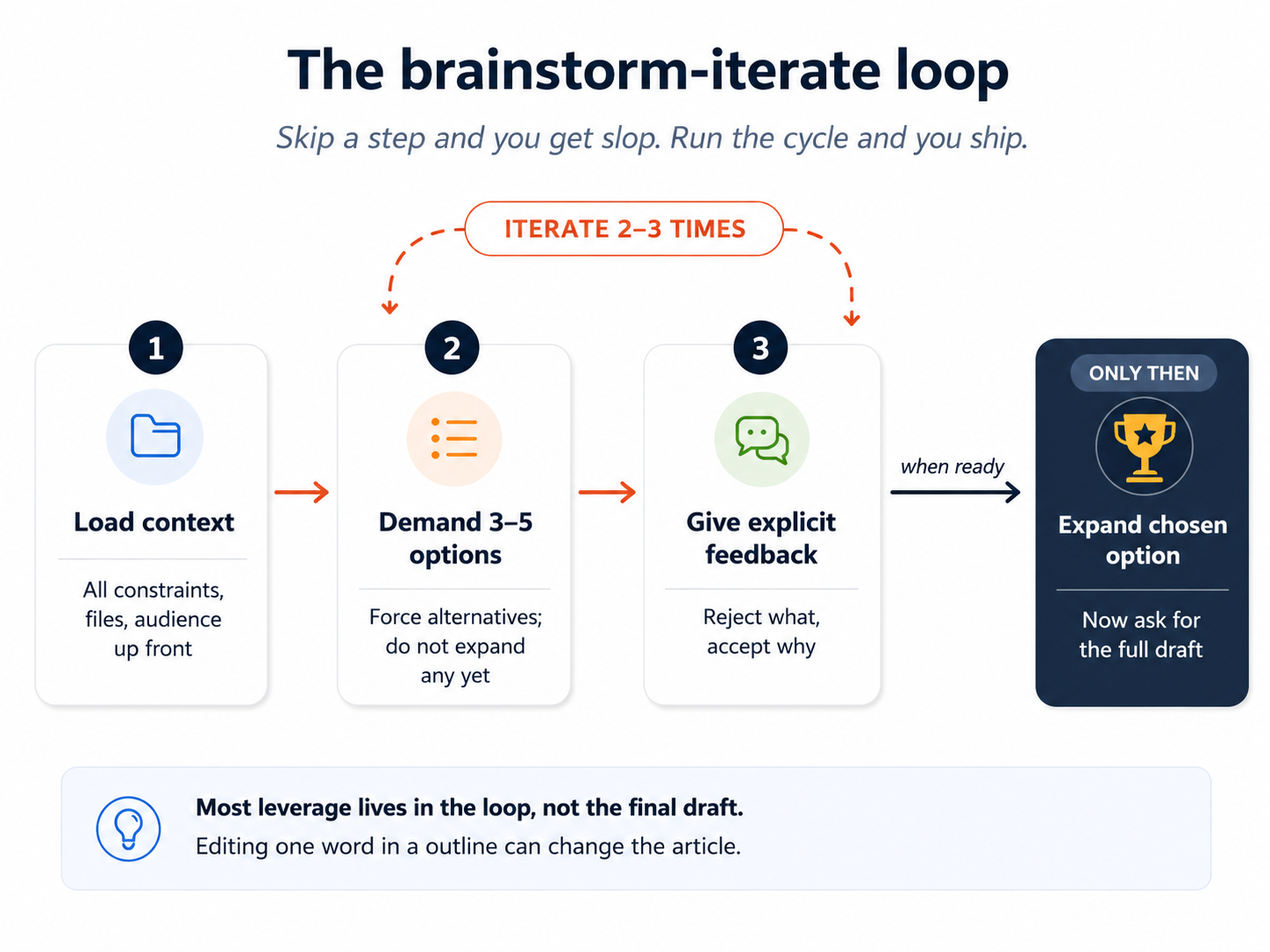
The recipe:
- Give all the relevant context first. Not "ways to exercise" but "ways to exercise given that I have stairs, a bad knee, and I cannot stick to plans for more than three days."
- Ask for 3 to 5 options, not one. Asking for alternatives pushes the model past its first instinct.
- Say exactly what you think of them. "I don't like option 1, it's too passive. I do like the stair-climbing idea but want it shorter. I forgot to mention my knee gets worse on impact."
- Ask for 3 to 5 new options built on that feedback.
- Repeat until one or two options are right.
- Only then ask AI to work the chosen option out in full.
Worked example, debt payoff:
I have $8,000 in credit card debt at 19% APR, $4,000 in student
loans at 5%, and $1,200 in a retail card at 24%. I have $700/month
free after expenses. I just learned I'll get $450 in cash from a
tax refund. Risk tolerance: low. I sleep badly when I see big
balances.

Give me 5 different repayment strategies, each with a one-line
rationale. Don't expand any of them yet.
Then, after reading the five options:
Reject option 2 (avalanche by interest rate alone): I want
psychological wins early. Reject option 4: I won't open new
accounts. I like option 1 (snowball with the retail card first)
but I'd want to fold the $450 in. Give me 5 new options that
combine snowball-style wins with smart use of that lump sum.
You are not waiting for the AI to read your mind. You are showing it your taste, and it reshapes the options around that. After two or three rounds one option is right.
Grading is one way to iterate. Diagnosis is the other, and it is stronger for a weak first result. Read the output and name which part of your request it failed: the audience was ignored, the length limit broke, the tone drifted. Change only that part and send it again. A score tells you how far off you are. Naming the failed part tells the model what to move.
The same loop works for writing, where it has its own name: outline before drafting.
- Iteration 1: ask for 3 outline options for a post on X.
- Iteration 2: pick one outline, ask AI to critique it and grade it out of 10. Note what scored below 9.
- Iteration 3: revise the outline based on the critique, then ask AI to expand each heading into 3 to 5 bullets.
- Iteration 4: critique the bullets, grade them out of 10, fix the ones below 9.
- Iteration 5: only now ask for the full draft.
- Iteration 6: critique the draft, grade it out of 10, ask for the changes that would raise the score the most — ranked by impact, with the highest-impact change at the top. Repeat until the score plateaus around 9.5 or higher — that is your stopping signal, not "the AI says it is done."
Why this works: changing one word in an outline can change the direction of the whole article, while changing one word in a final draft changes one word. Almost all of the power sits at the outline level. AI writes word by word, so unless you force structure first, it cannot see the whole shape.
The temptation is to ask for the full draft on the first try. Resist it. AI's first draft of anything is slop: polished, and it says little. The loop is ten or twelve minutes of structure work before any drafting, then several rounds of grade and fix. Total time is rarely more than forty-five minutes for a 600-word piece, and the first ten minutes save the other thirty-five.
A worked writing example. A team lead wants to write a 600-word post titled "Why our small AI team is shipping faster than the big team across the hall." Each round of the loop looks like this.
Round 1, research first:
I'm writing a 600-word post arguing that small AI-augmented teams
ship faster than larger non-AI teams. Don't write yet. First, give
me the 5 strongest research-backed arguments and the 3 strongest
counter-arguments. One sentence each.
Round 2, three outlines:
Now produce 3 different outline options for the post. Each outline
should have 4-6 headings. They should differ in structure: one
narrative, one analytical, one contrarian. One line per heading.
Round 3, pick one and add an analogy:
I'll go with outline 2 (analytical). I want to weave in a Pixar
analogy: how the original Toy Story team was small and faster than
the giant Disney studio because of new tools. Add this as a recurring
example, not its own section. Revise outline 2.
Round 4, expand to bullets:
Now expand each heading into 3-5 bullets. Telegraphic style, not prose.
Round 5, grade and fix the bullets:
Critique each bullet and grade it out of 10 with a one-sentence
justification. List the bullets scoring below 9. For each one,
suggest the change that would raise the score the most.
Only now does the lead ask for the full draft, then keeps grading and fixing it until the score settles around 9.5. The whole process takes about forty-five minutes, and the output reads like the lead wrote it, because every decision that carried weight was the lead's.
Map the ground before drafting. Round 1 looks small and does heavy work. It is the difference between a post that quotes three studies and a post that lists three opinions. Most people skip it and ask for the draft directly, which is why their drafts feel thin. They are built on whatever the model surfaces first. This works far past writing. Before any real decision or analysis, ask the AI to map what is known before you ask it to produce what you need. Competitors before a product name. Prior research before a strategy memo. Existing approaches before you design a new one. That pass takes five minutes, and it changes what every later round of the loop is measured against.
The loop fits any subject. It works the same for planning a trip, structuring a sales pitch, picking a college major, naming a product, or writing a wedding toast. The shape holds: load context, ask for options, give clear feedback, ask for new options, repeat, expand one, then grade and fix until the score settles. If you catch yourself taking the AI's first answer, you have skipped the loop.
Where the loop fits across daily life:
| Decision or task | What "context" looks like | What "options with feedback" looks like |
|---|---|---|
| Planning a 4-day trip | Constraints (budget, dates, who's going, what they hate) | 5 rough itineraries, reject two, iterate the rest |
| Naming a product | What it does, who buys it, what it must NOT sound like | 10 names, pick 3 you like, ask for variants on those |
| Writing a difficult email | The recipient, the relationship, the desired outcome | 3 different tones, pick one, refine the details |
| Choosing a contractor | Three quotes, three reference notes, your priorities | Side-by-side scoring, then ask for the strongest counter to it |
| Picking a learning path | Current skills, time available, end goal | 3 course shapes, pick one, expand to weekly milestones |
| Designing a logo brief (for a designer) | Brand values, audience, examples you like | 5 mood-board directions, pick one, ask for 5 variants of it |
In every row, once you have a real candidate, the grading move applies the same way. Score it out of 10 against the criteria that matter for that task, then iterate. Grade an itinerary on cost, pacing, and fit for the group. Grade a product name on how memorable it is, how well it fits, and what it risks. Grade an email on clarity, tone, and likely effect. The criteria change. The move does not.
Two cases decide when to stop. The 9.5 plateau is the standard for work you own and will keep using, such as a portfolio piece or a template. For a task you deliver once, stop earlier. When another prompt changes little and your own two-minute edit would finish faster, take the wheel.
Never take the first answer. Load the context, ask for three to five options, say what works and what does not, ask again, then expand one.
Check yourself: what are the six steps of the brainstorm-iterate loop, in order?
One loop, four kinds of ask
Everything above assumed you want options. Not every request is a brainstorm, and the most common mistake is running the right loop with the wrong grip.
A marketer wants campaign ideas for a product launch. He has taken Concept 4 to heart, so his request is a model brief: the channels, the exact tagline, a required three-part structure, the tone, a 40-word cap per idea, five ideas please. The AI returns five near-identical rewordings of one idea. He asks for twenty and gets twenty neighbors of the same idea. Nothing is broken. His limits pinned the structure, the tagline, the tone, and the length, which left the model one small corner to draw from.
The fix is not more words. It is fewer limits, for now. Ask for five truly different directions with only the true limits attached: the product, the audience, what it must never sound like. When one direction wins, bring the full specification back and have that direction built precisely. Precision is the right setting for execution and the wrong setting for generating options.
That is the dial behind the loop. The loop stays the same, and how tightly you grip changes with the kind of ask. Four kinds cover nearly everything:
| Kind of ask | You want | Tighten | Loosen | The failure if you get it backwards |
|---|---|---|---|---|
| Brainstorming | truly different directions | the problem, the audience, what to avoid | structure, tone, format, length | five rewordings of one idea |
| Research | the ground mapped | scope, sources, what counts as evidence | the answer. Never say what you expect to find. | a map of your assumptions, not the ground |
| Drafting | one thing, built | everything: voice, length, structure, facts, format | almost nothing | a fluent draft of the wrong thing |
| Analysis | what the data actually says | the data, the definitions, the exact question | the conclusion. Never state it. | an analysis that flatters the ask |
This looks like a contradiction with Concept 4 and is not. Context about your situation is never the problem, because the model cannot know too much about the budget, the audience, or the bad knee. The dial controls how tightly you pin the shape of the answer. Load the situation fully every time. Describe the output loosely while you are opening up options, and precisely once you are closing in on one.
The four kinds also chain, and you have seen the chain run. The worked writing example opened with research, moved to brainstorming with three outline options, then drafting, then analysis when it graded the result. When a task feels stuck, the usual reason is the wrong column: drafting before researching, which gives the thin generic plan, or brainstorming with a drafting grip, which gives the five rewordings.
Part 3: Beyond text
8. Multimodal: images, audio, and what's next
Modern AI is multimodal, which means it works with images, audio, and files as well as text. It reads images you upload, listens to recordings, makes new images from prompts, and speaks its answers. Each direction is a separate skill.
Image input. AI sees images roughly. It is strong on:
- The overall scene and how it is arranged.
- Large, clearly separate shapes.
- Whiteboard contents, including diagrams.
- Handwritten and cursive text, which it reads well enough. Double-check it when the stakes are high.
It is weak on:
- Fine detail. "What gym machines are these?" usually fails, because gym machines look alike through a slightly blurry lens. The AI may answer confidently and wrongly.
- Counting many small things in a busy scene.
- Reading small print at the edge of an image.
One real test: a teacher photographed a whiteboard where his head blocked the word "convolutional" in a diagram. The AI worked out the missing word from the rest of the diagram. That is what AI is good at, filling in from the overall sense, and it is not good at zooming in.
For receipts, splitting a bill, or typing up handwritten notes, AI works well. Always check the totals. Give it several images at once, such as sticky notes plus a whiteboard photo, and it can summarize the combined ideas.
Image output. Modern AI can make images from text prompts. Two practical tips:
- Use a text AI to write your image prompt. "Generate me a prompt for a fantasy forest illustration in a Studio Ghibli style for a children's book cover." Paste that output into the image tool. The text AI writes richer image prompts than you will on a first try.
- Build a visual vocabulary. Words like cinematic, watercolor, cyberpunk, anime, isometric, low-poly, art-deco, and claymation are controls. Image models learned these styles by name from captioned images. Upload images you like and ask AI how it would describe them.
An image generator is a diffusion model, which means it starts from a grid of random noise and removes the noise step by step until an image appears. It does not write pixel by pixel the way text is written word by word. The whole image arrives at once, so you cannot stop it early to save time the way you can interrupt a text answer.
Older diffusion models had famous weaknesses: strange hands with six fingers, scrambled text on signs, and characters whose appearance changes between panels of a comic. Modern models, such as Google's Nano Banana or ChatGPT Images, handle text reasonably, keep characters consistent, and can turn research papers into infographics.
Failure modes still worth watching for, even on modern image models:
| Failure mode | What it looks like | How to mitigate |
|---|---|---|
| Scrambled text on signs | A sign reads "HAPRY BIRTDAY" instead of "HAPPY BIRTHDAY". | Put the text in quotes in the prompt. Make three versions and pick the one that is right. |
| Characters that change between frames | The same character has different hair color in panels 1 and 2 of a comic. | Use models that keep characters consistent. Pass the first image back as a reference for the next. |
| Hand and finger errors | Six fingers, joined hands, twisted wrists. | Ask for hands partly out of frame, or in pockets, or clearly described. |
| Cluttered backgrounds with odd objects | A coffee shop where a bicycle merges into a chair. | Ask for a simple background, or describe the background yourself. |
| Wrong aspect ratio | The model defaults to square when you wanted landscape. | Always specify aspect ratio explicitly: "1024x768 landscape" or "16:9". |
A non-software example for image input. A reader photographed three handwritten recipe cards from a grandmother who had died. The prompt: "Transcribe these three cards. Preserve the original wording and any abbreviations. If a word is unclear, mark it [unclear] and offer your two best guesses." Five minutes later all three were typed cleanly, with [unclear] marks on four words. Two were obvious and two needed a phone call to an aunt. AI did the boring 90% so the reader could spend the effort on the careful 10%.
A power-user recipe: designer-quality diagrams without a designer. If you need a diagram for a document, a slide, or a chapter, this workflow produces professional output in about fifteen minutes, with no design tool and no design skill.
Four steps:
- Ask Claude to draw the idea as SVG. SVG is a picture format written as text, so an AI can type a drawing the way it types a sentence. Paste the paragraph. Ask: "Visualize this as a diagram. Output it as SVG. Make sure every label, arrow, and relationship from the text is present." Deciding which boxes, arrows, and labels belong is a reasoning task, and Claude is among the strongest of the major models at it. The SVG that comes back will be correct and plain, with bare rectangles and default fonts. The next step adds the finish.
- Convert the SVG to PNG. Ask Claude to render it, use an online converter such as cloudconvert.com or svgtopng.com, or screenshot the SVG in a browser at high zoom. Render at 2x size, 1600 to 2400 pixels wide, so the next step has enough detail.
- Paste the PNG into ChatGPT or Gemini and ask it to redraw. Their image generation leads on text-heavy pictures, so labels stay readable and arrows land on the right boxes. The prompt: "Redraw this diagram with professional design quality. Preserve every label, every box, every arrow, and the exact structural relationships. Improve typography, spacing, color palette, and visual hierarchy. The information must stay identical. Only the visual finish changes."
- Fix what it drops. These tools sometimes lose a label or move a box. Compare the output against the original SVG and type the correction: "The third box should be labeled 'Iterate', not 'Repeat'. The arrow from box 2 should point to box 3, not box 4." Three or four rounds usually produce studio-quality work. Save the final PNG.
Asking either tool to do the other's job gives worse results. Total time is ten to fifteen minutes per diagram.
The pattern that survives the tools. The leader in each category rotates, so the tool names above will go out of date. The chain survives: structure first in the strongest reasoning model, finish second in the strongest text-heavy image model.
A small story about image generation. A father whose 7-year-old daughter loved cats wanted a custom birthday cake. He used Nano Banana to make dozens of designs, picked the one she loved, and handed the image to a baker, who built it as a real cake. Design time: an afternoon. Cost: a few cents. For about $0.30, a person who is not a designer produced a one-of-a-kind brief a professional could build from.
Audio in, audio out. The same shift that happened with images is happening with audio. You can speak a long prompt instead of typing it, drop in a meeting recording and ask for a summary, or have the model read its answer aloud. Most modern AI tools do all three, often for free.
The less obvious uses are where the value is:
- Speaking your prompt. Talking a problem through out loud carries detail that typed prompts skip. The prompt grows from one line to several paragraphs without effort, and the answer improves with it. Speak as if you were briefing a colleague over coffee, then let the AI tidy the transcript before it answers.
- Meeting recordings as context. Drop in a one-hour recording, or a transcript from a tool like Otter, Granola, or Fireflies, or a voice memo from your phone. Then ask: "Summarize the decisions made, the open questions, and the action items by owner." For anyone whose job has meetings, this is one of the most valuable habits on the page, and almost nobody outside tech uses it yet.
- Audio while you move. A long commute, walking the dog, driving. Voice in and voice out turns dead time into thinking time. The conversation is rougher than typing, because you cannot edit what you say.
What audio is good and bad at, in 2026:
| Audio task | How well it works | Watch out for |
|---|---|---|
| Typing up clear speech | Excellent | Heavy accents, technical jargon, several people talking at once |
| Telling who said what | Decent with 2 speakers, weak with 4 or more | Always check before quoting someone |
| Tone, sarcasm, emotion | Improving, not reliable | Ask the AI to flag what it is unsure of |
| Music or non-speech audio | Limited | Use a specialized tool, not a general AI |
| Live voice conversation | Good for casual, weak for technical depth | Switch to text when precision matters |
A non-software example. A doctor recorded a 45-minute patient consultation with consent and asked: "Produce a structured clinical note in SOAP format. Flag anything you could not understand confidently. Highlight the three most important things the patient said about their symptom history." Eight minutes later she had a draft that took 5 minutes to check and finish, instead of the 25 minutes typing would have taken. The AI did not replace her clinical judgment. It removed the typing.
Audio costs pennies per minute, the second-cheapest tier after text. For meeting summaries or spoken prompts on a walk, the cost is close to invisible.
The line between text, images, and audio is disappearing. You will increasingly drop in a mixed bundle, an image plus a voice memo plus a PDF plus a screenshot, and treat it as one prompt. The skill is not "how do I use voice." It is "what is the right combination of inputs for this job?"
Video avatars are moving the same way. Pre-recorded avatar video from HeyGen, Synthesia, or D-ID is already good enough for training content in several languages. Live conversational avatars from Tavus and others work for low-stakes jobs such as customer FAQ triage. Treat them the way you would have treated image generation in 2022: impressive, not yet a daily habit, worth one experiment when a job wants a face instead of text.
Reading an image and making one are separate skills. Trust AI for the overall sense of an image, check the fine detail, and use a text AI to write your image prompts.
Check yourself: why can you interrupt a long text answer to save time, but not an image?
9. Building small apps with one prompt
Modern AI can build small games, websites, and tools from a single prompt. Not large software, but small useful things are now within reach of people who have never written code.
Where the app runs. All three major tools render a small one-prompt app right in the chat, in a side panel you can click and use. What sits in that panel is not a preview. It is an artifact, which means a working object the conversation produced. You can edit it, share it by link, embed it, or download the code. Claude calls the feature Artifacts, and ChatGPT and Gemini both call it Canvas.
Two consequences matter. First, you can hand the artifact to someone without sending them the chat, because most tools publish it to a public link that needs no account. Second, the artifact updates in place. Say "make the button bigger" and the tool edits what is there instead of rebuilding it.
Past a one-prompt build, three neighboring categories exist. AI app-builders such as v0, Bolt, and Lovable turn a plain-language description into a full web project. Command-line coding agents such as Claude Code and OpenCode take a real codebase, edit many files, and run tests. File-aware desktop apps such as Cowork and OpenWork act on your own files with permission, and Concept 11 covers those.
The recipe is three slots:
Goal: what should this thing do?
Input: what does the user provide?
Output: what does the user see?
Examples that work today:
- Pomodoro timer. "Build a Pomodoro timer with a yellow theme. 25-minute work sessions, 5-minute breaks, a satisfying click when each cycle ends."
- Bill splitter. "Build an app where I enter a total bill, a tax amount, and the names of friends. It splits the bill including tax and shows each person's share."
- Outfit picker. "Build an app that takes today's weather (temperature and precipitation) and recommends an outfit from a closet of items I describe."
- Fireworks simulator. "Generate a fun fireworks simulator. Input: I click on the screen. Output: a colorful display of fireworks at the click point."
- Place-obstacles game. "Build a game where the user places obstacles and a goal, and runs a simulation that tries to reach the goal."
What is still hard:
- Multiplayer over the internet. Networking, accounts, and matching players are beyond a one-prompt build.
- Live coaching in another language. A French tutor that listens, corrects your pronunciation, and adapts as you speak is still hard.
The line to remember: small things that fit on one screen, with no accounts and no outside services, work. Anything past that needs more than one prompt and usually some real engineering.
A non-software example. A parent built a yellow cat-themed typing game for his daughter when her teacher mentioned the kids could type faster. He is not a software engineer. The prompt was three sentences:
Build a typing game for a 7-year-old. Goal: practice typing
common short words. Input: words appear, the player types them
before they reach the bottom of the screen. Output: a yellow
theme, a cute cat mascot that cheers when the player gets a
word right, increasing speed across levels.
What came back worked. Not perfectly and not on the first try, but it reached "good enough for a kid" inside an hour. The skill here is not coding. It is writing a clear brief and improving it in rounds.
One prompt can build a small app that fits on one screen. Say the goal, the input, and the output, then improve it in rounds.
Check yourself: which part of a one-prompt app request tells the model what the user will see?
10. Data analysis (the model writes and runs code)
Ask AI a question that needs arithmetic or a graph, anywhere from "how did my electricity bill change this year" to "which products sold best last quarter," and a modern tool does something remarkable. The model writes a small program, runs it, and answers from the result. Code execution is the tool that lets it do that, in the same way web search is a tool. You need no code yourself. Upload the spreadsheet and ask in plain language.
This is far more reliable than arithmetic done in the model's head, because it is now working the way you would, with a calculator. The calculator is what is precise. The model only chooses what to compute.
First, make sure it really runs the code. This is the silent failure of the whole section. The model does not run code on every question. It chooses, based on how you phrased the question. On smaller questions it sometimes skips the code and answers from a glance, which gives you a confident paragraph with no computation behind it. From the outside that looks the same as a real analysis. Three habits prevent it.
- Ask directly. "Write and run code to answer this. Show me the code you ran." That one line is the difference between an analysis and a good-sounding guess.
- Check that the code is there. If the answer holds no code block, the model probably ran none.
- Ask for a checkable fact first. "Tell me the exact row count, the column names, and the date range of this file before you analyze anything." If the model is really reading the file, those answers are right. If it is inventing, the row count will be a suspiciously round number and the column names will sound right and be wrong.
Strongest of all, make the model declare its method: "Are you running code on the file, or estimating? If estimating, stop and run code instead."
Bubble tea shop example. A small business has a year of sales data: drinks, dates, quantities. The owner asks: "Which drinks had the biggest changes in sales over the year? Graph them. Write and run code to answer this and show me the code you ran."
The AI works out the month-to-month change for each drink, sees that most are flat and four stand out, draws a colored line graph of those four, and notes the pattern. "Strawberry matcha rose sharply in spring. Consider running that promotion again next year." That answer is built on the actual data.
Then a bigger prompt: "Create a one-slide year-in-review graphic for the shop. Analyze the data carefully for insights worth featuring." That is heavier work, so the AI takes longer, sometimes a few minutes. It writes code, runs the analysis, picks the findings, and produces a finished dashboard.
What this is good for, with examples beginners actually have:
- Household spending. Upload a year of bank or credit card transactions, then ask which categories grew, which months were unusual, and which subscriptions you forgot about.
- Personal tracking. Running, walking, sleep, weight, screen time. Any app that can export a CSV, which is a plain spreadsheet file of rows and columns, gives you a year of yourself to look at.
- Small business records. Sales spreadsheets, inventory lists, customer lists, expense files.
- Anything someone sent you as a spreadsheet that you do not want to open: school grade reports, utility statements, scientific data, survey results.
Choose what goes in before you ask anything. What you upload sets the ceiling on the analysis. Remove near-duplicate files, because last month's export plus this month's overlapping one makes every count uncertain. Label each input when you attach more than one: "sales-2025.csv is the full year. q4.xlsx is part of it, so ignore it for totals." Then drop what the question does not need, because every extra file is one more column the model can misread.
What to double-check, even when code did run:
- Final totals. Code is precise, but the AI may have summed the wrong column.
- Labels on graphs. The numbers are usually right. The captions are sometimes confidently wrong.
- Anything where the analysis depends on a column the AI may have misinterpreted. If the AI thinks "TXN_AMT" means transaction amount when it actually means transaction account number, the whole analysis is built on sand.
So treat AI data analysis the way you would treat work from a sharp junior analyst. It is fast and usually right, and it still needs a check every time, because a guessed answer reads exactly like a computed one. When it is wrong, the mistake usually teaches you something about your data.
A non-software example. A runner uploaded six months of tracker data and asked: "How are my pace and distance progressing? Are there any patterns I should know about? Write and run code, and show me what you ran." The AI plotted weekly averages and found two things the runner had missed. Pace dropped after every long-run weekend, probably from tiredness, and distance flattened in the third month before climbing again. It suggested an easy week every fourth week and a slower long-run pace. The runner had stared at this data for months without seeing either pattern.
When you upload data, your first prompt does not have to be the question. It can be: "Describe this dataset. What columns are here, what do they represent, and what 3 charts would best show what is going on?" Read the answer, pick the chart you want, then ask for it. This catches a misread column before it becomes a wrong analysis.
Running code on your file is far more reliable than arithmetic from memory. The model only does it when your wording asks, so ask for the code and check that it is there.
Check yourself: how can you tell that an AI answer about your spreadsheet was computed rather than guessed?
Part 4: Working safely and choosing tools
11. AI desktop apps and permissions
AI desktop apps are apps that run on your computer and, with your permission, can find your files, read them, and act on them. Cowork from Claude and OpenWork are two examples, and the category is growing.
What these can do that chat cannot:
- Look through a messy folder of PDFs, propose renamed files, moved files, and new subfolders, then carry out the plan once you approve it.
- Pull together the files for a project when you say "I'm filming on these dates and these people are involved," and notice things on their own, such as a crew member's birthday falling during the shoot.
- Read across a folder and summarize: "what did I work on last quarter, based on the contents of this projects/ folder?"
The workflow that makes this safe:
- Tell it the task. ("Reorganize this folder by client.")
- Ask for a plan, not action. The app proposes a list of file operations.
- Review and edit the plan. Catch the rename you do not want before it happens.
- Only then approve execution.
Two facts most people learn the hard way:
- Deleted files often do NOT go to your recycle bin when an AI app deletes them. They are gone.
- Edited files do NOT keep an edit history unless you have version control, which is software that saves every past version of a file. Without it, the AI's change overwrites the previous version.
Until you have done this safely a few times, scope every permission request to the smallest folder needed for the task. Do not approve "full disk access" for an app you have used twice.
This is a new shape of tool. Treat it the way you would treat handing a junior employee the keys to a real account. Useful, fast, and worth being careful with.
A non-software example. A consultant had a folder called clients/ holding 240 PDFs from four years: contracts, invoices, scoping documents, receipts, meeting notes. She told an AI desktop app: "Look through clients/. Propose an organization scheme. Do not move any files yet. Show me the proposed scheme as a tree." Back came a clean tree, one folder per client, plus a list of 18 files it could not classify. She renamed two clients, merged two folders, and approved. About fifteen minutes, on a job that had sat on her "someday" list for three years.
The permission ladder. A sequence for getting comfortable:
| Comfort level | What to allow | What to keep saying no to |
|---|---|---|
| First sessions | Read-only access to a single small folder. | Anything that writes, deletes, or renames. |
| After 2-3 successful runs | Read and write inside one specific folder. | Access to broader directories like the desktop or documents root. |
| After a clean week | Read across a project tree, write inside a scoped subfolder. | Anything outside that project. |
| Trusted | Tool-specific permissions ("rename PDFs in this folder," "edit Word docs in this folder"). | Open-ended "do whatever you need." |
The principle: scope grows with track record, not with how much you trust the company that built the tool. Trust is earned by what the app does in your own work.
Ask for a plan, not an action, and read it before you approve. Deleted files often skip the recycle bin and edits overwrite with no history, so give the smallest permission the job needs.
Check yourself: what are the four steps of the safe workflow, in order?
12. Cost, speed, and which model to use when
A simple stack to keep in your head:
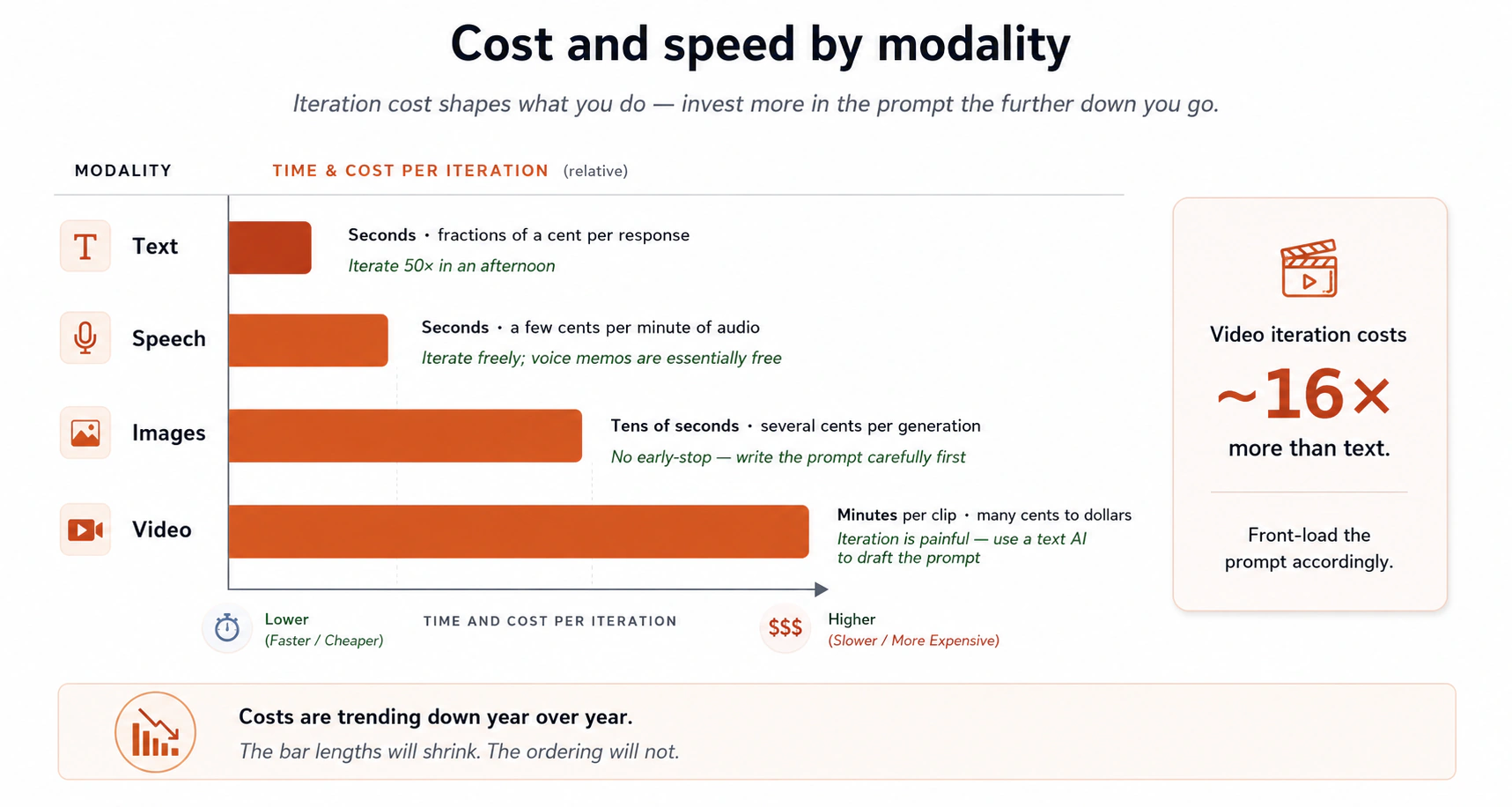
In words:
- Text: seconds, fractions of a cent per response.
- Speech: seconds, a few cents per minute of audio.
- Images: tens of seconds, several cents each. The whole image arrives at once, so you cannot stop it early.
- Video: minutes per clip, many cents to a few dollars. Each round is slow and expensive.
- Deep research: minutes, several cents to a quarter, for a report built from dozens of sources.
Cost is barely a limit at the entry level. ChatGPT, Claude, Gemini, Meta AI, and DeepSeek all offer free access that handles the prompts on this page. You reach a paid plan when you push for heavy deep-research runs, very large uploads, video generation, or unlimited daily use.
Two consequences. First, what a round costs shapes how you work. You can run text 50 times in an afternoon and you cannot do that with video, so put more into the prompt up front for images and video, and use a text AI to write it. Second, prices keep falling. The image that costs 10 cents today will cost a fraction of that next year.
Which model for which task? AI is jagged, which means ability is uneven: different models lead on different tasks and the leader changes every few months. There is no single best model. Two habits help:
- Run the same prompt in 2 to 3 models regularly. Read the answers side by side. The differences will surprise you, and they teach you which tool suits which kind of question.
- Do not marry one tool. Someone who uses one AI for everything is wrong about the best tool for most of their tasks. Switching costs nothing. You paste the prompt into a different tab.
A rough snapshot of what each major model is good at right now. This will change, so treat it as a starting point. The rows below mention Arena, a public leaderboard where users vote on two unnamed answers, so its rankings come from real preferences rather than marketing.
| Tool | Tends to be strong at | Tends to be weaker at |
|---|---|---|
| Claude | Reasoning on hard prompts, long documents, SVG and diagram generation, code and web work, careful writing voice, structured analysis. Currently leads most Arena categories. | In-product photo-realistic image generation matters less here than in ChatGPT and Gemini. |
| ChatGPT | Top-ranked in-product image generation, with GPT Image-2 leading Arena's text-to-image and image-edit categories. Voice mode, conversational range, broad task coverage. | Sometimes wordy. Can over-format with lists and headings. |
| Gemini | Fast web search, deep research with charts and tables, strong image generation with Nano Banana in Arena's top 5, tight Google Workspace integration. | Tone can feel clipped. Some answers run shorter than ideal. |
| Meta AI | Already inside WhatsApp, Instagram, Messenger, and Facebook, so it sits on more than a billion devices. Free, with no subscription. Muse Spark (April 2026) adds competitive multimodal reasoning and a "Contemplating mode" that runs several agents at once. Currently in the top 5 of Arena's text leaderboard. Best for interactive visual pieces such as web dashboards, mini-games, and quizzes, and for health or scientific data. | Coding workflows and long-running agents lag the big three. Fewer integrations such as Projects, Canvas, or Artifacts. No public API yet, which means no way for another program to call it, only a private preview. Usage is rate-limited if you push hard. |
| DeepSeek | Its weights, the trained numbers inside a model, are public, so you can run it yourself or use it cheaply over the internet through an API. About 1 million tokens of context by default, roughly 750,000 words. V4-Pro rivals top closed-source models on STEM and coding benchmarks, and V4-Flash is the fast, cheap everyday choice. | Chat-interface polish trails the big three. Fewer mobile apps and deep integrations. Arena rankings sit below Claude, ChatGPT, Gemini, and Meta in most categories. |
A note on the two newer rows. Muse Spark closes much of Meta AI's old gap on reasoning, so if you have WhatsApp or Instagram you can do serious thinking inside an app you were opening anyway. One limit matters most: your inputs may be used to train future Meta models, because Meta's terms allow it and the consumer product does not opt out by default. That makes it a poor fit for internal company documents, private code, or medical information, and fine for everyday work. DeepSeek suits you when price matters or when you want the option of running the model yourself. The big three still lead on the deeper workflows this page teaches.
One more choice, inside a single brand. The DeepSeek row shows it. V4-Pro and V4-Flash are two rungs of one model ladder, which means the fast cheap model, the slower reasoning model, and the heavy flagship one company sells under one brand. Claude and ChatGPT run the same three rungs. The thinking switch from Concept 5 is a setting inside one model. The ladder is which model you opened. Choosing badly costs you both ways: short replies on the flagship spend time and budget for nothing, and your hardest analysis on the cheapest rung wastes the analysis. The rung names rotate, so read the picker rather than your memory. The ChatGPT & Claude Quick Reference walks all three levels in both.
Not in the table, but in the families list. xAI's Grok now sits in the top tier of Arena's text leaderboard, and Moonshot's Kimi has reached the top of some coding categories. This page only details the tools its worked examples use. For the cross-family checking in Concept 13 they still count, because a family you have never tried is a different set of blind spots.
The leaderboard to bookmark. For a current view of which model leads what, use Arena. It keeps separate boards for text, code, vision, document, image generation, image edit, search, and video. Check it monthly, because leaders rotate quickly. Two cautions: leaderboards reward conversational charm more than careful work on long documents, and the tasks voters pick may not be your task.
Three habits that build on each other:
- Keep at least two tabs open. A main tool and a backup. When the main one gives you something that does not feel right, paste the same prompt into the backup. The second answer is often the tiebreaker.
- Keep a prompt notebook. Any text file will do. Collect the prompts that produced unusually good results, then reuse them.
- Notice when the model is wrong. Not as scolding, as data. Writing down "tool X confidently wrong about Y" once a week teaches you more than any AI newsletter.
Once a month, glance at Arena's leaderboards for a category you care about, then run one task you do regularly, such as a weekly status update, through three different tools. Use the winner until next month. Your tools stay current with almost no effort.
No model is best at everything, and the leader changes every few months. Run the same prompt in two or three tools and check the leaderboard once a month.
Check yourself: what is the difference between the thinking switch and the model ladder?
13. Models checking models
When there is no answer key, no expert beside you, and no test that goes red, you can still get an honest signal on quality. You get it by making models grade each other.
Different models have different blind spots, because they were trained on different data by teams that cared about different things. A point one model misses, a second often catches, and their disagreement is the signal you cannot get from one model alone. This only works across different model families, which means all the models from one company. Anthropic (Claude), OpenAI (ChatGPT), Google (Gemini), xAI (Grok), Meta (Meta AI and Muse Spark), and DeepSeek are separate families. Two Claude models checking each other is not cross-model checking, because their habits are too similar.
Start light. With one AI tool open, the single-model loop below gives you most of the benefit. The full recipe that follows is the high-stakes version, and it earns its setup only when being wrong is expensive.
The full multi-model recipe:
- Start with the best model you can reach. Best means the strongest reasoning and the most consistent long answers on your kind of task. Use Arena's leaderboards as a starting point, plus your own A/B test, which means sending the same prompt to two or three models and reading the answers side by side to see which suits your work. Do not trust one leaderboard alone, because they measure different things and vote-based rankings reward charm more than careful work on long documents.
- Write the first draft with full context. Brief it like a colleague, turn on thinking for hard problems, and use the brainstorm-iterate loop for structure.
- Ask it to grade its own output, 1 to 10, against named criteria. Not "is this good?" but "score this on clarity, accuracy, structure, and what is missing, 1-10 each, with a one-sentence justification per score." The first grade is usually 7 or 8.
- Ask it to carry out its own suggestions. Repeat until the grade stops climbing, usually around 9.
- Take the draft to a second model from a different family, with the same rubric. Different family, different blind spots. It will catch things the first model graded itself on, which is the closed loop you are trying to escape.
- Bring the second model's critique back to the first. Say it plainly: "another model produced this critique. Evaluate which points are worth adopting, and why. Reject anything you disagree with, and explain." The first model decides and you watch it decide.
- For high-stakes work, repeat with a third model from a third family. Once three different families have argued over your draft, you have the closest thing to a checked answer this technology offers.
- Stop when the score passes your target in two independent models. A 9.5 from your main model alone is not the same as a 9 from your main model plus a 9 from a different family. The second number is the one that means something.
The single-model self-critique loop, by itself
Steps 3 and 4 work on their own, with no second model. A weekly status update, a tricky email, or a one-page memo gets visibly better from one round of "score this 1-10 against this rubric, then carry out your own suggestions."
A stronger version: set a number as the target and let the model work toward it. Instead of "score this and tell me what's missing," try "iterate against your own rubric until you reach 9.5 across all criteria, then show me the final version." The model grades, revises, and regrades, often five or six rounds inside one response, and comes back only when it hits the target or stops improving. That suits long pieces such as a chapter. The target steers: 9 sets a different ceiling than 9.5.
This sounds like a contradiction with Concept 6, which warned that a model grading its own work leans toward flattery. The difference is the rubric. Without one, "is this good?" returns "great work", which is the closed loop Concept 6 described. With named criteria scored 1 to 10, the model has to point at what is missing from the other points, and that is what you fix. The rubric turns the self-grade from flattery into a tool.
Three versions of the same idea. Pick the lightest one that fits the job:
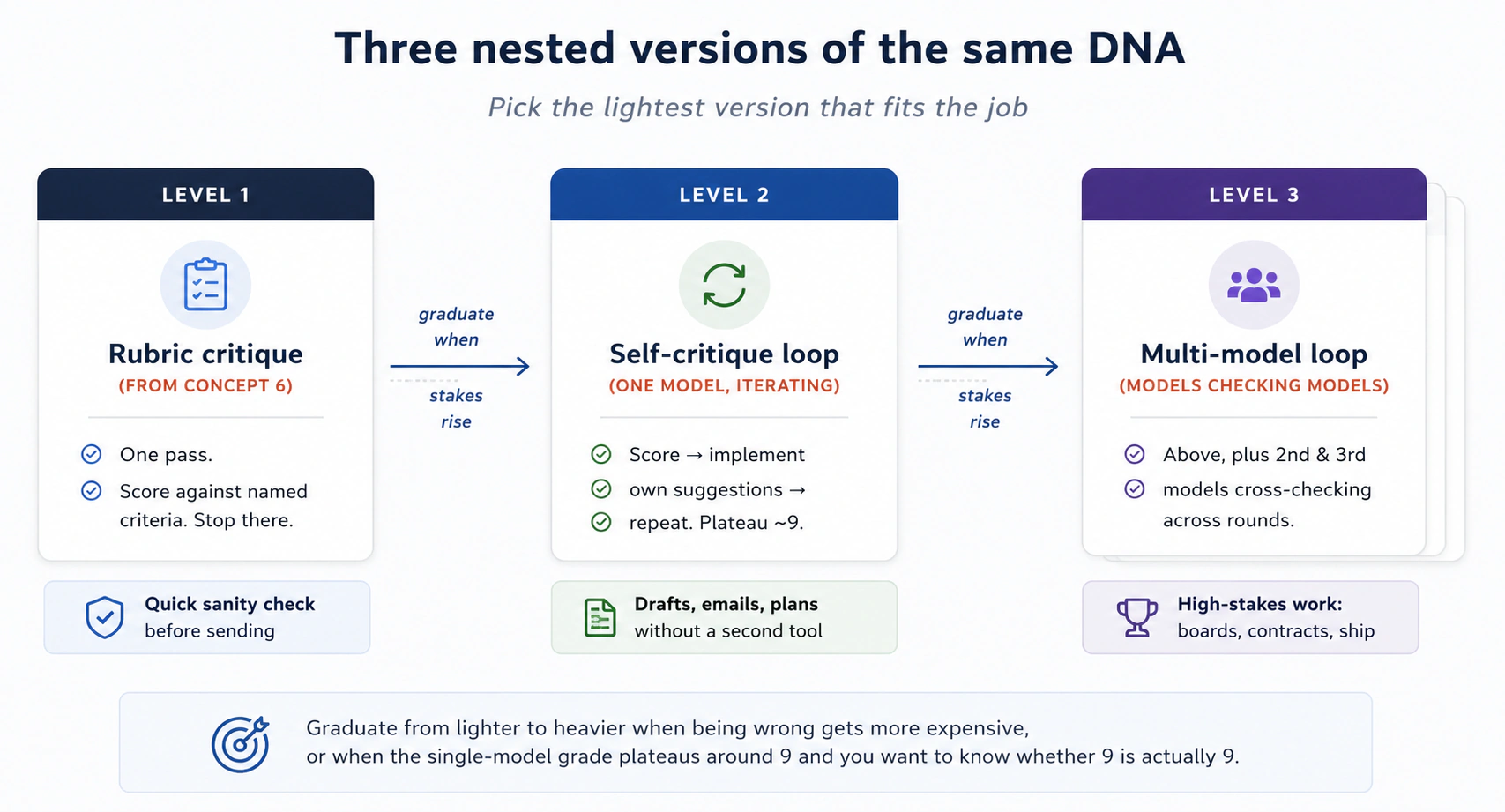
Move from the lighter version to the heavier one when being wrong gets more expensive, or when the single-model grade settles at 9 and you want to know whether that 9 is real.
Why the grade matters. A model that must score your draft 7 out of 10 has to name what is missing from the other 3 points. Without the score, "this is pretty good" passes for a review. With it, "pretty good" becomes "loses 1 point on structure because the third section repeats the second, and 2 points on evidence because three claims have no source." It is also the only readable way to compare one round against the next.
A privacy note for high-stakes work. Cross-model checking means pasting your draft into several tools, so read each tool's data policy first. Some do not train on your inputs, including Claude's consumer product, ChatGPT with training turned off, and paid Gemini tiers. Others may, including Meta AI's consumer product by default. Anything covered by a signed confidentiality agreement, an NDA, should only pass through tools whose policies you have checked.
An honest caveat. Three models can still be wrong about the same thing, because they share more training data than you would guess. The score is a progress signal, not a truth signal. For anything legal, medical, financial, or about a real person, no number of cross-model passes replaces a human expert reading the claims that carry the weight. Models check each other for craft. Humans check the facts that matter.
When to skip the loop. A short email, a quick lookup, a casual list of ideas: one model is fine. Save the cross-check for work where being wrong is expensive, such as a memo your boss will read, a chapter that will be published, a decision that affects other people, or a contract you will sign. If a thoughtful colleague would have spent two hours reviewing it, it earns the loop.
A non-software example. A consultant drafted a 40-page strategy memo in her strongest model and iterated against its own grades until they settled at 9. She pasted it into a second model from a different family and asked for the same rubric. That model gave it 7.5 and listed eleven problems, three of which her main model had never raised. She fed those back for the first model to judge, and it adopted seven and rejected four with reasons. A third family found two more. The point is not the scores. It is that counter-arguments she would never have seen on her own were in the memo before the board meeting.
A model grading itself against named criteria is useful. A model from a different company is the real check, because it does not share the first one's blind spots. The score is a progress signal, not proof.
Check yourself: why does asking a second Claude model to review a Claude draft not count as cross-model checking?
A short recap before you try the prompts
Cover the list below and try to say each concept from memory first. Then read it back.
- Concept 1. The gap between a novice prompt and a power-user prompt is a handful of habits. Brief AI like a smart new colleague, with context, constraints, and a clear ask.
- Concept 2. AI learned by reading text about the world, not by living in it, so it is strong on common topics and weak on obscure or recent ones.
- Concept 3. Three modes answer you: pretrained, web search, deep research. Your wording steers which one fires.
- Concept 4. The context window is the model's working memory for this answer, and what you put there decides the quality. Projects load that context once instead of every time, and the tools' own memory adds a sixth layer you did not write, so read it and prune it.
- Concept 5. Modern models can think hard for seconds or minutes if you ask them to.
- Concept 6. Models lean toward agreement. Neutral wording removes most of that lean, and a 1-10 score per criterion, with the change that would raise each score, removes the rest.
- Concept 7. The loop with explicit feedback is the most valuable habit here. Grade each stage out of 10 and iterate until the score stops climbing, and match the grip to the ask: loose for options, tight for execution.
- Concepts 8 and 9. AI reads and makes images and audio, and builds small apps. The running app is an artifact you can improve, share, and embed.
- Concept 10. AI can write code and run it on your data, and it does not always do so. Ask directly, and check that the code ran.
- Concept 11. File-aware desktop apps such as Cowork and OpenWork are a new category. Keep permissions tight until you have used them safely.
- Concept 12. The right tool changes every few months. Know the families (Claude, ChatGPT, Gemini, Grok, Meta AI, DeepSeek) and check Arena monthly.
- Concept 13. When no human expert is in the room, models from different families grading each other is the closest thing to an honest quality signal.
Underneath all of it is one move in a dozen disguises: get the right context in, keep the wrong context out. If you remember nothing else from this page, that sentence still puts you ahead of most users.
Try this now: twelve prompts before deepening into thinking discipline
Reading stands in for trying. Open Claude, ChatGPT, or Gemini in another tab and run these twelve prompts in order. They take about twenty-eight minutes and cover every concept you can practice from a chat tab.
1. Web-search trigger. Forces the AI to leave its training data and look something up.
What major news happened today in [your country]? Cite each claim
with a source link. Flag any claim you can't support with a citation
as "unverified".
2. Pretrained-only question. Common-knowledge, no lookup needed. Should be fast and confident.
Why do cats stare at walls? Two-paragraph answer.
3. Context-rich personal prompt. Practice loading limits up front.
Plan a 15-minute home workout for me. Constraints: I have stairs
in my home, a bad knee (no squats), I cannot stick to plans for
more than three days, and I want to feel slightly silly while
doing it. Give me 3 options, no commentary.
4. Neutral-framing rewrite. Practice spotting your own bias in the prompt.
The question I want to ask is: "Don't you think four-day work
weeks are obviously better for everyone?" Rewrite this as a
neutral question that doesn't signal what answer I want.
Then answer the rewritten version.
5. Three options, then iterate. The core power-user loop.
Round 1: I want to start a small side project that takes about
3 hours per week and might make money in a year. I'm a [your
profession] who likes [your hobby]. Give me 5 different ideas,
one line each. Don't expand any of them.

(Read the 5. Pick what you like and don't like. Then, in the
SAME conversation:)

Round 2: I reject options [N] and [N] because [reason]. I like
the [keyword] idea but I want it to use less [thing]. Give me
5 new options that incorporate this feedback.
6. Outline-first writing. Force structure before prose.
I want to write a 600-word post about [a topic you care about].
Don't write it yet. Give me 3 different outline options, each
with 4-6 headings. One line per heading.
7. Think-hard reasoning prompt. Use a real personal decision.
I'm choosing between [Option A] and [Option B] for [real personal
decision in your life]. Here's the relevant context: [a paragraph
of context]. Think hard before answering. Tell me:
1. The 3 trade-offs that actually matter.
2. Which you'd choose and why.
3. Under what conditions your recommendation would flip.
8. Grade and improve. Avoid sycophancy on your own work.
I'm pasting in something I wrote: [paste anything 100-300 words].

Critique it using these 4 criteria, each scored 1-10 with a
one-sentence justification:
- Does it have a clear central claim?
- Is each paragraph in the right order?
- Are there any sentences that could be cut without loss?
- Does the ending earn the time the reader spent getting there?

Then, for each criterion, tell me the change that would raise
its score the most. There is always a next level — even a 9
has a path to 9.5.
9. Image input. Practice giving AI a photo to read.
[Upload any handwritten note, receipt, or whiteboard photo]

Transcribe what's written. Then summarize what it's about in
3 bullets. Flag anything you couldn't read with confidence.
10. Small-app prompt. Practice the Goal, Input, Output shape. What comes back is an artifact you can click and improve, right in the chat.
Build me a Pomodoro timer.
Goal: 25-minute work sessions, 5-minute breaks.
Input: I press start.
Output: Visible timer counting down, a satisfying click when
each cycle ends, a yellow theme. Show me the working version.
11. Data analysis, and the silent failure. Practice asking directly for code and checking that it ran. This exercise has two rounds.
Round 1, the trap: In a fresh conversation, paste this prompt
exactly as written. Do NOT mention code.

  "Here are 18 numbers: 47, 52, 89, 91, 23, 67, 78, 12, 95,
  44, 88, 71, 33, 56, 99, 18, 64, 82. What is the median,
  the average, and which numbers are outliers? Be specific."

Look at the response carefully. Did the AI show you a code
block that it ran? Or did it write a paragraph with numbers
in it and no visible computation? Note your answer.

Round 2, the fix: In the same conversation, paste this:

  "Now run that calculation again — but this time write and
  run code to do it, and show me the code you ran."

Compare the two answers. If the first answer had the median
wrong, rounded suspicious numbers, or just felt vague — you
just saw the silent failure mode of concept 10 in action.
The correct answers are: median 65.5, average ~61.6,
no clear outliers (the numbers are roughly evenly spread).
12. Cross-model review. Practice the multi-model habit on a real draft. This needs two AI tools open at once, from different families.
Take any 200-300 word draft you wrote recently (an email, a memo,
or a paragraph from one of these exercises).

Step 1: In your primary AI tool, paste the draft and ask: "Score
this 1-10 on clarity, structure, evidence, and what's missing.
One-sentence justification per score."

Step 2: Open a second AI tool from a different family (if your
primary is Claude, use ChatGPT or Gemini or Meta AI — not another
Anthropic model). Paste the same draft, ask the same question.

Step 3: Compare the two scores and the two critiques side by
side. Note any point only one of them caught. Those are the
points the cross-model loop pays for.
🚀 Projects
The twelve prompts each practiced one concept. The first three projects chain them together and end where a chat window cannot take you: something you made live on the public internet, at an address you can text to a friend.
Each project takes thirty to sixty minutes on a free account. Do Project 1 today and save the rest for the week. If something breaks, the last dropdown has the fix. The shape is the same for the first three:
 the chat builds it         you download it          the internet serves it
┌──────────────────┐       ┌──────────────┐  drag   ┌───────────────────────┐
│ a working app in │ ────→ │  index.html  │ ──────→ │ your-app.netlify.app  │
│  the side panel  │       │  (one file)  │         │ (a real, public URL)  │
└──────────────────┘       └──────────────┘         └───────────────────────┘
Concept 9 said the thing in the side panel is an artifact you can download, and the first three projects use that. Project 4 is the capstone. It ships not a URL but a piece of learning you built with AI, plus written proof that you can direct it, question it, and correct it.
Project 130-60 minSnake BattleBuild a game by playing it, then ship it to a real URL.
Open ChatGPT, Claude, or Gemini and say:
Let's build and play a game where a snake eats fruit balls to grow.
A playable snake game appears in the side panel. Done when: you can steer the snake with the arrow keys and eat something. On a phone, that is your first wish: "add touch controls." Play for a minute and notice the first thing you wish were different. Then do not write a careful brief. Say the wish:
Can I pick my snake's color before the game starts?
The artifact updates in place: now there is a start screen with a color picker. Keep playing, keep wishing. Then change the rules of the game itself:
Now make it a battle: add computer-controlled snakes, and when a
snake dies its body turns into fruit the others can eat.
This is one reader's Snake Battle, shipped to a real Yours will not look like this one, and that is the point. It will look like whatever you noticed while playing.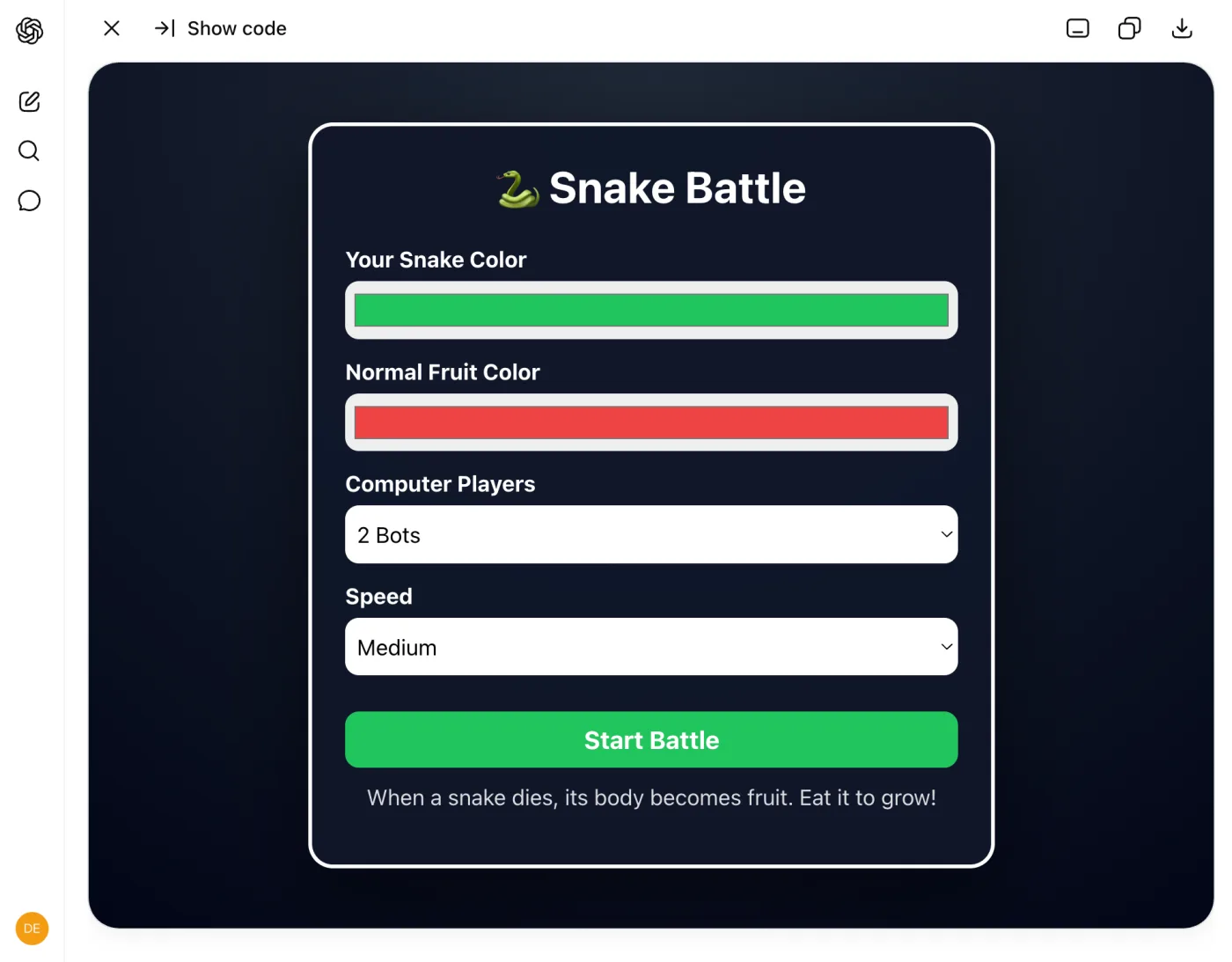
▶ Play a finished version (the kind of thing you are building toward)
.netlify.app URL the same way you will ship yours. Pick a color, press Start Battle, steer with the arrow keys. It loads live below, and you can also open it in its own tab.
Three sentences in, you have a start screen, color pickers, computer opponents, and a rule you invented. Notice two things. First, what you never mentioned: HTML, JavaScript, collision detection, game loops. You described an experience and the model did the engineering. Second, where each sentence came from. Not from planning. From playing. This is the loop from Concept 7, with the feedback step handed to the most honest critic available: you, mid-game, noticing what you wish were different. Keep going until the game is yours, one wish per message.
Every wish so far was a verdict made by feel. Make one verdict explicit. Ask the game to score itself and fix its own weakest spot.
Score this game 1-10 on three things: is it fun, is it clear
what to do, and does it feel finished or rough? One sentence
each. Then make the single change that would raise the lowest
score, and do it.
A number forces an honest answer where "is it good?" only ever gets a yes. Do one round here. The next project turns this single ask into a loop that does not stop until the scores do.
Now ship it. Every project reuses this move, so do it carefully once:
-
Download the game. ChatGPT's canvas has a download icon at the top of the panel, and Claude and Gemini have a download or export control on theirs. You get a single
.htmlfile, and that file is the entire game. -
Rename the file to
index.html. That name is the web's convention for the front page of a site, and the hosting service in the next step looks for it. -
Create a free account at netlify.com. An email address is enough. Netlify is a hosting service, which means it takes files and serves them to the internet, and its free tier is more than this project needs.
-
Drag your file into the drop zone. After signup, Netlify shows a "Let's create your new project" page whose drop zone accepts, in its own words, "a single HTML file." On a phone, tap "browse files to upload" instead of dragging.
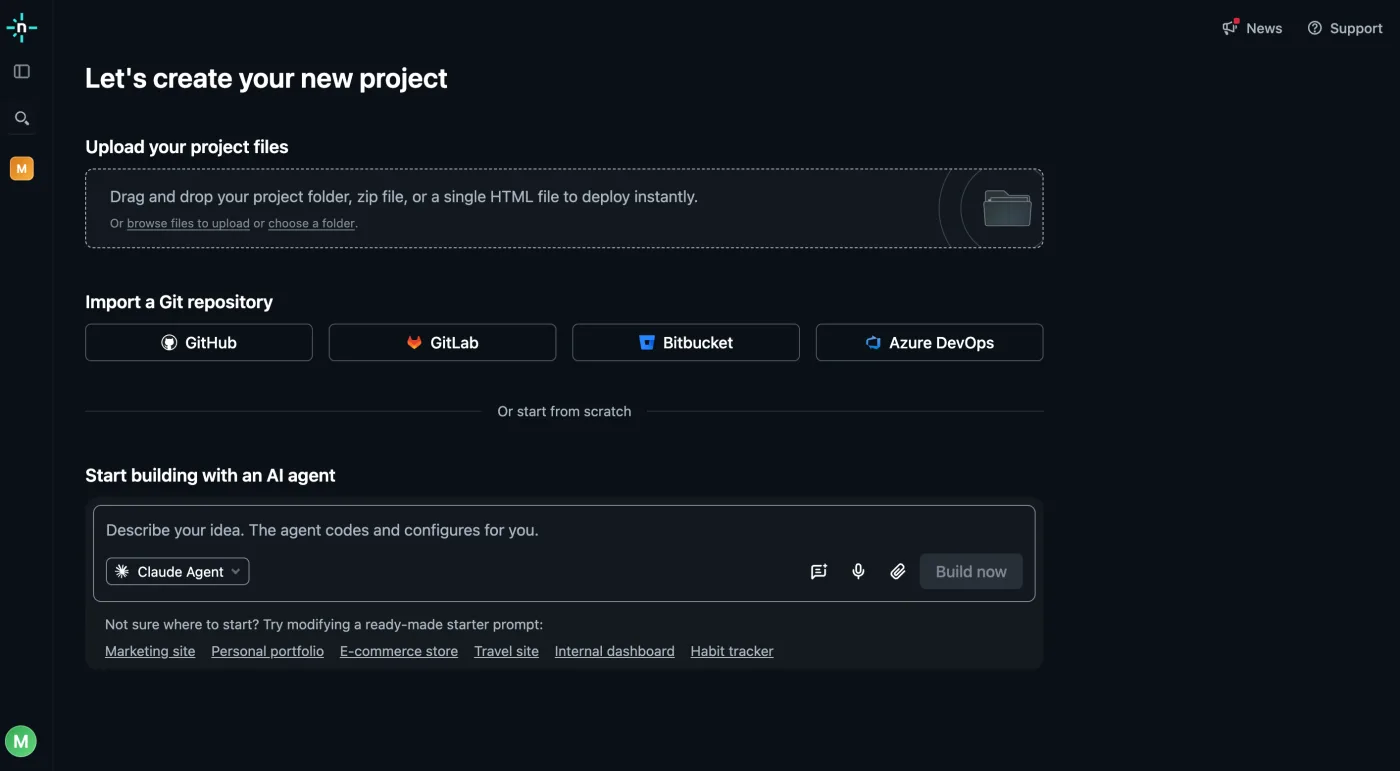
-
Open the address it gives you. A few seconds after the drop, your game is live at an address ending in
.netlify.app. Done when: the game loads in your phone's browser, not only on your computer. Send the link to one person.
A fair question. The chat tools can publish an artifact to a link, so why download it? Because that link lives inside the AI product, attached to your chat. The downloaded file is yours, and it works on any hosting service, on a USB stick, in ten years.
To update a shipped game, keep iterating in the chat, download again, rename again, and drag the new file onto your project's deploys screen. Same address, new version.
Project 245-60 minWhack-a-MoleBuild a game, then grade it past 'good enough' until it is really fun.
The snake game got good because you played it and graded it once. Here that single grade becomes the engine. You run every move on the page at once: brainstorm options, brief with structure, test, score against a rubric, and refuse to stop until the scores are high.
This is one reader's Whack-a-Mole, shipped to a real Yours will not look like this one, and that is the point. It will look like whatever theme you picked and whatever feedback you gave.
▶ Play a finished version (the kind of thing you are building toward)
.netlify.app URL the same way you will ship yours. Click the moles as they pop up and try to beat your high score. It loads live below, and you can also open it in its own tab.
Start by asking for options, not a build:
I want to build a Whack-a-Mole game. Before building anything,
give me 3 different visual theme options. One line each.

Vary the color scheme, what the moles look like (animals,
monsters, aliens), and the overall mood (playful, spooky,
elegant). Don't build any of them yet.
Pick the one you like and hand the model everything it needs. This is the Goal, Input, Output shape from Concept 9, which leaves nothing to guess:
I pick the twilight garden theme: deep blue night sky with
twinkling stars, glowing gold accents, rich dark emerald grass,
and cute animal emojis as moles.

Now build the game with these specs:

Goal: Moles pop up randomly from holes in a 3x3 grid. The
player clicks them to score points. They disappear after a
short time.

Input: Player clicks on moles that appear.

Output:
- 3x3 grid of clearly visible holes with dark centers and
  brown dirt rims that stand out from the grass
- Moles using these emojis: hamster, bear, frog, monkey,
  rabbit, fox - large and crystal clear when they pop up
- Score counter at the top
- 30-second countdown timer with a color-coded progress bar
- Moles rise up FROM INSIDE the hole, not floating above it
A playable game appears in the side panel. Done when: moles pop up and clicking one adds a point. It will feel flat. You have the skeleton, not the feel. Add the feel in one pass, because every detail you leave out is one the model has to guess:
Add these features to the game:

1. SPEED: Moles start slow, visible for about 2.5 seconds.
   Speed ONLY increases when the player's SCORE goes up, not
   when time passes. Show a speed label: Easy, Fast, Frenzy.

2. INSTANT START: The first mole appears immediately when the
   player clicks Start. No waiting.

3. HIT EFFECTS: When a mole is whacked, show all of these:
   - Colorful particle burst at the hit point
   - A plus one text floating upward and fading out
   - Quick screen shake for impact
   - A short sound effect using Web Audio API

4. GAME OVER SCREEN: Show final score large and animated,
   total hits, hits-per-minute stat, confetti animation,
   New High Score badge if earned, and a Play Again button.
Now play it and do what Concept 7 taught. Say exactly what is wrong and what you want instead. Vague complaints get vague fixes:
I played the game and found these issues:

1. Moles are mostly hidden inside the hole. They should pop up
   clearly above the dirt so I can see the full emoji face.
   Fix the layering so moles render in front of the dirt.

2. The holes blend into the dark background. Add a visible
   lighter brown rim around each hole opening so they stand
   out clearly from the grass.

3. The game takes 2 seconds before the first mole appears
   after clicking Start. Make it appear instantly with zero
   delay.

Fix all three issues.
Here is the move that separates a toy from a finished game. Do not ask "is it good?", because the model will say yes. Hand it a rubric and make it score itself:
Score this game 1-10 on each criterion. Give a one-sentence
justification per score. Then for EACH criterion, tell me the
single change that would raise the score the most.

1. VISUAL CLARITY - Can I instantly see every hole and mole?
2. FUN FACTOR - Does whacking a mole feel satisfying?
3. DIFFICULTY CURVE - Does it start easy and get harder fairly?
4. POLISH - Does it look like a finished game or a rough draft?
5. GAME FEEL - Do animations and sounds make me want to keep
   playing?

There is always a next level. Even a 9 has a path to 9.5.
Then loop until it earns the score. You decide when it has, not the model:
Implement the top 3 highest-impact changes you suggested. Then
score the game again on the same 5 criteria. Keep going until
all scores are 9 or above. I decide when to stop, not you.
That loop is the whole project. Run it twice and the game crosses the line from a thing the AI made to a thing you would put your name on. When a feature needs real design, not just more detail, ask the model to think before it builds. The phrase "think hard" turns on extended thinking: Once you have a version you like, find out whether another tool would have done better. Combine the theme-and-build prompt and the game-feel prompt, then paste them into a tool you did not use: Someone who only ever uses one AI is guessing about which is best. Now you know, for this kind of build, from your own eyes.Two power moves, once the basics work
Think hard about this: I want a smarter difficulty system.

Right now speed just increases with score. But a player who
scores 10 points in 10 seconds is very skilled, while a player
who scores 10 points in 25 seconds is slower. They should face
different difficulty levels.

Design an adaptive difficulty system that considers both the
player's score AND how fast they are scoring. Explain your
approach first, then implement it.Copy your Prompt 2 and Prompt 3 combined and paste them into
a different AI tool. If you used Claude, try ChatGPT or Gemini.
Play both versions side by side and compare:
- Which version has better visuals and colors?
- Which version has clearer moles and holes?
- Which version is more fun to play?
- Which version has better animations and sound?
Take the best ideas from both and ask your main AI tool to
add the features the other version did better.
Ship it like the snake game: download, rename to index.html, and drag it into Netlify as a new project. Done when: a friend can play your game from the link on their own phone.
Project 330-60 minA page that is youA one-page personal site a stranger understands in five seconds.
A first try at this project usually looks like this. Call it the novice approach:
I was in Summer Camp learning AI this June. Now I am thinking
to create a personal website that shows everything about me
and what I have learned in this Summer Camp. Share what goes
into the personal website
Now build a personal website with the above idea and show it
A perfectly fine page comes back, which is the trap. Asking what goes into a personal website was a good instinct, and the question has nobody in it, so the answer is generic. "Everything about me" carried nothing about the actual me, so the model filled the gap with the average student page from its training data. Stock sections, "passionate about learning," achievements that could be anyone's. Polite, clean, nobody's.
Here is the same project run by one reader, a summer-camp student, the way this page teaches it. Three prompts, start to shipped. First the brief, which is a goal with an audience in it plus the decisions he wants a say in:
Now you will build a professional personal website

My Goal: To present myself professionally to everyone
(friends, relatives, businesses)

Here are some points that we have to work on before
designing it:
1. Website Colors
2. Background and Design
3. Text Size, Writing Style
4. What information will be there
5. How we present it professionally

Build and show it
None of that is designer vocabulary, and it works anyway, because it tells the model which decisions are his to approve. A decent page came back, with clean sections and his name at the top. It looked done. He read it the way a visitor would and caught what was missing. Then he attached his summer-camp certificate, because files are context too, and sent the evidence only he could supply:
It looks good but it is missing the most important information

1. I can design games on the web. Here is an example to
   showcase: https://snake-game-by-junaid.netlify.app/
2. I know how to use ChatGPT and similar AI assistants
   professionally, like Claude and Gemini
3. I know everything present here
   https://agentfactory.panaversity.org/docs/ai-prompting-2026
4. I can professionally guide anyone about the things in the
   above link
5. At the end of summer camp there was an exam and I got
   certified. I have attached the certificate

Now plan and update it
Every line is a real thing a stranger can check. A game he shipped the way Project 1 ships one. The course he studied, which is the page you are reading. A file the model can read for itself. Forgetting something cost one message, not a restart. The version that came back had proof where the adjectives used to be. One look later came the last move, a design wish specific enough to carry its own fix:
On top I have my full name Muhammad Junaid Shaukat and the
same in the next section. This looks bad. For now the top
should have MJS and my game link
https://snake-game-by-junaid.netlify.app/
▶ See the page those three prompts produced (live)
This is the real shipped result, at an address he renamed to his own name in Netlify's settings. It loads live here, and you can also open it in its own tab.
Yours should not look like this one. It should look like you.
Now run yours. Steal his moves, not his facts. Open with your goal and who the page must work for, list the decisions you want a say in, then say "Build and show it." If you get a description of the page instead of the page, say "do it." When the first version looks done, read it as a visitor and answer his question: what is the most important information this page is missing? Send real, checkable things. Links to what you shipped, including the game from Project 1. A file the model can read. The names of what you studied. Then design wishes, one per message. "The heading is shouting." "Less purple." "More space between sections."
When it looks finished, it is not, and here the grader cannot be you. You already know who you are, so you cannot feel whether the page says it. Run the same grade-and-fix loop you ran on the mole game, with one change: hand the AI a specific stranger to become.
Become a specific stranger landing on this page for the first
time. Pick one and stay in their head: a recruiter scanning for
eight seconds, a classmate who has never met me, or someone my
work would actually matter to. Score the page 1-10 on three
things: do you know who I am within five seconds, is it obvious
what I want you to do, and does anything read like filler you
would skip? One sentence each, in their voice. Then make the
single change that raises the lowest score and apply it to the
page, don't just describe it.
Run it twice, a different stranger each time. When two people who would never meet both understand you in five seconds, the page is done.
Ship it like the game: download, rename to index.html, and drag it into Netlify as a new project. In your project's settings you can change the random site name to something closer to your own, if it is free. Done when: your name leads to a page you made, and the address sits in your bio.
Project 42-4 hrsAI Mini TextbookUse AI to build a short learning chapter on one topic, then prove you can direct and check it.
The first three projects each ended at a public URL. This one does not. Here you use AI to build a short textbook chapter on a topic you are studying, and you deliver two things: the chapter, and a process notebook that proves you can direct, question, and correct AI. The wording below is written for a school student, and it works for anyone. Pick any topic you are trying to learn, let "teacher" mean anyone who will check your work, and treat submission as optional.
This is the capstone because it uses everything on this page at once: giving AI strong context, choosing the right retrieval mode, the options-then-feedback loop with rubric scoring, and checking claims instead of trusting them.
How this works, read first. You do the real work in ChatGPT, Claude, or Gemini in another tab. This card gives you the prompts in order, and a live workbook at Step 6 where you record what you did. Open the workbook now and fill it in as you go. Everything you need is this page plus one free AI account.
Step 1: Pick a small topic and open your AI
Choose one small topic, not a whole subject, because you can teach a small topic well in a few pages. Do not pick photosynthesis, because the worked example uses it. Open ChatGPT, Claude, or Gemini and start a fresh chat. If you have notes or a textbook on the topic, keep them handy. If not, the AI's own knowledge is plenty.
| Whole subject | One small topic you can actually teach |
|---|---|
| Biology | Food chains and how energy flows |
| Mathematics | Fractions and percentages |
| Physics | Electric circuits |
| English | Writing a strong essay introduction |
| History | Causes of the 1857 War of Independence |
Local ideas if you want one: electric circuits during load-shedding, percentages using shopping discounts, English grammar using a school announcement, or budgeting a class event using ratios.
Done when: you have picked one small topic and have a fresh AI chat open, ready to go.
Step 2: Brief AI well
Run two prompts. First a deliberately weak one, and save the answer, so you can see later how much a good brief changes. Then a real one that hands the AI your context: who you are and what you are learning.
Explain ___.
Why: run this first only to see the baseline, the difference between a lazy prompt and a good one.
I am a Grade ___ student. I am learning about ___. Explain it to me
clearly, then tell me what is still unclear and what I might
misunderstand.
Why: this hands the model your real situation, so the answer fits you instead of a generic reader.
Optional, only if you actually have notes, a textbook photo, or a worksheet: paste them in and tell the AI to lean on them. Most readers can skip this and use the AI's own knowledge.
Here are my notes / a textbook photo: ___. Use these first. If you add
anything that is not in them, label it clearly as extra.
Done when: the AI has answered using your real context (your level and what you are learning). Paste each prompt, and a line on what it gave back, into the workbook below as you go.
Step 3: Get options, then push back
Ask for three different ways to explain your topic, and do not let AI expand any of them into the full chapter yet. Then choose one, reject the others with reasons, and ask for revised outlines. Rejecting with a reason is what proves you are directing AI.
Give me 3 different ways to explain ___ to a Grade ___ student. Do not
expand into the full chapter yet. For each option, give a title,
structure, strengths, and weaknesses.
Why: this forces brainstorming before drafting.
I choose option ___ because ___. I reject option ___ because ___.
Revise the outline into 3 improved versions and make them more
suitable for my class context.
Why: this shows you are directing AI, not just accepting the first answer.
Done when: you have rejected at least one option with a reason and have a revised outline you actually like.
Step 4: Build the chapter (Part A)
With the planning loop done, ask AI to think hard and draft the full chapter from your notes and chosen outline. The chapter must contain all ten Part A sections, listed in the dropdown below.
Read my notes and chosen outline carefully. Think hard about clarity,
accuracy, and age-fit. Now build the full mini textbook chapter for
Grade ___ students. Use simple language, short paragraphs, examples,
common mistakes, flashcards, quiz, and a 7-day revision plan.
Why: this asks for careful work only after the planning loop is done.
Done when: you have a draft that covers all ten Part A sections.
Step 5: Score it, then check it
First ask AI to grade its own draft against a rubric and make the smallest edits it suggests. Then ask it to list its important claims, and check a few big ones yourself against your notes, a textbook, or a web search, marking each Accept, Reject, Modify, or Needs checking. A score tells you where to improve. Checking tells you what is true.
Grade the chapter from 1 to 10 on four criteria: clarity, accuracy,
age-fit, and usefulness for revision. Justify each score in one
sentence. Then tell me the smallest edit that would raise each score
the most.
Why: this turns critique into measurable improvement.
List 6 to 10 important factual claims in the chapter. Mark each claim
as supported by my notes, supported by a named source, needs checking,
or unsupported. Do not pretend you verified something if you did not.
Why: this supports honest checking instead of blind trust.
Done when: you have applied the rubric's edits and checked at least a few important claims. Log the rubric prompt and the claims you checked in the workbook below as you go.
Step 6: Assemble your process notebook and finish
Pull the proof together: your topic brief, sources, prompt log, fact-checks, and reflection. Fill the live workbook below as you work. It saves to your browser and exports one Markdown file you can keep, copy, or print. The full Part B specification, with one example row per table, is in the dropdown underneath it.
Done when: your chapter is done and your workbook holds the proof. That means the main prompts you ran, a couple of facts you checked, and a short reflection in your own words. Doing this for a class? The fuller version, with more prompts, named sources, the rubric, and the full checklist, is in the dropdowns below. Write the chapter for someone meeting the topic for the first time. Include all ten sections: This is the proof. It has six pieces. Two are short pieces of writing. Four are tables you fill in your own notebook or doc, one row at a time. B1, Topic Brief. A short paragraph: what topic, why you chose it, what is hard about it, who it is for, and what the reader should understand by the end. B2, Source List. One row per source, at least two: Retrieval modes. Name at least two sources, at least one from your class material if possible, and say which mode you used: A source is either a class source, such as a textbook page, teacher notes, a worksheet, or a photo of a paragraph, or a trusted learning source, such as Khan Academy or Britannica. If your tool has no web search, use your textbook and teacher notes and write that down. Do not invent sources. If AI gives you a source, open and check it. If you cannot check it, mark it "Needs checking." Build your context package. The model only knows what is in the current chat or project. Feed it a typed textbook paragraph, a clear photo of a page or worksheet, your teacher's instructions, the vocabulary your teacher wants, and your own words on what confuses you. Never upload passwords, your home address, phone number, private family details, or private photos. B3, Prompt Log. At least 8 prompts, showing the whole process and not just the final answer. One row per prompt, covering the eight types in the starter prompts above: B4, Rubric Scoring Table. Score the draft, then improve it. Do not accept a score blindly. One row per criterion (clarity, accuracy, age-fit, usefulness): B5, Checking Table. Choose 6 to 10 important AI statements and check them. One row each: B6, Reflection. 150 to 250 words: what AI helped you understand, what it got wrong or left unclear, which prompt worked best and why, what you changed in the final chapter, and what you will do differently next time. Here is the shape of a finished path, so you can see where you are headed: This sample shows the expected structure and quality. You must not copy it: choose your own topic, sources, prompts, checks, and reflection. Title: AI Mini Textbook, Photosynthesis for Grade 8. How green plants make their own food using sunlight, water, carbon dioxide, and chlorophyll. Part A: the chapter 1. Title and audience. Photosynthesis, written for Grade 8 students. 2. Learning goals. Explain what photosynthesis means. Identify the main things plants need. Explain the role of sunlight, chlorophyll, water, and carbon dioxide. Describe what plants produce. Avoid common mistakes about how plants make food. 3. Simple explanation. Photosynthesis is the process by which green plants make their own food. Plants do not eat the way humans and animals do. They use sunlight to make food inside their leaves, and that food is a sugar called glucose. To make glucose, a plant needs sunlight, water, carbon dioxide, and chlorophyll. Chlorophyll is the green substance in leaves, and it helps the plant take in energy from sunlight. The plant takes in carbon dioxide through tiny openings in its leaves and water from the soil through its roots. Using sunlight and chlorophyll, it changes water and carbon dioxide into glucose and oxygen. It uses the glucose for energy and growth, and the oxygen goes into the air. A simple way to remember it: Sunlight + Water + Carbon Dioxide -> Glucose + Oxygen. Photosynthesis matters because it feeds plants and makes the oxygen humans and animals breathe. 4. Key terms. 5. Examples. Example 1, a plant near a sunny window. Watered properly, it makes food through photosynthesis. The leaves take in sunlight and carbon dioxide, the roots take up water, and the plant makes glucose and grows. Example 2, a plant kept in the dark. Without light it cannot make enough glucose and grows weak. This shows sunlight matters. 6. Common mistakes. 7. Diagram or visual idea. Draw a green plant with arrows: sunlight into the leaves, water from the soil into the roots, carbon dioxide from the air into the leaves, oxygen out from the leaves, and glucose labeled inside the plant as the food it made. At the bottom write: Sunlight + Water + Carbon Dioxide -> Glucose + Oxygen. 8. Flashcards. 9. Quiz. Q1 What is photosynthesis? Q2 Name three things plants need for photosynthesis. Q3 What is the role of chlorophyll? Q4 What food is made during photosynthesis? Q5 Why is photosynthesis important for humans and animals? Answer key: 1) the process by which green plants make their own food using sunlight, 2) sunlight, water, and carbon dioxide, plus chlorophyll to take in sunlight, 3) chlorophyll takes in sunlight, 4) glucose, 5) it produces oxygen and helps plants make food, which supports life on Earth. 10. 7-day revision plan. Part B: the process notebook B1, Topic Brief. I chose photosynthesis because it is an important Grade 8 Biology topic. Many students confuse the roles of sunlight, water, carbon dioxide, oxygen, glucose, and chlorophyll, and some think plants get all their food from the soil. By the end, my Grade 8 readers should understand how green plants make their own food and why it matters. B2, Source List. B3, Prompt Log. B4, Rubric Scoring Table. B5, Checking Table. B6, Reflection. AI helped me understand photosynthesis by explaining it in simple language and organizing the topic into key terms, examples, common mistakes, flashcards, and a quiz. My first prompt was too weak, because it only asked "Explain photosynthesis," so the answer was general and not made for my class level. The best prompt gave AI my grade level, my textbook context, and my teacher's vocabulary, and asked for a full chapter. AI gave me a clear structure, and I still had to check the facts. One important correction was that plants do not get all their food from soil. They get water and minerals from soil, and they make glucose in their leaves. Next time I will give AI my class notes first, ask for outline options, and check important claims before using the final answer. This is only a sample. Choose your own topic, use your own sources, show your own prompts, check the facts, and write your own reflection.What your chapter must contain (the ten Part A sections)
# Section What goes in it Length 1 Title and audience topic, subject, grade level, who it is for half page 2 Learning goals 3 to 5 things the reader should understand short list 3 Simple explanation easy language, headings, short paragraphs 1 to 2 pages 4 Key terms at least 5 words with simple definitions table 5 Examples at least 2 worked or real-life examples half to 1 page 6 Common mistakes at least 5 mistakes and how to avoid them list or table 7 Diagram or visual idea a simple diagram, flowchart, or labeled visual 1 visual 8 Flashcards 10 cards, question on one side, answer the other table 9 Quiz 5 questions with an answer key short quiz 10 7-day revision plan a simple one-week study plan table What your process notebook must contain (Part B)
Source name Type How I used it Grade 8 textbook page on my topic Textbook / class source took the main definition and key terms
# My prompt What AI gave me What I changed next 1 "Explain ___." a general answer with advanced words saw it was too weak, added my grade + notes Criterion AI score (1 to 10) AI reason Smallest edit to improve it My decision Clarity 8 clear, but hard to remember add a simple diagram accepted, I added one AI statement My decision (Accept / Reject / Modify / Needs checking) Evidence or reason Correction if needed "My topic mostly happens in X." Reject my textbook says it happens in Y corrected to Y What a finished path looks like (one example)
Stage In this example Chosen topic Electric circuits during load-shedding, Grade 8 Physics Class context teacher notes on battery, switch, bulb, current, complete circuit, short circuit Named sources a textbook page photo plus a Khan Academy article or video on circuits Options prompt asked for 3 ways to explain circuits (water-flow, home-lighting, drawing-based) Selected option the home-lighting analogy, because students in Kharian know load-shedding Final product a chapter with explanation, key terms, a circuit diagram idea, common mistakes, flashcards, quiz, and a 7-day plan See a full worked example (photosynthesis, Grade 8): do not copy it
Term Meaning Photosynthesis the process by which green plants make food using sunlight Chlorophyll the green substance in leaves that absorbs sunlight Glucose a type of sugar made by plants as food Carbon dioxide a gas from the air that plants use during photosynthesis Oxygen a gas released by plants during photosynthesis Roots the part of the plant that absorbs water from the soil Leaves the main part of the plant where photosynthesis takes place Mistake Correction "Plants get all their food from the soil." plants get water and minerals from soil, but make glucose in leaves "Photosynthesis happens in the roots." it mostly happens in the leaves "Chlorophyll is food for the plant." chlorophyll is not food. It helps take in sunlight "Oxygen is used to make food." oxygen is produced during photosynthesis, not used to make food "Plants do not need air." plants need carbon dioxide from the air Question Answer What is photosynthesis? the process by which green plants make food using sunlight What food do plants make? glucose What gas do plants take in? carbon dioxide What gas is released? oxygen What part absorbs water? roots Where does it mostly happen? in the leaves What is chlorophyll? the green substance that absorbs sunlight Why is sunlight needed? it provides energy for photosynthesis Do plants get all their food from soil? no, they make glucose through photosynthesis Why is it important for humans? it produces oxygen and supports food chains Day Task Day 1 read the simple explanation and underline key words Day 2 learn photosynthesis, chlorophyll, glucose, carbon dioxide, oxygen Day 3 draw and label the photosynthesis diagram Day 4 review the common mistakes table Day 5 test yourself using the flashcards Day 6 answer the quiz without looking at the answers Day 7 explain photosynthesis to a friend or family member in your own words Source name Type How I used it Grade 8 Science textbook section Textbook / class source the main definition and key terms Teacher notes on photosynthesis Teacher guidance to identify the important vocabulary Khan Academy or Britannica explanation Trusted learning source to check the basic explanation and avoid wrong claims # My prompt What AI gave me What I changed next 1 "Explain photosynthesis." a general answer with advanced words too weak, and not written for Grade 8 2 "I am a Grade 8 student. Explain photosynthesis in simple words using the key terms." a clearer explanation with the right key words decided to add my textbook and teacher notes 3 "Use my Grade 8 textbook and teacher notes first. Label any extra information as extra." stayed on the textbook vocabulary asked for outline options before writing 4 "Give me 3 ways to explain photosynthesis to a Grade 8 student. Do not write the chapter yet." three options: recipe, factory, diagram-first chose the recipe analogy 5 "I choose the recipe analogy. I reject the factory analogy as too complex. Revise into 3 outlines." three better outlines with terms, mistakes, quiz picked the one with a diagram and mistakes 6 "Read my notes and outline. Think hard about clarity and age-fit. Build the full chapter." a full first draft asked AI to score it with a rubric 7 "Grade the chapter 1 to 10 on clarity, accuracy, age-fit, usefulness. Justify and suggest edits." clarity 8, accuracy 8, age-fit 9, usefulness 8 improved the diagram and the mistakes section 8 "List 6 to 10 factual claims and mark each supported, needs checking, or unsupported." claims about sunlight, chlorophyll, glucose, oxygen checked them against my textbook Criterion AI score AI reason Smallest edit My decision Clarity 8 clear, but the process is hard to remember add a simple equation and diagram idea accepted, I added both Accuracy 8 facts are correct, but the role of soil is unclear explain soil gives water, leaves make glucose accepted, added to common mistakes Age-fit 9 the language suits Grade 8 keep paragraphs short, avoid advanced chemistry accepted Usefulness for revision 8 useful, but revision tools would help add flashcards and a 7-day plan accepted, I added both AI statement My decision Evidence or reason Correction if needed "Photosynthesis is how green plants make food." Accept matches textbook and teacher notes none "Plants need sunlight for photosynthesis." Accept matches textbook none "Chlorophyll helps absorb sunlight." Accept matches teacher notes none "Plants take in carbon dioxide." Accept matches textbook and trusted source none "Plants release oxygen during photosynthesis." Accept matches textbook none "Glucose is the food made by plants." Accept matches class notes none "Plants get all their food from the soil." Reject teacher notes say plants make glucose in leaves plants get water and minerals from soil, but make glucose in photosynthesis "Photosynthesis mostly happens in the roots." Reject textbook says it mainly happens in leaves photosynthesis mostly happens in leaves How it is graded
Category What strong work shows Points Topic and learning goal clear topic, audience, difficulty, and learning goal 8 Context package useful class notes, textbook text or photo, vocabulary, or teacher instructions given to AI 12 AI workspace discipline used a Project or clearly organized separate chats to avoid context confusion 5 Named sources and retrieval mode at least two named sources, and which mode was used (pretrained, source-based, or web/search) 10 Prompt log and iteration at least 8 prompts: weak, context, source naming, 3-option loop, feedback, draft, rubric, verify 20 Mini textbook quality clear, organized, age-appropriate, complete, and easy to revise from 20 Checking table important AI claims checked, corrected, or marked "Needs checking" 15 Reflection honest account of what AI helped with, what needed correction, and what was learned 10 Safety and honesty rules
Before you submit, the checklist
Your goal is not to show that AI is smart. It is to show that you can guide it, question it, correct it, and use it to learn better.
Done when: your chapter is complete, with all ten Part A sections, and your process notebook proves the work. That notebook holds a prompt log of at least 8 prompts, at least two named sources, your rubric scores, a checking table of 6 to 10 statements you verified, and a reflection in your own words.
Every address you ship exists because you described what you wanted, in plain sentences, to a model that builds. The snake gets good from what you notice while playing, the mole game from the rubric you hold it to, and the page from who you are. Different sources of context, same move. The capstone ships no address, because its product is a thing you understand plus the proof that you were in charge.
Each of the first three projects is a single HTML file, because that is the size of idea one prompt can carry. Accounts, live multiplayer, and data that has to survive need real engineering. The capstone marks a different boundary: a model can draft a whole chapter in seconds, and only you can decide whether it is true. When your ideas outgrow one file, or your trust in a draft outgrows one glance, that is where the rest of this book picks up.
When a project goes wrong (one of these will happen, and all are normal)
| Symptom | Fix |
|---|---|
| The app in the side panel is blank or frozen | Say so in plain words: "it's a black screen" or "the start button does nothing." The model can see its own code and usually fixes it. Worst case: "rebuild it from scratch, simpler." |
| The downloaded file opens as a wall of text | It opened in a text editor. Right-click the file, choose Open With, and pick your browser. The file is fine. |
| Netlify shows "Page not found" | The file is probably not named index.html. Rename it and drag it in again. |
| The address is ugly | It is a random name by default. Your project's settings let you rename the site to yourname.netlify.app if that name is free. |
| A friend sees the old version after an update | Drag the newest file onto the project's deploys screen, then ask them to refresh the page. |
You now know what these tools can do. Whether you can think clearly enough to direct them is a separate question, and it is the one the Thinking in AI Era Crash Course is built around.
Frequently asked questions before you start
Do I need a paid plan to do the exercises here or in the Thinking Crash Course? The free tiers of ChatGPT, Claude, and Gemini are enough for both. A paid plan helps if you run a lot of deep research or attach many files in one session. Start free and upgrade only if usage limits block you.
Should I use one tool or three? Pick one as your daily default and keep one more from a different family. A second tool is not for doing twice the work. It is a tiebreaker when the first answer does not feel right.
My company blocks ChatGPT. What do I do for the exercises? Use whatever modern AI tool your company allows. These skills transfer to any text-in, text-out AI. If nothing is allowed, use a personal account on a personal device, because the exercises are about thinking, not company data.
What if I forget the recipes from this page? Bookmark the page. The recipes are made to be looked up, not memorized. The one sentence worth memorizing is this: get the right context in, keep the wrong context out.
Why work on thinking when AI is so capable? Because capability without direction multiplies waste. The bottleneck has moved from producing, which AI made cheap, to judging, which it did not. A confidently wrong analysis is more dangerous than no analysis, because it looks finished.
Common mistakes to watch for in your first week
| Mistake | Symptom | Fix |
|---|---|---|
| Treating AI like a search engine | Short prompts, shallow answers, repeated frustration | Brief AI like a colleague: context, files, constraints, ask. |
| Letting one conversation run forever | Answers get vaguer as old context is summarized away | Start a new conversation when the topic changes. Move standing files and instructions into a project. |
| Asking for the final draft on the first try | Polished output, hollow content | Outline first, grade and fix at each stage, expand to bullets, then draft. |
| Bait phrasings you do not notice | AI agrees with whatever you implied | Rewrite as neutral questions before sending. |
| Settling for vague critique | "Great work!" with no specifics | Ask for a 1-10 score per criterion with one-sentence reasons, plus the change that would raise each score the most. |
| Stopping when the AI says you are done | "Looks good!" with no path forward | The AI does not get to declare you finished. Iterate until the score stops climbing. |
| Trusting confidence as accuracy | Surprising errors on obscure topics | Ask "how would you know this?" Check high-stakes claims against primary sources. |
| Approving broad permissions on day one | Files lost, edits overwritten | Keep folders tight. Grow scope only with track record. |
These are not character flaws. They are habits the first generation of users is building from scratch.
This page taught the mechanics of these tools. The Thinking in AI Era Crash Course teaches the discipline that makes the mechanics pay off. Its one-sentence rule: the deliverable is never the answer. The deliverable is the written evidence of thinking. It is six habits across three parts.
-
Part 1 is the posture you take before opening AI. The Prediction Lock means writing down what you think the answer is before AI tells you, so its confident answer does not slip into place as yours. The Reasoning Receipt means labeling every important AI claim as Accept, Reject, Modify, Surfaced, or Missed, with a one-sentence reason. Together they keep the thinking with you and the typing with AI.
-
Part 2 is catching what AI gets wrong. The Error Taxonomy names six failure modes you scan for by name rather than by feel: factual error, logical gap, false confidence, missing context, invented source, and out-of-date fact. Thinking in Systems traces the side effects of an AI-suggested decision across the people it touches, including the effects that circle back and undo it. This page does not cover that at all.
-
Part 3 is doing what AI cannot do for you. First Principles means breaking a problem down to base facts and asking whether the standard answer is even true in your situation. Working with AI means you do the thinking and deciding while AI does the research and drafting. Flip that ratio and you become unnecessary.
When you are ready, head to the Thinking in AI Era Crash Course. Power tools without judgment make confident mistakes faster.