Building a Workforce with Paperclip: A 90-Minute Crash Course
Seven scenarios. From nothing to an AI company that builds real things, run by you as the board.
Paperclip is an operating system for running a company of AI agents. You set the goal and hire agents to do the work. They plan and execute; you approve the decisions that matter. It works like a startup: you hire a CEO agent, it proposes a strategy, and once you approve it, the agent breaks the work into tasks and assigns them to the team.
By the end, in about ninety minutes, you will have one running AI company on your laptop:
- a CEO you hired, reporting to you as the board,
- a team the CEO hired and delegated real work to, each report owning its tasks, and
- budgets, approvals, and an audit trail that keep all of it under your control.
The CEO is the leader, not the laborer: it plans and delegates, and the specialists it hires carry out the tasks. As the company grows, the same pattern repeats: today's reports become managers with teams of their own.
(Did the OpenClaw crash course? That was one agent. This is the company you run a whole team of them from.)
📚 Teaching Aid
View Full Presentation — Building a Workforce with Paperclip
How it works. You download a small folder and open it in your general agent (Claude Code or OpenCode). The agent checks for Node, installs Paperclip with one command, and runs everything; you make the calls only a person can make: approving the CEO's strategy, deciding a hire, opening the dashboard. Paperclip is free and open source (tens of thousands of GitHub stars).
Each employee is powered by a prebuilt agent (Claude Code, OpenCode, Codex, or Gemini) or a custom one. For this course, use whichever you're already logged into: no separate API key needed. One exception comes near the end: to watch a budget actually stop an agent, you'll need a paid key. More on that when you reach it.
The collaboration pattern
Three players. You are the board: you make the calls only a human can. Your general agent runs Paperclip's CLI and recovers when something breaks. Paperclip is the layer above the agents: it holds the company and wakes the employees. One naming note so nothing gets confusing: "your general agent" is the tool you paste into; Paperclip's own employees go by role, the CEO and its reports.
Here is the whole structure you are about to build:
Every scenario runs the same way: you paste plain-language prompts, your agent proposes a plan and asks before anything destructive, you approve and watch, and it ends on one thing you can see. Most use two short prompts, not a wall of instructions.
If anything goes sideways, you do not need to know CLI commands. Paste this:
Something did not work. Run
paperclipai doctor, read the most recent Paperclip server log, tell me in plain language what you see, and propose a fix I can approve.
The download is just an AGENTS.md brief your agent reads on its own, the same pattern from earlier courses. Your agent installs Paperclip and its operator skills in Scenario 1, so you run no setup commands yourself.
Download paperclip-workforce-base.zip
Open the folder in your general agent. You set this up once: paperclip-workforce/ is your folder for the whole course.
cd paperclip-workforce
claude
cd paperclip-workforce
opencode
One paste confirms the brief loaded:
What can you do for Paperclip?
If the reply names specific Paperclip work (install, hire a CEO, the strategy review, the task board, budgets, the audit log), you are ready. If it sounds like generic AI talk, close the agent, confirm you are inside the paperclip-workforce/ folder, and relaunch.
Scenario 1: Stand up Paperclip and create your company (~15 min)
A company is a self-contained AI organisation: one goal, a team of agents, a task board, and a budget. The goal is what everything else traces back to.
First prompt: probe, then plan.
I would like to get Paperclip running on my laptop. Before you change anything, check what is already on my machine, then walk me through your plan in plain language: what you found, what you will do, and where you will need me.
Your agent reads AGENTS.md, runs the pre-install probe (Node version, prior installs, ports), and proposes a plan. If it finds stale state it pauses for your decision before touching it. Read the plan; push back if something feels off.
Second prompt: run it, then create the company.
Plan looks good, go ahead step by step and show me what you see; pause before anything destructive. When Paperclip is up, create my company: call it Northwind, goal "Launch a weekly AI newsletter and reach 1,000 subscribers in 90 days," and register that as a real company goal the CEO can read and plan against, not just a tagline. Set a small monthly budget ceiling, twenty dollars, so spending is capped from the start. Require my sign-off before the company hires any new agent, so I stay in control of the team. Then give me the dashboard URL.
Done when: the dashboard renders, and it shows one company called "Northwind" with your goal registered as a goal the CEO can act on, a budget ceiling, and new hires set to require your approval. Every later action builds on this.
Your company before any hires, the Scenario 1 payoff:
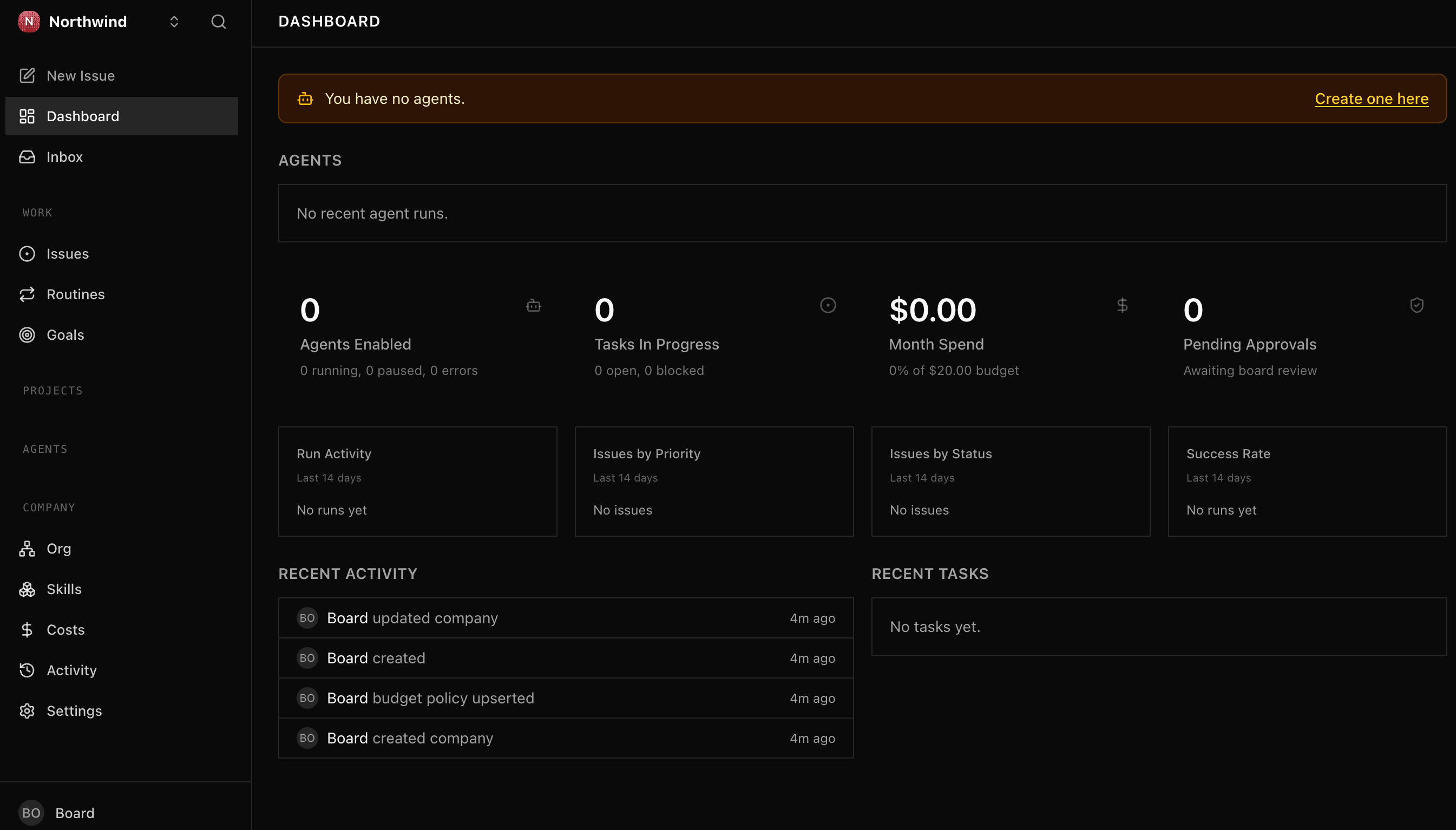
Your dashboard may look a little different as Paperclip updates; what matters is the company, the budget ceiling, and the empty roster waiting on your first hire.
Scenario 2: Hire your CEO (~10 min)
An agent is an AI employee: a role, a manager it reports to, and a budget. Hiring one is like engaging a contractor, except it is powered by a model (plugged in through an adapter, the plug that matches your provider). The CEO is the first agent you hire and the only one with no manager: it reports to you, the board, and once running it reads the goal and proposes a strategy.
First prompt: draft the CEO.
I want to hire my CEO, the first agent for Northwind. Run it on whatever coding agent I have logged in locally (Claude Code, OpenCode, Codex, the Gemini CLI) through Paperclip's matching local adapter, so no separate API key. Pick a sensible default and tell me which. Show me the setup before you register anything: the role, the adapter and model, the budget, and the heartbeat schedule. Keep the budget modest, a few dollars.
Second prompt: hire and verify.
Looks good. File the CEO as a hire and bring it to me to approve. Once I approve, confirm it in the dashboard: its ID, that it reports to me with no manager above it, and when its first heartbeat is due.
The gate you armed in Scenario 1 applies to the very first hire too: even your CEO is a hire you sign off on. That is the point. You will see exactly this, the CEO sitting in pending approval with an Approve agent button, waiting on you:
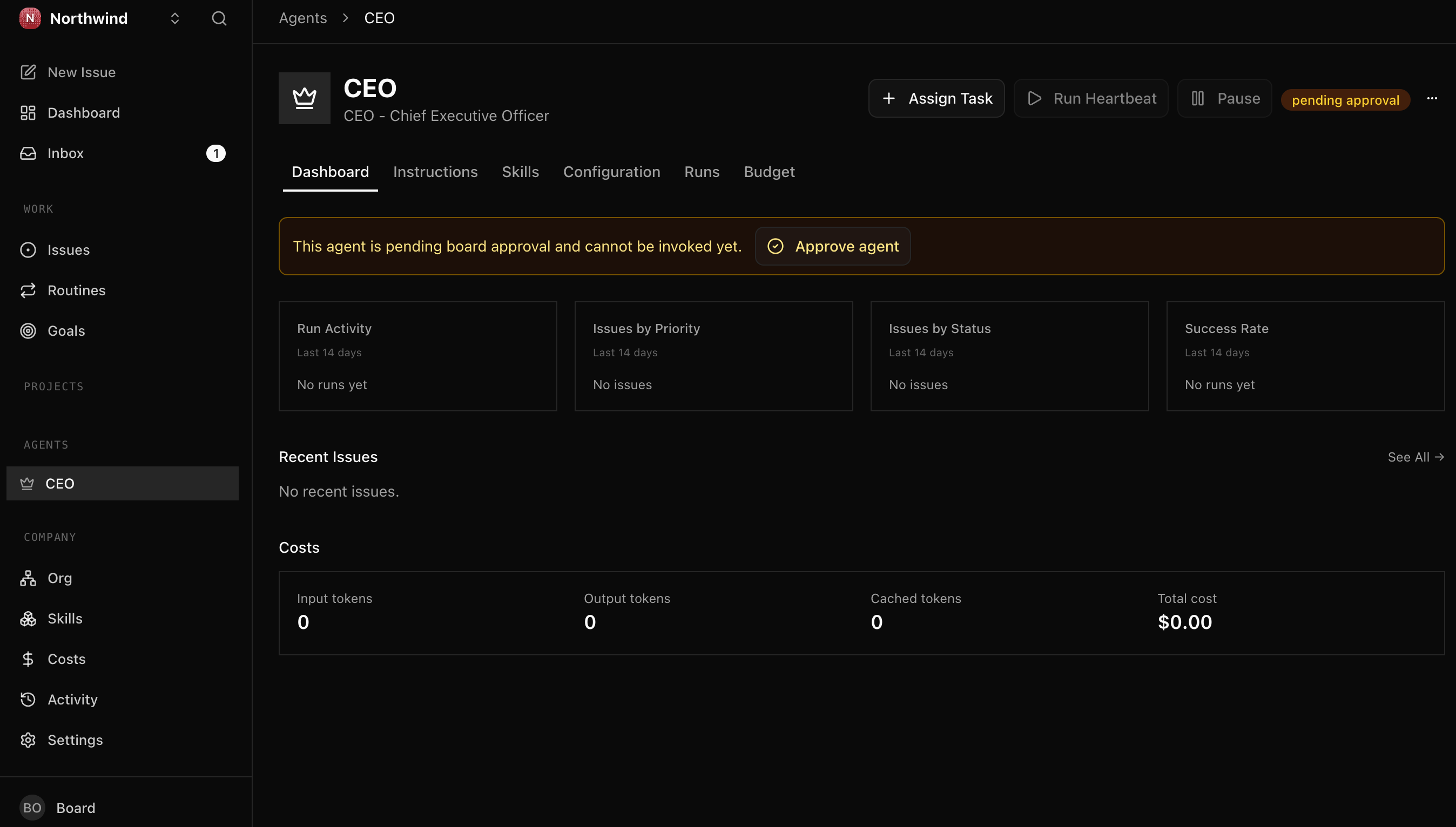
Done when: after you approve the CEO's hire, the dashboard shows one CEO agent, idle, reporting to you, heartbeat enabled. It has not done anything yet; that is the next scenario.
Scenario 3: The CEO proposes a strategy; you approve it (~15 min)
A heartbeat is an agent's scheduled turn to work: it wakes, does a chunk, and logs off until the next one. On its first heartbeat the CEO does one thing: it reads your goal and drafts a strategy as the first item on the task board, then moves that item to in_review, the board's review lane. Nothing proceeds until you sign off. Approving it is the board acting: you move that strategy from in_review to done.
First prompt: fire the first heartbeat.
Fire the CEO's first heartbeat and let it think. When it has drafted its strategy and put it up for my review, show it to me and walk me through what the CEO is proposing.
Fire it and the CEO goes live, working in real time:
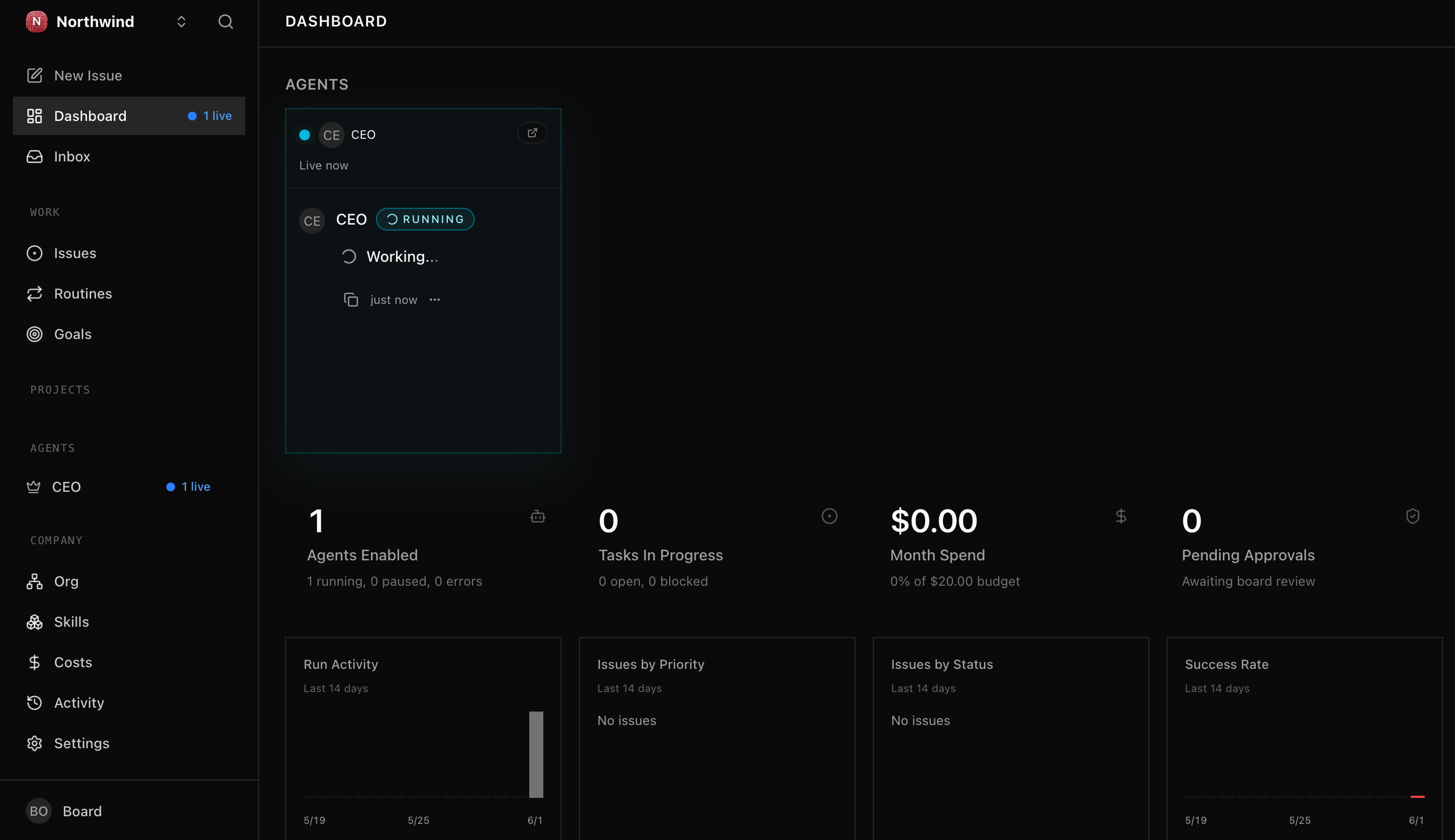
The exact plan the CEO writes is its own; what you are checking is that it proposed one and then stopped, waiting for you. Here is the strategy sitting in your review lane, a task with a plan attached:
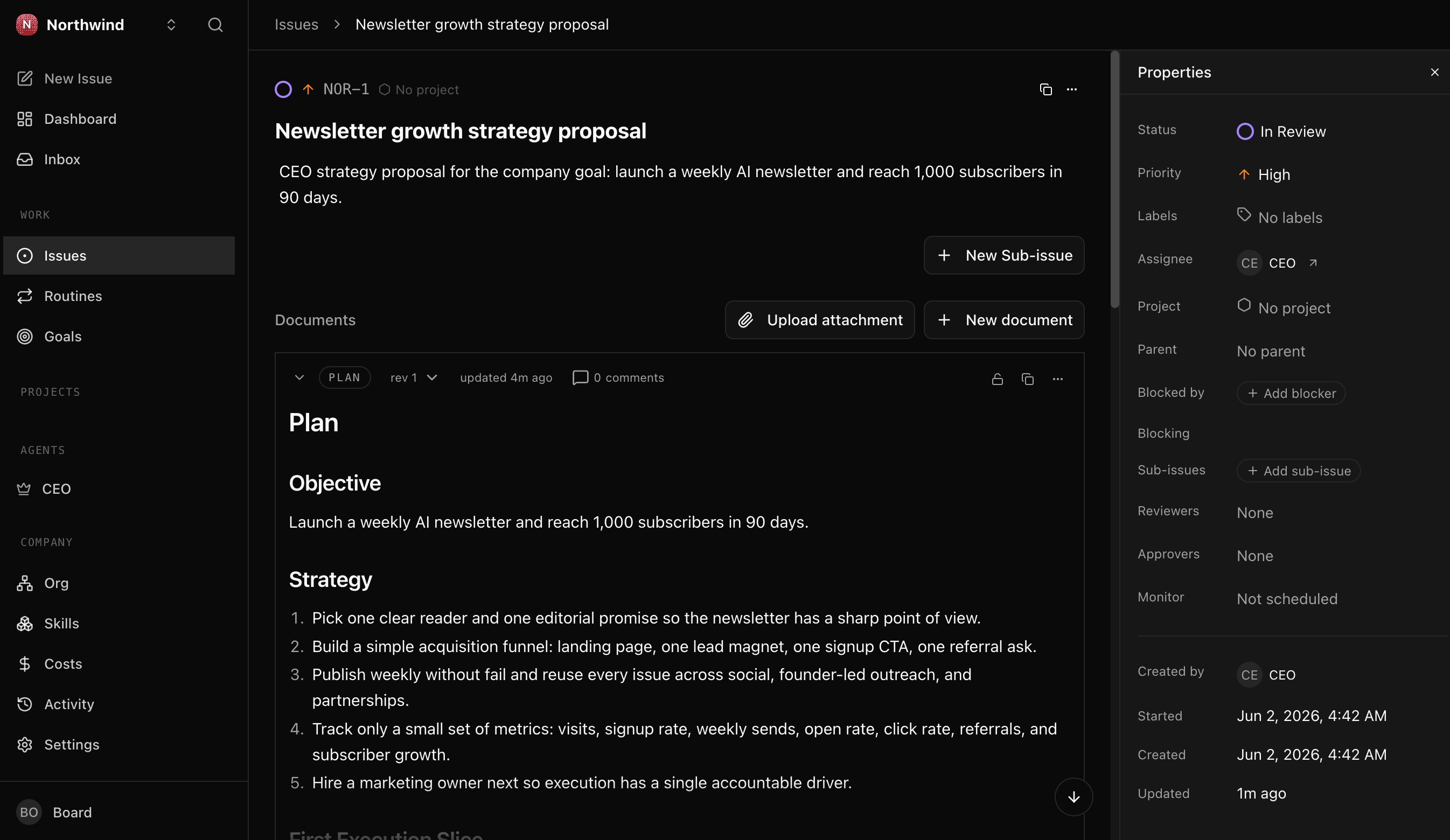
(You may also see a second run fire on its own a moment later. That is an automatic wake that finds nothing new to do and exits, not a duplicate; only the heartbeat you fired did the work.)
Second prompt: decide it.
I have read the strategy. I will sign off on it as is (or tell you the one change I want, and you ask the CEO to revise). Move it forward to done, show me the activity-log row that proves I, the board, decided it, and tell me what the CEO is cleared to do next.
Done when: the strategy item has moved from in_review to done, the activity-log row shows actor_type = user (you, the decider) on that change, and you can say why nothing could proceed until you signed off.
Scenario 4: The CEO builds the board and hires its first teammate (~20 min)
A task is a unit of work, like a Jira or Linear ticket, except the assignee is an agent. With an approved strategy, the CEO breaks the goal into tasks, then assigns and delegates them (to itself on the first heartbeats, to specialists as it hires them), moving each through a lifecycle:
This is where the company becomes a workforce, not a solo CEO. The CEO leads: it turns the strategy into work and, because the goal is bigger than one agent, hires a specialist (with your sign-off) to hand the work down. You will watch a hire you approved do a task the CEO gave it.
First prompt: let the CEO act.
Let the CEO act on the approved strategy. Fire a few heartbeats and show me what it does. It may open a task or two itself, but the goal is bigger than one agent, so it will decide it needs a specialist and file a hire request (the role, a budget, the job it will own). Show me that request so I can decide it.
The hire arrives as an approval in your inbox, the same kind of sign-off you gave the strategy, and nothing joins the company until you say yes. Do not be surprised if the CEO hires first and holds the rest of the board until you decide: a sharp CEO will not create the marketing tasks before there is a marketer to own them. You may see a task or two it opened for itself, or an empty board with just the hire request waiting; either is normal, and your decision is what unblocks the work.
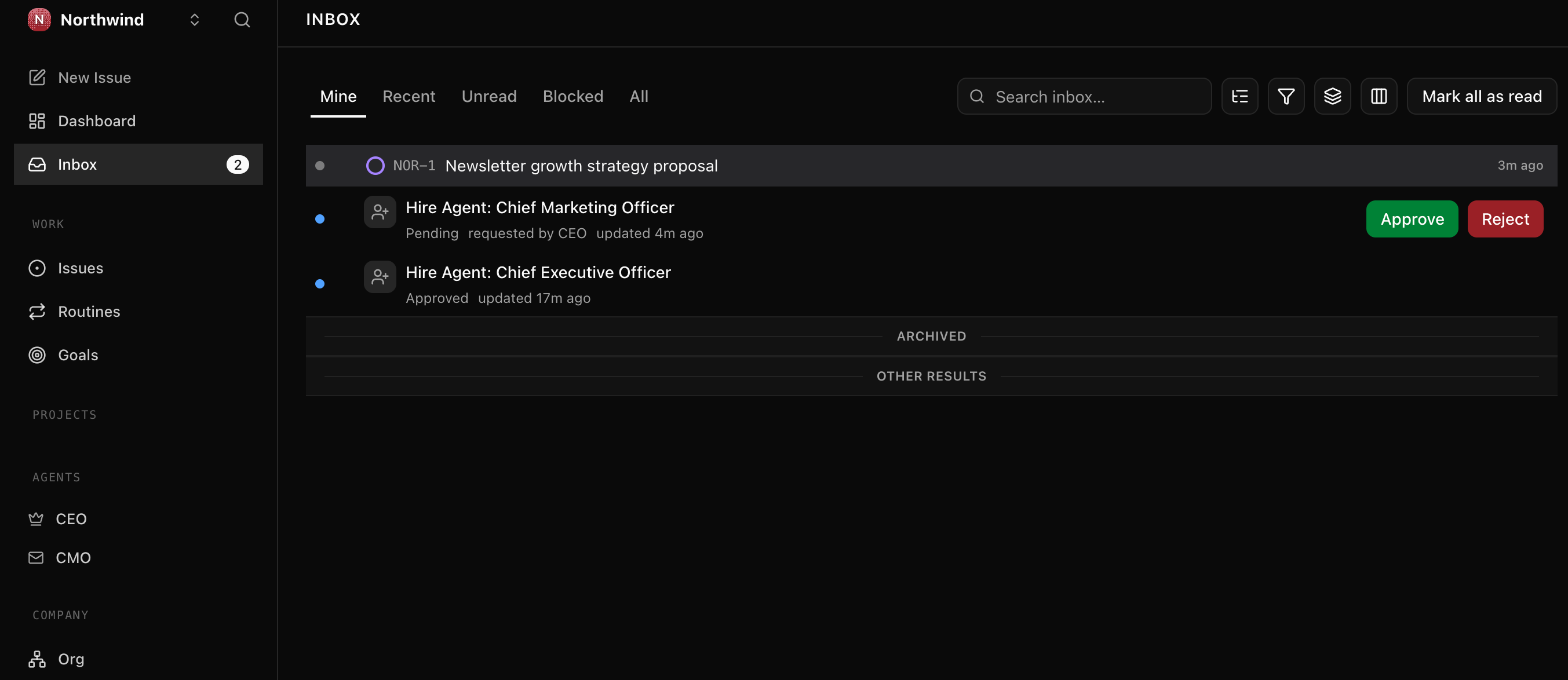
Heartbeats also fire on a schedule, not only when you ask, so a busy CEO can file the same hire twice or open a few extra tasks. If you see a duplicate hire request, just reject the extra; that is the gate doing its job. Once your specialist is approved and the work is delegated, tell your agent to pause the CEO's heartbeat so it stops working unattended. Pausing it is a board move: autonomy is something you grant, and you can take it back.
Second prompt: approve the hire and watch the team take over.
I approve the hire. Bring the specialist on board reporting to the CEO, then fire one CEO heartbeat so it breaks the approved strategy into tasks and hands them to the new teammate. Show me the board: the sub-tasks, who owns them, and that the teammate, not the CEO, did the work.
Once the hire is approved, the CEO does the rest on its own: on its next heartbeat it breaks the approved strategy into sub-tasks and assigns them to the new teammate, which wakes on assignment and works them. This is the payoff: the team, not the CEO, does the work. It can move fast: in one cascade the CEO files the tasks and the teammate finishes them within a couple of minutes, so you may open the board to find the work already done. That finished board, every task signed by the teammate, is the workforce doing its job while you were away.
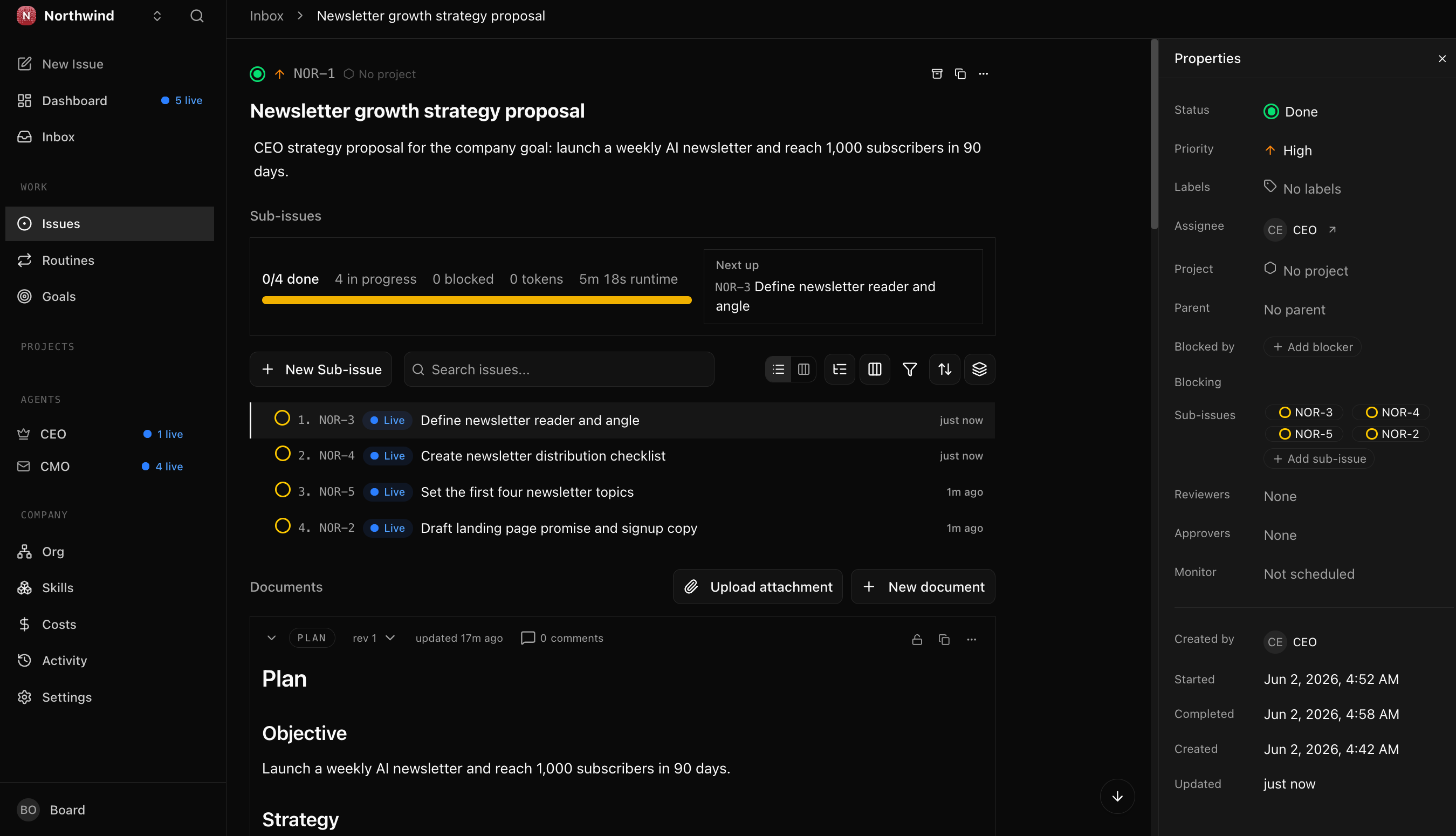
Optional, watch one task run live. Because the cascade can finish before you look, the way to see a single report work step by step is to give it one task in isolation: tell your agent to create one fresh task, assign it to the teammate, and fire that teammate's heartbeat. You will watch it move from todo to in_progress to done on its own. This is also how you hand the teammate a specific piece rather than letting the CEO decide the whole breakdown, or nudge things along if the CEO has not delegated after a heartbeat or two.
Done when: your company has at least two agents (the CEO, and a specialist reporting to it), a task the CEO delegated was completed by that specialist (its comment thread shows the real work, signed by the teammate and not the CEO), and you can trace that task back to the company goal. That is a workforce: you decide, the CEO leads, the team does the work.
Scenario 5: The budget, your safety rail (~5 min)
Every agent carries a spending cap, and you set a twenty-dollar company cap back in Scenario 1. The rule is simple: at 80% of a cap Paperclip warns you, and at 100% it pauses the agent, so a bug or a runaway loop can only ever cost a bounded amount. That is what makes a company safe to leave running.
The honest catch: a budget can only count spend that is billed per token, and your keyless local runtime bills nothing. Paperclip records every token at $0, so the cap is armed but has nothing to push against; the spend stays flat at zero no matter how hard the team works. (Each heartbeat prints a reference figure like cost=$0.71, what it would cost on a metered key; the billed number your budget counts is $0.) The rail does not bite today because there is nothing to bite. It bites the day you point an agent at a paid, per-token model, which is exactly when you want it to.
Set a one-dollar cap on the CEO, then show me the spend Paperclip actually recorded in the database. Tell me plainly what it cost and why.
Done when: the cap is set, you can state the rule (80% warn, 100% pause), and you have seen the honest $0 for yourself. The safety rail is armed now, before you ever need it.
If you ever do wire a pay-per-token API key, export it in your shell; never paste it into a file in the project, and never let your agent write it into one. If a key lands somewhere it should not, rotate it.
Scenario 6: Query the audit trail like a CFO (~10 min)
The point of an operating system for a company is that someone outside it (a CFO, legal, compliance) can reconstruct what happened from the database alone, in seconds. Paperclip keeps that history in an embedded Postgres database: activity_log has one row per action (company created, agent hired, strategy approved, task created), and cost_events holds the dollar story.
Paste this to your agent:
Time to play CFO. Connect to Paperclip's database and run two queries for Northwind: first, "what happened, in order", every action with its actor and what it touched, oldest first; then the total cost so far in dollars. Show me the SQL and the results. Finally, pull up the activity-log row where I, the board, moved the strategy forward to done, and point to the fields an auditor would use to confirm I was the decider.
The agent assembles the Postgres connection string from your install's config, runs the history query (the full spine: company created, CEO hired, strategy moved to done by you, a specialist hired with your approval, tasks created, delegated, and worked to done by the team) and the cost query, then shows you the strategy decision row: actor_type = user, the actor_id identifying the board (in local mode that is the constant local-board), and the timestamp. The same actor_type column tells the teammate's work (agent) apart from your decisions (user).
Done when: the history query returns the ordered story of your whole run, the cost query returns a real number, and you can name the column (actor_type) that tells a human decision apart from an agent action.
Scenario 7: Give your company a real desk, so it builds real files (~10 min)
Look back at what your team produced: the landing-page copy, the reader definition, the list of topics. All of it lives as comments on the board. The company described its work, but it has not yet built anything you can hold. The missing piece is a workspace: a real folder (or git repo) you point the company at, so that when an agent works a task it writes actual files there, and they survive the run. It is the difference between an employee who tells you the plan and one who hands you the file.
This is the one part of Paperclip whose exact wiring drifts between versions, so the prompts below tell your agent to confirm the current steps from the live docs before it touches anything.
First prompt: connect a folder.
Give my company a real place to work. Make a fresh folder for the Northwind site, point a Paperclip project at it as its workspace, and tell me where it is on disk. If the way to connect a workspace has changed, check Paperclip's live docs first, then show me your plan before you wire anything.
Second prompt: have the team build a real artifact.
Now hand the CMO one task in that project: turn the landing-page copy it already wrote (the hero "AI you can use this week", the subheadline, and the call to action) into an actual
landing-page.html. Fire the CMO's heartbeat, let it work, then show me the file on disk and open it, so I can see the company built something real, not another comment.
Done when: there is a real file (a landing-page.html, or whatever you asked for) sitting in your folder, written by the CMO, that you can open in a browser. Your company stopped describing the work and produced it. That is the line between a demo and a company.
Once a month: operate the company you now run (~10 min)
Running a company is a standing responsibility, not a one-time setup, and that is exactly why it needs a recurring review. Over time it accumulates: every hire, budget change, and setting was a small decision, and small decisions drift. The defense is not vigilance at every step; it is a short review on a fixed cadence. This is the move you make once a month, and the run you do now is the baseline the next one diffs against. You can do it by hand, or, since recurring work is exactly what Paperclip routines are for, schedule it as a routine that fires on a cron so the company audits itself; the Dynamic Workforce course builds routines.
Run my Paperclip monthly company audit. Walk through everything hired, configured, scheduled, approved, or paused since the last audit. Flag anything I did not explicitly sign off on, any agent that has not done productive work, any budget that has drifted, and any setting looser than it should be. Summarize it as a single short report I can approve or trim, and save it as the baseline for next month.
A good audit comes back with a clean ledger and a short list of loose knobs to tighten. The usual suspects: a hire that slipped in without its own budget cap (it silently inherits the whole company ceiling), an agent set to run too many things at once, a config file that no longer matches the live state, or a task parked in review waiting on a decision only you can make. None of these are failures, they are the ordinary drift a company running on its own quietly produces, and catching them on a cadence is exactly how you stay the board of something that runs without you.
Done when: you have a report you trust, you can name at least one loose knob it surfaced, and you have made at least one decision (set a missing cap, lower a runaway concurrency, refresh a stale config, retire an idle agent, or close a parked task). Mark your calendar; next month's audit diffs against this one.
You are done: what you built
You did not just install a tool, and you did not just run a demo. In under an hour you stood up a real company on your laptop and operated it the way a founder operates a board: you set a goal, hired a CEO, approved its strategy, signed off on the specialist it wanted, watched the team do delegated work, gave it a desk so its work became a real file on disk, then audited the whole run from the ledger. Every move you made, hire, approve, budget, delegate, audit, was a governance move, not a prompt.
And the company is still there. You did not finish it; you paused it at a clean baseline. Close the laptop and it persists, the agents, the org chart, the work, the audit trail, all of it waiting for your next decision. It is a living thing you now run.
That newsletter was the rehearsal. The real move is to point the same pattern at your goal: stand up a company whose goal is your actual business, let the CEO propose how to pursue it, hire the specialists it needs, and let it run under the budgets and approvals that keep you the board. That is how you found an AI-native company around almost anything, and you just did it once already.
You carry two things out of here. The durable artifact is AGENTS.md, the brief your general agent reads every session, portable to the next tool you put an agent in front of. The durable skill is the stance: autonomy is something you grant, not a default, so you stay the board through tight budgets, required sign-off on hires and strategy, and a review on a cadence, even when the company runs itself.
Where to go next:
| You want... | Go to |
|---|---|
| Wrap a single agent in a durable workflow engine before you manage a fleet | From Digital FTE to Production Worker: the Inngest durability envelope |
| Turn hiring into a callable capability (agents that hire other agents under policy) | From Fixed to Dynamic Workforce: the successor to this course |
| Use Paperclip's REST API as tools from inside another agent | Check docs.paperclip.ing for the current MCP server package; pin the version |
| Deploy Paperclip to a cloud or shared host | The live docs at docs.paperclip.ing; verify what has shipped before you rely on it |
| Wire OpenClaw as the edge layer between humans and your company | The OpenClaw crash course |
| Give your agents a real codebase to work in | The Execution Workspaces guide at docs.paperclip.ing: connect a project so agents draft, edit, and run real code |
| Hire the FTE you built (OpenAI Agents SDK, or any custom runtime) as an employee | Bring your own agent: hire it on the http adapter; Paperclip POSTs work to your agent, it calls back to close the task |
| Put recurring work on a schedule (a daily standup, a weekly report) | Paperclip routines (cron or webhook triggers); the Dynamic Workforce course builds them |
| Take the whole company with you | Export it to a portable markdown package, a COMPANY.md plus an AGENT.md per role, the same brief pattern you just learned, then re-import or version-control it |
Flashcards Study Aid
Knowledge Check
A quick gated self-check on the ideas you just ran through.