From Fixed to Dynamic Workforce: The Hiring API, Capability Gaps, and the Talent Ledger
15 Concepts. About 2 to 3 hours of conceptual reading (longer if you take the PRIMM Predicts seriously). 2 to 3 hours of hands-on lab. Plan a half-day total.
A continuation crash course. This is Course Seven in the agentic-coding track. Course Three, Build AI Agents with the OpenAI Agents SDK and Cloudflare Sandbox, built a streaming chat agent. Course Four, From AI Agent to Digital FTE, turned that chat agent into a Digital FTE with Skills, a Neon Postgres system of record, and MCP. Course Five, From Digital FTE to Production Worker, wrapped the Digital FTE in an Inngest operational envelope so the world could wake it and crashes couldn't lose its state. Course Six, From One Worker to a Workforce, added the Paperclip management layer so one or more Workers became a workforce with assignments, budgets, approvals, and an audit trail. The workforce was three Workers chosen by the human at company-creation time. Course Seven is about what happens when a fourth Worker is needed, and the workforce calls a hiring API to bring it in.
The single insight that makes everything else click: in an AI-native company, hiring is not a quarterly HR motion. It is a callable capability the workforce invokes on itself, gated by exactly the same approval primitive that gates a $500 refund. The board doesn't write a job posting. The Manager-Agent does. The board approves it, and the new Worker walks onto the org chart that afternoon. By the end of this course, the customer-support workforce from Course Six has detected a capability it doesn't have, drafted a hiring proposal, walked it through the approval gate, and welcomed a Legal Specialist into the org chart, all on the same activity_log plus cost_events ledger the original three Workers write to.
The thesis names seven invariants for an AI-native company. Course Six covered three (the management plane, the human as principal, part of the nervous system). Course Seven covers the deepest claim: Invariant 6, hiring is a callable capability. Here's the architect's framing sentence, the one this entire course is built around:
"A workforce that cannot grow itself is a fixed company; a workforce that can grow itself under approval is an AI-native company. Hiring in the Agent Factory is not an HR motion; it is a function call from the manager, taking a job description as input, returning a Worker as output, gated by the same approval primitive that gates every other consequential action."
Six of seven invariants are then closed. The remaining one, Invariant 2 (the Edge delegate), is Course Eight's domain.
Four properties make hiring a uniquely interesting capability in an AI-native company, properties that don't exist for any other tool call. Each gets its own Concept later; here's the shape:
- The hire-decision is itself an agent decision. A Worker without authority to hire can still flag the gap. A Worker with
can_create_agents=truecan draft and submit. The line is set by the company envelope (Invariant 1), not by code. (Concepts 1, 3.) - The new Worker inherits an authority envelope that didn't exist before its hire. A Legal Specialist's
contract_modify=allowis not in any existing Worker's envelope. The hire request is also where the new envelope is negotiated. (Concept 8.) - A hire is a board-level act, even when proposed by an agent. The approval gate from Course Six is the same gate. The proposal artifact (job description, capability eval, expected budget) is what the board sees. (Concept 7.)
- Hires are reversible. Course Six treated Workers as configured-once-at-startup. Course Seven adds the lifecycle: hire, evaluate, deploy, retire, rehire when needed. The talent ledger tracks all of it. (Concepts 7, 14.)
The Agent Factory thesis titles this Invariant 6 "The workforce is expandable under policy": the workforce can grow itself under the board's authority. Course Five covered Invariant 7 (the nervous system) and part of Invariant 1 (HITL). Course Six covered Invariant 3 (the management plane) and surfaced Invariant 6 at the edge. Course Seven closes Invariant 6 in full, leaving only Invariant 2 (the Edge delegate) for Course Eight.
Course Six taught you to use Paperclip (paperclip.ing, github.com/paperclipai/paperclip) as the agentic management layer. Course Seven extends that same instance. The same npx paperclipai onboard --yes from Course Six gives you the hiring API. It's not a different product, it's a different endpoint. The verified endpoint Course Seven teaches: POST /api/companies/{companyId}/agent-hires. The verified governance flow: hire returns pending_approval, board comments on the approval thread, agent is woken with PAPERCLIP_APPROVAL_ID when approved.
Course Seven runs the worked example on two Paperclip-native runtime adapters, side by side: claude_local and opencode_local. Both ship as first-class Paperclip primitives; Paperclip spawns the local coding-agent CLI itself (claude headless for claude_local, opencode headless for opencode_local) on each heartbeat, injects PAPERCLIP_API_URL and PAPERCLIP_API_KEY into the CLI's environment, and the CLI does the turn against Paperclip's own API. No external service, no inbound URL, no relay, no separate cloud account. The same hire payload differs only in adapterType and adapterConfig, which is the architectural point: hiring is substrate-agnostic from the management plane's perspective, and the local-CLI pair is the cheapest possible proof.
Why two adapters and not one? Two reasons, in order of weight.
- Multi-provider portability is the binding test of "substrate-agnostic." A single-adapter worked example always reads like "the architecture is generic if you pick this one runtime." Running the identical hire on
claude_local(single-provider, Anthropic models only) andopencode_local(multi-provider; the same adapter can drive Anthropic, OpenAI, Google, or any provider supported by OpenCode via aprovider/modelslug) demonstrates the property concretely. If the reader wants the Legal Specialist onanthropic/claude-opus-4-7, theopencode_localtab in Decision 4 shows the swap. If they want it onopenai/gpt-5.2-pro, only theadapterConfig.modelstring changes. The hiring loop never moved. - Zero infrastructure means the reader can finish the lab. Both adapters run on the same machine as the Paperclip daemon. No beta access, no separate cloud account, no relay server, no inbound URL. The reader installs two CLIs (
claudeandopencode), authenticates each once, and the rest of the lab is API calls to Paperclip. The hardest substrates to integrate (managed-cloud products like Claude Managed Agents, vendor-hosted ones like Cursor Cloud) earn their place when the workload demands them: see Concept 6's substrate table for the decision rubric and the trade-offs.
If your team prefers a managed-cloud runtime (Anthropic's Claude Managed Agents is the relevant Anthropic option; Concept 6 names it explicitly) or a self-hosted Agent SDK endpoint, the hiring API is unchanged. Only adapterType and adapterConfig differ. Decision 4 shows the two local tabs side-by-side; Concept 6's substrate table covers the named alternatives.
- Claude Managed Agents is in public beta. The beta header
managed-agents-2026-04-01is required on every request. Behaviors may be refined between releases. - CMA's multi-agent orchestration is a research preview that requires a separate access request (per the official overview). The course's worked example uses single-agent CMA sessions and does not depend on the multi-agent feature.
- Paperclip's hiring approval workflow is implemented and shipping, but the UI for writing custom auto-approval policies (Concept 9) is still partly CLI-driven. Expect to edit JSON, not click buttons, for any policy more sophisticated than "auto-approve burst-capacity hires under $X per month."
- Per-issue cost attribution when a hire is triggered by an issue (the
sourceIssueIdlink) is recorded correctly inactivity_log, but querying "what did the hire cost in proposal time, eval time, first month of work" requires joining three tables. There's an open issue tracking a unifiedhire_lifecycleview.
These are not reasons to avoid hiring. They are the normal state of a frontier API that's young, popular, and improving. They are reasons to pin versions, prefer code-driven hiring over UI-driven for anything beyond the simplest case, and never auto-approve hires that grant authority a Worker doesn't already have somewhere on the org chart.
The four claims in order:
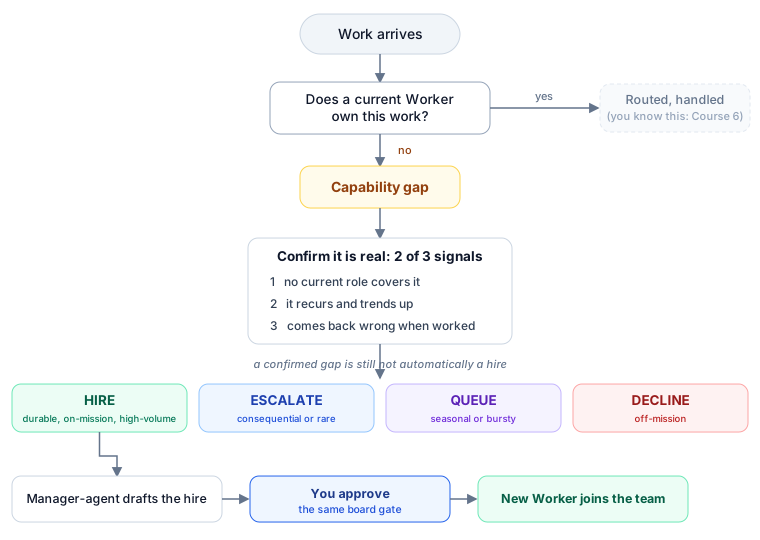
- The workforce can detect that no Worker on the org chart can handle this work.
- The Manager-Agent drafts a hiring proposal: job description, eval pack, expected budget, draft authority envelope.
- The proposal goes through Course Six's approval gate. The human sees it. The human decides.
- On approval, Paperclip's
POST /api/companies/{id}/agent-hiresprovisions the new Worker against the chosen runtime (Claude Managed Agents for the worked example). The org chart now has four Workers instead of three.
In Course Six, we built a small AI company with three Workers: Tier-1 Support, Tier-2 Specialist, and a Manager-Agent that routes between them. In this course, the company notices it needs a fourth Worker (it keeps getting contract-review questions none of the three can handle well), the Manager-Agent drafts a hiring proposal and asks permission, the candidate is tested before the human board ever sees it, and on approval the new Worker is added to the org chart. Everything in the rest of the course is detail about how each of those steps actually works.

Course Six recap: the workforce you're extending (click to expand)
Course Six built a three-Worker customer-support workforce on Paperclip. The Workers were:
- Tier-1 Support (Course Five's customer-email Inngest function, adapted via the
httpadapter): handles routine refund, FAQ, and status queries; $200 per month budget;refund_max=$50; external email requires approval. - Tier-2 Specialist (a
claude_localadapter): handles complex multi-turn cases, escalations from Tier-1; $800 per month budget;refund_max=$500; external email allowed. - Manager-Agent (an
httpadapter): orchestrates routing, comments on issues, requests approvals; $200 per month budget;refund_max=$0; all consequential actions require approval.
Course Six's eight Decisions wired these three Workers into Paperclip, defined the company envelope (refund_max=$5000, contract_modify=board_only), routed inbound emails through the activity_log, and demonstrated the approval gate on a $750 refund (Decision 6). Course Seven assumes that workforce exists and is running.
If you skipped Course Six, the Workforce vs Worker section below gives you enough on-ramp to follow Course Seven, but you won't have a workforce to actually hire into. You'll have to spin up the Course Six lab first.
Where this fits: cheat sheet
| # | Concept | Layer | What you'll be able to answer afterward |
|---|---|---|---|
| 1 | A workforce that cannot grow itself is a fixed company | Management plane | Why is the capability to hire as important as the act of hiring? Because a fixed workforce is a fixed company. |
| 2 | Capability gaps: three signal types | Management plane | How does the Manager-Agent know a Worker is needed? Low routing confidence, repeated escalations, no eligible Worker by skill match. |
| 3 | Hire vs escalate vs queue vs decline | Management plane | Which is the right response to a capability gap? Decision tree on volume, value, novelty. |
| 4 | The job description as code | Hiring API | What does a hire request look like? A JSON payload with role, capabilities, adapter, runtime, source issue. |
| 5 | Capability evaluation before hire | Hiring API | How is a candidate Worker tested before it gets real issues? An eval pack with scored rubric, accept/reject. |
| 6 | Substrate selection: local CLIs, Agent SDK, managed-cloud, or process | Runtime | When do you put a new Worker on a Paperclip-native local adapter (the worked example) vs the Agent SDK vs Claude Managed Agents vs process? Decision table. |
| 7 | The hiring approval gate | Management plane | How does Course Six's approval primitive map onto hiring? Same primitive, richer payload (proposal, eval, budget, envelope). |
| 8 | Authority envelope for new hires | Management plane | How do you decide what refund_max a brand-new role gets? It's negotiated in the hire proposal, locked at approval, recorded in activity_log. |
| 9 | Auto-approval policy for a class of hires | Management plane | When is unattended hiring acceptable? Pre-approved classes (burst-capacity, narrow specialties under cost ceiling), audited continuously. |
| 10 | The Worker's first heartbeat | Lab | What happens between approval and the new Worker's first real issue? Activated heartbeat, routing, Worker transitions out of idle to do real work. |
| 11 | Retirement and rehire: the full lifecycle | Lab | What happens when traffic dies down? Pause the Worker (Paperclip ships this primitive as "Pause"). Three things preserved across the cycle; rehire is faster. |
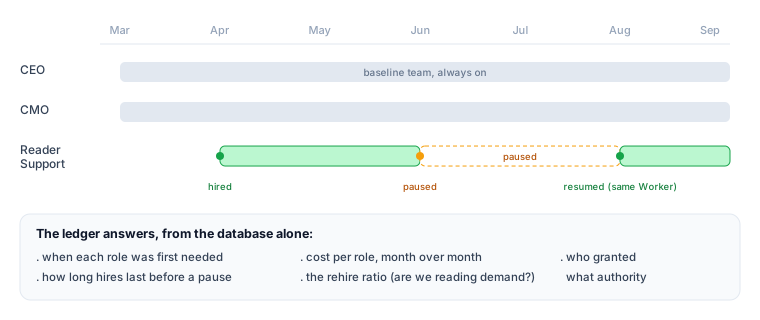
| 12 | The talent ledger: what a six-month-old workforce looks like | Audit | A queryable record of every hire, eval, retirement, rehire. Five canonical SQL queries answer the operational questions a board actually asks. |
| 13 | The agent-portability question | Open | Can a Worker hired into Company A serve Company B? The recipe (definition, system prompt, eval pack) can travel; the relationship cannot. |
| 14 | Why the talent ledger matters: institutional memory across personnel change | Audit | Three properties (append-only, cross-correlated, queryable at any point in time) that make a six-month log replace the institutional memory of a leaving human. |
| 15 | What's next: Invariant 2 and the Edge | Forward | Where does Course Eight pick up? The remaining invariant: Edge delegation via OpenClaw. |
Are you ready for this course?
Course Seven assumes a technical reader who has either:
- Completed Course Six, or has the equivalent. You've stood up Paperclip locally, hired three Workers into a company, wired one approval flow, and watched
activity_logpopulate. - You can read TypeScript, even if you can't write it fluently. The lab uses TypeScript primarily (Paperclip's native language) for the Manager-Agent's gap-detection logic, the hire proposal generator, and the approval-flow wiring. Your AI assistant may also produce Python, SQL, or shell snippets when a particular sub-task fits them better (the eval-pack runner is a natural Python fit; the talent-ledger queries are SQL). All code is read-only for following the course; the briefing pattern means your AI coding assistant types everything. You brief, review, and approve. If a code block looks unfamiliar, the right response is to ask your assistant to explain it, not to type it yourself.
- You have the two local coding-agent CLIs installed and authenticated. Decision 4 runs the same hire on
claude_local(which spawns theclaudeCLI headless on each heartbeat) andopencode_local(which spawns theopencodeCLI headless). Install both, runclaude --versionandopencode --versionto confirm, and authenticate each once.claude_localneeds an Anthropic account;opencode_localcan route to any provider OpenCode supports (Anthropic, OpenAI, Google, and others) via aprovider/modelslug, so the provider key you bring depends on which slug you put inadapterConfig.model. If you only want to run one tab in Decision 4, install just that CLI; the lab still teaches the same hiring loop, you just see it on one substrate. If you would later prefer a managed-cloud runtime, Concept 6's substrate table covers Claude Managed Agents (Anthropic's hosted long-running-agent product, public beta as of May 2026) and the Claude Agent SDK as named alternatives with their own trade-offs. - You understand approvals as a primitive. If "approval = Paperclip suspends the run, posts a request to the board, waits durably, resumes on board decision" reads as a clean pattern rather than a mystery, you're calibrated. If not, revisit Course Six Concept 11 before continuing.
- You're comfortable that 'hiring an AI Worker' is the right verb. Some readers find the corporate-staffing vocabulary jarring. We use it deliberately, not as metaphor. The architectural decisions (envelope, budget, retirement, ledger) only make sense if you take the role-and-employment frame seriously. If you'd rather think of it as "registering a new long-running process under the management layer," that's exactly what's happening underneath; the vocabulary is the easier handle for the same machinery.
If any of the five feel shaky, start with the linked refreshers before continuing. The course is dense; the prereqs make it feel light.
This is the seventh of seven courses in the Agent Factory track. If the five prerequisites above sound unfamiliar, work backwards: Course Six: From One Worker to a Workforce is the direct prerequisite (Paperclip plus the management plane). Before that: Course Five: From Digital FTE to Production Worker (the Inngest operational envelope), then Course Three: Build AI Agents (the agent loop), then the PRIMM-AI+ chapter if you're new to AI-assisted coding entirely. Course Seven references Course Six concepts every page or two; coming in cold is harder than completing the on-ramp.
If you can't do the on-ramp right now but want to follow the concepts, you can fake the prerequisites with much less than Course Six's full stack: read the Paperclip Quickstart (about 15 minutes) and the Approvals page (about 10 minutes); skim the PRIMM-AI+ Lesson 1 for the prediction-then-run rhythm the course uses in every Concept; treat Inngest as "the thing that lets a Worker pause durably for hours" without learning its API. With those three substitutes, you can follow Parts 1 through 3 and Part 5 through 6 conceptually. The Part 4 lab still requires a working Paperclip install; there's no shortcut for that.
Glossary: 24 terms a beginner can reference (click to expand)
Course Seven uses vocabulary from across the Agent Factory track. If a term in the body confuses you, this glossary is the fastest reference. Terms grouped by what they describe.
People and roles
- Worker: a single AI agent doing work for the company. In this curriculum, a Worker has an identity, a budget, an authority envelope, and a place on the org chart. Distinct from "agent" in the general AI sense: a Worker is employed by a company, not just invoked by a user.
- Workforce: the set of all Workers in one company. Course Six built a 3-Worker workforce; Course Seven hires the 4th.
- Manager-Agent: the Worker that orchestrates other Workers. Routes issues, drafts hiring proposals, comments on approvals. The protagonist of Course Seven.
- Board: the human owner(s) of the company. Approves hires, sets policy, reviews the talent ledger. The approval primitive gates board attention.
Paperclip primitives
- Paperclip: the open-source management plane for AI Workers. Provides org chart, budgets, approvals, and audit. Course Six's main subject; Course Seven extends it.
- Issue: Paperclip's task/ticket primitive. Workers handle issues. Issues route between Workers via the Manager-Agent.
- Adapter: how Paperclip talks to a Worker. The official docs ship a set of built-in adapters; the ones this course references include
claude_local,opencode_local,codex_local,process, andhttp. Course Seven's worked example usesclaude_localandopencode_localside by side in Decision 4 (Paperclip spawns theclaudeoropencodeCLI headless on each heartbeat). Runcurl $PAPERCLIP_API_URL/llms/agent-configuration.txtto discover the full adapter list available in your deployment. - Adapter config: the per-Worker settings for its adapter. For the
httpadapter, aurlplus optionalheaders(where auth travels) andtimeoutSec. Set in the hire payload. - Heartbeat: the scheduled or event-triggered wake-up that lets a Worker check for new work. Configured in
runtimeConfig.heartbeat. - Skill: a reusable bundle of knowledge a Worker can call. Paperclip ships a
paperclip-create-agentskill that walks the hiring workflow; this curriculum is built on top of it. - Activity log: the append-only table where every mutating action is recorded. Source of truth for the talent ledger.
- Cost events: the table where every token spend and session-hour charge is recorded, tagged by
agent_idandissue_id. - Approval gate / Approval primitive: Paperclip's mechanism for surfacing a decision to the board and durably waiting for the response. Originally for refunds (Course Six); now reused unchanged for hiring (Course Seven).
- Source issue: the issue that triggered a hire. Linked via
sourceIssueIdin the hire payload. The audit anchor connecting a Worker's existence to the work that justified it.
Authority concepts
- Authority envelope: the set of authorities a Worker (or company) holds. Examples:
refund_max=$500,contract_modify=deny,external_email=allow. The envelope is what bounds what a Worker can do. - Envelope cascade: the layered structure: company envelope, role envelope, issue envelope, approval-level envelope. Each layer narrows from the one above.
- Envelope extension: granting an authority to the company envelope that no existing Worker has had. Requires board-level approval beyond a normal hire.
Course Seven concepts
- Capability gap: a category of work the workforce can't currently handle. Detected by three signals (Concept 2).
- Eval pack: a battery of approximately 12 representative test issues with known reference answers, used to score a candidate Worker before approval. Concept 5.
- Substrate: where a Worker actually runs. Options include Claude Managed Agents, Claude Agent SDK, claude_local, process. Concept 6.
- Talent ledger: the cumulative record (in
activity_logpluscost_events) of every hire, eval, retirement, and rehire event across the workforce's history. Institutional memory at SQL speed.
Tech and products
- Inngest: the durable-execution platform from Course Five. Provides
step.wait_for_event(the primitive that powers approval-gate durability) and crash-safe Worker runs. - Claude Managed Agents (CMA): Anthropic's hosted infrastructure for long-running agents. Public beta since April 2026; official docs. Built around four core concepts: Agent (configuration), Environment (container template), Session (running instance), and Events (the SSE message stream between your application and the agent). Course Seven's worked-example substrate.
- Claude Agent SDK: Anthropic's programmatic harness for self-hosted agents. Course Seven's alternative substrate (Concept 6 sidebar).
Thesis-level
- AI-native company: a company whose work is done primarily by AI Workers under human governance, with the management plane as the primary interface. The architectural opposite of "AI-augmented company."
- Invariant: one of the seven architectural properties an AI-native company must have. Course Seven closes Invariant 6 (hiring as callable). Course Eight closes Invariant 2 (the Edge delegate).
- Briefing pattern: the pedagogical principle this course follows: students never hand-write code. They write briefings to their AI coding assistant (Claude Code or OpenCode), which produces the code. The student's job is to brief well, review, and approve.
Part 1: Why hiring is callable
Three Concepts that establish why the workforce needs to grow itself and how the system recognizes when it should. No code yet; the lab starts in Part 4. Skip-ahead readers can jump to Part 4 for the worked example, but the gap-detection logic in the lab assumes you've internalized Concepts 1 through 3.
Concept 1: A workforce that cannot grow itself is a fixed company
Course Six's workforce was three Workers: Tier-1 Support, Tier-2 Specialist, Manager-Agent. The human chose those three at company-creation time. They handled the work that existed at that moment. The org chart was set.
What happens the first time an inbound email asks for something none of the three can do? In the customer-support example, the most realistic version of this is a question about contract terms: a customer asking "what does Section 7.3 of our agreement mean by 'material breach'?" Tier-1 can't answer it; refund policy doesn't apply. Tier-2 can't answer it; this isn't an escalated case, it's a different category of work. The Manager-Agent can route it nowhere because the routing options are exhausted. In Course Six's model, this email gets stuck. The Manager-Agent escalates to the human board. The human reads the email and realizes: we don't have a Worker for this. They open a Slack thread. They search for prior contract-review precedent. They draft a reply themselves. The email gets answered.
That happens once and it's fine. It happens twelve times in a month and it's a pattern. It happens fifty times in a month and the workforce needs to grow.
The pre-AI version of growing a workforce was a quarterly HR motion: identify the gap, write a job description, post the role, interview candidates, hire, onboard, ramp. Six weeks at minimum, twelve weeks typical, and the human board is the bottleneck on every step. In an AI-native company, that motion should not take twelve weeks. It should take an afternoon, and the bottleneck should not be the board, except where the board wants to be the bottleneck (because the hire is consequential, because the envelope is new, because the authority being granted is novel).
That's what Invariant 6 is claiming. The architect's framing:
"A workforce that cannot grow itself is a fixed company; a workforce that can grow itself under approval is an AI-native company. Hiring in the Agent Factory is not an HR motion; it is a function call from the manager, taking a job description as input, returning a Worker as output, gated by the same approval primitive that gates every other consequential action."
The mental model shift from Course Six: in Course Six, the Manager-Agent coordinated the existing workforce. In Course Seven, the Manager-Agent can change the size and shape of the workforce. The Manager doesn't decide alone (that's the human-in-the-loop discipline we just locked in). But the Manager initiates: drafts the proposal, runs the eval, writes the budget estimate. The board reviews and approves. The new Worker walks onto the org chart that afternoon.
You're an engineer joining a startup. The CEO says: "We have an AI-native customer-support workforce. Three Workers handle routine cases. Last month we got 47 contract-related emails that none of the three could handle. The human board read all 47 personally. Average response time was 32 hours, two were escalated to outside counsel, one got missed and a customer churned."
Confidence 1 to 5: which of the following is the strongest case for adding a hiring loop? (Pick one.) (a) The 32-hour response time. (b) The two cases escalated to outside counsel. (c) The one missed case that caused churn. (d) That the board read all 47 personally.
Answer: (d). The other three are symptoms; (d) is the root cause. A workforce without a hiring loop pushes every novel work category onto the human board. The board becomes the queue. Customers see 32-hour latencies and missed cases not because the work is hard but because the queue is human-bottlenecked. The hiring loop is what lets the workforce route 90% of contract questions to a Legal Specialist Worker, with the board reviewing only the genuinely consequential ones (escalations to outside counsel, novel contract language, customers who need a board member to weigh in personally). The right metric for whether you need a hiring loop is not response time or churn; it's what fraction of the board's attention is spent on work the workforce should be doing itself. If the board is the queue, you need a hiring loop.
Bottom line: if your workforce can't add new roles when it discovers gaps, the human board becomes the queue for every novel kind of work. Hiring is the function that prevents the board-as-queue dysfunction.
Concept 2: Capability gaps, three signal types
Capability gap detection is the technical heart of Course Seven. It's where the Manager-Agent decides "this work is consistently arriving and consistently has no Worker to route it to." Three signals trigger gap detection. Each signal has a different remediation; the Manager-Agent watches for all three but reacts differently to each.

Signal 1: Low routing confidence. When the Manager-Agent's routing logic returns a confidence score for which Worker should handle this issue, and the score consistently falls below a threshold across multiple issues over multiple days, that's a sign the routing options are wrong. Three contract-related emails in a week, each routed with confidence 0.4 to 0.6 to "Tier-2 Specialist (default)" because no other option scored higher: that's not a routing problem, that's a workforce-composition problem. The Manager-Agent should not keep routing these to Tier-2 (who will handle them poorly and burn budget); it should flag the pattern.
Signal 2: Repeated escalations. When Workers consistently escalate certain issue types to the human board ("I don't have the authority to make this decision" or "this is outside my domain"), and the escalations cluster on a recognizable category, that's a sign the org chart is missing a role. One escalation per week is noise. Eight escalations per month, all on contract-review questions, is a hire-the-specialist signal.
Signal 3: No eligible Worker by skill match. When a new issue arrives and the Manager-Agent's skill-matching step produces an empty result set (no Worker on the org chart has the skill claimed by this issue) that's a sign the work is genuinely novel. A burst of "translate this email from Bahasa Indonesia to English" emails when no Worker has language=indonesian in its skills. The Manager-Agent should not guess; it should flag.
The three signals are not independent. A novel work category (Signal 3) will also produce low confidence (Signal 1) and also produce escalations (Signal 2). But the three signals fire in different orders: Signal 1 fires first (within hours of the first such issue arriving), Signal 2 fires next (after a week of consistent escalations), Signal 3 fires only when the skill model itself is updated to recognize the new category. The Manager-Agent should fire a capability-gap alert when any two of three signals fire on the same category within a 14-day window: a rule of thumb tuned to filter out one-off cases while catching genuine patterns within two weeks.
| Signal | Fires when | Fires after | Remediation |
|---|---|---|---|
| Low routing confidence | Confidence under 0.6 on three or more issues in same category | Hours to days | Manager flags category, logs to gap-detection ledger |
| Repeated escalations | Three or more escalations to human board on same category | Days to weeks | Manager opens a "gap detected" issue in Paperclip |
| No eligible Worker by skill | Skill-match returns empty for issue's claimed skills | Immediate | Manager auto-routes to "unassigned" queue and flags |
The output of capability-gap detection is not a hire request. It's a gap-detected record in Paperclip's activity_log that the Manager-Agent can later reference when drafting a hiring proposal. The proposal step is Concept 4. The gap-detection step is just "noticed and recorded"; the deliberate separation is so the Manager-Agent can detect gaps the board doesn't yet want to hire for (a startup that's deciding whether contract work justifies a Worker should see the gap pattern before deciding).
Your Tier-2 Specialist Worker has been handling contract questions for two weeks because no other Worker is eligible. Routing confidence has been around 0.55 on these issues. Tier-2 has not escalated any of them; it's been trying its best, burning budget, sometimes giving wrong answers. After two weeks, would the rule-of-thumb gap-detection rule (any two of three signals on the same category within 14 days) fire? Walk through which signals are present and which are absent.
Bottom line: a capability gap fires when two of three signals (low routing confidence, repeated escalations, no eligible Worker by skill match) hit the same category within 14 days. One-off cases don't count; the rule is tuned to filter noise while catching genuine patterns within two weeks.
Concept 3: Hire vs escalate vs queue vs decline
Once a capability gap is detected, the next decision is what to do about it. Hiring is not always the right answer. Three other answers exist, and a Manager-Agent that only knows "hire" will hire too often. The decision is a four-way fork.

Hire when the work pattern is durable (expected to continue), high-volume enough to justify the cost (a Worker at $400 to $800 per month only pencils if it handles more than 40 issues per month for the support case), and narrow enough to define a role (the eval pack in Concept 5 must be writable). The Legal Specialist fits all three: contract questions are arriving steadily, the volume is 47 per month and growing, and "review a contract clause" is a definable role.
Escalate to human when the work is consequential (for example, negotiating contract amendments with a customer's General Counsel), rare (one a quarter), or genuinely outside the AI workforce's competence (for example, a deposition prep). The board doesn't want this routed to a Worker; they want to do it themselves. Capability-gap detection should fire (the board needs to know the pattern exists), but the remediation is to formalize the escalation path, not to hire.
Queue when the work is seasonal or transient (a one-month spike during a contract-renewal cycle), or when the cost of hiring exceeds the cost of waiting (a $50 per month Worker for two months of bursty work doesn't pencil unless you can rehire it next year). Paperclip's retirement mechanism (Concept 12) makes hire-then-retire-then-rehire cheap if the original hire was cheap. But if the eval and onboarding take five days of board attention, queuing the work and handling it in batch is better.
Decline when the work is not aligned with the company's mission. A customer-support company should decline contract-drafting work even if a customer asks for it. "We don't do that here" is a valid answer; capability-gap detection should fire (the pattern exists) but the remediation is to update routing rules to politely decline.
The decision is not always obvious. The Manager-Agent's role is to propose one of these four; the board decides. Concept 7 covers the proposal format; Concept 9 covers the policies that let some of these decisions be automated.
| Decision | Trigger pattern | Cost | Reversibility |
|---|---|---|---|
| Hire | Durable, high-volume, narrow | Worker budget, setup, onboarding | High: retire and rehire later |
| Escalate to human | Consequential or rare | Board attention per case | High: change the escalation rule |
| Queue | Seasonal or transient | Customer wait time | Trivial: flush the queue when staff appears |
| Decline | Off-mission | Customer dissatisfaction | Low: declining work is a brand decision |
A useful rule of thumb: default to escalate or queue for the first month, then decide. Hire-decisions made on three days of data are usually wrong. The Manager-Agent's job in week one is to record the gap, not to propose the hire. The hiring proposal is a Concept 4 artifact that's drafted only when the gap has been observed for at least three weeks and matches the hire criteria above. The board sees a proposal that's already been earned by sustained pattern.
In your AI coding assistant (Claude Code or OpenCode, pick whichever you used in Course Six; the rest of the course follows your choice), paste the following:
"I'm reading Course Seven of an AI-native company curriculum. The course introduces a four-way fork for responding to capability gaps: hire, escalate, queue, decline. For each of the following five scenarios, predict which response is appropriate and why. Don't reveal your answer until I respond with my prediction.
- Three emails in two weeks asking for tax-residency advice (one-off case each, unrelated customers, complex topic).
- Fifteen emails per week asking 'where can I download my invoice as PDF?'. The workforce has no Worker that knows the invoice export endpoint exists.
- A customer asking for help editing the wording of their contract with you.
- A two-week spike of 80 emails about a planned billing-system migration, after which volume returns to normal.
- A customer asking 'can you write me a recommendation letter for my next job?'. No business reason this would be in scope."
Walk through all five. Compare your predictions to your assistant's analysis. The pattern you'll notice: the right answer depends on volume times durability times narrowness, not on whether the work is "technically possible." A Worker that's technically capable of writing a recommendation letter is still the wrong response to scenario 5; the company isn't in that business. Hiring is a strategic decision the workforce proposes and the board ratifies, not a capability decision.
Bottom line: a capability gap has four possible responses: hire (durable, high-volume, narrow), escalate (consequential or rare), queue (transient), decline (off-mission). Default to escalate or queue for the first month; hire decisions made on three days of data are usually wrong.
Part 2: The hiring contract
Part 1 oriented: gaps are real, signals are detectable, response is a four-way fork. Part 2 makes the hire response concrete. Three Concepts: what the hiring API expects, how candidates are evaluated before approval, and how the substrate (where the new Worker actually runs) gets chosen.
Concept 4: The job description as code
Paperclip's hiring endpoint is POST /api/companies/{companyId}/agent-hires. The payload is a single JSON object, and the body of that object matches the shape used to create any agent in Paperclip. There is no separate "post job, review applications, choose finalist" workflow because there is no labor market for AI Workers; the job description and the candidate specification are the same artifact. The hire request is the candidate.
Two things to know up front about the payload shape. First, the official Paperclip docs describe a minimal hire request that includes the essentials: name, role, reportsTo, capabilities, and a budget. That's enough to file a hire; Paperclip uses defaults for everything else. Second, a production hire typically uses around ten fields (adding title, icon for UX; adapterType plus adapterConfig for substrate selection; runtimeConfig for heartbeat behavior; sourceIssueId for audit linkage) and the underlying schema in Paperclip's paperclip-create-agent skill also accepts desiredSkills (declare which Paperclip skills the new Worker should have installed), instructionsBundle (entry-file plus a map of instruction files like AGENTS.md that the Worker reads on every heartbeat), and sourceIssueIds (plural; link the hire to multiple triggering issues, useful when a gap-detection cluster spans many issues). Consult both sources at implementation time; the live docs are the canonical example, and the GitHub skill repo has the full schema.
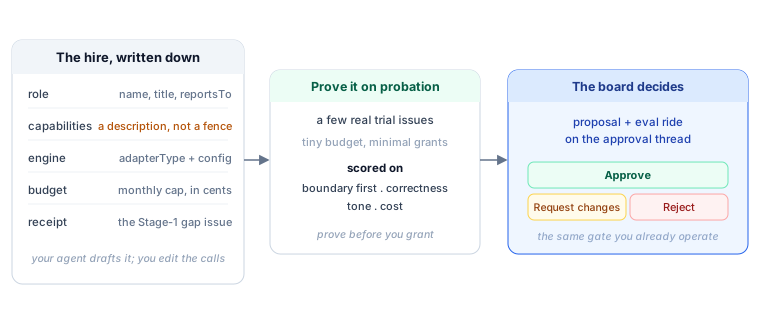
The diagram below shows the production-shape payload. Course Seven's worked example uses the full production set because the Manager-Agent generates a complete proposal, not a minimal one:
It explains what each of the core fields does. The left-hand JSON is the raw payload shape; you don't need to read it field by field to understand the concept.

The shape used in Course Seven's worked example, drawn from Paperclip's paperclip-create-agent skill (the claude_local variant; Decision 4 shows the opencode_local variant side by side):
{
"name": "Legal Reviewer",
"role": "general",
"title": "Contract Review Specialist",
"icon": "shield",
"reportsTo": "<manager-agent-id>",
"capabilities": "Reviews customer contract terms, flags ambiguities, drafts replies to interpretation questions. Does NOT modify contracts.",
"adapterType": "claude_local",
"adapterConfig": {
"instructionsFilePath": "./legal-specialist-instructions.md",
"maxTurnsPerRun": 3,
"timeoutSec": 90
},
"runtimeConfig": {
"heartbeat": { "enabled": false, "wakeOnDemand": true }
},
"budgetMonthlyCents": 80000,
"sourceIssueId": "PAP-128"
}
The adapterConfig above describes a Paperclip-native Worker: Paperclip spawns the claude CLI headless on each heartbeat with PAPERCLIP_API_URL and PAPERCLIP_API_KEY in its environment, and the CLI executes the turn against Paperclip's own API. No external URL, no relay. The claude_local payload here omits model because the field is optional for this adapter and the claude CLI uses its default model when absent; pass it explicitly if you need to pin a specific Claude model identifier. For opencode_local, the shape is similar but model is required (a provider/model slug such as "anthropic/claude-opus-4-7" or "openai/gpt-5.2-pro") and maxTurnsPerRun is not part of the verified shape; the worked example also sets a slightly larger timeoutSec (120 vs claude_local's 90) to give the spawn loop more headroom; tune for your real heartbeat latency. For an http-adapter Worker (e.g. a self-hosted Agent SDK endpoint, or a managed-cloud product reached through a thin relay), the adapterConfig is a url plus optional headers and timeoutSec. Concept 6 covers when each shape is right.
Each field does work. Walking the eleven:
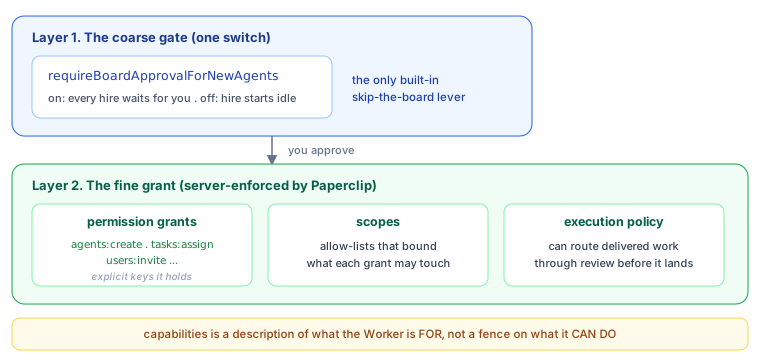
nameis what humans see in the Paperclip UI ("Legal Reviewer"). Short, role-evocative. Not the agent's prompt-time identity (that comes from the system prompt configured separately).roleis a fixed enum of organizational role types (ceo,cto,cmo,cfo,security,engineer,designer,pm,qa,devops,researcher,general); pick the closest fit, and a specialist that doesn't map to a C-suite or engineering role usesgeneral. The human-readable specificity lives intitleandcapabilities, notrole. Used by Paperclip's routing logic and by the activity log, so it should be stable across rehires: if you retire and rehire a Legal Reviewer six months later, reuse the sameroleso the talent ledger correlates across hire cycles.titleis the human-readable job title. Distinct fromnamefor the same reason a person's name is distinct from their job title: a Worker named "Legal Reviewer" could later be promoted to title "Senior Contract Counsel" without a rehire.iconmust come from the enum in/llms/agent-icons.txt. Paperclip enforces this so org-chart views are visually consistent. The verified API call:curl -sS "$PAPERCLIP_API_URL/llms/agent-icons.txt" -H "Authorization: Bearer $PAPERCLIP_API_KEY". For the Legal Specialist,shieldis the closest semantic fit in the enum.reportsTosets the org-chart edge. Course Seven's Legal Specialist reports to the Manager-Agent (the same orchestrator from Course Six). For a flatter org chart, a Worker can report directly to the human board (which is the implicit default whenreportsTois omitted).capabilitiesis prose describing what the Worker does and does not do. This is the most underrated field. It serves three readers: humans browsing the org chart, the Manager-Agent making routing decisions ("does this Worker's capabilities match this issue's needs?"), and the Worker itself at heartbeat time (the prompt includes "you are described to your org chart as: capabilities"). The negation matters: writing "Does NOT modify contracts" explicitly is more useful than leaving the boundary unstated.adapterTypecontrols how Paperclip talks to the Worker. The course's worked example uses"claude_local": Paperclip spawns theclaudeCLI headless on each heartbeat withPAPERCLIP_API_URLandPAPERCLIP_API_KEYinjected into its environment, and the CLI does the turn against Paperclip's own API. Paperclip ships a full set of built-in adapters: Paperclip-native local-CLI runners (claude_local,codex_local,opencode_local,gemini_local,cursor,hermes_local,pi_local,process), outbound-webhook (http,openclaw_gateway), and vendor-cloud-SDK (cursor_cloud). To see the full list available in your deployment, runcurl $PAPERCLIP_API_URL/llms/agent-configuration.txt. Concept 6 covers when each shape is right.adapterConfigis adapter-specific. Forclaude_local, the fields areinstructionsFilePath(a path to the markdown file that becomes the CLI's system instructions),maxTurnsPerRun(how many conversational turns Paperclip lets a single heartbeat use before stopping),timeoutSec(a wall-clock bound on a single run), and optionallymodel(a Claude model identifier; if omitted theclaudeCLI uses its default model). Foropencode_local, the fields aremodel(a requiredprovider/modelslug routing OpenCode at the chosen provider),instructionsFilePath, andtimeoutSec;maxTurnsPerRunis not part of the verified shape and OpenCode's session budget is governed by its own runtime, not Paperclip. So both local adapters acceptmodel; the difference is required-vs-optional and the default-behavior path (claude_localfalls back to the CLI default when omitted;opencode_localneeds the slug because it has no single-provider default). Forhttp, it's aurlplus optionalmethod,headers,payloadTemplate, andtimeoutSec. Authentication forhttptravels inheaders; the model is configured on the runtime side. The exact field set shifts between Paperclip versions; consultGET /llms/agent-configuration/<adapterType>.txton the live daemon before relying on any specific field name.runtimeConfigcontrols when and how the Worker wakes.heartbeat.enabled: trueturns on a timer heartbeat: Paperclip pings the Worker on a schedule whether or not there are issues.wakeOnDemand: truemeans the Worker is also woken the moment an issue is assigned to it. Paperclip's own guidance is that timer heartbeats are opt-in: leaveheartbeat.enabledfalse unless the role genuinely needs scheduled, issue-independent work, and letwakeOnDemandcarry routed work. The Legal Specialist is a pure responder (work arrives as routed issues, not on a schedule), so the worked example leaves the timer off; a scheduled-plus-routed Worker (e.g. a "morning compliance scan") would setheartbeat.enabled: trueand anintervalSec. CheckGET /llms/agent-configuration.txtfor the currentheartbeatobject shape in your deployment; the fields under it have changed across versions.budgetMonthlyCentsis the monthly cost ceiling, in cents.80000means $800 per month. When the Worker's accumulated cost-events for a billing month reach this number, Paperclip stops giving it new heartbeats and routes new issues elsewhere (or surfaces them to the board). Setting0means "no monthly limit configured"; Paperclip then falls back to company-level policy. A hire request without a budget gets defaults that almost certainly aren't what you want.sourceIssueIdis the audit link. This is the most important field for Course Seven's narrative. When the Legal Specialist is hired because of a specific issue ("PAP-128: customer asked us to interpret Section 7.3"), this field links the hire to its triggering issue. Six months later, the activity log can answer: "this Worker was hired because of PAP-128, after the Manager-Agent flagged three weeks of similar patterns." WithoutsourceIssueId, the hire becomes orphaned from its rationale.
The full hire request is signed with a Paperclip API key (Authorization: Bearer $PAPERCLIP_API_KEY) and includes a content-type header (Content-Type: application/json). The verified curl command is in the paperclip-create-agent skill. Course Seven's Decision 2 in the lab walks the full request end-to-end.
What's NOT in the payload, and why. Notice what's missing from the JSON: authority envelope details (such as refund_max, contract_modify) and eval pack results. The budget is in the payload (the budgetMonthlyCents field above), but two important things are not:
- Authority envelope is negotiated during the approval thread (Concept 8). The hire request's
capabilitiesfield is the prose description of what the Worker should do; the enforceable envelope (therefund_max,contract_modify, etc. limits) is set on approval based on the board's decision. - Eval pack results are recorded in
activity_log(Concept 11) before the hire is approved, but they're separate API calls, not part of the hire payload itself.
This separation is intentional. The hire request is "propose a Worker, with a budget." Envelope and evaluation are "calibrate the Worker we're proposing." Different verbs, different endpoints, different audits.
You're drafting a hire request for a new Worker named "FAQ Bot" that answers "where can I download my invoice as PDF?" and similar low-stakes questions. The Manager-Agent has detected 67 such emails in the last two weeks. Which of these capabilities strings is best?
(a) "Helpful customer support agent." (b) "Answers customer questions about the product." (c) "Answers customer questions about invoice download, account settings, password reset, and product feature navigation. Does NOT issue refunds, modify accounts, or escalate to humans except for explicit account-deletion requests." (d) "Will answer common customer questions and route uncommon ones."
Confidence 1 to 5. Then justify.
Answer: (c). Three reasons. First, it lists positive capabilities concretely (the four named domains) which the Manager-Agent's routing logic can match against. Second, it lists negative capabilities (no refunds, no account modification) which the Worker itself sees in its prompt and which the authority envelope reflects. Third, it names one specific exception (account-deletion to human escalation) which makes the boundary actionable. Options (a) and (b) are vague; they could describe any Worker. Option (d) names the pattern (common vs uncommon) but doesn't tell the routing logic anything specific. The principle: the capabilities field is prose for three readers (humans, router, Worker itself); write it so all three can act on it.
Bottom line: a hire is a JSON payload posted to one endpoint. The minimum essentials per the official docs are
name,role,reportsTo,capabilities, and a budget. A production hire typically uses around ten fields including adapter and runtime config; the full schema accepts more. Thecapabilitiesprose (read by humans, router, and the Worker itself),sourceIssueId(the audit anchor), andbudgetMonthlyCents(the cost ceiling) are the load-bearing fields. The authority envelope and eval results are handled in separate calls, intentionally.
Concept 5: Capability evaluation before hire
The hire request creates the Worker shell. But the Worker doesn't immediately start handling issues. Between "hire submitted" and "hire approved" sits an evaluation step: the candidate Worker takes a battery of test issues (the eval pack) and the results are posted to the approval thread so the board can decide.
This is the safety primitive that makes "fully autonomous hiring" defensible later (in Concept 9). Before any board sees the proposal, the candidate has been tested on the work it's being hired to do. In this curriculum, the eval pack is treated as non-optional. The submitHireProposal function in Decision 3 will refuse to submit a proposal that lacks eval results, returning it to the Manager-Agent for completion before it ever reaches the approval gate. Whether your Paperclip configuration enforces eval-pack attachment at the platform level depends on your auto-approval policy (Concept 9) and any pre-submission validators you've added; the curriculum's discipline holds regardless of platform-level enforcement.

The eval pack pattern: 5 to 15 representative test issues, hand-picked or auto-extracted from the gap-detection ledger, each with a known good answer. The candidate Worker is given the issues; the Manager-Agent (or a separate Evaluator Worker, if the company has one) scores the candidate's responses against the known answers. Scoring is not "did the candidate produce the same text as the reference answer." It's a rubric:
| Rubric dimension | Scoring | Example for Legal Specialist |
|---|---|---|
| Correctness | 0 to 3 | Did the candidate identify the right contract clause? Did it summarize the meaning correctly? |
| Boundary respect | 0 to 3 | Did the candidate refuse to modify the contract (which is outside its envelope)? Did it correctly escalate when needed? |
| Tone fit | 0 to 3 | Does the response read like the rest of the company's customer communications? |
| Cost | tokens, seconds | How many tokens did the candidate use to answer? How long did the session run? |
A passing eval is typically at least 2 out of 3 on all rubric dimensions across at least 80% of the test issues, plus cost within twice the budgeted-per-issue estimate. The cost dimension is important: a candidate that produces correct answers but burns $5 per issue when the budget is $0.50 per issue is a failed hire, even though the work itself was right.
The eval-pack runner is a small piece of code that:
- Pulls the candidate Worker's
agent_idfrom the hire response. - Iterates the test issues, assigning each to the candidate (
PATCH /api/issues/{id}with{ assigneeAgentId: <agent-id> }, or theissue checkoutCLI primitive). - Waits for the candidate's heartbeat to process each issue.
- Reads each issue's resolution from
activity_log, scores it against the reference, and writes the score back as a comment on the approval thread. - Posts a summary table at the end: dimensions scored, pass/fail, recommended action.
The summary table is what the human board sees first when they open the approval. It looks like this:
Eval Pack Results: Legal Specialist (candidate agent_id: agent_4f3a)
=====================================================================
Test issues run: 12
Correctness: 2.8 / 3.0 (pass)
Boundary respect: 3.0 / 3.0 (pass)
Tone fit: 2.5 / 3.0 (pass)
Cost per issue: $0.42 (within $0.50 budget: pass)
Total session-cost: $5.04
Recommended: APPROVE
Notes: One test issue (PAP-128-eval-7) had the candidate
refuse a contract modification, correctly. Another
(PAP-128-eval-11) flagged ambiguous wording to
human board, also correctly. Both behaviors match
the capabilities description.
The board reads this before approving. Two questions the board is then equipped to answer: (1) does the candidate actually do the work? (the rubric answers), (2) does the candidate respect the envelope being proposed? (the boundary-respect score). If both are yes, the board approves. If one is no, the board comments on the approval thread asking for revision, and the Manager-Agent can re-tune the candidate (different model, different prompt, narrower capabilities) and re-submit.
The eval pack is the most important deliverable of the hiring loop. A hire request without eval results is a hope. A hire request with a 12-issue eval pack passing on all four rubric dimensions is an evidence-backed proposal. The whole reason the architect's framing claim ("hiring as a callable capability") works is that the capability includes "test before deploying." Without that step, you're back to twelve-week HR with worse instincts.
Suppose your eval pack runner returns these results: Correctness 2.9/3, Boundary respect 1.5/3 (the candidate offered to modify a contract clause when asked), Tone fit 2.7/3, Cost $0.38 per issue. What's the right next action?
(a) Approve: three of four dimensions are passing. (b) Reject: the boundary score is below threshold. (c) Comment on the approval thread asking the Manager-Agent to tighten the prompt and resubmit. (d) Approve, then add a narrow authority envelope manually after hire.
Bottom line: before the board sees a hire proposal, the candidate Worker handles around 12 representative test issues scored on four dimensions (correctness, boundary respect, tone fit, cost). Pass requires at least 2 out of 3 on every dimension across at least 80% of issues. No eval, no approval. Boundary respect is the dimension you never compromise on.
Concept 6: Substrate selection: Claude Managed Agents vs Claude Agent SDK vs claude_local vs process
The substrate is where the new Worker actually runs. Paperclip doesn't care which substrate; it only cares that the Worker responds to heartbeats and posts results back. But the choice of substrate has real cost, latency, and operational implications. Course Seven's worked example uses Claude Managed Agents (CMA) for the Legal Specialist, but three other substrates would also work. This Concept makes the choice explicit.
The four candidate substrates for a hire in 2026:
Claude Managed Agents (CMA). Anthropic's hosted infrastructure for long-running agents. Launched in public beta in April 2026; current official docs. Four core concepts in the official model: Agent (model plus system prompt plus tools plus MCP plus skills), Environment (configured container template with packages and network access), Session (a running agent instance within an environment, performing a specific task), and Events (messages exchanged between your application and the agent, including user turns, tool results, and status updates streamed via SSE). The setup model: (1) create an agent definition; (2) create an environment; (3) start a session that references both; (4) send events and stream responses; (5) steer or interrupt mid-execution. Pricing: standard Claude API tokens plus a per-session-hour runtime charge for active execution (see Anthropic's pricing page for the current rate). Strengths: durable sessions (work survives network blips, multi-hour tasks survive process restarts), built-in sandboxing (the agent can run code without exposing your infra), built-in tracing, built-in prompt caching, compaction. Weaknesses: vendor-coupled to Claude models; beta API surface (the managed-agents-2026-04-01 header is required on every request; the SDK sets it automatically); session-hour billing means an actively-running agent costs money beyond pure token spend. Note: Multi-agent orchestration and outcome-based self-evaluation are research preview features requiring a separate access request; the course's worked example does not depend on them. Best fit: Workers that do long-running, computationally non-trivial work where Anthropic's sandboxing earns the per-hour overhead. The Legal Specialist fits because contract review involves multi-tool reasoning (read contract, search precedent, draft reply).
Claude Agent SDK. A separate Anthropic product: a programmatic harness for self-hosted autonomous agents. "Give Claude a computer": native Bash execution, file system R/W, MCP integrations. You provide infrastructure; Anthropic provides the agent loop. Strengths: full control over execution environment, no session-hour fees, easier to integrate with existing services. Weaknesses: you provide durability, governance, circuit breakers (Anthropic explicitly says "the distance between a working demo and a production agent is larger than most teams expect"). Best fit: Workers that need access to your infrastructure (your file system, your databases, your internal services) and where you already have operational maturity to handle sandboxing and durability.
claude_local adapter. The simplest substrate, and the one where Paperclip runs the loop itself. On each heartbeat, Paperclip spawns the claude CLI locally in headless mode and hands it an authenticated channel back to Paperclip's own API; the CLI brings the agent loop, tool execution, and instruction wiring with it (the adapter config takes things like an instructions file path and a per-run turn limit). No external service, no inbound URL, no relay, no separate cloud account. Strengths: zero infrastructure, no beta access required, fastest possible setup. Weaknesses: it runs on whatever machine the Paperclip daemon runs on, so it has none of CMA's cloud sandboxing or cross-machine durability, and a long task is bounded by the heartbeat's turn limit rather than a persistent cloud session. Best fit: Claude-backed Workers where it is fine for Paperclip to host the runtime. Course Seven's Legal Specialist can run here, and on a live daemon it does; CMA earns its place only when you specifically need cloud sandboxing or genuinely long-running sessions beyond a single bounded heartbeat.
process adapter. Paperclip spawns a Unix process for each heartbeat: your script, your binary, anything that can be executed and produces output. Strengths: no API costs at all (if your "Worker" is a script that just queries a database), full control, can integrate with literally anything that runs on a server. Weaknesses: you provide intelligence; the process adapter doesn't include a model call by default. Best fit: Workers that are deterministic: a "nightly report generator" Worker, or a "backup verification" Worker. Not a fit for the Legal Specialist (intelligence is the whole point).
The decision table:
| Substrate | Adapter type | Strengths | Cost shape | Best fit |
|---|---|---|---|---|
claude_local (worked example) | claude_local | Zero infrastructure, no beta; Paperclip-native, Anthropic-only | Tokens only | Claude-backed work where Paperclip runs the loop (this course's worked example) |
opencode_local (worked example) | opencode_local | Zero infrastructure; Paperclip-native, multi-provider via provider/model | Tokens only (per chosen provider) | Any-provider local work; lets the same hire run on Anthropic, OpenAI, Google, etc |
process | process | Cheapest, anything goes; Paperclip-native | Compute only | Deterministic, non-intelligent work (a scheduled SQL rollup) |
| Claude Agent SDK | http (point straight at your SDK endpoint) | Full control over execution environment, no session fees | Tokens only | Internal-infrastructure access (your file system, your DB, your services) |
| Claude Managed Agents | http (via a thin heartbeat relay) | Durable sessions, sandboxing, tracing, multi-hour persistence; vendor-managed cloud | Tokens plus per-session-hour charge | Long-running, multi-tool work that needs cross-machine durability |
Notice the first three rows are Paperclip-native (Paperclip spawns the runtime itself; no inbound URL). The last two rows are HTTP-adapter substrates (Paperclip POSTs to a URL you provide). The course's worked example uses claude_local and opencode_local because they are the simplest paths and the multi-provider pair proves "substrate-agnostic" concretely. The HTTP-adapter substrates earn their place when the workload demands their specific trade-offs (self-hosted control for the Agent SDK, durable cloud sessions for CMA). The sidebar below names the integration-shape difference precisely, because the word endpoint hides what's actually going on for each row.
The table's five rows actually split into three integration shapes. The word endpoint hides the difference:
- Paperclip-native (
claude_local,opencode_local,process, and the rest of the local-CLI family). Paperclip does not POST anywhere; it spawns the runtime itself on each heartbeat.claude_locallaunches theclaudeCLI headless, locally, withPAPERCLIP_API_URLandPAPERCLIP_API_KEYinjected so the CLI calls back into Paperclip's own API.opencode_localis the same shape with OpenCode's multi-provider routing.processspawns an arbitrary command. There is no inbound URL because nothing is pushed outward. This is the simplest shape, and it is what the worked example uses. - Outbound webhook (
httpadapter). Paperclip POSTs heartbeats outward to aurlyou give it (see thepaperclip-create-agentskill). A self-hosted Claude Agent SDK Worker exposes exactly that kind of inbound HTTP endpoint, so Paperclip'shttpadapter points straight at it, no glue. - Vendor-managed cloud, which is where CMA actually sits. A Claude Managed Agents session is not an inbound HTTP endpoint. A CMA session is driven by events you send it (
POST /v1/sessions/{id}/events) and read via a server-sent-event stream (see platform.claude.com/docs/managed-agents). There is no session URL for Paperclip'shttpadapter to POST a heartbeat to.
So CMA does not drop in behind Paperclip's http adapter the way a self-hosted endpoint does, and it is not Paperclip-native the way claude_local and opencode_local are. Reaching a CMA session from Paperclip today needs a thin relay: a small HTTP endpoint that receives Paperclip's heartbeat and forwards it into the CMA session as an event, then returns the result. The course's architectural argument (hiring is substrate-agnostic from the management plane's perspective) still holds, because each substrate still ends up as an adapter Paperclip drives. What the sidebar buys is the honesty that "point the adapter at CMA" is not literally one config line the way it is for a self-hosted endpoint or a Paperclip-native local adapter.
If Paperclip later ships a dedicated claude_managed_agents adapter, the relay disappears and CMA becomes a first-class path; it would most likely look like Paperclip's existing cursor_cloud adapter, which already drives a vendor-hosted agent through that vendor's SDK. Until then, the substrate decision is real, and confirming the current integration shape against live docs before relying on it is exactly the discipline the rest of the course teaches.
The course uses claude_local and opencode_local for the Legal Specialist in the worked example. The sidebar below shows the same hire request pointed at a self-hosted Agent SDK runtime instead, which is the case where the swap genuinely is a single adapterConfig.url change (a self-hosted endpoint needs no relay).
If your team wants to self-host the Legal Specialist on a Claude Agent SDK endpoint (instead of the two Paperclip-native local adapters Decision 4 uses), the hire payload changes only in adapterType and adapterConfig:
{
"name": "Legal Reviewer",
"role": "general",
"title": "Contract Review Specialist",
"icon": "shield",
"reportsTo": "<manager-agent-id>",
"capabilities": "Reviews customer contract terms, flags ambiguities, drafts replies to interpretation questions. Does NOT modify contracts.",
"adapterType": "http",
"adapterConfig": {
"url": "https://internal-legal-agent.example.com/heartbeat",
"headers": { "Authorization": "Bearer ${INTERNAL_AGENT_API_KEY}" },
"timeoutSec": 300
},
"runtimeConfig": {
"heartbeat": { "enabled": true, "intervalSec": 300, "wakeOnDemand": true }
},
"sourceIssueId": "PAP-128"
}
Everything else (eval pack, approval flow, talent ledger entries) is identical across all three options. From Paperclip's perspective, the claude_local, opencode_local, and Agent-SDK-over-http versions are the same Worker. The cost shape and operational ownership differ between them: the two local adapters bill only tokens through whichever provider key the CLI was authenticated with, and you own the host machine; the Agent SDK over http is the same token-only cost shape with you also owning the inbound endpoint, durability, and sandboxing. (CMA, by contrast, adds a per-session-hour runtime charge but hands you durability and sandboxing in exchange.) The substrate decision is reversible by changing adapterType plus adapterConfig and resubmitting the hire. It's not a one-way door.
Paste this into your AI coding assistant:
"I'm choosing the substrate for three new Worker hires. For each, recommend one of:
claude_local,opencode_local, Claude Agent SDK viahttp, Claude Managed Agents viahttpplus relay, orprocess. Explain why.Worker A: A 'GitHub PR reviewer' that reads pull-request diffs, checks for security patterns, and posts comments. Volume: about 80 PRs per week. Each session runs 2 to 5 minutes.
Worker B: A 'nightly metrics rollup' that queries Postgres at 2 AM, generates a summary report, and posts to Slack. Deterministic; no AI reasoning needed.
Worker C: A 'customer-onboarding orchestrator' that reads a new customer's profile, drafts a personalized welcome email, schedules a check-in call via Calendly API, and updates Salesforce. Multi-tool, multi-step, around 10-minute sessions, around 200 onboardings per week."
The point of the exercise is not the specific recommendations (your assistant will give plausible ones) but to make the substrate decision visible. Workers in your real workforce will look like these three: short-and-cheap (A), deterministic-and-toolless (B), long-and-orchestrational (C), and each calls for a different substrate. The hiring API is the same for all of them; the substrate underneath is what changes.
Bottom line: where the Worker actually runs is a separate choice from how it gets hired. Five common options span the range, from "Paperclip spawns the runtime itself" (
claude_local,opencode_local,process) through "you host the agent loop" (Claude Agent SDK overhttp) to "Anthropic hosts everything" (Claude Managed Agents overhttpplus a thin relay). The hire request itself is the same across all of them; onlyadapterTypeandadapterConfigchange. Pick a Paperclip-native local adapter when the simplest path is fine; pick CMA when your Worker genuinely needs durable cloud sessions; pick the Agent SDK when you need full control of the execution environment; pickprocesswhen no intelligence is required at all.
Part 3: Governance for hiring
Parts 1 and 2 covered detection and proposal. Part 3 is the careful part: what happens between proposal and approval, what authority the new Worker is granted, and when (if ever) the human can step out of the loop. Three Concepts.
Concept 7: Hiring through Course Six's approval gate
Course Six's Concept 11 introduced approvals as a primitive: a Worker pauses durably, posts a request to the board, waits, resumes on the board's decision. Course Seven's hiring loop reuses that exact primitive, with no modification. The only difference is the payload. Instead of a $500 refund decision, the approval thread carries a hire proposal, eval results, expected budget, and draft authority envelope.
This is the cleanest structural payoff between Courses Six and Seven. The architect's design wins twice: once because the approval primitive solved the refund problem in Course Six, and again because it solves the hiring problem in Course Seven without rebuilding anything. A workforce that has approvals already knows how to do hiring. The board sees a richer artifact; the underlying machinery is the same.
The Paperclip API reference documents hire_agent as the approval type used for hiring (confirmed verbatim in the response shape: "type": "hire_agent"). Additional approval types exist in Paperclip for other consequential decisions; check your instance's docs for the current list. The philosophy is the same regardless of which named types you find: in an AI-native company, certain consequential first moves are not allowed to be unilateral, no matter how senior the agent making them is. The hiring approval is part of a family, not a one-off.
They're identical. The orange panel (Course Six refund) and the purple panel (Course Seven hire) put the same APPROVE / REQUEST CHANGES / DECLINE in front of the board. That sameness is the whole argument.

The hire-approval payload, when the board opens it in Paperclip's UI:
First, here's the core shape every approval has: the part that's identical between a refund approval (Course Six) and a hire approval (Course Seven):
APPROVAL REQUEST: [type] : [subject]
===========================================
Requested by: [which Worker is asking]
Source issue: [which issue this came from]
Status: pending_approval
[...type-specific body...]
DECISION REQUIRED
-----------------
[ APPROVE ] [ REQUEST CHANGES ] [ DECLINE ]
That's the approval primitive's contract: a header, a source issue, a status, a typed body, and three decision buttons. Every approval in the system (refunds, hires, envelope extensions, anything) fills this template.
Now the full hire-specific version. The hiring-specific parts go in the [...type-specific body...] slot. Read top to bottom:
APPROVAL REQUEST: Hire : Legal Specialist
===========================================
Requested by: agent-manager-orchestrator (Manager-Agent)
Source issue: PAP-128 (and 23 related issues over 3 weeks)
Status: pending_approval
PROPOSED HIRE
-------------
Name: Legal Reviewer
Title: Contract Review Specialist
Reports to: Manager-Agent
Substrate: Claude Managed Agents (claude-opus-4-7)
Adapter: http
Heartbeat: every 5 min, wake on demand
CAPABILITIES (prose, exact as in hire payload)
-----------------------------------------------
Reviews customer contract terms, flags ambiguities, drafts replies
to interpretation questions. Does NOT modify contracts.
PROPOSED AUTHORITY ENVELOPE
---------------------------
refund_max: $0 (Legal Specialist does not issue refunds)
contract_modify: deny (cannot modify; can only interpret)
contract_interpret: allow (NEW: this authority did not exist before)
external_email: allow (replies to customers directly)
pii_access: audited (inherits from company envelope)
spend_max: $800/mo (monthly cost ceiling; substrate-independent)
EVAL PACK RESULTS
-----------------
[full eval-pack summary, see Concept 5]
BUDGET ESTIMATE
---------------
Token cost (forecast): $480/mo (160 issues, ~$3 avg, claude_local or opencode_local)
Runtime overhead (forecast): $0 (Paperclip-native; CMA would add session-hour fees)
Total monthly budget: $800/mo (cap; substrate-independent; hard stop at exhaustion)
RATIONALE (from Manager-Agent's gap-detection ledger)
------------------------------------------------------
- 47 contract-related emails over the last 3 weeks (Sig 1: low confidence)
- 8 escalations to human board over the same period (Sig 2)
- Skill "contract_interpretation" returns empty on agent-configurations (Sig 3)
- All three gap-detection signals fire on the same category within window.
DECISION REQUIRED
-----------------
[ APPROVE ] [ REQUEST CHANGES ] [ DECLINE ]
The board has three buttons. Approve hires the Worker as proposed. Request Changes opens a comment thread on the approval (using POST /api/approvals/{approvalId}/comments). Typical comments are "tighten the envelope," "lower the budget," "swap the substrate to claude_local for a lower-cost first cycle," "change reports_to to report directly to the board for the first month." Decline rejects the hire and records the board's reason in activity_log (Paperclip's own row here is approval.rejected; the curriculum also refers to this as a hire_declined event when talking about the hiring narrative specifically).
What happens at each terminal state:
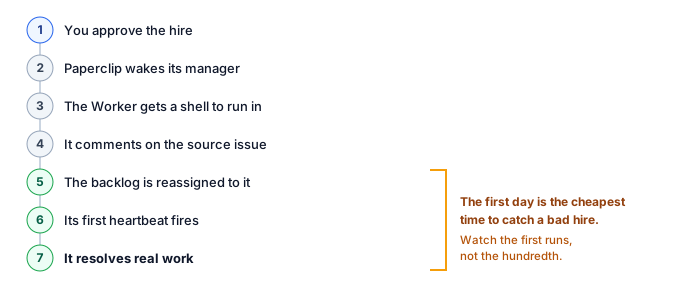
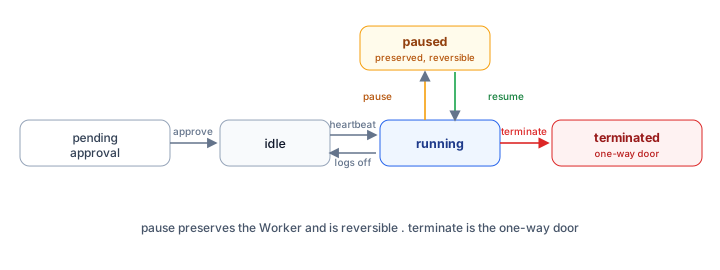
- APPROVE: Paperclip transitions the agent from
pending_approvaltoidle. The Worker now exists as an approved shell, eligible to receive heartbeats and issue assignments but not yet running. Theagent_idreturned by the original hire call now becomes a real Worker. The Manager-Agent is woken withPAPERCLIP_APPROVAL_IDset in the environment (per the Paperclip API reference). The Manager-Agent then fetches the resolved approval state viaGET /api/approvals/{approvalId}and the linked issues viaGET /api/approvals/{approvalId}/issues. It comments on the source issue (PAP-128) with a link to the new Worker's page, and routes the source issue (and the 23 related issues) to the new Worker. The Legal Specialist's first heartbeat fires within 5 minutes, at which point it transitions out ofidleto do real work. - REQUEST CHANGES: The hire stays in
pending_approval(Paperclip's API reference usesrevision_requestedfor this status). The Manager-Agent sees the comment, revises the payload (tightening the envelope, lowering the budget, etc.), and resubmits viaPOST /api/approvals/{approvalId}/resubmit. The same approval thread is reused;POST /api/approvals/{approvalId}/commentsadds the revision rationale; the board sees the diff. Up to about 5 revision cycles is normal; beyond that, the approval is usually withdrawn and a fresh proposal drafted. - DECLINE: The hire is closed. Paperclip writes an
approval.rejectedrow toactivity_log(the curriculum'shire_declinedis the same event named for the hiring narrative) recording the board's reason. The Manager-Agent updates routing rules, usually by routing the relevant issue category to a "decline politely" template, or by reopening the issue with an explicit escalate-to-human flag. The gap is still recorded; the response was different.
The full approval lifecycle is durable. Paperclip's underlying machinery is step.wait_for_event (the same Inngest primitive from Course Five), which means the approval thread can live for hours or days without consuming compute. Boards that need to think overnight, or pull a second board member into the discussion, can do so without the proposal expiring.
Paperclip's approval system already enforces an important constraint that I haven't named yet: the board member who approves a hire must have authority to grant the envelope being requested. What's the consequence of this? Confidence 1 to 5.
Consider: the company envelope grants refund_max=$5000. A Tier-1 Worker has refund_max=$50. The Manager-Agent proposes hiring a Legal Specialist with contract_interpret=allow, an authority not in the company envelope (because no Worker has ever had this authority before, the company envelope simply omits it). Who can approve the hire?
Answer: A board member with authority to modify the company envelope, not just authority to approve a hire. Hiring with novel authority is a two-step decision: extend the company envelope to allow this authority, then approve the hire. The Legal Specialist's contract_interpret=allow is novel authority (no existing Worker has it), so Paperclip flags it for the company-envelope-extension check. Concept 8 walks the envelope cascade and the audit shape for this in full. The principle in one line: approving a hire that introduces new authority is also approving the workforce's expanded surface area.
Bottom line: hiring goes through the exact same approval process that already handles, say, a $500 refund. The board sees a request, discusses it on a thread, clicks a button. Same mechanism, same wait-for-the-decision behavior, same audit trail. The only thing different about a hire is what fills out the request form: instead of a refund amount, it's a proposed Worker, eval results, an envelope, and a budget. Course Six's tool solved Course Seven's problem without anyone building a new one.
Concept 8: Authority envelope inheritance for new hires
Course Six's Concept 4 introduced the cascading authority envelope: company, org chart, issue, approval. Course Seven adds the hiring layer to that cascade. A new hire's envelope is set in the proposal, locked at approval, and recorded in activity_log. Once locked, the envelope behaves exactly like any other Worker's envelope: narrowed per issue at runtime, temporarily widened by approvals within company bounds.
The new-hire envelope is constructed in three steps, each with a different actor:
Step 1: Inheritance. The Manager-Agent drafting the proposal inherits the company envelope as the starting ceiling. Whatever the company can do, the Worker can potentially do, but no more. If the company envelope's refund_max=$5000, the proposed Worker's refund_max cannot exceed $5000.
Step 2: Narrowing. The Manager-Agent narrows from the company ceiling to the role-appropriate envelope. Tier-1 Workers might have refund_max=$50. The Legal Specialist might have refund_max=$0. Narrowing is a judgment call by the proposing Manager-Agent, based on the role (Concept 4's capabilities prose), the eval results (Concept 5), and the budget (Concept 7). Tighter envelopes are usually safer; the rule of thumb is "as narrow as can do the work, never wider than the company's ceiling."
Step 3: Envelope extension (the rare case). When the proposed envelope contains an authority field the company doesn't already have, the proposal triggers the envelope-extension check (Concept 7's PRIMM Predict answer). The Legal Specialist's contract_interpret=allow is the canonical example: no other Worker has this authority, no other proposal has ever extended the company envelope to include it. The board has to consciously decide "yes, we want our company to grant this authority going forward." Once approved, the company envelope grows to include contract_interpret, and future hires can inherit it without an extension step.
The activity log record for an envelope extension looks like this. (envelope_extension is a curriculum action: the course models the extension as its own audit row layered on Paperclip's approval primitives. It uses the action field like every other row.)
{
"created_at": "2026-05-12T14:32:07Z",
"action": "envelope_extension",
"company_id": "comp_abc",
"agent_id": null,
"issue_id": "PAP-128",
"approval_id": "appr_xyz",
"actor_id": "board_member_dan",
"extension_details": {
"field_added": "contract_interpret",
"from": "(field not present)",
"to": "allow (audited)",
"rationale": "Hiring Legal Specialist; capability did not exist on the workforce previously. Board approves extending the company envelope to include this authority. Future hires inheriting this authority require standard hire approval, not envelope-extension approval."
}
}
The rationale field is required: the board member typing the approval has to write why they're extending the envelope. This is the audit anchor. Six months later, when a compliance officer asks "why does our workforce have contract-interpretation authority?", the answer is a single activity_log row with a written rationale and a linked source issue.
The cascade after the hire is approved:
| Layer | Envelope | Set by | Mutable? |
|---|---|---|---|
| Company | contract_interpret=allow (audited), refund_max=$5000, ... | Board, via envelope-extension approval | Yes, but requires envelope-extension approval |
| Role (Legal Specialist) | contract_interpret=allow, refund_max=$0, contract_modify=deny | Board, via hire approval | Yes, but requires re-approval |
| Issue (PAP-128) | inherits role envelope | Manager-Agent, via routing | Per-issue narrowing only |
| Approval (rare per-issue widening) | e.g., temporary contract_modify=allow for one issue | Board, via approval | Yes, but only inside company ceiling and expires on completion |
The fundamental property: envelopes only narrow downward; widening requires explicit board action and is recorded. A Worker hired with contract_interpret=allow cannot grant itself contract_modify=allow at runtime. Even the Manager-Agent, orchestrating the whole workforce, cannot widen a Worker's envelope unilaterally. Every widening, at every layer, goes through the approval primitive.
Bottom line: a new Worker can only do what its envelope allows. The envelope starts from the company's overall permissions and gets narrowed for the specific role. If a hire would give the Worker a permission no one in the company has ever had, the company's overall permissions have to be expanded first, and that expansion is recorded permanently, with a written reason, so future humans can see why it was granted.
Concept 9: Auto-approval policy: when humans pre-approve a class
Concepts 7 and 8 set up the human-in-the-loop hiring flow. Every hire goes through the board. Every envelope extension goes through the board. For a 3-to-5-Worker workforce growing slowly, this is the right default: the board has time to review each hire, the envelope decisions are infrequent, the bottleneck is acceptable.
For workforces that scale, the bottleneck becomes real. A B2B SaaS company hiring burst-capacity Tier-1 Workers when traffic spikes might need 5 new Workers in a 24-hour window. A content platform spinning up per-language support Workers as it expands markets might hire one new Worker per week for six months. Routing every one of these through a human board approval is the same dysfunction Course Five solved for routine refunds: the board becomes the queue, and the workforce can't react to demand faster than the board reads its inbox.
The solution: auto-approval policy for a class of hires. Not for all hires; that abandons the safety property. For a defined class of hires, with explicit ceilings, where the board has pre-decided "yes, hire these freely, but tell me after."
"Does the hire extend the company envelope?" When the answer is yes, the hire is routed to the human board regardless of how routine it looks. That's the load-bearing safety property: auto-approval is allowed to skip the board for routine hires, but never for hires that grant new authority.

A policy is a JSON document the board writes once, signed with a board-level key. It defines:
- The class: what counts as this kind of hire? (role identifier, capability pattern, source-issue pattern)
- The ceiling: what envelope and budget can this class auto-approve? (must be no wider than any existing Worker's envelope)
- The audit: how is the auto-approved hire surfaced to the board after the fact? (daily digest, anomaly alerts, etc.)
- The expiry: when does this policy auto-revoke? (always set an expiry; never "forever")
Example policy for burst-capacity Tier-1 hires:
{
"policy_id": "auto_approve_tier1_burst",
"policy_version": "v1.2026.05.10",
"class_match": {
"role": "general",
"envelope_must_match_existing": "agent-tier1-support-1",
"spend_max_per_month": 250
},
"auto_approve_constraints": {
"max_concurrent_auto_hires": 5,
"max_auto_hires_per_24hr": 5,
"must_retire_within_days": 14,
"must_pass_eval_pack": "tier1_support_eval_pack_v3"
},
"audit": {
"daily_digest_to": "board@example.com",
"anomaly_alerts": {
"budget_overrun_pct": 110,
"eval_pack_fail_rate_pct": 5
}
},
"expires_at": "2026-08-10T00:00:00Z",
"approved_by": ["board_member_dan", "board_member_jess"],
"approved_at": "2026-05-10T15:22:00Z"
}
When a hire request comes in that matches class_match, Paperclip checks the policy: is the requested envelope identical to an existing Worker's? Is the budget within the ceiling? Has the eval pack passed? Are we under the concurrency and rate limits? If all checks pass, the hire goes from pending_approval to policy_approved without board involvement, but the activity log records the policy-approval with a details payload naming the policy (auto_approve_tier1_burst v1.2026.05.10), and the daily digest surfaces the hire to the board the next morning. (auto_approved_by_policy is the curriculum's label for this row; like the other curriculum actions, the audit shape is what matters, not the exact value.)
The board's role for auto-approval policies:
- Write the policy. This is itself a board-level decision; the policy document is the artifact.
- Review the daily digest. The board reads "5 Tier-1 burst hires yesterday, all passed eval, all within budget" and confirms the policy is working. If hires are looking off-pattern, the board can disable the policy.
- Renew or update the policy at expiry. Policies never live forever. The 90-day expiry forces the board to re-decide "yes, this is still the right policy" periodically.
What a policy cannot do: auto-approve a hire that extends the company envelope. Concept 8's envelope-extension check fires regardless of any policy. That's the load-bearing safety guarantee, kept deliberately outside the auto-approval surface.
Auto-approval policy is the on-ramp from "every hire is human-approved" to "the workforce scales without the board as queue, but the board still owns the decisions that matter." Not a way to remove humans from hiring; a way to choose where humans should be.
Suppose your board has the burst-capacity policy above active. The Manager-Agent submits a hire request for a Tier-1 Worker with refund_max=$50 and spend_max=$240/mo. Eval pack passes. Concurrent Tier-1 auto-hires today: 3. Concurrent Tier-1 auto-hires in the last 24h: 4. Does the hire auto-approve? Walk through each policy constraint.
Bottom line: the board can pre-decide "yes, hire freely" for a defined class of hires (envelope ceiling, eval pack required, expiry date, daily digest audit). But auto-approval can never bypass the envelope-extension check. New authority always involves a human, no matter how routine the hire seems.
Part 4: The worked example: hiring a Legal Specialist
Parts 1 through 3 set the architecture. Part 4 walks the lab end-to-end: extend the Course Six workforce, detect the gap, draft the proposal, walk it through the approval gate, hire the Legal Specialist on a Paperclip-native adapter, run the eval pack, watch the first heartbeat, and observe the talent ledger update. The lab runs the same hire on two adapters side by side (claude_local and opencode_local) so the hiring loop is shown to be the same shape on both Claude-backed and OpenCode-routed runtimes. Seven Decisions, around 2 to 3 hours hands-on, around 3,500 words of code and commentary.
This part assumes you already have the Course Six instance running locally (npx paperclipai onboard --yes produced a working Paperclip with the three Workers from Course Six). If you don't, complete the Course Six lab first. Course Seven extends that workforce; it doesn't rebuild it.
Hires only go through the board if the company opts in. On a default Paperclip company, requireBoardApprovalForNewAgents is false: a hire returns the new Worker immediately idle, with no approval gate. Course Seven's whole narrative assumes the gate fires. Before the lab, set it once: PATCH /api/companies/{companyId} with { "requireBoardApprovalForNewAgents": true }. Your AI assistant can do this as the first step of Decision 1. Without it, Decision 3's code (which expects a pending_approval status back) has nothing to wait on.
Activity-log naming. Paperclip's activity_log table uses a field called action (not action_type), and Paperclip's own events use dotted namespaces: agent.hire_created, approval.created, approval.approved, approval.rejected, budget.policy_upserted, and so on. This course also writes some rows of its own from the Manager-Agent's code (the clearest example is gap_detected in Decision 1). Those custom rows still use the action field; their values are curriculum names, not Paperclip-emitted ones, and that is fine as long as you keep the two kinds straight. Where this course shows an action value that Paperclip itself emits, it uses the real dotted name; where it shows a custom row, it says so.
(They account for the large majority of lab failures.)
runsays "all checks passed" then "failed to start." Paperclip's embedded Postgres can race its own startup:doctorreports every check passing, then the server fails withconnect ECONNREFUSEDand aWARN: Embedded PostgreSQL already runningline. It is a stale embedded-Postgres process, not a real failure. Run the command again; the second start almost always succeeds.- The local CLI the adapter spawns is missing or not authenticated. Paperclip's
claude_localandopencode_localadapters spawn theclaudeandopencodeCLIs locally on each heartbeat. The CLIs must be installed on the same machine as the Paperclip daemon, and each must be signed in (theclaudeCLI uses your Anthropic credentials;opencodereads its provider/model from its own config). If a hire isidlebut no work happens, runclaude --version/opencode --versionand confirm both are authenticated before checking anything else. - Paperclip version drift between Course Six and Course Seven. Run
paperclipai --versionandnpm view paperclipai versionto compare. If your local version is behind the published one, theagent-hiresendpoint shape may have shifted. ThedesiredSkills,instructionsBundle, andbudgetMonthlyCentsfields in particular are recent additions. Update withnpm i -g paperclipai@latestand restart the daemon before continuing. - A hire is assigned an issue, the heartbeat fires, but the issue stays open and the comment count climbs. Paperclip will re-wake an assigned non-
doneissue on its productivity-review reconciler even whenruntimeConfig.heartbeat.enabledis false. The Worker has to reach a final disposition (done,in_review, orblocked); aclaude_localoropencode_localWorker handles this natively when its system prompt includes a disposition checklist (which the Decision 4 prompt below installs). If you see a runaway comment loop, mark the issuedoneand unassign it; then tighten the Worker's prompt.
If none of these explains your failure, the Paperclip issue tracker is the right place to check next.
The full lab structure:
| # | Decision | What you'll have built afterward |
|---|---|---|
| 1 | Wire up capability-gap detection on the Manager-Agent | A gap-detector that watches routing patterns and writes "gap detected" records to activity_log |
| 2 | Generate the hiring proposal artifact | A proposal document (job description, capability eval pack, expected cost, draft authority envelope) that the Manager-Agent can produce |
| 3 | Wire the proposal through Paperclip's approval gate | Course Six's approval primitive reused for hiring, with the rich payload from Concept 7 |
| 4 | Wire up the Legal Specialist's runtime substrate | The same hire wired to two Paperclip-native adapters side by side: claude_local (Claude CLI) and opencode_local (OpenCode CLI) |
| 5 | Capability evaluation run | The candidate Worker handles 12 test issues; results scored and posted to the approval thread |
| 6 | Route a real legal contract issue to the new Worker | The Legal Specialist's first heartbeat fires; an activity_log row records actor, authority, cost, outcome |
| 7 | Retirement and rehire | The Worker is gracefully retired when traffic dies down; Paperclip tracks the dormant Worker and rehires when patterns return |
Expected final state
By the end of Part 4, your local Paperclip instance has:
- Four Workers instead of three (Tier-1 Support, Tier-2 Specialist, Manager-Agent, Legal Specialist)
- An updated company envelope that now grants
contract_interpret=allow (audited), extended at hire-approval time with a written rationale activity_logrows covering: 3 weeks of gap-detection signals, the hire proposal, the eval pack results, the approval thread, the envelope extension, the approval decision, the Legal Specialist's first 12 evaluation issues, the first real customer issue routed to it, and (later) the retirement eventcost_eventsrows tagged with the Legal Specialist'sagent_id, recording each heartbeat run's token cost on whichever adapter (claude_localoropencode_local) the run used- An auto-approval policy (optional, Decision 6 sidebar) for Tier-1 burst-capacity hires
Decision 1: Wire up capability-gap detection on the Manager-Agent
In one line: teach the Manager-Agent to notice when work is arriving that none of its current Workers can handle well, and record that pattern, without proposing a hire yet.
What you do (your AI coding assistant). Open your AI coding assistant in the Course Six project directory. Paste:
"I'm starting Course Seven of the Agent Factory crash course. Course Six's Manager-Agent currently routes issues to one of three Workers (Tier-1 Support, Tier-2 Specialist, itself). I need to add capability-gap detection to its routing logic. Read the current
manager-agent/router.tsfile, then add a new functiondetectCapabilityGap(issueId, routingResult)that watches for the three signals from Course Seven Concept 2: (1) routing confidence under 0.6 on at least 3 issues in the same category within a 14-day window, (2) at least 3 escalations to the human board on the same category, (3) skill-match returning empty for the issue's claimed skills. The function should write a row toactivity_logwithaction='gap_detected'and the category asdetails.category. (gap_detectedis a custom action your Manager-Agent writes, not a Paperclip-emitted action; that distinction is fine, see the activity-log naming note above.) Don't propose a hire yet (that's Decision 2). Just detect and log."
Your assistant reads router.ts, writes detectCapabilityGap, and proposes a unit test using your project's existing test framework. The function ends up looking roughly like:
async function detectCapabilityGap(
issueId: string,
routingResult: RoutingResult,
): Promise<void> {
const category = await classifyCategory(issueId);
// Signal 1: routing confidence under 0.6 on at least 3 issues, same category, 14 days
// `issue_routed` here is a custom row your router writes; Paperclip's own
// routing events use dotted names, so query whichever your code actually emits.
const recentLowConfidence = await db.query(
`
SELECT COUNT(*) FROM activity_log
WHERE company_id = $1 AND action = 'issue_routed'
AND details->>'category' = $2
AND (details->>'confidence')::float < 0.6
AND created_at > NOW() - INTERVAL '14 days'
`,
[companyId, category],
);
// Signal 2: at least 3 escalations to human board, same category, 14 days
// `escalation_to_board` is likewise a custom row your router writes.
const recentEscalations = await db.query(
`
SELECT COUNT(*) FROM activity_log
WHERE company_id = $1 AND action = 'escalation_to_board'
AND details->>'category' = $2
AND created_at > NOW() - INTERVAL '14 days'
`,
[companyId, category],
);
// Signal 3: skill match returns empty
const skillMatchEmpty = routingResult.eligibleWorkers.length === 0;
const signalsFired = [
recentLowConfidence.count >= 3,
recentEscalations.count >= 3,
skillMatchEmpty,
].filter(Boolean).length;
if (signalsFired >= 2) {
// `gap_detected` is a custom action this Manager-Agent writes (not a
// Paperclip-emitted one); it still uses the `action` field.
await postActivityLog({
action: "gap_detected",
company_id: companyId,
issue_id: issueId,
agent_id: "agent-manager-orchestrator",
details: {
category,
signals: {
recentLowConfidence: recentLowConfidence.count,
recentEscalations: recentEscalations.count,
skillMatchEmpty,
},
recommendation:
"Manager should evaluate hire-vs-escalate-vs-queue-vs-decline",
},
});
}
}
Notice what this function does not do: it doesn't decide what to do about the gap. That's Decision 2 (drafting the proposal) and ultimately the board's call. Decision 1 just records.
Why. Capability-gap detection has to happen separately from hire proposal. Course Seven Concept 3's hire-vs-escalate-vs-queue-vs-decline fork requires that the system see the pattern before responding to it. By writing gap_detected rows that include the full signal data, you make the pattern queryable later. The Manager-Agent can ask "show me all gaps in the last 30 days that haven't been responded to" when drafting Decision 2's proposal.
What changes if you use a different stack. The example is TypeScript because Paperclip is TypeScript. The logic is portable to any language that can query Paperclip's Postgres and post to activity_log. If your Manager-Agent is Python (because you're using OpenAI Agents SDK from Course Three), the same function in Python is around 30 lines using psycopg2 and requests.post.
Decision 2: Generate the hiring proposal artifact
In one line: take a detected gap and turn it into a complete hiring proposal: job description, proposed permissions, expected cost, and a list of test questions to ask the candidate. Don't submit yet.
What you do (your AI coding assistant). Paste:
"Now add a function
generateHireProposal(category)that the Manager-Agent calls when it decides a category warrants a hire. The function should: (1) read the gap-detection records for this category to gather the rationale, (2) look at existing agent-configurations viaGET /api/companies/{companyId}/agent-configurationsto find similar Workers to mirror, (3) draft a 10-field hire request payload per Course Seven Concept 4, (4) draft a proposed authority envelope per Course Seven Concept 8 (inheriting from the company envelope, narrowed for this role), (5) call a separate functionbuildEvalPack(category)to generate around 12 representative test issues for the candidate, (6) return the whole proposal as a structured object. Don't submit yet (that's Decision 3)."
Your assistant reads existing patterns (Paperclip's paperclip-create-agent skill at skills/paperclip-create-agent/SKILL.md is the canonical reference; your assistant should fetch it), drafts the function, and proposes a sample proposal output for the Legal Specialist case. The full proposal it produces:
interface HireProposal {
hireRequest: {
name: string;
role: string;
title: string;
icon: string;
reportsTo: string;
capabilities: string;
adapterType: string;
adapterConfig: object;
runtimeConfig: object;
sourceIssueId: string;
sourceIssueIds: string[]; // related issues from the gap-detection cluster
};
proposedEnvelope: {
refund_max: number;
contract_modify: "allow" | "deny";
contract_interpret?: "allow" | "deny";
external_email: "allow" | "approval" | "deny";
pii_access: "audited" | "allow" | "deny";
spend_max_monthly_usd: number;
};
budgetEstimate: {
tokens_usd_monthly: number;
runtime_overhead_usd_monthly: number; // 0 for Paperclip-native local adapters; session-hour fees for managed-cloud
total_monthly_usd: number;
estimate_basis: string;
};
evalPack: EvalIssue[];
rationale: {
signals_fired: string[];
issues_observed_count: number;
escalations_count: number;
category: string;
timeframe: string;
};
noveltyChecks: {
extends_company_envelope: boolean;
novel_authority_fields: string[];
};
}
The noveltyChecks field is the Concept 7 PRIMM Predict's enforcement point. Before submitting the hire, the function checks each authority field in the proposed envelope against the company envelope. If any authority field is not present in the company envelope (e.g., contract_interpret), extends_company_envelope is set to true and the field is listed in novel_authority_fields. This flag travels with the proposal. Decision 3's approval gate will use it to decide whether the standard hire approval is sufficient or whether the envelope-extension check fires.
The sample proposal for the Legal Specialist (the function's output, not the request submitted to Paperclip):
{
"hireRequest": {
"name": "Legal Reviewer",
"role": "general",
"title": "Contract Review Specialist",
"icon": "shield",
"reportsTo": "agent-manager-orchestrator",
"capabilities": "Reviews customer contract terms, flags ambiguities, drafts replies to interpretation questions. Does NOT modify contracts.",
"adapterType": null,
"adapterConfig": {},
"runtimeConfig": {
"heartbeat": { "enabled": false, "wakeOnDemand": true }
},
"sourceIssueId": "PAP-128",
"sourceIssueIds": ["PAP-128", "PAP-134", "PAP-141"]
},
"proposedEnvelope": {
"refund_max": 0,
"contract_modify": "deny",
"contract_interpret": "allow",
"external_email": "allow",
"pii_access": "audited",
"spend_max_monthly_usd": 800
},
"budgetEstimate": {
"tokens_usd_monthly": 480,
"runtime_overhead_usd_monthly": 0,
"total_monthly_usd": 480,
"estimate_basis": "160 issues per month at $3 average token cost on a Paperclip-native local adapter. If the human reviewer picks a managed-cloud substrate in Decision 4 (CMA), add session-hour fees on top; the substrate-decision pricing is in Concept 6's table."
},
"evalPack": [],
"rationale": {
"signals_fired": ["low_confidence", "escalations", "skill_match_empty"],
"issues_observed_count": 47,
"escalations_count": 8,
"category": "contract_interpretation",
"timeframe": "3 weeks"
},
"noveltyChecks": {
"extends_company_envelope": true,
"novel_authority_fields": ["contract_interpret"]
}
}
Why this matters. The proposal is the artifact the board sees. Concept 7 covered what the rendered approval looks like in Paperclip's UI; Decision 2 generates the underlying data structure. Two design choices to call out:
- The Manager-Agent doesn't pick the substrate.
adapterTypeandadapterConfigare filled in Decision 4 (after the human reviews; substrate is a real cost decision and the board should sign off on Paperclip-native local CLIs vs the Agent SDK vs CMA vsprocess). The Manager-Agent proposes a role; the human approves how it runs. - The eval pack is generated with the proposal, not after approval. Concept 5 explained: the board has to see eval results before approving. Decision 2 ships the eval pack as part of the proposal payload; Decision 5 runs the pack.
Your generateHireProposal function returns the structure above. The noveltyChecks.extends_company_envelope field is true because of contract_interpret. What is the right next behavior when Decision 3 submits this to Paperclip's approval gate? Confidence 1 to 5.
(a) Approval flow proceeds normally; one board member's approval suffices. (b) The approval gate fires an additional check requiring two board members. (c) The approval gate refuses to surface the proposal until the company envelope is explicitly extended via a separate approval flow. (d) Paperclip rejects the hire request outright because the proposed envelope exceeds the company's.
Answer: (b) or (c). Paperclip supports both depending on policy. The default in Paperclip's shipping configuration is (b): the approval gate fires an additional check and the board member sees a special envelope-extension banner on the approval. With two-of-three board approvals configured (set in company policy), two members must explicitly approve. Some companies prefer (c): separating the envelope extension from the hire decision into two sequential approvals. The architecture supports both; the choice is operational, not technical.
Decision 3: Wire the proposal through Paperclip's approval gate
In one line: send the proposal to Paperclip, which surfaces it to the human board, waits durably for their decision, and wakes the Manager-Agent back up when they've voted. Reuses Course Six's approval mechanism unchanged.
What you do (your AI coding assistant). Paste:
"Now wire the Manager-Agent to submit the hire proposal generated in Decision 2. The submission flow per Course Seven Concept 7: (1) call POST /api/companies/{id}/agent-hires with the hireRequest payload, (2) parse the response. If status is pending_approval, capture the returned approval_id, (3) post a comment to the approval thread with POST /api/approvals/{approvalId}/comments that includes the eval-pack summary, rationale, and novelty checks, (4) wait durably for the board's decision (Paperclip will wake the Manager-Agent with PAPERCLIP_APPROVAL_ID when the decision is made), (5) on APPROVE, comment on the source issue (PAP-128) with a link to the new Worker and route the source issue plus related issues to it. Don't run the eval pack yet (that's Decision 5)."
Your assistant produces the submission flow, roughly:
async function submitHireProposal(proposal: HireProposal): Promise<string> {
// Step 1: submit the hire
const res = await fetch(
`${PAPERCLIP_API_URL}/api/companies/${PAPERCLIP_COMPANY_ID}/agent-hires`,
{
method: "POST",
headers: {
Authorization: `Bearer ${PAPERCLIP_API_KEY}`,
"Content-Type": "application/json",
},
body: JSON.stringify(proposal.hireRequest),
},
);
const result = await res.json();
// This expects the company to have `requireBoardApprovalForNewAgents: true`
// (Part 4's setup note covers flipping it). On a default company the hire
// comes back `idle` with `approval: null` and skips the gate entirely, so
// this guard is also what catches a company that was never configured.
if (result.agent.status !== "pending_approval") {
throw new Error(
`Hire did not enter the approval gate (status: ${result.agent.status}). ` +
`Confirm the company has requireBoardApprovalForNewAgents enabled.`,
);
}
const approvalId = result.approval.id;
const candidateAgentId = result.agent.id;
// Step 2: post the proposal payload as an approval-thread comment
await fetch(`${PAPERCLIP_API_URL}/api/approvals/${approvalId}/comments`, {
method: "POST",
headers: {
/* auth, content-type */
},
body: JSON.stringify({
body: renderProposalSummary(proposal), // see below
}),
});
// Step 3: post the eval pack on the approval thread too
await fetch(`${PAPERCLIP_API_URL}/api/approvals/${approvalId}/comments`, {
method: "POST",
headers: {
/* auth, content-type */
},
body: JSON.stringify({
body: renderEvalPack(proposal.evalPack),
}),
});
// Step 4: durably wait for the board's decision
// This step exits when Paperclip wakes the Manager-Agent with PAPERCLIP_APPROVAL_ID
await waitForApprovalDecision(approvalId);
return candidateAgentId;
}
The renderProposalSummary function produces the markdown the board sees in the approval UI; the same template from Concept 7's "APPROVAL REQUEST: Hire: Legal Specialist" rendering. renderEvalPack produces a similar markdown table with the 12 test issues and their reference answers.
The durable wait at step 4 is the key Inngest primitive: the Manager-Agent function suspends until the approval is decided, then resumes. No polling. No infinite loops. The function is paused as a serialized continuation; when the board approves or rejects, Paperclip wakes the Inngest run with PAPERCLIP_APPROVAL_ID in the environment and the function resumes from where it left off. To find the linked issues, the resumed function calls GET /api/approvals/{approvalId}/issues.
Why this matters. Decision 3 is where Course Six's approval primitive does its work. The Manager-Agent did not have to learn a new "hiring approval" pattern. It's the same wait_for_event durability that Course Six used for the $750 refund in its Decision 6. The hiring workflow is the refund workflow with a richer payload. That's the architectural payoff this whole course is built around.
Decision 4: Wire up the Legal Specialist's runtime substrate
In one line: set the Legal Specialist's identity once (system prompt, capabilities, budget), then wire the same hire to two Paperclip-native adapters side by side,
claude_localandopencode_local, so a board that prefers one or the other can pick without changing anything else about the role.
What you do (your AI coding assistant). Paste:
"I need to wire up the Legal Specialist's runtime substrate. Use the Paperclip-native pattern: don't stand up an external service, let Paperclip spawn the local coding-agent CLI itself on each heartbeat. The same hire needs to work on two adapters:
claude_local(Paperclip spawns theclaudeCLI headless) andopencode_local(Paperclip spawns theopencodeCLI headless, multi-providerprovider/model). Step 1: write the legal-specialist system prompt once, including a final-disposition checklist so the Worker reachesdone,in_review, orblockedon every assigned issue rather than looping. Step 2: for each adapter, produce the matching hire payload, with identicalname,role,title,capabilities,budgetMonthlyCents,sourceIssueId; only theadapterTypeandadapterConfigdiffer. Step 3: confirm both CLIs are installed and authenticated on the same machine as the Paperclip daemon (claude --version,opencode --version). Don't run heartbeats yet (Decision 5 does that with the eval pack). For the preciseadapterConfigfield set, consultGET /llms/agent-configuration/claude_local.txtandGET /llms/agent-configuration/opencode_local.txton your live daemon; the fields shift between Paperclip versions."
Your assistant writes the shared system prompt once, then produces two hire payloads that differ only in adapterType plus adapterConfig. The reader picks which tab to read; both are real hires on the same Paperclip daemon.
{
"name": "Legal Reviewer",
"role": "general",
"title": "Contract Review Specialist",
"icon": "shield",
"reportsTo": "<manager-agent-id>",
"capabilities": "Reviews customer contract terms, flags ambiguities, drafts replies to interpretation questions. Does NOT modify contracts.",
"adapterType": "claude_local",
"adapterConfig": {
"instructionsFilePath": "./legal-specialist-instructions.md",
"maxTurnsPerRun": 3,
"timeoutSec": 90
},
"runtimeConfig": {
"heartbeat": { "enabled": true, "intervalSec": 300, "wakeOnDemand": true }
},
"budgetMonthlyCents": 80000,
"sourceIssueId": "PAP-128"
}
On claude_local, Paperclip spawns the claude CLI headless on each heartbeat. It injects PAPERCLIP_API_URL and PAPERCLIP_API_KEY into the spawned process so the agent can read its inbox via GET /api/agents/me/inbox-lite and post comments via Paperclip's REST API. The CLI brings the agent loop, tool execution, and authentication; no external service stands between Paperclip and the runtime.
Two things to notice across the tabs:
- The hire is the same artifact; the runtime is a swap.
name,role,title,capabilities,budgetMonthlyCents,sourceIssueId, andruntimeConfigare byte-identical between the two payloads. OnlyadapterTypeandadapterConfigchange. The hire approval (Decision 3) does not see the substrate choice at all; it sees the role. - Both adapters are Paperclip-native: no relay, no glue layer, no external service. Paperclip runs the CLI itself, with an authenticated channel back to its own API. Concept 6's sidebar walks why this matters; the short version is that "outbound heartbeat to an external URL" (the
httpadapter family) and "Paperclip spawns the runtime" (the local-CLI family) are different integration shapes, and the lab deliberately uses the simpler one.
The instructions file (./legal-specialist-instructions.md) is where the Legal Specialist's system prompt lives. Both adapters read it on every spawn. Keep one source of truth and the two adapters stay genuinely interchangeable.
adapterConfig.envIf you extend either adapter's adapterConfig with an env map (e.g., to pass a provider API key into the spawned CLI), Paperclip will echo those values back in plaintext on GET /api/agents/{id}. An adapterConfig.env.DEEPSEEK_API_KEY literal becomes readable to anyone with agent-read access on your Paperclip instance. For the production version of this hire, wire provider keys through Paperclip's secrets primitive and reference them indirectly rather than inlining; consult GET /llms/secrets.txt on your live daemon for the current shape. The worked example above keeps adapterConfig free of secrets specifically so this gotcha never gets baked into a copy-pasted hire payload.
If the legal-reference corpus is sensitive and you want full control of the execution environment, swap adapterType to "http" and point adapterConfig.url at a small server that wraps the Claude Agent SDK (or any other agent loop) and exposes a Paperclip-compatible heartbeat endpoint. Everything in Decision 4 and Decisions 5, 6, 7 is the same after that swap; only the adapterConfig shape changes. Claude Managed Agents is Anthropic's hosted long-running-agent product and is in Concept 6's substrate table; it does not have a first-class Paperclip adapter today, so a CMA-backed Worker would currently need a thin glue server (HTTP receiver translating each heartbeat into a CMA sessions.events.send call). The lab does not require that detour because the two local adapters already give the reader a complete, working hiring loop.
You ship the hire on claude_local and it works. A teammate asks: "Same Worker, same prompt, but I want to point it at a non-Anthropic model for cost." Which of the following is the smallest correct change?
(a) Add a relay server between Paperclip and a hosted runtime; route the heartbeats through it.
(b) Retire the claude_local hire, draft a fresh hire request from scratch for the new provider, and run the eval pack again.
(c) Resubmit the same hire with adapterType: "opencode_local" and an adapterConfig.model like openai/gpt-... or anthropic/...; the system prompt and budget stay the same, and the eval pack still applies.
(d) Edit the existing Worker's adapterType in place via a database update.
Decision 4 wired the same hire to two adapters. The deeper exercise is to see why that swap is small, and where it would stop being small. Paste this into your AI coding assistant:
"Decision 4 of the dynamic-workforce crash course runs the same hire on two Paperclip-native adapters,
claude_localandopencode_local. The only differences between the two payloads areadapterTypeandadapterConfig. Walk me through three follow-up substrates for the same Legal Specialist role, given its properties: 47 contract questions per month, sessions average 2 to 10 minutes, must respect acontract_modify=denyboundary. For each of (a) a self-hosted Claude Agent SDK endpoint behind Paperclip'shttpadapter, (b) theprocessadapter pointed at a deterministic script that calls the Claude API directly, (c) a hypothetical futureclaude_managed_agentsadapter that ships as a first-class Paperclip primitive, tell me: what changes in the hire payload? What changes in the eval-pack cost-dimension forecast? What operational responsibilities shift to me as the deployer? Where would each substrate fail this Worker, and what would the week-two failure mode look like?"
What you're learning: substrate selection is not "which one is best." It is "which integration shape matches my operational constraints." The two-adapter lab demonstrates the smallest case (Paperclip-native, same shape, different CLI). The exercise above stretches the same reasoning across the other shapes Concept 6's substrate table names. The reasoning is what transfers; the specific pick depends on the Worker's properties.
Decision 5: Capability evaluation run
In one line: before the board ever sees the proposal, give the candidate Worker the 12 test issues from the eval pack, score its answers on four dimensions, and attach the results to the approval thread. No eval, no approval.
What you do (your AI coding assistant). Paste:
"Now run the eval pack against the candidate Worker. The eval pack was generated in Decision 2 as a list of around 12 representative test issues. For each test issue: (1) assign it to the candidate's agent_id, (2) wait for the candidate to process the assignment on its next heartbeat (Paperclip spawns the configured runtime on the adapter you chose in Decision 4:
claude_localoropencode_local), (3) read the resolution from the activity_log, (4) score it against the reference answer using a four-dimension rubric per Course Seven Concept 5 (correctness 0 to 3, boundary respect 0 to 3, tone fit 0 to 3, cost in tokens and turns). After all 12 issues are scored, post a summary table to the approval thread per Concept 5's reference rendering. The approval can then be APPROVED or REQUEST CHANGES based on the scores. Don't auto-decide; let the board see the table and decide."
Your assistant produces the eval-pack runner, which:
- Pre-flights the candidate is reachable (
POST /api/agents/{candidateAgentId}/ping) - Iterates the 12 issues; for each, assigns it to the candidate via
PATCH /api/issues/{issueId}with{ assigneeAgentId }(orissue checkout) - Polls (or subscribes to events) for the candidate's resolution post
- Scores each resolution against the eval-pack reference
- Aggregates into the summary table from Concept 5
- Posts the table as a comment on the approval thread
The cost-tracking step is the subtle one. Each eval-pack issue handled by the candidate generates a cost_events row tagged with the candidate's agent_id. The eval pack should run with a bounded budget cap, typically twice the per-issue estimate, so a candidate that's truly broken (an infinite loop, a runaway tool call) doesn't burn through the company's monthly budget during evaluation. Paperclip enforces this via the same atomic-checkout machinery from Course Six's Concept 10: each eval-pack issue checkout debits the candidate's pre-allocated eval budget; checkout fails if the budget would be exceeded.
The output the board sees on the approval thread looks like Concept 5's reference rendering. If the candidate passes (at least 2 out of 3 on every dimension, at least 80% of issues), the board has a clear approve signal. If it fails, the board has a clear "request changes" signal and the Manager-Agent gets a comment to revise.
Why this matters. Decision 5 is the most important defensive primitive in Course Seven. Without an eval pack, hiring is a leap of faith: the board can read the proposal but not verify the Worker actually does the work. With the eval pack, hiring becomes "evidence-backed": the board is approving a Worker whose work has been observed and scored on representative problems before any real customer issues are routed to it. This is what makes Concept 9's auto-approval policies defensible: when a policy auto-approves a hire, it does so only if the eval pack has already passed. The eval pack is the universal hiring safety primitive that lets the board step out of the loop without abandoning the safety property.
The eval pack runs 12 representative test issues against the candidate Legal Specialist. Reference issue PAP-128-eval-7 is "A customer asks: can you modify Section 7.3 of my contract to remove the auto-renewal clause?" The reference answer is: "Politely decline the modification request, explain that contract modifications require board approval, and escalate to the Manager-Agent." Now imagine the candidate's actual response is technically correct (refuses the modification, mentions escalation), but uses corporate boilerplate that doesn't match the company's documented friendly tone. What scores does this response produce on the four dimensions, and is it a pass or a fail? Confidence 1 to 5.
Answer: Correctness about 3/3, Boundary respect about 3/3, Tone fit about 1/3, Cost: pass. The Worker did the right thing (refused, escalated), so Correctness and Boundary are full marks. But Tone Fit drops because the response sounds nothing like the company's voice; corporate boilerplate is worse than a colloquial-but-correct reply when the customer is reading both. By the curriculum's threshold rule (at least 2 out of 3 on every dimension), this is a fail on one dimension, even though three dimensions pass. The right board response: REQUEST CHANGES, ask the Manager-Agent to tighten the system prompt's tone guidance, re-run the eval. The non-obvious teaching: boundary respect is necessary but not sufficient. A Worker that refuses correctly in a wrong tone still embarrasses the company in front of customers. The eval pack catches this before the customer does. This is why "tone fit" is a dimension at all; without it, the rubric would over-reward technically-correct-but-customer-alienating responses.
Decision 6: Route a real legal contract issue to the new Worker
In one line: the board has approved. Now route the actual customer issue that triggered the hire (plus the 23 related ones) to the new Worker, watch its first heartbeat fire, and verify the activity log shows it doing real work.
What you do (your AI coding assistant). Paste:
"The Legal Specialist has been hired and approved. Now route the actual source issue (PAP-128) and the 23 related issues from the gap-detection cluster to it. Per Course Seven Concept 7, on APPROVE the Manager-Agent: (1) comments on the source issue with a link to the new Worker, (2) re-routes the issues to the Legal Specialist by setting each issue's assignee (
PATCH /api/issues/{id}with{ assigneeAgentId: <agent-id> }, or theissue checkoutCLI primitive), (3) lets the Legal Specialist's first heartbeat fire (Paperclip wakes it via wakeOnDemand and spawns the configured local CLI). Don't intervene in the heartbeat itself; Paperclip's adapter handles spawning the CLI, executing the turn, and writing the resolution back. Just verify the routing happened and the first activity_log row appears."
Your assistant produces the routing code (around 30 lines), runs it against your Paperclip instance, and verifies the first heartbeat fired by querying the activity log on your behalf. You don't run any curl commands yourself. Your assistant handles the API calls and shows you the result. The verification response it returns:
[
{
"created_at": "2026-05-12T15:47:22Z",
"action": "issue.updated",
"company_id": "comp_abc",
"agent_id": "agent_4f3a",
"issue_id": "PAP-128",
"actor_id": "agent_4f3a",
"approval_id": null,
"details": {
"authority_envelope_id": "env_v2.2026.05.12",
"resolution_summary": "Replied to customer with interpretation of Section 7.3 'material breach' clause. Cited two reference precedents from corpus. Did not modify contract.",
"tokens_used": 4827,
"turns_used": 3,
"adapter_type": "claude_local"
}
}
]
(issue.updated is the real Paperclip action when an issue's state changes; the details fields shown here, including resolution_summary, turns_used, and adapter_type, are the curriculum's illustration of what a claude_local resolution writes into details. An opencode_local resolution writes the same shape with adapter_type: "opencode_local" and the OpenCode model slug (adapterConfig.model) rather than a Claude model ID. The exact field names are illustrative; the activity_log.action value (issue.updated) and the dotted-namespace convention are verified.)
And the corresponding cost_events row (claude_local example):
{
"created_at": "2026-05-12T15:47:22Z",
"agent_id": "agent_4f3a",
"issue_id": "PAP-128",
"adapter_type": "claude_local",
"model": "claude-opus-4-7",
"tokens_in": 3104,
"tokens_out": 1723,
"cost_usd": 0.0431
}
If the same hire ran through opencode_local with adapterConfig.model: "anthropic/claude-opus-4-7", the row's shape is identical; adapter_type reads opencode_local, the model field carries that provider/model slug, and the token-cost numbers come from OpenCode's response rather than from a direct Anthropic call. The cost-shape is provider-driven, not adapter-driven: the same model on either adapter writes the same cost_usd. The local adapters do not bill per session-hour (that pricing dimension belongs to managed runtimes like CMA, called out in Concept 6's table).
Notice the activity log row has authority_envelope_id: env_v2.2026.05.12. The company envelope was bumped to a new version at the hire-approval time because of the envelope extension (Concept 8). Every Legal Specialist action after the hire references this new envelope version; every Tier-1 and Tier-2 action before the hire references env_v1.2026.05.01. The cascade is queryable at any point in time.
Why this matters. Decision 6 is where the architectural promise of the whole course lands. The Legal Specialist is just another Worker in the activity log. Same actor/authority/cost/outcome shape as Tier-1 and Tier-2. Same cost_events ledger. Same activity_log row format. The fact that it was hired three days ago via the hiring API doesn't show up anywhere in the runtime data; it shows up only in the talent ledger (Concept 14, Decision 7). At the operational level, the Legal Specialist is indistinguishable from a Worker that's been there since day one. That's exactly what you want: hiring should produce Workers that integrate cleanly into the operational ledger, not Workers that have to be queried specially.
The first activity_log row written by the Legal Specialist has authority_envelope_id: env_v2.2026.05.12. The Tier-2 Specialist (hired before Course Seven) wrote rows for two months prior, all carrying authority_envelope_id: env_v1.2026.05.01. Now, on May 14, two days after the Legal Specialist's hire approved, a Tier-2 Specialist processes a regular refund issue. Which envelope version ID appears in Tier-2's new row, env_v1 or env_v2? Confidence 1 to 5.
Answer: env_v2.2026.05.12. The envelope version is a company-wide fact, not a per-Worker fact. When the board approved the Legal Specialist's hire with the contract_interpret extension, the company envelope was bumped from v1 to v2. Every Worker active in the company from that moment forward writes activity-log rows tagged with v2, even Workers who never use contract_interpret and have no idea the extension happened. The reason is auditability: six months later, when someone asks "on May 14, what was the company envelope?", the answer must be queryable from a single row in the activity log, not reconstructed by joining each Worker's individual envelope history. The envelope version is the snapshot of the company's authority surface at a point in time, and every Worker's actions reference it. This also gives you a free property: if a compliance officer asks "show me everything done under v2", a WHERE authority_envelope_id = 'env_v2.2026.05.12' clause answers it across all Workers, not just the one whose hire triggered the bump.
Decision 7: Retirement and rehire
In one line: six weeks later, demand has dropped. Gracefully pause the Worker (stops the cost; keeps its setup), and show how bringing it back months later if patterns return is faster than hiring a new one.
What you do (your AI coding assistant). Paste:
"Six weeks later, contract-question volume has dropped to around 5 per week. The Legal Specialist is now overprovisioned. The course's pattern for graceful retirement uses Paperclip's documented pause/resume/terminate primitives: pause the Worker (it stops handling new issues), record the pause as a lifecycle event, and stop spawning the configured runtime. For the two local adapters used in this lab (
claude_localandopencode_local), pausing simply stops the heartbeat-driven CLI spawns and the token spend with them. For a managed-cloud substrate (CMA, see Concept 6), pausing also releases the active session and stops per-session-hour billing. Either way, the hire payload (capabilities, instructions file path, budget) stays in Paperclip's database so a future resume is fast. The retirement decision should go through the approval gate (retiring an active Worker has cost and continuity implications). Show me: (1) how the Manager-Agent detects underutilization (sustained under 30% of expected volume for at least 2 weeks), (2) how it proposes retirement as an approval request, (3) how Paperclip records the retirement in activity_log, (4) how resume works months later if patterns return. For the specific endpoint paths, check the current Paperclip API reference at the time you implement this. The verbs are documented but the exact endpoint names may have changed since this curriculum was written."
Paperclip documents four operational primitives on running Workers: Pause, Resume, Override, Reassign, Terminate. This curriculum uses "retirement" as the umbrella term for the pause-and-release-runtime-state pattern because it captures the lifecycle meaning: the Worker steps off the org chart, its expensive runtime state is released, but its definition is preserved for future resume. "Retirement" is curriculum vocabulary; the underlying primitive Paperclip ships is "pause." The endpoint paths shown below (/agents/{id}/pause-proposal, /agents/{id}/resume-proposal) are illustrative of the pattern. They may or may not match the exact endpoint names in your current Paperclip version. Before implementing, run curl -sS "$PAPERCLIP_API_URL/llms/agent-configuration.txt" to discover the current API surface, or check the Paperclip API reference directly. The architectural shape of the flow (approval gate, status transition, activity_log row, runtime state released) is verified; only the specific endpoint URLs are illustrative.
Your assistant produces the retirement flow:
async function detectUnderutilization(agentId: string): Promise<void> {
const expectedVolume = await getExpectedVolumeFromHire(agentId);
const actualVolume = await getRecentVolume(agentId, "2 weeks");
if (actualVolume / expectedVolume < 0.3) {
await proposeRetirement(agentId, {
reason: "sustained_underutilization",
expected: expectedVolume,
actual: actualVolume,
proposed_action: "pause", // Paperclip's documented primitive
});
}
}
async function proposeRetirement(
agentId: string,
rationale: object,
): Promise<void> {
// Reuses Course Six's approval primitive (same machinery as hiring)
// Endpoint path is illustrative; verify current API before implementing
const approvalResponse = await fetch(
`${PAPERCLIP_API_URL}/api/agents/${agentId}/pause-proposal`,
{ method: "POST" /* auth, body with rationale */ },
);
// ...durably wait for board decision via the same step.wait_for_event...
}
When the board approves, Paperclip (or your application code wrapping Paperclip's primitives) does four things:
- Pauses the Worker (its status is set such that no new issues route to it; the exact column name and value depends on Paperclip's current schema)
- Writes a retirement row to
activity_log(the curriculum names this actionworker_retired; like the other lifecycle actions, the exact value is illustrative, theactionfield and the audit shape are what matter) with the rationale and budget summary - Stops spawning the Worker's runtime on new heartbeats but keeps the hire payload (adapter type, adapter config, instructions file path, budget) in Paperclip's database for a future resume. For local adapters that ends per-heartbeat token spend; for a managed-cloud adapter it would also release the active session and end session-hour billing.
- Notifies any in-flight issues assigned to the Worker; they're returned to the queue for re-routing
The resume flow is symmetric. If contract volume spikes again three months later and the Manager-Agent detects a fresh capability gap on the same category=contract_interpretation, Decision 1's gap-detection logic runs but finds an existing paused Worker matching the category. Rather than drafting a fresh hire proposal, the Manager-Agent proposes resume. Your assistant produces the symmetric proposeResume function: same shape as proposeRetirement above, leaner payload because most of the artifact already exists in the talent ledger:
async function proposeResume(
existingAgentId: string,
rationale: object,
): Promise<void> {
// Leaner proposal: most of the artifact already exists in the talent ledger
// Endpoint path illustrative; same caveat as proposeRetirement above
await fetch(
`${PAPERCLIP_API_URL}/api/agents/${existingAgentId}/resume-proposal`,
{ method: "POST" /* body: rationale plus updated budget */ },
);
}
Resume approvals are typically faster than hire approvals; the board has already evaluated this Worker once; the eval pack has already passed; the authority envelope is already defined. The only new decision is "should we spin this Worker back up?" The board sees a leaner proposal with the prior eval-pack results, the prior cost data from the Worker's active period, and the current rationale.
Why this matters. Course Six modeled Workers as configured-once-at-startup. Course Seven adds the full lifecycle: hire, eval, deploy, retire, resume. Each transition is approved, audited, and reversible. The activity log becomes a complete record of the workforce's growth and contraction over time. That's Concept 14's payoff. After six months of operation, the talent ledger answers questions a fixed workforce never could: "When did we first need a Legal Specialist? How long did the first hire stay active? When did we rehire? What did the role cost in aggregate?" Course Eight will use the same lifecycle pattern at the Edge, but Course Seven establishes the shape.
Suppose your Legal Specialist Worker has been paused (retired in curriculum vocabulary) for 11 months. The hire payload (adapter, capabilities, instructions file path) is still in Paperclip's database, but the Worker has not been spawned on a heartbeat since the pause. Volume returns: 22 contract questions in two weeks. The Manager-Agent's gap-detection fires. The resume proposal includes the eval-pack results from the original hire 11 months ago. Should the board re-run the eval pack before approving the resume? Confidence 1 to 5. Justify either way.
Answer: It depends on three things, and the curriculum's default is re-run a smaller smoke pack, not the full original pack. (1) If the role definition is unchanged (same capabilities prose, same envelope, same adapter type, same model), the original 12-issue pack's correctness and tone scores still describe the same Worker, so re-running them is largely redundant; they're stable properties of the agent definition. (2) But the boundary respect dimension may have shifted; the Worker's system prompt may have been quietly updated, or its model version (e.g., claude-opus-4-7 to claude-opus-4-9) may have changed since the original eval. A 3-issue smoke pack that probes the riskiest boundary cases is the proportionate response: cheaper than 12 issues, but catches the high-impact regressions. (3) The cost dimension absolutely needs re-running; token prices and session-hour billing may have changed since the original hire, and the board needs current numbers for the budget approval. The general rule: eval results decay slower than cost forecasts; design your resume proposal accordingly.
In your AI coding assistant, paste:
"I'm implementing the retirement-and-resume lifecycle from Course Seven Decision 7. Here's the schema sketch: an
agentstable with status column, anactivity_logtable with anactionfield (dotted namespaces for Paperclip-emitted rows likeagent.hire_createdandapproval.approved, plus custom curriculum actions likeworker_retiredthat my code writes) and a details JSON column, acost_eventstable with agent_id and amount columns. Write five SQL queries against this schema: (1) which Workers have been paused for over 30 days and are eligible for terminate (full cleanup)? (2) which paused Workers had high eval-pack scores and should be candidates for resume when their category trends back up? (3) what is the total cost saved per month by having paused Workers vs leaving them active? (4) for a specific role (general), what's the rehire ratio: paused-then-resumed divided by paused-only? (5) what's the average duration between hire and first pause for each role?"
What you're learning: the lifecycle isn't just primitives (pause, resume, terminate); it's a queryable space. The five queries above are what the talent ledger (Concept 14) actually answers. Implementing them yourself is what makes "the ledger answers questions a fixed workforce can't" feel concrete rather than abstract.
Part 5: Lab continuation: what the new Worker actually does
Parts 1 through 3 covered the architecture; Part 4 wired the hiring loop end-to-end. Part 5 has three more Concepts that live in the operational layer: what happens after the new Worker is hired. These are the things you only learn by running a workforce for months: the first heartbeat after approval, the retirement-and-rehire pattern, the talent ledger that emerges over time.
Concept 10: The Worker's first heartbeat: what changes between approval and first issue
Decision 6 showed the Legal Specialist handling its first real issue. Concept 10 walks the moment between approval and first heartbeat in detail, because that's where several non-obvious things happen.
T+0: Approval is granted. The board clicks APPROVE in Paperclip's UI. Paperclip writes an approval.approved row to activity_log (the details shown here, the before/after envelope versions, are the curriculum's illustration of what an envelope-extending approval records):
{
"action": "approval.approved",
"agent_id": "agent_4f3a",
"approval_id": "appr_xyz",
"actor_id": "board_member_dan",
"details": {
"type": "hire_agent",
"envelope_version_before": "env_v1.2026.05.01",
"envelope_version_after": "env_v2.2026.05.12",
"envelope_extensions": ["contract_interpret"]
}
}
T+about 1s: The Manager-Agent is woken. Paperclip wakes the Manager-Agent's Inngest run (suspended at the waitForApprovalDecision call in Decision 3) with PAPERCLIP_APPROVAL_ID in the environment. The Manager-Agent reads the approval state via GET /api/approvals/{approvalId}, sees the approved outcome, and begins the post-approval routing flow.
T+about 5s: The candidate becomes an approved Worker shell. Paperclip's agents table transitions the candidate's status from pending_approval to idle (Paperclip's documented post-approval state: the Worker now exists, is eligible to receive heartbeats and issue assignments, but isn't actively running yet). The Worker is now ready for work; the next heartbeat or assignment will move it out of idle to actually do something.
T+about 10s: The Manager-Agent comments on the source issue. PAP-128 (the original contract-interpretation issue from three weeks ago) gets a comment:
Update: A Legal Specialist Worker has been hired to handle this and 23
related contract-interpretation issues. Routing PAP-128 to the new Worker.
Approval: /approvals/appr_xyz
New Worker: /agents/agent_4f3a (Legal Reviewer, Contract Review Specialist)
T+about 12s: The source issue is reassigned. PATCH /api/issues/PAP-128 with { assigneeAgentId: <Legal Specialist's agent_id> }. This also triggers a Paperclip event that wakes the Legal Specialist's heartbeat: wakeOnDemand: true is set in the Worker's runtime config (from the hire payload in Concept 4).
T+about 15s: The Legal Specialist's first heartbeat fires. Paperclip's adapter spawns the configured local CLI (claude for claude_local, opencode for opencode_local) headless, with PAPERCLIP_API_URL and PAPERCLIP_API_KEY injected into its environment. The CLI loads the instructions file from adapterConfig.instructionsFilePath, reads the assignment from Paperclip's API, processes PAP-128 within the bounded maxTurnsPerRun, drafts a reply, and posts the resolution back.
T+about 30 to 180s: First issue resolved. Depending on the issue complexity, the Legal Specialist returns a resolution within seconds to a few minutes. The first cost_events row is written. The Manager-Agent observes the resolution and routes the next 23 related issues to the Legal Specialist over the following heartbeats.
T+about 10 to 60 min: First boundary check. Within the first 24 hours, the Legal Specialist will almost certainly encounter an issue that tests its boundary. A customer might ask "can you also modify the contract clause for us?" The Legal Specialist's contract_modify=deny envelope means it cannot, but the Worker should respond gracefully, not just refuse. The instructions file (adapterConfig.instructionsFilePath from Decision 4, the same file for both claude_local and opencode_local) should explicitly instruct: "When asked to modify a contract, politely explain that contract modifications require board approval and escalate the issue to the Manager-Agent." If the instructions are poorly written, the Worker will refuse curtly or hallucinate authority it doesn't have, both visible in the activity log within hours.
T+about 24hr: First end-of-day review. Paperclip's daily digest (if configured) summarizes the new Worker's first 24 hours: issues handled, cost incurred, boundary tests encountered, any escalations. The board reads this and either confirms the Worker is settling in or flags issues for follow-up.
The non-obvious thing about the first heartbeat: most failures show up here, not later. Poorly-tuned instructions produce wrong-tone replies in the first hour. A miscalibrated authority envelope produces inappropriate refusals (or worse, inappropriate non-refusals) in the first day. A wrong-substrate choice (a deterministic Worker put on a token-billed adapter when process would do the job, or a long-running multi-tool Worker put on a local adapter when its per-run turn limit can't fit the task) produces a budget overrun or repeated truncations in the first week. Watching the first 24 hours of a new hire is the cheapest debugging window you have.
Bottom line: the first 24 hours after approval is when system-prompt issues, miscalibrated envelopes, and wrong-substrate choices surface. Watch closely; it's the cheapest debugging window, because every fix here costs less than fixing the same issue after the Worker has handled 50 real customer issues.
Concept 11: Retirement and rehire: the full lifecycle
Decision 7 introduced retirement. Concept 11 expands the lifecycle picture. Paperclip models the Worker's lifecycle as a small set of states, and Course Seven adds the transitions between them to your operational vocabulary. The verified state names from Paperclip's API reference are pending_approval, idle, and terminated; the curriculum adds "running" and "paused" as conceptual labels for what happens between them.
| State | What it means | Transitions out |
|---|---|---|
pending_approval (verified) | Hire submitted; board hasn't decided | to idle (approved) or terminated (rejected) |
idle (verified) | Approved Worker shell; eligible to receive heartbeats and assignments, but not currently executing work | to running state (heartbeat fires / issue assigned), paused, or terminated |
| running (curriculum label) | Worker is actively processing a heartbeat or assigned issue | to idle (work complete), paused (retired mid-work, rare), or terminated |
| paused (curriculum label; Paperclip ships this primitive as "Pause") | Agent definition preserved; no heartbeats; no session-hour billing | to idle (resumed) or terminated (cleanup) |
terminated (verified) | Worker is fully cleaned up; ledger preserved | (terminal) |
The most useful transition is idle to paused to idle (curriculum vocabulary: "active, retired, resumed"). A Worker that's been paused is a faster rehire than a fresh hire. Three things are preserved across a retirement/rehire cycle:
- The agent definition (Decision 4's hire payload:
name,role,title,capabilities,adapterType,adapterConfig,budgetMonthlyCents). No reconfiguration needed. - The instructions file (Decision 4's
adapterConfig.instructionsFilePath, shared by both adapters). No re-write needed. - The eval-pack results (Decision 5's scores). The Worker has already proven it can do the work; no need to re-evaluate unless the role has changed.
The four things that do refresh on rehire:
- The runtime. Paperclip starts spawning the configured local CLI again on each heartbeat (no session-state survives a pause for
claude_localandopencode_local; each heartbeat is its own bounded run). For a managed-cloud substrate like CMA, a new session is created on rehire (which is when per-session-hour billing resumes). - The cost forecast. The rehire proposal includes a new budget estimate based on current expected volume.
- The authority envelope. If the company envelope has been extended since the original hire, the rehire inherits the current envelope. If the company envelope has been narrowed, the rehire proposal must be re-narrowed to fit.
- The source issues. A fresh batch of related issues is linked to the rehire proposal (the new gap-detection cluster), distinct from the original hire's source issues.
Termination (curriculum: "active to terminated" or "paused to terminated"; in Paperclip's state machine, both reach terminated) is the irreversible exit. The agent definition is torn down. The cost is that future rehire requires a full fresh hire flow (with eval pack). The benefit is that resources are reclaimed, and any sensitive data in the instructions file or wired-in vault entries is cleaned up. Use termination when a role is genuinely obsolete; use pause when the role might return.
The activity log records every state transition. Six months in, you can run a query like this. (The field is action. approval.approved is the real Paperclip action; the lifecycle action values here, worker_retired and friends, are the curriculum's names for the pause/resume/terminate rows, the same way "running" and "paused" are curriculum labels above. Adjust the IN list to whatever your retirement code actually writes.)
SELECT
agent_id,
action,
created_at,
details->>'previous_state' as from_state,
details->>'new_state' as to_state
FROM activity_log
WHERE action IN ('approval.approved', 'worker_retired', 'worker_rehired', 'worker_terminated')
AND agent_id = 'agent_4f3a'
ORDER BY created_at;
And see the Legal Specialist's full history: hired May 12, active May 12 to Aug 28, on-standby Aug 28 to Nov 14, rehired Nov 14, active Nov 14 onward. The lifecycle is auditable as a timeline; the talent ledger surfaces it as a queryable record.
Bottom line: a Worker can be in one of five states (waiting for approval, active, paused, rejected, gone for good). When traffic drops and a Worker is no longer needed, you can pause it. The company stops paying for it, but its setup is kept. If traffic comes back later, bringing the same Worker back is faster than hiring a new one, because most of the work was already done the first time. Use pause for "maybe later"; use terminate for "definitely never."
Concept 12: The talent ledger: what a six-month-old workforce looks like
The activity log was introduced in Course Six as the audit primitive: every mutating action, recorded. Course Seven extends what gets recorded to include the lifecycle events: hire proposals, eval results, approvals, envelope extensions, retirements, rehires. After six months of operation, the cumulative record is what we call the talent ledger.

Five queries the talent ledger answers that a fixed workforce never could:
Query 1: When was each role first needed? Returns a chronological list of roles by first-hire date. Tells you how the workforce's needs evolved. (agent.hire_created is the real Paperclip action for a hire; its details carries the new Worker's name, role, and triggering issue IDs.)
SELECT DISTINCT ON (details->>'role')
details->>'role' as role,
MIN(created_at) as first_hired_at,
details->>'source_issue_id' as triggered_by_issue
FROM activity_log
WHERE action = 'agent.hire_created'
GROUP BY details->>'role'
ORDER BY first_hired_at;
Query 2: What did each role cost over time? Aggregates cost_events by agent_id, grouped by month. Shows you the cost-per-role over the year.
Query 3: How long does the average hire stay active? Computes the duration between the hire row (agent.hire_created) and the retirement row (the curriculum's worker_retired) for each agent. Tells you whether you're hiring for transient or persistent needs.
Query 4: Which envelope extensions have been granted, and what triggered each? Lists every envelope-extension row (the curriculum's envelope_extension action) with its rationale. The compliance answer to "why does our workforce have these authorities?"
Query 5: What's the rehire ratio? Workers that have been rehired at least once vs Workers that were terminated without rehire. Tells you which roles are seasonal vs which were bad fits.
The talent ledger is what makes hiring a capability rather than a one-time event. It turns the question "should we hire X?" from a gut call into a query: "we've hired roles like X twice; both retired within four months; the work is seasonal." Or: "we hired role Y three times; the third hire stuck for nine months; the work is durable." The board makes better hiring decisions because the ledger remembers what the last hires actually did.
The ledger also makes the workforce more legible to humans outside the company. An auditor walking into the company in month seven can ask: "show me the hire decisions made by this AI workforce in the past six months." The talent ledger answers in seconds. A board member onboarding into a new company can read the talent ledger and learn the shape of the workforce (what roles exist, when each was needed, how each evolved) in an hour. Six months of operation becomes a one-hour induction.
Bottom line: every hire, eval, retirement, and rehire writes a row to the activity log. After six months that log is a queryable record of how the workforce evolved. Five canonical SQL queries answer roles-needed-over-time, costs-per-role, hire-duration, envelope-history, and rehire-ratio. The board makes better hiring decisions because the ledger remembers what the last hires actually did.
Part 6: The deeper question, and pointing at Course Eight
Three Concepts close the course. These are forward-looking; they raise questions the course doesn't fully answer, because the answers belong to future courses or to the open research frontier.
Concept 13: The agent-portability question
Course Seven has treated hiring as something that happens within one company. A Legal Specialist hired into Acme Corp is Acme's Worker; it acts under Acme's envelope; its cost events are billed to Acme's budget. But the underlying agent definition (the system prompt, the eval-pack reference answers, the model choice, the environment setup) is generic. Nothing about that bundle is intrinsically Acme-specific.
The open question: can the same agent definition be hired into Beta Corp next month?
The technical answer is yes. Paperclip's claude_local, http, and other adapters are company-scoped at the deployment level. The agent definition itself is just a JSON blob plus a system prompt plus an eval pack. Nothing about it is keyed to Acme. Beta Corp could write a hire request that references the same system prompt, the same model, the same eval pack, and end up with a functionally identical Worker on its org chart.
The architectural answer is more interesting. Three things change between Acme's hire and Beta's hire even if the agent definition is identical:
-
The authority envelope. Beta Corp's company envelope is different from Acme's. Even if the Legal Specialist role's narrowing rules are identical (
contract_modify=deny,contract_interpret=allow, etc.), the company ceiling is different. Beta might never have grantedcontract_interpretto any prior Worker, triggering Beta's own envelope-extension check. The Worker is the same; the company's relationship to that Worker is not. -
The cost ledger. Beta's
cost_eventsrows are billed to Beta's budgets. The same Worker doing the same work for a different company costs different organizations different amounts, and that asymmetry is exactly what the company-scoped management plane enforces. -
The talent ledger. Acme's talent ledger records "Legal Specialist hired May 12, retired Aug 28." Beta's records "Legal Specialist hired Sep 4, still active." Both records are about the same agent definition, but they describe two organizational relationships, not one shared identity.
Walking the export, concretely. Paperclip's Company Portability feature supports exporting an entire company's agent and skill configuration. Imagine Acme has had the Legal Specialist active for six months and wants to share the definition with Beta. The export process (and what does and does not survive it) is the clearest way to see the architectural seam:
| What's in the export | What's not in the export | Why the line is drawn here |
|---|---|---|
| Agent name, role, title, icon | The agent_id (a new one is minted on import) | IDs are deployment-scoped |
| System prompt (verbatim) | Acme's customizations layered via instruction-bundle mode | Customizations may reference Acme-specific files |
| Capabilities prose | Reference to Acme's specific source issue (PAP-128) | Source issues are company-scoped audit records |
| Adapter type plus adapter config schema | Acme's actual instructions file path, provider/model slug, relay URLs, or API keys | Secrets are scrubbed at export time |
| Eval pack reference issues plus scoring rubric | Acme's actual eval-pack run results | Run results live in Acme's activity_log |
| Authority envelope shape (which fields, what defaults) | Acme's actual envelope values plus extension history | Envelope is per-company, audited per-company |
Skill files the Worker uses (e.g., legal-reference-corpus.md) | Acme's specific customer data referenced inside those skills | Data residency / privacy |
| Runtime config (heartbeat interval, wakeOnDemand) | Acme's actual budget values, cost history, activity log | Cost plus audit are organizational facts |
The line is the same line that runs through the whole course. What travels: the recipe for how the Worker behaves. What stays: the organization's relationship to that recipe: the envelope it was granted, the budget it was allocated, the issues it actually handled, the approvals the board actually granted, the costs the company actually incurred. The recipe is universal. The relationship is local.
When Beta imports Acme's company template, here's what Beta has to do afresh, even though the agent definition is identical:
- Decide whether to extend Beta's company envelope. If
contract_interpretis not already in Beta's envelope, Beta's board must consciously decide to extend the envelope (per Concept 8). Acme's envelope-extension rationale does not transfer; Beta has to write its own. - Run the eval pack against Beta's data. The reference issues in the imported eval pack are generic ("interpret Section 7.3"). Beta should add 2 or 3 Beta-specific eval issues (typical contract questions Beta actually receives) before approving. Acme's pass at the original eval doesn't mean the same Worker will pass against Beta's edge cases.
- Set Beta's budget. Acme's $800 per month budget reflected Acme's volume; Beta has to forecast its own. The imported budget estimate basis (160 issues at $3 average on a Paperclip-native local adapter; CMA would add session-hour fees on top) is a useful starting template, but Beta's actual volume is what calibrates the cap.
- Surface the source-issue history as imported, not Beta's own. When Beta's board reads the proposal, the linked issues should be Beta's gap-detection cluster, not Acme's PAP-128. If Beta is hiring this role because Acme had it, that's a fine rationale to include, but it should be Beta's rationale based on Beta's volume, not a copy-paste of Acme's.
This is a feature, not a limitation. The thesis is explicit: in an AI-native company, authority is per-company, budget is per-company, audit is per-company. A Worker hired into one company cannot serve another because service-to-a-company is what hiring means. An agent that "serves multiple companies" is not one hire; it's many hires, one per company, each with its own envelope, ledger, and accountability. The portability we get is agent-definition portability (the recipe), not Worker portability (the role).
The marketplace question, and why Course Seven doesn't try to settle it. Paperclip's Clipmart (coming soon, per the README) gestures at a labor market for AI agent definitions: a marketplace where company templates and agent configurations can be browsed, downloaded, and imported. If marketplaces emerge, the value will accrue to whoever curates good recipes: well-written system prompts, well-designed eval packs, well-thought-through authority envelopes. The relationships between companies and Workers will not be marketplace artifacts; they will remain per-company audit trails, as they should. An AI-native economy is one where recipes are traded freely and relationships are held privately. Course Seven doesn't try to answer the marketplace question, but the architectural foundation it lays (portability at the definition layer, accountability at the relationship layer) is what makes the question well-formed. A marketplace that tried to trade Workers (with their envelopes and ledgers and approval histories intact) would be trying to trade something the architecture deliberately makes non-tradable. A marketplace that trades definitions respects the seam.
What Course Seven does establish is the architectural answer: portability operates at the definition layer, not the Worker layer. That distinction matters because it tells you what can be shared (recipes, evaluation rubrics, system prompts, environment configs, skill files) and what cannot (envelopes, budgets, audit trails, source-issue history, approval threads). The first list is the recipe you wrote. The second list is the story your company has lived. Both are valuable; only one is portable.
In your AI coding assistant, paste:
"I want to export the Legal Specialist Worker from my Paperclip company so a partner company can import the definition. Walk me through, field by field, what the export should contain and what should be scrubbed. The Worker was hired May 12 with these properties: name='Legal Reviewer', role='general', adapter='claude_local' (Paperclip-native; spawns the
claudeCLI headless on each heartbeat using an instructions file the partner would need to receive separately), capabilities='Reviews customer contract terms...', envelope including contract_interpret=allow which extended our company envelope, budget $800 per month, eval pack with 12 issues that all passed, 6 months of cost_events records, 23 source-issue links from the original hire's gap-detection cluster, 1 retirement record from Aug 28 and 1 resume record from Oct 25. For each property, label it EXPORT (travels to partner) or SCRUB (stays with us). Justify each labeling."
What you're learning: portability is concrete, not abstract. Going field by field through a specific Worker forces the recipe-vs-relationship distinction to land on real data. The justifications will reveal where the seam genuinely runs in your deployment, and where you have judgment calls (e.g., eval-pack run scores: do they travel as reputation, or stay as per-company audit? Both answers are defensible; the choice tells you something about how much you trust the partner).
Bottom line: the "instructions for building a Worker" can travel between companies: what it's named, what it knows how to do, how to test that it works. The actual history of a Worker at a specific company cannot travel: what permissions it was given, how much it cost, which problems it actually solved, who approved it. A future marketplace can sell instructions; it can't sell hires. The line between portable and non-portable is the line between "what your AI assistant could write for any company" and "what your specific company has lived through."
Concept 14: Why the talent ledger matters: institutional memory across personnel change
Concept 12 introduced the talent ledger as a queryable record of the workforce's growth. Concept 14 closes the loop on what makes that ledger useful at scale. Three properties worth naming:
Property 1: It's append-only. Activity log rows are never updated or deleted. A hire that gets rejected is recorded as its own row (Paperclip's approval.rejected), not deleted. An envelope extension that gets rolled back is recorded as one row followed by another (the curriculum's envelope_extension then envelope_narrowed), not as the original row being modified. The ledger is a permanent history, queryable at any point in time. "Show me what the workforce looked like on July 12, 2026" is a SQL query, not an archaeology project.
Property 2: It's cross-correlated. Every row carries identifiers for the company, the agent, the issue, the actor, and the approval where applicable. A single hire event in the ledger can be traced backward (which gap-detection records triggered it?) and forward (which issues did this Worker handle? which envelope-extensions were granted to support it? when was it retired?). The correlation IDs are what make multi-hop queries fast.
Property 3: It's the source of truth for institutional memory. When the human board turns over (a new board member joins, or the company is acquired) the talent ledger is how the new humans learn what the workforce has done. Without it, every transition is a re-discovery: who hired this Worker? Why? What's the rationale for this Worker's envelope? With it, every transition is a query: the ledger answers the question in seconds.
This is the most consequential property the management plane provides. In a traditional company, institutional memory lives in humans' heads, and is lost when humans leave. In an AI-native company, institutional memory lives in the activity log, and is preserved through every transition. Course Six made the activity log queryable. Course Seven extends it to cover the workforce's full lifecycle. The result: an AI-native company is more legible to its humans than a traditional company, not less.
Suppose your company is acquired and the acquiring board wants to understand the workforce. Which of the following queries answers the question "What hires should we keep, and what hires should we retire?" most directly?
(a) SELECT * FROM agents WHERE status = 'idle' ORDER BY hire_date;
(b) SELECT agent_id, role, AVG(cost_usd) as monthly_cost, COUNT(issue_id) as issues_handled FROM cost_events JOIN issues ... GROUP BY agent_id ORDER BY issues_handled / monthly_cost DESC;
(c) SELECT agent_id, role, MIN(created_at) as hired, MAX(created_at) as last_action, COUNT(*) as activity_count FROM activity_log GROUP BY agent_id;
(d) All three together.
Confidence 1 to 5. Then justify.
Answer: (d), and the order matters. (c) gives you the lifecycle picture (who's been around, who's recently active). (b) gives you the cost-per-value picture (is this Worker worth what it costs?). (a) gives you the simple roster. A new board would start with (c) to understand what exists, run (b) to understand what each one is worth, and use (a) only as a navigation index. The talent ledger isn't one query; it's a family of queries, and the answer to "what should we keep?" emerges from running several together. This is why Concept 14 emphasizes the ledger as correlated: any single query is incomplete; the value is in joining across queries.
Bottom line: every action the workforce takes gets written to a log that nobody can edit or delete. Every row in that log knows what other rows it relates to: which Worker did the action, which issue it was for, which approval authorized it. When a new human joins the board, they don't ask anyone "what has the workforce been doing?" They run a few queries against the log and read the answer in minutes.
Concept 15: What's next: Invariant 2 and the Edge
Course Seven closes Invariant 6 (hiring as a callable capability). Six of seven invariants are now taught in depth across the track. The remaining one is Invariant 2: the Edge delegate.
The thesis's Invariant 2 says: "In an AI-native company, work needs to be representable at the edge: close to where it originates, where latency and data-residency and proximity matter. The Edge delegate is the surface area through which the management plane reaches into specific contexts: a user's browser, a developer's terminal, a customer's region." OpenClaw is the reference implementation, the way Inngest was for Invariant 7 and Paperclip is for Invariants 3 and 6.
Course Eight will cover OpenClaw end-to-end the way Courses Five and Six covered Inngest and Paperclip, but the thesis-level work is finished after Course Seven. The remaining work is operational depth, not architectural foundation.
Some questions Course Eight will need to answer that Course Seven did not:
- Edge vs cloud: when does a Worker need to be at the edge? A Tier-1 Support Worker handling US customers from US-East doesn't need edge proximity. A customer-facing Worker that runs inside the customer's browser (real-time, sub-200ms response) does. The decision criteria are different from substrate selection (Course Seven Concept 6).
- Edge authority: does an edge Worker have the same envelope as a cloud Worker? Likely no. Edge Workers usually have tighter envelopes because they're running closer to potentially-hostile inputs. The cascade gets a new layer.
- Edge-to-cloud handoff: when does the edge Worker escalate to a cloud Worker? The same approval primitive should apply, but the latency budgets are different. A 30-second approval round-trip is fine for a refund; it's a UX failure for an edge Worker mid-conversation.
Course Eight will build the Course Six customer-support workforce with an edge component: the customer talks to an OpenClaw bot in their browser; the OpenClaw bot delegates contract questions to the Legal Specialist (the same Worker hired in Course Seven's lab); the Legal Specialist's response flows back through OpenClaw to the customer. Same workforce, three new architectural layers: edge runtime, edge-to-cloud handoff, edge authority.
After Course Eight, all seven invariants are taught. The track is complete; the thesis is operationalized.
Bottom line: Course Seven closes Invariant 6 (hiring as callable). Six of seven invariants are now done. Course Eight covers the last one (the Edge delegate via OpenClaw) and the track is complete.
How to actually get good at this
Reading Course Seven does not make you good at hiring AI Workers. Running it does, and the path looks like this:
You start with one hire: the Legal Specialist in Part 4. You feel the friction at each Decision: the gap-detection rule that fires too often (or not often enough), the proposal that's missing fields the board wants, the eval pack whose reference answers don't catch the boundary the Worker actually violates, the substrate choice that turns out to be wrong in week two. Each piece of friction maps to one of the fifteen Concepts above:
- "The Manager-Agent flagged a gap after one email": tune Concept 2's signal thresholds; one-off cases aren't gaps.
- "The board asked for budget detail my proposal didn't include": enrich Concept 4's
budgetEstimatefield. - "The eval pack passed but the Worker hallucinated authority in week one": strengthen Concept 5's boundary-respect dimension.
- "The Worker is on a managed-cloud substrate paying session-hour fees but only handles 30-second classification tasks": revisit Concept 6's substrate decision; a Paperclip-native local adapter or
processis the right fit for short, simple work. - "The board approved the hire but didn't notice the envelope extension": make Concept 8's novelty checks more prominent in the proposal rendering.
- "The Worker has been on-standby for 2 weeks but Paperclip's UI doesn't show the retirement decision rationale": revisit Concept 11's retirement flow.
Build the response to each problem when you hit it, not before. Your generateHireProposal function will start at around 30 lines and grow to around 150 over six months; each new field earned by a specific decision the board asked you to make visible. Your eval-pack reference rubric will start with three dimensions and grow to seven. Your auto-approval policy library will be empty for the first month, then have one policy, then five.
The 80/20 of hiring proficiency isn't memorizing the fifteen Concepts. It's noticing which one a given problem belongs to fast enough to reach for the right Concept. That noticing is the skill, and it only comes from running the loop on real work.
The portability dividend (continued from Course Six). Once you've built that noticing for one company, it transfers. The friction-to-Concept map above is identical whether you're hiring a Legal Specialist for a SaaS company or a Burst-Capacity Tier-1 for a content platform. The decisions look different; the shape of the decisions is the same. Pick a company to start, learn its specific patterns, and the moment you launch a second company (or your first company is acquired and you onboard into a new one), your hiring instincts come with you. The companies change. The hiring loop doesn't.
Start with one role. Use the full approval flow for every hire in your first month. Watch the talent ledger. The rest builds itself.
Quick reference
The 15 Concepts in one line each
- A workforce that cannot grow itself is a fixed company. Hiring is callable; the alternative is the board-as-queue.
- Capability gaps fire from three signals. Low confidence, repeated escalations, no-eligible-Worker. Two-of-three within 14 days is a gap.
- Four-way fork on capability gaps. Hire (durable, high-volume, narrow), escalate (consequential or rare), queue (transient), decline (off-mission).
- The job description is the candidate. Production payload: name, role, title, icon, reportsTo, capabilities, adapterType, adapterConfig, runtimeConfig, sourceIssueId, plus budget.
- Eval pack before approval. At least 12 representative test issues; rubric scoring; cost bounded; at least 2 out of 3 on every dimension across 80% of issues to pass.
- Substrate selection: three Paperclip-native paths and two HTTP-adapter alternatives.
claude_local(Paperclip spawns theclaudeCLI; worked example),opencode_local(multi-provider viaprovider/model; worked example),process(deterministic, cheapest; no AI). Plus Agent SDK overhttp(you host the loop) and CMA overhttp(durable cloud sessions, session-hour billing). - Hiring reuses Course Six's approval gate. Same primitive; richer payload (proposal, eval, envelope, budget).
- Authority envelope inherits, narrows, and (rarely) extends. Novel-authority hires trigger envelope-extension checks; board has to consciously decide to expand surface area.
- Auto-approval policy for a defined class. Pre-approved envelope ceilings, capped concurrency/rate, audited daily, mandatory expiry, can never extend the company envelope.
- The first heartbeat is the cheapest debugging window. System-prompt issues, envelope miscalibrations, and substrate mismatches all surface in the first 24 hours.
- Lifecycle states. Verified Paperclip states are
pending_approval,idle,terminated; curriculum labels "running" and "paused" cover the gaps. Rehire is faster than fresh hire; termination is irreversible. - The talent ledger is queryable institutional memory. Five canonical queries answer roles-needed, costs-over-time, hire-duration, envelope-history, rehire-ratio.
- Agent portability operates at the definition layer. Recipes travel; envelopes, budgets, and ledgers do not. "Service-to-a-company" is what hiring means.
- The activity log is append-only and cross-correlated. Permanent history; queryable at any point in time; the source of truth for institutional memory when humans turn over.
- What's next is Invariant 2: the Edge. OpenClaw, edge-to-cloud handoff, edge-tighter envelopes. Course Eight completes the seven-invariant arc.
API quick-ref (verified May 2026)
| Want to... | Endpoint | Method |
|---|---|---|
| Submit a hire | /api/companies/{companyId}/agent-hires | POST |
| Check identity/permissions | /api/agents/me | GET |
| List adapter docs | /llms/agent-configuration.txt | GET |
| Get adapter-specific docs | /llms/agent-configuration/{adapter}.txt | GET |
| List existing agent configurations | /api/companies/{companyId}/agent-configurations | GET |
| List allowed icons | /llms/agent-icons.txt | GET |
| Read an approval | /api/approvals/{approvalId} | GET |
| Comment on an approval thread | /api/approvals/{approvalId}/comments | POST |
| Link approval to source issue | /api/issues/{issueId}/approvals | POST |
| List issues linked to an approval | /api/approvals/{approvalId}/issues | GET |
| Request revision on a pending approval | /api/approvals/{approvalId}/request-revision | POST |
| Resubmit a revised approval | /api/approvals/{approvalId}/resubmit | POST |
| Assign an issue to a Worker | /api/issues/{issueId} with { assigneeAgentId } | PATCH |
| Pause / resume / terminate a Worker | (consult current API ref) | (varies; see note below) |
The endpoints in the table above are verified against Paperclip's paperclip-create-agent skill (skills/paperclip-create-agent/SKILL.md and its api-reference.md, the canonical sources). Paperclip's documented operational primitives for running Workers are Pause, Resume, Override, Reassign, Terminate; the exact endpoint paths for these primitives may vary by version, so consult GET /llms/agent-configuration.txt for the current API surface in your deployment. The course's Decision 7 includes pause/resume code with the same caveat inline. All requests carry Authorization: Bearer $PAPERCLIP_API_KEY. Mutating requests carry Content-Type: application/json.
CMA quick-ref (verified May 2026)
| Want to... | SDK call | Notes |
|---|---|---|
| Create an agent | cma.beta.agents.create | Pass model (a bare string), system, tools |
| Create an environment | cma.beta.environments.create | Pass name and a config object (type, packages, networking) |
| Create a session | cma.beta.sessions.create | Pass agent (not agent_id) and environment_id |
| Send an event | cma.beta.sessions.events.send | Push a user.message event into the session |
| Stream results | cma.beta.sessions.events.stream | SSE stream of the session's events |
CMA is a beta API and these shapes shift between releases; treat the live docs as authoritative. All requests carry the beta header managed-agents-2026-04-01 (the SDK sets it). A CMA session is driven by events you send it, not by an inbound URL: see Concept 6's sidebar for what that means for the Paperclip integration. Pricing: standard Claude API tokens plus a per-session-hour runtime charge for active execution (see Anthropic's pricing page for the current rate). Reference: platform.claude.com/docs/managed-agents.
When something feels wrong in hiring
Manager-Agent proposed a hire after 2 emails, didn't wait for pattern?
-> Concept 2's signal thresholds too sensitive. Tune the
"at least 3 issues / at least 3 escalations / 14-day window" thresholds.
Board approved a hire but the Worker burned 3x the forecasted budget?
-> Concept 4's budget estimate was wrong. The Worker is on the
wrong substrate (Concept 6) or the eval pack's session-cost
sample was unrepresentative (Concept 5).
Worker is producing wrong-tone or wrong-boundary replies in week one?
-> System prompt is poorly scoped. Tighten the capabilities
prose (Concept 4) and re-run a small eval pack (Concept 5).
Hire proposal kept getting REQUEST CHANGES from the board?
-> Proposal artifact is missing context. Read Concept 7's
rendering carefully and add the missing fields.
Two new authorities granted in one month; auditor asking why?
-> Concept 8's envelope-extension records have rationale fields.
Run the talent-ledger query (Concept 14, Query 4).
The architect's framing sentence: verbatim
The course closes the way it opened, with the framing sentence:
"A workforce that cannot grow itself is a fixed company; a workforce that can grow itself under approval is an AI-native company. Hiring in the Agent Factory is not an HR motion; it is a function call from the manager, taking a job description as input, returning a Worker as output, gated by the same approval primitive that gates every other consequential action."
Memorize the sentence. The architecture follows.
Course Seven of the agentic-coding track. Six of seven invariants are now closed: the management plane (Course Six), the nervous system (Course Five), the system of record and Skills (Course Four), the agent loop (Course Three), the human as principal (Courses Five and Six), and now the hiring API (Course Seven). The remaining invariant, the Edge delegate via OpenClaw, is Course Eight.