From One Worker to a Workforce with Paperclip: A 90-Minute Crash Course
6 Scenarios, Zero to a Managed AI Workforce
Paperclip is the company to OpenClaw's employee. Where the OpenClaw crash course gave you one AI worker that lives on your laptop, this one gives you the company that hires, governs, and audits a fleet of them. One Worker is a function; a workforce is an org chart of Workers running against budgets, under approvals, leaving an audit trail. Paperclip is the company around the Worker.
Paperclip is young and moving fast: tens of thousands of GitHub stars by mid-2026, MIT-licensed, self-hosted, and it runs entirely on your laptop with one command (no account, no credit card, no cloud setup). The same friction-free property OpenClaw earned for the Worker, Paperclip earns for the company around it.
By the end of these ninety minutes you will have a real AI-native company running on your machine: a company entity with a defined purpose, a Worker hired against an adapter and ready to receive work, an inbound issue assigned and worked through to completion by a keyless local Worker, an approval filed to you (the board) and decided with a permanent audited record, a real LLM-backed Worker added so a budget finally has data to enforce, and a single SQL query that reconstructs everything that happened in milliseconds. Not a demo you'll forget by Friday; a substrate you'll touch tomorrow.
How this crash course works. You download a tiny folder, hand it to your coding agent (Claude Code or OpenCode), and walk through six scenarios. The agent reads the folder, installs Paperclip, sets up your first company, hires your first Worker, assigns your first issue, files the first approval, swaps the keyless stub Worker for a real LLM Worker so the budget has something to meter, and answers a CFO-grade audit question by querying the activity log. You steer; the agent works; Paperclip becomes the management plane your workforce runs through.
Reading path · prereqs · the deep version (click to expand)
Reading path (six scenarios + one monthly habit):
- Stand up Paperclip and define your company. Onboard, dashboard up, one company configured. ~15 min.
- Hire your first Worker. A keyless local Worker (
worker-stub.py, shipped in your download) registered on thehttpadapter, ready to receive heartbeats. ~15 min. - Send the company its first real issue. An issue is created, assigned to the Worker at create time, picked up on the next heartbeat, and resolved. ~15 min.
- File an approval for a risky action. A $750 refund needs board sign-off; you file the request, decide it, and read the audited record. ~15 min.
- Swap in a real LLM Worker; give the budget teeth. The keyless stub does no billable work, so the budget never moves. Add a real Gemini-backed Worker and watch the spend accrue. ~15 min.
- Query the audit trail like a CFO. One SQL query, the whole company history, in milliseconds. ~10 min.
- (Once a month, not today) Run the workforce audit. ~10 min when the time comes.
Each scenario ends on a runnable success. If ninety minutes in one sitting is too much, take them as separate sittings; everything persists between them. Scenarios 3 through 6 build on the company and Worker from 1 and 2.
Prerequisites (the page assumes these):
- Claude Code or OpenCode installed. Either works. If neither, do the Agentic Coding Crash Course first.
- Node.js 20 or later. Run
node --versionin a terminal. Belowv20.0.0, install LTS from nodejs.org/en/download; your coding agent will walk you through it if you ask. - Python 3. Run
python3 --version. The Worker you hire in Scenario 2 is a small Python file (worker-stub.py, around 120 lines) that ships in your download and uses only the standard library: nothing topip install. macOS and most Linux ship Python 3 already; on Windows, your coding agent will help you install it. - A free Gemini API key, for Scenario 5 only. Scenarios 1 through 4 and Scenario 6 run with no API key at all. Scenario 5 swaps the keyless stub for a real LLM Worker, and that one needs a key. Google's free tier is enough; this is the same key the OpenClaw crash course uses. Get one at aistudio.google.com before you start, or when you reach Scenario 5.
- You've done one of the prior crash courses on AI Workers, ideally OpenClaw or Digital FTE. The point of Paperclip is to manage a workforce of Workers; you should know what a Worker is before you start hiring them.
Want the patient version? Two companion crash courses sit on either side of this one in the track. From Digital FTE to Production Worker wraps a single Worker in Inngest's durability envelope: the step right before a workforce. From Fixed to Dynamic Workforce turns hiring into a callable capability: the step right after. This page plus the AGENTS.md brief covers the management plane end-to-end; those two layer onto it, they don't replace it.
The collaboration pattern
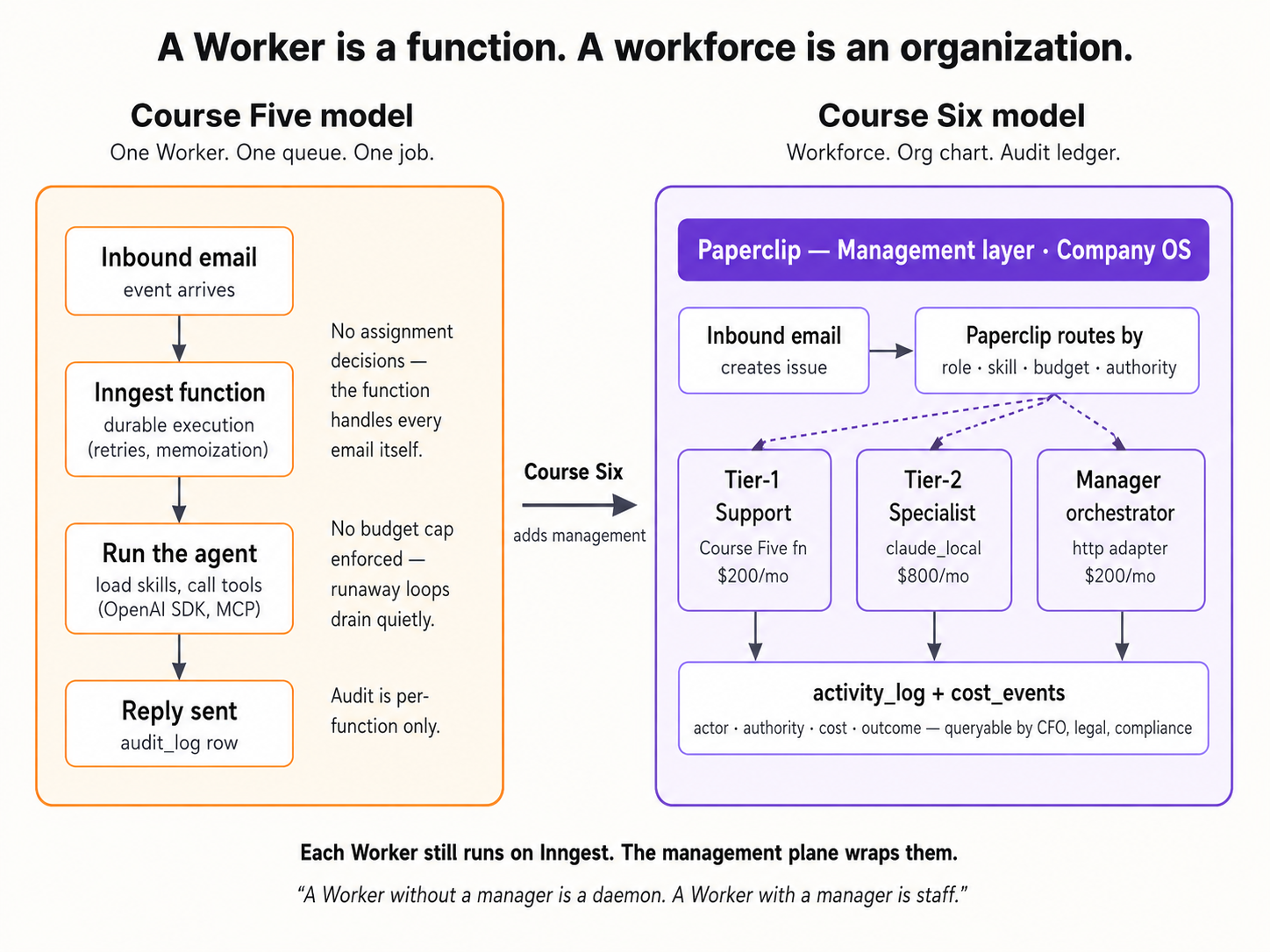
Three actors share this page: you, your coding agent, and Paperclip. You paste prompts and make the calls only a human can make. Your coding agent runs the Paperclip CLI and API, watches the logs, and recovers from failures. Paperclip is the management plane: it holds the company, hires the Workers, carries work to them on a heartbeat, and records every action.

Every scenario uses the same five-step rhythm:
- You paste one sentence into your coding agent. It's a brief, not a script. You describe the outcome you want; you don't enumerate steps.
- Your agent consults
AGENTS.md(already in its context:CLAUDE.mdin the folder imports it automatically at session start, so no fetch step) and proposes a plan. It names commands it intends to run and flags any decision points. It asks before the first destructive command. - You approve and watch. The agent runs install commands, hits the API, watches the server log, and shows you what it sees. When it hits a known failure, it recognizes the pattern from the brief and applies the documented fix.
- Your agent stops at the seam. Some moves only you can make: opening the dashboard URL, deciding whether a $750 refund should be granted, exporting an API key. The agent names the seam and waits.
- You're done when one observable thing happens. A new row appears in the activity log. An issue moves to
done. A SQL query returns the history you expected. Each scenario tells you what to watch for.
That's it. The agent does what an agent does well: install, configure, debug, query, recover. You do what only you can do: decide, approve, and act on the things tied to your accounts. This rhythm (describe the goal, get the plan, approve, execute with verification at every step) is the same prompting pattern taught in the AI Prompting in 2026 crash course; every scenario below uses two short paste prompts rather than one wall of instructions, so you experience the rhythm instead of reading about it.

If anything goes sideways at any point, you don't need to know CLI commands or error codes. Paste this to your agent:
Something didn't work. Run
paperclipai doctor, then read the most recent Paperclip server log, tell me in plain language what you see, and propose a fix I can approve.
Your agent runs the diagnostic, reads the log, names what it sees, and proposes the fix. You approve. That's the recovery loop for every scenario on this page.
Each scenario has a budgeted time (shown in the H2). If you run past 2x that budget (e.g., past 30 minutes on a 15-minute scenario), pull your agent back and paste: "What's blocking us, in one sentence? Let's re-plan from there." Spinning past the budget usually means the agent is improvising; re-anchoring on the plan fixes it.
The folder you'll download has exactly three files: AGENTS.md (a compact operational reference for any coding agent doing Paperclip work), CLAUDE.md (one line, @AGENTS.md, which tells Claude Code to import the brief automatically), and worker-stub.py (the keyless local Worker you hire in Scenario 2). That's the whole environment.
Download paperclip-crash-course.zip
Unzip anywhere. Open a terminal in the unzipped folder. Launch your coding agent:
cd paperclip-crash-course
claude
Your agent now has the brief loaded. We walk through six scenarios one at a time; each one ends on a runnable success before the next begins. This brief assumes a capable coding agent (Claude Code, or OpenCode running a current frontier model). Older or smaller models will drift, most visibly on the precise JSON of Scenario 2's Worker-create body and the SQL of Scenario 6; if your agent's first plan in Scenario 1 looks vague or generic instead of specific to your machine, that's the signal to switch to a stronger one before you go further.
Before Scenario 1: confirm your agent has the brief loaded (~30 sec)
One paste tells you whether CLAUDE.md did its job and pulled AGENTS.md into your agent's context:
What can you do for Paperclip?
If the reply names specific Paperclip work (the pre-install probe, the company-and-Worker shape, the heartbeat contract, create-time issue assignment, the approval payload, the budget reality, the activity-log queries, the monthly audit habit), you're loaded and ready for Scenario 1. If it sounds like generic AI capability talk with no Paperclip-specific details, the import didn't fire: close the agent, confirm you're inside the unzipped paperclip-crash-course/ folder, and relaunch.
AGENTS.md (the file your agent is now reading)You'll never need to read this file yourself; that's the point. But knowing its shape helps you ask better questions ("walk me through the approvals section" works because the section exists). The brief covers, in order:
PART 1 :: PRINCIPLES (apply everywhere)
  Versions this brief was verified against
  Source of truth, in order         ← live docs > this brief > the running install
  Critical: discover before you act  ← table of intent → where to confirm
  Working pattern (every task)       ← read → propose → ask → execute → verify
  Past tense is for completed actions only
  Trust progression                  ← ask each, then blanket; re-acquire on anomaly
  Safety rails (non-negotiable)
  Secrets discipline
  Sourcing claims that exist only in this brief

PART 2 :: OPERATIONS (verified against a live install)
  Install and onboard            ← the pre-install probe + the onboard flow
  Configure                      ← second instance, keeping the server alive
  Companies                      ← create, goals, projects
  Agents (Workers) and adapters  ← the real adapter list + the verified create body
  The heartbeat contract         ← what the http adapter actually POSTs
  Issues and assignment          ← no routing engine; assign at create time
  Approvals                      ← the payload + why it's a decision record
  Budgets                        ← why they only move for LLM Workers
  Audit trail                    ← activity_log + the real connection string
  Diagnose and recover           ← the most common failures
  When you don't know what to do ← three-layer fallback
If a particular section of AGENTS.md feels relevant later, you can ask your agent to walk you through it before acting (e.g., "walk me through the Approvals section of AGENTS.md before we file that request"). The brief was written so the agent can self-direct from it.
The Worker you'll hire in Scenario 2 is worker-stub.py, a keyless local Worker that ships in your download. It runs on Paperclip's http adapter: every heartbeat, Paperclip POSTs the full issue to the stub, and the stub posts a disposition back. No LLM, no API key, no second tool. You run the entire management plane (heartbeats, assignment, approvals, audit) end-to-end on what you already have, through Scenarios 1 through 4 and Scenario 6. Then in Scenario 5 you add one thing, a free Gemini key, for a deliberate reason: the keyless stub does no billable work, so a budget has nothing to meter against it. The real LLM Worker is what gives the budget something to enforce. The pipeline shape is identical either way; the keyless stub just produces a stub disposition instead of a drafted reply.
Scenario 1: Stand up Paperclip and define your company (~15 min)
The goal: Paperclip running on your laptop, one company configured ("Acme Customer Support" or whatever name you pick), the dashboard reachable in your browser. Two prompts: ask for the plan, approve and execute.
1a. Onboard and verify the install
First prompt: describe what you want and ask for the plan.
I'd like to get Paperclip running on my laptop and walk through a first company called Acme Customer Support. Before you touch anything, run the pre-install probe from your brief and walk me through your plan in plain language: what you checked, what you'll change, where you'll need me to step in.
Your agent reads AGENTS.md, runs the pre-install probe (Node version, prior installs, port availability, prior data directory, other running Paperclip processes), and proposes a plan. It will flag one place it likely needs you: if there's any stale state (a prior paperclipai install, a process holding the default port), it pauses for your decision before touching it. Read the plan. If something feels off, push back. Ask "why are you doing that?" and the agent will explain or adjust.
Second prompt: approve and let it run.
Plan looks good. Go ahead step by step, and tell me what you see at each step. Pause before any destructive command. When onboarding finishes, name the dashboard URL so I can confirm I see it in my browser; it auto-opens in some setups.
The agent runs the onboarding command from the brief, watches its output, and captures the operational values the script prints: the API host, the dashboard URL, the data-directory path, the embedded Postgres port, and the config-file path. It saves these into a project-local file you control (never echoed back into chat). One small thing the brief tells your agent to get right: the onboard banner labels its API line with an /api suffix, but the agent captures the bare host without it, so later API calls do not end up with a doubled /api/api/ path. You do not need to track this yourself; it is just the kind of detail the brief exists to handle. In the default loopback bind mode no bootstrap API key is issued (trust is loopback-scoped), and your agent will say so if you ask why no key appears. When onboarding finishes, the dashboard typically auto-opens in your default browser.
1a done when: the agent reports the API server is listening, you can open the dashboard URL in your browser, and the dashboard renders without errors.
1b. Define your first company
Paste this to your agent:
Now define the company. Name it Acme Customer Support. Its purpose: "Respond to customer inquiries within 4 hours, with refund decisions made consistently and within policy." Add one goal, "Reduce average response time to under 4 hours," and one project, "Inbound email triage." Check the live API for the exact field names first, then create them. When you're done, show me what's now visible in the dashboard.
The agent reads the Companies section of the brief, confirms the field names against the running API (the brief notes that the company's purpose goes in a description field, and that an unknown field name fails silently rather than loudly), creates the company, goal, and project, then walks you to the dashboard to confirm.
You're done with Scenario 1 when: your dashboard shows one company called "Acme Customer Support" with one goal and one project, and the activity log shows the matching creation rows (your agent will read back the exact action names Paperclip recorded; they look like company.created, goal.created, project.created). Every future action lays on top of this baseline.
The company ID Paperclip assigned is now in the project-local file the agent created. Your agent reads from that file in every later scenario, so you never need to remember the ID yourself. Keep your agent running in the unzipped folder so it has the file in its working directory.
Scenario 2: Hire your first Worker (~15 min)
The concept. A Worker in Paperclip is a configured role: a name, a runtime, permissions, a budget, a heartbeat schedule. (Paperclip's own API calls these "agents"; this page says "Worker" throughout so it is never confused with the coding agent you are pasting prompts into. When your agent shows you a request to /agents, that is the same thing.) The runtime is plugged in through an adapter. Paperclip ships a range of them: LLM runtimes (claude_local, codex_local, gemini_local, and more), an openclaw_gateway, a process adapter that runs a command on each heartbeat, and an http adapter that POSTs each heartbeat to a URL you control. Your agent can list the current set with one API call against your install.
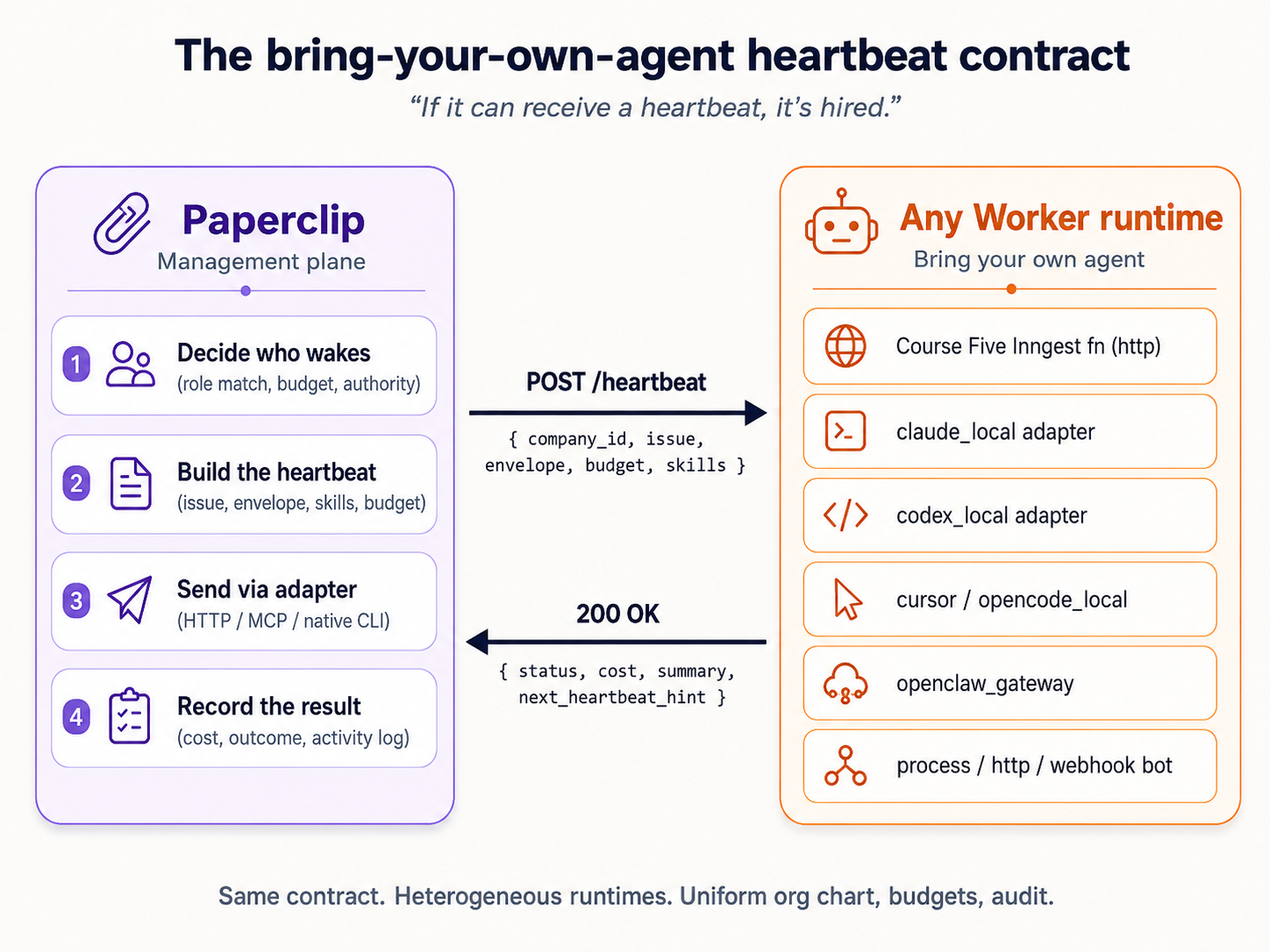
For this crash course you'll hire your first Worker on the http adapter, pointed at worker-stub.py, the keyless local Worker that shipped in your download. It's a small Python file using only the standard library. Every time Paperclip assigns it work, it POSTs the full issue to the stub; the stub reads the issue and posts a disposition back, which moves the issue to done. No LLM, no API key. The pipeline shape (heartbeat, assignment, approval, audit) is exactly what it would be for a real LLM Worker; only the work-product is a stub disposition instead of a drafted reply. Scenario 5 is where you swap it for a real LLM-backed Worker.
A note on authority. When you hire the Worker, you'll describe what it's allowed to do in plain language in a capabilities field: reads CRM records, drafts replies, refunds over $50 and outbound external email need board approval. Think of that as the Worker's authority envelope. In Paperclip 2026's release that envelope is stored as the description you wrote, not enforced field-by-field by the runtime; the real enforcement seam is the approval gate you'll wire in Scenario 4. The envelope is still the right mental model: it's the line that, when a task crosses it, should produce an approval request rather than an action.
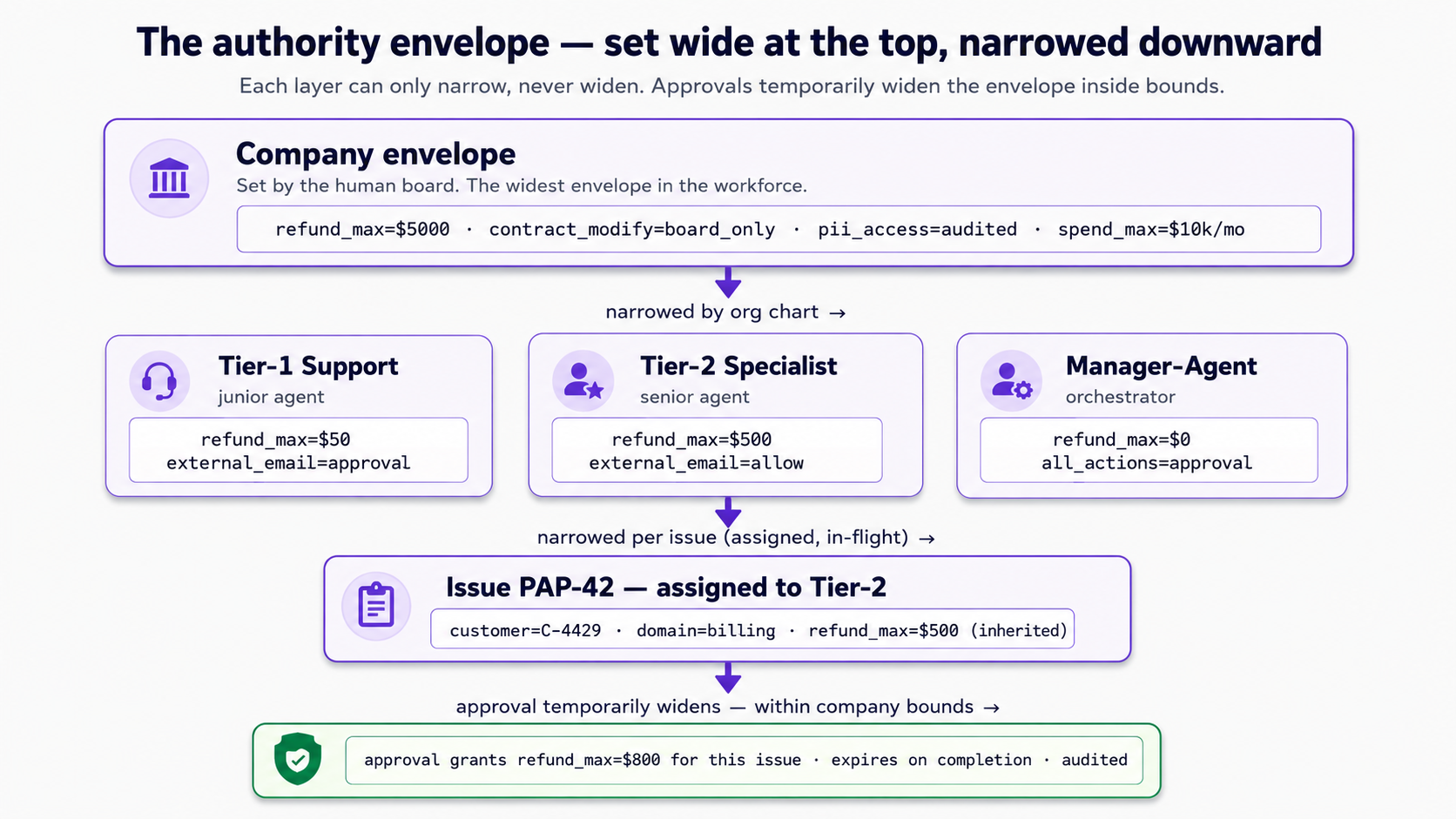
You hire by defining the role and registering it through the API. Two prompts: start the stub and draft the role, then register and verify.
2a. Start the stub Worker and draft the role
First prompt: orient, then draft.
I'd like to hire one Worker called Tier-1 Customer Support, running on the
httpadapter pointed at theworker-stub.pythat came in this folder. First, walk me through whatworker-stub.pydoes and how you'll start it. Then show me the agent-create request body from your brief before you register anything: I want to see the role name, the adapter and its config, the capabilities text, the permissions, the budget, and the heartbeat schedule. Set the monthly budget small on purpose; Scenario 5 will use a real Worker to show what a budget meters.
Your agent reads the Agents section of the brief, explains worker-stub.py (it's a tiny HTTP server: it listens for Paperclip's heartbeat POST, reads the issue out of the payload, and PATCHes a done disposition back), and shows you how it will start it (one python3 command, with a listening port and your Paperclip API URL as arguments). Then it drafts the agent-create body and shows you the structure: name, adapterType (http) and adapterConfig (the stub's URL), capabilities (the authority text in plain prose), permissions, budgetMonthlyCents, and the heartbeat schedule under runtimeConfig. Read it. If a field looks wrong, ask; the agent will confirm against the live API.
Second prompt: start, register, verify.
Looks good. Start the stub Worker, register the role with Paperclip, and confirm it appears in the dashboard. Show me the agent ID Paperclip assigned, the next heartbeat time, and the stub's own log file so I can see it's listening.
The agent starts worker-stub.py (it keeps running in the background, logging every heartbeat it receives), registers the role through the API, captures the assigned agent ID into the project-local file, and asks you to refresh the dashboard.
You're done with Scenario 2 when: the dashboard shows one Worker called "Tier-1 Customer Support," worker-stub.py is running and its log file exists, and the activity log shows the Worker-creation row (your agent will read back the exact action name; it looks like agent.created). One thing to know going in: Paperclip Workers are immutable after creation. You can't edit a Worker's adapter or budget later; you hire a new one. That's why Scenario 5 hires a fresh LLM Worker rather than upgrading this one.
Your Worker is registered and worker-stub.py is running, but the Worker's issue queue is empty. The next scenario gives it real work. Keep the stub process running: if you close it, heartbeats arrive at a dead URL and issues won't resolve. If you stop for the day, your agent can restart the stub when you pick Scenario 3 back up.
Scenario 3: Send the company its first real issue (~15 min)
The concept. The company exists, the Worker exists, but nothing has been assigned. In real production, a customer email would trigger an event that creates a Paperclip issue. Paperclip 2026 has no rules-based routing engine: there is no "if the issue matches X, send it to Worker Y" layer. Assignment is direct, and it matters when you do it. An issue created with an assignee at create time is wired into heartbeat orchestration: it's born ready, and the next heartbeat picks it up. An issue created with no assignee, then assigned later, does not get picked up the same way. So the move is: create the issue and name its Worker in the same step.
What happens next is the interesting part: the Worker's next heartbeat fires, Paperclip POSTs the full issue to worker-stub.py, the stub reads it and posts a done disposition, and the issue moves todo to in_progress to done, with an activity-log row recording each step.
Two prompts: create and assign the issue, then watch the Worker pick it up.
3a. Create one inbound issue, assigned at create time
Paste this to your agent:
Create one inbound issue for the "Inbound email triage" project: a customer (call them C-4429) is asking about a $30 refund on a product that arrived damaged. Write the description as a realistic two-sentence customer email. Assign it to Tier-1 Customer Support at create time, in the same command, not as a follow-up edit. When it's created, show me the issue ID Paperclip assigned and what status it's in right now.
Your agent reads the Issues section of the brief, creates the issue with the Worker named as assignee in the create command, and shows you the issue identifier (it looks like ACM-1).
Done with 3a when: the dashboard's issue queue shows one issue assigned to Tier-1 Customer Support, in status todo, and the activity log shows the issue.created row.
3b. See the Worker pick it up
A heads-up before you paste this. The Worker you hired has wake on assignment set, so assigning the issue at create time fired a heartbeat immediately. By the time you read this, the issue may already be done. That is the system working, not a step you missed. So this prompt is not "make it happen"; it is "show me what already happened, in the record."
Paste this to your agent:
Show me what already happened with that issue. Pull up
worker-stub.py's own log file and the issue's rows in the activity log, and walk me through the sequence: the heartbeat that fired on assignment, the stub receiving the issue, the stub posting its disposition back, and the issue reaching a terminal status. Tell me which fields prove the work actually happened rather than the issue just being flipped to done. If for some reason the issue is not done yet, fire a heartbeat for Tier-1 by hand and then walk me through the same sequence.
The agent reads both records and narrates the sequence that already ran: the Worker woke on assignment, Paperclip POSTed the issue to the stub, the stub PATCHed a done disposition back. The issue is at done with both a startedAt and a completedAt timestamp set. The activity log records the run. (If the heartbeat schedule had not fired yet, the brief also has the command for an on-demand heartbeat, so the agent can trigger it without waiting out the cadence.)
You're done with Scenario 3 when: the issue has moved from todo through in_progress to done, the activity log shows the transition, and worker-stub.py's log shows the heartbeat it received and the disposition it posted back. No cost is recorded against this issue, which is correct: Scenario 5 covers why, and where cost data starts to exist.
Your Worker has one issue under its belt, so the activity log is no longer empty when you add the approval step next. Scenario 4 deliberately works with an issue whose action (a large refund) is above what a Tier-1 Worker should decide alone, to show how a board sign-off is filed and recorded.
Scenario 4: File an approval for a risky action (~15 min)
The concept. Some actions are above a Tier-1 Worker's pay grade: a $750 refund, a contract change, anything that crosses the authority envelope you described in Scenario 2. Paperclip's answer is the approval: a tracked board decision record. A real LLM Worker, reasoning about a $750 refund, would recognize the action exceeds its authority and file an approval request rather than acting. Your keyless stub Worker doesn't reason, so in this scenario you act as the board's hand: you file the approval request that a Worker would file, and then you decide it.
Two things to be honest about up front, because they shape what "done" means here:
- An approval is a decision record, not a state machine. Filing an approval does not suspend a Worker, and approving it does not automatically resume one, change the linked issue's status, or execute the approved action. Acting on the decision is a separate, explicit step. What Paperclip gives you is the durable, audited record of who decided what, with what rationale, and when. That record is the valuable thing: it's what an auditor reads six months later.
- The teachable moment is the audit trail, not an automated unblock. Watch for the row in the activity log, not for the issue to move on its own.
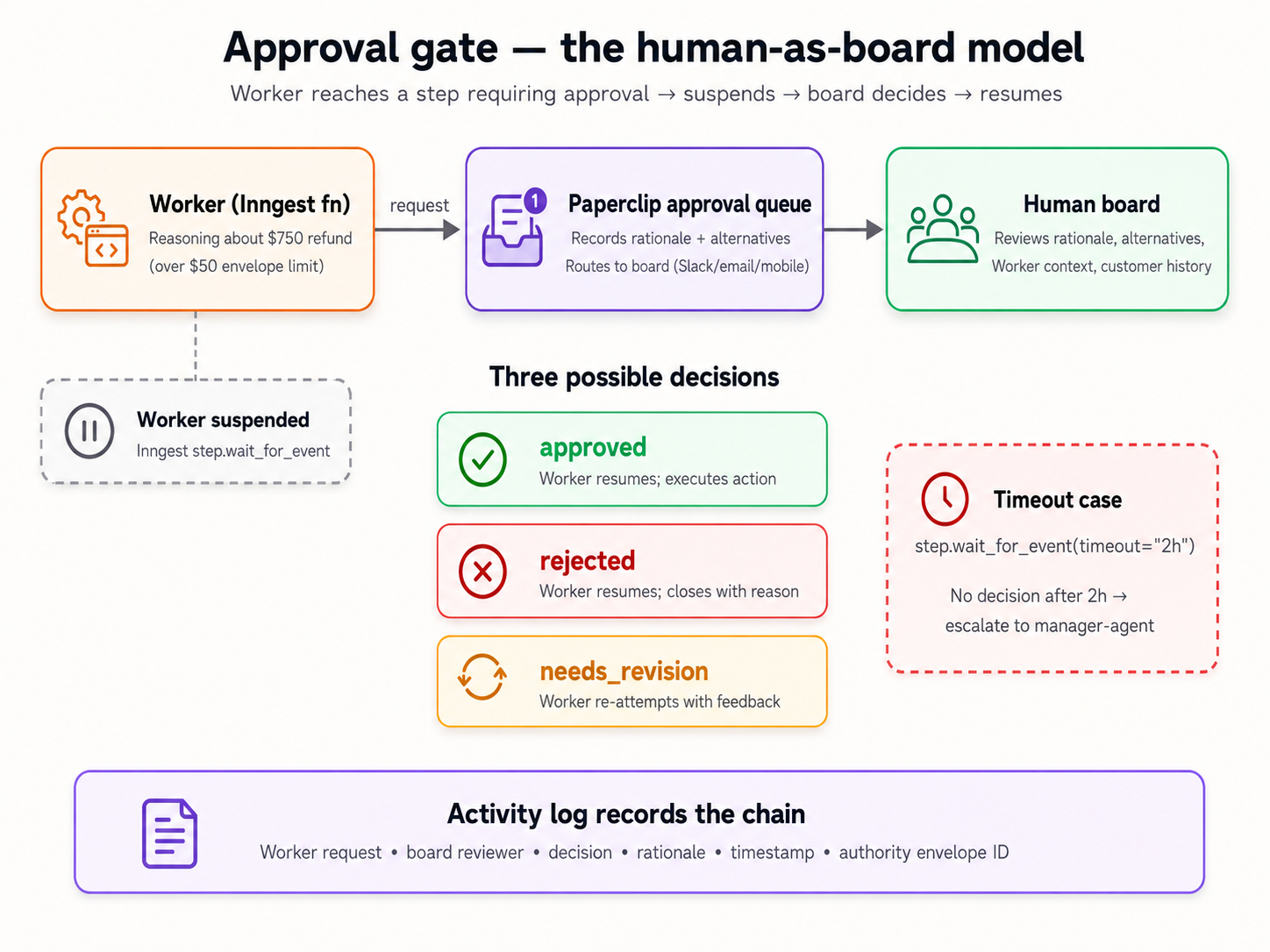
Two prompts: file the request, then decide it.
4a. File the approval request
Paste this to your agent:
Create an inbound issue: customer C-1138 is asking for a $750 refund on a product they bought three months ago; they say it arrived defective and they have photos. Do not assign it to a Worker yet: this is an action that needs board sign-off before anyone acts on it. Then, acting as a Worker would when it hits an action above its authority, file a board approval request linked to that issue. Use the approval type for a board decision. In the payload, put the action ("issue a $750 refund"), the rationale (the customer's history, the damage photos, the policy on documented defects), and two or three alternatives considered (partial refund, store credit, no refund). Show me the approval in
pendingstatus, and confirm the issue itself is still sitting untouched.
The agent creates the issue without an assignee (so the stub Worker never picks it up; it sits at its default starting status), then files the approval request through the company's approvals API: the board-decision type, and a free-form payload carrying the action, rationale, and alternatives verbatim. It links the approval to the issue. The activity log gets an approval.created row.
Done with 4a when: the issue exists, unassigned and untouched at its default status, the approvals queue in the dashboard has one pending entry, and the agent stops to hand the decision to you.
4b. Decide it
This part is yours. Read the request your agent filed: the amount, the rationale, the alternatives. Decide.
Paste this to your agent after you decide:
I've decided to approve this refund (or: to reject it; tell me which and why in one line). Record my decision. Then walk me through the activity-log rows for this approval and show me the field that proves I, the human board, was the decider, not an agent. And remind me explicitly what did not happen automatically: the issue is still sitting where it was, and what I'd have to do next to actually act on this decision.
The agent records your decision (the approval moves to approved or rejected, with the decider's identity and a decision timestamp stamped on it). It walks you through the activity log: the approval.approved (or approval.rejected) row, with actor_type set to user and an actor_id identifying the board. Then it names the honest part: the linked issue did not change status on its own. If you want the issue closed or the refund "issued" (simulated, since there's no payment processor wired), that's a separate command, and the agent will do it if you ask.
You're done with Scenario 4 when: the activity log contains the approval chain (request filed, decision recorded by you), the linked issue is visibly unchanged by the decision, you can name the field that distinguishes a human decider from an agent action (actor_type), and you can state in your own words why an approval is a decision record rather than an automatic unblock.
You now have a small but real activity log: two issues, one approval, the heartbeat runs behind them. One table is still empty, though: there is no cost data yet. Scenario 5 is where that changes, and it is the one scenario that needs an API key.
Scenario 5: Swap in a real LLM Worker; give the budget teeth (~15 min)
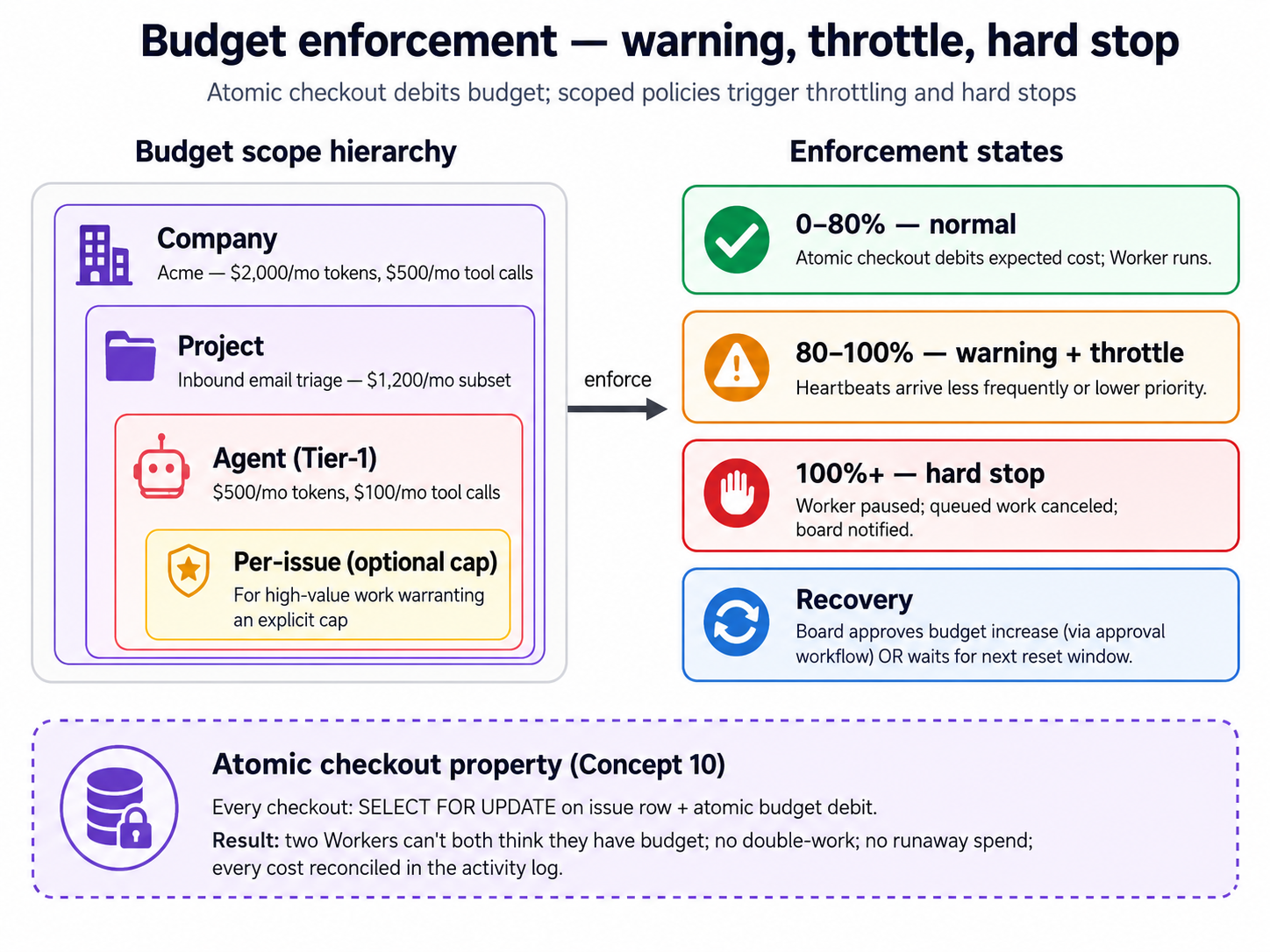
The concept. Every Worker has a monthly budget, set in cents when you hire it. But a budget only has something to enforce when a Worker does billable work: the keyless stub does none, so its spend stays at zero and its budget never moves. That is the honest shape of the thing, not a bug in the lab. To see a budget actually meter something, you need a Worker backed by a real LLM runtime.
So this scenario does the swap. You'll hire a new Worker on the gemini_local adapter (a fresh hire, not an edit, because Workers are immutable, as Scenario 2 noted), give it a deliberately tiny monthly budget, and pile on enough work to run that budget down. Then you watch what Paperclip actually does as the spend climbs toward the limit. This is the one scenario that needs an API key: a free Gemini key, the same one the OpenClaw crash course uses. Gemini is the path this page walks because the free tier keeps the scenario keyless-adjacent; if you already have a key for another low-cost runtime (codex_local with a cheap OpenAI model, for instance), that demonstrates the identical budget mechanic, and your agent can adjust the adapter accordingly.
One prompt to hire the LLM Worker, one to give it work and watch the budget.
5a. Hire the LLM Worker
Paste this to your agent:
I want to add a real LLM Worker now. I'll export
GEMINI_API_KEYin my shell before you start: tell me when you need me to do that. Hire a new Worker called Tier-1 Customer Support (LLM) on thegemini_localadapter, using the cheapest current capable Gemini model. Give it a deliberately small monthly budget, a dollar or two, so I can watch spend accrue against it. Walk me through the create body before you register, and remind me why we're hiring a new Worker instead of editing the stub one.
Your agent reminds you that Workers are immutable (hence a new hire, not an edit), names the point where you need to export the key, and drafts the agent-create body: the same shape as Scenario 2's, but with adapterType set to gemini_local and a small budgetMonthlyCents. It registers the Worker after you've exported the key.
5b. Give it work and watch the budget
Paste this to your agent:
Now give the LLM Worker work. Create about ten short inbound support issues, varied a little, and assign each one to the new LLM Worker at create time. Fire heartbeats so it works through them. Tail the Paperclip server log. I want to see two things: the per-run cost data start to exist (it didn't, for the keyless stub), and the Worker's monthly spend climb toward the budget I set. Tell me, in plain language, exactly what Paperclip does as the spend approaches and then crosses the limit: that's the behavior I want to observe.
The agent creates and assigns the issues, fires heartbeats, and tails the log. This time the Worker does billable work, so per-run usage data starts landing on the heartbeat records, and the Worker's monthly spend moves off zero. The agent narrates what Paperclip actually does as the budget runs down and reports it to you plainly: this is a live observation, not a scripted outcome, and your agent's job is to tell you what it sees.
You're done with Scenario 5 when: the new LLM Worker has resolved real issues, the per-run cost data exists where it was empty before, the Worker's monthly spend has moved against the budget you set, and your agent has told you in plain language what Paperclip did as the budget approached its limit.
Export the key in your shell (export GEMINI_API_KEY=...); never paste it into a file in the project, and never let your agent write it into one. AGENTS.md tells your agent the same thing. If you ever paste a key somewhere it shouldn't be, rotate it. A free-tier key is low-stakes, but the habit is the point.
You now have two Workers (the keyless stub and the LLM-backed one), a dozen-plus issues, one approval, and (new in this scenario) real cost data. That's enough history to make the audit query in Scenario 6 return something worth reading.
Scenario 6: Query the audit trail like a CFO (~10 min)
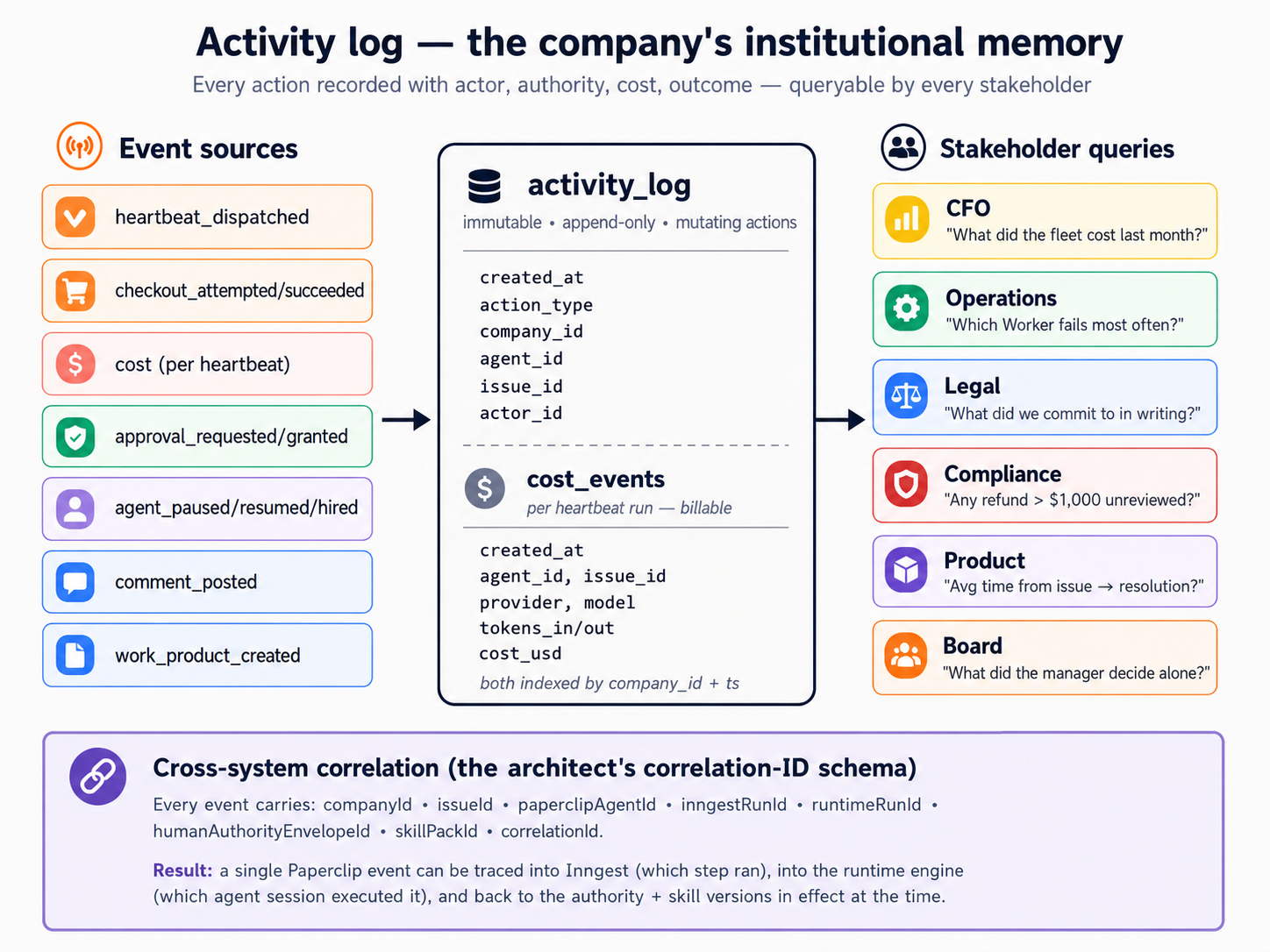
The concept. The whole point of a management plane is that someone outside the workforce (a CFO, legal, operations, compliance) can reconstruct what happened from the database alone, in seconds, without asking anyone. Paperclip keeps that history in an embedded Postgres database. The table that matters most is activity_log: one row per mutating action (company created, issue created, approval decided, Worker hired, heartbeat invoked), with the actor, the action, and the entity it touched. A second table, cost_events, holds the dollar story (provider, model, tokens, cost in cents per billable run) and has rows only once an LLM Worker has done billable work, which is why it was empty until Scenario 5.
One prompt: open Postgres, run the history query and the cost query, read the answers.
Paste this to your agent:
Time to play CFO. Connect to the embedded Paperclip Postgres (your brief covers how to assemble the connection string). First, run the "what happened, in order" query against
activity_logfor our company: every action with its actor and the entity it touched, oldest first. Then run the cost query againstcost_events: total cost today, in dollars. Show me the SQL and the results for both. Finally, walk me through oneactivity_logrow for the approval I decided in Scenario 4, and point to the fields an auditor would use to confirm I was the decider.
The agent reads the Audit-trail section of the brief, assembles the Postgres connection string from your install's config file (there is no shortcut command for this; the brief shows how), and runs two queries:
-
What happened, in order: a
SELECToveractivity_logfiltered to your company, ordered by time. It returns the full spine of your run: the company and project creation, both Workers hired, every issue created, the heartbeats, the approval filed and decided. This is the query that works with no LLM Worker at all; it's the keyless heart of the audit story. -
Total cost today: a
SELECT SUM(...)overcost_events, converting the integer cents column to dollars, filtered to today. Before Scenario 5 this returned nothing; now it returns the real (small) cost of your LLM Worker's runs.
Then the agent shows you one activity_log row for the approval you decided: the action (approval.approved or approval.rejected), actor_type set to user, the actor_id identifying the board, and the timestamp. That is how an auditor reconstructs your decision.
You're done with Scenario 6 when: the history query returns the ordered story of your whole run, the cost query returns a real number from your Scenario 5 Worker, and you can name the column in activity_log (actor_type) that tells a human decision apart from an agent action.
Scenario 7: Your monthly workforce audit (~10 min/month)
The concept. A company accumulates over time: Workers hired, budgets set, approvals decided, schedules running. Each addition was a small decision you approved; the chain compounds. The defense is not vigilance at every step (you'd never catch what doesn't yet exist); it's a ten-minute review on a fixed cadence. This scenario isn't part of your first ninety minutes; it's the move you make once a month for the rest of the company's life.
Paste this to your agent (when the time comes):
Run my Paperclip monthly workforce audit. Walk through everything that's been hired, configured, scheduled, decided, or paused since the last audit. Flag anything I didn't explicitly sign off on, any Worker that hasn't done productive work, any budget that's drifted from where I set it, and any setting that's looser than it should be. Summarize the lot as a single short report I can either approve or trim.
Your agent reads the activity log, the current Worker roster, the budgets, and the audit tables, and produces a one-page report.
Done when: you've spent ten minutes reviewing the report and made at least one decision (tighten a Worker's authority text, prune a budget back, retire an unused Worker, raise an approval threshold). Mark your calendar for next month.
Why this works
Two things stay fresh; one thing stays durable.
Fresh #1: The scenarios on this page live on the book site. Your agent reads them when you tell it which scenario you're on.
Fresh #2: The current Paperclip commands and API shape live at paperclip.ing/llms.txt, an LLM-friendly index of the full docs, plus docs.paperclip.ing for the patient walkthrough. Your agent reads them fresh before any non-trivial operation. Paperclip ships fast; this is how the brief stays accurate even when individual flags drift.
Durable: The folder you downloaded holds AGENTS.md (what Paperclip is, how to navigate its docs, the safety rails, the verified operational shapes, the recovery patterns), CLAUDE.md (the one-line import marker), and worker-stub.py (the keyless Worker itself). AGENTS.md covers companies, Workers and adapters, the heartbeat contract, issues and assignment, approvals, budgets, audit, and diagnosis. It's longer than this page because it covers everything a coding agent might be asked to do with Paperclip, not just the six scenarios above. Nothing in the folder goes stale, so you download it once and reuse it.
The pattern is small by design: one operational reference, one import marker, one runnable Worker. Three files. The intelligence isn't in the files; it's in your coding agent reading them and applying them to whatever you ask next. You didn't walk through six disconnected demos; you assembled a company you'll touch tomorrow.
What's actually running now
Not six demos: one running system. Inventory of what persists after Scenario 6:
| Artifact | What it actually is | Why it matters tomorrow |
|---|---|---|
| Paperclip server | A long-running Node.js process holding the API and the embedded Postgres | Your company survives closing your terminal and rebooting |
| The data directory | All your company data, encrypted secrets, server logs | The substrate; back this directory up the way you back up dotfiles |
| One company | A purpose, a goal, a project, and the company-scoped isolation around them | The boundary every Worker, issue, and approval lives inside |
| Two Workers | The keyless worker-stub.py Worker and the gemini_local LLM Worker | One Worker proves the pipeline keyless; the other shows the economics |
worker-stub.py | A small local HTTP process, listening for heartbeats | Your first Worker, and the template for any keyless Worker you write next |
| Issues and the activity log | Issues assigned and worked, plus the row-by-row record of every action | Reproducible workforce behavior, queryable history |
| One approval | One board decision filed and decided, recorded permanently | The audited sign-off your workforce uses for risky actions |
| A budget with data | The LLM Worker's monthly budget, with real spend metered against it | The number that makes "no runaway spend" enforceable instead of decorative |
| Audit queries you can run | SQL over activity_log (and cost_events) that answers stakeholder questions fast | The view a CFO, legal, or compliance can use without asking you |
AGENTS.md and the recovery line | The durable brief your agent reads on every session | The skill you reuse for the lifetime of this company |
A working day with this looks like: a real customer message arrives; an integration (yours to wire later) creates a Paperclip issue assigned to a Worker; the next heartbeat carries it to the Worker; the Worker drafts a reply; you decide the high-stakes ones in the dashboard; once a month you run the audit.
If any of those artifacts go missing later (a laptop wipe, an accidental delete, a version upgrade gone wrong), the brief plus a fresh onboard plus a restore of your data directory from backup gets you back to this exact picture.
The crash course is single-user: you're the human board, and you're the one creating issues for testing. Wiring a real inbound source (a support inbox, a contact form, an event from your existing systems) means strangers can write into your workforce. Before you do that, two things must be true: every Worker that processes inbound content must have a tight, clearly described authority envelope (no broad latitude just because the work is "customer support"), and you need a deliberate plan for inputs that don't map to any Worker (no orphaned issues). Stay single-user until you've thought both through.
Where to go next
After Scenario 6, you have a working AI-native company: two Workers, one demonstrated approval, a budget with real data behind it, and an audit trail that answers stakeholder questions in seconds. That's most of the surface most people need to get started.
For the patient walkthrough of any topic this page touched (or anything it skipped), several deeper crash courses sit alongside this one in the getting-started directory. Quick map:
| You want... | Go to |
|---|---|
| Wrap a single Worker in a durable workflow engine before you manage a fleet | From Digital FTE to Production Worker: the Inngest durability envelope |
| Turn hiring into a callable capability (Workers that hire other Workers under policy) | From Fixed to Dynamic Workforce: the successor to this course |
| Use Paperclip's REST API as tools from inside another agent | Check docs.paperclip.ing for the current MCP server package; pin the version |
| Deploy Paperclip to a cloud or shared host (multi-machine, multi-user) | The live docs at docs.paperclip.ing; verify what has shipped before you rely on it |
| Wire OpenClaw as the edge layer between humans and your workforce | The OpenClaw crash course |
For everything else, your AGENTS.md already covers most of the platform. Ask your coding agent: "What does AGENTS.md say about the heartbeat contract?" or "Walk me through the approvals section of AGENTS.md." The brief is the reference; this page is the tour.
The meta-lesson: the most valuable thing in your unzipped folder is AGENTS.md. Take an evening to read it end to end (not for the install steps, but for the shape of the document: the discover-before-act table, the working pattern, the operations by task type, the diagnostic checklists). Then write one for whatever tool you'll next put a coding agent in front of. The pattern is portable: every tool with a learnable surface has an AGENTS.md worth writing. Paperclip was a clean target because the install benefits from agent-driven setup and the operations decompose into paste-and-watch scenarios; you will find others. Author the next one.