Subagents and Orchestration
A subagent is a specialized AI Agent with its own instructions and isolated context window. Each subagent is an expert at one type of task.
Think of your coding agent as a project manager with a team of specialists:
- Main agent: Coordinates overall work (Claude Code main session, or an OpenCode primary agent like Build)
- Plan/research subagent: Researches your codebase and creates multi-step plans
- Custom subagents: You can create specialists for your team's specific needs (content planning, research synthesis, document structuring, etc.)
Both Claude Code and OpenCode treat subagents as first-class. Claude Code has a single main session that delegates to subagents. OpenCode splits the idea into primary agents (Build, Plan; switchable via Tab) and subagents (General, Explore; invokable via @ mention). The architectural concept, an isolated context window per specialist, is the same across both tools.
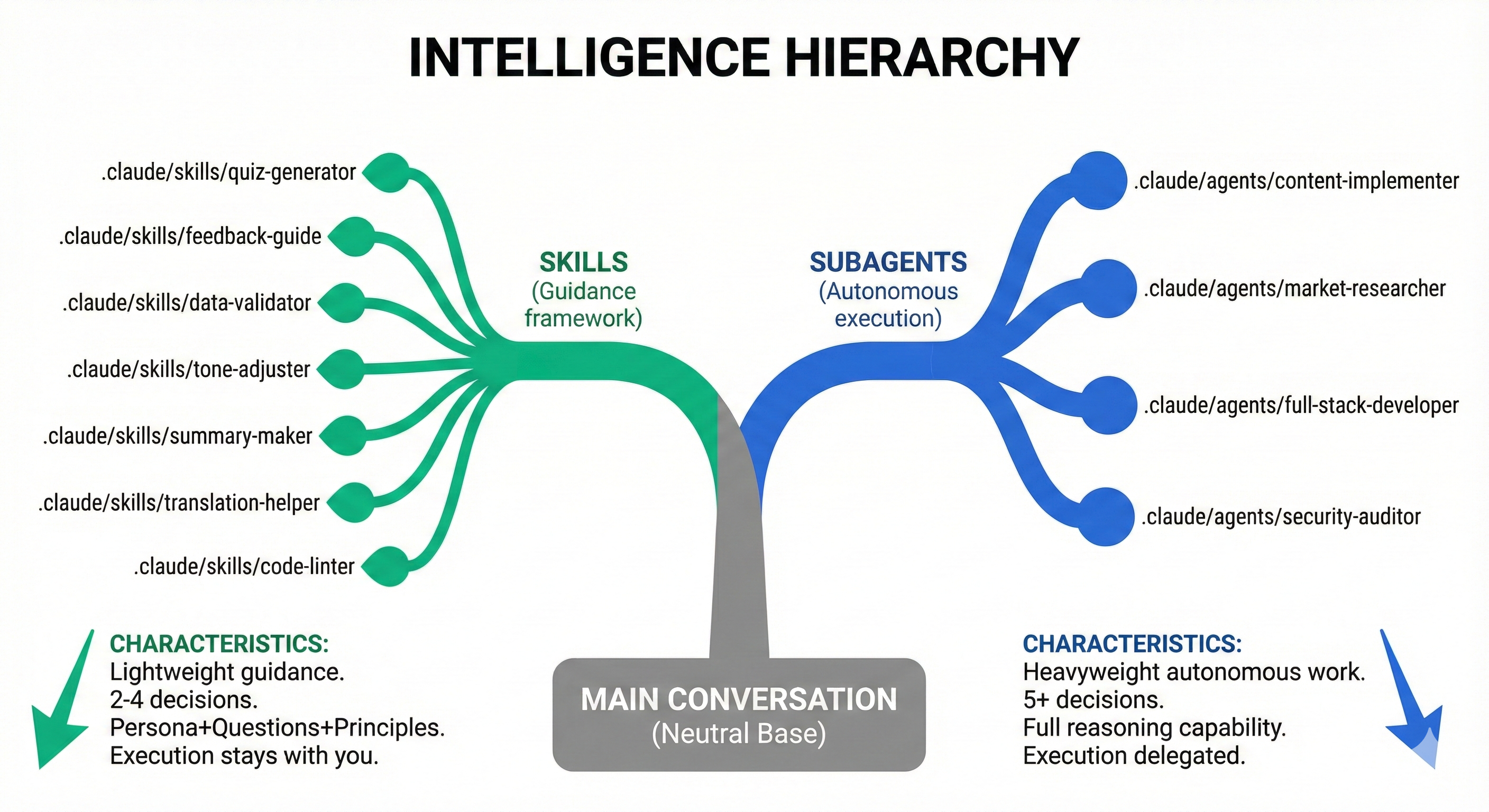
You already have a team of AI specialists. Let's meet them.
You Already Have a Team
List your built-in agents right now:
/agents
What you'll see:
│ Agents                                                                               │
│ ❯ Create new agent                                                                   │
│                                                                                      │
│   Built-in agents (always available)                                                 │
│   Bash · inherit                                                                     │
│   general-purpose · inherit                                                          │
│   statusline-setup · inherit                                                         │
│   Explore · haiku                                                                    │
│   Plan · inherit                                                                     │
│   claude-code-guide · haiku                                                          │
Type @ in the chat to open the agent autocomplete menu, or run:
opencode agent create
OpenCode ships with two primary agents (Build, Plan; cycle with the Tab key) and two subagents (General, Explore; invoke via @ mention). The agent picker shows you what is available.
These are subagents: specialized AI assistants that your coding agent can delegate work to. Each has its own expertise and isolated context window.
You don't need to create anything yet. You already have a team ready to work.
Try It Now: Your First Subagent
Let's use the Explore subagent to see what's in your current folder.
Use the Explore subagent to tell me what's in this folder and summarize the project structure.
@explore tell me what's in this folder and summarize the project structure.
OpenCode uses @<agent-name> to invoke a subagent explicitly. The @ prefix opens an autocomplete menu listing available agents.
What happens:
- The main agent delegates to the Explore subagent
- Explore scans your directory with its own clean context
- Explore returns a summary to the main agent
- You see the results
Try it! This is hands-on learning: run it now and see what Explore finds.
Meet the Built-In Agents
| Agent | Best For | Model |
|---|---|---|
| Explore | Finding files, searching code, understanding codebase structure | Haiku (fast) |
| Plan | Complex multi-step tasks, creating implementation strategies | Sonnet (smart) |
| general-purpose | Multi-step tasks requiring various tools | Inherits current |
| Bash | Command execution tasks | Inherits current |
| claude-code-guide | Questions about Claude Code itself | Haiku |
| Agent | Type | Best For |
|---|---|---|
| Build | Primary | Default development work with all tools enabled |
| Plan | Primary | Analysis and planning; edit and bash default to ask so it can't modify files |
| General | Subagent | Multi-step research and tasks with full tool access (parallelizable) |
| Explore | Subagent | Read-only codebase exploration; cannot modify files |
OpenCode also has hidden system agents (compaction, title, summary) that run automatically and aren't user-invokable.
Key insight: Both tools automatically pick the right specialist based on your request. You can also explicitly invoke any agent.
How Subagents Work?
Critical concept: A subagent is invoked once for a specific goal, completes its work, and returns results to the main session (Claude Code's main session, or the OpenCode primary agent that called it).
The flow:
- The main session (Claude Code) or primary agent (OpenCode Build/Plan) recognizes a task that needs a specialist
- Launches the subagent with a specific goal
- Subagent works independently in isolated context
- Subagent completes its task and returns results
- Control returns to the main session / primary agent
- You continue interacting with that main session to proceed
Think of it like this: You send a specialist to research something. They go off, do their work, come back with a report, and then you continue the conversation with your main assistant.
Automatic Delegation
You don't command "use the Plan subagent." Your agent decides when to delegate based on:
- Task complexity (multi-step tasks trigger Plan)
- Your request type (code review request might trigger a review subagent if you have one)
- Subagent descriptions (Claude matches task to specialist)
Parallel Power: Multiple Agents at Once
Here's where it gets powerful. You can invoke multiple subagents in a single prompt.
Try this:
Use Explore to show me what files are in this project, AND use Plan to outline how I could add a README if one doesn't exist.
@explore show me what files are in this project, and @general outline how I could add a README if one doesn't exist.
What happens:
- Your agent (Claude Code's main session or OpenCode's primary) launches both subagents
- They work in parallel with isolated contexts
- Results combine into a single response
Real-world example:
Use Explore to find all test files in this project, AND use Plan to suggest a testing strategy for the gaps you find.
@explore find all test files in this project, then @general suggest a testing strategy for the gaps you find.
This is orchestration:coordinating multiple specialists toward a goal.
Why Subagents Work: Clean Context
Each subagent has its own isolated context window. Why does this matter?
Without subagents (one AI doing everything):
- You ask Claude to research competitors
- Context fills with research notes
- You ask Claude to draft a pitch
- Context is cluttered: Claude might confuse research notes with your pitch
With subagents:
- Research subagent does research, returns clean summary
- Your main session receives the summary; its context stays clean
- Planning subagent drafts pitch with fresh context
- Each specialist focuses on one job
Think of it like a team meeting: The researcher presents findings, then leaves. The strategist creates a plan with fresh focus. Nobody is juggling everything at once.
💬 AI Colearning Prompt
"Explain why subagents use isolated context windows instead of sharing the main conversation. What problems does context isolation solve?"
The Execution Model
How subagents work:
You → Main session / primary agent → Launches Subagent → Subagent works → Returns results → Main session → You
Key concepts:
- One task, one completion: Subagent is invoked for a specific goal, completes it, returns
- Control returns: After the subagent finishes, you interact with the main session again (Claude Code's main session or your OpenCode primary agent)
- Automatic or explicit: Your agent can auto-delegate, or you can request a specific specialist (Claude Code's Task tool / OpenCode's
@-mention)
Automatic triggers:
- Ask "What files handle authentication?" → Explore auto-activates
- Ask "Help me add user login to this app" → Plan auto-activates (complex task)
Explicit invocation:
Use the Plan subagent to analyze this feature request.
@-mention invocation: Type @ in the chat and pick a subagent from the typeahead menu. This guarantees that specific subagent runs, rather than relying on Claude to match your request automatically.
@general analyze this feature request and propose an implementation plan.
In OpenCode, @ is the canonical way to target a specific subagent. For primary agents (Build, Plan), press Tab to switch the active agent rather than @ mentioning.
Hands-On: Create Your First Custom Subagent
Now that you've used built-in agents, let's create your own specialist.
Step 1: Open the Agent Creator
/agents
Select "Create new agent".
opencode agent create
This launches an interactive creator that asks the same questions as /agents in Claude Code: scope, description, permissions, and saves a markdown file.
Step 2: Choose Location
│ Choose location                                                               │
│ ❯ 1. Project (.claude/agents/)                                                │
│   2. Personal (~/.claude/agents/)                                             │
Choose 1 (Project): makes the agent available in this project only.
1. Project (.opencode/agents/)
2. Global (~/.config/opencode/agents/)
Choose 1 (Project): makes the agent available in this project only.
Step 3: Choose Creation Method
│ Creation method                                                               │
│ ❯ 1. Generate with Claude (recommended)                                       │
│   2. Manual configuration                                                     │
Choose 1: let Claude generate the agent from your description.
OpenCode's opencode agent create flow generates the prompt and identifier automatically from your description, then asks which permissions to allow (anything you don't pick is denied).
Step 4: Describe Your Agent
Type something like:
Help me review code for bugs and suggest improvements.
Use when I say "review this code" or "check for bugs."
The tool then creates:
- Agent name (e.g.,
code-reviewer) - Instructions based on your description
- Tool permissions
- Saves the file to your chosen location (see paths below)
Step 5: Test It
Use the code-reviewer subagent to review this function: [paste your code]
@code-reviewer review this function: [paste your code]
You just created a reusable specialist.
Where Subagents Live
Project-level: .claude/agents/ (this project only)
User-level: ~/.claude/agents/ (all your projects)
Example file (.claude/agents/code-reviewer.md):
---
name: code-reviewer
description: Reviews code for bugs and suggests improvements
model: sonnet
---

# Code Review Instructions

When reviewing code:

1. Check for bugs and edge cases
2. Suggest performance improvements
3. Note any security concerns
4. Recommend cleaner patterns
The model field accepts: sonnet, opus, haiku, a full model ID (e.g., claude-sonnet-4-6), or inherit to use whatever model the main conversation is using. When omitted, subagents inherit the current model by default.
Project-level: .opencode/agents/ (this project only)
Global: ~/.config/opencode/agents/ (all your projects)
The markdown file name becomes the agent name. So code-reviewer.md creates an agent invoked as @code-reviewer.
Example file (.opencode/agents/code-reviewer.md):
---
description: Reviews code for bugs and suggests improvements
mode: subagent
model: anthropic/claude-sonnet-4-20250514
temperature: 0.1
permission:
  edit: deny
  bash: deny
---

You are in code review mode. Focus on:

- Code quality and best practices
- Potential bugs and edge cases
- Performance implications
- Security considerations

Provide constructive feedback without making direct changes.
OpenCode frontmatter notes:
modeisprimary,subagent, orall(defaults toall).modeluses theprovider/model-idformat (runopencode modelsto list options). If omitted, subagents inherit the model of the primary agent that invoked them.permissioncontrols tool access per-key (read,edit,bash,webfetch, etc.) usingallow/ask/deny. The legacytoolsfield still works but is deprecated in favor ofpermission.
You can also configure agents inline in opencode.json under the agent key instead of using a markdown file.
More Subagent Ideas
Once you understand the pattern, create specialists for any repeated task:
- Research subagent: Deep-dive into documentation, gather requirements
- Testing subagent: Generate test cases, identify edge cases
- Documentation subagent: Write README files, API docs, architecture notes
- Refactor subagent: Suggest cleaner code patterns, reduce complexity
The pattern:
- What expertise does this specialist have?
- What should it do autonomously?
- What format should results be in?
In Claude Code, subagents can retain knowledge across conversations using the memory field in their frontmatter (e.g., memory: project). This gives the subagent a dedicated memory directory that survives between sessions, so a research subagent can build on previous findings rather than starting from scratch every time. OpenCode does not expose an equivalent per-subagent memory field today; persistent context lives in the project workspace and AGENTS.md instead.
Skills vs. Subagents: Decision Criteria
Now that you understand both skills (Lesson 08) and subagents, when do you choose one over the other?
| Factor | Choose Skill | Choose Subagent |
|---|---|---|
| Invocation | Automatic OR explicit by name | Explicit only (you invoke) |
| Context | Shared with main conversation | Isolated context window |
| Complexity | Lightweight, single-focus | Multi-step, complex workflows |
| Guarantee | Flexible (auto-triggers or invoke by name) | Hard invocation (always runs) |
| Best for | Repeated patterns, formatting, procedures | Audits, refactoring, comprehensive analysis |
Use skill when: "I want Claude to automatically do this whenever it's relevant."
Use subagent when: "I need guaranteed execution with isolated context for this complex task."
Examples
Skill appropriate:
- Meeting notes formatting (happens often, simple procedure)
- Blog post planning (repeated task, consistent structure)
- Code comment style (automatic enforcement)
Subagent appropriate:
- Comprehensive security audit (complex, needs isolation)
- Multi-file refactoring (guaranteed execution required)
- Full codebase analysis (too large for skill context)
What's Next
Subagents are one-shot workers that report back to the caller. But what happens when workers need to talk to each other? In Chapter 15, Lesson 9, you'll learn about Agent Teams:multiple Claude Code instances that communicate directly, share a task list, and self-coordinate. Same context isolation principles, but with inter-agent collaboration.
Lesson 12 introduces MCP Integration:connecting Claude to external systems like web browsers, databases, and documentation servers. Where subagents give you coordination between AI specialists, MCP gives you access to the outside world.
Head to Lesson 10: Agent Skills Exercises for 27 hands-on exercises covering skill composition, real-world skill building, and capstone projects; with one-click exercise downloads and step-by-step guidance.
Try With AI
🔍 Explore Your Codebase:
Claude Code: "Use the Explore subagent to find all configuration files in this project. Then explain what each one does."
OpenCode: "@explore find all configuration files in this project, then explain what each one does."
What you're learning: How the Explore subagent does research autonomously: it reads files, follows imports, and reports findings without manual guidance.
📋 Plan a Feature:
"Use the Plan subagent to create an implementation plan for adding dark mode to a React application. Include phases, dependencies, and testing strategy."
What you're learning: How Plan Mode creates comprehensive strategies before execution. This pattern: plan first, execute second: produces better outcomes than iterative guessing.
⚡ Parallel Agents:
"Use Explore to find all API routes in this project, AND use Plan to suggest how to add authentication to routes that don't have it."
What you're learning: Parallel agent execution: running multiple specialists simultaneously. This pattern appears in production workflows where throughput matters.
🛠️ Create a Custom Agent:
"Walk me through creating a custom subagent for [your repeated task: code reviews, blog planning, meeting notes, test design]. Help me think through: What should it do? What questions should it ask? What format should output be?"
What you're learning: The subagent design process: from identifying a need to defining behavior. Custom subagents are your first step toward building specialized AI teams.
🎯 Orchestrate Multiple Agents:
"I need to understand this unfamiliar codebase. Use Explore to map the project structure, AND use Plan to create a learning path for understanding the architecture. Show me how the results combine."