Deep Dive Chapter 14: Working with General & Coding Agents: Claude Code, Cowork & OpenCode
You know why AI-driven development matters: and that it's happening right now, in 2026. But understanding transformation and experiencing it are two different things.
This chapter introduces you to Claude's General Agents: Claude Code and Cowork. These aren't just AI assistants; they're agentic AI systems that can reason through problems, make plans, and take action across domains.
What's a General Agent? An AI that observes, orients, decides, and acts: the OODA loop: executing actions rather than just generating text. Claude Code uses the terminal interface (for developers), while Claude Cowork uses the desktop interface (for knowledge workers). Both are powered by the same Claude Agent SDK and reason across any domain you bring them.
A note on categories. Claude Code and Cowork are general agents: broad-domain systems that handle research, operations, analysis, and code with equal fluency. Alongside them, Sections A through C also teach OpenCode, an open-source coding agent that is narrower in scope (code-focused) but shares the same primitives: AGENTS.md for project context, skills for packaged expertise, MCP for external tools, hooks for event-driven automation. Wherever the patterns transfer, lessons show both side by side, so what you learn here travels with you when you reach for an open-source, coding-focused alternative. Section D (Cowork) and the chapter strategy lessons stay general-agent territory.
The goal is not to build a supercomputer, but to establish Claude as your collaborative thinking partner for everything: and to build Skills that can become products.
The Claude Platform at a Glance
Before we dive into Claude Code and Cowork, take a moment to see the full landscape.
Claude in 2026 is not a single tool. It is eight integrated modes, each designed for a different kind of work. Most people only ever use Chat. This book focuses on the modes that build Digital FTEs: Cowork, Skills, Plugins, and Connectors, the professional-grade tools that turn domain expertise into deployable AI employees.
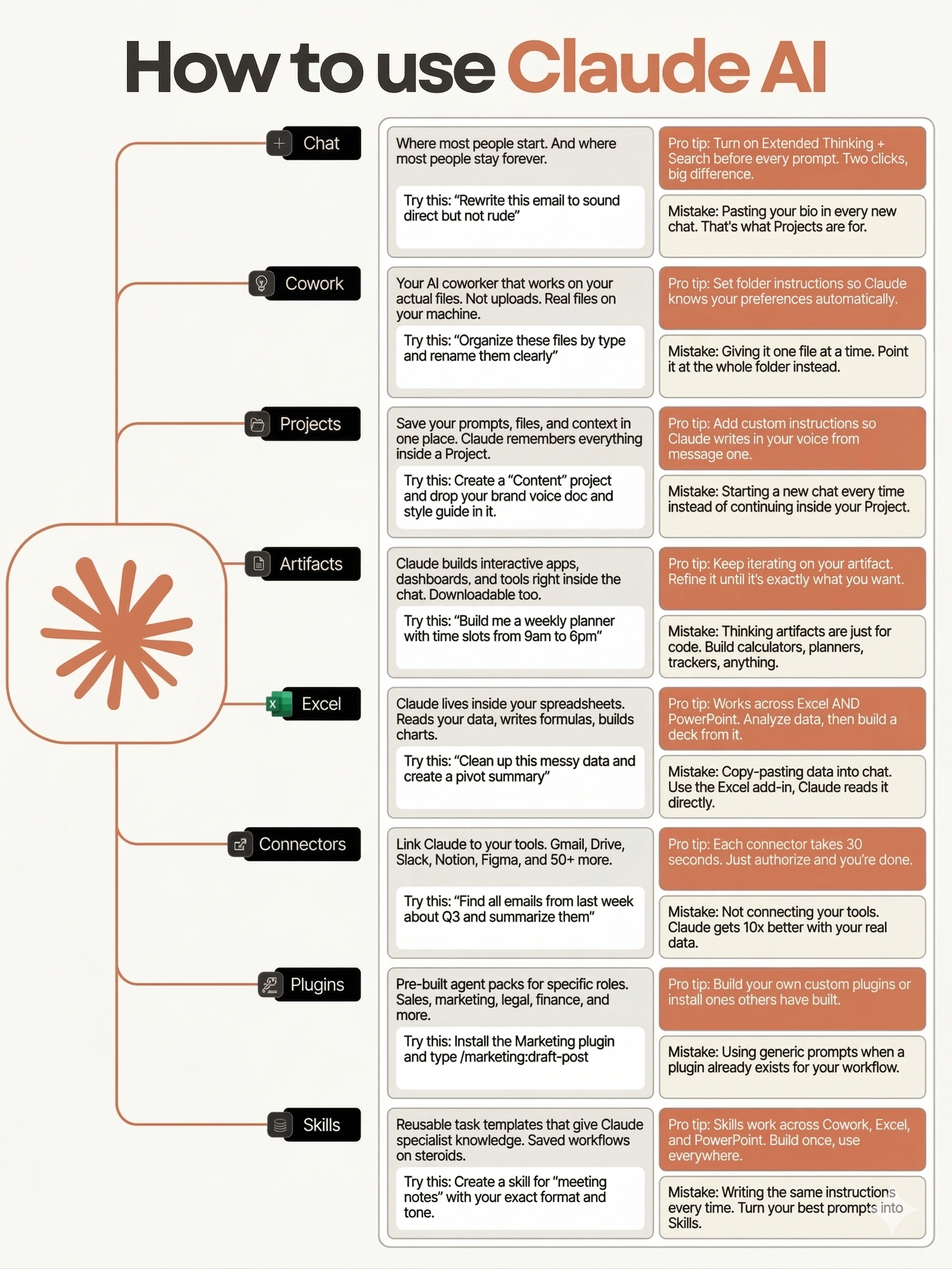
Figure 14.1; How to Use Claude AI: The Eight Modes
| Mode | What It Does | Where You'll Learn It |
|---|---|---|
| Chat | Conversational Q&A; where most people start and stay | Prerequisite |
| Cowork | AI coworker that works on your actual files on your machine | Section D |
| Projects | Save prompts, files, and context in one persistent workspace | Chapter 15 |
| Artifacts | Interactive apps, dashboards, and tools built inside the chat | Part 2 exercises |
| Excel | Claude inside your spreadsheets; reads data, writes formulas, builds charts | Part 3 |
| Connectors | Link Claude to Gmail, Drive, Slack, Notion, Figma, and 50+ more | Section B (MCP) |
| Plugins | Pre-built agent packs for specific roles; sales, marketing, legal, finance | Section C + Part 3 |
| Skills | Reusable task templates that give Claude specialist knowledge | Section B |
Why this matters: When you build a Digital FTE in this book, you are not building a chatbot. You are composing Skills, wiring Connectors, packaging Plugins, and deploying through Cowork or Claude Code. The infographic above is your map. Return to it whenever you need to remember where a capability lives.
What this chapter covers: Sections A through C teach Claude Code as your general agent in the terminal, with OpenCode shown side-by-side as the open-source coding-agent equivalent wherever the primitives transfer. Section D teaches Cowork (the knowledge worker's desktop, Anthropic-only), and Section E ties it all to business strategy. By the end, you will have used at least 5 of these 8 modes hands-on, with portable skills that work across vendors.
📚 Teaching Aid
What You'll Learn
By the end of this chapter, you'll have:
- General Agents Explained; Understanding why Claude's agentic AI is fundamentally different from passive assistants: the OODA reasoning loop, the Product Overhang insight, and filesystem access as the universal interface
- Two Interfaces, One AI; Claude Code (terminal-based for developers) and Cowork (desktop-based for knowledge workers), both running on the Claude Agent SDK
- OpenCode Parity; The open-source coding agent (OpenCode) shares Claude Code's primitives (
AGENTS.md, skills, MCP, hooks), so the patterns transfer when you want a coding-focused, open-source alternative; lessons in Sections A through C show both side by side - Claude Code Installed & Working; Complete setup with multiple paths: Official Claude Pro/Max subscription (Lesson 2), OR free backends via OpenRouter, Gemini, or DeepSeek (Lesson 3)
- Hello World; Mastering the CLI interface (Lesson 4): slash commands, permission loops, and safe usage patterns
- Persistent Project Context; Creating CLAUDE.md files (Lesson 5) that eliminate repetitive context-sharing and establish team memory
- Practical Problem-Solving Exercises; 27 hands-on exercises across 8 modules (Lesson 6) building problem decomposition, specification writing, and quality verification skills
- Teach Claude Your Way; Mastering custom instructions (Lesson 7) to align Claude's behavior with your personal or team standards
- Autonomous Expertise; Agent Skills (Lessons 8-9) with prompt patterns (Persona + Questions + Principles)
- Agent Skills Exercises; 27 hands-on exercises (Lesson 10) from skill anatomy to production-ready skill suites and capstone projects
- Subagent Orchestration; Recognizing when Claude automatically delegates to specialized agents (Lesson 11) for complex tasks
- External Integration; MCP servers (Lesson 12) for safe access to external systems
- Token Optimization; Compiling MCP servers to Skills (Lesson 13) for 80-98% token reduction
- Configuration Mastery; Settings hierarchy (Lesson 14) and precedence rules for team collaboration
- Event-Driven Automation; Hooks (Lesson 15) for custom behaviors triggered by events
- Complete Extensibility; Discovering and using plugins (Lesson 16)
- Autonomous Iteration; The Ralph Wiggum Loop (Lesson 17) for self-correcting workflows
- Superpowers: From Idea to Plan; Installing the Superpowers workflow plugin and learning design-first development through brainstorming and planning skills (Lesson 18)
- Superpowers: From Plan to Ship; Executing plans with subagents, test-driven development, code review, and shipping a finished branch (Lesson 19)
- The Creator's Workflow; How Boris Cherny (Lesson 20) uses Claude Code effectively
- Plugins & Extensibility Exercises; 15 hands-on exercises across settings, hooks, plugins, and autonomous iteration (Lesson 21)
- Agent Teams; Coordinating multiple Claude instances as a team with TeamCreate, TaskCreate, and SendMessage (Lesson 22)
- Agent Teams Exercises; 10 hands-on exercises practicing team creation, task coordination, quality hooks, and multi-agent workflows (Lesson 23)
- Worktrees; Parallel agent isolation using git worktrees for safe, independent workstreams (Lesson 24)
- Remote Control; Sessions without boundaries: control local Claude Code from any device via secure relay (Lesson 25)
- Scheduled Tasks; The /loop skill for recurring checks, one-time reminders, and cron tool lifecycle management (Lesson 26)
- Channels; Event-driven automation that lets agents react to file changes, git commits, and external triggers without polling (Lesson 27)
- Claude Cowork Fundamentals; From terminal to desktop (Lesson 28), getting started (Lesson 29), and practical workflows (Lesson 30)
- Browser Integration; Claude in Chrome (Lesson 31) for web-based automation
- Plugins and Connectors; Pre-built integrations with Google Workspace, Notion, Slack, and more (Lesson 32)
- Safety, Limitations & What's Coming; Understanding boundaries, responsible use, and the future of agentic AI (Lesson 33)
- Built-in Document Skills; Working with docx, xlsx, pptx, and pdf files (Lesson 34)
- Dispatch; Assign tasks to Cowork from any device: mobile, tablet, or another machine (Lesson 35)
- Computer Use; Let Claude control your screen: clicking, typing, and navigating desktop applications autonomously (Lesson 36)
- Projects and Scheduling; Organize your AI workflows with persistent project contexts and scheduled task execution (Lesson 37)
- Custom Visuals; Interactive diagrams, charts, and data visualizations generated on demand inside Cowork (Lesson 38)
- Decision Framework; Choosing between Code and Cowork (Lesson 39)
- From Skills to Business; Understanding how Skills become monetizable products (Lesson 40), the Digital FTE model, and the path to revenue
- Cross-Vendor Landscape; How Claude Code concepts (CLAUDE.md, Skills, MCP, hooks, teams) map to OpenAI Codex, Google Gemini CLI, and emerging industry standards (Lesson 41)
- Business Strategy with AI; 10 MBA-level frameworks (Porter's Five Forces, disruption analysis, financial statements, leadership) applied to your business using Claude and the StratArts plugin (Lesson 42)
- Chapter Quiz; 50-question interactive assessment (Lesson 43) covering all chapter concepts