Axiom VIII: Version Control is Memory
Axiom VII gave James tests that define what "correct" means. But tests capture what the code should do. They say nothing about what the code used to do, why it changed, or who changed it. A week after the $12,000 discount fix, that gap became painfully clear.
James's team lead called a post-mortem. "Walk us through the original bug," she said. "Show us what the function looked like before the fix." James opened apply_discount() — but only the current version remained. The buggy implementation was gone, overwritten when the AI regenerated. He checked his git history:
commit a1b2c3d
    wip

commit b2c3d4e
    updates

commit c3d4e5f
    fix stuff
Three commits from that week. No messages explaining what changed or why. No record of the original buggy implementation. No trace of which test caught the error. No documentation of the decision to switch from manual review to TDG. James had the right code now, but no memory of how he got there.
"You lost the story," Emma told him after the meeting. She pulled up her own project's history:
commit d4e5f6g
    fix(orders): correct discount calculation — multiply by (1 - rate)

    apply_discount() was returning price * discount_rate instead of
    price * (1 - discount_rate), giving 85% discount instead of 15%.
    Caught by TDG test: assert apply_discount(order, 0.15).total == 85.0

    Root cause: ambiguous prompt "apply percentage discount" — AI
    interpreted as multiply-by-rate. Added 5 specification tests
    to prevent recurrence. See test_discount.py.

    Impact: $12,000 loss over weekend. Post-mortem: PM-2025-003
Same fix. But Emma's commit was a memory. It recorded not just what changed, but why it changed, what caused the original error, how it was caught, and where to find the broader context. Six months from now, anyone reading that commit would understand the full story without asking a single question.
"Git is not a backup tool," Emma said. "It is the memory of your project. Every commit is a decision you are recording for your future self, your teammates, and your AI. If the memory is wip, you have amnesia."
This is Axiom VIII.
The Problem Without This Axiom
James's post-mortem exposed a pattern that every developer who uses AI will recognize. He had been productive — shipping features, fixing bugs, regenerating implementations through TDG. But his git history was a graveyard of meaningless messages: wip, updates, fix stuff, changes, done. Every commit recorded that something changed. None recorded why.
The consequences compounded:
| Situation | James's Experience | What Disciplined Git Provides |
|---|---|---|
| "What was the original bug?" | File overwritten, no record | git show HEAD~3:src/discount.py shows the buggy version |
| "Which test caught the error?" | "I think it was the boundary test..." | Commit message names the specific assertion |
| "When did shipping get slow?" | Manual log searching, guesswork | git bisect finds the exact commit |
| "Can we undo the ORM change?" | Risky manual reversal | git revert abc123 safely creates inverse commit |
| AI asks "What's the project context?" | James explains from scratch every session | AI reads git log for recent decisions |
The cost was invisible day-to-day but catastrophic at the post-mortem. Every undocumented decision became a question nobody could answer. Every unexplained change became a mystery. The team spent three hours reconstructing a story that disciplined commit messages would have told in three minutes.
The Axiom Defined
Axiom VIII: Version Control is Memory. Git provides the persistent memory layer for all work. Every decision, every change, every experiment is recorded. Git is not just version control — it is the system of record for software evolution.
This axiom elevates git from a tool (something you use to save work) to a system (the authoritative record of how and why your software became what it is). James had been using git as a save button — git add . && git commit -m "wip" — the way you might press Ctrl+S in a document editor. Emma taught him to use it as a journal — each entry recording a decision, its rationale, and its context.
The key insight: files give you current state; git gives you all past states and the story between them.
What Git Actually Records
When used with discipline, git captures four dimensions of project memory:
| Dimension | Git Mechanism | What It Preserves |
|---|---|---|
| Decisions | Commit messages | Why changes were made, what alternatives were rejected |
| Experiments | Branches | Parallel approaches tried, including failed ones |
| Milestones | Tags | Stable points you can always return to |
| Accountability | Blame/Log | Who made each decision and when |
Together, these form the institutional memory that James's post-mortem was missing — a record that survives team changes, context switches, and the passage of time.
From Principle to Axiom
In Chapter 4, you learned Principle 5: Persisting State in Files. That principle established a critical insight: AI systems are stateless between sessions, so all important context must live in files that AI can read.
Axiom VIII builds directly on that foundation:
| Principle 5 | Axiom VIII |
|---|---|
| Persist state in files | Manage that state with history |
| Files give you current state | Git gives you all past states |
| CLAUDE.md tells AI what to do now | Git log tells AI what was tried before |
| Files are the interface | Git is the memory behind the interface |
| Solves: "AI forgot my conventions" | Solves: "Nobody remembers why" |
The relationship is complementary: Principle 5 says where to persist (files). Axiom VIII says how to manage persistence over time (version control). Files without git are snapshots. Files with git are a narrative.
James experienced this progression firsthand:
- Before Principle 5: His project conventions lived in his head. Every AI session started from zero.
- After Principle 5: His conventions lived in CLAUDE.md. The AI could read current rules.
- After Axiom VIII: His conventions lived in versioned CLAUDE.md. The AI could read not just the current rules, but the history of why each rule was added — including the $12,000 discount incident that prompted the TDG requirement.
The Discipline That Preceded Git
The idea that version control could serve as institutional memory has roots older than most developers realize. In April 2005, Linus Torvalds built Git's core in roughly two weeks — not as a side project, but out of necessity. The Linux kernel, the largest collaborative software project in history, had been using a proprietary tool called BitKeeper for version control. When BitKeeper revoked its free license, Torvalds needed a replacement that could handle thousands of distributed developers collaborating without a central server.
The tools that preceded Git — CVS (1990) and Subversion (2000) — required a central server. Every commit went through a single point of failure. If the server was down, nobody could commit. If the server was lost, the history was lost. Torvalds designed Git to be distributed: every developer's copy contains the complete history. There is no single point of failure. The memory lives everywhere.
But Torvalds's deeper insight was about what version control records. CVS tracked file changes. Git tracks snapshots of the entire project state — every commit captures the complete state of every file at that moment. This means you can reconstruct your project at any point in its history, not just individual files. The project's memory is not a collection of diffs. It is a sequence of complete states, each connected to the decision that produced it.
James's wip commits squandered this power. Git was designed to be a complete institutional memory. He had been using it as a save button.
Git as System of Record
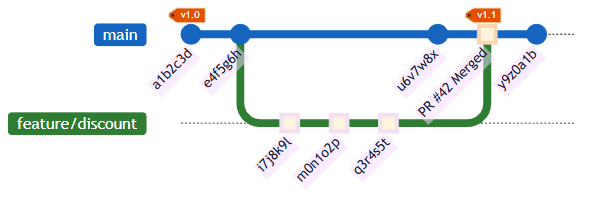
After the post-mortem, Emma spent an afternoon teaching James how git actually works when used with discipline. "Git gives you four tools," she said. "Commits, branches, tags, and blame. Each one is a different kind of memory."
Commits Are Decisions
Every commit should answer one question: "What decision was made, and why?"
The code diff shows what changed. The commit message explains why it changed. Together, they form a decision record. Emma showed James how to query that record:
# Find all feature decisions this year
git log --oneline --since="2024-01-01" --grep="feat"

# Read the full context of a specific decision
git show abc123

# Find who made a specific decision and when
git blame src/config.py
"Think of each commit as a journal entry," Emma told James. "The diff is what happened. The message is why it matters."
Branches Are Experiments
Branches are not just for "features." They are parallel experiments — hypotheses being tested. When James wanted to try replacing his JSON storage with SQLite (the relational approach from Axiom VI), Emma told him to create a branch:
# Start an experiment
git checkout -b experiment/try-sqlite-storage

# Work on the experiment...
# If it succeeds: merge it
git checkout main && git merge experiment/try-sqlite-storage

# If it fails: keep the record, delete the branch
git checkout main
git branch -d experiment/try-sqlite-storage
# The commits still exist in reflog for 90 days
Even failed experiments have value. The commit history on a deleted branch records what was tried and why it did not work — preventing the team from repeating the same failed approach six months later. "Your team already tried Redis caching last quarter," Emma pointed out. "If they had kept the experiment branch, the new developer would not have spent two weeks rediscovering why it did not work."
Tags Are Milestones
Tags mark stable, known-good states you can always return to. James learned to tag his project before any risky change:
# Mark a release
git tag -a v1.2.0 -m "Feature complete: order management with TDG tests"

# Mark a significant decision point
git tag -a pre-sqlite-migration -m "Last commit before JSON->SQLite migration"

# Return to any milestone instantly
git checkout v1.2.0
If the SQLite migration had failed catastrophically, James could return to pre-sqlite-migration in one command — no manual reversal, no guesswork about what the project looked like before.
Blame Is Context, Not Accusation
Despite its name, git blame is a context tool. It answers: "Who wrote this line, when, and as part of what change?" James used it to understand a mysterious constant in the shipping module:
# Find the context for a confusing line
git blame src/shipping.py -L 42,42

# Result:
# d4e5f6g (Emma 2024-03-15) FREE_SHIPPING_THRESHOLD = 75.0  # PM-2024-019

# Now James knows: Emma set this, on March 15, for product requirement PM-2024-019
Without blame, that 75.0 would be a magic number — nobody would know where it came from or whether it was safe to change. With blame, the full context is one command away.
Commit Discipline
The power of git-as-memory depends entirely on commit quality. James's wip commits were not just lazy — they were destroying information. Every time he bundled three unrelated changes into one commit with no message, he was erasing the decisions that produced those changes. Emma called this "voluntary amnesia."
Atomic Commits: One Logical Change
Each commit should contain exactly one logical change. Emma gave James a simple test: if you have to use "and" to describe it, split it:
# BAD: Multiple unrelated changes in one commit
git add .
git commit -m "fix discount bug and update shipping and add tests"

# GOOD: Three separate atomic commits
git add src/discount.py tests/test_discount.py
git commit -m "fix(orders): correct discount calculation — multiply by (1 - rate)

apply_discount() returned price * rate instead of price * (1 - rate),
giving 85% discount instead of 15%. Caught by TDG specification test:
assert apply_discount(order, 0.15).total == 85.0

Impact: $12,000 loss over weekend. Post-mortem: PM-2025-003"

git add src/shipping.py
git commit -m "feat(shipping): raise free shipping threshold from 50 to 75

Product team decision: $50 threshold was losing margin on small orders.
Analytics showed 68% of orders between $50-$75 added items to qualify.
New threshold reduces free shipping orders by 31%.

Ref: PRODUCT-2025-047"

git add tests/test_shipping.py
git commit -m "test(shipping): add TDG specs for international surcharge

Five specification tests covering domestic, international, free shipping
threshold, and boundary conditions. Written before AI implementation
per TDG workflow (Axiom VII)."
Conventional Commits: Structured Prefixes
After a week of writing atomic commits, James noticed a new problem: his messages were descriptive but unscannable. Reading twenty commit messages to find "the one where I changed the shipping logic" took too long. Emma introduced him to conventional commits — a structured prefix system that makes history scannable at a glance:
| Prefix | Meaning | Example |
|---|---|---|
feat: | New feature | feat(shipping): add international surcharge calculation |
fix: | Bug fix | fix(orders): correct discount calculation |
docs: | Documentation | docs(api): document order endpoints |
refactor: | Code restructure (no behavior change) | refactor(orders): extract discount logic to module |
test: | Adding/fixing tests | test(shipping): add TDG specs for free shipping threshold |
chore: | Maintenance | chore(deps): update fastapi to 0.109.0 |
perf: | Performance improvement | perf(shipping): replace O(n^2) rate lookup with dict |
ci: | CI/CD changes | ci(github): add Python 3.12 to test matrix |
The format: type(scope): description
# James's order management project — scannable history
git log --oneline

# a1b2c3d feat(shipping): add international surcharge calculation
# b2c3d4e fix(orders): correct discount calculation — multiply by (1 - rate)
# c3d4e5f test(orders): add TDG specs for discount edge cases
# d4e5f6g refactor(orders): extract discount logic to module
# e5f6g7h perf(shipping): replace O(n^2) rate lookup with dict
# f6g7h8i docs(orders): document discount business rules
At a glance, James could see: a new shipping feature, the discount bug fix, TDG tests, a refactor, the performance fix for the O(n^2) shipping function from Axiom VII's Green Bar Illusion, and documentation. This is scannable memory — the table of contents for his project's story.
The WHY Rule
The most important discipline — and the one that would have saved James's post-mortem — is this: commit messages explain WHY, not WHAT.
The diff already shows what changed. The message must explain what the diff cannot:
# BAD: Describes WHAT (redundant with the diff)
git commit -m "change FREE_SHIPPING_THRESHOLD from 50 to 75"

# GOOD: Explains WHY (context the diff cannot provide)
git commit -m "feat(shipping): raise free shipping threshold from 50 to 75

Product team decision: $50 threshold was losing margin on small orders.
Analytics showed 68% of orders between $50-$75 added items to qualify.
New threshold reduces free shipping orders by 31%.

Ref: PRODUCT-2025-047"
Six months from now, when someone asks "why is the threshold 75 and not 50?", the commit message answers immediately — it was a product decision backed by analytics, not an arbitrary choice. No Slack archaeology required. This is what James's post-mortem was missing — the why behind every change.
Git and AI: The Collaboration Protocol
When James started using Claude Code for his order management project, he discovered that disciplined git history served a second purpose: it made the AI smarter. The AI could read his commit messages to understand not just the current code, but the decisions that shaped it.
AI Can Read Git History for Context
AI tools can examine your project's history to understand decisions:
# AI reads recent changes to understand current direction
git log --oneline -20

# AI reads the discount module's evolution
git log --follow --oneline src/discount.py

# AI reads the full context of why a change was made
git show abc123
When James's CLAUDE.md said "always use TDG for business logic," the git history explained why — the $12,000 discount disaster. The AI could provide better suggestions because it understood the reasoning behind the rule, not just the rule itself.
AI Commits Should Be Clearly Labeled
When the AI generates code that gets committed, James learned to label it clearly:
# Clear attribution in commit message
git commit -m "feat(orders): implement discount calculation per TDG specs

Passes all 5 specification tests in test_discount.py.
Handles 0%, 15%, and 100% discount edge cases.

Co-Authored-By: Claude <noreply@anthropic.com>"
This matters for three reasons:
- Accountability: Code review knows which commits need extra scrutiny
- Learning: You can filter
git log --author="Claude"to see AI contribution patterns - Audit: In regulated environments, AI-generated code may require additional review
Git Diff as AI Code Review Input
The most natural input for AI code review is a git diff. James started sending diffs to the AI instead of entire files — the diff showed exactly what changed, with no noise:
# Review staged changes before committing
git diff --staged

# Review a feature branch against main
git diff main...feature/order-discounts

# Ask AI to review the diff
git diff main...feature/order-discounts | pbcopy
# Paste into AI: "Review this diff for correctness and edge cases"
Branches for AI Experiments
When James asked the AI to try something experimental — like rewriting his shipping calculator with a different algorithm — Emma insisted he always use a branch:
# Create a safe sandbox for AI experimentation
git checkout -b ai/experiment-new-shipping-algorithm

# AI generates a new shipping calculator...
# You run TDG tests against it...

# If tests pass: merge to main
git checkout main && git merge ai/experiment-new-shipping-algorithm

# If tests fail: discard without risk
git checkout main
git branch -D ai/experiment-new-shipping-algorithm
The branch prefix ai/ makes it immediately clear which branches contain AI-generated experiments. James could let the AI try radical approaches — a completely different discount algorithm, a table-driven shipping calculator — without any risk to the working code on main.
The Agentic Development Workflow
Emma showed James the standard workflow she used for all AI-assisted development on the order management project:
main (stable, protected)
  │
  ├── feature/order-discounts (human + AI work)
  │     ├── commit: test(orders): add TDG specs for discount logic (human)
  │     ├── commit: feat(orders): implement discount calculation (AI, reviewed)
  │     ├── commit: test(orders): add boundary case for 100% discount (human)
  │     └── commit: docs(orders): document discount business rules (AI, reviewed)
  │
  └── Pull Request → Human reviews all AI commits → Merge to main
Key rules:
- main is always stable: Never commit directly to main
- Feature branches isolate work: Both human and AI changes go here
- Pull requests require review: Especially for AI-generated code
- Each commit is atomic: One logical change, clearly attributed
"Notice the pattern," Emma told James. "The human writes the tests — the specification. The AI writes the implementation and documentation. The commit history shows exactly who decided what. This is TDG encoded into your git workflow."
Anti-Patterns: How Git Memory Fails
Open any project that has been running for more than a year and run git log --oneline | head -20. If you see wip, fix, stuff, update, changes — you are looking at a project with amnesia. The commit log reads like a list of words rather than a story. git blame on any line returns a message that tells you nothing.
A developer left six months ago and took the entire architectural context with them, because none of it was written in commits. git bisect is useless because every commit changes forty files for three unrelated reasons. The team lead says "we tried caching last year" but nobody can find the experiment, nobody remembers why it failed, and a new developer spends two weeks rediscovering the same dead end.
This history is not missing information by accident. It is missing information because each developer chose the two-second shortcut of git commit -m "wip", and a thousand two-second shortcuts became a project that cannot explain itself.
These specific patterns destroy git's value as memory. Recognize and avoid them:
| Anti-Pattern | Why It Fails | Better Approach |
|---|---|---|
| Giant commits ("fix everything") | Impossible to understand, revert, or bisect | One logical change per commit |
| Empty messages ("wip", "stuff", "asdf") | Zero memory value; future you learns nothing | Explain WHY with conventional prefix |
| Committing secrets/credentials | Security breach waiting to happen | Use .gitignore and environment variables |
| Force-pushing shared branches | Rewrites other people's history | Only force-push your own unshared branches |
| Not using branches for experiments | Experiments pollute main history | Branch first, merge only if successful |
| Committing generated files | Noise in diffs, merge conflicts | .gitignore build outputs, node_modules/, etc. |
| Squashing all commits on merge | Destroys the detailed decision history | Preserve atomic commits; only squash true "wip" |
| Never tagging releases | No stable milestones to reference or rollback to | Tag every release and significant milestone |
The "Giant Commit" Problem in Detail
James's worst commit from before the post-mortem looked like this:
commit x9y8z7
Message: "weekly update"
Files changed: 47
Insertions: 2,391
Deletions: 856
This commit was anti-memory. It recorded that 47 files changed but provided no way to understand why. James could not revert part of it. He could not bisect through it. He could not explain any individual change at the post-mortem.
Emma showed him what the same week's work should have looked like — 12 atomic commits:
feat(auth): add OAuth2 PKCE flow for mobile clients
fix(db): resolve connection leak under high concurrency
refactor(api): extract validation into middleware layer
test(auth): add PKCE challenge verification tests
docs(deploy): update Kubernetes manifest for v2.3
perf(search): add trigram index for fuzzy name matching
...
Each commit is a discrete memory. Each can be individually understood, reverted, or referenced.
Git as Time Machine
Git does not just record history — it lets you travel through it. Two weeks after adopting commit discipline, James experienced its first real payoff: his shipping calculator started returning wrong rates for international orders. Instead of reading through code to find the bug, Emma showed him how to let git find it.
Bisect: Finding When Things Broke
git bisect performs a binary search through history to find the exact commit that introduced a bug:
# Start bisecting
git bisect start

# Mark current state as bad (the bug exists now)
git bisect bad

# Mark a known-good state (the bug did not exist here)
git bisect good v1.2.0

# Git checks out a middle commit. You test it:
python -m pytest tests/test_auth.py
# Tell git the result:
git bisect good  # or: git bisect bad

# Repeat until git finds the exact commit:
# "abc123 is the first bad commit"
# feat(auth): add session timeout handling

# Clean up
git bisect reset
With James's new atomic commits, bisect pinpointed the problem in six steps across fifty commits. The culprit was a commit where the AI had regenerated the international surcharge logic and introduced a rounding error. Because the commit was atomic — one logical change — James knew exactly which code to fix. If he had still been making giant "weekly update" commits, bisect would have been useless — finding the bad commit would still leave him sifting through hundreds of unrelated changes.
Revert: Safe Undo
git revert creates a new commit that undoes a previous commit, without rewriting history:
# Safely undo a specific commit
git revert abc123

# Revert creates a NEW commit:
# "Revert 'feat(auth): add session timeout handling'"
# This preserves the full story: we tried it, it broke things, we reverted it.
Unlike git reset, revert is safe for shared branches because it adds to history rather than erasing it. The story is preserved: we tried it, it broke things, we reverted it. Future James — or a new team member — can read the full narrative.
Cherry-Pick: Selective Application
git cherry-pick applies a specific commit from one branch to another. When James found a critical bug fix on his experiment branch that needed to go to main immediately, Emma showed him cherry-pick:
# A critical fix was made on a feature branch
# Apply just that fix to main without merging everything
git checkout main
git cherry-pick def456

# The fix is now on main, with full attribution preserved
Viewing Past States
After learning these commands, James realized he could have answered his team lead's post-mortem question — if his commits had been disciplined. With proper git history, recovering any past version is one command:
# See a file as it was at any point in history
git show v1.0.0:src/discount.py

# Compare the buggy version to the fixed version
git diff abc123 def456 -- src/discount.py

# See all files at a past state (read-only exploration)
git stash  # save current work
git checkout v1.0.0
# explore the entire project as it was at the release...
git checkout main
git stash pop  # restore current work
If James had made an atomic commit for the original apply_discount() implementation, he could have shown the team lead exactly what the buggy code looked like, when it was introduced, and which TDG test caught the error — all from a single git show command.
Try With AI
Prompt 1: Transform Bad Commits into Good Memory
I have these five commits from an order management project:

1. "updated stuff"
2. "fix"
3. "wip"
4. "changes"
5. "done"

For each one, here is the actual diff summary. Rewrite each commit
message using conventional commit format, explaining the WHY not the WHAT:

1. Changed FREE_SHIPPING_THRESHOLD from 50.0 to 75.0 in shipping.py
2. Added null check before accessing order.customer_id in discount.py
3. Created new file tests/test_discount.py with 5 TDG specification tests
4. Renamed "calculate_total" to "compute_order_total" across 4 files
5. Added .env to .gitignore and removed hardcoded DB connection string

For each rewritten message, explain what future-you would learn from it
that the original message failed to communicate.
What you're learning: The difference between commits as file-saves and commits as decisions. Notice how each rewritten message captures reasoning that would otherwise be lost — the same reasoning James could not reconstruct at his post-mortem. The original messages treat git as a backup tool; the rewrites treat it as institutional memory.
Prompt 2: Design a Branching Strategy for AI Collaboration
I'm working on an order management system with one other developer
and using Claude Code as my AI coding assistant. We deploy weekly.

Design a branching strategy that:
- Keeps main always deployable
- Gives AI a safe space to experiment (like trying a new discount algorithm)
- Makes AI contributions clearly identifiable in history
- Allows easy rollback of AI-generated code specifically
- Supports code review before AI changes reach main

Show me the exact git commands for a typical workflow where AI generates
the implementation for my TDG tests, I review it, and we merge to main.
What you're learning: Git as a collaboration protocol between human and AI. The branching strategy becomes a trust boundary — the AI works freely within branches, but human review gates the path to production. This is the workflow Emma taught James: human writes the specification, AI generates within a branch, tests verify, human merges.
Prompt 3: Investigate a Bug Using Git's Memory
My order management system's shipping calculator started returning
wrong rates for international orders sometime in the last 50 commits.
I know the tagged release v1.2.0 (50 commits ago) worked correctly.

Walk me through EXACTLY how to use git bisect to find the breaking
commit. Show me:
1. The exact commands to start bisecting
2. What I test at each step (I have pytest tests for shipping)
3. How to handle a commit that I can't easily test
4. What to do once I find the bad commit
5. How to safely fix the problem (revert vs fix-forward)

Then explain: why does atomic commit discipline make this process
faster and more effective than if all 50 commits were giant
"weekly update" commits?
What you're learning: Git as an investigative tool, not just a storage tool. Binary search through history only works when commits are atomic — each commit is a single hypothesis to test. This is exactly how James found his international shipping bug: bisect narrowed fifty commits to the one AI-generated change that introduced a rounding error. Giant commits make bisect useless because even finding the bad commit does not tell you which of its two hundred changes caused the problem.
The Permanent Record
A month into his new commit discipline, James made a different kind of mistake. He was setting up the database connection for his order management system and committed the file with the connection string hardcoded: DATABASE_URL=postgresql://admin:s3cretPass@prod-db.company.com/orders. He realized immediately, deleted the line, and committed the fix. Problem solved — or so he thought.
"The password is still in your history," Emma told him. She ran one command:
# This finds secrets in ALL of history, not just current files
git log -p --all -S 'DATABASE_URL'
The original commit appeared — with the full connection string visible. Deleting the file in a later commit does not erase it from history. Git's perfect memory, the same feature that makes it invaluable for recording decisions, makes it dangerous for secrets. Once committed, a credential exists in every clone of the repository, forever.
The Permanent Record is the flip side of Axiom VIII: git remembers everything, including things you wish it would forget. The same mechanism that would have preserved James's buggy apply_discount() for the post-mortem also preserves every accidentally committed password, API key, and credential.
Prevention is the only reliable defense:
# Create .gitignore BEFORE your first commit
echo ".env" >> .gitignore
echo "*.pem" >> .gitignore
echo "credentials.json" >> .gitignore

# Verify nothing sensitive is staged
git diff --staged --name-only
# Check: do any of these files contain secrets?

# Use environment variables instead
export DATABASE_URL="postgresql://user:pass@host/db"
# Reference in code: os.environ["DATABASE_URL"]
If you accidentally commit a secret, as James did:
- Rotate the credential immediately — assume it is compromised
- Remove from current files and commit the removal
- For sensitive repositories, use
git filter-branchor BFG Repo-Cleaner to purge from history - Force-push the cleaned history (this is the one valid use of force-push)
James had to rotate the database password that afternoon — an hour of work that a .gitignore file would have prevented entirely. He never committed a credential again.
Key Takeaways
James's post-mortem failed because his git history was a collection of wip messages instead of a record of decisions. Emma's fix was not to write better documentation — it was to write better commits. Linus Torvalds designed Git in 2005 to be a distributed institutional memory. Commit discipline is what makes that memory useful.
- Git is not a backup tool — it is the memory of your project. James's
wipcommits destroyed the story of how his code evolved. Emma's disciplined commits preserved every decision, its rationale, and its context. The difference cost James three hours at a post-mortem that should have taken three minutes. - Atomic commits enable time travel. When James's shipping calculator broke,
git bisectfound the exact commit in six steps across fifty commits — because each commit was one logical change. Giant commits make bisect useless. - Commit messages explain WHY, not WHAT. The diff already shows what changed. The message records what the diff cannot: the reasoning, the context, the trade-offs. Six months from now, the message is all you have.
- Git is the collaboration protocol between you and AI. The AI reads your commit history to understand context. You label AI-generated commits for accountability. Branches give the AI a safe space to experiment. Pull requests gate the path to production.
- The Permanent Record cuts both ways. Git's perfect memory preserves every decision — and every accidentally committed secret. A
.gitignorefile before your first commit prevents the one mistake that git cannot easily undo.
Looking Ahead
Your shell orchestrates programs. Your knowledge lives in markdown. Your programs have types, tests, and relational data. Your systems are composed from focused units. Your git history records every decision. But how do you know that all of these pieces actually work together? James had tests for individual functions, but nothing that verified the full pipeline: data enters the system, flows through discount calculation, passes through shipping, produces an invoice, and sends a confirmation. Each piece worked in isolation. The pipeline had never been tested end-to-end.
In Axiom IX, you will discover that verification is not a single step — it is a pipeline, and every stage must pass before you trust the whole.