Axiom I: Shell as Orchestrator
The overview ended with a question: when an AI agent has access to a terminal, what should it actually do with it? This axiom's answer is simple — the terminal should coordinate work, never do the work itself. That sounds like a small distinction, until you are the one staring at line 247 of a broken script at 2am.
James is a junior developer, three weeks into his first real job at a mid-sized e-commerce company. He works on the platform team — the group responsible for keeping the order management system running. His mentor is Emma, the team's senior engineer. She has been with the company for four years, built most of the backend infrastructure, and has a reputation for turning chaotic systems into clean ones.
None of that mattered at 2:14am on James's first on-call rotation, when his phone buzzed: the deployment was stuck and 50,000 users were affected. He opened the deployment script — a 400-line file he had never seen — and stared at line 247. Variable names like temp2 and OUT told him nothing. Somewhere above, a failed test should have stopped everything, but someone had removed that safety check three months ago and nobody noticed. The script kept running past broken tests, built a broken version of the app, and pushed it live.
James called the senior engineer at 2:30am. "Yeah," Emma said. "That script breaks every few weeks. Nobody wants to touch it because everything is tangled together."
Emma rewrote the entire process that weekend. The new version was 12 lines long. Each line called a specialized tool — pytest for testing, Docker for building, kubectl for deployment. The file did nothing except decide what runs, in what order, and what happens if something fails. When a test failed, the process stopped. When a step succeeded, it moved to the next one. No tangled logic. No mystery variables.
The 2am emergencies stopped. Not because Emma wrote better code. Because she stopped cramming everything into one script and started using the shell for what it was designed for: orchestration — coordinating tools, not doing the work itself.
The Problem Without This Axiom
James's deploy.sh was not written by a bad engineer. It was written by a series of good engineers, each solving an immediate problem. The first version was 15 lines — a clean sequence of commands. Then someone added input validation. Then error logging. Then a Slack notification. Then a rollback mechanism. Each addition was reasonable in isolation. Together, they created a 400-line script that treated the shell as a programming language.
This is the universal failure mode. When developers first encounter the shell, they treat it as a programming language. They write loops, parse strings, manipulate data, implement business logic — all inside .sh files. This works for small tasks but collapses at scale.
The symptoms are predictable — and James experienced all four on that 2am call:
- Debugging becomes archaeology. A 300-line bash script has no stack traces (detailed error reports) and no IDE support to help you navigate. When it fails on line 247, you have to read from line 1.
- Testing becomes impossible. You cannot test one piece of the script in isolation because every part depends on what ran before it — variables set earlier, files created by previous commands, the state of the whole system.
- Collaboration becomes hazardous. Two developers editing the same script inevitably break each other's work because they make different assumptions about what the script's variables contain at any given point.
- AI agents cannot reason about it. An AI reading a 500-line bash script sees an impenetrable wall of string manipulation. An AI reading a 12-line Makefile sees clear intent: run tests, build the app, deploy.
The root cause in every case: computation and coordination are tangled together. The script is simultaneously deciding what to do and how to do it. These are fundamentally different responsibilities.
The Axiom Defined
Axiom I: The shell is the universal coordination layer for all agent work. Programs do computation; the shell orchestrates programs.
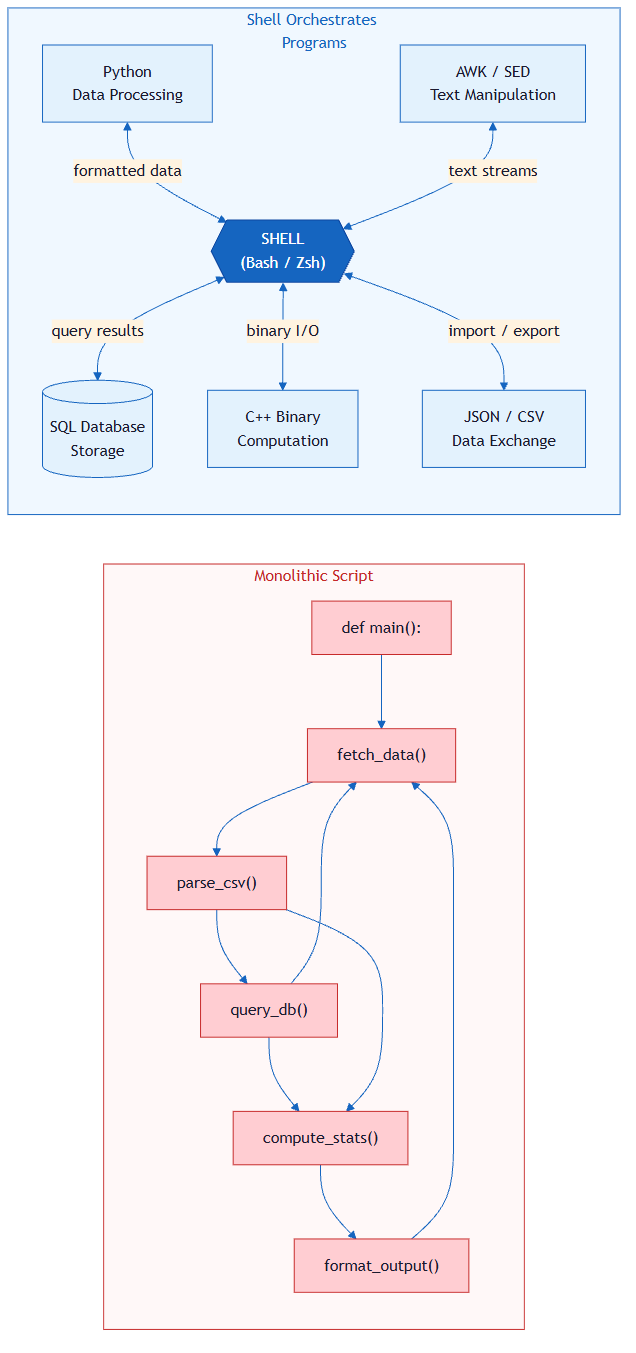
The boundary is sharp and non-negotiable:
| Responsibility | Belongs To | Examples |
|---|---|---|
| Coordination | Shell | Sequencing, parallelism, piping, error routing, environment setup |
| Computation | Programs | Data transformation, business logic, parsing, validation, algorithms |
The shell's job is to answer: What runs? In what order? With what inputs? What happens if it fails?
A program's job is to answer: Given this input, what is the correct output?
When you respect this boundary, every component becomes independently testable, replaceable, and understandable. When you violate it, you get James's 2am pager.
Historical Background: The Unix Roots (click to expand)
This axiom did not originate with agentic development. It was discovered over six decades ago at Bell Labs.
In 1964, Doug McIlroy — who would go on to lead Bell Labs' Computing Sciences Research Center — wrote an internal memo arguing that programs should connect to each other like garden hoses. That single idea became the Unix pipe, and it reshaped how an entire generation thought about software.
By 1978, McIlroy had distilled the accumulated wisdom of Unix's creators — Ken Thompson, Dennis Ritchie, and their colleagues — into three rules that appeared in the Bell System Technical Journal:
- Write programs that do one thing and do it well.
- Write programs to work together.
- Write programs to handle text streams, because that is a universal interface.
Read those rules again. They are Axiom I in its original form. Rule 1 says programs should compute, not coordinate. Rule 2 says something else handles the coordination — that something is the shell. Rule 3 says the interface between them is text, which is exactly what pipes, redirection, and exit codes provide.
The Unix philosophy endured because it solved a fundamental engineering problem: complexity management through separation of concerns. The same 400-line deploy script that plagues today's junior developer would have plagued a Bell Labs engineer in 1978. The solution was the same then as it is now — stop writing monoliths, start composing small tools.
What makes this relevant to agentic development specifically is that AI agents rediscovered this pattern independently. When Claude Code, Cursor, or any coding agent operates through a terminal, it naturally falls into the McIlroy pattern: invoke a focused tool, read the output, invoke the next tool. The shell is not just a convenient interface — it is the architectural pattern that makes tool-using AI possible.
From Principle to Axiom
In Chapter 4, you learned Principle 1: Bash is the Key — terminal access is the fundamental capability that makes AI agentic rather than passive. That principle answered the question: What enables agency?
This axiom answers a different question: How should the shell be used once you have it?
| Principle 1 | Axiom I | |
|---|---|---|
| Question | What enables agency? | How should the agent use the shell? |
| Answer | Terminal access | As an orchestration layer |
| Focus | Capability | Architecture |
| Level | "Can I act?" | "How should I act?" |
| Metaphor | Having a key to the building | Knowing which rooms to use for what |
The principle gave you access. The axiom gives you discipline. An agent that has terminal access but uses it for 500-line computation scripts is like a conductor who grabs a violin mid-performance — technically capable, architecturally wrong.
Practical Application
Composition Primitives
When James asked Emma how the 12-line Makefile could replace 400 lines of bash, Emma's answer was almost embarrassingly simple: "I didn't write anything. I just connected programs that already existed." The Makefile used no framework, no libraries, no custom tooling. It used three primitives that the shell has shipped since 1973.
Pipes are the oldest and most elegant. One program's output becomes another program's input, with nothing in between but a | character.
# Orchestration: the shell routes data between four programs
# Each program handles its own computation
cat server.log | grep "ERROR" | sort -t' ' -k2 | uniq -c
Here, cat reads, grep filters, sort orders, uniq counts. The shell wrote zero logic — it only connected programs.
Exit codes are the shell's error protocol — a program returns 0 for success and anything else for failure, and the shell decides what to do next.
# Orchestration: the shell decides what happens based on program results
python run_tests.py && docker build -t myapp . && docker push myapp:latest
The && operator is pure orchestration: "run the next program only if the previous one succeeded." The shell makes no judgment about what "success" means — it trusts the program's exit code.
Redirection decouples programs from their data sources entirely. A program does not need to know whether its input comes from a file, a pipe, or a user's keyboard — the shell handles that routing.
# Orchestration: the shell routes output to appropriate destinations
python analyze.py < input.csv > results.json 2> errors.log
Three symbols — <, >, 2> — and the program's entire I/O is rewired without changing a single line of its code. That is orchestration at its most minimal.
Makefiles as Orchestration
Pipes compose programs linearly. But real workflows have dependencies — tests must pass before building, building must succeed before deploying. Makefiles express these relationships declaratively, and they have been doing so since 1976:
# This entire file is orchestration. Zero computation.
.PHONY: all test build deploy clean

all: test build deploy

test:
	python -m pytest tests/ --tb=short
	npm run lint

build: test
	docker build -t taskapi:latest .

deploy: build
	kubectl apply -f k8s/deployment.yaml
	kubectl rollout status deployment/taskapi

clean:
	rm -rf dist/ __pycache__/ .pytest_cache/
	docker rmi taskapi:latest 2>/dev/null || true
Notice what the Makefile does NOT do:
- It does not parse test output to decide if tests passed (pytest handles that via exit codes)
- It does not implement Docker image layer logic (Docker handles that)
- It does not manage Kubernetes rollout strategy (kubectl handles that)
The Makefile's only job: sequence the programs and respect their exit codes. This is orchestration in its purest form.
The Shell in Agent Workflows
This is where Axiom I becomes central to everything this book teaches — and where James's story connects to yours.
Consider what separates an AI chatbot from an AI agent. A chatbot receives text and returns text. An agent receives a goal and takes actions in the world — it reads files, runs tests, queries databases, deploys services. How? Through the shell. The shell is the bridge between language and action.
Watch what Claude Code actually does when you ask it to fix a failing test:
# Step 1: Understand the failure (grep does the searching)
grep -r "def process_payment" src/
python -m pytest tests/test_payment.py --tb=short

# Step 2: Read and edit the code (agent's own capabilities)
# [reads file, identifies bug, writes fix]

# Step 3: Verify the fix (pytest does the validation)
python -m pytest tests/test_payment.py

# Step 4: Confirm and record (git does the version control)
git diff
git add src/payment.py
git commit -m "fix: handle null amount in process_payment"
Count the shell commands. Each one is a single invocation of a specialized program. The agent wrote zero logic in bash — no loops, no string parsing, no conditionals. It orchestrated. This is not a coincidence. It is the only pattern that scales.
Why orchestration is the only viable pattern for agents:
| If the agent... | Then it... | Problem |
|---|---|---|
| Writes complex bash logic | Must debug bash (no types, no stack traces) | Agents are worse at bash debugging than humans |
| Reimplements tool functionality | Duplicates existing, tested code | Higher error rate, slower execution |
| Uses shell as orchestrator | Leverages every tool on the system | Maximum capability, minimum code |
The insight is architectural: an AI agent's power is proportional to the number of tools it can compose, not the amount of code it can write. A 12-line orchestration that chains pytest, docker, and kubectl accomplishes more than a 500-line custom script — and it accomplishes it reliably because each tool is independently maintained and tested.
This pattern holds across every major AI coding tool. Whether it is Claude Code, Cursor, Windsurf, or GitHub Copilot's workspace agents — they all converge on the same architecture: the model reasons, the shell orchestrates, and specialized programs compute. Axiom I is not our invention. It is what every successful AI agent discovered independently, because it is the architecture that works. Had James been able to point an AI agent at his team's deployment on that 2am call, the agent would have done exactly this — invoking pytest, reading the exit code, and stopping. It would never have written a 400-line bash script to do so.
The Complexity Threshold
James's deploy.sh did not start as 400 lines. It started as 15 — a clean sequence of commands. But each week, someone added a loop here, a string parse there, a conditional that checked whether the Docker registry was reachable before pushing. By the time James inherited it, the script had crossed from coordination into computation without anyone noticing the moment it happened.
Axiom I does not mean "never write more than one line of bash." Short scripts that set up environments, sequence commands, and route errors are legitimate orchestration. The danger zone begins when your script starts doing the work instead of delegating it.
Heuristics for detecting the threshold:
| Signal | Shell (Orchestration) | Program (Computation) |
|---|---|---|
| Lines of logic | Under 20 lines | Over 20 lines of actual logic |
| Control flow | Linear or single conditional | Nested loops, complex branching |
| String manipulation | Filenames and paths | Parsing, formatting, transformation |
| Error handling | Exit codes and set -e | Try/catch, recovery strategies, retries |
| State | Environment variables for config | Data structures, accumulators, caches |
| Testing | Not needed (trivial coordination) | Required (complex logic) |
Example: Crossing the threshold
This starts as orchestration but has crossed into computation:
# BAD: This is computation disguised as shell
for file in $(find . -name "*.py"); do
    module=$(echo "$file" | sed 's|./||' | sed 's|/|.|g' | sed 's|.py$||')
    if python -c "import $module" 2>/dev/null; then
        count=$(grep -c "def " "$file")
        if [ "$count" -gt 10 ]; then
            echo "WARNING: $file has $count functions, consider splitting"
            total=$((total + count))
        fi
    fi
done
echo "Total functions in importable modules: $total"
The fix: extract the computation into a program.
You will learn to write Python later in Part 4. For now, focus on the structure — the messy shell script above tries to do everything inline, while the program below is a separate file that the shell simply calls. The shell orchestrates; the program computes. That architectural distinction is the lesson, not the syntax.
# analyze_modules.py — the PROGRAM handles computation
import os

def analyze(directory, threshold=10):
    total = 0
    for root, dirs, files in os.walk(directory):
        for filename in files:
            if filename.endswith(".py"):
                filepath = os.path.join(root, filename)
                with open(filepath) as f:
                    count = sum(1 for line in f if line.strip().startswith("def "))
                if count > threshold:
                    print(f"WARNING: {filepath} has {count} functions, consider splitting")
                    total += count
    print(f"Total functions found: {total}")

if __name__ == "__main__":
    analyze("src")
# The SHELL orchestrates — one line, clear intent
python analyze_modules.py || echo "Code complexity review needed"
The program is testable, type-checkable, debuggable with a real debugger, and readable by any Python developer. The shell line is pure orchestration: run this program, handle its exit code.
Anti-Patterns
James's deployment script was a Mega-Script — and every team has one. It starts with a comment from 2019: # TODO: refactor this someday. It has mystery variables nobody understands, commands that call services that no longer exist, and logic so tangled that nobody dares change one part for fear of breaking something else. The script works. Mostly. Until it doesn't, and then everyone discovers what James discovered: when computation and orchestration are tangled, no one can fix anything without risking everything.
The Mega-Script is the most common anti-pattern, but not the only one. Here are the three mistakes that violate this axiom most often:
| Anti-Pattern | What It Looks Like | Why It Fails | The Fix |
|---|---|---|---|
| The Mega-Script | A script that grew to hundreds of lines with loops, data processing, and error handling all mixed together | Cannot be tested, debugged, or understood by anyone (including AI agents) | Move the computation into programs; keep the shell to just calling those programs in order |
| Ignoring Exit Codes | Commands chained with ; (which means "run the next command no matter what") instead of && (which means "only continue if the previous step succeeded") | Failures go unnoticed — the script keeps running past broken steps | Always use && or set -e so the process stops when something fails |
| Shell as Data Processor | Using the shell to transform, parse, or analyze data through long chains of text-processing commands | Fragile, unreadable, and impossible to test for edge cases | Write a proper program for any data processing beyond simple filtering |
Try With AI
Prompt 1: Classify Orchestration vs Computation
I'm learning about shell orchestration. Look at this shell script and classify each section as either ORCHESTRATION (coordination between programs) or COMPUTATION (logic that should be a program):

#!/bin/bash
set -e

# Section A
export DB_URL="postgres://localhost/myapp"
export REDIS_URL="redis://localhost:6379"

# Section B
python -m pytest tests/ && npm run test

# Section C
for f in $(find src/ -name "*.ts"); do
  lines=$(wc -l < "$f")
  if [ "$lines" -gt 300 ]; then
    imports=$(grep -c "^import" "$f")
    ratio=$((lines / (imports + 1)))
    if [ "$ratio" -gt 50 ]; then
      echo "WARN: $f may need splitting ($lines lines, $imports imports)"
    fi
  fi
done

# Section D
docker build -t myapp . && docker push myapp:latest

For each section, explain your classification and suggest how to refactor any computation into a proper program.
What you're learning: How to see the architectural boundary between coordination and computation in real shell code. You are developing the pattern recognition to identify when shell usage has crossed from orchestration (its strength) into computation (where proper programs belong).
Prompt 2: Design a Makefile Orchestration Layer
I have a project with these manual steps that I currently run by hand:

1. Lint Python code with ruff
2. Run Python tests with pytest
3. Check TypeScript types with tsc --noEmit
4. Run frontend tests with vitest
5. Build the Docker image
6. Run integration tests against the container
7. Push the image to registry if all tests pass
8. Deploy to staging with kubectl

Help me design a Makefile that orchestrates these steps. Requirements:
- Each target should be one or two lines (pure orchestration)
- Dependencies between targets should be explicit
- Failing at any step must stop the pipeline
- I want to be able to run individual targets (just lint, just test)

After showing the Makefile, explain which parts are orchestration and confirm that no target contains computation logic.
What you're learning: How to express workflow coordination declaratively using Make's dependency graph. You are practicing the discipline of keeping each target to pure orchestration — calling programs rather than implementing logic — and making the sequencing explicit through target dependencies.
Prompt 3: Design an Orchestration Layer for Your Own Project
I want to apply the "Shell as Orchestrator" axiom to my own workflow. Here is what I currently do manually when working on my project:

[Describe your project and list 4-8 steps you repeat regularly. For example:]
- Check code formatting
- Run unit tests
- Run type checking
- Build the application
- Run integration tests against the build
- Generate documentation
- Package for distribution

Help me design an orchestration layer for this workflow:

1. For each step, identify what PROGRAM should handle it (not bash logic)
2. Map the dependencies between steps (what must finish before what starts?)
3. Write a Makefile (or Justfile) that orchestrates these programs
4. Identify any step where I might be tempted to write computation in the shell, and show me the proper program alternative

Important: every target in the orchestration file should be 1-3 lines maximum. If a target needs more, that is computation leaking into orchestration.
What you're learning: How to apply Axiom I to your own work, not just analyze someone else's. You are making the architectural decision about what belongs in the orchestration layer versus what belongs in programs — the core skill this axiom teaches. By working with your actual project steps, you build the habit of thinking "orchestration or computation?" every time you reach for the shell.
The Responsibility of Orchestration
The shell's strength as a universal coordinator comes with a risk: when the orchestration is wrong, everything downstream breaks — not just one piece, but the entire pipeline.
A startup learned this the hard way. Their deployment script ran five steps in sequence: check code quality, run tests, build the app, update the database, deploy. But the steps were connected with ; instead of && — meaning "run the next step no matter what." When the tests caught a real bug, the script ignored the failure and kept going. The database update ran, deleted a column that was still in use, and every user request started failing. Six hours of data modifications were lost. Not because the test was wrong — the test worked. The orchestration just didn't stop when it was told "no."
Three rules prevent this:
-
Stop on failure by default. Use
&&between commands (only continue if the previous step succeeded). A pipeline that keeps running after a failure is not orchestrating — it is gambling. -
Protect dangerous operations. Commands that delete files, reset code, or modify databases should never run automatically without a confirmation step. If your orchestration can destroy data without asking, it is a liability.
-
Test your orchestration, not just your programs. Your programs have their own tests. But does the pipeline itself stop when a step fails? Does it skip steps it shouldn't? Run it against test data to verify that the coordination works correctly, not just the individual tools.
Key Takeaways
James's story is not unusual. Every team has a deploy.sh — a script that started as clean orchestration and slowly filled with computation until nobody could debug, test, or trust it. The axiom exists to prevent that drift before it starts.
- The shell coordinates; programs compute. This is the single architectural boundary that governs all agentic tool use.
- This pattern was discovered at Bell Labs in the 1960s and has survived every technology shift since — because separation of concerns is not a trend, it is a law.
- AI agents rediscovered this pattern independently. Every effective coding agent — Claude Code, Cursor, Windsurf — converges on shell orchestration because it maximizes capability while minimizing fragile custom code.
- The complexity threshold is your sentinel. The moment your shell script contains loops over data, string manipulation, or nested conditionals, extract that logic into a program — before it becomes the next 400-line script someone inherits at 2am.
- Orchestration power demands orchestration discipline. Halt on failure, gate destructive operations, and test your pipelines.
Looking Ahead
You now have the first axiom: the shell orchestrates, programs compute. But what flows through those pipes? What format do the programs read and write? What does the AI agent use as its working memory?
In Axiom II, you will discover that the answer is simpler than you might expect — and it is the same format you have been reading this entire book in.