سے Digital FTE کو پروڈکشن ورکر: ایک 90-منٹ مختصر عملی کورس
15 تصورات، ~80% کا حقیقی استعمال کریں - Durable Execution، triggers، Flow Control
ایک continuation مختصر عملی کورس. یہ ہے کورس #5 میں agentic-coding track. previous کورس، سے Agent کو Digital FTE، ended کے ساتھ ایک customer-support ورکر: وہی OpenAI Agents SDK foundation، three portable skills، ایک Neon Postgres ریکارڈ کا مستند نظام، اور ایک custom MCP server. کہ ورکر چلتا ہے صرف جب آپ call یہ. آپ کھولیں Claude Code یا OpenCode، آپ type، agent responds. ایک حقیقی پروڈکشن ورکر has نہیں human typing پر پرامپٹ.
single insight کہ بناتا ہے everything else click: بدلنا ایک Digital FTE میں ایک پروڈکشن ورکر ہے ایک ڈھانچے سے متعلق addition: ایک پائیدار عمل درآمد engine کہ lets دنیا call ورکر (بجائے کا آپ)، survives crashes mid-flight، اور rate-limits itself بڑے پیمانے پر. Inngest ہے پائیدار-عمل درآمد پلیٹ فارم we استعمال کریں; نمونے transfer one-to-one کو Temporal، Restate، یا Dapr Agents، مگر Inngest کا hosted Hobby tier دیتا ہے friendliest on-ramp: free، نہیں credit card، one-command dev server، ایک dashboard آپ سکتا ہے poke پر جبکہ آپ کوڈ.
میں plain English: Digital FTE سے Course #4 ہے ایک function آپ call. پروڈکشن ورکر یہ کورس builds ہے ایک function world calls، کے ذریعے scheduled cron jobs، کے ذریعے webhooks سے آپ کا inbox اور billing نظام، کے ذریعے events fired کے ذریعے دwasرا ورکرز. جب یہ چلتا ہے، یہ چلتا ہے durably: ایک crash halfway کے ذریعے ایک six-step refund flow کرتا ہے نہیں lose پہلا three steps' کام; ورکر resumes سے کہاں یہ broke. اور جب 500 customers email پر once، ورکر handles انہیں پر ایک controlled rate کہ کرتا ہے نہیں blow آپ کا OpenAI rate limit یا آپ کا Postgres connection pool. None کا کہ machinery ہے yours کو تعمیر کریں; آپ کا کوڈ stays just functions decorated کے ساتھ @inngest.create_function.
دن AI، CRM کے لیے AI-native کمپنیاں، calls Inngest " nervous نظام" کا ان کا پروڈکٹ. دو founding engineers describe یہ وہی طریقہ، independently. ان کا stack استعمال کرتا ہے ہر بنیادی اکائی یہ کورس سکھاتا ہے: پائیدار LLM ورک فلو، wait-for-event coordination، replay on ناکامی، debounce + throttle + concurrency، اور multi-tenant fairness اس لیے ایک organization کا spike کرتا ہے نہیں slow everyone else. framing ہے نہیں curriculum branding; یہ ہے پروڈکشن language کا ایک AI-native کمپنی میں market.
ایک single agent crash mid-ورک فلو ہے annoying. ایک افرادی قوت کا fifty agents handling customer-facing کام بغیر ایک nervous-system substrate ہے impossible: آپ adopt ایک پلیٹ فارم کہ دیتا ہے یہ کو آپ، یا spend six months تعمیر ایک worse نسخہ yourself. Four properties بنائیں پائیدار عمل درآمد uniquely اہم کے لیے agents:
- ہر step لاگتیں حقیقی money. Naive retry بعد ایک crash re-pays کے لیے steps کہ پہلے ہی succeeded; step memoization (تصور 7) pays once.
- ورک فلو compound ناکامی. ایک six-step agent پر 95% per-step reliability has ایک 26% chance کا failing somewhere. Step memoization plus targeted retries lift overall reliability کو ~99.7%.
- Side effects ہیں real-world. Agents email customers، charge کارڈز، post کو Slack. Step memoization plus provider-level idempotency keys بنائیں یہ safe.
- Agents ضرورت انسانی منظوری پر high-stakes moments. بغیر
step.wait_for_event(تصور 15)، آپ تعمیر کریں ایک منظوری queue yourself: ڈیٹا بیس table، polling، timeout handling، جانچ کا ریکارڈ. کہ ہے ایک پروجیکٹ، نہیں ایک feature.
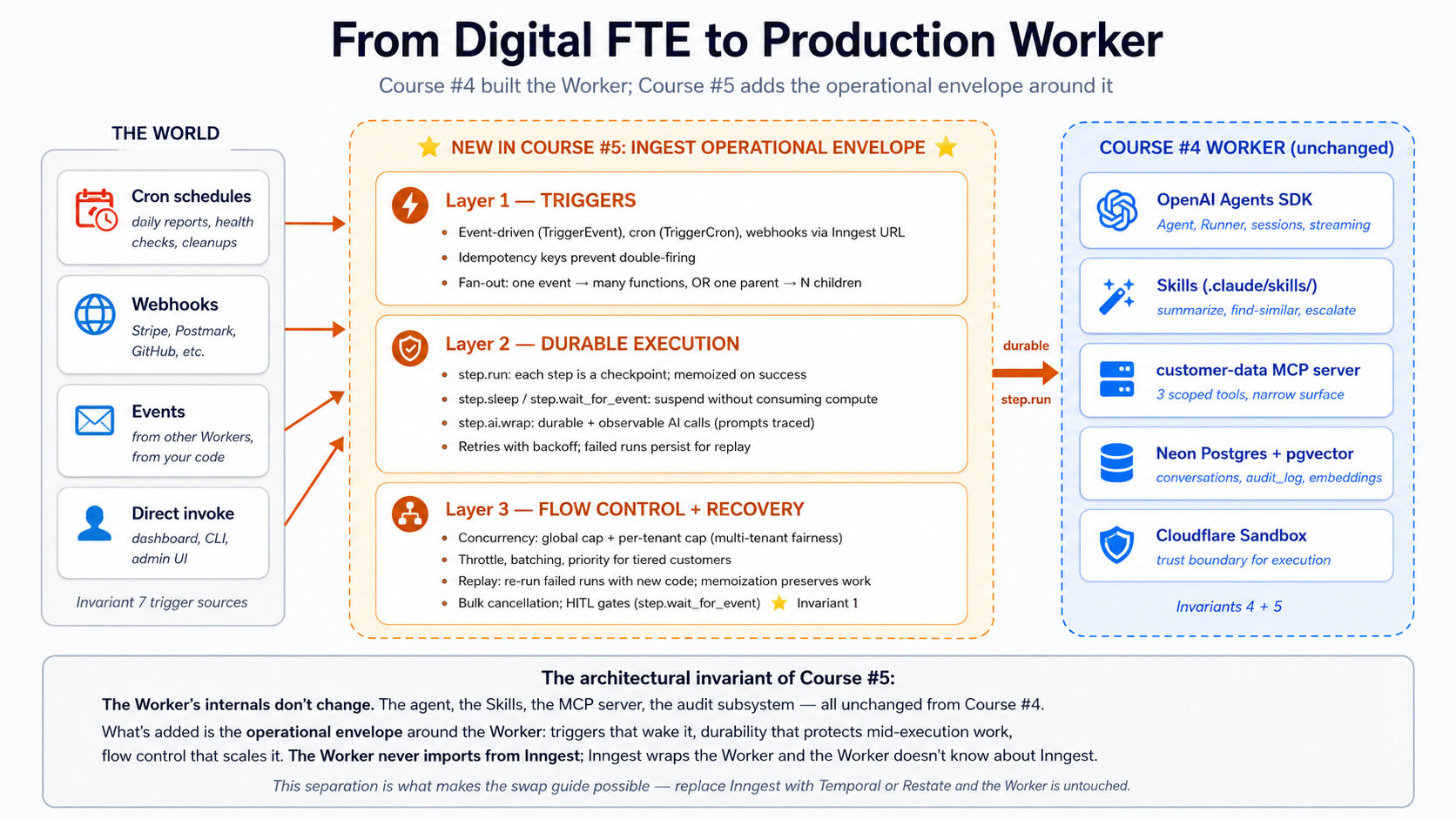
شروع کریں یہاں: ڈھانچے سے متعلق placement اور 15-concept cheat sheet
کہاں یہ کورس sits میں ڈھانچہ. ایجنٹ فیکٹری thesis describes Seven Invariants any پروڈکشن agent نظام لازمی satisfy. Courses #3 اور #4 covered Invariants 4 (engine) اور 5 (ریکارڈ کا مستند نظام). یہ کورس covers دو زیادہ، plus ایک piece کا Invariant 1:
- Invariant 7: دنیا calls نظام. triggers (schedules، webhooks، inbound API calls، events سے دwasرا ورکرز) wake ورکر. Inngest ہے ایک realization.
- Invariant 1، میں part: human ہے principal. منظوری gates ہیں کہاں authored intent re-enters runtime.
step.wait_for_eventہے cleanest expression on any پلیٹ فارم: agent suspends، ایک human emits awaited event، agent resumes. - Durable عمل درآمد بطور ایک thesis-implicit invariant. audit جوابات "کیا happened?"; durability جوابات "کریں یہ again سے کہاں یہ broke." Replayable، retriable، resumable بعد ناکامی.
** 15 تصورات، پر ایک glance.** ایک ناکامی میں پروڈکشن almost ہمیشہ traces کو ایک کا three root causes: ایک trigger کہ did نہیں fire (یا fired twice)، ایک عمل درآمد کہ broke اور lost state، یا ایک flow-control gap کہ let ایک customer کا traffic starve everyone else. 15 تصورات map onto those three layers. یہ ہے first-pass نسخہ: concept plus ایک one-line gist. مکمل diagnostic table (کے ساتھ سوال ہر concept جوابات) ہے میں فوری reference پر end، کہاں آپ گا reach کے لیے یہ during ایک تعمیر کریں.
| # | تصور | One-line gist |
|---|---|---|
| triggers | how دنیا calls Worker | |
| 1 | events vs requests | ایک request ہے sync اور someone waits; ایک event ہے async اور دنیا has moved on. |
| 2 | Cron triggers | ایک schedule wakes function. ایک سطر: TriggerCron(cron="0 9 * * *"). |
| 3 | Webhook triggers | ایک inbound HTTP payload بن جاتا ہے ایک named event; آپ کا function reacts کو name. |
| 4 | Idempotency اور event semantics | event IDs اور step names بنائیں ایک duplicate event (یا retry) ایک no-op. |
| 5 | Fan-out اور sub-agent نمائندگی | ایک event، N subscribing functions; یا ایک parent firing N child events. |
| Durable عمل درآمد | keeping ورکر درست جب something breaks | |
| 6 | step.run اور پائیدار function ماڈل | ہر step.run ہے ایک checkpoint; function سکتا ہے crash درمیان steps اور resume. |
| 7 | Memoization، mechanic underneath | Completed steps return stored نتیجہ بجائے کا re-executing. |
| 8 | step.sleep اور step.wait_for_event | دونوں suspend function durably، کے لیے ایک duration یا کے لیے ایک event. |
| 9 | Retries، error handling، dead-letter | Automatic backoff retries; بعد N tries failed چلائیں persists کے لیے replay. |
| 10 | step.run کے لیے AI calls میں Python | Wrap OpenAI calls میں step.run; step.ai.infer offloads inference (step.ai.wrap ہے TypeScript-صرف). |
| Flow قابو | keeping ورکر healthy کے تحت load | |
| 11 | Concurrency اور throttling | concurrency caps active چلتا ہے; throttle caps starts-per-second. |
| 12 | Priority اور fairness | Priority orders queue; per-key concurrency دیتا ہے ہر tenant ایک fair share. |
| 13 | Batching | Accumulate events میں ایک batched function call کے لیے سستا bulk کام. |
| 14 | Replay اور bulk cancellation | Replay failed چلتا ہے کے ساتھ نیا کوڈ; bulk-cancel چلتا ہے آپ نہیں longer چاہتے ہیں. |
| 15 | HITL gates کے ساتھ step.wait_for_event | function suspends until ایک human approves، پھر resumes کے ساتھ فیصلہ. |
Once آپ رکھتے ہیں یہ mapping، rest کا دستاویز ہے mostly mechanics. ایک ناکامی میں پروڈکشن traces کو ایک کا: ایک trigger کہ did نہیں match (event name typo، schedule did نہیں fire)، ایک step کہ broke بغیر memoization (اس لیے retry restarts whole flow)، ایک flow-control gap کہ did نہیں cap concurrency (اس لیے ایک customer drowned دwasرے)، یا ایک HITL gate کہ timed باہر waiting (اس لیے escalation never happened). diagnostic table میں فوری reference tells آپ کون سا.
Audience. یہ ہے third intermediate-to-advanced مختصر عملی کورس میں agentic-coding track. آپ ضرورت کو رکھتے ہیں completed Courses #3 اور #4 (یا be comfortable کے ساتھ everything they taught)، کیونکہ یہ کورس extends customer-support ورکر سے Course #4's حصہ 4 worked مثال. OpenAI Agents SDK، سیشنز، سٹریمنگ، function ٹولز، sandboxing، skills، Neon Postgres کے ساتھ pgvector، MCP servers، audit logging: all assumed.
Prerequisites. یہ صفحہ assumes five things.
- آپ رکھتے ہیں completed سے Agent کو Digital FTE. Non-negotiable. We چنیں up کہاں Course #4 left off: وہی
chat-agent/پروجیکٹ، وہی skills، وہیcustomer-dataMCP server.- آپ رکھتے ہیں ایجنٹک کوڈنگ مختصر عملی کورس طریقہ کار. منصوبہ طریقہ، قواعد فائلیں، slash commands، read-first-then-write ورک فلو.
- آپ رکھتے ہیں مکمل پر least ایک PRIMM-AI+ cycle. Predict پرامپٹس میں یہ کورس assume rhythm.
- آپ رکھتے ہیں Node.js 20+ دستیاب، even if آپ کا agent ہے Python. Inngest dev server ہے distributed بطور ایک Node CLI (
npx inngest-cli@latest dev).- آپ رکھتے ہیں ایک working ذہنی نمونہ کا "event-driven" vs "request/response." If " دنیا fires ایک event اور zero، ایک، یا بہت سے functions react کو یہ" reads بطور familiar، آپ ہیں calibrated. If نہیں، تصور 1 دیتا ہے آپ shape.
اسے کیسے پڑھیں صفحہ on پہلا pass (click کو expand)
- Expand on پہلا پڑھیں: کوئی بھی چیز labeled "کیا آپ'll دیکھیں،" "Sample چلائیں،" "Expected نتیجہ،" "Verify." Runnable behavior کو چیک predictions کے خلاف.
- Skip on پہلا پڑھیں: long فائل listings میں حصہ 4's worked مثال. narrative above ہر block tells آپ کیا changed; آپ صرف ضرورت فائل contents جب آپ اصل میں تعمیر کریں.
- Optional throughout: "Try کے ساتھ AI" blocks. Extension پرامپٹس کے لیے Claude Code یا OpenCode connected کو Inngest dev-server MCP.
مقصد کا پہلا pass ہے کو internalize three-layer ماڈل: triggers wake ورکر، پائیدار عمل درآمد keeps یہ درست، flow قابو keeps یہ healthy. Second pass کے ساتھ آپ کا hands on keyboard ہے کہاں آپ تعمیر کریں.
Glossary: اصطلاحات آپ'll meet (click کو expand)
ہر اصطلاح ہے explained میں سیاق و سباق کہاں یہ پہلا appears; یہ list ہے ایک فوری reference کے لیے اصطلاحات زیادہ تر likely کو trip ایک first-pass قاری.
- پروڈکشن ورکر: ایک Digital FTE کے ساتھ ایک operational envelope: triggers کہ wake یہ، پائیدار عمل درآمد کہ survives ناکامیاں، flow قابو thبڑے پیمانے پرs یہ کے تحت load.
- event: ایک named، immutable message describing کہ something happened. مثال:
{"name": "customer/email.received", "data": {"customer_id": "..."}}. trigger surface. - Inngest function: ایک Python function decorated کے ساتھ
@inngest_client.create_function، declaring triggers اور steps. unit کا پائیدار کام. - Step: ایک unit کا کام اندر ایک Inngest function wrapped میں
ctx.step.run()،ctx.step.sleep()،ctx.step.wait_for_event()، یاctx.step.ai.infer(). ہر step ہے independently retried اور memoized. - Memoization: جب ایک function crashes اور restarts، Inngest re-runs function کوڈ سے top مگر returns stored نتائج کے لیے any
step.runwhose result ہے پہلے ہی cached. function catches up کو کہاں یہ broke بغیر redoing کام. - Flow قابو: Per-function policies:
concurrency(max active چلتا ہے)،throttle(max starts per second)،priority(queue order)،batch_events(accumulate پہلے invoking). - HITL (Human میں Loop): ایک function pauses کو wait کے لیے انسانی منظوری یا input پہلے continuing.
step.wait_for_eventہے بنیادی اکائی. - Replay: Re-running ایک failed function سے کہاں یہ broke، کے ساتھ نیا کوڈ بعد ایک bug fix.
- Dev server: Inngest کا local dev environment via
npx inngest-cli@latest dev. dashboard پرhttp://127.0.0.1:8288; MCP endpoint پر/mcp.
موجودہ بطور کا ہو سکتا ہے 14، 2026. Verified کے خلاف inngest-py 0.5.18 (released March 11، 2026)، Inngest CLI v1+، اور Inngest Python فوری آغاز. پائیدار-عمل درآمد ڈھانچہ یہ کورس سکھاتا ہے کرتا ہے نہیں تبدیلی جب SDK کرتا ہے; SDK ہے یہ year کا interface کو کہ ڈھانچہ.
Course #3 اور #4 stack ہے foundation کا یہ کورس، نہیں ایک stepping stone we move past. آپ کا حصہ 4 ورکر اب بھی استعمال کرتا ہے Agent، Runner، function_tool، skills سے .claude/skills/، customer-data MCP server، اور six-table audit-aware schema. کیا تبدیلیاں: those بنیادی اکائیاں اب چلائیں inside Inngest functions کہ wrap ہر agent invocation میں step.run() کے لیے durability، declare event/cron triggers، اور apply concurrency اور throttling policies. ** ورکر کا internals کریں نہیں تبدیلی. ورکر کا operational envelope کرتا ہے.**
یہ ہے ایک Python-پہلا کورس like اس کا predecessors، استعمال کرتے ہوئے inngest-py، Inngest کا Python SDK. Inngest dev server itself ہے language-agnostic; یہ کام کرتا ہے کے ساتھ official Python SDK identically کو کیسے یہ کام کرتا ہے کے ساتھ TypeScript یا جائیں.
dual-ٹول نمونہ continues. حصے کہ diverge درمیان Claude Code اور OpenCode رکھتے ہیں ایک switcher; چنیں ایک اور صفحہ syncs across visits.
وہاں ہے ایک مکمل worked مثال میں حصہ 4: customer-support ورکر سے Course #4 wrapped میں ایک Inngest layer، کے ساتھ event triggers، cron health checks، HITL escalation gates، concurrency limits، اور مکمل replay سپورٹ. Eight تعمیر کریں فیصلے، وہی shape بطور Courses #3 اور #4. If آپ سیکھیں بہتر سے doing than مطالعہ definitions، سرسری پڑھیں Parts 1-3 اور jump کو حصہ 4.
ڈھانچہ ایک سطر میں. Engine = OpenAI Agents SDK + Cloudflare سینڈ باکس (Course #3). صلاحیت + Truth + connector = skills + Neon Postgres + MCP (Course #4). Operational Envelope = Inngest کا triggers + پائیدار عمل درآمد + flow قابو (Course #5، یہ ایک). ورکر کا internals ہیں unchanged سے Course #4; کیا ہے نیا ہے layer above یہ کہ lets دنیا wake یہ، lets ناکامیاں نہیں lose state، اور lets ایک ورکر serve ایک افرادی قوت's worth کا traffic. If صرف ایک sentence کا یہ whole دستاویز sticks، کہ ہے ایک.
fifteen-minute فوری کامیابی: دیکھیں durability کے ساتھ آپ کا اپنا eyes
پہلے آپ پڑھیں 15 تصورات کہ explain why یہ ڈھانچہ کام کرتا ہے، تعمیر کریں smallest possible نسخہ کہ اصل میں کام کرتا ہے. دو فائلیں، four uv اور npx commands، ایک shell سیشن. کے ذریعے end کا یہ حصہ آپ گا رکھتے ہیں:
- ایک Inngest function کے ساتھ ایک
step.runاور ایکstep.sleep - Inngest dev server running locally کے ساتھ ایک dashboard پر
http://127.0.0.1:8288 - ایک successful چلائیں آپ triggered سے dashboard
- ایک failed چلائیں آپ replayed بعد fixing bug، watching completed steps return سے memo بغیر re-executing
یہ ہے نہیں حصہ 4 worked مثال; کہ ہے مکمل پروڈکشن ورکر، eight فیصلے، hundreds کا lines. یہ ہے ایک screen. If آپ صرف رکھتے ہیں ایک sitting، کریں یہ، پھر come back کے لیے تصورات جب آپ چاہتے ہیں کو جانیں کیوں ہر piece was shaped طریقہ یہ was.
Step 1. بنائیں ایک fresh پروجیکٹ directory اور install SDK plus ایک tiny ویب فریم ورک. (آپ سکتا ہے swap fastapi کے لیے any ASGI فریم ورک Inngest supports; تیزAPI ہے simplest.)
mkdir hello-inngest && cd hello-inngest
uv init
uv add inngest "fastapi[standard]"
Step 2. لکھیں ایک فائل کے ساتھ ایک پائیدار function. Save بطور hello.py:
# hello.py
import logging
from datetime import timedelta

import inngest
import inngest.fast_api
from fastapi import FastAPI

inngest_client = inngest.Inngest(
    app_id="hello-inngest",
    logger=logging.getLogger("uvicorn"),
    is_production=False,
)


@inngest_client.create_function(
    fn_id="greet-customer",
    trigger=inngest.TriggerEvent(event="demo/greet"),
)
async def greet_customer(ctx: inngest.Context) -> dict[str, str]:
    name = ctx.event.data.get("name", "friend")

    greeting = await ctx.step.run("compose-greeting", lambda: f"Hello, {name}!")

    await ctx.step.sleep("wait-fifteen-seconds", timedelta(seconds=15))

    farewell = await ctx.step.run("compose-farewell", lambda: f"Goodbye, {name}.")

    return {"greeting": greeting, "farewell": farewell}


app = FastAPI()
inngest.fast_api.serve(app, inngest_client, [greet_customer])
Three things کو notice. function shape ہے plain Python: ایک async def decorated کے ساتھ create_function. دو ctx.step.run calls wrap عملی کام کہ چاہیے be memoized. ctx.step.sleep درمیان انہیں suspends function durably ( عمل سکتا ہے crash، restart، یا be redeployed during sleep; چلائیں resumes پر اگلا سطر جب timer fires).
Step 3. شروع کریں function host میں ایک terminal.
uv run uvicorn hello:app --reload --port 8000
آپ چاہیے دیکھیں uvicorn report Started server process اور Application startup complete. function host ہے اب listening پر http://127.0.0.1:8000/api/inngest.
Step 4. میں ایک second terminal، شروع کریں Inngest dev server.
npx inngest-cli@latest dev
dev server prints ایک banner اور opens ایک dashboard پر http://127.0.0.1:8288. یہ auto-discovers function host آپ started میں Step 3.
Step 5. کھولیں http://127.0.0.1:8288 میں ایک browser. Click Functions میں sidebar; آپ چاہیے دیکھیں greet-customer listed. Click events میں sidebar، پھر Send event. Paste یہ payload اور click Send:
{
  "name": "demo/greet",
  "data": { "name": "Sara" }
}
Step 6. Click چلتا ہے میں sidebar. آپ گا دیکھیں ایک چلائیں کے لیے greet-customer کے ساتھ status Running اور ایک step labeled compose-greeting marked مکمل. Click میں چلائیں کو دیکھیں step trace.
Step 7. Watch wait-fifteen-seconds step. dashboard دکھاتا ہے یہ میں ایک Sleeping state کے ساتھ resume وقت. Nothing میں آپ کا کوڈ ہے running. uvicorn terminal ہے idle. بعد fifteen seconds چلائیں resumes، compose-farewell completes، اور چلائیں status flips کو Completed. کھولیں نتیجہ panel کو دیکھیں returned dict.
Step 8. اب break یہ on purpose. میں hello.py، شامل کریں ایک چھوٹا helper above greet_customer اور رکھتے ہیں step call یہ:
def fail_on_purpose() -> str:
    raise RuntimeError("forced failure")


# ...inside greet_customer, replace the compose-farewell step:
farewell = await ctx.step.run("compose-farewell", fail_on_purpose)
Save فائل; uvicorn auto-reloads. Send وہی demo/greet event again سے dashboard. Watch چلائیں: compose-greeting completes، wait-fifteen-seconds sleeps اور resumes، compose-farewell retries کے ساتھ backoff (Inngest defaults کو four attempts)، پھر چلائیں lands میں Failed state کے ساتھ RuntimeError visible میں step trace.
اب fix bug: revert compose-farewell کو original lambda: f"Goodbye, {name}.". Save. میں dashboard، click failed چلائیں، پھر click Replay. Watch replay: compose-greeting completes میں milliseconds (memo hit، نہیں re-عمل درآمد)، wait-fifteen-seconds completes میں milliseconds (memo hit)، compose-farewell executes کے لیے حقیقی کے ساتھ نیا کوڈ اور succeeds. چلائیں completes.
آپ just ran ایک پائیدار function، watched ایک step sleep بغیر consuming compute، broke یہ، fixed یہ، اور replayed یہ. اگلا 90 منٹ wasیع کرنا یہ up: حقیقی triggers (cron، webhook، fan-out)، حقیقی durability ( agent invocation wrapped میں step.run)، حقیقی flow قابو (concurrency، throttle، priority)، اور HITL gate کہ turns " agent might mess یہ up" میں " agent drafts، ایک human approves، action issues."
If something did نہیں کام، زیادہ تر عام فوری کامیابی ناکامیاں ہیں: (1) dev server نہیں کر سکتا reach function host (چیک کہ uvicorn ہے running on port 8000); (2) is_production=False ہے missing سے client constructor (بغیر یہ، SDK درکار ہے ایک signing اہم); (3) function کرتا ہے نہیں appear میں dashboard (uvicorn did نہیں auto-reload; restart یہ manually); (4) ایک چلائیں hangs کے ساتھ نہیں error اور نہیں progress (ایک de-synced host پیدا کرتا ہے silent stalls; restart دونوں function host اور dev server together، اور چلائیں ایک function host کے خلاف ایک dev server). Four problems، four fixes، پھر رکھیں going.
حصہ 1: triggers، کیسے دنیا calls ورکر
Course #4 ورکر چلتا ہے جب آپ call یہ. ایک حقیقی پروڈکشن ورکر چلتا ہے جب world fires events: ایک customer emails، ایک webhook arrives، ایک cron fires پر 09:00 daily، دwasرا ورکر hands off کام. حصہ 1's five تصورات establish event-driven ذہنی نمونہ، three trigger surfaces (cron، webhook، event)، semantics کہ prevent double-processing، اور fan-out نمونے کہ let ایک event wake بہت سے ورکرز.
تصور 1: events vs requests، پائیدار ذہنی نمونہ shift
ایک request ہے ایک synchronous conversation. Someone calls; آپ handle; آپ return; they continue. ایک connection stays کھولیں; ایک human یا service ہے waiting. If آپ crash، caller gets ایک error. Course #4 chat agent ہے ایک request: آپ typed، یہ streamed back، conversation belonged کو آپ کا terminal سیشن.
ایک event ہے ایک asynchronous message. Something happened میں دنیا (ایک customer signed up، ایک email arrived، ایک payment cleared)، اور originator emits ایک named record کا کہ fact. Zero، ایک، یا many functions react کو event independently. نہیں connection stays کھولیں. originator کرتا ہے نہیں جانیں who ہے listening، کرتا ہے نہیں wait کے لیے results، اور ہے نہیں blocked. دنیا has moved on.
# A request: I'm here, waiting, blocking
result = await agent.handle_customer_message(text=user_input)
print(result)  # I unblock when the agent finishes

# An event: I fire-and-forget
await inngest_client.send(events=[
    inngest.Event(
        name="customer/email.received",
        data={"customer_id": "c-4429", "body": email_body, "subject": subject},
    ),
])
# I return immediately. Somewhere else, one or more Inngest
# functions react to this event on their own schedule.
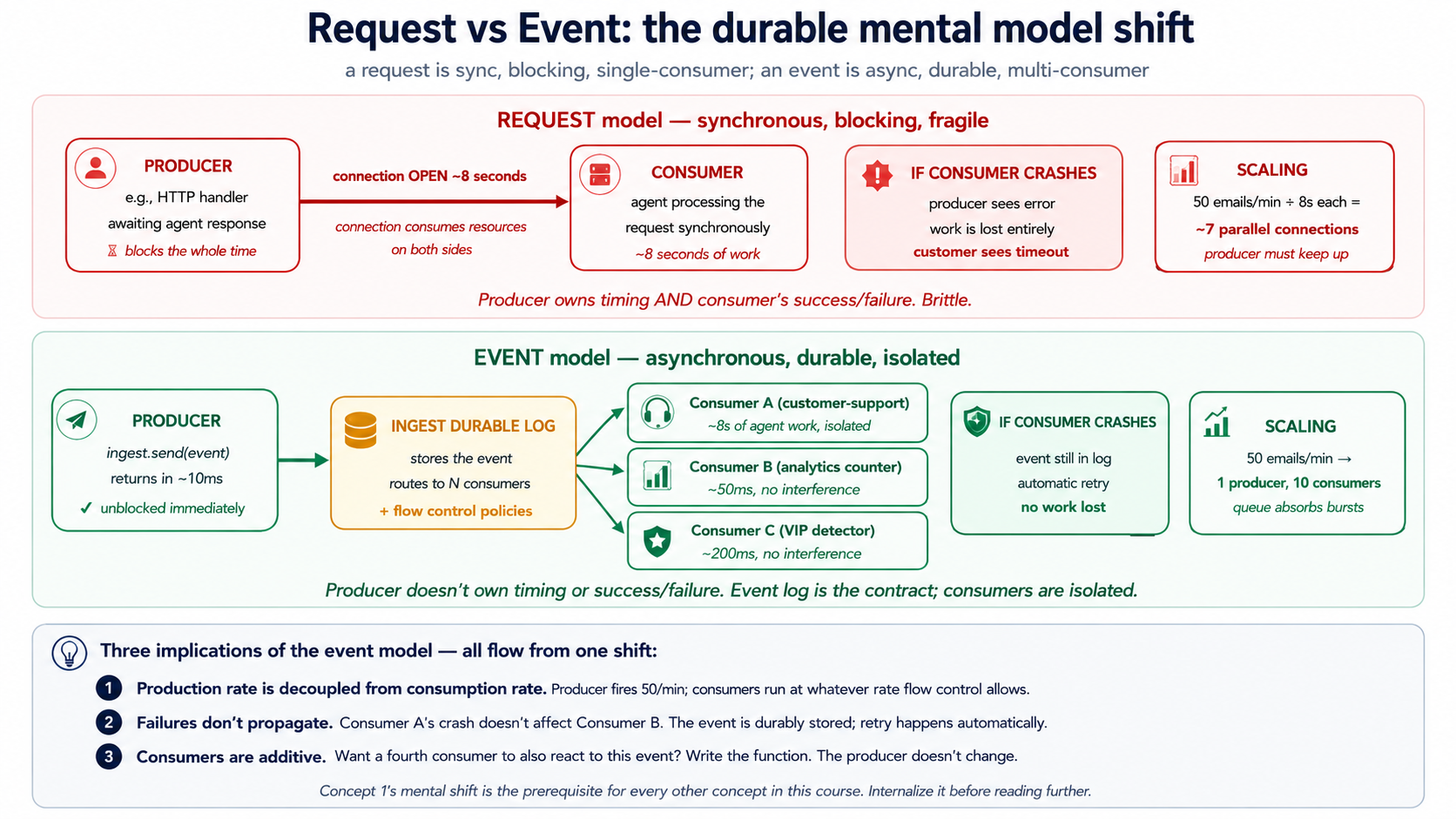
shift sounds چھوٹا. یہ ہے نہیں. Once آپ think میں events، durability اور wasیع کرنا fall باہر almost کے لیے free، کیونکہ:
- producer نہیں کر سکتا be slowed کے ذریعے consumer ( email-receiver کرتا ہے نہیں wait کے لیے agent کو finish drafting ایک reply).
- consumer سکتا ہے crash اور restart بغیر losing کام ( event ہے durably stored; Inngest re-delivers یہ).
- نیا consumers سکتا ہے be added بغیر changing producers (ایک second function، کہتے ہیں ایک analytics counter، سکتا ہے subscribe کو
customer/email.receivedبغیر email-receiver knowing). - Backpressure بن جاتا ہے ایک flow-control policy، نہیں ایک کوڈ تبدیلی (Inngest caps concurrency; producer keeps firing; events queue).
whole rest کا یہ کورس ہے implications کا یہ single mental shift.
PRIMM، Predict. آپ کا customer-support ورکر لیتا ہے 8 seconds کو respond کو ایک email: three seconds کے لیے agent کا استدلال، four seconds کے لیے دو MCP ٹول calls، ایک second کے لیے ڈیٹا بیس لکھیں. پر peak load آپ receive 50 emails per منٹ. If آپ استعمال کریں request ماڈل ( email parser blocks until agent finishes)، کیسے بہت سے parallel HTTP connections کو آپ کا email parser کرتا ہے کہ imply? If آپ استعمال کریں event ماڈل ( email parser fires ایک event اور returns immediately)، کیسے بہت سے? Confidence 1-5.
جواب: request ماڈل ضرورت ہے کے بارے میں 7 concurrent parsers (50/min × 8 seconds = ~6.7 parallel handlers، plus headroom). event ماڈل ضرورت ہے ایک parser (یہ fires event اور returns میں ~10ms; event queue absorbs 50/min spike; Inngest functions consume queue پر whatever concurrency آپ allow). event ماڈل decouples پروڈکشن rate سے consumption rate. کہ ہے نہیں just ایک scaling fact; یہ ہے ایک ڈھانچے سے متعلق ایک. event بن جاتا ہے ایک پائیدار boundary درمیان "کیا happened میں دنیا" اور "کیا ورکر کرتا ہے کے بارے میں یہ." Crash consumer mid-processing اور event ہے اب بھی وہاں کو retry. شامل کریں three زیادہ consumer types اور producer کرتا ہے نہیں notice. events ہیں کیسے آپ stop owning timing کا کام.
Try کے ساتھ AI
Walk me through three scenarios. For each, classify it as REQUEST-MODEL
or EVENT-MODEL, and explain which one fits better:

A) A user clicks "Submit refund request" in the support portal and
   expects to see "Refund issued: $30" within 2 seconds.

B) A nightly cron job at 02:00 runs a customer-health-check across
   all 5,000 customers and writes a report to Slack.

C) A customer sends an email to support@; we want a draft response
   ready within 60 seconds for the on-call agent to review and send.

For each, name (a) what the human's expectation of timing is and
(b) what failure looks like if the model crashes mid-execution.
تصور 2: Cron triggers، کام کہ چلتا ہے کیونکہ وقت passed
simplest trigger ہے clock. بہت سے things ایک پروڈکشن ورکر کرتا ہے ہیں نہیں reactions کو outside events; they ہیں scheduled کام: daily health رپورٹس، weekly cleanups، hourly recalculations. Inngest کا cron trigger ہے ایک سطر کا کوڈ.
import inngest

@inngest_client.create_function(
    fn_id="daily-customer-health-check",
    trigger=inngest.TriggerCron(cron="0 9 * * *"),  # 09:00 every day, UTC
)
async def daily_health_check(ctx: inngest.Context) -> dict[str, int]:
    """Run a customer-health pass for every Pro/Enterprise customer."""
    customers = await ctx.step.run("fetch-pro-customers", fetch_pro_customer_ids)

    # fan out: one event per customer, one Worker run per event
    await ctx.step.run("fan-out", fan_out_per_customer_events, customers)

    return {"customers_scheduled": len(customers)}
Three things کو notice:
-
** schedule ہے just standard cron syntax.**
0 9 * * *ہے 09:00 UTC ہر دن;*/15 * * * *ہے ہر 15 منٹ;0 9 * * 1ہے Mondays پر 09:00. Inngest evaluates cron میں UTC; if آپ ضرورت ایک مختلف timezone، کہ ہے ایک function parameter، نہیں ایک مختلف concept. -
** function اب بھی استعمال کرتا ہے
ctx.step.run.** Cron-triggered یا event-triggered، function shape ہے identical. Steps کام وہی. Durability کام کرتا ہے وہی. Flow قابو کام کرتا ہے وہی. trigger ہے just how function starts. -
** cron نتیجہ ہے ایک regular Inngest function چلائیں.** یہ دکھاتا ہے up میں dashboard، has ایک چلائیں ID، has ایک trace، supports replay. If آپ کا Monday-morning cron چلائیں fails پر step 3، Tuesday کا cron گا چلائیں normally اور Monday کا ناکامی stays دستیاب کے لیے replay بعد آپ fix bug.
کیا ہوتا ہے if آپ کا service ہے down جب cron fires? یہ ہے سوال کہ separates حقیقی schedulers سے kitchen-timer schedulers. Inngest کا cron چلتا ہے ہیں durably recorded moment schedule fires; if آپ کا function endpoint ہے unreachable، Inngest retries کے ساتھ backoff until یہ succeeds یا hits retry ceiling. cron fired پر 09:00 کرتا ہے نہیں "miss" کیونکہ آپ کا ڈیپلائے was rolling پر 09:00; چلائیں waits، آپ finish آپ کا ڈیپلائے، چلائیں completes. Cron triggers میں development رکھتے ہیں ایک quirk worth knowing کے بارے میں: local dev server صرف fires crons جبکہ یہ ہے running. پروڈکشن چلتا ہے انہیں on Inngest کا بنیادی ڈھانچا، کون سا ہے ہمیشہ running.
فوری چیک. Three claims. Mark ہر True یا False. (ایک) If ایک cron function لیتا ہے 45 منٹ کو چلائیں اور ہے scheduled ہر 15 منٹ، three concurrent instances گا be running پر any دیا گیا وقت. (b) آپ سکتا ہے استعمال کریں
step.sleepاندر ایک cron-triggered function کو spread کام across دن. (c) ایک cron-triggered function سکتا ہے بھی be invoked manually سے dashboard کے لیے testing.
جوابات: (ایک) Depends on concurrency policy: کے ذریعے default Inngest گا queue overlapping چلتا ہے; if آپ سیٹ concurrency=1 they serialize; if آپ سیٹ concurrency=10 they parallelize. default ہے sane. (b) True، اور یہ ہے ایک عام نمونہ کے لیے "spread روزمرہ کام across گھنٹے کو smooth load." (c) True: Inngest dashboard lets آپ invoke any function on demand کے لیے testing، regardless کا اس کا trigger.
Try کے ساتھ AI
With my AI coding assistant connected to the Inngest dev server MCP,
write a cron-triggered Inngest function in Python that:

1. Runs every Monday at 09:00 UTC.
2. Queries the audit_log table for all conversations resolved in the
   prior week (status='resolved' in that window).
3. Computes per-agent metrics: total conversations resolved, average
   resolution time, count of escalations, count of refunds issued.
4. Returns the metrics as a JSON object.

After you write the function, use the MCP's `invoke_function` tool to
test it manually (instead of waiting for Monday). Confirm the audit
SQL is correct by using `grep_docs` to search Inngest's docs for
"step.run" examples.
تصور 3: Webhook triggers، جب outside دنیا calls میں
second trigger surface ہے HTTP. ایک external نظام (Stripe، آپ کا email provider، ایک customer-portal form، ایک GitHub webhook) wants کو call آپ کا ورکر. بغیر Inngest، آپ would رکھتے ہیں کو: stand up ایک HTTPS endpoint، parse payload، validate ماخذ، لکھیں کو ایک queue، لکھیں ایک ورکر consuming سے queue، handle retries، handle idempotency، ship telemetry. ہر ایک ہے ایک week کا بنیادی ڈھانچا کام.
کے ساتھ Inngest، endpoint ہے provided. آپ configure ایک webhook میں Inngest dashboard کے ساتھ ایک URL like https://inn.gs/e/<your-key>، point Stripe (یا whatever) پر کہ URL، اور the webhook payload بن جاتا ہے ایک event میں آپ کا event stream. Any function کے ساتھ ایک matching event-name trigger اب fires.
@inngest_client.create_function(
    fn_id="handle-stripe-refund-failed",
    trigger=inngest.TriggerEvent(event="stripe/charge.refund.failed"),
)
async def on_refund_failed(ctx: inngest.Context) -> dict[str, str]:
    """Triggered by Stripe webhook → Inngest event → this function."""
    charge_id = ctx.event.data["charge_id"]
    customer_id = ctx.event.data["customer_id"]

    # Look up which support ticket originated this refund
    ticket = await ctx.step.run(
        "find-ticket-for-refund", lookup_ticket_by_charge, charge_id,
    )

    # Wake the customer-support Worker with the full context
    await ctx.step.run(
        "notify-support-agent",
        notify_support_agent_of_refund_failure,
        ticket_id=ticket["id"], charge_id=charge_id,
    )

    return {"ticket": ticket["id"], "action": "notified"}
flow: Stripe fails کو refund ایک charge → Stripe POSTs کو Inngest webhook URL → Inngest بناتا ہے ایک event named stripe/charge.refund.failed → function above (matching کہ event name) fires → function استعمال کرتا ہے steps کو دیکھیں up ticket اور notify سپورٹ agent. None کا HTTP plumbing ہے yours کو لکھیں. نہیں endpoint، نہیں parser، نہیں queue، نہیں consumer.
دو adjacent نمونے worth naming:
- Generic JSON webhooks. If ماخذ ہے نہیں ایک known vendor، آپ point any JSON-emitting service پر وہی kind کا endpoint اور چنیں event name. Slash-namespaced names (
vendor/event.subtype) ہیں convention; nothing enforces یہ، مگر dashboard sorts cleanly جب آپ follow یہ. - Webhook transforms. If incoming payload کرتا ہے نہیں match shape آپ چاہتے ہیں، Inngest lets آپ تعریف کریں ایک "transform" function کہ چلتا ہے server-side پر receipt وقت اور reshapes event پہلے یہ enters آپ کا event stream. یہ keeps آپ کا function کوڈ clean کا provider-specific fields.
PRIMM، Predict. ایک Stripe webhook fires
stripe/charge.refund.failedپر exact وہی millisecond بطور آپ کا customer-support ورکر ہے بھی callinginngest_client.sendکو emit ایک different event namedcustomer/refund.investigation_needed. دونوں events arrive میں نظام simultaneously; function above triggers on Stripe event صرف. گا function چلائیں once یا twice? Confidence 1-5.
جواب: once. function ہے registered کو trigger on stripe/charge.refund.failed صرف; customer/refund.investigation_needed event has ایک مختلف name اور matches ایک مختلف function (یا نہیں function، if آپ رکھتے ہیں نہیں لکھا گیا ایک). ایک event کا name ہے اس کا routing اہم. دو events کے ساتھ مختلف names never accidentally trigger وہی function، even if they arrive پر وہی instant. یہ ہے ایک وجہ naming طریقہ کار matters: ایک typo میں ایک event name (customer/email_received vs customer/email.received) means function never fires، اور symptom ہے silent. Inngest کا dashboard مدد کرتا ہے catch یہ: unmatched events appear میں ایک separate stream آپ سکتا ہے audit.
Try کے ساتھ AI
I need to handle three webhook sources for my customer-support Worker:

A) Stripe: refund failed, charge disputed
B) Postmark (email service): bounced email, complaint
C) My internal admin UI: manual "investigate this ticket" button

For each, decide:

1. What event names you'd use (vendor/event.subtype format).
2. Whether the function reacting to it should run synchronously (the
   caller is waiting) or asynchronously (fire and continue).
3. Whether you'd write a webhook transform to reshape the payload, or
   consume it raw.

Then write the Inngest function for the Stripe refund-failed case in
Python, using the MCP's grep_docs to find the current syntax for
TriggerEvent and the dev-server MCP's send_event tool to test it.
تصور 4: Idempotency اور event semantics، وہی event firing twice
Webhooks ہیں نہیں exactly-once. They ہیں at-least-once: sender retries if یہ کرتا ہے نہیں get ایک acknowledgment. Networks drop packets، services restart، آپ کا endpoint times باہر اور sender retries even though آپ اصل میں succeeded. بغیر idempotency، ہر webhook نظام eventually double-bills، double-emails، یا double-refunds someone. یہ ہے نہیں ایک theoretical concern; یہ ہے زیادہ تر عام پروڈکشن bug میں event نظام.
دو layers کا defense، دونوں built میں Inngest.
Layer 1: event ID seeds پر ماخذ. جب آپ send ایک event yourself (rather than receiving یہ سے ایک webhook)، آپ سکتا ہے attach ایک idempotency اہم:
await inngest_client.send(events=[
    inngest.Event(
        name="customer/refund.requested",
        data={"order_id": "o-4429", "amount_cents": 5000},
        id=f"refund-request-{order_id}-{request_timestamp}",  # idempotency key
    ),
])
If ایک second event کے ساتھ وہی id ہے sent اندر dedup window (24 گھنٹے کے ذریعے default)، Inngest drops duplicate. وہی logical event، وہی id، صرف ایک function چلائیں.
Layer 2: Step-level idempotency. اندر ایک function، ہر step.run ہے identified کے ذریعے اس کا name. If ایک function crashes درمیان step 3 اور step 4، retry re-runs function کوڈ سے top، مگر کے لیے steps 1، 2، اور 3، Inngest returns stored نتائج بغیر re-executing step body. Step 4 چلتا ہے normally کے لیے پہلا وقت. یہ ہے کیا بناتا ہے ایک function "پائیدار": side effects کا completed steps کریں نہیں re-happen on retry.
@inngest_client.create_function(
    fn_id="issue-customer-refund",
    trigger=inngest.TriggerEvent(event="customer/refund.requested"),
)
async def issue_refund(ctx: inngest.Context) -> dict[str, str]:
    # Step 1: look up the order. If the function retries, this returns
    # the SAME order data it computed the first time, from Inngest's memo.
    order = await ctx.step.run(
        "lookup-order", lookup_order_by_id, ctx.event.data["order_id"],
    )

    # Step 2: call Stripe. If the function retries AFTER this step
    # succeeded, the Stripe call does NOT happen again. The refund is
    # issued exactly once even if the function runs three times.
    refund = await ctx.step.run(
        "issue-stripe-refund", call_stripe_refund_api,
        charge_id=order["stripe_charge_id"],
        amount=ctx.event.data["amount_cents"],
    )

    # Step 3: write the audit row. Same property: runs at most once.
    await ctx.step.run(
        "audit-refund", write_audit_refund_issued,
        order_id=order["id"], refund=refund,
    )

    return {"refund_id": refund["id"]}
If یہ function crashes during step 3، retry re-enters step 1 (gets cached order ڈیٹا، نہیں DB call)، re-enters step 2 (gets cached refund ڈیٹا، نہیں Stripe call)، چلتا ہے step 3 کے لیے حقیقی، returns. ** customer کا card ہے charged once، even if function ran three times.** یہ ہے killer feature. یہ ہے کیا بناتا ہے Inngest qualitatively مختلف سے ایک queue کے ساتھ ایک retry loop.
Inngest کا memoization دیتا ہے آپ exactly-once step completion سے function کا perspective: once step.run records ایک step بطور successful، یہ گا نہیں re-execute. مگر وہاں ہے ایک narrow window. If آپ کا step کا body calls Stripe ( side effect ہوتا ہے on Stripe کا servers)، پھر crashes before Inngest records result، retry گا re-call Stripe. سے Inngest کا perspective step "did نہیں مکمل." سے Stripe کا perspective charge پہلے ہی happened. پروڈکشن معیار کا نمونہ ہے Inngest step memoization plus provider-level idempotency keys: Stripe کا Idempotency-Key header، Postmark کا MessageID reuse، آپ کا اپنا MCP server کا idempotency contract. Treat step.run اور provider idempotency keys بطور ایک دwasرے کو مکمل کرنے والے، نہیں substitutes: step.run keeps آپ کا function کا internal logic exactly-once; provider کا idempotency اہم keeps external side effect exactly-once.
فوری چیک. True یا false. (ایک)
step.runبناتا ہے step idempotent صرف if function اندر ہے بھی idempotent. (b) ایک event کے ساتھ ایک duplicate ID outside dedup window گا be treated بطور ایک نیا event. (c) Ifstep.runfails mid-عمل درآمد ( step کا کوڈ throws ایک exception)، Inngest stores ناکامی اور retries step on اگلا attempt بغیر re-running prior steps.
جوابات: (ایک) False: step.run بناتا ہے step's invocation idempotent (یہ گا چلائیں پر زیادہ تر once on success)، مگر if function اندر ہے non-idempotent (like calling Stripe)، at-most-once guarantee ہے exactly کیا آپ چاہتے ہیں. whole point ہے کہ آپ کریں نہیں رکھتے ہیں کو بنائیں Stripe-calling idempotent yourself. (b) True: Inngest کا dedup window ہے 24 گھنٹے کے ذریعے default; events کے ساتھ وہی ID بعد کہ window ہیں treated بطور نیا. (c) True: ناکامی replay ہے itself memoized; Inngest knows step 3 failed پر attempt 1 اور retries just step 3 on attempt 2. Prior successful steps کریں نہیں re-execute.
Try کے ساتھ AI
Here are three scenarios. For each, decide: idempotency PROBLEM or
NO PROBLEM, and if it's a problem, what's the fix:

A) Stripe sends the same charge.refund.failed webhook three times
   in 90 seconds (because their first two attempts timed out at
   your endpoint). Your function emails the customer.

B) A customer clicks "Issue refund" three times because the page
   was slow. Your function calls Stripe and writes audit_log.

C) Your nightly cron at 09:00 sends a customer-health-check event
   to each Pro customer. If two crons fire at the same time (a deploy
   bug), what happens?

For each problem case, propose ONE specific fix: event ID seed
inside the function, idempotency key in inngest_client.send, or
function-level deduplication on the trigger.
تصور 5: Fan-out اور sub-agent نمائندگی، ایک event بہت سے ورکرز
Often ایک single event ضرورت ہے کو trigger کام میں many places. Stripe charge.refund.failed event might ضرورت کو: notify سپورٹ agent، لکھیں کو audit، update customer کا خطرہ score، alert مالیات ops، post کو Slack. Five reactions، all independent، all سے ایک event.
** Inngest نمونہ: subscribe بہت سے functions کو وہی event.** نہیں fan-out کوڈ; just multiple @inngest_client.create_function decorators کے ساتھ وہی TriggerEvent. ہر function چلتا ہے independently، has اس کا اپنا retries، has اس کا اپنا step trace، fails independently کا دwasرے.
@inngest_client.create_function(
    fn_id="refund-failed-notify-support",
    trigger=inngest.TriggerEvent(event="stripe/charge.refund.failed"),
)
async def notify_support(ctx: inngest.Context) -> dict[str, str]:
    # ... runs the customer-support Worker to draft a response ...
    return {"status": "drafted"}


@inngest_client.create_function(
    fn_id="refund-failed-update-risk-score",
    trigger=inngest.TriggerEvent(event="stripe/charge.refund.failed"),
)
async def update_risk_score(ctx: inngest.Context) -> dict[str, float]:
    # ... runs the risk-scoring Worker ...
    return {"new_risk_score": 0.42}


@inngest_client.create_function(
    fn_id="refund-failed-post-slack",
    trigger=inngest.TriggerEvent(event="stripe/charge.refund.failed"),
)
async def post_to_slack(ctx: inngest.Context) -> None:
    # ... posts a Slack notification ...
    return None
ایک Stripe webhook arrives. Inngest بناتا ہے ایک event. Three functions fire، ہر میں اس کا اپنا چلائیں. If post_to_slack fails کیونکہ Slack ہے down، دwasرا دو ہیں unaffected اور مکمل normally. failed چلائیں sits میں dashboard کے لیے replay once Slack recovers. یہ ہے core کا multi-Worker coordination، اور یہ ہے ڈھانچے سے متعلق نمونہ آپ کا future مینیجر layer (ایک later کورس) گا compose بڑے پیمانے پر.
** دwasرا fan-out نمونہ: parent-fires-N-children.** Sometimes fan-out ہے dynamic. آپ کا daily cron ضرورت ہے کو fire ایک customer-health event کے لیے ہر Pro customer، کون سا might be 500 یا 5،000 depending on week. parent function sends N events:
from datetime import date

async def fan_out_per_customer_events(
    customers: list[str],
) -> int:
    events = [
        inngest.Event(
            name="customer/health_check.requested",
            data={"customer_id": cid},
            id=f"daily-health-{cid}-{date.today().isoformat()}",  # idempotency
        )
        for cid in customers
    ]
    await inngest_client.send(events=events)
    return len(events)
5،000 events get sent میں ایک single send call. 5،000 function چلتا ہے fire، ہر کے ساتھ اس کا اپنا customer_id، ہر isolated، ہر independently retryable. Flow قابو (تصور 11) caps کیسے بہت سے چلائیں concurrently اس لیے آپ کریں نہیں melt آپ کا downstream APIs. cron function returns میں seconds; fan-out چلتا ہے پر whatever rate Inngest کا flow-control policies allow.
Sub-agent نمائندگی ہے ایک special case کا fan-out. اندر ایک ورکر چلائیں، آپ سکتا ہے call await inngest_client.send(...) کو نمائندہ sub-tasks کو دwasرا ورکر types. parent کرتا ہے نہیں wait کے لیے children unless یہ explicitly استعمال کرتا ہے step.invoke کو چلائیں انہیں synchronously اور collect ان کا results.
PRIMM، Predict. آپ رکھتے ہیں three functions all triggered کے ذریعے
customer/email.received: customer-support agent کہ drafts ایک reply (15 seconds)، ایک analytics counter (50ms)، اور ایک "VIP detector" کہ checks if customer ہے high-قدر (200ms). جب ایک email arrives، کیا کرتا ہے صارف-visible latency دیکھیں like کے لیے ہر? Three options: (ایک) all three شامل کریں up کو ~15 seconds; (b) all three چلائیں میں parallel، total latency ہے ~15 seconds ( slowest); (c) ہر چلتا ہے independently کے ساتھ نہیں shared latency پر all. Confidence 1-5.
جواب: (c). ہر function ہے اس کا اپنا چلائیں، میں اس کا اپنا عمل slot. customer-support agent کرتا ہے نہیں block analytics counter; VIP detector کرتا ہے نہیں block agent. سے outside، latency کے لیے any particular function ہے just کہ function کا اپنا وقت. نہیں function ever waits on ایک sibling function. یہ ہے کیوں fan-out scales: consumers ہیں isolated. If agent crashes، analytics counter ہے unaffected.
Try کے ساتھ AI
Design the fan-out architecture for these three scenarios. For each,
sketch the event names and the functions that subscribe:

A) New customer signs up. Need to: send welcome email, create
   Stripe customer, post to Slack #new-customers, write to
   audit_log, schedule a 7-day follow-up.

B) Customer support email arrives. Need to: draft a reply (agent),
   detect sentiment, check if VIP, update customer's "last contact"
   timestamp, attach to the right ticket thread.

C) Daily cron at 09:00 needs to run customer-health-check on
   ~5,000 Pro customers. Each check takes ~30 seconds. We want
   the whole batch to complete by 11:00 (a 2-hour window).

For each, decide: how many event types, how many subscriber
functions, what the idempotency story is, and one specific failure
mode this design protects against.
حصہ 2: Durable عمل درآمد، کیا ہوتا ہے جب something breaks
triggers wake ورکر. Durable عمل درآمد بناتا ہے ورکر survive کیا آتا ہے اگلا. Course #4 ورکر calls ایک agent، agent calls three ٹولز، ٹولز call Postgres اور Stripe اور OpenAI: six external calls میں ایک single conversation، any کا کون سا سکتا ہے fail. بغیر durability، ایک single transient ناکامی mid-conversation restarts whole flow سے top. Durability ہے property کہ says: جب something fails mid-عمل درآمد، کام پہلے ہی completed stays completed، اور عمل درآمد resumes سے کہاں یہ broke. Inngest delivers یہ کے ساتھ ایک بنیادی اکائی (step.run) اور ایک memoization mechanic underneath. حصہ 2 explains دونوں، plus time-based variants (step.sleep، step.wait_for_event)، retry semantics، اور step.ai بنیادی اکائیاں.
First-pass compression note. If آپ ہیں scanning، load-bearing تصورات ہیں 6 (
step.run) اور 7 (memoization). تصورات 8-10 تعمیر کریں on انہیں. پڑھیں 6 اور 7 carefully; rest گا پڑھیں تیز once آپ رکھتے ہیں those دو میں آپ کا head.
تصور 6: step.run اور پائیدار function ماڈل
ایک normal Python function چلتا ہے once، top کو bottom. If یہ crashes halfway کے ذریعے، آپ شروع کریں پر سے top. If یہ بناتا ہے three API calls پہلے crashing، اگلا attempt بناتا ہے those three calls again، اور pays کے لیے انہیں، اور possibly double-charges someone، again.
ایک Inngest function ہے پائیدار. ہر operation آپ چاہتے ہیں کو be checkpointed gets wrapped میں step.run(name, fn, ...). function اب بھی چلتا ہے top کو bottom on ہر attempt، مگر steps کہ رکھتے ہیں پہلے ہی completed return ان کا stored نتائج بجائے کا re-executing. function "catches up" کو کہاں یہ broke، پھر continues forward.
@inngest_client.create_function(
    fn_id="customer-support-conversation",
    trigger=inngest.TriggerEvent(event="customer/email.received"),
)
async def handle_email(ctx: inngest.Context) -> dict[str, str]:
    customer_id = ctx.event.data["customer_id"]

    # Step 1: load the customer record (one DB call)
    customer = await ctx.step.run(
        "load-customer", load_customer_by_id, customer_id,
    )

    # Step 2: load the conversation thread (one DB call)
    thread = await ctx.step.run(
        "load-thread", load_thread_for_customer, customer_id,
    )

    # Step 3: run the OpenAI Agents SDK agent (the Course Four Worker)
    response = await ctx.step.run(
        "run-agent",
        run_customer_support_agent,
        customer=customer,
        thread=thread,
        email_body=ctx.event.data["body"],
    )

    # Step 4: write the draft reply to the database
    await ctx.step.run(
        "save-draft-reply", save_reply,
        customer_id=customer_id, text=response.draft,
    )

    # Step 5: notify the on-call human reviewer via Slack
    await ctx.step.run(
        "notify-reviewer", post_slack_for_review, response=response,
    )

    return {"status": "drafted", "reviewer_notified": True}
Five steps. ہر ایک ہے independently checkpointed.
کیا durability buys آپ یہاں، میں three ناکامی scenarios:
-
Scenario ایک: agent step throws ایک timeout. بغیر
step.runwrapping agent call، اگلا retry کا یہ function reloads customer، reloads thread، and reruns agent سے scratch، paying کے لیے OpenAI tokens twice کے لیے کام agent پہلے ہی partially did. کے ساتھstep.run، customer اور thread loads ہیں memoized (steps 1-2 کریں نہیں re-execute); صرف step 3 retries. Inngest کا automatic retries handle transient OpenAI errors بغیر آپ کا کوڈ knowing. -
Scenario B: function عمل gets killed درمیان step 3 اور step 4 (ایک ڈیپلائے rolled باہر، ایک node restarted، container OOMed). بغیر durability، agent کا response ہے lost اور customer کا email goes unanswered until someone notices. کے ساتھ durability، function resumes بعد restart: steps 1، 2، 3 return ان کا stored نتائج میں milliseconds، step 4 چلتا ہے کے لیے حقیقی، step 5 چلتا ہے کے لیے حقیقی، customer gets drafted reply.
-
Scenario C: Slack returns ایک 503 on step 5. بغیر
step.run، آپ would either lose کام یا لکھیں retry-and-backoff logic کے ذریعے hand کے لیے Slack call specifically. کے ساتھstep.run، Inngest retries step 5 کے ساتھ exponential backoff until Slack recovers; meanwhile steps 1-4 stay completed اور گا نہیں re-execute. draft reply ہے پہلے ہی میں ڈیٹا بیس; notification ہے صرف thing pending.
آپ کریں نہیں لکھیں any retry loops، any "did I پہلے ہی کریں یہ" checks، any state machines. state machine is sequence کا step.run calls. ہر step ہے ایک node; ہر transition ہے پائیدار.
** ایک قاعدہ کا step.run.** function passed کو step.run چاہیے be deterministic دیا گیا اس کا inputs: calling یہ twice کے ساتھ وہی arguments چاہیے پیدا کریں وہی result. کہ ہے automatic کے لیے pure functions; یہ ہے automatic کے لیے idempotent API calls (Stripe کا idempotency_key، آپ کا اپنا MCP server ٹولز); یہ درکار ہے care کے لیے things like "generate ایک random ID" یا "call ایک LLM کے ساتھ default temperature" (ایک retry could پیدا کریں مختلف نتیجہ than original attempt، کون سا sometimes matters). جب operation ہے نہیں deterministic، آپ بنائیں یہ deterministic: pass ایک seed، pre-generate random قدر outside step، یا accept کہ retry ہو سکتا ہے differ سے original (often fine کے لیے ایک agent response).
فوری چیک. True یا false. (ایک) function body re-executes سے top on ہر retry، including all imports اور variable assignments outside
step.runcalls. (b) If ایک step لیتا ہے 30 seconds کو مکمل، اور function crashes 25 seconds میں، retry continues کہ step سے second 25. (c)step.runنتائج ہیں stored میں Inngest کا بنیادی ڈھانچا، نہیں میں آپ کا application.
جوابات: (ایک) True، اور یہ ہے کیوں آپ رکھیں کام inside step.run. کوڈ outside step.run re-runs on ہر retry; کوڈ اندر چلتا ہے once per attempt اور ہے memoized on success. (b) False: step.run ہے atomic unit; if ایک step ہے interrupted، retry re-runs entire step. If آپ کا step ہے اس لیے long یہ نہیں کر سکتا be allowed کو restart، آپ break یہ میں smaller steps. (c) True: step نتیجہ store ہے part کا Inngest، نہیں آپ کا DB. یہ ہے کیوں آپ سکتا ہے replay چلتا ہے even بعد آپ کا ڈیٹا بیس schema has changed.
build-agents مختصر عملی کورس فیصلہ 4 دستاویزات ایک openai-agents==0.17.2 streamed-path SDK bug کے ساتھ DeepSeek's استدلالی طریقہls on ٹول-calling turns: ایک spurious empty assistant message درمیان tool_calls message اور tool result، کون سا DeepSeek's strict parser rejects. If آپ کا Course Four ورکر streams DeepSeek کے ساتھ @function_tool، apply کہ کورس's OpenAI-fallback resolution پہلے wrapping Runner.run_streamed میں step.run below.
Try کے ساتھ AI
With my AI coding assistant connected to the Inngest dev server MCP,
re-shape my Course Four customer-support Worker into an Inngest
durable function. Take the existing Runner.run_streamed invocation
that processes a customer email and wrap each of these inside its
own step.run:

1. Load the customer from the customer-data MCP server
2. Load the related conversation thread
3. Run the agent (the OpenAI Agents SDK Runner)
4. Persist the draft reply
5. Notify the on-call reviewer in Slack

Use grep_docs to find the current Python SDK syntax. Use
invoke_function to test it with a synthetic email payload. Then
deliberately raise an exception in step 4 and use get_run_status
to confirm steps 1-3 don't re-execute on retry.
تصور 7: Memoization، mechanic underneath resumability
تصور 6 said "steps کہ رکھتے ہیں پہلے ہی completed return ان کا stored نتائج بجائے کا re-executing." کہ mechanism ہے memoization اور یہ ہے worth understanding mechanic، کیونکہ ہر دwasرا Inngest بنیادی اکائی استعمال کرتا ہے یہ.
جب آپ call await ctx.step.run("load-customer", load_customer_by_id, "c-4429")، three things happen on پہلا attempt:
- Inngest checks اس کا memo store: "ہے وہاں ایک stored result کے لیے step
load-customerمیں یہ چلائیں?" وہاں ہے نہیں. - function
load_customer_by_id("c-4429")چلتا ہے. یہ returns{"id": "c-4429", "tier": "pro", ...}. - Inngest writes کہ result میں memo store، keyed کے ذریعے
(run_id, step_name="load-customer"). پھر یہ returns result کو آپ کا کوڈ.
If function crashes بعد step 3 اور Inngest retries، on second attempt function body re-runs سے top. جب عمل درآمد reaches وہی سطر، three مختلف things happen:
- Inngest checks اس کا memo store: "ہے وہاں ایک stored result کے لیے step
load-customerمیں یہ چلائیں?" Yes، یہ was stored on attempt 1. - function
load_customer_by_id("c-4429")کرتا ہے نہیں چلائیں. DB call کرتا ہے نہیں happen. - Inngest returns stored result کو آپ کا کوڈ میں milliseconds.
یہ ہے کیوں retries ہیں سستا: مہنگا کام ہے پہلے ہی cached. یہ ہے کیوں durability ہے درست: مہنگا کام کرتا ہے نہیں happen twice. اور یہ ہے کیوں "function body re-runs top کو bottom" ہے fine despite sounding wasteful: the کام اندر steps کرتا ہے نہیں اصل میں re-run; صرف orchestration کوڈ درمیان steps does.
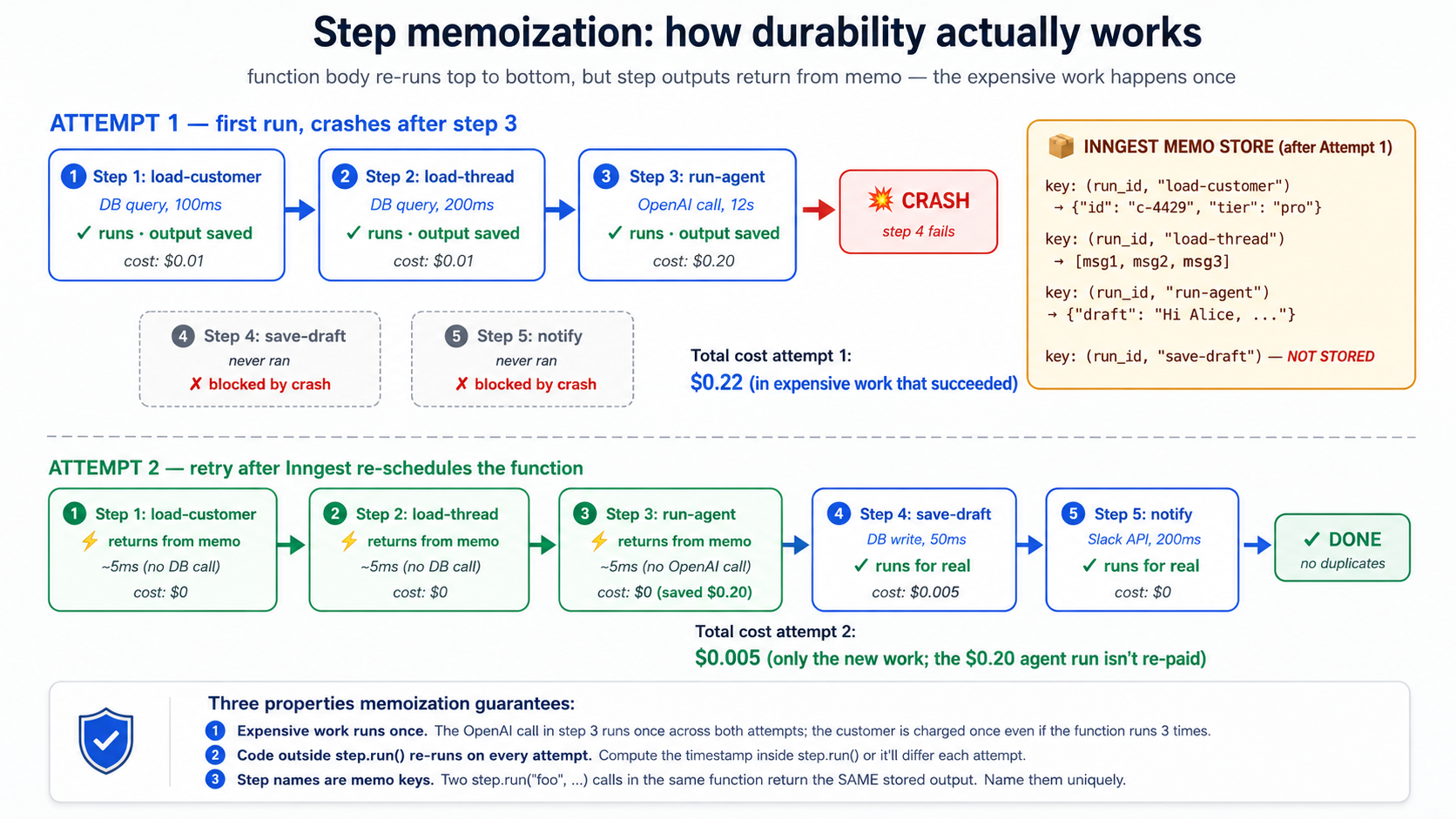
** implication کہ surprises نیا صارفین.** کوڈ outside step.run چلتا ہے on ہر attempt. If آپ کریں یہ:
async def handle_email(ctx: inngest.Context) -> dict[str, str]:
    # ANTI-PATTERN: this runs on every retry. Don't do this.
    expensive_thing: dict = await fetch_expensive_data(ctx.event.data["id"])

    await ctx.step.run("do-something", do_something_with, expensive_thing)
    return {"status": "done"}
fetch_expensive_data چلتا ہے on ہر retry. If یہ لاگتیں $0.10 ایک call اور function retries 5 times، آپ just spent $0.50 fetching وہی ڈیٹا five times. fix ہے کو wrap مہنگا thing میں اس کا اپنا step:
async def handle_email(ctx: inngest.Context) -> dict[str, str]:
    expensive_thing: dict = await ctx.step.run(
        "fetch-expensive-data", fetch_expensive_data, ctx.event.data["id"],
    )
    await ctx.step.run("do-something", do_something_with, expensive_thing)
    return {"status": "done"}
اب fetch_expensive_data ہے memoized; retries کریں نہیں pay کے لیے یہ again.
** step name ہے memo اہم.** یہ ہے کیوں step names لازمی be unique اندر ایک function. If آپ رکھتے ہیں دو step.run("load-customer", ...) calls میں وہی function، Inngest گا return پہلا ایک کا stored نتیجہ کے لیے دونوں calls. کہ ہے almost never کیا آپ چاہتے ہیں. If آپ رکھتے ہیں ایک loop کہ calls ایک step N times، name انہیں uniquely (step.run(f"load-customer-{i}", ...)) اس لیے ہر iteration has اس کا اپنا memo slot.
PRIMM، Predict. آپ کا function has three steps. Step 1 (
load-customer) لاگتیں $0.01 میں DB calls اور لیتا ہے 100ms. Step 2 (run-agent) لاگتیں $0.20 میں OpenAI tokens اور لیتا ہے 12 seconds. Step 3 (save-draft) لاگتیں $0.005 میں DB calls اور لیتا ہے 50ms. Step 2 fails 30% کا وقت due کو OpenAI rate limits; Inngest retries کے ساتھ backoff. کیا ہے لاگت difference درمیان (ایک) wrapping all three میںstep.runاور (b) wrapping صرف step 2 میںstep.run? Confidence 1-5.
جواب: کے ساتھ (ایک)، ایک single retry لاگتیں آپ لاگت کا step 2 صرف ($0.20). customer اور save-draft ہیں memoized; they کریں نہیں re-execute. کے ساتھ (b)، ہر retry لاگتیں آپ steps 1 اور 3 plus step 2: $0.215 per retry. پر ایک thousand emails کے ساتھ ایک 30% retry rate، کہ ہے ایک difference کا کے بارے میں $4.50 میں pure waste، plus operational complexity کا figuring باہر کیا got partially لکھا گیا جب step 3 ran twice. Wrap everything آپ کریں نہیں چاہتے ہیں re-executed میں step.run. یہ ہے نہیں optional once آپ understand mechanic.
Try کے ساتھ AI
With my AI coding assistant: review the Inngest function we built
in Concept 6's Try-with-AI and identify any code BETWEEN step.run
calls that should be wrapped in its own step but isn't. Common
candidates:

- Computed values (timestamps, IDs, formatting) that we want to be
  stable across retries
- Calls to logging or metrics services
- Reads from Redis, environment variables, secret managers

Then propose a refactor that moves each of these into its own step
with a meaningful name. For each, explain whether the side effect
is one you want to happen once (use step.run) or every retry
(leave it outside).
تصور 8: step.sleep اور step.wait_for_event، durability کے ذریعے وقت
Some کام has کو wait. ایک welcome-email pipeline sends ایک email immediately، پھر waits three days، پھر sends ایک follow-up. ایک refund-investigation ضرورت ہے کو wait کے لیے ایک human کو approve. ایک trial-conversion flow watches کے لیے "صارف upgraded کو paid" اندر 7 days اور sends ایک مختلف email depending on کیا یہ sees.
میں ایک normal Python function، "wait three days" means hold ایک عمل کھولیں کے لیے three days. کہ ہے untenable: آپ کا عمل restarts، آپ کا hosting bills آپ کے لیے 72 گھنٹے کا idle compute، آپ کا timer gets lost. میں Inngest، "wait three days" ہے ایک سطر:
from datetime import timedelta

@inngest_client.create_function(
    fn_id="trial-welcome-series",
    trigger=inngest.TriggerEvent(event="user/trial.started"),
)
async def welcome_series(ctx: inngest.Context) -> dict[str, str]:
    user_id = ctx.event.data["user_id"]

    await ctx.step.run("send-welcome-email", send_welcome_email, user_id)

    # Wait three days. The function gets paged out of memory. Nothing
    # is consuming compute. Three days later, Inngest pages it back in
    # and resumes execution at the next line.
    await ctx.step.sleep("wait-three-days", timedelta(days=3))

    await ctx.step.run("send-followup", send_followup_email, user_id)

    return {"status": "completed"}
step.sleep ہے پائیدار. function suspends; Inngest stores resume وقت; nothing consumes compute جبکہ آپ wait; function resumes پر درست وقت، کے ساتھ all prior step نتائج اب بھی memoized. step.sleep (اور step.sleep_until) سکتا ہے wait up کو ایک year on paid plans، up کو seven days on free Hobby منصوبہ (Inngest usage limits). seven-day Hobby ceiling ہے wide enough کے لیے ہر sleep یہ کورس استعمال کرتا ہے.
زیادہ powerful sibling ہے step.wait_for_event. بجائے کا waiting کے لیے وقت، wait کے لیے another event. function suspends until ایک matching event arrives، یا until ایک timeout آپ سیٹ expires. یہ ہے کیا بناتا ہے Inngest cleanest expression کا HITL (تصور 15) اور inter-agent coordination نمونے:
@inngest_client.create_function(
    fn_id="refund-with-approval",
    trigger=inngest.TriggerEvent(event="customer/refund.requested"),
)
async def refund_with_approval(ctx: inngest.Context) -> dict[str, str]:
    request = ctx.event.data
    request_id = request["request_id"]

    # If amount is over $500, require approval before issuing
    if request["amount_cents"] >= 50_000:
        # Notify a human via Slack/email/whatever
        await ctx.step.run("notify-approver", notify_human_approver, request)

        # Wait for an approval event. Up to 24 hours; expires otherwise.
        approval = await ctx.step.wait_for_event(
            "wait-for-approval",
            event="refund/approval.decided",
            timeout=timedelta(hours=24),
            if_exp=f"async.data.request_id == '{request_id}'",
        )

        if approval is None or not approval.data.get("approved"):
            return {"status": "rejected_or_timeout"}

    # Either it was under $500, or it was approved
    refund = await ctx.step.run(
        "issue-stripe-refund", call_stripe_refund_api, request,
    )
    return {"status": "issued", "refund_id": refund["id"]}
کیا ہے happening:
- function reaches
wait_for_event. یہ suspends. Zero compute consumed. - ایک human looks پر Slack notification، clicks "Approve" میں آپ کا admin UI، آپ کا UI calls
inngest_client.send(events=[Event(name="refund/approval.decided", data={"request_id": "...", "approved": True})]). - Inngest matches event کو waiting function (
if_expensures صرف events کے لیے this request_id match) اور resumes function کے ساتھ event بطورapprovalreturn قدر. - function continues کو refund step. Stripe refund ہوتا ہے بعد human approved.
step.sleep اور step.wait_for_event ہیں timeouts آپ کریں نہیں pay کے لیے. function looks synchronous میں آپ کا کوڈ ("wait three days، پھر send email")، مگر runtime semantics ہیں async اور پائیدار. یہ ہے ایک کا دو things Inngest ہے famous کے لیے (پائیدار retries being دwasرا). بغیر یہ، alternative ہے ایک queue plus ایک state machine plus ایک ڈیٹا بیس plus ایک poller، اور آپ would لکھیں ایک thousand lines بجائے کا three.
فوری چیک. Three claims. Mark ہر True یا False. (ایک) If
step.sleepہے سیٹ کے لیے 30 days اور آپ کا service ہے redeployed five times میں those 30 days، sleep continues uninterrupted on ایک paid منصوبہ. (b) Ifstep.wait_for_eventtimes باہر، function raises ایک exception. (c) دوstep.wait_for_eventcalls میں وہی function سکتا ہے wait کے لیے وہی event simultaneously.
جوابات: (ایک) True on ایک paid منصوبہ: sleeps ہیں stored میں Inngest کا بنیادی ڈھانچا، نہیں میں آپ کا service کا memory، اس لیے redeploys کریں نہیں lose انہیں. Note tier ceiling: ایک 30-دن sleep ہے fine on ایک paid منصوبہ مگر exceeds free Hobby منصوبہ کا seven-day sleep cap. (b) False: on timeout، wait_for_event returns None. آپ کا کوڈ checks کے لیے یہ اور decides کیا کو کریں (rejection، escalation، default-منظوری، whatever policy ہے). (c) True، مگر suspicious: دونوں گا fire جب ایک matching event arrives. If دو wait_for_event calls رکھتے ہیں مختلف if_exp filters، یہ ہے fine. If they ہیں identical، آپ ہیں probably looking پر ایک refactor opportunity.
Try کے ساتھ AI
Build a delayed-investigation flow with my AI coding assistant.
Specification:

1. Triggered by event 'customer/refund.failed'.
2. Immediately notify the on-call human via Slack with the refund
   details and a "Investigate" button.
3. Wait for the human to click the button (which fires
   'customer/refund.investigation_started') for up to 4 hours.
4. If the click arrives in time: run the agent to draft an
   investigation summary.
5. If 4 hours pass without a click: escalate to a senior reviewer
   by firing 'customer/refund.escalated'.

Use the dev-server MCP's send_event tool to simulate the
human-click event during testing. Use get_run_status to inspect
how the suspended function shows up in the dashboard. Before
writing, use list_docs to scan the Inngest documentation tree
for the right page on wait_for_event semantics, then
read_doc on the page you find to get the exact syntax for
the if_exp filter expression.
تصور 9: Retries، error handling، dead-letter
کے ذریعے default، Inngest retries failed steps. defaults ہیں sensible: ~4 retries کے ساتھ exponential backoff، ranging سے ایک few seconds کو ایک few منٹ درمیان attempts. بعد final retry fails، چلائیں enters ایک failed state اور stays وہاں کے لیے inspection اور (optionally) replay. آپ سکتا ہے tune یہ per function: retries=10، retries=0 (کریں نہیں retry پر all)، specific exception types کہ چاہیے نہیں be retried.
@inngest_client.create_function(
    fn_id="charge-customer",
    trigger=inngest.TriggerEvent(event="order/checkout.completed"),
    retries=2,  # only retry twice; this involves Stripe; don't keep hammering
)
async def charge_customer(ctx: inngest.Context) -> dict[str, str]:
    try:
        charge = await ctx.step.run(
            "call-stripe", call_stripe_charge, ctx.event.data,
        )
        return {"status": "charged", "charge_id": charge["id"]}
    except StripeCardDeclinedError as e:
        # A declined card is not a transient failure. Don't retry.
        # Mark the order as failed in our database and emit an event
        # for the dunning flow.
        await ctx.step.run(
            "mark-failed", mark_order_failed,
            ctx.event.data["order_id"], reason=str(e),
        )
        await ctx.step.run(
            "emit-dunning-event", emit_dunning, ctx.event.data["order_id"],
        )
        return {"status": "card_declined"}
Three نمونے matter.
نمونہ 1: Transient vs permanent ناکامیاں. Inngest retries everything کے ذریعے default، مگر some errors ہیں نہیں transient. ایک card-declined error سے Stripe گا be declined again on retry. ایک 401-unauthorized سے آپ کا downstream API گا نہیں بن جاتے ہیں ایک 200 just کیونکہ آپ wait. آپ کا function چاہیے catch یہ specifically اور handle انہیں: لکھیں کو آپ کا DB، emit ایک downstream event، return cleanly، اس لیے they کریں نہیں waste retry بجٹ on hopeless attempts. Inngest کا NonRetriableError explicitly tells Inngest کو skip retries کے لیے ایک thrown exception.
نمونہ 2: Step-level vs function-level errors. ایک step کہ throws ہے retried. بعد step-level retries ہیں exhausted، function fails. Sometimes آپ چاہتے ہیں ایک function کو survive ایک failing step: log ناکامی، mark کام بطور "partial،" continue. Wrap step.run میں try/except. step اب بھی gets اس کا retries; if all retries fail، exception propagates کو آپ کا catch block، کہاں آپ سکتا ہے decide کیا کو کریں.
نمونہ 3: Dead-letter اور replay. جب ایک function fully fails، یہ کرتا ہے نہیں disappear. یہ enters Inngest dashboard کا "failed چلتا ہے" view، کے ساتھ مکمل trace، all step نتائج، exception، اور ایک Replay button. بعد آپ ship ایک bug fix، آپ سکتا ہے replay failed چلتا ہے: they resume سے کہاں they broke، کے ساتھ fix میں place. یہ ہے "dead-letter queue" نمونہ سے traditional queues، except آپ کریں نہیں لکھیں dead-letter handler. آپ just fix bug اور replay.
PRIMM، Predict. آپ کا function calls Stripe میں step 2 اور آپ کا customer-data MCP server میں step 4. Stripe returns 503 (service unavailable، transient) on پہلا attempt کا step 2. Step 2 retries 4 times کے ساتھ exponential backoff (~1s، ~2s، ~5s، ~12s); on 4th retry، Stripe ہے back، charge succeeds. اب step 4 چلتا ہے، اور customer-data MCP server ہے down کے ساتھ ایک 500. کرتا ہے Inngest retry whole function، یا just step 4? کیسے بہت سے times? Confidence 1-5.
جواب: just step 4، اور یہ gets اس کا اپنا retry بجٹ. Steps کریں نہیں share retries. Step 2's four retries ہیں independent کا step 4's. Inngest گا retry step 4 (default ~4 times) اور if MCP server آتا ہے back، step 4 completes، اور function succeeds. Stripe charge سے step 2 ہے not re-issued، کیونکہ step 2's نتیجہ was memoized بعد اس کا successful retry. customer ہے charged exactly once even though function spent 20 seconds across retries.
Try کے ساتھ AI
With my AI coding assistant: extend the customer-support Worker
function from Concept 6 with explicit retry and failure handling.
Specification:

1. The OpenAI Agents SDK call should retry 3 times on transient
   failures (rate limit, timeout), but NOT retry on a content-policy
   refusal from the model.
2. The Slack notification should retry up to 10 times (Slack is
   often flaky; don't lose the notification).
3. The Postgres write should retry once; if it fails again, log the
   failure and continue (don't fail the whole function over a
   transient DB blip).

For each step, decide what's transient vs permanent and structure
the try/except accordingly. Use grep_docs to find the Python SDK's
NonRetriableError equivalent.
تصور 10: step.run کے لیے AI calls میں Python (step.ai.wrap ہے TypeScript-صرف)
تصورات 6-9 کام کے لیے any side-effecting کوڈ: DB writes، API calls، فائل writes، agent invocations. Inngest بھی ships AI-specific step بنیادی اکائیاں کہ handle نمونے LLM calls ہیں prone کو: rate-limit retries، observability میں پرامپٹس اور responses، اور (optionally) inference proxying کہ reduces serverless compute لاگتیں.
اہم Python-vs-TypeScript note up front. Inngest کا
step.aimodule has دو methods، اور they رکھتے ہیں مختلف language سپورٹ.step.ai.infer()ہے دستیاب میں دونوں TypeScript اور Python (Python SDK v0.5+): یہ offloads inference کو Inngest کا بنیادی ڈھانچا اور traces call.step.ai.wrap()ہے TypeScript صرف: وہاں ہے نہیں Python equivalent today. کے لیے Python پروجیکٹس (like یہ کورس's ورکر)، درست نمونہ کے لیے wrapping ایک OpenAI Agents SDK call ہےctx.step.run(...)، کون سا پہلے ہی دیتا ہے آپ مکمل durability، retries، اور observability کا wrapped step کا inputs اور نتائج. آپ just کریں نہیں get LLM-specific پرامپٹ/response telemetry کہ TypeScriptstep.ai.wrapadds. (Verified کے خلاف AI Inference docs بطور کا ہو سکتا ہے 2026.)
step.run کے لیے OpenAI calls میں Python ( recommended نمونہ). آپ کا function بناتا ہے OpenAI call اندر ctx.step.run("name", fn, ...). Inngest traces inputs اور نتائج کا step ( arguments آپ passed اور کیا was returned)، retries on transient ناکامیاں، اور memoizes result اس لیے retries کا later steps کریں نہیں re-pay OpenAI لاگت. پرامپٹ اور response ہیں recorded بطور step کا input/نتیجہ میں dashboard:
from openai import AsyncOpenAI

oai = AsyncOpenAI()


async def call_openai_summary(thread_text: str) -> str:
    """A normal async function. Inngest doesn't care that this is an LLM call."""
    response = await oai.chat.completions.create(
        model="gpt-4o",
        messages=[
            {"role": "system", "content": "Summarize this support thread in 3 sentences."},
            {"role": "user", "content": thread_text},
        ],
    )
    return response.choices[0].message.content


@inngest_client.create_function(
    fn_id="summarize-customer-thread",
    trigger=inngest.TriggerEvent(event="customer/thread.summary_requested"),
)
async def summarize_thread(ctx: inngest.Context) -> dict[str, str]:
    thread: list = await ctx.step.run(
        "load-thread", load_thread, ctx.event.data["thread_id"],
    )

    # The OpenAI call is wrapped in step.run. Inngest sees this as a step:
    # the inputs (formatted thread text) are recorded, the output (summary
    # string) is recorded, the call is memoized on success, and retries are
    # automatic on transient failures.
    summary: str = await ctx.step.run(
        "openai-summary", call_openai_summary, format_thread(thread),
    )

    return {"summary": summary}
میں dashboard، یہ چلائیں دکھاتا ہے function کا step trace (load-thread followed کے ذریعے openai-summary) کے ساتھ inputs اور نتائج کا ہر step. If OpenAI returned ایک 429 (rate limited)، Inngest retries openai-summary کے ساتھ backoff automatically: وہی memoization semantics بطور تصور 7، اس لیے retries کریں نہیں double-bill prior load-thread step. کیا آپ کریں نہیں get (compared کو TypeScript's step.ai.wrap): automatic LLM-specific telemetry like token counts، ماڈل name، اور provider-specific traces broken باہر میں dashboard کا AI view. کے لیے زیادہ تر Python پروڈکشن workloads، standard step trace plus آپ کا اپنا OpenAI client telemetry (کے لیے مثال، OpenAI Agents SDK's ٹریسنگ) covers یہ gap.
کیونکہ step.run records ہر step کا inputs اور نتائج کو Inngest کا observability store، content آپ pass کے ذریعے ایک step ہے stored اور visible میں dashboard. If آپ کا پرامپٹ includes PII (names، emails، addresses)، secrets (API keys، internal tokens)، contractual یا financial ڈیٹا، یا regulated content (HIPAA، GDPR-scoped ڈیٹا، PCI)، کریں نہیں pass raw content میں step body. Redact، hash، summarize، یا pass ایک reference (ایک customer_id اور ticket_id، نہیں مکمل ticket text) اور reload sensitive content inside step body سے آپ کا authoritative store، کہاں retention اور access controls ہیں yours کو configure. وہی طریقہ کار applies کو OpenAI Agents SDK's اپنا ٹریسنگ if آپ enable یہ. Treat step traces بطور آپ would treat any پروڈکشن log: useful کے ذریعے default، regulated کے ذریعے policy.
step.ai.infer: ایک niche ٹول کے لیے serverless لاگت reduction (Python-supported). آپ گا rarely reach کے لیے یہ; step.run ہے default کے لیے ہر AI call میں یہ کورس. step.ai.infer موجود ہے کے لیے ایک specific situation: بجائے کا calling OpenAI سے آپ کا function عمل، آپ پوچھیں Inngest کا بنیادی ڈھانچا کو بنائیں call، اس لیے جبکہ request ہے میں flight آپ کا function عمل سکتا ہے deallocate. On serverless پلیٹ فارمز (Vercel، Cloudflare ورکرز، AWS Lambda) کہ bill کے لیے in-flight وقت، یہ saves compute لاگت during wait. کے لیے long-running inferences (Deep Research، بڑا embedding batches) savings ہیں حقیقی. کے لیے sub-second calls، یہ adds latency بغیر much benefit. ایک shape، اس لیے فوری reference decision-tree has ایک concrete referent:
import os

from inngest.experimental.ai.openai import Adapter as OpenAIAdapter


@inngest_client.create_function(
    fn_id="long-research-call",
    trigger=inngest.TriggerEvent(event="customer/research.requested"),
)
async def long_research(ctx: inngest.Context) -> dict[str, str]:
    response = await ctx.step.ai.infer(
        "call-openai",
        adapter=OpenAIAdapter(
            auth_key=os.environ["OPENAI_API_KEY"],
            model="gpt-4o",
        ),
        body={
            "messages": [
                {"role": "user", "content": ctx.event.data["prompt"]},
            ],
        },
    )
    return {"response": response["choices"][0]["message"]["content"]}
دو details کہ trip لوگ up. keyword ہے adapter=، نہیں model=: آپ pass ایک Adapter instance imported سے inngest.experimental.ai.<provider> (adapters ship for openai, anthropic, gemini, grok, and deepseek). And the inngest.experimental.ai namespace is flagged experimental in inngest-py 0.5.18, so pin your SDK version if you depend on it. The return value is a plain dict, so the response["choices"][0]["message"]["content"] subscript above ہے درست. function کا compute وقت ہے roughly the وقت درمیان firing request اور processing response، نہیں OpenAI call itself; on serverless، یہ سکتا ہے shave seconds off آپ کا billable وقت per invocation.
فوری چیک. True یا false. (ایک) میں Python،
ctx.step.run("name", call_openai, ...)بناتا ہے OpenAI call پائیدار، retried on transient ناکامیاں، اور memoized on success. (b)step.ai.inferہے ایک مشکل requirement کے لیے استعمال کرتے ہوئے Inngest کے ساتھ OpenAI Agents SDK میں Python. (c) Replacingstep.runکے ساتھstep.ai.inferمیں مثال above would ہمیشہ بنائیں function cheaper کو چلائیں.
جوابات: (ایک) True: یہ ہے recommended Python نمونہ. OpenAI call goes اندر step body; Inngest treats whole step بطور unit کا کام. (b) False: step.run ہے enough کے لیے زیادہ تر cases. step.ai.infer ہے ایک optimization کے لیے serverless compute لاگت، نہیں ایک requirement. OpenAI Agents SDK integration میں worked مثال استعمال کرتا ہے plain step.run. (c) False: step.ai.infer saves money صرف جب (i) آپ ہیں on ایک serverless پلیٹ فارم کہ bills کے لیے in-flight وقت اور (ii) call ہے long enough کہ request-offload savings dominate added orchestration overhead. کے لیے sub-second calls on always-on servers، plain step.run wins.
دیکھیں وہی caveat سے earlier میں یہ کورس: if آپ کا Course Four ورکر streams DeepSeek کے ساتھ @function_tool، openai-agents==0.17.2 streamed-path SDK bug documented میں build-agents فیصلہ 4 applies کو نسخہ ایک below. Apply کہ کورس's OpenAI-fallback resolution پہلے wrapping Runner.run_streamed میں step.run.
Try کے ساتھ AI
With my AI coding assistant: take the Course Four customer-support
agent invocation and produce TWO versions of the Inngest function
that calls it:

Version A: Wrap the Runner.run_streamed call in step.run (the
recommended Python pattern: durable, retried on transient failures,
memoized; you get the standard step trace).

Version B: For comparison, write a SEPARATE small Inngest function
that calls a single OpenAI completion via step.ai.infer (the
Python-supported step.ai primitive that offloads inference to
Inngest's infrastructure to save serverless compute cost).

For each version, explain (a) what the dashboard trace shows for a
successful run, (b) what happens when the OpenAI call hits a 429
rate limit, (c) whether the Course Four SQLiteSession state gets
corrupted by a mid-run crash, and (d) on which kind of deployment
(always-on server vs serverless) Version B's offload saves real money.
حصہ 3: Flow قابو اور recovery، پروڈکشن wasیع کرنا
Flow قابو ہے third layer: یہ keeps ورکر healthy کے تحت load. Concurrency stops ورکر سے melting downstream نظام. Throttling keeps آپ off rate-limit walls. Priority اور fairness prevent ایک chatty customer سے starving everyone. Batching turns "10،000 events پر midnight" میں "100 manageable function چلتا ہے." Replay turns "yesterday کا bug لاگت us 200 failed interactions" میں "we fixed یہ; 200 conversations resumed." HITL gates suspend agent until ایک human approves. حصہ 3's five تصورات دیں آپ پروڈکشن policies کہ turn ایک working ورکر میں ایک آپ سکتا ہے put میں front کا paying customers.
تصور 11: Concurrency اور throttling
Concurrency ہے maximum number کا چلتا ہے کا ایک function کہ سکتا ہے execute simultaneously. Throttling ہے maximum number کا چلتا ہے کہ سکتا ہے start per unit کا وقت. دونوں ہیں configured per function کے ساتھ ایک سطر ہر. دونوں ہیں زیادہ تر عام پروڈکشن gap جب ٹیمیں move سے prototype کو wasیع کرنا.
from datetime import timedelta

@inngest_client.create_function(
    fn_id="customer-support-conversation",
    trigger=inngest.TriggerEvent(event="customer/email.received"),
    concurrency=[inngest.Concurrency(limit=10)],
    throttle=inngest.Throttle(limit=100, period=timedelta(minutes=1)),
)
async def handle_email(ctx: inngest.Context) -> dict[str, str]:
    ...
concurrency=10 says: پر زیادہ تر 10 کا یہ functions ہیں running پر any moment. 11th event waits میں queue until ایک کا 10 finishes. throttle=100/minute says: پر زیادہ تر 100 new چلتا ہے شروع کریں per منٹ. 101st event waits even if وہاں ہے concurrency headroom.
کیوں دونوں matter میں practice. Concurrency protects downstream نظام: if آپ کا customer-support ورکر talks کو OpenAI اور Postgres، having 1،000 concurrent چلتا ہے means 1،000 simultaneous OpenAI calls اور 1،000 simultaneous Postgres connections. آپ گا exhaust آپ کا OpenAI rate limit، exhaust آپ کا connection pool، یا دونوں. Throttle protects کے خلاف bursts: if 500 customer emails arrive پر 9:00am sharp، آپ کریں نہیں چاہتے ہیں 500 functions آغاز میں وہی second; throttle smooths شروع کریں rate.
Per-key concurrency. ایک single concurrency limit applies کو function globally. ایک زیادہ interesting نمونہ ہے per-key concurrency: limit کے ذریعے some property کا event.
@inngest_client.create_function(
    fn_id="customer-support-conversation",
    trigger=inngest.TriggerEvent(event="customer/email.received"),
    concurrency=[
        inngest.Concurrency(limit=10),  # global cap
        inngest.Concurrency(limit=2, key="event.data.customer_id"),  # per-customer cap
    ],
)
async def handle_email(ctx: inngest.Context) -> dict[str, str]:
    ...
یہ says: پر زیادہ تر 10 functions running globally، اور پر زیادہ تر 2 per customer پر ایک وقت. If ایک single customer sends 100 emails میں ایک منٹ، صرف 2 کا ان کا emails ہیں processed simultaneously; دwasرا 98 queue behind. Meanwhile، دwasرا customers' emails flow normally; they ہیں نہیں blocked کے ذریعے chatty customer. یہ ہے multi-tenant fairness میں دو lines کا کوڈ. تصور 12 develops نمونہ further.
فوری چیک. Three claims، True یا False. (ایک) If آپ سیٹ
concurrency=10اور 1،000 events arrive پر once، 990 کا انہیں ہیں dropped. (b) Throttling اور concurrency limits دونوں reduce total throughput. (c) Per-key concurrency درکار ہے ایک اہم کہ ہے deterministic سے event ڈیٹا.
جوابات: (ایک) False: events ہیں نہیں dropped; they queue. Inngest کا queue ہے پائیدار; 990 events wait until concurrency slots کھولیں up. (b) False. Throttling caps start-rate; concurrency caps in-flight چلتا ہے. Neither drops کام; دونوں shape when کام executes. Throughput پر ایک long window ہے unchanged if آپ کا average load ہے below limits. Throughput پر ایک peak ہے shaped: bursts ہیں absorbed کے ذریعے queue. (c) True: اہم expression ہے evaluated on event ڈیٹا; یہ has کو پیدا کریں ایک stable string کے لیے وہی logical scope (customer_id ہے fine; current_timestamp ہے نہیں).
Try کے ساتھ AI
With my AI coding assistant: design the concurrency and throttling
policy for the customer-support Worker. Constraints:

- OpenAI rate limit: 30 requests per minute, hard cap.
- Postgres connection pool: 20 max connections (the Worker takes 1 per run).
- Some customers send bursts of 30+ emails in a minute (an angry
  customer); these shouldn't starve other customers.
- We expect ~1,000 emails per day, with peaks around 9am and 2pm.

Propose:
1. A global concurrency value
2. A per-customer concurrency value
3. A throttle (limit and period)

For each, explain what production failure it protects against and
what the cost is (in queue latency at peak).
تصور 12: Priority اور fairness، multi-tenant scaling
Concurrency limits کام. Per-key concurrency adds بنیادی fairness. پروڈکشن-grade multi-tenant نظام ضرورت زیادہ: priorities (ادارہ customers چاہیے نہیں wait behind hobbyists کے لیے وہی compute) اور fair-share scheduling (نہیں single tenant سکتا ہے monopolize نظام even اندر ان کا concurrency cap).
Priority. Inngest evaluates ایک priority expression on ہر event; چلتا ہے کے ساتھ higher priority jump queue ahead کا چلتا ہے کے ساتھ lower priority.
@inngest_client.create_function(
    fn_id="customer-support-conversation",
    trigger=inngest.TriggerEvent(event="customer/email.received"),
    concurrency=[inngest.Concurrency(limit=10)],
    priority=inngest.Priority(
        # Enterprise tier = high priority; Pro = 0; Free = low priority
        run="100 - (event.data.customer_tier_priority * 100)",
    ),
)
async def handle_email(ctx: inngest.Context) -> dict[str, str]:
    ...
جب concurrency queue has 50 چلتا ہے waiting، ادارہ customers' چلتا ہے جائیں پہلا، پھر Pro، پھر Free. اندر وہی tier، FIFO order applies. Priority کرتا ہے نہیں override concurrency یا throttle limits; یہ just decides which کا waiting چلتا ہے gets اگلا free slot. ایک ادارہ customer اب بھی waits کے لیے ایک slot کو کھولیں; they just get اگلا ایک.
Fair-share scheduling. جب آپ رکھتے ہیں hundreds کا tenants competing کے لیے وہی عالمی concurrency pool، FIFO plus priority ہے نہیں enough. ایک single tenant sending ایک burst سکتا ہے اب بھی occupy زیادہ تر کا slots کے لیے منٹ. Fair-share scheduling، implemented via key parameter on concurrency کے ساتھ ایک thoughtful sizing، دیتا ہے ہر tenant ایک guaranteed slice:
concurrency=[
    inngest.Concurrency(limit=50),   # global pool
    inngest.Concurrency(limit=3, key="event.data.tenant_id"),  # max 3 per tenant
],
کے ساتھ یہ: 50 total slots، نہیں tenant لیتا ہے زیادہ than 3. If 20 tenants ہیں active، کہ ہے پر زیادہ تر 60 slots requested مگر صرف 50 دستیاب. Fair-share rotates انہیں کے ذریعے، ہر tenant gets some share، نہیں ایک gets shut باہر.
PRIMM، Predict. آپ رکھتے ہیں ایک customer-support function کے ساتھ
concurrency=10اور per-customerconcurrency=2. آپ بھی رکھتے ہیں priority configured: ادارہ = high، Free = low. پر 9:00am، queue has: 5 events سے customer ایک (Free)، 5 events سے customer B (ادارہ)، اور 10 events سے ایک single نیا customer C (Free، just bought ان کا پہلا منصوبہ). میں کیا order کریں they execute? Confidence 1-5.
جواب: یہ ہے ایک multi-level فیصلہ. پہلا، per-customer cap کا 2 means پر زیادہ تر 2 کا ہر customer کا events ہیں eligible کو چلائیں پر once. اس لیے pool کا candidates ہے: 2 سے ایک، 2 سے B، 2 سے C: six چلتا ہے eligible immediately. Second، priority decides کون سا کا those six fill پہلا slots: B کا دو چلائیں پہلا (ادارہ)، پھر ایک کا دو اور C کا دو (Free، FIFO). اس لیے پر t=0: 2 کا B چلائیں، پھر 2 کا ایک شروع کریں، پھر 2 کا C شروع کریں. Total: 6 active. بطور ہر finishes، اس کا customer کا اگلا queued event بن جاتا ہے eligible اور اگلا slot fills کے ذریعے priority. یہ ہے kind کا policy کہ ہے ایک feature میں Inngest اور ایک thousand-line scheduler میں آپ کا اپنا کوڈ.
Try کے ساتھ AI
With my AI coding assistant: extend the customer-support Worker
configuration with a priority and fair-share scheme. Requirements:

1. Three customer tiers: Enterprise, Pro, Free.
2. Enterprise customers should never wait more than 5 seconds at
   peak load.
3. Free tier customers should get fair access: no Free customer
   should be starved for more than 60 seconds, even when the
   global queue is full.
4. A single noisy customer (regardless of tier) should not occupy
   more than 3 slots.

Write the concurrency + priority configuration. For each line of
config, explain which requirement it satisfies.
تصور 13: Batching، لاگت-effective bulk processing
Some کام ہے naturally batched. آپ کریں نہیں summarize ہر کا 10،000 customer conversations independently; آپ call LLM کے ساتھ ایک batch کا 50 پر ایک وقت. آپ کریں نہیں لکھیں 10،000 audit rows ایک پر ایک وقت; آپ COPY انہیں. Inngest کا batch trigger lets آپ accumulate events اور invoke ایک single function کے ساتھ batch بطور input.
@inngest_client.create_function(
    fn_id="batch-embed-tickets",
    trigger=inngest.TriggerEvent(event="ticket/resolved"),
    batch_events=inngest.Batch(
        max_size=50,        # invoke when 50 events accumulated, OR
        timeout=timedelta(seconds=30),  # invoke when 30 seconds pass, whichever first
    ),
)
async def batch_embed_resolved_tickets(ctx: inngest.Context) -> dict[str, int]:
    # ctx.events (plural) instead of ctx.event
    ticket_ids = [e.data["ticket_id"] for e in ctx.events]

    tickets = await ctx.step.run(
        "load-tickets", load_tickets_by_ids, ticket_ids,
    )

    # One embedding call for 50 tickets, not 50 calls for 1 ticket each
    embeddings = await ctx.step.run(
        "embed-batch", embed_texts_batch,
        [t["text"] for t in tickets],
    )

    await ctx.step.run(
        "store-embeddings", store_embeddings_batch,
        ticket_ids, embeddings,
    )

    return {"batched": len(ctx.events)}
کیا تبدیلیاں: ctx.events ہے ایک list، نہیں ایک single event. function چلتا ہے once per batch بجائے کا once per event. OpenAI embedding API ہے called کے ساتھ ایک 50-text batch بجائے کا 50 single-text calls، کون سا ہے dramatically cheaper (آپ pay per token، مگر per-request overhead ہے gone) اور زیادہ تیز (ایک API round-trip بجائے کا 50).
Batching ہے درست ٹول جب کام ہے naturally bulkable (embeddings، bulk DB writes، bulk emails) اور آپ سکتا ہے tolerate up کو آپ کا timeout کا worth کا latency پہلے کام ہوتا ہے. یہ ہے wrong ٹول جب ہر event درکار ہے interactive response یا جب ordering matters across events میں unpredictable طریقے.
فوری چیک. True یا false. (ایک) Batched functions اب بھی get retries اور memoization; batch بطور ایک whole ہے durably memoized. (b) If batch timeout expires کے ساتھ صرف 3 events accumulated، function گا نہیں چلائیں until اگلا 47 arrive. (c) آپ سکتا ہے combine
batch_eventsکے ساتھconcurrencyکو cap کیسے بہت سے batches چلائیں میں parallel.
جوابات: (ایک) True: batch ہے unit کا کام; retries replay whole batch کے ساتھ all اس کا events اب بھی میں scope. (b) False: کہ ہے whole point کا timeout. بعد 30 seconds function چلتا ہے کے ساتھ whatever ہے accumulated، even if یہ ہے 1 event. (c) True: یہ ہے پروڈکشن نمونہ. Batch plus concurrency together cap آپ کا downstream load nicely.
Try کے ساتھ AI
With my AI coding assistant: convert the Course Four embedding
pipeline (the one that embeds resolved tickets) from a per-ticket
event handler into a batched Inngest function.

Triggers: 'ticket/resolved' event, batched at 50 events or 30 seconds.

The function should:
1. Load the ticket bodies in one query
2. Call OpenAI embeddings API with a 50-text batch (faster + cheaper)
3. Store the embeddings via the customer-data MCP server
4. Emit a 'ticket/embedded' event per ticket for downstream consumers

Use grep_docs to find the OpenAI batch-embedding pattern.
تصور 14: Replay اور bulk cancellation، پروڈکشن recovery
Sometimes everything goes wrong پر once. آپ shipped ایک bug; ایک thousand چلتا ہے failed میں last six گھنٹے. یا آپ کا downstream API was down کے لیے 30 منٹ; everything کہ tried کو call یہ during کہ window died. یا آپ discovered ایک logic error اور چاہتے ہیں کو redo ایک دن کا کام بعد fixing یہ.
دو opposite recovery بنیادی اکائیاں. Replay says "یہ کام failed، I چاہتے ہیں یہ کو succeed." Bulk cancellation says "یہ کام was queued مگر I نہیں longer چاہتے ہیں یہ کو happen." وہی dashboard surface، opposite intent. زیادہ تر ٹیمیں ضرورت دونوں اندر ان کا پہلا three months کا running حقیقی traffic.
Replay ہے recovery بنیادی اکائی. Failed چلتا ہے persist کے ساتھ ان کا مکمل step history، input event، partial نتائج سے successful steps، اور exception سے failed step. سے dashboard آپ کھولیں Functions view، filter کو ایک function کہ has failed چلتا ہے، select ایک وقت window اور ایک ناکامی نمونہ (any specific error message یا just "all ناکامیاں")، click Replay. Inngest re-schedules those چلتا ہے بطور if they were freshly arriving، مگر کے ساتھ ایک crucial difference: previously memoized step نتائج come back بطور cache hits.
Three things کو understand کے بارے میں replay.
- Replay استعمال کرتا ہے وہی function کوڈ بطور original چلائیں، after آپ کا ڈیپلائے. If آپ ڈیپلائے ایک fix درمیان جب چلتا ہے failed اور جب آپ replay انہیں، replayed چلتا ہے استعمال کریں نیا کوڈ. یہ ہے whole point.
- Replay respects memoization. Steps کہ succeeded میں original چلائیں کریں نہیں re-execute on replay. If آپ کا customer-support ورکر spent $0.20 on OpenAI tokens پر step 3 پہلے failing پر step 4، آپ کریں نہیں re-spend کہ $0.20: صرف step 4 onwards چلتا ہے. کے لیے ایک 47-چلائیں recovery scenario، یہ means dollar لاگت کا replaying بعد ایک bug fix ہے roughly لاگت کا failed step × 47، نہیں لاگت کا whole function × 47.
- Replay ہے opt-in. Failed چلتا ہے sit میں dashboard until آپ act on انہیں. They کریں نہیں retry forever; they کریں نہیں disappear. They wait کے لیے آپ.
Bulk cancellation ہے inverse. Sometimes آپ رکھتے ہیں thousands کا queued یا sleeping چلتا ہے کہ آپ نہیں longer چاہتے ہیں: ایک campaign got canceled، ایک customer churned اور آپ نہیں longer چاہتے ہیں کو send انہیں follow-up emails، ایک feature got rolled back. سے dashboard آپ select ایک function اور ایک وقت window یا event filter، اور click Cancel. matching چلتا ہے terminate cleanly: ان کا step.sleep اور step.wait_for_event calls کریں نہیں resume، queued چلتا ہے کریں نہیں شروع کریں، in-flight چلتا ہے چیک کے لیے cancellation اور exit پر اگلا step boundary. Cancellation respects step boundary; ایک in-flight step.run finishes step یہ ہے میں پہلے terminating، اس لیے آپ کریں نہیں get half-completed Stripe charges یا torn DB writes.
Replay vs cancellation بطور ایک فیصلہ. جب something has gone wrong کے ساتھ ایک population کا چلتا ہے، پوچھیں ایک سوال: do I چاہتے ہیں یہ کام کو succeed یا کریں I چاہتے ہیں یہ کو نہیں happen? If کام چاہیے succeed (bug-fix recovery)، replay. If کام چاہیے نہیں happen (cancelled campaign، churned customer، rolled-back feature)، cancel. If آپ ہیں unsure (کے لیے مثال، failed چلتا ہے include some آپ چاہتے ہیں کو recover اور some کہ چاہیے نہیں رکھتے ہیں fired میں پہلا place)، filter آپ کا dashboard query زیادہ narrowly اس لیے ہر subset gets درست treatment.
Three نمونے یہ enables میں practice:
- ** "we shipped ایک bug" recovery.** Find failed چلتا ہے میں وقت window کا bad ڈیپلائے، fix bug، ship fix، replay ناکامیاں. customer experience: ان کا email did نہیں get ایک reply کے لیے ایک hour مگر did eventually get ایک، بغیر آپ writing any recovery کوڈ.
- ** "campaign canceled" rollback.** ایک welcome series کہ fires three follow-up emails پر 14 days; customer churns on دن 4. آپ کریں نہیں چاہتے ہیں کو send day-7 اور day-14 follow-ups. Bulk-cancel matching
wait-for-eventاورsleepچلتا ہے. - ** "schema migration" replay.** آپ changed کیسے agent formats summaries; آپ چاہتے ہیں yesterday کا tickets re-summarized کے ساتھ نیا format. Find چلتا ہے، force-replay even successful ones ( dashboard offers یہ بطور ایک separate option: replay-failures-only ہے default; replay-all ہے schema-migration طریقہ)، اور agent re-runs کے ساتھ نیا کوڈ.
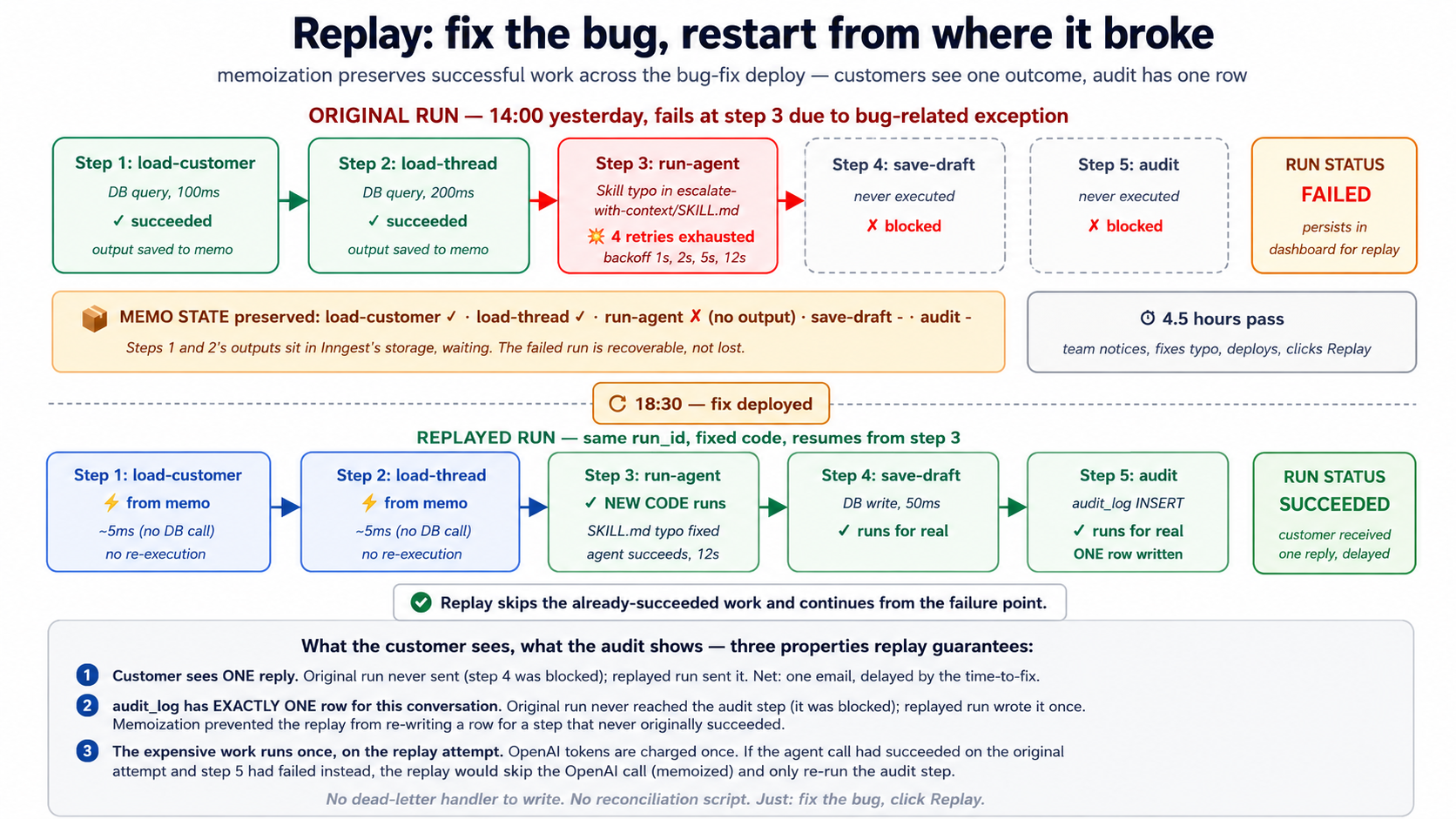
dev-server MCP بناتا ہے replay accessible بغیر leaving Claude Code. During development، جب آپ چاہتے ہیں کو test ایک replay scenario، آپ کریں نہیں ضرورت کو manually click کے گرد dashboard; آپ سکتا ہے پوچھیں AI کو استعمال کریں get_run_status کو inspect ایک failed چلائیں، پھر trigger ایک replay via dashboard یا via re-firing event کے ساتھ وہی idempotency اہم (کون سا، کیونکہ کا تصور 4's idempotency semantics، ہے functionally equivalent کے لیے testing purposes).
فوری چیک. True یا false. (ایک) Replay re-runs failed steps کے ساتھ new ڈیپلائے کوڈ. (b) Replay re-runs successful steps too، کو بنائیں sure everything ہے مستقل. (c) ایک چلائیں میں
step.sleepکے لیے 30 days سکتا ہے be canceled پہلے sleep expires. (d) Bulk-canceling ایک function کہ ہے میں flight گا mid-step abort currently-executingstep.runکو terminate زیادہ تیز.
جوابات: (ایک) True: یہ ہے کیوں replay ہے useful کے لیے bug-fix recovery. (b) False، کے ساتھ ایک footnote: کے ذریعے default replay صرف re-executes failed-and-onwards steps; successful steps ہیں returned سے memo. وہاں ہے ایک opt-in طریقہ (sometimes called "force replay" یا "replay all") کہ re-executes ہر step سے top، کون سا ہے کیا آپ چاہتے ہیں کے لیے schema migrations یا " function logic itself changed اور I چاہتے ہیں کو redo even successful کام." (c) True: sleeping چلتا ہے ہیں first-class objects میں dashboard اور سکتا ہے be canceled، modified، یا replayed. (d) False: cancellation respects step boundary; موجودہ step.run finishes (یا fails) پہلے چلائیں terminates. یہ prevents torn writes.
Try کے ساتھ AI
Walk through a recovery scenario with my AI coding assistant:

Yesterday at 14:00 we deployed a change to the Worker's
escalate-with-context Skill. The new SKILL.md description had a
typo that made the model fail to recognize the trigger phrases.
From 14:00 to 18:00, 47 customer-support runs failed at the
escalation step.

At 18:30 we noticed, fixed the SKILL.md typo, and re-deployed.

Use the dev-server MCP's grep_docs to find Inngest's replay docs,
then:

1. Outline the exact dashboard steps to identify the 47 failed runs.
2. Explain what replay will do (step-by-step) for one of those runs:
   which steps return from memo, which run for real, what the
   dollar cost is.
3. Confirm whether the customers will see one reply or multiple
   (the durability + memoization story).
4. Identify ONE scenario in this story where you'd prefer to
   bulk-cancel instead of replay, and explain why.
تصور 15: HITL gates کے ساتھ step.wait_for_event، Invariant 1 میں runtime
ایجنٹ فیکٹری's Invariant 1 says human ہے principal: authored intent، نہیں agent کا خودمختار judgment، ہے کیا runtime لازمی honor on high-stakes فیصلے. یہ دکھاتا ہے up میں پروڈکشن بطور منظوری gates: agent کرتا ہے analysis، drafts action، مگر کرتا ہے نہیں execute action until ایک human approves.
Inngest کا step.wait_for_event (تصور 8) ہے cleanest expression کا یہ on any پلیٹ فارم today. agent چلتا ہے کو point کا فیصلہ، suspends، اور waits کے لیے ایک منظوری event. human reviews (میں Slack، میں ایک admin UI، میں email) اور clicks approve یا reject. event fires. function resumes کے ساتھ human کا verdict اور acts accordingly.
@inngest_client.create_function(
    fn_id="refund-with-hitl-gate",
    trigger=inngest.TriggerEvent(event="customer/refund.investigated"),
    concurrency=[inngest.Concurrency(limit=5)],
)
async def refund_with_gate(ctx: inngest.Context) -> dict[str, str]:
    request_id = ctx.event.data["request_id"]
    amount_cents = ctx.event.data["amount_cents"]

    # Step 1: the agent's analysis (Course Four Worker)
    analysis = await ctx.step.run(
        "agent-investigates",
        run_refund_investigation_agent,
        request_id=request_id,
    )

    # Step 2: if the agent thinks refund is warranted AND amount > $100,
    # gate behind human approval
    needs_approval = analysis.recommends_refund and amount_cents >= 10_000

    if needs_approval:
        await ctx.step.run(
            "notify-approver",
            send_slack_approval_request,
            request_id=request_id,
            analysis=analysis,
            amount_cents=amount_cents,
        )

        # === THE HITL GATE ===
        approval = await ctx.step.wait_for_event(
            "wait-for-human-approval",
            event="refund/approval.decided",
            timeout=timedelta(hours=24),
            if_exp=f"async.data.request_id == '{request_id}'",
        )

        if approval is None:
            # Timeout: no human responded in 24h. Escalate.
            await ctx.step.run(
                "escalate-timeout",
                escalate_to_senior_reviewer,
                request_id=request_id,
            )
            return {"status": "escalated_timeout"}

        if not approval.data["approved"]:
            await ctx.step.run(
                "notify-rejected", notify_customer_rejected,
                request_id=request_id,
            )
            return {"status": "rejected_by_human"}

    # Either it was approved, or it didn't need approval
    refund = await ctx.step.run(
        "issue-refund", call_stripe_refund,
        request_id=request_id, amount_cents=amount_cents,
    )

    await ctx.step.run(
        "audit-approved-refund", audit_refund,
        request_id=request_id, refund=refund,
        approved_by="human" if needs_approval else "auto",
    )

    return {"status": "issued", "refund_id": refund["id"]}
کیا آپ دیکھیں میں کوڈ: ایک sequence کا steps، کے ساتھ ایک wait_for_event میں middle. کیا ہے happening پر runtime:
- agent چلتا ہے (step 1، durably).
- function decides whether gate applies (in-code logic، free کا side effects).
- If gated: ایک Slack notification fires (step 2، پائیدار). function suspends. Zero compute consumed کے لیے up کو 24 گھنٹے.
- ایک human میں Slack clicks Approve یا Reject. admin بیک اینڈ calls
inngest_client.sendکے ساتھrefund/approval.decidedاورrequest_id. - Inngest matches event کو suspended function (
if_expfilter ensures صرف matching request IDs match). function resumes پر اگلا سطر. - function استعمال کرتا ہے human کا فیصلہ کو either issue refund یا notify rejection. دونوں paths audit فیصلہ اور approver.
یہ ہے کیا بناتا ہے Inngest qualitatively مختلف سے ایک queue-plus-state-machine. HITL نمونہ ہے ایک بنیادی اکائی. function کا کوڈ reads top کو bottom، کے ساتھ gate inline. وہاں ہے نہیں callback، نہیں state restoration، نہیں if state == waiting_for_approval: ... dispatching. runtime handles suspend/resume mechanic; آپ کا کوڈ expresses policy.
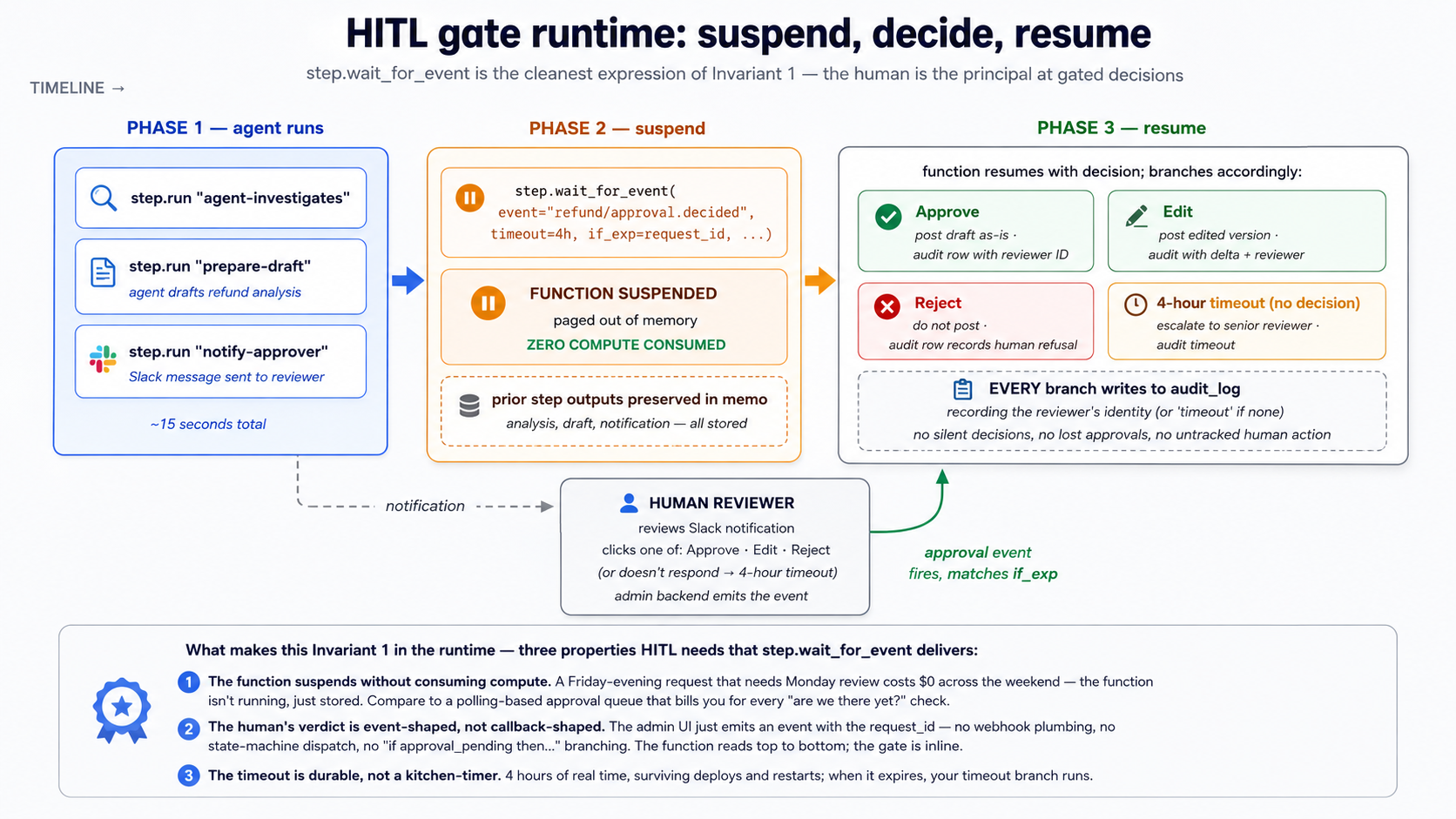
ایک later کورس develops Invariant 1 architecturally: authored intent، تفصیلات پر مبنی ورک فلو، manager-of-Workers layer کہ decides کون سا gates apply کو کون سا actions. یہ کورس دیتا ہے آپ runtime primitive. جب کہ مینیجر layer arrives، gate یہ implements گا be exactly یہ wait_for_event نمونہ، just composed پر fleet wasیع کرنا. Knowing بنیادی اکائی اب means ڈھانچے سے متعلق نمونہ later reads بطور "ایک sensible composition" rather than "magic."
PRIMM، Predict. آپ رکھتے ہیں ایک HITL gate سیٹ کے ساتھ
timeout=timedelta(hours=24). ایک customer کا refund request آتا ہے میں پر 17:00 on ایک Friday. نہیں human ہے online پر weekend. gate کا timeout fires پر 17:00 Saturday. آپ کا timeout handler escalates کو ایک senior reviewer. senior reviewer reads escalation Monday پر 9:00am. Walk کے ذریعے timeline: کیسے بہت سے function چلتا ہے were active during weekend? کیسے much compute did Inngest charge کے لیے? Confidence 1-5.
جواب: zero active function چلتا ہے during weekend. function was suspended: Inngest stored اس کا state، paged function باہر کا memory، اور was waiting کے لیے either event یا timeout. Inngest کرتا ہے نہیں bill کے لیے suspended وقت. جب Saturday 17:00 came اور timeout fired، function resumed کے لیے few hundred milliseconds یہ took کو call timeout handler، پھر suspended again (یا completed if handler ran کو completion). fact کہ senior reviewer لیتا ہے until Monday ہے، سے ورکر کا perspective، just دwasرا wait_for_event cycle. economics کا HITL ورک فلو on Inngest ہیں dramatically مختلف سے polling-based queues کہ bill آپ کے لیے ہر second کا "ہے یہ approved yet?" polling.
Try کے ساتھ AI
With my AI coding assistant: design the HITL gate for the
customer-support Worker's escalate-with-context Skill. Specification:

1. When the agent decides to escalate (the Skill fires), pause for
   human approval before posting the escalation summary to the
   senior support channel.
2. The approval gate should:
   - Notify the on-call reviewer via Slack with the agent's draft
   - Wait up to 4 hours for the reviewer to approve, edit, or reject
   - On approve: post the draft as-is.
   - On edit: incorporate the reviewer's edits, then post.
   - On reject: do not post; mark the escalation as canceled.
   - On 4-hour timeout: post the draft with a "no human review"
     warning header.
3. Every branch (approve/edit/reject/timeout) writes to audit_log
   with the human reviewer's identity (or "timeout" if none).

Use the dev-server MCP's send_event to simulate each branch of
the reviewer's decision during testing.
حصہ 4: worked مثال، customer-support پروڈکشن ورکر
ایک realistic evolution، ہر concept above، دونوں ٹولز. We لیں chat-agent/ پروجیکٹ سے Course #4 اور شامل کریں operational envelope کہ turns یہ میں ایک پروڈکشن ورکر: Inngest functions wrapping agent، ایک event trigger کے لیے inbound emails، ایک daily cron کے لیے proactive health checks، concurrency limits، ایک HITL escalation gate، اور ایک replay-tested ناکامی path. Eight تعمیر کریں فیصلے، وہی shape بطور Courses #3 اور #4.
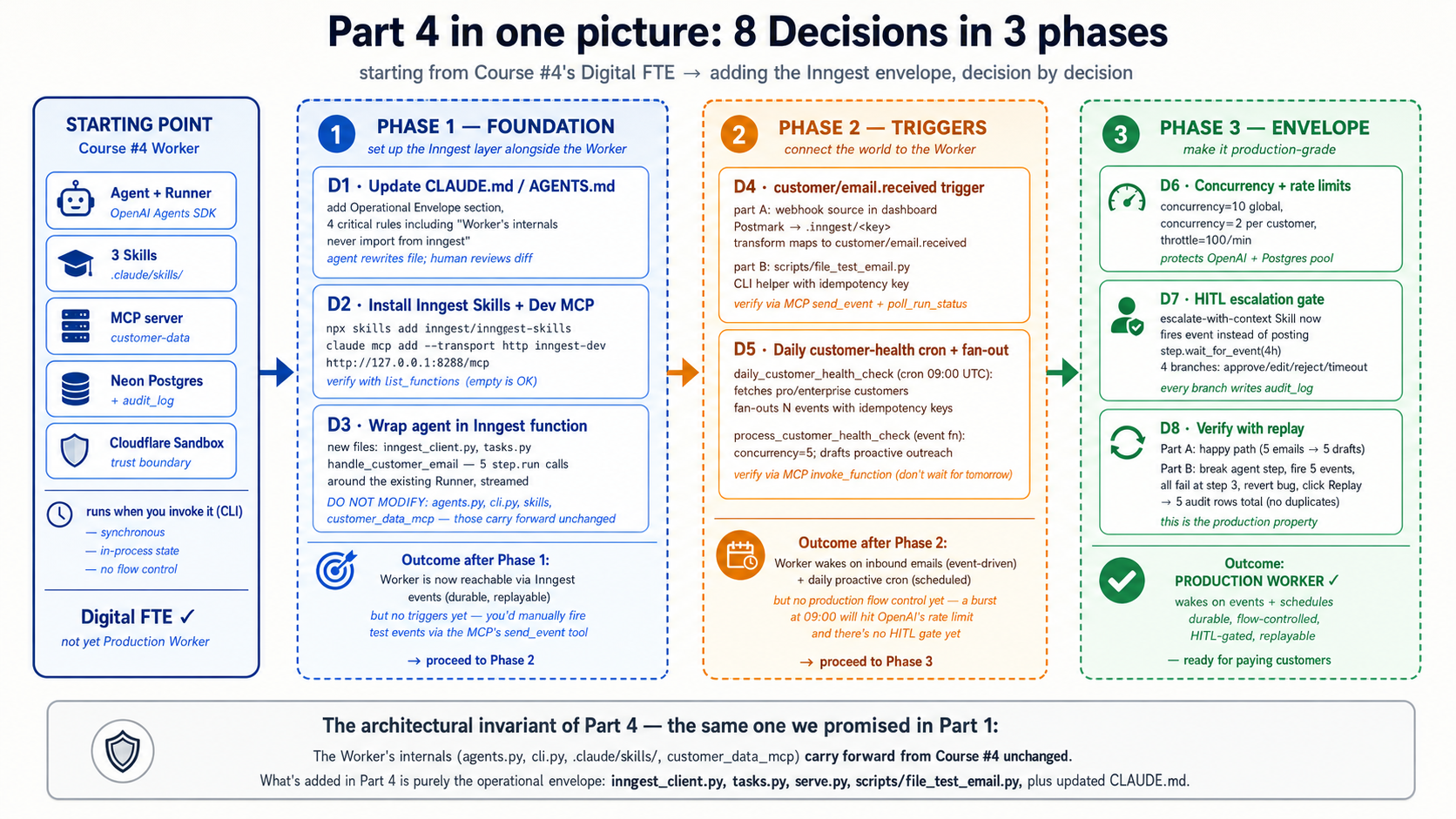
پہلے آپ شروع کریں: setup آپ ضرورت کہ ہے نہیں میں prereqs. Four things یہ Part assumes ہیں پہلے ہی مکمل. چلائیں down یہ checklist; if any item ہے missing، fix یہ پہلے فیصلہ 1.
- ** Course #4 worked مثال ہے built**، نہیں just پڑھیں. آپ رکھتے ہیں ایک working
chat-agent/پروجیکٹ:cli.py،agents.py، three.claude/skills/(summarize-ticket، find-similar-cases، escalate-with-سیاق و سباق)، Neon Postgres schema کے ساتھaudit_log، اور customcustomer-dataMCP server. یہ Part extends those فائلیں; یہ کرتا ہے نہیں replace انہیں. ایک قاری who پڑھیں Course #4 مگر did نہیں تعمیر کریں اس کا حصہ 4 worked مثال گا hit فیصلہ 3 کے ساتھ نہیں agent کو wrap.- Node.js 20+ ہے installed، اس لیے Inngest dev server (
npx inngest-cli@latest dev) سکتا ہے چلائیں.- آپ رکھتے ہیں ایک free Inngest account on Hobby tier (ہمیشہ $0، نہیں credit card). Hobby tier covers everything یہ کورس مشقیں: 50،000 executions per month، 5 concurrent steps، مکمل dashboard کے ساتھ replay اور bulk-cancel. دو ceilings کو جانیں کے بارے میں: 5-concurrent-step cap، اور ایک seven-day
step.sleepceiling on free منصوبہ (ایک year on paid). Neither stops آپ سے completing کورس; they shape کیا پروڈکشن wasیع کرنا looks like (دیکھیں لاگت حصہ میں حصہ 5).- Either Claude Code یا OpenCode ہے installed and authenticated.
brief
Evolve Course #4 chat-agent Digital FTE میں ایک customer-support پروڈکشن ورکر کہ:
- Wakes on
customer/email.receivedevents (Postmark webhook میں پروڈکشن، simulatedsend_eventcalls میں dev). - چلتا ہے existing customer-support agent durably: ہر agent invocation wrapped میں
step.runاس لیے یہ survives crashes، retries on transient ناکامیاں، اور gets مکمل پرامپٹ/response observability. - چلتا ہے ایک daily 09:00 UTC cron کہ fans باہر ایک
customer/health_check.requestedevent کے لیے ہر Pro/ادارہ customer; ہر event triggers ایک ورکر چلائیں کہ drafts ایک proactive outreach message. - Caps concurrency پر 10 globally اور 2 per customer، throttles کو 100 starts per منٹ (protecting OpenAI rate limits اور Postgres connection pool).
- Gates escalations behind ایک 4-hour HITL window: agent drafts escalation، ایک Slack notification goes کو on-call reviewer، function suspends until reviewer approves/rejects/edits، پھر completes accordingly.
- Maintains ایک replay path: جب something fails، failed چلتا ہے persist کے ساتھ مکمل state; بعد fixing bug، آپ replay انہیں اور they resume سے کہاں they broke.
ورکر کا internals ( agent، skills، MCP server، audit_log) کریں نہیں تبدیلی. We شامل کریں Inngest around انہیں.
ایک note on پرامپٹس کہ follow. ہر فیصلہ دکھاتا ہے ایک structured پوچھیں بطور ایک block-quoted پرامپٹ. نمونہ کہ کام کرتا ہے بہترین میں practice ہے کو precede ہر پوچھیں کے ساتھ ایک orient move ("پڑھیں
CLAUDE.mdاور relevant فائلیں، tell me کیا آپ دیکھیں، اور پوچھیں 1-2 سوالات پہلے we شروع کریں") اور پھر send structured پوچھیں once agent has loaded سیاق و سباق اور clarified ambiguities. structured پوچھتا ہے below ہیں destination، نہیں پہلا move. Pasting انہیں cold کام کرتا ہے; pasting انہیں بعد orientation کام کرتا ہے بہتر، especially بطور پروجیکٹ grows.
فیصلہ 1: Update قواعد فائل کے ساتھ Inngest layer
کیا آپ کریں (Claude Code). کھولیں Claude Code میں آپ کا existing chat-agent/ پروجیکٹ. Orient پہلا: پوچھیں agent کو پڑھیں CLAUDE.md، existing src/chat_agent/ layout، اور Course #4 skills، اور کو tell آپ back کیا یہ sees plus ایک یا دو clarifying سوالات کے بارے میں Course Five additions. Once کہ exchange settles، brief agent on ڈھانچے سے متعلق addition اور پوچھیں یہ کو update CLAUDE.md:
We're adding the Inngest operational envelope around the Course Four
Digital FTE. The Worker's internals don't change. What's NEW:

1. inngest-py SDK installed and configured (an inngest_client in
   src/chat_agent/inngest_client.py).
2. A new module src/chat_agent/tasks.py containing Inngest
   functions that wrap the agent: one for inbound emails, one for
   the daily health-check cron, one for the HITL escalation gate.
3. A dev-only entry point src/chat_agent/serve.py that runs an
   ASGI server hosting the Inngest functions so the local dev
   server can discover them.
4. The Inngest dev server is launched separately with
   `npx inngest-cli@latest dev`; the Inngest dev-server MCP at
   http://127.0.0.1:8288/mcp is added to Claude Code's MCP config.

Update CLAUDE.md to add:

- A new "Operational envelope" section describing where Inngest
  functions live, what triggers each one has, and the rule that
  the Worker's internal code never depends on Inngest's API:
  agents, skills, MCP server are unchanged.
- A new critical rule: every Inngest function wraps its agent
  invocation in step.run so failures don't lose state.
- A new critical rule: every inngest_client.send from inside agent
  code uses an idempotency key (event ID seed) to prevent
  double-firing on retry.
- A new critical rule: HITL gates use step.wait_for_event with
  an explicit timeout AND a timeout handler that writes to
  audit_log. No silent timeouts.
- Update the Commands section with the two new commands:
  `npx inngest-cli@latest dev` (dev server) and
  `uv run uvicorn chat_agent.serve:app --reload` (function host).

Keep the file focused (well under 3,000 tokens). Show me the diff before writing.
Claude Code drafts update. پڑھیں diff carefully. نیا critical قواعد ہیں load-bearing pieces: کوئی بھی چیز weak وہاں fails کو prevent پروڈکشن ناکامی طریقہ یہ ہے supposed کو prevent.
کیوں. "ورکر کا internals never import سے inngest" قاعدہ ہے ڈھانچے سے متعلق invariant کا یہ کورس. Swapping Inngest کے لیے Temporal یا Restate later تبدیلیاں صرف orchestration layer; ورکر ہے untouched. idempotency-key قاعدہ prevents downstream events سے firing twice on retry. HITL no-silent-timeout قاعدہ prevents ایک Friday-evening request سے getting neither approved nor escalated کیونکہ nobody noticed timeout fired پر weekend.
کیا تبدیلیاں میں OpenCode. وہی flow: brief agent، review diff. استعمال کریں AGENTS.md if آپ renamed یہ میں Course #3; وہی content.
فیصلہ 2: install Inngest skills اور جوڑیں dev-server MCP
کیا آپ کریں (Claude Code). شروع کریں کے ساتھ orientation: پوچھیں agent کو پڑھیں موجودہ MCP config اور pyproject.toml، report کون سا Inngest pieces ہیں پہلے ہی wired اور کون سا ضرورت installing، اور پوچھیں کے لیے confirmation پہلے changing کوئی بھی چیز. پھر brief یہ کو سیٹ up Inngest development plane:
Set up the Inngest development plane for this project. Three things
to do:

1. Install the Inngest Python SDK as a dependency:
   `uv add inngest`

2. Install the Inngest Agent Skills into .claude/skills/ via the
   official installer:
   `npx skills add inngest/inngest-skills`

   These six skills (inngest-setup, inngest-events,
   inngest-durable-functions, inngest-steps, inngest-flow-control,
   inngest-middleware) are TypeScript-focused in their code examples
   but the conceptual content transfers to Python. They'll help you
   write correct Inngest code when I ask for new functions.

3. Add the Inngest dev-server MCP to Claude Code's MCP config so you
   can interact with the running dev server:
   `claude mcp add --transport http inngest-dev http://127.0.0.1:8288/mcp`

After installing, start the dev server in a separate terminal:
`npx inngest-cli@latest dev`

Verify the setup by using the MCP's list_functions tool to confirm
the dev server is reachable. (It'll be empty; we haven't written
any functions yet. That's expected. The point is to confirm the
MCP connection works.)
پڑھیں diff carefully. verify step ہے اہم: if list_functions errors باہر، dev server ہے نہیں running یا MCP ہے نہیں configured، اور آپ catch یہ پہلے فیصلہ 3 بجائے کا debugging یہ later.
یہ ہے صرف place Claude Code اور OpenCode genuinely diverge میں یہ کورس ( MCP-config mechanic differs: ایک CLI command کے لیے Claude Code، ایک JSON block کے لیے OpenCode). ہر دwasرا فیصلہ ہے ٹول-agnostic; پرامپٹس آپ paste ہیں وہی میں either ٹول.
کیوں. Inngest Agent skills دیں آپ کا کوڈنگ agent up-to-date API علم یہ ضرورت ہے. MCP دیتا ہے agent ability کو interact کے ساتھ آپ کا running dev server: send events، monitor چلتا ہے، search docs. Together they بنائیں فیصلے 3-8 dramatically زیادہ تیز، کیونکہ ماڈل writes درست کوڈ on پہلا try (skills) اور سکتا ہے verify یہ بغیر آپ switching سیاق و سباق (MCP).
ایک note on TypeScript focus کا skills: conceptual content (events، پائیدار functions، steps، flow قابو، middleware) ہے language-agnostic. کہاں skills' TypeScript کوڈ مثالیں conflict کے ساتھ Python syntax، AI استعمال کرتا ہے grep_docs اور read_doc on MCP کو find Python-specific syntax. یہ ہے recommended ورک فلو per Inngest کا Agent skills documentation.
" ماڈل writes درست کوڈ on پہلا try" assumes ایک frontier-class کوڈنگ agent: Claude Sonnet یا Opus، ایک GPT-5-class ماڈل، یا Gemini 2.5 Pro. Inngest architecture یہ کورس سکھاتا ہے (events، steps، memoization، flow قابو) ہے SDK-level اور model-independent: یہ holds whatever ماڈل drives آپ کا کوڈنگ agent. مگر حصہ 4 تعمیر کریں experience leans on مضبوط instruction-following: structured فیصلہ پرامپٹس اور فیصلہ 7 step کہاں آپ rewrite ایک skill کا description کو emit ایک event دونوں expect agent کو follow multi-step instructions reliably. On ایک weaker ماڈل، expect کو iterate on structured پرامپٹس زیادہ، اور کو بنائیں skill descriptions زیادہ concrete اور explicit. ڈھانچہ ہے نہیں broken; prompting just ضرورت ہے زیادہ scaffolding کے لیے ایک smaller ماڈل.
فیصلہ 3: Wrap existing customer-support agent میں ایک Inngest function
کیا آپ کریں (Claude Code). Begin کے ساتھ ایک orient move: پوچھیں agent کو پڑھیں src/chat_agent/agents.py، cli.py، اور tools.py اور کو report کیا agent expects بطور input اور کیا Runner.run_streamed returns. پھر brief یہ کو wrap Course #4 agent بغیر modifying agent itself:
Create the Inngest client and the first Inngest function. Two files.

File 1: src/chat_agent/inngest_client.py
- Import inngest
- Create a single inngest.Inngest() instance with app_id="chat-agent"
  and the appropriate env vars
- Export it so tasks.py can import it

File 2: src/chat_agent/tasks.py
- Import the inngest_client from file 1
- Define handle_customer_email: an async function decorated with
  inngest_client.create_function, triggered by event
  'customer/email.received'
- Inside the function:
    - step.run "load-customer": call the customer-data MCP server
      to load the customer record
    - step.run "load-thread": load the conversation thread for
      that customer
    - step.run "run-agent": call Runner.run_streamed with the
      existing Course Four agent, passing the customer, thread, and
      email body. The entire agent invocation is durably memoized.
    - step.run "save-draft-reply": persist the agent's draft to
      Postgres
    - step.run "audit-handled": write an audit_log row with the
      run_id, customer_id, action='email_drafted'
- Return {"status": "drafted", "draft_id": draft["id"]}

DO NOT MODIFY:
- src/chat_agent/agents.py (the agent definition)
- src/chat_agent/cli.py (the original CLI)
- src/customer_data_mcp/server.py (the MCP server)
- any .claude/skills/ files

The Inngest layer is purely additive. After writing, run
`uv run uvicorn chat_agent.serve:app --reload` in one terminal and
`npx inngest-cli@latest dev` in another. Then use the MCP's
list_functions to confirm handle_customer_email shows up.
Claude Code writes دو فائلیں، walks کے ذریعے any import errors، اور verifies function ہے discoverable. پڑھیں diff carefully.
کیوں. "کریں نہیں modify" list ہے کیا بناتا ہے یہ ایک additive تبدیلی. Course #4's ورکر keeps working exactly بطور پہلے via python -m chat_agent.cli; Inngest layer ہے ایک new entry point کو وہی ورکر. یہ ہے کیا پروڈکشن ٹیمیں چاہتے ہیں: option کو gradually migrate inbound traffic سے old path کو نیا path، بغیر forking ورکر کوڈ.
فیصلہ 4: شامل کریں email-received event trigger
کیا آپ کریں (Claude Code). Orient پہلا: پوچھیں agent کو پڑھیں existing webhook documentation میں Inngest dev-server MCP اور کو summarize کیسے dashboard-configured webhooks relate کو event-triggered functions. پھر brief یہ کو سیٹ up inbound webhook integration:
Configure the inbound webhook trigger for customer emails. In
production this connects to Postmark (your email service); in
development we simulate it with send_event from the dev-server MCP.

Two parts:

PART A, webhook configuration (Inngest dashboard, manual).
Walk me through configuring a webhook source in the Inngest
dashboard that:
- Has the URL inn.gs/e/<key> (Inngest provides the key)
- Transforms incoming Postmark JSON into our event shape:
    name: 'customer/email.received'
    data:
      customer_id: lookup from Postmark's 'From' email
      body: Postmark's 'TextBody'
      subject: Postmark's 'Subject'
      received_at: Postmark's 'Date' (ISO 8601)
      idempotency: derived from Postmark's MessageID

You don't write the webhook config in code; it's dashboard UI.
Walk me through the steps with written instructions.

PART B, local development testing.
We need to test handle_customer_email without an actual email
arriving. Write a small CLI helper at scripts/fire_test_email.py
that:
- Takes --customer-id and --body arguments
- Sends an Inngest event via inngest_client.send(...) matching
  customer/email.received
- Uses an idempotency key derived from customer_id + timestamp so
  repeated test runs don't cause duplicate processing
- Prints the resulting run_id so we can inspect it in the dashboard

After writing both parts, use the MCP's send_event tool to fire
a test email payload directly, and poll_run_status to watch the
function execute end-to-end. Confirm:
- The function picks up the event
- The customer-data MCP server is called
- The agent runs (you'll see prompt/response in the trace)
- The audit_log gets a new row
پڑھیں diff carefully.
کیوں. Splitting webhook configuration (dashboard، نہیں کوڈ) سے local testing (CLI helper) reflects کیسے یہ کام کرتا ہے میں حقیقی پروڈکشن. Inngest dashboard owns webhook routing; آپ کا کوڈ owns event consumption. Mixing انہیں میں ایک place ہے کیا بناتا ہے traditional webhook handling اس لیے messy.
فیصلہ 5: شامل کریں daily customer-health-check cron کے ساتھ fan-out
کیا آپ کریں (Claude Code). Orient پہلا: پوچھیں agent کو پڑھیں tasks.py اور report کیسے یہ would extend فائل کے ساتھ ایک cron-triggered function plus ایک separate event-triggered consumer. پھر brief یہ کو شامل کریں scheduled کام:
Add a daily cron-triggered Inngest function that runs at 09:00 UTC
and fires a customer-health-check event per Pro/Enterprise customer.

In src/chat_agent/tasks.py, add:

1. daily_customer_health_check, a cron-triggered function:
   - Schedule: 09:00 UTC daily (cron expression: "0 9 * * *")
   - step.run "fetch-eligible-customers": query the customer-data
     MCP for all customers where tier IN ('pro', 'enterprise')
     AND last_proactive_outreach < NOW() - INTERVAL '7 days'
   - step.run "fan-out-events": for each customer, build an Event
     with name='customer/health_check.requested', data={'customer_id':
     id, 'date': today.isoformat()}, and id=f'health-check-{id}-{date}'
     (idempotency key prevents same-day duplicates if the cron fires
     twice). Call inngest_client.send(events=[...]) in one batch.
   - Return {'customers_scheduled': N}

2. process_customer_health_check, an event-triggered function:
   - Trigger: event 'customer/health_check.requested'
   - concurrency: limit=5 globally (it's batch work; don't melt OpenAI)
   - step.run "load-customer": from customer-data MCP
   - step.run "load-recent-activity": last 30 days of conversations
     and refunds from audit_log
   - step.run "run-health-agent": run the Course Four agent with a
     specialized system prompt: "draft a proactive outreach for
     this customer based on their recent activity"
   - step.run "save-draft" and step.run "audit-drafted"
   - Return {'status': 'drafted', 'customer_id': id}

After writing both, use the MCP's invoke_function to manually
trigger daily_customer_health_check (don't wait for 09:00 tomorrow).
Use poll_run_status to watch the fan-out happen. You should see
the parent function complete in seconds, and N child runs appear in
the dashboard. Confirm one of those child runs succeeds end-to-end.
پڑھیں diff carefully. Claude Code writes functions، چلتا ہے manual trigger via MCP، watches چلتا ہے propagate.
کیوں. یہ ہے fan-out (تصور 5) کے ساتھ idempotency (تصور 4) میں action. cron function returns quickly; اصل کام ہوتا ہے میں parallel child چلتا ہے (per concurrency limit on process_customer_health_check). If cron fires twice وہی دن (bug، redeploy، dashboard manual-invoke)، idempotency keys prevent duplicate processing. یہ ہے نمونہ ایک later کورس گا compose پر افرادی قوت wasیع کرنا.
فیصلہ 6: شامل کریں concurrency limits اور rate limiting
concurrency اور throttle settings below ہیں configuration، نہیں consumption. They کریں نہیں لاگت money themselves; they protect downstream نظام کہ کریں (OpenAI's rate-limited tokens، Postgres' connection pool، آپ کا اپنا MCP server کا resources). لکھیں config کے لیے پروڈکشن wasیع کرنا; just remember Hobby-tier 5-concurrent-step cap holds آپ کا observed concurrency پر 5 (دیکھیں حصہ 5's "Hobby-tier ceilings").
کیا آپ کریں (Claude Code). Orient پہلا: پوچھیں agent کو پڑھیں موجودہ tasks.py اور report کون سا functions currently رکھتے ہیں any flow-control configuration. پھر brief یہ کو شامل کریں پروڈکشن flow قابو:
Add concurrency and throttling configuration to the customer-support
functions so we protect OpenAI's rate limit and Postgres' connection
pool. Apply these specific policies:

For handle_customer_email:
- concurrency: 10 globally
- concurrency: 2 per customer (key="event.data.customer_id")
- throttle: 100 starts per minute
- Rationale to capture in comments: OpenAI has 30 rpm hard cap;
  Postgres pool is 20; we want a noisy customer to not occupy
  more than 2 slots.

For process_customer_health_check (already has concurrency=5):
- Add: throttle of 30 starts per minute
- Rationale: this is batch work; the cron fires 500+ events at once;
  the throttle smooths the start-rate.

For daily_customer_health_check (the cron):
- No concurrency change needed; it runs at most once a day at 09:00
  with the global default concurrency.

After making the changes, simulate a burst: use the MCP's
send_event to fire 20 customer/email.received events for 5 different
customers in quick succession (4 events per customer). Then use
list_functions and get_run_status to confirm:
- Only 10 are running concurrently (global cap)
- Only 2 per customer are running (per-customer cap)
- The remaining events queue
- All eventually complete
پڑھیں diff carefully. Claude Code adds configuration، چلتا ہے burst test via MCP، اور رپورٹس results.
کیوں. two-layer concurrency cap ہے multi-tenant fairness نمونہ سے تصور 12. بغیر یہ، ایک chatty customer سکتا ہے occupy all 10 عالمی slots اور starve everyone else. throttle ہے OpenAI rate-limit protection سے تصور 11; بغیر یہ، ایک 09:00 burst سے cron-driven fan-out would hit OpenAI's 30-rpm cap میں پہلا 2 seconds اور fail بہت سے چلتا ہے.
فیصلہ 7: شامل کریں HITL escalation gate
کیا آپ کریں (Claude Code). Orient پہلا: پوچھیں agent کو پڑھیں escalate-with-context/SKILL.md اور tasks.py اور کو report کیا currently ہوتا ہے جب escalate skill fires. پھر brief یہ کو شامل کریں human-منظوری gate:
Add the HITL escalation gate per Concept 15. When the agent's
escalate-with-context Skill fires, we want a human to approve
before the escalation actually posts to the senior support channel.

Add to src/chat_agent/tasks.py:

escalate_with_human_approval, an event-triggered function:
- Trigger: event 'customer/escalation.requested'
  (the Course Four escalate-with-context Skill emits this event
  instead of posting directly; we need to update the Skill to do so,
  see below)
- concurrency: 5 (escalations are rare)

Inside the function:
1. step.run "notify-reviewer": Slack message to on-call reviewer
   with the agent's escalation draft and three buttons (Approve,
   Edit, Reject). Buttons POST to our admin backend which calls
   inngest_client.send with event 'escalation/decision.made' and data
   including request_id, decision, and optional edited_text.

2. THE GATE:
   approval = await ctx.step.wait_for_event(
       "wait-for-decision",
       event="escalation/decision.made",
       timeout=timedelta(hours=4),
       if_exp=f"async.data.request_id == '{request_id}'",
   )

3. Branch on the result:
   - approval is None (timeout): step.run "audit-timeout" + post
     the draft with a "no human review" warning header. Audit row
     includes action='escalation_posted_via_timeout'.
   - approval.data.decision == 'reject': step.run "audit-rejected" +
     do not post. Audit row includes the reviewer's identity.
   - approval.data.decision == 'edit': step.run "audit-edited" with
     reviewer's edited_text + post the edited version.
   - approval.data.decision == 'approve': step.run "audit-approved" +
     post the original draft.

Also: update .claude/skills/escalate-with-context/SKILL.md to
instruct the agent to fire 'customer/escalation.requested' (via
inngest_client.send with an idempotency key) instead of posting
directly. The actual posting now happens in the Inngest function
after the gate.

After writing, test all four branches by using the MCP's send_event
to manually fire 'escalation/decision.made' with each decision
type, and one scenario where no decision is sent and you let the
4-hour timeout fire (use a 30-second timeout for the test, then
revert to 4 hours).
پڑھیں diff carefully. Claude Code writes function، updates SKILL.md description اور body، اور walks کے ذریعے four-branch test via MCP.
کیوں. یہ ہے تصور 15's HITL نمونہ wired میں Course #4 audit subsystem. ہر branch (approve، edit، reject، timeout) writes کو audit_log کے ساتھ reviewer کا identity (یا "timeout" if none). skill update ہے کیا closes loop: agent نہیں longer posts directly; یہ requests ایک escalation اور Inngest function decides whether کو post مبنی on human کا input. یہ ہے Invariant 1 میں runtime: agent کا اختیار ہے constrained، human کا authored intent re-enters نظام، اور جانچ کا ریکارڈ records who decided کیا.
فیصلہ 8: Verify شروع سے آخر تک کے ساتھ replay scenario
کیا آپ کریں (Claude Code). Orient پہلا: پوچھیں agent کو پڑھیں dashboard کا موجودہ state via MCP (list_functions، recent چلتا ہے) اور کو summarize کیا verification گا مشق پہلے any events ہیں sent. پھر brief یہ کو چلائیں verification scenario:
Run the end-to-end verification. Two parts.

PART A, the happy path.
1. Fire a customer/email.received event via the MCP's send_event
   for customer 'c-test-1' with body "Hi, my refund hasn't arrived
   and I'm getting worried about my upcoming bill."
2. Use poll_run_status to watch handle_customer_email run end-to-end.
3. Confirm in the dashboard trace:
   - All 5 steps completed
   - The agent's prompt and response are visible in the trace
   - The audit_log has a new row with action='email_drafted'
4. Query the customer-data MCP to confirm the draft reply is
   persisted in the customer's conversation thread.

PART B, the failure-and-replay path (this is the production scenario).

1. Deliberately break the run-agent step: edit src/chat_agent/tasks.py
   to raise a ValueError("simulated agent failure") inside the
   run-agent step.
2. Fire 5 customer/email.received events via send_event for 5
   different customers.
3. Watch all 5 runs fail at the run-agent step. Confirm in the
   dashboard:
   - Each run has steps 1 and 2 marked successful
   - Step 3 (run-agent) shows the ValueError after the retries
     exhaust
   - Steps 4 and 5 (save-draft, audit) never ran
4. Now fix the bug: revert the deliberate ValueError. Save the file
   (uvicorn auto-reloads).
5. In the dashboard, select the 5 failed runs and click Replay.
6. Watch each replayed run:
   - Steps 1 and 2 return immediately from memo (no re-execution)
   - Step 3 (run-agent) executes for real and succeeds
   - Steps 4 and 5 execute for real
   - The customer's draft is persisted; the audit row is written
7. Query audit_log to confirm:
   - Each customer has exactly ONE row with action='email_drafted'
   - No duplicates (memoization prevented re-running the
     audit-writing step on replay)

Report back: did Part A succeed cleanly? Did Part B produce exactly
one audit row per customer (5 total)?
پڑھیں diff carefully. Claude Code چلتا ہے دونوں parts اور رپورٹس نتیجہ. If Part B پیدا کرتا ہے 5 audit rows (ایک per customer) کے ساتھ نہیں duplicates، پروڈکشن ورکر ڈھانچہ ہے verified. If یہ پیدا کرتا ہے 10 (some duplicated) یا 4 (ایک missed)، something میں durability یا memoization story ہے broken، اور audit query ہے diagnostic.
کیوں. Part ایک proves happy path کام کرتا ہے. Part B proves failure-and-replay story کام کرتا ہے، کون سا ہے ڈھانچے سے متعلق property کا Inngest کہ justifies adopting یہ. ایک ورکر کہ سکتا ہے recover سے ایک bad ڈیپلائے بغیر losing customer interactions ہے ایک پروڈکشن ورکر; ایک ورکر کہ loses انہیں ہے ایک Digital FTE. یہ verification scenario ہے bright سطر درمیان دو.
کیا just happened
آپ took customer-support Digital FTE سے Course #4 اور added ایک operational envelope کے گرد یہ. agent کا internals did نہیں تبدیلی: وہی Agent، وہی Runner.run_streamed، وہی skills، وہی MCP server، وہی audit_log. کیا changed ہے everything around agent. یہ اب wakes on events (webhook-driven inbound emails) اور schedules (daily cron)، چلتا ہے durably (step.run wrapping agent invocation)، respects پروڈکشن flow قابو (concurrency، throttle، per-customer fairness)، supports HITL gates (Slack منظوری پہلے escalation posts)، اور recovers سے ناکامیاں (dashboard replay).
agent کوڈ ہے وہی; agent کا reach ہے fundamentally مختلف. ایک function someone has کو call ہے اب ایک function دنیا سکتا ہے wake، کے ساتھ resilience اور flow قابو کہ پروڈکشن demands.
remaining concerns ہیں observability بڑے پیمانے پر، multi-Worker coordination، اور مینیجر layer کہ decides کون سا ورکرز handle کون سا traffic. کہ ہے اگلا کورس میں track. Course Five covers unit کا پروڈکشن-ready عمل درآمد; اگلا composes those units میں افرادی قوت.
حصہ 5: کہاں یہ کورس leaves off
لاگت shape کا ایک پروڈکشن ورکر
دو لاگت surfaces matter: بنیادی ڈھانچا لاگت (Inngest، Postgres، سینڈ باکس compute) اور inference لاگت (OpenAI tokens). بنیادی ڈھانچا stays roughly flat بطور load increases; inference scales linearly. Numbers below ہیں ہو سکتا ہے 2026; چیک موجودہ قیمتوں کا تعین صفحات پہلے quoting انہیں میں ایک بجٹ.
Inngest قیمتوں کا تعین. Inngest charges per عمل درآمد: ہر function چلائیں، plus ہر step-level retry، counts بطور ایک عمل درآمد.
| Tier | Price | Executions / month | Concurrent steps | Notable |
|---|---|---|---|---|
| Hobby | $0 | 50،000 | 5 | 3 صارفین، 50 realtime connections، نہیں credit card |
| Pro | سے $75 / month | 1،000،000 | 100+ | 1000+ realtime connections، 15+ صارفین، 7-دن trace retention |
| ادارہ | custom | custom | 500-50،000 | SAML / RBAC، 90-دن trace retention، dedicated سپورٹ |
events قیمتوں کا تعین layers on top: پہلا 1-5M events per دن ہیں included; 1M-5M tier above چلتا ہے کے گرد $0.0005 per event. Pro adds $50 per additional 1M executions جب آپ blow past 1M cap.
Hobby-tier ceilings کہ matter یہاں. 5-concurrent-step cap means کہ even if آپ declare concurrency=Concurrency(limit=10) میں کوڈ، پلیٹ فارم کا account-level cap holds آپ پر 5. آپ کا کوڈ ہے درست کے لیے پروڈکشن; observed concurrency on free tier ہے 5. step.sleep اور step.sleep_until ہیں بھی tier-bounded: up کو seven days on free Hobby منصوبہ، up کو ایک year on paid plans (Inngest usage limits).
Inference لاگت dominates. ایک typical customer-support ورکر چلائیں استعمال کرتا ہے ~3،000-10،000 tokens کا GPT-4o per conversation. پر illustrative GPT-4o قیمتوں کا تعین، کہ ہے $0.01-$0.50 per email depending on سیاق و سباق size اور ماڈل choice. کے لیے 1،000 emails ایک دن، $10-$500/دن میں inference. یہ ہے کیا آپ optimize. Everything else ہے ایک rounding error.
Three Inngest-specific لاگت levers once آپ ہیں میں optimization zone:
- کریں نہیں wrap pure functions میں
step.run. If ایک function has نہیں side effects، یہ کرتا ہے نہیں ضرورت durability; wrapping یہ adds ایک step-run charge کے لیے نہیں benefit. Savestep.runکے لیے I/O اور side effects. - استعمال کریں
batch_eventsکے لیے bulk paths. ایک 50-event batch ہے ایک function چلائیں، نہیں 50. - Suspend cheaply کے ساتھ
step.sleepاورstep.wait_for_event. Suspended functions کریں نہیں bill کے لیے suspension وقت. ایک 3-دن delayed-followup لاگتیں وہی بطور ایک 3-second ایک.
Scaling کو 50 ورکرز ہے roughly $3،000-$15،000/month کے لیے inference، $50-$200 کے لیے Inngest، $50-$200 کے لیے Neon، $100-$500 کے لیے سینڈ باکس compute. بنیادی ڈھانچا scales flat; inference bill scales کے ساتھ traffic.
Swap رہنمائی: operational envelope ہے invariant، پلیٹ فارم ہے نہیں
یہ کورس names Inngest پر ہر layer. کہ ہے کیونکہ ایک تدریس مثال ضرورت ہے concrete جوابات، نہیں "استعمال کریں any orchestrator آپ like." مگر ڈھانچہ کام کرتا ہے کے ساتھ any compliant alternative. Five swaps کورس's ڈیزائن explicitly anticipates:
-
trigger surface: Inngest events → Temporal signals، Restate handlers، AWS EventBridge + Lambda. ہر پلیٹ فارم has ایک طریقہ کو express "یہ کوڈ چلتا ہے جب یہ named thing ہوتا ہے." event names، payload shapes، اور idempotency طریقہ کار all transfer. کیا تبدیلیاں: SDK's decorator syntax اور dashboard.
-
Durable عمل درآمد: Inngest
step.run→ Temporal activities، Restate handlers، custom Postgres-backed state machines. ہر دیتا ہے آپ "memoize یہ side-effecting call، retry on transient ناکامی، resume بعد crash" semantics. Temporal ہے closest analog اور older، زیادہ ادارہ-tested option. Restate ہے newest اور has ایک زیادہ functional-programming flavor. custom state machines ہیں کیا ٹیمیں لکھیں جب they نہیں کر سکتا adopt ایک managed پلیٹ فارم; usually 1،000-10،000 lines کا کوڈ کہ recreate ~70% کا کیا Inngest دیتا ہے آپ کے لیے free. -
HITL بنیادی اکائی:
step.wait_for_event→ Temporal کاawait Workflow.execute_activity(approval_signal)، Restate کا awakeables، custom Redis/Postgres منظوری queues. نمونہ ہے وہی: function suspends، external signal resumes یہ، audit captures فیصلہ. Inngest کا expression ہے cleanest پر writing; Temporal کا ہے زیادہ verbose مگر battle-tested پر بڑا wasیع کرنا. -
Cron scheduling: Inngest cron triggers → Kubernetes CronJobs + queue، GitHub Actions schedules، AWS EventBridge schedules. Cron triggers ہیں commodity. Inngest advantage ہے نہیں having cron; یہ ہے کہ cron-triggered functions get وہی durability/replay/flow-control بطور event-triggered ones، automatically. دwasرا پلیٹ فارمز بنائیں آپ رابطہ کہ yourself.
-
Flow قابو: Inngest concurrency + throttle → Temporal کام queues کے ساتھ ورکر concurrency، Redis-backed rate limiters، AWS SQS message visibility timeouts. دwasرا پلیٹ فارمز سکتا ہے کریں یہ; Inngest کرتا ہے یہ کے ساتھ configuration density we رکھتے ہیں seen (ایک decorator argument).
Dapr بطور کھولیں companion پر پروڈکشن wasیع کرنا. ایک زیادہ ambitious replacement worth naming: Dapr Agents بطور structural companion کو Inngest پر پروڈکشن wasیع کرنا، میں طریقہ OpenCode ہے کو Claude Code. Dapr Agents reached v1.0 GA on March 23، 2026 کے تحت CNCF نظم و نگرانی (CNCF announcement، Dapr Agents core تصورات). DurableAgent ہے پروڈکشن-ready class; older Agent class ہے deprecated. چنیں Dapr جب Kubernetes-native ڈیپلائمنٹ اور multi-language SDKs matter زیادہ than Inngest کا local dev experience. Inngest ہے بہتر سیکھنا ٹول ( dashboard بناتا ہے ذہنی نمونہ visible); Dapr ہے بہتر wasیع کرنا ٹول جب آپ رکھتے ہیں hit Inngest کا tier ceilings یا ضرورت K8s-native multi-language ڈیپلائمنٹ.
Inngest ہے بھی اوپن سورس (github.com/inngest/inngest; 1.0 release added self-hosting سپورٹ میں September 2024) اور self-hostable via Helm + KEDA. محور کہ matter بڑے پیمانے پر ہیں نظم و نگرانی، سپورٹ، اور maturity: Inngest ہے governed کے ذریعے ایک single vendor کے ساتھ ایک young self-hosting story; Dapr ہے CNCF-governed کے ساتھ ایک longer پروڈکشن track record.
| Course Five concept | Inngest بنیادی اکائی | Dapr پروڈکشن analogue | Teaching note |
|---|---|---|---|
| scheduled کام | TriggerCron | Cron input binding / Dapr Scheduler | وہی خیال: وقت wakes ورکر. Dapr usually درکار ہے component configuration. |
| Webhook/event ingress | Inngest webhook endpoint → event | HTTP endpoint، input bindings، یا pub/sub ingress | Inngest hides زیادہ plumbing; Dapr دیتا ہے بنیادی ڈھانچا قابو. |
| Internal events | inngest_client.send() | Dapr pub/sub | وہی event-driven ذہنی نمونہ; broker ہے pluggable میں Dapr. |
| Fan-out | ایک event triggers بہت سے functions | ایک topic/event consumed کے ذریعے بہت سے services | وہی ڈھانچہ; Dapr استعمال کرتا ہے broker/topic/subscriber composition. |
| Durable steps | step.run() + memoization | Dapr ورک فلو + activities | Similar پروڈکشن purpose، مختلف developer ماڈل. |
| Waiting بغیر compute | step.sleep() | Durable ورک فلو timers | دونوں بچیں holding ایک عمل کھولیں جبکہ waiting. |
| Human منظوری gate | step.wait_for_event() | ورک فلو external events/signals، pub/sub، actors | Inngest expression ہے simpler; Dapr ہے زیادہ composable. |
| Retries | Function/step retries | ورک فلو/activity retries + resiliency policies | Dapr بناتا ہے resiliency ایک runtime policy بطور اچھی طرح بطور ورک فلو behavior. |
| Dead-letter / failed چلتا ہے | Inngest dashboard failed چلتا ہے + replay | Broker DLQ + ورک فلو status/restart/manual tooling | Inngest ہے زیادہ turnkey یہاں; Dapr ہے زیادہ infrastructure-native. |
| Flow قابو | Concurrency، throttling، priority، batching | Kubernetes scaling، app concurrency، broker controls، resiliency policies، bulk pub/sub | Dapr سکتا ہے کریں یہ، مگر یہ ہے نہیں ایک decorator argument. Inngest ہے denser. |
| Stateful coordination | wait_for_event، event keys، step state | Actors + state store + ورک فلو | Dapr Actors ہیں stronger کے لیے long-lived identity/stateful coordination. |
| Agent runtime | آپ کا agent اندر Inngest function | DurableAgent / Dapr Agents v1.0 GA | Dapr Agents explicitly بناتا ہے agent ورک فلو-backed اور resumable. |
یہ table ہے ایک translation رہنمائی، نہیں ایک claim کا identical APIs. Inngest سکھاتا ہے پروڈکشن نمونہ کے ساتھ ایک compact developer experience: triggers، steps، waits، replay، اور flow قابو میں ایک پروڈکٹ surface. Dapr implements وہی پروڈکشن ڈھانچہ کے ذریعے distributed-systems تعمیر blocks: bindings، pub/sub، ورک فلو، actors، state، resiliency، اور Kubernetes-native عملی کام. تصورات transfer directly; implementation style تبدیلیاں. Verified کے خلاف Dapr's bindings overview اور Dapr Agents core تصورات بطور کا ہو سکتا ہے 2026.
Three reasons Dapr matters specifically کے لیے ایک curriculum، نہیں just کے لیے ایک پروڈکشن ڈیپلائمنٹ:
- CNCF-governed، vendor-neutral کے ذریعے charter. ایک curriculum کہ سکھاتا ہے on ایک vendor-controlled پلیٹ فارم carries خطرہ کہ vendor کا کاروباری فیصلے reshape کیا students learned.
- Polyglot کے ساتھ first-class Python. Dapr Agents ہے Python-پہلا; وہی agent کوڈ سکتا ہے چلائیں alongside services لکھا گیا میں JavaScript، جائیں، .NET، Java، یا PHP بغیر anyone سیکھنا ایک second فریم ورک.
- Horizontally wasیع پیمانے پر قابل تwasیع on Kubernetes کے ذریعے ڈیزائن. چلائیں میں آپ کا اپنا cluster، میں ایک managed offering (Diagrid Catalyst)، یا locally via
dapr init. scaling story ہے وہی ڈھانچہ میں ہر environment.
honest caveat: Dapr ہے نہیں ایک getting-started پلیٹ فارم. Running یہ میں پروڈکشن means Kubernetes، state store، pub/sub broker، placement service، observability، YAML components، sidecars. کے لیے ایک learner whose مقصد ہے کو internalize what triggers اور پائیدار عمل درآمد اور HITL gates اصل میں are، کہ operational overhead drowns تصورات. Inngest کا "ایک command، dashboard appears" experience ہے درست تدریس ٹول. Dapr بن جاتا ہے درست ٹول once تصورات رکھتے ہیں landed اور سوال shifts کو "کیسے کریں I چلائیں یہ پر organizational wasیع کرنا، on بنیادی ڈھانچا I قابو."
curriculum کا path ہے staged. Courses #3، #4، #5 تعمیر کریں تصورات on Inngest اور OpenAI Agents SDK: تیز فیڈبیک loop، minimal بنیادی ڈھانچا، focus on نمونے. جب آپ reach wasیع کرنا کہاں Kubernetes نظم و نگرانی، polyglot ٹیمیں، یا vendor-neutrality بن جاتے ہیں non-negotiable، وہی ڈھانچے سے متعلق نمونے lift onto Dapr کے ساتھ 12-row translation table above بطور آپ کا اہم. نمونے transfer; substrate تبدیلیاں; کیا آپ learned میں یہ کورس remains load-bearing علم.
کیا یہ کورس doesn't cover (yet)
آپ اب رکھتے ہیں ایک ورکر کہ satisfies four کا Seven Invariants thesis sets باہر. Specifically: یہ چلتا ہے on ایک engine (Invariant 4، سے Course #3)، کے خلاف ایک ریکارڈ کا مستند نظام (Invariant 5، سے Course #4)، کے ساتھ دنیا able کو call یہ (Invariant 7، سے یہ کورس)، اور کے ساتھ human بطور principal پر gated فیصلے (Invariant 1، partial: runtime mechanism یہاں، ڈھانچے سے متعلق نمونہ میں subsequent کورسز). remaining three Invariants، اور broader ڈھانچہ کہ بناتا ہے ایک افرادی قوت باہر کا ورکرز، ہیں subsequent کورسز. ایک bullet ہر:
- Invariant 2: ہر human ضرورت ہے ایک نمائندہ. ایک personal agent پر edge کہ holds آپ کا سیاق و سباق، represents آپ کا judgment، اور brokers کام کو افرادی قوت. thesis names OpenClaw بطور موجودہ realization.
- Invariant 3: افرادی قوت ضرورت ہے ایک مینیجر. ایک orchestrator کہ assigns کام، enforces budgets، audits عمل درآمد، exposes hiring بطور ایک callable صلاحیت. thesis names Paperclip.
- Invariant 6: افرادی قوت ہے expandable کے تحت policy. ایک meta-layer کہاں ایک authorized agent generates ایک پرامپٹ، provisions ایک runtime، اور registers ایک نیا ورکر، بغیر waking ایک human. Claude Managed Agents ہے ایک realization.
ایک single ورکر waking on events، running durably، اور gating on humans ہے smallest unit کا ڈھانچہ یہ کورس سکھاتا ہے. اگلا کورس extends کہ ورکر میں ایک افرادی قوت: multiple ورکرز coordinated کے ذریعے ایک مینیجر، expandable on demand، woken کے ذریعے triggers، governed کے ذریعے spec. وہی OpenAI Agents SDK foundation، وہی skills format، وہی Neon ریکارڈ کا مستند نظام، وہی Inngest envelope. ڈھانچہ ہے invariant.
کیسے کو اصل میں get اچھا پر یہ
مطالعہ یہ مختصر عملی کورس کرتا ہے نہیں بنائیں آپ اچھا پر تعمیر پروڈکشن ورکرز. استعمال کرتے ہوئے یہ کرتا ہے. path looks وہی بطور کے لیے previous کورسز: آپ شروع کریں manual، feel friction، اور let ہر piece کا friction سکھائیں آپ کون سا تصور یہ belongs کو.
mapping کے لیے یہ کورس:
- "کیوں کرتا ہے my function نہیں fire جب event arrives?" → event name typo یا namespace mismatch (تصور 3). Compare event name string میں آپ کا
TriggerEventکو ایک میںinngest_client.sendbyte-for-byte. - "کیوں did my function fire twice کے لیے وہی logical event?" → missing idempotency اہم (تصور 4). شامل کریں ایک
id=کو event کے ساتھ ایک deterministic seed. - "کیوں did my function 'lose کام' بعد ایک ڈیپلائے?" → کوڈ outside
step.rundoing کام (تصور 7). Wrap I/O اور side effects میں named steps. - "کیوں did customer get charged twice?" → Stripe call was outside
step.run، یا step name was نہیں unique (تصورات 6 اور 7). Move call میں ایک namedstep.run; بنائیں step name globally unique اندر function. - "کیوں کرتا ہے OpenAI return 429 errors پر 9am peak?" → missing throttle (تصور 11). شامل کریں
throttle=Throttle(limit=N, period=timedelta(minutes=1)). - "کیوں کرتا ہے ایک customer کا bursts starve دwasرا customers?" → missing per-key concurrency (تصور 12). شامل کریں ایک second
Concurrency(limit=2, key="event.data.customer_id"). - "کیوں did my HITL gate fire silently پر weekend?" → missing timeout handler کہ writes کو audit (تصور 15). Branch on
approval is Noneاور لکھیں audit row explicitly.
تعمیر ڈھانچہ ایک piece پر ایک وقت. لیں Course #4 ورکر. شامل کریں ایک event trigger پہلا (فیصلہ 4). شامل کریں step.run کے گرد agent (فیصلہ 3). Watch کیا تبدیلیاں جب آپ deliberately crash mid-run. شامل کریں concurrency limits (فیصلہ 6) صرف جب آپ رکھتے ہیں اصل میں hit ایک downstream rate limit. شامل کریں HITL gate (فیصلہ 7) جب ایک escalation اصل میں ضرورت ہے انسانی منظوری. ہر step ہے اس کا اپنا سیکھنا. Combined میں ایک big rewrite، they ہیں ایک wall.
طریقہ کار یہ کورس سکھاتا ہے (wake on events، چلائیں durably، gate on humans، replay on bugs) ہے ڈھانچے سے متعلق invariant. Whatever پلیٹ فارم implements یہ، کہ four-property contract ہے کیا آپ ہیں really committing کو. پروڈکٹ ہے replaceable; طریقہ کار ہے نہیں.
فوری reference
ایک separator درمیان narrative کورس اور during-تعمیر کریں reference. حصے below ہیں meant کو be searched، نہیں پڑھیں top کو bottom.
15 تصورات ایک سطر میں ہر
- events vs requests. ایک request ہے sync، blocking، single-consumer; ایک event ہے async، پائیدار، multi-consumer. Once آپ think میں events، durability اور wasیع کرنا fall باہر almost کے لیے free.
- Cron triggers.
TriggerCron(cron="0 9 * * *")wakes ایک function on ایک schedule. وہی function shape بطور event-triggered. - Webhook triggers. Inngest فراہم کرتا ہے endpoint; inbound payload بن جاتا ہے ایک named event; آپ کا function reacts کو event name.
- Idempotency. دو layers: event ID seeds prevent duplicate event delivery; step memoization prevents duplicate step عمل درآمد.
- Fan-out. Multiple functions سکتا ہے subscribe کو ایک event; یا ایک parent function سکتا ہے send N events کے لیے sub-agent نمائندگی.
step.run. ہر step ہے ایک checkpoint. On retry، completed steps return memoized نتائج بجائے کا re-executing.- Memoization. mechanism behind
step.run's durability. کوڈ outside steps re-runs on retry; کوڈ اندر steps کرتا ہے نہیں. step.sleepاورstep.wait_for_event. دونوں suspend function durably (نہیں compute consumed during wait) کے لیے وقت یا events respectively.- Retries اور dead-letter. default ~4 retries کے ساتھ backoff. Failed چلتا ہے persist میں dashboard کے لیے replay بعد bug fixes.
step.runکے لیے AI calls میں Python (step.ai.wrapہے TypeScript-صرف). Wrap OpenAI Agents SDK calls میںctx.step.run(...)کے لیے durability اور retries. استعمال کریںstep.ai.infer(Python-supported) کو offload inference کو Inngest کا بنیادی ڈھانچا کے لیے serverless compute savings.- Concurrency اور throttling.
concurrency=10caps active چلتا ہے;throttle=100/mincaps starts-per-minute. دونوں protect downstream نظام. - Priority اور fairness. Priority decides کون سا queued چلائیں gets اگلا free slot. Per-key concurrency دیتا ہے ہر tenant ایک fair share.
- Batching. Accumulate events میں ایک single batched function call کے لیے لاگت-effective bulk processing (embeddings، bulk emails).
- Replay اور bulk cancellation. Failed چلتا ہے persist کے ساتھ ان کا state; replay re-runs انہیں کے ساتھ نیا کوڈ. Cancel queued/sleeping چلتا ہے میں bulk.
- HITL gates.
step.wait_for_eventہے cleanest expression کا Invariant 1 on any پلیٹ فارم: function suspends until human approves، resumes کے ساتھ فیصلہ.
15-concept diagnostic table
ایک پروڈکشن ناکامی almost ہمیشہ traces کو ایک کا three root causes: ایک trigger کہ did نہیں fire (یا fired twice)، ایک عمل درآمد کہ broke اور lost state، یا ایک flow-control gap کہ let ایک customer کا traffic starve everyone else. جب something breaks، find concept whose سوال matches آپ کا symptom.
| # | تصور | Layer | کیا سوال یہ جوابات |
|---|---|---|---|
| 1 | events vs requests | triggers | کیا کا ذہنی نمونہ shift? ایک request ہے synchronous اور someone ہے waiting; ایک event ہے asynchronous اور دنیا has moved on. |
| 2 | Cron triggers | triggers | کیسے کرتا ہے ورکر wake on ایک schedule? @inngest_client.create_function(trigger=TriggerCron(cron="0 9 * * *")). |
| 3 | Webhook triggers | triggers | کیسے کرتا ہے outside دنیا wake ورکر? ایک HTTP endpoint بن جاتا ہے ایک event; ایک event triggers ایک function. |
| 4 | Idempotency اور event semantics | triggers | کیا if وہی event fires twice? event IDs اور idempotency keys بنائیں second ایک ایک no-op. |
| 5 | Fan-out اور sub-agent نمائندگی | triggers | کیسے کرتا ہے ایک event trigger بہت سے ورکرز? ایک event، N functions matching اس کا name; یا ایک parent invoking N children via inngest_client.send. |
| 6 | step.run اور پائیدار function ماڈل | Durable عمل درآمد | کیا بناتا ہے ایک function "پائیدار"? ہر step.run ہے ایک checkpoint; function سکتا ہے crash درمیان any دو steps اور resume. |
| 7 | Memoization، mechanic underneath | Durable عمل درآمد | کیسے کرتا ہے Inngest جانیں کہاں کو resume? یہ re-plays ہر step کا stored نتیجہ بجائے کا re-executing. |
| 8 | step.sleep اور step.wait_for_event | Durable عمل درآمد | کیسے سکتا ہے ایک ورکر wait بغیر consuming compute? دونوں بنیادی اکائیاں suspend function اور resume یہ later. |
| 9 | Retries، error handling، dead-letter | Durable عمل درآمد | کیا ہوتا ہے جب ایک step keeps failing? Automatic retries کے ساتھ backoff; بعد N tries، چلائیں moves کو ایک dead-letter state آپ سکتا ہے inspect اور replay. |
| 10 | step.run کے لیے AI calls میں Python | Durable عمل درآمد | کیسے کریں آپ بنائیں OpenAI Agents SDK calls پائیدار? میں Python، wrap ہر call میں step.run. step.ai.infer offloads inference; step.ai.wrap ہے TypeScript-صرف. |
| 11 | Concurrency اور throttling | Flow قابو | کیسے کریں آپ stop ورکر سے flooding OpenAI پر peak? concurrency=10 caps active چلتا ہے; throttle caps starts-per-second. |
| 12 | Priority اور fairness | Flow قابو | کیسے کریں آپ رکھیں ایک customer سے starving everyone? Per-key concurrency، priority queues، fair-share scheduling. |
| 13 | Batching | Flow قابو | کیسے کریں آپ عمل 10،000 events بغیر 10،000 function invocations? Batch triggers accumulate events میں ایک function call. |
| 14 | Replay اور bulk cancellation | Flow قابو | کیا کریں آپ کریں جب yesterday کا چلتا ہے all failed? Fix bug، replay failed چلتا ہے سے کہاں they broke. Bulk-cancel چلتا ہے آپ نہیں longer چاہتے ہیں. |
| 15 | HITL gates کے ساتھ step.wait_for_event | Flow قابو | کیسے کرتا ہے Invariant 1 ( human ہے principal) دکھائیں up میں runtime? function suspends; ایک human approves via Slack/email/UI; awaited event fires; function resumes. |
فیصلہ tree: چنیں trigger surface
جب ایک نیا thing ہوتا ہے میں دنیا، کہاں کرتا ہے wake-up come سے?
- ایک external نظام sent us ایک HTTP request. → Webhook trigger. configure ماخذ میں Inngest dashboard; reshape payload via transform; consume resulting event.
- ایک schedule says یہ ہے وقت. → Cron trigger.
TriggerCron(cron="..."). استعمال کریں UTC; پروڈکشن crons fire even جب آپ کا service ہے mid-ڈیپلائے. - دwasرا Inngest function emitted ایک event during اس کا چلائیں. → event trigger.
TriggerEvent(event="ns/name.subtype"). Subscribe ایک یا بہت سے functions کو وہی name. - ایک interactive صارف ہے waiting کے لیے ایک immediate response. → نہیں ایک Inngest trigger. رکھیں request/response میں آپ کا normal ویب endpoint; if response involves heavy کام، fire ایک event سے اندر request اور return immediately، letting Inngest handle کام asynchronously.
فیصلہ tree: چنیں step بنیادی اکائی
دیا گیا ایک function ہے running اور آپ ضرورت کو کریں something، کون سا step.* call کریں آپ reach کے لیے?
- ایک side-effecting call (API، DB، فائل لکھیں، agent invocation). →
ctx.step.run("name", fn, ...). default. Memoized on success، retried on transient ناکامی. - ایک long-running OpenAI call on ایک serverless پلیٹ فارم کہ bills کے لیے in-flight وقت. →
ctx.step.ai.infer(...). Offloads inference کو Inngest کا بنیادی ڈھانچا اس لیے آپ کا function عمل سکتا ہے deallocate. - Wait کے لیے ایک fixed duration پہلے continuing. →
ctx.step.sleep("name", timedelta(...)). Durable; zero compute جبکہ waiting (up کو seven days on free منصوبہ، ایک year on paid). - Wait کے لیے ایک external event (انسانی منظوری، sibling-function completion). →
ctx.step.wait_for_event("name", event="...", timeout=..., if_exp=...). Durable; resumes جب event arrives یا returnsNoneon timeout. - Pure deterministic computation (formatting ایک string، computing ایک date). → Just لکھیں کوڈ. نہیں
step.runneeded; نہیں charge.
File-location quick-ref
chat-agent/
├── .claude/
│   └── skills/                          # Course Four + Inngest's installed skills
│       ├── summarize-ticket/SKILL.md
│       ├── find-similar-cases/SKILL.md
│       ├── escalate-with-context/SKILL.md  # updated in Decision 7
│       ├── inngest-setup/SKILL.md
│       ├── inngest-events/SKILL.md
│       ├── inngest-durable-functions/SKILL.md
│       ├── inngest-steps/SKILL.md
│       ├── inngest-flow-control/SKILL.md
│       └── inngest-middleware/SKILL.md
├── src/
│   ├── chat_agent/
│   │   ├── agents.py                    # Course Three, unchanged
│   │   ├── cli.py                       # Course Three, unchanged
│   │   ├── tools.py                     # Course Three, unchanged
│   │   ├── guardrails.py                # Course Three, unchanged
│   │   ├── inngest_client.py            # NEW Course Five (Decision 3)
│   │   ├── tasks.py                     # NEW Course Five (Decisions 3,5,7)
│   │   └── serve.py                     # NEW Course Five (Decision 1)
│   ├── customer_data_mcp/               # Course Four, unchanged
│   └── chat_agent/embedding/            # Course Four, unchanged
├── scripts/
│   └── fire_test_email.py               # NEW Course Five (Decision 4)
├── migrations/                          # Course Four, unchanged
└── CLAUDE.md                            # updated in Decision 1
Diagnostic table، symptom → root cause → concept
| Symptom | پہلا suspect | تصور کو re-read |
|---|---|---|
| Function never fires جب expected event arrives | event name typo، namespace mismatch | C3 (webhooks)، C5 (fan-out) |
| Function fires twice کے لیے وہی logical event | Missing idempotency اہم | C4 (idempotency) |
| Function "lost کام" بعد ڈیپلائے | کوڈ outside step.run doing کام | C7 (memoization) |
| Cron schedule did نہیں fire پر ایک ڈیپلائے | local dev server صرف، پروڈکشن چلتا ہے on Inngest infra | C2 (cron) |
| customer charged twice کے لیے ایک refund | Stripe call outside step.run، یا step name نہیں unique | C6 (step.run)، C7 (memoization) |
| OpenAI rate-limit errors during 9am peak | Missing throttle | C11 (concurrency + throttle) |
| ایک customer کا bursts starve دwasرا customers | Missing per-key concurrency | C12 (priority + fairness) |
| Function suspended forever، never resumed | event name میں wait_for_event کرتا ہے نہیں match event being sent | C8 (wait_for_event)، C15 (HITL) |
| HITL timeout fired silently پر weekend | Missing timeout handler کہ writes کو audit | D7 (HITL فیصلہ)، C15 (HITL) |
| Yesterday کا failed چلتا ہے disappeared سے dashboard | چلتا ہے persist until manually replayed یا بعد retention window | C14 (replay) |
| Replay re-charged customers | Step name collision causing memo lookup کو find wrong entry | C7 (memoization قاعدہ کے بارے میں unique names) |
| Function trace کرتا ہے نہیں دکھائیں OpenAI پرامپٹ | Step trace دکھاتا ہے function inputs/نتائج مگر نہیں LLM-specific پرامپٹ/token telemetry | C10 (Python استعمال کرتا ہے step.run; LLM-specific telemetry ضرورت ہے آپ کا اپنا OpenAI client ٹریسنگ; step.ai.wrap's پرامپٹ-level traces ہیں TypeScript-صرف) |
Appendix: prerequisites refresher (نہیں ایک substitute)
یہ کورس assumes substantial preceding material. دو short refreshers کے لیے someone landing سے search who has مکمل some adjacent کام مگر نہیں exact prereqs.
A.1: کیا Course #4 taught آپ کہ یہ کورس assumes
مکمل کورس: سے Agent کو Digital FTE. Three load-bearing properties کا آپ کا Course #4 ورکر کہ یہ کورس leans on مشکل:
- آپ کا skills ہیں operational.
.claude/skills/summarize-ticket/،.claude/skills/find-similar-cases/،.claude/skills/escalate-with-context/. third،escalate-with-context، gets modified میں فیصلہ 7. If آپ کا three skills ہیں نہیں پہلے ہی loading correctly via Claude Code یا OpenCode، fix کہ پہلے آغاز یہ کورس. - آپ کا Neon schema includes
audit_log. ہر فیصلہ میں یہ کورس assumesaudit_logہے ایک writable table کے ساتھ پر minimum:id،action،customer_id،payload (JSONB)،created_at. If آپ کا audit subsystem سے Course #4's فیصلہ 7 ہے نہیں wired، audit-writing steps میں یہ کورس گا fail silently. - آپ کا
customer-dataMCP server ہے reachable بطور ایک Python عمل. فیصلہ 3 onwards calls میں یہ (load-customer،load-thread). If MCP server کرتا ہے نہیں چلائیں viauv run python -m customer_data_mcp.server، آپ رکھتے ہیں ایک Course #4 setup gap.
Stop signal. If " ورکر reads سے اور writes کو ایک Postgres ریکارڈ کا مستند نظام کے ذریعے ایک scoped custom MCP server، اور ہر meaningful action writes ایک audit_log row میں وہی transaction" reads بطور review، continue. If یہ feels like نیا material، stop اور کریں Course #4 پہلا. یہ کورس's worked مثال evolves Course #4's ورکر; مطالعہ بغیر کہ foundation ہے friction.
A.2: Inngest-specific essentials یہ کورس استعمال کرتا ہے
If کوئی بھی چیز below feels unfamiliar، سرسری پڑھیں corresponding doc صفحہ پہلے diving میں حصہ 4.
- Inngest client instantiation. ایک single
inngest.Inngest(app_id=...)instance per Python پروجیکٹ، exported سے ایک module اور imported wherever آپ decorate functions. Python فوری آغاز. - Function decoration.
@inngest_client.create_function(fn_id=..., trigger=...). trigger سکتا ہے beTriggerEvent،TriggerCron، یا ایک list کا دونوں کے لیے multi-trigger functions. ctx.step.run،ctx.step.sleep،ctx.step.wait_for_event،ctx.step.ai.infer. four step بنیادی اکائیاں کہ بنائیں up 90% کا کیا آپ گا لکھیں میں Python. (TypeScript has ایک fifth،step.ai.wrap، کے لیے LLM-specific ٹریسنگ; Python پروجیکٹس استعمال کریںstep.runکے لیے AI calls.)inngest_client.send(events=[...]). Emit events سے anywhere میں آپ کا کوڈ (اندر functions، اندر agent ٹولز، سے CLI scripts). استعمال کریں ایکid=کے لیے idempotency.- Dev server startup.
npx inngest-cli@latest dev. چلتا ہے on:8288. dashboard پرhttp://127.0.0.1:8288. MCP پرhttp://127.0.0.1:8288/mcp.
A.3: کیا یہ appendix کرتا ہے نہیں replace
آپ اب بھی ضرورت Course #3's حصہ 3 (Cloudflare سینڈ باکس) کو understand trust boundary agent چلتا ہے اندر، اور Course #4's مکمل حصہ 4 worked مثال کو understand ورکر یہ کورس wraps. If those ہیں foggy، جائیں back کو انہیں; یہ کورس's worked مثال assumes دونوں.
hardest thing کے بارے میں یہ کورس ہے نہیں Inngest کا syntax. یہ ہے mental shift سے request کو event (تصور 1) اور سے in-process عمل درآمد کو پائیدار عمل درآمد (تصور 6). syntax ہے mechanical once those دو land. Re-read تصورات 1 اور 6 پہلا if کوئی بھی چیز else feels harder than یہ چاہیے.