Coding Agents کے ساتھ OpenClaw: مختصر عملی کورس
6 Scenarios، Zero کو Personal AI Employee
OpenClaw ہے آپ کا Personal AI Employee: ایک open-ماخذ assistant کہ چلتا ہے on آپ کا اپنا laptop اور replies کے ذریعے میسجنگ ایپس آپ پہلے ہی استعمال کریں (WhatsApp، Telegram، Discord، Slack، iMessage، اور زیادہ).
یہ کا پروجیکٹ کہ proved AI Employees ہیں حقیقی، they کام، اور لوگ چاہتے ہیں انہیں. OpenClaw became fastest-growing open-ماخذ پروجیکٹ کا 2026، کے ساتھ hundreds کا thousands کا GitHub stars میں اس کا پہلا months. Jensen Huang called یہ " اگلا ChatGPT" پر GTC 2026; NVIDIA built NemoClaw on top کا یہ.
کے ذریعے end کا یہ ninety منٹ، آپ گا رکھتے ہیں ایک: ایک AI Employee on آپ کا فون کہ جوابات messages، استعمال کرتا ہے ٹولز اور external services، customizes itself کو آپ، چلتا ہے on اس کا اپنا schedule، اور stays on آپ کا laptop. نہیں ایک chatbot آپ visit; ایک ورکر آپ نمائندہ کو.
کیسے یہ مختصر عملی کورس کام کرتا ہے. آپ download ایک tiny فولڈر، hand یہ کو آپ کا کوڈنگ agent (Claude Code یا OpenCode)، اور walk کے ذریعے six scenarios. agent reads فولڈر، installs اور چلتا ہے OpenClaw، جوڑتا ہے آپ کا فون، picks up نیا skills، customizes اس کا brain، اور schedules ایک کام کہ چلتا ہے بغیر آپ. آپ steer; agent کام کرتا ہے; OpenClaw بن جاتا ہے آپ کا Personal AI Employee.
مطالعہ path · prereqs · deep نسخہ (click کو expand)
مطالعہ path (six scenarios + ایک monthly habit):
- install & chat میں local dashboard. ~15 min.
- Pair ایک channel سے آپ کا فون (WhatsApp / Telegram / Discord). ~15 min.
- نمائندہ حقیقی کام اور watch agent loop. ~10 min.
- Sound like آپ & remember آپ + back up identity کو GitHub. ~15 min.
- Extend یہ کے ساتھ ایک skill + ایک external ٹول. ~15 min.
- بنائیں یہ act on اس کا اپنا کے ساتھ ایک cron job (یا heartbeat) کہ چلتا ہے کے لیے آپ. ~15 min.
- (Once ایک month، نہیں today) چلائیں audit. ~10 min جب وقت آتا ہے.
ہر scenario ends on ایک runnable success. If ninety منٹ میں ایک sitting ہے too much، لیں انہیں بطور separate sittings; state persists درمیان انہیں. ایک optional appendix covers Google Workspace; voice، multi-agent safety، اور ACP-spawn dev finale point کو Chapter 56.
Prerequisites (three things; صفحہ assumes انہیں):
- Claude Code یا OpenCode installed. Either کام کرتا ہے. If neither، کریں ایجنٹک کوڈنگ مختصر عملی کورس پہلا.
- آپ've مکمل ایجنٹک کوڈنگ مختصر عملی کورس. آپ سکتا ہے approve ٹول calls، پڑھیں agent نتیجہ، recognize جب ایک agent ہے stuck. We lean on those moves; we don't re-explain انہیں.
- Node.js 22.16 یا later (Node 24 recommended). چلائیں
node --versionمیں ایک terminal. Belowv22.16→ install ایک موجودہ release سے nodejs.org/en/download (آپ کا کوڈنگ agent گا walk آپ کے ذریعے یہ if آپ پوچھیں).
چاہتے ہیں patient نسخہ? Chapter 56: Meet آپ کا Personal AI Employee ہے seventeen اسباق on وہی material plus voice، multi-agent، سیکیورٹی، اور ڈیپلائمنٹ. If کوئی بھی چیز یہاں feels too تیز، jump کو matching Ch56 سبق اور come back.
collaboration نمونہ
Three actors share یہ صفحہ. diagram بناتا ہے relationship concrete:

ہر scenario پھر استعمال کرتا ہے وہی five-step rhythm:
- آپ paste ایک sentence میں آپ کا کوڈنگ agent. یہ کا ایک brief، نہیں ایک script. آپ describe کیا آپ چاہتے ہیں; آپ don't enumerate steps.
- آپ کا agent consults
AGENTS.md(پہلے ہی میں اس کا سیاق و سباق:CLAUDE.mdمیں فولڈر imports یہ automatically پر سیشن شروع کریں، اس لیے نہیں fetch step) اور proposes ایک منصوبہ. یہ گا name commands یہ intends کو چلائیں اور flag any فیصلہ points (کون سا channel، کون سا skill، کیا کو remember). یہ پوچھتا ہے پہلے پہلا destructive command. - آپ approve اور watch. agent چلتا ہے install commands، sets configuration، restarts background service، watches live log نتیجہ، اور دکھاتا ہے آپ کیا یہ sees. جب یہ hits ایک known gotcha، یہ recognizes نمونہ اور applies documented fix.
- آپ کا agent stops پر seam. Some moves صرف آپ سکتا ہے بنائیں: visiting
aistudio.google.comکو grab ایک Gemini اہم، scanning ایک QR کے ساتھ آپ کا فون، clicking کے ذریعے Google's OAuth screens، listening کو ایک voice note play. agent names seam اور waits. - آپ're مکمل جب ایک observable thing ہوتا ہے. ایک حقیقی reply میں dashboard. ایک message سے آپ کا فون gets ایک reply back. ایک فائل appears on disk. ہر scenario tells آپ کیا کو watch کے لیے.

کہ کا یہ. agent کرتا ہے کیا ایک agent کرتا ہے اچھی طرح: install، configure، debug، restart، verify، recover. آپ کریں کیا صرف آپ سکتا ہے کریں: decide، approve، اور act on things tied کو آپ کا فون یا آپ کا accounts. یہ rhythm (describe مقصد، get منصوبہ، approve، execute کے ساتھ verification پر ہر step) ہے وہی prompting نمونہ taught میں AI Prompting میں 2026 مختصر عملی کورس; ہر scenario below استعمال کرتا ہے دو short paste پرامپٹس rather than ایک wall کا instructions، اس لیے آپ experience rhythm بجائے کا مطالعہ کے بارے میں یہ.
If کوئی بھی چیز goes sideways پر any point، آپ don't ضرورت کو جانیں CLI commands یا error codes. Paste یہ کو آپ کا agent:
Something didn't کام. پڑھیں gateway log، tell me میں plain language کیا آپ دیکھیں، اور propose ایک fix I سکتا ہے approve.
آپ کا agent reads log، names کیا یہ sees، اور proposes fix. آپ approve. کہ کا recovery loop کے لیے ہر scenario میں یہ مختصر عملی کورس.
ہر scenario has ایک budgeted وقت (shown میں H2). If آپ چلائیں past 2x کہ بجٹ (e.g.، past 30 منٹ on ایک 15-منٹ scenario)، pull آپ کا agent back اور paste: "کیا کا blocking us، میں ایک sentence? Let کا re-plan سے وہاں." Spinning past بجٹ usually means agent ہے improvising; re-anchoring on منصوبہ fixes یہ.
فولڈر آپ'll download has exactly دو فائلیں: AGENTS.md (ایک ~600-سطر operational reference کے لیے any کوڈنگ agent doing OpenClaw کام) اور CLAUDE.md (ایک سطر: @AGENTS.md، کون سا tells Claude Code کو import brief automatically). کہ کا whole environment. ایک فائل plus ایک one-line index ہے entire "skill" آپ hand کو آپ کا agent.
Unzip anywhere. کھولیں ایک terminal میں unzipped فولڈر. Launch آپ کا کوڈنگ agent:
cd openclaw-with-coding-agents
claude
آپ کا agent اب has brief loaded. We walk کے ذریعے six scenarios ایک پر ایک وقت; ہر ایک ends on ایک runnable success پہلے اگلا begins. یہ brief assumes ایک capable کوڈنگ agent (Claude Code، یا OpenCode running Claude Sonnet/Opus، GPT-5، یا Gemini 2.5 Pro). Older یا smaller ماڈلز گا drift on longer scenarios; if آپ کا agent کا پہلا منصوبہ میں Scenario 1 looks vague یا generic بجائے کا specific کو آپ کا machine، کہ کا signal کو switch کو ایک stronger ایک پہلے آپ جائیں further.
پہلے Scenario 1: confirm آپ کا agent has brief loaded (~30 sec)
ایک paste tells آپ whether CLAUDE.md did اس کا job اور pulled AGENTS.md میں آپ کا agent کا سیاق و سباق:
کیا سکتا ہے آپ کریں کے لیے OpenClaw?
If reply names specific OpenClaw کام (install probes، channels، brain فائلیں، skills، MCP servers، schedules، monthly audit)، آپ're loaded اور ready کے لیے Scenario 1. If یہ sounds like generic AI صلاحیت talk کے ساتھ نہیں OpenClaw-specific details، import didn't fire: close agent، confirm آپ're اندر unzipped openclaw-with-coding-agents/ فولڈر، اور relaunch.
AGENTS.md (the file your agent is now reading)آپ'll never ضرورت کو پڑھیں یہ فائل yourself; کہ کا point. مگر knowing اس کا shape مدد کرتا ہے آپ پوچھیں بہتر سوالات ("walk me کے ذریعے gotchas حصہ" کام کرتا ہے کیونکہ حصہ موجود ہے). brief covers، میں order:
PART 1 :: PRINCIPLES (apply everywhere)
  Versions checked against
  Source of truth, in order        ← live docs > this file > the gateway log
  Critical: discover before you act ← table of 17 doc-URL pointers
  Working pattern (every task)      ← read → propose → ask → execute → verify
  Safety rails (non-negotiable)
  Secrets discipline

PART 2 :: OPERATIONS (by task type)
  Install & onboard          ← the probe + onboard + paid-default gotcha
  Configure                  ← config CLI + human-path vs agent-path table
  Diagnose & recover         ← the 5 most common failures and their fixes
  Channels (WhatsApp / Telegram / Discord + the TTY constraint)
  Memory & brain             ← 3 layers, brain files, cross-channel proof
  Skills (via ClawHub) · Plugins · MCP servers
  The activation dance       ← exists → disabled → enabled → configured
  Automation (heartbeats + cron + 3 hook flavors)
  Multi-agent · ACP · Safety & security
  When you don't know what to do  ← three-layer fallback
  Tone                       ← how to talk to you
If ایک particular حصہ کا AGENTS.md feels relevant later، آپ سکتا ہے پوچھیں آپ کا agent کو walk آپ کے ذریعے یہ پہلے acting (e.g.، "walk me کے ذریعے Channels حصہ کا AGENTS.md پہلے we pair WhatsApp"). brief was لکھا گیا اس لیے agent سکتا ہے self-direct سے یہ.
Scenario 1: Get Employee installed اور chatting (~15 min)
مقصد: OpenClaw running on آپ کا laptop، Gemini سیٹ up on free tier، اور ایک reply coming back جب آپ کہتے ہیں "hi" میں dashboard. Three short paste پرامپٹس: پوچھیں کے لیے منصوبہ، approve اور execute، پھر verify.
1a. install اور configure
پہلا پرامپٹ: describe کیا آپ چاہتے ہیں اور پوچھیں کے لیے منصوبہ.
I'd like کو get OpenClaw running on my laptop اور chatting back کے ذریعے Gemini's free tier. پہلے آپ touch کوئی بھی چیز، walk me کے ذریعے آپ کا منصوبہ میں plain language: کیا آپ'll چیک پہلا، کیا آپ'll تبدیلی، اور کہاں آپ'll ضرورت me کو step میں.
آپ کا agent reads AGENTS.md، looks پر آپ کا machine، اور proposes ایک منصوبہ. یہ'll flag دو places یہ ضرورت ہے آپ: getting ایک free Gemini API اہم سے aistudio.google.com/app/api-keys، اور confirming پہلے یہ بناتا ہے تبدیلیاں کو آپ کا نظام. پڑھیں منصوبہ. If یہ looks reasonable، move on. If something feels off، push back. پوچھیں "کیوں ہیں آپ doing کہ?" اور agent گا explain یا adjust.
Second پرامپٹ: approve اور let یہ چلائیں.
منصوبہ looks اچھا. جائیں ahead step کے ذریعے step، اور tell me کیا آپ دیکھیں پر ہر step. جب آپ ضرورت my Gemini اہم، pause اور tell me کیسے کو دیں یہ کو آپ safely.
agent گا pause اور پوچھیں کے لیے آپ کا اہم. جائیں کو aistudio.google.com/app/api-keys، بنائیں ایک (free، نہیں credit card)، اور follow whatever safe-handling instruction آپ کا agent دیتا ہے آپ. یہ چاہیے prefer ایک environment variable میں آپ کا terminal پر آپ pasting اہم میں chat.
1a مکمل جب: agent رپورٹس OpenClaw ہے installed، configured، اور Gemini اہم ہے میں place.
1b. Verify شروع سے آخر تک اور کھولیں dashboard
Third پرامپٹ: verify شروع سے آخر تک، پھر hand off کو dashboard.
اب کریں آپ کا اپنا شروع سے آخر تک چیک پہلا (ایک فوری "hi" کے ذریعے gateway سے کمانڈ لائن، طریقہ آپ کا brief describes)، پھر کھولیں dashboard کے لیے me اس لیے I سکتا ہے try یہ سے browser too.
آپ're مکمل کے ساتھ Scenario 1 جب: آپ کا agent کا اپنا CLI چیک came back کے ساتھ ایک حقیقی reply، اور dashboard یہ opened کے لیے آپ میں آپ کا browser بھی replies بعد آپ type hi. dashboard footer چاہیے دکھائیں google/gemini-2.5-flash بطور active ماڈل. If یہ دکھاتا ہے کوئی بھی چیز else (especially ایک pro-preview ماڈل)، tell آپ کا agent اور یہ'll switch آپ کو free tier پہلے آپ get charged.
کے تحت hood، OpenClaw ہے اب three pieces running on آپ کا laptop، all coordinated کے ذریعے ایک background service کہ starts جب آپ log میں:

آپ'll meet ہر piece میں scenarios ahead. کے لیے اب: یہ کا installed، اور یہ کا talking back.
Scenario 2: Pair ایک channel سے آپ کا فون (~15 min)
مقصد: send "hi" سے آپ کا فون کو آپ کا AI Employee اور get ایک reply back.
Paste یہ کو آپ کا agent:
ماڈل جوابات میں dashboard. اب I'd like کو talk کو my AI Employee سے my فون. Walk me کے ذریعے pairing WhatsApp (preferred)، یا fall back کو Telegram یا Discord if WhatsApp ہے too much friction کہاں I live. Explain آپ کا منصوبہ اور any setup I ضرورت کو کریں on my end پہلے آپ شروع کریں.
آپ کا agent گا tell آپ کون سا path یہ کا recommending اور کیوں. کے لیے WhatsApp یہ چاہیے suggest ایک second number کے ساتھ WhatsApp کاروباری rather than آپ کا personal account ( underlying library ہے unofficial اور Meta سکتا ہے ban personal accounts). کے لیے Telegram یہ'll walk آپ کو BotFather. کے لیے Discord یہ'll walk آپ کے ذریعے Developer Portal اور three پرائیویسی intents آپ ضرورت کو toggle on.
** ایک thing آپ کا agent سکتا ہے't کریں کے لیے آپ:** login step استعمال کرتا ہے ایک چھوٹا terminal-based UI کے لیے QR کوڈ یا token پرامپٹ، اور کہ UI doesn't render properly جب ایک agent چلتا ہے یہ کے ذریعے اس کا shell ٹول. اس لیے پر some point آپ کا agent گا pause اور پوچھیں آپ کو کھولیں ایک fresh terminal window میں وہی فولڈر اور چلائیں login command yourself. Scan QR سے آپ کا فون (WhatsApp کاروباری → Settings → Linked Devices → لنک ایک Device) یا paste bot token آپ got سے BotFather یا Developer Portal. Tell آپ کا agent "linked" جب آپ're مکمل.
آپ're مکمل کے ساتھ یہ scenario جب: آپ send hi سے آپ کا فون کو bound number اور ایک حقیقی reply آتا ہے back.
If آپ بھی چاہتے ہیں AI Employee کو کام میں WhatsApp group chats (نہیں just one-on-one)، tell آپ کا agent:
کھولیں AI Employee up کے لیے group chats too. Walk me کے ذریعے کیا تبدیلیاں اور کیسے I شامل کریں یہ کو ایک test group.
آپ کا فون ہے اب ایک authenticated path میں OpenClaw service on آپ کا laptop. کہ pairing ہے حقیقی trust آپ کا فون just granted. Treat یہ like ایک credential: don't share pairing فائلیں، don't commit انہیں کو ایک public repo، اور if آپ lose laptop revoke device سے آپ کا فون (WhatsApp کاروباری → Linked Devices، یا equivalent setting کے لیے Telegram یا Discord).
Scenario 3: نمائندہ حقیقی کام اور watch loop (~10 min)
** concept.** کیا separates ایک "AI Employee" سے ایک chatbot ہے agent loop: ایک حقیقی کام آتا ہے میں، agent decides کیا ٹولز یہ ضرورت ہے (ویب fetch، calendar، فائل پڑھیں، whatever)، calls انہیں، reads کیا آتا ہے back، اور forms ایک جواب. Until آپ've watched loop چلائیں on ایک حقیقی کام، "agent" sounds like مارکیٹنگ. بعد آپ've watched یہ once، آپ سکتا ہے name کیا آپ کا AI Employee ہے اصل میں doing ہر وقت یہ replies.
Paste یہ کو آپ کا agent:
channel کام کرتا ہے. Let کا prove یہ ہے زیادہ than ایک chatbot. I'd like کو send ایک کام سے my فون کہ ضرورت ہے agent کو اصل میں جائیں کریں something. سیٹ up ایک live view کا gateway log اس لیے I سکتا ہے watch agent loop happen میں حقیقی وقت، پھر tell me جب آپ're ready کے لیے me کو send کام.
آپ کا agent opens (یا پوچھتا ہے آپ کو کھولیں) ایک side terminal کہ streams gateway log live. جب یہ کا ready، send ایک حقیقی کام آپ'd اصل میں نمائندہ سے آپ کا فون. چنیں something سے آپ کا حقیقی life، نہیں ایک tutorial demo. ایک few shapes کہ کام اچھی طرح کے لیے ایک پہلا کام:
- Research lookup: "کیا کرتا ہے <ایک competitor یا vendor I care کے بارے میں> charge کے لیے ان کا entry منصوبہ، اور کیا کا included? دیں me ایک one-paragraph summary plus ماخذ URL."
- Web fetch اور analyze: "پڑھیں یہ article URL I'll paste اور tell me three claims کہ زیادہ تر affect <my role یا my industry>، کے ساتھ ایک sentence on whether ہر ہے well-supported."
- Structured کام: "دیکھیں پر my last five outgoing emails میں <ایک فولڈر یا label I name>; tell me کون سا ایک زیادہ تر ضرورت ہے ایک follow-up اور کیا follow-up چاہیے کہتے ہیں."
point: یہ کا kind کا کام ChatGPT would refuse یا کریں poorly. یہ ضرورت ہے agent کو fetch حقیقی ڈیٹا، وجہ کے بارے میں یہ، اور پیدا کریں something structured. آپ کا AI Employee fetches، reasons، اور جوابات.
میں log stream آپ'll دیکھیں roughly six lines scroll past:
- ایک inbound message arriving on آپ کا channel.
- ایک ماڈل call: agent loop sends message کو Gemini اور پوچھتا ہے کیا کو کریں.
- ایک ٹول call: agent invokes whatever ٹول کام ضرورت ہے (ویب fetch، فائل پڑھیں، calendar lookup).
- ایک ٹول result: کیا ٹول returned، بطور ایک chunk کا content.
- ایک second ماڈل call: loop sends result back کو Gemini کے ساتھ ایک پرامپٹ کو summarize.
- ایک outbound message: reply going back کو آپ کا channel.
آپ're مکمل کے ساتھ یہ scenario جب: آپ've seen کہ six-line shape scroll past اور reply arrives on آپ کا فون. کہ shape ہے loop. Everything آپ شامل کریں میں later scenarios (ایک نیا skill، ایک external ٹول، ایک scheduled کام) just adds زیادہ ٹولز یا زیادہ triggers اندر وہی loop.
Scenario 4: بنائیں یہ sound like آپ اور remember آپ (~15 min)
آپ کا AI Employee کا behavior آتا ہے سے ایک سیٹ کا markdown فائلیں میں اس کا workspace پر ~/.openclaw/workspace/. ایک fresh install ships several کا انہیں; یہ scenario touches three آپ're زیادہ تر likely کو customize on دن ایک (SOUL.md، IDENTITY.md، USER.md)، پھر has آپ بنائیں ایک fourth (MEMORY.md، کون سا کرتا ہے نہیں exist until agent پہلا writes کو یہ). rest (AGENTS.md کے لیے agent کا اپنا operating قواعد، separate سے companion AGENTS.md میں آپ کا zip; TOOLS.md کے لیے ٹول policy; HEARTBEAT.md کے لیے ambient routine) ہیں covered میں Ch56 Lesson 4: Customize آپ کا Employee کا Brain.
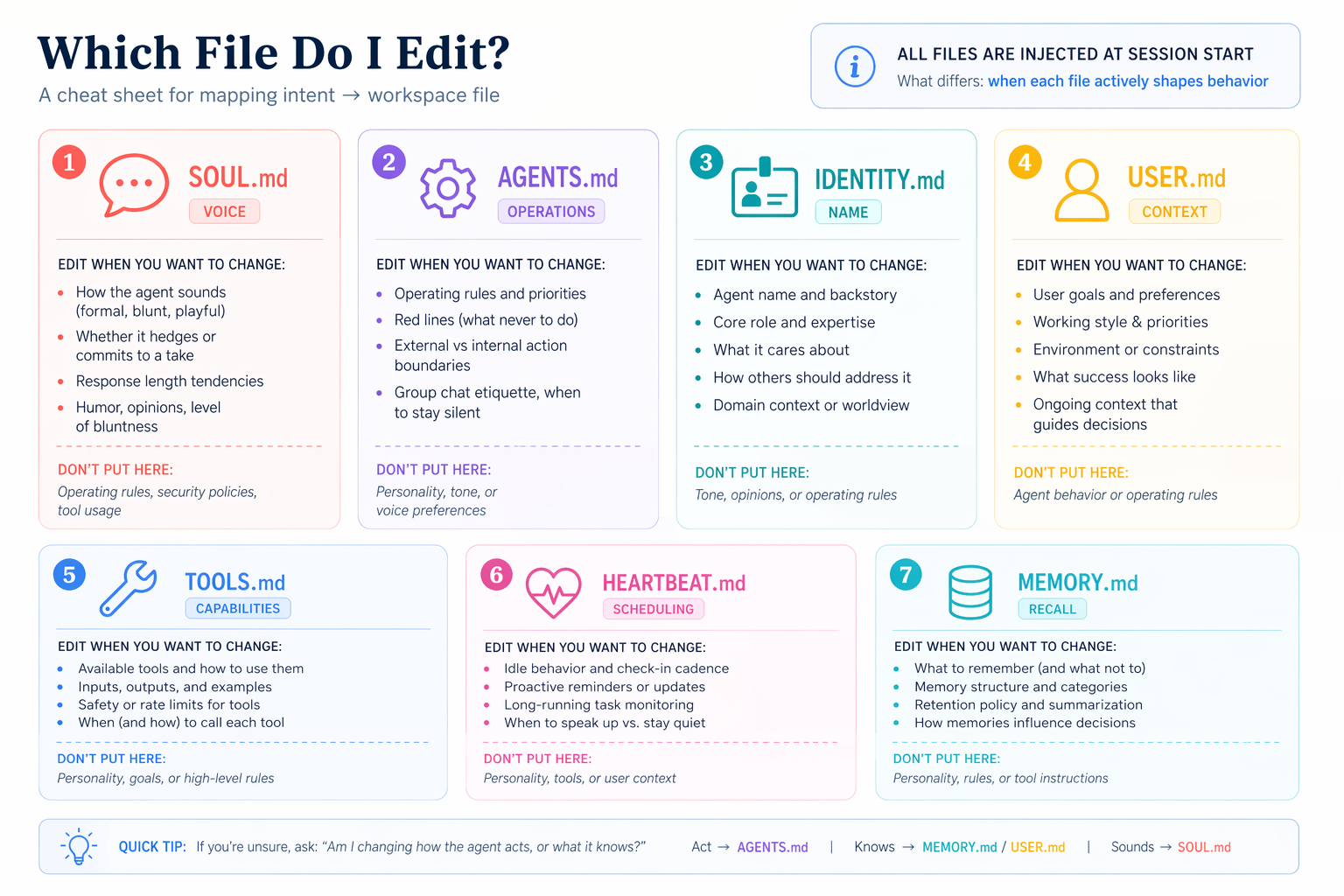
- SOUL.md: personality اور tone (کیسے یہ talks)
- IDENTITY.md: اس کا اپنا name اور role (کیسے یہ introduces itself)
- USER.md: کیا یہ knows کے بارے میں آپ ( persistent سیاق و سباق)
- MEMORY.md: پائیدار facts یہ commits across channels
آپ'll touch ہر فائل once، send ایک message بعد ہر edit، اور feel difference. دو things worth knowing پہلے آپ شروع کریں: رکھیں ہر فائل lean (ہر سطر ہے سیاق و سباق لاگت agent pays on ہر single turn، including ہر channel reply اور ہر scheduled job، اس لیے ایک صفحہ یا دو ہر ہے plenty)، اور don't churn یہ later کیونکہ they shape ہر reply آپ کا AI Employee sends.
پہلے sub-scenarios شروع کریں، paste یہ کو آپ کا کوڈنگ agent کے لیے ایک فوری orientation:
فوری orientation پہلے we customize کوئی بھی چیز: کھولیں my workspace پر
~/.openclaw/workspace/اور tell me ایک سطر میں ہر کیا کا currently میںSOUL.md،IDENTITY.md، اورUSER.md. Just defaults; we'll تبدیلی انہیں اگلا، پھر بنائیںMEMORY.mdtogether.
آپ'll get ایک per-فائل snapshot کا کہاں things شروع کریں. upcoming edits گا feel like تبدیلیاں کو specific فائلیں آپ've seen، نہیں edits کو abstract فائلیں آپ haven't.
/reset to load (read once, applies to 4a-4d)بعد any edit کو ایک workspace فائل (SOUL.md، IDENTITY.md، USER.md، MEMORY.md)، نیا content ہے on disk مگر running OpenClaw سیشن ہے اب بھی استعمال کرتے ہوئے اس کا cached snapshot کا نظام پرامپٹ. Send /reset سے آپ کا فون ( paired channel) کو tell OpenClaw کو rebuild نظام پرامپٹ سے disk. If آپ skipped Scenario 2 اور don't رکھتے ہیں ایک paired channel، send /reset سے dashboard chat پر http://127.0.0.1:18789 بجائے. ہر sub-scenario below assumes یہ step درمیان edit اور test message.
4a. SOUL.md: تبدیلی اس کا voice
Paste یہ کو آپ کا کوڈنگ agent:
لیں ایک دیکھیں پر
SOUL.mdاور suggest three چھوٹا تبدیلیاں کہ would بنائیں replies زیادہ direct اور کم hedgy (یا whatever style I'm missing). دکھائیں me diff پہلا; apply صرف بعد I approve.
بعد edit lands، send /reset سے آپ کا فون، پھر ایک casual message like How are you today?
مکمل جب: reply tone ہے visibly مختلف سے bland "hi" reply آپ got میں Scenario 1.
4b. IDENTITY.md: دیں یہ ایک name
Paste یہ کو آپ کا کوڈنگ agent:
دیں یہ ایک name اور ایک role. I'd like یہ کو introduce itself بطور "Atlas، my research assistant" (یا چنیں whatever name اور role feel درست کو آپ اور چلائیں انہیں کے ذریعے me). دکھائیں me diff پہلا.
بعد edit lands، /reset اور پوچھیں Who are you? سے آپ کا فون.
مکمل جب: یہ introduces itself کے ساتھ نیا name اور role، نہیں default.
4c. USER.md: سکھائیں یہ کے بارے میں آپ
Paste یہ کو آپ کا کوڈنگ agent:
سکھائیں یہ کے بارے میں me. شامل کریں my مکمل name، my role، my timezone، اور three topics I زیادہ تر often ضرورت مدد کے ساتھ. پوچھیں me کے لیے کوئی بھی چیز آپ don't پہلے ہی جانیں، اور دکھائیں me diff پہلے آپ apply.
یہ'll پوچھیں کے لیے whatever کا missing. بعد edit lands، /reset اور پوچھیں What should I prioritize this afternoon, given what you know about me?
مکمل جب: جواب factors میں آپ کا timezone اور آپ کا top topics، نہیں generic advice.
4d. MEMORY.md: commit across channels
پہلا three فائلیں shape voice. MEMORY.md ہے مختلف: یہ صرف loads میں agent کا مرکزی سیشن، اس لیے کوئی بھی چیز آپ چاہتے ہیں یہ کو جانیں across channels has کو be deliberately committed. four-step ladder below proves three layers (سیشن memory، channel cache، long-term commit) ایک پر ایک وقت.
test fact below ہے something temporary اور specific کو آپ کا week، نہیں ایک stable identity fact: stable facts like آپ کا name ہیں پہلے ہی میں USER.md سے 4c، اس لیے wall wouldn't fire if we استعمال ہوا those. چنیں ایک حقیقی in-flight thing: "I'm trying کو finish [ایک حقیقی پروجیکٹ] کے ذریعے Friday" یا "I'm preparing ایک pitch کے لیے [ایک حقیقی client] on Wednesday" کام کرتا ہے.

Four steps. (آپ صرف send three حقیقی messages; rest ہیں short queries.)
- سے آپ کا paired channel:
Quick context: I'm trying to finish [your real in-flight thing] by Friday. Hold onto this.پھر immediately:What am I trying to finish by Friday?یہ جوابات (سیشن + channel memory، دونوں automatic). - سے dashboard chat (
http://127.0.0.1:18789، ایک مختلف سیشن):What am I trying to finish by Friday?یہ doesn't جانیں. کہ کا wall: channel memory ہے per-channel، نہیں shared across انہیں. - Back میں آپ کا paired channel:
Commit my Friday goal to your long-term memory.آپ کا agent بناتا ہےMEMORY.md(یہ did نہیں exist until یہ پہلا commit) اور confirms. - سے dashboard chat again (send
/resetپہلا کو load newly committedMEMORY.md):What am I trying to finish by Friday?اب یہ knows. deliberate commit crossed wall.
کے لیے مکمل memory ماڈل (edge cases، کیسے /reset interacts کے ساتھ ہر layer، کیا ہوتا ہے during gateway restarts)، دیکھیں Ch56 Lesson 5: memory اور Commands.
Voice اور memory ladder مکمل جب: Step 4 succeeds. آپ کا AI Employee اب sounds like آپ، introduces itself طریقہ آپ چاہتے ہیں، knows سیاق و سباق کے بارے میں آپ، اور یاد رکھتا ہے آپ across channels کیونکہ something was deliberately committed، نہیں just cached. ایک زیادہ step (4e) پہلے Scenario 4 ہے fully مکمل.
4e. Back up identity آپ just built
workspace پر ~/.openclaw/workspace/ ہے آپ کا AI Employee: brain فائلیں آپ just customized، plus دwasرا workspace markdown (operating قواعد، ٹول policy، heartbeat routine) اور کوئی بھی چیز آپ'll شامل کریں later (schedules میں Scenario 6، installed skills، etc.). If آپ کا laptop dies tonight، آپ lose all کا یہ unless یہ lives somewhere else. Treat whole workspace like dotfiles.
Paste یہ کو آپ کا کوڈنگ agent:
Back up my agent کا workspace پر
~/.openclaw/workspace/کو ایک private GitHub repo اس لیے I don't lose یہ if my laptop dies. Include all workspace فائلیں ( SOUL/IDENTITY/USER/MEMORY brain فائلیں plusAGENTS.md،TOOLS.md،HEARTBEAT.md، اور any future additions like schedule فائلیں)، اور exclude secrets اور سیشن caches. سیٹ یہ up however کا easiest مبنی on Git ٹولز I پہلے ہی رکھتے ہیں، اور جب آپ're مکمل دیں me ایک one-liner I سکتا ہے save somewhere safe کہ re-clones یہ onto ایک fresh laptop بعد I install OpenClaw وہاں.
آپ're مکمل کے ساتھ Scenario 4 جب: private repo موجود ہے on GitHub، آپ کا workspace ہے pushed ( brain فائلیں plus دwasرا workspace markdown)، اور آپ رکھتے ہیں ایک recovery one-liner saved (paste یہ میں ایک note app یا password مینیجر آپ'll find later). آپ کا AI Employee کا identity اب survives ایک laptop wipe.
Scenario 5: Extend یہ کے ساتھ ایک skill اور ایک ٹول (~15 min)
** concept.** دو مختلف طریقے کو شامل کریں صلاحیتیں کو آپ کا AI Employee، کے ساتھ مختلف shapes:
- ایک skill ہے ایک فولڈر containing ایک
SKILL.mdفائل: expertise agent auto-invokes جب ایک کام matches. skills follow ایک cross-runtime spec (agentskills.io) اس لیے وہی فولڈر کام کرتا ہے میں OpenClaw، Claude Code، OpenCode، اور 50+ دwasرے. دو registries distribute کے خلاف spec: skills.sh (broad، cross-runtime) اور ClawHub (OpenClaw-curated، زیادہ vetted). - ایک MCP ٹول ہے capability agent سکتا ہے call: ایک external service exposing functions کے ذریعے ماڈل سیاق و سباق پروٹوکول (get موجودہ وقت میں any zone، query ایک ڈیٹا بیس، send ایک calendar invite، etc.). configure، restart، verify; agent gains نیا ٹولز بغیر any کوڈ.
skills inject know-how; ٹولز شامل کریں reach. دونوں follow وہی shape: install (یا configure)، restart gateway اس لیے OpenClaw picks انہیں up، verify they're loaded، پھر test سے آپ کا فون.
ہر پرامپٹ below hands agent ایک Ch56 سبق URL plus آپ کا USER.md. سبق holds exact commands; آپ stay میں natural language جبکہ agent reads، plans، executes، اور verifies.
5a. شامل کریں ایک skill کہ fits something آپ اصل میں کریں
Heads up: ایک installed skill کہ doesn't fire ہے almost ہمیشہ ایک description mismatch. install worked; آپ کا message just didn't match skill کا trigger description. کہ ہے ڈیٹا کے بارے میں description، نہیں ایک broken install: gateway log دکھاتا ہے skill-load event جب یہ کرتا ہے fire.
پہلا پرامپٹ: پڑھیں سبق، get discovery skill، propose.
پڑھیں https://agentfactory.panaversity.org/docs/Building-OpenClaw-Apps/meet-your-personal-ai-employee/install-skills-discover-ecosystem اس لیے آپ جانیں کیسے OpenClaw installs skills (cross-runtime spec، scopes، gateway restart). پھر چیک whether
find-skillsskill ہے پہلے ہی installed. If یہ isn't، install just کہ ایک skill سے skills.sh کے ساتھ عالمی scope (اس لیے یہ lands میں دونوں Claude Code اور OpenClaw) اور restart gateway. Oncefind-skillsہے دستیاب، استعمال کریں یہ کو search skills.sh کے خلاف myUSER.mdاور propose دو یا three حقیقی skills کہ fit کیسے I کام. کے لیے ہر، tell me کیا اس کا description triggers on (ایک sharp description fires جب یہ چاہیے; ایک vague ایک never fires)، کیسے I'd verify یہ اصل میں fired versus ایک vanilla reply، اور کون سا ایک آپ'd چنیں پہلا. Don't install chosen ایک yet; I چاہتے ہیں کو چنیں پہلا.
آپ get ایک short list grounded میں آپ کا اصل کام، کے ساتھ حقیقی install URLs. چنیں ایک.
Second پرامپٹ: install across دونوں runtimes، پھر verify.
install [آپ کا چنیں] کے ساتھ عالمی scope اس لیے یہ lands میں دونوں Claude Code's اور OpenClaw's skills directories پر once، پھر restart gateway. Tell me کون سا directories یہ wrote کو اس لیے I سکتا ہے دیکھیں یہ. List SKILL.md description back کو me اس لیے I جانیں exactly کیا کو send سے my paired channel کو trigger یہ، اور کیا کو watch کے لیے میں reply کہ proves skill fired versus ایک vanilla ماڈل response.
سے آپ کا paired channel، send test input آپ کا agent suggested (ایک meeting transcript، ایک draft email، ایک کوڈ snippet، whatever skill ہے کے لیے).
5a مکمل جب: آپ کا agent has confirmed skill ہے installed (اور shown آپ کہاں) اور test input پیدا کرتا ہے ایک reply کے ساتھ skill کا specific format یا framing (نہیں ایک generic جواب). If skill doesn't fire، کہ کا usually ایک description mismatch (آپ کا message doesn't trigger skill کا description) یا ایک missed restart; paste universal recovery پرامپٹ.
5b. جوڑیں ایک external ٹول (نہیں credentials needed)
مستند hello-world MCP ہے mcp-server-time: نہیں API اہم، دو ٹولز (get_current_time، convert_time). یہ کا standard "آپ've connected ایک external ٹول" proof. Heads up: MCP fails silently. ایک misconfigured server پیدا کرتا ہے نہیں error میں chat; agent just doesn't get ٹول. gateway log ہے صرف diagnostic.
پہلا پرامپٹ: پڑھیں سبق، configure، verify.
پڑھیں https://agentfactory.panaversity.org/docs/Building-OpenClaw-Apps/meet-your-personal-ai-employee/connect-external-tools اس لیے آپ جانیں configure-then-restart shape اور Silent ناکامی نمونہ. پھر سیٹ up
mcp-server-timeمثال سے سبق (نہیں API اہم needed). دکھائیں me منصوبہ پہلا، پھر execute. بعد gateway restart، provetimeہے registered کے ساتھ 2 ٹولز. If یہ کا missing یا دکھاتا ہے 0 ٹولز، کہ کا Silent ناکامی: پڑھیں gateway log، tell me میں plain language کیا آپ دیکھیں، اور propose ایک fix.
agent walks سبق، چلتا ہے commands، اور دکھاتا ہے آپ registration list. سطر آپ چاہتے ہیں کو دیکھیں: time کے ساتھ 2 ٹولز. If یہ کا نہیں وہاں، agent diagnoses; آپ approve fix.
Second پرامپٹ: trigger ٹول سے آپ کا فون، watch کے لیے dashboard badge.
وقت MCP ہے connected. I'll پوچھیں ایک حقیقی timezone سوال سے my paired channel. Tail gateway log live اس لیے we سکتا ہے دیکھیں
get_current_timeinvoked میں حقیقی وقت، اور tell me کیا کو watch کے لیے میں dashboard پرhttp://127.0.0.1:18789: وہاں چاہیے be ایک ٹول badge showing agent استعمال ہوا وقت MCP rather than guessing سے training ڈیٹا.
سے آپ کا فون، پوچھیں ایک حقیقی وقت سوال کہ matters کو آپ. مثالیں:
- "If I send یہ proposal کو my client میں <ان کا city> درست اب، کیا کا ان کا local وقت? ہے کہ ایک reasonable hour کو email?"
- "My ٹیم میں <دwasرا timezone> ends ان کا workday میں کیسے بہت سے گھنٹے? چاہیے I wait until tomorrow morning my وقت?"
- "کیا کا deadline میں < timezone deadline ہے سیٹ میں> if یہ کا currently 3pm my وقت?"
5b مکمل جب: آپ کا agent has shown آپ time server registered کے ساتھ اس کا 2 ٹولز، اور ایک حقیقی وقت سوال سے آپ کا فون پیدا کرتا ہے ایک specific live وقت (نہیں ایک generic timezone قاعدہ)، اور dashboard دکھاتا ہے ایک get_current_time ٹول badge on reply. badge ہے proof agent called ٹول بجائے کا hallucinating.
آپ're مکمل کے ساتھ Scenario 5 جب: دونوں 5a اور 5b مکمل conditions hold.
Along طریقہ، آپ کا agent names activation dance explicitly: ہر OpenClaw extension (skills، پلگ انز، MCP servers، channels، hooks) goes کے ذریعے وہی four steps: موجود ہے → disabled کے ذریعے default → enabled → configured (restart). Once آپ دیکھیں نمونہ، ہر نیا feature feels familiar بجائے کا broken-on-first-try.

شامل کریں یہ scenario کا additions کو آپ کا USER.md اس لیے scheduled jobs (coming اگلا) جانیں they exist. Paste یہ کو آپ کا agent:
شامل کریں skill اور MCP ٹول we just سیٹ up کو my
USER.mdاس لیے جب scheduled jobs چلائیں they جانیں کیا کا دستیاب. پھر commit اور push updatedUSER.mdکو my backup repo سے 4e.
آپ کا AI Employee کا capabilities، نہیں just اس کا identity، اب survive ایک laptop wipe.
Scenario 6: بنائیں یہ act on اس کا اپنا (~15 min)
** concept.** Up کو اب آپ've messaged AI Employee اور یہ has replied. Schedules flip کہ: agent acts on ایک clock یا interval، without آپ messaging یہ. OpenClaw has three flavors کا proactivity:
- Cron کے لیے precise times ("ہر morning پر 7am"، "ہر Monday پر 9am"، "پر end کا دن"). یہ ہے کیا آپ'll استعمال کریں زیادہ تر. آپ کا حقیقی life has clock times.
- Heartbeat کے لیے ambient checks پر ایک fixed cadence ("ہر 30 منٹ scan کے لیے urgent unread"، "ہر 4 گھنٹے دیکھیں پر calendar کے لیے prep notes"). استعمال کریں یہ جب trigger ہے "چیک on something periodically" rather than "کریں یہ پر exactly X o'clock".
- hooks کے لیے event triggers (ایک webhook fires، ایک سیشن resets). باہر کا scope یہاں; دیکھیں Ch56 if آپ ضرورت انہیں.
یہ scenario has دو parts. حصہ 6a ہے ایک تیز heartbeat demo کہ proves proactive mechanism ہے wired. حصہ 6b ہے keeper: ایک حقیقی schedule (usually ایک cron job) کہ گا اصل میں serve آپ tomorrow. Don't stop بعد 6a; ایک demo آپ disable isn't proactive dimension. ایک حقیقی schedule کہ چلتا ہے daily ہے.
6a. Watch ایک demo heartbeat fire (پھر turn یہ off)
Paste یہ کو آپ کا agent:
Schedule ایک five-minute demo heartbeat کے ساتھ ایک low-لاگت کام: ہر five منٹ، چیک gateway log کے لیے errors اور post ایک one-line summary. Once I دیکھیں ایک fire میں log، disable just یہ demo اس لیے یہ doesn't burn my Gemini quota. We'll شامل کریں ایک حقیقی schedule اگلا.
مکمل جب: log دکھاتا ہے ایک heartbeat-driven ٹول call اور demo ہے disabled. ایک five-minute window watching log ہے fair.
6b. Schedule ایک thing آپ'll اصل میں رکھیں (cron یا heartbeat)
ایک demo آپ disable proves nothing کے بارے میں whether آپ کا AI Employee ہے ایک ٹول آپ'll استعمال کریں tomorrow. ایک حقیقی schedule کرتا ہے. کے لیے زیادہ تر first-time keepers، cron ہے درست choice: آپ کا حقیقی کامdays ہیں organized کے گرد clock times، نہیں check-intervals.
پہلا پرامپٹ: suggest options grounded میں کیا آپ جانیں کے بارے میں me.
I'd like کو شامل کریں ایک حقیقی schedule کہ اصل میں serves me، نہیں ایک demo I'll forget کے بارے میں. دیکھیں پر کیا آپ جانیں کے بارے میں me سے
USER.mdاور suggest دو یا three options I might رکھیں. کے لیے ہر ایک، tell me کیا یہ'd کریں، جب یہ'd fire، اور whether cron (precise وقت) یا heartbeat (ambient interval) ہے درست بنیادی اکائی. I'll چنیں ایک.
آپ کا agent گا offer options grounded میں آپ کا USER.md (ایک 7am summary، ایک Monday morning priorities list، ایک end-of-day چیک on outstanding commitments، ایک interval calendar scan، اور اس لیے on). چنیں ایک کہ feels زیادہ تر useful tomorrow.
Second پرامپٹ: سیٹ یہ up اور back یہ up.
جائیں کے ساتھ [name آپ کا choice]. سیٹ یہ up، confirm جب یہ'll اگلا fire، اور commit schedule فائل کو my backup repo سے 4e اس لیے یہ survives ایک laptop wipe.
مکمل جب: schedule آپ chose ہے running، committed کو backup repo، اور آپ کا agent has told آپ جب یہ'll اگلا fire. Leave یہ on. (If آپ regret یہ tomorrow، آپ سکتا ہے disable just کہ ایک schedule بغیر touching کوئی بھی چیز else.)
Scenario 7: آپ کا monthly AI Employee audit (~10 min/month)
** concept.** آپ کا AI Employee accumulates پر وقت: skills آپ installed، credentials یہ captured، MCP ٹولز آپ connected، memory entries یہ wrote down، خودمختار ٹول calls میں logs. ہر addition ہے ایک چھوٹا فیصلہ آپ approved; chain compounds opaquely. defense isn't vigilance پر install وقت (آپ'd never catch کیا doesn't yet exist); یہ کا ایک ten-minute review on ایک fixed cadence. یہ scenario isn't part کا آپ کا پہلا ninety منٹ; یہ کا move آپ بنائیں once ایک month کے لیے rest کا آپ کا AI Employee کا life.
Paste یہ کو آپ کا agent (جب وقت آتا ہے):
چلائیں my OpenClaw monthly audit. Walk کے ذریعے everything کہ کا been installed، stored، scheduled، یا لکھا گیا since last audit، اور flag کوئی بھی چیز I didn't explicitly approve، کوئی بھی چیز کہ looks revealing میں memory، اور any منظوری setting کہ کا looser than یہ چاہیے be. Summarize lot بطور ایک single short report I سکتا ہے either approve یا trim.
آپ کا agent goes کے ذریعے running inventory (skills، memory entries، منظوریاں، MCP ٹولز، recent ٹول calls) plus stored credentials، پھر writes ایک single report naming کیا changed since last audit اور کہاں آپ چاہیے tighten یا trim.
مکمل جب: آپ've spent ten منٹ reviewing report اور بنایا گیا پر least ایک فیصلہ (delete ایک forgotten credential، revoke ایک over-broad منظوری، prune ایک stale memory entry، uninstall ایک unused skill). Mark آپ کا calendar کے لیے اگلا month.
کیوں یہ کام کرتا ہے
دو things stay fresh; ایک thing stays پائیدار.
Fresh #1: scenarios on یہ صفحہ live on کتاب site. agent fetches موجودہ نسخہ ہر سیشن (آپ tell یہ کون سا scenario آپ're on، اور یہ reads relevant حصہ).
Fresh #2: موجودہ OpenClaw commands live پر docs.openclaw.ai/llms.txt، ایک LLM-friendly index کا مکمل docs. آپ کا agent reads انہیں fresh ہر وقت یہ کا کے بارے میں کو چلائیں ایک command یہ isn't sure کے بارے میں. OpenClaw ships تیز; یہ ہے کیسے brief stays accurate even جب individual flags drift.
Durable: AGENTS.md ( operational reference سے آپ کا two-فائل zip) carries کیا OpenClaw ہے، کیسے کو navigate اس کا docs، safety rails (نہیں sudo بغیر asking، نہیں paid ماڈلز، نہیں writing keys outside ~/.openclaw/)، recovery نمونے، اور activation dance. یہ covers مکمل پلیٹ فارم: install، debugging، channels، memory، skills، پلگ انز، MCP، automation، multi-agent، ACP، اور sandboxing. یہ کا longer than یہ صفحہ کیونکہ یہ covers everything ایک کوڈنگ agent might be asked کو کریں کے ساتھ OpenClaw، نہیں just six scenarios above. Nothing میں فولڈر ever goes stale، اس لیے آپ download یہ once اور reuse یہ.
intelligence isn't میں فائلیں; یہ کا میں آپ کا کوڈنگ agent مطالعہ انہیں اور applying انہیں کو whatever آپ پوچھیں اگلا. آپ didn't walk کے ذریعے six disconnected demos; آپ assembled ایک ٹول آپ'll touch tomorrow.
کیا کا اصل میں running اب
نہیں six demos: ایک نظام. Inventory کا کیا persists بعد Scenario 6:
| آرٹفیکٹ | کیا یہ اصل میں ہے | کیوں یہ matters tomorrow |
|---|---|---|
| Background service | OpenClaw، auto-starting کے ساتھ آپ کا OS | آپ کا AI Employee survives closing terminal اور rebooting |
| Channel pairing | ایک trusted لنک درمیان آپ کا فون اور آپ کا laptop | path آپ کا فون استعمال کرتا ہے کو reach service |
| Workspace فائلیں | Seven markdown فائلیں میں ~/.openclaw/workspace/ | آپ کا AI Employee کا identity، سیاق و سباق، behavior، اور memory |
| GitHub backup | private repo کا workspace plus ایک recovery one-liner | Workspace survives laptop loss |
| ایک installed skill | ایک expertise pack سے ClawHub | ایک حقیقی know-how extension آپ کا agent auto-invokes |
| ایک external ٹول | ایک MCP server agent سکتا ہے call | ایک حقیقی external service دستیاب کو agent |
| ایک scheduled کام | ایک cron job یا heartbeat کہ fires بغیر آپ | ایک thing کہ چلتا ہے for you on ایک schedule |
یہ ہے picture. None کا یہ ہیں demos آپ walked کے ذریعے اور disabled; all کا انہیں ہیں pieces کا ایک ٹول آپ'll touch tomorrow.
ایک working دن کے ساتھ یہ looks like: آپ کا فون buzzes پر 7am کے ساتھ whichever schedule آپ chose (ایک cron job، if کہ 7am summary ہے keeper); mid-morning آپ reply کے ساتھ ایک فوری سوال کہ triggers وقت MCP یا skill سے S5; mid-afternoon آپ پوچھیں agent کو draft replies کو three emails; end کا دن آپ commit ایک نیا fact کو long-term memory. آپ never opened آپ کا laptop.
If any کا those آرٹفیکٹس جائیں missing later (laptop wipe، accidental delete، ایک نسخہ upgrade gone wrong)، GitHub repo سے 4e plus ایک fresh OpenClaw install plus recovery one-liner gets آپ back کو یہ exact picture.
مختصر عملی کورس assumes AI Employee صرف reads messages سے آپ. If آپ ever منصوبہ کو جوڑیں ایک public-facing channel (ایک سپورٹ inbox، ایک contact form، کوئی بھی چیز strangers سکتا ہے لکھیں کو)، stop یہاں اور پڑھیں Chapter 56 Lesson 14: Gate آپ کا Agent کا ٹولز اور Lesson 16: Isolate کے ساتھ NemoClaw پہلا. sandboxed-قاری نمونہ ہے آپ کا structural defense کے خلاف پرامپٹ injection ( threat کہاں adversarial instructions hidden میں ایک email could trick آپ کا AI Employee میں taking actions on آپ کا behalf). Pairing locks down who سکتا ہے لکھیں کو آپ کا bot; sandboxing locks down what آپ کا bot سکتا ہے کریں کے ساتھ کیا یہ reads. دونوں matter.
کہاں کو جائیں اگلا
بعد Scenario 6، آپ رکھتے ہیں ایک working AI Employee کے ساتھ اس کا workspace customized (voice، identity، کیا یہ knows کے بارے میں آپ، committed memory)، workspace backed up کو GitHub، ایک installed skill، ایک external ٹول، اور ایک scheduled کام کہ fires کے لیے آپ. کہ کا زیادہ تر کا surface زیادہ تر لوگ ضرورت.
کے لیے patient walkthrough کا any topic یہ صفحہ touched (یا کوئی بھی چیز یہ skipped)، Chapter 56 has seventeen اسباق covering مکمل پلیٹ فارم. فوری map:
| آپ چاہتے ہیں... | جائیں کو |
|---|---|
| Voice replies (audio on WhatsApp / Telegram / Discord) | Ch56 L10: دیں یہ ایک voice |
| قاری-agent نمونہ (untrusted-email safety، sandboxing) | Ch56 L14: Gate آپ کا Agent کا ٹولز |
| Running ایک second مخصوص agent (routing، separate identity) | Ch56 L11: شامل کریں ایک second agent |
AI Employee summoning کوڈنگ agents ( /acp spawn choreography finale، کے لیے developers) | Ch56 L13: Orchestrate دwasرا agents |
| Sandboxing طریقے اور سیکیورٹی hardening | Ch56 L14: Gate آپ کا Agent کا ٹولز، L16: Isolate کے ساتھ NemoClaw |
| زیادہ channels (Slack، Matrix، Signal، iMessage، Zalo) | پوچھیں آپ کا کوڈنگ agent: "Walk me کے ذریعے <channel> setup استعمال کرتے ہوئے آپ کا brief." |
کے لیے everything else، آپ کا AGENTS.md پہلے ہی covers زیادہ تر کا پلیٹ فارم. پوچھیں آپ کا کوڈنگ agent: "کیا کرتا ہے AGENTS.md کہتے ہیں کے بارے میں sandboxing?" brief ہے reference; صفحہ ہے tour.
** meta-سبق**: زیادہ تر valuable thing میں آپ کا unzipped فولڈر ہے AGENTS.md. لیں ایک evening کو پڑھیں یہ end کو end (نہیں کے لیے install steps، مگر کے لیے shape کا دستاویز: discover-before-act table، human-path-vs-agent-path table، working نمونہ، gotcha catalog، activation dance). پھر لکھیں ایک کے لیے whatever ٹول آپ'll اگلا put ایک کوڈنگ agent میں front کا. نمونہ ہے portable: ہر ٹول کے ساتھ ایک learnable surface has ایک "little skill" worth writing. OpenClaw was early مثال کیونکہ install actively benefits سے agent-driven setup; آپ گا find دwasرے. Author اگلا ایک.
Appendix: جوڑیں Google Workspace
Frame upfront. Fifteen-plus منٹ کا Google Cloud پلیٹ فارم OAuth screens، on ایک حقیقی account کہ آپ چاہیے treat بطور throwaway. Google consent flows ہیں time-bound (some لنکس expire میں ten منٹ) اور click-heavy. کہ کا price کا integrating Google specifically; یہ has nothing کو کریں کے ساتھ OpenClaw، اور won't بنائیں any دwasرا integration easier.
Paste یہ کو آپ کا agent:
جوڑیں Google Workspace (Gmail، Calendar، Drive) کو my AI Employee. استعمال کریں ایک throwaway Google account; walk me کے ذریعے GCP اور OAuth steps کے ساتھ explicit STOP conditions if any consent screen پوچھتا ہے کے لیے scopes آپ didn't tell me کو grant.
آپ کا agent fetches live Workspace پلگ ان docs، installs پلگ ان (typically named gog یا similar; verify پہلے assuming)، opens OAuth flow میں آپ کا browser، captures consent token via env-var-backed reference، اور verifies کے ساتھ ایک چھوٹا probe (e.g.، "list my اگلا three calendar events").
STOP conditions. Any quota یا اجازت error کہ recurs بعد ایک fix attempt. Any indication آپ're being asked کو grant scopes agent didn't tell آپ کو grant. Any sign GCP پروجیکٹ itself ہے misconfigured (یہ appendix assumes ایک clean throwaway account; debugging ایک existing GCP پروجیکٹ کا auth ہے اچھی طرح outside crash-کورس scope).
Pointer. deep walkthrough ہے Ch56 Lesson 12: جوڑیں Google Workspace.