Introduction to Pydantic and Data Validation
The Validation Problem
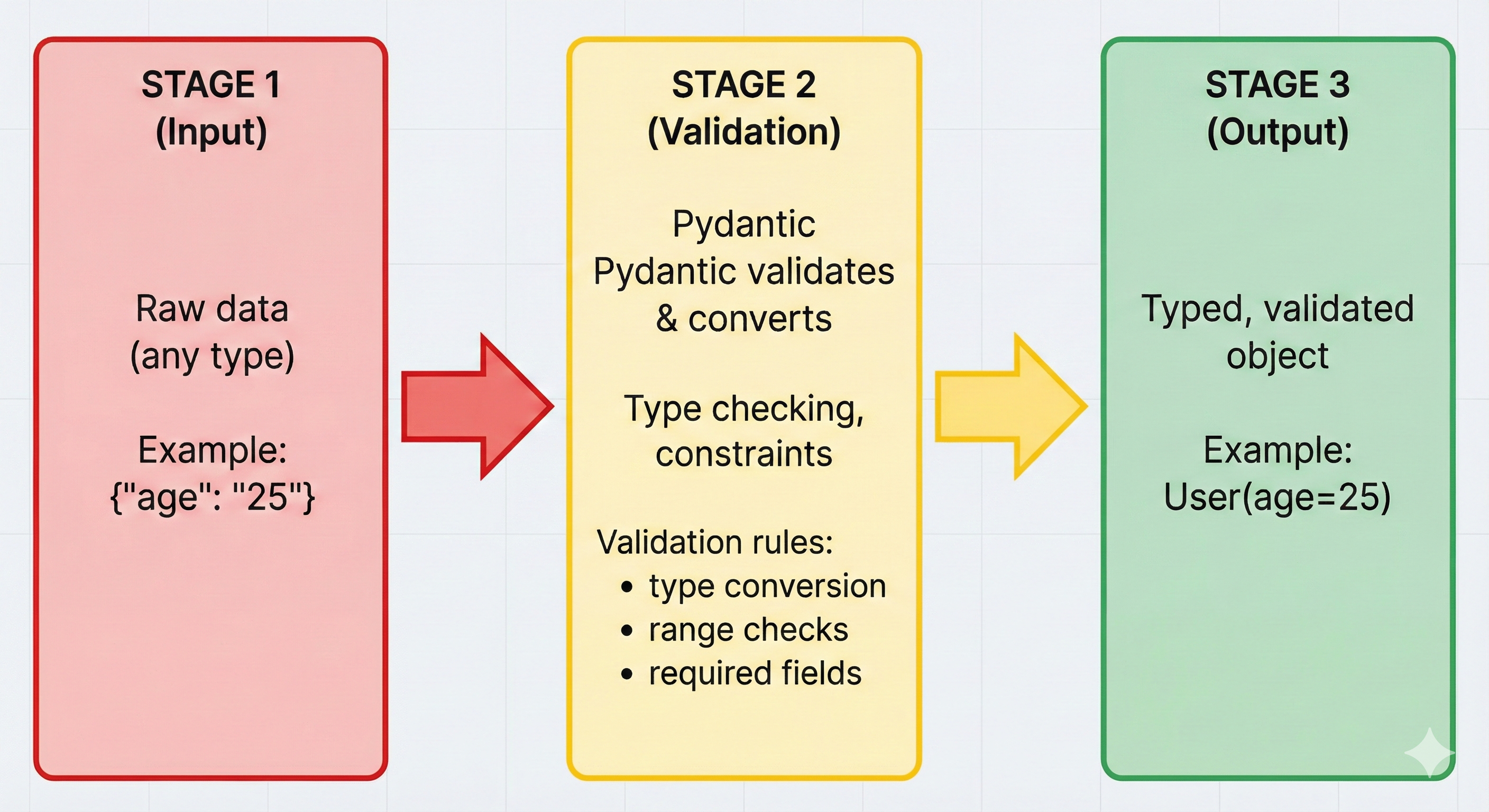
Imagine you're building an AI agent that accepts user data. A user registers with their name, email, and age. But what happens if someone submits:
{
  "name": "Alice",
  "email": "not-an-email",
  "age": "twenty-five"
}
Your code might crash silently, store invalid data, or worse—send bad data to your AI, which then generates incorrect responses. The problem: Python's type hints only document what SHOULD be there, but don't enforce what IS actually there at runtime.
This is where Pydantic enters the game. Pydantic is a library that validates data at runtime—it checks that your data actually matches your requirements before your code uses it. Type hints say "this SHOULD be an int"; Pydantic makes it "this MUST be an int or validation fails."
Why This Matters for AI-Native Development
When Claude Code generates JSON for you, you need to validate it's correct BEFORE using it. When you build APIs with FastAPI, Pydantic automatically validates every request. When you load configuration files, Pydantic ensures they're valid. In production systems, validation is not optional—it's your safety net.
Section 1: Your First Pydantic Model
Installing Pydantic
Like any Python library, Pydantic needs to be installed first. You've already learned this pattern in Chapter 17 with uv:
uv add pydantic
This installs Pydantic V2 (the modern version). Pydantic V1 is deprecated—always use V2.
Creating Your First Model: A Book
Let's start simple. Imagine you're building a library application that stores books. Each book has:
- title (text, required)
- author (text, required)
- year (whole number, required, between 1000-2100)
- price (decimal number, required, must be >= 0)
- isbn (text, optional)
With Pydantic, you describe this structure in code:
from pydantic import BaseModel

class Book(BaseModel):
    title: str
    author: str
    year: int
    price: float
    isbn: str | None = None  # Optional field with default value
That's it. You've created a Pydantic model. Now let's use it.
Validation Happens Automatically
Creating a valid book works exactly as you'd expect:
# Valid data - no errors
book: Book = Book(
    title="Python Guide",
    author="Jane Doe",
    year=2024,
    price=29.99
)

print(book)
# Output: Book(title='Python Guide', author='Jane Doe', year=2024, price=29.99, isbn=None)

# Access fields like normal attributes
print(book.title)  # Output: Python Guide
print(book.price)  # Output: 29.99
But try passing invalid data:
from pydantic import ValidationError

try:
    bad_book = Book(
        title="Test Book",
        author="Author",
        year="not a year",  # ERROR: should be int, got str
        price=-10  # ERROR: must be >= 0
    )
except ValidationError as e:
    print(e)
Output (showing what validation catches):
2 validation errors for Book
year
  Input should be a valid integer [type=int_type, input_value='not a year', input_type=str]
price
  Input should be greater than or equal to 0 [type=greater_than_equal, input_value=-10, input_type=float]
Pydantic caught BOTH errors at once. This is powerful—you don't have to debug one error, fix it, then discover another. You see everything that's wrong.
💬 AI Colearning Prompt
"What happens when you pass a string to an int field in Pydantic? Explain the validation error and what type coercion means."
Section 2: Understanding Validation Errors
Reading ValidationError Messages
Pydantic's error messages are designed to help you. Let's break down what you're seeing:
from pydantic import BaseModel, ValidationError

class User(BaseModel):
    name: str
    age: int
    email: str

try:
    user = User(
        name="Bob",
        age="thirty",  # Error 1: not an int
        email="bob@example"  # Error 2: doesn't look like email
    )
except ValidationError as e:
    # Print full error details
    print(e)

    # Or access error details programmatically
    for error in e.errors():
        print(f"Field: {error['loc']}")     # Which field?
        print(f"Problem: {error['msg']}")   # What's wrong?
        print(f"Type: {error['type']}")     # What type of error?
This gives you:
- loc (location): Which field has the problem?
- msg (message): What's wrong in plain English?
- type (type of error): Was it a type mismatch? A constraint violation? A format issue?
🎓 Expert Insight
In AI-native development, type hints document intent but Pydantic enforces it. When AI agents generate JSON or APIs send data, runtime validation catches mismatches before they corrupt your system. This isn't defensive programming—it's professional practice.
Multiple Errors at Once
One of Pydantic's superpowers is reporting ALL validation problems simultaneously. This saves debugging time:
try:
    bad_user: User = User(
        name=123,           # Error: not a string
        age="not a number", # Error: not an int
        email="missing-at-sign"  # Error: invalid format
    )
except ValidationError as e:
    # Shows all 3 errors at once
    print(f"Found {len(e.errors())} validation errors")
    for error in e.errors():
        print(f"  - {error['loc'][0]}: {error['msg']}")
Section 3: Nested Models
Real Data Is Complex
So far we've created flat models with simple fields. But real data is hierarchical. A Book might have an Author, and an Author has multiple attributes:
from pydantic import BaseModel

class Author(BaseModel):
    name: str
    bio: str

class Book(BaseModel):
    title: str
    authors: list[Author]  # List of Author objects!
    publication_date: str
Notice authors: list[Author]—this is a list of Author models. Pydantic validates each Author in the list.
Using Nested Models
Creating a book with authors:
# Method 1: Create Author objects first
author1: Author = Author(name="Alice Smith", bio="Python expert")
author2: Author = Author(name="Bob Johnson", bio="Data scientist")

book: Book = Book(
    title="Advanced Python",
    authors=[author1, author2],
    publication_date="2024-01-15"
)

# Method 2: Pass dictionaries - Pydantic converts them
book2: Book = Book(
    title="Web Development",
    authors=[
        {"name": "Charlie Brown", "bio": "Full-stack developer"},
        {"name": "Diana Prince", "bio": "Frontend specialist"}
    ],
    publication_date="2024-03-20"
)

# Serialize back to dictionary for APIs or storage
print(book.model_dump())
# Output: {
#   'title': 'Advanced Python',
#   'authors': [
#     {'name': 'Alice Smith', 'bio': 'Python expert'},
#     {'name': 'Bob Johnson', 'bio': 'Data scientist'}
#   ],
#   'publication_date': '2024-01-15'
# }
Validation happens at all levels. If an Author's name is missing, Pydantic catches it:
try:
    bad_book: Book = Book(
        title="Test",
        authors=[
            {"name": "Valid Author", "bio": "Good"},
            {"bio": "Missing name!"}  # ERROR: name is required
        ],
        publication_date="2024-01-01"
    )
except ValidationError as e:
    print(e)
    # Shows error in nested structure:
    # authors.1.name: Field required
🤝 Practice Exercise
Ask your AI: "Create an Author model with name and bio fields. Then create a Book model that contains a single author field (not a list—just one Author). Generate code that creates a Book with a nested Author and demonstrates the validation error when author data is missing."
Expected Outcome: You'll see working nested model structure and understand how Pydantic validates nested fields, catching missing required fields at any level of nesting.
Section 4: Common Mistakes
Mistake 1: Forgetting BaseModel
Pydantic models must inherit from BaseModel:
# WRONG - just a regular class, no validation
class Book:  # Missing: BaseModel
    title: str
    author: str

book: Book = Book(title="Test", author="Author")
# This works but does NO validation!

# CORRECT - inherits from BaseModel
from pydantic import BaseModel

class Book(BaseModel):  # Inherits validation
    title: str
    author: str

book: Book = Book(title="Test", author="Author")
# Now validation works
Mistake 2: Not Handling ValidationError
If you don't catch ValidationError, your program crashes:
# WRONG - will crash if data is invalid
book: Book = Book(title="Test", author=123)  # Crash!

# CORRECT - handle the error gracefully
try:
    book: Book = Book(title="Test", author=123)
except ValidationError as e:
    print(f"Invalid data: {e}")
    # Program continues, user sees helpful message
Mistake 3: Mixing Up Type Hints
Type hints must be precise. list is different from list[str]:
# Ambiguous - what's in the list?
tags: list  # Could contain anything

# Precise - list of strings
tags: list[str]  # Validates each item is a string

class Post(BaseModel):
    title: str
    tags: list[str]  # Pydantic validates each tag

# Valid
post: Post = Post(title="AI", tags=["python", "pydantic"])

# Invalid - number in a list that should contain strings
try:
    post: Post = Post(title="AI", tags=["python", 123])  # ERROR
except ValidationError as e:
    print(e)  # tags.1: Expected string, got int
Try With AI
Apply Pydantic data validation through AI collaboration that builds type-safe application skills.
🔍 Explore Validation Pain:
"Compare manual validation for user registration (username 3-20 chars, email with @, age 13-120) versus Pydantic BaseModel with Field() constraints. Show why runtime validation matters beyond type hints."
🎯 Practice Field Constraints:
"Build a User model with Pydantic validating: username (pattern r'^[a-z0-9_]+$'), email (@field_validator for domain check), age (ge=13, le=120), optional bio (max 200 chars). Handle ValidationError."
🧪 Test Edge Cases:
"Test Pydantic model with: '25' (string as int), 'test@localhost' (no domain dot), 120.5 (float as int), 201-char bio. Show how Pydantic coerces types and where custom validators are needed."
🚀 Apply Production Patterns:
"Create a complete user validation system with Pydantic showing: all errors at once (not first-fail), clear error messages, type coercion (str → int), custom validators, and explain when to use Field() vs @field_validator."