Keywords and Capstone: Building a Type-Safe Calculator
You've mastered four types of operators. Now it's time to learn one more important concept about Python's language structure: keywords. Keywords are reserved words that Python has claimed for itself. You can't use them as variable names because Python needs them for language features.
Then we'll bring everything together in a capstone project: a calculator that demonstrates all four operator types, combined with keyword awareness and type validation.
What It Is: Python's Reserved Words
A keyword is a word that Python uses for language syntax. These words have special meaning and control how Python works. Because Python needs them for specific purposes, you can't use them as variable names.
Python has 35 keywords (as of Python 3.14). You don't need to memorize them—you need to recognize common ones and know how to check if a word is reserved.
Discovering Python Keywords
Python provides a simple way to see all keywords:
# Import the keyword module
import keyword

# See all Python keywords
print("Python keywords:")
print(keyword.kwlist)

# Output (abbreviated):
# ['False', 'None', 'True', 'and', 'as', 'assert', 'async', 'await',
#  'break', 'class', 'continue', 'def', 'del', 'elif', 'else', 'except',
#  'finally', 'for', 'from', 'global', 'if', 'import', 'in', 'is',
#  'lambda', 'nonlocal', 'not', 'or', 'pass', 'raise', 'return', 'try',
#  'while', 'with', 'yield']

# Count them
print(f"Total keywords: {len(keyword.kwlist)}")  # 35

# Check if a specific word is a keyword
print(keyword.iskeyword("for"))        # True (reserved)
print(keyword.iskeyword("forloop"))    # False (not reserved)
print(keyword.iskeyword("count"))      # False (not reserved)
These 35 keywords are Python's grammar. They define language structure: loops (for, while), conditionals (if, else), functions (def), classes (class), and more.
💬 AI Colearning Prompt
"Why can't I use keywords as variable names? What would happen to Python's design if
if,for, ordefweren't reserved? Explain the problem and why reservation is necessary."
This question helps you understand language design—why certain words must be protected.
Why Keywords Are Reserved
Let's see what happens when you try to use a keyword as a variable name:
# WRONG: Trying to use 'for' as a variable
# for = 5  # SyntaxError: invalid syntax (for is reserved!)

# RIGHT: Use a descriptive alternative
for_loop_count: int = 5      # Underscore makes it clear
loop_count: int = 5          # Descriptive name
iterations: int = 5          # Alternative name

# Common keywords and what they do
# if, elif, else — conditional logic (Chapter 22)
# for, while — loops (Chapter 22)
# def — define functions (Chapter 25)
# class — define classes (Chapter 29)
# import, from — import modules (Chapter 25)
# return — return from function (Chapter 25)
# try, except, finally — error handling (Chapter 26)
# True, False, None — special values (Chapter 19)
# and, or, not — logical operators (Lesson 3, this chapter!)
The reason for, if, def are reserved is that Python needs them for language structure. If you could write for = 5, Python would get confused: "Is this the start of a for loop, or is this assigning 5 to the variable for?"
🎓 Expert Insight
In AI-native development, you don't memorize all 35 keywords. You develop a reflex: "If I get a SyntaxError when naming a variable, it might be a keyword. Let me check with
keyword.iskeyword()." This defensive habit will save you debugging time.
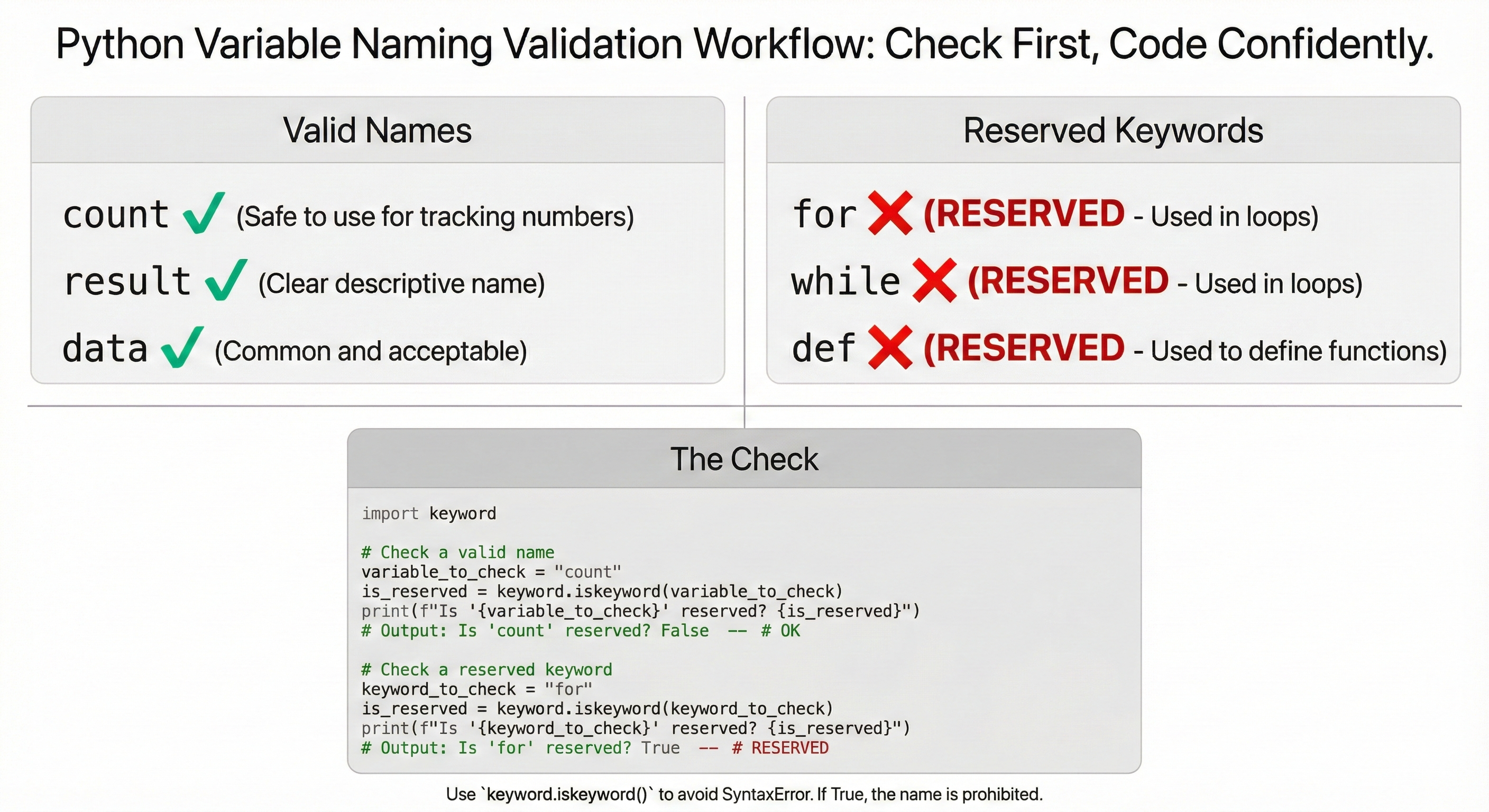
Checking if a Word is Reserved
A smart programming practice is to check before using a word as a variable name:
import keyword

# Function to check if a name is valid (simplified)
def is_valid_name(word: str) -> bool:
    """Check if a word is not a keyword"""
    return not keyword.iskeyword(word)

# Test it
potential_names: list[str] = ["count", "for", "result", "while", "data"]

for name in potential_names:
    if keyword.iskeyword(name):
        print(f"  '{name}' is RESERVED - use '{name}_var' instead")
    else:
        print(f"  '{name}' is OK - can use as variable name")

# Output:
# count is OK
# for is RESERVED - use for_var instead
# result is OK
# while is RESERVED - use while_var instead
# data is OK
This pattern—checking before using—is good defensive programming.
🤝 Practice Exercise
Ask your AI: "Create a program that:
- Lists all 35 Python keywords
- Groups them by category (control flow, function definition, special values, etc.)
- Explains what each category does
Then explain: Why do you think keywords are organized this way? What would happen if Python had no keywords?"
Expected Outcome: You'll see that keywords follow logical categories; understand that language design requires structure; appreciate why Python protects certain words.
Capstone Project: Calculator with Type Safety
Now let's bring everything together. You'll create a calculator that demonstrates:
- Arithmetic operators (Lesson 1):
+,-,*,/,//,% - Comparison operators (Lesson 2):
==,!=,>,<,>=,<= - Logical operators (Lesson 3):
and,or,not - Assignment operators (Lesson 4):
=,+=,-=,*=,/= - Type validation: Using
type()to verify results - Keyword awareness: Recognizing reserved words
Simplified Calculator (Beginner-Friendly Version)
If you haven't learned functions yet, here's a straightforward version:
# DEMO: Interactive calculator (requires user input)
# Capstone Project: Simple Calculator with Type Safety
# Demonstrates all 4 operator types + type validation + keyword awareness

import keyword

print("=" * 50)
print("SIMPLE CALCULATOR WITH TYPE SAFETY")
print("=" * 50)

# Input two numbers
num1: float = float(input("Enter first number: "))
num2: float = float(input("Enter second number: "))

# Arithmetic operators (Lesson 1)
print("--- ARITHMETIC OPERATORS ---")
add_result: float = num1 + num2
print(f"{num1} + {num2} = {add_result} (type: {type(add_result).__name__})")

sub_result: float = num1 - num2
print(f"{num1} - {num2} = {sub_result} (type: {type(sub_result).__name__})")

mul_result: float = num1 * num2
print(f"{num1} * {num2} = {mul_result} (type: {type(mul_result).__name__})")

# Comparison operators (Lesson 2)
print("--- COMPARISON OPERATORS ---")
is_equal: bool = num1 == num2
print(f"{num1} == {num2}: {is_equal} (type: {type(is_equal).__name__})")

is_greater: bool = num1 > num2
print(f"{num1} > {num2}: {is_greater} (type: {type(is_greater).__name__})")

is_less: bool = num1 < num2
print(f"{num1} < {num2}: {is_less} (type: {type(is_less).__name__})")

# Logical operators (Lesson 3)
print("--- LOGICAL OPERATORS ---")
both_positive: bool = (num1 > 0) and (num2 > 0)
print(f"Both positive: {both_positive} (type: {type(both_positive).__name__})")

either_large: bool = (num1 > 10) or (num2 > 10)
print(f"Either > 10: {either_large} (type: {type(either_large).__name__})")

not_equal_result: bool = not (num1 == num2)
print(f"Not equal: {not_equal_result} (type: {type(not_equal_result).__name__})")

# Assignment operators (Lesson 4)
print("--- ASSIGNMENT OPERATORS ---")
total: float = 0.0
total += add_result
print(f"After adding result: total = {total}")

total -= 5.0
print(f"After subtracting 5: total = {total}")

total *= 0.5
print(f"After halving: total = {total} (type: {type(total).__name__})")

# Keyword awareness
print("--- KEYWORD AWARENESS ---")
test_words: list[str] = ["count", "for", "result", "if", "my_var"]
print("Checking variable names:")
for word in test_words:
    if keyword.iskeyword(word):
        print(f"  '{word}' is RESERVED - don't use as variable name")
    else:
        print(f"  '{word}' is OK - can use as variable name")

# Division with safety check
print("--- SAFE DIVISION ---")
if num2 != 0:
    div_result: float = num1 / num2
    print(f"{num1} / {num2} = {div_result} (type: {type(div_result).__name__})")
else:
    print("Cannot divide by zero")

print("=" * 50)
print("Calculation complete!")
print("=" * 50)
Output:
==================================================
SIMPLE CALCULATOR WITH TYPE SAFETY
==================================================

--- ARITHMETIC OPERATORS ---
10.0 + 3.0 = 13.0 (type: float)
10.0 - 3.0 = 7.0 (type: float)
10.0 * 3.0 = 30.0 (type: float)

--- COMPARISON OPERATORS ---
10.0 == 3.0: False (type: bool)
10.0 > 3.0: True (type: bool)
10.0 < 3.0: False (type: bool)

--- LOGICAL OPERATORS ---
Both positive: True (type: bool)
Either > 10: False (type: bool)
Not equal: True (type: bool)

--- ASSIGNMENT OPERATORS ---
After adding result: total = 13.0
After subtracting 5: total = 8.0
After halving: total = 4.0 (type: float)

--- KEYWORD AWARENESS ---
Checking variable names:
  'count' is OK - can use as variable name
  'for' is RESERVED - don't use as variable name
  'result' is OK - can use as variable name
  'if' is RESERVED - don't use as variable name
  'my_var' is OK - can use as variable name

--- SAFE DIVISION ---
10.0 / 3.0 = 3.3333333333333335 (type: float)

==================================================
Calculation complete!
==================================================
That's the complete calculator! You've now integrated all four operator types (arithmetic, comparison, logical, assignment) plus keyword awareness and type validation—all using only the Python concepts you've learned so far (Chapters 15-15).
What about functions? You might wonder why the calculator code is all in one block instead of organized into functions. That's intentional! Functions are taught in Chapter 25. For now, focus on understanding how operators work together. When you reach Chapter 25, you can come back and refactor this calculator using functions as practice.
Try With AI
Ready to integrate all 4 operator types into one comprehensive calculator?
🔍 Explore Multi-Operator Integration:
"Show me how arithmetic, comparison, logical, and assignment operators work together. Create a calculator that: (1) performs 7 arithmetic ops (+,-,*,/,//,%,**) on two numbers, (2) uses comparisons to validate result > 0 and < 1000, (3) uses logical operators to check (num1 > 0) and (num2 > 0), (4) uses += to track running total. Explain how each operator type serves a different purpose."
🎯 Practice Comprehensive Validation:
"Build a production-ready calculator with type hints and validation: (1) Check num2 != 0 before division operations, (2) Validate inputs are positive using logical operators, (3) Compare results against expected ranges, (4) Use assignment operators to accumulate totals, (5) Check if proposed variable names avoid Python keywords using keyword.iskeyword(). Show complete code with clear error messages."
🧪 Test Edge Cases:
"Test this calculator with 4 cases: (1) normal (10, 3), (2) zero divisor (10, 0), (3) negative inputs (-5, -3), (4) large numbers (1000000, 500000). For each test, show: arithmetic results, comparison validations, logical checks, and accumulated total. What breaks? How do we handle division by zero gracefully? Should we allow negative numbers or reject them?"
🚀 Apply to Your Domain Calculator:
"I need a calculator for [describe your domain: financial calculations, game scoring, data analysis, etc.]. Help me integrate all operator types: (1) domain-specific arithmetic operations, (2) validation ranges using comparisons, (3) multi-condition checks using logical operators, (4) state tracking with assignment operators, (5) keyword validation for user-defined names. Make it robust against bad input."
Chapter 20 Complete
Congratulations! You've mastered all four operator types: arithmetic, comparison, logical, and assignment. You understand how to combine them, validate types, and recognize Python's language boundaries (keywords).
What's Next (Chapter 21): Strings and text manipulation—you'll see that operators work with strings too (concatenation with +, repetition with *).
Looking Ahead (Chapter 22): Control flow and loops—you'll use comparison and logical operators in if statements and loops, applying everything you learned here to make decisions and repeat code.
Your foundation is solid. Keep this chapter's concepts close as you move forward.