Introduction to Dataclasses – Modern Python Data Modeling
Imagine you need to create a class that just holds data. No complex behavior, no intricate logic—just fields like a person's name, email, and age. In traditional Python, you'd write pages of boilerplate: __init__() to accept parameters, __repr__() to display the object nicely, __eq__() to compare instances, and default values scattered throughout. What if Python could generate all of this automatically? That's what dataclasses do. Introduced in Python 3.7 and continuously improved since, dataclasses let you write clean, type-safe data structures with minimal code.
The Boilerplate Problem
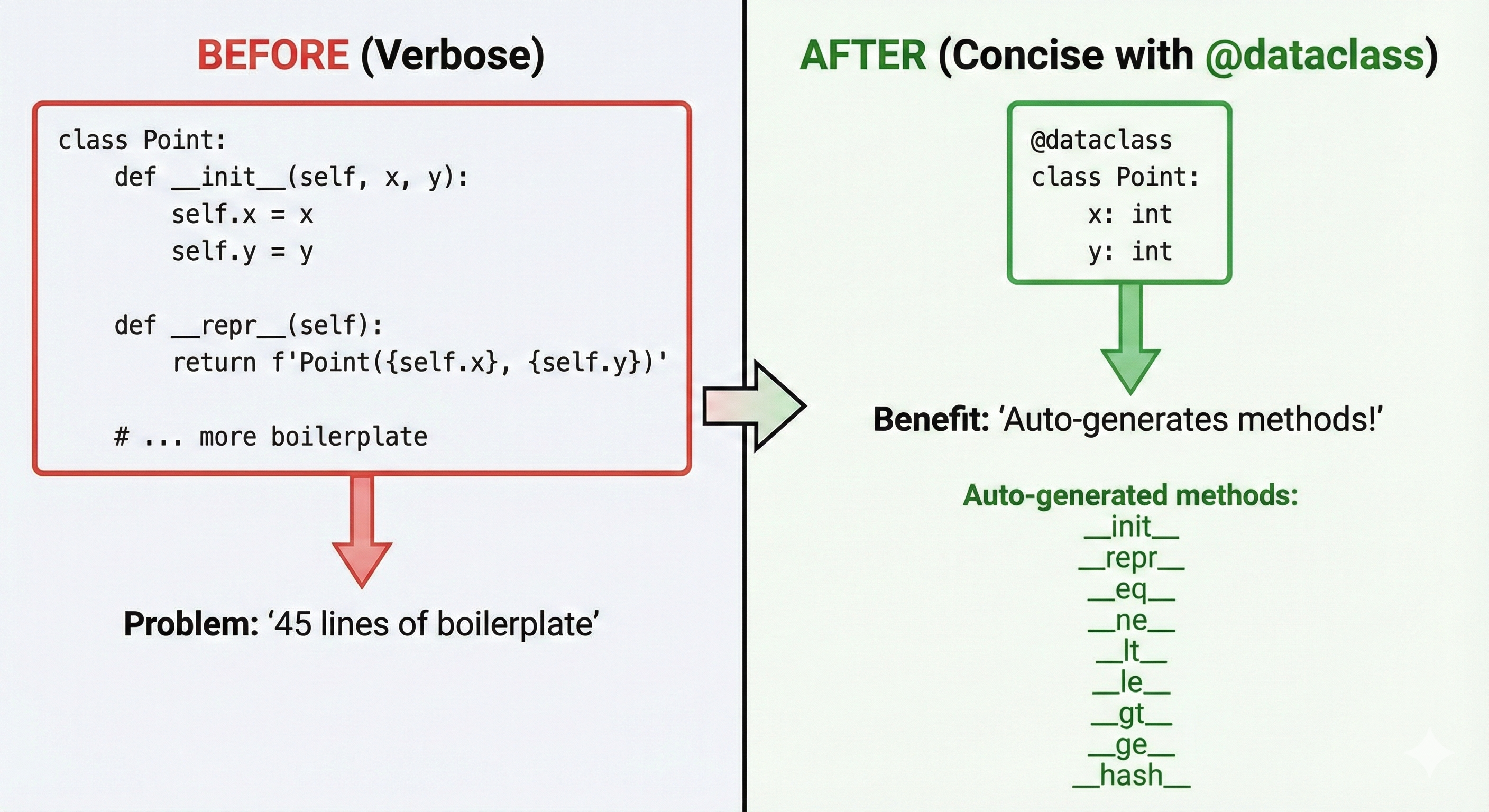
Let's start with a traditional class that holds person information:
class Person:
    def __init__(self, name: str, email: str, age: int) -> None:
        self.name = name
        self.email = email
        self.age = age

    def __repr__(self) -> str:
        return f"Person(name={self.name!r}, email={self.email!r}, age={self.age})"

    def __eq__(self, other: object) -> bool:
        if not isinstance(other, Person):
            return NotImplemented
        return self.name == other.name and self.email == other.email and self.age == other.age

# Create two people
alice = Person("Alice", "alice@example.com", 30)
bob = Person("Bob", "bob@example.com", 30)

print(alice)                  # Person(name='Alice', email='alice@example.com', age=30)
print(alice == bob)           # False (different names)
The class works, but notice how much code exists just to store data. The __init__(), __repr__(), and __eq__() methods are repetitive and error-prone. If you add a field, you must update all three methods. With a dataclass, all this code disappears:
from dataclasses import dataclass

@dataclass
class Person:
    name: str
    email: str
    age: int

# Create two people
alice = Person("Alice", "alice@example.com", 30)
bob = Person("Bob", "bob@example.com", 30)

print(alice)                  # Person(name='Alice', email='alice@example.com', age=30)
print(alice == bob)           # False (different names)
Same behavior, one-tenth the code. The @dataclass decorator generates __init__(), __repr__(), and __eq__() automatically based on your type hints.
💬 AI Colearning Prompt
"Show me how Python generates the
__init__()method for a dataclass automatically. What happens to the fields I declare with type hints?"
What Dataclasses Do
A dataclass is a decorator that auto-generates special methods based on type-hinted fields. When you write:
from dataclasses import dataclass

@dataclass
class Point:
    x: float
    y: float
Python automatically creates these methods:
__init__()— Accepts fields as parameters and assigns them to attributes__repr__()— Returns a readable string like"Point(x=1.0, y=2.0)"__eq__()— Compares two instances by comparing their fields__hash__()(optional) — Allows instances as dictionary keys
The decorator reads your type hints to understand what fields exist and generates the code accordingly. This is why type hints are mandatory in dataclasses—they tell Python what fields to create.
🎓 Expert Insight
In AI-native development, dataclasses represent a shift from "write everything yourself" to "declare your intent, let the decorator handle the mechanics." You describe the data structure with type hints, and Python generates the boilerplate. This is the opposite of memorizing special method signatures—you focus on what data you need, and the decorator handles how to manage it.
Creating Your First Dataclass
Here's a simple dataclass representing a product in an online store:
from dataclasses import dataclass

@dataclass
class Product:
    name: str
    price: float
    quantity: int

# Create instances
laptop = Product("Laptop", 999.99, 5)
mouse = Product("Mouse", 29.99, 50)

# Access fields
print(laptop.name)           # "Laptop"
print(laptop.price)          # 999.99

# Auto-generated __repr__
print(laptop)                # Product(name='Laptop', price=999.99, quantity=5)

# Auto-generated __eq__
print(laptop == Product("Laptop", 999.99, 5))  # True (same fields)
print(laptop == mouse)       # False (different fields)
Notice: no __init__() method written, yet you can create instances with parameters. No __repr__() method written, yet print() shows all fields. This is the dataclass magic.
🤝 Practice Exercise
Ask your AI: "Create a dataclass for a Point with x and y coordinates. Then show me what happens when I create two different points and compare them with ==. Explain why the comparison works without me writing an eq method."
Expected Outcome: You'll see that dataclasses handle equality comparison automatically by comparing all fields, and you'll understand why type hints matter.
Default Values and Optional Fields
Most data has required fields (you must provide them) and optional fields (you can skip them). Dataclasses handle both:
from dataclasses import dataclass

@dataclass
class Person:
    name: str                  # Required
    email: str                 # Required
    age: int = 0               # Optional, defaults to 0
    phone: str = "Unknown"     # Optional, defaults to "Unknown"

# Create with required fields only
alice = Person("Alice", "alice@example.com")
print(alice)  # Person(name='Alice', email='alice@example.com', age=0, phone='Unknown')

# Create with all fields
bob = Person("Bob", "bob@example.com", 30, "555-1234")
print(bob)    # Person(name='Bob', email='bob@example.com', age=30, phone='555-1234')
Important rule: Fields without defaults must come before fields with defaults. This is because __init__() parameters must follow the same rule:
from dataclasses import dataclass

# ✅ Correct: required fields first, defaults second
@dataclass
class Config:
    host: str
    port: int
    timeout: int = 30

# ❌ Incorrect: default before required
# @dataclass
# class Config:
#     timeout: int = 30
#     host: str          # Error! Required field after optional
#     port: int
💬 AI Colearning Prompt
"What error happens if I put a required field after a field with a default value in a dataclass? Show me the exact error message and explain why Python enforces this rule."
Immutable Data with frozen=True
Sometimes you want data that can't be changed after creation. Use frozen=True to make your dataclass immutable:
from dataclasses import dataclass

@dataclass(frozen=True)
class Point:
    x: float
    y: float

point = Point(1.0, 2.0)

# Try to modify (fails)
try:
    point.x = 5.0  # Raises FrozenInstanceError!
except Exception as e:
    print(f"Error: {type(e).__name__}: {e}")
Frozen dataclasses are useful for:
- Configuration objects — Once created, they shouldn't change
- Dictionary keys — Frozen dataclasses are hashable (can be dict keys)
- Thread safety — Immutable objects are safe to share across threads
Example: Configuration that can't accidentally be modified:
from dataclasses import dataclass

@dataclass(frozen=True)
class DatabaseConfig:
    host: str
    port: int
    database: str

# Create config
config = DatabaseConfig("localhost", 5432, "myapp_db")

# Use it throughout your app
print(f"Connecting to {config.host}:{config.port}/{config.database}")

# If code tries to change it:
try:
    config.host = "newhost"  # Raises FrozenInstanceError (prevents bugs)
except Exception as e:
    print(f"Error: {type(e).__name__} - Cannot modify frozen dataclass")
Comparable Data with order=True
Sometimes you need to sort objects. The order=True parameter generates comparison methods (<, >, <=, >=):
from dataclasses import dataclass

@dataclass(order=True)
class Student:
    grade: int
    name: str

# Create students
students = [
    Student(85, "Alice"),
    Student(92, "Bob"),
    Student(78, "Charlie"),
]

# Sort them (uses < comparison, which compares grade first)
sorted_students = sorted(students)
for student in sorted_students:
    print(student)

# Output:
# Student(grade=78, name='Charlie')
# Student(grade=85, name='Alice')
# Student(grade=92, name='Bob')
The sort order is determined by field order. Fields are compared from first to last. If first fields are equal, compare second fields, etc. This is called lexicographic order.
Important: Use order=True carefully:
from dataclasses import dataclass

# ✅ Sensible: primary sort key first
@dataclass(order=True)
class GameScore:
    score: int
    player_name: str

# ❌ Odd: name first means scores sort alphabetically, not numerically
# @dataclass(order=True)
# class GameScore:
#     player_name: str
#     score: int
Key Dataclass Parameters
The @dataclass decorator accepts parameters that control behavior:
from dataclasses import dataclass

@dataclass(init=True, repr=True, eq=True, frozen=False, order=False)
class Example:
    name: str
    value: int
Here's what each parameter does:
| Parameter | Default | What It Does |
|---|---|---|
init | True | Auto-generate __init__(); set False if you define your own |
repr | True | Auto-generate __repr__() for readable string representation |
eq | True | Auto-generate __eq__() for comparing instances |
frozen | False | If True, instances are immutable (can't change fields) |
order | False | If True, auto-generate __lt__, __le__, __gt__, __ge__ for sorting |
Most of the time you'll use the defaults. You'll occasionally use frozen=True for immutability and order=True for sorting.
Dataclasses vs Traditional Classes
When should you use a dataclass? When the main purpose is holding data, use a dataclass. When you have complex behavior, use a traditional class.
Dataclass (data-heavy, minimal behavior):
from dataclasses import dataclass

@dataclass
class Address:
    street: str
    city: str
    zip_code: str
    country: str = "USA"
Traditional Class (behavior-heavy, data secondary):
class BankAccount:
    def __init__(self, owner: str, balance: float) -> None:
        self.owner = owner
        self._balance = balance  # Private (note the underscore)

    def deposit(self, amount: float) -> None:
        if amount <= 0:
            raise ValueError("Deposit must be positive")
        self._balance += amount

    def withdraw(self, amount: float) -> None:
        if amount > self._balance:
            raise ValueError("Insufficient funds")
        self._balance -= amount

    def get_balance(self) -> float:
        return self._balance
For a BankAccount, a traditional class makes sense because deposits/withdrawals are complex behaviors. For an Address, a dataclass is perfect because it's just data.
Why Type Hints Are Mandatory
You might wonder: why can't I just declare fields without type hints?
from dataclasses import dataclass

# ❌ This doesn't work (no type hints)
# @dataclass
# class Broken:
#     name = "unknown"  # What is this? A class variable or a field?
#     age = 0
Without type hints, Python doesn't know if name is a field or a class variable. Type hints make the intent clear:
from dataclasses import dataclass

# ✅ This works (type hints declare fields)
@dataclass
class Fixed:
    name: str        # This is a field (instance attribute)
    age: int = 0     # This is a field with a default
Type hints serve two purposes in dataclasses:
- Declaration — They tell
@dataclasswhich variables are fields - Documentation — They show what type of data each field holds
This is why every field must have a type hint. It's not optional; it's how the decorator knows what to generate.
Three Exercises
Exercise 1: Basic Dataclass Creation
Create a dataclass for a book with fields: title (str), author (str), pages (int), and year (int). Then:
from dataclasses import dataclass

# Example solution
@dataclass
class Book:
    title: str
    author: str
    pages: int
    year: int

book = Book("1984", "George Orwell", 328, 1949)
print(book)
print(book.author)
# Output: Book(title='1984', author='George Orwell', pages=328, year=1949)
# Output: George Orwell
Exercise 2: Defaults and Optional Fields
Create a dataclass for a person with name (required), email (required), and phone (optional, default "Unknown"):
from dataclasses import dataclass

# Example solution
@dataclass
class Person:
    name: str
    email: str
    phone: str = "Unknown"

person1 = Person("Alice", "alice@example.com")
person2 = Person("Bob", "bob@example.com", "555-1234")
print(person1)
print(person2)
# Output: Person(name='Alice', email='alice@example.com', phone='Unknown')
# Output: Person(name='Bob', email='bob@example.com', phone='555-1234')
Exercise 3: Frozen Dataclass
Create a frozen dataclass for a coordinate with x and y fields. Try to create an instance and then modify it. What error occurs?
from dataclasses import dataclass

# Example solution
@dataclass(frozen=True)
class Coordinate:
    x: float
    y: float

point = Coordinate(5.0, 10.0)
try:
    point.x = 20.0  # What happens? FrozenInstanceError!
except Exception as e:
    print(f"Error: {type(e).__name__} - {e}")
Part 1: Discover What @dataclass Does by Writing It Manually First
Your Role: Active experimenter discovering boilerplate reduction
Before learning what @dataclass does, write the boilerplate it eliminates. This makes you appreciate the abstraction.
Discovery Exercise: Manual vs Decorated
Step 1: Write a class with boilerplate methods
# WITHOUT @dataclass - manual approach
class PersonManual:
    def __init__(self, name: str, email: str, age: int = 0):
        self.name = name
        self.email = email
        self.age = age

    def __repr__(self) -> str:
        return f"PersonManual(name='{self.name}', email='{self.email}', age={self.age})"

    def __eq__(self, other) -> bool:
        if not isinstance(other, PersonManual):
            return False
        return self.name == other.name and self.email == other.email and self.age == other.age

person1 = PersonManual("Alice", "alice@example.com", 30)
person2 = PersonManual("Alice", "alice@example.com", 30)
print(repr(person1))
print(person1 == person2)  # True - equality works
Step 2: Now write the same with @dataclass
from dataclasses import dataclass

@dataclass
class PersonDataclass:
    name: str
    email: str
    age: int = 0

person1 = PersonDataclass("Alice", "alice@example.com", 30)
person2 = PersonDataclass("Alice", "alice@example.com", 30)
print(repr(person1))
print(person1 == person2)  # True - equality works automatically
Observations you'll make:
- The dataclass version is 50% shorter
- No manual
__init__(),__repr__(), or__eq__() - Behavior is identical
- Type hints are mandatory (they tell the decorator which fields to use)
Deliverable: Document both approaches and note:
- Lines saved with @dataclass
- Methods generated automatically
- Why type hints are required (to distinguish fields from class variables)
Part 2: AI Explains @dataclass Parameters
Your Role: Student learning from AI Teacher
Now ask AI to teach you all the options and tradeoffs.
AI Teaching Prompt
Ask your AI companion:
"I've seen @dataclass creates init, repr, and eq automatically. But what are all the parameters I can pass to @dataclass?
Explain:
- What does frozen=True do and when would I use it?
- What does order=True do?
- What does init=False do?
- Show me a dataclass with all these parameters and explain the behavior."
What You'll Learn from AI
Expected AI Response (summary):
- frozen=True: Makes instances immutable (can't change attributes after creation)
- order=True: Generates
<,<=,>,>=comparison methods - init=False: Don't auto-generate
__init__()(you write it yourself) - repr=False: Don't auto-generate
__repr__() - eq=False: Don't auto-generate
__eq__()
Convergence Activity
After AI explains, test each parameter:
Ask AI: "Create three dataclasses:
- A Config class with frozen=True (immutable configuration)
- A Task class with order=True (so I can sort tasks by priority)
- A CustomUser class with init=False (you write custom init)
For each, show me code demonstrating the behavior."
Deliverable: Write a 3-paragraph summary:
- Explain what each major parameter does
- When you'd use frozen=True (immutability needs)
- When you'd use order=True (comparable objects)
Part 3: Student Challenges AI with Default Values and Errors
Your Role: Student teaching AI about subtle pitfalls
Now test AI's understanding of dataclass edge cases.
Challenge Design Pattern
Create scenarios where AI must:
- Predict errors with mutable default values
- Handle optional vs required fields correctly
- Understand field ordering requirements
Challenge 1: Mutable Default Values Problem
Your prompt to AI:
"I wrote this dataclass:
from dataclasses import dataclass

@dataclass
class Container:
    items: list = []  # Bug: mutable default!

c1 = Container()
c1.items.append('a')

c2 = Container()
print(c2.items)  # What will this print?
Predict the output BEFORE running the code. Then explain why this is a bug and how to fix it."
Expected AI Response:
- Predicts c2.items will be ['a'] (shared mutable default)
- This is a classic Python bug (mutable default arguments)
- Solution: Use
field(default_factory=list)
Your follow-up: "Show me the corrected version using field() and default_factory. Explain why default_factory solves the problem."
Challenge 2: Field Ordering
Your prompt to AI:
"Here's code with required and optional fields:
@dataclass
class User:
    age: int = 0  # optional
    name: str     # required
Will this work? If not, what error will Python raise and why?"
Expected learning: Required fields must come before optional fields. Python requires this to make __init__() signatures valid.
Challenge 3: Nested Dataclasses
Your prompt to AI:
"I have nested dataclasses:
@dataclass
class Address:
    street: str
    city: str

@dataclass
class Person:
    name: str
    address: Address

p = Person('Alice', Address('Main St', 'NYC'))
p2 = Person('Alice', Address('Main St', 'NYC'))
print(p == p2)
Will this print True? Why or why not? What does eq do for nested dataclasses?"
Deliverable: Document three edge cases you posed to AI and verify the predictions. Did AI understand mutable defaults, field ordering, and nesting correctly?
Part 4: Build Dataclass Design Patterns Reference
Your Role: Knowledge synthesizer creating practical patterns
Create a reference guide for real-world dataclass usage.
Your Dataclass Patterns Reference
Create a file called dataclass_patterns_guide.md with this structure:
# Dataclass Design Patterns and Best Practices
*Chapter 31, Lesson 3*

## Why Dataclasses?

**Without @dataclass**: Manual `__init__`, `__repr__`, `__eq__` boilerplate
**With @dataclass**: One decorator, all methods auto-generated

**Result**: 50% less code, clearer intent, fewer bugs

## Pattern 1: Simple Data Container

```python
from dataclasses import dataclass

@dataclass
class Person:
    name: str
    email: str
    age: int = 0  # optional field (has default)

# Usage
alice = Person("Alice", "alice@example.com", 30)
bob = Person("Bob", "bob@example.com")  # age defaults to 0
When to use: API responses, DTOs (data transfer objects), config objects
Pattern 2: Immutable Configuration (frozen=True)
@dataclass(frozen=True)
class Config:
    host: str
    port: int
    debug: bool = False

config = Config("localhost", 8000)
config.port = 9000  # Error: cannot assign to field 'port'
When to use: Configuration objects that shouldn't change after creation Benefit: Thread-safe, hashable (can use as dict key)
Pattern 3: Comparable Objects (order=True)
@dataclass(order=True)
class Task:
    priority: int
    description: str

tasks = [
    Task(3, "Low priority"),
    Task(1, "High priority"),
    Task(2, "Medium priority"),
]

tasks.sort()  # Works! Sorted by priority
print(tasks[0])  # Task(priority=1, description='High priority')
When to use: Objects that need to be sortable/comparable
Pattern 4: Mutable Defaults (using field() and default_factory)
from dataclasses import dataclass, field

@dataclass
class TaskList:
    name: str
    tasks: list = field(default_factory=list)  # Correct!

tl1 = TaskList("My Tasks")
tl1.tasks.append("Task A")

tl2 = TaskList("Other Tasks")
print(len(tl2.tasks))  # 0, not 1 (correct behavior)
Key point: Never use mutable defaults like = []. Always use field(default_factory=list).
Pattern 5: Post-Init Validation
@dataclass
class User:
    name: str
    age: int

    def __post_init__(self):
        """Validate fields after __init__."""
        if len(self.name) < 2:
            raise ValueError("Name too short")
        if self.age < 0:
            raise ValueError("Age cannot be negative")

u = User("A", 25)  # Error: Name too short
Pattern 6: Custom Initialization (init=False)
@dataclass(init=False)
class Custom:
    value: int

    def __init__(self, x):
        self.value = x * 2  # Custom logic

c = Custom(5)
print(c.value)  # 10
When to use: When auto-generated __init__() doesn't fit your needs
Quick Reference: Common Parameters
| Parameter | Default | Effect |
|---|---|---|
init | True | Generate __init__()? |
repr | True | Generate __repr__()? |
eq | True | Generate __eq__()? |
frozen | False | Make immutable? |
order | False | Generate comparison methods? |
Dataclass vs Alternatives
vs NamedTuple
- Dataclass: Mutable by default, more options
- NamedTuple: Immutable, lighter weight
vs TypedDict
- Dataclass: Runtime behavior, methods
- TypedDict: Type-checking only, no runtime
vs Pydantic
- Dataclass: Standard library, lightweight
- Pydantic: Powerful validation, data parsing
Gotchas and Fixes
Gotcha 1: Mutable defaults
# WRONG
@dataclass
class Foo:
    items: list = []  # Shared across all instances!

# CORRECT
@dataclass
class Foo:
    items: list = field(default_factory=list)
Gotcha 2: Field ordering
# WRONG - required field after optional
@dataclass
class Bar:
    age: int = 0
    name: str  # Error!

# CORRECT
@dataclass
class Bar:
    name: str
    age: int = 0
Gotcha 3: Frozen but with mutable fields
# DANGEROUS
@dataclass(frozen=True)
class Config:
    settings: dict = field(default_factory=dict)

c = Config()
c.settings['key'] = 'value'  # Works! Frozen prevents reassignment, not mutation
### Guide Requirements

Your reference guide must include:
1. **Why dataclasses** — Clear boilerplate reduction example
2. **Six practical patterns** — From simple to advanced
3. **Parameter quick reference** — init, repr, eq, frozen, order
4. **Comparison to alternatives** — When to use dataclass vs NamedTuple/TypedDict/Pydantic
5. **Common gotchas** — Mutable defaults, field ordering, frozen mutations

### Validation with AI

Once your guide is complete, validate it:

> "Review my dataclass patterns guide. Are the patterns production-ready? What critical gotchas am I missing? Should I add anything about serialization (JSON, etc)?"

**Deliverable**: Complete `dataclass_patterns_guide.md` as your go-to resource.

---

## Try With AI

Why does @dataclass automatically generate __init__, __repr__, and __eq__ but you had to write 30 lines manually?

**🔍 Explore Dataclass Parameters:**
> "Compare @dataclass(), @dataclass(frozen=True), and @dataclass(order=True) for Agent class. Show what methods each generates and when immutability or ordering matters in agent systems."

**🎯 Practice Field Configuration:**
> "Create AgentConfig with field(default_factory=list) for tools and field(repr=False) for api_key. Explain why list=[] as default is dangerous and when repr=False protects sensitive data."

**🧪 Test Nested Dataclasses:**
> "Design Agent containing nested Config and Metrics dataclasses. Show proper __post_init__ validation ensuring config.timeout > 0. What happens when validation fails?"

**🚀 Apply to Production Models:**
> "Build a complete agent message system with Message, Metadata, and Response dataclasses. Include validation, immutability for sent messages, ordering by timestamp, and JSON serialization via asdict()."

---