Testing AI Safely with Branches
Parallel Testing for AI Experiments
Imagine Claude Code suggests two different approaches to solve a problem. Which is better? Without branches, you'd implement one, delete it, then try the other. Branches let you test both simultaneously.
Think of a branch as a parallel universe. You can:
- Create multiple branches for different AI solutions
- Test each one safely (main code stays untouched)
- Compare results
- Merge the winner, delete the rest
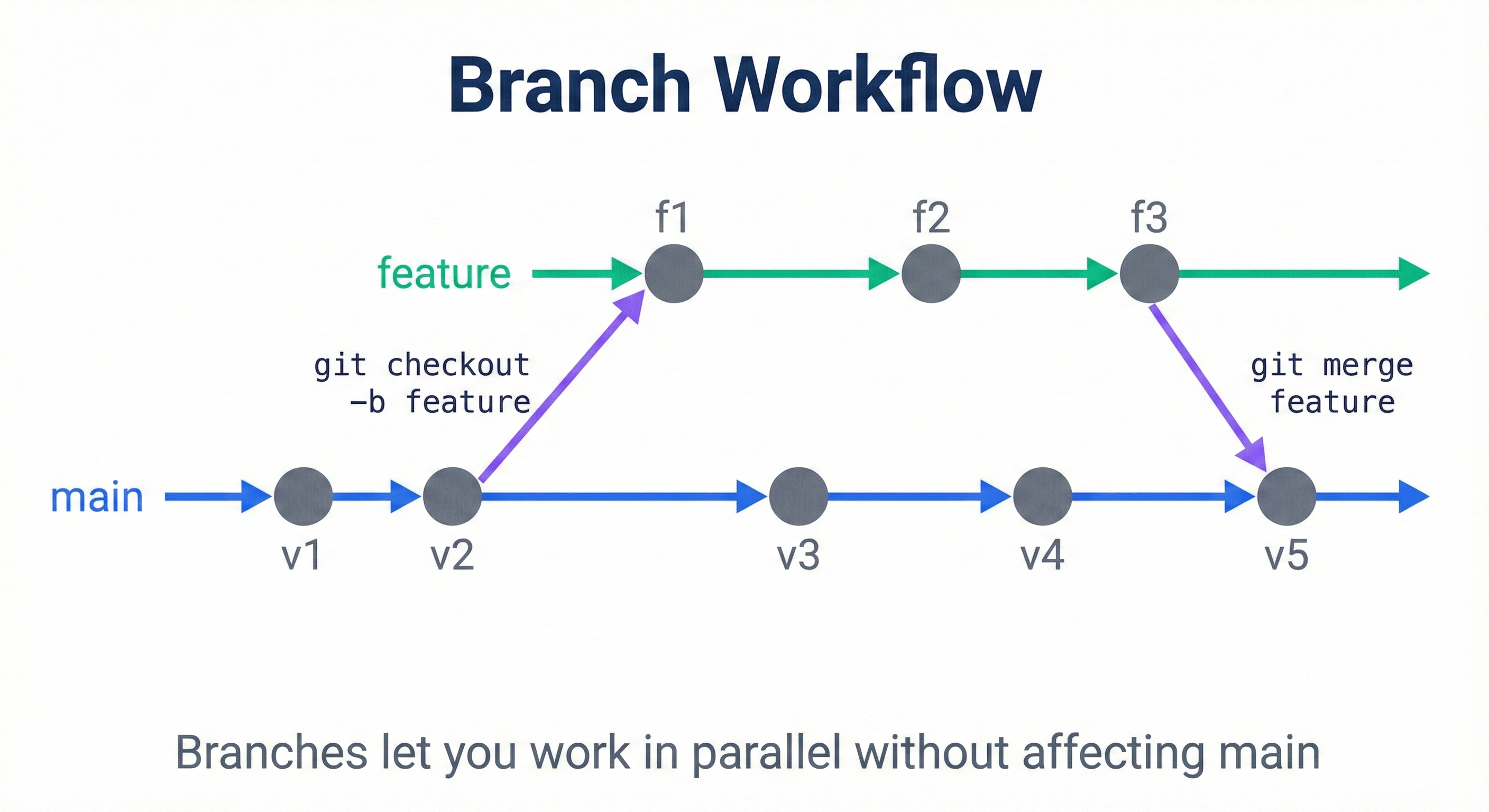
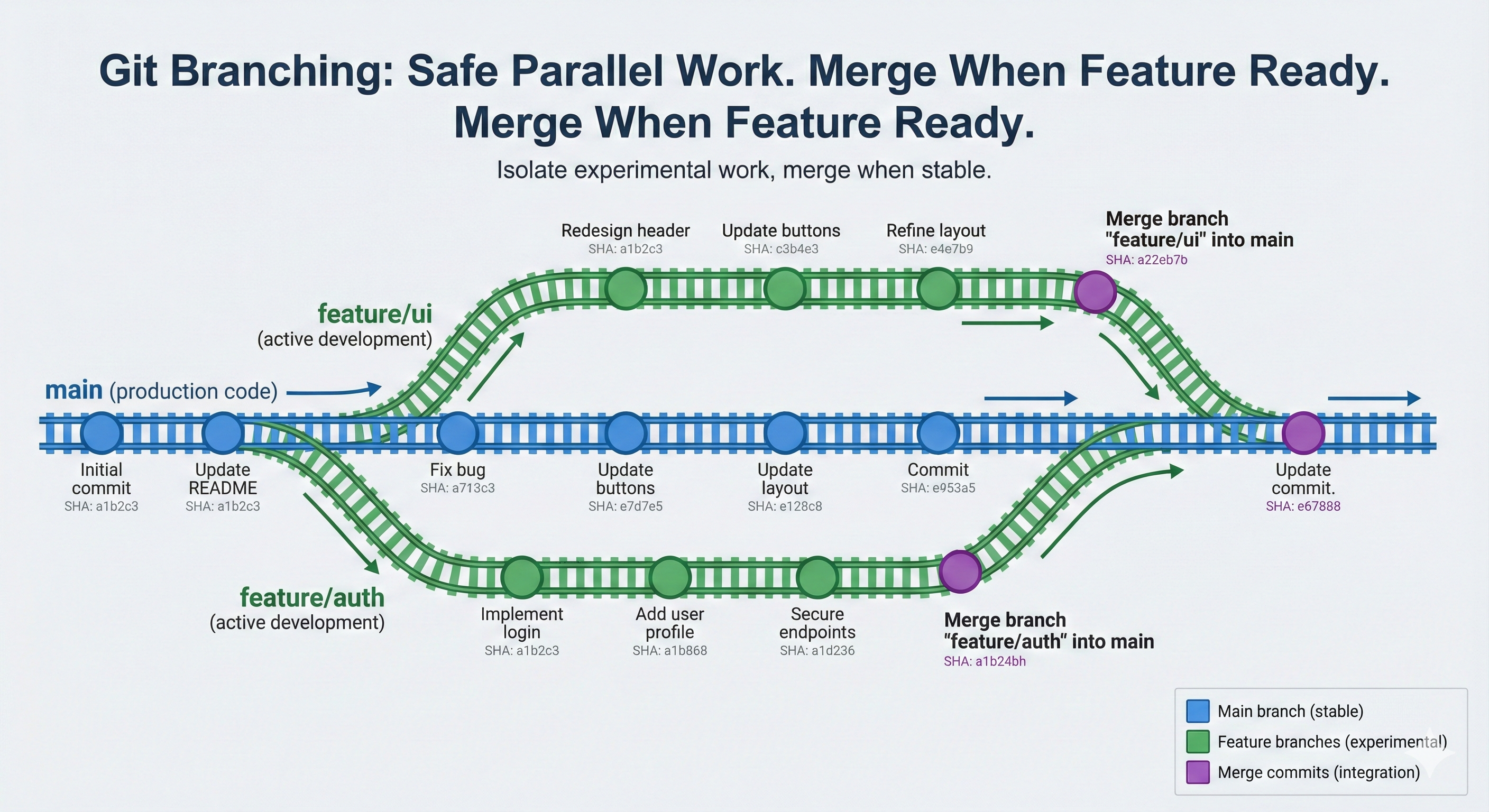
This lesson shows you how to use branches for safe parallel testing with AI-generated code.
Five Core Concepts at a Glance
This lesson covers exactly 5 concepts (within A1 cognitive limits):
- Branches — isolated development timelines (independent versions of your code)
- Branch creation — using
git branchorgit checkout -bto start a new experiment - Branch switching — using
git switchorgit checkoutto move between branches - Merging — integrating changes from one branch back into another
- Branch deletion — cleaning up completed experiments with
git branch -d
By the end of, you'll have hands-on experience creating branches, watching code changes stay isolated, testing them safely, and merging winners back to main.
Part 1: Hands-On Discovery—What Are Branches?
Let's start by observing branches in action. You have a committed project on your main branch. Now you'll create a parallel branch without touching main.
Activity 1: Create Your First Branch
Open your terminal in your Git repository (the one from Lessons 1-2).
Execute this command:
git branch feature-simple
What just happened? Git created a new branch pointer named feature-simple pointing to your current commit. Your code hasn't changed—you're still on main.
Observe it:
git branch
Expected output:
  feature-simple
* main
The asterisk (*) shows you're currently on main. The branch feature-simple exists but is waiting for you to switch to it.
💬 AI Colearning Prompt
"Explain what happens when I create a new Git branch. Does it copy my files, or does something else happen?"
Discovery question: "What if I switch to this new branch? Will my main code be protected?"
Activity 2: Switch to the Branch (Two Equivalent Approaches)
You can use either git switch (modern) or git checkout (traditional). Both work identically.
Modern approach (Git 2.23+):
git switch feature-simple
Traditional approach (still works):
git checkout feature-simple
Either command switches you to the branch. Let's verify:
git status
Expected output:
On branch feature-simple
nothing to commit, working tree clean
Key observation: You're now "on" feature-simple, not main. But look at your files—nothing changed because the branch points to the same commit as main (for now).
Activity 3: Create Changes on Your Branch (Isolation in Action)
Now you'll make a change only on this branch. Let's create a new file called approach-simple.txt:
Create the file with this content:
cat > approach-simple.txt << 'EOF'
Solution Approach: Simple
========================

Strategy: Keep it minimal
- Use basic text format
- Easy to understand
- Quick to implement
EOF
What this command does:
cat > approach-simple.txt << 'EOF'= create file with multiple lines (from Lesson 2)- Everything between the first
EOFand lastEOFbecomes the file content - Result: creates
approach-simple.txtwith the solution approach text inside
Add and commit on your branch:
git add approach-simple.txt
git commit -m "feat: add simple approach"
Now switch back to main:
git switch main
Look at your files. What do you see?
ls
Expected output: approach-simple.txt disappears! It only exists on the feature-simple branch.
🎓 Expert Insight
In AI-native development, branches enable fearless experimentation with AI-generated code. You don't memorize merge commands—you understand that branches isolate changes so failures don't affect your main code.
This is branch isolation in action. Your main branch is completely untouched. If this feature is terrible, you can simply delete the feature-simple branch and never merge it. Main code stays safe.
Part 2: Three Roles Demonstration—AI, You, and Convergence
Now we move from observation to collaboration. This is where AI becomes a learning partner, not just an executor.
Scenario 1: AI as Teacher—Learning Branch Best Practices
What you ask AI:
Prompt your AI assistant (ChatGPT, Claude Code, etc.) with:
I'm using Git branches to test multiple approaches to a feature.
What are best practices for branch naming and organization?
What AI teaches you:
AI might respond with conventions you didn't explicitly ask for:
Common branch naming conventions:
- feature/auth-login (for features)
- bugfix/password-reset (for bug fixes)
- refactor/database-schema (for refactoring)
- experiment/caching-strategy (for exploratory work)

Benefits of naming conventions:
- Team members instantly understand branch purpose
- Automated tools can process branch names (e.g., auto-delete experiments)
- GitHub shows branch type in the interface
What you learned: AI taught you a naming convention system you didn't explicitly ask for. You now understand that good naming communicates intent to your future self and teammates.
Key moment: This is AI as Teacher—suggesting a pattern (naming conventions) that improves your workflow.
Scenario 2: Student as Teacher—Teaching AI Your Constraints
Now you reverse roles. You had a previous experience the AI doesn't know about.
What you tell AI:
In my previous project, I created too many experimental branches
and they cluttered the repository. For this project, I want to
delete branches immediately after testing them.
Can you remind me which Git command deletes a branch?
What AI suggests:
To delete a merged branch:
git branch -d feature-simple

To force-delete an unmerged branch:
git branch -D feature-simple
But you correct AI:
Good—but I should only force-delete if I'm certain.
I'll use -d and fix merge conflicts if they exist.
Let me be more disciplined about cleaning up.
What AI learns: AI adapted to your constraint (branch clutter caused previous problems). AI now knows to suggest safe deletion (-d) as your preference.
Key moment: This is Student as Teacher—you corrected AI and taught it about your project context and constraints.
Scenario 3: AI as Co-Worker—Convergence Through Iteration
Here's where both of you iterate together, and the final solution is better than either would create alone.
Iteration 1: Initial branch strategy
You ask AI: "I want to test two ways to optimize this feature. One is simple but slower. One is complex but faster. How should I organize this in Git?"
AI suggests: "Create two branches: feature/simple-optimization and feature/fast-optimization. Test both. Merge the winner."
You think: "That works, but how do I remember which is faster after testing?"
Iteration 2: You add a constraint
You ask AI: "When I merge the winning branch, how can I document performance metrics in the Git history?"
AI suggests: "Add a performance note to your commit message before merging."
You think: "Good idea, but I want the metrics visible in the PR description too."
Iteration 3: Convergence
Together you arrive at:
- Create two branches for parallel testing
- Make notes during testing (performance times, trade-offs)
- Document findings in commit message:
feat: optimize query (5x faster, uses 2x memory) - Create PR with detailed performance comparison in description
- Merge winning branch with full context preserved
What neither of you had individually:
- You didn't think of documenting performance in the commit message initially
- AI didn't know this was important without your feedback
- Together, you created a reusable pattern: Document performance metrics in both commit and PR
🤝 Practice Exercise
Ask your AI: "I'm testing two different database query approaches on separate Git branches. One is faster but uses more memory. Show me how to document this tradeoff in my commit messages and explain why this documentation matters for future decisions."
Expected Outcome: You'll understand how to use Git commit messages to capture decision rationale, not just code changes.
Key moment: This is Co-Worker convergence—iteration improved both of your understanding. Future projects will use this pattern.
Part 3: Hands-On Workflow—Creating and Merging Branches
Let's practice the complete workflow with a second branch to simulate the performance comparison scenario above.
Activity 4: Create a Second Branch for Comparison
You're still on main. Create a second branch for testing a "fast" approach:
git branch feature-fast
git switch feature-fast
Create a fast version of the feature:
cat > approach-fast.txt << 'EOF'
Solution Approach: Optimized
============================

Strategy: Performance-focused
- Use efficient algorithms
- Implement caching
- More complex structure

Performance Notes:
- Faster execution
- Higher memory usage
- Requires more testing
EOF
Commit on this branch:
git add approach-fast.txt
git commit -m "feat: add optimized approach with caching"
Now you have two feature branches:
feature-simple(simple but basic)feature-fast(optimized but complex)
Both exist independently. Main is untouched. Both can be tested and evaluated in isolation.
Activity 5: Testing and Decision
In a real scenario, you'd test both branches:
- Switch to
feature-simple, run tests, measure performance - Switch to
feature-fast, run tests, measure performance - Compare results
- Decide which is better for your needs
For this lesson, let's assume you tested both and feature-fast is superior due to caching.
You decide: merge feature-fast into main.
Switch back to main first:
git switch main
Merge the winning branch:
git merge feature-fast
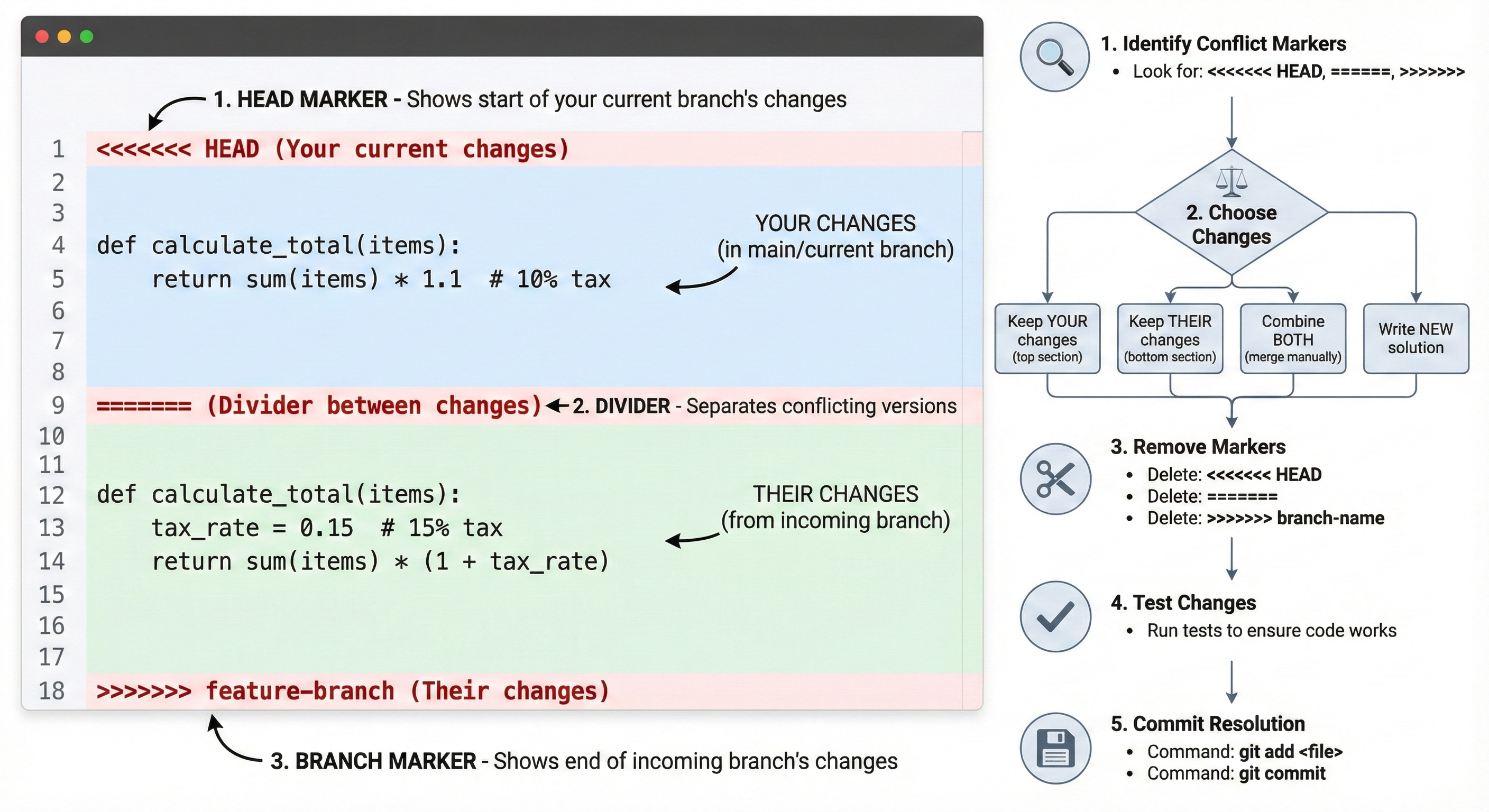
Expected output:
Updating <hash>...<hash>
Fast-forward
 approach-fast.txt | 10 ++++++++++
 1 file changed, 10 insertions(+)
Observe:
git log --oneline
You see commits from both main and the merged branch. The fast feature is now part of main.
Activity 6: Clean Up Completed Experiments
The feature-fast branch served its purpose. Clean it up:
git branch -d feature-fast
What happened? The branch pointer is deleted. The commit is still in main's history (merged), so no data is lost. Git prevents you from deleting branches with unmerged changes (use -D only if certain).
Verify cleanup:
git branch
Now only main and feature-simple remain (the slow approach you didn't merge).
Part 4: Understanding the Trade-offs—When to Branch vs Commit
You now understand how branches work. But when should you branch instead of just committing?
Branches Are For:
- Parallel experimentation — Testing multiple AI suggestions simultaneously
- Isolating risky changes — If it breaks, you delete the branch, not the main code
- Collaborative work — Team members work on different branches without conflicts
- Code review — Changes are reviewed in a PR before merging
Commits Are Better When:
- You're confident in the direction — AI has generated code you're sure about
- Changes are incremental and proven — Small improvements to existing functionality
- You're alone on the project — No need to isolate changes from collaborators
Decision Framework:
Ask yourself before each AI-assisted change:
- "Am I testing multiple approaches simultaneously?" → Use branches
- "Could this break something critical?" → Use branches
- "Is this a small, proven improvement?" → Commit directly
- "Am I the only one working on this code?" → Can go either way, but branches are safer
Try With AI
Let's explore how branches enable safe AI experimentation and comparison of different approaches.
📋 Learn Naming Conventions:
"What are good Git branch naming conventions for a Python project? Show me examples for features, bug fixes, and experiments. Explain the reasoning behind each naming pattern and how it helps with organization."
🎯 Practice Comparison Workflows:
"I'm testing two different implementations of the same feature on separate branches (one AI-generated, one I wrote manually). Help me design a process for: comparing them fairly, deciding which is better, documenting why I chose one over the other, and safely deleting the rejected branch."
🧪 Test AI Suggestions Safely:
"I want to let AI experiment with my code without risk. Walk me through a safe workflow: create an experiment branch, let AI make changes, test the changes, and either merge (if good) or discard (if bad). Include the exact Git commands and safety checks."
🚀 Plan for Team Collaboration:
"How would branch workflows change if I were working with a team on the same project? What additional practices would matter? Explain merge conflict prevention, code review patterns, and how to coordinate with others using branches."
Remember: AI might suggest advanced concepts (rebasing, squashing) beyond beginner level—for now, focus on simple branch creation and merging. Ask AI to explain in beginner terms if it uses technical jargon.