Type Utilities and Capstone Project
What You'll Learn
- Inspecting types with type(), id(), isinstance()
- Converting between types (casting)
- When Python converts automatically
- How Python stores integers
- Binary, hexadecimal, octal numbers
- Building a User Profile Validator
You've learned about Python's 13 data types across four lessons. Now it's time to master the tools that inspect, validate, and convert between types—and build a real project that brings everything together.
The type() Function: Understanding Type Objects
You've used type() throughout this chapter to inspect data types. But what does type() actually return?
Key insight: type() doesn't return a string like "int". It returns a type object — Python's internal representation of the type class.
Loading Python environment...
This matters when comparing types programmatically:
Loading Python environment...
When to use type() vs isinstance() (coming next):
type(x) == int: Checks for exact type match onlyisinstance(x, int): More flexible, accepts subclasses (preferred in most cases)
The id() Function: Object Identity
Every object in Python has a unique identifier—its memory address. The id() function returns this.
Loading Python environment...
Why does this matter?
- Understanding object identity — Two variables might hold the same value but be different objects
- Debugging memory issues — Professional developers use
id()to track object allocation - Understanding Python's optimization — Some values are cached (shown next with interning)
A Critical Insight: The None Singleton
Python has a special rule: there is only ONE None object in your entire program. Every variable set to None points to the same object.
Loading Python environment...
This is why the is operator is important: is checks object identity, while == checks value equality.
Loading Python environment...
Key insight: For numbers -5 to 256, Python reuses the same object. For larger numbers, it creates new objects. This is integer interning (covered in advanced section below).
Using id() in Real Code
When might you use id() in practice? Mostly for debugging or learning how Python works. But here's a practical example:
Loading Python environment...
The isinstance() Function: Type Checking
isinstance() is your primary tool for checking types in real programs.
Syntax: isinstance(object, type)
Returns: True if the object is an instance of that type, False otherwise
Loading Python environment...
isinstance() vs type() == ...
Why is isinstance() better? Because it respects inheritance (a more advanced topic you'll hit in Object-Oriented Programming). For now, just remember:
type(x) == int— Checks for exactlyint, nothing elseisinstance(x, int)— Checks ifxisintor any subclass ofint
In beginner code, they're equivalent. But isinstance() is the Pythonic way.
Checking Multiple Types
isinstance() can check if an object is one of several types:
Loading Python environment...
isinstance() in Real Code
Here's a practical example showing how to check types:
Loading Python environment...
Exercise: Write code that checks whether a value is a number (int or float), text, or something else using isinstance().
Type Casting: Converting Between Types
Type casting (also called type conversion) means converting data from one type to another.
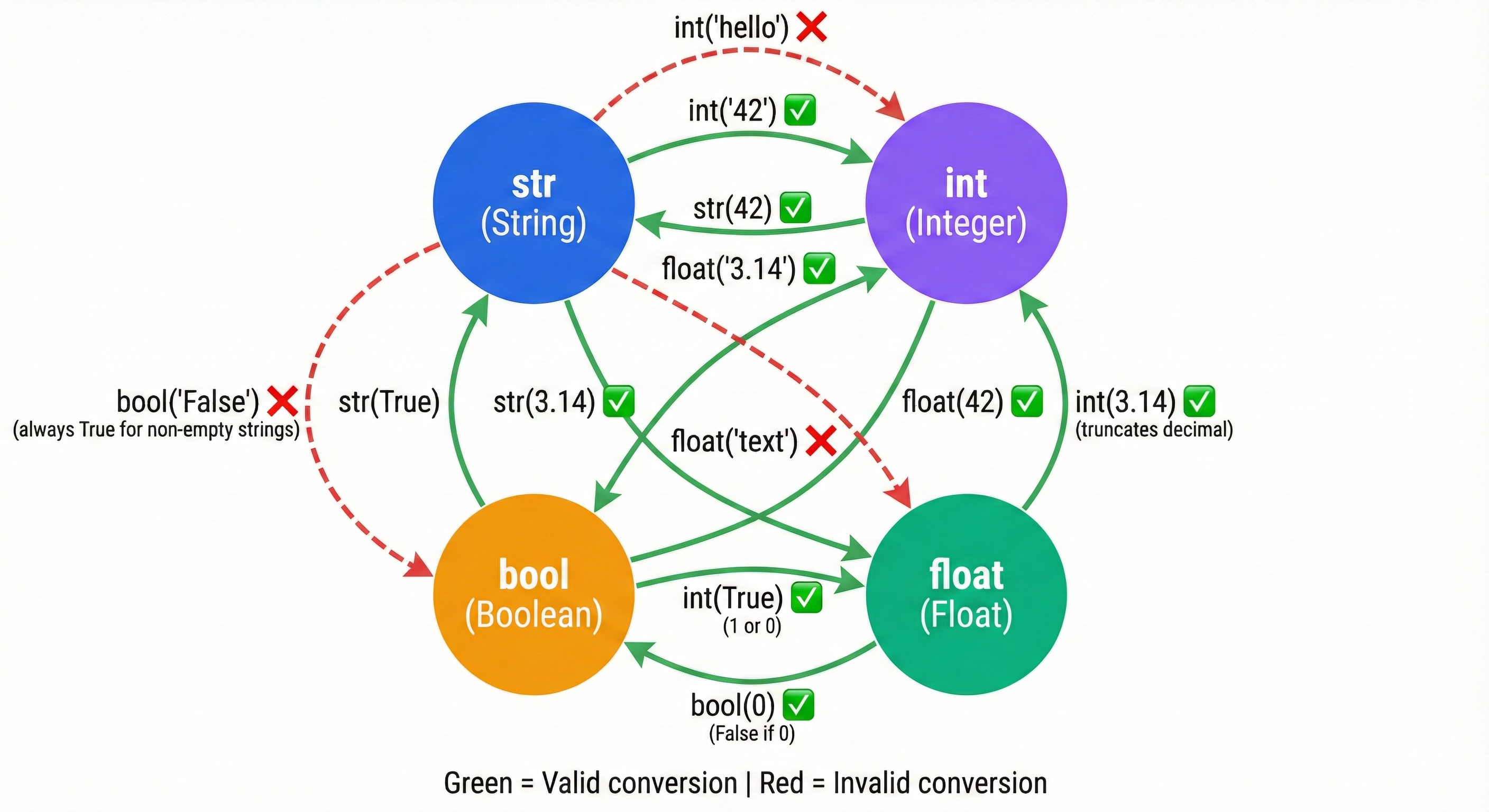
Explicit Casting: You Control It
You've been doing this without realizing it. When you write int("25"), you're explicitly converting a string to an integer.
int() — Convert to integer:
Loading Python environment...
float() — Convert to float:
Loading Python environment...
str() — Convert to string:
Loading Python environment...
bool() — Convert to boolean:
Loading Python environment...
Lossy Conversions: Data Loss
When you convert a float to an int, the decimal part is truncated (chopped off, not rounded):
Loading Python environment...
If you need true rounding, use the built-in round() function:
Loading Python environment...
Always be aware of data loss when casting. Document your intention clearly:
Loading Python environment...
Implicit Casting: Python Does It Automatically
Sometimes Python converts types without you asking. This happens in mixed arithmetic (numbers of different types in the same expression).
Rule: When you mix int and float, Python automatically converts the int to float and performs the operation as float arithmetic.
Loading Python environment...
This is convenient, but be aware of precision loss with large numbers:
Loading Python environment...
Why Explicit is Better Than Implicit
Python's philosophy (from "The Zen of Python"): "Explicit is better than implicit."
Compare these two:
Loading Python environment...
The explicit version is clearer. Future readers (or you six months later) immediately understand that conversion is happening.
Type Casting Exercise
Create a program that:
- Asks the user for their age as text (using
input()) - Converts it to an integer
- Calculates their age in 10 years
- Converts the result back to a string
- Prints a complete sentence
Note: What happens if the user enters "twenty five" instead of "25"? Your program will crash. We'll learn how to handle such errors gracefully in Chapter 26 (Exception Handling).
Advanced Topic: Integer Interning (For Curious Learners)
This section is optional. It explains something advanced but doesn't affect your ability to write Python code.
What Is Interning?
Python caches integers from -5 to 256. This means if you create two variables with the value 42, they're actually the same object in memory.
Loading Python environment...
But larger numbers don't get cached:
Loading Python environment...
Why Does Python Do This?
Memory efficiency. Small integers (-5 to 256) are used constantly in programs (loop counters, indices, common values). By reusing the same object, Python saves memory. Since integers are immutable (can't be changed), it's safe to share them.
Why Should You Care?
In practical code: rarely. You use == to compare values, not is.
Loading Python environment...
But understanding interning helps you grasp how Python manages memory behind the scenes.
Note: You'll learn conditional statements (if/else) in Chapter 22. For now, focus on understanding comparisons return True or False.
Detecting Interning
Here's how to explore integer interning:
Loading Python environment...
Advanced Topic: Number Systems (For Curious Learners)
This section is optional. It explores how to write numbers in different bases.
Beyond Decimal (Base 10)
You normally write numbers in decimal (base 10): 0, 1, 2, ..., 9, 10, 11, ...
But Python supports other number systems:
Binary (Base 2) — Uses digits 0 and 1
Loading Python environment...
Hexadecimal (Base 16) — Uses 0-9 and A-F (A=10, B=11, ..., F=15)
Loading Python environment...
Octal (Base 8) — Uses digits 0-7
Loading Python environment...
Why Different Number Systems?
- Binary: Computers store everything as 0s and 1s. Useful for bit-level operations
- Hexadecimal: Compact way to write binary (one hex digit = 4 binary digits). Common in colors (#FF5733), memory addresses
- Octal: Historically used for file permissions in Unix/Linux
Converting Between Systems
Python provides functions:
Loading Python environment...
ASCII: Text as Numbers
Each character has a number. ASCII (American Standard Code for Information Interchange) maps characters to numbers:
Loading Python environment...
Practical use: You'll use ord() and chr() rarely in beginner code, but they're essential for advanced text processing.
Number Systems Exercise
Explore these on your own:
- Write the numbers 0-15 in binary, hexadecimal, and decimal
- Find the ASCII code for your name's first letter
- Use
hex()on some large numbers to see hexadecimal representation
Capstone Project: User Profile Validator
Now let's build a real-world program that validates user registration data.
Project Requirements
Create a User Profile Validator that:
- Accepts user input for name, age, and email
- Validates data types (name should be text, age should be a number)
- Performs type checking using isinstance()
- Converts types as needed (age from string to int)
- Reports validation results clearly
Why This Project Matters
In real applications, you can't trust user input. Someone might enter "twenty-five" for age instead of 25. Your code needs to:
- Check that data is the right type
- Convert when possible (type casting)
- Report errors when data is invalid
- Ensure data integrity before saving
Starter Code
Here's the structure. Your job is to complete the validation logic:
Loading Python environment...
Output:
=== User Profile Validator ===

Enter your profile information:

--- Validation Results ---

Name 'Alice Smith':
  - Is string: True
  - Has content: True
Age 25:
  - Is integer: True
  - Successfully converted from string
Email 'alice@example.com':
  - Is string: True
  - Has content: True

--- Summary ---
All validations complete! Review results above.

--- Type Information ---
Name type: <class 'str'>
Age type: <class 'int'> (converted from <class 'str'>)
Email type: <class 'str'>
What You're Learning
This project teaches you:
- Type validation — Checking data is the right type before using it
- Type casting — Converting user input (always strings) to appropriate types
- isinstance() — Verifying types programmatically
- Real-world patterns — This is how production systems validate user data
- Note: Full error handling with try/except is covered in Chapter 26
Capstone Extensions (Stretch Goals)
Once your validator works, enhance it:
- Phone validation — Add phone number field with format checking
- Multiple users — Validate multiple profiles and store results
- Advanced email validation — Check for proper email format (username@domain.com)
- Save to file — Write validated profiles to a JSON file
- Type statistics — Track validation success rates
Practice Exercises (Complete All 4)
Exercise 1: Type Inspection Challenge
Write a program that analyzes different values and shows their type properties:
- Type name
- Whether it's numeric (int or float)
- Whether it's truthy (would be True in an if statement)
- Whether it can be converted to string
Loading Python environment...
Exercise 2: Casting Chain Challenge
Write a program that:
- Starts with a string value
- Converts it to int
- Converts that int to float
- Converts that float back to string
- Prints each step and its type
Loading Python environment...
Exercise 3: Implicit vs Explicit Conversion
Identify which lines use implicit and which use explicit casting:
Loading Python environment...
Answer Key (scroll down or try it yourself first!):
- result1: Implicit (int automatically becomes float in mixed arithmetic)
- result2: Explicit (you called str())
- result3: Explicit (you called int())
- result4: Explicit (you called int())
- result5: Neither (this is comparison creating a bool, not casting)
Exercise 4: Complete the Capstone
Build the User Profile Validator program following the scaffolded code above. Get it working with basic functionality first, then add one of the extensions.
Your validator should:
- Accept user input for name, age, and email
- Use
isinstance()to check types - Attempt type casting and handle errors gracefully
- Display clear validation results
Try With AI
Ready to debug type errors and build robust type validation?
🔍 Explore Type Casting Errors:
"Analyze this broken code and find ALL type errors: user_age = input('Enter age: '); age_next_year = user_age + 1; user_score = '95.5'; average = user_score / 2; is_premium = 'True'; check = is_premium and True. For each line, explain: (1) what type Python actually has, (2) what type the operation expects, (3) what error occurs, (4) the fix using type casting."
🎯 Practice Type Validation:
"Create a user profile validator that accepts name, age, and email as input. Use isinstance() to check types before operations, cast strings from input() to correct types (int for age, str for name), and handle these edge cases: user enters 'twenty-five' for age, enters '3.14' for age, leaves email empty. Show me the ValueError that occurs and how to handle it."
🧪 Test Casting Edge Cases:
"Demonstrate these type casting edge cases with code: (1) int('3.14') fails but int(float('3.14')) works—why? (2) bool('False') returns True—explain this surprising behavior and show the correct way to parse boolean strings. (3) int('1,000') fails—show how to handle formatted numbers. Include the actual error messages."
🚀 Apply to Your Input Validation:
"I'm building [describe your application]. Help me identify all user inputs I need to validate. For each input, show me: (1) the expected type, (2) type() check to verify, (3) isinstance() validation, (4) type casting from string input with error handling, (5) helpful error messages for invalid input. Make it impossible for bad input to crash my program."