Appendix: the Claude app without a Claude plan
- Approved by
- Panaversity ·
You can skip this page. It is for readers who want the Claude app's folders, browser or Claude Code without paying for a Claude plan.
The Claude app can run on a model from another company. You then need no Claude plan, and you pay that company for what you use.1 Anthropic's list for this mode includes the folders, the built-in browser and Claude Code.2
This page covers three companies, in alphabetical order.
| Company | What it is | What you need first |
|---|---|---|
| DeepSeek | Makes its own models | An account, credit and an API key |
| Ollama | An app that runs a model on your own Mac | Ollama, on a Mac. A model on your own Mac costs nothing3 |
| OpenRouter | Passes your messages on to many companies' models | An account, credit and an API key |
An API key is a secret code that lets the Claude app use your account at that company.
Warning
Keep your API key private. Never paste it into a chat, a screenshot or a group message. Anyone who has it can spend your credit.
What do you give up?
- What you type goes to that company, under its terms.4 So the two choices you made in Set up the apps no longer cover it.
- The app works on this computer only. There is no claude.ai and no phone app with it, no sharing and no voice. Your chat history is saved on this computer only.2
- Some features may fail. Anthropic built this mode for organizations, and describes it with Claude models.4 DeepSeek does not support attached documents.5 So do the practice lab on your free account.
Set up DeepSeek or OpenRouter
First, get your API key.
- For DeepSeek, sign up on the DeepSeek Platform, and create a key on its API keys page.6 Top up your balance there. DeepSeek takes what you use from it, at the prices on its pricing page.7
- For OpenRouter, add credit at openrouter.ai/credits, then create a key at openrouter.ai/keys. OpenRouter says this setup is only guaranteed to work when Anthropic itself runs the model.8 So in its privacy settings, allow only Anthropic as a provider.9 You then use Claude's models, and you pay OpenRouter.
Then connect the app. The steps are the same on Windows and macOS.
-
Open the Claude app. Do not sign in.
-
Turn on Developer Mode. On a Mac, in the menu bar at the top of the screen, open Help, then Troubleshooting, and click Enable Developer Mode. On Windows, open the ☰ menu at the top left of the sign-in screen first, then do the same.10 A new menu called Developer appears.
-
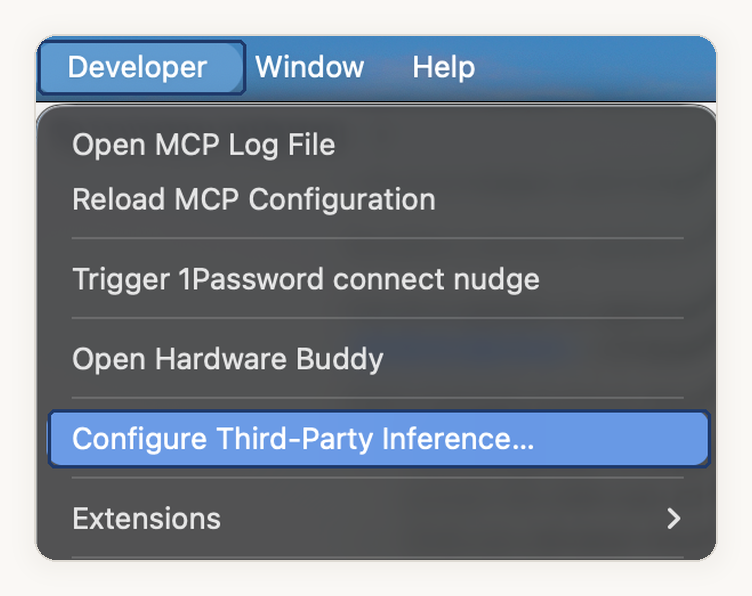
Open Developer, and click Configure Third-Party Inference. A settings window opens on its Connection page.
-
In the first box on the Connection page, choose Gateway. A gateway is a service that passes your messages on to a model.
-
Under Gateway credentials, fill in these four boxes. Leave every other box as it is.11
Box DeepSeek5 OpenRouter8 Credential kind Static API key Static API key Gateway base URL https://api.deepseek.com/anthropichttps://openrouter.ai/apiGateway API key Your key Your key, which starts with sk-or-v1-Gateway auth scheme x-api-key Bearer 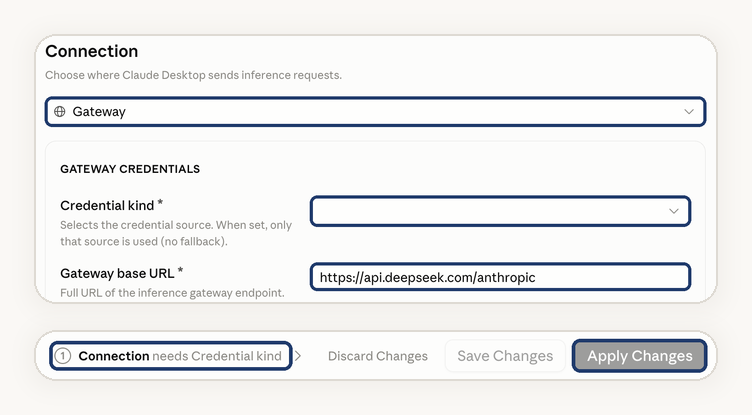
-
Look at the bar at the bottom of the window. If it names a box, as in "Connection needs Credential kind", that box is still empty, so fill it in. Then click Apply Changes. The app restarts.10
-
On the start screen, choose Continue with Gateway. If you do not see it, quit the app fully, not just its window, and open it again.8
-
Pick a model from the model menu, and send a short message, such as "Hello".


With DeepSeek, the model menu may show Claude's names. Then Opus means DeepSeek V4 Pro, and Sonnet and Haiku mean DeepSeek Flash.5
Set up Ollama
Ollama connects the Claude app for you, on a Mac only. Ollama says Windows support is coming.12
- Install Ollama, and download a model to your Mac. For a cloud model instead, one that runs on Ollama's computers, sign in to Ollama and turn on cloud models. Some cloud models need a paid Ollama plan.
- In Ollama, open Apps, and choose Connect Claude.
- Follow the prompts. They install Claude if you need it, and ask you to restart it.
- To change the model later, open Ollama's Settings, then Apps, choose your models, and click Restart Claude.
Check it, change it, or go back
- To check it worked, send one short message, then find its charge on the company's usage page. With a model on your own Mac there is no charge, so the reply is your check.
- To change a setting, such as a wrong key, you need the Developer menu back. It goes away when the app restarts into this mode. Turn on Developer Mode again, as in step 2, and this time the menu stays.10
- To go back to your Claude account, choose the Anthropic sign-in on the start screen.1 With Ollama, disconnect Claude in Ollama's Apps, or quit Ollama.12
Check yourself
Question 1 / 1
0 answered
You set the Claude app to use another company's model. Where does what you type go?
Sources
- Installation and setup, Claude Desktop on third-party platforms, Claude documentation.↑↑2
- Features, Claude Desktop on third-party platforms, Claude documentation.↑↑2
- Pricing, Ollama.↑
- Overview, Claude Desktop on third-party platforms, Claude documentation.↑↑2
- Anthropic API, DeepSeek API documentation.↑↑2↑3
- Your first API call, DeepSeek API documentation.↑
- Models & Pricing, DeepSeek API documentation.↑
- Claude Desktop integration, OpenRouter documentation.↑↑2↑3
- Provider selection, OpenRouter documentation.↑
- In-app configuration, Claude Desktop on third-party platforms, Claude documentation.↑↑2↑3
- Deploy Claude Desktop on 3P with an LLM gateway, Claude documentation.↑
- Use Ollama models in Claude on macOS, Ollama documentation.↑↑2
- Owner
- Panaversity