AI Agents ke liye Plugins: aik bundle, aap ki poori team
13 Concepts, real use ka 80% · ~90-min concept read · pehle real plugin ke liye aik focused din · empty folder se us plugin tak jo teammate aik command mein install karta hai
First: plugin asal mein kya hai. Out of the box, Claude Code ya OpenCode jaisa coding agent aik capable generalist hai. Yeh kisi bhi project mein kaam kar sakta hai, magar isay aap ka working style nahin pata. Plugin woh package hai jo one install mein yeh gap fix karta hai: yeh woh playbooks bundle karta hai jinhein agent follow karta hai (skills), woh specialists jinhein yeh delegate karta hai (subagents), woh systems jin tak yeh pohnch sakta hai (MCP servers), aap ki standing instructions, aur woh rules jinhein yeh skip nahin kar sakta (hooks). Yeh bundle generic agent ko dein to woh aap ka ban jata hai, aur teammate install kare to usay exact same one milta hai.
Ab isay real dekhein. Anthropic in ki poori marketplace ship karta hai. Do commands, claude plugin marketplace add anthropics/knowledge-work-plugins phir claude plugin install finance@knowledge-work-plugins, aur blank Claude finance specialist ban jata hai: skills khud fire hoti hain, /finance:reconciliation jaisi commands aati hain, aur finance team ke systems se connectors milte hain. finance ki jagah sales ya legal rakhein to woh specialist mil jata hai. Yeh plugin hai: one install generalist ko exact expert bana deta hai jis ki aap ko zaroorat hai. Is course ke end tak aap apna plugin bana chuke honge, aur woh direction dekh chuke honge jahan yeh le jata hai: is book ki sellable domain marketplaces, jaise agentfactory-business (banking, legal-ops, Islamic finance), jo Anthropic ke oopar regulated-domain depth layer karti hain.
Bundle host-specific hai; andar ki aksar cheezein nahin. Claude Code plugin aur OpenCode plugin wahi pieces different formats mein wrap karte hain jo aik doosre mein load nahin hotay (Concept 2 batata hai kyun). Magar pieces mostly travel karte hain: skill har jagah wahi SKILL.md hai, instructions wahi markdown hain, MCP server aik URL hai jis ki taraf koi bhi host point kar sakta hai. Sirf hook truly per-host hai, kyun ke woh host ki internal machinery mein plug hota hai (Concept 7 mein aap exact farq dekhenge). Is liye aap apne host ke liye build karte hain, aur andar ki aksar cheezein phir bhi claude.ai, Codex, Cursor, hatta ke OpenClaw jese personal agent tak pohnchti hain.
Aur aap asal mein yahi seekhne aaye hain. Aap ke agent ko syntax pehle se aata hai; woh command par hook ya manifest likh sakta hai. Agar course sirf yahi sikhata to agent isay pointless bana deta. Scarce cheez woh judgment hai jo agent ke paas nahin: kis job ko kaunsa lever chahiye, kab rule ko hope nahin guarantee hona chahiye, aur plugin ke claim ko prove kaise karna hai. Aap plain English mein direct karte hain, empty folder se har lever khud build karte hain, saath mein complete proven build compare ke liye hota hai, aur aik real plugin ship karte hain jo teammate one command se install karta hai. Decisions aap karte hain; typing agent karta hai.
Sab kuch aik fact se nikalta hai: aap aise agent ko extend karte hain jis ke owner aap nahin hain. Host loop, model, aur machine own karta hai. Aap ka plugin show nahin chalata; yeh host ko load karne ke pieces deta hai. Is se chaar non-negotiables nikalte hain, aur whole course yahi chaar build karta hai:
- Share karne ke liye bundle. Plugin customization ka shareable, versioned form hai. Agar yeh sirf aap ke liye aik repo mein hai, aap ko
.claude/folder chahiye, plugin nahin. Plugin tab banayein jab doosron ko bhi yeh milna chahiye. - Job ke liye right lever. Skill woh knowledge hai jise agent choice se use karta hai; subagent woh work hai jise yeh delegate karta hai; MCP server tools aur data hain jin tak yeh pohnchta hai; hook code hai jo fixed moments par khud run hota hai. Job ko lever se match karein.
- Must-always hook hai, instruction nahin. Skill ya
CLAUDE.mdmein likhi baat advice hai jise model skip kar sakta hai. Hook code hai jo har dafa run hota hai. Agar koi cheez hona hi hai, formatter ya safety gate, to woh hook hai. - Plugin user ke trust mein run karta hai. Yeh installer ki machine par code execute karta hai. Least privilege ke saath build karein, saaf batayein yeh kya touch karta hai, aur install ya ship karne ko trust decision samjhein.
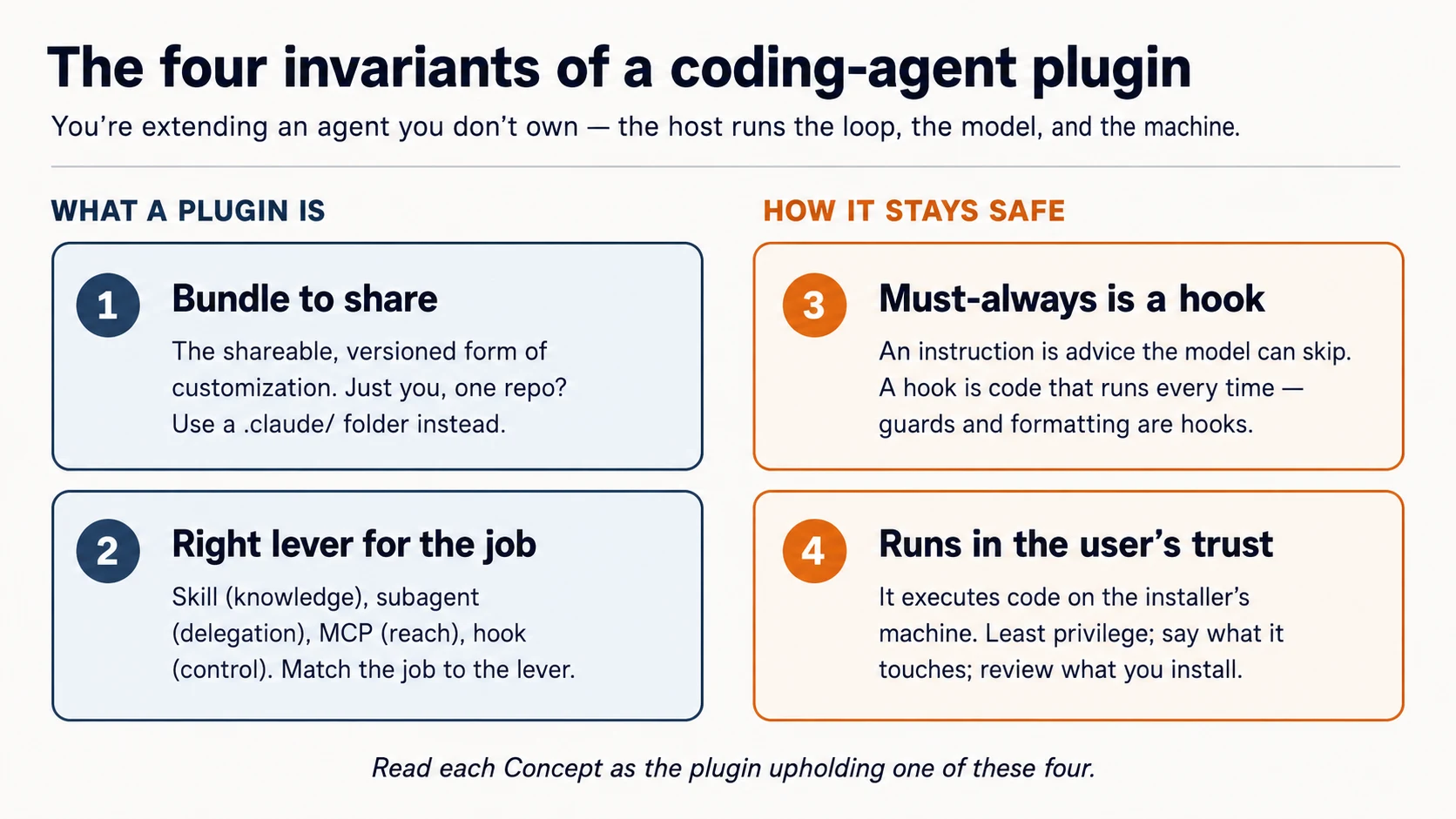
Har Concept parhte waqt poochein: yeh kaun sa invariant hai?
Prerequisites. Yeh page teen cheezein assume karta hai.
- Aap coding agent drive karte hain. Aap ne Agentic Coding Crash Course kiya hai: Claude Code ya OpenCode, plan mode, rules file. Hum usi workbench ke through build karte hain.
- Aap typed code parh sakte hain: shell, thora JSON, aur TypeScript; seedha ya blocks apne agent ko paste karke plain-English explanation lene ke zariye.
- Recommended: Connector-Native Apps. Us course ne wahi habit sikhayi: jaan na ke aap kis layer par hain, aur MCP server build kiya. Plugin aik MCP server bundle kar sakta hai (Concept 6), is liye dono courses connect hote hain.
Aap ko Build AI Agents ya AI Identity pehle karne ki zaroorat nahin. Dono path mein baad mein aate hain, aur yeh course un ki taraf point karta hai.
Yeh kahan fit hota hai. Mode 2 mein, Connector-Native Apps ke foran baad. Path yeh hai: Connector-Native Apps → yeh course → AI Identity (sign-in & agent access) → Build AI Agents. Connector-native apps end users ke liye chat app extend karti hain; plugins builders ke liye coding agent extend karte hain. Same move, doosra host.
Setup (kuch minute)
Aap yahan shell commands haath se nahin chalayein ge. Aap apne coding agent ko plain English mein direct karte hain aur check karte hain ke yeh kya report karta hai; yahi loop aap plugin build karne mein use karenge. Setup us ki pehli rep hai.
-
Base download karein (
plugins-crash-course-base.zip), unzip karein, aurplugins-crash-coursefolder ko Claude Code (ya OpenCode) mein open karein. Open hotay hi agentAGENTS.mdparhta hai: aap ka brief ke kya build karna hai aur proven reference kahan hai. -
Isay setup karne ko kahein. Paste:
Set up my base environment, then tell me what you did and what passed.
Is one line ke peeche agent AGENTS.md ke brief ko follow karta hai: Claude Code par yeh official plugin-structure skill install karta hai taake current spec se kaam kare; OpenCode par plugin docs parhta hai; phir reference build ke checks run karta hai.
- Ab isay layout explain karwayein. Paste:
Walk me through, in plain English, how a plugin is laid out on my host.
Done when agent report kare ke reference build green hai (guard .env aur rm -rf block karta hai, sample skill aur MCP server check out hain) aur yeh aap ko host ka plugin layout explain kar sake.
Box mein kya hai. Abhi aap ka taqreeban kuch nahin; yahi point hai. Plugin aap build karte hain; starter aap ko brief aur proven build deta hai jis ke against aap apna kaam check karte hain.
plugins-crash-course/           ← you build YOUR marketplace + plugin here, from blank
  AGENTS.md                     your brief + how each host lays out a plugin
  CLAUDE.md                     points Claude Code at the same brief (@AGENTS.md)
  reference/                    a COMPLETE, PROVEN build — read it, diff against it, don't copy it
    plugins/agent-factory/      the finished plugin: proven guard, a model skill, a model reviewer
    server/                     a runnable MCP server you point your plugin at
    verify.sh                   one command that proves the reference is sound
Aap har lever khud build karte hain: guard hook, aik skill jo waqai aap ke kaam aati hai, reviewer subagent, MCP wiring, marketplace. Aap plain English mein agent ko direct karte hain. Jab koi piece ghalat aaye, isay reference/, yani known-good version, ke against diff karte hain. Aap direct karte hain; agent type karta hai; aap check karte hain; aap compare karte hain.
Build karne se pehle aik ko chalta dekhein (5 minutes)
Aap ne abhi parha ke plugin kya karta hai. Ab isay mehsoos karein. Concepts se pehle starter mein shipped finished plugin install karein aur dekhein ke yeh kuch enforce karta hai. Pehle dekhna hi baqi course ko land karwata hai.
Reference plugin ko session mein load karein:
claude --plugin-dir reference/plugins/agent-factory
OpenCode mein reference/plugins/agent-factory open karein. Yeh guard us folder ki .opencode/plugins/ se aur skill us ke skills/ se load karta hai.
Phir isay kaam par lagayein. Paste:
Try to read a file called
.env, then use your loop-engineering skill to explain an agent loop in four moves.
Aap ko kya nazar aana chahiye:
- Agent
.envparhne se blocked hai, aur wajah batata hai. (hook, jo aise tool call par fire hota hai jise model skip nahin kar sakta) - Skill apni voice mein answer deti hai, bina is ke ke aap usay name karein. (skill jise model ne choose kiya)
- (Claude Code) Isay scruffy file fix karne ko kahein to woh unasked auto-formatted wapas aati hai. (second hook)
.env par yeh hard block woh cheez hai jo plain "please don't read secrets" instruction kabhi guarantee nahin kar sakti, aur isay build karna is course ka heart hai. Aap ne per-file kuch configure nahin kiya; plugin behavior saath le kar aaya. Ab concepts ke paas attach hone ke liye real cheez hai.
Part 1: Shape
Concept 1: Aap agent ko extend karte hain - usay own nahin karte
Plugin woh program nahin hai jo aap run karte hain. Yeh pieces ka set hai jo host aap ke liye load aur run karta hai. Host - Claude Code ya OpenCode - agent loop (decide-act-repeat cycle) own karta hai, model laata hai, aur user ki machine par run karta hai. Aap ka plugin capabilities aur rules contribute karta hai jo host pick up karta hai. Yeh picture sahi ho jaye to baaki detail hai; ghalat ho jaye to aap plugin se aise kaam karwane ki koshish karte rahenge jin ka zimma us ke paas kabhi tha hi nahin.
Yahan aik acha twist hai, aur naam dene ke qabil hai: aap coding agent ko coding agents ke liye plugin build karne ko direct karte hain. Aap Claude Code se wahi kind of extension likhwaenge jo Claude Code load karta hai. Jo cheez isay build kar rahi hai aur jis cheez ko yeh extend karta hai, dono same kind of tool hain. Yeh gimmick nahin - yeh plugin build karne ka sab se fast tareeqa hai, aur har Manufacturing course isi tarah kaam karta hai: aap direct karte hain, agent type karta hai, aap verify karte hain.
Concept 2: Do hosts, aik idea
Yeh course do hosts cover karta hai. Woh extensions ko mukhtalif tareeqe se package karte hain, lekin idea identical hai: aik unit jo host load karta hai.
- Claude Code aik declarative bundle leta hai - components (skills, subagents, hooks, MCP servers) ka folder jo chhota manifest describe karta hai. Aap zyada tar configuration aur scripts likhte hain; Claude Code unhein wire karta hai.
- OpenCode aik code module leta hai - JavaScript/TypeScript file jo agent ke events mein hook karti hai aur tools add kar sakti hai. Aap functions likhte hain; OpenCode unhein call karta hai.
| Claude Code plugin | OpenCode plugin | |
|---|---|---|
| Form | a folder + plugin.json manifest | a .ts/.js module that exports functions |
| You write | skills, subagents, hooks config, .mcp.json | event handlers, custom tools |
| Loaded from | a marketplace, or --plugin-dir | .opencode/plugins/ or an npm package |
Yeh better ya worse extend nahin karte - yeh different tareeqe se extend karte hain, aur target pick karne se pehle difference jaan na worth it hai. Claude Code Anthropic ka tool hai, Claude models se tied hai, declarative bundle format aur marketplace ecosystem ke saath distribute hota hai. OpenCode open-source aur model-agnostic hai - apni API key layein, ya free/local models (Gemini, GPT, local) run karein - aur is ke plugins code hain, jo finer-grained control deta hai magar aapko khud zyada likhna parta hai. Cost-sensitive learners ke liye model freedom headline hai: same skill jo aap likhte hain OpenCode mein free model par run ho sakti hai. (Dono interoperate bhi karte hain - skills seedha cross over hoti hain, aur community plugins credentials aur backends bridge karte hain - lekin woh tools ko saath use karna hai, plugins author karna nahin, is liye yahan out of scope hai.)
Is course ka zyada hissa shared mental model aur Claude Code form hai (kyun ke yeh richer bundle hai); Part 5 same job ka OpenCode form dikhata hai. Woh host pick karein jo aap actually use karte hain; chaar invariants nahin badalte.
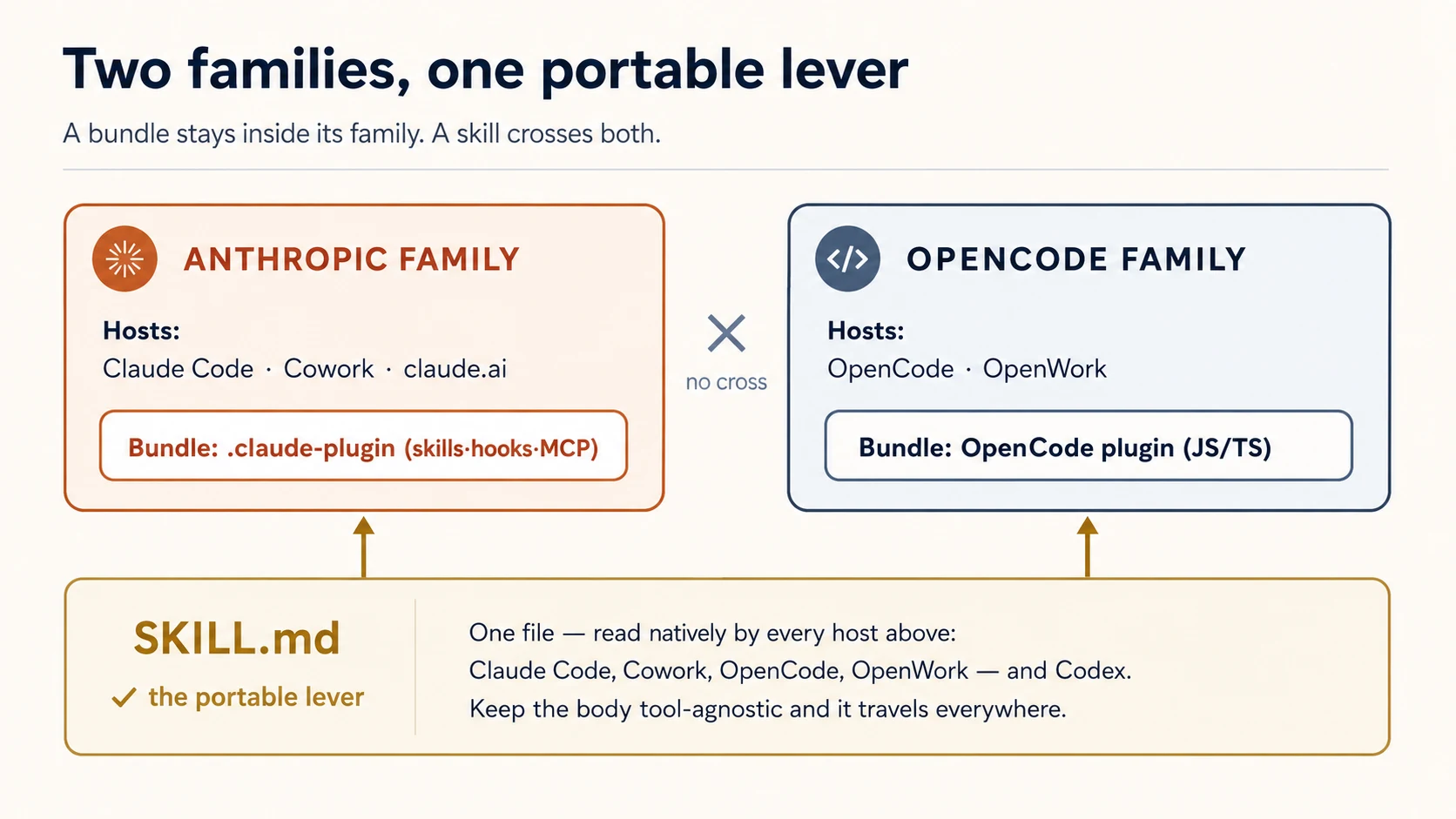
Aik lever free mein port hota hai; aik nahin. skill bas SKILL.md file hai, aur is course ke teeno coding agents woh format natively parhte hain - Claude Code, OpenCode, aur Codex. OpenCode .opencode/skills/, .claude/skills/, aur .agents/skills/ se skills khud discover karta hai (skills ke liye plugin ki zaroorat hi nahin). To aik skill folder har tool ko serve kar sakta hai. Hooks opposite hain: Claude Code hooks JSON config hain, OpenCode hooks JavaScript module hain - shared format nahin, is liye har host ke liye hook alag likhte hain. Yeh split yaad rakhein; cross-tool plugin layout isi se shape hota hai (Concept 4).
Yeh split do families tak scale hota hai. Jo Claude Code plugin aap build karte hain woh Claude Cowork aur claude.ai mein bhi load hota hai - woh Anthropic ka plugin format share karte hain. Jo OpenCode plugin aap build karte hain woh OpenWork mein bhi load hota hai, OpenCode-powered desktop agent - same OpenCode format. Skills dono families cross karti hain (sab SKILL.md parhte hain); bundles cross nahin karte (Claude bundle OpenCode module nahin hai). To jis host ko aap target karte hain woh decide karta hai bundle kitni door travel karega - lekin plain skill har jagah travel karti hai. Hum yahan do coding agents par rehte hain; knowledge-work hosts apna course hain (ceiling dekhein).
Concept 3: Share karne ke liye bundle, apne paas rakhne ke liye configure nahin
Dono hosts aapko plugin ke baghair customize karne dete hain - Claude Code aap ke project mein .claude/ folder parhta hai; OpenCode .opencode/ parhta hai. Jab customization personal ho aur aik repo mein rehti ho, yahi sahi tool hai. plugin woh cheez hai jo aap tab uthate hain jab customization travel karni chahiye: teammates tak, projects ke across, community tak, versions aur updates ke saath.
To "kya yeh plugin hona chahiye?" ka test yeh nahin hai ke yeh karta kya hai - test hai aur kisay chahiye. Aik developer, aik project: .claude/ folder. Team, kai projects, ya strangers: plugin (invariant 1).
Aik consequence jaldi jaan lein: plugin skills aur commands plugin ke name se namespaced hoti hain - repo-tools naam ke plugin mein hello skill /repo-tools:hello ke taur par invoke hoti hai. Is se do installed plugins same name par clash nahin karte.
✓ Checkpoint: shape jagah par hai. Aap jaante hain plugin host-loaded unit hai, do hosts isay differently package karte hain, aur "plugin" ka matlab "customization made to share" hai. Ab chaar levers.
Part 2: Capability levers
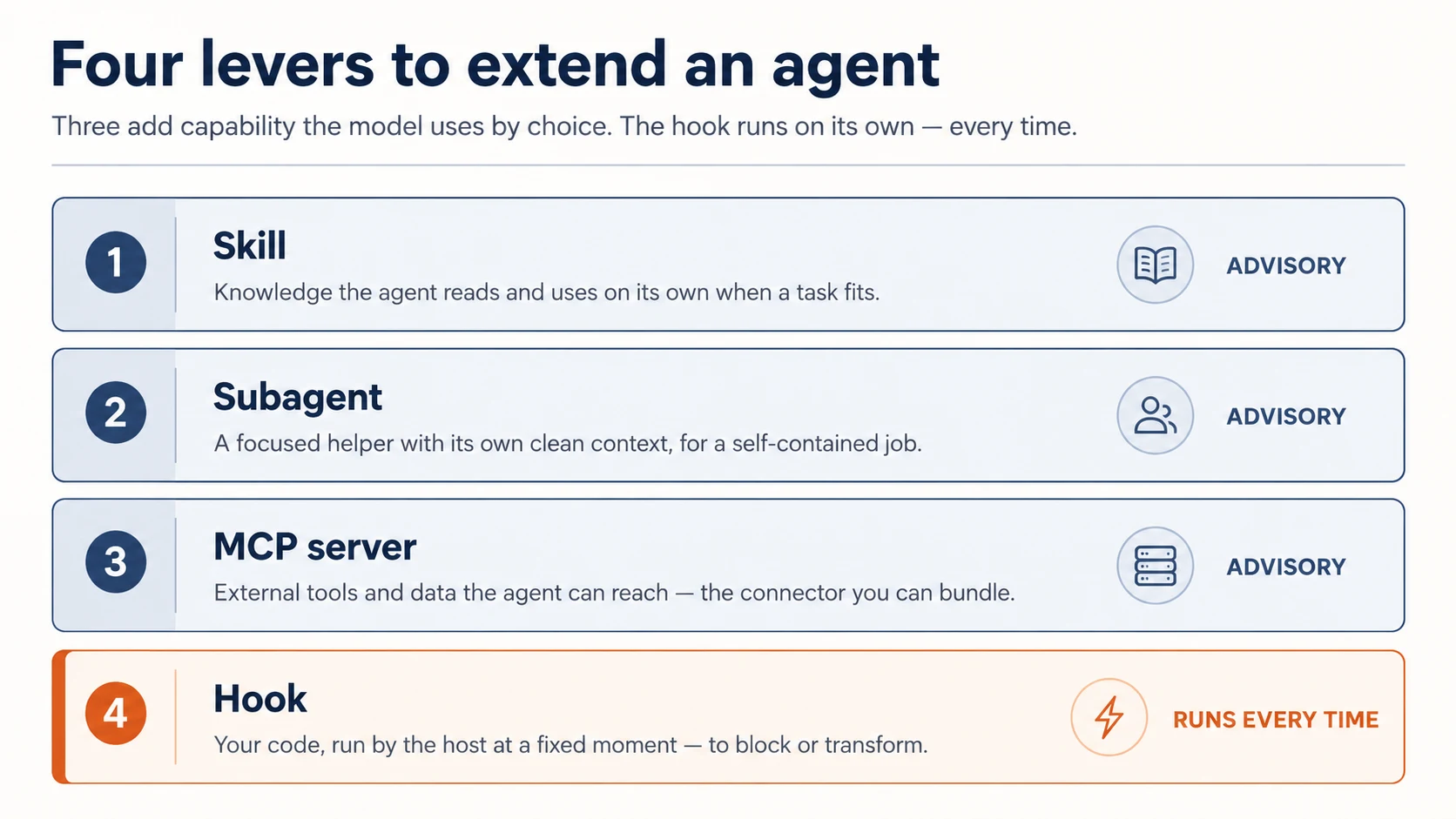
Chaar levers mein se teen agent kya kar sakta hai mein add karte hain. (Chautha, hooks, itna different hai ke us ki apni Part hai.)
Concept 4: Skills - knowledge jo agent choice se use karta hai
skill aik folder hai jismein SKILL.md file hoti hai: description plus instructions. Claude description parhta hai aur jab task match ho to skill ko khud pull karta hai - yeh model-invoked hai. Skill woh tareeqa hai jis se aap agent ko sikhate hain ke aap ki team koi kaam kaise karti hai: review checklist, commit-message format, release process ke steps.
---
description: Review a diff for our team's standards. Use when reviewing code or a PR.
---

When reviewing, check in this order:

1. Does it match the existing patterns in the file?
2. Error handling and edge cases.
3. Tests for the new behavior.
4. Security: secrets, input validation, injection.
description sab se important line hai - model isi se decide karta hai skill relevant hai ya nahin, is liye isay kab use karna hai ke baare mein likhein, sirf kya hai nahin. Body sirf skill fire hone par load hoti hai, is liye jitni lambi chahiye ho sakti hai.
Kyun ke skill advice hai jo model follow karna choose karta hai, yeh guidance ke liye sahi lever hai - aur har woh cheez jo fail ke baghair honi chahiye us ke liye ghalat lever hai (woh hook hai, Concept 8).
Skill aik dafa likhein, aur har tool isay parhta hai. Skill ki lever-superpower yahi hai: SKILL.md format Claude Code, OpenCode, aur Codex ke darmiyan shared hai. Skill ko portable rakhne ke liye us ki body tool-agnostic rakhein - sirf frontmatter name aur description par lean karein, aur $ARGUMENTS, allowed-tools, ya disable-model-invocation jaisi tool-specific constructs use na karein. Phir same file har jagah kaam karti hai: Claude Code isay aap ke plugin ke skills/ se load karta hai; OpenCode isay .opencode/skills/ ya .claude/skills/ mein natively find karta hai; Codex .agents/skills/ mein. Starter ka skills/loop-engineering/SKILL.md complete, portable example hai - isay parhein.
Frontmatter hi kyun?
Har host skill ka name derive karta hai aur description se decide karta hai kab invoke karna hai. In do fields ke baad hosts diverge karte hain - jo aik support karta hai, doosra ignore kar sakta hai ya choke kar sakta hai. To body mein tool-specific kuch bhi rakhna skill ko doosre tools par quietly tor deta hai. Body mein plain instructions, frontmatter mein do fields, aur skill universal hai.
Concept 5: Subagents - fresh context ke saath delegate karein
subagent helper hai jise main agent job hand kar sakta hai, apne clean context window aur apni instructions ke saath. Aap isay agents/ folder mein markdown file ke taur par define karte hain - frontmatter us ke name aur description ke liye, body us ke brief ke liye:
---
name: reviewer
description: Reviews a diff against our standards. Use after a change is written.
---

You review code in your own context. Check, in order: matches existing patterns,
error handling, tests, security. Report findings as a short ordered list.
Do not edit files — only review and report.
Delegation do wajah se matter karti hai: subagent main conversation se distract nahin hota, aur us ka kaam main context ko clog nahin karta.
Subagent tab use karein jab task self-contained and verifiable ho - "review this diff," "find everywhere this function is called," "write tests for this file." Main agent through-line par rehta hai; subagent deep jata hai aur report back karta hai.
Bachne wali mistake: har cheez subagent banana. Delegation ki cost hai (fresh context ko batana parta hai usay kya chahiye). Isay tab use karein jab focus aur clean slate is cost ke qabil hon, har chote step ke liye nahin.
Concept 6: MCP servers - external reach jo plugin ship kar sakta hai
Chautha lever agent ko woh reach deta hai jo pehle us ke paas nahin thi: aap ki internal API, database, ya service. Yeh MCP server ki taraf point karke hota hai, aur aap aisa server Connector-Native Apps mein pehle hi build kar chuke hain. Yahan aap doosra nahin banate. Plugin ka whole job isay wire karna hai.
Plugin apne root par .mcp.json file ke through connect karta hai: server ka name, us ka URL, aur user ki key header mein. Plugin enabled ho to host connect karta hai aur server ke tools agent ko nazar aate hain.
{
  "mcpServers": {
    "my-api": {
      "type": "http",
      "url": "https://api.yourdomain.com/mcp",
      "headers": { "Authorization": "Bearer ${MY_API_KEY}" }
    }
  }
}
Server design se remote hai: logic, data, aur secrets us infrastructure par rehte hain jise aap control karte hain, aur plugin sirf pointer ship karta hai. Yahi reach ko durable, aur (Concept 10) gateable/sellable banata hai. Plugin thin client hai; value URL ke peeche rehti hai. Us header ki key simplest gate hai: server isay check karta hai, aur cancelled key kaam karna band kar deti hai. Is se mazboot route sign-in hai, jise aap connector course mein dekh chuke hain; agla course, AI Identity, agents ko bounded access dene par hai. Yahan us ki zaroorat nahin.
Server kahan se aata hai? Wahi jo aap ne pehle build kiya. Pichle course ka connector open karein, agent se isay run karwayein, aur jo URL print ho isay oopar wali .mcp.json mein copy karein. Same server, second front door: connector ne chat app serve ki; yeh plugin coding agent serve karta hai. Connector handy nahin? Starter mein reference/server/ ke andar tiny runnable server hai jis ke against wire kar sakte hain. Dono cases mein aap server ki taraf point karte hain; plugin ke andar server nahin likhte.
Local server kyun nahin?
Claude Code local MCP servers bhi support karta hai, yani aisa command jise host user ki machine par process ke taur par run kare. Hum inhein deliberately skip karte hain. Local server apna code plugin ke saath ship karta hai aur kisi doosre ke computer par run hota hai: skill ki tarah copyable, aur runtime aap own nahin karte. Plugin ke liye remote server taqreeban hamesha right call hai: isay aik dafa build aur host karein, phir jitne chahen plugins ko URL se is ki taraf point karein.
Aik cheez dono cases mein carry hoti hai: woh server aap ka code run karta hai aur aap ke secrets hold karta hai. Aisa plugin ship karna jo isay wire kare, isay aap ke shipped trust ka part banata hai (invariant 4), ab users tak extended.
✓ Checkpoint: capability levers covered. Skills knowledge add karti hain, subagents focused help add karte hain, MCP servers reach add karte hain; aur teeno advisory hain: model decide karta hai kab use karna hai. Agla lever woh hai jo optional nahin.
Part 3: Deterministic lever
Concept 7: Hooks - code jo har dafa run hota hai
hook woh command hai jo host agent lifecycle ke fixed point par automatically run karta hai. Yeh model ko suggestion nahin; yeh aap ka code hai, host ke zariye executed, aise schedule par jo model change nahin kar sakta. Yeh single property hai jo hooks ko pehli nazar se zyada important banati hai.
Lifecycle points (events) teen cadences mein aate hain:
- Once per session:
SessionStart,SessionEnd. - Once per turn:
UserPromptSubmit(agent new prompt dekhne se pehle),Stop(jab agent finish karta hai). - On every tool call:
PreToolUse(tool run hone se pehle - wahi point jo isay block kar sakta hai) aurPostToolUse(baad mein).
Command hook har dafa aik jaisa kaam karta hai: host event ki JSON description standard input par bhejta hai; aap ka script isay parhta hai, apna kaam karta hai, aur exit code se jawab deta hai.
- Exit 0 - allow / done.
PreToolUsepar Exit 2 - tool call block. Aap standard error par jo print karte hain woh model ko reason ke taur par diya jata hai, taake woh adjust kar sake.- Any other non-zero - non-blocking error: log hota hai, lekin action proceed karta hai.
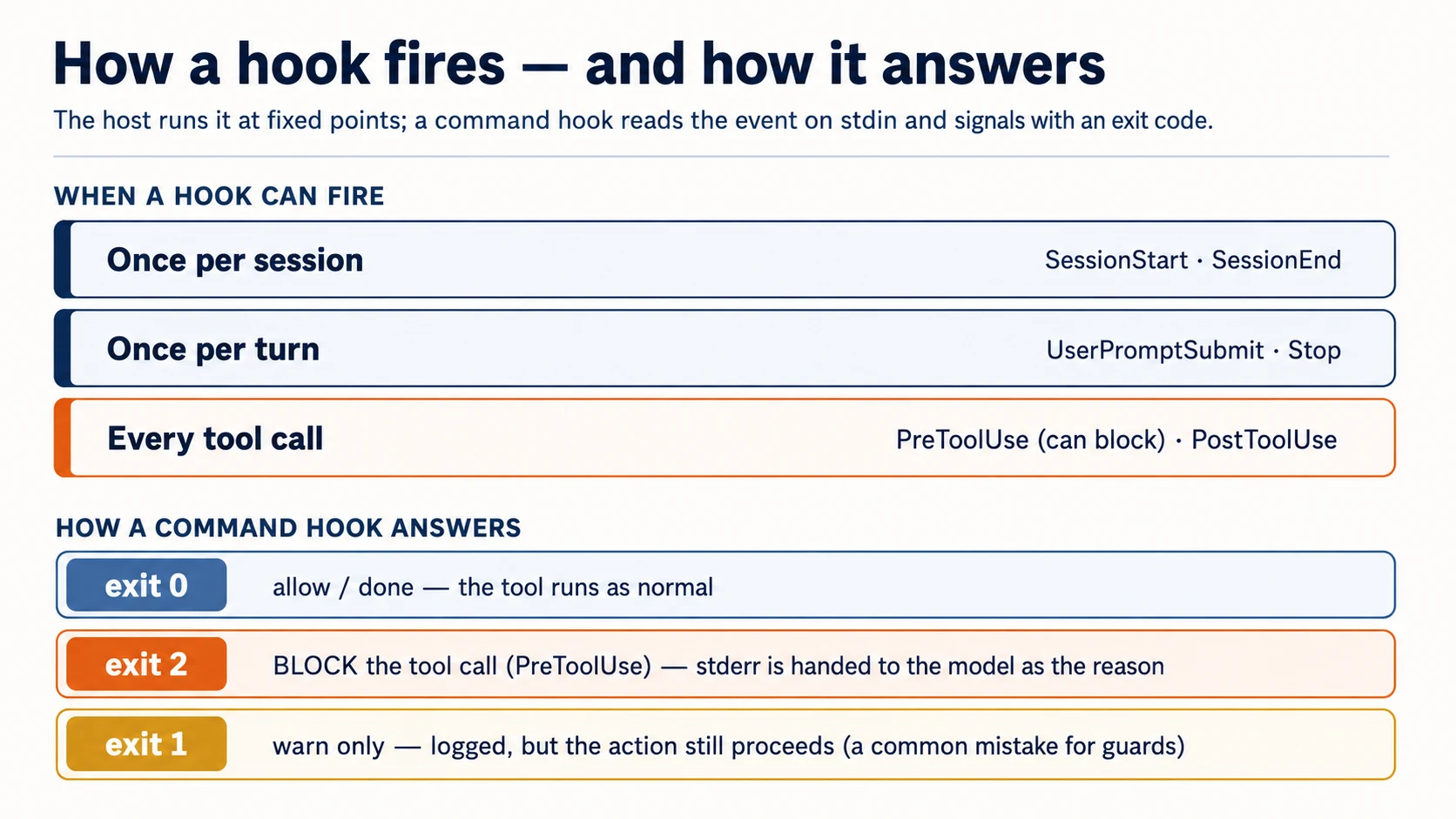
Guardrails ke liye exit-2 rule whole game hai, aur yehi sab se common cheez hai jo log ghalat karte hain (exit 1 block nahin karta). Plugin mein hooks hooks/hooks.json mein rehte hain:
{
  "hooks": {
    "PostToolUse": [
      {
        "matcher": "Write|Edit",
        "hooks": [
          {
            "type": "command",
            "command": "${CLAUDE_PLUGIN_ROOT}/hooks/format.sh"
          }
        ]
      }
    ],
    "PreToolUse": [
      {
        "matcher": "Read|Edit|Write|Bash",
        "hooks": [
          {
            "type": "command",
            "command": "${CLAUDE_PLUGIN_ROOT}/hooks/block-secrets.sh"
          }
        ]
      }
    ]
  }
}
matcher pattern hai ke hook kin tools par fire hota hai (Write|Edit = file writes; Bash = shell commands). Plugin-root path variable aap ke plugin folder par point karta hai taake host aap ke scripts find kar sake - apni Claude Code version ke against exact name confirm karein (SDK aur plugin paths move karte hain).
Concept 8: Must-always hook hai, instruction nahin
Yeh course ka sab se important idea hai. Aap instructions ke taur par jo bhi likhte hain - skill, CLAUDE.md line - advisory hai. Model aam tor par follow karta hai, lekin bhool sakta hai, context se bahar ho sakta hai, ya decide kar sakta hai conversation aage barh gayi. Zyada tar guidance ke liye yeh theek hai. Lekin jo cheez har single time hold karni hai, advice enough nahin. Hook hai.
Do patterns real value ka zyada hissa carry karte hain:
Format on write - PostToolUse. Har file edit ke baad formatter run karein. Model output ko perfectly styled hone ki zaroorat nahin rehti, kyun ke formatter har dafa normalize kar deta hai:
#!/usr/bin/env bash
# hooks/format.sh — runs after every Write/Edit
path=$(jq -r '.tool_input.file_path // empty')   # read the edited file's path from the event
[[ -n "$path" ]] && npx --yes prettier --write "$path" 2>/dev/null
exit 0
Jo kabhi nahin hona chahiye usay block karein - PreToolUse, exit 2. Tool call inspect karein; agar yeh line cross kare, usay block karein aur model ko batayein kyun. Yeh guard secret files aur destructive commands dono cover karta hai, is liye event se do fields parhta hai:
#!/usr/bin/env bash
# hooks/block-secrets.sh — runs before Read/Edit/Write/Bash
input=$(cat)                                                   # read the event ONCE (see note)
path=$(printf '%s' "$input" | jq -r '.tool_input.file_path // empty')
cmd=$(printf '%s' "$input" | jq -r '.tool_input.command // empty')

if [[ "$path" == *.env* || "$path" == */secrets/* ]]; then
  echo "Blocked: $path is a secret file. Do not read or edit it." >&2   # stderr → the model
  exit 2                                                                  # exit 2 → blocked
fi
if [[ "$cmd" == *"rm -rf"* || "$cmd" == *"git push --force"* ]]; then
  echo "Blocked: refusing to run a destructive command ($cmd)." >&2
  exit 2
fi
exit 0
One-line gotcha: event ONCE parhein
Host event ko standard input par bhejta hai, aur standard input stream hai - pehli cheez jo isay parhti hai usay drain kar deti hai. Agar aap seedha jq do dafa call karte hain (path=$(jq …) phir cmd=$(jq …)), pehli call poora event consume kar leti hai aur doosri ko kuch nahin milta, to cmd silently empty hota hai aur command guard kabhi fire nahin karta. Upar ki tarah input=$(cat) se aik dafa capture karein aur us variable ko parse karein. Starter ka test yahi exact bug catch karta hai - aur yeh aisa guard ship kar deta jo dikhne mein sahi aur rm -rf par quietly fail hota.
Skill jo kehti hai "never read .env" aik umeed hai. Yeh hook guarantee hai.
Isay run karein. Yeh apne coding agent ko paste karein:
add a
PostToolUsehook that formats files after Write/Edit, and aPreToolUsehook (matched onRead|Edit|Write|Bash) that blocks reads/edits of.env/secrets/and blocksrm -rfin Bash, all with exit 2. Read the event once withinput=$(cat). Then try to read my.envand runrm -rfand show me both are blocked, and edit a file and show me it got formatted.
(Aap yahan mechanics dekhne ke liye aik build karte hain. Worked example mein aap starter ka already-proven version use karenge instead of rewriting it - khud aik dafa build karna hi woh tareeqa hai jis se aap is par trust karenge.)
Terminal mein khud run karein (raw commands). Hook ko usi tarah test karein jaise host call karta hai - fake event pipe karein aur exit code check karein:
echo '{"tool_input":{"file_path":"/app/.env"}}' | ./hooks/block-secrets.sh; echo "exit: $?"   # expect: exit 2
echo '{"tool_input":{"command":"rm -rf /"}}'    | ./hooks/block-secrets.sh; echo "exit: $?"   # expect: exit 2
echo '{"tool_input":{"file_path":"/app/main.ts"}}' | ./hooks/block-secrets.sh; echo "exit: $?" # expect: exit 0
Verify. Teeno exit codes match: .env blocked (2), rm -rf blocked (2), normal file allowed (0). Agar secret read through ho jaye, aap ka hook exit 1 kar raha hai 2 nahin - yeh single most common mistake hai. Agar rm -rf through ho jaye lekin .env caught ho, aap stdin twice parh rahe hain (upar gotcha dekhein). Exit 2, read once, warna block nahin hota.
✓ Checkpoint: deterministic lever works. Aap har edit par kuch karwa sakte hain, aur har tool call par kuch rok sakte hain. Yeh farq hai us plugin mein jo suggest karta hai aur us plugin mein jo enforce karta hai.
Jab hook misbehave kare (woh hissa jo guides skip karti hain)
Hooks har matching tool call par run hote hain, is liye bad hook foran mehsoos hota hai. Chaar rules unhein raaste se door rakhte hain:
- Fast rakhein.
PreToolUsehook har matching call ko gate karta hai, to slow logic (network round-trip, har edit par full test suite) agent ko stall karta hai. Well under a second aim karein; heavy workStoppar karein, per call nahin. - Fail safe, on purpose. Decide karein jab hook khud error kare to kya ho. Formatter jo run nahin kar sakta exit 0 kare (edit ko rehne de) - isi liye
format.shexit 0par end hota hai aur prettier errors swallow karta hai. Guard opposite hai: agar decide nahin kar sakta, block prefer karein. Crashing guard ko kabhi silently exit 0 mein fall through na hone dein. - Block karte waqt har dafa batayein kyun. Message ke baghair bare exit 2 model ko kuch action ke qabil nahin deta, aur woh wahi cheez retry karega.
stderrline fix instruction hai - specific banayein ("edit the source, not the generated file"). - Debug us tarah karein jaise host call karta hai. Fake event pipe karein aur exit code parhein (upar raw-command test). Agar hook zyada fire hota lage,
matchercheck karein -Write|Editnarrow hai; empty ya broad matcher har cheez par fire karta hai.
Part 4: Ship it
Concept 9: Manifest aur structure
Claude Code plugin manifest, .claude-plugin/plugin.json, se described folder hai. (Claude Code standard component folders ko is ke baghair bhi auto-discover kar sakta hai, lekin manifest ship karein - yeh aap ka name, version, aur description carry karta hai.)
{
  "name": "agent-factory",
  "description": "A portable skill, guard hooks, and a reviewer subagent.",
  "version": "1.0.0",
  "author": { "name": "Your Name" }
}
Baaki sab plugin root par baithta hai (.claude-plugin/ ke andar nahin - yahi structural mistake log karte hain):
agent-factory/
├── .claude-plugin/
│   └── plugin.json          # the manifest (this, and only this, goes here)
├── skills/                  # skills as <name>/SKILL.md
├── agents/                  # subagent definitions
├── hooks/
│   └── hooks.json           # event → command wiring
└── .mcp.json                # optional: MCP servers to load
version updates ke liye matter karta hai: jab aap isay bump karte hain, installers ko new version milta hai; agar aap isay omit karte hain aur git ke zariye distribute karte hain, har commit new version count hota hai. Share se pehle claude plugin validate run karein - marketplace review bhi wohi check chalata hai.
Upar ka tree plugin itself hai, jahan bhi baitha ho. Starter mein yeh marketplace repo ke andar plugins/agent-factory/ mein rehta hai - jo next Concept hai.
Concept 10: Marketplaces - teammate isay kaise leta hai
marketplace bas aik git repository hai jis mein catalog file (marketplace.json) aik ya zyada plugins list karti hai. Distribution story bas yahi hai: aap package registry mein publish nahin karte, logon ko repo par point karte hain.
{
  "name": "agent-factory",
  "owner": { "name": "Your Name" },
  "plugins": [
    {
      "name": "agent-factory",
      "source": "./plugins/agent-factory",
      "description": "A portable skill, guard hooks, and a reviewer."
    }
  ]
}
Teammate phir Claude Code ke andar do commands run karta hai:
/plugin marketplace add your-org/agent-factory   # the git repo with marketplace.json
/plugin install agent-factory@agent-factory       # plugin@marketplace
Develop karte waqt marketplace skip karein. Apni machine par do faster loops hain: plugin ko disk se seedha claude --plugin-dir ./plugins/agent-factory ke saath load karein (yeh .zip bhi accept karta hai), ya claude plugin init <name> se scaffold karein, jo isay ~/.claude/skills/<name>/ mein daalta hai aur next session mein <name>@skills-dir ke taur par auto-load karta hai, bina marketplace aur bina install ke. Marketplace share karne ke liye hai; build aur test ke liye aapko is ki zaroorat nahin.
Do manifests confuse na karein. plugin ke paas .claude-plugin/plugin.json hota hai; marketplace ke paas .claude-plugin/marketplace.json. Documented layout inhein alag rakhta hai: marketplace.json repo root par rehta hai, aur har plugin apne subfolder (./plugins/<name>/) mein apne plugin.json ke saath rehta hai. Starter exactly yeh use karta hai - plugins/agent-factory/. (Aik repo marketplace bhi ho sakta hai aur aik plugin host bhi kar sakta hai, lekin plugin ko ./plugins/<name> subfolder mein rakhna woh pattern hai jo har official example use karta hai - isay prefer karein.)
Pinning aur sources - updates actually kaise kaam karte hain. Plugin ka source relative path (oopar) ho sakta hai ya aik object jo kisi doosre repository par point kare; marketplace kai repos se plugins list kar sakta hai, har aik independently pinned:
{
  "name": "code-formatter",
  "source": { "source": "github", "repo": "acme/formatter", "ref": "v2.1.0" }
}
ref branch ya tag pin karta hai, sha exact commit pin karta hai, aur jab dono set hon to sha wins. Teammate ko specific version kaise milta hai aur aap updates kaise ship karte hain - yeh catalog file nahin, yahi mechanism hai. (url source GitLab aur other git hosts cover karta hai; local path testing ke liye handy hai.)
Publish se pehle do footguns worth knowing:
- Relative paths sirf tab resolve hotay hain jab marketplace Git ke zariye add ho (GitHub/GitLab/git URL). Agar koi isay direct URL se
marketplace.jsonfile tak add kare,./plugins/...resolve nahin hoga - us case meingithubyaurlsource use karein. - Installed plugins cache mein copy hotay hain, is liye plugin
../ke saath apne folder ke bahar files reach nahin kar sakta. Jo kuch plugin ko chahiye sab is ke andar rakhein; symlinks copy ke dauran follow hotay hain jab tak woh plugin ke andar hi point karte hain - isi liye starter ke do symlinks plugin ki apni files target karte hain.
Anthropic apne official catalogs run karta hai - claude-plugins-official (curated) aur community claude-community (aap iska repo anthropics/claude-plugins-community add karte hain aur is se @claude-community ke taur par install karte hain) - is liye apne marketplace ke liye distinct name pick karein, inhein shadow na karein. (Naming aur submission rules young hain; publish se pehle current reserved-name policy plugins reference ke against confirm karein.)
Team ya non-coders ko distribute karna. Team aur Enterprise plans par owners Organization settings → Plugins se marketplace publish karte hain; Knowledge Work marketplace default se add hota hai, aur jo plugins aap distribute karte hain woh chat aur Claude Cowork mein appear hote hain - same bundle knowledge workers tak pohnchta hai, sirf builders tak nahin (ceiling dekhein, aur Cowork and OpenWork course).
Share se pehle claude plugin validate run karein. Upar ka schema mid-2026 tak current hai; publishing se pehle field names Claude Code plugins reference ke against re-verify karein, kyun ke yeh surface young aur moving hai.
Kya aap is ke paise le sakte hain? Haan, magar files ke nahin. Marketplace catalog hai, store nahin: payment layer nahin, licence check nahin, subscription primitive format mein nahin. Billing aur access enforcement aap ko plugin system ke bahar build karni hai. Aur sharp edge yeh hai: skill plaintext SKILL.md hai, DRM nahin. Customer install karte hi source hold karta hai, is liye static files ko subscription ke peeche gate karna har customer se one churn event invite karta hai (pay once, clone, cancel), aur curriculum jahan value readable text hai wahan aap first download par IP de dete hain.
Is liye real subscription ko support karne wala model hosted access hai: valuable logic apne control wale server par rakhein aur entry server ki sell karein, files ki nahin. Installed plugin thin, free client hai jis ki .mcp.json user key header mein rakh kar aap ke hosted MCP server ki taraf point karti hai (Concept 6 ki wiring); key subscription gate hai, aur revoke karte hi access cut ho jati hai. Free SKILL.md funnel hai; paid moat woh cheez hai jo clone copy nahin kar sakta: hosted server, retrieval quality, URL ke peeche live data.
Yeh usi pattern ka plugins-only version hai jo aap pehle build kar chuke hain. Connector-native app copyable-files problem mein nahin parti, kyun ke woh pure hosted server hai jis ki koi file user disk par nahin hoti. Clean shape dono together hai: free plugin client aur funnel hai, subscription us ke peeche connector-native server par ride karti hai. Same server, second front door. Magar yeh dono taraf trust cut karta hai: users ab aap ke server ko apni requests ke saath trust kar rahe hain, is liye trust contract dono directions mein chalta hai (Concept 11).
Bill karne se pehle do cautions
- Anthropic ki usage policies na torein. Agar students aap ki hosted service ke through Claude consume karte hain, to us usage ki licensing aur billing legitimate honi chahiye - wahi reasoning jo personal Pro/Max subscription ko third-party tools mein route karne ko problem banati hai. Agar yeh real revenue mein badalta hai, Anthropic ki commercial terms directly parhein (blog nahin) aur confirm karein aap ke server trigger ki hui Claude usage ke liye billing path kya hai.
- Hosting ka matlab security surface aap own karte hain. Paid, gated MCP server attack target hai, aur paying customers stability expect karte hain - is liye kisi bhi write/delete/network action ke liye tool permissions aur confirmations optional nahin rehte. Yeh invariant 4 hai, ab money riding on it ke saath.
Human-only step. Git repo create karna aur marketplace mein submit karna aap ka kaam hai; coding agent files likhta hai magar accounts open nahin kar sakta ya aap ke naam se push nahin kar sakta. Teammate ka /plugin install bhi un ka trust decision hai (next Concept).
Concept 11: Plugin user ke trust mein run karta hai
Aik step peeche hat kar dekhein plugin us machine par kya kar sakta hai jahan install hota hai: is ke hooks shell commands run karte hain, is ka bin/ path mein add hota hai, is ke MCP servers run aur reach out karte hain. Plugin install karna kisi aur ka code run karna hai. Yeh dono directions mein cut karta hai, aur dono aap ki job hain:
-
Author ke taur par: least privilege. Sirf woh hooks jo chahiye, jitna narrow ho sake utna match. Job se aage network ya filesystem tak na jayein. Trust legible banayein - README ship karein jo plain words mein batata ho plugin installer ki machine par kya karta hai:
README.md — the trust contract
  What this plugin installs   (skills, subagents, hooks, MCP servers)
  What hooks run, and when    (e.g. PostToolUse formatter on Write/Edit)
  What files they inspect     (e.g. reads tool_input.file_path; never opens .env)
  What commands they execute  (e.g. prettier; no network calls)
  What network access they use (ideally: none)
Installer jo isay das seconds mein parh sakta hai, das seconds mein aap par trust kar sakta hai.
-
Installer ke taur par: install se pehle review karein, jis tarah dependency review karte hain. Trusted marketplaces prefer karein; hooks kya karte hain parhein; yaad rakhein
PreToolUsehook har tool call dekhta hai. Kisi plugin par trust karne se pehleclaude plugin details <plugin>run karein - yeh kuch enable kiye baghair component inventory print karta hai (kaun si skills, subagents, hooks, aur MCP servers ship ho rahe hain) aur projected token cost bhi. Hooks sab se pehle parhne wali line hain.
Yeh invariant 4 hai, aur paperwork nahin - formatter hook jo quietly aap ki files upload kare woh invisible rahega jab tak aap isay parhte nahin. Aise plugins ship karein jo aap khud comfortably install karenge.
✓ Checkpoint: aap ship kar sakte hain. Manifest, structure, marketplace jo teammate install karta hai, aur aap ke ship kiye trust ka clear-eyed view. Aik aur host, phir full build.
Part 5: OpenCode plugins
Concept 12: OpenCode plugins - hooks as code
OpenCode same ideas ko different form mein leta hai: plugin aik JavaScript/TypeScript module hai jo function export karta hai. Host aap ke function ko context object ke saath call karta hai aur aap hooks return karte hain - agent events ke handlers. Separate manifest nahin; aap file .opencode/plugins/ mein drop karte hain (ya npm package install karte hain).
Is section ko apni version ke against verify karein. OpenCode ka plugin API Claude Code ke declarative form se younger aur zyada code-level hai, to neeche exact event names aur signatures (tool.execute.before, session.idle, tool helper) course ke baqi hisson se tez move karte hain. Yeh mid-2026 tak current hain, lekin is section se teach ya ship karne se pehle installed @opencode-ai/plugin ke against check karein.
Claude Code se key difference: OpenCode mein plugin hooks aur tools ke liye hai - skills ke liye nahin. OpenCode skills ko directories (.opencode/skills/, .claude/skills/, .agents/skills/) se natively discover karta hai, to aap ke portable SKILL.md files ko yahan plugin ya shim ki zaroorat nahin. Plugin us part ke liye hai jo port nahin hota - hooks.
// .opencode/plugins/block-secrets.ts
import type { Plugin } from "@opencode-ai/plugin";

export const BlockSecrets: Plugin = async ({
  project,
  client,
  $,
  directory,
}) => {
  return {
    // runs before any tool — throw to block it (the OpenCode equivalent of exit 2)
    "tool.execute.before": async (input, output) => {
      if (input.tool === "read" && output.args.filePath?.includes(".env")) {
        throw new Error("Blocked: .env files are off-limits.");
      }
    },
  };
};
Mental model seedha map hota hai: tool.execute.before aap ka PreToolUse hai, tool.execute.after aap ka PostToolUse, aur error throw karna call block karta hai jis tarah exit 2 karta hai. OpenCode session aur file events bhi fire karta hai (session.idle, file.edited, aur more), aur plugin tool helper se custom tool add kar sakta hai - same "add reach" idea as MCP server, inline likha hua.
Context object aapko zaroori cheezein deta hai: project aur directory (aap kahan hain), $ (shell commands run karna), aur client (agent se baat karna, log). Form different hai; chaar invariants nahin. Must-always rule yahan bhi hook hai - bas yeh function hai jo script ke exit 2 ke bajaye throw karta hai.
Part 6: A complete worked example - agent-factory plugin build karein
Aap ne Quick Win mein finished agent-factory pehle hi run kiya hai. Ab aap isay blank se khud build karte hain: lever by lever, plain English mein agent ko direct karte hue. Jab piece ghalat aaye to isay reference/, proven build, ke against diff karte hain. Aap stubs fill nahin kar rahe; aap calls kar rahe hain (kaunsa lever, hope ya guarantee, kya travel karta hai) aur har aik prove kar rahe hain. Rhythm wahi hai: plan → review → execute → verify.
Done hone par aap ka agent-factory chaaron levers dikhata hai: real job ke liye portable skill, reviewer subagent, guard hook plus format-on-write hook, URL se wired MCP server, aur teammate ke liye installable marketplace entry. Must-always guard pehle aata hai, kyun ke yahi part right hona lazmi hai.
1. Empty plugin scaffold karein. Prompt aap ke agent ko host ke authoritative layout ki taraf point karta hai. Apne host wala paste karein:
Using the Plugin Structure skill you installed in setup, scaffold an empty plugin called agent-factory, set up the right way for Claude Code. Show me the layout.
Read the OpenCode plugin docs at https://opencode.ai/docs/plugins, then scaffold an empty OpenCode plugin called agent-factory the way they describe. Show me the layout.
Done when: shell aap ke host ke layout se match kare (uncertain ho to agent reference build se diff kar sakta hai). Claude Code par claude plugin validate empty plugin par pass ho.
2. Guard hook pehle build karein, yani must-always lever, aur prove karein ke yeh block karta hai. Yeh woh part hai jise right hona hai, is liye build karein, prove karein, phir proven one ke against check karein. Paste:
Add two house rules my agent can't skip: auto-format any file right after it's changed, and hard-block anything that reads my secrets or runs a destructive command. Prove both live: have it try a secret read and a destructive command and show me they're stopped, then edit a file and show me it came back formatted.
Phir apne work ko trust karne ke bajaye proven build se compare karein:
Compare my guard against the proven one and tell me if I missed anything that would keep it from actually blocking.
Done when: guard .env aur destructive command live block karta hai, aur reference comparison koi important gap nahin nikalta. (Guard har host mein different form leta hai: Claude Code mein shell script, OpenCode mein throwing function; reference build dono rakhta hai. Agent woh form build karta hai jo aap ka host use karta hai.)
3. Aisi skill build karein jo waqai aap ke kaam aaye. Toy nahin: koi real repetitive thing pick karein, jaise review checklist, commit-message format, release steps. Paste:
Look at the model skill in the reference build first. Then write me a skill for [a real, repetitive job you do]: a clear description of when to use it and the steps to follow. Keep it portable so it works in any agent, not just this one. Show it firing on a real example.
Done when: skill task match hone par khud fire karti hai, aur body portable hai (agent ne isay plain instructions rakha, tool-specific constructs nahin).
4. Reviewer subagent add karein. Paste:
Add a subagent that reviews a change in its own context and only reports, never edits. Run it on a real diff, show me what it finds, then compare it to the model reviewer.
Done when: subagent clean context mein review karta hai aur ordered list report karta hai; reference comparison koi important missing thing nahin dikhata.
5. MCP server wire karein, plugin ko running server ki taraf point karein. Aap server nahin likhte. Aap aik existing server ki taraf point karte hain: pichle course ka connector, ya starter ka runnable sample. Paste:
Start the sample MCP server in the starter and wire my plugin to it, then show me the agent can call one of its tools.
(Apna prefer karte hain? Agent se last course wala connector run karwayein aur woh URL use karein.) Agent jo wiring likhta hai woh jagah hai jahan do hosts waqai differ karte hain; shape yeh hai:
Plugin root par .mcp.json ship karein (yeh plugin ke saath travel karta hai):
{
  "mcpServers": {
    "agent-factory": {
      "type": "http",
      "url": "http://localhost:3000/mcp",
      "headers": { "Authorization": "Bearer ${AGENT_FACTORY_KEY}" }
    }
  }
}
/mcp se confirm karein: server connected dikhta hai aur tool callable hai.
opencode.json mein remote block add karein:
{
  "$schema": "https://opencode.ai/config.json",
  "mcp": {
    "agent-factory": {
      "type": "remote",
      "url": "http://localhost:3000/mcp",
      "enabled": true
    }
  }
}
Done when: host server ko connected dikhata hai aur tool callable hai.
6. Isay installable banayein, aur prove karein ke yeh travel karta hai. Paste:
Make this installable from a marketplace. Then prove it travels: install it into a different project and show the guard blocks a secret read there too, with no extra setup.
Done when: second project one install se same hook ke zariye protected hai. Plugin ka whole point yahi hai: rule travels.
Notice karein rhythm: plan → review → execute → verify, must-always guard pehle build aur prove hua kyun ke yahi part right hona lazmi hai, har piece proven reference ke against check hua. Judgment aap ka tha; typing agent ne ki.
Part 7: Ceiling, aur yeh kahan grow karta hai
Concept 13: Ceiling, aur bridges out
Plugin ki edge mehsoos karein. Plugin builder's agent ko behtar banata hai: sharper, safer, more yours. Magar teen cheezein ab bhi aap own nahin karte, aur har aik agla course name karti hai.
Loop aap ka nahin. Hooks host ke loop ke around fire hotay hain; apna loop nahin chalate. Plugin khud wake up ho kar many steps across goal pursue nahin kar sakta, ya aap ke sotay hue job nahin kar sakta. Jab aap ko aisa worker chahiye jo apna loop own kare, aap agent likhte hain: path mein aage Build AI Agents.
Identity aap ki nahin. Plugin host chalane wale person ke taur par act karta hai. Is ki apni credential nahin, aur kisi ke behalf par bounded, revocable authority se act karne ka way nahin. Jab agent ko apni identity chahiye, aur person ko isay safely authority delegate karni hai, to woh AI Identity hai (Better Auth par built): sign-in own karein, phir agent ko scoped, time-boxed, human-approved access dein.
Reach borrowed hai. Plugin remote MCP server wire kar sakta hai, magar server itself, woh durable user-facing thing jise stranger chat app mein paste karta hai, apni state aur sign-in ke saath, woh connector-native app hai jo aap ne last course mein build ki. Plugins aur connectors same server ko do hosts se point karte hain; together they cover both.
Magar dekhein limits kis taraf run karte hain, aur yeh kahan grow karta hai. Jo aap ne build kiya woh coding agent se aage pohnchta hai. Anthropic family ke andar wahi .claude-plugin bundle Claude Cowork aur claude.ai chat mein bhi load hota hai; OpenCode plugin OpenWork mein bhi load hota hai. Aur portable piece, yani skill, is se bhi aage personal agent jese OpenClaw tak travel karti hai. Is liye builder's agent ke liye likhi skill unchanged knowledge-worker's agent tak move kar sakti hai: lawyer, analyst, ops lead. (Shell hook exception hai. Isay real shell chahiye, is liye guard coding side par rehta hai jabke skill chat hosts tak cross karti hai.) Jahan knowledge-work hosts bonus nahin balke whole story hon, woh apna course hai: Cowork and OpenWork.
Aap ne step waste nahin kiya. Aap ne agent ko deterministically extend karna aur team ko ship karna seekha; yahi skills dobara use hongi jab agent, aur us ki identity, aap ki apni ho gi.
Same skeleton, other plugins
agent-factory aik shape hai. Levers nahin badalte; sirf job badalta hai:
- House-style plugin: aap ke writing ya code conventions wali skill,
PostToolUseformatter, reviewer subagent. (Team ke liye jo one consistent voice chahti hai.) - Safety plugin: production targets, secrets, aur destructive commands ke liye
PreToolUseguards; nothing else. (Least privilege, invariant 4.) - Service plugin: aap ki hosted API ke liye remote MCP server (
.mcp.json), plus aisi skill jo agent ko isay use karna sikhati hai. - Workflow plugin:
Stophook jo agent finish hone par test suite run karta hai, aur release steps ke liye skill.
Apni team ke real pain ke closest one ko pick karein; build worked example jaisi hi hai.
Capstone
Apna plugin ship karein. Apni team coding agent ke saath kaise kaam karti hai, us mein aik real friction pick karein. Aisa plugin build karein jo right levers se isay fix kare: kam az kam aik hook jo must-always rule enforce kare (exit 2 ya thrown error), aur kam az kam aik capability lever (skill, subagent, ya MCP server). Isay marketplace par publish karein aur kisi aur se install karwayein. Confirm karein hook un ke project mein, no extra setup, fire hota hai.
Discuss with an AI. Question your scores.
Come back when you have your BEST evaluation.