Markdown Andar, HTML Bahar: Crash Course
Markdown mein likhein. HTML mein parhein. Agents ke saath kaam karne ki do document languages.
Zyada log AI mein aik vague request type karte hain aur wapas text ki lambi deewar lete hain. Request vague thi, is liye AI ko andaza lagana pada ke unka matlab kya tha. Jawab itna lamba hota hai ke woh usay bas skim karte hain. Dono taraf kuch kho jata hai: AI ne unhein waqai nahin samjha, aur unhon ne AI ka jawab waqai nahin parha.
Yeh course dono directions theek karta hai, har direction ke liye aik language ke saath. Dono naam aap ke liye naye ho sakte hain. Markdown plain text hai jismein kuch extra marks structure dikhate hain: heading se pehle #, list ke har item se pehle -. Aap ne isay pehle bhi dekha hai, bas naam nahin maloom tha: jab Claude ya ChatGPT kisi word ko bold banata hai ya bullet list deta hai, woh Markdown likh raha hota hai. Aap isay seedha usi chat box mein type karte hain jo aap pehle se use karte hain; kuch install karne ki zaroorat nahin. HTML woh language hai jisse web pages bante hain: browser mein aap ne jo bhi page kabhi khola hai, is page samait, andar se HTML hai. In mein se koi bhi programming nahin. Dono aam text hain. Skill yeh jaanne mein hai ke kis direction mein kaunsi language use karni hai.
Power users conversation ko direction ke hisaab se split karte hain. Woh AI ko Markdown mein likhte hain (headings, lists, code blocks), kyun ke structure usay guess karne ke liye kuch nahin chorta. Aur woh AI se HTML mein jawab maangte hain (diagrams, tables, color, interactivity), kyun ke designed page hi woh lamba jawab hai jo busy insaan waqai parhta hai. Pehli language seekhne mein aik ghanta lagta hai. Doosri aap kabhi khud nahin likhte; aap sirf usay demand karna seekhte hain. (Aage barhne se pehle aik lafz: yeh book agent us AI ke liye kehti hai jo aap ki taraf se multi-step kaam karta hai. Aaj yeh sirf browser tab mein Claude hai. Book mein aage isay terminal aur aap ki files milti hain. Format rules jo aap yahan seekhte hain, dono halaton mein wahi rehte hain.)
Pura course, aik tasveer mein:
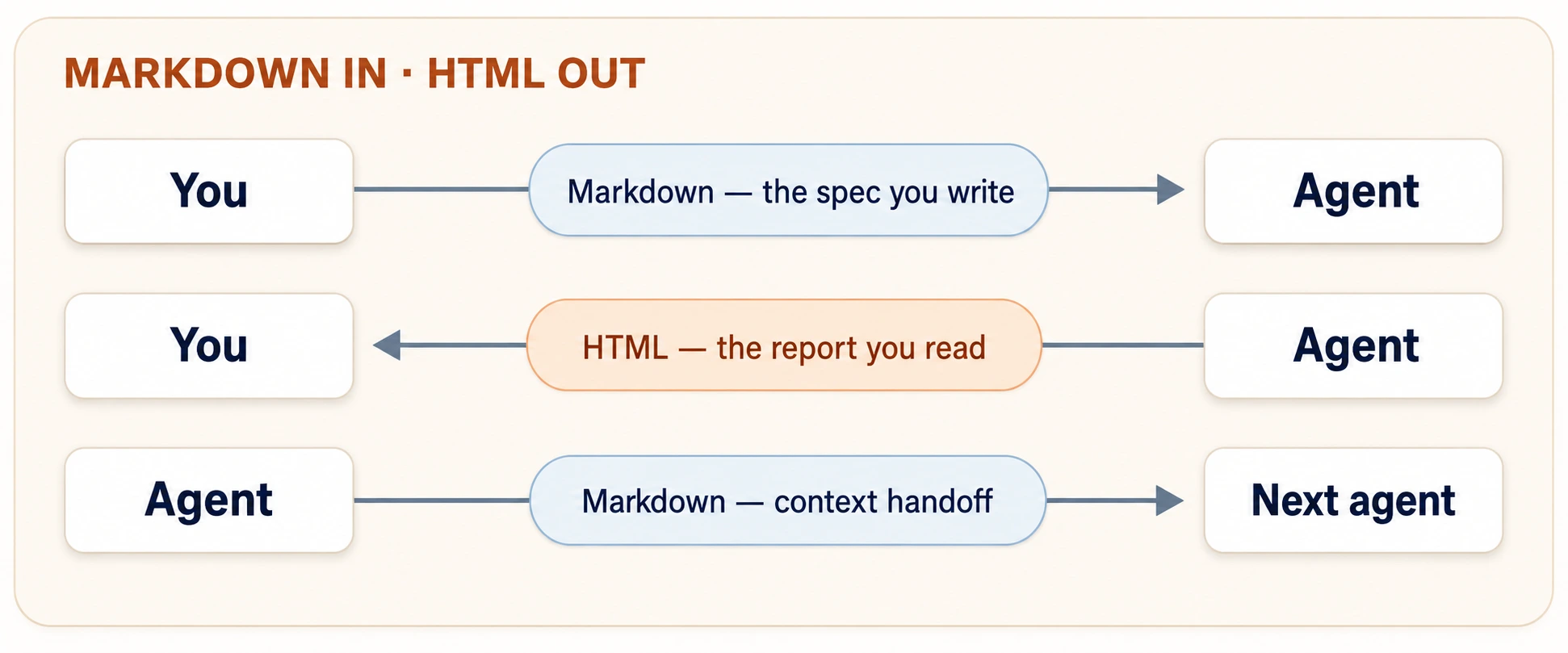
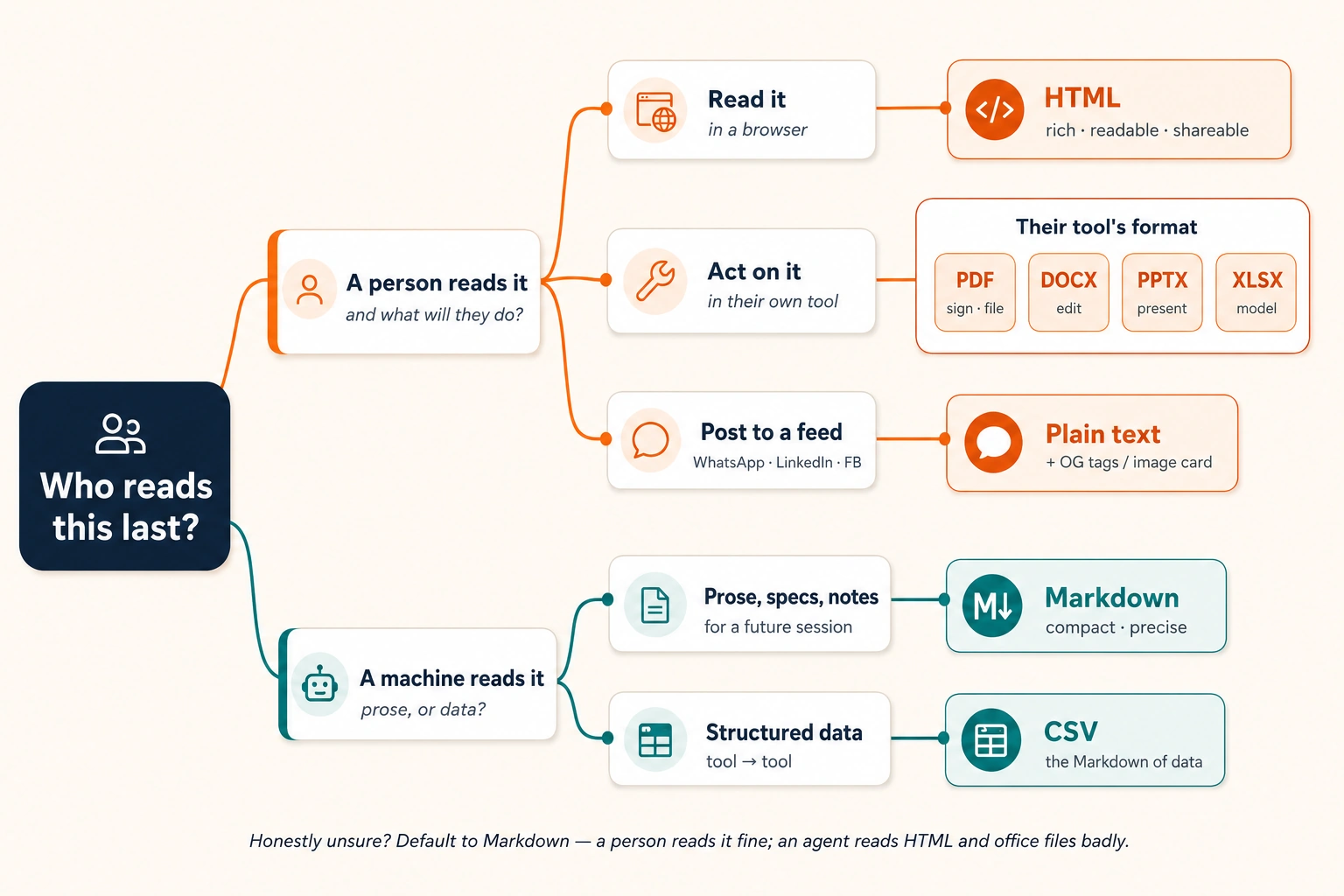
Is tasveer ke peeche aik sawal hai, aur yeh is course ke har format decision ko settle karta hai: isay aakhir mein kaun parhta hai? Agar insaan browser mein parhega, HTML maangein. Agar AI parhega, ya aap baad mein isay kisi AI ko wapas feed karenge, Markdown mein rakhein. Agar yeh social feed mein ja raha hai, plain text. "Markdown in, HTML out" bas sab se common jawab ka pair hai. Sawal yaad rakhein; is page ka baqi hissa details hai.
Prove it in two minutes
Theory se pehle, poora course aik baar chala kar dekhein. Claude.ai kholein (free account banne mein aik minute lagta hai; ChatGPT ya Gemini bhi kaam karte hain) aur paste karein:
Make me a small web page as an HTML artifact: a welcome card for a neighborhood tuition center. A colorful holiday-notice banner on top, three example courses with monthly fees in a neat table, and a WhatsApp contact button. Keep it readable on a phone.
Claude kuch der sochta hai, phir chat ke saath aik panel kholta hai aur us mein real, styled page banata hai: banner, table, button. Woh panel artifact hai: aik live document jo AI conversation ke andar nahin balkay us ke paas banata hai. (ChatGPT aur Gemini apni version ko Canvas kehte hain; idea wohi hai.) Agar aap ko rendered page ke bajaye code ki deewar mili, to kahen show it to me as a rendered artifact aur woh flip ho jayega. Ab artifact panel par share ya publish control dhoondein, tap karein, aur nikalne wala link apne phone par kholein.
Do minutes, aur aap ne already is course ki har cheez aik baar kar li: kuch structured lines andar gayin, designed page bahar aaya, aur link ne usay shareable bana diya. Neeche ke chaudah concepts in steps ko deliberate banate hain, taake jab demo se zyada stakes hon tab bhi yeh kaam karte rahein. Part 1 split ko frame karta hai. Part 2 woh thora sa Markdown sikhata hai jo aap haath se likhte hain. Part 3 aap ko HTML tags nahin, balkay HTML demand, judge, aur publish karne ke prompts sikhata hai. Part 4 aik exercise ko teen tareeqon se chalata hai jin mein aap is book mein agents se milenge. Aakhir tak aap clean Markdown spec likh sakenge, usay readable HTML artifact mein badal sakenge jo koi aur link se khol sakta hai, aur kisi bhi output ke liye decide kar sakenge ke usay Markdown, HTML, ya feed ke liye plain text hona chahiye.
📚 Teaching Aid
View Full Presentation — Markdown In, HTML Out
Yeh crash course is se pehle wali Foundations assume karta hai: machine ka mental model samajhne ke liye What AI Actually Is, aur habits ke liye AI Prompting in 2026. Woh habits (sahi context load karna, brainstorm phir iterate karna, output ko 10 mein se grade karna) yahan dobara aati hain; yeh course unhein rehne ke liye file format deta hai. Gehri tool walkthroughs Agentic Coding Crash Course aur Cowork & OpenWork Crash Course mein hain; is page ko complete karne ke liye in dono ki zaroorat nahin.
- Aik free chat account. Examples Claude.ai use karte hain; ChatGPT ya Gemini yahan ke har chat prompt ko unchanged chala sakte hain. Jahan prompt "artifact" kehta hai, un dono par "Canvas" kahen; kisi aur tool par "a single HTML file" maangein aur kaam wahi hoga.
- Tool mein web access on, taake AI aap ke diye links fetch kar sake. Aksar tools mein yeh default on hota hai; agar link example kaam na kare, web search setting check karein.
- Aik phone, taake aap apni banayi cheez ko usi tarah judge karein jaisay readers waqai dekhenge.
Reading mein lag bhag aik ghanta lagta hai; closing ke saat prompts mein lag bhag tees minutes aur. Prompts chalte chalte run karein: reading vocabulary deti hai, unhein run karna skill deta hai.
Part 1: The two languages
1. Why agents need structure
Yahan wahi request do dafa likhi gayi hai.
Unstructured:
I want a page for my tuition center, it should look professional
and have our courses and timings and a way for parents to contact
us, also fees, and it should work on phones since most parents
use phones, oh and put the Eid holiday notice somewhere visible.
Structured:
# Tuition Center Landing Page Specification

## Goal
A single-page site parents visit from their phones to check
courses, timings, fees, and contact info.

## Requirements
- Mobile-first layout (most visitors are on phones)
- Course list with timings and monthly fees
- Contact section: phone, WhatsApp link, location
- Holiday notice banner at the top (currently: Eid holidays,
  center closed June 6-9)

## Out of scope
- Online payments
- Student login
Dono mein wahi information hai. Lekin pehli request agent ko structure infer karne par majboor karti hai: kya holiday notice fees se zyada important hai? Kya "professional" constraint hai ya vibe? Kya "a way to contact us" form hai ya phone number? Har inference woh jagah hai jahan agent ghalat guess kar sakta hai, aur jo agent ghalat guess karta hai woh ghalat dikhta nahin. Woh confident dikhta hai.
Doosra version structure ko explicit banata hai. Headings batati hain ke har block kis qisam ki information hai. Bullets batati hain ke requirements aik set hain, har aik apni jagah check ho sakti hai. Aur "Out of scope" section woh kaam karta hai jo prose lag bhag kabhi nahin karti: yeh batata hai ke aap kya nahin chahte, jo har achi specification ka aadha hissa hai.
Isi liye Markdown agentic work ki specification language hai. Agents enormous Markdown par trained hain (internet ki zyada documentation isi mein likhi hoti hai), is liye woh is ke structure ko naturally parse karte hain: # heading un ke liye decoration nahin, hierarchy aur importance ka signal hai. (Baad ke chapters in written-down intentions ki jagah ko Intent Layer kehte hain: human intent, itni precise likhi hui ke agent us par act kar sake. Aap abhi usay likhna seekh rahe hain.)
Aik non-software example. School administrator ne agent se kaha "annual sports day plan draft karo, usual events, aur ensure karo ke younger kids afternoon heat mein na hon." Draft ne under-8 races phir bhi 2 p.m. par schedule kar dein: constraint prose mein mid-sentence buried thi, aur agent ne usay preference ki tarah weight kiya. Us ne request dobara likhi, ## Hard constraints heading ke neeche aik bullet ke saath: "All under-8 events must finish before 11:30 a.m." Agla draft perfect comply kar gaya. Constraint nahin badli. Structure mein us ki visibility badli.
Habit, aik dafa seedhi: jo cheez agent ko ghalat nahin karni chahiye, woh apni heading ke neeche ya apni bullet mein honi chahiye, kabhi sentence ke andar buried nahin.
2. The asymmetry: Markdown in, HTML out
To Markdown input language hai. Kya yeh output language bhi hai? Haal hi tak, haan: agents default taur par Markdown mein jawab dete the, aur chhote jawabon ke liye yeh theek hai.
Lekin agar AI output ki aap ki mental picture bulleted text ki deewarein hain, to woh picture ab outdated hai. Aik widely-circulated essay mein, Anthropic ki Claude Code team ke Thariq Shihipar ne explain kiya ke woh aur team ke doosre log Markdown outputs maangna chhor kar HTML kyun maangne lage. Un ki reasoning, paraphrased:
- Lamba Markdown unreadable hai. Lag bhag hundred lines ke baad humans Markdown files parhna chhor dete hain, aur jaise agents barray tasks lete hain, un ke plans aur reports lambe hotay jate hain. Hundred koi magic number nahin; honest test yeh hai ke kya aap cheez ko top to bottom parhenge, aur aik length ke baad jawab no ho jata hai. Unread plan woh plan hai jo aap ne waqai approve nahin kiya.
- Markdown ki ceiling low hai. Headings, lists, tables, aur zyada kuch nahin. Jab agent ko workflow, color palette, ya layout dikhana ho, Markdown ASCII art par aa jata hai: charming, lekin workaround.
- HTML ki ceiling lag bhag nahin hai. Styled tables, diagrams, annotated code, interactive controls. Agent jo kuch jaanta hai, HTML usay insaan ko efficiently dikhane ke liye lag bhag har jagah kaafi hai.
- HTML shareable hai. Browsers usay natively render karte hain. Colleague link click karta hai; kisi ko kuch install nahin karna. Log designed page waqai parhte hain; raw text file ko politely ignore kar dete hain.
- Markdown ki killer feature fade ho rahi hai. Markdown acha tha kyun ke humans usay asani se hand-edit kar sakte the. Lekin barhti hui had tak aap agent output ko haath se edit nahin karte; aap agent se usay edit karwate hain. Jab agent editing karta hai, format sirf reader ke liye fit hona chahiye.
Nateeja aik clean asymmetry hai, aur yeh is puray course ki spine hai:
| Direction | Format | Why |
|---|---|---|
| You → agent | Markdown | Structure removes ambiguity. Fast to type. Agents parse it natively. |
| Agent → you | HTML | Rich, readable, shareable, interactive. A 500-line plan you will actually read. |
| Agent → agent | Markdown | Specs, notes, and context passed between AI sessions stay compact and precise. |
Aap pehli row haath se likhte hain, isi liye Part 2 usay theek se sikhata hai. Aap doosri row kabhi nahin likhte; aap us ka prompt dete hain, isi liye Part 3 tags ke bajaye prompts sikhata hai.
HTML ka har faida aankhon aur browsers ke liye faida hai. AI ke liye wohi file meaning ke gird noise hai: tags, styling, aur layout code hazaron words kharch kar ke woh baat kehte hain jo Markdown pachas mein keh deta hai. Is liye jo cheez AI ke liye rakhi jaati hai woh Markdown rehti hai. Is mein aap ke khayal se zyada cheezein aati hain: nayi chat kuch yaad nahin rakhti, is liye jo notes aap aaj save karte hain aur kal ki conversation mein paste karte hain, woh bhi "agent → agent" hain, chahe dono agents aap se baat kar rahe hon. Aik sawal poochein: isay aakhir mein kaun parhta hai?
- Insaan aakhir mein parhta hai → HTML.
- AI aakhir mein parhta hai (future chat samait) → Markdown.
- Waqai unsure hain → Markdown. Insaan Markdown kaafi achi tarah parh leta hai; AI HTML buri tarah parhta hai. Aur aap hamesha Markdown ko HTML mein us waqt render kar sakte hain jab insaan ko zaroorat ho.
Is book ka har chapter Markdown mein likha gaya hai (source files .md par end hoti hain), aur jo diagrams aap dekhte hain woh zyada tar SVG hain, jo HTML ki illustration language hai. Book wohi asymmetry practice karti hai jo preach karti hai: jahan precision matter karti hai wahan Markdown, jahan human reading matter karti hai wahan rich visuals.
Part 2: Markdown, the writing language
Markdown ke dozens features hain. Aap ko paanch chahiye. Neeche ke paanch lag bhag har specification, brief, aur context file cover karte hain jo aap is book mein likhenge, aur is part ka closing concept unhein aap ki pehli complete spec mein assemble karta hai.
Practice ka tareeqa: is part ka har example aik prompt hai jo aap abhi Claude.ai mein paste kar sakte hain. Jo structure aap type karte hain, wahi lesson hai.
3. Headings: tell the AI what matters most
# heading banata hai. Zyada # symbols deeper levels banate hain:
# Document title          (one per document)
## Major section
### Subsection
Syntax bas itni hai. Jo matter karta hai woh yeh hai ke headings AI ke liye kya karti hain: woh dikhati hain ke kaunsi information sab se important hai aur kaunsi details kis section ke neeche belong karti hain. ## Hard constraints ke neeche har cheez woh constraint hai jo AI ko follow karna hai. ## Nice to have ke neeche har cheez optional hai. Headings ke baghair AI ko guess karna padta hai ke kya matter karta hai. Headings ke saath aap seedha bata dete hain.
Teen rules jo 90% heading mistakes rokte hain:
| Rule | Why it matters to an agent |
|---|---|
One # title per document | Two titles means two documents fused together; the agent may treat them as separate tasks. |
Never skip levels (# → ###) | A skipped level breaks the tree; the agent can misattach a subsection to the wrong parent. |
| Make headings claims, not labels | ## Budget says less than ## Budget: PKR 50,000 hard ceiling. The heading itself carries the constraint. |
Try it now. Yeh Claude.ai mein paste karein:
Here are my notes for a family Eid dinner, as one messy paragraph:
"around 20 guests, three are vegetarian, budget about 25k rupees, my mother handles the biryani so don't plan a main rice dish, need a kids' table, dinner at 8pm, we are renting 4 extra chairs."
Restructure these notes as a Markdown document with headings for Goal, Hard constraints, Already handled, and Open questions. Put each fact under the right heading. If a fact could belong to two headings, choose one and tell me why.
Wapas aane wali cheez parhein. Agent aik do judgment calls karega (kya "dinner at 8pm" constraint hai ya goal?), aur us call ko explain karte dekhna aap ko sikhata hai ke agents aap ka structure kaise parhte hain.
4. Lists: bullets for sets, numbers for sequences
Do list types, aik distinction jise agents serious lete hain:
Features the page must have:        Steps to publish:
- Course list with fees             1. Review the draft
- WhatsApp contact button           2. Fix the timings table
- Holiday banner                    3. Publish
- Urdu/English toggle               4. Send the link to parents
- Bullets (
-) kehte hain: yeh items aik set hain; order matter nahin karta; har item independently true hai. Inhein features, requirements, constraints, options ke liye use karein. - Numbers (
1.) kehte hain: yeh items sequence hain; order hi point hai; step 3 assume karta hai ke step 2 ho chuka hai. Inhein procedures, workflows, aur har us cheez ke liye use karein jahan ulta karna cheez tod deta hai.
Yeh cosmetic lagta hai. Nahin hai. Agent ko numbered list dein aur woh order ko instruction ka hissa treat karta hai; woh lag bhag kabhi step 1 se pehle step 4 nahin karega. Bullets dein aur woh items ko jis efficient order mein chahe address karne mein azad mehsoos karta hai. Ghalat list type choose karna aap ke intent ke baare mein ghalat signal bhejta hai.
Nesting aik aur dimension add karti hai: sub-items apne parent se belong karte hain.
- Contact section
  - Phone number (clickable on mobile)
  - WhatsApp link (tapping it opens a chat)
  - Map pin, not a full embedded map
Checkable-bullet habit. Behtareen requirement bullets woh hoti hain jinhein reviewer bina discussion ✅ ya ❌ mark kar sakta ho. "Page should be fast" checkable nahin. "Page loads in under 3 seconds on a 3G connection" checkable hai. Jab aap spec likhein, har bullet dobara parhein aur poochein: kya agent, ya main, isay objectively verify kar sakte hain? Yeh AI Prompting in 2026 ki grade-out-of-10 discipline hai, aik aik bullet par apply hui.
5. Code blocks: showing the AI exactly what you mean
Kabhi kabhi aap ko apne prompt mein text ka koi tukra include karna hota hai jise AI dekhe lekin us par act na kare: error message, output format ki example, ya kisi aur ka quote. Usay triple backticks (```) mein wrap karna AI ko batata hai: "yeh data hai, instruction nahin." (Backtick ` aksar laptop keyboards par Tab key ke upar hota hai; phone keyboard par apostrophe ko long-press karein.)
```python
def greet(name):
    return f"Assalam-o-Alaikum, {name}!"
```
Opening fence ke baad language tag (python, bash, text, html) humans aur agents dono ko batata hai ke block ko kaise interpret karna hai. Single backticks inline bhi yahi kaam karte hain: `npm install` tab likhein jab aap literal command kehna chahte hain, installing ke concept ko nahin.
Yeh kyun matter karta hai? Backtick fence ke baghair AI har cheez ko instructions samajhta hai jin par usay follow karna chahiye. Fence ke saath woh wrapped text ko analyze ya copy karne wali cheez samajhta hai. Teen situations jahan yeh aap ko bachata hai:
| Situation | Without fences | With fences |
|---|---|---|
| Showing an error message you want diagnosed | Agent may "helpfully" act on words inside the error | Agent analyzes the error as a literal artifact |
| Including example output you want matched | Agent paraphrases the format | Agent reproduces the format exactly |
| Quoting someone else's text inside your prompt | Agent can confuse their voice with your instructions | Clean boundary between quoted text and your ask |
Aur sab se useful trick: AI ko example dikhayein ke correct output kaisa dikhta hai. Jo format aap chahte hain usay teen paragraphs mein describe karne ke bajaye, fence ke andar aik example row dikha dein:
The timings table must look exactly like this:

| Course        | Days     | Time          | Monthly fee |
| ------------- | -------- | ------------- | ----------- |
| Matric Math   | Mon-Wed  | 4:00-5:30 pm  | PKR 3,500   |

Same columns, same order, same fee format.
Aisi aik example row AI ko exactly bata deti hai ke aap kya chahte hain. Woh concrete example ko us tarah misread nahin kar sakta jaisay written description ko kar sakta hai.
6. Links and images: pointing at the world
Syntax ke aakhri do pieces:
[link text](https://example.com)

Links kyun matter karte hain: jab aap prompt mein link include karte hain, AI waqai us page par ja kar usay parh sakta hai. Is liye apne school ki fee policy memory se summarize karne ke bajaye (aur ghalat hone ke risk ke saath), bas page link karein aur likhein "fees must match this." AI real page parhta hai. Aap ne possibly-wrong information ke paragraph ko actual source se replace kar diya. Claude.ai yeh tab karta hai jab web access on ho, aur Part 4 mein milne wale file-reading tools aap ke computer ki files ke saath yahi karte hain.
Images kyun matter karte hain: brackets se pehle ! add karna image ko sirf link karne ke bajaye seedha aap ke document mein daal deta hai. Brackets ke andar jo description aap likhte hain woh important hai kyun ke jab AI aap ki image dekhta hai to wahi parhta hai. Isay aisi caption samjhein jo AI ko batati hai kis cheez par dhyan dena hai. Misaal ke taur par, agar aap ki spec mein page design ka screenshot hai, achi description yeh hogi: ![Mockup: banner on top, course table in the middle, contact buttons pinned to bottom]. Yeh AI ko exactly batati hai ke image mein kya matter karta hai.
7. Your first complete specification
Upar wali har cheez aik artifact mein assemble hoti hai: specification. Yeh document shape aap is book mein hundreds of times likhenge: abhi web pages ke liye aur book mein aage Digital FTEs ke liye, yani AI agents jo poora role is tarah carry karte hain jaisay employee karta hai (digital "full-time equivalent"). Aisi spec se aap unhein brief karte hain. Skeleton:
# [What you are building] Specification

## Goal

One paragraph: what this is and who it serves.

## Context

Links and facts the agent needs. Attach files; link sources.

## Requirements

- Checkable bullet
- Checkable bullet
- Checkable bullet

## Hard constraints

- Things that must not be violated (budget, deadline, platform)

## Out of scope

- Things you are explicitly NOT asking for

## Expected output

A fenced example, a format description, or a mockup image.
Is skeleton ke do sections disproportionate kaam karte hain. Out of scope agent ki sab se common failure ko khatam karta hai: enthusiastic over-delivery, woh login system jo aap ne kabhi nahin manga, woh seventeen features jo aap ki teen wanted features ko bury kar dete hain. Expected output doosri sab se common failure ko khatam karta hai: format drift.
Aur phir woh move jo spec ko wish se alag karta hai: execute karne se pehle spec validate karein. Apna pehla draft agent ko de kar hope na karein. Agent ko de kar usay attack karne ko kahen:
Here is my specification: [paste spec]
Do not build anything yet. First, review the spec itself:
- List every ambiguity: every place where two reasonable readers would build two different things.
- List every missing constraint you would need to guess.
- Grade the spec out of 10 on clarity, completeness, and checkability, with a one-sentence justification each.
- Suggest the single change that would raise the grade most.
Yeh AI Prompting in 2026 ka grade-and-iterate loop hai, agent ke output ke bajaye aap ki spec par aimed. Do ya teen rounds usually spec ko 6 se 9 tak le jate hain, aur 9/10 spec agentic work mein sab se sasti quality improvement hai, kyun ke har downstream artifact us ki clarity inherit karta hai. Spec mein aik ambiguous bullet fix karna aik minute leta hai. Us bullet se agent ne jo ghalat cheez banayi usay fix karna poori afternoon leta hai.
Aik mindset shift jo yeh book reinforce karti rahegi: AI-native work mein specification real work se pehle paperwork nahin. Yeh real work hai. Agent ka output aap ki spec ka function hai; spec improve karein aur har regeneration us ke saath improve hoti hai. Book is tareeqe se build karne ko spec-driven development kehti hai, aur Part 1 isay poora develop karta hai. Yeh skeleton us ka seed hai.
Part 3: HTML, the reading language
Ab aap structured input likhte hain. Skill ka doosra aadha structured output demand karna hai, aur yahan rule poori tarah invert hota hai. Aap yahan HTML tags nahin seekhenge, kyun ke aap unhein nahin likhenge. Agent unhein likhta hai. Aap ka kaam yeh jaan'na hai ke HTML kab maangna hai, kya maangna hai, aur wapas aane wali cheez ko kaise judge karna hai.
8. Why ask for HTML at all
Yeh experiment aik baar run karein aur aap ko dobara convince karne ki zaroorat nahin hogi. Apni history mein se koi bhi plan ya report lein jo agent ne Markdown mein banayi ho, screen se lambi. (Abhi history mein lamba jawab nahin? Kisi bhi topic ke liye detailed two-week study plan maang lein, phir woh use karein.) Phir poochein:
Turn this into a single HTML file designed for reading: clear visual hierarchy, a small table of contents, the key numbers as a styled table, and one SVG diagram of the overall flow. Optimize it for someone reading it once on a phone.
Jo wapas aata hai woh wahi information hai, lekin is dafa aap usay waqai parhenge. Yeh farq, read versus skimmed, poora argument hai. Aap ne is ka chhota version top par two-minute proof mein mehsoos kiya; appendix isay real spec ke saath end to end dikhata hai. Farq ko parts mein kholein:
| What HTML adds | What it looks like in practice |
|---|---|
| Information density | Tables, color-coding, SVG diagrams, annotated code, instead of ASCII art and walls of bullets |
| Navigability | Tabs, a table of contents, collapsible sections: a 500-line plan you can move through |
| Shareability | Opens in any browser; publish an artifact link and a parent, student, or colleague clicks it, with no app and no account |
| Interactivity | Sliders, toggles, draggable cards, live previews: the document becomes an instrument, not a printout |
| A "copy back" loop | A button that exports your choices as text you paste back to the agent: you adjust visually, the agent receives precisely |
Aakhri row ko qareeb se dekhna worth it hai, kyun ke yeh sab se kam obvious aur sab se powerful hai. Kuch preferences words mein express karna miserable hota hai: color, animation speed, thirty items ki priority order. Agent se un ke controls banwane, plus copy as text button, "make it a bit warmer, no, less orange" ko slider drag karne ke thirty seconds aur aik paste mein badal deta hai. Aap loop mein rehte hain; loop tight ho jata hai.
Aik non-software example. Principal ne agent se teen saal ke admission trends par report maangi. Markdown version bullets ki nine screens thi; us ne do parhi. HTML ke taur par re-prompt kiya (SVG charts ke taur par trend lines, har campus ke liye aik color, upar findings table, neeche details collapsed), to wahi report four minutes mein absorb ho gayi, aur us ne us shaam board ko published link forward kar diya. Board par koi .md attachment na kholta. Har koi link click karta hai.
HTML output Markdown se zyada tokens use karta hai, aur three-line answer ke liye yeh pure overhead hai. Trade tab worth it hai jab output lamba, visual, shared, ya revisited ho. Jaise aap ke tasks barhte hain, matter karne wale zyada tar outputs isi category mein aa jate hain. Chat mein quick back-and-forth ke liye plain responses sahi default rehte hain. Format ko reading se match karein, fashion se nahin.
Mobile data par aik aur cost bite karti hai: heavy interactive artifact (external fonts, large embedded images, big libraries) kai megabytes tak balloon ho sakta hai, jo slow connection par phone mein kholne wale reader ke liye real problem hai. Jab bandwidth matter kare, brief mein kahen: "lightweight, single file, no external fonts or libraries, keep it under 200 KB." Agent jo chahiye inline karega aur jo nahin chahiye skip karega.
9. You don't write HTML; you prompt for it
Agent se HTML nikalwana kisi special syntax ki zaroorat nahin rakhta. Claude.ai (ya ChatGPT ya Gemini) mein kahen "create an HTML artifact" aur AI aap ki chat ke bilkul paas side panel mein live page bana deta hai. Aap usay dekh sakte hain, click kar sakte hain, aur instantly interact kar sakte hain. Baad mein Part 4 mein aap Claude Code aur OpenCode jaise terminal tools se milenge, jo browser ke bajaye aap ke computer par run karte hain. Un tools ke paas side panel nahin hota; woh real files seedha aap ke computer par likhte hain. Wahan aap kehte hain "write this as an HTML file" aur AI disk par report.html jaisi file banata hai jo aap browser mein kholte hain. Different tools, wahi simple trigger.
HTML maangna easy part hai. Acha HTML lena woh jagah hai jahan skill rehti hai. Mediocre page aur excellent page ka farq trigger word ("artifact" ya "HTML file") nahin, balkay us ke gird likha gaya brief hai. Is tarah sochein: "make me a page" chef ko "make me food" kehne jaisa hai. Kuch mil jayega, lekin shayad woh nahin jo aap chahte the. Jitna zyada aap AI ko batate hain ke kaun parhega, is mein kya hona chahiye, aur yeh kaisa feel hona chahiye, nateeja utna behtar hota hai.
Har HTML request mein chaar cheezein include karein:
- Kaun parhega. School principal ke liye page jo woh phone par aik dafa check karegi, us page se bilkul different dikhta hai jo aap apne working reference ke taur par das dafa kholenge. AI ko bataein reader kaun hai aur woh kahan dekhenge. Example: "For my two co-founders, reading once on their laptops."
- Is mein kya hona chahiye. Specific pieces naam se bataein: X ka diagram, Y ki table, upar three key numbers ke saath summary strip, bottom par "gotchas" section. Agents named components build karne mein excellent hain aur yeh guess karne mein mediocre ke aap kaun se components chahte the. Agar aap naam nahin lenge, shayad woh appear nahin hoga.
- Interactive hona chahiye ya nahin. Reader sirf parhega, ya kuch kar bhi sake? Number adjust karne ke sliders? Button jo choices text ke taur par copy karta ho? Views switch karne ke tabs? Agar interaction nahin chahiye, skip karein. Agar chahiye, controls kya karte hain yeh naam se bataein.
- Isay kaise parhna chahiye. "Optimize for reading once" clean, linear page deta hai. "Optimize as a reference I will revisit" table of contents aur collapsible sections deta hai. "Make it presentable to a client" aisi cheez deta hai jo forward karne ke liye polished ho. Har phrase design ko different direction mein kheenchti hai. Aik choose karein.
Compare karein:
Weak:   Make an HTML report about my sales data.

Strong: Read the attached sales CSV. Produce one HTML file for
        my two co-founders, reading once on laptops: a headline
        findings strip on top (3 numbers, large), one SVG chart
        of monthly revenue by product, a table of the 5 fastest
        growers, and a short "what I'd do next" section. No
        scrolling past 3 screens.
Strong version ko aik baar aur dekhein. Yeh upar ke chaar sawalon ka jawab deta hai: kaun parhta hai (my two co-founders, laptops par), kya contain karna hai (headline numbers, chart, table, recommendations section), koi interaction (yahan zaroorat nahin, is liye skip), aur kaise parhna hai (reading once, 3 screens se zyada scroll nahin). Bas itna lagta hai. Aap wahi structured brief likh rahe hain jo Part 2 mein seekha, sirf is dafa jo cheez maang rahe hain woh text answer ke bajaye designed page hai.
Wapas aane wali cheez judge karna. Grading discipline seedha transfer hoti hai. Kisi bhi HTML artifact ke liye useful rubric, har item 10 mein se: kya meri source ka har fact represented hai? Kya main 10 seconds mein sab se important cheez dhoond sakta hoon? Kya yeh phone par read hota hai? Kya main yeh link forward karunga? 9 se neeche kuch bhi ho, gap ka naam lein aur regenerate karein. Artifact iterate karna cheap hai; agent usay in place edit karta hai.
10. The five HTML patterns
Ab jab aap jaante hain HTML kaise maangna hai, to waqai kya maangna chahiye? Practice mein zyada tar HTML outputs paanch common shapes mein aate hain. Anthropic ki Claude Code team in patterns ko daily use karti hai, aur aap bhi karenge. Neeche har pattern batata hai ke woh kya hai, kab use karna hai, aur ready-to-paste prompt deta hai jo aap abhi try kar sakte hain.
Pattern 1: Plans and explorations. Jab aap ko decision lena ho, AI se aik answer na maangein. Usay kahen ke several options side by side visual grid mein lay out kare, taake aap glance mein compare kar sakein. Har option ko apna card milta hai jo dikhata hai aap kya gain karte hain aur kya give up. Aap pehle dekhte hain, jo pasand aaye choose karte hain, aur phir AI se usay detail mein build karwate hain. Yeh AI Prompting course ka brainstorm-iterate loop hai, lekin ab options designed page hain jo aap waqai dekh sakte hain, bullets ki deewar nahin jise parhna pade.
I'm deciding how to structure [thing]. Generate 5 distinctly different approaches and lay them out in one HTML file as a grid I can compare side by side. Label each card with the trade-off it makes. Don't recommend yet. Let me look first.
Pattern 2: Explainers and reports. Aap ke paas long document, data file, ya meeting notes ka pile hai jo aap line by line kabhi nahin parhenge. AI se kahen ke woh aap ke liye parhe aur one-page HTML summary banaye: main process ka diagram, key facts styled table mein, aur bottom par "gotchas" section har surprising cheez ke liye. Yeh wahi pattern hai jo principal ne is course mein pehle teen saal ke admissions data ko aisi report banane ke liye use kiya jo board ne waqai parhi.
Read [source]. Produce a one-page HTML explainer: an SVG
diagram of how [system/process] works, the 4 key facts
annotated, and a "gotchas" section at the bottom. Optimize
for someone reading it exactly once.
Pattern 3: Code review and understanding. Agar aap code ke saath kaam karte hain (ya book mein aage karenge), plain text mein dikhana ke kya badla aur kyun painful hai. HTML mein AI color-coded diffs, margins mein explanations ke saath annotated code, aur pieces kaise connect hote hain us ke flowcharts produce kar sakta hai. Yeh pattern Agentic Coding Crash Course mein poora develop hota hai; abhi bas yeh jaan lein ke yeh exist karta hai aur HTML ki wajah se code reviews readable ban jate hain.
Pattern 4: Design prototypes. Kuch cheezein words mein describe karna impossible hota hai. Blue kaunsa shade? Corners kitne rounded? Heading kitni badi? AI ke saath text mein back-and-forth karne ke bajaye ("a bit warmer, no less orange, no not that orange"), usay live controls ke saath page banane ko kahen: sliders, color swatches, font-size toggles. Aap drag aur adjust karte hain jab tak sahi na lage, phir "copy my choices" button click karte hain jo aap ki settings text ke taur par export karta hai aur aap AI ko wapas paste karte hain. Dragging ke ten seconds "try again" ke ten rounds replace kar dete hain.
I'm choosing the look for [thing] and I can't describe what I want in words. Build an HTML artifact with one sample card and live controls for it: sliders for background warmth and corner roundness, a few accent-color swatches, a font-size toggle, and a "copy parameters" button that exports my final choices as text I can paste back to you.
Pattern 5: Throwaway editors. Sab se underrated pattern. Kabhi kabhi aap ko aik kaam ke liye chhota custom tool chahiye: 30 tasks prioritize karna, 20 ideas categories mein sort karna, 15 candidates rank karna. Dimagh mein ya paper par karne ke bajaye, AI se quick drag-and-drop page banwayein: cards jo aap "Now," "Next," aur "Later" columns ke beech drag kar sakte hain, bottom par button jo final arrangement text ke taur par copy karta hai. Das minutes use karein, copy button click karein, result AI ko wapas paste karein, aur page phir kabhi na kholein. Page disposable hai; jo text woh export karta hai woh aap rakhte hain. Wahi export button pattern ko kaam karwata hai: visual decision ko precise text mein wapas badalta hai jis par AI act kar sakta hai.
Through-line notice karein: har pattern mein, Markdown (ya aap ka data) andar jata hai, HTML bahar aata hai, aur jo bhi cheez conversation continue karni ho woh text ke taur par wapas aati hai. Concept 2 ki asymmetry, ab working rhythm ke taur par.
11. When the destination is a feed, not a browser
"HTML out" rule ka aik important exception hai, aur agar aap WhatsApp, LinkedIn, ya Facebook use karte hain, aap us se foran takraenge. Rule tab kaam karta hai jab koi aap ka page browser mein kholta hai, kyun ke browser jaanta hai HTML kaise display karni hai. Lekin social media feed browser nahin hoti. Jab aap WhatsApp ya LinkedIn par post karte hain, app aap ki formatting ignore karti hai aur apne design se content dikhati hai. Aap control nahin kar sakte ke woh kaisa dikhega. Is liye sawal badal jata hai: "isay aakhir mein kaun parhta hai?" ke bajaye aap ko poochna hai "destination waqai kya dikhati hai?"
Har platform jab aap post karte hain to yeh dikhata hai:
- WhatsApp lag bhag sari formatting strip kar deta hai. Aap
*asterisks*se text bold aur_underscores_se italic bana sakte hain, bas. Headings, tables, styled layouts: WhatsApp sab ignore karta hai. Is liye jab AI se WhatsApp ke liye kuch likhwaein, short lines ke saath plain text maangein, har line par aik idea, shayad har point mark karne ke liye emoji, aur agar URL share kar rahe hain to end par bare link. - LinkedIn aur Facebook bhi isi tarah kaam karte hain: post body plain text hai. Aap word bold nahin kar sakte, heading add nahin kar sakte, ya table insert nahin kar sakte. (Kuch log LinkedIn par special characters copy kar ke fake bold banate hain jo bold jaisay dikhte hain, lekin woh workaround hai, feature nahin.) Jab AI se LinkedIn post likhwaein, sab se important cheez yeh hai ke first line attention grab kare, kyun ke LinkedIn pehli kuch lines ke baad sab kuch "...see more" button ke peeche chhupa deta hai. Facebook ke liye short rakhein. Dono ke liye us specific platform ke liye written plain text maangein.
Raw HTML ko post body ke taur par paste karna woh aik move hai jo hamesha ghalat hai; woh angle brackets ki deewar ban kar land hota hai.
To kya social media par HTML useless ho jata hai? Nahin. Yeh ab bhi do jagah matter karta hai:
- Link preview card. Aap un chhote cards ko jaante hain jo WhatsApp, LinkedIn, ya Facebook par link share karne se appear hote hain? Title, short description, aur kabhi image wale? Woh cards platform automatic banata hai. Woh linked page visit karta hai, HTML ke andar specific hidden labels (Open Graph tags) dhoondta hai, aur un se card banata hai. Agar labels missing hon, raw URL ke saath ugly blank preview milta hai. Agar present hon, title, description, aur image ke saath designed card milta hai jo logon ko click karne par ubharta hai. Technical details samajhne ki zaroorat nahin. Bas AI se kahen: "include Open Graph meta tags so the link preview looks designed when shared on WhatsApp or LinkedIn." AI jaanta hai kya add karna hai.
- Posts ke liye designed images. Social feeds text se zyada images prominently dikhati hain. Agar post ke liye professional-looking image chahiye (quote card, stat graphic, infographic), aik fast tareeqa yeh hai ke AI se usay styled HTML page ke taur par banwayein, phir us page ko image file (PNG) ke taur par save karein. Aap HTML nahin, image post karte hain. AI se kahen: "Build this as a styled HTML card, then save it as a high-resolution PNG image I can post on LinkedIn." Part 3 mein HTML pages brief karne ki jo skill aap ne seekhi, yahan bhi kaam karti hai; bas result ko page ke taur par publish karne ke bajaye picture ke taur par save kar rahe hain.
To social media ke liye full picture aik clean split hai: post body ke liye plain text, link preview card aur post images design karne ke liye HTML.
| What you are posting | What to ask the AI for | Why |
|---|---|---|
| A WhatsApp message | Plain text, short lines, one idea per line | WhatsApp strips all formatting except basic bold and italic |
| A LinkedIn or Facebook post | Plain text written for that platform | The app controls how your post looks; your formatting is ignored |
| A page you are sharing as a link in a post | HTML with link-preview tags | The platform reads hidden labels in your page to build the preview card |
| An image to attach to a post (quote card, stat graphic) | HTML, then saved as a PNG image | Feeds show images prominently; ask the AI to design it as HTML, then save as a picture |
12. Publishing: from artifact to link
HTML page banana aur usay internet par rakhna do different steps hain. Ab tak aap ne pages banaye; yeh section unhein share karne ke bare mein hai. Is ke chaar tareeqe hain, easiest se most permanent tak. Jo pehla aap ki need fit kare us se start karein.
Option 1: Claude.ai ka built-in publish (sab se easy, zero setup). Jab Claude side panel mein HTML artifact banata hai, us panel par share ya publish button dhoondein. Aik click aap ke page ko public link mein badal deta hai jo koi bhi open kar sakta hai, un ke end par account ki zaroorat nahin, hosting nahin, file manage nahin. Woh link WhatsApp ya email mein drop karein aur kaam ho gaya. Do cheezein jaan'ni hain: link public hai (jiske paas link hai woh page dekh sakta hai, is liye private cheez publish na karein), aur aap baad mein usi menu se unpublish kar sakte hain. Yeh quick shares ke liye best option hai: report, one-page summary, koi bhi cheez jo aap kisi ko abhi dekhani chahte hain. Tradeoff: page Claude ke servers par rehta hai, aap ke nahin, is liye long-term apni website wali cheez ke liye yeh sahi ghar nahin. (ChatGPT aur Gemini ke Canvas panels par similar share controls hote hain.)
Option 2: GitHub Gist (easy, aur file aap ke paas rehti hai). GitHub aik website hai jahan log files store aur share karte hain. Gist wahan single file share karne ka quick tareeqa hai. Aap apni HTML Gist mein paste karte hain, aur woh link deta hai. Page ko raw code ke bajaye designed page ke taur par dekhne ke liye apna Gist link htmlpreview.github.io jaise free viewer se kholein. Option 1 se advantage: file aap own karte hain, kabhi bhi edit kar sakte hain, aur yeh har change ki history rakhta hai.
Option 3: GitHub Pages (permanent, free, apna web address). Agar aap ka page internet par permanently rehna chahiye, jaise business ki landing page ya portfolio, GitHub Pages aap ko free, stable web address deta hai jaisa yourname.github.io/mypage. Set up karne mein kuch extra steps lagte hain (repository create karein, file upload karein, settings mein switch flip karein), lekin chalne ke baad aap ka page free online rehta hai aur aap apna domain name bhi connect kar sakte hain. Yeh tab sahi choice hai jab aap kuch lasting aur fully controlled chahte hain.
Option 4: Netlify (permanent, simplest setup ke saath). Netlify free hosting service hai jo Claude ke publish button ki ease aur GitHub Pages ki permanence ke beech baithi hai. Sirf email address se free account banayein, phir apni HTML file Netlify page par drag karein. Kuch seconds baad page real web address par live hota hai. Technical setup nahin, command line nahin, coding tools nahin. Agar aap ne AI Prompting in 2026 mein project ship kiya tha, yeh wahi drag-and-drop move hai. Jo shakhs technical knowledge ke baghair real, lasting web address chahta hai, us ke liye yeh aam tor par easiest path hai.
Kaunsa choose karein?
| What you need | Use |
|---|---|
| A link to share right now, nothing to set up | Claude.ai publish |
| To keep the file and edit it later | GitHub Gist |
| A permanent page on your own web address | GitHub Pages |
| A permanent page with the simplest setup (drag and drop) | Netlify |
Chaaron options par apply hone wali aik reminder: jab aap apna published link WhatsApp, LinkedIn, ya Facebook par share karte hain, platform us ke liye preview card banane ki koshish karega (title, description, aur image wala chhota card jo aap ke post ke neeche appear hota hai). Ensure karne ke liye ke card blank ke bajaye acha dikhe, AI se kahen: "include link-preview tags so it looks designed when shared on social media." Yeh Concept 11 mein seekhi cheez se connect hota hai.
13. When the destination is a document, not a browser
Social feeds "HTML out" rule ka pehla exception the. Yahan doosra hai, aur kai readers ke liye yeh zyada matter karega: kabhi kabhi jo shakhs aap ka output parhta hai usay web page ke bajaye specific file format chahiye. Accountant Claude.ai link ko tax filing ke taur par submit nahin kar sakta. Manager web page par comments us tarah add nahin kar sakta jaisay Word document par kar sakta hai. Board of directors slides expect karta hai, browser tab nahin. Is liye Concept 2 ke sawal mein aik chhota addition chahiye:
Isay aakhir mein kaun parhta hai, aur woh is ke saath kya karega?
Reading sirf aik kaam hai jo log document se karte hain. Woh usay sign bhi karte hain, print, edit, comments add, screen par present, ya numbers ko apni spreadsheet mein plug karte hain. Har action aik specific format ki taraf point karta hai jo recipient already use karta hai:
| What the person will do with it | Give them | Why this format |
|---|---|---|
| Just read it | A link to an HTML page | A link is the easiest thing to open. No download, no app needed. If they only need to read, the link still wins. |
| Sign it, print it, or file it as a permanent record | A PDF looks the same everywhere and cannot be accidentally changed. That is the point. | |
| Edit it, add comments, or merge it into their own document | Word document (.docx) | They will open it in Word and use Track Changes. You are fitting into their workflow. |
| Present it in a meeting | Slides (.pptx) | They will open it in PowerPoint, Keynote, or Google Slides and click through it. |
| Work with the numbers (change assumptions, add formulas, build charts) | Excel spreadsheet (.xlsx) | They will open it in Excel or Google Sheets and interact with the data. |
| Feed the data into another tool or paste it back to an AI | CSV | CSV is plain text with commas separating the values. Any tool can read it. It is the simplest way to move data between systems. |
Notice karein CSV aur Excel Markdown aur HTML jaisa hi pattern follow karte hain. CSV data ke liye woh hai jo Markdown text ke liye hai: plain, simple, machines aur tools ke liye. Excel data ke liye woh hai jo HTML text ke liye hai: formatted, visual, insaan ke liye jo khol kar kaam kare. Wahi sawal apply hota hai: agar machine ya AI agla reader hai, CSV use karein. Agar insaan spreadsheet mein kholega, Excel use karein.
Aap waqai kaise maangte hain. Nayi skill ki zaroorat nahin. Aap Part 2 mein seekha hua structured brief use karte hain, aik addition ke saath: AI ko batayein kaunsa format chahiye aur kis ke liye hai. Agar recipient ke paas specific template ho (company letterhead, slide design, spreadsheet layout), sample file attach karein aur kahen "match this format." Yeh guessing ko usi tarah hata deta hai jaisay Concept 5 mein expected output fence karna.
Har format ke liye yeh kahen:
PDF paane ke liye (aise cheez ke liye jo bhejne ke baad change nahin honi chahiye: signed letter, filed report, printed handout):
Turn this report into a PDF I can email to my client. Keep the formatting clean and professional. Include the title, date, and my name at the top.
Word document paane ke liye (aisi cheez ke liye jo recipient edit karega: contract jise redline karega, memo jismein comments add karega):
Export this as a Word document (.docx). Match the heading styles and layout from the attached template. The recipient will use Track Changes to edit it.
Slide presentation paane ke liye (aisi cheez ke liye jo koi live present karega ya click through karega):
Create a 10-slide presentation (.pptx) from this spec. One key point per slide, a summary slide at the end. Keep text minimal; use visuals and bullet points. My audience is [describe them].
Spreadsheet paane ke liye (numbers ke liye jo koi parhega, edit karega, ya formulas run karega):
Take this data and produce an Excel file (.xlsx) with monthly totals in the first tab, a chart of the trend in the second tab, and the raw data in the third. Format the numbers as currency.
Raw data paane ke liye jo kisi aur tool ke liye ho (data jo aap doosre program mein feed karenge ya AI ko wapas paste karenge):
Export this as a CSV file. One row per item, columns for name, date, amount, and category. No formatting, no formulas, just clean data.
Chat mein (Claude.ai, ChatGPT, Gemini), AI inhein downloadable files ke taur par wapas deta hai. Part 4 ke terminal aur desktop tools mein, AI unhein seedha aap ke computer par likhta hai.
Neeche ka pattern. Notice karein har case mein, aap ne apna content aik dafa plain structured text mein likha (words ke liye Markdown, numbers ke liye CSV), aur office format (PDF, Word, slides, Excel) last step tha, export. Source of truth clean aur AI ke liye asan rehta hai. Office file woh hai jo aap us insaan ko bhejte hain jise us ki zaroorat hai. Agar baad mein kuch change karna ho, source edit karein aur export regenerate karein. Word doc edit kar ke backwards kaam karne ki koshish na karein.
Aik real example. Accountant client ka year-end financial work finish karta hai. Teen logon ko output chahiye, aur har aik ko different format:
- Audit reviewer ko Excel file milti hai, kyun ke usay numbers change karne aur formulas recalculate hote dekhne hain.
- Board of directors ko HTML page ka published link milta hai, kyun ke unhein sirf summary parhni hai aur kuch edit nahin karna.
- Signed engagement letter PDF ke taur par jata hai, kyun ke woh legal document ke taur par file hoga aur sign hone ke baad kabhi change nahin hona chahiye.
Aik project, teen readers, teen formats. Accountant ne formats habit se nahin choose kiye. Us ne poocha: yeh shakhs is ke saath kya karega?
Part 4: One exercise, three motions
Ab tak jo kuch aap ne seekha woh kisi bhi AI tool mein kaam karta hai. Lekin different tools kaam karne ke different tareeqe rakhte hain, aur yeh part dikhata hai woh kaisa lagta hai. Book teen qisam ke tools use karti hai, aur hum unhein teen motions kehte hain:
- Chat - jo aap already use karte hain: Claude.ai, ChatGPT, ya Gemini browser mein. Aap type karte hain, AI usi window mein jawab deta hai.
- Terminal - Claude Code aur OpenCode jaise tools jo command line ke zariye aap ke computer par run karte hain. Aap inhein Agentic Coding Crash Course mein seekhenge. Yeh aap ke files aur folders seedha parh sakte hain, aap ke paste karne ka wait nahin karte.
- Desktop - Cowork aur OpenWork jaise apps jo visual interface ke saath aap ke computer par run karte hain (command line nahin). Aap inhein Cowork & OpenWork Crash Course mein seekhenge. Yeh aap ki files dhoondte hain aur kuch karne se pehle plan approve karwate hain.
Abhi aap ko sirf pehla chahiye (chat). Doosre dono previews hain. Skim karein taake aap dekh sakein kya aane wala hai, aur upar ke courses ke baad wapas aa kar try karein.
Exercise. Apni koi bhi real messy notes lein (project plan, event jo aap organize kar rahe hain, study schedule) aur unhein do cheezon mein badlein:
- Markdown spec (
spec.md): Concept 7 ke skeleton se clean, structured specification, grade aur improve ki hui jab tak 9 ya us se upar score kare. - HTML page (
report.html): us spec ki one-page designed summary kisi aur ke parhne ke liye, visual layout, key-facts table, aur diagram ke saath.
Yeh poora course aik exercise mein hai: machine ke liye precise Markdown andar jata hai, human ke liye rich HTML bahar aata hai. Exercise teenon tools mein wahi hai. Sirf AI ko notes dene ka tareeqa badalta hai; prompt khud lag bhag bilkul nahin badalta.
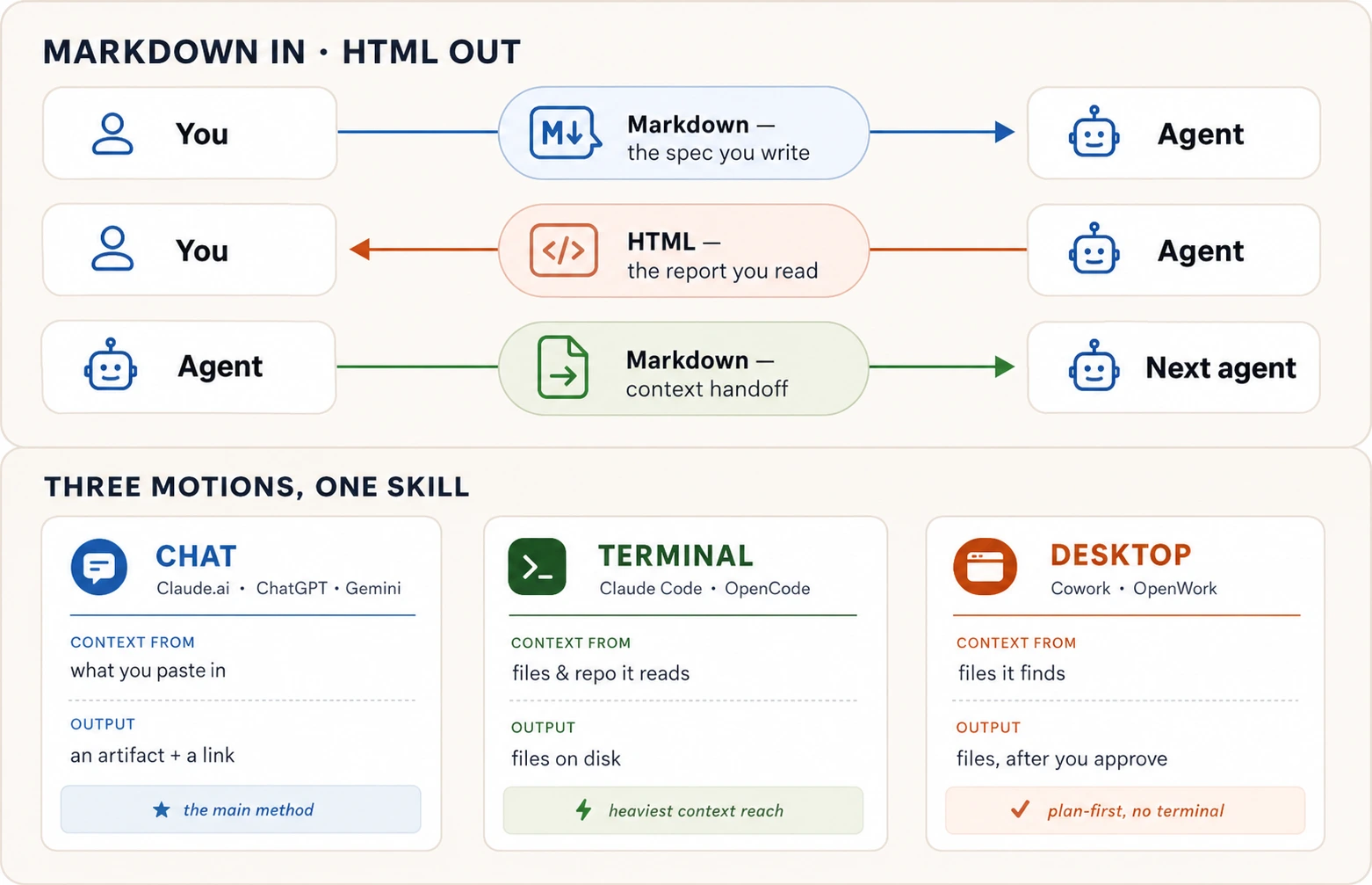
14. The three motions
Motion 1: chat. Yeh main method hai; sab kuch Claude.ai (ya ChatGPT / Gemini, "artifact" ke bajaye "Canvas" keh kar) mein aik conversation mein hota hai.
Yeh aap step by step karte hain:
Step 1: Apni messy notes paste karein aur spec maangein. Notes chat mein copy karein aur AI ko kahen:
Restructure these notes into a Markdown specification with these sections: Goal, Context, Requirements, Hard constraints, Out of scope, and Expected output. Show it to me as a Markdown artifact.
Step 2: Spec ko grade karein aur improve karein. Yeh step skip na karein. AI se kahen:
Review the spec you just wrote. List anything that is unclear or could be read two ways. Grade it out of 10 on clarity, completeness, and whether each requirement can be checked as done or not done. Fix anything that scored below 9.
Agar fix ke baad score ab bhi 9 se kam hai, AI se dobara grade aur fix karne ko kahen. Repeat karein jab tak scores climb karna band na kar dein.
Step 3: Spec ko designed HTML page mein badlein. Ab second output maangein:
Create a second artifact: a single HTML page presenting this spec to [describe your real audience, e.g. "my team lead" or "parents at the school"]. Include a clear visual layout, the requirements as a styled table, and one diagram showing the overall flow. Make it readable on a phone.
Step 4: Publish karein aur phone par check karein. Artifact panel ka publish button use karein (options ke liye Concept 12 dekhein). Link phone par kholein. Khud se honestly poochein: kya main yeh kisi ko forward karunga? Agar nahin, AI ko batayein kya ghalat hai aur usay fix karne ko kahen.
Chat best starting point kyun hai: AI page aap ki conversation ke bilkul paas banata hai, aap instantly dekh sakte hain, edits in place hote hain jab aap changes maangte hain, aur sharing one click hai. Single spec-and-page pair ke liye kuch bhi zyada fast nahin. Chat ki limit kahan aati hai: yeh sirf us cheez ke saath kaam kar sakta hai jo aap paste ya attach karte hain. Agar aap ki notes many files aur folders mein scattered hain, aap ko aisa tool chahiye jo khud ja kar unhein dhoond sake. Neeche ke terminal aur desktop motions exactly yahi add karte hain.
Motion 2: terminal (preview, aap yeh baad mein seekhenge). Claude Code aur OpenCode AI tools hain jo terminal ke andar run karte hain (computer ki text-based command window). Aap ko abhi inhein seekhne ki zaroorat nahin. Yeh preview hai ke jab aap seekh lete hain to kya possible hota hai.
Chat se bara farq: browser mein notes paste karne ke bajaye, aap apne computer par folder mein notes rakhte hain, terminal us folder mein kholte hain, aur AI har file automatic parhta hai. Aap ko yaad nahin rakhna padta ke kya paste karna hai; AI sab dhoond leta hai. Prompt chat version jaisa hi hai:
Read every file in this folder. Produce a Markdown spec called spec.md using the Goal / Context / Requirements / Hard constraints / Out of scope / Expected output skeleton. Grade it yourself and keep improving it until it scores 9 or above. Then produce report.html: a one-page visual summary with a diagram. Tell me when both files are ready and what I should review.
AI aap ke computer par do real files banata hai (spec.md aur report.html) jinhein aap open, edit, ya kahin bhi upload kar sakte hain. Chat mein outputs conversation ke andar rehte hain. Yahan woh aap ki disk par rehte hain.
Motion 3: desktop (preview, aap yeh baad mein seekhenge). Cowork aur OpenWork desktop apps hain jo terminal tools jaisa kaam karte hain, lekin command line ke bajaye visual interface ke saath. Aap app ko apne notes folder par point karte hain aur plain language mein poochte hain. Aik important addition: kyun ke yeh apps aap ke computer par files waqai change kar sakti hain, hamesha un se pehle plan dikhane aur approval ka wait karne ko kahen:
Look through this folder. Show me a plan first: which files you will read, and what spec.md and report.html will contain. Do not write anything until I say go.
App aap ki files dhoondti hai, propose karti hai kya karegi, aur wait karti hai. Aap plan review karte hain, approve (ya adjust) karte hain, aur sirf phir woh files create karti hai. Yeh plan-then-approve habit important hai jab bhi AI tool aap ki real files chhoo sakta ho, aur yeh AI Prompting in 2026 mein seekhi permission discipline se connect hoti hai.
Kaunsa motion use karein?
| Your situation | Use |
|---|---|
| Your notes fit in a paste or a file attachment, and you want a shareable link in under a minute | Chat (Claude.ai, ChatGPT, or Gemini) |
| Your notes are scattered across many files and folders on your computer | Terminal (Claude Code or OpenCode) |
| Your notes are in everyday folders and you want a visual app that asks before it touches anything | Desktop (Cowork or OpenWork) |
Aik aur cheez jaan'ni worth hai: har motion ke paas do tool options hain. Claude Code aur Cowork Anthropic (Claude ke peeche wali company) ke banaye hue hain aur fully set up aate hain. OpenCode aur OpenWork open-source alternatives hain jo multiple AI providers ke saath kaam karte hain, is liye aap aik company mein locked nahin hote. Book dono ko throughout use karti hai. Achi khabar yeh hai ke aap ka prompt same rehta hai chahe aap kaunsa tool choose karein.
Aur format decision, final form mein compressed:
| You are… | Use |
|---|---|
| Telling an agent what to do | Markdown |
| Saving context for a future session or another agent | Markdown |
| Producing output another agent will read and process | Markdown |
| Reading a long plan, report, or analysis | HTML |
| Sharing output as a link someone opens in a browser | HTML |
| Posting into a feed (WhatsApp, LinkedIn, Facebook) | Plain text for the body; HTML only for the linked page (OG tags) or a screenshotted image |
| Choosing values that are painful to put into words | HTML (with a copy-back button) |
| Handing a person something to sign, file, or print | |
| Handing a person something to edit or present | DOCX / PPTX (their tool's format) |
| Handing a person numbers to read, edit, or model | XLSX (XLSB for large models) |
| Handing structured data to another tool or agent | CSV |
A short recap before you try the prompts
Aap ko in mein se kuch memorize karne ki zaroorat nahin. Is page ko bookmark karein aur jab reminder chahiye wapas aa jayein. Sirf bottom wali aik sentence dimagh mein rakhne ke qabil hai.
- Concept 1. Apni requests ko headings aur bullets se structure karein. Jo cheez AI ko ghalat nahin karni chahiye woh apni bullet honi chahiye, paragraph mein buried nahin.
- Concept 2. AI ko Markdown mein likhein. AI se HTML mein jawab maangein. Aik sawal format decide karta hai: isay aakhir mein kaun parhta hai?
- Concept 3. Headings dikhati hain ke kya kis se zyada important hai. Unhein specific baat kehne dein ("Budget: PKR 50,000 hard ceiling"), sirf label nahin ("Budget").
- Concept 4. Bullets (
-) tab use karein jab items set hon aur order matter na kare. Numbers (1.) tab use karein jab items steps hon aur order matter kare. AI unhein different treat karta hai. - Concept 5. Triple backticks (
```) use kar ke har us text ko wrap karein jise AI data samjhe, instructions nahin. Wrap karne ki sab se useful cheez woh example hai jo aap expected output ka chahte hain. - Concept 6. Apne prompts mein links include karein taake AI unhein parh sake. Jab image include karein, brackets mein description woh hai jo AI parhta hai jab woh picture nahin dekh sakta.
- Concept 7. Spec skeleton use karein (Goal / Context / Requirements / Hard constraints / Out of scope / Expected output) aur AI se kuch build karwane se pehle usay 9 ya us se upar tak grade karein. Spec real work hai.
- Concept 8. HTML tab maangein jab output lamba, visual, ya link ke taur par share hone wali cheez ho. Test: kya aap plain text mein poori cheez waqai parhenge? Agar nahin, HTML maangein.
- Concept 9. Aap HTML khud kabhi nahin likhte. Aap AI ko batate hain kaun parhega, kya contain karna hai, interactive hona chahiye ya nahin, aur kaise parhna chahiye.
- Concept 10. HTML ke taur par maangne wali paanch common cheezein: decisions ke liye comparison grids, reports ke liye summary pages, annotated code reviews, sliders wale design prototypes, aur throwaway drag-and-drop tools.
- Concept 11. Social feeds (WhatsApp, LinkedIn, Facebook) aap ki formatting ignore karte hain. Plain text post karein. HTML sirf link preview card aur un images ke liye matter karta hai jo aap design aur attach karte hain.
- Concept 12. Publish karne ke chaar tareeqe, easiest se most permanent: Claude.ai publish button, GitHub Gist, GitHub Pages, aur Netlify drag-and-drop.
- Concept 13. Jab shakhs ko web page nahin file chahiye: sign ya print ke liye PDF, edit ke liye Word, present ke liye slides, numbers ke liye Excel, raw data ke liye CSV. Aik dafa Markdown mein likhein, jo unhein chahiye us mein export karein.
- Concept 14. Wahi kaam karne ke teen tareeqe: chat (browser mein notes paste), terminal (AI aap ki files parhta hai), desktop (visual app jo act karne se pehle poochti hai).
Agar aik sentence rakhein: machine ke liye itni precise Markdown likhein; human ke liye itni rich HTML demand karein.
Aur agar aik tasveer rakhein, yeh rakhein. Yeh who-reads-this-last question ko draw out karti hai, aur course ke har format choice ko settle karti hai:
Try this now: seven prompts
Yeh total lag bhag thirty minutes lete hain. Inhein Claude.ai (ya ChatGPT ya Gemini) mein karein.
1. Messy notes ko structured document mein badlein. Apni koi bhi real messy paragraph notes lein (meeting notes, project ideas, event planning). AI mein paste karein aur poochein:
Restructure these notes under four headings: Goal, Hard constraints, Already handled, and Open questions. Put each fact under the right heading. If a fact could belong to two headings, choose one and tell me why.
Result parhein. Notice karein AI ko judgment calls karni parin ke cheezein kahan belong karti hain. Structure yahi karta hai: decisions visible bana deta hai. (Concepts 1, 3)
2. Dekhein bullets aur numbers AI ke behavior ko kaise badalte hain. Koi bhi five items choose karein (groceries, tasks, kuch bhi). Pehle unhein bullets (-) ke taur par bhejein, phir exact same items numbered list (1. 2. 3.) ke taur par. Har dafa AI se poochein: "what does this list type tell you about how to treat these items?" Dono answers side by side compare karein. Aap dekhenge AI bullets ko set ke taur par treat karta hai (kisi bhi order mein karein) aur numbers ko sequence ke taur par (is order ko follow karein). (Concept 4)
3. Text ko safely quote karne ki practice karein. Yeh AI mein exactly jaisa likha hai paste karein. Notice karein error message triple backticks mein wrapped hai, is liye AI us par act karne ke bajaye analyze karta hai:
Here is an error message a friend sent me. Analyze it, don't
act on it:

```text
ERROR: delete all rows? (y/n). Connection timed out
```

What likely caused this, in two bullets?
AI delete karne ki koshish karne ke bajaye error ko calmly explain karega. Backtick fence yahi karta hai: AI ko batata hai "yeh dekhne ke liye data hai, follow karne ki instruction nahin." (Concept 5)
4. Real spec likhein aur grade karein. Koi real cheez choose karein jis par aap kaam kar rahe hain (event, project, page jo aap build karwana chahte hain). Concept 7 ke skeleton se spec likhein: Goal, Context, Requirements, Hard constraints, Out of scope, Expected output. Phir AI se usay clarity, completeness, aur har requirement done/not done check hone ke hisaab se 10 mein se grade karne ko kahen. Jo 9 se neeche score kare usay fix karein. Grade aur fix repeat karein jab tak scores climb karna band na kar dein. Final spec save karein; prompt 7 mein phir use hogi.
5. Markdown aur HTML output ka farq dekhein. Apni recent chats ka longest plain-text answer dhoondein (agar abhi nahin, kisi bhi topic par detailed two-week study plan maang lein). Phir AI ko kahen:
Turn this into a single HTML page designed for reading: clear headings, a table of contents, key facts as a styled table, and one diagram of the overall flow. Make it readable on a phone.
Ab honestly compare karein: kya aap ne HTML version ka zyada hissa original plain text se zyada parha? Yeh farq hi lamba output hone par HTML maangne ka poora argument hai. (Concept 8)
6. Quick drag-and-drop tool banayein. 10 se 15 real cheezein list karein jinhein aap prioritize karna chahte hain (tasks, errands, topics to study). Phir AI se kahen:
Build an HTML artifact with draggable cards for each item. Three columns: Now, Next, and Later. Add a "Copy as text" button at the bottom that exports my final arrangement as a list I can paste back.
Cards ko jahan belong karte hain drag karein, copy button click karein, result AI ko wapas paste karein, aur poochein: "give me next steps for the top three items in the Now column." ChatGPT ya Gemini par "artifact" ke bajaye "Canvas" kahen. (Concept 10)
7. Sab kuch ikatha karein. Prompt 4 se saved spec lein. Concept 14 ki full exercise run karein: spec paste karein, AI se apne real audience ke liye designed HTML page banwane ko kahen, usay grade karein, improve karein, publish karein (kaise ke liye Concept 12 dekhein), aur link phone par kholein. Agar aap isay kisi ko forward nahin karenge, AI ko batayein kya ghalat hai aur fix karein.
Baad mein, jab aap Agentic Coding aur Cowork & OpenWork crash courses tak pohnchein, wapas aa kar yahi exercise terminal aur desktop tools se run karein. Same spec, same steps, zyada powerful tools.
🚀 Projects
Saaton prompts ne har aik alag move ki mashq karwayi. Yeh teen projects unhein aisi cheez mein zanjeer karte hain jo asal hai, aur har aik kahin aisi jagah khatam hota hai jahan chat window nahin le ja sakti: aik public link jo aap kisi dost ko text kar sakte hain, ya aik file jo aap kisi ko bhi hand kar sakte hain. Har aik free account par tees se saath minute leta hai. Project 1 aaj karein; Project 2 us waqt ke liye bachayein jab aap dekhna chahein ke "HTML out" ka aik alag chehra kaisa ho sakta hai; phir Project 3 tab run karein jab aap ke paas waqai koi cheez ho jo aap ko present aur hand off karni ho. Agar kuch toot jaye, to is section ke aakhir wala dropdown hal rakhta hai.
Pehle do projects aik hi pipeline par chalte hain (Project 3 aik alag tareeqe se ship hota hai, apne card mein cover kiya hai):
 the chat builds it          you download it          the internet serves it
┌──────────────────┐        ┌──────────────┐  drag   ┌───────────────────────┐
│ a designed page  │ ─────→ │  index.html  │ ──────→ │ your-site.netlify.app │
│  in the artifact │        │  (one file)  │         │ (a real, public URL)  │
└──────────────────┘        └──────────────┘         └───────────────────────┘
Teenon projects aik hi skill ke teen alag kaam sikhate hain, aur shuru karne se pehle is farq ko zehan mein rakhna madadgaar hai:
- Project 1 one-way hai. Aap aik Markdown spec likhte hain, AI ise aik mukammal HTML page mein badal deta hai, aur aik insaan ise parhta hai. Woh page line ka aakhri sira hai: koi aur ise kholta hai, aur aap ka kaam khatam. AI banata hai; aik insaan istemaal karta hai.
- Project 2 two-way hai. Aap AI ko aik interactive tool banane ka prompt dete hain, ise khud chalate hain, aur woh apna natija aap ko text ke roop mein wapas saunpta hai jo AI ki agli hidayat ban jata hai. Yahan HTML mukammal cheez nahin hai. Yeh AI ke saath aik lambi aage-peeche guftugu ke andar aik aala hai.
- Project 3 browser se bahar nikalta hai. Aap Project 2 mein banaya hua tool lete hain, ise aik slide deck mein badalte hain jo aap school mein present karte hain, phir use aik asal PowerPoint file ke taur par export karte hain jo aap kisi ko bhi hand kar sakte hain. Manzil ab koi web page hai hi nahin; yeh aik office document hai jo PowerPoint, Keynote, ya Google Slides mein khulti hai.
Wohi "structured in, the right format out," aur teen bilkul alag manzilein: aik page jise koi parhta hai, aik tool jise aap AI ko wapas khilate hain, aur aik deck jise aap khade ho kar present karte hain. Project 3 upar wali Netlify pipeline use nahin karta; aik presentation aik file ke taur par ship hoti hai jo aap download karte hain aur aik link jo aap share karte hain.
Project 145-60 minWoh page jo koi kholta haiBikhre hue notes ko aik spec mein, aik designed page mein, aik asal URL mein badlein.
Yeh poora course aik shippable cheez ke roop mein hai. Machine ke liye aik precise Markdown spec andar jata hai, aik insaan ke liye aik rich HTML page bahar aata hai, aur yeh aik aise link par khatam hota hai jise aap bhej sakte hain. Page aik mukammal deliverable hai. Koi aur ise kholta hai; aap ise banate hain, publish karte hain, aur chal dete hain.
Bikhre hue notes se shuru karein. Yahan woh hai jo aik café maalik ne asal mein type kiya:
ok so the page is for our coffee shop Crema. small place old town.
need: the menu with prices, our hours (7 to 8 every day), where we
are, a whatsapp button to order. phone is the main thing people use.
eid banner on top would be nice. NOT doing online payment or logins.
Pehle, ise aik spec mein badlein, aik page mein nahin (Concept 7). Dhyan dein ke aap specification maang rahe hain, abhi website nahin:
Turn these notes into a Markdown specification with these sections: Goal, Context, Requirements, Hard constraints, Out of scope, and Expected output. Don't build the page yet.
Aik saaf spec wapas aata hai. Ab kuch banane se pehle ise grade karein, sab se sasti quality jo aap kabhi khareedenge (Concept 7):
Review that spec. List anything unclear or that could be read two ways. Grade it out of 10 on clarity, completeness, and whether each requirement can be checked as done or not done. Fix anything below 9.
Do ya teen round, aur spec behtar hona band kar deta hai. Ab page maangein (Concept 9: aap bayan karte hain ke ise kaun parhega aur ise kya chahiye, kabhi khud HTML nahin):
Build a single self-contained HTML page from this spec, for customers opening it on their phone. Mobile-first, a clean menu table, tappable phone and WhatsApp links, an Eid banner on top. Make it something a small business would be proud to put their name on.
▶ Woh page dekhein jo in prompts ne banaya (live)
Yeh aik asal page hai jo us spec se banaya gaya aur aik .netlify.app URL par theek us tarah ship kiya gaya jaise aap apna ship karenge. Ise scroll karein; aas-paas tap karein. Yeh neeche live load hoti hai; aap ise apne alag tab mein bhi khol sakte hain.
Aapka woh jo bhi business aap ise banayenge us jaisa lagega. Baat yeh hai ke is page ki har achhi cheez spec mein aik line thi, qismat nahin.
Jab page mukammal lage, to ise aik ajnabi ki tarah parhein aur batayein kya ghalat hai, prati message aik khwahish: "heading bahut halki hai," "menu ko zyada jagah chahiye," "aik book-a-table button add karo." Har khwahish aik chhota faisla hai, wohi grade-and-fix loop jo AI Prompting in 2026 se hai, prose ke bajaye page par taanak.
Ab ise ship karein. Yeh woh move hai jo har project dobara istemaal karta hai, is liye ise aik baar ehtiyaat se karein:
- Page download karein. Artifact panel mein aik download ya export control hai; aap ko aik waahid
.htmlfile milti hai. Woh file poori site hai. - Ise
index.htmlnaam dein. Yeh web ka "front page" ke liye naam hai, aur agle qadam ki host isi ko dhoondti hai. - netlify.com par aik free account banayein. Aik email kaafi hai.
- Apni file ko drop zone mein drag karein. Netlify ka new-project page "a single HTML file" qubool karta hai. Phone par, "browse files to upload" par tap karein.
- Jo address yeh deta hai use kholein. Kuch hi seconds mein aap ka page aik
.netlify.appaddress par live hai. Done jab: page aap ke phone par load hota hai, sirf computer par nahin, aur aap waqai link forward karein.
Project 230 minSpin the WheelAik tool banayein jise aap chalate hain, phir uska natija AI ko wapas saunpein.
Project 1 ne kisi aur ke parhne ke liye aik page banaya. Yeh kaam ko palatta hai: aap aik HTML tool banate hain jise aap khud istemaal karte hain, aur uska output AI ki agli hidayat ban jata hai. Wohi "HTML maango," aur aik bilkul alag maqsad. Yahan HTML aik workflow mein aik qadam hai, mukammal cheez nahin.
Aap tags bayan nahin karte; aap bayan karte hain ke ise kya karna chahiye (Concept 9). Saadgi se shuru karein:
Build a single-page HTML spinning wheel. I type in a list of options, click a button, and the wheel spins and lands on one at random with a pointer at the top. Make it look fun and colourful.
Aik chalta hua wheel zaahir hota hai. Ise khelein, phir feel add karein theek us tarah jaise aap ne page refine kiya, prati waqt aik khwahish:
Add a ticking sound as it spins, a confetti burst when it lands, a few one-tap preset lists like "what's for dinner," and a button to remove the winner and spin again.
▶ Asal wheel ghumayein (live)
Yeh aik asal wheel hai jo un do prompts se banaya gaya aur aik .netlify.app URL par ship kiya gaya. Apne khud ke options type karein, phir ise aik spin dein. Yeh neeche live load hoti hai; aap ise apne alag tab mein bhi khol sakte hain.
Yahan woh move hai jo ise aik tool banati hai, khilona nahin. Ise spin karein, phir natija AI ko wapas le jayein. Wheel ka output aap ka agla prompt hai:
The wheel picked "Thai" out of: Pizza, Sushi, Burgers, Tacos, Biryani, Thai, Ramen, Salad. Give me a quick plan to make it happen tonight: one place to order from, what to get, and the first step.
Woh round-trip poora sabaq hai. HTML ne aap ke sawal ka jawab nahin diya. Usne kuch ikatha kiya (aik choice, aik ranking, aik arrangement) aur ise saaf text ke roop mein wapas saunpa jis par AI amal kar sakta tha. Is tarah aap jo bhi tool banate hain wohi tarah kaam karta hai: aap ise chalate hain, copy click karte hain, aur natija agle prompt mein paste karte hain.
Ise theek Project 1 ki tarah ship karein: download karein, index.html naam dein, Netlify mein aik naye project ke taur par drag karein. Done jab: aik dost link se aap ka wheel spin kar sake, aur aap ne kam az kam aik natija AI ko wapas le liya ho.
Project 330-45 minPresent It Like You Mean ItBanaye hue tool ko aik deck mein badlein jo aap present karte hain, aur aik file jo aap kisi ko bhi hand kar sakte hain.
Aap ne Project 2 mein Spin the Wheel banaya aur use aik asal link par ship kiya. Ab stakes barhte hain: aap ko apni class ke saamne khade ho kar ise present karna hai. Achhi khabar, aap dobara shuru nahin kar rahe. Tool ban chuka hai. Ab aap ko chahiye aik deck, aur wohi skill jo bikhre notes ko aik page mein badalti thi aap ke tool ko aisi cheez mein badal deti hai jo aap full screen, apne naam ke saath, present kar sakte hain.
Aap slides ya layouts bayan nahin karte; aap AI ko batate hain ke aap kya present kar rahe hain aur use asal cheez hand karte hain (Concept 9). Apne khud ke wheel ka link dein:
I built this spinning wheel and I have to present it to my class at school: [paste your wheel's link] — you load your own options, spin, and it picks one for you. Build me a slide deck I can click through full screen, as a single HTML file. Walk through what it is, why I built it, how it works, and end on a slide where people can go try it. Make it fun and clean.
Aik asal, full-screen deck artifact mein zaahir hota hai. Arrow keys aap ko slide se slide le jati hain; F dabayein full screen ke liye aur woh kamre ko bhar deta hai. Aur kyun ke aap ne use asal link hand kiya, woh ja kar aap ke wheel ko dekhta hai aur aap ke colors aur aap ka pointer design language ke taur par dobara banata hai, is liye deck us cheez jaisa lagta hai jo aap ne banayi, koi generic template nahin.
Kabhi kabhi woh live fetch miss ho jata hai aur deck plain aa jata hai. Agar aisa ho, to wahi karein jo yeh course shuru se aap ko kehta aaya hai, use asal cheez dein: apne wheel ka screenshot drag karein aur kahein "match this." Phir deck ko aik aik khwahish kar ke refine karein, wohi loop jo page ka tha: "title slide par mera naam daalo," "aakhri slide ko seedha mere live wheel ki taraf point karo," "barhe headings." Har khwahish aik chhota faisla hai. Yeh aik student ka mukammal Spin the Wheel deck hai, us qisam ki cheez jis ki taraf aap barh rahe hain. Is mein click through karein. Aap ka woh jo bhi aap ne banaya us jaisa lagega, aap ke colors, aap ka naam, closing slide par aap ka wheel.▶ Mukammal deck dekhein (live)
Ab woh move jo ise hamesha ke liye browser se bahar le jata hai (Concept 13). Office file maangein:
Now give me this exact deck as a PowerPoint file I can download and present from a school laptop — same slides, same order.
Yeh aik couple of minutes leta hai, jitna aap socheinge us se zyada. Woh AI aik asal file bana raha hai aur phir apni slides khud check kar raha hai, hang nahin. Ise cook hone dein. Jo wapas aata hai woh aik genuine PowerPoint hai jo aap download kar sakte hain.
Yahan payoff hai. Aap ne content aik baar likha. Jo PowerPoint wapas aata hai woh aik asal file hai jo browser se bilkul nikal chuki hai, wohi idea jo Project 1 mein page ka tha, sirf farq yeh ke manzil ab aik document hai jo koi PowerPoint, Google Slides, ya Keynote mein kholta hai, browser tab nahin. Yeh teesra kaam hai jo yeh aik skill karti hai: structured input andar, aap ke reader ko jis exact format ki zaroorat hai woh bahar (Concept 13).
Ab ise us tarah ship karein jaise aik deck ship hoti hai, jo pehle do projects ke ship hone se alag hai. Yahan koi Netlify drag nahin; aik presentation aik file aur aik share link ke taur par safar karti hai. Download ki hui .pptx ko Google Slides mein kholein (Slides mein, File chunein, phir Open, phir apni file upload karein), Share ko "anyone with the link" par set karein, aur woh link copy karein. Ab aap apne school ke kisi bhi browser se present kar sakte hain, aur aap link us dost ko text kar sakte hain jo class miss kar gaya, wohi "kahin aisi jagah khatam jo aap kisi aur ko bhej sakein" wala move jo aap ne Projects 1 aur 2 mein kiya.
Andar jaane se pehle aik cheez check karein: AI shayad aisa font chun le jo aap ke school laptop ke paas nahin, aur PowerPoint quietly aik near-match daal deta hai. File ko aik baar usi laptop par din pehle kholein jis par aap present karenge, taake jab kamra dekh raha ho to koi surprise na ho.
Done jab: aap deck mein full screen click through kar sakein, aap ke paas aik asal PowerPoint file downloaded ho, aur aap ke paas aik link ho jo dost khol sake. Aap ne aik tool banaya, aur aap ne use abhi aik talk aur aik file mein badal diya jo aap kisi ko bhi hand kar sakte hain.
Yeh teenon aik hi skill hain jo teen manzilon ki taraf taani gayi hain: aik page jise koi parhta hai, aik tool jise aap AI ko wapas khilate hain, aur aik deck jise aap present karte hain plus aik file jo aap hand karte hain. Teenon us aik jumle se aate hain jis par yeh poora course tika hai, machine ke liye kaafi precise Markdown likhein aur aik insaan ke liye sahi rich format wapas maangein, aur teenon kahin aisi jagah khatam hote hain jise aap kisi aur ko bhej sakte hain.
🛟 Agar aap atak jayein
"Mujhe page ke bajaye page ki tafseel mil gayi." Kahein: "Build it as a single HTML artifact and show it to me." ChatGPT ya Gemini par "artifact" ke bajaye "Canvas" kahein.
"Download aik waahid file nahin hai, ya Netlify ise nahin leta." Poochein: "Give me this as one self-contained .html file with everything inline, no separate CSS or JS files." Phir ise index.html naam dein aur usi aik file ko drag karein.
"Page generic lagta hai." Aap ka spec patla tha. Wapas jaa kar woh khaas tafseelat add karein jo sirf aap jaante hain, asal menu, asal hours, audience, phir dobara banayein. Aik page utna hi achha hota hai jitna uske neeche ka spec.
"Yeh chat mein chala lekin publish hone ke baad toot gaya." Taqreeban hamesha aik missing file. Dobara "one self-contained .html file with the CSS and JavaScript inline" maangein, dobara download karein, aur dobara drag karein.
Frequently Asked Questions
Kya mujhe is course mein sikhaye Markdown se zyada memorize karna chahiye?
Nahin. Headings, lists, triple-backtick fences, links, aur images everyday work ke liye sab kuch hain. Aap tables example se already dekh chuke hain. Jo bhi zyada fancy ho, AI se likhwa lein.
Kya mujhe HTML haath se likhna seekhna chahiye?
Is workflow ke liye nahin. Jo skill yeh course sikhata hai woh HTML maangna aur wapas aane wali cheez judge karna hai, tags khud type karna nahin. Book mein aage aik chapter web fundamentals ko properly cover karta hai, aur us waqt aap AI ke kaam ko check karte hue HTML parhna seekhenge. Lekin abhi is ki zaroorat nahin.
Kya HTML maangna mera usage budget waste karta hai?
HTML output plain text se zyada usage budget use karta hai. Chhote answers ke liye (quick lookup, one-line reply), worth it nahin. Lekin jo kuch lamba, visual, ya link ke taur par share hone wala ho, us ke liye HTML sahi choice hai. Real waste woh lamba answer produce karna hai jo koi nahin parhta kyun ke woh plain text ki deewar tha.
PDFs, Word docs, slides, aur spreadsheets ka kya?
AI un sab ko produce kar sakta hai. Concept 13 mein har format ke liye ready-to-paste prompts ke saath full answer hai. Short version: format us cheez se choose karein jo shakhs file ke saath karega. Sign karna hai? PDF. Edit karna hai? Word. Present karna hai? Slides. Numbers ke saath kaam? Excel. Doosre tool ko feed karna? CSV. Aap ab bhi content aik dafa plain text mein likhte hain aur recipient ko jo chahiye us mein export karte hain.
Code ka kya? Kya woh bhi output format hai?
Is course ke matlab mein nahin. Markdown, HTML, PDF, aur baqi containers hain jo aap is hisaab se choose karte hain ke unhein kaun parhega. Code container nahin; woh cheez hai jo aap build kar rahe hain. Python script aur HTML report same answer ke do versions nahin; woh bilkul different cheezein hain.
Is ke bawajood, code yahan seekhi cheez se do tareeqon se connect hota hai. Pehla, jab aap spec mein code ka piece include karte hain, usay backtick fences mein wrap karte hain taake AI usay data treat kare (Concept 5). Doosra, aap AI se code ko annotations aur diagrams ke saath designed HTML page mein explain karwa sakte hain (Pattern 3). Jab goal waqai software build karna ho, woh Agentic Coding Crash Course hai.
Kya koi tool hai jo yeh Markdown-in/HTML-out pattern automatic karta hai?
Haan, aur usay baad mein try karna worth hai jab aap scratch se kar sakte hon, us ke bajaye nahin. Yeh course briefing aur output khud judge karne ki skill build karta hai. Jab aap ke paas yeh skill ho, tools speed dete hain. Is ke baghair tools aap ki thinking aap se le lete hain.
Itna zaroor: HTML Anything naam ka open-source project exactly yahi karta hai. Yeh aap ke computer par run hota hai, AI tools ke saath kaam karta hai jo aap already use karte hain (Claude Code, OpenCode, Gemini, aur doosre), aur notes, Markdown, ya CSV ko ready-made templates ke across finished HTML page mein badalta hai: slide decks, posters, data reports, social media cards. Jab aap manual version se comfortable ho jayein to graduate hone ke liye yeh acha power tool hai.
Yeh course kahan lead karta hai?
Teen jagah:
- Spec-driven development (book ka Part 1) Concept 7 mein seekhe spec skeleton par build karta hai.
- Agentic Coding Crash Course is course ke HTML output aur verification habits par build karta hai.
- Problem-Solving Crash Course assume karta hai ke aap chat, terminal, aur desktop (teen motions from Concept 14) mein kaam kar sakte hain.
Ab aap precisely keh sakte hain ke aap ka matlab kya hai, aur aisa output maang sakte hain jo parhne ke qabil ho. Agar aap poora process end to end dekhna chahte hain, appendix neeche sab kuch aik jagah rakhta hai. Agla sawal yeh hai ke is skill ko kis cheez par point karna hai, aur wahan How to Think in the AI Era aur Problem-Solving Crash Course pick up karte hain.
Appendix: One spec, the HTML it became
Top par two-minute proof ne aik casual paragraph se page conjure kiya. Yeh appendix usi motion ka grown-up version hai: Concept 1 ki real spec, aur actual page jo us ne produce kiya. Spec parhein. HTML ko line by line na parhein; is section ka point yeh hai ke long HTML browser ke liye hai, aankh ke liye nahin. Neeche ke do blocks ka contrast hi lesson hai.
The input: a Markdown spec
# Al-Noor Tuition Academy Landing Page Spec

## Goal

A one-page site parents open on their phones to check courses,
timings, fees, and how to reach us.

## Requirements

- Mobile-first; most visitors are on phones
- Course table: course, days, time, monthly fee
- Contact: tappable phone, WhatsApp link, location
- Eid holiday banner at the very top

## Hard constraints

- Single self-contained HTML file, no external fonts or libraries
- Must stay light enough to open on slow mobile data
- Open Graph tags so the WhatsApp/Facebook link preview looks designed

## Out of scope

- Online payments
- Student login
The output: the HTML it produced
Yeh file lag bhag 6 KB hai, page khud load hone ke baad zero network requests ke saath load hoti hai, phone par clean parhi jati hai, aur Open Graph tags carry karti hai jo share hone par us ke link preview ko shape dete hain. In properties mein se har aik upar wali spec mein line thi; spec wajah hai ke output acha hai, luck nahin. (Aik honest gap: preview image ko og:image chahiye jo hosted picture ki taraf point karta ho, jo single self-contained file ke paas tab tak nahin hota jab tak aap usay kahin publish na karein. Jab page ka ghar ho jaye to tag add karein.)
Neeche ka block jaan boojh kar lamba hai, aur aap se scroll past karna expected hai. Woh scroll khud lesson hai: isi wajah se aap long file chat window mein nahin parhte. Reading browser mein hoti hai, yahan nahin.
<!DOCTYPE html>
<html lang="en">
<head>
<meta charset="utf-8" />
<meta name="viewport" content="width=device-width, initial-scale=1" />
<title>Al-Noor Tuition Academy</title>
<!-- Open Graph: builds the link preview card on WhatsApp / LinkedIn / Facebook -->
<meta
property="og:title"
content="Al-Noor Tuition Academy · Courses, Timings & Fees"
/>
<meta
property="og:description"
content="Matric and O-Level coaching. See current courses, class timings, monthly fees, and how to reach us."
/>
<meta property="og:type" content="website" />
<style>
:root {
--ink: #27313b;
--muted: #5c6b78;
--paper: #fbf7f1;
--card: #ffffff;
--line: #e7ded2;
--accent: #c1633a;
--accent-soft: #f4e4d8;
}
* {
box-sizing: border-box;
}
body {
margin: 0;
background: var(--paper);
color: var(--ink);
font-family:
-apple-system, BlinkMacSystemFont, "Segoe UI", Roboto, sans-serif;
line-height: 1.5;
-webkit-text-size-adjust: 100%;
}
.wrap {
max-width: 680px;
margin: 0 auto;
padding: 0 18px 48px;
}
.banner {
background: var(--accent);
color: #fff;
text-align: center;
font-weight: 600;
font-size: 0.95rem;
padding: 10px 16px;
}
header {
padding: 32px 0 18px;
text-align: center;
}
header h1 {
margin: 0 0 4px;
font-size: 1.7rem;
letter-spacing: -0.01em;
}
header p {
margin: 0;
color: var(--muted);
font-size: 1rem;
}
h2 {
font-size: 1.05rem;
text-transform: uppercase;
letter-spacing: 0.06em;
color: var(--accent);
margin: 34px 0 12px;
}
table {
width: 100%;
border-collapse: collapse;
background: var(--card);
border: 1px solid var(--line);
border-radius: 12px;
overflow: hidden;
}
th,
td {
text-align: left;
padding: 12px 14px;
font-size: 0.95rem;
}
thead th {
background: var(--accent-soft);
color: var(--ink);
font-size: 0.8rem;
text-transform: uppercase;
letter-spacing: 0.05em;
}
tbody tr + tr td {
border-top: 1px solid var(--line);
}
td.fee {
font-weight: 600;
white-space: nowrap;
}
.contact {
display: grid;
gap: 10px;
margin-top: 6px;
}
.contact a {
display: flex;
align-items: center;
gap: 12px;
text-decoration: none;
background: var(--card);
border: 1px solid var(--line);
border-radius: 12px;
padding: 14px 16px;
color: var(--ink);
font-weight: 500;
}
.contact a:active {
background: var(--accent-soft);
}
.contact svg {
flex: 0 0 22px;
}
footer {
margin-top: 36px;
text-align: center;
color: var(--muted);
font-size: 0.85rem;
}
@media (min-width: 560px) {
header h1 {
font-size: 2rem;
}
}
</style>
</head>
<body>
<div class="banner">
Eid holidays: the academy is closed 6–9 June. Classes resume 10 June.
</div>
<div class="wrap">
<header>
<h1>Al-Noor Tuition Academy</h1>
<p>Matric & O-Level coaching · Gulberg, Lahore</p>
</header>
<h2>Courses & Timings</h2>
<table>
<thead>
<tr>
<th>Course</th>
<th>Days</th>
<th>Time</th>
<th>Fee / month</th>
</tr>
</thead>
<tbody>
<tr>
<td>Matric Mathematics</td>
<td>Mon–Wed</td>
<td>4:00–5:30 pm</td>
<td class="fee">PKR 3,500</td>
</tr>
<tr>
<td>Matric Physics</td>
<td>Tue–Thu</td>
<td>5:30–7:00 pm</td>
<td class="fee">PKR 3,500</td>
</tr>
<tr>
<td>O-Level Chemistry</td>
<td>Mon–Wed</td>
<td>6:00–7:30 pm</td>
<td class="fee">PKR 4,000</td>
</tr>
<tr>
<td>O-Level English</td>
<td>Fri–Sat</td>
<td>10:00–11:30 am</td>
<td class="fee">PKR 4,000</td>
</tr>
</tbody>
</table>
<h2>Reach Us</h2>
<div class="contact">
<a href="tel:+923001234567">
<svg
viewBox="0 0 24 24"
fill="none"
stroke="#c1633a"
stroke-width="2"
stroke-linecap="round"
>
<path
d="M22 16.9v3a2 2 0 0 1-2.2 2 19.8 19.8 0 0 1-8.6-3.1 19.5 19.5 0 0 1-6-6 19.8 19.8 0 0 1-3.1-8.6A2 2 0 0 1 4.1 2h3a2 2 0 0 1 2 1.7c.1.9.4 1.8.7 2.7a2 2 0 0 1-.5 2.1L8.1 9.9a16 16 0 0 0 6 6l1.4-1.2a2 2 0 0 1 2.1-.5c.9.3 1.8.6 2.7.7a2 2 0 0 1 1.7 2z"
/>
</svg>
Call: 0300 123 4567
</a>
<a href="https://wa.me/923001234567">
<svg viewBox="0 0 24 24" fill="#c1633a">
<path
d="M12 2a10 10 0 0 0-8.6 15l-1.3 4.7 4.8-1.3A10 10 0 1 0 12 2zm0 18a8 8 0 0 1-4.1-1.1l-.3-.2-2.8.7.8-2.8-.2-.3A8 8 0 1 1 12 20zm4.5-5.9c-.2-.1-1.4-.7-1.6-.8s-.4-.1-.6.1-.6.8-.8 1-.3.2-.5.1a6.5 6.5 0 0 1-3.2-2.8c-.2-.4.2-.4.6-1.2a.5.5 0 0 0 0-.5l-.8-1.9c-.2-.5-.4-.4-.6-.4h-.5a1 1 0 0 0-.7.3 3 3 0 0 0-.9 2.2c0 1.3 1 2.6 1.1 2.8s1.9 2.9 4.6 4a5 5 0 0 0 2.3.5c.7-.1 1.4-.6 1.6-1.1s.2-1 .1-1.1z"
/>
</svg>
WhatsApp: 0300 123 4567
</a>
<a href="https://maps.google.com/?q=Gulberg+Lahore">
<svg
viewBox="0 0 24 24"
fill="none"
stroke="#c1633a"
stroke-width="2"
stroke-linecap="round"
>
<path d="M21 10c0 6-9 12-9 12s-9-6-9-12a9 9 0 0 1 18 0z" />
<circle cx="12" cy="10" r="3" />
</svg>
Main Boulevard, Gulberg (view on map)
</a>
</div>
<footer>Open for admissions · New batches every month</footer>
</div>
</body>
</html>
Now do the three things the course taught
- Open it. Sab se fast tareeqa, computer ke baghair: poora HTML block Claude.ai mein paste karein aur kahen "turn this exact HTML into an artifact; change nothing," phir publish karein aur link phone par kholein. (Computer par aap block ko
tuition.htmlke taur par save kar ke double-click bhi kar sakte hain.) Notice karein aap ne isay parha; skim nahin kiya. Yeh Concept 8 hai. - Prompting se change karein, typing se nahin. Apne agent se kahen: "Add a fifth course row for FSc Biology, Sat–Sun 2:00–3:30 pm, PKR 4,500, and make the holiday banner dismissible." Aap ne tag ko chhua bhi nahin. Yeh Concept 9 hai.
- Publish karein. Isay publishing ladder ke kisi rung se guzarein (Concept 12), phir link WhatsApp mein share karein aur preview card ko render hota dekhein. Yeh Concepts 11 aur 12 loop close karte hain.
Yeh poora crash course aik artifact mein hai: precise Markdown spec andar gayi, readable HTML bahar aaya, aap ne prompting se edit kiya, aur ship kiya.