Ek Digital FTE Banana: Ek 4-Ghante ka Crash Course
Pandrah concepts aur ek worked build: Skills, system of record, aur in dono ke darmiyaan MCP ki wire.
Pichle course mein, aap ne ek agent banaya. Is course mein, aap agent se AI Worker tak ka pehla asal qadam uthate hain. (Yeh Mode 2, Manufacturing track ka doosra course hai, saat mein se move do.) Woh agent, Build AI Agents se, ek streaming chat agent tha jis ke paas sessions, guardrails, aur tracing the, aur compute ke liye ek sandbox par chal raha tha. Woh kaam karta tha. Lekin terminal band karte hi woh sab kuch bhool bhi jaata tha, aur uske paas jo bhi tool tha woh uski Python mein likha hua tha.
Pehle bas kaam karte hue dekhna chahte hain? Neeche 15-minute Quick Win par chalein jaayein. Aap ek asal database aur ek chota Worker banayenge jo us mein likhta hai aur yaad rakhta hai, phir un concepts ke liye wapas aa jaayein jo samjhate hain ke yeh is shape mein kyun hai.
Ek AI Worker wohi chat agent hai, bara hua. Log ise AI Employee ya Digital FTE bhi kehte hain: ek hi cheez, jise is naam se pukara jaata hai ke aap ise kaise banate hain, woh kis ke saath shaamil hota hai, aur uski laagat kya hai. Yeh course uski buniyaad banata hai: ek aisa agent jise aap bara kar sakte hain, jo yaad rakhta hai, aur jis ke maalik aap hain. Ek mukammal Worker chobees ghante bhi chalta hai, apni marzi se kaam karta hai, aur kisi bhi app par aap tak pohanchta hai, lekin woh baad mein aata hai. Pichle course ka SDK aur SandboxAgent runtime wohi rehta hai; un ke ird gird jo kuch hai, wohi badalta hai.
Yeh tabdeeli do moves leti hai, aur in dono ke darmiyaan ek wire:
- Uski abilities Skills ban jaati hain: chote folders jinhein agent khud dhoondta aur load karta hai, bajaaye is ke ke tools uski Python mein hard-wired hon.
- Jo cheezein woh restart par bhool jaata tha woh Postgres mein chali jaati hain, uska system of record: woh ek baasandeeda store jis ke khilaaf Worker chalta hai, woh source of truth jis par koi business chalta hai, jaise koi CRM ya ledger hota hai. Kuch qism ka data is mein rehta hai:
- Business records: operational sachaai. Customers, tickets, orders. Aap inhein dekhte aur update karte hain.
- Reference library: woh knowledge jise woh ma'ni ke lehaaz se search karta hai. Policy library, reference documents, guzishta cases.
- State: kaam abhi kaisa dikh raha hai. Kaun se chats khule hain, kya approval ka intezaar kar raha hai.
- Trace: us ne kya kiya iska ek record, taake company us ke actions ko replay aur un par bharosa kar sake.
- MCP (Model Context Protocol) agents ko bahar ke tools aur data se jorne ka open standard hai. Yahan, yeh woh wire hai jise agent us store tak pohanchne ke liye istemaal karta hai.

Semantic recall woh ek hissa hai jise log ghalat naam dete hain. Iska matlab cheezon ko ma'ni se dhoondna hai, theek lafzon se nahin. Yeh ek search karne ka tareeqa hai, apna koi store nahin: aap ise reference library par chala sakte hain, guzishta conversations par, ya khud business records par. Yeh Ek chalte hue Worker ke do hisse hote hain jinhein production alag alag deploy karta hai. Harness agent ka runtime hai: khud SDK loop. Compute woh sandbox hai jahan agent ka code asal mein chalta hai; jab agent koi tool call karta hai, woh code us sandbox ko de deta hai. Is course mein dono local rehte hain. Poori Presentation Dekhein — Digital FTE Foundation Banayein Thesis Saat Invariants ka naam leta hai jo har production agent system ko poora karne hote hain. Pichle course ne engine banaya (Invariant 4): ek sandbox par OpenAI Agents SDK. Yeh course Invariant 5: har Worker ek system of record ke khilaaf chalta hai add karta hai. Engine woh hai jis par ek Worker chalta hai; system of record woh hai jis ke khilaaf woh chalta hai. Do open standards us cheez ko portable rakhte hain. Skills (asal mein Anthropic ka, ab poore ecosystem mein agentskills.io par) capabilities ko tools ke darmiyaan safar karne dete hain. MCP woh standard wire hai jise agent record tak pohanchne ke liye istemaal karta hai; pichle course ke paas yeh nahin thi, aur yeh yahan ka ahem naya pattern hai. Khud record Neon Postgres + pgvector hai, ise is liye chuna gaya ke yeh shuru karne ke liye muft hai, idle hone par zero tak scale hota hai, aur ek official MCP server ke saath aata hai. Product replaceable hai; Swap guide alternatives ki list deti hai.pgvector se aata hai, jo Postgres mein search-by-meaning add karta hai.Ek Worker kaise chalta hai: harness vs. compute (yahan aap koi bhi deploy nahin karte)
UnixLocalSandboxClient sandbox ko aap ki machine par chalata hai (zero infrastructure, ek API key), aur aap ise ek line ki tabdeeli se Docker, Cloudflare, E2B, ya Modal par point kar sakte hain (Part 5 ki Swap guide). Khud harness ko hamesha-on cloud service ke taur par deploy karna apna ek alag course hai, Deploy Your Agent Harness to the Cloud.Yeh course Agent Factory thesis mein kahan baithta hai
📚 Taleemi madad
Yeh pandrah concepts teen layers mein bant'te hain: Skills, system of record, aur MCP. Neeche di gayi table poora map hai.Ek nazar mein 15 concepts (poore map ke liye expand karein)
# Concept Layer Yeh kis sawaal ka jawab deta hai 1 Ek Agent Skill kya hai Skills Reusable capability kahan rehti hai? Ek folder mein, SKILL.md plus optional scripts/references ke saath.2 Progressive disclosure Skills Skills ko paas rakhna sasta kyun hai? Discovery → activation → execution sirf wohi load karta hai jo zaroori ho jab zaroori ho. 3 Ek SKILL.md likhna Skills Ek skill file mein asal mein kya hota hai? Metadata, trigger description, operational instructions. 4 Skill packaging conventions Skills Skills tools ke darmiyaan kaise safar karti hain? Wohi folder Claude Code, OpenCode, aur kisi bhi compliant client mein kaam karta hai. 5 Skills compose karna Skills Kab chote skills ko filesystem handoff se chain karein vs. ek bara skill likhein. 6 Managed Postgres kyun System of record Kaun sa store "system of record" ka haq paata hai? Woh jis mein persistence, branching, governance, aur woh vector primitives hon jo ek agent ko chahiye. 7 Worker ka schema System of record Ek agent ko asal mein kaun si tables chahiye? Conversations, documents, embeddings, audit log, capability invocations, plus turns ke liye SDK Session. 8 pgvector basics System of record Postgres mein semantic search kaise kaam karta hai? Embedding column, distance operators, index types. 9 Embedding pipeline System of record Text ek queryable vector kaise banta hai? Chunking, embedding model, kab dobara embed karna hai. 10 Discipline ke taur par audit trail System of record Ek Worker ke liye "reads aur writes" ka kya matlab hai? Worker ka har action ek trace chhorta hai jise company replay kar sakti hai. 11 MCP kya hai aur kya nahin MCP Tools, resources, aur prompts ke liye ek protocol: koi framework nahin, koi service nahin. 12 Neon MCP server MCP Agent ka apne database tak interface: yeh kya expose karta hai, kaise authenticate karta hai. 13 MCP ko Agents SDK se jorna MCP SDK ka MCP integration: ek server kaise register karein, model kya dekhta hai, trust boundary kahan rehti hai. 14 Custom MCP servers MCP Kab apna server likhein vs. bas @function_tool istemaal karein. Decision tree.15 Load ke neeche MCP MCP Transport choices, connection pooling, kab queue karein.
Jab aap ke paas yeh mapping aa jaaye, baaqi zyada-tar mechanics hai. Production mein ek failure inhi mein se kisi ek tak jaati hai: ek Skill jo kabhi discover na hui (description bohot dhundli), ek system of record jis par do Workers ittefaq nahin karte (schema race), ya ek MCP wire jo events drop kar deti hai (workload ke liye ghalat transport). Diagnostic aap ko batata hai ke kaun sa.
Yeh course kis ke liye hai
Intermediate. Aap ke paas hona chahiye:
- Behtareen hai ke Build AI Agents kar liya ho, halaanki aap ka agent base par uska end state scaffold kar sakta hai agar aap ne ise chhor diya tha.
- Agentic Coding Crash Course se Plan-mode aur rules-file ki aadat.
Yeh ek Python-first sequel hai: aap Python ya SQL haath se type nahin karenge, aap ka agent code likhta hai jab ke aap steer karte hain, aur Parts 2 aur 3 zyada dense ho jaate hain (Pydantic models, asyncpg pools, ek chota custom MCP server), to wahan zyada aage-peeche ki tawaqqo karein. Ek database maaloomaat ko tables mein rakhta hai. Ek spreadsheet ka tasavvur karein: har row ek cheez hai (ek customer, ek support ticket) aur har column us ke baare mein ek tafseel (ek naam, ek date, ek status). Yahi poora mental model hai jo aap ko chahiye. Aap khud kabhi database code nahin likhte; aap ka agent likhta hai, aur yeh do lafz bas aap ki madad karte hain ke woh jo banaye use aap parh sakein. Paanch lafz jo yeh course aise istemaal karta hai jaise aap inhein jaante hon:Databases mein naye hain? 60-second version
May 2026 tak current, openai-agents 0.17.x, mcp SDK, Neon ke MCP docs, aur pgvector 0.8+ ke khilaaf verify kiya gaya. Jab aap build karein to apne versions pin kar lein; agar docs aur yeh page kabhi ikhtelaaf karein, to Cloudflare Sandbox tutorial aur Neon docs jeet jaate hain.
Aap direct karte hain, agent build karta hai, aur kyunke base ek AGENTS.md ke saath aata hai jise woh khulte hi parhta hai, aap ke prompts chote reh sakte hain: bas keh dein ke aage kya banana hai.
Pandrah-minute quick win: ek baar kamyaab hon, phir samjhein kyun chala
Un 15 concepts ko parhne se pehle jo samjhate hain ke yeh architecture kyun kaam karta hai, iska sab se chota version banayein jo asal mein kaam karta ho. Ant tak aap ke paas hoga:
- ek taaza Neon project jis mein do tables hain,
notesauraudit_log, jinhein aap ne MCP par banaya aur console mein dekha, - ek minimal AI Worker jo ek transaction mein apne
save_notetool ke zariye dono mein likh raha hai, - aur "kya kisi system of record ne mere liye asal mein kuch kiya?" ka ek worked jawab: aap ka note aur uski audit row, ek hi id share karte hue.
Yeh prompts ki ek screen hai: aap ka coding agent Neon MCP par store banata hai, phir ek chota Worker scaffold karta hai jo us mein likhta hai, aur aap Worker ko yaad rakhte dekhte hain. Poora Worker (aath decisions, ek paanch-table schema) Part 4 mein aata hai. Agar aap ke paas sirf ek baithak hai, to yeh karein, phir concepts ke liye wapas aa jaayein.
Is mein se do planes guzarte hain, aur inhein seedha rakhna hi poora mental model hai. Aap ka coding agent (Claude Code ya OpenCode) database ko build aur inspect karne ke liye Neon MCP istemaal karta hai. Jo Worker aap banate hain woh apna khud ka tool istemaal karta hai us mein runtime par likhne ke liye. Worker kabhi Neon MCP ko nahin chhoota, aur Neon ke apne docs is ke baare mein saaf hain ke kyun: MCP server "sirf development aur testing ke liye" hai, kabhi kisi chalti hui app mein wire nahin hota.

Base lein aur ise kholein
Base download karein aur folder ko apne general agent mein kholein. Agent khud setup karta hai, theek neeche diye gaye prompts se. Aap ise ek baar set up karte hain: digital-fte/ poore course ke liye aap ka folder hai, Quick Win aur Part 4 dono ke liye. Har build apna taaza Neon project (ek database) provision karta hai, lekin aap kabhi dobara download ya unzip nahin karte.
digital-fte-base.zip Download karein
cd digital-fte
claude
cd digital-fte
opencode
Yeh base ek qaabil general agent farz karta hai (Claude Code, ya OpenCode jo Claude Sonnet ya Opus, GPT-5, ya milta-julta chala raha ho). Ek chhota model build prompt par drift karega; agar uska pehla plan specific ke bajaaye dhundla lage, to aage barhne se pehle ek mazboot model par switch kar jaayein.
Base prep karein (~3 min)
Base rules aur wiring ke saath aata hai; skills aur aap ki key aage aati hain. Apne agent se khud ko set up karwayein. Yeh paste karein:
AGENTS.md parho, phir is base ko ready karo: aap jo bhi agent ho us ke liye jo skills yeh list karti hai woh install karo, mere liye
.env.exampleko.envmein copy karo, aur theek theek batao ke Neon aur Context7 MCP servers online laane ke liye tumhein mujh se kya chahiye.
Is par nazar rakhein: agent skill-creator, mcp-builder, aur neon-postgres install kar raha hai (aap install run dekhte hain), .env bana raha hai, phir aap se do cheezein maang raha hai: aap ki OPENAI_API_KEY jise .env mein paste karna hai, aur Neon ko OAuth par authorize karne ke liye ek browser click. Neon muft hai; agar aap ka abhi account nahin hai, to neon.com par taqreeban ek minute mein sign up kar lein, ya authorization screen par hi ek bana lein. Jab install aur wiring ho jaaye, agent aap se ise restart karne ko kehta hai (exit aur relaunch) taake naye skills aur MCP servers load hon; in mein se koi mid-session load nahin hota.
Tab ho jaaye jab: skills install ho gaye hon, .env mein aap ki key ho, Neon authorized ho, aur aap ne agent restart kar liya ho taake naye skills aur MCP servers live hon.
Gate: tasdeeq karein ke agent database tak pohanch sakta hai (~1 min)
Is course ka jo ek waaqai naya cheez hai woh yeh hai ke agent MCP par ek asal system of record tak pohancha. To kuch bhi banane se pehle, tasdeeq karein ke woh boundary live hai. Yeh paste karein:
Jo Neon tools tum dekh sakte ho un ki list do.
Is par nazar rakhein: Neon tool names ki ek asal list (ek project banana, SQL chalana, tables describe karna, waghaira). Woh list database par agent ka haath hai, aur neeche jo kuch hai woh sab us par sawaar hai.
Gate khula: reply asal Neon tool names ki list deti hai. Agar nahin deti: aap ne taqreeban yaqeeni taur par restart skip kiya, to tools abhi load nahin hue. Exit karein, relaunch karein, aur dobara poochein. Ab bhi kuch nahin? Neon OAuth mukammal nahin hua: ise dobara karein aur retry karein.
Store banayein, aur uski connection string lein (~3 min)
Apne coding agent se Neon MCP par database banwayein, phir apne Worker ko woh ek cheez de dein jo use baad mein us tak pohanchne ke liye chahiye hogi: ek connection string.
Yeh apne general agent ko paste karein. Pehle plan; approval par execute.
Ek taaza Neon project par, do tables banao:
notes(note text) auraudit_log(kya hua iska record). Phirget_connection_stringcall karo aur woh URL meri.envmeinDATABASE_URLke taur par likho. Is sab ke liye Neon tools istemaal karo; mere chalane ke liye SQL mat likho.
Is par nazar rakhein: agent project aur do tables banane ke liye Neon MCP tools call kar raha hai (aap woh tool calls dekhte hain, jo SQL aap ne type ki woh nahin), phir .env mein DATABASE_URL likh raha hai. Woh string handoff hai: Neon MCP ne store provision kiya, aur aap ka Worker string istemaal karega, MCP server nahin.
Tab ho jaaye jab: ek taaza Neon project mojood ho jis mein ek notes table aur ek audit_log table ho, aur .env mein ek DATABASE_URL ho.
Ise apni aankhon se dekhein (~1 min)
Koi code chalne se pehle, Neon console mein khaali tables dekhein. Yeh "yeh waaqai wahan hai" lamha hai, aur is ki keemat aap ko ek browser tab hai.
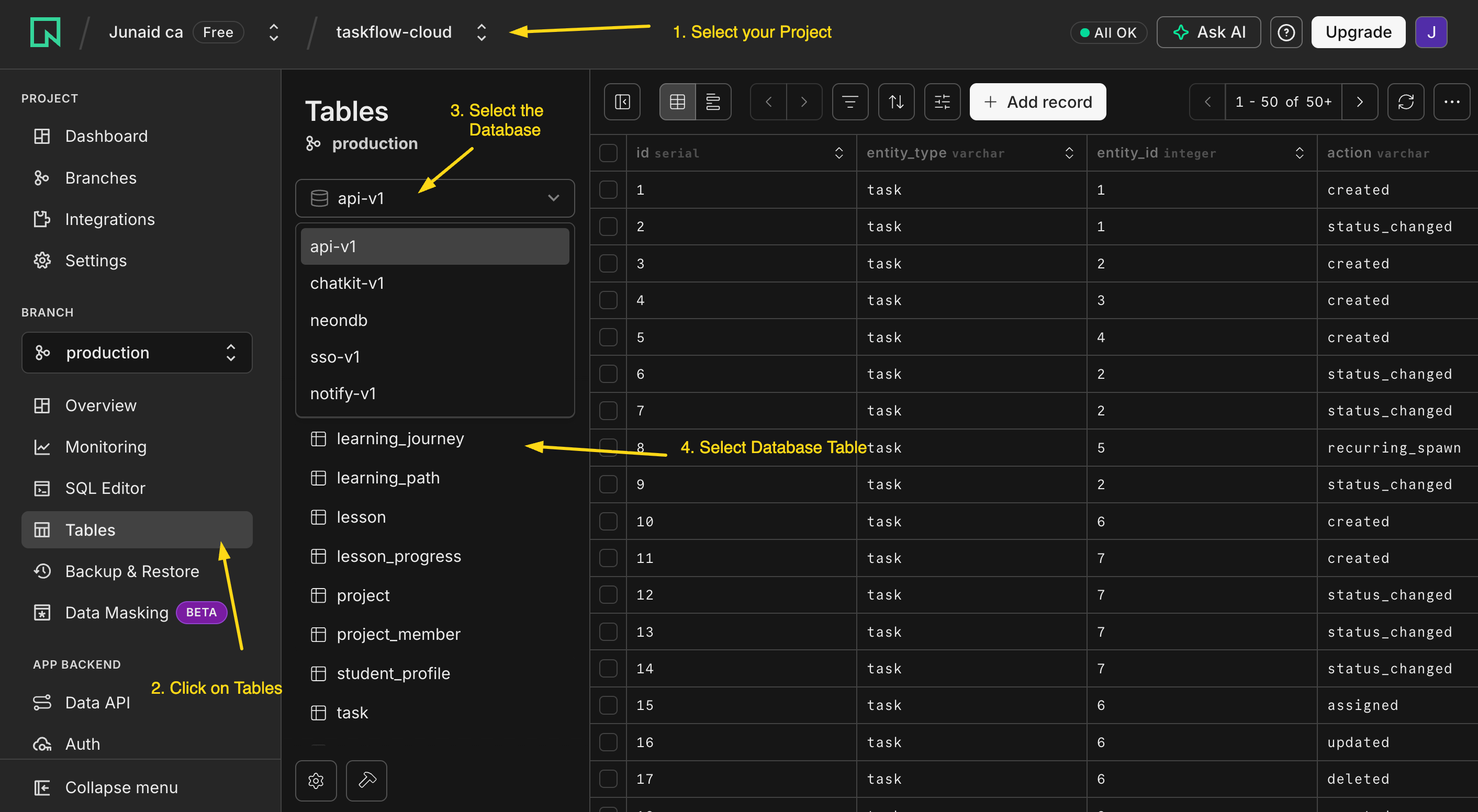
console.neon.tech kholein, woh project chunein jo agent ne abhi banaya, aur Tables kholein. Wahan notes aur audit_log baithe hain, abhi ke liye khaali. Ek table bas ek spreadsheet hai: har row ek cheez, har column ek tafseel. Aap ant mein is view ko refresh karenge aur ek row ko aate dekhenge.
Worker scaffold karein aur ek baar chalayein (~2 min)
Ab khud Worker banayein: ek minimal SandboxAgent, wohi runtime jo baaqi course istemaal karta hai, abhi koi tool nahin. Ise pehle khaali chalana sabit karta hai ke runtime kaam karta hai aur aap ki key theek hai, is se pehle ke aap koi aur cheez add karein jo fail ho sakti hai.
uvka istemaal karte hue, is folder mein ek minimal OpenAI Agents SDK project scaffold karo: ek gpt-5-class model (jaisegpt-5-mini) par ekSandboxAgentjis ke abhi koi tools nahin, terminal se ek local sandbox par chalaya jaata hai,.envseOPENAI_API_KEYparhte hue. Ise "hello" ke saath ek baar chalao taake mein ise jawab dete dekh sakoon.
Is par nazar rakhein: agent uv ke saath project set up kar raha hai, ek chota SandboxAgent plus Runner script likh raha hai (UnixLocalSandboxClient par, zero infrastructure), aur ise chala raha hai. Ek reply wapas aata hai.
Yeh pehli baar hai ke aap ki key istemaal hoti hai, to yeh pehli jagah hai jahan ek kharaab key zaahir hoti hai. Agar run 401s deta hai, to key ghalat hai ya aap ka provider OpenAI nahin: yeh paste karein "run 401 ke saath fail hua; error parho aur ek fix tajweez karo jise mein approve kar sakoon."
Tab ho jaaye jab: khaali Worker chale aur jawab de.
Worker ko uska tool dein, aur use yaad rakhte dekhein (~3 min)
Ab woh ek capability add karein: ek tool jo ek note aur uski audit row, ek transaction mein, us database mein likhta hai jo aap ne banaya.
Worker mein ek
save_notetool add karo, jise@function_toolke taur par likha gaya ho, jonotesmein ek row auraudit_logmein ek milti-julti row ek hi transaction mein insert karta hai,.envmeinDATABASE_URLka istemaal karte hue. Phir Worker ko chalao aur use bhejo: "Remember this: the production deploy needs a new env var before Friday." Mujhe dikhao ke kya hua.
Is par nazar rakhein: model aap ke jumle ko khud save_note se match kar raha hai (tool ki description hi uska wahid routing signal hai), aur tool DATABASE_URL ke saath ek connection khol kar dono rows ek transaction mein likh raha hai. Worker report karta hai ke note save ho gaya. Ghaur karein ke us ne kya nahin kiya: us ne kabhi Neon MCP ki taraf haath nahin barhaaya. Admin wire ne store banaya; Worker apna khud ka narrow tool istemaal karta hai.
Tab ho jaaye jab: Worker tasdeeq kare ke note save ho gaya aur aap ko woh save_note call dikhaye jis ne yeh kiya. Ek jumla andar, ek tool call, do rows likhi gayin.
Jeet: ise wapas parhein (~2 min)
Ek lamhe pehle wala Neon console Tables view refresh karein. Aap ka note ab notes mein ek row hai, aur audit_log mein ek milti-julti row note_saved record karti hai, jo us se ek hi id se judi hui hai. (Terminal mein rehna pasand karte hain? Apne coding agent se poochein: "Neon tools istemaal karte hue, mujhe nayi notes row aur uski milti-julti audit_log row ek dusre ke saath dikhao.")
Yeh chote paimane par poora architecture hai: ek system of record jo sachaai rakhta hai, ek Worker jo us mein apne khud ke tool ke zariye likha, aur ek audit trail jise aap replay kar sakte hain.
Aap ne kya banaya, aur yeh kahan barhta hai
Aap ne ek plain @function_tool istemaal kiya kyunke ek Worker ek store mein likhta hai, jo theek default hai, koi shortcut nahin. Aap ek chote MCP server ki taraf tab haath barhate hain jab in teen mein se koi ek zaahir ho: ek doosra consumer jise wohi save_note chahiye (ek aur Worker, aap ka coding agent, khud Claude), ek zyada tang scope jise aap enforce karna chahte hain, ya process isolation. Woh decision, ek function tool versus aap ka apna server, Concept 14 hai, aur Part 4 server banata hai.
Part 4 isi shape ko kayi Skills, paanch-table schema, kuch tools, aur ek embedding pipeline tak scale karta hai. Shape nahin badalti: ek system of record, usi transaction mein audit, aur admin wire aur Worker ki apni access ke darmiyaan ek saaf line. Agar yeh Quick Win chala, to baaqi course bas yeh samjhana hai ke har hissa is shape mein kyun hai.
Agar kuch kaam nahin kiya, to woh ek recovery move paste karein jo sab kuch cover karti hai: "Kuch kaam nahin kiya. Error parho, mujhe saaf zubaan mein batao ke tum kya dekh rahe ho, aur ek fix tajweez karo jise mein approve kar sakoon." Phir yahan wapas aa jaayein.
Part 1: Skills, capability portable folders ke taur par
Aap pehle hi Claude Code ke andar Skills istemaal kar chuke hain. Part 1 wohi on-demand, professional workflows us agent ko deta hai jise aap banate hain. Ek Skill ek reusable capability hai jo aap ek agent ko dete hain: ek folder jo ek workflow (instructions, plus koi scripts ya references) ko package karta hai jise agent sirf tab load karta hai jab koi task uska taqaaza kare, agents ke darmiyaan portable bajaaye is ke ke woh ek agent ke code mein pakaaya gaya ho. Yeh paanch concepts aap ko aisi Skills likhna sikhate hain jo tab fire hon jab honi chahiye, aur Part 1 ek ko aap ke Worker ke apne SDK mein chala kar khatam hota hai, usi digital-fte folder mein.
Concept 1: Ek Agent Skill kya hai
Ek Agent Skill ek folder hai jis mein ek SKILL.md file hoti hai (plus optional scripts/, references/, assets/). SKILL.md entry point hai. Yeh Anthropic ka ek open standard hai jise koi bhi agent parh sakta hai: aaj Claude Code aur OpenCode, aur jo OpenAI Agents SDK Worker aap bana rahe hain. Sab se chota skill ek file hai:
---
name: hello-skill
description: Greets the user by name and time of day. Use when the user says hello or asks to be greeted.
---

# Hello skill

1. Check the local time of day.
2. Greet the user warmly, by name if known, in under 25 words.
Koi code nahin, koi deploy nahin, koi SDK call nahin. Kyunke yeh disk par ek file hai, ek skill version, safar, aur review hoti hai jaise koi bhi text, na ke kisi Python object ya API endpoint ki tarah.
Yahan se aage yeh course text mein chhote PRIMM checkpoints rakhta hai (Predict, Run, Investigate, Modify, Make): har checkpoint aap se jawab dekhne se pehle aik prediction par commit karwata hai, kyunke committed guess hi parhne ko seekhne mein badalta hai.
PRIMM, Predict. Agent startup par kya load karta hai, koi message aane se pehle? (a) poora
SKILL.md; (b) sirfnameaurdescription; (c) kuch bhi nahin jab tak invoke na ho. Confidence 1–5.
Jawab (b) hai: startup par agent sirf har skill ka metadata parhta hai; body on demand load hoti hai. Yeh progressive disclosure hai, agla concept.
Concept 2: Progressive disclosure, teen-stage loading model
Pachaas skills ek saath load karne se model un instructions mein dab jaayega jo use nahin chahiye. To ek skill teen stages mein load hoti hai, har ek sirf tab fire karti hai jab pichli kahe ke woh relevant hai.
Stage 1, Discovery. Startup par agent har skill ka name aur description load karta hai, taqreeban 100 tokens har ek. Pachaas skills har turn par taqreeban 5,000 tokens kharch karti hain: yeh jaanne ki keemat ke library mein kya hai.
Stage 2, Activation. Jab model ek task ko ek description se match karta hai, woh us poore SKILL.md body ko load karta hai (ise ~5,000 tokens se neeche rakhein; zyada-tar 500–2,000 par baithti hain). Sirf un turns par ada hota hai jo skill istemaal karte hain.
Stage 3, Execution. Jo files body reference karti hai (ek scripts/ script, ek references/ doc) sirf tab load hoti hain jab agent un ki taraf haath barhata hai.
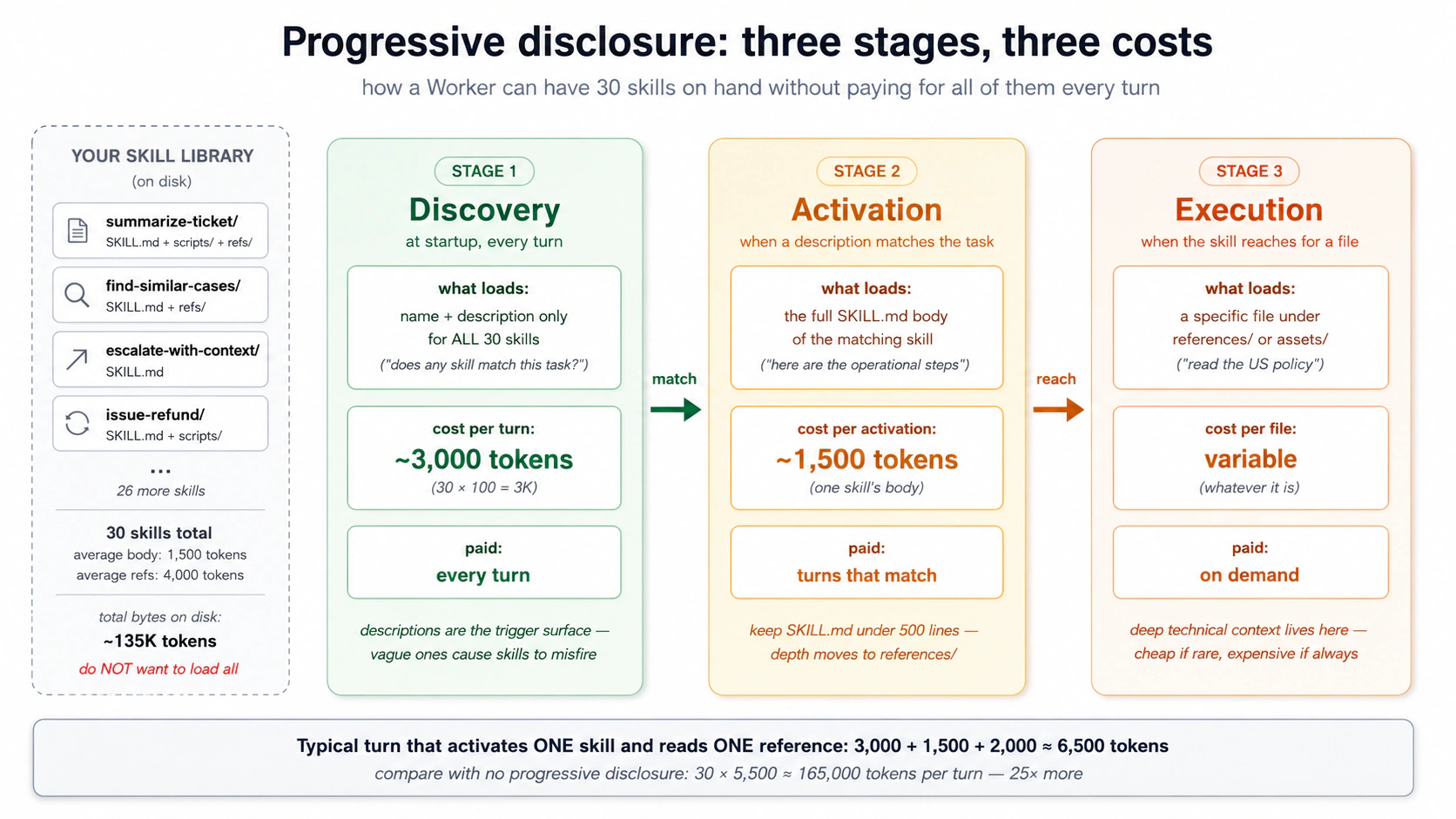
PRIMM, Predict. Ek Worker ke paas 30 skills hain: har ek ka ~100-token description, ~1,500-token body, do reference files (~4,000 tokens kul) har ek. Ek aise turn par jo ek skill activate karti hai aur uska ek reference parhti hai, motey taur par context cost hai: (a) ~3,000 tokens; (b) ~6,500 tokens; (c) ~135,000 tokens. Confidence 1–5.
Jawab (b), ~6,500 tokens hai: discovery ke liye 30 × 100 (3,000), plus ek 1,500-token body, plus ek ~2,000-token reference. Discovery library ke size ke saath scale karti hai; activation aur execution har turn constant rehte hain. Progressive disclosure ke baghair aap har turn tamaam 30 bodies aur un ke references ada karte, sirf yeh jaanne ke liye ke agent kya kar sakta hai ~165,000 tokens. Koi bhi woh nahin chalata.
Do cheezein is se nikalti hain, aur woh agle teen concepts ko chalaati hain: Stage 1 mein description hi fire karti hai, to woh sab kuch tay karti hai; aur lambi bodies aap ko har match karne wale turn par mehngi parti hain, to SKILL.md ko tight rakhein aur gehraai references/ mein dhakel dein.
Concept 3: description trigger hai, aur woh ek hissa jo aap ka hai
Ek SKILL.md ke do hisse hote hain: YAML frontmatter (jo contract model parhta hai) aur markdown body (jo instructions woh follow karta hai). Sirf do frontmatter fields zaroori hain:
| Field | Zaroori | Yeh kya hai |
|---|---|---|
name | Haan | Skill ka identifier (lowercase, hyphens, folder name se match karta hai). |
description | Haan | Trigger surface: jo agent discovery par parhta hai yeh tay karne ke liye ke yeh skill fire karni hai ya nahin. |
(license, compatibility, metadata, allowed-tools optional hain aur shaaz hi zaroori; skill-creator inhein bharta hai.)
Description hi poora khel hai, aur yeh woh hissa hai jo scaffold ghalat karta hai. Woh ek circular likhti hai: "Summarizes a ticket into five sections. Use when the user wants to summarize a ticket." Yeh "summarize this ticket" par fire karti hai lekin yeh chook jaati hai ke support asal mein kaise baat karta hai: "write a handoff note for #4471," "TL;DR this thread," "give my lead the rundown before I escalate." Generic version 8 mein se taqreeban 6 asal phrasings pakarti hai; ek haath se likhi hui sab 8 pakarti hai.
Ek aisi description jo bharose se fire karti hai woh teen cheezein karti hai, plus ek guardrail:
- Kya woh banaati hai (asal output ka naam lein: paanch sections, ek ticket par).
- Kab uski taraf haath barhana hai (asal soortein: handoff, escalation, ek manager ko briefing, kisi aur ki thread uthana).
- Keywords jo users asal mein type karte hain, un sameht jo kabhi zaahir lafz nahin kehtin ("handoff note," "TL;DR this thread," "where does this stand").
- Ek do-NOT line un look-alikes ke liye jinhein khaamosh rehna chahiye (ek customer reply draft karna, ek batch triage karna, ticket volume par report karna).
Ek self-check jo circular descriptions ko maar deta hai: apni description se zaahir keyword ("summarize") delete kar dein. Kya yeh ab bhi kehti hai ke kab fire karna hai? Agar nahin, to yeh bohot tang hai.
Body, convention ke mutaabiq. Koi zaroori format nahin, lekin achhi skills imperative hoti hain ("Read the full thread. List what was tried."), ek ya do asal examples rakhti hain (steering ke liye motey taur par ek description se 5× zyada qeemti), aur do ya teen edge cases ka naam leti hain jo asal mein toot chuke hain.
PRIMM, Predict. Do skills
namesummarize-documentshare karti hain: ek~/.claude/skills/mein (user-level), ek.claude/skills/mein (project-level). Ek task dono se match karta hai. Kya hota hai? (a) random pick; (b) project-level jeetta hai; (c) model chunta hai. Confidence 1–5.
(b), project-level jeetta hai Claude Code aur OpenCode dono mein: zyada specific context zyada general ko override karta hai, usi tarah jaise ek project rules file ek global ko override karti hai.
Concept 4: Packaging, skills kahan rehti hain aur kaise safar karti hain
Ek skill bas disk par ek folder hai, to aap ise kahan rakhte hain yeh tay karta hai ke kaun se agents ise dhoondte hain. Ek rule poore is course ko cover karta hai: apni skills OpenCode pehle apna folder check karta hai, phir .claude/skills/ mein rakhein. Claude Code woh folder parhta hai, OpenCode us par fall back karta hai, aur aap ke Worker ka SDK seedha us par point karta hai (LocalDir(src=".claude/skills"), oopar wale hands-on se). Skill ek baar likhein aur teenon wohi folder load karte hain, byte-for-byte.Poora path map (per tool, project vs. user-level)
Tool Project-level User-level (global) Claude Code .claude/skills/<name>/SKILL.md~/.claude/skills/<name>/SKILL.mdOpenCode .opencode/skills/<name>/SKILL.md~/.config/opencode/skills/<name>/SKILL.mdOpenCode (fallback) .claude/skills/<name>/SKILL.md~/.claude/skills/<name>/SKILL.md.claude/skills/ par fall back karta hai; Claude Code sirf .claude/ parhta hai. Isi liye .claude/skills/ woh ek location hai jo har jagah kaam karti hai.
Ek skill ke folder mein ek zaroori file aur teen optional folders hote hain, har ek ka ek kaam:
my-skill/
├── SKILL.md      # required: frontmatter + body, the entry point
├── scripts/      # optional: code the agent runs (by relative path)
├── references/   # optional: deep docs, loaded on demand, one topic per file
└── assets/       # optional: templates, schemas, lookup tables
SKILL.md ke andar, un files ko relative path se point karein (references/policies/us.md, scripts/extract.py); woh skill ke apne folder se resolve hoti hain, na ke jahan kahin agent chal raha ho. references/ ko shallow rakhein, ek topic per file.
Concept 5: Skills compose karna, ek bara vs. kayi chote
Ek "weekly customer-health report" ek skill ho sakti hai jo research, draft, format, aur review kare, ya chaar skills jo filesystem ke zariye handoff karein. Dono kaam karti hain, ulte trade-offs ke saath.
- Ek bara skill: dhoondhna aasaan, ek activation. Lekin har step ek hi context mein chalta hai, koi cheez akeli reusable nahin, aur beech mein ek failure model ko context mein baasi kaam ke saath recover karne par chhor deti hai.
- Kayi chote skills: har ek ko alag se test, replace, aur reuse kiya ja sakta hai; ek failure localized hoti hai; har step taaza activate hoti hai, to koi bacha hua context jama nahin hota. Laagat zyada discovery entries aur unhein chain karne ke liye kuch.
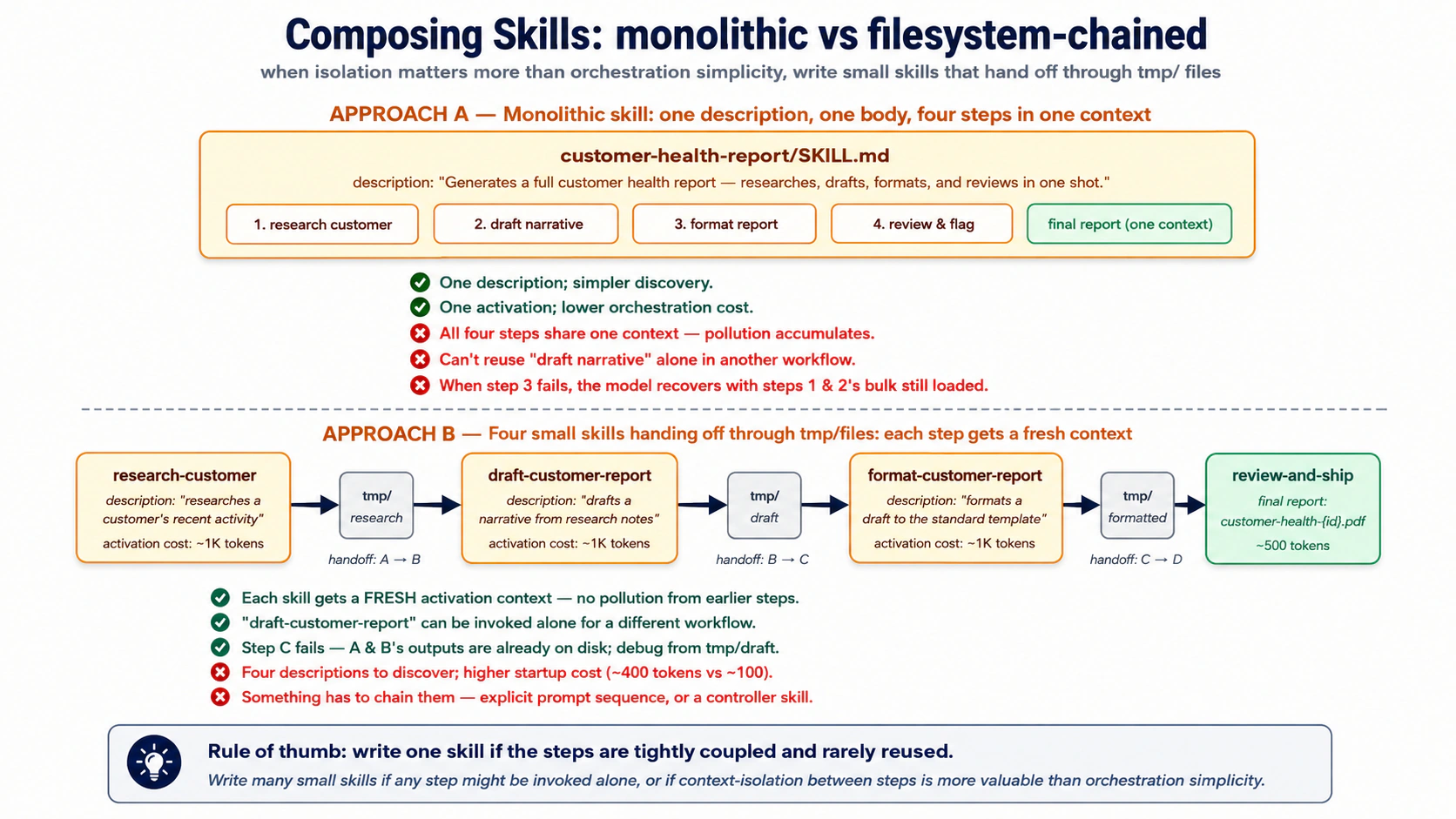
Ek skill likhein jab steps tightly coupled hon aur kabhi akele reuse na hon. Kayi likhein jab koi step apne aap call ho sakta ho, ya jab har step ka context saaf rakhna wiring saadda rakhne se zyada ahem ho. Do ya teen steps ke baad separation aam taur par jeetta hai.
Inhein filesystem ke zariye chain karein, conversation ke zariye nahin. Skill A tmp/research-{id}.md likhti hai, Skill B ise parhti hai aur tmp/draft-{id}.md likhti hai, aur aage isi tarah. Conversation sirf aakhri result dekhti hai; beech ke steps disk par rehte hain agent, aap, aur audit trail ke liye. Wohi isolation jo pichle course ne subagents ke liye istemaal kiya, ab skill ke size par.
Aur yeh Part 2 ki taraf bridge hai: kuch handoffs ek temp file mein nahin hote, woh system of record mein hote hain. Ek skill jo tmp/ mein likhti hai woh ek draft hai; ek skill jo system of record mein likhti hai woh ek action hai. Woh farq hi woh hai jo Part 2 banata hai.
Try with AI
Compare two designs for a customer-refund workflow:
A: one "issue-refund" skill (eligibility, policy, amount, gateway, ticket, notify).
B: five small skills chained via tmp/ handoffs.

For each, name one situation where it's the right call and one failure mode
it's vulnerable to. Then say which you'd ship, and why.
Dono runtimes mein ek skill fire karein (~10 min, hands-on)
Aap ne kaafi parh liya; ab us agent ke andar ek skill fire karte dekhein jise aap banate hain. Quick Win wala wohi digital-fte folder kholein, jahan aap ka SandboxAgent pehle se chalta hai. Ise ek baar ek throwaway skill par chalayein taake mechanics waaqfiyat aa jaaye (yeh woh move hai jo Decision 4 asal mein karta hai), aur dekhein ke jo .claude/skills/ files aap pehle se Claude Code mein istemaal karte hain woh aap ke Worker ke apne SDK mein bilkul usi tarah kaam karti hain.
1. Ise scaffold karein. Aap ko ek general agent aur Node install chahiye (npx ke liye). Yeh paste karein:
Use skill-creator to scaffold a summarize-ticket skill. It turns one support ticket into a
short five-section handoff. Make it fire on how support actually asks (handoff note, TL;DR
this thread, "what's the status and next step"), including phrasings that never say
"summarize", and not on look-alikes (drafting a reply, triaging a batch). Then check it:
delete "summarize" from the description; if it no longer says when to fire, sharpen it.
Body achhi wapas aati hai; description parhein aur ise sharpen karein jab tak yeh delete-the-keyword check paas na kar le. Woh review hi skill hai, aur woh hissa jo koi scaffold aap ke liye nahin karta.
2. Ise ek client mein fire karein (optional, zero wiring). Agar aap ke paas Claude Code ya OpenCode installed aur signed in hai, to folder wahan kholein aur use ek ticket handle karne ko kahein baghair "summarize" kahe (jaise "write a handoff note for case #4471 before I escalate"). Client .claude/skills/ discover karta hai, aap ki description se match karta hai, aur summarize-ticket activate karta hai. Ek caveat: agar ek request itni saadi ho ke model use seedha jawab de de, to koi skill fire nahin hoti, aur woh model ka faisla hai, koi description bug nahin; ek asal handoff se test karein, ek-line ke sawaal se nahin. Sirf-SDK readers step 3 par skip kar sakte hain.
3. Ise OpenAI Agents SDK mein fire karein. Ab skill ko apne Worker ke apne runtime mein wire karein, aur ise us tarah karein jaise aap Part 4 mein sab kuch karenge: aap prompt karte hain, agent plan karta hai, aap approve karte hain, woh build aur run karta hai. Aap abhi digital-fte folder mein hain, to uv project aur OPENAI_API_KEY carry over hote hain. Yeh paste karein:
summarize-ticketskill ko ek minimalSandboxAgentmein wire karo jise mein is folder se chala sakoon: ekSkillscapability jo.claude/skillspar point karti ho, default capabilities barqaraar rakhi hon, ek gpt-5-class model, ek local sandbox par. Yaqeeni banao keopenai-agentsinstalled hai. Pehle plan.
Yeh wahi SandboxAgent shape hai jaisa Quick Win, jis mein save_note tool ki jagah ek Skills capability hai (ek gpt-5-class model ahem hai: default capabilities mein ek filesystem tool shaamil hai jise chote models 400 ke saath reject karte hain). Jab plan theek lage, to approve karein aur ek hi baar mein live-test karein:
Ise implement karo, phir ise "write a handoff note for case #4471: no refund, two weeks" ke saath chalao aur mujhe trace dikhao taake mein skill ko fire hote dekh sakoon.
Tasdeeq karein ke yeh fire hui, trace mein. SDK har run ko usi OpenAI dashboard par trace karta hai jo aap ne pichle course istemaal kiya: platform.openai.com/traces kholein aur aap run mein summarize-ticket ke liye load_skill call dekhenge, phir paanch-section reply. (Koi dashboard nahin? print loop wahi load aap ke terminal mein dikhata hai.) .claude/skills source hai; .agents/ woh jagah hai jahan ek loaded skill run time par stage ki jaati hai. Wohi file, do runtimes: yahi portable capability hai, aur Decision 8 ise mukammal Worker mein wire karta hai.
Yeh concepts ek mazboot instruction-follower farz karte hain (Claude Sonnet/Opus, GPT-5-class). Ek chote model par (deepseek-chat, Haiku-class, zyada-tar local models), teen cheezein drift karti hain:
- Multi-skill sequencing. "ALWAYS run X before Y" mazboot models par land karta hai, kamzor par phisalta hai. Fix: order ko system prompt mein ek chote GENERAL-FLOW preamble mein rakhein; SKILL bodies ko declarative rakhein.
- Format drift. Ek kamzor model emojis, tables, ya aap ke inputs ka paraphrase add karta hai. Saaf rahein ke kya NAHIN karna, sirf kya karna nahin.
- Trigger blindness. Ek description jo "summarize ticket TKT-1042" par fire karti hai woh "what's the story on #1042" chook sakti hai. Concept 3 ki discipline ek kamzor model par zyada ahem hai, kam nahin.
Rule of thumb: mazboot model ki mehnat SKILL.md mein budget karein, kamzor model ki mehnat system prompt mein. Architecture barqaraar rehti hai; aap bas us ke ird gird zyada scaffolding likhte hain.
Part 2: Neon Postgres + pgvector system of record ke taur par
Part 1 ne agent ko capabilities deen. Ab use kahin paaedaar jagah chahiye jahan woh apni woh cheezein rakhe jo bhoolne ka khatra woh nahin uthha sakta: customer record, policy library, guzishta hal-shuda cases, aur us ne jo kuch kiya uska ek trace.
Woh store aap ke Worker ka system of record hai, woh baasandeeda store jis ke khilaaf woh chalta hai (shuruaati map ka CRM-ya-ledger khayaal, ab thos banaya gaya). Yeh Postgres hai pgvector extension ke saath; Concept 6 samjhata hai ke ek dedicated vector database ke muqaable kyun. Hum Neon istemaal karte hain: shuru karne ke liye muft, idle hone par kuch nahin laagat, aur aap ka coding agent ise seedha chala sakta hai, lekin koi bhi managed Postgres pgvector ke saath kaam karta hai.
Us map se chaar qism ke data mein se, business records (customers, orders, tickets) aap ke business ke khaas hote hain, to woh aap Part 4 mein banate hain. Jo yeh Part banata hai woh baaqi teen hain, woh hisse jo har Worker share karta hai, ab un asal tables se map kiye gaye jo unhein rakhti hain:
- Reference library: woh knowledge jise Worker ma'ni se search karta hai, policy library, knowledge-base articles, guzishta hal-shuda cases ke summaries. Yeh
documentsaurembeddings(Concepts 8 aur 9) mein rehti hai. - State: live conversation. Iske turns agent SDK ki Session mein rehte hain, jise SDK aap ke liye banaata aur likhta hai, to aap kabhi woh tables design nahin karte (Concept 7); ek
conversationsrow un ke saath baithti hai, session id se judi hui, envelope ke taur par: kaun, kab, ek closing summary. - Trace: woh record ke Worker ne kya kiya,
audit_logledger (Concept 10). (Ek optional companion table,capability_invocations, per-skill aur per-tool metrics add karti hai.)
Concept 6: Managed Postgres kyun, aur khaas taur par Neon kyun
Thesis systems of record ke baare mein product-agnostic rehta hai: "AI-Native Company ke mojooda databases, workflows, aur operational platforms (CRMs, ERPs, ticketing systems, data warehouses, ledgers) system of record ka kaam dete hain." Ek aise agent ke liye jo aap shuru se banate hain, magar, aap ko kuch chunna parta hai. Sawaal "Postgres vs. MongoDB vs. ek vector DB" nahin hai. Yeh "kaun sa Postgres" hai.
Postgres kyun, ek dedicated vector database nahin. Teen wajuhaat jo 2026 mein bhi barqaraar hain.
-
Ek database, ek transaction, ek auth boundary. Ek alag vector DB ka matlab hai sync mein rakhne ke liye do stores, do auth systems, do backup pipelines.
pgvectorvectors ko un records ke saath rakhta hai jin se woh ta'alluq rakhti hain, to ek JOIN ek JOIN rehta hai, do services ke darmiyaan ek network hop nahin. Har bara managed Postgres (AWS RDS, Cloud SQL, Azure, Supabase, Neon) ise deta hai, aur yeh sab se zyada install ki janay wali Postgres extensions mein se hai. Zyada-tar workloads ke liye yeh kaafi hai. -
Postgres pehle hi mushkil hisse kar deta hai. Transactions, indexes, foreign keys, row-level security, point-in-time recovery, query planning. Ek dedicated vector DB ko inhein shuru se ijaad karna parta hai aur aam taur par kuch ko zyada kharaab karta hai. Default boring choice ke jamaa hote faaeede hain.
-
MCP servers Postgres ke liye har layer par mojood hain. Neon ek deta hai (management ke liye). General Postgres MCP servers mojood hain (SQL execution ke liye). Aap apna khud ka likh sakte hain (scoped runtime access ke liye). Postgres ke ird gird MCP ecosystem sab se zyada pukhta hai.
Kab ek dedicated vector DB jeetta hai. Pinecone, Weaviate, Qdrant, aur Milvus jaise tools tab is laayeq hain jab search-by-meaning hi product ho, na ke aap ke business data ke saath baithta ek feature. Nishaaniyaan extreme hoti hain: itne saare vectors ke woh ab ek Postgres server ki memory mein nahin samate, search traffic itna bhaari ke ek sirf-vectors ke liye bana engine chahiye, ya vectors kayi alag services dwara apne aap istemaal hote hon. Koi tay number nahin jahan pgvector haar maan le, to ek figure par bharosa karne ke bajaaye apna data test karein. Ek Worker jis mein ek tickets table aur uske saath uski embeddings hon woh us nuqte se bohot door hai, to pgvector theek default hai.
Khaas taur par Neon kyun: teen differentiators.
-
Yeh zero tak scale hota hai. Jab database idle hota hai, iski laagat kuch nahin. Ek Worker jo din mein 50 conversations handle karta hai woh zyada-tar waqt idle baithta hai, to yeh hamesha-on server ke liye maahaana ada karne ke bajaaye $0 ke qareeb rehta hai. Yeh tab ahem hai jab aap kayi Workers chalate hain jo har ek sirf jhonkon mein masroof hote hain.
-
Yeh branch karta hai. Sekunds mein, Neon aap ke live database ki ek mukammal copy banata hai jis par kaam karein, asal ko chhoore baghair. Agent-relevant istemaal: agent ko ek branch par ek change try karne dein, aur agar woh ghalat ho jaaye, to bas branch delete kar dein. Ek aise database par jo branch nahin kar sakta, ek kharaab change undo karne ka matlab hai ek backup se restore karna.
-
Iska ek official MCP server hai. Neon ek MCP server deta hai jis se aap ka coding agent baat kar sakta hai, to woh saadi zubaan mein projects bana sakta hai, branches manage kar sakta hai, aur migrations chala sakta hai. Ise build karte waqt istemaal karein; Concept 12 samjhata hai ke yeh chalte hue Worker ke liye kyun nahin.
Try with AI
A teammate proposes splitting the stores: Postgres for the relational
data (customers, tickets, orders) AND a separate Pinecone index for the
embeddings, "because Pinecone is purpose-built for vectors."

Context for you, the assistant: keeping vectors in Postgres (via the
pgvector extension) next to the relational data means one query can
filter by business state, rank by similarity, and return the full
record in a single transaction. Splitting the stores forces the agent
to round-trip between two services, denormalize and sync metadata
across them, and give up cross-store transactional consistency.

1. Make the case against the split as concretely as you can on ONE
   request: a support Worker gets a message and must answer "have we
   seen this before, and what did we tell them?" Show exactly what that
   request costs when the vectors live in Pinecone and the tickets live
   in Postgres. Name the join, what happens to ranking at the LIMIT
   boundary when you filter in application code, and how an embedding
   goes stale after a resolution is updated.
2. Name the ONE condition under which the teammate is actually right and
   a dedicated vector DB is the better call. Be specific about the scale
   at which the crossover happens.
3. Neon adds two properties a plain Postgres box doesn't: scale-to-zero
   (an idle Worker's database costs nothing) and branching (the agent
   forks a production-fidelity copy of the data, experiments or migrates
   on it in isolation, then verifies before merging). Which matters more
   for an AI Worker specifically, and why? Defend your pick in two
   sentences.
Concept 7: Worker ka schema, ek agent ko asal mein kaun si tables chahiye
Ek database schema bas woh tables hain jo aap rakhte hain aur har ek mein columns, aap ke data ki shape. Paanch tables jo worked example banata hai woh system of record ke woh share-shuda hisse hain jo har Worker ko chahiye; khud business records Part 4 mein aate hain. Yeh do groups mein girti hain, to aap dekh sakte hain ke kya zaroori hai aur kya optional.
Chaar tables har Worker rakhta hai, share-shuda reer ki haddi. Yeh Part opener se state, reference library, aur trace rakhti hain, ab tables ke taur par:
conversations(state): per conversation ek row, yeh kis ke saath thi, kab, aur ant mein ek chota summary. (Turn-by-turn messages alag se store hote hain, SDK dwara; neeche dekhein.)documentsaurembeddings(reference library):documentstext rakhti hai (policies, guzishta cases);embeddingswoh hai jo ise ma'ni se searchable banaati hai. Ek embedding ek text ke tukre ko numbers ki ek list mein badal deti hai jo iska topic capture karti hai, to ta'alluq rakhne wala text aapas mein qareeb a jaata hai, jaise ek board par notes pin karna jahan milte-julte aapas mein cluster ho jaate hain, aur "relevant dhoondo" "nearest dhoondo" ban jaata hai. (Concept 9 ise banata hai; yahan, bas jaan lein keembeddingssearch-by-meaning layer hai.)audit_log(trace): Worker ne kya kiya iska ek chalta record, har action tarteeb mein, business events sameth jaise ek refund issue hona.
Ek aur jo aap tab add karte hain jab zaroorat ho, usage analytics.
capability_invocations: har baar ek row jab Worker ek skill chalata hai ya ek tool call karta hai (dono yeh ek table share karte hain; ek column nishaan-zad karta hai ke kaun sa, to aap kabhi per tool ek table nahin barhate), is ke saath ke kitna waqt laga, kamyaab hui ya fail, aur ek motey andaaze ki laagat. Ise tab add karein jab aap SQL mein capability-usage analytics chahein: ek skill kitni baar fire karti hai, iski error rate, kya aam taur par ek escalation se pehle aata hai.
Do aur tables is set se bahar rehti hain, dono Part 4 mein: aap ki business-specific tables (customers, tickets, orders), aur run_states, jo ek rukah hua approval store karta hai jab ek human baad mein ya kisi aur process mein sign off karta hai bajaaye foran. Koi bhi share-shuda reer ki haddi ka hissa nahin.
Khud messages kahan jaate hain? Ek transcript aur ek cover sheet ka tasavvur karein. Transcript har message hai, aap ka sawaal, model ka reply, har tool call, har ek apni row ke taur par rakha gaya; SDK ise aap ke liye likhta aur rakhta hai (Decision 3 mein wired), to aap kabhi ise nahin banate. Cover sheet woh wahid conversations row hai jo aap likhte hain: kaun, kab, ek summary, plus business details jaise user_id jo SDK ki apni tables nahin rakhtin. Aap ise rakhte hain kyunke transcript "is customer ki aakhri paanch conversations dikhao" ka jawab nahin de sakta; yeh conversations par ek quick lookup hai, transcript se us session id se joda gaya jo woh share karte hain. Yeh optional hai: agar aap ko kabhi per-user lists ya summaries ki zaroorat nahin, to akela transcript kaafi hai.
In paanchon tables ke liye poori SQL neeche box mein hai. Aap ka coding agent ise Decision 3 ke plan se likhta hai, to aap ise skim kar sakte hain; jo ahem hai woh yeh jaanna hai ke har table kis liye hai.Poora schema (chaar share-shuda tables plus optional capability_invocations)
-- 1. CONVERSATIONS: business metadata per conversation (your app writes this row)
CREATE TABLE conversations (
    session_id  TEXT PRIMARY KEY,   -- the SAME id you pass to SQLAlchemySession
    user_id     TEXT NOT NULL,
    started_at  TIMESTAMPTZ NOT NULL DEFAULT NOW(),
    ended_at    TIMESTAMPTZ,
    metadata    JSONB NOT NULL DEFAULT '{}'::jsonb,
    -- searchable summary; your app writes it at conversation end
    summary     TEXT
);
CREATE INDEX idx_conversations_user ON conversations(user_id, started_at DESC);
-- The turns themselves live in the SDK Session's tables (agent_sessions /
-- agent_messages, via SQLAlchemySession), created automatically on this same
-- database and keyed by this session_id; you do not hand-build them.

-- 2. DOCUMENTS: the agent's reference library
CREATE TABLE documents (
    id          UUID PRIMARY KEY DEFAULT gen_random_uuid(),
    source      TEXT NOT NULL,      -- 'policy_library', 'kb_article', 'past_case', etc.
    title       TEXT NOT NULL,
    body        TEXT NOT NULL,
    metadata    JSONB NOT NULL DEFAULT '{}'::jsonb,
    created_at  TIMESTAMPTZ NOT NULL DEFAULT NOW(),
    updated_at  TIMESTAMPTZ NOT NULL DEFAULT NOW()
);
CREATE INDEX idx_documents_source ON documents(source);

-- 3. EMBEDDINGS: vector representations of documents AND past conversations
CREATE TABLE embeddings (
    id              UUID PRIMARY KEY DEFAULT gen_random_uuid(),
    -- one of these is populated; the other is NULL
    document_id     UUID REFERENCES documents(id) ON DELETE CASCADE,
    conversation_id TEXT REFERENCES conversations(session_id) ON DELETE CASCADE,
    chunk_text      TEXT NOT NULL,
    chunk_index     INT NOT NULL,
    embedding       VECTOR(1536) NOT NULL,
    model           TEXT NOT NULL,  -- 'text-embedding-3-small', etc.
    created_at      TIMESTAMPTZ NOT NULL DEFAULT NOW(),
    CHECK (
        (document_id IS NOT NULL)::int + (conversation_id IS NOT NULL)::int = 1
    )
);
-- the key index for semantic search; see Concept 8
CREATE INDEX idx_embeddings_hnsw
  ON embeddings USING hnsw (embedding vector_cosine_ops);

-- 4. AUDIT_LOG: replayable trace of how the Worker changed or used the record
CREATE TABLE audit_log (
    id              BIGSERIAL PRIMARY KEY,
    conversation_id TEXT REFERENCES conversations(session_id) ON DELETE SET NULL,
    actor           TEXT NOT NULL,        -- 'worker:customer-support', 'system', etc.
    action          TEXT NOT NULL CHECK (action IN (
                        'message_received', 'message_sent', 'skill_activated',
                        'capability_invoked', 'refund_issued', 'refund_blocked',
                        'guardrail_tripped', 'corpus_seeded'
                    )),                   -- closed vocabulary; widening it is a migration (Concept 10)
    target          TEXT,                 -- table name, skill name, etc.
    payload         JSONB NOT NULL,       -- the data of the action
    result          JSONB,                -- what happened
    created_at      TIMESTAMPTZ NOT NULL DEFAULT NOW()
);
CREATE INDEX idx_audit_conv ON audit_log(conversation_id, created_at);
CREATE INDEX idx_audit_action ON audit_log(action, created_at);

-- 5. CAPABILITY_INVOCATIONS: every skill or tool call, for replay and metrics
CREATE TABLE capability_invocations (
    id              UUID PRIMARY KEY DEFAULT gen_random_uuid(),
    conversation_id TEXT NOT NULL REFERENCES conversations(session_id) ON DELETE CASCADE,
    capability      TEXT NOT NULL,        -- 'skill:summarize-ticket', 'tool:search_docs', etc.
    arguments       JSONB NOT NULL,
    result          JSONB,
    status          TEXT NOT NULL CHECK (status IN ('ok', 'error', 'blocked', 'timeout')),  -- 'blocked' = approval rejected
    latency_ms      INT,
    cost_cents      INT,                  -- approximate cost in 1/100 cents
    created_at      TIMESTAMPTZ NOT NULL DEFAULT NOW()
);
CREATE INDEX idx_cap_conv ON capability_invocations(conversation_id, created_at);

Kuch design choices samajhne laayeq:
-
Documents aur conversations dono ke liye ek
embeddingstable. EkCHECKconstraint har row ko bilkul ek par point karwaata hai, ek document ya ek conversation. To ek hi search policies aur guzishta conversations dono ko ek saath cover kar sakti hai, aur "kya hum ne ise pehle answer kiya?" ek index istemaal karta hai, do nahin. -
audit_logBIGSERIAListemaal karti hai (ek khud-barhta number), ekUUIDnahin. Audit rows tezi se jama hoti hain, aur ek plain integer key writes ko quick aur tarteeb ko zaahir rakhti hai. Doosri tablesUUIDs istemaal karti hain (random, globally unique ids) kyunke un ki rows API responses aur URLs mein dikhti hain, jahan ekUUIDchhupata hai ke aap ke paas kitni rows hain. -
Skills aur tools
capability_invocationsshare karte hain. Ek skill call aur ek tool call milte-julte hain magar yaksaan nahin (alag code, alag costs, fail hone ke alag tareeqe). Dono ko ek table mein rakhna, ek column ke saath jo kahe ke kaun sa, aap ko "agent ne kya kiya?" dono mein poochne deta hai, ya unhein split karke "kaun si skills slow ya fail ho rahi hain?" poochne deta hai. -
metadataJSONB columns escape hatches hain. Koi schema har woh field andaaza nahin laga sakta jo ek diye gaye business ko chahiye hogi, to ek JSONB column aap ko table badle baghair fields add karne deta hai. Ise kam istemaal karein: jo bhi aap aksar query karte hain use apna column banna chahiye.
Aap apne business ke liye aur tables add karenge: ek customers table, ek tickets table, ek orders table, aam relational tables jo agent MCP ke zariye parhta aur likhta hai.
PRIMM, Predict. Ek Worker din ke 200 conversations handle karta hai, har ek ausatan 10 turns, jis mein 30% ek skill invocation trigger karte hain aur 50% skill row ke alawa do audit rows likhte hain. Ek maheene (30 din) ke baad, kaun sa store sab se tez barhta hai? Teen options: (a) sab milte-julte volume par; (b)
audit_logbare faasle se sab se tez barhta hai; (c) embeddings table, kyunke har turn embed hota hai. Confidence 1–5.
Jawab (b) hai: jo tables aap banate hain un mein, audit_log sab se tez barhta hai, kyunke ek interaction kayi action rows likh sakti hai (ek skill ya tool call, record mein ek write, kabhi ek refund) jab ke yeh sirf ek conversations row aur koi nayi documents nahin add karti. To yeh woh table hai jis ki retention aur indexing aap pehle plan karte hain jab aap barhte hain. (SDK ka apna turn store is se bhi tez barhta hai, lekin aap ise manage nahin karte.)
Try with AI
I'm building a customer-support Worker. Its database already
has the four shared tables from Concept 7: `conversations` (one row per
conversation, plus a summary), `documents` and `embeddings` (a
searchable reference library), and `audit_log` (the record of what it
did). The turn-by-turn messages are held by the agent SDK's Session,
not a table I built.

I want to extend this for a Worker that handles software bug reports
specifically. What three additional tables would you add, and what
columns would they have? For each, say what the agent will use it for
(read access? write access? both?) and what foreign keys connect it to
the tables above.
Concept 8: pgvector basics, types, distance operators, indexes
embeddings table woh hai jo Worker ko text ma'ni se dhoondne deti hai, sirf lafz match karne se nahin. Board ki taraf wapas sochein: har text ka tukra (ek policy, ek guzishta case, ek record) ek pin paata hai, aur ta'alluq rakhne wali cheezein ek dusre ke qareeb baithti hain. Ek pin ki position hi embedding hai, numbers ki ek list. pgvector (ek Postgres extension) woh hai jo Postgres ko woh pins store karne aur sab se qareeb dhoondne deta hai, to aap ko ek alag vector database ki zaroorat nahin (Concept 6 mein wajah hai).
Vector type. VECTOR(n) ek column hai jo ek pin rakhta hai: n numbers ki ek tay list. Jo model embeddings banata hai woh n tay karta hai, OpenAI ke text-embedding-3-small ke liye 1536, text-embedding-3-large ke liye 3072, doosre models mukhtalif hote hain. Woh rule jo logon ko kaat'ta hai: aap ka store-shuda text aur aap ki search query ek hi model se aani chahiye. Do models do alag scales par banaye gaye do maps ki tarah hain, ek par jo jagah "downtown" ka matlab rakhti hai woh doosre par samandar mein land karti hai. Apne documents ko ek model se aur apni queries ko doosre se embed karein, aur "nearest" results bakwaas ke taur par wapas aate hain go ke query baghair error chalti hai. Yeh sab se aam pgvector ghalti hai.
Bohot bare embeddings ke liye (2,000 se zyada numbers), ek halfvec column har number ko aadhi precision par store karta hai: yeh storage ko motey taur par aadha kar deta hai aur phir bhi index ho sakta hai (4,000 numbers tak), ek choti accuracy laagat par. Hamara 1536-number case ise nahin chahta; plain vector(1536) theek hai.
"Kitna qareeb" maapne ke teen tareeqe. Jab text pin ho jaata hai, "similar" ka matlab bas "near" hai. pgvector do pins ke darmiyaan distance maapne ke teen tareeqe deta hai. Ek chunein aur us par qaayam rahein; project ke beech mein un ke darmiyaan switch karna sirf results ko uljhaata hai.
| Operator | Naam | Yeh kya maapta hai | Kab istemaal karein |
|---|---|---|---|
<=> | Cosine | do pins kitne aligned hain, length nazar-andaaz karte hue | text, hamara default |
<-> | Seedhi-line | do points ke darmiyaan plain distance | image search aur doosra geometric data |
<#> | Dot product | direction aur length ek saath | shaaz: sirf jab aap ke vectors sab ek length ke na hon |
Text ke liye, cosine (<=>) istemaal karein. Yeh ma'ni ko compare karta hai chahe vectors kitne hi lambe hon, jo woh hai jo aap chahte hain, aur yeh standard choice hai (iska index vector_cosine_ops kehlata hai).
Search karne ke liye, aap user ke sawaal ko ek embedding mein badalte hain aur Postgres se woh rows maangte hain jin ka <=> distance us se sab se chota ho, nearest pehle, top few. Aap ka agent woh SQL likhta hai; aap neeche "Feel it work" mein ek asal query chalte dekhenge.
Indexes: jo search ko tez banata hai. Har pin ek-ek karke check karna tab slow ho jaata hai jab aap ke paas hazaaron hon. Ek index ise theek karta hai, usi tarah jaise kitaab ke peeche index aap ko ek topic par jump karne deta hai bajaaye har page parhne ke. pgvector yeh index do tareeqon se bana sakta hai, jin ka naam HNSW aur IVFFlat hai; aap ko yeh jaanne ki zaroorat nahin ke harf kya darust karte hain, sirf yeh ke har ek kya karta hai. 2026 tak mashwara tay hai:
- HNSW se shuru karein. Yeh har pin ko uske paroseeyon se jorta hai to ek search seedha sab se qareeb ki taraf hop kar sakti hai: tez searches, banane mein slow, zyada memory. Theek default.
- IVFFlat sirf tab istemaal karein agar build speed search speed se zyada ahem ho. Yeh pins ko buckets mein chhanta hai aur nearest buckets search karta hai: banane mein zyada quick aur memory par halka, lekin slow searches, aur aap ise sirf table ke paas data hone ke baad bana sakte hain (yeh buckets un rows se seekhta hai jo pehle se wahan hain). Faayda-mand agar aap index aksar dobara banate hain.
- DiskANN (ek alag add-on) un indexes ke liye hai jo memory mein samaane ke liye bohot bare hon. Aap ko taqreeban yaqeeni taur par iski zaroorat nahin.
Oopar wale schema se HNSW index:
CREATE INDEX idx_embeddings_hnsw
  ON embeddings USING hnsw (embedding vector_cosine_ops);
HNSW ke do dials hain, m aur ef_construction. Defaults zyada-tar workloads ke liye theek hain; inhein chhoore na rakhein jab tak aap ne badalne ki koi wajah na maap li ho.
Quick check. Sach ya jhoot? (a) Aap ek hi column par ek se zyada HNSW index laga sakte hain, ek per distance operator. (b) Ek HNSW index wali table mein row add karna ek aisi table ke muqaable zyada laagat rakhta hai jis mein koi vector index na ho. (c) Aap koi data load hone se pehle ek HNSW index bana sakte hain. Teenon sach hain: aap kayi operators ke liye index kar sakte hain (shaaz hi zaroori), rows aane par index ko current rakhne ki ek asal laagat hai (to kuch teams pehle bulk-load karti hain, phir index banaati hain), aur HNSW ko koi training data nahin chahiye, IVFFlat ke barkhilaaf.
Try with AI
Two scenarios. For each, pick HNSW or IVFFlat and justify with one
specific property of the index:

Scenario A: A research index of 10M scientific papers. Built once,
queried millions of times. Build time is "whatever it takes,
overnight is fine." Query latency directly affects user experience.

Scenario B: A live index of customer support tickets that's
re-indexed every 4 hours because thousands of new tickets stream in.
Query patterns are simple (top-5 nearest neighbors). The current
HNSW build takes 20 minutes, a third of the re-index cycle.

After you answer: name ONE thing that would change your answer for
each scenario. Be specific about what you'd need to see in
production metrics before switching.
Concept 9: Embedding pipeline, text andar, queryable vector bahar
Ek embedding ek text ke tukre ko space mein ek point mein badal deti hai. Refunds ke baare mein text refunds ke baare mein doosre text ke qareeb land karta hai; login bugs ke baare mein text kahin aur land karta hai. To "similar tickets dhoondo" "nearest points dhoondo" ban jaata hai. Yahi poora khayaal hai. Baaqi plumbing hai.
Plumbing chaar steps hai, aur har ek mein ek decision hai jo ahem hai:
- Chunk karein document ko itne chote tukron mein ke har ek ek khayaal carry kar sake.
- Embed karein har tukre ko model call karke; aap ko iska point wapas milta hai.
- Store karein text, iska point, aur thora metadata
embeddingstable mein. - Query karein user ke sawaal ko bhi ek point mein badal kar, phir nearest store-shuda points dhoond kar.
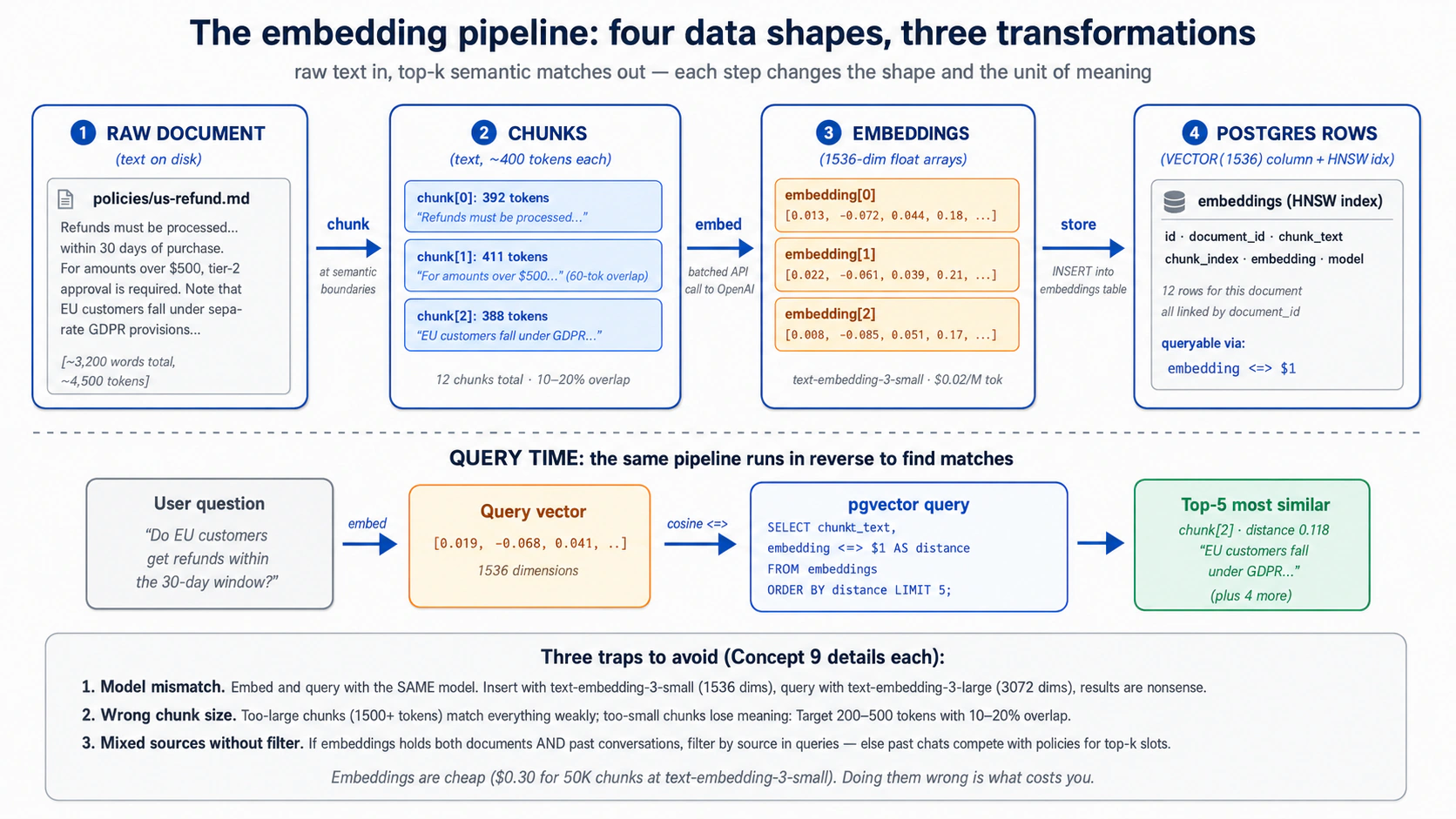
Chunking: lambe text ko pehle split karein. Ek lamba document ek bara embedding nahin banna chahiye. Aap ise chunks mein split karte hain, aur chunk size woh ek decision hai jo ahem hai:
- Qudrati breaks par split karein (headings, paragraphs). Ek chunk jo jumle ke beech rukta hai woh kharaab search karta hai.
- Per chunk kuch sau lafzon ka target rakhein. Bohot bara aur yeh "sab se kamzori se match karta hai"; bohot chota aur yeh woh context kho deta hai jis ne ise ma'ni-khaiz banaya.
- Chunks ko thora overlap karein, taake ek khayaal jo boundary par phaila ho woh phir bhi mil jaaye.
- Jo pehle se chota hai use chunk na karein. Ek wahid hal-shuda ticket ya ek chota FAQ entry pehle hi ek chunk hai; ise jaisa hai waise embed karein.
Aap ka agent splitting code likhta hai; jo aap tay karte hain woh chunk size aur overlap hai.
Embedding: har chunk ko ek point mein badlein. Aap har chunk ko embedding model ko dete hain aur jo point woh wapas deta hai use store karte hain (batches mein, jo per chunk ek call se kahin sasta hai). Concept 8 ka rule barqaraar rakhein: apne store-shuda text aur apni search queries ko ek hi model se embed karein, warna matches noise ke taur par wapas aate hain. Ek setup trap jaanne laayeq (aap ka agent ise handle karta hai): database driver ko vector type ke baare mein bataya jaana chahiye, warna aap ke inserts khaamoshi se fail ho sakte hain.
Agar aap OpenAI par nahin hain to kya? OpenAI wahid bara provider hai jo ek first-class embeddings API bhi deta hai, to agar aap inference DeepSeek, Anthropic, Gemini, ya ek local model ke zariye chalate hain, to aap ek embedding model alag se chunte hain, aur jo cheez match karni chahiye woh dimension hai. Aam escape hatch ek local sentence-transformers model jaise all-MiniLM-L6-v2 (384 dims) hai: koi API call nahin, aur koi text aap ki machine se nahin nikalta. Kisi bhi tarah embeddings bill par sab se sasti line hai, to yeh choice aap ki architecture ko move karti hai, aap ka budget nahin.
Kab dobara embed karein. Teen triggers:
- Source text badal gaya, un rows ko dobara embed karein.
- Aap ne embedding models switch kiye, har purana point ab ek alag map par aur ghaaliban ek alag size par rehta hai, to aap column dobara banate hain aur har row dobara embed karte hain (ya switchover ke dauraan dono rakhte hain). Koi "kaafi qareeb" nahin.
- Aap ne chunk size badla, dobara chunk aur dobara embed karein.
PRIMM, Predict. Aap ne 100,000 chunks
text-embedding-3-smallse embed kiye hain. Phir aap faisla karte hain ke apni guzishta conversations ko bhi embed karein (sirf documents nahin) taake agent "kya hum ne is par pehle baat ki?" lookups kar sake. Aap conversation embeddings ko usiembeddingstable mein usi column ke saath likhte hain. Ek semantic search query (user sawaal ke 5 nearest neighbors dhoondo, koi filter nahin) mixed document aur conversation results ke saath wapas aati hai. Kya yeh woh hai jo aap chahte the? Theek query shape kya hai? Confidence 1–5.
Jawab: taqreeban yaqeeni taur par woh nahin jo aap chahte the. Results mein documents aur guzishta conversations mix hone se, agent ek purane chat ke tukre ko aise treat kar sakta hai jaise woh baasandeeda policy ho. Fix yeh hai ke search karte waqt source se filter karein: sirf documents maangein, ya do searches chalayein aur unhein tolein, taake do qism kabhi aapas mein dhundli na hon.
Jab results ghalat lagein, wajah taqreeban hamesha teen mein se ek hoti hai: query aur store-shuda text alag models se guzre (matches noise hain), aap source type se filter karna bhool gaye, ya aap ke chunks itne chote hain ke ma'ni carry nahin kar sakte. Pehle inhein check karein.
Retrieval quality Worker accuracy ka khaamosh qaatil hai. Aakhri jawab bilkul munaasib lag sakta hai jab ke ghalat evidence cite kar raha ho. Ise pakarne ka wahid tareeqa jawab se pehle retrieval check karna hai.
Try with AI
I'm chunking a corpus of legal contracts (each averaging 8,000 words)
for semantic search. The user will query things like "what's the
termination clause in this contract", phrases that map cleanly to
specific sections. Walk me through three chunking strategies:

A) Fixed 400-token chunks with 60-token overlap (the default)
B) Chunk at section headings only, with no overlap
C) A two-level approach: store both 400-token chunks AND
   whole-section chunks, search both, combine results

For each, name (1) when it wins and (2) when it loses.
Feel it work: das minute mein semantic search
Aap ne pgvector aur embedding pipeline ke baare mein parha hai baghair kisi ko ek bhi result wapas dete dekhe. Schema ke aakhri tukre, audit trail, se pehle, das minute lein aur semantic search ko asal mein ma'ni se rank karte dekhein. Yeh ek throwaway hai, Worker nahin: ek scratch table, paanch jumle, ek query. Part 4 asal cheez banata hai.
Aap ka Neon Quick Win se pehle hi wired hai, to yeh ek prompt hai:
Mere Neon project ki ek taaza scratch branch par, ek chota
notes(id, text, embedding vector(1536))table HNSW index ke saath banao. In paanch jumlon kotext-embedding-3-smallse embed karke insert karo: "the refund hasn't arrived", "my package is late", "how do I reset my password", "the charge appears twice", "I was billed for something I didn't buy". Phir query "I never got my money back" ko embed karo, ek cosine-distance search chalao, aur mujhe rows distance ke lehaaz se ranked dikhao.
Is par nazar rakhein: billing aur refund jumle "my package is late" se oopar rank karte hain aur "reset my password" se bohot oopar, halaanki query in mein se kisi ke saath taqreeban koi lafz share nahin karti. Ma'ni se rank karna, keyword overlap se nahin, hi embeddings table ke wajood ki poori wajah hai.
Tab ho jaaye jab: aap ne ranked list dekhi ho jis mein refund aur billing jumle oopar hon. Apne agent ko scratch branch delete karne ko kahein; asal schema Part 4 hai.
Agar refund jumle nahin jeete, to aam wajah Concept 9 ka model mismatch hai: insert aur query alag embedding models se guzre. Dono siron par ek hi model, warna distances noise hain.
Concept 10: Discipline ke taur par audit trail, ek Worker ke liye "reads aur writes" ka kya matlab
Har ma'ni-khaiz action jo agent uthata hai use database mein ek row chhorni chahiye. Us row ke baghair, aap baad mein "agent ne kya kiya, aur kab?" ka jawab nahin de sakte. Woh trail hi woh hai jo ek asal action ko ek munaasib-lagne wale reply se alag karta hai.
Yahan do cheezein qareeb baithti hain aur uljhi jaati hain, to inhein alag rakhein:
- Khud sachaai: jo abhi soorat-e-haal hai, ek customer ka tier, ek ticket ka status, ek policy ka text. Yeh business records aur reference library mein rehti hai, aur Worker ise parhta aur update karta hai.
- Audit trail: woh replayable record ke Worker ne us sachaai ko kya kiya, kaun sa tool call kiya, kya badla, kya wapas diya, kis ne approve kiya. Yeh
audit_logmein rehti hai, usi database mein, aur yeh ek alag sawaal ka jawab deti hai, "kya sach hai?" nahin balke "Worker ne kya kiya, aur kya aap ise sabit kar sakte hain?" Yeh conversation ki doosri copy nahin (Session pehle hi har message rakhti hai); yeh typed actions aur un ke results record karti hai, un sameth jo kabhi ek message ke taur par zaahir nahin hote, ek database write, ek refund, ek guardrail block. (Ek alag, optionalcapability_invocationstable us ke saath per-skill aur per-tool metrics ke liye baithti hai; Concept 7 dekhein.)
To har ma'ni-khaiz action apni khud ki audit row likhta hai go ke jo data us ne chhua woh kahin aur store hai. Yeh haqeeqat ke action hua audit_log mein rehti hai; dono foreign key se jude hote hain.
Is mein kya jaata hai. Ma'ni-khaiz actions, itni tafseel ke saath ke unhein replay kiya ja sake: har tool ya skill call (name, inputs, result, kitna waqt laga, kamyaab hua ya nahin), record mein har change (kaun si table, kya badla, kis conversation ke neeche), har guardrail decision, aur har model call apni token cost ke saath.
Kya bahar rehta hai. Poora conversation text, Session pehle hi ise rakhti hai, to ise dobara store karna sirf aap ki storage double karta hai. Ek aisi row mein raw sensitive data jise insaan parh sakein, ek hash ya summary rakhein aur poori cheez tala bandi mein rakhein. Aur model ka niji reasoning.
Woh test jo ise ek audit trail banata hai, sirf logs nahin: ek conversation aur ek waqt diya jaaye, to aap dobara bana sakte hain ke Worker ne kya kiya aur kyun, model dobara chalaaye baghair. Agar aap nahin kar sakte, to aap ke paas logs hain.
Action aur uska record ek saath likhein. Jo bhi code ek refund issue karta hai woh refund aur uski audit row ek transaction mein likhta hai: dono land karti hain ya koi nahin. Ek aadha-likha audit trail kisi se bura hai, yeh mukammal lagta hai aur nahin hai. (Aap ka agent ise Part 4 mein likhta hai.)
Har action ko ek chote, mutaffiqa set se ek naam dein (refund_issued, message_sent, waghaira) aur un naamon ko drift na karne dein. Ek hi event ke liye teen alag naam, ab se chhe maheene baad, woh hai jo trail ko query karna namumkin banata hai. Domain events jaise refund_issued apna naam paate hain taake row business event ki receipt ki tarah parhi jaaye, na ke sirf us tool call ki jo ise trigger karti hai.
Kyunke woh set chota aur tay hai, ise audit_log.action par ek CHECK constraint se enforce karein (Concept 7 ka schema karta hai). Woh pakar jo ek build hafton baad maarta hai: vocabulary ab closed hai, to ek naya verb mutaarrif karwana (Decision 9 mein ek guardrail_tripped row, woh corpus_seeded row jo Decision 5 apne seed run ke liye likhta hai) ek ek-line ka ALTER TABLE ... DROP/ADD CONSTRAINT migration hai, sirf naya code nahin, aur error ek DB constraint violation ke taur par zaahir hoti hai jo "aap apni vocabulary plan karna bhool gaye" ke aas paas kahin nahin point karti. To poora set up front tay karein; Concept 7 ka CHECK pehle hi un aath ki list deta hai jo yeh course istemaal karta hai.
Audit trail kya nahin hai. Sirf logs nahin: yeh aap ke apne database mein queryable SQL hai ("agent ne pichle maheene customer X ko kya bataya, aur kaun si policy cite ki?" ek query hai), text files par grep nahin, aur yeh aap ke business data ke saath backed up aur access-controlled hai. Event sourcing nahin: yeh aap ke state ke saath ek append-only trace hai, woh cheez nahin jis se aap state dobara banate hain (aap ke tickets, documents, aur Session state hain). Aap ke traces nahin: tracing (OpenTelemetry, OpenAI dashboard) debugging ke liye flight recorder hai, yeh ek alag system mein rehti hai, off ki ja sakti hai, aur Zero-Data-Retention ke neeche na-dastayaab hai; audit log receipt hai, action ke usi transaction mein committed aur jitni der chahiye rakhi jaati hai. Dono chalayein: trace debug karne ke liye, ledger sabit karne ke liye.
Yeh woh hai jo thesis ka matlab hai: "Workers ek workforce ke taur par sirf tab governable bante hain jab ek ledger unhein legible bana de." Aap ka audit_log hi woh ledger hai. Aur legible woh hai jo ek Worker ko sellable banata hai: aap ek outcome ke liye charge nahin kar sakte jo aap sabit nahin kar sakte ke hua. Per-seat pricing logins ginti hai; outcome pricing ginti hai ke Worker ne kya kiya, per resolved ticket, per processed invoice, per drafted reply. refund_issued aur ticket_resolved rows hi woh outcomes hain, usi log mein baithe jis mein low-level events hon, ek aisi cheez jis ki taraf aap ek customer ko point kar sakte hain aur jis ke khilaaf invoice kar sakte hain. To ek Worker ko system of record sirf is liye nahin chahiye ke woh runs ke darmiyaan bhoolna band kar de, balke is liye ke uska kaam ek sabit-honay-laayeq, bill-honay-laayeq artifact ban jaaye. Yahi woh line hai jo ek agent ko database se wire karne aur ek aisa Worker banane ke darmiyaan hai jise aap waaqai bech sakein.
Try with AI
Here's a customer support scenario: a customer claims the Worker told
them they would receive a $50 refund, but the actual refund issued was
$30. The Worker handled the conversation 19 days ago.

Walk me through the audit-trail query path to resolve this:

1. Find the conversation. (Which columns of which tables?)
2. Find the message where the refund amount was promised. (How do you
   distinguish "discussed" from "promised"?)
3. Find the capability invocation that issued the refund.
4. Find the database write that recorded the $30 amount.

For each step, name the table you'd query and the WHERE clauses.
Then say what's MISSING from the five-table schema that would make
this query easier.
Part 3: MCP, agent ko system of record se wire karna
Part 1 ne agent ko Skills ki ek library di. Part 2 ne use ek Postgres system of record di. Part 3 in dono ko Model Context Protocol se wire karta hai: woh open standard ke agents bahar ke state aur bahar ki capability tak kaise pohanchte hain. Thesis MCP ki jagah ke baare mein seedha hai: "MCP woh hai jis se workforce apne [systems of record] tak pohanchti hai: har baasandeeda store ek MCP server ke zariye kisi bhi Worker ke liye addressable ban jaata hai, policy ke neeche." Yeh Part use operational banata hai.
Concept 11: MCP kya hai aur kya nahin
Model Context Protocol (modelcontextprotocol.io) ek open client/server protocol hai (asal mein Anthropic se, ab ek open standard ke taur par governed) ke ek AI agent bahar ke tools, data, aur prompts se kaise jurta hai. Jo framing dohrayi jaati hai woh hai "AI tools ke liye USB-C": ek protocol, kayi implementations, kisi bhi side ko doosre ko tore baghair swap karein. Framing durust hai; tamaam metaphors ki tarah, iski hudood hain jin ka naam lena ahem hai.
MCP kya hai. Ek protocol. Ek specification. Teen primitives jo server client ko expose kar sakta hai.
- Tools: functions jinhein model invoke kar sakta hai. Client unhein list karta hai, model ek chunta hai, server use execute karta hai. Pichle course ke ek
@function_tooldecorator ki tarah, lekin implementation MCP server process mein rehti hai, agent ke process mein nahin. Yeh bare faasle se sab se zyada istemaal hone wala primitive hai. - Resources: read-only data jo agent fetch kar sakta hai. Files, database query results, API responses. Inhein MCP ke GET-only side ke taur par sochein. Amalan tools se kam aam, lekin "agent ko yeh document on demand parhne dein" ke liye faayda-mand.
- Prompts: dobara istemaal hone wale prompt templates jo server deta hai. Ek team standardised prompts publish kar sakti hai ("summarize-incident-report") jinhein server se jurne wala koi bhi agent invoke kar sakta hai. Tools aur resources ke muqaable shaaz hi istemaal hote hain.
Teen transports, 2026 tak maujooda mashwaron ke saath:
| Transport | Kab istemaal karein | Status |
|---|---|---|
stdio | Local subprocess; agent aur server ek hi machine par | Pukhta. Local tools ke liye default. |
streamable HTTP | Remote server; production deployments | Naye remote kaam ke liye recommended. Plain HTTPS par ek hi endpoint. |
SSE | Remote server; puraane deployments | Legacy. Bohot se servers ab bhi ise expose karte hain; naye barhte hue streamable HTTP par default hote hain. |
Streamable HTTP do flavors mein aata hai, aur farq tab ahem hai jab aap deploy karte hain. Stateless woh default hai jis ki taraf haath barhana hai: har call ek independent request aur response hai, bilkul ek aam API call ki tarah, to aap ek load balancer ke peeche server ki kayi copies chala sakte hain aur in mein se koi ek jawab de sakti hai. Stateful ek live session khuli rakhta hai taake server partial results wapas stream kar sake ya task ke beech notifications push kar sake, jo woh hai jo aap ko lambe-chalte kaam ke liye chahiye, lekin yeh har client ko ek server instance se baandh deta hai aur operate karne ke liye zyada hai. Stateless istemaal karein jab tak aap ke paas ek khaas wajah (live streaming, server-initiated messages) us khuli session ki zaroorat ke liye na ho.
MCP kya nahin hai.
- Ek framework nahin. Yeh ek protocol hai. Aap ka agent "MCP istemaal" us tarah nahin karta jaise woh Agents SDK istemaal karta hai; aap ke agent ka MCP client ek MCP server se MCP bolta hai. Agents SDK mein ek MCP client shaamil hai; wohi integration point hai.
- Ek service nahin. Koi "MCP cloud" nahin. MCP servers programs hain jo aap chalate hain (ya jo vendors aap ke liye chalate hain). Neon MCP server
mcp.neon.techpar hosted hai; filesystem MCP server ek local subprocess ke taur par chalta hai; ek custom MCP server jo aap likhte hain woh jahan bhi aap deploy karein wahan chalta hai. - Ek security boundary nahin. MCP transport aur protocol define karta hai; ek MCP server kaun se tools expose karta hai aur woh kya kar sakte hain woh server ki zimmedari hai. Ek malicious MCP server kuch bhi kar sakta hai jo iska server-side code kar sakta hai. Trust boundary phir bhi woh agent loop hai jo faisla karta hai ke kaun se tools call karne hain, aur woh sandbox jis mein tools execute hote hain.
@function_toolka badal nahin. Dono ki abhi bhi jagah hai. Decision tree Concept 14 hai.
Quick check. Sach ya jhoot: (a) Ek MCP client ek waqt mein bilkul ek MCP server se baat karta hai. (b) Wohi
@function_tool-style function, agar aap chahein, ek MCP tool ke taur par expose ho sakta hai ya ek function tool ke taur par rakha ja sakta hai, aur model ko farq nahin pata chalega. (c) MCP servers aur OpenAI Agents SDK tightly coupled hain, to MCP istemaal karne ke liye aap ko SDK istemaal karna parega. Jawab: (a) Jhoot: ek agent kayi MCP servers se jur sakta hai aur un ke tools ka union dekh sakta hai. (b) Sach: model ko, dono schemas ke saath callable tools lagte hain. Farq yeh hai ke implementation kahan rehti hai. (c) Jhoot: MCP model-agnostic hai. Claude, Gemini, aur doosre apne MCP clients rakhte hain. OpenAI Agents SDK kayi mein se ek client hai.
Try with AI
For each item, say which MCP primitive fits best (tool, resource, or
prompt), and why in one line:

A) The agent reads the current text of a policy document on demand,
   but never writes it.
B) The agent issues a refund through the payment gateway.
C) Every Worker on the team should summarize incidents the same way,
   from one shared, versioned template.

Then a judgment question. A teammate says: "We put the refund logic
behind an MCP server, so the agent can't do anything dangerous." Using
this concept's "what MCP is NOT," explain why that sentence is false,
and name where the real trust boundary actually lives.
Concept 12: Neon MCP server, development plane, runtime nahin
Is concept ki tafseelaat puraani ho jaayengi. Pattern nahin. Neon ka MCP server tooling, auth flow, aur theek tool surface har kuch maheene badalte hain. Jo sach rehta hai: ek managed-database vendor apni management API ko MCP ke zariye natural-language operations ke liye expose karta hai, jab ke runtime production traffic direct connections ya scoped custom servers istemaal karta hai. Tafseelaat pin karne se pehle Neon ke docs ke khilaaf verify karein.
Aap setup ke dauraan pehle hi Neon MCP server ko apne coding agent se jor chuke hain, aur aap tab se is par tikke hue hain: schema saadi English mein maangna, dekhna ke tables mein kya hai, ek connection string khichna. Woh pandrah-minute connection ruk kar ghaur karne laayeq hai, kyunke yeh poore is Part ki sab se ahem line sikhata hai: Neon MCP server kis liye hai, aur use kabhi kis se wire nahin karna chahiye.
Yeh Neon ki management API (projects, branches, schema, migrations, ad-hoc SQL) ko tools ke taur par expose karta hai jinhein aap ka agent saadi zubaan mein call kar sakta hai. Yeh ise ek development tool banata hai, ek production tool nahin. Neon ke apne docs saaf hain: "MCP agents ko kabhi production databases se na jorein."
Yeh hai ke woh line itni mushkil kyun hai. Server ka run_sql tool koi bhi SQL chalata hai jo model likhta hai. Jab aap build kar rahe hote hain, woh poora maqsad hai: aap kehte hain "mujhe woh users dikhao jo pichle hafte sign up hue aur kabhi log in nahin hue," model query likhta hai, server use chalata hai, aap ka jawab milta hai. Wohi tool apne live database par point karein aur yeh ek darwaaza ban jaata hai. Koi bhi jo aap ke Worker mein instructions ghusa sakta ho (ek customer chaalaaki se likha message type karta hua) use aap ka poora database parhne ko keh sakta hai, kyunke tool ka kaam hi jo bhi SQL use diya jaaye use chalana hai.
To use wahan istemaal karte rahein jahan woh chamakta hai, development ke dauraan yeh sab:
- Schema aur migrations. "tickets table mein ek
prioritycolumn add karo." Server change ko pehle ek throwaway branch par test karta hai, phir merge karta hai. Woh branch-first aadat ek schema ko evolve karne ka mehfooz tareeqa hai. - Apna data explore karna. "us mein kitni embeddings hain, source ke lehaaz se grouped?" Ek baar ke sawaal ke liye SQL haath se likhne se tez.
- Cheezein dhoondna. Connection strings, project settings, table shapes, Neon console khole baghair.
Aap ne yeh setup mein dekha: aap ne apne agent se project banane, pgvector on karne, schema chalane, aur connection string report karne ko kaha, aur us ne yeh sab in tools ke zariye kiya, migration ko main ko chhoore se pehle ek branch par test karte hue. Koi SQL haath se type nahin ki.
PRIMM, Predict. Aap ke mukammal customer-support Worker ko: (a) ek customer ke orders dekhne; (b) un ke tier ke liye refund policy check karne; (c) ek refund issue karne; (d) us ne kya kiya aur kyun iski ek audit row likhne ki zaroorat hai. Kya use Neon tak isi MCP server ke zariye pohanchna chahiye, ya kisi aur tareeqe se? Confidence 1–5.
Jawab: kisi aur tareeqe se, chaaron ke liye. Ek live Worker ko kabhi ek run_sql-style tool nahin rakhna chahiye, woh ek darwaaza hai jise aap poori tarah taala nahin laga sakte. Use kuch narrow abilities chahiye, arbitrary SQL chalane ki taaqat nahin. Do production patterns hain ek custom MCP server jo sirf woh khaas operations expose karta hai jo use chahiye (Concept 14), ya ek direct Postgres connection jo unhein wrap kare. Part 4 dono istemaal karta hai: business operations ke liye ek custom customer-data server, aur sirf audit subsystem ke liye ek direct connection (Decision 7 samjhata hai ke audit jis MCP boundary ko audit karta hai us se baahir kyun rehta hai).
Yeh bilkul Invariant 5 hai: workforce governed stores ke zariye parhti aur likhti hai. Ek broad run_sql tool governance nahin hai, yeh koi governance na hone par ek dostana chehra hai. Neon MCP server woh hai jis se aap store banate hain. Yeh woh nahin jis se aap ka Worker use chhoota hai.
Try with AI
Read Neon's MCP server documentation page and answer three questions:

1. List THREE management operations the Neon MCP server exposes that
   would be useful while you're building a customer-support Worker.
2. List THREE things a running Worker NEEDS to do that you should NOT
   use the Neon MCP server for, and why.
3. For each of the three in (2), say what the Worker should use instead
   (direct Postgres connection? custom MCP server? function_tool?).
Concept 13: MCP ko OpenAI Agents SDK se jorna
Aap apne coding agent se Neon MCP server chala rahe hain. Aap ka Worker, jo aap Part 4 mein banate hain, ek alag program hai: ek OpenAI Agents SDK agent. To yeh concept jis sawaal ka jawab deta hai woh bas hai: woh agent ek MCP server se kaise baat karta hai? Aap connection plumbing haath se nahin likhenge, SDK ise deta hai. Jo samajhne laayeq hai woh shape hai, taake aap build steer kar sakein aur jab woh kharaab chale to debug kar sakein.
Yeh poori tasveer hai. SDK mein ek built-in MCP client hai jis mein per transport ek connector hai: stdio ke liye ek local, remote streamable HTTP ke liye ek modern, aur SSE ke liye ek legacy (kisi naye ke liye SSE se bachein). Aap ek server se ek connection kholte hain, ise apne agent ko dete hain, aur wahan se SDK sab kuch karta hai: yeh server se poochta hai ke uske paas kaun se tools hain, un tools ko model ke saamne theek un @function_tools ke saath rakhta hai jo aap ne khud likhe, aur jab model ek chunta hai, call ko theek server ki taraf route karta hai aur jawab wapas laata hai. Model ek MCP tool ko ek local function tool se nahin bata sakta, aur use bata'ne ki zaroorat nahin. Woh yaksaniyat hi nukta hai: MCP model ko ek capability dene ka bas ek aur tareeqa hai.
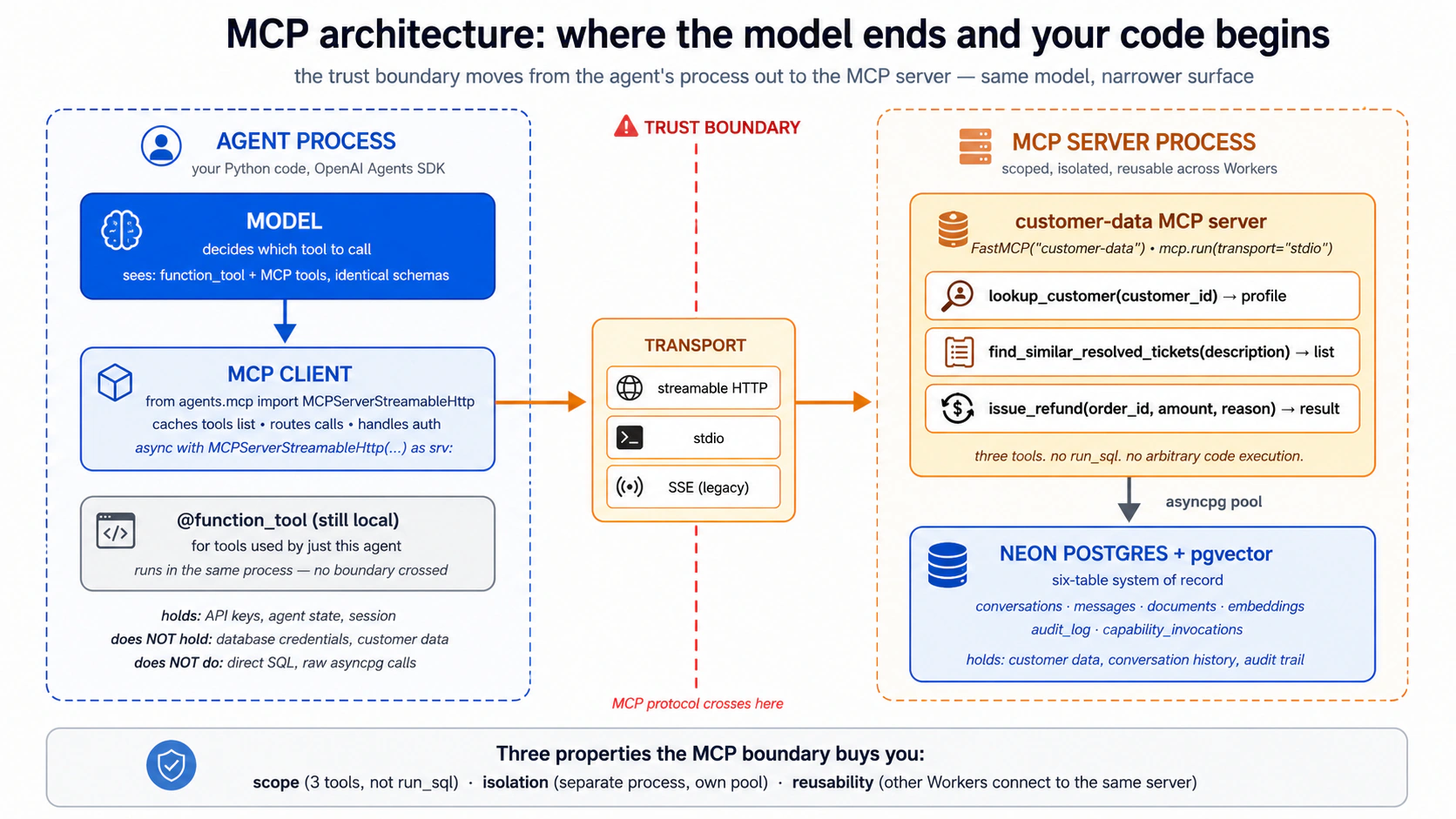
Chaar cheezein yaad rakhne ke liye, jin sab ko aap ka agent aap ke liye handle karta hai jab aap maang lein:
- Connection ko saaf kholein, aur saaf band karein. Ek MCP connection kuch khula rakhti hai: stdio ke liye ek subprocess, remote ke liye ek HTTPS session. Agar ise theek band na kiya jaaye to connection leak karti hai. SDK ke connection objects ek managed block ke taur par khole aur band hone ke liye bane hain, to yeh handled hai jab tak aap is se na laro.
- Production mein tool list cache karein. By default agent har single run par server se dobara poochta hai "tumhare paas kaun se tools hain?", ek zaaye network round-trip. Caching on karna ise ek baar poochwaata hai. Ek pakar: agar aap server ke tools badalte hain, to aap agent ko cache refresh karne ko kehte hain (ya use restart karte hain). Build karte waqt, caching off rakhein taake changes foran zaahir hon.
- Servers stack hote hain. Aap apne agent ko ek waqt mein kayi MCP servers de sakte hain, aur model bas tools ka mila hua set dekhta hai. Part 4 ka Worker apne custom
customer-dataserver se is tarah jurta hai. - Khatarnaak tools ko approval ke peeche gate karein. By default tool calls bina confirmation chalte hain. Sensitive ke liye aap ek human se har call approve karwa sakte hain. Yeh Concept 12 ke development-vs-runtime gap ke liye amali knob hai: jab aap Neon MCP server haath se istemaal karte hain tab bhi, iske destructive tools (jo bhi drop ya rewrite kare) ko ek approval prompt ke peeche rakhna ek asal safety jeet hai.
Ek gotcha file karne laayeq: agar ek MCP server startup par kuch bhaari load karta hai (misaal ke taur par ek machine-learning model), to agent ki default "kya server waqt par jawab aaya?" window bohot chhoti ho sakti hai aur aap ek uljhaane wala connection-failure error dekhenge. Fix ek hi setting hai jo us window ko lamba karti hai. Aap ise sirf tab milenge jab ek server boot hote hi asal kaam kare.
Hands-on, sirf samajhne ke liye. Yeh shape ko thos banane ka sab se tez tareeqa hai. Neeche wala prompt apne coding agent mein paste karein. Yeh ek chota throwaway script banata hai jo ek OpenAI Agents SDK agent ko us Neon MCP server par point karta hai jise aap pehle se jor chuke hain, aur aap ko agent ko saadi zubaan mein apne projects list karte dekhne deta hai. Yeh ek learning exercise hai, production path nahin: ek asal Worker kabhi Neon MCP server se nahin jurta (Concept 12). Aap ise ek baar, yahan, ek Agents SDK agent ko ek MCP server end to end chalate dekhne ke liye kar rahe hain.
Write me a small throwaway Python script (call it scratch_neon_agent.py)
that uses the OpenAI Agents SDK to connect to the Neon MCP server over
its remote streamable-HTTP transport, then runs one agent turn asking it
to "list my Neon projects and show the schema of the largest one."

Use the current OpenAI Agents SDK MCP classes (check the docs for the
exact import and class name). Open the connection as a managed block so
it closes cleanly, turn on tool-list caching, and print the final output.

Then run it and show me what the agent did, step by step. Remind me in a
comment that this is for understanding only and a real Worker should
never connect to the Neon MCP server.
Dekhein kya hota hai: agent connect karta hai, SDK Neon ke tools andar khichta hai, model khud list_projects chunta hai, aur aap ko English mein ek jawab milta hai. Aap ne abhi wahi wiring dekhi jo aap ka Part 4 Worker istemaal karega, sirf ek aise server par point ki jise use production mein nahin istemaal karna chahiye, jo bilkul wajah hai ke aap yeh script phenk rahe hain.
Try with AI
Explain, in plain language and without writing code, how you would
connect one OpenAI Agents SDK agent to TWO MCP servers at once: the
Neon MCP server (remote) and a local filesystem MCP server for reading
project files. Cover:

1. Which transport each server would use, and why.
2. How the model decides which server's tool to call.
3. Which tools you'd put behind human approval, and why.
4. One thing that could go wrong with two servers connected, and how
   you'd notice it.
Concept 14: Custom MCP servers, kab apna likhein vs. kab nahin
Neon MCP server generic hai: yeh woh sab kar sakta hai jo Neon ki API kar sakti hai. Yeh development ke liye iski taaqat hai aur runtime ke liye iski kamzori. Ek custom MCP server trade-off ko ulat deta hai: narrow surface, koi general-purpose run_sql nahin, sirf woh khaas operations jo aap ke Worker ko asal mein chahiye.
Decision tree, priority ki tarteeb mein.
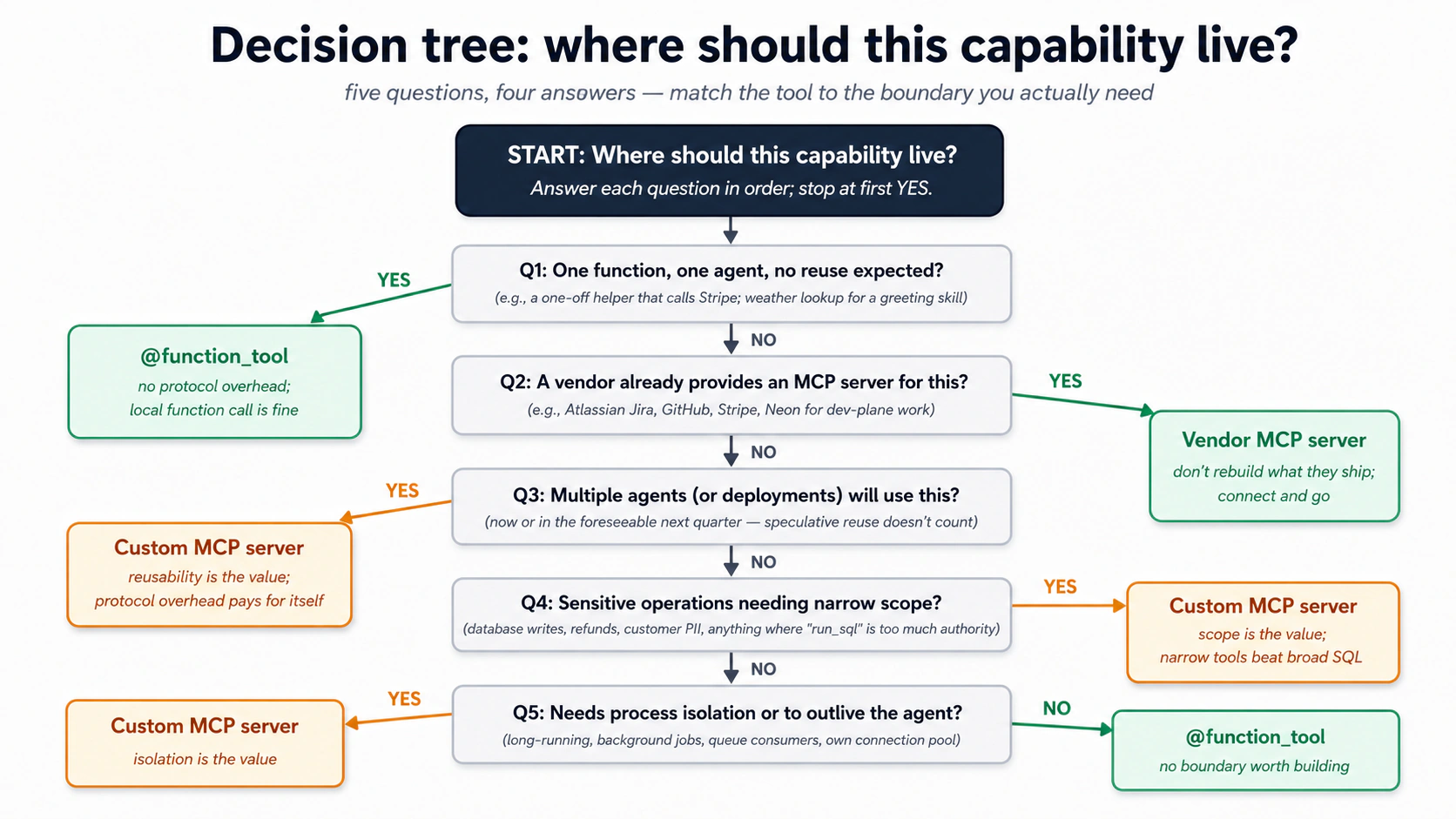
Wohi logic ek quick-scan table mein:
| Aap kya expose karna chahte hain... | Yeh istemaal karein | Kyun |
|---|---|---|
| Ek function ek input ke saath, ek agent dwara istemaal | @function_tool | Protocol overhead ki zaroorat nahin. Local function call theek hai. |
| Kayi functions jo aap ke agent ke code se tightly coupled hon | @function_tool | Agar woh agent ke saath state share karte hain aur usi repo mein rehte hain, woh agent ka hissa hain. |
| Ek capability jo kayi agents (ya kayi deployments) istemaal karenge | Custom MCP server | Protocol woh hai jo ise reusable banata hai. |
| Ek capability jise agent ke process se zyada zinda rehna ho | Custom MCP server | Long-running connections, background jobs, queue consumers. |
| Vendor-faraham karda functionality (Neon, GitHub, Linear) | Vendor's MCP server | Jo woh dete hain use dobara na banayein. |
| Sensitive operations jinhein narrow scope chahiye | Custom MCP server | Theek woh tools define karein jo aap ko chahiye; aur kuch nahin. |
Ek custom MCP server ki shape jitni lagti hai us se zyada saadi hai. Yeh ek chota program hai jo ek mutthi bhar named tools declare karta hai. Har tool ki ek saadi-English description hoti hai (wohi qism ka trigger text jo ek SKILL.md rakhti hai) jo model ko batati hai ke iski taraf kab haath barhana hai, aur typed inputs ki ek choti list taake model jaane ke kya pass karna hai. Bas yahi: kuch achhi-tarah-bayan, narrow tools aur kuch nahin. Koi general run_sql nahin, koi escape hatch nahin.
Aur aap woh program haath se nahin likhte. Usi tarah jaise aap ne skills install kiye aur apne agent se kaam karwaya, ek mcp-builder skill hai jo ek scope description ko ek kaam karte, tested server mein badal deti hai. Aap ka judgment scope mein jaata hai, kaun se tools mojood hain, har ek ko kya karne ki ijaazat hai, aur kaun se jaan-boojh kar nahin, plumbing mein nahin. Prompt flow aisa dikhta hai:
/mcp-builder Let's design a custom MCP server called "customer-data"
on the streamable-HTTP transport, stateless flavor (each call an
independent request, no open session, so it scales). Plan the
implementation first, then build it.

Scope: exactly three tools, nothing else.
- lookup_customer(customer_id): return id, email, tier, open-ticket count
- find_similar_resolved_tickets(description, limit): semantic search over
  past resolved tickets
- issue_refund(order_id, amount_cents, reason): issue a refund (amount in
  integer cents, never a float) AND write an audit row in the same transaction

No general SQL tool. Each tool gets a clear description so the model
knows when to call it. Start a fresh project with uv, walk me through
the plan before writing code, then build and verify it.
Agent ek naya uv project scaffold karta hai, tools plan karta hai, server banata hai, aur tasdeeq karta hai ke yeh chalta hai. Jab yeh mojood ho jaaye, aap ise un do tareeqon se jorte hain jo aap MCP servers ko jurte pehle hi dekh chuke hain: apne general coding agent se (Claude Code ya OpenCode, taake aap ise haath se test kar sakein) aur apne OpenAI Agents SDK Worker se (taake Worker ise asal mein istemaal kar sake). Part 4 ki Decision 6 is build ko end to end chalti hai.
Teen cheezein jo yeh server aap ko deta hai jo @function_tool nahin.
-
Process isolation. MCP server apne khud ke process mein chalta hai (stdio ke liye subprocess, streamable HTTP ke liye alag service). Server mein ek crash agent ko crash nahin karta; server mein ek memory leak agent mein leak nahin karta.
-
Scope. Server sirf woh mutthi bhar tools expose karta hai jo aap define karte hain (worked example ke
customer-dataserver ke teen hain). Koirun_sqlnahin. Koi "arbitrary code execute karo" nahin. Model is scope se nahin bhaag sakta kyunke protocol aur kuch expose nahin karta. Yeh ek asal defense in depth hai: agar model ne kuch bewaqoofi karne ka faisla bhi kar liya, to ise karne ki surface area woh kuch hi functions hai. -
Agents ke darmiyaan reusability. Ek doosra agent (ek Sales Worker, ek Reporting Worker) usi
customer-dataMCP server se baat kar sakta hai. Wohi scope, wohi protocol, wohi trust boundary. Capability agents ke darmiyaan copy-paste ke bajaaye infrastructure ka ek share-shuda tukra ban jaati hai.
Trade-off asal hai. Custom MCP servers operational complexity add karte hain: deploy karne ke liye ek aur process, logs ka ek aur set, ek aur network hop (agar remote), manage karne ke liye ek aur version. Ek aise function ke liye ek na likhein jo ek agent dwara istemaal ho. Ek tab likhein jab capability dobara istemaal hone wali ho, jab scoping ahem ho, ya jab isolation aap ko safety de.
PRIMM, Predict. Aap customer-support Worker design kar rahe hain. Aap ko chahiye: (1) guzishta hal-shuda tickets par semantic search; (2) ek refund audit row likhna; (3) maujooda mausam parhna (ek greeting skill mein istemaal jo kehti hai "good morning from sunny Karachi"); (4) ek refund issue karne ke liye payment gateway call karna. Har ek ke liye predict karein:
@function_tool, custom MCP server, ya vendor MCP server (jaise Stripe ka, agar aisa mojood ho)?
Jawab framework ko nikaalte hain:
- Custom MCP server (
customer-data). Agents ke darmiyaan reused; sensitive data; scoped tools ek broadrun_sqlse behtar. - Custom MCP server (
customer-data) ya@function_tool. Dono kaam karte hain; agar Worker hi wahid writer hai, to function tool theek hai. Agar kayi Workers audit rows likhenge, to MCP server. @function_tool. Ek agent, ek nanha function, defend karne ke liye koi security surface nahin. Iske liye ek server na banayein.- Vendor MCP server (Stripe MCP) agar mojood ho, warna
@function_tooljo Stripe ki API call kare. Apne MCP server mein third-party APIs ko wrap na karein jab tak aap ko upar policy add karni na ho.
Framework saaf hai jab aap ise trace karte hain: MCP ki qeemat us boundary ki qeemat ke saath barhti hai jo woh banaati hai. Ek boundary jiski aap ko zaroorat nahin woh overhead hai.
Try with AI
Yeh apne coding agent mein paste karein. Yeh decision tree ko us customer-support Worker par apply karta hai jise aap asal mein bana rahe hain, to har choice woh hai jise aap ship kar sakte hain, kisi aisi infrastructure ke baare mein andaaza nahin jo aap ke paas nahin.
Here are five capabilities I'm thinking of adding to my customer-support
Worker. For each, walk the Concept 14 decision tree with me and recommend
one: a @function_tool, my custom customer-data MCP server, or a vendor
MCP server (if a credible one exists). Justify each choice with ONE of
the three properties (isolation, scope, reusability), or say plainly why
no boundary is worth building.

1. Look up a customer by email (the gap Decision 8 leaves open).
2. Issue the real refund through Stripe (actual money, third-party API).
3. Send the drafted reply as an email through our mail provider.
4. Convert a UTC timestamp to the customer's local time for a greeting.
5. Let a second Worker (a sales assistant) reuse the customer lookups.

Then push back on me: which TWO of these would you deliberately NOT put
behind a custom MCP server, and what does that say about when the
boundary earns its cost?
Concept 15: Load ke neeche MCP: transports, pooling, aur scale par kya hota hai
Ek demo jis mein ek agent aur ek server hon bas chalta hai. Asal traffic, ek minute mein kayi conversations, teen pressures add karta hai. Aap ko inhein ek pehle Worker ke liye amal mein lane ki zaroorat nahin, lekin yeh jaanna ke yeh mojood hain aap ko baad mein ek uljha hua doopahar bacha leta hai. Har ek ka ek plain fix hai.
- Agent aur server ke darmiyaan wire. Ek local subprocess (stdio) theek hai jab tak sab kuch ek machine par chalta ho. Jis lamhe ek se zyada agent server share karein, ya server apne hardware par jaaye, remote transport (streamable HTTP) par switch kar jaayein. Yeh ek deployment change hai, rewrite nahin.
- Wahi setup cost baar baar na ada karein. Teen choti aadtein dohraye gaye costs ko ek-baar ke costs mein badal deti hain: server boot hone par har server se ek baar connect karein aur woh connection khuli rakhein, bajaaye har request par dobara connect karne ke; agent ko server ki tool list yaad rakhne dein bajaaye har run "tum kya kar sakte ho?" dobara poochne ke (jab aap tools badlein to ise refresh karein); aur server ke andar database connections ka ek ready pool rakhein, taake ek query har baar ek taaza kholne ka intezaar na kare. Ek anokhi baat jo ek lambe-chalte Worker ko ek scale-to-zero ya pooled Postgres (Neon) par milti hai: pooler idle connections band kar deta hai, to agar process block ho (ek terminal
input()prompt asyncio event loop ko freeze kar deta hai), agla write "connection was closed in the middle of operation" ke saath fail ho jaata hai. Blocking prompts ko loop se baahir chalayein (asyncio.to_thread) aur us error par pool ko ek baar dobara acquire karwayein. - Har cheez par ek ceiling lagayein, aur trace ko poora rakhein. Cap karein ke ek request kitne steps le sakti hai, ek fail-shuda tool call ko haar maanne se pehle kuch baar retry karein, aur server ko rate-limit karein taake ek burst use na doobo de. Aur yaqeeni banayein ke aap ka trace call ko MCP boundary ke paar follow karta hai: jab Worker ek tool call karta hai, aap chahte hain ke server ka apna database kaam usi tasveer mein zaahir ho. Warna server ke andar ek slow query bahar se na-dikhne wali hai, aur aap latency ko ghalat jagah dhoondenge.
Gehre knobs (per-tenant concurrency caps, baareek transport tuning) us se aage hain jo ek pehle Worker ko chahiye. Yeh teen woh hain jo pehle kaat'ti hain.
Quick check. Sach ya jhoot: (a) Ek server ko legacy SSE transport se streamable HTTP par move karna aap ko server ke tools dobara likhne par majboor karta hai. (b) Agent ko ek server ki tool list cache karne dena production mein mehfooz hai, jab tak aap tools badalne ke baad cache refresh karein. (c) Paanch abilities ko MCP tools ke taur par expose karna hamesha model ko unhi paanch ko local function tools ke taur par expose karne se zyada context budget kharch karta hai. Jawab: (a) Zyada-tar jhoot: tools nahin badalte; server ko bas naya transport bolna hai, jo zyada-tar modern pehle hi karte hain. (b) Sach: woh maqsood pattern hai. (c) Jhoot: model ko ek tool ek tool hai. Paanch tool descriptions taqreeban utni hi laagat rakhti hain chahe woh kisi bhi side par rehti hon.
Try with AI
My customer-support Worker is in production. It runs 80 conversations/minute
at peak. Each conversation makes 2-4 MCP tool calls on average. I'm seeing
intermittent latency spikes: most calls return in 200ms, but a small
percentage take 5-15 seconds.

Walk me through five places I'd investigate, in order of priority:

1. The agent-side MCP client connection management.
2. The transport choice between agent and MCP server.
3. The MCP server's internal connection pool to Postgres.
4. Postgres-side query performance (slow queries blocking the pool).
5. Network or DNS issues between agent and MCP server.

For each, name the specific signal I'd look for and the rough fix.
Part 4: Worked example, customer-support Worker
Ek haqeeqi build jo oopar ke har concept ko istemaal karta hai. Aap ek minimal chat agent se shuru karte hain (ek prompt, taqreeban ek minute), phir usi worker ko ek customer-support Worker mein bara karte hain, ek-ek tukra. Har Decision ek tukra add karta hai, system of record, phir Skills, phir MCP layer, phir audit trail, aur aap har baar worker dobara chalate hain to aap aage barhne se pehle naya tukra kaam karte dekhte hain. Aath Decisions worker banaate hain; ek nawan us ek action ke saamne ek human rakhta hai jo paisa move karti hai.

Step 0: chat agent khara karein (ek prompt, ~1 minute). Taake har koi Decision 1 ek hi jagah se shuru kare. (Build AI Agents kiya tha? Us project ko iske bajaaye kholein, woh wahi agent hai, aur Decision 1 par skip karein.)
In this digital-fte folder, build me a small terminal chat agent with the
OpenAI Agents SDK: a uv project, a gpt-5-class model, on a local sandbox.
Check the current SDK docs for the API. Get it answering "hi", then stop,
we grow it in the steps below.
Banata hai: worker file (jaise worker.py) plus iska uv project.
Check. Aap "hi" bhejte hain aur yeh jawab deta hai. Woh starting line hai; Decision 1 ise
AGENTS.mdke zariye nayi architecture sikhata hai.
Brief
Step 0 ke minimal chat agent ko ek customer-support Worker mein evolve karein jo:
- Teen Skills on demand load kare:
summarize-ticket,find-similar-cases, aurescalate-with-context. - Concept 7 ke paanch tables wale ek Neon Postgres system of record se parhe aur us mein likhe (conversation turns usi database par SDK Session mein rehte hain).
- Guzishta hal-shuda cases ki ek choti library par semantic search ke liye pgvector istemaal kare.
- Business data ke liye runtime par ek scoped, custom MCP server (
customer-data) ke zariye Postgres se baat kare, kabhi Neon MCP server nahin aur kabhi agent code mein directasyncpgnahin. - Har ma'ni-khaiz action ke liye ek audit row likhe (har skill invoked, har database write, har refund mad-e-nazar) apne khud ke direct connection ke zariye, woh ek path jo jaan-boojh kar MCP boundary ko bypass karta hai, taake audit trail us system se na bhooki rakhi ja sake jise woh audit karta hai.
"Aakhir mein verification" test: ek customer message karta hai "I haven't received my refund from order #4429, it's been two weeks." Worker vector search ke zariye teen milti-julti guzishta cases dhoondta hai, ek response draft karta hai jo sab se milte-julte case ki resolution cite karta hai, aur us ne kya kiya iski ek audit row likhta hai (aur, ek asal deploy mein, agar customer Pro-tier ho to escalate karta hai). Message se theek customer ya order record resolve karne ke liye ek lookup tool chahiye jise aap baad mein add karte hain; Decision 8 dikhata hai ke woh gap kahan hai.
Aage aane wale prompts ko kaise parhein. Aap is Worker ko apne coding agent ko ek waqt mein ek chota task prompt karke bara karte hain, aur har Decision usi tarah khatam hota hai: naya tukra ek worker mein wire ho jaata hai aur aap ise chalate hain, to aap ise kaam karte dekhte hain is se pehle ke agla Decision us par bane. Aap SQL, Python, ya config type nahin karenge: agent ise likhta hai, aap steer aur check karte hain. Aap ka agent pehle hi
AGENTS.mdparh chuka jab us ne folder khola, to woh project jaanta hai; aap ke prompts chote rehte hain. Do aadtein:
- Ek step, ek task. Us step ka prompt aur kuch nahin paste karein. Jo bhi asal code likhta hai, prompt kehta hai "pehle plan": plan parhein, push back karein, approve karein, phir use build karne dein.
- Agle step se pehle check karein. Har step ek Check par khatam hota hai: ek saadi-English sawaal jo aap poochte hain ("mujhe X dikhao"). Aage na barhein jab tak yeh paas na ho, warna aap chaar steps gehre honge is se pehle ke aap ko pata chale ke step one ghalat tha.
Decision 1: Rules file ko nayi architecture se update karein
Aap kahan hain: ek minimal chat agent jo "hi" ka jawab deta hai; yeh Decision AGENTS.md mein teen architecture rules add karta hai; ant tak aap woh rules file ke diff mein dekhenge.
Aap ka agent is project ko pehle se AGENTS.md se jaanta hai. Jo woh abhi nahin jaanta woh woh chand rules hain jo is course ki architecture add karti hai, to aap unhein abhi AGENTS.md mein likhte hain, aur har baad ka prompt chota reh sakta hai. Ek task.
Step 1: AGENTS.md mein naye rules add karein.
Add a short "Rules" section to AGENTS.md so a fresh session follows these:
- business data is read and written only through the customer-data MCP
  server, never raw SQL from the running worker
- the audit log uses its own direct database connection, and each action
  and its audit row are committed together
- embeddings use the same model to store and to search

Show me the diff before you write it.
Edit karta hai: AGENTS.md.
Check. Diff parhein. Woh teen rules wahan hain, saadi zubaan mein, pehla khaas taur par: yeh woh hai jo model ko baad mein chupke MCP boundary ke ird gird jaane se rokta hai. Agar agent ne ek ko narm ya drop kiya, to dobara prompt karein.
Kyun. Ek kamzor rules file hafton baad khaamoshi se fail hoti hai, jab model woh shortcut leta hai jise rule rokne ke liye banaya gaya tha. Ise abhi likhna woh hai jo is ke baad har prompt ko chota rakhta hai.
Decision 2: Schema aur Skill set plan karein
Aap kahan hain: ek AGENTS.md jo architecture batati hai lekin abhi tak iske liye koi design nahin; yeh Decision ek review-shuda likha hua plan add karta hai; ant tak aap ek markdown plan dekhenge jis par aap ne push back aur approve kiya.
Aap is Decision ko ek likhe hue plan ke saath khatam karte hain jo aap ne review kiya, ek line code mojood hone se pehle. Ek task. Plan Mode mein dakhil hone ke liye Shift+Tab do baar dabaayein (OpenCode mein, Plan agent par switch karne ke liye Tab dabaayein): model aap ka project parh sakta hai lekin kuch edit nahin kar sakta.
Step 1: Plan lein.
Plan the customer-support Worker evolution of this project. The
foundation (OpenAI Agents SDK, your sandbox runtime, sessions, streaming,
guardrails) stays. We're adding:

1. Three Skills: summarize-ticket, find-similar-cases, escalate-with-context.
   For each, propose: the description, the operational shape (script-driven
   or instruction-driven), and what reference files it needs.

2. The five-table schema from Part 2 Concept 7, plus any tables specific
   to a customer-support domain (probably: customers, orders, tickets, refunds).

3. The custom MCP server (customer-data), with exactly the runtime tools
   our agent will need. Propose the tool list and signatures. No run_sql.

4. The audit-logging plan: what writes an audit row, what doesn't.

Output the plan as a markdown file at plans/customer-support-worker-plan.md.
Do not write code yet.

For reference the part 2 here: https://agentfactory.panaversity.org/docs/digital-fte-crash-course
Banata hai: plans/customer-support-worker-plan.md.
Check. Plan parhein aur un do cheezon par push back karein jo pehla draft aam taur par ghalat karta hai: dhundli Skill descriptions ("Summarizes tickets", ek description jo kabhi theek fire nahin karti, Concept 3) aur bohot-broad MCP tool inputs ("query: string", jo bhes mein bas
run_sqlhai;lookup_customerko ekcustomer_idlena chahiye, free text nahin jis se aap SQL banayein). Plan approve na karein jab tak dono tight na hon.
Plan pehle kyun. Dono failure modes ban ke baad ghante kharch karte hain aur ek markdown plan mein theek karne mein minute. Yeh poore Part mein sab se sasti jagah hai ghalat hone ki.
Aap pehli baar database ko chhoone wale hain, aur aap Decisions 3 se 8 ke paar bohot saari SQL dekhenge. Aap ise kabhi type ya haath se nahin chalate. Teen components iske maalik hain, aur do alag MCP servers do alag kaam kar rahe hain.
| SQL / data path | Kaun likhta hai | Kaun chalata hai | Kab |
|---|---|---|---|
| Schema + migrations (yeh Decision) | Aap bayan karte hain; agent draft karta hai | Neon MCP server (ek dev tool jise aap apne agent se jorte hain) | Ek baar, setup par |
| Verification queries ("Done when" checks) | Lesson mein dikhaye gaye | Neon MCP server run_sql, aap saadi English mein chalate hain | Ek step kaam ki tasdeeq ko |
| Runtime business SQL: lookups, vector search, refunds (D6) | mcp-builder generate karta hai | Jo customer-data MCP server aap banate hain | Har customer interaction |
| Audit writes (D7) | Audit subsystem code | Ek alag asyncpg pool (koi MCP nahin) | Har action |
Do MCP servers, kabhi uljhe nahin. Neon MCP server (jise aap ne oopar setup step mein authenticate kiya) ek development tool hai: aap ise database ko saadi English mein provision aur verify karne ke liye istemaal karte hain, aur aap ise kabhi runtime par istemaal nahin karte. customer-data MCP server woh scoped server hai jise aap Decision 6 mein banate hain; chalta hua Worker us se baat karta hai, aur sirf us se, business data ke liye. Concept 12 samjhata hai ke production mein ek general-purpose run_sql ek prompt-injection chhed kyun hai.
Read, write, aur drop barabar authority nahin hain. Chalte hue Worker ke tools risk se bant'te hain:
- Read (
lookup_customer,find_similar_resolved_tickets, D6 mein bana): aazaadi se chalta hai, koi gate nahin. Reads allow karna sasta hai. - Write (
issue_refund, D6 mein bana): woh ek tool jo paisa move karta hai. Aap ise Decision 9 mein human approval ke peeche gate karte hain, Worker ke end to end kaam karne ke baad, taake koi refund jaane se pehle ek human sign off kare. Audit writes append-only hain: insert hote hain, kabhi update ya delete nahin. - Drop / schema change (
CREATE/DROP TABLE, DDL): runtime par bilkul callable nahin. Custom server kabhi ek DDL tool expose nahin karta, to approve karne ko kuch nahin. Schema changes sirf dev time par hote hain (yeh Decision), Neon MCP server ke zariye, ek temporary branch par is se pehle ke wohmainko chhoo'en.
Rule of thumb: reads aazaad chalte hain, writes gate hote hain, aur structural changes agent ke zariye kabhi production tak nahin pohanchte.
Decision 3: Neon provision karein aur schema migration chalayein
Neon ka free tier us volume par ek wahid Worker cover karta hai jo Part 5 farz karta hai (~200 conversations/din). Yahan $0/maheena plan karein. Free plan limits 0.5 GB storage aur per project 100 compute-hours hain (Neon pricing); us se oopar, Launch tier pay-as-you-go hai (motey taur par $0.11/CU-hour + $0.35/GB-month), aur ek worked-example Worker aam taur par $25/maheena se neeche rehta hai. Poore breakdown ke liye Part 5 ki cost shape table dekhein.
Aap kahan hain: ek approve-shuda plan lekin koi database nahin; yeh Decision aap ke schema aur ek persistent Session ke saath ek live Neon database add karta hai; ant tak aap Postgres mein nau tables aur ek aisa worker dekhenge jo pich turns yaad rakhta hai.
Aap is Decision ko ek live Neon database ke saath khatam karte hain jo aap ka schema rakhta hai, plus ek Session jo conversation turns ko us mein persist karti hai. Chaar chote steps, aur aap har ek ko agle se pehle check karte hain, kyunke ek toota database step tab tak na-dikhne wala hai jab tak neeche koi kuch na parhe. Plan Mode se nikalne ke liye Shift+Tab dabaayein aur yaqeeni banayein ke Neon MCP server jura hua hai (Concept 12). Agent yeh sab Neon MCP tools ke zariye chalata hai; aap kabhi ek database console nahin kholte.
Step 1: Project banayein.
Create a fresh Neon project called "chat-agent" and give me the
connection string for its main branch.
Check. Agent se kahein ke project ke wajood ki tasdeeq kare aur
mainconnection string wapas paste kare. (Aap ise Neon console mein bhi dekh sakte hain.) Haath mein connection string ke baghair aage na barhein.
Step 2: pgvector on karein.
Enable the pgvector extension on the chat-agent database.
Check. "Tasdeeq karo ke
vectorextension ab database par listed hai." Agar nahin, to neeche jo kuch embeddings store karta hai woh kaam nahin karega, to yahan ruk jaayein jab tak yeh na ho.
Step 3: Schema apply karein, branch-first.
Apply our schema to chat-agent: the five-table core from Concept 7
(conversations, documents, embeddings, audit_log, capability_invocations)
plus four domain tables, customers, orders, tickets, refunds. Build the
audit_log and capability_invocations columns EXACTLY as Concept 7 prints
them: audit_log keeps its `target` column and the closed `action` CHECK
set, capability_invocations keeps its `status` CHECK set, so Decision 8's
replay query matches the schema you built. Test it on a temporary branch
first, then merge to main. Plan the DDL first; I'll approve before you merge.
Check. "public schema mein tables ginti karo, mujhe nau ki tawaqqo hai, aur tasdeeq karo ke embeddings index mojood hai." Nau tables ka matlab migration land kar gaya. Agar yeh kam hai, to merge saaf apply nahin hua: agent se ek taaza branch par dobara chalwayein. (Yeh bilkul Concept 12 ka development use case hai: schema kaam saadi English mein, ek branch par tested, sirf aap ke "go ahead" ke baad
mainmein merged.)
Motey taur par aap ko kya dekhna chahiye:
table_count = 9
embeddings index: present
Step 4: Worker ko uski Session dein, aur sabit karein ke woh yaad rakhta hai.
Write the connection string to .env as NEON_DATABASE_URL, then give the
worker a SQLAlchemySession on that database so it remembers across turns.
Install what the session needs (the sqlalchemy extra, asyncpg, pgvector,
and greenlet), and use the postgresql+asyncpg:// form of the URL for it.
Edit karta hai: worker file (Session add karta hai); .env mein NEON_DATABASE_URL likhta hai.
Check. Ek do-turn conversation chalayein: worker ko apna naam aur ek order number batayein, phir ek doosre turn mein use unhein wapas dohrane ko kahein. Yeh dono yaad karta hai, woh Session apna kaam kar rahi hai, na ke bas ek row ek table mein baithi. Phir poochein: "un turns ko
agent_messagestable mein dikhao." Unhein Postgres mein dekhna sabit karta hai ke state ab system of record mein rehta hai, sirf memory mein nahin. (Do cheezein jo agent aksar chook jaata hai:[sqlalchemy]extragreenletnahin khichti, to useuv add greenletchahiye; aur async engine ko URL kapostgresql+asyncpg://form chahiye, na ke barepostgresql://.SQLAlchemySessionaap ke liyeagent_sessionsauragent_messagesbanaati hai.)
Decision 4: Pehli Skill, summarize-ticket, define aur sabit karein, phir use wire karein
Aap kahan hain: ek worker jo yaad rakhta hai lekin koi portable capability nahin; yeh Decision disk par teen Skills add karta hai aur unhein worker mein wire karta hai; ant tak aap ek ko ek asal run par fire hote dekhenge.
Aap is Decision ko disk par teen Skills ke saath khatam karte hain, pehli woh sabit un criteria ke khilaaf jo aap set karte hain, aur Skills capability worker mein wired taake aap ise fire hote dekhein. Yahan us shift se hai ke log aam taur par skills kaise likhte hain: aap skill ko haath se author karke use nazar se nahin parakhte. Aap skill-creator ko batate hain ke skill kab fire honi chahiye aur ek achha result kaisa dikhta hai, aur woh un criteria ke khilaaf skill banata, test, aur tight karta hai. Kamyaabi define karna aur natayej ko parakhna woh kaam hai jo ek domain expert asal duniya mein karta hai; us ke neeche ki authoring tool ka kaam hai.
Step 1: Tasdeeq karein ke skill-creator dastayaab hai. Aap ne ise pehle hi install kar liya (mcp-builder aur neon-postgres ke saath) base prep mein, to yeh .claude/skills/ mein baitha hai aur aap ise yahan dobara install nahin karte. Ise sirf tab dobara add karein agar yeh kisi tarah gum ho gayi ho:
npx skills add https://github.com/anthropics/skills --skill skill-creator --agent claude-code -y
Check.
skill-creator.claude/skills/mein mojood hai. (Ek install ne dono tools ki khidmat ki: OpenCode.claude/skills/ko ek fallback ke taur par parhta hai, to kabhi chalane ke liye ek alag--agent opencodeinstall nahin tha.)
Step 2: Define karein ke skill kya karti hai aur kab fire karti hai. skill-creator aap se woh do cheezein maangta hai jo sirf aap tay kar sakte hain, trigger aur output. Use dono up front dein, saadi zubaan mein, aur use draft karne dein.
Use skill-creator to build a summarize-ticket skill. Here is the spec.
Output: turn one support ticket into a five-section handoff (Customer
Context, Issue, Resolution Steps Taken, Current Status, Recommended Next
Action). It SHOULD fire on phrasings like "write a handoff note for #4471",
"TL;DR this thread", and "where does this stand before I escalate",
including ones that never say "summarize". It should NOT fire on drafting a
customer reply, triaging a batch, or reporting on ticket volume. Draft the
skill from that, then we'll test it.
Banata hai: .claude/skills/summarize-ticket/.
Check. Ek draft
.claude/skills/summarize-ticket/ke neeche mojood hai, aur iskadescriptionAAP ki fire / don't-fire list ko zaahir karta hai, ek generic "summarizes tickets" nahin. Woh description woh wahid input hai jo tay karta hai ke skill kabhi chalti hai ya nahin (Concept 3); aap ne ise andaaze ke bajaaye testable criteria ke taur par diya.
Step 3: skill-creator ko ise test aur tight karne dein. Yeh woh hissa hai jo description ko nazar se parakhne ki jagah leta hai. skill-creator aap ki fire / don't-fire list ko trigger evals mein badalta hai, unhein chalata hai, aur description ko behtar karta hai jab tak skill fire na ho jab honi chahiye aur khaamosh na rahe jab nahin honi chahiye.
Test summarize-ticket against the fire and don't-fire cases I gave you:
turn them into trigger evals, run them, and tighten the description until
it passes. Show me which cases pass and which fail, before and after.
Check. Aap eval results parhte hain, raw description nahin: skill handoff, TL;DR, aur status phrasings par fire karti hai aur near-misses (ek reply draft karna, batch triage) par khaamosh rehti hai. Woh pass / fail table Concept 3 ke "keyword delete karo aur dekho ke yeh ab bhi kehti hai kab fire karna hai" instinct ka rigorous version hai. Model is skill ko chalane ka faisla sirf iski description se karta hai, to us table ko green karna hi poora khel hai.
Dono tools, ek discipline. Claude Code mein, skill-creator ise ek automated loop ke taur par chalata hai: yeh aap ke cases ko ek training set aur ek held-out set mein split karta hai, ek bharosemand trigger rate ke liye har ek ko kuch baar chalata hai, aur kayi rounds par optimize karta hai, woh description rakhte hue jo un cases par sab se behtar score kare jin par us ne train nahin kiya. OpenCode mein aap wohi loop haath se chalate hain: cases define karein, test karein, tight karein, dohraayein. Automation farq karti hai; trigger ko asal phrasings ke khilaaf sabit karne ki discipline yaksaan hai.
Step 4: Doosri do Skills isi tarah define karein. Wohi move: define karein ke har ek kab fire karti hai aur kya banaati hai, aur skill-creator ko unhein banane dein. Aap ko teenon par poora test loop nahin chahiye; ise ek baar summarize-ticket par chalana aap ko cycle sikha gaya. Use har ek ke liye trigger aur output shape dein; jo descriptions yeh land karta hai woh neeche wali jaisi parhni chahiye. Worker ko teenon chahiye.
# .claude/skills/find-similar-cases/SKILL.md (frontmatter only)
---
name: find-similar-cases
description: Searches the resolved-tickets library for tickets semantically similar to a customer's described issue, returning the top 3-5 with their resolutions, ranked by how closely each matches. Use when the user describes a problem, complaint, or symptom and you need to check whether the team has handled something similar before. Calls the find_similar_resolved_tickets MCP tool. Always run this BEFORE drafting a response, so the response can reference proven prior resolutions rather than inventing a new approach.
---
Body in steps se guzarta hai:
- Context se issue description nikalein.
find_similar_resolved_ticketskolimit=5ke saath call karein.- Top teen ko un ki distance values ke saath ek markdown table mein pesh karein.
- Low-confidence matches (distance ~0.3 se oopar, jahan kam ka matlab zyada similar) ko saaf taur par "no strong prior precedent found" flag karein.
Hidaayat "always run this BEFORE drafting" asal kaam kar rahi hai; iske baghair, model kabhi kabhi priors se ek reply draft karta hai aur library kabhi nahin dekhta.
# .claude/skills/escalate-with-context/SKILL.md (frontmatter only)
---
name: escalate-with-context
description: Packages a customer conversation for handoff to a tier-2 support agent. Produces a structured escalation note with customer profile, issue summary, what was already tried, why escalation is recommended, and the suggested specialist team. Use when (a) the customer is on the Pro or Enterprise tier AND the issue is unresolved after one round of investigation, (b) the customer's sentiment is clearly negative, (c) the issue involves billing >$500 or a refund decision, or (d) the user explicitly asks for a human.
---
Body pehle summarize-ticket invoke karta hai structured context lene ke liye, phir ek chhe-section escalation note likhta hai (customer context, issue, attempted resolutions, sentiment signals, recommended team, suggested SLA). Description mein chaar saaf trigger conditions woh hain jo is skill ko over-firing se rokti hain; ek Worker jis ki escalation logic dhundli ho woh har cheez escalate karta hai, jo maqsad ko shikast deta hai.
Check. Dono descriptions saaf, khaas triggers ka naam leti hain, "use when relevant" nahin.
escalate-with-contextkhaas taur par: iski chaar conditions woh hain jo ise har message par fire hone se rokti hain. Teenon Skills ab.claude/skills/mein rehti hain.
Banata hai: .claude/skills/find-similar-cases/ aur .claude/skills/escalate-with-context/.
Step 5: Skills capability ko worker mein wire karein, aur ek ko fire hote dekhein. Teen Skills disk par hain; ab khud worker ko unhein load karna hai. Use uski default capabilities ke oopar Skills capability dein, phir use chalayein.
Give the worker the Skills capability pointed at .claude/skills, on top of
its default capabilities, and run it from the project root with: "write a
handoff note for ticket #4471, refund delayed two weeks, customer Sam."
Show me the run so I can see the skill load.
Edit karta hai: worker file (Skills capability add karta hai).
Check. Run
summarize-ticketke liye ekload_skillcall dikhata hai aur reply paanch sections mein wapas aata hai: woh skill aap ke apne worker ke andar fire ho rahi hai, sirf disk par baithi nahin. Agar is bajaaye worker khud se ek summary likh deta hai aur koiload_skillzaahir nahin hota, to path ghalat resolve hua: Skills ek path se load hoti hain jo us jagah se relative hai jahan worker chalta hai, to project root se ek relative.claude/skillske saath chalayein, absolute nahin. (macOS par/tmpke neeche ek absolute path khaamoshi se zero skills load karta hai, bilkul koi error nahin, jo is ke fail hone ka sab se uljhaane wala tareeqa hai.) Ek aur: aap Skills ko default capabilities mein add karte hain, unhein replace nahin karte, warna worker woh filesystem aur shell kho deta hai jis par woh tikta hai.
Motey taur par aap ko run mein kya dekhna chahiye:
tool call: load_skill(name="summarize-ticket")
reply: Customer Context / Issue / Resolution Steps Taken / Current Status / Recommended Next Action
Ise abhi kyun wire karein. Yeh woh lamha hai jab Skills files hona band kar deti hain aur capability ban jaati hain: agla message jo ek ticket ka zikr kare woh is skill ko sirf iski description se fire karta hai. Doosri do Skills un MCP tools par tikti hain jo aap aage banate hain, to summarize-ticket, jo apne aap par khari hai, woh imaandaar hai jise yahan verify karna hai.
Decision 5: Embedding pipeline banayein aur document library seed karein
~300 tokens ke chand darjan hal-shuda tickets ka ek seed corpus text-embedding-3-small ke $0.02 per 1M input tokens par ek paise ke ek hisse mein embed hota hai. Naye tickets aur conversations ka jaari embedding worked-example volume par aam taur par $3/maheena se neeche rehta hai. Cost lever inference budget hai, embedding budget nahin.
Aap kahan hain: khaali tables wala ek schema aur aisi skills jin ke paas search karne ko kuch nahin; yeh Decision guzishta hal-shuda tickets ki ek seeded, embedded library add karta hai; ant tak aap ek similarity search ko ranked matches wapas dete dekhenge.
Aap is Decision ko guzishta hal-shuda tickets ki ek choti library ke saath khatam karte hain, embedded aur searchable. Do steps.
Step 1: Seed library code mein generate karein. Worker ki "library" guzishta hal-shuda tickets ka ek set hai: itna chota ke tez chale, itna mukhtalif ke search ke paas alag karne ko kuch ho. Aap ise haath se nahin likhte, aur aap ek CSV nahin bharte; agent ise generate karta hai.
Have the worker's own SDK generate a dozen-plus varied resolved tickets as
structured data (a Pydantic model is the clean way): each with a customer
email, a one-line summary, and the resolution. Vary the issues across
refunds, logins, duplicate charges, and shipping, so semantic search has
something to tell apart. Write the generator and run it; don't hand me a CSV.
Banata hai: ticket generator script.
Check. Ek darjan-plus generated tickets waaqai alag issues ke paar (refunds, logins, charges, shipping), teen ke rewordings nahin. Aap ne kabhi ek row haath se type nahin ki, aur yahi nukta hai: ek Worker ka apna seed data woh cheez hai jo Worker khud bana sakta hai.
Step 2: Seed aur embed. Har generated ticket ek customer_email rakhta hai, jo seeder ko ticket insert karne se pehle ek customers row find-or-create karne deta hai (tickets.customer_id foreign key NOT NULL hai). Phir:
Seed the generated resolved tickets so the Worker can search them later.
For each one: find-or-create the customer by email, insert a resolved
ticket, store the case text as a documents row tagged source='past_case'
with the ticket id at metadata->>'ticket_id' (there is no ticket_id column
on documents), then embed that text with
text-embedding-3-small and link the embedding to the document. Write one
audit_log row for the whole seed run. Plan first.
Banata hai: seed-and-embed script.
Woh shape arbitrary nahin hai, aur yeh woh hissa hai jo agent andaaza nahin laga sakta: Decision 6 ka find_similar_resolved_tickets embeddings ko documents (jahan source='past_case') ko tickets se join karke search karta hai. Agar seed rows ko us tarah nahin bichhata, to Decision 8 mein search khaamoshi se kuch wapas nahin deti aur aap ko koi andaaza nahin hoga kyun. Agent asal seeder likhta hai; aap us shape ko specify kar rahe hain jo use produce karna hai. Result mein tasdeeq karne ke liye do rules, dono Concept 9 se aur dono pehle se aap ke AGENTS.md mein: us same model se embed karein jis se aap baad mein query karenge, aur connection par pgvector register karein (warna vectors bekaar likh jaate hain).
Check. Agent se result wapas parhne ko kahein: "Past cases ke taur par tagged documents ginti karo (tumhare generate kiye tickets ke number se match hona chahiye), embeddings ginti karo (woh bhi match honi chahiye), tasdeeq karo ke sirf ek embedding model mojood hai, aur ek similarity search chalao taake 'refund delayed two weeks' ke sab se qareeb match ranked wapas aaye." Do failure shapes: agar yeh do embedding models report kare, to seed ne models beech mein mix kiye, reset aur dobara chalayein; agar counts zero wapas aayein, to seeder ne ek error nigal liya, use woh
audit_logrow wapas parhwayein jo us ne seed run ke liye likhi (jo bilkul wajah hai ke seeder ek likhta hai). Decision 6 par na jaayein jab tak ek similarity search ranked results wapas na de.
Motey taur par similarity search ko kya wapas karna chahiye:
query: "refund delayed two weeks"
1. "refund not received after 14 days"   distance 0.08
2. "duplicate charge, awaiting reversal"  distance 0.24
Yeh ek direct connection kyun hai, MCP nahin. Ek seed script infrastructure hai: yeh ek baar chalti hai, haath se, aap dwara, koi aisi cheez nahin jo Worker apne aap karta hai. MCP boundary us ke liye hai jo agent autonomously karta hai; seed script woh hai jo aap karte hain. Apne aur apne khud ke database ke darmiyaan ek boundary na rakhein jab aap hi keyboard par hon.
Decision 6: customer-data MCP server define, build, aur connect karein
Custom MCP server aap ke Worker ke saath ek choti service ke taur par chalta hai; usi host par co-located yeh koi ma'ni-khaiz hosting cost add nahin karta (sirf agar aap ise alag hardware par dhakelein to ek compute line zaahir hoti hai). Bill asal mein jahan dikhta hai woh inference hai: har lookup_customer ya find_similar_resolved_tickets call agle model turn mein ek round-trip ke tokens add karti hai. Concept 15 MCP-under-load ke latency aur pool-size side ko cover karta hai.
Aap kahan hain: ek seeded library jise worker abhi runtime par nahin pohanch sakta; yeh Decision scoped customer-data MCP server add karta hai aur use wire karta hai; ant tak aap worker ko ek asal message par iska ek tool call karte dekhenge.
Aap is Decision ko scoped customer-data server chalte aur apne worker mein wired ke saath khatam karte hain, iske teen tools ek asal run se callable. Yeh Decision 4 ke Skills jaisi hi shape hai: aap define karte hain ke connector ko kya karna chahiye aur woh kitna narrow rehta hai, mcp-builder ise banata hai, aur aap ise istemaal karke sabit karte hain. Aap scope steer karte hain; aap koi FastMCP boilerplate haath se nahin likhte. (Ek khatarnaak tool, issue_refund, ko gate karna Decision 9 mein aata hai, poore cheez ke kaam karne ke baad.)
Step 1: Tasdeeq karein ke mcp-builder dastayaab hai. skill-creator ki tarah, aap ne ise base prep mein install kiya, to yeh pehle se yahan hai. Ise sirf tab dobara add karein agar yeh gum ho gayi ho:
npx skills add https://github.com/anthropics/skills --skill mcp-builder --agent claude-code -y
Check.
mcp-builder.claude/skills/mein mojood hai.
Step 2: Tool contract aur scope define karein. Yeh ek Skill ke criteria define karne ka connector version hai: aap kehte hain bilkul kaun se tools mojood hain, har ek kya leta hai, aur server kitna narrow rehta hai (koi general SQL nahin), aur mcp-builder ise plan karta hai. Ise streamable HTTP, stateless flavor (Concept 11 ka default) par banayein: har call ek independent request hai, to server ek asal addressable service hai jise Worker URL se pohanchta hai, aur agar traffic barhe to aap ek se zyada copy chala sakte hain. (Ek bilkul local single-Worker build stdio istemaal kar sakta hai; stateless service us se match karta hai jo aap asal mein ship karenge.)
/mcp-builder Plan a custom MCP server called "customer-data" on the
streamable-HTTP transport, stateless flavor, with exactly three scoped
tools and no general SQL tool:

- lookup_customer(customer_id): return id, email, tier, open-ticket count.
  Tier lives in customers.metadata->>'tier' (COALESCE to 'standard'); there
  is no tier column.
- find_similar_resolved_tickets(description, limit): semantic search over
  past resolved cases. Embed the description with text-embedding-3-small
  (the SAME model the seed used) and register pgvector on the connection.
  The search joins embeddings -> documents -> tickets, where the
  documents->tickets link is documents.metadata->>'ticket_id' (there is no
  ticket_id column on documents).
- issue_refund(order_id, amount_cents, reason): insert the refund (amount in
  integer cents), set the order to refunded, AND write the audit_log row,
  all in ONE transaction.

Give each tool a clear description so the model knows when to call it.
Show me the plan before any code.
Check. Plan koi code se pehle parhein: bilkul teen tools, koi general SQL tool nahin, aur
issue_refundjo refund, order-status change, aur audit row ek transaction mein likhta hai. Push back karein agar koi gum ho. (Ek Neon gotcha agent ko sirf tab dein agar aap ne schema defaultpublicse hata diya: table names ko schema-qualify karein, kyunke Neon ka pooled endpoint connection release parsearch_pathreset karta hai, toSET search_pathzinda nahin rehga. Course ki default migration par yeh bas chalta hai.) Ek Neon gotcha jo hamesha laagu hota hai, yahan aur Decision 7 mein: pooled endpoint (PgBouncer, transaction mode) asyncpg ke prepared statements torta hai, to is server ke pool aur audit pool dono koasyncpg.create_pool(...)kostatement_cache_size=0pass karna chahiye, warna bilkul pehli query error deti hai.
Step 3: Ise build karein, aur mcp-builder ko tools test karne dein. Jab plan theek ho jaaye: "Server bilkul jaisa hum ne plan kiya banao, teen tools aur kuch nahin, phir use start karo aur tasdeeq karo ke yeh saaf boot hota hai. Aise tools mat add karo jo main ne nahin maange." mcp-builder ek qadam aage ja kar evaluations generate kar sakta hai, haqeeqi tasks jo tools ko end to end poora karne hote hain, jo us trigger eval ka connector version hai jo aap ne Skill par chalaya. Course ke liye faisla-kun test agla step hai, worker se ek tool call karna, to yahan ek saaf boot aage barhne ke liye kaafi hai.
Banata hai: customer-data-mcp/ server.
Check. Bane server mein har tool ki description parhein: yeh woh hai jo model parhta hai yeh tay karne ke liye ke tool kab call karna hai (wohi role jo ek
SKILL.mddescription nibhati hai), aur ek dhundli ghalat waqt par fire karti hai. Phir woh ek cheez tasdeeq karein jo agent aksar sabse zyada chupke se ghalat karta hai:issue_refundbody teenon writes ek hi transaction mein karta hai. In mein se zyada-tar disciplines aap keAGENTS.mdmein bhi rehti hain, to ek muhtaat agent inhein apply karta hai; aap tasdeeq kar rahe hain ke woh barqaraar rahin.
customer-data server ek streamable-HTTP service hai, to worker ke us tak pohanchne se pehle ise chal raha hona chahiye. Yahan se, live runs (yeh Decision, aur Decisions 8 aur 9) ko do terminals chahiye: ek mein server start karein, doosre mein worker chalayein, server pehle. Server roken aur worker ke tool calls ek connection error ke saath fail honge, ek ghalat jawab nahin.
Step 4: Ise worker se connect karein aur ek tool call karein. Server ko us worker mein wire karein jis ke paas pehle se uski Session aur Skills hain, aur sabit karein ke ek tool asal mein chalta hai. Yeh Decision 4 mein Skill ko fire hote dekhne ka connector version hai:
Register the customer-data server with the worker as a remote
streamable-HTTP server at its URL, alongside the Session and Skills it
already has. Check the current SDK docs for the exact registration API.
Edit karta hai: worker file (customer-data server register karta hai).
Check. Yeh ek streamable-HTTP service hai, to pehle server start karein, phir worker ko ek asal message par chalayein: "customer-data server start karo, phir worker ko 'I'm Sam, and I haven't had my refund for order #4429 in two weeks.' par chalao." Worker ko
find_similar_resolved_ticketscall karna chahiye aur ranked guzishta cases ke saath wapas aana chahiye, ek khaali result nahin aur ek banaya hua jawab nahin. Woh MCP wire kaam kar rahi hai: worker scoped server ke zariye business data tak pohancha, aur sirf us server ke. Do red flags: list mein ek generalrun_sql-style tool ka matlab hai ke worker abhi bhi runtime par Neon MCP server se wired hai, ise nikalein (Concept 12); search se ek khaali result ka matlab hai ke Decision 5 ka seed us shape mein nahin landa jo join parhti hai (embeddingstodocumentswheresource='past_case'totickets). Agar server khud start na ho, to agent se uski logs parhwayein (Concept 13 ka startup-import note aam wajah hai).
Custom server kyun, sirf agent code mein asyncpg nahin. Concept 14 ki teen wajuhaat, us tarteeb mein jis mein woh yahan ahem hain: scope (agent database par bilkul teen cheezein kar sakta hai, jo SQL ijaazat de woh sab nahin), isolation (server apne process mein apne pool ke saath chalta hai jise agent khatam nahin kar sakta), aur reusability (ek doosra Worker jise lookup_customer chahiye usi server se baat karta hai). Woh narrow surface poora security argument hai, jo wajah hai ke Step 3 ka check boundary ke baare mein hai, plumbing ke baare mein nahin.
Decision 7: Audit logging har jagah wire karein
Aap kahan hain: ek worker jo act karta hai lekin sirf ek refund write record karta hai; yeh Decision agent ke apne actions ko audit trail mein add karta hai; ant tak aap ek conversation ke liye ek message_received / skill_activated / capability_invoked / message_sent trace dekhenge.
Yeh un do Decisions mein se ek hai jahan ek pehla build aam taur par ek error ko milta hai; neeche callouts har ek ko aap ke milne se pehle naam dete hain, to inhein pehle parhein.
Aap is Decision ko agent ke apne actions audit_log mein record hone ke saath khatam karte hain. MCP server pehle hi ek cheez log karta hai, issue_refund apni audit row refund transaction ke andar likhta hai (Decision 6); jo bacha hai woh agent-side writes hain: skill invocations, model calls, tool calls, guardrail trips. Ek task, Concept 10 ke log_capability helper ka istemaal karte hue.
Step 1: Audit helper ko har boundary par wire karein.
Wire the audit helper around the agent's own actions, at three points:
the start and end of each skill invocation, after each MCP tool call,
and around any guardrail trip. Use the separate audit connection (its
own pool), not the customer-data MCP boundary. Plan first.
Edit karta hai: worker file (har boundary par audit wiring add karta hai).
Oopar ke teen "boundaries" teen matching hooks par map nahin hote, aur naive wiring run ko crash karti hai. Haqeeqat:
- Koi skill hook nahin. Jo lazy Skills mode yeh course istemaal karta hai, ek skill model ke
load_skilltool call karne se activate hoti hai, to skill start/end koon_tool_start/on_tool_endmein observe karein jahantool.name == "load_skill". MCP tool calls usion_tool_endke zariye aati hain. - Guardrail trips raised exceptions hain, ek hook nahin.
Runner.runke ird girdtry/exceptke saathInputGuardrailTripwireTriggered(aur output/tool variants) catch karein, aurguardrail_trippedrow wahan likhein. on_tool_endkaresultstrtyped hai lekin aap ko tool ka raw object deta hai (ek Pydantic model ya dict). Is par slicing ya string-ops phenkta hai, aur ek hook ke andar ek unhandled exception poora turn maar deta hai (yeh ek uljhaane waleUserError: Error running tool ...ke taur par zaahir hota hai).str(...)se coerce karein AUR hook body kotry/exceptmein wrap karein taake ek audit bug kabhi user ka turn abort na kar sake.on_tool_endtab bhi fire hota hai jab ek tool fail ho, aap ko ek"Error executing tool ..."result deta hai. Use detect karein (ek substring check,startswithnahin) aurstatus="error"record karein, warna ek fail-shuda refund ek success ke taur par log ho jaata hai.
conversations row pehle likhein. audit_log.conversation_id conversations(session_id) ke liye ek foreign key hai. Agar ek audit row aisi session ka hawaala de jis ki abhi koi conversations row nahin, to FK violate karti hai aur poora transaction roll back kar deti hai, us refund sameth jise woh record kar rahi thi. message_received par conversations row upsert karein, is se pehle ke koi audit row us par point kare (Decision 3 table banata hai lekin kabhi nahin kehta ke row kab likhi jaaye: yeh yahan hai).
Ek Session wale input guardrail ko poora transcript dikhta hai. Sirf naya message nahin: poori prepared history plus naya turn. To kisi pehle turn ka ek flagged lafz har baad ke turn ko trip karta hai (ek benign "say hello" block ho jaata hai kyunke ek test token abhi bhi history mein hai). Sirf taaza role: user item ko screen karein, poore input ko nahin.
Check. Ek throwaway conversation chalayein, phir: "Neon tools istemaal karte hue, sabse recent conversation dhoondo aur mujhe iski har
audit_logrow tarteeb mein dikhao." Aap ko kam az kam ekmessage_received, ekskill_activated(worker ke paas Decision 4 se Skills hain), MCP call ke liye ekcapability_invoked, aur ekmessage_sentdekhna chahiye. Do failure shapes: agar aap sirf MCP server ki apni rows dekhte hain (capability_invoked,refund_issued) aur agent-side mein se koi nahin, to helper wired hai lekin kabhi fire nahin karta, agent se tasdeeq karwayein ke yeh streaming loop ke andar se chalta hai, sirf ek baar startup par nahin; agar aap zero rows dekhte hain, to audit connection database tak nahin pohanch raha, ise apne database URL ke khilaaf audit pool check karwayein.
Motey taur par aap ko kya dekhna chahiye (ek conversation, tarteeb mein):
message_received
skill_activated
capability_invoked
message_sent
Audit pool alag kyun hai. Yeh apna khud ka connection istemaal karta hai, customer-data MCP pool nahin, do wajuhaat se: audit ko tab bhi kamyaab hona chahiye jab data pool saturated ho, aur audit writes ko business writes ke saath connections ke liye muqaabla nahin karna chahiye. Ek audit subsystem jise woh system bhooka rakh sake jise woh audit karta hai woh audit subsystem nahin hai. Mechanics chote hain (Concept 7 tables deta hai, Concept 10 helper deta hai); discipline ise har boundary par, consistently call karna hai. (OpenCode mein yaksaan: yeh plain Python hai.)
Decision 8: Poore worker ko ek scenario par verify karein
Aap kahan hain: har layer wired aur akele checked; yeh Decision kuch naya add nahin karta, yeh unhein ek scenario par mil kar kaam karte sabit karta hai aur use log se replay karta hai; ant tak aap ek ordered trace dekhenge jo tamaam layers ko cross karta hai.
Ab tak worker ke paas teenon layers wired hain aur har ek apne aap checked: Session (Decision 3), Skills (Decision 4), aur MCP server (Decision 6), audit neeche ke saath (Decision 7). Yeh Decision sabit karta hai ke woh ek asal scenario par mil kar kaam karte hain, phir use akele audit log se replay karta hai.
Step 1: Scenario chalayein aur iska trace parhein. Apne agent se Worker ko us ek message ke khilaaf chalwayein jo poore stack ko exercise karta hai (ek terminal mein server, doosre mein worker, server pehle; Decision 6 dekhein):
Run the Worker and send it this customer message, then show me the
audit_log rows that conversation produced, in order:

"I haven't received my refund from order #4429, it's been two weeks."
Aap ko yeh rows chand sekunds mein dekhni chahiye:
action=message_received: message aata hai, conversation row banti hai.action=skill_activated(sirf agar ek skill load ho): worker request handle karne ke liye ek Skill (find-similar-casesyasummarize-ticket) load kar sakta hai. Modelfind_similar_resolved_ticketsko ek skill pehle load kiye baghair seedha bhi pohanch sakta hai, jis soorat mein yeh row bas ghaaib hoti hai aur trace seedhacapability_invokedpar jaati hai. Dono durust builds hain, to ek ghaaibskill_activatedko ek bug na samjhein.action=capability_invoked, target=mcp:find_similar_resolved_tickets: skill MCP server ke zariye ek vector search chalati hai, aur worker draft karne ke liye sab se qareeb guzishta resolution parhta hai.action=message_sent: drafted reply, record-shuda.
Ek conditional paanchwan, action=capability_invoked, target=mcp:lookup_customer, sirf tab dikhta hai agar worker ke paas pehle se ek customer id ho. Pehla turn aam taur par nahin (customer ne ek order number aur ek email diya, ek UUID nahin), to yeh tab tak skip rehta hai jab tak koi cheez customer ko upstream resolve na kare: auth, orchestrator, ya ek lookup_customer_by_email tool jise aap baad mein add karte hain. Woh theek hai; reply phir bhi guzishta case cite kar sakta hai.
Check. Core rows mojood aur tarteeb mein hain (
skill_activatedsirf agar ek skill load hui), aur woh ek trace mein layers ko cross karti hain: ek MCP tool system of record ke khilaaf chala, conversation record hui, aur ek Skill activate ho sakti thi. Woh poora worker mil kar kaam kar raha hai. Agarcapability_invokedyamessage_sentgum hai, to us Decision par wapas jaayein jis ne ise wire kiya aur us Decision ka apna check dobara chalayein.
message_received, skill_activated, aur message_sent Decision 7 ki agent-side audit wiring likhti hai; capability_invoked rows usi wiring se har MCP call ke ird gird aati hain. MCP server apni row sirf tab likhta hai jab ek tool data badalta hai (issue_refund ke andar refund_issued row). To is jaisa ek read-only scenario agent-side rows plus capability_invoked reads chhorta hai, aur koi business-write rows nahin jab tak ek refund asal mein na ho, Decision 9 mein.
Ab jab Skills worker ke andar chalti hain, ek skill ki scripts/ sandbox mein executable code hai. UnixLocalSandboxClient koi isolation nahin deta; Docker, E2B, Cloudflare, ya Modal ise contain karte hain. Apni skill library mein write access ko deploy access ki tarah samjhein, aur woh skills load karne se pehle sandbox isolate karein jo aap ne nahin likhe.
Memory capability jaanein, aur woh kya nahin haiWohi capabilities list ek Memory() ko Skills() ke saath leti hai (dono agents.sandbox.capabilities se). Ise theek jaanna laayeq hai, kyunke yeh us cheez jaisi lagti hai jo aap ne abhi banai aur nahin hai. Memory() ek Worker ko apne guzishta runs se seekhne deta hai: yeh har run ke conversation ko workspace files mein distil karta hai (ek MEMORY.md aur ek summary) jab sandbox session band hota hai, aur baad ke runs unhein wapas parhte hain, to agent kam explore karta hai aur kam corrections dohraata hai. Woh Concept 3 ka "kya hum ne is jaisa sawaal pehle dekha?" recall hai, runtime dwara handle, to aap ise haath se nahin banate.
Yeh jo nahin hai woh durable business record hai. Sandbox memory file-based hai, apni purani entries ko recency se prune karti hai, aur beta mein hai; ek taaza sandbox khaali shuru hota hai, aur agent ko bataya jaata hai ke ise guidance samjhe, baasandeeda storage nahin. Aap ki Neon tables har lehaaz se iske ulat hain: durable, mukammal, mustaqil, SQL mein queryable. To aap dono chahte hain, alag kaamon ke liye. Memory() agent ko runs ke paar zyada hoshyaar banata hai; system of record uske kaam ko durable, sabit-honay-laayeq, aur sellable banata hai: woh asset jiske maalik aap hain. SDK docs mein Sandbox agents ke neeche chaar pages is poore layer ka source hain; companion AGENTS.md chaaron ko link karta hai.
Step 2: Replay query chalayein. Yeh woh saboot hai jis ke liye poora audit layer tha. Agent se kahein ke jo conversation aap ne abhi chalai uska trace khiche:
Neon tools istemaal karte hue, sab se recent conversation lo aur mujhe iska poora
audit_logtrace tarteeb mein dikhao: created_at, action, target, payload, result.
Check. Woh output parhte hue, aap line by line dobara bana sakte hain ke agent ne kya kiya aur kyun, model dobara chalaaye baghair. Agar aap nahin kar sakte, agar koi step hua jo log mein nahin, ya koi row aisi action claim kare jo business tables zaahir nahin karti, to ek wiring bug hai. Worker ko done kehne se pehle ise theek karein.
Motey taur par replay aisa parhna chahiye:
created_at  action               target                            result
10:02:11    message_received     conversation:abc                  ok
10:02:12    capability_invoked   mcp:find_similar_resolved_tickets ok
10:02:14    message_sent         conversation:abc                  ok
Yeh scenario kyun. Yeh is course ke har architectural tukre ko exercise karta hai, ek pass mein: ek Skill activate hoti hai, ek MCP-backed tool system of record ke khilaaf ek semantic search chalata hai, aur audit trail poore path ko record karta hai, SQL mein replayable. Is mein se kuch us minimal chat agent mein mojood nahin tha jis se aap ne shuru kiya. Jo yeh abhi tak nahin karta woh paisa move karna hai; woh ek action hai jis ke saamne aap agle ek human rakhte hain.
Decision 9: Us ek action ko harden karein jo paisa move karti hai
Aap kahan hain: ek worker jo end to end chalta hai lekin baghair kisi check ke refunds issue karta hai; yeh Decision issue_refund par ek human-approval gate add karta hai; ant tak aap ek refund ko sign-off ke liye rukte dekhenge, phir approve par jaate aur reject par rukte.
Yeh doosra Decision hai jahan ek pehla build aam taur par ek error ko milta hai; neeche callouts har ek ko aap ke milne se pehle naam dete hain, to inhein pehle parhein.
Worker end to end chalta hai. Ab woh ek cheez add karein jise aap ne jaan-boojh kar chhora: issue_refund ke saamne ek human, wohi tool jo paisa move karta hai. Aap ise aakhir mein banate hain, jaan-boojh kar, kyunke ek approval gate sirf tab ma'ni-khaiz hai jab woh cheez jise woh guard karta hai asal mein chale.
Step 1: Refund tool ko gate karein.
Gate issue_refund behind human approval: register the customer-data server
so that tool needs sign-off before it runs, and leave lookup_customer and
find_similar_resolved_tickets un-gated. Check the current SDK docs for the
exact approval API.
Edit karta hai: worker file (server registration par issue_refund gate karta hai).
Check. Do read tools abhi bhi bina chhede chalte hain; sirf
issue_refundgated hai. Gate is par rehta hai ke server kaise register hua hai, tool ke andar nahin. (Claude Code ya OpenCode ke andar client ka apna permission prompt wohi gate hai; standalone worker mein yeh server registration par approval setting hai.)
Step 2: Ek refund chalayein aur ise rukte dekhein. (Ek terminal mein server, doosre mein worker, server pehle; Decision 6 dekhein.)
Run the worker on a message that should lead to a refund on order #4429,
and show me what happens when it tries to issue it.
Check. Run refund issue karne ke bajaaye rukta hai: worker report karta hai ke woh
issue_refundke approval ka intezaar kar raha hai (SDK terms mein, run ek final answer ke bajaaye ek interruption ke saath wapas aata hai), aurrefundstable mein abhi kuch nahin likha gaya. Woh ruk authority model ka kaam karna hai: model ne ek action tajweez ki, aur system boundary par ruk gaya.
Gate sirf tab engage hota hai jab model issue_refund ko asal mein call kare. Ek muhtaat system prompt (jaise "only issue a refund once approved") model ko prose mein approval maangte aur tool kabhi invoke na karte rakh sakta hai, to kuch nahin rukta aur koi refund nahin hota, jo ek toota gate lagta hai lekin nahin. Gate ko khud dikhane par majboor karne ke liye, call ko saaf taur par dhakelein: "Supervisor approved the refund for order #4429. Call issue_refund now: 2999 cents, reason 'arrived damaged'. Invoke the tool, don't ask again." SDK gate execution par sakht backstop hai; yeh model ko pehli jagah ek tool ke zariye route karne par majboor nahin kar sakta.
Step 3: Ek baar approve karein, phir ek baar reject. Gate ke dono halves sabit karein:
Approve the pending refund and let the run finish, then show me the refunds
table and the audit_log row. Then run the same scenario again, reject it,
and show me that no refund was written.
Check. Approve par: refund row zaahir hota hai, order refunded par flip hota hai, aur
issue_refundapnirefund_issuedaudit row likhta hai, sab ek transaction mein. Reject par: koi refund row nahin, aur trace dikhata hai ke action declined hua. Ek gotcha agent ko dein, kyunke yeh "kaam karta hai" aur "lagta hai kaam karna chahiye" ke darmiyaan farq hai: ek approve-shuda run ko resume karna ek loop hai, ek single call nahin. Ek run ek se zyada pending approval rakh sakta hai, to agent resume karta rehta hai jab tak run mein abhi bhi approvals waiting hon (har ek approve ya reject karein, phir resume), sirf ek baar nahin. Ek baar resume karein aur aap ko refund un-written ke saath ek khaali jawab wapas mil sakta hai.
Motey taur par har half ko kya produce karna chahiye:
approve -> refunds: 1 new row | orders.status = refunded | audit: refund_issued
reject  -> refunds: no new row | audit: action declined
Yeh aakhir mein kyun. Worker ke chalne se pehle add kiya gaya ek approval gate na-testable theatre hai: aap ek kaam karte gate ko ek toote se nahin bata sakte jab kuch us mein se nahin bahta. Yahan add kiya, ek aise worker par jise aap ne search, draft, aur audit karte dekha, aap dono halves sabit kar sakte hain: approve refund ko jaane deta hai, reject ise rokta hai, aur audit log record karta hai ke kaun sa. Woh poora authority model hai, agent tajweez karta hai aur ek human dispose karta hai.
Oopar ka check farz karta hai ke ek human theek wahan hai. Agar sign-off ek ghante baad aaye, kisi aur process mein, to ruka hua run serialize hona chahiye (SDK ka RunState), store hona chahiye, aur jab faisla aaye tab resume hona chahiye. Iska durable ghar ek chota run_states table hai (per pause ek row: serialized state plus awaiting/approved/rejected), audit_log (append-only) nahin aur conversations par ek column nahin (ek conversation ek se zyada baar ruk sakti hai). Serialize-aur-resume calls moving SDK surface ka hissa hain, to unhein Context7 ke zariye tasdeeq karein.
Abhi kya hua
Nau Decisions, aur Step 0 ka minimal chat agent ab ek Worker ki buniyaad rakhta hai. Jo badla us par wapas dekhein:
- Capability code se bahar nikal gayi. Teen Skills
.claude/skills/mein baithi hain, version-controlled, agents ke darmiyaan sharable. - Durable stores process se bahar nikal gaye. Ek asal Postgres schema (paanch-table core plus customers, orders, tickets, aur refunds ke liye ek domain layer) ab Worker ka system of record aur woh reference library rakhta hai jise woh pgvector se search karta hai, jab ke SDK Session Worker ki conversation state usi database par rakhti hai.
- Runtime business access mediated hai. Agent Postgres mein business data tak sirf ek scoped MCP server ke zariye pohanchta hai jo bilkul teen tools expose karta hai; har business read aur write us ek boundary ko cross karti hai. Audit subsystem ek jaan-boojh kar exception hai, apne khud ke direct connection par, taake use us boundary se bhooka na rakha ja sake jise woh audit karta hai.
- Har action ek trace chhorti hai. Audit log kisi bhi conversation ke poore reasoning trace ko replay kar sakta hai, haqeeqat ke hafton ya maheenon baad, SQL mein.
- Khatarnaak action ka ek maalik hai. Woh ek tool jo paisa move karta hai chalne se pehle ek human ke liye rukta hai; approve ise jaane deta hai, reject ise rokta hai, aur kisi bhi tarah audit log faisla record karta hai. Woh authority model hai jo ek Worker ko chahiye is se pehle ke koi use asal actions par bharosa kare.
OpenAI Agents SDK abhi bhi wahan hai. Sandbox abhi bhi aap ka compute hai, aur woh streaming, guardrails, aur tracing jis se agent ne shuru kiya woh sab abhi bhi wahan hain. Jo badla woh oopar ki architecture hai: Skills capabilities rakhti hain, system of record sachaai rakhta hai, MCP unhein jorti hai, aur ek human un actions par loop mein rehta hai jo ahem hain.
Woh ek Worker ki buniyaad hai. Jo yeh abhi tak nahin woh always-on, proactive, ya ek managed workforce ka hissa hai. Woh wohi moves hain jo agle courses add karte hain.
Decision 10 (optional challenge): ruke hue approval ko ek restart se bachne layaq banayein
Decision 9 mein approver theek terminal par baitha tha, to ek [y/N] kaafi tha. Asal approvals shaaz hi us tarah kaam karti hain: woh manager jo ek refund par sign off karta hai ek ghante baad jawab de sakta hai, kisi aur app se, kisi aur machine par. Aap ka worker abhi yeh handle nahin kar sakta. Jab ek refund rukta hai, ruka hua run sirf worker ki memory mein rehta hai, to agar human ke jawab dene se pehle process band ho jaaye, to pending refund chala jaata hai.
Aap pehle hi teen qism ka state Postgres mein move kar chuke hain: conversation turns, business records aur reference library, aur audit trail. Ruka hua run woh ek qism hai jo abhi bhi memory mein phansa hai. Yeh optional capstone use bhi database mein move karta hai, taake ek pause baad mein, kahin se bhi, approve ho sake. Yeh ek graded challenge hai, ek guided build nahin: har step aap ko khayaal aur prompt deta hai, aur wiring aap ke agent par chhorta hai.
Goal: ek ruke hue refund ko us se alag process se approve ya reject karein jis ne ise shuru kiya.
Step 1: Har ruke hue run ko database mein ek ghar dein. Ek pause ko apni row chahiye: kis conversation aur tool ka woh hai, khud saved run, aur ek status jo awaiting se approved, rejected, ya resumed tak move karta hai. Yeh apni table hai, audit log nahin (woh khatam-shuda history hai) aur conversations par ek column nahin (ek conversation ek se zyada baar ruk sakti hai).
Add a run_states table that stores one paused run per row: the conversation
and tool it belongs to, the saved run, and a status that defaults to
"awaiting" and can become approved, rejected, or resumed. Plan the DDL first;
I'll approve before you apply it on a branch.
Check. Ek
run_statestable mojood hai aur ek taaza pauseawaitingpar default hota hai. Aap ne kabhi SQL type nahin ki: aap ne kaha table kis liye hai, aap ke agent ne ise likha, usi tarah jaise schema Decision 3 mein landa.
Step 2: Jab ek refund ruke, ise save karein aur aage barhein. Abhi worker terminal par intezaar karta hai; iske bajaaye use pause record karna chahiye aur agle turn ke liye khud ko aazaad karna chahiye.
When a run comes back waiting for approval instead of with a final answer, do
not block on input. Save the paused run as a run_states row marked "awaiting"
and return, so the worker is free for the next turn. One turn is one request
that either finishes or parks. Check the current Agents SDK docs for the exact
"save the paused run" call before you write it.
Check. Ek refund turn ab foran wapas aata hai, ek
awaitingrow peeche chhorta hua, aur kuch bhi ek human ka intezaar karte block nahin karta.
Step 3: Ek alag command se approve ya reject karein. Faisla chat loop se nikal kar apne chote entry point mein jaata hai, taake yeh bilkul kisi aur process mein chal sake.
Build a small "decide" command, separate from the chat loop: it lists the
awaiting rows, takes my approve or reject on one, then reloads that saved run
and finishes it. Keep resuming in a loop while the run still has approvals
pending, since resuming once can come back empty with the refund unwritten
(the loop gotcha from Decision 9). Confirm the reload call through Context7.
Check. Decide command se ek row approve karna us refund ko mukammal tak le jaata hai; ise reject karna koi refund nahin likhta aur rejection record karta hai.
Step 4: Refund ko retry karne ke liye mehfooz banayein. Ek distributed setup mein ek network retry usi approve-shuda refund ko do baar fire kar sakti hai.
Make issue_refund idempotent: dedupe on the order plus a request id, so the
same approved refund cannot run twice.
Check. Usi approval ko jaan-boojh kar do baar resume karein: aap ko bilkul ek
refundsrow milti hai, do nahin.
Step 5: Per conversation ek active turn. Ek hi conversation par ek waqt mein do turns iski session ko corrupt kar denge.
Add a per-conversation lock (a Postgres advisory lock on the session id, or a
status guard) so only one turn is active per conversation at a time.
Check. Ek hi conversation par ek doosra turn pehle ke saath race karne ke bajaaye intezaar karta hai ya inkaar kiya jaata hai.
Woh calls jo ek ruke hue run ko save karti hain aur baad mein reload karti hain woh beta SDK surface ka hissa hain jo releases ke darmiyaan shift hota hai. Course ki discipline apne khud ke challenge par laagu hoti hai: theek save aur reload calls maujooda Agents SDK docs ya Context7 se paste karein bajaaye unhein yaad karne ke. Khayaal, ke ek ruka hua run ek row ban jaata hai jise aap baad mein uthate hain, mustaqil hai; method names nahin.
Done when:
- Aap ek process mein ek refund shuru karte hain; yeh run ke
run_statesmein parked (statusawaiting) ke saath exit karta hai, aur abhi koirefundsrow nahin.- Ek doosre process mein, aap ise approve karte hain; refund commit hota hai (refund row, order flips,
refund_issuedaudit row), aur parked rowresumedban jaati hai.- Reject path sifar business writes aur ek
refund_blockedaudit row chhorta hai.- Usi parked run ko do baar approve karna koi doosra refund issue nahin karta.
- Poora episode
audit_logplusrun_statesse replayable hai model dobara chalaaye baghair.
Stretch (full distributed). customer-data server ko ek asal URL ke peeche authentication ke saath rakhein aur worker ko us par point karein; local sandbox ko ek hosted ke saath swap karein khud agent ko badle baghair (client swap karein, agent rakhein); aur apne secrets ko .env file se bahar ek secret manager mein move karein. Wohi worker, ab machines ke paar chalne ke qaabil.
State database mein zaroori hai lekin kaafi nahin: aakhri stateful cheez jo move karni hai woh khud ruka hua run hai, aur jab yeh run_states mein reh jaata hai aap ka worker ek wahid process se bandha hona band kar deta hai.
Part 5: Yeh course kahan khatam hota hai
Ek Worker ki cost shape: ise kaise estimate karein
Yahan jaan-boojh kar koi dollar totals nahin: per-token prices aur free-tier limits har maheena badalti hain, to jo bhi number print kiya jaaye woh jab tak aap parhein stale ho chuka hoga, aur ek stale number kisi se bura hai. Jo rehta hai woh method hai. Yeh raha, worked example ke apne traffic ke saath bataur inputs jo aap plug karte hain: 200 conversations/din, har ek taqreeban 10 turns, har turn taqreeban 8K input tokens.
Ek line taqreeban poora bill hai; baaqi teen rounding errors hain. Inhein tarteeb se kaam karein.
1. Model inference. Aap ka maahana token volume guna aap ke model ki per token price. Volume aap ke apne traffic se aata hai:
input tokens/month ≈ conversations/day × turns/conversation × tokens/turn × 30
Example ke liye: 200 × 10 × 8,000 × 30 ≈ 480M input tokens/month. Use apne model ki input price se guna karein (uske pricing page se), phir output tokens isi tarah add karein (un mein bahut kam, lekin ek zyada per-token price). Woh ek guna aap ka bill hai.
Is par sab se bara lever prompt caching hai. Aap ka AGENTS.md, system prompt, aur Skills metadata har turn par yaksaan hote hain, to jab provider us stable prefix ko cache karta hai, woh tokens normal rate ke ek hisse par bill hote hain. Prefix ko stable rakhna (AGENTS.md ko din ke beech mein na churn karein) sab se zyada-value cost move hai jo aap ke paas hai. Aasan turns ko ek chote model par aur sirf mushkil ko ek frontier model par route karna doosra hai.
2. Embeddings. tokens embedded × embedding model ki price. Aap seed corpus ko ek baar embed karte hain aur naye tickets jaise woh aate hain; ek chote embedding model ki rate par woh cents hai, dollars nahin, jab tak aap poori conversation histories ko musalsal re-embed na karein. Wohi pricing page.
3. Postgres (Neon). Aksar $0: free tier ek wahid low-volume Worker cover karta hai, aur scale-to-zero ka matlab idle hours ki koi cost nahin. Aap sirf free storage / compute-hour limits paar karne ke baad pay karte hain, aur phir woh storage plus active compute hai, dono Neon ke pricing page par.
4. Sandbox compute. Yahan $0, kyunke worked example UnixLocalSandboxClient, aap ki apni machine, par chalta hai. Production mein woh container-minutes hai jahan bhi aap deploy karein (Docker, Cloudflare, E2B, Modal): session length × concurrency × us provider ki rate.
Poora method ek line mein: apne maahana token volume ko apne conversation numbers se compute karein, aaj ki per-token price se guna karein, aur baaqi teen lines pricing pages se parh lein. Kayi Workers tak scale karna formula nahin badalta, woh inference line ko is se guna karta hai ke kitne Workers aur woh kitne busy hain; infrastructure lines motey taur par flat rehti hain, to model bill woh hai jo barhta hai, aur oopar di gayi do aadtein (stable cached prefix, aasan turns ke liye sasta model) woh hain jo ise qaabu mein rakhti hain.
Swap guide: architecture invariant hai, products nahin
Yeh course har layer par khaas vendors name karta hai (OpenAI Agents SDK, SDK ka local sandbox, Neon, OpenAI embeddings, MCP Python SDK). Woh is liye ke ek teaching example ko concrete jawab chahiye, na ke "koi bhi LLM runtime jo aap ko pasand ho istemaal karein." Lekin architecture kisi bhi compliant alternative ke saath kaam karti hai. Paanch swaps jo course ki design saaf taur par expect karti hai:
- Postgres host: Neon → Supabase, AWS RDS, self-hosted. Jis kisi mein bhi
pgvectorho woh kaam karta hai. Aap branching aur scale-to-zero kho dete hain (woh Neon-specific hain), lekin paanch-table schema, embedding pipeline, audit-trail discipline, aur custom MCP server pattern sab byte-for-byte transferable hain. Sirf connection string aur shaayad SSL config badalti hai. - Vector storage: pgvector → Pinecone, Weaviate, Qdrant. Agar aap Concept 6 ki "ek database relational aur vector data dono ke liye" daleel rad karte hain, to
embeddingstable ko ek vector-DB client se swap karein. Cost: do stores jinhein consistent rakhna hai (Concept 6 daleel deta hai ke yeh shaaz hi qaabil-e-qadar hai). Faida: bahut bare scales (10M+ vectors) par behtar recall, aur managed-service operational saadgi. - Embedding model: OpenAI → Cohere, Voyage, BGE-small (local). Ek constant (
EMBEDDING_MODEL) aur ek column dimension (VECTOR(n)) badlein. Maujooda data ka ek-shot re-embed chalayein. Concept 9 ki pipeline nahin badalti. - Sandbox: local sandbox → Cloudflare, E2B, Modal, Daytona, aap ka apna Docker. Jis kisi mein isolated process boundaries aur ek saaf restart ho woh kaam karta hai.
SandboxAgentruntime backend-agnostic hai; worked exampleUnixLocalSandboxClientpar chalta hai, aur production in mein se kisi par swap karta hai. Skills kiscripts/usi tarah execute hoti hain. Pichle course ka trust-boundary diagram abhi bhi laagu hota hai. - Agent runtime: OpenAI Agents SDK → LangGraph, CrewAI, Pydantic AI, aap ka apna loop. Jo bachta hai woh MCP boundary hai; har modern agent framework ke paas ek MCP client hai. Skills kisi bhi agent mein kaam karti hain jo
SKILL.mdfiles load kar sake (Claude Code, OpenCode, Goose, aur barhte huye Cursor/Windsurf). Audit-trail discipline framework-agnostic Python hai.
Jo aasani se swap nahin hota. Khud MCP protocol, Skills format spec, aur audit-trail aadat. Yeh woh hisse hain jo aap products ke paar carry karte hain; products woh hisse hain jo aap swap karte hain. Neeche wohi architectural shape, oopar replaceable implementations.
"Invariant" aur "owned" par ek baat. Dono heuristics hain jin par sharrt lagana qaabil-e-qadar hai, na ke tay-shuda haqaaiq. "Invariant" 2026 ke sab se behtar-mojood open standards ko naam deta hai: MCP taqreeban atthara maheene purana hai aur Skills spec us se nawan, aur ek din wire ya khud capability format woh cheez ho sakti hai jo replace ho, na ke sirf us mein plug kiye gaye products. Proprietary par open protocols par sharrt lagana woh hai ke aap kaise achhe se purane hote hain, lekin architecture ko durable-by-design samjhein, abadi nahin. Aur "owned" ka asal matlab owned-by-composition hai: yeh Worker Neon ke cloud, ek vendor ke models, ek coding-agent client, aur third-party repos se khichi gayi skills par chalta hai. Jo aap own karte hain woh kisi bhi ek ko baaqi ko dobara likhe baghair swap karne ki azaadi hai. Woh asal hai aur bahut qeemti hai, aur yeh poore lafz se kam hai. Seams own karein, substrate nahin.
Yeh course kya cover nahin karta (abhi)
Ab aap ke paas ek Worker hai jo Seven Invariants mein se do ko poora karta hai jo thesis batati hai. Khaas taur par: yeh ek engine par chalta hai (Invariant 4, pichle course se), aur yeh ek system of record ke khilaaf chalta hai (Invariant 5, is course se). Baaqi paanch Invariants woh hain jo production AI-Native Companies require karti hain, aur jo baad ke courses cover karte hain. Har ek yahan ek bullet hai, ek section nahin.
- Invariant 1: Insaan principal hai. Authored specs, approval gates, budget declarations. Intent set karne aur outcomes own karne ki architecture.
- Invariant 2: Har insaan ko ek delegate chahiye. Edge par ek personal agent jo aap ka context rakhta hai, aap ki judgment ki numaindagi karta hai, aur workforce ko kaam broker karta hai. Thesis OpenClaw ko maujooda realization ke taur par naam deti hai.
- Invariant 3: Workforce ko ek manager chahiye. Ek orchestrator jo kaam assign karta hai, budgets enforce karta hai, execution audit karta hai, hiring ko ek callable capability ke taur par expose karta hai. Thesis Paperclip ko naam deti hai.
- Invariant 6: Workforce policy ke tehat expandable hai. Ek meta-layer jahan ek authorized agent ek prompt generate karta hai, ek runtime provision karta hai, aur ek naya Worker register karta hai, ek human ko jagaaye baghair. Claude Managed Agents ek realization hai.
- Invariant 7: Workforce ek nervous system par chalti hai. Triggers (schedules, webhooks, inbound API calls) agent ko authority envelope ke tehat jagaate hain. Inngest (durable functions aur background jobs) aam workforce events ke liye ek realization hai; Claude Code Routines coding-agent-specific raasta hai.
Is mein asal mein achha kaise banein
Yeh crash course parhna aap ko Workers banane mein achha nahin banata. Ise istemaal karna banata hai. Raasta wohi nazar aata hai jo pichle course ke liye tha: aap manual shuru karte hain, friction mehsoos karte hain, aur friction ke har tukre ko aap ko yeh sikhane dete hain ke woh kis Concept se taalluq rakhta hai.
Is course ke liye mapping:
- "Mera skill jab fire hona chahiye to kyun nahin ho raha?" → description quality (Concept 3). Dobara likhein. Paanch mukhtalif tareeqe imagine karke test karein jin se ek user trigger ko phrase kar sakta hai.
- "Agent woh data kyun invent kar raha hai jo database mein nahin hai?" → agent asal mein MCP server ko call nahin kar raha. Trace check karein;
mcp_servers=[...]registration check karein. - "Mera audit log adhura kyun hai?" → audit write usi code path mein nahin hai jis mein action (Concept 10). Use action ke saath, usi transaction mein le aayein.
- "Mere pgvector results irrelevant kyun hain?" → ya to chunking ghalat hai (Concept 9), ya insert-time par embedding model query-time ke embedding model se match nahin karta. Re-embed karein.
- "Mera MCP server load ke neeche slow kyun hai?" → server ke andar connection pool bahut chota hai, ya tools list client par cache nahin hui. Concept 15.
- "Neon MCP server production mein darawna kyun lagta hai?" → kyunke Neon ke apne docs kehte hain ke yeh production ke liye nahin. Ek custom MCP server likhein (Concept 14). Pehla 30 minute leta hai; doosra 10 leta hai.
Architecture ko ek-ek tukra banayein. Skills, system of record, aur MCP sab ko ek weekend mein add karne ki koshish na karein. Step 0 chat agent se shuru karein. Pehle ek system of record add karein (Decisions 3 se 5) aur apne debugging tajurbe ko badalte dekhein. Ek Skill add karein (Decision 4) aur dekhein ke model use kaise istemaal karne ka faisla karta hai. MCP boundary aakhir mein add karein (Decision 6). Har step apni learning hai; teeno ek saath karna ek deewaar hai.
Portability dividend asal hai: Skills, schemas, aur MCP servers jo aap yahan likhte hain woh sab doosre products par move hote hain. Swap guide per-layer alternatives ki list deti hai.
Aap kis par waqt kharch karte hain us mein tabdeeli
Decision 4 ke baad, aap ka kaam shape badalta hai. Code likhna agent ko brief karna ban jaata hai; description ko review karna (ek config-file field jise aap aam taur par skim karte) ahem craft ban jaata hai. Ek description jise aap ne 30 minute draft aur refine karne mein lagaya zyada architectural kaam karti hai us 200 lines ke MCP server code se jo agent ne uske neeche generate kiya, kyunke description woh routing surface hai jise model har turn parhta hai.
Do amali tabdeeliyaan. Pehli, aap "main yeh kaise implement karoon?" poochna band karte hain aur "ek asal user trigger ko paanch mukhtalif tareeqon se kaise phrase kar sakta hai?" poochna shuru karte hain. Code downstream hai; agar description ghalat hai, agent kabhi code tak nahin pohanchta aur code ki quality bay-mani hai. Doosri, review authorship ki jagah ahem skill ban jaati hai. Agent draft karta hai; aap faisla karte hain ke draft un trigger cases mein kaam karta hai ya nahin jin ke liye aap ne description likhi. Sab se mushkil hissa us khwaahish ka muqaabla karna hai ke dobara likh dein jab aap teen minute mein khud hal kar sakte the: wohi discipline jo aap ko MCP boundary bypass karne se rokti hai.
Quick reference
15 concepts har ek ek line mein
- Ek Agent Skill ek folder hai. SKILL.md plus optional scripts/references/assets.
- Progressive disclosure. Startup par metadata → activation par poora body → demand par references.
- Ek SKILL.md frontmatter + body hai. Name, description, optional metadata, phir operational instructions.
- Skills files ke taur par safar karti hain. Wohi SKILL.md Claude Code aur OpenCode mein bina tabdeeli ke kaam karti hai.
- Chote skills ko filesystem handoff se compose karein jab isolation orchestration simplicity se zyada ahem ho.
- Postgres + pgvector ek alag vector DB se behtar hai taqreeban tamaam agent workloads ke liye. Neon branching, scale-to-zero, aur ek MCP server add karta hai.
- Paanch tables minimum operational schema hain: conversations, documents, embeddings, audit_log, capability_invocations; conversation turns SDK Session (
SQLAlchemySessionusi database par) mein rehte hain. - pgvector basics:
VECTOR(1536)+<=>cosine distance + HNSW index. Dono siron par ek hi embedding model istemaal karein. - Embedding pipeline: semantic boundaries par chunk karein (~400 tokens overlap ke saath), batch-embed, model metadata ke saath store karein.
- Audit logging nahin hai. Har ma'ni-khaiz action us action ke usi transaction mein ek row likhta hai jise woh record karta hai.
- MCP ek protocol hai, ek service nahin. Teen primitives (tools, resources, prompts), teen transports (stdio, streamable HTTP, legacy SSE).
- Neon MCP server development ke liye hai. Schema design, branch-based migrations. Production runtime ke liye nahin.
- OpenAI Agents SDK ka ek built-in MCP client hai.
from agents.mcp import MCPServerStdio, MCPServerStreamableHttp.async withistemaal karein. Production meinlist_toolscache karein. - Custom MCP servers apni jagah banate hain scope, isolation, aur reusability ke zariye. Ek aise function ke liye ek na likhein jo ek agent dwara istemaal ho.
- Load ke neeche MCP: remote ke liye streamable HTTP, tools cache karein, connections reuse karein, server ke andar pool karein, trace context ko
_metake zariye propagate karein.
Jab kuch ghalat lage
Skill not firing when it should
    → Description too vague. Rewrite with "Use when..." and specific keywords (Concept 3).

Skill firing when it shouldn't
    → Description too broad. Add explicit constraints in the description.

pgvector returning irrelevant results
    → Embedding model mismatch (insert vs. query). Verify the model column in
       the embeddings table. Re-embed if needed.

MCP tool not appearing in agent
    → Server not registered, or list_tools cache stale. Check mcp_servers=[...]
       and try cache_tools_list=False temporarily.

Audit log has gaps
    → Action and audit write are in different code paths. Move them next to
       each other, ideally same transaction.

Agent timing out on Postgres operations under load
    → MCP server's connection pool too small. Check asyncpg.create_pool(max_size=...).

MCP server hangs on startup with torch / sentence-transformers / large imports
    → Default client_session_timeout_seconds=5 is too short for servers that
       load ML models at import. Bump to 60. See Concept 13's callout.

CREATE TABLE fails: relation "notes" already exists
    → You're pointing at a database that already has tables. Use a fresh
       database or Neon project; the Quick Win's build prompt makes a fresh one.

Non-OpenAI key getting 401 against api.openai.com
    → Set OPENAI_BASE_URL to your provider's OpenAI-compatible endpoint
       (e.g., https://api.deepseek.com/v1) before running the agent.

Agent fails partway with a 401 / auth / BadRequestError
    → Wrong key, wrong provider, or expired key. Have your agent confirm
       OPENAI_API_KEY is set and test a model call before the full run; it
       fails in one second instead of four files deep.

Neon MCP server returning errors in production agent code
    → You're using it wrong. Neon's docs are explicit: development only.
       Write a custom MCP server instead (Concept 14, ~30 minutes).
Flashcards se mutalae ki madad
Ilm ki jaanch
In khayalat par ek tez, marhala-war self-check jin se aap abhi guzre.