Apne AI Agent Ko Nervous System Dein: Ek 90-Minute Crash Course
15 concepts, ~80% asli istemaal ka: senses (triggers), reflexes (durable execution), aur balance (flow control).
Aap ne ek aisa agent bana liya hai jo kaam karta hai. Masla yeh hai: woh sirf tab tak kaam karta hai jab tak aap usse dekh rahe hon. Aap Claude Code ya OpenCode kholte hain, type karte hain, woh jawab deta hai. Aap door ho jayein to woh ruk jata hai. Is faasle ko khatam karna, ek aise agent ke darmiyan jise aap chalate hain aur ek aise worker ke darmiyan jo khud chalta hai, isi course ka maqsad hai.
Jo cheez yeh faasla khatam karti hai woh ek zyada hoshyar agent nahin hai. Aapke agent ke paas kaam karne ke liye jo chahiye woh pehle se hai: sochne ke liye ek LLM, action lene ke liye tools aur MCP servers, aur un kaamon ke liye skills jo woh jaanta hai. Jo cheez kam hai woh ek nervous system hai.
Apne jism ke baare mein sochein. Aapka dimagh sochta hai aur aapke muscles action lete hain. Lekin ek doosra system neeche, aap ke baghair chalta rehta hai: aapki dil ki dharkan, aapke reflexes, woh signals jo aapke sote waqt aapko zinda rakhte hain. Aap dhyaan dena chhor dein to bhi aapka dil dharakta rehta hai. Ek agent ke paas aisa kuch nahin hota. To jis lamhe aap usse chalana band karte hain, woh ruk jata hai.
Ek nervous system loop ko khud band karta hai, har turn mein insaan ke baghair. Woh duniya ko mehsoos karta hai aur jab kuch hota hai to agent ko jagata hai. Jab koi step fail hota hai to woh reflex se react karta hai, aur jab woh kisi insaan ya kisi slow API ka intezaar karta hai to ghanton apni jagah thaame rehta hai. Jab paanch sau requests ek saath aati hain to woh agent ko mustaqil rakhta hai. Yahi farq hai ek aise agent ke darmiyan jise aap chalate hain aur ek aise FTE ke darmiyan jo khud chalta hai. Aap yeh nervous system apne agent mein add karte hain. Aap agent ko dobara nahin likhte. Yahi ek soch is poore course ki buniyad hai.
📚 Teaching Aid
View Full Presentation — AI Agent Nervous System
Is tool ka ek technical naam hai: ek durable execution engine. Hum jise istemaal karte hain usse Inngest kehte hain. Wohi patterns Temporal, Restate, aur Dapr Agents mein bhi kaam karte hain. Aur yeh sirf ek parhane wali tasveer nahin hai: Day AI, jo AI-native companies ke liye ek CRM hai, Inngest ko apni product ka "nervous system" kehta hai. Inngest ki free Hobby tier shuru karne ki sab se aasan jagah hai: na credit card, ek-command dev server, aur ek dashboard jise aap banate waqt dekh sakte hain.
Har cheez se pehle, yahan poora setup ek tasveer ki tarah hai:
  1.  an EVENT happens   (e.g. a customer emails)
              |
              v
  2.  the INNGEST ENGINE catches it
      (you do NOT build this. it runs your agent for you:
       retries, waits, remembers every step, shows a dashboard)
              |
              |  it reaches your code over a thin web wire (FastAPI)
              v
  3.  YOUR AGENT runs
      (the only part you write. it thinks and acts.)
Yahi poora model hai: do programs. Engine (jise aap nahin likhte) events ko pakarta hai aur aapke agent (jise aap likhte hain) ko chalata hai, usse ek patli web wire ke zariye pohanchta hai, jo wahid wajah hai ke is course mein kabhi ek web server (FastAPI) nazar aata hai. Aap dono ko Quick Win mein shuru karte hain aur dekhte hain ke engine aapke agent ko chala raha hai.
Misaal jaan boojh kar chhoti hai: ek customer-support agent jo chand sample customers ko dekhta hai, ek jawab draft karta hai, aur sirf kisi insaan ki approval ke baad refund issue karta hai. Agent mushkil hissa nahin hai, isliye hum usse chhota rakhte hain aur apni mehnat us nervous system par lagate hain jo iske ird-gird hota hai. Aap isse yahan shuru se banate hain. Yeh pehle wale Digital FTE course se aage barhta hai, halaanke D0 shuru se ek minimal worker set up kar deta hai agar aap ne woh chhod diya tha. Yeh Python-first hai aur inngest-py par bana hai: aap apne general agent ko saaf English mein direct karte hain, aur woh code likhta hai.
Yahan course is tarah bana hai, taake aap isse sahi tareeqe se parhein. Build hi reedh ki haddi hai. Aap environment ek baar Quick Win mein set up karte hain, phir Part 4 saat chhote prompts mein poora worker banata hai, ek waqt mein ek nervous-system layer. Yahi raasta hai, aur isse karna hi woh tareeqa hai jisse model dimagh mein baithta hai. Parts 1-3 ke pandrah concepts woh reference hain jis par build tikta hai: har ek mein ek soch, us layer ke neeche ka "kyun" jo aap abhi add karne wale hain. Do achay raaste hain. Agar aap keyboard se pehle soch pasand karte hain to Parts 1-3 pehle parhein. Ya seedha Quick Win aur Part 4 par jayein, aur jis lamhe koi layer aap se poochhwaye "lekin yeh aise kyun kaam karta hai?" to wapas us concept mein jhaank lein. Har soorat, Part 4 wahin hai jahan aap banate hain.
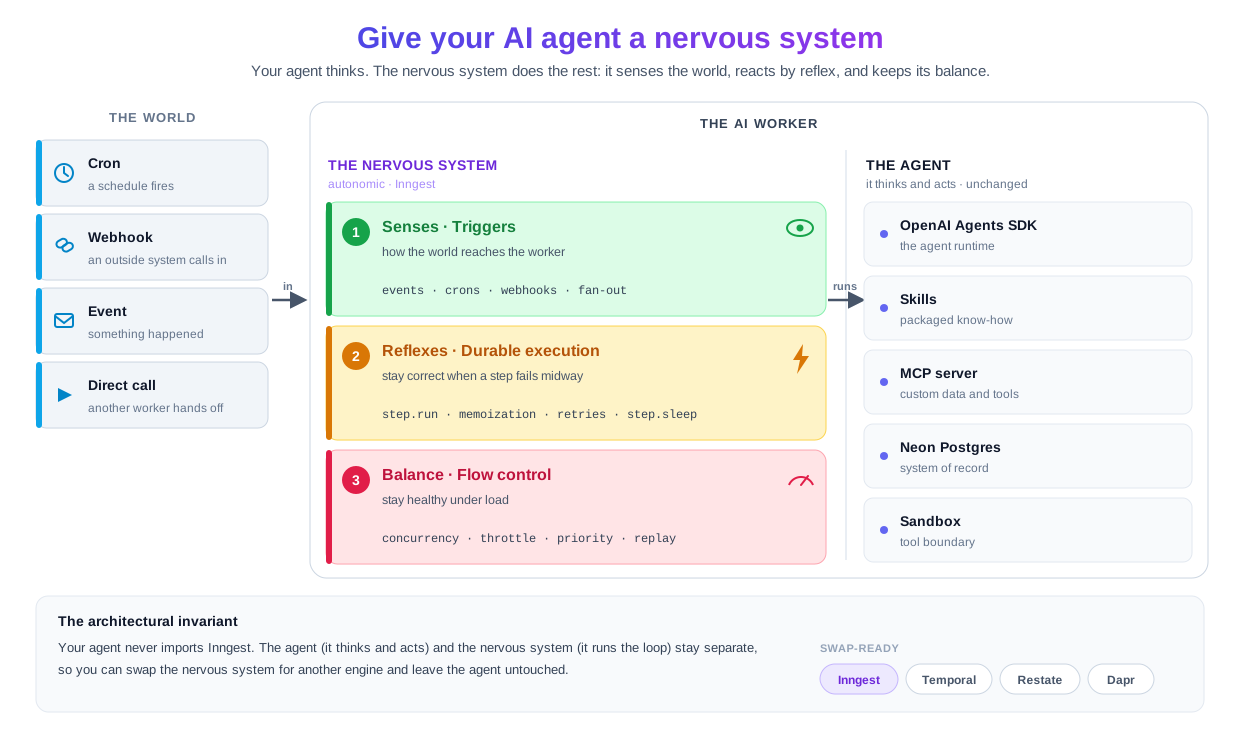
Agent kabhi nervous system ko import nahin karta, isliye aap Inngest ki jagah Temporal ya Restate laga sakte hain aur agent ko chhua tak nahin. Ek akela agent kaam ke beech crash ho jaye to woh pareshan kun hai. Pachas agents ka ek workforce jo customer-facing kaam sambhalta hai aur jiske neeche nervous system nahin, woh namumkin hai: ya to aap ek platform apnate hain jo aapko yeh deta hai, ya chhe maheene apna ek ghatiya version khud banane mein lagate hain. Chaar properties is nervous system ko agents ke liye khaas tor par aham banati hain: Day AI, AI-native companies ke liye CRM, apni product ko har us primitive par chalata hai jo yeh course parhata hai: durable LLM workflows, wait-for-event coordination, failure par replay, debounce plus throttle plus concurrency, aur multi-tenant fairness. Unke do founding engineers ne apne aap usi nervous-system tasveer ki taraf haath barhaya. Yeh production ki zabaan hai, curriculum ki branding nahin. Agent Factory thesis Saat Invariants bayan karta hai jo kisi bhi production agent system ko poore karne lazmi hain. Jo worker aap yahan banate hain woh Invariant 4 (ek engine) aur Invariant 5 (ek system of record, yahan ek chhota audit trail) ko poora karta hai. Yeh course do aur add karta hai, plus Invariant 1 ka ek hissa:Ek AI agent ko nervous system kyun chahiye (chaar properties)
step.wait_for_event (Concept 15) ke baghair, aap khud ek approval queue banate hain: database table, polling, timeout handling, audit trail. Yeh ek project hai, ek feature nahin.Yeh course Agent Factory thesis mein kahan baithta hai
step.wait_for_event kisi bhi platform par sab se saaf izhaar hai: agent rukta hai, ek insaan mateluba event nikalta hai, agent dobara chal parta hai.
15 concepts, ek nazar mein. Yeh un teen kaamon par map hote hain jo ek nervous system karta hai: senses (triggers worker ko jagate hain), reflexes (durable execution isse sahi rakhta hai jab kuch toote), aur balance (flow control isse load mein sehatmand rakhta hai). Yeh first-pass version hai, concept plus ek-line ka matlab. Jab build ke dauran kuch toote, to aakhir mein mojood Quick reference mein ek symptom-to-concept diagnostic hai jo aapko us concept ki taraf wapas le jaata hai jis se failure ka talluq hai.15 concepts har ek ek line mein (poore naqshe ke liye expand karein)
# Concept One-line gist Senses (Triggers) duniya worker tak kaise pohanchti hai 1 Events vs requests Ek request sync hoti hai aur koi intezaar karta hai; ek event async hoti hai aur duniya aage barh chuki hoti hai. 2 Cron triggers Ek schedule function ko jagata hai. Ek line: TriggerCron(cron="0 9 * * *").3 Webhook triggers Ek inbound HTTP payload ek named event ban jata hai; aapka function us naam par react karta hai. 4 Idempotency and event semantics Event IDs aur step names ek duplicate event (ya retry) ko no-op bana dete hain. 5 Fan-out and sub-agent delegation Ek event, N subscribing functions; ya ek parent N child events firing karta hua. Reflexes (Durable execution) worker ko sahi rakhna jab kuch toote 6 step.run and the durable function modelHar step.run ek checkpoint hai; function steps ke darmiyan crash ho kar dobara chal sakta hai.7 Memoization, the mechanic underneath Mukammal steps dobara chalne ke bajaye stored output return karte hain. 8 step.sleep and step.wait_for_eventDono function ko durably suspend karte hain, ek muddat ke liye ya ek event ke liye. 9 Retries, error handling, dead-letter Khud-ba-khud backoff retries; N koshishon ke baad fail run replay ke liye baqi rehta hai. 10 step.run for AI calls in PythonOpenAI calls ko step.run mein wrap karein; step.ai.infer inference offload karta hai (step.ai.wrap sirf TypeScript hai).Balance and recovery load mein flow control, recovery, aur human gate 11 Concurrency and throttling concurrency active runs cap karti hai; throttle starts-per-second cap karti hai.12 Priority and fairness Priority queue ko tartib deti hai; per-key concurrency har tenant ko munsifana hissa deti hai. 13 Batching Events ko ek batched function call mein jama karein, sasta bulk kaam. 14 Replay and bulk cancellation Fail runs ko naye code ke saath replay karein; jo runs ab nahin chahiye unhein bulk-cancel karein. 15 HITL gates with step.wait_for_eventFunction us waqt tak suspend rehta hai jab tak koi insaan approve na kare, phir faisle ke saath chalta hai.
Prerequisites. Yeh course farz karta hai ke aap ne From Agent to Digital FTE kar liya hai. Agar kiya hai, to aap neeche di gayi har cheez pehle se poora karte hain aur aapke paas ek aisa worker hai jise wrap karna faiydemand hai: Part 4 ka nervous system seedha usi ki taraf ishara karta hai, aur aap D0 ki shuru-se setup chhod dete hain. Agar nahin kiya, to pehle woh course karein, ya phir bhi parhte chalein: D0 shuru se ek minimal worker banata hai taake baqi course apne aap khada rahe. Har soorat, aapko chaar cheezein chahiye.
- Aap ek general agent chala sakte hain. Claude Code ya OpenCode, installed aur authenticated. Plan mode, rules files, read-first-then-write workflow: agar yeh rhythm jaana-pehchaana hai, to aap calibrated hain. Agar nahin to Agentic Coding Crash Course isse cover karta hai.
- Ek
OPENAI_API_KEY(ya koi aur model key jo aapka general agent istemaal kar sake) aur worker ke Postgres system of record ke liye ek Neon account. Worker ek asli model chalata hai aur apne customers aur audit trail ko Neon mein parhta aur likhta hai. Neon free hai (na card), aur aap usse setup ke dauran ek browser click se authorize karte hain; agar account nahin hai to neon.com par taqreeban ek minute mein sign up karein. Inngest dev server ko khud kisi account ki zaroorat nahin.- Node.js 20+ mojood, halaanke worker Python hai. Inngest dev server ek Node CLI ke tor par distribute hota hai (
npx inngest-cli@latest dev).- "Event-driven" vs "request/response" ka ek kaam karta mental model. Agar "duniya ek event fire karti hai aur sifar, ek, ya kayi functions us par react karte hain" jaana-pehchaana lagta hai, to aap calibrated hain. Agar nahin, to Concept 1 aapko shakl deta hai.
Pehli baar is page ko kaise parhein
Do passes. Pass ek nervous-system model, uski teen layers, aapke dimagh mein daalta hai; pass do, Part 4 mein keyboard par haath, wahan aap banate hain. Agar aap pehle banana aur saath saath model bante dekhna pasand karte hain, woh bhi theek hai: Quick Win se shuru karein, Part 4 chalayein, aur har concept ko woh reference samjhein jo aap tab kholte hain jab koi layer "kyun" uthaye. Jo kuch "Done when" ya "What to watch" se label ho usse expand karein: chalne wala behaviour jise aap apni peshangoiyon ke khilaaf check karein. Part 4 mein aap pehli read par load-bearing snippets ko sarsari nazar se dekh sakte hain; har ek ke ird-gird ki prose aapko batati hai ke layer kya karta hai, aur jab aap banate hain to aapka agent code likhta hai. "Try with AI" blocks optional extension prompts hain. Har concept ek Predict (parhne se pehle ek jawab par tay ho jayein) ya ek Quick check (jo rule abhi parha usse test karein) par khatam hota hai; dono is liye hain ke aap ruk jayein, aapko number dene ke liye nahin. Har term wahin context mein define hota hai jahan woh pehli baar nazar aata hai.
May 2026 tak current. Poora Part 4 build ek live Inngest dev server aur ek asli model ke khilaaf end-to-end chalaya gaya: inngest 0.5.18, openai-agents 0.17.x (0.17.3 aur 0.17.4 dono par bana aur dobara verify kiya gaya), fastapi 0.136.3, Python 3.12, aur Inngest CLI. Part 4 ka har snippet usi kaam karte build se hai, yaad se likha gaya nahin. Jo architecture yeh course parhata hai woh SDK badalne par nahin badalta; SDK is saal ka us tak ek interface hai. Ek jagah jahan ek mamooli openai-agents bump kaat sakta hai woh D5 ka resume detail hai (run-state serialization custom context ko kaise sambhalta hai), isliye woh Decision live docs ko seedha link karta hai. Agar ek live docs page aur yeh page kisi syntax detail par kabhi ikhtilaaf karein, to docs jeetenge: apni versions pin karein, aur jab aap banate hain to Inngest Python quick start aur OpenAI Agents SDK docs check karein.
Jo sections Claude Code aur OpenCode ke darmiyan farq karte hain unmein ek switcher hai; ek chunein aur page aapki visits ke darmiyan sync rehta hai.
Pandrah-minute quick win: base set up karein, aur reflex dekhein
Un 15 concepts se pehle jo kyun yeh kaam karta hai samjhate hain, woh environment set up karein jismein course chalta hai aur ek task ko crash se bachte dekhein. Yeh setup aap ek baar karte hain; Part 4 isi base par asli worker banata hai. Aakhir tak aapke paas hoga:
- base aapke general agent mein khula hua, uski skills aur tools aapke liye set up,
- ek taaza Neon database jismein do tables (
customersauraudit_log) hain jo aapke agent ne banaye, - ek nanha worker chalta hua, ek dashboard ke saath jahan aap usse dekh sakte hain,
- ek run jise aap intezaar ke dauran sote dekhte hain, poore waqt zero compute kharch karta hua,
- ek run jise aap ne jaan boojh kar toda, phir system ko retry karte dekha: usne woh kaam rakha jo pehle hi mukammal ho chuka tha aur sirf woh hissa dobara chalaya jo toota tha,
- aur wohi function ek asli agent ke saath jo us durable step ke andar greeting likhta hai, taake aap ek AI worker ko chalte dekh kar khatam karein, sirf ek timer nahin.
Yeh aakhri do bullets hi nuqta hain: retry woh reflex hai jiske baare mein yeh poora course hai, aur uske andar chalta agent woh wada hai jise woh reflex poora karta hai. Yeh ek baithak hai, poora Part 4 build nahin, isliye isse karein, phir concepts ke liye wapas aayein.
Ab aap shuruaat ke do programs start karte hain: aapka worker (aapka code) aur Inngest dev server (engine jo uske saath chalta hai, jiska dashboard http://127.0.0.1:8288 par hai, jahan /runs har run ko list karta hai). Yeh ek chhoti always-on web layer, FastAPI ke zariye jurte hain, woh darwaza jis par dev server run shuru karne ke liye dastak deta hai. Poora loop ek line mein: ek event aata hai, dev server us darwaze ke zariye aapke worker tak pohanchta hai, aapka durable function ek waqt mein ek step chalta hai, aur har step dashboard mein record hota hai. Aapka general agent dono ko likhta aur start karta hai; aapka kaam dekhna hai.
Ek aur boundary aham hai, wohi jo Digital FTE course ne kheechi thi. Aapka worker apne customers aur is ka record ke usne kya kiya ek Neon database mein rakhta hai, aur us database ko do alag tareeqon se chhua jata hai. Jab aap banate hain, aapka general agent aapke liye Neon mein, saaf English mein, haath daalta hai taake tables banaye aur rows check kare. Jab worker chalta hai, woh usi database se apne ek aam connection ke zariye baat karta hai. Build-time tool kabhi chalte worker mein wired nahin hota; Neon ke apne docs saaf kehte hain ke yeh banane aur muaina karne ke liye hai, production ke liye nahin. Neon ek click se free hai; Inngest dev server ko bilkul koi account nahin chahiye.
Base hasil karein aur usse kholein
Base download karein aur folder ko apne general agent mein kholein. Agent setup khud karta hai, just neeche di gayi prompts se. Aap yeh ek baar set up karte hain: ai-agent-nervous-system/ poore course ke liye aapka folder hai, Quick Win aur Part 4 dono. Aap kabhi dobara download ya unzip nahin karte.
Download ai-agent-nervous-system-base.zip
cd ai-agent-nervous-system
claude
cd ai-agent-nervous-system
opencode
Yeh base ek saqib general agent farz karta hai (Claude Code, ya OpenCode jo Claude Sonnet ya Opus, GPT-5, ya kuch waisa chala raha ho). Ek chhota model build prompt par drift karega; agar uska pehla plan specific ke bajaye gol-mol lage, to aage barhne se pehle kisi mazboot model par switch karein.
Base prep karein (~3 min)
Base apne rules AGENTS.md mein aur apni MCP wiring leke aata hai; Skills, aapki key, aur Neon authorization aage aate hain. Apne agent se khud ko set up karwayein. Yeh paste karein:
Read AGENTS.md, then get this base ready: install the Skills it lists for whichever agent you are, copy
.env.exampleto.envfor me, and tell me exactly what you need from me to bring the Neon and Context7 MCP servers online.
Iska intezaar karein: agent chaar Inngest Skills aur neon-postgres Skill install kar raha ho (aap install runs aur Installed confirmations dekhte hain), .env bana raha ho, phir aap se do cheezein maang raha ho: aapka OPENAI_API_KEY jo .env mein paste karna hai, aur Neon ko OAuth par authorize karne ke liye ek browser click. Neon free hai; agar abhi account nahin to neon.com par taqreeban ek minute mein sign up karein, ya seedha authorization screen par hi bana lein. INNGEST_DEV=1 pehle se .env mein hai, isliye SDK local dev mode mein bina signing key ke chalta hai. Jab install aur wiring ho jaye, agent aapko dev server start karne (agla step) aur phir use restart karne ko kehta hai, kyunki nayi Skills aur inngest-dev MCP session ke beech load nahin hote.
Done when: Skills install ho gayi hain, .env mein aapki key hai, Context7 pohanch mein hai, aur Neon authorized hai. inngest-dev MCP us waqt online hota hai jab dev server chal raha ho, jo agla step hai.
Dev server start karein, aur tasdeeq karein ke agent us tak pohanch sakta hai (~2 min)
Yeh course do boundaries add karta hai jin tak aapka agent MCP par pohanchta hai: ek Neon database jise woh banata aur muaina karta hai, aur chalta dev server jise woh events bhejta aur dekhta hai. To kuch banane se pehle, dono ko le aayein aur tasdeeq karein ke woh live hain.
Inngest dev server ko apne alag terminal mein start karein (yeh ek Node CLI hai; isse chalta chhor dein):
npx inngest-cli@latest dev
Dashboard http://127.0.0.1:8288 par aata hai, aur dev server apna MCP endpoint /mcp par expose karta hai. Ab apne general agent ko restart karein (exit karke ai-agent-nervous-system folder mein dobara launch karein) taake taaza install ki gayi Skills aur inngest-dev MCP dono load hon. Phir yeh paste karein:
List the Neon tools and the inngest-dev tools you can see.
Iska intezaar karein: do asli lists. Neon tools (ek project banana, SQL chalana, tables describe karna, connection string lana, waghaira) aapke agent ka database par haath hain. inngest-dev tools (list_functions, send_event, invoke_function, get_run_status, aur baqi) chalte dev server par uska haath hain. Neeche sab kuch dono par sawaar hai.
Gate open: jawab asli Neon tool names aur asli inngest-dev tool names list karta hai. Agar Neon tools ghaayab hain: OAuth mukammal nahin hua; prep step se Neon authorization dobara karein. Agar inngest-dev tools ghaayab hain: dev server nahin chal raha (usse start karein), ya aap ne restart chhod diya (exit karein, is folder mein dobara launch karein, phir poochhein).
Store banayein, aur uski connection string lein (~3 min)
Ab worker ka system of record Neon MCP par banayein, phir worker ko woh ek cheez de dein jo usse baad mein pohanchne ke liye chahiye: ek connection string. Jo worker aap Part 4 mein banate hain woh apne customers ko yahan parhta aur apna audit trail likhta hai. Yeh paste karein:
Paste this to your general agent. Plan first; execute on approval.
On a fresh Neon project, create two tables:
customers(id, email, tier) andaudit_log(a record of every action the worker takes). Then call the Neon tool that returns the connection string and write that URL into my.envasDATABASE_URL. Use the Neon tools for all of it; don't write SQL for me to run.
Iska intezaar karein: agent Neon MCP tools call kar raha ho taake project aur do tables banaye (aap woh tool calls dekhte hain, woh SQL nahin jo aap ne type kiya), phir DATABASE_URL ko .env mein likhe. Woh string handoff hai: Neon MCP ne store provision kiya, aur aapka worker us string ko istemaal karega, MCP server ko nahin.
Done when: ek taaza Neon project mojood hai jismein ek customers table aur ek audit_log table hai, aur .env mein ek DATABASE_URL hai. console.neon.tech kholein, agent ne abhi jo project banaya usse chunein, aur Tables kholein: wahan customers aur audit_log baithe hain, abhi ke liye khaali. Jab worker chalega to aap D0 mein rows aate dekhenge. (Ek table sirf ek spreadsheet hai: har row ek cheez, har column ek detail.)
Pehla durable function banayein, aur usse apne agent se chalayein (~3 min)
Ab sab se chhota durable function banayein, un Skills se jo aap ne abhi install kiye. Inngest Skills apni misaalon mein TypeScript-first hain, isliye aapka agent un se patterns leta hai (ek step kya hai, ek durable function ki shakl kaisi hoti hai) aur exact Python signatures ko docs se confirm karta hai (dev-server MCP ka grep_docs/read_doc, ya Context7), yaad se nahin. Yeh paste karein:
Using the Inngest Skills, write one tiny Inngest durable function (call it
greet-customer, triggered by ademo/greetevent) that composes a greeting in onestep.run, sleeps fifteen seconds withstep.sleep, then composes a farewell in a secondstep.runand returns both. Serve it from a FastAPI host in local dev mode, and start the host on port 8000 with auto-reload on, so edits I make later are picked up without a manual restart.
Jo shakl woh likhta hai, taake aap usse dekh kar pehchaanein: function saada async def hai, do step.run calls us kaam ko wrap karti hain jo memoize hona chahiye, aur un ke darmiyan step.sleep run ko durably suspend karta hai. Process us sleep ke dauran crash, restart, ya redeploy ho sakta hai, aur run phir bhi agli line par dobara chalta hai jab timer fire hota hai. Agent ke code mein ek detail confirm karein: Inngest client is_production=False ke saath bana ho, ya woh INNGEST_DEV=1 parhta ho jo aapke .env mein pehle se hai. In dono mein se ek ke baghair, SDK chupke se Cloud par default ho jata hai aur aapka function kabhi locally register nahin hota.
Done when: FastAPI host (pehle wala darwaza) port 8000 par chal raha hai, aur dev server (jo pichhle step se pehle se chal raha hai) ne isse auto-discover kar liya. Apne agent se inngest-dev ke list_functions tool se confirm karwayein (ya http://127.0.0.1:8288 kholein, Functions par click karein, aur greet-customer listed dekhein). Yahan se aap apne agent se events bhejte hain aur runs ko dashboard mein dekhte hain.
Isse trigger karein, aur ek step ko zero compute par sote dekhein (aap chalate hain)
Trigger event apne agent se bhejein. Yeh paste karein:
Send a
demo/greetevent withnameSara using the inngest-devsend_eventtool.
(Dashboard pasand hai? http://127.0.0.1:8288 mein, Events par click karein, phir Send event, neeche di gayi payload paste karein, aur Send click karein. Har soorat wohi run shuru hota hai.)
{
  "name": "demo/greet",
  "data": { "name": "Sara" }
}
Ab durable sleep ko dekhein, aur isse live pakarne ke liye aapke paas taqreeban pandrah second hain. Do tareeqe, ek chunein:
- Agent ko poll karne dein (agent-native tareeqa): "Poll
get_run_statuson that run until it finishes." Sleep ke beech agent run ko Running report karta hai bina kisi end time ke, aapka host terminal poore waqt khaali; phir woh Completed par palat jata hai output dict ke saath aur taqreeban pandrah-second ki start-to-end gap ke saath. Woh gap sleep hai. - Dashboard dekhein:
http://127.0.0.1:8288→ Runs → sab se naya run, foran. Pehla step ho chuka hai aur sleep step Sleeping dikhata hai ek resume time ke saath; pandrah second baad woh khud dobara chalta hai aur Completed par palat jata hai, returned dict Output panel mein.
Har soorat, un pandrah seconds mein aapka koi code nahin chalta: dev server resume time thaame rakhta hai aur host khaali baitha rehta hai. Yahi nuqta hai, ek durable wait zero compute kharch karta hai. (Run ko khatam hone ke baad kholein to aap sirf Completed output ke saath dekhte hain, live sleep ja chuka; dobara bhejein aur jaldi dekhein, ya agent ko poll karne dein.)
Ek step todein, aur retry ko woh kaam chhorte dekhein jo woh pehle hi kar chuka (asal faida)
Ab jaan boojh kar ek step fail karwayein, taake aap memoization ko mukammal kaam retry ke aar-paar le jaate dekhein. Yeh apne agent ko paste karein:
Make the farewell step raise an error on purpose, so I can watch a run fail. Keep everything else the same.
Wohi demo/greet event dobara bhejein, phir fail hote run ka per-step trace dashboard mein parhein (Runs → sab se naya). Yahan faida hai, aur woh isi ek fail hote run mein hai: greeting step ek mukammal attempt dikhata hai, aur farewell step kayi Attempts dikhata hai, har ek backoff ke saath retry hota hua (Inngest by default kayi attempts deta hai) is se pehle ke run Failed mein utre. Us attempt count ke matlab par theher jayein: mukammal greeting step ka ek hi baar paisa diya jata hai, har retry par nahin. Yeh durable execution hai jise aap apni aankhon se dekh sakte hain. Kyun mukammal step dobara chalne ke bajaye foran return hota hai woh mechanic hai jise aap Concept 7 mein milenge; abhi ke liye, bas hote dekhein.
Jab aap yeh chalayein to do cheezon ki tawaqqo karein:
- Per-step proof dashboard mein hai, agent mein nahin. Aapka agent event fire karta hai aur run-level status report kar sakta hai, lekin dev-server MCP ka
get_run_statusrun summarysteps: nullke saath return karta hai; woh per-step attempts ko expand nahin karta. Woh attempt counts jo memo proof hain (greeting ek par, farewell barhta hua) dashboard Runs view mein rehte hain. Yeh Quick Win mein ekloti jagah hai jahan aap browser ki taraf haath barhate hain, agent ki nahin. - Failed tak pohanchne mein chand minute lagte hain. Default retries aur exponential backoff ke saath, run farewell step ko kayi minute tak retry karta rehta hai (ek asli run ko taqreeban saadhe chaar minute lage) is se pehle ke woh Failed par palte. Aapko isse aakhir tak intezaar karne ki zaroorat nahin: memo proof pehle retry se hi nazar aata hai, greeting ek attempt par thaame jab farewell zyada jama karta hai. Do-chaar attempts dekhein, phir aage barhein.
(Yeh dev-server build koi alag "memoized" badge bhi nahin dikhata. Memo hi attempt count hai: mukammal step ek attempt par baitha jab toota step charhta hai, theek wahi hai jo "memo se return, dobara nahin chala" yahan dikhta hai.)
Ab isse theek karein:
Now revert the farewell step to the working version.
Host auto-reload karta hai (yahi --reload ne aapko diya; agar aap ne woh chhod diya, to host ko haath se restart karein). Ek taaza demo/greet event bhejein aur poora function ab theek code par saaf Completed tak chalta hai. Recovery ke baare mein ek cheez logon ko phasati hai. Dashboard ka Rerun button bilkul naya run upar se aapke maujooda code ke saath shuru karta hai, har step shuru se dobara chalta hua. Yeh incident recovery ke liye sahi tool hai: ek bure deploy ne runs ka ek batch toda, to aap ek fix ship karte hain aur unhein rerun karte hain. Lekin yeh memo-preserving resume nahin hai. Memo-preserving resume woh khud-ba-khud retry hai jo aap ne abhi fail hote run ke andar dekha, jahan mukammal step apni jagah baitha raha.
Isse ek asli AI worker banayein (Part 4 tak pul)
Ab tak function sirf strings ko juggle karta hai, aur woh jaan boojh kar tha: durability ko dekhna aasan hai jab beech mein aur kuch na ho. Ab greeting ko ek asli agent se aane dein, taake aap usi nervous system ko ek asli AI call le jaate dekhein. Ek prompt hardcoded greeting ko ek chhote agent se badal deta hai; sleep, durability, aur dashboard sab bilkul waise hi rehte hain. Yeh paste karein:
Replace the hardcoded greeting with a one-line call to a minimal hello-world agent built on the OpenAI Agents SDK (it just writes the greeting), still inside the same
step.run. Keep thestep.sleepand the farewell unchanged. Then fire ademo/greetevent and show me the run.
Sirf ek cheez badli jo greeting step ko bharta hai: ek f-string ke bajaye, ek model usse likhta hai. Aur kyunki woh call usi step.run ke andar baithta hai jise aap durable saabit kar chuke, woh muft mein memoized aur crash-safe hai, bina kisi nayi wiring ke. Run ko waise hi dekhein jaise aap ne pehle dekha (agent se poll karein, ya dashboard mein kholein): wahi teen-step trace aur wahi zero-compute sleep, sivaye iske ke pehle step ka output ab ek agent se aaya. Aapka OPENAI_API_KEY prep step se pehle hi .env mein hai, to set up karne ko kuch naya nahin.
Done when: ek demo/greet run mukammal hota hai aur output mein greeting agent se aaya, kisi hardcoded string se nahin. Jo aap dekh rahe hain us par theher jayein, kyunki yeh poora course ek jumle mein hai: ek AI agent, ek event se jaga hua, ek nervous system ke andar durably chalta hua, ek crash se bach raha. Part 4 is hello-world agent ko ek asli customer-support worker se badalta hai aur usse poore nervous system mein wrap karta hai (ek asli event trigger, ek cron jo fan out karta hai, flow control, ek human-approval gate), lekin abhi aapki screen par jo shakl hai wohi shakl hai.
Aap ne abhi poora course environment set up kiya aur nervous system ko apni aankhon se kaam karte dekha: Skills install hain, aapka Neon store DATABASE_URL ke saath .env mein provisioned hai, dev-server MCP live hai, aur aap ne ek durable function chalaya, ek step ko bina compute kharch kiye sote dekha, ek step toda aur khud-ba-khud retry ko mukammal step memo se return karte dekha jab sirf toota step dobara chala, phir ek asli agent ko usi durable step ke andar greeting banate dekha. Yeh woh architecture hai jiske baare mein yeh course hai. Baqi course isse barhata hai: asli senses (cron, webhook, fan-out), mazboot reflexes (step.run ke andar agent invocation), load mein asli balance, aur woh human-approval gate jo "agent shayad ise kharab kar de" ko "agent draft karta hai, ek insaan approve karta hai, action issue hota hai" mein badal deta hai.
Agar kuch kaam na kiya, to chaar masle taqreeban poore ka poora cover karte hain:
- Dev server function host tak nahin pohanch sakta: tasdeeq karein ke host port 8000 par chal raha hai.
- Client Cloud mode mein hai: agent ne
is_production=Falsechhod diya aur.envmeinINNGEST_DEV=1nahin, to functions kabhi locally register nahin hote. Isse ek set karwayein (ek saafis_productionvalue env var par jeet jaati hai). - Function dashboard se ghaayab hai: host reload nahin hua; usse restart karein.
- Ek run bina kisi error aur bina kisi progress ke atak jata hai: ek de-synced host khamoshi se ruk jata hai; host aur dev server dono ko ek saath restart karein, aur ek host ek dev server ke khilaaf chalayein. (Ek baareek wajah: agar
:8288liya hua tha aur dev server8289+par aaya, to sirfinngest-devMCP URL dobara point karna kaafi nahin; host abhi bhi:8288se baat karta hai. Host parINNGEST_BASE_URL=http://127.0.0.1:<port>set karein taake woh dev server ke peeche naye port par chale.)
Agar in mein se koi pesh aaye, to universal recovery move yahan bhi kaam karta hai: "Something didn't work. Read the error, tell me in plain language what you see, and propose one fix I can approve."
Aap ne kya banaya, aur woh kahan barhta hai
Environment set up hai: base khula hai, Skills install hain, teenon MCP servers wired hain (Neon, Context7, inngest-dev), aapke Neon store mein uske customers aur audit_log tables hain DATABASE_URL ke saath .env mein, aur dev server chal raha hai. Aap ne woh ek soch bhi apni aankhon se dekhi jis par poora course tikta hai, durable execution ka reflex, aur ek asli agent ko uske andar chalte dekha. Part 4 us hello-world agent ko customer-support worker se badalta hai, isi base par, isi folder mein: woh un customers ko parhta aur un audit rows ko likhta hai, phir poori cheez ko poore nervous system mein wrap karta hai, ek asli event trigger, ek rozana cron jo fan out karta hai, flow control, aur refunds par durable human-approval gate. Part 4 is step.run-aur-step.sleep skeleton ko ek aise worker mein barhata hai jo aapke Neon store par asli kaam karta hai. Agar yeh Quick Win kaam kar gaya, to aage ke concepts samjhate hain ke har tukda is tarah kyun bana hai.
Part 1: Senses, duniya worker tak kaise pohanchti hai
Yahan se, Parts 1-3 build ke peeche reference shelf hain: pandrah concepts, ek soch har ek mein, un teen kaamon ke mutabiq group ki gayi jo ek nervous system karta hai. Aap inhein seedha parh sakte hain, ya jab koi Part 4 layer aap se poochhwaye ke woh kyun kaam karta hai to kisi ek mein haath daal sakte hain. Yeh pehla group senses hai.
Ek AI agent jise aap haath se call karte hain woh tab chalta hai jab aap usse call karte hain. Ek asli AI Worker ke paas senses hote hain: woh tab chalta hai jab duniya us tak pohanchti hai. Ek customer email karta hai, ek webhook aata hai, ek cron rozana 09:00 par fire karta hai, doosra worker kaam handover karta hai. In mein se har ek ek aata hua signal hai, aur ek trigger woh tareeqa hai jisse agent usse mehsoos karta hai. Part 1 ke paanch concepts wohi senses hain: event-driven mental model, woh teen tareeqe jin se duniya andar pohanchti hai (cron, webhook, event), woh semantics jo double-processing rokte hain, aur woh fan-out patterns jo ek signal ko kayi workers jagane dete hain.
Concept 1: Events vs requests, durable mental model ki tabdeeli
Is course mein jo kuch aage aata hai woh ek mental shift par tikta hai: requests se events ki taraf.
Ek request ek synchronous guftugu hai. Koi call karta hai; aap handle karte hain; aap return karte hain; woh aage barhte hain. Ek connection khula rehta hai; ek insaan ya service intezaar kar rahi hai. Agar aap crash hote hain, to caller ko ek error milta hai. Ek agent jis se aap prompt par chat karte hain woh ek request hai: aap ne type kiya, usne stream kiya, guftugu aapke terminal session ki thi.
Ek event ek asynchronous message hai. Duniya mein kuch hua (ek customer ne sign up kiya, ek email aayi, ek payment clear hui), aur shuru karne wala us haqeeqat ka ek named record nikalta hai. Sifar, ek, ya kayi functions us event par alag alag react karte hain. Koi connection khula nahin rehta. Shuru karne wala nahin jaanta ke kaun sun raha hai, nataij ka intezaar nahin karta, aur block nahin hota. Duniya aage barh chuki.
# A request: I'm here, waiting, blocking
result = await agent.handle_customer_message(text=user_input)
print(result)  # I unblock when the agent finishes

# An event: I fire-and-forget
await inngest_client.send(events=[
    inngest.Event(
        name="customer/email.received",
        data={"customer_id": "c-4429", "body": email_body, "subject": subject},
    ),
])
# I return immediately. Somewhere else, one or more Inngest
# functions react to this event on their own schedule.

Ek request producer ko intezaar karwati hai; ek event usse aazaad kar deti hai, aur stored event ek crash se bach jaata hai.
Yeh shift chhoti lagti hai. Hai nahin. Ek baar aap events mein sochne lagein, to durability aur scale taqreeban muft mein nikal aate hain, kyunki:
- Producer ko consumer slow nahin kar sakta (email-receiver agent ke jawab draft karne ka intezaar nahin karta).
- Consumer crash aur restart ho sakta hai bina kaam khoye (event durably stored hai; Inngest usse dobara deliver karta hai).
- Naye consumers add ho sakte hain bina producers badle (ek doosra function, maslan ek analytics counter,
customer/email.receivedko subscribe kar sakta hai bina email-receiver ke jaane). - Backpressure ek flow-control policy ban jaati hai, ek code change nahin (Inngest concurrency cap karta hai; producer fire karta rehta hai; events queue mein lag jaate hain).
Predict. Aapka customer-support worker ek email ka jawab dene mein 8 second leta hai: teen second agent ki reasoning, chaar second do MCP tool calls, ek second database write. Peak load par aapko 50 emails per minute milte hain. Agar aap request model istemaal karein (email parser tab tak block karta hai jab tak agent khatam na kare), to woh aapke email parser tak kitne parallel HTTP connections ka matlab hai? Agar aap event model istemaal karein (email parser ek event fire karke foran return karta hai), to kitne? Confidence 1-5.
Jawab: request model ko taqreeban 7 concurrent parsers chahiye (50/min × 8 second yaani ~6.7 parallel handlers, plus thori gunjaish). Event model ko ek parser chahiye. Woh event fire karke ~10ms mein return karta hai, event queue 50/min spike ko jazb karti hai, aur Inngest functions queue ko us concurrency par consume karte hain jo aap ijazat dein.
Woh faasla hi poora nuqta hai. Event "duniya mein kya hua" aur "worker uske baare mein kya karta hai" ke darmiyan ek durable boundary ban jaata hai, aur har achi cheez usi ek harkat se aati hai: producer kabhi intezaar nahin karta, ek crashed consumer stored event se retry karta hai, aur naye consumers producer ko chhue baghair jurte hain. Events woh tareeqa hain jisse aap kaam ki timing ka maalik banna chhor dete hain.Try with AI
Walk me through three scenarios. For each, classify it as REQUEST-MODEL
or EVENT-MODEL, and explain which one fits better:

A) A user clicks "Submit refund request" in the support portal and
   expects to see "Refund issued: $30" within 2 seconds.

B) A nightly cron job at 02:00 runs a customer-health-check across
   all 5,000 customers and writes a report to Slack.

C) A customer sends an email to support@; we want a draft response
   ready within 60 seconds for the on-call agent to review and send.

For each, name (a) what the human's expectation of timing is and
(b) what failure looks like if the model crashes mid-execution.
Concept 2: Cron triggers, woh kaam jo waqt guzarne par chalta hai
Sab se saada trigger ghadi hai. Bohot si cheezein jo ek AI Worker karta hai woh bahar ke events par reactions nahin hotin; woh scheduled kaam hai: rozana health reports, haftawar cleanups, hourly recalculations. Inngest ka cron trigger ek line ka code hai.
import inngest

@inngest_client.create_function(
    fn_id="daily-customer-health-check",
    trigger=inngest.TriggerCron(cron="0 9 * * *"),  # 09:00 every day, UTC
)
async def daily_health_check(ctx: inngest.Context) -> dict[str, int]:
    """Run a customer-health pass for every Pro/Enterprise customer."""
    customers = await ctx.step.run("fetch-pro-customers", fetch_pro_customer_ids)

    # fan out: one event per customer, one worker run per event
    events = [
        inngest.Event(name="customer/health_check.requested", data={"customer_id": cid})
        for cid in customers
    ]
    await ctx.step.send_event("fan-out", events)

    return {"customers_scheduled": len(customers)}
Teen cheezon par ghor karein:
-
Schedule sirf standard cron syntax hai.
0 9 * * *har roz 09:00 UTC hai;*/15 * * * *har 15 minute hai;0 9 * * 1har Monday ko 09:00 hai. Inngest cron ko by default UTC mein evaluate karta hai; agar aapko alag timezone chahiye, to aap cron string ke aage hi prefix lagate hain (maslanTZ=Europe/Paris 0 12 * * 5), ek alag argument paas nahin karte. -
Function abhi bhi wahi durable steps istemaal karta hai. Cron-triggered ho ya event-triggered, function ki shakl ek jaisi hai: side effects ke liye
ctx.step.run, fan out ke liyectx.step.send_event. Durability ek jaisi kaam karti hai. Flow control ek jaisi kaam karti hai. Trigger sirf yeh hai ke function kaise shuru hota hai. -
Cron output ek aam Inngest function run hai. Woh dashboard mein nazar aata hai, uska ek run ID hota hai, ek trace hota hai, replay support karta hai. Agar aapki Monday-subah cron run step 3 par fail hoti hai, to Tuesday ki cron normal chalegi aur Monday ki failure aapke bug theek karne ke baad replay ke liye mojood rahegi.
Agar cron fire hote waqt aapki service down ho to kya hota hai? Yeh woh sawal hai jo ek durable scheduler ko ek nazuk wale se alag karta hai. Inngest ke cron runs us lamhe durably record ho jaate hain jab schedule fire hota hai. Agar aapka function endpoint na-qaabil-rasai hai, to Inngest backoff ke saath retry karta hai jab tak woh kaamyaab na ho ya retry ceiling tak na pohanche. 09:00 par fire hua cron "miss" nahin hota kyunki aapka deploy 09:00 par chal raha tha; run intezaar karta hai, aap apna deploy mukammal karte hain, run mukammal hota hai. Development mein cron triggers ki ek baat jaanne layak hai: local dev server sirf tab crons fire karta hai jab woh chal raha ho. Production unhein Inngest ke infrastructure par chalata hai, jo hamesha chal raha hota hai.
Quick check. Teen daave. Har ek ko True ya False maarein. (a) Agar ek cron function chalne mein 45 minute leta hai aur har 15 minute schedule hai, to kisi bhi waqt teen concurrent instances chal rahe honge. (b) Aap ek cron-triggered function ke andar
step.sleepistemaal karke kaam ko din bhar mein phaila sakte hain. (c) Ek cron-triggered function ko testing ke liye dashboard se manually bhi invoke kiya ja sakta hai.
Jawab: (a) Concurrency policy par munhasir: by default Inngest overlapping runs ko queue karega; agar aap concurrency=1 set karein to woh serialize hote hain; agar aap concurrency=10 set karein to parallelize hote hain. Default theek hai. (b) True, aur yeh "rozana kaam ko ghanton mein phailao taake load smooth ho" ke liye ek aam pattern hai. (c) True: Inngest dashboard aapko testing ke liye kisi bhi function ko maang par invoke karne deta hai, chahe uska trigger kuch bhi ho.Try with AI
With my AI coding assistant connected to the Inngest dev server MCP,
write a cron-triggered Inngest function in Python that:

1. Runs every Monday at 09:00 UTC.
2. Queries the audit_log table for all conversations resolved in the
   prior week (status='resolved' in that window).
3. Computes per-agent metrics: total conversations resolved, average
   resolution time, count of escalations, count of refunds issued.
4. Returns the metrics as a JSON object.

After you write the function, test it now instead of waiting for
Monday: trigger it on demand from the Inngest dev dashboard (the
Invoke button), since the dev server only fires crons while it is
running. Confirm the audit query is correct by running the SQL
directly against the database and checking the rows it returns;
grep_docs can confirm your step.run pattern matches Inngest's
examples, but only running the query proves the SQL itself.
Concept 3: Webhook triggers, jab bahar ki duniya andar call karti hai
Pehla trigger ghadi tha. Doosra HTTP hai: aapke system se bahar koi cheez (Stripe, aapka email provider, aapki site par ek form, ek GitHub event) aapke worker tak pohanchna chahti hai.
Is baare mein theek raho ke kaun sa hissa mushkil hai, kyunki woh hissa nahin jo aap andaaza lagayein. POST haasil karna aasan hai: FastAPI jaisa web framework aapko teen line mein @app.post(...) deta hai. Mushkil hissa woh sab hai jo POST land hone ke baad hota hai: call ko queue karna, fail hone par retry karna, kaam ke beech crash se bachna, redelivery ko double-process karne se inkaar karna, agent chalana, chaar-ghante ki approval thaame rakhna, dashboard se kisi bhi run ko replay karna. Darwaza sasta hai; uske peeche kitchen hi kaam hai, aur woh kitchen Inngest hai.
To route nanha rehta hai. Uska poora kaam yeh hai: POST haasil karna, event ko Inngest ke hawale karna, aur jaldi 200 jawab dena. Durable kaam uske peeche Inngest function mein chalta hai. Agar aap us kaam ko request handler ke andar karein, to aap classic webhook bugs se takra jayenge: sender time out ho kar dobara bhejta hai jab aap abhi bhi kaam kar rahe hain, ek restart job khoti hai, ek redelivery customer ko do baar refund kar deti hai. (Inngest ka hosted option ek public inn.gs/e/... URL bhi bana sakta hai taake aap route likhna bilkul chhod dein.)
Ab woh hissa jo sab ko confuse karta hai. Aapki app ke paas aakhir mein do darwaze ho jaate hain, aur woh mukhalif samton ka rukh karte hain:
  DOOR 1: the webhook door  (you write it, or use the hosted URL)
     Stripe knocks here with DATA  ->  it just calls send() and is done

  DOOR 2: /api/inngest      (auto-made by inngest.fast_api.serve)
     the ENGINE knocks here to RUN YOUR CODE, one step at a time
     it speaks Inngest's own protocol, so a raw Stripe POST here is rejected
Yeh dono kabhi seedha ek doosre se baat nahin karte. Woh sirf event ke zariye jurte hain: Door 1 ek event andar daalta hai, engine usse uthata hai aur Door 2 ke zariye wapas aakar aapka function chalata hai. Door 2 ko auto-create karna (jo Quick Win pehle hi kar chuka) Door 1 ke liye kuch nahin karta; woh wohi hai jo aap abhi bhi likhte hain.
To webhook door asal mein kya call karta hai? Sirf send(). Poora route itna chhota hai:
@app.post("/webhooks/stripe")
async def stripe_webhook(request: fastapi.Request):
    payload = await request.json()
    # verify the signature, reshape Stripe's envelope, then hand it off:
    await inngest_client.send(
        inngest.Event(name="stripe/charge.refund.failed", data=reshape(payload)),
    )
    return {"ok": True}  # ack Stripe in milliseconds
Woh send() event ko Inngest ki stream mein daal deta hai aur route khatam ho jaata hai. Woh aapka function call nahin karta, aur woh /api/inngest call nahin karta. Inngest woh aadha hissa sambhalta hai: woh event name ko on_refund_failed se match karta hai aur Door 2 ke zariye wapas aakar function ke steps chalata hai. Shuru se aakhir tak:
Stripe → Door 1 (webhook) → send() → Inngest → Door 2 (/api/inngest) → your function
@inngest_client.create_function(
    fn_id="handle-stripe-refund-failed",
    trigger=inngest.TriggerEvent(event="stripe/charge.refund.failed"),
)
async def on_refund_failed(ctx: inngest.Context) -> dict[str, str]:
    """Triggered by Stripe webhook → Inngest event → this function."""
    charge_id = ctx.event.data["charge_id"]

    # Find the support ticket this refund belongs to
    ticket = await ctx.step.run(
        "find-ticket-for-refund", lookup_ticket_by_charge, charge_id,
    )

    # Hand the support worker the full context.
    # step.run takes (step_id, handler, *args): pass args positionally, not as kwargs.
    await ctx.step.run(
        "notify-support-agent",
        notify_support_agent_of_refund_failure,
        ticket["id"], charge_id,
    )

    return {"ticket": ticket["id"], "action": "notified"}
Yeh hai darwaze ke peeche ka function: Inngest ne event ko isse match kiya aur isse chalaya, ticket dhoond kar support worker ko ittela di, queue, retries, aur idempotency sab aapke liye sambhal kar. Webhook kaam taqreeban hamesha is tarah asynchronous hota hai: function fast ack ke baad background mein chalta hai, kabhi request ke dauran nahin.
Do patterns naam ke layak hain:
- Generic JSON webhooks. Sender ko kisi mashhoor vendor hona zaroori nahin. Kisi bhi service ko jo JSON POST kar sake usi tarah ke URL par point karein aur event name khud chunein.
vendor/event.subtypestyle sirf convention hai, lekin jab aap isse follow karte hain to dashboard events ko saaf group karta hai. - Webhook transforms. Vendor payloads bare aur nested hote hain, aur ek vendor aksar ek hi URL par kayi event types bhejta hai. Ek transform ek chhota reshaping function hai jo Inngest ke servers par us lamhe chalta hai jab payload aata hai, is se pehle ke woh event bane. (Woh JavaScript mein likha jaata hai chahe aapka worker Python ho, kyunki woh Inngest ki taraf chalta hai, aapki app mein nahin.) Woh do kaam karta hai: aapka event name chunna, aur payload ko un chand fields tak flatten karna jo aap asal mein istemaal karte hain. Aapka function code vendor-specific JSON se aazaad rehta hai.
Predict. Ek Stripe webhook
stripe/charge.refund.failedko bilkul usi millisecond fire karta hai jab aapka customer-support worker bhi ek alag event nikalne ke liyeinngest_client.sendcall kar raha hai jiska naamcustomer/refund.investigation_neededhai. Dono events system mein ek saath aate hain; upar wala function sirf Stripe event par trigger hota hai. Kya function ek baar chalega ya do baar? Confidence 1-5.
Jawab: ek baar. Ek function sirf us event name ke liye fire hota hai jis par woh register hai. stripe/charge.refund.failed aur customer/refund.investigation_needed alag naam hain, isliye woh alag functions (ya koi nahin) ko jagate hain, chahe woh ek hi lamhe land hue. Event name routing key hai.
Yahi wajah hai ke naming cosmetic nahin hai. Ek typo, customer/email_received jahan function customer/email.received ke liye sunta hai, aur function khamoshi se kabhi nahin chalta. Kuch error nahin hota; kaam bas nahin hota. Dashboard aapka safety net hai: jo events kisi function se match nahin karte woh ek alag unmatched stream mein nazar aate hain jise aap dekh sakte hain.
Locally, paste karne ko koi URL nahin. Upar jo kuch hai woh production raasta hai. Aapke laptop par koi public URL nahin, aur Stripe localhost tak nahin pohanch sakta. To jab aap banate hain, aap khud webhook ka kirdaar nibhate hain: send_event (ya dev dashboard ka "Send to Dev Server" button) bilkul wahi event inject karta hai jo ek asli webhook ne banaya hota. Yahi wajah hai ke neeche wala hands-on send_event se test karta hai aur Stripe ko kabhi chhuta nahin.
Yeh split yaad rakhne layak hai:
| Event andar kaise aata hai | |
|---|---|
| Production | Stripe aapke live webhook URL par POST karta hai; woh aapki stream mein ek event ban jaata hai |
| Local dev (aap) | aap pehle se shaped event ko send_event se inject karte hain |
Aapka function code dono soorton mein bilkul ek jaisa hai; woh sirf event name par react karta hai aur kabhi nahin jaanta ke event ek asli webhook se aaya ya aapke send_event se.Try with AI
I need to handle three webhook sources for my customer-support worker:

A) Stripe: refund failed, charge disputed
B) Postmark (email service): bounced email, complaint
C) My internal admin UI: manual "investigate this ticket" button

For each, decide:

1. What event names you'd use (vendor/event.subtype format).
2. Whether the function reacting to it should run synchronously (the
   caller is waiting) or asynchronously (fire and continue).
3. Whether you'd write a webhook transform to reshape the payload, or
   consume it raw.

Then write the Inngest function for the Stripe refund-failed case in
Python, using the MCP's grep_docs to find the current syntax for
TriggerEvent and the dev-server MCP's send_event tool to test it.
Concept 4: Idempotency, jab wohi event do baar aata hai
Wohi event kabhi kabhi aap tak do baar pohanchega. Ek customer "Issue refund" par click karta hai, page slow hai, aur click do baar fire hota hai; ya request to chali jaati hai lekin caller ko wapas acknowledgment kho jaata hai, to caller dobara try karta hai. Har soorat aapka worker ab ek asli refund ke liye do customer/refund.requested events dekhta hai. Agar woh har ek par refund issue kare, to customer do baar refund ho jaata hai.
Yeh event systems mein sab se aam bug hai, koi nayaab edge case nahin. Senders tab tak retry karte rehte hain jab tak unhein acknowledgment na mil jaye (networks packets drop karte hain, servers restart hote hain, endpoints time out hote hain), to aap se jo wada hota hai woh delivery at least once ka hai, kabhi exactly once ka nahin. Ilaaj yeh hai ke doosri copy ko be-zarar bana dein: pehli par action lein, duplicate ko pehchaanein, usse chhod dein. Us khaasiyat ka ek naam hai. Koi cheez idempotent hai jab usse do baar chalana wohi nateeja deta hai jo ek baar chalana.
Inngest is ki do layers built-in deta hai.
Layer 1: Event ID source par seed hota hai. Jab aap khud event bhejte hain (webhook se haasil karne ke bajaye), to aap ek idempotency key attach kar sakte hain:
await inngest_client.send(events=[
    inngest.Event(
        name="customer/refund.requested",
        data={"order_id": "o-4429", "amount_cents": 5000},
        id=f"refund-request-{order_id}",  # idempotency key: identical on every retry
    ),
])
Agar dedup window (by default 24 ghante) ke andar usi id ke saath doosra event bheja jaye, to Inngest duplicate ko drop kar deta hai. Wohi mantiqi event, wohi id, sirf ek function run. Key har duplicate par bilkul ek jaisi honi chahiye, yahi poora nuqta hai. Usse request ke baare mein kisi mustaqil cheez se banayein (yahan order id), kabhi timestamp ya random value se nahin, jo har send par badalti hai aur khamoshi se dedup ko shikast deti hai.
Yahi tareeqa hai jisse aap is section ke shuru wale retried webhook ko qaaboo karte hain. Aap webhook event par id seedha set nahin karte, lekin jo bhi POST ko event mein badalta hai (hosted transform, ya aapka apna receiving route) woh usse provider ke apne event id se set karta hai. Stripe har event par ek unique id lagata hai aur retry par usse be-badle dobara bhejta hai, isliye redelivered webhook wohi id leke aata hai aur bilkul ek self-sent event ki tarah dedup hota hai.
Layer 2: Step-level idempotency. Ek function ke andar, har step.run apne naam se pehchaana jaata hai. Agar koi function step 3 aur step 4 ke darmiyan crash hota hai, to retry function code ko upar se dobara chalata hai, lekin steps 1, 2, aur 3 ke liye, Inngest stored outputs return karta hai bina step body dobara chalaye. Step 4 pehli baar normal chalta hai. Yahi cheez ek function ko "durable" banati hai: mukammal steps ke side effects retry par dobara nahin hote.
@inngest_client.create_function(
    fn_id="issue-customer-refund",
    trigger=inngest.TriggerEvent(event="customer/refund.requested"),
)
async def issue_refund(ctx: inngest.Context) -> dict[str, str]:
    # Step 1: look up the order. If the function retries, this returns
    # the SAME order data it computed the first time, from Inngest's memo.
    order = await ctx.step.run(
        "lookup-order", lookup_order_by_id, ctx.event.data["order_id"],
    )

    # Step 2: call Stripe. If the function retries AFTER this step
    # succeeded, the Stripe call does NOT happen again. The refund is
    # issued exactly once even if the function runs three times.
    refund = await ctx.step.run(
        "issue-stripe-refund",
        lambda: call_stripe_refund_api(
            charge_id=order["stripe_charge_id"],
            amount=ctx.event.data["amount_cents"],
        ),
    )

    # Step 3: write the audit row. Same property: runs at most once.
    await ctx.step.run(
        "audit-refund",
        lambda: write_audit_refund_issued(order_id=order["id"], refund=refund),
    )

    return {"refund_id": refund["id"]}
Agar yeh function step 3 ke dauran crash hota hai, to retry step 1 mein dobara daakhil hota hai (cached order data leta hai, koi DB call nahin), step 2 mein dobara daakhil hota hai (cached refund data leta hai, koi Stripe call nahin), step 3 ko asal mein chalata hai, return karta hai. Customer ka card ek hi baar charge hota hai, chahe function teen baar chala. Yeh woh khaasiyat hai jo sab se zyada maayne rakhti hai. Yahi cheez Inngest ko ek retry loop wale queue se buniyadi tor par alag banati hai.
(Step 1 apna ek argument positionally paas karta hai. Steps 2 aur 3 apni call ko ek lambda mein wrap karte hain, kyunki step.run sirf positional arguments forward karta hai, to ek lambda woh tareeqa hai jisse aap ek step ko aisi call dete hain jo keyword arguments istemaal karti hai. Dono shaklein kaam karti hain, aur lambda step body ko ek self-contained unit bhi bana deta hai jise Inngest memoize kar sakta hai.)
Memoization function ke nuqta-e-nazar se exactly-once step completion deti hai: ek baar koi step kaamyaab record ho jaye, woh kabhi dobara nahin chalta. Lekin ek tang window hai. Agar koi step Stripe ko call karta hai aur process Stripe ke charge karne ke baad lekin Inngest ke nateeja record karne se pehle mar jaata hai, to retry Stripe ko dobara call karta hai, kyunki Inngest ke liye step kabhi mukammal nahin hua. Hal yeh hai ke step memoization ko provider ke apne idempotency key se jod dein (Stripe ka Idempotency-Key header, ya jo bhi dedup id aapke doosre providers expose karte hain). Dono ek doosre ki takmeel karte hain, mutabaadil nahin: step.run aapke function ki internal logic ko exactly-once rakhta hai; provider ki key external side effect ko exactly-once rakhti hai.
Quick check. True ya false. (a)
step.runstep ko sirf tab idempotent banata hai jab uske andar ka function bhi idempotent ho. (b) Dedup window ke bahar duplicate ID wala ek event ek naye event ke tor par treat hoga. (c) Agarstep.runexecution ke beech fail ho (step ka code ek exception throw kare), to Inngest failure ko store karta hai aur agle attempt par step ko retry karta hai bina pehle steps dobara chalaye.
Jawab: (a) False: step.run step ko apne aap at-most-once-on-success deta hai; usse andar ke code ke idempotent hone ki zaroorat nahin. Ek baar step kaamyaab record ho jaye, uska body retry par kabhi dobara nahin chalta. Ek istisna upar wale note ka window hai: agar process Stripe ke charge karne ke baad lekin Inngest ke step record karne se pehle mar jaye, to retry Stripe ko dobara call karta hai, jo bilkul wahi wajah hai ke ek provider idempotency key isse back karti hai. Aapke function ki internal logic, magar, aapko kabhi haath se idempotent nahin banani parti. (b) True: Inngest ka dedup window by default 24 ghante hai; us window ke baad usi ID wale events naye treat hote hain. (c) True: khud-ba-khud retry memoized hai; Inngest jaanta hai ke step 3 attempt 1 par fail hua aur attempt 2 par sirf step 3 retry karta hai. Pehle ke kaamyaab steps dobara nahin chalte. (Yeh within-run retry hai, dashboard ka Replay button nahin, jo ek fresh run hai, Concept 14.)Try with AI
Here are three scenarios. For each, decide: idempotency PROBLEM or
NO PROBLEM, and if it's a problem, what's the fix:

A) Stripe sends the same charge.refund.failed webhook three times
   in 90 seconds (because their first two attempts timed out at
   your endpoint). Your function emails the customer.

B) A customer clicks "Issue refund" three times because the page
   was slow. Your function calls Stripe and writes audit_log.

C) Your nightly cron at 09:00 sends a customer-health-check event
   to each Pro customer. If two crons fire at the same time (a deploy
   bug), what happens?

For each problem case, propose ONE specific fix: event ID seed
inside the function, idempotency key in inngest_client.send, or
function-level deduplication on the trigger.
Concept 5: Fan-out aur sub-agent delegation, ek event kayi workers
Aksar ek akela event ko kayi jagahon par kaam trigger karna parta hai. Stripe ka charge.refund.failed event ko shayad yeh sab chahiye: support agent ko ittela dena, audit mein likhna, customer ka risk score update karna, finance ops ko alert dena, Slack par post karna. Paanch reactions, sab azaad, sab ek event se.
Inngest pattern: kayi functions ko usi event par subscribe karein. Koi fan-out code nahin; bas usi TriggerEvent ke saath kayi @inngest_client.create_function decorators. Har function azaadana chalta hai, apne retries rakhta hai, apna step trace rakhta hai, doosron se azaadana fail hota hai.
@inngest_client.create_function(
    fn_id="refund-failed-notify-support",
    trigger=inngest.TriggerEvent(event="stripe/charge.refund.failed"),
)
async def notify_support(ctx: inngest.Context) -> dict[str, str]:
    # ... runs the customer-support worker to draft a response ...
    return {"status": "drafted"}


@inngest_client.create_function(
    fn_id="refund-failed-update-risk-score",
    trigger=inngest.TriggerEvent(event="stripe/charge.refund.failed"),
)
async def update_risk_score(ctx: inngest.Context) -> dict[str, float]:
    # ... runs the risk-scoring worker ...
    return {"new_risk_score": 0.42}


@inngest_client.create_function(
    fn_id="refund-failed-post-slack",
    trigger=inngest.TriggerEvent(event="stripe/charge.refund.failed"),
)
async def post_to_slack(ctx: inngest.Context) -> None:
    # ... posts a Slack notification ...
    return None
Ek Stripe webhook aata hai. Inngest ek event banata hai. Teen functions fire hote hain, har ek apne run mein. Agar post_to_slack is liye fail ho ke Slack down hai, to baqi do be-asar rehte hain aur normal mukammal hote hain. Fail hua run dashboard mein replay ke liye baitha rehta hai jab Slack theek ho jaye. Yeh multi-worker coordination ka markaz hai, aur yahi architectural pattern hai jise aapka aane wala manager layer (baad ka course) scale par compose karega.
Doosra fan-out pattern: parent-fires-N-children. Kabhi kabhi fan-out dynamic hota hai. Aapki rozana cron ko har Pro customer ke liye ek customer-health event fire karna parta hai, jo us haftay ke mutabiq 500 ya 5,000 ho sakte hain. Parent function N events bhejta hai:
async def fan_out_per_customer_events(
    ctx: inngest.Context,
    customers: list[str],
    run_day: str,  # pinned by the caller (the cron's scheduled date), never date.today()
) -> int:
    events = [
        inngest.Event(
            name="customer/health_check.requested",
            data={"customer_id": cid},
            id=f"daily-health-{cid}-{run_day}",  # stable id: identical on every retry
        )
        for cid in customers
    ]
    # ctx.step.send_event memoizes the send, so a retry of this function
    # does not re-fire the fan-out (and even if it did, the stable ids dedup).
    await ctx.step.send_event("fan-out", events)
    return len(events)
Woh 5,000 events ek send_event step mein jaate hain (ek bari list ko peeche se chand batched calls mein chunk kiya jaata hai, lafzi tor par ek HTTP request nahin). 5,000 function runs fire hote hain, har ek apne customer_id ke saath, har ek isolated, har ek azaadana retriable. Flow control (Concept 11) cap karta hai ke kitne concurrently chalein taake aap apne downstream APIs ko pighla na dein. Cron function chand second mein return ho jaata hai; fan-out us rate par chalta hai jo Inngest ki flow-control policies ijazat dein.
Sub-agent delegation fan-out ka ek khaas case hai. Ek worker run ke andar, aap aur events bhej kar sub-tasks ko doosre worker types ko delegate karte hain (await ctx.step.send_event(...), to delegation kisi bhi doosre step ki tarah memoized hai). Parent children ka intezaar nahin karta jab tak woh saaf tor par step.invoke istemaal na kare (jo ek child function chala kar uske nateeje ka intezaar karta hai) taake unke nataij jama kare.
Predict. Aapke paas teen functions hain jo sab
customer/email.receivedse trigger hote hain: customer-support agent jo ek jawab draft karta hai (15 second), ek analytics counter (50ms), aur ek "VIP detector" jo check karta hai ke customer high-value hai ya nahin (200ms). Jab ek email aati hai, to har ek ke liye user-visible latency kaisa lagta hai? Teen options: (a) teenon mil kar ~15 second; (b) teenon parallel chalte hain, total latency ~15 second (sab se slow); (c) har ek azaadana chalta hai bina kisi shared latency ke. Confidence 1-5.
Jawab: (c). Har function apna run hai, apne process slot mein. Customer-support agent analytics counter ko block nahin karta; VIP detector agent ko block nahin karta. Bahar se, kisi bhi khaas function ki latency sirf us function ka apna waqt hai. Yahi wajah hai ke fan-out scale karta hai: consumers isolated hain, aur agar agent crash hota hai to analytics counter be-asar rehta hai. Ek caveat, jise Concept 11 develop karta hai: yeh isolation mukhtalif functions ke darmiyan hai. Jab ek akela function khud ke hazaron runs par fan out karta hai, to ek concurrency cap jaan boojh kar baad ke runs ko queue karwata hai, to woh same-function siblings apni baari ka intezaar karte hain. Mukhtalif functions kabhi ek doosre ko block nahin karte; ek hi function ke kayi runs kar sakte hain.Try with AI
Design the fan-out architecture for these three scenarios. For each,
sketch the event names and the functions that subscribe:

A) New customer signs up. Need to: send welcome email, create
   Stripe customer, post to Slack #new-customers, write to
   audit_log, schedule a 7-day follow-up.

B) Customer support email arrives. Need to: draft a reply (agent),
   detect sentiment, check if VIP, update customer's "last contact"
   timestamp, attach to the right ticket thread.

C) Daily cron at 09:00 needs to run customer-health-check on
   ~5,000 Pro customers. Each check takes ~30 seconds. We want
   the whole batch to complete by 11:00 (a 2-hour window).

For each, decide: how many event types, how many subscriber
functions, what the idempotency story is, and one specific failure
mode this design protects against.
Part 2: Reflexes, jab kuch toot jaye to kya hota hai
Part 1 is baare mein tha ke kaam worker tak kaise pohanchta hai. Part 2 is baare mein hai ke jab woh kaam beech mein toot jaye to kya hota hai.
Ek asli worker ka ek turn tasawwur karein. Woh ek agent ko call karta hai, agent chand tools ko call karta hai, aur woh tools ek database, ek payment API, aur ek model par lagte hain. Yeh lagataar kayi network calls hain, aur in mein se koi bhi fail ho sakti hai: ek timeout, ek dropped connection, ek service jo chand second ke liye down hai. Bina kisi tahaffuz ke, ek akela chhota failure woh sab kuch phenk deta hai jo worker ne abhi kiya tha aur poore turn ko upar se dobara shuru kar deta hai.
Durability is ka ilaaj hai, aur isse saaf lafzon mein kehna aasan hai: jab kuch beech mein fail ho, to jo steps pehle hi mukammal ho chuke woh mukammal rehte hain, aur worker upar se shuru karne ke bajaye usi nuqte se uthata hai jahan se toota tha. Nervous-system ki tasveer mein, yeh reflex hai: yeh bas ho jaata hai, jaldi, bina agent ke sochne ke.
Inngest aapko yeh ek tool, step.run, aur uske neeche kaam karte ek mechanism, memoization, ke saath deta hai. Part 2 dono ko cover karta hai, phir time-based versions (step.sleep aur step.wait_for_event), retries kaise behave karte hain, aur step.ai helpers.
Agar aap sarsari nazar daal rahe hain: sab se aham do Concept 6 (
step.run) aur Concept 7 (memoization) hain. Part 2 mein baqi sab kuch in par bana hai, isliye in dono ko aaram se parhein. Ek baar yeh samajh aa jayein, to Concepts 8 se 10 jaldi guzar jaate hain.
Concept 6: step.run aur durable function model
Ek aam Python function ek baar chalta hai, upar se neeche. Agar woh beech mein crash ho, to aap upar se shuru karte hain. Agar woh crash hone se pehle teen API calls karta hai, to agli koshish woh teenon calls dobara karti hai, aur un ka paisa deti hai, aur shayad kisi ko dobara double-charge kar deti hai, phir se.
Ek Inngest function durable hai. Har woh operation jise aap checkpoint karwana chahte hain woh step.run(name, fn, ...) mein wrap hota hai. Inngest phir function ko ek waqt mein ek step chalata hai. Woh aapke handler ko upar se chalata hai, aur jab woh kisi aise step tak pohanchta hai jo usne abhi nahin kiya, to woh us step ko chalata hai, nateeja save karta hai, aur handler ko upar se dobara enter karta hai, is baar har mukammal step ka stored output dobara execute karne ke bajaye return karta hua. Function wahin tak "catch up" kar leta hai jahan usne chhoda tha, agla step leta hai, aur dohrata hai. (To handler body ek function ke liye kayi baar chalta hai, har step ke liye ek baar, sirf tab nahin jab kuch fail ho.)
Handler ko bilkul dobara enter kyun karna, bajaye is ke ke jahan chhoda tha wahin se jari rakha jaye? Shuruaat ke do programs ki wajah se. Engine aur aapka function do alag programs hain. Ek program doosre ke code ke beech mein rukk kar apni jagah nahin thaame rakh sakta. To engine aapke function ko us wahid tareeqe se chalata hai jo woh kar sakta hai: woh aapke function ko web par call karta hai, usse agle na-mukammal step tak chalata hai, us step ko chalne deta hai, aur nateeja wapas leta hai. Phir woh us nateeje ko apni taraf store karta hai aur agle step ke liye aapke function ko dobara call karta hai, woh sab kuch wapas thama deta hua jo woh pehle hi store kar chuka.
  ENGINE                                   YOUR FUNCTION (host)
    |  call: run from the top  ----------->  runs to step 1, does it
    |  <----------------------------------   returns step 1's result
  stores result 1
    |  call again              ----------->  step 1 from memo, runs step 2
    |  <----------------------------------   returns step 2's result
  stores result 2
    |  call again              ----------->  steps 1-2 from memo, runs step 3
    |  ...and so on, one call per step
Yahi poora mechanic hai. "Upar se dobara chalta hai, mukammal steps memo se" sirf engine ka aapke function ko har step ke liye ek baar call karna hai aur nataij ko apni taraf rakhna hai. Aur kyunki nataij engine ki taraf rehte hain, ek mukammal step bach jaata hai chahe aapka host run ke beech crash aur restart ho jaye.
@inngest_client.create_function(
    fn_id="customer-support-conversation",
    trigger=inngest.TriggerEvent(event="customer/email.received"),
)
async def handle_email(ctx: inngest.Context) -> dict[str, str]:
    customer_id = ctx.event.data["customer_id"]

    # Step 1: load the customer record (one DB call)
    customer = await ctx.step.run(
        "load-customer", load_customer_by_id, customer_id,
    )

    # Step 2: load the conversation thread (one DB call)
    thread = await ctx.step.run(
        "load-thread", load_thread_for_customer, customer_id,
    )

    # Step 3: run the OpenAI Agents SDK agent (your worker).
    # step.run forwards only positional args, so a call that needs keyword
    # args is wrapped in a lambda (the step body becomes a no-arg callable).
    response = await ctx.step.run(
        "run-agent",
        lambda: run_customer_support_agent(
            customer=customer,
            thread=thread,
            email_body=ctx.event.data["body"],
        ),
    )

    # Step 4: write the draft reply to the database
    await ctx.step.run(
        "save-draft-reply",
        lambda: save_reply(customer_id=customer_id, text=response.draft),
    )

    # Step 5: notify the on-call human reviewer via Slack
    await ctx.step.run(
        "notify-reviewer",
        lambda: post_slack_for_review(response=response),
    )

    return {"status": "drafted", "reviewer_notified": True}
Paanch steps. Har ek azaadana checkpoint hota hai.
Durability aapko kya deti hai, teen failures mein jo isi function par lag sakti hain:
| Agar yeh fail ho | step.run ke baghair | step.run ke saath |
|---|---|---|
| Agent time out ho jaye (step 3) | retry customer aur thread dobara load karta hai aur agent ko shuru se dobara chalata hai, OpenAI tokens ka do baar paisa deta hua | steps 1-2 memo se wapas aate hain; sirf step 3 retry hota hai, aur Inngest woh transient error aapke liye sambhal leta hai |
| Process steps 3 aur 4 ke darmiyan mar jaye (deploy, restart, OOM) | agent ka jawab kho jaata hai; email be-jawab rehti hai jab tak koi notice na kare | restart ke baad function resume karta hai: steps 1-3 memo se milliseconds mein wapas aate hain, steps 4-5 chalte hain, customer ko jawab milta hai |
| Slack 503 return kare (step 5) | aap kaam kho dete hain, ya sirf Slack ke liye retry-and-backoff khud likhte hain | Inngest step 5 ko backoff ke saath retry karta hai jab tak Slack recover na kar le ya retry budget khatam na ho; steps 1-4 mukammal rehte hain, draft pehle hi save ho chuka |
Aap koi retry loops, koi "kya main yeh pehle hi kar chuka" checks, ya apni koi state machine nahin likhte. State machine khud step.run calls ki tarteeb hai.
step.run ka ek hi usool. Ek step dobara chalne ke liye mehfooz hona chahiye: agar woh fail ho aur Inngest usse dobara chalaye, to doosri run kisi cheez ko kharab na kare.
- Pure functions khud-ba-khud mehfooz hain.
- Idempotent API calls mehfooz hain (Stripe ki
idempotency_key, aapke apne MCP server tools): ek repeat ek no-op hai. - Non-deterministic kaam phir bhi dobara chalne ke liye mehfooz hai; aapko bas retry par ek alag nateeja mil sakta hai. Ek taaza random ID, ya default temperature par ek LLM call, doosri koshish par farq hoga. Yeh ek agent ke jawab ke liye theek hai (koi bhi durust draft chalega). Jab aakhri value ko retries ke aar-paar stable rehna zaroori ho, to usse pin karein: ek seed paas karein, ya usse ek baar uske apne pehle wale step mein generate karke wapas parhein.
Quick check. True ya false. (a) Function body har baar upar se dobara execute hota hai jab Inngest agle step par barhta hai, sirf retries par nahin, aapke
step.runcalls ke darmiyan ki plain code (variable assignments, branching) dobara chalata hua. (b) Agar ek step mukammal hone mein 30 second leta hai, aur function 25 second par crash hota hai, to retry us step ko 25-second se jari rakhta hai. (c)step.runoutputs Inngest ke infrastructure mein store hote hain, aapki application mein nahin.
Jawab: (a) True, aur yeh logon ko hairaan karta hai: Inngest har step par aapke handler ko upar se dobara enter karta hai, mukammal steps ko memo se skip karta hua. To code jo step.run se bahar hai woh ek saaf run par kayi baar chalta hai, sirf retries par nahin. Code jo step ke andar hai woh ek baar chalta hai, phir memo se return hota hai. (Module-level imports ek baar load hote hain chahe kuch bhi ho; sirf handler body dobara chalta hai.) Yahi asli wajah hai ke kaam ko step.run ke andar rakha jaye. (b) False: step.run atomic unit hai; agar ek step mein khalal pare, to retry poora step dobara chalata hai. Agar aapka step itna lamba hai ke usse restart hone ki ijazat nahin di ja sakti, to aap usse chhote steps mein tor dete hain. (c) True: step output store Inngest ka hissa hai, aapki DB ka nahin. Yahi wajah hai ke aap runs ko apni database schema badal jaane ke baad bhi replay kar sakte hain.Try with AI
With my AI coding assistant connected to the Inngest dev server MCP,
shape a customer-support worker into an Inngest durable function.
Take a Runner.run call that processes a customer email and wrap each
of these inside its own step.run:

1. Load the customer record
2. Load the related conversation thread
3. Run the agent (the OpenAI Agents SDK Runner)
4. Persist the draft reply
5. Notify the on-call reviewer

Use grep_docs to find the current Python SDK syntax. Use
invoke_function to test it with a synthetic email payload. Then
deliberately raise an exception in step 4 and use get_run_status
to confirm steps 1-3 don't re-execute on retry.
Concept 7: Memoization, resumability ke neeche ka mechanic
Concept 6 ne kaha "jo steps pehle hi mukammal ho chuke woh dobara execute hone ke bajaye apne stored outputs return karte hain." Woh mechanism memoization hai, aur isse ghor se dekhna faiydemand hai kyunki har doosra Inngest primitive isi par bana hai.
Jab aap await ctx.step.run("load-customer", load_customer_by_id, "c-4429") call karte hain, to Inngest ek memo store rakhta hai jo (run_id, step_name) se keyed hai. Wohi line alag behave karti hai is bunyaad par ke woh key pehle se bhari hai ya nahin:
- Pehli koshish: memo khaali hai, isliye
load_customer_by_idasal mein chalta hai, aur Inngest jo woh return karta hai usse save karta hai is se pehle ke nateeja aapko wapas thama de. - Har baad ka replay (Inngest handler ko dobara enter karta hai jab woh agle step par barhta hai, aur dobara kisi bhi retry par): memo pehle hi
load-customerthaame hai, isliyeload_customer_by_idchalta nahin, DB call kabhi nahin hoti, aur saved value milliseconds mein wapas aati hai.
Yahi wajah hai ke retries sasti hain (mehnga kaam pehle hi cached hai), durability durust hai (mehnga kaam kabhi do baar nahin hota), aur "body upar se neeche dobara chalta hai" theek hai bawajood iske ke faaltu lagta hai: steps ke andar ka kaam asal mein dobara nahin chalta; sirf steps ke darmiyan ka orchestration code chalta hai.

Mukammal step ka ek baar paisa diya jaata hai, har retry par nahin.
Woh implication jo naye users ko hairaan karti hai. Code jo step.run se bahar hai woh har baar chalta hai jab Inngest handler ko dobara enter karta hai, jo har step par ek baar hai, sirf retries par nahin. Agar aap yeh karte hain:
async def handle_email(ctx: inngest.Context) -> dict[str, str]:
    # ANTI-PATTERN: this re-runs every time Inngest advances a step. Don't do this.
    expensive_thing: dict = await fetch_expensive_data(ctx.event.data["id"])

    await ctx.step.run("do-something", do_something_with, expensive_thing)
    return {"status": "done"}
fetch_expensive_data har step par dobara chalta hai jo function leta hai, bina kisi failure ke bhi. Yeh ek-step misaal pehle hi usse ek saaf run par do baar call karti hai (har handler re-entry par ek baar), aur har step jo aap add karte hain woh ek aur call hai. To $0.10 per call par yeh kisi cheez ke toot-ne se pehle hi paisa zaaya kar raha hai, aur ek retry uska sara paisa dobara deta hai. Ilaaj yeh hai ke mehngi cheez ko uske apne step mein wrap karein:
async def handle_email(ctx: inngest.Context) -> dict[str, str]:
    expensive_thing: dict = await ctx.step.run(
        "fetch-expensive-data", fetch_expensive_data, ctx.event.data["id"],
    )
    await ctx.step.run("do-something", do_something_with, expensive_thing)
    return {"status": "done"}
Ab fetch_expensive_data memoized hai; retries uska dobara paisa nahin dete.
Step name memo key hai. Python SDK ek dohraye gaye naam par collide nahin karta; woh unhein call order se auto-number karta hai (load-customer, phir load-customer:1, phir load-customer:2), isliye har ek ko apna memo slot milta hai. Lekin us par tikein nahin: auto-numbers koi maani nahin rakhte, isliye ek dashboard trace jo load-customer:7 dikhata hai woh aapko kuch nahin batata ke kaun sa customer, aur ek step daalna ya nikalna har baad ke number ko shift kar deta hai. Iske bajaye har call ko ek stable, data-derived naam dein, ek loop mein step.run(f"load-customer-{customer_id}", ...), taake memo key data se bandhi ho, call order se nahin.
Predict. Aapke function ke teen steps hain. Step 1 (
load-customer) ka DB calls mein $0.01 lagta hai aur 100ms leta hai. Step 2 (run-agent) ka OpenAI tokens mein $0.20 lagta hai aur 12 second leta hai. Step 3 (save-draft) ka DB calls mein $0.005 lagta hai aur 50ms leta hai. Step 2 OpenAI rate limits ki wajah se 30% waqt fail hota hai; Inngest backoff ke saath retry karta hai. (a) teenon kostep.runmein wrap karne aur (b) sirf step 2 kostep.runmein wrap karne ke darmiyan cost ka farq kya hai? Confidence 1-5.
Jawab: (a) ke saath, step 2 ka ek akela retry sirf step 2 ka cost deta hai ($0.20); step 1 memoized aur skip hua, aur step 3 abhi nahin chala. (b) ke saath, step 1 step.run se bahar hai, isliye woh step 2 ke har retry par dobara execute hota hai: taqreeban $0.21 per retry ($0.01 step 1 ke liye plus $0.20 step 2 ke liye). Step 3 yahan cost nahin hai, woh ek baar chalta hai, step 2 ke aakhir-kar kaamyaab hone ke baad; nuqta yeh hai ke ek fail hote step se pehle ka koi bhi kaam dobara chalta hai jab tak aap usse wrap na karein. Hazaar emails par 30% retry rate ke saath, woh taqreeban $3 ke zaaya hue step-1 DB calls hai, aur asli khatra paise se bara hai: agar step 1 ka koi side effect hota (ek write, ek charge), to usse step.run se bahar chhorna us side effect ko har retry par dobara hone deta hai. Jo kuch aap dobara execute nahin karwana chahte usse step.run mein wrap karein. Mechanic samajhne ke baad yeh optional nahin.Try with AI
With my AI coding assistant: review the Inngest function we built
in Concept 6's Try-with-AI and identify any code BETWEEN step.run
calls that should be wrapped in its own step but isn't. Common
candidates:

- Computed values (timestamps, IDs, formatting) that we want to be
  stable across retries
- Calls to logging or metrics services
- Reads from Redis, environment variables, secret managers

Then propose a refactor that moves each of these into its own step
with a meaningful name. For each, explain whether the side effect
is one you want to happen once (use step.run) or every retry
(leave it outside).
Concept 8: step.sleep aur step.wait_for_event, waqt ke zariye durability
Kuch kaam ko intezaar karna parta hai. Ek welcome-email pipeline foran ek email bhejti hai, phir teen din intezaar karti hai, phir ek follow-up bhejti hai. Ek refund-investigation ko ek insaan ke approve karne ka intezaar karna parta hai. Ek trial-conversion flow 7 din ke andar "user upgraded to paid" dekhta hai aur jo dekhta hai uske mutabiq ek alag email bhejta hai.
Ek aam Python function mein, "teen din intezaar karo" ka matlab hai ek process ko teen din ke liye khula rakhna. Yeh na-qaabil-bardasht hai: aapka process restart hota hai, aapka hosting aapko 72 ghante ki idle compute ka bill deta hai, aapka timer kho jaata hai. Inngest mein, "teen din intezaar karo" ek line hai:
from datetime import timedelta

@inngest_client.create_function(
    fn_id="trial-welcome-series",
    trigger=inngest.TriggerEvent(event="user/trial.started"),
)
async def welcome_series(ctx: inngest.Context) -> dict[str, str]:
    user_id = ctx.event.data["user_id"]

    await ctx.step.run("send-welcome-email", send_welcome_email, user_id)

    # Wait three days. The function gets paged out of memory. Nothing
    # is consuming compute. Three days later, Inngest pages it back in
    # and resumes execution at the next line.
    await ctx.step.sleep("wait-three-days", timedelta(days=3))

    await ctx.step.run("send-followup", send_followup_email, user_id)

    return {"status": "completed"}
step.sleep durable hai, nervous system aaram mein. Function suspend hota hai; Inngest resume time store karta hai; intezaar ke dauran kuch bhi compute kharch nahin karta; function theek waqt par resume hota hai, tamaam pichhle step outputs abhi bhi memoized. step.sleep (aur step.sleep_until) paid plans par ek saal tak, free Hobby plan par saat din tak intezaar kar sakta hai (Inngest usage limits). Saat-din ka Hobby ceiling is course ke har sleep ke liye kaafi wide hai.
Zyada taaqatwar sibling step.wait_for_event hai. Waqt ke intezaar ke bajaye, kisi aur event ka intezaar karein. Function us waqt tak suspend rehta hai jab tak koi mateluba event na aaye, ya jab tak aapka set kiya hua timeout khatam na ho. Yahi cheez Inngest ko HITL (Concept 15) aur inter-agent coordination patterns ka sab se saaf izhaar banati hai:
@inngest_client.create_function(
    fn_id="refund-with-approval",
    trigger=inngest.TriggerEvent(event="customer/refund.requested"),
)
async def refund_with_approval(ctx: inngest.Context) -> dict[str, str]:
    request = ctx.event.data
    request_id = request["request_id"]

    # If amount is over $100, require approval before issuing
    if request["amount_cents"] >= 10_000:
        # Notify a human via Slack/email/whatever
        await ctx.step.run("notify-approver", notify_human_approver, request)

        # Wait for an approval event. Up to 24 hours; expires otherwise.
        approval = await ctx.step.wait_for_event(
            "wait-for-approval",
            event="refund/approval.decided",
            timeout=timedelta(hours=24),
            if_exp=f"async.data.request_id == '{request_id}'",
        )

        if approval is None or not approval.data.get("approved"):
            return {"status": "rejected_or_timeout"}

    # Either it was under $100, or it was approved
    refund = await ctx.step.run(
        "issue-stripe-refund", call_stripe_refund_api, request,
    )
    return {"status": "issued", "refund_id": refund["id"]}
Kya ho raha hai, upar se neeche:
  the function reaches wait_for_event   ->  it SUSPENDS  (zero compute)
        |
        |   a human sees the Slack note, clicks Approve in your admin UI
        |   the UI sends a refund/approval.decided event
        v
  Inngest matches that event to THIS waiting run  (if_exp picks the right one)
        |
        v
  the function RESUMES, with the event as the `approval` value
        |
        v
  the refund step runs  ->  Stripe refund happens, after the human approved
Ek hi baareek hissa beech ka match hai: if_exp hi woh hai jo approval event ko isi request ke run ko jagata hai, kisi aur ke ko nahin.
step.sleep aur step.wait_for_event aise timeouts hain jin ka aap paisa nahin dete. Function aapke code mein synchronous lagta hai ("teen din intezaar karo, phir email bhejo"), lekin runtime semantics async aur durable hain. Yeh un do cheezon mein se ek hai jin ke liye Inngest mashhoor hai (durable retries doosri hai). Iske baghair, mutabaadil ek queue plus ek state machine plus ek database plus ek poller hai, aur aap teen ke bajaye ek hazaar lines likhte.
Quick check. Teen daave. Har ek ko True ya False maarein. (a) Agar
step.sleep30 din ke liye set hai aur in 30 din mein aapki service paanch baar redeploy hoti hai, to sleep paid plan par be-rok jari rehta hai. (b) Agarstep.wait_for_eventtime out ho jaye, to function ek exception throw karta hai. (c) Ek hi function mein dostep.wait_for_eventcalls ek hi event ka ek saath intezaar kar sakti hain.
Jawab: (a) paid plan par True: sleeps Inngest ke infrastructure mein store hote hain, aapki service ki memory mein nahin, isliye redeploys unhein nahin khoti. Tier ceiling par dhyaan dein: ek 30-din sleep paid plan par theek hai lekin free Hobby plan ke saat-din sleep cap se zyada hai. (b) False: timeout par, wait_for_event None return karta hai. Aapka code uske liye check karta hai aur faisla karta hai ke kya karna hai (rejection, escalation, default-approval, jo bhi policy ho). (c) aam sequential code mein False: ek function ek wait_for_event par lagta hai, suspend hota hai, aur agle tak sirf tab pohanchta hai jab pehla resume kar le, isliye dono waits tarteeb se chalte hain, aur ek mateluba event jo bhi wait abhi suspended hai usse resume karta hai. Woh sirf tab overlap karte agar aap unhein parallel steps ke tor par launch karte, ek pattern jo is course se aage hai. Rozmarra usool: ek event ek waiting point ko resume karta hai.Try with AI
Build a delayed-investigation flow with my AI coding assistant.
Specification:

1. Triggered by event 'customer/refund.failed'.
2. Immediately notify the on-call human via Slack with the refund
   details and a "Investigate" button.
3. Wait for the human to click the button (which fires
   'customer/refund.investigation_started') for up to 4 hours.
4. If the click arrives in time: run the agent to draft an
   investigation summary.
5. If 4 hours pass without a click: escalate to a senior reviewer
   by firing 'customer/refund.escalated'.

Use the dev-server MCP's send_event tool to simulate the
human-click event during testing. Use get_run_status to inspect
how the suspended function shows up in the dashboard. Before
writing, use list_docs to scan the Inngest documentation tree
for the right page on wait_for_event semantics, then
read_doc on the page you find to get the exact syntax for
the if_exp filter expression.
Concept 9: Retries, error handling, dead-letter
Yeh reflex close-up mein hai. By default, Inngest fail hue steps ko retry karta hai. Defaults maaqool hain: exponential backoff ke saath ~4 retries, koshishon ke darmiyan chand second se chand minute tak. Aakhri retry fail hone ke baad, run ek failed state mein daakhil hota hai aur muaina aur (ikhtiyari) replay ke liye wahin rehta hai. Aap isse per function tune kar sakte hain: retries=10, ya retries=0 taake kabhi retry na ho. Kisi khaas failure ke liye retries skip karne ke liye (ek declined card, ek 401), step ke andar se inngest.NonRetriableError raise karein, jaise neeche wali misaal karti hai.
@inngest_client.create_function(
    fn_id="charge-customer",
    trigger=inngest.TriggerEvent(event="order/checkout.completed"),
    retries=2,  # transient Stripe errors (503, timeout) retry twice
)
async def charge_customer(ctx: inngest.Context) -> dict[str, str]:
    try:
        charge = await ctx.step.run(
            "call-stripe", call_stripe_charge, ctx.event.data,
        )
        return {"status": "charged", "charge_id": charge["id"]}
    except inngest.NonRetriableError as e:
        # call_stripe_charge raises NonRetriableError on a declined card, which
        # tells Inngest NOT to retry the step (a decline will not become an
        # approval on attempt 2). So we land here on the FIRST failure, with no
        # wasted retries, mark the order, and kick off the dunning flow.
        await ctx.step.run(
            "mark-failed",
            lambda: mark_order_failed(ctx.event.data["order_id"], reason=str(e)),
        )
        await ctx.step.run(
            "emit-dunning-event", emit_dunning, ctx.event.data["order_id"],
        )
        return {"status": "card_declined"}
Teen patterns maayne rakhte hain.
Pattern 1: Transient banaam permanent failures. Inngest by default har cheez retry karta hai, lekin kuch errors transient nahin hote. Stripe se ek card-declined error retry par dobara declined hoga. Aapke downstream API se ek 401-unauthorized intezaar karne se 200 nahin banega. Aapke function ko inhein khaas tor par catch karna aur sambhalna chahiye: apni DB mein likhein, ek downstream event nikalein, saaf return karein, taake woh be-faida koshishon par retry budget zaaya na karein. Inngest ki NonRetriableError saaf tor par Inngest ko ek throw hui exception ke retries skip karne ko kehti hai.
Pattern 2: Step-level banaam function-level errors. Ek step jo throw karta hai woh retry hota hai. Step-level retries khatam hone ke baad, function fail hota hai. Kabhi aap chahte hain ke ek function ek fail hote step ko survive kare: failure log karein, kaam ko "partial" maark karein, jari rakhein. step.run ko try/except mein wrap karein. Step ko phir bhi apne retries milte hain; agar saare retries fail hon, to exception aapke catch block tak phailti hai, jahan aap faisla kar sakte hain ke kya karna hai.
Pattern 3: Dead-letter aur replay. Ek poora fail hua function gaayab nahin hota; woh dashboard ke "failed runs" view mein apne poore trace, step outputs, aur exception ke saath, ek Replay button ke saath baith jaata hai. Bug theek karein, ship karein, replay, bina koi dead-letter handler likhe. (Replay upar se ek fresh run hai, memo-preserving resume nahin, isliye side-effecting steps ko idempotent rakhein; Concept 14 isse poori tarah cover karta hai.)
Predict. Aapka function step 2 mein Stripe ko aur step 4 mein apni customer data service ko call karta hai. Stripe step 2 ki pehli koshish par 503 (service unavailable, transient) return karta hai. Step 2 exponential backoff ke saath 4 baar retry hota hai (~1s, ~2s, ~5s, ~12s); 4th retry par, Stripe wapas aa jaata hai, charge kaamyaab hota hai. Ab step 4 chalta hai, aur data service 500 ke saath down hai. Kya Inngest poore function ko retry karta hai, ya sirf step 4 ko? Kitni baar? Confidence 1-5.
Jawab: sirf step 4, aur usse apna retry budget milta hai. Steps retries share nahin karte. Step 2 ke chaar retries step 4 ke se azaad hain. Inngest step 4 ko retry karega (default ~4 baar) aur agar data service wapas aa jaye, to step 4 mukammal hota hai, aur function kaamyaab hota hai. Step 2 ka Stripe charge dobara issue nahin hota, kyunki step 2 ka output uske kaamyaab retry ke baad memoized tha. Customer ek hi baar charge hota hai chahe function ne retries ke aar-paar 20 second guzaare hon.Try with AI
With my AI coding assistant: extend the customer-support worker
function from Concept 6 with explicit retry and failure handling.
Specification:

1. The OpenAI Agents SDK call should retry 3 times on transient
   failures (rate limit, timeout), but NOT retry on a content-policy
   refusal from the model.
2. The Slack notification should retry up to 10 times (Slack is
   often flaky; don't lose the notification).
3. The Postgres write should retry once; if it fails again, log the
   failure and continue (don't fail the whole function over a
   transient DB blip).

For each step, decide what's transient vs permanent and structure
the try/except accordingly. Use grep_docs to find the Python SDK's
NonRetriableError equivalent.
Concept 10: step.run Python mein AI calls ke liye (step.ai.wrap sirf TypeScript hai)
Concepts 6-9 kisi bhi side-effecting code ke liye kaam karte hain: DB writes, API calls, file writes, agent invocations, aur is mein aapki LLM calls bhi shamil hain. To Python mein AI calls ki sar-khabar yeh hai, shuru mein hi: aap ctx.step.run istemaal karte rehte hain. Inngest AI-makhsoos step.ai primitives bhejta hai, lekin Python mein woh ya to dastiyab nahin ya niche hain, aur unki taraf haath barhana woh aam ghalat mor hai jise rokne ke liye yeh concept mojood hai.
Aham Python-banaam-TypeScript note shuru mein. Inngest ke
step.aimodule ke do methods hain, aur unka language support alag hai.step.ai.infer()TypeScript aur Python dono mein dastiyab hai (Python SDK v0.5+): woh inference ko Inngest ke infrastructure par offload karta hai aur call ko trace karta hai.step.ai.wrap()sirf TypeScript hai: aaj koi Python equivalent nahin. Python projects ke liye (is course ke worker jaise), ek OpenAI Agents SDK call ko wrap karne ka sahi patternctx.step.run(...)hai, jo aapko wrapped step ke inputs aur outputs ki poori durability, retries, aur observability pehle se deta hai. Aapko bas woh LLM-makhsoos prompt/response telemetry nahin milti jo TypeScript kastep.ai.wrapadd karta hai. (AI Inference docs ke khilaaf May 2026 tak verified.)
step.run agent run ko wrap karta hai, ek bare model call ko nahin. Is course mein aapka worker ek OpenAI Agents SDK agent hai, isliye agent LLM aur tool calls karta hai, aap nahin. Aap poore agent run ko ctx.step.run(...) mein wrap karte hain. Inngest ko parwah nahin ke step ke andar kya hai; aapka agent bas woh function hai jo aap usse thama dete hain. Woh step ka input aur agent ka result record karta hai, transient failure par step ko retry karta hai, aur kaamyaab hone par usse memoize karta hai taake baad ke steps kabhi agent ka cost dobara na dein.
@inngest_client.create_function(
    fn_id="summarize-customer-thread",
    trigger=inngest.TriggerEvent(event="customer/thread.summary_requested"),
)
async def summarize_thread(ctx: inngest.Context) -> dict[str, str]:
    thread = await ctx.step.run(
        "load-thread", load_thread, ctx.event.data["thread_id"],
    )

    # The agent makes the model and tool calls internally. You wrap the whole
    # AGENT RUN in step.run, so Inngest sees it as one step: it records the
    # input and the agent's result, retries on a transient failure, and
    # memoizes on success so later steps do not re-pay the agent's cost.
    result = await ctx.step.run(
        "run-agent",
        lambda: run_support_agent(thread=thread),
    )

    return {"summary": result.summary}
Dashboard is run ko load-thread phir run-agent ke tor par dikhata hai, har ek apne input aur output ke saath. Ek cheez jo aapko nahin milti, TypeScript ke step.ai.wrap ke muqable mein, woh LLM-makhsoos telemetry hai (token counts, model name) jo dashboard ke AI view mein alag dikhti; Agents SDK ki apni tracing usse cover karti hai.
Agent run ek step hai. Kyunki aap ne poore agent ko wrap kiya, uske andar ki model aur tool calls alag Inngest steps nahin hain. Agar agent run beech mein fail ho aur Inngest run-agent ko retry kare, to poora agent shuru se dobara chalta hai, us koshish par pehle hi kharch kiye tokens dobara dete hue. Yeh aam tor par theek hai: ek agent draft dobara karna sasta hai, aur koi bhi durust draft chalega. Jab ek agent run itna mehnga ho ke aap usse poora dobara nahin karna chahte, to kaam ko chhote tukron mein tor dein, har ek apna step.run (load aur retrieve apne steps mein, phir ek chhoti agent call), taake ek retry sirf us tukre ko dobara kare jo fail hua.
Kyunki step.run har step ke inputs aur outputs ko Inngest ke observability store mein record karta hai, jo content aap ek step se guzarte hain woh store aur dashboard mein nazar aata hai. Agar aapke prompt mein PII (names, emails, addresses), secrets (API keys, internal tokens), contractual ya financial data, ya regulated content (HIPAA, GDPR-scoped data, PCI) hai, to raw content ko step body mein paas na karein. Redact, hash, summarize karein, ya ek reference paas karein (ek customer_id aur ticket_id, poora ticket text nahin) aur hassas content ko step body ke andar apne authoritative store se dobara load karein, jahan retention aur access controls aapke configure karne ke hain. Wohi discipline OpenAI Agents SDK ki apni tracing par lagti hai agar aap usse enable karein. Step traces ko aise treat karein jaise aap kisi bhi production log ko karte: by default faiydemand, policy se regulated.
step.ai.infer (Python-supported, lekin niche). Aap iski taraf shaaz hi haath barhayenge; step.run is course ki har AI call ke liye default hai. Iska ek maqsad: apne process se OpenAI ko call karne ke bajaye, aap Inngest ke infrastructure se call karne ko kehte hain taake aapka process request ke jaari rehte deallocate kar sake. Un serverless platforms par jo in-flight waqt ka bill dete hain, aur lambi inferences (Deep Research, bari embedding batches) ke liye, woh asli paisa bachata hai; ek hamesha-on server par sub-second calls ke liye woh sirf latency add karta hai. Agar aap usse istemaal karte hain, to apne version ke liye AI Inference docs se exact signature nikalein; woh experimental inngest.experimental.ai namespace mein rehta hai aur is course ke build mein exercise nahin kiya gaya.
Quick check. True ya false. (a) Python mein, apne agent run ko
ctx.step.run("run-agent", run_support_agent, ...)mein wrap karna usse durable, transient failures par retried, aur kaamyaab hone par memoized banata hai. (b)step.ai.inferPython mein OpenAI Agents SDK ke saath Inngest istemaal karne ki ek sakht zaroorat hai. (c) Ek akele OpenAI call ke liyestep.runkostep.ai.inferse badalna function ko chalane mein hamesha sasta banayega.
Jawab: (a) True: yeh recommended Python pattern hai. Agent run step body ke andar jaata hai; Inngest poore step ko kaam ki unit treat karta hai. (b) False: step.run zyadatar cases ke liye kaafi hai. step.ai.infer serverless compute cost ke liye ek optimization hai, zaroorat nahin. Worked example mein OpenAI Agents SDK integration plain step.run istemaal karta hai. (c) False: step.ai.infer paisa sirf tab bachata hai jab (i) aap ek serverless platform par hon jo in-flight waqt ka bill deta hai AUR (ii) call itni lambi ho ke request-offload bachat barhe hue orchestration overhead par ghaalib aa jaye. Hamesha-on servers par sub-second calls ke liye, plain step.run jeet jaata hai.Try with AI
With my AI coding assistant: take a customer-support agent
invocation and produce TWO versions of the Inngest function that
calls it:

Version A: The normal pattern. Wrap the Runner.run call (the whole
agent run) in step.run: durable, retried on transient failures,
memoized, with the standard step trace.

Version B: The niche exception, for comparison. step.ai.infer can
only offload ONE model call, not a whole agent, so write a SEPARATE
small function that makes a single direct OpenAI completion via
step.ai.infer (the Python-supported primitive that hands that one
call to Inngest's infrastructure to save serverless compute cost).
This is the one place you call the model directly instead of letting
the agent do it.

For each version, explain (a) what the dashboard trace shows for a
successful run, (b) what happens when the OpenAI call hits a 429
rate limit, and (c) on which kind of deployment (always-on server
vs serverless) Version B's offload saves real money.
Part 3: Balance aur recovery, production scale
Parts 1 aur 2 ne aapke worker ko chala diya aur crashes se bacha liya. Part 3 isse asli scale par chalane ke baare mein hai: ek mashroof worker ko apne ird-gird har cheez ko be-haal karne se rokna, aur jab bulk mein kuch ghalat ho to tezi se sambhalna. Paanch concepts, saade lafzon mein:
- Concurrency aur throttling (Concept 11): cap karein ke ek waqt mein kitne runs hon, aur naye kitni tezi se shuru hon, taake events ka sailaab ek hazaar database connections na khole ya ek hi second mein aapki OpenAI rate limit na phaand jaye.
- Priority aur fairness (Concept 12): yaqeeni banayein ke ek customer 500 emails bhej kar baqi sab ko line ke aakhir mein na dhakail de.
- Batching (Concept 13): 10,000 events ko taqreeban 100 grouped runs ke tor par sambhalein, 10,000 alag ke bajaye.
- Replay aur cancellation (Concept 14): ek bure deploy ke baad, woh runs jo fail hue unhein theek code par dobara chalayein; ya woh kaam cancel karein jo ab nahin hona chahiye.
- Human-approval gates (Concept 15): ek high-stakes action, jaise ek bara refund, se pehle agent ko rok kar ek insaan ka intezaar karein.
Mil kar yeh ek aise worker ko jo chalta hai us mein badal dete hain jise aap mehfooz tareeqe se paying customers ke saamne rakh sakte hain.
Concept 11: Concurrency aur throttling
Aapka prototype ek minute mein chand emails sambhalta hai aur theek hai. Phir ek mashroof subah 1,000 ek saath bhejti hai, aapka worker un sab 1,000 ko ek hi waqt mein chalane ki koshish karta hai, aur woh usi lamhe 1,000 OpenAI calls aur 1,000 database connections kholta hai, dono ko khatam kar deta hua. Yeh prototype aur production ke darmiyan sab se aam khalaa hai, aur hal do chhoti hudood hai, ek-ek line:
- Concurrency yeh hai ke kitne runs ek hi waqt mein execute ho sakte hain.
- Throttling yeh hai ke naye runs ko kitni tezi se shuru hone ki ijazat hai.
from datetime import timedelta

@inngest_client.create_function(
    fn_id="customer-support-conversation",
    trigger=inngest.TriggerEvent(event="customer/email.received"),
    concurrency=[inngest.Concurrency(limit=10)],
    throttle=inngest.Throttle(limit=100, period=timedelta(minutes=1)),
)
async def handle_email(ctx: inngest.Context) -> dict[str, str]:
    ...
concurrency=10 kehta hai: kisi bhi lamhe in functions mein se zyada se zyada 10 chal rahe hain. 11waan event queue mein intezaar karta hai jab tak 10 mein se ek khatam na ho. throttle=100/minute kehta hai: zyada se zyada 100 naye runs per minute shuru hote hain. 101waan event intezaar karta hai chahe concurrency mein gunjaish ho.
Aap aksar dono kyun chahte hain. Concurrency aapke downstream systems ko ek saath bohot zyada calls se bachati hai (upar wala 1,000-connections masla). Throttle unhein ek burst se bachati hai: agar 500 emails theek 9:00 par land karein, to aap nahin chahte ke 500 runs usi second mein shuru hon, chahe aapke paas concurrency gunjaish ho; throttle starts ko phaila deti hai.
Baareek hissa, aur woh wajah ke akeli concurrency cap hamesha kaafi nahin: concurrency hadd lagati hai ke kitne runs in flight hain, na ke naye kitni tezi se shuru hote hain. Agar aapke runs fast hain, to ek khaali slot us lamhe bhar jaata hai jis lamhe ek khatam hota hai. To concurrency=10 phir bhi ek second mein saikron starts launch kar sakti hai, ek "30 requests per minute" limit phaandne ke liye kaafi se zyada chahe ek hi waqt mein 10 hi kabhi chalein. To knob ko us limit se milayein jise aap bacha rahe hain: ek count limit (ek 20-connection database pool) concurrency chahti hai; ek rate limit (OpenAI ki 30 per minute) throttle chahti hai. Jab runs slow hon, to concurrency rate ko bhi ek side effect ke tor par bound karti hai aur aapko shayad throttle ki zaroorat na ho; jab runs fast hon, to sirf throttle rate ko thaame rakhti hai.
Per-key concurrency. Ek akeli concurrency limit function par globally lagti hai. Ek zyada dilchasp pattern per-key concurrency hai: event ki kisi khaasiyat se hadd lagayein. Aap ek ke bajaye caps ki ek list paas karte hain:
concurrency=[
    inngest.Concurrency(limit=10),  # global cap
    inngest.Concurrency(limit=2, key="event.data.customer_id"),  # per-customer cap
],
Yeh kehta hai: zyada se zyada 10 functions globally chal rahe hain, AUR ek waqt mein zyada se zyada 2 per customer. Agar ek customer ek minute mein 100 emails bhejta hai, to un ki sirf 2 emails ek saath process hoti hain; baqi 98 peeche queue mein lagti hain. Is dauran, doosre customers ki emails normal behti hain; woh chatty customer se block nahin hoti. Yeh do line code mein multi-tenant fairness hai. Concept 12 pattern ko aage develop karta hai.
Poori policy ko ek 9am burst ke neeche tasawwur karein: throttle slow karti hai ke runs kitni tezi se shuru hon, concurrency cap thaame rakhti hai ke ek waqt mein kitne chalein, aur per-customer key ek sailaab ko har slot lene se rokti hai, jab baqi sab ek durable queue mein intezaar karta hai.

Kuch drop nahin hota; kaam queue mein lagta hai. Teen knobs faisla karte hain ke kya chalta hai, kitni tezi se shuru hota hai, aur kaun intezaar karta hai.
Quick check. Teen daave, True ya False. (a) Agar aap
concurrency=10set karein aur 1,000 events ek saath aayein, to un mein se 990 drop ho jaate hain. (b) Throttling aur concurrency limits dono total throughput kam karte hain. (c) Per-key concurrency ko ek aisi key chahiye jo event data se deterministic ho.
Jawab: (a) False: events drop nahin hote; woh queue mein lagte hain. Inngest ki queue durable hai; 990 events intezaar karte hain jab tak concurrency slots khulein. (b) False. Throttling start-rate cap karti hai; concurrency in-flight runs cap karti hai. Koi bhi kaam drop nahin karta; dono shakl dete hain ke kaam kab execute ho. Ek lambi window par throughput ghair-tabdeel hai agar aapka औsat load limits se neeche ho. Ek peak par throughput shakl paata hai: bursts queue se jazb hote hain. (c) True: key expression event data par evaluate hota hai; usse usi mantiqi scope ke liye ek mustaqil string banana hota hai (customer_id theek hai; current_timestamp nahin).Try with AI
With my AI coding assistant: design the concurrency and throttling
policy for the customer-support worker. Constraints:

- OpenAI rate limit: 30 requests per minute, hard cap.
- Postgres connection pool: 20 max connections (the worker takes 1 per run).
- Some customers send bursts of 30+ emails in a minute (an angry
  customer); these shouldn't starve other customers.
- We expect ~1,000 emails per day, with peaks around 9am and 2pm.

Propose:
1. A global concurrency value
2. A per-customer concurrency value
3. A throttle (limit and period)

For each, explain what production failure it protects against and
what the cost is (in queue latency at peak).
Concept 12: Priority aur fairness, multi-tenant scaling
Concurrency limits kaam karti hain. Per-key concurrency buniyadi fairness add karti hai. Production-grade multi-tenant systems ko zyada chahiye: priorities (Enterprise customers ko usi compute ke liye hobbyists ke peeche intezaar nahin karna chahiye) aur fair-share scheduling (koi akela tenant system ko apni concurrency cap ke andar bhi monopolize nahin kar sakta).
Priority. Inngest har event par ek priority expression evaluate karta hai; zyada priority wale runs kam priority wale runs se aage queue mein chhalaang lagate hain. Yeh Concept 11 ke usi create_function par ek aur argument hai:
priority=inngest.Priority(
    # Higher number wins (range -600..600). The producer puts the tier's
    # priority on the event directly: Enterprise = 100, Pro = 0, Free = -100.
    run="event.data.tier_priority",
),
Jab concurrency queue mein 50 runs intezaar kar rahe hon, to Enterprise customers ke runs pehle jaate hain, phir Pro, phir Free. Ek hi tier ke andar, FIFO order lagta hai. Priority concurrency ya throttle limits ko override nahin karti; woh sirf faisla karti hai ke intezaar karte runs mein se kaun se ko agla khaali slot mile. Ek Enterprise customer phir bhi ek slot ke khulne ka intezaar karta hai; usse bas agla milta hai.
Fair-share scheduling. Jab aapke paas saikron tenants usi global concurrency pool ke liye muqabla karte hon, to FIFO plus priority kaafi nahin. Ek akela tenant ek burst bhej kar phir bhi minuton tak zyadatar slots qabze mein le sakta hai. Fair-share scheduling, jo concurrency par key parameter ke zariye ek soch-samajh kar sizing ke saath lagu hoti hai, har tenant ko ek zamaanati hissa deti hai:
concurrency=[
    inngest.Concurrency(limit=50),   # global pool
    inngest.Concurrency(limit=3, key="event.data.tenant_id"),  # max 3 per tenant
],
Is ke saath: 50 total slots, koi tenant 3 se zyada nahin leta. Agar 20 tenants active hon, to woh zyada se zyada 60 slots ki request hai lekin sirf 50 dastiyab hain. Fair-share unhein ghuma kar chalata hai, har tenant ko kuch hissa milta hai, kisi ko bahar nahin kiya jaata.
Predict. Aapke paas ek customer-support function hai
concurrency=10aur per-customerconcurrency=2ke saath. Aapke paas priority bhi configured hai: Enterprise = high, Free = low. 9:00am par, queue mein hai: Customer A (Free) se 5 events, Customer B (Enterprise) se 5 events, aur ek akele naye Customer C (Free, abhi apna pehla plan khareeda) se 10 events. Woh kis order mein execute hote hain? Confidence 1-5.
Jawab: yeh teen passes mein hal hota hai, is order mein.
  1. per-customer cap (2 each)  ->  eligible pool = 2 from A, 2 from B, 2 from C   (6 runs)
  2. priority sorts the pool    ->  B's 2 first (Enterprise), then A's 2 and C's 2 (Free, FIFO)
  3. fill the 10 global slots   ->  all 6 fit, so 6 run now; the rest wait
Jaise har run khatam hota hai, us customer ka agla queued event eligible ho jaata hai (pass 1), aur agla khaali slot sab se zyada priority wale waiter ko jaata hai (pass 2). Per-customer cap woh cheez hai jo Customer C ke das events ko poori queue lene se rokti hai.
Flow control is course mein ekloti jagah hai jahan "chalao aur dekho" poori tarah qaim nahin rehta. Concepts 11 aur 12 ke chaar knobs mein se, sirf concurrency local dev server par observable hai: ek burst bhejein aur aap sirf N ko ek saath chalte dekhenge. Baqi teen aap locally configure aur un par soch-vichaar karte hain, phir asar ko Inngest Cloud (ya ek branch deploy) mein confirm karte hain:
- Throttle ek rate limit hai jise dev server enforce nahin karta, to locally aapke runs jitni tezi se ho sake shuru ho jaate hain, limit se qatae-nazar. Config sahi hai; rate sirf Cloud mein kaatti hai.
- Priority aur fair-share sirf sustained multi-tenant contention ke neeche zaahir hote hain, ek bhari hui queue jismein kayi tenants muqabla kar rahe hon. Mutthi bhar test events woh kabhi nahin banate, isliye woh locally sahi configured hone par bhi na-zaahir rehte hain.
To in teen ke liye, "verified" ka matlab hai config qubool hua aur function chalta hai, aur aap behaviour par soch-vichaar kar sakte hain. Ek khaamosh dev server se "kuch enforce nahin hota" ka nateeja na nikaalein; load ke neeche asli asar Cloud mein confirm karein.
Try with AI
With my AI coding assistant: extend the customer-support worker
configuration with a priority and fair-share scheme. Requirements:

1. Three customer tiers: Enterprise, Pro, Free.
2. Enterprise customers should never wait more than 5 seconds at
   peak load.
3. Free tier customers should get fair access: no Free customer
   should be starved for more than 60 seconds, even when the
   global queue is full.
4. A single noisy customer (regardless of tier) should not occupy
   more than 3 slots.

Write the concurrency + priority configuration. For each line of
config, explain which requirement it satisfies.
Concept 13: Batching, kifaayati bulk processing
Kuch kaam qudrati tor par batched hota hai. Aap 10,000 customer conversations mein se har ek ko azaadana summarize nahin karte; aap LLM ko ek waqt mein 50 ke batch ke saath call karte hain. Aap 10,000 audit rows ek-ek karke nahin likhte; aap unhein ek bulk insert mein likhte hain. Inngest ka batch trigger aapko events jama karne aur ek akele function ko batch ko input ke tor par invoke karne deta hai.
@inngest_client.create_function(
    fn_id="batch-embed-tickets",
    trigger=inngest.TriggerEvent(event="ticket/resolved"),
    batch_events=inngest.Batch(
        max_size=50,        # invoke when 50 events accumulated, OR
        timeout=timedelta(seconds=30),  # invoke when 30 seconds pass, whichever first
    ),
)
async def batch_embed_resolved_tickets(ctx: inngest.Context) -> dict[str, int]:
    # ctx.events (plural) instead of ctx.event
    ticket_ids = [e.data["ticket_id"] for e in ctx.events]

    tickets = await ctx.step.run(
        "load-tickets", load_tickets_by_ids, ticket_ids,
    )

    # One embedding call for 50 tickets, not 50 calls for 1 ticket each
    embeddings = await ctx.step.run(
        "embed-batch", embed_texts_batch,
        [t["text"] for t in tickets],
    )

    await ctx.step.run(
        "store-embeddings", store_embeddings_batch,
        ticket_ids, embeddings,
    )

    return {"batched": len(ctx.events)}
Kya badalta hai: ctx.events ek list hai, ek akela event nahin. Function har event ke bajaye har batch par ek baar chalta hai. OpenAI embedding API ko 50-text batch ke saath call kiya jaata hai, 50 single-text calls ke bajaye, jo dramatic tor par sasta hai (aap per token paise dete hain, lekin per-request overhead ja chuka) aur tez (ek API round-trip 50 ke bajaye).
Batching sahi tool hai jab kaam qudrati tor par bulkable ho (embeddings, bulk DB writes, bulk emails) aur aap kaam hone se pehle apni timeout jitni latency bardaasht kar sakein. Yeh ghalat tool hai jab har event interactive response maange ya jab events ke aar-paar ordering ghair-mutwaqqo tareeqon se maayne rakhe.
Quick check. True ya false. (a) Batched functions ko phir bhi retries aur memoization milte hain; batch poora durably memoized hai. (b) Agar batch timeout sirf 3 events jama hone ke saath khatam ho jaye, to function tab tak nahin chalega jab tak agle 47 na aayein. (c) Aap
batch_eventskoconcurrencyke saath mila kar cap kar sakte hain ke kitne batches parallel chalein.
Jawab: (a) True: batch kaam ki unit hai; retries poore batch ko apne saare events ke saath scope mein dobara chalate hain. (b) False: yahi to timeout ka poora nuqta hai. 30 second baad function jo bhi jama hua uske saath chalta hai, chahe woh 1 event ho. (c) True: yeh production pattern hai. Batch plus concurrency mil kar aapke downstream load ko khoobsoorti se cap karte hain.Try with AI
With my AI coding assistant: write a batched Inngest function that
embeds resolved support tickets, converting a per-ticket event
handler into one batched call.

Triggers: 'ticket/resolved' event, batched at 50 events or 30 seconds.

The function should:
1. Load the ticket bodies in one query
2. Call OpenAI embeddings API with a 50-text batch (faster + cheaper)
3. Store the embeddings
4. Emit a 'ticket/embedded' event per ticket for downstream consumers

Use grep_docs to find the OpenAI batch-embedding pattern.
Concept 14: Replay aur bulk cancellation, production recovery
Kabhi sab kuch ek saath ghalat ho jaata hai. Aap ne ek bug ship kiya; pichhle chhe ghanton mein ek hazaar runs fail hue. Ya aapka downstream API 30 minute ke liye down tha; us window mein usse call karne ki har koshish mar gayi. Ya aap ne ek logic error dhoonda aur usse theek karne ke baad ek din ka kaam dobara karna chahte hain.
Pehle, woh farq jo sab ko phasata hai. Inngest aapko do tareeqe deta hai jin se ek fail hua step dobara chal sakta hai, aur woh alag behave karte hain:
- Khud-ba-khud retry (usi run ke andar). Jab ek step throw karta hai, to Inngest function ko backoff ke saath retry karta hai, upar se dobara daakhil hota hua. Mukammal steps memo se return hote hain aur dobara execute nahin hote; sirf fail hota step dobara chalta hai. Yeh memo-preserving resume hai, woh jo aap ne Quick Win mein dekha, aur woh jo "$0.20 jo step 3 par kharch hua dobara kharch nahin hota" khaasiyat ko sach banata hai. Yeh khud-ba-khud hai aur asli run ke andar hota hai.
- Replay / Rerun (dashboard button, kayi runs ke aar-paar). Yeh aapke maujooda deployed code ke saath upar se ek bilkul naya run shuru karta hai, har step shuru se dobara execute hota hua (ek rerun ko ek naya run id milta hai aur pehla step dobara chalta hai, purane ka resume nahin). To amal mein purane run ka memo yahan aapko nahin bachata. Yeh incident recovery ke liye hai, mukammal kaam skip karne ke liye nahin.
Inhein alag rakhna hi poora concept hai. Memo payoff khud-ba-khud retry mein rehta hai; Replay ek fresh start hai. Neeche ki do rows wahi paanch steps har raaste ke neeche hain:

Memo aapko ek run ke andar bachata hai; ek idempotency key, memo nahin, aapko reruns ke aar-paar bachati hai.
Do mukhalif recovery primitives. Replay kehta hai "yeh kaam fail hua, main chahta hoon ke yeh theek code par dobara chale." Bulk cancellation kehti hai "yeh kaam queue mein tha lekin main ab nahin chahta ke yeh ho." Wahi dashboard surface, mukhalif iraada. Zyadatar teams ko asli traffic chalane ke pehle teen maheenon ke andar dono chahiye hote hain.
Replay recovery primitive hai. Fail hue runs apni poori step history, input event, aur fail hue step ke exception ke saath baqi rehte hain. Dashboard se aap Functions view kholte hain, ek aise function par filter karte hain jiske fail hue runs hain, ek time window aur ek failure pattern chunte hain (koi khaas error message ya bas "all failures"), aur Replay click karte hain. Inngest har ek ko jo bhi code ab deployed hai us par upar se ek fresh run ke tor par schedule karta hai.
Replay ke baare mein teen cheezein samajhni hain.
- Replay aapka maujooda deployed code istemaal karta hai. Agar aap ne runs ke fail hone aur unhein replay karne ke darmiyan ek fix deploy kiya, to replayed runs naya code istemaal karte hain. Yahi poora nuqta hai: ek aabaadi-e-runs lein jo ek bug par mar gaye, fix ship karein, aur unhein sabko bina haath lagaye dobara chalayein.
- Replay har step dobara execute karta hai; woh purane run ka memo dobara istemaal nahin karta. Ek replayed run ek naya run hai, to har step theek code par shuru se dobara chalta hai. Cost ke lihaaz se, per replayed run poore function ki cost ka mansooba banayein, sirf fail hue step ka nahin. Woh cheez jo ek replay ko ek doosra asli-duniya side effect (ek duplicate refund, ek duplicate email) issue karne se rokti hai woh memo nahin, woh us side effect par ek idempotency key hai (Concept 4): aap request se ek mustaqil key nikaalte hain (ek refund ke liye, kuch aisa
(order_id, request_id)) aur provider ek dohrao ko no-op ke tor par treat karta hai. Is course ka minimal worker us key ko ikhtisaar ke liye chhor deta hai, uska refund customer par match karta hai aur be-shart likhta hai, to ek production version koi asli paisa hilne se pehle ek add kar lega. - Replay opt-in hai. Fail hue runs dashboard mein baithe rehte hain jab tak aap un par amal na karein. Woh hamesha retry nahin karte; woh ghaayab nahin hote. Woh aapka intezaar karte hain.
Bulk cancellation ulta hai. Kabhi aapke paas hazaron queued ya sleeping runs hote hain jo aap ab nahin chahte: ek campaign cancel ho gayi, ek customer chala gaya aur aap ab usse follow-up emails nahin bhejna chahte, ek feature roll back ho gaya. Dashboard se aap ek function aur ek time window ya event filter chunte hain, aur Cancel click karte hain. Match hote runs saaf tarah khatam hote hain: unke step.sleep aur step.wait_for_event calls dobara nahin chalte, queued runs shuru nahin hote, in-flight runs cancellation ke liye check karte hain aur agle step boundary par bahar nikal jaate hain. Cancellation step boundary ki riaayat karti hai; ek in-flight step.run jis step mein hai usse khatam karta hai khatam hone se pehle, to aapko aadhe-mukammal Stripe charges ya phate DB writes nahin milte.
Replay vs cancellation ek faisle ke tor par. Jab ek aabaadi-e-runs ke saath kuch ghalat ho jaye, to ek sawal poochhein: kya main chahta hoon ke yeh kaam kaamyaab ho ya kya main chahta hoon ke yeh na ho? Agar kaam kaamyaab hona chahiye (bug-fix recovery), to replay. Agar kaam nahin hona chahiye (cancelled campaign, gaya hua customer, rolled-back feature), to cancel. Agar aap ghair-yaqeeni hain (maslan, fail hue runs mein kuch woh hain jo aap recover karna chahte hain aur kuch jo pehli jagah fire nahin hone chahiye the), to apni dashboard query ko zyada tang filter karein taake har subset ko sahi salook mile.
Teen patterns jo yeh amal mein mumkin banata hai:
- "Hum ne ek bug ship kiya" recovery. Bure deploy ke time window mein fail hue runs dhoondein, bug theek karein, fix ship karein, failures ko replay karein. Customer ka tajurba: unke email ko ek ghante tak jawab nahin mila lekin aakhirkaar mil gaya, bina aapke koi recovery code likhe.
- "Campaign cancelled" rollback. Ek welcome series jo 14 din mein teen follow-up emails fire karti hai; customer din 4 par chala jaata hai. Aap din-7 aur din-14 follow-ups nahin bhejna chahte. Match hote
wait-for-eventaursleepruns ko bulk-cancel karein. - "Schema migration" replay. Aap ne badla ke agent summaries kaise format karta hai; aap kal ke tickets ko naye format ke saath dobara summarize karna chahte hain. Un runs ko dhoondein (kaamyaab ho ya nahin) aur replay karein; kyunki ek replay upar se ek fresh run hai, agent har step naye code par dobara chalata hai, jo yahan bilkul woh hai jo aap chahte hain. Apne side-effecting steps ko idempotent rakhein taake unhein dobara chalana double-charge ya double-send na kare.
Dev-server MCP recovery ko aapke general agent ko chhore baghair accessible banata hai. Development ke dauran aap AI se keh sakte hain ke woh get_run_status se ek fail hue run ka muaina kare, phir theek code par event ko dobara fire karke kaam recover kare (usse ek naya event id dein, kyunki usi id ke saath dobara fire karna Concept 4 ki idempotency semantics se dedup ho kar no-op ban jaata hai). Dashboard ka Rerun button uske barabar ek-click raasta hai. Har soorat aapko maujooda code par ek fresh run milta hai, ek memo-preserving resume nahin.
Quick check. True ya false. (a) Ek dashboard Replay kaam ko naye deployed code par dobara chalata hai. (b) Ek dashboard Replay asli run ke kaamyaab steps memo se return karta hai aur sirf fail hue ko dobara chalata hai. (c) Ek fail hote run ke andar khud-ba-khud retry mukammal steps ko memo se return karta hai aur sirf fail hote step ko dobara chalata hai. (d) Ek aise function ko bulk-cancel karna jo in flight hai woh tezi se khatam karne ke liye abhi execute hote
step.runko mid-step abort kar dega.
Jawab: (a) True: ek replay upar se ek fresh run hai jo bhi ab deployed hai us par, jo wajah hai ke yeh bug-fix recovery ka tool hai. (b) False: yeh jaal hai. Ek replay ek naya run hai jo har step ko upar se dobara execute karta hai, to purane run ka memo aage nahin chalta. Jo cheez ek replayed side effect ko do baar fire hone se rokti hai woh idempotency key hai, memo nahin. (c) True: yeh memo-preserving raasta hai, aur yahi aap ne Quick Win mein dekha. Mukammal step ek attempt par baitha rehta hai jab fail hota step retry karta hai. (d) False: cancellation step boundary ki riaayat karti hai; maujooda step.run khatam (ya fail) hota hai run ke khatam hone se pehle. Yeh phate writes rokta hai.Try with AI
Walk through a recovery scenario with my AI coding assistant:

Yesterday at 14:00 we deployed a change to the worker's agent step.
A bug in the new code made the agent step throw on every run.
From 14:00 to 18:00, 47 customer-support runs failed at that step.

At 18:30 we noticed, fixed the bug, and re-deployed.

Use the dev-server MCP's grep_docs to find Inngest's replay docs,
then:

1. Outline the exact dashboard steps to identify the 47 failed runs.
2. Explain what a dashboard Replay does for one of those runs: is it
   a fresh run from the top on the fixed code, or a resume that
   reuses the old run's memo? What does that mean for the cost of
   replaying all 47?
3. Confirm whether the customers will see one reply or several if a
   replayed run re-sends the email, and name the mechanism that
   keeps it to one (hint: it is not memo).
4. Identify ONE scenario in this story where you'd prefer to
   bulk-cancel instead of replay, and explain why.
Concept 15: HITL gates step.wait_for_event ke saath, runtime mein Invariant 1
Kuch actions itne aham hain ke agent ko unhein apne aap lene nahin diya ja sakta. Ek $500 refund issue karna, ek legal notice bhejna, ek account band karna: aap chahte hain ke agent tehqeeq kare aur action ko tajweez kare, lekin ek insaan usse asal mein hone se pehle approve kare. Insaan ke liye woh waqfa ek approval gate hai, aur yeh is poore system mein ekloti jagah hai jahan worker rukta hai aur kisi ka intezaar karta hai. (Agent Factory ki istilaahaat mein yeh Invariant 1 hai, insaan principal hai: ek high-stakes faisle par, insaan ka faisla chalta hai, agent ka nahin.)
Inngest ka step.wait_for_event (Concept 8) isse saaf banata hai. Agent faisla-nuqte tak chalta hai, phir suspend hota hai aur ek approval event ka intezaar karta hai. Ek insaan usse review karta hai (Slack mein, ek admin UI, ya email) aur approve ya reject click karta hai; woh click event fire karta hai, function faisle ke saath jaag jaata hai, aur woh amal karta hai. Aapka code control karta hai agent ko kya karne ki ijazat hai, na ke woh kaise reasoning karta hai.
@inngest_client.create_function(
    fn_id="refund-with-hitl-gate",
    trigger=inngest.TriggerEvent(event="customer/refund.investigated"),
    concurrency=[inngest.Concurrency(limit=5)],
)
async def refund_with_gate(ctx: inngest.Context) -> dict[str, str]:
    request_id = ctx.event.data["request_id"]
    amount_cents = ctx.event.data["amount_cents"]

    # Step 1: the agent's analysis (your worker, run durably).
    # Keyword-arg calls are wrapped in a lambda; step.run forwards only positional args.
    analysis = await ctx.step.run(
        "agent-investigates",
        lambda: run_refund_investigation_agent(request_id=request_id),
    )

    # Step 2: if the agent thinks refund is warranted AND amount > $100,
    # gate behind human approval
    needs_approval = analysis.recommends_refund and amount_cents >= 10_000

    if needs_approval:
        await ctx.step.run(
            "notify-approver",
            lambda: send_slack_approval_request(
                request_id=request_id,
                analysis=analysis,
                amount_cents=amount_cents,
            ),
        )

        # === THE HITL GATE ===
        approval = await ctx.step.wait_for_event(
            "wait-for-human-approval",
            event="refund/approval.decided",
            timeout=timedelta(hours=24),
            if_exp=f"async.data.request_id == '{request_id}'",
        )

        if approval is None:
            # Timeout: no human responded in 24h. Escalate.
            await ctx.step.run(
                "escalate-timeout",
                lambda: escalate_to_senior_reviewer(request_id=request_id),
            )
            return {"status": "escalated_timeout"}

        if not approval.data["approved"]:
            await ctx.step.run(
                "notify-rejected",
                lambda: notify_customer_rejected(request_id=request_id),
            )
            return {"status": "rejected_by_human"}

    # Either it was approved, or it didn't need approval
    refund = await ctx.step.run(
        "issue-refund",
        lambda: call_stripe_refund(request_id=request_id, amount_cents=amount_cents),
    )

    await ctx.step.run(
        "audit-approved-refund",
        lambda: audit_refund(
            request_id=request_id,
            refund=refund,
            approved_by="human" if needs_approval else "auto",
        ),
    )

    return {"status": "issued", "refund_id": refund["id"]}
Code mein aap kya dekhte hain: steps ka ek silsila, beech mein ek wait_for_event ke saath. Runtime par kya ho raha hai:
- Agent chalta hai (step 1, durably).
- Function faisla karta hai ke gate lagta hai ya nahin (in-code logic, side effects se aazaad).
- Agar gated: ek Slack notification fire hoti hai (step 2, durable). Function 24 ghante tak suspend hota hai.
- Slack mein ek insaan Approve ya Reject click karta hai. Admin backend
inngest_client.sendkorefund/approval.decidedaurrequest_idke saath call karta hai. - Inngest event ko suspended function se match karta hai (
if_expfilter yaqeeni banata hai ke sirf matching request IDs match karein). Function agli line par jaari rehta hai. - Function insaan ke faisle se ya to refund issue karta hai ya rejection ki ittela deta hai. Dono raaste faisla aur approver audit karte hain.
Yahi cheez Inngest ko ek queue-plus-state-machine se buniyadi tor par alag banati hai. HITL pattern ek primitive hai. Function ka code upar se neeche parha jaata hai, gate inline ke saath. Koi callback nahin, koi state restoration nahin, koi if state == waiting_for_approval: ... dispatching nahin. Runtime suspend/resume mechanic sambhalta hai; aapka code policy ka izhaar karta hai.

Agent tajweez karta hai, ek insaan faisla karta hai, aur intezaar ka kuch kharch nahin.
Ek baad ka course Invariant 1 ko architectural tor par develop karta hai: likhi gayi intent, spec-driven workflows, woh manager-of-workers layer jo faisla karti hai ke kaun se gates kaun se actions par lagte hain. Yeh course aapko runtime primitive deta hai. Jab woh manager layer aati hai, to woh jo gate lagati hai woh bilkul yahi wait_for_event pattern hoga, bas fleet scale par compose hua. Primitive ko ab jaanna ka matlab hai ke architectural pattern baad mein "ek samajhdaar composition" ke tor par parha jaaye, "jaadu" ke tor par nahin.
Yeh keystone hai jise aap Part 4 ke Decision 5 mein banate hain: refund approval, durable bana hua. Yahan concept shakl hai; worked example usse ek asli needs_approval tool se jodta hai aur saabit karta hai ke refund bilkul ek baar fire hota hai.
Predict. Aapke paas ek HITL gate hai
timeout=timedelta(hours=24)ke saath. Ek customer ka refund request Friday ko 17:00 par aata hai. Weekend par koi insaan online nahin. Gate ka timeout Saturday 17:00 par fire hota hai. Aapka timeout handler ek blocked refund record karta hai. Reviewer request ko Monday 9:00am par parhta hai. Timeline se guzrein: weekend ke dauran kitne function runs active the? Inngest ne kitne compute ka charge kiya? Confidence 1-5.
Jawab: weekend ke dauran sifar active function runs. Function suspended tha: Inngest ne uski state store ki, function ko memory se nikaala, aur ya event ya timeout ka intezaar kiya. Inngest suspended time ka bill nahin bhejta. Jab Saturday 17:00 aaya aur timeout fire hua, to function un chand sau milliseconds ke liye jaaga jo blocked-refund audit row likhne mein lage, phir mukammal ho gaya. Yeh haqeeqat ke reviewer Monday tak nahin dekhta worker ki taraf se kuch kharch nahin karti. Inngest par HITL workflows ki economics polling-based queues se dramatic tor par alag hai jo aapko "kya yeh approve ho gaya?" polling ke har second ka bill bhejti hain.Try with AI
With my AI coding assistant: design a durable refund-approval gate.
Specification:

1. The agent investigates and decides a refund is warranted, but the
   refund tool needs human approval before it runs.
2. The gate should:
   - Notify the on-call reviewer with the agent's recommendation
   - Wait up to 4 hours for the reviewer to approve or reject
   - On approve: issue the refund.
   - On reject: do not issue; record a blocked refund.
   - On 4-hour timeout: do not issue; record a blocked refund.
3. Every branch (approve/reject/timeout) writes an audit row from a
   small fixed set of action names, capturing what was decided.

Use the dev-server MCP's send_event to simulate each branch of
the reviewer's decision during testing.
Part 4: Worked example, ek customer-support AI Worker
Yeh course ki reedh ki haddi hai: jahan aap asal mein banate hain. Is se pehle sab kuch model aur reference tha. Yahan se aap asli worker assemble karte hain. Pehle worker (ek prompt), phir uske ird-gird nervous system, ek layer per prompt. Har layer us concept ka naam leta hai jis par woh tikti hai, to agar koi layer ek "kyun" uthaye, to Parts 1-3 ka woh concept kholne wala page hai. Aap apne general agent ko chhote saade-English prompts mein direct karte hain aur woh code likhta hai. Neeche dikhaye gaye snippets har layer ki chand load-bearing lines hain, files nahin. Poora implementation ek live dev server aur ek asli model ke khilaaf end-to-end chalaya gaya, to jo shaklein aap dekhte hain wohi hain jo chalti hain. Agar koi signature ajnabi lage, to aapka agent maujooda docs check karta hai.
Poora flow jo aap banane wale hain, ek email shuru se aakhir tak:
  a customer emails
        |
        v
  the INNGEST ENGINE catches the event and drives your worker,
  one step at a time, storing each result as it goes:

     1.  audit: "message received"
     2.  load the customer from Neon
     3.  YOUR AGENT drafts a reply           (the thinking part; D1 makes it durable)
     4.  is it a refund? PAUSE for a human   (waits hours, survives crashes; D5)
     5.  on approve: issue the refund; on reject: record it
     6.  audit: "reply sent"

  if a step crashes, the engine re-runs only that step, never the
  finished ones (D6). the same worker also wakes on a daily cron
  and runs under flow-control caps (D3, D4).
Wahi do-program tasveer shuruaat se, engine aapke agent ko chalata hua, ab asli worker. Aap usse ek waqt mein ek layer banate hain:
Shakl: saat prompts, us base par jo aap pehle se set up kar chuke.
- D0 worker ko khud banata hai, standalone.
- D1 agent run ko durable banata hai.
- D2 ek event ko isse jagane deta hai.
- D3 ek rozana cron add karta hai jo fan out karta hai.
- D4 flow control add karta hai.
- D5 keystone hai: refunds par ek durable human-approval gate.
- D6 saabit karta hai ke worker ek toote step se bach jaata hai: mukammal kaam dobara kiye baghair retry, phir recover.

Agent D0 ke baad kabhi nahin badalta; har layer nervous system hai, bahar se add ki gayi.
Shuru karne se pehle. Aapka environment Quick Win se pehle hi set up hai: wohi
ai-agent-nervous-systemfolder kholein, Inngest aurneon-postgresSkills installed ke saath, aapkaOPENAI_API_KEYaur aapka NeonDATABASE_URL.envmein, aapkecustomersauraudit_logtables provisioned, aur teenon MCP servers (Neon, Context7,inngest-dev) wired. Sirf do yaad-dahaniyaan:
- Dev server chal raha hai. Agar aap ne usse band kiya to dobara start karein: apne alag terminal mein
npx inngest-cli@latest dev. Dashboardhttp://127.0.0.1:8288par hai. (Jab aap baad mein Inngest Cloud par deploy karte hain, to free Hobby tier bina credit card ke $0 hai; uski ceilings Part 5 mein hain.)- Neeche di MCP calls ke liye ek casing note. Dev-server tool names
snake_casehain (send_event,get_run_status,invoke_function), lekin unke parameterscamelCasehain (get_run_statusrunIdleta hai,invoke_functionfunctionIdleta hai). Python SDK poore meinsnake_casehai; sirf MCP call parameterscamelCasehain.
Brief
Aap ek chhota customer-support worker banate hain aur usse ek nervous system dete hain. Worker apne sample customers ko Neon customers table (id, email, tier) se parhta hai, ek aati email ka ek garmjoshi bhara jawab draft karta hai, sirf human approval ke saath refund issue kar sakta hai, aur har action ke liye Neon audit_log table mein ek audit row likhta hai, action names ke ek chhote set mein se jo woh chunta hai (ek band set, taake ek typo ek silent ghalat row ke bajaye ek buland error ban jaye). Saat prompts phir uske ird-gird Inngest add karte hain: ek event isse jagati hai, agent call durably chalti hai, ek rozana cron har eligible customer per ek health check fan out karta hai, flow control concurrency aur throttle cap karta hai, refund ek durable human gate par rukta hai, aur ek replay raasta fail hue runs recover karta hai.
Aage di gayi prompts ke baare mein ek note. Har ek us tarah likhi gayi hai jaise aap usse asal mein ek general agent ko kahenge: chhoti, saade, detail sambhaalne ke liye us par bharosa karte hue. Woh cold paste hone par kaam karti hain, aur is se bhi behtar agar aap pehle agent ko orient karne ko kahein ("read the project and tell me what you see, then ask me anything unclear before you start") jaise files barhti jaayein. Prompts manzil hain; pehle orient karna on-ramp hai.
D0: Worker banayein, standalone
Aap kahan hain: base khula hai, dev server chal raha hai, aur aapka Neon store provisioned hai, lekin abhi koi worker mojood nahin. Yeh Decision standalone worker banata hai; aakhir tak woh ek sample email par chalta hai aur Neon mein ek audit row likhta hai.
Base pehle se ek AGENTS.md leke aata hai jise aapke agent ne kholne par parha, to woh project ko jaanta hai. Yahi wajah hai ke yeh prompts chhote rehte hain. Us mein ek rule jise apne dimagh mein rakhna layak hai woh poore course ka architectural invariant hai: worker ka apna code kabhi inngest se import nahin karta. Agent aur uske tools saada Python rehte hain; nervous system unhein bahar se wrap karta hai. Woh judaai, agent aur nervous system alag rakhe gaye, woh cheez hai jo aapko baad mein Inngest ko Temporal ya Restate se badalne aur worker ko chhue baghair chhorne deti hai.
Aapka Neon system of record Quick Win se pehle hi provisioned hai: customers aur audit_log tables mojood hain, aur DATABASE_URL aapke .env mein hai. To worker us database ko shuru se parhta aur likhta hai. Ab worker banayein. Yeh paste karein:
Build me a minimal customer-support agent with the OpenAI Agents SDK, running in a local sandbox. It reads the sample customers from my Neon
customerstable (each row has an id, email, and tier), drafts a warm reply to an incoming customer email, and can issue a refund, but the refund tool needs human approval before it runs. When an email reports a duplicate charge, an overcharge, or a failed order, the agent must actually call the refund tool, not just promise a refund in prose. Write an audit row into my Neonaudit_logtable for every action, using a small fixed set of action names and theDATABASE_URLin.env. Seed thecustomerstable with five sample rows first if it is empty. Keep it small; it exists to be wrapped, not shipped. Then run it on a sample email and show me the reply.
Worker DATABASE_URL ke zariye Postgres tak pohanchta hai, kabhi Neon MCP ke zariye nahin (woh sirf aapka build-time tool hai). Agent jo likhta hai uski ek line baqi course ke liye load-bearing hai, refund tool ka decorator:
@function_tool(needs_approval=True)
def issue_refund(order_id: str, amount_cents: int, reason: str) -> str:
    ...
needs_approval=True agent ko refund issue karne ke bajaye rukne par majboor karta hai: run refund pending ke saath wapas aata hai ek insaan ke faisle ke liye. Yeh woh hook hai jis par D5 keystone tika hai. (Yeh floor har refund ko gate karta hai taake keystone saada rahe; production mein aap sirf ek threshold se upar gate karenge, Concept 15 ka over-$100 pattern. Wahi wiring.) Ek cheez jise factored rakhein, kyunki D5 us par tikta hai: agent aur uske sandbox run-config ko alag tukron ke tor par banayein, taake D5 agent ko dobara bana sake aur resume par sandbox ko dobara supply kar sake.
Done when: agent ek sample email par chalta hai aur ek chhota jawab print karta hai, aur Neon audit_log table mein ek nayi row hai (console mein check karein, ya apne agent se usse Neon tools par wapas parhne ko kahein). Agar email ek refund bayan karti hai, to run usse issue karne ke bajaye refund tool par rukta hai; woh ruk hi poora nuqta hai, aur D5 usse durable banata hai.
Is Part ki prompts ek frontier-class general agent (Claude Sonnet ya Opus, ek GPT-5-class model, ya Gemini 2.5 Pro) farz karti hain. Jo Inngest architecture aap seekh rahe hain (events, steps, memoization, flow control) woh SDK-level hai aur jo bhi model aapke agent ko chalaye us par qaim rehta hai. Lekin build experience mazboot instruction-following par tikta hai, khaas tor par D5 keystone. Ek kamzor model par, ek prompt par ek se zyada baar iterate karne aur file names spell karne ki tawaqqo karein. Architecture toota nahin; prompting ko bas zyada scaffolding chahiye.
D1: Agent run ko durable banayein
Aap kahan hain: ek worker jo sirf tab chalta hai jab aap usse call karein, run ke beech crash par sab kuch khota hua. Yeh Decision agent call ko step.run mein wrap karta hai; aakhir tak ek mukammal run dashboard mein agent step ko memoized dikhata hai.
Nervous system yahan shuru hota hai: poore agent call ko ek akele step.run mein wrap karein taake woh durable aur memoized ho. Yeh paste karein:
Wrap the agent run in an Inngest durable function so it survives crashes and retries transient failures. The whole agent call goes inside a single
step.runso it is memoized. Run it in local dev mode against the Inngest dev server, with a FastAPI host. Confirm a completed run shows the agent step memoized in the dashboard.
Agent call mehnga hissa hai (model tokens, kayi second). step.run ke andar uska result memoized hota hai, to jab ek baad ka step fail ho aur run retry kare, to agent dobara nahin chalta. Yahi farq hai ek aise worker ke darmiyan jo har retry par dobara paisa deta aur dobara amal karta hai aur ek aise ke jo har mehngi cheez ek baar karta hai. Agent ko ek saada (non-streamed) run ke saath invoke rakhein; D5 ka durable resume us par bana hai.
Yeh do processes ke tor par chalta hai: FastAPI host, aur Inngest dev server us par point kiya hua. Aapka agent dono start karta hai.
Done when: dashboard function ko list karta hai aur ek mukammal run agent step dikhata hai. (Aap usse D2 mein ek asli event se jagayenge; abhi ke liye, discoverable kaafi hai.)
D2: Isse ek event par trigger karein
Aap kahan hain: durable function mojood hai, lekin aap abhi bhi usse haath se trigger karte hain aur kuch record nahin hota. Yeh Decision usse ek asli event par jagati hai aur agent ke har taraf ek audit row likhti hai.
Yeh pehli baar hai jab shuruaat ki tasveer asal mein chalti hai. Aapke worker ko call karne ke bajaye, ek customer/email.received event aati hai, engine usse pakarta hai, aur engine aapke worker ko chalata hai. Aap yeh bhi record karna shuru karte hain ke kya hua: ek audit row agent se theek pehle, ek theek baad. Yeh paste karein:
Make the worker wake on a
customer/email.receivedevent instead of being run by hand. Add an ingress audit step before the agent and a reply audit step after it. Send a test event and show me the run completing with both audit rows.
Isse locally test karne ko, event khud dev-server MCP ke send_event se bhejein (ek customer/email.received event jismein email text aur customer id ho), koi webhook nahin chahiye. Production mein aap apne email provider ko ek Inngest webhook URL par point karenge, jo ek dashboard setting hai, code nahin.
Done when: ek test event ek run chalata hai jo teen steps order mein (audit, agent, audit) ke saath mukammal hota hai aur Neon audit_log table mein do nayi rows, ek agent se pehle aur ek baad.
Do steps kyun, ek nahin. Har audit write apna step.run hai, to har ek apne aap memoized hota hai. Agar reply step fail ho aur run retry kare, to ingress row do baar nahin likhi jaati aur agent do baar nahin chalta, to audit trail retries ke aar-paar exactly-once rehta hai (woh khaasiyat jo D6 saabit karta hai).
D3: Ek rozana cron jo fan out karta hai
Aap kahan hain: ek worker jise duniya ek waqt mein ek email jagati hai. Yeh Decision ek rozana cron add karta hai jo har eligible customer per ek event fan out karta hai; aakhir tak har ek ko apna durable child run milta hai.
Scheduled kaam add karein: ek rozana cron jo har Pro aur Enterprise customer per ek health-check event fire karta hai, har event apna durable run trigger karta hua. Yeh paste karein:
Add a daily cron that fans out one
customer/health_check.requestedevent per Pro and Enterprise customer, each one idempotency-keyed so a re-delivered cron run never double-fires. Each child event triggers its own durable run that writes one audit row. Invoke the cron manually and show me one child run per eligible customer.
Do cheezein is Decision ko thaame rakhti hain. Fan-out ek step ke andar jaata hai (step.send_event, ek bare client send nahin), to cron ka ek retry duplicates dobara nahin nikaalta. Aur har event ko ek idempotency id milta hai jo customer aur cron tick se nikla ho (kuch aisa health-{customer}-{cron_run}): agar wohi tick do baar deliver ho (ek redeploy, ek retry), to duplicate drop ho jaata hai, to har customer ko us din bilkul ek check milta hai. Cron ko apne agent se MCP ke invoke_function se invoke karein (09:00 ka intezaar na karein). Ek dev quirk: dev server sirf tab crons fire karta hai jab woh chal raha ho; production unhein Inngest ke always-on infrastructure par chalata hai.
Done when: parent chand second mein mukammal hota hai aur dashboard har eligible customer per ek child run dikhata hai, standard-tier customers theek tarah skip hue.
Fan-out kyun, ek loop nahin. Parent customers ko khud process nahin karta; woh N events bhejta hai aur return karta hai. Har child apna run hai, isolated, azaadana retriable, apni concurrency se capped. Ek function ke andar ek loop unhein couple kar deta: ek slow customer baqi ko rok deta, aur ek crash poora batch khote. Fan-out woh tareeqa hai jisse ek scheduled wake-up N azaad durable runs banta hai.
D4: Flow control
Pehle peeche hatein: ab tak aap ne ek worker assemble kiya hai, teen tareeqon se pohancha hua, sab ek Neon store share karte hue. Yahi woh cheez hai jis par D4 caps lagata hai.
              INNGEST ENGINE   (routes events, runs functions, stores steps)
                       |
        ┌──────────────┼────────────────┐
        v              v                v
   an email        a daily cron     one run per customer
   arrives         fans out a       the cron emitted
   (D2: the        check per        (D3: each isolated,
    email worker)  customer (D3)     retryable on its own)
        └────────── all run in YOUR host ───────────┘
                       |
                 Neon Postgres  (customers + audit_log)
Har raaste ke andar wahi agent; sirf duniya us tak kaise pohanchti hai woh farq hai. Ab aap us sab ko load ke neeche sehatmand rakhte hain.
Aap kahan hain: ek worker jo har email sambhalta hai lekin ek burst ke neeche un sab ko ek saath fire kar deta. Yeh Decision teen flow-control policies add karta hai; aakhir tak ek bees-event burst cap ke neeche queue mein lagta hai bina kisi dropped ya duplicated rows ke.
Jab paanch sau emails 9am par land karein, to worker ko paanch sau model calls ek saath fire nahin karni chahiye: woh rate limit phaand deta hai aur mashroof customer ke peeche har ek ko bhooka maar deta hai. Ek global concurrency cap, ek per-customer cap, aur ek throttle add karein. Yeh paste karein:
Add flow control to the email handler: a global concurrency cap, a per-customer concurrency key so one noisy customer can't starve the rest, and a throttle to protect the OpenAI rate limit. Fire a burst of twenty events across five customers and show me they queue under the cap and all complete with no dropped or duplicated audit rows.
Teen knobs teen kaam karte hain: ek global concurrency cap (kitne runs ek saath execute hon), ek per-customer concurrency key (taake ek noisy account zyada se zyada ek-do slot le aur baqi ko kabhi bhooka na maare), aur ek throttle (kitne runs per minute shuru hon). Throttle ko apni asli downstream limit se milayein: brief ka OpenAI cap taqreeban 30 per minute hai, to 30, ek generic 100 nahin. (Ek function zyada se zyada do concurrency policies leta hai; global-plus-per-key jodi aam shakl hai.)
Concurrency cap do ceilings ki hifaazat karta hai: model ki rate limit aur aapka Neon connection budget. Aapke worker ki ek single chalti copy pehle hi apne database connections ko capped rakhti hai, kyunki us mein har run ek connection pool share karta hai. Concurrency cap woh hai jo total ko sahi rakhta hai ek baar aap kayi copies ek saath chalayein: das copies har ek 10 ki limit par taqreeban 100 connections hain, jise aap Neon ke budget ke khilaaf size karte hain. Pool ek copy ko bound karta hai; cap fleet ko bound karta hai.
Burst apne agent se fire karein: bees customer/email.received events paanch customers ke aar-paar send_event se.
Done when: burst cap ke neeche queue mein lagta hai (running count global limit par ya neeche rehta hai, aur per-customer limit par ya neeche), har run mukammal hota hai, aur audit trail mein per event bilkul ek row in aur ek out hai, bina kisi dropped runs ke, koi duplicates nahin, aur koi Neon connection errors nahin.
Yeh policy kyun hai, code nahin. Is mein se kuch bhi aapke function body mein nahin rehta; yeh configuration hai jo runtime enforce karta hai. Caps ke baghair, ek burst ya to ek downstream system ko pighla deta hai ya ek tenant ko worker monopolize karne deta hai. Wahi fairness haath se likhna ek queue plus ek scheduler plus ek rate limiter hai, saikron lines. Yahan woh teen decorator arguments hain.
D5: Refunds par ek durable human-approval gate (keystone)
Aap kahan hain: D0 mein wapas aapka agent pehle se ek refund se pehle rukta hai, lekin woh ruk sirf memory mein rehta hai. Yeh Decision usse ek crash, ek deploy, ya ek reviewer jo ghanton leta hai usse bachata hai, taake refund phir bhi bilkul ek baar fire ho jab woh aakhirkaar approve karein.
Yahan poora khayaal kisi code se pehle. Aapka agent faisla karta hai ke ek refund warranted hai, lekin usse tab tak issue nahin karna jab tak ek insaan haan na kahe. D0 ka ruk us faisle ko sirf chalte process mein thaame rakhta hai, to ek crash ya ek slow reviewer usse kho deta hai. D5 us ruk ko ek durable wait mein badal deta hai: function so jaata hai (kuch kharch nahin) aur sirf tab jaagta hai jab faisla aaye.
  the agent decides a refund is warranted
        |
        v
  it PAUSES and asks a human   (it does NOT issue the refund yet)
        |
        v
  the function SLEEPS, waiting for the decision
  (minutes or hours; free while it waits; survives a crash,
   a deploy, a reviewer who goes to lunch)
        |
        v
  a human clicks Approve or Reject  ->  sends the decision event
        |
        v
  the function WAKES and finishes:
     approved         ->  issue the refund  (exactly once)
     rejected         ->  no refund; record it
     no answer in 4h  ->  no refund; record a timeout
Yeh paste karein:
Right now the agent pauses before a refund, but that pause is lost if the worker crashes or the reviewer takes hours. Make the pause survive that: when the agent stops for approval, save where it stopped, then wait up to four hours for a human's approve-or-reject for this customer. When the decision comes in, pick up exactly where the agent left off and finish, so the refund happens at most once per run. On a rejection, the reply to the customer must say the refund was declined, never that it was issued. Then prove it for me: drive a refund, show the run waiting, send an approval, and show exactly one refund row. Do it again with a rejection and show a blocked row and no refund.
Woh poori tasveer ek line ka code hai. Function wait_for_event par rukta hai aur dobara shuru hota hai jab faisle ka event nazar aaye:
decision = await ctx.step.wait_for_event(
    "await-refund-approval",
    event="refund/approval.decided",          # what we are waiting for
    timeout=datetime.timedelta(hours=4),      # give up after 4 hours
    if_exp=f"async.data.customer_id == '{customer_id}'",  # only THIS customer's decision
)

# no decision came in 4 hours  ->  write a blocked-refund row and stop
# approved or rejected         ->  pick the agent back up and finish
Woh ek call hi poora gate hai. Aap koi queue, koi polling loop, aur koi "kya yeh approve ho gaya?" flags haath se check karne ke liye nahin likhte. Runtime aapke liye ruk thaame rakhta hai. Aapka code bas kehta hai ke kis ka intezaar karna hai aur jawab ke saath kya karna hai. Teen cheezein ghalat karna aasan hai, magar, aur har ek khamoshi se gate ko tor deti hai:
if_expfaisle ko is customer se correlate karta hai, to ek customer ki approval kabhi doosre ka run resume nahin karti.customer_idyahan kaam karta hai kyunki demo mein per customer zyada se zyada ek refund pending hota hai; agar kisi customer ke kabhi do refunds ek saath in flight ho sakte hon, to ek uniquerequest_id(woh key jo Concepts 8 aur 15 istemaal karte hain) ya run id par correlate karein, warna ek approval ghalat run resume kar sakti hai.- Jab agent resume kare, to usse woh state wapas thamayein jo aap ne save ki, ek bilkul nayi conversation nahin. Yahan kya ghalat hota hai agar aap bhool jayein: ek taaza conversation ko yaad nahin ke usne pehle hi approval maangi thi, to resumed agent refund se phir takrata hai, phir approval maangta hai, aur hamesha loop karta hai. Agent ko dobara banayein aur uska run-config dobara supply karein, phir usse sirf saved state khilayein. (Yahi wajah hai ke D0 ne agent build aur uske run-config ko alag rakha; yeh ek detail hai jo, chooke jaye, to resume ko fail kar deta hai.)
- State save karna khamoshi se aapka custom context drop kar deta hai, to usse haath se wapas daalein. Yeh woh jaal hai jo bina error fail hota hai. Jab Agents SDK ruke hue run ko serialize karta hai, to woh ek custom run context (woh object jis se aapka refund tool customer id aur idempotency key parhta hai) carry over nahin karta; woh ek khaali save karta hai aur sirf warn karta hai. To resume par aapko woh context khud dobara supply karna parta hai,
RunState.from_string(agent, saved_state, context_override=your_context)ke saath. Usse chhorein aur approved refund tool bina context ke chalta hai: woh khamoshi se koi refund row nahin likhta, jab run phir bhi success report karta hai. Aap "approved, lekin koirefund_issuedrow nahin" dekhte hain aur isse samjhane ko kuch nahin. (openai-agents0.17.x par verified; exact serialization rules us tarah ka beta detail hain jo minor versions ke darmiyan shift hota hai, isliye jab aap banate hain to maujooda Agents SDK run-state docs ke khilaaf confirm karein.)
Isse apne agent se chalayein: ek refund-bayan karta customer/email.received event bhejein, run ko gate par suspend hote dekhein (dashboard usse zero compute par WAITING dikhata hai), phir us customer ke liye ek refund/approval.decided send_event karein jismein {"approved": true, ...} ho. Phir dobara {"approved": false} ke saath karein.
Done when: approval par, suspended run jaari rehta hai aur Neon audit_log table mein bilkul ek refund_issued row hai. Rejection par, run jaari rehta hai, audit mein ek refund_blocked row hai aur koi refund_issued nahin, aur agent ka jawab inkaar samjhata hai.
Gate aapko ek single run ke andar exactly-once deta hai, aur boundary bayan karne layak hai. Agar wohi refund do runs se chalaya jaye (ek re-sent event, ek manual replay), to yahan kuch bhi apne aap doosre refund ko nahin rokta; woh Concept 4 ki mustaqil idempotency key (ya provider ki apni key) ka kaam hai, request se key hua, bilkul jaise wahan ki refund misaal dikhati hai. Minimal worker us key ko chhota rehne ke liye chhor deta hai, to "exactly once" ko ek run ke khilaaf saabit karein, aur jis lamhe ek asli refund do baar chalaya ja sake usi lamhe Concept 4 key ki taraf haath barhayein.
Yeh keystone kyun hai. Har doosri layer (senses, reflexes, balance) worker ko apne aap sahi ya sehatmand rakhti hai. Yeh woh hai jahan insaani dimagh ek high-stakes action par loop mein dobara daakhil hota hai, durably, jitni der lage.
D6: Saabit karein ke durability ek toote step se bach jaati hai
Aap kahan hain: ek poora worker har layer wrapped ke saath. Yeh Decision us khaasiyat ko saabit karta hai jisne yeh sab justify kiya; aakhir tak aap ne ek toote run ko apne fail hote step ko kayi baar retry karte dekha hai jab uska mukammal audit step bilkul ek baar chalta hai, phir kaam ko ek fresh run par recover kiya.
Aakhri khaasiyat jo saabit karni hai woh wohi hai jisne yeh sab justify kiya, Concept 7 ka memoization mechanic. Aap ne usse wahan samjha; ab usse apne worker mein saabit karein. Yeh paste karein:
Deliberately break the agent step so it fails, fire an event, and show me Inngest retrying it while the earlier audit step stays memoized, so the failing run writes its ingress audit row exactly once across all the agent retries. Then fix the step and recover the work, and show me the recovery completing.
Agent step ko jaan boojh kar todein, chand customer/email.received events fire karein, aur har run ka trace parhein. Proof har fail hote run ke andar hai: ingress audit step ek mukammal attempt dikhata hai (uski row ek baar likhi hui) jab agent step kayi attempts dikhata hai jaise woh backoff ke saath retry karta aur phir fail hota hai, aur reply step kabhi nahin chalta. Audit step ek attempt par jab agent step charhta hai woh Concept 7 ki memoization hai, ab aapke apne worker mein: fail hota run apni ingress row ek baar likhta hai, chahe agent kitni baar retry kare.
Phir break ko revert karein aur kaam ko theek code par event dobara fire karke recover karein (ya, ek asli bad-deploy batch ke liye, dashboard ka Rerun button; dono upar se ek fresh run shuru karte hain, Concept 14). Yahan woh hissa hai jo logon ko hairaan karta hai, aur woh sahi hai, bug nahin: recovery ek bilkul naya run hai, to woh apni khud ki ingress row likhta hai. Ek break-phir-recover ke baad, us customer ke paas jaiz tor par do ingress rows hain, ek fail hue run se, ek recovery se. Memoization ek within-run guarantee hai; woh kabhi do alag runs ke aar-paar nahin phailti.
Done when: fail hue run ke trace mein, ingress step ek attempt par baitha tha aur ek row likhi jab agent step ne kayi attempts jama kiye aur fail hua (woh ek-attempt-bawajood-N-retries hi memoization hai), aur recovery run phir theek code par mukammal hota hai. Diagnostic per-run hai, per-customer nahin: ek akele run ka trace kholein aur tasdeeq karein ke ingress step ek attempt dikhata hai. Do alag runs ke aar-paar do ingress rows sahi hai; ingress step ka ek run ke andar do baar chalna bug hoga (aam tor par ek non-unique step name).
Yeh bright line kyun hai. Ek worker jo ek bad deploy par customer kaam khota hai woh sirf ek agent hai jise aap call karte hain. Ek worker jo wohi bad deploy leta hai, buland awaaz mein fail hota hai, toote step ko us kaam ko dobara kiye baghair retry karta hai jo woh pehle hi mukammal kar chuka, aur fix ke baad ek fresh run par saaf recover karta hai, woh ek AI Worker hai.
Isi nervous system ko minimal floor ke bajaye apne SandboxAgent worker par point karein; wrapping ek jaisi hai. Aur yeh step.wait_for_event approval us course ke ikhtiyari Decision 10 ke haath se bane run-state table ko replace kar deti hai: jo durable gate aap ne abhi banaya hi persistence layer hai, to aap table delete kar sakte hain.
Ab kya hua
Aap ne ek chhota customer-support worker banaya aur usse ek nervous system diya, ek waqt mein ek layer. Worker ke andruni hisse D0 ke baad kabhi nahin badle: wahi SandboxAgent, wahi do tools, wahi Neon Postgres audit trail. Jo badla woh uske ird-gird sab kuch hai. Woh ab ek customer/email.received event par aur ek rozana cron par jaagta hai jo har eligible customer per fan out karta hai, durably chalta hai (step.run ke andar agent call), flow control ki riaayat karta hai (global aur per-customer concurrency, ek throttle), refunds ko ek durable human approval par gate karta hai (step.wait_for_event), aur ek bad deploy se fail hue runs ko replay karke recover karta hai, audit trail dikhati hui ke kisi bhi single run ke andar har step bilkul ek baar fire hua, chahe us run ne kitni baar retry kiya.
Agent code wahi hai; uski pohanch nahin. Aap ne ek aise agent se shuru kiya jise aap chalate hain, usse prompt karte hain, dekhte hain, phir prompt karte hain. Ab aapke paas ek worker hai jo apne aap chalta hai: duniya usse jagati hai, uske reflexes usse failures se nikaalte hain, woh load ke neeche apna balance thaame rakhta hai, aur ek insaan sirf wahan daakhil hota hai jahan daav-e-haalaat ek maangta hai. Yahi woh line hai jo shuruaat ne kheechi, ek aise agent ke darmiyan jise aap chalate hain aur ek aise FTE ke darmiyan jo apne aap chalta hai, aur aap ne usse abhi paar kar liya.
Baaqi fikrein observability at scale, multi-worker coordination, aur woh manager layer hain jo faisla karti hai ke kaun se workers kaun sa traffic sambhaalte hain. Yeh track mein abhi aage aane wale courses hain. Yeh course production-ready execution ki unit cover karta hai; workforce courses un units ko ek workforce mein compose karte hain.
Part 5: Yeh course kahan khatam hota hai
Ek AI Worker ki cost shakl
Do cost surfaces maayne rakhte hain: infrastructure cost (Inngest, aur jo bhi store aur compute par aap worker chalate hain) aur inference cost (model tokens). Infrastructure load barhne par taqreeban flat rehti hai; inference linearly scale karti hai. Neeche ka tareeqa woh hai jo seekhna hai; koi bhi dollar figure us hafte stale ho jaata hai jab woh ship hota hai, isliye numbers ko misaali samjhein aur kisi budget mein number daalne se pehle maujooda pricing pages check karein.
Inngest pricing. Inngest per execution charge karta hai: har function run, plus har step-level retry, ek execution ginti jaati hai.
| Tier | Price | Executions / month | Concurrent steps | Notable |
|---|---|---|---|---|
| Hobby | $0 | 50,000 | 5 | 3 users, 50 realtime connections, no credit card |
| Pro | from $75 / month | 1,000,000 | 100+ | 1000+ realtime connections, 15+ users, 7-day trace retention |
| Enterprise | custom | custom | 500-50,000 | SAML / RBAC, 90-day trace retention, dedicated support |
Dhyaan dein ke Inngest do alag cheezein meter karta hai. Ek executions hai (upar wali table): ek function run plus har step retry. Doosri events hai (jo aap andar bhejte hain): pehle 1-5M events per day shamil hain, aur us se upar overage taqreeban $0.000050 per event se shuru hoti hai aur zyada volume par girti hai. Pro par, 1M-execution cap se aage jaane se $50 per additional 1M executions barhta hai.
Hobby-tier ceilings jo yahan maayne rakhte hain. 5-concurrent-step cap ka matlab hai ke chahe aap code mein concurrency=Concurrency(limit=10) declare karein, platform ki account-level cap aapko 5 par thaame rakhti hai. Aapka code production ke liye sahi hai; free tier par observed concurrency 5 hai. step.sleep aur step.sleep_until bhi tier-bound hain: free Hobby plan par saat din tak, paid plans par ek saal tak (Inngest usage limits).
Inference cost ghaalib aati hai. Ek typical customer-support run per conversation chand hazaar se das hazaar model tokens istemaal karta hai. Apni per-token price ko apne tokens-per-email se aur apne emails-per-day se zarab dein aur aapke paas woh line hai jo maayne rakhti hai; zyadatar workers ke liye woh har cheez se kahin bara hai. Yeh woh hai jo aap optimize karte hain. Baqi sab ek rounding error hai. Do sab se zyada qeemti levers: ek mustaqil cached prompt prefix rakhein (taake model dohraye hue hisse ko sastey cached rate par bill kare, har call par poori price par nahin), aur aasaan turns ko ek sastey model ki taraf route karein.
Teen Inngest-makhsoos cost levers ek baar aap optimization zone mein hon:
- Pure functions ko
step.runmein wrap na karein. Agar ek function ke koi side effects nahin, to usse durability ki zaroorat nahin; usse wrap karna be-faida ek step-run charge add karta hai.step.runko I/O aur side effects ke liye bachayein. - Bulk paths ke liye
batch_eventsistemaal karein. Ek 50-event batch ek function run hai, 50 nahin. step.sleepaurstep.wait_for_eventse sastey suspend karein. Suspended functions suspension time ka bill nahin dete. Ek 3-din ka delayed-followup ek 3-second wale jitna kharch hota hai.
Scale par shakl: inference woh bill hai jo traffic ke saath barhta hai; Inngest, aapka data store, aur compute nisbatan flat rehte hain. Wahi zarab apne asli volume par chalayein bajaye yahan chhapay ek figure par bharosa karne ke.
Swap guide: nervous system invariant hai, platform nahin
Yeh course har layer par Inngest ka naam leta hai. Yeh isliye ke ek teaching example ko concrete jawabon ki zaroorat hai, "jo bhi orchestrator pasand ho istemaal karein" ki nahin. Lekin architecture kisi bhi compliant alternative ke saath kaam karti hai. Paanch swaps jin ko course ka design saaf tor par pesh karta hai:
-
Trigger surface: Inngest events → Temporal signals, Restate handlers, AWS EventBridge + Lambda. Har platform ke paas "yeh code tab chalta hai jab yeh named cheez ho" ka izhaar karne ka ek tareeqa hai. Event names, payload shapes, aur idempotency discipline sab transfer hote hain. Jo badalta hai: SDK ka decorator syntax aur dashboard.
-
Durable execution: Inngest
step.run→ Temporal activities, Restate handlers, custom Postgres-backed state machines. Har ek aapko "is side-effecting call ko memoize karo, transient failure par retry karo, crash ke baad resume karo" semantics deta hai. Temporal sab se qareebi analog aur purana, zyada enterprise-tested option hai. Restate sab se naya hai aur uska zyada functional-programming flavour hai. Custom state machines woh hain jo teams likhte hain jab woh ek managed platform nahin apna sakte; aam tor par 1,000-10,000 lines code jo us ka ~70% dobara banate hain jo Inngest aapko muft deta hai. -
HITL primitive:
step.wait_for_event→ Temporal kaawait Workflow.execute_activity(approval_signal), Restate ke awakeables, custom Redis/Postgres approval queues. Pattern wahi hai: function suspend hota hai, external signal usse resume karta hai, audit faisla capture karta hai. Inngest ka izhaar likhne mein sab se saaf hai; Temporal ka zyada lambi-chaurri lekin bare scale par battle-tested. -
Cron scheduling: Inngest cron triggers → Kubernetes CronJobs + queue, GitHub Actions schedules, AWS EventBridge schedules. Cron triggers commodity hain. Inngest ka faida cron hona nahin hai; yeh hai ke cron-triggered functions ko event-triggered jaisi hi durability/replay/flow-control khud-ba-khud milti hai. Doosre platforms aap se woh khud wire karwate hain.
-
Flow control: Inngest concurrency + throttle → Temporal task queues with worker concurrency, Redis-backed rate limiters, AWS SQS message visibility timeouts. Doosre platforms yeh kar sakte hain; Inngest usse us configuration density ke saath karta hai jo hum ne dekhi (ek decorator argument).
Dapr production scale par open companion. Ek zyada ambitious replacement naam ke layak: Dapr Agents production scale par Inngest ka structural companion, us tarah jaise OpenCode Claude Code ka hai. Dapr Agents 23 March 2026 ko CNCF governance ke tehat v1.0 GA pohancha (CNCF announcement, Dapr Agents core concepts). DurableAgent production-ready class hai; purani Agent class deprecated hai. Dapr tab chunein jab Kubernetes-native deployment aur multi-language SDKs Inngest ke local dev experience se zyada maayne rakhein. Inngest behtar learning tool hai (dashboard mental model ko nazar aata banata hai); Dapr behtar scale tool hai jab aap Inngest ki tier ceilings se takra chuke hon ya K8s-native multi-language deployment chahiye ho.
Inngest open source bhi hai (github.com/inngest/inngest; 1.0 release ne September 2024 mein self-hosting support add ki) aur Helm + KEDA ke zariye self-hostable. Jo axes scale par maayne rakhte hain woh governance, support, aur maturity hain: Inngest ek akele vendor se governed hai jiski ek nayi self-hosting kahani hai; Dapr CNCF-governed hai jiska ek lamba production track record hai.
| This course's concept | Inngest primitive | Dapr production analogue | Teaching note |
|---|---|---|---|
| Scheduled work | TriggerCron | Cron input binding / Dapr Scheduler | Same idea: time wakes the worker. Dapr usually requires component configuration. |
| Webhook/event ingress | Inngest webhook endpoint → event | HTTP endpoint, input bindings, or pub/sub ingress | Inngest hides more plumbing; Dapr gives infrastructure control. |
| Internal events | inngest_client.send() | Dapr pub/sub | Same event-driven mental model; broker is pluggable in Dapr. |
| Fan-out | One event triggers many functions | One topic/event consumed by many services | Same architecture; Dapr uses broker/topic/subscriber composition. |
| Durable steps | step.run() + memoization | Dapr Workflows + activities | Similar production purpose, different developer model. |
| Waiting without compute | step.sleep() | Durable workflow timers | Both avoid holding a process open while waiting. |
| Human approval gate | step.wait_for_event() | Workflow external events/signals, pub/sub, actors | Inngest expression is simpler; Dapr is more composable. |
| Retries | Function/step retries | Workflow/activity retries + resiliency policies | Dapr makes resiliency a runtime policy as well as workflow behavior. |
| Dead-letter / failed runs | Inngest dashboard failed runs + replay | Broker DLQ + workflow status/restart/manual tooling | Inngest is more turnkey here; Dapr is more infrastructure-native. |
| Flow control | Concurrency, throttling, priority, batching | Kubernetes scaling, app concurrency, broker controls, resiliency policies, bulk pub/sub | Dapr can do it, but it is not one decorator argument. Inngest is denser. |
| Stateful coordination | wait_for_event, event keys, step state | Actors + state store + workflows | Dapr Actors are stronger for long-lived identity/stateful coordination. |
| Agent runtime | Your agent inside Inngest function | DurableAgent / Dapr Agents v1.0 GA | Dapr Agents explicitly makes the agent workflow-backed and resumable. |
Yeh table ek translation guide hai, ek-jaise APIs ka daawa nahin. Inngest production pattern ko ek compact developer experience ke saath parhata hai: triggers, steps, waits, replay, aur flow control ek product surface mein. Dapr usi production architecture ko distributed-systems building blocks ke zariye lagu karta hai: bindings, pub/sub, workflows, actors, state, resiliency, aur Kubernetes-native operations. Concepts seedha transfer hote hain; implementation style badalta hai. May 2026 tak Dapr ke bindings overview aur Dapr Agents core concepts ke khilaaf verified.
Production scale par Dapr ki taraf haath barhane ki teen wajahein:
- CNCF-governed, charter se vendor-neutral: koi akela vendor platform ya us par aapke inhisaar ko control nahin karta.
- Polyglot first-class Python ke saath. Dapr Agents Python-first hai; wahi agent code JavaScript, Go, .NET, Java, ya PHP mein likhi services ke saath chal sakta hai bina kisi ke doosra framework seekhe.
- Kubernetes par design se horizontally scalable. Apne cluster mein chalayein, ek managed offering (Diagrid Catalyst) mein, ya locally
dapr initke zariye. Scaling kahani har environment mein wahi architecture hai.
Imaandaar caveat: Dapr ek getting-started platform nahin hai. Usse production mein chalane ka matlab hai Kubernetes, state store, pub/sub broker, placement service, observability, YAML components, sidecars. Yeh bohot sa operational surface hai jab aapka maqsad abhi bhi patterns seekhna hai, jo wajah hai ke yeh course Inngest par shuru hota hai: ek command, aur dashboard zaahir ho jaata hai. Dapr ki taraf tab haath barhayein jab patterns baith chuke hon aur sawal us infrastructure par organizational scale par chalane ki taraf shift ho jaye jo aap control karte hain.
Pehle Inngest aur OpenAI Agents SDK par concepts seekhein: fast feedback loop, minimal infrastructure, patterns par focus. Jab aap us scale par pohanchein jahan Kubernetes governance, polyglot teams, ya vendor-neutrality non-negotiable ban jayein, to wahi architectural patterns Dapr par lift ho jaate hain, upar wali translation table aapki key ke tor par. Patterns transfer hote hain; substrate badalta hai; jo aap ne is course mein seekha woh load-bearing knowledge baqi rehta hai.
Yeh course kya (abhi) cover nahin karta
Jo worker aap ne banaya woh thesis ki batayi gayi Seven Invariants mein se chaar ko poora karta hai. Khaas tor par: woh ek engine par chalta hai (Invariant 4, SandboxAgent), ek system of record ke khilaaf (Invariant 5, audit trail), duniya ke usse call kar sakne ke saath (Invariant 7, woh triggers jo aap ne add kiye), aur ek gated faisle par insaan principal ke saath (Invariant 1, partial: runtime mechanism yahan hai, broader architectural pattern baad mein). Baqi teen Invariants, aur woh broader architecture jo workers se ek workforce banati hai, baad ke courses hain. Ek-ek bullet:
- Invariant 2: Har insaan ko ek delegate chahiye. Edge par ek personal agent jo aapka context thaame rakhta hai, aapke faisle ki numayindagi karta hai, aur workforce ko kaam delegate karta hai. Thesis maujooda shakl ke tor par OpenClaw ka naam leti hai.
- Invariant 3: Workforce ko ek manager chahiye. Ek orchestrator jo kaam assign karta hai, budgets enforce karta hai, execution audit karta hai, hiring ko ek callable capability ke tor par expose karta hai. Thesis Paperclip ka naam leti hai.
- Invariant 6: Workforce policy ke tehat expandable hai. Ek meta-layer jahan ek authorized agent ek prompt generate karta hai, ek runtime provision karta hai, aur ek naya worker register karta hai, bina kisi insaan ko jagaye. Claude Managed Agents ek shakl hai.
Ek akela worker events par jaagta, durably chalta, aur insaanon par gate karta hua is course ke parhaaye gaye architecture ki sab se chhoti unit hai. Aage ke courses us worker ko ek workforce mein barhate hain: kayi workers ek manager se coordinated, maang par expandable, triggers se jagaye gaye, spec se governed. Wahi OpenAI Agents SDK buniyad, wahi audit aadat, wahi Inngest nervous system. Architecture invariant hai.
Is mein asal mein achhe kaise banein
Yeh crash course parhna aapko AI Workers banane mein achha nahin banata. Usse istemaal karna banata hai. Aap worker banane se shuru karte hain, jaise usse wrap karte hain woh friction mehsoos karte hain, aur friction ke har tukre ko aapko sikhane dete hain ke woh kis concept se talluq rakhta hai.
Is course ki mapping:
- "Mera function event aane par fire kyun nahin hota?" → event name typo ya namespace mismatch (Concept 3). Apne
TriggerEventmein event name string koinngest_client.sendwale se byte-for-byte compare karein. - "Mera function ek hi mantiqi event ke liye do baar kyun fire hua?" → missing idempotency key (Concept 4). Event mein ek deterministic seed ke saath ek
id=add karein. - "Mere function ne ek deploy ke baad 'kaam khoya' kyun?" →
step.runke bahar code kaam kar raha (Concept 7). I/O aur side effects ko named steps mein wrap karein. - "Customer do baar charge kyun hua?" → Stripe call
step.runke bahar thi, ya step name unique nahin tha (Concepts 6 aur 7). Call ko ek namedstep.runmein le jaayein; step name ko function ke andar globally unique banayein. - "OpenAI 9am peak par 429 errors kyun return karta hai?" → missing throttle (Concept 11).
throttle=Throttle(limit=N, period=timedelta(minutes=1))add karein. - "Ek customer ke bursts doosre customers ko bhooka kyun maarte hain?" → missing per-key concurrency (Concept 12). Ek doosra
Concurrency(limit=2, key="event.data.customer_id")add karein. - "Mera HITL gate weekend par khaamoshi se kyun fire hua?" → missing timeout handler jo audit mein likhe (Concept 15).
approval is Nonepar branch karein aur audit row saaf tor par likhein.
Architecture ek waqt mein ek tukda banayein. Yahi wajah hai ke Part 4 saat prompts hai, ek nahin. Worker banayein (D0). Agent ko step.run mein wrap karein (D1) aur dekhein ke kya badalta hai jab aap jaan boojh kar run ke beech crash karte hain. Usse ek event par jagayein (D2). Cron fan-out add karein (D3), phir flow control (D4) ek baar aap asal mein ek rate limit se takra chuke hon, phir durable approval gate (D5) jab ek high-stakes action ko asal mein ek insaan ki zaroorat ho. Har layer apna seekhna hai. Ek bare rewrite mein mila kar, woh ek deewar hain.
Jo discipline yeh course parhata hai (events par jaago, durably chalo, insaanon par gate karo, bugs par replay karo) woh architectural invariant hai. Jo bhi platform usse lagu kare, woh chaar-property contract hi woh hai jis ke liye aap asal mein commit kar rahe hain. Yeh Lindy bet hai: aap un hisson par banate hain jo qaim rahe, saada functions, SQL, ek typed language, ek event bus, na ke is season ka wrapper. Product replaceable hai; discipline nahin.
Quick reference
Narrative course aur during-build reference ke darmiyan ek separator. Neeche ke sections search karne ke liye hain, upar se neeche parhne ke liye nahin. Har concept ka ek-line matlab intro ke collapsed cheat sheet mein hai; yeh section during-build diagnostic, do decision trees, aur file layout hai.
Decision tree: trigger surface chunein
Jab duniya mein ek nayi cheez ho, to wake-up kahan se aata hai?
- Ek external system ne hamein ek HTTP request bheji. → Webhook trigger. Source ko Inngest dashboard mein configure karein; payload ko transform ke zariye reshape karein; nateeje event ko consume karein.
- Ek schedule kehta hai ke waqt aa gaya. → Cron trigger.
TriggerCron(cron="..."). UTC istemaal karein; production crons fire hote hain chahe aapki service mid-deploy ho. - Ek doosre Inngest function ne apne run ke dauran ek event nikaala. → Event trigger.
TriggerEvent(event="ns/name.subtype"). Usi naam par ek ya kayi functions subscribe karein. - Ek interactive user ek foran jawab ka intezaar kar raha hai. → Yeh Inngest trigger nahin. Request/response ko apne normal web endpoint mein rakhein; agar jawab mein bhaari kaam shamil ho, to request ke andar se ek event fire karein aur foran return karein, Inngest ko kaam asynchronously sambhaalne dete hue.
Decision tree: step primitive chunein
Yeh dekhte hue ke ek function chal raha hai aur aapko kuch karna hai, kaun si step.* call ki taraf haath barhayein?
- Ek side-effecting call (API, DB, file write, agent invocation). →
ctx.step.run("name", fn, ...). Default. Kaamyaab hone par memoized, transient failure par retried. - Ek serverless platform par ek long-running OpenAI call jo in-flight time ka bill bhejta hai. →
ctx.step.ai.infer(...). Inference ko Inngest ke infrastructure par offload karta hai taake aapka function process de-allocate ho sake. - Jaari rakhne se pehle ek mutaiyan muddat ka intezaar karein. →
ctx.step.sleep("name", timedelta(...)). Durable; intezaar ke dauran zero compute (free plan par saat din tak, paid par ek saal). - Ek external event ka intezaar karein (human approval, sibling-function completion). →
ctx.step.wait_for_event("name", event="...", timeout=..., if_exp=...). Durable; event aane par resume hota hai ya timeout parNonereturn karta hai. - Pure deterministic computation (ek string format karna, ek date compute karna). → Bas code likhein. Koi
step.runnahin chahiye; koi charge nahin.
File-location quick-ref
Ek flat project, chaar files, koi src/ nesting nahin:
ai-agent-nervous-system/
├── .claude/
│   └── skills/                  # the four Inngest skills (installed in the Quick Win)
│       ├── inngest-setup/SKILL.md
│       ├── inngest-events/SKILL.md
│       ├── inngest-steps/SKILL.md
│       └── inngest-durable-functions/SKILL.md
├── db.py                        # Neon Postgres access: pooled asyncpg, load_customers, record (closed-vocabulary audit) (D0)
├── worker.py                    # the worker: SandboxAgent + 2 tools (D0)
├── inngest_app.py               # the nervous system: Inngest functions + FastAPI host (D1-D5)
├── .env                         # OPENAI_API_KEY, DATABASE_URL, INNGEST_DEV=1
└── AGENTS.md                    # the base's rules file (read on open)
Yeh filenames ek samajhdaar layout hain, ek requirement nahin; aapka agent shayad agent.py aur main.py par utre, aur woh theek hai. Jo maayne rakhta hai woh boundary hai, names nahin: worker code kabhi inngest import nahin karta, aur theek ek file nervous system ko upar wire karti hai. Us layout ke saath, customers aur audit trail aapke Neon database mein rehte hain (Quick Win mein provisioned, D0 mein seeded), local files mein nahin; worker files D0 ke baad kabhi nahin badalte, aur har nervous-system layer (D1 se D5) us ek Inngest file ko edit karti hai.
Diagnostic table, symptom → root cause → concept
| Symptom | First suspect | Concept to re-read |
|---|---|---|
| Function never fires when expected event arrives | Event name typo, namespace mismatch | C3 (webhooks), C5 (fan-out) |
| Function fires twice for the same logical event | Missing idempotency key | C4 (idempotency) |
| Function "lost work" after deploy | Code outside step.run doing the work | C7 (memoization) |
| Cron schedule did not fire over a deploy | Local dev server only, production runs on Inngest infra | C2 (cron) |
| Customer charged twice for one refund | Stripe call outside step.run, or step name not unique | C6 (step.run), C7 (memoization) |
| OpenAI rate-limit errors during 9am peak | Missing throttle | C11 (concurrency + throttle) |
| One customer's bursts starve other customers | Missing per-key concurrency | C12 (priority + fairness) |
| Function suspended forever, never resumed | Event name in wait_for_event does not match the event being sent | C8 (wait_for_event), C15 (HITL) |
| HITL timeout fired silently over the weekend | Missing timeout handler that writes to audit | D5 (durable refund gate), C15 (HITL) |
| Yesterday's failed runs disappeared from dashboard | Runs persist until manually replayed or after retention window | C14 (replay) |
| Replay re-charged customers | Replay is a fresh run that re-executes every step; the charge had no idempotency key | C4 (idempotency), C14 (replay is a fresh run) |
| Function trace does not show OpenAI prompt | Step trace shows function inputs/outputs but no LLM-specific prompt/token telemetry | C10 (Python uses step.run; LLM-specific telemetry needs your own OpenAI client tracing; step.ai.wrap's prompt-level traces are TypeScript-only) |
Appendix: ikhtiyari lineage aur ek Inngest cheat sheet
Aapko Part 4 karne ke liye Digital FTE course ki zaroorat nahin: D0 worker ko shuru se banata hai. Context ke liye do chhote notes.
A.1: Agar aap Digital FTE course se aa rahe hain
From Agent to Digital FTE course ek zyada amir customer-support worker banata hai: portable Skills, ek Postgres system of record, aur ek custom MCP server. Agar aap ne usse kiya, to aapke paas pehle se ek SandboxAgent worker disk par baitha hai, aur aap D0 ke minimal floor ko skip kar sakte hain: nervous system (D1 aage se) ko apne worker par point karein. Wrapping ek jaisi hai. Ek bonus: jo durable refund gate aap D5 mein banate hain (step.wait_for_event) woh us course ke ikhtiyari Decision 10 ke haath se bane run-state table ko replace karta hai, to aap usse delete kar sakte hain. Agar aap ne woh course nahin kiya, to is sab ko nazar-andaaz karein; D0 aapko har woh cheez deta hai jo aapko chahiye.
A.2: Inngest-makhsoos zaroori cheezein jo yeh course istemaal karta hai
Agar neeche kuch bhi ajnabi mehsoos ho, to Part 4 mein ghotne se pehle us se mutaliqa doc page sarsari nazar se dekhein.
- Inngest client instantiation. Per Python project ek single
inngest.Inngest(app_id=...)instance, ek module se export hota hua aur wahan import hota jahan aap functions decorate karte hain. Python quick start. - Function decoration.
@inngest_client.create_function(fn_id=..., trigger=...). TriggerTriggerEvent,TriggerCron, ya dono ki ek list ho sakti hai multi-trigger functions ke liye. ctx.step.run,ctx.step.sleep,ctx.step.wait_for_event,ctx.step.ai.infer. Woh chaar step primitives jo Python mein aapke likhe ka 90% banate hain. (TypeScript mein ek paanchwaan hai,step.ai.wrap, LLM-specific tracing ke liye; Python projects AI calls ke liyestep.runistemaal karte hain.)inngest_client.send(events=[...]). Apne code mein kahin se bhi events nikaalein (functions ke andar, agent tools ke andar, CLI scripts se). Idempotency ke liye ekid=istemaal karein.- Dev server startup.
npx inngest-cli@latest dev.:8288par chalta hai. Dashboardhttp://127.0.0.1:8288par. MCPhttp://127.0.0.1:8288/mcppar. Agar:8288liya hua ho to woh8289+istemaal karta hai; phir host parINNGEST_BASE_URL=http://127.0.0.1:<port>set karein taake woh follow kare, sirf MCP URL nahin.
A.3: Woh do shifts jo asal mein mushkil hain
Is course ke baare mein sab se mushkil cheez Inngest ka syntax nahin. Yeh request se event ki mental shift (Concept 1) aur in-process execution se durable execution (Concept 6) hai. Syntax mechanical hai ek baar woh dono baith jayein. Agar aur kuch us se zyada mushkil mehsoos ho jitna hona chahiye, to pehle Concepts 1 aur 6 dobara parhein.
Flashcards Study Aid
Knowledge Check
Un khayaalat par ek tezi se gated self-check jin se aap abhi guzre.