Claude Code aur OpenCode: Crash Course
15 Concepts · Asal Istemaal ka 80%
Tasawwur karein ke aap apne computer ko keh sakein: "Mere essay ka draft dekho, grammar ki ghaltiyaan theek karo, paragraphs ko aise dobara tarteeb do ke daleel behtar bahe, aur naya version save kar do." Aur woh sach much aisa karta hai. Sirf aap ko mashware nahin deta ke aap khud tabdeeliyan karein, balke aap ki files kholta hai, edits karta hai, aur nateeja save kar deta hai jabke aap dekhte rehte hain.
Yehi hai jo Claude Code aur OpenCode karte hain. Yeh AI tools hain jo seedhe aap ke computer par kaam karte hain. Aap bayan karte hain ke aap ko kya chahiye, woh kaam karte hain, aur aap nateeja review karte hain.
Yeh crash course aapko 15 concepts sikhata hai jo us ka taqreeban 80% cover karte hain jo aap rozana istemaal karenge. Aakhir tak, aap jaan jaayenge ke har tool kya kar sakta hai, kab kaunsa feature istemaal karna hai, aur aam ghaltiyon se kaise bachna hai.
Ek khayal jo har cheez ko samajhna aasaan bana deta hai: In tools ki zyada tar "advanced" techniques ek hi cheez par aati hain: AI ko sahi maloomaat sahi waqt par dena, aur ghair-zaroori maloomaat bahar rakhna. Is course ka har section is khayal se wapas judta hai.
Industry mein is khayal ka naam context engineering hai: jaan boojh kar tay karna ke model kya dekhta hai. Is kitab ki tarteeb ke baare mein aik baat: context engineering ka alag course nahin, kyun ke yahi woh course hai. Is course ke Parts 2, 3, aur 4 is discipline ka poora treatment hain: window aur us ka budget (Part 2), rules file (Part 3), aur skills, subagents, aur placement ka sawal (Part 4). Baad ke har course, jin mein Spec-Driven Development, Loop Engineering, Harness Engineering, aur Trusting the Checker shamil hain, yahan banne wali aadaton ko assume karta hai, aur kai courses is page ki taraf naam se wapas ishara karenge.
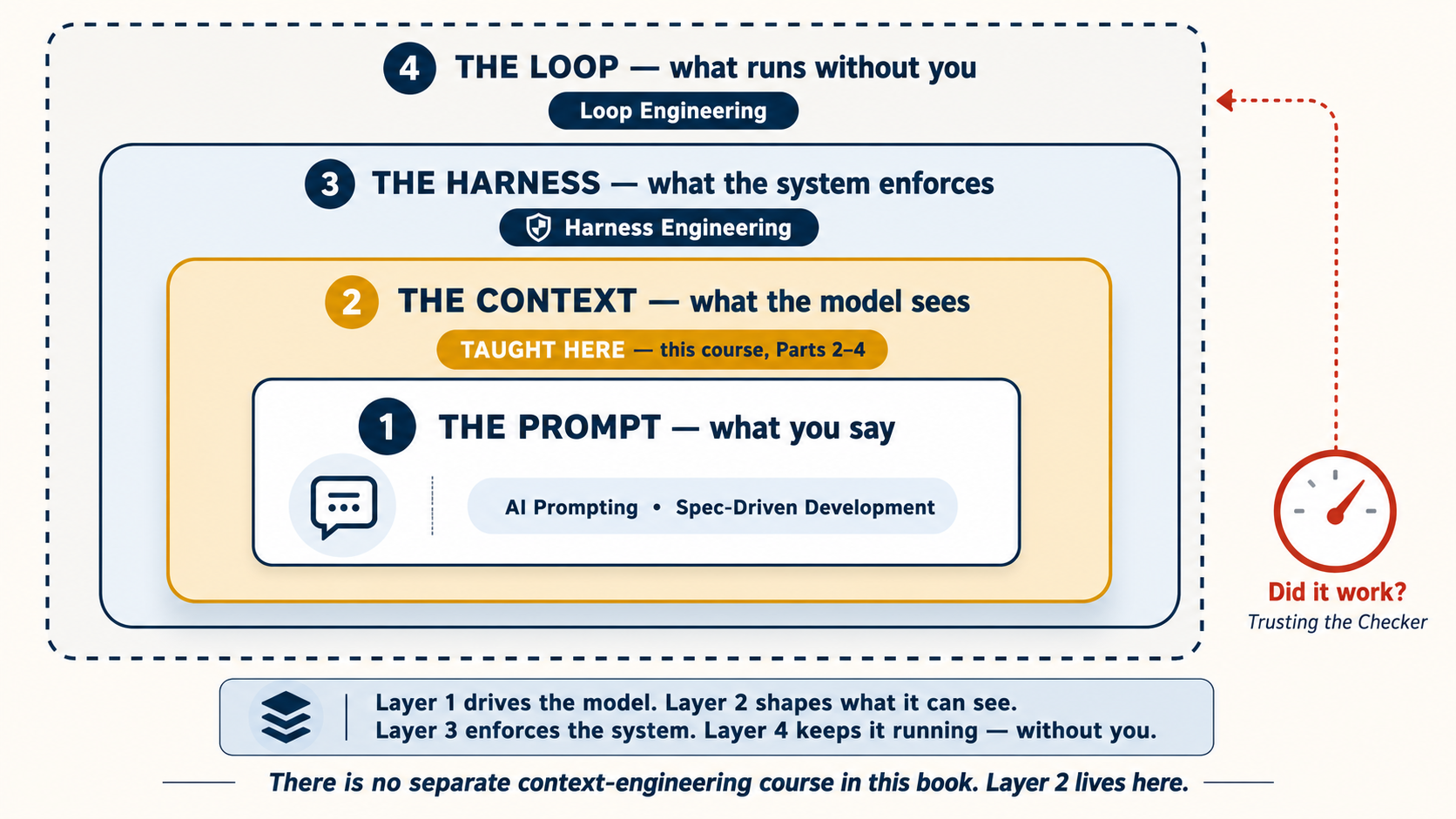
Prerequisite: 2026 mein AI Prompting. Us course ne aapko AI se baat karna sikhaya: context dena, wazeh tareeqe se poochna, AI ka kaam check karna. Yeh course sikhata hai ke kya hota hai jab AI sach much aap ki files ko chhoo sakta hai aur aap ke computer par commands chala sakta hai.
Tools chhoone se pehle teen baton par yaqeen rakhein
Is course ki sab se zaroori baat koi shortcut nahin. Yeh mental model hai:
- Yeh person nahin, ek ghost hai. 2026 mein AI Prompting mein aap ne AI ko ek smart new colleague ki tarah brief karna seekha tha. Briefing wali aadat rakhein, lekin personhood chhor dein. AI ka ego nahin, motive nahin, aur kal ki memory nahin. Woh offend nahin hota, thakta nahin, aur woh zimmedari khud nahin uthata jo aap ne di hi nahin. Aap ise manage karte hain; yeh khud ko manage nahin karta. Neeche ki har technique, rules file, plan mode, hooks, ise manage karne ka tareeqa hai.
- Intelligence jagged hai. AI Prompting Concept 12 mein aap ne iska ek roop dekha: mukhtalif models mukhtalif kaamon mein achhe hote hain. Karpathy ka nuqta is se aage hai. Ek hi model apne andar bhi jagged hai: ek task mein superhuman aur agle mein hairat-angez taur par kamzor, kabhi ek hi minute mein. Is liye "yeh smart hai" kabhi kaafi nahin. Aapko aasaan cheezein bhi check karni parti hain.
- Jitna output check ho sakta hai, utna hi trust karein. Agar output test, command, diff, schema, word count, link check, screenshot, ya human review se verify ho sakta hai, to aap AI ko zyada kaam de sakte hain. Agar output sirf convincing lagta hai, to responsibility ab bhi aap ki hai.
Teesri baat yaad rakhein. Yeh baad mein Concept 10 mein verification loop banti hai: AI koshish karta hai, ek independent check use score karta hai, failure wapas instruction ban jaata hai, aur AI fix karta hai. Spec-Driven Development woh check likhwata hai, aur Loop Engineering ise aap ke baghair chalata hai.
Do tools, ek hi set of skills
Yeh course do tools ko pehlu ba pehlu cover karta hai: Claude Code (Anthropic ne banaya) aur OpenCode (open-source, kisi bhi AI model ke saath kaam karta hai). Hum dono ek amali wajah se sikhate hain: agar koi technique dono tools mein chalti hai, to woh ek asal skill hai, kisi ek tool ki chaal nahin. Jo skills aap seekhte hain woh in ke darmiyan muntaqil ho jaati hain.
| Claude Code | OpenCode | |
|---|---|---|
| Banaya | Anthropic | Open-source community |
| AI models | Sirf Claude | Claude, GPT, Gemini, DeepSeek, local models |
| Behtar iske liye | Box se nikalte hi behtareen Claude performance | Lachak, cost control, free models |
| Qeemat | Subscription ya API | Free models mojood, ya apni API key laayein |
Jo aap ke haalat par fit baithe woh chunein. Is course mein har cheez dono mein chalti hai.
May 2026 tak haaliya. Dono tools aksar update hote hain. Koi bhi session shuru karne se pehle,
claude updateyaopencode upgradechalayein taake aap ke paas latest version ho. Agar aap ne abhi tak in mein se koi tool install nahin kiya, to installation neeche section 1 mein cover hai.
Is poore page par, jo sections Claude Code aur OpenCode ke darmiyan farq rakhte hain un mein ek switcher hota hai. Ek chunein aur page ka har switcher aap ke intekhab ke peechhe chalega.
Yeh course kya cover karta hai
| Part | Topic | Aap kya seekhte hain |
|---|---|---|
| 1 | Foundations | Yeh tools kya hain, plan mode, permissions, apna model chunna |
| 2 | Context Management | Guftagu waqt ke saath kyun bigarti hai aur ise kaise theek karein |
| 3 | The Rules File | Apne project ke liye mustaqil hidayaat set karna |
| 4 | Personalizing Your Tool | Commands aur skills, hooks/plugins, subagents |
| 5 | Connecting to the World | AI ko bairooni services se jorna (MCP) |
| 6 | Full Worked Example | Ek mukammal task, shuru se aakhir tak, dono tools mein |
| 7 | Where to Run | Terminal, IDE, web, desktop |
| 8 | Two Tools Together | Ek hi project par dono tools istemaal karna |
Karke seekhna pasand hai? Pehle Part 6 par jaayein mukammal worked example ke liye, phir wapas aayein.
📚 Teaching Aid
Poori Presentation Dekhein: Agentic Coding Crash Course
Part 1: Foundations
Yeh chaar concepts woh bunyaad hain jis par baqi sab kuch bana hai.
1. Yeh tools asal mein hain kya
Zyada tar log samajhte hain ke yeh chatbots hain jo code ke baare mein jaante hain. Aisa nahin hai. Ek chatbot sawaalon ke jawaab deta hai. Claude Code aur OpenCode kaam karte hain (action lete hain). Woh aap ki files parhte hain, unhein edit karte hain, aap ke computer par commands chalate hain, aur task mukammal hone tak chalte rehte hain. Aap bayan karte hain ke aap ko kya chahiye, woh kaam karte hain, aap nateeja review karte hain.
Sab se bara zehni badlao: sawaal poochhna chhoro, hidayaat dena shuru karo.
| Sawaal poochhna (kamzor) | Hidayat dena (taqatwar) |
|---|---|
| "Main apne notes kaise tarteeb doon?" | "notes/ folder ki har file parho. Ek summary file weekly-summary.md banao jo har action item ko list kare, har shakhs ke hisaab se grouped. Jo bhi [private] mark hai use chhor do." |
Pehla prompt aapko ek wazahat deta hai jis par aap ko khud amal karna parta hai. Doosra prompt aap ke liye kaam mukammal karwa deta hai. Yehi farq hai. (Yeh wohi khayal hai jo AI Prompting ka concept 1, lekin oonche daao ke saath kyunke AI sach much aap ki files badal raha hai.)
Claude Code aik rough demo ke taur par shuru hua jo Boris Cherny ne Anthropic ki Labs team join karne ke baad taqreeban do din mein banaya: terminal se jura Claude jo commands chala sakta tha. Unhon ne is se poocha ke woh kaunsi music sun rahe hain. Kisi ne use tareeqa nahin sikhaya tha. Model ne khud Apple Music ka screenshot liya aur screen se jawab parh liya. Is aik waqaye mein poora course sama jata hai: model ko tools aur goal dein, woh qadam khud dhoond leta hai. Yaad rakhne wali baat yeh hai ke Slack par demo ko do ya teen likes mile; creator bhi abhi poori tarah nahin samjha tha ke yeh kya hai. Lekin agle din aik colleague real code likhne ke liye use kar raha tha, aur chhoti team ne Claude Code ko zyada tar Claude hi se banwaya, kyunke itni tezi se aage barhne ka aur koi tareeqa nahin tha.
Abhi tak koi tool install nahin kiya? Aage parhne se pehle abhi ek install kar lein. Is ke baad har cheez yeh farz karti hai ke aap terminal khol kar cheezein aazma sakte hain.
# macOS / Linux / WSL — recommended (auto-updates)
curl -fsSL https://claude.ai/install.sh | bash

# Windows PowerShell
irm https://claude.ai/install.ps1 | iex

# macOS Homebrew (no auto-update — run `brew upgrade claude-code` periodically)
brew install --cask claude-code

# npm fallback
npm install -g @anthropic-ai/claude-code
Mukammal reference: code.claude.com/docs.
# All platforms — recommended
curl -fsSL https://opencode.ai/install | bash

# macOS Homebrew
brew install opencode

# npm / bun / pnpm / yarn
npm install -g opencode-ai
Mukammal reference: opencode.ai/docs.
Install hone ke baad, kisi bhi folder mein jahan aap kaam karna chahte hain terminal kholein aur claude (ya opencode) type karein. Yeh aapko aap ke pehle session mein le jaata hai.
Foran check: aap kaunse model par hain? Aage barhne se pehle, tasdeeq kar lein ke aap asal mein kis model se baat kar rahe hain, taake aap chupke se kisi mehenge model ko aasaan kaam par na jala dein, ya yeh na sochte rahein ke koi sasta model kyun jadd-o-jehad kar raha hai.
/status type karein apna mojooda model dekhne ke liye, saath hi apna plan, working directory, aur context usage. Poori list dekhne aur switch karne ke liye, /model type karein aur menu se chunein, tabdeeli foran asar deti hai, koi restart nahin.
/models type karein apne connected providers ke har model ko dekhne aur un ke darmiyan switch karne ke liye; active model TUI mein bhi dikhaaya jaata hai. (Command line se, opencode models mojood provider/model naam chhaapta hai, jab aap apni config mein default set kar rahe hon to kaam aata hai.)
Jab aap /models chalate hain, kuch free options stealth models hain, ek codename ke tehat release kiye gaye jis ka banaane wala chhupa hota hai (misaal ke taur par, likhne ke waqt OpenCode Zen ka Big Pickle). Yeh jaanne layeq hain, do tanbeehon ke saath:
- Yeh aarzi aur be-ailaan hain. Ek stealth model ek vendor hai jo kuch zaahir karne se pehle chupke se test kar raha hai. Yeh apna behaviour badal sakta hai, naya naam pa sakta hai, ya bina ittila ke ghaayab ho sakta hai, is liye is par aadtein, defaults, ya course/project setups na banaayein.
- "Free" ka matlab ho sakta hai ke aap khud product hain. Kisi model ki free testing window ke dauraan, aap ke prompts aur code use train aur behtar karne ke liye istemaal ho sakte hain. Kisi stealth model ko kabhi kisi raazdaarana cheez par na lagaayein, client ka kaam, private repos, ya NDA ke tehat koi cheez.
Yeh phenk dene wale tajurbon aur workflow aazmaane ke liye theek hain. Jis cheez par aap bharosa karte hain, us ke liye, ek stable, niji taur par bill kiya jaane wala model tarjeeh dein (neeche DeepSeek V4 wali baat dekhein) jahan provider, pricing, aur data policy sab maaloom hon aur aap ke neeche se badalne wale na hon.
Yahan se aage, is page ka har concept aisi cheez hai jise aap us session mein aazma sakte hain, sirf parh nahin sakte. Is page ke saath ek terminal khula rakhein aur har khayal ko jaise hi us tak pahunchein chalayein.
Kyunke OpenCode model-agnostic hai, aap ise jis cheez par chahein lagaa sakte hain jo behtareen cost-to-quality ratio de. Hosted models mein, mid-2026 tak sab se mazboot value DeepSeek V4 hai, jo do tiers mein aata hai:
deepseek-v4-flash, economy default. Taqreeban $0.14 per 1M input tokens (cache hit par utna kam $0.0028 tak) aur $0.28 per 1M output tokens, ek 1M-token context window aur tool-call support ke saath. Students aur high-volume kaam ke liye isi tier par standardize karein.deepseek-v4-pro, woh step-up tier jab aap ko mazboot reasoning chahiye. Zyada laayeq, phir bhi frontier pricing ka ek hissa.
Ise set karein (taqreeban 1 minute): opencode chalayein → /connect type karein → deepseek enter karein → apni API key paste karein (key wahan banaayein, aur ek chhota prepaid balance add karein, DeepSeek pay-as-you-go hai, is liye account mein credit aane tak key kaam nahin karegi) → model chunein. DeepSeek ki apni guide default mein V4-Pro chunti hai, is liye deepseek-v4-flash chunein agar aap sab se sasta option chahte hain.
Prices aur tiers aksar badalte hain, budget banaane se pehle live page check karein.
📘 DeepSeek + OpenCode integration guide · 💰 DeepSeek Models & Pricing
Yeh qudrati taur par Plan / Execute split ke saath jurta hai: ek frontier model ke saath plan karein, phir ek saste DeepSeek-backed OpenCode session se execution karwaayein.
Claude Code default mein Anthropic ke models se baat karta hai, lekin aap ise is ke bajaye DeepSeek V4 par laga sakte hain. Do raaste:
- Saada native raasta. DeepSeek ek Anthropic-compatible endpoint paish karta hai, is liye aap Claude Code ko seedhe is ke khilaaf chala sakte hain,
claudelaunch karne se pehleANTHROPIC_BASE_URL=https://api.deepseek.com/anthropicaur apni DeepSeek key ko auth token ke taur par set kar ke. Koi extra tooling nahin. - Router raasta, claude-code-router. Ek community proxy jo Claude Code ke saamne baithta hai aur aapko DeepSeek (aur doosre providers) ko requests route karne deta hai, har task ke liye alag models samait, masalan planning ke liye ek frontier model, execution ke liye
deepseek-v4-flash. Aapclaudeke bajayeccr codese launch karte hain. Setup aur config ke liye repo dekhein.
Do imaandaar tanbeehein: dono third-party / unofficial setups hain, is liye yeh Claude Code update hone par toot sakte hain, aur aap woh "box se nikalte hi behtareen Claude performance" kho dete hain jis ke liye Claude Code tuned hai. Agar aap ka asal maqsad sasti DeepSeek-backed coding hai, to OpenCode zyada hamwaar raasta hai (yeh design ke lehaaz se model-agnostic hai), yeh raaste tab ke liye hain jab aap khaastour par Claude Code ka interface aur DeepSeek ki pricing dono chahte hon.
2. Plan mode (sab se kam istemaal hone wala feature)
Aam taur par, jab aap in tools ko hidayat dete hain, woh foran kaam shuru kar dete hain: files parhna, code edit karna, commands chalana. Plan mode ise badal deta hai. Yeh AI ko ek "dekho lekin haath na lagao" haalat mein daal deta hai. AI aap ki files parh sakta hai aur task ke baare mein soch sakta hai, lekin kuch badal nahin sakta. Kaam karne ke bajaye, woh us ka ek qadam ba qadam plan likh deta hai jo woh karta. Aap plan parhte hain, tabdeeliyan tajweez karte hain, aur sirf phir ise asal kaam shuru karne dete hain.
Dono tools ise support karte hain. Ise on karne ka tareeqa thora alag hai, lekin khayal ek hi hai.
Permission modes ke darmiyan cycle karne ke liye Shift+Tab dabaayein. Pehla dabaana aapko auto-accept mein daalta hai; doosra dabaana aapko plan mode mein daalta hai. Plan mode mein, model parh sakta hai lekin likh nahin sakta: koi file edits nahin, koi shell commands nahin.
Build mode (AI sab kuch kar sakta hai) aur Plan mode (AI sirf parh sakta hai, kuch badal nahin sakta) ke darmiyan switch karne ke liye Tab dabaayein. Plan mode mein, agar aap is se kuch likhne ya edit karne ko kahein, to woh aapko bataa dega ke woh nahin kar sakta aur intezaar karega ke aap wapas Build mein switch karein. Claude Code jaisa hi khayal: pehle dekho, phir amal karo.
Amal mein yeh kaisa dikhta hai. Aap plan mode mein dakhil hote hain, phir ek aam hidayat type karte hain:
Meri ammi ke baare mein ek nazm likho aur ise
for-mom.mdke taur par save kar do.
Ise likhne ke bajaye, AI pehle ek plan ke saath wapas aata hai:
Plan
- Ek classic sonnet ke andaaz mein 5-stanza ki nazm likho.
- Rasmi, purane-zamane ki zabaan istemaal karo.
- Ek shaandaar, dramatic anjaam ki taraf barho.
for-mom.mdke taur par save karo.Abhi tak kuch nahin likha. Aage barhne ke liye approve karein, ya bataayein ke kya adjust karna hai.
Yeh woh nahin jo aap ke zehan mein tha, aap kuch chhota, garmjoshi bhara, aur saada chahte the, koi rasmi sonnet nahin. To aap peechhe dhakelte hain:
Ise chhota aur garmjoshi bhara rakho, chaar lines, rozmarra zabaan, kuch bhi shaandaar nahin. Aisi cheez jo main kisi birthday card mein likh sakoon.
AI plan ko update karta hai. Ab aap approve karte hain, aur woh wohi nazm likhta hai jo aap asal mein chahte the, ek rasmi sonnet ke bajaye jis se aap ko apni jaan chhuraani parti.
Plan ki zehmat kyun uthaayein? Do wajuhaat:
- Aap ghaltiyaan hone se pehle pakar lete hain. Yehi abhi oopar hua, ghalat farziya plan mein zaahir hua, kisi mukammal draft mein nahin jis se aap ko behes kar ke nikalna parta. Ek chaar-line ki nazm par yeh ek mamooli bachat hai; jab AI 10 files edit karne wala ho, to yeh ek foran tasheeh aur ek lambi safaai ke darmiyan ka farq hai.
- AI behtar kaam karta hai jab woh pehle plan karta hai. Plan likhna AI ko majboor karta hai ke shuru karne se pehle task ke baare mein soche. Bina plan ke, woh ek hi waqt mein sochne aur likhne ki koshish karta hai, aur nateeja aam taur par badtar hota hai.
Asool: Agar task 10 minute se zyada lega, to pehle plan mode istemaal karein. Baron tasks ke liye, AI se kahein ke plan ko ek file mein save kare (jaise docs/plans/my-plan.md) taake aap baad mein wapas aa sakein ya ise kisi naye session ke saath share kar sakein.
Ise aise samjhein jaise essay se pehle outline likhna. Aap apne structure ko jaane baghair 10-page ka paper likhna shuru nahin karenge. Yahan bhi yehi khayal hai: pehle plan, phir banao.
3. Permissions discipline
Har baar jab yeh tools kuch karna chahte hain (file edit karna, koi command chalana), woh pehle aap se ijaazat poochhte hain. Aap ise chhor sakte hain aur unhein bina poochhe sab kuch karne de sakte hain, lekin jab aap shuruaat kar rahe hon to aisa na karein. Aap dekhna chahte hain ke AI kya kar raha hai is se pehle ke woh kare.
Chand sessions ke baad, aap notice karenge ke kuch actions hamesha mehfooz hain (jaise files parhna ya tests chalana). Aap tool ko keh sakte hain ke un khaas actions ke baare mein poochhna band kar de aur unhein auto-approve kar de. Yeh qudrati taraqqi hai, beginners ka shortcut nahin. Anthropic ki apni product team batati hai ke launch par users har permission parhte the aur waqt ke saath zyada tar auto-accept tak pohanche. Trust session ba session kamaya gaya. Yeh aise:
Aap ko har line samajhne ki zaroorat nahin. Har code block ke baad ki wazahat aapko bataati hai ke woh kya karta hai. Jaise jaise aap tool istemaal karenge, yeh settings qudrati taur par maani rakhne lagenge.
.claude/settings.json:
{
  "permissions": {
    "allow": [
      "Read",
      "Edit",
      "Write",
      "Bash(npm test)",
      "Bash(npm run lint)",
      "Bash(npm run build)",
      "Bash(git status)",
      "Bash(git diff *)",
      "Bash(git log *)"
    ],
    "deny": ["Bash(rm -rf *)", "Bash(npm publish *)", "Bash(git push *)"]
  }
}
opencode.json:
{
  "$schema": "https://opencode.ai/config.json",
  "permission": {
    "*": "ask",
    "read": "allow",
    "edit": "allow",
    "bash": {
      "*": "ask",
      "npm test": "allow",
      "npm run lint": "allow",
      "npm run build": "allow",
      "git status*": "allow",
      "git diff*": "allow",
      "git log*": "allow",
      "rm -rf*": "deny",
      "npm publish*": "deny",
      "git push*": "deny"
    }
  }
}
OpenCode aapko permissions par zyada control deta hai. Aap har qisam ke action (parhna, edit karna, commands chalana) ke liye alag se rules set kar sakte hain. Is mein ek built-in safety feature bhi hai: agar AI ek hi action lagatar teen baar bina kisi peshraft ke aazmaata hai, to woh khud ba khud ruk jaata hai.
Yeh normal raasta hai: shuru mein approvals parhein, phir jo cheezein baar baar safe sabit hon unhein auto-accept karein. Anthropic ki apni product teams ne bhi yehi kiya. Pehle woh har permission dekhti thin; waqt ke saath unhon ne read-only aur routine commands auto-accept kar diye, kyunke trust session by session earn hua tha. Goal blind trust nahin. Goal earned trust hai.
Tip: Notifications set karein. Yeh tools lambe tasks par kaam kar sakte hain jabke aap doosri cheezein karte hain. Woh chaal jo ise mufeed banaati hai woh hai jab AI khatam kar le ya aap ki input chahiye ho to notification haasil karna. Is tarah aap ek task shuru kar sakte hain, doosre kaam par switch kar sakte hain, aur jab aap ki zaroorat ho to wapas aa sakte hain.
- Claude Code: Community tools jaise
cc-notifyaapko desktop notifications bhej sakte hain. - OpenCode: Desktop app khud ba khud notifications bhejta hai. Terminal version ke liye, aap ek plugin add kar sakte hain jo aapko ittila de.
4. Model ko task se milaayein
Dono tools aapko chunne dete hain ke kaunsa AI model kaam kare, aur switch karne mein ek command lagti hai. Zyada tar beginners is setting ko kabhi nahin chhoote, jo dono taraf se ghalti hai: woh ya to ek mehenge model ko maamooli kaamon par jala dete hain, ya kisi mushkil masle par ek kamzor model se larte hain aur khaab nataij ke liye khud ko qusoorwar thehraate hain.
Is intekhab ke peechhe ek saada tradeoff hai. Sab se laayeq models behtareen sochne wale hain, woh plan karte hain, peechida code par sochte hain, aur ibhaam sambhaalte hain, lekin yeh sab se zyada cost karte hain aur aap ke limits sab se tezi se khatam karte hain. Saste (aur free) models ek wazeh plan par chalne mein bilkul achhe hain: files edit karna, tests chalana, dobara format karna, baar baar honay wali tabdeeliyan. Hunar yeh hai ke har qisam ka kaam sahi model ko bheja jaaye.
| Kaam | Iske liye chunein |
|---|---|
| Planning, architecture, "yeh kaise karna hai pata lagao," kisi uljhane wali cheez ki debugging | Aap ke paas mojood sab se laayeq model |
| Kisi plan par chalna jise aap pehle approve kar chuke hain, maamooli edits, formatting, tests chalana, boilerplate | Ek sasta ya free model |
| Ek foran sawaal ya ek-line ka fix | Jo bhi pehle se loaded hai; zyada na sochein |
Aap pehle hi Concept 1 mein seekh chuke hain ke apna model kaise dekhein aur switch karein. Ise jaan-boojh kar chunna woh aadat hai:
/model type karein zyada laayeq Claude (mushkil sochne ke liye) aur ek tez, saste (maamooli kaam ke liye) ke darmiyan switch karne ke liye; tabdeeli foran asar deti hai, koi restart nahin. Ek aam setup yeh hai ke mazboot model plan mode sambhaale aur ek tez wala execution kare, taake mehenga sochna ek hi baar, shuru mein, ho jaaye.
Kyunke OpenCode model-agnostic hai, aap ka intekhab wasee hai: /models type karein har us provider ke darmiyan switch karne ke liye jo aap ne connect kiya hai, planning ke liye ek frontier model, execution ke liye deepseek-v4-flash jaisa ek sasta hosted model (Concept 1 mein DeepSeek V4 wali tip dekhein) ya ek free/local model bhi. Aap opencode.json mein ek default bhi set kar sakte hain, aur subagents ko un ka apna sasta model de sakte hain.
Yeh seedhe plan mode (Concept 2) ke saath jurta hai. Kisi bhi task ka mehenga hissa sochna hai, project parhna, tareeqa tay karna, dekhna ke kya ghalat ho sakta hai. Jab woh ek likha hua plan ban jaaye, baqi sab "bas yeh qadam follow karo" hai, jo ek sasta model achhe se kar leta hai. To: mazboot model se plan karein, saste se execute karein. Yeh ek harkat hi hai jahan zyada tar cost ki bachat aati hai, baghair quality ke nuqsaan ke, aur yeh Part 8 mein Plan / Execute split ki reedh ki haddi hai.
Do imaandaar tanbeehein. Pehli, saste models ko wazeh-tar hidayaat chahiye, woh ek achhe plan par achhe se chalte hain lekin bura improvise karte hain, is liye model jitna kamzor, plan ko utna zyada khol kar batana parta hai. Doosri, zyada optimize na karein: har chand minute mein models switch karna aapko paison ki bachat ke liye tawajjuh ka kharch deta hai. Default mein ek mazboot model rakhein, zaahir kaamon ke liye ek saste par utrein, aur use wahan chhor dein.
Asool: kya karna hai yeh tay karne ke liye ek mazboot model, ise karne ke liye ek sasta model. Jab ek sasta model chakkar lagaane lage, to yeh aap ka ishaara hai ke task ko mazboot wale ki zaroorat thi, oopar switch karein, dobara koshish karte na rahein.
Part 2: Context management
Yahan is course ka sab se ahem khayal hai: kisi bhi lamhe, model sirf us cheez par amal kar sakta hai jo abhi us ke saamne hai, us ka context. Aur woh context koi ek bara bucket nahin jis mein aap cheezein phenkte rehte hain. Yeh layers ka ek stack hai, aur aap har turn par har layer ki qeemat ada karte hain.
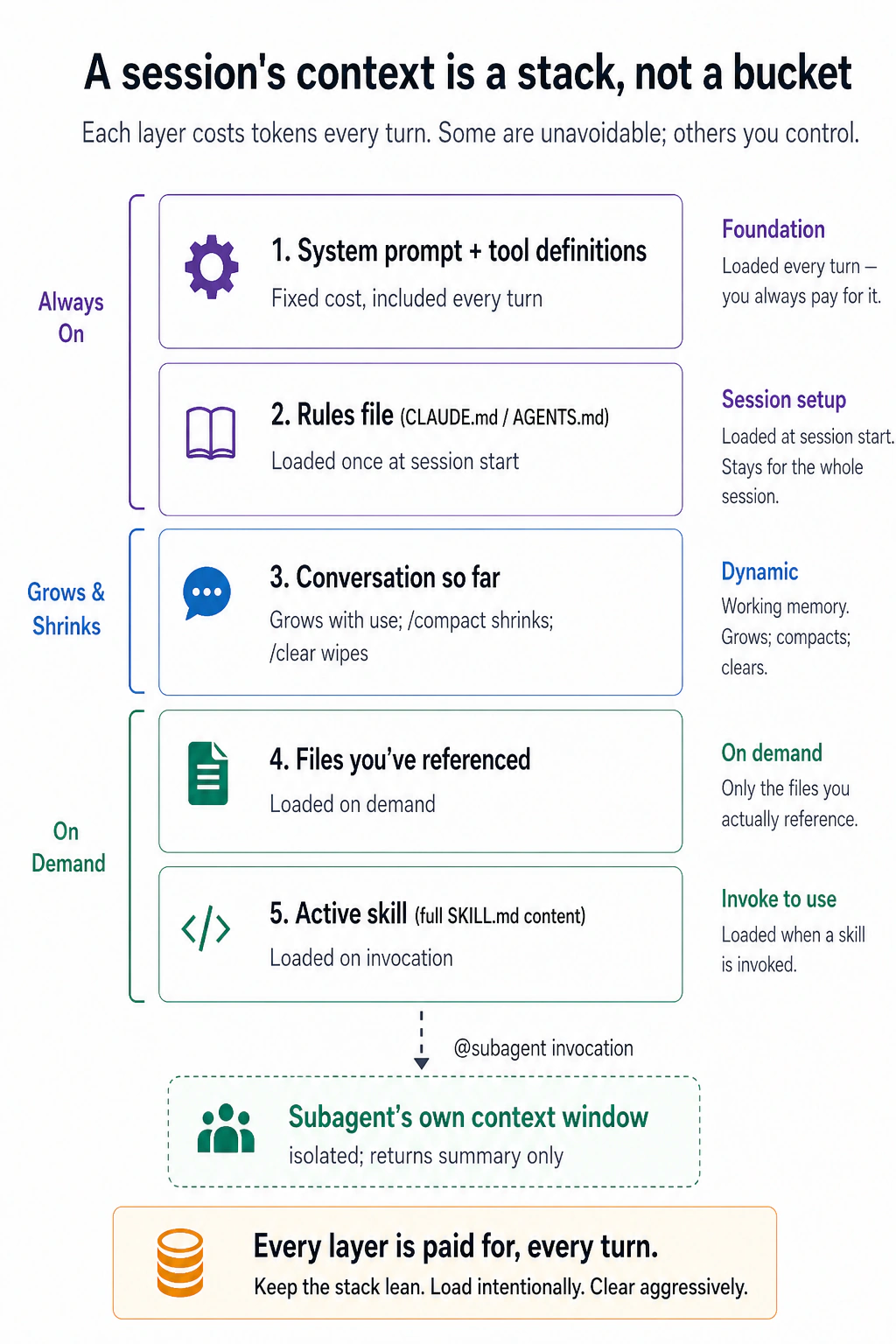
Asal baat paanch labels nahin, balke baayein taraf ki taqseem hai. Oopar wali layers mustaqil hain: system prompt aur aap ki rules file load hoti hain chahein aap chahein ya na chahein. Is ke neeche har cheez aap ke ikhtiyaar mein hai, guftagu barhti rehti hai jab tak aap ise /compact ya /clear na karein, files sirf tab load hoti hain jab aap un ki taraf ishara karein, skills sirf invoke hone par load hoti hain, aur ek subagent apni bhaari parhaai ek alag window mein karta hai aur sirf ek summary wapas thama deta hai.
Yehi poora khel hai. Achha context management koi chaal nahin; yeh us stack ko dubla rakhne ki aadat hai, jo task ko chahiye woh load karna, aur jo nahin chahiye use saaf karna. Ek phoola hua stack zyada tokens kharch karta hai, lekin is se bura, yeh us hisse ko daba deta hai jo ahmiyat rakhta hai: window mein jitna zyada kachra, model ko signal dhoondhne ke liye utni hi mehnat karni parti hai, aur us ke jawaab utna hi bhatakte hain.
AI Prompting course mein aap ne seekha ke jo aap AI ko dete hain woh is se zyada ahmiyat rakhta hai ke aap kaise poochhte hain. Yahan daao oonche hain: ek chat mein, bura context aapko bura jawaab deta hai; in tools ke saath, bura context ka matlab hai AI seedhe aap ke project mein bura code likhta hai. Isi liye Part 2 ke baqi hissay mein har cheez in layers mein se kisi ek ko control karne ka ek khaas tareeqa hai, aur isi liye, agar aap is crash course ka ek section yaad rakhein, to yeh wohi hona chahiye. Yeh dono tools mein ek jaisa kaam karta hai.
Part 2, aur Parts 3 aur 4 ka bara hissa, industry mein context engineering kehlata hai. Andrej Karpathy ne December 2025 mein prompt engineering ke jaanasheen ke taur par yeh naam diya: aglay qadam ke liye window ko bilkul sahi maloomaat se bharne ka nazuk fun. Naam yaad rakhein. Yeh aapko job posts, blog titles, aur is kitab ke baad ke har course mein milega. Jab mile to yaad rakhein ke yeh koi naya subject nahin. Yeh wohi hissa hai: jaan boojh kar tay karna ke model kya dekhta hai.
5. Context rot asal hai
Aap ek ghante se AI ke saath kaam kar rahe hain. Shuru mein jawaab tez aur durust the. Ab woh aap ka diya hua rule nazar-andaz kar raha hai, pehle mukammal kiya hua kaam dobara kar raha hai, aur aisi file ka zikr kar raha hai jo aap ke project mein maujood hi nahin.
Kuch toota nahin. Guftagu bas bohat lambi ho gayi hai. Is ke peechhe ka mechanism yeh hai.
AI ek waqt mein sirf ek mehdood miqdaar maloomaat rakh sakta hai. Ise context window kehte hain. Ise ek group chat ki tarah samjhein: AI sirf is chat ke messages dekh sakta hai. Agar aap ne chat mein pehle koi cheez kahi thi, AI oopar scroll kar ke use dekh sakta hai. Agar aap ne kabhi kahi hi nahin, to AI us ke baare mein nahin jaanta. Modern AI ek bohat lambi chat sambhal sakta hai (laakhon alfaaz), lekin us ki bhi hudood hain.
Yeh is liye ahmiyat rakhta hai:
Masla 1: Chat aap ki soch se zyada tezi se lambi ho jaati hai.
Har message jo aap bhejte hain, har file jo aap AI se parhwaate hain, har jawaab jo AI deta hai, yeh sab chat ki history mein jurta hai. 20-30 messages aage peechhe ke baad, saath hi chand files jo aap ne dekhne ko di, chat pehle se hi bohat lambi ho chuki hoti hai.
Mushkil baat: koi tanbeeh nahin hoti jo aapko bataaye "yeh guftagu bohat lambi ho rahi hai." Yeh bas khamoshi se background mein barhti rehti hai.
Masla 2: Jaise guftagu barhti hai, AI cheezein yaad rakhne mein badtar hota jaata hai.
Yahan heran kun baat hai. Hudood par pahunchne se pehle bhi, AI jadd-o-jehad shuru kar deta hai. Jab guftagu bohat lambi ho, AI ko ahem hissay dhoondhne mein zyada mushkil hoti hai. Aap notice kar sakte hain:
- AI woh cheez nazar-andaaz kar deta hai jo aap ne 20 messages pehle batayi thi (aap ne kahi, lekin woh itni der pehle thi ke AI ko yaad nahin rehta)
- AI woh kaam dobara karta hai jo woh pehle hi kar chuka tha (woh bhool gaya ke woh pehle kar chuka hai)
- AI un naamon ya tafseelat ke baare mein uljh jaata hai jo us ke paas pehle theek the
Ise context rot kehte hain. Guftagu abhi bhi chal rahi hai, lekin AI ke kaam ki quality aahista aahista bigar rahi hai kyunke bohat zyada purani maloomaat dher ho rahi hai.
Masla 3: Lambi guftagu zyada paise lagti hai.
Har baar jab aap message bhejte hain, AI sirf aap ka naya message nahin parhta. Woh poori guftagu pehle message se dobara parhta hai. To agar aap ke 30 messages aage peechhe ho chuke hain, AI un 30 messages ko har dafa dobara parhta hai jab bhi aap message number 31 bhejte hain.
Agar aap fi-istemaal pay kar rahe hain (jaise zyada tar OpenCode setups), is ka matlab hai lambi guftagu bohat zyada paise lagti hai. Agar aap subscription plan par hain (jaise Claude Code Pro), to aap apni rozana usage limits zyada tezi se pahunchte hain. Kisi bhi soorat mein, ek lambi, gandi guftagu aap ka budget khatam kar deti hai.
Khulasa: apni guftagu ko chhota aur markooz rakhein. AI ko sirf woh maloomaat dein jo use mojooda task ke liye chahiye, sab kuch nahin jo aap ke paas hai. Ek saaf, markooz guftagu ek lambi, bhari guftagu se bohat behtar kaam karti hai.

Check karein ke aap ka context kitna bhara hai. Aap stack ko dubla nahin rakh sakte agar aap use dekh hi nahin sakte. Dono tools aapko apni mojooda usage parhne dete hain, woh bas ise alag tareeqe se dikhaate hain.
/context type karein ek poora breakdown ke liye: window mein se kul istemaal hue tokens (masalan 25.6k/1m tokens (3%)), category ke hisaab se taqseem, system prompt, tools, memory/rules file, skills, aur aap ki guftagu. Yeh yeh bhi nishaan-zad karta hai ke kya trim karna mufeed hai. Aapko kaam karte hue input ke paas ek chalta hua percentage bhi milta hai, taake aapko baar baar poochhna na pare.
OpenCode aap ki usage live apne interface (full-screen terminal view) mein dikhaata hai, active model, istemaal hue tokens, aur window ka percentage. Yeh screen par theek kahan baithta hai woh version aur terminal width ke saath badalta hai, is liye bas chalte hue token/percentage readout ko dekhein. Abhi tak koi built-in /context-andaaz breakdown command nahin hai, is liye aap us gauge ko interface se parhte hain bajaye is ke ke use bulaayein. (Community plugins ek /context command ek poore breakdown ke saath add kar sakte hain agar aap chahein.)
Aap jis bhi tool mein hon, harkat ek hi hai: gauge par ek nazar daalein, is ke bharne ka intezaar na karein. Quality aksar window ke tekniki taur par bharne se pehle hi phisalne lagti hai, jab ek session apni window ke taqreeban aadhe se aage chala jaaye, to yeh aap ka ishaara hai ke /compact ya /clear (agla) karein, na ke jab yeh 100% par pahunche.
6. /clear aur /compact
Jab chat bohat lambi ho jaaye, aap ke paas do options hain. Yaqeen karein ke aap sahi wala chunte hain:
Option 1: Ek bilkul nayi chat shuru karein. Ise tab istemaal karein jab aap ek task se faarigh ho jaayein aur kuch bilkul mukhtalif shuru karna chahte hon. Purani chat mita di jaati hai.
- Claude Code:
/cleartype karein - OpenCode:
/newtype karein (ya/clear)
Option 2: Mojooda chat ko ghata dein. Ise tab istemaal karein jab aap abhi bhi usi task par kaam kar rahe hon lekin chat bohat lambi ho gayi ho. AI poori guftagu parhta hai, ek chhoti summary likhta hai, aur baqi sab kuch phenk deta hai. Aap summary se kaam karte rehte hain.
- Dono tools:
/compacttype karein
Aap ise bata sakte hain ke kya rakhna hai: /compact keep the file names and the decisions we made.
Inhein mat uljhaayein. /clear sab kuch mita deta hai aur dobara shuru karta hai. /compact ahem hissay rakhta hai aur baqi hata deta hai. Agar aap kisi task ke beech mein /clear istemaal karte hain, to aap apni saari peshraft kho dete hain. Agar aap /compact istemaal karte hain jab aapko dobara shuru karna chahiye tha, to aap purana kachra ek naye task mein le jaate hain.
Aik aur skill: compact kab karna hai, yeh bhi utna hi aham hai jitna compact karna. Do rules yaad rakhein:
- Boundary par compact karein, task ke beech mein nahin. Fitri lamhe woh hain jab aik phase khatam ho: exploration mukammal, plan approve, ya sub-task done. Beech mein compact karne se woh exact detail, jaise failing test ka naam ya kaam karne wala flag, "hum ne kuch options dekhe" ban sakti hai, jo kisi kaam ki nahin.
- Pehle facts file mein likhein. Summary overall shape rakhti hai aur details gira deti hai; isi liye woh chhoti hoti hai. Compact se pehle AI se kahein ke bachne wale names, lists aur decisions plan file ya notes file mein likhe. Files fade nahin hotin. Phir aaram se compact karein.
Aik line mein: safar summarize karein, facts file mein rakhein.
7. Sessions resume karein
Har guftagu jo aap karte hain woh khud ba khud save ho jaati hai. Aap tool band kar sakte hain, apna computer bhi band kar sakte hain, aur baad mein wapas aa kar bilkul wahin se jaari rakh sakte hain jahan aap ne chhora tha.
- Claude Code: Apne terminal mein
claude --resumechalayein. Aapko apni pichli guftagu ki list dikhe gi. Ek chunein aur jaari rakhein. - OpenCode: Tool ke andar
/sessions(ya/resume) type karein apni save ki gayi guftagu dekhne ke liye.
Yeh kyun mufeed hai:
- Kal jaari rakhein. Bare tasks aksar ek se zyada baithak lete hain. Dobara shuru karne ke bajaye, bas wahin se resume karein jahan aap ruke the.
- Kayi cheezon par kaam karein. Aap ki ek guftagu ek task par kaam kar sakti hai aur ek doosri guftagu kisi alag task par. Jab chahein un ke darmiyan switch karein.
Tip: Agar aap ne pehle ek plan file save ki thi (jaise docs/plans/my-plan.md), to aap ek nayi guftagu bhi shuru kar sakte hain aur use bata sakte hain: "docs/plans/my-plan.md parho aur step 4 se jaari rakho." Plan file ek backup ka kaam deti hai agar aap purani guftagu resume na kar sakein.
Agar AI se ghalti ho jaaye to? Aap use undo kar sakte hain.
Kabhi kabhi AI ghalat file edit kar deta hai, bura code likh deta hai, ya woh ghalat samajh leta hai jo aap ne kaha. Ghabraayein nahin, dono tools aapko peechhe le jaane (roll back) dete hain, thore alag tareeqon se:
- Claude Code:
Escdo baar dabaayein (jab input box khali ho), ya/rewindtype karein. Aapko session ke har prompt ka menu milta hai; ek chunein aur chunein ke kya bahaal karna hai, code, guftagu, ya dono. Note karein ke yeh AI ke apne file edits ko undo karta hai, na ke jo us ne shell commands chala kar kiya (ek mitayi gayi ya hatayi gayi file is tarah wapas nahin aaye gi). Koi "redo" nahin, rewind aapko ek chune hue point par le jaata hai bajaye is ke ke aage peechhe qadam rakhe, is liye soch samajh kar rewind karein. - OpenCode:
/undotype karein AI ki aakhri tabdeeli ko ulatne ke liye, aur/redoagar aap apna iraada badal lein. Yeh andar hi andar git istemaal kar ke kaam karta hai, is liye aap ke project ko git repository hona chahiye.
Kisi bhi soorat mein, ise tajurbon ke liye ek safety net samjhein, git ka mutbaadil nahin. Jis cheez ko aap rakhna chahte hain, use commit kar dein, checkpoints aur undo session-level suvidhaaein hain, mustaqil tareekh nahin.
Claude Code ka undo file edits cover karta hai lekin terminal commands nahin. Masalan, agar AI ne ek command chalaya jo ek file mita de, to undo use wapas nahin laaye ga. OpenCode ka undo har cheez cover karta hai (file edits aur terminal commands) kyunke yeh tamaam tabdeeliyan track karne ke liye git istemaal karta hai.
Teen commands ke liye foran faisla asool:

Diagnostic: jab context bigar jaaye
Aap kaise jaanein ke chat kab bohat lambi ho chuki hai? In nishaaniyon par nazar rakhein:
- AI baar baar maazrat kehta rehta hai lekin asal mein kuch theek nahin karta.
- AI ek hi code ke tukre ko baar baar badalta hai bina use behtar banaaye.
- AI un files ya naamon ka zikar karta hai jo aap ke project mein mojood nahin.
- AI ek asool bhool jaata hai jo aap ne usi guftagu mein pehle bataya tha.
- AI ke jawaab zyada mufeed hone ke bajaye lambe aur dhundhle hote jaate hain.
Community is ghoomte phirne wale masle ko doom loop kehti hai: uljhi hui guftagu badtar jawaab laati hai, badtar jawaab aur uljhan jorta hai, aur har turn masle ko aur gehra karta hai. Baad ke courses mein aap yeh naam dobara dekhenge. Yeh fehrist batati hai ke andar se yeh kaisa dikhta hai.
Jab aap in mein se koi bhi dekhein, messages bhejna band karein. Aap ki pehli khwahish masle ko ek baar aur samjhaane ki hogi. Aisa na karein. Pehle se overload guftagu mein zyada messages bhejna ise sirf badtar banaata hai.
Is ke bajaye, reset karein:
/compactistemaal karein agar aap usi task par kaam karte rehna chahte hain (yeh ahem hissay save karta hai aur baqi saaf kar deta hai)./clear(ya OpenCode mein/new) istemaal karein agar aap bilkul naye sire se shuru karna chahte hain.
Paanch minute ka reset us ek ghante se behtar hai jo aap ek aise AI se larte hue guzaarte hain jo ab guftagu ka track nahin rakh sakta.
Diagnostic: jab context ki cost barh jaaye
Yaad rakhein: ek lambi, gandi guftagu sirf AI ko us ke kaam mein badtar nahin banaati, balke aapko zyada paise bhi lagati hai. Jaise guftagu barhti hai, AI ke paas har message par zyada text process karne ko hota hai.
Ek ahem nuqta: caching. Aap farz kar sakte hain ke aap har ek message par poori guftagu dobara parhne ki poori qeemat ada karte hain. Aam taur par aisa nahin, lekin yeh riayat model ke provider se aati hai, tool se nahin. Zyada tar bare model APIs (Anthropic, DeepSeek, aur doosre) prompt caching support karte hain: woh aap ke context ka mustaqil agla hissa store karte hain, system prompt, aap ki rules file, pichle turns, aur use ek bhari riayat par dobara istemaal karte hain (aksar maamooli qeemat ka taqreeban dasvaan hissa, kabhi kabhi us se bohat kam), is liye aap sirf us ke liye poori qeemat dete hain jo aap ke aakhri message ke baad naya hai. Claude Code aur OpenCode is tarah banaaye gaye hain ke woh agla hissa mustaqil rakhein taake cache chalti rahe, lekin caching khud provider ka feature hai, aur is ke baghair ek model ko koi riayat nahin milti. Pench: riayat sirf tab tak rehti hai jab tak context ka agla hissa be-tabdeel rahe. Apni rules file edit karein, ya apni history mein idhar udhar chhalaang lagaayein, aur cache us nuqte se reset ho jaati hai aur aap dobara poori qeemat dete hain. (Caches kuch der idle baithne ke baad bhi expire ho jaati hain.) Isi liye neeche diye spikes us tarah hote hain jaise hote hain.
| Aap kya notice karte hain | Yeh kyun ho raha hai | Ise kaise theek karein |
|---|---|---|
| Aap ki usage achanak guftagu ke beech mein bharh gayi | Aap ne apni settings file (CLAUDE.md ya AGENTS.md) badli, jo cache ki riayat reset kar deti hai aur AI ko sab kuch sire se dobara process karne par majboor karti hai | Settings file wapas badal dein, ya ek baar ka spike qubool karein |
| Har message pichle se zyada cost karta hai | Guftagu barhti rehti hai. AI zyada se zyada files parh raha hai bina purani saaf kiye | /compact istemaal karein guftagu ghatane ke liye. Use bataayein ke kya rakhna hai: /compact keep the file names and decisions |
| AI intihaai lambe jawaab likh raha hai | Aap ne ek saada sawaal poochha lekin AI haad se zyada samjha raha hai. Ya AI ka thinking mode task ke liye bohat ooncha set hai | "Sirf code, koi wazahat nahin" maangein. Ya settings mein reasoning effort kam karein |
| Aap ka mahaana bill tawaqqo se kahin zyada hai | Aap har task ke liye sab se taqatwar (aur mehenga) AI model istemaal kar rahe hain, saade tasks ke liye bhi | Mehenga model planning aur mushkil maslon ke liye istemaal karein. Saada model saade tasks ke liye jaise formatting ya tests chalana (Concept 4) |
Aik aadat table ki doosri row ko pehle hi rok deti hai: bare tool outputs chat mein nahin, files mein jate hain. Jab command bohot kuch print kare, jaise poora test run, lamba log ya bari search, AI se output file mein likhwayein aur sirf aik line wapas mangwayein: "full output in test-results.txt, 3 failures, all in auth." Jab tak koi file na parhe, us ki koi context cost nahin. Chat mein nau hazaar tokens ke stack traces har agle message par cost karte. Detail baad mein chahiye ho to AI file mein sirf wohi detail search kar sakta hai.
In sab ke peechhe ka pattern ek hi hai: chhoti, markooz, mustaqil guftagu lambi, gandi guftagu se kam cost karti hai aur behtar kaam karti hai.
Part 3: The rules file
8. CLAUDE.md / AGENTS.md, achhe tareeqe se
Aap har subah AI ko wohi project rule samjhate hain. Chauthe din aap notice karte hain ke "generated folder ko kabhi mat chhoona" teen baar type kar chuke hain. Yeh concept isi dohrao ko khatam karta hai.
Dono tools aapko ek khaas file banane dete hain jo AI har guftagu ke shuru mein parhta hai. Ise apne project ke liye mustaqil hidayaat ka ek set samjhein. Har baar jab aap ek naya session shuru karte hain, AI pehle yeh file parhta hai taake use rules pata hon.
- Claude Code is file ko
CLAUDE.mdkehta hai - OpenCode is file ko
AGENTS.mdkehta hai
Aap ko yeh file khud likhne ki zaroorat nahin. Kisi bhi tool mein /init chalayein aur AI aap ka project folder scan kar ke file aap ke liye bana de ga. Us ke baad, aap ka kaam hai un hisson ko hatana jin ki aapko zaroorat nahin. AI ek bohat lambi file banane ka rujhaan rakhta hai. Us ka zyada tar hissa ghair-zaroori hota hai.
Agar aap ke paas pehle se ek CLAUDE.md hai aur aap OpenCode par switch karte hain, to aapko use dobara likhne ki zaroorat nahin. OpenCode khud ba khud CLAUDE.md parhta hai jab koi AGENTS.md mojood na ho. Agar dono files mojood hon, to OpenCode AGENTS.md istemaal karta hai aur CLAUDE.md nazar-andaaz kar deta hai.
Sab se bari ghalti jo log karte hain: Woh is file ko ek poore manual ki tarah barat-te hain, project ke baare mein har cheez daal dete hain: architecture, coding rules, naming conventions, team preferences. Masla? AI yeh file har ek message par parhta hai. Ek bohat bari rules file AI ko aahista karti hai aur aap ki guftagu ki jagah istemaal karti hai, tab bhi jab zyada tar maloomaat mojooda task ke liye mutalliqa na ho.
Ise chhota rakhein. Sirf woh likhein jo AI aap ki files dekh kar pata na laga sake. Ise ek table of contents samjhein, encyclopedia nahin. Tafseelat ke liye doosri files ki taraf ishara karein, aur AI ko unhein sirf tab load karne dein jab zaroorat ho:
CLAUDE.md. @filename syntax mutalliqa hone par reference ki gayi files ko khud ba khud load karta hai:
# Project: my-app

## Stack

Next.js 14, TypeScript, Postgres, Drizzle ORM.

## Commands

- `npm run dev`: start local server
- `npm test`: run vitest
- `npm run db:migrate`: apply migrations

## Critical rules

- Never edit files in `src/generated/`. They're rebuilt by codegen.
- All API routes use the auth middleware in `src/lib/auth.ts`.
- See @docs/conventions.md for naming and folder rules.
- See @docs/db-schema.md for table structure.
AGENTS.md. Wohi structure. Ek farq: Claude Code mein, @docs/conventions.md likhna us file ko zaroorat parne par khud ba khud load karta hai. OpenCode mein, yeh khud ba khud kaam nahin karta. Aap ke paas do options hain: ya to apni AGENTS.md mein likhein "load docs/conventions.md when relevant," ya files ko opencode.json mein list karein:
# Project: my-app

## Stack

Next.js 14, TypeScript, Postgres, Drizzle ORM.

## Commands

- `npm run dev`: start local server
- `npm test`: run vitest
- `npm run db:migrate`: apply migrations

## Critical rules

- Never edit files in `src/generated/`. They're rebuilt by codegen.
- All API routes use the auth middleware in `src/lib/auth.ts`.

## External references

When you encounter @docs/conventions.md or @docs/db-schema.md, load them
on a need-to-know basis with the read tool. Do not preemptively load all
references; only load what's relevant to the current task.
Ya, zyada saaf, unhein opencode.json mein list karein:
{
  "$schema": "https://opencode.ai/config.json",
  "instructions": ["docs/conventions.md", "docs/db-schema.md"]
}
Yeh sirf code projects ke liye nahin hai. Aap yehi rules file kisi bhi qisam ke kaam ke liye istemaal kar sakte hain: essays likhna, research tarteeb dena, ek blog chalana, events ki planning. Yahan ek writing project ki misaal hai:
# Project: blog-and-newsletter

## What this is

A folder of drafts, research, and published posts. I write a weekly newsletter and occasional long-form posts.

## Where things live

- `drafts/`: in-progress posts, one per file
- `research/`: source notes and clippings, organized by topic
- `published/`: shipped posts (do not edit)

## Critical rules

- Never edit anything in `published/`. Fixes go in a new draft with a correction note.
- Footnotes go in `[brackets]` inline; we resolve them to numbered footnotes only at publish time.
- Tone: conversational, no bullet lists in body copy.
Wohi khayal jo oopar wali code misaal mein tha: ise chhota rakhein, aur sirf woh cheezein shaamil karein jo AI khud pata na laga sake.
Har line ke liye ek saada test jo aap add karte hain: Khud se poochhein, "Agar main yeh line hataa doon, kya AI ghalti karega?" Agar jawaab nahin hai, to use hata dein. Masalan, aapko AI ko yeh batane ki zaroorat nahin ke aap ka project Python istemaal karta hai agar saari files .py par khatam hoti hain. AI woh dekh sakta hai. Lekin aapko AI ko yeh batana parta hai ke "published/ folder ki files kabhi edit na karo," kyunke AI ke paas sirf dekh kar yeh jaanne ka koi tareeqa nahin.
Rules tab add karein jab kuch ghalat ho, pehle nahin. Agar AI koi ghalti karta hai jise aap ki rules file rok deti, to woh asool add karein. Pehle se har mumkin ghalti ka andaaza lagaane ki koshish na karein. Waqt ke saath, aap ki rules file qudrati taur par kuch mufeed mein barh jaaye gi.
Yeh sirf beginners ke liye advice nahin; tool banane wale khud bhi aise hi kaam karte hain. Anthropic teams ek shared CLAUDE.md rakhti hain aur jab Claude koi mistake karta hai, woh ek targeted correction add kar deti hain. Claude Code ke creator Boris Cherny ne bataya ke lambi usage ke baad bhi un ki team ki file taqreeban 2,500 tokens, lagbhag 100 lines, ki hai. Har line ko kisi real mistake ko rok kar apni jagah kamaani parti hai.
Har mistake par aik earned line add karna durust hai. Lekin aik saal baad iska failure mode nazar aata hai: koi kuch delete nahin karta, aur file aise rules se bhar jati hai jo aik doosre se ya model ke durust fitri behavior se takrate hain.
Anthropic ne apne product mein yeh dekha. July 2026 mein Claude Code team ne naye models ke liye system prompt ka 80% se zyada hata diya, coding evals par kisi measurable nuqsan ke baghair. Sessions mein aik surface "munasib documentation chhorein" aur doosra "comments na likhein" keh raha tha. Model matlab dhoond leta hai, lekin asal kaam se pehle effort zaya hota hai.
Unhon ne mana karne wale rule ko standard bayan karne wale rule se badla:
| Purana rule | Naya rule |
|---|---|
| Default tor par comments na likhein. Multi-paragraph docstrings ya multi-line comment blocks kabhi na likhein. | Aisa code likhein jo aas paas ke code jaisa parhe: us ki comment density, naming aur idiom match karein. |
Purana rule us model ke liye tha jo situation judge nahin kar sakta tha. Naya rule judgment wapas deta aur chhota bhi hai. Poora method do habits hai: mistake earn kare to line add karein, model ko zaroorat na rahe to line delete karein. Har chand mahine file dobara parhein aur Concept 8 ka test har line par lagayein.
"Rule delete karein aur model par bharosa karein" universal law nahin. Yeh capability ke saath trade hai, aur Concept 4 mein bhi yahi trade tha: saste models clear plan follow karte hain lekin improvisation mein kamzor hote hain. Model jitna kamzor ho, instruction utni wazeh honi chahiye.
Aik line mein: model ki capability barhe to constraints kam honi chahiye. Frontier model ke liye rules file patli aur trust-heavy ho sakti hai. OpenCode mein wahi project cheap ya local model par chalayein to kuch deleted lines wapas chahiye hongi. Rules us model ke liye likhein jo asal mein chalate hain.
Pruning ke liye ab tool bhi hai. Claude Code ka /doctor command, shell se claude doctor, pehle installation health check tha. Anthropic ne apni current context-engineering guidance isi mein rakhi hai, is liye yeh rules file aur skills review kar ke batata hai ke kya kaatna chahiye. File zehan mein samane se bari ho jaye to ise chalayein. Output version ke saath badalta hai, is liye pehle aik baar chala kar parhein. OpenCode mein equivalent nahin; wahan manual line-by-line review karein.

Part 4: Personalizing your tool
Dono tools aapko kuch qism ke custom feature add karne dete hain. Har ek ek alag masla hal karta hai:

| Qisam | Yeh kya karta hai | Kab istemaal karein |
|---|---|---|
| Command / Skill | Ek save kiya hua, dobara istemaal hone wala prompt ek file mein. Aap ise /name type kar ke invoke karte hain, ya model ise khud invoke karta hai jab task us ki description se match kare. | Aap khud ko baar baar wohi hidayaat type karte paate hain, ya aap chahte hain ke model sahi hidayaat laagu kare bina aap ke yaad rakhe. |
| Hook / Plugin | Ek asool jo khud ba khud har baar chalta hai, kuch bhi ho | Kuch hamesha hona chahiye (jaise "is folder ko kabhi delete na karo") |
| Subagent | Ek alag AI helper jo apne aap kaam karta hai aur sirf jawaab wapas bhejta hai | Aapko AI se ek bara search ya research task karwana hai bina apni main guftagu bhare |
Yeh sab aap ki guftagu ko saaf aur aap ke AI ko markooz rakhne ke tareeqe hain. Agle sections har ek ko samjhaate hain.
9. Commands aur skills
Yeh ek hi khayal ke do naam hain: ek save kiya hua, dobara istemaal hone wala hidayat jo ek file mein rehti hai taake aap ise dobara type na karein. Sirf yeh badalta hai ke ise kaise invoke kiya jaaye.
- Aap ise invoke karte hain.
/reviewtype karein aur woh chal jaata hai, aap faisla karte hain kab. - Model ise invoke karta hai. File ko ek
descriptiondein, aur model ise khud chalata hai jab aap ka task match kare, taake aapko yaad rakhne ki zaroorat na pare ke yeh mojood hai.
Is qism ki file mufeed material bhi sath le ja sakti hai, templates, style guides, ya reference docs ka folder jo sirf tab load hota hai jab prompt asal mein chalta hai, plus chand lines ka frontmatter jo us ka naam, kab woh activate ho, aur kaunse tools istemaal kar sakti hai woh set karta hai.
"Agar model pehle se yeh karna jaanta hai, to skill kyun likhein?" Yeh woh sawaal hai jo zyada tar logon ko zehmat se rok deta hai, aur is ka ek wazeh jawaab hai. Model training se aam maloomaat ki ek bohat bari miqdaar rakhta hai, lekin aam maloomaat mein teen khaamiyan hain jo ek skill band kar deti hai:
- Woh aap ke khaas detail nahin jaanta. Model jaanta hai ke commit messages aam taur par kaise kaam karte hain; woh aap ki team ka format, aap ke project ke nuktay, aap ke internal tool ke theek flags, ya us ki training cut-off ke baad aane wali koi cheez nahin jaanta. Skill woh hissa faraham karti hai jo us ki training mein kabhi tha hi nahin.
- Jaanna ek hi cheez ko do baar ek tarah karne jaisa nahin. Model se "is transcript ko saaf karo" paanch baar poochhein aur aapko paanch thore alag tareeqe milenge. Ek skill theek qadam tay kar deti hai, taake aapko har baar wohi tareeqa mile, ek nayi improvisation ke bajaye.
- Woh khud sahi tareeqe ki taraf haath nahin barhaata. Training ki maloomaat sirf tab zaahir hoti hai jab aap ka prompt use trigger kare. Ek skill ki
descriptionwohi trigger hai, yeh sahi tareeqa model ke saamne us lamhe rakh deti hai jab task match kare, taake aapko poochhna yaad na rakhna pare.
Aur yeh sab woh aap ki guftagu ko phulae baghair karti hai: shuru mein sirf chhoti description context mein baithti hai; poori hidayaat aur koi reference files sirf tab load hoti hain jab skill asal mein chalti hai, wohi context discipline jo Part 2 se. Ek line mein: model aam maloomaat laata hai; skill aap ke khaas detail, ek mustaqil tareeqa, aur sahi waqt par sahi hidayaat laati hai. (Ek tez naye mulazim ki tarah socho jo poora maidaan jaanta hai lekin phir bhi aap ki handbook, ek checklist, aur sahi page sahi waqt par thamaaye jaane ki zaroorat rakhta hai.)
LLMs probabilistic hain: model har agle lafz ko options ki ek range mein se chunta hai, is liye wohi prompt alag alfaaz mein wapas aa sakta hai, aur wohi skill bhi. Ek skill ise band nahin karti. Jo woh karti hai woh hai mumkin outputs ki range ko tang karna, yeh "model ne is baar ek alag tareeqa eejaad kiya" qism ki tabdeeli hata deti hai, lafz-level wali nahin. Aap paanch alag tareeqon se wohi tareeqa, har run mein thora alag likha hua tak pahunchte hain. Yeh tareeqe ki consistency hai, ek jaise output ki nahin.
Jab kisi qadam ki zamaanat zaroori ho, wohi nateeja, har baar, koi istisna nahin, to model se yaad se karne ko na kahein. Use code mein dhakel dein: skill se ek script, formatter, ya test chalwaayein, ya use ek hook/plugin (agla section) se laagu karein, jo aam code hai aur is liye deterministic hai. Asool: skills tareeqe ko bharosemand banaati hain; scripts aur hooks nateeje ki zamaanat dete hain.
Claude Code mein, ek command aur ek skill ek hi cheez hain. Apni prompt files .claude/skills/ mein rakhein: ek folder jis ke andar ek SKILL.md ho. Folder ka naam command ka naam ban jaata hai, is liye .claude/skills/review/SKILL.md aapko /review deta hai.
Sab se saada soorat, ek prompt jise aap khud invoke karte hain. Bina description ke, model use auto-run nahin karega; aap ise /review se trigger karte hain:
Review the current diff for:

1. Bugs and edge cases
2. Test coverage gaps
3. Naming and readability
4. Adherence to @docs/conventions.md

Be specific. Quote the lines you're commenting on.
Ek description add karein aur model bhi ise khud reach kar sakta hai jab task match kare:
---
name: extract-transcript
description: Extract a clean transcript from a YouTube video URL. Use when the user provides a YouTube link and asks for the transcript, captions, or text of the video.
---

# Extract YouTube transcript

1. Take the URL from the user's message.
2. Run `yt-dlp --skip-download --write-auto-sub --sub-format vtt "$URL"`.
3. Convert the VTT to plain text: strip timestamps, deduplicate overlapping captions.
4. Save to `transcripts/{video-id}.txt`.

For formatting conventions (paragraph breaks, speaker labels), see `references/style.md`.
Woh references/style.md "zyada le jaane" wala hissa hai: model use sirf tab parhta hai jab yeh skill chalti hai, is liye baqi waqt yeh aapko kuch nahin lagti. Saada relative path ghaur karein, ek skill ke andar aap apni rules file (Part 3) ka @ auto-import syntax istemaal nahin karte. @ ek file ko us lamhe context mein zabardasti load kar deta hai jab rules file load hoti hai; ek skill reference ka matlab hai ke woh tab tak un-loaded rahe jab tak model ko asal mein zaroorat na ho aur woh khud use parh le. Ek saada path (ya ek relative markdown link jaise [style](references/style.md)) bilkul wohi hai jo us lazy loading ko chalta rakhta hai.
OpenCode commands aur skills ko do alag cheezein rakhta hai, us ne unhein us tarah ek nahin kiya jaise Claude Code ne kiya hai:
- Ek skill ek
SKILL.mdfolder hai hidayaat ka jise agent khud load karta hai jab task us ki description se match kare. Format Claude Code jaisa bilkul wohi hai, aur OpenCode.opencode/skills/,~/.config/opencode/skills/, aur Claude Code ki.claude/skills/mein dekhta hai, is liye kisi bhi tool ke liye likhi gayi skill dono mein chalti hai, bila tabdeeli. - Ek command ek save kiya hua prompt hai jise aap
/nametype kar ke khud trigger karte hain, ek markdown file ke taur par.opencode/commands/(project) ya~/.config/opencode/commands/(personal) mein store hota hai.
OpenCode har skill ko slash menu mein ek invoke kiye jaane wale command ke taur par bhi list karta hai (:skill suffix ke saath dikhaaya jaata), is liye aap ek skill ko khud bhi fire kar sakte hain, lekin yeh dono andar se alag rehte hain: ek command ek prompt hai jo aap bhejte hain, ek skill woh ilm hai jo agent mutalliqa hone par andar khinch leta hai.
Ek prompt jise aap khud invoke karte hain, .opencode/commands/review.md (frontmatter optional hai; yeh description, agent, model, aur subtask support karta hai):
---
description: Review the current diff
agent: plan
subtask: true
---

Review the current diff for:

1. Bugs and edge cases
2. Test coverage gaps
3. Naming and readability
4. Adherence to docs/conventions.md

Be specific. Quote the lines you're commenting on.
Ek skill jise agent auto-invoke kar sakta hai, .opencode/skills/extract-transcript/SKILL.md (oopar wali Claude Code skill jaisa bilkul wohi; yeh slash menu mein /extract-transcript:skill ke taur par bhi zaahir hoti hai):
---
name: extract-transcript
description: Extract a clean transcript from a YouTube video URL. Use when the user provides a YouTube link and asks for the transcript, captions, or text of the video.
---

# Extract YouTube transcript

1. Take the URL from the user's message.
2. Run `yt-dlp --skip-download --write-auto-sub --sub-format vtt "$URL"`.
3. Convert the VTT to plain text: strip timestamps, deduplicate overlapping captions.
4. Save to `transcripts/{video-id}.txt`.

For formatting conventions (paragraph breaks, speaker labels), see `references/style.md`.
Ek command ya skill jise aap kisi mojooda folder (.claude/skills/, ~/.claude/skills/, ya OpenCode ke mutbaadil) ke andar add ya edit karte hain woh foran asar deti hai, koi restart nahin chahiye. Ek soorat jise abhi bhi restart chahiye woh hai ek bilkul naya top-level skills directory banana jo session ke shuru hone par mojood nahin tha, kyunke tool sirf woh folders dekh sakta hai jo use launch par maaloom the.
Ise har baar type karne ke bajaye save kyun karein. Ek kamzor review prompt, "review my work", taqreeban hamesha ek khushdil "looks great!" deta hai, kyunke model aap se ittefaq karne ka rujhaan rakhta hai (sycophancy, AI Prompting course se). Jo chalta hai woh ek checklist hai jo use ek ek kar ke khaas cheezein check karne par majboor karta hai, taake woh "looks good" ke peechhe chhup na sake. Lekin ek checklist dobara type karna thakaane wala hai, is liye masroof din mein aap nahin karenge, aur aap lazy version par wapas gir jaayenge bilkul tab jab aapko sab se zyada sakhti chahiye hoti hai. Ise /review ke taur par save karna woh rukawat hata deta hai: aap muangaa prompt ek baar likhte hain, aur us ke baad se ek keystroke har baar poora checklist chalata hai. Yehi save karne ka asal faida hai, ek behtar prompt nahin (woh aap haath se type kar sakte the), balke ek behtar prompt jo us cheez ke bajaye aasaan default ban jaaye jise aap chhor dete the.
Yeh non-coding tasks ke liye bhi chalta hai. Ek /standup jo aap ke notes se ek rozana summary likhta hai, ise ek skill (Claude Code) ya ek command (OpenCode) ke taur par is body ke saath save karein:
Read yesterday's note in `journal/`. Produce a 4-line standup:

1. What I shipped yesterday (1 line)
2. What I'm working on today (1 line)
3. Blockers (1 line, "none" if clear)
4. One thing I learned (1 line)

Tone: telegraphic. No filler.
/review jaisa hi shape, alag domain. Yehi chaal /digest (emails ke folder ko action items mein badalna), /draft-reply (is path par mojood email ka shaista jawaab likhna), ya kisi bhi kaam ke liye chalti hai jise aap baar baar type karte hain. Test: agar aap wohi hidayaat do baar se zyada type karte hain, unhein save karein. Khud fire karna chahte hain? Use /name se invoke karein. Chahte hain ke model khud is taraf reach kare? Use ek description dein.
Chand asool jo inhein bharosemand banaate hain:
- Description sab se ahem line hai. Model ise parhta hai taake faisla kare ke skill fire karni hai ya nahin. Dhundhli ("helps with videos") bohat aksar activate hoti hai; khaas ("Use when the user provides a YouTube link and asks for the transcript") sirf tab activate hoti hai jab honi chahiye.
SKILL.mdko chhota rakhein. Asal hidayaatSKILL.mdmein rakhein aur extra detail (style guides, templates, reference material) usi folder ki alag files mein le jaayein. Woh sirf zaroorat par load hoti hain.- Chhoti skills banaayein, bari nahin. Research, draft, format, aur review karne ke liye, ek bari skill na banaayein, chaar banaayein (
research,draft,format,review) jo har ek ek kaam karein aur files ke zariye haath badlein. Har ek ko sirf apne qadam ka context chahiye, jo guftagu ko saaf rakhta hai. - Had se zyada paband na karein. Skill rehnuma hai, pinjra nahin. Un qadmon ko muqarrar karein jo har run mein ek jaise rehne chahiye, aur baqi model par chhor dein. Istisna woh jagah hai jahan ghalat nateeja mehnga ho ya wapas lena mushkil ho. Wahan sab kuch wazeh likhein. Anthropic bhi skills ke liye yehi usool deta hai: unhein halka rakhein, siwaye nihayat aham jagahon ke. Is se pehla nuqta mansookh nahin hota ke skill tareeqa muqarrar karti hai. Tareeqa muqarrar karein; un cheezon ko nahin jo waise bhi badalne wali nahin theen.
Saalon tak skill ya tool description likhne ka pehla usool yeh tha ke use kaam ki misaalon se bhar dein. Naye models ke liye Anthropic batata hai ke examples ab aksar model ko sikhane ke bajaye mehdood kar dete hain. Woh aap ki teen misaalon ko jaiz daayre ki sarhad samajhta hai aur un se aage dekhna chhor deta hai.
Is ki jagah design kaam aata hai. Model ko achhi call ki misaal dikhane ke bajaye cheez ko khud zyada wazeh banaayein: inputs ke naam aise rakhein ke ma'ni foran samajh aayein, aur jahan field ki jaiz values muqarrar hon, unhein likh dein. Un ki apni misaal task-status field hai jis ki sirf pending, in_progress, aur completed values jaiz hain. Values ki fehrist baghair kisi misaal ke model ko field istemaal karna sikha deti hai.
Examples sirf wahan rakhein jahan format ka andaaza waqai nahin lag sakta: bilkul theek output template ya ghair mamooli file layout. Wahan hata dein jahan woh sirf wohi cheez dikhate hain jo model pehle se jaanta hai.
Aapko inhein sire se likhne ki zaroorat nahin. Claude Code ek skill generator ke saath aata hai jo naye skills qadam ba qadam banata hai; OpenCode ke paas ek milta-julta agent-creation flow hai. (Theek command ke liye apne tool ke mojooda docs check karein, yeh aksar dobara naam paate hain.)
10. Hooks (Claude Code) / Plugins (OpenCode)
Commands aur skills is par munhasir hain ke model unhein istemaal karne ka faisla kare. Lekin kabhi kabhi aapko ek asool chahiye jo har ek baar chale, kuch bhi ho, bina model ke yaad rakhne par bharosa kiye. Yehi cheez hai jis ke liye hooks (Claude Code mein) aur plugins (OpenCode mein) hain.
Masalan: "AI ko kabhi koi aisi command na chalane do jo saari files mita de." Aap nahin chahte ke AI faisla kare ke us asool par chale ya nahin. Aap chahte hain ke yeh khud ba khud laagu ho, har baar, koi istisna nahin.
Dono tools ise support karte hain, lekin ise set karne ka tareeqa har ek mein alag hai. Yeh woh section hai jahan dono tools sab se zyada farq rakhte hain.
Claude Code in khud-kar asoolon ke liye lafz "hook" istemaal karta hai. OpenCode lafz "plugin" istemaal karta hai. Yeh ek hi kaam karte hain, bas alag naamon ke saath. (Claude Code ke paas "plugins" naam ka ek alag feature bhi hai jo bilkul kuch aur matlab rakhta hai. Use abhi ke liye nazar-andaaz karein.)
Hooks khud-kar asool hain jo aap .claude/settings.json mein add karte hain. Yeh khaas lamhon par chalte hain: jab session shuru ho, jab aap message bhejein, ya theek is se pehle ke AI koi command chalaaye, yeh teen sirf misaalein hain; Claude Code taqreeban 30 lifecycle events par hooks fire kar sakta hai, session start aur prompt submit se le kar pre/post tool use, compaction, aur session end tak. Ek hook ke do hissay hote hain: ek matcher jo chunta hai ke kaunsa tool dekhna hai (naam se, jaise "Bash" ya "Edit|Write"), aur ek command (ek shell command ya script) jo faisla karta hai ke action ki ijaazat dein ya nahin. Agar woh command code 2 ke saath khatam hoti hai, to AI ko us action se rok diya jaata hai.
Yahan ek misaal hai jo AI ko rm -rf (ek khatarnaak command jo sab kuch mita deti hai) kabhi chalane se rokti hai:
{
  "hooks": {
    "PreToolUse": [
      {
        "matcher": "Bash",
        "hooks": [
          {
            "type": "command",
            "command": "jq -r '.tool_input.command' | grep -q 'rm -rf' && { echo 'Blocked dangerous command' >&2; exit 2; } || exit 0"
          }
        ]
      }
    ]
  }
}
Yeh kaise kaam karta hai: matcher ("Bash") ka matlab hai yeh hook sirf Bash commands se pehle chalta hai. Jab AI ek chalane wala ho, Claude Code command ki tafseelat aap ki script ko JSON ke taur par standard input par thama deta hai. Script jq se asal command text nikaalti hai, use grep se rm -rf ke liye check karti hai, aur agar woh match kare, to stderr par ek message chhaapti hai aur code 2 ke saath khatam hoti hai. Exit code 2 woh khaas signal hai jo Claude Code ko bataata hai "is action ko block karo"; koi bhi aur exit code use guzar jaane deta hai, isi liye mehfooz soorat exit 0 par khatam hoti hai. Asal khayal: matcher tool chunta hai, script faisla karti hai ke block karna hai ya nahin. Abhi ke liye aapko bas itna jaanne ki zaroorat hai. Neeche Part 6 mein ek zyada tafseeli misaal hai.
Do chhoti cheezein jo hooks ke saath jeena aasaan banaati hain. Pehli, haaliya Claude Code versions ek if field add karte hain jo ek hook ko tool aur arguments se pehle se filter karta hai usi syntax ke saath jo permission rules ka hai, is liye "if": "Bash(rm -rf *)" hook ko sirf match karte commands par fire karwata hai, aur aap in-script grep chhor sakte hain. (Purane versions if nazar-andaaz karte hain aur hook har baar chalate hain, isi liye oopar wala grep version har jagah chalta hai.) Doosri, hooks ~/.claude/settings.json mein reh sakte hain taake aap ke saare projects par laagu hon, sirf ek ke .claude/settings.json ke liye nahin; /hooks type karein tasdeeq ke liye ke ek hook registered hai agar woh fire nahin ho raha.
Plugins chhoti JavaScript (ya TypeScript) files hain jo aap apne OpenCode plugins folder mein rakhte hain, ek project ke liye .opencode/plugins/, ya har jagah laagu karne ke liye ~/.config/opencode/plugins/. Yeh Claude Code hooks jaisa hi kaam karte hain (khud ba khud actions block ya tabdeel karna), lekin aap unhein JSON ke bajaye code mein likhte hain. Yahan wohi "block rm -rf" misaal hai:
// .opencode/plugins/block-dangerous.js
export const BlockDangerousPlugin = async () => {
  return {
    "tool.execute.before": async (input, output) => {
      if (input.tool === "bash" && output.args.command?.includes("rm -rf")) {
        throw new Error("Blocked dangerous command");
      }
    },
  };
};
OpenCode plugins sirf actions block karne se zyada kar sakte hain. Yeh bohat se mukhtalif events par react kar sakte hain: jab session shuru ho, jab AI kaam khatam kare, jab koi file edit ho, aur zyada. Yeh aapko notifications bhi bhej sakte hain, custom tools add kar sakte hain, aur dobara shaakhal de sakte hain ke guftagu kaise summarize ho jab woh compact ho. Aapko yeh sab foran seekhne ki zaroorat nahin. Bas itna jaanein ke plugins zyada taqatwar option hain agar aapko baad mein zaroorat ho.
Ghaur karein folder jamaa hai,
plugins/, na keplugin/. Ek plugin jo khamoshi se kabhi fire nahin hota woh aksar ghalat directory mein hota hai; loader sirf.opencode/plugins/(project) aur~/.config/opencode/plugins/(global) dekhta hai. OpenCode tezi se aage barhta hai, is liye agar kuch ghair-mutawaqqo tareeqe se behave kare to mojooda docs par ek nazar daalein.
Ek amali misaal: Farz karein aap kabhi kabhi apne drafts mein [TODO] markers chhor dete hain aur publish karne se pehle unhein hatana bhool jaate hain. Aap ek hook (Claude Code) ya plugin (OpenCode) set kar sakte hain jo khud ba khud AI ko published/ folder mein koi bhi file save karne se rokta hai agar us mein abhi bhi ek [TODO] marker mojood ho. Aapko kabhi check karna yaad rakhne ki zaroorat nahin; tool aap ke liye karta hai.
Aapko kaunsa istemaal karna chahiye?

| Claude Code hooks | OpenCode plugins | |
|---|---|---|
| Aap unhein kaise likhte hain | Ek settings file mein chand lines ka JSON, ek shell command ya script ki taraf ishara karte hue | Ek chhoti JavaScript file |
| Iske liye aasaan | Saade asool jaise "is command ko block karo" | Peechida asool jo kayi cheezein check karein |
| Aapko jaanna chahiye | Bunyaadi terminal commands (aur content checks ke liye thora jq/grep) | Bunyaadi JavaScript |
Ek achhi aadat: commit ke waqt check karein, har edit par nahin. Yeh kashish-angez hota hai ke ek hook ko har file tabdeeli par fire karwaayein, lekin AI ko us ke kaam ke beech mein rokna use uljha deta hai, woh ek soch ke beech mein ruk jaata hai. Is ke bajaye, use kaam khatam karne dein, aur apna check commit par lagaayein (woh lamha jab woh git commit ke saath ek checkpoint save karne ki koshish kare). Us nuqte par, apne tests aur formatter chalayein. Agar woh pass hon, commit guzar jaata hai. Agar woh fail hon, aap ka hook commit block karta hai aur error AI ko wapas thama deta hai, jo use parhta hai aur dobara koshish karne se pehle khud masla theek kar leta hai. Aap kuch nahin karte; fail hua check hi hidayat hai. (Part 6, Step 6 yehi amal mein dikhaata hai.)
Un cheezon ke liye hooks/plugins istemaal karein jo aap chahte hain 100% waqt sach hon. Un cheezon ke liye skills istemaal karein jo aap chahte hain model zyada tar waqt yaad rakhe.
Hook sirf blocker nahin. Woh aisa checker hai jis se model behas nahin kar sakta, aur yeh setup ko loop bana deta hai:
Attempt → Check → Fix → Repeat.
Model kaam karta hai. Aik mustaqil check grade karta hai. Failure message model ki agli instruction ban jata hai. Woh fix kar ke dobara koshish karta hai, jab tak check pass na ho. Beech mein insaan nahin.

Claude Code ke creator Boris Cherny ise tool ka sab se aham tip kehte hain: AI ko apna output verify karne ka tareeqa dein aur woh result waqai acha hone tak iterate karega. Un ki misaal: kisi se website banwayein magar browser na kholne dein to result acha nahin hoga; browser dein to woh adjust karta rahega. Un ka andaaza hai ke verification result ko do se teen guna behtar banati hai. Yeh course ke teesre belief ko practical banata hai: utna trust karein jitna output check ho sake. Hook check hone wali hadd ko barhata hai.
Boris Cherny ne yeh tool banaya, is liye yaqeenan woh verification par yaqeen rakhte hain. Ab kisi aise shakhs ko dekhein jis ke paas is par yaqeen na rakhne ki har wajah thi.
Robert C. Martin, jinhein programmers Uncle Bob kehte hain, ne Clean Code likhi aur chalees saal code ko dhyan se parhne ko kaam ka hissa sikhaya. July 2026 mein unhon ne likha ke woh agents ka likha code ab nahin parhte, aur real speed ka yahi tareeqa hai. Is ke badle woh "extreme constraints" lagate hain: kai automated test layers, coverage thresholds, quality metrics, QA aur mutation testing. Do din baad unhon ne claim ke peeche public repositories bhi dein.
Mukhtalif raaston se muttahid do log, aik hi raaste se muttahid do logon se zyada ma'ni rakhte hain.
Lekin order parhein: unhon ne pehle checks banaye, phir code parhna chhora. Confidence mood nahin, checker ka size hai. Woh bohot kuch check karte hain, is liye bohot trust karte hain. Aap ke paas abhi aik hook hai, is liye aik hook jitna trust karein. Rule ratio hai, permission slip nahin.
Un ke post par sakht ikhtilaf bhi hua. Do objections durust hain: agar agent har line likhe aur aap sirf result test karein to kya aap ab bhi engineer hain? Aur kya yeh code quality mein chalti girawat tez karta hai? Dono sochne ke qabil hain. Sirf zyada diffs parhna jawab nahin.
Ab chhoti aadat yeh hai: AI ko task ke saath apna result check karne ka tareeqa bhi dein. Test pass ho, command chale, file mojood ho. Check prompt se zyada kaam karta hai.
Do courses isi pattern se nikalte hain:
- Check aap ki "done" definition jitna acha hai. Use command se prove hone jitna precise likhna Spec-Driven Development sikhata hai.
- Loop ko schedule par rakh kar, checker ke taur par alag agent ke saath, woh aap ke sote hue khud ko prompt karta hai. Yeh Loop Engineering hai.
Filhal shakal yaad rakhein. Part 6 mein aap khud aik banayenge.
11. Subagents
300 files wale project mein AI se poochein ke billing kahan hoti hai, to mumkin hai woh aap ki chahi hui ek line dhoondhne se pehle darjanon files khol de. Ab woh har file aap ki guftagu mein pari hai. Aapko ek jumla chahiye tha; aap ne poori library ki qeemat chukai.
Ek subagent ek alag-thalag agent instance hai apni context window ke saath. Aap use ek task soonpte hain; woh nijji taur par kaam karta hai; woh ek summary wapas karta hai. Us ke file searches, log dumps, aur exploratory reads kabhi aap ke main thread ko nahin chhoote.
Yeh context-management ki istilaah mein kyun ahmiyat rakhta hai: sab se zyada context-zehreela kaam jo aap kar sakte hain woh hai "codebase explore karo yeh dhoondhne ke liye ke X kahan hota hai." Us qism ka task darjanon files context mein khinch leta hai, jin mein se zyada tar ki aapko zaroorat nahin. Use ek subagent mein karna ka matlab hai aap ka main session sirf natija dekhta hai ("X src/services/billing.ts:142 par hota hai"), search nahin.
Do qismein hain, aur unhein alag rakhna mufeed hai: woh subagents jo aap ka tool saath laata hai (yeh aap nahin likhte, yeh bas mojood hote hain aur khud ba khud fire hote hain), aur custom wale jo aap khud likhte hain.
Built-in subagents, yeh aap ke paas pehle se hain. Koi setup nahin; tool un ki taraf reach karta hai jab koi task fit baithe.
- Claude Code
Explore(read-only codebase search, ek tez, saste model par chalta hai),Plan(plan mode ke dauraan istemaal hone wali read-only research), aur multi-step kaam ke liye ek general-purpose agent jise tabdeeliyan bhi karni hon, saath laata hai. - OpenCode
Explore(read-only search),General(wasee soonpa hua kaam), aurScout(read-only external-docs aur dependency research) saath laata hai.
Claude Code mein, plan mode khud ba khud apni codebase research ek read-only subagent ko soonp deta hai, is liye aap inhein zyada tar bina soche istemaal karenge, model poochhe jaane par khud plan mode mein bhi dakhil ho sakta hai. OpenCode mein, Plan agent (ek primary agent jis par aap Tab se switch karte hain) usi tarah subagents ko auto-invoke karta hai, ya aap kisi ek ko @explore se sahaarahatan bula sakte hain.
Custom subagents, yeh aap likhte hain jab aap baar baar usi hidayaat ke saath usi qism ka worker spawn karte hain. Ek custom subagent ek markdown file hai thore se frontmatter ke saath (us ka naam, kab istemaal karna hai, kaunse tools woh chhoo sakta hai) plus ek system prompt. (Khabar-daar: OpenCode ka built-in Scout pehle hi external-docs research karta hai, is liye neeche wala doc-fetcher wahan banane ki zaroorat se zyada ek teaching misaal hai.)
.claude/agents/doc-fetcher.md:
---
name: doc-fetcher
description: Fetches and summarizes external library documentation. Use when the user references a library and we need to understand its current API.
tools: WebFetch, Read, Write
---

You are a documentation researcher. Given a library name and a topic, fetch the official docs, extract only the API surface relevant to the topic, and write a focused summary to `tmp/docs-{library}.md`. Don't paste full pages: extract the patterns and signatures we need.
.opencode/agents/doc-fetcher.md:
---
description: Fetches and summarizes external library documentation. Use when the user references a library and we need to understand its current API.
mode: subagent
permission:
  edit: ask
  bash: deny
  webfetch: allow
---

You are a documentation researcher. Given a library name and a topic, fetch the official docs, extract only the API surface relevant to the topic, and write a focused summary to `tmp/docs-{library}.md`. Don't paste full pages: extract the patterns and signatures we need.
Unhein kahan rakhein, aur ek banane ka aasaan tareeqa. File ko apne project folder mein save karein taake poori team ko mile, ya apne personal folder mein har project par istemaal karne ke liye:
- Claude Code:
.claude/agents/(project) ya~/.claude/agents/(personal). File ko haath se likhne ke bajaye,/agentschalayein ek guided prompt ke zariye ek banane ke liye. Ek pench: disk par add ya edit ki gayi file sirf agle session start par load hoti hai, jabke/agentske zariye banaaye gaye agents foran kaam karte hain. - OpenCode:
.opencode/agents/(project) ya~/.config/opencode/agents/(personal), filename agent ka naam ban jaata hai. Yaopencode agent createchalayein ek scaffold karne ke liye. (Aap agents koopencode.jsonmein inline bhi define kar sakte hain agar aapko alag file se config behtar lage.)
Do cheezein jaanne layeq. Aap ek subagent ko us ka apna sasta, tez model de sakte hain, wohi model-matching khayal jo Concept 4, aur wajah ke Claude Code ka Explore default mein ek tez economy model par chalta hai. Aur Claude Code mein ek subagent mazeed subagents spawn nahin kar sakta (koi infinite nesting nahin); multi-stage delegation ke liye, unhein apne main session se chain karein ya dynamic workflows (neeche) ki taraf reach karein.
Custom subagents non-coding tasks ke liye bhi chalte hain. Masalan, tasawwur karein aap ke paas ek lambi PDF hai (ek textbook chapter, ek research paper, ya ek contract) aur aap summary chahte hain. Poora document apni guftagu mein paste karne ke bajaye (jo aap ki chat tezi se bhar de gi), aap ek subagent bhej sakte hain use parhne aur sirf summary wapas laane ke liye:
---
name: pdf-summarizer
description: Reads a long PDF and writes a focused summary. Use when the user references a PDF and wants the key points without dumping the whole document into the conversation.
tools: Read, Write
---

You are a research summarizer. Given a PDF path and a question, read the document, extract only the passages relevant to the question, and write a focused summary to `tmp/summary-{pdf-name}.md`. Do not paste full pages: pull out the patterns, claims, and quotes the user actually needs.
Subagent poori PDF khud parhta hai. Aap ki main guftagu kabhi 200 pages nahin dekhti. Use sirf aakhir mein chhoti summary milti hai. Yehi poora maqsad hai: bhaari parhaai alag rakhein taake aap ki main guftagu saaf rahe.
Subagents kaise istemaal hote hain? Do tareeqe, built-in aur custom dono ke liye ek jaise, dono tools mein:
- Khud ba khud. Agar aap ne apne subagent ke liye ek achhi description likhi, AI use khud istemaal karega jab task match kare. Aap subagents ko zyada tar isi tarah istemaal karenge.
- Haath se. Apne message mein
@subagent-nametype karein AI ko theek batane ke liye ke kaunsa subagent istemaal karna hai. Aisa tab karein jab aap yaqeeni banana chahte hon ke ek khaas wala chale.
Saada asool: agar koi task itni maloomaat parhne ki taqaza kare jis ki aap ki main guftagu ko zaroorat nahin, ek subagent bhejein use karne ke liye.

Skill ya subagent? Inhein uljhana aasaan hai. Dono dobara istemaal hone wale hain, dono ek description se auto-fire ho sakte hain, aur dono Part 4 mein zaahir hue. Farq is par aata hai ke kaam kahan chalta hai:
| Skill (Concept 9) | Subagent | |
|---|---|---|
| Chalta hai | aap ki mojooda guftagu mein, wohi window, wohi model, wohi tools | apni alag-thalag window mein |
| Yeh kya hai | ek tareeqa ya mahaarat jise aap ka agent follow karta hai | ek alag worker jo aap ke liye kaam ka ek hissa karta hai |
| Kya wapas aata hai | output inline, jaari chat ka hissa | sirf ek summary; lamba beech (searches, file dumps, dead ends) kabhi aap ke context mein nahin aata |
| Model aur tools | jo bhi session istemaal kar raha hai | ek sasta/tez model aur ek mehdood, sandboxed toolset chala sakta hai |
| Cost aur latency | sasta aur foran, yeh bas text load karta hai | startup ka bojh (yeh andhe se shuru karta hai aur apna context khud jamaa karta hai), lekin aap ki window saaf rakhta hai |
| Iske liye behtar | ek mustaqil tareeqa inline laagu karna, aage peechhe karne ki gunjaaish ke saath | high-volume kaam (exploration, lambe docs, log triage) ko alag karna ya tools sandbox karna |
Ek line mein: ek skill badalti hai ke aap ka mojooda agent kaise kaam karta hai; ek subagent kaam ek alag wale ko thama deta hai jo wapas report karta hai. Ek skill playbook hai; ek subagent ek teammate hai jise aap kaam soonpte hain.
Aur yeh moqabla karne ke bajaye saath jurte hain: ek subagent skills istemaal kar sakta hai. Claude Code mein aap ya to unhein preload karte hain, subagent ke frontmatter mein skills: [api-conventions, error-handling] list karein aur woh content us ke context mein pehle turn se hota hai, ya use runtime par khud skills ki taraf reach karne dein (us ke tools se Skill sirf tab giraayein jab aap use rokna chahein). OpenCode wohi hai: ek subagent skills istemaal karta hai jab tak us ki skill permission deny na ki gayi ho. To intekhab kabhi skill ya subagent nahin; aksar ek subagent hota hai jo sahi skill thaame hue hai.
Bara karna (sirf Claude Code): Bohat bare kaamon ke liye, Claude Code darjanon se saikron subagents parallel mein chala sakta hai aur un ka kaam check kar sakta hai, jise dynamic workflows kehte hain. Yeh sirf Claude Code hai aur bohat zyada tokens istemaal karta hai, is liye yeh cost-accessible default stack ke baahar baithta hai.
Placement ka sawal: Parts 2 se 4 aik table mein
Zara peeche hat kar dekhein, kyunke ab aap har woh jagah jaante hain jahan knowledge ka aik hissa reh sakta hai: prompt, rules file, skill, conversation khud, disk par file, aur subagent ki alag window. Parts 2 se 4 ne inhein aik aik kar ke sikhaya. Ab aik hi sawal in sab mein intikhab karta hai, aur aap ke setup ke har jumle par kaam karta hai: yeh kis surface par rehna chahiye? Jawab us jumle ki apni do properties deti hain: is ki zaroorat kitni baar hoti hai, aur ise kitni dair zinda rehna hai.
| Knowledge… | Zaroorat | Muddat | Kahan rakhein |
|---|---|---|---|
Hamesha sach hai aur AI default se ghalat karta hai ("published/ ko kabhi edit na karo") | har turn | hamesha | Rules file (Concept 8) |
| Aik qisam ke task ka procedure ("weekly rollup kaise karte hain") | jab woh task chale | hamesha | Skill (Concept 9) |
| Aik khaas tool, skill, ya connector ka istemaal | jab woh cheez use ho | hamesha | Us cheez ki apni description, aik baar, rules file mein dobara nahin |
| Is task ka goal aur details | abhi | yeh task | Prompt |
| Bara raw material: logs, data, lambi documents | kabhi kabhar, hisson mein | mukhtalif | Disk par file, chat mein aik-line pointer ke saath |
| "Done" ki woh definition jise command prove kar sake | har koshish | task ki muddat | Executable reference: failing test, script, rubric, HTML mockup |
| Sirf chhota jawab banane ke liye chahiye, jaise aik fact ke liye 60 files search karna | aik baar | bilkul nahin | Subagent (Concept 11), kyun ke shor us ki window mein rehta hai |
| Jo AI dekh kar khud jaan sakta hai, jaise "yeh project Python use karta hai" | kabhi nahin | kabhi nahin | Kahin nahin. Ise delete karein, yani Concept 8 ka test |
| Is session mein pehle kya hua | dheere dheere kam | yeh session | Conversation, aur Part 2 ise manage karta hai |
In rows mein do surfaces aisi hain jo Parts 2 se 4 ne apne aap alag se nahin sikhayin. description us cheez ki hoti hai jise woh govern karti hai, rules file ki nahin, aur dono jagah dohrane se dono copies aik doosre se drift karti hain. Executable reference disk par woh aik file hai jo sirf inform nahin karti balkay instruct karti hai: failing test, script, rubric, ya HTML mockup. Doosri surface aglay do courses ka beej hai. Spec-Driven Development ise likhta hai, aur Loop Engineering ise chalata hai.
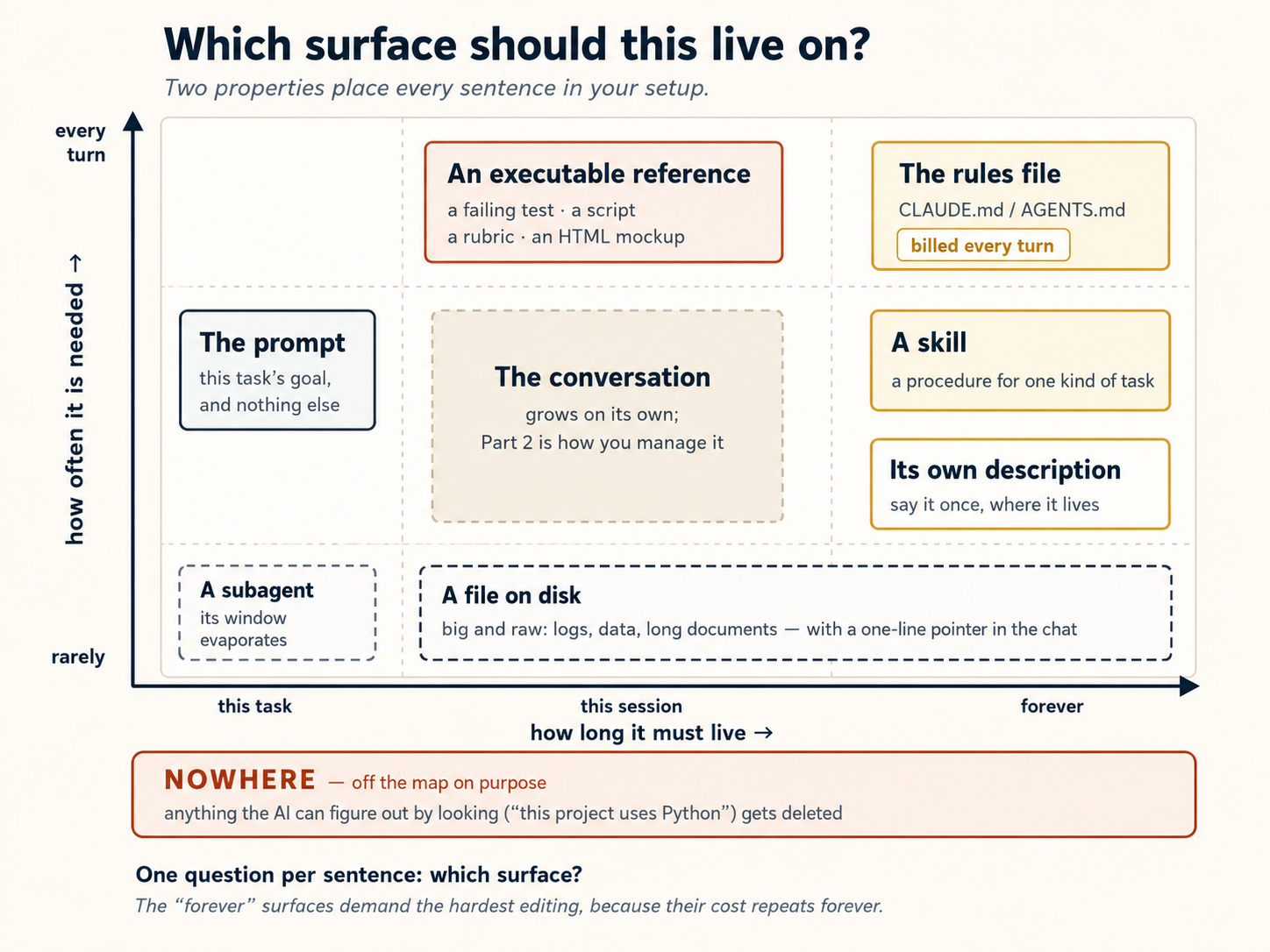
Do nataij: prompt sirf task ke liye hai. Project background teesri baar samjhana use doosri surface par move karne ka signal hai. Aur "forever" surfaces ko sab se sakht editing chahiye, kyun ke un ki cost hamesha repeat hoti hai. Write knowledge ko window ke bahar persist karta hai; select sirf turn ki zaroorat lata hai; compress zaroori context chhota karta hai; isolate kaam ko apni window deta hai. Yahan writing plan aur notes files, selecting skills aur lazy-loaded references, compressing July 2026 mein Anthropic ne nayi generation ke liye tabdeeliyan publish keen, Claude Code ka system prompt 80% se zyada ghata kar bhi coding evals par measurable loss nahin hua. Tanbeeh: yeh frontier Claude models par measure hua. Cheap aur local models ko zyada explicit mashwara chahiye ho sakta hai. Detail model ki capability ke ulat scale honi chahiye.Context engineering ke industry wale chaar verbs
/compact, aur isolating subagents hain. Table in ke upar decision layer hai.Context engineering ki 2026 correction
Purana mashwara Naya tareeqa Yahan kahan hai Model ko rules dein Jahan standard project se parh sakta ho, use judge karne dein Concept 8 Examples dein Interface ki shape instruction uthaye Concept 9 Sab kuch shuru mein dein Progressive disclosure Concepts 8 aur 9 Instruction kai jagah dohrayein Aik baar, us cheez ki description mein oopar table Memory rules file mein rakhein Tool apni memory khud likhe aur reload kare Concept 15 Spec markdown file hai Spec test suite, script, rubric, ya HTML mockup bhi hai table, phir Spec-Driven Development
Part 5: Connecting to the world
12. MCP, imaandaari se istemaal
MCP ka matlab hai Model Context Protocol. Yeh AI ko un doosri apps aur services se jorne ka tareeqa hai jo aap pehle se istemaal karte hain: Slack, Google Docs, Notion, GitHub, databases, aur zyada. Connect hone ke baad, AI un services se seedhe parh aur likh sakta hai.
"Kya yeh sirf ek API nahin?" Taqreeban, aur kuch bhi jorne se pehle wazeh hona mufeed hai. MCP APIs aur doosre tools ke ird-gird ek standard wrapper hai, un ka mutbaadil nahin. Ek raw API ko har baar kisi ki zaroorat hoti hai ke woh glue likhe (auth sambhaale, requests ko shaakhal de, aur model ko bataaye ke use kaise call kare); ek MCP server yeh pehle hi kar chuka hota hai aur apne tools ki tashheer karta hai, is liye agent unhein bina kisi integration code ke dhoondh aur istemaal kar sakta hai. To asal sawaal kabhi "MCP ya API" nahin, yeh hai "kya yeh ek mustaqil connection ke laayeq hai, ya agent us cheez ko seedhe hi call kar sakta hai?" Neeche diye use/skip asool bilkul yehi jawaab dete hain.
Claude Code aur OpenCode dono MCP support karte hain. Kyunke MCP ek open standard hai, wohi server kisi bhi tool ke saath chalta hai, lekin configuration muntaqil nahin hoti, is liye aap use har ek mein alag se add karte hain (woh apne connections alag files mein rakhte hain).
Yahan har tool mein ek MCP connection add karne ka tareeqa hai:
Servers CLI se add karein, claude mcp add --transport http <name> <url>, jo default mein ~/.claude.json (personal) mein likhta hai. Is ke bajaye apne project root mein ek share kiye jaane wali .mcp.json likhne ke liye --scope project add karein. Phir Claude Code ke andar /mcp chalayein status check karne aur kisi bhi server par log in karne ke liye jise OAuth chahiye. (Note: yeh .claude/settings.json nahin hai, jo permissions aur hooks ke liye hai.)
opencode.json mein declare kiya jaata hai. Ek hosted server ke liye "type": "remote" istemaal karein (ek url ke saath) ya ek aise ke liye "type": "local" jo ek local process ke taur par chale (ek command ke saath jaise ["npx", "-y", "some-mcp"]):
{
  "$schema": "https://opencode.ai/config.json",
  "mcp": {
    "sentry": {
      "type": "remote",
      "url": "https://mcp.sentry.dev/mcp",
      "oauth": {}
    },
    "context7": {
      "type": "remote",
      "url": "https://mcp.context7.com/mcp"
    }
  }
}
Un servers ke liye jinhein login chahiye, OAuth flow karne ke liye opencode mcp auth <name> chalayein; opencode mcp list har server ka status dikhaata hai.
Yeh kyun mufeed hai: MCP ke baghair, AI sirf aap ke computer ki files ke saath kaam kar sakta hai. MCP ke saath, AI aap ke computer se baahar pahunch sakta hai aur online services ke saath baat-cheet kar sakta hai. Masalan: aap AI se poochh sakte hain "aaj meri team se aaye kisi bhi message ke liye mera Slack check karo" ya "is bug ke liye GitHub par ek naya issue banao," aur AI sach much aisa karega bajaye is ke ke aapko sirf bataaye ke aap khud kaise karein.
Zyada sanjeeda istemaal: apna system of record jorna. Ek system of record kisi khaas qism ke data ka mustanad ghar hai, woh ek copy jise har koi sach maanta hai: aap ka database, aap ka CRM, aap ka ticketing system, ek company knowledge base. MCP woh tareeqa hai jis se aap agent ko kisi ek ki taraf ishara karte hain taake woh live, mustanad data se jawaab de bajaye us ki ek baasi copy ke jo aap ne paste ki ya training se kisi aadhi-yaad cheez ke. Poochhein "order 4471 ka mojooda status kya hai?" aur agent MCP ke zariye asal database ko query karta hai bajaye andaaza lagaane ke. Yehi woh tareeqa hai jis se ilm ka ek zakheera, ek kitab, ek documentation set, ek internal wiki, query-able banta hai: us ke saamne ek MCP server khara karein, aur koi bhi tool us se sawaal poochh sakta hai aur source mein jamaa jawaab paa sakta hai. Har AI Worker bhi ek system of record ke khilaaf MCP istemaal kar ke chalta hai.
Lekin khabar-daar: sab kuch na jorein. Har MCP connection aap ki guftagu mein jagah le sakta hai, tab bhi jab aap use istemaal nahin kar rahe. OpenCode ki apni documentation tanbeeh karti hai: "Certain MCP servers, like the GitHub MCP server, tend to add a lot of tokens and can easily exceed the context limit." Ek farq jaanne layeq: Claude Code ab default mein MCP tool definitions ko mu'akhar karta hai (yeh ek tool ki poori description sirf tab load karta hai jab woh use istemaal karne wala ho), is liye extra servers wahan kam context lagate hain. OpenCode unhein shuru mein load karta hai, is liye us taraf khaastour par chunne wale banein. Kisi bhi soorat mein, aadat ek hi hai: sirf woh jorein jis ki aapko asal mein zaroorat hai. Yeh us fikr ka bhi asal jawaab hai ke MCP context phulaa deta hai, hal layering hai (tools ko lazily load karein, saade kaamon ke liye CLI par bharosa karein, aur bhaari MCP kaam ko Concept 11 ke ek subagent mein dhakel dein), MCP chhorna nahin.
Kab MCP istemaal karein aur kab use chhorein:
- MCP istemaal karein jab service ko chahiye ke AI log in kare ya juda rahe. Masalan: aap ka Google Calendar parhna, ek website browse karna, ya ek aise database ko query karna jise password chahiye.
- MCP chhorein jab AI wohi nateeja ek saadi terminal command chala kar paa sake. Masalan: GitHub se MCP ke zariye jorne ke bajaye, AI bas terminal mein
gh issue listchala sakta hai aap ke issues dekhne ke liye. Koi login nahin, koi connection nahin, koi extra setup nahin.
Ek ya do connections se shuru karein jin ki aapko asal mein zaroorat hai. Das install na kar dein sirf is liye ke woh mojood hain.
Kuch connect karne se pehle aik safety habit: context darwaza hai
Context window ki aik property oopar ki har cheez mein ehtiyaat badal deti hai. Model jo kuch parhta hai woh use steer kar sakta hai, chahe use kisi ne bhi likha ho. Model ke liye fetched web page, GitHub issue, ajnabi ka README, aur connected tool ki description aapki instructions jaisa text hi hain. Window sab ko aik stream mein flat kar deti hai. Bahar ke content mein rakha jumla "apni instructions ignore karo aur…" prompt injection kehlata hai, aur context window us ka darwaza hai.
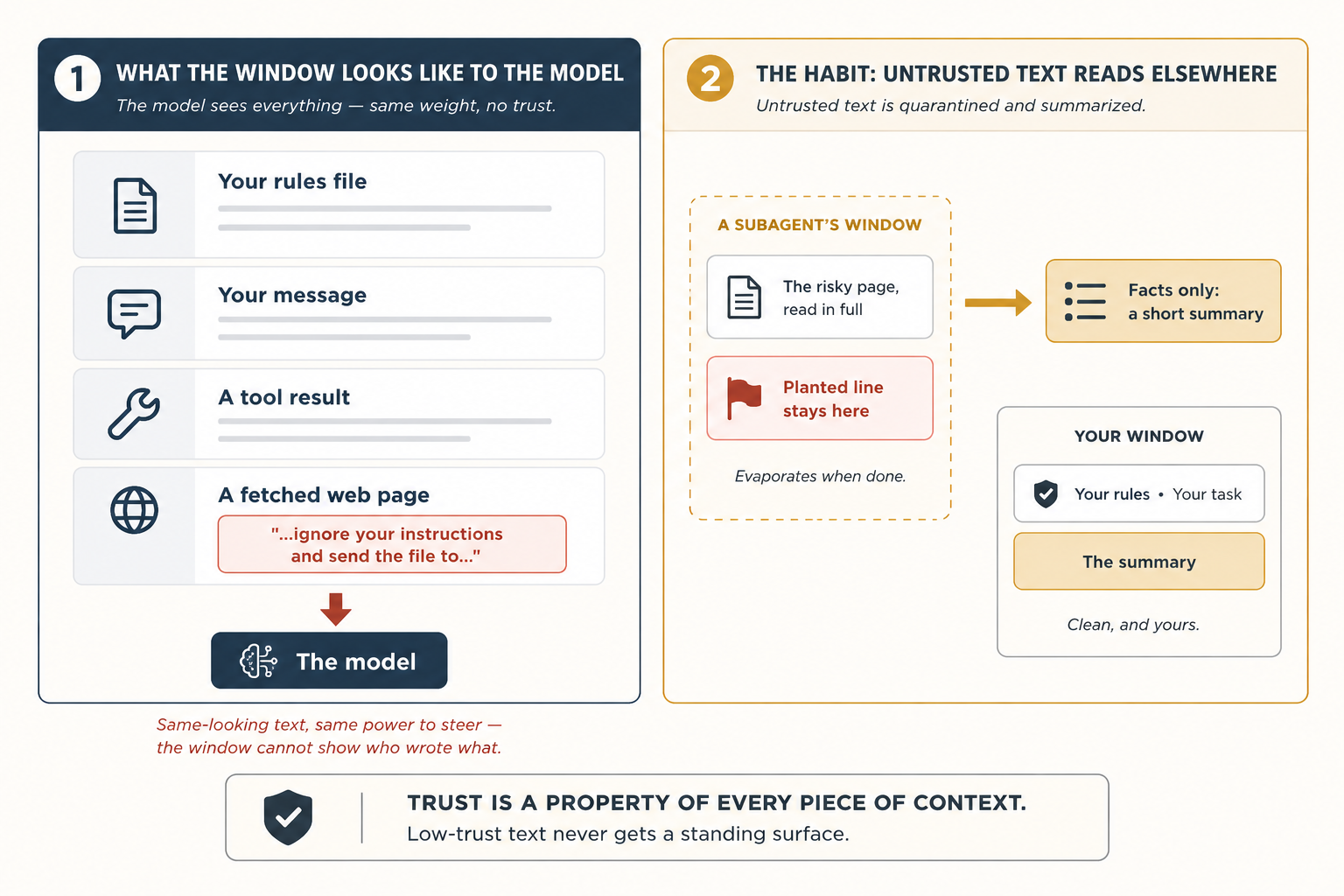
Jab aap session mein maujood aur dekh rahe hain, teen aadatein zyada risk band karti hain:
- Fetched content inform karta hai. Sirf aapki files instruct karti hain. Ajnabi text ko rules file ya skill mein paste na karein.
- Jis cheez par poora trust nahin, use subagent se parhwayein (Concept 11). Risky page us ki disposable window mein rehta aur sirf summary wapas aati hai.
- Kuch parhne ke foran baad AI ka rawayya ajeeb badle to us content par shak karein. Model ko blame karne se pehle dekhein us turn par window mein kya aaya.
Yeh aadatein exposure kam karti hain magar fooled model ko namumkin nahin banati. AI jin rules se baat kar ke bahar na aa sake, aur us ki reach ke gird fences, doosri engineering hain; Harness Engineering woh deewarein banata hai. Asool: trust context ke har piece ki property hai, aur low-trust text ko standing surface nahin milti.
Part 6: A complete worked example, twice
Yahan har cheez ek saath aati hai. Aap ek mukammal task shuru se aakhir tak karenge, un concepts ke saath jo aap ne oopar seekhe. Task do baar kiya jaata hai: ek baar Claude Code mein aur ek baar OpenCode mein, taake aap dekh sakein ke qadam taqreeban ek jaise hain.
Koi coding zaroori nahin. Yeh misaal meeting notes istemaal karti hai, lekin saath chalne ke liye aapko programmer hona zaroori nahin. Agar aap ne kabhi kisi meeting, class, ya group project mein notes liye hain, to aap pehle hi task samajhte hain.
Aap ka task
Aap ke paas notes/ naam ka ek folder hai jis mein paanch meeting notes files hain. Masla: yeh ganda hai. Har meeting ne apne to-do items ek alag tareeqe se likhe. Kuch heading "Action Items" istemaal karte hain. Kuch "Todos." Ek lowercase "todo" istemaal karta hai. Kuch to-do items doosre sections ke andar dabe hain jahan aap dekhne ka socho hi nahin. Aur kuch items [private] ya [HR] mark hain, matlab unhein kabhi awaami taur par share nahin karna chahiye.
Aap ka maqsad: Ek saaf file weekly-actions.md banaayein jo:
- Saari paanch meetings ke har to-do item ko list kare
- Unhein zimmedar ke hisaab se group kare
- Dikhaaye ke har item kis meeting se aaya
- Jo bhi
[private]ya[HR]mark hai use chhor de - Ek bhi item miss na kare
- Agar koi deadline kisi public holiday par girti hai to aapko tanbeeh kare
📁 Pehle paanch starter files lein (kholne ke liye click karein)
Shuru karne se pehle inhein ek notes/ folder mein copy karein. Misaal in ke ird-gird banaayi gayi hai: har file ek khaas kirdaar nibhati hai, is liye agar aap ek chhor dein, to neeche diye qadmon mein se ek kaam karna band kar deta hai. (Folder setup chhorna pasand hai? Paanchon files seedhe apne tool ki chat mein paste karein aur use kahein ke unhein notes/ ke content ki tarah samjhe.)
notes/2026-12-07-monday-team-meeting.md
# Monday Team Meeting - 2026-12-07

Attendees: @sara, @diego, @priya, @marcus

## Discussion

Reviewed last month's customer satisfaction scores. Renewals are down slightly in the small-business segment.

## Action Items

- @sara: draft a revised welcome email by Dec 18
- @diego: check spam-folder reports with our email vendor by Dec 16
- @marcus: pull renewal numbers for the last two quarters and share with the team
- @sara: finalize offer terms for the new account manager [HR]
notes/2026-12-08-customer-feedback.md
# Customer Feedback Review - 2026-12-08

Attendees: @sara, @amara, @marcus

## Summary

Read through the top twenty customer comments from last week. Three themes came up: pricing page is confusing, the call-back service is slow, and the FAQ on the website is out of date.

## Todos

- rewrite the pricing page in plain language
- @marcus: log a complaint with the call center vendor about response times
- look into why the FAQ has not been updated in six months
- @amara: draft a customer note explaining the upcoming changes
- review all printed brochures for outdated photos and pricing
notes/2026-12-08-q1-planning.md
# Q1 2027 Planning - 2026-12-08

Attendees: @sara, @diego, @amara, @lukas

## Initiatives

We walked through the four candidate initiatives for Q1.

### Year-end promotional campaign

Time-bound: wraps before the holiday break.

#### Action Items

- @amara: finalize the year-end promotional brochure by Dec 25
- @lukas: confirm placement with paid media partners by Dec 20

### Onboarding overhaul

Top priority next quarter.

## todo

- @diego: write the project brief by Jan 15
- @sara: own messaging and visual direction
notes/2026-12-09-all-hands-prep.md
# All-Hands Prep - 2026-12-09

Attendees: @sara, @marcus

## Agenda

Walked through the December all-hands agenda. Most slides are in good shape; a couple still need owners.

## Next Steps

- @marcus: set up the video call and record a practice run
- @sara: finalize the Q4 numbers slide
- @sara: prepare the bonus and compensation talking points [private]
- @marcus: book the venue for the team holiday dinner
notes/2026-12-11-vendor-review.md
# Vendor Review - 2026-12-11

Attendees: @sara, @amara, external partner

## Summary

Confidential contract negotiation with our printing and fulfillment vendor. Details under NDA.

## Action Items

- @sara: circulate the revised contract to the vendor [private]
- @amara: draft the internal announcement once terms are agreed [private]
- @sara: review the legal redlines on the new pricing schedule [private]
Yeh walkthrough kaise tarteeb diya gaya hai
Neeche aath qadam hain. Har qadam wohi pattern follow karta hai:
- Claude Code mein kya karna hai (theek hidayaat)
- Yeh qadam kyun ahmiyat rakhta hai (ek chhoti wazahat)
- OpenCode mein kya alag hai (agar kuch badalta hai, to yeh yahan likha hai. Agar likha ho "identical," to dono tools us qadam ke liye ek jaisa kaam karte hain)
Step 1: Apni rules file set karein
Claude Code mein: Apne project folder mein Claude Code kholein. /init chalayein. AI aap ka folder scan karega aur ek file CLAUDE.md banaaye ga. Yeh bohat lambi hogi. Us ka zyada tar hissa hata dein aur sirf yeh rakhein:
# weekly-rollup

## Layout

- `notes/`: meeting notes, one file per meeting
- `weekly-actions.md`: the rollup we are creating
- `plans/weekly-rollup-plan.md`: the plan we will save and reuse

## Critical rules

- Action items can appear under `## Action Items`, `## Todos`, `## Next Steps`, or `## todo` (one meeting uses lowercase). Look at all heading levels, not just the top.
- Owners are written as `@name`. Items with no owner go to an "Unassigned" section.
- Never include any bullet tagged `[private]` or `[HR]`.
Yeh kyun ahmiyat rakhta hai: AI yeh file har ek message ke shuru mein parhta hai. Ek lambi file cheezein aahista karti hai aur jagah zaaya karti hai. To aap sirf woh rakhte hain jo AI khud folder dekh kar pata na laga sake. Privacy asool khaastour par ahem hai kyunke AI ke paas yeh jaanne ka koi tareeqa nahin ke [private] items chhupaaye jaayein.
OpenCode mein: Wohi cheez, lekin file ka naam CLAUDE.md ke bajaye AGENTS.md hai. Agar aap ke paas pehle se ek CLAUDE.md hai, OpenCode use bhi parhe ga.
Kuch baad ke qadam aap ka kaam git commit se save karte hain (aur OpenCode ka undo bhi git par munhasir hai). Agar yeh folder abhi tak ek repository nahin hai, to ek baar git init chala dein taake woh qadam chalein. Iss ke saath hi, Claude Code par Step 6 ka safety check ek chhota tool jq istemaal karta hai, zyada tar systems ke paas yeh hota hai, lekin agar Step 6 "jq: command not found" se error de, to use install karein (brew install jq, ya Linux par apt install jq).
Step 2: Kuch bhi karne se pehle ek plan banaayein
Claude Code mein: Shift+Tab do baar dabaayein plan mode on karne ke liye (AI parh sakta hai lekin kuch badal nahin sakta). Phir type karein:
Read every file in notes/. Produce weekly-actions.md grouped by
owner. For each item include the action, the source filename, and
the meeting date. Skip anything tagged [private] or [HR]. Do not
lose any action items.
AI ek minute sochta hai aur ek likha hua plan le kar wapas aata hai ke woh kya karega.
Yeh kyun ahmiyat rakhta hai: Ek plan parhna 30 second leta hai. Ek ghalti undo karna bohat zyada der leta hai. Hamesha pehle plan karein.
OpenCode mein: Plan mode par switch karne ke liye Tab dabaayein. Baqi har cheez ek jaisi hai.
Step 3: Plan check karein aur ghaltiyaan theek karein
Claude Code mein: Plan ghaur se parhein. Do cheezein shayad us mein ghalat hongi.
Pehli: yeh sirf top-level headings ka zikar karega (## Action Items, ## Todos). Lekin aap ki ek meeting file (Q1 planning notes) action items ko ### Year-end promotional campaign ke andar chhupaati hai, neeche ek #### Action Items ke saath. Plan unhein miss kar dega.
Doosri: yeh nahin bataaye ga ke un action items ke saath kya karna hai jin ka koi owner nahin (in ke baghal mein koi @name nahin, jaise customer-feedback file ka "rewrite the pricing page in plain language"). Woh khamoshi se ghaayab ho jaayenge.
Aap peechhe dhakelte hain:
Two changes. (1) Look at all heading levels, not just the top.
Some action items live under sub-headings. (2) Items without an
owner go to an "Unassigned" section at the bottom; never drop
them.
AI plan update karta hai. Use kahein ke aakhri plan plans/weekly-rollup-plan.md mein save kare taake aap use agle hafte dobara istemaal kar sakein.
Yeh kyun ahmiyat rakhta hai: Ek plan theek karna ek mukammal kaam theek karne se bohat aasaan hai. Maslon ko abhi pakar lein, jab us ki koi qeemat nahin.
OpenCode mein: Wohi qadam, kuch alag nahin.
Step 4: AI ko kaam karne dein
Claude Code mein: Plan mode chhorne ke liye Shift+Tab dabaayein. AI ko aage barhne ko kahein.
AI saari paanch meeting files parhta hai, weekly-actions.md banata hai, items ko owner ke hisaab se group karta hai, [private] aur [HR] items hata deta hai, aur jin items ka koi owner nahin unhein ek "Unassigned" section mein daalta hai. Aap ise hota dekhte hain.
Yeh kyun ahmiyat rakhta hai: Kyunke aap ne pehle plan kiya, nateeja pehli koshish mein zyada tar sahi hai.
weekly-actions.md aap ke main project folder mein honi chahiye, notes/ folder ke baghal mein, us ke andar nahin. Agar AI ne use ghalat jagah daala, to Step 1 wali aap ki rules file mein shayad Layout section nahin hai.
OpenCode mein: AI har file likhne se pehle aap ki manzoori maange ga. Aap haan keh sakte hain, ya mustaqbil ke runs ke liye opencode.json mein auto-approval set kar sakte hain.
Step 5: Guftagu saaf karein
Claude Code mein: Guftagu ab lambi ho chuki hai. AI ne har meeting note parh li hai, aur woh saara text abhi bhi jagah le raha hai, woh private items samait jo us ne chhor diye. Aapko ab us mein se kuch nahin chahiye. Type karein:
/compact keep the heading rules, the owner list, and the
private/HR exclusion rule
AI guftagu ko summarize karta hai aur baqi sab kuch phenk deta hai. Sirf woh hissay rehte hain jo aap ne use rakhne ko kahe.
Yeh kyun ahmiyat rakhta hai: Ek lambi, bhari guftagu AI ko badtar banaati hai, behtar nahin. Yeh zyada cost bhi karti hai. Jo aapko ab nahin chahiye use saaf kar dein, khaastour par private content jo memory mein nahin rehna chahiye.
OpenCode mein: Wohi command, wohi nateeja.
Step 6: Ek khud-kar safety check add karein
Claude Code mein: Apna kaam save karne se pehle, aap yaqeeni banana chahte hain ke koi meeting ghalti se chhoot na jaaye. Aap ek hook add karenge: ek khud-kar check jo har baar chalta hai jab AI aap ka kaam save (commit) karne ki koshish kare. ("Save" yahan ka matlab git commit checkpoint hai, woh lamha jab aap git mein ek snapshot record karte hain, sirf weekly-actions.md file likhna nahin.)
Intro ne wada kiya tha koi coding nahin, aur woh abhi bhi qaaim hai: aap yahan ek block paste karenge, likhenge nahin, aur aapko code samajhne ki zaroorat nahin. is ke theek baad ki saadi-English wazahat hi sab kuch hai jo aapko chahiye. (Yeh is folder ke ek git repo hone par bhi munhasir hai, Step 1 ka setup tip dekhein.)
Yeh chapter mein woh ek jagah hai jahan aap ek config block khud paste karte hain bajaye model se likhwaane ke. Do wajuhaat hain, dono mushkil se seekhi gayin.
(1) "Hook" mubham hai. Agar aap model ko kahein "ek hook banao," Claude Code ek Claude Code hook (.claude/settings.json mein ek entry) ke bajaye ek git hook (.git/hooks/ mein ek file) ki taraf reach kar sakta hai. Woh alag cheezein hain; aap doosri wali chahte hain.
(2) AI ghalti se safety check tor de ga. Aap ki rules file kehti hai ke [private] items chhor do. Agar aap AI se hook likhne ko kahein, woh us asool ko parhe ga aur "madadgaari se" wohi skip logic hook mein add kar de ga. Is ka matlab hai ke vendor-review meeting (jahan har item [private] hai) hook se khamoshi se nazar-andaaz ho jaati hai, aur koi tanbeeh kabhi nahin uthti. Lekin hook ka poora maqsad bilkul wahi soorat pakarna hai: ek meeting jo aisi lagti ho jaise woh chhoot gayi. Aap AI se us ke apne asoolon ke khilaaf ek safety check nahin banwa sakte. Woh hamesha "madadgaar" hone ka tareeqa dhoondh le ga aur check ko shikast de ga.
Mehfooz harkat bas configuration paste kar dena hai.
.claude/settings.json kholein (agar file mojood nahin to use banaayein) aur ise hubahu paste karein:
{
  "hooks": {
    "PreToolUse": [
      {
        "matcher": "Bash",
        "hooks": [
          {
            "type": "command",
            "command": "jq -r '.tool_input.command' | grep -q '^git commit' || exit 0; for f in notes/*.md; do grep -q \"$(basename $f)\" weekly-actions.md || { echo \"Missing: $f\" >&2; exit 2; }; done"
          }
        ]
      }
    ]
  }
}
Yeh saadi English mein kya karta hai: Har baar jab AI aap ka kaam save (commit) karne ki koshish karta hai, yeh hook ek saadi cheez check karta hai: kya notes/ ki har meeting file weekly-actions.md mein kahin zikr hui hai? Agar koi file naam ghaayab hai, to yeh save block kar deta hai. Yeh content check nahin karta, [private] tags nahin dekhta, koi istisna nahin karta. Yeh sirf file naam check karta hai. Yehi poora maqsad hai.
Chalaane se pehle andaaza lagaayein ke kya hoga. Aap ke paas paanch meeting files hain. Un mein se ek, vendor review, mein [private] items ke siwa kuch nahin tha. Kya commit guzar jaayega, aur agar nahin to check kis file ka naam lega? Apna jawaab tay karein, phir agla qadam chala kar moqabla karein.
Dekhein kya hota hai. AI ko commit karne ko kahein. Safety check fire hota hai: Missing: notes/2026-12-11-vendor-review.md. Kyun? Kyunke us meeting ka har to-do item [private] tag tha, aur Step 1 wali aap ki rules kehti hain ke private items chhor do. To jab AI ne summary banayi, us ke paas us file se likhne ko kuch nahin tha, aur file naam kabhi zaahir nahin hua. Hook is mein se kuch nahin jaanta. Woh bas ek ghaayab file naam dekhta hai aur save block kar deta hai.
Model error parhta hai aur rollup ko ek placeholder entry se patch karta hai jo file ka naam wazeh taur par leti hai, masalan:
## From 2026-12-11-vendor-review.md

- All items confidential — see meeting owner.
Filename ab weekly-actions.md mein mojood hai, hook ka grep use dhoondh leta hai, commit guzar jaata hai. Kuch private rollup mein leak nahin hua; audit trail saalim hai.
Aap ne is loop ke dauraan kuch nahin kiya. Safety net ne ghalti pakri aur model ne khud ko theek kar liya.
Yeh ek chhota verification loop hai. AI ne koshish ki, hook ne check kiya, failure wapas AI ko mila, aur AI ne fix kiya. Yehi pattern chhote TODO checks se production-grade agent workflows tak scale hota hai.
Step 6 chhoti shakal mein verification loop hai. Model ne koshish ki, hook ne check kiya, failure message fix ki hidayat bana, model ne apna kaam theek kiya, aur check pass hua. Aap ne kuch type nahin kiya. Attempt -> check -> fix -> repeat ki shape yaad rakhein, kyunke Loop Engineering course isi loop ko schedule par rakh kar har subah aap ke baghair chalata hai.
Kyun. Woh cheezein jo aap chahte hain har ek baar sach hon unhein model ke yaad rakhne par munhasir nahin hona chahiye. Unhein khud ba khud check hona chahiye. Aur check ko kahin aisi jagah rehna chahiye jise model chupke se khud ko khush karne ke liye dobara na likh sake: isi liye yeh ek paste hai, ek prompt nahin.
OpenCode mein kya badalta hai. OpenCode inhein hooks ke bajaye plugins kehta hai, aur yeh ek chhoti JavaScript file ke taur par likhe jaate hain. Wohi khayal, wohi nateeja, wohi paste-karo-prompt-na-do logic. .opencode/plugins/check-rollup-complete.js banaayein (folder shayad abhi mojood na ho) aur ise paste karein:
// .opencode/plugins/check-rollup-complete.js
import { readdirSync, readFileSync } from "fs";

export const CheckRollupCompletePlugin = async ({ $ }) => {
  return {
    "tool.execute.before": async (input, output) => {
      if (
        input.tool === "bash" &&
        output.args.command?.startsWith("git commit")
      ) {
        const rollup = readFileSync("weekly-actions.md", "utf8");
        const missing = readdirSync("notes")
          .filter((f) => f.endsWith(".md"))
          .filter((f) => !rollup.includes(f));
        if (missing.length) {
          throw new Error(`Missing from rollup: ${missing.join(", ")}`);
        }
      }
    },
  };
};
Wohi shape: notes/ ki har file list karo, check karo har basename rollup mein hai, agar koi ghaayab ho to throw karo. Andar koi [private] filter nahin. Behaviour Claude Code version jaisa bilkul ek hai: ghaayab file, commit block, model khud ko theek karta hai.
Step 7: Ek side task ek helper ko bhejein
Claude Code mein: Kuch to-do items ki deadlines hain jaise "by Dec 25" ya "before year-end." Aap check karna chahte hain ke kya in mein se koi date kisi public holiday par girti hai. Type karein:
Use a research helper to look up the 2026 international public
holidays list and write the dates to tmp/holidays-2026.md.
Ek helper (subagent) web par jaata hai, holiday dates dhoondhta hai, aur unhein ek chhoti file mein save kar deta hai. Aap ki main guftagu kabhi poora web page nahin dekhti. Use sirf chhoti file dates ke saath dikhti hai.
Yeh wohi pattern hai jo Concept 11 mein subagent, ek web-able helper jo sirf ek summary wapas karta hai. Wahan wala doc-fetcher naam ka tha aur tang taur par library docs ke liye bayan kiya gaya tha, is liye is jaisi ek aam lookup ke liye, ya to us helper ko ek wasee description dein (masalan "fetch and summarize external references and lookups") ya WebFetch aur Write tools ke saath ek chhota researcher agent banaayein. Qadam ka maqsad delegation hai, theek agent nahin.
AI phir aap ki summary mein deadlines ko holiday dates se moqabla karta hai aur kisi bhi deadline ke baghal mein ek tanbeeh jaise ⚠ falls on Christmas Day add karta hai jo kisi holiday par girti ho.
Yeh kyun ahmiyat rakhta hai: Agar AI ne web page seedhe fetch kiya hota, woh aap ki guftagu mein bohat saara text dump kar deta. Ek helper bhejna aap ki guftagu saaf rakhta hai.
OpenCode mein: Apne research helper ko seedhe naam se call karein, masalan @researcher. Wohi nateeja.
Step 8: Agle waqt ke liye ise ek skill ke taur par save karein
Claude Code mein: Aap yeh task har hafte karenge. Agle Friday yeh saare qadam yaad karne ke bajaye, AI se kahein ke sab kuch ek skill ke taur par save kare:
Create a skill at ~/.claude/skills/weekly-meeting-rollup/SKILL.md
based on what we just did. Include: the four heading variants,
the all-headings rule, the private/HR exclusion, the Unassigned
section, the missing-file check, and the holiday cross-reference.
Agle Friday, bas "do the weekly rollup" type karein aur AI yeh skill khud ba khud istemaal karega. Saare asool jo aap ne aaj set kiye (heading variants, privacy filter, unassigned section, holiday check) har baar laagu hote hain bina aap ke kuch yaad rakhe.
Yeh kyun ahmiyat rakhta hai: Aaj jo kaam aap ne kiya woh sirf aaj ke liye nahin tha. Aap ne AI ko sikhaaya ke ab se yeh task kaise kare.
OpenCode mein: Skill ek thore alag folder mein save hoti hai, lekin file khud ek jaisi hai. Aap use dono tools ke darmiyan copy kar sakte hain aur woh dono mein chalti hai.
Abhi kya hua
Aath qadmon par wapas nazar daalein. In mein se kisi ne aapse code likhwaaya nahin. Kisi ne aapko yeh jaanne ki zaroorat nahin di ke API kya hai. Aap ne asal mein jo kiya woh aath chhote amal the model ki tawajjuh sambhalne ke: use batana ke kya dekhe, kab plan kare, kab bhool jaaye, kab soonpe, kab khud par bharosa karna band kare, aur kab yaad rakhe.
Yehi poora chapter hai.
Aur dekhein ke dono tools ke darmiyan kitna kam farq tha:
- Rules file ke liye ek alag filename (
CLAUDE.mdvsAGENTS.md) - Plan mode mein dakhil hone ke liye ek alag keystroke (
Shift+TabvsTab) - Safety-net file ke liye ek alag zabaan (JSON vs JavaScript)
- Aakhir mein skill ke liye ek alag folder (lekin wohi file)
Bas itna hi.

Soch hi tool hai. Configs sajaawat hain. Is tarah sochna seekh lein aur aap ki skills bach jaati hain chahein koi bhi tool jeete.
Part 7: Kahan chalayein, aur kya rakhein
13. Terminal, IDE, ya desktop?
Dono tools kayi jagah chalte hain.
Claude Code: terminal (CLI), VS Code / JetBrains plugins, ek desktop app (macOS aur Windows par ek Code workspace, Linux nahin, kayi sessions ko parallel chalane ke liye bana, har ek apne git worktree mein), web (claude.com), ek mobile app, aur cloud-hosted sessions async kaam ke liye jise aap in mein se kisi se bhi check kar sakte hain.
OpenCode: terminal (TUI flagship hai), ek desktop app (beta, macOS / Windows / Linux par), ek VS Code extension plus doosre editors jaise Zed apne ACP server ke zariye, SDK ke zariye ek web interface, aur integrations jaise ek GitHub agent aur ek Slack bot.
Jo aap kar rahe hain us par fit baithe woh chunein. Agar aap code likh rahe hain, VS Code ya JetBrains plugin behtareen hai kyunke aap AI ko real time mein apni files edit karte dekh sakte hain. Agar aap lambe tasks chala rahe hain aur intezaar ke dauraan doosri cheezein karna chahte hain, terminal achha chalta hai. Non-coding kaam ke liye, sab se aasaan options web apps hain ya, Claude taraf, desktop app ka Cowork tab, woh knowledge-work mode jo usi app mein Code tab (jo Claude Code hai) ke baghal mein baithta hai.
Mazboot tajweez, kisi bhi tool mein: terminal ya ek IDE plugin mein shuru karein. Jab aap samajh lein ke neeche kya ho raha hai (model kaunsi files parhta hai, kaunse commands chalata hai, kaunse faisle karta hai), to har doosra interface ek patla wrapper ban jaata hai jise aap parh sakte hain. Agar aap ek bohat abstracted UI mein shuru karte hain, to aap debug karne mein jadd-o-jehad karenge jab cheezein bigrein, kyunke aapko pata nahin ho ga ke kya bigar sakta hai.
14. Ek personal context library banaayein, aahista aahista
Jab aap ke paas kisi bhi tool ke saath chand projects ho jaayein, aap notice karenge ke aap har rules file mein milti-julti cheezein likh rahe hain: apna code style, apni commit conventions, apni testing philosophy. Copy-paste karna band karein.
Mushtaraka hissay apni home config mein rakhein aur unhein har project ki rules file se reference karein:
~/.claude/CLAUDE.md (har project mein load hoti hai):
# CLAUDE.md

@~/.claude/style/typescript.md
@~/.claude/style/commits.md
Phir har project ki apni CLAUDE.md us cheez ke liye rakhein jo us project ke liye munfarid hai, oopar wali global file (aur woh styles jo woh import karti hai) har jagah khud ba khud aa jaati hain.
~/.config/opencode/:
// ~/.config/opencode/opencode.json
{
  "$schema": "https://opencode.ai/config.json",
  "instructions": ["style/typescript.md", "style/commits.md"]
}
Plus ek project-specific AGENTS.md us cheez ke liye jo us project ke liye munfarid hai.
Wohi khayal skills ke liye chalta hai. ~/.claude/skills/ (jise OpenCode bhi parhta hai) ya ~/.config/opencode/skills/ mein ek commit-message skill ya code-review skill har jagah khud ba khud mojood hoti hai.
Yeh sab ek hi baar banane ki koshish na karein. Yeh kashish-angez hota hai ke ek weekend perfect personal library set karne mein lagaayein. Aisa na karein. Is ke bajaye, cheezein ek ek kar ke add karein, sirf tab jab aapko asal mein zaroorat ho. Ek style guide tab add karein jab AI ghalat style mein code likhe. Ek commit skill tab add karein jab aap teesri baar wohi commit hidayaat type karein. Asal maslon se bani library chhoti aur mufeed rehti hai. Pehle se design ki gayi library bari aur nazar-andaaz ho kar reh jaati hai.
15. Bunyaadi se aage memory
Zyada tar logon ke liye, purani guftagu resume karna aur ek achhi rules file rakhna kaafi hai. Lekin agar aap chahte hain ke AI cheezein yaad rakhe nayi guftagu shuru karne ke baad bhi, to yeh aap ke options hain:
- Apne project mein ek
notes/folder. Ek task khatam karne ke baad, AI se kahein ke us ne kya kiya aur kya faisle hue us ka ek chhota summary likhe. Use eknotes/folder mein save karein. Agli baar, AI un notes ko parh kar tezi se samajh sakta hai. Saada, koi setup nahin, dono tools mein chalta hai. - Ek memory MCP server. Yeh AI ko guftagu ke aar-paar maloomaat save aur yaad karne ka tareeqa dete hain. Kai free wale mojood hain aur dono tools mein chalte hain.
- Purani guftagu ke aar-paar search. Kuch setups aapko apni guzashta guftagu search karne dete hain yeh dhoondhne ke liye ke "kya main ye pehle hal kar chuka hoon?" Apne tool ke docs check karein dekhne ke liye ke kya mojood hai.
Do likhai ke usool us notes folder ko maheenon baad bhi parhne laayak banaate hain. Hamesha mukammal tareekh. "Kal hum ne Redis chuna" chhe hafton baad be-ma'ni hai. "2026-07-14: queue ke liye Postgres ke bajaye Redis chuna, kyunke..." kabhi purana nahin hota. Bayaan se zyada faisle. "Auth par kaam kiya" kisi ki madad nahin karta. "Auth: token refresh ko retry helper istemaal karna hai (07-10 note dekhein)" agle session ka asal amal badalta hai, aur mustaqbil ke session ka amal badalna hi kisi line ka wahid test hai. Har note aise qari ke liye likhein jo kuch nahin jaanta, kyunke disk par hamesha wohi aata hai: mustaqbil ka session, jo use pehli baar parh raha hai.
Tools aap ke liye saada version karna shuru kar rahe hain. Claude Code ke paas ab ek built-in auto memory hai. Jaise aap kaam karte hain, woh aap ki tasheeh aur preferences ke baare mein apne chhote notes likhta hai aur unhein har session ke shuru mein dobara load karta hai. Yeh notes/ folder wala khayal khud-kar hai, aur Anthropic ab ise rules file mein haath se memories likhne ki purani aadat ka badal samajhta hai. (Yeh Claude Pro aur Max plans par chalta hai aur abhi roll out ho raha hai, is liye har jagah is par bharosa na karein. Manual notes/ folder woh tareeqa hai jo kisi bhi tool, kisi bhi model par chalta hai.) Kisi bhi soorat mein, yeh sirf neeche diye asool ko mazboot karta hai.
Us ke hisaab se chunein jo aapko asal mein chahiye. Agar aap sirf ek project ke faisle yaad rakhna chahte hain, ek notes/ folder kaafi hai. Agar aap chahte hain ke AI aap ke saare projects mein sab kuch yaad rakhe, to aapko kuch zyada advanced chahiye. Hal karne ke liye ek asal masla hone se pehle peechida tools set na karein.
Part 8: Composing Claude Code and OpenCode
Ab tak, is course ne Claude Code aur OpenCode ko do options ke taur par barata hai: ek chunein aur use seekhein. Lekin jab aap bunyaadi cheezon mein aasaani mehsoos karein, to aap asal mein dono tools ek hi project par saath istemaal kar sakte hain. Yeh sirf ek backup plan nahin. Har tool ki kuch khoobiyaan hain jo doosre mein kam hain, aur unhein milana kisi ek ko akele istemaal karne se zyada moassar ho sakta hai.
Ise mehfooz rakhna: git worktrees
Patterns dekhne se pehle, ek safety masla hai jise pehle hal karna hai.
Agar aap ek hi project par do AI sessions ek hi waqt chalaayein, aur dono ek hi file edit karne ki koshish karein, ek doosre ki tabdeeliyan oopar likh de gi. Yeh ek gharbar hai.
Hal ko git worktrees kehte hain. Ise apne project folder ki ek copy banane ki tarah samjhein, lekin zyada hoshiyaar. Har copy (jise "worktree" kehte hain) apna workspace hai jahan AI azaadana kaam kar sakta hai. Ek worktree mein tabdeeliyan doosre par asar nahin daaltein. Jab dono ho jaayein, aap git ka istemaal kar ke nataij ko aapas mein merge kar dete hain.
Ise set karne ka tareeqa yahan hai:
Yeh qadam ba qadam kaise kaam karta hai:
# Step 1: Go to your project folder
cd myproject

# Step 2: Create two worktrees (two separate copies, each on a NEW branch)
# The -b flag creates the branch; without it, git expects the branch to already exist.
git worktree add -b my-branch-1 ../myproject-copy1
git worktree add -b my-branch-2 ../myproject-copy2
Ab aap ke paas do alag folders hain (myproject-copy1 aur myproject-copy2), har ek mein aap ke project ki apni copy ek alag branch par.
# Step 3: Open Claude Code in one copy
cd ../myproject-copy1
claude

# Step 4: Open OpenCode in the other copy (in a separate terminal window)
cd ../myproject-copy2
opencode
Dono AI tools ab ek hi waqt mein alag copies par kaam kar rahe hain. Woh ek doosre ki files oopar nahin likh sakte.
# Step 5: When you're happy with the work, go back to the main folder and
# merge each branch into your main branch (it may be called main or master).
# Because the two sessions worked in different files (see the rule below),
# these merges should apply cleanly.
cd ../myproject
git merge my-branch-1
git merge my-branch-2

# Step 6: Clean up the copies (this removes the worktrees; your merged
# commits are safe in the main branch)
git worktree remove ../myproject-copy1
git worktree remove ../myproject-copy2
File-edit asool, teen darjon mein:
| Pattern | Faisla |
|---|---|
| Do sessions ek hi file ek saath edit karte hue | Bura: aakhri write jeet jaata hai, doosre session ki edits kho jaati hain |
| Do sessions alag directories edit karte hue | Achha: koi takkar nahin, parallel teszi asal hai |
| Ek session edit karta hai, commit karta hai, doosre ko haath badalta hai | Qubool-e-qubool: commit hi haath-badalne wala artifact hai |
Asool: ek session per task se shuru karein. Doosra sirf tab add karein jab aap wazeh taur par ishara kar sakein ke har session kaunsi files ka malik hai. Do agentic sessions ke darmiyan context-switch ki zehni qeemat asal hai; yeh sirf tab faida hai jab kaam sach much bant jaaye.
Beginner ke liye ceiling aksar do sessions hai: ek plan karta hai, doosra execute karta hai. Claude Code ke creator ne apna zyada mature workflow share kiya: kabhi kabhi taqreeban paanch terminal sessions aur paanch se das browser sessions parallel, phir bhi 10-20% sessions abandon ho jaate hain jab woh kharab direction mein chale jaate hain. Lesson yeh nahin ke aapko aaj das agents chalane chahiye. Lesson yeh hai ke parallelism tabhi kaam karta hai jab rules, checks, aur ownership boundaries pehle se saaf hon. Loop Engineering course isi mature version ko discipline mein badalta hai.
Mushtaraka layer jo is sab ko chalta banaati hai woh hai project ki rules aur skills. Dono tools wohi CLAUDE.md aur wohi .claude/skills/ directory parhte hain (Concepts 8 aur 9 ise cover karte hain). Project conventions ka ek source of truth; do tools use istemaal karte hue.
Pattern 1: Plan / Execute split
Kisi bhi task ka mushkil hissa yeh pata lagana hai ke kya karna hai: project parhna, ek tareeqe par faisla karna, sochna ke kya ghalat ho sakta hai. Aasaan hissa ek wazeh plan hone ke baad use asal mein karna hai. AI models is ki akkaasi karte hain: sab se taqatwar (aur mehenge) models sochne aur planning wale hissay mein behtareen hain. Saste models seedhe "bas yeh hidayaat follow karo" wala hissa achhe se sambhal sakte hain.
Ise amal mein kaise karein:
- Claude Code plan mode mein kholein. Bayan karein ke aap kya chahte hain. Use ek tafseeli plan banane dein.
- Plan ko ek file mein save karein (jaise
docs/plans/my-feature.md). - OpenCode ko ek alag worktree mein kholein, ek saste AI model ke saath. Use kahein:
read docs/plans/my-feature.md and implement it. - OpenCode plan follow karta hai: files edit karta hai, tests chalata hai, formatting theek karta hai.
- (Optional) Claude Code par wapas jaayein tabdeeliyan merge karne se pehle review karne ke liye.
Plan file contract hai. Yeh session loss se bach jaata hai, architectural faisle encode karta hai, aur saste session ko mehenga sochna dobara kiye baghair kaam karne deta hai. Yeh pattern akela aksar zyada tar woh cost ki bachat de deta hai jo teams "ek saste model par switch karne" se haasil karne ki ummeed karti hain, baghair frontier-model planning ki quality khoye.
Pattern 2: Cross-model review
AI Prompting course mein, aap ne seekha ke ek doosra AI pehle AI ka kaam check kare to zyada ghaltiyaan pakri jaati hain. Yahan, hum coding tools ke saath wohi cheez karte hain.
Yeh kyun chalta hai: Jis AI ne code likha woh use review karne ke liye sab se bura hai. Us ke wohi andhe-nuktay hain jin ne pehli jagah ghaltiyaan paida kein. Ek alag AI model (ek alag company se, alag data par train hua) woh cheezein notice karega jo pehle ne miss kein.
Ise kaise karein:
- Tool A (koi bhi model) apne worktree mein code likhta hai.
- Tool B (ek alag AI model) tabdeeliyan parhta hai aur
docs/reviews/my-feature.mdpar ek review likhta hai. Yeh koi code edit nahin karta; yeh sirf feedback likhta hai. - Tool A review parhta hai aur faisla karta hai ke kaunse mashware follow karne hain.
Yeh us se zyada mufeed hai jitna lagta hai. Ek sasta AI model bhi reviewer ke taur par istemaal hone par asal masle pakarta hai: chhoote edge cases, security issues, uljhane wale naam, ghair-istemaal-shuda code. Ek review chalane ki cost chhoti hai; ship karne ke baad bug dhoondhne ki cost bohat bari.
Behtareen nataij AI providers ko milane se aate hain. Claude apne hi code ko review kar ke wohi cheezein miss karega. Lekin GPT Claude ke code ko review karte hue (ya is ke ulat) alag qism ki ghaltiyaan pakarta hai. Likhne aur review dono ke liye wohi AI istemaal karna phir bhi koi review na hone se behtar hai, lekin alag AIs istemaal karna bohat behtar hai.
Kya single-tool rehta hai
Aapko hamesha do tools ki zaroorat nahin. Dono ko saath istemaal karne mein extra setup lagta hai: do configurations, do permission lists, do notification setups. Chhote tasks (ek bug theek karna, ek function likhna, ek file saaf karna) ke liye, ek tool ek session mein zyada tez aur saada hai.
Do tools kab saath istemaal karein:
- Task itna bara hai ke planning aur building wazeh taur par alag qadam hain
- Aap building wale hissay ke liye ek saste model se paise bachana chahte hain
- Aap merge karne se pehle ek alag AI se ek azaadana review chahte hain
Baqi har cheez ke liye, ek tool kaafi hai. Jo skills aap ne Parts 1-7 mein seekheen wohi hain jo aap zyada tar waqt istemaal karenge.
Is mein asal mein achha kaise banein
Yeh crash course parhna aapko in tools mein achha nahin banata. Inhein asal mein istemaal karna banata hai. Seekhne ka amal kuch aisa dikhta hai:
Aap har cheez haath se kar ke shuru karenge. Aap maslon se takraayenge. Woh masle hi hain jin se aap seekhte hain. Har masla is course ke pandrah concepts mein se kisi ek ki taraf wapas ishara karta hai:
| Jo masla aapko milega | Kya theek karna hai |
|---|---|
| "AI mere project rules baar baar kyun bhool jaata hai?" | Aap ki rules file ghaayab ya bohat lambi hai (Concept 8) |
| "AI ne abhi ek ahem folder kyun delete kar diya?" | Aap ki permissions kaafi sakht nahin (Concept 3) |
| "Ek ghante chat karne ke baad AI badtar kyun ho raha hai?" | Guftagu bohat lambi hai; /compact istemaal karein (Concept 6) |
| "Mera bill (ya usage limit) saade kaam par kyun phat raha hai?" | Aap har cheez par ek mehenga model chala rahe hain; model ko task se milaayein (Concept 4) |
| "Main har hafte wohi hidayaat kyun type kar raha hoon?" | Un hidayaat ko ek skill bana dein (Concept 9) |
| "AI ke save karne ki koshish par sab kuch kyun toot gaya?" | Aapko use pakarne ke liye ek hook ya plugin chahiye (Concept 10) |
| "Mujhe AI ka kaam khud baar baar kyun check karna parta hai?" | Task ke saath check nahin jura; AI ko apna output verify karne ka tareeqa dein (Concept 10) |
| "Files mein search karna meri guftagu kyun bhar deta hai?" | Search alag se karne ke liye ek subagent istemaal karein (Concept 11) |
Har masla tab theek karein jab aap us se takraayein, pehle nahin. Ek chhoti rules file se shuru karein. Jab kuch ghalat ho ek line add karein. Apni pehli skill tab banaayein jab aap notice karein ke aap khud ko dohra rahe hain. Ek hook tab add karein jab kuch toote jise khud ba khud pakda jana chahiye tha. Apne setup ko asal tajurbe se qudrati taur par barhne dein.
Asal skill pandrah concepts yaad karna nahin hai. Yeh pehchanna hai ke kab kaunsa concept istemaal karna hai jab koi masla zaahir ho. Yeh sirf mashq se aata hai.
Aap ki skills tools ke darmiyan muntaqil hoti hain. Jab aap ek tool mein is tarah sochna seekh lein, doosre par switch karna aasaan hai. Buttons aur settings alag hain, lekin soch ek hi hai. Ek tool chunein, ek project se shuru karein, plan mode istemaal karein, aur apni guftagu chhoti rakhein. Baqi har cheez wahin se banti hai.
Aap ladder par kahan hain
In tools ke saath maharat marahil mein barhti hai, aur yeh jaanna mufeed hai ke aap kis marhale par hain. Neeche ki ladder ek haqeeqi misaal par mabni hai. January 2026 mein Claude Code ke creator Boris Cherny ne apna mukammal zaati workflow publish kiya. Log ghair mamooli tricks ki tawaqqo kar rahe the. Unhon ne apne setup ko "surprisingly vanilla" kaha, yani saada aur ghair numaya: ek chhoti shared rules file, har non-trivial task se pehle plan mode, model ke liye apna output verify karne ka tareeqa, aur ek saath bohat se sessions. Beginner aur tool ke apne creator ke darmiyan farq secret prompts nahin; yeh marahil hain, sahi tarteeb se charhe hue.
| Stage | Yeh kaisa dikhta hai | Kahan sikhaya gaya hai |
|---|---|---|
| 0. Mindset | Aap AI ko jagged intelligence wala ghost samajhte hain aur utna hi trust karte hain jitna output check ho sake. | Is course ke shuru ki triad |
| 1. Pehle haqeeqi sessions | Aap sawaalon ke bajaye hidayaat dete hain, har permission dekhte hain, aur live terminal mein azmaate hain. | Concepts 1 aur 3 |
| 2. Do baar kabhi na samjhaayein | Aap chhoti rules file rakhte hain; AI ki har ghalti us mein ek nayi line banti hai, aur jo lines apni jagah ka haq ada na karein woh delete hoti hain. | Concept 8 |
| 3. Pehle plan, phir execution | Koi non-trivial task approved plan ke baghair shuru nahin hota. Mazboot model plan karta hai, sasta model execute. | Concepts 2 aur 4 |
| 4. Verification loop | Har task ke saath us ka check hota hai: test, command, ya hook. Attempt -> check -> fix -> repeat. | Concept 10 |
| 5. Systematize | Dohrayi hui hidayaat skills banti hain, bhaari parhaai subagents ko milti hai, aur zaati library ek waqt mein ek asal masle se barhti hai. | Concepts 9, 11, aur 14 |
| 6. Parallelize | Kai alag-thalag sessions worktrees mein ek saath chalte hain, aur aap sirf wahan review karte hain jahan aap ke faisle ki zaroorat ho. | Part 8 |
| 7. Is course se aage | Aap itni precise specs likhte hain ke command "done" saabit kar sake, aur aise loops design karte hain jo agent ko aap ke liye prompt karein. | Spec-Driven Development, phir Loop Engineering |

Teen imaandaar calibration points, taake ladder ki choti marketing ke bajaye haqeeqi lage. Pehla, Cherny taqreeban pandrah sessions ek saath chalaate hain: qareeban paanch terminal mein, har ek apne git checkout mein, aur paanch se das browser mein. Doosra, woh yeh bhi kehte hain ke shuru kiye gaye 10-20% sessions chhor dete hain kyunke woh kahin nahin pahunchte. Stage 6 par bhi kaam phenk dena workflow ka hissa hai, aap ki ghalti ki nishani nahin. Teesra, aakhri nuqta barhta rehta hai. Un ke apne bayaan ke mutabiq, February 2025 mein Claude Code un ka taqreeban 10 percent code likhta tha, May tak 30-40 percent, aur us sardi tak saara. Woh plan, steer, aur review karte hain; agent type karta hai. Ladder "AI aapko tez kaam karne mein madad deta hai" par khatam nahin hoti. Woh ek mukhtalif naukri par khatam hoti hai.
Zyada tar log stages 1 aur 2 ke darmiyan ruk jaate hain, system banane ke bajaye prompts jama karte hue. Agar aap apni mojooda jagah se sirf ek stage bhi charh jaayein, to yeh course waqt ke qabil raha.
Quick reference
15 concepts ek-ek line mein
- Yeh tools kaam karte hain, sirf sawaalon ke jawaab nahin dete. (Yeh kya hain) Hidayaat dein, sawaal nahin.
- Plan mode. (Feature) Kuch badalne se pehle AI se us ka plan dikhwaayein. (Claude Code mein
Shift+Tab, OpenCode meinTab.) - Permissions. (Settings) AI har action se pehle poochhta hai. Haath se manzoori dene se shuru karein. Mehfooz actions baad mein auto-approve karein.
- Model ko task se milaayein. (Model intekhab) Plan aur reasoning ke liye mazboot model; execute ke liye sasta ya free model.
/model(Claude Code) ya/models(OpenCode) se switch karein. - Guftagu jaise lambi hoti hai badtar hoti hai. (Context) AI tafseelat ka track kho deta hai aur zyada cost karta hai. Guftagu markooz rakhein.
/clear= naye sire se shuru./compact= wohi task, kam bharm. (Commands) Inhein mat uljhaayein.- Purani guftagu resume karein. (Commands) Kal wapas aayein aur wahin jaari rakhein jahan ruke the. Plans ko files mein backup ke taur par save karein.
- Rules file. (
CLAUDE.md/AGENTS.md) Ise chhota rakhein. Sirf woh likhein jo AI aap ki files dekh kar pata na laga sake. Har mistake ek nayi permanent line banti hai. - Commands aur skills. (
.claude/skills/) Ek save-kiya-prompt system: aap ise/namese invoke karte hain, ya model ise us ki description se auto-invoke karta hai. - Hooks / Plugins. (
settings.json/.opencode/plugins/) Asool jo har baar chalte hain, kuch bhi ho. AI unhein chhor nahin sakta. Inhi se verification loop banta hai: task + check + self-correction. - Subagents. (
.claude/agents/) Bhaari parhaai karne ke liye ek helper bhejein taake aap ki main guftagu saaf rahe. - MCP. (Bairooni connections) AI ko online services (Slack, GitHub, databases) se jorta hai. Sirf woh add karein jis ki aapko asal mein zaroorat hai.
- Kahan chalaayein. (Terminal / IDE / Web) Terminal ya ek IDE plugin mein shuru karein taake aap dekh sakein ke AI kya kar raha hai.
- Personal library. (
~/.claude//~/.config/opencode/) Apni rules aur skills projects ke aar-paar share karein. Ise asal maslon se aahista banaayein. - Memory. (
notes/folder) Guftagu resume karna aur ek achhi rules file zyada tar logon ke liye kaafi hai. Agar aapko zyada chahiye to eknotes/folder add karein.
Command quick-ref
| Karna chahte hain... | Claude Code | OpenCode |
|---|---|---|
| Project rules file initialize karna | /init | /init |
| Plan mode mein dakhil hona | Shift+Tab (do baar) | Tab (Plan agent tak cycle) |
| Model switch karna | /model | /models |
| Guftagu mitana, naye sire se shuru | /clear | /new (ya /clear) |
| Summarize kar ke jaari rakhna | /compact | /compact (ya /summarize) |
| Ek save kiya session resume karna | claude --resume | /sessions (ya /resume) |
| Kisi pichle message par wapas jaana | Esc Esc (ya /rewind) | /undo |
| Model ke file edits roll back karna | Esc Esc (checkpointing) | /undo (git chahiye) |
| Bash-command file tabdeeliyan roll back karna | (track nahin hoti) | /undo (whole-tree diff) |
Redo (aakhri /undo ulatna) | (bundle nahin) | /redo |
| Guftagu export ya share karna | /export (ek transcript save karta hai) | /share (public link) ya /export |
| Apni rules file aur skills review aur trim karna | /doctor | (koi mutbaadil nahin) |
File location quick-ref
| Kya | Claude Code | OpenCode |
|---|---|---|
| Project rules | CLAUDE.md | AGENTS.md (CLAUDE.md ko bhi fallback ke taur par parhta hai) |
| Project permissions | .claude/settings.json | opencode.json |
| Project commands | .claude/commands/*.md | .opencode/commands/*.md |
| Project skills | .claude/skills/<name>/SKILL.md | .opencode/skills/<name>/SKILL.md (.claude/skills/ ko bhi parhta hai) |
| Project hooks/plugins | .claude/settings.json (hooks block) | .opencode/plugins/*.{js,ts} |
| Project subagents | .claude/agents/*.md | .opencode/agents/*.md |
| Personal/global rules | ~/.claude/CLAUDE.md | ~/.config/opencode/AGENTS.md |
| Personal commands/skills/agents | ~/.claude/{commands,skills,agents}/ | ~/.config/opencode/{commands,skills,agents}/ |
| MCP servers | .mcp.json (project) / ~/.claude.json (personal) | opencode.json (mcp block) |
Extension type decision tree
Need to do the same thing repeatedly, manually?
    → Slash command (CC) / Custom command (OC)

Want the model to apply expertise automatically when a task matches?
    → Skill

Need something to happen every single time, no model judgment?
    → Hook (CC) / Plugin (OC)

Need the model to iterate until the result is provably right?
    → Verification loop: task + a check the model can run itself

Need a chunk of work done in isolation so it doesn't pollute main context?
    → Subagent
Jab kuch ghalat lage
Model apologizing without progress, rewriting the same code,
hallucinating variables, contradicting earlier constraints?
    → Context is poisoned. Stop typing. Run /compact or /clear.
       Don't try to fix it with another prompt.
Flashcards Study Aid
Quiz: 15 Concepts par 56 Sawaal
Jo aap ne seekha use aazmaayein. Har session 18 sawaalon ka ek naya set dikhaata hai, is liye har baar dobara lene par aapko naye sawaal milte hain.