Claude Code aur OpenCode: Aik 45-Minute ka Crash Course
15 Concepts, Real Use ka 80%
Aik practical crash course. Koi filler nahin, koi upsell nahin. Aakhir tak aap jaan jayenge ke kya istemal karna hai, kab istemal karna hai, aur zyada ki zaroorat par kis tool mein kahan dekhna hai.
Woh aik insight jo baqi sab ko samajhne mein madad karti hai: agentic coding aik context-management problem hai jo coding tool ka roop dhare hue hai. Taqreeban har "advanced technique" aakhir mein isi baat par aati hai: sahi waqt par sahi information model tak pohanchana, aur ghalat information ko bahar rakhna. Har section ko isi nazariye se parhein.
Prerequisite: AI Prompting in 2026. Yeh page assume karta hai ke woh thirteen concepts pehle se aap ke paas hain. Colleague ki tarah briefing (concept 1), context ko poora game samajhna (concept 4), thinking mode (concept 5), neutral framing (concept 6), iterate loop (concept 7), aur models checking models (concept 13) — yahi discipline hai. Yeh page dikhata hai ke jab model aap ke filesystem ko touch kar sakta hai to woh discipline kaisa lagta hai.
Claude Code aur OpenCode aik hi idea ke do implementations hain, zyadatar wahi vocabulary aur thore alag keybinds ke saath.
Do tools, aik nahin. Jaan boojh kar. Yahan ki discipline ko kisi bhi aik tool se zyada chalna hoga. Pricing mein tabdeelian, access restrictions, model preferences, aur strategic shifts aap ke seekhi hui cheezon ko phansana nahin chahiye. Har concept ko dono tools mein dikhana is baat ka sab se mazboot test bhi hai ke kya concept asli hai: agar koi technique sirf Claude Code mein kaam karti hai, to woh Claude Code ki trick hai; agar woh dono mein kaam karti hai (wahi shakal, alag keybinds), to woh agentic coding ke asal ravaiye ka aik hissa hai. Claude Code ka istemal karein jab frontier model performance constraint ho; OpenCode ka istemal karein jab flexibility, cost control, ya openness ho. OpenCode free models ke aik set ke saath bhi aata hai jinhein aap account banaye baghair istemal kar sakte hain. Aap jo skills banate hain, woh dono tareeqon se wahi hain. Yahi maqsad hai, koi compromise nahin.
April 2026 tak update shuda. Dono tools tezi se ship hote hain: config schemas, command names, aur install commands badalte rehte hain. Agar aap ke paas abhi tak tools nahin hain, to installation instructions unhi docs pages par hain: Claude Code, OpenCode. Jab kisi aur cheez ke bare mein shaq ho, to woh pages bhi shuru karne ke liye behtareen jagah hain.
Dono tools aksar update hote rehte hain; isliye, koi bhi session shuru karne se pehle, latest version istemal karne ke liye
claude updateauropencode upgradecommands dein.
Farz kiya gaya background: aap command line par comfortable hain, aapne git istemal kiya hai, aur aapne pehle JSON config parhi ya likhi hai. Aapko LLM coding agents ke saath pehle ka experience hone ki zaroorat nahin hai. Yeh isi ke liye hai. Agar aap MCP, hooks, ya LLMs aur external tools ke darmiyan protocol layer ke liye bilkul naye hain, to aap unhein context se samajh jayenge jaise jaise hum aage barhenge.
Is page par, Claude Code aur OpenCode ke darmiyan mukhtalif sections mein aik switcher hai. Aik ko choose karein aur page par har switcher us ke saath sync ho jayega; aapki pasand agle visits tak qaim rahegi.
Aik mukammal worked example Part 6 mein hai: aik realistic task end-to-end, do baar run kiya gaya, har tool mein aik baar. Agar aap definitions parhne ke bajaye dekh kar behtar seekhte hain, to pehle wahan jayein aur phir wapas aayein.
Part 1: Foundations ka base
Yeh pehle teen concepts dono tools mein yaksaan tareeqe se apply hote hain. Jahan commands ya keybinds mukhtalif hain, wahan farq inline bataya gaya hai.
1. Yeh tools asal mein kya hain
Zyadatar logon ka mental model "aik chatbot jo code jaanta hai" hai. Yeh ghalat hai, aur yahi ghalati masla hai.
Aik chatbot sawalon ke jawab deta hai. Claude Code aur OpenCode actions lete hain. Woh aapki files parhte hain, unhein edit karte hain, aapki machhine par commands run karte hain, network hit karte hain, aur yeh sab aik saath jodte hain jab tak aik task poora na ho jaye. Aap unhein aik brief dete hain, woh kaam karte hain, aap review karte hain.
Mindset shift: sawal type karna band karein, briefs likhna shuru karein. "How do I add auth?" aik chatbot prompt hai. "Add email/password auth to this Express app using bcrypt and JWT, store users in existing Postgres users table, write tests, don't touch OAuth code" aik agentic-coding prompt hai. Doosra kaam karega; pehla aik wandering monologue dega.
Yeh AI Prompting ke concept 1 — novice vs. power user — ka wohi pattern hai, bas PDFs ki jagah files hain. Brief ki shape wohi hai; stakes zyada hain, kyun ke model is dafa action leta hai.
Dono tools defaults mein mukhtalif hain lekin fundamentals mein nahin. Claude Code Anthropic ka hai, Claude models ke saath aata hai, out of box polished hai. OpenCode open-source hai, model-agnostic (Claude, GPT, Gemini, local) hai, aur tool-level permission tak configurable hai. Apni model preferences aur kitna config control aap chahte hain us ke mutabiq aik ka intikhab karein; is crash course ka baqi hissa dono mein kaam karta hai.
Abhi tak koi bhi install nahin kiya? Aage parhne se pehle canonical one-liner le lein; is ke baad ke sections yeh assume karte hain ke aap aik key press kar sakte hain aur kuch hota hua dekh sakte hain. Auth, IDE plugins, aur troubleshooting official docs par maujood hain.
# macOS / Linux / WSL — recommended (auto-updates)
curl -fsSL https://claude.ai/install.sh | bash

# Windows PowerShell
irm https://claude.ai/install.ps1 | iex

# macOS Homebrew (no auto-update — run `brew upgrade claude-code` periodically)
brew install --cask claude-code

# npm fallback
npm install -g @anthropic-ai/claude-code
Mukammal reference: docs.claude.com/claude-code.
2. Plan mode (sab se kam istemal hone wala feature)
Implementations thori mukhtalif hain lekin idea aik jaisa hai: model ko kuch bhi likhne dene se pehle, usse aik likha hua plan banane par majboor karein jise aap review kar sakein.
Shift+Tab dabayein permission modes mein cycle karne ke liye. Pehli baar dabane par aap auto-accept mein aa jayenge; doosri baar dabane par aap plan mode mein aa jayenge. plan mode mein, model read kar sakta hai lekin write nahin kar sakta: koi file edits nahin, koi shell commands nahin.
Dono sooraton mein, yeh qadam aapko do wajoohat ki wajah se slow karta hai jo darasal speedups hain:
- Yeh ghalat fehmiyon ko pakad leta hai isse pehle ke woh aapko nuqsan pahunchayein. Plan aik contract hai. Agar model ne brief ko ghalat samjha, to aap usse plan mein dekhte hain, na ke aik 200-line ke diff mein jise aapko revert karna pade.
- Yeh doosri baar mein behtar code banata hai. Aik pehle se likha hua plan relevant context (file paths, function names, intended approach) ko aik saaf artifact mein compress karta hai jis par implementation phase bharosa kar sakta hai. Plan ke baghair, model aik saath reasoning aur writing kar raha hota hai, aur reasoning haar jati hai.
Angoothe ka usool: 10-minute se zyada ki koi bhi change pehle plan mode se guzarti hai. Bade features ke liye, model se plan ko aik markdown file (docs/plans/feature-x.md) mein save karne ko kahein taake aap usay baad mein resume kar sakein ya aik fresh session mein feed kar sakein.
Plan mode aik hi move mein do prompting concepts ko jor deta hai: think hard (concept 5), lekin saath contract bhi hota hai; aur outline before drafting (concept 7), lekin filesystem ke saath. Diff edit karne ke bajaye plan edit karein.
3. Permissions ka zabt
Dono tools action lene se pehle approval maangte hain. Dono aapko globally approvals skip karne dete hain: Claude Code mein --dangerously-skip-permissions hai, OpenCode aapko "permission": "allow" set karne deta hai. Aisa na karein, kam az kam shuru mein nahin.
Jo pattern kaam karta hai: kuch sessions ke liye manual shuru karein, gaur karein ke kaun se actions auto-approve karne ke liye kaafi safe hain, phir usse config mein likh lein.
.claude/settings.json:
{
  "permissions": {
    "allow": [
      "Read",
      "Edit",
      "Write",
      "Bash(npm test)",
      "Bash(npm run lint)",
      "Bash(npm run build)",
      "Bash(git status)",
      "Bash(git diff *)",
      "Bash(git log *)"
    ],
    "deny": ["Bash(rm -rf *)", "Bash(npm publish *)", "Bash(git push *)"]
  }
}
Phir aik notification helper install karein. Woh pattern jo agentic coding ko tez mehsoos karata hai woh tez execution nahin hai: yeh door jane ki salahiyat hai. Aik lamba task shuru karein, doosre kaam par switch karein, jab aapko ping kiya jaye tab wapas aayein. Agar aap kai sessions parallel mein chalate hain (aik haqeeqi cheez, aur aik haqeeqi productivity unlock), to notifications woh tareeqa hain jisse aap track rakhte hain ke kis session ko aapki zaroorat hai.
Claude Code ke paas community helpers hain jaise cc-notify. OpenCode ka desktop app natively system notifications bhejta hai; TUI ke liye, aik plugin likhein jo session.idle ko subscribe karta hai aur osascript (macOS) ya notify-send (Linux) ko shell out karta hai.
Hissa 2: Context management
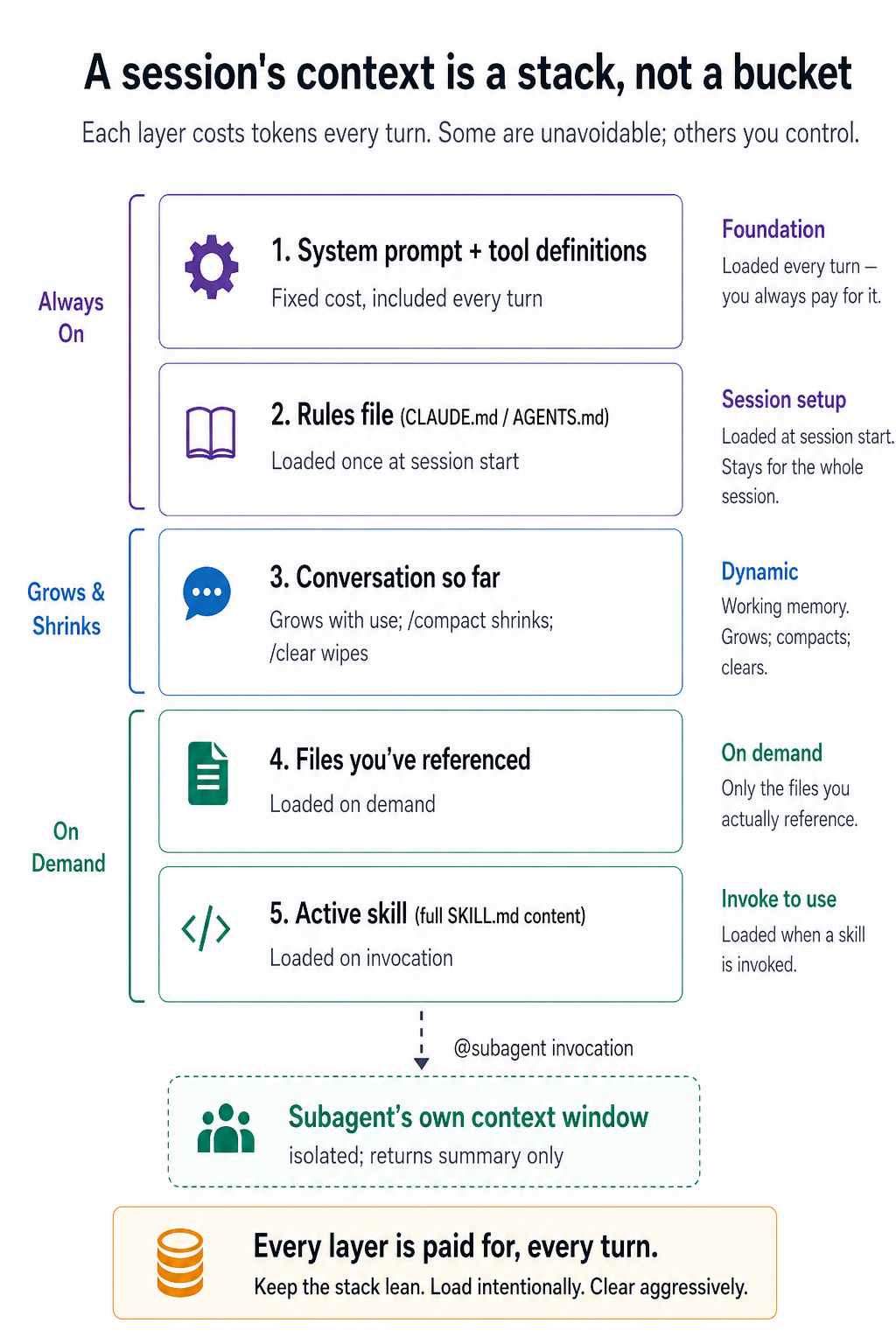
Yeh crash course ka sab se ahem section hai. Agar aap sirf aik hissa achhi tarah samjhein, to woh yeh wala hona chahiye. Yahan sab kuch dono tools mein yaksaan tareeqe se apply hota hai; sirf command names kabhi kabhi mukhtalif hote hain.
Yeh AI Prompting ke concept 4 — context is whole game — ka zyada intense version hai. Wahan bura context sirf bura jawab deta tha. Yahan bura context bura jawab aur bura codebase dono de sakta hai. Discipline wohi hai, consequences zyada gehre hain.
4. Context rot waqai hota hai
Context window woh text ki miqdar hai jo model aik waqt mein hold kar sakta hai. Modern models ke paas bade windows hote hain: hazaron tokens, kabhi kabhi aik million tak. Yeh limitless lagta hai. Lekin aisa nahin hai.
Do cheezein samajhne ke liye:
Real usage window ko aap ki soch se zyada tezi se bhar deta hai. Kuch code files, aik stack trace, kuch docs jo aap ne paste kiye, aur aik 30-turn conversation aap ke notice karne se pehle hazaron tokens kha jayenge. Aap ka laptop fuel gauge nahin dikhata.
Recall window ke bharne se bahut pehle kharab ho jati hai. Studies (aur aap ka apna experience, agar aap tawajjo dein) dikhate hain ke jaise jaise token counts barhte hain, model context mein pehle ki khaas details yaad rakhne mein numayan taur par kharab ho jata hai. Model theek se bhoolta nahin hai. Yeh sirf us information ko sahi tareeqe se weight karna band kar deta hai. Symptoms: yeh aik constraint ko nazar andaz karta hai jo aap ne 20 messages pehle bataya tha, woh kaam dohrata hai jo pehle hi kar chuka tha, aik function signature ko hallucinate karta hai jo pehle sahi tha.
Aik financial dimension bhi hai. Har message poore context window ko dobara bill karta hai: aik debug session ke dauran bees baar ping ki gayi 50K-token conversation aik million tokens ka input hai, jo har turn par charge hota hai. Per-token APIs par (zyadatar OpenCode setups, raw Anthropic API) yeh wallet damage hai; subscription tiers par (Claude Code Pro/Max) yeh rate-limit hits ke taur par dikhta hai. Dono sooraton mein, bloated context aap ka budget tabhi drain karta hai jab aap ko sab se zyada kaam karne ki zaroorat hoti hai.
Takeaway unromantic lekin practical hai: kam context, soch samajh kar istemal kiya gaya, us zyada context se behtar hai jo umeed mein dump kiya gaya ho.

5. /clear aur /compact
Do commands, do situations.
Conversation wipe karein aur naye sire se shuru karein. Jab kisi gair-mutaliqa task par switch karein tab istemal karein. Purana context gair-zaroori shor hai jo naye task ko sirf confuse karega.
- Claude Code:
/clear - OpenCode:
/new(jise/clearbhi kehte hain)
Conversation ko summarize karein, summary rakhein, baqi discard karein. Jab aap kisi aik lambe task mein gehre hon aur context zyada ho raha ho, lekin aap thread nahin kho sakte, tab istemal karein.
- Dono tools:
/compact(OpenCode mein, jise/summarizebhi kehte hain)
Aap guide kar sakte hain ke compact mein kya rakhna hai: /compact keep API contract decisions and current file paths.
Yeh interchangeable nahin hain. /clear ka matlab hai "new conversation." /compact ka matlab hai "same conversation, less baggage." Ghalat command chunne se ya to zaroori context kho jayega ya bekar context bachha rahega.
6. Sessions resume karein
Conversations save ho jati hain. Dono tools aapko resume karne dete hain, idea same hai, command alag:
- Claude Code:
claude --resumeaur list se aik session choose karein. - OpenCode:
/sessions(jise/resumebhi kehte hain) TUI ke andar saved sessions ke darmiyan switch karne ke liye.
Do patterns jahan yeh matter karta hai:
- Kal se shuru karein. Lambe features shayad hi aik sitting mein poore hon. Resume aapko model ki project ki working memory khoe baghair rukne deta hai.
- Multiple branches chalayein. Kisi bhi session ko resume karein, sirf aakhri wale ko nahin. Aap aik session mein backend task par deep kaam kar sakte hain aur doosra frontend par, aur un ke beech switch kar sakte hain.
Agar aap ke paas saved plan file (docs/plans/feature-x.md) hai, to aik fresh session ko bhi aik message mein speed tak laya ja sakta hai: "read docs/plans/feature-x.md and continue from step 4." Resume zyada tez hai, lekin plan file safety net hai.
Conversation rewind dono mein maujood hai, lekin file changes par woh mukhtalif hain. Claude Code mein, Esc do baar dabayein (double-tap Esc) apni pichli user messages ki list kholne ke liye; aik ko choose karein aur session us point se fork ho jayega, us ke baad jo kuch bhi aaya woh drop ho jayega. Yeh conversation ko rewind karta hai lekin model ne disk par jo file edits kiye hain unhein revert NAHIN karta. OpenCode aik qadam aage badhta hai: /undo aakhri user message ko rewind karta hai aur us turn se file changes ko revert karta hai (yeh under hood git ka istemal karta hai, isliye aapka project aik git repo hona chahiye). /redo aakhri /undo ko reverse karta hai. Agar aap aik kharab prompt ke baad khud ko aik gehri mushkil mein paate hain aur conversation aur apni files dono ko aik hi move mein roll back karna chahte hain, to OpenCode ka /undo asli bonus hai; agar aapko sirf conversation ko redirect karna hai jabke current file state ko qaim rakhte hue, to Claude Code ka Esc Esc zyada tez hai.
Teen commands ke liye quick decision rule:

Diagnostic: jab context kharab ho jaye
Context rot ke zahir symptoms hote hain. Inmein se kisi par bhi nazar rakhein:
- Model baar baar apologize karna shuru kar deta hai baghair progress kiye.
- Yeh code ke usi block ko dobara likhta hai baghair kisi meaningful changes ke.
- Yeh un variables, files, ya functions ka reference deta hai jo maujood nahin hain.
- Yeh us constraint ke khilaf hai jo aap ne pehle isi session mein bataya tha.
- Har response lamba, zyada gair-wazeh, aur zyada adab-bhara hota jata hai.
Jab aap yeh dekhein, typing band karein. "Bas aik aur wazahat wala prompt" dene ki fitrat ghalat hai; yeh sirf mazeed kharab context ko us context mein shamil karta hai jo pehle se kharab hai. Sahi tareeqa reset karna aur dobara brief karna hai. /compact chalayein agar conversation mein koi mufeed core bachhane ke liye hai, /clear (ya OpenCode ka /new) agar aap ko sach mein naye sire se shuru karna chahiye. Panch minute ka reset aik ghante ki behas se behtar hai us model ke saath jiska context zehreela ho chuka hai.
Hissa 3: rules file
7. CLAUDE.md / AGENTS.md, achhi tarah se kiya gaya
Dono tools har session ke shuru mein aik project-root markdown file ko context mein load karte hain. Yeh project-level system prompt ke sab se qareeb hai.
Claude Code CLAUDE.md istemal karta hai. OpenCode AGENTS.md istemal karta hai. Migrators ke liye, OpenCode CLAUDE.md ko bhi aik fallback ke taur par padhta hai jab koi AGENTS.md maujood nahin hota; agar dono files maujood hain, to AGENTS.md jeet jata hai aur CLAUDE.md ko nazar-andaaz kar diya jata hai. Agar aap ne pehle se aik CLAUDE.md maintain kiya hai, to OpenCode usay utha lega jab tak aap OPENCODE_DISABLE_CLAUDE_CODE=1 set nahin karte poori tarah se opt out karne ke liye. Partial disable ke liye, OPENCODE_DISABLE_CLAUDE_CODE_PROMPT=1 sirf rules-file fallback ko skip karta hai aur OPENCODE_DISABLE_CLAUDE_CODE_SKILLS=1 sirf skills fallback ko skip karta hai. Yeh dono tools ke darmiyan sab se bara portability win hai.
Jo ghalti taqreeban har koi karta hai woh yeh hai ke is file ko documentation ki tarah treat karna, is mein architecture overviews, mukammal coding standards, aur codebase ki har choti-bari baat bhar dena. Nateeja yeh hota hai ke aik 20,000-token file aap ka context budget har task par kha jati hai, un tasks samet jahan is ka 90% gair-mutaliqa hota hai. Hissa 2 se yaad rakhein: is file mein jo kuch bhi hai us ki qeemat har aik message par ada ki jati hai, chahe woh mutaliqa ho ya nahin.
Sahi model table of contents hai, encyclopedia nahin. Taqreeban ~2,500 tokens se kam ka hadaf rakhein. Gehre context ka hawala dein jo demand par load hota hai:
CLAUDE.md. @filename syntax mutaliqa hone par referenced files ko auto-load karta hai:
# Project: my-app

## Stack

Next.js 14, TypeScript, Postgres, Drizzle ORM.

## Commands

- `npm run dev`: start local server
- `npm test`: run vitest
- `npm run db:migrate`: apply migrations

## Critical rules

- Never edit files in `src/generated/`. They're rebuilt by codegen.
- All API routes use auth middleware in `src/lib/auth.ts`.
- See @docs/conventions.md for naming and folder rules.
- See @docs/db-schema.md for table structure.
Yahi tareeqa non-software projects ke liye bhi kaam karta hai. Aik consultant jo reports likh raha hai, aik teacher jo lesson plans bana raha hai, aik small-business owner jo operations chala raha hai: aik rules file "table of contents, not encyclopedia" hai, domain se beparwah. Aik writing/content project ke liye misaal (CLAUDE.md ya AGENTS.md, yahi tareeqa):
# Project: blog-and-newsletter

## What this is

A folder of drafts, research, and published posts. I write a weekly newsletter and occasional long-form posts.

## Where things live

- `drafts/`: in-progress posts, one per file
- `research/`: source notes and clippings, organized by topic
- `published/`: shipped posts (do not edit)

## Critical rules

- Never edit anything in `published/`. Fixes go in a new draft with a correction note.
- Footnotes go in `[brackets]` inline; we resolve them to numbered footnotes only at publish time.
- Tone: conversational, no bullet lists in body copy.
my-app version jaise hi principles: tight, declarative, sirf woh cheezein jo model folder ko dekh kar infer nahin kar sakta.
Har us line ke liye jo aap add karne ka soch rahe hain, poochhein: "agar mein isko delete kar dun, to kya model aisi ghalti karega jo woh warna nahin karta?" Agar nahin, to delete kar dein. Model ko TypeScript use karne ko na batayein: woh .ts files dekh sakta hai. Usko woh cheezein batayein jo woh infer nahin kar sakta: codegen folder, auth pattern, woh cheezein jinhone aapko pehle pareshan kiya hai.
Yeh file asal failures se banani chahiye, na ke khayali failures se. Isko git mein commit karein. Apni team ko is mein add karne dein.

Agar aap shuru se start kar rahe hain, to kisi bhi tool mein /init run karein. Model aap ke project ko scan karta hai aur file draft karta hai. Phir be-rehmi se woh parts delete kar dein jinki aapko zaroorat nahin hai.
Hissa 4: Apne tool ko personalize karna
Dono tools mein chaar extension types hain. Decision tree aik jaisa hai:

In mein se har aik context-management tool hai. Custom commands aur skills zaroorat ke mutabiq sahi context inject karte hain. Hooks aur plugins rules ko enforce karte hain baghair tokens kharch kiye model ke "yaad rakhne" par. Subagents context ko quarantine karte hain taake woh aap ke main thread mein leak na ho. Masla wahi, tareeqe alag.
8. Slash commands
Aik slash command aik saved prompt hai jiska aik yaadgar shortcut hota hai. Dono tools mein support karte hain, bahut milte-julte tareeqon se.
Markdown files .claude/commands/ (project) ya ~/.claude/commands/ (personal) mein. Misaal .claude/commands/review.md:
Review current diff for:

1. Bugs and edge cases
2. Test coverage gaps
3. Naming and readability
4. Adherence to @docs/conventions.md

Be specific. Quote lines you're commenting on.
Yeh /review command AI Prompting ke concept 6 ko real kaam mein lagati hai.
AI models aap se agree karna pasand karte hain. Agar aap sirf "review my diff" kahen, to aksar jawab milta hai: looks good, well-structured, nice naming — chahe yeh sach ho ya nahin.
Upar wali four-point checklist is behavior ko rok deti hai. Model ab sirf "looks good" nahin keh sakta. Use har point check karna hota hai, aur jahan masla ho wahan line ki taraf ishara karna hota hai.
Dono /review ke taur par invoke hote hain. Dono $ARGUMENTS ko support karte hain (aur OpenCode positional $1, $2, waghera add karta hai). OpenCode !`shell command` ke zariye shell command output ko prompt mein inject kar sakta hai, aur agent: plan / subtask: true frontmatter ke zariye command ko kisi khaas agent tak route ya subagent mein run kar sakta hai. Yeh review workflows ko aap ke main context se bahar rakhne ke liye mufeed hai.
Aik non-software misaal. Zyadatar teams ke daily ritual ke liye aik /standup command. Isko .claude/commands/standup.md (ya .opencode/commands/standup.md) ke taur par save karein:
Read yesterday's note in `journal/`. Produce a 4-line standup:

1. What I shipped yesterday (1 line)
2. What I'm working on today (1 line)
3. Blockers (1 line, "none" if clear)
4. One thing I learned (1 line)

Tone: telegraphic. No filler.
Ab /standup jab bhi aap isko type karte hain, kal ke notes se aik saaf status update banata hai. Upar diye gaye /review jaisa hi hai, bas aik alag domain hai. Yahi trick /digest (emails ke aik folder ko action items mein badalna), /draft-reply (is path par maujood email ka aik adab se jawab likhna), ya koi bhi aisa kaam jis ke liye aap khud ko do baar se zyada aik hi instructions type karte hue paate hain, ke liye kaam karta hai.
Dono tools mein aik muttahid test: agar aap khud ko do baar se zyada aik hi instructions type karte hue paate hain, to woh aik command hona chahiye.
Note (Claude Code, 2026): 2026 tak, slash commands aur skills ko yakja kar diya gaya hai. Files
.claude/commands/mein ab bhi kaam karti hain aur slash commands ke taur par dikhai dengi, lekin naya kaam tezi se.claude/skills/mein ja raha hai kyunki skills zyada support karti hain (auto-invocation, subagent execution, file-path filters). Dono ko aik continuum ke taur par samjhein.
9. Skills ka concept
Aik skill aik custom command ka bara bhai hai. Wahi idea, packaged expertise, lekin teen ahem upgrades ke saath jo dono tools ke darmiyan bunyadi taur par yaksa hain:
- Auto-invocation. Model har session ke shuru mein skill descriptions ko parhta hai aur jab koi task match karta hai to sahi skill ko invoke karta hai.
- Progressive disclosure. Aik skill mein
SKILL.mdfile hoti hai (jo entry point hai) aur woh usi folder mein doosri files ko reference kar sakti hai. SirfSKILL.mdpehle load hoti hai; baqi demand par load hoti hain. Yeh context-management principle hai jise aik file format mein badal diya gaya hai. - Frontmatter controls.
SKILL.mdke top par maujood YAML behavior ko configure karta hai.
File format converge ho gaya. Aik tool ke liye likhi gayi skill doosre mein zyada tar kaam karti hai.
.claude/skills/extract-transcript/SKILL.md:
---
name: extract-transcript
description: Extract a clean transcript from a YouTube video URL. Use when user provide kare a YouTube link and asks for transcript, captions, or text of video.
---

# Extract YouTube transcript

1. Take URL from user's message.
2. Run `yt-dlp --skip-download --write-auto-sub --sub-format vtt "$URL"`.
3. Convert VTT to plain text: strip timestamps, deduplicate overlapping captions.
4. Save to `transcripts/{video-id}.txt`.

For formatting conventions (paragraph breaks, speaker labels), see `references/style.md`.
Haan, woh byte-identical hain. OpenCode ~/.claude/skills/ aur .claude/skills/ ko fallbacks ke taur par bhi read karta hai, isliye koi bhi skill jo aap ne Claude Code ke liye pehle hi likhi hai, woh OpenCode mein baghair kisi tabdeeli ke kaam karti hai.
Description sab se zaroori field hai: yeh woh hai jo model use karta hai yeh decide karne ke liye ke skill apply hoti hai ya nahin. Vague descriptions ("videos mein madad karta hai") har cheez par fire hoti hain; jabke specific ones ("Jab user YouTube link provide kare tab use karein...") sirf tab fire hoti hain jab woh relevant hon.
SKILL.md ko khud mukhtasar rakhein: taqreeban 200 lines se kam aik achha rule hai. Gehrai ko usi directory mein reference files mein daalein aur unko link karein. Is tareeqe se aik quick task sirf overview ke liye pay karta hai; aik deep task apni zaroorat ke mutabiq references ko pull kar sakta hai.
Skills scratch se na likhein. Claude Code aik skill-creator skill ke saath aata hai jo naye skills ko sahi tareeqe se scaffold karta hai. Kyunki OpenCode ~/.claude/skills/ ko fallback ke taur par read karta hai, wohi skill-creator OpenCode mein bhi load hota hai: isko aik baar install karein aur dono tools isko invoke kar sakte hain. (Note: file discovery shared hai, lekin skill bodies jo Claude Code-specific tools ko reference karti hain unhein OpenCode meinaik se chalane ke liye thori edits ki zaroorat ho sakti hai. Naye agents ke liye, jo OpenCode mein aik alag concept hain, interactive agent scaffolder ke liye opencode agent create use karein.)
Aik aur pattern: chote skills ko chain karein, monoliths na banayein. Aik "weekly content digest" skill jo research karti hai, likhti hai, format karti hai, aur aik hi baar mein review karti hai, woh maintain karna zyada mushkil hai aur har step par char alag skills (research, draft, format, review) se badtar hai jo aik doosre ko hand off karti hain. Handoff aam taur par filesystem-mediated hota hai: research apna output tmp/research.md mein likhta hai, phir draft ko us se read karne ki hidayat di jati hai; draft tmp/draft.md mein likhta hai, aur isi tarah. Aap model ko unhein sequence mein chalane ke liye bhi prompt kar sakte hain ("research skill use karein, phir output se aik post draft karein"), lekin file-based pipeline /clear ke paar zyada durable hai aur debug karna aasan hai. Dono sooraton mein, har skill apne step par focused rehti hai. Reuallility achhi hai, lekin asal faida per-step context isolation hai: format skill ko research notes load karne ki zaroorat nahin, aur research skill ko formatting conventions ke bare mein janne ki zaroorat nahin. Wohi principle jo subagents mein hai, lekin choti granularity par apply kiya gaya hai.
10. Hooks (Claude Code) / Plugins (OpenCode) ka role
Skills probabilistic hain: model decide karta hai ke unhein invoke karna hai ya nahin. Hooks aur plugins deterministic hain: woh specific events par fire hote hain, har baar, koi model judgment shamil nahin hota.
Yeh woh jagah hai jahan dono tools ki implementations sab se zyada alag hoti hain. Idea wohi hai, machhinery alag hai.
Hooks shell commands hain jo .claude/settings.json mein lifecycle events se attached hote hain. Bade events: SessionStart, UserPromptSubmit, PreToolUse (exit code 2 blocks), PostToolUse. Misaal: rm -rf ko block karein chahe model kaisa bhi feel kar raha ho:
{
  "hooks": {
    "PreToolUse": [
      {
        "matcher": "Bash",
        "command": "if echo \"$TOOL_INPUT\" | grep -q 'rm -rf'; then echo 'Blocked dangerous command' >&2; exit 2; fi"
      }
    ]
  }
}
Aik non-software misaal: aise drafts ship na karein jin mein abhi bhi placeholder markers hon. Farz karein aap kabhi kabhi drafts mein [TODO] ya [FIX] markers chhor dete hain aur publish karne se pehle unhein resolve karna bhool jate hain. Aik hook published/ mein kisi bhi write ko block kar sakta hai agar file mein abhi bhi aik placeholder maujood ho:
{
  "hooks": {
    "PreToolUse": [
      {
        "matcher": "Write",
        "command": "if echo \"$TOOL_INPUT\" | grep -qE '\\[TODO\\]|\\[FIX\\]' && echo \"$TOOL_INPUT\" | grep -q '\"path\": \"published/'; then echo 'Refusing to publish draft with TODO/FIX markers' >&2; exit 2; fi"
      }
    ]
  }
}
rm -rf block jaisa hi shape, alag domain. Model file likhta hai, hook check karta hai, aur agar koi placeholder leak ho gaya, to write block ho jati hai aur model ko file ship hone se pehle use resolve karna padta hai.
Yeh trade-off haqeeqi hai: OpenCode plugins zyada capable hain; Claude Code hooks zyada simple hain.

Jo koi bhi bash likh sakta hai, woh five minutes mein aik Claude Code hook likh sakta hai aur use Node toolchain ke bagair aik repo mein ship kar sakta hai. OpenCode plugins ko Bun ya Node, npm dependencies, aur TypeScript ya JavaScript fluency ki zaroorat hoti hai. Aik one-line check ("block rm -rf") ke liye, shell cost mein jeet jata hai. Kisi bhi aisi cheez ke liye jise structured logging, async work, ya multiple event subscriptions ki zaroorat ho, JS/TS module asal mein zyada cleaner hai. Woh tool choose karein jis ke constraints us cheez se match karte hain jo aap bana rahe hain.
Production codebases par in tools ko chalane wale logon se aik mufeed pattern: write time par block na karein, commit time par block karein. Model ko apna kaam khatam karne dein (mid-edit mein interrupt karna use confuse karta hai) aur commit step par aik hook/plugin chalayein jo check kare ke tests pass ho rahe hain, types check ho rahe hain, formatter theek hai. Agar kuch fail hota hai, to model ko wapas aik fix loop mein majboor karein.
Hooks/plugins un cheezon ke liye istemal karein jin ka 100% waqai hona zaroori hai. Skills un cheezon ke liye istemal karein jinhein aap chahte hain ke model zyada tar waqt yaad rakhe.
11. Subagents
Aik subagent aik isolated agent instance hai jis ka apna context window hota hai. Aap use aik task delegate karte hain; woh private mein kaam karta hai; woh aik summary wapas karta hai. Us ki file searches, log dumps, aur exploratory reads kabhi bhi aap ke main thread ko touch nahin karte.
Context-management ke lihaz se yeh kyun zaroori hai: sab se zyada context-poisoning cheez jo aap kar sakte hain woh hai "codebase ko explore karna yeh janne ke liye ke X kahan hota hai." Is tarah ka task darjanon files ko context mein khinch leta hai, jin mein se zyada tar ki aapko zaroorat nahin hoti. Ise aik subagent mein karne ka matlab hai ke aap ka main session sirf nateeja dekhta hai ("X src/services/billing.ts:142 mein hota hai"), search nahin.
Dono tools aik read-only Explore subagent ke saath aate hain (doosron ke ilawa; OpenCode aik General subagent bhi ship karta hai zyada bade delegated work ke liye) jo aap ke main thread ko pollute kiye bagair codebase exploration ko handle karta hai. Claude Code mein, plan mode auto-delegate karta hai Explore ko: aap zyada tar ise soche bagair istemal karenge, aur model khud bhi pooche jane par plan mode mein self-enter kar sakta hai. OpenCode mein, Plan agent subagents ko usi tarah auto-invoke kar sakta hai (subagent delegation aik normal primary-agent capability hai), ya aap ise @explore ke saath explicitly call kar sakte hain; Plan mode mein khud enter karna, taham, Tab ke zariye aik deliberate user action hai.
Custom subagents ke liye:
.claude/agents/doc-fetcher.md:
---
name: doc-fetcher
description: Fetches and summarizes external library documentation. Use when user references a library and we need to understand its current API.
tools: WebFetch, Read, Write
---

You are a documentation researcher. Given a library name and a topic, fetch official docs, extract only API surface relevant to topic, and write a focused summary to `tmp/docs-{library}.md`. Don't paste full pages: extract patterns and signatures we need.
Aik non-software misaal: aik research subagent. Farz karein aap ke paas lambi PDFs (industry reports, legal contracts, academic papers) ka aik folder hai aur aap chahte hain ke agent aik focused summary extract kare poore document ko apni main thread mein laaye baghair:
---
name: pdf-summarizer
description: Reads a long PDF and writes a focused summary. Use when user references a PDF and wants key points without dumping whole document into conversation.
tools: Read, Write
---

You are a research summarizer. Given a PDF path and a question, read document, extract only passages relevant to question, and write a focused summary to `tmp/summary-{pdf-name}.md`. Do not paste full pages: pull out patterns, claims, and quotes user actually needs.
Upar diye gaye doc-fetcher jaisa hi shape, alag domain. 200-page PDF aapki main conversation se bahar rehti hai; sirf jawab wapas aata hai.
Invocation capability se zyada style mein mukhtalif hai: dono tools description ki bunyad par subagents ko auto-invoke karte hain aur dono explicit invocation ko support karte hain. OpenCode @subagent-name ko autocomplete mein aik first-class invocation ke taur par dikhata hai, jo explicit form ko zyada qabil-e-rasai banata hai; Claude Code description-based auto-pick par zyada inhisaar karta hai. Primitives wahi hain, thore alag defaults hain ke aap kitni bar kis ko istemal karenge.
Aam qanoon, dono mein yaksaan: agar kisi task mein bahut zyada reading shamil hai jo final answer se mutaliq nahin hogi, to woh aik subagent mein shamil hai.

Hissa 5: Duniya se judna
12. MCP, imandari se istemal kiya gaya
MCP (Model Context Protocol) external tools (Slack, Notion, aapka database, GitHub, ya kuch bhi) ko expose karne ka aik standardized tareeqa hai agent ko. Claude Code aur OpenCode dono aik hi protocol ka istemal karte hue MCP ko support karte hain. Aik ke liye likha gaya server doosre mein kaam karta hai.
Configuration ka shape cosmetically mukhtalif hai:
Aam taur par CLI ke zariye configure kiya jata hai (claude mcp add ...) ya .claude/settings.json mein.
Dono tools mein yeh pitch haqeeqi hai: agent ko aap ke tools se connect karne ka matlab hai ke woh aap ke kaam par amal kar sakta hai, sirf us ke bare mein baat nahin kar sakta. Aik Linear ticket parhna, aik Slack update post karna, production read-replicas ko query karna: sab munasib hain.
Dono tools par lagu hone wali imandaar shart yeh hai: MCP hamesha sahi jawab nahin hota, aur kuch tajurbekar users ne zyada MCP istemal karne ke bajaye simple CLIs ko tarjeeh di hai. Wajah yeh hai: aik MCP server underlying tool ko operations ke aik fixed set mein abstract karta hai, aur har operation tool descriptions mein pehle se hi aik context cost pay karta hai. Aik CLI sirf aik CLI hai: agent uski --help parh sakta hai, flags compose kar sakta hai, outputs pipe kar sakta hai, aur improvise kar sakta hai. Stateless tools (GitHub, AWS, Jira) ke liye, gh, aws, aur jira CLIs aksar un ke MCP equivalents se zyada flexible hote hain.
OpenCode ke docs mein yeh baat wazeh taur par kahi gayi hai: "MCP servers aap ke context mein izafa karte hain, isliye aapko unhein enable karte waqt ehtiyat baratna chahiye. Kuch MCP servers, jaise ke GitHub MCP server, bahut zyada tokens add karte hain aur aasani se context limit ko exceed kar sakte hain."
Aik mufeed working model: MCP ko stateful ya auth-heavy services ke liye istemal karein jahan protocol layer asal mein kaam kar raha ho (Playwright aik misali misaal hai: browser session manage karna mushkil hai). Baqi sab ke liye CLIs istemal karein. Das MCP servers sirf isliye install na karein kyunki woh maujood hain; aik tab install karein jab koi asal wajah ho.
Hissa 6: Aik mukammal misaal, do baar
Yeh woh section hai jiski taraf baqi crash course ishara karta hai. Aik haqeeqi task, har concept, dono tools. Wohi aath faisle, aik baar Claude Code mein aur aik baar OpenCode mein dikhaye gaye hain, side by side, taake aap dekh sakein ke asal mein kitna kam farq hai.
Aap code ki aik bhi line nahin likhenge. Koi bhi shakhs jis ke paas laptop aur files ka aik folder ho, woh saath chal sakta hai: aik manager, aik teacher, aik small-business owner, aik student. Yeh task aik choti team ke meeting notes istemal karta hai, lekin yeh school committee, volunteer group, freelance practice, ya logon ke kisi bhi aise group ke liye usi tarah kaam karta hai jo notes rakhte hain aur unse action items nikalne ki zaroorat hoti hai.
Aapka task
Aap ke paas notes/ naam ka aik folder hai jismein paanch files hain: aapki team ke pichle hafte ke meeting notes. Woh ganda hain. Kuch meetings mein action items ## Action Items ke tehat list kiye gaye hain. Kuch ## Todos istemal karte hain. Aik lowercase ## todo istemal karta hai. Kuch action items ko dusre sections ke andar gehrai mein chhupa dete hain. Kuch bullets [private] ya [HR] tag kiye gaye hain aur unhein public nahin hona chahiye.
Aapko aik clean file, Shuru karne se pehle inhein weekly-actions.md, chahiye jo har action item ko list kare, us ke owner ke hisab se group kiya gaya ho, aur us meeting ka link bhi ho jahan se woh aaya hai. Koi bhi private cheez leak nahin honi chahiye. Kuch bhi gum nahin hona chahiye. Aur agar koi deadline public holiday par aati hai, to aapko aik warning chahiye.📁 Get five starter files first (click to expand)
notes/ folder mein copy karein. Yeh misaal un ke ird-gird banayi gayi hai: har file ka aik khaas role hai, isliye agar aap aik ko skip karte hain, to neeche diye gaye steps mein se aik kaam karna band kar dega. (Agar aapko folder set up karne ka dil nahin karta, to aap paanch files ko seedhe apne tool ke chat mein paste kar sakte hain aur usse keh sakte hain ke woh unhein notes/ ke contents samjhe.)notes/2026-12-07-monday-team-meeting.md# Monday Team Meeting - 2026-12-07
Attendees: @sara, @diego, @priya, @marcus
## Discussion
Reviewed last month's customer satisfaction scores. Renewals are down slightly in small-business segment.
## Action Items
- @sara: draft a revised welcome email by Dec 18
- @diego: check spam-folder reports with our email vendor by Dec 16
- @marcus: pull renewal numbers for last two quarters and share with team
- @sara: finalize offer terms for new account manager [HR]notes/2026-12-08-customer-feedback.md# Customer Feedback Review - 2026-12-08
Attendees: @sara, @amara, @marcus
## Summary
Read through top twenty customer comments from last week. Three themes came up: pricing page is confusing, call-back service is slow, and FAQ on website is out of date.
## Todos
- rewrite pricing page in plain language
- @marcus: log a complaint with call center vendor about response times
- look into why FAQ has not been updated in six months
- @amara: draft a customer note explaining upcoming changes
- review all printed brochures for outdated photos and pricingnotes/2026-12-08-q1-planning.md# Q1 2027 Planning - 2026-12-08
Attendees: @sara, @diego, @amara, @lukas
## Initiatives
We walked through four candidate initiatives for Q1.
### Year-end promotional campaign
Time-bound: wraps before holiday break.
#### Action Items
- @amara: finalize year-end promotional brochure by Dec 25
- @lukas: confirm placement with paid media partners by Dec 20
### Onboarding overhaul
Top priority next quarter.
## todo
- @diego: write project brief by Jan 15
- @sara: own messaging and visual directionnotes/2026-12-09-sab-hands-prep.md# All-Hands Prep - 2026-12-09
Attendees: @sara, @marcus
## Agenda
Walked through December all-hands agenda. Most slides are in good shape; a couple still need owners.
## Next Steps
- @marcus: set up video call and record a practice run
- @sara: finalize Q4 numbers slide
- @sara: prepare bonus and compensation talking points [private]
- @marcus: book venue for team holiday dinnernotes/2026-12-11-vendor-review.md# Vendor Review - 2026-12-11
Attendees: @sara, @amara, external partner
## Summary
Confidential contract negotiation with our printing and fulfillment vendor. Details under NDA.
## Action Items
- @sara: circulate revised contract to vendor [private]
- @amara: draft internal announcement once terms are agreed [private]
- @sara: review legal redlines on new pricing schedule [private]
Is section ko kaise parhein
Is chapter ki eight context-management decisions neeche numbered steps ki shakal mein di gayi hain. Har step ka pattern aik jaisa hai:
- Aap kya karte hain: woh exact cheez jo aap type ya press karte hain
- Kyun: aik paragraph jo batata hai ke yeh decision aap ko kya deta hai
- OpenCode mein kya badalta hai: doosre tool ka version
Agar kisi step mein likha ho "OpenCode mein identical" to aap us line ko skip kar sakte hain.
Decision 1: Rules file trim karein
Aap kya karte hain (Claude Code). Apne project folder mein Claude Code open karein. /init run karein. Yeh CLAUDE.md naam ki file banata hai jo aksar bohat lambi hoti hai. Us ka zyada hissa delete kar dein. Sirf yeh rakhein:
# weekly-rollup

## Layout

- `notes/`: meeting notes, one file per meeting
- `weekly-actions.md`: rollup we are creating
- `plans/weekly-rollup-plan.md`: plan we will save and reuse

## Critical rules

- Action items can appear under `## Action Items`, `## Todos`, `## Next Steps`, or `## todo` (one meeting uses lowercase). Look at all heading levels, not just top.
- Owners are written as `@name`. Items with no owner go to an "Unassigned" section.
- Never include any bullet tagged `[private]` or `[HR]`.
Kyun. Yeh file har message ke start par read hoti hai. Jo kuch aap yahan daalte hain us ki cost har turn par lagti hai. Is liye isay short rakhein: sirf woh cheezen jo model folder dekh kar khud infer nahin kar sakta. Privacy rule khaas taur par aisi cheez hai jo woh guess nahin kar sakta.
OpenCode mein kya badalta hai. File ka naam CLAUDE.md ke bajaye AGENTS.md hota hai. Content aur maqsad wohi rehte hain. Agar aap ke paas pehle se CLAUDE.md hai, OpenCode use bhi read kar lega; rename karna zaroori nahin.
Decision 2: Likhne se pehle plan
Aap kya karte hain (Claude Code). Shift+Tab do dafa press karein. Model plan mode mein chala jata hai: woh files read kar sakta hai lekin kuch change nahin kar sakta. Phir type karein:
Read every file in notes/. Produce weekly-actions.md grouped by
owner. For each item include action, source filename, and
meeting date. Skip anything tagged [private] or [HR]. Do not
lose any action items.
Model aik minute sochta hai, phir likha hua plan wapas deta hai ke woh exactly kya karne wala hai.
Kyun. Yeh dono tools ka sab se underused feature hai. Plan read karne mein 30 seconds lagte hain. Ghalat change revert karne mein kaafi zyada waqt lagta hai. Hamesha pehle plan chahiye.
OpenCode mein kya badalta hai. Tab press kar ke Build agent se Plan agent par switch karein. Brief aur result identical hain; sirf keystroke badalta hai.
Decision 3: Plan par push back karein
Aap kya karte hain (Claude Code). Plan ko dhyan se parhein. Do cheezen aksar ghalat hoti hain.
Pehli: plan sirf top-level headings (## Action Items, ## Todos) ka zikr karega. Lekin aik meeting file (Q1 planning notes) action items ko ### Year-end promotional campaign ke andar, aur us ke neeche #### Action Items mein chhupati hai. Plan unhein miss kar dega.
Doosri: plan yeh nahin batayega ke jin action items ka owner nahin hai (jis ke paas @name nahin, jaise customer-feedback file ka "rewrite pricing page in plain language"), un ke saath kya karna hai. Woh chup chaap drop ho sakte hain.
Aap push back karte hain:
Two changes. (1) Look at all heading levels, not just top.
Some action items live under sub-headings. (2) Items without an
owner go to an "Unassigned" section at bottom; never drop
them.
Model plan update karta hai. Aap us se final plan plans/weekly-rollup-plan.md mein save karwate hain taake aglay Friday reuse ho sake.
Kyun. Plan aik contract hai. Problems yahan pakrein, jab in ki cost zero hai — file likhne ke baad safai karna mushkil hota hai.
OpenCode mein kya badalta hai. Identical.
Decision 4: Isay kaam karne dein
Aap kya karte hain (Claude Code). Plan mode se bahar nikalne ke liye Shift+Tab press karein. Model ko kaam shuru karne ko kahen.
Woh paanch files read karta hai. weekly-actions.md likhta hai. Items ko owner ke hisaab se group karta hai. [private] aur [HR] bullets drop karta hai. Orphan items ko Unassigned section mein daalta hai. Aap yeh sab hota hua dekhte hain.
Kyun. Ab tak aap ne carefully setup kiya hai. Ab usay kaam karne dein. Plan ki wajah se pehli try mein kaam zyada tar sahi hota hai.
OpenCode mein kya badalta hai. Pehli dafa har file write par approval poochi jayegi. Aap yes keh sakte hain, ya baad ki runs ko smooth banane ke liye common actions opencode.json mein pre-approve kar sakte hain.
Decision 5: Jab conversation lambi ho jaye to summarize karein
Aap kya karte hain (Claude Code). Conversation ab lambi ho chuki hai. Model har meeting note read kar chuka hai, aur bohat sa raw content ab bhi memory mein hai — kuch private bullets bhi, jinhein us ne sahi taur par skip kiya. Ab aap ko yeh raw content nahin chahiye. Type karein:
/compact keep heading rules, owner list, and the
private/HR exclusion rule
Conversation sirf un cheezon tak summarize ho jati hai jo aap ne rakhne ko kahi thin.
Kyun. Lambi, cluttered conversation model ko behtar nahin, worse banati hai. Cost bhi zyada hoti hai. Jo relevant nahin raha use clear kar dein — khaas taur par private content, jise memory mein zaroorat se zyada der nahin rehna chahiye.
OpenCode mein kya badalta hai. Command identical hai.
Decision 6: Commit ke liye safety net set karein
Aap kya karte hain (Claude Code). Git mein kaam save karne se pehle aap ensure karna chahte hain ke koi meeting accidently skip nahin hui. Aap model se aik hook add karne ko kehte hain: aik chhota safety net jo har commit se pehle automatically run hota hai. Model configuration .claude/settings.json mein likhta hai. Aap ko code read karne ki zaroorat nahin; model likhta hai. Kaam simple hai: git commit run hone se pehle hook check karta hai ke har meeting file rollup mein kahin na kahin mentioned hai. Agar koi missing ho, commit block ho jata hai.hook model writes (you do not need to read this)
{
  "hooks": {
    "PreToolUse": [
      {
        "matcher": "Bash(git commit *)",
        "command": "for f in notes/*.md; do grep -q "$(basename $f)" weekly-actions.md || { echo "Missing: $f" >&2; exit 2; }; done"
      }
    ]
  }
}
Model commit try karta hai. Safety net block kar deta hai: aik meeting (notes/2026-12-11-vendor-review.md) completely skipped thi, kyun ke us meeting ka har action item [private] tagged tha. Model error read karta hai, rollup ko aik one-line note se fix karta hai ("Sab items confidential, see meeting owner"), aur commit dobara try karta hai. Is dafa kaam ho jata hai.
Is loop ke dauran aap ne kuch nahin kiya. Safety net ne mistake pakri, aur model ne khud fix ki.
Kyun. Jo cheezen aap har dafa sach chahte hain, unhein model ki memory par depend nahin karna chahiye. Unhein automatically check hona chahiye.
OpenCode mein kya badalta hai. OpenCode inhein plugins kehta hai, hooks nahin. Yeh aik chhoti JavaScript file mein likhe jate hain. Idea aur outcome wohi hain, aur model yeh file bhi aap ke liye likhta hai.plugin model writes (you do not need to read this either)
// .opencode/plugins/check-rollup-complete.js
import { readdirSync, readFileSync } from "fs";

export const CheckRollupCompletePlugin = async ({ $ }) => {
  return {
    "tool.execute.before": async (input, output) => {
      if (
        input.tool === "bash" &&
        output.args.command?.startsWith("git commit")
      ) {
        const rollup = readFileSync("weekly-actions.md", "utf8");
        const missing = readdirSync("notes")
          .filter((f) => f.endsWith(".md"))
          .filter((f) => !rollup.includes(f));
        if (missing.length) {
          throw new Error(`Missing from rollup: ${missing.join(", ")}`);
        }
      }
    },
  };
};
Notice karne wali cheez yeh hai ke behavior identical hai: file missing, commit blocked, model khud fix karta hai.
Decision 7: Side-task helper ko bhejein
Aap kya karte hain (Claude Code). Kuch action items mein deadlines hoti hain jaise "by Dec 25" ya "before year-end." Aap flag karna chahte hain ke agar koi deadline public holiday par aa rahi ho to owners adjust kar saken. Aap type karte hain:
Use doc-fetcher helper to look up 2026 international
public holidays list and write dates to tmp/holidays-2026.md.
Aik separate helper web se lamba page fetch karta hai, sirf dates extract karta hai, aur unhein aik chhoti file mein likhta hai. Aap ki main conversation sirf chhoti file dekhti hai, lamba page nahin.
Phir model aap ke rollup ki deadlines read karta hai, holidays se cross-reference karta hai, aur brochure deadline ke paas note add karta hai: ⚠ falls on Christmas Day.
Kyun. Web page direct fetch karne se pages ka text aap ki conversation mein dump ho jata, jis se session slow aur cluttered hota. Helper ko bhejne ka matlab hai sirf answer wapas aata hai, noise nahin.
OpenCode mein kya badalta hai. Aap helper ko call karne ke liye seedha @doc-fetcher type kar sakte hain; yeh autocomplete mein dikhta hai. Same helper, invoke karna asaan.
Decision 8: Jo seekha use save karein
Aap kya karte hain (Claude Code). Yeh Friday ritual hai; aap har weaik karenge. Aap next Friday yeh sab decisions dobara yaad nahin rakhna chahte. Is liye model se kehte hain ke inhein skill ke taur par save kare:
Create a skill at ~/.claude/skills/weekly-meeting-rollup/SKILL.md
based on what we just did. Include: four heading variants,
all-headings rule, private/HR exclusion, Unassigned
section, missing-file check, and holiday cross-reference.
Next Friday aap sirf "do weekly rollup" type karenge aur model yeh skill automatically pull kar lega. Aaj ke saare decisions free mein apply ho jayenge.
Kyun. Yahi payoff hai. Is weaik ka kaam sirf is weaik ke liye nahin tha; is ne model ko yeh task hamesha ke liye karna sikhaya.
OpenCode mein kya badalta hai. Skill thore different folder (~/.config/opencode/skills/...) mein save hoti hai, lekin file khud byte-for-byte identical rehti hai. Dono tools ke darmiyan copy karein aur kaam karti hai. Yeh chapter ki thesis ka sab se strong proof hai.
Abhi kya hua
Eight steps ko dobara dekhein. In mein se kisi ne aap se code likhne ko nahin kaha. Kisi ne aap se yeh nahin manga ke aap jante hon API kya hoti hai. Aap ne asal mein model ki attention manage karne ke eight chhote acts kiye: use bataya kya dekhna hai, kab plan karna hai, kab bhoolna hai, kab delegate karna hai, kab khud par trust band karna hai, aur kab yaad rakhna hai.
Yahi poora chapter hai.
Aur dekhein dono tools mein kitna kam farq tha:
- Rules file ka filename alag (
CLAUDE.mdvsAGENTS.md) - Plan mode enter karne ka keystroke alag (
Shift+TabvsTab) - Safety-net file ki language alag (JSON vs JavaScript)
- Aakhir mein skill ka folder alag (lekin same file)
Bas itna.

Thinking hi tool hai. Configs decoration hain. Is tareeqe se sochna seekhein aur aap ki skills jis tool ki bhi jeet ho, survive karengi.
Part 7: Kahan chalana hai, aur kaise grow karna hai
13. Terminal, IDE, ya desktop?
Dono tools kai jagahon par run hote hain.
Claude Code: terminal, VS Code / JetBrains plugins, Claude desktop app, aur async work ke liye cloud-hosted variants.
OpenCode: terminal (TUI flagship hai), desktop app (macOS/Windows/Linux par beta), ACP support ke zariye IDE extension, SDK ke zariye web interface, plus GitHub aur GitLab integrations.
Apna interface is baat par choose karein ke aap kya kar rahe hain. Greenfield development aur bohat file editing ke liye IDE plugins ko beat karna mushkil hai: aap diff ko hota hua dekhte hain. Long-running tasks jahan notifications aur parallel sessions chahiye hon, wahan terminal theek hai. Non-coding work aur scheduled jobs ke liye desktop apps zyada pleasant hain.
Dono tools ke liye strong recommendation: terminal ya IDE plugin se shuru karein. Jab aap samajh lete hain ke neeche kya ho raha hai — model kaun si files read karta hai, kaun si commands run karta hai, aur kaun se decisions leta hai — baqi har interface aik thin wrapper ban jata hai jise aap read through kar sakte hain. Agar aap heavily abstracted UI se start karte hain, to jab cheezen sideways jayengi to debug karna mushkil hoga, kyun ke aap ko pata nahin hoga kya sideways ja sakta hai.
14. Personal context library ahista banayein
Jab aap kuch projects mein in tools ko use kar chuke honge, aap notice karenge ke har rules file mein similar cheezen likh rahe hain: aap ka code style, commit conventions, aur testing philosophy. Copy-paste band karein.
Shared parts ko apni home config mein rakhein aur har project ki rules file se unhein reference karein:
~/.claude/:
# CLAUDE.md

@~/.claude/style/typescript.md
@~/.claude/style/commits.md

## Project-specific

[only things unique to this project]
Skills ke liye bhi same idea kaam karta hai. Aik commit-message skill ya code-review skill ko ~/.claude/skills/ mein rakhein (jise OpenCode bhi read karta hai), ya ~/.config/opencode/skills/ mein rakhein, to woh har jagah available ho jati hai.
Discipline yeh hai: isko pehle se over-build na karein. Perfect personal setup design karne ke liye Saturday kharch karna tempting hota hai. Resist karein. Har entry kisi real failure se aani chahiye: aik moment jahan model ne kuch ghalat kiya, ya aap ne teesri baar wahi baat type ki. Regret se build karein, imagination se nahin. Jo library real friction se grow hoti hai woh chhoti aur useful hoti hai; jo pehle se design hoti hai woh bari aur ignored hoti hai.
15. Basics se aage memory
Built-in resume aur well-tended rules file zyada tar logon ke liye zyada tar waqt kaafi hote hain. Agar aap ko zyada chahiye — past conversations mein search, persistent project notes, ya aisi knowledge jo /clear ke baad bhi zinda rahe — to options hain:
- Project ke andar aik
notes/folder, jahan agent important kaam ke baad structured notes likhta hai. Cheap, durable, greppable. Surprisingly effective. Dono tools mein kisi setup ke baghair kaam karta hai. - Aik memory MCP server. Kai options maujood hain; yeh agent ko explicit save/recall API dete hain. Dono tools mein kaam karte hain.
- Aap ki conversation history par vector search, "kya mein ne yeh pehle solve kiya tha?" type queries ke liye. Tool-specific implementations maujood hain; ecosystem pages check karein.
Choice is baat par karein ke aap waqai kya remember karna chahte hain. Agar maqsad "is codebase ke decisions aur gotchas" hain, to notes/ folder kaafi hai. Agar maqsad "har project mein model ko kabhi bhi batayi hui har cheez" hai, to heavier infrastructure chahiye. Aisi infrastructure install na karein jis ka problem abhi aap ke paas nahin.
Part 8: Claude Code aur OpenCode ko compose karna
Pichhle parts ne Claude Code aur OpenCode ko alternatives ke taur par treat kiya: aik choose karein, usay seekhein. Yeh framing jaan boojh kar thi: har concept ko pehle dono tools mein samajh aana chahiye, us ke baad composition aati hai. Lekin fundamentals ke baad interesting sawal yeh hai: dono tools ko aik saath kaise use kiya jaye? Same project par do tools sirf fallback nahin hote agar aik fail ho. Yeh kaam karne ka alag tareeqa hai — aur dono ko saath chalane ki mechanics apna hissa deserve karti hain.
Substrate: git worktrees
Patterns se pehle woh operational layer samajh lein jo is sab ko safe banati hai.
Dono tools parallel sessions support karte hain. Lekin agar do agents aik hi file aik hi waqt edit karein, last write win karta hai aur doosre session ka diff stomp ho jata hai. Is ka fix git worktrees hain: har worktree aap ke repo ki checked-out copy hoti hai, different branch par, lekin same .git directory share karti hai. Do agents do worktrees mein different files parallel edit kar sakte hain, same path ko touch kiye baghair.
# from your main repo directory
git worktree add ../myproject-backend feature/auth-core
git worktree add ../myproject-frontend feature/auth-ui

# now you have two parallel working dirs, two branches
cd ../myproject-backend && claude
# in another terminal
cd ../myproject-frontend && opencode
Kaam khatam hone par worktree remove karein: git worktree remove ../myproject-backend.
File-edit rule teen tiers mein:
| Pattern | Verdict |
|---|---|
| Two sessions editing same file simultaneously | Bad — last write wins, other session's edits are lost |
| Two sessions editing different directories | Good — no contention, parallel speedup is real |
| One session edits, commits, hands off to other | Acceptable — commit is handoff artifact |
Rule of thumb: har task ke liye aik session se shuru karein. Doosra session sirf tab add karein jab aap clearly bata sakte hon ke har session kin files ka owner hai. Do agentic sessions ke darmiyan context-switching ki cognitive cost real hai; yeh sirf tab win hai jab kaam genuinely partition hota ho.
Shared layer jo isay kaam karta hai woh project ke rules aur skills hain. Dono tools same CLAUDE.md aur same .claude/skills/ directory read karte hain (Concepts 7 aur 9 mechanics cover karte hain). Project conventions ke liye aik source of truth; usay consume karne ke liye do tools.
Pattern 1: Plan / Execute split ka tareeqa
Agentic coding mein expensive cognitive work planning hai — codebase read karna, approach decide karna, edge cases anticipate karna. Cheap mechanical work aik already-existing plan ko implement karna hai. Pricing bhi isi ko reflect karti hai: frontier-tier models per token economy-tier models se roughly aik order of magnitude zyada mehngay hote hain, aur woh price planning par earn karte hain, implementation par nahin.
Composition:
- Claude Code ko plan mode mein open karein (Concept 2). Brief dein. Use plan produce karne dein.
- Plan ko
docs/plans/feature-x.mdmein save karein. - Aik separate worktree mein OpenCode open karein, economy model par pointed. Pehla message:
read docs/plans/feature-x.md and implement it. - OpenCode file edits karta hai, tests run karta hai, lint fix karta hai.
- (Optional) Merge se pehle diff review ke liye Claude Code dobara open karein.
Plan file contract hai. Yeh session loss survive karti hai, architectural decisions encode karti hai, aur cheap session ko expensive thinking dobara kiye baghair kaam karne deti hai. Yeh pattern akela aksar woh cost savings de deta hai jo teams "cheaper model par switch" kar ke chah rahi hoti hain — frontier-model planning ki quality lose kiye baghair.
Pattern 2: Cross-model review ka tareeqa
Yeh AI Prompting ke concept 13 ko habit se architecture bana deta hai. Wahan aap aik draft ko do chat windows mein check karwate the; yahan do coding tools aik doosre ke diffs cross-check karte hain.
Different models ke blind spots mukhtalif hote hain. Jo model code likhta hai, woh us code ka sab se bura reviewer ho sakta hai, kyun ke us ke paas wahi blind spots hote hain jin se original code bana. Aik different family ka model — different training data, different reasoning habits — woh cheezen pakar sakta hai jo author miss kar gaya.
Composition:
- Tool A (koi bhi model) apne worktree mein feature implement karta hai.
- Tool B (different model, ideally different family) diff read karta hai aur critique
docs/reviews/feature-x.mdmein likhta hai. Reviewer edit nahin karta; sirf text produce karta hai. - Tool A review read karta hai aur decide karta hai kin points par act karna hai.
Yeh jitna sunne mein lagta hai us se zyada useful hai. Cheap economy models par chalne wale reviewers surprising amount of real value pakar lete hain: missing edge cases, security oversights, naming inconsistencies, dead code. Review pass chalane ki dollar cost chhoti hoti hai; merge ke baad bug pakarne ki time cost bari hoti hai.
Yeh pattern tab sab se behtar kaam karta hai jab reviewer aur implementer different model families se hon — Claude reviewing Claude woh miss kar sakta hai jo GPT ya DeepSeek pakar le, aur vice versa. Same-family review phir bhi no review se behtar hai, lekin asli value diversity mein hai.
Pattern 3: Architect / IC role split ka tareeqa
Mixed seniority wali teams ya classes ke liye dual-tool setup tasks ke bajaye roles par map ho sakta hai.
- Architect tier. Senior developers, instructors, lead engineers Claude Code ko frontier-tier models ke saath chalate hain. Seat count chhota, per-seat cost zyada, lekin kaam us cost ko justify karta hai.
- IC tier. Junior developers, students, contributors OpenCode ko economy-tier models par chalate hain. Seat count bara, cost bohat kam, aur well-specified work ke liye capability kaafi hoti hai.
Dono tiers wahi CLAUDE.md, wahi .claude/skills/, aur wahi docs/plans/ read karte hain. (OpenCode CLAUDE.md aur .claude/skills/ dono ko fallbacks ke taur par read karta hai — Concepts 7 aur 9 mechanics cover karte hain.) Project conventions ke liye aik source of truth, usay consume karne ke liye do capability tiers.
Yeh pattern team ko ten-person team ki rigor ke saath forty-person team wali move deta hai: architects plans aur skills produce karte hain; ICs un ke against implement karte hain; reviews wapas upar flow karte hain.
Single-tool kya rehta hai
Composition ka overhead hota hai. Do tools ka matlab hai do configs, do permission lists, do notification setups. Zyada tar short tasks — aik single function, quick refactor, bug fix — ke liye aik single session faster, simpler, aur cheaper hota hai.
Composition tab use karein jab task itna bara ho ke planning implementation se genuinely separable ho, jab poore task ko frontier model par chalana wasteful ho, ya jab independent review pass ki value us ki cost se zyada ho. Baqi sab ke liye Parts 1–7 wali single-session discipline sahi move hai.
Configs decoration hain. Concepts tool hain. Composition sirf woh hota hai jab aap aik tool aur aik model ko unit of work samajhna band kar dete hain, aur agentic coding session ko unit samajhna shuru karte hain.
Part 9: OpenCode ko economy-tier models par chalana
Is part ka point yeh hai: cost constraint hai, OpenCode tool hai, aur writing ke waqt DeepSeek V4 Pro aur DeepSeek V4 Flash "economy tier" ki running example ke taur par use ho rahe hain. Jab specific model names badlein — aur badlenge — is part ki framing phir bhi apply hoti hai. Economics ka faisla ho chuka hai: zyada tar coding work cheap, capable, open-weight models par chalana behtar hai. Yeh part batata hai ke woh achhi tarah kaise kiya jaye.
Yeh kyun matter karta hai: har token paid hai, har turn
Woh single insight jo affordability ko constraint se discipline banata hai:
Jaisa Concept 4 ne bataya, har turn poora context dobara bill hota hai. Cost angle yeh hai: 50K tokens context ke saath aik session mein bees turns ke baad aap pehle hi aik million input tokens ke liye pay kar chuke hote hain — model ke jawabon se pehle. Fuel gauge nazar nahin aata, lekin meter har turn chal raha hota hai.
Teen numbers yaad rakhne laayak hain:
- Output tokens input tokens se zyada mehngay hote hain — aksar provider aur tier ke hisaab se 2–10× zyada. Jo model jawab se pehle "sochta" hai, woh thinking ke liye bhi output rate par bill karta hai. Chhote prompts aur chhoti system instructions isi liye matter karti hain.
- Cache hits practically free hote hain. Zyada tar providers pehle dekhe gaye prefix se match karne wale input tokens par heavy discount dete hain. Stable system prompts, stable rules files, aur stable skill loadings cache hits trigger karte hain. Tight, stable
CLAUDE.mdfraction cost par cache hoti hai; bloated aur changing file har turn full price par re-bill hoti hai. - Subagents token-multipliers hain. Aik subagent jo tees files read karta hai taake aik paragraph summarize kare, un files ko waqai read kar chuka hota hai; aap un ke liye pay karte hain. Summary sasti hai; usay produce karne wala kaam free nahin. Subagents phir bhi useful hain — noise ko main thread se bahar rakhte hain — lekin free nahin.
Cost discipline aur context discipline aik hi discipline hai. Bas aik ko aap wallet mein mehsoos karte hain.
Meter parhna:
- Claude Code:
/costsession token usage aur dollar estimate dikhata hai. - OpenCode: status bar running token counts dikhata hai; kai providers response payload mein per-call cost batate hain.
Rule of thumb: session ke start aur beech mein meter dekhein. Agar doosra number pehle se triple ho chuka hai, context phool gaya hai aur next /compact ya /clear overdue hai.
Do tiers, aik routing decision
Models provider se independent do functional tiers mein cluster karte hain:
Frontier tier — maximum reasoning capability, sab se slow, sab se expensive. Jab task ko real architectural judgment chahiye, jab economy model pehle fail ho chuka ho, jab subtle debug karna ho, ya jab ghalat jawab baad mein mehnga ho sakta ho, tab use karein.
Economy tier — well-specified work par strong, tez, sasta. Jab task mechanical ho, jab pehle se plan follow karna ho, jab tests ya boilerplate generate karni ho, jab chhoti changes par iterate karna ho, tab use karein.
Students ki common mistake yeh hai ke woh us tier par jam jate hain jis par tool default karta hai. Frontier model clearly-specified plan implement kar raha ho to economy model ke kaam ke liye premium de raha hota hai. Economy model scratch se hard architecture try kare to shallow plans deta hai jo aglay session mein phenkne padte hain.
Do routing patterns matter karte hain:
- Plan frontier par, implement economy par. Claude Code mein plan mode se written plan banayein. Use
docs/plans/feature-x.mdmein save karein. OpenCode ko economy model par point kar ke kahen: "implementdocs/plans/feature-x.md." Yeh wahi Plan/Execute pattern hai jo Part 8, Pattern 1 mein tha. - Visible failure par escalate karein. Default economy chalayein. Jab model ghalat jawab de, khud ko repeat kare, ya visibly struggle kare, us turn ya subtask ke liye frontier par switch karein. Jab mushkil hissa ho jaye to wapas aa jayein. Engineering team bhi yahi pattern follow karti hai: junior implement karte hain, senior unblock karte hain.
Reasoning-effort knobs
Modern models — DeepSeek V4 Pro aur V4 Flash shamil — aksar internal "thinking" par control dete hain ke model jawab se pehle kitna soche. Names vary karte hain (reasoning_effort, thinking budget, xhigh / high / medium / low), lekin mechanic same hai: zyada thinking = zyada output tokens = zyada cost aur latency, mushkil problems par behtar jawab ke badle.
Kai tools default high rakhte hain kyun ke vendors chahte hain model benchmarks mein achha lage. Routine kaam par yeh waste hai. Mushkil problems par sahi hai. Skill yeh hai ke knob ko task se match karein:
- Low / medium — mechanical edits, doc updates, formatting, simple refactors, tests generate karna. Thinking par extra tokens jalana kuch nahin kharidta.
- High — feature plan karna, tricky issues debug karna, architecture decide karna, subtle bugs review karna. Asli reasoning chahiye.
- Maximum (xhigh / extended) — novel algorithms, hard correctness proofs, ya debugging jo high par pehle hi fail ho chuki ho. Kam istemal karein. High aur xhigh ke beech cost gap aksar 3–10× hota hai; quality gap zyada tar tasks par chhota hota hai.
OpenCode ko DeepSeek V4 par point karna
DeepSeek V4 do variants mein aata hai. V4 Pro frontier-comparable model hai — coding benchmarks par leading closed-source models ke saath statistically tied, cost ke chhote hissa par. V4 Flash economy workhorse hai — fast inference aur high-throughput agent workloads ke liye design kiya gaya, strong reasoning aur coding ability ke saath. Dono 1M-token context window aur MIT-licensed open weights ke saath aate hain.
Flash aur Pro ke darmiyan standard pricing par 12× input price difference product economics badalne ke liye kaafi bara hai. Zyada tar coding work — implementation, tests, doc updates, codemods — ke liye default V4 Flash hai. Jab task frontier capability maange tab V4 Pro use karein.
Exact NPM module name aur DeepSeek model strings copy karne se pehle
opencode.ai/docs/providersaur DeepSeek model card verify karein — neeche wala schema structurally sahi hai lekin vendor-specific fields releases ke saath drift karti hain.
Configuration via DeepSeek API directly — opencode.json:
{
  "provider": {
    "deepseek": {
      "npm": "@ai-sdk/deepseek",
      "options": {
        "baseURL": "https://api.deepseek.com/v1",
        "apiKey": "{env:DEEPSEEK_API_KEY}"
      },
      "models": {
        "deepseek-v4-flash": { "name": "DeepSeek V4 Flash" },
        "deepseek-v4-pro": { "name": "DeepSeek V4 Pro" }
      }
    }
  },
  "model": "deepseek/deepseek-v4-flash"
}
Configuration via OpenRouter (agar aap multiple providers par unified billing chahte hain):
{
  "provider": {
    "openrouter": {
      "options": { "apiKey": "{env:OPENROUTER_API_KEY}" }
    }
  },
  "model": "openrouter/deepseek/deepseek-v4-flash"
}
API key ko shell mein environment variable ke taur par set karein; config file mein commit na karein. Models ko per session OpenCode mein /models se switch karein.
OpenCode docs aur DeepSeek API docs canonical sources hain jab configuration details badlein; shapes drift karengi.
Aik sharp edge jo jaanne laayak hai
Agar curriculum mein V4 self-host karna hai (locally vLLM ya similar se API call ke bajaye), V4 ke liye standard HuggingFace Jinja chat template nahin hai. Naive tokenizer pipelines jo assume karti hain ke template hai, chup chaap malformed prompts produce kar sakti hain. HuggingFace par model ke saath jo encoding scripts aati hain un ka use karein, generic chat template nahin. Yeh un students ko hit karta hai jo model card parhe baghair self-host try karte hain.
Hosted API use karne walon par yeh apply nahin hota.
Cost-related failure modes ka khaka
Pehle teen months mein students ke surprise bills zyada tar in five symptoms se explain ho jate hain:
Symptom: token usage spiked suddenly mid-session
    → Cause: rules file or system prompt changed, breaking cache hits.
       Fix: revert change, or accept cache miss as a one-time cost.

Symptom: each turn costs noticeably more than previous one
    → Cause: context is growing without bound. Files keep getting read in,
       exploration output is accumulating, conversation is long.
       Fix: /compact with a "keep architectural decisions and current
       file paths" hint.

Symptom: model is over-explaining, producing walls of text
    → Cause: reasoning effort is too high for task; or prompt
       invites narration.
       Fix: turn down reasoning knob; ask for "code only,
       minimal commentary."

Symptom: monthly bill is much higher than expected
    → Cause: running V4 Pro on tasks V4 Flash would handle correctly.
       Fix: route mechanical work to Flash; reserve Pro for planning
       and hard reasoning.

Symptom: cache hits suddenly dropped from ~70% to ~10%
    → Cause: system prompt, CLAUDE.md, or first user message
       changed structure. Cache matches prefixes byte-for-byte.
       Fix: stabilize what comes first; let variable content
       come later.
Zyada tar cases aik single config change se recover ho jate hain.
Realistic cost expectation
Aik moderate student jo OpenCode ko V4 Flash par chalata hai — roz aik 90-minute session, week mein five days, reasonable context discipline ke saath — initial sign-up grant khatam hone ke baad monthly kuch dollars spend expect kare. Aik heavy student jo bare contexts aur multiple sessions per day chalata hai, ten to twenty dollars tak ja sakta hai. Jo students in numbers se bohat aage nikal jate hain, unhon ne almost hamesha upar wali cost-discipline skip ki hoti hai: bloated rules files, /compact discipline nahin, frontier model default par, ya har turn par codebase context mein dump karna.
Is part ki discipline hi farq banati hai: same models aur same tasks, lekin aik curriculum students ko nearly free mehsoos hota hai, aur doosra expensive.
Is mein waqai achha kaise hona hai
Sirf yeh crash course parhna aap ko agentic coding mein achha nahin banata. Isay use karna banata hai, aur path kuch is tarah dikhta hai:
Manual shuru karein. Friction mehsoos karein: har approval prompt, har "wait, isay X kyun nahin pata?" Wohi friction curriculum hai. Har friction piece upar ke concepts mein se kisi aik se map hota hai:
- "Auth pattern yeh baar baar kyun bhool raha hai?" → rules file missing ya bloated hai.
- "Is ne mera migrations folder kyun delete kar diya?" → permissions tight nahin thin.
- "Aik ghante ke baad itna slow kyun ho gaya?" → context rot;
/compactchahiye tha. - "Mein har Monday wahi cheez kyun type kar raha hoon?" → yeh skill hai.
- "Tests local pass hue lekin CI mein kyun break hue?" → yeh hook ya plugin hai.
- "Codebase explain karna hamesha conversation ko pollute kyun karta hai?" → yeh subagent hai.
Har problem ka response tab build karein jab aap us problem se takrayen, pehle nahin. Aap ki rules file pehle ten lines honi chahiye, phir twelve, phir twenty: har line kisi aisi mistake se earn ho jo ab woh prevent karti hai. Aap ke skills folder mein pehle aik skill ho, phir ten. Hooks/plugins is liye hon ke un ke baghair kuch break hua tha, is liye nahin ke kisi ne kaha hooks powerful hain.
80/20 yeh nahin ke fourteen concepts memorize kiye jayen. Asli skill yeh notice karna hai ke given problem kis concept se belong karti hai, itni fast ke aap sahi tool choose kar saken. Yeh noticing real work par agentic coding tools ko succeed aur fail hote dekhne se aati hai.
Yeh portability dividend hai. Jab aap ne aik tool mein yeh noticing build kar li, woh transfer hoti hai. Friction-to-concept map Claude Code aur OpenCode dono mein identical hai. Start ke liye aik tool choose karein, us ki specific config seekhein, aur jab aap cost, model preference, license, ya kisi naye tool ki wajah se switch karne ka faisla karein, to aap ka knowledge saath aata hai. Configs badalte hain. Thinking nahin.
Aik project se shuru karein. Har non-trivial cheez ke liye plan mode use karein. Apna context watch karein. Baqi system khud build hota jata hai.
Quick Reference
15 concepts, har aik aik line mein
- Tools actions lete hain, nahin just jawabs. Write briefs, nahin sawals.
- Plan mode (Shift+Tab mein CC, Tab ko Plan agent mein OC). Read-sirf investigation pehle koi bhi writes.
- Permissions discipline. Shuru karein manual, codify allow/deny over time. Never auto-approve
rm -rf. - Context rot hai real. Recall degrades lambi pehle window fills, aur har turn re-bills whole context.
/clearvs/compact. New task vs same task lighter. Choose karein ghalat aur aap lose ghalat thing.- Resume sessions. Choose karein up jahan aap left off baghair re-explaining; pair ke saath saved plan files.
CLAUDE.md/AGENTS.mdhai a table ka contents. Under ~2,500 tokens, references load demand par.- Slash commands. Saved prompts aap trigger by name jab aap rakhein typing same thing.
- Skills. Saved expertise model auto-invokes by description; progressive disclosure via
SKILL.mdplus references. - Hooks (CC) / Plugins (OC). Deterministic guardrails par lifecycle events. Not optional for production.
- Subagents. isolated context windows for noisy reads (codebase exploration, doc fetching).
- MCP, used carefully. Stvsd prokocol for external tools; CLIs often beat MCP for stateless services.
- Where ko run. Shuru karein mein terminal ya IDE plugin is liye aap kar sakte hain dekhein kya agent hai doing.
- Peris liyenal context library, slowly. Shhain configs across projects; build karein se regret, nahin imagination.
- Memory beyond basics. Built-mein resume + achha rules file hai enough for most.
notes/folder agar aap chahiye more.
Command Quick-Ref
| Want to... | Claude Code | OpenCode |
|---|---|---|
| Initialize project rules file | /init | /init |
| Enter plan mode | Shift+Tab (twice) | Tab (cycle to Plan agent) |
| Wipe conversation, start fresh | /clear | /new (or /clear) |
| Summarize and continue | /compact | /compact (or /summarize) |
| Resume a saved session | claude --resume | /sessions (or /resume) |
| Jump back to a previous message | Esc Esc | /undo (also reverts files) |
| Undo last message + file changes | (not bundled) | /undo (needs git) |
Redo (reverse last /undo) | (not bundled) | /redo |
| Share session | /share | /share |
File Location Quick-Ref
| What | Claude Code | OpenCode |
|---|---|---|
| Project rules | CLAUDE.md | AGENTS.md (also reads CLAUDE.md as fallback) |
| Project permissions | .claude/settings.json | opencode.json |
| Project commands | .claude/commands/*.md | .opencode/commands/*.md |
| Project skills | .claude/skills/<name>/SKILL.md | .opencode/skills/<name>/SKILL.md (also reads .claude/skills/) |
| Project hooks/plugins | .claude/settings.json (hooks block) | .opencode/plugins/*.{js,ts} |
| Project subagents | .claude/agents/*.md | .opencode/agents/*.md |
| Personal/global rules | ~/.claude/CLAUDE.md | ~/.config/opencode/AGENTS.md |
| Personal commands/skills/agents | ~/.claude/{commands,skills,agents}/ | ~/.config/opencode/{commands,skills,agents}/ |
| MCP servers | .claude/settings.json (mcp block) | opencode.json (mcp block) |
Extension Type Decision Tree
Need to do same thing repeatedly, manually?
    → Slash command (CC) / Custom command (OC)

Want model to apply expertise automatically when a task matches?
    → Skill

Need something to happen every single time, no model judgment?
    → Hook (CC) / Plugin (OC)

Need a chunk of work done in isolation so it nahin karta pollute main context?
    → Subagent
Jab kuch ghalat mehsoos ho
Model apologizing without progress, rewriting same code,
hallucinating variables, contradicting earlier constraints?
    → Context is poisoned. Stop typing. Run /compact or /clear.
       Don't try to fix it with another prompt.
Flashcards ka Study Aid
Quiz: 15 Concepts par 50 Sawalat
Crash course ke har concept ko cover karne wala comprehensive bank. Har session 18 questions ka fresh batch dikhata hai, is liye retakes par naya material milta hai. Answers ko apne toolchain mein ground karne ke liye upar apna tool choose karein.