Digital FTE से Production Worker तक: 90-minute Crash Course
15 Concepts, real use का लगभग 80%: Durable Execution, Triggers, Flow Control
यह continuation crash course है। यह agentic-coding track का course #5 है। पिछला course, From Agent to Digital FTE, एक customer-support Worker पर खत्म हुआ था: वही OpenAI Agents SDK foundation, तीन portable Skills, Neon Postgres system of record, और custom MCP server. वह Worker सिर्फ़ तब run होता है जब आप उसे call करते हैं। आप Claude Code या OpenCode खोलते हैं, type करते हैं, agent response देता है। असली Production Worker में prompt पर type करता हुआ human नहीं होता।
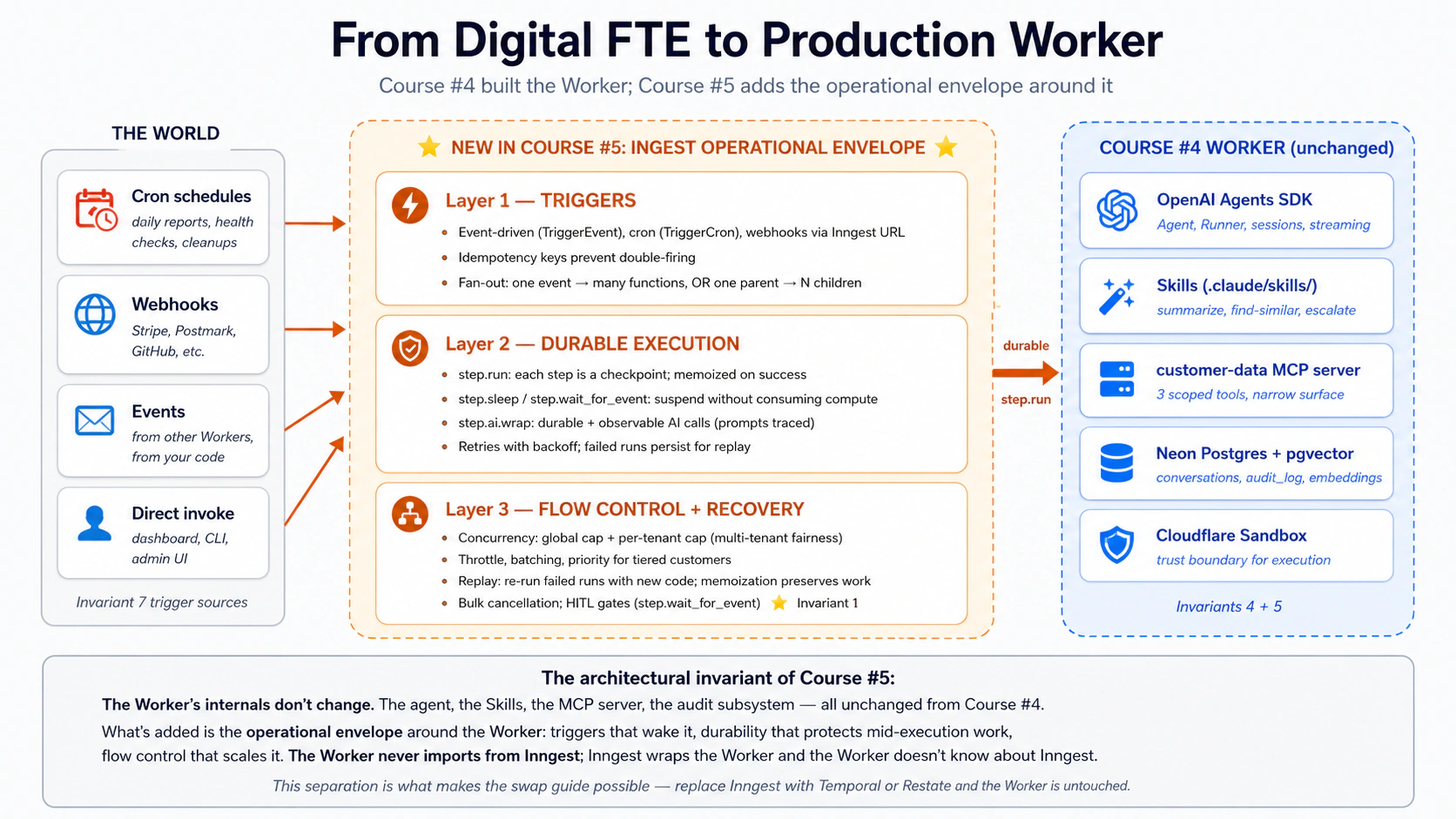
वह एक insight जिससे बाकी सब समझ में आता है: Digital FTE को Production Worker में बदलना एक architectural addition है: durable execution engine, जो दुनिया को Worker call करने देता है (आपकी जगह), mid-flight crashes survive करता है, और scale पर खुद को rate-limit करता है। Inngest वह durable-execution platform है जिसे हम use करते हैं, और patterns Temporal, Restate, या Dapr Agents पर one-to-one transfer होते हैं। Inngest का hosted Hobby tier सबसे friendly on-ramp देता है: free, credit card नहीं, one-command dev server, और ऐसा dashboard जिसे coding के दौरान inspect किया जा सकता है।
Plain English में: Course #4 का Digital FTE एक function है जिसे आप call करते हैं। यह course जो Production Worker बनाता है, वह ऐसी function है जिसे दुनिया call करती है: scheduled cron jobs से, आपके inbox और billing system के webhooks से, दूसरे Workers द्वारा fire किए गए events से। जब यह run होता है, तो durably run होता है: six-step refund flow के बीच crash होने पर पहले तीन steps का काम lose नहीं होता; Worker वहीं से resume करता है जहाँ टूट गया था। और जब 500 customers एक साथ email करते हैं, तो Worker उन्हें controlled rate पर handle करता है, जिससे आपका OpenAI rate limit या Postgres connection pool नहीं टूटता। यह machinery आपको build नहीं करनी; आपका code सिर्फ़ @inngest.create_function से decorated functions रहता है।
Day AI, AI-native companies के लिए CRM, Inngest को अपने product का "nervous system" कहता है। दो founding engineers independently यही भाषा use करते हैं। उनका stack इस course के हर primitive को use करता है: durable LLM workflows, wait-for-event coordination, failure पर replay, debounce + throttle + concurrency, और multi-tenant fairness ताकि एक organization का spike बाकी सबको slow न करे। यह framing curriculum branding नहीं है; यह market में AI-native company की production language है।
एक single agent का workflow के बीच crash होना annoying है। Customer-facing काम handle कर रहे पचास agents की workforce को nervous-system substrate के बिना चलाना impossible है: आप ऐसा platform adopt करते हैं जो यह देता है, या खुद छह महीने लगाकर उसका worse version बनाते हैं। चार properties durable execution को agents के लिए uniquely important बनाती हैं:
- हर step में real money लगता है। Crash के बाद naive retry उन steps के लिए फिर pay करता है जो पहले ही succeed हो चुके थे; step memoization (Concept 7) एक बार pay करता है।
- Workflows failure compound करते हैं। 95% per-step reliability वाले six-step agent के कहीं fail होने का chance 26% है। Step memoization plus targeted retries overall reliability को ~99.7% तक lift करते हैं।
- Side effects real-world हैं। Agents customers को email करते हैं, cards charge करते हैं, Slack पर post करते हैं। Step memoization plus provider-level idempotency keys इन्हें safe बनाते हैं।
- Agents को high-stakes moments पर human approval चाहिए।
step.wait_for_event(Concept 15) के बिना, आप approval queue खुद build करते हैं: database table, polling, timeout handling, audit trail. यह feature नहीं, पूरा project है।
यहाँ से शुरू करें: architectural placement और 15-concept cheat sheet
यह course architecture में कहाँ बैठता है। Agent Factory thesis Seven Invariants describe करता है जिन्हें किसी भी production agent system को satisfy करना होता है। Courses #3 और #4 ने Invariants 4 (engine) और 5 (system of record) cover किए थे। यह course दो और cover करता है, plus Invariant 1 का एक हिस्सा:
- Invariant 7: दुनिया system को call करती है। Triggers (schedules, webhooks, inbound API calls, दूसरे Workers के events) Worker को wake करते हैं। Inngest इसका एक realization है।
- Invariant 1, आंशिक रूप से: Human principal है। Approval gates वे जगहें हैं जहाँ authored intent runtime में वापस आता है।
step.wait_for_eventकिसी भी platform पर इसका सबसे clean expression है: agent suspend होता है, human awaited event emit करता है, agent resume करता है। - Thesis-implicit invariant के रूप में durable execution. Audit जवाब देता है "क्या हुआ?"; durability जवाब देती है "जहाँ टूट था, वहाँ से फिर करो।" Failure के बाद replayable, retriable, resumable.
15 concepts, एक नज़र में। Production में failure लगभग हमेशा तीन root causes में से किसी एक पर trace होता है: trigger fire नहीं हुआ (या दो बार fire हुआ), execution टूट गया और state खो गई, या flow-control gap ने एक customer के traffic को बाकी सबको starve करने दिया। 15 concepts इन्हीं तीन layers पर map होते हैं। यह first-pass version है: concept plus one-line gist. Full diagnostic table (हर concept किस question का answer देता है) अंत में Quick reference में है, जिसे आप build के दौरान खोलेंगे।
| # | Concept | One-line gist |
|---|---|---|
| Triggers | दुनिया Worker को कैसे call करती है | |
| 1 | Events vs requests | Request sync है और कोई wait करता है; event async है और दुनिया आगे बढ़ चुकी होती है। |
| 2 | Cron triggers | Schedule function को wake करता है। One line: TriggerCron(cron="0 9 * * *"). |
| 3 | Webhook triggers | Inbound HTTP payload named event बनता है; आपकी function name पर react करती है। |
| 4 | Idempotency and event semantics | Event IDs और step names duplicate event (या retry) को no-op बनाते हैं। |
| 5 | Fan-out and sub-agent delegation | One event, N subscribing functions; या one parent firing N child events. |
| Durable execution | कुछ टूटने पर Worker को correct रखना | |
| 6 | step.run and the durable function model | हर step.run checkpoint है; function steps के बीच crash होकर resume कर सकती है। |
| 7 | Memoization, the mechanic underneath | Completed steps re-execute होने की जगह stored output return करते हैं। |
| 8 | step.sleep and step.wait_for_event | दोनों function को durably suspend करते हैं, duration के लिए या event के लिए। |
| 9 | Retries, error handling, dead-letter | Automatic backoff retries; N tries के बाद failed run replay के लिए persist रहती है। |
| 10 | step.run for AI calls in Python | OpenAI calls को step.run में wrap करें; step.ai.infer inference offload करता है (step.ai.wrap TypeScript-only है)। |
| Flow control | load के नीचे Worker को healthy रखना | |
| 11 | Concurrency and throttling | concurrency active runs cap करता है; throttle starts-per-second cap करता है। |
| 12 | Priority and fairness | Priority queue order तय करती है; per-key concurrency हर tenant को fair share देती है। |
| 13 | Batching | Cheap bulk work के लिए events को एक batched function call में accumulate करें। |
| 14 | Replay and bulk cancellation | Failed runs को new code के साथ replay करें; जिन runs की ज़रूरत नहीं उन्हें bulk-cancel करें। |
| 15 | HITL gates with step.wait_for_event | Function human approval तक suspend होती है, फिर decision के साथ resume करती है। |
जब यह mapping आपके पास है, तो बाकी document ज़्यादातर mechanics है। Production failure इनमें से किसी एक पर trace होता है:
- trigger match नहीं हुआ (event name typo, schedule fire नहीं हुआ),
- step memoization के बिना step टूट गया (इसलिए retry पूरी flow दोबारा start करता है),
- flow-control gap ने concurrency cap नहीं किया (इसलिए एक customer ने बाकी सबको drown कर दिया),
- या HITL gate waiting में timeout हो गया (इसलिए escalation कभी नहीं हुआ)।
Quick reference की diagnostic table बताती है कि कौन सा concept देखना है।
Audience. यह agentic-coding track का तीसरा intermediate-to-advanced crash course है। आपको Courses #3 और #4 complete करने होंगे (या उनमें सिखाई गई हर चीज़ में comfortable होना होगा), क्योंकि यह course Course #4 के Part 4 worked example वाले customer-support Worker को extend करता है। OpenAI Agents SDK, sessions, streaming, function tools, sandboxing, Skills, Neon Postgres with pgvector, MCP servers, audit logging: सब assumed हैं।
Prerequisites. यह page पाँच चीज़ें assume करता है।
- आपने From Agent to Digital FTE complete कर लिया है। Non-negotiable. हम वहीं से आगे बढ़ते हैं जहाँ Course #4 खत्म हुआ था: वही
chat-agent/project, वही Skills, वहीcustomer-dataMCP server.- आपके पास Agentic Coding Crash Course वाली discipline है। Plan mode, rules files, slash commands, read-first-then-write workflow.
- आपने कम से कम एक PRIMM-AI+ cycle किया है। इस course के Predict prompts वही rhythm assume करते हैं।
- आपके पास Node.js 20+ available है, भले आपका agent Python हो। Inngest dev server Node CLI के रूप में distributed है (
npx inngest-cli@latest dev)।- आपके पास "event-driven" vs "request/response" का working mental model है। अगर "दुनिया event fire करती है और zero, one, या many functions उस पर react करती हैं" familiar लगता है, तो आप calibrated हैं। अगर नहीं, Concept 1 आपको shape देगा।
First pass में यह page कैसे पढ़ें (expand करने के लिए click करें)
- पहली read में expand करें: जिन पर "What you'll see," "Sample run," "Expected output," "Verify." लिखा है। Runnable behavior जिससे predictions check होते हैं।
- पहली read में skip करें: Part 4 के worked example की लंबी file listings. हर block से ऊपर narrative बताता है क्या बदला; file contents की ज़रूरत तब है जब आप सच में build करें।
- पूरे course में optional: "Try with AI" blocks. Claude Code या OpenCode के लिए extension prompts, Inngest dev-server MCP से connected.
First pass का goal तीन-layer model internalize करना है: triggers Worker को wake करते हैं, durable execution उसे correct रखता है, flow control उसे healthy रखता है। Keyboard पर second pass वह जगह है जहाँ आप build करते हैं।
Glossary: जिन terms से आपका सामना होगा (expand करने के लिए click करें)
हर term को उस context में explain किया गया है जहाँ वह पहली बार आती है; यह list उन terms के लिए quick reference है जो first-pass reader को सबसे ज़्यादा अटका सकती हैं।
- Production Worker: Operational envelope वाला Digital FTE: triggers जो उसे wake करते हैं, durable execution जो failures survive करता है, flow control जो load के नीचे scale करता है।
- Event: Named, immutable message जो describe करता है कि कुछ हुआ। Example:
{"name": "customer/email.received", "data": {"customer_id": "..."}}. Trigger surface. - Inngest function:
@inngest_client.create_functionसे decorated Python function, जो triggers और steps declare करती है। Durable work की unit. - Step: Inngest function के अंदर work की unit, जो
ctx.step.run(),ctx.step.sleep(),ctx.step.wait_for_event(), याctx.step.ai.infer()में wrapped होती है। हर step independently retried और memoized होता है। - Memoization: जब function crash होकर restart होती है, Inngest function code को ऊपर से re-run करता है लेकिन किसी भी
step.runके लिए stored outputs return करता है जिसका result पहले से cached है। Function बिना work दोहराए वहीं तक catch up करती है जहाँ टूट गई थी। - Flow control: Per-function policies:
concurrency(max active runs),throttle(max starts per second),priority(queue order),batch_events(invoke करने से पहले accumulate करना)। - HITL (Human In The Loop): Function continue करने से पहले human approval या input के लिए pause करती है।
step.wait_for_eventprimitive है। - Replay: Failed function को वहीं से फिर run करना जहाँ वह टूटी थी, bug fix के बाद new code के साथ।
- Dev server: Inngest का local dev environment via
npx inngest-cli@latest dev. Dashboardhttp://127.0.0.1:8288पर; MCP endpoint/mcpपर।
14 मई 2026 तक current. inngest-py 0.5.18 (released March 11, 2026), Inngest CLI v1+, और Inngest Python quick start के against verified. यह course जो durable-execution architecture सिखाता है वह SDK बदलने पर नहीं बदलता; SDK इस साल का interface है।
Course #3 और #4 stack इस course की foundation है, कोई stepping stone नहीं जिसे हम पीछे छोड़ते हैं। आपका Part 4 Worker अभी भी Agent, Runner, function_tool, .claude/skills/ की Skills, customer-data MCP server, और six-table audit-aware schema use करता है। जो बदलता है: ये primitives अब Inngest functions के अंदर run होते हैं, जो durability के लिए हर agent invocation को step.run() में wrap करती हैं, event/cron triggers declare करती हैं, और concurrency तथा throttling policies apply करती हैं। Worker के internals change नहीं होते। Worker का operational envelope change होता है।
यह अपने predecessors की तरह Python-first course है, inngest-py, Inngest का Python SDK, use करते हुए। Inngest dev server खुद language-agnostic है; यह official Python SDK के साथ वैसे ही काम करता है जैसे TypeScript या Go के साथ।
Dual-tool pattern जारी है। जिन sections में Claude Code और OpenCode अलग होते हैं वहाँ switcher है; एक चुनें और page visits के across sync रहता है।
Part 4 में complete worked example है: Course #4 का customer-support Worker, Inngest layer में wrapped, event triggers, cron health checks, HITL escalation gates, concurrency limits, और full replay support के साथ। आठ build decisions, Courses #3 और #4 जैसी shape. अगर आप definitions पढ़ने से ज़्यादा doing से बेहतर सीखते हैं, Parts 1-3 skim करें और Part 4 पर jump करें।
Architecture एक line में। Engine = OpenAI Agents SDK + Cloudflare Sandbox (Course #3). Capability + Truth + Connector = Skills + Neon Postgres + MCP (Course #4). Operational Envelope = Inngest के triggers + durable execution + flow control (Course #5, यही वाला). Worker के internals Course #4 से unchanged हैं; नया हिस्सा वह layer है जो दुनिया को उसे wake करने देती है, failures को state lose नहीं करने देती, और एक Worker को workforce-level traffic serve करने देती है। अगर इस पूरे document की सिर्फ़ एक sentence याद रहे, तो यही रखें।
Fifteen-minute quick win: durability को अपनी आँखों से देखें
इस architecture के काम करने का why explain करने वाले 15 concepts पढ़ने से पहले, सबसे छोटा possible working version build करें। दो files, चार uv और npx commands, एक shell session. इस section के अंत तक आपके पास होगा:
- एक Inngest function जिसमें एक
step.runऔर एकstep.sleepहै - local में run होता Inngest dev server, dashboard
http://127.0.0.1:8288पर - dashboard से trigger किया गया successful run
- bug fix करने के बाद replay किया गया failed run, जिसमें completed steps बिना re-executing memo से return होते दिखेंगे
यह Part 4 का worked example नहीं है; वह full Production Worker है, आठ Decisions, सैकड़ों lines. यह एक screen है। अगर आपके पास सिर्फ़ एक sitting है, यह करें, फिर concepts पर वापस आएँ जब आप जानना चाहें कि हर piece ऐसा shape क्यों है।
Step 1. Fresh project directory बनाएँ और SDK plus छोटा web framework install करें। (आप fastapi को Inngest-supported किसी भी ASGI framework से swap कर सकते हैं; FastAPI सबसे simple है।)
mkdir hello-inngest && cd hello-inngest
uv init
uv add inngest "fastapi[standard]"
Step 2. एक durable function वाली एक file लिखें। इसे hello.py के रूप में save करें:
# hello.py
import logging
from datetime import timedelta

import inngest
import inngest.fast_api
from fastapi import FastAPI

inngest_client = inngest.Inngest(
    app_id="hello-inngest",
    logger=logging.getLogger("uvicorn"),
    is_production=False,
)


@inngest_client.create_function(
    fn_id="greet-customer",
    trigger=inngest.TriggerEvent(event="demo/greet"),
)
async def greet_customer(ctx: inngest.Context) -> dict[str, str]:
    name = ctx.event.data.get("name", "friend")

    greeting = await ctx.step.run("compose-greeting", lambda: f"Hello, {name}!")

    await ctx.step.sleep("wait-fifteen-seconds", timedelta(seconds=15))

    farewell = await ctx.step.run("compose-farewell", lambda: f"Goodbye, {name}.")

    return {"greeting": greeting, "farewell": farewell}


app = FastAPI()
inngest.fast_api.serve(app, inngest_client, [greet_customer])
तीन चीज़ें notice करें। Function shape plain Python है: एक async def, जिसे create_function से decorate किया गया है। दो ctx.step.run calls उन operations को wrap करते हैं जिन्हें memoized होना चाहिए। बीच का ctx.step.sleep function को durably suspend करता है (process sleep के दौरान crash, restart, या redeploy हो सकता है; timer fire होने पर run next line से resume करता है)।
Step 3. एक terminal में function host start करें।
uv run uvicorn hello:app --reload --port 8000
आपको uvicorn में Started server process और Application startup complete दिखना चाहिए। Function host अब http://127.0.0.1:8000/api/inngest पर listening है।
Step 4. दूसरे terminal में Inngest dev server start करें।
npx inngest-cli@latest dev
Dev server banner print करता है और http://127.0.0.1:8288 पर dashboard open करता है। यह Step 3 में start हुए function host को auto-discover करता है।
Step 5. Browser में http://127.0.0.1:8288 open करें। Sidebar में Functions click करें; आपको greet-customer listed दिखना चाहिए। Sidebar में Events click करें, फिर Send event. यह payload paste करें और Send click करें:
{
  "name": "demo/greet",
  "data": { "name": "Sara" }
}
Step 6. Sidebar में Runs click करें। आपको greet-customer के लिए एक run दिखेगा, status Running, और compose-greeting labeled step complete marked होगा। Step trace देखने के लिए run के अंदर click करें।
Step 7. wait-fifteen-seconds step देखें। Dashboard इसे resume time के साथ Sleeping state में दिखाता है। आपके code में कुछ run नहीं हो रहा। Uvicorn terminal idle है। पंद्रह seconds बाद run resume करता है, compose-farewell complete होता है, और run status Completed हो जाता है। Returned dict देखने के लिए Output panel खोलें।
Step 8. अब इसे जानबूझकर तोड़ें। hello.py में greet_customer के ऊपर छोटा helper add करें और step से उसे call कराएँ:
def fail_on_purpose() -> str:
    raise RuntimeError("forced failure")


# ...inside greet_customer, replace the compose-farewell step:
farewell = await ctx.step.run("compose-farewell", fail_on_purpose)
File save करें; uvicorn auto-reload होता है। Dashboard से वही demo/greet event फिर send करें। Run देखें: compose-greeting complete होता है, wait-fifteen-seconds sleep और resume करता है, compose-farewell backoff के साथ retry करता है (Inngest defaults to four attempts), फिर run Failed state में land करता है और step trace में RuntimeError visible होता है।
अब bug fix करें: compose-farewell को original lambda: f"Goodbye, {name}." पर revert करें। Save करें। Dashboard में failed run click करें, फिर Replay click करें। Replay देखें: compose-greeting milliseconds में complete होता है (memo hit, कोई re-execution नहीं), wait-fifteen-seconds milliseconds में complete होता है (memo hit), compose-farewell new code के साथ real में execute होता है और succeed करता है। Run complete होता है।
आपने अभी durable function run की, step को compute consume किए बिना sleep करते देखा, उसे तोड़ा, fix किया, और replay किया। अगले 90 minutes इसे scale up करते हैं:
- real triggers (cron, webhook, fan-out),
- real durability (agent invocation
step.runमें wrapped), - real flow control (concurrency, throttle, priority),
- और HITL gate, जो "agent इसे गड़बड़ कर सकता है" को "agent draft करता है, human approve करता है, action issue होता है" में बदलता है।
अगर कुछ काम नहीं किया, तो सबसे common Quick Win failures हैं:
- Dev server function host तक नहीं पहुँच पा रहा (check करें कि uvicorn port 8000 पर running है)।
- Client constructor में
is_production=Falsemissing है (इसके बिना SDK signing key require करता है)। - Function dashboard में appear नहीं होती (uvicorn auto-reload नहीं हुआ; manually restart करें)।
- Run बिना error और progress के hang हो जाता है (de-synced host silent stalls produce करता है; function host और dev server दोनों साथ restart करें, और one function host को one dev server के against run करें)।
चार problems, चार fixes, फिर आगे बढ़ें।
Part 1: Triggers, दुनिया Worker को कैसे call करती है
Course #4 Worker तब run होता है जब आप उसे call करते हैं। असली Production Worker तब run होता है जब दुनिया events fire करती है: customer email करता है, webhook आता है, daily 09:00 पर cron fire होता है, दूसरा Worker काम hand off करता है। Part 1 के पाँच concepts event-driven mental model, तीन trigger surfaces (cron, webhook, event), double-processing रोकने वाली semantics, और fan-out patterns establish करते हैं जिनसे एक event कई Workers को wake कर सकता है।
Concept 1: Events vs requests, durable mental model shift
Request synchronous conversation है। कोई call करता है; आप handle करते हैं; आप return करते हैं; वे continue करते हैं। Connection open रहता है; human या service waiting होती है। अगर आप crash करते हैं, caller को error मिलता है। Course #4 chat agent एक request है: आपने type किया, उसने stream back किया, conversation आपकी terminal session से belong करती थी।
Event asynchronous message है। दुनिया में कुछ हुआ (customer ने sign up किया, email आया, payment clear हुई), और originator उस fact का named record emit करता है। Zero, one, या many functions event पर independently react करती हैं। कोई connection open नहीं रहता। Originator को नहीं पता कौन listen कर रहा है, वह results wait नहीं करता, और blocked नहीं होता। दुनिया आगे बढ़ चुकी होती है।
# A request: I'm here, waiting, blocking
result = await agent.handle_customer_message(text=user_input)
print(result)  # I unblock when the agent finishes

# An event: I fire-and-forget
await inngest_client.send(events=[
    inngest.Event(
        name="customer/email.received",
        data={"customer_id": "c-4429", "body": email_body, "subject": subject},
    ),
])
# I return immediately. Somewhere else, one or more Inngest
# functions react to this event on their own schedule.
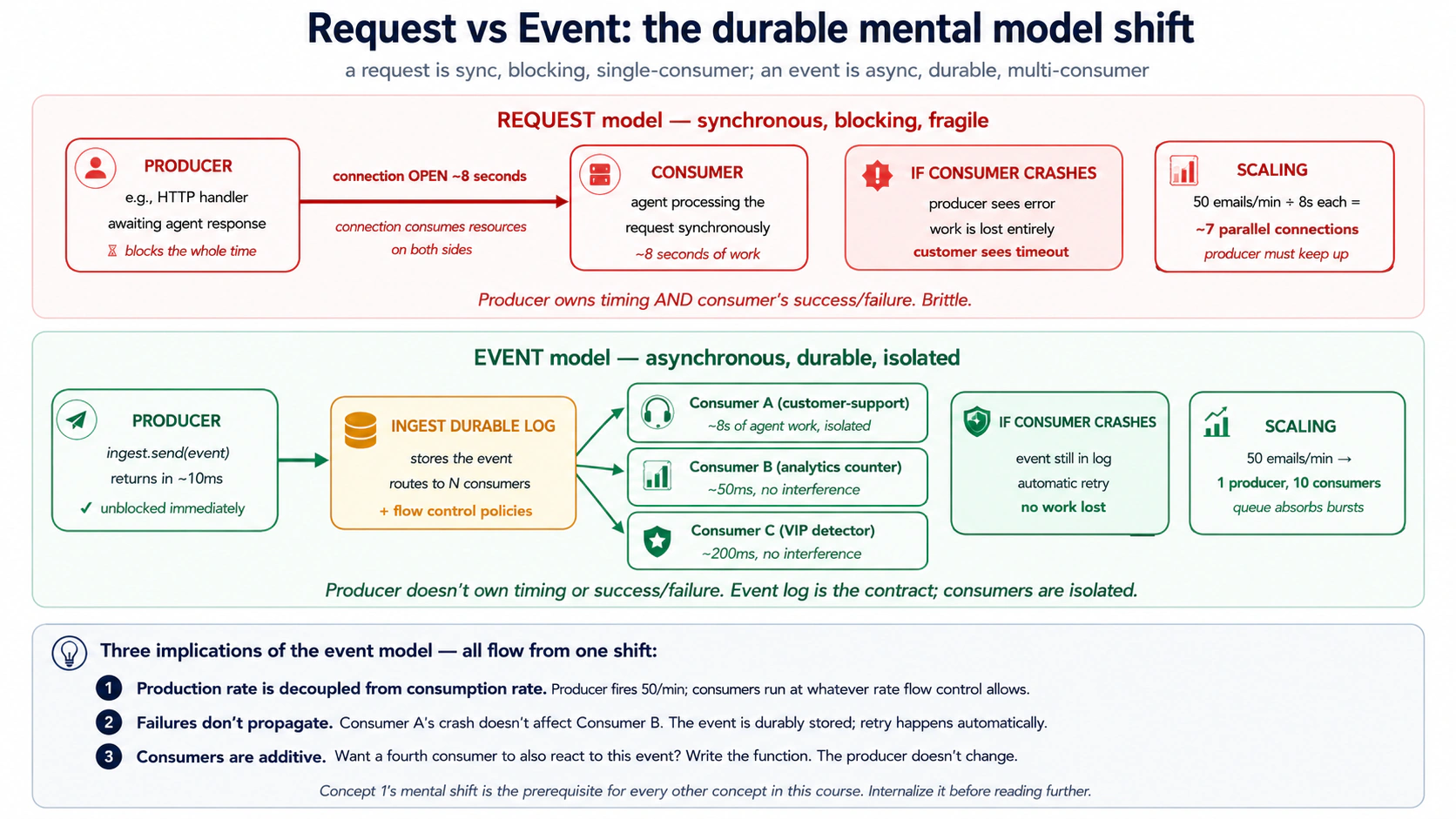
Shift छोटा लगता है। है नहीं। जब आप events में सोचते हैं, durability और scale लगभग free में fall out करते हैं, क्योंकि:
- Producer consumer से slow नहीं हो सकता (email-receiver agent के draft finish होने का wait नहीं करता)।
- Consumer crash और restart कर सकता है बिना work lose किए (event durably stored है; Inngest उसे re-deliver करता है)।
- Producers को बदले बिना new consumers add किए जा सकते हैं (दूसरी function, जैसे analytics counter,
customer/email.receivedपर subscribe कर सकती है बिना email-receiver को पता चले)। - Backpressure code change नहीं, flow-control policy बनता है (Inngest concurrency cap करता है; producer fire करता रहता है; events queue होते हैं)।
इस course का बाकी पूरा हिस्सा इसी single mental shift के implications हैं।
PRIMM, Predict. आपका customer-support Worker email का response देने में 8 seconds लेता है: agent reasoning के लिए तीन seconds, दो MCP tool calls के लिए चार seconds, database write के लिए एक second. Peak load पर आपको 50 emails per minute मिलते हैं। अगर आप request model use करते हैं (email parser agent finish होने तक block करता है), तो आपके email parser के लिए कितने parallel HTTP connections imply होते हैं? अगर आप event model use करते हैं (email parser event fire करके तुरंत return करता है), तो कितने? Confidence 1-5.
Answer: request model को लगभग 7 concurrent parsers चाहिए (50/min × 8 seconds = ~6.7 parallel handlers, plus headroom). Event model को एक parser चाहिए (यह event fire करके ~10ms में return करता है; event queue 50/min spike absorb करती है; Inngest functions उतनी concurrency पर queue consume करती हैं जितनी आप allow करते हैं)। Event model production rate को consumption rate से decouple करता है। यह सिर्फ़ scaling fact नहीं; architectural fact है। Event "दुनिया में क्या हुआ" और "Worker उसके बारे में क्या करता है" के बीच durable boundary बनता है। Consumer mid-processing crash हो तो event retry के लिए अभी भी है। तीन और consumer types add करें और producer notice नहीं करता। Events वे तरीका हैं जिससे आप work की timing own करना बंद करते हैं।
Try with AI
Walk me through three scenarios. For each, classify it as REQUEST-MODEL
or EVENT-MODEL, and explain which one fits better:

A) A user clicks "Submit refund request" in the support portal and
   expects to see "Refund issued: $30" within 2 seconds.

B) A nightly cron job at 02:00 runs a customer-health-check across
   all 5,000 customers and writes a report to Slack.

C) A customer sends an email to support@; we want a draft response
   ready within 60 seconds for the on-call agent to review and send.

For each, name (a) what the human's expectation of timing is and
(b) what failure looks like if the model crashes mid-execution.
Concept 2: Cron triggers, work जो इसलिए run होता है क्योंकि समय बीता
सबसे simple trigger clock है। Production Worker के कई काम outside events के reactions नहीं होते; वे scheduled work होते हैं: daily health reports, weekly cleanups, hourly recalculations. Inngest का cron trigger code की one line है।
import inngest

@inngest_client.create_function(
    fn_id="daily-customer-health-check",
    trigger=inngest.TriggerCron(cron="0 9 * * *"),  # 09:00 every day, UTC
)
async def daily_health_check(ctx: inngest.Context) -> dict[str, int]:
    """Run a customer-health pass for every Pro/Enterprise customer."""
    customers = await ctx.step.run("fetch-pro-customers", fetch_pro_customer_ids)

    # fan out: one event per customer, one Worker run per event
    await ctx.step.run("fan-out", fan_out_per_customer_events, customers)

    return {"customers_scheduled": len(customers)}
तीन चीज़ें notice करें:
-
Schedule standard cron syntax ही है।
0 9 * * *हर दिन 09:00 UTC है;*/15 * * * *हर 15 minutes है;0 9 * * 1Mondays at 09:00 है। Inngest cron को UTC में evaluate करता है; अगर आपको अलग timezone चाहिए, वह function parameter है, अलग concept नहीं। -
Function अभी भी
ctx.step.runuse करती है। Cron-triggered हो या event-triggered, function shape identical है। Steps वैसे ही काम करते हैं। Durability वैसे ही काम करती है। Flow control वैसे ही काम करता है। Trigger सिर्फ़ यह बताता है कि function start कैसे होती है। -
Cron output regular Inngest function run है। यह dashboard में दिखता है, run ID होता है, trace होता है, replay support करता है। अगर आपका Monday-morning cron run step 3 पर fail होता है, Tuesday का cron normally run होगा और Monday की failure bug fix के बाद replay के लिए available रहेगी।
अगर cron fire होते समय आपकी service down हो तो क्या होता है? यही question real schedulers को kitchen-timer schedulers से अलग करता है। Schedule fire होते ही Inngest के cron runs durably recorded हो जाते हैं; अगर आपका function endpoint unreachable है, Inngest backoff के साथ retry करता है जब तक succeed न हो या retry ceiling hit न हो। 09:00 पर fire हुआ cron इसलिए "miss" नहीं होता कि आपका deploy 09:00 पर rolling था; run wait करता है, आप deploy finish करते हैं, run complete होता है। Development में cron triggers की एक quirk याद रखें: local dev server crons सिर्फ़ तब fire करता है जब वह running हो। Production उन्हें Inngest infrastructure पर run करता है, जो हमेशा running है।
Quick check. तीन claims. हर एक को True या False mark करें। (a) अगर cron function run होने में 45 minutes लेती है और हर 15 minutes scheduled है, तो किसी भी समय तीन concurrent instances running होंगी। (b) आप cron-triggered function में
step.sleepuse करके work को पूरे दिन में spread कर सकते हैं। (c) Cron-triggered function को testing के लिए dashboard से manually invoke भी किया जा सकता है।
Answers: (a) Depends on concurrency policy: default रूप से Inngest overlapping runs queue करेगा; अगर आप concurrency=1 set करते हैं तो वे serialize होंगी; अगर concurrency=10 set करते हैं तो parallelize होंगी। Default sane है। (b) True, और यह "daily work को hours में spread करके load smooth करने" का common pattern है। (c) True: Inngest dashboard testing के लिए किसी भी function को on demand invoke करने देता है, उसके trigger से independent.
Try with AI
With my AI coding assistant connected to the Inngest dev server MCP,
write a cron-triggered Inngest function in Python that:

1. Runs every Monday at 09:00 UTC.
2. Queries the audit_log table for all conversations resolved in the
   prior week (status='resolved' in that window).
3. Computes per-agent metrics: total conversations resolved, average
   resolution time, count of escalations, count of refunds issued.
4. Returns the metrics as a JSON object.

After you write the function, use the MCP's `invoke_function` tool to
test it manually (instead of waiting for Monday). Confirm the audit
SQL is correct by using `grep_docs` to search Inngest's docs for
"step.run" examples.
Concept 3: Webhook triggers, जब outside world call करता है
दूसरा trigger surface HTTP है। External system (Stripe, आपका email provider, customer-portal form, GitHub webhook) आपके Worker को call करना चाहता है। Inngest के बिना, आपको यह सब करना होता: HTTPS endpoint stand up करना, payload parse करना, source validate करना, queue में write करना, queue consume करने वाला worker write करना, retries handle करना, idempotency handle करना, telemetry ship करना। इनमें से हर एक infrastructure work का एक week है।
Inngest के साथ endpoint provided है। आप Inngest dashboard में https://inn.gs/e/<your-key> जैसी URL के साथ webhook configure करते हैं, Stripe (या जो भी source हो) को उस URL पर point करते हैं, और webhook payload आपके event stream में event बन जाता है। Matching event-name trigger वाली कोई भी function अब fire होती है।
@inngest_client.create_function(
    fn_id="handle-stripe-refund-failed",
    trigger=inngest.TriggerEvent(event="stripe/charge.refund.failed"),
)
async def on_refund_failed(ctx: inngest.Context) -> dict[str, str]:
    """Triggered by Stripe webhook → Inngest event → this function."""
    charge_id = ctx.event.data["charge_id"]
    customer_id = ctx.event.data["customer_id"]

    # Look up which support ticket originated this refund
    ticket = await ctx.step.run(
        "find-ticket-for-refund", lookup_ticket_by_charge, charge_id,
    )

    # Wake the customer-support Worker with the full context
    await ctx.step.run(
        "notify-support-agent",
        notify_support_agent_of_refund_failure,
        ticket_id=ticket["id"], charge_id=charge_id,
    )

    return {"ticket": ticket["id"], "action": "notified"}
Flow: Stripe charge refund करने में fail होता है → Stripe Inngest webhook URL पर POST करता है → Inngest stripe/charge.refund.failed named event create करता है → ऊपर वाली function (जो event name match करती है) fire होती है → function steps use करके ticket lookup करती है और support agent को notify करती है। HTTP plumbing में से कुछ भी आपको write नहीं करना। कोई endpoint नहीं, parser नहीं, queue नहीं, consumer नहीं।
दो adjacent patterns नाम देने लायक हैं:
- Generic JSON webhooks. अगर source known vendor नहीं है, तो आप किसी भी JSON-emitting service को इसी तरह के endpoint पर point करते हैं और event name choose करते हैं। Slash-namespaced names (
vendor/event.subtype) convention हैं; कोई enforce नहीं करता, लेकिन follow करने पर dashboard cleanly sort करता है। - Webhook transforms. अगर incoming payload आपकी desired shape से match नहीं करता, Inngest आपको "transform" function define करने देता है जो receipt time पर server-side run होती है और event stream में enter होने से पहले event reshape करती है। इससे function code provider-specific fields से clean रहता है।
PRIMM, Predict. Stripe webhook exact same millisecond पर
stripe/charge.refund.failedfire करता है जब आपका customer-support Worker भीinngest_client.sendcall करके different event namedcustomer/refund.investigation_neededemit कर रहा है। दोनों events system में simultaneously arrive होते हैं; ऊपर वाली function सिर्फ़ Stripe event पर trigger करती है। Function एक बार run होगी या दो बार? Confidence 1-5.
Answer: एक बार। Function सिर्फ़ stripe/charge.refund.failed पर trigger होने के लिए registered है; customer/refund.investigation_needed event का name अलग है और वह different function (या कोई function नहीं, अगर आपने नहीं लिखी) match करता है। Event का name उसका routing key है। Different names वाले दो events कभी accidentally same function trigger नहीं करते, भले same instant पर arrive हों। इसी वजह से naming discipline matter करती है: event name में typo (customer/email_received vs customer/email.received) का मतलब function कभी fire नहीं होती, और symptom silent होता है। Inngest dashboard इसे catch करने में मदद करता है: unmatched events अलग stream में appear होते हैं जिसे आप audit कर सकते हैं।
Try with AI
I need to handle three webhook sources for my customer-support Worker:

A) Stripe: refund failed, charge disputed
B) Postmark (email service): bounced email, complaint
C) My internal admin UI: manual "investigate this ticket" button

For each, decide:

1. What event names you'd use (vendor/event.subtype format).
2. Whether the function reacting to it should run synchronously (the
   caller is waiting) or asynchronously (fire and continue).
3. Whether you'd write a webhook transform to reshape the payload, or
   consume it raw.

Then write the Inngest function for the Stripe refund-failed case in
Python, using the MCP's grep_docs to find the current syntax for
TriggerEvent and the dev-server MCP's send_event tool to test it.
Concept 4: Idempotency and event semantics, वही event दो बार fire होना
Webhooks exactly-once नहीं होते। वे at-least-once होते हैं: sender acknowledgment न मिलने पर retry करता है। Networks packets drop करते हैं, services restart होती हैं, आपका endpoint timeout होता है और sender retry करता है भले आप actually succeed कर चुके हों। Idempotency के बिना, हर webhook system eventually किसी को double-bill, double-email, या double-refund करता है। यह theoretical concern नहीं; event systems में सबसे common production bug है।
Defense की दो layers, दोनों Inngest में built in.
Layer 1: source पर Event ID seeds. जब आप खुद event send करते हैं (webhook receive करने के बजाय), तो idempotency key attach कर सकते हैं:
await inngest_client.send(events=[
    inngest.Event(
        name="customer/refund.requested",
        data={"order_id": "o-4429", "amount_cents": 5000},
        id=f"refund-request-{order_id}-{request_timestamp}",  # idempotency key
    ),
])
अगर same id वाला दूसरा event dedup window (default 24 hours) के अंदर send किया जाता है, Inngest duplicate drop कर देता है। Same logical event, same id, सिर्फ़ एक function run.
Layer 2: Step-level idempotency. Function के अंदर हर step.run अपने name से identified होता है। अगर function step 3 और step 4 के बीच crash होती है, retry function code को ऊपर से re-run करता है, लेकिन steps 1, 2, और 3 के लिए Inngest stored outputs return करता है बिना step body re-execute किए। Step 4 पहली बार normally run करता है। यही function को "durable" बनाता है: completed steps के side effects retry पर फिर नहीं होते।
@inngest_client.create_function(
    fn_id="issue-customer-refund",
    trigger=inngest.TriggerEvent(event="customer/refund.requested"),
)
async def issue_refund(ctx: inngest.Context) -> dict[str, str]:
    # Step 1: look up the order. If the function retries, this returns
    # the SAME order data it computed the first time, from Inngest's memo.
    order = await ctx.step.run(
        "lookup-order", lookup_order_by_id, ctx.event.data["order_id"],
    )

    # Step 2: call Stripe. If the function retries AFTER this step
    # succeeded, the Stripe call does NOT happen again. The refund is
    # issued exactly once even if the function runs three times.
    refund = await ctx.step.run(
        "issue-stripe-refund", call_stripe_refund_api,
        charge_id=order["stripe_charge_id"],
        amount=ctx.event.data["amount_cents"],
    )

    # Step 3: write the audit row. Same property: runs at most once.
    await ctx.step.run(
        "audit-refund", write_audit_refund_issued,
        order_id=order["id"], refund=refund,
    )

    return {"refund_id": refund["id"]}
अगर यह function step 3 के दौरान crash होती है, retry step 1 में re-enter करता है (cached order data मिलता है, DB call नहीं), step 2 में re-enter करता है (cached refund data मिलता है, Stripe call नहीं), step 3 real में run करता है, return करता है। Customer का card एक बार charge होता है, भले function तीन बार run हुई। यही killer feature है। यही Inngest को retry loop वाली queue से qualitatively different बनाता है।
Inngest की memoization function के perspective से exactly-once step completion देती है: एक बार step.run step को successful record कर दे, वह re-execute नहीं होगा। लेकिन एक narrow window है। अगर आपके step की body Stripe call करती है (side effect Stripe servers पर होता है), फिर Inngest result record करने से पहले crash हो जाती है, retry Stripe को फिर call करेगा। Inngest के perspective से step "complete नहीं हुआ।" Stripe के perspective से charge already हुआ। Production-grade pattern Inngest step memoization plus provider-level idempotency keys है: Stripe का Idempotency-Key header, Postmark का MessageID reuse, आपके own MCP server का idempotency contract. step.run और provider idempotency keys को complements की तरह treat करें, substitutes की तरह नहीं: step.run आपकी function की internal logic को exactly-once रखता है; provider की idempotency key external side effect को exactly-once रखती है।
Quick check. True या false. (a)
step.runstep को idempotent सिर्फ़ तब बनाता है जब अंदर वाली function भी idempotent हो। (b) Dedup window के बाहर duplicate ID वाला event new event की तरह treat होगा। (c) अगरstep.runmid-execution fail हो जाता है (step का code exception throw करता है), Inngest failure store करता है और next attempt पर step retry करता है, prior steps re-run किए बिना।
Answers: (a) False: step.run step invocation को idempotent बनाता है (success पर वह at most once run होगा), लेकिन अगर अंदर की function non-idempotent है (जैसे Stripe call), at-most-once guarantee वही है जो आपको चाहिए। पूरा point यही है कि आपको Stripe-calling को खुद idempotent नहीं बनाना पड़ता। (b) True: Inngest की dedup window default रूप से 24 hours है; उसके बाद same ID वाले events new treat होते हैं। (c) True: failure replay भी memoized है; Inngest जानता है step 3 attempt 1 पर fail हुआ और attempt 2 पर सिर्फ़ step 3 retry करता है। Prior successful steps re-execute नहीं होते।
Try with AI
Here are three scenarios. For each, decide: idempotency PROBLEM or
NO PROBLEM, and if it's a problem, what's the fix:

A) Stripe sends the same charge.refund.failed webhook three times
   in 90 seconds (because their first two attempts timed out at
   your endpoint). Your function emails the customer.

B) A customer clicks "Issue refund" three times because the page
   was slow. Your function calls Stripe and writes audit_log.

C) Your nightly cron at 09:00 sends a customer-health-check event
   to each Pro customer. If two crons fire at the same time (a deploy
   bug), what happens?

For each problem case, propose ONE specific fix: event ID seed
inside the function, idempotency key in inngest_client.send, or
function-level deduplication on the trigger.
Concept 5: Fan-out and sub-agent delegation, एक event कई Workers
अक्सर single event को many जगह work trigger करना होता है। Stripe charge.refund.failed event को शायद यह करना हो: support agent को notify करना, audit में write करना, customer का risk score update करना, finance ops को alert करना, Slack पर post करना। पाँच reactions, सब independent, सब one event से।
Inngest pattern: same event पर कई functions subscribe करें। Fan-out code नहीं; बस कई @inngest_client.create_function decorators same TriggerEvent के साथ। हर function independently run करती है, अपने retries रखती है, अपनी step trace रखती है, और दूसरों से independently fail होती है।
@inngest_client.create_function(
    fn_id="refund-failed-notify-support",
    trigger=inngest.TriggerEvent(event="stripe/charge.refund.failed"),
)
async def notify_support(ctx: inngest.Context) -> dict[str, str]:
    # ... runs the customer-support Worker to draft a response ...
    return {"status": "drafted"}


@inngest_client.create_function(
    fn_id="refund-failed-update-risk-score",
    trigger=inngest.TriggerEvent(event="stripe/charge.refund.failed"),
)
async def update_risk_score(ctx: inngest.Context) -> dict[str, float]:
    # ... runs the risk-scoring Worker ...
    return {"new_risk_score": 0.42}


@inngest_client.create_function(
    fn_id="refund-failed-post-slack",
    trigger=inngest.TriggerEvent(event="stripe/charge.refund.failed"),
)
async def post_to_slack(ctx: inngest.Context) -> None:
    # ... posts a Slack notification ...
    return None
एक Stripe webhook आता है। Inngest एक event create करता है। तीन functions fire होती हैं, हर एक अपने run में। अगर post_to_slack fail होता है क्योंकि Slack down है, बाकी दो unaffected रहती हैं और normally complete होती हैं। Failed run dashboard में replay के लिए बैठी रहती है जब Slack recover हो। यही multi-Worker coordination का core है, और यही architectural pattern आपकी future manager layer (later course) scale पर compose करेगी।
दूसरा fan-out pattern: parent-fires-N-children. कभी fan-out dynamic होता है। Daily cron को हर Pro customer के लिए customer-health event fire करना है, जो week के हिसाब से 500 या 5,000 हो सकता है। Parent function N events send करती है:
from datetime import date

async def fan_out_per_customer_events(
    customers: list[str],
) -> int:
    events = [
        inngest.Event(
            name="customer/health_check.requested",
            data={"customer_id": cid},
            id=f"daily-health-{cid}-{date.today().isoformat()}",  # idempotency
        )
        for cid in customers
    ]
    await inngest_client.send(events=events)
    return len(events)
एक single send call में 5,000 events sent होते हैं। 5,000 function runs fire होती हैं, हर एक के पास अपना customer_id है, हर एक isolated है, हर एक independently retryable है। Flow control (Concept 11) cap करता है कि कितने concurrently run होंगे ताकि downstream APIs न पिघलें। Cron function seconds में return करती है; fan-out उसी rate पर run होता है जो Inngest की flow-control policies allow करती हैं।
Sub-agent delegation fan-out का special case है। Worker run के अंदर, आप await inngest_client.send(...) call करके sub-tasks दूसरे Worker types को delegate कर सकते हैं। Parent children का wait नहीं करता जब तक वह explicitly step.invoke use करके उन्हें synchronously run और results collect न करे।
PRIMM, Predict. आपके पास तीन functions हैं जो सभी
customer/email.receivedसे triggered हैं: reply draft करने वाला customer-support agent (15 seconds), analytics counter (50ms), और "VIP detector" जो check करता है कि customer high-value है या नहीं (200ms). Email आने पर user-visible latency हर एक के लिए कैसी दिखेगी? तीन options: (a) तीनों add होकर ~15 seconds; (b) तीनों parallel run, total latency ~15 seconds (slowest); (c) हर एक independently run, shared latency नहीं। Confidence 1-5.
Answer: (c). हर function अपना run है, अपने process slot में। Customer-support agent analytics counter को block नहीं करता; VIP detector agent को block नहीं करता। बाहर से किसी भी particular function की latency सिर्फ़ उसी function का time है। कोई function sibling function का wait नहीं करती। इसलिए fan-out scale करता है: consumers isolated हैं। Agent crash हो तो analytics counter unaffected है।
Try with AI
Design the fan-out architecture for these three scenarios. For each,
sketch the event names and the functions that subscribe:

A) New customer signs up. Need to: send welcome email, create
   Stripe customer, post to Slack #new-customers, write to
   audit_log, schedule a 7-day follow-up.

B) Customer support email arrives. Need to: draft a reply (agent),
   detect sentiment, check if VIP, update customer's "last contact"
   timestamp, attach to the right ticket thread.

C) Daily cron at 09:00 needs to run customer-health-check on
   ~5,000 Pro customers. Each check takes ~30 seconds. We want
   the whole batch to complete by 11:00 (a 2-hour window).

For each, decide: how many event types, how many subscriber
functions, what the idempotency story is, and one specific failure
mode this design protects against.
Part 2: Durable execution, कुछ टूटने पर क्या होता है
Triggers Worker को wake करते हैं। Durable execution Worker को उसके बाद आने वाली चीज़ों से survive कराता है। Course #4 Worker agent call करता है, agent तीन tools call करता है, tools Postgres, Stripe, और OpenAI call करते हैं: single conversation में छह external calls, जिनमें से कोई भी fail हो सकता है। Durability के बिना, mid-conversation एक transient failure पूरी flow को top से restart कर देता है। Durability वह property है जो कहती है: जब execution के बीच कुछ fail होता है, already completed work completed रहता है, और execution वहीं से resume होता है जहाँ टूट था। Inngest यह एक primitive (step.run) और उसके नीचे memoization mechanic से deliver करता है। Part 2 दोनों explain करता है, plus time-based variants (step.sleep, step.wait_for_event), retry semantics, और step.ai primitives.
First-pass compression note. अगर आप scan कर रहे हैं, load-bearing concepts 6 (
step.run) और 7 (memoization) हैं। Concepts 8-10 उन पर build करते हैं। 6 और 7 ध्यान से पढ़ें; ये दोनों समझ आ जाएँ तो बाकी तेज़ पढ़ेंगे।
Concept 6: step.run and the durable function model
Normal Python function एक बार top to bottom run होती है। अगर halfway crash करती है, तो आप top से start करते हैं। अगर crash से पहले तीन API calls कर चुकी है, तो next attempt वही तीन calls फिर करती है, उनके लिए pay करती है, और शायद किसी को फिर double-charge करती है।
Inngest function durable है। जिस operation को आप checkpoint करना चाहते हैं वह step.run(name, fn, ...) में wrapped होता है। Function हर attempt पर अभी भी top to bottom run करती है, लेकिन जो steps already complete हो चुके हैं वे re-execute होने की जगह stored outputs return करते हैं। Function जहाँ टूटी थी वहाँ तक "catch up" करती है, फिर आगे continue करती है।
@inngest_client.create_function(
    fn_id="customer-support-conversation",
    trigger=inngest.TriggerEvent(event="customer/email.received"),
)
async def handle_email(ctx: inngest.Context) -> dict[str, str]:
    customer_id = ctx.event.data["customer_id"]

    # Step 1: load the customer record (one DB call)
    customer = await ctx.step.run(
        "load-customer", load_customer_by_id, customer_id,
    )

    # Step 2: load the conversation thread (one DB call)
    thread = await ctx.step.run(
        "load-thread", load_thread_for_customer, customer_id,
    )

    # Step 3: run the OpenAI Agents SDK agent (the Course Four Worker)
    response = await ctx.step.run(
        "run-agent",
        run_customer_support_agent,
        customer=customer,
        thread=thread,
        email_body=ctx.event.data["body"],
    )

    # Step 4: write the draft reply to the database
    await ctx.step.run(
        "save-draft-reply", save_reply,
        customer_id=customer_id, text=response.draft,
    )

    # Step 5: notify the on-call human reviewer via Slack
    await ctx.step.run(
        "notify-reviewer", post_slack_for_review, response=response,
    )

    return {"status": "drafted", "reviewer_notified": True}
पाँच steps. हर एक independently checkpointed है।
इन तीन failure scenarios में durability आपको क्या देती है:
-
Scenario A: agent step timeout throw करता है। Agent call को
step.runमें wrap किए बिना, इस function की next retry customer reload करती है, thread reload करती है, और agent को scratch से rerun करती है, उस work के OpenAI tokens के लिए दो बार pay करते हुए जिसे agent ने partially कर लिया था।step.runके साथ, customer और thread loads memoized हैं (steps 1-2 re-execute नहीं होते); सिर्फ़ step 3 retry होता है। Inngest की automatic retries transient OpenAI errors handle करती हैं बिना आपके code को पता चले। -
Scenario B: function process step 3 और step 4 के बीच killed हो जाता है (deploy rolled out, node restart हुआ, container OOM हुआ)। Durability के बिना, agent का response lost है और customer का email unanswered रहता है जब तक कोई notice न करे। Durability के साथ, restart के बाद function resume करती है: steps 1, 2, 3 milliseconds में stored outputs return करते हैं, step 4 real में run करता है, step 5 real में run करता है, customer को drafted reply मिलता है।
-
Scenario C: Slack step 5 पर 503 return करता है।
step.runके बिना, आप work lose करते या Slack call specifically hand-written retry-and-backoff logic लिखते।step.runके साथ, Inngest step 5 को exponential backoff के साथ retry करता है जब तक Slack recover न हो; meanwhile steps 1-4 completed रहते हैं और re-execute नहीं होंगे। Draft reply already database में है; notification ही pending है।
आप कोई retry loops नहीं लिखते, कोई "क्या मैंने यह already कर दिया?" checks नहीं लिखते, कोई state machines नहीं लिखते। State machine step.run calls की sequence ही है। हर step node है; हर transition durable है।
step.run का one rule. step.run को pass की गई function अपने inputs given होने पर deterministic होनी चाहिए: same arguments से call करने पर same result produce करना चाहिए।
- Pure functions के लिए यह automatic है।
- Idempotent API calls के लिए यह automatic है (Stripe का
idempotency_key, आपके own MCP server tools)। - "random ID generate करो" या "default temperature के साथ LLM call करो" जैसी चीज़ों के लिए care चाहिए (retry original attempt से different output produce कर सकती है, जो कभी-कभी matter करता है)।
जब operation deterministic नहीं है, तो आप उसे deterministic बनाते हैं: seed pass करें, random value step से बाहर pre-generate करें, या accept करें कि retry original से differ कर सकती है (agent response के लिए अक्सर fine)।
Quick check. True या false. (a) Function body हर retry पर top से re-execute होती है, including imports और
step.runcalls के बाहर variable assignments. (b) अगर step complete होने में 30 seconds लेता है और function 25 seconds in crash करती है, retry उस step को second 25 से continue करती है। (c)step.runoutputs Inngest infrastructure में stored होते हैं, आपकी application में नहीं।
Answers: (a) True, और इसी वजह से work को inside step.run रखना होता है। step.run के बाहर code हर retry पर re-run होता है; अंदर का code per attempt once run होता है और success पर memoized होता है। (b) False: step.run atomic unit है; अगर step interrupted है, retry पूरा step re-run करती है। अगर आपका step इतना लंबा है कि restart allowed नहीं, उसे smaller steps में break करें। (c) True: step output store Inngest का हिस्सा है, आपकी DB नहीं। इसी से आप database schema change होने के बाद भी runs replay कर सकते हैं।
build-agents crash course Decision 4 में openai-agents==0.17.2 का streamed-path SDK bug document है, DeepSeek के reasoning models पर tool-calling turns में: tool_calls message और tool result के बीच spurious empty assistant message, जिसे DeepSeek का strict parser reject करता है। अगर आपका Course Four Worker @function_tool के साथ DeepSeek stream करता है, तो नीचे Runner.run_streamed को step.run में wrap करने से पहले उस course की OpenAI-fallback resolution apply करें।
Try with AI
With my AI coding assistant connected to the Inngest dev server MCP,
re-shape my Course Four customer-support Worker into an Inngest
durable function. Take the existing Runner.run_streamed invocation
that processes a customer email and wrap each of these inside its
own step.run:

1. Load the customer from the customer-data MCP server
2. Load the related conversation thread
3. Run the agent (the OpenAI Agents SDK Runner)
4. Persist the draft reply
5. Notify the on-call reviewer in Slack

Use grep_docs to find the current Python SDK syntax. Use
invoke_function to test it with a synthetic email payload. Then
deliberately raise an exception in step 4 and use get_run_status
to confirm steps 1-3 don't re-execute on retry.
Concept 7: Memoization, resumability के नीचे की mechanic
Concept 6 ने कहा "जो steps already complete हो चुके हैं वे re-execute होने की जगह stored outputs return करते हैं।" वह mechanism memoization है और उसकी mechanic समझना ज़रूरी है, क्योंकि Inngest का हर दूसरा primitive इसका use करता है।
जब आप await ctx.step.run("load-customer", load_customer_by_id, "c-4429") call करते हैं, तो first attempt पर तीन चीज़ें होती हैं:
- Inngest अपने memo store को check करता है: "क्या इस run में step
load-customerके लिए stored result है?" नहीं है। - Function
load_customer_by_id("c-4429")run होती है। वह{"id": "c-4429", "tier": "pro", ...}return करती है। - Inngest result को memo store में write करता है, key
(run_id, step_name="load-customer")से। फिर वह result आपके code को return करता है।
अगर function step 3 के बाद crash होती है और Inngest retry करता है, तो second attempt पर function body ऊपर से re-run होती है। जब execution same line पर पहुँचता है, तीन अलग चीज़ें होती हैं:
- Inngest अपने memo store को check करता है: "क्या इस run में step
load-customerके लिए stored result है?" हाँ, वह attempt 1 पर stored हुआ था। - Function
load_customer_by_id("c-4429")run नहीं होती। DB call नहीं होता। - Inngest stored result milliseconds में आपके code को return करता है।
इसीलिए retries cheap हैं: expensive work already cached है। इसी वजह से durability correct है: expensive work दो बार नहीं होता। और इसी वजह से "function body top to bottom re-run होती है" wasteful लगने के बावजूद fine है: steps के अंदर work actually re-run नहीं होता; steps के बीच orchestration code ही re-run होता है।
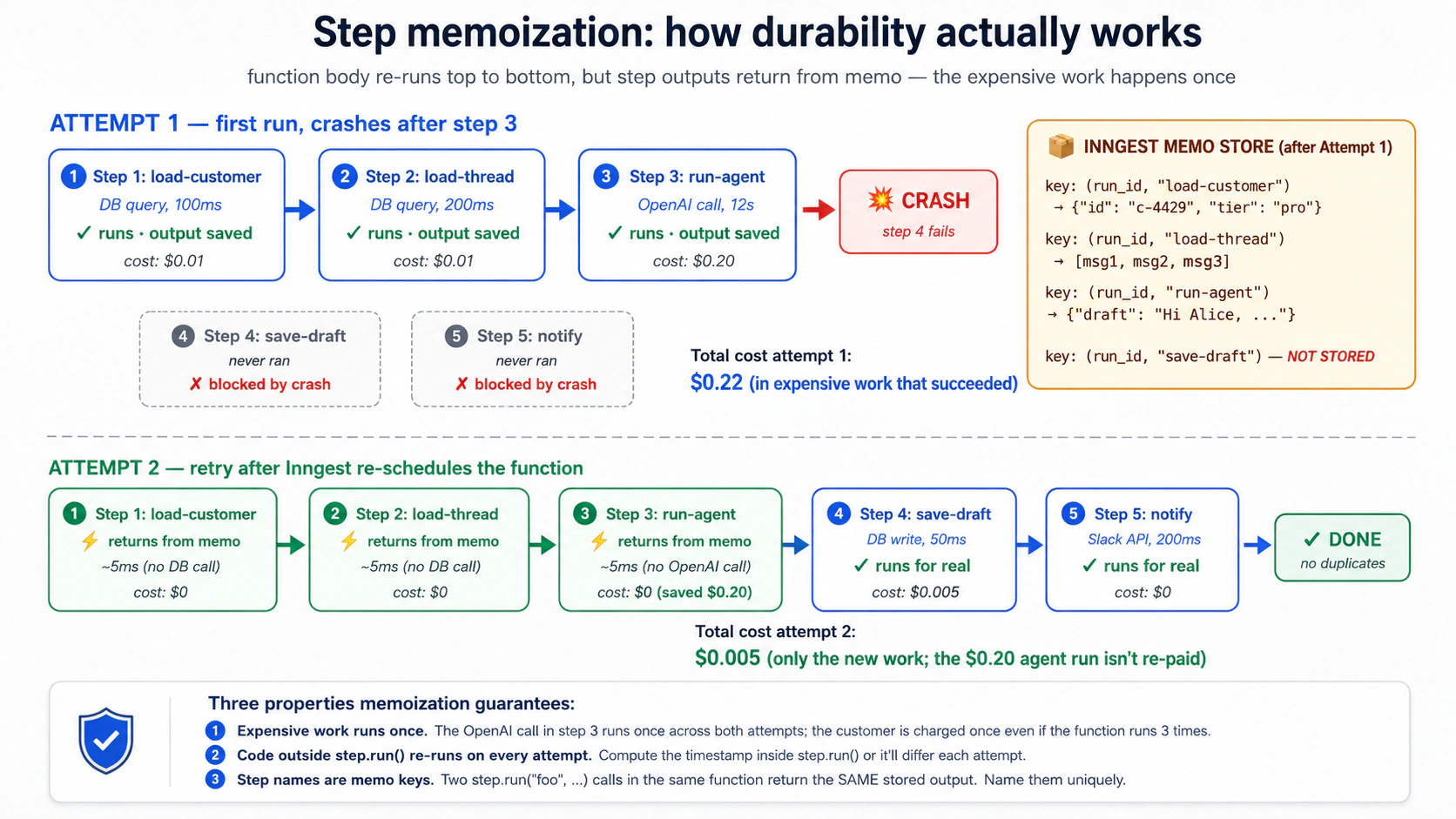
New users को surprise करने वाला implication. step.run के outside code हर attempt पर run होता है। अगर आप यह करते हैं:
async def handle_email(ctx: inngest.Context) -> dict[str, str]:
    # ANTI-PATTERN: this runs on every retry. Don't do this.
    expensive_thing: dict = await fetch_expensive_data(ctx.event.data["id"])

    await ctx.step.run("do-something", do_something_with, expensive_thing)
    return {"status": "done"}
fetch_expensive_data हर retry पर run होता है। अगर उसका call $0.10 cost करता है और function 5 times retry करती है, तो आपने same data पाँच बार fetch करके $0.50 spend किया। Fix है expensive thing को उसके own step में wrap करना:
async def handle_email(ctx: inngest.Context) -> dict[str, str]:
    expensive_thing: dict = await ctx.step.run(
        "fetch-expensive-data", fetch_expensive_data, ctx.event.data["id"],
    )
    await ctx.step.run("do-something", do_something_with, expensive_thing)
    return {"status": "done"}
अब fetch_expensive_data memoized है; retries उसके लिए फिर pay नहीं करतीं।
Step name memo key है। इसलिए step names function के अंदर unique होने चाहिए। अगर same function में दो step.run("load-customer", ...) calls हैं, Inngest दोनों calls के लिए पहले वाले का stored output return करेगा। यह almost never what you want. अगर loop में step N times call कर रहे हैं, तो उन्हें uniquely name करें (step.run(f"load-customer-{i}", ...)) ताकि हर iteration का own memo slot हो।
PRIMM, Predict. आपकी function में तीन steps हैं। Step 1 (
load-customer) DB calls में $0.01 cost करता है और 100ms लेता है। Step 2 (run-agent) OpenAI tokens में $0.20 cost करता है और 12 seconds लेता है। Step 3 (save-draft) DB calls में $0.005 cost करता है और 50ms लेता है। Step 2 OpenAI rate limits की वजह से 30% time fail होता है; Inngest backoff के साथ retry करता है। Cost difference क्या है between (a) तीनों कोstep.runमें wrap करना और (b) सिर्फ़ step 2 कोstep.runमें wrap करना? Confidence 1-5.
Answer: (a) में single retry आपको सिर्फ़ step 2 की cost ($0.20) देती है। Customer और save-draft memoized हैं; re-execute नहीं होते। (b) में हर retry आपको steps 1 और 3 plus step 2 cost कराती है: $0.215 per retry. 30% retry rate वाले thousand emails पर यह pure waste में लगभग $4.50 का difference है, plus operational complexity कि step 3 दो बार run होने पर क्या partially written हुआ। जिस काम को re-execute नहीं करना चाहते, उसे step.run में wrap करें। Mechanic समझने के बाद यह optional नहीं रहता।
Try with AI
With my AI coding assistant: review the Inngest function we built
in Concept 6's Try-with-AI and identify any code BETWEEN step.run
calls that should be wrapped in its own step but isn't. Common
candidates:

- Computed values (timestamps, IDs, formatting) that we want to be
  stable across retries
- Calls to logging or metrics services
- Reads from Redis, environment variables, secret managers

Then propose a refactor that moves each of these into its own step
with a meaningful name. For each, explain whether the side effect
is one you want to happen once (use step.run) or every retry
(leave it outside).
Concept 8: step.sleep and step.wait_for_event, समय के through durability
कुछ work को wait करना होता है। Welcome-email pipeline तुरंत email भेजती है, फिर तीन दिन wait करती है, फिर follow-up भेजती है। Refund-investigation को human approve करने का wait करना पड़ता है। Trial-conversion flow 7 days के अंदर "user upgraded to paid" watch करता है और जो दिखता है उसके हिसाब से अलग email भेजता है।
Normal Python function में, "तीन दिन wait" का मतलब तीन दिन process open रखना है। यह untenable है: process restart होता है, hosting आपको 72 hours idle compute के लिए bill करता है, timer lost हो जाता है। Inngest में "तीन दिन wait" one line है:
from datetime import timedelta

@inngest_client.create_function(
    fn_id="trial-welcome-series",
    trigger=inngest.TriggerEvent(event="user/trial.started"),
)
async def welcome_series(ctx: inngest.Context) -> dict[str, str]:
    user_id = ctx.event.data["user_id"]

    await ctx.step.run("send-welcome-email", send_welcome_email, user_id)

    # Wait three days. The function gets paged out of memory. Nothing
    # is consuming compute. Three days later, Inngest pages it back in
    # and resumes execution at the next line.
    await ctx.step.sleep("wait-three-days", timedelta(days=3))

    await ctx.step.run("send-followup", send_followup_email, user_id)

    return {"status": "completed"}
step.sleep durable है। Function suspend होती है; Inngest resume time store करता है; wait के दौरान compute consume नहीं होता; function सही समय पर resume करती है, सारे prior step outputs अभी भी memoized होते हैं। step.sleep (और step.sleep_until) paid plans पर one year तक wait कर सकते हैं, free Hobby plan पर seven days तक (Inngest usage limits). Seven-day Hobby ceiling इस course में use होने वाले हर sleep के लिए enough है।
ज़्यादा powerful sibling step.wait_for_event है। Time का wait करने की जगह another event का wait करें। Function matching event आने तक suspend रहती है, या आपके set किए timeout तक। यही Inngest को HITL (Concept 15) और inter-agent coordination patterns का सबसे clean expression बनाता है:
@inngest_client.create_function(
    fn_id="refund-with-approval",
    trigger=inngest.TriggerEvent(event="customer/refund.requested"),
)
async def refund_with_approval(ctx: inngest.Context) -> dict[str, str]:
    request = ctx.event.data
    request_id = request["request_id"]

    # If amount is over $500, require approval before issuing
    if request["amount_cents"] >= 50_000:
        # Notify a human via Slack/email/whatever
        await ctx.step.run("notify-approver", notify_human_approver, request)

        # Wait for an approval event. Up to 24 hours; expires otherwise.
        approval = await ctx.step.wait_for_event(
            "wait-for-approval",
            event="refund/approval.decided",
            timeout=timedelta(hours=24),
            if_exp=f"async.data.request_id == '{request_id}'",
        )

        if approval is None or not approval.data.get("approved"):
            return {"status": "rejected_or_timeout"}

    # Either it was under $500, or it was approved
    refund = await ctx.step.run(
        "issue-stripe-refund", call_stripe_refund_api, request,
    )
    return {"status": "issued", "refund_id": refund["id"]}
यह हो रहा है:
- Function
wait_for_eventतक पहुँचती है। Suspend होती है। Zero compute consumed. - Human Slack notification देखता है, admin UI में "Approve" click करता है, आपका UI
inngest_client.send(events=[Event(name="refund/approval.decided", data={"request_id": "...", "approved": True})])call करता है। - Inngest event को waiting function से match करता है (
if_expensure करता है कि सिर्फ़ इस request_id के events match हों) और event कोapprovalreturn value के रूप में देकर function resume करता है। - Function refund step तक continue करती है। Stripe refund human approval के बाद होता है।
step.sleep और step.wait_for_event वे timeouts हैं जिनके लिए आप pay नहीं करते। Function आपके code में synchronous दिखती है ("तीन दिन wait करो, फिर email भेजो"), लेकिन runtime semantics async और durable हैं। यह उन दो चीज़ों में से एक है जिसके लिए Inngest famous है (दूसरी durable retries)। इसके बिना alternative queue plus state machine plus database plus poller है, और आप तीन lines की जगह thousand lines लिखेंगे।
Quick check. तीन claims. True या False mark करें। (a) अगर paid plan पर
step.sleep30 days के लिए set है और उन 30 days में आपकी service पाँच बार redeploy होती है, sleep uninterrupted continue करता है। (b) अगरstep.wait_for_eventtimeout होता है, function exception raise करती है। (c) Same function में दोstep.wait_for_eventcalls simultaneously same event का wait कर सकते हैं।
Answers: (a) True on a paid plan: sleeps Inngest infrastructure में stored हैं, आपकी service memory में नहीं, इसलिए redeploys उन्हें lose नहीं करते। Tier ceiling note करें: 30-day sleep paid plan पर fine है लेकिन free Hobby plan के seven-day sleep cap से बाहर है। (b) False: timeout पर wait_for_event None return करता है। आपका code उसे check करता है और decide करता है क्या करना है (rejection, escalation, default-approval, जो भी policy हो)। (c) True, but suspicious: matching event आने पर दोनों fire होंगे। अगर दो wait_for_event calls के अलग if_exp filters हैं, fine. अगर identical हैं, शायद refactor opportunity है।
Try with AI
Build a delayed-investigation flow with my AI coding assistant.
Specification:

1. Triggered by event 'customer/refund.failed'.
2. Immediately notify the on-call human via Slack with the refund
   details and a "Investigate" button.
3. Wait for the human to click the button (which fires
   'customer/refund.investigation_started') for up to 4 hours.
4. If the click arrives in time: run the agent to draft an
   investigation summary.
5. If 4 hours pass without a click: escalate to a senior reviewer
   by firing 'customer/refund.escalated'.

Use the dev-server MCP's send_event tool to simulate the
human-click event during testing. Use get_run_status to inspect
how the suspended function shows up in the dashboard. Before
writing, use list_docs to scan the Inngest documentation tree
for the right page on wait_for_event semantics, then
read_doc on the page you find to get the exact syntax for
the if_exp filter expression.
Concept 9: Retries, error handling, dead-letter
Default रूप से Inngest failed steps retry करता है। Defaults sensible हैं: exponential backoff के साथ ~4 retries, attempts के बीच कुछ seconds से कुछ minutes तक। Final retry fail होने के बाद, run failed state में enter करता है और inspection तथा optionally replay के लिए वहीं रहता है। आप इसे per function tune कर सकते हैं: retries=10, retries=0 (बिल्कुल retry नहीं), specific exception types जिन्हें retry नहीं करना चाहिए।
@inngest_client.create_function(
    fn_id="charge-customer",
    trigger=inngest.TriggerEvent(event="order/checkout.completed"),
    retries=2,  # only retry twice; this involves Stripe; don't keep hammering
)
async def charge_customer(ctx: inngest.Context) -> dict[str, str]:
    try:
        charge = await ctx.step.run(
            "call-stripe", call_stripe_charge, ctx.event.data,
        )
        return {"status": "charged", "charge_id": charge["id"]}
    except StripeCardDeclinedError as e:
        # A declined card is not a transient failure. Don't retry.
        # Mark the order as failed in our database and emit an event
        # for the dunning flow.
        await ctx.step.run(
            "mark-failed", mark_order_failed,
            ctx.event.data["order_id"], reason=str(e),
        )
        await ctx.step.run(
            "emit-dunning-event", emit_dunning, ctx.event.data["order_id"],
        )
        return {"status": "card_declined"}
तीन patterns matter करते हैं।
Pattern 1: Transient vs permanent failures. Inngest default रूप से सब retry करता है, लेकिन कुछ errors transient नहीं होते। Stripe से card-declined error retry पर फिर decline होगा। Downstream API से 401-unauthorized सिर्फ़ wait करने से 200 नहीं बनेगा। आपकी function को इन्हें specifically catch और handle करना चाहिए: DB में write करें, downstream event emit करें, cleanly return करें, ताकि hopeless attempts पर retry budget waste न हो। Inngest का NonRetriableError explicitly Inngest को thrown exception के लिए retries skip करने को कहता है।
Pattern 2: Step-level vs function-level errors. Step throw करता है तो retry होता है। Step-level retries exhaust होने के बाद function fail होती है। कभी आप चाहते हैं कि function failing step से survive करे: failure log करे, work को "partial" mark करे, continue करे। step.run को try/except में wrap करें। Step अभी भी अपने retries पाता है; अगर सारे retries fail हों, exception आपके catch block तक propagate होता है, जहाँ आप decide कर सकते हैं क्या करना है।
Pattern 3: Dead-letter and replay. जब function fully fail होती है, disappear नहीं होती। यह Inngest dashboard के "failed runs" view में enter करती है, full trace, सारे step outputs, exception, और Replay button के साथ। Bug fix ship करने के बाद आप failed runs replay कर सकते हैं: fix के साथ वे वहीं से resume करती हैं जहाँ टूटी थीं। यह traditional queues का "dead-letter queue" pattern है, बस आपको dead-letter handler नहीं लिखना। आप bug fix करते हैं और replay करते हैं।
PRIMM, Predict. आपकी function step 2 में Stripe और step 4 में customer-data MCP server call करती है। Stripe step 2 के first attempt पर 503 (service unavailable, transient) return करता है। Step 2 exponential backoff के साथ 4 times retry करता है (~1s, ~2s, ~5s, ~12s); 4th retry पर Stripe वापस है, charge succeeds. अब step 4 run होता है, और customer-data MCP server 500 के साथ down है। क्या Inngest पूरी function retry करता है, या सिर्फ़ step 4? कितनी बार? Confidence 1-5.
Answer: सिर्फ़ step 4, और उसका अपना retry budget है। Steps retries share नहीं करते। Step 2 की चार retries step 4 से independent हैं। Inngest step 4 को retry करेगा (default ~4 times) और अगर MCP server वापस आ गया, step 4 complete होगा और function succeed करेगी। Step 2 का Stripe charge re-issued नहीं होगा, क्योंकि successful retry के बाद step 2 का output memoized था। Function ने retries में 20 seconds लगाए, फिर भी customer exactly once charged है।
Try with AI
With my AI coding assistant: extend the customer-support Worker
function from Concept 6 with explicit retry and failure handling.
Specification:

1. The OpenAI Agents SDK call should retry 3 times on transient
   failures (rate limit, timeout), but NOT retry on a content-policy
   refusal from the model.
2. The Slack notification should retry up to 10 times (Slack is
   often flaky; don't lose the notification).
3. The Postgres write should retry once; if it fails again, log the
   failure and continue (don't fail the whole function over a
   transient DB blip).

For each step, decide what's transient vs permanent and structure
the try/except accordingly. Use grep_docs to find the Python SDK's
NonRetriableError equivalent.
Concept 10: Python में AI calls के लिए step.run (step.ai.wrap TypeScript-only है)
Concepts 6-9 किसी भी side-effecting code के लिए काम करते हैं: DB writes, API calls, file writes, agent invocations. Inngest AI-specific step primitives भी ship करता है जो LLM calls के common patterns handle करते हैं: rate-limit retries, prompts और responses में observability, और optionally inference proxying जो serverless compute costs reduce करता है।
Important Python-vs-TypeScript note up front. Inngest के
step.aimodule में दो methods हैं, और उनका language support अलग है।step.ai.infer()TypeScript और Python दोनों में available है (Python SDK v0.5+): यह inference को Inngest infrastructure पर offload करता है और call trace करता है।step.ai.wrap()TypeScript only है: आज Python equivalent नहीं है। Python projects (जैसे इस course का Worker) में OpenAI Agents SDK call wrap करने का correct patternctx.step.run(...)है, जो already आपको full durability, retries, और wrapped step के inputs तथा outputs की observability देता है। आपको बस वह LLM-specific prompt/response telemetry नहीं मिलती जो TypeScriptstep.ai.wrapadd करता है। (May 2026 तक AI Inference docs के against verified.)
Python में OpenAI calls के लिए step.run (recommended pattern). आपकी function OpenAI call को ctx.step.run("name", fn, ...) के अंदर करती है। Inngest step के inputs और outputs trace करता है (जो arguments आपने pass किए और जो return हुआ), transient failures पर retry करता है, और result memoize करता है ताकि later steps की retries OpenAI cost फिर pay न करें। Prompt और response dashboard में step input/output के रूप में recorded होते हैं:
from openai import AsyncOpenAI

oai = AsyncOpenAI()


async def call_openai_summary(thread_text: str) -> str:
    """A normal async function. Inngest doesn't care that this is an LLM call."""
    response = await oai.chat.completions.create(
        model="gpt-4o",
        messages=[
            {"role": "system", "content": "Summarize this support thread in 3 sentences."},
            {"role": "user", "content": thread_text},
        ],
    )
    return response.choices[0].message.content


@inngest_client.create_function(
    fn_id="summarize-customer-thread",
    trigger=inngest.TriggerEvent(event="customer/thread.summary_requested"),
)
async def summarize_thread(ctx: inngest.Context) -> dict[str, str]:
    thread: list = await ctx.step.run(
        "load-thread", load_thread, ctx.event.data["thread_id"],
    )

    # The OpenAI call is wrapped in step.run. Inngest sees this as a step:
    # the inputs (formatted thread text) are recorded, the output (summary
    # string) is recorded, the call is memoized on success, and retries are
    # automatic on transient failures.
    summary: str = await ctx.step.run(
        "openai-summary", call_openai_summary, format_thread(thread),
    )

    return {"summary": summary}
Dashboard में यह run function की step trace दिखाता है (load-thread followed by openai-summary), हर step के inputs और outputs के साथ। अगर OpenAI ने 429 (rate limited) return किया, Inngest openai-summary को backoff के साथ automatically retry करता है: Concept 7 जैसी same memoization semantics, इसलिए retries prior load-thread step को double-bill नहीं करतीं। TypeScript के step.ai.wrap की तुलना में आपको क्या नहीं मिलता: automatic LLM-specific telemetry जैसे token counts, model name, और provider-specific traces dashboard के AI view में broken out. ज़्यादातर Python production workloads के लिए, standard step trace plus आपकी own OpenAI client telemetry (for example, OpenAI Agents SDK tracing) इस gap को cover करती है।
क्योंकि step.run हर step के inputs और outputs को Inngest observability store में record करता है, step से pass किया गया content store होता है और dashboard में visible होता है। अगर आपके prompt में PII (names, emails, addresses), secrets (API keys, internal tokens), contractual या financial data, या regulated content (HIPAA, GDPR-scoped data, PCI) है, तो raw content को step body में pass न करें। Redact, hash, summarize करें, या reference pass करें (customer_id और ticket_id, full ticket text नहीं) और sensitive content को step body के inside अपने authoritative store से reload करें, जहाँ retention और access controls configure करना आपके हाथ में है। अगर आप OpenAI Agents SDK की own tracing enable करते हैं तो वही discipline वहाँ भी apply होती है। Step traces को किसी भी production log की तरह treat करें: useful by default, policy से regulated.
step.ai.infer: serverless cost reduction के लिए niche tool (Python-supported). आप rarely इसे reach करेंगे; इस course में हर AI call के लिए step.run default है। step.ai.infer एक specific situation के लिए exist करता है: अपनी function process से OpenAI call करने की जगह, आप Inngest infrastructure से call कराते हैं, ताकि request in flight होने के दौरान आपकी function process deallocate हो सके। Serverless platforms (Vercel, Cloudflare Workers, AWS Lambda) पर जो in-flight time bill करते हैं, यह wait के दौरान compute cost बचाता है। Long-running inferences (Deep Research, large embedding batches) के लिए savings real हैं। Sub-second calls के लिए, यह much benefit के बिना latency add करता है। One shape, ताकि Quick reference decision-tree के पास concrete referent हो:
import os

from inngest.experimental.ai.openai import Adapter as OpenAIAdapter


@inngest_client.create_function(
    fn_id="long-research-call",
    trigger=inngest.TriggerEvent(event="customer/research.requested"),
)
async def long_research(ctx: inngest.Context) -> dict[str, str]:
    response = await ctx.step.ai.infer(
        "call-openai",
        adapter=OpenAIAdapter(
            auth_key=os.environ["OPENAI_API_KEY"],
            model="gpt-4o",
        ),
        body={
            "messages": [
                {"role": "user", "content": ctx.event.data["prompt"]},
            ],
        },
    )
    return {"response": response["choices"][0]["message"]["content"]}
दो details लोगों को trip करती हैं। Keyword adapter= है, model= नहीं: आप Adapter instance pass करते हैं, जो inngest.experimental.ai.<provider> से imported होता है (adapters openai, anthropic, gemini, grok, और deepseek के लिए ship होते हैं)। और inngest.experimental.ai namespace inngest-py 0.5.18 में experimental flagged है, इसलिए अगर आप इस पर depend करते हैं तो SDK version pin करें। Return value plain dict है, इसलिए ऊपर वाला response["choices"][0]["message"]["content"] subscript correct है। Function का compute time roughly request fire करने और response process करने के बीच का time है, OpenAI call खुद नहीं; serverless पर यह per invocation billable time से seconds shave कर सकता है।
Quick check. True या false. (a) Python में,
ctx.step.run("name", call_openai, ...)OpenAI call को durable, transient failures पर retried, और success पर memoized बनाता है। (b) Python में Inngest को OpenAI Agents SDK के साथ use करने के लिएstep.ai.inferhard requirement है। (c) ऊपर के example मेंstep.runकोstep.ai.inferसे replace करना function को हमेशा cheaper बना देगा।
Answers: (a) True: यही recommended Python pattern है। OpenAI call step body के अंदर जाता है; Inngest पूरे step को unit of work treat करता है। (b) False: ज़्यादातर cases में step.run enough है। step.ai.infer serverless compute cost के लिए optimization है, requirement नहीं। Worked Example में OpenAI Agents SDK integration plain step.run use करता है। (c) False: step.ai.infer पैसे सिर्फ़ तब बचाता है जब (i) आप serverless platform पर हैं जो in-flight time bill करता है AND (ii) call इतना long है कि request-offload savings added orchestration overhead से dominate करें। Sub-second calls या always-on servers पर plain step.run wins.
इस course में earlier caveat देखें: अगर आपका Course Four Worker @function_tool के साथ DeepSeek stream करता है, तो Version A below पर openai-agents==0.17.2 streamed-path SDK bug apply होता है, जिसे build-agents Decision 4 में document किया गया है। Runner.run_streamed को step.run में wrap करने से पहले उस course की OpenAI-fallback resolution apply करें।
Try with AI
With my AI coding assistant: take the Course Four customer-support
agent invocation and produce TWO versions of the Inngest function
that calls it:

Version A: Wrap the Runner.run_streamed call in step.run (the
recommended Python pattern: durable, retried on transient failures,
memoized; you get the standard step trace).

Version B: For comparison, write a SEPARATE small Inngest function
that calls a single OpenAI completion via step.ai.infer (the
Python-supported step.ai primitive that offloads inference to
Inngest's infrastructure to save serverless compute cost).

For each version, explain (a) what the dashboard trace shows for a
successful run, (b) what happens when the OpenAI call hits a 429
rate limit, (c) whether the Course Four SQLiteSession state gets
corrupted by a mid-run crash, and (d) on which kind of deployment
(always-on server vs serverless) Version B's offload saves real money.
Part 3: Flow control और recovery, production scale
Flow control तीसरी layer है: यह load के नीचे Worker को healthy रखती है। Concurrency Worker को downstream systems melt करने से रोकती है। Throttling आपको rate-limit walls से दूर रखती है। Priority और fairness एक chatty customer को बाकी सबको starve करने से रोकते हैं। Batching "midnight पर 10,000 events" को "100 manageable function runs" में बदलती है। Replay "कल के bug से हमारी 200 interactions fail हुईं" को "हमने fix कर दिया; 200 conversations resume हो गईं" में बदलता है। HITL gates human approval आने तक agent को suspend करते हैं। Part 3 के पाँच concepts आपको वे production policies देते हैं जो working Worker को ऐसे Worker में बदलती हैं जिसे paying customers के सामने रखा जा सके।
Concept 11: Concurrency और throttling
Concurrency किसी function के उन runs की maximum संख्या है जो एक साथ execute हो सकते हैं। Throttling उन runs की maximum संख्या है जो time की एक unit में start हो सकते हैं। दोनों per function configure होते हैं, हर एक के लिए एक line. Teams जब prototype से scale पर जाती हैं तो यही सबसे common production gap होता है।
from datetime import timedelta

@inngest_client.create_function(
    fn_id="customer-support-conversation",
    trigger=inngest.TriggerEvent(event="customer/email.received"),
    concurrency=[inngest.Concurrency(limit=10)],
    throttle=inngest.Throttle(limit=100, period=timedelta(minutes=1)),
)
async def handle_email(ctx: inngest.Context) -> dict[str, str]:
    ...
concurrency=10 कहता है: किसी भी moment पर इन functions के maximum 10 runs चल रहे होंगे। 11th event तब तक queue में wait करता है जब तक 10 में से कोई finish न हो जाए। throttle=100/minute कहता है: per minute maximum 100 new runs start होंगे। 101st event wait करता है, भले ही concurrency में headroom हो।
Practice में दोनों क्यों matter करते हैं। Concurrency downstream systems को protect करती है: अगर आपका customer-support Worker OpenAI और Postgres से बात करता है, तो 1,000 concurrent runs का मतलब है 1,000 simultaneous OpenAI calls और 1,000 simultaneous Postgres connections. आप अपना OpenAI rate limit exhaust करेंगे, connection pool exhaust करेंगे, या दोनों। Throttle bursts से protect करता है: अगर 500 customer emails ठीक 9:00am पर arrive करती हैं, तो आप same second में 500 functions start नहीं करना चाहते; throttle start rate को smooth करता है।
Per-key concurrency. एक single concurrency limit function पर globally apply होता है। ज़्यादा interesting pattern per-key concurrency है: event की किसी property के आधार पर limit करना।
@inngest_client.create_function(
    fn_id="customer-support-conversation",
    trigger=inngest.TriggerEvent(event="customer/email.received"),
    concurrency=[
        inngest.Concurrency(limit=10),  # global cap
        inngest.Concurrency(limit=2, key="event.data.customer_id"),  # per-customer cap
    ],
)
async def handle_email(ctx: inngest.Context) -> dict[str, str]:
    ...
इसका मतलब है: globally maximum 10 functions running, और एक समय में per customer maximum 2. अगर कोई single customer एक minute में 100 emails भेजता है, तो उनकी सिर्फ़ 2 emails simultaneously process होती हैं; बाकी 98 पीछे queue हो जाती हैं। इसी बीच दूसरे customers की emails normally flow करती हैं; chatty customer उन्हें block नहीं करता। यह two lines of code में multi-tenant fairness है। Concept 12 इस pattern को और आगे ले जाता है।
Quick check. Three claims, True or False. (a) अगर आप
concurrency=10set करते हैं और 1,000 events एक साथ arrive करते हैं, तो उनमें से 990 drop हो जाते हैं। (b) Throttling और concurrency limits दोनों total throughput reduce करते हैं। (c) Per-key concurrency को ऐसी key चाहिए जो event data से deterministic हो।
Answers: (a) False: events drop नहीं होते; वे queue होते हैं। Inngest की queue durable है; 990 events concurrency slots open होने तक wait करते हैं। (b) False. Throttling start-rate cap करता है; concurrency in-flight runs cap करता है। कोई भी work drop नहीं करता; दोनों shape करते हैं कि work कब execute होगा। Long window में throughput unchanged रहता है अगर आपका average load limits से नीचे है। Peak पर throughput shaped होता है: bursts queue absorb करती है। (c) True: key expression event data पर evaluate होता है; same logical scope के लिए stable string produce करनी होती है (customer_id ठीक है; current_timestamp नहीं)।
Try with AI
With my AI coding assistant: design the concurrency and throttling
policy for the customer-support Worker. Constraints:

- OpenAI rate limit: 30 requests per minute, hard cap.
- Postgres connection pool: 20 max connections (the Worker takes 1 per run).
- Some customers send bursts of 30+ emails in a minute (an angry
  customer); these shouldn't starve other customers.
- We expect ~1,000 emails per day, with peaks around 9am and 2pm.

Propose:
1. A global concurrency value
2. A per-customer concurrency value
3. A throttle (limit and period)

For each, explain what production failure it protects against and
what the cost is (in queue latency at peak).
Concept 12: Priority और fairness, multi-tenant scaling
Concurrency limits काम करते हैं। Per-key concurrency basic fairness add करती है। Production-grade multi-tenant systems को और चाहिए: priorities (Enterprise customers को same compute के लिए hobbyists के पीछे wait नहीं करना चाहिए) और fair-share scheduling (कोई single tenant अपने concurrency cap के अंदर भी पूरे system को monopolize न कर सके)।
Priority. Inngest हर event पर priority expression evaluate करता है; higher priority वाले runs lower priority वाले runs से आगे queue jump करते हैं।
@inngest_client.create_function(
    fn_id="customer-support-conversation",
    trigger=inngest.TriggerEvent(event="customer/email.received"),
    concurrency=[inngest.Concurrency(limit=10)],
    priority=inngest.Priority(
        # Enterprise tier = high priority; Pro = 0; Free = low priority
        run="100 - (event.data.customer_tier_priority * 100)",
    ),
)
async def handle_email(ctx: inngest.Context) -> dict[str, str]:
    ...
जब concurrency queue में 50 runs waiting हों, तो Enterprise customers के runs पहले जाते हैं, फिर Pro, फिर Free. Same tier के अंदर FIFO order apply होता है। Priority concurrency या throttle limits override नहीं करती; यह बस तय करती है कि waiting runs में से कौन next free slot लेगा। Enterprise customer अभी भी slot open होने का wait करता है; उसे बस next slot मिलता है।
Fair-share scheduling. जब hundreds tenants same global concurrency pool के लिए compete कर रहे हों, तो FIFO plus priority enough नहीं है। एक single tenant burst भेजकर फिर भी minutes तक अधिकांश slots occupy कर सकता है। Fair-share scheduling, जिसे concurrency पर key parameter और thoughtful sizing से implement किया जाता है, हर tenant को guaranteed slice देती है:
concurrency=[
    inngest.Concurrency(limit=50),   # global pool
    inngest.Concurrency(limit=3, key="event.data.tenant_id"),  # max 3 per tenant
],
इसके साथ: 50 total slots, कोई tenant 3 से ज़्यादा नहीं लेता। अगर 20 tenants active हैं, तो maximum 60 slots requested हैं लेकिन available सिर्फ़ 50. Fair-share उन्हें rotate करता है, हर tenant को कुछ share मिलता है, कोई shut out नहीं होता।
PRIMM, Predict. आपके पास
concurrency=10और per-customerconcurrency=2वाली customer-support function है। Priority भी configured है: Enterprise = high, Free = low. 9:00am पर queue में यह है: Customer A (Free) से 5 events, Customer B (Enterprise) से 5 events, और एक नए Customer C (Free, अभी first plan खरीदा) से 10 events. वे किस order में execute होंगे? Confidence 1-5.
Answer: यह multi-level decision है। पहले, per-customer cap 2 का मतलब है कि एक time पर हर customer के maximum 2 events run करने के eligible हैं। इसलिए pool of candidates है: A से 2, B से 2, C से 2: six runs immediately eligible. दूसरा, priority तय करती है कि उन six में से first slots कौन भरता है: B के two पहले run करते हैं (Enterprise), फिर A के two और C के two (Free, FIFO). इसलिए t=0 पर: B के 2 run, फिर A के 2 start, फिर C के 2 start. Total: 6 active. जैसे-जैसे हर one finish करता है, उस customer का next queued event eligible होता है और अगला slot priority से fill होता है। यह वही policy है जो Inngest में feature है और आपके own code में thousand-line scheduler.
Try with AI
With my AI coding assistant: extend the customer-support Worker
configuration with a priority and fair-share scheme. Requirements:

1. Three customer tiers: Enterprise, Pro, Free.
2. Enterprise customers should never wait more than 5 seconds at
   peak load.
3. Free tier customers should get fair access: no Free customer
   should be starved for more than 60 seconds, even when the
   global queue is full.
4. A single noisy customer (regardless of tier) should not occupy
   more than 3 slots.

Write the concurrency + priority configuration. For each line of
config, explain which requirement it satisfies.
Concept 13: Batching, cost-effective bulk processing
कुछ work naturally batched होता है। आप 10,000 customer conversations को independently summarize नहीं करते; आप LLM को एक बार में 50 का batch देते हैं। आप 10,000 audit rows एक-एक करके नहीं लिखते; आप उन्हें COPY करते हैं। Inngest का batch trigger आपको events accumulate करके batch को input की तरह लेकर single function invoke करने देता है।
@inngest_client.create_function(
    fn_id="batch-embed-tickets",
    trigger=inngest.TriggerEvent(event="ticket/resolved"),
    batch_events=inngest.Batch(
        max_size=50,        # invoke when 50 events accumulated, OR
        timeout=timedelta(seconds=30),  # invoke when 30 seconds pass, whichever first
    ),
)
async def batch_embed_resolved_tickets(ctx: inngest.Context) -> dict[str, int]:
    # ctx.events (plural) instead of ctx.event
    ticket_ids = [e.data["ticket_id"] for e in ctx.events]

    tickets = await ctx.step.run(
        "load-tickets", load_tickets_by_ids, ticket_ids,
    )

    # One embedding call for 50 tickets, not 50 calls for 1 ticket each
    embeddings = await ctx.step.run(
        "embed-batch", embed_texts_batch,
        [t["text"] for t in tickets],
    )

    await ctx.step.run(
        "store-embeddings", store_embeddings_batch,
        ticket_ids, embeddings,
    )

    return {"batched": len(ctx.events)}
क्या बदलता है: ctx.events एक list है, single event नहीं। Function per event की जगह per batch एक बार run होती है। OpenAI embedding API को 50 single-text calls की जगह 50-text batch के साथ call किया जाता है, जो dramatically cheaper है (आप per token pay करते हैं, लेकिन per-request overhead चला जाता है) और faster है (50 की जगह one API round-trip)।
Batching सही tool है जब work naturally bulkable हो (embeddings, bulk DB writes, bulk emails) और आप work होने से पहले अपने timeout तक की latency tolerate कर सकें। यह गलत tool है जब हर event को interactive response चाहिए या जब events के बीच ordering unpredictable ways में matter करती हो।
Quick check. True or false. (a) Batched functions को still retries और memoization मिलते हैं; batch as a whole durably memoized होता है। (b) अगर batch timeout सिर्फ़ 3 events accumulated होने पर expire हो जाए, तो function तब तक नहीं run होगी जब तक next 47 arrive न करें। (c) आप
batch_eventsकोconcurrencyके साथ combine करके cap कर सकते हैं कि parallel में कितने batches run हों।
Answers: (a) True: batch ही unit of work है; retries पूरे batch को replay करते हैं, उसके सभी events अभी भी scope में रहते हैं। (b) False: यही timeout का पूरा point है। 30 seconds के बाद function whatever accumulated है उसके साथ run होती है, भले ही 1 event हो। (c) True: यही production pattern है। Batch plus concurrency साथ में आपके downstream load को nicely cap करते हैं।
Try with AI
With my AI coding assistant: convert the Course Four embedding
pipeline (the one that embeds resolved tickets) from a per-ticket
event handler into a batched Inngest function.

Triggers: 'ticket/resolved' event, batched at 50 events or 30 seconds.

The function should:
1. Load the ticket bodies in one query
2. Call OpenAI embeddings API with a 50-text batch (faster + cheaper)
3. Store the embeddings via the customer-data MCP server
4. Emit a 'ticket/embedded' event per ticket for downstream consumers

Use grep_docs to find the OpenAI batch-embedding pattern.
Concept 14: Replay और bulk cancellation, production recovery
कभी-कभी सब कुछ एक साथ गलत हो जाता है। आपने bug ship किया; पिछले six hours में thousand runs fail हो गए। या आपका downstream API 30 minutes down था; उस window में जिसने भी उसे call करने की कोशिश की वह die हो गया। या आपको logic error मिला और आप fix करने के बाद पूरे day का work redo करना चाहते हैं।
दो opposite recovery primitives. Replay कहता है "यह work fail हुआ, मैं चाहता हूँ कि यह succeed हो।" Bulk cancellation कहता है "यह work queued था लेकिन अब मैं नहीं चाहता कि यह हो।" Same dashboard surface, opposite intent. Real traffic चलाने के पहले three months में ज़्यादातर teams को दोनों चाहिए होते हैं।
Replay recovery primitive है। Failed runs अपनी full step history, input event, successful steps के partial outputs और failed step की exception के साथ persist रहते हैं। Dashboard से आप Functions view खोलते हैं, failed runs वाली function पर filter करते हैं, time window और failure pattern select करते हैं (specific error message या सिर्फ़ "all failures"), Replay click करते हैं। Inngest उन runs को ऐसे re-schedule करता है जैसे वे freshly arrive हुए हों, लेकिन एक crucial difference के साथ: previously memoized step outputs cache hits की तरह वापस आते हैं।
Replay के बारे में तीन बातें समझें।
- Replay original run वाला same function code use करता है, आपके deploy के बाद वाला. अगर runs fail होने और उन्हें replay करने के बीच आपने fix deploy किया, तो replayed runs new code use करते हैं। यही पूरा point है।
- Replay memoization respect करता है। Original run में जो steps succeed हो चुके थे वे replay पर re-execute नहीं होते। अगर आपका customer-support Worker step 3 पर OpenAI tokens में $0.20 spend कर चुका था और step 4 पर fail हुआ, तो आप वह $0.20 फिर spend नहीं करते: सिर्फ़ step 4 onward run होता है। 47-run recovery scenario में इसका मतलब है कि bug fix के बाद replay का dollar cost roughly failed step × 47 है, whole function × 47 नहीं।
- Replay opt-in है। Failed runs dashboard में तब तक बैठे रहते हैं जब तक आप act नहीं करते। वे forever retry नहीं करते; वे disappear नहीं होते। वे आपका wait करते हैं।
Bulk cancellation inverse है। कभी-कभी आपके पास thousands queued या sleeping runs होते हैं जिन्हें अब आप नहीं चाहते: campaign cancel हो गया, customer churn कर गया और आप उसे follow-up emails नहीं भेजना चाहते, feature roll back हो गया। Dashboard से आप function और time window या event filter select करके Cancel click करते हैं। Matching runs cleanly terminate होते हैं: उनके step.sleep और step.wait_for_event calls resume नहीं होते, queued runs start नहीं होते, in-flight runs cancellation check करके next step boundary पर exit करते हैं। Cancellation step boundary respect करता है; in-flight step.run जिस step में है उसे terminate करने से पहले finish करता है, इसलिए आपको half-completed Stripe charges या torn DB writes नहीं मिलते।
Replay vs cancellation को decision की तरह देखें। जब runs की population में कुछ गलत हो, तो एक सवाल पूछें: क्या मैं चाहता हूँ कि यह work succeed हो या चाहता हूँ कि यह work न हो? अगर work succeed होना चाहिए (bug-fix recovery), replay करें। अगर work नहीं होना चाहिए (cancelled campaign, churned customer, rolled-back feature), cancel करें। अगर आप unsure हैं (for example, failed runs में कुछ recover करने हैं और कुछ पहले place पर fire नहीं होने चाहिए थे), dashboard query को ज़्यादा narrowly filter करें ताकि हर subset को सही treatment मिले।
Practice में इससे तीन patterns enable होते हैं:
- "हमने bug ship किया" recovery. Bad deploy की time window में failed runs find करें, bug fix करें, fix ship करें, failures replay करें। Customer experience: उनकी email को एक hour तक reply नहीं मिला लेकिन eventually मिला, बिना आपके recovery code लिखे।
- "Campaign canceled" rollback. Welcome series 14 days में three follow-up emails fire करती है; customer day 4 पर churn करता है। आप day-7 और day-14 follow-ups नहीं भेजना चाहते। Matching
wait-for-eventऔरsleepruns bulk-cancel करें। - "Schema migration" replay. आपने agent summaries का format change किया; आप चाहते हैं कि yesterday's tickets new format से re-summarize हों। Runs find करें, even successful ones को force-replay करें (dashboard इसे separate option की तरह देता है: replay-failures-only default है; replay-all schema-migration mode है), और agent new code से re-run करता है।
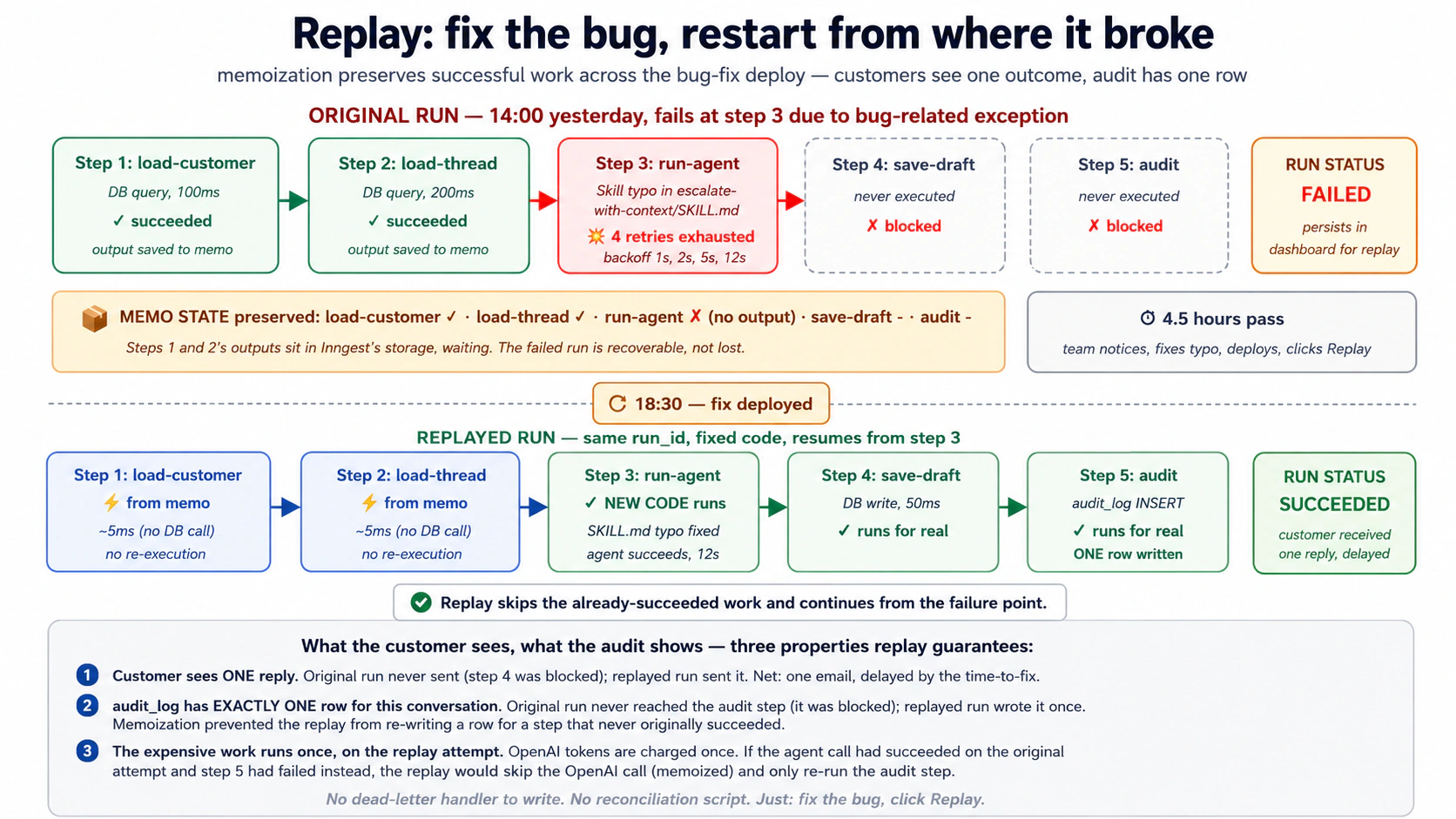
Dev-server MCP replay को Claude Code छोड़े बिना accessible बनाता है। Development के दौरान, जब आप replay scenario test करना चाहते हैं, तो dashboard में manually click around करने की ज़रूरत नहीं। आप AI से कह सकते हैं कि failed run inspect करने के लिए get_run_status use करे, फिर dashboard से या same idempotency key के साथ event re-fire करके replay trigger करे (Concept 4 की idempotency semantics के कारण, testing purposes के लिए यह functionally equivalent है)।
Quick check. True or false. (a) Replay failed steps को new deployed code से re-run करता है। (b) Replay successful steps भी re-run करता है ताकि सब consistent रहे। (c)
step.sleepमें 30 days के लिए पड़ा run sleep expire होने से पहले cancel किया जा सकता है। (d) In-flight function को bulk-cancel करना currently-executingstep.runको mid-step abort कर देता है ताकि faster terminate हो सके।
Answers: (a) True: इसी वजह से replay bug-fix recovery के लिए useful है। (b) False, footnote के साथ: default रूप से replay सिर्फ़ failed-and-onwards steps re-execute करता है; successful steps memo से return होते हैं। एक opt-in mode है (कभी-कभी "force replay" या "replay all" कहा जाता है) जो हर step top से re-execute करता है। Schema migrations या "function logic itself changed and I want to redo even the successful work" के लिए यही चाहिए। (c) True: sleeping runs dashboard में first-class objects हैं और cancel, modify या replay किए जा सकते हैं। (d) False: cancellation step boundary respect करता है; current step.run run terminate होने से पहले finish (या fail) होता है। यह torn writes prevent करता है।
Try with AI
Walk through a recovery scenario with my AI coding assistant:

Yesterday at 14:00 we deployed a change to the Worker's
escalate-with-context Skill. The new SKILL.md description had a
typo that made the model fail to recognize the trigger phrases.
From 14:00 to 18:00, 47 customer-support runs failed at the
escalation step.

At 18:30 we noticed, fixed the SKILL.md typo, and re-deployed.

Use the dev-server MCP's grep_docs to find Inngest's replay docs,
then:

1. Outline the exact dashboard steps to identify the 47 failed runs.
2. Explain what replay will do (step-by-step) for one of those runs:
   which steps return from memo, which run for real, what the
   dollar cost is.
3. Confirm whether the customers will see one reply or multiple
   (the durability + memoization story).
4. Identify ONE scenario in this story where you'd prefer to
   bulk-cancel instead of replay, and explain why.
Concept 15: HITL gates with step.wait_for_event, runtime में Invariant 1
Agent Factory का Invariant 1 कहता है कि human principal है: high-stakes decisions पर runtime को agent की autonomous judgment नहीं, authored intent honor करना होता है। Production में यह approval gates के रूप में दिखता है: agent analysis करता है, action draft करता है, लेकिन human approve करने तक action execute नहीं करता।
Inngest का step.wait_for_event (Concept 8) आज किसी भी platform पर इसका सबसे clean expression है। Agent decision point तक run करता है, suspend होता है, और approval event का wait करता है। Human review करता है (Slack में, admin UI में, email में) और approve या reject click करता है। Event fire होता है। Function human verdict के साथ resume होती है और उसी हिसाब से act करती है।
@inngest_client.create_function(
    fn_id="refund-with-hitl-gate",
    trigger=inngest.TriggerEvent(event="customer/refund.investigated"),
    concurrency=[inngest.Concurrency(limit=5)],
)
async def refund_with_gate(ctx: inngest.Context) -> dict[str, str]:
    request_id = ctx.event.data["request_id"]
    amount_cents = ctx.event.data["amount_cents"]

    # Step 1: the agent's analysis (Course Four Worker)
    analysis = await ctx.step.run(
        "agent-investigates",
        run_refund_investigation_agent,
        request_id=request_id,
    )

    # Step 2: if the agent thinks refund is warranted AND amount > $100,
    # gate behind human approval
    needs_approval = analysis.recommends_refund and amount_cents >= 10_000

    if needs_approval:
        await ctx.step.run(
            "notify-approver",
            send_slack_approval_request,
            request_id=request_id,
            analysis=analysis,
            amount_cents=amount_cents,
        )

        # === THE HITL GATE ===
        approval = await ctx.step.wait_for_event(
            "wait-for-human-approval",
            event="refund/approval.decided",
            timeout=timedelta(hours=24),
            if_exp=f"async.data.request_id == '{request_id}'",
        )

        if approval is None:
            # Timeout: no human responded in 24h. Escalate.
            await ctx.step.run(
                "escalate-timeout",
                escalate_to_senior_reviewer,
                request_id=request_id,
            )
            return {"status": "escalated_timeout"}

        if not approval.data["approved"]:
            await ctx.step.run(
                "notify-rejected", notify_customer_rejected,
                request_id=request_id,
            )
            return {"status": "rejected_by_human"}

    # Either it was approved, or it didn't need approval
    refund = await ctx.step.run(
        "issue-refund", call_stripe_refund,
        request_id=request_id, amount_cents=amount_cents,
    )

    await ctx.step.run(
        "audit-approved-refund", audit_refund,
        request_id=request_id, refund=refund,
        approved_by="human" if needs_approval else "auto",
    )

    return {"status": "issued", "refund_id": refund["id"]}
Code में आपको steps की sequence दिखती है, बीच में एक wait_for_event के साथ। Runtime पर यह हो रहा है:
- Agent run करता है (step 1, durably).
- Function decide करती है कि gate apply होता है या नहीं (in-code logic, side effects से free).
- अगर gated है: Slack notification fire होता है (step 2, durable). Function suspend होती है। 24 hours तक zero compute consume होता है।
- Slack में human Approve या Reject click करता है। Admin backend
inngest_client.sendcall करता है,refund/approval.decidedऔरrequest_idके साथ। - Inngest event को suspended function से match करता है (
if_expfilter ensure करता है कि सिर्फ़ matching request IDs match हों)। Function next line पर resume होती है। - Function human decision use करके या refund issue करती है या rejection notify करती है। दोनों paths decision और approver को audit करते हैं।
यही Inngest को queue-plus-state-machine से qualitatively different बनाता है। HITL pattern एक primitive है। Function का code top to bottom पढ़ता है, gate inline है। कोई callback नहीं, कोई state restoration नहीं, कोई if state == waiting_for_approval: ... dispatching नहीं। Runtime suspend/resume mechanic handle करता है; आपका code policy express करता है।
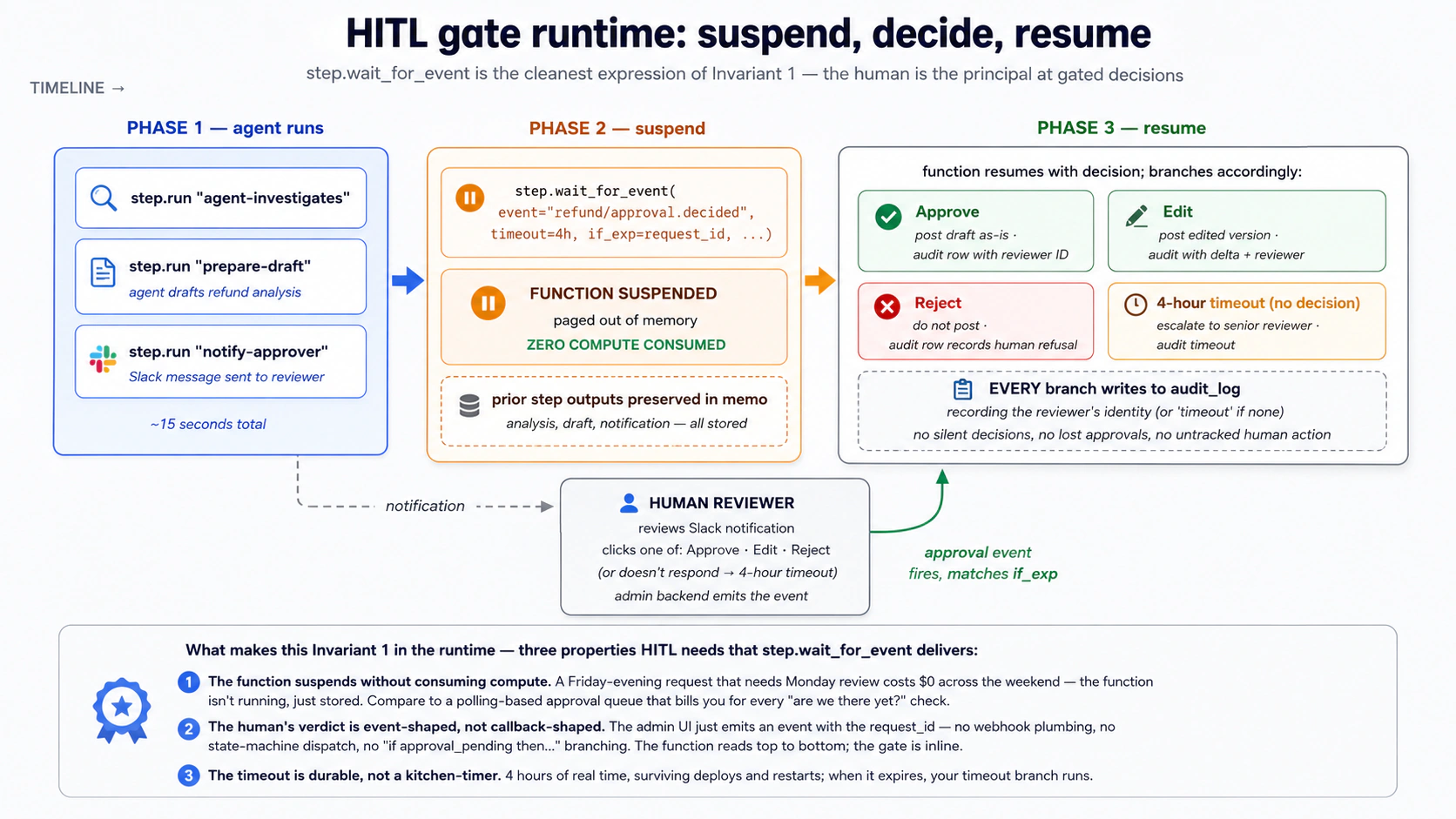
एक later course Invariant 1 को architecturally develop करता है: authored intent, spec-driven workflows, manager-of-Workers layer जो तय करती है कि कौन से gates किन actions पर apply हों। यह course आपको runtime primitive देता है। जब वह manager layer आएगी, तो वह जिस gate को implement करेगी वह exactly यही wait_for_event pattern होगा, बस fleet scale पर composed. Primitive अभी जानना मतलब later architectural pattern "magic" नहीं बल्कि "sensible composition" लगेगा।
PRIMM, Predict. आपके पास
timeout=timedelta(hours=24)वाला HITL gate set है। Customer की refund request Friday 17:00 पर आती है। Weekend पर कोई human online नहीं है। Gate का timeout Saturday 17:00 पर fire होता है। आपका timeout handler senior reviewer को escalate करता है। Senior reviewer Monday 9:00am पर escalation पढ़ता है। Timeline walk through करें: weekend में कितने function runs active थे? Inngest ने कितने compute के लिए charge किया? Confidence 1-5.
Answer: weekend में zero active function runs थे। Function suspended थी: Inngest ने उसका state store किया, function memory से page out की, और event या timeout का wait कर रहा था। Inngest suspended time के लिए bill नहीं करता। Saturday 17:00 आया और timeout fire हुआ, तो function उन few hundred milliseconds के लिए resume हुई जितना timeout handler call करने में लगा, फिर दोबारा suspend हुई (या handler completion पर complete हो गई)। Senior reviewer का Monday तक time लेना Worker के perspective से बस एक और wait_for_event cycle है। Inngest पर HITL workflows की economics polling-based queues से dramatically different है जो हर second "क्या approval आ गया?" polling के लिए bill करते हैं।
Try with AI
With my AI coding assistant: design the HITL gate for the
customer-support Worker's escalate-with-context Skill. Specification:

1. When the agent decides to escalate (the Skill fires), pause for
   human approval before posting the escalation summary to the
   senior support channel.
2. The approval gate should:
   - Notify the on-call reviewer via Slack with the agent's draft
   - Wait up to 4 hours for the reviewer to approve, edit, or reject
   - On approve: post the draft as-is.
   - On edit: incorporate the reviewer's edits, then post.
   - On reject: do not post; mark the escalation as canceled.
   - On 4-hour timeout: post the draft with a "no human review"
     warning header.
3. Every branch (approve/edit/reject/timeout) writes to audit_log
   with the human reviewer's identity (or "timeout" if none).

Use the dev-server MCP's send_event to simulate each branch of
the reviewer's decision during testing.
Part 4: Worked example, customer-support Production Worker
एक realistic evolution, ऊपर के हर concept और दोनों tools के साथ। हम Course #4 के chat-agent/ project को लेते हैं और operational envelope add करते हैं जो उसे Production Worker में बदलता है:
- agent को wrap करती Inngest functions,
- inbound emails के लिए event trigger,
- proactive health checks के लिए daily cron,
- concurrency limits,
- HITL escalation gate,
- और recovery prove करने के लिए replay-tested failure path.
Eight build decisions, Courses #3 और #4 जैसी same shape.
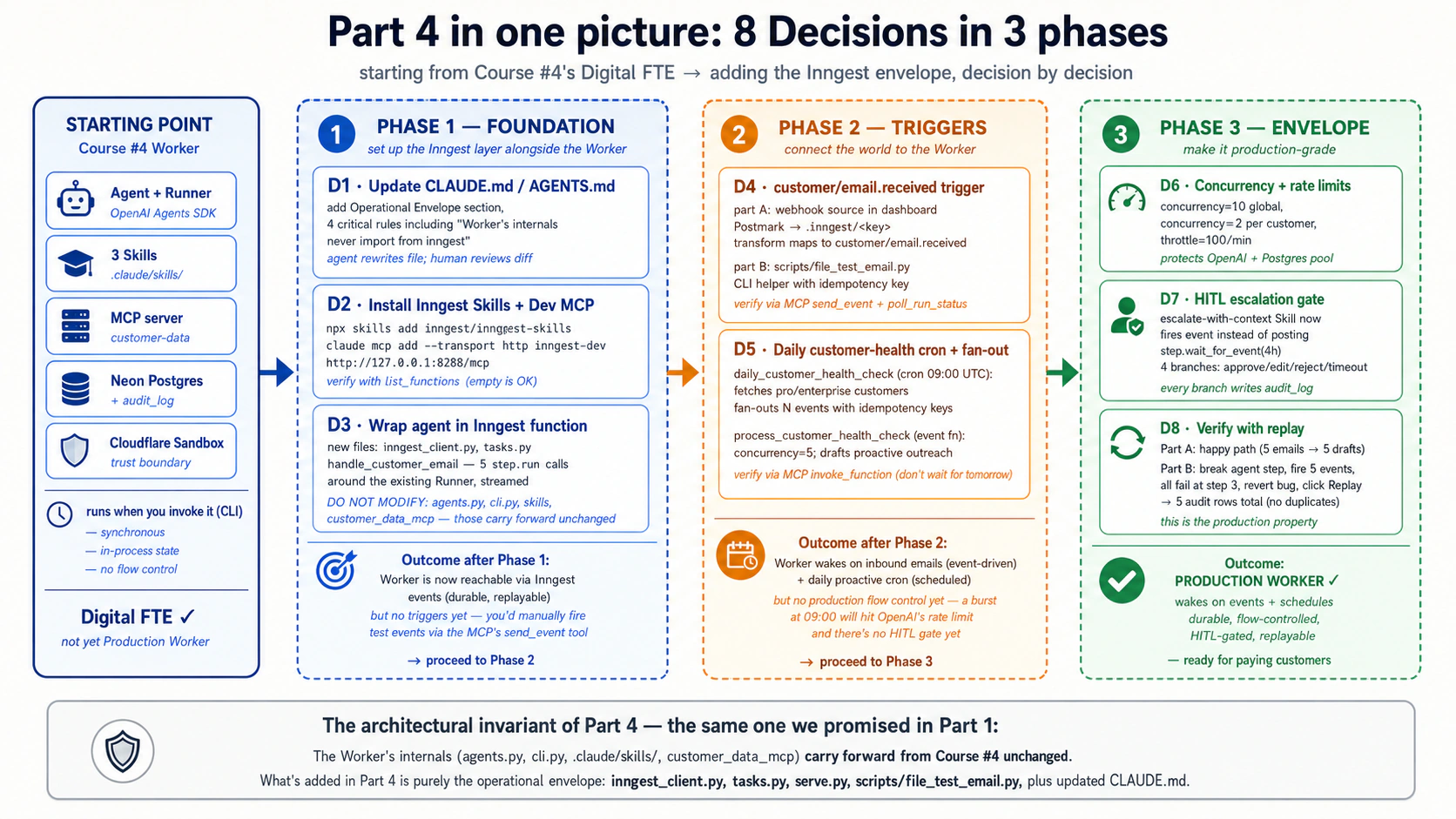
Start करने से पहले: setup जो prereqs में नहीं है। Part 4 चार चीज़ें assume करता है कि already done हैं। इस checklist को run करें; अगर कोई item missing है, Decision 1 से पहले fix करें।
- Course #4 worked example built है, सिर्फ़ read नहीं किया। आपके पास working
chat-agent/project है:cli.py,agents.py, तीन.claude/skills/(summarize-ticket, find-similar-cases, escalate-with-context), Neon Postgres schema withaudit_log, और customcustomer-dataMCP server. यह Part उन files को extend करता है; replace नहीं करता। जिस reader ने Course #4 read किया लेकिन उसका Part 4 worked example build नहीं किया, वह Decision 3 पर agent के बिना पहुँच जाएगा।- Node.js 20+ installed है, ताकि Inngest dev server (
npx inngest-cli@latest dev) run हो सके।- आपके पास Hobby tier पर free Inngest account है (हमेशा $0, no credit card). Hobby tier इस course की हर exercise cover करता है: 50,000 executions per month, 5 concurrent steps, replay और bulk-cancel वाला full dashboard. दो ceilings जानें: 5-concurrent-step cap, और free plan पर seven-day
step.sleepceiling (paid पर one year). ये course complete करने से नहीं रोकते; ये shape करते हैं कि production scale कैसा दिखता है (Part 5 के cost section में देखें)।- या तो Claude Code या OpenCode installed and authenticated है।
Brief
Course #4 के chat-agent Digital FTE को customer-support Production Worker में evolve करें जो:
customer/email.receivedevents पर wake होता है (production में Postmark webhook, dev में simulatedsend_eventcalls).- Existing customer-support agent durably run करता है: हर agent invocation
step.runमें wrapped ताकि crashes survive करे, transient failures पर retry करे, और full prompt/response observability मिले। - Daily 09:00 UTC cron run करता है जो हर Pro/Enterprise customer के लिए
customer/health_check.requestedevent fan out करता है; हर event एक Worker run trigger करता है जो proactive outreach message draft करता है। - Globally concurrency 10 और per customer 2 cap करता है, starts को per minute 100 तक throttle करता है (OpenAI rate limits और Postgres connection pool protect करते हुए)।
- Escalations को 4-hour HITL window के पीछे gate करता है: agent escalation draft करता है, Slack notification on-call reviewer को जाती है, function reviewer approve/reject/edit करने तक suspend होती है, फिर accordingly complete करती है।
- Replay path maintain करता है: कुछ fail होने पर, failed runs full state के साथ persist रहती हैं; bug fix करने के बाद आप उन्हें replay करते हैं और वे वहीं से resume करती हैं जहाँ टूटे थे।
Worker के internals (agent, Skills, MCP server, audit_log) change नहीं होते। हम उनके around Inngest add करते हैं।
आगे आने वाले prompts पर note. हर Decision block-quoted prompt के रूप में structured ask दिखाता है। Practice में best pattern यह है कि हर ask से पहले एक orient move रखें ("
CLAUDE.mdऔर relevant files पढ़ें, मुझे बताएं क्या दिखता है, और start करने से पहले 1-2 questions पूछें") और फिर structured ask भेजें जब agent context load करके ambiguities clarify कर चुका हो। नीचे दिए structured asks destination हैं, first move नहीं। इन्हें cold paste करना काम करता है; orientation के बाद paste करना बेहतर काम करता है, especially project grow होने पर।
Decision 1: Rules file को Inngest layer के साथ update करें
आप क्या करते हैं (Claude Code). अपने existing chat-agent/ project में Claude Code खोलें। पहले orient करें: agent से CLAUDE.md, existing src/chat_agent/ layout और Course #4 Skills पढ़ने को कहें, और उससे कहें कि वह क्या देखता है plus Course Five additions के बारे में one or two clarifying questions वापस बताए। वह exchange settle होने के बाद, agent को architectural addition brief करें और CLAUDE.md update करने को कहें:
We're adding the Inngest operational envelope around the Course Four
Digital FTE. The Worker's internals don't change. What's NEW:

1. inngest-py SDK installed and configured (an inngest_client in
   src/chat_agent/inngest_client.py).
2. A new module src/chat_agent/tasks.py containing Inngest
   functions that wrap the agent: one for inbound emails, one for
   the daily health-check cron, one for the HITL escalation gate.
3. A dev-only entry point src/chat_agent/serve.py that runs an
   ASGI server hosting the Inngest functions so the local dev
   server can discover them.
4. The Inngest dev server is launched separately with
   `npx inngest-cli@latest dev`; the Inngest dev-server MCP at
   http://127.0.0.1:8288/mcp is added to Claude Code's MCP config.

Update CLAUDE.md to add:

- A new "Operational envelope" section describing where Inngest
  functions live, what triggers each one has, and the rule that
  the Worker's internal code never depends on Inngest's API:
  agents, skills, MCP server are unchanged.
- A new critical rule: every Inngest function wraps its agent
  invocation in step.run so failures don't lose state.
- A new critical rule: every inngest_client.send from inside agent
  code uses an idempotency key (event ID seed) to prevent
  double-firing on retry.
- A new critical rule: HITL gates use step.wait_for_event with
  an explicit timeout AND a timeout handler that writes to
  audit_log. No silent timeouts.
- Update the Commands section with the two new commands:
  `npx inngest-cli@latest dev` (dev server) and
  `uv run uvicorn chat_agent.serve:app --reload` (function host).

Keep the file focused (well under 3,000 tokens). Show me the diff before writing.
Claude Code update draft करता है। Diff ध्यान से पढ़ें। New critical rules load-bearing pieces हैं: यहाँ कोई weak wording उस production failure mode को prevent नहीं करेगी जिसे rule prevent करने के लिए है।
क्यों। "Worker के internals never import from inngest" rule इस course का architectural invariant है। बाद में Inngest को Temporal या Restate से swap करना सिर्फ़ orchestration layer बदलता है; Worker untouched रहता है। Idempotency-key rule retry पर downstream events को twice fire होने से रोकता है। HITL no-silent-timeout rule Friday-evening request को ऐसे state में फँसने से रोकता है जहाँ न approve हुआ न escalate, क्योंकि किसी ने notice नहीं किया कि timeout weekend पर fire हुआ था।
OpenCode में क्या बदलता है। Same flow: agent को brief करें, diff review करें। अगर आपने Course #3 में rename किया था तो AGENTS.md use करें; same content.
Decision 2: Inngest skills install करें और dev-server MCP connect करें
आप क्या करते हैं (Claude Code). Orientation से start करें: agent से current MCP config और pyproject.toml पढ़ने को कहें, report करने को कहें कि कौन से Inngest pieces already wired हैं और कौन से install करने हैं, और कुछ भी change करने से पहले confirmation माँगे। फिर Inngest development plane setup करने के लिए brief करें:
Set up the Inngest development plane for this project. Three things
to do:

1. Install the Inngest Python SDK as a dependency:
   `uv add inngest`

2. Install the Inngest Agent Skills into .claude/skills/ via the
   official installer:
   `npx skills add inngest/inngest-skills`

   These six skills (inngest-setup, inngest-events,
   inngest-durable-functions, inngest-steps, inngest-flow-control,
   inngest-middleware) are TypeScript-focused in their code examples
   but the conceptual content transfers to Python. They'll help you
   write correct Inngest code when I ask for new functions.

3. Add the Inngest dev-server MCP to Claude Code's MCP config so you
   can interact with the running dev server:
   `claude mcp add --transport http inngest-dev http://127.0.0.1:8288/mcp`

After installing, start the dev server in a separate terminal:
`npx inngest-cli@latest dev`

Verify the setup by using the MCP's list_functions tool to confirm
the dev server is reachable. (It'll be empty; we haven't written
any functions yet. That's expected. The point is to confirm the
MCP connection works.)
Diff ध्यान से पढ़ें। Verify step important है: अगर list_functions error करता है, तो dev server running नहीं है या MCP configured नहीं है, और आप इसे Decision 3 से पहले पकड़ लेते हैं बजाय बाद में debug करने के।
Claude Code और OpenCode इस course में genuine रूप से सिर्फ़ यहीं diverge करते हैं (MCP-config mechanic अलग है: Claude Code के लिए CLI command, OpenCode के लिए JSON block). बाकी हर Decision tool-agnostic है; paste करने वाले prompts दोनों tools में same हैं।
क्यों। Inngest Agent Skills आपके coding agent को up-to-date API knowledge देते हैं जिसकी उसे ज़रूरत है। MCP agent को आपके running dev server से interact करने देता है: events send करना, runs monitor करना, docs search करना। दोनों मिलकर Decisions 3-8 को dramatically faster बनाते हैं, क्योंकि model first try में correct code लिखता है (Skills) और आपको context switch कराए बिना verify कर सकता है (MCP)।
Skills के TypeScript focus पर एक note: conceptual content (events, durable functions, steps, flow control, middleware) language-agnostic है। जहाँ Skills के TypeScript code examples Python syntax से conflict करते हैं, AI Python-specific syntax ढूँढने के लिए MCP पर grep_docs और read_doc use करता है। Inngest की Agent Skills documentation के अनुसार यही recommended workflow है।
"Model first try में correct code लिखता है" एक frontier-class coding agent assume करता है: Claude Sonnet या Opus, GPT-5-class model, या Gemini 2.5 Pro. Inngest architecture जो यह course सिखाता है (events, steps, memoization, flow control) SDK-level और model-independent है: आपका coding agent कोई भी model drive करे, यह hold करता है। लेकिन Part 4 build experience strong instruction-following पर lean करता है: structured Decision prompts और Decision 7 वाला step जहाँ आप event emit करने के लिए Skill की description rewrite करते हैं, दोनों expect करते हैं कि agent multi-step instructions reliably follow करे। Weaker model पर structured prompts पर ज़्यादा iterate करने और Skill descriptions को ज़्यादा concrete और explicit बनाने की उम्मीद रखें। Architecture broken नहीं है; smaller model के लिए prompting को बस more scaffolding चाहिए।
Decision 3: Existing customer-support agent को Inngest function में wrap करें
आप क्या करते हैं (Claude Code). Orient move से start करें: agent से src/chat_agent/agents.py, cli.py, और tools.py पढ़ने को कहें और report करने को कहें कि agent input में क्या expect करता है और Runner.run_streamed क्या return करता है। फिर Course #4 agent को agent itself modify किए बिना wrap करने के लिए brief करें:
Create the Inngest client and the first Inngest function. Two files.

File 1: src/chat_agent/inngest_client.py
- Import inngest
- Create a single inngest.Inngest() instance with app_id="chat-agent"
  and the appropriate env vars
- Export it so tasks.py can import it

File 2: src/chat_agent/tasks.py
- Import the inngest_client from file 1
- Define handle_customer_email: an async function decorated with
  inngest_client.create_function, triggered by event
  'customer/email.received'
- Inside the function:
    - step.run "load-customer": call the customer-data MCP server
      to load the customer record
    - step.run "load-thread": load the conversation thread for
      that customer
    - step.run "run-agent": call Runner.run_streamed with the
      existing Course Four agent, passing the customer, thread, and
      email body. The entire agent invocation is durably memoized.
    - step.run "save-draft-reply": persist the agent's draft to
      Postgres
    - step.run "audit-handled": write an audit_log row with the
      run_id, customer_id, action='email_drafted'
- Return {"status": "drafted", "draft_id": draft["id"]}

DO NOT MODIFY:
- src/chat_agent/agents.py (the agent definition)
- src/chat_agent/cli.py (the original CLI)
- src/customer_data_mcp/server.py (the MCP server)
- any .claude/skills/ files

The Inngest layer is purely additive. After writing, run
`uv run uvicorn chat_agent.serve:app --reload` in one terminal and
`npx inngest-cli@latest dev` in another. Then use the MCP's
list_functions to confirm handle_customer_email shows up.
Claude Code दोनों files लिखता है, import errors walk through करता है, और verify करता है कि function discoverable है। Diff ध्यान से पढ़ें।
क्यों। "Do not modify" list ही इसे additive change बनाती है। Course #4 का Worker पहले जैसा python -m chat_agent.cli से काम करता रहता है; Inngest layer same Worker का new entry point है। Production teams यही चाहती हैं: old path से new path पर inbound traffic gradually migrate करने का option, बिना Worker code fork किए।
Decision 4: Email-received event trigger add करें
आप क्या करते हैं (Claude Code). पहले orient करें: agent से Inngest dev-server MCP में existing webhook documentation पढ़ने को कहें और summarize करने को कहें कि dashboard-configured webhooks event-triggered functions से कैसे relate करते हैं। फिर inbound webhook integration setup करने के लिए brief करें:
Configure the inbound webhook trigger for customer emails. In
production this connects to Postmark (your email service); in
development we simulate it with send_event from the dev-server MCP.

Two parts:

PART A, webhook configuration (Inngest dashboard, manual).
Walk me through configuring a webhook source in the Inngest
dashboard that:
- Has the URL inn.gs/e/<key> (Inngest provides the key)
- Transforms incoming Postmark JSON into our event shape:
    name: 'customer/email.received'
    data:
      customer_id: lookup from Postmark's 'From' email
      body: Postmark's 'TextBody'
      subject: Postmark's 'Subject'
      received_at: Postmark's 'Date' (ISO 8601)
      idempotency: derived from Postmark's MessageID

You don't write the webhook config in code; it's dashboard UI.
Walk me through the steps with written instructions.

PART B, local development testing.
We need to test handle_customer_email without an actual email
arriving. Write a small CLI helper at scripts/fire_test_email.py
that:
- Takes --customer-id and --body arguments
- Sends an Inngest event via inngest_client.send(...) matching
  customer/email.received
- Uses an idempotency key derived from customer_id + timestamp so
  repeated test runs don't cause duplicate processing
- Prints the resulting run_id so we can inspect it in the dashboard

After writing both parts, use the MCP's send_event tool to fire
a test email payload directly, and poll_run_status to watch the
function execute end-to-end. Confirm:
- The function picks up the event
- The customer-data MCP server is called
- The agent runs (you'll see prompt/response in the trace)
- The audit_log gets a new row
Diff ध्यान से पढ़ें।
क्यों। Webhook configuration (dashboard, no code) और local testing (CLI helper) को split करना real production में यही reflect करता है। Inngest dashboard webhook routing own करता है; आपका code event consumption own करता है। इन्हें एक जगह मिलाना traditional webhook handling को messy बनाता है।
Decision 5: Fan-out के साथ daily customer-health-check cron add करें
आप क्या करते हैं (Claude Code). पहले orient करें: agent से tasks.py पढ़ने को कहें और report करने को कहें कि वह file को cron-triggered function plus separate event-triggered consumer से कैसे extend करेगा। फिर scheduled work add करने के लिए brief करें:
Add a daily cron-triggered Inngest function that runs at 09:00 UTC
and fires a customer-health-check event per Pro/Enterprise customer.

In src/chat_agent/tasks.py, add:

1. daily_customer_health_check, a cron-triggered function:
   - Schedule: 09:00 UTC daily (cron expression: "0 9 * * *")
   - step.run "fetch-eligible-customers": query the customer-data
     MCP for all customers where tier IN ('pro', 'enterprise')
     AND last_proactive_outreach < NOW() - INTERVAL '7 days'
   - step.run "fan-out-events": for each customer, build an Event
     with name='customer/health_check.requested', data={'customer_id':
     id, 'date': today.isoformat()}, and id=f'health-check-{id}-{date}'
     (idempotency key prevents same-day duplicates if the cron fires
     twice). Call inngest_client.send(events=[...]) in one batch.
   - Return {'customers_scheduled': N}

2. process_customer_health_check, an event-triggered function:
   - Trigger: event 'customer/health_check.requested'
   - concurrency: limit=5 globally (it's batch work; don't melt OpenAI)
   - step.run "load-customer": from customer-data MCP
   - step.run "load-recent-activity": last 30 days of conversations
     and refunds from audit_log
   - step.run "run-health-agent": run the Course Four agent with a
     specialized system prompt: "draft a proactive outreach for
     this customer based on their recent activity"
   - step.run "save-draft" and step.run "audit-drafted"
   - Return {'status': 'drafted', 'customer_id': id}

After writing both, use the MCP's invoke_function to manually
trigger daily_customer_health_check (don't wait for 09:00 tomorrow).
Use poll_run_status to watch the fan-out happen. You should see
the parent function complete in seconds, and N child runs appear in
the dashboard. Confirm one of those child runs succeeds end-to-end.
Diff ध्यान से पढ़ें। Claude Code functions लिखता है, MCP से manual trigger run करता है, और runs propagate होते हुए watch करता है।
क्यों। यह idempotency (Concept 4) के साथ fan-out (Concept 5) है। Cron function quickly return करती है; actual work parallel child runs में होता है (process_customer_health_check पर concurrency limit के अनुसार)। अगर cron same day twice fire होता है (bug, redeploy, dashboard manual-invoke), idempotency keys duplicate processing prevent करते हैं। Later course इसी pattern को workforce scale पर compose करेगा।
Decision 6: Concurrency limits और rate limiting add करें
नीचे दी गई concurrency और throttle settings configuration हैं, consumption नहीं। वे खुद money cost नहीं करतीं; वे downstream systems protect करती हैं जो money cost करते हैं (OpenAI के rate-limited tokens, Postgres का connection pool, आपके own MCP server के resources). Production scale के लिए config लिखें; बस याद रखें कि Hobby-tier 5-concurrent-step cap आपकी observed concurrency को 5 पर रखता है (Part 5 के "Hobby-tier ceilings" देखें)।
आप क्या करते हैं (Claude Code). पहले orient करें: agent से current tasks.py पढ़ने को कहें और report करने को कहें कि currently किन functions में कोई flow-control configuration है। फिर production flow control add करने के लिए brief करें:
Add concurrency and throttling configuration to the customer-support
functions so we protect OpenAI's rate limit and Postgres' connection
pool. Apply these specific policies:

For handle_customer_email:
- concurrency: 10 globally
- concurrency: 2 per customer (key="event.data.customer_id")
- throttle: 100 starts per minute
- Rationale to capture in comments: OpenAI has 30 rpm hard cap;
  Postgres pool is 20; we want a noisy customer to not occupy
  more than 2 slots.

For process_customer_health_check (already has concurrency=5):
- Add: throttle of 30 starts per minute
- Rationale: this is batch work; the cron fires 500+ events at once;
  the throttle smooths the start-rate.

For daily_customer_health_check (the cron):
- No concurrency change needed; it runs at most once a day at 09:00
  with the global default concurrency.

After making the changes, simulate a burst: use the MCP's
send_event to fire 20 customer/email.received events for 5 different
customers in quick succession (4 events per customer). Then use
list_functions and get_run_status to confirm:
- Only 10 are running concurrently (global cap)
- Only 2 per customer are running (per-customer cap)
- The remaining events queue
- All eventually complete
Diff ध्यान से पढ़ें। Claude Code configuration add करता है, MCP से burst test run करता है, और results report करता है।
क्यों। Two-layer concurrency cap Concept 12 का multi-tenant fairness pattern है। इसके बिना, एक chatty customer all 10 global slots occupy करके बाकी सबको starve कर सकता है। Throttle Concept 11 की OpenAI rate-limit protection है; उसके बिना, cron-driven fan-out का 09:00 burst पहले 2 seconds में OpenAI के 30-rpm cap को hit करेगा और कई runs fail होंगे।
Decision 7: HITL escalation gate add करें
आप क्या करते हैं (Claude Code). पहले orient करें: agent से escalate-with-context/SKILL.md और tasks.py पढ़ने को कहें और report करने को कहें कि currently escalate Skill fire होने पर क्या होता है। फिर human-approval gate add करने के लिए brief करें:
Add the HITL escalation gate per Concept 15. When the agent's
escalate-with-context Skill fires, we want a human to approve
before the escalation actually posts to the senior support channel.

Add to src/chat_agent/tasks.py:

escalate_with_human_approval, an event-triggered function:
- Trigger: event 'customer/escalation.requested'
  (the Course Four escalate-with-context Skill emits this event
  instead of posting directly; we need to update the Skill to do so,
  see below)
- concurrency: 5 (escalations are rare)

Inside the function:
1. step.run "notify-reviewer": Slack message to on-call reviewer
   with the agent's escalation draft and three buttons (Approve,
   Edit, Reject). Buttons POST to our admin backend which calls
   inngest_client.send with event 'escalation/decision.made' and data
   including request_id, decision, and optional edited_text.

2. THE GATE:
   approval = await ctx.step.wait_for_event(
       "wait-for-decision",
       event="escalation/decision.made",
       timeout=timedelta(hours=4),
       if_exp=f"async.data.request_id == '{request_id}'",
   )

3. Branch on the result:
   - approval is None (timeout): step.run "audit-timeout" + post
     the draft with a "no human review" warning header. Audit row
     includes action='escalation_posted_via_timeout'.
   - approval.data.decision == 'reject': step.run "audit-rejected" +
     do not post. Audit row includes the reviewer's identity.
   - approval.data.decision == 'edit': step.run "audit-edited" with
     reviewer's edited_text + post the edited version.
   - approval.data.decision == 'approve': step.run "audit-approved" +
     post the original draft.

Also: update .claude/skills/escalate-with-context/SKILL.md to
instruct the agent to fire 'customer/escalation.requested' (via
inngest_client.send with an idempotency key) instead of posting
directly. The actual posting now happens in the Inngest function
after the gate.

After writing, test all four branches by using the MCP's send_event
to manually fire 'escalation/decision.made' with each decision
type, and one scenario where no decision is sent and you let the
4-hour timeout fire (use a 30-second timeout for the test, then
revert to 4 hours).
Diff ध्यान से पढ़ें। Claude Code function लिखता है, SKILL.md description और body update करता है, और MCP से four-branch test walk through करता है।
क्यों। यह Concept 15 का HITL pattern है जो Course #4 audit subsystem में wired है। हर branch (approve, edit, reject, timeout) reviewer's identity (या कोई न हो तो "timeout") के साथ audit_log में लिखती है। Skill update loop close करता है: agent अब directly post नहीं करता; वह escalation request करता है और Inngest function human input के आधार पर decide करती है कि post करना है या नहीं। यह runtime में Invariant 1 है: agent की authority constrained है, human authored intent system में वापस आता है, और audit trail record करता है कि किसने क्या decide किया।
Decision 8: Replay scenario के साथ end-to-end verify करें
आप क्या करते हैं (Claude Code). पहले orient करें: agent से MCP के ज़रिए dashboard की current state (list_functions, recent runs) पढ़ने को कहें और कोई events send होने से पहले summarize करने को कहें कि verification क्या exercise करेगा। फिर verification scenario run करने के लिए brief करें:
Run the end-to-end verification. Two parts.

PART A, the happy path.
1. Fire a customer/email.received event via the MCP's send_event
   for customer 'c-test-1' with body "Hi, my refund hasn't arrived
   and I'm getting worried about my upcoming bill."
2. Use poll_run_status to watch handle_customer_email run end-to-end.
3. Confirm in the dashboard trace:
   - All 5 steps completed
   - The agent's prompt and response are visible in the trace
   - The audit_log has a new row with action='email_drafted'
4. Query the customer-data MCP to confirm the draft reply is
   persisted in the customer's conversation thread.

PART B, the failure-and-replay path (this is the production scenario).

1. Deliberately break the run-agent step: edit src/chat_agent/tasks.py
   to raise a ValueError("simulated agent failure") inside the
   run-agent step.
2. Fire 5 customer/email.received events via send_event for 5
   different customers.
3. Watch all 5 runs fail at the run-agent step. Confirm in the
   dashboard:
   - Each run has steps 1 and 2 marked successful
   - Step 3 (run-agent) shows the ValueError after the retries
     exhaust
   - Steps 4 and 5 (save-draft, audit) never ran
4. Now fix the bug: revert the deliberate ValueError. Save the file
   (uvicorn auto-reloads).
5. In the dashboard, select the 5 failed runs and click Replay.
6. Watch each replayed run:
   - Steps 1 and 2 return immediately from memo (no re-execution)
   - Step 3 (run-agent) executes for real and succeeds
   - Steps 4 and 5 execute for real
   - The customer's draft is persisted; the audit row is written
7. Query audit_log to confirm:
   - Each customer has exactly ONE row with action='email_drafted'
   - No duplicates (memoization prevented re-running the
     audit-writing step on replay)

Report back: did Part A succeed cleanly? Did Part B produce exactly
one audit row per customer (5 total)?
Diff ध्यान से पढ़ें। Claude Code दोनों parts run करता है और outcome report करता है। अगर Part B 5 audit rows produce करता है (one per customer) और no duplicates, तो Production Worker architecture verified है। अगर यह 10 produce करता है (कुछ duplicated) या 4 (एक missed), durability या memoization story में कुछ broken है, और audit query diagnostic है।
क्यों। Part A happy path prove करता है। Part B failure-and-replay story prove करता है, जो Inngest adopt करने को justify करने वाली architectural property है। Bad deploy से recover करके customer interactions lose न करने वाला Worker Production Worker है; उन्हें lose करने वाला Worker Digital FTE है। यह verification scenario दोनों के बीच bright line है।
अभी क्या हुआ
आपने Course #4 के customer-support Digital FTE को लिया और उसके around operational envelope add किया। Agent के internals नहीं बदले: same Agent, same Runner.run_streamed, same Skills, same MCP server, same audit_log. जो बदला वह agent के around सब कुछ है। अब यह events (webhook-driven inbound emails) और schedules (daily cron) पर wake होता है, durably run करता है (agent invocation को wrap करता step.run), production flow control respect करता है (concurrency, throttle, per-customer fairness), HITL gates support करता है (escalation post होने से पहले Slack approval), और failures से recover करता है (dashboard replay)।
Agent code same है; agent की reach fundamentally different है। जिस function को किसी को call करना पड़ता था वह अब ऐसी function है जिसे दुनिया wake कर सकती है, उस resilience और flow control के साथ जिसकी production demand करती है।
Remaining concerns scale पर observability, multi-Worker coordination, और manager layer हैं जो decide करता है कौन से Workers कौन सा traffic handle करें। Track में next course यही है। Course Five production-ready execution की unit cover करता है; next course उन units को workforce में compose करता है।
Part 5: यह course कहाँ रुकता है
Production Worker का cost shape
दो cost surfaces matter करते हैं: infrastructure cost (Inngest, Postgres, sandbox compute) और inference cost (OpenAI tokens). Load increase होने पर infrastructure roughly flat रहता है; inference linearly scale करता है। नीचे के numbers May 2026 के हैं; budget में quote करने से पहले current pricing pages check करें।
Inngest pricing. Inngest per execution charge करता है: हर function run, plus हर step-level retry, one execution count होता है।
| Tier | Price | Executions / month | Concurrent steps | Notable |
|---|---|---|---|---|
| Hobby | $0 | 50,000 | 5 | 3 users, 50 realtime connections, no credit card |
| Pro | from $75 / month | 1,000,000 | 100+ | 1000+ realtime connections, 15+ users, 7-day trace retention |
| Enterprise | custom | custom | 500-50,000 | SAML / RBAC, 90-day trace retention, dedicated support |
Events pricing ऊपर layer होती है: per day first 1-5M events included हैं; ऊपर 1M-5M tier लगभग $0.0005 per event पर run करता है। 1M cap blow past करने पर Pro additional 1M executions per $50 add करता है।
Hobby-tier ceilings जो यहाँ matter करते हैं। 5-concurrent-step cap का मतलब है कि भले ही आप code में concurrency=Concurrency(limit=10) declare करें, platform का account-level cap आपको 5 पर रखता है। आपका code production के लिए correct है; free tier पर observed concurrency 5 है। step.sleep और step.sleep_until भी tier-bounded हैं: free Hobby plan पर up to seven days, paid plans पर up to one year (Inngest usage limits).
Inference cost dominate करता है। Typical customer-support Worker run per conversation ~3,000-10,000 GPT-4o tokens use करता है। Illustrative GPT-4o pricing पर यह context size और model choice के अनुसार per email $0.01-$0.50 है। 1,000 emails per day के लिए inference में $10-$500/day. आप यही optimize करते हैं। बाकी सब rounding error है।
Optimization zone में आने के बाद तीन Inngest-specific cost levers:
- Pure functions को
step.runमें wrap न करें। अगर function का कोई side effect नहीं है, उसे durability की ज़रूरत नहीं; wrap करना बिना benefit step-run charge add करता है।step.runको I/O और side effects के लिए save करें। - Bulk paths के लिए
batch_eventsuse करें। 50-event batch one function run है, 50 नहीं। step.sleepऔरstep.wait_for_eventसे cheaply suspend करें। Suspended functions suspension time के लिए bill नहीं करतीं। 3-day delayed-followup की cost 3-second one जितनी है।
50 Workers तक scale करना roughly inference के लिए $3,000-$15,000/month, Inngest के लिए $50-$200, Neon के लिए $50-$200, sandbox compute के लिए $100-$500 है। Infrastructure flat scale करता है; inference bill traffic के साथ scale करता है।
Swap guide: operational envelope invariant है, platform नहीं
यह course हर layer पर Inngest को name करता है। वजह यह है कि teaching example को concrete answers चाहिए, "अपनी पसंद का कोई भी orchestrator use करें" नहीं। लेकिन architecture किसी भी compliant alternative के साथ काम करता है। Course design explicitly पाँच swaps anticipate करता है:
-
Trigger surface: Inngest events → Temporal signals, Restate handlers, AWS EventBridge + Lambda. हर platform के पास "यह named चीज़ होने पर यह code run होता है" express करने का तरीका है। Event names, payload shapes, और idempotency discipline transfer होते हैं। जो बदलता है: SDK का decorator syntax और dashboard.
-
Durable execution: Inngest
step.run→ Temporal activities, Restate handlers, custom Postgres-backed state machines. हर option आपको "इस side-effecting call को memoize करो, transient failure पर retry करो, crash के बाद resume करो" semantics देता है। Temporal closest analog और older, more enterprise-tested option है। Restate newest है और अधिक functional-programming flavor रखता है। Custom state machines teams तब लिखती हैं जब managed platform adopt नहीं कर सकतीं; usually 1,000-10,000 lines of code जो Inngest आपको free में जो देता है उसका ~70% recreate करती हैं। -
HITL primitive:
step.wait_for_event→ Temporal काawait Workflow.execute_activity(approval_signal), Restate awakeables, custom Redis/Postgres approval queues. Pattern same है: function suspend होती है, external signal उसे resume करता है, audit decision capture करता है। Inngest की expression writing में सबसे clean है; Temporal ज़्यादा verbose लेकिन large scale पर battle-tested है। -
Cron scheduling: Inngest cron triggers → Kubernetes CronJobs + queue, GitHub Actions schedules, AWS EventBridge schedules. Cron triggers commodity हैं। Inngest advantage cron having नहीं है; advantage यह है कि cron-triggered functions को event-triggered functions की तरह same durability/replay/flow-control automatically मिलता है। बाकी platforms में यह आपको खुद wire करना पड़ता है।
-
Flow control: Inngest concurrency + throttle → Temporal task queues with worker concurrency, Redis-backed rate limiters, AWS SQS message visibility timeouts. Other platforms यह कर सकते हैं; Inngest इसे उस configuration density से करता है जो हमने देखी (one decorator argument).
Production scale पर open companion के रूप में Dapr. एक more ambitious replacement worth naming: Dapr Agents as structural companion to Inngest at production scale, ठीक वैसे जैसे OpenCode, Claude Code का companion है। Dapr Agents March 23, 2026 को CNCF governance के तहत v1.0 GA पहुँचा (CNCF announcement, Dapr Agents core concepts). DurableAgent production-ready class है; older Agent class deprecated है। Dapr चुनें जब Kubernetes-native deployment और multi-language SDKs, Inngest के local dev experience से ज़्यादा matter करें। Inngest better learning tool है (dashboard mental model visible बनाता है); Dapr better scale tool है जब आप Inngest के tier ceilings hit कर चुके हों या K8s-native multi-language deployment चाहिए हो।
Inngest भी open source है (github.com/inngest/inngest; 1.0 release ने September 2024 में self-hosting support add किया) और Helm + KEDA से self-hostable है। Scale पर जो axes matter करते हैं वे governance, support, और maturity हैं: Inngest single vendor द्वारा governed है और self-hosting story young है; Dapr CNCF-governed है और production track record longer है।
| Course Five concept | Inngest primitive | Dapr production analogue | Teaching note |
|---|---|---|---|
| Scheduled work | TriggerCron | Cron input binding / Dapr Scheduler | Same idea: time Worker को wake करता है। Dapr usually component configuration मांगता है। |
| Webhook/event ingress | Inngest webhook endpoint → event | HTTP endpoint, input bindings, or pub/sub ingress | Inngest ज़्यादा plumbing hide करता है; Dapr infrastructure control देता है। |
| Internal events | inngest_client.send() | Dapr pub/sub | Same event-driven mental model; Dapr में broker pluggable है। |
| Fan-out | One event triggers many functions | One topic/event consumed by many services | Same architecture; Dapr broker/topic/subscriber composition use करता है। |
| Durable steps | step.run() + memoization | Dapr Workflows + activities | Similar production purpose, different developer model. |
| Waiting without compute | step.sleep() | Durable workflow timers | दोनों wait करते समय process open नहीं रखते। |
| Human approval gate | step.wait_for_event() | Workflow external events/signals, pub/sub, actors | Inngest expression simpler है; Dapr more composable है। |
| Retries | Function/step retries | Workflow/activity retries + resiliency policies | Dapr resiliency को runtime policy के साथ workflow behavior भी बनाता है। |
| Dead-letter / failed runs | Inngest dashboard failed runs + replay | Broker DLQ + workflow status/restart/manual tooling | Inngest यहाँ more turnkey है; Dapr more infrastructure-native है। |
| Flow control | Concurrency, throttling, priority, batching | Kubernetes scaling, app concurrency, broker controls, resiliency policies, bulk pub/sub | Dapr यह कर सकता है, लेकिन यह one decorator argument नहीं है। Inngest denser है। |
| Stateful coordination | wait_for_event, event keys, step state | Actors + state store + workflows | Dapr Actors long-lived identity/stateful coordination के लिए stronger हैं। |
| Agent runtime | Your agent inside Inngest function | DurableAgent / Dapr Agents v1.0 GA | Dapr Agents explicitly agent को workflow-backed और resumable बनाता है। |
यह table translation guide है, identical APIs का claim नहीं। Inngest compact developer experience से production pattern सिखाता है: triggers, steps, waits, replay, और flow control एक product surface में। Dapr same production architecture को distributed-systems building blocks से implement करता है: bindings, pub/sub, workflows, actors, state, resiliency, और Kubernetes-native operations. Concepts directly transfer होते हैं; implementation style बदलता है। May 2026 तक Dapr bindings overview और Dapr Agents core concepts against verified.
Dapr curriculum के लिए specifically क्यों matter करता है, सिर्फ़ production deployment के लिए नहीं:
- CNCF-governed, charter से vendor-neutral. Vendor-controlled platform पर सिखाने वाली curriculum में risk होता है कि vendor के business decisions students ने जो सीखा उसे reshape कर दें।
- Polyglot with first-class Python. Dapr Agents Python-first है; same agent code JavaScript, Go, .NET, Java, या PHP में लिखी services के साथ run कर सकता है, बिना किसी को second framework सीखाए।
- Kubernetes पर horizontally scalable by design. अपने cluster में, managed offering (Diagrid Catalyst) में, या locally
dapr initसे run करें। Scaling story हर environment में same architecture है।
Honest caveat: Dapr getting-started platform नहीं है। Production में इसे run करने का मतलब Kubernetes, state store, pub/sub broker, placement service, observability, YAML components, sidecars. जिस learner का goal internalize करना है कि triggers, durable execution, और HITL gates असल में क्या हैं, उसके लिए वह operational overhead concepts को drown कर देता है। Inngest का "one command, dashboard appears" experience सही teaching tool है। Dapr सही tool तब बनता है जब concepts land हो चुके हों और question shift हो गया हो: "मैं इसे organizational scale पर, अपने control वाली infrastructure पर कैसे run करूँ?"
Curriculum का path staged है। Courses #3, #4, #5 concepts को Inngest और OpenAI Agents SDK पर build करते हैं: fast feedback loop, minimal infrastructure, patterns पर focus. जब आप उस scale पर पहुँचते हैं जहाँ Kubernetes governance, polyglot teams, या vendor-neutrality non-negotiable हो जाती है, same architectural patterns ऊपर की 12-row translation table को key की तरह use करके Dapr पर lift होते हैं। Patterns transfer होते हैं; substrate बदलता है; इस course में आपने जो सीखा वह load-bearing knowledge रहता है।
यह course क्या cover नहीं करता (अभी)
अब आपके पास ऐसा Worker है जो thesis में दिए Seven Invariants में से four satisfy करता है। Specifically: यह engine पर run करता है (Invariant 4, Course #3 से), system of record के against run करता है (Invariant 5, Course #4 से), दुनिया इसे call कर सकती है (Invariant 7, इस course से), और gated decisions पर human principal है (Invariant 1, partial: runtime mechanism यहाँ, architectural pattern subsequent courses में)। Remaining three Invariants, और broader architecture जो Workers से workforce बनाती है, subsequent courses हैं। हर एक के लिए one bullet:
- Invariant 2: Every human needs a delegate. Edge पर personal agent जो आपका context रखता है, आपका judgment represent करता है, और workforce को work broker करता है। Thesis OpenClaw को current realization के रूप में name करता है।
- Invariant 3: The workforce needs a manager. ऐसा orchestrator जो work assign करता है, budgets enforce करता है, execution audit करता है, hiring को callable capability की तरह expose करता है। Thesis Paperclip को name करता है।
- Invariant 6: The workforce is expandable under policy. Meta-layer जहाँ authorized agent prompt generate करता है, runtime provision करता है, और नया Worker register करता है, human को wake किए बिना। Claude Managed Agents एक realization है।
Events पर wake होता, durably run करता, और humans पर gate होता single Worker इस course की architecture की smallest unit है। Next course उस Worker को workforce में extend करता है: multiple Workers जिन्हें manager coordinate करता है, demand पर expandable, triggers से woken, spec से governed. Same OpenAI Agents SDK foundation, same Skills format, same Neon system of record, same Inngest envelope. Architecture invariant है।
इसमें सच में अच्छे कैसे बनें
यह crash course पढ़ना आपको Production Workers build करने में अच्छा नहीं बनाता। इसे use करना बनाता है। Path previous courses जैसा ही है: आप manual start करते हैं, friction feel करते हैं, और friction का हर piece आपको सिखाता है कि वह किस Concept से belong करता है।
इस course की mapping:
- "Event arrive होने पर मेरी function fire क्यों नहीं होती?" → event name typo या namespace mismatch (Concept 3). अपनी
TriggerEventवाली event name string कोinngest_client.sendवाली string से byte-for-byte compare करें। - "Same logical event के लिए मेरी function twice fire क्यों हुई?" → missing idempotency key (Concept 4). Event में deterministic seed के साथ
id=add करें। - "Deploy के बाद मेरी function ने work 'lose' क्यों किया?" → work
step.runके outside वाला code कर रहा है (Concept 7). I/O और side effects को named steps में wrap करें। - "Customer को twice charge क्यों हुआ?" → Stripe call
step.runके outside था, या step name unique नहीं था (Concepts 6 और 7). Call को namedstep.runमें move करें; function के अंदर step name globally unique बनाएँ। - "9am peak पर OpenAI 429 errors क्यों return करता है?" → missing throttle (Concept 11).
throttle=Throttle(limit=N, period=timedelta(minutes=1))add करें। - "एक customer के bursts दूसरे customers को starve क्यों करते हैं?" → missing per-key concurrency (Concept 12). दूसरा
Concurrency(limit=2, key="event.data.customer_id")add करें। - "मेरा HITL gate weekend पर silently fire क्यों हुआ?" → audit लिखने वाला timeout handler missing है (Concept 15).
approval is Noneपर branch करें और audit row explicitly लिखें।
Architecture एक piece at a time build करें। Course #4 Worker लें। पहले one event trigger add करें (Decision 4). Agent के around step.run add करें (Decision 3). Deliberately mid-run crash करने पर क्या बदलता है, watch करें। Concurrency limits (Decision 6) सिर्फ़ तब add करें जब आपने actual downstream rate limit hit किया हो। HITL gate (Decision 7) तब add करें जब escalation को सच में human approval चाहिए। हर step अपनी learning है। इन्हें one big rewrite में combine करेंगे तो वे wall बन जाते हैं।
यह course जो discipline सिखाता है (wake on events, run durably, gate on humans, replay on bugs) architectural invariant है। कोई भी platform इसे implement करे, वह four-property contract ही असल commitment है। Product replaceable है; discipline नहीं।
Quick reference
Narrative course और during-build reference के बीच separator. नीचे के sections search करने के लिए हैं, top to bottom पढ़ने के लिए नहीं।
15 concepts, हर एक one line में
- Events vs requests. Request sync, blocking, single-consumer है; event async, durable, multi-consumer है। Events में सोचने के बाद durability और scale लगभग free में fall out होते हैं।
- Cron triggers.
TriggerCron(cron="0 9 * * *")schedule पर function wake करता है। Event-triggered जैसी same function shape. - Webhook triggers. Inngest endpoint provide करता है; inbound payload named event बनता है; आपकी function event name पर react करती है।
- Idempotency. Two layers: event ID seeds duplicate event delivery prevent करते हैं; step memoization duplicate step execution prevent करता है।
- Fan-out. Multiple functions one event subscribe कर सकती हैं; या one parent function sub-agent delegation के लिए N events send कर सकती है।
step.run. हर step checkpoint है। Retry पर completed steps re-execute होने की जगह memoized outputs return करते हैं।- Memoization.
step.runकी durability के पीछे का mechanism. Steps के outside code retry पर re-run होता है; steps के inside code नहीं। step.sleepऔरstep.wait_for_event. दोनों function को durably suspend करते हैं (wait के दौरान no compute consumed), क्रमशः time या events के लिए।- Retries और dead-letter. Default ~4 retries with backoff. Failed runs bug fixes के बाद replay के लिए dashboard में persist रहते हैं।
- Python में AI calls के लिए
step.run(step.ai.wrapTypeScript-only है). Durability और retries के लिए OpenAI Agents SDK calls कोctx.step.run(...)में wrap करें। Serverless compute savings के लिए inference को Inngest infrastructure पर offload करने के लिएstep.ai.infer(Python-supported) use करें। - Concurrency और throttling.
concurrency=10active runs cap करता है;throttle=100/minstarts-per-minute cap करता है। दोनों downstream systems protect करते हैं। - Priority और fairness. Priority तय करती है कि queued run में से next free slot कौन लेगा। Per-key concurrency हर tenant को fair share देती है।
- Batching. Cost-effective bulk processing (embeddings, bulk emails) के लिए events को single batched function call में accumulate करें।
- Replay और bulk cancellation. Failed runs अपने state के साथ persist रहते हैं; replay उन्हें new code से re-run करता है। Queued/sleeping runs को bulk में cancel करें।
- HITL gates.
step.wait_for_eventकिसी भी platform पर Invariant 1 का सबसे clean expression है: function human approve करने तक suspend होती है, decision के साथ resume करती है।
15-concept diagnostic table
Production failure लगभग हमेशा तीन root causes में से किसी एक पर trace होता है: trigger fire नहीं हुआ (या twice fire हुआ), execution टूट गया और state खो गई, या flow-control gap ने एक customer के traffic को बाकी सबको starve करने दिया। कुछ break होने पर, वह concept find करें जिसका question आपके symptom से match करता है।
| # | Concept | Layer | What question it answers |
|---|---|---|---|
| 1 | Events vs requests | Triggers | Mental model shift क्या है? Request synchronous है और कोई wait कर रहा है; event asynchronous है और दुनिया आगे बढ़ चुकी है। |
| 2 | Cron triggers | Triggers | Worker schedule पर कैसे wake होता है? @inngest_client.create_function(trigger=TriggerCron(cron="0 9 * * *")). |
| 3 | Webhook triggers | Triggers | Outside world Worker को कैसे wake करती है? HTTP endpoint event बनता है; event function trigger करता है। |
| 4 | Idempotency and event semantics | Triggers | अगर same event twice fire हो जाए तो क्या? Event IDs और idempotency keys second one को no-op बनाते हैं। |
| 5 | Fan-out and sub-agent delegation | Triggers | One event many Workers कैसे trigger करता है? One event, उसके name से match करती N functions; या one parent inngest_client.send से N children invoke करता है। |
| 6 | step.run and the durable function model | Durable execution | Function को "durable" क्या बनाता है? हर step.run checkpoint है; function किन्हीं भी two steps के बीच crash करके resume कर सकती है। |
| 7 | Memoization, the mechanic underneath | Durable execution | Inngest कैसे जानता है कहाँ resume करना है? यह हर step का stored output re-execute करने की जगह replay करता है। |
| 8 | step.sleep and step.wait_for_event | Durable execution | Worker compute consume किए बिना wait कैसे कर सकता है? दोनों primitives function को suspend करके बाद में resume करते हैं। |
| 9 | Retries, error handling, dead-letter | Durable execution | जब step fail होता रहे तो क्या होता है? Automatic retries with backoff; N tries के बाद run dead-letter state में जाती है जिसे inspect और replay किया जा सकता है। |
| 10 | step.run for AI calls in Python | Durable execution | OpenAI Agents SDK calls durable कैसे बनाते हैं? Python में हर call को step.run में wrap करें। step.ai.infer inference offload करता है; step.ai.wrap TypeScript-only है। |
| 11 | Concurrency and throttling | Flow control | Peak पर Worker को OpenAI flood करने से कैसे रोकते हैं? concurrency=10 active runs cap करता है; throttle starts-per-second cap करता है। |
| 12 | Priority and fairness | Flow control | One customer को बाकी सबको starve करने से कैसे रोकते हैं? Per-key concurrency, priority queues, fair-share scheduling. |
| 13 | Batching | Flow control | 10,000 events को 10,000 function invocations के बिना कैसे process करते हैं? Batch triggers events को one function call में accumulate करते हैं। |
| 14 | Replay and bulk cancellation | Flow control | कल के सारे runs fail हो गए तो क्या करें? Bug fix करें, failed runs को जहाँ टूटे थे वहाँ से replay करें। जिन runs की ज़रूरत नहीं उन्हें bulk-cancel करें। |
| 15 | HITL gates with step.wait_for_event | Flow control | Invariant 1 (human principal है) runtime में कैसे दिखता है? Function suspend होती है; human Slack/email/UI से approve करता है; awaited event fire होता है; function resume करती है। |
Decision tree: trigger surface चुनें
जब दुनिया में कोई new thing होता है, wake-up कहाँ से आता है?
- External system ने हमें HTTP request भेजी। → Webhook trigger. Inngest dashboard में source configure करें; transform से payload reshape करें; resulting event consume करें।
- Schedule कहता है time हो गया। → Cron trigger.
TriggerCron(cron="..."). UTC use करें; production crons तब भी fire होते हैं जब आपकी service mid-deploy हो। - Another Inngest function ने अपने run के दौरान event emit किया। → Event trigger.
TriggerEvent(event="ns/name.subtype"). Same name पर one या many functions subscribe करें। - Interactive user immediate response का wait कर रहा है। → Inngest trigger नहीं। Request/response को अपने normal web endpoint में रखें; अगर response में heavy work है, request के अंदर से event fire करें और immediately return करें, Inngest को work asynchronously handle करने दें।
Decision tree: step primitive चुनें
Function running है और आपको कुछ करना है, तो कौन सा step.* call use करें?
- Side-effecting call (API, DB, file write, agent invocation). →
ctx.step.run("name", fn, ...). Default. Success पर memoized, transient failure पर retried. - Serverless platform पर long-running OpenAI call जो in-flight time के लिए bill करता है। →
ctx.step.ai.infer(...). Inference को Inngest infrastructure पर offload करता है ताकि आपकी function process deallocate हो सके। - Continue करने से पहले fixed duration wait करना है। →
ctx.step.sleep("name", timedelta(...)). Durable; wait करते समय zero compute (free plan पर up to seven days, paid पर one year). - External event का wait करना है (human approval, sibling-function completion). →
ctx.step.wait_for_event("name", event="...", timeout=..., if_exp=...). Durable; event arrive होने पर resume करता है या timeout परNonereturn करता है। - Pure deterministic computation (string format करना, date compute करना). → बस code लिखें।
step.runकी ज़रूरत नहीं; charge नहीं।
File-location quick-ref
chat-agent/
├── .claude/
│   └── skills/                          # Course Four + Inngest's installed skills
│       ├── summarize-ticket/SKILL.md
│       ├── find-similar-cases/SKILL.md
│       ├── escalate-with-context/SKILL.md  # updated in Decision 7
│       ├── inngest-setup/SKILL.md
│       ├── inngest-events/SKILL.md
│       ├── inngest-durable-functions/SKILL.md
│       ├── inngest-steps/SKILL.md
│       ├── inngest-flow-control/SKILL.md
│       └── inngest-middleware/SKILL.md
├── src/
│   ├── chat_agent/
│   │   ├── agents.py                    # Course Three, unchanged
│   │   ├── cli.py                       # Course Three, unchanged
│   │   ├── tools.py                     # Course Three, unchanged
│   │   ├── guardrails.py                # Course Three, unchanged
│   │   ├── inngest_client.py            # NEW Course Five (Decision 3)
│   │   ├── tasks.py                     # NEW Course Five (Decisions 3,5,7)
│   │   └── serve.py                     # NEW Course Five (Decision 1)
│   ├── customer_data_mcp/               # Course Four, unchanged
│   └── chat_agent/embedding/            # Course Four, unchanged
├── scripts/
│   └── fire_test_email.py               # NEW Course Five (Decision 4)
├── migrations/                          # Course Four, unchanged
└── CLAUDE.md                            # updated in Decision 1
Diagnostic table, symptom → root cause → concept
| Symptom | First suspect | Concept to re-read |
|---|---|---|
| Function expected event आने पर fire नहीं होती | Event name typo, namespace mismatch | C3 (webhooks), C5 (fan-out) |
| Same logical event के लिए function twice fire होती | Missing idempotency key | C4 (idempotency) |
| Deploy के बाद function ने "work lose" किया | Code outside step.run doing the work | C7 (memoization) |
| Cron schedule deploy के दौरान fire नहीं हुआ | Local dev server only, production runs on Inngest infra | C2 (cron) |
| Customer को one refund के लिए twice charge किया | Stripe call outside step.run, or step name not unique | C6 (step.run), C7 (memoization) |
| 9am peak पर OpenAI rate-limit errors | Missing throttle | C11 (concurrency + throttle) |
| One customer's bursts दूसरे customers को starve करते हैं | Missing per-key concurrency | C12 (priority + fairness) |
| Function forever suspended रही, कभी resume नहीं हुई | wait_for_event में event name sent event से match नहीं करता | C8 (wait_for_event), C15 (HITL) |
| HITL timeout weekend पर silently fire हुआ | Missing timeout handler that writes to audit | D7 (HITL decision), C15 (HITL) |
| Yesterday's failed runs dashboard से disappear हो गए | Runs manually replay होने तक या retention window के बाद तक persist रहते हैं | C14 (replay) |
| Replay ने customers को दोबारा charge किया | Step name collision causing memo lookup to find wrong entry | C7 (memoization rule about unique names) |
| Function trace OpenAI prompt नहीं दिखाता | Step trace function inputs/outputs दिखाता है लेकिन LLM-specific prompt/token telemetry नहीं | C10 (Python uses step.run; LLM-specific telemetry needs your own OpenAI client tracing; step.ai.wrap's prompt-level traces are TypeScript-only) |
Appendix: prerequisites refresher (substitute नहीं)
यह course substantial preceding material assume करता है। Search से landing करने वाले किसी ऐसे reader के लिए दो short refreshers जिसने adjacent work किया हो लेकिन exact prereqs नहीं।
A.1: Course #4 ने आपको क्या सिखाया जिसे यह course assume करता है
Full course: From Agent to Digital FTE. आपके Course #4 Worker की three load-bearing properties जिन पर यह course hard lean करता है:
- आपकी Skills operational हैं।
.claude/skills/summarize-ticket/,.claude/skills/find-similar-cases/,.claude/skills/escalate-with-context/. Third,escalate-with-context, Decision 7 में modified होता है। अगर आपकी तीन Skills Claude Code या OpenCode से already correctly load नहीं हो रहीं, तो इस course को start करने से पहले fix करें। - आपकी Neon schema में
audit_logशामिल है। इस course का हर Decision assume करता है किaudit_logwritable table है जिसमें minimum यह है:id,action,customer_id,payload (JSONB),created_at. अगर Course #4 के Decision 7 वाला audit subsystem wired नहीं है, तो इस course के audit-writing steps silently fail होंगे। - आपका
customer-dataMCP server Python process के रूप में reachable है। Decision 3 onwards उसमें call करते हैं (load-customer,load-thread). अगर MCP serveruv run python -m customer_data_mcp.serverसे run नहीं होता, तो आपके Course #4 setup में gap है।
Stop signal. अगर "Worker scoped custom MCP server से Postgres system of record पढ़ता और लिखता है, और हर meaningful action उसी transaction में audit_log row लिखता है" review जैसा लगता है, continue करें। अगर यह new material लगता है, रुकें और पहले Course #4 करें। इस course का worked example Course #4 के Worker को evolve करता है; उस foundation के बिना पढ़ना friction है।
A.2: Inngest-specific essentials जो यह course use करता है
अगर नीचे में कुछ unfamiliar लगे, Part 4 में dive करने से पहले corresponding doc page skim करें।
- Inngest client instantiation. हर Python project में एक single
inngest.Inngest(app_id=...)instance, one module से exported और जहाँ functions decorate करते हैं वहाँ imported. Python quick start. - Function decoration.
@inngest_client.create_function(fn_id=..., trigger=...). TriggerTriggerEvent,TriggerCron, या multi-trigger functions के लिए दोनों की list हो सकता है। ctx.step.run,ctx.step.sleep,ctx.step.wait_for_event,ctx.step.ai.infer. Four step primitives जो Python में आपके लिखे work का 90% बनाते हैं। (TypeScript में LLM-specific tracing के लिए fifth,step.ai.wrap, है; Python projects AI calls के लिएstep.runuse करते हैं।)inngest_client.send(events=[...]). अपने code में कहीं से भी events emit करें (functions के अंदर, agent tools के अंदर, CLI scripts से)। Idempotency के लिएid=use करें।- Dev server startup.
npx inngest-cli@latest dev.:8288पर run करता है। Dashboardhttp://127.0.0.1:8288पर। MCPhttp://127.0.0.1:8288/mcpपर।
A.3: यह appendix क्या replace नहीं करता
Agent के trust boundary को समझने के लिए आपको अभी भी Course #3 का Part 3 (Cloudflare Sandbox) चाहिए, और जिस Worker को यह course wrap करता है उसे समझने के लिए Course #4 का full Part 4 worked example चाहिए। अगर वे foggy हैं, वापस जाएँ; इस course का worked example दोनों assume करता है।
इस course की सबसे कठिन चीज़ Inngest syntax नहीं है। यह request से event तक mental shift (Concept 1) और in-process execution से durable execution तक shift (Concept 6) है। इन दोनों के land होने के बाद syntax mechanical है। अगर बाकी कुछ भी जितना होना चाहिए उससे कठिन लगता है, तो पहले Concepts 1 और 6 re-read करें।