Web पर General Agents: एक Crash Course
12 Concepts · आपका पहला general agent, उसी browser tab में जहाँ आपने Foundations किया था
छह courses तक आपने chat tab में काम किया। आपने पूछा, उसने answer दिया। आपने फिर पूछा। हर turn आपने शुरू किया। सीखने का यह अच्छा तरीक़ा था। लेकिन plain chat की एक limit है: आप type करना बंद करते हैं, तो conversation भी रुक जाती है।
अपने-आप काम जारी रखने वाले agents web पर नए नहीं हैं। ChatGPT 2025 की शुरुआत से scheduled tasks run कर सकता था। आपके दूर जाने पर वह अपने-आप deep research कर सकता था। उसके पास अपने computer वाला agent mode भी था। ये capabilities वास्तविक और powerful थीं, लेकिन बिखरी हुई थीं: एक task यहाँ, research tool वहाँ, agent mode किसी menu में। रोज़मर्रा के काम के लिए कोई एक साफ़ जगह नहीं थी जहाँ आपकी files, sessions और services एक ही flow में मिलें।
July 2026 ने यह बदल दिया। दो बड़ी companies ने इन pieces को chat box के पास, उसी web address पर, एक साफ़ work surface में जोड़ दिया। claude.ai पर Claude Cowork Anthropic के servers पर remote session की तरह run करता है। chatgpt.com पर ChatGPT Work, ChatGPT के अंदर एक नया mode है, उसी Chat mode के पास जिसे आप पहले से जानते हैं। यह OpenAI के GPT-5.6 model पर run करता है। (ChatGPT में coders के लिए Codex mode भी है, लेकिन web और phone पर मुख्य रूप से Chat और Work दिखते हैं।)
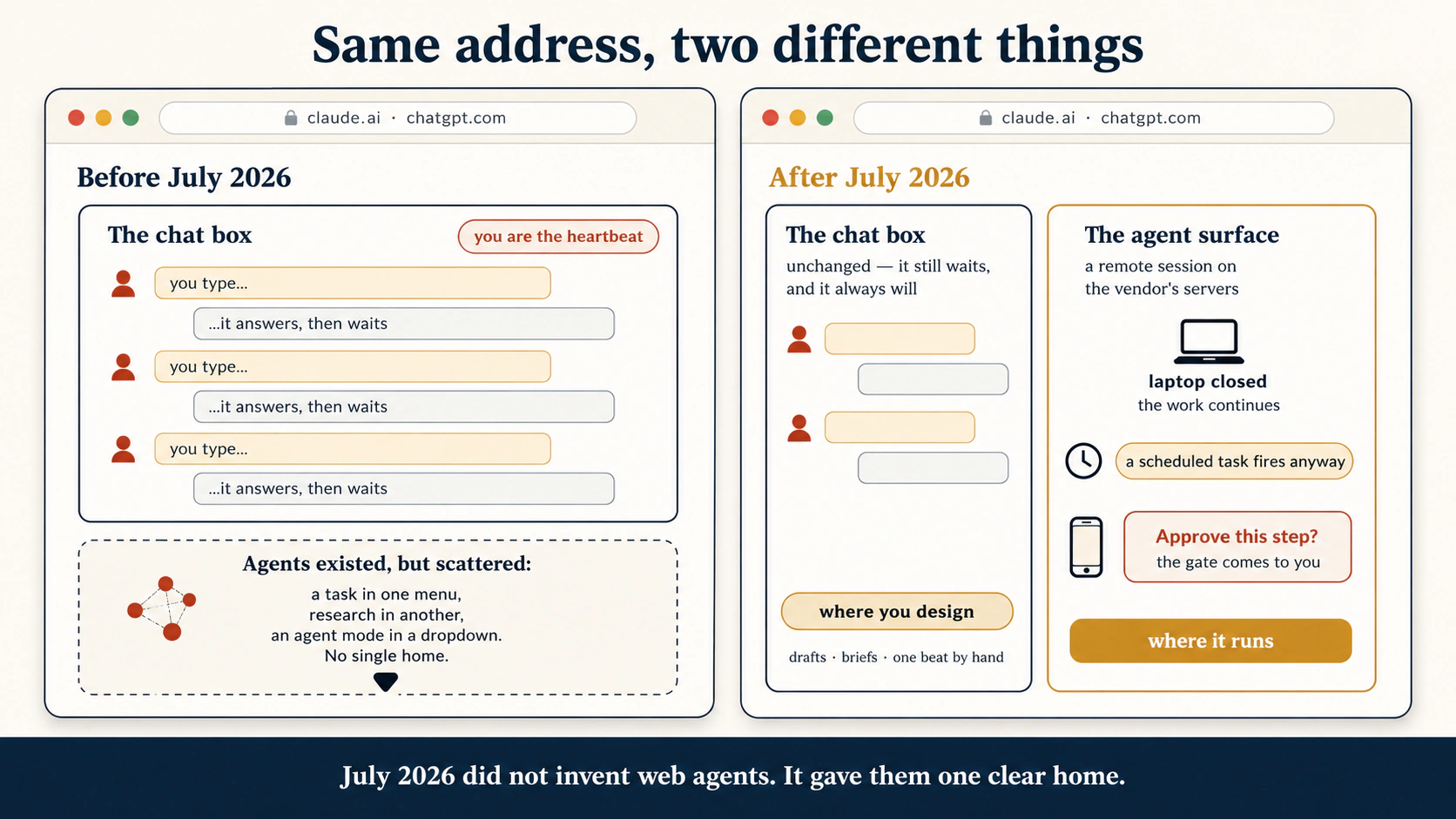
इसलिए July 2026 ने browser agents invent नहीं किए। उसने उन्हें काम करने की first-class जगह दी। Chat box नहीं बदला। वह अब भी आपका इंतज़ार करता है, और हमेशा करेगा। उसके पास वाला surface बदला है। वहाँ session शुरू करें, तो वह company के servers पर run करता है। Tab close कर सकते हैं। Plane में बैठ सकते हैं। काम चलता रहता है। जब ऐसी choice आती है जो केवल आप कर सकते हैं, question आपके phone पर आता है।
यह course उस surface का tour है। साथ ही, यह उस skill का आपका पहला lesson है जिसकी हर अगले course को ज़रूरत है: general agent को direct करना। आप सीखेंगे कि remote session क्या है, files वास्तव में कहाँ जाती हैं, approval phone तक कैसे पहुँचता है और जिस काम को आप देखते नहीं रहेंगे उसे hand off कैसे करना है। किसी नए agent product को देखकर उसके अंदर वही parts पहचानना भी सीखेंगे।
दो companies ने लगभग एक ही समय पर इसे बनाया और दोनों उसी set of parts तक पहुँचीं। यह इस किताब के मुख्य idea का मज़बूत प्रमाण है: skill tool में नहीं, shape में है।
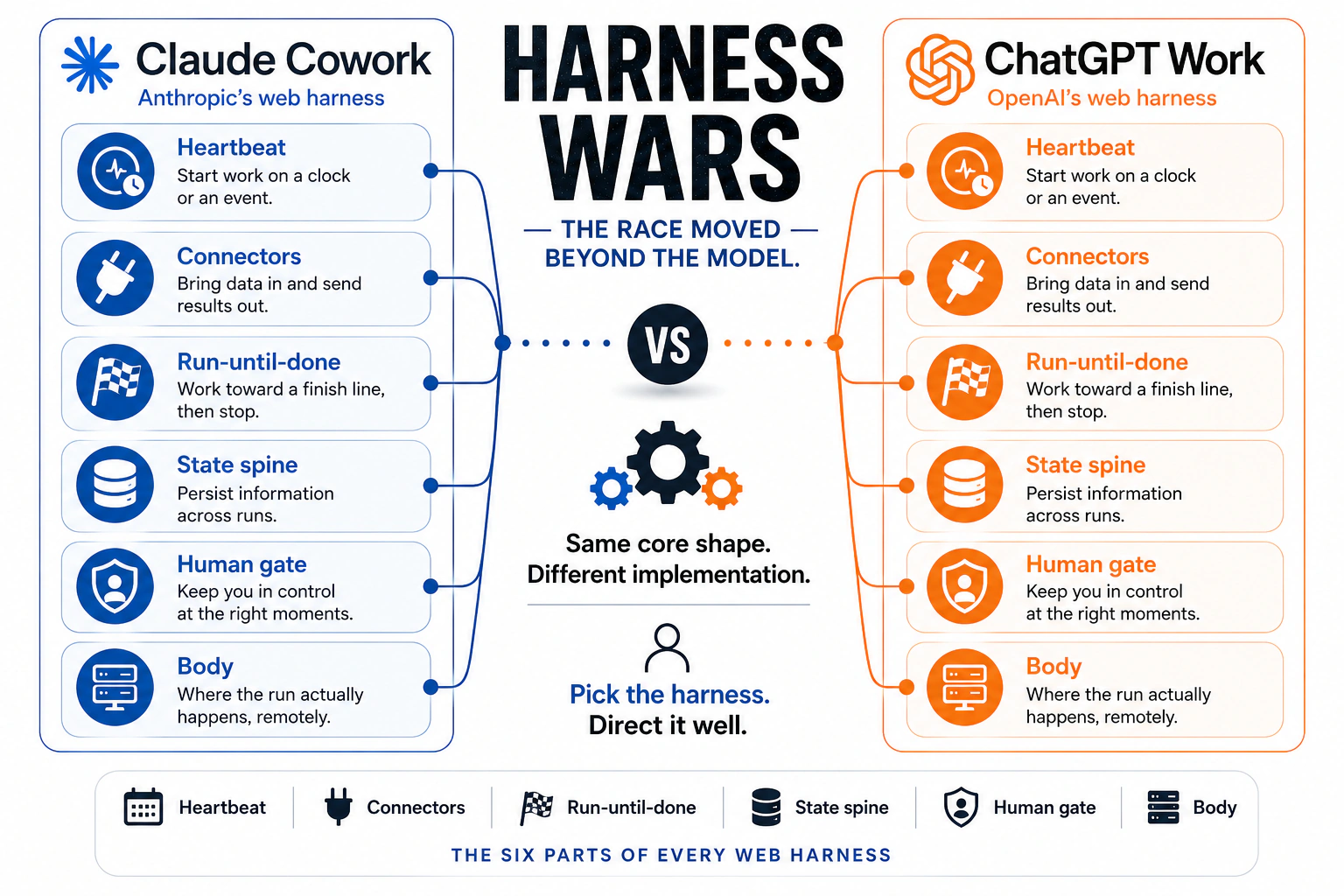
यहाँ एक बड़ी कहानी भी है, जिसे शुरुआत में नाम देना ज़रूरी है। दोनों companies अब सिर्फ़ model पर race नहीं कर रहीं। वे model के आसपास की हर चीज़ पर भी race कर रही हैं: schedule, connectors, memory और gate। यह किताब उस wrapper को harness और उस race को harness war कहती है। पहले engineers code में यह race लड़ते थे। अब यह web तक आ गई है। इसमें आपकी seat आसान है: यहाँ आप harness नहीं बनाते। जो fit हो उसे चुनते हैं और अच्छी तरह direct करते हैं। Concept 3 दोनों harnesses को side by side दिखाता है।
आप कुछ install नहीं करेंगे। Foundations browser tab में चला था। यह भी वहीं चलता है।
यह course किसके लिए है। Foundations से आने वाले हर उस व्यक्ति के लिए जो कुछ install किए बिना real agent direct करना चाहता है। सबसे पहले knowledge workers: जिनका दिन documents, spreadsheets, email और chat में बीतता है। Lawyers, accountants, marketers, analysts, founders और students। यह उन engineers के लिए भी है जो terminal से पहले सबसे आसान पहला step चाहते हैं। Code आता है तो यहाँ से शुरू करने में कुछ नहीं खोएँगे। Code नहीं आता तो यही सही जगह है। इसी कारण यह General Agents section का पहला course है। हर व्यक्ति पहले दिन browser में इसे कर सकता है।
पहले यह करें: Foundations, ख़ास तौर पर 2026 में AI Prompting और Skills & Connectors। यह course आपसे तीन चीज़ें expect करता है: model को साफ़ brief करना, context का अर्थ जानना, और Skill व Connector समझना। इनमें से कुछ नया है, तो पहले वे दो courses करें। दोनों मिलकर लगभग दो घंटे लेते हैं।
कितना समय लगेगा। Core route (Parts 1–3) पढ़ने में लगभग 90 minutes। Part 4 और appendices सहित पूरा course लगभग दो घंटे। Projects का hands-on समय अलग है, जिसमें scheduling exercise का एक week शामिल है, और learning वहीं टिकती है। आगे reference के लिए सात appendices हैं: छह इस course को आगे के courses से map करते हैं (जब वहाँ पहुँचें तब पढ़ें), और आख़िरी पूरे industry को map करता है। इन्हें reference की तरह पढ़ें, एक sitting में नहीं।
नए हैं? जो पहले से आना चाहिए उसका 2-minute recap
- Briefing का अर्थ task को पूरा describe करना है: outcome, limits, reader और reason। Vague prompt से vague result मिलता है। (Foundations Course 2)
- Context वह सब है जो model एक turn में देखता है। ज़्यादा हमेशा बेहतर नहीं होता। सही context को purpose के साथ चुनना बेहतर है। (Foundations Course 2)
- Skill वह task है जिसे आप एक बार सिखाते हैं। यह
SKILL.mdfile में रहता है। AI इसे तभी load करता है जब request match करती है। (Foundations Course 5) - Connector MCP standard के ज़रिए AI को Drive, Gmail या Slack जैसी real service तक safe, limited access देता है। Permissions आप देते हैं। AI उन्हीं के अंदर काम करता है। (Foundations Course 5)
- Chatbot और agent। Chatbot answer देता है। Agent plan करता है, tools use करता है और steps पूरा करता है। इस course में आप पहली बार एक agent direct करेंगे।
इनमें से कुछ नया है, तो पहले वे दो Foundations courses पढ़ें। यह course इन सभी को real work में use करता है।
📚 Teaching Aid
पूरी Presentation देखें — Web पर General Agents
Instructors और self-learners के लिए। यह course एक transferable idea सिखाता है: agent product के छह parts होते हैं (heartbeat, connectors, run-until-done loop, state spine, human gate, body)। Parts समझने के बाद कोई नया product नया subject नहीं, केवल छोटा look-around बन जाता है। इसे तीन passes में सिखाएँ। पहला, shift: chat box इंतज़ार करता है, पास वाला agent surface नहीं (Concepts 1–3)। दूसरा, surface: files कहाँ रहती हैं, connectors बाहर कैसे पहुँचते हैं, approvals phone तक कैसे आते हैं (Concepts 4–7)। तीसरा, unwatched work: delegation loop और scheduled tasks (Concepts 8–9), फिर work क्या touch करता है उसके आधार पर surface चुनना (Concepts 10–12)। छह projects assessment हैं। Students को सबसे महत्वपूर्ण habit देकर भेजें: finished work platform से बाहर जाता है।
आसान भाषा में key words
ये words पूरे course में आएँगे। List अभी एक बार पढ़ें, फिर कोई term unclear लगे तो लौटें।
| Term | आसान अर्थ |
|---|---|
| Chat box | वह conversation जो हर turn आपका इंतज़ार करती है। अपने-आप कुछ शुरू नहीं कर सकती |
| Agent surface | Chat box के पास वाला product जो plan करता है, action लेता है और multi-step work run करता है |
| Remote session | Vendor के servers पर run होने वाला session। आपका tab उसे देखने की window है, run करने वाली machine नहीं |
| Local session | आपकी अपनी machine पर run होने वाला session। Machine sleep करे तो यह pause होता है। अगले courses में इसे सीखेंगे |
| Task filesystem | Remote session के काम का temporary working space। इसे scratch मानें, permanent नहीं: retention और cleanup rules vendor के अनुसार बदलते हैं |
| Platform storage | Vendor platform पर आपके account में permanently save files। Task और tab के बाद भी बचती हैं |
| Exit (Tier 3) | Deliverable को platform से उस जगह ले जाना जिसे आप control करते हैं: connector save, download, local write या repo commit। File आपके system of record में आती है |
| Account spine | आपके saved sessions और files, जो devices के बीच sync होते हैं। ऐसी memory जिसे आपको बनाना नहीं पड़ा |
| Human gate | वह point जहाँ risky action जारी होने से पहले व्यक्ति का approval ज़रूरी है। इस surface पर यह phone तक आता है |
| Scheduled task | Vendor servers पर clock के अनुसार शुरू होने वाला काम, जबकि आपका कोई device online नहीं होता |
| Metered usage | हर plan में runs या hours का budget। किसी और के servers पर unattended work का हमेशा ऐसा budget होता है |
| Custody | आपका data कौन hold करता है: वह किसकी machines पर रहता है और कौन उस तक पहुँच सकता है |
यह कहाँ से आया
यहाँ dates महत्वपूर्ण हैं, क्योंकि surface कुछ weeks पुराना है, लेकिन इसकी roots पुरानी हैं।
Browser agents 2026 में शुरू नहीं हुए। ChatGPT ने January 2025 में scheduled tasks ship किए। February 2025 में deep research ship किया, जो कई minutes अपने-आप browse करता है। Mid-2025 में अपने computer वाला agent mode ship किया। यानी इस course से बहुत पहले web अपने-आप work run कर सकता था। बस उस work के लिए एक साफ़ home नहीं था। Pieces menus और tools में फैले थे।
Claude अपने रास्ते से उसी जगह पहुँचा। Anthropic ने अपने servers पर चलने वाले cloud coding sessions दिए, जो laptop बंद होने पर भी चलते थे। उपयोगी, लेकिन coders के लिए।
फिर July 2026 में दोनों companies ने कुछ दिनों के अंतर पर इन pieces को एक जगह जोड़ दिया।
Cowork claude.ai पर web में आया (beta, पहले Max plan, आगे और plans)। Sessions Anthropic servers पर run होते हैं। Sessions और files account में save होते हैं। कोई device online न हो तब भी scheduled tasks fire होते हैं।
ChatGPT Work 9 July 2026 को ship हुआ। यह अलग product नहीं है। यह ChatGPT के अंदर Chat mode के पास नया agent mode है और GPT-5.6 पर run करता है। यह finished files बनाता है: spreadsheets, slide decks, documents, dashboards और छोटे web apps। Renamed Plugin Directory से आपकी services तक पहुँचता है। Scheduled Tasks एक बार, schedule पर, event पर या change monitor करते हुए run हो सकती हैं। यह नई price tier नहीं है। Web और mobile पर eligible paid plans के साथ मिलता है, Free या Go में नहीं, और हर plan का agent allowance use करता है। (ChatGPT desktop app में Chat, Work और Codex हर plan में हैं, Free सहित। Codex उस desktop app का अलग view है; web या mobile पर selectable नहीं।) Availability बदलती रहती है, इसलिए live product page पर access confirm करें।
दो companies ने कुछ दिनों के अंतर पर chat box के पास agent रखा। दो products, एक shape। यह course shape सिखाता है।
यह क्यों हुआ और इससे अब क्या संभव है
Surface सीखने से पहले यह समझना उपयोगी है कि वह exist क्यों करता है। इसके दो sides हैं: आपको क्या मिलता है और companies को क्या मिलता है। दोनों पढ़ें। Company क्या चाहती है यह समझकर आप blind trust के बजाय खुली आँखों से surface use करेंगे। इससे वह rule भी समझ आता है जिसे course आगे बार-बार दोहराएगा।
जिस gap को इसने बंद किया। July 2026 से पहले web अपने-आप work run कर सकता था, लेकिन pieces बिखरे और uneven थे। Scheduled task एक menu में, research tool दूसरे में, agent mode dropdown में। हर capability अकेले powerful थी, लेकिन साथ में ढूँढना और combine करना मुश्किल था। ऐसी कोई एक जगह नहीं थी जहाँ files, sessions, services और hands-off run मिलें। इसलिए अधिकतर लोगों ने किसी capability को use ही नहीं किया। इन launches ने pieces को उसी address पर एक clear surface में जोड़ा जिसे लोग रोज़ खोलते हैं। Power पहले मौजूद थी। अब उस तक पहुँचना और combine करना आसान हुआ।
July 2026 ने एक clear work surface में चार capabilities जोड़ीं:
- उसी everyday surface में long-running work। Remote session company के servers पर run करता है, इसलिए tab close करने, laptop बंद करने या plane में बैठने पर भी task चलता रहता है। Remote agent runs पहले भी थे। बदलाव यह है कि Work और Cowork ने उन्हें ordinary chat के पास, एक general-purpose flow में रख दिया। (Concept 2)
- Work surface में built-in scheduling। Scheduled task clock या trigger पर शुरू होता है, बिना आपके device के online हुए। Monday brief आपके बैठने से पहले तैयार है। Scheduled tasks पहले भी थे। अब वे अलग tool के बजाय projects, files, connectors और agent runs के पास हैं। (Concept 9)
- Sessions और projects के आसपास organized work। Sessions और files account में रहती हैं और devices के बीच आपके साथ चलती हैं। नए surfaces related files, instructions और continuing work को एक visible जगह में रखते हैं, इसलिए context बार-बार paste नहीं करना पड़ता। (Concept 4)
- Files और connected services में कई steps। Agent services से connect होता है, plan बनाता है, कई घंटों तक steps पूरा करता है और chat reply के बजाय finished files लौटाता है। जिन choices के लिए आपकी ज़रूरत है, वे phone पर आती हैं। नया यह है कि सब कुछ कई अलग product modes के बीच घुमाए बिना होता है। (Concepts 5–8)
अब दूसरा side देखें, क्योंकि इससे तय होगा कि आपको इन capabilities को कैसे use करना चाहिए। घोषित goal आपको ज़्यादा work पूरा करने की power देना है। Business goal reach और lock-in है। पूरे 2026 में दोनों companies इस धारणा से लड़ती रहीं कि वे ऐसे market में chat product बेच रही हैं जहाँ agents चाहिए। सबसे तेज़ fix है agent को वहीं रखना जहाँ करोड़ों लोग पहले से हैं। कोई install नहीं, नया app नहीं, terminal नहीं। एक move में chat users agent users बन जाते हैं। Sessions, files और connectors को company account में save करने का दूसरा असर भी होता है: छोड़ना महँगा हो जाता है। इसे switching cost कहते हैं। सुविधाजनक account memory ही walk away करना कठिन बनाती है।
यह suspicious होने का कारण नहीं, एक साफ़ habit बनाने का कारण है। जो feature आपको सबसे ज़्यादा help करता है (free, working memory) वही company को सबसे ज़्यादा help करता है (आपका काम उनके servers पर जमा होता है)। इसलिए Concept 5 finished work को platform से बाहर अपनी storage में भेजना सिखाता है। Convenience रखें, lock-in से बचें। Company का goal दिखने के बाद यह habit paranoid नहीं, obvious लगती है।
एक honest limit भी है। इनमें से कुछ भी work को अपने-आप बेहतर या safe नहीं बनाता। Weak instruction अब अपने-आप run होती है और बीच में पकड़ने वाला कोई नहीं। Code, browser और live connectors को always-on surface में रखने से bad run की reach बढ़ जाती है। ChatGPT Work के launch week में security reviewers ने यही point उठाया। नई power सिर्फ़ leverage है। वह मदद करेगी या नुकसान, यह brief, review और judgment पर निर्भर है। इसलिए यह course हर नई power के पास एक discipline रखता है, सिर्फ़ power नहीं बेचता।
Agent power web पर पहले से थी, लेकिन अलग tools और modes में बिखरी थी। अब वह रोज़ use होने वाले web address पर, everyday work की एक जगह में है और आपके जाने के बाद भी चलती रहती है। यह फ़ायदा है। Catch यह है कि work company के servers पर जमा होता है। यह आपके लिए convenient और उनके लिए sticky है। Convenience use करें, लेकिन finished चीज़ अपनी storage में भेजें। और याद रखें: यह surface work को आपके बिना run कराता है, work को अच्छा नहीं बनाता। वह हिस्सा अब भी आपका है।
Mindset shift, एक picture में
Facts checked: 21 July 2026। Web पर Cowork और ChatGPT Work दोनों कुछ weeks पुराने हैं। Rollouts plan के अनुसार staged हैं, usage metered है और names बदलते हैं। यह किताब का सबसे तेज़ aging page है। किसी limit, plan tier या feature पर depend करने से पहले live product pages check करें।
यह course क्या cover करता है
| Part | Topic | आप क्या सीखते हैं |
|---|---|---|
| 1 | The Shift | July 2026 में क्या बदला, remote session क्या है और दो vendors एक shape तक क्यों पहुँचे |
| 2 | The Surface | Sessions, account spine, file के तीन tiers, folders के बिना connectors और pocket में gate |
| 3 | Working Unwatched | Delegation loop, वह work brief करना जिसे आप नहीं देखेंगे और बिना device online हुए scheduled tasks |
| 4 | Choosing, and the Open Path | हर task के लिए web या desktop, vendor cloud के बिना open-source path और course का handoff |
इस course को पढ़ने के दो तरीक़े। पहली बार नीचे यह क्यों हुआ पढ़ें, फिर Parts 1–3 order में और Projects 1–3 करें। लगभग 90 minutes पढ़ना है और कुछ install किए बिना agent user बनाता है। दूसरी reading real sessions का एक week मिलने के बाद करें: Part 4, deeper notes और Projects 4–6।
क्या याद रखें और क्या lookup करें। इस course में दो layers साथ चलती हैं और उनकी aging speed अलग है। पहली याद रखें, दूसरी lookup करें। Lasting layer: chat box इंतज़ार करता है और हमेशा करेगा; remote session account में रहता है, tab में नहीं; हर deliverable तीन tiers में से एक में उतरता है और finished work को बाहर जाना चाहिए; human gate वहाँ पहुँचना चाहिए जहाँ आप सच में देखते हैं; हर vendor का agent product अलग names में वही shape है। Mechanical layer: नीचे के plan tiers, run limits, button labels और product names। ये कुछ weeks पुराने हैं और हर महीने बदलते हैं। इन्हें live docs के pointers समझें, facts to memorize नहीं।
एक boundary पहले। यह course surface और delegation loop सिखाता है। Runtime decisions नहीं: verified unattended work लंबे समय तक कहाँ रहना चाहिए, move करने पर क्या साथ जाता है और trust दोबारा कैसे earn होता है। Section के अंत में Leaving the Laptop यही सिखाता है। यह course front door है। Door के पीछे की किसी चीज़ पर depend करने से पहले वह course पढ़ें।
Part 1: The Shift
1. एक address, दो अलग चीज़ें
आज claude.ai या chatgpt.com खोलें, तो chat box और agent एक ही address पर मिलते हैं। ChatGPT में split screen पर साफ़ है: एक app में Chat mode और Work mode side by side। (Desktop app में coders के लिए अलग Codex view भी है। Web और phone पर मुख्य रूप से Chat और Work दिखते हैं।) दोनों एक चीज़ नहीं हैं। अंतर पहचानना इस course की पहली skill है।
Chat box वही conversation है जिसे आप Foundations से जानते हैं। वह हर turn आपका इंतज़ार करता है। आप type करते हैं, वह answer देता है और फिर इंतज़ार करता है। Schedule पर शुरू नहीं हो सकता। Event पर react नहीं कर सकता। Tab close करने के बाद जारी नहीं रह सकता। यह missing feature नहीं है; conversation का nature ही ऐसा है। Chat box आपके बिना कभी work run नहीं करेगा, और उसे करना भी नहीं चाहिए। यहीं आप सोचते, draft करते और design करते हैं।
Agent surface उसके पास है। आप उसे message नहीं, assignment देते हैं। वह plan बनाता है, tools use करता है, steps पूरा करता है और deliverable बनाता है। केवल उस decision पर pause होता है जहाँ आपकी ज़रूरत है। आप देखना बंद करें तब भी काम जारी रखता है।
एक simple test है जिसे पूरे career में साथ रखना चाहिए, क्योंकि हर company marketing में इस line को blur करेगी:
अगर मैं type करना बंद कर दूँ, तो क्या काम रुक जाएगा?
Chat box: हाँ। Agent surface: नहीं। यह एक question किसी भी address और company पर, इस साल और आगे भी, दोनों को अलग कर देता है।
जब deeper version चाहिए, तो ऐसे समझें: plain chat turn synchronous है। आपके wait करते समय run करता है, फिर रुककर अगले turn का wait करता है। Agent run delegated है। Start होने के बाद outcome की ओर बढ़ता रहता है। बाद में run कर सकता है। Change watch कर सकता है। Continue करने के लिए अगले turn की ज़रूरत नहीं। यही असली line है और future button व menu changes के बाद भी रहेगी। "Stop typing" test इसे रोज़मर्रा में महसूस करने का तरीक़ा है।
एक caution, ताकि test mislead न करे। आप अक्सर chat box में plain words से delegated run start करते हैं: "हर Monday इन emails को summarize करें।" Words chat में जाते हैं, लेकिन आपने normal reply नहीं, delegated task setup किया है। इसलिए देखें कि work क्या करता है, सिर्फ़ यह नहीं कि आपने कहाँ type किया।
July 2026 में एक और चीज़ नहीं बदली, और यह महत्वपूर्ण है: chat box ने अपनी job रखी। Task design करना, brief draft करना, idea को हाथ से test करना chat work है। इस course की हर assignment यहीं शुरू होती है। Agent surface ने chat box को replace नहीं किया; बस उसके पड़ोस में आ गया।
एक window, दो rooms। पहले room में आपके बोलने तक कुछ नहीं होता। दूसरे room में आपके चले जाने के बाद worker काम करता रहता है। यह course दूसरे room के बारे में है। Handoff तैयार करने के लिए पहले room का use जारी रहेगा।
ख़ुद को check करें
एक colleague कहता है: "मैं रोज़ claude.ai use करता हूँ, इसलिए agents पहले से use करता हूँ।" उसे दो sentences में सही करें।
Answer देखें
वह chat box use करता है: type रुकते ही work रुकता है, यानी हर turn अभी भी वह हाथ से शुरू करता है। Agent surface पास वाला product है: उसे work assign करें, तो वह plan और action करता है और tab close होने के बाद भी चलता रहता है। Daily chat use वास्तविक skill है, लेकिन agent use नहीं।
2. Remote session: tab window है, runtime नहीं
यह course का core architecture concept है। बाकी सब इसी एक fact से निकलता है।
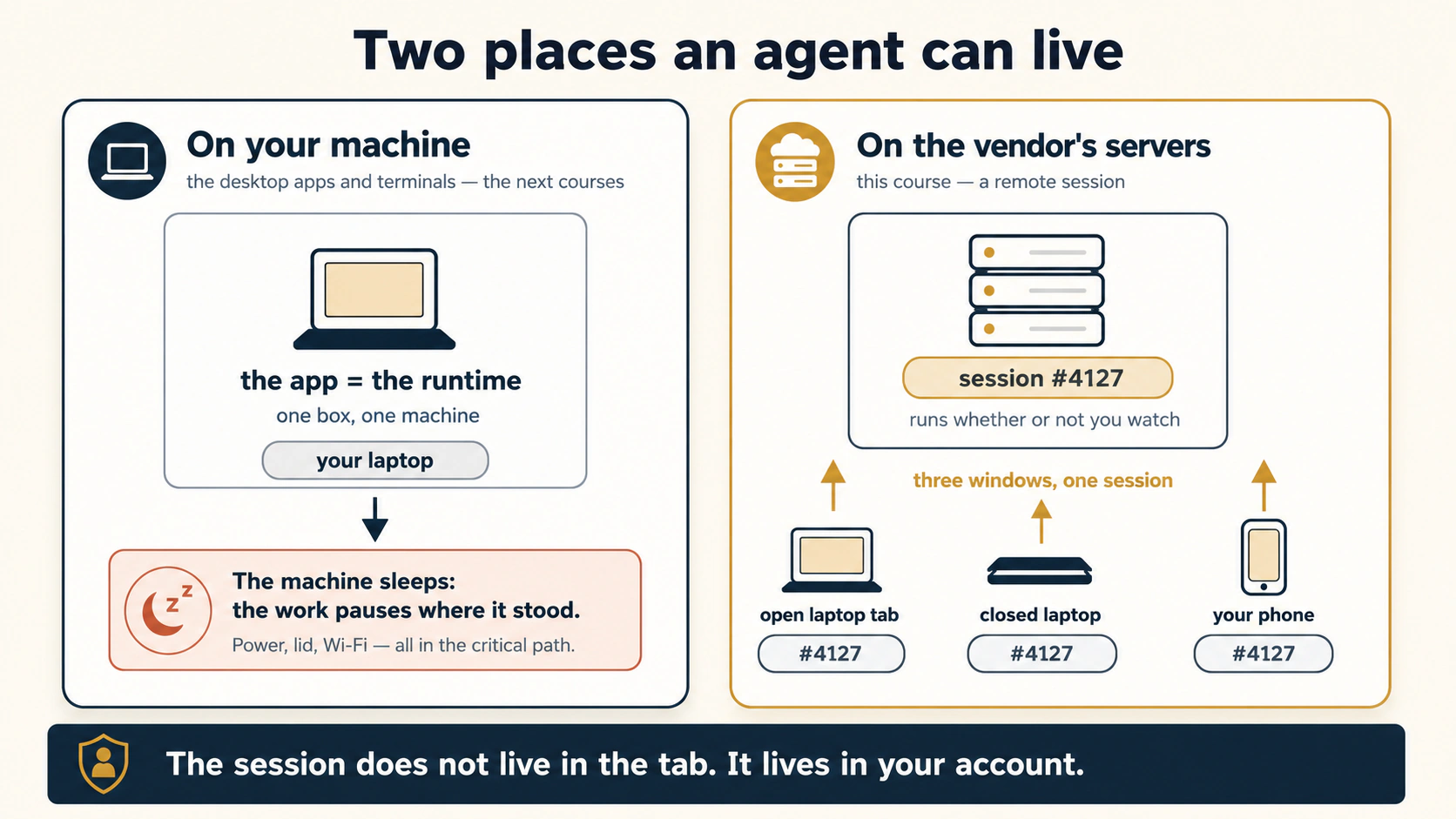
Agent दो जगह रह सकता है। आपकी machine पर: अगले तीन courses में मिलने वाले desktop apps और terminals। वहाँ app ही runtime है (वह चीज़ जो काम सच में run करती है)। Laptop बंद करें, तो work वहीं pause हो जाता है, क्योंकि run करने वाली machine sleep हो गई। या agent vendor के servers पर रह सकता है: यही course। वहाँ browser tab session को देखने की window है, उसे run करने वाली machine नहीं।
Consequences आसान हैं और हर एक आपके काम का तरीक़ा बदलता है:
- Tab close करें: work चलता रहता है। Session कभी tab में था ही नहीं। वह account में ऐसी infrastructure पर run करता है जो आपके सोने पर नहीं सोती
- Phone से session खोलें: वही session है। Copy या summary नहीं। वही running work, बस छोटी window से दिख रहा है
- पिछले week close किए tab से scheduled task fire होता है। Schedule भी vendor servers पर रहता है। आपके devices critical path में नहीं हैं
उसी browser tab में claude.ai पर Cowork session start करें जहाँ chat करते हैं। यह Anthropic servers पर remote session की तरह run करता है। Sessions और files account में save होते हैं: continuity जिसे आपको setup नहीं करना पड़ा। Work जब केवल आपके decision तक पहुँचता है, तो approval phone के Claude app में आता है।
इस course के लिखे जाने पर web का Cowork beta में है: पहले Max plan, फिर और plans, और usage metered। Mechanical layer तेज़ बदलती है। Depend करने से पहले live product page पर plan access confirm करें।
chatgpt.com पर ChatGPT के Work mode में switch करें (9 July 2026 को ship हुआ, GPT-5.6 powered)। यह अलग app नहीं है। Same interface में Chat mode के पास है और multi-step project पर घंटों बने रहने के लिए बना है: goal को steps में तोड़कर कुछ parts अपने-आप complete करता है। Sessions web, desktop और mobile में cloud-sync होते हैं: laptop से start करें, phone से check करें, वही session। कोई device online हो या नहीं, Scheduled Tasks cloud से run होते हैं।
Access plan के अनुसार staged है। Web और mobile पर Work eligible paid plans में आया, Free या Go में नहीं। (ChatGPT desktop app में Chat, Work और Codex हर plan में available हैं, Free सहित। Codex उस desktop app का अलग view है, web या mobile पर selectable नहीं।) Paid plans में extra list price के बिना bundled है और usage हर plan का agent allowance घटाता है। इसलिए यहाँ "metered" का अर्थ plan का included allowance है, अलग bill नहीं। Availability बदलती रहती है और plan details किताब के सबसे तेज़ aging claims हैं। Depend करने से पहले OpenAI live product page पर current access confirm करें।
एक honest limit, ताकि concept खुद को oversell न करे। Remote session company की machines पर run करता है। अपने-आप वह वही चीज़ें reach करता है जिन्हें वे machines reach कर सकती हैं: connectors, अपना task filesystem और platform files। वह अपने-आप local hard drive, desktop apps या उस browser profile तक नहीं पहुँचता जहाँ bank login है। ऐसा work local bridge या local agent माँगता है, जिसे अगले courses सिखाएँगे। (बाद के लिए एक nuance: desktop app bridge बन सकता है। Open होने पर remote session को local files या browser तक limited access दे सकता है। App close करें, session चलता रहेगा लेकिन local reach खो देगा। अभी यह जानना काफ़ी है कि wall absolute नहीं है।) Part 4 पूरी decision table देता है।
Desktop agent आपके घर का worker है: घर की power जाए, तो worker रुकता है। Remote session vendor के office का worker है: आपके घर की power matter नहीं करती और laptop व phone केवल उसे देखने की windows हैं।
Deeper जाएँ: यह idea दो बार फिर मिलेगा
Section में आगे के लिए concept को याद रखें। Loop Engineering सिखाएगा कि unattended work को runs के बीच जागने वाली कोई चीज़ चाहिए और पूछेगा कि वह कहाँ रहती है। Leaving the Laptop desk की machine को "last single point of failure" कहेगा और हटाने का पूरा decision सिखाएगा। यहाँ दोनों ideas का consumer-grade version है: vendor servers जागते हैं, इसलिए आपके server को नहीं जागना पड़ता। Same idea, config files के बिना।
ख़ुद को check करें
Lahore में Ayesha शाम 5 बजे web session में client report शुरू करती है। 6 बजे load-shedding से power चली जाती है। 8 बजे phone से session खोलती है। उसे क्या मिलेगा और power कभी problem क्यों नहीं थी?
Answer देखें
उसे finished work मिलेगा या phone से clear करने वाले approval पर wait करता work। Session पूरे समय vendor servers पर run हुआ। Laptop सिर्फ़ window था और closed window दूसरी तरफ़ की चीज़ नहीं रोकती। Cowork desktop course में मिलने वाला desktop agent machine की power जाते ही pause होता, क्योंकि वहाँ machine ही runtime है।
3. दो vendors, एक shape
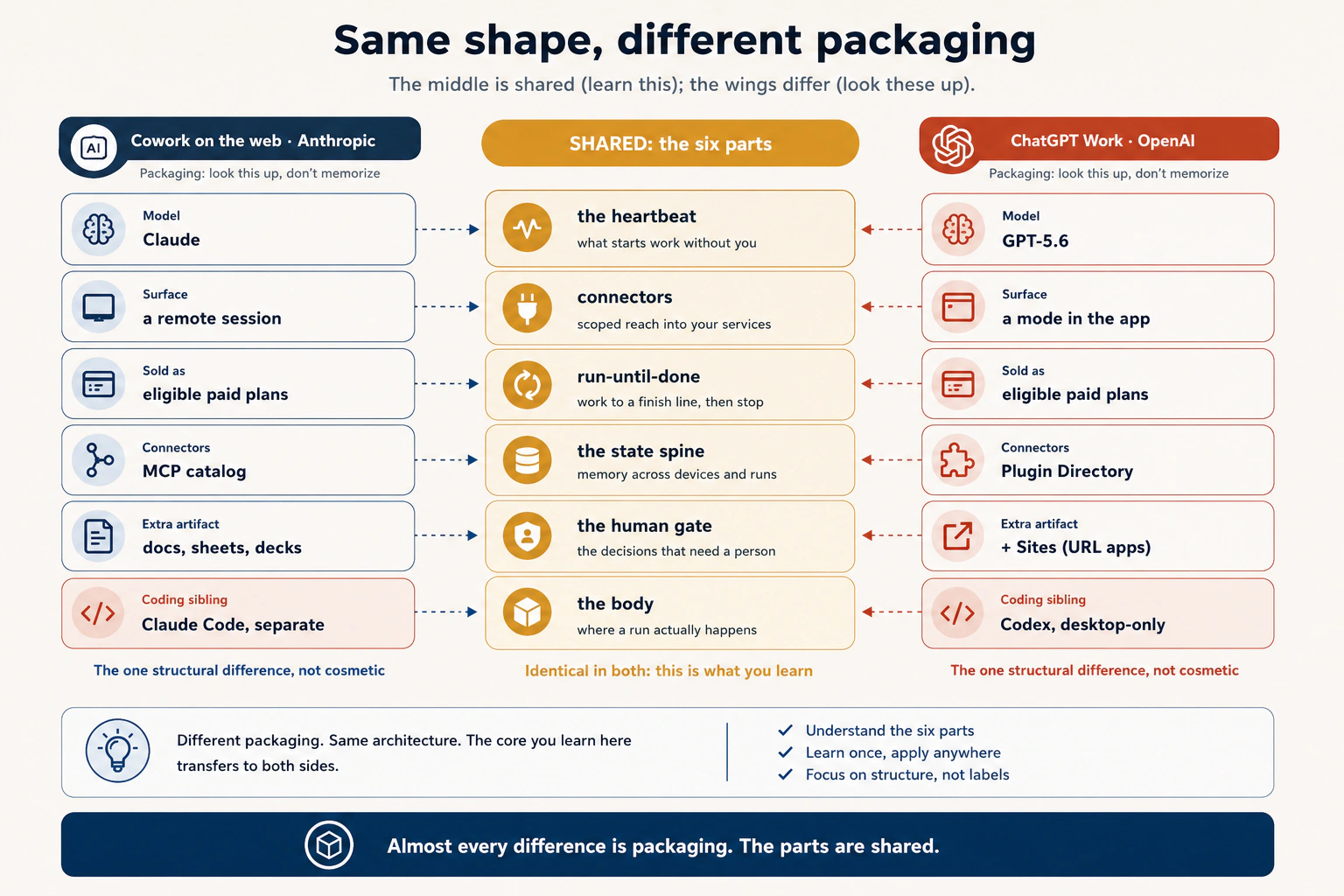
अब वह concept जिसके लिए यह course है। July 2026 में Anthropic और OpenAI ने कुछ दिनों के अंतर पर agent surfaces browser में ship किए। दोनों products में लगभग वही set of parts दिखता है। दोनों एक anatomy तक पहुँचे।
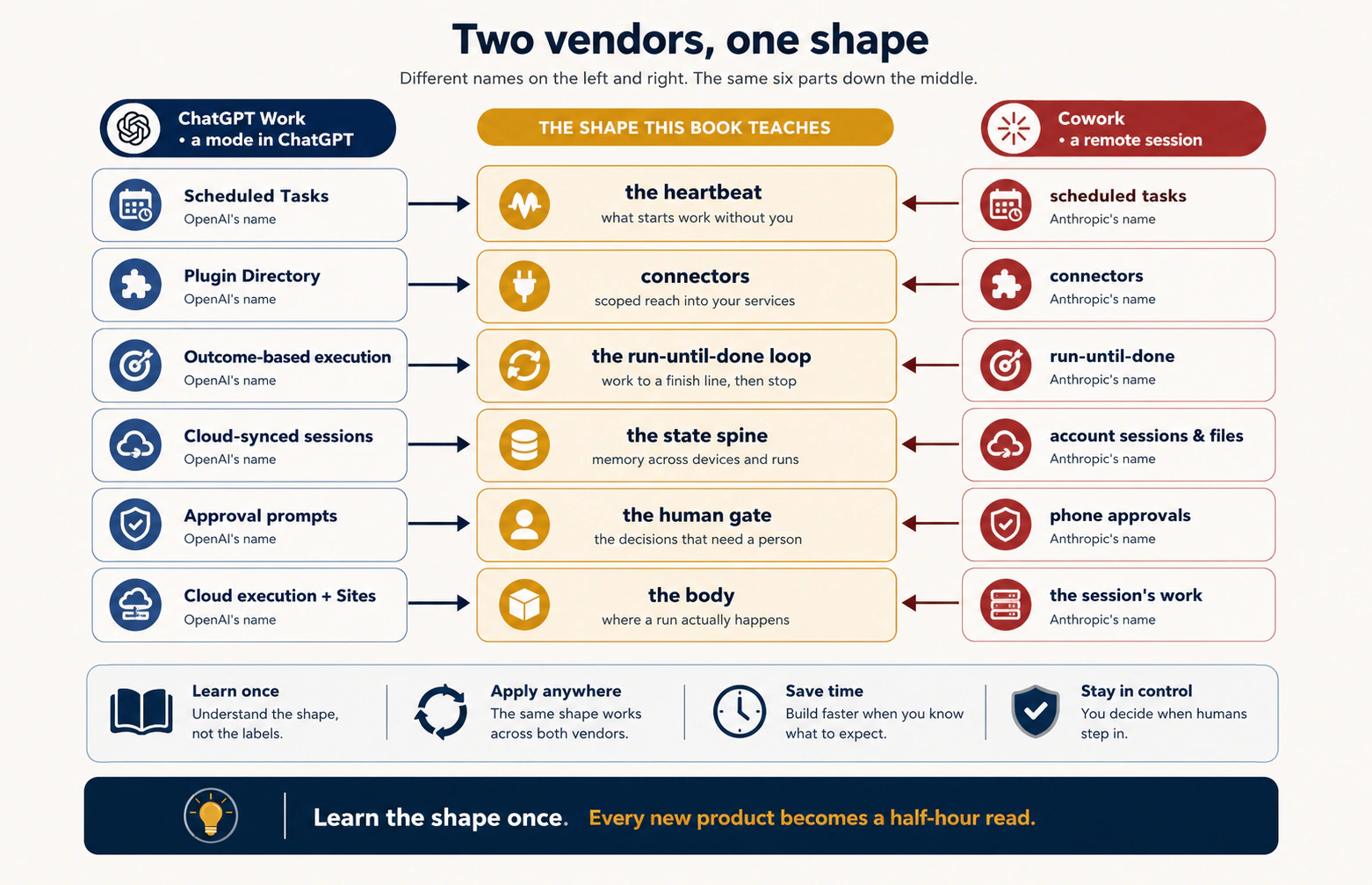
यह किताब anatomy को छह parts के रूप में सिखाती है और बाद के courses हर part को depth में बनाते हैं। आज इन्हें reading lens की तरह use करने के लिए वे courses ज़रूरी नहीं। नीचे हर part एक sentence में है और ChatGPT Work में कहाँ मिलता है। सभी names OpenAI के July 2026 launch से हैं:
| ChatGPT Work इसे कहता है | यह किताब इसे कहती है | One-sentence meaning |
|---|---|---|
| Scheduled Tasks | Heartbeat | आपके बिना work क्या शुरू करता है: एक बार, schedule पर, event पर या changes monitor करते हुए |
| Plugin Directory (connected apps) | Connectors | Real services तक permission-scoped reach: Slack, Gmail, Drive और दर्जनों others, ताकि agent सिर्फ़ suggest नहीं, action भी कर सके |
| Outcome-based task execution | Run-until-done loop | Outcome दें और यह steps में उसकी ओर काम करता है: एक answer नहीं, finish line |
| Cloud-synced sessions & Projects | State spine | Devices और runs के बीच बचने वाली memory, ताकि work restart होने के बजाय continue करे |
| Approval prompts (mobile) | Human gate | Risky या judgment-heavy decisions work जारी होने से पहले person के पास phone पर आते हैं |
| Work's cloud execution environment and artifact tools | Body | Run का work वास्तव में जहाँ होता है और finished artifacts बनते हैं: docs, sheets, decks, dashboards, छोटे web apps |
Web पर Cowork को इसी lens से देखें, तो Anthropic names के साथ वही table मिलती है: scheduled tasks, connectors, account में saved sessions और phone approval। दो vendors, एक shape।
Agent career के तीसरे week में यह क्यों matter करता है? Products आते रहेंगे, names बदलते रहेंगे, और हर बार zero से relearn नहीं कर सकते। Independent builders बार-बार same parts तक पहुँचें, तो parts discipline हैं और products packaging। Shape एक बार सीखें, तो हर नया agent product नया field नहीं, आधे घंटे की reading बनता है। यह किताब का central claim है और July 2026 अब तक का strongest evidence: skill tool में नहीं, shape में है।
दो honest notes, ताकि lens lens ही रहे। पहला, same shape का अर्थ same behavior नहीं। Rollout order, plan tiers, limits और details दोनों में अलग हैं और weekly बदलते हैं। Mapping बताती है कि क्या ढूँढना है, same setup का promise नहीं। दूसरा, यहाँ छह parts सिर्फ़ vocabulary हैं। Loop Engineering हर one को design करना सिखाता है और उससे पहले serious work schedule नहीं करना चाहिए (Concept 9 में आगे)।
एक और note, जो Concept 6 का preview है। ChatGPT Work launch ने code execution, browser access और enterprise connectors को one always-on space में रखा। इसलिए single bad run आगे तक reach कर सकता है, जिसे security reviewers ने तुरंत flag किया। यह product पर attack नहीं। Shape की cost है जिसे हर vendor pay करता है। इसीलिए connectors का अलग concept है और approval gate optional नहीं।
अलग companies की cars अलग दिखती हैं, लेकिन सभी में engine, wheels, brakes और steering wheel होते हैं। Parts जानने के बाद थोड़ी देर देखकर कोई car चला सकते हैं। Agent products भी ऐसे हैं। यह table parts list है। किताब parts सिखाती है, ताकि vendor packaging फिर confuse न करे। और ध्यान दें: दो companies similar engine के आसपास बेहतर car की race में हैं। यही "harness war" है। Web पर आप car चुनने वाले driver हैं, उसे बनाने वाले engineer नहीं। दोनों jobs महत्वपूर्ण हैं, बस अलग हैं।
Shape same है, तो दोनों अलग कहाँ हैं? छह parts shared हैं, packaging नहीं। नीचे vendors के July 2026 launch के आधार पर honest side-by-side है। हर row को mid-July 2026 मानें और live pages से verify करें। यह किताब की सबसे तेज़ aging table है।
| Web पर Cowork (Anthropic) | ChatGPT Work (OpenAI) | |
|---|---|---|
| यह क्या है | claude.ai के Cowork surface से मिलने वाला remote session | ChatGPT के अंदर Chat mode के पास chatgpt.com पर एक mode |
| कहाँ run करता है | Anthropic servers | OpenAI servers |
| Model | Claude (हर task के अनुसार Opus/Sonnet tier) | GPT-5.6 family |
| कैसे sell होता है | Web beta, plan के अनुसार staged; metered | Web और mobile पर eligible paid plans में bundled, नए desktop app पर हर plan; हर plan का agent allowance use करता है |
| Connectors | MCP पर Anthropic connector catalog | Plugin Directory (launch पर App Directory से renamed), MCP-based |
| Run-until-done | Brief में stated stopping condition | Outcome दें, तो steps में उसकी ओर work करता है |
| Persistent workspace | Projects + saved context file (Anthropic का नाम CLAUDE.md) | Projects + memory (reviewable, correctable) |
| Finished artifacts | Docs, sheets, decks, files | Docs, sheets, decks, dashboards और Sites (URL पर publishable web apps) |
| Coding sibling | Claude Code (separate surface) | Codex (same app में mode की तरह merged) |
| Mobile gate | Claude app में approvals | ChatGPT app में approvals |
Parts को ध्यान में रखकर table पढ़ें, तो pattern साफ़ है: लगभग हर difference packaging column में है। बीच के parts shared हैं। Model अलग, plan rules अलग, connector list का नाम अलग। एक URL-publishing feature देता है, दूसरा नहीं। कुछ differences labels से deeper हैं: task local files तक कैसे पहुँचता है, approvals कैसे काम करते हैं, coding agent same app में है या नहीं। ये real हैं और Concept 10 में use होंगे। लेकिन heartbeat दोनों में heartbeat, gate दोनों में gate और spine दोनों में spine है। Shared parts lasting layer हैं। बाकी mechanical layer है जिसे course lookup करने को कहता है, memorize नहीं। Six-part lens यही value दिखाता है। केवल एक product सीखने पर भी दूसरा short look-around रहता है, क्योंकि work carry करने वाले parts shared हैं।
जो हो रहा है उसके लिए एक word। देखें products कहाँ compete करते हैं: सिर्फ़ model पर नहीं। Models important हैं और दोनों strong हैं। लेकिन products model के आसपास की हर चीज़ पर compete करते हैं: scheduler, connector layer, session spine, phone gate, files का exit। इस wrapper को किताब harness कहती है और Harness Engineering इसी का course है। पिछले दो years में engineers harness को code और terminal में हाथ से बनाते थे। July 2026 launches दिखाते हैं कि harness finished product बनकर web पर आ गया और companies बेहतर harness की race कर रही हैं। Competition आपके लिए अच्छी है; surface इतनी तेज़ इसी कारण improve हुआ।
लेकिन इसे सही पढ़ने के लिए एक line साफ़ रखें। Web पर companies harness war लड़ती हैं, आप नहीं। यहाँ harness build नहीं करते; दो pre-built choices में से चुनते हैं। Loop, tools, context और checks wire करना engineer की job है, जिसे Harness Engineering course depth में सिखाता है। इस surface पर आपकी job छोटी और अलग है: task के लिए सही pre-built harness चुनें, फिर अच्छी तरह direct करें। War का ज्ञान choice में help करता है, harness engineer नहीं बनाता। वह अलग course और अलग chair है।
हर product किसके लिए है? Parts shared हैं, लेकिन vendors overlapping yet different people को target करते हैं। Aim जानने से choice आसान होती है। इसकी दो layers हैं:
Companies का target। दोनों products core user के रूप में knowledge worker को pitch होते हैं: जो documents, spreadsheets, email और chat के बीच information move करता है और code नहीं करता। "Finished spreadsheet, deck या report बनाएँ" उसी के लिए है। लेकिन user के आसपास shape अलग है। ChatGPT Work ऐसे app का mode है जिसमें coding agent Codex भी है। OpenAI उस workplace को target करता है जहाँ same person या team app switch किए बिना knowledge work और code दोनों करे। Existing paid plans में new list price के बिना मिलता है, इसलिए target wide है। Web Cowork Max-first और metered launch हुआ। वह narrower, higher-intent early group है। उसका coding agent Claude Code separate surface पर रहता है, जो two user types के बीच cleaner split है।
कौन किसे चुने। यह किताब की guidance है, vendor claim नहीं। अधिकतर document-and-connector knowledge work के लिए दोनों fit हैं। Honest tie-breakers ordinary हैं: किस company का model पसंद है, connectors कहाँ हैं और कौन सा plan पहले से pay करते हैं। Decision एक case में sharp होता है। Knowledge work और code दोनों करते हैं और एक roof चाहते हैं, तो ChatGPT desktop app Chat, Work और Codex साथ रखता है, इसलिए setup lighter है। Work agent और coding agent को separate governed surfaces में रखना चाहते हैं, तो Cowork और Claude Code split cleaner है। यह मुख्यतः packaging choice है, capability choice नहीं, इसलिए headline के बजाय shape की footnote है।
एक audience को यह course दोनों से बाहर रखता है: regulated data संभालने वाले लोग। PHI (protected health information), privileged matter और regulated financial records किसी web surface के target नहीं हैं जब तक compliance लिखकर approval न दे। Working files और platform storage vendor custody में रहती हैं। Concept 10 इसे detail में बताता है। अभी इतना जानें कि "यह किसके लिए है" की hard boundary है जिसे vendor marketing आपके लिए नहीं खींचती।
Packaging के beyond एक real difference flag करना ज़रूरी है, क्योंकि यह आगे की choice बदलता है। OpenAI का coding agent Codex, Work के साथ same ChatGPT app में रहता है, हालाँकि desktop app में अलग view है और web या phone पर selectable नहीं। Anthropic अपना coding agent Claude Code पूरी तरह separate surface पर रखता है। Knowledge worker को यह नहीं दिखता। Knowledge work और code दोनों करने वाले के लिए matter करता है। Desktop पर ChatGPT एक roof के नीचे Chat, Work और Codex रखता है। Claude side में Cowork और Claude Code के बीच move करना पड़ता है। कोई option inherently better नहीं। यह real shape difference है और Concept 10 की "work क्या touch करता है" table में value देगा।
दोनों products एक shape में बने हैं और मुख्यतः labels, model और plan sales में अलग हैं। एक real structural difference है: OpenAI ने coding tool को work agent के same app में रखा; Anthropic ने अलग। Document work में फ़र्क नहीं दिखेगा। Code भी करते हैं, तो जानना उपयोगी है।
ख़ुद को check करें
अगले quarter तीसरा vendor "Flows" नाम का agent product ship करता है। Launch page पर triggers, integrations, autopilot mode और workspace memory हैं। Docs पढ़ने से पहले चार names को किताब के parts से map करें।
Answer देखें
Triggers: heartbeat। Integrations: connectors। Autopilot mode: run-until-done loop (और docs के लिए पहला question: stopping condition क्या है और कौन check करता है?)। Workspace memory: state spine। एक minute से कम में unseen product पढ़ लिया और सही questions के साथ पहुँचे। यही exercise इस concept की skill है।
Part 2: The Surface
Shift पीछे है। अब surface के working parts: sessions कहाँ रहते हैं, files वास्तव में कहाँ उतरती हैं, जब कोई नहीं देख रहा तब connector क्या करता है और जिस एक decision को आपकी ज़रूरत है वह आप तक कैसे पहुँचता है। चार concepts हैं। इनमें three file tiers इस course का सबसे महत्वपूर्ण discipline है। वहाँ पहुँचें तो धीरे पढ़ें।
4. Account spine: sessions और files जिन्हें आपको बनाना नहीं पड़ा
Foundations workflow में standalone conversation अक्सर zero से शुरू होती थी। Context फिर paste, project फिर explain, file फिर upload करते थे। Continuity अक्सर आपकी manual job थी।
Agent surface continuity को feature की तरह देता है। Sessions account में save होते हैं। Session की बनाई files account में save होती हैं। किसी device से खोलें, तो वही work और वही point मिलता है। यह course इसे account spine कहता है (Concept 3 के state spine का इस surface वाला version): sessions और devices के बीच बचने वाली memory, vendor ने बनाई और maintain की, आपको किसी को hire नहीं करना पड़ा।
यह real gift है और इसे use करना चाहिए। इसकी price भी है, जिसे work depend कराने से पहले जानना चाहिए। Spine vendor की custody और format में रहता है। Sessions, files और work history उनकी machines पर, उनके account system के नीचे और उनके shapes में हैं। इसमें sinister कुछ नहीं। लेकिन सब dependency है: paid plan, product के survive करने और vendor rules के compatible रहने पर। Concept 5 dependency को safe रखने का discipline देता है। अभी दोनों halves साथ रखें: spine free continuity है, किसी दूसरे के घर में।
हर Cowork session अपनी produced files के साथ claude.ai account में save होता है। कल किसी device से लौटें, तो context, plan और files वहीं मिलेंगे जहाँ छोड़े थे। Sessions list इस surface पर आपका work log है।
ChatGPT Work sessions web, desktop और mobile में cloud-sync होते हैं: laptop पर start करें, phone पर reopen करें, वही session, state और files। दो features spine को आगे बढ़ाते हैं। Projects related chats, files और instructions को persistent space में group करते हैं जो sessions के बीच context share करता है, recurring work का natural home (Concept 6 का persistent-workspace idea built in)। Memory, जहाँ enabled हो, past chats से relevant context carry करती है, साथ में reviewable summary और inspect या correct करने योग्य sources। Session list, projects और memory spine हैं। Devices windows हैं। Cowork tab की custody वाली हर बात यहाँ भी same है: यह spine OpenAI servers और OpenAI format में है।
तीन छोटी habits spine को आपके लिए काम कराती हैं। Sessions का नाम work products की तरह रखें, chats की तरह नहीं। "Acme renewal brief. May invoice run" तीन months बाद खुद मिल जाएगा। "Quick question" कभी नहीं। एक session में एक workstream। Client report और holiday planning मिलाने से context bleed होता है। Foundations में stale context का quality पर असर सीखा था। Dead चीज़ prune करें। Long session हर turn में पूरा history carry करता है और इस surface पर context की cost chat जितनी ही है: purpose से चुना less context, habit से खिंचे more context से बेहतर है।
Chat tab में हर शाम papers घर ले जाते और हर सुबह वापस लाते थे। Agent surface पर drawers वाला desk है: सब वहीं रहता है और कहीं से भी मिलता है। Desk बहुत useful है। बस याद रखें, desk vendor की building में है, आपकी नहीं।
ख़ुद को check करें
Account spine का gift और price एक-एक sentence में बताएँ।
Answer देखें
Gift: continuity जिसे बनाना नहीं पड़ा, sessions और files जो tab, day और device के बाद भी बचती हैं। Price: continuity vendor की custody और format में है, इसलिए केवल वहाँ मौजूद चीज़ आपके plan, उनके product और rules पर depend करती है। अगला concept इस price को working discipline बनाता है।
5. Files के तीन tiers: deliverable वास्तव में कहाँ रहता है?
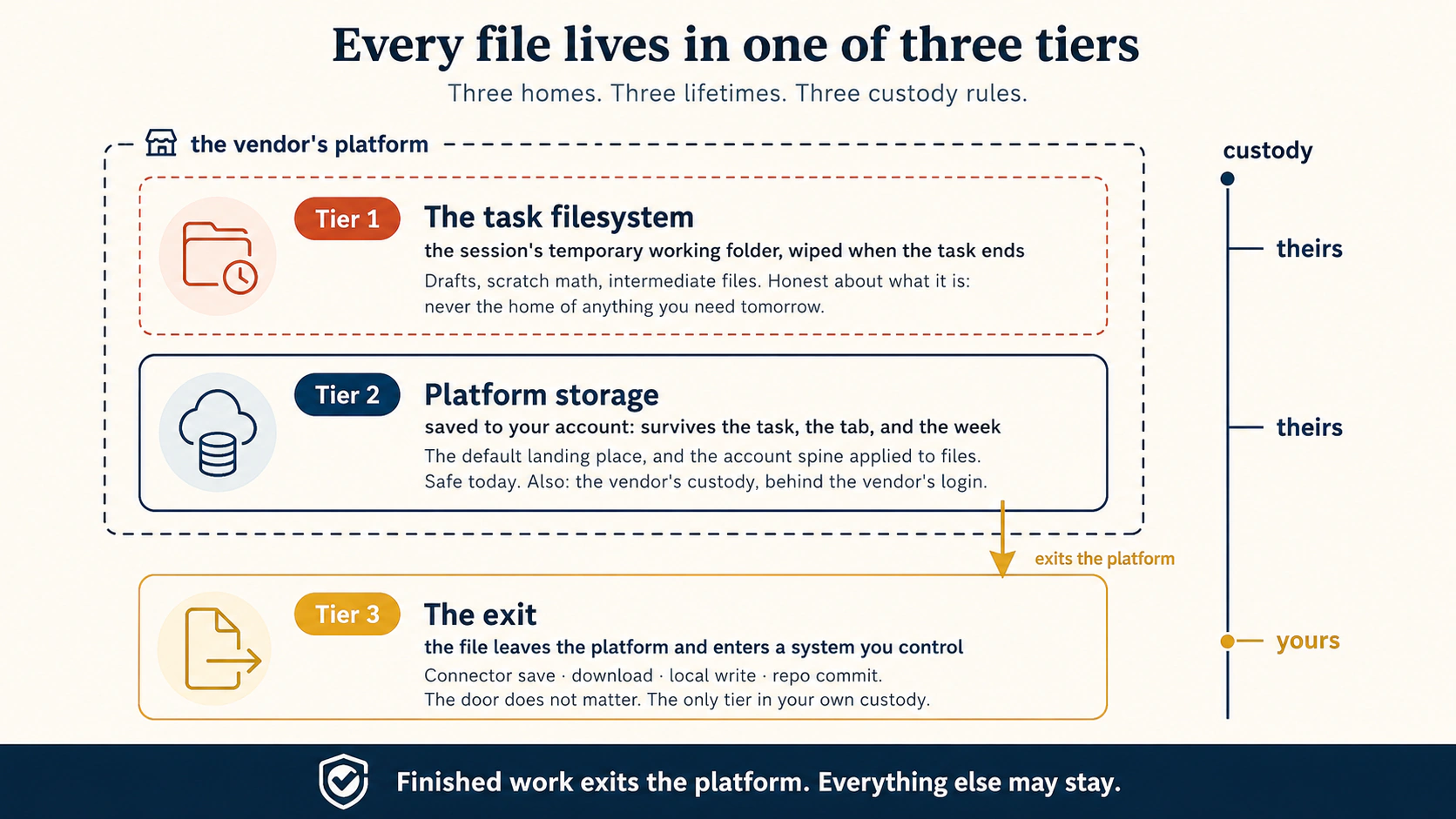
यह course का signature concept है। Agent की touch की हर file को तीन tiers में से एक में समझें। यह model है, physics का law नहीं, लेकिन practice में टिकता है और fuzzy question को sharp बनाता है। हर deliverable के लिए एक decision लें: वह किस tier में उतरेगा?
Tier 1: task filesystem। Remote session work करते समय vendor servers पर temporary working space use करता है: drafts, intermediate calculations और half-built files का scratch area। Work पूरा होने पर clean होता है, exact retention rules vendor के अनुसार बदलते हैं, इसलिए storage न मानें। Tier 1 अपनी nature के बारे में honest है। कल चाहिए ऐसी चीज़ का home कभी नहीं।
Tier 2: platform storage। Vendor platform पर account में permanently saved files। Task, tab और week के बाद बचती हैं। यह files पर लागू Concept 4 का account spine है और natural default है: work यहाँ उतरता है जब तक कहीं भेजें नहीं। Tier 2 safe है। साथ ही vendor custody, vendor format और vendor login के पीछे है।
Tier 3: exit। File platform छोड़कर आपकी control वाली जगह उतरती है। Drive में connector save, email या Slack post, अपनी machine पर direct download, local folder में write, repo में commit। कई doors हैं और door matter नहीं करता। Destination matter करता है: Tier 3 एकमात्र tier है जहाँ deliverable आपके system of record में आता है, जहाँ firm, client या future self सच में उसे ढूँढेगा।
Discipline एक line में, और पूरे course से यही line memorize करें:
Finished work platform से बाहर जाता है। बाकी सब रह सकता है।
Tiers को risk ladder की तरह पढ़ें। केवल tier 1 का deliverable पहले से lost है: wipe bug नहीं, tier की definition है। केवल tier 2 का deliverable आज safe और कल hostage है: survive करता है इसलिए safe, लेकिन केवल दूसरे की custody और login में survive करता है इसलिए hostage। Tier 3 deliverable आपका है: Drive version history, firm matter folder या repo में, आपके retention rules के तहत, colleagues को findable और अगले quarter vendor product का shape बदलने पर भी मौजूद।
Cowork web session temporary task filesystem (tier 1) में work करता है, outputs account में session के साथ save करता है (tier 2), और connected services से files save या send कर सकता है: Drive, Gmail, Slack (tier 3)। Tier-3 path granted connectors से जाता है, इसलिए अगला concept connector scope को नई seriousness से देखता है।
वही तीन tiers। Tier 1 isolated working environment है जिसे Work task run के दौरान use करता है, job के लिए spin up अपना file system। Exact implementation OpenAI manage करता है और आपके control वाले interface का हिस्सा नहीं। Tier 2 finished files हैं: docs, sheets, decks, dashboards और Sites, cloud-synced session और Projects के साथ। Tier 3 exit है: finished file platform से आपकी control वाली जगह जाती है। Browser surface पर main automated exit Plugin Directory के connector से Drive, Gmail या Slack में save है। Download manual exit है और desktop bridge connect हो, तो local write जोड़ सकता है। OpenAI के favor में एक note: Sites finished web app या dashboard को shareable URL पर publish कर सकता है। यह सच में useful है। लेकिन Concept 5 से पढ़ें। Platform-hosted Site public door वाला tier 2 है, आपकी custody का tier 3 नहीं। Exact keep-and-export rules कुछ weeks पुराने हैं, इसलिए live docs से verify करें। Underlying three-tier structure नहीं बदलेगा; वही सीखना है।
एक worked example। Ayesha client के लिए monthly invoicing run करती है। Draft numbers tier 1 में: agent की scratch math और temporary CSV। वहीं live और die करते हैं, और यह सही है। Scratch paper audit नहीं होता। Invoice template अगले month reuse करेगी, इसलिए tier 2 में save करती है: platform storage, उस session के साथ जिसे 30 days बाद reopen करेगी। Finished invoice PDF tier 3 में दो बार जाता है: firm के Drive folder में save और mail connector से client को email। दो बार और tier 3 क्यों? क्योंकि किसी दिन auditor, partner या November में Ayesha पूछेगी, "March invoice कहाँ है?" Answer firm records होना चाहिए, "Cowork account में कहीं" नहीं। System of record firm का है। केवल Tier 3 वहाँ पहुँचता है।
हर deliverable-producing brief को एक instruction से end करें और tier decision visible हो जाएगा:
End by listing every file you created and where each one landed:
temporary working space, platform storage, or a system I control (connector save, download, local write, or repo commit).
यह line invisible default को visible decision बनाती है। Project 2 इसे real work पर run कराता है।
Paper तीन जगह हो सकता है। Worker के scratch pad पर: day के अंत में फेंका गया। Worker के drawer में: safe, लेकिन उसके desk में, आपके नहीं। आपकी filing cabinet में: आपका, जहाँ आपके rules लगते हैं और लोग ढूँढ सकते हैं। Rule आसान है: finished चीज़ cabinet में जाती है। Drafts pad या drawer में रह सकते हैं।
Deeper जाएँ: इस discipline का future है
दो courses बाद यह concept grown-up form में लौटेगा। Loop Engineering state spine सिखाएगा: runs के बीच loop की memory और वह memory कहाँ रहती है, यही tier decision है। Leaving the Laptop suitcase test सिखाएगा: home move करने पर क्या साथ चलता है। उसका rule, repo holds the truth, engineering clothes में tier 3 है। इस course का Project 6 exit drill, उस course के vanishing-home drill का beginner version है। Invoice और brief पर tier habit अभी सीखें, engineering versions बाद में obvious लगेंगे।
ख़ुद को check करें
Lawyer web session में comparison memo बनाता है और client के साथ platform link share करके रुक जाता है। रुकने में दो problems क्या हैं?
Answer देखें
पहली, custody: memo केवल tier 2 vendor platform में है, firm matter folder और retention system के बाहर, इसलिए engagement record में hole है। दूसरी, access: link sharing और permissions platform के हैं, firm के नहीं। Firm वह govern नहीं कर सकती जिसे hold नहीं करती। Fix tier 3 है: memo document management system में save करें, फिर firm rules के तहत वहाँ से share करें। Platform link window था। Client को document के बजाय window मिली।
6. Web पर Connectors: reach और exit door साथ
Foundations में connectors मिले थे: real service तक permission-scoped access। Drive, Gmail, Slack, MCP standard पर। Scopes आप grant करते हैं। AI उनके अंदर काम करता है। Definition यहाँ नहीं बदलती। बदलता है connector का weight, जब उसे chat नहीं agent hold करता है।
इस surface पर trust controls दो levers हैं: connector scope और approvals। Cowork desktop course के desktop agents तीसरा lever जोड़ते हैं (agent कौन से local folders देख सकता है) और उसके आसपास discipline बनाते हैं। Browser-only session में वह lever नहीं, क्योंकि अपने-आप scope करने वाला local filesystem नहीं। उसकी job अभी सीखे tier decision और granted connector scopes में split होती है।
इसीलिए concept साफ़ कहता है: web पर connectors double weight carry करते हैं। Connector services तक agent की reach है, यह हमेशा true था। Browser-only session में files के लिए main automated exit door भी है: Concept 5 का tier-3 path अधिकतर granted connectors से जाता है। Download manual exit और supported desktop bridge local write जोड़ सकता है, लेकिन hands-off work में connector door है। Service connect करते समय वही permission screen अब तय करती है कि agent क्या पढ़ सकता है और finished work कहाँ जा सकता है। इसलिए Foundations habit good practice से rule बनती है: connect click करने से पहले scopes पढ़ें, और job पूरा करने वाला narrowest scope दें।
पहले real task से पहले दो specifics जानें:
- Read scope send scope नहीं। Mail connector को read access देने से agent threads summarize कर सकता है। Write या send अलग और बड़ा grant है। आपके address से sent message recall नहीं हो सकता और लोग उस पर act करेंगे। Safe default assume न करें। Connectors बहुत अलग होते हैं: app, plan और workspace settings के अनुसार read-only, केवल drafts या real write/send actions। Enabled connector के actual actions और permissions inspect करें। Consequences वाले हर action पर approval माँगें और send-capable setup को separate higher-trust decision मानें
- Untrusted content हमेशा careful mode में जाता है। Cowork course के full rule का short form: दूसरे का लिखा text hidden instructions carry कर सकता है। Inbound email, vendor PDF या unknown webpage आपको normal sentences दिखते हैं, agent को commands। इसे prompt injection कहते हैं। Real attack है, theory नहीं। इस level पर defense सरल है। Task आपके न लिखे content को touch करे, तो ask-before-acting mode रखें। Plan में ऐसे steps देखें जो आपने नहीं माँगे। Unrequested connector action propose हो, तो approve न करें। Redirect करें या फिर से शुरू करें
Granting discipline Foundations से unchanged है, लेकिन stakes बढ़े हैं इसलिए दोहराएँ: service को specific workflow की need पर connect करें, speculation पर नहीं। हर connector reach है और अब door भी।
Connector worker को दी key है। इस surface पर same key दो चीज़ें खोलती है: information लेने वाले rooms और mail slot जिससे finished documents building से बाहर जाते हैं। Job से अधिक खोलने वाली key convenience नहीं, चुना हुआ risk है। देने से पहले पढ़ें कि हर key क्या खोलती है।
ख़ुद को check करें
Desktop पर (अगला course) trust levers folders, connectors और approvals हैं। Web पर दो हैं। तीसरे का क्या हुआ और उसकी job किसने ली?
Answer देखें
Folder lever गायब हुआ क्योंकि browser-only remote session के पास अपने-आप scope करने वाला local filesystem नहीं। (Desktop bridge app open रहने पर scoped local access दे सकता है, लेकिन वह desktop lever है, tab का नहीं।) उसकी job दो चीज़ों ने ली: tier decision (Concept 5), जो files कहाँ रहती हैं govern करता है; और connector scope, जो agent की reach और file exit govern करता है। इसी inheritance से connectors इस surface पर double weight carry करते हैं।
7. Pocket में gate
किताब का हर agent product एक promise रखता है: जिन decisions को सच में person चाहिए वे person तक आएँ। इसे human gate कहते हैं। Surface gate को नहीं, यह बदलता है कि gate आपको कहाँ ढूँढता है।
Desktop agent में approval card आते समय अक्सर screen पर होते हैं: gate और eyes accident से same place में हैं। यहाँ accident ख़त्म। Work lunch, meeting या sleep के दौरान run करता है, यही surface का point है, इसलिए approval tab पर wait नहीं कर सकता। Phone पर notification या approval card आता है, जिसे कहीं से 30 seconds में पढ़कर clear कर सकते हैं।
Phone की role ठीक समझें, क्योंकि दोनों mistakes common हैं। Phone gate है, workbench नहीं। Phone से plan review, step approve, एक sentence में redirect या task stop करें। वहाँ brief draft या 40-page deliverable review न करें। Design work big screen पर है। Phone इसलिए है कि 10-second decision के लिए session 6 hours stall न हो।
अब concept का caution, जिसे बाद के course से जल्दी लिया है क्योंकि wait नहीं कर सकता: gate नहीं चला। Doorbell को चलना पड़ा। Screen पर काम करते समय escalation खुद eyes के सामने आता था। अब work वहाँ run करता है जहाँ eyes नहीं। Approval unseen रह सकता है। Unseen escalation delayed decision है, कभी default से लिया decision। Unseen approval पर तीन days paused session loud fail नहीं हुआ; silent fail हुआ, जो worse है।
इसलिए unattended चीज़ पर trust से पहले non-negotiable habit: एक बार purpose से gate ring कराएँ। छोटा task design करें जो एक approval माँगे (जैसे harmless test file connected test folder में save करने को कहें, ऐसा step जिस पर pause हो)। Start करें, computer से दूर जाएँ। Confirm करें कि notification phone तक पहुँचता है, app installed है, notifications on हैं, focus mode ने नहीं दबाया, और phone से approval clear करें। जिस alarm को सुना नहीं वह rumor है। Project 3 walkthrough देता है।
Cowork remote session approvals Claude mobile app में आते हैं। पहले walk-away task से पहले: app installed, same account में signed in, notifications enabled। फिर deliberate-approval test एक बार end to end run करें।
OpenAI ने mobile gate directly बनाया। ChatGPT mobile app running work से connected रखता है। Desk से दूर questions answer, outputs review और important actions approve कर सकते हैं। OpenAI Work को goal को steps में तोड़ने वाला बताता है, जबकि आप follow, questions answer, direction change और important actions approve करते हैं। Gate design से phone तक आता है। Cowork जैसा preflight: app installed, same account, notifications on। फिर unwatched work पर trust से पहले deliberate-approval test end to end run करें। (सबसे detailed mobile-approval docs Codex work और host Mac के लिए हैं। Exact Work-mode behavior live pages पर confirm करें। Gate-on-mobile idea first-party है।)
Worker आपके दूर रहते काम करता है और कभी question पूछता है। इस surface पर question phone में आता है। दो rules। Phone से questions answer करें, real design desk पर। Arrangement पर trust से पहले worker से purpose से question पूछवाएँ और check करें कि वह पहुँचा। जिस doorbell को कभी बजते नहीं सुना, वह broken हो सकती है और पता नहीं चलेगा।
ख़ुद को check करें
Scheduled Monday-morning brief ने दो weeks कुछ produce नहीं किया। Error भी नहीं मिला। First और second check क्या है?
Answer देखें
पहला: gate आप तक पहुँचता भी है या session unseen approval पर paused है? Gate की silent non-delivery इस concept का failure mode है और same symptom देती है: no output, no error। दूसरा: task run हुआ या नहीं, क्योंकि metered usage और plan limits (Concept 9) budget खत्म होने पर scheduled task को pause या fail करा सकते हैं, या intervention माँग सकते हैं, और error मिलने पर depend नहीं करना चाहिए। दोनों checks का shared idea: इस surface पर silence ambiguous है जब तक उसे meaning न दें। Engineering depth के साथ यह Leaving the Laptop में लौटता है।
Part 3: Working Unwatched
Surface जानते हैं। अब उसे useful बनाने वाली skill: ऐसा work hand over करना जिसे आप देखेंगे नहीं। यह part delegation loop सिखाता है, वे चार steps जिन्हें हर अगला course known मानता है। फिर surface की core capability: clock पर शुरू होने वाला work, जबकि आपका कोई device online नहीं।
8. Delegation loop: brief, plan, approve, review
यह किताब का पहला delegation lesson है और शायद आपका भी। Foundations में सब conversation था: पूछा, पढ़ा, फिर पूछा, और कोई चीज़ unseen नहीं हुई। Delegation अलग है। Outcome describe करते हैं, agent multi-step work करता है और आप result देखते हैं। Result quality लगभग पूरी तरह चार moments तय करते हैं, और उनमें केवल एक prompt है।
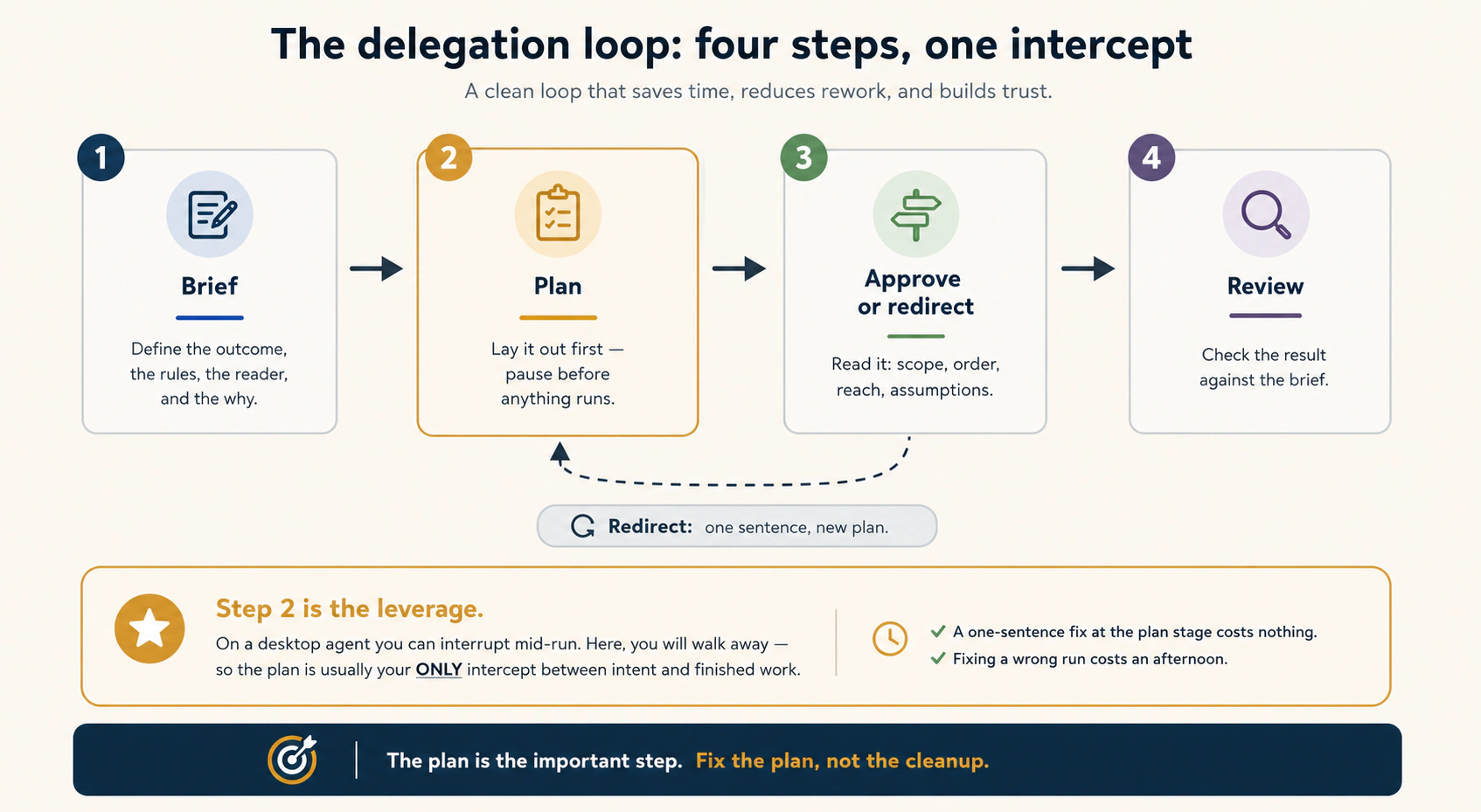
Step 1: Brief। Assignment ऐसे describe करें जैसे smart, motivated नए colleague को brief कर रहे हों जिसे आपका context नहीं पता: outcome, constraints, audience और why। यह Foundations Course 2 का briefing discipline है, higher stakes के साथ। Model brief gaps के against सिर्फ़ answer नहीं देता, action करता है।
एक pair में difference:
- एक query: "इस PDF को summarize करें।"
- एक assignment: "इन तीन files को पढ़ें। हर deadline और open commitment flag करें। Manager के लिए one-page brief बनाएँ: direct tone, deadlines पहले, introduction paragraph नहीं।"
Query chat में ठीक है। Assignment इस surface के लिए है। देखें assignment में क्या है जो query में नहीं: क्या produce करना है, किससे, किसके लिए, किस shape में और किन rules के साथ। वरना agent हर decision आपके लिए silently mid-task लेता, जब आप देख नहीं रहे होते।
Step 2: Plan। हर non-trivial brief को एक line से end करें:
Lay out your plan first, and pause for my approval before doing anything.
यह line यहाँ कहीं और से ज़्यादा matter करती है। Desktop agent में work run होते देख सकते हैं और mid-step interrupt कर सकते हैं। यहाँ दूर जाएँगे, यही point है। इसलिए plan अक्सर intent और finished work के बीच only intercept है। Skip करें, तो mistake हर file में run होने के बाद ही पकड़ेंगे।
Step 3: Approve या redirect। Approve से पहले plan पढ़ें। चार checks, दो minutes:
- Scope: क्या केवल named चीज़ें touch कर रहा है या job quietly बढ़ी?
- Order: क्या verification से पहले action हो रहा है?
- Reach: क्या unrequested connector या send propose करता है? (हाँ और task में दूसरे का content है, तो रुकें और Concept 6 फिर पढ़ें।)
- Assumptions: format, audience या unstated rules के बारे में क्या assume किया?
कुछ wrong हो तो फिर से start न करें। Sentence से redirect करें: "Step 2 में नए headings invent करने के बजाय existing template के headings use करें।" Agent plan rewrite करके फिर पूछता है। Plan stage की one-sentence correction free है। Confident wrong run की cleanup afternoon लेती है।
Step 4: Review। Deliverable आपके कहीं और होने पर आता है, इसलिए review को brief में build करें। हर deliverable-producing assignment के end में तीन lines:
Before you start: ask me 1–2 clarifying questions.
If any sources contradict each other on a material point, flag the
contradiction in the deliverable. Do not silently pick one.
When done: list every file you created and where each one landed —
temporary working space, platform storage, or a system I control (connector save, download, local write, or repo commit).
पहली line उस assumption को surface करती है जो defect बनती। दूसरी इसलिए कि model training conflicts को smooth करके confident answer बनाना चाहती है। Lawyer या accountant के लिए contradicting sources में silently एक चुनना main failure है। तीसरी Concept 5 tier discipline को automatic बनाती है। Result पढ़ते समय 90% सही हो, तो last sentence हाथ से edit करें। Structure off हो, तो problem बताएँ और revision माँगें। Agent के साथ iterate करना taste सिखाता है। हाथ से rewrite करना कुछ नहीं सिखाता।
पहली assignment अभी run करें (10 minutes, कुछ connect नहीं)। कोई real messy input लें: meeting notes, project plan या files में pasted तीन related emails। Agent surface खोलें, attach/paste करें और full four-step assignment भेजें: constraints और audience वाला outcome, plan-first line, तीन review lines। Plan पढ़ें। Purpose से एक चीज़ redirect करें, छोटी भी, ताकि redirect feel हो। Approve करें। Tea तक दूर जाएँ। लौटकर deliverable को brief से compare करें। यह single run बाकी concept से ज़्यादा सिखाता है और आगे हर course में unchanged यही loop होगा।
Anti-pattern का नाम। Most common failure इस surface को superpowers वाला chat box मानना है: unattended multi-step work पर one-line prompt fire करना। Math कठोर है: brief जितना vague, agent अकेले उतने decisions लेता है। Unwatched run जितना लंबा, result दिखने से पहले decisions उतने compound होते हैं। Chat में vague query एक reply waste करती है। यहाँ vague assignment आपका afternoon cleanup में waste करती है।
हर बार चार steps। जो चाहिए पूरा कहें: result, rules, reader। Work से पहले plan माँगें। Plan पढ़ें और wrong हो तो एक sentence से fix करें। फिर result को request से compare करें। Plan important step है। Plan fix करने में one minute, finished wrong work fix करने में afternoon लगता है।
Deeper जाएँ: यह loop miniature में पूरा section है
हर अगला course loop का एक step deepen करता है। Cowork course desktop work के steps 2 और 3 deepen करता है: per-step approval cards, execution view और full trust model। Spec-Driven Development step 1 को इतना deepen करता है कि brief work check करने लायक precise spec बन जाए। Loop Engineering step 3 automate करता है: checker agent work पढ़ता है ताकि हर run आप न पढ़ें। Trusting the Checker step 4 को measurement तक deepen करता है। आगे की कोई learning loop replace नहीं करती, हर चीज़ एक step sharpen करती है।
ख़ुद को check करें
Multi-source task brief करते हैं, plan-first line skip करके meeting में जाते हैं। लौटकर एक source की misreading पर बना deliverable मिलता है। Desktop agent में mid-run पकड़ सकते थे। यहाँ safety net क्यों available नहीं था और कौन सी single line replace करती है?
Answer देखें
Net screen पर आपकी eyes थीं। इस surface पर eyes कभी screen पर रहने वाली नहीं थीं, क्योंकि unwatched work point है। Mid-run intercept नहीं, इसलिए run से पहले only intercept बचता है: "Lay out your plan first, and pause for my approval." यहाँ यह good practice नहीं, safety net है।
9. बिना device online हुए scheduled tasks
अब तक हर चीज़ आपके start press करने से शुरू हुई। यह concept उसे भी हटाता है और इसी capability ने July 2026 को course-worthy बनाया।
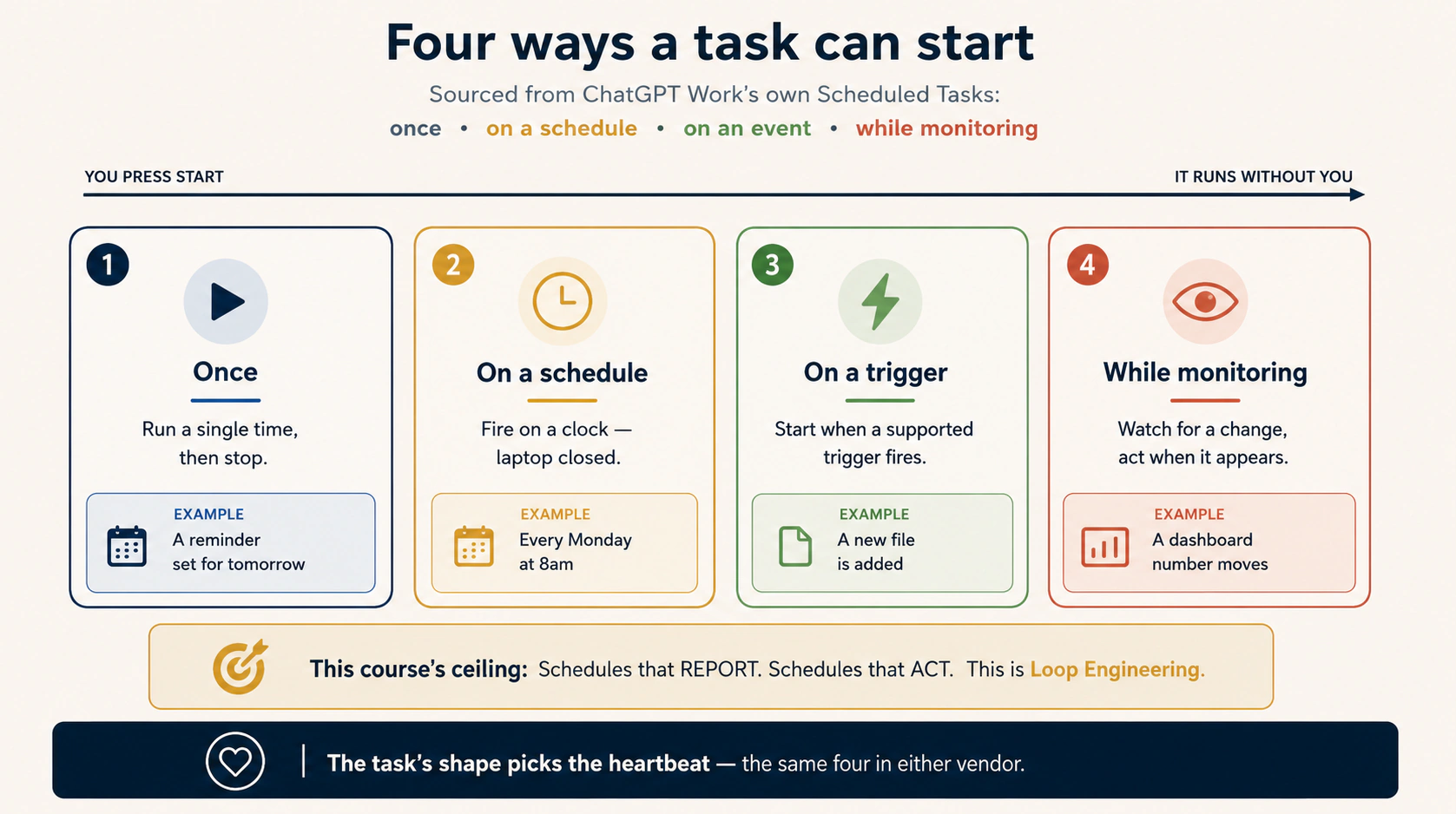
Scheduled task वह assignment है जिसे cadence के साथ एक बार describe करते हैं और जो vendor servers पर अपने clock से run होता है: laptop closed, phone pocket में, कोई device online नहीं। हर Monday 8 बजे week brief आपके बैठने से पहले wait करता है। Promise real है। Concept वह discipline जोड़ता है जो इसे quietly mess बनने से बचाता है।
हर scheduled task चार answers है। Create करने से पहले इस order में लिखें:
- क्या करना चाहिए? Standing brief। Concept 8 की हर बात, एक addition के साथ: clarify करने वाला कोई नहीं, इसलिए brief absence survive करे, empty case सहित। "इस week नए items नहीं हैं, तो ऐसा कहती one-line note बनाएँ" quiet week और silent failure को अलग करती है
- क्या touch कर सकता है? Scope की files और platform storage, नाम से। Vague scope वाला scheduled task हर week wider drift करता है और कोई देखता नहीं
- क्या reach कर सकता है? Listed connectors। Connectors permissions हैं, suggestions नहीं। Mail connector के बिना task mail send नहीं कर सकता चाहे brief कुछ कहे, और यह feature है। Concept 6 की तरह narrowest reach दें, क्योंकि grant unattended, schedule पर, indefinite use होगा
- कब start होता है? Cadence। हर scheduler का honest fact: "Monday at 8" का अर्थ around Monday at 8। Schedulers stagger और कभी slip करते हैं। Hard deadline output पर depend हो, तो schedule अकेला guarantee नहीं। Leaving the Laptop इसे properly सिखाता है
पहले schedule से पहले तीन rules, हर एक किसी और के hard lesson से आया:
- उसे schedule न करें जिसे walk away trust नहीं देंगे। Schedule ladder का last rung है, first नहीं। Task कम-से-कम कुछ बार watched run करें। फिर कुछ unwatched runs। केवल walk-away survive करने वाला work clock earn करता है। एक बार run task schedule करना automation नहीं, weekly surprise subscription है
- Metered math लिखकर करें। किसी और के servers पर hands-off work का budget होता है: daily runs या plan hours, tier के अनुसार staged और company के अनुसार अलग। Collide होने वाले week से पहले scheduled tasks को plan limit से count करें। Usage या task limits hit हों, तो task pause, fail या intervention माँग सकता है। Error absence पर depend न करें। Scheduled page और notifications check करें। Concept 7 का failure: silence का meaning तभी है जब आपने दिया हो
- Completed run successful task नहीं। Scheduler की job "run हुआ" पर end होती है। Work सही है या नहीं scheduler का business नहीं। Success signal task output में build करें: brief stated line पर end हो, processed items, produced files और tiers या explicit empty-case note। उस line को पढ़ें। Green का अर्थ "run हुआ" है। केवल line का अर्थ "काम हुआ" है
Cowork scheduled tasks plain language में cadence के साथ describe होते हैं और web पर remotely run करते हैं: आपका device online न हो, फिर भी fire और results session में wait। Access और run limits plan से staged व metered हैं, इसलिए live plan limits से arithmetic करें, यहाँ printed चीज़ से नहीं। एक caveat जल्दी जानें, जो limit का opposite है: Cowork scheduled tasks remotely run करते हैं, computer sleep या desktop app closed होने पर भी। Connectors, plugins और Claude account saved files के साथ काम करते हैं, लेकिन computer folder से bind नहीं हो सकते। Recurring workflow local files या desktop apps पर depend करे, तो अलग desktop-dependent setup चाहिए। Scheduled work को connectors और account storage पर रखें और promise hold करता है।
ChatGPT Work के Scheduled Tasks अभी सीखे चारों heartbeats cover करते हैं, OpenAI के words में: action एक बार, schedule पर repeat या event होने पर, या time के साथ changes monitor। (इस web surface पर "new file appears" जैसे event triggers instant push के बजाय periodic monitoring से handle होते हैं, इसलिए trigger और monitor को एक family मानें।) Launch examples दोनों kinds के हैं। कुछ report: dashboard हर morning check करके changes summarize। कुछ act: new feedback पर presentation update या recurring themes को prioritized product ideas बनाना। Product report से ज़्यादा करता है। फिर भी beginner course reporting line पर जानबूझकर रुकता है। Action schedules का blast radius बड़ा है और checker design, state, idempotency व recovery सीखने तक wait करना चाहिए। यह course का rule है, product limit नहीं। चार answers और तीन rules यहाँ unchanged apply होते हैं। Tasks account के against cloud में run करते हैं। Reach Plugin Directory से granted है। Usage plan agent allowance घटाता है, इसलिए metered math real है। Current allowance live pages पर confirm करें।
एक firm caveat: uploaded files वाले Project के अंदर बनाया Scheduled Task उन Project files तक नहीं पहुँच सकता। Supported connector या दूसरा reachable source use करें और scheduled workflow को Project uploaded files पर design न करें। यह practice में Concept 3 है: same six-part shape, दूसरी company के buttons।
Boundary honestly। इस concept से reporting schedule बना सकते हैं: sources पढ़ना, synthesize करना, brief produce करना, सही tier में land करना। यह genuinely valuable है और इस surface पर अधिकतर लोगों के first year का value है। Course की deliberate ceiling है। Safely नहीं बना सकते ऐसा schedule जो act करे: cadence पर send, file, update और decide। Unattended action को वे parts चाहिए जो अभी नहीं: work grade करने वाला checker, machine-verifiable stopping condition, runs के बीच memory वाला state file। Loop Engineering सब design सिखाता है और Leaving the Laptop proven result कहाँ रहे सिखाता है। Concept ने door खोला। वे courses उसमें चलते हैं।
Scheduled task standing instruction है: worker हर Monday बिना पूछे job करता है, laptop off हो तब भी। चार चीज़ें लिखें: job, क्या touch कर सकता है, क्या reach कर सकता है और कब run करता है। तीन rules: केवल वही jobs schedule करें जो आपके दूर रहने पर पहले अच्छी हुईं। Limit hit करने से पहले plan budget count करें और silence trust करने के बजाय Scheduled page check करें। Job से अपना result report कराएँ, क्योंकि "run हुआ" और "काम हुआ" अलग facts हैं।
ख़ुद को check करें
Ayesha दो schedules चाहती है: Monday-morning unpaid client invoices summary (Drive से read, brief account में save), और Friday automatic task जो हर late client को payment reminder email करे। कौन यहाँ है, कौन wait करेगा और one-word difference क्या है?
Answer देखें
Monday summary यहाँ है: reporting schedule, read, synthesize, tier में land; wrong week की cost rewrite। Friday reminders wait करेंगे: task बाहर की दुनिया पर unattended cadence में act करता है, wrong run real clients को email करता है और इस course में send से पहले checker नहीं। One-word difference: acting (reporting के opposite)। Reporting इस course की ceiling है। Acting को Loop Engineering का checker, stopping condition और state चाहिए, और तब भी reminder email human gate का exact use है।
Part 4: Choosing, and the Open Path
अब इस surface पर agent direct, files सही tier में land और reporting task clock पर रख सकते हैं। तीन honest questions बाकी हैं। Surface wrong choice कब है? Vendor cloud के बिना open-source path कैसा है? Products कितने भी अच्छे हों, surface आपके लिए क्या कभी नहीं कर सकता? यह part तीनों answer करके बाकी section को handoff करता है।
10. Web, desktop या terminal: work क्या touch करता है उससे चुनें
अभी सीखा surface कई options में एक है। Mature habit हर task के अनुसार चुनना है, एक पर loyalty swear करना नहीं। हर case sort करने वाला rule छोटा है: work क्या touch करता है उससे चुनें।
| Work को चाहिए... | Surface | यह किताब कहाँ सिखाती है |
|---|---|---|
| Connector और document work, devices के बीच continuity, कुछ installed नहीं | Web | यह course |
| Machine off रहते continue होने वाला work | Web (repo work के लिए cloud Routine, बाद का topic) | यह course; Loop Engineering |
| Local files, desktop applications, signed-in browser | Desktop | Cowork & OpenWork, knowledge workers के लिए अगला |
| Code, repositories, command line | Coding agents | Agentic Coding, engineers के लिए अगला |
| Custody requirements वाला regulated data (PHI, privileged matter, regulated financial data) | अभी इनमें से कोई नहीं। पहले compliance का written answer लें | Cowork course full regulated-workloads guidance देता है |
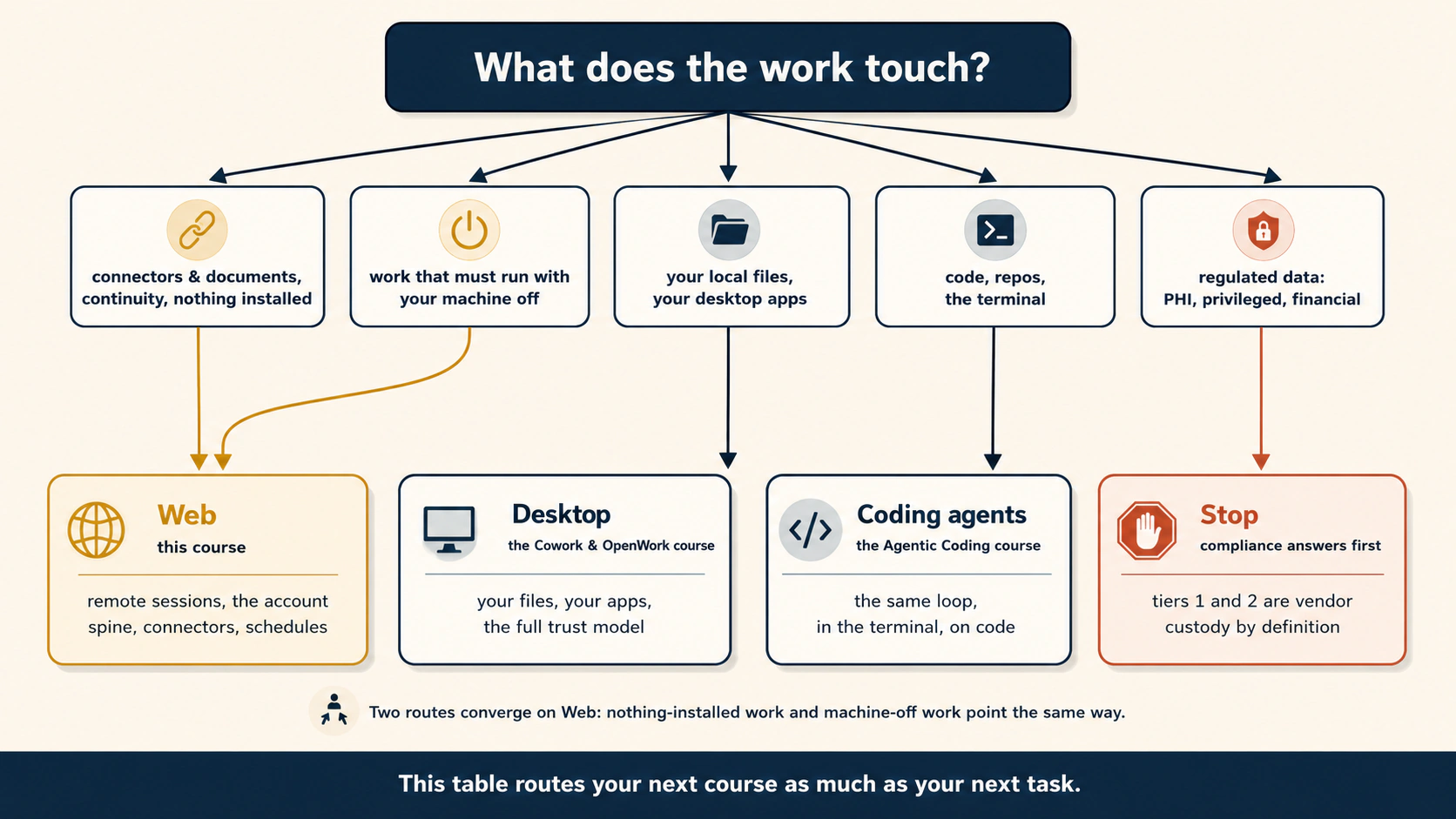
Table दो बार पढ़ें, क्योंकि दो jobs करती है। Task router के रूप में today's question answer करती है: यह report, यह surface। Course router के रूप में section question answer करती है: अगला co-worker course कौन सा। Documents और connectors वाले knowledge workers Cowork course जाएँ, जो web की unreachable चीज़ें जोड़ता है। Engineers Agentic Coding जाएँ। Surface छोड़ना किसी को नहीं: healthy setup हर task पर surfaces mix करता है, permanently।
एक row का अपना paragraph है क्योंकि risk सबसे ज़्यादा: regulated data। Concept 5 याद करें: tiers 1 और 2 definition से vendor custody हैं। Remote session working files और platform storage vendor machines पर हैं। Surface इसी से काम करता है और compliance regime ठीक इसी की care करता है। इसलिए PHI, privileged client matter या regulated financial data के लिए question "क्या surface careful है?" नहीं। Real question है "क्या इस plan, paperwork और custody में data रह सकता है?" केवल compliance team written में answer कर सकती है। Cowork course full treatment देता है। Written answer तक regulated data surface touch नहीं करता।
Multi-surface mix को mess बनने से एक known rule रोकता है: जानें हर deliverable किस tier में उतरा। Tier 3 deliverable, Drive, repo या firm records में, परवाह नहीं करता किस surface ने बनाया। Tier 3 का यही point है।
अलग jobs, अलग workplaces। Documents और connected services या machine off रहते work: web। Own files और desktop programs: अगले course के desktop apps। Code: coding agents। Sensitive regulated data: रुकें और compliance से written yes लें। कई workplaces use करें, बस हर finished document अपनी filing cabinet में जाए, चाहे कहीं बना हो।
ख़ुद को check करें
तीन tasks आते हैं: (a) Slack और Notion से weekly summary, travel में भी चाहिए। (b) Laptop folder की 200 files clean करना। (c) Privileged client documents का synthesis memo। हर one route करें और deciding fact बताएँ।
Answer देखें
(a) Web: केवल connectors touch करता है और machine off survive करना है। (b) Desktop: local filesystem touch करता है, browser-only remote session directly reach नहीं कर सकता। Cowork course। (c) अभी neither: privileged matter custody question है और tiers 1 व 2 definition से vendor custody। Surface देखने से पहले compliance written answer देता है। Three tasks, three answers, one rule: work क्या touch करता है, वही decide करता है।
11. Open path: vendor cloud के बिना
Course structure की confession, फिर required honesty।
किताब का हर co-worker course vendor tool को open-source twin से pair करता है: Claude Code के साथ OpenCode, Cowork के साथ OpenWork। इस course ने pattern तोड़ा। Tabs में दो closed products हैं: web Cowork और ChatGPT Work। Purpose से। दो rivals ने days के अंदर same shape ship किया। एक remote session, दूसरा chat app mode। यही thesis का evidence है और side by side देखना ज़रूरी था। लेकिन silently broken pattern bias बनता है। Missing open-source tab का question: क्या vendor cloud के बिना यह surface मिल सकता है?
हाँ, work के साथ। आज दो open paths हैं। कुछ words (self-hosted, cron, GitHub Actions) engineer के हैं। अभी detail नहीं, केवल paths का exist करना जानें।
OpenWork, remote और shared workspaces। OpenWork open-source desktop co-worker है जिसे अगले course में properly सीखेंगे। यह laptop से अलग जगह running worker से connect हो सकता है। URL और access token से self-hosted OpenWork worker, या organization shared cloud workers one step में। Course का core idea: work करने वाली machine और देखने वाली machine same नहीं। लेकिन infrastructure आपकी या organization की control में। Window आपकी, building भी आपकी।
OpenCode, आपके owned scheduler के साथ। Repo-attached work के लिए Concept 9 का open answer: अपने clock से fired coding agent, अपनी machine का cron या scheduled GitHub Actions job। Vendor cloud नहीं, plan tiers नहीं, staged rollout नहीं। Full pattern Loop Engineering सिखाता है। आज जानें कि exist करता है और exotic नहीं।
अब trade एक बार plain words में। हर open-versus-managed choice की same trade। Companies spine बेचती हैं। Open path में spine आपको बनाना पड़ता है। Vendor surface पर day one से working sessions, files, sync, phone gate, scheduler मिलते हैं। लेकिन उनकी custody, format, price और rules में। Open path पर हर चीज़ setup, run और fix आपकी। बदले में दो चीज़ें मिलती हैं जो vendor नहीं बेच सकता। पहली, custody: data आपकी control वाली machines पर। दूसरी, choice: prompts कौन सा model देखे और switch की freedom। कोई side noble नहीं। Concept 10 का regulated-data case custody को clear winner बनाता है। Friday तक briefs ship करता solo consultant working spine को clear winner बनाता है। अधिकतर readers task के अनुसार दोनों answers साथ रखेंगे। अब यह familiar लगना चाहिए।
Vendor surface furnished office है: desk, drawers, doorbell, day one से working, उनकी building में। Open path empty room है जिसे खुद furnish करते हैं: ज़्यादा work, लेकिन आपकी building, rules और choice कि कौन क्या देखे। कोई simply better नहीं। Sensitive work अक्सर आपकी building, fast work furnished office चाहता है। एक rent और एक own साथ कर सकते हैं।
ख़ुद को check करें
NGO weekly donor-report automation चाहता है। Data policy third-party consumer platforms पर donor records रोकती है, लेकिन team में engineer नहीं। Policy कौन सा path force करती है, team क्या खोती है और commit से पहले कौन सा honest sentence कहना है?
Answer देखें
Policy open path force करती है: donor records consumer vendor platform के tiers 1 और 2 में नहीं उतर सकते, जबकि यही surface foundation है। Team free spine, sync, phone gate और managed scheduler खोती है, जिसे किसी को बनाकर running रखना होगा। Honest sentence: "यह path subscription fee को operator से trade करता है। यहाँ किसी को setup, updates और break होने वाली morning own करनी होगी। Staff में engineer नहीं है, तो software नहीं, वही cost real decision है।" Custody free नहीं; operations से pay होती है।
12. यह surface क्या नहीं कर सकता और आगे कहाँ जाना है
Course honest boundary पर end करें, जैसे किताब का हर course।
Surface work improve नहीं करता। Remote session weak brief को बेहतर नहीं, unattended बनाता है। हर quality lever screen के आपकी side पर है: brief (Concept 8), plan review (only intercept), tier decision (Concept 5), deliberate gate test (Concept 7), walked-before-scheduled rule (Concept 9)। July 2026 ने agent browser में move किया। आपकी responsibilities कहीं move नहीं हुईं।
Surface कुछ weeks पुराना, metered, staged और vendor-shaped है। Page का हर mechanical fact, plan tiers, run limits, button names, product names भी, किताब का fastest-aging material है। Lasting layer साथ ले जाएँ: stop-typing test, window-not-runtime architecture, three tiers और one-line discipline, six-part reading lens, four-step loop, schedule के four answers। ये renames survive करते हैं। Churn से एक discipline बचाता है, फिर सुनें: जो matter करता है वह केवल platform पर नहीं रहता। Losing mind करेंगे ऐसी चीज़ हमेशा tier 3 में।
Surface beginning है, destination नहीं। अब equipped section और हर course का addition:
- Cowork & OpenWork, knowledge workers के लिए अगला, delegation loop को real files और desktop तक extend करता है, full trust model के साथ जिसकी web को ज़रूरत नहीं थी: folder lever, autonomy ladder, regulated-workloads discipline
- Agentic Coding, engineers के लिए अगला, same loop terminal में code पर
- Spec-Driven Development step 1 sharpen करता है जब तक brief work-checkable precise spec न बने, और इस surface पर भी run करता है
- Loop Engineering Concept 9 की fenced चीज़ बनाता है: act करने वाले schedules, checker, stopping condition और state spine के साथ
- Harness Engineering और Trusting the Checker loop को safe, फिर measurable बनाते हैं
- Leaving the Laptop runtime decision, proven work कहाँ रहे और सीखे surface को उसके homes का front door बनाकर section close करता है
Closing thought, तीन sentences में course। Chat box में design करते हैं। Agent surface पर run होता है। July 2026 में दोनों same address पर आए और division of labor softer नहीं, sharper हुआ। Shape सीखें। Address फिर बदलेगा।
यह surface बदलता है कि work कहाँ और कब run होता है। Work कितना अच्छा है नहीं बदलता: वह brief, plan review और checks से आता है। Products names और limits कई बार बदलेंगे। Page के ideas नहीं। Finished work अपनी storage में रखें और ideas अगले course में ले जाएँ।
ख़ुद को check करें
Reader course के बाद कहता है: "Agents web पर run करते हैं, इसलिए desktop और terminal courses legacy हैं।" Concept 10 rule और boundary से two-sentence correction लिखें।
Answer देखें
Surfaces shipped-last से नहीं, work क्या touch करता है उससे divide होते हैं। Local files, desktop apps और repos real work हैं जिन्हें browser-only remote session directly reach नहीं कर सकता, इसलिए desktop और terminal courses uncovered territory सिखाते हैं। कोई surface work अपने-आप improve नहीं करता: brief, plan review और checks skill हैं, बाकी section उन्हें depth देता है।
यह किताब इस surface को कहाँ use करती है (dogfooding)
Mid-July 2026 का honest answer: किताब के अपने unattended loops इस surface पर run नहीं करते, और कारण Concept 10 अपना काम कर रहा है। किताब repository है, loops repo-attached हैं और review gate CI में merge gate के पास रहता है, जैसा Leaving the Laptop dogfooding section बताता है। Work repo touch करता है, इसलिए दूसरे surface पर route हुआ।
इस surface की production value दो जगह है। पहली, हर loop से पहले chat-side design work: briefs draft करना, reviewer prompts test करना, एक beat हाथ से run करना। दूसरी, किताब के आसपास connector-and-document tasks। यह Concept 9 की course ceiling वाला reporting work है। Split compromise नहीं, course का division of labor है: chat box में design, work-touching surface पर run। अभी उसी arrangement का output पढ़ रहे हैं।
🚀 Projects
छह projects, easy से hard। Real लेकिन low-stakes work use करें: notes, plans, drafts। Regulated data कभी नहीं, Concept 10 rule practice पर भी लागू है।
📱 Project 1 · 15 min · Closed-lid test। Difficulty: easy · Uses: Concept 2। करें। छोटा multi-step session start करें (तीन pasted documents को one brief में summarize)। Mid-run tab close करें। Phone से session reopen करें। Done when same session second device पर continue होते देखा और one sentence में बता सकते हैं runtime वास्तव में कहाँ है।
🗂️ Project 2 · 30 min · Three-tier audit। Difficulty: easy · Uses: Concepts 5 और 8। करें। Deliverable बनाने वाला real task run करें। Concept 8 का full brief use करें, closing line सहित जो हर file और tier list करती है। Done when task की हर file का tier बता सकें और deliverable tier 3 में हो: Drive, inbox या records में, केवल platform पर नहीं।
🔔 Project 3 · 20 min · Purpose से gate ring कराएँ। Difficulty: easy–medium · Uses: Concept 7। करें। एक approval माँगने वाला task design करें, फिर computer से पूरी तरह दूर जाएँ। Approval behavior product, connector और workspace से बदलता है, इसलिए safe low-stakes trigger use करें: harmless test file connected test folder में save करने को कहें या confirmation वाली draft action prepare कराएँ। Drill में sending, deleting, purchasing या account changes use न करें। Approval fire न हो, तो यह finding है: approval mode और connector settings check करें और gate ring कराने के steps note करें। Done when approval phone तक आया, phone से clear किया और लौटने पर finished work wait कर रहा था। जिस alarm को नहीं सुना वह rumor है। यह project एक बार सुनाता है।
⏰ Project 4 · 30 min, plus one week · First reporting schedule। Difficulty: medium · Uses: Concept 9। करें। एक connector और एक file source से Monday-morning brief बनाएँ। पहले चार answers लिखें (what, touch, reach, when), brief में empty-case line और success signal रखें, plan metered arithmetic लिखकर करें। Vendor note: ChatGPT में uploaded files वाले Project के अंदर बनाया Scheduled Task उन Project files तक नहीं पहुँच सकता। Supported connector या reachable source use करें, uploaded Project file के आसपास workflow न बनाएँ। Done when task आपके किसी device के online हुए बिना दो बार fire हुआ और हर result में success signal था, सिर्फ़ completed run नहीं।
🔁 Project 5 · 45 min · One task, two vendors। Difficulty: medium · Optional: दोनों products access चाहिए · Uses: Concept 3। करें। Same assignment web Cowork और ChatGPT Work mode में run करें। दोनों sides paid plan चाहिए और staged rollouts दोनों को रोक सकते हैं। ऐसा हो, तो दूसरे product वाले person से pair करके results compare करें, या available one पर run करके Concept 3 table से दूसरे को predict करें। Table साथ रखकर test करें: rows hold करती हैं या rollout/rename ने mid-July 2026 से move किया? Done when tier 3 में one-page note हो: confirmed rows, drifted rows (mechanical layer real time age), और six shared parts दोनों में मिले या नहीं। Last finding point है, differences नहीं।
🧳 Project 6 · 45 min · Exit drill। Difficulty: capstone · Uses: Concepts 5 और 11। करें। Pretend करें platform इस quarter vanish हो जाता है। केवल tier 3, Drive, email और records से working state reconstruct करें: templates, standing briefs, deliverables। Done when non-reconstructable चीज़ों की list लिखी हो। वही tier-2 exposure और next week saving discipline है। (Leaving the Laptop में engineering teeth के साथ फिर मिलेगा।)
Appendices: बाद के courses, web पर
General Agents section का बाकी हिस्सा craft को Claude Code और OpenCode से सिखाता है: local tools जो terminal से run होकर आपकी machine की files पर काम करते हैं। इस course ने web surface सिखाया: web Cowork और ChatGPT Work, दोनों remote, browser tab में।
ये appendices bridge हैं। हर बाद के course के लिए एक question: कुछ install किए बिना web surface से कितना कर सकते हैं? Answer कभी "all" या "none" नहीं। कुछ ideas different names में cleanly transfer होते हैं। कुछ weaker form में। कुछ बिलकुल cross नहीं कर सकते क्योंकि local machine या real code execution चाहिए जो web surface नहीं देता। Final appendix course से पीछे हटकर पूरे industry में harness war map करता है।
Last group web gap नहीं। वही exact line है जहाँ section browser छोड़ने को कहता है। Appendices दो तरह पढ़ें: आज क्या कर सकते हैं उसका map और next courses क्यों exist करते हैं उसका preview।
एक rule सभी में hold करता है। Web पर finished harness rent करते हैं। Later courses में एक build करते हैं। Topic तब transfer होता है जब vendor harness पहले से आपके लिए करता है, और तब नहीं जब खुद wire करना हो। यह line रखें तो हर appendix same तरह पढ़ता है।
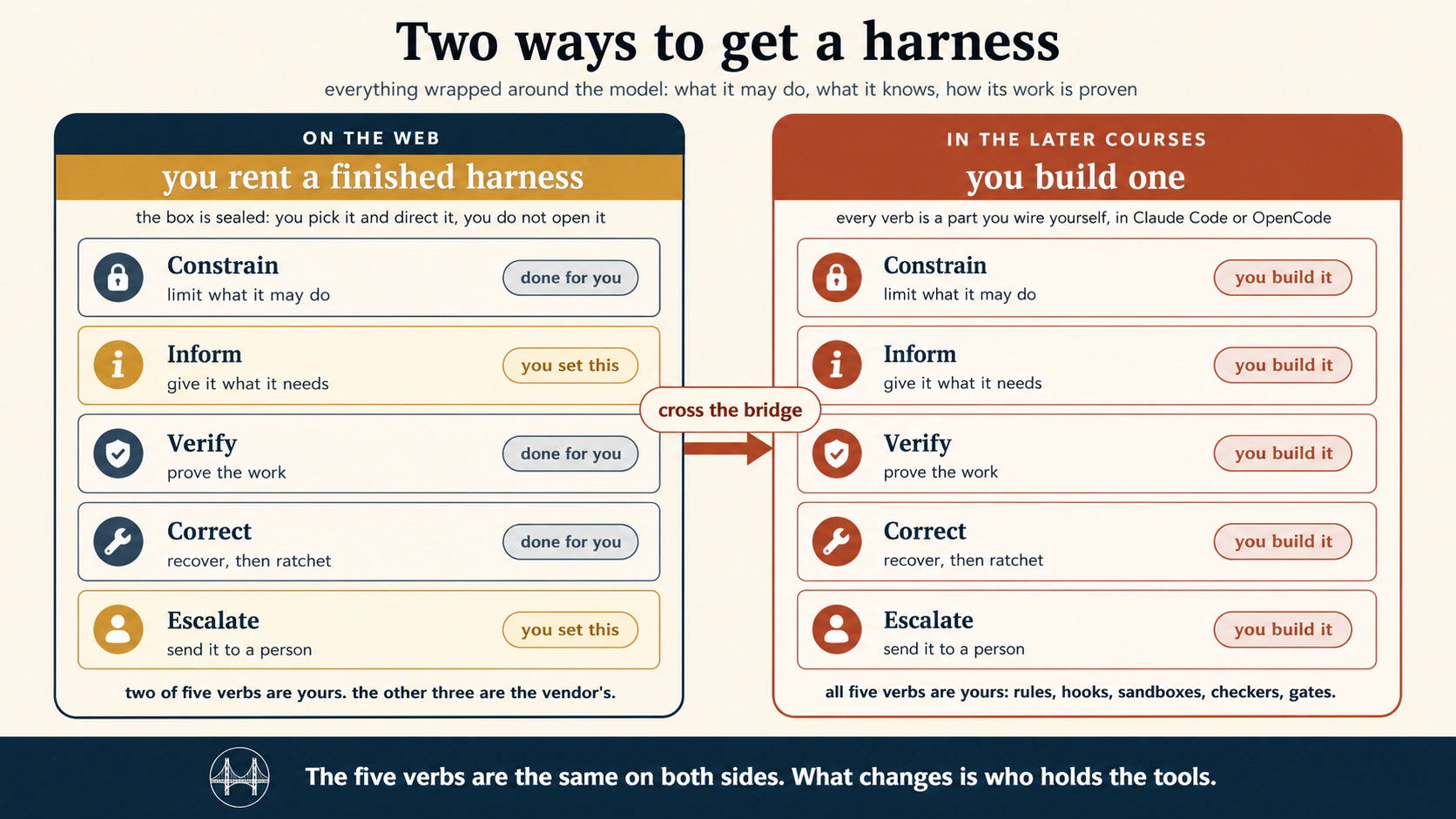
एक framing note, ताकि boundaries honest रहें। Appendix जब कहे web "local files reach नहीं करता" या "local repo नहीं", तो अर्थ browser-only session है: tab, nothing installed। Course ने वही surface सिखाया। उसके just beyond दो चीज़ें हैं। Desktop bridge (Concept 2) desktop app open रहते remote session को limited local access दे सकता है। Local agent (desktop और coding courses) शुरू से आपकी machine पर run करता है। इसलिए "does not transfer" rows browser-only समझें: tab जहाँ end होता है वहीं next courses शुरू होते हैं।
Appendix A · Agentic Coding, web पर
Agentic Coding course 15 concepts से Claude Code और OpenCode सिखाता है और किताब का context-engineering course है। अधिकतर ideas model क्या देखता है manage करने और work checkable बनाने के हैं। Surprising amount web पर transfer होता है क्योंकि six parts same हैं। Terminal, local file system और self-run code assume करने वाली हर चीज़ transfer नहीं होती।
Cleanly transfer होता है:
| वह course सिखाता है | Web पर यह है |
|---|---|
| Plan mode (पहले read, approval के बाद act) | Concept 8 delegation loop। Run से पहले plan माँगें। Same idea, keybind नहीं |
| Rules file (CLAUDE.md / AGENTS.md), permanent project instructions | Project saved instructions और Concept 6 persistent-workspace idea। Standing rules जो हर session पढ़ता है |
| Context management (window lean, fresh बनाम continue) | Fresh session या existing continue करना। Concept 4 state spine, आपके लिए managed |
| Model को task से match करना | Web पर thinner: surface model मिलता है, menu नहीं। Habit रहती है: जानें surface कौन सा model run करता है |
| MCP, system of record connect करना | Exactly connectors, Concept 6। नीचे same standard, sides पर different catalog |
| Skills (packaged reusable know-how) | Eligible plans पर दोनों families chat से Skill create, editor में build या instructions/resources/code package upload देते हैं। Format transfer होता है |
| Verification loop (attempt, check, fix, repeat) | Condition check करके change बताता scheduled report। Concept 9 ceiling। Check आपके लिए run होता है, auto-fix अभी नहीं |
| Prompt injection, context is the door | Concept 6 untrusted-content rule, word for word। Risk और habit हर surface पर same |
Weaker form में transfer:
| वह course सिखाता है | Web पर limited version |
|---|---|
| Slash-commands और Skill के आसपास runtime | Skills transfer होते हैं। Coding-agent setup कमजोर रहता है: authored slash-commands और Skill runtime, lifecycle hooks, model routing, filesystem व enforcement layer पर control नहीं। Skill मिलता है, machine नहीं |
| Subagents (अपने context window वाला separate worker) | Web बड़े task को अपने-आप sub-steps में fan कर सकता है, लेकिन chosen model और restricted toolset वाला subagent author नहीं करते। Vendor orchestration मिलता है, अपना नहीं |
| Resume, undo, rewind | Sessions resume होते हैं। Prior step के लिए /rewind या edits का git-backed /undo नहीं, क्योंकि work repo में नहीं हुआ। Undo है old file tier 3 में रखना |
Transfer नहीं होता, और यही point है:
| वह course सिखाता है | Web क्यों नहीं कर सकता |
|---|---|
| Hooks और plugins (code-enforced rule, हर बार) | Hook आपकी machine पर action block/check करने वाला code है। Web आपका code run या lifecycle events expose नहीं करता। यह clearest "browser छोड़ें" line है। Model जिस guarantee से बात करके निकल न सके, उसके लिए built harness चाहिए। Harness Engineering यही है |
| Local repo पर work, terminal commands | Browser-only session company servers पर run करता है, disk पर नहीं। अपने-आप terminal या local project edit नहीं करता। Desktop bridge limited access दे सकता है, लेकिन terminal-repo workflow local tools का home है। Concept 2: runtime remote है |
| Models route करके cost control (frontier से plan, cheap से execute) | Strong-plan/cheap-execute split में chosen two models और mid-task swap tool चाहिए। Web model आपके लिए चुनता है |
Honest summary। Work documents, connectors और scheduled reports है, तो web surface Agentic Coding course की अधिकतर value different names में देता है। Work own code, files या code-enforced rule touch करे, तो web edge मिल गया। Edge flaw नहीं, next courses का doorway है और अब location जानते हैं।
Appendix B · Cowork और OpenWork, web पर
यह अलग है। Cowork & OpenWork course इस course का closest relative है। Same general-agent co-worker, same knowledge workers, same delegation loop। Difference runtime है। वह course desktop पर products सिखाता है: Claude Desktop में Cowork और open-source twin OpenWork। यह course web Cowork सिखाता है। Same family, different home। इसलिए map "कितना transfer" नहीं; "desktop क्या देता है जो web नहीं और क्यों" है।
Same product family होने से cleanly transfer:
| वह course सिखाता है | Web पर यह है |
|---|---|
| Delegate, query नहीं (assignment वाला co-worker) | Concepts 1 और 8, word for word। Most important habit, हर surface पर identical |
| Task loop (brief, plan, approve, execute, review) | Concept 8 delegation loop। Same steps, plan पर same intercept |
| Plan is leverage | Concept 8 core और delegation-loop figure plan highlight का reason |
| Connectors trust lever (narrowest scope, read is not send) | Concept 6 exactly। Same connectors, scope discipline और rule |
| Approval modes (ask-before-acting, act-without-asking) | Concept 7 phone gate। Web same approval inline card के बजाय phone route करता है |
| Skills (description से चुना saved playbook) | Web Cowork same Skills system: catalog, /skill-creator, SKILL.md format product के हैं, desktop के नहीं। यहाँ web appendix expectation से stronger है |
| Autonomy ladder (हर task type one rung) | Concepts 8 और 9 discipline: जो walk-away नहीं, schedule नहीं। Ladder trust के बारे में है, surface नहीं |
| Prompt injection, untrusted content | Concept 6 rule। Hidden-instruction vendor PDF story web पर identical |
| Scheduled tasks (Cowork cadence) | Concept 9। Cowork /schedule और Scheduled view web से same काम करते हैं |
| Layered instruction stack (global, folder, session) | Concepts 4 और 6: global settings, Project instructions और session prompt। Folder layer Project layer बनती है |
Transfer, लेकिन web shape बदलता है:
| वह course सिखाता है | Web difference |
|---|---|
| तीन trust levers: folders, connectors, approvals | दो same। पहला बदलता है। Desktop पर local folder access grant होता है। Browser-only session में local folder नहीं। Working area Concept 5 task filesystem और platform storage है। Scope discipline रहता है, "disk पर dedicated folder" बन जाता है "own Project में work रखें"। Desktop bridge local folder reach कर सकता है, पर वह app job है, tab की नहीं |
| Sub-agents (batch के parallel workers) | Web Cowork batch को अपने-आप parallel workers में fan कर सकता है। हर worker visibility और local-file dependent control घटता है। Pattern रहता है, local-file version नहीं |
Persistent workspaces (folder + CLAUDE.md) | Concept 6 Project + saved instructions। Same idea, disk folder नहीं। Context file Project instruction field बनता है |
| Model routing (strong think, cheap plumb) | Appendix A जैसा thinner। Per-task surface model picker मिलता है, OpenWork full provider choice नहीं |
Transfer नहीं, और यही desktop का reason:
| वह course सिखाता है | Web क्यों नहीं कर सकता |
|---|---|
| Execution surface के रूप में local files | Desktop course का heart। Agent आपकी machine folder की files read/write करता है: matter, close-cycle, campaign folder। Remote web session company servers पर है और local drive अपने-आप reach नहीं करता। Concept 2 और separate desktop course का biggest reason |
| OpenWork itself (open-source, bring-your-own-model twin) | OpenWork installed desktop app है, chosen provider के साथ, files machine पर। इस trade का web version नहीं। Concept 11 open path name करता है, लेकिन browser surface नहीं |
| Local-first privacy (files machine नहीं छोड़तीं) | Web पर read content definition से company servers पर है। Desktop privacy story remote surface पर exist नहीं कर सकती। Regulated data के लिए decisive, Concept 10 line |
| Cowork plugins role bundles (Legal, Finance, Sales) | Desktop plugins skills, connectors, slash commands और sub-agents bundle करते हैं। Full plugin system web पर available है या नहीं live pages से check करने वाला weeks-old detail है, लेकिन desktop उसका built home है |
| Backup-based recovery (Time Machine, git, Drive history) | Desktop recovery "local backup file roll back" है। Web पर local file नहीं। Recovery Concept 5 discipline है: prior version tier 3 में रखें |
Honest summary। Cowork course और यह same room के two doors हैं। Documents/connectors और lowest-friction start के लिए web आज most course देता है, Skills सहित। Work own-machine files touch करे, vendor servers से data दूर रखे या OpenWork own-model path use करे, desktop चाहिए। यह web limit नहीं; desktop next course होने का reason है: work आपकी machine पर home आता है।
Appendix C · Loop Engineering, web पर
Loop Engineering course ऐसा system build करना सिखाता है जो agents को आपके लिए prompt करे: अपने-आप start, work, result check, memory और केवल human-needed choices पर call। Claude Code और OpenCode में। इस course के reading lens का exact six-part shape use करता है: heartbeat, four working parts, spine।
Honest split। वह course खुद line draw करता है, "loop कहाँ run हो सकता है?" Plain chat box नहीं, Claude Code, OpenCode और Cowork कर सकते हैं। Web middle में है। Simple heartbeats fire कर सकता है; real trustworthy loop की engineering नहीं।
Simple form में transfer:
| वह course सिखाता है | Web simple version |
|---|---|
| Scheduled heartbeat (हर morning, laptop off) | Concept 9 scheduled tasks। Web का strong heartbeat। Clock-fired report Cowork /schedule और ChatGPT Work Scheduled Tasks है |
| Event heartbeat (कुछ आने पर react) | Partly। ChatGPT Work changes watch कर सकता है, light event trigger। Course का GitHub-event और API-trigger machinery नहीं |
| Spine (runs के बीच memory) | Weak form। Account sessions/Projects रखते हैं, कुछ memory carry। Real course spine नहीं: repo में progress.md और rules file, हर run start पर read और end पर update |
| Skills (once-written knowledge, every run) | Eligible plans पर दोनों families packaged Skills रखती हैं। "No run starts from nothing" web पर दोनों sides transfer |
| Heartbeat menu (task end, repeat या once?) | Concept 9 check-yourself। Lightest loop चुनने का discipline surface-independent सोच है, command नहीं |
Transfer नहीं, और course वास्तव में यही है:
| वह course सिखाता है | Web क्यों नहीं कर सकता |
|---|---|
| Maker-checker split (एक agent writes, separate agent grades) | Course का central idea और web real version नहीं कर सकता। Vendor-decided "done" वाला run-until-done मिलता है। Own model और written rubric वाला separate checker author नहीं करते। Verification loop same wall hit करता है |
| Worktrees (parallel agents isolation) | Worktree आपकी machine पर separate git checkout है। Web पर local repo नहीं, isolate करने को कुछ नहीं। Concept local filesystem assume करता है |
Repo spine (progress.md और rules file) | Real spine own repository files है, every beat start read/end update। Web session memory vendor format में। "No spine, no loop" इसलिए serious loops repo-owning tool माँगते हैं |
/goal, /loop, capped shell loops (controlled run-until-done) | Claude Code commands और OpenCode shell patterns। Web vendor version देता है, वह version नहीं जहाँ stopping condition, retry cap और no-progress check आप set करें |
| Dynamic workflows (re-runnable script orchestration) | Loop body का deepest form: many subagents, checked/capped, one script। Local tools में भी Claude Code only। Web से बहुत आगे |
| Cloud Routines और GitHub Actions (unattended runtime) | Real heartbeat Anthropic Routines या GitHub runners पर repo, branch rules और run caps के साथ। Web scheduled task lighter cousin: report करता है, reviewed PR claude/ branch पर नहीं खोलता |
Honest summary। Web loop के simplest heartbeat का shape run कर सकता है: sleep के दौरान scheduled report। Real है और many people के लिए enough। लेकिन Loop Engineering heartbeat से ज़्यादा unattended loop safety है: separate checker, isolation, own spine, controlled stopping conditions। सभी repo-owning और code-running tool चाहते हैं। Promotion clean है। Scheduled report को sleep में चीज़ें change करने वाला trusted loop बनाना हो, तो web outgrow किया और Loop Engineering वहीं मिलता है।
Appendix D · Harness Engineering, web पर
पूरा course इसी appendix की ओर point करता था। Concept 3 और harness-war note में split बताया: web पर finished harness rent करते हैं; later courses build करना सिखाते हैं। Harness Engineering course में building होती है। Model के चारों ओर वह layer जो raw intelligence को trusted agent बनाती है: agent क्या कर सकता है, क्या जानता है, work कैसे prove होता है और wrong होने पर क्या होता है।
इसलिए sharpest line यहाँ है। Building का लगभग कुछ web पर transfer नहीं। लेकिन course का thinking framework, five verbs, पूरा transfer। Web user के लिए rented harness क्या करता और क्या नहीं, देखने का best lens है।
Lens के रूप में five verbs (thinking transfer होता है):
Course harness work को five verbs में organize करता है। Web पर कोई build नहीं करते, लेकिन सभी देख सकते हैं। उन्हें जानकर पता चलता है vendor पर किस चीज़ का trust है।
| Verb | Meaning | Web पर कौन करता है |
|---|---|---|
| Constrain (agent actions limit) | Permission rules, deny lists, sandboxes | Vendor आपके लिए। Connector scopes और approval mode (Concepts 6, 7) छोटा controlled slice |
| Inform (ज़रूरी information देना) | Rules file, skills, tool design | Partly आप। Project instructions और packaged Skills (eligible Cowork/ChatGPT plans) inform surface हैं। Rest vendor |
| Verify (work count होने से पहले prove) | Hooks, tests, typed output | Vendor built-in run-until-done। Own hook/check add नहीं कर सकते |
| Correct (recover, फिर system fix) | Checkpoints, ratchet | Vendor। Way back केवल Concept 5 tier-3 copy |
| Escalate (person को भेजना) | Human gate, loud logs | Shared। Concept 7 phone gate आपका escalation surface। Logs vendor के |
Honest picture: web पर five में two verbs में real slice है, Projects/Skills से inform और phone से escalation gate। बाकी three, जो unattended agent safe बनाते हैं, आपके लिए invisible/unmodifiable तरीक़े से होते हैं।
Transfer नहीं, क्योंकि harness build करना पूरा course है:
| वह course सिखाता है | Web क्यों नहीं कर सकता |
|---|---|
| Permission rules (blast radius से allow, ask, deny) | Deny rule settings.json या opencode.json में tool-enforced line है। Web approval mode देता है, rule language नहीं। Web surface पर ".env read deny" नहीं लिख सकते |
| Core rule: guardrail harness में रहता है, prompt में नहीं | Course का most important sentence, और web से act नहीं कर सकते। Rule को prompt request से enforced layer में move करने के लिए layer access चाहिए। Web expose नहीं करता। Web guardrails vendor के, plus Project instructions जो course request कहेगा, guardrail नहीं |
| Sandboxes (filesystem, network, branch fences) | Sandbox agent reach के आसपास OS wall है। Controlled machine/runtime assume करता है। Web session vendor servers और vendor sandbox में, unsettable terms पर run करता है |
| Hooks (action से पहले/बाद automatic code) | Hook fixed moment पर harness-run आपका code है जो block/check करता है। Web आपका code नहीं run करता। Appendix A वाली same wall, serious control local tool क्यों माँगता है |
| Typed output (validated machine-checkable verdict) | Validator loop result trust से पहले run करता है। Controlled runtime चाहिए। Web vendor verification देता है, own जोड़ने की जगह नहीं |
| Ratchet और four failure classes (हर mistake permanent fix) | Ratchet lesson को owned harness surface में लिखता है: rule, hook, fence। Web पर writable surface नहीं। Failure classify habit सीख सकते हैं, fix install नहीं |
| Inner/outer split, observability, harness coupling | Owned harness को time के साथ tune करने वाले engineer disciplines। Web user design से harness own नहीं करता। Rent करते हैं, tune नहीं |
Honest summary। Harness Engineering section का sharpest "browser छोड़ें" course है, Concept 3 से pointed। Subject वही layer है जो web पर rent और desktop पर build करते हैं। आज एक चीज़ carry करें: five verbs rented harness lens और rule कि real guardrail enforced है, requested नहीं। Guardrail set, deny rule, hook, sandbox fence या ratchet fix चाहिए, तो mapped edge आ गई। Web पर harness trust करते हैं। इस course में build करते हैं। Box rent और engineer करने का difference यही है।
Appendix E · Trusting the Checker, web पर
Trusting the Checker course postponed question पूछता है: checker अच्छा है कैसे जानें? Agent own work grade करे या reviewer PASS दे, verdict model opinion है। Course evals सिखाता है: tester को test करना, ताकि "checker ने PASS कहा" defensible number बने। Golden case-file set बनाता है, headlessly run, judge को own grading से calibrate और result पर every change gate।
यह section का deepest "repo और shell चाहिए" course है। Method files folder, runner script और jq है। Web पर machinery नहीं। लेकिन measurement देखने का तरीक़ा किसी agent output, web agent सहित, को पढ़ना बदलता है और पूरा transfer होता है।
Judgment के रूप में transfer (web पर real value):
| वह course सिखाता है | Web पर habit of mind |
|---|---|
| Agent distribution है, function नहीं (run नहीं rate grade) | Most useful idea। Scheduled report एक बार अच्छा run हुआ, proof नहीं। Important हो, तो trust से पहले several runs check करें। Tools नहीं, single green result trust न करने का discipline |
| Judge भी model है (PASS calibration चाहता है) | Web agent "done" या "checked" कहे, तो claim है, proof नहीं। Vendor checker calibrate नहीं कर सकते। इसलिए human calibration बनें: खास early stage में verdicts spot-check करें |
| How many से पहले which failed पढ़ें (rate severity छुपाती है) | Batch review में wrong three items high overall count से अधिक matter। हर surface output पर habit |
| Bar decision है, discovery नहीं | कितना good enough और किन tasks के लिए, agent director के रूप में आपका call। Concept 8 plan-review discipline results पर |
| Demos weakest evidence हैं | "मेरे try पर काम किया" one run है, working चुने task पर, hopeful observer के साथ। Important web-agent trust decision में caution |
Transfer नहीं, eval suite को repo/shell चाहिए:
| वह course सिखाता है | Web क्यों नहीं कर सकता |
|---|---|
| Golden set (version-controlled cases folder) | Cases repo JSON files हैं, code जैसे reviewed/dated। Web पर hold/version repo नहीं |
Runner (claude -p / opencode run shell loop + jq) | Headless command execution और shell grading। Web आपका shell/scripts नहीं run करता |
| Judge calibration (blind 20-item protocol, four-cell table) | Thinking हाथ से कर सकते हैं, लेकिन course inspect/swap model judge measure करता है। Web judge sealed vendor का, protocol नहीं run कर सकते |
| Regression suite और CI gate (every change rerun, baseline below fail) | CI, branches, baselines वाला eval job; सब repo tools |
| Schedule पर drift watch (nightly, drop alert) | Committed baseline के against full suite scheduled loop। Web report schedule कर सकता है, suite/baseline hold नहीं क्योंकि exist नहीं |
| Goodhart defenses (sealed hold-outs) | Agent reach से बाहर folder cases। Controlled file system और wall चाहिए, web में neither |
Honest summary। Trusting the Checker web से least buildable है क्योंकि full method files, shell, repo है। लेकिन early read में शायद most valuable, क्योंकि thinking tool-free है। Web agent use पर untested checker trust करते हैं। Course weight महसूस कराता है: run नहीं rate grade, volume से पहले severity, human calibration। Real suite repo मिलने पर build करेंगे। तब तक mindset रखें: honestly watched track record ही trust earn करता है, और web पर record आप रखते हैं।
Appendix F · Leaving the Laptop, web पर
यह last course-mapping appendix है और course boundary close करता है। शुरुआत से course front door और Leaving the Laptop floor plan था। वह section final question answer करता है: agent क्या नहीं, कहाँ रहता है और कौन alive रखता है। हर option four homes में sort होता है। Web surface map के बाहर नहीं, specific limits वाले home में है।
इसलिए appendix अलग है। पिछले पाँच पूछते थे उस course का web पर क्या कर सकते हैं। यह पूछता है web उस course map में कहाँ बैठता है। Answer section में place साफ़ करता है।
Four homes में web surface:
Leaving the Laptop runtime को question से sort करता है: loop कौन operate और work कहाँ run? Web placement:
| उस course का home | Web surface कहाँ बैठता है |
|---|---|
| Home 1: आपका session (सब own; lid close पर dies) | Hand-driven plain web session closest match। आप start/watch, done पर stop। Web "lid close पर dies" भी हटाता है क्योंकि company servers पर run, laptop पर नहीं |
| Home 2: cloud schedule (clock बाहर; laptop off) | Web ceiling यहाँ है और अच्छी तरह। Cowork या ChatGPT Work Scheduled Task knowledge work का exact home। Course Cowork Scheduled Tasks को own home-2 example कहता है। Concept 9 report home-2 loop है |
| Home 3: managed runtime (definition भेजें; vendor loop operate) | Author के रूप में web से out of reach। API से agent definition देकर business operate करना builder move है, SDK/platform docs से, browser chat से नहीं |
| Home 4: own process (servers पर library harness) | Entirely out of reach। Mode 2, runtime खुद write/run। Book में web से farthest |
Deciding judgment के रूप में transfer:
Course gift mechanics नहीं, home चुनने के four questions हैं, pure judgment। हर surface पर work करते हैं।
| वह course सिखाता है | Web पर भी पूछें |
|---|---|
| Q1: user कौन है? (केवल आप या others?) | Most important और पूरी तरह आपका। Only you हो, तो web scheduled task अक्सर full answer और home 2 most people's ceiling। Others depend करें, web edges महसूस होती हैं |
| Q4: bad night की cost? (blast radius speed set) | Concept 9 report-versus-act line और Harness budgeting question, runtime context में। Judgment आपका |
| Headless bridge है | Web से cross नहीं, और यही tell। Web से stronger home का हर move headless command (claude -p, opencode run) से, जो surface नहीं देता। Bridge browser end पर शुरू |
| Suitcase test (discipline travels, mechanics rebuild) | Standing briefs, Project instructions, "done" sense discipline है, stronger tool में travel। Web buttons/settings नहीं। Own notes में knowledge portable रखना web-user version है "repo holds truth" |
Transfer नहीं, क्योंकि laptop छोड़ना browser छोड़ना है:
| वह course सिखाता है | Web क्यों नहीं कर सकता |
|---|---|
Headless invocation (claude -p, opencode run) | हर move का bridge। Web में headless command नहीं, इसलिए homes 3/4 unreachable और home 2 partial |
| Managed runtime (API agent definitions, environments, sessions) | Code/platform-docs driven builder runtime। Browser path नहीं |
| Minimum unattended kit (idempotency, missed-run detection, concurrency locks) | Operated loop के around six controls। Web में vendor operate करता है; provided kit inherit करते हैं, add नहीं |
| Arrival protocol और re-baselining (eval suite से move prove) | New home में golden set run; Appendix E suite और repo चाहिए। No suite, no protocol |
| Runtime own करना (homes 3/4) | Course back half। Runtime own = infrastructure operate, web rent का opposite |
Honest summary और appendices close। Leaving the Laptop web को real place और ceiling देता है। Hand-driven work के लिए fine home 1, scheduled knowledge reports के लिए genuine home 2। Real work का बड़ा हिस्सा और many people की whole story। लेकिन headless bridge, repo, own sandbox या controlled runtime से others serve करना हो, तो first page से mapped edge मिल गई। Shared boundary: यह course front door, Leaving the Laptop whole-house floor plan। अब जानते हैं browser से कौन rooms खुलते और keys लेकर tool install कहाँ करना है। Web shape honest है: real starting place, clear ending place, और आगे का map।
Appendix G · Harness war, पूरे industry में
ऊपर six appendices later courses को one each map करते हैं। Last outward देखता है। Concept 3 ने two companies का harness war name किया। 2026 में whole industry है और लगभग हर serious lab same framing स्वीकार करता है: fight raw model से harness पर move हुई।
यही most useful observation है। News headlines models पर हैं: higher score, cheaper। Products wrapper पर compete करते हैं: schedule, connectors, memory, gate, runtime। Appendix field guide है कि कौन कहाँ fight करता है। Memorize नहीं, क्योंकि products weeks में age होते हैं। Point है six-part shape सबको पढ़ता है।
Industry snapshot, facts checked: 21 July 2026। Appendix course से faster age करता है और independently refresh होना चाहिए। नीचे many announced हैं, shipped नहीं, landscape monthly बदलता है। Dated snapshot मानें, durable fact नहीं, और rely से पहले sources से row verify करें।
Players three battlefronts में sort होते हैं। Same rent-versus-build line पूरे industry में।
Front 1: consumer work surface (finished harness rent)। यही course fight है: everyday knowledge work के लिए chat box के पास agent surface।
| Player | Surface | Status |
|---|---|---|
| OpenAI · ChatGPT Work | ChatGPT के अंदर mode | Course subject। July 2026 ship |
| Anthropic · Claude Cowork | claude.ai remote session | Course subject। Web/mobile July 2026 expand |
| Google · Gemini Spark | Gemini app में 24/7 cloud agent | I/O 2026 announced: device off रहते Google cloud machines पर personal agent, Gmail, Docs, Workspace across। Same shape और discipline: money spend/email send से पहले asks। Mid-2026 early US access। Search, Workspace, Chrome से deepest pockets/distribution |
| Microsoft · Copilot Tasks | Microsoft 365 unified tasks surface | Auto, Researcher, Analyst modes plus scheduling: same parts, enterprise Office work। Advantage distribution। Battle best chatbot नहीं, work surface ownership |
| Meta · Meta AI | WhatsApp, Messenger, Instagram agents | Capability नहीं reach fight: harness billions की chat में। Refreshed Muse Spark line rebuild signal। Reported $2B Manus acquisition Chinese regulators ने 2026 में reverse कराया, geopolitical front reminder |
Concept 3 six parts से पढ़ें। हर one में heartbeat, connectors, run-until-done loop, state spine, human gate, body। Different names/owners, same shape। Five companies में thesis live।
Front 2: managed runtime (surface नहीं runtime rent)। Consumer से one layer down enterprise platform: vendor को agent definition, vendor loop operate। Appendix F home 3 product form।
| Player | Platform | क्या है |
|---|---|---|
| Google Cloud · Gemini Enterprise Agent Platform | Vertex AI evolution | Agents build/run/govern, orchestration, runtime, memory और Agent Identity/Gateway जैसे governance primitives। Enterprise roadmap इसी brand से |
| Microsoft · Copilot / Agent 365 | Microsoft 365 enterprise agent layer | Same governance push, Office, Teams, Windows से tied |
| Alibaba Cloud · Wukong, Qwen Cloud | AI-native enterprise platform | Multiple agents से business automation, Skills portal जो 60+ cloud products को MCP-compatible skills बनाता है |
Front 2 through-line capability नहीं governance है। Hard problem working agent नहीं, enterprise-trusted agent: identity, policy, audit। Survey में most firms production agents चलातीं, small fraction govern करतीं। यही Harness Engineering/Trusting the Checker enterprise product रूप है।
Front 3: open engine (own harness build)। Rented surface से far end open-weight model: surface नहीं, engine जिसे own harness में डालकर run करें। Rent/build line का build end।
| Player | Engine | यहाँ क्यों matter |
|---|---|---|
| DeepSeek · V4 | Open-weight, tool-native, Anthropic-compatible API | Claude Code, OpenCode और coding agents में drop के लिए pre-tuned। Release month में fast model DeepSeek agentic traffic majority, mid-2026 Chinese open models token share में American से आगे |
| Alibaba · Qwen 3.6 / 3.7 | Open-weight line (Apache 2.0), plus proprietary Agent Frontier flagship | Native MCP, 1M-token context, demonstrated 35-hour autonomous run और 1,000+ tool calls (proprietary flagship, Apache line नहीं)। Open line self-hosting pick |
| Meta · Llama | Open-weight | Best-known open line, हालाँकि Meta strategy pure model releases से buying/shipping agents (Manus) की ओर |
Front 3 किताब की deepest promise है। Open-weight engine पूरे harness ownership का only option: model, runtime, sandbox, data। Reason Concept 10: hosted DeepSeek API China में run करता है, regulated/sensitive data के लिए self-hosted weights clean path। Engine own, custody own। Course front door से खुले house की far wall।
Honest summary। Three fronts, one war। Consumer surface पर five companies best finished harness rent race। Managed runtime पर giants enterprises को harness rent और governance compete। Open engine पर labs own build parts देते हैं। Models, prices, distribution differ; shape नहीं। सभी fronts के products heartbeat, connectors, loop, spine, gate, body हैं। Gentlest surface पर shape एक बार सीखें और any year/front industry पढ़ें। इसलिए किताब shape सिखाती है, tool नहीं। Tools war में हैं। Shape peace treaty है जिसे साथ carry करते हैं।
Sources & further reading
इस किताब में
- Skills & Connectors, browser से run होने वाले इस course के two upgrades। Foundations Course 5
- Cowork & OpenWork, delegation loop का desktop deepening: folders, trust levers, autonomy ladder, regulated workloads
- Loop Engineering, reading lens के six parts, design करने वाली चीज़ों के रूप में। Act करने वाले schedules का safe version
- Leaving the Laptop, surface के पीछे runtime decision। यह front door, वह floor plan
Products (live pages, only current numbers)
ChatGPT Work (OpenAI):
- Launch announcement, availability और examples: ChatGPT अब आपके सबसे ambitious work का partner है (9 July 2026)
- ChatGPT Work और Codex: relation, usage structure, desktop बनाम web/mobile
- ChatGPT में Scheduled Tasks: cadence types (once, schedule, event, monitor) और Project-file caveat
- ChatGPT और Codex में Plugins: वह connector layer जिसे course connectors कहता है
- ChatGPT में Skills: packaged Skills, creation और eligible plans
Cowork (Anthropic):
- Web, desktop और mobile पर Claude Cowork use करें: remote sessions, per-surface features और local files के desktop-bridge rules
- Claude Cowork architecture overview: remote/local session isolation और reach
- Claude Cowork में recurring tasks schedule करें: cadence और no-device-online remote execution
- Claude Cowork safely use करें: Concepts 6 और 7 trust model
- Claude Code (separate coding surface) और repo-attached cloud runs: code.claude.com/docs
OpenWork (open-source Cowork twin):
- OpenWork: open-source Cowork alternative (OpenCode powered) और docs
Wider industry (Appendix G), primary और launch sources:
- Google: Gemini Enterprise Agent Platform (Google Cloud, I/O 2026); I/O 2026 consumer agent Gemini Spark, 24/7 cloud agent (mid-2026 early US access)
- Microsoft: Auto, Researcher और Analyst modes वाले Copilot Tasks (Microsoft 365 Copilot); "sees only what you can" permission model के लिए Researcher agent
- Meta: Manus acquisition को Chinese regulators ने unwind का order दिया और Meta ने 2026 में reverse करना शुरू किया; Manus-based strategy claim unsettled मानें
- DeepSeek: V4 agentic adoption (OpenRouter) और V4 coding-agent integration guides
- Alibaba: Qwen3.7, Agent Frontier और Qwen-Agent framework (open, MCP-native)
किसी number पर rely करने से पहले pages verify करें। यह किताब का fastest-aging page है: दोनों web work surfaces July 2026 में launch या substantially expand हुए (Cowork web/mobile ने existing product expand किया, ChatGPT Work new mode ship हुआ), rollouts plan के अनुसार staged, allowances metered और names बदलते हैं। सब 21 July 2026 को checked। Volatile facts (rollout tiers, allowances, connector actions, Project-file caveat) appearance point पर source marker रखते हैं।
One-line summary
Chat box इंतज़ार करता है और हमेशा करेगा। बदला पास का surface: आपके जाने के बाद company servers पर run होने वाला work, और need पर phone तक आने वाला question।
सभी habits एक जगह
पूरा brief करें। Problems plan पर पकड़ें, बाद में नहीं। Finished work exit (Tier 3) भेजें। केवल reporting work schedule करें, और वही जिसे पहले walk away किया। हर नया product six parts से पढ़ें। इन capabilities पर depend करने से पहले runtime question Leaving the Laptop तक ले जाएँ।