Agent Experiences की Design
वह surface जहाँ इंसान खुद काम करने वाली machine पर भरोसा करना सीखता है
इस पुस्तक में आपने ऐसी machines बनाई हैं जो काम करती हैं: general agents, Digital FTEs और ऐसी workforces जो अपने सहकर्मी खुद hire करती हैं। यह course उस पतली लेकिन निर्णायक layer के बारे में है, जहाँ कोई व्यक्ति उस machine से मिलता है और तय करता है कि उस पर भरोसा किया जाए या नहीं।
वह layer अब केवल screen नहीं है। जब software सिर्फ commands का जवाब देता था, design का अर्थ buttons को इस तरह सजाना था कि इंसान उसे चला सके। जब software खुद काम करता है, तब इंसान driver नहीं रहता; वह काम सौंपता है। और delegation एक संबंध है, केवल transaction नहीं।
इसलिए discipline का नाम और काम बदलता है। हम इंसान द्वारा चलाए जाने वाले interface की design से आगे बढ़कर, इंसान द्वारा supervise की जाने वाली partnership की design करते हैं। अब skill केवल “button आसानी से मिल जाए” नहीं है। लक्ष्य है “machine का judgment समझने योग्य हो, autonomy adjustable हो और उसकी गलतियों से उबरा जा सके।” यही इस course की शिक्षा है।
Agentic product के एक साथ दो users होते हैं: एक इंसान जिसे उस पर भरोसा करना है, और दूसरे agents जिन्हें उसे parse करना है। आपका काम ऐसा surface बनाना है जो किसी एक के साथ अन्याय किए बिना दोनों की सेवा करे।
आप क्या बनाएँगे। अंत तक आप पुस्तक में पहले बनाए गए किसी Digital FTE के लिए Agent Experience Brief का draft तैयार करेंगे: उसका human-facing trust surface, agent-facing machine surface, autonomy ladder और recovery plan। इसके लिए नया code नहीं चाहिए; Human-Agent Teams में operating documents बनवाने की तरह आप अपने agent को brief तैयार करने का निर्देश देंगे। Appendix C में खाली, भरने योग्य template है। Hands-On Lab में आप अपना पहला MCP App भी ship करेंगे: refund Worker के लिए working approval widget, जिसे official create-mcp-app skill से लैस coding agent (Claude Code या OpenCode) को निर्देश देकर बनाया जाएगा। Leaders और designers के लिए concepts के साथ एक Reader track भी है, जिसमें build करना आवश्यक नहीं।
चार भागों में अठारह concepts हैं: बदलाव, human surface, machine surface और नई craft। पढ़ने में लगभग दो घंटे लगते हैं; capstone brief एक शाम का काम है, जबकि Reader track लगभग एक focused घंटा। Worked Example के बाद Hands-On Lab Part 3 को working code में बदलता है: पुस्तक के बाकी हिस्सों की तरह coding agent को निर्देश देकर आप अपना पहला MCP App बनाते और ship करते हैं। अंत के reference appendices MCP Apps की anatomy और MCP Apps बनाम OpenAI Apps SDK के प्रश्न को स्पष्ट करते हैं।
इस course में कुछ technical शब्द बार-बार आते हैं। आगे कोई शब्द आपको न रोके, इसलिए उन्हें एक बार सरल भाषा में समझिए:
- Agent: ऐसा software जो केवल प्रश्नों का उत्तर देने के बजाय, दिए गए goal तक पहुँचने के लिए खुद actions लेता है।
- Worker / Digital FTE: वास्तविक job करने के लिए बनाए agent का इस पुस्तक में नाम, जैसे software से बना customer-support employee।
- MCP (Model Context Protocol): open standard जो agents को tools खोजने और call करने देता है, यानी agents और software के बीच universal plug।
- Connector / MCP server: वही plug, अर्थात software का वह हिस्सा जो product की क्षमताएँ agents के उपयोग के लिए expose करता है।
- Human-in-the-loop: agent को action से पहले इंसान की approval का इंतज़ार करना पड़ता है।
- Human-on-the-loop: agent खुद action लेता है, जबकि इंसान देखता है और ज़रूरत पर हस्तक्षेप कर सकता है।
- Idempotent: दोहराना सुरक्षित; दो बार करने का प्रभाव एक बार जैसा हो, ताकि retry हुई refund दो बार न जाए।
- Provenance: जानकारी कहाँ से आई, यानी agent ने वास्तव में कौन-सी file, page या source पढ़ा।
- Scoped, revocable credential: ऐसी key जो केवल आवश्यक doors खोलती है और कभी भी वापस ली जा सकती है।
- Escalation: वह क्षण जब agent रुककर task इंसान को देता है, क्योंकि उसे अकेले निर्णय नहीं लेना चाहिए।
📚 Teaching Aid
पूरी Presentation देखें — Agent Experiences की Design
Part 1 · बदलाव
सरल शब्दों में: software के खुद action लेने पर क्या बदलता है, और design को भी क्यों बदलना पड़ता है।
Concept 1 · तीसरा paradigm: अब आप “कैसे” की design नहीं करते
Computing में machine से बात करने के तीन तरीके रहे हैं। Batch computing में आप पूरा workflow पहले बताते और इंतज़ार करते थे। Command computing में, जैसे desktop, web और app, आप machine को हर step पर चलाते थे और goal तक कैसे पहुँचना है, यह जानने का पूरा बोझ आप पर था। हर click, menu और form ऐसा step था जिसे आपको जानना पड़ता था।
तीसरा paradigm मात्रा में नहीं, प्रकार में अलग है। आप outcome बताते हैं और agent steps चुनता है। “कैसे” का बोझ इंसान से machine पर चला जाता है। इसी कारण agentic software obstacle course चलने के बजाय goal तक teleport होने जैसा लगता है।
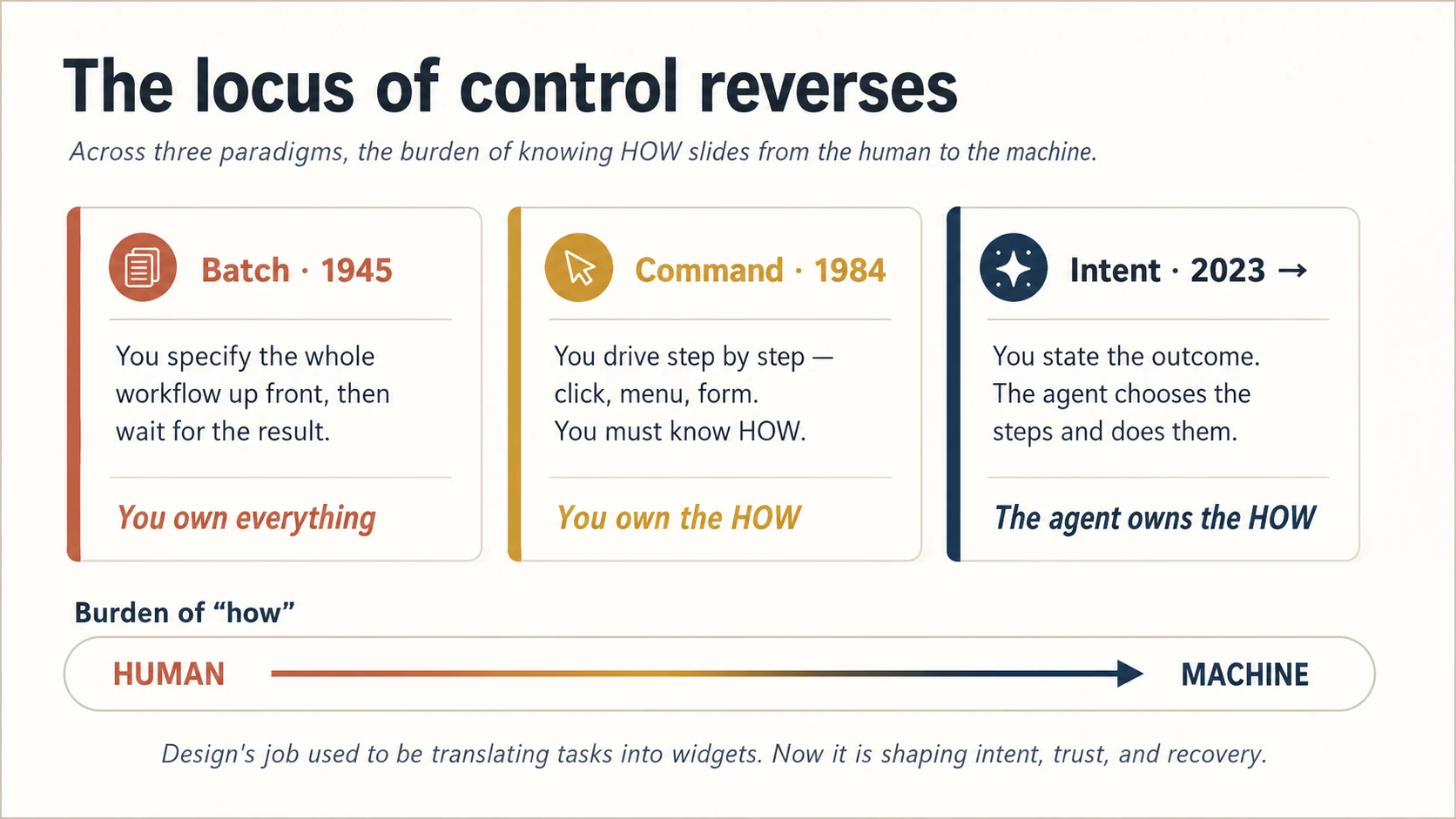
Figure 1: नियंत्रण का केंद्र उलट जाता है। Machine के “कैसे” संभालते ही designer का काम upstream, यानी intent, trust और recovery की ओर जाता है।
इस course का हर अगला concept इसी उलटाव से निकलता है। जब आप steps की design नहीं करते, तब तीन नई चीज़ें design करते हैं: व्यक्ति intent कैसे व्यक्त करता है, वह खुद न चुने steps पर भरोसा कैसे करता है, और machine गलत चुने तो recover कैसे करता है। इन तीन शब्दों को याद रखें: intent, trust, recovery। यही पूरे course का छोटा रूप है।
Concept 2 · दो audiences, एक system
यह वह विचार है जिसे अधिकतर teams चूकती हैं। इसे शुरू में समझना आवश्यक है, क्योंकि Part 3 का बड़ा हिस्सा इसी पर निर्भर है।
आपका agentic product एक साथ दो तरह के users इस्तेमाल करते हैं। एक इंसान है, जिसे समझना और भरोसा करना है। दूसरे अन्य agents हैं, जो service call करते, data पढ़ते और किसी व्यक्ति की ओर से action लेते हैं। वे भी users हैं, बस pixels की जगह structure पढ़ते हैं। आगे आने वाले refund Worker को सोचिए: इंसान एक सरल line देखता है, जैसे “$38 refund हुआ, undo करें?”, जबकि payment provider का agent typed, idempotent tool call देखता है जिस पर वह भरोसा कर सके। Idempotent का अर्थ retry सुरक्षित होना है: दो calls से दो refunds नहीं होंगे। एक action, दो surfaces, और दोनों सही होने चाहिए।
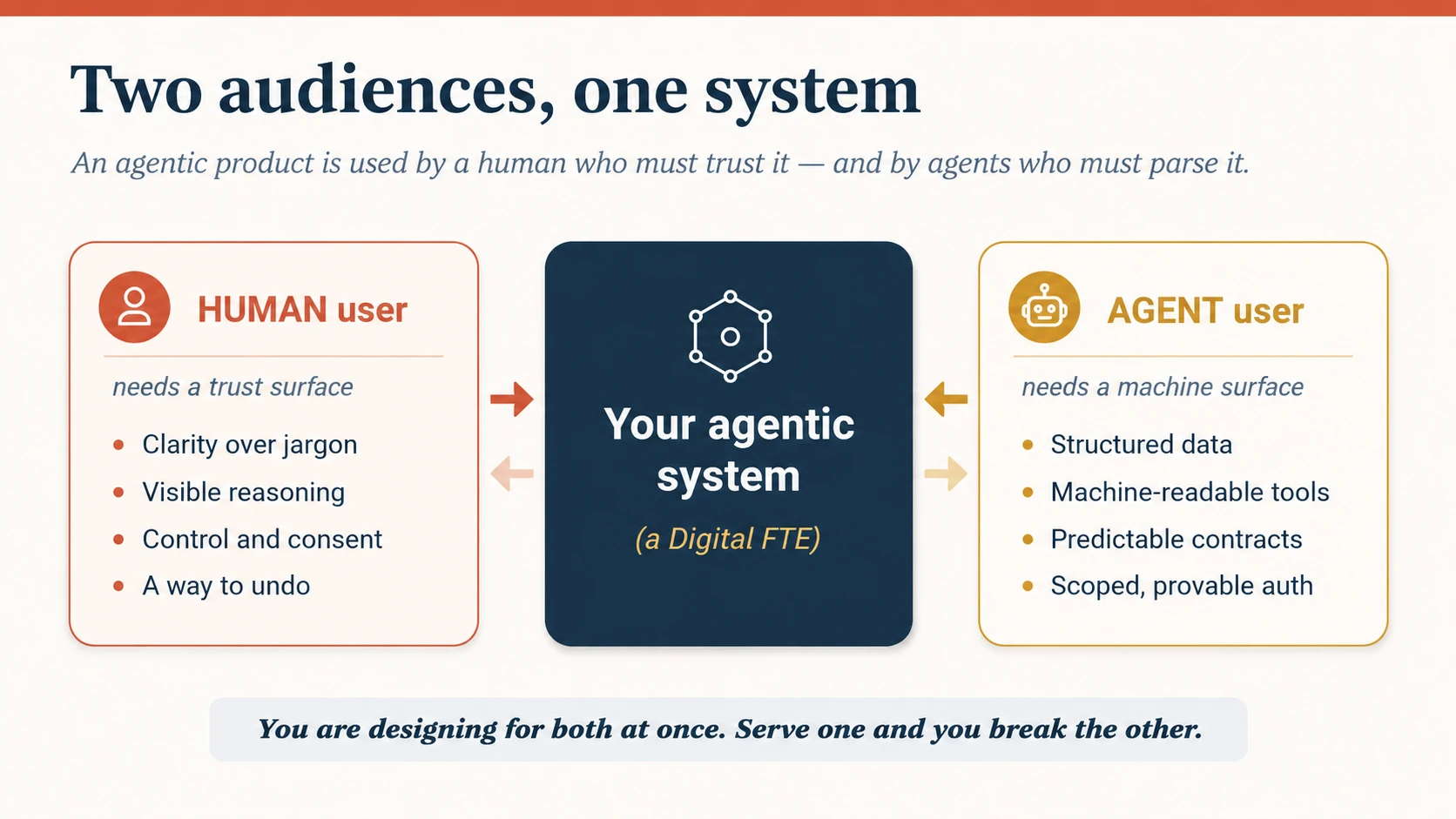
Figure 2: दो audiences, एक system। बायाँ surface trust के लिए है, दायाँ parsing के लिए। अच्छा product दोनों को जानबूझकर design करता है।
Industry इस picture के दो अलग हिस्सों के लिए एक ही confusing acronym AX इस्तेमाल करती है। इसे एक बार स्पष्ट कर लें:
| Term | किसने प्रस्तुत किया | अर्थ | इस course में नाम |
|---|---|---|---|
| Agentic Experience | John Maeda | Agent को काम सौंपने का इंसानी experience | human surface (Part 2) |
| Agent Experience | Matt Biilmann (Netlify) | Product के user के रूप में agent का experience | machine surface (Part 3) |
दोनों वास्तविक हैं और दोनों design work हैं। अधिकतर courses केवल पहला सिखाते हैं। हम दोनों सिखाते हैं, क्योंकि ship किया गया Digital FTE इंसानों और आसपास के agents, दोनों द्वारा इस्तेमाल होता है। यदि सुंदर human surface के नीचे machine surface parse न हो सके, तो दूसरे agent के उपयोग करते ही सब विफल हो जाता है।
Concept 3 · Interface गायब नहीं होता, स्थान बदलता है
आप गंभीर लोगों से यह मजबूत दावा सुनेंगे कि agents interface design का अंत हैं। Users screens पर जाना छोड़ देंगे; agents उनके लिए browse, click और decide करेंगे; सावधानी से बनाया UI बेकार हो जाएगा। इस दावे को गंभीरता से लेना चाहिए, क्योंकि इसे कहने वाले लोगों ने यह field बनाने में मदद की है।
लेकिन stakes बढ़ने पर वास्तव में क्या होता है, देखिए। Map app route सुझाता है, फिर भी आप उस पर नज़र डालते हैं। Stakes जितने ऊँचे हों, व्यक्ति उतना अधिक verify करना चाहता है। हर autonomous agent चुपचाप तीन नए interfaces बनाता है:
- configuration surface: बदलती preferences agent को कैसे सिखाएँगे?
- monitoring surface: मानसिक बोझ बढ़ाए बिना कैसे देखें कि वह क्या कर रहा है?
- intervention surface: गलत होने पर बीच में आकर कैसे सुधारेंगे?
इसलिए ईमानदार स्थिति बीच की है। Interface गायब नहीं होता। उसका center of gravity बदलता है: “task को widget में बदलें” से “intent के system को आकार दें” की ओर। आप screens बनाना कम करते हैं और delegated relationship की plumbing design करते हैं: agent क्या कर सकता है, अपना काम कैसे दिखाता है, और इंसान नियंत्रण कैसे वापस लेता है। आगे का course इसी plumbing पर है।
Part 2 · Human Surface: Trust के लिए Design
सरल शब्दों में: product के इंसान को दिखने वाले हिस्से की ऐसी design, जिससे वह agent पर भरोसा कर सके, दिशा दे सके और गलतियाँ सुधार सके।
Concept 4 · Trust कमाया जाता है, मान लिया नहीं जाता
Delegation trust पर चलता है, और agentic product में trust सबसे दुर्लभ चीज़ है। व्यक्ति निर्णय आपको देकर पीछे हटता है। वही पीछे हटना पूरा value भी है और पूरा risk भी। यदि machine किसी महत्वपूर्ण काम में एक बार उसे तोड़ दे, तो व्यक्ति निर्णय वापस ले लेता है और फिर नहीं लौटाता।
आप trust को सीधे design नहीं कर सकते। आप उसके inputs design करते हैं, और trust जमा होता है:
Trust = समय के साथ दिखाई reliability × जाँचने योग्य transparency × महसूस होने वाला control × undo की जा सकने वाली गलतियाँ।
यह sum नहीं, product है: किसी एक term का zero पूरे परिणाम को zero कर देता है। विश्वसनीय लेकिन black box agent trust नहीं पाता। Transparent लेकिन steer न किया जा सकने वाला agent trust नहीं पाता। Steer किया जा सके पर undo न हो, तब भी trust नहीं मिलता। Part 2 की बाकी सामग्री इन चार terms को बढ़ाती है। पहला कदम सबसे honest है: agent को अपनी uncertainty दिखाने दें। जो agent doubt छिपाकर confidently गलत होता है, वह उस agent से अधिक trust तोड़ता है जो कहता है, “इस हिस्से पर मुझे यक़ीन नहीं है। इसे देख लें।”
इसके उलट failure भी उतना ही वास्तविक है: over-trust। Agent सौ बार सही होने के बाद व्यक्ति जाँच बंद कर देता है और धीरे-धीरे होने वाला drift नहीं देखता। इसे automation complacency कहते हैं। अच्छी design इससे भी बचाती है: confidence आम तौर पर ऊँचा हो तब भी uncertainty visible रखें, वास्तव में high-stakes काम को full autonomy तक न जाने दें (Concept 8), और fleet level पर drift दिखाएँ (Concept 12)। वास्तविक लक्ष्य calibrated trust है, न बहुत कम, न बहुत अधिक; maximum trust नहीं।
Concept 5 · First contact: onboarding, cold-start trust और सबके लिए access
Concept 4 ने कहा trust समय के साथ दिखाई देता है। लेकिन पहले दिन कोई history नहीं होती। Agent कुछ कमाए बिना trust कैसे कमाए? और हर बार उसकी capability छलाँग लगाए, जैसे जवाब देने वाले chatbot से action लेने वाले agent तक, व्यक्ति की expectations reset होनी चाहिए। वरना वह नई चीज़ पर पुरानी जितना trust करेगा, जो दोनों दिशाओं में गलत है।
तीन कदम first contact को ईमानदार बनाते हैं:
- हर छलाँग पर expectations reset करें। Surface को action की शक्ति मिले तो साफ़ कहें: “अब मैं केवल बता नहीं सकता, आपके लिए यह कर भी सकता हूँ। इसका अर्थ यह है।” सबसे खतरनाक क्षण वह है जब capability बदल गई लेकिन mental model नहीं।
- Stakes घटाकर trust उधार लें। जो reliability दिखाई नहीं, उसका दावा नहीं कर सकते। इसलिए सबसे कम autonomy से शुरू करें, action से पहले plan दिखाएँ, और पहला task छोटा व साफ़ reversible रखें। Day-one trust गलतियाँ सस्ती बनाकर कमाया जाता है, शून्य गलतियों का वादा करके नहीं।
- नया होने के बारे में ईमानदार रहें। “मैंने आपके साथ यह पहले नहीं किया है, इसलिए शुरुआत में अधिक बार पूछूँगा।” शुरुआती calibrated humility ही बाद में autonomy बढ़ने देती है।
इन सबके नीचे एक requirement है: surface सबके लिए काम करे। Nielsen का यह उकसाने वाला कथन कि agents accessibility का अंत हैं, warning है, भविष्यवाणी नहीं। Agents access बढ़ा सकते हैं: dense UI में navigation से plain language में goal बताना आसान है और उन लोगों की मदद करता है जिन्हें पुराने screens कठिन लगते थे। लेकिन यह तभी सही है जब trust surface स्वयं reachable हो: plan, confidence signal, undo और human path बिना sight, mouse या पहली भाषा पर निर्भर हुए काम करें। इसमें एक लाभ भी है: Part 3 का machine surface, जो structured, labelled और semantic है, वही structure assistive technology पढ़ती है। Agent audience और disabled users के लिए अच्छी design एक ही दिशा में जाती है।
इसे concrete बनाएँ। WCAG 2.2 को न्यूनतम आधार मानें, फिर agentic surface की विशेष ज़रूरतों को testable acceptance criteria के रूप में लिखें:
- Status और progress screen reader को सुनाए जाएँ, केवल motion से न दिखें।
- Plan, undo और human path keyboard से, deep navigation के बिना पहुँचे जा सकें।
- Confidence और uncertainty केवल colour से व्यक्त न हों।
- व्यक्ति long-running काम pause, resume या cancel कर सके।
- Notifications की मात्रा और intensity बदली जा सके, खासकर आसानी से overwhelmed होने वाले लोगों के लिए।
- हर explanation का plain-language version हो।
इन्हें Concept 7 की transparency layers से जोड़ें। Layer 1 का outcome screen reader को announce होना चाहिए, केवल दिखना नहीं; Layer 3 का confidence signal colour के बिना भी काम करे; Layer 4 का evidence keyboard से पहुँचे। जो criterion किसी specific layer या control से न जुड़ सके, वह requirement नहीं, केवल intention है।
Concept 6 · Load बाँटें और दिखाएँ कि कौन क्या उठा रहा है
Agent का गहरा वादा व्यक्ति का भार कम करना है। भार तीन तरह का है: analysis और decision का cognitive load, drafting और making का creative load, तथा steps और coordination का logistical load। Digital FTE बनाते समय आप तय करते हैं कि इनमें से क्या machine उठाएगी।
Design की गलती load को चुपचाप स्थानांतरित करना है। Division of labor न दिखे तो agentic sludge बनता है: व्यक्ति नहीं समझ पाता कि agent ने क्या किया और उसके हिस्से में क्या बचा, इसलिए “सुरक्षित रहने” के लिए agent का काम फिर करता है और समय की बचत मिट जाती है।
सुधार का नियम है: division of labor visible और adjustable होना चाहिए। व्यक्ति हर समय देख सके: “यह मैंने किया, यह आपने किया, यह आपके इंतज़ार में है,” और सीमा बदल सके। यह Human-Agent Teams में बनाए roster और role cards का surface रूप है। Operating model बताता है कौन क्या करता है; यह surface उसे दिखाता है।
Human-Agent Teams के दो terms बार-बार आएँगे। Worker का role card उसके job की one-page spec है: वह क्या करता है, inputs और limits क्या हैं, output कैसे check होता है। Roster team के Workers और उनके उद्देश्यों की list है। यह course उन documents का surface design करता है; दूसरी course के बिना भी आप आगे बढ़ सकते हैं, क्योंकि operating model वहीं बनता है।
Concept 7 · Progressive transparency: reasoning visible हो, overwhelming नहीं
Transparency में trap है। कुछ न दिखाएँ तो agent black box बन जाता है। सब कुछ दिखाएँ, जैसे हर reasoning token और tool call, तो व्यक्ति अनुपयोगी noise में दब जाता है। दोनों extremes trust तोड़ते हैं। उत्तर है progressive transparency: default में outcome दिखाएँ और व्यक्ति को उतनी depth तक उतरने दें जितनी उसे चाहिए।
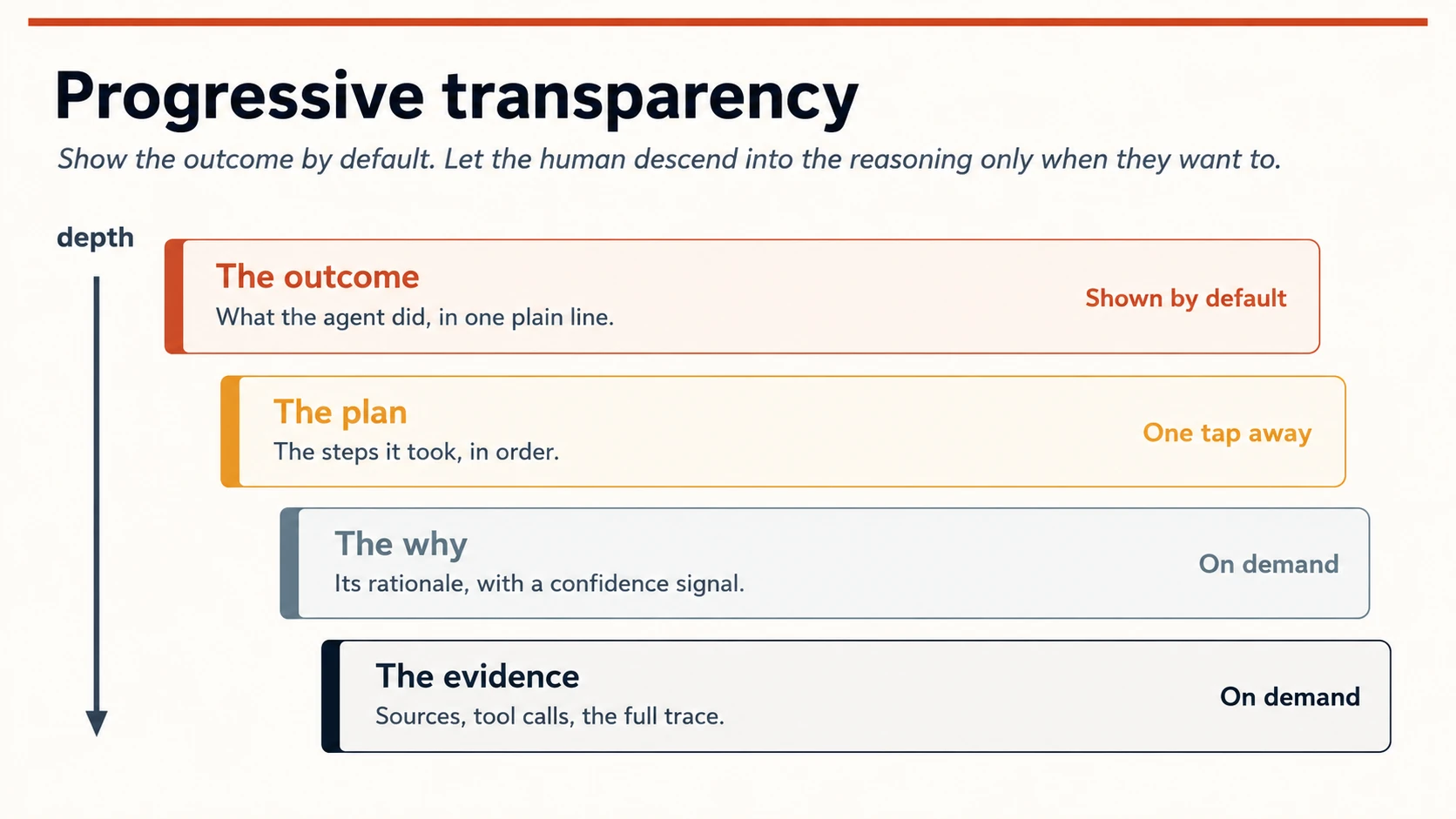
Figure 3: Progressive transparency। Default view एक ईमानदार line है; अगली depth हमेशा एक tap दूर है, reader पर थोपी नहीं जाती।
चार layers, हर अगली एक tap और गहरी:
- Outcome, एक plain line: agent ने क्या किया। अधिकतर लोग अधिकतर समय इतना ही पढ़ते हैं।
- Plan: उसने कौन से ordered steps लिए। उन लोगों के लिए जो काम का आकार check करना चाहते हैं।
- Why: उसका rationale, ईमानदार confidence signal के साथ। Fake percentage नहीं, बल्कि वास्तविक high / low / unsure। ठीक दिखने वाला “73%” ऐसी calibration का भ्रम देता है जो model के पास नहीं; “unsure” सच बोलता है।
- Evidence: sources, tool calls और पूरी trace। Audit, debugging और कुछ गलत लगने के क्षण के लिए।
छोटे concrete surfaces यहाँ बड़ा काम करते हैं: provenance chip (“आपकी 3 files पर आधारित”), shaky हिस्से पर uncertainty marker, और trace की link। आप model की mathematics नहीं समझा रहे। आप इंसान के वास्तविक प्रश्न का उत्तर दे रहे हैं: “क्या मुझे इस पर trust करना चाहिए, और नहीं तो पहले कहाँ देखूँ?”
Concept 8 · Autonomy dial: बढ़ती हुई permission
Autonomy ऐसा switch नहीं जिसे “off” से “सब कुछ करता है” पर कर दें। यह dial है और इसे व्यक्ति के हाथ में होना चाहिए। इसे कम level पर ship करें और agent के खुद को साबित करने पर बढ़ने दें, जैसे manager नया hire भरोसा कमाने के बाद अधिक स्वतंत्रता देता है।
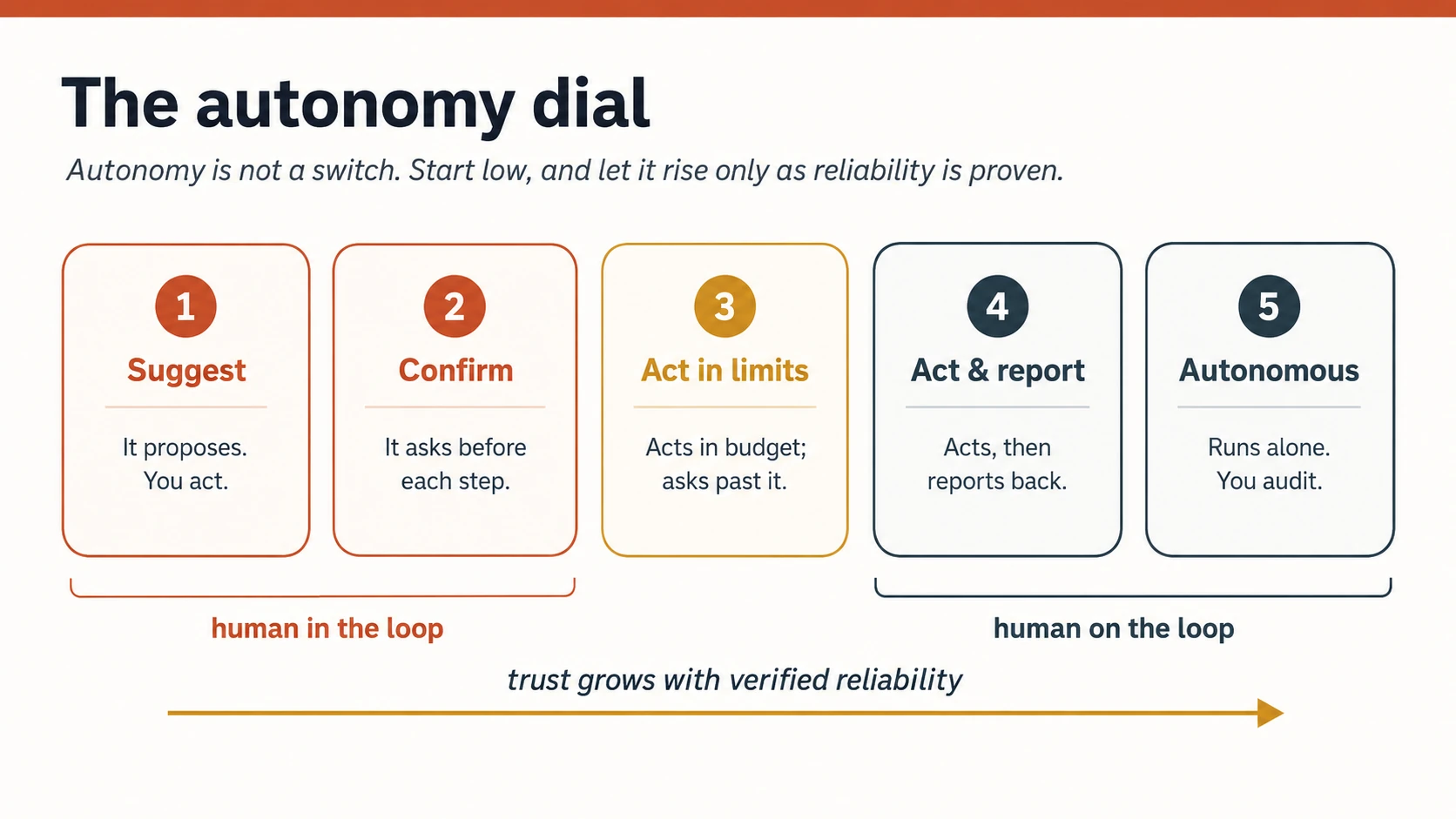
Figure 4: Autonomy dial। दो regimes हैं: human in the loop में agent आपका इंतज़ार करता है; human on the loop में वह action लेता है और आप supervise करते हैं। Reliability dial को ऊपर ले जाती है।
दो ideas इसे safe बनाते हैं। पहला, human-in-the-loop में agent action से पहले approval का इंतज़ार करता है, जबकि human-on-the-loop में वह action लेता है और इंसान देख व हस्तक्षेप कर सकता है। Low-stakes, reversible और अच्छी तरह proven काम on-the-loop तक बढ़ सकता है; high-stakes या irreversible काम reliability कितनी भी हो, in-the-loop रहता है। दूसरा, per-task consent के साथ safe defaults: नया agent “suggest” से शुरू होता है और हर अगला stop व्यक्ति जानबूझकर चुनता है।
यह dial Nervous System में wired approval gates और Digital FTE के “approval as authority model” का front-of-house है। Backstage approval durable, audited event है; front-of-house में वही महसूस होने वाला dial है।
Concept 9 · Intent preview और plan-review habit
सबसे सस्ती गलती वह है जो agent ने अभी की ही नहीं। Action से पहले, खासकर irreversible काम में, plan दिखाएँ और व्यक्ति को edit करने दें: “मैं 1, 2, 3 करने वाला हूँ। कुछ बदलना है?” यह intent preview बाद की किसी भी explanation से अधिक regret रोकता है।
Cowork में plan-review habit के रूप में आप यही pattern देख चुके हैं। यहाँ इसे उपयोग किए जाने वाले tool में नहीं, ship किए जाने वाले product में बनाना है। दो rules इसे काम कराते हैं:
- Preview stakes के साथ scale करे। एक internal draft भेजना है तो शांत “अब भेज रहा हूँ, undo?” पर्याप्त है। 500 customers को email या money movement में full plan और explicit confirm चाहिए।
- Plan execution के बीच edit हो सके, केवल approve नहीं। केवल accept या reject वाला plan दीवार है। “हाँ, लेकिन step 2 छोड़ें” कहकर बदलने योग्य plan partnership है।
Concept 10 · Asynchrony के लिए design: काम की नई rhythm
Command software synchronous था: आपने action लिया, उसने जवाब दिया, आपने इंतज़ार किया और फिर action लिया। Agentic work यह rhythm तोड़ता है। आप intent set करके disconnect होते हैं और progress या completed work पर लौटते हैं। Collaboration के इस नए आकार को अपनी design चाहिए।
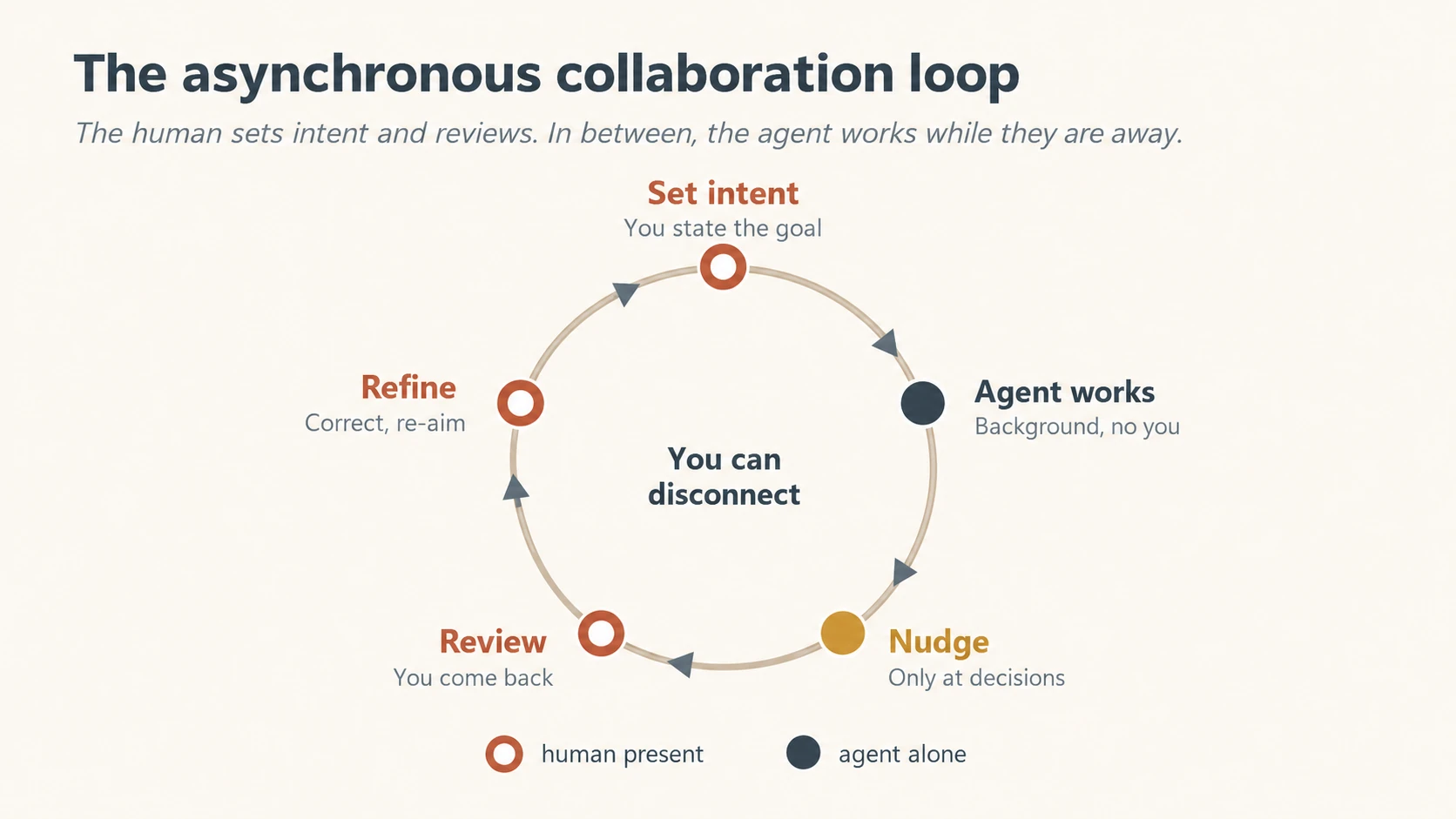
Figure 5: Asynchronous collaboration loop। इंसान intent set करने और review के लिए मौजूद है; बीच में agent अकेला काम करता और केवल वास्तविक decision पर interrupt करता है।
चार surfaces asynchrony को humane बनाते हैं:
- Intent capture इतना साफ़ हो कि आपकी अनुपस्थिति में भी काम चल सके।
- एक नज़र में progress: तीन seconds में समझ आने वाला status, logs की दीवार नहीं।
- Nudge करें, notify नहीं। केवल वास्तविक decision point पर interrupt करें, अन्यथा शांत रहें। हर step पर ping करने वाला agent ऐसे needy coworker जैसा है जिस पर अकेले भरोसा भी नहीं किया जा सकता। Interruption को earn करना चाहिए।
- लौटने पर review-and-refine surface, जहाँ व्यक्ति finished work देखे, सुधार करे और एक motion में agent को नई दिशा दे।
Structure से अलग waiting का महसूस होने वाला experience भी design करें। Agents slow होते हैं और money खर्च करते हैं। Intent देकर दूर गया व्यक्ति पूछता रहता है: क्या चल रहा है, कितना समय लगेगा, कितना खर्च होगा? Silence busy नहीं, broken लगता है। इसलिए current step वाला honest progress दिखाएँ, जैसे “40 invoices पढ़ रहा है”; upfront rough expectation दें; महँगे runs में cost या budget burn दिखाएँ; और काम रोके बिना check-in का तरीका दें। Latency और cost छिपाने वाले backend details नहीं, agent experience का हिस्सा हैं।
Concept 11 · Repair and redress: उस दिन के लिए design जब agent गलत होगा
आपका agent गलत action लेगा। यह “शायद” नहीं है। Real work करने वाला probabilistic system पर्याप्त tasks में कभी न कभी गलत होगा। इसे न मानने वाली design optimistic नहीं, negligent है। Recoverability अंत में जोड़ी error state नहीं, शुरुआत से design किया first-class surface है।
चार moves खराब outcome को betrayal से bump में बदलते हैं:
- Task जितना अनुमति दे, undo एक click के उतना पास हो। पूरे course का सबसे बड़ा trust-builder। लोग उसी agent को वास्तविक autonomy देंगे जिसे साफ़ reverse कर सकें।
- सीधी apology और plain account कि क्या गलत हुआ; hedging या user को blame नहीं।
- Corrective action और अगला step स्पष्ट हों: “मैंने transfer reverse किया। दोबारा न हो, इसलिए review के लिए flag किया है।”
- Human तक visible path। हमेशा। यह frustration घटाता और agent के ऊपर accountability साबित करता है।
दो numbers देखें। Escalation frequency, अर्थात agent कितनी बार human help माँगता है, एक practitioner benchmark में लगभग 5–15% healthy है; बहुत कम पर वह पूछने के बजाय guess करता है, बहुत अधिक पर बेकार timid है। Recovery success, यानी escalated या failed tasks में अच्छे अंत का हिस्सा, लगभग 90% से ऊपर होना चाहिए। इन्हें domain के अनुसार calibrate करने के शुरुआती numbers मानें, laws नहीं। ये ops के साथ UX metrics भी हैं, क्योंकि action लेने वाले system का अनुभव यही है।
Concept 12 · कई agents की supervision: एक agent से workforce तक
अब तक एक व्यक्ति द्वारा एक agent देखने का surface design हुआ। लेकिन यह पुस्तक workforces बनाती है। दस Workers साथ चलते ही single-agent surface टूट जाता है: कोई दस plans, approvals या traces नहीं देख सकता। Design problem काम की monitoring से exceptions की triage में बदलती है।
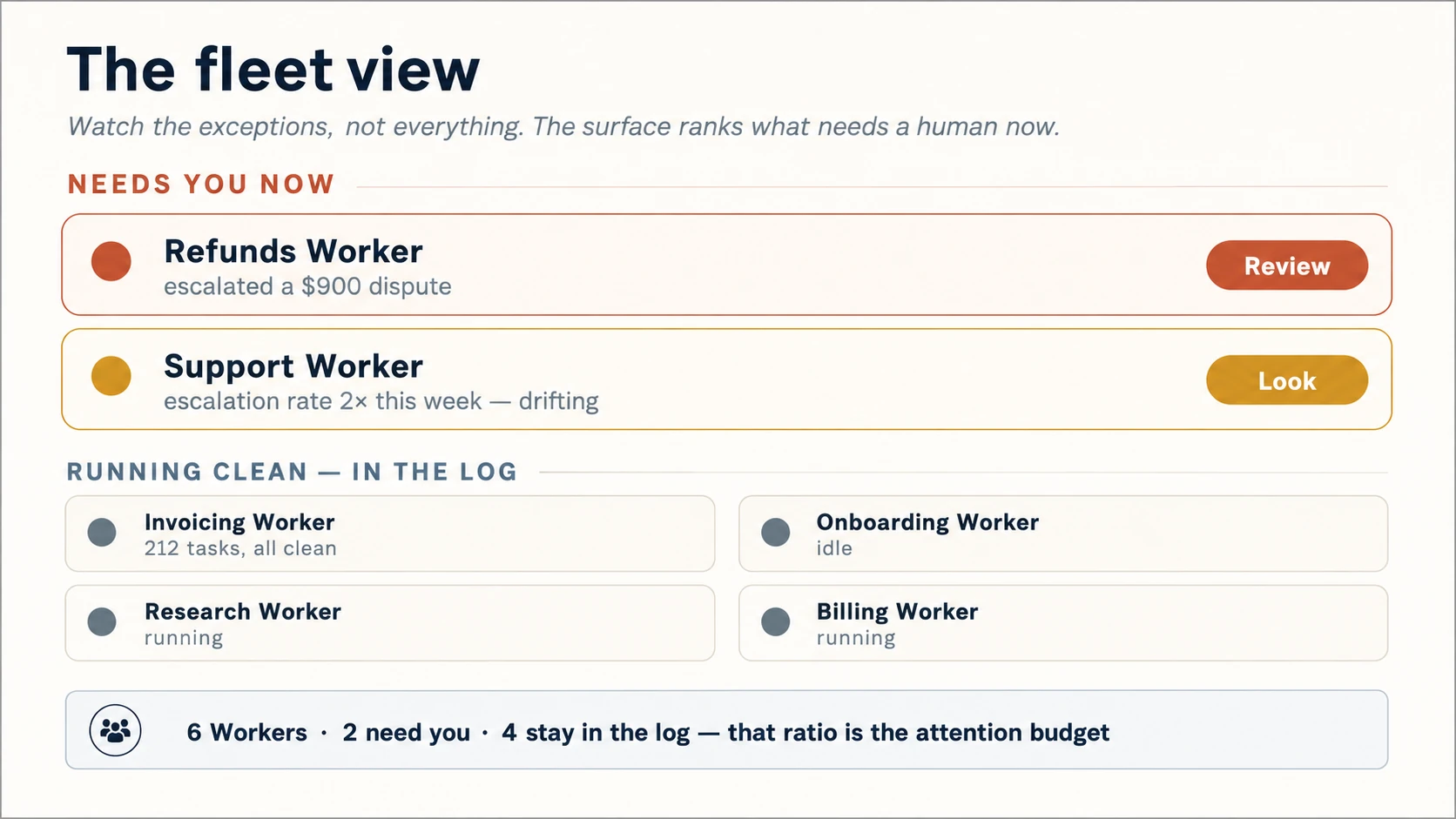
Figure 6: Fleet view। Scale पर surface का काम human attention समझदारी से खर्च करना है: जिन कुछ Workers को व्यक्ति चाहिए उन्हें दिखाना, बाकी को log में रहने देना।
तीन surfaces workforce को supervisable बनाते हैं:
- Fleet view। एक glance में हर Worker: कौन running, blocked या आपके इंतज़ार में है। Detail नहीं, status; operations board, दस chat windows नहीं।
- Attention triage। Surface उस काम को ऊपर रखता है जिसे human अभी चाहिए। $900 dispute ऊपर, 200 clean refunds log में। यह Concept 10 का “nudge, don't notify” team scale पर है। Surfaced और silent का ratio आपका attention budget है।
- केवल distress नहीं, drift। सिर्फ “Worker ने help माँगी” नहीं, बल्कि “इस सप्ताह escalation rate दोगुना हुआ” दिखाएँ। यह loud failure से पहले quiet problem बताता है और Concept 4 के over-trust को surface द्वारा पकड़ता है।
Drift केवल flag नहीं, response भी trigger कर सकता है। ईमानदार attention budget fleet-level circuit breaker है: Worker का escalation या error rate उसके अपने baseline के multiple को पार करे तो surface उसे lower autonomy stop पर गिराए या pause करके review माँगे। Threshold universal magic number नहीं; उसे set और revisit करें। Discipline यह है कि system human attention खुद खर्च करे और Worker slip होने पर default में कम autonomy चुने।
यह Human-Agent Teams और Paperclip के roster तथा control plane का front-of-house है। Operating model बताता है team में कौन है; यहाँ वह room design होता है जहाँ इंसान team को काम करते देखता और, सबसे महत्वपूर्ण, तय करता है कि क्या नहीं देखना।
Part 3 · Machine Surface: Agents को Users मानकर Design
सरल शब्दों में: product के उस हिस्से की design जिसे दूसरे agents इस्तेमाल करते हैं, ताकि software पहली कोशिश में सही उपयोग कर सके।
Concept 13 · Agent Experience (AX): आपके product के robot users हैं
अब उस आधे हिस्से पर आएँ जिसे अधिकतर teams कभी design नहीं करतीं। Product का उपयोग बढ़ते हुए agents करते हैं: users की ओर से action लेने वाले agents और आपकी workforce के दूसरे Workers। वे careful layout नहीं देखते, structure पढ़ते हैं। Hostile structure में इंसान का agent चुपचाप fail होता है और बीच के agent को जाने बिना इंसान आपको दोष देता है।
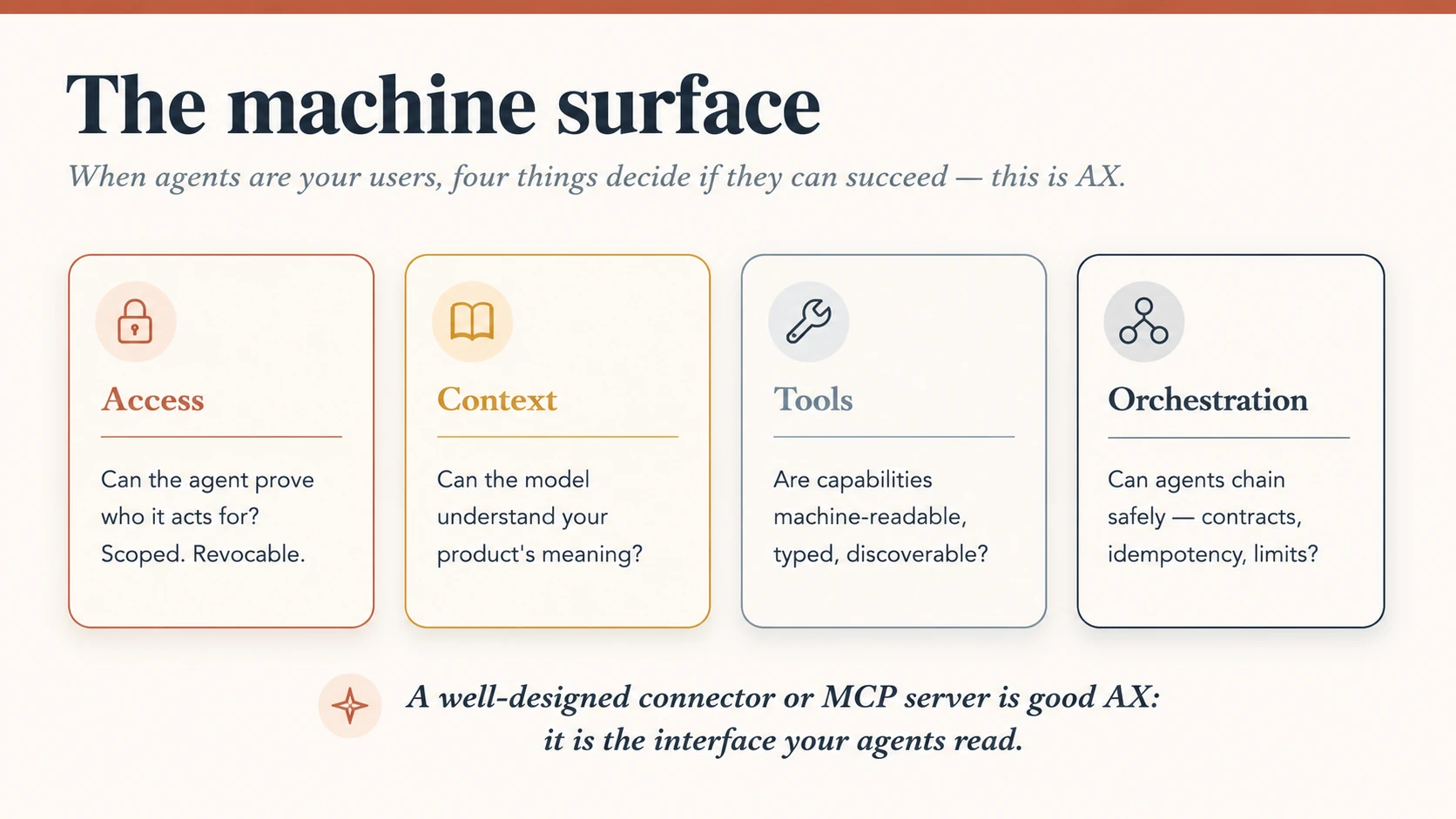
Figure 7: Machine surface। चार questions तय करते हैं कि agent product इस्तेमाल कर सकेगा या नहीं, और हर question design decision है।
चार चीज़ें agent की success तय करती हैं:
- Access: क्या agent scoped और revocable credential से साबित कर सकता है कि वह किसके authority में काम करता है? यह AI Identity की समस्या है।
- Context: क्या model product का वास्तविक meaning समझ सकता है? साफ़ names, honest descriptions और machine-readable semantics।
- Tools: capabilities machine-readable, typed और discoverable हैं या किसी UI में छिपी हैं जिसे model scrape करे?
- Orchestration: predictable contracts, idempotent actions और sensible limits के साथ agents इस capability को दूसरों से safely chain कर सकते हैं?
बाकी पुस्तक से संबंध यह है: well-designed connector या MCP server अच्छा AX है। Skills & Connectors और Connector-Native Apps में सीखी चीज़ें machine reader के लिए interface design हैं। Agent को task सिखाने वाला SKILL.md और clear typed signature वाला MCP tool robot users के लिए product UX हैं। इन्हें screen जितनी care से design करें।
भरोसेमंद machine surface अच्छी API जैसा होता है, कुछ agent-specific habits के साथ:
- Tools के नाम action पर साफ़ रखें:
refund_order,processनहीं। Model पहले name पढ़ता है। - Schemas narrow, typed और validated रखें, ताकि पहली कोशिश में सही input मिले।
- Side effects और danger घोषित करें; world बदलने वाले tools पहचानें और dangerous ones में confirmation या policy check रखें।
- Structured, actionable errors लौटाएँ: typed code के साथ अगला step, call retryable है या नहीं,
retry_afterhint और fallback। केवल sentence code से खराब है; अगला step बिना code आधा answer है। - Actions को जहाँ संभव हो idempotent बनाएँ, ताकि retry double-charge या double-send न करे।
- Provenance और permission साथ रखें: data कहाँ से आया, किसके authority में action है, revoke कैसे होगा?
- Docs agent के लिए लिखें: examples, limits, failure modes और retry behaviour। Model docs वैसे पढ़ता है जैसे इंसान UI।
- Contract test करें, केवल screen नहीं: agent integrations में automated contract tests चाहिए; human QA machine surface नहीं जाँचता।
Shared protocol क्या देता और क्या नहीं, इसे precise रखें। 2026 तक MCP tool discovery और calls, resource reads और access authentication standardize करता है। पहला official extension MCP Apps UI-metadata envelope भी जोड़ता है: tool ui:// interface को _meta.ui.resourceUri से link करके text के साथ interactive widget लौटा सकता है। वह जानबूझकर तीन चीज़ें आपके लिए छोड़ता है: orchestration, यानी planning, sequencing और retries; governance, यानी कौन क्या call कर सकता है और audit/limits क्या हैं; तथा state, यानी long-running loop। Protocol agent को दरवाज़े के भीतर लाता है; अंदर वह क्या कर सकता है और कौन देख रहा है, यह आपकी design है।
अच्छे AX के दो halves हैं। Protocol conform करें ताकि कोई agent पहुँच सके। फिर omitted हिस्सा design करें: server allowlists, consent gates, spend limits और auditable logs, जो Concept 15 के policy surfaces के machine-surface twin हैं। MCP Apps proposal में sandboxing और controls host की जिम्मेदारी हैं। Wire format commodity बन रहा है; उसके ऊपर trust और safety की policy आपकी है।
Concept 14 · Generative UI: interfaces लौटाने वाले agents
दो audiences एक surface में मिलने लगे हैं। MCP Apps में tool को केवल text लौटाना आवश्यक नहीं। वह हर host के लिए normal text result लौटा सकता है और Apps-supporting hosts के लिए interactive ui:// resource दिखा सकता है, जिसका नाम _meta.ui.resourceUri में होता है। Host interface को conversation के sandboxed iframe में render करता है, ताकि व्यक्ति workflow छोड़े बिना inspect, approve, configure या explore करे।
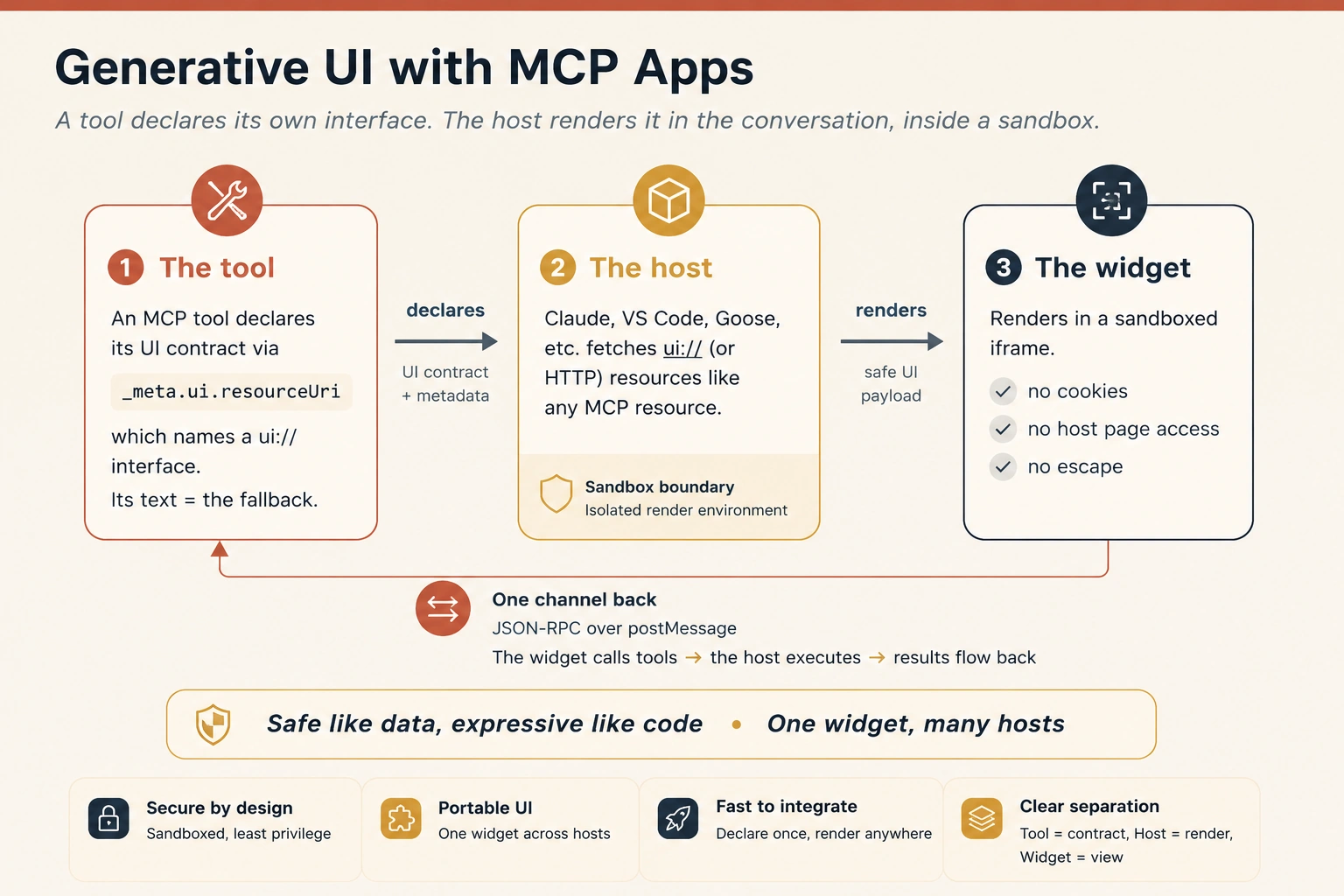
Figure 8: MCP Apps के साथ Generative UI। Tool अपना interface declare करता है, host conversation के sandbox में render करता है और एक auditable channel सब कुछ वापस ले जाता है। Text result बाकी जगह fallback रहता है।
MCP world में generative UI random web page या host में injected arbitrary code नहीं, tool call से जुड़ा task-specific interface है। Agent tool call करता है; tool fallback text और interface declaration देता है; host सक्षम हो तो widget render करता है। नहीं तो text decision संभालता है। Principle है: “data जैसा safe, code जैसा expressive”। Content sandbox में render होता है, client में खुला code नहीं चलता।
इसीलिए MCP Apps Agent Experience के लिए महत्वपूर्ण है। एक capability के साथ machine-readable MCP tool और human-readable widget, दोनों surfaces होते हैं। एक call दूसरे agent के लिए parseable contract और इंसान के लिए approval card, dashboard, map, chart या review panel दे सकती है।
MCP machine surface है। MCP Apps interactive human surface है। दोनों मिलकर एक tool को agentic product के दोनों users, humans और agents, की सेवा करने देते हैं।
MCP Apps Model Context Protocol का पहला official UI extension है, November 2025 में proposed और July 2026 specification में finalized। इसे MCP-UI, OpenAI और Anthropic teams ने मिलकर बनाया। Claude, Claude Desktop, VS Code, Goose और Postman जैसे hosts इसे render करते हैं; OpenAI Apps SDK इसी MCP foundation पर ChatGPT apps बनाता है। Support और features host के अनुसार बदलते हैं, पर यह layer का de facto standard है: one widget, many hosts। January 2026 में Claude ने Asana, Slack, Figma, Canva, Box, Hex और अन्य interactive connectors के साथ इसे production में launch किया: editable timelines, formatted message previews और live analytics charts conversation में render हुए। हर case में tool text everywhere और supported host पर widget लौटाता है।
चार properties MCP App को box में web page से अधिक बनाती हैं, और हर एक experience property है:
- Context बनाए रखता है। App conversation में रहता है; tab switch, जगह खोना या dashboard वाली chat ढूँढना नहीं पड़ता।
- दोनों दिशाओं में बात करता है। Widget server tools call और host fresh results push कर सकता है। Standalone app को अपना API, login और state चाहिए; MCP App protocol से पाता है।
- Consent के साथ host powers उधार लेता है। अपना email/calendar integration बनाने के बजाय app outcome माँग सकता है और host user-connected service से consent के अधीन route करता है।
- Construction से safe है। Sandbox app को host page, cookies और storage से रोकता है; हर message auditable channel से जाता है। Concept 16 का safety surface pattern में built-in है।
Widget अपनी जगह कब earn करता है? Complex data explore करने, कई options एक साथ configure करने, rich media, real-time monitoring और multi-step workflows में App उपयोग करें। Hands-On Lab का refund approval card अंतिम case है। विपरीत rule भी है: plain text पर्याप्त हो तो text लौटाएँ। Widget को अपनी जगह वैसे earn करनी चाहिए जैसे nudge interruption earn करता है।
Portability के लिए web की progressive enhancement अपनाएँ: पहले open standard, फिर single host के payment flow या app-store listing जैसे extras को feature-detect करके अन्य जगह gracefully degrade करें। केवल vendor extras पर build करने से surface एक host में फँसता है; open base पर build करने से चलता है।
यह “chat” और “app” की पुरानी दीवार तोड़ता है। Agent task के लिए सही interface तुरंत compose करता है, जैसे form, chart या map, जबकि styling, security और component set आपके control में रहते हैं। Humans और agents के लिए design एक discipline बन रही है: fixed screens नहीं, components की ऐसी vocabulary design करें जिसे agent बोल सके।
MCP Apps July 2026 specification में finalized है, लेकिन active development में है। SDK helpers, method names और host support बदलते हैं। Pattern के shape के लिए design करें: data के रूप में delivered interface, ऐसे sandbox में rendered जिससे app escape न कर सके। Build से पहले official docs modelcontextprotocol.io/extensions/apps पर details verify करें। Appendix A anatomy दिखाता है और Worked Example के बाद Hands-On Lab इसे बनाता है।
Part 4 · नई Craft
सरल शब्दों में: इस job की नई skills, यानी safety, measurement और हर Worker के लिए लिखा one-page document।
Concept 15 · नए design objects और choreographer का काम
यदि screens नहीं बना रहे, तो क्या बना रहे हैं? Craft के नए primary objects हैं:
- Policy surfaces: permissions, spend ceilings और ethical boundaries जिन्हें agent कभी पार न करे। आप rules और उन्हें set करने वाले controls design करते हैं।
- Confidence conveyors: Concepts 7 और 11 के provenance chips, uncertainty markers और clean rollbacks। System कितना sure है, यह सच कैसे बताता है।
- System temperament: agent कितना patient या proactive है, कितनी बार बोलता और कैसा सुनाई देता है। Context के अनुसार personality: brainstorm में eager, money के पास cautious।
यह role अब screen-crafter से अधिक choreographer है, जो humans और agents की साथ movement arrange करता है: information architecture, conversation design, operations का feel और यह समझ कि व्यक्ति कब control चाहता है और कब burden हटवाना। यह Choosing Agentic Architectures से जुड़ता है: backstage चुना single-agent, planner या multi-agent pattern तय करता है कि front-of-house इंसान को क्या supervise करना होगा। Architecture और experience एक decision के दो views हैं।
Concept 16 · Surface एक safety control है
अब तक surface trust बनाने की जगह था; यही उसे बचाने की जगह भी है। World पर action लेने वाले agent का attack surface होता है और defense का बड़ा हिस्सा backend hardening नहीं, design है। Industry checklist OWASP Top 10 for LLM Applications है। देखें पहले से बनाए surfaces designer के control वाले risks का उत्तर कैसे देते हैं।
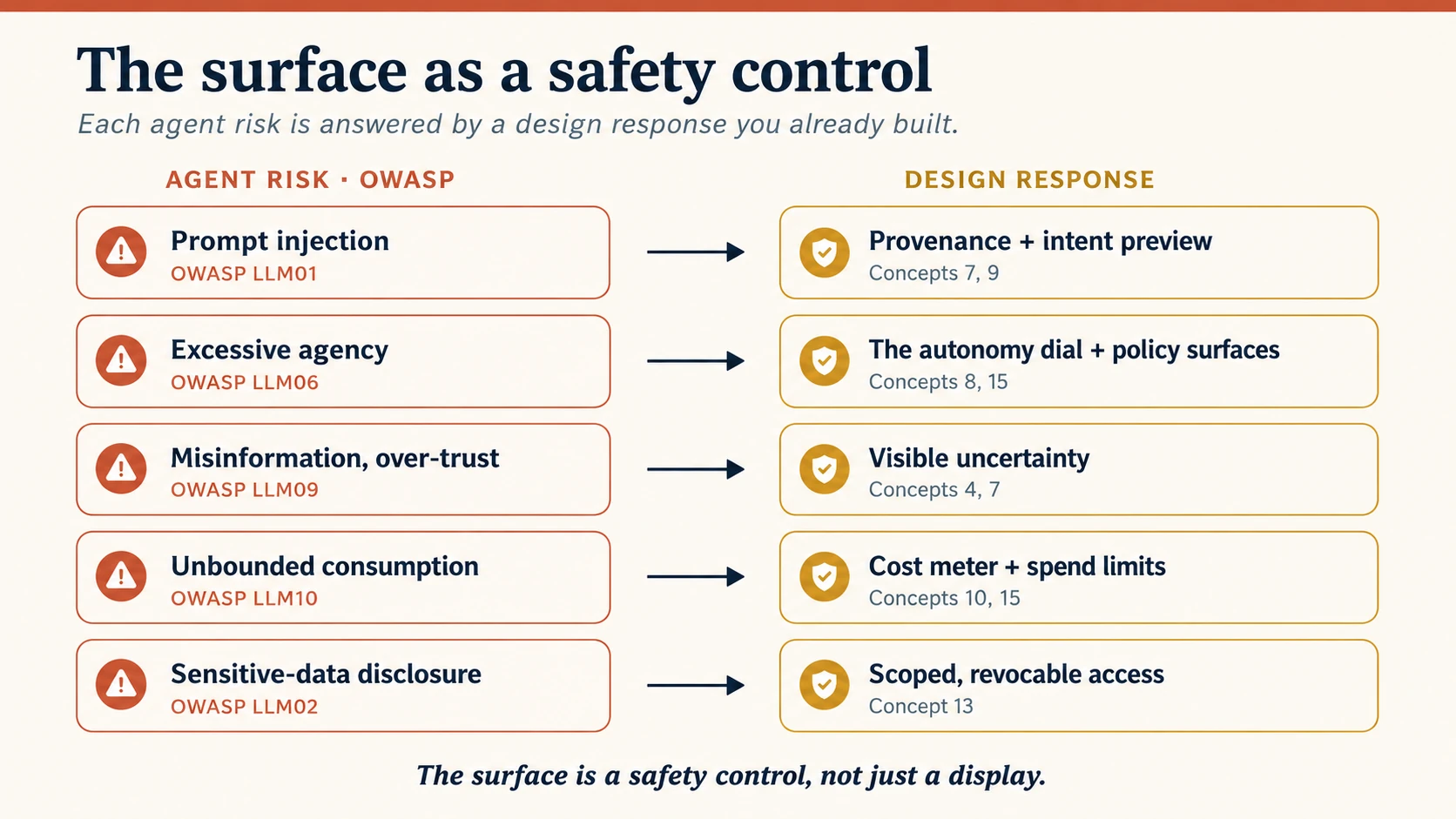
Figure 9: Surface safety control है। बाईं ओर हर OWASP LLM risk का उत्तर course में पहले बने design response से मिलता है; safety backend chore नहीं, experiential feature है।
- Prompt injection (LLM01): web page या document चुपचाप ऐसा action कहता है जिसे user ने नहीं माँगा। Visible provenance दिखाती है agent ने क्या पढ़ा और instruction कहाँ से आया; consequential action intent preview से गुजरता है, इसलिए injected instruction silently act नहीं कर सकता।
- Excessive agency (LLM06): agent आवश्यकता से अधिक कर सकता है। Autonomy dial और policy surfaces default में least authority, high-stakes actions in-the-loop और intentional capability additions रखते हैं।
- Misinformation and over-trust (LLM09): agent confidently गलत है और व्यक्ति मान लेता है। Visible uncertainty और provenance shaky claim को sure fact जैसा दिखने से रोकते हैं।
- Unbounded consumption (LLM10): runaway loop या denial-of-wallet time और budget जलाता है। Surface cost और budget burn दिखाता तथा spend limits enforce करता है।
- Sensitive-data disclosure (LLM02) और permission abuse: Concept 13 का access pillar scoped, revocable credentials और visible, withdrawable consent gates देता है।
दो rules निकलते हैं। पहला, surface safety control है, केवल display नहीं। Provenance, uncertainty, previews और spend meters defense हैं; clutter घटाने के नाम पर हटाना protection हटाना है। दूसरा, हर system को trust surface से जुड़ा governance surface चाहिए: capability कौन जोड़ सकता है, failures कौन review करता है, logs कौन audit करता है और सबसे अनिवार्य, agent को एक move में pause या kill कौन कर सकता है।
| Governance surface | Design question |
|---|---|
| Capability approval | Worker की capability कौन जोड़ या बढ़ा सकता है? |
| Permission review | Tool scopes और data access कौन approve करता है? |
| Incident review | Failure और postmortem का owner कौन है? |
| Audit log | Actions, plans, tool calls और approvals कौन inspect कर सकता है? |
| Kill switch | एक move में pause, disable या rollback कौन कर सकता है? |
| Drift review | बढ़ती escalation या गिरती recovery rate की जाँच कौन करता है? |
ये Concept 15 policy surfaces के पीछे organizational controls हैं। NIST AI Risk Management Framework इन्हें Govern, Map, Measure, Manage में नाम देता है; यह पुस्तक Human-Agent Teams और Workforce with Paperclip के control plane में operationalize करती है। Surface पर आपका काम हर control को reachable बनाना है, policy invent करना नहीं।
Concept 17 · Experience को measure करना
Surface elegant लगकर भी fail हो सकता है। Design value दे रही है या नहीं, जानने के लिए experience measure करें और समझें कि वह क्या नहीं है। Eval-Driven Development Worker output की correctness measure करता है: unit, tool-use, trace, safety और regression evals। Experience metrics relationship measure करते हैं: क्या इंसान delegate, trust, steer और recover कर सकता है? Worker हर correctness eval pass करके भी unsupervisable surface पहन सकता है।
एक छोटा scorecard रखें, dials की दीवार नहीं:
| Metric | क्या बताता है |
|---|---|
| Plan-acceptance rate | लोगों ने plan समझकर approve किया या blindly accept/reject? |
| Intervention rate | इंसान को कितनी बार आना पड़ा? गिरती trend trust earned दिखाती है। |
| Recovery success | Failure या escalation के बाद task अच्छे अंत तक पहुँचा? |
| Over- vs under-trust | लोग खराब output मान रहे या अच्छा work ठुकरा रहे? दोनों calibration failure हैं। |
| Notification precision | कितने interruptions वास्तव में उपयोगी थे? |
| Time saved vs. attention spent | Agent ने total human burden घटाया या केवल स्थान बदला? |
दो disciplines metrics को meaningful बनाते हैं। Snapshots नहीं, trends देखें; last month बिना 12% intervention rate अर्थहीन है। Microsoft HAX Playbook की तरह launch से पहले likely human-AI failures rehearse और recovery design करें। सबसे महत्वपूर्ण metric time saved versus attention spent है, क्योंकि यह agent का पूरा promise एक number में पकड़ता है। Negative होने पर सुंदर surface भी fail है।
Metrics बताते हैं surface काम करता है या नहीं; test protocol launch से पहले पता लगाता है:
- Plan-review test: real task दें और देखें व्यक्ति action से पहले plan पढ़, समझ और correct कर सके।
- Over-trust test: subtle गलत लेकिन सही दिखता output दें; uncertainty blind approval रोके।
- Recovery test: जानबूझकर reversible गलती कराएँ और clean undo का समय देखें।
- Interruption test: batch चलाकर useful nudges का हिस्सा measure करें।
- Accessibility pass: केवल keyboard और screen reader से plan, progress, undo और escalation तक पहुँचें।
- Machine-surface contract test: tools सीधे test करें; wrong types reject, dangerous actions gated, errors structured और retries idempotent हों।
इन tests का pass होना Worker की correctness साबित नहीं करता, वह Eval-Driven Development का काम है; लेकिन गलत होने पर experience टिकता है, यह साबित करता है।
Concept 18 · Anti-patterns और अंतिम design brief
इस list को सामने रखें। हर anti-pattern course का टूटा principle है:
| Anti-pattern | कैसा दिखता है | उल्लंघित concept |
|---|---|---|
| Black box | visible reasoning बिना action | 7 · progressive transparency |
| Agentic sludge | हर काम फिर check, समय नहीं बचता | 6 · visible division of labor |
| Over-eager agent | पहले दिन high autonomy | 8 · autonomy dial |
| Over-trusted agent | unchecked work पर high autonomy | 4 · calibrated trust |
| Notification spam | हर step पर ping | 10 · nudge, don't notify |
| Alarm-fatigued console | हर Worker ping करे, इंसान ignore करे | 12 · attention triage |
| False confidence | shaky guesses को sure fact कहना | 4 · visible uncertainty |
| Trap door | undo न हो सकने वाला action | 11 · repair and redress |
| Confused deputy | user instruction और injected instruction अलग न हों | 16 · safety surface |
| Unmeasured surface | elegant लगे, मदद measure न हो | 17 · measuring experience |
| Mystery-meat API | machine surface कोई agent parse न कर सके | 13 · Agent Experience |
अब deliverable: planning mode में भी अपने agent से पहले बनाए Digital FTE के लिए Agent Experience Brief draft कराएँ। ग्यारह sections:
- दो audiences: human और agent users कौन हैं?
- First contact: onboarding, capability बढ़ने पर expectation reset और sight/mouse बिना use।
- Trust surface: default और नीचे तीन layers।
- Load map: human क्या रखे, Worker क्या ले, सीमा कैसे दिखे।
- Autonomy ladder: पाँच stops और हमेशा human-in-the-loop actions।
- Async plan: intent, glanceable progress, wait display और nudges।
- Recovery plan: undo, escalation path और दो health metrics।
- At scale: fleet view, human attention और drift signal।
- Machine surface: connector/MCP tools, AX के access, context, tools, orchestration से judged।
- Safety surface: injection, excessive agency, runaway cost और उनके defenses।
- Scorecard: experience metrics और correctness evals की boundary।
यही brief artifact है। यह Worker experience के लिए वही है जो Human-Agent Teams के operating documents team model के लिए हैं: एक बार लिखें और Worker बदलने पर लौटें। Spec-Driven Development में यह experience layer की spec है, जहाँ non-deterministic Worker को deterministic, reviewable surface मिलता है। Appendix C में blank template है।
Worked Example: Support Worker के दो Surfaces
Digital FTE course के customer-support Digital FTE में दोनों surfaces देखें।
Human surface। Support lead console खोलता है। Default में हर ticket की एक line: “Order #4021 refunded, $38, confidence: high।” यह Layer 1 है। Tap पर plan: order पढ़ना, policy check, refund, email। अगला tap why और policy clause दिखाता है। $38 limit में है, autonomy stop 3, act within limits। $900 chargeback limit से बाहर है, इसलिए Worker stop 2 पर पूछता है। हर refund पर 24 hours का undo है। Lead loop को ऊपर से देखता है और दस Workers में fleet view $900 dispute दिखाता, clean refunds log में रखता है।
Machine surface। वही Worker company orchestrator द्वारा called है और payment provider के लिए खुद agent है। Refund capability typed signature और hard limit वाला MCP tool है (tools); scoped, revocable merchant credential दिखाता है (access); description model को valid refund condition बताती है (context); और refund idempotent है, इसलिए retry double-refund नहीं करती (orchestration)। Human surface पर न दिखने के बावजूद चारों के बिना system टूटता है।
एक Worker, दो audiences, दो जानबूझकर designed surfaces।
Stakes बढ़ने पर। Refund की जगह irreversible vendor payments approve कराएँ। Undo safety net नहीं रहता, इसलिए weight recovery से prevention की ओर जाता है। Intent preview mandatory और detailed होता है। Autonomy dial “act within limits” से ऊपर नहीं जाता, limit low रहती और large payment हमेशा in-the-loop होता है। बिना पूछे action का confidence bar बढ़ता है। Safety surface अधिक भार लेता है: provenance और second human approver अनिवार्य; governance में kill switch, full audit log और threshold से ऊपर payments का named owner। Patterns वही हैं, गलत होने की cost बढ़ने पर कस जाते हैं। यही recovery/prevention dial payroll, clinical triage, grading और regulated या irreversible domains में उपयोग होता है।
Hands-On Lab: अपना पहला MCP App बनाएँ
Part 3 ने machine surface को design work बताया। अब एक वास्तविक MCP App बनाएँ: ऐसा tool जो text wall के बजाय working interactive widget लौटाए, जिसे Claude या कोई MCP Apps-supporting host render करे।
इसे पुस्तक की तरह coding agent को निर्देश देकर बनाएँ। Official guide कहती है कि AI coding agent और MCP Apps skill सबसे तेज़ रास्ता हैं। Skill architecture और best practices देती है, agent typing करता है, और आप spec लिखकर result judge करते हैं।
आवश्यकताएँ। Node.js 18+, terminal और Skills-supporting coding agent: Claude Code, OpenCode, Codex, Cursor, Gemini CLI, Goose या similar। Claude testing के लिए paid custom-connectors plan चाहिए; Step 3 का local host free है।
Step 1 · create-mcp-app skill install करें
Skills & Connectors के अनुसार skill instructions और examples का folder है। Official create-mcp-app skill MCP Apps architecture, patterns और pitfalls सिखाती है।
Claude Code में plugin install करें:
/plugin marketplace add modelcontextprotocol/ext-apps
/plugin install mcp-apps@modelcontextprotocol-ext-apps
अन्य agents के लिए:
npx skills add modelcontextprotocol/ext-apps
Manual route: github.com/modelcontextprotocol/ext-apps clone करके plugins/mcp-apps/skills/create-mcp-app को agent skills folder, जैसे ~/.claude/skills/, ~/.codex/skills/ या ~/.cursor/skills/, में copy करें।
Verify करने के लिए पूछें:
What skills do you have access to?
List में create-mcp-app दिखे तो agent MCP Apps बनाना जानता है।
Step 2 · दस-minute loop: scaffold, build, serve
Official hello-world के लिए agent को एक line दें:
Create an MCP App that displays a color picker
Agent skill load करके MCP server, widget UI और build configuration वाला पूरा project scaffolds करेगा। Project folder में चलाएँ:
npm install && npm run build && npm run serve
MCP server अब http://localhost:3001/mcp पर चल रहा है। अब इसे render होते देखें।
Step 3 · Render होते देखें
Option A: local test host, free और बिना account। ext-apps repository का minimal host चलाएँ:
git clone https://github.com/modelcontextprotocol/ext-apps.git
cd ext-apps/examples/basic-host && npm install
SERVERS='["http://localhost:3001/mcp"]' npm start
http://localhost:8080 खोलें, tool चुनें, call करें और sandboxed iframe में widget देखें।
Option B: Claude web या Desktop। Claude को machine तक पहुँचाने के लिए दूसरे terminal में tunnel खोलें:
npx cloudflared tunnel --url http://localhost:3001
Generated https://….trycloudflare.com URL को Claude में Settings → Connectors → Add custom connector के तहत जोड़ें। Custom connectors को Pro, Max या Team plan चाहिए। नई chat में color picker माँगें; widget conversation में दिखाई देगा।
Step 4 · Agent ने क्या बनाया, पढ़ें
Pattern दो MCP primitives और एक bridge है। Server पर metadata UI की ओर बताता tool और UI serve करता resource:
// server.ts (the load-bearing lines)
const resourceUri = "ui://get-time/mcp-app.html"; // ui:// marks this as an App interface

registerAppTool(
  server,
  "get-time",
  {
    title: "Get Time",
    description: "Returns the current server time.",
    inputSchema: {},
    _meta: { ui: { resourceUri } }, // the one line that turns a tool into an App
  },
  async () => ({
    content: [{ type: "text", text: new Date().toISOString() }], // the text fallback
  }),
);

registerAppResource(
  server,
  resourceUri,
  resourceUri,
  { mimeType: RESOURCE_MIME_TYPE },
  async () => ({
    contents: [{ uri: resourceUri, mimeType: RESOURCE_MIME_TYPE, text: html }],
  }),
);
Widget में App class sandbox का एकमात्र channel खोलती है:
// src/mcp-app.ts (the load-bearing lines)
const app = new App({ name: "Get Time App", version: "1.0.0" });
app.connect(); // open the postMessage channel to the host

app.ontoolresult = (result) => {
  /* the host pushes the first tool result here */
};

await app.callServerTool({ name: "get-time", arguments: {} }); // the UI calls tools back
Tool का text content Apps बिना hosts का fallback है। Widget host page या cookies नहीं छूता; सब कुछ postMessage पर auditable JSON-RPC channel से जाता है। हर callServerTool server round trip है, इसलिए UI को waiting gracefully handle करनी चाहिए।
Step 5 · वास्तविक build: refund approval card
अब course का worked example बनाएँ। Agent को vague idea नहीं, spec दें; यह widget पर लागू Spec-Driven Development है:
Using the create-mcp-app skill, build an MCP App called refund-approval.

Tool: review_refund(order_id: string, amount: number, confidence: "high" | "low" | "unsure").
It returns the refund details as plain text (the fallback) and renders an approval card.

The card must:
1. Show one plain line: "Refund #<order_id> · $<amount> · confidence: <word>".
   Confidence is always a word, never a colour.
2. Offer two buttons, Approve and Escalate to a human. Both must be reachable
   by keyboard, with labels a screen reader announces.
3. On Approve, call the server tool approve_refund(order_id), then show
   "Approved · Undo available for 24h" with an Undo button that calls
   undo_refund(order_id).
4. If amount > 50, disable Approve and show "Above limit: needs a human",
   leaving only Escalate active.
5. Make approve_refund and undo_refund idempotent on order_id: calling either
   twice must be safe.
Steps 2 और 3 की तरह build, serve और test करें। फिर design pass चलाएँ, क्योंकि shipping finish line नहीं है:
| Check | आप कौन-सा concept अभ्यास कर रहे हैं |
|---|---|
Apps support बिना host में tool call करें या text content पढ़ें: क्या fallback decision बताता है? | 14 · fallback built in |
| Confidence word है, colour नहीं, और card की one line plain है? | 7 · transparency, 5 · accessibility |
| Approve फिर Undo: reversal one click है और twice click करना safe है? | 11 · repair, 13 · idempotency |
| $900 refund try करें: card refuse करके human को route करता है? | 8 · autonomy dial |
| केवल keyboard से tab करें: हर control reachable है? | 5 · access for everyone |
Tools action से named हैं, review_refund, न कि process? | 13 · machine surface |
हर row pass होने पर ध्यान दें: एक tool call ने human के लिए भरोसेमंद plain line और दूसरे agent के लिए typed, idempotent contract दोनों बनाए। आपने जानबूझकर Concept 2 के दोनों surfaces ship किए।
Step 6 · आगे कहाँ जाएँ
Official docs बदलती source of truth हैं: overview modelcontextprotocol.io/extensions/apps/overview, lab वाला build guide modelcontextprotocol.io/extensions/apps/build, API reference apps.extensions.modelcontextprotocol.io, और ext-apps GitHub repository। Examples में interactive maps, 3D scenes, PDF viewers, dashboards और React, Vue, Svelte तथा vanilla JavaScript starter templates हैं। कोई command fail हो तो agent से build guide fetch और differences reconcile कराएँ।
Lab की commands और patterns mid-2026 official guide के अनुसार verified हैं। Extension July 2026 spec में finalized लेकिन active development में है, इसलिए package names, SDK helpers और host support बदलेंगे। Durable pattern tool + ui:// resource + sandboxed render + postMessage channel है; exact incantations नहीं।
Projects
- इस्तेमाल किए agent का audit करें। किसी agentic product को Concept 18 के eleven anti-patterns पर score करें। सबसे कमजोर trust input और सबसे प्रभावी change क्या है?
- Dial बनाएँ। अपने Worker के पाँच autonomy stops concrete terms में लिखें, हमेशा human-in-the-loop actions mark करें और कारण बताएँ।
- Nudge budget बनाएँ। Worker के सभी interrupting events लिखें और केवल वास्तव में human माँगने वाले events तक काटें। यही notification design है।
- Machine surface लिखें। Worker capability का connector या MCP tool ऐसे लिखें कि unfamiliar agent पहली कोशिश में सही उपयोग करे। चारों AX questions से judge करें।
- Fleet view बनाएँ। पाँच Workers साथ सोचें। Lead एक glance में क्या देखता है, क्या interruption बनता और क्या log में रहता है, तथा कौन-सा drift signal देखेंगे?
- Full brief, capstone। एक Digital FTE के लिए Concept 18 का पूरा eleven-section Agent Experience Brief बनाएँ।
- Widget ship करें। Lab Step 5 तक refund approval card real host में चलाएँ, हर design-pass row pass करें और तीन ऐसे design decisions लिखें जो plain web form न माँगता।
यदि आप build करने के बजाय work direct करने आए हैं, Concepts 1–4, 8, 12, 13, 16 और 17 पढ़ें; फिर एक Worker के लिए autonomy ladder, fleet view और machine-surface judgment लिखें। Trustworthy agentic product review करने और leader का वास्तविक काम करने के लिए इतना पर्याप्त है।
पुस्तक में इसका स्थान
यह Spec-Driven Development जैसी design discipline है: हर build के ऊपर चलने वाला सोचने का तरीका, install किया tool नहीं। यह Human-Agent Teams से जुड़ता है: वह team operating model लिखता है, यह वह surface design करता है जहाँ इंसान team का काम अनुभव करता है। साथ पढ़ने पर manual और control room दोनों मिलते हैं।
Appendix A: MCP Apps का नक्शा (2026)
Concepts 13, 14 और Lab के moving parts यहाँ स्पष्ट हैं। Status mid-2026 तक है। MCP Apps July 2026 spec में finalized लेकिन active development में है; build से पहले modelcontextprotocol.io/extensions/apps पर specifics confirm करें। यह MCP tool layer पर बैठता है जहाँ agents tools discover/call, structured results receive और task-specific interfaces render करते हैं।
| Piece | क्या है |
|---|---|
| Tool | normal MCP tool जिसका _meta.ui.resourceUri interface की ओर है; returned text Apps बिना hosts का fallback है |
ui:// resource | interface वाला HTML page, अक्सर CSS/JS bundled, जिसे server अन्य MCP resource की तरह serve करता है |
| Sandboxed iframe | host का isolated render box जो host page, cookies या storage पढ़ और escape नहीं कर सकता |
| postMessage channel | JSON-RPC messages, अधिकतर ui/ methods और tools/call, जिन्हें host audit कर सकता है |
csp और permissions | allowed external origins और camera/microphone जैसी requested capabilities |
App class | @modelcontextprotocol/ext-apps का optional wrapper: connect(), ontoolresult, callServerTool(); नीचे standard web APIs हैं |
| Host support | mid-2026 में Claude, Claude Desktop, VS Code Copilot, Goose, Postman, MCPJam; OpenAI Apps SDK इसी MCP base पर ChatGPT apps बनाता है |
Tool और resource machine surface, rendered widget human surface, तथा sandbox, audited channel और declared permissions safety surface हैं। एक pattern, तीनों surfaces।
Appendix B: MCP Apps बनाम OpenAI Apps SDK, designer note
Agent tool को UI देने के दो common paths MCP Apps और OpenAI Apps SDK हैं। कौन चुनें? सही answer premise को अस्वीकार करता है।
वे rivals नहीं हैं। OpenAI Apps SDK MCP पर built है: ChatGPT App, ChatGPT-specific extras वाला MCP server है। Sandboxed iframe, JSON-RPC channel और UI declaration shared हैं।
Experience में Apps SDK क्या जोड़ता है:
- Discovery surface। ChatGPT app store और Claude connector directory (
claude.ai/directory) users को apps दिखाते हैं। Person app कैसे खोजता और पहली use से पहले trust करता है, Concept 5 का ecosystem-scale cold start है। - In-chat payment। Checkout conversation छोड़े बिना payment देता है, 2026 में beta और selected marketplaces तक सीमित। Review-confirm-pay ceremony एक moment में compress होती है, इसलिए commitment स्पष्ट, reversible और Concept 9 intent preview तथा Concept 11 repair के अनुरूप होनी चाहिए।
- Distribution। ChatGPT user base reach लाभ है; single-host lock-in tradeoff।
Design rule Concept 14 वाला है: पहले open base MCP Apps पर build करें, फिर store listing या checkout जैसे vendor extras feature-detect करके बाकी जगह gracefully degrade करें। केवल vendor extras पर build करेंगे तो surface एक host में फँसेगा।
यह design-level orientation है। Build के लिए Payment-Enabled Agents, Connector-Native Apps और Plugins for AI Agents देखें। Store, payment और plan details अक्सर बदलती हैं; निर्भर होने से पहले OpenAI Apps SDK docs confirm करें।
Appendix C: Agent Experience Brief, भरने योग्य template
यह Concept 18 का blank deliverable है। Copy करके ऊपर Worker name और हर field भरें। कठिन field ऐसी design decision बताती है जो अभी बाकी है। Specific questions होने के कारण template generation prompt भी है: agent से first pass draft कराएँ या Agent Factory pipeline की spec बनाएँ। इसे एक-दो pages में रखें; sprawling brief current नहीं रहता।
Agent Experience Brief: Worker name: ____________________________ · Owner: __________________ · Date: __________
1 · दो audiences · Concept 2
Human user कौन है और अन्य Workers, orchestrators या external services जैसे agent users कौन हैं?
____________________________________________________________________
2 · First contact · Concept 5
Onboarding, action power पर expectations reset और sight/mouse बिना use कैसे होगा, WCAG 2.2 floor के साथ?
____________________________________________________________________
3 · Trust surface · Concept 7
Default Layer 1 क्या है और नीचे plan, why + confidence तथा evidence कैसे हैं?
____________________________________________________________________
4 · Load map · Concept 6
Human क्या रखता, Worker क्या लेता और व्यक्ति line कैसे देख/बदल सकता है?
____________________________________________________________________
5 · Autonomy ladder · Concept 8
इस Worker के पाँच stops और हमेशा human-in-the-loop actions क्या हैं?
____________________________________________________________________
6 · Async plan · Concept 10
Intent, glanceable progress, wait latency/cost और nudges कैसे design होंगे?
____________________________________________________________________
7 · Recovery plan · Concept 11
Undo, human escalation path और दो health metrics क्या हैं?
____________________________________________________________________
8 · At scale · Concept 12
Fleet view, human attention और drift signal क्या हैं?
____________________________________________________________________
9 · Machine surface · Concept 13
Connector/MCP tools और AX access, context, tools, orchestration कैसे हैं?
____________________________________________________________________
10 · Safety surface · Concept 16
Injection, excessive agency, runaway cost और disclosure के defenses क्या हैं?
____________________________________________________________________
11 · Scorecard · Concept 17
कौन-से experience metrics track होंगे और Worker-correctness evals कहाँ take over करेंगे?
____________________________________________________________________
Appendix D: भरा हुआ brief, worked example
यह customer-support Refund Worker के लिए Appendix C template है। हर answer concrete decision है। यदि आपका answer prompt जितना vague है, design decision अभी बाकी है।
Agent Experience Brief। Worker name: Refund Worker · Owner: Support Lead · Date: 2026-07-01
1 · दो audiences। Human refund supervise करने वाला support lead है। Agents tickets route करने वाला company orchestrator और money move करने वाला payment provider API हैं।
2 · First contact। “Suggest” पर ship: lead approval के लिए drafts। Act promotion पर banner: “अब मैं केवल recommend नहीं, $50 तक refunds खुद issue करता हूँ।” Ticket, plan, undo और escalate keyboard/screen reader reachable; confidence word है, colour नहीं।
3 · Trust surface। Layer 1: “Refunded #4021, $38, confidence: high।” Layer 2 plan: order → policy → refund → email। Layer 3 why, policy clause और high/low/unsure। Layer 4 full trace और provider raw API response।
4 · Load map। Worker order reading, policy, refund और email का logistical load लेता है। Lead limit से ऊपर और low-confidence judgment रखता है। “Waiting on you” lane division visible बनाती है।
5 · Autonomy ladder। 1 Suggest → 2 Confirm → 3 Act within limits, refunds ≤ $50 → 4 Act and report → 5 Autonomous। यह stop 3 पर है। हमेशा in-the-loop: $50 से ऊपर refund, chargeback dispute और open fraud flag account।
6 · Async plan। एक ticket, एक goal। Progress step names दिखाता है। Refunds cheap हैं, cost meter आवश्यक नहीं। Nudges केवल limit से ऊपर refund, low-confidence policy match या provider error पर।
7 · Recovery plan। Undo हर refund के बाद 24 hours की one-click reversal। Escalation support lead, फिर on-call finance owner। Metrics escalation frequency लगभग 5–15% और recovery success लगभग 90% से ऊपर।
8 · At scale। दस Refund Workers का fleet view। “Needs you now” $900 dispute और week-over-week doubled escalation वाले Worker दिखाता है; clean refunds log में। Reversal rate own baseline के 2x पर Worker stop 2 पर auto-drop।
9 · Machine surface। Access: scoped, revocable refund-only merchant credential। Context: valid refund की exact description। Tools: refund_order(order_id, amount, reason), typed और $50 cap। Orchestration: order_id पर idempotent, इसलिए retry double-refund नहीं।
10 · Safety surface। Injection LLM01: ticket body data है, instruction नहीं, plan read sources दिखाता है। Excessive agency LLM06: $50 cap और in-loop pins। Unbounded cost LLM10: cap limits wallet risk। Disclosure LLM02: credential केवल refund endpoint।
11 · Scorecard। Plan acceptance, intervention trend, recovery success और time-saved-versus-attention-spent track करें। “Decision सही है?” पर golden-set correctness evals take over करते हैं; यह Eval-Driven Development का काम है।
Sources और further reading
यह synthesis field के current work से सीखती और बहस करती है:
- John Maeda, Simplicity and Agentic Experience तथा Design in Tech Report 2026: From UX to AX: goal तक teleport और human-surface shift।
- Matt Biilmann (Netlify), agents as users: machine surface के Access, Context, Tools, Orchestration।
- Microsoft Design, UX design for agents: Space / Time / Core, nudging more than notifying और uncertainty के साथ trust।
- Adrian Levy (CyberArk), When the Agents Go Marching In: interfaces→collaborations, load distribution, transparency, async और dual audiences।
- Smashing Magazine, Designing for Agentic AI: intent preview, autonomy dial, intervention, repair/redress और recovery benchmarks।
- Jakob Nielsen, third UI paradigm, No More UI और accessibility provocation; साथ में human touchpoints बढ़ने वाली rebuttals पढ़ें।
- MCP Apps, SEP-1865 और Model Context Protocol: tool
ui://HTML resource बताता और_meta.ui.resourceUriसे उसे link करता है; host sandbox iframe में render और JSON-RPC से communication करता है। MCP-UI, OpenAI और Anthropic ने इसे jointly बनाया। Overviewmodelcontextprotocol.io/extensions/apps/overview, buildmodelcontextprotocol.io/extensions/apps/build, SEPmodelcontextprotocol.io/seps/1865-mcp-apps-interactive-user-interfaces-for-mcp, APIapps.extensions.modelcontextprotocol.io,ext-appsrepository, उसकाcreate-mcp-appskill और Claude launchclaude.com/blog/interactive-tools-in-claudeदेखें। Host sandboxing, allowlists, consent और audit deployer की responsibility हैं। - OWASP Top 10 for LLM Applications (2025): Concept 16 threat catalog।
- NIST AI Risk Management Framework 1.0: Govern / Map / Measure / Manage और governance surface।
- Microsoft HAX Toolkit एवं HAX Playbook: launch से पहले human-AI failures rehearse करना।
- W3C WCAG 2.2: Concept 5 accessibility baseline।