अपने Agent Harness को Cloud पर Deploy करें: Multi-Track Crash Course
*17 Concepts • चार learning tracks. Reader track: 3-4 घंटे की pure conceptual reading (कोई setup नहीं, कोई deployment नहीं, उन engineering leaders और architects के लिए जो decide कर रहे हैं कि team time commit करना चाहिए या नहीं). Beginner / Intermediate / Advanced tracks: हर एक 1-2 दिन, 3-5 दिन, 7-10 दिन (conceptual reading और five-component stack पर बढ़ती deployment depth, observability और eval suite wiring के साथ). Lab से पहले अपना track चुनें, नीचे "चार learning tracks" section देखें.*
आपने पहले के courses में agents बनाए हैं, लेकिन उनमें से हर agent अभी तक सिर्फ़ आपके laptop पर run हुआ है। यह course आपके design किए हुए agent को real cloud service के रूप में ship करता है, जिसे users internet से access कर सकते हैं। आप agent का brain managed cloud runtime पर host करेंगे, उसकी memory database में रखेंगे, उसकी files object storage में store करेंगे, और उसका risky code अलग locked-down sandbox में run करेंगे। यह पूरा system आपका coding agent build और boot करता है, उस companion brief से जिसे आप download करते हैं। अंत तक harness live होगा, और आप उसका हर हिस्सा समझेंगे।
🔤 आगे पढ़ने से पहले जानने योग्य तीन terms (अगर आपने पहले के courses किए हैं, तो आप इन्हें शायद जानते होंगे; नीचे plain-English version पर जा सकते हैं).
यह course पिछले courses से ज़्यादा infrastructure-heavy है। ये तीन terms बार-बार आएँगे, इसलिए पहले इन्हें साफ़ शब्दों में देखना मदद करता है:
- Harness. Agent का "brain" और controls: वह code जो agent loop run करता है, कौन सा tool call करना है चुनता है, secrets रखता है, और runs के बीच state बनाए रखता है। यह agent का generated code खुद run नहीं करता। इस course में harness cloud में run होने वाला FastAPI web app है।
- Sandbox. अलग, locked-down workspace जहाँ agent का generated code सच में run होता है। यह files पढ़ सकता है और shell commands run कर सकता है, लेकिन इसे harness के secrets या database का access नहीं होता। Sandboxes बनाने में सस्ते होते हैं, एक बार use होते हैं, और फिर हटा दिए जाते हैं।
- Manifest. Sandbox को क्या चाहिए, इसका छोटा description: कौन सी files mount करनी हैं, कौन सा storage attach करना है, कौन सी abilities (shell, filesystem) on करनी हैं। आप workspace को एक बार describe करते हैं, और OpenAI Agents SDK उसे किसी भी supported sandbox provider पर run कर सकता है।
दो और terms बहुत use होंगे जिन्हें full glossary define करता है: Azure Container Apps (एक managed cloud service जो autoscale और public web address के साथ आपका container run करती है) और Neon Postgres (cheap branching वाला serverless Postgres database). Full glossary नीचे एक section में है।
Plain-English version, अगर पहले human version चाहिए तो यहाँ से शुरू करें। (Technical readers नीचे "यह course production deployment..." पर skip कर सकते हैं.)
पहले के courses ने concept के रूप में AI-native company बनाई थी। आपने agent design करना, उसे knowledge देना, उसे durably run करना, उनमें से कई को manage करना, उन्हें hire और fire करना, owner को delegate देना, और यह measure करना सीखा कि इनमें से कुछ काम करता है या नहीं। उन सभी courses में एक चीज़ आपने कभी नहीं की: इनमें से किसी को ऐसे cloud पर deploy करना जहाँ real users पहुँच सकें। यह course उसी के लिए है। आप पहले बनाए गए agent को, पहले के courses की architecture और eval suite के साथ, live cloud service के रूप में ship करते हैं। आप सीखेंगे कि agent का brain कहाँ run होता है, उसकी memory कहाँ रहती है, वह files कहाँ store करता है, और उसका risky code कहाँ safely run होता है। यह end to end एक complete path है जो काम करता है। दूसरे paths भी हैं; उन सबका survey करने से ज़्यादा तेज़ सीखना एक path को पूरा चलकर होता है।
यह course cloud में OpenAI Agents SDK harness का production deployment सिखाता है। पहले के courses ने AI-native company की architecture बनाई और फिर उसे उस discipline में wrap किया जो उसे measurably trustworthy बनाता है। यह course उस पूरी चीज़ को ship करता है।
पूरे course का central idea यह है। Harness वह control plane है जिसका ownership आपके पास है और जिसे आप running रखते हैं। Sandbox वह execution plane है जिसे आप बनाते हैं, एक बार use करते हैं, और फिर हटा देते हैं। Harness keys, state और audit log रखता है; sandbox इनमें से कुछ नहीं रखता और risky work करता है। इस course का हर concept और हर decision इसी split का elaboration है। अगर एक sentence याद रखना हो, तो यही रखें।
🆕 April 2026 में क्या बदला, और यह course अब क्यों exist करता है। OpenAI ने 15 April 2026 को Agents SDK का major update ship किया, जो agent harness को sandbox compute से SDK के first-class हिस्से के रूप में अलग करता है। इस release से पहले production agents deploy करने वाली teams को model clients, container runtimes, credential isolation, state और tool routing को हाथ से जोड़ना पड़ता था। April release harness/sandbox split को built-in primitive बना देता है, वह pattern नहीं जिसे teams बार-बार reinvent करें। इसी ने इस course को teachable बनाया: एक साल पहले यह ज़्यादातर speculative होता; अब यह recipe है।
Source: OpenAI, "The next evolution of the Agents SDK," April 15, 2026.
Quick Win: लगभग 15 minutes में harness को अपने laptop पर boot करें
Cloud को touch करने से पहले prove करें कि harness आपकी अपनी machine पर run होता है। Cloud को touch करने से पहले harness आपके laptop पर run होता है। आप companion code download करेंगे, उसे अपने coding agent में open करेंगे, और उसे boot होकर health check का answer देते हुए देखेंगे। यही पूरी win है: control plane alive है और बता रहा है कि कौन से pieces wired हैं।
पहले companion zip download करें और unzip करें। Folder को अपने coding agent (Claude Code, OpenCode, या similar) में open करें। Agent root में AGENTS.md file पढ़ता है, जो उसे बताती है कि project कैसे build और boot होता है। फिर नीचे का prompt paste करें।
इसे अपने coding agent में paste करें। पहले plan करें; approval पर execute करें।
AGENTS.md पढ़ें, फिर Maya का harness locally boot करें ताकि मैं उसे run होते देख सकूँ।
- AGENTS.md के end में SDK probe run करें ताकि installed
openai-agentsversion और core imports working confirm हों।- Dependencies install करें (
make install) और.env.exampleको.envमें copy करें। अभी कोई keys add न करें; harness उनके बिना boot होना चाहिए।- Harness start करें (
make run, जोhttp://localhost:8000पर serve करता है)।- दूसरे shell में
GET /healthrequest करें और exact response दिखाएँ।
Done when:
- आपका coding agent installed
openai-agentsversion (0.17.x) report करता है। - Harness start होकर बिना keys set किए running रहता है।
GET /healthexactly यह return करता है:
{
  "status": "ok",
  "model": "gpt-5.4-mini",
  "backends": { "postgres": false, "sandbox": false, "r2": false }
}
यह response harness की तरफ़ से सच बोलना है: यह alive है ("status": "ok"), अपने model को जानता है, और optional backends में से कोई wired नहीं है (सब false). हर बाद वाला decision इनमें से किसी flag को true करता है। Harness सिर्फ़ अपने code से boot होता है, फिर आप एक-एक करके pieces add करते हैं।
चार learning tracks, अपना चुनें
यह course चार अलग depths के लिए काम करता है। Lab से पहले अपना track explicitly चुनें; conceptual content चारों के लिए design है, और lab tracks 2-4 के लिए design है।
| Track | Time commitment | आप क्या complete करते हैं | यह किसके लिए है |
|---|---|---|---|
| Reader (pure conceptual) | ~3-4 घंटे, कोई lab नहीं | Quick Win, सभी 17 concepts, और closing. कोई cloud accounts नहीं, कोई Docker नहीं, कोई Python setup नहीं। Architecture समझ आती है; deployment deferred रहता है। | Engineering leaders, platform architects, और ML platform owners जो decide कर रहे हैं कि इस deployment pattern पर team time commit करना चाहिए या नहीं। |
| Beginner | ~1-2 दिन (conceptual + local lab) | Reader track plus SDK probe, scaffold, और containerizing. Harness Docker में locally run होता है, OpenAI और local database से बात करता है। अभी cloud deployment नहीं। | AI services की cloud deployment में नए engineers. Goal है harness/sandbox split internalize करना और laptop पर end to end run होने वाला containerized agent ship करना। |
| Intermediate | ~3-5 दिन | Beginner track plus cloud पर deploy करना, durable state wire करना, file storage wire करना, और observability wire करना। Harness real users serve करता है; sandbox अभी stubbed है; eval suite Advanced तक deferred है। | वे teams जो harness को deployed और observable चाहती हैं, लेकिन अभी code execution या full eval discipline wire नहीं कर रहीं। |
| Advanced | ~7-10 दिन | Intermediate track plus sandbox wire करना, eval suite wire करना, और production checklist. Complete discipline: harness deployed, sandbox wired, observability live, eval suite CI gate कर रहा है और nightly run हो रहा है। | Production teams जो full discipline, complete end-to-end deployment, observability और quality-assurance path ship कर रही हैं। |
Track-fork guidance. Engineering leaders और architects जो यह decide कर रहे हैं कि इस pattern में invest करना चाहिए या नहीं, Reader track से शुरू करें: 3-4 घंटे, कोई accounts नहीं, कोई पैसा खर्च नहीं, और अंत तक आपको पता होगा कि आपकी team को higher track commit करना चाहिए या नहीं। Beginners को पहली pass में Advanced तक पहुँचने का pressure नहीं लेना चाहिए। Discipline iterative है; teams आम तौर पर एक weekend में Reader से Beginner, एक sprint में Beginner से Intermediate, और deployment mature होने पर weeks में Intermediate से Advanced तक graduate करती हैं। Standalone readers (जो पहले के courses से नहीं आए) को पहले Reader track default करना चाहिए, फिर decide करना चाहिए कि lab का Simulated mode सही next step है या नहीं।
अगर आप Advanced track को focused two-week sprint की तरह करते हैं, तो cadence यह है। यह मानता है कि एक engineer दिन में 4-6 productive hours दे रहा है; teams इसे compress कर सकती हैं। Day 5 natural "shippable" checkpoint है: harness deployed है और users serve कर रहा है। Days 6-10 वह hardening add करते हैं जो deployment को long-term operable बनाती है।
| Day | Focus | Cumulative artifact |
|---|---|---|
| 1 | Concepts 1-4 + scaffold | Stubbed /runs endpoint वाला local FastAPI app. |
| 2 | Containerize + deploy | आपके phone से public internet पर reachable harness. |
| 3 | Wire Neon Postgres | Durable state जो container restart survive करता है। |
| 4 | Wire Cloudflare R2 | File storage; agent inputs पढ़ सकता है और outputs लिख सकता है। |
| 5 | ⭐ Shippable checkpoint | Deployed harness जिसे real users use कर सकते हैं। अगर MVP ही goal है तो यहीं रुकें। |
| 6 | Wire the sandbox | Code execution working; agent code safely run करता है। |
| 7 | Wire observability | Infrastructure alert से agent behavior तक तेज़ी से navigate करें। |
| 8-9 | Wire the eval suite | कोई agent regression CI notice किए बिना ship नहीं होता; nightly behavior reports run होते हैं। |
| 10 | Production checklist + handoff | Production-ready harness और उसे operate कर सकने वाली team. |
इस course में मिलने वाली vocabulary
Glossary, expand करने के लिए click करें
- Harness. Agent का control plane: वह code जो agent loop run करता है, secrets रखता है, और state बनाए रखता है। इस course में यह cloud में FastAPI app है। यह agent का generated code run नहीं करता।
- Sandbox. Agent का execution plane: isolated workspace जहाँ agent का generated code run होता है, harness के secrets या database access के बिना।
- Control plane / execution plane. यह principle कि agent की orchestration (secrets, database access, model keys) उस जगह से अलग security boundary में रहती है जहाँ agent का generated code run होता है। यह course इसी पर टिका है।
- Manifest. Sandbox workspace का छोटा description: file mounts, attach करने वाला storage, enable करने वाली abilities. Supported sandbox providers में portable.
- Container. आपकी app और उसे run करने के लिए ज़रूरी हर चीज़ का sealed bundle, ताकि वह आपके laptop और cloud में एक जैसा run करे।
- FastAPI. Web APIs बनाने के लिए Python library. इस course में harness के HTTP layer के लिए choice, क्योंकि यह SDK के async Python client के साथ naturally pair होती है।
- Azure Container Apps (ACA). Managed cloud service जो autoscale, public address, secrets और revisions के साथ आपका container run करती है। इस course का harness runtime.
- Neon Postgres. Cheap branching वाला serverless Postgres database. इस course का durable state store.
- Cloudflare R2. S3-compatible object storage जहाँ अपनी files बाहर read करना free है। इस course का file और artifact store.
- Presigned URL. Short-lived web link जो sandbox को storage password पकड़े बिना storage में एक specific file read या write करने देता है।
- Durable state. ऐसी memory जो restart survive करती है: sessions, run history और audit log, container में नहीं बल्कि database में रखे जाते हैं, क्योंकि container stop होने पर सब भूल जाता है।
- Observability. वे tools जो बताते हैं कि running harness क्या कर रहा है, कुछ break होने पर क्या हुआ, और cause कैसे ढूँढना है।
- OpenTelemetry (OTel). Request को services के across trace करने का open standard.
- Phoenix. Tool जो agent traces देखता है और खराब traces को future tests में बदलता है।
- Eval. ऐसा test जो agent के behavior को measure करता है (answer सही था या नहीं, tool सही था या नहीं, reasoning sound थी या नहीं), सिर्फ़ यह नहीं कि code run हुआ।
- Blue/green. Downtime के बिना new version ship करने का तरीका: old version के साथ new version run करें, फिर traffic shift करें।
- Scale-to-zero. जब traffic नहीं होता, cloud आपकी app की zero copies run करता है और आप कुछ pay नहीं करते; quiet spell के बाद पहली request को copy wake up होने के लिए कुछ seconds wait करना पड़ता है।
- Connection pooling. Open database connections का shared set जो requests के across reuse होता है, ताकि database हजारों simultaneous connections से गिर न जाए।
क्या आप ready हैं?
📦 सबसे पहले: companion download. Companion zip सभी के लिए on-ramp है, खासकर standalone readers के लिए जिन्होंने पहले के courses नहीं किए।
deploying-agents-crash-course.zipdownload करें और unzip करें। इसमें harness का booted scaffold (FastAPI plus SDK plus stubbed clients), आपके coding agent द्वारा पढ़ा जाने वालाAGENTS.mdbrief, पाँच database tables के लिएschema.sql,Dockerfile, Azure deploy script, और common commands के लिएMakefileहैं। अंदर का stub agent (Maya का Tier-1 Support agent) lab को काम करने लायक बनाता है, भले ही आपने Maya खुद न बनाया हो, इसलिए Simulated track के पास point करने के लिए कुछ real होता है।अगर आप Reader से आगे किसी track को follow करने वाले हैं, तो आगे पढ़ने से पहले folder को अपने coding agent में open करें। Reader track के लिए read-only browsing ठीक है।
- आपने companion zip download कर लिया है (ऊपर callout देखें). अगर आप Reader track पर हैं और कुछ run करने की planning नहीं है, तो इसे skip करें।
- आप command line पर comfortable हैं। आप packages install कर सकते हैं, कुछ commands run कर सकते हैं, और filesystem में move कर सकते हैं। अगर आपने कभी terminal use नहीं किया, तो Reader track सही entry point है।
- आप Python code पढ़ सकते हैं। Harness Python में है; आपको
async def,await, decorators और type hints दिखेंगे। Expert होना ज़रूरी नहीं; पढ़ पाना काफी है।- आपके पास Agents SDK access वाली OpenAI API key है (Beginner track और ऊपर). यह model account है, सिर्फ़ chat account नहीं। platform.openai.com check करें।
- आपके पास Azure account है (Intermediate track और ऊपर). Lab Azure Container Apps पर deploy करता है; free credits lab cover कर देते हैं। portal.azure.com check करें।
- आपके पास Neon account है (Intermediate track और ऊपर). Free tier पर्याप्त है। console.neon.com check करें।
- आपके पास R2 enabled Cloudflare account है (Intermediate track और ऊपर). R2 free tier lab के लिए पर्याप्त है। Cloudflare sandbox को paid Workers plan चाहिए, इसलिए lab code execution के realistic free path के रूप में E2B के free tier का use करता है।
अगर आपके पास cloud accounts नहीं हैं, तो Reader track सच में सही starting point है: पहले पढ़ें, बाद में sign up करें। अगर आपने पहले के courses miss किए हैं, तो companion zip का stub agent आपका bridge है, इसलिए Maya खुद बनाए बिना भी lab follow कर सकते हैं।
शुरू में जानने लायक rough edges
- यहाँ का code booted companion तक traceable है। इस course में SDK code download वाले harness से match करता है, जिसे इस course के ship होने से पहले real
openai-agentspackage के against install और boot किया गया था। यह "illustrative, untested" code नहीं है।- SDK तेज़ी से बदलता है। April 2026 release पहला release है जो इस pattern को teachable बनाता है, और harness/sandbox APIs evolve होती रहेंगी। इसलिए lab का पहला step probe Decision है: आपका coding agent SDK install करता है, installed version print करता है, live docs fetch करता है, और companion brief को उनसे reconcile करता है। जब brief और live docs disagree करते हैं, live docs win करते हैं।
- Python only. April 2026 release में harness और sandbox features केवल Python में ship हुए हैं। TypeScript support planned है लेकिन date नहीं है। अगर आपकी app TypeScript में है, तो Python harness को अलग service के रूप में run करें जिसे आपकी TypeScript app HTTP पर call करे।
- एक cloud, एक sandbox, एक database, एक storage provider. यह course एक specific stack commit करता है ताकि complete path सिखा सके। Principles obvious तरीकों से दूसरे clouds पर transfer होते हैं; course substitutions का survey नहीं करता, हालांकि Concept 9 और Concept 15 main ones बताते हैं।
- Cost real है। Fully deployed harness low-traffic personal use के लिए लगभग कुछ tens of dollars per month से लेकर moderate production traffic के लिए hundreds तक cost कर सकता है। Reader और Beginner tracks में कुछ cost नहीं; cloud tracks के real bills हैं। Concept 13 breakdown देता है।
- No multi-region. यह course एक region में deploy करता है। Multi-region active-active operational complexity add करता है जिसे अपना treatment चाहिए; Concept 14 इसे honestly name करता है।
आप क्या build कर रहे हैं, इसकी shape
यह course 17 concepts introduce करता है और 9 deployment decisions से गुज़रता है। उससे पहले, पूरी architecture एक picture में है। जब कोई concept या decision abstract लगे, तो इसी पर वापस आएँ।
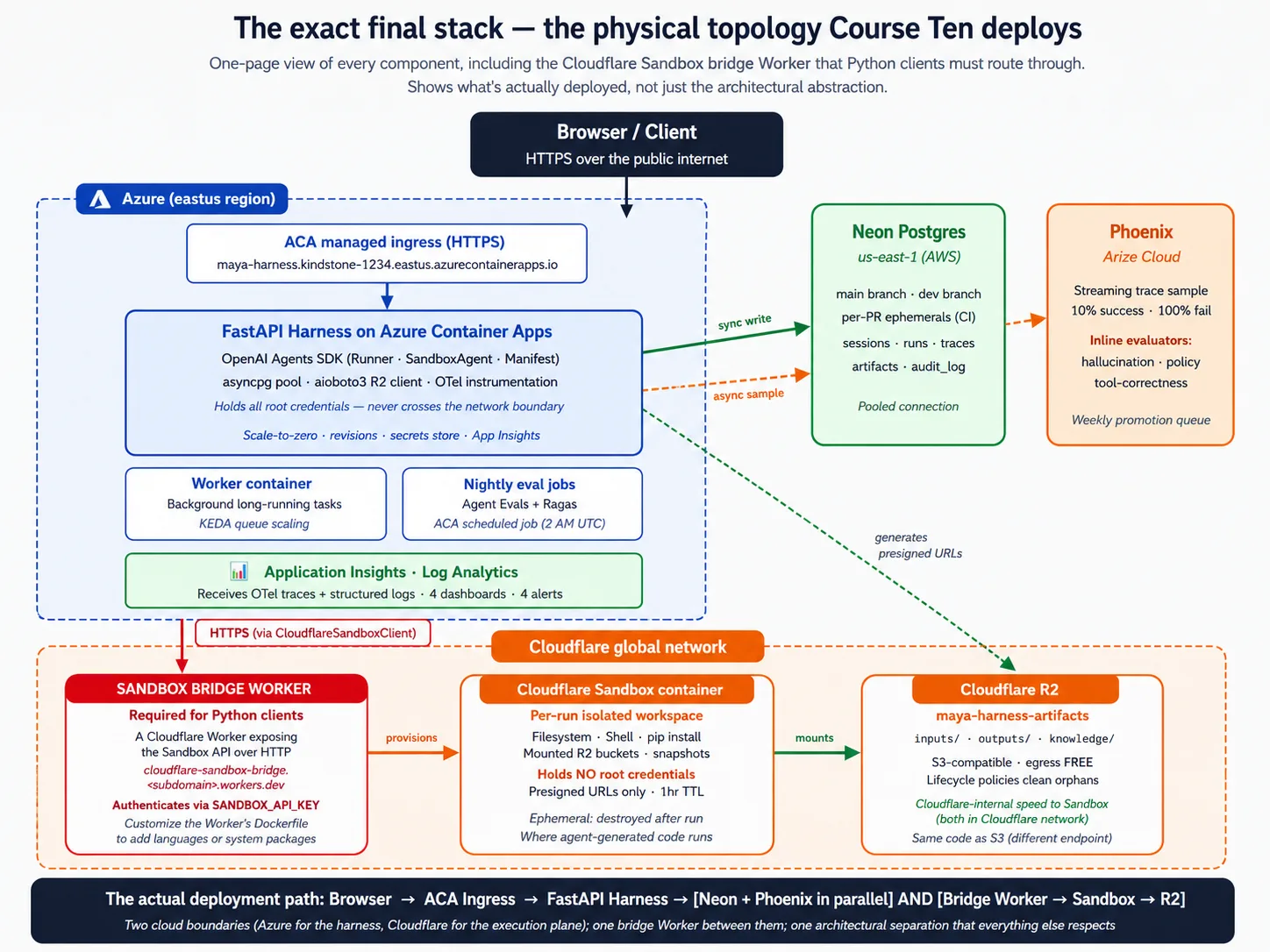
Stack primer: हर component सच में क्या है
अगर आपने पहले production web services ship की हैं, तो यह section skip करें। अगर पहले के courses अभी तक आपकी सबसे बड़ी infrastructure exposure रहे हैं, तो इसे पढ़ें। यह course उस background पर depend करता है जो बहुत से beginners ने अभी build नहीं किया, और उसके बिना lab incantations जैसा लगेगा। चार छोटे pieces: Docker, FastAPI, Neon और Cloudflare R2. Goal lab follow करने के लिए minimum mental model है, deep mastery नहीं।
Stack primer 1: Docker और containers
Container आपकी app और उसे run करने के लिए ज़रूरी हर चीज़ का sealed bundle है: आपका code, उसके Python packages, system libraries, यहाँ तक कि operating-system pieces जिन पर वह depend करता है। आप bundle एक बार build करते हैं, फिर कहीं भी run करते हैं। वही bundle जो आपके laptop पर run होता है, cloud में unchanged run होता है।
यह software की सबसे पुरानी complaint solve करता है: "मेरी machine पर चलता है।" ऐसा Python script जो आपके laptop पर आपके exact packages के साथ run होता है, शायद colleague के laptop या cloud server पर बहुत fiddling के बिना run न हो। Container उस fiddling को collapse करता है: image एक बार build करें, फिर जहाँ container engine run करता है वहाँ run करें।
Lab में मिलने वाली vocabulary:
- Dockerfile bundle build करने की recipe है: plain text file जो कहती है "इस base से शुरू करें, ये files copy करें, ये commands run करें।"
- Base image starting point है, आम तौर पर small Linux system जिसमें language pre-installed होती है। Harness
python:3.12-slimसे शुरू होता है। - Multi-stage build app build करने के लिए एक image use करता है (compilers और tools के साथ) और उसे run करने के लिए दूसरी, छोटी image use करता है (सिर्फ़ result के साथ). Runtime image small रहती है क्योंकि build tools उसमें ship नहीं होते।
- Registry वह जगह है जहाँ built images store और share होती हैं। Deploy flow है: image build करें, registry में push करें, cloud उसे pull करके run करता है।
Minimum mental model: container को working machine के snapshot की तरह सोचें जिसमें आपकी app installed और ready है। Image build करना snapshot लेना है; उसे run करना isolated copy boot करना है। Copy shut down होने पर उसके अंदर की हर चीज़ गायब हो जाती है। इसी कारण durable state को बाहर database चाहिए और durable files को बाहर storage चाहिए। Container throwaway है; data नहीं।
Stack primer 2: FastAPI
FastAPI web APIs बनाने के लिए Python library है: ऐसे programs जो network पर requests listen करते हैं और data, आम तौर पर JSON, से respond करते हैं। यह "Fast" इसलिए है क्योंकि concurrency के लिए Python के async features use करता है, और "API" इसलिए क्योंकि यह web pages render करने के बजाय request-and-response pattern के लिए बना है।
यह problem solve करता है: आपका agent server पर run होता है, लेकिन real users (या दूसरी services) को कहीं और से, network पर, उसे reach करना होता है। FastAPI आपके Python code को ऐसी चीज़ में बदलता है जिससे network बात कर सके।
Lab में मिलने वाली vocabulary:
- Endpoint आपकी API का specific path है, जैसे task start करने के लिए
POST /runsया harness alive है या नहीं check करने के लिएGET /health. - Route handler वह Python function है जो endpoint call होने पर run होता है। आप उसे decorator से mark करते हैं, जैसे
@app.post("/runs"). async defऔरawaitwait करने वाले code के लिए Python keywords हैं। Harness इन्हें use करता है क्योंकि उसका ज़्यादातर काम wait करना है: model पर, database पर, sandbox पर। Async code एक process को hundreds waiting requests एक साथ handle करने देता है।- Pydantic models Python classes हैं जो request और response data की shape describe करती हैं। FastAPI incoming requests को automatically check करने और malformed ones को आपका code run होने से पहले reject करने के लिए इन्हें use करता है।
- Uvicorn वह program है जो सच में FastAPI app run करता है और network को आपके handlers से connect करता है। आप इसे
uvicorn maya_harness.main:appजैसी command से start करते हैं।
Minimum mental model: FastAPI app एक Python file है जो app object create करती है और functions को endpoints के रूप में decorate करती है। हर function checked data receive करता है, अपना काम करता है (अक्सर दूसरी async operations को await करते हुए), और data return करता है जिसे FastAPI JSON में बदल देता है। Uvicorn उसके सामने वाला server है।
Stack primer 3: Neon Postgres
Database data को disk पर store करता है ताकि वह restarts survive करे, एक साथ कई readers और writers support करे, और SQL नाम की language से query हो सके। Postgres एक specific open-source database है, दुनिया में सबसे widely used databases में से एक। Neon Postgres को आपके लिए service की तरह run करता है, दो twists के साथ: यह serverless है (खुद scale up और down करता है) और branching support करता है (आप अपने database की ऐसी copy बना सकते हैं जो parent के साथ storage share करती है जब तक आप उसे change न करें).
यह problem solve करता है: आपके harness को requests और container restarts के across चीज़ें याद रखनी हैं। Conversation state, run history, traces, audit log. Container की local disk हर restart पर गायब हो जाती है, इसलिए harness को वह data ऐसी जगह रखना चाहिए जहाँ वह survive करे। Neon specifically इसलिए, क्योंकि उसका scale-up और scale-down behavior harness के behavior से match करता है: जब harness idle है, Neon भी scale down कर सकता है, और आप pay करना रोक देते हैं।
Lab में मिलने वाली vocabulary:
- Table structured records का named collection है, strict column types वाली spreadsheet जैसा। Harness में पाँच tables हैं: sessions, runs, traces, artifacts और audit log.
- Schema आपकी सभी tables और उनके columns की definition है।
- Primary key वह column है जो हर row को uniquely identify करता है; foreign key वह column है जो किसी दूसरी table की primary key की तरफ़ point करता है, जिससे data relational बनता है।
- Migration versioned SQL script है जो schema change करता है, repo में commit होता है ताकि हर change tracked रहे।
- Connection pooling open connections का shared set है जो requests के across reuse होता है। इसके बिना हर request नया connection खोलती है, और Postgres की limit होती है। Neon pooled endpoint देता है जो यह multiplexing आपके लिए करता है।
Minimum mental model: Postgres strict shapes वाली tables में data store करता है, और आप उसे SQL से query करते हैं। Harness उससे asyncpg Python library के through बात करता है। Neon database host करता है और ऊपर serverless scaling और branching add करता है।
Stack primer 4: Cloudflare R2
Object storage internet पर files store करने की service है। आप इसे एक name ("key") और कुछ bytes देते हैं, और यह उन्हें store करता है; बाद में आप name से bytes माँगते हैं और वापस पाते हैं। ऐसी पहली service AWS S3 थी, और उसकी API de facto standard बन गई जिसे कई providers implement करते हैं। Cloudflare R2 Cloudflare का object storage है। यह S3 API implement करता है, एक twist के साथ: अपनी files बाहर read करना free है। S3 से data बाहर read करने में लगभग nine cents per gigabyte लगते हैं; R2 से कुछ नहीं।
यह problem solve करता है: आपका agent files पढ़ता है (uploaded documents, knowledge content) और files लिखता है (generated reports, artifacts). इन्हें ऐसी जगह रहना है जहाँ harness और sandbox दोनों reach कर सकें, और ये database के लिए बहुत बड़ी या बहुत ज़्यादा हो सकती हैं। Database large files के लिए नहीं बना; container की disk restarts survive नहीं करती; object storage files के लिए सही shape है।
Lab में मिलने वाली vocabulary:
- Bucket files के लिए named container है, top-level folder जैसा। Harness का bucket agent के artifacts रखता है।
- Object एक stored file है, key (bucket में उसका path) और value (bytes) के साथ।
- Prefix key का वह हिस्सा है जो related files group करता है, जैसे
inputs/याoutputs/. - S3-compatible का मतलब है R2 वही API बोलता है जो S3 ने बनाई, इसलिए S3 से बात करने वाली कोई भी Python library सिर्फ़ एक setting बदलकर R2 से बात करती है: endpoint URL.
- Presigned URL short-lived link है जो एक specific object का access देता है। Harness root credentials रखता है; जब sandbox को एक file चाहिए, harness short expiry वाला presigned URL देता है, और sandbox सिर्फ़ वही file reach कर सकता है।
- Lifecycle policy rule है जो set age से पुराने objects delete करता है, ताकि storage write-only graveyard न बन जाए।
Minimum mental model: R2 वह जगह है जहाँ harness files रखता और पढ़ता है, S3 API के through. Harness root credentials रखता है (सब read और write कर सकता है); sandbox को केवल presigned URLs मिलते हैं (एक file, छोटा time).
जिसकी आपको ज़रूरत नहीं। इस course को complete करने के लिए Kubernetes, infrastructure-as-code, service mesh या message broker की ज़रूरत नहीं। ऊपर की managed services operational machinery संभालती हैं। आपको deep SQL fluency भी नहीं चाहिए; lab का code क्या कर रहा है, यह recognize करना पर्याप्त है।
Part 1: Deployment problem
तीन concepts establish करते हैं कि यह course क्यों exist करता है और "deployment problem" असल में क्या है। Beginners को यहाँ grounding मिलेगी; advanced readers Part 2 तक skim कर सकते हैं।
Concept 1: "मेरी machine पर चलता है" deployment नहीं है
आपके पास Python में defined agent है, मान लें Maya का Tier-1 Support agent: यह tools call करता है, specialists को hand off करता है, अपनी limits respect करता है, और eval suite pass करता है। आप इसे अपने laptop से run करते हैं और यह काम करता है।
"आपके laptop पर चलता है" असल में यह मतलब रखता है। Agent एक Python process के रूप में run होता है जिसे आपने हाथ से start किया। यह API keys project folder की file से पढ़ता है। यह अपनी state उसी folder की local file में लिखता है। यह libraries को उसी process में import करके code run करता है। Model internet पर call होता है, लेकिन बाकी सब आपकी machine पर रहता है।
Production का मतलब यह है, और हर piece कैसे अलग है:
- Real users agent को public internet पर reach करते हैं। सिर्फ़ आप नहीं, अपने laptop से नहीं।
- कई users agent को एक साथ hit करते हैं। Single Python script एक समय में एक handle करता है।
- Agent की state host restart survive करती है। Temp folder की local file नहीं करती।
- Agent का generated code ऐसी जगह run होता है जहाँ वह आपके data को harm नहीं कर सकता। उसे अपने process में, database credentials के बगल में run करना serious security mistake है।
- Agent के secrets उस code की reach से बाहर रहते हैं जो agent generate करता है। Working directory में key file ऐसा नहीं करती।
- हर run observable, auditable और recoverable होता है। Crash होता process इनमें से कुछ नहीं है।
इन छह properties में से कितनी आप minor changes और एक-दो दिन के काम से laptop script में add कर सकते हैं? Honest answer है एक या zero. इनमें से किसी एक को production survive करने वाले तरीके से add करना भी कम से कम focused infrastructure work का एक week है; सभी छह add करना वही entire body of work है जो यह course सिखाता है। Production deployment "मेरे laptop पर चलता है" के around thin wrapper नहीं है। यह अलग architecture है।
AI services deploy करने में नई teams के लिए temptation यही होता है कि इस realization को skip करें। "हम बस script को server पर run कर देंगे।" दो महीने बाद team के पास ऐसा server होता है जो कभी-कभी crash करता है, ऐसा agent जो कभी-कभी user-influenced code को production database के full access के साथ run करता है, ऐसी state जो हर reboot पर गायब हो जाती है, और agent ने क्या किया उसका कोई record नहीं। Production को अलग architecture के बजाय script रखने की जगह मानने का predictable result यही है।
Deployment problem यह नहीं है कि "script कहाँ run करें?" यह है कि "agent को कैसे re-architect करें ताकि उसके harness में ये छह production properties हों और उसका execution safe रहे?" यह course एक complete answer सिखाता है।
Concept 2: Harness/sandbox split, control plane vs execution plane
इस course का सबसे important idea harness (control plane) और sandbox (execution plane) के बीच split है। हर आगे का concept और decision इसी पर टिका है।
Harness agent का brain है। यह network पर users से requests receive करता है। यह agent loop run करता है: model call करना, अगला कौन सा tool call करना है decide करना, specialist agents को handoffs handle करना, guardrails apply करना। यह कई runs के across durable state रखता है: conversation history, run history, audit log. यह secrets रखता है: model key, database credentials, storage credentials. और यह users को results return करता है।
Sandbox agent के hands हैं। यह harness से workspace description (Manifest) receive करता है। यह उस description से match करता isolated workspace provision करता है। Agent के request करने पर shell commands, file reads और writes, और code run करता है। यह results harness को return करता है। और इसे Manifest में explicitly mounted चीज़ों के अलावा harness के secrets, database या production systems का access नहीं होता।
इनके बीच boundary network और security boundary है। Harness sandbox credentials use करके network पर sandbox से बात करता है; अपने secrets sandbox से share नहीं करता। Sandbox harness का environment, database या filesystem read नहीं कर सकता। यह वही production discipline है जिसे April 2026 SDK release SDK के अंदर डालता है।
यह split क्यों matter करता है? चार reasons.
Security reason: agent code generate करता है। Code गलत हो सकता है, subtle side effects वाले तरीके से incorrect हो सकता है, या adversarial setting में malicious हो सकता है। आप नहीं चाहेंगे कि यह code उसी process में run हो जिसमें database credentials हैं। Split generated code और harness secrets के बीच network और OS boundary रखता है। अगर agent ऐसी request generate करता है जो files delete कर दे, तो harm सिर्फ़ sandbox को होता है, और sandbox throwaway है।
Durability reason: sandboxes अक्सर create और destroy होने के लिए meant हैं। Harness को sandbox death survive करना होता है। एक single task sandbox provision कर सकता है, दस minutes run कर सकता है, hiccup से sandbox lose कर सकता है, नए sandbox में checkpoint से restore कर सकता है, और finish कर सकता है। Harness इसे orchestrate करता है। अगर harness sandbox के अंदर रहता, sandbox death सब कुछ खो देती।
Scalability reason: एक harness जो कई sandboxes coordinate करता है, one harness-plus-sandbox lump से far better scale करता है। Harness की needs modest हैं (requests handle करना, model call करना, database से बात करना); sandbox की needs spiky हैं (code compile करना, tests run करना, files process करना). इन्हें split करने से हर एक अपने हिसाब से scale हो सकता है।
Observability reason: harness record own करता है। Agent ने क्या decide किया, कौन से tools call किए, कौन सा trace produce किया, यह सब harness के साथ रहता है। Sandbox execution है; harness audit log है। जब कुछ गलत होता है, harness का record आप पढ़ते हैं।
यह course दो anti-patterns avoid करता है:
- Harness को sandbox के अंदर run करना। Prototype के लिए convenient, production के लिए गलत। Sandboxes throwaway हैं; harness को persist करना होता है। Sandboxes को secrets के साथ trust नहीं किया जा सकता; harness को उन्हें hold करना चाहिए।
- Agent-generated code को harness के अंदर run करना। AI deployment का original sin. Harness database credentials, model key और आपके users के data का access रखता है। आप उस access surface के साथ agent-generated code run नहीं कर सकते। Eventually कुछ गलत होता है, और जब होता है, damage unbounded होता है।
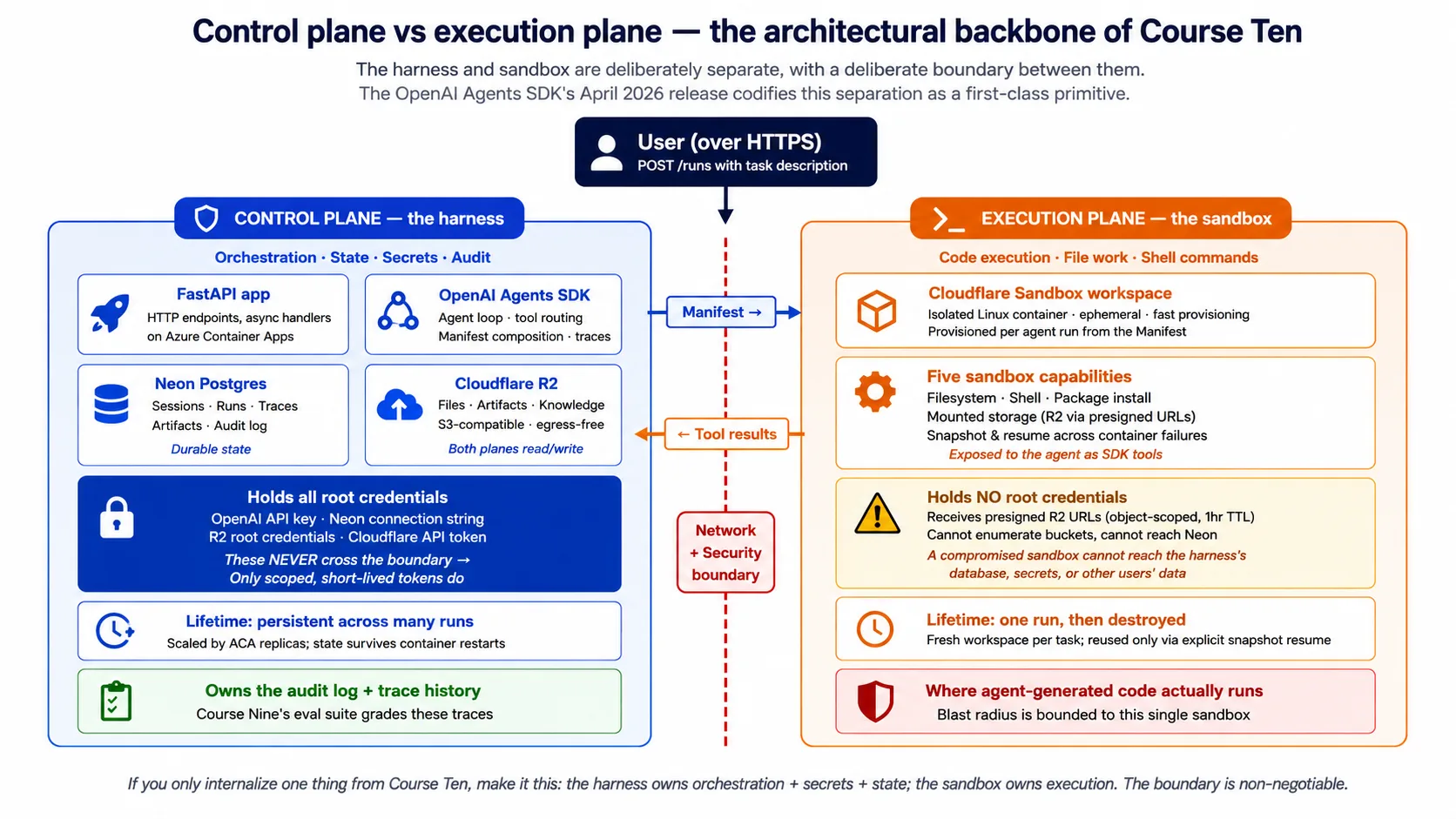
Concept 3: SDK को cloud infrastructure से क्या चाहिए, पाँच surfaces
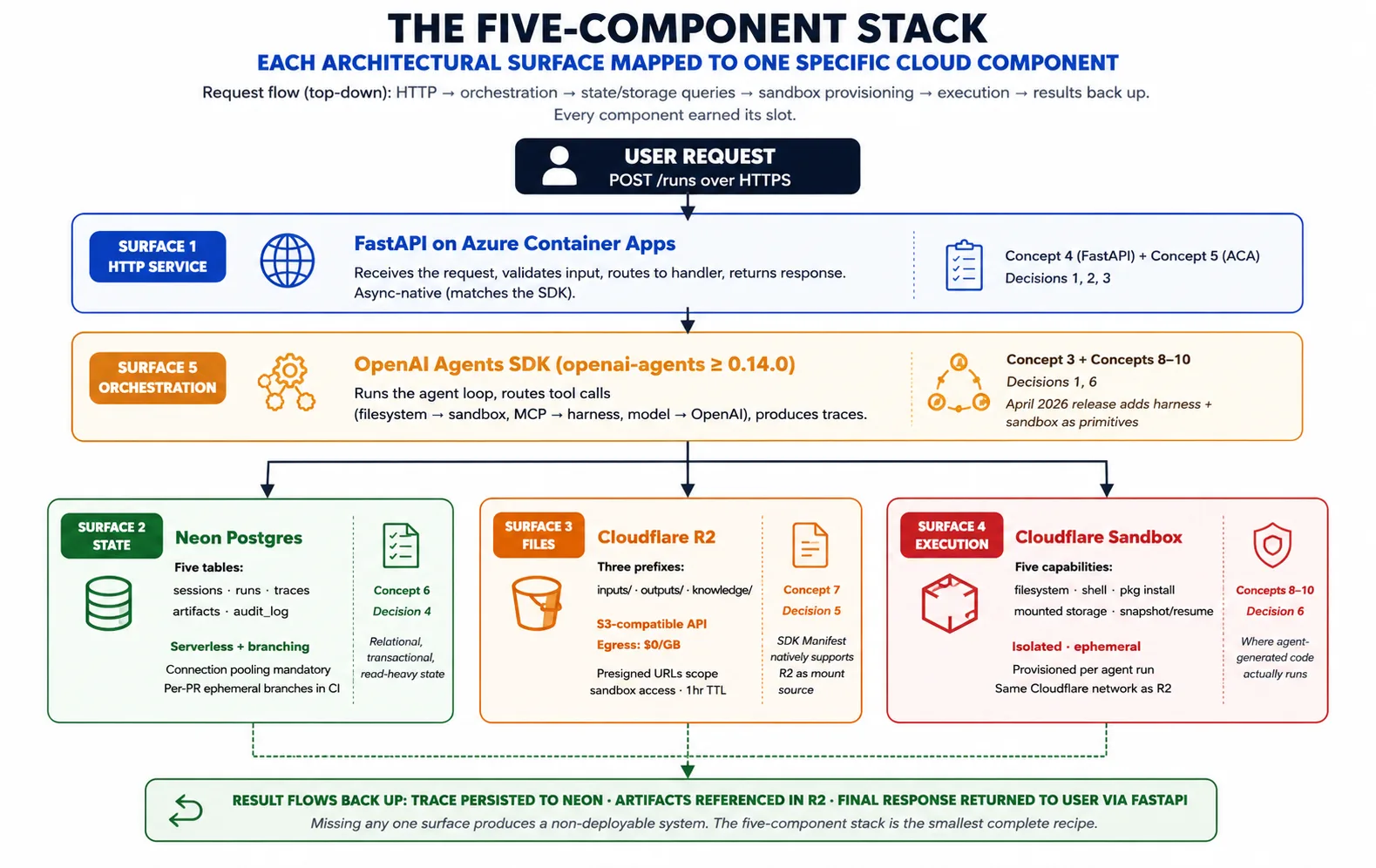
Concept 2 ने pattern को name किया। Concept 3 पूछता है: उस pattern को देखते हुए, OpenAI Agents SDK को इसे realize करने के लिए cloud infrastructure से सच में क्या चाहिए? Answer है पाँच surfaces, और five-component stack हर surface को एक component से map करता है।
Surface 1: harness host करने के लिए long-running HTTP service. Harness एक Python process है जिसे users से requests accept करनी हैं, indefinitely running रहना है (task seconds से hours तक ले सकता है), traffic rise होने पर scale out और fall होने पर scale back करना है, और host failure survive करना है। Azure Container Apps पर FastAPI यह देता है। Concept 4 FastAPI cover करता है; Concept 5 Azure Container Apps cover करता है।
Surface 2: runs के across durable state. Harness sessions, runs, traces, approvals और audit log रखता है। Neon Postgres यह देता है: Postgres इसलिए क्योंकि यह best-understood transactional database है, Neon इसलिए क्योंकि इसकी serverless scaling और branching harness के deployment patterns से match करती है। Concept 6 Neon cover करता है।
Surface 3: file और artifact storage जिसे दोनों planes reach कर सकें। Agents files produce करते हैं (reports, code, exports) और files consume करते हैं (uploads, datasets, knowledge content). इन्हें ऐसी जगह रहना है जहाँ harness और sandbox दोनों reach कर सकें। Cloudflare R2 यह देता है: S3-compatible API, अपनी files बाहर free reads, और April 2026 SDK में Manifest mount source के रूप में native support. Concept 7 R2 cover करता है।
Surface 4: agent-generated code के लिए isolated execution. जब agent shell command run करता है, package install करता है, या code execute करता है, उस काम को ऐसी जगह चाहिए जो harness secrets से isolated हो, on demand create हो, और storage से inputs read तथा outputs write कर सके। Code-execution sandbox यह देता है। Concepts 8-10 sandbox layer को depth में cover करते हैं।
Surface 5: surfaces 1-4 को जोड़ने वाली orchestration. यह SDK खुद है। यह agent loop run करता है, tool calls route करता है (filesystem और shell sandbox को, model calls OpenAI को), Manifest manage करता है, और traces produce करता है। Harness SDK import करता है और उसके primitives use करता है; उन्हें reinvent नहीं करता।
Composition: request Azure Container Apps पर FastAPI में आती है। Harness Neon से agent और prior state load करता है। यह task के लिए चाहिए workspace describe करता Manifest compose करता है। यह sandbox provider से उस workspace को provision करने को कहता है। SDK agent loop run करता है, tool calls sandbox को भेजता है और trace record करता है। Artifacts R2 जाते हैं; trace Neon जाता है। Result user को return होता है। यही composition पूरा course है; हर concept और decision इसका एक piece elaborate करता है।
🚫 Python पर नहीं हैं? April 2026 release तक harness और sandbox features Python-only हैं; TypeScript support planned है लेकिन undated. अगर आपकी app TypeScript में है, तो Python harness को अलग service की तरह run करें और अपनी TypeScript app से उसके endpoints HTTP पर call करवाएँ। यह course जो harness build करता है, वह exactly वही service है।
Part 2: Five-component stack
Part 1 ने pattern establish किया; Part 2 stack के harness side (FastAPI, Azure Container Apps, Neon, R2) से गुज़रता है और बताता है कि हर component ने अपना slot क्यों कमाया। पाँचवाँ component, sandbox, अपने Part 3 में आता है।
Concept 4: Harness web layer के रूप में FastAPI
Harness को long-running HTTP service होना चाहिए, और कई Python frameworks इसे host कर सकते हैं: Flask, Django, FastAPI, Starlette. इस course की choice FastAPI है, इतने specific reasons के लिए कि उन्हें name करना चाहिए।
Async story: OpenAI Agents SDK Python के asyncio के around बना है। Model, tools और sandbox को calls सभी await calls हैं। FastAPI async-native है, इसलिए आप async def handlers लिखते हैं जो SDK को directly await करते हैं, thread-pool workarounds के बिना। Sync-native framework का मतलब होगा हर request पर event loop spin up करना या SDK को thread pool में run करना: दोनों काम करते हैं, दोनों friction add करते हैं और concurrency lose करते हैं। वह framework use करें जिसका concurrency model आपकी dependencies से match करता है।
Schema story: FastAPI आपके handlers के type hints से OpenAPI schema generate करता है। यहाँ इसका payoff तीन ways में होता है। Eval suite checked requests के साथ harness endpoints hit कर सकता है क्योंकि schema machine-readable है। TypeScript app समेत किसी भी language के लिए typed client libraries generate हो सकती हैं। और schema आपकी team और future self के लिए API document करता है, अलग doc-writing effort के बिना।
Pydantic story: FastAPI request और response data check करने के लिए Pydantic use करता है, और SDK internally भी Pydantic use करता है। Validation एक बार boundary पर होती है, उसी library और patterns के साथ जिन्हें SDK पहले से use करता है। दूसरे frameworks को separate validation layer चाहिए; FastAPI उस mismatch को हटाता है।
Community story: May 2026 तक FastAPI AI services के लिए dominant Python framework है। इस workload के tutorials, examples और answers इसे assume करते हैं। Well-supported tool चुनना friction कम करता है।
FastAPI क्या नहीं है। यह हर चीज़ के लिए general framework नहीं है; अगर आपको template-rendered HTML pages या Django-style admin चाहिए, तो FastAPI गलत choice है। Harness API server है, web app नहीं। यह queue का replacement भी नहीं है: अगर task request को reasonably open रखे जाने से लंबा run करता है, तो आप connection open नहीं रखते। Harness work queue करता है और client को बाद में check back करने देता है; lab वही pattern set up करता है।
Lab में आप harness का POST /runs endpoint देखेंगे: एक async def handler जो session load करता है, agent run करता है, run persist करता है, और reply return करता है। यह short function है, क्योंकि FastAPI और Pydantic HTTP handling, validation और serialization free में देते हैं, और async def आपको SDK directly await करने देता है। उस code का real, booted version companion download और lab Decision में है, जहाँ यह सच में run होने वाले harness तक traceable है।
Concept 5: Harness runtime के रूप में Azure Container Apps
Harness एक containerized FastAPI service है जिसे continuously run करना है, traffic के साथ scale करना है, secrets safely hold करने हैं, और host failure survive करना है। इस course की choice Azure Container Apps (ACA) है, जिसे Microsoft exactly इसी workload के लिए position करता है।
यह क्या है: managed cloud service. आप इसे container image और configuration देते हैं; यह container run करता है, public address देता है, autoscale handle करता है, secrets store करता है, और revisions track करता है। आप servers manage नहीं करते, Kubernetes हाथ से run नहीं करते, या underlying compute के लिए infrastructure code नहीं लिखते। आप declare करते हैं कि क्या चाहिए; ACA उसे करता है।
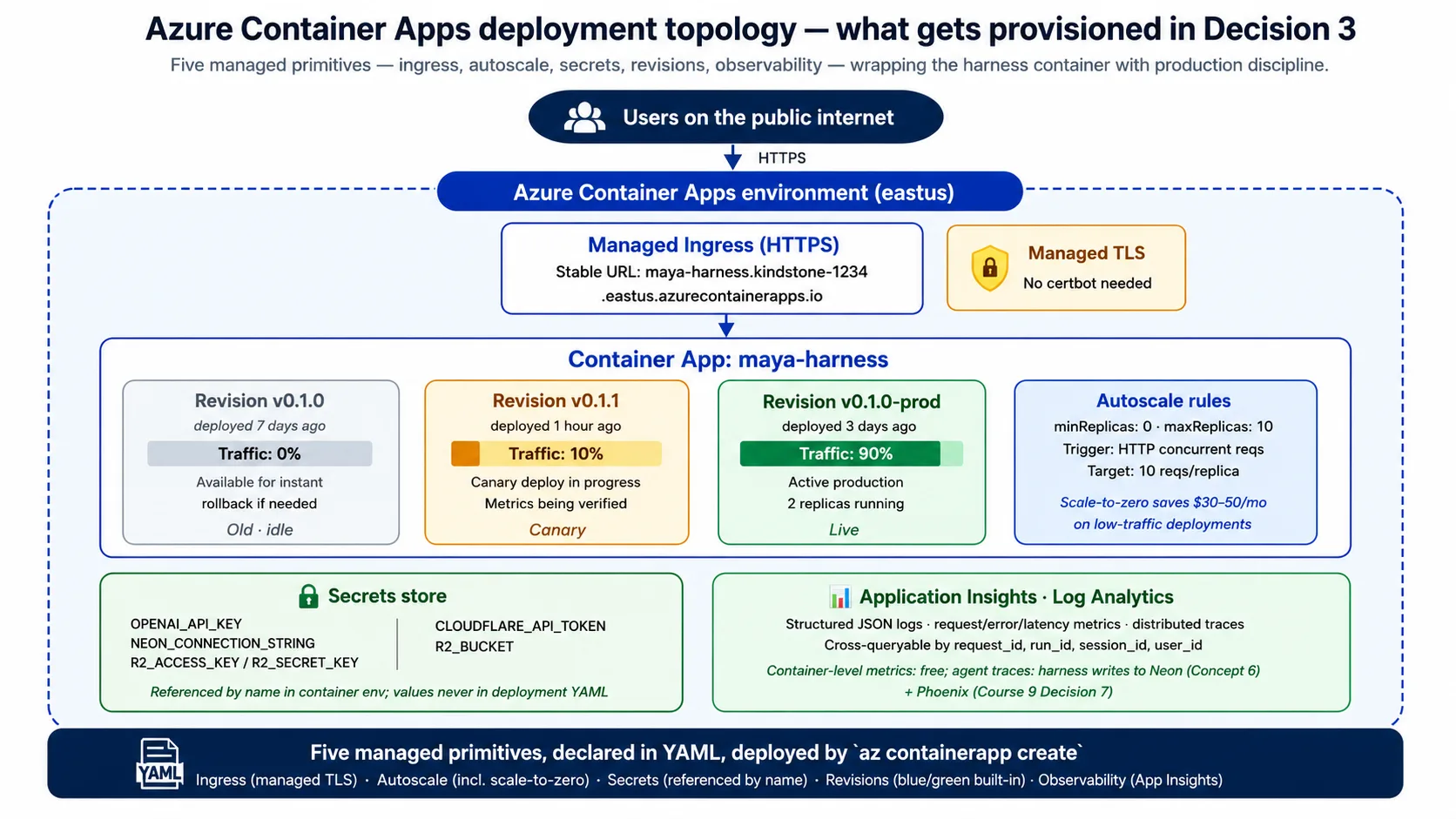
Harness को इससे पाँच capabilities चाहिए:
- Public address. ACA हर app को managed certificates के साथ stable HTTPS address देता है। कोई web-server config नहीं, कोई certificate setup नहीं, कोई DNS gymnastics नहीं।
- Autoscale. ACA आपके set किए rules के आधार पर running copies की संख्या scale करता है, आम तौर पर in-flight requests की संख्या पर। Scale-to-zero cost lever है: traffic न होने पर ACA zero copies run करता है और आप कुछ pay नहीं करते; quiet spell के बाद पहली request को copy wake up होने के लिए कुछ seconds wait करना पड़ता है।
- Secrets. ACA secrets store करता है और environment variables में उन्हें name से reference करने देता है; actual values आपकी configuration या image में कभी appear नहीं होतीं। यह disk पर key file से बहुत बेहतर है।
- Revisions. हर deploy immutable revision create करता है, और ACA किसी भी percentage में revisions के across traffic split कर सकता है। इससे blue/green deploys और rollback built-in हो जाते हैं: rollback traffic change है, redeploy नहीं।
- Observability. ACA logs, metrics और traces को Azure monitoring tools में feed करता है, इसलिए request rate, error rate और latency free में मिलते हैं; harness ऊपर agent के अपने traces add करता है।
Cloud Run या Fly.io या raw Kubernetes के बजाय ACA क्यों? तीन honest reasons. Microsoft ACA को exactly इस profile के लिए position करता है: containerized APIs, background jobs और microservices. इसके revisions और traffic splitting first-class हैं, जबकि कई services blue/green को bolt-on की तरह treat करती हैं। और इसका scale-to-zero honest है: यह सच में zero copies run करता है और कुछ bill नहीं करता, जबकि कुछ "managed" services एक copy warm रखती हैं और उसके लिए bill करती हैं। दूसरे clouds में clean equivalents हैं (Google Cloud Run, AWS App Runner); architectural shape identical है, और Concept 9 और Concept 15 substitutions cover करते हैं।
ACA कब wrong choice है: अगर आपको peak पर roughly 25 copies से ज़्यादा चाहिए, तो per-app limits awkward हो जाती हैं और full Kubernetes better fit है; अगर आपको active-active multi-region चाहिए, तो इसका multi-region story कम mature है (Concept 14 इसे name करता है). Harness जिस container को deploy करता है, वह small है, python:3.12-slim से multi-stage build में बना है, uvicorn से started है, और उसी GET /health endpoint से checked है जिसे आपने Quick Win में hit किया था।
Lab का Decision 3 छोटा ACA configuration produce करता है जो public address, name से referenced secrets, resource size और scale rule (request volume पर zero से handful copies तक) declare करता है। आप उसे पढ़ेंगे और इस concept से हर line recognize करेंगे।
Concept 6: Durable state के लिए Neon Postgres
Harness को runs के across चीज़ें याद रखनी हैं: conversation history, run records, traces, audit log. यह सब container restart, scale या replace होने पर survive करना चाहिए। इस course की choice Neon Postgres है।
Postgres ही क्यों, Redis या document store क्यों नहीं? Harness की state में तीन properties हैं जो relational, transactional database की तरफ़ point करती हैं। इसकी shape relational है: sessions के many runs होते हैं, runs के traces और artifacts होते हैं, इसलिए foreign keys और joins साफ़ map होते हैं। इसे transactional integrity चाहिए: "इस run को complete mark करें और उसका trace insert करें और session timestamp update करें" सब होना चाहिए या कुछ नहीं, जो Postgres transactions free में देते हैं। और इसके reads relational हैं: "इस session के last ten runs उनके traces के साथ दें" textbook SQL query है। Redis जैसा cache key lookups के लिए faster है लेकिन system of record के लिए wrong shape है।
Neon specifically क्यों, RDS या VM पर database क्यों नहीं? Serverless story: Neon अपना compute खुद scale up और down करता है, और harness idle होने पर near-zero तक scale कर सकता है, जिससे बाकी stack के cost model से match होता है। Traditional managed instance आपको bill करता है चाहे आप query करें या नहीं। Branching story: Neon आपको database की branch बनाने देता है, ऐसी copy जो parent के साथ storage share करती है जब तक आप उसे change न करें। इससे per-developer copies और per-PR throwaway test databases seconds में मिलते हैं। और यह Postgres है, approximation नहीं: वही SQL, वही client libraries, इसलिए Neon से on या off move करना connection-string change है।
Harness का schema पाँच tables है: sessions (user का ongoing context), runs (हर agent task), traces (run का full SDK trace), artifacts (R2 में files के pointers), और audit log (क्या हुआ, इसका immutable record, eval suite और compliance के लिए). Lab का Decision 4 companion download की schema.sql file से यह schema create करता है।
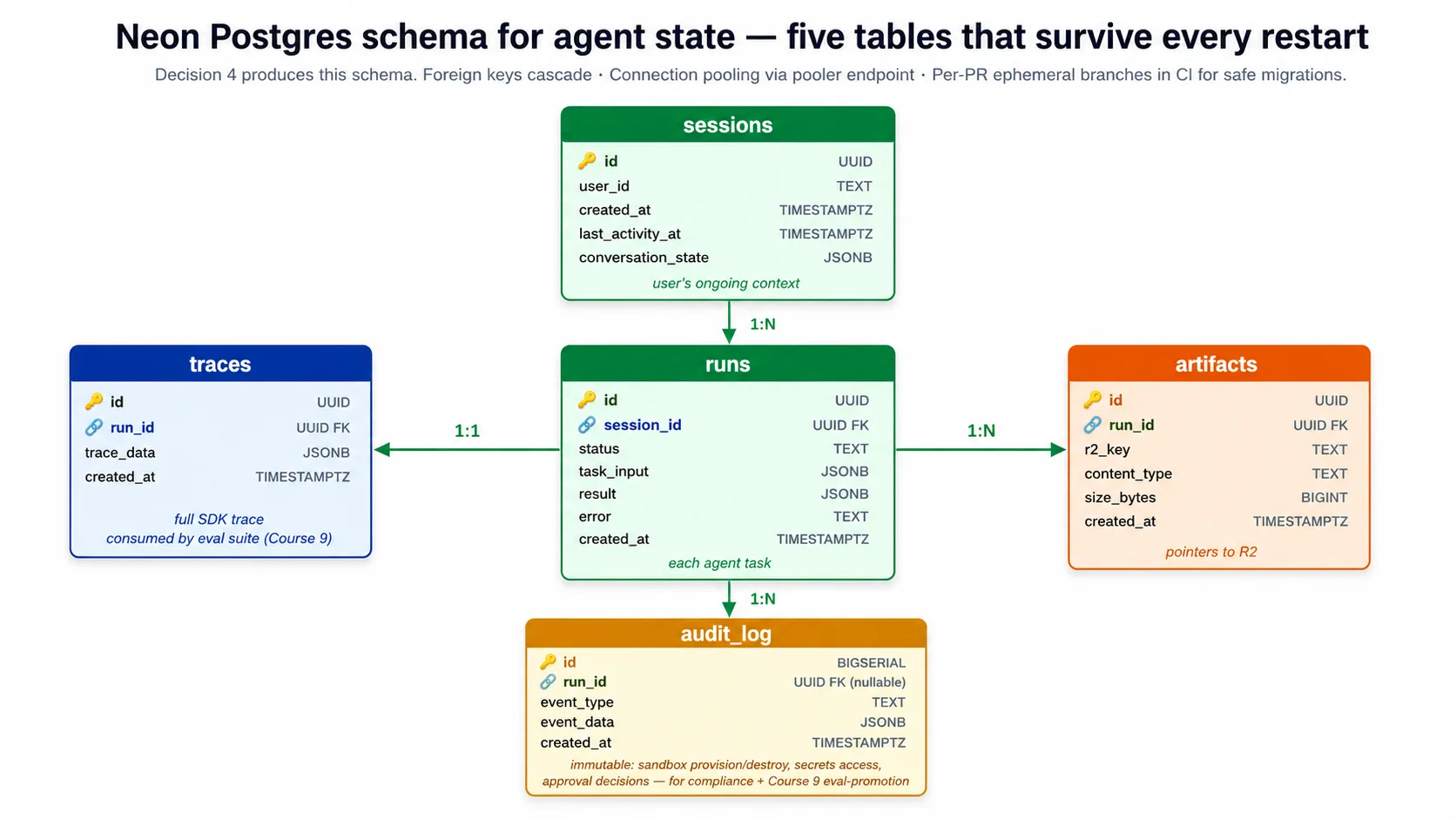
⚠️ दो Neon footguns जिन्हें lab आपके लिए fix करता है। Neon की copy-paste connection string में
channel_binding=requireहोता है।asyncpgdriver इसे recognize नहीं करता और pooled endpoint के against fail करता है, इसलिए harness connect करने से पहलेchannel_bindingstrip करता है (यहsslmode=requireरखता है). अलग से, pooled endpointsearch_pathserver settings silently drop करता है, इसलिए harness हर statement schema-qualify करता है (public.runs,public.sessions), और आप schema direct, non-pooled endpoint के against run करते हैं। दोनों real footguns हैं, और companion code इन्हें handle करता है; lab इन्हें explicit acceptance criteria के रूप में call out करता है।
Connection pooling optional नहीं है। Harness कई copies तक scale करता है, हर copy connections खोलती है, और Postgres कुछ hundred connections से ऊपर गिर सकता है। Neon pooled endpoint देता है जो हजारों harness connections को छोटे number of real Postgres connections में multiplex करता है। Harness normal work के लिए pooled endpoint से connect करता है, और schema changes के लिए only direct endpoint से।
Concept 7: Files और artifacts के लिए Cloudflare R2
Harness और sandbox दोनों को files चाहिए: input documents जिन्हें agent पढ़ता है, output artifacts जिन्हें वह produce करता है, knowledge content जिसे वह retrieve करता है। इस course की choice Cloudflare R2 है, तीन specific reasons के लिए।
Database या container disk के बजाय object storage क्यों? Files relational database के लिए wrong shape हैं: Postgres large file को column में hold कर सकता है, लेकिन backups balloon होने और connection bottleneck बनने पर आप regret करेंगे। Database को relational state के लिए use करें और files के pointers store करें; file bytes object storage में रहें। Files container की local disk के लिए भी wrong हैं, जो restart पर गायब हो जाती है और copies के across easily share नहीं होती। जब files को किसी एक container से ज़्यादा जीना हो और कई जगहों से reachable होना हो, object storage सही shape है।
S3 या GCS के बजाय R2 क्यों? Egress story main reason है। R2 से अपनी files बाहर read करना free है। S3, Google Cloud Storage और Azure Blob data transferred out के लिए charge करते हैं, आम तौर पर पाँच से बारह cents per gigabyte. ऐसे agent के लिए जो harness और sandbox के बीच files बार-बार move करता है, यह जल्दी add up होता है। महीने में कुछ terabytes move करता harness S3 पर hundreds of dollars egress pay करेगा और R2 पर zero; storage और request costs लगभग comparable हैं, इसलिए egress line simply disappear हो जाती है। Low-traffic harness के लिए difference छोटा है, लेकिन real volume में free egress viable और unviable cloud costs के बीच difference है।
R2 S3 API भी बोलता है, इसलिए कोई भी Python S3 library केवल endpoint URL setting बदलकर इससे बात करती है, client rewrite की ज़रूरत नहीं अगर आप कभी migrate करें। और April 2026 SDK release R2 को S3, GCS और Azure Blob के साथ supported Manifest mount source के रूप में list करता है, इसलिए harness Manifest में R2 buckets declare करता है और sandbox उन्हें custom bridging code के बिना mount करता है।
Harness अपने bucket में तीन prefixes use करता है: users द्वारा upload की गई files के लिए inputs/, agent द्वारा produce की गई files के लिए outputs/, और long-lived knowledge content के लिए knowledge/. Lab का Decision 5 इसे set up करता है।
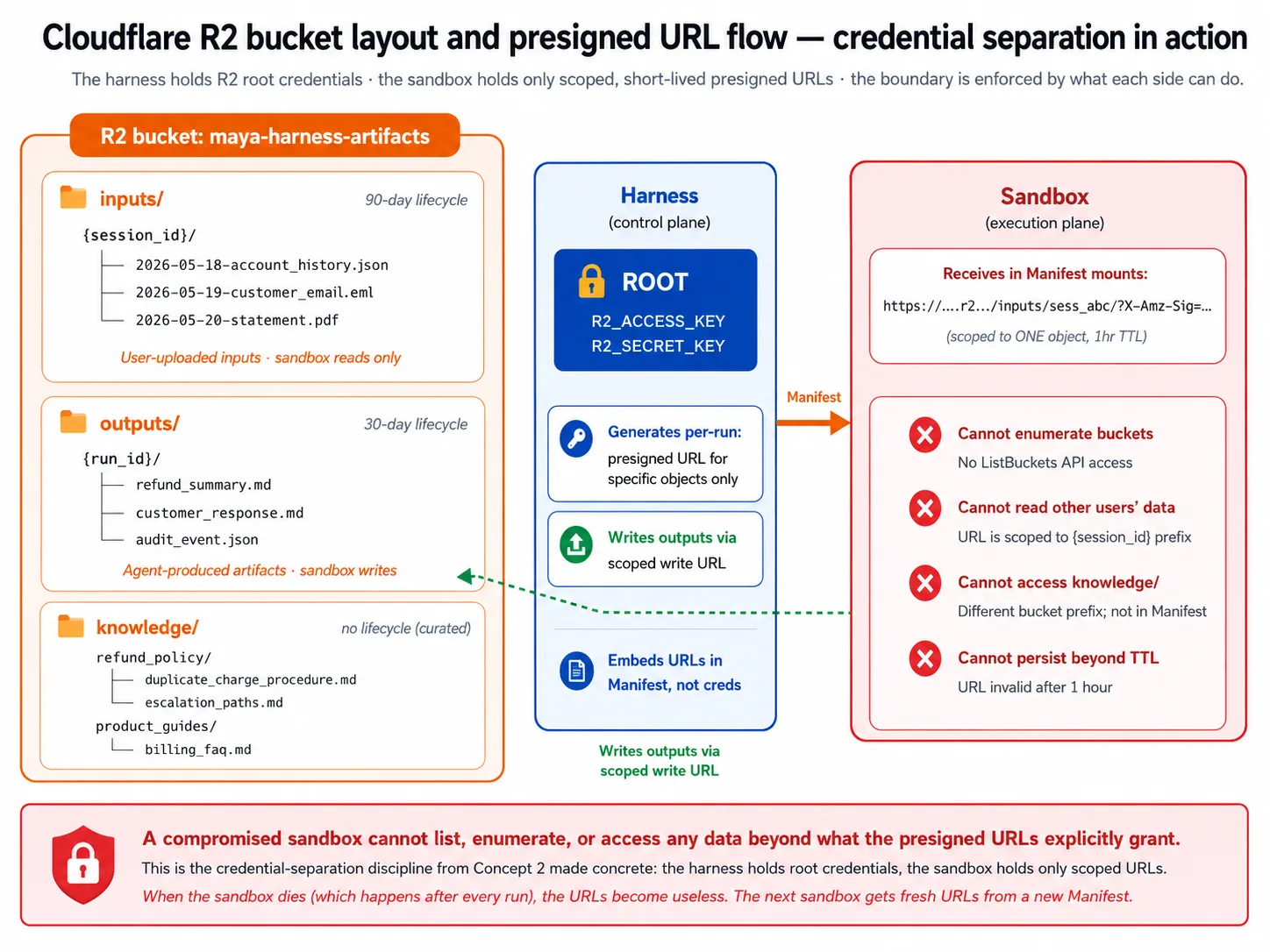
Presigned URLs वह तरीका हैं जिससे sandbox root credentials के बिना access पाता है। Harness root credentials रखता है जो कुछ भी read या write कर सकते हैं। वह उन्हें sandbox से share नहीं करता। Instead, यह एक specific object के लिए short expiry वाला presigned URL mint करता है और sandbox को देता है। Sandbox सिर्फ़ वही reach कर सकता है जिसकी URL अनुमति देता है; sandbox मरने पर URL useless हो जाता है, और अगले sandbox को fresh ones मिलते हैं। यह Concept 2 की credential separation को concrete बनाता है: compromised sandbox buckets list नहीं कर सकता या दूसरे user का data reach नहीं कर सकता।
Lifecycle policies storage को write-only graveyard बनने से रोकती हैं: lab outputs/ पर 30-day cleanup set करता है, और curated knowledge/ पर none.
Part 3: Execution plane
Part 2 ने harness side cover किया: orchestration, state और storage. Part 3 execution side cover करता है, यानी sandbox जहाँ agent का generated code सच में run होता है। तीन concepts: sandbox क्या provide करता है, कौन सा provider चुनना है, और harness और sandbox के बीच handoff कैसे काम करता है।
Concept 8: Sandbox execution capabilities
Concept 2 ने sandbox को execution plane कहा: वह जगह जहाँ code harness secrets के access के बिना run होता है। Concept 8 इसे concrete बनाता है। Agent को sandbox से सच में क्या चाहिए?
पाँच capabilities:
- Filesystem. Agent files read और write करता है: inputs, intermediate artifacts, outputs. Sandbox Unix-like filesystem देता है जिसमें read, write, edit और list operations tools के रूप में exposed हैं। इसके बिना agent file work नहीं कर सकता।
- Shell. Agent commands run करता है: test runner, package install, clone, custom tool. Sandbox shell देता है जहाँ ये run करते हैं। इसके बिना agent सिर्फ़ उसी तक limited रहता है जिसे harness explicitly wrap करता है।
- Package install. Agent on demand packages install करता है: "यह library install करें, फिर user द्वारा upload की गई file पढ़ें, फिर summarize करें।" इसके बिना agent की capability base image में shipped चीज़ों तक locked रहती है।
- Mounted storage. Agent को local disk से बहुत बड़ी files चाहिए: uploads, knowledge content, datasets. Sandbox external storage (R2, S3, GCS) को normal paths के रूप में mount करता है, और Manifest declare करता है कि क्या कहाँ mount करना है। इसके बिना agent सिर्फ़ image में ship की जा सकने वाली small files touch कर सकता है।
- Snapshot and resume. Sandboxes throwaway हैं और mid-run fail हो सकते हैं। Sandbox अपनी state checkpoint कर सकता है और fresh workspace में उस checkpoint से resume कर सकता है, जिससे SDK long tasks को workspace death survive कराता है। इसके बिना sandbox lifetime से लंबा कोई भी task failure waiting to happen है।
तीन properties production-grade sandbox को prototype से अलग करती हैं। Isolation: sandbox harness network, filesystem या दूसरे sandboxes तक नहीं पहुँच सकता, और यह provider infrastructure से enforced है, trust से नहीं, इसलिए compromised sandbox सिर्फ़ खुद को harm करता है। Ephemerality: हर task को fresh sandbox मिलता है, task end होने पर destroyed, इसलिए compromised sandbox भी अगले task में carry नहीं होता। Fast provisioning: sandbox कुछ seconds में start होता है, क्योंकि thirty-second start हर task को thirty-second-plus operation बना देता है और chat-style agents slow feel करते हैं।
Sandbox क्या नहीं है। यह long-lived VM नहीं है जिसे आप tasks के across running रखें; वह problem को reinvent करता है, state accumulate करता है और harness secrets से entanglement पैदा करता है। यह serverless function नहीं है, जो एक function run करके return करता है; sandbox ऐसा workspace है जो एक run के भीतर कई tool calls के across persist करता है, run के दौरान filesystem में state रखता है, और shell access देता है। और यह Kubernetes नहीं है; sandbox provider container orchestration को पूरी तरह abstract करता है, इसलिए isolation और ephemerality मिलती है बिना cluster run किए।
Concept 9: Sandbox provider चुनना
Concept 8 ने capabilities name कीं; Concept 9 provider चुनता है। यह course choice और realistic free path के बारे में honest है।
उस tradeoff से शुरू करें जो ज़्यादातर readers के लिए फैसला करता है। Cloudflare के sandbox को paid Workers plan चाहिए, और आपके Python harness और sandbox के बीच छोटा bridge Worker भी चाहिए। E2B के पास free Hobby tier, SDK में native client, और deploy करने के लिए कोई bridge नहीं है। इसलिए अगर आप lab बिना पैसा खर्च किए complete करना चाहते हैं, तो E2B realistic free path है; अगर आप पहले से paid Cloudflare plan पर हैं और R2 use कर रहे हैं, तो Cloudflare sandbox अपनी proximity benefit के कारण worth it है। Lab ऐसे लिखा गया है कि दोनों work करते हैं, और companion code E2B default करता है क्योंकि वही आप सच में free में test कर सकते हैं।
जब आप Cloudflare sandbox चुनते हैं तो course उसे named primary क्यों कहता है: यह Cloudflare network में run होता है, और R2 भी वहीं है, इसलिए R2 buckets mount करना public internet के बजाय Cloudflare-internal speeds पर होता है। किसी और provider के पास R2 से ऐसी proximity नहीं। इसके पास first-class SDK support और cost structure भी है जो idle time bill नहीं करता (और agent model पर execute करने से कहीं ज़्यादा wait करता है)। Catch है paid plan और bridge Worker: Python harness जैसे non-Worker clients Cloudflare sandboxes directly create नहीं कर सकते, इसलिए छोटा separately-deployed Worker harness calls को sandbox operations में translate करता है। E2B समेत दूसरे providers Python API directly expose करते हैं और bridge नहीं चाहिए।
Honest alternatives, हर एक के winning use case के साथ:
- E2B. Realistic free-tier path और polished general-purpose provider. यह S3, GCS या Azure Blob के साथ equally well काम करता है, और SDK में इसका native client है। E2B use करें जब आप storage-agnostic हों, R2 पर न हों, या lab free में complete करना चाहें।
- Modal. Python ML workloads में strong; GPU-backed inference के alongside agent tasks run करना trivial. Modal use करें अगर आपके agent में custom model serving शामिल है।
- Daytona. आपके अपने cloud account में run होता है। Regulated industries के लिए use करें जहाँ data residency sandbox को आपके specific cloud में रहने को require करती है, higher operational complexity की कीमत पर।
- Vercel. अगर आपकी team पहले से Vercel ecosystem में deep है तो use करें; non-JavaScript workloads के लिए कम mature.
- Bring-your-own. SDK आपके अपने container infrastructure के against sandbox client implement करना support करता है। Worth it only जब आपकी security team period के साथ require करे कि sandboxes आपके cloud में हों; operational complexity बहुत बढ़ती है।
Providers के बीच substitution mostly mechanical है। Manifest provider-agnostic है, इसलिए आप same workspace shape declare करते हैं। Provider client class बदलती है (एक के लिए Cloudflare client, दूसरे के लिए E2B client). Storage mounting network proximity से differ करती है (Cloudflare sandbox के साथ R2 fast है; E2B के साथ R2 public internet से जाता है, जो फिर भी works). और credential pattern identical है: harness provider credentials रखता है और sandbox को केवल short-lived access देता है।
Recommendation, एक line में: अगर आप paid Workers plan पर हैं और R2 use कर रहे हैं तो Cloudflare sandbox use करें; otherwise E2B use करें, especially अगर free path चाहिए; एक चुनें और ship करें, सबका survey करने में न अटकें।
Concept 10: Harness-to-sandbox handoff
Harness orchestrate करता है; sandbox execute करता है। Concept 10 handoff walk करता है: harness sandbox को क्या provision करना है कैसे बताता है, credentials boundary को safely कैसे cross करते हैं, और run के across sandbox lifecycle कैसे managed होता है।
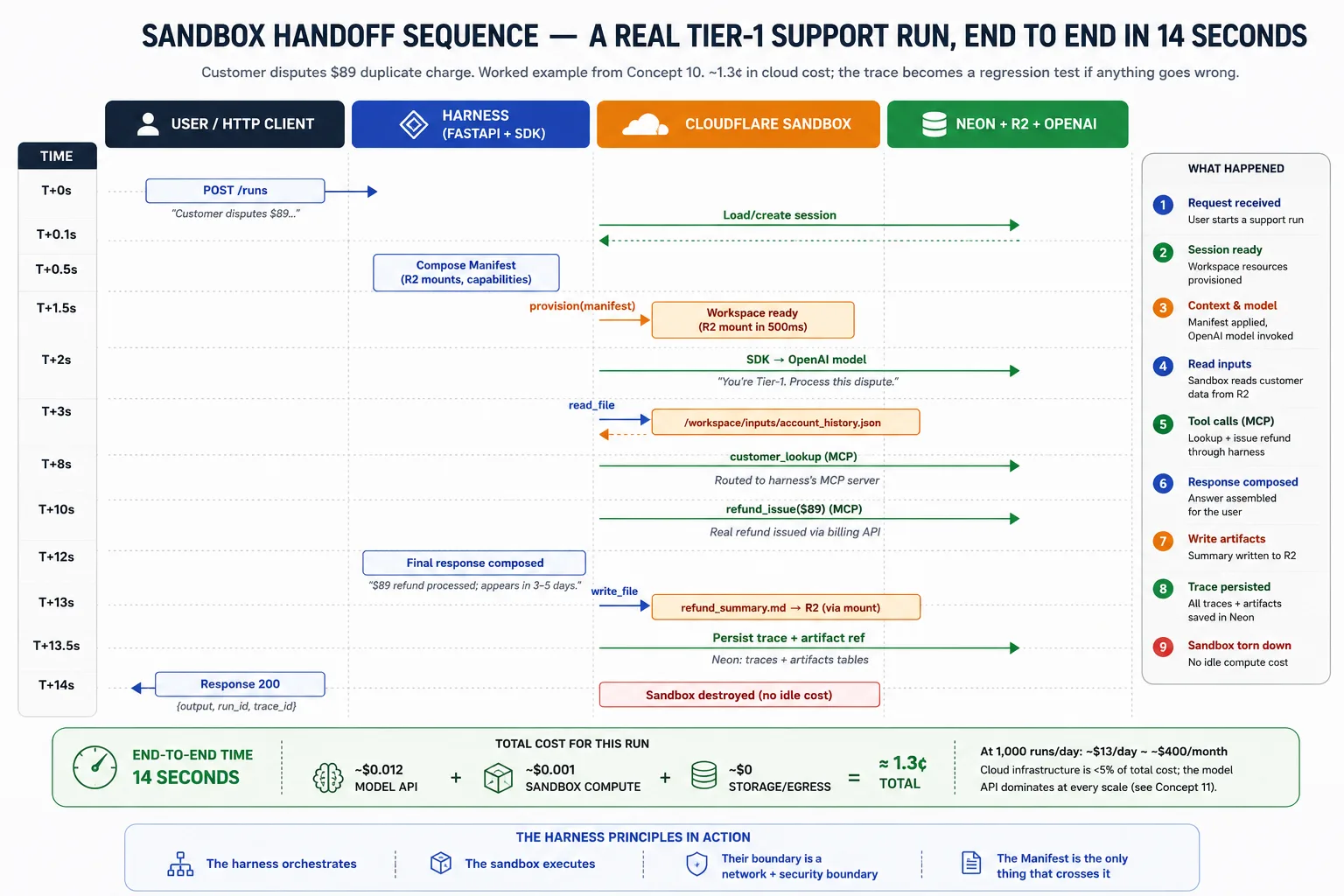
Manifest handoff contract है। Harness Manifest compose करता है जो workspace needs describe करता है; provider उसे receive करता है और matching workspace provision करता है। April 2026 SDK में Manifest entries के set से built होता है: हर entry workspace का path है जिसे वहाँ जाने वाली चीज़ से map किया जाता है, file, directory, git repo या storage mount. Mounts (R2Mount, S3Mount, और बाकी) agents.sandbox.entries में रहते हैं और उन्हीं entries के अंदर जाते हैं। Separate mounts list नहीं है और Manifest पर base-image या resource-limit fields नहीं हैं; entries workspace describe करती हैं।
from agents.sandbox import Manifest
from agents.sandbox.entries import R2Mount
from agents.sandbox.entries.mounts.base import DockerVolumeMountStrategy

# Mounts go inside entries, keyed by their path in the workspace. An R2Mount
# attaches a bucket; it has no per-prefix field, so object-level scoping is
# the harness's job (the presigned URLs it mints, from Concept 7), not a mount.
manifest = Manifest(
    entries={
        "/workspace/inputs": R2Mount(
            mount_path="/workspace/inputs",
            bucket="maya-harness-artifacts",
            account_id=R2_ACCOUNT_ID,
            mount_strategy=DockerVolumeMountStrategy(driver="rclone"),
        ),
        "/workspace/outputs": R2Mount(
            mount_path="/workspace/outputs",
            bucket="maya-harness-artifacts",
            account_id=R2_ACCOUNT_ID,
            mount_strategy=DockerVolumeMountStrategy(driver="rclone"),
        ),
    }
)
Capabilities SDK defaults से चुनी जाती हैं, और passed list उन्हें replace करती है। Capabilities.default() standard set return करता है (filesystem, shell, और compaction). अगर आप अपनी list pass करते हैं, तो यह default में add नहीं होती बल्कि उसे replace करती है, इसलिए defaults रखने और एक ability add करने के लिए concatenate करें:
from agents.sandbox.capabilities import Capabilities, Memory

# Keep the defaults and add one: a passed list REPLACES the default,
# so concatenate rather than passing [Memory()] alone.
capabilities = Capabilities.default() + [Memory()]
यह real footgun है: capabilities=[Shell()] लिखना filesystem और compaction abilities को silently drop कर देता है जिन्हें default include करता था। Default रखें और उसमें add करें।
Sandbox RunConfig के through attach होता है, Runner.run argument के रूप में नहीं। कोई Runner.run(..., sandbox=...) parameter नहीं है। आप provider client और उसके options object से SandboxRunConfig बनाते हैं, उसे RunConfig पर रखते हैं, और RunConfig को run में pass करते हैं। हर provider client अपने options object के साथ pair करता है, और options SandboxRunConfig में ride करते हैं, client constructor में नहीं:
from agents import Runner
from agents.run import RunConfig
from agents.sandbox import SandboxRunConfig
from agents.extensions.sandbox.e2b import E2BSandboxClient, E2BSandboxClientOptions

# The client reads E2B_API_KEY from the environment; the options carry the
# required sandbox_type. The sandbox rides on RunConfig, not a Runner kwarg.
sandbox = SandboxRunConfig(
    client=E2BSandboxClient(),
    options=E2BSandboxClientOptions(sandbox_type="e2b"),
)
result = await Runner.run(agent, message, run_config=RunConfig(sandbox=sandbox))
Cloudflare sandbox के लिए shape same है; केवल client और options बदलते हैं (CloudflareSandboxClient के साथ CloudflareSandboxClientOptions(worker_url=...)). यह companion download के sandbox.py और runner.py में exactly वही code है, installed SDK के against booted.
Credential discipline सबसे important security point है। Harness storage root credentials और provider credentials रखता है। यह specific objects के लिए short expiry वाले presigned URLs mint करता है, और वे workspace में जाते हैं, root credentials नहीं। Sandbox को केवल वे scoped URLs मिलते हैं: यह buckets enumerate नहीं कर सकता, harness database reach नहीं कर सकता (boundary cross करती कोई connection string नहीं), और harness की दूसरी services reach नहीं कर सकता (network policy इसे सिर्फ़ ज़रूरी चीज़ों तक restrict करती है, जैसे model API और package registries). Anything else, जैसे root credentials या database string workspace में embed करना, वही security mistake है जिसे prevent करने के लिए April 2026 release design हुआ था।
Single run का lifecycle: harness request receive करता है और session state load करता है; यह task के लिए Manifest compose करता है; provider से workspace provision करवाता है; SDK agent loop run करता है, filesystem और shell calls sandbox को route करता है और trace record करता है; अगर workspace fail हो और snapshots enabled हों, तो SDK latest snapshot से नया one provision करता है और continue करता है; completion पर harness R2 से outputs पढ़ता है, trace और artifact pointers Neon में persist करता है, sandbox destroy करता है ताकि कुछ idle न रहे, और result user को return करता है।
Part 4: Observability और Evals as Architectural Surfaces
Parts 1-3 ने harness deploy किया। Part 5 की lab उसे build करेगी। Part 4 इनके बीच बैठता है और उन दो surfaces को name करता है जिनकी Part 1 का harness/sandbox split अभी भी माँग करता है: वे systems जो बताते हैं कि running harness क्या कर रहा है, और वे systems जो measure करते हैं कि क्या वह अभी भी सही चीज़ कर रहा है। इन्हें skip करने वाली teams ऐसा harness ship करती हैं जो day one पर काम करता है और फिर quietly degrade होता है। दो concepts, फिर lab.
Concept 11: Architectural surface के रूप में observability
Observability: वे tools जो बताते हैं कि running harness क्या कर रहा है, कुछ break होने पर क्या हुआ, और cause कैसे ढूँढना है। ज़्यादातर production AI failures observability failures होते हैं। Agent कुछ गलत करता है, कोई दिनों तक notice नहीं करता, और delay की cost बढ़ती जाती है। इसलिए observability ऐसा feature नहीं जिसे आप end में bolt on करें। यह एक और architectural surface है, जिसे start से plan किया जाता है। Decision 7 इसे wire करता है।
जब harness run करता है, चार surfaces उसे एक साथ watch करते हैं। वे दिखने में similar हैं। हर एक अलग question own करता है।
| Surface | कौन सा question own करता है |
|---|---|
| Application Insights | क्या harness का infrastructure healthy है? |
| OpenTelemetry traces | एक request services के across कैसे flow हुई? |
| OpenAI Agents SDK traces | इस run में agent ने क्या किया? |
| Phoenix | Agent का behavior time के साथ कैसे बदल रहा है? |
Application Insights Azure का built-in monitor है। यह container view own करता है: request rate, error rate, latency, CPU और memory, restart counts, log streams. Replica crash होता है तो पहले यह notice करता है। यह agent का behavior नहीं देख सकता। इसके लिए हर request बस "POST /runs returned 200 in 12 seconds" है; answer सही था या नहीं, invisible है।
OpenTelemetry (OTel) एक request को services के across trace करने का open standard है। Trace एक run का complete record है। जब single request model call, तीन tool calls और चार database queries में fan out होती है, OTel उनमें parent-child timing दिखाता है। यह tool calls के बीच agent की reasoning नहीं देखता; यह record करता है कि model call हुआ, क्यों नहीं।
OpenAI Agents SDK अपना trace emit करता है: कौन से model decisions हुए, कौन से tools किन arguments के साथ call हुए, handoffs कहाँ गए। यह agent-behavior view own करता है। Agent execution के बाहर यह कुछ नहीं देखता।
Phoenix time के साथ agent traces watch करता है और खराब traces को future tests में बदलता है। यह SDK traces sample करता है, score करता है, और सबसे खराब traces को eval suite में promotion के लिए flag करता है। यह trend view own करता है: सिर्फ़ agent ने क्या किया नहीं, बल्कि कौन से runs tomorrow के regression tests बनने चाहिए। यह transient infrastructure outages नहीं देखता।
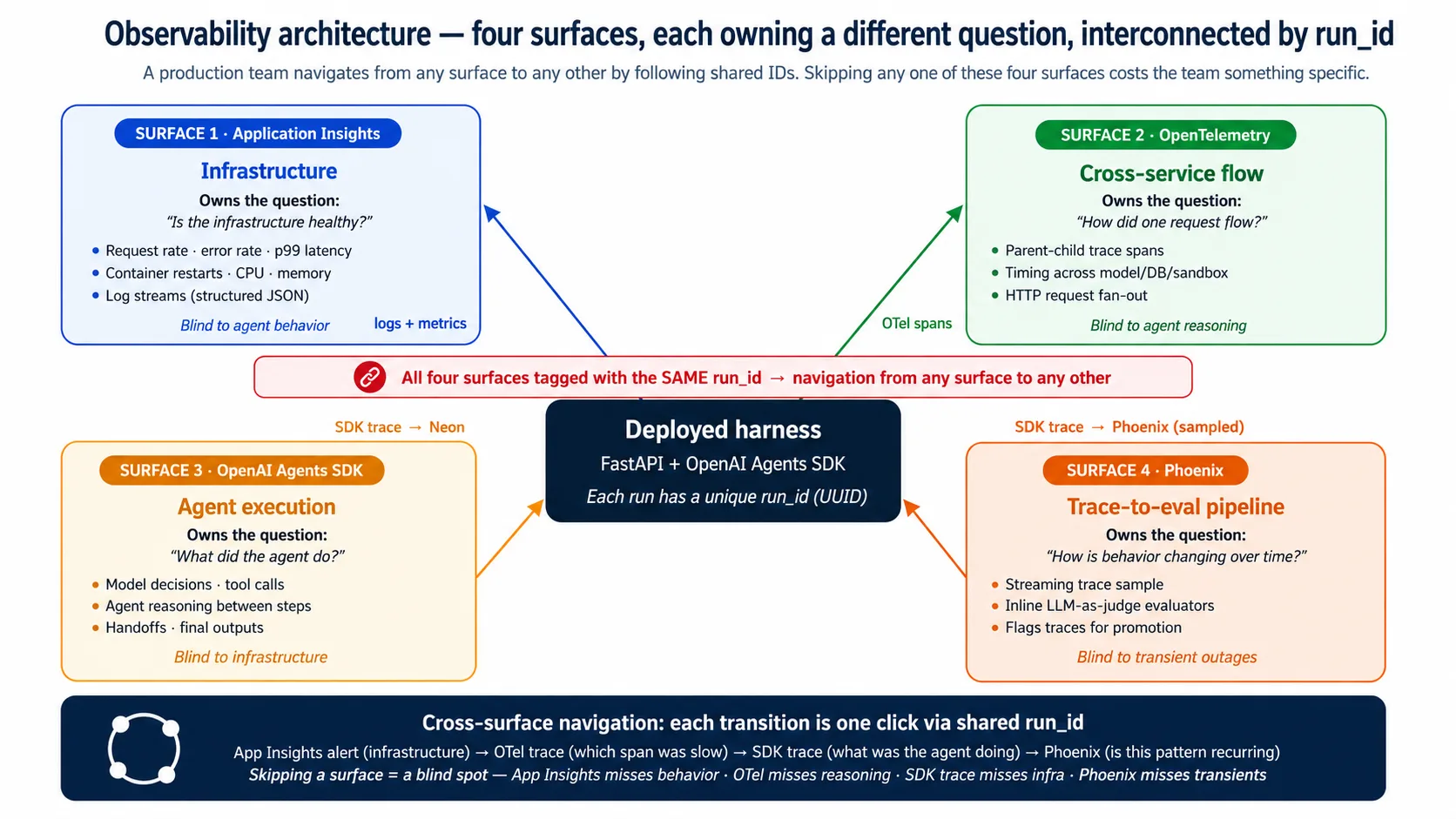
Surfaces overlap करते हैं; एक-दूसरे को replace नहीं करते। वे shared run_id से interconnect होते हैं, इसलिए team किसी भी surface से start करके one click में दूसरे तक jump कर सकती है। Application Insights alert infrastructure spike flag करता है; OTel trace दिखाता है कौन सा span slow था; SDK trace दिखाता है agent क्या कर रहा था; Phoenix दिखाता है कि वही pattern recur हो रहा है या नहीं। एक surface skip करें और वह step lose करें: Application Insights skip करें तो outages miss होंगे, OTel skip करें तो slow span miss होगा, SDK trace skip करें तो agent decision miss होगा, Phoenix skip करें तो eval suite stale हो जाएगा।
Fifth surface केवल तब appear होती है जब आप runs को durable-execution layer में wrap करते हैं। उस layer का अपना dashboard run-level operational lineage add करता है (कौन सा step failed हुआ, retried हुआ, फिर succeeded). यह Production Worker course का area है, इस one का नहीं। अगर आप उसे build करते हैं, तो Production Worker with a Nervous System देखें।
Concept 12: Architectural surface के रूप में evals
Eval: ऐसा test जो agent के behavior को measure करता है (answer सही था या नहीं, tool correct था या नहीं, reasoning sound थी या नहीं), सिर्फ़ यह नहीं कि code run हुआ। Eval-Driven Development course ने चार eval frameworks build किए। यह concept name करता है कि वे deployed harness से कहाँ attach होते हैं। Attachment ही पूरा point है: उसके बिना eval suite theory है।
Boundary एक जगह है: traces. Eval suite जो भी grade करता है वह trace से पढ़ता है, और traces दो stores में रहते हैं। Neon durable record रखता है, जिसे scheduled jobs और audit query करते हैं। Phoenix real-time sample रखता है, जो live dashboard पर displayed होता है। अगर इस concept से एक चीज़ याद रखनी हो, तो यह कि integration traces से mediated है, और traces Neon और Phoenix में रहते हैं।
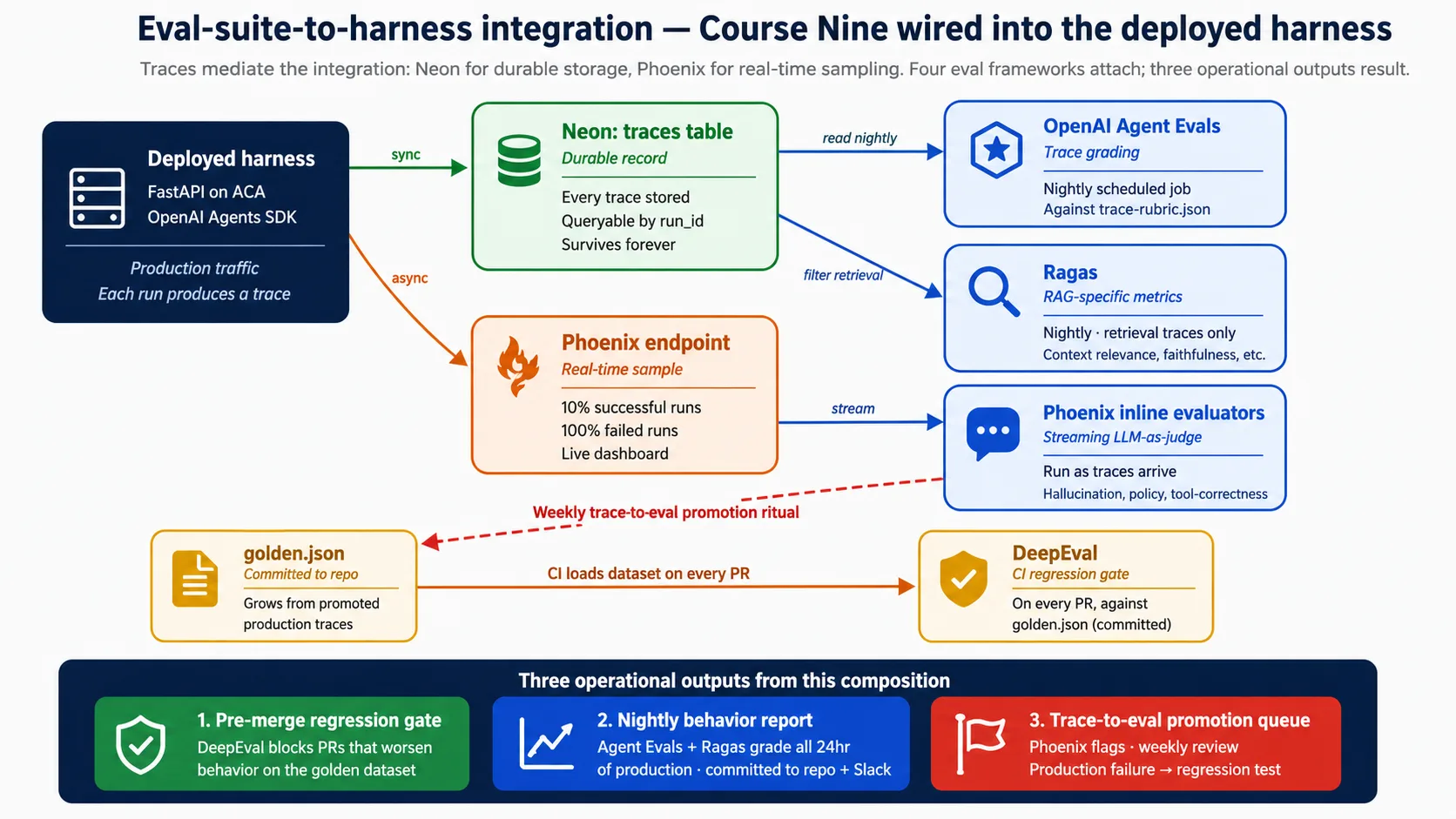
Run finish होने पर harness trace को Neon में synchronously लिखता है (durable record) और Phoenix में sample asynchronously stream करता है (live view). वहाँ से eval frameworks specific points पर attach होते हैं: CI gate हर pull request पर run होता है, scheduled jobs prior day के traces nightly grade करते हैं, और Phoenix inline checks traces arrive होते ही run करते हैं। Decision 8 यह सब full में wire करता है। इसे later के बजाय अभी plan करने का reason simple है: observability wired होने से पहले produced traces gone हैं, और eval suite सिर्फ़ उन traces से grow होता है जिन्हें उसने सच में देखा।
Part 5: Deployment Lab
Parts 1-4 ने architecture और surfaces cover किए। Part 5 पूरी चीज़ build करता है: दस Decisions जो आपको empty folder से deployed, observable, eval-gated harness तक ले जाते हैं। Shape वही है जो पहले के courses use करते हैं। आप coding agent को direct करते हैं; agent code लिखता और run करता है। हर Decision एक short brief है जिसे आप paste करते हैं, एक "Done when:" line जिसे आप observe कर सकते हैं, और readers के लिए one-line note जो deploy किए बिना follow कर रहे हैं।
Companion download shared context रखता है। इसके अंदर AGENTS.md project rules, architecture और verified API shapes रखता है, इसलिए हर brief short रहता है: agent details के लिए AGENTS.md पढ़ता है और आप केवल goal paste करते हैं। Download अभी लें: deploying-agents-crash-course.zip.
काम करते समय इस diagram पर वापस आएँ। हर Decision एक labeled piece add करता है।
Lab complete करने के दो तरीके।
Full build (Intermediate और Advanced tracks): आप cloud पर deploy करते हैं। हर session के बाद resources tear down करें और end-to-end bill छोटा रहता है; उन्हें running छोड़ें और यह बढ़ता है। Concept 13 cost breakdown देता है।
Simulated (Reader और Beginner tracks): आप कुछ provision करने के बजाय companion code पढ़ते हैं। Harness अभी भी केवल
OPENAI_API_KEYset होने पर locally boot होता है, इसलिए cloud account न मांगने वाला हर step run किया जा सकता है। हर Decision का Simulated note बताता है कि इसके बजाय क्या पढ़ना है।
Decision 0: SDK probe करें और brief reconcile करें
एक line में: SDK install करें, installed version print करें, live sandbox docs fetch करें, और companion AGENTS.md को उनसे reconcile करें। Live docs win करते हैं।
OpenAI Agents SDK तेज़ी से ship होता है। Names, signatures और defaults releases के बीच move होते हैं। Companion AGENTS.md आज का known-good है, हमेशा का नहीं। इसलिए पहला Decision probe है: lab जिन symbols पर depend करता है उन्हें आपकी machine पर actually installed SDK के against confirm करें, और जो drift हुआ उसे लिखें। यहाँ पाँच minutes बाद में "यह attribute exist क्यों नहीं करता" वाले एक hour बचाते हैं।
इसे अपने coding agent में paste करें। पहले plan करें; approval पर execute करें।
Companion download open करें।
AGENTS.mdके bottom से SDK probe run करें:uv sync, फिरagents,agents.sandbox,agents.sandbox.entries, और E2B client के import checks. Installedopenai-agentsversion print करें। Official docs से live sandbox API reference fetch करें।AGENTS.mdमें named हर SDK symbol को actual imports से compare करें। अगर कुछ differ करे, live docs win करते हैं:AGENTS.mdके top पर छोटा "What changed since the brief" note लिखें जिसमें हर difference list हो, और उसके बाद हर जगह live name use करें। अभी कोई code change न करें।
Done when:
- Agent installed
openai-agentsversion report करता है (0.17.x expect करें). - Agent ऐसे SDK names report करता है जो
AGENTS.mdसे differ करते हैं, और हर difference पर live docs win करते हैं। AGENTS.mdके top पर छोटा "What changed since the brief" note है, या agent कहता है कि brief installed SDK से match करता था।
Simulated track.
AGENTS.mdके end में SDK probe section पढ़ें। आपको उसे run करने की ज़रूरत नहीं; point drift-resistance habit देखना है: किसी symbol पर भरोसा करने से पहले brief को live SDK के against confirm करें, और live docs को win करने दें।
Decision 1: Harness scaffold करें
एक line में: agent, state layer और storage layer वाला FastAPI app, जो key missing होने पर gracefully degrade करता है, और केवल OPENAI_API_KEY पर locally boot होता है।
यह Decision वह project set up करता है जिस पर next nine build करते हैं। Agent (Maya का Tier-1 Support) और उसके दो tools पहले के courses से आते हैं; यह Decision उन्हें wrap करने वाला harness है, agent खुद नहीं।
इसे अपने coding agent में paste करें। पहले plan करें; approval पर execute करें।
Companion
AGENTS.mdसे harness scaffold करें। उसके project rules और architecture exactly follow करें।openai-agents>=0.17,<0.18pin करें। FastAPI app build करें जिसमेंGET /health(कौन से backends active हैं report करता है) औरPOST /runs(session load करता है, Maya का agent run करता है, run और trace persist करता है, optionally artifact लिखता है) हों। Graceful degradation wire करें: app को केवलOPENAI_API_KEYset होने पर import और boot होना चाहिए,DATABASE_URLunset होने पर SQLite पर fallback और R2 keys न होने पर local directory पर fallback. दो tools (lookup_account,draft_reply) को@function_toolfunctions के रूप में add करें जिनके bodies harness में run हों, sandbox में नहीं। Lockfile commit करें।
Done when:
uv run uvicorn maya_harness.main:appharness को बिना errors start करता है।GET /health{"status": "ok", ...}return करता है जिसमेंpostgres,sandboxऔरr2सभीfalsereported हैं, bareOPENAI_API_KEY-only boot पर।GET /docsदो endpoints के लिए auto-generated API दिखाता है।
Simulated track. Companion में यह scaffold पहले से है।
src/maya_harness/main.py,agent.py, औरsettings.pyपढ़ें, और notice करें कि हर backend optional है: missing key one component off करती है और harness फिर भी boot होता है।
वह boot वही early win है जिसका यह पूरा course promise करता है। किसी cloud account, Docker या database से पहले, आपके पास /health पर अपने laptop से answer देता real agent harness है। Harness/sandbox split अब diagram नहीं रहा; यह आपकी machine पर running है। इसके बाद सब कुछ एक durable backend at a time add करता है।
Decision 2: Harness containerize करें
एक line में: harness की small, reproducible container image जो आपके laptop और cloud में एक जैसी run होती है।
Container: आपकी app और उसे run करने के लिए ज़रूरी हर चीज़ का sealed bundle, ताकि यह हर जगह same behave करे। Decision 3 इस image को deploy करता है; Decision 2 इसे build करता है।
इसे अपने coding agent में paste करें। पहले plan करें; approval पर execute करें।
Companion में
Dockerfileshape से harness container build करें। Committed lockfile से reproducible install के लिएpython:3.12-slimकोuvके साथ use करें। Source copy करने से पहले cached layer में dependencies install करें। Port 8000 expose करें औरuvicorn maya_harness.main:app --host 0.0.0.0 --port 8000 --proxy-headersrun करें (--proxy-headersflag matter करता है क्योंकि cloud अपने ingress पर TLS terminate करता है)..dockerignoreadd करें जो virtualenv, caches और.envfiles exclude करे। Image build करें और अपनी.envmounted करके locally run करें।
Done when:
- Image बिना errors build होती है।
- Container locally run होता है और उसके अंदर से
GET /healthokreturn करता है। - Source file change करके rebuild तेज़ है (dependency layer cached रहती है).
Simulated track. Companion
Dockerfileपढ़ें। Exercise multi-stage idea है: dependencies cached layer में install होती हैं, source बाद में copy होता है, और image small रहती है। आपको Docker installed नहीं चाहिए।
Decision 3: Azure Container Apps पर deploy करें
एक line में: managed cloud runtime provision करें, image को cloud में build करें, और harness deploy करें ताकि यह public internet से HTTPS पर answer करे।
Azure Container Apps (ACA): managed service जो cloud में autoscale और ingress के साथ आपका container run करती है, ताकि आप servers खुद न run करें। यह Decision वह जगह है जहाँ harness आपके laptop से बाहर जाता है।
इसे अपने coding agent में paste करें। पहले plan करें; approval पर execute करें।
Companion में
infra/deploy.shshape use करके harness को Azure Container Apps पर deploy करें। Resource group और container registry create करें।az acr buildसे image cloud में build करें (local Docker नहीं चाहिए). Container Apps environment create करें, फिर app create करें--ingress external,--target-port 8000, और scale-to-zero के लिए--min-replicas 0के साथ।OPENAI_API_KEYको named secret के रूप में store करें औरsecretref:से reference करें, image में कभी bake न करें। App का public URL confirm करें और/healthHTTPS पर answer कर रहा है यह check करें। Current environment को किसी भी subprocess तक pass करें ताकि keys survive करें।
Done when:
- Deploy script finish होकर public
*.azurecontainerapps.ioURL print करता है। - अपने phone से
https://<that-url>/healthopen करने पर{"status": "ok", ...}return होता है। - Quiet spell के बाद app zero तक scale होती है, और next request कुछ seconds में copy wake करती है (scale-to-zero cold start).
Simulated track.
infra/deploy.shऔरinfra/containerapp.yamlपढ़ें। समझने वाली shape है: cloud में build, external ingress और scale-to-zero के साथ deploy, और secrets को name से store करना। आपको Azure account नहीं चाहिए।
अब आपके पास Decision 3 से deployed Container Apps app और उसका public URL है। Decisions 4 से 9 इसी app पर redeploy करके हर backend add करते हैं। इसे रखें; lab finish होने तक या session intentionally end करने तक az group delete run न करें।
Decision 4: Durable state के लिए Neon Postgres wire करें
एक line में: serverless Postgres database provision करें और harness को उसकी तरफ़ point करें, ताकि sessions, runs और traces restart survive करें।
Durable state: restart survive करने वाली memory, container के बजाय database में रखी जाती है, क्योंकि container stop होने पर सब भूल जाता है। Neon Postgres: cheap branching वाला serverless Postgres database. इस Decision के बाद container restart करें और run history फिर भी रहेगी।
इसे अपने coding agent में paste करें। पहले plan करें; approval पर execute करें।
Companion
state.pyऔरschema.sqlfollow करके Neon Postgres को harness के durable state के रूप में wire करें। console.neon.com पर Neon project create करें। Five-table schema (sessions, runs, traces, artifacts, audit_log) apply करें,public.*के साथ schema-qualified. Harness कोasyncpgके through connect करें। Companion केnormalize_neon_dsnसे दो acceptance rules optional नहीं हैं और pooler के against silent failures prevent करते हैं:
- Neon connection string को asyncpg को देने से पहले
channel_bindingstrip करें;sslmode=requireरखें। asyncpgchannel_bindingrecognize नहीं करता और pooler के against fail करता है अगर इसे छोड़ा जाए।- Running app के लिए pooled endpoint use करें, और migrations के लिए direct (non-pooled) endpoint. Pooled endpoint silently
search_pathdrop करता है, इसलिए हर statement schema-qualified है।
DATABASE_URLको local.envvalue और ACA secret के रूप में add करें, फिर redeploy करें। Confirm करें कि run restart के across persist करता है।
Done when:
- Redeploy के बाद
/health"postgres": truereport करता है। POST /runsऐसी row लिखता है जिसे आप Neon कीrunstable से read back कर सकते हैं।- Container restart करने पर run history रहती है (state durable है, container में नहीं).
- Connection string में कोई
channel_bindingनहीं, और migrations direct endpoint के against run हुईं।
Simulated track.
state.pyऔरschema.sqlपढ़ें। दो चीज़ें notice करें:normalize_neon_dsnfunction जोchannel_bindingstrip करता है, और fact कि हर tablepublic.runs,public.sessionsआदि के रूप में written है, क्योंकि pooled endpointsearch_pathignore करता है।
अब आपके पास Decision 4 से Neon project और दो connection strings हैं: app के लिए pooled, migrations के लिए direct. Decision 6 का sandbox और Decision 7 की observability दोनों इस database में लिखते हैं। इसे रखें।
Decision 5: Files और artifacts के लिए Cloudflare R2 wire करें
एक line में: object storage provision करें और harness को specific files के लिए short-lived links दें, ताकि agent के outputs storage password share किए बिना downloadable हों।
Cloudflare R2: S3-compatible object storage जहाँ अपनी files बाहर read करना free है। Presigned URL: short-lived link जो storage password पकड़े बिना किसी को एक specific file read या write करने देता है। इस Decision के बाद agent reply file के रूप में save होकर download link के रूप में वापस दी जा सकती है।
इसे अपने coding agent में paste करें। पहले plan करें; approval पर execute करें।
Companion
storage.pyfollow करके Cloudflare R2 को harness के artifact store के रूप में wire करें। R2 bucket और scoped API credentials create करें। Boto3 S3 client को R2 endpointhttps://<account_id>.r2.cloudflarestorage.comकी तरफ़ point करेंregion_name="auto"के साथ। ऐसे run पर जहाँsave_artifacttrue है, reply को bucket में लिखें और short expiry (one hour) वाला presigned download URL return करें। चारR2_*values को.envऔर ACA secrets में add करें, फिर redeploy करें।
Done when:
- Redeploy के बाद
/health"r2": truereport करता है। POST /runsमेंsave_artifacttrue होने पर ऐसाartifact_urlreturn होता है जो reply download करता है।- Presigned URL अपनी expiry के बाद काम करना बंद करता है (यह scoped और short-lived है, permanent password नहीं).
Simulated track.
storage.pyपढ़ें। वह one detail notice करें जो R2 को boto3 के साथ work कराती है: S3 client को R2 endpoint परregion_name="auto"के साथ point करें, और बाकी S3 API unchanged है। Local-directory fallback तब run होता है जब कोई R2 keys set नहीं हैं।
अब आपके पास Decision 5 से R2 bucket और scoped credentials हैं। Decision 6 का sandbox इस bucket में presigned URLs के through files read और write करता है। इसे रखें।
Decision 6: Sandbox execution wire करें
एक line में: isolated workspace attach करें जहाँ agent का code run हो सके, harness के secrets या database के access के बिना।
Sandbox: अलग, locked-down workspace जहाँ agent का generated code run होता है, harness की कोई keys hold नहीं करता। Manifest: sandbox को क्या चाहिए इसका छोटा description (कौन सी files mount करनी हैं, कौन सी abilities on करनी हैं). यह Decision execution plane add करता है; agent अभी भी इसके बिना answer करता है, इसलिए harness हर step पर useful रहता है।
Build करने से पहले cost पर note. Course का primary sandbox provider, Cloudflare, paid Workers plan और Python harness और sandbox के बीच छोटा bridge Worker चाहता है। E2B realistic free path है: इसके पास free Hobby tier, SDK में first-class client, और कोई bridge Worker नहीं। Companion exactly इसी reason से E2B default करता है। जब तक specifically Cloudflare नहीं चाहिए, E2B use करें।
इसे अपने coding agent में paste करें। पहले plan करें; approval पर execute करें।
Companion
sandbox.pyऔरAGENTS.mdमें verified shapes follow करके sandbox execution wire करें। Default E2B रखें (free tier). Sandbox key set होने पर हीSandboxRunConfigbuild करें, और उसेRunConfigके through attach करें, कभीRunner.runkwarg के रूप में नहीं। Companion से दो verified shapes जिन्हें older draft ने wrong किया था:
- E2B path है
SandboxRunConfig(client=E2BSandboxClient(), options=E2BSandboxClientOptions(sandbox_type="e2b")). Options object required है और requiredsandbox_typefield carry करता है; client constructoroptions=नहीं लेता।- अगर आप कभी Manifest build करें, तो वह
Manifest(entries={...})है जिसमें mounts (R2Mount,S3Mount)agents.sandbox.entriesसे imported हैं। कोईbase_image=,mounts=[], याMountSpecनहीं है। Passed capabilities list default replace करती है, इसलिएCapabilities.default()रखें या उसमें concatenate करें।
E2B_API_KEYको.envऔर ACA secrets में add करें, फिर redeploy करें। Free-tier path: Cloudflare को छोड़ दें, केवलE2B_API_KEYset करें, और आपको कोई bridge Worker या paid plan नहीं चाहिए।
Done when:
- E2B key set करके redeploy करने के बाद
/health"sandbox": truereport करता है। POST /runs"used_sandbox": truereturn करता है।- Sandbox
agents.extensions.sandbox.e2bसे imports करता है, और sandbox key set न होने पर भी agent answer करता है (harness इसके बिना useful रहता है).
Simulated track.
sandbox.pyपढ़ें। Deferred imports notice करें (module sandbox extras installed न होने पर भी load होता है), E2B-first default with Cloudflare as paid alternative, और यह कि function no key set होने परNonereturn करता है, जिससे harness sandbox disabled होने पर भी running रहता है।
Execution plane (Decision 6) harness (Decision 1), उसके cloud runtime (Decision 3), state (Decision 4), और storage (Decision 5) के ऊपर wired है। Maya का agent अब five-component stack पर end-to-end deployed है। Decisions 7 से 9 इसे harden करते हैं।
Decision 7: Observability wire करें
एक line में: चार observability surfaces wire करें और उन्हें shared run_id से tie करें, ताकि team किसी भी symptom से cause तक navigate कर सके।
Concept 11 ने चार surfaces name कीं। यह Decision उन्हें wire और reconcile करता है। इसके बाद team Application Insights, OpenTelemetry, SDK trace या Phoenix में से कहीं से भी start करके one ID follow करते हुए बाकी तीनों तक पहुँच सकती है।
इसे अपने coding agent में paste करें। पहले plan करें; approval पर execute करें।
Concept 11 से चार observability surfaces wire करें। Harness को OpenTelemetry (FastAPI, asyncpg, और HTTP spans) से instrument करें और Application Insights को export करें। हर surface को same
run_idसे tag करें: इसे OTel parent span पर attach करें, हर structured log line में include करें, SDK trace पर carry करें, और Phoenix sample के साथ send करें। Completed SDK traces को Phoenix में fire-and-forget के रूप में stream करें (अगर Phoenix down है, log करें और continue करें; Neon durable record है). Successful runs के लगभग 10% और failed runs के 100% sample करें,run_idपर deterministic ताकि sampling stable रहे। Observability keys को ACA secrets के रूप में redeploy करें।
Done when:
- Request का OTel trace लगभग एक minute के भीतर Application Insights में appear होता है।
- किसी भी surface में एक
run_idsearch करने पर बाकी में matching record मिलता है। - Phoenix recent traces दिखाता है, सभी failures और successes का fraction sample करता है।
Simulated track. Companion में observability wiring पढ़ें। सीखने वाला pattern shared
run_idहै: यही thread infrastructure alert से agent reasoning और time trend तक one click move करवाता है। इसके बिना चार surfaces चार disconnected dashboards हैं।
Decision 8: Eval suite wire करें
एक line में: Eval-Driven Development course के चार frameworks को harness traces से connect करें, जिससे CI regression gate, nightly behavior report, और weekly trace-to-eval promotion ritual produce हों।
Concept 12 ने boundary fix की: Neon और Phoenix में traces. यह Decision उन दो surfaces से चार eval frameworks wire करता है। Full eval wiring यहीं सिखाई जाती है; अगर आपने eval suite itself नहीं बनाया है, तो पहले Eval-Driven Development course करें, क्योंकि यह Decision उस suite को deployment से attach करता है।
इसे अपने coding agent में paste करें। पहले plan करें; approval पर execute करें।
Eval-Driven Development course के चार eval frameworks को deployed harness के traces से wire करें। हर एक को उसके point पर attach करें:
- DeepEval को CI regression gate के रूप में। Agent या prompts touch करने वाले हर pull request पर committed golden dataset के against staging
POST /runshit करके DeepEval run करें, और अगर पहले passing case अब fail हो तो merge block करें।- Nightly scheduled job (Container Apps Jobs) जो Neon से prior 24 hours के traces read करे, team rubric के against OpenAI Agent Evals से grade करे, retrieval use करने वाले traces पर Ragas run करे, repo में report लिखे, और Slack को summary post करे।
- Phoenix inline evaluators जो traces arrive होते ही run होते हैं (hallucination, policy, tool-correctness), runs block किए बिना scores tag करते हुए।
- Weekly ritual, runbook में documented: Phoenix के flagged traces review करें और eval-worthy ones को golden dataset में promote करें, ताकि हर one future regression test बने।
Done when:
- Behavior intentionally worsen करने वाला pull request DeepEval gate से blocked होता है।
- Nightly job repo में behavior report produce करता है और Slack पर post करता है।
- Phoenix recent traces पर inline evaluator scores दिखाता है, और promotion ritual documented है और एक बार end-to-end run हुआ है।
Simulated track. Companion में eval pipeline configs और CI workflows पढ़ें। Internalize करने वाली shape तीन operational outputs हैं: pre-merge gate जो regressions पकड़ता है, nightly report जो drift पकड़ता है, और promotion queue जो production failures को new tests में बदलती है।
Decision 9: Production checklist
एक line में: operational discipline finish करें: secrets rotation, blue/green deploys, on-call runbook, backup and recovery, और rate limits.
Harness observable (Decision 7) और measured (Decision 8) होने के बाद, यह Decision वह add करता है जो इसे worry के बिना running छोड़ने के लिए चाहिए। Blue/green: new version को downtime के बिना ship करना, old one के साथ run करके, फिर traffic shift करना।
इसे अपने coding agent में paste करें। पहले plan करें; approval पर execute करें।
Harness के लिए production discipline complete करें, runbook में documented. Cover करें:
- Secrets rotation: old credential के साथ new credential add करने, redeploy, verify, फिर old revoke करने की procedure.
- Blue/green deploys: script जो 0% traffic पर new revision create करे, उस पर
/healthcheck करे, 10% shift करे और Application Insights watch करे, फिर 100% shift करे और rollback के लिए old revision एक दिन रखे।- On-call runbook पाँच scenarios के साथ (high error rate, high latency, sandbox provider down, Neon unreachable, R2 unreachable), हर एक में investigation और remediation steps.
- Backup and recovery: Neon point-in-time recovery, R2 versioning, और ACA revision rollback.
- Middleware layer पर per-user rate limits, exceed होने पर 429 with
Retry-Afterreturn करते हुए।- Cost alerts जो daily spend recent average से काफ़ी ऊपर jump होने पर fire हों।
Done when:
- सभी secrets के लिए documented, tested rotation procedure है।
- One blue/green deploy end-to-end run होता है: new revision verified, traffic shifted, old revision rollback के लिए kept.
- Rate limiting काम करता है (limit के बाद वाली request 429 return करती है), और cost alerts configured हैं।
Simulated track. Companion में runbook और deploy तथा rotation scripts पढ़ें। Absorb करने वाली discipline यह है कि हर failure mode के पास named, rehearsed response है, और rate limiting तथा cost alerts optional नहीं हैं: traffic spike के बाद runaway bill और आपके बीच यही खड़े होते हैं।
Part 6: Honest Frontiers
Lab working deployment produce करती है। Part 6 name करता है कि यह क्या solve नहीं करती, कहाँ expected से ज़्यादा cost आता है, और इसकी boundary कहाँ है। चार concepts और पाँच anti-patterns.
Concept 13: Cloud agent harness की cost economics
Cloud cost वह dimension है जिसे ज़्यादातर courses skip करते हैं। इस recipe की specific economics है, और जो team इसे commit कर रही है उसे small, medium और large scale पर इन्हें जानना चाहिए।
Bill में पाँच layers हैं, हर component के लिए एक, और एक layer बाकी सबको dominate करती है।
| Layer | Bill का share |
|---|---|
| Model API (OpenAI) | हर scale पर 90-98% |
| Sandbox execution | high volume पर बाकी में सबसे बड़ा |
| Harness compute (ACA) | छोटा; scale-to-zero idle होने पर इसे near zero रखता है |
| Durable state (Neon) | छोटा; light use free tier cover करता है |
| File storage (R2) | छोटा; egress free है |
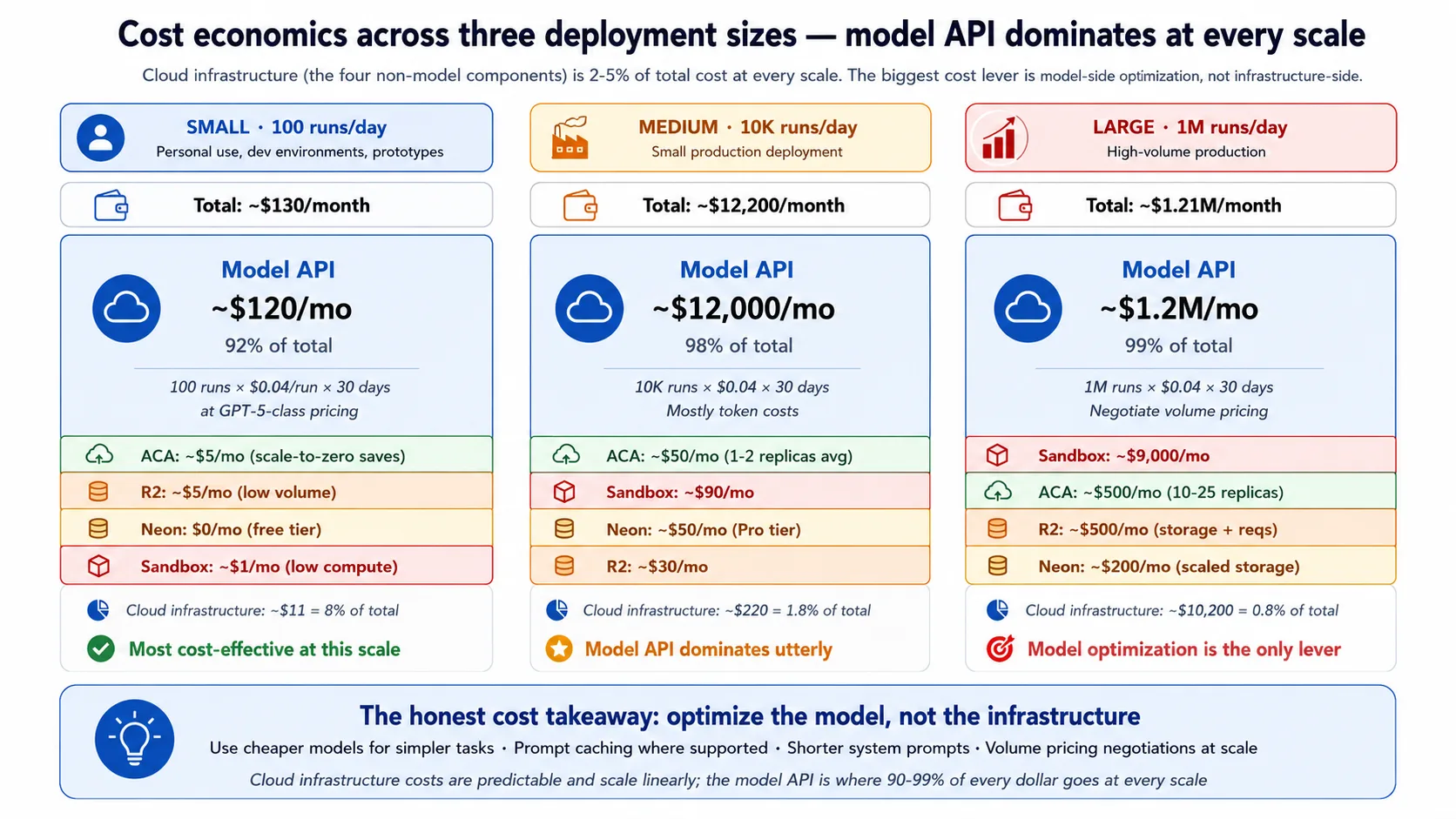
Figures को precise numbers नहीं, rough ranges मानें। Small scale (लगभग 100 runs a day) पर पूरा bill महीने में hundred-some dollars के order में है, और model API उसका roughly nine-tenths है। Medium scale (लगभग 10,000 runs a day) पर bill low tens of thousands a month में है, और model API उसका about 98% है। Large scale (लगभग a million runs a day) पर bill seven figures a month तक जाता है, लगभग पूरा model API. Infrastructure layers भी grow करती हैं, लेकिन total के 5% से नीचे रहती हैं।
Honest takeaways directly follow करते हैं। Cloud infrastructure लगभग हमेशा bill का 5% से कम है, इसलिए highest-leverage cost lever model है, infrastructure नहीं: simple decisions के लिए cheaper model use करें, जहाँ SDK support करे वहाँ prompts cache करें, और system prompts short रखें। Infrastructure cost predictable और traffic के साथ roughly linear है; surprise bills आम तौर पर वहाँ से नहीं आते। R2 का free egress file-heavy workloads में सबसे ज़्यादा matter करता है और Maya जैसे text-heavy ones में barely register करता है। Sandbox cost active execution time के साथ scale होता है, इसलिए compute-heavy agents वहाँ ज़्यादा cost करते हैं जबकि model पर mostly wait करने वाले agents cheap रहते हैं।
Concept 14: Multi-region considerations
यह recipe purposefully single region में deploy करती है। Multi-region active-active बहुत hard problem है, और ज़्यादातर deployments को इसकी ज़रूरत नहीं। आपको यह तीन reasons में से किसी एक के लिए चाहिए: latency, जब users globe में फैले हों और single region noticeable round-trip delay add करे; availability, जब uptime commitment 99.99% या higher हो और single region outage unacceptable हो; या compliance, जब data-residency rules require करें कि user data specific region में रहे।
Components में multi-region की difficulty अलग है। R2 और sandbox Cloudflare network पर पहले से global हैं, इसलिए उन्हें extra work नहीं चाहिए। ACA per environment single-region है, इसलिए multi-region का मतलब global load balancer के पीछे कई environments. Neon दूसरे regions में read replicas support करता है, लेकिन writes फिर भी primary पर जाते हैं, इसलिए write-heavy agent state को more complex database design चाहिए। Honest recipe है more environments, read replicas, और global front door, जिसमें operational cost हर region के साथ बढ़ती है। अगर आपके users mostly one region में हैं, uptime target 99.9% है, और one region आपके data rules satisfy करता है, तो single-region सही answer है; ऐसी complexity के लिए pay न करें जिसकी ज़रूरत नहीं।
Concept 15: Recipe से कब migrate करें
यह recipe opinionated है और specific size तथा shape fit करती है। पाँच triggers बताते हैं कि इससे बाहर कब move करना है। Architectural pattern (control plane execution plane से अलग) इन हर migration में carry होता है; सिर्फ़ specific components बदलते हैं।
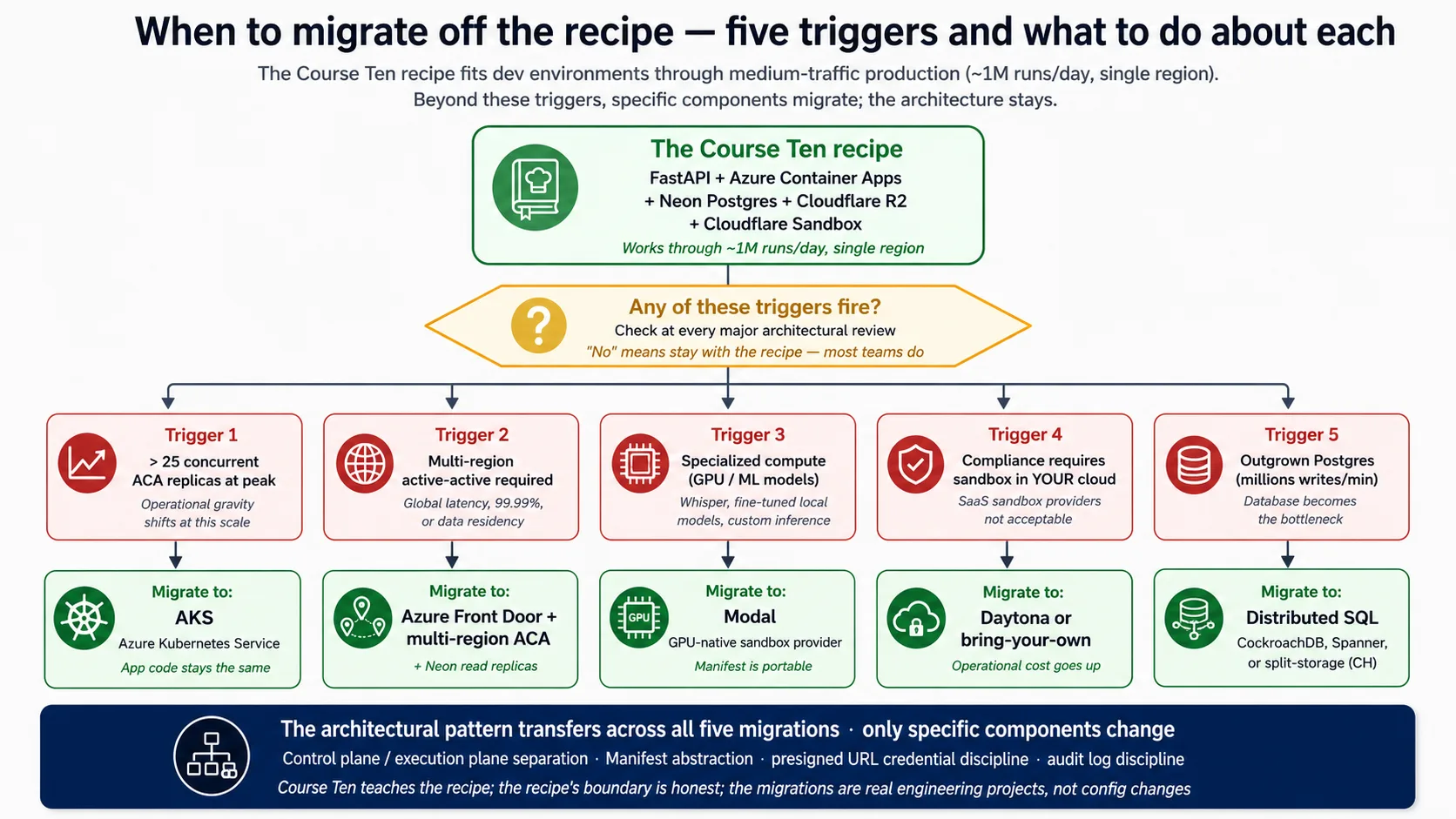
Triggers: roughly 25 ACA replicas से आगे sustained heavy concurrency, जहाँ economics और connection math harness को Kubernetes पर move करने के पक्ष में हैं (app code same रहता है). Concept 14 के अनुसार multi-region active-active. GPU work जैसा specialized compute, जहाँ GPU-native sandbox provider better fit है और portable Manifest आपके साथ move करता है। Compliance rule कि sandbox आपके अपने cloud के अंदर run होना चाहिए, जो SaaS sandbox rule out करता है और bring-your-own provider की तरफ़ push करता है। और very high write volumes पर Postgres को primary store के रूप में outgrow करना, जो distributed SQL या split storage की तरफ़ point करता है और पाँचों में सबसे invasive change है।
Concept 16: Deployment क्या solve नहीं करता
Lab real production discipline produce करती है, लेकिन सब कुछ solve नहीं करती। Gaps को name करना false confidence से बचाता है और बताता है कि उन्हें close करने के लिए क्या work चाहिए।
यह compliance certification produce नहीं करता। आपको SOC2 जैसे framework द्वारा expected technical controls मिलते हैं, लेकिन certification को third-party audit और महीनों का evidence चाहिए; इसे separate workstream की तरह plan करें। यह incident-response program नहीं देता। Runbook technical remediation cover करता है, यह नहीं कि किसे page किया जाए, incidents कैसे declare हों, या post-mortems कैसे run हों; वह people-and-process layer आपको build करनी है। यह agent actions की legal liability settle नहीं करता। Audit log record करता है कि क्या हुआ, लेकिन agent decisions के around legal framework अभी बन रहा है। यह behavior level पर prompt injection रोकता नहीं। Harness/sandbox split injected code को आपके secrets से दूर रखता है, लेकिन crafted message को agent reply steer करने से नहीं रोकता; उसके लिए guardrails, input checks और red-teaming चाहिए, जिसका बहुत हिस्सा eval suite का job है। यह model upgrades आपके लिए handle नहीं करता; switch करने से पहले new model test करने की discipline eval suite है। और यह cost runaway prevent नहीं करता; monitoring hours में spike पकड़ता है, लेकिन daily caps और kill switches ऊपर add की जाने वाली extra defenses हैं।
पाँच चीज़ें जो नहीं करनी हैं
Recipe पाँच anti-patterns avoid करती है। उन्हें name करना deployment ship होने के बाद team को backslide करने से बचाता है।
- Agent-generated code को harness के अंदर run न करें। Harness process में
exec(model_output)जैसी call SQL injection से भी बदतर है, क्योंकि attack surface पूरे model की reasoning है। Sandbox boundary non-negotiable है; harness keys रखता है, agent का code उन्हें touch नहीं कर सकता। - Manifest में root credentials न डालें। Manifest में जो भी है वह sandbox में cross करता है। Boundary केवल presigned URLs और short-lived tokens cross करते हैं; database strings और API keys harness में रहती हैं।
- Development में scale-to-zero skip न करें। Clock के around warm रखा dev app, लोगों और services में multiply होकर, उस compute के लिए quietly hundreds a month cost करता है जो ज़्यादातर time idle है। Dev में cold start accept करें।
- Eval suite wired किए बिना deploy न करें। इसे skip करना agent deployment का सबसे expensive shortcut है: आप ऐसे changes ship करते हैं जो code review pass करते हैं, behavior regress करते हैं, और weeks बाद complaints के रूप में surface होते हैं। Eval gate deploying agents और ऐसे agents deploy करने के बीच difference है जो good बने रहते हैं।
- Rate limiting के बिना harness run न करें। Day-one deployments बिना इसके teams को viral mention के बाद discover करवाते हैं कि उन्होंने एक ही दिन में model provider को fortune pay कर दिया। Generous limits ठीक हैं; no limit dangerous setting है।
Part 7: Closing
Concept 17: Realization के रूप में deployed harness
Manufacturing track ने AI-native company बनाई और measure की: agent loop, system of record, workforce layer, delegate, और वह discipline जो behavior को measurable बनाती है। यह course उसे ship करता है। Deployed harness वह जगह है जहाँ यह सब real users के लिए reachable service बनता है, चार surfaces पर observed और production traffic से सीखने वाले eval suite के against continuously graded.
पूरा course एक idea पर rest करता है: harness control plane है और sandbox execution plane है, और यही single separation deployment को safe, durable और scalable बनाती है। Lab में आपने जो कुछ wire किया वह इसे serve करता है। Harness keys, state और orchestration रखता है; sandbox risky code run करता है, keys में से कोई नहीं; presigned URLs boundary के across file access scope करते हैं; observability बताती है कि क्या हो रहा है; eval suite बताता है कि क्या यह अभी भी right है। Recipe से deviate करना fine है। Architecture से deviate करना नहीं। Harness और sandbox को separate planes में run करें, चार surfaces के across observe करें, और production से grow होने वाले eval suite के against behavior grade करें, फिर architecture काम करती है चाहे आप कौन से cloud components pick करें।
इसके बाद build से पहले चलने वाली design discipline आती है: पहले यह चुनना कि task के लिए कौन सा agent shape fit है। अगर आपको वह चाहिए, तो Choosing Agentic Architectures पढ़ें, agent design और production deployment के बीच connective tissue. तीन further frontiers honestly name करने लायक हैं, इनमें से कोई अभी ship नहीं हुआ: agent-to-agent commerce, जहाँ agents payment protocols के through economic actors की तरह act करते हैं; owner-delegate agent के लिए deployment specifics, जिसका signed delegation और governance ledger worker से भारी है; और deeper multi-cloud, active-active multi-region, जो अपना substantial topic है।
AI के साथ try करें। अपना coding agent open करें। Paste करें:
"मैंने manufacturing track इस deployment course तक complete कर लिया है। Agents build करने के अगले साल में मैं सबसे अक्सर जो तीन चीज़ें apply करूँगा, और जो तीन rare apply करूँगा लेकिन जब करूँगा तो critical होंगी, उन्हें list करें। हर एक briefly explain करें। फिर, इस course ने जो composition wire की (deployed harness से attached Eval-Driven Development course की eval suite), उसके लिए बताइए कि practice में इसे operate करने का सबसे hard part क्या होगा: deployment pressure में team किस discipline को skip करने के लिए tempted होगी?"
आप क्या सीख रहे हैं। Track wide है, और इसका ज़्यादातर हिस्सा आप unevenly use करेंगे: कुछ parts daily, कुछ rarely but critically. यह reflection आपको honest read के लिए force करता है कि कौन से parts आपके actual work से match करते हैं, और सबसे common production failure mode surface करता है, यानी deployment pressure में eval discipline deprioritize होना जब तक harness drift न कर जाए।
One-day workshop variant
इसे one-day workshop की तरह run करते समय concepts और Decisions का full set single day के लिए बहुत ज़्यादा है। Course को available time में fit करने के लिए यह table use करें।
| Time available | Keep | Cut |
|---|---|---|
| 8 hours (1-day intensive) | Stack primer (सिर्फ़ Docker और FastAPI) · Concepts 1-3 (architectural backbone) · Decisions 0-5 (probe through R2) · Concept 13 (cost) · Part 7 closing | Stack primer Neon और R2 (खुद पढ़ें) · Concepts 4-12 (reference के रूप में use करें) · Decision 6 (sandbox: demo, build न करें) · Decisions 7-9 (defer) · Concepts 14-16 (defer) |
| 2 days | Decisions 6-7 (sandbox और observability) · Concepts 8-11 add करें | Decisions 8-9 deferred · Concepts 12, 14-16 deferred |
| 3-4 days | Decision 8 (eval suite) · Concept 12 add करें | Decision 9 deferred · Concepts 14-16 deferred |
| Full week (5-7 days) | Everything: Advanced track full में | Nothing |
Short workshops के लिए architectural backbone (harness/sandbox split और five-component stack) और minimum deployment path (Decisions 0-5) रखें। Hardening और honest-frontiers material बाद में self-study हो सकता है। Architectural understanding वह चीज़ है जिसके साथ students को निकलना चाहिए; implementation depth वह है जिसमें वे grow करते हैं।
Cheat sheet
| # | Concept | Key takeaway |
|---|---|---|
| 1 | "मेरी machine पर चलता है" deployment नहीं है | Production का मतलब agent को harness (control plane) plus sandbox (execution plane) में re-architect करना है, laptop script wrap करना नहीं |
| 2 | Harness/sandbox separation | Backbone: harness secrets और state के साथ orchestrate करता है; sandbox code execute करता है; boundary network और security है |
| 3 | SDK को infra से क्या चाहिए | पाँच surfaces (HTTP service, durable state, file storage, isolated execution, orchestration), हर एक one stack component से mapped |
| 4 | Harness web layer के रूप में FastAPI | SDK से match करने के लिए async-native, auto-generated API schemas, Pydantic models |
| 5 | Runtime के रूप में Azure Container Apps | Ingress, scale-to-zero सहित autoscale, secrets, और revisions managed primitives के रूप में |
| 6 | Durable state के लिए Neon Postgres | Relational state के लिए Postgres; serverless scaling और cheap branching के लिए Neon |
| 7 | Files के लिए Cloudflare R2 | Egress-free, S3-compatible, presigned URLs access को एक समय में one file तक scope करते हैं |
| 8 | Sandbox execution capabilities | Filesystem, shell, package install, mounted storage, सब isolated और ephemeral |
| 9 | Sandbox provider चुनना | E2B free path है; Cloudflare paid primary है; बाकी specific needs fit करते हैं |
| 10 | Harness-to-sandbox handoff | Manifest workspace declare करता है; presigned URLs files scope करते हैं; root credentials कभी cross नहीं करते |
| 11 | Surface के रूप में observability | चार surfaces (Application Insights, OpenTelemetry, SDK trace, Phoenix), shared run_id से tied |
| 12 | Surface के रूप में evals | Neon (durable) और Phoenix (real-time) में traces से mediated; eval frameworks specific points पर attach होते हैं |
| 13 | Cost economics | Infrastructure bill का 5% से कम है; model API 90-98% है; model optimize करें, infrastructure नहीं |
| 14 | Multi-region | Default single-region; global latency, 99.99%+ uptime, या data residency के लिए ही multi-region जाएँ |
| 15 | Recipe से कब migrate करें | Heavy concurrency, multi-region, GPU work, in-cloud-only sandbox, या extreme write volume |
| 16 | Deployment क्या solve नहीं करता | Compliance certification, incident process, legal liability, behavior-level prompt injection, model upgrades, cost runaway |
| 17 | Realization के रूप में deployed harness | यह course manufacturing track की बनी चीज़ को observability और eval suite operationally wired के साथ ship करता है |
| # | Decision | Deliverable |
|---|---|---|
| 0 | SDK probe करें | Installed version printed, brief live docs से reconciled, "What changed" note |
| 1 | Harness scaffold करें | FastAPI app, agent, optional state और storage, केवल OPENAI_API_KEY पर boot |
| 2 | Containerize | Small, reproducible image जो locally और cloud में same run होती है |
| 3 | Azure Container Apps पर deploy | Public HTTPS URL, scale-to-zero, secrets name से stored |
| 4 | Neon Postgres wire करें | Five-table schema, app के लिए pooled और migrations के लिए direct, channel_binding stripped |
| 5 | Cloudflare R2 wire करें | Bucket, scoped credentials, short-lived presigned download URLs |
| 6 | Sandbox execution wire करें | RunConfig के through attached E2B free-tier client; paid alternative के रूप में Cloudflare |
| 7 | Observability wire करें | Shared run_id से tied चार surfaces; fire-and-forget Phoenix sample |
| 8 | Eval suite wire करें | CI regression gate, nightly behavior report, weekly trace-to-eval promotion |
| 9 | Production checklist | Secrets rotation, blue/green deploys, on-call runbook, backup and recovery, rate limits |
Quick reference: deployment commands
# Local dev (Beginner track)
uv sync                                         # install from the lockfile
uv run uvicorn maya_harness.main:app --reload   # boot the harness locally
# Pin: openai-agents>=0.17,<0.18
# Cloud deployment (Intermediate / Advanced): Azure Container Apps
az group create --name maya-rg --location eastus
az acr create --resource-group maya-rg --name <acr-name> --sku Basic --admin-enabled true
az acr build --registry <acr-name> --image maya-harness:latest .   # build in the cloud
az containerapp env create --name maya-env --resource-group maya-rg --location eastus
az containerapp create --name maya-harness --resource-group maya-rg \
  --environment maya-env --image <acr-name>.azurecr.io/maya-harness:latest \
  --target-port 8000 --ingress external --min-replicas 0 --max-replicas 3 \
  --secrets "openai-api-key=$OPENAI_API_KEY" \
  --env-vars "OPENAI_API_KEY=secretref:openai-api-key"

# Tear-down (cost discipline)
az group delete --name maya-rg --yes
# Neon Postgres (console.neon.com)
# asyncpg ignores channel_binding (not a libpq client), so the DSN works with it left in.
# Use the pooled endpoint for the app; the direct (non-pooled) endpoint for migrations.
psql "$DIRECT_BRANCH_URL" -f schema.sql          # migrations on the direct endpoint
Companion download
Companion zip booted harness, AGENTS.md (brief, project rules, architecture, और SDK probe), हर backend के लिए verified code, Dockerfile, Azure deploy shapes, और schema.sql carry करता है: deploying-agents-crash-course.zip.
References
URLs May 2026 तक current हैं; अपने काम में cite करने से पहले verify करें।
agent-factory track:
- Agent loop और SDK: Build AI Agents.
- Eval suite जिसे यह course harness से wire करता है: Eval-Driven Development.
- Operational envelope (durable execution, fifth observability surface): Production Worker with a Nervous System.
- Build से पहले आने वाली design discipline: Choosing Agentic Architectures.
- Track के पीछे thesis: /docs/thesis.
Five-component stack:
- OpenAI Agents SDK (Python): package
openai-agents>=0.17,<0.18; docs at https://openai.github.io/openai-agents-python; Manifest और sandbox-provider reference उसी source में रहते हैं। Harness/sandbox separation SDK के built-in हिस्से के रूप में April 15, 2026 release में ship हुआ: https://openai.com/index/the-next-evolution-of-the-agents-sdk/. - FastAPI: async request handling और auto-generated API schemas. https://fastapi.tiangolo.com
- Azure Container Apps: ingress, autoscale, secrets, revisions. https://learn.microsoft.com/en-us/azure/container-apps/
- Neon Postgres: branching वाला serverless Postgres; pooled endpoint और
channel_bindingfootgun Decision 4 के key details हैं। https://neon.com - Cloudflare R2: free egress वाला S3-compatible storage; SDK R2 को Manifest mount के रूप में support करता है। https://developers.cloudflare.com/r2/
- Code-execution sandbox: E2B (https://e2b.dev, free Hobby tier, native SDK client) free path है; Cloudflare Sandbox (Workers platform का हिस्सा) paid primary है। Modal और Daytona GPU तथा in-your-cloud needs fit करते हैं।
Operational और security references:
- OpenTelemetry: tracing standard जिसे harness export करता है। https://opentelemetry.io
- OWASP API Security Top 10: security checklist Decision 9 बड़े हिस्से में cover करता है। https://owasp.org/API-Security/editions/2023/en/0x11-t10/
Getting-started track का Course 41: agent-factory track के लिए end-to-end deployment crash course. Harness, sandbox, observability, और eval suite composed, Docker, FastAPI, Neon और R2 में नए readers के लिए stack primer के साथ।