Claude और ChatGPT 101: एक Crash Course
9 concepts। 2 cockpits। 1 discipline: जिन दो AI assistants का आप सबसे ज़्यादा इस्तेमाल करेंगे, उनके भीतर confidence के साथ काम कैसे करें।
AI के साथ काम करने के बुनियादी ideas आप पहले से जानते हैं। आप जानते हैं कि model को context चाहिए। Task का साफ़ description देना जानते हैं। यह भी जानते हैं कि कुछ काम delegate करने चाहिए और कुछ अपने पास रखने चाहिए।
फिर आप Claude या ChatGPT खोलते हैं और एक अलग problem सामने आती है: सब कुछ कहाँ है?
एक model picker है। Plus menu है। Projects, memory, skills, plugins, connectors या apps, search, research और thinking modes हैं।
Ideas जाने-पहचाने हैं। Controls नहीं।
यह course उसी problem को ठीक करता है।
आप Claude और ChatGPT को साथ-साथ सीखेंगे। हर button याद करना goal नहीं है। Buttons की जगह बदलती है। Product names और plans बदलते हैं।
Goal है interface के नीचे मौजूद pattern सीखना।
Projects काम को एक जगह रखते हैं। Memory आपके बारे में useful context सँभालती है। Skills बार-बार इस्तेमाल होने वाले काम के तरीकों को package करती हैं। Connectors और apps assistant को बाहरी systems तक पहुँच देते हैं। Research modes आपके लिए जानकारी जुटाकर उसका अध्ययन करते हैं।
Product बदल जाए, discipline वही रहता है।
इसीलिए यह course एक नहीं, दो cockpits सिखाता है।
पढ़ने का समय: लगभग 30 से 35 मिनट, और practice prompts तथा self-check के लिए लगभग 25 मिनट।
Software तेज़ी से बदलता है। इस page पर हर product claim को 25 अगस्त 2026 को Anthropic और OpenAI की public documentation से verify किया गया था।
अगर आपके पढ़ने तक कोई button अपनी जगह बदल चुका हो, तो घबराएँ नहीं। इस course का mental model याद रखें, फिर support.claude.com और help.openai.com पर मौजूदा help pages देखें।
Plan availability features से भी तेज़ बदलती है, इसलिए उन पर निर्भर होने से पहले current pricing और plan limits confirm करें।
यह Foundations का चौथा course है। यह मानकर चलता है कि आप ये courses पहले पढ़ चुके हैं:
यह course उन ideas को दोबारा नहीं सिखाता। यह दिखाता है कि वे Claude और ChatGPT के भीतर कहाँ मिलते हैं।
| Topic | कहाँ सिखाया गया | यह course क्या करता है |
|---|---|---|
| Models और context windows कैसे काम करते हैं | AI सच में क्या है | उन ideas का इस्तेमाल करता है |
| 4D framework | AI Fluency | उसे product features पर लागू करता है |
| Prompting technique | 2026 में AI Prompting | असली workflows में उसका इस्तेमाल करता है |
| Concepts के रूप में skills और MCP | Skills & Connectors | Controls का परिचय देता है |
| Desktop apps, coding tools, agentic hand-off | Professionals के लिए Cowork & OpenWork और General Agents courses | केवल छोटा orientation देता है |
| Claude और ChatGPT chat workspaces | यह course | इन्हें सीधे सिखाता है |
संक्षेप में: यह course chat workspace के भीतर रहता है। Desktop agents, coding environments और बड़े agentic systems बाद में आएँगे।
इसे दो मिनट में देखें
Tour शुरू करने से पहले cockpit को अपना परिचय खुद देने दें।
Claude खोलें। यह paste करें और जवाब पढ़ें:
List every control I can see in this workspace right now, and tell me
in one line what each one is for. Just the controls, no advice.
अब किसी दूसरे tab में ChatGPT खोलें और बिल्कुल यही text paste करें।
दोनों lists को साथ-साथ रखें।
आप लगभग उन्हीं सात चीज़ों के लिए दो अलग vocabularies देखेंगे। एक artifact कहता है, दूसरा writing block। एक connector कहता है, दूसरा app। एक project knowledge कहता है, दूसरा project files। दोनों model, memory, instructions, search और research कहते हैं।
यही पूरा course एक screenshot में है। Controls के नाम अलग हैं। उनसे किया जाने वाला काम वही है।
एक सच्ची और useful warning भी है। Assistant अपने interface के बारे में हमेशा भरोसेमंद नहीं होता, इसलिए list ऐसी कोई चीज़ शामिल कर सकती है जो वहाँ असल में नहीं है, या मौजूद चीज़ छोड़ सकती है। इसे notice करें। किसी confident answer को असली चीज़ से जाँचना Concept 9 है, और आप उससे केवल दो मिनट में मिल चुके हैं।
इस course में किन सवालों के जवाब मिलेंगे
अंत तक आपको इन सभी सवालों के जवाब आने चाहिए।
भाग 1: Cockpit
| # | सवाल | जवाब कहाँ है |
|---|---|---|
| 1 | किसी एक को चुनने के बजाय Claude और ChatGPT दोनों क्यों सीखें? | Concept 1 |
| 2 | दोनों में क्या समान है और क्या अलग? | Concept 1 |
| 3 | Model names बदलते रहें तो model कैसे चुनूँ? | Concept 2 |
| 4 | Thinking mode कब इस्तेमाल करूँ? | Concept 2 |
| 5 | File upload करने पर असल में क्या होता है? | Concept 3 |
भाग 2: Workspace को अपना बनाना
| # | सवाल | जवाब कहाँ है |
|---|---|---|
| 6 | Project क्या है और इसे कब बनाना चाहिए? | Concept 4 |
| 7 | Instructions, memory और projects में क्या अंतर है? | Concept 5 |
| 8 | Artifacts और writing blocks क्या हैं? | Concept 6 |
| 9 | Skills और plugins क्या हैं, और वे projects तथा custom GPTs से कैसे अलग हैं? | Concept 7 |
भाग 3: पहुँच बढ़ाना
| # | सवाल | जवाब कहाँ है |
|---|---|---|
| 10 | Connector या app assistant को कहाँ तक पहुँच देता है? | Concept 8 |
| 11 | Search, thinking या research कब इस्तेमाल करना चाहिए? | Concept 8 |
| 12 | कैसे जानूँ कि assistant मेरे काम में सच में अच्छा है? | Concept 9 |
| 13 | पुराने काम पर testing क्या साबित करती है और क्या नहीं? | Concept 9 |
भाग 1: Cockpit
1. दो cockpits, एक discipline
Claude और ChatGPT को साथ-साथ खोलें। दोनों हैरानी की हद तक एक जैसे दिखते हैं।
दोनों आपको देते हैं:
- पिछली chats की list
- message box
- model या reasoning control
- files और tools का menu
- projects या workspaces
- memory और instructions
- search और research features
यह समानता मायने रखती है।
आपको काम करने के दो बिल्कुल अलग तरीके सीखने की ज़रूरत नहीं है। एक discipline सीखें, फिर देखें कि हर product ने उसके controls कहाँ रखे हैं।
जो skills transfer होती हैं:
- task को साफ़ describe करना
- useful context देना
- क्या delegate करना है, यह चुनना
- answer check करना
- stronger model कब इस्तेमाल करना है, यह जानना
- sensitive information सुरक्षित रखना
Products के names, layout और strengths अलग हैं। ये differences समय के साथ बदलते हैं।
मूल काम नहीं बदलता।
Cockpit comparison के बारे में एक बात साफ़ समझना ज़रूरी है, क्योंकि यह analogy गुमराह कर सकती है। Pilots दो aircraft को एक जैसा नहीं मानते। वे एक बार उड़ाना सीखते हैं, फिर थोड़े समय में समझते हैं कि किसी खास aircraft में switches कहाँ हैं। यहाँ भी यही सही expectation है। उड़ाना transferable हिस्सा है। Switch layout वह हिस्सा है जिसे आप देखते हैं, और update के बाद फिर देखते हैं।
दोनों products जानने की एक practical वजह भी है। Claude और ChatGPT हर task पर एक जैसा perform नहीं करते। एक तरह के काम में बेहतरीन model दूसरे में कमज़ोर हो सकता है।
ज़रूरी काम के लिए अच्छी आदत है कि वही task दोनों में run करें और compare करें।
यही platform awareness है: किसी एक interface के loyal होने के बजाय यह जानना कि हर tool किस काम में अच्छा है।
एक और orientation point। दोनों companies अब chat से कहीं ज़्यादा देती हैं: desktop apps, coding tools, browser agents और दूसरे agentic products। वे इस किताब में बाद में आएँगे।
अभी chat window के भीतर रहें।
Beginner की सबसे ज़रूरी आदत
Assistant से वैसे बात करें जैसे किसी capable colleague से करते हैं।
कोई serious request भेजने से पहले तीन बातें cover करें:
- स्थिति बताएँ। आप कौन हैं और क्या हासिल करना चाहते हैं?
- Task define करें। Assistant को ठीक-ठीक क्या करना चाहिए?
- Rules तय करें। वह कौन-सा tone, format, constraints या examples follow करे?
Interface अच्छे description की जगह नहीं लेता। वह आपके description को रहने की जगह देता है।
याद रखें: pattern सीखें, buttons की जगह नहीं।
2. Models और thinking modes
Claude और ChatGPT दोनों में आप चुन सकते हैं कि किसी task पर कितनी capability खर्च करनी है।
Beginners अक्सर model names पर ध्यान देते हैं। यह याद रखने की गलत चीज़ है, क्योंकि names तेज़ी से बदलते हैं।
इसके बजाय तीन-level का pattern सीखें।
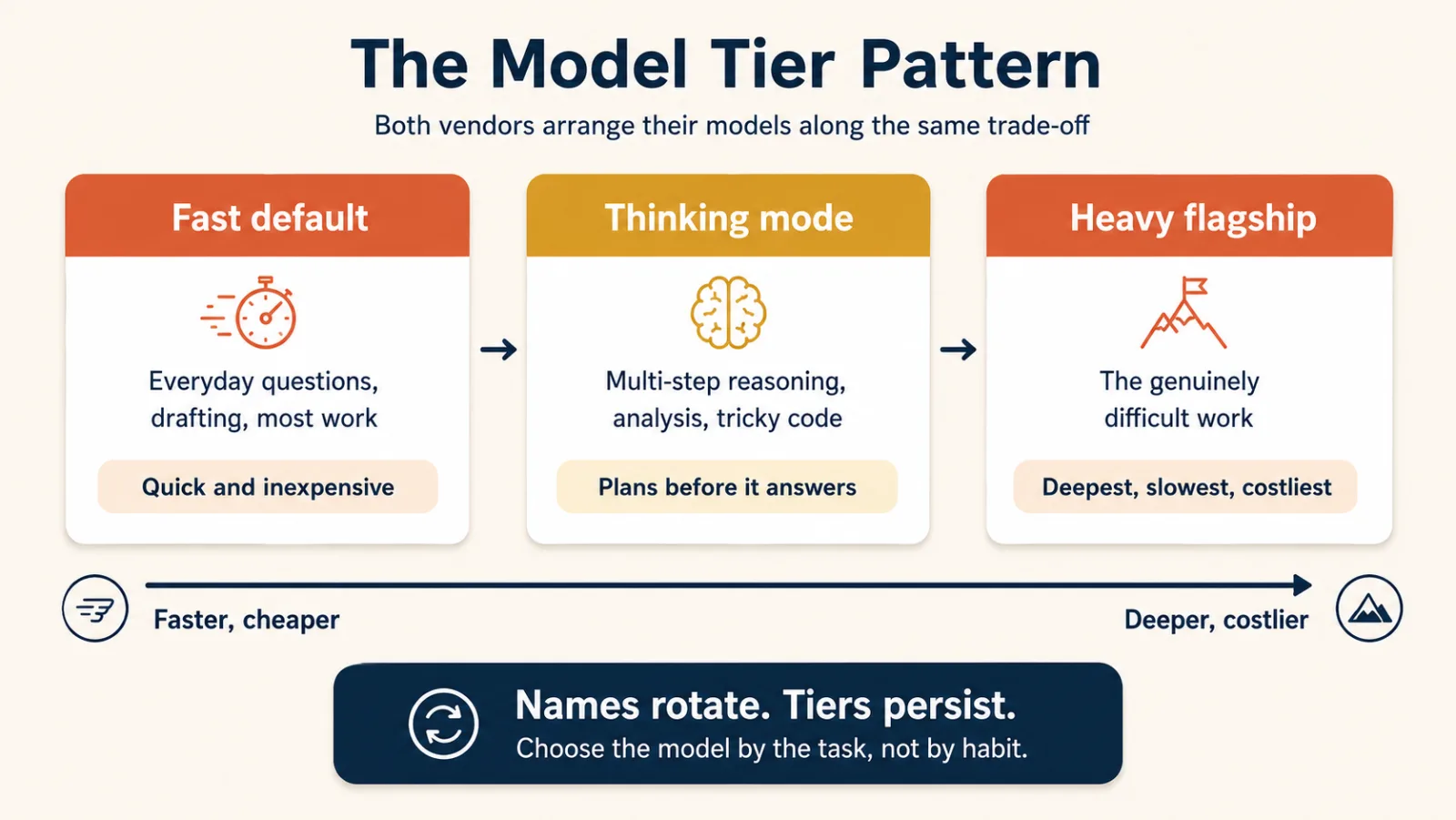
| Level | किसके लिए सबसे अच्छा | Trade-off |
|---|---|---|
| Fast default | रोज़मर्रा के सवाल, drafting, summaries, routine work | तेज़ और सस्ता, मुश्किल problems पर कम depth |
| Thinking या reasoning | Multi-step reasoning, analysis, math, tricky code | धीमा, अधिक careful |
| Heavy flagship | सबसे मुश्किल analysis और लंबे, demanding tasks | सबसे धीमा और महँगा, सबसे capable |
Claude और ChatGPT इन controls को अलग तरीकों से दिखाते हैं। Labels में Sonnet, Opus, Instant, Thinking, Pro या version number जैसे names हो सकते हैं।
अपना mental model labels के आसपास न बनाएँ।
इसे trade-off के आसपास बनाएँ:
पहले तेज़, फिर अधिक reasoning, फिर maximum capability
दो आसान rules
Rule 1: Fast से शुरू करें।
रोज़मर्रा के अधिकतर काम के लिए normal fast mode इस्तेमाल करें।
छोटे rewrite, summary या आसान explanation के लिए heavy reasoning का इंतज़ार न करें।
Rule 2: Task मुश्किल हो तो escalate करें।
इन कामों में thinking mode या stronger model इस्तेमाल करें:
- logic के कई steps
- सावधानी से तुलना
- गणित
- मुश्किल debugging
- ऐसा code जिसका सही होना ज़रूरी है
- जटिल विश्लेषण
कभी-कभी "AI fail हो गया" का असली मतलब होता है, "मैंने capability का गलत level इस्तेमाल किया।"
Model को आदत से नहीं, task से चुनें।
- रोज़मर्रा के काम के लिए Fast
- मुश्किल reasoning के लिए Thinking
- सच में मुश्किल काम के लिए Flagship
Names बदलने पर भी pattern काम करता है।
याद रखें: पहले reasoning का level चुनें, फिर मौजूदा model names सीखें।
3. आपके attach किए गए context
Language model केवल सामने मौजूद information के साथ काम कर सकता है।
इसीलिए attachments मायने रखते हैं।
Claude और ChatGPT दोनों में आप ऐसी चीज़ें upload कर सकते हैं:
- PDFs
- Word documents
- spreadsheets
- CSV files
- images
- screenshots
- code files
File attach करने पर आप assistant को उस conversation के लिए अधिक context देते हैं।
इन दो requests को compare करें:
इस contract का summary बनाएँ।
और
इस contract का summary बनाएँ। (contract attached है)
Words लगभग एक जैसे हैं। दूसरी request useful है, क्योंकि assistant contract को सच में देख सकता है।
Screenshots पर भी यही बात लागू होती है। Dashboard, error message, chart या interface में मदद चाहिए तो याद से describe करने के बजाय उसे दिखाना आम तौर पर बेहतर है।
दोनों products live web भी search कर सकते हैं। जब model की built-in knowledge काफ़ी नहीं हो, search current information को conversation में लाती है।
दोनों current conversation को भी track करते हैं, इसलिए पहले कही गई बातें बाद के answers को shape करती रहती हैं।
बनाने लायक आदत
कोई ज़रूरी सवाल पूछने से पहले खुद से पूछें:
किसी capable human colleague को अच्छा जवाब देने से पहले क्या देखना होगा?
फिर assistant को वही material दें।
याद रखें: clever prompt से ज़्यादा, बेहतर context आम तौर पर answer सुधारता है।
भाग 2: Workspace को अपना बनाना
4. Projects: काम की एक stream के लिए room
AI इस्तेमाल करने के कुछ हफ़्तों बाद sidebar बिखर जाता है।
आपके पास होता है:
- किसी client के बारे में एक chat
- उसी client के बारे में दूसरी chat
- useful file वाली तीसरी chat
- चौथी chat जिसमें आपने वही background फिर से समझाया
Projects इसी problem को solve करते हैं।
Project काम की एक stream के लिए workspace है।
इसे एक room की तरह सोचें, जहाँ एक topic से जुड़ी हर चीज़ साथ रहती है।
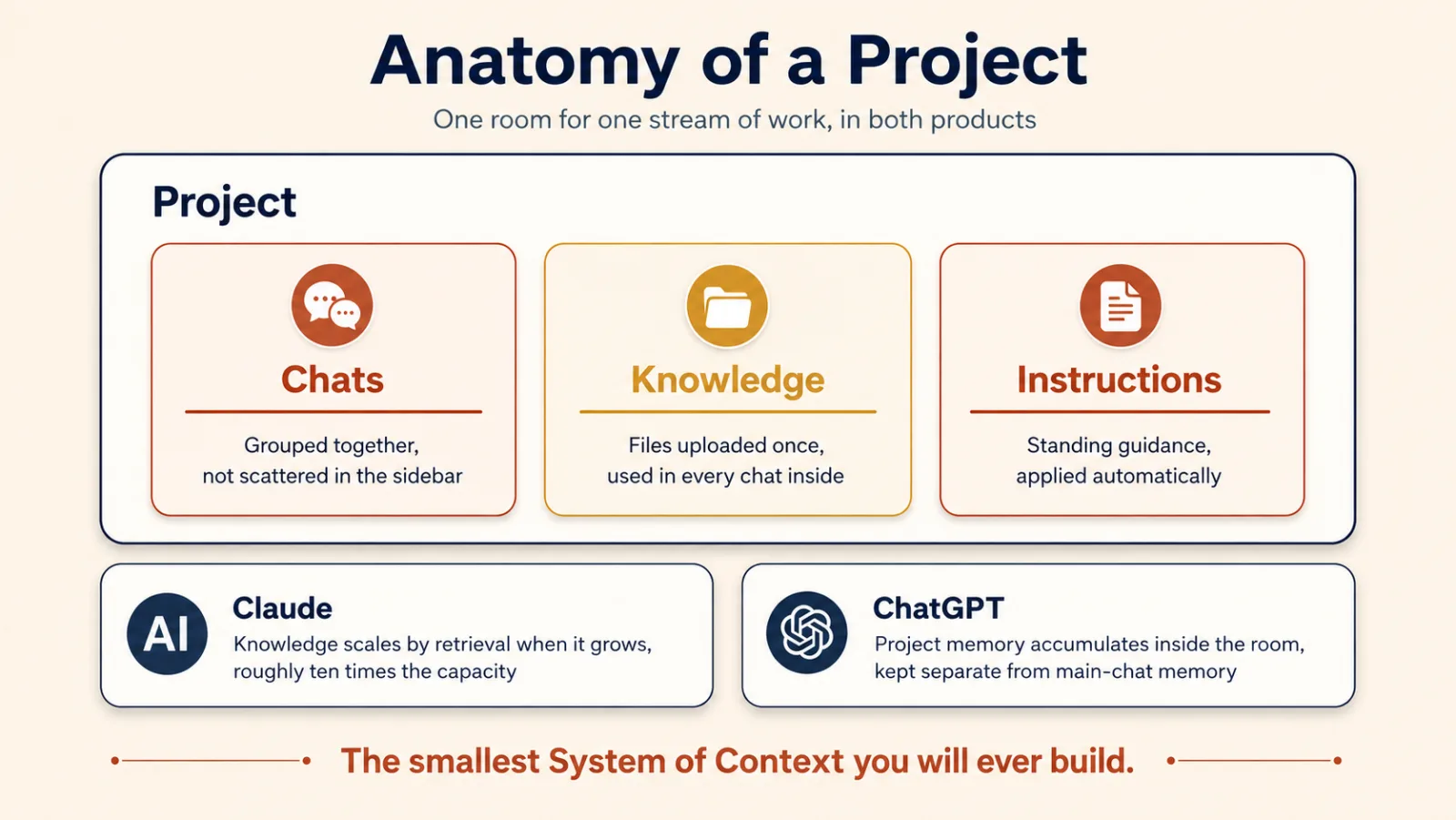
Project में आम तौर पर तीन चीज़ें होती हैं:
- उस काम से जुड़ी Chats
- Knowledge, यानी project के लिए upload की गई files
- Instructions, यानी project के भीतर assistant के काम करने की standing guidance
मान लें कि आप Quarterly Board Reporting नाम का project बनाते हैं।
उसके भीतर आप रख सकते हैं:
- पिछली quarter की board deck
- current financial model
- आपकी reporting style guide
- tone और audience से जुड़ी instructions
- board report पर हर conversation
अब आपको वही files दोबारा upload या वही instructions repeat नहीं करनी पड़तीं।
यही पूरा point है: project किसी एक work stream के लिए context को persistent बनाता है।
इस किताब की भाषा में, project एक छोटा System of Context है।
Claude और ChatGPT में थोड़ा अंतर है
Claude growth को retrieval से handle करता है। जब project knowledge context window में सीधे fit होने से बड़ी हो जाती है, Claude सब कुछ load करने के बजाय उस knowledge में search करने लगता है। Anthropic के अनुसार इससे capacity दस गुना तक बढ़ सकती है। यह switch अपने-आप होता है और paid-plan feature है।
ChatGPT project memory जोड़ता है। Project इनमें से कोई एक इस्तेमाल कर सकता है:
- default memory, जिसमें आपकी broader memory भी हिस्सा ले सकती है
- project-only memory, जिसमें project असली boundary बन जाता है और बाहर की memories भीतर नहीं आतीं
इसलिए project हमेशा organization में मदद करता है। Project-only memory उसे isolation में बदलती है।
Project कब बनाना चाहिए?
यह test इस्तेमाल करें:
अगर आपने वही background समझाया या वही file तीन बार upload की है, तो उस काम का अपना project होना चाहिए।
One-off questions को project नहीं चाहिए।
याद रखें: projects उस काम के लिए हैं जो जारी रहता है।
5. Memory और standing instructions
तीन features context को persistent बनाते हैं:
- standing instructions
- memory
- projects
Beginners अक्सर इन्हें मिला देते हैं। साफ़ अंतर यह है।
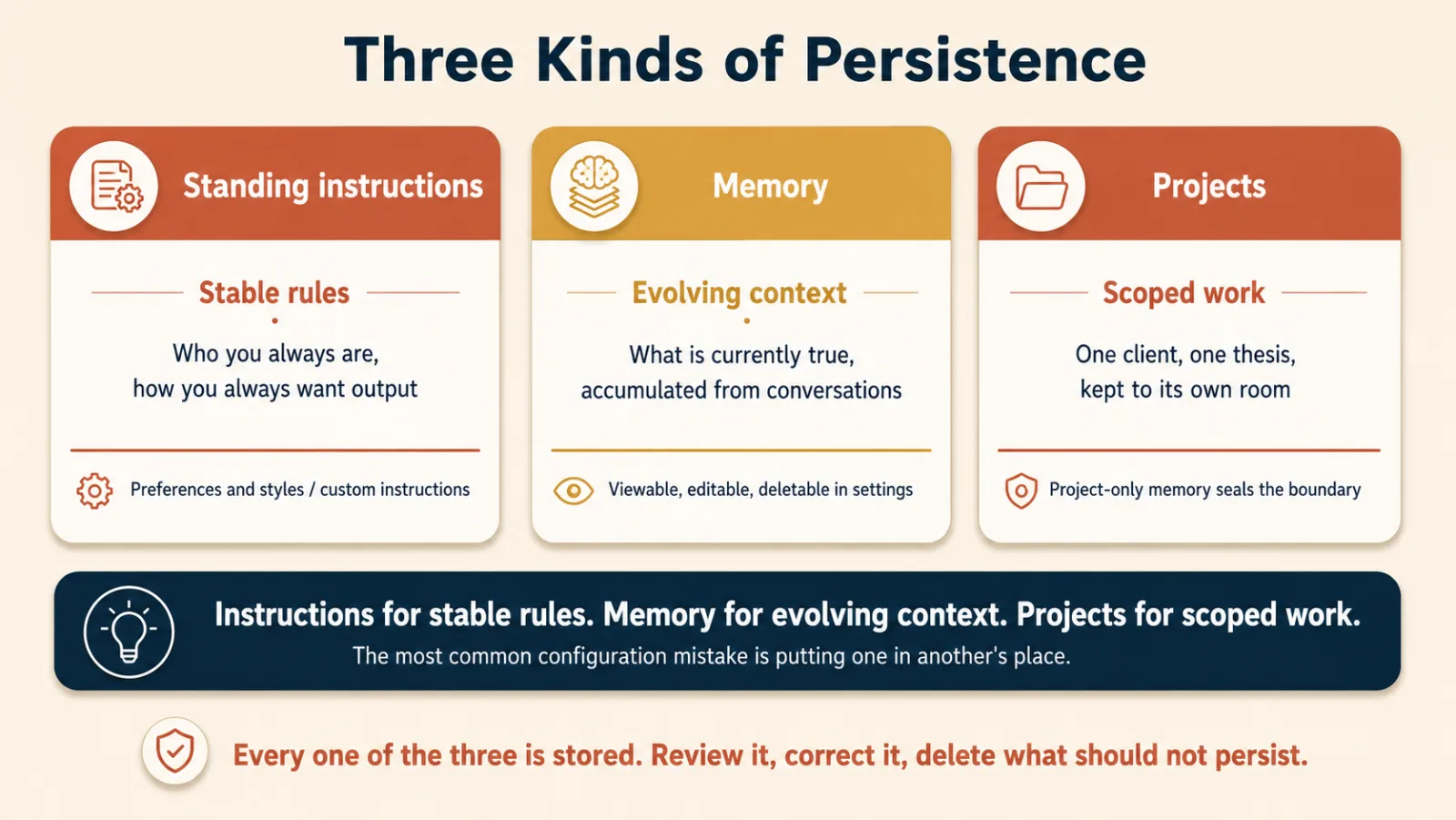
Standing instructions: स्थायी नियम
Standing instructions वे rules हैं जिन्हें आप एक बार लिखते हैं और broadly लागू करना चाहते हैं।
उदाहरण:
- "Explanation से पहले answer दें।"
- "जब तक मैं technical detail न माँगूँ, आसान भाषा इस्तेमाल करें।"
- "मैं business leaders के लिए लिखता हूँ, software engineers के लिए नहीं।"
Claude ऐसी preferences को settings और styles में रखता है। ChatGPT इन्हें Settings और Personalization के भीतर Custom Instructions में रखता है।
Standing instructions उन चीज़ों के लिए इस्तेमाल करें जो stable हैं।
Memory: आपके बारे में evolving context
Memory वह information है जिसे assistant आपकी conversations से सीखता है और बाद में इस्तेमाल कर सकता है।
इसमें शामिल हो सकते हैं:
- आपकी बताई preferences
- recurring goals
- आपके काम करने के तरीके से जुड़े facts
- वह सब जिसे आपने साफ़ तौर पर याद रखने के लिए कहा
दोनों products memory review, edit और delete करने देते हैं। Work account पर पहले check करें कि यह on भी है या नहीं: Claude individual plans पर memory default रूप से on करता है, और Team तथा Enterprise में owner के enable करने तक off रखता है।
दोनों ऐसा mode भी देते हैं जो conversation को normal history और memory से बाहर रखता है: Claude इसे incognito chat कहता है, ChatGPT temporary chat। Safety और abuse review के लिए दोनों vendors लगभग तीस दिनों तक copy रखते हैं। इसलिए इन्हें memory-free समझें, trace-free नहीं।
Projects: काम की एक stream का context
Projects दोनों से अलग हैं।
Project किसी खास client, course, research topic, product या जारी रहने वाले दूसरे work stream का context रखता है।
आसान rule
Stable rules के लिए instructions। Evolving context के लिए memory। Scoped work के लिए projects।
यह एक rule अधिकतर configuration mistakes रोकता है।
यहाँ केवल convenience का सवाल नहीं है। Stored context में sensitive या private information हो सकती है।
जो याद रखा गया है उसे review करें। जो नहीं रहना चाहिए उसे delete करें। Subject की ज़रूरत के अनुसार incognito या temporary chats इस्तेमाल करें। Work account पर अपनी organization की policy follow करें।
Memory useful है क्योंकि context समय के साथ compound होता है। यह वह जगह भी है जहाँ सावधानी मायने रखती है।
अच्छी तरह configured assistant अक्सर कुछ हफ़्तों के बाद अधिक useful लगने लगता है। Model नहीं बदला। उसके आसपास का context बेहतर हुआ।
याद रखें: persistence तभी मदद करती है जब सही information सही जगह हो।
6. Artifacts और writing blocks: ऐसा काम जिसे आप साथ ले जा सकें
Chat conversation के लिए अच्छी है।
Finished work रखने के लिए खराब container है।
अगर आप 2,000-word report, working calculator, diagram या small application माँगते हैं, तो result scroll में एक और message नहीं बल्कि अलग object होना चाहिए।
Claude और ChatGPT इसे अलग तरीकों से solve करते हैं।
Claude: artifacts
Claude artifacts इस्तेमाल करता है।
Artifact एक अलग output है जो conversation के पास खुलता है। यह हो सकता है:
- document
- code
- web page
- diagram
- vector image
- calculator
- dashboard
- small interactive application
Artifact बनती और revise होती रहती है, और आप Claude से बातचीत जारी रखते हैं।
Claude में Word, Excel, PowerPoint और PDF files बनाने की अलग capabilities भी हैं।
ChatGPT: writing blocks और code blocks
पुराने ChatGPT tutorials canvas की बात करते हैं, जो side-by-side editing panel था।
यह अब पुराना है। 2026 में OpenAI ने current models पर canvas retire कर दिया और वही काम conversation के भीतर writing blocks और code blocks के रूप में ला दिया: editable regions जो thread में inline रहते हैं। अगर tutorial canvas खोलने को कहता है और वह नहीं मिलता, तो यही वजह है।
Design अलग है। Idea एक ही है:
Work product को उसके बारे में होने वाली discussion से अलग रखें।
बेहतर results कैसे पाएँ
केवल "dashboard" या "report" न माँगें।
बताएँ कि finished thing को क्या करना चाहिए।
उदाहरण:
Monthly budget tracker बनाएँ। मैं category के अनुसार expenses enter कर सकूँ, pie chart देख सकूँ और budget से ऊपर जाने पर warning मिले।
यह इससे बेहतर है:
Budget tracker बनाएँ।
यह भी बताएँ कि वह किसके लिए है। New employees का flowchart experienced engineers के flowchart जैसा object नहीं है।
फिर एक बार में एक change revise करें।
यहीं बहुत-से beginners को पहली बार असली surprise मिलता है: आप useful software describe करते हैं और working software सामने आ जाता है।
बाद के दो courses इसे ठीक से समझाते हैं:
याद रखें: chat conversation है; artifacts, writing blocks और code blocks काम को रखते हैं।
7. Skills और plugins: काम करने के packaged तरीके
Projects एक सवाल का जवाब देते हैं:
सही knowledge को साथ कैसे रखूँ?
Repetition एक अलग सवाल उठाती है:
Assistant से हर बार वही method कैसे follow करवाऊँ?
इसी काम के लिए skills हैं।
Skill क्या है?
Skill किसी task को करने का packaged तरीका है।
इसमें हो सकते हैं:
- instructions
- examples
- supporting resources
- कभी-कभी code
Matching task आने पर assistant skill load करता है।
आप इन कामों के लिए skill बना सकते हैं:
- quarterly business reviews लिखना
- checklist से contract check करना
- customer meeting brief तैयार करना
- raw notes को अपने पसंदीदा report format में बदलना
हर chat में method दोबारा सिखाने के बजाय उसे एक बार package करें।
Claude में skills हैं। ChatGPT में भी skills हैं।
Skills कहाँ उपलब्ध हैं और manage कैसे होती हैं, इसमें products अलग हैं, लेकिन underlying idea अब shared है।
यह क्यों मायने रखता है
दोनों vendors agentskills.io पर publish हुए Agent Skills open standard पर build करते हैं।
Skill Markdown files का folder है, जिसके पीछे कोई server या runtime नहीं होता। इसी वजह से वह travel करती है। कई companies के दर्जनों tools अब वही format पढ़ते हैं, इसलिए एक product के लिए लिखी skill दूसरे में install की जा सकती है।
इससे workflow किसी एक vendor में फँसे prompt से ज़्यादा durable बन जाता है।
यह वही lesson भी है जिससे course शुरू हुआ था:
Discipline constant है; tool variable है।
Plugin क्या है?
Plugin किसी बड़े तरह के काम के लिए capabilities package करता है। यह skills को outside apps के connections, और कभी-कभी commands तथा sub-agents के साथ एक installable package में bundle करता है, जो किसी job function के लिए बना होता है।
एक-एक line में relationship:
- skill method सिखाती है
- app या connector बाहर के system तक access देता है
- plugin दोनों को साथ wrap करता है
Claude अब skills, connectors और plugins को claude.ai/directory पर एक ही directory में list करता है। अपना कुछ बनाने से पहले क्या मौजूद है, यह देखने का सबसे तेज़ तरीका यही है।
Custom GPTs का क्या?
ChatGPT में custom GPTs भी हैं।
Custom GPT एक अलग configured assistant है जिसे आप जानबूझकर खोलते हैं। उसकी अपनी instructions, persona, knowledge और tools होते हैं।
यह skill से अलग है।
छोटी comparison:
- Project: work stream का context store करता है
- Skill: task करने का method store करती है
- Custom GPT: अलग configured assistant देता है
- Plugin: capabilities को साथ package करता है
याद रखने वाली line:
Projects knowledge store करते हैं। Skills tasks perform करती हैं।
Customer-preparation skill project में रखी customer files इस्तेमाल कर सकती है।
Project क्या देता है। Skill कैसे देती है।
Skills & Connectors में आप mechanics पढ़ेंगे।
याद रखें: method repeat हो, तो method को package करें।
भाग 3: पहुँच बढ़ाना
8. Connectors, apps और सवाल को सही route देना
अब तक assistant ने अधिकतर उस information के साथ काम किया है जो आपने उसके सामने रखी।
लेकिन आपकी असली information अक्सर कहीं और होती है:
- calendar
- cloud storage
- project management के tools
- chat systems
- कंपनी के knowledge bases
Connectors और apps assistant को उन systems तक पहुँच देते हैं।
Connector या app?
Claude connector कहता है।
ChatGPT उसी product category को app कहता है। पहले वह भी connector कहता था, फिर नाम बदल दिया।
Words अलग हैं। Purpose वही है।
आपकी दी permissions के अनुसार connector या app assistant को दूसरे system में search, read और कभी-कभी act करने देता है।
उदाहरण:
- "वह email खोजें जिसमें vendor contract पर बात हुई थी।"
- "कल मेरी कौन-सी meetings हैं?"
- "पिछले हफ़्ते के project notes summarize करें।"
- "मेरे highest-priority tasks कौन-से हैं?"
अब assistant आपके real systems से जवाब दे सकता है, इसलिए आपको सब कुछ chat में copy नहीं करना पड़ता।
MCP: साझा integration standard
दोनों ecosystems Model Context Protocol, यानी MCP, support करते हैं।
आम shorthand है AI tools के लिए USB-C: एक standard plug, ताकि एक बार बना tool कई assistants इस्तेमाल कर सकें। Claude के custom connectors MCP पर चलते हैं और ChatGPT apps भी Apps SDK के ज़रिए इसी पर बनते हैं।
यह सच में useful है, लेकिन shorthand एक ज़रूरी बात छिपा देता है। USB-C cable लगाना trust का decision नहीं है। MCP tool connect करना है। Plug standard है; access नहीं।
Connections permission decisions हैं
Tool connect करना केवल productivity choice नहीं है। यह security और governance choice भी है, यानी कौन क्या देख और कर सकता है।
कुछ भी connect करने से पहले पूछें:
- यह क्या read कर सकता है?
- क्या यह बाहर की दुनिया में write, send, delete, buy या कोई और action कर सकता है?
- क्या मुझे source पर भरोसा है?
- क्या मुझे यह account या system connect करने की अनुमति है?
Work email connect करने से बहुत information खुल सकती है, भले assistant केवल वही देखता हो जो आपका account पहले से देख सकता है।
Connectors और apps को software install करने जैसा मानें: useful, और जानबूझकर permission-gated।
Search, thinking या research?
Beginners अक्सर काम के लिए गलत mode चुनते हैं।
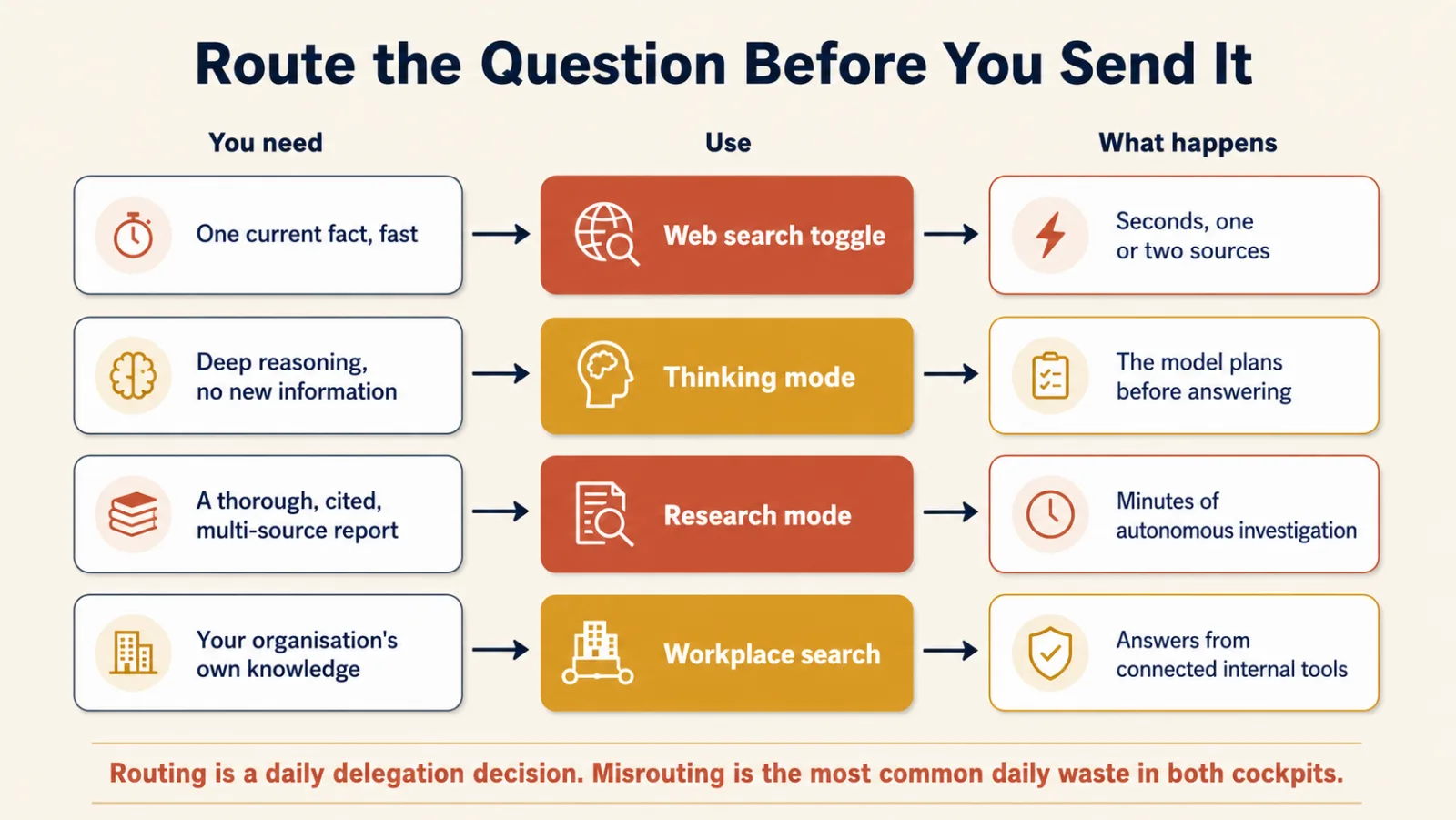
| आपको क्या चाहिए | क्या इस्तेमाल करें | Example |
|---|---|---|
| एक current fact | Web search | "आज का exchange rate क्या है?" |
| मुश्किल reasoning, कोई नई information नहीं | Thinking mode | "इन तीन pricing strategies को compare करें।" |
| Thorough, cited investigation | Research mode | "Warehouse robotics के current market पर research करें।" |
| आपकी organization की information | Workplace search या connected apps | "Latest approved pricing policy खोजें।" |
पहले पूछने वाला सवाल है:
मैं assistant से किस तरह का काम करने को कह रहा हूँ?
जिस fact का जवाब search seconds में दे सकती है, उस पर deep research खर्च न करें। जब असली problem reasoning हो, तब search न चुनें। Multi-source investigation वाले काम के लिए ordinary chat इस्तेमाल न करें।
Research mode अलग तरह की चीज़ है
Research mode "बेहतर search" नहीं है।
Assistant investigation plan करता है, कई searches run करता है, leads follow करता है, sources पढ़ता है और citations के साथ structured report देता है।
इसमें seconds नहीं, minutes लगते हैं।
आप quick question नहीं पूछ रहे। आप investigation delegate कर रहे हैं।
इसका मतलब यह भी है कि report आने पर आपका judgment खत्म नहीं होता। ज़रूरी claims check करें। Citations खोलें। Research आपकी reach बढ़ाती है, accountability नहीं हटाती।
याद रखें: सवाल भेजने से पहले उसे सही route दें।
9. उस काम पर साबित करें जिसे आप पहले से जानते हैं
अब course का सबसे ज़रूरी सवाल:
आप कैसे जानेंगे कि assistant आपके काम में सच में अच्छा है?
किसी benchmark पर नहीं।
Demo पर नहीं।
आपके task पर, आपके data के साथ, आपके standard तक।
सबसे अच्छा beginner method आसान है:
Assistant को उस काम पर test करें जिसे आप पहले पूरा कर चुके हैं और जिस पर भरोसा करते हैं।
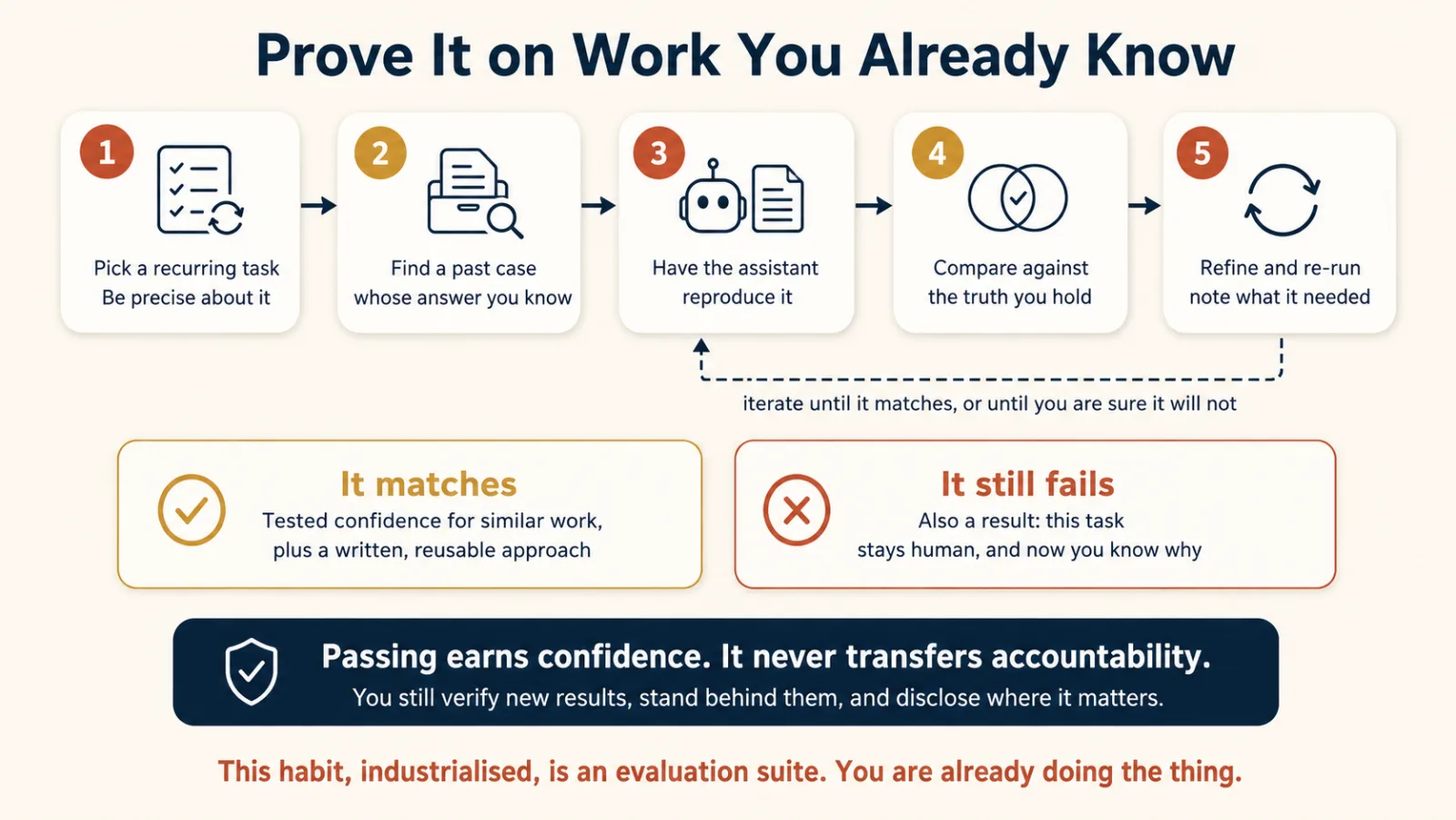
उदाहरण
एक program director हर quarter attendance और employment outcomes analyze करता है।
वह अगले report में AI की मदद चाहता है।
उसे नए data पर भरोसा करके शुरुआत नहीं करनी चाहिए।
इसके बजाय वह assistant को पिछली quarter का raw data देता है, क्योंकि सही analysis कैसा दिखता है यह उसे पहले से पता है।
फिर वह assistant से वही काम reproduce करने को कहता है।
अब उसके पास compare करने के लिए असली चीज़ है।
अगर assistant कोई ज़रूरी pattern miss करे, तो वह instructions सुधार सकता है।
अगर data में analysis की कोई ज़रूरी चीज़ ही न हो, तो उसे data problem मिल गई।
अगर assistant काम का कोई हिस्सा reliably न कर पाए, तो वह हिस्सा human के पास रहता है।
तीनों outcomes useful हैं।
पाँच-step proving loop
- एक recurring task चुनें। Precise रहें।
- पुराना example खोजें। ऐसा जिसका सही result आप जानते हों।
- Assistant से उसे reproduce करवाएँ। वह context दें जो आपके पास सामान्य रूप से होता।
- Compare करें। क्या match हुआ? क्या fail हुआ? कौन-सी instruction missing थी?
- Refine करके फिर run करें। तब तक जारी रखें जब तक वह काफ़ी अच्छा न हो, या आप यह तय न कर लें कि task delegate नहीं होना चाहिए।
आख़िरी outcome failure नहीं है।
क्या delegate नहीं करना चाहिए, यह सीखना उस घंटे के लायक है।
Passing असल में क्या साबित करती है?
यह आपको मिलते-जुलते future work के लिए earned confidence देती है।
यह साबित नहीं करती कि assistant future के हर case में सही होगा।
और यह responsibility transfer नहीं करती। आपको अब भी:
- check करना है कि नए results सही लगते हैं या नहीं
- final work के पीछे खड़ा होना है
- जहाँ उचित हो AI assistance disclose करनी है
- high-risk decisions को proper human control में रखना है
हो सके तो वही test Claude और ChatGPT दोनों में run करें। जिस task को आप पहले से समझते हैं उस पर दो assistants compare करना platform awareness बनाने का सबसे तेज़ तरीका है।
यह छोटा exercise आपकी पहली evaluation suite है।
बाद में Trusting the Checker और Eval-Driven Development इसी habit को असली engineering discipline में बदलते हैं।
याद रखें: trust known work के विरुद्ध earn होना चाहिए, अच्छे दिखने वाले answer से assume नहीं।
Prompts आज़माने से पहले छोटा recap
अब आपके पास दोनों products का map है।
Claude और ChatGPT अलग tools हैं जो कई समान ideas पर बने हैं।
- Models और thinking modes तय करते हैं कि आप कितनी capability खर्च करते हैं।
- Attachments assistant को अभी चाहिए context देती हैं।
- Projects एक work stream का context साथ रखते हैं।
- Standing instructions stable rules रखती हैं।
- Memory आपके बारे में evolving context रखती है।
- Artifacts, writing blocks और code blocks finished work को chat scroll से बाहर रखते हैं।
- Skills repeatable methods package करती हैं।
- Plugins पूरे work type की capabilities bundle करते हैं।
- Claude में connectors और ChatGPT में apps external systems तक पहुँचते हैं।
- MCP दोनों के नीचे साझा integration standard है।
- Search, thinking और research तीन अलग सवालों के लिए तीन अलग routes हैं।
- पहले से जाने काम पर testing trust earn करने का तरीका है।
Products बदलते रहेंगे।
यह mental model current interface से कहीं ज़्यादा टिकना चाहिए।
अभी करें: छह prompts
Cockpit के बारे में पढ़ना उसमें बैठने जैसा नहीं है। इन छह exercises में लगभग पच्चीस मिनट लगेंगे।
1. Guided tour माँगें
Run करने से पहले उन दो features का अनुमान लगाएँ जिनका assistant mention करेगा।
Give me a guided tour of this workspace as it exists today.
Walk through:
- how I change models and when I should
- what happens when I upload a file
- what projects are for
- what you remember about me and where I control that
- where the research option lives

Keep it practical. One short paragraph per feature, and tell me which
features need a paid plan.
क्या notice करें: अपने prediction से compare करें, फिर screen पर सच में मौजूद चीज़ों से। अपने interface के बारे में जहाँ यह गलत है, वही सबसे interesting हिस्सा है।
2. एक task दोनों assistants में run करें
अपने हफ़्ते का छोटा real task चुनें: draft करने वाला paragraph, summarize करने वाली table या short analysis।
Run करने से पहले अनुमान लगाएँ कि कौन-सा assistant बेहतर करेगा और क्यों।
Here is a real task from my work: [paste the task and its context].
Complete it.

Then, in three sentences, tell me what additional context would have
helped you do it better.
क्या notice करें: outputs compare करें, फिर दोनों ने जो missing बताया उसे compare करें। दूसरी comparison अक्सर पहली से ज़्यादा सिखाती है।
3. अपना पहला project setup करें
ऐसा work stream चुनें जिसमें आपने वही background repeat या वही documents फिर upload किए हैं।
I want to set up a project for this stream of work: [describe it].

Interview me briefly. Then give me two things I can paste into the
project settings:

1. project instructions covering my role, audience, tone, and standing rules
2. a priority-ordered list of five to ten documents I should upload as
   project knowledge
क्या notice करें: जो सवाल यह पूछता है, वही context है जिसे आप हर हफ़्ते हाथ से फिर type करते रहे हैं।
4. याद रखी गई चीज़ों का audit करें
Show me what you currently remember about me from our conversations,
as a plain list.

For each item I will tell you: keep, correct, or delete.

Then tell me where in settings I can manage memory myself.
क्या notice करें: उस list में ऐसा कुछ है जो shared screen पर आपको शर्मिंदा करे? यही इस exercise की असली वजह है।
5. तीन real questions route करें
अपने असली काम से तीन सवाल चुनें:
- एक जिसे quick current fact चाहिए
- एक जिसे hard reasoning चाहिए
- एक जो proper report deserve करता है
हर सवाल पूछने से पहले route चुनें: search, thinking या research।
फिर उसी तरह भेजें और देखें कि fit सही था या नहीं।
क्या notice करें: mismatches। दोनों products में सबसे आम waste है ऐसा research run जो search होना चाहिए था।
6. अपनी history पर assistant को prove करें
I want to test whether you can take over a recurring task of mine.

The task: [describe it precisely].

I am giving you a past example where I already know the correct result:
[attach the old input data or material].

Reproduce the analysis or output the way I would have done it.
I will compare your result with what I know to be correct, and we
will iterate.

I am holding back my original answer until we finish, so your work is
not shaped by it.
Comparison पूरी होने पर तीन बातें लिखें:
- assistant ने क्या match किया
- उसे कौन-सा extra description चाहिए था
- क्या human के पास रहना चाहिए
क्या notice करें: यह list आपका पहला evaluation record है। इसे रखें।
छोटा self-check
पीछे देखे बिना जवाब दें।
- Current model names याद करने से model tier pattern सीखना बेहतर क्यों है?
- Thinking mode कब इस्तेमाल करना चाहिए?
- Instructions, memory और projects को अलग करने वाला rule क्या है?
- Ordinary chat और artifact या writing block में क्या अंतर है?
- Sentence पूरी करें: projects ___ store करते हैं; skills ___ perform करती हैं।
- MCP क्या है और एक से अधिक assistant इस्तेमाल करने पर यह क्यों मायने रखता है?
- आपका पहला AI test ऐसे पुराने case पर क्यों होना चाहिए जिसका सही result आप पहले से जानते हैं?
- उस test को pass करने से क्या मिलता है और क्या कभी transfer नहीं होता?
जवाब
- Model names और versions तेज़ी से बदलते हैं। Pattern (fast, thinking, flagship) ज़्यादा समय तक रहता है और task के अनुसार चुनने देता है।
- Multi-step reasoning, careful analysis, math, मुश्किल code और हर उस काम के लिए जहाँ extra reasoning इंतज़ार के लायक हो।
- Stable rules के लिए instructions, evolving context के लिए memory, scoped work के लिए projects।
- Ordinary chat conversation है। Artifacts, writing blocks और code blocks अलग work product रखते हैं जिसे आप अलग से edit और इस्तेमाल कर सकते हैं।
- Projects knowledge store करते हैं; skills tasks perform करती हैं।
- MCP, Model Context Protocol है: AI systems को बाहर के tools और data से common interface के ज़रिए जोड़ने का open standard। यह इसलिए मायने रखता है क्योंकि integration concepts, और अक्सर tools भी, products के बीच carry होते हैं।
- क्योंकि compare करने के लिए trusted answer चाहिए। Known truth के बिना आप नहीं बता सकते कि assistant ने काम reproduce किया या केवल ऐसा confident answer दिया जो वैसा सुनाई देता है।
- इससे similar future work के लिए tested confidence मिलता है। Accountability transfer नहीं होती: आप important outputs verify करते और final result के पीछे खड़े होते हैं।
अगर सवाल 8 ने आपको रोका, तो Concept 9 को AI Fluency की Diligence competency के साथ फिर पढ़ें। दोनों मिलकर इस course का professional core हैं।
इस course के नए terms
Model picker। Model या reasoning effort का level चुनने वाला control।
Thinking mode, या extended thinking। ऐसा mode जो answer से पहले model को अधिक reasoning effort देता है। यह धीमा है और hard tasks पर useful है।
Project। एक ongoing work stream का workspace, जिसमें chats, knowledge और instructions होते हैं।
Project knowledge। Project level पर stored files जिन्हें उस project की हर conversation इस्तेमाल कर सकती है।
Standing instructions। Conversations में broadly लागू stable rules: tone, role और output preferences।
Memory। वह context जो assistant conversations के बीच आपके बारे में रखता और बाद में इस्तेमाल कर सकता है।
Incognito chat, या temporary chat। History और memory से बाहर रखी conversation। Safety के लिए vendors limited period तक copy रखते हैं, इसलिए यह memory-free है, trace-free नहीं।
Artifact। Claude में chat के पास बनाया गया अलग output, जैसे document, code file, diagram, page या interactive app।
Writing block, code block। Current ChatGPT में conversation के भीतर editable region, जो written या coded work को अलग object के रूप में रखता है। इन्होंने canvas की जगह ली।
Skill। Instructions, examples, resources और कभी-कभी code से बना packaged method, जो matching task आने पर load होता है।
Agent Skills standard। agentskills.io पर open specification, जो skill package करने का portable तरीका define करती है और जिसे कई vendors के tools पढ़ते हैं।
Plugin। Skills, connectors और commands जैसी capabilities को पूरे work type के लिए package करने वाला bundle।
Custom GPT। ChatGPT में अलग configured assistant, जिसकी अपनी instructions, persona, knowledge और optional tools होते हैं।
Connector। Email, calendar, storage या दूसरे tool जैसे outside system से permissioned connection के लिए Claude का word।
App। External-tool integration की उसी category के लिए ChatGPT का word। पहले इन्हें connectors कहा जाता था।
Model Context Protocol (MCP)। Open standard जो common interface के ज़रिए AI systems को outside tools और data से connect करता है।
Research mode। Multi-step mode जो investigation plan करता, sources search करता और cited report लौटाता है।
Enterprise Search। Claude की organization-wide search, जो connected company tools को एक searchable knowledge base मानती है।
आगे क्या है
अब आप Claude और ChatGPT दोनों का main chat workspace चला सकते हैं।
इससे बाकी Foundations theory के बजाय practical work बन जाता है।
Markdown In, HTML Out अगला है। यह अभी मिले अधिकतर outputs के पीछे की document layer समझाता है।
Code जो आप कभी नहीं लिखते समझाता है कि software describe करने पर working code कैसे सामने आया।
Skills & Connectors, Concepts 7 और 8 में मिली दो capabilities को अधिक detail में समझाता है।
AI युग में कैसे सोचें, उस judgment को विकसित करता है जिसे Concept 9 ने practical proving method बनाया।
बाद में Professionals के लिए Cowork & OpenWork और General Agents courses chat window से आगे desktop और agentic systems तक जाते हैं।
और यहाँ का simple proving loop Trusting the Checker में serious engineering discipline बन जाता है।
अगर आप credentials collect कर रहे हैं, दोनों vendors free product-learning resources publish करते हैं, और Certifications उन exams को map करता है जिन्हें यह material support करता है।
Sources और license note
यह crash course इस किताब का original work है। Product claims को 25 अगस्त 2026 को Anthropic और OpenAI की public documentation से verify किया गया था।
Anthropic के free Claude 101 course और OpenAI के help resources ने product topics चुनने में मदद की, लेकिन यह course उनका text, structure या exercises reproduce नहीं करता।
Features, names, plan limits और pricing अक्सर बदलते हैं। जहाँ यह page और live product अलग हों, vendor की current documentation authority है।
- Anthropic Help Center और Claude documentation
- OpenAI Help Center
- Projects के लिए retrieval augmented generation (RAG), Anthropic Help Center
- Incognito chats इस्तेमाल करें, Anthropic Help Center
- Previous context पर build करने के लिए Claude की chat search और memory इस्तेमाल करें, Anthropic Help Center
- Skills, connectors और plugins को एक directory में browse करें, Anthropic Help Center
- ChatGPT में Skills, OpenAI Help Center
- ChatGPT में Apps, OpenAI Help Center
- ChatGPT में projects इस्तेमाल करना, OpenAI Help Center
- Claude की skills, connectors और plugins directory
- Model Context Protocol
- Agent Skills open standard
Flashcards से पढ़ाई में मदद
अपनी समझ test करें
इन scenarios में आप किसी और के workspace के भीतर हैं और decision आपका इंतज़ार कर रहा है। Product name के बजाय pattern से answer दें और notice करें कि हर scenario असल में कौन-सा concept test करता है।