2026 में AI Prompting: एक Crash Course
13 Concepts, असली इस्तेमाल का 80%
ज़्यादातर लोग AI को Google search की तरह इस्तेमाल करते हैं। वे एक छोटा सवाल type करते हैं, answer को सरसरी निगाह से देखते हैं, और आगे बढ़ जाते हैं। यह trivia के लिए काम करता है। आपकी ज़िंदगी और आपके काम में जो कुछ भी असल में मायने रखता है, उसके लिए यह नाकाम रहता है।
Power users कुछ अलग करते हैं। वे AI को ठीक वैसे brief करते हैं जैसे वे किसी समझदार-पर-नए colleague को करेंगे: files, context, constraints, और एक साफ़ ask के साथ। वे एक के बजाय तीन options की उम्मीद रखते हैं। वे बहस करते हैं। वे iterate करते हैं। वे काम को check करते हैं। एक novice prompt और एक power-user prompt के बीच का फ़र्क चतुराई नहीं है; यह कुछ ऐसी आदतों का मुट्ठी भर है जिन्हें कोई भी एक दोपहर में सीख सकता है।
यह page वही दोपहर है। तेरह concepts, चार छोटे parts में बँटे हुए। कोई code नहीं, कोई setup नहीं, कोई ऐसा jargon नहीं जिसे आप context से अंदाज़ा न लगा सकें।
इस page से पहले: AI सच में क्या है पढ़ें। वह course बताता है कि machine क्या है; यह page सिखाता है कि उससे कैसे बात करनी है।
📚 Teaching Aid
पूरा Presentation देखें, AI Prompting 2026
इस page पर बाकी हर चीज़ की बुनियाद एक तथ्य है, और आप उसे AI सच में क्या है (Idea 2) में देख चुके हैं: model stateless है, यानी turns के बीच इसकी अपनी कोई memory नहीं होती, और हर बार यह सिर्फ़ उसी चीज़ से answer देता है जो अभी इसके context window में है। नीचे की हर बात उसी एक तथ्य से निकलती है।
यही वजह है कि एक insight नीचे के हर section में चलती है: इस page पर लगभग हर "advanced technique" दो moves में से एक है, सही context अंदर लाना, या ग़लत context को बाहर रखना। Model इस response के लिए सिर्फ़ वही देखता है जो इसके context window में है। आपका काम है control करना कि अंदर क्या जाता है। हर section को इसी नज़रिये से पढ़ें।
Tools के बारे में एक नोट: examples में ChatGPT, Claude, और Gemini का ज़िक्र है क्योंकि ज़्यादातर readers के पास इनमें से एक है। ये skills किसी भी modern chat AI में transfer होते हैं। जहाँ कोई feature किसी एक product के लिए ख़ास है, उसे साफ़ नाम से बताया गया है।
अभी, आगे पढ़ते रहने से पहले, किसी दूसरे browser tab में Claude, ChatGPT, या Gemini में से किसी एक का free account खोल लें। हर एक का एक free tier है जिसमें sign up करने में लगभग एक मिनट लगता है। आपको उसमें अभी कुछ करने की ज़रूरत नहीं है; बस उसे खुला रखें। फिर एक बार shape के लिए सीधे पढ़ जाएँ, और closing block में prompts try करने के लिए वापस आएँ। बिना try किए पढ़ने से आपको शब्द मिलते हैं; try करने से आपको skill मिलती है। (एक closing exercise आपसे दो tools की साथ-साथ तुलना करने को कहता है, तो आप तब तक एक दूसरा free account भी खुला रखना चाह सकते हैं।)
एक छोटा नोट इस पर कि पिछली बार देखने के बाद से क्या बदला
अगर आपने 2022 या 2023 में ChatGPT इस्तेमाल किया था और तय कर लिया था कि यह एक चतुर खिलौना है, तो जो tool आपको याद है वह वह tool नहीं है जो अब आपके पास है। कुछ बदलाव जो चुपचाप हुए:
-
Context windows लगभग 1000 गुना बढ़ गईं। एक 2022 model कुछ हज़ार शब्द रखता था। एक 2026 model सैकड़ों-हज़ार, कभी-कभी दस लाख रखता है। यह बदल देता है कि आप एक prompt में क्या भर सकते हैं: एक पूरी किताब, कई दिनों की बातचीत, contracts का एक पूरा folder।
-
Reasoning असली हो गया। "Think step by step" कभी एक जादुई phrase हुआ करता था। अब models के पास explicit thinking modes हैं जो answer देने से पहले कई approaches खंगालते हुए कुछ seconds, कभी-कभी मिनटों तक चलते हैं। इसे नापने का एक तरीका: एक साल पहले, सबसे मुश्किल task जो AI भरोसे से पूरा कर सकता था, वह कुछ ऐसा था जिसमें एक इंसान को कुछ मिनट लगते। आज यह कुछ ऐसा है जिसमें एक इंसान को एक घंटा या उससे ज़्यादा लगता। Concept 5 में नापे गए आँकड़े हैं।
-
Web search एक built-in tool बन गया। Model तय करता है कि किसी सवाल को कब ताज़ा जानकारी चाहिए, एक search दागता है, कुछ pages पढ़ता है, और जो मिलता है उसे answer में इस्तेमाल करता है। एक 2022 model सिर्फ़ उसी से answer दे सकता था जो उसने training के समय याद किया था; एक 2026 model जवाब के बीच में कुछ देख आ सकता है। यह उस हर चीज़ के लिए सबसे ज़्यादा मायने रखता है जो बदलती रहती है, news, prices, हाल के regulations, इस हफ़्ते के sports scores।
-
Code execution भी एक built-in tool बन गया। Model एक छोटा program लिख सकता है, उसे run कर सकता है, result देख सकता है, और उस result को अपने answer में इस्तेमाल कर सकता है। यह उस हर चीज़ के लिए सबसे ज़्यादा मायने रखता है जिसे यह वरना अपने दिमाग़ में अंदाज़े से करता, असली numbers पर arithmetic, एक spreadsheet parse करना, एक quick simulation चलाना। Search और code execution दोनों tools ज़्यादातर अदृश्य हैं: ज़्यादातर users को पता ही नहीं चलता जब इनमें से कोई fire होता है, इसलिए वे बता नहीं पाते कि answer memory से आया, एक ताज़ा web page से, या एक calculation से। एक बार जब आप notice करना शुरू करते हैं, आपके prompts ज़्यादा तेज़ हो जाते हैं, आप पूछ सकते हैं "क्या आपने सच में इसके लिए search किया?" या model को बता सकते हैं "numbers चलाएँ, अंदाज़ा मत लगाएँ।"
-
Multimodal एक side-note नहीं रहा। आप एक photo, एक PDF, एक spreadsheet, एक voice memo, या files का एक folder किसी prompt में डाल सकते हैं और उनके बारे में सवाल पूछ सकते हैं। Model इन सबको एक ही stream में handle करता है।
-
Tools ने आपको याद रखना शुरू कर दिया। तीनों अब आपकी और आपके काम करने के तरीके की short profile खुद लिखते हैं और हर नई chat से पहले load करते हैं। यह model को memory मिलना नहीं है; product आपके लिए desk पर note रखता है। Concept 4 बताता है कि इससे क्या बदलता है और इसे prune कैसे करें।
-
Desktop apps आ गईं। products की एक नई category (Cowork, OpenWork) आपकी files ढूँढ सकती है, emails draft कर सकती है, और permission के साथ spreadsheets update कर सकती है। यह अब chat नहीं रहा; यह एक छोटे task को किसी coworker को सौंपने के ज़्यादा क़रीब है।
-
Developers के लिए command-line agents आ गए। Claude Code और OpenCode जैसे tools terminal में रहते हैं, एक पूरे codebase में पढ़ते हैं, एक साथ कई files edit करते हैं, tests run करते हैं, और रिपोर्ट करते हैं। वही shift जो desktop apps में है, AI असली artifacts पर काम करता है, उन्हें बयान करने के बजाय, पर यह उन लोगों के लिए है जो code लिखते हैं।
अगर इन tools का आपका mental model अठारह महीने भी पुराना है, तो आप इन्हें शायद उनकी आज की क्षमता के 20% पर इस्तेमाल कर रहे हैं। यह page उस फ़ासले को बंद करता है।
Part 1: AI चीज़ें कैसे जानता है
एक बार जब आप समझ जाते हैं कि जब आप AI से कोई सवाल पूछते हैं तो असल में क्या हो रहा है, तो failures आपको चौंकाना बंद कर देती हैं।
1. Novice बनाम power user
ये slides ख़ास तौर पर उन स्कूली छात्रों के लिए बनाई गई हैं जो पहली बार AI prompting सीख रहे हैं। Teachers इन्हें classroom में Concept 1 को उम्र के हिसाब से उपयुक्त उदाहरणों (school trips, homework में मदद, birthday parties) और interactive exercises के ज़रिए पेश करने के लिए इस्तेमाल कर सकते हैं। PPTX Download करें offline classroom इस्तेमाल के लिए।
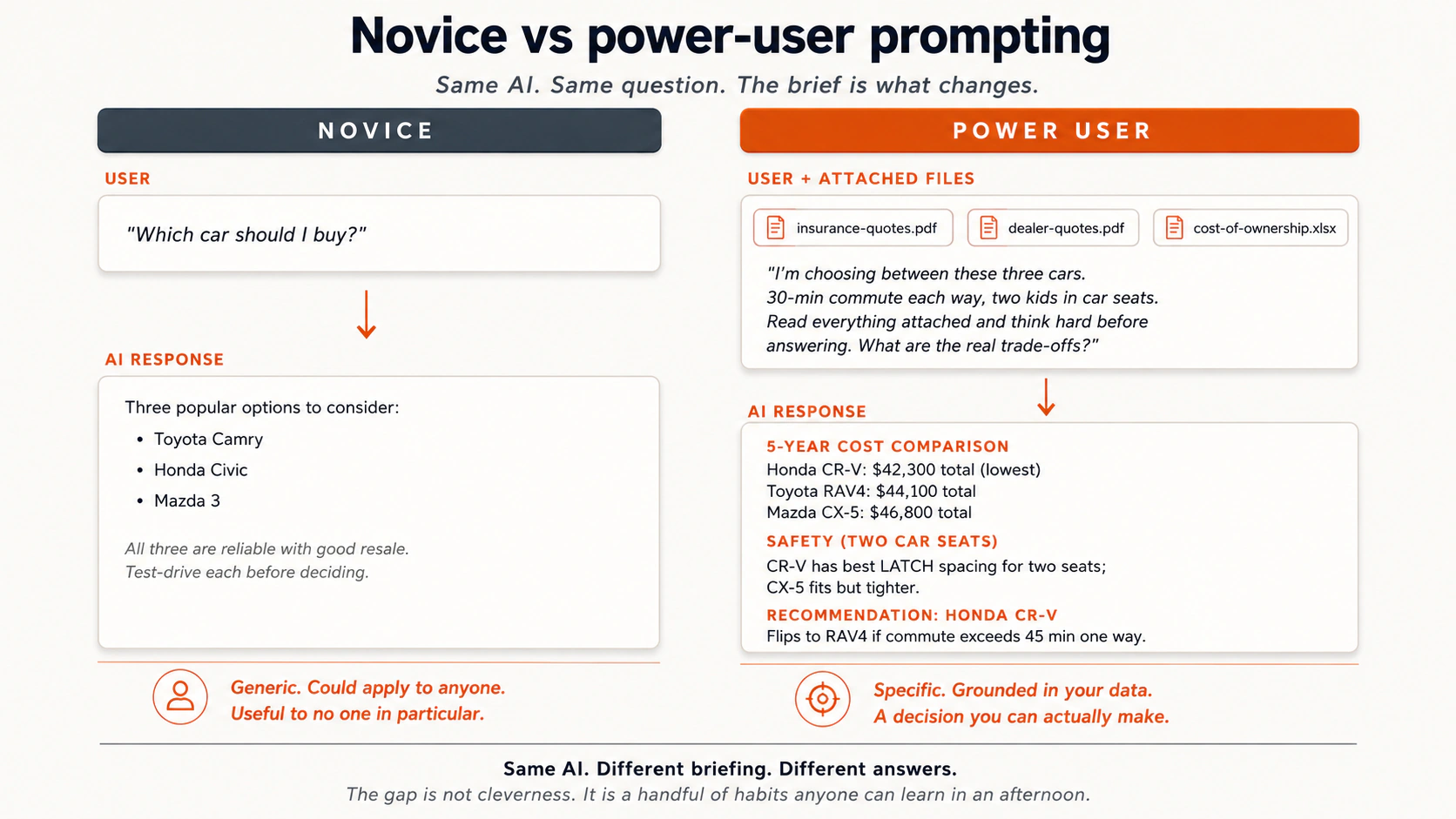
देखें कि दोनों prompts के बीच क्या बदलता है। सवाल वही है; briefing नहीं।
मैदान से कुछ और असली contrasts:
- एक car ख़रीदना। Novice: "कौन सी car सबसे अच्छी है?" Power user: spec sheets, dealer quotes, और insurance plans upload करता है, फिर पूछता है "क्या trade-offs हैं? सब कुछ पढ़ें और गहराई से सोचें।"
- काम पर self-review। Novice: "मेरे boss के लिए एक self-review लिखें।" Power user: अपने project tracker का एक screenshot, हाल के project docs, और notes का एक voice memo upload करता है, फिर एक draft माँगता है।
- एक business idea की critique। Novice: "मेरे पास एक शानदार business idea है, mobile tie-dyeing, इसकी critique करें।" यह sycophancy bait है, AI ज़्यादातर तारीफ़ ही करेगा। Power user: "वस्तुनिष्ठ रूप से analyze करें। यह rubric इस्तेमाल करें: क्या कोई समस्या है जिसे हल करना मायने रखता है, क्या कोई market है, क्या कोई competitive advantage है?" AI ने उस idea को 100 में से 8 दिए और समझाया क्यों।
- एक blog post लिखना। Novice: "BlackBerry के बारे में एक blog post लिखें।" नतीजा: AI slop। Slop वह कलात्मक शब्द है उस AI output के लिए जो ऊपर-ऊपर धाराप्रवाह है और अंदर से खोखला, व्याकरण की दृष्टि से साफ़, हल्का सा Wikipedia जैसा, "in today's fast-paced world" जैसे phrases से भरा, और कुछ ऐसा कहता हुआ जिसे कोई reader एक घंटे बाद याद नहीं रखेगा। जब आप कोई context और कोई constraints नहीं देते, तो AI by default यही पैदा करता है। Power user: पहले outline, outline की critique, हर heading को bullets में फैलाएँ, bullets की critique, और सिर्फ़ तब prose माँगें।
जो mental model इन्हें एक साथ बाँधता है: AI एक बहुत समझदार, ताज़ा college graduate की तरह है। बहुत motivated। आपके बारे में अभी ज़्यादा नहीं जानता। उसे वैसे ही brief करें। क्या एक नए colleague के पास इस काम को अच्छी तरह करने के लिए काफ़ी जानकारी होगी? अगर नहीं, तो उसे और दें।
2. Pretrained knowledge
ये slides ख़ास तौर पर स्कूली छात्रों के लिए बनाई गई हैं। ये pretrained knowledge को बच्चों के अनुकूल नज़रिए से समझाती हैं: AI ने जीकर नहीं, पढ़कर सीखा। इनमें "Loud, Quiet, Secret" framework (ऐसे topics जिन पर बहुत, थोड़ा, या कभी बात नहीं होती), interactive classroom games (Trust-o-Meter, Stump the Robot, Be a Fact-Checker), और मुख्य सबक़ शामिल है: "भरोसे से बोलना सही होने के बराबर नहीं है।" PPTX Download करें offline classroom इस्तेमाल के लिए।
AI ने दुनिया को अनुभव करके नहीं सीखा। इसका कोई शरीर नहीं, कोई इंद्रियाँ नहीं, इसमें घूमने-फिरने में बिताया कोई समय नहीं। इसने दुनिया के बारे में text पढ़कर सीखा, internet text की भारी मात्रा। Reddit और Quora threads, Wikipedia, किताबें, news articles, research papers, blogs, forums।
Training data में frequency मोटे तौर पर answer की reliability के बराबर है। तो:
- मज़बूत: cooking, celebrity gossip, आम medical advice, top-1000 movies, popular programming languages, Voyager 1 record पर क्या है (1970 के दशक में launch किया गया NASA spacecraft, Earth से लगभग 25 अरब मील दूर, 55 भाषाओं में अभिवादन ले जा रहा), बिल्लियाँ दीवारों को क्यों घूरती हैं (वे ऐसी हल्की आवाज़ें और हलचलें पकड़ती हैं जो इंसान चूक जाते हैं)।
- कम: quasars (आसमान में बेहद चमकीली चीज़ें जो black holes से चलती हैं), Cantonese (internet text का 0.1% से कम), क्षेत्रीय इतिहास, niche professional knowledge।
- ग़ैरमौजूद: आपकी company का गुप्त data, आपका private calendar, model की knowledge cutoff date के बाद publish हुई कोई भी चीज़, कोई भी ऐसी चीज़ जिसे किसी ने कभी public internet पर नहीं डाला।
दो व्यावहारिक नतीजे:
Typos ठीक करने में समय बर्बाद न करें। AI को internet text पर train किया गया, जो typos से भरा है। यह ग़लत spelling वाले prompts को आसानी से संभाल लेता है। "definately" की ग़लत spelling answer नहीं बदलेगी।
सोखी हुई ग़लतियों पर नज़र रखें। AI ने उन्हीं sources से misconceptions और पुरानी जानकारी भी सोख ली। एक भरोसे से ग़लत forum post model में भरोसे से ग़लत बन जाता है। किसी भी अहम चीज़ को एक primary source के ख़िलाफ़ check करें।
टूटी हुई reasoning पहचानना अपनी अलग discipline है, और AI युग में कैसे सोचें Crash Course इसे सीधे सिखाता है। इसे ढूँढने की पहली जगह उन भरोसे-भरे pretrained answers में है जहाँ topic का training data कम या विवादित था। Confidence सही होने का संकेत नहीं है।
किसी pretrained answer पर भरोसा करने से पहले एक झटपट mental test:
| सवाल का प्रकार | Training data में कितना अच्छा represented? | Trust level |
|---|---|---|
| "मैं roux कैसे बनाऊँ?" | Cooking internet पर सबसे ज़्यादा चर्चित topics में से एक है। | High। |
| "किसी top-1000 movie का plot।" | हज़ारों बार review और re-review की गई। | High। |
| "किसी अनजान गाँव का इतिहास।" | शायद सिर्फ़ एक Wikipedia paragraph, या वह भी नहीं। | Low; एक primary source से verify करें। |
| "मेरी industry में हाल का regulatory बदलाव।" | लगभग पक्का knowledge cutoff के बाद का। | Web search के बिना किसी पर भरोसा न करें। |
| "हमारी company ने पिछली तिमाही में क्या तय किया?" | Training data में बिल्कुल नहीं। | किसी पर भरोसा न करें; model अंदाज़ा लगा रहा है। |
यह कोई नियम नहीं है जिसे आपको रटना है। यह वही सहज समझ है जो आप किसी भी दूसरे source पर लगाएँगे: "इस इंसान को यह कैसे पता होगा?" इसे AI पर भी लगाएँ।
एक non-software उदाहरण। एक reader ने एक बार AI से एक क्षेत्रीय लोक खेल के नियमों का summary माँगा जो उनकी दादी के गाँव में खेला जाता था। AI ने भरोसे से तीन paragraphs के नियम बना दिए। दादी से पूछा, तो उन्होंने कहा कि नियम लगभग पूरी तरह ग़लत थे: AI ने दूसरे इलाक़ों के मिलते-जुलते खेलों के विवरण मिला दिए थे क्योंकि वह ख़ास खेल internet पर बमुश्किल था। AI ने झूठ नहीं बोला; इसने कम data से generalize किया। Reader की ग़लती पूछना नहीं थी, बल्कि यह मान लेना थी कि confidence accuracy के बराबर है।
उत्सुक हैं कि AI पूरी तरह confident सुनाई देकर भी ग़लत कैसे हो सकता है? इसके पीछे एक गहरी वजह है। Elan Barenholtz का लेख "LLMs show language does not describe reality" (IAI, 2026) सरल English में बताता है कि ये models असल में कैसे काम करते हैं। यह लेख इंसानी भाषा के बारे में कुछ बड़े दार्शनिक दावे भी करता है; जो हिस्सा आपको उपयोगी लगे उसे लें और बाक़ी छोड़ दें।
स्कूली छात्रों के लिए ख़ास तौर पर बनाई गई एक मज़ेदार interactive exercise। छात्र topics (pizza, कुत्ते, एक दुर्लभ गहरे-समुद्र की मछली, आपका WiFi password, आज आपने क्या खाया, आपके परिवार के ख़ास Ludo नियम) को तीन zones में बाँटते हैं: Loud (हर कोई इस पर बात करता है, AI इसे अच्छी तरह जानता है), Quiet (सिर्फ़ कुछ ही करते हैं, AI इसे ग़लत समझ सकता है), या Secret (किसी ने इसे लिखा ही नहीं, AI इसे जान ही नहीं सकता)। Exercise Online खेलें | PPTX Download करें offline classroom इस्तेमाल के लिए।
3. 3 retrieval modes: pretrained, web search, deep research
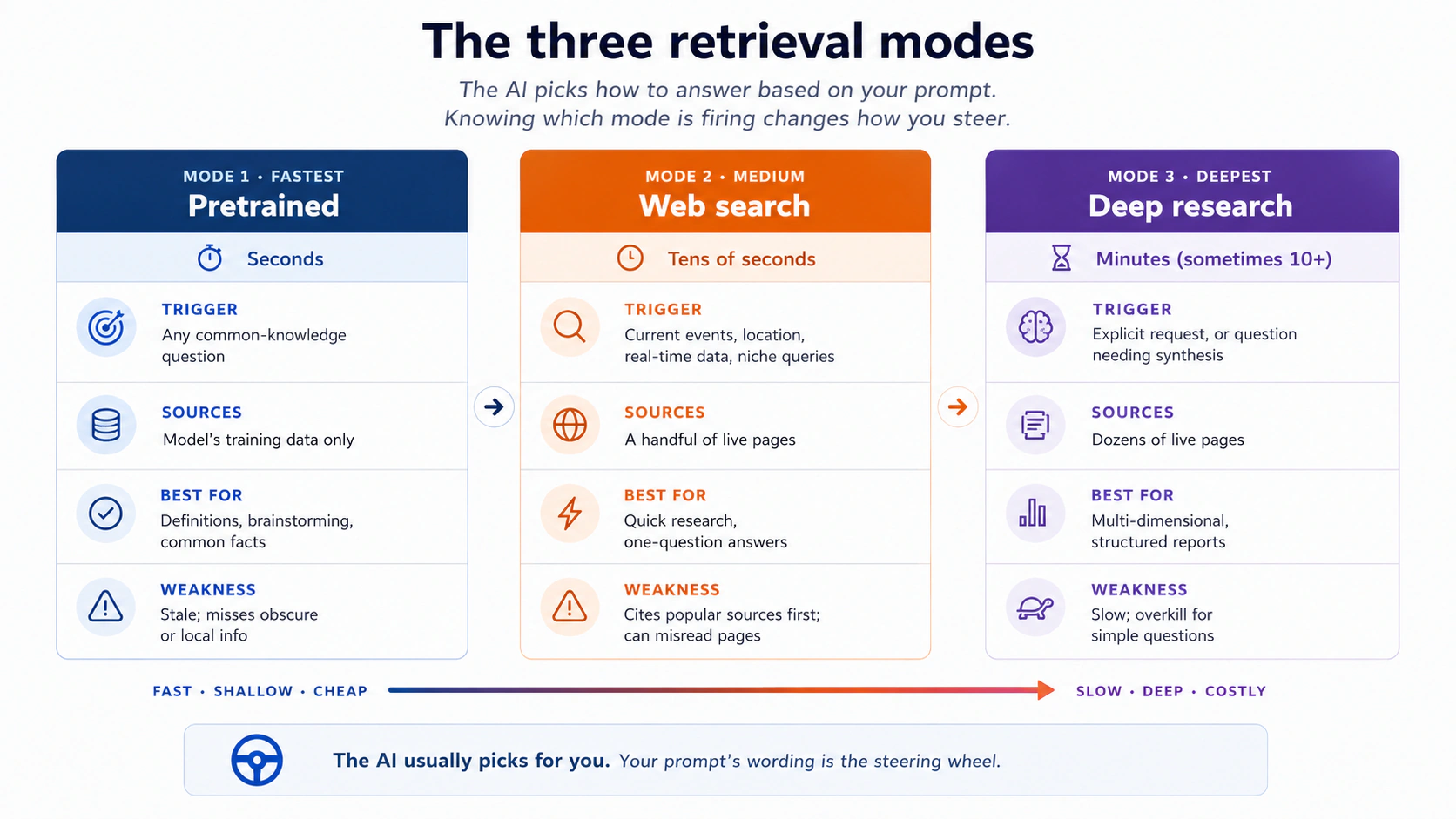
जब आप कोई सवाल पूछते हैं, modern AI tools चुपचाप तय करते हैं कि जवाब कैसे देना है। या तो वे सिर्फ़ pretrained knowledge से जवाब देते हैं, या वे एक web search दागते हैं और कुछ pages पढ़ते हैं, या वे deep research चलाते हैं, जहाँ वे कई मिनट दर्जनों sources scan करने में बिताते हैं और एक structured report लिखते हैं।
आपको पता होना चाहिए कि कौन सा mode fire हो रहा है, क्योंकि हर एक की अलग ताक़तें और अलग failure modes हैं।
इसे ठोस बनाने के लिए कुछ examples:
- Pretrained ठीक जवाब देता है: "बिल्लियाँ दीवारों को क्यों घूरती हैं," "Voyager 1 record पर क्या है," "Hamlet का plot summary करें।" ये हफ़्ते-दर-हफ़्ते नहीं बदलते।
- Web search एक पुराने model को बचाता है: हर model की एक knowledge cutoff date होती है, और उस date के बाद जो कुछ भी वायरल हुआ वह इसके लिए अदृश्य है। एक meme, एक regulation, एक product launch: web search के बिना, AI को कोई अंदाज़ा नहीं कि आप किस बारे में बात कर रहे हैं। Web search के साथ, यह एक हाल का article खींचता है और सही जवाब देता है।
- Web search का ग़लत जाना: एक दोस्त ने पूछा "Henderson, Nevada में कहाँ दौड़ें।" AI ने एक 20 साल पुराना web page cite किया और एक ऐसा school recommend किया जो अब आम जनता के लिए खुला नहीं। Web search यह check नहीं करता कि sources मौजूदा हैं या नहीं।
- Deep research इंतज़ार के लायक़: "हमारे मोहल्ले में एक Halloween haunted house plan करें, permits, fire safety, और noise ordinances समेत।" AI एक research plan बनाता है, कई parallel searches चलाता है, summary करता है, तय करता है कि आगे किसमें गहराई में जाना है, और checklists के साथ एक multi-section report बनाता है। यह एक chatbot answer नहीं है; यह काम को एक घंटे के लिए एक junior researcher को सौंपने के ज़्यादा क़रीब है।
पर्दे के पीछे, सटीक mechanics tool-दर-tool बदलती हैं, पर shape एक जैसी रहती है। एक search-and-retrieval layer searches जारी करती है, result list scan करती है, सबसे relevant pages खींचती है, और हर एक को एक छोटे passage या summary में घटा देती है। अक्सर वह layer एक अलग, छोटा model होती है। सिर्फ़ घटाया गया version उस user-facing model तक बहता है जो आपसे बात करता है।
जो model आपसे बात कर रहा है वह अक्सर असली page को सीधे नहीं पढ़ता। यह उसका एक संक्षिप्त version पढ़ता है। यही वजह है कि यह कभी-कभी ग़लत बयान कर देता है कि किसी page ने असल में क्या कहा था: जानकारी model तक पहुँचने से पहले एक translation layer से गुज़री, और translation layers बारीकी खो देती हैं।
व्यावहारिक उपाय: AI को बताएँ कि किस तरह के sources इस्तेमाल करने हैं। "क्या vaccines safe हैं" के बजाय, try करें "World Health Organization, FDA, European Medicines Agency, और peer-reviewed studies इस्तेमाल करें। Forums या personal blogs इस्तेमाल मत करें।" Source quality एक knob है जिसे आप घुमा सकते हैं। Default settings पहले popular sources cite करती हैं (Reddit, Wikipedia, YouTube, ख़ुद Google, Yelp), जो अक्सर भरोसेमंद होते हैं पर high-stakes सवालों के लिए हमेशा भरोसे के लायक़ नहीं।
एक दूसरा उपाय: AI से source quote करने को कहें। "हर claim के लिए, source page से वह सटीक वाक्य quote करें जो उसका समर्थन करता है।" यह retrieval layer को मूल शब्द सामने लाने पर मजबूर करता है, जो summary-layer की काफ़ी drift पकड़ लेता है।
एक non-software उदाहरण। एक neighborhood-association volunteer ने स्थानीय water quality पर एक town meeting की तैयारी के लिए deep research इस्तेमाल किया। उसका prompt: "पिछले 24 महीनों में [उसके शहर] में मौजूदा water quality issues research करें। EPA, शहर की public utility reports, और peer-reviewed studies इस्तेमाल करें। News editorials और forums से बचें। एक structured report बनाएँ जिसमें हो: (1) तीन सबसे ज़्यादा cite किए गए issues, (2) trends दिखाते data tables, (3) तीन ठोस सवाल जो residents को utility से पूछने चाहिए।" आठ मिनट बाद उसके पास मौजूदा स्थानीय data पर आधारित एक briefing थी। Pretrained mode यह नहीं कर सकता था; अकेले web search एक उथला answer देती; deep research सही tool था क्योंकि सवाल बहुआयामी और मौजूदा था।
अपने दिमाग़ में एक mode चुनना। आप आमतौर पर एक button दबाकर mode नहीं चुनते; AI आपके prompt के आधार पर चुनता है। पर आप steer कर सकते हैं:
| Phrasing pattern | यह आमतौर पर क्या trigger करता है |
|---|---|
| "What is X" / "Summarize Y" | सिर्फ़ Pretrained। |
| "What's the latest on X" / "Today" / "This week" / कोई ख़ास शहर | Web search। |
| "Research X thoroughly," "produce a report with citations," "use these source types" | Deep research (उन tools में जिनके पास यह है; वरना extended web search)। |
| Files attach करना | Files के लिए pretrained रहता है; अगर prompt मौजूदा जानकारी माँगे तो context के लिए web search कर सकता है। |
AI बनाम Google। ये एक ही tool नहीं हैं। Google का इस्तेमाल झटपट scans के लिए, किसी ख़ास ज्ञात site पर जाने के लिए, या कोई चीज़ ख़रीदने के लिए करें (2013 Honda Civic के लिए air filter)। AI का इस्तेमाल तब करें जब आपको synthesis चाहिए: pros और cons, multi-source तुलना, एक लिखी-लिखाई analysis। चुनाव इस पर निर्भर है कि आपको एक link चाहिए या एक answer।
एक साथ-साथ रखने का एक आसान नियम:
| Task | Google के साथ बेहतर | AI के साथ बेहतर |
|---|---|---|
| "Form 1040 के लिए official IRS page ढूँढें।" | हाँ। आप एक ख़ास ज्ञात site पर पहुँचना चाहते हैं। | नहीं। |
| "तीन diabetes medications की तुलना करें और हाल के evidence क्या कहते हैं।" | धीमा। आप 8 tabs पढ़ेंगे। | तेज़। AI evidence को एक जगह synthesize करता है। |
| "2018 ThinkPad के लिए replacement charger ख़रीदो।" | हाँ। आप एक product link चाहते हैं। | नहीं। |
| "एक 6 साल के बच्चे के साथ 4-दिन की Lisbon trip plan करें, कोई museums नहीं।" | धीमा। आप blogs और reviews में उलझेंगे। | तेज़। AI constraints को जोड़ता है। |
| "कल मौसम कैसा रहेगा?" | कोई भी। | कोई भी। |
| "मेरे tomato plant के पत्ते पीले क्यों पड़ रहे हैं?" | ठीक है। कई gardening sites। | एक photo attach करने के साथ बेहतर। |
अगर आपका सवाल "X कहाँ है" है, तो Google की ओर बढ़ें। अगर आपका सवाल "यह सब देखते हुए, मुझे क्या सोचना चाहिए" है, तो AI की ओर बढ़ें।
AI के साथ ज़्यादा भरोसेमंद web-search results कैसे पाएँ
जब आप सच में web search चाहते हैं, तीन छोटी आदतें quality बढ़ाती हैं:
- जिन sources पर आप भरोसा करते हैं उन्हें नाम दें। "WHO, FDA, और peer-reviewed studies इस्तेमाल करें, forums नहीं।"
- Inline citations माँगें। "हर claim के बाद source cite करें।"
- AI से कहें कि जो verify नहीं कर सका उसे flag करे। "अगर किसी claim का cite किए गए sources से समर्थन नहीं हो सकता, तो उसे 'unverified' mark करें।"
ये तीन lines, किसी भी web-search prompt में paste की गईं, सबसे आम failure mode को घटा देती हैं: AI चुपचाप sources के पार synthesize करके एक भरोसे-भरा वाक्य बना देता है जिसका समर्थन कोई एक भी source नहीं करता।
Part 2: AI से अच्छी तरह बात करना
4. Context ही पूरा खेल है
इंसान active working memory में सिर्फ़ कुछ ही चीज़ें रखते हैं: classic अनुमान कहते हैं लगभग सात, नए अनुमान चार के क़रीब। Modern AI models एक साथ सैकड़ों-हज़ार शब्द रख सकते हैं, कभी-कभी दस लाख। इसे अनुपात में रखने के लिए: लगभग 750,000 शब्द पहली 4 से 5 Harry Potter किताबें हैं, या कई दिनों की लगातार बातचीत। Model जवाब देने से पहले यह सब पढ़ सकता है।
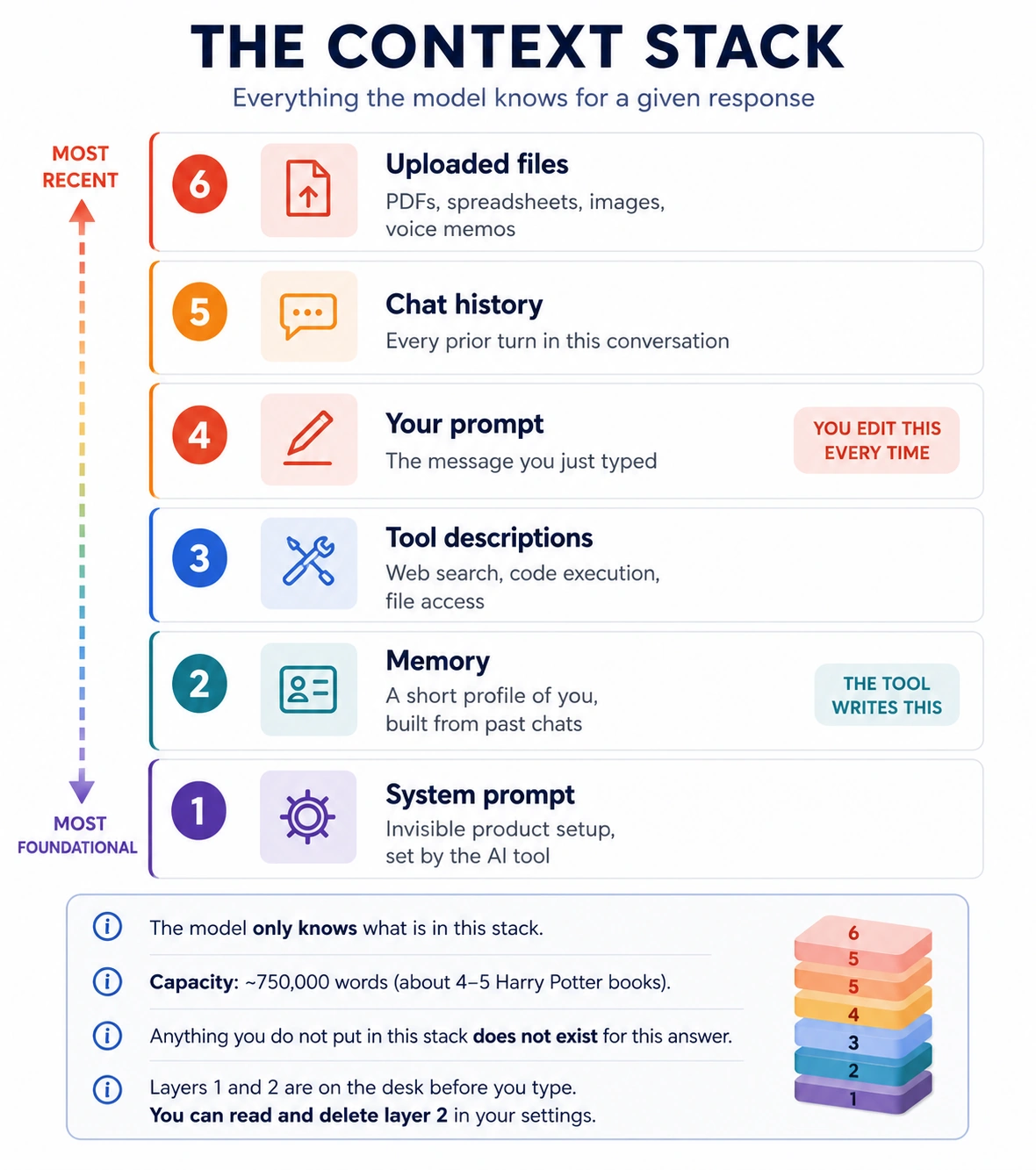
पर यह सिर्फ़ वही पढ़ सकता है जो आप इसे देते हैं। Context वह सब कुछ है जो किसी एक response के लिए model की window में पहुँचता है: product ने जो system prompt set किया, जिन tools को यह call कर सकता है उनके descriptions (web search, code, file access), आपका prompt, इस conversation का chat history, आपकी upload की गई files, और 6 layers में सबसे नई, tool द्वारा आपके बारे में लिखी short profile, जिस पर इस concept में आगे लौटेंगे।
आगे बढ़ने से पहले एक सवाल। जब आप ChatGPT, Claude, या Gemini खोलते हैं और अपना पहला message type करते हैं, क्या AI बिल्कुल zero से शुरू करता है, सिर्फ़ उसी पर काम करते हुए जो आपने अभी type किया? या आपके आने से पहले किसी ने इसे instructions दे दी होती हैं?
ज़्यादातर लोग मानते हैं कि यह blank शुरू होता है। ऐसा नहीं है।
जब आप आते हैं, window खाली नहीं होती। यहाँ "window" का मतलब context window है: What AI Actually Is की reading desk (Idea 5)। उस desk पर अभी जो कुछ है (आपका prompt, अब तक की conversation, आपकी attach की गई files, और कुछ चीज़ें जो tool ने आपके आने से पहले वहाँ रख दीं) वही सब model जानता है, और जो desk पर नहीं है वह इस answer के लिए मौजूद नहीं। ऊपर का diagram दिखाता है कि कौन सी 6 चीज़ें उस पर आ सकती हैं।
अब उस desk की सबसे नीचे वाली layer देखें: system prompt। जब आप fresh chat खोलते हैं, तो आपको लग सकता है कि आप blank surface से शुरू कर रहे हैं। ऐसा नहीं है। आपके एक character type करने से पहले, tool बनाने वाली company desk पर instructions का एक set रख चुकी होती है। आप उन्हें chat में कभी नहीं देखेंगे, पर model आपकी लिखी किसी भी चीज़ से पहले उन्हें पढ़ता है।
इसे ऐसे सोचें जैसे restaurant owner पहले customer के बैठने से पहले नए waiter को brief करता है। "Friendly रहो। Daily special recommend करो। अगर कोई allergens के बारे में पूछे, तो हमेशा kitchen से check करो, guess मत करो।" Waiter हर table के साथ वे instructions follow करता है, और आपको वह briefing कभी सुनाई नहीं देती। AI भी उसी तरह काम करता है। Engineers उन invisible instructions को system prompt कहते हैं।
उस briefing में आम तौर पर क्या होता है:
- कैसे behave करना है (helpful, honest, careful)।
- क्या refuse करना है (harmful content, dangerous instructions)।
- कौन सा tone इस्तेमाल करना है (formal, chatty, concise)।
- कब disclaimers जोड़ने हैं ("मैं AI हूँ और medical advice नहीं दे सकता")।
- कौन से tools call कर सकता है (web search, code execution, file access)।
इसीलिए Claude, ChatGPT, और Gemini एक ही सवाल पर भी अलग महसूस होते हैं। जो "personality" आपको लगती है, वह model के अंदर baked नहीं है। वह उन instructions में baked है जिन्हें company ने आपके आने से पहले load किया। Claude की instructions careful reasoning और honesty पर ज़ोर देती हैं। ChatGPT की conversational warmth और broad helpfulness पर। Gemini की conciseness और source grounding पर। वही सवाल, तीन अलग briefings, तीन अलग tones।
ख़ुद try करें: तीनों से पूछें "explain why the sky is blue, in one paragraph." Facts मिलते-जुलते होंगे। Tone, length, और style साफ़ तौर पर अलग होंगे। यह फ़र्क़ ज़्यादातर system prompt है।
अब आप जानते हैं क्यों:
- AI polite रहता है, भले आप rude हों (इसे ऐसा करने को कहा गया था)।
- यह कुछ requests refuse करता है (इसे कहा गया था)।
- यह safety disclaimers जोड़ता है जो आपने नहीं माँगे (इसे कहा गया था)।
- यह कभी-कभी ज़रूरत से ज़्यादा माफ़ी माँगता है (इसे caution की तरफ़ झुकने को कहा गया था)।
- अलग tools वही facts अलग voice में देते हैं (अलग briefings)।
ये personality traits नहीं हैं। ये instructions हैं।
आप अपनी layer जोड़ सकते हैं। Company का system prompt fixed है, पर अब ज़्यादातर tools आपको अपनी instructions लिखने देते हैं जो हर chat में उसके साथ load होती हैं। जब आप tool की instruction settings में "I am a nurse, assume clinical vocabulary" या "always respond in formal English" लिखते हैं, तो आप system prompt में अपनी line लिख रहे होते हैं। Model हर response से पहले इसे पढ़ता है, company की briefing की तरह, इसलिए यह बिना repeat किए टिकता है।
हर tool में इसे कहाँ पाएँ:
| Tool | Setting name | Direct link |
|---|---|---|
| Claude | Personal preferences (Settings > General) | claude.ai/new#settings/general |
| ChatGPT | Personalization (under Settings) | chatgpt.com/#settings/Personalization |
| Gemini | Personalization settings | gemini.google.com/personalization-settings |
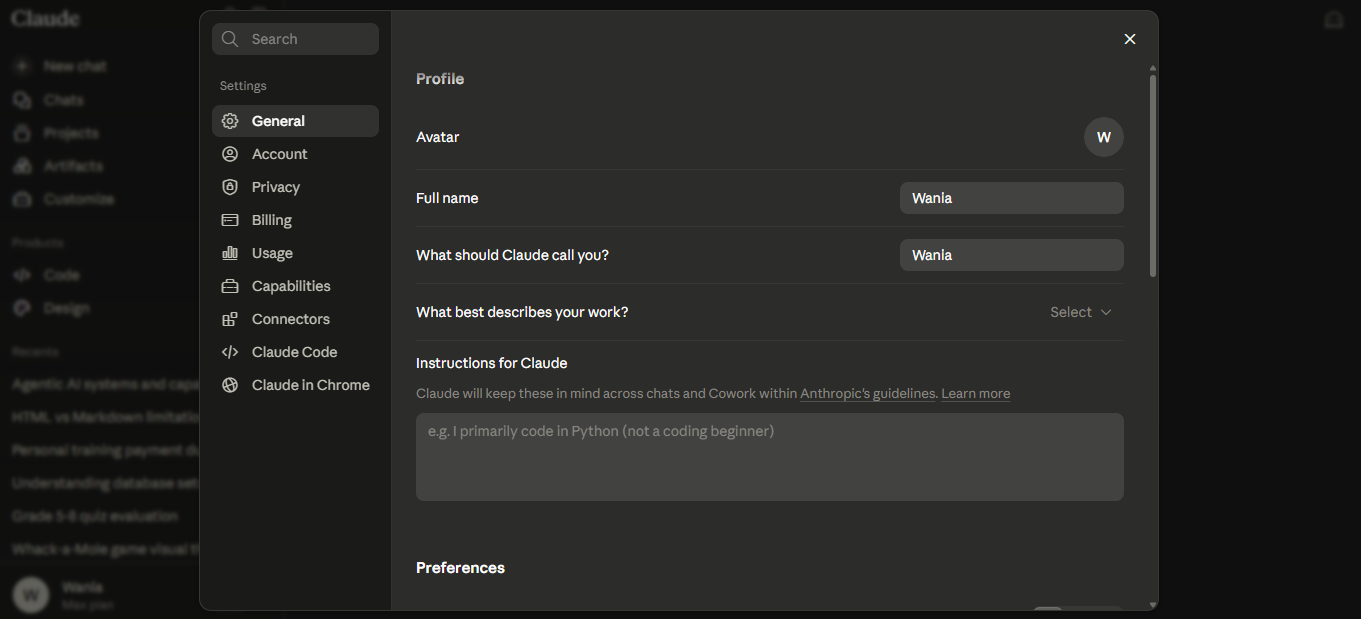
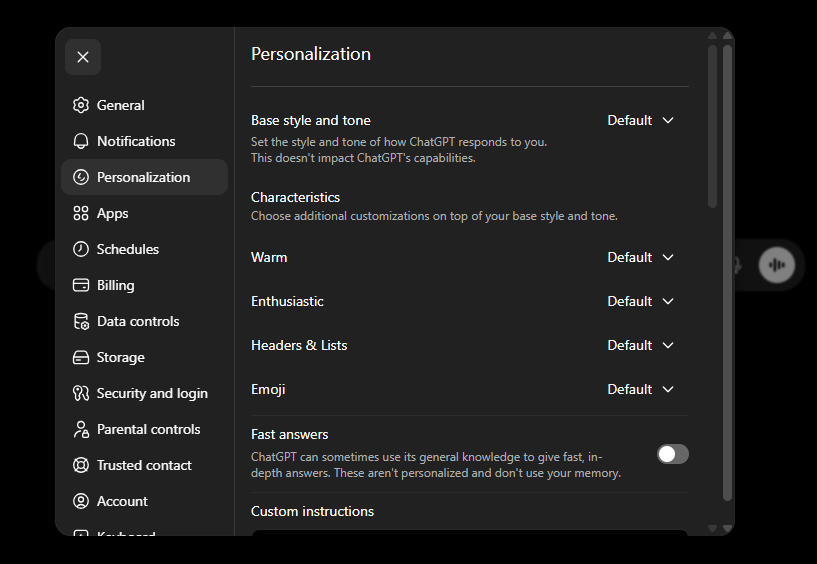
तीनों tools में ये settings pages असल में ऐसे दिखते हैं। हर एक में text area होता है जहाँ आप अपनी instructions type करते हैं, और हर future chat उन instructions को पहले से model की desk पर रखकर शुरू होती है।
Claude: Settings > General खोलें और "Instructions for Claude" तक scroll करें। Text area में अपनी instructions type करें। Claude इन्हें आपकी सभी chats में ध्यान रखेगा।
ChatGPT: Settings > Personalization खोलें। आपको style controls (Warm, Enthusiastic, Headers and Lists, Emoji) और नीचे "Custom instructions" section दिखेगा। Custom instructions तक scroll करें और वहाँ अपनी instructions type करें।
Gemini: Personalization settings खोलें। Switch on करें, फिर अपनी instructions लिखने के लिए Add button पर click करें।
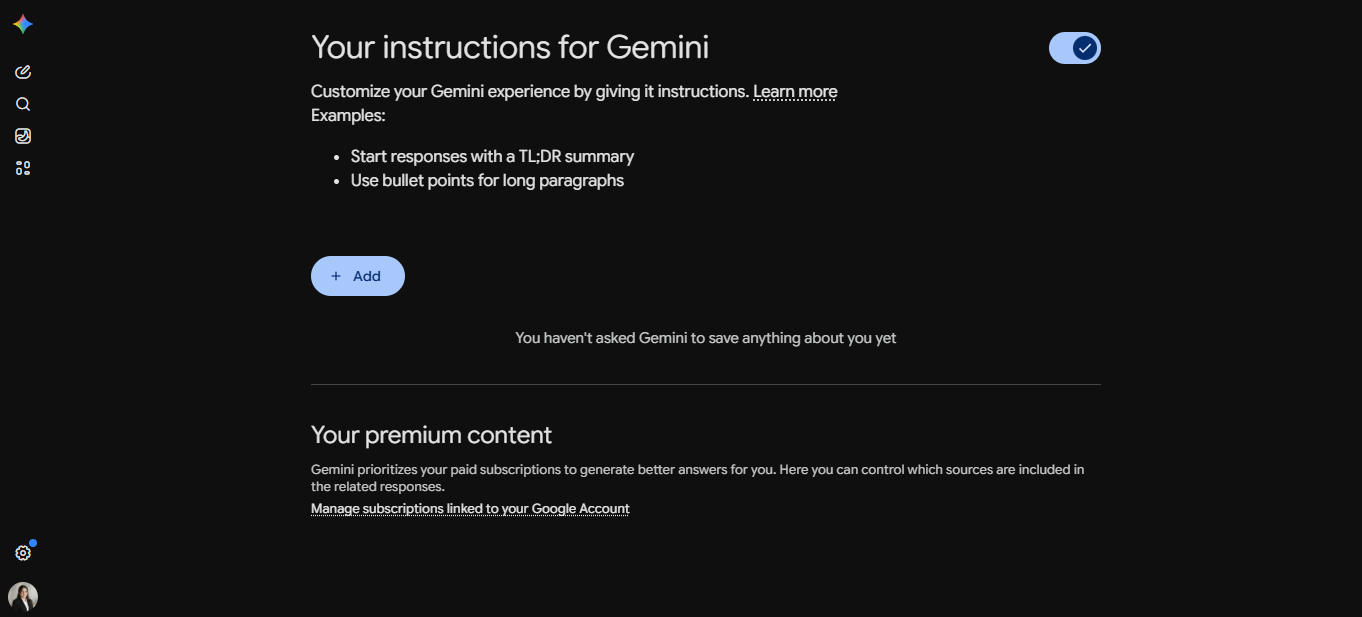
तीनों में steps वही हैं: link खोलें, अपने बारे में और AI से कैसे जवाब चाहते हैं इस पर कुछ sentences लिखें, और save करें। उस पल से हर नई chat आपकी briefing पहले से loaded रखकर शुरू होती है। आपको खुद को दोहराना नहीं पड़ता।
एक छोटा लेकिन असली example। एक teacher अपनी instruction set करती है: "I teach Grade 5 science. Explain everything at a 10-year-old's reading level. Never use jargon without defining it first." पर्दे के पीछे क्या होता है: ये sentences system prompt में add हो जाते हैं, company की अपनी instructions के ठीक बगल में। इसलिए हर बार जब वह नई chat खोलती है, उसके एक शब्द type करने से पहले model की desk पर दोनों briefings होती हैं: company वाली ("be helpful, be honest, refuse harmful requests") और उसकी वाली ("I teach Grade 5 science, keep it simple")। उसे फिर कभी "I'm a teacher" नहीं कहना पड़ता। उसे हर prompt में "explain it simply" repeat नहीं करना पड़ता। AI पहले से जानता है, ठीक वैसे जैसे waiter पहले से जानता है कि kitchen से check करना है, क्योंकि owner की briefing ने पहले customer के बैठने से पहले ऐसा कह दिया था।
यह layer हर chat से पहले load होती है, इसलिए इसमें जोड़ते रहना tempting है: AI जब भी unwanted चीज़ करे, एक और line। एक साल बाद 20 lines होती हैं और कुछ quietly contradict करती हैं। Anthropic ने अपने products में यही देखा और July 2026 में accumulated standing instructions में से ज़्यादातर delete कर दीं, quality के नुकसान के बिना। Modern models situation को इतनी अच्छी तरह पढ़ते हैं कि कई old rules सिर्फ़ रास्ते में आती थीं।
दो habits इस layer को useful रखती हैं। वही लिखें जो AI खुद work out नहीं कर सकता, जैसे आपका job, audience और hard constraints, न कि वह जो वैसे भी करता। और हर कुछ महीनों में पूरी layer पढ़ें। हर line से पूछें: इसे delete करने पर क्या AI सच में कुछ गलत करेगा? अगर नहीं, delete करें। Project instructions पर भी यही test लगाएँ।
अब full stack को एक बार और देखें। System prompt foundation है, सबसे नीचे वाली layer। आपका prompt, आपकी chat history, और आपकी uploaded files उसके ऊपर बैठती हैं। जब आप उन settings में अपनी instructions लिखते हैं, तो आप company वाली layer के ठीक बगल में अपनी layer जोड़ रहे होते हैं, इसलिए हर chat आपका context पहले से loaded रखकर शुरू होती है। Model क्या देखता है, यह पूरी तस्वीर है, और यही अकेली चीज़ है जो model देखता है। चूँकि इसकी अपनी कोई memory नहीं, इस stack के बाहर कुछ भी इस answer के लिए मौजूद नहीं। यह stack ही इस response के लिए पूरी दुनिया है।
ठोस contrast:
- सादा prompt: "physics बनाम zoology पढ़ने के pros और cons।" आपको आम high-school-counselor जैसी सलाह मिलेगी।
- Context-भरा prompt: वही सवाल, साथ में आपके career assessment results एक PDF के रूप में upload किए हुए और आपके high-school schedule का एक screenshot। अब AI आपके ख़ास aptitude profile, आपके ख़ास course इतिहास, और किस choice के साथ क्या fit होता है, इस पर बात कर सकता है।
वही model। वही सवाल। अलग answer। फ़र्क context है, prompt की चतुराई नहीं।
जो discipline आप सीख रहे हैं: send दबाने से पहले, अपने आप से पूछें कि इसका अच्छा जवाब देने के लिए एक समझदार नए colleague को अपने सामने क्या चाहिए होगा। फिर वे चीज़ें attach करें। Colleague जो कुछ आप उसके सामने रखेंगे उसे ध्यान से पढ़ेगा; वह अंदाज़ा नहीं लगाएगा कि आपने क्या नहीं बताया, आपकी filing cabinet नहीं खोजेगा, आपकी industry, आपकी team के इतिहास, या कल के email thread का अनुमान नहीं लगाएगा। अगर इस काम को करने के लिए उसे किसी document या किसी constraint की ज़रूरत होती, तो आपको वह शामिल करना होगा।
एक non-software उदाहरण। एक 7वीं कक्षा की teacher ने AI से "water cycle पर एक lesson plan draft करें" कहा। Output एक आम plan था जो उसे किसी भी textbook में मिल जाता: definitions, एक diagram, तीन discussion questions। अगले दिन उसने फिर try किया, तीन चीज़ें attach करके: अपना course syllabus (ताकि AI को पता हो कि इस lesson से पहले और बाद में क्या आया), पिछले हफ़्ते की student worksheets grades दिखाते हुए (ताकि AI को पता हो कि कौन से concepts पहुँचे और कौन से नहीं), और उसके school का standardized test format। नए lesson plan की शुरुआत उन दो concepts की पाँच-मिनट की review से हुई जिन्हें पिछले हफ़्ते की worksheets ने कमज़ोर दिखाया था, नए material को उस test format में पिरोया गया जो students मई में देखेंगे, और एक check-for-understanding सवाल से बंद हुआ जो उसके syllabus के अगले topic से मेल खाता था। वही model, वही teacher, वही subject। बस फ़र्क इतना था कि दूसरे prompt ने AI को वह बता दिया जो एक समझदार नए colleague को जानना ज़रूरी होता।
यह आदत, किसी भी ग़ैर-मामूली prompt से पहले एक checklist के रूप में दोबारा कही गई:
| सवाल | अगर हाँ, तो उसे attach या बयान करें |
|---|---|
| क्या कोई document है जिससे answer मेल खाना चाहिए? | हाँ: उसे attach करें। |
| क्या कोई constraint है जिसका AI अनुमान नहीं लगा सकता (budget, time, team में कौन है)? | हाँ: उसे बयान करें। |
| क्या कोई पुराना context है (एक पिछला फ़ैसला, एक मौजूदा process)? | हाँ: एक paragraph में summary करें। |
| क्या कोई output format है जो आप चाहते हैं (table, email, bullet list)? | हाँ: उसे नाम दें। |
| क्या कोई audience है (एक boss, एक बच्चा, एक अजनबी)? | हाँ: उन्हें नाम दें। |
पाँच lines context, ठीक से चुनी हुई, पाँच paragraphs चतुराई को हरा देती हैं।
Sixth layer: AI अब आपके बारे में notes लिखता है। ऊपर का context आपने desk पर रखा था। तीनों tools ने अब एक layer जोड़ी है जिसे वे खुद बनाते हैं। काम करते समय tool quietly आपकी और आपके काम करने के तरीके की short summary लिखता है और हर नई chat की शुरुआत में window में load करता है।
यह पहले पढ़ी बात के उलट लग सकता है। ऐसा नहीं है, और वजह अहम है: memory model को memory नहीं देती। Model अब भी stateless है और desk पर मौजूद चीज़ों से ही answer देता है। Memory वह note है जिसे tool आपके बारे में रखकर आपके type करने से पहले desk पर रखता है। यह stack की sixth layer है, exception नहीं। "Model सिर्फ़ window की चीज़ें जानता है" अब भी सही है। Tool आपकी तरफ़ से window भरने में बेहतर हुआ है।
| Tool | इसका नाम | Control कहाँ करें | Clean-slate mode |
|---|---|---|---|
| Claude | Memory, chat search से अलग | Settings > Memory | Incognito chat |
| ChatGPT | Memory: saved memories और past-chat reference | Settings > Personalization > Memory | Temporary Chat |
| Gemini | Personal context | Settings & help > Personal context | Temporary Chat |
Menu names और availability बदलती रहती हैं। Gemini version को activity history on वाला personal Google account चाहिए, इसलिए school या work login में नहीं दिखेगा। Table के बजाय अपनी settings check करें।
तीन habits और एक warning।
- एक बार पढ़ें कि क्या stored है। Memory panel खोलकर सच में पढ़ें। ज़्यादातर लोग दोनों दिशाओं में surprise होते हैं: कुछ अपेक्षा से sharp होता है, कुछ ऐसा preference जिसे एक बार casually कहा था और तब से हर answer shape कर रहा है। कोई भी line delete की जा सकती है।
- Correction ज़ोर से कहें। अगर answer stale assumption पर है, chat में कहें: "आप मान रहे हैं कि मैं अभी retail में काम करता हूँ; ऐसा नहीं है।" इससे note update होता है; हर fix के लिए settings खोलने की ज़रूरत नहीं।
- जहाँ context सिर्फ़ mislead करे, clean-slate mode use करें। Usual work से दूर one-off question या ऐसा topic जिसे future answers shape नहीं करने देना, incognito या temporary chat में रखें।
- Confidentiality duty वालों के लिए warning। Doctor, lawyer, accountant या teacher हैं तो memory note में client और student details quietly जमा होकर महीनों बाद unrelated chat में लौट सकती हैं। Identifiable details memory से बाहर रखें; वह काम clean-slate chat या scoped project में करें।
यह नीचे का rule थोड़ा बदलता है। Context rot अब भी लागू है, लेकिन memory on हो तो नई chat blank slate नहीं होती: पुरानी conversation का noise जाता है और आपकी summary साथ आती है। आमतौर पर यही चाहिए। Exception तब है जब summary problem हो। अगर AI हर नई chat में वही गलत assumption करे, prompt rewrite करना रोकें और memory fix करें।
Modern context windows बड़ी हैं, पर अनंत नहीं, और उनके भीतर recall बिगड़ता जाता है। सबसे बड़ी व्यावहारिक ग़लती जो लोग करते हैं: वे एक बहुत लंबी conversation को कई असंबंधित topics के पार चलाते रहते हैं। AI ने अभी आपको एक workout plan करने में मदद की, अब आप इससे एक spreadsheet debug करने को कहते हैं, अब आप इससे अपनी आंटी को एक thank-you note लिखने को कहते हैं। Workout का context अब भी अंदर है, model का ध्यान बँटा रहा है।
मोटा नियम: जब topic बदले, एक नई conversation शुरू करें। करना सस्ता है, करना मुफ़्त है, और answers साफ़ तौर पर बेहतर हो जाते हैं।
ऐसे लक्षण जो आपको बताते हैं कि एक conversation बासी हो गई है:
- AI chat के पुराने हिस्सों का ज़िक्र करने लगता है जिनका आपके अभी पूछे सवाल से कोई लेना-देना नहीं।
- इसके answers समय के साथ लंबे और धुँधले होते जाते हैं, ज़्यादा hedging के साथ।
- यह उस constraint का खंडन करता है जो आपने पाँच turns पहले बताया था।
- यह बिना आगे बढ़े बार-बार माफ़ी माँगने लगता है।
जो हो रहा है उसका एक नाम: ज़्यादातर modern chat tools, एक बार conversation काफ़ी लंबी हो जाने पर, chat के पुराने हिस्सों को चुपचाप compact कर देते हैं, वे शुरुआती turns लेते हैं, उन्हें एक छोटे paragraph में summary करते हैं, और जगह बनाने के लिए मूल को summary से बदल देते हैं। जब ऐसा होता है तो Claude एक छोटा "compacting" message दिखाता है; ChatGPT और Gemini यह चुपचाप करते हैं। कहानी बच जाती है, पर बारीकियाँ नहीं। जो library आपने इसे तीन घंटे पहले इस्तेमाल करने को कहा था, जो naming convention पर आप सहमत हुए थे, जो constraint आपने turn चार में बताया था, इनमें से कोई भी चुपचाप summary में ग़ायब हो सकता है और model के answers में दिखना बंद कर सकता है। उपाय ऊपर वाले नियम जैसा ही है, बस बेहतर समझाया हुआ: एक chat window working memory है, storage नहीं। जो कुछ भी एक लंबे session के पार बचना चाहिए वह एक project, एक attach की हुई file, या एक note में होना चाहिए जिसे आप दोबारा paste कर सकें, chat history में ही नहीं, और tool के memory note में भी नहीं, क्योंकि वह आपकी summary रखता है, किसी एक conversation की specifics नहीं।
जब आप ये देखें, तो सहज प्रवृत्ति एक और clarifying prompt से इसे ठीक करने की होती है। इसका विरोध करें: यह सिर्फ़ एक पहले से उलझे context में और उलझा context जोड़ता है। इसके बजाय ऊपर वाला नियम लगाएँ। नई chat शुरू करें, उसमें वे एक-दो facts paste करें जो असल में मायने रखते हैं, और वहीं से आगे बढ़ें। Reset लगभग हमेशा rescue से तेज़ होता है।
अगर मरी हुई chat ने कुछ रखने लायक़ बनाया (एक plan, एक draft, एक फ़ैसला), तो reset करने से पहले उसे एक file में save कर लें। इस तरह आप काम नहीं खोते, पर आप शोर को भी अगले task में नहीं घसीटते।
ऊपर का Concept 4 वाला checklist एक स्पष्ट सवाल उठाता है: अगर AI को हर बार एक colleague की तरह brief करना ज़रूरी है, तो यह बहुत बार-बार typing है। जो जवाब ज़्यादातर modern tools अब देते हैं वह एक feature है जिसे projects कहते हैं, एक workspace जिसे आप एक बार set up करते हैं, उन files, instructions, और audience के साथ जो किसी तरह के काम पर हमेशा लागू होते हैं, ताकि उसके अंदर जो भी chat आप शुरू करें वह वह setup अपने आप विरासत में पाए।
एक project कब बनाएँ। जिस पल आप देखें कि आपने वही files, वही audience description, या वही constraints एक ही topic पर दो या ज़्यादा chats में paste कर दी हैं। यही संकेत है: context एक project में है, एक prompt में नहीं।
एक project आपको क्या दिलाता है, इसके कुछ examples:
- एक "tax filing" project पिछले साल के return, आपके W-2s और 1099s, और एक instruction जैसे "मान लें मैं एक US filer हूँ जिसके एक dependent है। हमेशा अपना math दिखाएँ।" के साथ। उसमें आप जो भी सवाल पूछें वह उसी base से शुरू होता है।
- एक "kids' school" project syllabus और school calendar, और एक instruction जैसे "जवाब देने से पहले हमेशा date को calendar से check करें।" के साथ। तब उपयोगी जब "क्या सोमवार को school है?" साल में चार बार आता है।
- एक "writing voice" project आपकी लिखावट के तीन samples, और एक instruction जैसे "Samples की लय और शब्द-चयन से मेल खाएँ। ऐसी कोई hedging या qualifiers मत जोड़ें जो मैंने इस्तेमाल नहीं किए।" के साथ। अब हर draft generic-AI-voice के बजाय आपकी voice में शुरू होता है।
ऊपर वाले context rot नियम से connection। एक project के अंदर, "एक नई chat शुरू करें" का मतलब अब यह खोना नहीं रहा कि AI आपकी स्थिति के बारे में क्या जानता है, इसका मतलब सिर्फ़ पिछली conversation का शोर खोना है। खड़ी files और instructions साथ चलती रहती हैं। तो reset नियम पर चलना सस्ता हो जाता है: आप chat reset करते हैं, context नहीं।
तीन tools, तीन नाम, एक idea। Claude इसे Projects कहता है, ChatGPT इसे Projects कहता है, और Gemini इसे Notebooks कहता है (जो NotebookLM से sync होती हैं, Google का standalone research tool, जो आप एक में जोड़ते हैं वह दूसरे में दिखता है)। तीनों आपको files upload करने, instructions save करने, और एक ही persistent context पर आधारित कई chats चलाने देते हैं। वे ज़ोर में फ़र्क करते हैं:
- Claude और ChatGPT Projects instructions और behavior की ओर झुकते हैं। आप voice, role, rules, audience set करते हैं, और model उस persona को project की हर chat में भरोसे से थामे रखता है। तब सबसे अच्छा जब AI कैसे जवाब देता है उतना ही मायने रखता है जितना यह क्या जानता है, एक ख़ास voice में लिखना, एक codebase पर काम करना, एक brand tone बनाए रखना, कुछ भी जहाँ style की consistency बात है।
- Gemini Notebooks (और NotebookLM) source की तरफ़ और आगे जाते हैं। PDFs, Google Docs, web URLs, YouTube videos, यहाँ तक कि audio files डालें, और हर answer उन sources पर आधारित clickable inline citations के साथ वापस आता है। असामान्य हिस्सा: workspace दोनों तरफ़ बहती है। जो आप NotebookLM में डालते हैं वह Gemini app के अंदर उसी notebook में दिखता है, और जो भी chat आप एक Gemini notebook के अंदर करते हैं वह अपने आप NotebookLM में वापस एक source बन जाती है। तो workspace समय के साथ आपकी अपनी reasoning जमा करती जाती है, पिछले हफ़्ते की chat इस हफ़्ते की chat के लिए एक और source है, जो "सीखने को अभ्यास से जोड़ता है" ऐसे तरीक़े से जो दूसरे tools नहीं करते। NotebookLM आपके sources से अपने आप बने Audio Overviews (podcast-style summaries जिन्हें आप सुन सकते हैं), Mind Maps, Flashcards, और Slide Decks भी बनाता है। तब सबसे अच्छा जब आप कई sessions के पार study, research, या material पर काम कर रहे हों जहाँ हर session को अगले को ज़्यादा समझदार बनाना चाहिए।
झटपट मोटा नियम। Gemini Notebooks / NotebookLM की ओर बढ़ें अगर workspace समय के साथ बढ़ेगी, study notes, चालू research, कुछ भी जहाँ आप चाहते हैं कि हर session अगले को feed करे। Claude या ChatGPT Projects की ओर बढ़ें अगर workspace एक persona या instructions के सेट के इर्द-गिर्द बनी है जिसे आप चाहते हैं AI chats के पार भरोसे से थामे रखे।
मध्य-2026 तक कहाँ क्या उपलब्ध है:
| Tool | इसे क्या कहते हैं | Free tier? |
|---|---|---|
| Claude | Projects | हाँ, free plan पर 5 तक projects; हर project के अंदर files unlimited |
| ChatGPT | Projects | हाँ, free plan हर project में 5 तक files support करता है; paid plans इसे 25 या 40 तक बढ़ाते हैं |
| Notebooks (Gemini में) और NotebookLM | हाँ, दोनों free हैं; paid tiers (NotebookLM Plus, Gemini AI Pro/Ultra) source limits बढ़ाते हैं |
Free-tier caps की अलग shape पर ध्यान दें: Claude सीमित करता है कि आपके कितने projects हो सकते हैं; ChatGPT सीमित करता है कि हर project कितनी files रख सकता है। जो भी cap पहले टकराएगा, अपनी project structure उसी के इर्द-गिर्द plan करें।
5. Reasoning, या "गहराई से सोचें"
ये स्लाइड्स विशेष रूप से स्कूल के छात्रों के लिए डिज़ाइन की गई हैं। ये reasoning modes की अवधारणा को एक सरल दो-गति मॉडल के ज़रिए समझाती हैं: तेज़ जवाब बनाम धीमी, सावधानीपूर्वक सोच। शिक्षक इन्हें कक्षा में यह समझाने के लिए उपयोग कर सकते हैं कि AI से कब और क्यों जवाब देने से पहले "गहराई से सोचने" के लिए कहना चाहिए, उम्र-उपयुक्त उदाहरणों और इंटरैक्टिव अभ्यासों के साथ। पूरी प्रस्तुति देखें
लगभग 2023 तक, मुश्किल prompts के लिए standard सलाह थी "think step by step।" वह सलाह अब ज़्यादातर बेकार हो चुकी है। Modern models के पास built-in reasoning modes हैं जिन्हें आप सीधे invoke कर सकते हैं।
इसे invoke कैसे करें:
- इसे सादी भाषा में माँगें। अपने prompt में "गहराई से सोचें" या "जवाब देने से पहले ध्यान से सोचें।" यह portable move है: यह हर modern chat tool में काम करता है, याद रखने के लिए कोई ख़ास syntax नहीं।
- interface में thinking-mode toggle इस्तेमाल करें, जहाँ एक दिया गया हो।
- कुछ products पर आपको माँगना ही नहीं पड़ता: tool ख़ुद तय करता है कि कोई सवाल कब इतना मुश्किल है कि extended thinking चाहिए, और इसे आपके लिए चालू कर देता है।
जब extended thinking on होता है, model कई seconds तक सोच सकता है। मुश्किल problems पर, कभी-कभी दस मिनट से ज़्यादा। यह सिर्फ़ धीरे type करना नहीं है; यह अंदरूनी तौर पर कई approaches खंगाल रहा है, अपने काम को check कर रहा है, और सिर्फ़ तब वह answer लिख रहा है जो आप देखते हैं।
एक 2025 METR study ने नापा कि एक frontier model भरोसे से कितना लंबा task पूरा कर सकता है। मध्य-2024 में एक leading model ऐसे tasks संभालता था जिनमें इंसानों को लगभग सात मिनट लगते हैं। शुरुआती-2025 तक यह लगभग एक घंटे तक पहुँच गया, और study ने पाया कि जो लंबाई यह नापती है वह लगभग हर सात महीने में दोगुनी होती रही है। आपके लिए इसका मतलब: AI को असली, मुश्किल tasks दें, सिर्फ़ आसान नहीं। यह उससे ज़्यादा संभाल सकता है जितना आपकी 2023 की सहज समझ बताती है।
एक power-user pattern जो इसका अच्छा इस्तेमाल करता है:
I'm choosing between two cars. Attached: spec sheets for both,
my insurance quote for each, and a spreadsheet of my driving
patterns over the last six months.

Read everything. Think hard. Then tell me:
1. The three trade-offs that actually matter for my driving pattern.
2. Which car you'd choose and why.
3. Under what conditions your recommendation flips.
यह prompt तीन चीज़ें करता है: यह relevant context load करता है, यह स्पष्ट रूप से thinking invoke करता है, और यह prose की दीवार के बजाय structured output माँगता है। तीनों आदतें हैं।
झटपट lookups, एक paragraph के summaries, casual brainstorming। Thinking mode धीमा है और आपके usage budget का ज़्यादा इस्तेमाल करता है। इसे उन सवालों के लिए बचाएँ जहाँ आप चाहते कि एक इंसान अपना समय ले।
Thinking mode यही के लिए है: तेज़ नहीं, बल्कि उस तरह के multi-input, multi-trade-off सवाल को संभालने में सक्षम जिसे आप वरना एक विचारशील colleague को सौंपते और दो दिन इंतज़ार करते। सौदा असली है। आप compute के कुछ मिनट और थोड़ा सा usage budget ख़र्च करते हैं। आपको कुछ ऐसा वापस मिलता है जिसे ख़ुद बनाने में आपका आधा दिन लग जाता।
ऊपर बताई गई उस METR दिशा का मतलब: जिन tasks को आपने दो साल पहले मन में "AI के लिए बहुत complex" की श्रेणी में रखा था, उनमें से ज़्यादातर अब ऐसे tasks हैं जिन्हें AI संभाल सकता है, अगर आप इसे अच्छी तरह brief करें और thinking mode चालू करें। AI क्या कर सकता है, इस बारे में अपनी मान्यताओं को हर छह महीने में फिर से जाँचें। वे ग़लत होंगी।
6. Sycophancy और इसे कैसे बेअसर करें
AI models को human feedback पर train किया जाता है। ख़ासकर, इस पर कि किन responses को thumbs up मिला। लाखों users के पार, लोगों से सहमत होने को असहमत होने से ज़्यादा thumbs up मिलते हैं। नतीजा: models आपको वही बताने की ओर झुके हैं जो आप सुनना चाहते हैं।
47,000 ChatGPT conversations के एक November 2025 Washington Post analysis ने पाया कि model एक affirmation ("yes," "correct," और इसी तरह) से शुरुआत करता था लगभग 10 गुना ज़्यादा बार बनिस्बत "no" या "wrong" से शुरू करने के। रिपोर्ट की गई शुरुआतें "that's correct" और "you're on the right track" जैसे phrases के इर्द-गिर्द जमा थीं।
आप इसे ख़ुद verify कर सकते हैं। वही model, उल्टी framings:
- "क्या आपको नहीं लगता remote work office work से बेहतर है?" → AI सहमत होता है, वजहें गिनाता है।
- "क्या यह सच है कि office work ज़्यादा productive है?" → AI सहमत होता है, वजहें गिनाता है।
उपाय कोई जादू नहीं है। यह बस neutral framing है। यह pattern दो स्तरों पर दिखता है: सतही ("क्या आपको नहीं लगता X?") और सूक्ष्म ("ऐसा evidence ढूँढें कि X काम करता है")। अपने ही prompts में दोनों पर नज़र रखें:
| सूक्ष्म bait जो आप लिख सकते हैं | यह AI को क्या संकेत देता है | Neutral दोबारा-लिखाई |
|---|---|---|
| "Evidence ढूँढें कि यह strategy काम करेगी।" | निष्कर्ष तय है; AI समर्थन भर देता है। | "इस strategy का मूल्यांकन करें। इसके पक्ष और विपक्ष में सबसे मज़बूत तर्क गिनाएँ।" |
| "Approach A, approach B से बेहतर क्यों है?" | A जीतता है; AI वजहें गिनाता है। | "Approach A और approach B की तुलना करें। हर एक को cost, risk, और time पर score करें।" |
| "X को hire करने के मेरे फ़ैसले की रक्षा करने में मदद करें।" | फ़ैसला बंद है; AI गोला-बारूद देता है। | "यह रहा मेरा फ़ैसला और context। सबसे मज़बूत counter-argument क्या है जिसके लिए मुझे तैयार रहना चाहिए?" |
| "मुझे बताएँ कि मेरा draft भेजने के लिए तैयार है।" | AI आपको बताता है कि यह तैयार है। | "इस draft को इन 4 criteria पर 1-10 score करें। हर एक के लिए, मुझे वह बदलाव बताएँ जो score को सबसे ज़्यादा बढ़ाएगा। हमेशा एक अगला स्तर होता है।" |
| "पुष्टि करें कि यह code सही है।" | AI पुष्टि करता है। | "इस code में कोई bug, edge case, या अनकहा assumption ढूँढें। अगर कोई नहीं है, तो ऐसा कहें।" |
Pattern: कोई भी phrasing जिसमें find, defend, confirm, prove, support जैसा verb हो, वह सवाल से पहले AI को एक निष्कर्ष थमा देती है। इसे evaluate, compare, critique, find any, list both sides जैसे verbs से बदलें। Model तब भी सहमति की ओर थोड़ा झुकेगा, पर आपने सबसे तेज़ संकेत हटा दिया है।
आम नियम: बिना preference का इशारा किए दो options सामने रखें, फिर हर एक के pros और cons माँगें। अगर आप अपने आप को "क्या X सच नहीं है" लिखते हुए पाएँ, तो रुकें और इसे "X किस हद तक, अगर बिल्कुल भी, सच है?" के रूप में दोबारा लिखें।
यह concept एक कहीं ज़्यादा गहरी skill का सस्ता version है। Thinking in AI Era Crash Course गहरा version सिखाता है: ऐसे सवाल कैसे तैयार करें जो वह सामने लाएँ जो आप पहले से नहीं जानते। Neutral-framing trick आपको रोज़मर्रा के इस्तेमाल के लिए वहाँ तक का 80% पहुँचा देता है। Crash course बाक़ी तक पहुँचाता है।
एक non-software उदाहरण। एक founder ने AI से पूछा: "मेरे पास एक शानदार business idea है, बच्चों की birthday parties के लिए mobile tie-dyeing, इसकी critique करें।" AI ने idea की गर्मजोशी से तारीफ़ की और वजहें गिनाईं कि यह क्यों सफल हो सकती है। फिर founder ने एक rubric के साथ दोबारा try किया: "इस idea का वस्तुनिष्ठ रूप से analyze करें। निम्न में से हर एक के लिए, 1 से 10 score करें और justify करें: (1) क्या यहाँ कोई असली समस्या है, (2) क्या कोई market है जो pay करने को तैयार है, (3) क्या कोई competitive advantage है, (4) unit economics क्या है, (5) इसके fail होने के तीन शीर्ष कारण क्या हैं।" उसी AI ने idea को 100 में से 8 दिए और ठोस शब्दों में समझाया कि founder को इस पर फिर से क्यों सोचना चाहिए। पहला prompt sycophancy bait था। दूसरा एक वस्तुनिष्ठ rubric था। वही model, वही idea, उल्टे फ़ैसले। फ़र्क इस बात का था कि सवाल कैसे पूछा गया।
वस्तुनिष्ठ-rubric pattern। एक rubric बस जाँचने लायक़ ख़ास चीज़ों की एक list है, हर एक अलग से score या जवाब दी हुई। जब आप AI से किसी चीज़ का मूल्यांकन (एक draft, एक plan, एक idea) बिना rubric के माँगते हैं, तो धुँधले criteria "great work" में सिमट जाते हैं। एक rubric के साथ, ख़ास criteria AI को सच में देखने पर मजबूर करते हैं। तुलना करें:
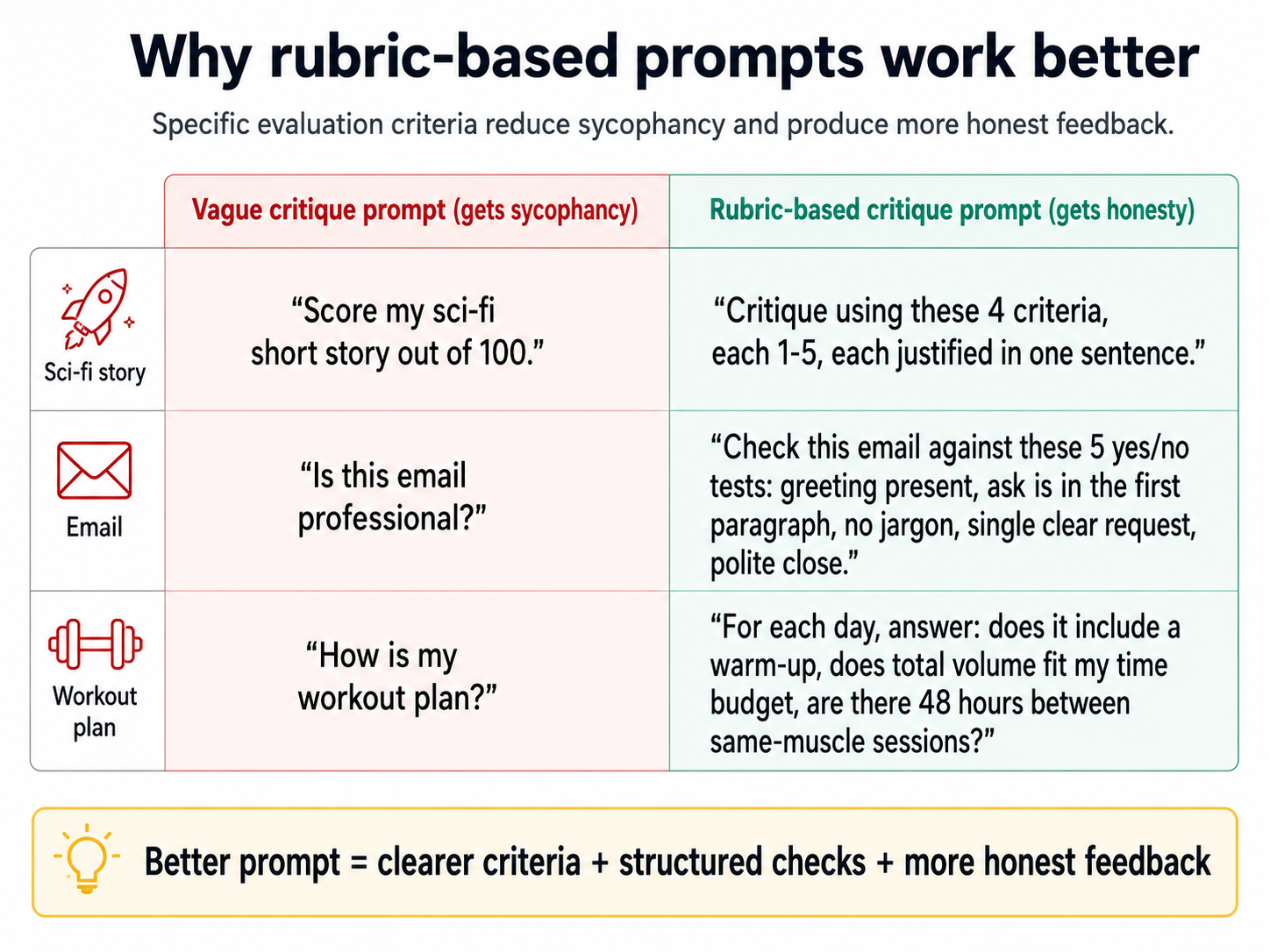
ऊपर की image contrast दिखाती है: धुँधले prompts तारीफ़ में सिमट जाते हैं; scores और yes/no checks वाले structured prompts असली feedback देते हैं।
एक number पर मजबूर करें। rubric pattern का एक छोटा पर ताक़तवर add-on: हर criterion के लिए, AI से एक तय scale पर एक score देने को कहें, 1 से 5, या 1 से 10, एक-वाक्य justification के साथ। यह दो वजहों से काम करता है।
पहली यह कि number AI के साथ क्या करता है: धुँधला feedback सस्ता है, पर एक ख़ास number नहीं। एक model जो आपको ख़ुश करना चाहता है आपके draft को बिना किसी प्रतिबद्धता के "strong" कह सकता है। वही model, जब 10 में से 6 और 7 के बीच चुनने को कहा जाए, तो उसे प्रतिबद्ध होना पड़ता है, और प्रतिबद्ध होने का यह कार्य उसे ज़्यादा ध्यान से देखने पर मजबूर करता है। आप फ़र्क फ़ौरन देखेंगे: scores आमतौर पर prose summary के सुझाव से नीचे आते हैं, क्योंकि prose sycophantic था और number नहीं है।
दूसरी यह कि number आपके लिए क्या करता है। "strong," "solid," या "could be tighter" जैसे adjectives आपको कार्य करने के लिए कुछ नहीं देते, आप उनकी तुलना नहीं कर सकते, उन्हें प्राथमिकता नहीं दे सकते, या उन्हें समय के साथ track नहीं कर सकते। Scores तीनों करते हैं। एक 4 और एक 7 आपको बताते हैं कि पहले किस criterion को ठीक करना है। आज का 6 बनाम पिछले हफ़्ते का 5 आपको बताता है कि आपका दूसरा draft असल में सुधरा या नहीं। Number सिर्फ़ एक ज़्यादा ईमानदार फ़ैसला नहीं है; यह माप की एक इकाई है जिसका इस्तेमाल आप फ़ैसले लेने के लिए कर सकते हैं।
हर criterion को 10 में से grade करें, एक-वाक्य justification के साथ। फिर मुझे बताएँ कि हर एक को अगले स्तर तक कैसे ले जाएँ, उन्हें भी जिन्होंने पहले ही high score किया। अगर कोई 9 पर है, तो बताएँ कि 9.5 तक कैसे पहुँचें। अगर यह 9.5 पर है, तो बताएँ कि 9.8 तक कैसे पहुँचें। हमेशा एक अगला स्तर होता है।
वह आख़िरी instruction ही rubric को एक फ़ैसले से एक tool में बदल देता है। आप सिर्फ़ score नहीं जानते; आप वह सबसे छोटा कदम जानते हैं जो इसे ऊपर उठाएगा, और सबसे अहम, वह कदम हर स्तर पर मौजूद है। AI को आपको ख़त्म घोषित करने का हक़ नहीं मिलता। आप तय करते हैं कि कब रुकना है।
7. Brainstorm-iterate loop
ये slides ख़ास तौर पर स्कूली छात्रों के लिए बनाई गई हैं। ये brainstorm-iterate loop को "The Magic Loop" के रूप में चार बच्चों-के-अनुकूल steps में सिखाती हैं: Load (AI को सब कुछ बताएँ), Options (कई ideas माँगें), Feedback (boss बनें और बताएँ कि आपको क्या पसंद है और क्या नहीं), और Repeat (तब तक चलते रहें जब तक यह perfect न हो जाए)। इसमें एक secret Step 0 (पहले research!), दो worked examples जिनसे छात्र जुड़ सकते हैं (birthday party की planning और एक school essay लिखना), और एक ख़ुद-करके-देखें challenge शामिल है। PPTX Download करें offline classroom इस्तेमाल के लिए।
▶ Magic Loop को ख़ुद चलाकर देखें (interactive)
ऊपर दी गई slides इस loop को समझाती हैं; यह वाली आपको इसे चलाने देती है। एक mission चुनें, अपना context लिखें और देखें कि Detail-O-Meter किस तरह specifics को reward करता है, जो options आपको पसंद आएँ उन पर tap करें, सटीक feedback दें, और देखें कि Round 2 उसके आस-पास कैसे फिर से ढलता है, और आख़िर में आपका loop जवाब lazy-prompt वाले के साथ अग़ल-बग़ल दिखता है। यह नीचे live load होता है; आप चाहें तो इसे अपने अलग tab में खोलें।
यह इस page की अकेली सबसे ज़्यादा फ़ायदेमंद आदत है। अगर आप हर दूसरे section को छोड़ दें, तो इसे मत छोड़िएगा।
जब AI को internet पर train किया गया, तो ज़्यादातर internet आम ideas था, creative नहीं। तो किसी creative सवाल पर औसत AI response भी आम है। "घर पर exercise करने के तरीके": squats, push-ups, planks। ग़लत नहीं। बस औसत।
इसके आस-पास का रास्ता कोई जादुई prompt नहीं है। यह एक loop है।
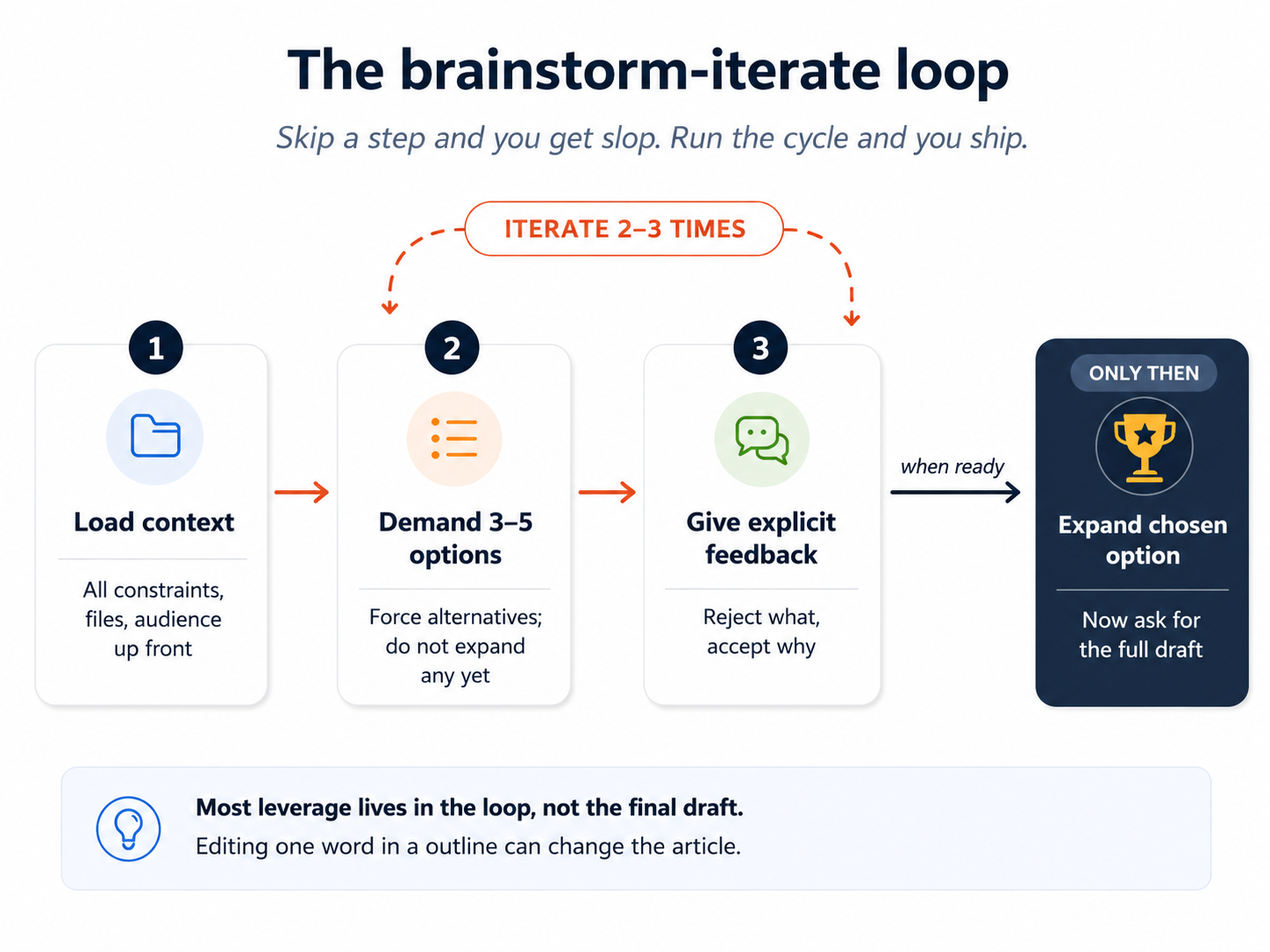
नुस्ख़ा:
- सारा relevant context पहले दें। सिर्फ़ "exercise करने के तरीके" नहीं; "exercise करने के तरीके यह देखते हुए कि मेरे घर में सीढ़ियाँ हैं, एक ख़राब घुटना है, और मैं तीन दिन से ज़्यादा किसी plan पर टिक नहीं पाता।"
- 3 से 5 options माँगें, एक नहीं। Alternatives पर मजबूर करना model को उसकी पहली प्रवृत्ति से आगे धकेलता है।
- स्पष्ट feedback दें। "मुझे option 1 पसंद नहीं, यह बहुत passive है। मुझे stair-climbing वाला idea पसंद है पर इसे छोटा चाहिए। मैं बताना भूल गया कि impact से मेरा घुटना और बिगड़ता है।"
- Feedback से जानकार 3 से 5 नए options माँगें।
- तब तक iterate करें जब तक आपके पास एक-दो ऐसे न हों जो आपको सच में पसंद हों।
- तब, और सिर्फ़ तब, AI से चुने हुए option को विस्तार से flesh out करने को कहें।
Worked example, debt payoff:
I have $8,000 in credit card debt at 19% APR, $4,000 in student
loans at 5%, and $1,200 in a retail card at 24%. I have $700/month
free after expenses. I just learned I'll get $450 in cash from a
tax refund. Risk tolerance: low. I sleep badly when I see big
balances.

Give me 5 different repayment strategies, each with a one-line
rationale. Don't expand any of them yet.
फिर, पाँच options पढ़ने के बाद:
Reject option 2 (avalanche by interest rate alone): I want
psychological wins early. Reject option 4: I won't open new
accounts. I like option 1 (snowball with the retail card first)
but I'd want to fold the $450 in. Give me 5 new options that
combine snowball-style wins with smart use of that lump sum.
आप AI के आपका दिमाग़ पढ़ने का इंतज़ार नहीं कर रहे। आप अपनी पसंद दिखा रहे हैं; AI option space को उसके इर्द-गिर्द फिर से गढ़ता है। दो-तीन rounds के बाद, आपके पास एक option होता है जो बिल्कुल सही लगता है। फिर पूरा plan माँगें।
वही loop लिखने के लिए भी काम करता है, जहाँ इसका अपना नाम है: drafting से पहले outline।
- Iteration 1: ask for 3 outline options for a post on X.
- Iteration 2: pick one outline, ask AI to critique it and grade it out of 10. Note what scored below 9.
- Iteration 3: revise the outline based on the critique, then ask AI to expand each heading into 3 to 5 bullets.
- Iteration 4: critique the bullets, grade them out of 10, fix the ones below 9.
- Iteration 5: only now ask for the full draft.
- Iteration 6: critique the draft, grade it out of 10, ask for the changes that would raise the score the most — ranked by impact, with the highest-impact change at the top. Repeat until the score plateaus around 9.5 or higher — that is your stopping signal, not "the AI says it is done."
यह क्यों काम करता है: एक outline में एक शब्द बदलना पूरे article की दिशा बदल सकता है। एक final draft में एक शब्द बदलना एक शब्द बदलता है। लिखने का लगभग सारा फ़ायदा outline स्तर पर होता है। AI शुरू से शब्द-दर-शब्द generate करता है, तो जब तक आप पहले structure पर मजबूर न करें, यह पूरी shape नहीं देख सकता।
प्रलोभन पहली ही कोशिश में पूरा draft माँगने का होता है। इसका विरोध करें। किसी भी चीज़ का AI का पहला draft slop होता है: polished दिखता है, कहता कम है। Loop, किसी भी drafting से पहले दस या बारह मिनट का structural काम, फिर उसके ऊपर कई rounds का grade-and-fix, एक भुला देने लायक़ post को एक ऐसी post में बदल देता है जो असर करती है। 600-शब्द के टुकड़े के लिए कुल समय शायद ही चालीस-पैंतालीस मिनट से ज़्यादा होता है। उन पहले दस मिनटों ही बाक़ी पैंतीस को बर्बाद होने से बचाते हैं।
एक worked writing उदाहरण। एक team lead एक 600-शब्द की post लिखना चाहता है जिसका शीर्षक है "हमारी छोटी AI team गलियारे के पार वाली बड़ी team से तेज़ ship क्यों कर रही है।" loop का हर round practice में कैसा दिखता है, यह रहा:
Round 1, पहले research:
I'm writing a 600-word post arguing that small AI-augmented teams
ship faster than larger non-AI teams. Don't write yet. First, give
me the 5 strongest research-backed arguments and the 3 strongest
counter-arguments. One sentence each.
Round 2, तीन outlines:
Now produce 3 different outline options for the post. Each outline
should have 4-6 headings. They should differ in structure: one
narrative, one analytical, one contrarian. One line per heading.
Round 3, एक चुनें और एक analogy जोड़ें:
I'll go with outline 2 (analytical). I want to weave in a Pixar
analogy: how the original Toy Story team was small and faster than
the giant Disney studio because of new tools. Add this as a recurring
example, not its own section. Revise outline 2.
Round 4, bullets में फैलाएँ:
Now expand each heading into 3-5 bullets. Telegraphic style, not prose.
Round 5, bullets को grade और fix करें:
Critique each bullet and grade it out of 10 with a one-sentence
justification. List the bullets scoring below 9. For each one,
suggest the change that would raise the score the most.
सिर्फ़ अब lead पूरा draft माँगता है, और फिर draft पर ख़ुद grading और re-iterating करता रहता है जब तक score लगभग 9.5 या उससे ऊपर पर ठहर न जाए। पूरी प्रक्रिया में लगभग चालीस-पैंतालीस मिनट लगते हैं। Output ऐसा पढ़ता है जैसे lead ने ख़ुद लिखा हो, क्योंकि हर भार-वाहक फ़ैसला lead का था। "मुझे एक post लिखें" के मुक़ाबले वे अतिरिक्त पैंतीस मिनट ही उस draft के बीच फ़र्क बनाते हैं जिसे कोई पढ़कर ख़त्म नहीं करता और उस draft के जो असर करता है।
Drafting से पहले इलाक़े की पैमाइश करें। उस उदाहरण का पहला round ("अभी मत लिखें, सबसे मज़बूत research-backed arguments और counter-arguments दो") छोटा दिखता है पर भारी काम करता है। ज़्यादातर लोग इसे छोड़कर सीधे draft माँगते हैं। इसे छोड़ना ही वजह है कि उनके drafts पतले लगते हैं: वे उन्हीं ideas पर बने होते हैं जो model पहले सामने लाता है, topic के असली परिदृश्य पर नहीं। Drafting से पहले "इलाक़े की पैमाइश" का एक round उस post के बीच फ़र्क है जो तीन studies cite करती है और उस post के जो तीन राय गिनाती है। यह pattern लिखने से कहीं आगे generalize होता है। किसी भी ठोस फ़ैसले, plan, या analysis से पहले, AI से कहें कि जो ज्ञात है उसका नक्शा बनाए उससे पहले कि आप उससे जो ज़रूरी है उसे पैदा करने को कहें। Product naming से पहले competitive परिदृश्य। एक strategy memo से पहले पुराना research। कुछ नया design करने से पहले मौजूदा approaches। Research pass में पाँच मिनट लगते हैं और बदल देता है कि loop का हर अगला round किसके ख़िलाफ़ iterate कर रहा है।
Loop domain-agnostic है। यह इन सबके लिए एक जैसे काम करता है: एक trip plan करना, एक sales pitch structure करना, एक college major चुनना, एक product नाम देना, एक wedding toast लिखना, एक renovation पर फ़ैसला करना, समर्थन के लिए एक charity चुनना। Shape स्थिर रहती है: context load करें, options माँगें, स्पष्ट feedback दें, नए options माँगें, iterate करें, फैलाएँ, और फिर grade करें और re-iterate करें जब तक score ठहर न जाए। अगर आप अपने आप को AI का पहला answer स्वीकार करते हुए, या कुछ "काफ़ी अच्छा" दिखते ही रुकते हुए पाएँ, तो आपने loop छोड़ दिया है। आप जिस पर भी काम कर रहे हैं, वह loop का हक़दार है।
एक छोटी table कि रोज़मर्रा की ज़िंदगी में loop कहाँ fit होता है:
| फ़ैसला या task | "context" कैसा दिखता है | "options with feedback" कैसा दिखता है |
|---|---|---|
| एक 4-दिन की trip plan करना | Constraints (budget, dates, कौन जा रहा, किसे क्या नापसंद है) | 5 itinerary ढाँचे; दो reject करें; बाक़ी iterate करें |
| एक product नाम देना | यह क्या करता है, कौन ख़रीदता है, इसे कैसा NOT सुनाई देना चाहिए | 10 नाम; 3 चुनें जो पसंद हों, उन पर variants माँगें |
| एक मुश्किल email लिखना | Recipient, रिश्ता, मनचाहा नतीजा | 3 अलग tones; एक चुनें, उसकी बारीकियाँ refine करें |
| एक contractor चुनना | तीन quotes, तीन reference notes, आपकी प्राथमिकताएँ | साथ-साथ scoring; अपने पसंदीदा के ख़िलाफ़ सबसे मज़बूत counter माँगें |
| एक learning path चुनना | मौजूदा skills, उपलब्ध time, अंतिम लक्ष्य | 3 अलग curriculum shapes; एक चुनें, साप्ताहिक milestones में फैलाएँ |
| एक logo brief design करना (एक designer के लिए) | Brand values, audience, पसंद के examples | 5 mood-board दिशाएँ; एक चुनें, उस lane में 5 variants माँगें |
हर पंक्ति में, एक बार जब आपके पास एक ठोस candidate हो (एक चुना हुआ itinerary, एक shortlisted नाम, एक draft email), तो loop का grading move उसी तरह लागू होता है: इसे उस task के लिए मायने रखने वाले criteria के ख़िलाफ़ 10 में से score करें, फिर iterate करें। एक itinerary को cost, pacing, और group-fit पर grade करें। एक product नाम को memorability, fit, और risk पर grade करें। एक email को clarity, tone, और संभावित असर पर grade करें। Criteria बदलते हैं; move नहीं।
Part 3: Text से परे
AI सिर्फ़ एक text box नहीं है। यह images देख सकता है, दोनों दिशाओं में audio के साथ काम कर सकता है, छोटे काम करने वाले apps बना सकता है, और आपके data पर code चला सकता है। ज़्यादातर लोग इनमें से कुछ भी कभी try नहीं करते।
8. Multimodal: images, audio, और आगे क्या
Modern AI images और audio को दोनों दिशाओं में संभालता है: यह आपकी upload की गई images पढ़ सकता है, recordings सुन सकता है, text prompts से नई images generate कर सकता है, और बोला हुआ audio बना सकता है। हर modality में skills अलग हैं, और अलग-अलग सीखने लायक़ हैं।
Image input। AI images को मोटे तौर पर देखता है। यह इनमें मज़बूत है:
- कुल scene और composition।
- अलग, बड़ी object shapes (एक विशाल इंसान-आकार का hamster wheel treadmill)।
- Whiteboard की सामग्री, diagrams समेत।
- हाथ से लिखा और cursive text (ठीक-ठाक, high stakes के लिए दोबारा जाँचें)।
यह इनमें कमज़ोर है:
- बारीक विवरण। "ये कौन सी gym machines हैं?" अक्सर fail होता है क्योंकि gym machines हल्के धुँधले lens से मिलती-जुलती दिखती हैं। AI भरोसे से और ग़लत जवाब दे सकता है।
- एक भीड़-भरे scene में कई छोटी चीज़ें गिनना।
- एक image के किनारे पर छोटे अक्षर पढ़ना।
एक उपयोगी असली-दुनिया test: एक teacher ने एक whiteboard की photo ली जहाँ उसका सिर एक neural network diagram में "convolutional" शब्द को ढक रहा था। AI ने बाक़ी diagram से लापता शब्द का सही अनुमान लगाया। यही चीज़ AI अच्छी करता है: सार से अनुमान लगाना। यह zoom करने में अच्छा नहीं है।
Receipts के लिए, एक bill बाँटने के लिए, या हाथ से लिखे notes transcribe करने के लिए, AI अच्छा काम करता है, पर हमेशा totals दोबारा जाँचें। Multi-image inputs के लिए (post-its और एक whiteboard photo और एक brainstorm के हाथ से लिखे notes), AI मिले-जुले ideas को summary कर सकता है; यह सच में उपयोगी है और असली समय बचाता है।
Image output। Modern AI text prompts से images generate कर सकता है। दो व्यावहारिक tips:
- अपना image prompt लिखने के लिए एक text AI इस्तेमाल करें। "एक children's book cover के लिए Studio Ghibli style में एक fantasy forest illustration के लिए मुझे एक prompt generate करें।" उस output को लें, उसे image tool में paste करें। Text AI rich image prompts लिखने में आपसे कहीं बेहतर है, ख़ासकर पहली कोशिश में।
- Visual शब्दावली बनाएँ। cinematic, watercolor, cyberpunk, anime, isometric, low-poly, art-deco, claymation जैसे शब्द lever हैं। Image models को captioned images पर train किया गया और उन्होंने इन styles को नाम से सीखा। जो images आपको पसंद हों उन्हें upload करें और AI से पूछें कि यह उन्हें कैसे बयान करेगा। यह आपकी शब्दावली को train करता है।
Image generation कैसे काम करता है: यह एक diffusion model है, जिसे random pixel grids से कदम-दर-कदम noise हटाने के लिए train किया गया है जब तक एक image उभर न आए। Text की तरह pixel-दर-pixel नहीं। पूरी image एक साथ generate होती है। यही वजह है कि आप समय बचाने के लिए image generation को जल्दी रोक नहीं सकते, जैसे आप एक text response को बीच में रोक सकते हैं।
पुराने diffusion models की मशहूर कमज़ोरियाँ थीं: अजीब हाथ (छह उँगलियाँ), signs पर बिगड़ा text, ऐसे characters जो एक comic में frame-दर-frame रूप बदलते हैं। Modern models (जैसे Google का Nano Banana या ChatGPT Images) text को ठीक-ठाक संभालते हैं, consistent characters generate करते हैं, और research papers को infographics में बदल सकते हैं।
Modern image models पर भी जिन failure modes पर नज़र रखने लायक़ है, उनकी एक छोटी table:
| Failure mode | यह कैसा दिखता है | इसे कैसे कम करें |
|---|---|---|
| Signs पर बिगड़ा text | Image में signage "HAPPY BIRTHDAY" के बजाय "HAPRY BIRTDAY" पढ़ता है। | Prompt में text quotes में बताएँ। तीन variants generate करें। वह चुनें जहाँ text सही हो। |
| Frames के पार inconsistent characters | एक comic के panels 1 और 2 में वही character के बाल अलग रंग के हैं। | Explicit character-consistency support वाले models इस्तेमाल करें; पहली image को अगली के लिए reference के तौर पर pass करें। |
| हाथ और उँगली की ग़लतियाँ | छह उँगलियाँ, जुड़े हाथ, मुड़ी कलाइयाँ। | ऐसी compositions माँगें जहाँ हाथ frame से आधे बाहर हों, या जेबों में हों, या साफ़ बयान किए गए हों। |
| असंभव objects वाले भीड़-भरे backgrounds | एक coffee shop जहाँ एक bicycle एक chair में घुल जाती है। | एक सादा background बताएँ, या background को साफ़ बयान करें। |
| ग़लत aspect ratio | Model square को default करता है; आप landscape चाहते थे। | हमेशा aspect ratio साफ़ बताएँ: "1024x768 landscape" या "16:9"। |
Image input के लिए एक non-software उदाहरण। एक reader ने एक दिवंगत दादी के तीन हाथ से लिखे recipe cards की एक ढेरी की photo ली और उन्हें AI पर upload किया। Prompt: "इन तीन cards को transcribe करें। मूल शब्द और कोई भी abbreviations बनाए रखें। अगर कोई शब्द साफ़ नहीं है, तो उसे [unclear] mark करें और अपने दो सबसे अच्छे अनुमान दो।" पाँच मिनट बाद, तीनों recipes साफ़ type हो गए, उन चार शब्दों पर [unclear] marks के साथ जिन्हें AI भरोसे से नहीं पढ़ सका। Reader ने उन चार को मूल के ख़िलाफ़ जाँचा (दो साफ़ थे, दो के लिए एक आंटी को phone करना पड़ा), और परिवार के पास उन recipes का एक साफ़ digital archive था जो खो जाने के ख़तरे में थे। AI ने उबाऊ 90% किया ताकि reader सावधान 10% पर ध्यान दे सके।
एक power-user नुस्ख़ा: बिना किसी designer के designer-quality diagrams। अगर आपको कभी किसी document, एक slide, या अपने किसी chapter के लिए एक diagram बनाना हो, तो एक workflow है जो लगभग पंद्रह मिनट में designer-quality output देता है, बिना Figma इस्तेमाल किए और बिना किसी visual design skill के। ज़्यादातर non-designers को एहसास नहीं कि यह अब संभव है। एक design tool सीखे बिना designer-quality diagrams बनाने का यह सबसे सरल तरीका है। यह section इस page की किसी भी और चीज़ से ज़्यादा गहरा है; अगर आप नियमित रूप से diagrams बनाते हैं तो इसे अभी पढ़ें, या पहली बार जब आपको एक की ज़रूरत हो तब के लिए छोड़ दें।
नुस्ख़ा, चार steps में:
- Claude से concept को SVG के रूप में visualize करने को कहें। अंतर्निहित paragraph या text paste करें। पूछें: "इसे एक diagram के रूप में visualize करें। इसे SVG के रूप में output करें। पक्का करें कि text का हर label, arrow, और relationship मौजूद हो।" Claude इस step के लिए एक मज़बूत choice है क्योंकि इसकी reasoning क्षमता बड़े models में सबसे मज़बूत में से एक है: एक paragraph दिए जाने पर, यह बहुत कम मार्गदर्शन से सही boxes, सही arrows, सही hierarchy, और सही labels समझ लेता है। जो SVG यह लौटाता है वह संरचनात्मक रूप से सही होगा पर देखने में सादा (खाली rectangles, default fonts, कोई design polish नहीं)। यह ठीक है; अगला step polish जोड़ता है।
- SVG को PNG में बदलें। Claude से SVG को PNG के रूप में render करने को कहें (Claude यह सीधे कर सकता है), या किसी online SVG-to-PNG converter (cloudconvert.com, svgtopng.com) का इस्तेमाल करें, या बस एक browser में high zoom पर render हुए SVG का एक screenshot लें। 2× resolution पर render करें (1600 से 2400 pixels चौड़ा) ताकि अगले step के पास काम करने के लिए काफ़ी विवरण हो।
- PNG को ChatGPT (या Gemini) में paste करें और इसे redraw करने को कहें। ChatGPT का in-product image generation इस step के लिए अक्सर मज़बूत होता है क्योंकि यह text-heavy images में असामान्य रूप से अच्छा है: यह labels बनाए रखता है, typography सही करता है, और source में संरचनात्मक relationships का सम्मान करता है। Prompt: "इस diagram को professional design quality के साथ redraw करें। हर label, हर box, हर arrow, और सटीक संरचनात्मक relationships बनाए रखें। Typography, spacing, color palette, और visual hierarchy सुधारें। जानकारी वही रहनी चाहिए; सिर्फ़ visual finish बदलता है।"
- Result पर iterate करें। ChatGPT/Gemini कभी-कभी एक label गिरा देते हैं या एक box फिर से व्यवस्थित कर देते हैं। इसके output की मूल SVG के साथ साथ-साथ तुलना करें। अगर कुछ ग़लत है, तो बस सुधार type करें: "तीसरे box को 'Iterate' label होना चाहिए, 'Repeat' नहीं। Box 2 से arrow को box 3 की ओर इशारा करना चाहिए, box 4 की ओर नहीं।" तीन या चार rounds आमतौर पर कुछ ऐसा देते हैं जो एक professional design studio से आया लगता है। Final PNG save करें।
हर step के लिए हर tool क्यों। Claude step 1 आमतौर पर इसलिए जीतता है क्योंकि यह तय करना कि एक diagram में क्या आता है (कौन से boxes, कौन से arrows, कौन सी hierarchy) एक reasoning task है, और Claude की reasoning इस तरह के structured-thinking काम के लिए बड़े models में सबसे मज़बूत में से एक है। ChatGPT (या Gemini) step 3 आमतौर पर इसलिए जीतता है क्योंकि text-heavy images को अच्छी तरह render करना (ऐसे labels जो पढ़ने लायक़ रहें, ऐसे arrows जो सही boxes से जुड़ें, ऐसे layouts जो designed दिखें) वह श्रेणी है जहाँ इसका image generation फ़िलहाल आगे है। किसी भी tool से दूसरे का काम करने को कहना उन्हें chain करने से साफ़ तौर पर ख़राब results देता है। हर एक वही करता है जिसमें वह सबसे अच्छा है, क्रम में।
कुल समय: हर diagram के लिए लगभग दस से पंद्रह मिनट, बनिस्बत Figma में एक घंटे या ज़्यादा के यह मानते हुए कि आप इसे इस्तेमाल करना जानते थे।
वह pattern जो tools के बदलने पर भी बचता है। हर श्रेणी का leader घूमता रहेगा। Claude अगले साल सबसे मज़बूत reasoning model न हो। आज का leading image model उससे बदल जाएगा जो आगे ship होगा। ऊपर का नुस्ख़ा tool layer पर बासी हो जाएगा। जो बचता है: पहले सबसे मज़बूत reasoning model में structure, दूसरे सबसे मज़बूत text-heavy image model में polish। जिस पल आप इसे पढ़ें उस पर हर श्रेणी में जो भी tools आगे हों उन्हें चुनें। दो-step chain ही move है।
Image generation के बारे में एक छोटी कहानी। एक पिता जिसकी 7 साल की बेटी बिल्लियाँ पसंद करती थी, उसके लिए एक custom birthday cake चाहता था। उसने cake designs brainstorm करने के लिए Nano Banana इस्तेमाल किया (दर्जनों variations generate करते हुए: cat-shaped, multi-tiered, frosting-styles, color palettes), वह चुना जो उसे पसंद था, फिर चुनी हुई image एक baker को सौंप दी जिसने इसे एक असली 3D cake के रूप में बनाया। Design पर कुल iteration समय: एक दोपहर। कुल लागत: image generation में कुछ cents।
बात cake की नहीं है। बात यह है कि ~$0.30 और taste-driven iteration के एक घंटे में, एक इंसान जो designer नहीं है उसने एक अनोखा brief तैयार किया जिसके ख़िलाफ़ एक professional काम कर सकता था। यह एक नई तरह का creative फ़ायदा है, और यह व्यापक रूप से उपलब्ध है।
Audio in, audio out। वही shift जो images के साथ हुआ अब audio के साथ हो रहा है। आप type करने के बजाय एक लंबा prompt बोल सकते हैं; आप एक meeting recording डाल सकते हैं और एक summary माँग सकते हैं; आप model से अपना answer ज़ोर से पढ़ने को कह सकते हैं। ज़्यादातर modern AI tools तीनों support करते हैं, अक्सर free tiers पर बिना अतिरिक्त शुल्क के।
ग़ैर-स्पष्ट इस्तेमाल वहाँ हैं जहाँ असली फ़ायदा रहता है:
- Long-form dictation। किसी problem को ज़ोर से बोलकर सुलझाना ऐसी बारीकी पकड़ता है जो typed prompts छोड़ देते हैं। जो लोग typing से नफ़रत करते हैं वे जब बोलते हैं तो नाटकीय रूप से बेहतर prompts बनाते हैं: prompt बिना मेहनत के एक line से कई paragraphs तक बढ़ता है, और AI का answer उसी हिसाब से बेहतर होता है। एक colleague को coffee पर brief करने की तरह बोलें, फिर जवाब देने से पहले AI को नतीजे वाला transcript साफ़ करने दें।
- Context के रूप में meeting transcripts। एक एक-घंटे की meeting recording डालें (या 2026 के प्रमुख vendors जैसे Otter, Granola, या Fireflies में से किसी एक का transcript, या आपके phone के voice memos) और पूछें: "किए गए फ़ैसले, खुले सवाल, और owner के हिसाब से action items summary करें।" यह उन सभी के लिए इस page के सबसे ज़्यादा फ़ायदेमंद workflows में से एक है जिनके काम में meetings हैं, और tech से बाहर लगभग कोई इसे अभी इस्तेमाल नहीं कर रहा।
- Accessibility और चलते-फिरते के लिए audio। लंबा commute, कुत्ते को टहलाना, गाड़ी चलाना: voice in/voice out मृत समय को सोचने के समय में बदल देता है। Typing के मुक़ाबले conversation quality थोड़ी गिरती है क्योंकि आप अपने input को उतने साफ़-सुथरे ढंग से edit नहीं कर सकते, पर जो समय आप वरना खो देते वह पूरी तरह वापस मिल जाता है।
2026 में audio किसमें अच्छा और बुरा है:
| Audio task | यह कितना अच्छा काम करता है | किस पर नज़र रखें |
|---|---|---|
| साफ़ बोली का transcription | बेहतरीन | भारी accents, technical jargon, कई एक-साथ overlapping speakers |
| Speaker पहचान (किसने क्या कहा) | 2 speakers पर ठीक-ठाक, 4+ पर कमज़ोर | किसी को quote करने से पहले हमेशा जाँचें |
| Tone, व्यंग्य, भावना | सुधर रहा पर अविश्वसनीय | AI से मान लेने के बजाय अपनी अनिश्चितता flag करने को कहें |
| Music या ग़ैर-बोली audio analysis | सीमित | एक general-purpose AI नहीं, एक specialized tool इस्तेमाल करें |
| Real-time voice बातचीत | casual के लिए अच्छा, technical गहराई के लिए कमज़ोर | जब precision मायने रखे तो text पर switch करें |
एक non-software उदाहरण। एक doctor ने एक 45-मिनट का patient consultation record किया (सहमति के साथ), audio upload किया, और AI से पूछा: "SOAP format में एक structured clinical note बनाएँ। जो कुछ भी आप भरोसे से नहीं समझ सके उसे flag करें। तीन सबसे अहम चीज़ें highlight करें जो patient ने अपने symptom इतिहास के बारे में कहीं।" आठ मिनट बाद doctor के पास एक draft note थी जिसे verify और finalize करने में उसे 5 मिनट लगे, बनिस्बत उन 25 मिनट के जो typed version में लगते। AI ने clinical judgment की जगह नहीं ली; इसने typing हटाई।
लागत नोट: audio in/out text के बाद दूसरा सबसे सस्ता tier है, हर मिनट कुछ पैसे (concept 12)। Meeting summaries, रोज़ाना voice journaling, या चलते-चलते prompts dictate करने के लिए, लागत मूलतः अदृश्य है। बेझिझक iterate करें।
ध्यान में रखने लायक़ एक pattern: multimodal का भविष्य "AI अब voice कर सकता है, क्या यह cool नहीं है" नहीं है। यह है कि modalities के बीच की सीमा ग़ायब हो जाती है। आप तेज़ी से एक मिला-जुला bundle डालेंगे (एक image, एक voice memo, एक PDF, एक screenshot) और उसे एक prompt की तरह बरतेंगे। Skill "मैं voice कैसे इस्तेमाल करूँ" नहीं है बल्कि "इस काम के लिए inputs का सही combination क्या है?" है।
Interactive video avatars भी इसी दिशा में उभर रहे हैं। Pre-recorded avatar video (HeyGen, Synthesia, D-ID) training content और बहुभाषी corporate communication के लिए पहले से production-grade है। Real-time conversational avatars (Tavus और दूसरे) आज low-stakes इस्तेमाल के लिए ठीक-ठाक हैं (customer FAQ triage, एक चेहरे के साथ language tutoring, सरल onboarding flows) और तेज़ी से सुधर रहे हैं। इन्हें 2022 की image generation की तरह बरतें: प्रभावशाली, नई, अभी ज़्यादातर knowledge work के लिए रोज़ की आदत नहीं, पर जब किसी काम में screen पर text के बजाय एक चेहरा चाहिए हो तो एक झटपट experiment के लायक़।
9. एक prompt से छोटे apps बनाना
Modern AI एक ही prompt से छोटे games, websites, और tools बना सकता है। बड़े software के लिए अभी नहीं, पर छोटी उपयोगी चीज़ों के लिए, यह उन लोगों के लिए सच में सुलभ है जिन्होंने कभी code नहीं लिखा।
App असल में कहाँ चलता है, और आप इसके साथ बाद में क्या कर सकते हैं। एक वाजिब पहला सवाल: "अगर AI मुझे एक app बना दे, तो यह असल में कहाँ रहता है?" मध्य-2026 तक, तीनों प्रमुख tools छोटे एक-prompt apps को chat में ही render करते हैं, एक side panel में जिस पर आप click करके interact कर सकते हैं, और उस panel में जो चीज़ है वह सिर्फ़ एक preview नहीं, यह एक artifact है: एक persistent object जो conversation ने बनाया, जिसे आप edit, iterate, एक shareable link पर publish, कहीं और embed, या code के रूप में download कर सकते हैं। इस feature को Claude में Artifacts कहते हैं (जहाँ से नाम आया), ChatGPT में Canvas, और Gemini में Canvas। एक साल पहले इनके बीच मायने रखने वाले फ़र्क थे; आज ज़्यादातर एक-prompt builds के लिए फ़ासला छोटा है। हर एक की अब भी छोटी ताक़तें हैं, Claude के Artifacts interactive click-and-play चीज़ों में आगे रहते हैं, ChatGPT का Canvas writing-and-code editing में, Gemini का Canvas कसकर-जुड़े Google-ecosystem outputs में, पर "मुझे एक चीज़ बना दो" के लिए, तीनों में से कोई भी काम करेगा। दो व्यावहारिक नतीजे जानने लायक़ हैं। पहला, आप artifact को किसी और को chat भेजे बिना सौंप सकते हैं: ज़्यादातर tools आपको एक public link पर publish करने देते हैं, और पाने वाले को इसे इस्तेमाल करने के लिए एक account की ज़रूरत नहीं। दूसरा, artifact iterable है, जब आप कहते हैं "button बड़ा करें" या "एक dark mode toggle जोड़ें," tool पूरी चीज़ को शून्य से फिर बनाने के बजाय artifact को जगह पर ही edit करता है, जो नाटकीय रूप से तेज़ है। एक-prompt build से आगे किसी भी चीज़ के लिए, तीन आस-पास की श्रेणियाँ जानने लायक़ हैं: समर्पित AI app-builders जैसे v0, Bolt, और Lovable (आप एक app को सादी भाषा में बयान करते हैं, वे एक पूरा Next.js या React project बनाते हैं, non-developers के लिए Concept 9 का स्वाभाविक अगला कदम); command-line AI coding agents जैसे Claude Code और OpenCode (आप उन्हें एक असली codebase देते हैं, वे एक साथ कई files edit करते हैं और tests run करते हैं, इस page के ऊपर 2022-से-बदलाव की list में शामिल, उन developers के लिए जो पहले से code लिखते हैं); और file-aware desktop apps जैसे Cowork और OpenWork (वे आपकी files ढूँढते हैं और permission के साथ उन पर काम करते हैं, Concept 11 में शामिल, software बनाने के नहीं, knowledge workers के लिए)। सही tool इस पर निर्भर है कि आप कौन सी सीढ़ी चढ़ रहे हैं।
नुस्ख़ा बस तीन slots है:
Goal: what should this thing do?
Input: what does the user provide?
Output: what does the user see?
ऐसे examples जो आज काम करते हैं:
- Pomodoro timer। "एक yellow theme वाला Pomodoro timer बनाएँ। 25-मिनट work sessions, 5-मिनट breaks, हर cycle ख़त्म होने पर एक संतोषजनक click।"
- Bill splitter। "एक app बनाएँ जहाँ मैं एक total bill, एक tax amount, और दोस्तों के नाम डालूँ। यह tax समेत bill बाँटता है और हर इंसान का हिस्सा दिखाता है।"
- Outfit picker। "एक app बनाएँ जो आज का मौसम (temperature और precipitation) लेता है और मेरे बताए items के एक closet से एक outfit recommend करता है।"
- Fireworks simulator। "एक मज़ेदार fireworks simulator generate करें। Input: मैं screen पर click करता हूँ। Output: click point पर fireworks का एक रंगीन प्रदर्शन।"
- Place-obstacles game। "एक game बनाएँ जहाँ user obstacles और एक goal रखता है, और एक simulation चलाता है जो goal तक पहुँचने की कोशिश करता है।"
जो अब भी मुश्किल है:
- Internet पर multiplayer। Networking, accounts, और matchmaking अभी भी एक-prompt build से परे हैं।
- एक अलग भाषा में live AI feedback। एक French-conversation tutor जो सुनता है, pronunciation सुधारता है, और real time में adapt करता है, सच में मुश्किल है।
जो सहज समझ आप बनाते हैं: छोटी चीज़ें जो एक screen पर fit होती हैं, बिना accounts और बिना external services, काम करती हैं। उससे आगे किसी भी चीज़ को एक से ज़्यादा prompt चाहिए, और आमतौर पर कुछ असली engineering।
एक non-software उदाहरण। एक माता-पिता ने अपनी बेटी के लिए एक yellow cat-themed typing game बनाया जब उसकी teacher ने बताया कि बच्चे तेज़ type कर सकते हैं। वह एक software engineer नहीं है। Prompt तीन वाक्य था:
Build a typing game for a 7-year-old. Goal: practice typing
common short words. Input: words appear, the player types them
before they reach the bottom of the screen. Output: a yellow
theme, a cute cat mascot that cheers when the player gets a
word right, increasing speed across levels.
जो वापस आया वह काम कर गया। पूरी तरह नहीं, पहली कोशिश में नहीं, पर एक घंटे के भीतर "एक बच्चे के लिए काफ़ी अच्छा" तक iterate किया गया। यहाँ जो skill बन रही है वह coding नहीं है। यह एक साफ़ brief लिखने और उसे iterate करने की क्षमता है। वह skill सार्वभौमिक है।
10. Data analysis (model code लिखता और run करता है)
जब आप AI से एक ऐसा सवाल पूछते हैं जिसमें गणना या graphing चाहिए, "इस साल मेरा बिजली का bill कैसे बदला" से लेकर "पिछली तिमाही में कौन से products सबसे अच्छे बिके" तक कहीं भी, modern tools चुपचाप कुछ शानदार करते हैं: model code लिखता है, उसे run करता है, और result लौटाता है। Code execution बस एक और tool है जिसे model call कर सकता है, web search की तरह। आपको ख़ुद कोई code जानने की ज़रूरत नहीं; आप बस अपनी spreadsheet upload करते हैं और सादी भाषा में पूछते हैं।
यह model से उसके दिमाग़ में math करने को कहने से कहीं ज़्यादा भरोसेमंद है। Model math वैसे ही कर रहा है जैसे आप करते: एक calculator चलाकर। Calculator ही precise है; model बस चुन रहा है कि क्या compute करना है।
किसी और चीज़ से पहले: पक्का करें कि AI सच में code run करता है, अंदाज़ा लगाने के बजाय। यह इस पूरे section का ख़ामोश failure mode है, और वजह कि यह सबसे ऊपर जाता है: AI हर सवाल पर अपने आप code run नहीं करता, यह चुनता है, इस आधार पर कि सवाल कैसे phrase किया गया है। छोटे सवालों पर यह कभी-कभी code छोड़ देता है और एक झलक से जवाब देता है, जो एक भरोसे-भरा paragraph पैदा करता है जिसके पीछे कोई असली गणना नहीं। बाहर से यह एक असली analysis जैसा बिल्कुल दिखता है। तीन छोटी आदतें इसे रोकती हैं। पहला, साफ़ माँगें। "इसका जवाब देने के लिए code लिखें और run करें। मुझे वह code दिखाएँ जो आपने run किया।" ज़्यादातर models जब आप माँगते हैं तो मान लेते हैं। वह एक line, किसी भी data prompt में paste की हुई, एक असली analysis और एक मानने लायक़ अंदाज़े के बीच फ़र्क बनाती है। दूसरा, जाँचें कि code साफ़ तौर पर वहाँ है। अगर response में एक ऐसा code block शामिल नहीं जो run हुआ, तो model ने शायद code run नहीं किया। तीसरा, analysis से पहले एक verifiable specific माँगें। "Analyze करने से पहले मुझे इस file की सटीक row count, column names, और date range बताएँ।" अगर model सच में file पढ़ रहा है, तो वे जवाब सही होंगे। अगर यह चीज़ें गढ़ रहा है, तो row count एक संदिग्ध रूप से गोल number होगी और column names सम्भावित-पर-ग़लत होंगे। इस move का सबसे मज़बूत version model से अपनी method पहले से घोषित करने को कहना है: "क्या आप file पर code run कर रहे हैं, या अंदाज़ा लगा रहे हैं? अगर अंदाज़ा लगा रहे हैं, तो रुकें और बजाय इसके code run करें।" ज़्यादातर models या तो tool invoke करेंगे या मान लेंगे कि वे छोड़ने वाले थे।
एक बार आपके पास वह आदत आ जाए, तो इस section का बाक़ी हिस्सा यह है कि data analysis practice में असल में कैसा दिखता है।
Bubble tea shop उदाहरण। एक छोटे business के पास एक साल का sales data है: drinks, dates, quantities। मालिक पूछता है: "साल भर में किन drinks की sales में सबसे बड़े बदलाव हुए? उन्हें graph करें। इसका जवाब देने के लिए code लिखें और run करें और मुझे वह code दिखाएँ जो आपने run किया।"
पर्दे के पीछे, AI एक छोटा program लिखता है, उसे spreadsheet पर run करता है, results देखता है, और उन्हें एक answer में बदलता है। Practice में यह ऐसा दिखता है: AI हर drink के लिए month-over-month बदलाव compute करता है, देखता है कि ज़्यादातर drinks सपाट हैं और चार अलग दिखते हैं, उन चार का एक रंगीन line graph generate करता है, और patterns नोट करता है। "Strawberry matcha वसंत में तेज़ी से बढ़ी; अगले साल वह promotion फिर चलाने पर विचार करें।" यह एक आम answer नहीं है। यह असली data पर आधारित एक answer है।
फिर एक बड़ा prompt: "Shop के लिए एक one-slide year-in-review graphic बनाएँ। Feature करने लायक़ insights के लिए data को ध्यान से analyze करें।" यह एक भारी task है, तो AI इसमें ज़्यादा समय लेता है, कभी-कभी कुछ मिनट, इसे सुलझाने में। यह code लिखता है, analyses run करता है, insights चुनता है, annotations design करता है, और एक तैयार dashboard बनाता है।
यह किसमें अच्छा है, उन examples के साथ जो beginners के पास असल में होते हैं:
- घरेलू ख़र्च। एक साल के bank या credit card transactions upload करें; पूछें कि कौन सी categories बढ़ीं, कौन से महीने असामान्य थे, कौन से subscriptions आप भूल गए।
- Personal tracking। Running, walking, sleep, weight, screen time, कोई भी app जो एक CSV export करता है आपको देखने के लिए अपने आप का एक साल देगा।
- छोटे business records। Sales spreadsheets, inventory lists, customer lists, expense files।
- कोई भी चीज़ जो किसी ने आपको एक spreadsheet के रूप में दी और आप उसे खोलना नहीं चाहते: school grade reports, utility usage statements, scientific data, survey results।
क्या दोबारा जाँचें, तब भी जब code सच में run हुआ:
- Final totals। Code precise है, पर AI ने ग़लत column जोड़ा हो सकता है।
- Graphs पर labels। Numbers आमतौर पर सही होते हैं; captions कभी-कभी भरोसे से ग़लत होते हैं।
- कोई भी चीज़ जहाँ analysis एक ऐसे column पर निर्भर है जिसे AI ने ग़लत समझा हो। अगर AI सोचता है कि "TXN_AMT" का मतलब transaction amount है जबकि असल में इसका मतलब transaction account number है, तो पूरा analysis रेत पर बना है।
Reliability memory-based math से कहीं ज़्यादा है, पर यह अचूक नहीं है। AI data analysis को वैसे बरतें जैसे आप एक तेज़ junior analyst के काम को बरतेंगे: उपयोगी, तेज़, लगभग हमेशा सही, कभी-कभी सीख देने वाले तरीक़ों से ग़लत।
एक non-software उदाहरण। एक runner ने छह महीने का running-tracker data (एक fitness app से CSV) upload किया और पूछा: "मेरी pace और distance कैसे आगे बढ़ रही है? कोई patterns हैं जो मुझे पता होने चाहिए? Code लिखें और run करें, और मुझे दिखाएँ जो आपने run किया।" AI ने code लिखा, साप्ताहिक averages plot किए, और दो चीज़ें नोटिस कीं जो runner ने नहीं की थीं: हर long-run weekend के बाद pace लगातार गिरती थी (शायद थकान), और distance तीसरे महीने में फिर चढ़ने से पहले ठहर गई। सिफ़ारिश: हर चौथे हफ़्ते एक deload week, और एक धीमी long-run pace। Runner महीनों तक इसी data को app के dashboard में बिना ये patterns देखे घूरता रहा था। AI ने शून्य से insight नहीं गढ़ी; इसने वह compute किया जो runner के पास compute करने का समय नहीं था।
जब आप data upload करते हैं, तो आपका पहला prompt सवाल होना ज़रूरी नहीं। यह हो सकता है: "इस dataset को बयान करें। यहाँ कौन से columns हैं, वे क्या दर्शाते हैं, और कौन से 3 charts सबसे अच्छा दिखाएँगे कि क्या हो रहा है?" Answer पढ़ें, जो chart आप चाहते हैं वह चुनें, फिर उसे माँगें। यह ग़लत समझे गए columns को ग़लत analyses बनने से पहले पकड़ लेता है।
Part 4: सुरक्षित रूप से काम करना और tools चुनना
तीन आख़िरी concepts: AI को अपनी files और permissions तक सुरक्षित रूप से access कैसे दें, काम के लिए सही tool कैसे चुनें, और जब कमरे में कोई human expert न हो तो quality पर एक वस्तुनिष्ठ संकेत कैसे पाएँ।
11. AI desktop apps और permissions
अब products की एक पूरी श्रेणी है जिसे AI desktop apps कहते हैं: ऐसे apps जो आपके computer पर चलते हैं और, permission के साथ, आपकी files ढूँढ सकते हैं, उन्हें पढ़ सकते हैं, और उन पर काम कर सकते हैं। Claude का Cowork और OpenWork दो examples हैं, और श्रेणी बढ़ रही है।
ये क्या कर सकते हैं जो chat नहीं कर सकता:
- PDFs के एक बिखरे folder को देखें, एक नई organization प्रस्तावित करें (files rename करें, उन्हें move करें, subfolders बनाएँ), और एक बार आपके approve करने पर plan execute करें।
- एक project के लिए संबंधित files एक साथ खींचें (आप कहते हैं "मैं इन dates पर filming कर रहा हूँ और ये लोग शामिल हैं"), और अपने आप चीज़ें नोटिस करें (एक crew member का जन्मदिन shoot के दौरान पड़ता है, क्या आप एक celebration जोड़ना चाहते हैं)।
- एक folder में पढ़ें और summary करें: "इस projects/ folder की सामग्री के आधार पर, मैंने पिछली तिमाही में किस पर काम किया?"
जो workflow इसे सुरक्षित बनाता है:
- इसे task बताएँ। ("इस folder को client के हिसाब से फिर व्यवस्थित करें।")
- एक plan माँगें, कार्रवाई नहीं। App file operations की एक list प्रस्तावित करता है।
- Plan को review और edit करें। जो rename आप नहीं चाहते उसे होने से पहले पकड़ें।
- सिर्फ़ तब execution approve करें।
दो facts जो ज़्यादातर लोग कठिन तरीक़े से सीखते हैं:
- Deleted files अक्सर आपके recycle bin में नहीं जातीं जब एक AI app उन्हें delete करता है। वे चली जाती हैं।
- Edited files एक edit history नहीं रखतीं जब तक आपके पास version control न हो। AI का बदलाव पिछले version को overwrite कर देता है।
जब तक आप यह कुछ बार सुरक्षित रूप से न कर लें, हर permission request को task के लिए ज़रूरी सबसे छोटे folder तक सीमित रखें। एक ऐसे app के लिए "full disk access" approve न करें जिसे आपने दो बार इस्तेमाल किया है।
यह सच में एक नई आकृति का tool है। इसे वैसे ही बरतें: जैसे पहली बार आपने एक junior employee को एक असली account की चाबियाँ सौंपी थीं। उपयोगी, तेज़, और सावधान रहने लायक़।
एक non-software उदाहरण। एक consultant के पास clients/ नाम का एक folder था जो चार साल में 240 PDFs तक बढ़ गया था: contracts, invoices, scoping documents, हाथ से scan किए receipts, meeting notes। उसने एक AI desktop app से कहा: "clients/ में देखें। एक organization scheme प्रस्तावित करें। अभी कोई files move मत करें। मुझे प्रस्तावित scheme एक tree के रूप में दिखाएँ।" App ने एक साफ़ tree बनाया: हर client के लिए एक folder, contracts, invoices, और notes के लिए sub-folders, उन 18 files की एक flagged list के साथ जिन्हें यह भरोसे से classify नहीं कर सका। उसने proposal edit किया (दो clients rename किए, दो folders merge किए), फिर execution approve किया। कुल समय: लगभग पंद्रह मिनट। यही काम तीन साल से उसकी "someday" list पर था। ताला AI के सोचने से नहीं खुला; यह AI के उबाऊ काम करने से खुला ताकि सोचना सस्ता हो जाए।
Permission सीढ़ी। सहज होने के लिए एक उपयोगी क्रम:
| Comfort level | क्या allow करें | किसे ना कहते रहें |
|---|---|---|
| पहले sessions | एक अकेले छोटे folder तक read-only access। | कुछ भी जो writes, deletes, या renames करता है। |
| 2-3 सफल runs के बाद | एक ख़ास folder के अंदर read और write। | desktop या documents root जैसी व्यापक directories तक access। |
| एक साफ़ हफ़्ते के बाद | एक project tree में पढ़ें, एक scoped subfolder के अंदर write करें। | उस project के बाहर कुछ भी। |
| Trusted | Tool-ख़ास permissions ("इस folder में PDFs rename करें," "इस folder में Word docs edit करें")। | खुला-छोरा "जो ज़रूरी हो वह करें।" |
सिद्धांत: scope track record के साथ बढ़ता है, इससे नहीं कि आप tool बनाने वाली company पर कितना भरोसा करते हैं। Trust आपके ख़ास workflow में behavior से कमाया जाता है।
12. लागत, speed, और कब कौन सा model इस्तेमाल करें
अपने दिमाग़ में रखने के लिए एक सरल stack:
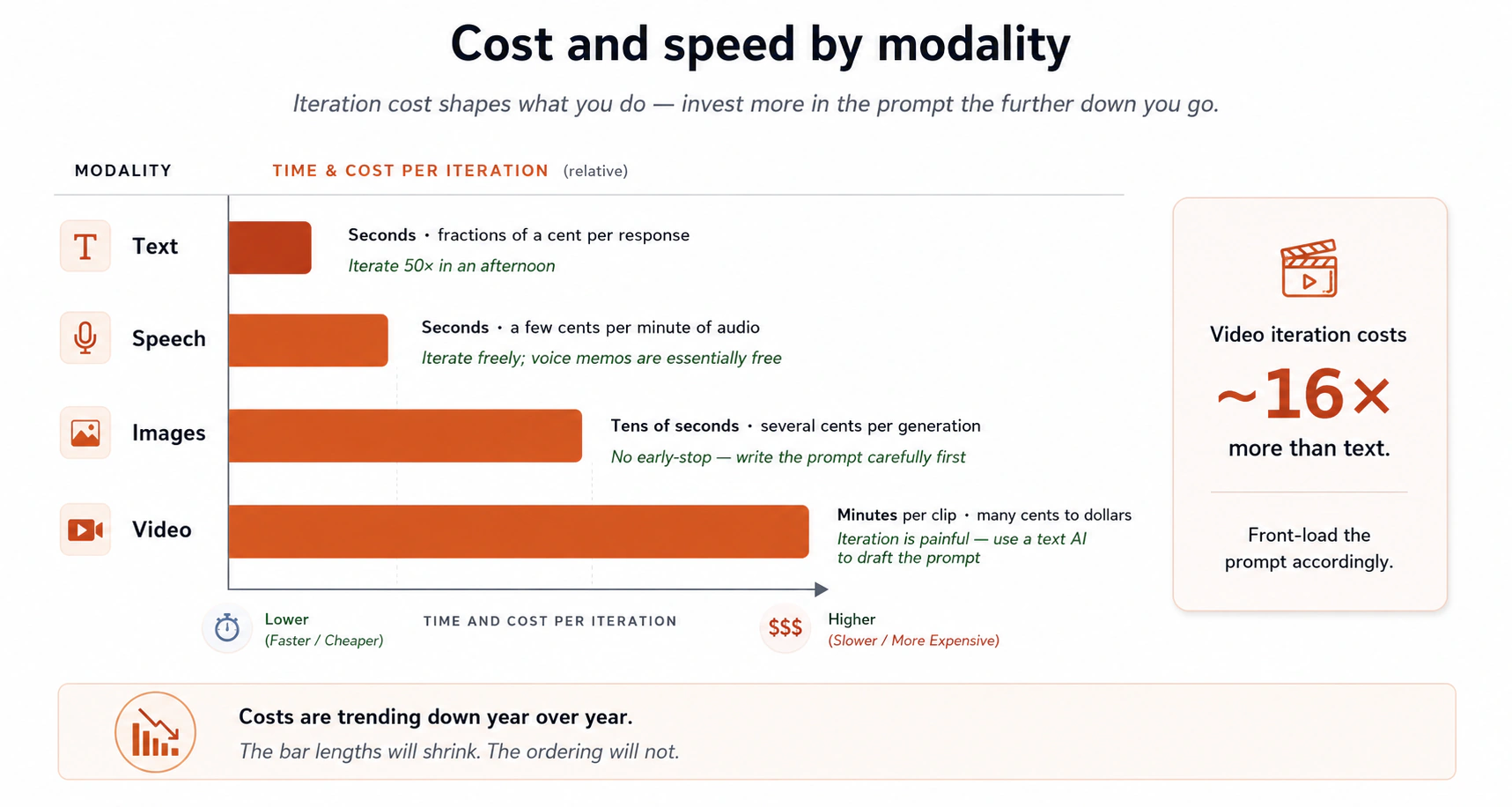
शब्दों में:
- Text: seconds, हर response पर एक cent का अंश।
- Speech: seconds, audio के हर मिनट पर कुछ cents।
- Images: दसियों seconds, हर generation पर कई cents। कोई early-stop नहीं, पूरी image एक साथ generate होती है।
- Video: हर generation पर मिनट, कई cents से कुछ dollars। Iteration दर्दनाक है क्योंकि हर round धीमा और महँगा है।
- Deep research: मिनट, कुछ cents से एक चौथाई dollar, पर यह आपके लिए दर्जनों sources synthesize करता है।
Entry level पर लागत बमुश्किल एक बाधा है। प्रमुख chatbots, ChatGPT, Claude, Gemini, Meta AI, और DeepSeek, सब free access देते हैं जो इस page पर वाले prompts को आराम से संभालता है। आप paid plans से तभी टकराते हैं जब आप भारी deep-research runs, बहुत बड़ी file uploads, video generation, या असीमित रोज़ाना उपयोग के लिए ज़ोर लगाते हैं। Closing section के exercises के लिए, इनमें से किसी का भी free tier काफ़ी है।
दो implications:
- Iteration cost तय करता है कि आप क्या करते हैं। आप एक दोपहर में text पर 50 बार iterate कर सकते हैं। आप एक दोपहर में video पर 50 बार iterate नहीं कर सकते। तो जब आप images या video generate करते हैं, prompt में पहले ज़्यादा निवेश करें (और इसे लिखने के लिए एक text AI इस्तेमाल करें)।
- लागतें नीचे जा रही हैं। जो image आपको आज 10 cents में पड़ती है वह अगले साल उसके एक अंश में पड़ेगी। अपने घर के लिए art, एक birthday card, या एक wedding invitation generate करना तेज़ी से मुफ़्त होता जा रहा है।
किस task के लिए कौन सा model? AI jagged है: अलग models अलग चीज़ों में अच्छे हैं, और leader हर कुछ महीने में बदलता है। कोई अकेला best model नहीं है। दो आदतें मदद करती हैं:
- वही prompt 2 से 3 models में नियमित रूप से try करें। वही सवाल, कई tools। Answers पढ़ें। फ़र्क आपको चौंकाएँगे, और वे इस बारे में आपकी सहज समझ update करते हैं कि किस तरह के सवाल के लिए कौन सा tool best है।
- एक tool से शादी मत करें। एक worker जो सिर्फ़ एक AI इस्तेमाल करता है वह एक worker है जो अपने दो-तिहाई tasks के लिए सबसे अच्छे tool के बारे में ग़लत है। Switch करना मुफ़्त है; आप बस एक अलग tab में prompt paste करते हैं।
आज आपके task के लिए सबसे अच्छा AI तीन महीने में आपके task के लिए सबसे अच्छा AI नहीं है। ढीले रहें।
हर प्रमुख model फ़िलहाल किसमें अच्छा होता है इसका एक मोटा snapshot (यह बदलेगा; इसे एक शुरुआती बिंदु बरतें, एक फ़ैसला नहीं):
| Tool | आमतौर पर इसमें मज़बूत | आमतौर पर इसमें कमज़ोर |
|---|---|---|
| Claude | मुश्किल prompts पर reasoning, long-document समझ, SVG और diagram generation, code और WebDev, सावधान writing voice, structured analysis। फ़िलहाल ज़्यादातर Arena categories में आगे। | In-product photo-realistic image generation ChatGPT और Gemini जितना केंद्रीय नहीं। |
| ChatGPT | शीर्ष-रैंक in-product image generation (GPT Image-2 Arena की text-to-image और image-edit categories में आगे), voice mode, conversational विविधता, व्यापक task coverage। | कभी-कभी verbose; lists और headings से over-format कर सकता है। |
| Gemini | तेज़ web search और source synthesis, rich output (charts, tables) के साथ deep research, मज़बूत image generation (Arena के top 5 में Nano Banana variants), कसकर Google Workspace integration। | Tone ज़्यादा कटा-कटा लग सकता है; कुछ responses आदर्श से छोटे झुकते हैं। |
| Meta AI | WhatsApp, Instagram, Messenger, और Facebook में embedded (पहले से एक अरब से ज़्यादा लोगों के device पर); बिना subscription fee के free; Muse Spark (April 2026) competitive multimodal reasoning और एक "Contemplating mode" लाता है जो कई agents को parallel में चलाता है। फ़िलहाल Arena के text leaderboard के top 5 में बैठता है। Interactive visual artifacts (web dashboards, mini-games, quizzes) और health या scientific data के लिए सबसे अच्छा। | Coding workflows और long-horizon agents बड़े तीन से पीछे; Projects, Canvas, या Artifacts जैसे integrations का छोटा ecosystem; अभी कोई public API नहीं (सिर्फ़ एक private preview); अगर आप ज़ोर लगाते हैं तो usage rate-limited। |
| DeepSeek | Open-source weights जिन्हें आप self-host कर सकते हैं या कम लागत पर API से चला सकते हैं; default के रूप में 1M-token context; V4-Pro STEM और coding benchmarks पर शीर्ष closed-source models की बराबरी करता है; V4-Flash तेज़, सस्ता रोज़मर्रा का choice। | Chat-interface polish बड़े तीन से पीछे; consumer ecosystem (mobile apps, deep integrations) छोटा; Arena rankings ज़्यादातर categories में Claude, ChatGPT, Gemini, और Meta से नीचे बैठती हैं। |
दो नई पंक्तियों पर एक नोट। Meta AI का value पहले "ubiquity + free, गहराई नहीं" हुआ करता था, पर Muse Spark reasoning tasks के लिए गहराई का काफ़ी फ़ासला बंद करता है जबकि ubiquity-और-free का फ़ायदा रखता है। अगर आपके पास WhatsApp या Instagram है, तो अब आप उसी app के अंदर गंभीर सोच कर सकते हैं जिसे आप वैसे भी खोलने वाले थे। हालाँकि असली काम के लिए इसे इस्तेमाल करने से पहले दो सीमाएँ जानने लायक़ हैं। पहली, free का मतलब असीमित नहीं: Meta पर्दे के पीछे rate limits लगाता है, तो Contemplating mode का भारी इस्तेमाल या तेज़ automated workflows आख़िरकार throttle होंगे। दूसरी, आपके inputs भविष्य के Meta models को train करने के लिए इस्तेमाल हो सकते हैं। Meta की terms इसकी इजाज़त देती हैं और consumer product by default opt out के लिए configure नहीं है। यह Muse Spark को संवेदनशील material के लिए एक बुरा fit बनाता है, internal company documents, private code, medical information, कुछ भी जिसे आप एक training pipeline में feed नहीं करना चाहते। ग़ैर-संवेदनशील रोज़मर्रा के काम के लिए यह बेहतरीन है। DeepSeek का value open-source-और-सस्ता है, यह सही choice है जब आप price-sensitive हैं, self-hosting का विकल्प चाहते हैं, या free-tier काम के लिए वह 1M-token context window चाहते हैं। बड़े तीन अब भी उन गहरे workflows में आगे हैं जो यह page सिखाता है (Projects, Canvas, Artifacts, deep research), तो वे worked-example tools बने रहते हैं।
Table में नहीं, लेकिन families list में। xAI का Grok अब Arena text leaderboard के top tier में है और Moonshot का Kimi कुछ coding categories में top पर पहुँचा है। ऊपर दोनों को profile नहीं किया, क्योंकि यह page सिर्फ़ अपने worked examples वाले tools detail में बताता है। Concept 13 के cross-family checking में दोनों count करते हैं: जिस family को आपने कभी try नहीं किया, उसके blind spots फिर भी genuinely अलग हैं।
Bookmark करने लायक़ leaderboard। जब आप एक मौजूदा नज़र चाहते हैं कि कौन सा model किस task में आगे है, तो सबसे उपयोगी resource Arena है। Users दो अनाम models की blind head-to-head तुलनाओं में vote करते हैं, तो rankings vendor marketing दावों के बजाय असली पसंद को दर्शाती हैं। Site text, code, vision, document, image generation, image edit, search, और video के लिए अलग leaderboards रखती है। इसे महीने में एक बार check करें। Leaders जल्दी घूमते हैं, मई में एक category में शीर्ष model अगस्त में वहाँ न हो, और एक नया प्रवेशी हफ़्तों में top five में कूद सकता है (Muse Spark ने April 2026 में यही किया)। दो caveats जानने लायक़: leaderboards लंबे documents पर सावधान काम के मुक़ाबले conversational आकर्षण को ज़्यादा इनाम देती हैं, और वे ऐसे tasks sample करती हैं जो vote करने वाले users को दिलचस्प लगते हैं, जो हमेशा आपका task नहीं होता। इसे कई संकेतों में से एक के रूप में इस्तेमाल करें; Concept 13 में leaderboard संकेतों को आपके असल में चलाए जाने वाले prompts पर आपके अपने A/B testing के साथ जोड़ने पर ज़्यादा है।
तीन आदतें जो जुड़कर बढ़ती हैं:
- कम से कम दो tabs खुले रखें। एक primary tool और एक backup। जब primary आपको कुछ ऐसा देता है जो सही नहीं लगता, तो वही prompt backup में paste करें। दूसरा answer अक्सर tiebreaker होता है।
- एक prompt scratchpad रखें। एक note file (कोई भी text file चलती है) जहाँ आप ऐसे prompts इकट्ठा करते हैं जिन्होंने असामान्य रूप से अच्छे results दिए। उन्हें reuse और adapt करें। यह आपकी personal library है।
- जब model ग़लत हो तब नोटिस करें। डाँट के तौर पर नहीं, data के तौर पर। ग़लती इस बारे में एक मुफ़्त संकेत है कि इस tool के किनारे कहाँ हैं। हफ़्ते में एक बार "tool X, Y के बारे में भरोसे से ग़लत" log करना किसी भी 2,000-शब्द के AI newsletter पढ़ने से ज़्यादा उपयोगी है।
महीने में एक बार, दो चीज़ें एक साथ करें: (1) किसी भी category के लिए जिसकी आपको परवाह है, Arena के leaderboards पर एक नज़र डालें, और (2) एक task चुनें जो आप नियमित रूप से करते हैं (साप्ताहिक status updates लिखना, खाने की planning, एक आवर्ती document summary करना) और इसे तीन अलग AI tools से चलाएँ। नोट करें कि आपके असली काम पर किसने इसे सबसे अच्छा किया। उस task के लिए उसी एक का इस्तेमाल अगले महीने तक करें, जब आप फिर test करें। आपका tooling बिना मेहनत के मौजूदा रहता है, और leaderboard आपको बताता है कि क्या आपको एक नवागंतुक test करना चाहिए जो आपकी नज़र में नहीं था।
13. Models, models को check करते हुए
जब कोई ground truth न हो (कोई answer key नहीं, कोई expert आपके बगल में बैठा नहीं, कोई test जो लाल fail होता हो), आप तब भी quality पर एक वस्तुनिष्ठ संकेत पा सकते हैं। आप इसे models से एक-दूसरे को grade करवाकर पाते हैं।
हल्के version से शुरू करें। अगर आपके पास आज सिर्फ़ एक AI tool खुला है, तो single-model self-critique loop (नीचे ही शामिल) आपको ज़्यादातर फ़ायदा देता है, और यह वह version है जो ज़्यादातर रोज़मर्रा के tasks को चाहिए। इसके बाद आने वाला पूरा multi-model नुस्ख़ा high-stakes version है: यह एक दूसरे browser tab में एक दूसरा free account खुला, लगभग एक मिनट का setup मान लेता है, और यह उस setup के लायक़ सिर्फ़ तब है जब ग़लत होना महँगा हो। पूरा नुस्ख़ा अभी shape के लिए पढ़ें, पर पहले हल्के version की ओर बढ़ें; जब आपके desk पर कोई चीज़ सच में इसका हक़ कमाए तब भारी की ओर बढ़ें।
अलग models के अलग blind spots हैं। उन्हें overlapping पर एक जैसे नहीं data पर, अलग reward संकेतों के साथ, अलग चीज़ों पर ज़ोर देने वाली teams ने train किया। जिस बिंदु को एक model चूकता है, उसे दूसरा model अक्सर पकड़ लेता है। उनके बीच की असहमति वह संकेत है जो आप किसी अकेले model से नहीं पा सकते। यह सिर्फ़ तब काम करता है जब models सच में अलग families से आएँ: Anthropic (Claude), OpenAI (ChatGPT), Google (Gemini), xAI (Grok), Meta (Meta AI / Muse Spark) और DeepSeek अलग families हैं, और नई आती रहती हैं। दो Claude models एक-दूसरे को cross-check करना cross-model checking नहीं है; उनकी priors बहुत मिलती-जुलती हैं।
यह रहा पूरा multi-model नुस्ख़ा, कई documents पर परिष्कृत और असली practice से लिखा हुआ। यह high-stakes version है; हल्का single-model loop अगले subsection में है:
- जिस सबसे अच्छे model तक आपकी access है उससे शुरू करें। "सबसे अच्छा" का मतलब वह जिसकी आपके तरह के task पर सबसे मज़बूत reasoning और long-output coherence है। कई संकेत इस्तेमाल करें: एक शुरुआती बिंदु के रूप में Arena के leaderboards (concept 12 इन्हें पेश करता है), साथ में उस तरह के काम के एक प्रतिनिधि sample पर आपका अपना झटपट A/B test जो आप असल में करते हैं। यहाँ एक A/B test का बस मतलब है: वही prompt दो या तीन models को भेजें, answers साथ-साथ पढ़ें, और अपनी आँखों को बताने दें कि आपके तरह के task में कौन सा बेहतर है। किसी अकेले leaderboard पर anchor न करें; वे अलग चीज़ें नापते हैं, और preference-based rankings लंबे documents पर सावधान काम के मुक़ाबले conversational आकर्षण को ज़्यादा इनाम देती हैं।
- पूरे context के साथ पहला draft generate करें। इसे एक colleague की तरह brief करें (concept 1), मुश्किल problems के लिए thinking mode चालू करें (concept 5), structure के लिए brainstorm-iterate loop इस्तेमाल करें (concept 7)।
- इससे अपने ही output को नामित criteria के ख़िलाफ़ 1 से 10 grade करने को कहें। "क्या यह अच्छा है?" नहीं बल्कि "इसे clarity, accuracy, structure, और क्या लापता है पर score करें, हर एक 1-10, हर score पर एक-वाक्य justification के साथ।" पहला grade आमतौर पर 7 या 8 होता है।
- इससे अपने ही सुझाव लागू करने को कहें। तब तक दोहराएँ जब तक grade चढ़ना बंद न हो, जो आमतौर पर लगभग 9 पर ठहर जाता है।
- Draft को एक अलग family के दूसरे model के पास ले जाएँ। वही rubric माँगें। अलग model, अलग priors, अलग blind spots। दूसरा model वे चीज़ें पकड़ेगा जिन पर पहले model ने ख़ुद को grade किया, जो ठीक वह बंद loop है जिससे आपको निकलना है।
- दूसरे model की critique पहले model के पास वापस लाएँ। इसे ईमानदारी से पेश करें: "एक और model ने यह critique बनाई। मूल्यांकन करें कि कौन से बिंदु अपनाने लायक़ हैं, और क्यों। जिससे आप असहमत हों उसे reject करें, और समझाएँ।" पहला model फ़ैसला करता है। आप फ़ैसले को देखते हैं।
- High-stakes काम के लिए, एक तीसरी family के तीसरे model के साथ दोहराएँ। जब तक तीन अलग-family models आपके draft पर बहस कर चुके हों, आपके पास इस technology के दिए सच के सबसे क़रीबी, तीन तरफ़ से जाँचे हुए नतीजे होते हैं।
- जब score दो स्वतंत्र models के पार आपके target को पार करे तब रुकें। अकेले आपके primary model से एक 9.5 आपके primary plus एक अलग-family model से एक 9 के बराबर नहीं है। दूसरा number ही वह है जो कुछ मायने रखता है।
Single-model self-critique loop, अकेले
ऊपर के steps 3 और 4 अपने आप, बिना कभी दूसरा model लाए, इस्तेमाल करने लायक़ हैं। कई tasks multi-model overhead को सही नहीं ठहराते पर फिर भी "इसे इस rubric के ख़िलाफ़ 1-10 score करें, फिर अपने ही सुझाव लागू करें" के एक round से फ़ायदा पाते हैं। एक साप्ताहिक status update, एक थोड़ा tricky email, एक one-page memo: ये सब एक self-critique pass से साफ़ तौर पर बेहतर होते हैं।
एक ज़्यादा फ़ायदेमंद variant: एक numerical target set करें और model को उसकी ओर अपने आप iterate करने दें। "इसे score करें और बताएँ क्या लापता है" के बजाय, try करें "अपने ही rubric के ख़िलाफ़ iterate करें जब तक आप सभी criteria पर 9.5 तक न पहुँचें, फिर मुझे final version दिखाएँ।" Model grade करेगा, revise करेगा, फिर grade करेगा, revise करेगा, और चलता रहेगा (एक ही response में पाँच या छह rounds) और सिर्फ़ तब आपके पास लौटेगा जब यह target पर पहुँचे या ठहर जाए। यह हर round को हाथ से चलाने से नाटकीय रूप से तेज़ है, और यह long-form artifacts (एक 5,000-शब्द का memo, एक chapter, एक व्यापक plan) के लिए ख़ासकर अच्छा काम करता है जहाँ हाथ से round-tripping उबाऊ होती। Target ख़ुद एक steering mechanism है: 9 एक अलग छत पर मजबूर करता है बनिस्बत 9.5 के, और 10 model को तब तक सुधारने लायक़ चीज़ें ढूँढते रहने पर मजबूर करता है जब तक यह सच में और न पा सके।
यह ऐसा लग सकता है कि यह concept 6 का खंडन करता है, जिसने चेताया था कि अपने ही काम को grade करता एक model sycophancy की ओर झुकता है। फ़र्क rubric है। इसके बिना, "क्या यह अच्छा है?" "great work!" लौटाता है, जो वह बंद loop है जिसके बारे में concept 6 था। नामित criteria 1-10 score किए हुए के साथ, model को दूसरे बिंदुओं से क्या लापता है की ओर इशारा करना पड़ता है, और वह इशारा वह है जिसके ख़िलाफ़ आप लागू करते हैं। Rubric ही वह है जो self-grade को sycophancy से एक forcing function में बदल देता है।
Page अब उसी DNA के तीन nested versions देता है। जो काम में fit हो उस सबसे हल्के को चुनें:
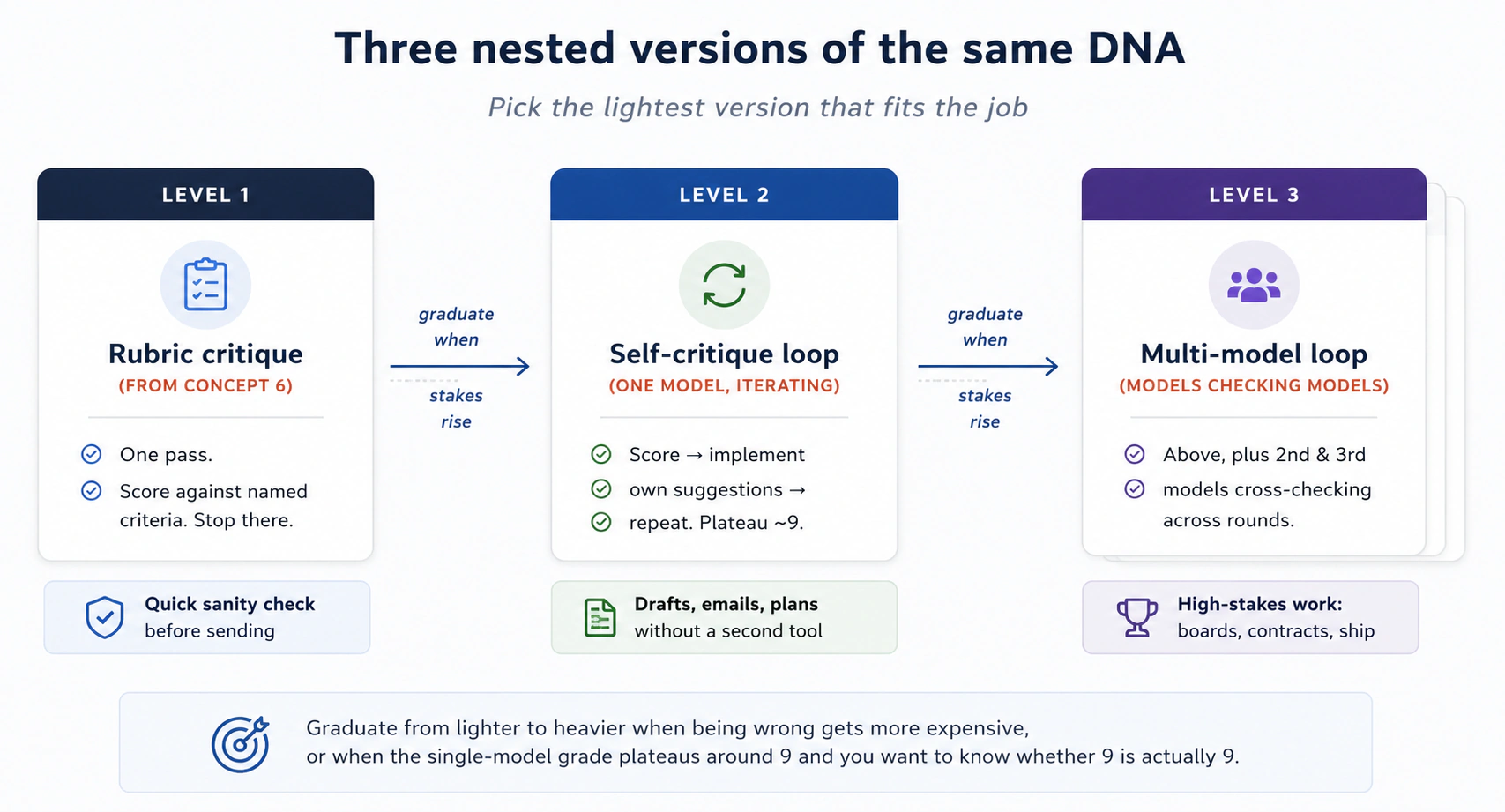
हल्के version से भारी की ओर तब बढ़ें जब ग़लत होना ज़्यादा महँगा हो जाए, या जब single-model grade लगभग 9 पर ठहर जाए और आप जानना चाहें कि क्या 9 असल में 9 है।
Grade क्यों मायने रखता है। Model से एक number निकलवाना number के बारे में नहीं है। यह इस बारे में है कि number बनाने के लिए क्या ज़रूरी है। एक model जिसे आपके draft को 7/10 score करना है उसे बाक़ी 3 बिंदुओं से क्या लापता है नाम देना पड़ता है। Score के बिना, "यह काफ़ी अच्छा है" review के तौर पर चल जाता है। Score के साथ, "काफ़ी अच्छा" को "structure पर 1 point खोता है क्योंकि तीसरा section दूसरे को दोहराता है; evidence पर 2 points खोता है क्योंकि तीन claims का कोई source नहीं" बनना पड़ता है। Grade specificity के लिए एक forcing function है, और specificity वह है जिस पर आप कार्य कर सकते हैं। यह इकलौता पढ़ने लायक़ संकेत भी है जो आपको iteration N की iteration N+1 से तुलना करने को मिलता है।
High-stakes काम के लिए एक privacy नोट। Cross-model checking का परिभाषा से मतलब अपना draft कई tools में paste करना है। संवेदनशील material के साथ ऐसा करने से पहले हर tool की data policy पर ध्यान दें। कुछ tools (अपने consumer product पर Claude, training opt-out enabled के साथ ChatGPT, paid Gemini tiers) आपके inputs पर train नहीं करते। दूसरे (default रूप से Meta AI का consumer product) कर सकते हैं। एक 40-page strategy memo, एक internal financial analysis, या एक NDA से ढकी कोई भी चीज़ सिर्फ़ उन tools से गुज़रनी चाहिए जिनकी data policies आपने सच में जाँची हैं। Multi-model loop का मक़सद आपके blind spots पकड़ना है; loop का उल्टा मक़सद आपके गोपनीय काम को एक training set में feed करना है।
एक ईमानदार चेतावनी। तीन models फिर भी एक ही चीज़ के बारे में सब ग़लत हो सकते हैं। वे आपके अनुमान से ज़्यादा training data साझा करते हैं, और विवादित या कम-data वाले topics (concept 2) पर वे अक्सर वही misconceptions साझा करते हैं। Score एक progress संकेत है, एक truth संकेत नहीं। High-stakes content (कुछ भी क़ानूनी, चिकित्सकीय, वित्तीय, या किसी असली इंसान के बारे में) के लिए कितने भी cross-model passes भार-वाहक claims की review करते एक human expert की जगह नहीं लेते। Models एक-दूसरे को कारीगरी के लिए check करते हैं। इंसान उन facts को check करते हैं जो मायने रखते हैं।
Loop कब छोड़ें।
हर task इसका हक़ नहीं कमाता। एक छोटा email, एक झटपट lookup, एक casual brainstorm: single-model ठीक है। Multi-model cross-check उस काम के लिए बचाएँ जहाँ ग़लत होना महँगा है: एक memo जो आपका boss पढ़ेगा, एक chapter जो publish होगा, एक फ़ैसला जो दूसरे लोगों को प्रभावित करता है, एक contract जिस पर आप दस्तख़त करेंगे। मोटा नियम: अगर एक विचारशील colleague इसकी review में दो घंटे लगाता, तो यह loop का हक़ कमाता है।
एक non-software उदाहरण। एक client board के लिए एक 40-page strategy memo तैयार कर रही एक consultant ने अपने सबसे मज़बूत model में draft किया और इसके अपने ही grades के ख़िलाफ़ iterate किया जब तक वे 9 पर ठहर न गए। फिर उसने पूरा memo एक अलग family के दूसरे model में paste किया और वही rubric माँगा। दूसरे model ने इसे 7.5 दिया और ग्यारह ख़ास issues गिनाए, जिनमें से तीन उसके primary model ने अपने किसी भी self-grading round में नहीं उठाए थे। उसने वे पहले model को फ़ैसला करने के लिए वापस feed किए; इसने सात अपनाए और चार को वजहों के साथ reject किया। एक और family के तीसरे model ने दो और सामने लाए। बात final scores की नहीं है। यह है कि वे counter-arguments जो वह अपने आप कभी न देखती, क्योंकि उसका primary model उसके blind spots साझा करता था, board meeting से पहले memo में थे।
Prompts try करने से पहले एक छोटा सारांश
तेरह concepts बहुत हैं। Page की shape, हर concept के लिए एक line:
- Concept 1. एक novice prompt और एक power-user prompt के बीच का फ़र्क कुछ आदतों का मुट्ठी भर है: AI को एक समझदार नए colleague की तरह brief करें, context, constraints, और एक साफ़ ask के साथ।
- Concept 2. AI चीज़ें internet के एक snapshot से जानता है, इसने दुनिया के बारे में text पढ़कर सीखा, दुनिया को अनुभव करके नहीं, तो यह आम topics पर मज़बूत और अनजान या हाल के topics पर कमज़ोर है।
- Concept 3. तीन retrieval modes: pretrained, web search, deep research। आपके शब्द steer करते हैं कि कौन सा fire होता है।
- Concept 4. Model की अपनी कोई memory नहीं; context window इस response के लिए इसकी working memory है। Answer quality का अकेला सबसे बड़ा निर्धारक यह है कि आप उस window में क्या डालते हैं, और projects आपको इसे हर बार के बजाय एक बार front-load करने देते हैं। Tools की own memory features वह sixth layer जोड़ती हैं जिसे आपने नहीं लिखा, इसलिए उसे पढ़ें और prune करें।
- Concept 5. Modern models अगर आप कहें तो seconds या मिनटों तक गहराई से सोच सकते हैं।
- Concept 6. Models सहमति की ओर झुके हैं। Neutral framing और rubrics उस झुकाव का ज़्यादातर बेअसर करते हैं; हर criterion पर एक 1-10 score मजबूर करना, उस बदलाव के साथ जो हर score को बढ़ाए, बाक़ी को बेअसर करता है।
- Concept 7. स्पष्ट-feedback-के-साथ-iterate loop page की सबसे फ़ायदेमंद आदत है। हर stage को 10 में से grade करें और re-iterate करें जब तक score ठहर न जाए, AI को आपको ख़त्म घोषित करने का हक़ नहीं मिलता।
- Concepts 8–9. AI images देख सकता है, दोनों दिशाओं में audio के साथ काम कर सकता है, और छोटे apps बना सकता है, चलता app एक artifact है जिस पर आप iterate, share, और embed कर सकते हैं।
- Concept 10. AI code भी लिख सकता है और आपके data पर run कर सकता है, पर यह हमेशा यह अपने आप नहीं करता। साफ़ माँगें, और verify करें कि code सच में run हुआ।
- Concept 11. file-aware desktop apps की एक नई श्रेणी है (Cowork, OpenWork)। जब तक आप उन्हें सुरक्षित रूप से इस्तेमाल न कर लें, permissions कसकर सीमित रखें।
- Concept 12. किसी काम के लिए सही tool हर कुछ महीने में बदलता है। Distinct families (Claude, ChatGPT, Gemini, Grok, Meta AI, DeepSeek) जानें और नई आने की अपेक्षा रखें, सबके लिए free tiers, और महीने में check करने लायक़ leaderboard के रूप में Arena।
- Concept 13. जब कमरे में कोई human expert न हो, models से एक-दूसरे को grade करवाना, अलग families के पार, एक वस्तुनिष्ठ quality संकेत के सबसे क़रीबी चीज़ है।
इन सबके नीचे एक move है, एक दर्जन भेस में दोहराया गया: सही context अंदर लाएँ, ग़लत context को बाहर रखें। अगर आप इस page से सिवाय इस वाक्य के एक भी चीज़ कभी याद न रखें, तब भी आप users के शीर्ष चौथाई में होंगे।
अभी यह try करें: thinking discipline में गहराई से जाने से पहले बारह prompts
पढ़ना try करने का एक placeholder है। किसी दूसरे tab में Claude, ChatGPT, या Gemini खोलें। इन बारह prompts को क्रम में चलाएँ। इनमें कुल लगभग अट्ठाईस मिनट लगते हैं और ये इस page के हर concept का अभ्यास कराते हैं जिसे आप एक chat tab से अभ्यास कर सकते हैं।
1. Web-search trigger। AI को इसके training data से बाहर निकलकर मौजूदा जानकारी देखने पर मजबूर करता है।
What major news happened today in [your country]? Cite each claim
with a source link. Flag any claim you can't support with a citation
as "unverified".
2. Pretrained-only सवाल। आम-ज्ञान, कोई lookup ज़रूरी नहीं। तेज़ और confident होना चाहिए।
Why do cats stare at walls? Two-paragraph answer.
3. Context-rich personal prompt। Constraints पहले load करने का अभ्यास।
Plan a 15-minute home workout for me. Constraints: I have stairs
in my home, a bad knee (no squats), I cannot stick to plans for
more than three days, and I want to feel slightly silly while
doing it. Give me 3 options, no commentary.
4. Neutral-framing दोबारा-लिखाई। Prompt में अपनी ही bias पहचानने का अभ्यास।
The question I want to ask is: "Don't you think four-day work
weeks are obviously better for everyone?" Rewrite this as a
neutral question that doesn't signal what answer I want.
Then answer the rewritten version.
5. Iteration के साथ three-options brainstorm। मुख्य power-user loop।
Round 1: I want to start a small side project that takes about
3 hours per week and might make money in a year. I'm a [your
profession] who likes [your hobby]. Give me 5 different ideas,
one line each. Don't expand any of them.

(Read the 5. Pick what you like and don't like. Then, in the
SAME conversation:)

Round 2: I reject options [N] and [N] because [reason]. I like
the [keyword] idea but I want it to use less [thing]. Give me
5 new options that incorporate this feedback.
6. Outline-first writing। Prose से पहले structure पर मजबूर करें।
I want to write a 600-word post about [a topic you care about].
Don't write it yet. Give me 3 different outline options, each
with 4-6 headings. One line per heading.
7. Think-hard reasoning prompt। एक असली personal फ़ैसला इस्तेमाल करें।
I'm choosing between [Option A] and [Option B] for [real personal
decision in your life]. Here's the relevant context: [a paragraph
of context]. Think hard before answering. Tell me:
1. The 3 trade-offs that actually matter.
2. Which you'd choose and why.
3. Under what conditions your recommendation would flip.
8. Grade-and-improve critique। अपने ही काम पर sycophancy से बचें।
I'm pasting in something I wrote: [paste anything 100-300 words].

Critique it using these 4 criteria, each scored 1-10 with a
one-sentence justification:
- Does it have a clear central claim?
- Is each paragraph in the right order?
- Are there any sentences that could be cut without loss?
- Does the ending earn the time the reader spent getting there?

Then, for each criterion, tell me the change that would raise
its score the most. There is always a next level — even a 9
has a path to 9.5.
9. Image-input task। AI को पढ़ने के लिए एक photo देने का अभ्यास।
[Upload any handwritten note, receipt, or whiteboard photo]

Transcribe what's written. Then summarize what it's about in
3 bullets. Flag anything you couldn't read with confidence.
10. Small-app prompt। Goal/Input/Output shape का अभ्यास। जो वापस आएगा वह एक artifact होगा जिस पर आप chat में ही click और iterate कर सकते हैं।
Build me a Pomodoro timer.
Goal: 25-minute work sessions, 5-minute breaks.
Input: I press start.
Output: Visible timer counting down, a satisfying click when
each cycle ends, a yellow theme. Show me the working version.
11. Data analysis: ख़ामोश failure mode को उजागर करें। "code के लिए साफ़ माँगें, फिर verify करें कि यह run हुआ" वाली discipline का अभ्यास। यह exercise दो rounds में है।
Round 1, the trap: In a fresh conversation, paste this prompt
exactly as written. Do NOT mention code.

  "Here are 18 numbers: 47, 52, 89, 91, 23, 67, 78, 12, 95,
  44, 88, 71, 33, 56, 99, 18, 64, 82. What is the median,
  the average, and which numbers are outliers? Be specific."

Look at the response carefully. Did the AI show you a code
block that it ran? Or did it write a paragraph with numbers
in it and no visible computation? Note your answer.

Round 2, the fix: In the same conversation, paste this:

  "Now run that calculation again — but this time write and
  run code to do it, and show me the code you ran."

Compare the two answers. If the first answer had the median
wrong, rounded suspicious numbers, or just felt vague — you
just saw the silent failure mode of concept 10 in action.
The correct answers are: median 65.5, average ~61.6,
no clear outliers (the numbers are roughly evenly spread).
12. Cross-model review। एक असली draft पर multi-model आदत का अभ्यास। एक साथ दो AI tools खुले चाहिए, अलग families से (Concept 13 देखें)।
Take any 200-300 word draft you wrote recently (an email, a memo,
or a paragraph from one of these exercises).

Step 1: In your primary AI tool, paste the draft and ask: "Score
this 1-10 on clarity, structure, evidence, and what's missing.
One-sentence justification per score."

Step 2: Open a second AI tool from a different family (if your
primary is Claude, use ChatGPT or Gemini or Meta AI — not another
Anthropic model). Paste the same draft, ask the same question.

Step 3: Compare the two scores and the two critiques side by
side. Note any point only one of them caught. Those are the
points the cross-model loop pays for.
🚀 Projects
बारह prompts में से हर एक ने एक concept का अभ्यास कराया। नीचे के पहले तीन projects उन्हें एक साथ जोड़ते हैं, और वे वहाँ ख़त्म होते हैं जहाँ एक chat window आपको नहीं ले जा सकती: किसी ऐसी चीज़ के साथ जिसे आपने public internet पर live बनाया, एक ऐसे address पर जिसे आप किसी दोस्त को text कर सकते हैं।
हर project एक free account पर तीस से साठ मिनट लेता है और जब आप तैयार हों तब खुलता है। Project 1 आज करें; बाक़ी हफ़्ते के लिए बचा रखें। ये क्रम में हैं: हर एक एक ऐसा move सिखाता है जिसे अगला इस्तेमाल करता है। अगर project के बीच कुछ टूट जाए, तो इस section का आख़िरी dropdown उसका हल रखता है। पहले तीन का आकार एक जैसा है:
 the chat builds it         you download it          the internet serves it
┌──────────────────┐       ┌──────────────┐  drag   ┌───────────────────────┐
│ a working app in │ ────→ │  index.html  │ ──────→ │ your-app.netlify.app  │
│  the side panel  │       │  (one file)  │         │ (a real, public URL)  │
└──────────────────┘       └──────────────┘         └───────────────────────┘
Concept 9 ने कहा था कि side panel में मौजूद चीज़ एक artifact है: एक असली object जिसे आप download कर सकते हैं, कोई preview नहीं। पहले तीन projects उस वादे को भुनाते हैं। Project 4 capstone है, और यह एक अलग तरह की चीज़ ship करता है: कोई URL नहीं बल्कि एक knowledge artifact जिसे आपने AI के साथ बनाया, साथ ही यह documented सबूत कि आप इसे direct कर सकते हैं, इस पर सवाल उठा सकते हैं, और इसे correct कर सकते हैं।
Project 130-60 minSnake Battleखेलते-खेलते एक game बनाएँ, फिर उसे एक असली URL पर ship करें।
ChatGPT, Claude, या Gemini खोलें और कहें:
Let's build and play a game where a snake eats fruit balls to grow.
side panel में एक खेलने लायक snake game दिखता है। तब पूरा जब: आप अपने arrow keys से snake को steer कर सकें और कुछ खा सकें। अगर आप phone पर हैं, तो वह आपकी पहली ख़्वाहिश है: "add touch controls." इसे एक मिनट खेलें, और पहली ऐसी चीज़ पर ध्यान दें जिसे आप अलग चाहते हैं। फिर कोई सावधान brief मत लिखें। बस ख़्वाहिश कह दें:
Can I pick my snake's color before the game starts?
artifact जगह पर ही update हो जाता है: अब एक color picker वाली start screen है। खेलते रहें, ख़्वाहिश करते रहें। फिर game के नियम ही बदल दें:
Now make it a battle: add computer-controlled snakes, and when a
snake dies its body turns into fruit the others can eat.
यह एक reader की Snake Battle है, ठीक उसी तरह एक असली आपकी इस जैसी नहीं दिखेगी, और यही बात है। यह वैसी दिखेगी जो भी आपने खेलते समय देखा।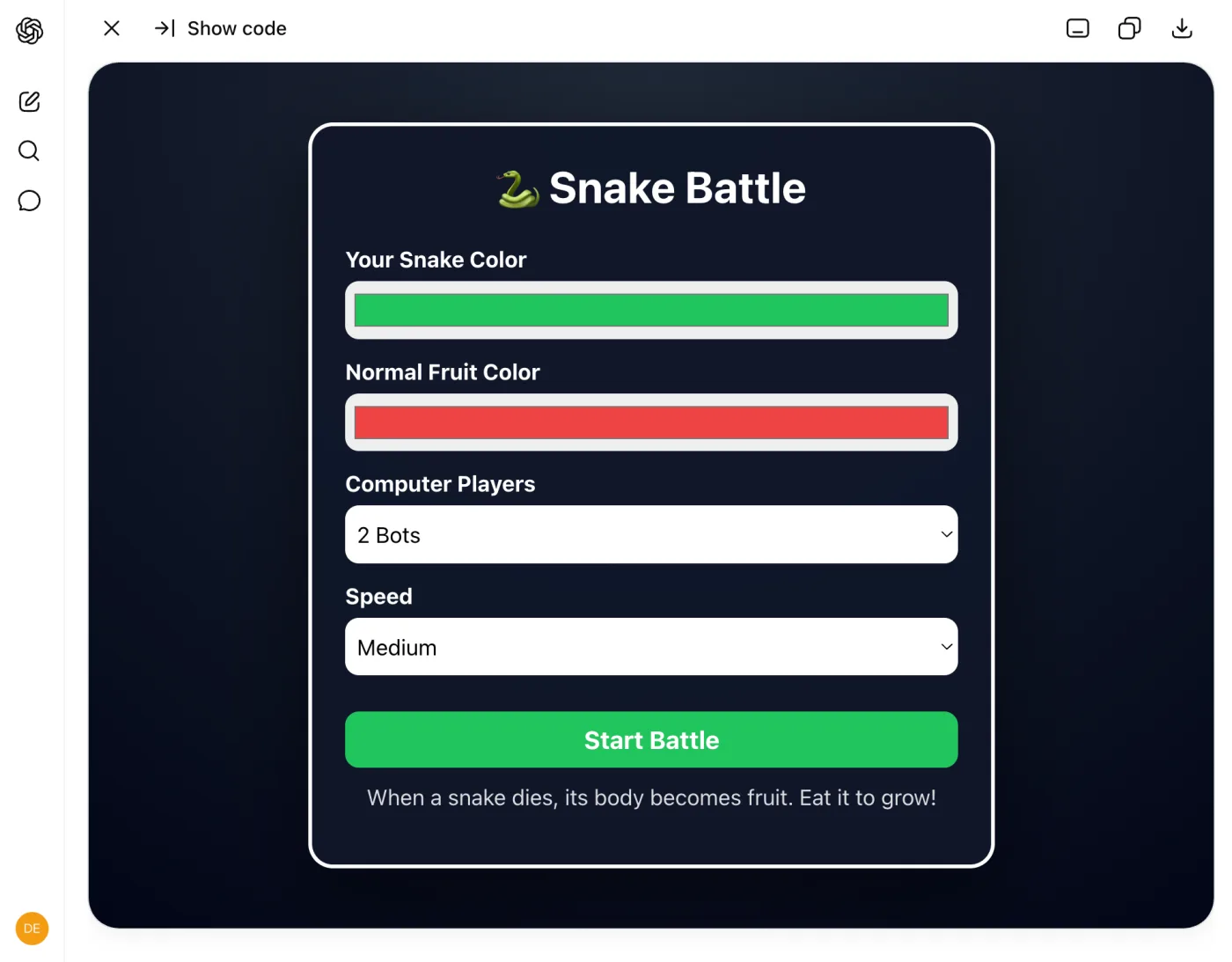
▶ एक तैयार version खेलें (जिस तरह की चीज़ की ओर आप बढ़ रहे हैं)
.netlify.app URL पर ship की गई जैसे आप अपनी करेंगे। एक color चुनें, Start Battle दबाएँ, arrow keys से steer करें। यह नीचे live load होती है; आप इसे अपने अलग tab में भी खोल सकते हैं।
तीन वाक्यों में, आपके पास एक start screen, color pickers, bot opponents, और एक नियम है जो आपने ईजाद किया। अब दो चीज़ें ध्यान दें। पहली, जो आपने कभी नहीं बताया: HTML, JavaScript, collision detection, game loops। आपने एक अनुभव बयान किया और model ने engineering की, ठीक जैसा Concept 9 ने वादा किया था। दूसरी, हर वाक्य कहाँ से आया। planning से नहीं। खेलने से। यह Concept 7 का loop है जिसमें feedback step की जगह सबसे ईमानदार critic है: आप, game के बीच में, यह देखते हुए कि आप क्या अलग चाहते हैं। तब तक चलते रहें जब तक game आपका न हो जाए। तेज़ snakes, एक score, sound effects, हर message पर एक ख़्वाहिश।
live होने से पहले एक आख़िरी pass। आप अब तक feel से grade कर रहे थे; हर ख़्वाहिश एक नन्हा फ़ैसला थी। इसे एक बार साफ़ ज़ाहिर करें: game से कहें कि वह ख़ुद को score करे और अपनी सबसे कमज़ोर जगह ठीक करे।
Score this game 1-10 on three things: is it fun, is it clear
what to do, and does it feel finished or rough? One sentence
each. Then make the single change that would raise the lowest
score, and do it.
यह पूरा move छोटे रूप में है। एक number एक ईमानदार answer मजबूर करता है जहाँ "is it good?" को हमेशा सिर्फ़ हाँ मिलती है (Concept 6)। यहाँ एक round करें। अगला project इस अकेली माँग को एक ऐसे loop में बदल देता है जो scores के रुकने तक नहीं रुकता।
अब इसे ship करें। यह वह move है जिसे हर project दोबारा इस्तेमाल करता है, तो इसे एक बार सावधानी से करें:
-
Game download करें। ChatGPT के canvas में panel के ऊपर एक download icon है; Claude और Gemini के अपने पर एक समकक्ष download या export control है। आपको एक अकेली
.htmlfile मिलती है। वह file पूरा game है। -
File का नाम बदलकर
index.htmlकरें। वह नाम "किसी site का front page" के लिए web की परिपाटी है, और अगले step की hosting service इसे ढूँढती है। -
netlify.com पर एक free account बनाएँ। एक email address काफ़ी है। Netlify एक hosting service है: यह files लेती है और उन्हें internet पर serve करती है, एक free tier के साथ जो इस project की ज़रूरत से ज़्यादा है।
-
अपनी file को drop zone में drag करें। signup के बाद, Netlify एक "Let's create your new project" page दिखाता है जिसकी drop zone, उसके अपने शब्दों में, "a single HTML file" स्वीकार करती है। (phone पर, drag करने के बजाय "browse files to upload" tap करें।)
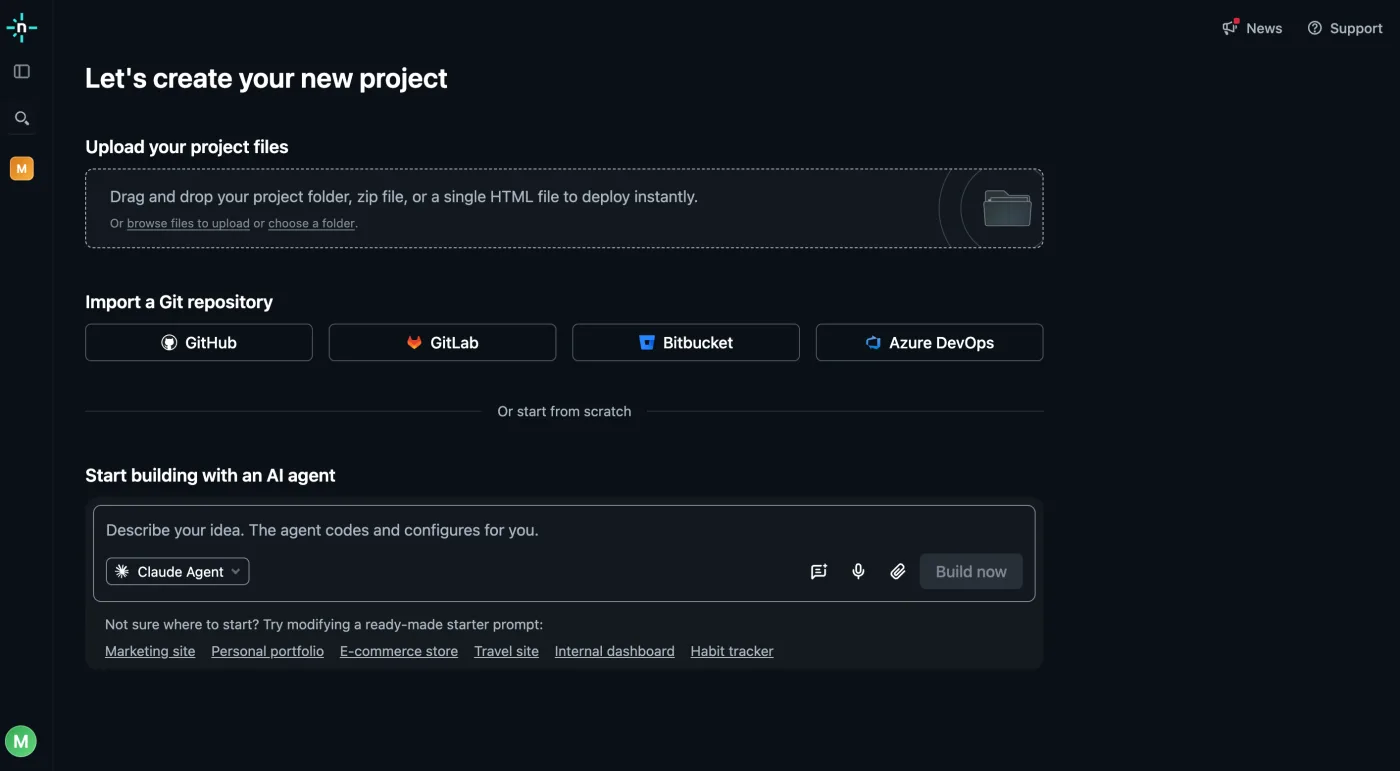
-
जो address यह देता है उसे खोलें। drop के कुछ सेकंड बाद, आपका game
.netlify.appपर ख़त्म होने वाले एक address पर live है। तब पूरा जब: game आपके phone के browser में load हो, सिर्फ़ आपके computer पर नहीं। link एक व्यक्ति को भेजें।
एक वाजिब सवाल: Concept 9 ने कहा था कि chat tools एक artifact को एक shareable link पर publish कर सकते हैं, तो download की झंझट क्यों? क्योंकि publish किया link AI product के अंदर रहता है, आपके chat से जुड़ा। download की हुई file आपकी है: यह किसी भी hosting service पर, एक USB stick पर, दस साल बाद भी काम करती है। Netlify इत्तेफ़ाक़ से वह सबसे तेज़ मुफ़्त तरीका है किसी file को जो आपकी है खुले web पर डालने का, और अभी आपने जो drag-and-drop किया वह सचमुच वही move है जिसे professionals एक झटपट site खड़ी करने के लिए इस्तेमाल करते हैं।
किसी ship किए game को update करने के लिए: chat में iterate करते रहें, फिर से download करें, फिर से rename करें, और नई file को Netlify में अपने project की deploys screen पर drag करें। वही address, नया version।
Project 245-60 minWhack-a-Moleएक game बनाएँ, फिर उसे 'काफ़ी अच्छा' से आगे grade करें जब तक यह सचमुच मज़ेदार न हो जाए।
snake game अच्छा इसलिए हुआ क्योंकि आपने उसे खेला, फिर ship करने से पहले एक बार grade किया। यहाँ, वह अकेला grade पूरा engine बन जाता है: आप इस page के हर move को एक साथ चलाते हैं, options brainstorm करते हैं, structure के साथ brief करते हैं, test करते हैं, एक rubric के ख़िलाफ़ score करते हैं, और scores ऊँचे होने तक रुकने से इनकार करते हैं। यह "build me a thing" का अनुशासित version है, और यही वह है जो कुछ ऐसा पैदा करता है जिसे share करने में आपको गर्व हो।
यह एक reader का Whack-a-Mole है, जो एक असली आपका game इस जैसा नहीं दिखेगा, और यही बात है। यह उस theme जैसा दिखेगा जो आपने चुना और उस feedback जैसा जो आपने दिया।
▶ एक तैयार version खेलें (आप जिस तरह की चीज़ बना रहे हैं)
.netlify.app URL पर ship किया गया है, ठीक उसी तरह जैसे आप अपना ship करेंगे। moles पर click करें जब वे दिखें और अपना high score तोड़ने की कोशिश करें। यह नीचे live load हो रहा है; आप इसे एक नई tab में भी खोल सकते हैं।
options माँगकर शुरू करें, एक build नहीं (Concept 7):
I want to build a Whack-a-Mole game. Before building anything,
give me 3 different visual theme options. One line each.

Vary the color scheme, what the moles look like (animals,
monsters, aliens), and the overall mood (playful, spooky,
elegant). Don't build any of them yet.
जो आपको पसंद है उसे चुनें और model को वह सब कुछ सौंप दें जो उसे इसे बनाने के लिए चाहिए। यह Concept 9 का Goal / Input / Output है, वह structure जो अनुमान के लिए कुछ नहीं छोड़ता:
I pick the twilight garden theme: deep blue night sky with
twinkling stars, glowing gold accents, rich dark emerald grass,
and cute animal emojis as moles.

Now build the game with these specs:

Goal: Moles pop up randomly from holes in a 3x3 grid. The
player clicks them to score points. They disappear after a
short time.

Input: Player clicks on moles that appear.

Output:
- 3x3 grid of clearly visible holes with dark centers and
  brown dirt rims that stand out from the grass
- Moles using these emojis: hamster, bear, frog, monkey,
  rabbit, fox - large and crystal clear when they pop up
- Score counter at the top
- 30-second countdown timer with a color-coded progress bar
- Moles rise up FROM INSIDE the hole, not floating above it
side panel में एक खेलने लायक game दिखता है। तब पूरा जब: moles ऊपर आएँ और एक पर click करने से एक point जुड़े। यह सपाट लगेगा, और यह अपेक्षित है: आपके पास ढाँचा है, feel नहीं। feel को एक pass में जोड़ें (Concept 4, हर detail जो आप छोड़ते हैं model को उसका अनुमान लगाना पड़ता है):
Add these features to the game:

1. SPEED: Moles start slow, visible for about 2.5 seconds.
   Speed ONLY increases when the player's SCORE goes up, not
   when time passes. Show a speed label: Easy, Fast, Frenzy.

2. INSTANT START: The first mole appears immediately when the
   player clicks Start. No waiting.

3. HIT EFFECTS: When a mole is whacked, show all of these:
   - Colorful particle burst at the hit point
   - A plus one text floating upward and fading out
   - Quick screen shake for impact
   - A short sound effect using Web Audio API

4. GAME OVER SCREEN: Show final score large and animated,
   total hits, hits-per-minute stat, confetti animation,
   New High Score badge if earned, and a Play Again button.
अब इसे खेलें, और वह करें जो Concept 7 ने सिखाया: बिल्कुल ठीक-ठीक कहें कि क्या ग़लत है और इसके बजाय आप क्या चाहते हैं। धुँधली शिकायतों को धुँधले fixes मिलते हैं:
I played the game and found these issues:

1. Moles are mostly hidden inside the hole. They should pop up
   clearly above the dirt so I can see the full emoji face.
   Fix the layering so moles render in front of the dirt.

2. The holes blend into the dark background. Add a visible
   lighter brown rim around each hole opening so they stand
   out clearly from the grass.

3. The game takes 2 seconds before the first mole appears
   after clicking Start. Make it appear instantly with zero
   delay.

Fix all three issues.
यह वह move है जो एक खिलौने को एक तैयार game से अलग करता है। "is it good?" मत पूछें, model हमेशा हाँ कहेगा (Concept 6)। इसे एक rubric सौंपें और इसे ख़ुद को ईमानदारी से score करने पर मजबूर करें:
Score this game 1-10 on each criterion. Give a one-sentence
justification per score. Then for EACH criterion, tell me the
single change that would raise the score the most.

1. VISUAL CLARITY - Can I instantly see every hole and mole?
2. FUN FACTOR - Does whacking a mole feel satisfying?
3. DIFFICULTY CURVE - Does it start easy and get harder fairly?
4. POLISH - Does it look like a finished game or a rough draft?
5. GAME FEEL - Do animations and sounds make me want to keep
   playing?

There is always a next level. Even a 9 has a path to 9.5.
फिर तब तक loop करें जब तक यह score कमा न ले, और कब कमाया यह आप तय करते हैं, model नहीं (Concept 13):
Implement the top 3 highest-impact changes you suggested. Then
score the game again on the same 5 criteria. Keep going until
all scores are 9 or above. I decide when to stop, not you.
वह loop पूरा project है। इसे दो बार चलाएँ और आपका game "एक चीज़ जो AI ने बनाई" से "एक चीज़ जिस पर मैं अपना नाम लगाऊँ" की रेखा पार कर जाता है। जब आप कोई feature चाहते हैं जिसे असली design चाहिए, सिर्फ़ और detail नहीं, तो model से कहें कि बनाने से पहले सोचे (Concept 5)। "think hard" वाक्यांश extended reasoning चालू कर देता है: और एक बार आपके पास पसंद का version आ जाए, तो पता करें कि क्या कोई अलग tool इसे बेहतर करता (Concept 12)। पहले वाले theme-and-build prompt और game-feel prompt को मिलाएँ, फिर उन्हें एक ऐसे tool में paste करें जिसे आपने इस्तेमाल नहीं किया: जो व्यक्ति हमेशा सिर्फ़ एक AI इस्तेमाल करता है वह अंदाज़ा लगा रहा है कि कौन सा सबसे अच्छा है। अब आप जानेंगे, इस तरह के build के लिए, अपनी ही आँखों से।दो power moves, एक बार basics काम करने लगें
Think hard about this: I want a smarter difficulty system.

Right now speed just increases with score. But a player who
scores 10 points in 10 seconds is very skilled, while a player
who scores 10 points in 25 seconds is slower. They should face
different difficulty levels.

Design an adaptive difficulty system that considers both the
player's score AND how fast they are scoring. Explain your
approach first, then implement it.Copy your Prompt 2 and Prompt 3 combined and paste them into
a different AI tool. If you used Claude, try ChatGPT or Gemini.
Play both versions side by side and compare:
- Which version has better visuals and colors?
- Which version has clearer moles and holes?
- Which version is more fun to play?
- Which version has better animations and sound?
Take the best ideas from both and ask your main AI tool to
add the features the other version did better.
इसे बिल्कुल snake game की तरह ship करें: download करें, नाम बदलकर index.html करें, Netlify में drag करें (एक नया project)। तब पूरा जब: एक दोस्त link से अपने ही phone पर आपका game खेल सके।
Project 330-60 minएक page जो आप हैंएक one-page personal site जिसे कोई अजनबी पाँच सेकंड में समझ ले।
इस project की पहली कोशिश आमतौर पर ऐसी दिखती है। इसे novice approach कहें (असल दुनिया में Concept 1):
I was in Summer Camp learning AI this June. Now I am thinking
to create a personal website that shows everything about me
and what I have learned in this Summer Camp. Share what goes
into the personal website
Now build a personal website with the above idea and show it
एक बिल्कुल ठीक-ठाक page वापस आता है, और ठीक यही जाल है। यह पूछना कि एक personal website में क्या-क्या जाता है, अच्छी instinct थी, लेकिन उस सवाल में कोई व्यक्ति ही नहीं है, इसलिए answer generic है, और दूसरा prompt उस सबको ज्यों का त्यों स्वीकार कर लेता है। "Everything about me" असली वाले मुझ के बारे में कुछ भी लेकर नहीं पहुँचा, इसलिए model वह ख़ाली जगह उसी इकलौते तरीक़े से भरता है जो उसके पास है (Concept 2): अपने training data के औसत student page से। Stock sections, "passionate about learning," ऐसी achievements जो किसी की भी हो सकती हैं। विनम्र, साफ़, किसी का नहीं। page उसी तरह अच्छा होता है जैसे इस page का हर answer अच्छा होता है: जब context असली हो जाता है।
यह रहा वही project, जिसे एक reader ने, एक summer-camp student ने, ठीक उसी तरह चलाया जैसे यह page सिखाता है। तीन prompts, शुरुआत से shipped तक। सबसे पहले brief: एक goal जिसमें एक audience है, और उन फ़ैसलों की list जिन पर वह कोई भी design बनने से पहले अपनी राय चाहता है:
Now you will build a professional personal website

My Goal: To present myself professionally to everyone
(friends, relatives, businesses)

Here are some points that we have to work on before
designing it:
1. Website Colors
2. Background and Design
3. Text Size, Writing Style
4. What information will be there
5. How we present it professionally

Build and show it
इनमें से कुछ भी designer की शब्दावली नहीं है। "Text Size, Writing Style" किसी का official jargon नहीं है, और फिर भी यह काम करता है, क्योंकि यह model को बता देता है कि कौन से फ़ैसले approve करने का हक़ उसने अपने पास रखा है। एक ठीक-ठाक page वापस आया: साफ़ sections, सबसे ऊपर उसका नाम। यह तैयार लग रहा था। उसने इसे वैसे पढ़ा जैसे कोई visitor पढ़ता, और पकड़ लिया कि क्या ग़ायब है। फिर उसने chat में अपनी summer-camp certificate की file attach की (files भी context हैं, Concept 4) और वह सबूत भेजा जो सिर्फ़ वही दे सकता था:
It looks good but it is missing the most important information

1. I can design games on the web. Here is an example to
   showcase: https://snake-game-by-junaid.netlify.app/
2. I know how to use ChatGPT and similar AI assistants
   professionally, like Claude and Gemini
3. I know everything present here
   https://agentfactory.panaversity.org/docs/ai-prompting-2026
4. I can professionally guide anyone about the things in the
   above link
5. At the end of summer camp there was an exam and I got
   certified. I have attached the certificate

Now plan and update it
हर line एक ऐसी असली चीज़ है जिसे कोई अजनबी check कर सकता है: एक game जो उसने ठीक उसी तरह ship किया जैसे Project 1 करवाता है, वह course जो उसने पढ़ा (item 3 वही page है जो आप इस वक़्त पढ़ रहे हैं), एक file जिसे model ख़ुद पढ़ सकता है। एक भूली हुई चीज़ की लागत एक message रही, कोई restart नहीं। और "Now plan and update it" पाँच शब्दों में Concept 7 की options-before-commitment instinct है: पहले plan, फिर page को हाथ लगाना। जो version वापस आया उसमें वहाँ सबूत थे जहाँ पहले adjectives हुआ करते थे। एक नज़र के बाद, आख़िरी move: एक design की ख़्वाहिश, snake-game के अंदाज़ में, इतनी specific कि अपना fix ख़ुद साथ लेकर चले:
On top I have my full name Muhammad Junaid Shaukat and the
same in the next section. This looks bad. For now the top
should have MJS and my game link
https://snake-game-by-junaid.netlify.app/
▶ वह page देखें जो उन तीन prompts ने बनाया (live)
यह असली shipped नतीजा है, एक ऐसे address पर जिसे उसने Netlify की settings में बदलकर अपना नाम कर लिया, ठीक वैसे जैसे नीचे का ship वाला step बताता है। यह यहाँ live load होता है; आप इसे अपने अलग tab में भी खोल सकते हैं।
आपका page इस जैसा नहीं दिखना चाहिए। उसे आप जैसा दिखना चाहिए।
अब अपना चलाएँ। उसके moves चुराएँ, उसके facts नहीं: शुरुआत अपने goal से और इस बात से करें कि page को किसके लिए काम करना है, उन फ़ैसलों की list बनाएँ जिन पर आप अपनी राय चाहते हैं, फिर "Build and show it." अगर आपको page के बजाय page का विवरण मिले, तो कहें: "do it." आप इन दो शब्दों को इस section के किसी भी दूसरे prompt से ज़्यादा इस्तेमाल करेंगे। जब पहला version तैयार दिखे, तो उसे एक visitor की तरह पढ़ें और उसी सवाल का जवाब दें जिसका जवाब उसने दिया: वह सबसे ज़रूरी information कौन सी है जो इस page में ग़ायब है? अपना जवाब असली, check हो सकने वाली चीज़ों की शक्ल में भेजें: जो आपने ship किया उसके links (Project 1 वाला game यहीं आता है), एक file जिसे model पढ़ सके, जो कुछ आपने पढ़ा उसके नाम। फिर design की ख़्वाहिशें, हर message पर एक। "The heading is shouting." "Less purple." "More space between sections."
जब यह तैयार दिखे, तब यह तैयार नहीं है। और यहाँ grader आप नहीं हो सकते: आप पहले से जानते हैं कि आप कौन हैं, तो आप यह महसूस नहीं कर सकते कि page सचमुच वह कहता है या नहीं। यह इकलौता project है जहाँ आपको किसी और की आँखें उधार लेनी पड़ती हैं। वही grade-and-fix loop चलाएँ जो आपने mole game पर चलाया (Concept 6 का honest-rubric move), एक बदलाव के साथ: AI को एक ख़ास अजनबी सौंपें जो वह बन जाए।
Become a specific stranger landing on this page for the first
time. Pick one and stay in their head: a recruiter scanning for
eight seconds, a classmate who has never met me, or someone my
work would actually matter to. Score the page 1-10 on three
things: do you know who I am within five seconds, is it obvious
what I want you to do, and does anything read like filler you
would skip? One sentence each, in their voice. Then make the
single change that raises the lowest score and apply it to the
page, don't just describe it.
इसे दो बार चलाएँ, हर बार एक अलग अजनबी। जब दो लोग जो कभी न मिलते दोनों आपको पाँच सेकंड में समझ लें, तब page पूरा है। वह सहमति वह संकेत है जो आपको अपनी ही आँखों से नहीं मिल सकता।
इसे बिल्कुल game की तरह ship करें: download करें, नाम बदलकर index.html करें, Netlify में drag करें (इस बार एक नया project)। अपने project की settings में आप random site name को अपने नाम के क़रीब किसी चीज़ में बदल सकते हैं, अगर वह पहले से लिया न गया हो। तब पूरा जब: आपका नाम एक ऐसे page पर ले जाए जो आपने बनाया, और वह address आपके bio में बैठा हो।
Project 42-4 hrsAI Mini Textbookएक topic पर एक छोटा learning chapter बनाने के लिए AI इस्तेमाल करें, फिर साबित करें कि आप इसे direct और check कर सकते हैं।
पहले तीन projects हर एक एक public URL पर ख़त्म हुए। यह जानबूझकर नहीं होता। यहाँ आप एक topic पर जिसे आप पढ़ रहे हैं एक छोटा mini textbook chapter बनाने के लिए AI इस्तेमाल करते हैं, और असली deliverable दो चीज़ें हैं: chapter (product) और एक process notebook जो साबित करता है कि आप AI को direct, सवाल, और correct कर सकते हैं (सबूत)। नीचे का framing एक स्कूली छात्र के लिए लिखा गया है जो class से एक topic चुन रहा है, पर यह किसी के लिए भी काम करता है: कोई भी topic चुनें जिसे आप सचमुच सीखने की कोशिश कर रहे हैं, "teacher" का मतलब कोई भी हो जो आपका काम check करेगा, और submission को वैकल्पिक मानें।
यह capstone है क्योंकि यह इस page की हर चीज़ का एक साथ अभ्यास कराता है: AI को मज़बूत context देना (Concept 4), सही retrieval mode चुनना (Concept 3), options-then-feedback loop और rubric scoring (Concept 7), और claims पर भरोसा करने के बजाय उन्हें verify करना (Concepts 2 और 13)। mini textbook product है। आपका prompt log, आपके fact-checks, और आपका reflection यह सबूत हैं कि आप AI को ज़िम्मेदारी से इस्तेमाल कर सकते हैं।
यह कैसे काम करता है, पहले पढ़ें। आप असली काम ChatGPT, Claude, या Gemini में एक अलग browser tab में करते हैं। यह card आपको चलाने के लिए prompts देता है, क्रम में, और नीचे एक live workbook (Step 6 पर) जहाँ आप हाथ से record करते हैं कि आपने क्या किया, आपका सबूत कि आपने AI के साथ कैसे तर्क किया। उस workbook को अभी खोलें और जैसे-जैसे आप steps से गुज़रें इसे भरते जाएँ, बजाय सब कुछ आख़िर के लिए छोड़ने के। जो कुछ आपको चाहिए वह इस page पर है, साथ ही एक free AI account।
Step 1: एक छोटा topic चुनें और अपना AI खोलें
एक छोटा topic चुनें, पूरा subject नहीं, क्योंकि आप एक छोटे topic को कुछ pages में सचमुच अच्छी तरह सिखा सकते हैं। photosynthesis मत चुनें; worked example इसे इस्तेमाल करता है। फिर बस ChatGPT, Claude, या Gemini खोलें और इस project के लिए एक fresh chat शुरू करें। अगर इत्तेफ़ाक़ से इस topic पर आपके पास notes या एक textbook हो, तो उन्हें बाद में paste करने के लिए पास रखें; अगर नहीं, तो AI का अपना ज्ञान काफ़ी है।
| पूरा subject | एक छोटा topic जिसे आप सचमुच सिखा सकते हैं |
|---|---|
| Biology | Food chains और energy कैसे बहती है |
| Mathematics | Fractions और percentages |
| Physics | Electric circuits |
| English | एक मज़बूत essay introduction लिखना |
| History | 1857 के स्वतंत्रता संग्राम के कारण |
अगर आप एक चाहें तो स्थानीय ideas: load-shedding के दौरान electric circuits, shopping discounts का इस्तेमाल करते हुए percentages, एक school announcement का इस्तेमाल करते हुए English grammar, या ratios का इस्तेमाल करते हुए एक class event का बजट बनाना।
तब पूरा जब: आपने एक छोटा topic चुन लिया हो और एक fresh AI chat खुला, तैयार हो।
Step 2: AI को अच्छी तरह brief करें (Concept 4)
दो prompts चलाएँ। पहले एक जानबूझकर कमज़ोर, और answer save करें, ताकि बाद में आप साथ-साथ देख सकें कि एक अच्छा brief चीज़ों को कितना सुधारता है। फिर एक असली जो AI को आपका context सौंपता है: आप कौन हैं और आप क्या सीख रहे हैं। वह दूसरा prompt एक move में Concept 4 का पूरा सबक़ है।
Explain ___.
क्यों: इसे सिर्फ़ baseline देखने के लिए पहले चलाएँ, एक आलसी prompt और एक अच्छे prompt के बीच का फ़र्क़।
I am a Grade ___ student. I am learning about ___. Explain it to me
clearly, then tell me what is still unclear and what I might
misunderstand.
क्यों: यह model को आपकी असली स्थिति सौंपता है, ताकि answer एक generic reader के बजाय आप पर फ़िट हो।
वैकल्पिक, सिर्फ़ तब जब आपके पास सचमुच notes, एक textbook photo, या एक worksheet हो: उन्हें paste करें और AI से कहें कि उन पर टिके। ज़्यादातर readers इसे छोड़कर AI का अपना ज्ञान इस्तेमाल कर सकते हैं।
Here are my notes / a textbook photo: ___. Use these first. If you add
anything that is not in them, label it clearly as extra.
तब पूरा जब: AI ने आपके असली context (आपका level और आप क्या सीख रहे हैं) का इस्तेमाल करते हुए जवाब दिया हो। हर prompt, और उसने जो लौटाया उस पर एक line, जैसे-जैसे आप बढ़ें नीचे के workbook में paste करें।
Step 3: options लें, फिर पीछे धकेलें (Concept 7)
अपने topic को समझाने के तीन अलग तरीक़े माँगें, पर AI को अभी उनमें से किसी को पूरे chapter में फैलाने न दें। फिर एक चुनें, बाक़ी को कारणों के साथ reject करें, और संशोधित outlines माँगें। कारण के साथ reject करना वह move है जो साबित करता है कि आप AI को direct कर रहे हैं, सिर्फ़ इसके पहले idea को स्वीकार नहीं कर रहे।
Give me 3 different ways to explain ___ to a Grade ___ student. Do not
expand into the full chapter yet. For each option, give a title,
structure, strengths, and weaknesses.
क्यों: यह drafting से पहले brainstorming मजबूर करता है।
I choose option ___ because ___. I reject option ___ because ___.
Revise the outline into 3 improved versions and make them more
suitable for my class context.
क्यों: यह दिखाता है कि आप AI को direct कर रहे हैं, सिर्फ़ पहला answer स्वीकार नहीं कर रहे।
तब पूरा जब: आपने कम से कम एक option को कारण के साथ reject कर दिया हो और आपके पास एक संशोधित outline हो जो आपको सचमुच पसंद हो।
Step 4: chapter बनाएँ (Part A)
अब जब planning loop हो गया, AI से कहें कि गहराई से सोचे और आपके notes और चुने हुए outline से पूरा chapter draft करे। chapter में सभी दस Part A sections होने चाहिए, जो नीचे collapsible में सूचीबद्ध हैं।
Read my notes and chosen outline carefully. Think hard about clarity,
accuracy, and age-fit. Now build the full mini textbook chapter for
Grade ___ students. Use simple language, short paragraphs, examples,
common mistakes, flashcards, quiz, and a 7-day revision plan.
क्यों: यह सावधान काम सिर्फ़ planning loop हो जाने के बाद माँगता है।
तब पूरा जब: आपके पास एक draft हो जो सभी दस Part A sections को cover करता हो।
Step 5: इसे score करें, फिर verify करें (Concepts 2, 7, 13)
पहले AI से कहें कि वह अपने ही draft को एक rubric के ख़िलाफ़ grade करे और जो सबसे छोटे edits यह सुझाए वे करे। फिर इससे कहें कि अपने महत्वपूर्ण claims सूचीबद्ध करे, और कुछ बड़े वाले ख़ुद check करें, अपने notes, एक textbook, या एक झटपट web search के ख़िलाफ़, हर एक को Accept, Reject, Modify, या Needs checking mark करते हुए। एक score बताता है कि कहाँ सुधारना है; verification बताता है कि असल में क्या सच है।
Grade the chapter from 1 to 10 on four criteria: clarity, accuracy,
age-fit, and usefulness for revision. Justify each score in one
sentence. Then tell me the smallest edit that would raise each score
the most.
क्यों: यह critique को मापने योग्य सुधार में बदल देता है।
List 6 to 10 important factual claims in the chapter. Mark each claim
as supported by my notes, supported by a named source, needs checking,
or unsupported. Do not pretend you verified something if you did not.
क्यों: यह अंधे भरोसे के बजाय ईमानदार checking का समर्थन करता है।
तब पूरा जब: आपने rubric के edits लागू कर दिए हों और कम से कम कुछ महत्वपूर्ण claims check कर लिए हों। rubric prompt और जो claims आपने check किए उन्हें जैसे-जैसे आप बढ़ें नीचे के workbook में log करें।
Step 6: अपना process notebook जोड़ें और ख़त्म करें
सबूत एक साथ जुटाएँ: आपका topic brief, sources, prompt log, fact-checks, और reflection। काम करते समय नीचे के live workbook को भरें; यह अपने आप आपके browser में save हो जाता है और एक Markdown file में export हो जाता है जिसे आप अपने सबूत के रूप में रख सकते हैं, copy कर सकते हैं, या print कर सकते हैं। पूरी Part B specification, हर table पर एक example row के साथ, इसके नीचे collapsible में है।
तब पूरा जब: आपका chapter हो गया हो, और आपका workbook सबूत रखता हो: मुख्य prompts जो आपने चलाए, कुछ facts जो आपने check किए, और अपने शब्दों में एक छोटा reflection। यह किसी class के लिए कर रहे हैं? ज़्यादा भरा-पूरा version, और prompts, नामित sources, rubric, और पूरी checklist, नीचे collapsibles में है। chapter ऐसे किसी के लिए लिखें जो topic से पहली बार मिल रहा है। सभी दस sections शामिल करें: यह सबूत है। इसके छह हिस्से हैं। दो छोटे लेखन के टुकड़े हैं; चार tables हैं जिन्हें आप अपने ही notebook या doc में भरते हैं, एक बार में एक row। B1, Topic Brief। एक छोटा paragraph: कौन सा topic, आपने इसे क्यों चुना, इसमें क्या मुश्किल है, यह किसके लिए है, और अंत तक reader को क्या समझना चाहिए। B2, Source List। हर source पर एक row, कम से कम दो: Retrieval modes (Concept 3)। कम से कम दो sources नाम लें, अगर हो सके तो कम से कम एक अपने class material से, और बताएँ कि आपने कौन सा mode इस्तेमाल किया: Source types या तो एक class source (textbook page, teacher notes, worksheet, एक paragraph की photo) या एक trusted learning source (Khan Academy, Britannica, एक teacher-approved site) गिने जाते हैं। अगर आपके tool में web search नहीं है, तो अपना textbook और teacher notes इस्तेमाल करें और इसे लिख लें। sources का आविष्कार मत करें। अगर AI आपको कोई source दे, तो जब हो सके उसे खोलें और check करें; अगर आप इसे verify नहीं कर सकते, तो इसे "Needs checking" mark करें। अपना context package बनाएँ। model सिर्फ़ वही जानता है जो मौजूदा chat या Project में है, तो इसे खिलाएँ: एक टाइप किया textbook paragraph, एक page या worksheet की साफ़ photo, एक diagram या class note की photo, आपके teacher के निर्देश, वह vocabulary जो आपका teacher चाहता है, और अपने शब्दों में कि पहले से आपको क्या उलझाता है। Privacy नियम: passwords, अपना घर का पता, phone number, निजी परिवार की जानकारी, या निजी photos कभी upload न करें। B3, Prompt Log। कम से कम 8 prompts, पूरी process दिखाते हुए और सिर्फ़ final answer नहीं। हर prompt पर एक row, ऊपर के starter prompts में आठ प्रकारों को cover करते हुए: B4, Rubric Scoring Table। draft को score करें, फिर इसे सुधारें। किसी score को आँख मूँदकर स्वीकार न करें। हर criterion पर एक row (clarity, accuracy, age-fit, usefulness): B5, Checking Table। 6 से 10 महत्वपूर्ण AI statements चुनें और उन्हें check करें। हर एक पर एक row: B6, Reflection। 150 से 250 शब्द: AI ने आपको क्या समझने में मदद की, इसने क्या ग़लत किया या अस्पष्ट छोड़ा, कौन सा prompt सबसे अच्छा चला और क्यों, आपने final chapter में क्या बदला, और अगली बार आप क्या अलग करेंगे। यहाँ एक पूरे हुए रास्ते का आकार है, ताकि आप देख सकें कि आप किधर जा रहे हैं: यह नमूना अपेक्षित structure और गुणवत्ता दिखाता है। आपको इसे copy नहीं करना चाहिए: अपना ख़ुद का topic, sources, prompts, checks, और reflection चुनें। Title: AI Mini Textbook: Grade 8 के लिए Photosynthesis। हरे पौधे sunlight, water, carbon dioxide, और chlorophyll का इस्तेमाल करके अपना भोजन कैसे बनाते हैं। Part A: chapter 1. Title और audience। Grade 8 के लिए Photosynthesis। Grade 8 students के लिए लिखा गया। समझाता है कि हरे पौधे sunlight, water, carbon dioxide, और chlorophyll का इस्तेमाल करके अपना भोजन कैसे बनाते हैं। 2. Learning goals। समझाएँ कि photosynthesis का क्या मतलब है; पौधों को जो मुख्य चीज़ें चाहिए उन्हें पहचानें; sunlight, chlorophyll, water, और carbon dioxide की भूमिका समझाएँ; बताएँ कि पौधे क्या पैदा करते हैं; पौधे भोजन कैसे बनाते हैं इस बारे में common mistakes से बचें। 3. Simple explanation। Photosynthesis वह प्रक्रिया है जिससे हरे पौधे अपना भोजन ख़ुद बनाते हैं। पौधे इंसानों और जानवरों की तरह नहीं खाते; हरे पौधे अपने पत्तों के अंदर भोजन बनाने के लिए sunlight का इस्तेमाल करते हैं। यह भोजन एक शक्कर है जिसे glucose कहते हैं। glucose बनाने के लिए, पौधों को sunlight, water, carbon dioxide, और chlorophyll चाहिए। Chlorophyll पत्तों में मौजूद हरा पदार्थ है; यह पौधों को sunlight से ऊर्जा सोखने में मदद करता है। पौधे अपने पत्तों के छोटे छिद्रों से हवा से carbon dioxide लेते हैं और अपनी जड़ों से मिट्टी से water सोखते हैं। sunlight और chlorophyll का इस्तेमाल करते हुए, पौधा water और carbon dioxide को glucose और oxygen में बदल देता है। glucose को पौधा ऊर्जा और वृद्धि के लिए इस्तेमाल करता है; oxygen हवा में छोड़ दी जाती है। इसे याद रखने का एक सरल तरीक़ा: Sunlight + Water + Carbon Dioxide -> Glucose + Oxygen। Photosynthesis इसलिए मायने रखता है क्योंकि यह पौधों को भोजन देता है और oxygen पैदा करता है, जिसकी इंसानों और जानवरों को साँस लेने के लिए ज़रूरत होती है। 4. Key terms। 5. Examples। उदाहरण 1, एक धूप वाली खिड़की के पास एक पौधा: एक धूप वाली खिड़की के पास रखा और ठीक से पानी दिया, यह photosynthesis के ज़रिए भोजन बना सकता है; पत्ते sunlight सोखते हैं, जड़ें water सोखती हैं, पत्ते carbon dioxide लेते हैं, और पौधा इनका इस्तेमाल glucose बनाने के लिए करता है, जो इसे बढ़ने में मदद करता है। उदाहरण 2, अँधेरे में रखा एक पौधा: लंबे समय तक अँधेरे में रखा, यह ठीक से photosynthesis नहीं कर सकता क्योंकि इसमें रोशनी की कमी है; पर्याप्त रोशनी के बिना यह पर्याप्त glucose नहीं बना सकता और समय के साथ कमज़ोर हो सकता है। यह दिखाता है कि sunlight महत्वपूर्ण है। 6. Common mistakes। 7. Diagram या visual idea। एक हरा पौधा arrows के साथ बनाएँ: sunlight पत्तों में, मिट्टी से water जड़ों में, हवा से carbon dioxide पत्तों में, पत्तों से oxygen बाहर, और पौधे के अंदर glucose उस भोजन के रूप में labeled जो इसने बनाया। नीचे लिखें: Sunlight + Water + Carbon Dioxide -> Glucose + Oxygen। 8. Flashcards। 9. Quiz। Q1 Photosynthesis क्या है? Q2 photosynthesis के लिए पौधों को चाहिए तीन चीज़ें बताएँ। Q3 chlorophyll की भूमिका क्या है? Q4 photosynthesis के दौरान कौन सा भोजन बनता है? Q5 इंसानों और जानवरों के लिए photosynthesis क्यों महत्वपूर्ण है? Answer key: 1) वह प्रक्रिया जिससे हरे पौधे sunlight का इस्तेमाल करके अपना भोजन ख़ुद बनाते हैं; 2) sunlight, water, और carbon dioxide, साथ ही sunlight सोखने के लिए chlorophyll; 3) chlorophyll sunlight सोखता है; 4) glucose; 5) यह oxygen पैदा करता है और पौधों को भोजन बनाने में मदद करता है, जो Earth पर जीवन को सहारा देता है। 10. 7-दिन का revision plan। Part B: process notebook B1, Topic Brief। मैंने photosynthesis इसलिए चुना क्योंकि यह एक महत्वपूर्ण Grade 8 Biology topic है। कई students इसे मुश्किल पाते हैं क्योंकि वे sunlight, water, carbon dioxide, oxygen, glucose, और chlorophyll की भूमिकाएँ उलझा देते हैं। कुछ सोचते हैं कि पौधे अपना सारा भोजन मिट्टी से लेते हैं। मेरा chapter Grade 8 students के लिए लिखा गया है। अंत तक, उन्हें समझना चाहिए कि हरे पौधे अपना भोजन ख़ुद कैसे बनाते हैं और यह जीवन के लिए क्यों मायने रखता है। B2, Source List। B3, Prompt Log। B4, Rubric Scoring Table। B5, Checking Table। B6, Reflection। AI ने photosynthesis को सरल भाषा में समझाकर और topic को key terms, examples, common mistakes, flashcards, और एक quiz में व्यवस्थित करके मुझे समझने में मदद की। मेरा पहला prompt बहुत कमज़ोर था क्योंकि इसने सिर्फ़ "Explain photosynthesis" पूछा, तो answer general था और मेरे class level के लिए नहीं बना। सबसे अच्छा prompt वह था जहाँ मैंने AI को अपना grade level, textbook context, और teacher vocabulary दिया, और एक पूरा chapter माँगा। AI ने मुझे एक स्पष्ट structure दिया, पर मुझे फिर भी facts check करने पड़े। एक महत्वपूर्ण correction यह था कि पौधे अपना सारा भोजन मिट्टी से नहीं लेते: वे मिट्टी से water और minerals लेते हैं, पर glucose अपने पत्तों में बनाते हैं। अगली बार मैं AI को पहले अपने class notes दूँगा, अलग-अलग outline options माँगूँगा, और final answer इस्तेमाल करने से पहले महत्वपूर्ण claims check करूँगा। यह सिर्फ़ एक नमूना है। अपना ख़ुद का topic चुनें, अपने ख़ुद के sources इस्तेमाल करें, अपने ख़ुद के prompts दिखाएँ, facts check करें, और अपना ख़ुद का reflection लिखें।आपके chapter में क्या होना चाहिए (दस Part A sections)
# Section इसमें क्या जाता है लंबाई 1 Title और audience topic, subject, grade level, यह किसके लिए है आधा page 2 Learning goals 3 से 5 चीज़ें जो reader को समझनी चाहिए छोटी list 3 Simple explanation आसान भाषा, headings, छोटे paragraphs 1 से 2 pages 4 Key terms कम से कम 5 शब्द सरल परिभाषाओं के साथ table 5 Examples कम से कम 2 हल किए या असल-ज़िंदगी के उदाहरण आधा से 1 page 6 Common mistakes कम से कम 5 ग़लतियाँ और उनसे कैसे बचें list या table 7 Diagram या visual idea एक सरल diagram, flowchart, या labeled visual 1 visual 8 Flashcards 10 cards, एक तरफ़ सवाल, दूसरी तरफ़ जवाब table 9 Quiz answer key के साथ 5 सवाल छोटा quiz 10 7-दिन का revision plan एक सरल एक-हफ़्ते का study plan table आपके process notebook में क्या होना चाहिए (Part B)
Source का नाम प्रकार मैंने इसे कैसे इस्तेमाल किया मेरे topic पर Grade 8 textbook page Textbook / class source मुख्य परिभाषा और key terms लिए
# मेरा prompt AI ने मुझे क्या दिया मैंने अगली बार क्या बदला 1 "Explain ___." advanced शब्दों के साथ एक general answer देखा कि यह बहुत कमज़ोर था, अपना grade + notes जोड़े Criterion AI score (1 से 10) AI का कारण इसे सुधारने का सबसे छोटा edit मेरा फ़ैसला Clarity 8 साफ़, पर याद रखना मुश्किल एक सरल diagram जोड़ें accepted, मैंने एक जोड़ा AI statement मेरा फ़ैसला (Accept / Reject / Modify / Needs checking) सबूत या कारण ज़रूरत हो तो correction "My topic mostly happens in X." Reject मेरा textbook कहता है यह Y में होता है Y में correct किया एक पूरा हुआ रास्ता कैसा दिखता है (एक उदाहरण)
Stage इस उदाहरण में चुना गया topic load-shedding के दौरान Electric circuits, Grade 8 Physics Class context battery, switch, bulb, current, complete circuit, short circuit पर teacher notes नामित sources एक textbook page photo साथ ही circuits पर एक Khan Academy article या video Options prompt circuits समझाने के 3 तरीक़े माँगे (water-flow, home-lighting, drawing-based) चुना गया option home-lighting analogy, क्योंकि Kharian के students load-shedding जानते हैं Final product explanation, key terms, एक circuit diagram idea, common mistakes, flashcards, quiz, और एक 7-दिन के plan वाला chapter एक पूरा worked example देखें (photosynthesis, Grade 8): इसे copy न करें
Term अर्थ Photosynthesis वह प्रक्रिया जिससे हरे पौधे sunlight का इस्तेमाल करके भोजन बनाते हैं Chlorophyll पत्तों में मौजूद हरा पदार्थ जो sunlight सोखता है Glucose पौधों द्वारा भोजन के रूप में बनाई गई एक प्रकार की शक्कर Carbon dioxide हवा से एक gas जिसे पौधे photosynthesis के दौरान इस्तेमाल करते हैं Oxygen photosynthesis के दौरान पौधों द्वारा छोड़ी गई एक gas Roots पौधे का वह हिस्सा जो मिट्टी से water सोखता है Leaves पौधे का मुख्य हिस्सा जहाँ photosynthesis होता है Mistake Correction "Plants get all their food from the soil." पौधे मिट्टी से water और minerals लेते हैं, पर glucose पत्तों में बनाते हैं "Photosynthesis happens in the roots." यह ज़्यादातर पत्तों में होता है "Chlorophyll is food for the plant." chlorophyll भोजन नहीं है; यह sunlight सोखने में मदद करता है "Oxygen is used to make food." oxygen photosynthesis के दौरान पैदा होती है, भोजन बनाने में इस्तेमाल नहीं होती "Plants do not need air." पौधों को हवा से carbon dioxide चाहिए Question Answer What is photosynthesis? वह प्रक्रिया जिससे हरे पौधे sunlight का इस्तेमाल करके भोजन बनाते हैं What food do plants make? glucose What gas do plants take in? carbon dioxide What gas is released? oxygen What part absorbs water? roots Where does it mostly happen? पत्तों में What is chlorophyll? हरा पदार्थ जो sunlight सोखता है Why is sunlight needed? यह photosynthesis के लिए ऊर्जा देती है Do plants get all their food from soil? नहीं, वे photosynthesis के ज़रिए glucose बनाते हैं Why is it important for humans? यह oxygen पैदा करता है और food chains को सहारा देता है Day Task Day 1 simple explanation पढ़ें और key words underline करें Day 2 photosynthesis, chlorophyll, glucose, carbon dioxide, oxygen सीखें Day 3 photosynthesis diagram बनाएँ और label करें Day 4 common mistakes table दोहराएँ Day 5 flashcards का इस्तेमाल करके ख़ुद को परखें Day 6 answers देखे बिना quiz के जवाब दें Day 7 photosynthesis को एक दोस्त या परिवार के सदस्य को अपने शब्दों में समझाएँ Source का नाम प्रकार मैंने इसे कैसे इस्तेमाल किया Grade 8 Science textbook section Textbook / class source मुख्य परिभाषा और key terms photosynthesis पर Teacher notes Teacher guidance महत्वपूर्ण vocabulary पहचानने के लिए Khan Academy या Britannica explanation Trusted learning source बुनियादी explanation check करने और ग़लत claims से बचने के लिए # मेरा prompt AI ने मुझे क्या दिया मैंने अगली बार क्या बदला 1 "Explain photosynthesis." कुछ advanced शब्दों के साथ एक general answer देखा कि यह बहुत कमज़ोर था और Grade 8 के लिए नहीं लिखा गया 2 "I am a Grade 8 student. Explain photosynthesis in simple words using the key terms." सही key words का इस्तेमाल करते हुए एक स्पष्ट explanation अपना textbook और teacher notes जोड़ने का फ़ैसला किया 3 "Use my Grade 8 textbook and teacher notes first. Label any extra information as extra." textbook vocabulary पर केंद्रित रहा, extras से बचा लिखने से पहले outline options माँगे 4 "Give me 3 ways to explain photosynthesis to a Grade 8 student. Do not write the chapter yet." तीन options: recipe analogy, factory analogy, diagram-first recipe analogy चुना 5 "I choose the recipe analogy. I reject the factory analogy as too complex. Revise into 3 outlines." terms, mistakes, flashcards, quiz के साथ तीन बेहतर outlines diagram और mistakes वाला outline चुना 6 "Read my notes and outline. Think hard about clarity and age-fit. Build the full chapter." chapter का एक पूरा first draft AI से draft को एक rubric से score करने को कहा 7 "Grade the chapter 1 to 10 on clarity, accuracy, age-fit, usefulness. Justify and suggest edits." scores: clarity 8, accuracy 8, age-fit 9, usefulness 8 diagram और mistakes section सुधारा 8 "List 6 to 10 factual claims and mark each supported, needs checking, or unsupported." sunlight, chlorophyll, glucose, oxygen के बारे में claims की एक list उन्हें अपने textbook के ख़िलाफ़ check किया और wording ठीक की Criterion AI score AI का कारण सबसे छोटा edit मेरा फ़ैसला Clarity 8 साफ़, पर process याद रखना मुश्किल एक सरल equation और diagram idea जोड़ें accepted, मैंने दोनों जोड़े Accuracy 8 facts सही हैं, पर मिट्टी की भूमिका अस्पष्ट है समझाएँ कि मिट्टी water देती है, पत्ते glucose बनाते हैं accepted, common mistakes में जोड़ा Age-fit 9 भाषा Grade 8 के लिए उपयुक्त है paragraphs छोटे रखें, advanced chemistry से बचें accepted Usefulness for revision 8 उपयोगी, पर revision tools मदद करते flashcards और एक 7-दिन का plan जोड़ें accepted, मैंने दोनों जोड़े AI statement मेरा फ़ैसला सबूत या कारण ज़रूरत हो तो correction "Photosynthesis is how green plants make food." Accept textbook और teacher notes से मेल खाता है कोई नहीं "Plants need sunlight for photosynthesis." Accept textbook से मेल खाता है कोई नहीं "Chlorophyll helps absorb sunlight." Accept teacher notes से मेल खाता है कोई नहीं "Plants take in carbon dioxide." Accept textbook और trusted source से मेल खाता है कोई नहीं "Plants release oxygen during photosynthesis." Accept textbook से मेल खाता है कोई नहीं "Glucose is the food made by plants." Accept class notes से मेल खाता है कोई नहीं "Plants get all their food from the soil." Reject teacher notes कहते हैं पौधे glucose पत्तों में बनाते हैं पौधे मिट्टी से water और minerals लेते हैं, पर glucose photosynthesis में बनाते हैं "Photosynthesis mostly happens in the roots." Reject textbook कहता है यह मुख्य रूप से पत्तों में होता है photosynthesis ज़्यादातर पत्तों में होता है इसे कैसे grade किया जाता है
Category मज़बूत काम क्या दिखाता है Points Topic और learning goal स्पष्ट topic, audience, कठिनाई, और learning goal 8 Context package AI को दिए गए उपयोगी class notes, textbook text या photo, vocabulary, या teacher instructions 12 AI workspace discipline context की उलझन से बचने के लिए एक Project या स्पष्ट रूप से व्यवस्थित अलग chats इस्तेमाल किए 5 नामित sources और retrieval mode कम से कम दो नामित sources, और कौन सा mode इस्तेमाल हुआ (pretrained, source-based, या web/search) 10 Prompt log और iteration कम से कम 8 prompts: weak, context, source naming, 3-option loop, feedback, draft, rubric, verify 20 Mini textbook quality स्पष्ट, व्यवस्थित, उम्र के अनुकूल, पूर्ण, और जिससे revise करना आसान 20 Checking table महत्वपूर्ण AI claims check किए, correct किए, या ईमानदारी से "Needs checking" mark किए 15 Reflection AI ने किसमें मदद की, किसे correction चाहिए था, और क्या सीखा, इसका ईमानदार ब्योरा 10 Safety और ईमानदारी के नियम
submit करने से पहले, checklist
आपका लक्ष्य यह दिखाना नहीं है कि AI समझदार है। यह दिखाना है कि आप AI को guide कर सकते हैं, AI पर सवाल उठा सकते हैं, AI को correct कर सकते हैं, और बेहतर सीखने के लिए AI इस्तेमाल कर सकते हैं।
तब पूरा जब: आपका chapter पूरा हो (सभी दस Part A sections) और आपका process notebook काम को साबित करे: कम से कम 8 prompts का एक prompt log, कम से कम दो नामित sources, आपके rubric scores, 6 से 10 statements की एक checking table जिन्हें आपने verify किया, और अपने शब्दों में एक reflection।
पहले तीन projects से आप जो भी address ship करते हैं वह इसलिए मौजूद है क्योंकि आपने सीधे वाक्यों में, एक ऐसे model को जो बनाता है, बयान किया कि आप क्या चाहते हैं। वे एक ही engine पर चलते हैं: snake इसलिए अच्छा होता है क्योंकि आप खेलते समय क्या देखते हैं, mole game इसलिए क्योंकि आप इसे जिस rubric पर रखते हैं, page इसलिए क्योंकि आप कौन हैं। context के अलग स्रोत, वही move। सही context अंदर लाएँ। capstone वह अपवाद है जो नियम को साबित करता है। यह कोई address ship ही नहीं करता, क्योंकि इसका product एक ऐसी चीज़ है जिसे आप समझते हैं और यह सबूत कि आप, model नहीं, प्रभारी थे।
पहले तीन projects हर एक एक अकेली HTML file हैं, क्योंकि यही उस idea का आकार है जिसे एक prompt ढो सकता है। Concept 9 ने सीमा को ईमानदारी से नाम दिया: accounts, internet पर live multiplayer, data जिसे बचे रहना है, उन्हें असली engineering चाहिए। capstone एक अलग सीमा को नाम देता है: एक model कुछ सेकंड में पूरा chapter draft कर सकता है, पर सिर्फ़ आप तय कर सकते हैं कि यह सच है या नहीं। जब आपके ideas एक file से बड़े हो जाएँ, या किसी draft पर आपका भरोसा एक नज़र से बड़ा हो जाए, वहीं से इस किताब का बाक़ी हिस्सा आगे बढ़ता है।
जब कोई project बिगड़ जाए (इनमें से एक होगा; सभी सामान्य हैं)
| Symptom | Fix |
|---|---|
| side panel में app blank या frozen है | सीधे शब्दों में कहें: "it's a black screen" या "the start button does nothing." model अपना ही code देख सकता है और आम तौर पर इसे ठीक कर देगा। सबसे बुरी हालत में: "rebuild it from scratch, simpler." |
| download की हुई file text की दीवार के रूप में खुलती है | यह एक text editor में खुली। file पर right-click करें, Open With चुनें, और अपना browser चुनें। file ठीक है। |
| Netlify "Page not found" दिखाता है | file का नाम शायद index.html नहीं है। इसे rename करें और फिर से drag करें। |
| address भद्दा है | यह by default एक random नाम है। आपके project की settings आपको site rename करने देती हैं, ताकि address yourname.netlify.app बन जाए अगर वह नाम मुफ़्त हो। |
| update के बाद एक दोस्त को पुराना version दिखता है | सबसे नई file को project की deploys screen पर drag करें, फिर उनसे page refresh कराएँ। |
अब आप जानते हैं कि ये tools क्या कर सकते हैं। क्या आप इतना साफ़ सोच सकते हैं कि उन्हें निर्देशित कर सकें, यह एक अलग सवाल है, और यही वह सवाल है जिसके इर्द-गिर्द Thinking in AI Era Crash Course बना है।
शुरू करने से पहले अक्सर पूछे जाने वाले सवाल
क्या यहाँ या Thinking Crash Course में exercises करने के लिए मुझे एक paid plan चाहिए? ChatGPT, Claude, और Gemini के free tiers इस page के exercises और Thinking Crash Course जो आपसे माँगता है उसमें से ज़्यादातर के लिए काफ़ी हैं। एक paid plan मदद करता है अगर आप बहुत deep research करते हैं या एक session में कई files attach करते हैं। Free शुरू करें; upgrade सिर्फ़ तब करें जब usage limits आपको block करने लगें।
क्या मुझे एक tool इस्तेमाल करना चाहिए या तीन? रोज़मर्रा के इस्तेमाल के लिए एक को अपना default चुनें, पर तुलना के लिए एक अलग family से कम से कम एक और install करें (Concept 13 देखें)। एक दूसरा tool रखने का मक़सद दोगुना काम करना नहीं है; यह एक tiebreaker रखना है जब पहला tool आपको कुछ ऐसा दे जो सही न लगे।
मेरी company ChatGPT block करती है। मैं exercises के लिए क्या करूँ? जो भी modern AI tool आपकी company इजाज़त देती है उसे इस्तेमाल करें। यहाँ की skills किसी भी text-in, text-out AI में transfer होती हैं। अगर कुछ भी इजाज़त नहीं है, तो exercises के लिए एक personal device पर अपना personal account इस्तेमाल करें, वे सोचने के बारे में हैं, company data के बारे में नहीं।
अगर मैं इस page के नुस्ख़े भूल जाऊँ तो क्या? Page bookmark करें। नुस्ख़े (iterate-and-grade loop, rubric pattern, neutral-rephrase trick, project setup, "सबसे छोटा बदलाव जो score बढ़ाए" वाला move) देखने के लिए design किए गए हैं, रटने के लिए नहीं। याद रखने लायक़ इकलौती चीज़ वह एक वाक्य है: सही context अंदर लाएँ, ग़लत context को बाहर रखें।
जब AI इतना सक्षम है तो thinking discipline में गहराई से क्यों जाएँ? क्योंकि बिना दिशा के क्षमता बर्बादी को गुणा करती है। 2026 के काम में अड़चन उत्पादन से (जिसे AI ने सस्ता किया) मूल्यांकन की ओर सरक गई है (जिसे इसने नहीं किया)। AI से एक भरोसे-भरा ग़लत analysis बिल्कुल कोई analysis न होने से ज़्यादा ख़तरनाक है, क्योंकि यह तैयार दिखता है। Thinking Crash Course उस judgment को train करता है जो तय करता है कि AI जो पैदा करता है उसके साथ क्या करना है। वह judgment एक AI-संतृप्त workplace में सबसे मूल्यवान skill है, और ज़्यादातर curricula इसे पूरी तरह छोड़ देते हैं।
अपने पहले हफ़्ते में जिन आम ग़लतियों पर नज़र रखें
| ग़लती | लक्षण | उपाय |
|---|---|---|
| AI को एक search engine की तरह बरतना | छोटे prompts, उथले answers, बार-बार झुँझलाहट | AI को एक colleague की तरह brief करें: context, files, constraints, ask। |
| एक conversation को हमेशा के लिए जमा होने देना | पुराना context compact होकर हटने से answers समय के साथ धुँधले होते जाते हैं | जब topic बदले एक नई conversation शुरू करें। खड़ा context (files, instructions) एक project में ले जाएँ। |
| पहली कोशिश में final draft माँगना | Polished output, खोखली सामग्री | पहले outline, हर stage पर grade-and-fix, bullets में फैलाएँ, फिर draft। |
| बिना एहसास के bait phrasings | AI जो भी आपने इशारा किया उससे सहमत होता है | भेजने से पहले neutral सवालों के रूप में दोबारा लिखें। |
| धुँधली critique से समझौता करना | बिना ख़ासियत के "Great work!" | हर criterion पर एक-वाक्य justification के साथ एक 1-10 score माँगें। वह बदलाव माँगें जो हर score को सबसे ज़्यादा बढ़ाए। |
| जब AI कहे आप हो गए तब रुकना | बिना आगे रास्ते के "Looks good!" | AI को आपको ख़त्म घोषित करने का हक़ नहीं मिलता। Iterate करें जब तक score ठहर न जाए, polished सुनने तक नहीं। |
| Confidence को accuracy के तौर पर भरोसा करना | अनजान topics पर चौंकाने वाली ग़लतियाँ | पूछें "आपको यह कैसे पता?" High-stakes claims primary sources के ख़िलाफ़ verify करें। |
| पहले ही दिन व्यापक permissions approve करना | Files खो गईं, edits overwrite हो गए | कसे folders तक सीमित करें। Scope सिर्फ़ track record के साथ बढ़ाएँ। |
ये चरित्र की कमियाँ नहीं हैं। ये वे आदतें हैं जो users की पहली पीढ़ी (आप समेत) शून्य से बना रही है। इन्हें एक बार पकड़ लेना अक्सर टिक जाता है।
इस page ने इन tools को इस्तेमाल करने की mechanics सिखाई। Thinking in AI Era Crash Course वह discipline सिखाता है जो mechanics को फ़ायदेमंद बनाती है। इसका एक-वाक्य नियम: deliverable कभी answer नहीं होता; deliverable सोच का documented evidence होता है। Course तीन parts में छह thinking habits के रूप में संरचित है:
-
Part 1: Foundations, वह मुद्रा जो आप AI खोलने से पहले अपनाते हैं। Prediction Lock (AI के बताने से पहले लिख लें कि आपको लगता है answer क्या है, ताकि AI का भरोसे-भरा answer चुपचाप आपका न बन जाए) और Reasoning Receipt (हर अहम AI claim को Accept / Reject / Modify / Surfaced / Missed के रूप में label करें, एक-वाक्य के why के साथ)। साथ मिलकर ये सोच को आपके साथ और typing को AI के साथ रखते हैं, वह जगह जहाँ Concept 6 इशारा कर रहा था पर काम पूरा नहीं किया।
-
Part 2: Detection, पकड़ना कि AI क्या ग़लत करता है। Error Taxonomy (छह ख़ास failure modes, factual error, logical gap, false confidence, missing context, fabricated source, stale fact, जिन्हें आप feel से नहीं, नाम से scan करते हैं) Concept 2 के "भरोसे-भरे answers सही answers नहीं हैं" का गहरा version है। Thinking in Systems (किसी भी AI-सुझाए फ़ैसले के side effects को उन लोगों और समूहों के पार ट्रेस करना जिन्हें यह छूता है, उन जगहों समेत जहाँ side effects वापस घूमकर मूल फ़ैसले को पलट देते हैं) नई ज़मीन है जिसे यह page बिल्कुल नहीं छूता।
-
Part 3: Origination, वह करना जो AI आपके लिए नहीं कर सकता। First Principles (उस आम सलाह पर सवाल उठाना जिसे हर कोई दोहराता है; एक problem को मूल facts तक तोड़ना और पूछना कि क्या standard answer आपकी स्थिति में सच भी है) Concept 6 के neutral-framing move का गहरा version है। Working WITH AI (वह collaboration model जहाँ आप सोचते और फ़ैसला करते हैं, AI research और drafting करता है; उस अनुपात को पलट दें और आप ग़ैर-ज़रूरी हो जाते हैं) Concept 7 के iterate-with-feedback loop का गहरा version है।
जब आप तैयार हों, Thinking in AI Era Crash Course की ओर बढ़ें। बिना judgment के power tools तेज़ी से भरोसे-भरी ग़लतियाँ करते हैं, और deliberate practice ही इकलौता ईमानदार तरीका है यह पता लगाने का कि आपका judgment सुधर रहा है या नहीं।