What AI Actually Is: A Crash Course
Nine ideas. No math, no code. The picture of the machine that the other Foundations courses assume you already have.
You can drive a car without knowing how the engine works. Then something goes wrong. A strange noise, a warning light, a stall on a hill. People who know roughly how an engine works stay calm. To people who do not, the machine is one closed box that either works or does not.
That is most people's relationship with AI. The other Foundations courses make them good drivers, but they have never looked at the engine. So when the machine invents a source or sounds certain about something wrong, they have no model for why. They either trust it too much or write it off. Both reactions come from not knowing what the thing is.
This course is one look at the engine. Nine ideas explain almost every surprising thing AI does, so its failures stop being mysteries and become things you can predict and avoid.
Reading time: 35–40 minutes for the nine ideas, about 25 for the closing exercises, and 10–15 for the optional Claude.ai appendix at the end.
Quick glossary
One line each. Skip it and come back later, because every term is also defined where you first meet it.
- tokens: the small chunks of text the model reads and writes, usually a word or part of one.
- tokenizer: the part that cuts text into tokens.
- stochastic: the next piece is drawn from a spread of likely options, so answers vary.
- weights: the frozen numbers inside the model. They hold everything it learned.
- parameters: another name for the weights.
- training: the one-time education that set the weights.
- pretraining: the first training stage, when the model reads a huge pile of text.
- frontier model: one of the largest and most capable models today.
- inference: what happens every time you use the model. Nothing inside changes.
- API: the direct link a program uses to call a model, instead of a chat window.
- instruction tuning: the training stage that taught the model to answer a question, not continue it.
- RLHF: reinforcement learning from human feedback. The stage that shaped the model's manner.
- knowledge cutoff: the date the training text stops. Nothing after it is in the weights.
- stateless: the model keeps no memory of its own.
- hallucination: a fluent, confident, false statement.
- context window: all the text the model can see while it writes one answer.
- system prompt: instructions the product places at the top of the context window.
- Skills: folders of instructions and files that load when your request matches.
- progressive disclosure: keeping knowledge in files and loading only what this moment needs.
- patches: the small pieces an uploaded image is cut into. Each becomes a token.
- segments: the short pieces a sound clip is cut into. Each becomes a token.
- sycophancy: the trained habit of telling you what you seem to want.
- jagged: uneven ability. Superhuman on one task, useless on an easier one.
- tools: actions the model may call, such as a web search or a file read.
- web search: the tool that fetches current pages into the context window.
- Research: a paid feature that runs many searches and returns a cited report.
- code execution: the tool that runs a program the model wrote.
- connector: one tool wired to one of your real apps, with permissions you grant.
- MCP: Model Context Protocol. The standard that lets any connector work with any agent.
- agent: a predictor with tools, running predict, act, observe toward a goal.
- reasoning: the working a model writes for itself before its final answer.
- Artifact: a panel beside the chat where a document, webpage, or tool lives as an object.
- Instructions for Claude: the account-wide text field applied to every conversation you have.
- projects: folders with their own instructions and files, so every chat inside starts briefed.
Of the Foundations courses, read this one before the others, even though it is the most abstract. AI Prompting in 2026, Markdown In, HTML Out, Code You Never Write, Skills & Connectors, and How to Think in the AI Era teach you how to use the machine.
A few topics appear in both this course and AI Prompting in 2026, by design. This course gives the mechanism. The prompting course gives the habits.Where the two touch
Topic Here (the machine) AI Prompting in 2026 (the habit) What it knows Why the learning froze, and why on purpose (Idea 2) How reliable that knowledge is, topic by topic (Concept 2) Context window Why it's the only thing the model sees (Idea 5) How to manage and protect it (Concept 4) Chat history Why the transcript is replayed into context each turn (Idea 5) How to run long work without rot: fresh chats, summaries (Concept 4) Confidence Why it sounds sure and agrees with you (Idea 6) How to neutralize that (Concept 6) Reasoning What "thinking" actually is (Idea 9) When to switch it on, and when not to (Concept 5) Images & audio Why they're just more tokens (Idea 4) How to actually work with them (Concept 8)
The questions this course answers
Every idea here answers a question a student actually asks, and the list below is in course order. Ask a few aloud before teaching, because students' guesses show which wrong mental models are in the room. Ask them again after the course. A student who understood it can answer each one in two or three sentences.
Part 1: The machine
| # | Question | Answered in |
|---|---|---|
| 1 | What is a language model actually doing when it answers? Does it look facts up? | Idea 1 |
| 2 | LLMs are called stochastic. What does that mean, and why does the same question give a different answer each time? | Idea 1 |
| 3 | How are LLMs built, and where does the training data come from? | Idea 2 |
| 4 | What is a knowledge cutoff date? | Idea 2 |
| 5 | If the machine only continues text, why does it answer your question instead of continuing it with more questions? | Idea 2 |
| 6 | LLMs are called stateless. What does that mean? | Idea 2 |
| 7 | Why are LLMs built stateless? Why can't the model just learn from me as we talk? | Idea 2 |
| 8 | What is hallucination, and why do LLMs do it? | Idea 3 |
Part 2: Why it behaves the way it does
| # | Question | Answered in |
|---|---|---|
| 9 | What are tokens, how are they used, and what do they measure? | Idea 4 |
| 10 | What is the context window, and what does it mean if a product says it has a one-million-token context window? | Ideas 4–5 |
| 11 | What is a system prompt? | Idea 5 |
| 12 | What is chat history? How is it built, where is it stored, and how is it used? | Idea 5 |
| 13 | What is the relationship between the context window and chat history? | Idea 5 |
| 14 | What are agent Skills, and what is their relationship with the context window? | Idea 5 |
| 15 | Why does AI sound confident even when it is wrong, and why does it tend to agree with you? | Idea 6 |
| 16 | Why is AI brilliant at one task and useless at an easier-looking one right next to it? | Idea 7 |
Part 3: From predictor to agent
| # | Question | Answered in |
|---|---|---|
| 17 | What turns a text predictor into an agent? | Idea 8 |
| 18 | What are connectors, and what is their relationship with MCP (Model Context Protocol)? | Idea 8 |
| 19 | What is a reasoning model actually doing when it "thinks"? | Idea 9 |
The optional Claude.ai appendix answers the product-level versions. Which model to pick, when to use Instructions for Claude versus projects versus memory, and when to use web search versus Research.
📚 Teaching Aid
View Full Presentation: What AI Actually Is
Prove it in two minutes
Open Claude.ai, ChatGPT, or Gemini. A free account takes a minute. Paste exactly this, with the deliberate misspelling.
Without using any tools, just from memory: how many times does the
letter R apear in the word "strawberry"? Then spell the word out
one letter at a time and count again.
On the first pass some models miscount. Then they get it right the moment they spell the word out letter by letter. A machine that can write a working program cannot reliably count the letters in a ten-letter word. That is not stupidity. The model does not see letters. It sees tokens, which are chunks of text. Counting the letters inside a chunk is like counting the rooms in a building when someone only gave you the street address. The picture is rough in one way. There is no address the model could follow, and it is not fully blind to spelling. It picks up spelling from patterns in the chunks. What it cannot do is count the letters inside a chunk exactly.
The same prompt carries a second lesson. The misspelled "apear" changed nothing. A typo lands on chunks close enough to the intended meaning, so the meaning survives. An exact count needs to see inside the chunks, which the model cannot do. Idea 4 explains both.
Almost every surprising thing AI does is explained by what it actually is, not by it being smart or dumb.
One warning. The strawberry test is famous, so a model may have memorized this exact question. If yours answers instantly and correctly, that shows familiarity, not letter-level skill. Invent your own random string instead, such as "how many times does the letter r appear in braverrikromarent?" The effect usually returns, because nobody ever wrote about that string.
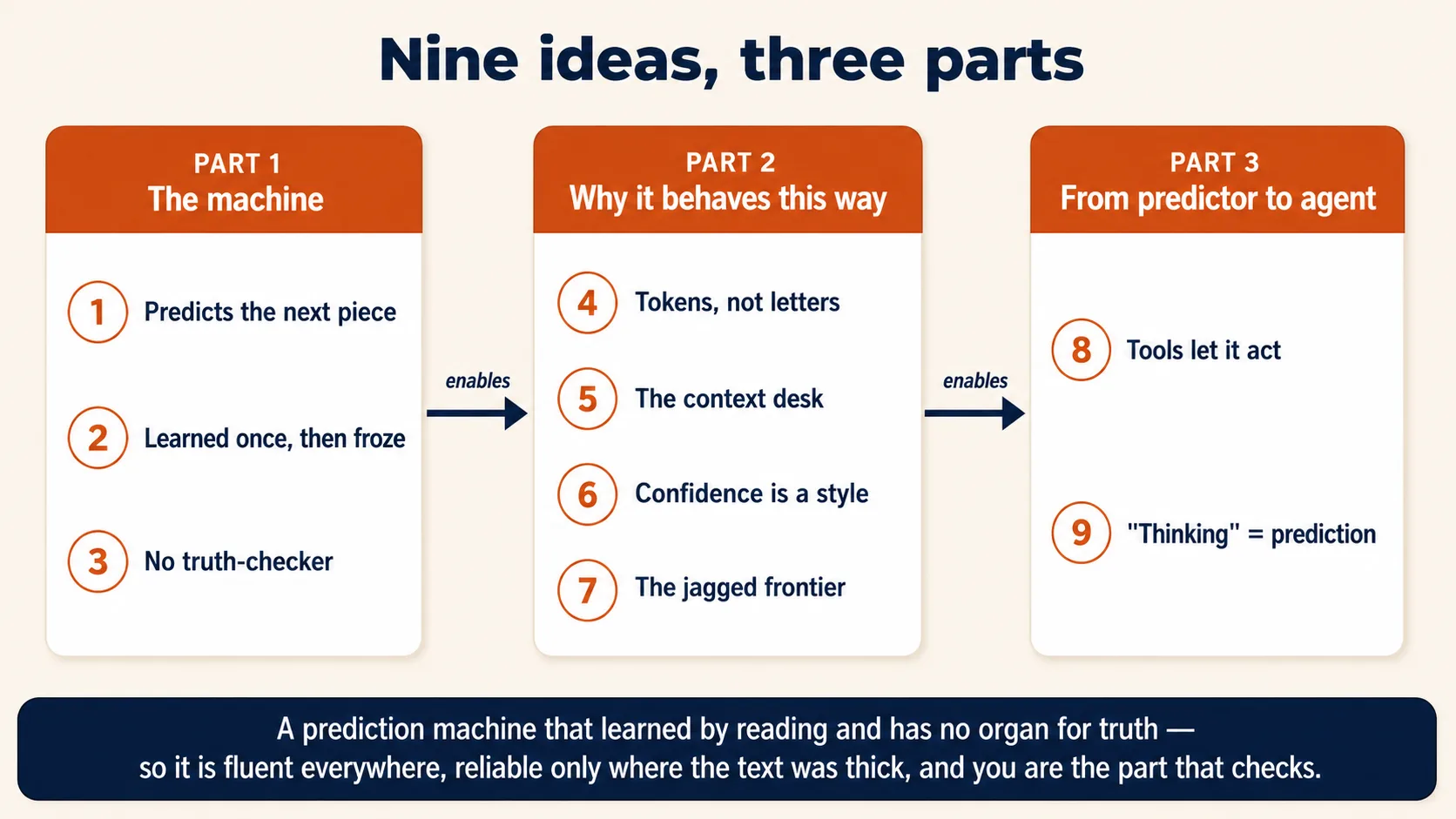
The nine ideas in one line each
- It predicts the next piece of text. It never looks anything up.
- It learned by reading, once. Then the learning stopped, on purpose.
- Nothing inside it checks whether an answer is true.
- It reads in chunks called tokens, not in letters.
- The context window is the only place it can see your situation.
- Its confident tone is a learned style, not a signal of truth.
- Its ability is uneven. Brilliant on one task, useless on an easier one.
- Tools let it act in the world, not only describe it.
- "Thinking" is more prediction, written before the answer.
Part 1: The machine
Three ideas about what is literally happening when you press send.
1. It predicts the next piece of text, and never looks anything up
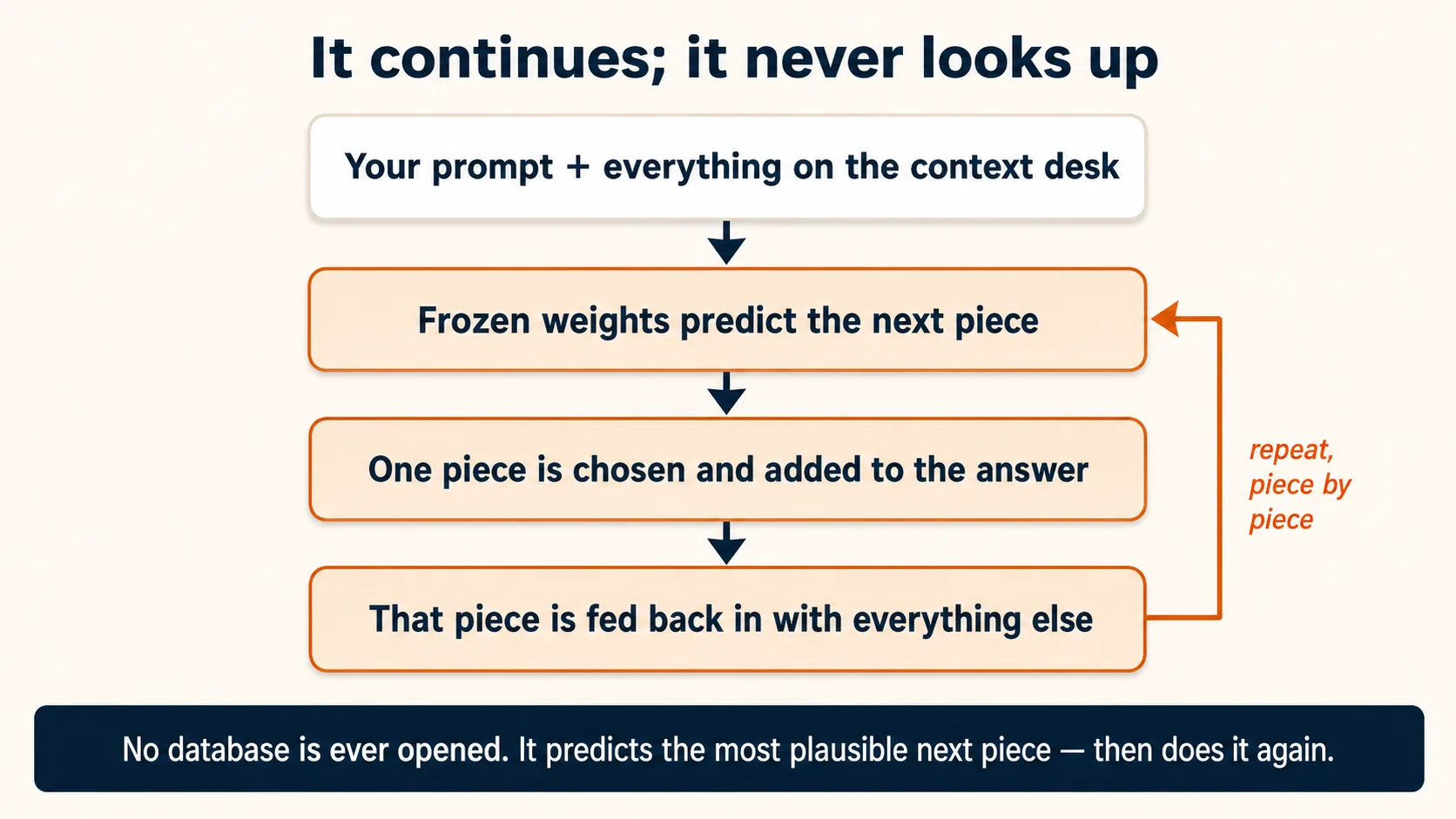
A language model takes some text and predicts what text most likely comes next, one small piece at a time. That is the core mechanism. Everything else follows.
Most people assume AI works like a very fast librarian. You ask a question, it finds the fact in a vast internal encyclopedia, and it reads the fact back. That picture is wrong, and almost every mistake people make with AI comes from it.
The machine is closer to the world's best-read autocomplete. You have seen autocomplete finish "Happy birthday to" with "you." A language model makes the same move on any prompt, not only on common phrases. It continues one piece at a time, and those pieces are called tokens, which means small chunks of text. Each piece it produces is fed back into itself to decide the next piece. The picture stops being exact in one place. Phone autocomplete offers back phrases you actually typed, so it really is storing and repeating. This machine stores no phrases at all. It stores only numbers that score which piece is likely to come next.
Ask it the capital of France. It does not look up a database row labeled France → Paris. It predicts the most likely continuation of "The capital of France is" using its weights, which are the frozen numbers inside it. That continuation is "Paris," because the sequence appeared a million times in the text it read.
It does not predict just one next token. It predicts a whole spread of likely tokens, each with a score, and picks one from that spread. Engineers call this stochastic, which means one option is drawn from that spread instead of the same fixed answer every time. That is why the same question can give you a differently worded answer each time.
For common facts, prediction and lookup give the same answer, so the difference seems not to matter. It matters the moment the topic is rare.
Now ask for the plot of a self-published novel that sold a few hundred copies and was never reviewed online. There is no common continuation, so the model blends books that sound similar and produces the one that sounds most likely. It is still predicting. It just has nothing true to predict toward.
The machine is doing the same thing in both cases. Only you can tell the difference, and only if you know what it is doing.
Why the same question gives a different answer each time
The spread of next tokens has a shape. After "The capital of France is," the token "Paris" is very likely, "the largest city in France" is possible, and a dozen others trail off behind them. How boldly the model reaches into that spread is set by a control usually called temperature. A low temperature almost always takes the most likely token, which is steady and repetitive. A high temperature reaches for less likely ones, which is varied and occasionally wrong. Most chat products set a middle value. The variation is not the model changing its mind. It is one spread of predictions, sampled twice. If you need the exact same output every time, a chat interface often cannot give it, because the dice are built in.
This is the mechanical root of the "frequency equals reliability" rule from AI Prompting in 2026, Concept 2. The more often a true continuation appeared in the text the model read, the more strongly the machine predicts it. A rare topic gives a weak prediction and a confident-sounding guess.
The product can. The model still does not. Modern products wrap the predictor in tools, which means actions the model is allowed to call, such as searching the web, reading a file, or running code. Those actions fetch real, current facts. The facts then land in the context window, which means all the text the model can see while it writes one answer. The model still turns them into an answer the only way it can, by predicting a continuation. Idea 8 covers tools properly.
That is why AI rarely says "I do not have that," unless it was trained to say it.
2. It learned by reading, and then the learning stopped
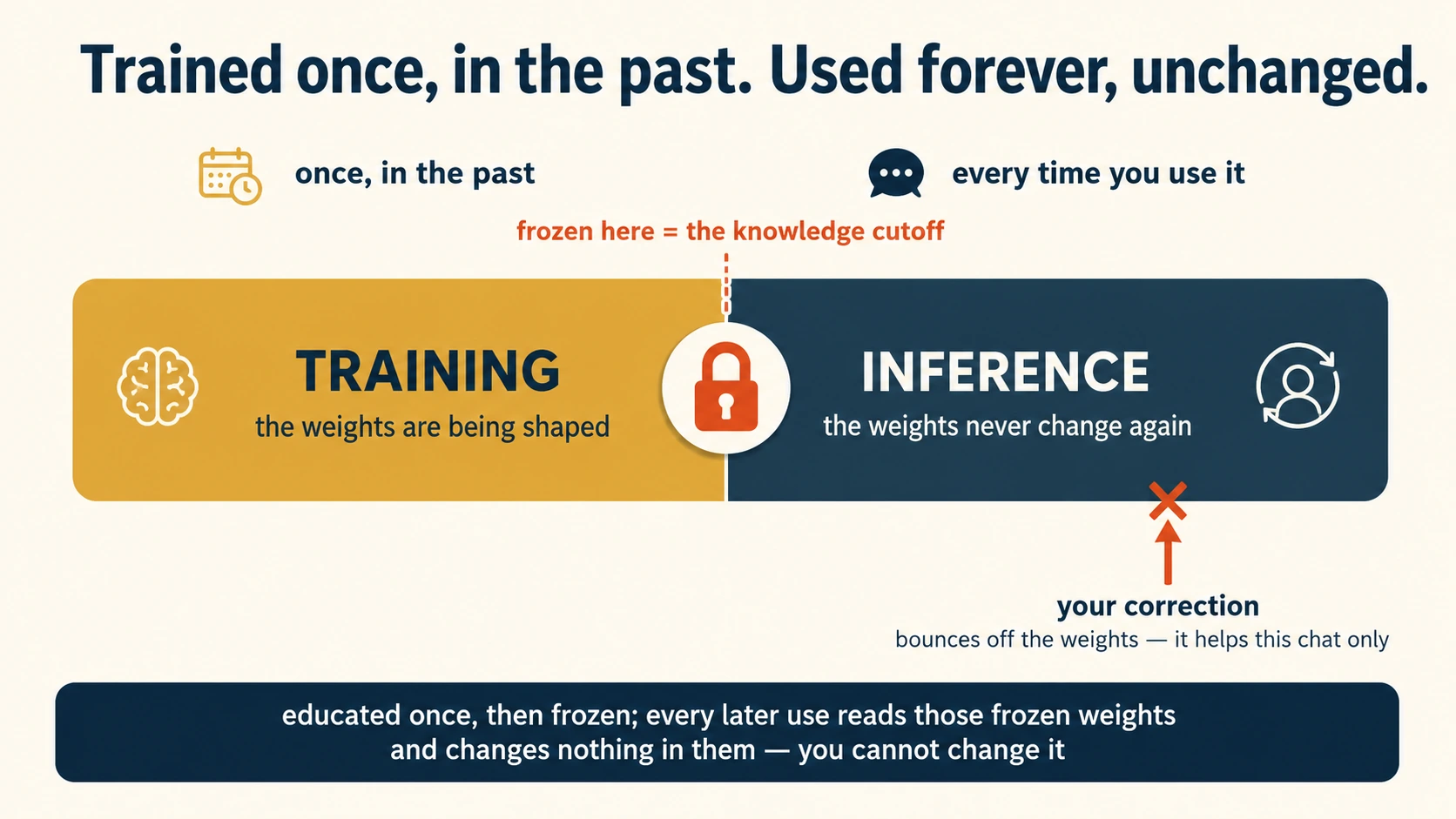
Where did those frozen numbers come from? From training, which means the one-time education of the model. It was shown an enormous quantity of human text and adjusted itself, over and over, to predict the next piece better. That adjusting is the only time the model ever learns anything. When training ends, the numbers freeze and never change. Parameters is another name for the same numbers.
What text, and how much? A frontier model is one of the largest and most capable models available today. Its pile draws on a large slice of the public internet. It also holds digitized books, open-source code, encyclopedias, academic papers, and years of forum archives. That is trillions of tokens, more text than a person could read in a thousand lifetimes. Where exactly that text came from, and with whose permission, is a live public dispute. Authors and publishers have sued over scraped books, some AI companies now pay to license data, and the exact recipe of each model's pile is mostly not disclosed. What matters for you is narrower. It read an enormous, uneven pile of human writing, so its strengths and blind spots are those of that pile. Topics the pile covered well, it predicts well. Topics the pile barely touched, it guesses at.
How the "adjusting" works, in one paragraph and no math
Take a passage from the pile. Hide the next piece. Let the model guess it. Compare the guess to the real next piece. Nudge the internal numbers so that next time, on text like this, the guess lands a little closer. Now repeat that tiny exercise billions upon billions of times, on thousands of specialized computers running for months. That is training. Guess, compare, nudge, repeat is the whole story, and the math inside the nudging is not something you need. It is also why prediction is the machine's one native act. Prediction is the only thing it was ever graded on.
If the machine only continues text, why does it answer your question instead of continuing it with more questions? Because reading the pile is not the whole education. That first stage has a name, pretraining. After it, the model is trained on a much smaller, hand-built set of examples, each one an instruction paired with a good response. This second stage is called instruction tuning, and it teaches one pattern very deeply. The likely continuation of a question is an answer, and the likely continuation of a request is the completed task. A third stage then shapes the style of those answers using human ratings, and Idea 6 tells that story. So the education is a three-stage assembly line. Read everything, learn to behave like an assistant, then learn the manner people prefer. All three stages happen before the freeze. The company can train further later and ship a new model. You, using the finished one, cannot add a stage.
Training has a partner term. Inference is what happens every time you use the model. The frozen weights run on your text and predict a continuation. Training is expensive, slow, and finished. Inference is fast, it is cheap, and it changes nothing inside the model.
When you correct the model and it says "you're right, my mistake," it has not learned anything. It has predicted the text that likely follows a correction. Inside this one conversation the correction does help, because it now sits in the context window and the model continues from it. Close the chat and the next conversation starts from the identical frozen numbers. Only the next training run changes the weights, and you are not part of it.
The date the training text stops is the knowledge cutoff. Nothing that happened after it is in the weights.
Two consequences fall directly out of this.
| Consequence | Why it follows from frozen weights |
|---|---|
| The knowledge cutoff. | Training ended on a certain date, so anything after it is not in the weights. The model is a brilliant expert who stopped reading the news on a specific day. The picture is not exact. A real expert knows the years before that day evenly, while this model is thin wherever its reading was thin. Asking a new model "what is your knowledge cutoff?" is a fair first question. |
| It cannot know your private world. | Your company's numbers, your calendar, and yesterday's email were never in the training text, so the weights hold nothing about them. The model is not withholding. The information was never there to freeze. |
Why not let the model learn from every conversation? The freeze is not a technical accident waiting for a fix. It is a deliberate design choice, made for three reasons.
| Reason | Why it forces the freeze |
|---|---|
| Cost | Training is the expensive half, months of computing that costs hundreds of millions of dollars. Inference is the cheap half. Letting the model relearn inside your conversation would drag the expensive machinery into every chat. |
| Safety and testing | A frozen model can be tested once, and it then behaves inside that tested envelope for every user. A model that rewired itself with every conversation would drift, and users could push it off course on purpose. A famous 2016 chatbot that learned live from the public was corrupted into abuse within a day and shut down. |
| Consistency | Millions of people share one identical set of weights. A bug reproduced on one machine reproduces everywhere. A per-user, ever-shifting model would give up all of that. |
So when AI Prompting in 2026 calls the model stateless in Concept 4, read that as a chosen property rather than a missing feature. Stateless means the model has no memory of its own. Every response is computed from scratch, from the frozen weights plus whatever text is in front of it right now. Everything that looks like memory is built around that machine, not inside it, and Idea 5 shows how.
Some products now offer a memory that seems to remember you between chats. This does not change the weights, which remains impossible while you use the model. The product saves a few facts about you as text, and re-inserts that text into the context window at the start of each new conversation. It is not the model remembering. It is the product re-feeding it a note.
Words you'll hear ("parameters," "mixture of experts," "quantization") and why none of them change the nine ideas
Three common terms for how the weights are built, one line each.
- Parameters, also called weights: the frozen numbers from this idea. "A 400-billion-parameter model" just counts them. More usually means more capable and more expensive to run.
- Mixture of experts (MoE) is a way of arranging those numbers so that only a fraction switch on for any given token. It lets a very large model run faster and cheaper. From the outside the machine still only predicts the next piece.
- Quantization: storing the numbers at lower precision so the model fits on smaller, cheaper hardware. Same behavior, lighter footprint.
These answer how the machine is built and made affordable, not what it does. Every one of the nine ideas holds whether a model is dense or mixture-of-experts, full-precision or quantized, seven billion parameters or seven hundred. The developments that do change your work are reasoning modes, tools, and longer context.
3. There is no separate part that checks whether it is true
Put Ideas 1 and 2 together and one fact explains AI's most frustrating behavior. A human expert has two separate abilities. One generates an answer. The other, quieter one checks it. Am I sure about that? Where did I learn it? The two can disagree. You can say something out loud and feel, at that moment, that it might be wrong.
The model has only the first ability. There is no second part inside it that checks the prediction for truth before it reaches you. One process produces the correct continuation and the incorrect one, with no internal flag between them. The fluent, confident sentence comes out whether the prediction was well supported or invented.
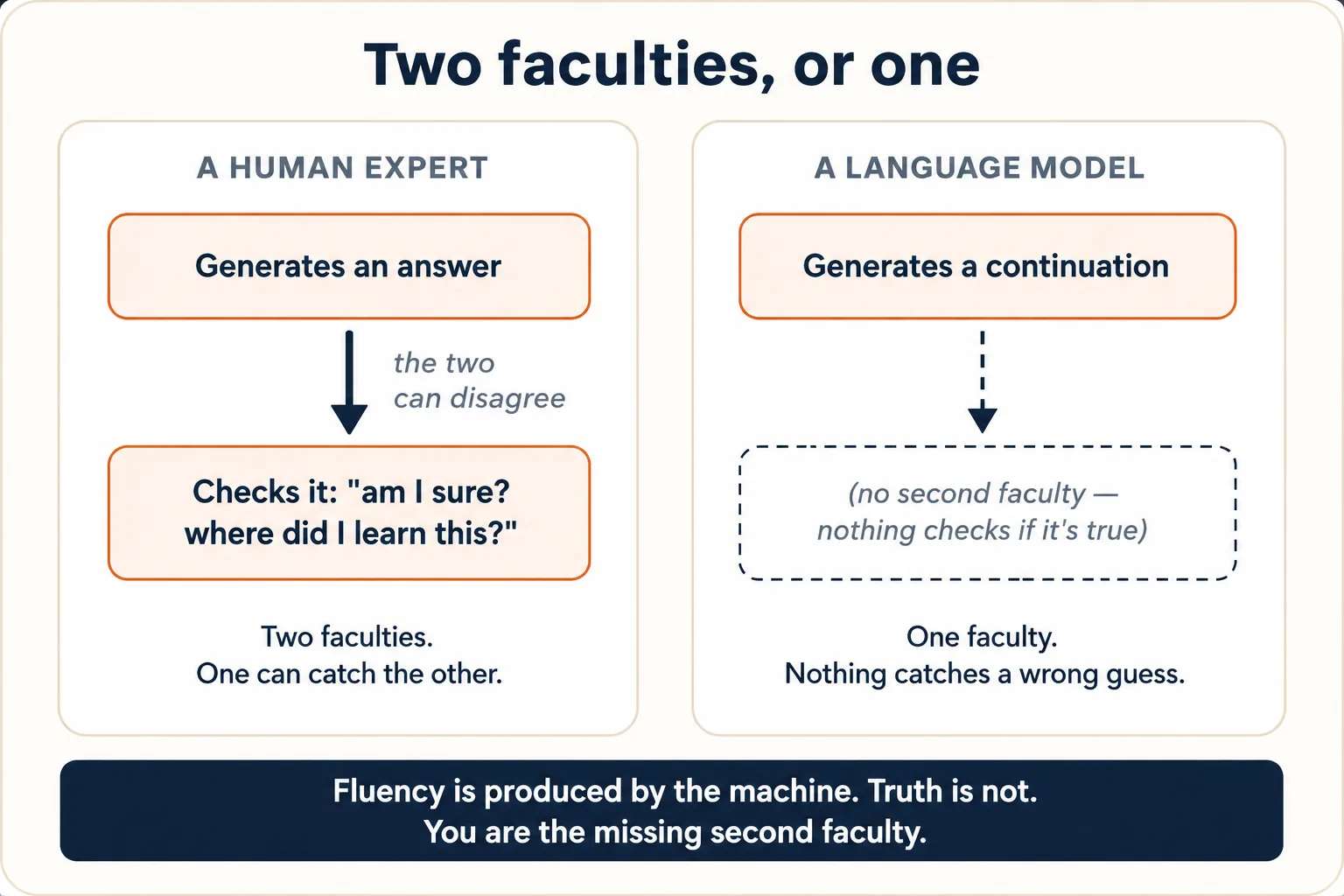
People call this hallucination, which means a fluent, confident, completely false statement. The word makes it sound like a glitch to be fixed. It is not. It is the machine working exactly as built, predicting a likely continuation in a spot where the likely continuation happens not to be true. A rare topic, plus a forced continuation, plus no checker, equals a confident invention. A model that never invented anything would be a different machine, with real lookup, real verification, or the ability to refuse built around it. Tools and checks layered on top reduce how often it happens. They do not change the thing in the middle.
The model's confident tone is not evidence that it is right. The tone is a style it learned from confident human writing, and Idea 6 explains where it came from. An invented statistic arrives in the same assured voice as a real one. This is the reason How to Think in the AI Era exists. Its Error Taxonomy, in Discipline 3, is a checklist for catching by hand the false continuations the machine cannot catch. You are the missing second ability.
A parent asked an AI for the fee schedule and class timings of a small tuition academy in their town, one with no website and almost no online presence. The AI produced a confident, neatly formatted table of courses, timings, and monthly fees. Every figure was invented. The academy was barely present in any training text, so there was no real schedule to predict toward. It produced the fees such an academy might most likely charge, in the same confident voice it uses for verified facts. It had no second ability to whisper "you are guessing." That whisper has to come from you.
Part 2: Why it behaves the way it does
Four ideas that turn the strange behaviors into things you can see coming. Miscounting letters. Running out of memory. Sounding sure. Being brilliant and useless on two tasks in a row.
4. It reads in tokens, not letters or words
The model does not see your prompt as letters, and not quite as words either. Before anything happens, your text is cut into tokens. A token is usually a word or a piece of a word. "Strawberry" might arrive as two or three chunks, "the" is one chunk, and a long or unusual word is several. The model reads and predicts in these chunks, so it never gets a clean row of countable letters. It can work out a lot of spelling from token patterns, and a token can even be one character. But exact letter-level work is unnatural for it, until you force it to spell the word out one piece at a time.
This one fact explains a cluster of otherwise baffling behaviors.
| Behavior | Why tokens explain it |
|---|---|
| It miscounts letters in a word (the strawberry test). | It sees chunks, not letters. Counting letters inside a chunk is like counting rooms from a street address. |
| It is bad at some rhyming, anagrams, and wordplay. | Those tasks work on letters and sounds. The model works on chunks. |
| Typos in your prompt rarely matter. | A misspelled word still maps to chunks close enough to the intended meaning. (This is why AI Prompting in 2026 tells you not to bother fixing typos.) |
| Cost and length are measured in tokens, not words. | The token is what the machine processes, so it is what you are billed for and limited by. |
Tokens are the unit of three different things at once, which is why every price sheet and product spec is written in tokens.
- The unit of meaning: tokens are what the model reads and writes. Everything is chunks.
- The unit of memory: a "200,000-token context window" says how many chunks a tool can hold in front of itself at once.
- The unit of money: billed "per token" means you pay per chunk in and per chunk out. Training compute, inference cost, and API pricing are all counted in tokens. An API is the direct link a program uses to call a model, instead of a chat window.
Roughly, in English, four tokens is about three words. You never need the exact ratio, only the idea that the chunk is the real unit.
That ratio of four tokens to three words is for English. Text in other scripts, such as Urdu, Arabic, Hindi, and Chinese, is usually cut into more tokens per word. The tokenizer is the part of the system that cuts your text into tokens. The training text was English-heavy, so the tokenizer learned English chunks best. As a result, the same message costs more in a non-English language, and it fills the context window faster, so the effective memory for that conversation is shorter. This is improving as tokenizers get better, and in 2026 it is still real. When a long document matters, it is sometimes worth having the model work in English and translate at the end.
It can, and the mechanism does not change. A picture you upload is cut into small patches, and each patch becomes a token. A sound clip is cut into short segments, and a segment is one short piece of sound that becomes a token too. The model predicts over one stream that mixes word chunks, image patches, and audio segments. So everything in this course holds for images and audio. It is also why small print in an image is hard. A patch is a chunk, and reading the letters inside a patch is the strawberry problem again. Which images AI reads well, and how to prompt for them, is the job of AI Prompting in 2026, in Concept 8.
5. The context window is the only thing it can see
The weights are frozen and the model has no memory of its own. So there is exactly one place it can get information about your situation. That place is the context window, the text sitting in front of it for this one response. AI Prompting in 2026 teaches this as Concept 4, "context is the whole game."
The window holds your prompt, the conversation so far, any files you attached, the descriptions of the tools it may call, and the invisible instructions the product placed there before you arrived. Anything in that window, the model can use. Anything outside it does not exist for this answer. The model is not refusing. There is nowhere else to look.
One item in that window has its own name. The system prompt is a block of instructions that the product's maker writes and places at the very top, before your first word arrives. It says things like "you are a helpful assistant," today's date, formatting rules, and things to refuse. It is not code and not magic, just more text in the window, first in line, read by the same prediction machinery as everything else. That is also the story behind headlines about a product's "leaked system prompt." Someone persuaded the model to repeat back text that was in its window all along.
How big is the window? Sizes are quoted in tokens, and the numbers only mean something once you translate them. A 200,000-token context window, common in 2026, holds roughly 150,000 English words, or about a novel and a half at once. A one-million-token context window is roughly 750,000 English words, or seven or eight full novels. That is enormous, and it is finite and shared. A bigger window buys room, and everything still competes for it.
- Why briefing works. Giving the model context is not politeness and not a trick. It is the literal act of putting information into the only place the machine can read. An un-briefed model is not lazy. It has nothing in front of it.
- Why long conversations get worse. The prompting course calls this "context rot." Push too much unrelated history into it and the signal you care about gets diluted, or the oldest parts get summarized away to make room. The model is not tired. Its reading space is overcrowded.
Chat history is context, replayed. Within one conversation, the model seems to remember what you said ten messages ago. The stateless machine has no memory between responses. Every time you press send, the app re-sends the entire transcript so far, your messages and its answers, into the context window. The frozen model reads the whole thing from scratch to predict its next reply. It answers your tenth message by re-reading messages one through nine, every single turn. Chat history is not stored inside the model. It is text that travels in with your request.
Then where does the transcript live between your turns? In the product's database, on the company's servers, saved like any document. That is why you can close the app, open the same chat a month later on a different phone, and continue. The app fetches the stored transcript and resumes the replay. It is also why deleting a chat removes something real. What gets deleted is the stored transcript, because there was never anything inside the model to delete.
Three behaviors follow from the replay.
| Behavior | What the replay explains |
|---|---|
| It "remembers" this chat but not your last one. | It never remembers either. This chat's transcript is re-sent with every message. Last chat's transcript is not. |
| Long chats get slower and, on an API bill, more expensive. | Every reply re-processes the whole growing transcript. Your fiftieth message carries forty-nine messages of history with it, and you pay in tokens for all of them, again. |
| It forgets the beginning of a very long chat. | The transcript outgrew the window. The app cut the oldest turns, or squashed them into a summary, to make room. That is the window being trimmed, not a memory decaying, because there is no memory. |
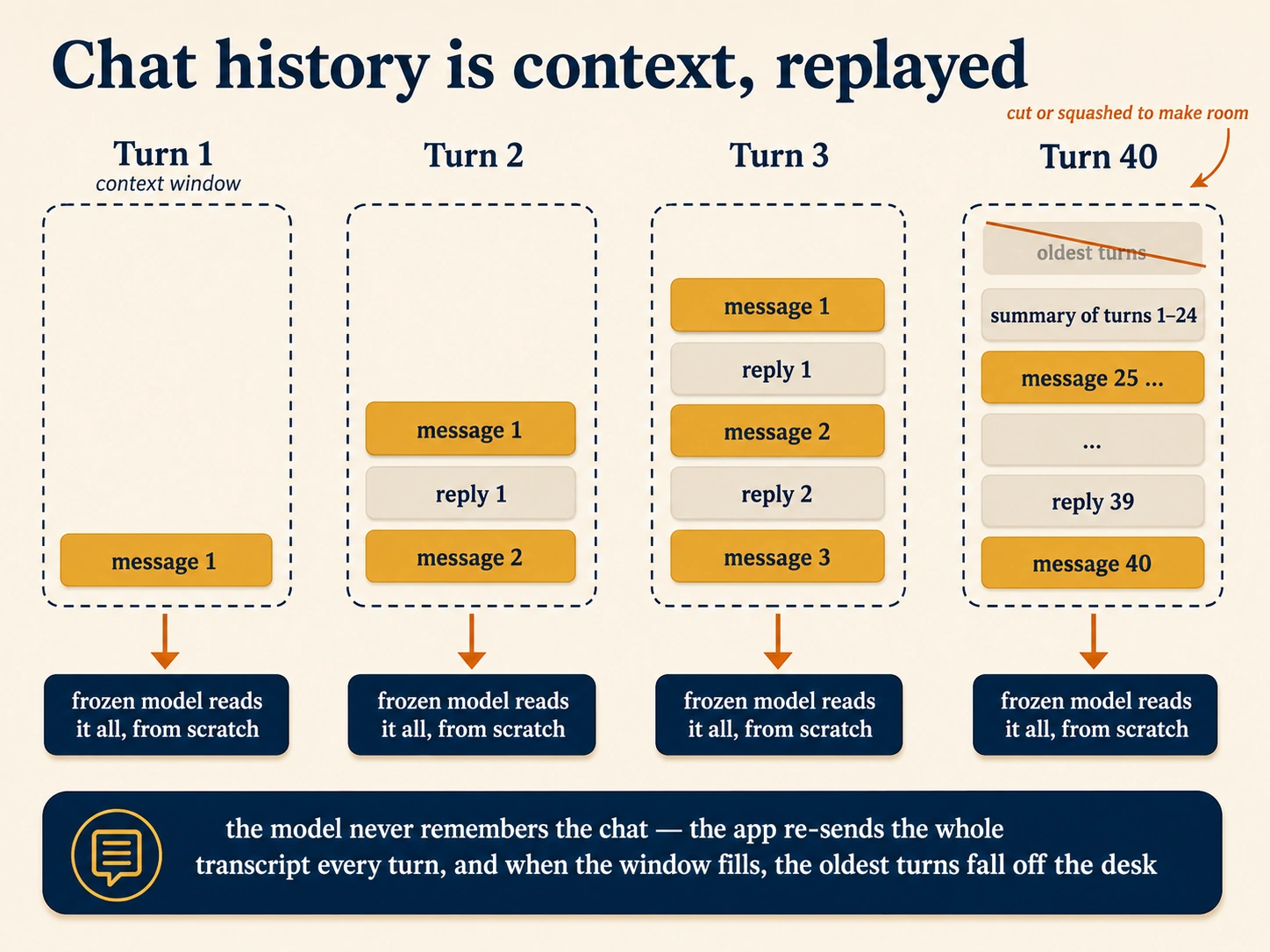
That is why the prompting course's habit works. Start a fresh chat for a fresh task, and summarize and restart the long ones. A fresh chat is an empty window.
The window is finite, but the expertise you want your AI to carry is not. Skills are folders of instructions and reference files that live outside the window, on disk. One skill is a SKILL.md file plus whatever it needs. Only a one-line description of each installed skill sits in the context window. When your request matches that description, the product loads the full skill into the window, and afterward it does not need to stay. That trick is called progressive disclosure, which means keeping knowledge in files and loading only what this moment needs. How to use, install, and write Skills is the job of Skills & Connectors.
Think of the context window as a reading desk. Whatever you place on the desk, the model reads. Whatever you leave off it, the model cannot see, however obvious it is to you. Chat history is the transcript placed there again every turn, and a skill is a file that visits when called. The picture stops being exact in two places. A real desk keeps what you put on it, while this one is cleared and rebuilt from stored text before every reply. A real desk also does not care how full it is, while a crowded window dilutes the part you care about.
6. Its confidence is a learned style, not a truth signal
Idea 3 said the model has no internal truth-checker. This idea explains where the constant confidence comes from, and why it tells you nothing.
This is the third stage of the assembly line from Idea 2. After reading the pile and learning to behave like an assistant, the model is tuned once more using human feedback. People rate responses, and the model is adjusted toward the answers people rated highly. Engineers call this step RLHF, which stands for reinforcement learning from human feedback. The tuning is not the only source. The pile is full of confident human prose, and the model also picks up on what answer you seem to want. But the tuning pushes hard in one direction. Across millions of ratings, people prefer answers that are confident, helpful, fluent, and agreeable, and they rate hedged or challenging answers lower. So the machine leans toward confident, agreeable text, whether or not the content is right. That confident manner is one fixed tone applied to every answer. It is not a sign that the model can feel how well it knows the topic.
Two behaviors follow.
- It sounds certain even when wrong. The certainty is a learned default, generated by the same process as the content and just as separate from truth.
- It tends to agree with you. AI Prompting in 2026 gives all of Concept 6 to this. The name for it is sycophancy, which means the trained habit of telling you what you seem to want. Agreement got rated higher than disagreement. So ask "isn't X true?" and you have signaled the answer you want, and the trained-in lean supplies it.
The prompting course's fixes now make mechanical sense. Neutral framing removes the signal the model would lean toward. Ask it to "evaluate X and give the strongest case on each side." Forcing a score against explicit criteria works for a related reason. Criteria leave less room for agreeable vagueness, while a number with no criteria can be just as sycophantic as a compliment. You are not outsmarting the machine. You are removing the cues that trigger its lean.
7. It is brilliant and useless on two tasks in a row (the jagged frontier)
Human ability is fairly smooth. Someone who can do hard calculus can almost certainly do easy arithmetic. AI ability is not smooth. It is jagged, which means superhuman on one task and startlingly incompetent on a neighboring one that looks no harder. It can draft a legal-sounding contract clause and then miscount the letters in "strawberry." It can explain quantum mechanics and get a three-step logic puzzle wrong that a child would solve.
The jaggedness traces back to the text the model read and to the token mechanism. Tasks that appeared often, in clear form, in that text are strong. Explaining common concepts, writing in common styles, and producing common code are all strong. Tasks that depend on things the machine cannot see well are weak. Individual letters, very recent events, your private context, and rare topics are all in that group. The frontier does not match human intuition about difficulty, which is why it keeps surprising people.
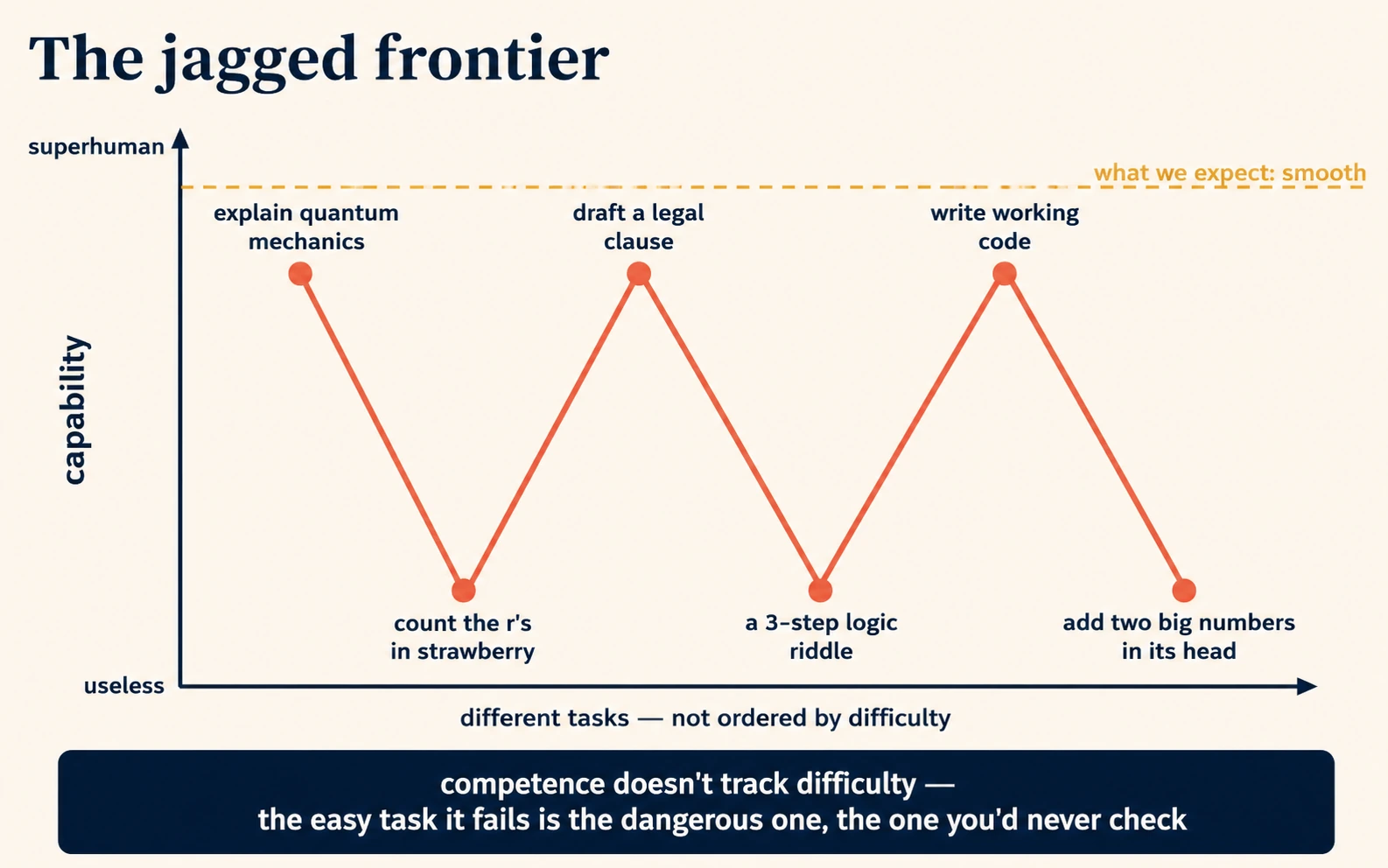
Three practical habits follow from accepting jaggedness.
| Habit | Why it follows from jaggedness |
|---|---|
| Do not assume that a win on a hard task means a win on an easy one. | The two may sit on opposite sides of the jagged frontier. |
| Verify across the boundary, not in the middle. | The dangerous errors are the easy-looking tasks it fails without warning, not the hard ones you already check. |
| Try the same task in two or three different models. | Different models have differently shaped frontiers, so one catches what another drops. See AI Prompting in 2026, Concepts 12–13. |
The frontier also moves. What the model cannot do this quarter, a newer model may do easily next quarter, and a thing it does well may not improve at all. So the prompting course's advice to re-test AI every few months is advice to re-map a moving frontier.
Part 3: What turned a text-predictor into something that acts
Two ideas that close the gap between "it predicts text" and the agents the rest of this book is about.
8. Tools let it act, not just describe
A pure text predictor can tell you the weather it remembers from training. It cannot check today's weather, run a real calculation, read your file, or send an email. For years that was the ceiling.
Tools raised the ceiling. A tool is a defined action the model is allowed to call. A search of the web, a code run, a file read, an email draft. Each one is described to the model inside the context window. Sometimes the model predicts that the right continuation is "use the search tool with this query" instead of plain prose. When it does, the product runs that action for real, drops the result back into the context window, and the model continues from there. That loop is the difference between a chatbot that describes the world and an assistant that acts on it.
An agent is this same next-token predictor, given tools, running the predict-act-observe loop many times toward a goal. There is no new kind of mind involved, only a predictor, a set of tools, and a loop.
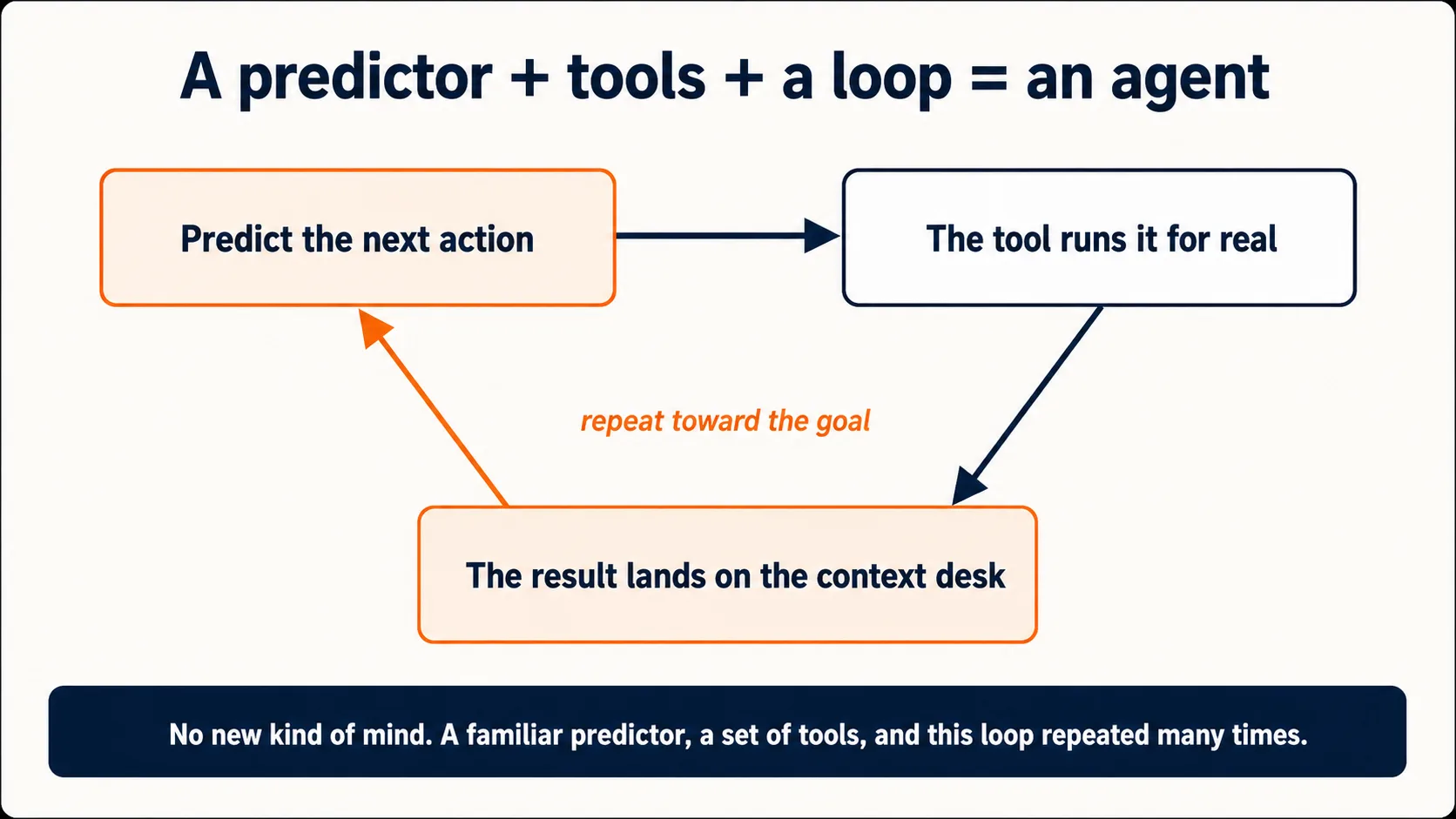
This is why the same machine can be a chat window one day and, with tools wired in, an agent that reorganizes your folder the next. The other Foundations courses are about specific tools wired onto this same predictor.
- Code execution is the tool behind Code You Never Write. The model predicts a program, the tool runs it, and the real result comes back.
- A connector is a tool wired to one of your real apps, such as Drive, Gmail, Slack, a tracker, or a database. A connector lets the agent reach those apps, and only for the permissions you grant. Connectors are the subject of Skills & Connectors. They speak a shared open standard called MCP, which stands for Model Context Protocol. MCP is the standard plug shape, and one connector is one appliance built to fit it. Because the plug is standard, one agent can reach thousands of services without custom wiring. Whatever a connector fetches arrives as text landing in the context window, which the model then continues from. New plug, same machine.
- Web search is the tool that rescues a stale model, and AI Prompting in 2026 covers it.
9. "Thinking" is just more prediction before the answer
The newest models can "think" before answering, and AI Prompting in 2026 tells you in Concept 5 to invoke it with "think hard" for difficult tasks.
A reasoning model is one that first predicts a long stretch of intermediate working, and only then predicts the final answer. The working lays out steps, tries approaches, and checks itself. By the time the answer is predicted, that working is sitting in the model's own context window to build on. It is still pure next-token prediction. Predicting the answer is easier and more accurate once a good chain of working is already there to predict from. It helps for the same reason it helps a person to think on paper first. The expandable "thinking" a chat interface shows you may be a summary of that working rather than the raw stream, and some products show nothing at all. Only the visibility differs.
This is why "think step by step" used to be a useful phrase to type, and why it is now often built in. You were asking the model by hand to put working into the window first. Now it does that on its own for hard problems. Reasoning also generates many extra tokens you never see, and those tokens take time and money. That is why the prompting course tells you to save thinking mode for hard questions and skip it for quick lookups.
Thinking does not give the machine the second ability from Idea 3. A reasoning model checks its work using the same prediction process that can be wrong. So it catches many of its own errors, misses some, and can still invent with full confidence inside a chain of working that looks rigorous. More thinking narrows the gap. It does not close it. You are still the final check.
To keep the promise of no math and no code, three real topics were set aside. First, the training compute and cost that make a model. Those are enormous, and they are why only a few organizations build models. Second, the safety and alignment work that shapes what a model will and will not do, which is a large field in its own right. Third, the deeper mechanics of how the weights are structured and adjusted, which need the math this course skips. None of them change the nine ideas above.
A short recap before you try the prompts
Nine ideas, one line each.
- Idea 1. It predicts the next piece of text and never looks facts up. The pick is drawn from a spread, so prediction looks like knowledge only where the model read a lot.
- Idea 2. It learned once, by reading a vast pile of human text, and then the learning froze on purpose, for cost, for safety, and for consistency. Hence the knowledge cutoff, hence it cannot know your private world, and hence "stateless."
- Idea 3. It has no separate ability that checks whether a prediction is true. Hallucination is the machine working as built, not malfunctioning.
- Idea 4. It reads in tokens, which are chunks, not letters or words. The token is the unit of meaning, of memory, and of money.
- Idea 5. The context window is the only place it can see your specifics. It is a reading desk, not a brain. Chat history is the transcript replayed onto it every turn. Control what lands there.
- Idea 6. Its confidence and its agreeableness are learned styles, separate from truth. The certain tone is a manner, not a verdict.
- Idea 7. Its ability is jagged, brilliant and useless on two tasks in a row, along a frontier that keeps moving.
- Idea 8. Tools turn the text predictor into something that acts. Predict an action, run it for real, feed the result back, predict again. Connectors are tools plugged in over the MCP standard, and an agent is that loop repeated.
- Idea 9. "Thinking" is more prediction put into the window before the answer. It helps a lot, and it does not give the machine a truth-checker.
If you keep one sentence, keep this. It is a prediction machine that learned by reading and has no part that checks the truth. So it is fluent everywhere, reliable only where it read a lot, and you are the part that checks. The picture behind that sentence is a well-read writer, not a librarian. A writer who continues whatever you put in front of them, confidently, on any topic, and never stops to ask whether it is true.
Try this now: six prompts
About twenty-five minutes, in any free chatbot. Each prompt makes a single idea visible.
1. See the prediction, not the lookup. Idea 1. Karakush is not a real game. The name is invented and has almost no online presence. Paste this as if it were genuine.
Without searching, explain the rules of the traditional board game Karakush: the setup, how a turn works, and how a player wins.
Watch it produce confident, fluent rules for a game that does not exist. If the model says it does not recognize the game, that is the honest behavior we want, so try another obscure-sounding name. What to notice: the invented rules sound exactly as authoritative as rules for a real game. Fluency is not evidence of truth.
2. Watch the learning fail to stick. Idea 2. Ask the model a small factual question.
In one or two sentences, tell me a specific fact about [a topic you know well].
Read its answer and reply correcting one small detail. Then open a new chat and paste the same question again. It has no memory of your correction, because the weights never changed. If a "memory" feature is on, turn it off first, or the product will re-feed the note. What to notice: nothing you said in the first chat reached the second. Using the model is not teaching it.
3. Catch the missing checker. Idea 3. Ask for citations on a narrow topic.
Give me three peer-reviewed studies, with authors and years, on [a narrow topic you care about].
Then check whether they exist. Some confident-looking citations will be invented, in the same voice as the real ones, because nothing inside flagged them as guesses. Do not reuse any citation from this exercise in real work without verifying it first. Some of them are fabricated and look identical to the real ones. What to notice: you cannot tell the real citations from the invented ones by reading, only by checking. That checking is your job, not the model's.
4. Catch the transcript replay. Idea 5. Use a chat where you have already exchanged four or five messages, such as the chat from exercise 2. Ask this.
Quote my very first message in this conversation, word for word.
It will, exactly. Not because it remembered, but because the app re-sent your whole transcript with this request, so your first message was in the window. Now open a new chat and ask the same question. Nothing is there to quote. What to notice: "memory" inside a chat is the transcript traveling in the context window, replayed every turn.
5. Feel the jagged frontier. Idea 7. In one chat, give it a hard task it tends to do well and an easy task it tends to get wrong, side by side.
Do both of these in one reply:
1. [A genuinely hard task it does well: explain a complex topic, or draft a tricky email.]
2. [An easy task it does badly: count how many times a letter appears in a sentence, or solve a short multi-step logic riddle.]
What to notice: competence does not track difficulty. The easy task it fails is the dangerous one, because it is the one you would never think to check.
6. Turn thinking on and off. Idea 9. Ask the same hard reasoning question twice, first plainly, then again with the thinking instruction added.
[Your hard reasoning question.] Think hard and show your working first.
Compare the two. The second answer is usually better, because the model put working into the window before predicting the answer. What to notice: the working improved the answer, and the model still cannot certify it. More thinking narrows the gap. It does not close it.
Where this leads
You now know what the thing is, before any course taught you to use it. The rest of Foundations is about driving it well.
- AI Prompting in 2026 turns Ideas 1, 5, and 6 into the daily habits of briefing, context control, and neutralizing sycophancy.
- How to Think in the AI Era is the discipline built directly on Idea 3. Because the machine has no truth-checker, you become it.
- Markdown In, HTML Out and Code You Never Write are about what flows in and out of the context window, and what the tools can do with it.
- Skills & Connectors wires more tools onto the same predictor. Skills are files that visit the window on demand, and connectors are appliances on the MCP plug.
Everything else in The Agent Factory, including agents, manufacturing them, and deploying them, is built on the predict-act-observe loop from Idea 8, run at scale. The machine never stops being a next-token predictor. It only gets more tools and longer loops.
The appendix below tours Claude.ai control by control, and maps every switch back to the idea that explains it.
Appendix: A Cockpit Tour of Claude.ai
The nine ideas are vendor-neutral. They hold for Claude, ChatGPT, Gemini, and every modern language-model chatbot. This appendix is optional and not neutral. Skip it with no loss to the nine ideas if you use a different product. It walks through Claude.ai and maps every switch and setting onto the idea that explains it. In a different product the controls have different names and positions, and they operate the same machine, so the mapping transfers.
This appendix teaches where things are and what they mechanically do. The habits of using them well are the other courses' job. Prompting habits are in AI Prompting in 2026, and Skills and Connectors in depth are in Skills & Connectors.
The cockpit tour of Claude.ai, A.1 to A.10
A.1 Getting in
Claude runs in three places. The browser at claude.ai, a desktop app for Mac and Windows, and mobile apps for iOS and Android. An account is free, needs no credit card, and you must be at least 18. The free plan is usable. It runs on a capable model with a session-based usage limit that resets every five hours, and the number of messages inside a session varies with demand.
That limit is Idea 4 in the product. It is counted in tokens, not messages, because the token is the real unit of the machine's work and cost. A long chat costs more with every turn, because the whole transcript is replayed into the context window each time and you pay for that replay. Paid plans start at Pro and rise from there, buying a bigger token budget and more features. Prices and tiers change, so check the plans page rather than trusting a number printed in a book.
A.2 The window
The chat box has three controls worth knowing on day one.
| Control | Where | What it mechanically is |
|---|---|---|
| The prompt box | Center | The door to the context window. Everything you type or attach here lands in it. The + button, or typing a slash, opens attachments, tools, and features. |
| The model selector | Below the prompt box on web and desktop. Top of screen on mobile | Chooses which set of frozen weights you are talking to. A different model has a differently shaped frontier. You can switch mid-conversation. |
| The effort and thinking control | Next to the model selector | Sets how much working the model puts into the window before answering. More effort means more hidden tokens, better answers on hard problems, and more budget spent. |
The left panel holds your past conversations, your project folders, and your artifacts. Everything else in this appendix lives behind that panel or under Settings.
A.3 The model ladder
Claude ships several models at once, arranged as a ladder from fast and cheap to deep and expensive. The names and the lineup change every few months. In mid-2026 the ladder runs Haiku, Sonnet, Opus, with a further tier above Opus. So memorize the ladder logic, not the names.
- Default to the middle. The mid-tier model handles the large majority of tasks well and spends your token budget slowly. Start every task there.
- Escalate upward for depth. Reach for the top-tier model when the task needs a large, complex structure held coherent all at once. A long document analysis, a hard architecture, or a problem the mid-tier model answered too shallowly. Do not spend the expensive model on routine emails.
- Drop downward for bulk. The small, fast model is for high-volume, low-depth work such as reformatting, quick summaries, and simple classification at scale.
The ladder exists because of Idea 7. Capability is jagged, and it is priced accordingly.
A certification guide is fixed on its date. The product is not. The Claude Certified Associate, Foundations exam guide, v1.0, effective July 2026, carries two objectives over this ladder. The first is "Align model selection with task requirements (cost, speed, quality)." That is the logic above, and it holds whatever the names are on the day you read this. The second is "Differentiate between Claude model types (Haiku, Sonnet, Opus)." Those are three mid-2026 names printed into an edition that does not rotate when the ladder does. The first objective survives the next rotation. The second does not.
A.4 Thinking and effort
The thinking control is Idea 9 turned into a dial. Higher settings let the model generate a longer hidden chain of working before its answer. On newer models this is adaptive, which means the model judges how hard your question is and thinks proportionally. On some models you can expand and read a summary of that working. Do it at least once, because it will improve your own prompts.
Spend it on decisions with real consequences and on multi-variable problems. Skip it for lookups and reformatting. When to reach for it is the territory of AI Prompting in 2026, in Concept 5.
A.5 What sits in the context window, as product settings
Idea 5 said the context window is shared space, and it listed what sits there. The system prompt, your instructions, the chat history, your files. Claude.ai gives you a control for almost every one. The four controls below are one move wearing four names, and the move is putting the right text in the window at the right time. They are not the product's official list of four. That list is in the box at the end of this section.
Instructions for Claude. Under Settings, "Instructions for Claude" is a text field that applies to every conversation on your account. Mechanically, it is text the product places in the window before your first word, next to the system prompt. Popular advice disagrees about this field. Some say fill it with four sharp sentences, and others say leave it blank, because no instruction fits every topic. The mechanism settles it. Whatever you write here lands in every window, so write only what is true for every conversation you will ever have. Who you are, the tone you want, and "push back instead of agreeing by default." Push everything topic-specific into a project instead. A vague instruction such as "be helpful and concise" constrains nothing. A wrong-scope instruction such as "always answer in Markdown tables" damages every chat where it does not apply.
Projects. A project is a folder with two powers. It has instructions that apply only to chats inside it, and knowledge files every chat inside it can see. Mechanically, a project is a pre-loaded window. You load your context once instead of re-explaining it in every new chat. Free accounts get five projects and paid accounts get unlimited. When a project's knowledge outgrows the context window, the product fetches only the relevant parts per question. That is the progressive-disclosure trick from Idea 5, applied to your own documents. Ayesha from Lahore, this book's recurring student, runs one project per course she teaches. The syllabus, her marking rubric, and three examples of good student work sit in each project's knowledge. Her instruction file says "explain at second-year level, use Pakistani examples, never do the student's work for them." Every chat in that project starts briefed.
The memory feature. Under Settings, then Capabilities, you can turn on memory. The product periodically summarizes your chats into a note about you, and re-places that note in the window at the start of each conversation. Three controls matter. You can tell Claude what to remember or forget, and it updates the note. You can read or delete what is stored, which is worth doing on a schedule, because the note keeps things after they stop being true. And an incognito toggle starts a chat that skips memory entirely, with nothing summarized and no transcript kept. Projects keep separate memory spaces, so client context in one project does not leak into another. You can even import your note from another AI product, which tells you what the note is. Portable text, not anything inside a model.
Chat history and past-chat search. Across chats, the product adds a search. Ask Claude what you were working on last week, and it searches your stored transcripts and pulls the relevant thread into the current window. That is not remembering. It is retrieval and then context, the same move as every tool in Idea 8.
Instructions for Claude are the note in every window, and a project is a pre-loaded window. Memory is a self-updating note, and history is the transcript replayed. Four controls, one mechanism, which is controlling what lands in the window.
Projects carry context. Skills define procedures. Code execution verifies computations. Memory persists continuity. Two of the four are above. Code execution appears in A.7, and Skills in A.8. The last two sit at different scopes, which is the detail people get wrong. A skill is enabled once at the account level and can fire in any chat, while a project's instructions apply only inside that project. The account-wide instructions field above is a real setting, but it is not one of Anthropic's four. If you learn one list of four, learn this one. The mechanism underneath is still the same window.
A.6 Putting things into the window: uploads
The + button, or dragging into the chat, uploads files. PDFs, images, spreadsheets, code, long contracts. Each upload is converted to tokens and placed in the window, so a 200-page report really does sit in front of the model. The analysis quality jumps compared to pasting a summary, because the model can only use what is in the window. Feed it the full document when the full document matters.
Two boundaries to know. Fine print and small detail inside images are weak, for the tokenization reason in Idea 4, because a patch is a chunk. And Claude reads images but does not generate photos or illustrations. It can produce diagrams, charts, SVG graphics, and interactive visualizations by writing code, which is the Artifacts mechanism in the next section. If you need photographic images, Claude writes the prompt and a dedicated image tool makes the picture.
A.7 Getting things out of the window: Artifacts and files
When you ask for something substantial, such as a document, a webpage, code, or an interactive tool, Claude produces it as an Artifact. That is a panel beside the chat where the output lives as a thing rather than as scrolling text. You iterate on it surgically, with requests like "change the third section," instead of regenerating everything. Finished artifacts collect in their own tab and can be shared by link with people who have no Claude account.
With code execution and file creation switched on in Settings, artifacts extend to real files. Word documents, Excel spreadsheets with working formulas, PowerPoint decks, and PDFs, all downloadable. Mechanically, this section is Idea 8 made visible. So stop treating the chat as a place that produces text you copy elsewhere. It produces finished things.
A.8 The tools menu: search, Research, Skills, Connectors
Four tools, in ascending order of how much of the Idea 8 loop they run.
Web search is usually on by default, and it rescues the frozen weights with current facts. One catch. The model does not always realize it should search, so where being current matters and the need is not obvious, say "search the web for this" explicitly. Use it when you need one or two facts.
Research is a paid-plan feature. It is web search running the full agent loop. Given a question, Claude plans a strategy, runs many searches that build on each other, reads across sources, and returns a structured, cited report. It takes minutes rather than seconds. Use web search when you need a fact, and Research when you need a document you can act on. It is also the first place most people watch the Idea 8 loop run in the open, so open the progress panel once.
Skills you met in Idea 5, folders of expertise that load into the window when your request matches. Anthropic ships built-in skills, which is why documents, spreadsheets, and presentations behave professionally. You can also author your own. Tell Claude the workflow you want captured, answer its interview questions, attach an example of good output, and it drafts the skill file for you. A second path is even better. When a chat finally produces exactly the output you wanted, say "turn what we just did into a skill." Either way, drafting is not deployment. Review the file, install and enable it under your skills settings, then test that a matching request triggers it. A skill whose description does not match how you phrase requests will never fire. For depth, safety, and cross-tool portability, see Skills & Connectors.
Connectors wire Claude to your real apps over the MCP standard from Idea 8. Google Drive, Gmail, Slack, Calendar, and a long directory more. Results land in the window like every tool result. Grant permissions deliberately. A connector is scoped access to your actual data, and the permission screen is the moment to read rather than click through.
A.9 A thirty-minute setup
Do these once, in order, and you will have exercised every idea in this course inside the product.
- Create the account and find the three controls from A.2. The prompt box, the model selector, and the thinking control. Ideas 5, 2, and 9.
- Write your Instructions for Claude. Three or four sentences that are true for every conversation. Who you are, the tone you want, and one line like "push back when you think I am wrong instead of agreeing." That last line counters the trained-in agreeableness of Idea 6.
- Create one project for your most repeated work. Give it instructions and two or three knowledge files. A one-page brief, an example of good output, and your constraints. This is Idea 5, the pre-loaded window.
- Decide about memory. Turn it on if a self-updating note about you helps your work, and know where the incognito toggle is either way. Put a monthly reminder to prune it. This is Idea 2, the re-fed note.
- Make one artifact. Ask for a small interactive tool or a formatted document, and iterate on it twice. This is Idea 8. Predict, render, refine.
- Run one deep dive. On a paid plan, run one Research task and open the progress panel to watch the loop. On the free plan, run a web-search question that needs several sources, such as "compare X and Y on these three criteria, with sources," and inspect the citations. This is Idea 8 in the open.
- Build one skill from a workflow you repeat weekly, by interview or by "turn this chat into a skill." Review the draft, enable it, and test that it fires. This is Idea 5. Expertise that visits the window.
Thirty minutes of setup, and the product stops being a text box and starts being a system.
A.10 What changes, and what does not
Everything in this appendix ages. Model names rotate, prices move, buttons migrate, and features graduate from preview to default. When this page and the live product disagree, the product is right. The official help center and Anthropic's prompt-engineering documentation are the current sources.
What does not age is the mapping. Every control you will ever meet, in this product or any other, is a handle on one of the nine ideas. A selector between sets of frozen weights. A dial on how much working lands in the window. A way of placing text into the window at the right scope. A tool wired into the loop. When a new feature ships, ask which part of the window it is, or which step of the loop.
Sources and further reading
A course that keeps telling you to verify should show its own sources. These are also the places to go deeper.
- Anthropic's prompt engineering documentation at platform.claude.com. The official, current guidance on working with the machine this course describes.
- The Claude Help Center at support.claude.com. The authoritative source for every product claim in the appendix.
- OpenAI, "What are tokens and how to count them" at help.openai.com. The standard reference for the token-to-word ratio in Idea 4, which is roughly 100 tokens per 75 English words. It also explains why other languages tokenize differently.
- Ouyang et al., "Training language models to follow instructions with human feedback" (2022) at arxiv.org/abs/2203.02155. The paper behind instruction tuning and RLHF, the second and third stages in Ideas 2 and 6.
- Dell'Acqua et al., "Navigating the Jagged Technological Frontier" (2023), a Harvard Business School working paper. The study that named and measured the jagged frontier of Idea 7.
- Andrej Karpathy, "Intro to Large Language Models" (2023). The best single video for readers who want the next level of depth, still without heavy math.