Structured Extraction Pipelines: Schemas, Retries, and Batches
16 Concepts · About 90 minutes to read · 3-4 hours to build · From One Extracted Invoice to a Reviewed Pipeline
Ayesha runs accounts payable at a mid-sized firm in Lahore. Her team receives about ten thousand supplier invoices each month.
Some are scanned PDFs. Some arrive as email attachments. A few are phone photographs. Four people read the documents and type the data into the accounting system.
This looks like an obvious job for an AI Worker. Read the document. Extract the supplier, invoice number, date, line items, and total. Then send the data to the ledger.
Ayesha's first pipeline reported accuracy in the high nineties. Her team still could not use it.
This course explains why both facts can be true.
Two things went wrong, and neither is the thing people expect.
The first problem was the average. When Ayesha measured each document type separately, one category performed far worse than the others: handwritten delivery notes from local suppliers.
The headline number had hidden a segment that did not work.
The second is stranger. The failures were not broken JSON.
Every output parsed correctly. Every required field was present. Every result matched the schema.
The values were still wrong. One invoice had line items totalling 4,200 rupees but a stated total of 42,000.
The schema could not object. It describes the shape of the data, not whether the values are true.
Key idea for the whole course: modern extraction gives you a guarantee about the shape of the answer. Everything you still have to build begins where that guarantee ends.
In The Loop by Hand you built the machinery that sends a request to the model and receives the result. This course focuses on one of the hardest production uses of that machinery: document extraction.
A person usually reads a conversational reply. Ten thousand document extractions may go straight into a ledger without anyone reading them first.
That changes the engineering problem. In a conversation, a wrong answer may be noticed immediately. In a pipeline, a wrong answer can become stored data.
You will build three things:
- An extraction pipeline that returns data matching your schema every time, using constrained decoding rather than prompting and hoping.
- A validation layer that catches the errors a schema cannot catch, and a retry policy that only retries the failures a retry can actually fix.
- A review workflow that sends uncertain extractions to a person and measures quality by document type rather than one average. You will also build a batch runner for ten thousand documents at half the token price.
Structured outputs moved from beta to general availability, and the parameter changed with them. The current field is output_config.format. The older beta form used output_format with a beta header.
During the transition, the API may still accept the older form. However, Python SDK 1.0 and later raises TypeError if you pass output_format={...} to client.beta.messages.create(). The exception is client.messages.parse(), which still accepts output_format=YourPydanticModel.
If a code sample you find online uses output_format with a beta header, it is not wrong. It is old.
One exception, so it does not look like a contradiction later. The Claude Agent SDK has its own option called output_format, set on ClaudeAgentOptions, and that one is current. This course is about the API, where the field is output_config.format. Two layers, two names.
Prerequisites. You need three things.
- You can read typed Python, either directly or by asking your coding agent to explain a block in plain English. Examples target Python 3.10 and above.
- You have done The Loop by Hand. This course assumes four ideas from it. The API is stateless. A response is a list of content blocks.
stop_reasoncontrols the loop. All seven stop reasons need a branch. If any of those ideas are unfamiliar, read that course first.- You have an Anthropic API key. Extraction runs well on
claude-haiku-4-5, which is what most of this course uses. Cap a project key at five to ten dollars.
This course covers most of Domain 4 (Prompt Engineering and Structured Output, 20%). It also covers the human-review portion of Domain 5 (Context Management and Reliability, 15%) of the Claude Certified Architect, Foundations exam.
Exam Scenario 6 is the structured data extraction system. It follows this course closely. Exam notes appear where the material aligns.
Why This Is a Billable Deliverable
Before the mechanics, one point about the work itself.
Extraction is a common paid engagement for a Forward Deployed Engineer. The reason is structural.
Every organisation has a queue of documents that a person currently reads and retypes. Invoices, purchase orders, insurance claims, lab results, contracts, government forms, shipping manifests.
That queue has a measurable cost in salaries and a measurable error rate. An improvement can therefore be measured too.
That measurability makes the work billable. You are not asking a client to believe in AI. You are pointing at a queue, agreeing on what "accurate" means, and showing whether the number improves.
This is also where the Digital FTE idea becomes concrete. Picture a pipeline that runs overnight. It handles routine cases, flags uncertain ones, and sends the rest to a named reviewer.
The queue is the same. The output format is the same. Only the worker has changed.
Part 1: The Guarantee and Its Edges
Goal for this part: understand what constrained decoding gives you, how to ask for it, and the four places the guarantee stops.
Concept 1: Why "Please Return JSON" Stopped Being the Approach
Key idea: Structured outputs constrain generation itself, so invalid JSON becomes impossible rather than unlikely.
The loop from the previous course sends a request and reads the response. It does not control the shape of that response.
This concept adds that control.
For a long time, getting structured data out of a language model meant asking carefully and then cleaning up.
You described the format in the prompt. You added examples. You wrote, "return only JSON and nothing else."
Then you handled what actually arrived: a friendly introduction, a Markdown code fence, a trailing comma, or a renamed field.
That approach creates a repair layer whose job is to clean up the model's output. A surprising amount of engineering time went into that cleanup.
Constrained decoding removes the formatting problem instead of repairing it.
You provide a JSON Schema. The API compiles it into a grammar. During generation, that grammar limits which tokens are allowed next.
A response that violates the schema is not merely discouraged. It cannot be generated.
This changes the rest of the pipeline. You no longer need retry logic for malformed JSON.
Any retry you add now must solve a different problem. Concept 10 explains which retries are worth writing.
PRIMM: Predict. If the schema is enforced during generation, what could still arrive that does not match your schema? Write down as many as you can before Concept 4. Confidence 1 to 5.
Concept 2: JSON Outputs With output_config.format
Key idea: Pass a JSON Schema in output_config.format and the response text is valid JSON matching it.
Here is the smallest useful extraction.
import json

import anthropic

client = anthropic.Anthropic()

INVOICE_SCHEMA = {
    "type": "object",
    "properties": {
        "supplier_name": {"type": "string"},
        "invoice_number": {"type": "string"},
        "invoice_date": {"type": "string", "description": "ISO 8601, YYYY-MM-DD."},
        "total_cents": {"type": "integer", "description": "Total in the smallest currency unit."},
        "currency": {"type": "string", "enum": ["PKR", "USD", "EUR", "GBP"]},
    },
    "required": ["supplier_name", "invoice_number", "invoice_date", "total_cents", "currency"],
    "additionalProperties": False,
}

response = client.messages.create(
    model="claude-haiku-4-5",
    max_tokens=1024,
    messages=[{"role": "user", "content": f"Extract the invoice fields.\n\n{document_text}"}],
    output_config={"format": {"type": "json_schema", "schema": INVOICE_SCHEMA}},
)

payload = next(b.text for b in response.content if b.type == "text")
invoice = json.loads(payload)
Three parts of that schema matter immediately.
additionalProperties: False prevents undeclared fields. Without it, the model may notice a purchase order number and add it helpfully. Your downstream code then receives a key it never expected.
required lists the fields that must be present. Concept 5 explains why this list should be longer than instinct suggests, and Concept 7 explains what it costs when it is short.
description on a field is not decoration. The model reads it. Writing "ISO 8601, YYYY-MM-DD" is the difference between a consistent date column and a column holding three date formats.
The Same Thing With Pydantic
If your codebase already uses Pydantic, the SDK will do the schema translation for you.
from pydantic import BaseModel

from anthropic import Anthropic


class Invoice(BaseModel):
    supplier_name: str
    invoice_number: str
    invoice_date: str
    total_cents: int
    currency: str


client = Anthropic()

response = client.messages.parse(
    model="claude-haiku-4-5",
    max_tokens=1024,
    messages=[{"role": "user", "content": f"Extract the invoice fields.\n\n{document_text}"}],
    output_format=Invoice,
)

invoice: Invoice = response.parsed_output
client.messages.parse() is the convenience path. It is also the one place where output_format is still the correct keyword.
The method converts your model into a schema, sends the request, validates the reply, and returns a typed object.
One detail matters because it can otherwise look like a bug.
Not every JSON Schema feature can be compiled into the grammar. Constraints such as minimum, maximum, minLength, and maxLength are not supported there.
The SDK does not fail. Instead, it rewrites the schema before sending it: it strips the unsupported constraint and appends it to the field's description.
You can watch it happen without making a request. transform_schema is what runs on your model before it is sent:
from anthropic.lib._parse._transform import transform_schema
from pydantic import BaseModel, Field

class Invoice(BaseModel):
    total_cents: int = Field(ge=100, description="Total in the smallest currency unit.")
    code: str = Field(min_length=3, max_length=10)

transform_schema(Invoice)
"total_cents": {
    "type": "integer",
    "description": "Total in the smallest currency unit.\n\n{minimum: 100}",
},
"code": {
    "type": "string",
    "description": "{maxLength: 10, minLength: 3}",     # note: you wrote no description
},
Read the second field carefully. code had no description, and now it has one that is nothing but the constraints. If your prompt tuning depends on descriptions, a constraint you added for validation has just written itself into the instructions the model reads.
The bound is now a sentence in a description rather than a rule in the grammar, so the model may still return 50.
After the response returns, the SDK validates it against your original model, including the real constraint.
The model therefore receives guidance, while your code enforces the hard rule. Keep that split in mind when you need numeric bounds.
Concept 3: Strict Tool Use, and When You Need Both
Key idea: JSON outputs control what Claude says. Strict tool use controls how Claude calls your functions.
Two mechanisms are involved here, and they solve different problems.
JSON outputs (output_config.format) constrain the response itself. Use this when the model's answer is your data.
Strict tool use ("strict": True on a tool definition) constrains the arguments the model passes when it calls a tool. Use this when the model is deciding to do something and the parameters have to be valid.
tools = [
    {
        "name": "record_invoice",
        "description": "Write an extracted invoice into the ledger.",
        "strict": True,
        "input_schema": INVOICE_SCHEMA,
    }
]
You can use both in the same request. That is useful when the pipeline both acts and reports.
Strict tool use gives your systems valid tool arguments. JSON output gives your application a guaranteed-shape response.
The pattern you already met. In Concept 10 of The Loop by Hand, you defined a tool whose input schema matched the data you wanted. You then forced the model to call that tool and read the arguments. The tool itself never had to run.
That pattern existed because tool schemas used to be the main way to give the API a structure definition. Developers borrowed the tool mechanism to obtain guaranteed-shape data.
The pattern still works, so you will see it in older code and exam questions. For new work, prefer output_config.format when the model's response is the data you want.
You met all four tool_choice modes in Concept 10 of The Loop by Hand. Three of them matter for extraction work:
| Setting | Meaning | Use when |
|---|---|---|
"auto" | The model may call a tool, or reply with text | Normal conversation |
"any" | The model must call a tool, and chooses which | Several extraction schemas, document type unknown |
{"type": "tool", "name": "..."} | The model must call that specific tool | One extraction, and it must run |
The fourth mode, {"type": "none"}, forbids tool calls for that turn. It is rarely useful for extraction. It is useful when you want to test a prompt without tools.
For new work, prefer output_config.format when you want structured data back. Forced tool use remains useful to understand because older code and exam material still use it.
The exam tests tool_use with JSON schemas as a reliable route to structured output. It also tests the three tool_choice settings. Pay particular attention to "any" when several schemas exist and the document type is unknown. Answer in those terms during the exam. In code written today, reach for output_config.format first.
Concept 4: Four Ways a Guaranteed Output Still Breaks
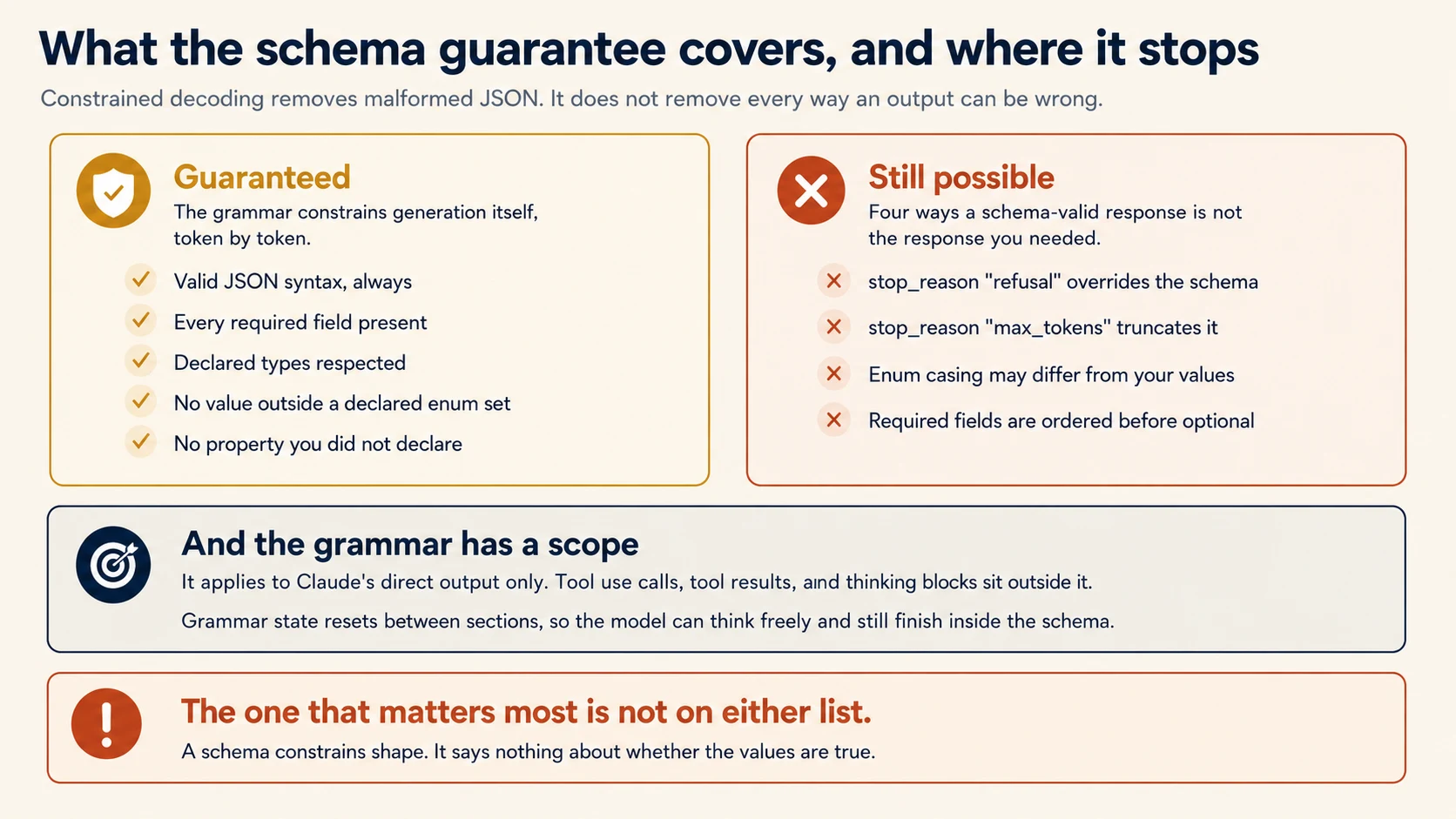
Key idea: The grammar guarantees shape during generation. Refusals, truncation, enum casing, and property order all sit outside it.
Return to the PRIMM question from Concept 1. The guarantee has four important edges, and each one needs different handling.
Refusals and Truncation
A refusal takes precedence over the schema. Concept 14 of The Loop by Hand explains how a refusal arrives: HTTP 200, no exception, and you are billed.
The schema does not override that behaviour. A refusal can therefore produce content that does not match your schema. In an extraction pipeline, route it to human review instead of retrying the same request.
Truncation produces incomplete output. If the response reaches max_tokens, the JSON stops before it is complete. The grammar cannot finish a response after generation has stopped.
This failure is worth retrying. Raise the limit and send again. Very long documents can also hit model_context_window_exceeded, which has the same practical effect.
Casing and Ordering
Enum casing is not guaranteed. For example, an enum containing "Conversation topic 3" may come back as "Conversation Topic 3".
The response can still complete normally. No error or special stop reason appears. Compare enum values case-insensitively, and never define two values that differ only by capitalisation.
Property order is not simply your schema order. Required properties appear first, in their declared order. Optional properties follow, also in their declared order.
Do not make downstream logic depend on key order. If you must, handle the reordering when you parse.
None of these four is common. All four are cheap to handle and expensive to discover in production.
if response.stop_reason == "end_turn":
    invoice = json.loads(next(b.text for b in response.content if b.type == "text"))
elif response.stop_reason == "refusal":
    route_to_review(doc_id, reason="model_refusal")
elif response.stop_reason in ("max_tokens", "model_context_window_exceeded"):
    retry_with_higher_limit(doc_id)
else:
    route_to_review(doc_id, reason=f"unexpected_stop_{response.stop_reason}")
Notice which branch parses the JSON. Only the explicit end_turn path does that. Everything unrecognised goes to review.
Do not put parsing in the final else. This is the anti-pattern from Concept 4 of The Loop by Hand. An unfamiliar stop reason could then reach json.loads, causing an exception or creating a record from something that was never a completed answer.
You can now get schema-valid data out of a document reliably, and you know the four edges of that guarantee. Part 2 is about designing the schema so that valid data is also honest data.
Part 2: Designing Schemas That Do Not Invite Fabrication
Goal for this part: write schemas that let the model say "not present" and that stay inside the grammar complexity limits.
Concept 5: Required Fields Are an Instruction to Invent
Key idea: A required field that the document does not contain forces the model to produce something. Make it nullable and say "do not guess".
PRIMM: Predict. Your schema marks
invoice_dateas required, and the grammar enforces that. A supplier sends a delivery note with no date printed anywhere on it. What arrives in that field? Write your answer down before opening the block below. Confidence 1 to 5.
What you will see
A date. Usually a plausible one, often close to the document's other dates or to today.
The reason is mechanical. The grammar requires a string in that position. Returning nothing is not allowed.
The model therefore has to produce some string that looks like a date.
Notice what does not happen. There is no error and no warning. The output validates perfectly because it matches the schema.
The invented date then enters your ledger looking exactly like a date read from the document.
Readers often predict an empty string. That would itself be a fabrication, and it is not what models reach for when the surrounding fields are full of real values.
Here is the failure, in the order it happens.
You mark invoice_date as required because invoices normally have dates. Then a supplier sends a delivery note with no printed date.
The grammar still requires a string. Because null is not allowed, the model produces a plausible date.
Nothing in the system reports a problem. The output validates. The date enters your ledger looking exactly like a date that was read from a document.
A required field tells the model that a value must exist. If the source may omit it, the schema needs a legal representation for absence.
"invoice_date": {
    "type": ["string", "null"],
    "description": (
        "ISO 8601, YYYY-MM-DD. Null if no date appears on the document. "
        "Do not infer the date from the filename, the email, or surrounding context."
    ),
},
Both parts matter. The type union makes null legal. The description explains when to use it and forbids borrowing a date from somewhere outside the document body.
Then monitor the null rate. If it rises, your document mix may have changed or the prompt may have become too cautious.
If a nullable field is never null, check whether the model actually understands that absence is allowed.
The Cost of That Decision
There is a trade here, and this is where the practical engineering lives.
A nullable field is a union type, written either as anyOf or as ["string", "null"], and a union asks the grammar to keep two shapes alive wherever it appears. Optional fields do something similar: every combination of present and absent is a path the grammar has to allow.
Both compile. Neither is free, and the cost is in compilation rather than in tokens, so you feel it as latency on the first request with a new schema rather than on the bill.
So "make everything nullable" is not the lesson, and neither is counting. The lesson is narrower and more useful.
Which Fields Should Be Nullable
Make a field nullable when the document may genuinely omit it. An invoice number belongs on every invoice, so it can stay required. A purchase-order reference may appear only sometimes, so it should be nullable.
That decision depends on domain knowledge. Learning which fields are truly optional is part of the engagement.
Concept 6: Enums Need an Exit
Key idea: A closed enum forces every unexpected case into the nearest wrong option. Add "other" with a detail field, and "unclear" for genuine ambiguity.
PRIMM: Predict. Your
document_typeenum contains exactly three values: invoice, credit_note, and delivery_note. A supplier sends a quarterly statement, which is none of them. What value comes back, and what does your pipeline do next? Confidence 1 to 5.
What you will see
One of your three values, chosen because it is closest. Usually invoice.
The grammar permits nothing else, so "none of these" is not an available answer. The model is not failing here. It is doing the only thing your schema left it room to do.
The more important problem is what happens next. Nothing looks wrong, so the pipeline continues normally.
A statement is now being processed as an invoice. Its line items and total may even be reconciled against a purchase order that does not exist.
This is the same pattern as the required-date problem. If the schema permits only correct-looking answers, the model must choose one even when none is true.
An enum is a promise that you have listed every possibility. Documents break that promise constantly.
Suppose document_type allows only invoice, credit_note, and delivery_note. A supplier then sends a three-month statement.
The grammar allows no fourth answer. The model chooses the closest value, often invoice, and the pipeline silently handles a statement as an invoice.
Two Values That Give the Model an Exit
Two additions fix this.
"document_type": {
    "type": "string",
    "enum": ["invoice", "credit_note", "delivery_note", "other", "unclear"],
},
"document_type_detail": {
    "type": ["string", "null"],
    "description": (
        "Required when document_type is 'other': name the actual document type. "
        "Null otherwise."
    ),
},
"other" handles cases you did not anticipate. The detail field tells you what the document actually was.
Review those details after a month in production. They give you a prioritised list of categories worth adding.
"unclear" handles genuine ambiguity. This is different from "other", and the difference matters for routing. "Other" means the model recognised something outside your list. "Unclear" means the model could not tell. The first is a schema gap. The second is a document that a person should look at.
Remember the casing rule from Concept 4 when you compare these values. Compare case-insensitively, and never define enum values that differ only in capitalisation.
Concept 7: Schemas Are Compiled, So Complexity Has a Price
Key idea: Your schema becomes a grammar, and a grammar can only express some things. The features JSON Schema offers and the features that compile are two different lists.
Most people meet this concept through a 400 that names a keyword they have used for years.
The constraint is not that your schema is too long. It is that a grammar has to be decidable token by token, and several ordinary JSON Schema features are not.
Here is the boundary, and it is worth reading once before you design rather than after the 400.
| Compiles | Does not |
|---|---|
| Every basic type: object, array, string, integer, number, boolean, null | Recursive schemas |
enum of strings, numbers, bools, or nulls | Complex types inside an enum |
const | External $ref such as http://... |
anyOf, and allOf except with $ref | allOf combined with $ref |
$ref, $def, definitions, all internal | Numeric bounds: minimum, maximum, multipleOf |
default on any supported type | String bounds: minLength, maxLength |
String format: date-time, date, time, duration, email, hostname, uri, ipv4, ipv6, uuid | Array constraints beyond minItems |
Array minItems, but only 0 or 1 | additionalProperties set to anything but false |
Two rows deserve emphasis because they change how you model data.
additionalProperties is not optional. For objects it must be false. Concept 2 introduced it as a way to stop the model adding a helpful extra field; it is also a requirement of the grammar.
Recursion is out. A comment thread with replies, a category tree, a nested line-item group that can contain another group: none of these compile as a self-referencing schema. Flatten them into a list with a parent identifier, and rebuild the tree in your own code after parsing.
Use an unsupported feature and you get a 400 with details naming it. That is the good failure. The bad one is Concept 2's silent rewrite, where a numeric bound is quietly demoted to a hint.
Designing Within the Grammar
The trade you actually make is between guarantee and complexity, and these four moves are the ones that pay.
Mark only critical tools as strict. Use the guarantee where invalid arguments could cause real damage. Simpler tools may not need the extra grammar cost.
Make parameters required where that is honest. Optional parameters increase the grammar's state space. If a field always has a sensible default, requiring the model to state that default can be cheaper than making the field optional.
Flatten nested structures. Deeply nested objects containing optional fields compound the cost.
Split into several requests. Extract the header fields in one call and the line items in another. Two simple grammars often compile faster and more reliably than one large one.
Two Performance Facts Worth Designing Around
The first request with a new schema is slower, because the grammar has to compile. Compiled grammars are then cached for 24 hours from last use.
The cache is invalidated when the schema structure changes or when the request uses a different set of tools. Changing only a name or description does not invalidate it.
That matters because much of extraction prompt tuning happens in field descriptions. You can improve those descriptions without paying the grammar-compilation cost on every edit.
Structured outputs add input tokens. Claude receives an extra system prompt that describes the expected format, and those tokens are billable.
Changing output_config.format also invalidates the prompt cache for that conversation thread. A pipeline that changes its schema for every document can therefore lose cache savings.
Concept 8: Schemas That Check Themselves
Key idea: Ask for the intermediate values, not only the conclusion. Two numbers you can compare will catch errors one number cannot.
Return to Ayesha's invoice where the line items summed to 4,200 and the stated total said 42,000.
A schema cannot catch that, because both numbers are valid integers. But you can design the schema so that the error becomes visible to ordinary code.
"line_items": {
    "type": "array",
    "items": {
        "type": "object",
        "properties": {
            "description": {"type": "string"},
            "amount_cents": {"type": "integer"},
        },
        "required": ["description", "amount_cents"],
        "additionalProperties": False,
    },
},
"stated_total_cents": {
    "type": "integer",
    "description": "The total as printed on the document. Do not calculate it.",
},
"calculated_total_cents": {
    "type": "integer",
    "description": "The sum of the line item amounts you extracted. Do not read this from the document.",
},
"conflict_detected": {
    "type": "boolean",
    "description": (
        "True if the document contradicts itself, for example if the printed total "
        "does not match the printed line items."
    ),
},
The Check That Ordinary Code Can Run
Now a three-line check finds what the schema could not.
if invoice["stated_total_cents"] != invoice["calculated_total_cents"]:
    route_to_review(doc_id, reason="total_mismatch")
The pattern extends beyond arithmetic. When a document contains both a fact and the evidence for that fact, extract both and compare them.
For example, compare a contract term with its start and end dates. Compare a lab value with its reference range. Compare a carton count with the listed cartons.
conflict_detected is the same idea applied where you cannot write the comparison yourself. Sometimes the document really is self-contradictory, and the useful output is not a number but a flag saying so.
When a Conflict Is Only a Date
Two credible sources reporting different revenue for the same company may both be right and simply be covering different quarters. If nothing in the schema records when a value was true, the pipeline cannot tell a contradiction from a change, and it routes a perfectly good pair to review as a mismatch.
So require a date on every extracted claim: the publication date, the collection date, or the period the figure covers. Now the comparison has an answer. Same period and different values is a conflict. Different periods and different values is a history, and the useful output keeps both values with their dates instead of picking one.
Nullable fields to prevent fabrication, the enum plus "other" plus detail pattern, and extracting calculated_total alongside stated_total to expose discrepancies are named exam objectives. So is the distinction between schema syntax errors, which structured outputs eliminate, and semantic errors, which they do not touch. Dating every claim so a change over time is not misread as a contradiction belongs to Domain 5, Task 5.6, and you will meet it again when a synthesis step has to merge sources that disagree.
Part 3: Everything the Schema Cannot Do
Goal for this part: validate meaning rather than shape, retry only what retrying can fix, and decide what a person should look at.
Concept 9: Syntax Is Solved, So Every Remaining Error Is Semantic
Key idea: Once malformed output is impossible, your entire error budget is spent on outputs that are well-formed and wrong.
This changes how you should think about extraction quality.
Without constrained decoding, failures came in two categories. Some outputs did not parse. Others parsed but contained wrong values.
Parsing failures were loud and easy to count, so they attracted most of the engineering attention.
Constrained decoding removes that entire category. What remains is the quiet kind.
| Failure | Visible? | Caught by |
|---|---|---|
| Malformed JSON | Loudly | The grammar. It cannot occur |
| Missing required field | Loudly | The grammar. It cannot occur |
| A fabricated date on a document with no date | No | A nullable field, and a null rate you monitor |
| A total that contradicts the line items | No | A self-checking schema and a comparison |
| A value placed in the wrong field | No | Cross-field rules and sampling |
| A document type forced into the nearest enum | No | An "other" value with a detail field |
| The same field read differently on different layouts | No | Worked examples, below |
Every row in the lower half is silent. It produces output that validates, enters your ledger, and looks exactly like a correct extraction.
That is the job now. You are not mainly building a parser. You are building checks that ask whether a well-formed answer is also true.
Most of those repairs are checks you run after the fact. The last row is different, and it is the one repair that happens before the model answers.
Examples Teach What Instructions Only Describe
Ayesha's field descriptions are correct. Her suppliers still disagree with each other.
One prints a single total at the foot of the page. One lists a subtotal, then tax, then a boxed total in the corner. A third writes the amount in the body of a covering note and never labels it.
"The total as printed on the document" is a true sentence about all three. It is also a sentence three readers can act on differently, and the model is one of those readers.
An instruction describes what you want. An example shows a decision being made. When the instruction is already accurate and the output still varies by layout, the gap is not in your wording. It is in a judgment call you never demonstrated.
PRIMM: Predict. You add three worked examples to the prompt, one per layout. A fourth supplier arrives with a layout none of your examples showed. Does the model handle it, or does it only match the cases you listed? Confidence 1 to 5.
What you will see
It usually handles it, and that is the property worth understanding rather than memorising.
Readers often expect examples to work like a lookup table: three examples cover three layouts, and layout four is a miss. That is not what happens.
Examples that include the reasoning teach a rule rather than a mapping. "The boxed figure in the corner is the total because it appears after the tax line" is a sentence the model can apply to a document it has never seen.
The practical consequence decides how you spend your token budget. Two to four examples of genuinely different shapes beat twenty examples of the same shape. Twenty near-identical cases teach the model that your documents all look one way, which is the belief you were trying to correct.
Three rules make an example earn the input tokens it costs on every single call.
Show a decision, not a format. If you could have written the rule as a sentence in the description, write it there instead. Examples are for the cases where the rule is hard to state and easy to show.
Include the reasoning, not just the answer. An input paired with an output teaches a mapping. An input paired with an output and one line of "chosen because" teaches a rule that generalises.
Cover the shapes you fear, not the ones you have. Pick examples that disagree with each other: the clean digital invoice, the handwritten note with no date, the statement that is not an invoice at all. An example set that agrees with itself teaches uniformity.
Two Kinds of Variety, and Only One Is Obvious
Ayesha's invoices vary in where a value sits. That is the easy kind, and it is what the three examples above teach.
The harder kind is documents that vary in how they are organised, and it shows up the moment you leave invoices for anything written by a person.
Take extracting sources from research documents. One paper cites inline, as (Khan, 2024) in the sentence. Another carries a numbered bibliography at the back and only [7] in the body. One states its method in a labelled Methodology section; another buries the same facts in three paragraphs of narrative with no heading at all.
A field description reading "the sources cited" is correct for all four and actionable in none, because the extraction step is different every time: read the parenthetical, resolve the number against a list at the other end of the document, read a section, or infer from prose.
So the examples have to vary on structure, not just position:
Example 1 — inline citation
  "...as shown previously (Khan, 2024), throughput degrades..."
  -> sources: [{"cite":"Khan, 2024","resolved_from":"inline"}]

Example 2 — numbered reference resolved against a bibliography
  body: "...throughput degrades [7]..."
  refs: "[7] Khan, A. (2024). Queue behaviour under load."
  -> sources: [{"cite":"Khan, A. (2024)","resolved_from":"bibliography"}]
     Note: the number is a pointer. Resolve it, do not store "[7]".

Example 3 — methodology stated in prose, no heading
  "We ran the suite on three machines over two weeks, discarding
   the first day as warm-up."
  -> method: {"present": true, "from_labelled_section": false}
     Note: the content is what counts, not the heading.
Example 2 carries the whole lesson. Without it the model stores [7], which validates, looks like a citation, and is worthless downstream because the pointer was never followed.
This is also the repair when a required field keeps coming back empty on some document types and fine on others. The field is not missing from those documents. It is somewhere the model was never shown how to look.
You already have the mechanism for this. In Concept 1 of The Loop by Hand you learned that assistant messages in the history do not have to have come from Claude. A few-shot example is exactly that: a user turn holding a document fragment, and an assistant turn holding the extraction you wanted.
FEW_SHOT = [
    # Layout A: total labelled at the foot of the page.
    {"role": "user", "content": "GRAND TOTAL   PKR 4,200"},
    {"role": "assistant", "content": json.dumps(
        {"stated_total_cents": 420000, "currency": "PKR",
         "note": "Labelled total at the foot of the page."})},

    # Layout B: unlabelled boxed figure after a tax line. The hard case.
    {"role": "user", "content": "Subtotal 3,800\nTax 400\n[ 4,200 ]"},
    {"role": "assistant", "content": json.dumps(
        {"stated_total_cents": 420000, "currency": "PKR",
         "note": "Boxed figure follows the tax line, so it is the total, not a line item."})},

    # Layout C: no total printed anywhere. Teaches the model to decline.
    {"role": "user", "content": "Delivery note: 3 cartons, 2 pallets. Goods received."},
    {"role": "assistant", "content": json.dumps(
        {"stated_total_cents": None, "currency": None,
         "note": "No amount printed. Reporting absence rather than inferring one."})},
]

messages = [*FEW_SHOT, {"role": "user", "content": document_text}]
Layout C is the one people leave out, and it is the one that pays. Concept 5 made null legal in the schema. This example is where the model learns that you actually meant it.
That pairing is the general pattern. The schema makes an honest answer possible. An example makes it expected.
When Not to Reach for Examples
Examples are not the repair for every wrong answer, and knowing when they are the wrong tool matters as much as knowing when they are the right one.
If the model is picking the wrong tool, the repair is the tool description, not examples. If the model is producing the wrong shape, the repair is the schema. If it invents a value the document does not contain, the repair is a nullable field.
Reach for examples when the schema is right, the description is right, and the model is still making a judgment call you disagree with. That is a decision-boundary problem, and a decision boundary is shown rather than described.
If you have done the AI Fluency crash course, this is the Description D doing work that no amount of extra Delegation or Discernment will do for you. You are not asking for more effort or checking harder. You are giving the model the one thing it was missing.
Few-shot prompting is a full task statement on the exam, and it is tested from both directions.
It is the right answer when the problem is an unclear decision boundary: an agent that escalates easy cases and improvises on hard ones, or an extractor that reads the same field differently across document layouts. Explicit criteria plus a few worked examples is the proportionate first move there.
It is the wrong answer when the problem is a thin tool description. An item describing two tools with near-identical descriptions wants you to expand the descriptions, and offers few-shot examples as the plausible distractor. Adding examples there pays tokens on every call to work around a sentence you could have fixed once.
Also tested: examples generalise to novel patterns rather than matching pre-specified cases, and two to four varied examples beat many similar ones.
You also need a process for cases where the system cannot decide.
Concept 10: Retry Only What a Retry Can Fix
Key idea: Before writing a retry loop, ask whether a perfect reader could produce the right answer from the same document. If not, retrying only spends money.
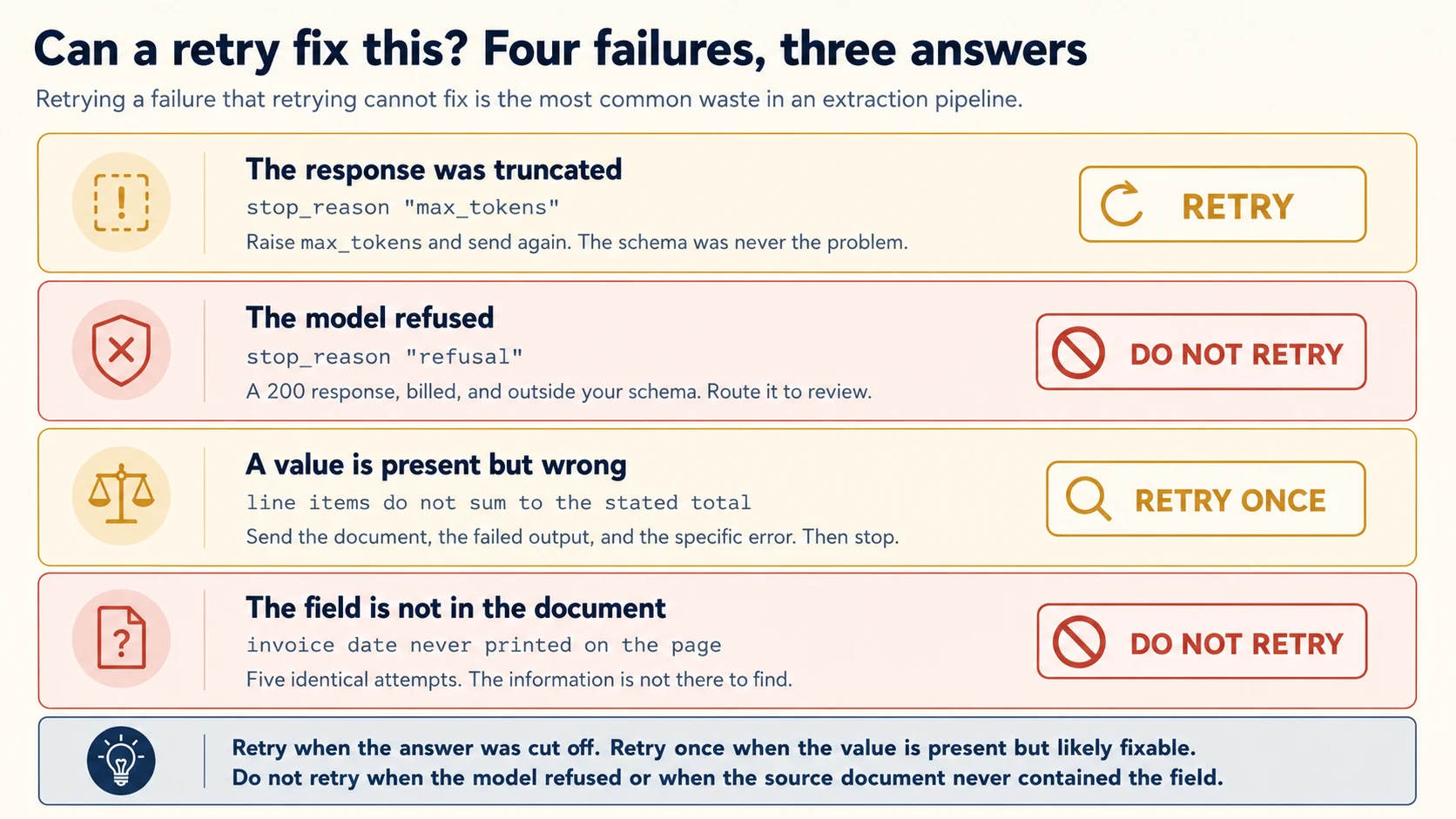
PRIMM: Predict. Four extractions fail. In each case, decide whether sending the request again could produce a different result. (a) The response was cut off partway through the line items. (b) The model refused the request. (c) The line items sum to 4,200 and the stated total says 42,000. (d) The invoice date was never printed on the document. Confidence 1 to 5.
What you will see
Retry helps with (a) and can help with (c). It cannot help with (b) or (d), and the reasons differ.
(a) Truncation. Raise max_tokens and send again. The schema was never the problem, and the second attempt usually succeeds.
(b) Refusal. The model declined for safety reasons, which is a decision about the content rather than a failure of the request. Sending the identical request produces the identical decision. This one goes to a person.
(c) A total that contradicts the line items. One corrective retry is reasonable because the needed information is present on the page.
Send the document, the failed output, and the specific validation error. If that retry fails, stop.
(d) A missing date. No retry can find text that is not on the page.
This case can quietly waste money because it may look like an ordinary validation failure. The nullable-field design from Concept 5 prevents that confusion.
Distinguishing (c) from (d) is what the nullable field in Concept 5 buys you. When the model can report absence honestly, the missing-date case stops arriving as a validation error at all.
Retrying is the reflex when an extraction fails. Sometimes it is right.
What a Corrective Retry Looks Like
A useful corrective retry includes three things: the original document, the failed output, and the specific validation error. That gives the model enough information to re-read the source and correct the mistake.
def retry_with_feedback(document_text: str, failed: dict, error: str) -> dict:
    """One corrective attempt. Not a loop."""
    response = client.messages.create(
        model="claude-haiku-4-5",
        max_tokens=2048,
        messages=[
            {"role": "user", "content": f"Extract the invoice fields.\n\n{document_text}"},
            {"role": "assistant", "content": json.dumps(failed)},
            {
                "role": "user",
                "content": (
                    f"That extraction failed validation: {error}\n\n"
                    "Re-read the document and correct it. If the document does not "
                    "contain the information, return null for that field rather "
                    "than a corrected guess."
                ),
            },
        ],
        output_config={"format": {"type": "json_schema", "schema": INVOICE_SCHEMA}},
    )
    return json.loads(next(b.text for b in response.content if b.type == "text"))
The last sentence matters. A prompt that only says "this was wrong, try again" pressures the model to produce a different answer. Different is not necessarily correct.
By naming null as an acceptable result, you give the model an honest way to report missing information.
Make one corrective attempt, not an open-ended loop. If a retry with specific feedback still fails, route the document to review.
This is where extraction pipelines quietly waste money. Take a queue of ten thousand documents with a 4% failure rate and a three-attempt retry policy. That is 1,200 extra calls. If most of those failures are missing information rather than misreadings, all 1,200 fail in exactly the same way.
Concept 11: Confidence, and Why the Raw Number Is Not Enough
Key idea: A model's stated confidence is a signal, not a probability, until you calibrate it against labelled data.
You want to route uncertain extractions to a person. The obvious approach is to ask.
"fields": {
    "type": "object",
    "properties": {
        "invoice_date": {
            "type": "object",
            "properties": {
                "value": {"type": ["string", "null"]},
                "confidence": {"type": "string", "enum": ["high", "medium", "low"]},
                "evidence": {
                    "type": "string",
                    "description": "The exact text on the document this value came from.",
                },
            },
            "required": ["value", "confidence", "evidence"],
            "additionalProperties": False,
        },
    },
},
Two design choices in that block are worth copying.
Confidence belongs to each field, not the whole document. A clearly printed invoice number and a smudged date should not share one score.
Field-level confidence tells you which value needs human attention.
The evidence field is worth the extra tokens. It gives the reviewer the exact source text behind a value.
That makes review much faster. It also helps you detect a value that has no visible support in the document.
Calibrating What the Words Mean
This is the step many teams skip. "High confidence" is a label produced by the model, not a measured probability.
Before you route work based on that label, measure what it means on your own documents.
Take a few hundred documents. Have a person label the correct answer for each field. Then group your results by the confidence the model stated and fill in this table.
| Stated confidence | Field extractions | Measured accuracy | Your decision |
|---|---|---|---|
| high | |||
| medium | |||
| low |
Those numbers must come from your own documents. Extraction accuracy depends on scan quality, layout consistency, language, and your definition of a correct answer.
A published number from another pipeline describes another problem.
What the table gives you is a threshold instead of a word.
Suppose the measured accuracy of the high-confidence band is 94%. Automating that band means accepting about six errors in every hundred fields.
That may be acceptable for a supplier name and unacceptable for a payment amount.
The point is that you chose it, with the number in front of you, rather than inheriting it from the word "high".
Recalibrate when the document mix changes, when you change models, and when you materially change the prompt.
Concept 12: The Average Is Hiding Something
Key idea: Aggregate accuracy conceals segments that do not work. Measure by document type and by field before you reduce human review.
This is Ayesha's first problem, and it is the most common way an extraction pipeline passes testing and fails in production.
Her headline figure was real. It was also an average across a mix, and the mix was not uniform.
It helps to see how an average hides a weak segment. The following numbers are invented and deliberately simple. They are not performance claims for a real pipeline.
| Document type | Share of volume | Accuracy in this example |
|---|---|---|
| Digital PDF invoices | 70% | 99% |
| Scanned invoices | 22% | 97% |
| Handwritten delivery notes | 8% | 60% |
Weighted together, that mix reports about 94%. Raise the first two values slightly and the headline can reach 97%.
Either way, the overall number looks strong while the handwritten category remains unusable.
Notice which number the team reacts to. Nobody refuses a pipeline because of an average. They refuse it because the documents on their own desk keep coming back wrong, and those documents all sit in one row.
Segment before you decide. Measure by document type, supplier, field, and language when relevant.
Any segment that is large enough to matter and behaves differently deserves its own accuracy number.
The same logic applies to fields. One overall score may hide a supplier name that is almost always correct beside a line-item description that is often wrong.
The action is then specific: automate the supplier name and review the line items.
Watching a Pipeline That Is Already Running
Once you automate the high-confidence path, those extractions stop being checked. That is the point of automating them, and it is also a risk, because a change in your input documents will not announce itself.
Stratified random sampling is the standard answer. Each week, take a random sample from every important stratum, including the high-confidence automated path. Have a person label those samples.
Sample within each stratum rather than across the whole pool. Ayesha has about seven hundred handwritten notes in ten thousand documents. A simple random sample could include too few handwritten notes to reveal a problem.
Watch for two changes. First, the error rate inside a stratum may move. Second, a new kind of error may appear.
A new error pattern often means the input mix has changed.
The exam explicitly covers field-level confidence calibrated on labelled data. It also covers stratified sampling and the risk of aggregate accuracy hiding weak document types or fields.
This concept and the previous one are central to Exam Scenario 6.
You can now tell a well-formed answer from a true one, retry only what is worth retrying, and decide which extractions a person should see. Part 4 runs this over ten thousand documents.
Part 4: Running It at Scale
Goal for this part: choose between batch and synchronous processing, handle partial failure, and keep sensitive data out of places it does not belong.
Concept 13: The Message Batches API
Key idea: Half the price, up to 24 hours, and no round trip inside a request.
Ayesha's ten thousand invoices arrive over a month and are reconciled monthly. Nobody is waiting for any individual result. That is the exact shape the Message Batches API is built for.
PRIMM: Predict. Batch processing costs half as much as the synchronous API for identical work. Before reading on, list what you give up in exchange. Confidence 1 to 5.
What you will see
Three things, and the third is the one people miss.
Time, with a ceiling rather than an estimate. Most batches finish quickly, but the promise is 24 hours.
Streaming, which for extraction work costs you nothing, because nobody is watching a progress bar at three in the morning.
The round trip. A batch cannot execute a tool and then feed the result back inside the same request. You can include tools, but there is no client-side loop inside one batch request.
Pure document extraction fits naturally because it needs no mid-request lookup. A workflow that must check a supplier record partway through belongs on the synchronous API.
Most people predict the first two. The third is the one that sends a design back to the drawing board late.
Here are the operating limits.
A batch takes up to 100,000 requests or 256 MB, whichever limit arrives first. You pay 50% less on input and output tokens. Results arrive within 24 hours and stay available for 29 days.
Each request carries a custom_id. It must be unique inside the batch, and it is how you match a response back to a document.
batch = client.messages.batches.create(
    requests=[
        {
            "custom_id": f"invoice-{doc.id}",
            "params": {
                "model": "claude-haiku-4-5",
                "max_tokens": 2048,
                "messages": [{"role": "user", "content": f"Extract the invoice fields.\n\n{doc.text}"}],
                "output_config": {"format": {"type": "json_schema", "schema": INVOICE_SCHEMA}},
            },
        }
        for doc in documents
    ]
)
Structured outputs work inside a batch, which means the whole of Parts 1 and 2 applies unchanged at half the cost. Prompt caching stacks with the discount as well.
Two Limits to Design Around
Two limitations matter in the design.
There is no streaming, which does not matter here because nobody is watching.
There is no tool loop inside one batch request. You can pass tools, but the batch cannot complete a client-tool round trip within that request.
That is fine for extraction that only reads the document. It is not suitable for a workflow that needs a mid-extraction lookup.
Concept 14: Batch or Blocking
Key idea: The question is not how long a batch usually takes. It is whether anyone is waiting.
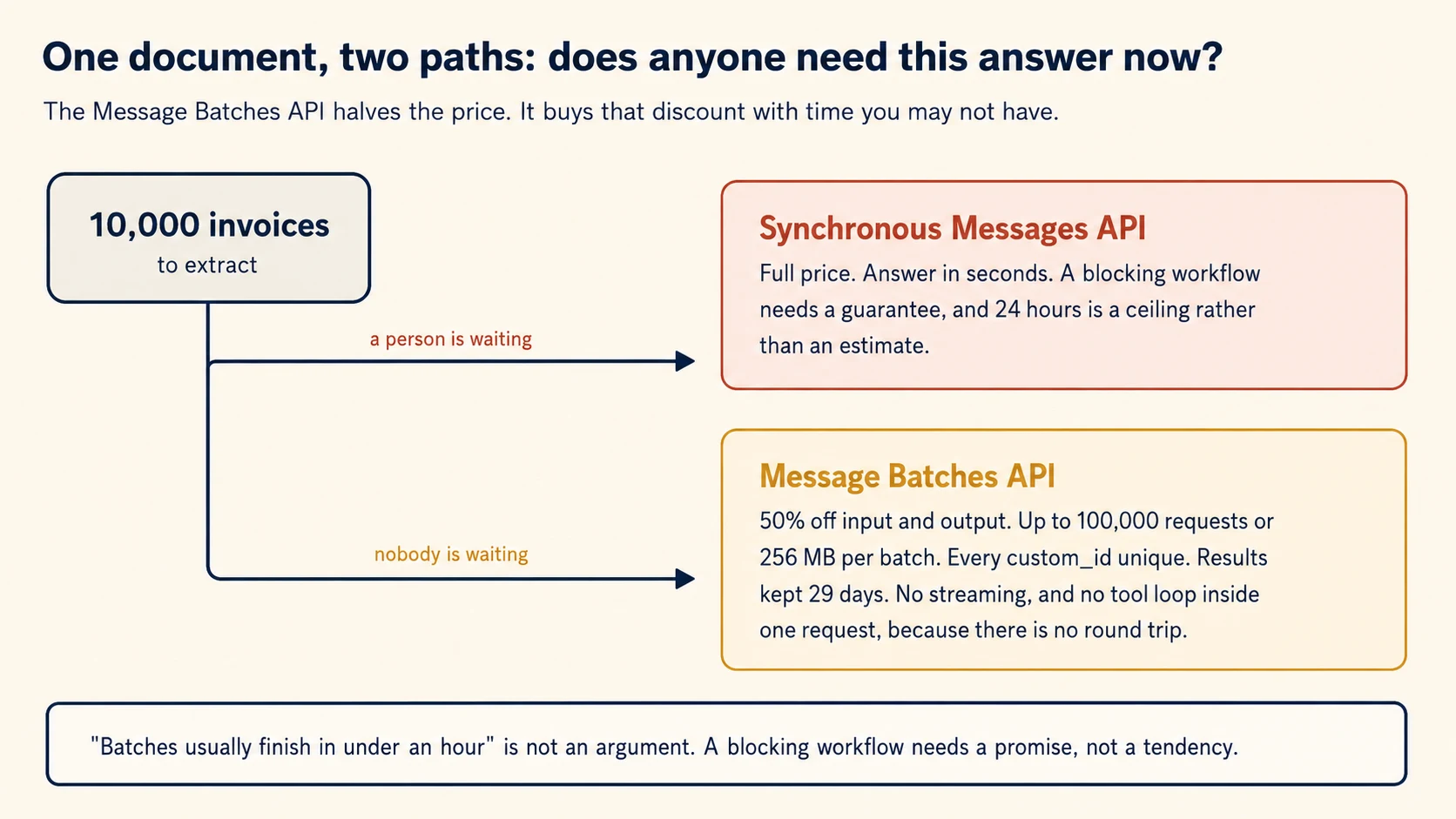
Many batches finish in well under an hour. Do not design a blocking workflow around that observation.
Twenty-four hours is the upper bound, not a delivery promise. If someone is waiting, use the synchronous path.
The line is clean in practice.
Batch fits work such as overnight reconciliation, monthly supplier audits, large archive backfills, and evaluation sets that you rerun after prompt changes.
Synchronous suits the clerk who has just dragged a PDF into your web application and is watching a spinner.
Many real pipelines use both paths. Ayesha can run the monthly queue in batch while urgent invoices use the synchronous API.
The schema, validation, and review rules stay the same. Only the submission path changes.
Design around the 24-hour ceiling without adding unnecessary delay. Suppose the service-level agreement is thirty hours. Submitting every four hours still leaves room for a batch that takes the full twenty-four.
Do not add a fixed one-day wait to the pipeline. Most batches will finish earlier.
Concept 15: Partial Failure Is the Normal Case
Key idea: In a batch of ten thousand, some requests fail. Resubmit only those, by custom_id, with the specific change each one needs.
A batch is not one all-or-nothing job. Individual requests can fail while the rest succeed.
Your code must therefore handle results per request.
failures: dict[str, list[str]] = {"too_long": [], "refused": [], "invalid": []}

for result in client.messages.batches.results(batch.id):
    doc_id = result.custom_id

    if result.result.type != "succeeded":
        failures["invalid"].append(doc_id)
        continue

    message = result.result.message
    if message.stop_reason == "max_tokens":
        failures["too_long"].append(doc_id)          # chunk it, resubmit
    elif message.stop_reason == "refusal":
        failures["refused"].append(doc_id)           # human review, no retry
    else:
        store(doc_id, json.loads(next(b.text for b in message.content if b.type == "text")))
Note that the three buckets get three different treatments, which is the whole point of separating them. Documents that exceeded the token limit are split and resubmitted. Refusals go to a person. Errors in the request itself are fixed and resubmitted.
Test on a Hundred Before You Send Ten Thousand
Validate on a small batch before submitting the large one. Run one hundred documents first. Inspect the failures, fix the prompt or schema, and only then submit the rest.
A mistake found after ten thousand documents costs a full run. The same mistake found after one hundred is cheap.
This small test is one of the highest-value habits in batch work. It can feel like a delay when the full dataset is ready, but it prevents expensive large-scale mistakes.
Concept 16: What Must Never Enter a Schema
Key idea: Your schema is cached separately from your prompts and does not receive the same data protections. Keep sensitive values in the message content.
This rule is short, easy to miss, and especially important in sensitive industries.
Prompts and responses use zero data retention when structured outputs are enabled. The JSON schema is different.
The schema can be cached for up to 24 hours from last use to speed grammar compilation. It is stored separately from the message content.
This creates a clear placement rule. Structured outputs are eligible for HIPAA use, but protected health information must not appear in the schema definition.
Keep it out of property names, enum values, const values, and pattern regular expressions.
The Mistake, Concretely
Here is the mistake in concrete form. While building a lab-result extractor, you generate enum values from a patient's test names or create a property named after a specific diagnosis.
That patient data is now part of the schema, which is cached separately from the prompt.
Sensitive values belong in the message content, where they are covered. The schema describes the shape of the answer, and a shape does not need to contain anyone's data.
The same reasoning applies more broadly than health data. Client names, account numbers, and case identifiers belong in the prompt rather than in the structure.
Part 5: The Worked Example
You will now build Ayesha's pipeline through five decisions. Your coding agent can write the code, but you make the design choices.
For each decision, start in plan mode. Review the first proposal critically. Move to build mode only when the plan is sound.
Set Up (10 minutes)
mkdir invoice-extraction && cd invoice-extraction
printf 'ANTHROPIC_API_KEY=\n' > .env.example
cp .env.example .env          # paste your key by hand
printf '.env\n.venv\n__pycache__\n*.db\n' > .gitignore
Set this folder up as a uv project with package layout under
src/extraction/, and addanthropic,pydantic, andpython-dotenv. Then create aCLAUDE.mdat the project root with a## Briefsection recording what we are building. Do not write code yet.We are building an invoice extraction pipeline that:
- Extracts supplier, invoice number, date, currency, line items, and totals from document text using
output_config.format(Concept 2).- Makes fields nullable only when a real document may omit them. Each description says when to return null and forbids inference from filenames or surrounding context (Concept 5).
- Uses an enum for
document_typewithotherandunclearvalues, plus a detail field (Concept 6).- Extracts
stated_total_centsandcalculated_total_centsseparately, plus aconflict_detectedboolean (Concept 8).- Checks
stop_reasonbefore parsing and routes refusals to review, truncations to a higher token limit (Concept 4).- Retries once with the specific validation error attached, and never twice (Concept 10).
- Returns per-field confidence and an evidence string quoting the source text (Concept 11).
- Reports accuracy by document type and by field, not as one number (Concept 12).
- Submits through the Message Batches API with a unique
custom_idper document, and handles partial failure by bucket (Concepts 13, 15).- Never places document values in schema property names, enum values, or descriptions (Concept 16).
Decision 1: Design the Schema
Write
src/extraction/schema.pyas Pydantic models for the invoice. Mark as nullable only the fields a real invoice may genuinely omit, and require the rest. Every nullable field needs a description saying when to return null and forbidding inference from outside the document body. When you are done, list every field you made nullable with the one-line reason a real invoice might omit it, so I can challenge the ones that are guesses.
Push back on two things.
Everything nullable. The agent will propose it, because it is the safe-looking choice. It also tells the model that no field is really expected, which is the opposite of what you want on the fields that always appear. Ask which fields appear on every invoice, and require those.
Descriptions that only name the field. A description reading "The invoice date" is worth nothing, because the model already has the field name. It should say the format, the null condition, and the inference it must not make.
Done when: the model count is inside both limits, and every nullable field has a three-part description.
Decision 2: The Extraction Call
Write
src/extraction/extract.pywith one function that takes document text and returns either a parsed invoice or a routing decision. Checkstop_reasonbefore parsing. Handle refusal by routing to review,max_tokensby retrying once at a higher limit, and anything else by parsing. Useclient.messages.parse()with the Pydantic model.
Done when: a normal invoice parses. A deliberately truncated call routes to a retry instead of raising. The function never calls json.loads on a refusal.
Decision 3: The Validation Layer
Write
src/extraction/validate.pywith one function that takes a parsed invoice and returns a list of validation errors. Each error is a specific sentence naming the values involved, not a code and not a boolean. Implement four checks:
- The stated total against the calculated total.
- The invoice date not in the future and not more than ten years old.
document_type_detailpresent wheneverdocument_typeisother.- All enum comparisons done case-insensitively.
Specific validation messages have a second job. The retry from Concept 10 sends these messages back to the model.
A good validation error therefore becomes a good correction prompt.
def validate(inv: Invoice) -> list[str]:
    errors: list[str] = []

    if inv.stated_total_cents != inv.calculated_total_cents:
        errors.append(
            f"Total mismatch: the line items sum to {inv.calculated_total_cents}, "
            f"but the stated total is {inv.stated_total_cents}."
        )

    if inv.document_type.lower() == "other" and not inv.document_type_detail:
        errors.append("document_type is 'other' but document_type_detail is missing.")

    return errors
Compare the two errors. "Total mismatch: the line items sum to 4200, but the stated total is 42000" tells the model exactly what to recheck.
"Validation failed" gives no direction. It encourages a different answer rather than a corrected answer.
Note the .lower() on the enum comparison. That is Concept 4 in one line, and leaving it out means a returned value of "Other" silently skips the check.
Done when: the mismatched invoice produces an error naming both numbers. An enum value with unexpected capitalisation still passes. A document with a null date produces no error, because absence is valid rather than a failure.
Decision 4: Build a Labelled Set and Calibrate
This decision separates a demonstration from a deliverable. It is also the step teams most often skip.
Your labelled set is what lets you make a defensible accuracy claim to a client.
Create
fixtures/with at least 30 documents across at least three document types. Include these five deliberately:
- One with no date printed.
- One where the stated total contradicts the line items.
- One of a type outside your enum.
- One that is genuinely ambiguous.
- One long enough to risk truncation.
Then label the correct answer for every field by hand in
fixtures/labels.json.
Label the fixtures by hand. Do not ask a model to create the ground truth.
Otherwise you would be measuring the pipeline against another model-generated answer, and a high score would tell you very little.
Now write
src/extraction/evaluate.py. Run the pipeline over every fixture, compare each field against the label, and print three reports:
- Accuracy by document type.
- Accuracy by field.
- A calibration table of stated confidence against measured accuracy.
Print the counts alongside every percentage.
report = {
    "by_type":       {"digital_pdf": (correct, total), ...},
    "by_field":      {"invoice_date": (correct, total), ...},
    "by_confidence": {"high": (correct, total), ...},
}
Always print counts beside percentages. A field that is 100% accurate across four examples is not the same claim as 100% across four hundred.
The percentage alone hides that difference.
Done when: the report contains per-type and per-field results instead of one aggregate number. The calibration table shows whether "high" means what you expected. Every percentage includes its underlying count.
Thirty documents is a small set. It is also thirty more than most pipelines have, and it converts every later accuracy claim from an opinion into a measurement.
Decision 5: The Batch Runner
Write
src/extraction/batch.py. Submit documents withcustom_idof the forminvoice-{doc_id}, poll for completion, and sort results into three buckets: succeeded, too long, and refused. Resubmit the too-long bucket with the document split into halves. Send the refused bucket to review with no retry. Report the counts.
Done when: a batch of ten fixture documents completes, and a deliberately oversized document lands in the too-long bucket and is resubmitted rather than lost.
What You Have Built
You now have an extraction pipeline that returns schema-valid data, checks semantic errors, retries only fixable failures, and routes uncertain fields to people.
It also reports accuracy in a form a client can act on and can process large non-blocking workloads through the batch API.
That is a deliverable, not a demonstration. The measured accuracy table is the part that makes it billable.
Part 6: What It Costs
Four numbers decide the bill for an extraction pipeline.
documents per month
  x average input tokens per document      (the document text plus your prompt)
  x output tokens per document             (usually small for extraction)
  x current price per token for your model
Three adjustments matter more here than in conversational work.
Batch halves the token price. For non-blocking work, this is the largest cost lever available. You do not need to change the prompt or schema.
Extraction is input-heavy. A ten-page invoice may produce only a few hundred output tokens.
Small prompt edits therefore save little compared with reducing the document input. When you can identify the relevant pages safely, send those instead of the entire document.
A stable schema benefits from caching. Grammar compilation is cached for 24 hours from last use. Changing a description does not invalidate that cache, while structural changes do.
A stable pipeline therefore avoids recompiling the grammar for every document.
Then measure the real workload. Run one hundred documents, record their token counts, and use those numbers in your estimate.
Recalculate with the current model price whenever pricing changes.
Choose the model with an experiment, not an assumption. Extraction may work well on a smaller model, and price differences between tiers can be large.
Run the same labelled fixture set on a small and a larger model. Compare accuracy by field. If the smaller model fails only on one field, you may be able to route that field differently instead of upgrading every extraction.
How Extraction Pipelines Actually Fail
Each symptom points to a concept.
- "Dates appear for documents that have no date printed" points to a required field the model had to fill (5).
- "Everything is classified as an invoice" points to an enum with no exit (6).
- "The totals in our ledger do not match the invoices" points to a schema with no self-check (8).
- "It reads one supplier's invoices correctly and another's wrongly" points to a decision boundary you described but never demonstrated (9).
- "We retry three times and it never helps" points to retrying a failure that retrying cannot fix (10).
- "We automated the high-confidence path and errors went up" points to a confidence level that was never calibrated (11).
- "It tested in the high nineties and the team will not use it" points to an average hiding a segment (12).
- "Accuracy dropped and nobody noticed for a month" points to no stratified sampling of the automated path (12).
- "The API rejected my schema and named a keyword" points to a JSON Schema feature the grammar cannot express, such as recursion or a numeric bound (7).
- "The first request of the day is slow" points to grammar compilation, which is cached for 24 hours (7).
- "Our batch cost the same as synchronous" points to work that was submitted synchronously because someone assumed it was urgent (14).
- "We lost 400 documents from a batch run" points to failures that were counted rather than bucketed and resubmitted (15).
- "Our compliance team stopped the project" points to sensitive values placed in schema property names or enum values (16).
Two habits prevent many expensive mistakes. Build the labelled fixture set early, because every serious accuracy claim depends on it. Test on one hundred documents before ten thousand, because small failures are cheap to learn from.
The larger lesson comes from Concept 9. Structured outputs solve the loud formatting failures.
What remains is quieter: well-formed data that may still be wrong. Those failures require measurement, validation, and review rather than more parsing code.
Build It: Exam Prep Projects
Exercise 3 in the official preparation list is a structured extraction pipeline, and it is the one exercise that maps almost entirely onto a single course. Work through these four and you have built it.
Use real documents. Invoices from your own inbox, papers from your field, contracts you can legally read. Synthetic documents are too clean, and the exam questions are all about what happens when documents are not clean.
Project 1: A Schema That Refuses to Invent Things
What you will have: an extraction tool whose schema makes fabrication harder than admitting ignorance.
Here are ten documents of the same type. Write me an extraction schema for them. Some fields are missing from some documents, so I need those to come back empty rather than guessed.
Done when:
- Fields that may genuinely be absent are nullable, and a document missing one returns null rather than a plausible invention.
- A category field uses an enum with an "other" member plus a free-text detail field, so an unexpected value is recorded instead of forced into the nearest bucket.
- You have fed it a document with a field deliberately blacked out and confirmed you get null.
Project 2: A Retry Loop That Knows When to Stop
What you will have: a validation-retry loop that distinguishes failures worth retrying from failures that will never resolve.
When validation fails, send the document back with the error and ask for a correction. Then log which failures got fixed on the second attempt and which never do.
Done when:
- A format mismatch gets corrected on retry.
- A field that is simply absent from the source is not retried, because no number of attempts will make it appear.
- Your log shows the split, and you can say what fraction of failures are worth a second call.
Project 3: A Hundred Documents Through the Batches API
What you will have: a batch run, and a felt sense of when batching is the wrong answer.
Send a hundred of these through the Message Batches API. Track each one by a custom id so I can tell which failed, and resubmit just the failures.
Done when:
- Every request carries a
custom_idand you can map any response back to its document. - Oversized documents are chunked and resubmitted rather than silently lost.
- You can state the total processing time and say whether it fits a deadline you actually have.
The judgment the exam wants. Batching halves the token price and can take up to twenty-four hours with no latency guarantee. That makes it right for an overnight job and wrong for anything a person is waiting on. A question will hand you two workflows and ask you to sort them.
Project 4: Confidence You Have Actually Checked
What you will have: a review queue sized by measured accuracy rather than by hope.
Have the model score its confidence per field. Route the low scores to me. Then take a random sample of the high-confidence ones and check whether the confidence was telling the truth.
Done when:
- Confidence is per field, not per document.
- Your threshold came from a labelled validation set, not from picking a round number.
- You have sampled the high-confidence extractions and measured the error rate inside them.
- You have broken accuracy down by document type and found at least one segment where the aggregate number was hiding something.
Why that last step matters. An overall accuracy of ninety-seven percent can conceal a document type running at sixty. Domain 5 names stratified sampling and per-segment validation for exactly this reason: the aggregate is the number that makes you comfortable, and the segment is the number that tells you whether you can automate.
Sources
Every page below was checked on 30 August 2026. Where this course and a current page disagree, the page wins: these products move faster than any course can, which is why each concept names the behaviour to verify rather than asking you to trust a number.
- Structured outputs,
output_config.format, strict tool use, the compile boundary in Concept 7, the enum capitalization caveat, and grammar caching. - Batch processing, the 100,000 request and 256 MB ceiling, the 50% discount, the 24-hour expiry, 29-day results, and
custom_id. - Handling stop reasons, why Concept 4 checks
stop_reasonbefore it parses anything. - Tool use overview, the forced-tool extraction pattern that older code and exam items still use.