Python in the AI Era: A Crash Course
17 Concepts · Read Before You Write
You already learned to drive an AI coding agent in the Agentic Coding Crash Course. You can open a session, give Claude Code or OpenCode an instruction, and watch it edit files and run commands. So here is the honest question this course exists to answer:
If the agent writes the Python, why do you need to learn any Python at all?
Because somebody has to read it. The agent produces hundreds of lines of working-looking code in seconds. And "working-looking" is the trap. AI optimizes for plausible, not correct. The code that quietly returns the wrong number, drops a record, or leaks your API key looks exactly like the code that works. The only person who can tell the difference is the one who can read what the agent wrote and prove it does what they meant.
That is the whole job now. Not typing loops from a blank page. The agent does that. Your job is the part that still requires a human: deciding what correct means, and verifying that the generated code meets it.
This crash course gives you enough Python literacy to start reading agent code today. It comes after Agentic Coding and before Build AI Agents, Postgres for AI, and Building a Digital FTE, all three of which assume you can read the Python an agent generates.
One idea that organizes everything below: in the old world, you learned Python by writing it. Here you learn it by reading it: predicting what code does, running it, investigating why, then changing it and finally building your own. We have a name for that loop, and it is the spine of the whole course.
Everything in this course is something you do inside a Claude Code session, not just read about. Keep a terminal open with claude running and try each idea as you reach it.
Everything in this course is something you do inside an OpenCode session, not just read about. Keep a terminal open with opencode running and try each idea as you reach it. If you are watching cost, point it at a cheap model like deepseek-v4-flash for the routine runs (see the Agentic Coding course).
Set up your environment (once)
This course has a small companion you download once: the course base. You don't strictly need it to read along, but it makes everything behave the way the course assumes. It ships a short rules file, AGENTS.md, that turns your agent into the disciplined tutor this course relies on: it predicts before it reveals, gives hints instead of answers, and never quietly weakens a test just to make it pass. Your agent reads that file automatically every time it starts, which is why your prompts here can stay short. The base also carries the practice-project starters and an answer key you can check your own tests against.
Download python-crash-course-base.zip
Unzip it, then open your agent inside the folder:
cd python-crash-course
claude
cd python-crash-course
opencode
Notice the base ships no Python project yet, on purpose. Building your own workbench from nothing is the first real skill, and it is the very next thing you do, in Concept 3. For now, just open your agent in the folder and confirm it loaded the rules:
What rules are you following for this session?
It should describe the read-before-you-write method and the habit of running tests to verify. Done when your agent answers with those rules. (Prefer to start from a bare folder instead? That works too; you will just be setting the discipline yourself as you go.)
Part 1: The new mindset
1. You read code; the agent writes it
In traditional Python courses, the skill being trained is production: type the function, type the loop, type the class. AI removed that bottleneck. The skill that matters now is direction and verification.
| The old job (mostly automated now) | The new job (still yours) |
|---|---|
| Type the implementation from a blank page | Describe precisely what you want, in words the agent can act on |
| Memorize syntax | Recognize syntax well enough to read it critically |
| Get the code to run | Prove the code is correct, not just runnable |
| Leave the code however it lands | Keep it legible, because you and the agent read it next |
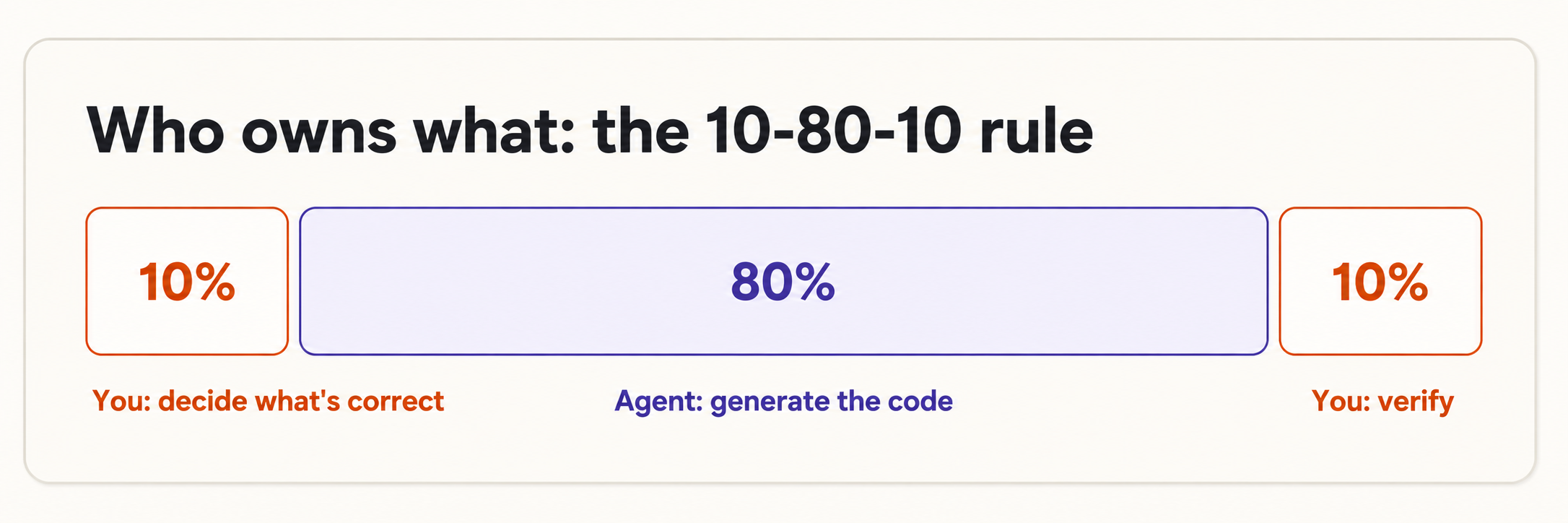
This is the 10-80-10 rule applied to programming. You own the first 10% (deciding what to build and what "correct" means) and the last 10% (verifying it). The agent owns the 80% in the middle (generating the code). Reading fluently is what lets you keep both ends.
Reading is far easier than writing. You don't need to recall, from nothing, that a list uses square brackets. You only need to recognize ["a", "b"] as a list when you see it. That is the bar for this whole course: recognition, not recall.
2. The PRIMM-AI+ method
PRIMM-AI+ is how you learn to read code without ever staring at a blank page. Each new piece of Python moves through five steps, and the agent is your partner at every one:
| Step | Letter | What you do | The agent's role |
|---|---|---|---|
| Predict | P | Before anything runs, guess what the code will do | Stays quiet — this is your guess to make |
| Run | R | Run it and see the real output | Executes the code for you |
| Investigate | I | Compare your guess to reality; ask why | Explains line by line, on demand |
| Modify | M | Change one thing, predict again, run again | Makes the edit you describe |
| Make | M | Specify your own version from scratch; let the agent build it; verify | Generates against your spec |
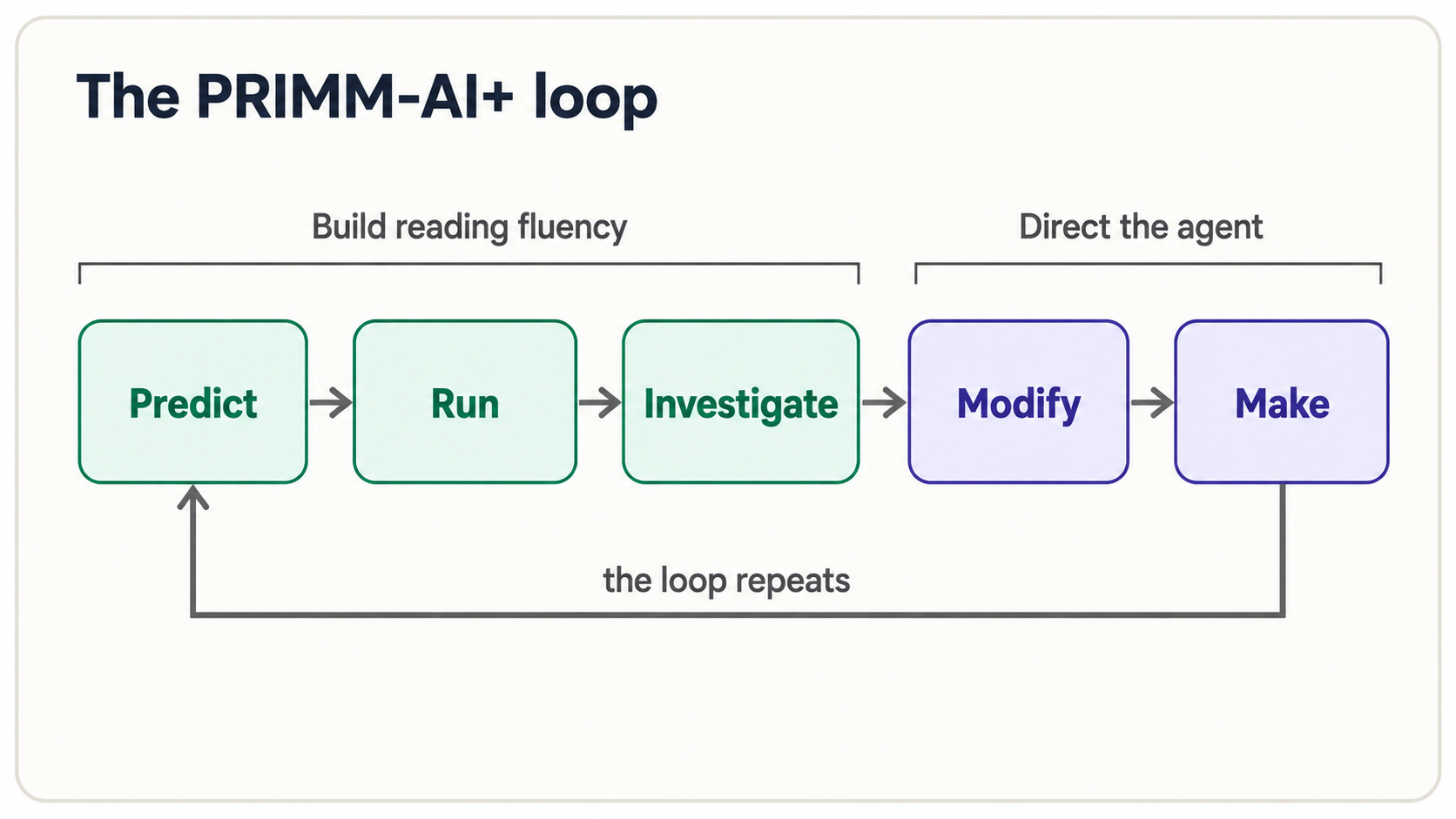
The AI+ is the part that makes this the AI-era version of an old teaching method. Two things are layered on top of classic PRIMM: the agent is always available as a reading partner ("explain line 3," "what would break this?"), and nothing is accepted on faith. Predict-Run-Investigate builds your reading fluency; Modify-Make is where you start directing the agent. By the end, Make feels as natural as Predict does now.
Where testing fits: everywhere. The engine that powers Investigate, Modify, and Make is the test: a short check that pins down what "correct" means, so the computer can verify the agent's work instead of you eyeballing it. This is not a step you do once at the end. Starting with the very next function you read, a small test rides along: first as a single assert line (Concept 5), then on objects (Concept 8) and validation rules (Concept 11), and finally as the full Test-Driven Generation loop where you write the test first and the agent writes code to pass it (Concept 16). Treat every piece of code the agent hands you as untrusted until a test you wrote says otherwise.
The instinct is to skip straight to Run: just see the answer. Don't. The gap between your prediction and the real output is where learning happens. A wrong prediction tells you exactly which part of your mental model is broken, far better than a right one ever could. Predict out loud, in writing, or to the agent. Then run.
3. Your workbench in five minutes
This course assumes you've done the Agentic Coding Crash Course, where you install and learn to drive the agent. If you skipped straight here and have nothing installed yet, set up one coding agent before going further. That single tool will install everything else for you:
- Claude Code: follow the official guide at docs.claude.com/en/docs/claude-code (works on macOS, Linux, and Windows via WSL).
- OpenCode (open-source alternative): opencode.ai.
- uv (Python itself + packages): docs.astral.sh/uv; or just let the agent install it for you in the next step.
You do not need to understand any of these tools deeply. Install one agent, open it in a folder, and continue. The rest of this section has the agent do the setup.
You need three things: a way to run Python, a few quality tools, and your agent. One installer covers the first two: uv, a fast package manager that installs Python itself and manages your project.
Don't install these by hand from memory — that is exactly the kind of fiddly setup the agent is good at. In the folder where you opened your agent, give it an instruction:
Set up a new Python project here using
uv. Addpytestfor tests,pyrightfor type checking, andrufffor formatting. Create ahello.pythat prints "ready". Then run it and show me the output.
The agent will run the uv commands, create the files, and run the script. You watch and approve each step. That is your workbench. You didn't memorize a single command.
Don't install these by hand from memory — that is exactly the kind of fiddly setup the agent is good at. In the folder where you opened your agent, give it an instruction:
Set up a new Python project here using
uv. Addpytestfor tests,pyrightfor type checking, andrufffor formatting. Create ahello.pythat prints "ready". Then run it and show me the output.
OpenCode will run the uv commands, create the files, and run the script. You watch and approve each step. That is your workbench. You didn't memorize a single command.
What that actually looks like
You don't watch in silence. The agent narrates each step and asks before it runs anything. A real session looks roughly like this (Claude Code shown; OpenCode is nearly identical):
> Set up a new Python project here using uv. Add pytest, pyright, ruff.
  Create a hello.py that prints "ready", run it, and show the output.

● I'll initialize the project with uv.
  $ uv init .                       ← the agent proposes a command
  Allow? (y/n) y                    ← you approve
  Initialized project

● $ uv add --dev pytest pyright ruff
  Allow? (y/n) y
  + pytest  + pyright  + ruff

● Created hello.py:
      print("ready")

● $ uv run hello.py                 ← this is how a Python file gets run
  ready                             ← the output prints right here

  Done. Your workbench is ready.
Three things to notice, because they are the physical loop you'll repeat all course:
- Code lives in a file (
hello.py), not in the chat window. - You run a file with
uv run hello.py: that one command executes every script and example in this course. - The agent asks permission before each command, then prints the output underneath. You approve, you read the result.
So whenever an example below says "run it," you have two easy options: paste the code into a file and tell the agent "run this file and show me the output," or simply paste the snippet into the chat and say "run this and show me what it prints." Either way, you never type Python by hand.
If any step throws a red error, you do not need to understand it. Copy the red text, paste it back, and say: "this failed. Read the error and fix it." If the agent reports that uv isn't installed, ask it to install uv first. Getting unstuck is the agent's job; noticing that you're stuck is yours.
Here is what each tool does, in one line. You will see all four mentioned constantly from here on:
| Tool | What it does for you |
|---|---|
| uv | Installs Python and your project's packages, fast |
| pytest | Runs your tests and reports which passed and which failed |
| Pyright | Reads the type labels in the code and flags mismatches before you ever run it |
| Ruff | Checks style and formatting — a spell-checker for code |
Pyright and Ruff are reading machines. When the agent generates code, these tools read it for you and catch a whole class of mistakes instantly: a wrong type, an unused variable, a typo'd name. They are your first line of verification, before you even read a line yourself.
See your reading machines catch something
These tools aren't abstract. Ask the agent to write a small function and then call it with the wrong kind of value:
def total_with_tax(price: float, tax_rate: float) -> float:
    return price + (price * tax_rate)

total_with_tax("100", 0.15)   # oops — "100" is text, not a number
Run pyright on it and you get this before the code ever executes:
error: Argument of type "Literal['100']" cannot be assigned to
       parameter "price" of type "float"   (reportArgumentType)
Pyright read the type hints, saw that text was passed where a float was promised, and caught the mismatch instantly. Ruff catches a different class of slip: leftover clutter the agent sometimes leaves behind:
F401 `os` imported but unused
You don't memorize these messages. You read them the way you read a spell-checker's underline: something here doesn't fit, and it's pointing at the exact line. When the agent generates a hundred lines, these two tools read all of it in under a second, which is exactly why they run before you start reading yourself.
Part 2: The shapes you'll see everywhere
These are the core shapes that make up perhaps 70% of all the Python you will ever read. Move through each one with Predict → Run → Investigate: read it, guess the output, then run it in your session to check.
4. Values, variables, and the four types
A variable is a labeled box that holds a value. The = sign means "put the value on the right into the box on the left": it is not "equals" in the math sense. Every value has a type, and for now there are only four you need to recognize. We write the type right after the name, as name: type, so that both you and the agent can see at a glance what each box is meant to hold:
name: str = "Ayesha"        # str   — text, always in quotes
age: int = 30               # int   — a whole number
price: float = 19.99        # float — a number with a decimal point
is_active: bool = True      # bool  — only ever True or False
The : str, : int, : float, : bool parts are type hints. They are optional in Python, but throughout this course we always include them: partly because they make code easier to read, and partly because, as you'll see in Concept 10, they are how you tell the agent exactly what to build. For now, read name: str as plain English: "the box name holds text."
Predict: what do you think this prints?
age: int = 30
age = age + 1
print(age)
Run it. The output is 31. Investigate: the line age = age + 1 looks impossible if you read = as "equals": 30 can't equal 31. But = means assign: take the current value of age (30), add 1, and put the result (31) back in the box. The right side runs first, then the box is updated. (Notice we only wrote the type hint : int the first time age appeared; once the box has a type, you don't repeat it on every reassignment.) This idea trips up almost everyone at the start, which is why you predicted it first.
When you see x = something, read it right-to-left: "compute something, then store it in x." The name on the left is just a label.
5. Functions and their signatures
A function is a reusable block of code with a name. You give it inputs (called arguments), it gives you back an output. The first line, the signature, is the most important line you will learn to read, because it is a contract:
def total_with_tax(price: float, tax_rate: float) -> float:
    return price + (price * tax_rate)
Read the signature piece by piece:
def: "I am defining a function."total_with_tax: its name.(price: float, tax_rate: float): it takes two inputs, both decimals. The: floatpart is a type hint (more on these in Concept 10).-> float: it gives back a decimal.
In one breath: "give me a price and a tax rate, both decimals, and I'll give you back a decimal." You can understand what a function promises without reading a single line of its body. That is why signatures matter so much when you're verifying AI code. The body can be wrong; the signature tells you what it was supposed to do.
Predict, then run:
def total_with_tax(price: float, tax_rate: float) -> float:
    return price + (price * tax_rate)

print(total_with_tax(100.0, 0.15))
Output: 115.0. If you predicted 115.0, you can already read a function.
Pin it with a test
A function is the first thing you can prove correct, because it has a clear contract: given these inputs, it must return that output. You lock that down with assert: a one-line claim that does nothing when true and crashes loudly the moment it's false:
assert total_with_tax(100.0, 0.15) == 115.0   # "I claim this must equal 115.0"
assert total_with_tax(0.0, 0.15) == 0.0        # a free item costs nothing
Run those two lines and you'll see nothing. Silence means every claim held. Change the 115.0 to 999.0 and it crashes instantly. That is the whole idea behind testing: you write down what correct means, once, and the computer re-checks it for you every time. These two lines are already a tiny specification. Hold onto them. In Concept 16 you'll hand these exact asserts to the agent and have it write the function to satisfy them. (That is no accident: the same tax function reappears there as the full TDG cycle.)
6. Collections: grouping data
Single values are rare in real code. Most data comes in groups, and there are four containers you'll see over and over:
notes: list[str] = ["buy milk", "call Sara", "finish report"]   # list  — ordered, can change
note: dict[str, str | bool] = {"title": "Meeting", "done": False}  # dict — labeled pairs (key: value)
tags: set[str] = {"work", "urgent"}                             # set   — unique items, no duplicates
point: tuple[int, int] = (3, 5)                                 # tuple — ordered, cannot change
The hints describe what's inside the container: list[str] is "a list of text," dict[str, str | bool] is "a dict whose keys are text and whose values are either text or true/false" (the | means "or"), set[str] is "a set of text," and tuple[int, int] is "a pair of whole numbers." You don't need to write these from memory. You need to read them.
The two you'll meet most are list (a sequence you can add to and reorder) and dict (a set of labeled values: the backbone of almost every piece of data an AI agent passes around, because it maps directly to JSON).
Predict, then run:
note: dict[str, str | bool] = {"title": "Meeting", "done": False}
print(note["title"])
note["done"] = True
print(note)
Output:
Meeting
{'title': 'Meeting', 'done': True}
Investigate: note["title"] reaches into the dict and pulls out the value labeled "title". The second line changes the value labeled "done". A dict is how the agent will hand you a note, a user, an API response: anything with named fields.
7. Control flow and comprehensions
Code makes decisions with if, and repeats with for. Indentation (the spaces at the start of a line) is how Python knows what belongs inside the if or the for. It is not decoration, it is structure.
prices: list[int] = [10, 250, 50, 400]

for price in prices:           # do this once for each price in the list
    if price > 100:            # decision
        print(f"{price} is expensive")
    else:
        print(f"{price} is fine")
Predict which lines print "expensive" before you run it. (Answer: 250 and 400.)
Two of those lines use an f-string: text with an f in front, where anything inside {...} is replaced by its value. So f"{price} is expensive" drops the current price into the sentence. You will see f-strings constantly; just recognize that {name} means "put this value's text here."
When a decision has more than two outcomes, elif (short for "else if") chains them. Python checks each branch top to bottom and runs the first one that's true:
def grade_for(score: int) -> str:
    if score >= 90:
        return "A"
    elif score >= 70:
        return "B"
    elif score >= 50:
        return "C"
    else:
        return "F"
Predict grade_for(72), then run. It's "B": 72 >= 90 is false, so it falls to the next branch, 72 >= 70 is true, and it stops there. Read an if/elif/else chain as "check these in order; take the first match." You'll also see conditions combined with and and or — if score >= 70 and attended: means both must be true — which is all you need to read "multiple criteria" decisions.
Once you can read a for loop, you can read the single most common one-liner in Python: the comprehension. It is just a for loop folded onto one line to build a new list:
prices: list[int] = [10, 250, 50, 400]

# The long way:
expensive: list[int] = []
for price in prices:
    if price > 100:
        expensive.append(price)

# The comprehension — exactly the same result:
expensive = [price for price in prices if price > 100]
The .append(price) in the long version adds price to the end of the list; that thing.action() shape is the method call you will meet in Concept 8. Read the comprehension left to right: "give me price, for each price in prices, if price > 100." Both produce [250, 400]. You will see comprehensions everywhere in AI code because data cleaning and reshaping is most of the work. Get comfortable recognizing this shape and you can read a huge amount of real Python.
Paste any line you don't understand into your session: "Explain this line as if I've never coded: [n['text'] for n in notes if n['done']]." This is the Investigate step of PRIMM-AI+, on demand. Use it constantly. It is faster than any reference.
8. Classes and objects — reading a blueprint
So far your data has been loose: a note was a dict, a price was a float. A class lets you bundle related data and the actions that belong with it into one named shape. Think of a class as a blueprint and an object (also called an instance) as a thing built from that blueprint: one Note blueprint, many actual notes built from it.
Here is a class that models a single note:
class Note:
    def __init__(self, title: str, body: str) -> None:
        self.title = title        # an attribute — data this note carries
        self.body = body
        self.done = False

    def mark_done(self) -> None:  # a method — an action this note can perform
        self.done = True
Read it in pieces:
class Note:, defines the blueprint, namedNote.__init__: the setup method. It runs once, automatically, when you build a new note, and stores the starting data. (-> Nonemeans it hands nothing back; it just configures the object.)self: this particular object. Inside the blueprint,self.titlemeans "this note's title." Every method takesselffirst so it knows which object it is working on.self.title,self.body,self.done— attributes: the data each note carries.mark_done, a method: a function that lives inside the class and acts on the object.
Now build one and use it. Predict the output before you run it:
n: Note = Note(title="Groceries", body="milk, eggs")
print(n.done)
n.mark_done()
print(n.done)
Output:
False
True
Investigate: Note(title="Groceries", body="milk, eggs") runs __init__ and hands back a finished object, stored in n. n.done reads an attribute; n.mark_done() calls a method that changes it. The dot (.) always means the same thing: "reach into this object for the thing named after it."
That one pattern — object.attribute to read data and object.method() to ask the object to do something — unlocks most real Python. Almost everything you'll read in agent code is objects: a Pydantic model is a class, an agent is an object, a database connection is an object. When you see agent.run(task) or db.save(note), you are reading "ask this object to run one of its methods."
Pin it with a test
You verify an object exactly the way you verified the function in Concept 5: assert what its state must be before and after a method runs:
n: Note = Note(title="Groceries", body="milk, eggs")
assert n.done is False      # a fresh note starts unfinished
n.mark_done()
assert n.done is True       # ...and is finished after mark_done()
Same move, new target: a method is just a function attached to an object, so the same one-line assert proves it behaves. When the agent writes a class for you, this is how you check it does what you meant.
As with everything in this course, the goal here is recognition. When the agent generates a class, you want to be able to point at it and say "that's the setup method, those are its attributes, that's a method that changes its state." That is enough to verify it does what you asked.
9. More shapes you'll meet in generated code: while, slicing, try/except, and input()
You'll rarely write these four, but the agent uses them constantly, so you need to recognize them when you're reading and verifying its output. A quick Predict → Run → Investigate on each is enough.
while: repeat until a condition changes. Where a for loop runs once per item in a collection, a while loop keeps going as long as its condition stays true:
count: int = 3
while count > 0:          # keep looping while this is true
    print(count)
    count = count - 1
print("done")
Predict, then run. Output: 3, 2, 1, done. Read it as "keep doing this while count > 0." One hazard worth recognizing in generated code: if the condition never becomes false, the loop runs forever, so when you see a while, glance at what eventually makes it stop.
Slicing: grab a piece of a list or string. A colon inside the square brackets means "a range of positions":
letters: list[str] = ["a", "b", "c", "d", "e"]
print(letters[1:3])       # from position 1 up to (not including) 3
print(letters[:2])        # the first two
print(letters[-1])        # the last one
Predict, then run. Output: ['b', 'c'], ['a', 'b'], e. Counting starts at 0; [1:3] is "from 1 up to but not including 3"; -1 means "the last one." The same syntax works on text: "hello"[:3] is "hel".
try / except: attempt something that might fail. Some operations can blow up: dividing by zero, reading a missing file, a network call timing out. try/except runs the risky code and catches the error instead of crashing:
def safe_divide(a: float, b: float) -> float:
    try:
        return a / b
    except ZeroDivisionError:        # if dividing by zero is attempted...
        return 0.0                   # ...do this instead of crashing
Predict safe_divide(10.0, 2.0) and safe_divide(10.0, 0.0), then run. Outputs: 5.0 and 0.0. Read it as "try this; if it fails in this specific way, do that instead." You'll see try/except wrapped around anything that can fail in agent code.
input(): pause and read what the user types. Interactive scripts and command-line tools use input() to ask the person a question and wait for an answer:
name: str = input("What's your name? ")   # waits here until the user types and presses Enter
print(f"Hello, {name}!")
The one thing to recognize, and the one place generated code often slips, is that input() always returns text, even when the user types a number. To do math with it, the code must convert it first:
age_text: str = input("Your age? ")   # "30" comes back as text, not a number
age: int = int(age_text)              # int(...) converts text to a whole number
print(f"Next year you'll be {age + 1}")
If you ever see input() feeding straight into arithmetic without an int(...) or float(...) around it, that's a bug to flag: the program will either crash or glue text together instead of adding.
Pin it with a test
The error case is exactly the kind of thing worth pinning: assert that the dangerous input is handled, not crashed:
def test_safe_divide() -> None:
    assert safe_divide(10.0, 2.0) == 5.0
    assert safe_divide(10.0, 0.0) == 0.0    # handled, not a crash
Each is a common place for generated code to go subtly wrong: a while that never ends, a slice that's off by one ([1:3] gives you two items, not three), an except that silently swallows an error you needed to know about, or an input() whose text is never converted to a number before math. Recognizing the shape is what lets you stop and look closer at exactly those spots.
Part 3: The AI-era power concepts
These concepts are the ones that separate "hello world" Python from the Python you'll actually see in agent and ML code. Most of them you will not write from scratch yet; the agent does that, and your goal is pure recognition: when one shows up, you know what it's for and roughly what it does. The one exception is the first, type hints (Concept 10): those you do learn to write, because they are how you tell the agent exactly what to build. (Several are drawn straight from what production AI engineers use daily.)
The pace jumps here, on purpose. Two pages ago you were reading age = age + 1; now you'll see generators, validators, and async. That's fine. You are not expected to write any of this. Your only job for Concepts 11–15 is to recognize each shape and say in plain English what it's for. If a block looks dense, read the one-line "read it as…" summary and move on. Nobody memorizes these; you learn to spot them.
10. Type hints — the labels that steer the agent
You already met one in Concept 5: price: float. A type hint is a label that says what kind of data a variable or function expects. Python doesn't require them, but in the AI era they are your most powerful tool, for one reason:
Type hints are instructions to the agent. When you write a signature like this before asking the agent to fill it in —
def summarize_notes(notes: list[dict], max_words: int) -> str:
    ...   # the agent writes this part
— you have told it, precisely and unambiguously, that the input is a list of dicts, there's a word limit that's a whole number, and the output is a single string. The agent now generates the right thing far more often, because you removed the guesswork. And Pyright reads these labels and flags any mismatch before the code ever runs.
In TDG terms, writing the types is part of writing the specification. It is the first 10% that is yours.
Since types are instructions, the strongest code requests hand the agent three things and ask for a fourth:
- The signature, with types:
summarize_notes(notes: list[dict], max_words: int) -> str. This pins the inputs and the output so there's no guesswork. - One or two examples of input → output. (These double as your tests.)
- Any constraints: "must handle an empty list," "don't call the network," "keep it under 20 lines."
- Ask it to verify: "then run
pytestandpyrightand show me the result."
A vague request ("write something to summarize notes") gets vague code. A typed signature plus an example gets code you can actually check. And when the result is wrong, don't just hit retry: paste the failing output and say what's wrong: "it crashes on an empty list. Handle that." One informed correction beats ten blind re-rolls.
11. Dataclasses and Pydantic — structured, validated data
A raw dict ({"learning_rate": 0.001}) is flexible but dangerous: a typo'd key or a wrong type passes silently and corrupts everything downstream. Two tools fix this.
Pydantic isn't built into Python, so the examples below need it added to your project once: tell your agent "add pydantic to this project" (it runs uv add pydantic). dataclass is built in and needs nothing.
A dataclass gives your data a defined shape. This is the same Note from Concept 8. But notice there is no __init__: the @dataclass line writes the setup method for you, so you just list the attributes and their types.
from dataclasses import dataclass

@dataclass
class Note:
    title: str
    body: str
    done: bool = False     # default value
Pydantic goes further: it validates the data at runtime and rejects anything that doesn't fit:
from pydantic import BaseModel, Field

class ModelConfig(BaseModel):
    learning_rate: float = Field(gt=0.0, lt=1.0)   # must be between 0 and 1
    batch_size: int = Field(gt=0)                   # must be positive
If you try to build a ModelConfig with learning_rate=-0.05, Pydantic raises a clear error immediately instead of letting a broken value poison a training run hours later. This is why Pydantic is everywhere in agent code: it also auto-generates the JSON schemas that LLMs use for tool calling. You'll meet it again the moment you start building agents.
Pin it with a test
A Pydantic model is essentially a test that runs every time your program does. But you should still pin the behavior you care about, including the error cases. So far you've asserted that something is true; here you assert that bad input must be rejected, using pytest.raises:
import pytest
from pydantic import ValidationError

def test_rejects_negative_learning_rate() -> None:
    with pytest.raises(ValidationError):   # the block below MUST raise this error
        ModelConfig(learning_rate=-0.05, batch_size=32)
This test passes only if the bad config is rejected. Testing the failures matters as much as testing the successes: the agent will happily generate validation that looks strict but quietly lets bad data through, and a "must raise" test is how you catch that.
@dataclass line is a decoratorThat @ symbol on the line above a function or class is a decorator: a label that adds behavior to what follows it, without you writing that behavior yourself. @dataclass automatically gives the class a constructor and a readable printout. You don't need to write decorators yet; just recognize that @something means "wrap the next thing with extra powers."
12. Generators and yield — streaming without running out of memory
When code needs to process a million records, loading all of them into a list at once can exhaust your computer's memory. A generator solves this by handing back items one at a time, on demand. The signal to look for is the keyword yield instead of return:
from collections.abc import Iterator

def stream_notes(lines: list[str]) -> Iterator[str]:
    for line in lines:
        yield line.strip().lower()     # hand back one item, then pause
The return type Iterator[str] is the tell-tale sign of a generator: it doesn't promise a list[str] (a finished pile). It promises an iterator, a stream you pull from one item at a time.
A normal function with return builds the entire result and hands it over in one lump. A generator with yield pauses after each item and only does the next bit of work when asked. The payoff is real: streaming a large dataset through a generator instead of loading it into a list can dramatically cut peak memory, because you never hold the whole thing at once. When you see yield, read it as: "this produces a stream, not a pile."
13. with — open and close things safely
Files, database connections, network sessions — anything that must be opened and then reliably closed, even if something crashes in between — uses the with statement:
with open("notes.txt") as file:
    contents: str = file.read()
# the file is automatically closed here, even if an error happened above
The thing being managed (here, the file) is guaranteed to be cleaned up when the indented block ends. In AI code you'll see with wrapped around GPU state, model evaluation mode, and timers. When you see with, read it as: "set something up, use it inside this block, and tear it down safely no matter what."
14. async / await — many things at once
When an agent makes 20 API calls, doing them one after another means waiting 20 times. Asynchronous code lets the program fire off all the requests and handle responses as they arrive: the difference between standing in 20 queues one by one and joining all 20 at once. The signals are the keywords async and await:
async def query_llm(prompt: str) -> str:
    response = await call_the_api(prompt)   # pause here, let other work proceed
    return response
As an illustration: if 20 API calls each take about 0.1 seconds, running them one after another takes roughly 2 seconds, while running them concurrently with async can finish in about the time of the slowest single call, because the total is capped by the slowest call, not the sum. You don't need to write async code yet. Just recognize: async/await means "this code is built to do many slow things at the same time." You will rely on it heavily when you build agents.
15. Dunder methods — why model(x) works
The strangest-looking thing you'll read is a method with double underscores on each side, like __init__ or __call__. These are nicknamed "dunders" (double-underscore), and you've already met one: the __init__ setup method from Concept 8 is a dunder. They are special methods that let your own objects behave like built-in ones.
class Pipeline:
    def __init__(self, factor: float) -> None:    # runs when you create the object
        self.factor = factor

    def __call__(self, x: float) -> float: # runs when you "call" the object like a function
        return x * self.factor

pipeline = Pipeline(2.5)
print(pipeline(10.0))                       # prints 25.0 — the object is called like a function
__init__ sets up a new object; __call__ is what makes pipeline(10.0) work as if the object were a function. This is exactly why, in PyTorch and similar libraries, you write model(x) and not model.forward(x): the framework defines __call__ to do important setup before running. When you see dunders, read them as: "this object is being taught to act like a native Python thing."
Stop and notice what happened. You can't yet write a generator or an async function from a blank page. And you don't need to. But you can now open a file the agent generated and recognize: "that's a class with its attributes and methods, that's a type hint, that's a Pydantic model defining a tool schema, that's a generator streaming data, that with block manages a resource, those dunders make a custom dataset." That recognition is the verification skill the whole book depends on.
Part 4: The TDG loop, end to end
You've done Predict-Run-Investigate throughout Parts 2 and 3. Now the last two letters of PRIMM-AI+, Modify and Make, which together are the Test-Driven Generation (TDG) cycle: the method that defines programming in the AI era.
16. One full cycle, in your tool
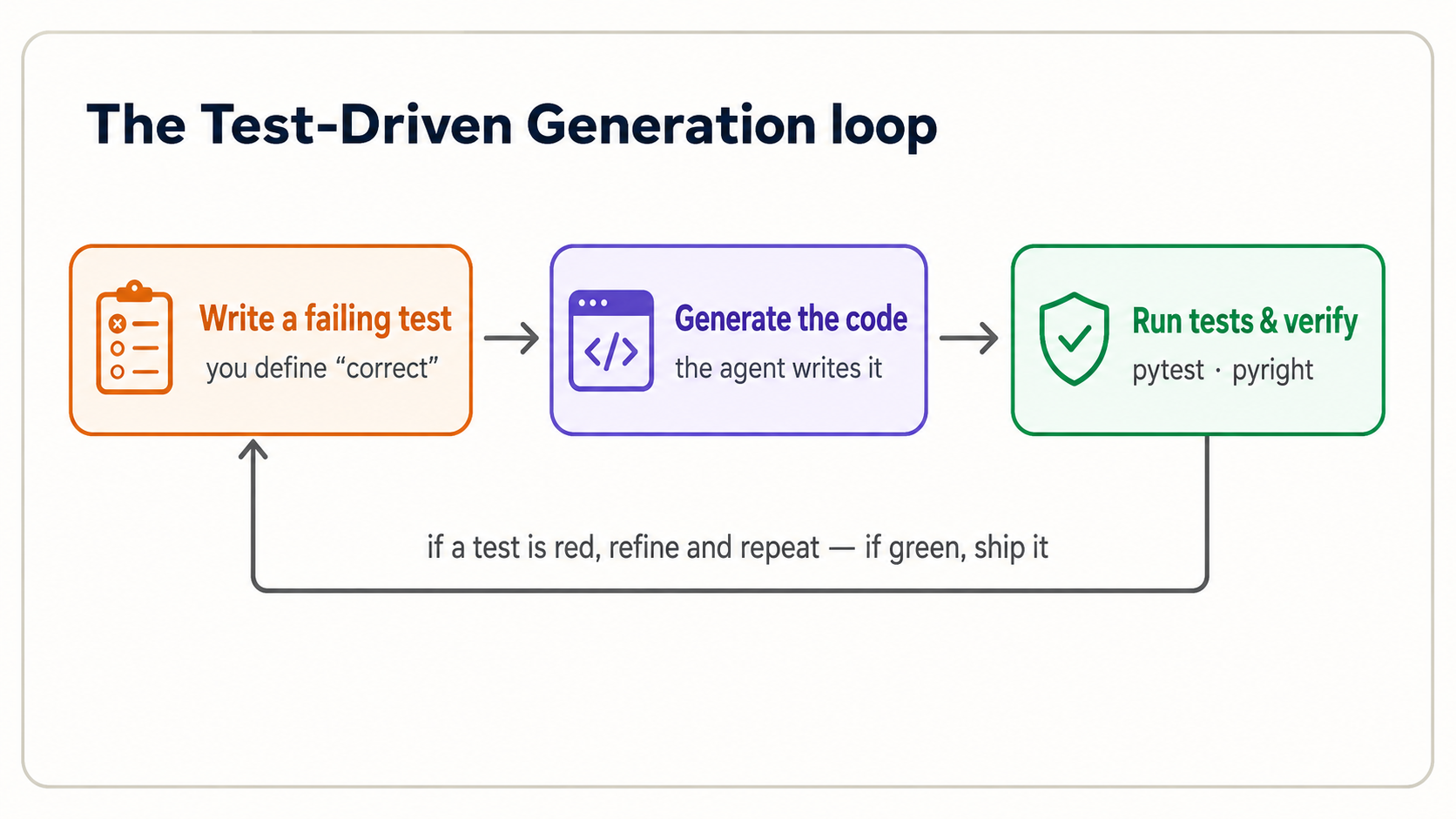
TDG inverts the old order. Instead of write code → maybe test it, you go: write a failing test that defines "correct" → let the agent generate code → run the test to verify. The test is not an afterthought; it is the specification. And it must come from you, because if you let the agent write both the code and the test, you're checking AI's work against AI's own expectations: no independent signal at all.
Here's the cycle on the tax function from Concept 5. Follow along in your session.
Step 1: You write the requirement as failing tests. Create test_tax.py:
from tax import total_with_tax

def test_basic() -> None:
    assert total_with_tax(100.0, 0.15) == 115.0

def test_zero_price() -> None:
    assert total_with_tax(0.0, 0.15) == 0.0
You've seen these exact asserts before. They're the two lines you wrote in Concept 5, now moved into a test_*.py file so pytest can run them automatically. assert X == Y means "I am declaring that X must equal Y; fail loudly if it doesn't." These two lines define what correct means before any code exists. Run pytest now and it fails: there's no tax.py yet. That failure is the point. You have a precise, executable definition of done.
The only thing that's new here is the order: in Concepts 5, 8, and 11 you wrote the test for code that already existed. In true TDG you write the failing test first, then have the agent generate code to pass it. The test stops being a check you run afterward and becomes the specification the agent builds against.
Step 2: The agent generates the implementation. Now give your tool the instruction:
Read
test_tax.py. Createtax.pywith atotal_with_tax(price: float, tax_rate: float) -> floatfunction that makes both tests pass. Then runpytestand show me the result.
Claude Code reads your tests, writes tax.py, and runs pytest. Because you wrote the tests, you have an independent check on what it produced.
Read
test_tax.py. Createtax.pywith atotal_with_tax(price: float, tax_rate: float) -> floatfunction that makes both tests pass. Then runpytestand show me the result.
OpenCode reads your tests, writes tax.py, and runs pytest. Because you wrote the tests, you have an independent check on what it produced.
Step 3: You verify and iterate. Read the pytest output. Two green checks (2 passed) means the code meets the spec you defined. If it's red, you read the failure (next concept), then refine. You do not just re-prompt blindly and hope. And watch one thing closely: if the agent makes a failing test pass by editing the test instead of the code, stop it. The test is your spec; turning it green by weakening it just hides the bug.
That is the entire loop, and it maps cleanly onto PRIMM-AI+ and the 10-80-10 rule:
| TDG step | Who leads | PRIMM-AI+ |
|---|---|---|
| Write requirement + failing tests | You (the first 10%) | Make |
| Generate the implementation | Agent (the 80%) | — |
| Run tests, verify, iterate | You (the last 10%) | Investigate / Modify |
The agent is good at suggesting tests you missed, ask it, "what edge cases should I test for a tax calculation?". But the decision about which cases define "correct" stays yours. Negative prices? Zero tax? Very large numbers? Each one you add is a sharper specification.
TDG is not a ceremony reserved for big features. Run it on every unit the agent produces that has a checkable contract: every function, every method, every validation rule. The one-line asserts from Concepts 5, 8, and 11 were the seed; a growing tests/ folder full of them is what lets you keep trusting a project as the agent changes it. A practical rule: if you can't write a test for something, you don't yet understand what "correct" means for it. And neither does the agent. Writing the test is how you find out. As your projects grow, this is also what protects you from regressions: the agent fixing one thing and silently breaking another. Your test suite is the alarm that catches it.
Reading a traceback (when it breaks)
When Python fails, it prints a traceback: a wall of red text that looks scary and is actually a gift. Read it bottom-up: the last line names the error, and the lines above it trace where it happened.
Traceback (most recent call last):
  File "tax.py", line 2, in total_with_tax
    return price + (price * tax_rate)
TypeError: can't multiply sequence by non-int of type 'float'
The bottom line is the whole story: something was a string (str) when it should have been a number: a price came in as "100" (text) instead of 100.0. You don't need to fix this yourself; you need to read it well enough to tell the agent what's wrong: "the price is arriving as text, not a number. Handle that." A precise description gets a precise fix.
The most expensive habit in AI coding is hitting "try again" on a failure you didn't read. The agent will cheerfully generate a different wrong answer. Read the traceback, understand the actual problem, then describe it. One informed prompt beats ten blind ones.
The handful of errors you'll actually meet
You don't memorize fixes. You recognize the category from that last line and describe it to the agent. These six cover almost everything a beginner sees when running generated code:
| The last line says… | What it usually means | What to tell the agent |
|---|---|---|
ModuleNotFoundError / ImportError | A package isn't installed, or a name is misspelled | "X isn't installed — add it with uv" |
NameError | A name is used that was never defined (often a typo) | "y is used but never defined — typo?" |
TypeError | The wrong kind of value — text where a number was expected, etc. | "a number is arriving as text — convert it" |
AttributeError | Asking an object for something it doesn't have (note.titel) | "this object has no attribute titel — likely a typo" |
KeyError | Asking a dict for a key that isn't in it | "the key 'x' isn't in the dict — handle the missing case" |
IndexError | Asking a list for a position past its end | "the list is shorter than the code assumes" |
The meta-skill is the same as setup (Concept 3): you are not the one who fixes the error, you are the one who reads it and names it precisely. A precise name gets a precise fix; "it broke" gets another guess.
17. From a vague goal to specifiable pieces
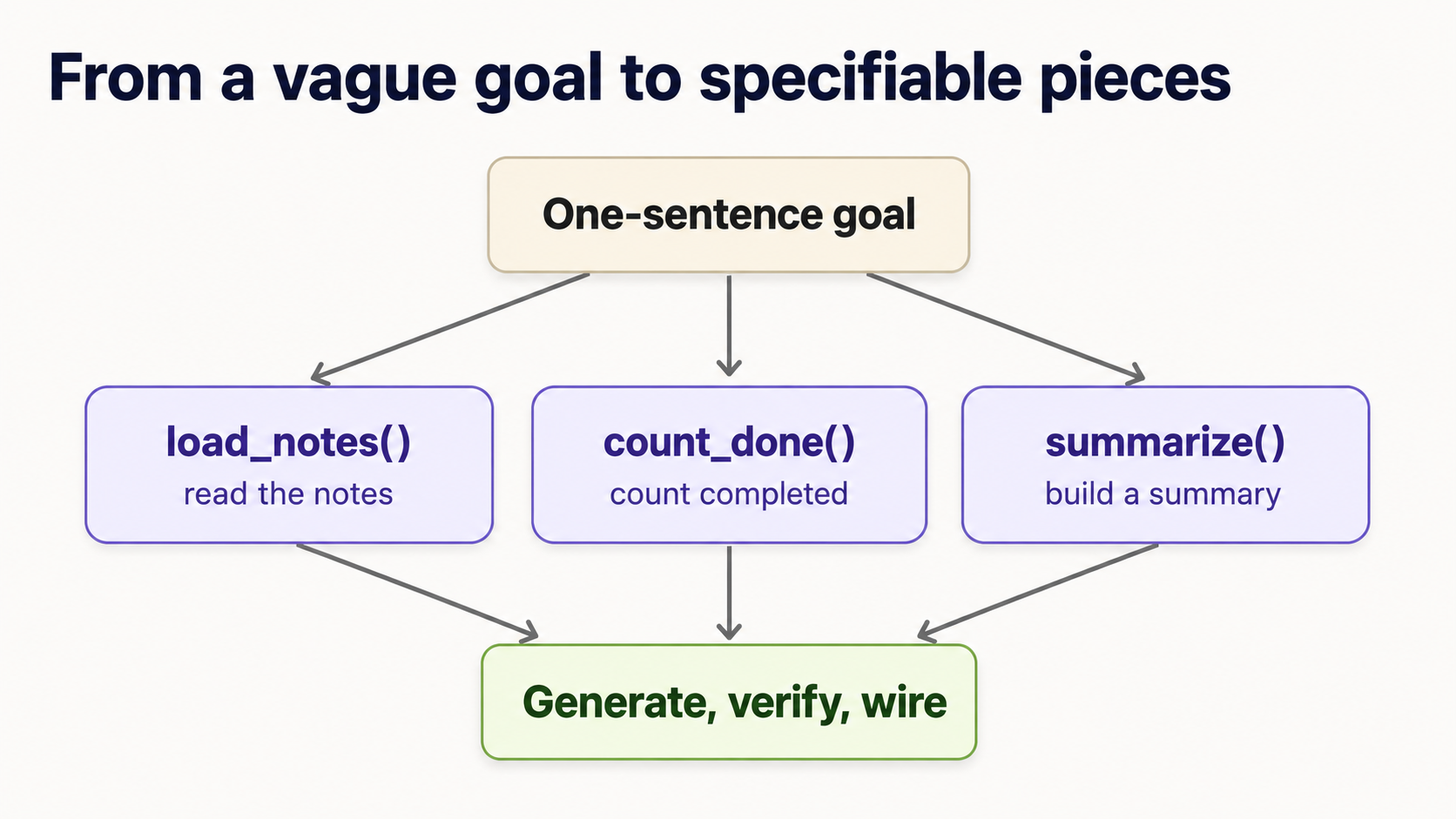
Concept 16 showed how to spec and verify one unit. But your own projects don't arrive as one tidy function. They arrive as a vague sentence: "build me a tool that summarizes my notes." You can't write a single test for that. The skill that turns a sentence into generated code is decomposition: breaking the goal into small pieces, each small enough to give a typed signature and a test. This is the part the agent can't do for you, because it's where you decide what the thing actually is.
Here's the move, and it's the same every time.
1. Say the goal in one sentence. "Read my notes and print how many are done, and which aren't."
2. List the steps you'd do by hand. Write the verbs: load the notes → count the done ones → find the pending titles → summarize them into a line → print it. Each verb is a candidate unit.
3. Give each unit a typed signature: input to output. This is the spec. No bodies yet; the agent writes those.
def load_notes(path: str) -> list[Note]: ...      # text file -> list of notes
def count_done(notes: list[Note]) -> int: ...      # notes -> how many are done
def pending_titles(notes: list[Note]) -> list[str]: ...  # notes -> titles not done
def summarize(notes: list[Note]) -> str: ...       # notes -> one summary line
4. TDG each unit, in order. Each line above is now exactly a Concept 16 cycle: write the failing test, have the agent generate the body, verify. For example, summarize is small and testable:
def test_summarize() -> None:
    notes = [Note(title="groceries", done=True), Note(title="call sara", done=False)]
    assert summarize(notes) == "1 of 2 done; pending: call sara"
5. Wire them together and test the whole flow. Ask the agent to write a main() that calls the pieces in order, then write one test for the end-to-end result. Done.
Notice what happened: a vague sentence became four small, independently verifiable contracts. The agent wrote every line of actual code. But you found the pieces and defined what each one promises. That front-end decomposition is the human 10% that makes the agent's 80% trustworthy.
You can ask the agent to help you find the units: "I want to build a tool that summarizes my notes. What 3–5 functions would I need, with their inputs and outputs?" That's a great starting list. But you decide the final signatures and you write the tests. Never let the agent both decompose the problem and verify its own answer, or you've lost your independent check.
A reliable heuristic: if a unit is hard to write a test for, it's doing too much. Split it. A function you can't test is a function you can't verify, which means neither can you trust what the agent generated for it. Testability and good decomposition are the same skill.
This is the bridge from "I can verify one function" to "I can build a whole thing with AI." You'll practice this in the Project 5 mini-capstone, then from scratch with no scaffolding in Project 6.
Once you've decomposed a goal, this is a template you can paste into Claude Code or OpenCode every time. It bakes in the whole discipline of this course: tests first, your approval before code, verification at the end:
I want to build: [your one-sentence goal]

First, break it into 3–5 small functions or classes.
For each unit, propose ONLY:
  1. a typed signature (inputs and output)
  2. expected behavior in one line
  3. edge cases to consider
  4. pytest tests

Do NOT write any implementation yet. Wait for me to approve the tests.

After I approve, generate the implementation to pass those tests.
Then run pytest, pyright, and ruff, and show me only the
changed files and the test results.
The two load-bearing words are ONLY and NOT: they stop the agent from racing ahead and writing code (and its own tests) before you've decided what "correct" means. You stay in control of the spec; the agent does the typing.
Part 5: Judgment
When NOT to lean on AI — and how to verify what you can't fully read
Reading fluency has a ceiling, and being honest about it is itself a skill.
- Security-sensitive code is non-negotiable. Anything touching passwords, API keys, payments, or user data gets read carefully and, ideally, reviewed by someone who knows the domain. AI confidently writes insecure code. If you can't verify it, don't ship it.
- When you genuinely can't read it, lean harder on tests, not on faith. If a generated function is beyond your current level, your
pytestchecks become more important, not less: they're the part you can verify. Green tests on inputs you chose are real evidence; "it looks right" is not. - Tiny, obvious changes are sometimes faster by hand. Renaming one variable or fixing one number can be quicker to do yourself than to describe. Recognizing these moments comes with practice.
Red-team your own tests
Your tests are the only verification you fully control, so a weak test is worse than no test, because it gives false confidence. When the agent generates code you can't fully read (a tricky Pydantic validator, an async block), your tests carry the entire load. Make them adversarial:
- Never let the agent write the tests its own code must pass. That's the one anti-pattern that quietly defeats everything else in this course: if AI writes both the code and the check, you have no independent signal: just the agent agreeing with itself. You write the tests, or at minimum you read and own every assertion. By all means ask "what edge cases am I missing?". Then decide which ones matter yourself.
- Never let the agent weaken a test to make it pass. When a test fails, the agent will sometimes "fix" it by changing the test instead of the code: loosening an assertion, deleting an edge case, lowering an expected value. That turns red to green while leaving the bug in place. Watch for it, and don't allow it unless you have decided the test itself was genuinely wrong. The test is the spec; the agent doesn't get to rewrite the spec to suit its code.
- Test the failures, not just the happy path. Ask of every unit: what input would break this? Empty list, zero, a negative number, a missing key, text where a number was expected. The bug in Project 4 hid in exactly the case nobody tested.
- If you can't think of a single test for it, you don't understand it yet. And you certainly can't verify the agent's version. That's your signal to decompose further (Concept 17) or to ask the agent to explain the code line by line before you accept it.
A vague heuristic to keep: green tests prove your code does what your tests say. No more. The quality of your verification is exactly the quality of your tests.
Review the diff before you accept it
When you work in Claude Code or OpenCode, the agent doesn't just answer. It changes files. Reading the code is half the job; the other half is reading what changed. Before you accept any batch of generated changes, run down this list:
- Which files changed? A request to fix one function shouldn't quietly touch five files.
- Did it change the tests? If your tests were edited, find out why before anything else (see the anti-pattern above).
- Did it add dependencies? New packages mean new code you didn't write running on your machine. Make sure each one is real and necessary.
- Did it touch anything sensitive? Secrets, keys, auth, payments, user data: these get read carefully or reviewed by someone who knows the domain.
- Did
pytest, Pyright, and Ruff all pass? Green across all three is the floor, not the ceiling. - Can you explain the main function or class in plain English? If you can't, you can't verify it: ask the agent to walk you through it line by line before you accept.
- Is the code still easy to change? Look for the same rule written in two places, one function that has quietly grown into three jobs, or a name that no longer matches what the code does. Your tests will not flag any of this, because the answers are still correct. What suffers is every change you make after today.
This is a quick habit, not a ceremony. But "accept all" without reading the diff is how a small wrong change slips into a working project unnoticed.
That seventh item is the one beginners skip, and it now has a price you can actually see. Messy code used to cost only human patience. Now the agent is a reader too, and when it works inside tangled code it makes more wrong assumptions, burns far more context to figure out how things fit together, and retries more often. So the bill for mess arrives as worse output and more tokens, not just as your own confusion six months from now.
The short version: your code has two readers now. You, who must judge whether it is right, and the agent, which must change it next week. Neither one reads tangled code well. (For the longer argument, including where it pushes back on spec-driven development, see the limit of specs.)
The throughline of this entire course: the agent brings the code; you bring the judgment about whether it's correct, and whether it will still be workable next month. That judgment rests on reading fluently and on tests you wrote yourself. Neither is optional, and neither is hard once you've practiced the loop.
Part 6: Practice projects
Reading about the loop isn't the same as running it. These six projects move you through PRIMM-AI+ in order: from reading code, to testing it, to making your own, to verifying real agent-style code with a bug hidden in it, to building a small end-to-end tool that uses every concept at once, and finally to building one from a one-sentence goal with no scaffolding at all. Do them in your Claude Code or OpenCode session, in order; each one assumes the skills from the one before.
Each project tells you the goal and the skills it exercises, then hands you a starter. Try it yourself first: write your prediction, write your tests, prompt the agent. And only then open the solution. The solutions are not there to copy: the agent can generate the code for you anyway. They're there so you can check that your spec and your tests were right. That is the skill being graded.
The reference code is the least important part of each solution. What matters is: did your tests capture what "correct" means? Did you predict the output correctly? Could you read the result and tell it was right? If your tests pass against the reference code, you specified the problem well. That is the win.
Project 1 — Read and predict (Predict · Run · Investigate)
Skills: reading functions, comprehensions, and len; predicting output before running.
Starter. Don't run this yet. Read it and write down what each of the three print lines will produce:
def shout(text: str) -> str:
    return text.upper() + "!"

names: list[str] = ["ada", "alan", "grace"]
greetings: list[str] = [shout(n) for n in names if len(n) > 3]

print(len(names))
print(greetings)
print(shout("hi"))
Now run it in your session and compare. Where your prediction was wrong, ask the agent "why did line X produce that?". That gap is the lesson.
Solution
3
['ALAN!', 'GRACE!']
HI!
len(names)→3: three items in the list.greetings→ only names longer than 3 letters pass theif len(n) > 3filter."ada"is exactly 3 (fails),"alan"is 4 and"grace"is 5 (pass). Each is shouted, giving['ALAN!', 'GRACE!'].shout("hi")→"HI!": uppercased, with!added.
If you read the comprehension as "shout each name, for each name in names, if it's longer than 3 letters," you read it correctly.
Project 2 — Your first TDG cycle on a function (Make)
Skills: writing assert tests as a spec, prompting the agent, verifying with pytest.
Goal. Build a function initials(full_name: str) -> str that returns the uppercase initials of a name: "ada lovelace" → "AL".
Starter. Write the tests first, in test_initials.py, before any implementation exists. Cover the normal case and at least two edge cases (a single name; extra spaces). Then prompt your agent:
Read
test_initials.py. Createinitials.pywith aninitials(full_name: str) -> strfunction that makes every test pass. Then runpytestand show me the result.
Read the code it generates before you trust the green checks.
Solution
Your tests (the important part) might look like:
from initials import initials

def test_two_names() -> None:
    assert initials("ada lovelace") == "AL"

def test_many_names() -> None:
    assert initials("grace brewster murray hopper") == "GBMH"

def test_single_name() -> None:
    assert initials("alan") == "A"

def test_extra_spaces() -> None:
    assert initials("  extra   spaces  ") == "ES"
A reference implementation that passes them all:
def initials(full_name: str) -> str:
    return "".join(part[0].upper() for part in full_name.split())
full_name.split() breaks the text on spaces (and ignores extra ones), part[0] takes the first letter of each piece, .upper() capitalizes it, and "".join(...) glues them together. If you wrote the extra_spaces test, you verified the tricky case yourself: that's exactly the judgment the agent can't supply.
Project 3 — TDG on a class (Make)
Skills: reading and specifying a class, methods that change object state, testing object behavior.
Goal. Build a tiny TaskList: the seed of a real task manager. It can add tasks, mark one complete, and report how many are still unfinished.
Starter. Write the tests first. Decide what the methods are called and what they return. That is the design. A starting point:
def test_task_flow() -> None:
    tasks = TaskList()
    tasks.add("write tests")
    tasks.add("call agent")
    assert tasks.remaining() == 2
    tasks.complete("write tests")
    assert tasks.remaining() == 1
Then prompt the agent to implement a TaskList class that makes the test pass, and verify.
Solution
A reference implementation:
class TaskList:
    def __init__(self) -> None:
        self.tasks: dict[str, bool] = {}      # task name -> done?

    def add(self, name: str) -> None:
        self.tasks[name] = False

    def complete(self, name: str) -> None:
        if name in self.tasks:                # only complete a task that exists
            self.tasks[name] = True

    def remaining(self) -> int:
        return sum(1 for done in self.tasks.values() if not done)
The class stores tasks in a dict mapping each name to a done flag. remaining() counts the ones still set to False. Notice how the test drove the design: it decided the method names and what remaining() returns, before any code existed.
Catch the silent bug yourself. What should complete("a task I never added") do? An agent's first version often writes self.tasks[name] = True with no if name in self.tasks guard, which silently adds a brand-new task marked done, inventing data nobody asked for. That's exactly the plausible-but-wrong behavior a test exposes:
def test_completing_unknown_task_does_nothing() -> None:
    tasks = TaskList()
    tasks.add("real task")
    tasks.complete("typo task")          # not a real task
    assert tasks.remaining() == 1        # still one; nothing was invented
Extension: ask your agent to make each task a Pydantic Task model with a created_at timestamp, then add a test that a brand-new TaskList has remaining() == 0.
Project 4 — Find the bug in agent code (Investigate · Modify)
Skills: recognizing the power concepts (Pydantic, generators), reading critically, writing a test that catches a real bug.
This is the closest thing to your actual job: the agent hands you plausible-looking code, and you have to catch what's wrong. The function below is supposed to return only the titles of notes that are done. But it has a bug.
from collections.abc import Iterator
from pydantic import BaseModel

class Note(BaseModel):
    title: str
    done: bool

def completed_titles(notes: list[Note]) -> Iterator[str]:
    for note in notes:
        yield note.title
Your task, in order:
- Investigate. In plain English, say what each line is meant to do. (What is the
Notemodel? What doesIterator[str]tell you? What doesyielddo?) - Test. Write a
pytesttest that pins the intended behavior: only completed notes come back. Run it. It should fail, catching the bug. - Modify. Now that your test defines correct, prompt the agent to fix
completed_titles, and re-run until your test is green.
Solution
The bug: the function yields every note's title, ignoring done entirely. It never checks the flag.
A test that catches it:
def test_only_completed() -> None:
    notes = [Note(title="a", done=True), Note(title="b", done=False)]
    assert list(completed_titles(notes)) == ["a"]
Against the buggy code this fails, because it returns ["a", "b"]: proof the bug is real, not a hunch.
The fix is one line: a done check before yielding:
def completed_titles(notes: list[Note]) -> Iterator[str]:
    for note in notes:
        if note.done:
            yield note.title
The point of this project: the bug was invisible to a glance and obvious to a test. "It looks right" would have shipped it. A test you wrote caught it. That is the entire course in one exercise.
Project 5 — Mini-capstone: a Notes tool, end to end (the whole loop)
Skills: everything, a Pydantic model, a class with state, a generator, type hints, an f-string summary, and a test suite, built as one TDG cycle.
Goal. Build a small NoteBook that holds notes (each with a title, body, and done flag), lets you add notes and mark them complete, streams the still-pending ones, and prints a one-line summary like 2 notes, 1 done, pending: call sara.
Starter: design it through tests. This is the real exercise: before writing or generating any implementation, write a test_notebook.py that pins down the behavior you want. Decide the method names and what summary() should say. A skeleton to react to:
from notebook import NoteBook

def test_summary_flow() -> None:
    nb = NoteBook()
    nb.add("groceries", "milk, eggs")
    nb.add("call sara", "about the trip")
    assert nb.summary() == "2 notes, 0 done, pending: groceries, call sara"
    nb.complete("groceries")
    assert nb.summary() == "2 notes, 1 done, pending: call sara"

def test_pending_is_a_stream() -> None:
    nb = NoteBook()
    nb.add("a", "x")
    nb.add("b", "y")
    nb.complete("a")
    assert [n.title for n in nb.pending()] == ["b"]   # pending() yields, like a generator
Then run the full loop:
- Run
pytest. It fails (nonotebook.pyyet). Good: that's your spec, failing on purpose. - Prompt your agent: "Read
test_notebook.py. Createnotebook.pywith aNotePydantic model (title, body, done) and aNoteBookclass that makes every test pass:add,complete, apending()generator, and asummary()returning the exact string the tests expect. Then run pytest and show me the result." - Read what it generated. Can you point at the Pydantic model, the class state, the
yieldinpending(), and the f-string insummary()? If yes, you've read a real piece of agent code. Runpyrightandruffon it too. Then name one thing you would rename, split, or merge to make the next change easier. You do not have to change it, and there is no right answer. Noticing is the skill. - Iterate on any failure by reading it, not re-prompting blindly.
Solution
A reference implementation that passes both tests:
from collections.abc import Iterator
from pydantic import BaseModel

class Note(BaseModel):
    title: str
    body: str
    done: bool = False

class NoteBook:
    def __init__(self) -> None:
        self.notes: list[Note] = []

    def add(self, title: str, body: str) -> None:
        self.notes.append(Note(title=title, body=body))

    def complete(self, title: str) -> None:
        for note in self.notes:
            if note.title == title:
                note.done = True

    def pending(self) -> Iterator[Note]:          # a generator: yields one note at a time
        for note in self.notes:
            if not note.done:
                yield note

    def summary(self) -> str:
        total = len(self.notes)
        done = sum(1 for n in self.notes if n.done)
        pending_titles = [n.title for n in self.pending()]
        return f"{total} notes, {done} done, pending: {', '.join(pending_titles)}"
Every concept from the course shows up here: a Pydantic model (Note) with type hints and a default, a class (NoteBook) holding state, a method that mutates an object's attribute (complete), a generator (pending) that yields, a comprehension and sum(...), and an f-string building the summary.
Make it a real CLI. The tested core above is the hard part; turning it into a command-line tool is a thin shell on top. Ask your agent to add a main() that reads commands like add, done, and list from the terminal and calls these methods. Then ask it to write one more test for any new logic. That last step leaves you with a working CLI and a passing test suite behind it: the shape of a real, shippable tool.
Decide an edge case yourself. What should summary() say when nothing is pending? The reference leaves a trailing pending: . Is that correct? Write a test that encodes your decision, then make the agent satisfy it. Deciding what "correct" means here, and pinning it with a test, is the whole job.
Project 6 — On your own: no starter, no tests (decompose it yourself)
Skills: Concept 17 with the training wheels off. Every project so far handed you a test skeleton or a signature. This one gives you only a sentence.
Goal. "Build a tool that takes a paragraph of text and prints the three most common words."
That's all you get. No signatures, no tests, no hints about the pieces. Your job is the whole front 10%:
- Decompose. Write down the steps you'd do by hand, and turn each into a typed signature. (How do you split text into words? Strip punctuation? Count them? Rank them?)
- Spec. For each piece, write a failing
pytesttest that defines "correct": before generating anything. - Generate and verify. Have the agent implement each unit against your tests; run
pytest,pyright,ruff; iterate. - Wire it together into a
report()and test the whole flow.
There is no single right answer: only decompositions where each piece is small and testable. That is the skill being graded.
Solution (one valid decomposition — yours may differ)
A reasonable breakdown into four small, independently testable units:
def clean(text: str) -> list[str]:
    # lowercase, drop punctuation, split into words
    cleaned = "".join(c.lower() if c.isalnum() or c.isspace() else " " for c in text)
    return cleaned.split()

def tally(words: list[str]) -> dict[str, int]:
    counts: dict[str, int] = {}
    for word in words:
        counts[word] = counts.get(word, 0) + 1
    return counts

def top_n(counts: dict[str, int], n: int) -> list[tuple[str, int]]:
    return sorted(counts.items(), key=lambda pair: pair[1], reverse=True)[:n]

def report(text: str, n: int) -> str:
    pairs = top_n(tally(clean(text)), n)
    return ", ".join(f"{word} ({count})" for word, count in pairs)
And the kind of tests you should have written first:
def test_clean_strips_punctuation() -> None:
    assert clean("Hi, hi! Bye.") == ["hi", "hi", "bye"]

def test_tally_counts() -> None:
    assert tally(["hi", "hi", "bye"]) == {"hi": 2, "bye": 1}

def test_report_picks_top_two() -> None:
    assert report("the cat sat on the mat the cat", 2) == "the (3), cat (2)"
One decision worth making on purpose: when two words have the same count, which comes first? Python's sorted is stable, so ties fall back to first-appearance order here. But you should decide that deliberately and pin it with a test, not discover it by accident. (If you didn't think about ties at all, that's a gap your tests should have surfaced.)
If your decomposition had different pieces (say, a single word_frequencies function) but every piece was independently testable and your tests passed, you did it right. The grade isn't matching this code: it's whether you turned a one-sentence goal into testable contracts on your own. That is exactly the skill you'll lean on for every project you build with AI after this.
What's next
You can now read the core shapes that make up most Python (values, functions, collections, control flow, and classes), recognize the five power concepts that fill agent and ML code, run a full Test-Driven Generation cycle in Claude Code or OpenCode, break a vague goal into specifiable pieces, and you've practiced all of it on six projects. That is the literacy the rest of the book assumes.
Have you passed? A self-check
This course has worked if you can now do all seven of these without notes. If any feel shaky, revisit the concept in brackets before moving on:
- Read a function signature and explain its inputs and output in plain English. (Concept 5)
- Write at least three
pytesttests for a unit before any code exists. (Concepts 5, 16) - Ask an AI agent to implement code against those tests, using a typed signature. (Concepts 10, 16)
- Run
pytest, Pyright, and Ruff, and read what each tells you. (Concept 3) - Read a traceback bottom-up and describe the problem precisely. (Concept 16)
- Catch one plausible-but-wrong bug in AI-generated code. (Project 4)
- Decompose one vague, one-sentence goal into testable units. (Concept 17, Project 6)
If you can do all seven, you can sit down with Claude Code or OpenCode and ship a small, tested Python program that you actually understand. That is the whole goal.
From here:
- Build AI Agents: where the Pydantic models,
async/await, and type hints you just learned to recognize become the everyday material of agent code. - Postgres for AI: reading the code that stores and retrieves your agents' data.
- Building a Digital FTE: assembling everything into a working AI worker.
You are not learning to type code. You are learning to direct and verify the systems that write it. Reading was always the harder half. And you just started.
60-second glossary
| Term | Plain English |
|---|---|
| PRIMM-AI+ | Predict · Run · Investigate · Modify · Make — the read-first method of this course, with the agent as partner and tests as the truth |
| TDD → TDG | Test-Driven Development: write the failing test, then write the code. In the AI era it becomes Test-Driven Generation — you write the failing test, the agent writes the code, you verify it passes |
| TDG | Test-Driven Generation — write the failing test first, the agent generates the code, you verify |
assert | A one-line claim like assert x == 5 — does nothing if true, crashes loudly if false. The atom every test is built from |
| Type / type hint | A label for what kind of data something is (str, int, float, bool) — and a precise instruction to the agent |
| Function / signature | A named, reusable block; its first line is the contract of inputs and output |
| list / dict / set / tuple | The four containers that group data; dict (labeled pairs) is the one you'll read most |
| Class / object | A class is a blueprint; an object (instance) is a thing built from it. object.attribute reads its data; object.method() asks it to act |
self / attribute / method | self is "this object" inside a class; an attribute is data it carries; a method is a function that lives in the class and acts on the object |
| Comprehension | A for loop folded into one line to build a new list |
| f-string | Text with f in front; anything inside {...} is replaced by its value (f"{name}") |
Generator / yield | Hands back items one at a time to keep memory flat — a stream, not a pile |
with (context manager) | Opens something, uses it, and closes it safely even on error |
async / await | Code built to do many slow things (like API calls) at the same time |
Dunder (__call__, __init__) | Double-underscore methods that make your objects act like native Python things |
Decorator (@name) | A label above a function or class that adds behavior to it |
| Pydantic | Validates structured data and auto-generates the JSON schemas LLMs use for tool calling |
| pytest / Pyright / Ruff / uv | Your verification tools: run tests / check types / check style / manage Python |
| Traceback | Python's error report — read it bottom-up; the last line names the problem |