Loop Engineering: A Crash Course
15 Concepts · From agentic coding to self-prompting systems that work while you sleep, and even dream
You already know how to use a coding agent. You give it one instruction. It reads your files, changes them, and you check what it did. Then you give the next instruction. And the next. You control every step.
Now imagine you let go. Instead of guiding it step by step, you build a small system. Every morning it starts on its own. It looks at what changed overnight. It decides what to do. It gives each job to an agent. It checks the result. It only calls you for the choices that really need a person. You build this system once. After that, it runs by itself.
This is loop engineering. The skill that matters most changes. Before, it was the prompt you wrote. Now, it is the loop you design. This course teaches two things: what a loop is made of, and how to build one. You will build it in both Claude Code and OpenCode. They reach the same result in two very different ways.
You need this first: Claude Code and OpenCode: A Crash Course. That course taught plan mode, context management, the rules file, skills, subagents, and MCP. This course assumes you know all of it. If these words are new, do that course first. Loop engineering is built on top of it. It also helps to do Spec-Driven Development first. A loop's stopping condition is really a spec, and that course teaches you to write one. You can follow along without it, but your loops will only be as good as the conditions you can write.
New here? A 2-minute recap of what you should already know
- Plan mode: the agent reads your files and shows a plan before it changes anything. You approve first.
- The rules file (
CLAUDE.md/AGENTS.md): short, permanent notes the agent reads at the start of every session. - Skills (
SKILL.md): a saved instruction the agent loads only when the task matches it. - Subagents: a separate helper with its own context window. It does one job and hands back only the result.
- Connectors / MCP: the standard way to connect an agent to outside tools: GitHub, Slack, a database.
- Context management: keep the conversation short. The model gets worse and costs more as it fills up.
If any of these are new, do the agentic coding crash course first. This course uses those ideas directly.
Key words in plain English
You will see these words throughout the course. Read this list once now, then return to it whenever a term feels unclear.
| Term | Plain-English meaning |
|---|---|
| Agent | An AI system that can use tools and complete steps, not only answer a question. |
| Prompt | The instruction you give the agent. |
| Loop | A system that starts work, checks it, records the result, and repeats when needed. |
| Beat | One complete run of the loop. |
| Heartbeat | The schedule, event, or condition that starts a beat. |
| Trigger / fire | To start a run. For example, a GitHub event can trigger, or "fire," a Routine. |
| Unattended | Running without a person watching every step. |
| Stopping condition | A testable rule that tells the loop when the work is complete. |
| Maker-checker | One agent creates the work. A different agent or command checks it. |
| Worktree | A separate working folder and branch that prevents parallel agents from changing the same files. |
| Skill | Saved project instructions that an agent can reuse. |
| Connector / MCP | A connection that lets an agent use an outside system such as GitHub, Slack, or a database. |
| State / memory | Information saved outside the model so that a later run knows what happened earlier. |
| Spine | This course's name for the saved state that connects one beat to the next. |
| Human gate | A point where a person must review or approve the work before a risky action continues. |
| Routine | Claude Code's cloud automation. It starts a fresh session from a saved prompt and trigger. |
The course sometimes uses body metaphors: the heartbeat starts the work, the body performs it, and the spine carries memory between runs. Each metaphor is always paired with its technical meaning.
In 2026, the people who build these tools said it clearly. Boris Cherny built Claude Code. He said: "I don't prompt Claude anymore. I have loops running that prompt Claude... my job is to write loops." Peter Steinberger, who built OpenClaw, said "you should be designing loops that prompt your agents." Addy Osmani then gave the pattern a name and listed its parts. None of them say the work got easier. They say the important skill moved. That is the idea this whole course is built on.
Some people describe loop design as the most important agent-building skill at the moment. Others say it is only a new name for work that agent tools already did. Both views are partly right. The parts are not new, but they have become affordable and reliable enough for everyday use. As a result, the main job is increasingly to design the loop rather than guide every agent turn. A name becomes useful when the practice becomes common work. (The main quotes, claims, and technical details are listed in Sources & further reading at the end.)
The mindset shift, in one picture
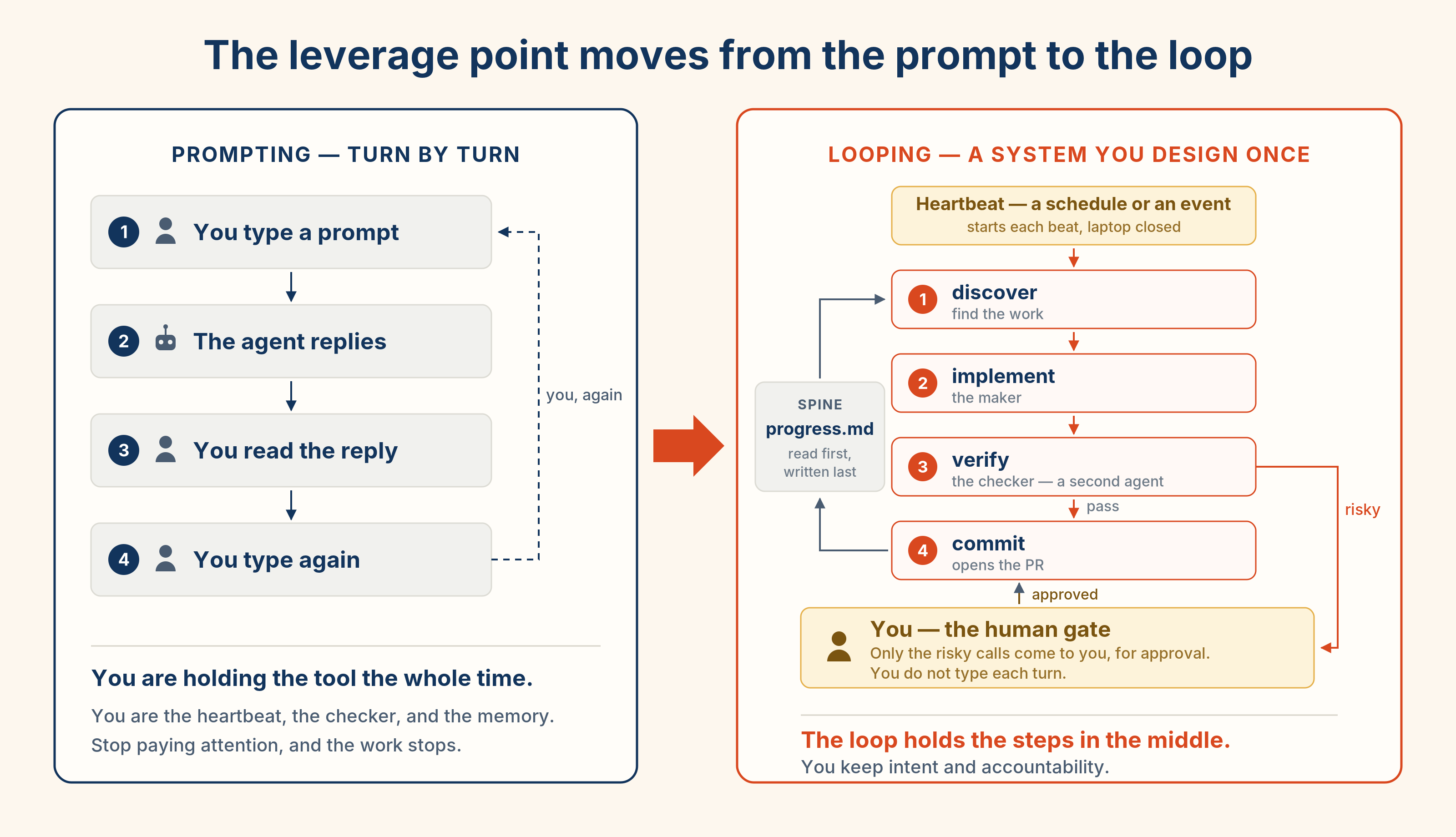
The picture above, as something you can play. Start each step on the left yourself, then compare it with the right side, where the system starts each step automatically. You will meet each replaced stop again: the schedule in Part 2, the checker in Concept 11, and the human gate in Part 5.
This course teaches two tools together. A method that works in both tools is a transferable skill, not a trick for one product. The tools provide the parts differently. Claude Code includes many loop features inside the product. OpenCode provides the agent worker, while you use the operating system or CI to start each run. The commands differ, but the shape of the loop is the same.
Claude Code supplies more loop features for you. OpenCode gives you the worker, and you connect the scheduler and other parts yourself.
True in mid-July 2026. Both tools change fast, and several Claude Code loop features are research previews. Before any session, run
claude updateoropencode upgrade. Check the live docs (code.claude.com/docs, opencode.ai/docs) before you trust a limit or a flag.
Where can a loop run?
A real loop is unattended. It prompts itself while you are away. Until July 2026, the web could not do this at all. On claude.ai and chatgpt.com you got a chat box, and a chat box waits for you every turn: you were the schedule. To run a real loop you had to leave the browser for a tool that could fire on its own, meaning Claude Code or OpenCode.
That changed in July 2026. Both vendors integrated their agent products into the same web addresses. Claude Cowork now runs at claude.ai (see the Cowork crash course). Its remote sessions run on Anthropic's servers, so a scheduled loop fires from a browser tab you have long since closed. ChatGPT Work does the same at chatgpt.com. So the sentence "you cannot run a loop on the web" is no longer true. The precise sentence now is: you cannot run a loop in the chat box, but the web pages around it can. Most of these surfaces are paid, and several are in beta with staged rollouts. You can learn and design a loop anywhere. To run one you need one of these surfaces. This course shows the two coding ones. Good question, and the answer changed in July 2026, so here it is as a before and after. Before July 2026: claude.ai and chatgpt.com were chat boxes. A chat box waits for you every turn. It cannot start on a schedule or an event. You could re-prompt it by hand, but then you were the heartbeat, which is the exact job a loop exists to remove. So no, you could not run a loop on the web. You designed it there, then left for Claude Code or OpenCode to run it. After July 2026: both vendors put their agent products inside the same web addresses. The chat box itself did not change. It still waits for you, and it always will. What changed is what sits next to it: Two vendors, days apart, moving the loop into the browser. That is the strongest evidence yet for this course's central claim: the shape, not the tool, is the skill. So the division of labor is now sharper, not gone. The chat box is where you design and practice a loop: draft the skill, write the reviewer prompt, set the stopping condition, run one beat by hand. The agent surface next to it, whether Cowork, a Routine, ChatGPT Work, or OpenCode, is where you run it. That transition is the natural next step after Spec-Driven Development. True in mid-July 2026. Cowork on web and ChatGPT Work are both weeks old, rollouts are staged by plan, and usage is metered. Check the live product pages before you rely on a limit or a feature."But I did the whole Spec-Driven course in claude.ai. Can I run a loop there too?"
claude.ai/code/routines), have offered this for coding work already: fresh cloud sessions on Anthropic's servers, laptop closed. Paid plan, research preview.
Use the chat box to design and practise a loop. To run one unattended, use a surface that fires on its own: Claude Code, OpenCode, Cowork, or ChatGPT Work. Since July 2026, you no longer have to leave the browser for this. Cowork runs at claude.ai and ChatGPT Work at chatgpt.com.
From here on, almost every concept is something you can run in a real session, not just read about. Keep a terminal open next to this page (claude or opencode) and try each idea as you reach it. Start with a small, throwaway git repo, so a loop cannot damage anything you care about.
What this course covers
| Part | Topic | What you learn |
|---|---|---|
| 1 | The Shift | What a loop is, its six parts, and the two ways to build one |
| 2 | What starts the loop | Making something run on its own: in-session, conditional (run-until-done), scheduled, event-driven |
| 3 | What the loop does | Isolation, knowledge, action, and the maker-checker split |
| 4 | Memory between runs | State that survives between runs, the one part people forget |
| 5 | A Loop, Twice | One full morning-triage-to-PR loop, with real files, built in both tools |
| 6 | Keeping human control | Token cost, checking the work, and the traps that grow as loops get better |
| Live | Dogfooding: the book's own loops | The two loops that run this course in production, and where each puts the human |
| Practice | Practice projects | Eight loops, easy to hard, that you build yourself |
| Appendix | Routines, end to end | The full Routines field guide: every form field, all three triggers, secrets, common problems, plus three hands-on drills and a capstone |
Three loops you can run today, not just read about
Most of this course is ideas. These are not. Three of the four heartbeats come with a small project you can clone and fire in minutes, each one sitting right inside the concept that explains it, so you meet it the moment it makes sense.
| Project | Concept | What happens |
|---|---|---|
| Watch the Space Station | 4, in-session | One plain sentence, and the real ISS reports its position every minute while you do something else. Close the terminal and the watching dies, which is the concept. |
| Build your portfolio | 5, conditional | Drop in your CV, hand /goal a finish line, walk away. It reads the PDF, designs a page, checks its own work, and goes again until it passes. |
| The Doorbell | 7, event-driven | Open a pull request and a review nobody asked for appears, on a computer that is not yours, whether your laptop is open or shut. |
They get harder in the right order: the first takes five minutes and needs nothing, the second is a real afternoon, the third runs without you at all. (Concept 6, schedules, has no project yet. It is the one that takes a night to prove.)
All three live in agentfactory-labs. Do at least the first one. A heartbeat you have watched fire is worth more than three you have read about.
Want to learn by doing? Read Part 5 first to see a whole loop from start to finish. Then come back for the parts. Once the ideas are clear, the Practice projects give you eight loops to build yourself.
First time? Take the core path: Parts 1 to 5 in order. Skip every note marked "Going deeper." Those notes are real, but nothing later depends on them. They are for your second read. Do Projects 1 to 3, then stop. This path takes about two hours, or three if the ideas are new. After it, you can build and run a safe loop.
Second read (after your first loop has actually run): the deeper notes, all of Part 6, Projects 4 to 8, and the Routines appendix, with its three drills, when you are ready to build a real cloud routine. The course is built so the second read pays off because you now have a running loop to think about.
Two layers run through this course. They age very differently. Remember the first. Look up the second.
- The lasting layer. The shape of a loop (a heartbeat, four working parts, and a spine), the maker-checker split, and the two things a loop can never do for you: intent (saying what you want clearly enough that the result can be checked) and accountability (owning what ships). This is the skill. It stays true after every command below has changed.
- The mechanical layer. Every flag, path, model name, and command. These tools update every week, and several features here are research previews. So treat each command as a pointer to the live docs, not a fact to memorize. Where this course and the current docs disagree, the docs are right.
Remember the six-part shape and forget every keystroke, and you learned loop engineering. Memorize the keystrokes and miss the shape, and you only learned this month's commands.
📚 Teaching Aid
View Full Presentation: Loop Engineering: A Crash Course
Part 1: The Shift
1. From prompting to looping
For about two years, getting work from a coding agent was simple. You wrote a good prompt. You gave it enough background. You read the answer. You typed the next thing. The agent was a tool, and you used it one step at a time.
A loop is different. It replaces you, the operator, with a system. The system finds the work. It gives the work out. It checks the result. It writes down what it did. Then it decides what to do next. It prompts the agent for you.
So where does your value go? It does not go away. It moves to the two things a loop cannot do for you. The first is intent: saying clearly what you want, clear enough that the result can be checked. The second is accountability: standing behind the result. You own what ships. The loop handles the steps in the middle. The two ends stay yours. You are paid for your intent and your judgment. You are not paid for ignoring how the work was made.
The change is not "a longer prompt." It is a new shape of work:
| Prompting (what you know) | Looping (what this course adds) |
|---|---|
| You start each turn | A schedule or an event starts each turn |
| You read the output and decide what is next | A checker checks the output, and the loop decides what is next |
| Stops the moment you stop typing | Keeps running while you sleep |
| One task, one session, your full attention | Many small runs, mostly unattended, your attention only at the gate |
Optional technical detail, safe to skip on a first read.
The words "loop engineering" are used for two different things. This course teaches the big loop. But you will also hear the words used for a small loop. Here is what each one means, so you do not get confused.
The small loop (the inner loop). Inside every agent, there is a tiny cycle of code. It works like this: send the context to the model, the model asks to use tools, run the tools, add the results to the context, repeat. When the model stops asking for tools, the cycle ends. In code, it is only a few lines:
while True:
    reply = model(context)
    if not reply.tool_calls:
        break                     # the model decided it is done
    context += run_tools(reply.tool_calls)
Look at the line with break. It is important. The small loop stops when the model itself decides it is finished. Nothing checks whether the model is right.
This is a problem. The model is judging its own work. Here is a common failure. The agent changes a file. It writes a confident message like "Done! All fixed." Then it stops. But it never ran the tests. The turn ended. The task did not.
This is why the course teaches outside stops. An outside stop does not depend on the model's own opinion:
- a checked condition (prove the work with a real test)
- a limit (a maximum number of tries)
- a no-progress check (stop if nothing is getting better)
- a separate checker (a second process that grades the work)
They all exist for one reason. The only stop the small loop has by itself is the model's opinion of itself.
The big loop (the outer loop, this course). Think of the small loop as one worker doing one task. The big loop is the manager. It decides which task to give the worker. It decides when to start. It decides how to grade the result. It decides what to remember for tomorrow. One full run of the small loop is just one beat of the big loop.
How the layers fit together. Each layer wraps the one before it. They also became the industry's focus in roughly this order, each about a year apart, which is why each one had a period of strong industry attention:
- Prompt engineering: the words you send.
- Context engineering: everything the model sees in one turn.
- Harness engineering: the code around the model, running tools and handling errors. (The small loop lives here.)
- Loop engineering: this course. The outer cycle: what the whole system works on, when it starts, and how it knows it is done.
This is why your prompt matters less than before. It is now just one input into a much bigger system.
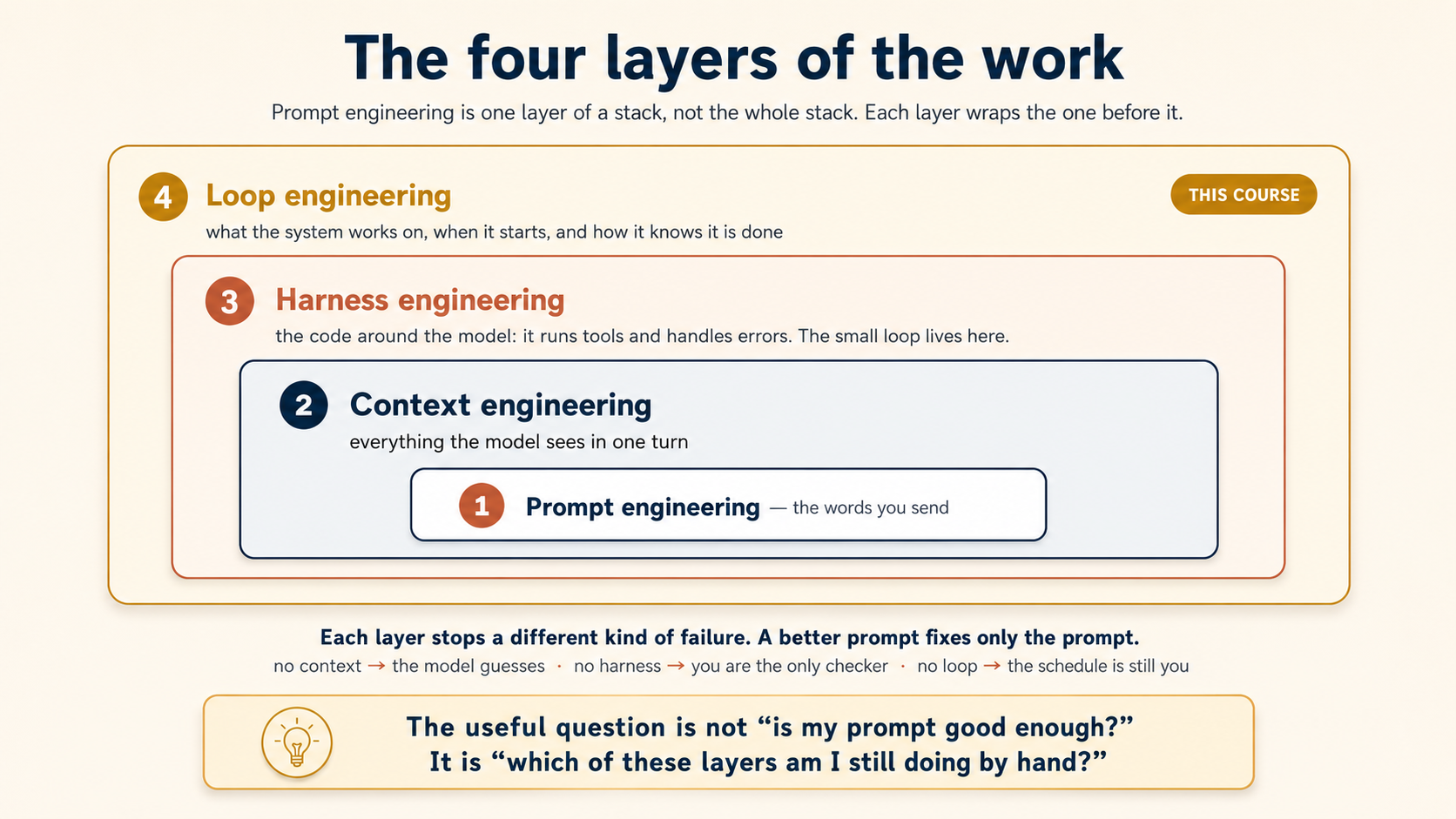
Each layer also stops a different kind of failure, which is why no single layer can carry the others. Strong context can rescue a weak prompt, but no prompt can rescue missing context, a missing checker, or a schedule that is still you. So when you build, a useful self-check is: which of these layers am I still doing by hand?
Making the small loop strong, with good stop conditions, clean context, and well-chosen tools, is real work. But it all happens inside one beat. When the small loop matters to the big one, this course will point it out. See stopping conditions (Concept 5) and connector design (Concept 10).
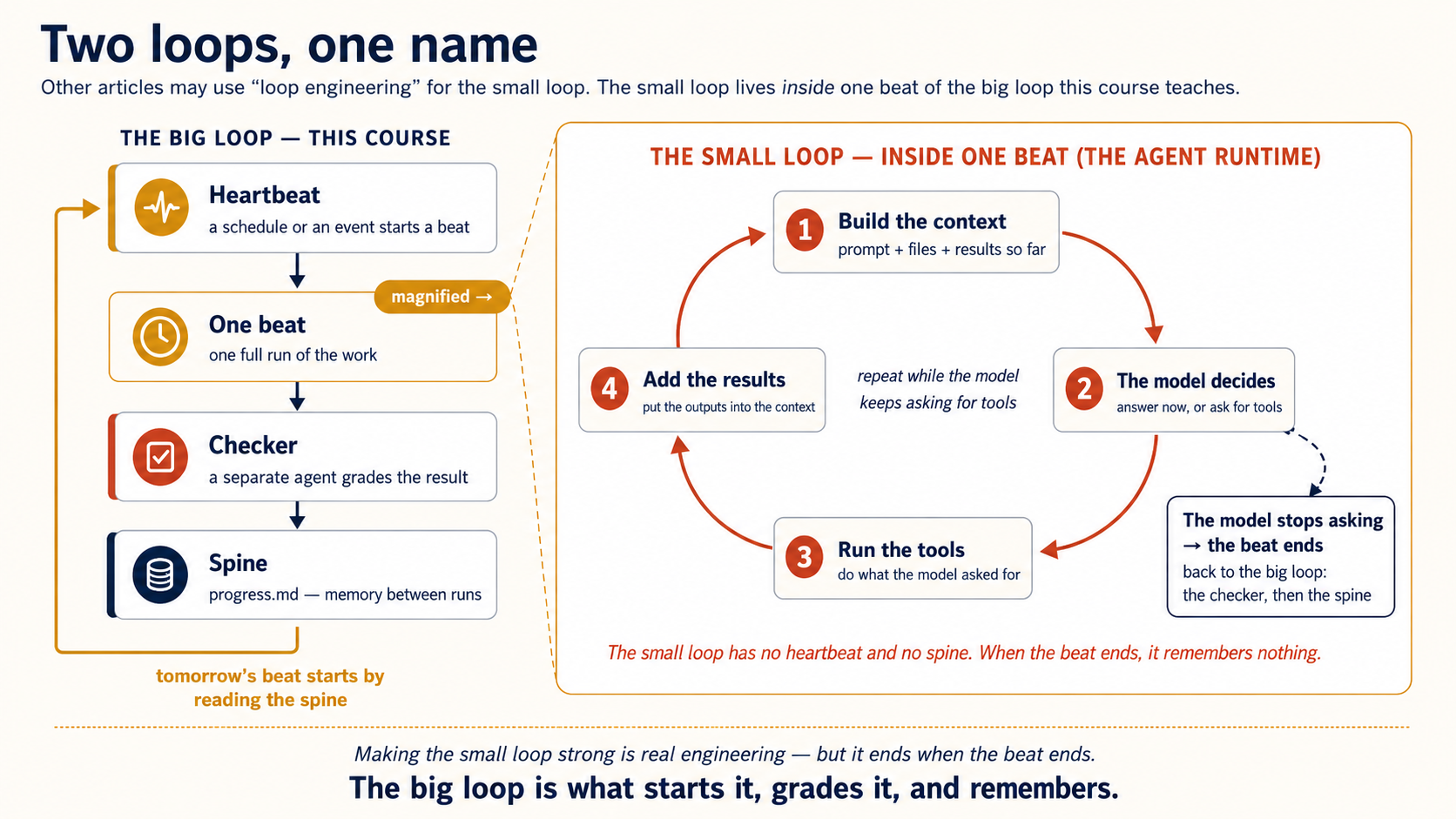
This is not magic. It is not "build it once and never look again." A loop that runs by itself is also a loop that makes mistakes by itself. Everything in this course exists to help you build a loop you can trust to run without you. That is harder than prompting, not easier. The reward is leverage. You build one good loop, and it does the same work for you again and again, work you would otherwise start by hand every time.
2. What a loop is made of
A loop that really runs on its own has five working parts and one saved-memory layer. This course calls that memory layer the spine. You already met four of the five working parts in the agentic coding course. Here they do a new job.
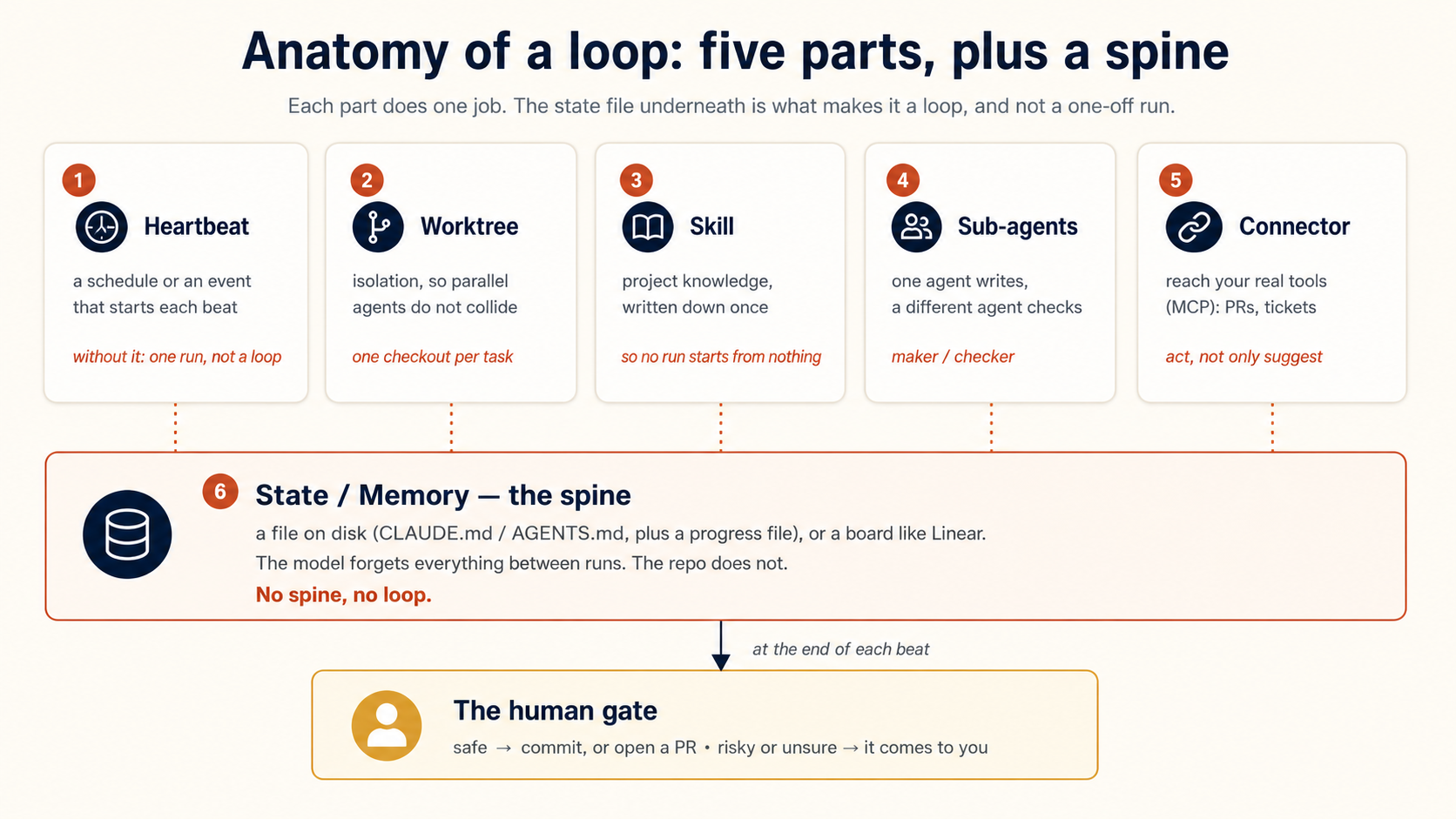
- Heartbeat: a schedule (or an event) that starts the loop. Without it, you have one run, not a loop. Learn one word now, because this course uses it everywhere: each single firing of the loop, meaning one full pass through its steps, is called a beat. The heartbeat makes beats happen. Everything else below is what happens inside one beat.
- Worktree: isolation, so two agents working at the same time do not overwrite each other's files.
- Skill: your project knowledge written down once, so each run does not start from nothing.
- Subagents: the maker-checker split. The agent that writes the code is not the agent that grades it.
- Connector (MCP): so the loop can act in your real tools (open a PR, update a ticket), not only suggest.
And the sixth, the one beginners skip:
- State / memory, the spine. A file on disk (or a board like Linear) that records what is done and what comes next. The model forgets everything between runs. The spine is how today's run knows what yesterday's run did. No spine, no loop. Without it, the loop just repeats its first step forever.
The rest of this course is one section per part, then a full example that joins them together.
No. The examples in this course are code, meaning repos, tests, and PRs, because that is where the tools are strongest. But the loop's shape does not care what the work is. A book, a report, a course, a newsletter: each can live as a repo full of files, and every part of the loop maps over. This book, for example, is a repo of markdown files. A nightly link check, a style sweep, a pass that flags stale model names: every one is a loop from this chapter.
One thing does change: the checker. Code has the most honest checkers there are, meaning tests and linters, commands that prove "done." Prose has no test suite. So a writing loop leans on two weaker checks instead: mechanical ones where they exist (broken links, missing figures, banned words, heading levels), and a reviewer agent with a written rubric for everything else. (The mechanical rung is bigger than the built-in checks. Rules only your project knows, such as "no relative dates in memory files" or "every figure needs alt text over 40 words," are still commands, once you write them. The interlude after Concept 11 shows how, and every rule you move from the rubric down to a command turns a claim into a proof.) One trick makes the rubric usable as a stopping condition: give it a score and a bar. "Grade this draft against the rubric. Do not stop below 95" turns a soft judgment into something the loop can act on. But a score from a model is still a claim, not a proof, and it is weaker than a passing test. The weaker your checker, the more work must pass through the human gate.
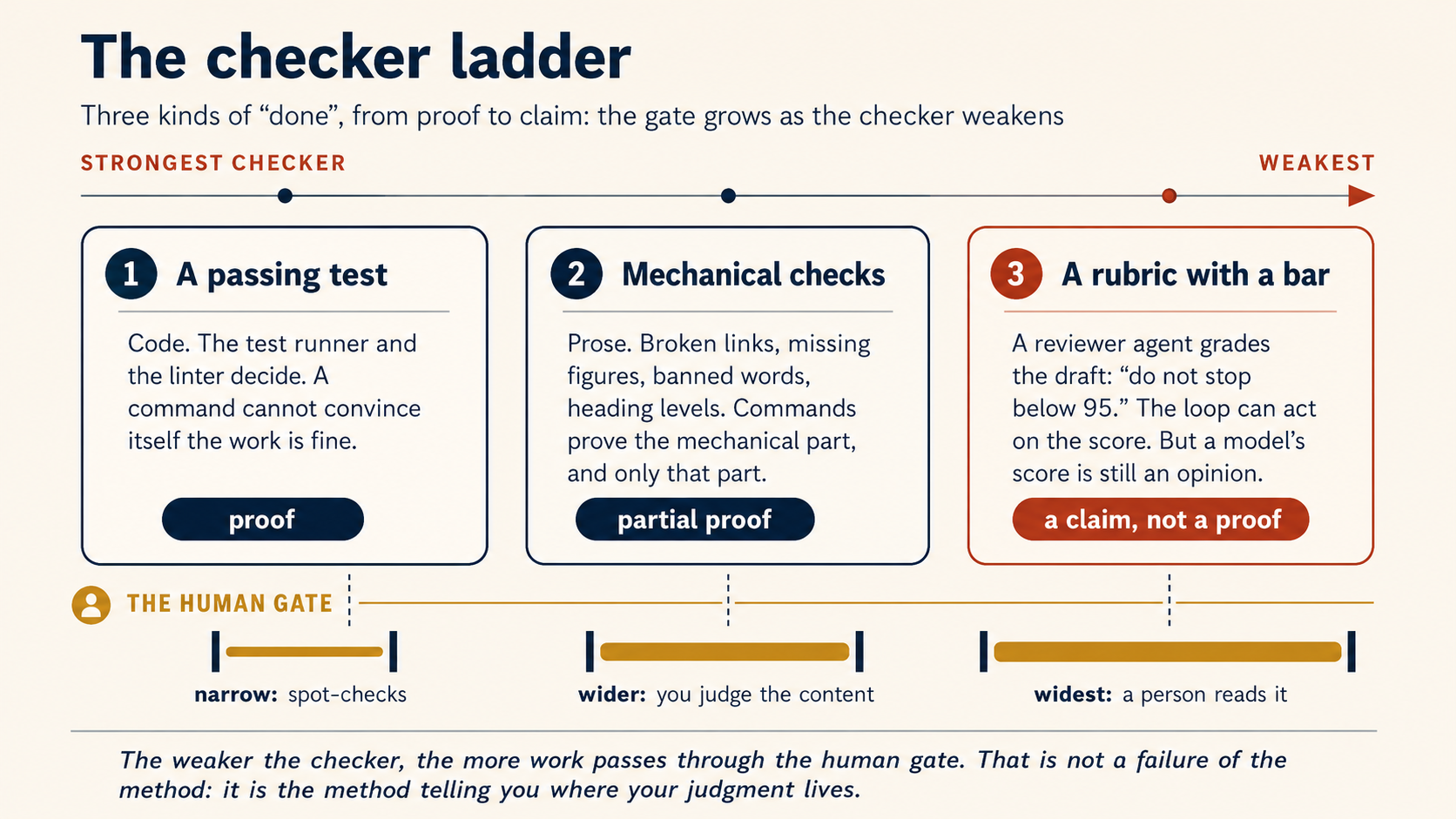
One more thing that does not change: the heartbeat menu. The domain never picks the heartbeat. The shape of the task does. "Do this now, until it is done" is a conditional loop, and it starts immediately. "Do this every night" is a schedule, and it starts at the set time. "React when something arrives" is an event. That menu is the same whether the repo holds code or chapters. And while you are actively writing or coding, there is usually no loop at all. You are the heartbeat, and the loops carry the bounded chunks and the maintenance around you.
If your work is documents rather than code, read this course as it is, then see the Cowork & OpenWork crash course for the same loops with non-coding tools.
3. Two ways to build a loop: built-in tools or tools you connect yourself
This is the one place where the tools really differ, and it shapes everything that follows.
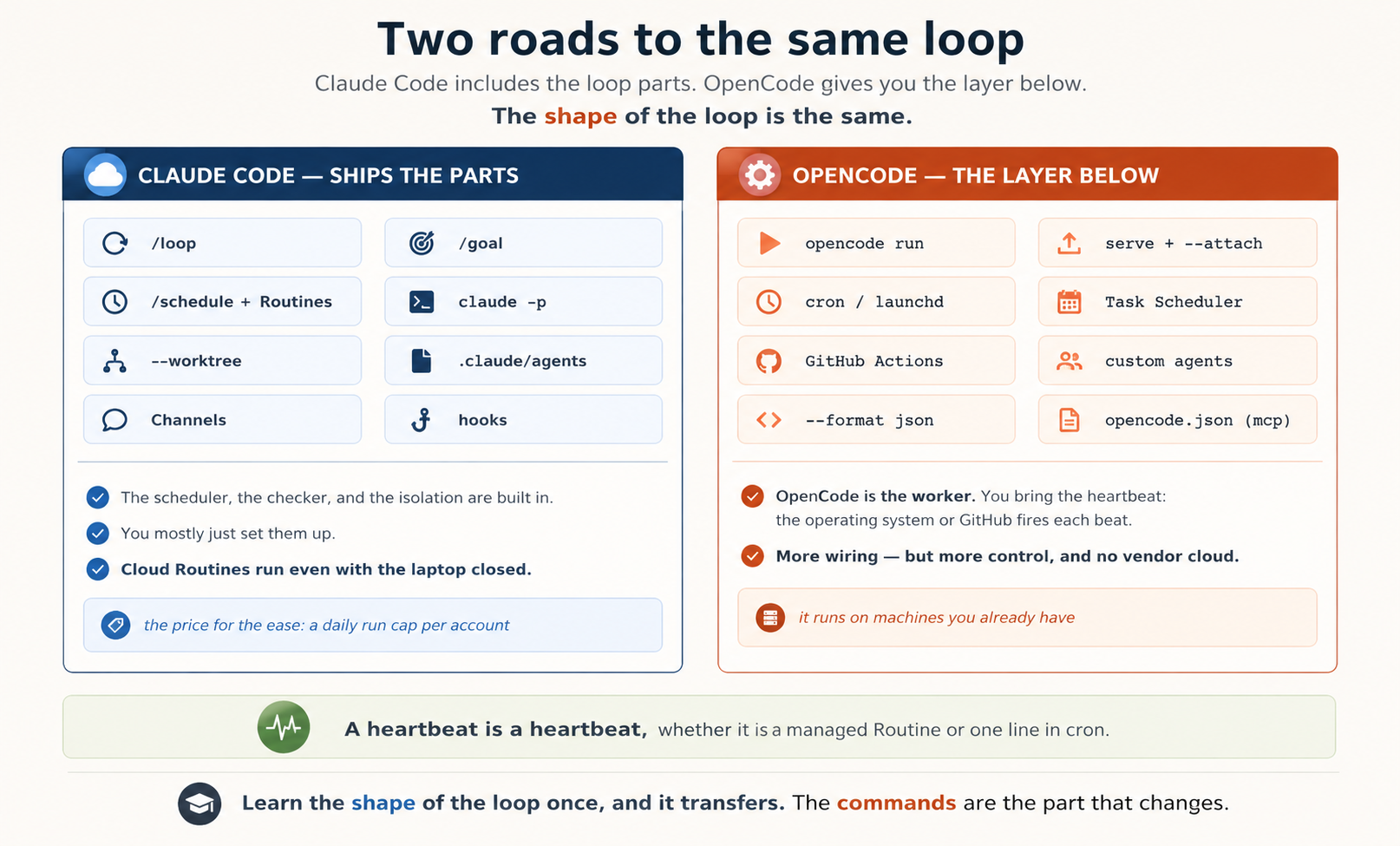
Claude Code includes the loop parts inside the product. The heartbeat (/loop, /schedule, cloud Routines), the conditional run-until-done loop with a built-in checker (/goal), the isolation (--worktree), and the event intake (Channels) are all built-in commands now. A year ago you had to write and look after a pile of shell scripts to get this. Today you mostly just set it up.
The main one is Routines: cloud automations that run on Anthropic's servers even when your laptop is closed. They can start on a schedule, on an API call, or on a GitHub event. The trade-off is a daily run limit for each account. At launch these were 5 runs a day on Pro, 15 on Max, and 25 on Team/Enterprise. You can pay for extra usage past the cap, and one-off scheduled runs do not count. But the docs no longer print fixed numbers, so treat those as launch-time examples, not a promise. Routines are a research preview, and the limits can change. Your usage page (claude.ai/settings/usage) is the only number to trust.
OpenCode gives you the agent worker, but not a built-in cloud scheduler. You start that worker from the operating system or CI.
The key command is opencode run "<prompt>". It runs one prompt without the chat screen, prints the result, and exits. That one command is one beat of a loop. You turn it into a loop by wrapping it in something that fires on a timer: cron or launchd (macOS and Linux), Task Scheduler (Windows), or GitHub Actions with a schedule trigger. This requires more setup, but you get full control. It runs on machines you already have and needs no vendor cloud.
Notice that the two tabs describe the same five parts. A heartbeat is a heartbeat, whether it is a managed Routine or one line in cron. The maker-checker split is the same idea, whether /goal grades it or a second opencode run does. Learn the shape of the loop once and it transfers. That is why we teach both.
The complete loop you will build
Before the parts, here is the finish line. The loop you will build in Part 5 is six plain steps:
every weekday at 9am:                 # 1. Heartbeat
  read progress.md                    # 6. Spine (memory)
  find overnight CI failures + issues # what to work on
  for each one:
    draft a fix in its own checkout   # 2. Worktree
    using the project's triage skill  # 3. Skill
    have a separate reviewer grade it # 4. Subagents (maker/checker)
    if PASS: open a PR via GitHub      # 5. Connector (MCP)
    if risky: write it to progress.md and leave it for a human
  update progress.md                  # 6. Spine again
Keep this picture in mind. Every concept in Parts 2 to 4 is one line of it.
A loop runs every morning, but each run starts fresh and never remembers what it did yesterday. Which of the six parts is missing, and why does that break the loop? The spine (state / memory). The model forgets everything between runs. So with no state file on disk, the loop just repeats its first step forever instead of building on yesterday's work.Show answer
Part 2: What Starts the Loop (The Heartbeat)
The heartbeat is what starts each run. There are four kinds. They range from "repeat while this session is open" to "run without a person present." Learn them in order. Most unattended systems use schedules or events.
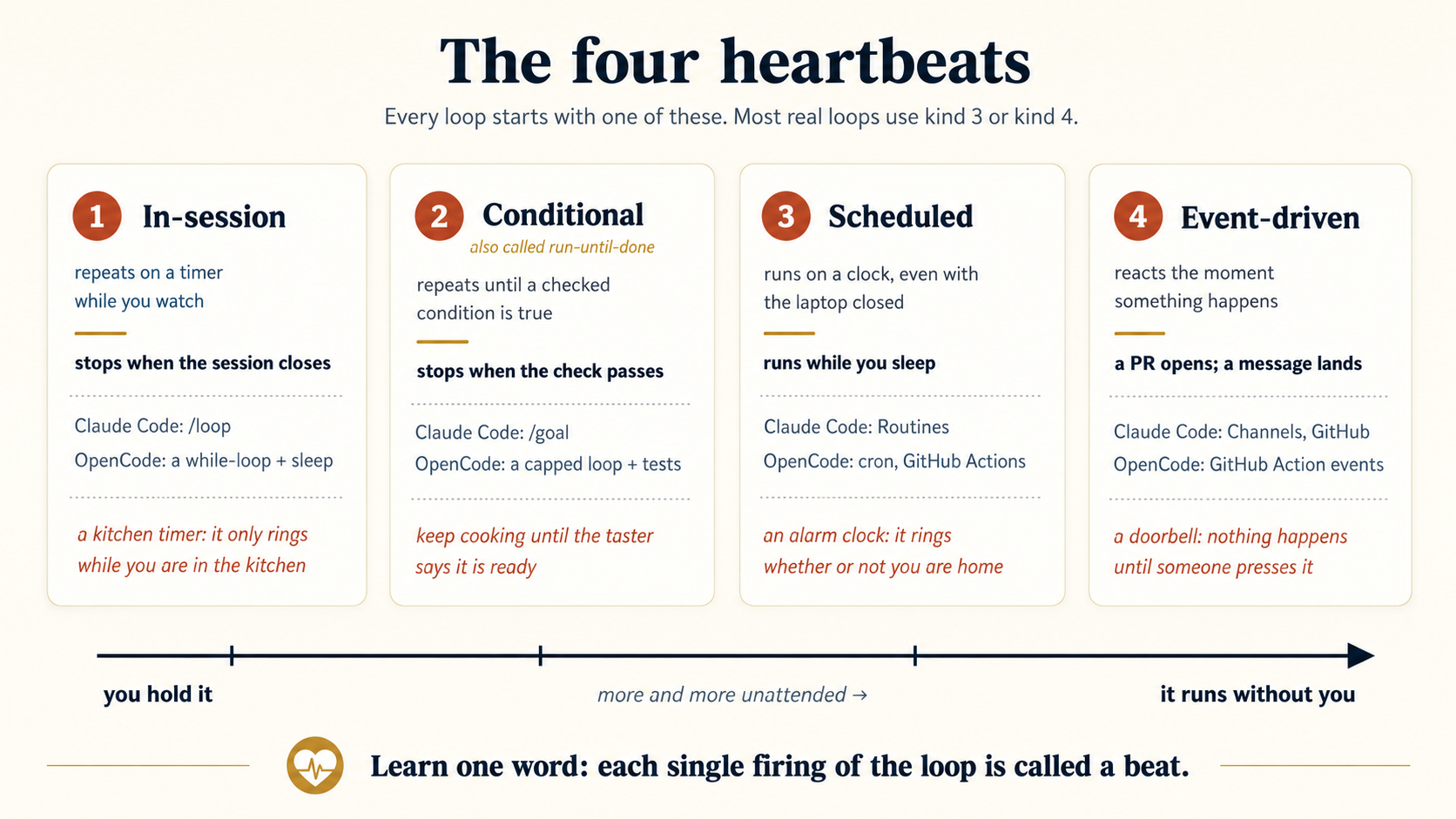
Here are the four kinds in plain words, before the details. An in-session loop is like a kitchen timer. It only rings while you are in the kitchen. A conditional loop (run-until-done) means "keep cooking until the taster says it is ready." A schedule is like an alarm clock. It goes off whether or not you are home. And an event is like a doorbell. Nothing happens until someone presses it. Then it rings right away. Keep these four pictures. Every command below is just one of them with a name.
One idea sits under all four: a loop is not a single action. It is do this, wait, do it again, over and over, so something has to stay awake between beats to fire the next one. The only question is where that something lives.
- An in-session loop keeps its timer in your open session, the process that keeps running while your terminal is open. Close the session and the thing holding the timer is gone, so the loop stops.
- A scheduled task or Routine (you build these in Concept 6) moves the timer outside the session, onto a scheduler that never sleeps (cron on your own machine, or Anthropic's servers for a cloud Routine). Each tick it launches a brand-new short-lived run, lets it finish, and shuts it down, then launches a fresh one next time. Same loop, but nothing of yours has to stay open.
| Heartbeat | Where the timer lives | What stays awake between beats |
|---|---|---|
In-session /loop | inside the session | your open session (your machine, terminal open) |
| Scheduled task / Routine | outside, in a scheduler | the scheduler, which launches a fresh run each tick |
Keep this picture too. It explains every limit ahead: an in-session loop stops when its session does, and a loop that must survive a closed laptop needs the outside kind (Concept 6).
4. In-session loops (repeat while you watch)
This is the simplest heartbeat. You re-run a prompt on a timer while the session is open. It is good for "watch this until it finishes": a deploy, a long test run, a CI job.
It fires a beat every interval while the session is open, and catches the deploy because you stayed. Close the session and the watching stops, which is why an in-session loop cannot run while you sleep (Concept 6).
Use the built-in /loop skill. Give it a time interval and a prompt:
/loop 5m check if the deployment finished and tell me what happened
Claude turns the interval into a schedule, gives the job an ID, and runs the prompt every 5 minutes while the session stays open. When you are done, cancel it and move on.
Cancelling a /loop. Each loop is a scheduled task with an ID, so you stop it the same way you started it, in plain language:
show my running loops
cancel the deploy-check loop
Claude looks up the task and cancels it. If several loops are running, it will ask which one, or you can give it the task ID directly. Closing the session also stops a plain-session loop, but cancelling is the clean way: a loop you meant to stop should not depend on the session closing. The exact subcommands are the mechanical layer. If plain language ever fails you, check the live docs at code.claude.com/docs/en/scheduled-tasks.
Reading about a heartbeat is not the same as watching one fire. There is a small project for this concept, and it does nothing else: it watches the real International Space Station fly around the Earth.
git clone https://github.com/panaversity/agentfactory-labs.git
cd agentfactory-labs/crash-course/loop-eng/iss-loop
claude
Say yes when it asks whether you trust the folder. That is what switches on the permission the project ships with, so your loop never stops to ask you. Then type one plain sentence:
/loop show me the location of the ISS every minute
That is the last thing you type. A fresh position arrives every minute while you get on with something else. Two things are worth noticing, because together they are the whole concept:
/loopread "every minute" as the heartbeat. You wrote no schedule, no script, no URL. The project folder carries all of that, which is exactly why your prompt could be one sentence.- Now close the terminal. The watching dies with it. That is not a bug. It is the definition of an in-session loop, and it is the reason Concepts 6 and 7 exist at all.
Full instructions, and two harder prompts to try, are in the project's README.
Optional: what happens when the session closes?
One limit to know: a plain-session /loop runs inside your session on purpose. Close the terminal, or let the laptop sleep, and it stops. That is a safety feature, not a bug. A casual in-session loop is not meant to outlive the session that started it. Two recent changes soften that rule:
--resumebrings back tasks that have not expired. A recurring task stays valid for seven days after you create it.- Moving the session to the background takes your
/looptasks with it, so they keep firing even with no terminal open. The catch: they do not replay fires they missed while the machine was asleep.
For work that must keep running no matter what, do not rely on /loop. Use a scheduled task or a Routine (Concept 6). The tool now handles this for you, too. In a cloud session (one that runs on a remote server, not your own machine), recent releases no longer offer /loop at all, because that session shuts down the moment your request finishes. Nothing is left running to keep the loop going.
A middle option: background sessions.
A background session is the middle rung between an in-session /loop and a Routine. It keeps one run alive on your own machine after you close the terminal window. You start one with claude --bg.
By itself it just does one job and stops. It does not repeat on a timer. Its value comes from carrying a loop. Start a /loop, send that session to the background, and the loop rides along, still firing with the window closed. (claude agents lists it later, and /resume reopens it, marked bg.)
Reach for it when you want to shut the terminal but keep a loop watching something, like a deploy or a long test run. Just remember the cost of "alive on your own machine": the computer has to stay awake. The moment the work must survive a closed laptop, you have crossed into scheduler territory, and the right tool is a Routine (Concept 6).
The three rungs line up on one question: how much has to stay awake?
| Rung | Option | Keeps firing after you close the terminal? | Keeps firing with the laptop asleep or off? |
|---|---|---|---|
| Bottom | In-session /loop | No | No |
| Middle | Background session (--bg) carrying a /loop | Yes | No (needs your machine awake) |
| Top | Scheduled task / Routine | Yes | Yes (a cloud Routine runs on Anthropic's servers) |
OpenCode has no /loop command. You build the timer yourself with the shell. Because opencode run exits after one prompt, a while loop with a sleep does the same job:
while true; do
  opencode run "check if the deployment finished; if it did, say DONE"
  sleep 300   # 5 minutes
done
This is the same idea as /loop, built from lower-level components. The shell is the heartbeat, and opencode run is the beat. To stop this loop, press Ctrl-C. If it runs in the background, kill its process. Each fresh opencode run starts the whole runtime first, meaning config, model, plugins, and any MCP servers, before it does a single thing. To skip paying that start-up cost on every beat, start a server once and attach to it:
opencode serve --port 4096 &
# then, each beat:
opencode run --attach http://localhost:4096 "check the deploy status"
Use an in-session loop when you are still watching the work. It stops when the session or machine stops. Use a cloud Routine or another unattended schedule when the work must continue without you.
5. Conditional loop, or run-until-done (stop by checking, not by the clock)
A fixed-timer loop (Concept 4) repeats at a chosen interval. Each run can check the work, but the result does not stop the timer. The loop continues until you cancel it, the session ends, or the task expires.
A conditional loop, also called run-until-done, stops when a specific condition becomes true. Think: "Run until the tests pass," not "Run every five minutes while I watch."
The key difference is simple: a fixed-timer loop does not know when the work is complete. A conditional loop stops because the work is complete. A separate command or checker must decide this. The agent that performed the work should not approve its own result.
The loop keeps trying, and a separate checker decides "done." It stops the moment the goal is proven, with no timer and no you.
Use /goal. Give it a stopping condition that Claude can prove in its own output, such as "all tests in test/auth pass." Claude keeps working until the condition holds.
After each turn, a separate smaller model, Haiku by default, reads the transcript and asks, "Are we done?" So the agent that wrote the code does not grade its own work.
The checker cannot run commands. It can only read the conversation. The worker must therefore run the tests and show the results in its output. Without visible evidence, the checker cannot confirm that the goal was met.
/goal All tests in test/auth pass and `npm run lint` is clean.
It will edit, run the tests, read the failures, try again, and stop only when the checker confirms the condition is really met, or when you stop it yourself with An unattended run means the loop is working with nobody watching, overnight or while you are away from the keyboard. No person is there to notice if it gets stuck and stop it. That is exactly why retries need a limit here. A retry is the loop trying a failed step again (say, an API call that timed out). Without a cap, a stuck loop could retry forever while you sleep, using up time and tokens. So Claude Code now sets that cap for you: The flag names and numbers are the mechanical layer, so check the live docs before you trust them. The lasting point: even the vendor now assumes an unattended run needs a limit that somebody chose on purpose./goal clear. There is no built-in "give up after N tries." If you want a limit, write it into the condition (…or stop after 20 turns). Write conditions a command can prove: "tests pass and lint is clean," not "the auth code is good." This is where the spec from Spec-Driven Development pays off. Its acceptance criteria are already conditions a command can prove, so a good spec gives you the stopping condition for free.Optional: current Claude Code retry settings
CLAUDE_CODE_MAX_RETRIES), which you can raise to a cap of 15.CLAUDE_CODE_RETRY_WATCHDOG=1. It retries temporary errors (like a brief network problem) far longer (up to 300 at the time of writing, about three hours of backoff) and lifts the 15 cap once you set your own MAX_RETRIES.
npm test is a tidy stopping condition because someone already wrote the tests. Most work is not like that. The Portfolio project asks the harder question: what does "done" mean for a page a person will look at, and can you write it down precisely enough for a loop to reach?
Drop your CV or LinkedIn PDF into the folder, then hand /goal a finish line:
/goal Build my portfolio in site/ from my-cv.pdf, following spec.md. Done when `python3 check.py site` prints 20/20 and the reviewer agent replies PASS on all six judgment promises — show me both. Stop after 15 check attempts or 3 review rounds and write what is still failing to progress.md.
Then walk away. It reads your PDF, decides a design, writes the words, builds the page, runs the checker, reads its own failures, and goes again, until that sentence is true.
Every clause is one of this concept's ideas, doing real work. A condition a command can prove: check.py runs 20 checks a machine can settle, meaning five sections present, contrast ratios, and nothing running off a phone. Visible evidence: show me both exists because /goal's checker only reads the transcript, and an unprinted result cannot be confirmed. A cap: 15 attempts, because /goal has no built-in give-up and a loop chasing an impossible condition will chase it all night. And a checker that is not the maker: a separate reviewer agent, which the spec makes mandatory.
That last one is where the project stops being a tutorial. 20/20 is not done. The reviewer must also pass six things no command can measure: is the writing true to your CV, is it designed rather than merely formatted, could this have just been a PDF? The spec is blunt about it: "Part A is a morning's work. Part B is the job." You have met that idea already, in the checker ladder back in Concept 2. Here you feel it.
One rule the project will not bend on, and it is the sharpest thing in it: never edit check.py to make it pass. That is exactly what a loop optimising for green will reach for, and noticing the urge is the lesson.
OpenCode has no /goal, so you build the same maker-checker stop with the shell and exit codes. The pattern is simple. The agent does the work. Then a real command (not the agent) decides whether to stop.
for i in $(seq 1 8); do          # cap the tries — never loop forever
  opencode run "Make the tests in test/auth pass and fix any lint errors."
  if npm test -- test/auth && npm run lint; then
    echo "Condition met on try $i"; break
  fi
done
Here the test runner and the linter are the checker. They are the most honest checker there is, because a command cannot convince itself the work is fine. For a smarter check, run a second opencode run with a dedicated review agent (Concept 11) and have it print PASS or FAIL. Always cap the tries. A loop that retries with no limit is how token bills grow out of control.
OpenCode has also started to add the limit itself. Any agent accepts a steps limit in its config (the older maxSteps name is deprecated). An agent that hits the limit is told to summarize what it did and what remains, instead of continuing to try. The two limits guard different things. The shell cap bounds how many beats the loop fires. steps bounds how many turns one agent takes inside a beat. Set both.
Every loop needs three stops. Each one prevents a specific way of failing:
| Stop | What it is | Leave it out, and… |
|---|---|---|
| Success condition | how the loop knows the task is done | nothing defines "done," so the loop can't stop on purpose or be graded |
| Limit | a ceiling: max tries, max minutes, or max spend | a goal it can't reach uses up your whole token budget |
| No-progress check | catch when the agent repeats the same action with the same arguments (it is stuck, and retrying won't fix it) | it spends the whole limit repeating one mistake |
A name you'll meet online: the Ralph loop. The simplest well-known run-until-done loop. It runs the same prompt again and again, each run reading and updating one state file. It keeps only two of the three stops (a success condition and a time cap), with no stuck-check, no skill, and no separate checker. That bareness is exactly why it teaches the lesson so clearly. A Ralph loop with a vague condition wanders until the time cap runs out. The same loop with a condition a command can prove works well.
The loop is only as good as its stopping condition.
A run-until-done loop that runs for many turns fills its own context with junk: old tool output, dead ends, and stale reasoning. As the pile grows, the model's answers get worse. The community calls the result a doom loop: a messy context leads to a worse decision, which adds more mess, which makes the next decision worse still. The defenses are the same context habits from the agentic coding course:
- Compact long runs: every so often, replace the raw back-and-forth with a short summary of what happened, so the context stays small.
- Move big outputs to files: write large results (logs, data, generated text) to a file and keep only a pointer in the context, instead of pasting the whole thing in.
- Hand messy subtasks to a subagent: let a helper do the noisy exploring in its own context and return just the clean answer.
The one idea behind all three: treat context as a budget you spend on purpose, not a bucket you keep pouring into. A smaller, cleaner context is what keeps a long run's decisions sharp.
6. Unattended schedules (runs while you sleep)
This is the heartbeat that makes loop engineering matter: a task that runs whether or not you are at the computer. "Every weekday at 9am, sort through overnight CI failures." "Every Monday, check the dependencies and open a PR with the safe fixes."
Set a Routine on claude.ai, close the laptop, and watch Anthropic's servers keep it running on schedule, with your laptop shut.
First, a word on names. A scheduler is the general thing: any always-on clock that launches a fresh run on time (cron, GitHub Actions, or a cloud service). A Routine is Claude Code's own cloud-hosted scheduler, where Anthropic provides the clock and the machine, so nothing of yours has to be on. Every Routine is a scheduler. Not every scheduler is a Routine.
Two kinds, depending on whether you need your laptop on:
Cloud Routines (laptop can be off). The modern default, and worth slowing down for. A cloud Routine is a standing instruction that lives on Anthropic's servers, not on your computer. You write the instruction once. From then on it runs on its own, at the time you set, with the laptop open, asleep, or in a bag. Think of it as hiring a worker who sits in Anthropic's office, not yours: you hand over a written job description, and the work happens without you hosting it.
Hold one example through this section. Every morning you spend 30 minutes on the same triage: read the issues that arrived overnight, label them, flag anything that looks like a crash, and post a summary to the team's Slack. That half hour is a perfect Routine. It repeats, it follows rules you can write down, and it does not need you. It needs your instructions.
The four parts of every Routine. Creating one means filling in four blanks. Each answers one question.
- The prompt: what should it do? The standing instruction, written like the spec you learned to write: a goal, rules, and what "done" looks like. It is the same prompt every run, and nobody is there to clarify, so it must survive your absence. For the triage example:
Review all issues opened in the last 24 hours. Label each as bug,
feature-request, or question. If any issue describes a crash or data
loss, add the "urgent" label. Then post a summary to the #triage Slack
channel: total new issues, how many urgent, and one line per urgent
issue. If there are no new issues, post "No new issues overnight."
Do not close or comment on any issue.
Notice the spec anatomy: a goal (triage and summarize), rules (label these ways, and urgent means crash or data loss), a boundary (do not close or comment on anything), and a defined "done" even for the empty case.
-
The repos: what may it touch? You name the repositories it may work in. Anything you do not list is out of reach. Grant
yourteam/product-appand only that. Your other repos, including the one with the billing code, do not exist as far as this Routine is concerned. -
The connectors: what can it reach? Slack, email, calendars. These are the Routine's hands beyond the repo: how it reads the outside world, and how it reports back to you. Attach the Slack connector so it can post to #triage, and nothing else. Connectors are permissions, not suggestions: with no email connector, it could not send an email even if the prompt asked it to.
-
The trigger: when does it start? The heartbeat. Three kinds, for three shapes of work. A schedule: the clock starts it, every weekday at 8:30, so the summary is waiting before the team sits down. An API call: another program starts it, so your deploy script finishes a release and then fires a "smoke-check the release and report" run, which means the Routine runs exactly when there is something to check, not on a fixed clock. A GitHub event: the repository event starts it, so a "pull request opened" trigger runs zero times on a quiet day and nine times on a busy one (Concept 7 covers this).
What to do, where it may act, what it can reach, when it starts. Every Routine is those four answers, and the issue-triage worker is now fully specified: the prompt above, one repo, one Slack connector, weekdays at 8:30.
One feature, three doors. You can create a Routine at claude.ai/code/routines, in the Desktop app, or with /schedule in the CLI. These are not three different features. All three methods manage the same cloud feature: every Routine, made from any door, is saved to the same cloud account and shows up in all three places. For example, you can create it with /schedule in the terminal and edit it later in a browser.
What happens on a run. At 8:30 on Monday, Anthropic's servers start a fresh Claude session, hand it your prompt, and give it exactly the repo and connectors you listed. It reads the weekend's issues, labels them, posts to #triage ("7 new issues, 1 urgent: login crash on Android (#412)"), and shuts down. Tuesday's run starts completely fresh. Monday's session is gone. Nothing depends on your machine, and that is what makes it a true loop instead of a session you must watch. (It is also why the spine, Concept 12, must live in the repo.) Two current product rules to check before you rely on it. Rule one: there is a daily cap. Each account gets a fixed number of Routine runs per day: at launch, 5 on Pro, 15 on Max, 25 on Team and Enterprise. An unattended system running on someone else's servers has to have a budget. That is true of every cloud service, and it is a number you design around, not a surprise you discover. Quick arithmetic on a Pro plan: the issue triage (1 run) plus an evening commit summary (1 run) plus a PR-review Routine on a day with 4 pull requests (4 runs) is 6 runs, which is one over the cap. Your options, in order: merge the two daily reports into one Routine, let the PR reviewer be the thing you buy extra usage for on busy days, or upgrade the plan. Do this arithmetic before the loop silently stops at run five. Three details soften the cap: those are launch-time numbers, so check Rule two: it can only push to This is a good thing, not a hurdle. It keeps unattended work safe from day one: the Routine can do all the work it wants, but you still decide what gets merged. Here is an example. You set up a second Routine to fix flaky tests overnight. At 3 AM it pushes its fix to a Later, once a repo has earned your trust over many clean runs, you can turn the rule off for just that repo with the Allow unrestricted branch pushes setting. Do it on purpose, one repo at a time, like handing someone a key.Optional: current Routine limits and branch rules
claude.ai/settings/usage, one-off scheduled runs do not count, and you can pay for extra usage past it.claude/ branches (by default). A fresh Routine cannot write to main. Every branch it pushes must start with claude/.claude/ branch. In the morning you read the change, see it looks right, and merge it yourself. The Routine did the work while you slept. You did the checking when you woke up. That gap is the whole point.
When a Routine is the right tool: whenever the work does not need your machine. Issue triage, a Friday "what changed this week" digest for stakeholders, watching a competitor's changelog, drafting replies to routine support issues. If you catch yourself thinking "this should just happen every day without me," this is the tool. (Every form field, the environment, and secrets are walked through in the Routines appendix. And there is a third native option between cloud and cron: Desktop scheduled tasks, made in the Desktop app. They run locally against your real files, including unsaved changes, with no open session needed, but your machine must be on.) You can manage a Routine's whole life from the terminal, in plain English. Create it, list what you have, run one now, or change its timing: Three quick things: If Optional: manage a Routine from the terminal
/schedule every weekday at 9am, run the daily-triage skill   # create it
/schedule list                                               # see what you have
/schedule run the triage routine now                         # fire one run, to test it
/schedule update the triage routine to every two hours       # change the timing
update also accepts a cron expression: a short code that spells out an exact time. For example, 0 9 * * 1-5 means "9am, Monday to Friday."/schedule tomorrow at 9am, …. One-offs do not count toward your daily run limit, so they are a free way to try a prompt once and check it works before you commit to running it every day./schedule seems missing from your CLI, the Routines appendix says what to check.
Run one prompt from your own cron (laptop on, no Anthropic cloud). claude -p runs a single prompt and then exits. You can drop it straight into your computer's crontab:
# every weekday at 9am: sort through CI and summarize failures
0 9 * * 1-5 cd /path/to/repo && claude -p "check the CI dashboard and summarize any failures" >> ~/claude-cron.log 2>&1
When you are ready to build your first real Routine (every form field, all three triggers, secrets, and the common problems), the Routines appendix at the end of this course takes you through it step by step.
A schedule is the one heartbeat you cannot watch fire, because midnight comes when you are not looking. So there is a project built to be left alone overnight: The Sky Watch. Every morning it checks NASA's asteroid feed and leaves you a note: what is passing Earth today, and whether any of it is dangerous.
Clone it, and first prove it works by hand:
what asteroids are coming this week?
You get a plain-English watch: "nothing to worry about, the closest passes at 23× the Moon, all clear." Then make it a loop with one line:
/schedule every day at midnight, run the sky-watch skill for today and write me the forecast
Close your laptop. In the morning, the watch is waiting, written by a machine that was never yours, at a time you were asleep. Attach an email connector and it can arrive in your inbox as a visual card, each pass drawn as a proximity bar. Note the prompt says for today, not "the week ahead": a daily run should report the day it fires, or it just re-sends yesterday's forecast every morning. Match the window to the cadence.
Two things make this a schedule and not the doorbell (Concept 7). It looks forward, not back: a warning about tomorrow's pass, not a report on yesterday's. And it speaks even when nothing happens. Most mornings it just says "all clear," and that quiet report is the point of a watch. An event-driven loop stays silent on a calm day. A schedule reports anyway. To rehearse without waiting for midnight, fire a one-off first (/schedule in 2 minutes, run the sky-watch skill), because one-offs do not count against your daily cap. That is Part 6's rule made real: prove it fast and watched before you trust it slow and unattended.
OpenCode's unattended heartbeat is always the operating system or CI. Use Community plugins such as opencode run without the chat screen, and let the scheduler start it.Optional: community scheduling plugins
opencode-scheduler can translate a plain-language request into an operating-system schedule. They may also prevent overlapping runs and reject prompts that would wait for a human answer. These plugins are third-party software, so check that a plugin is actively maintained before relying on it.
Your own machine, with cron:
# every weekday at 9am: sort through CI and summarize failures
0 9 * * 1-5 cd /path/to/repo && opencode run "check the CI dashboard and summarize any failures" >> ~/opencode-cron.log 2>&1
The cloud, with GitHub Actions (no machine of yours needs to be on). The model string below is just an example. Run opencode models for the exact IDs your install knows:
name: Scheduled OpenCode Task
on:
  schedule:
    - cron: "0 9 * * 1-5"   # weekdays at 9am UTC
jobs:
  opencode:
    runs-on: ubuntu-latest
    permissions: { contents: write, pull-requests: write, issues: write }
    steps:
      - uses: actions/checkout@v6
        with: { persist-credentials: false }
      - uses: anomalyco/opencode/github@latest
        env: { ANTHROPIC_API_KEY: ${{ secrets.ANTHROPIC_API_KEY }} }
        with:
          model: anthropic/claude-sonnet-5   # confirm with `opencode models`
          prompt: |
            Review the codebase for TODO comments and summarize them.
            If any are worth acting on, open an issue to track them.
For scheduled events the prompt is required, because there is no comment to read it from. And you must grant contents: write and pull-requests: write if the loop should open branches or PRs.
A Claude Code Routine runs on Anthropic's servers. An OpenCode schedule runs through your operating system or GitHub Actions. Both start fresh work at a chosen time, so both need saved state outside the model.
Optional technical detail, safe to skip on a first read.
The OpenCode GitHub Action is written as anomalyco/opencode/github@latest in the current official docs. Some older guides still show sst/opencode/github@latest. Both point to the same project. Use the one your opencode github install generates. For models, Claude Sonnet 5 is now the current Sonnet tier (API ID claude-sonnet-5, because major-version releases drop the minor number). It is a direct replacement for Sonnet 4.6 (which is still a valid pinned ID). Two things a loop builder should know: adaptive thinking is on by default, and a new tokenizer produces about 30% more tokens for the same text, so token budgets measured on 4.6 do not carry over unchanged. Dateless IDs arrived with the 4.6 generation, where the dateless string is the pinned snapshot. Older 4.5-generation models such as Haiku 4.5 have a dated canonical ID (claude-haiku-4-5-20251001) plus a dateless claude-haiku-4-5 alias. The examples below pin the dated Haiku ID so results are reproducible. Model generations move faster than this book. Run opencode models (refresh its model list if a new release is missing) for the exact strings your install knows before you pin anything.
7. Event-driven (react when something happens)
A schedule asks "check every hour." An event asks "react the moment X happens." A PR opens, an issue is filed, a message lands, and the loop runs in response.
It sits idle with no clock and no one watching. Then something happens: a PR, a message, an alert. The loop reacts the instant it arrives, each on its own route, then goes quiet again.
This section is about events. An event is just something happening. Each kind of event has a catcher, a tool that reacts to it, and the catchers are not all the same. GitHub events and "everything else" events are caught by a Routine. Chat messages are caught by a Channel. So two of the three catchers are Routines, and one (the Channel) is not. The Channel's one weakness, that it needs your machine on, is shown plainly in the table below.
With Claude Code, where the event comes from decides which tool you use. There are three routes:
1. From GitHub, use a Routine. A Routine does not have to run on a clock. Its trigger can be a GitHub event instead. Two kinds work: a pull request changing (it opens, updates, or merges) and a release being published. For example: "when a PR opens, review it and comment," or "when a release is published, draft the changelog."
Three things to know before you build one:
- Setup. The Claude GitHub App has to be installed on the repo. Careful:
/web-setuponly grants clone access, and it does not install the app. This causes many failed first tries. - No push trigger. There is no "on push" event. But if someone pushes commits to a branch that already has an open PR, GitHub counts that as updating the PR (the
synchronizedevent), so the Routine fires. Push to a branch with no PR, and nothing happens. - Filters. You can limit which events fire it: by author, title, labels, branch, draft state, and more. The full field list, the hourly limits, and the difficult details are in the Routines appendix (A3).
2. From a chat app, use a Channel. A Channel drops a message from an outside app straight into a session that is already running. Telegram, Discord, and iMessage work out of the box. For anything else you set up a webhook. This is the doorbell from Part 2: nothing happens until a message arrives, then the session reacts at once.
For example, while away from your desk, you can ask through Telegram, "Did the deploy finish?" The existing session checks and replies with its current context, skills, and history. A loop can also send reports back through the same Channel.
Two cautions:
- It needs a live session. The session must already be running (an open terminal, or a background session), so a Channel does not work with the machine off.
- It is an open door. Anyone who can message that source can steer your session, so connect only sources you control.
Setup: code.claude.com/docs/en/channels.
3. From anything else, use a Routine with an API trigger. Some events come from neither GitHub nor a chat app: an alert fires in your monitoring tool, a deploy finishes, a form is submitted. Give the Routine an API trigger, and then any system that can send an authenticated web request (a request that proves who it is) can fire it, with your laptop closed. That request can even carry the event's details: an optional text field passes run-specific context (the alert message, the failing log) to the Routine alongside its saved prompt. The endpoint, the token, and a retry warning are in the Routines appendix (A3).
Choosing between the four:
| The event comes from… | Use | The work runs in… | Laptop closed? |
|---|---|---|---|
| GitHub (a PR, a release) | a Routine, GitHub trigger | a fresh cloud session, per event | works |
| GitHub, without a Routine | the Claude Code GitHub Action in CI | a fresh CI runner, per event | works |
| a chat message (Telegram, Discord, iMessage) | a Channel | the session you already have running | no, needs a machine |
| anything that can send a web request | a Routine, API trigger | a fresh cloud session, per call | works |
The second row matters more than it looks. A Routine is not the only way to keep working with your laptop shut. anthropics/claude-code-action@v1 in a GitHub Actions workflow does the same job, and needs no research-preview access and no daily run cap. A Pro or Max plan is enough: claude setup-token gives you a credential the runner can use, so there is no API key either. It is the cheapest door into unattended work.
Which points at the rule underneath all four rows. The question is never "is it a Routine?" It is "whose computer does the work run on?" Your own machine dies when you close it. Anthropic's servers and GitHub's runners do not, because they were never yours. That is also why those rows need a token and /loop did not: your laptop already knew who you were, and a rented stranger does not. Needing credentials and surviving a closed lid are the same fact, seen from two sides.
Note the pattern in every row but the Channel: each event starts a fresh session, so two events know nothing about each other. Two pushes to one PR are two separate sessions. The spine (Concept 12) is how they share state.
The paragraph above is the kind of claim that means nothing until you watch it. There is a small project for this concept, The Doorbell, and it does exactly one thing: it reviews a pull request that nobody asked it to review.
Copy its kit into a repo of your own, mint a token with claude setup-token, add it as one secret, then open a pull request with a bug in it. About a minute later, a review appears. You typed no prompt. Nobody was watching.
Then do the part that makes it land: close your laptop and have someone else open a PR. The review still shows up. That is the difference from Concept 4 in one move. The ISS loop dies when you close the terminal, because it was running on your machine. This one never was. When the doorbell rings, GitHub rents a computer, runs the work there, and throws the machine away.
That also explains the token. Your laptop already knew who you were. A rented stranger does not. Every unattended loop pays this price.
One thing to expect, because it cost us an hour: a green checkmark does not mean it worked. Miss one setting and the run succeeds, does the review, and posts nothing at all. The project's README names the setting and the symptom. (It uses the Claude Code GitHub Action rather than a Routine: same doorbell, no preview access needed, no daily cap.)
And the ending is the paragraph above, proved. Push a second time and the new review will cite your earlier commits by hash, correctly, despite running on a machine that has never existed before and remembers nothing. It did not remember. It read the repo. That is the spine, and you will meet it properly in Part 4.
Install the GitHub agent once with opencode github install. This adds .github/workflows/opencode.yml. After that, OpenCode reacts to repository events (pull_request, issues, and /oc or /opencode comments) running inside your GitHub Actions runners:
name: opencode-review
on:
  pull_request:
    types: [opened, synchronize, reopened, ready_for_review]
jobs:
  review:
    runs-on: ubuntu-latest
    permissions: { contents: read, pull-requests: read }
    steps:
      - uses: actions/checkout@v6
        with: { persist-credentials: false }
      - uses: anomalyco/opencode/github@latest
        env:
          ANTHROPIC_API_KEY: ${{ secrets.ANTHROPIC_API_KEY }}
          GITHUB_TOKEN: ${{ secrets.GITHUB_TOKEN }}
        with:
          model: anthropic/claude-sonnet-5
          use_github_token: true
          prompt: |
            Review this pull request for bugs, quality issues, and security risks.
For a pull_request event with no prompt, OpenCode reviews the PR by default.
Use a schedule when time starts the work. Use an event when an outside action starts the work, such as opening a pull request or sending a message.
You want a loop to keep fixing a failing test until it passes, then stop on its own. Which heartbeat do you reach for, and who decides "done"? A conditional loop (run-until-done), meaning Show answer
/goal in Claude Code, or a capped shell loop in OpenCode. A command (the test runner) decides "done", never the agent that wrote the fix. And it still needs a limit so it cannot retry forever.
You now know the four heartbeats. Do not reach for the biggest one. Every loop is defined by two choices: what starts it, and what stops it. So before you build anything, ask one question about the task: does it end, or does it repeat?
- The task ends, and a command can prove the end → a conditional loop. Start it now, and let it run until done.
- The task repeats → a schedule or an event.
- The task happens once → no loop at all. An ordinary session, one turn at a time, is the right tool. It is still the right tool for most work.
One more rule: when a repeating loop is new, watch its first few real runs before you trust it unattended. Part 6 turns this into a rule: prove the loop before overnight use.
A last note on names. People use these words loosely online, so here is the translation. "Turn-based" is an ordinary session. "Goal-based" is our conditional loop. "Time-based" mixes two of our kinds, in-session and scheduled, which you now know are different. "Proactive" is a fully composed loop, like the one in Part 5. Different labels, same parts.
Practice: pick a heartbeat, then build one
You now know all four heartbeats, and this is the best moment to use one, while the four pictures are still fresh. Two steps. First prove you can choose the right heartbeat. Then go start one.
Step one: choose (2 minutes, nothing to install). Name the heartbeat for each task below. One of them is a trap.
- Every Friday, draft a summary of the week's merged pull requests for the team.
- Keep working on this failing build until it is green, then stop.
- Someone opens a pull request, and it should get reviewed.
- A 40-minute migration is running, and you want to know the moment it ends.
- Rename one variable across the repo.
Show answers
- Scheduled. It repeats on the clock, and nobody needs to be there. A Routine, or a
cronline (Concept 6). - Conditional, or run-until-done. It ends, and a command can prove the end.
/goal, or a capped shell loop (Concept 5). - Event-driven. An outside action starts it, so it fires zero times on a quiet day (Concept 7).
- In-session. You are still watching, and it can stop when you close the session.
/loop, or awhileloop with asleep(Concept 4). - No loop at all. The task happens once, so an ordinary session is the right tool. If you reached for a loop on this one, read the tip above again. Most work is still this row, and it stays that way after this course.
Step two: build one. Each heartbeat has a project waiting at the end of the course. Do not do all four now. Two of them are ready for you, and two deliberately reach forward into parts you have not read:
| Heartbeat | Concept | Build it in | Ready now? |
|---|---|---|---|
| In-session | 4 | Project 1, a watch loop | Yes |
| Conditional | 5 | Project 2, make the tests pass, then stop | Yes |
| Scheduled | 6 | Project 3, the morning brief with a memory | After Part 4, it needs the spine |
| Event-driven | 7 | Project 6, the doorbell loop | After Part 3, it needs connectors |
That last column is worth a moment. A schedule with no memory is just the same first step, repeating every morning, and an event-driven loop that cannot open a PR can only talk. So the two heartbeats that run without you are exactly the two that need the rest of the course first. That is not padding. It is the shape of the thing.
Project 1 is the cheapest possible start: about 15 minutes, no schedule to configure, and nothing that can run while you are away. If you do only one thing before Part 3, do that one.
Part 3: What the Loop Does on Each Run (The Body)
The heartbeat starts the loop. These four parts are what the loop does on each beat. You met them in the agentic coding course as useful extras. In a loop they really matter, because no person is watching each step.
8. Isolation: worktrees
The moment a loop runs more than one agent at once, they start to overwrite each other's files. It is just like two people editing the same lines without telling each other. A git worktree fixes this. It is a separate working folder, on its own branch, that shares the same repo history. One agent's edits cannot touch another's checkout.
Built in. Use the --worktree flag to open a session in its own checkout. Or set isolation: worktree on a subagent, so each helper gets a fresh checkout that cleans itself up afterward. A scheduled task can turn on worktree isolation per run, so parallel runs never collide with your own manual work.
No single flag. You use git's own worktrees and point a run at each one. Same isolation, made plain:
git worktree add ../wt-feature-a feature-a
git worktree add ../wt-feature-b feature-b
( cd ../wt-feature-a && opencode run "implement feature A" ) &
( cd ../wt-feature-b && opencode run "implement feature B" ) &
wait
Community runners (worktree managers built around OpenCode) can handle the bookkeeping for you if you do this often.
9. Knowledge: skills, so no run starts from nothing
A loop starts as a fresh session every time. It is a fresh session with no memory of your project's habits. With no help, it works out (or guesses) your whole setup on every beat. That wastes tokens and invites mistakes. A skill is that knowledge written down once, in a SKILL.md file, where the agent reads it on every run.
This works the same in both tools: a folder with a SKILL.md of instructions and metadata, plus optional scripts and references. In a loop, the rule is simple. Anything you would otherwise re-explain on every run belongs in a skill. The triage steps, the project habits, the "we do not do it this way because of that one incident": all of it lives in the skill. So the loop builds on itself instead of starting over. (Full treatment in the Skills & Connectors crash course.)
Do not paste a long block of instructions into a schedule that nobody will keep up to date. Instead, your scheduled prompt becomes one line, "run the daily-triage skill", and the skill holds the detail. Short loop prompt, logic that is easy to update, lower token cost on every beat.
10. Action: connectors (the loop acts, not just suggests)
A loop that can only read your files is a loop that can only talk. Connectors, built on MCP, let it do: open a PR, update a Linear ticket, post to Slack, query a database, call a staging API. This is the difference between a loop that says "here is the fix" and a loop that opens the PR, links the ticket, and posts to the channel once CI is green.
Both tools speak MCP, so the protocol transfers between them. But the packaging and the authentication (local vs hosted, OAuth, permissions) often need tool-specific configuration.
Add MCP servers to your config and include them in a routine's connector list, so the unattended run can reach them. The same connectors you use by hand are available to scheduled and cloud runs.
Declare servers in the mcp section of opencode.json. Local servers start a subprocess. Remote servers reach an HTTPS endpoint with automatic OAuth. In a scheduled opencode run, start opencode serve once and --attach to it, so you do not pay the MCP start-up cost on every beat.
A loop retries, and it chooses tools unattended. That changes what a good tool set looks like:
- Fewer, focused tools beat many overlapping ones. Choosing a tool is a decision the model makes on every single beat, with nobody watching. Give it a hundred overlapping tools and it loses track of which one fits. Practitioners have found that cutting an agent's available tools raises its success rate. Anthropic's rule of thumb: if a human engineer cannot say for certain which tool fits the job, neither can the agent. By hand, one bad tool pick costs you a moment. In a loop, it costs a beat, every time it happens, forever. So trim the connector list to what the loop actually needs. (The Routines appendix asks for the same thing for safety reasons. The two reasons agree.)
- Writes must be safe to repeat. A loop that retries a failed step will call the same write again. A retried "create customer" that makes a second customer leaves duplicate records and double billing. Prefer operations that are safe to repeat (update-or-create, one PR per branch) over blind creates.
- Errors must say what to do next. In a loop, the error message is the input to the next beat. "Permission denied: request the
reposcope" fixes itself on the next try. "Error 403" wastes a beat.
By hand, you absorb all three problems without noticing. You pick the right tool, you skip the duplicate, you search for the error. Unattended, nobody is there to absorb them.
11. Maker-checker: subagents
This is the single most important choice in a loop: the agent that writes the work must not be the agent that approves it. A model that checks its own output often approves it too easily. A second agent uses different instructions and may use a different model. It can catch problems that the first agent missed. This separation is what makes an unattended loop safer. You will also see this pattern called LLM-as-judge: a separate model grades the work instead of the maker grading itself.
Define subagents in .claude/agents/, and put them together as agent teams: one explores, one implements, one checks against the spec and tests. "The spec" is the one you learned to write in Spec-Driven Development. Its acceptance criteria are exactly what a trustworthy checker grades against. A vague spec gives you a vague verdict. This is also what /goal does inside: a fresh model decides whether the loop is done, instead of the worker grading itself.
OpenCode includes the primary agents Build and Plan. It also includes three subagents: general, explore, and scout. Scout is read-only and is used for external documentation and dependency research. You can define additional agents in opencode.json or as markdown files in the agents folder.
Give the checker its own model, which can often be cheaper and read-only. The maker can call it with an @ mention or the Task tool. A common design uses a strong model to explore and implement, then a focused model to check the result.
Two settings are especially important in a loop: a steps limit for each agent (Concept 5), and permission.task rules that prevent a subagent from starting more subagents. Without these limits, agents may delegate work in circles and consume unnecessary tokens.
---
mode: subagent
model: anthropic/claude-haiku-4-5-20251001
description: Reviews a diff against the spec and tests. Replies PASS or FAIL with reasons.
---

You are a strict code reviewer. You do not make changes.
Check the diff against the spec and the test results, then reply PASS or FAIL with the reasons.
Each subagent runs its own model and tools, so the maker-checker split really does cost more tokens. That is the price of a checker you can trust. Spend it where a second opinion matters, meaning anything the loop will commit while you are away. Skip it for throwaway, read-only chores.
Interlude: Codify the body, with dynamic workflows
So far, the body of a beat (find the work, draft each fix in its own checkout, have a separate agent grade it) is something the agent puts together turn by turn. Claude Code now lets you write that whole orchestration as a re-runnable script, called a dynamic workflow. You describe the task, Claude writes a script that hands the work out to many subagents, and a runtime runs it in the background while your session stays free. It is the maker-checker split (Concept 11) and the worktree split (Concept 8) packed into one repeatable unit. It can also apply a real quality pattern, not just run more agents: independent reviewers can check each other's findings before anything is reported.
Ask for one in plain words ("use a workflow to…"), start it with the ultracode keyword (the older workflow trigger word was retired in mid-2026, and describing what you want still works), or run the built-in /deep-research. When a run does what you want, press s in the /workflows view to save its script as a /command you can re-run on every branch. Guardrails keep it honest. Agents are capped (about 16 at once, 1000 per run), so a runaway script cannot spiral. Subagents that keep failing validation stop after a few tries instead of looping forever. And a run's memory lives only within that run: you can resume it inside the same session, but a fresh session starts it over.
There is no /workflows command. The script you already write is the workflow. The capped for loop from Concept 5 and the &/wait fan-out from Concept 8 are a hand-made version of the same idea. Your shell holds the plan, opencode run is each agent, and exit codes are the checker. You get full control and no agent cap, at the price of writing and maintaining the orchestration yourself.
This is the easiest mistake to make once workflows start to feel powerful. A dynamic workflow runs once, when you (or the ultracode setting) start it, and forgets everything when it ends. It has no heartbeat and no spine. So it is the body of a single beat, not a loop. The loop is the combination: a heartbeat (a Routine, /loop, or cron) fires the beat, the workflow is the body that runs on it, and a progress file its agents write is the spine the next firing reads. In literal terms: the workflow performs one run, the trigger starts later runs, and the progress file stores information between them.
As a memory aid: the workflow is the engine, the Routine turns the key, and progress.md carries information to the next trip.
Your loop runs two agents at the same time, and you also want to trust the commits it makes while you are away. Those are two different problems. Which part of the body solves each one? Worktrees solve the parallel problem: each agent gets its own checkout, so their edits cannot collide. Maker-checker solves the trust problem: a separate agent grades the work, so "done" means something without you watching. People mix these up. Isolation keeps agents out of each other's way. The checker keeps bad work out of your repo. You need both, for different reasons.Show answer
Interlude: Codify the checker, with verification skills
The last interlude codified the body of a beat. This one codifies the checker. In July 2026, Anthropic's Claude Code team published its own guidance on exactly this, and their word for it is a verification loop: the agent checks its work and attempts to fix it, again and again, until the check passes. You have met this loop before, under this book's own name. It is the Attempt → Check → Fix → Repeat cycle from the agentic coding course, the one Boris Cherny calls the single most important tip for using the tool.
One note on names first, so the word "loop" does not confuse you. A verification loop runs inside one beat. It has no heartbeat of its own and no spine. When the beat ends, it ends. In this course's vocabulary, it is small-loop machinery. What makes it belong in this chapter is what happens next: the same check, written down once, becomes the checker of a big loop the moment a heartbeat fires it. The reviewer agent in Part 5 grades against exactly this kind of written check. So this section is really about one move: taking a check that lives in your head and giving it a file.
Which checks to write down. The test is simple: anything you keep correcting by hand, every time the agent finishes, is worth writing down as a check. The manual click-through after every frontend change. The "did you strip the request body from the error logs" sweep. The migration you always re-read before approving. Write the procedure in plain English, the way you would hand it to a new teammate on their first day. If you cannot write it down clearly, ask the agent for the standard best-practice version first, then edit it. Your version differs on a few specific points, and those differences are exactly what you want to write down. The model already knows the standard part. The part that is specific to your project is the valuable part.
And the check does not have to be a judgment call to qualify. "Reject any migration that drops a column without a backfill step" is a fixed rule a command could prove, and no general-purpose linter will ever include it, because it is yours. This is a rung of the checker ladder from Concept 2 that is easy to miss: between the mechanical checks the tools already include and the rubric a reviewer grades against, there is a layer of mechanical checks only you can write. Every rule you move from the rubric down to this rung turns a claim into a proof.
The packaging is a skill. You already know the container from Concept 9: a SKILL.md the agent loads when the task matches. A verification skill is the same container holding a check instead of a procedure. A complete one fits on a screen:
# .claude/skills/verify-log-hygiene/SKILL.md  (or .opencode/skills/…)
---
name: verify-log-hygiene
description: Check that error logs include the request ID and never
  include the request body. Use when the diff touches error handling
  or logging.
allowed-tools: [Read, Edit, Grep]
---

Read the error-handling paths in the current diff.

For each log call on an error path, confirm it includes the request ID
and does not pass the request body, headers, or any user-supplied
payload.

Report each violation with file:line, then fix it: add the request ID
where it's missing and strip the payload from the log call.
Note the allowed-tools line: this check can read, edit, and search, and nothing else. That is the standing-permission idea from Concept 14, applied to a check. (Like the reviewer's tools line in Part 5, it takes tool names, not individual commands. Pinning a check to specific commands is the enforcement layer, and that lives in the next course, Harness Engineering.)
Where the check runs. This is the part of Anthropic's guidance that adds something genuinely new to this course: one check has four possible homes, and each home is a different heartbeat.
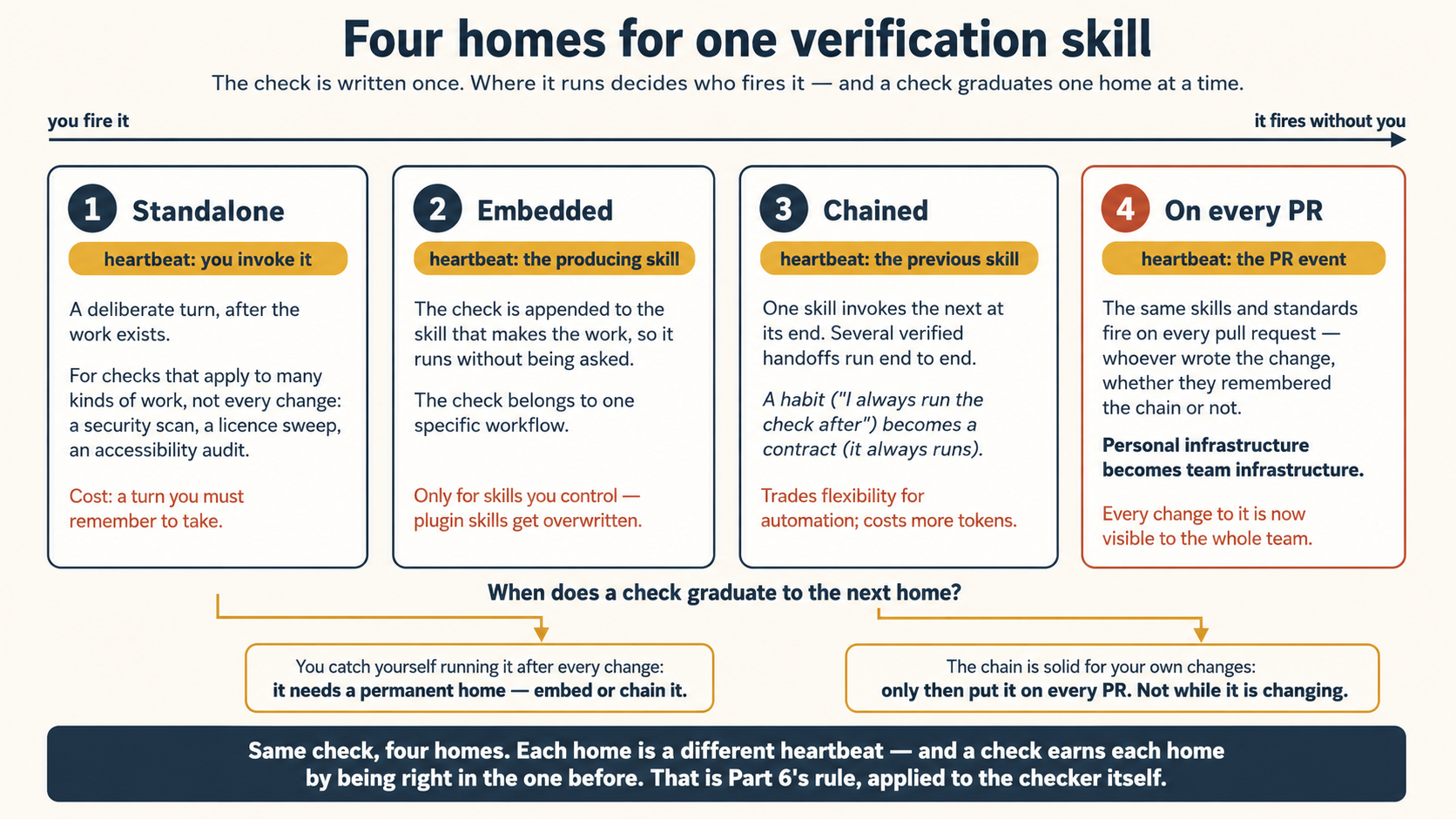
- Standalone. You invoke it deliberately, after the work exists. In this course's vocabulary, you are still the heartbeat. This is the right home for checks that apply to many kinds of work, but not to every change: a pre-commit security scan, a licence-header sweep, a pre-PR accessibility audit. The cost is that each invocation is a turn you have to remember to take.
- Embedded. The check is appended to the end of the producing skill, so the workflow runs it without being asked. The simplest version is one added line: "After creating the component, run eslint on it and address any errors before reporting completion." Verify the embed actually fires by invoking the skill on a fresh task and confirming the check runs as part of the output. If it does not, the earlier instructions in the skill are not loading it. One hard limit: embedding only works on skills you can edit. Built-in skills and plugin-managed skills get overwritten on update, so an appended check silently vanishes. For those, chain instead.
- Chained. One skill calls another at its end, so several verified handoffs run end to end. Anthropic's own Claude Code team runs this daily:
/code-reviewlooks for bugs,/simplifycleans up the diff,/verifyconfirms end-to-end behavior, and a custom/designskill checks UI changes against aDESIGN.md. Chaining is also how you add verification to a skill you cannot modify: write a thin wrapper skill that invokes the original, then invokes your check. The line worth remembering: what started as a habit ("I always run the check after") becomes a contract (the skill always runs the check when it finishes). The trade-off is real, though. Chaining gives up flexibility (you can no longer easily run one step alone) and every added link costs tokens on every run (Concept 13). Skip it when the steps are independent enough that you sometimes want just one. - On every PR. Once the chain is solid for your own changes, the same skills run on every pull request through the event heartbeat you built in Concept 7, meaning the Doorbell, with your check as its prompt. A teammate's change now passes the same gates yours did, whether they remembered to invoke anything or not. This is the moment verification stops being personal infrastructure and becomes team infrastructure: the check you wrote to save yourself two minutes a week now saves everyone two minutes a week, on every change.
The graduation rule. Do not start at home four. The signal that a check is ready to leave the standalone home is that you catch yourself running it after every change. At that point it has earned a permanent home, so embed or chain it. And wait before adding a PR-wide gate while the chain is still changing, because once the check guards the team's PRs, every change you make to it is visible to the whole team. Read those two rules again and you will recognize them: this is Part 6's prove it fast and watched before you trust it slow and unattended, applied to the checker itself. A check climbs the same trust ladder a loop does.
Three shortcuts, all current as of late July 2026:
- Start with what ships. A built-in
/verifyskill builds, runs, and observes the changes in your application. Try it before writing your own. And one smallCLAUDE.mdhabit from the same guidance: list your exact build and test commands in the rules file, so no run has to guess them. (You already know why from Concept 12: a command the agent guesses is a guess the loop repeats forever, while a written command is a fact it reads.) - Let the agent interview you. The fastest way to write a verification skill is the skill-creator plugin:
/skill-creator Create a skill for verifying frontend changes end-to-end. Interview me about my workflow.It asks, you answer, and the file appears. Hand-writing into.claude/skills/works exactly as in Concept 9. - The managed fourth home. Code Review (research preview) is home four as a product: a managed multi-agent service that runs an automated review pass on PRs in the repos you enable. You fix a finding and push, or reply by commenting
@claudeon the finding if the GitHub Action from Concept 7 is set up. Same shape as your hand-built chain, with Anthropic hosting the heartbeat and the reviewers.
Nothing new to install, which is the point. The SKILL.md above works unchanged from .opencode/skills/, and the four homes map onto parts you already built:
- Standalone is
opencode run "run the verify-log-hygiene skill on the current diff". - Embedded is the same one-line append to your own producing skill's body.
- Chained is your script, meaning the Concept 5 pattern, with each skill's exit state deciding whether the next
opencode runfires. Your shell holds the contract. - On every PR is the GitHub Action from Concept 7, with the check as its prompt. The default no-prompt PR review you already saw is Anthropic's
/code-reviewidea, built with OpenCode parts. A prompt pointing at your verification skill makes it your standards instead of generic ones.
A verification skill is a manual check you were already doing, written down once so the agent runs it and fixes what it finds. Start by invoking it yourself. When you notice you run it every time, attach it to the workflow. When the whole chain works for you, put it on every PR, and only then.
Two topics are left to the neighboring courses on purpose. Enforcement, meaning making a check unable to do anything beyond checking, command by command, is the Harness Engineering course. allowed-tools narrows the toolbox, but the real locks live in that course. Grading, meaning when the check is a rubric rather than a proof, and how far to trust a model's score, is the Trusting the Checker course. One product note belongs with that second course: Rubrics in Claude Managed Agents (beta) is this course's rubric-with-a-bar from Concept 2, shipped as a managed service. A separate grader agent verifies outcomes against a rubric, and failed work goes back for another attempt automatically. The shape you learned by hand is now a platform primitive. As everywhere, that is the mechanical layer: check the live docs.
You wrote a great accessibility check and want your whole team's PRs to pass it, starting today. The check has run twice, both times by you, invoked by hand. What does the graduation rule say, and which two homes are you skipping? Not yet. Two invocations by hand is a check still in its standalone home, and it has not yet shown the pattern that earns promotion (you running it after every change). Jumping straight to on every PR skips the embedded and chained homes where the check proves itself on your work first. And once it gates the team's PRs, every fix you make to it is visible to the whole team. Same ladder as Part 6: watched before unattended, personal before team.Show answer
Part 4: Memory Between Runs (The Spine)
12. State that survives between runs
Here is the part beginners skip, and it is the one that makes a loop a loop. The model forgets everything between runs. If each beat starts from nothing, you do not have a loop. You have the same first step, repeating forever. The fix is dull and powerful: keep the state outside the model, on disk.
With no save file, the agent dies at the same spikes every run. Then it saves, and the switch is yours. On, it reads its file and finishes. Off, it forgets and starts over.
That game is this concept, exactly. The agent forgets everything between runs, so it keeps a save file on disk, and that file is the spine. Respawning at the checkpoint instead of the start is your progress file (progress.md): what got done and what is still open, so the next run continues instead of starting from zero. The "spikes ahead" note it saved is your rules file (CLAUDE.md / AGENTS.md): a lesson learned once, so it stops repeating the same mistake. That is why the switch matters. With the files, the loop builds run over run. Without them, it is a stranger at the start line forever. Every run reads these files first and updates them last, because the repo remembers what the model cannot.
There are two layers of state, working together:
- The rules file (
CLAUDE.md/AGENTS.md): the steady habits the loop reads on every run. (Keep it short. You learned why in the last course. A bloated rules file is paid for on every single beat.) - A progress file: a plain markdown file (or a Linear board through MCP) that records what was tried, what passed, what is still open. This is the real spine. Tomorrow's 9am run opens it and picks up where today's run stopped.
The habit: every run reads the progress file at the start and updates it at the end. When the loop keeps making the same mistake, the fix is not a cleverer prompt. It is to have the loop write the lesson into the rules file, so the fix stays for every future run.
If the two layers of state feel abstract, here is the whole idea as a picture. Imagine training a new intern. You set their context once: the workflow, the ticket board, which tasks they may pick up, when to come ask you. Then you hand them a diary and two standing instructions. First: every time you get feedback, write the lesson in the front of the diary, and read it again each morning. For example: "don't use that design pattern," "this team squashes commits," "always run the linter before showing me anything." Second: before you go home, write in the back what you finished and where you stopped, so tomorrow starts where today ended, not from zero. The front of the diary is your rules file: durable lessons, read every run. The back is your progress file: checkpoints, updated every run. An intern without the diary learns the same corrections again and redoes yesterday's work forever, however smart they are. So does a loop, because the model's memory is wiped clean between runs, while the intern's at least fades slowly. The diary is not a nice-to-have for either of them. It is the difference between an employee and a stranger who shows up every day.
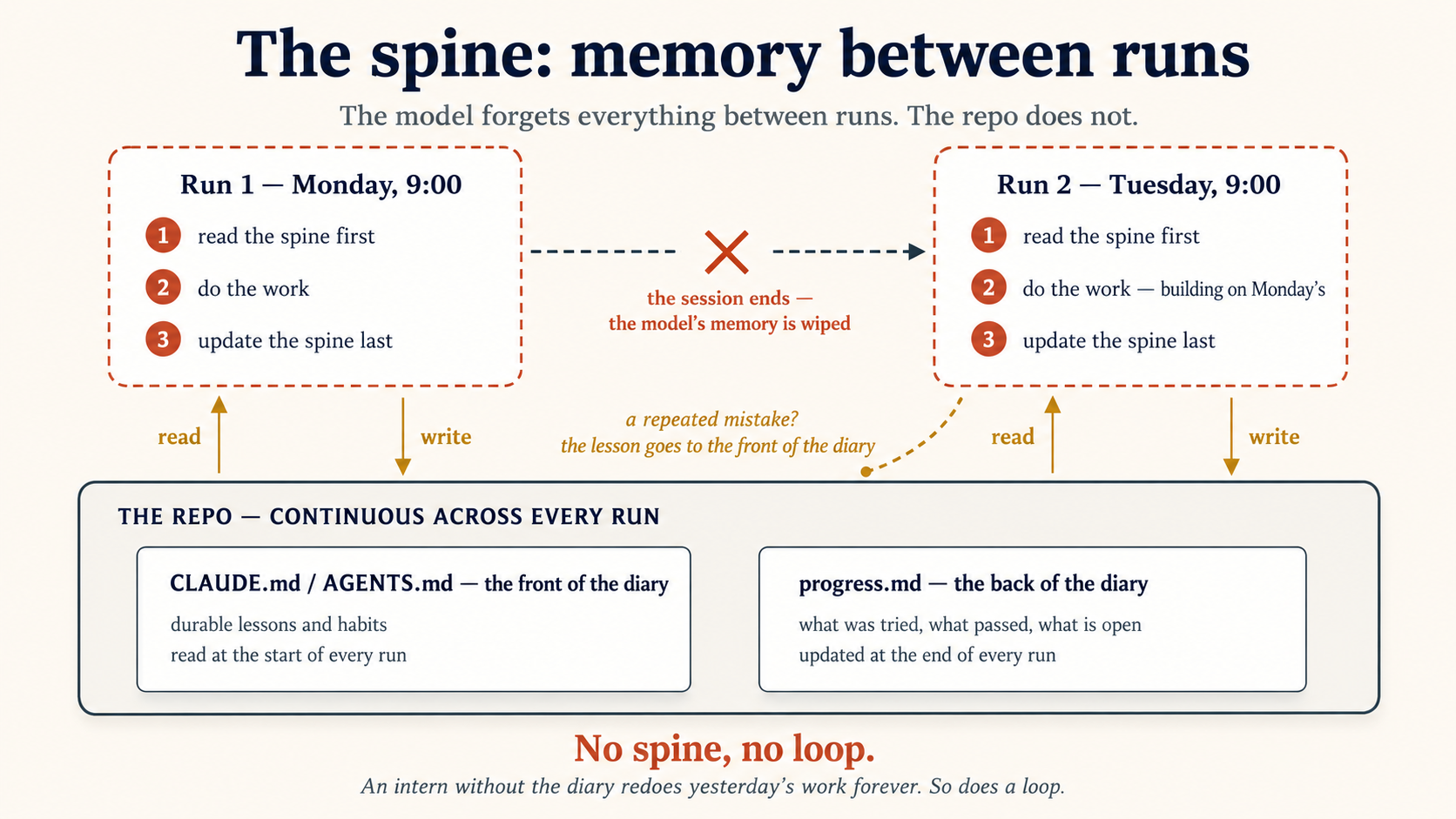
<!-- progress.md — the loop's memory between runs -->

## Done

- 2026-06-22: fixed flaky test in test/auth (retry on token refresh)

## In progress

- Dependency audit: 3 of 7 advisories patched; lodash bump blocked by an API change

## Open / needs a human

- CVE-2026-xxxx in image lib — the fix changes the output format, escalating to a maintainer
Because the progress file is just text in your repo, it is also the record of what the loop did while you were away. When you sit down at the human gate, you read the spine, not the full transcript of every run.
A spine is hard to believe until you watch a loop forget. So there is a project built to make it visible: Paper Watch. Every day it shows you the newest research papers on a topic you pick, but only the ones you have not seen yet. Nothing to install and no key: Claude fetches them from arXiv itself.
Clone it, open the folder in your agent, and ask:
show me what's new on arXiv about "LLM agents"
You get the latest papers, newest first. Now ask the exact same thing again, and it answers "nothing new since last run ✓". The loop remembered: it wrote every paper it just showed you into progress.md, and read that file back before answering. That file is the spine. To prove it, delete the memory and ask once more:
rm progress.md
show me what's new on arXiv about "LLM agents"
Every paper returns as "new." You just made the loop forget everything: no spine, no loop, in one command. To turn it into a real watch, give it a daily heartbeat (Concept 6): /schedule every weekday at 9am, run the paper-watch skill and show me what's new. arXiv refreshes about once a day, so a daily run is exactly the right rhythm.
Now hold it next to the Sky Watch from Concept 6 and the whole idea becomes clear. Both are daily Routines. But Sky Watch reprints today's asteroids every run and needs no memory, while Paper Watch shows only what is new and cannot work without the spine. Same heartbeat, opposite memory need. That contrast is exactly when a loop needs one.
Optional background, safe to skip on a first read.
The spine in this course is plain markdown on disk. That is not a beginner's simplification. It is where Anthropic's own memory work landed after a year of trying alternatives (their stated rule is "do the simple thing that works"), and the path they describe is worth knowing:
- A rules file (
CLAUDE.md) came first: a markdown file injected at the start of every session. It worked far better than expected, but it bloats, and a bloated file is paid for on every run. - In-session memory tools came next: let the agent decide when to read and write memories during a task. The autonomy worked. The tooling was too opinionated.
- Skills solved the growth problem: the agent reads only each skill's short description, and loads the full body on demand.
- The current best practice is the simplest of all: model memory as a plain file system. Markdown files in folders. Let the agent search them with the ordinary tools it already knows, like
grepand shell commands, instead of a special memory API. Let the store grow large, and keep it searchable.
Notice what that last step is. It is the spine, exactly as this course teaches it: files in the repo, read at the start, updated at the end, searched with normal tools. When a frontier lab's production answer and a beginner's first loop use the same design, that is a sign the design is load-bearing, not a training-wheels version of something fancier.
Optional technical detail, safe to skip on a first read.
The rules-file habit above is bigger than it looks. When your loop writes a lesson into CLAUDE.md so every future run behaves better, you are doing something by hand that has a name: a hill-climbing loop. Its output is not work. Its output is improvements to the system that does the work.
The automatic version works like this. Every run leaves a trace. A step reads the traces and looks for mistakes that keep happening. The findings then change the prompt, the tools, or the checker's rules. In short, the loop edits itself.
(LangChain describes four loops stacked together: the agent's tool cycle, a checking loop, an event-driven loop, and this improvement loop on top. swyx calls the practice of stacking loops loopcraft. Notice that the first three are this course's inner loop, maker-checker, and heartbeat under other names. The industry keeps arriving at the same shape. That is strong evidence that the shape, not the tool, is the skill.)
One distinction keeps all of this honest: none of it is the model learning. No public model today changes its own weights based on your sessions. The model that runs tomorrow is exactly the model that ran today. What improves is everything around it: the rules file, the skills, the checker's rubric, the prompt. Some people call the first thing self-learning and the second self-improving. Every loop in this course is the second kind, and the spine is why it works: the lesson survives on disk, because it cannot survive in the model. You can see the same split in what happens after a disappointing run. The beginner's reflex is a better prompt tomorrow, starting from zero again, so nothing carries over. The loop's reflex is: run, log, pull the lesson out, write it into the system, run again. The memory builds, the system gets sharper, and the gains add up, run after run.
You do not need a special platform to start. Read a week of progress.md entries and ask one question: "what should the rules file say, so this kind of mistake stops happening?" That is the same idea, at human speed. One warning, the same as everywhere in Part 6: an improvement loop you never read is a loop rewriting its own rules with nobody watching. Changes to the loop itself deserve the human gate too.
Optional technical detail, safe to skip on a first read.
The hill-climbing loop above now exists as a managed feature. Anthropic's applied AI team describes it in a 2026 conference talk, and their word for it is dreaming. The name fits: it is a process that runs while the working agents rest, and it cleans up what they learned.
First, their vocabulary. Memory work done in-band happens inside a live session: the agent pauses its task to write a lesson to disk. That is what this course taught in Concept 12, and it works. But it has two built-in limits. The agent must split its attention between the task you gave it and the memory work that helps future runs. And it can only see its own session, so it never notices a mistake that repeats across ten sessions or ten agents.
Dreaming is the out-of-band answer. It is a separate loop with its own heartbeat and its own token budget. One beat works like this:
- Collect the memory store (the rules files and progress files your loops maintain) and a batch of recent run transcripts, including the tool calls, not just the conversation.
- An orchestrator hands the transcripts to a fleet of subagents, each analyzing a share of them.
- The orchestrator looks for patterns that repeat across sessions: the same failing tool call, the same missing knowledge, the same style mistake.
- It proposes changes to the memory store, and attaches evidence: example transcripts where the pattern appeared, and how often.
- A human accepts or rejects each change before it takes effect.
Read that list again with this course's vocabulary. The batch schedule is a heartbeat. The memory store is the spine. The transcript analysts are subagents. The proposal-plus-evidence step feeding a human decision is the maker-checker split with a human gate on top. Dreaming is not a new shape. It is the six-part loop, pointed at the loop's own memory instead of at your code. The talk's picture for it is a school: the students (working agents) do the work, and a head teacher (the dreaming pass) reads all the marked papers, spots that every class failed the same question, and fixes the curriculum, so every student is better tomorrow, and no student spent class time on it.
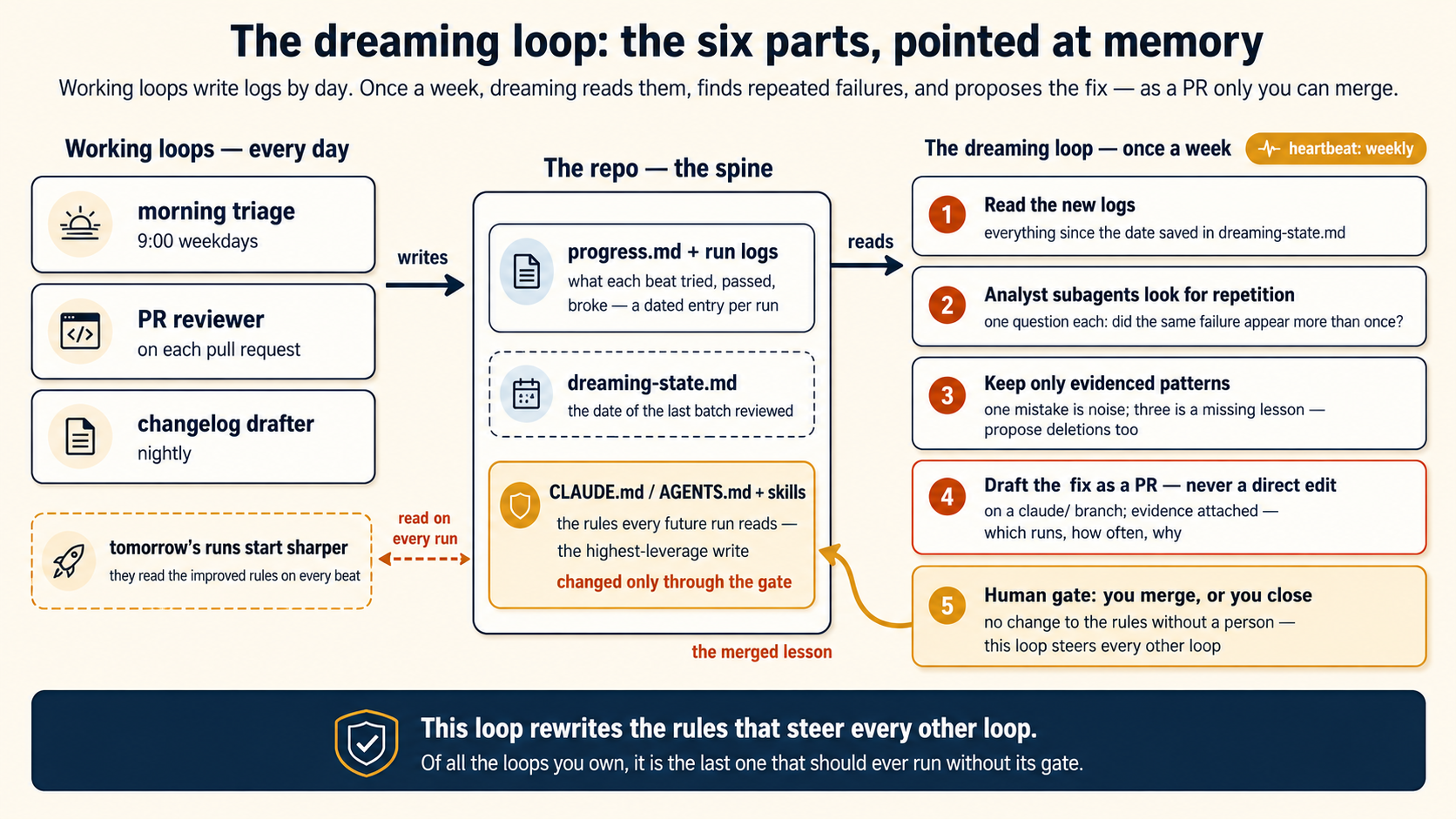
Two warnings from the same talk carry straight into your own loops. Memories go stale: a lesson written six months ago may now be wrong, so something has to sweep and prune, and that is half of what dreaming is for. And once many agents share one memory store, the store needs production guardrails. Those are covered where they belong, in Concept 14's note on shared memory.
Check your own tools first, because a version of this is already shipping. Claude Code has a research-preview feature called Auto Dream. While you work, Claude Code quietly writes its own notes about your project. Over many sessions those notes get messy: duplicates pile up, and old facts sit next to newer facts that contradict them. Auto Dream is the cleaner. It runs in the background between sessions, merges the duplicates, deletes notes that newer work has proven wrong, and it can only write to the memory files, never to your code. To see if you have it, run /memory in a session and look for the Auto-dream toggle. To run a pass by hand, just say "consolidate my memory files." OpenClaw ships a similar opt-in /dreaming system, and OpenCode users will find community equivalents. As always, this is the mechanical layer: check the live docs.
One warning before you rely on it. The cleaner trusts newer evidence over older notes, so it may rewrite or delete a note even if you wrote that note by hand. So keep this rule: a rule you never want touched goes in CLAUDE.md, the file only you control. The auto-managed notes are Claude's notebook. CLAUDE.md is yours.
Also keep one distinction straight, because the two jobs look alike. Auto Dream does hygiene: it keeps the notes clean. The loop below does improvement: it finds mistakes your loops keep repeating and proposes new rules to stop them. A cleaner and a coach. Same shape, different job, and the coach is the one worth building yourself, because you already know every part:
- Heartbeat: weekly, not daily. Dreaming looks for patterns across runs, so it needs a batch of runs to look at. A weekly cloud Routine, or a weekly
cronor GitHub Actions schedule, is the right cadence. Daily is too often to see patterns, and it also multiplies cost for nothing (Concept 13). - The input: make your loops leave transcripts it can read. This is the one prerequisite. Your working loops must log what happened, using the observability habit you already have: a dated entry per beat in
progress.md, plus run logs kept in the repo (in OpenCode,opencode run --format jsonandopencode exportgive you the full record, and in Claude Code, have each Routine append its outcome to a log file it commits). No logs, nothing to dream about. - The body: an orchestrator and analyst subagents. The dreaming prompt reads the batch of logs since its last run. For a big batch, it hands shares to subagents, each answering one question: what failed, and did the same failure appear more than once? One mistake is noise. The same mistake three times is a missing lesson.
- Maker-checker, twice over. The analysts propose, and the orchestrator keeps only patterns with enough evidence. Then the real checker: the loop never edits the rules file or a skill directly. It drafts the change on a
claude/branch and opens a PR whose description carries the evidence: which runs showed the pattern, how often, and why this line would stop it. - The human gate: you merge, or you close. A change to
CLAUDE.mdor a skill is the highest-leverage write in your whole system, because every future run of every loop reads it. That is exactly where the course says the gate belongs: costly, hard to reverse, so a person decides. - The dreaming loop's own spine. A small state file (say
dreaming-state.md) recording the date of the last batch it reviewed, so next week it reads only new logs instead of re-dreaming the whole history.
Notice what this design gives you for free. The store lives in git, so versioning and rollback cost nothing. All rule changes arrive as PRs, so permissions reduce to "nobody merges but you." And staleness has a natural home: tell the dreaming prompt to also propose deletions, meaning rules no recent run needed and lessons the current logs contradict. A memory store that only ever grows is a rules file you pay for on every beat and trust less every month.
It can launder an attack. The transcripts a dreaming pass reads contain text outsiders wrote: issue bodies, PR descriptions, pages a loop fetched. Security researchers call the risk memory poisoning: an instruction planted in one run's input gets written into memory and steers every later run, long after the original attack is gone. A dreaming pass is the exact machine that could turn a one-time injection into a permanent rule. This is not a reason to skip dreaming. It is the reason for two rules the design already has. Evidence, always: a proposal must cite the runs it came from, so you can read the source before you trust the lesson. And the human gate, always: a rule change that skips review is the one write an attacker most wants. The same pass also works in your favor, because a weekly read of the rules file is your best chance to spot a line you never approved.
It can erode what it maintains. Researchers who studied repeated memory rewriting found two failure patterns: brevity bias, where a rewrite keeps the general point and drops the specifics ("check the response payload, not the status code" becomes "handle errors"), and context collapse, where each full rewrite is a lossy copy of the last, until a detailed playbook has degraded into a vague paragraph. The defense is the one this loop already uses: propose small diffs, never full rewrites. And because the store lives in git, a shrinking rules file shows up in the diff where you can refuse it. One small habit prevents a whole class of decay: a memory file should never contain a relative date. "Yesterday we chose Redis" is meaningless in six weeks. Every consolidation pass converts "yesterday" to the actual date, and your loops should write absolute dates in the first place.
One more honest limit: a dream needs material. A loop with three runs of history, or a throwaway project, has no patterns to find, and the pass will produce plausible-sounding lessons from noise. Dream over loops with real mileage, and check the result the cheap way: a lesson that worked is a failure that stops appearing in next week's logs.
One warning, the same one from the improvement-loop note above: this loop rewrites the rules that steer every other loop. Of all the loops you own, it is the last one that should ever run without its gate.
Anthropic ships the managed version as part of its Managed Agents memory tooling. As everywhere in this course, that is the mechanical layer: check the live platform docs before you rely on any product detail. The lasting layer is the shape, and you built it yourself two paragraphs ago.
Where should a loop keep what it has done so far, and why not in the conversation? On disk, in a progress file (plus the rules file), or a board like Linear. The model's memory is wiped between runs, so anything that must survive lives outside the model. The repo remembers. The model does not.Show answer
Part 5: A Complete Loop, Twice
Before you let any loop run on its own, it needs all seven of these. The loop you are about to build has every one:
- Success condition: how it knows the work is done (Concept 5).
- Limit: max tries, minutes, or spend, so it cannot run forever (Concept 13).
- Isolated branch or worktree: so parallel work does not collide (Concept 8).
- Read-only checker: a separate agent that grades but cannot edit (Concept 11).
- State file: the spine, so it remembers between runs (Concept 12).
- Human gate: risky or failed work goes to a person, never straight to
main(Part 5). - A log or notification: so a failure overnight is visible, not silent (Part 6).
Miss one and the loop is unsafe, forgetful, or invisible.
Now join the parts. Here is one loop: a morning maintenance loop that sorts through overnight CI failures, drafts safe fixes, has them checked, opens PRs for the safe ones, and flags the rest. We build it once in each tool. The files below are real. You can copy them into a repo and run them.
The loop shape (the same in both):
- Heartbeat: every weekday at 9am.
- Skill: a
daily-triageskill holds the steps, so the prompt stays one line. - Spine: read
progress.mdat the start, update it at the end. - Worktree: each fix drafted in its own checkout.
- Maker-checker: an implementer drafts, and a separate reviewer says PASS or FAIL.
- Connector: open a PR for PASS. For FAIL or anything risky, write it to "needs a human" and stop.
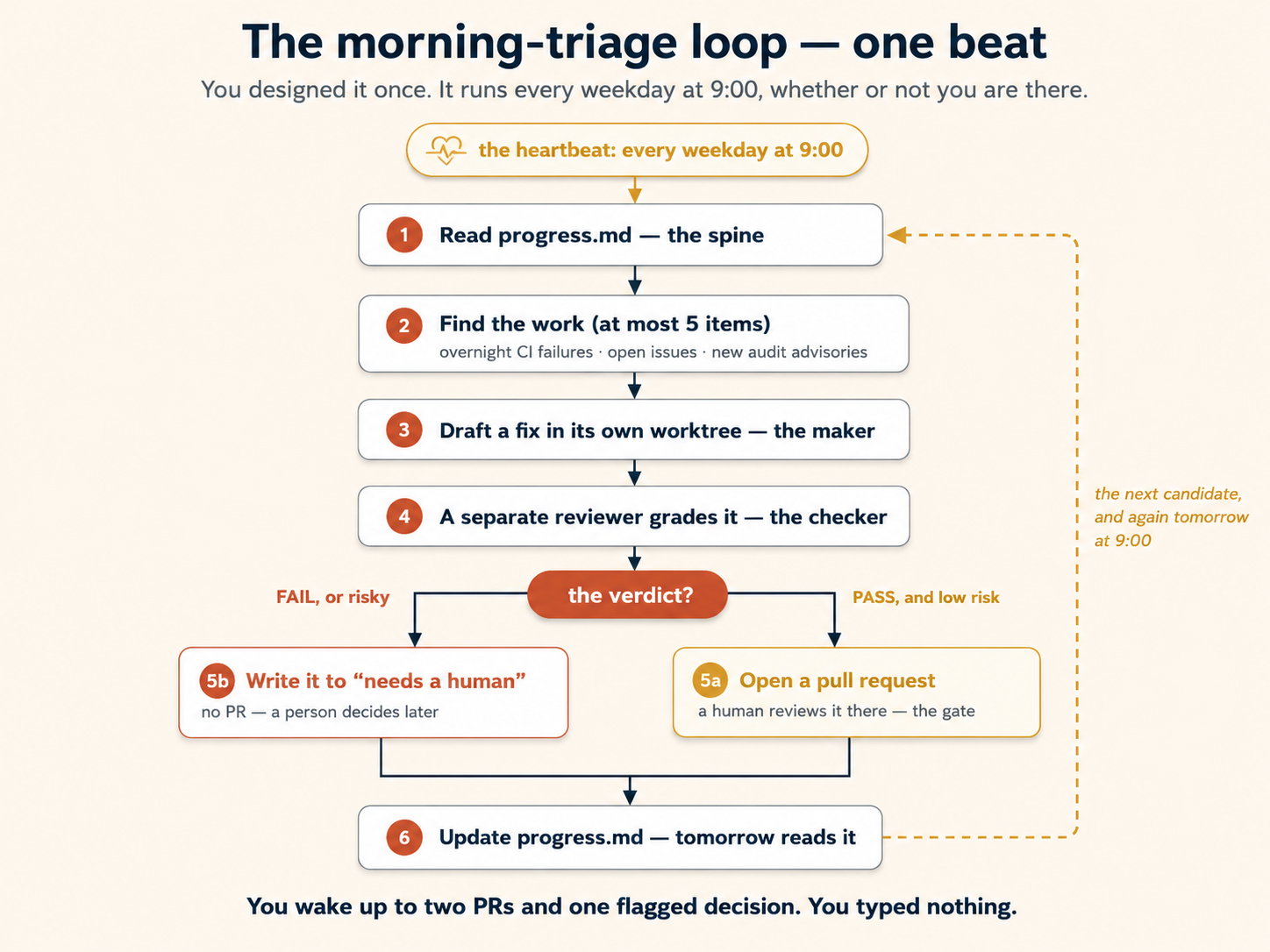
The shared skill
This one file works in both tools. Save it as .claude/skills/daily-triage/SKILL.md (Claude Code) or .opencode/skills/daily-triage/SKILL.md (OpenCode).
---
name: daily-triage
description: >-
  Runs the morning maintenance pass. Reads the progress file, gathers overnight
  CI failures, open issues, and new audit advisories, drafts safe fixes (each
  one checked by a separate reviewer agent), opens pull requests for what passes,
  and writes anything risky to the progress file for a human. Use this for the
  scheduled morning maintenance loop.
---

# Daily triage

You are the morning maintenance loop. Work through these steps in order.
Do not skip the progress file. It is your only memory between runs.

## 1. Read your memory first

- Open `progress.md`. Read the "In progress" and "Open / needs a human" sections.
- Do not redo anything already listed under "Done".

## 2. Find the work

Gather candidates in this order, and stop once you have at most 5:

1. CI runs that failed since the last entry in `progress.md`.
2. Open issues labelled `bug` or `maintenance`.
3. New advisories from `npm audit` (or this project's audit command).

## 3. Work each candidate

- Create an isolated checkout: a git worktree, or a fresh branch named
  `claude/<short-slug>`.
- Draft the smallest fix that solves the one problem. Do not bundle changes.
- Send the diff to the reviewer agent. Wait for its verdict before going on.

## 4. Decide from the verdict

- PASS, and the change is low risk (no public API change, no data migration,
  no file deletion): open a pull request. Title it `fix: <one short line>` and
  link the issue.
- FAIL, or the change touches anything risky: do NOT open a pull request. Add a
  short entry to the "Open / needs a human" section of `progress.md`. Say what
  you tried and why you stopped.

## 5. Update your memory last

- Move finished items to "Done" with today's date.
- Save `progress.md`. This is the file tomorrow's run will read.

## Rules

- Never open more than 5 pull requests in one run.
- Never change `main` directly. Only `claude/*` branches.
- When in doubt, escalate. A flagged item a human checks is always safer than a
  wrong fix shipped while no one was watching.
The reviewer (the checker)
The reviewer is the maker-checker split in practice. You need both files. This is not an either/or tool choice. The format differs a little per tool, so each is shown in full below.
Claude Code, saved as .claude/agents/reviewer.md:
---
name: reviewer
description: Reviews a diff against the spec and the test results. Replies PASS or FAIL with reasons. Makes no changes.
tools: Read, Bash
model: claude-haiku-4-5-20251001
---

You are a strict, read-only code reviewer. You never edit files.

1. Run the tests and the linter. Read the output yourself. Do not trust a claim
   that they pass.
2. Check the change against the project conventions in `CLAUDE.md` and the
   relevant spec.
3. Look for bugs, missing edge cases, security risks, and any change to public
   behaviour.

Then reply with exactly one of:

- `PASS` — followed by one line saying what you verified.
- `FAIL` — followed by the specific reasons, one per line.

A change that only "looks fine" is not a PASS. The tests must actually pass, and
the change must do only what was asked.
One honest note on the tools line: it takes tool names only (Read, Bash), so it cannot pin the reviewer to just the test, lint, and diff commands. For now, the numbered instructions carry that limit. The next course, Harness Engineering, adds the rule that enforces it. (And the checks this reviewer grades against do not have to live in its prompt. The verification-skills interlude shows how to write each check as its own skill, so the reviewer and the /goal checker grade against the same file.)
OpenCode, saved as .opencode/agents/reviewer.md:
---
mode: subagent
model: anthropic/claude-haiku-4-5-20251001
description: Reviews a diff against the spec and tests. Replies PASS or FAIL with reasons. Read-only.
permission:
  edit: deny
  bash:
    "*": deny
    "npm test*": allow
    "npm run lint*": allow
    "git diff*": allow
---

You are a strict, read-only code reviewer. You never edit files.

1. Run the tests and the linter. Read the output yourself. Do not trust a claim
   that they pass.
2. Check the change against the project conventions in `AGENTS.md` and the
   relevant spec.
3. Look for bugs, missing edge cases, security risks, and any change to public
   behaviour.

Reply with exactly one of:

- PASS — followed by one line saying what you verified.
- FAIL — followed by the specific reasons, one per line.

A change that only "looks fine" is not a PASS. The tests must actually pass, and
the change must do only what was asked.
Starting the loop on a schedule
Make a Routine at claude.ai/code/routines with a weekday-9am schedule, your repo, and your GitHub and Slack connectors. Point its prompt at the skill, so the routine definition stays tiny:
Run the daily-triage skill.
Start by reading progress.md; finish by updating it.
For each fix: draft it in an isolated worktree, have the reviewer subagent grade it,
open a PR only on PASS, and append anything risky to the "needs a human" section.
The skill carries the steps. .claude/agents/reviewer.md is the checker. isolation: worktree keeps parallel fixes apart. The GitHub connector opens the PRs. Because it is a cloud Routine, it runs at 9am whether your laptop is open or not. It also fits inside your plan's daily run cap: a weekday-9am schedule is 5 runs a week, so even a Pro cap of 5 a day leaves plenty of room. A Routine firing every few hours would not. Setting one of these up for the first time, meaning the environment, the connector scoping, and the secrets panel, is walked through field by field in the Routines appendix.
Build it as a GitHub Actions workflow, so it runs in the cloud with no machine of yours awake. The Action is the heartbeat. opencode run is the worker. Your repo holds the skill, the agents, and progress.md.
name: morning-maintenance
on:
  schedule:
    - cron: "0 9 * * 1-5"
jobs:
  triage:
    runs-on: ubuntu-latest
    permissions: { contents: write, pull-requests: write, issues: write }
    steps:
      - uses: actions/checkout@v6
        with: { persist-credentials: false }
      - uses: anomalyco/opencode/github@latest
        env: { ANTHROPIC_API_KEY: ${{ secrets.ANTHROPIC_API_KEY }} }
        with:
          model: anthropic/claude-sonnet-5   # confirm with `opencode models`
          prompt: |
            Run the daily-triage skill.
            Read progress.md first; update it last.
            For each candidate fix: draft it on a new branch, then invoke the
            @reviewer subagent to grade it. Open a PR only when the reviewer
            replies PASS. Append anything risky to the "needs a human" section
            of progress.md and leave it for the maintainer.
The reviewer agent (on a cheaper read-only model) is the checker. New branches do the job of worktree isolation in CI. The OpenCode GitHub app opens the PRs. Want it on your own machine instead of GitHub's? The exact same prompt runs from a cron line calling opencode run, and only the heartbeat changes.
What one real morning looks like
You designed all of the above once. Here is a single run, the kind you would wake up to (the run below shows the shape, not a recording):
[09:00] daily-triage fires
  → reads progress.md: 1 item still "in progress" (lodash bump), nothing new flagged
  → finds: 2 CI failures overnight, 1 new npm-audit advisory
  → CI failure #1 (flaky auth test):
        drafts fix on branch claude/fix-auth-retry
        reviewer → PASS (tests green; retries on token refresh; no API change)
        → opens PR #142, links the issue
  → CI failure #2 (type error in report.ts):
        drafts fix on branch claude/fix-report-types
        reviewer → PASS → opens PR #143
  → advisory (image library):
        the safe fix changes the output format
        reviewer → FAIL (public behaviour change)
        → writes it to "Open / needs a human" in progress.md, opens no PR
  → updates progress.md, exits
[you, 09:30] two PRs to review, one flagged item to decide on. You typed nothing.
The run above, animated: it fires, finds the work, drafts each fix, and a separate reviewer grades every one PASS or FAIL, shipping the safe two as PRs and refusing the risky one. Then it hands you the human gate. You make the one call that needs a person.
Look at what happened. The loop found the work, drafted it, checked it, shipped the safe part, and handed you only the one decision that needed a person. That is loop engineering in practice. And notice: the only real difference between the two tools was the heartbeat and where the run happened. Everything in the middle, meaning skill, spine, worktree, maker-checker, and connector, was the same design.
In the morning-triage loop, what stops a wrong fix from being merged while you sleep? Three things together: the reviewer subagent must return PASS (maker-checker), only low-risk changes may open a PR, and the human gate sends anything risky or failing to a "needs a human" note instead of Show answer
main. Every run is also capped and logged.
Part 6: Keeping Human Control
A loop changes the work. It does not take you out of it. Three problems get bigger as your loops get better, not smaller. This part is the most important in the course.
Your loop is one of three feedback cycles
You just built a loop. It has six parts. Once it starts, it runs on its own: the agent writes code, tests it, fixes it, and tries again, without you.
That is one loop. It is the fastest one. It turns in minutes. But it does not work alone. It is the smallest of three loops, and the other two are yours to run.
The easiest way to see them is with an example. Say you ask an agent to build a small typing game for a child.
- The coding loop turns in minutes. The agent writes the game, tests it, and fixes bugs until it matches your instructions. This is the loop you just built.
- The feedback loop turns in hours. You open the game, try it, and decide what to change: make the buttons bigger, add cat costumes the child can unlock, add a login so a parent can help. Then you update your instructions, and the agent builds again.
- The outside loop turns in days. Real people use the game. A friend tries it. A child plays with it. What they do shows you what to fix next.
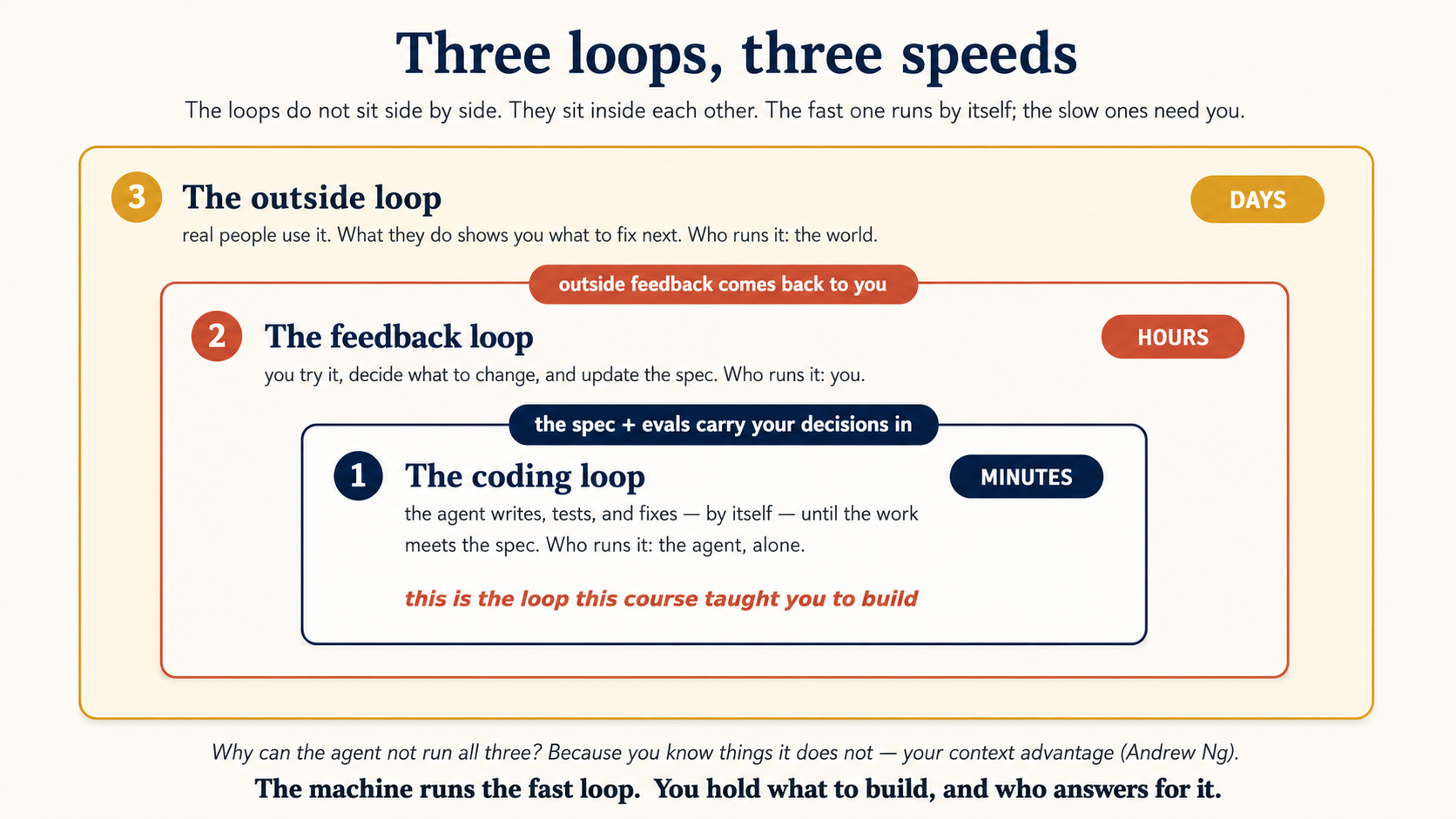
The loops do not sit side by side. They sit inside each other. Many coding loops happen while you run one feedback loop. Many feedback loops happen while the outside world sends back one round of feedback. The fast loop runs by itself. The slow loops need you.
Two words to know. A spec is your written description of what to build. Evals are a small set of tests that check whether the agent got it right. Together they sit between the first two loops and carry your decisions into the code.
Now the main idea, from Andrew Ng. Why can the agent not run all three loops by itself? Because you know things it does not: who will use this, what they really need, and what "good" feels like. As long as you know something the agent does not, you stay in the loop to tell it. Ng calls this your context advantage.
That is the same lesson this course ends on. The machine runs the fast loop. You hold the two things it can never hold: what to build, and who answers for it.
Even if you never build a product, keep this map. It shows where the human sits in any agent's work. To make the spec that joins the first two loops sharper, see Spec-Driven Development. To see how your role grows across the outer loops, see The Roles This Book Trains.
13. Token cost is the real limit, not the commands
This is by far the most common way loops go wrong. A loop runs again and again. It often starts subagents, and each subagent runs its own model and tools. The cost grows faster than almost anyone expects. The fixes are simple:
- Cap every loop: max tries, max minutes, or max spend. Always (Concept 5).
- Match the model to the job: a strong model to plan and check, a cheap one to do the work. This is the single biggest saving, and you already learned it in the last course. On Claude Code, match the effort level to the beat too (
/effort, orCLAUDE_CODE_EFFORT_LEVELfor headless runs). The default is plenty for routine triage. The higher settings are for beats that really need deep reasoning. Paying maximum effort on every fire of a scheduled loop is the same mistake as running a frontier model on a mechanical chore. - Keep the loop prompt and the rules file short: you pay for them on every beat. Push the detail into skills that load only when used.
- Run it less often: once an hour instead of every five minutes is usually plenty, and about twelve times cheaper.
A quick sense of the numbers (example). Suppose one beat, the maker plus the checker, reads about 40,000 tokens and writes about 6,000. At the standard Sonnet price of $3 per million input tokens and $15 per million output tokens, that is about $0.20 per beat. Five beats a day across a 20-day month is about $20.
The same loop running every five minutes, all day and all night, performs more than one hundred times as many beats. Its monthly cost can easily exceed $1,000, even though each beat does the same work. Frequency, not the command name, drives this increase.
Optional current-model detail: Sonnet 5 launched with introductory pricing through August 2026, and its tokenizer may produce more tokens for the same text than older models. Measure the tokens used by your actual loop, multiply by the current model price, and then multiply by the number of scheduled runs.
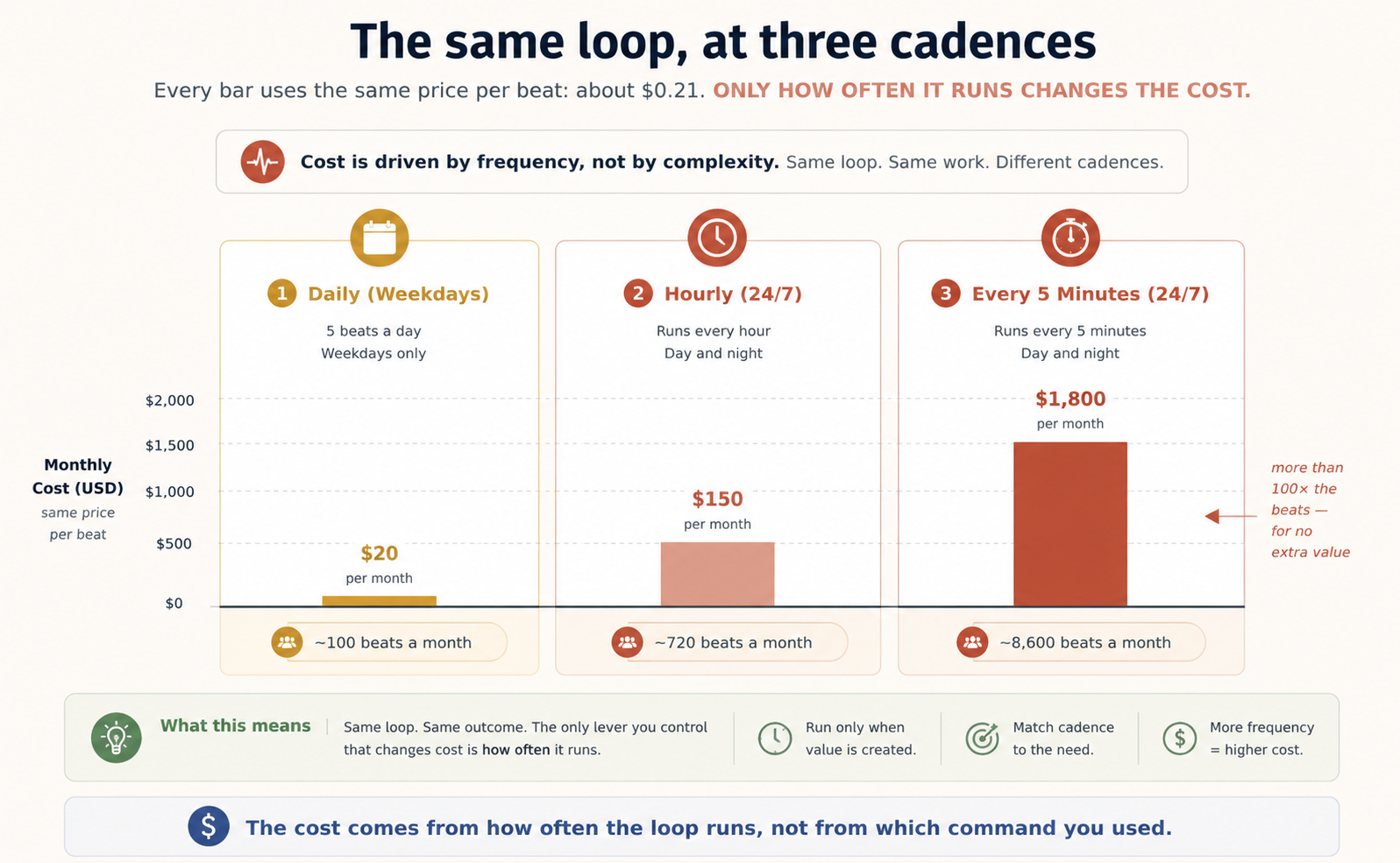
The model is a second cost lever in OpenCode. The example above assumes a Sonnet-class model at the standard price. Claude Code's loop commands use Claude, while OpenCode lets you select another model. A lower-cost model can reduce the price of each beat substantially.
However, a weaker maker may produce more failed attempts, which can remove the savings. A practical pattern is lower-cost maker, trustworthy checker: use the cheaper model for clear, mechanical work, and keep tests, linters, or a reviewer you trust as the checker.
Frequency still matters most. A model that is 30 times cheaper but runs every five minutes can still cost more than Sonnet running once an hour. The model changes the cost per beat. The schedule and retry rate determine how many beats you pay for.
The common failure is always the same: a loop running on its own, with a stopping condition it could never meet, retrying all night. Set a limit before you start it. Watch the first few real runs. Then let it run on its own.
The spine is usually taught as a correctness feature: no memory, no loop. But Anthropic reports a second effect from production fleets. An agent with a well-kept memory store does the task better the second time, because the lesson from the first attempt is already on disk. Better first attempts mean fewer retries, and fewer retries mean fewer tokens. So the loop gets more accurate and cheaper at the same time. This is also the honest answer to "why spend tokens on a dreaming pass": the pass costs tokens once, and it pays them back on every future beat that succeeds first time instead of retrying.
14. Checking the work is still your job
A loop running on its own is a loop making mistakes on its own. The maker-checker split makes the loop's "it's done" mean something. But "done" is still a claim, not a proof. Your job did not disappear. It moved. You no longer type each step, but you are still the one who confirms the loop shipped code that actually works. Read the diffs the loop opened. Trust the loop to do the work. Check the work before it counts.
Optional technical detail, safe to skip on a first read.
Three things this course teaches for one loop become organization problems the moment you have many loops. The enterprise-platform world has started to write about all three.
First, the math of failure when nobody is watching. Model steps are reliable, but not certain. Put five steps in a row, each right 95% of the time, and only about three runs in four finish cleanly. It gets worse. An unattended loop's mistakes build up inside the spine. A wrong line in progress.md tonight is a wrong starting point tomorrow. This is why the maker-checker split matters so much. The checker is what stops one bad step from becoming permanent.
Second, limit what the loop can do, not just what you review. Your reviewer grades the work it was shown, meaning the diff. But that review does not prove the loop did nothing else. It could have changed a config value, flipped a flag, or called an outside system through a connector it happened to have. The fix is not a smarter reviewer. The fix is a narrower loop. Think of every part of a loop as a standing permission. A schedule is permission to act while you sleep. A connector is standing access to a real system. A subagent acts under a borrowed identity. So give each loop only what its job needs. (The claude/ prefix, the short connector list, and the read-only checker are all this one idea.)
Third, the counting question. When five colleagues copy your loop, someone will eventually ask a set of hard questions. How many loops does this team run? What can each one touch? Whose identity does each one act under? Who approved them? That is no longer loop engineering. It is workforce management. It is exactly where this book's Human-Agent Teams material and the Digital-FTE idea pick up. A loop that earns trust on its own still has to earn a place on a team.
Optional technical detail, safe to skip on a first read.
One loop writing to its own progress.md needs none of what follows. But the moment several loops, or a whole fleet, read and write one shared memory store, new failure modes appear: two agents writing the same file at once, one agent "fixing" the organization-wide rules that every other agent reads, and lessons that were true in January but wrong by June. Anthropic's team, running exactly such fleets in production, names four guardrails. Each is an old software practice, re-applied to agent memory:
- Versioning. Every change to the store is recorded: what changed, which run caused it, and who or what made it. A bad update can be rolled back instead of silently poisoning every future run. (A git-tracked spine gives you this for free, which is one more reason the spine lives in the repo.)
- Conflict checks before writing. Before an agent commits an edit, it checks whether the file changed while it was drafting. If it did, the agent re-reads and tries again, instead of overwriting someone else's update. Databases have done this for decades, and agent memory needs it too.
- Permissions by level. An agent may write freely to its own scratch space. The organization-wide rules that every agent reads should be read-only for ordinary agents, with changes going through review. One wrong line at the top level scales to the whole fleet.
- Portability. Curated memory is an asset you will want in more than one product. Keep it in a plain, open format behind a clean interface, so it can move with you.
The common thread: a memory a fleet depends on is production data, and it deserves production discipline. The stale-memory problem in particular is what the dreaming pass in Concept 12's note exists to sweep.
In, on, or out of the loop: the industry's names for the gate
This course says "the human gate." The wider world, meaning AI safety papers, the EU AI Act, bank compliance teams, and enterprise procurement, uses three older terms for the same idea. Learn them once. A buyer or a regulator will use them, and they map exactly onto what you have already built.
| Term | What it means | Where you built it in this course |
|---|---|---|
| Human in the loop | A person must approve each action before it takes effect. Higher control, slower. | Prompting turn by turn. Plan mode. The merge at the human gate. The two-routine gate (A4). |
| Human on the loop | The system acts on its own, and a person watches and can step in. Faster, more autonomy. | A Routine pushing to claude/ branches while you review each morning. Reading the spine at 9:30. |
| Human out of the loop | No one watching, no way to intervene. | Nowhere, on purpose. In this course, this is not a third option. It is the failure mode. |
Three things follow from the table.
First, the mindset shift in Concept 1 has a name now. Prompting is human in the loop: you are the heartbeat, the checker, and the memory, and nothing happens without your turn. Loop engineering moves you on the loop: the system runs, and your attention sits at the gate. That is the whole shift of this course, said in the industry's words.
Second, a good loop is not one or the other. It is a mix, set per action. The morning-triage loop runs on-the-loop for the safe fixes and drops back in-the-loop for anything risky: the reviewer's FAIL, the public-behavior change, the merge itself. The claude/ branch rule is exactly this: unattended work, with a mandatory in-the-loop step before main. And the checker ladder from Concept 2 tells you how to set the mix: the weaker the checker, the more actions must move from on-the-loop back to in-the-loop. A passing test earns autonomy. A rubric score does not.
Third, "out of the loop" is where AI gravity pulls. Nobody designs an out-of-the-loop system on purpose. It happens by drift. Stop reading the diffs, trust the green checkmarks, skip the weekly read of what shipped, and a loop you designed as on-the-loop quietly becomes out-of-the-loop, with no design change at all. The dogfooding rule is the defense: put the human where a wrong automatic move is costly and hard to reverse, and check that the human is actually still there. Concept 15's weekly habit is that check.
When you sell a Digital FTE into a regulated vertical, expect the question in these exact words: "Is this human in the loop or on the loop?" Now you can answer it precisely, action by action, and point at the gate.
In the loop: a person approves every action. On the loop: the system acts, and a person watches and can stop it. Out of the loop: nobody watching, which is never acceptable for writes. Every loop in this course is on-the-loop by default, with in-the-loop gates at the risky steps.
The What's New loop in the dogfooding section ships with no approval step at all. Is that human in the loop, on the loop, or out of the loop, and why is it acceptable there? On the loop. No one approves each run, but the output is public, logged, and one revert away from fixed, and the team reads the transcripts. It would only become out of the loop if nobody ever read what it published. The dial is set by the cost of a wrong move, and a clumsy changelog line is cheap to reverse.Show answer
15. Don't stop understanding your own project
The faster a loop ships code you did not write, the wider the gap between what is in your project and what you actually understand. That gap is a real cost, and a smooth loop grows it quietly. The cure and the trap are the same act. Designing the loop keeps you engaged when you do it with care. It lets you stop thinking when you do it to avoid the work. Same action, opposite result. The loop cannot tell the difference. You can.
Two people can build the exact same loop and get opposite results. One uses it to move faster on work they understand deeply. The other uses it to avoid understanding the work at all. Build the loop. But build it like someone who plans to stay the engineer, not just the person who presses go.
Those two people are under the same force, and it has a name. MIT Sloan's Eric So calls it AI gravity: the steady pull to let AI do more and more of your thinking. A loop makes that pull stronger, because it runs while you sleep. So the gap between what ships and what you understand can grow even on days you touch nothing. Left alone, the pull weakens the two ends this course says are yours. Intent slips from a precise, checkable condition down to "just keep it working." Accountability slips from reading the diffs down to trusting the green checkmarks. The loop keeps running either way. It cannot tell whether you are still the engineer. Concept 15's weekly habit is how you push back: read what shipped, and check that your understanding kept up with what the loop changed.
This is the main idea of the whole course. Each year, the tools perform more of the loop's mechanics. Features such as dynamic workflows, /goal, Routines, retry limits, per-agent steps limits, and background sessions now replace work that previously required custom scripts.
The tools still cannot take over the two ends introduced in Concept 1: intent, stated precisely enough to be checked, and accountability for what ships. Those responsibilities make this engineering rather than simple button-pushing. Use the stronger tools, but keep intent and accountability under human control.
When an unattended loop fails
An unattended loop fails unattended too. Before you trust one overnight, make it observable:
- Send output where you will see it: a log file, a Slack or Discord message (Claude Code Channels), or the Triage inbox. Not the terminal you already closed.
- Write a line every run, even on failure: each beat appends a note with a timestamp to
progress.md(or a log), covering what it tried, what passed, and what broke. A silent failure is the worst kind. - Keep runs replayable: in OpenCode,
opencode run --format json,opencode export <id>, andopencode session listgive you the full record. In Claude Code, a Routine keeps its run history in the web UI, and background sessions show up in--resumenext to interactive ones. - Fail loudly at the limit: when the loop hits its cap or errors, it should leave a clear "needs a human" note, not just stop.
- Prove the loop before overnight use: grow a loop on two axes at once. Cadence: run it hourly and watched for a few days before you let it run nightly and unattended. Capability: start report-only (the loop may describe problems but fix nothing), then allow fixes behind the human gate, and only then unattended action. A loop earns each level by being right at the level below. When something looks wrong, read the spine first. It tells you what the last good run did.
A loop you cannot debug is a loop you cannot trust.
After loops: graph engineering
One thread this course leaves deliberately open. On July 18, 2026, Peter Steinberger, the "design loops that prompt your agents" voice from the start of this course, posted a twelve-word question after midnight: "Are we still talking loops or did we shift to graphs yet?" The crowd turned it into a slogan ("loop engineering is dead, long live graph engineering"), and behind the noise sits a real question this course cannot answer alone: once you run more than one loop, the loops need wiring, meaning who feeds whom, who checks whom, where their shared memory lives, and which measurements no loop can argue with.
That question gets a full course of its own, two steps ahead in this series: Graph Engineering (after Harness Engineering). It teaches the meaning the field settled on: the execution graph, the shape of one run drawn as nodes and edges, the test that finds the arrows carrying no data, the diamond that replaces them (fan out, reduce, verify with a clean-context checker, synthesize), and the anchors no node can argue with, with the memory graph and the governance graph kept as deeper notes. For now, keep only the honest version of the slogan, because everything else assumes it: a graph is loops, composed. Remove the loops and the graph is empty boxes. A loop is one node, and every stopping condition, checker, spine, and gate you built here is what graph engineering assumes you already know how to build. Build your first loop exactly as this course taught. The moment a job is wider than one loop, the graph course is waiting.
True in late July 2026. The term may stick or fade, but the pattern it points at is stable.
Using these loops in this book (dogfooding)
By now the shape is familiar. A loop is a system that finds the work, does it, checks its own result, writes down what it did, and decides what is next, all started by a heartbeat and held together by a spine. You have built one twice, on paper. This is where it stops being on paper.
Before any tool asks for your trust, there is a fair question: do the people who built it run it themselves? In software this has a name, dogfooding: using your own product in production, for real, not just in a demo. So here it is, plainly. Two loops keep this book running every day, and they are the same loops this course just taught you. The book does to itself exactly what it is teaching you to do for yourself. They run on two different stacks, which is Concept 3 made real: learn the loop once, and it carries across tools.
Loop 1: the feedback loop (it keeps the book correct). The feedback box at the bottom of every lesson, including this one, is the front door of a loop.
- Heartbeat: two cloud Routines. One triages new feedback a few times a week, and one drafts fixes weekly.
- Spine: a live database of every note a reader leaves, plus the GitHub issues it opens from them. Each run reads what earlier runs already did, so the same note is never worked twice.
- One beat: read the new feedback and sort it. Most of it, meaning the ratings, the thank-yous, the duplicates, and anything already handled, is closed automatically, so no person ever has to touch it. The rest becomes tracked issues, and for the small, safe ones the loop drafts a pull request with the actual fix.
- The human gate: only the essential few reach a person: a blocked reader, someone offering a contribution, a genuine content error. A person also approves each drafted fix before it ships. Everything smaller is handled and closed without anyone. Humans come in where they are needed, not to close a five-star rating.
- What it has done: on its first runs it cleared a backlog of thousands of notes no human had time to read, escalating only the handful that genuinely needed a decision.
Loop 2: the What's New loop (it keeps readers informed). The What's New page you can open right now is written by a loop, not by hand.
- Heartbeat: a GitHub Actions schedule, once a day. Its worker is OpenCode, not Claude Code, meaning the other tool this course teaches.
- Spine: a small state file that remembers the last change it wrote about, so it never repeats an entry or misses one.
- One beat: look at everything that changed in the book since last time, decide what a reader would actually care about, write one plain sentence for each, check its own links so none break, and publish.
- The human gate: none. Nobody approves it before it goes live.
Now look at the one place the two loops disagree, because it is the most useful thing on this page. The feedback loop stops for a human before anything ships. The What's New loop stops for no one. The deciding factor is not which loop matters more. It is the cost of a wrong move. A bad edit to a lesson is expensive and hard to undo. A clumsy changelog line is one revert away from fixed. So the rule you can carry to your own loops is short: put the human where a wrong automatic move would be costly and hard to reverse, and leave the human out everywhere else. That is Concept 1's intent and accountability stay yours, turned into a dial you set separately for each loop. (In the industry's terms from Part 6: in-the-loop where it is costly, on-the-loop everywhere else.)
And the honest part, since the last few pages were about staying the engineer: neither loop is left alone. We read the run transcripts, because a green run is not a correct run (Appendix A5). A person still decides which feedback earns a fix. The loops do the tireless middle, and the two ends stay ours. That is not a limitation we are apologizing for. It is the design.
You have now seen a finished loop from the outside, running in production. The projects below are where you build your first one.
🚀 Projects
Reading about loops is not the same as building one. Here are eight projects, easy to hard. Do them in either tool. The loop shape is the same, so reach for the command from the matching concept (/loop and /goal in Claude Code, opencode run with a shell timer in OpenCode).
Two rules before you start, every time:
- Use a throwaway git repo. A loop edits files on its own. Do not point your first loops at work you care about.
- Set a limit first. Max tries, max minutes, or max spend, before you let anything run on its own (Concept 13).
Project 115-30 minA watch loopMake a loop watch a long task and tell you the moment it finishes.
Difficulty: easy · Uses: Concept 4 (in-session loop).
Build. Start a long task in your repo (for example, a script that sleeps for a while and then writes a file). Set up an in-session loop that checks every minute whether the task has finished, and tells you the moment it has.
Done when the loop notices the task finished, says so once, and you can stop it cleanly, and you never sat watching the terminal.
Project 230-45 minMake the tests pass, then stopLoop until a command, not the agent, decides the work is done.
Difficulty: easy to medium · Uses: Concept 5 (conditional loop), Concept 11 (maker-checker).
Build. Put 2 or 3 small failing tests in your repo. Build a loop that keeps working until the tests pass, but let a command (the test runner), not the agent, decide when it is done. Cap it at, say, 6 tries.
Done when the loop stops because the tests actually passed, not because it hit the cap. If it keeps hitting the cap, your stop condition or your prompt needs work. That is the lesson.
Project 345-60 minThe morning brief with a memoryA scheduled loop whose second run clearly builds on its first.
Difficulty: medium · Uses: Concept 6 (unattended schedule), Concept 12 (the spine).
Build. Make a scheduled loop that runs once, reads a progress.md, gathers something simple from the repo (open TODO comments, or the last day's commits), writes a short summary, and updates progress.md with what it found and the date.
Done when you run it twice and the second run clearly builds on the first, meaning it does not repeat what it already recorded. That proves your spine works. If the second run starts from nothing, your loop has no memory yet.
Project 41-2 hrsA fix loop with a real checkerAn implementer drafts, a separate reviewer grades, and only PASS opens a PR.
Difficulty: medium to hard · Uses: Concept 8 (worktree), Concept 9 (skill), Concept 11 (maker-checker).
Build. A smaller version of the Part 5 loop. Write a short skill with your fix steps, and a reviewer agent that replies PASS or FAIL. Take one real bug, have the implementer draft a fix in its own checkout (worktree or branch), and let the reviewer grade it. Open a PR only on PASS.
Done when two things are both true: a good fix gets a PASS and a PR, and a deliberately bad fix you plant gets a FAIL with reasons. If the reviewer passes the bad fix, your checker is too soft, so tighten it. A checker that approves everything is no checker.
Project 51-1.5 hrsCodify the bodyTurn Project 4's orchestration into one re-runnable unit, then prove it is not a loop.
Difficulty: medium to hard · Uses: the dynamic-workflows interlude, Concepts 8 and 11.
Build. Take the fix loop you built in Project 4 and codify its body. On the Claude Code approach, describe it in plain words: "use a workflow to draft fixes for these three issues in parallel worktrees, and have a reviewer grade each one." Let the runtime write and run the script. When a run does what you want, save it from the /workflows view as a /command. On the OpenCode approach, write the same thing as a shell script: a for loop over the candidates, &/wait for the fan-out, and the reviewer's exit code as the checker. Run it twice.
Done when two things are true. First, one command (or one script) runs the whole draft-and-review body, meaning several candidates, isolated checkouts, and a verdict for each, with no step-by-step prompting from you. Second, you have proved the interlude's warning on your own machine: start a fresh session (or a fresh shell) and confirm the workflow remembers nothing from its last run. Then name what it would need to become a loop: a heartbeat to fire it, and a progress file its agents write. If you can name those two, you understand the difference between an engine and a loop. (Dynamic workflows are a research preview, so where this project and the live docs disagree, the docs win.)
Project 645-60 minThe doorbell loopA loop that reacts to a pull request, with no prompt typed.
Difficulty: medium · Uses: Concept 7 (event-driven), Concept 10 (connectors).
Build. Make your throwaway repo review its own pull requests. On the OpenCode approach, run opencode github install and accept the workflow it generates. On the Claude Code approach, create a Routine with a GitHub pull-request trigger (the appendix walks through the filters). Then open a PR that contains one planted bug, such as an off-by-one or a deleted null check, and wait.
Done when the PR gets a review you never asked for, and the review flags the planted bug. If the review misses it, tighten the prompt and push again. The push fires the loop once more through the synchronize event, and that re-fire is the event heartbeat working. With Projects 1 to 3, this completes all four heartbeats: in-session, conditional, scheduled, and event-driven.
Project 745-60 minBreak it on purposeSabotage your own loop, then diagnose it from the spine alone.
Difficulty: medium · Uses: Observability, Concept 13 (cost), Concept 14.
Build. Take your Project 3 loop. First, measure one beat: note roughly how many tokens a run reads and writes, and multiply by your cadence to get a monthly cost, which is Concept 13's math on your own loop. Then sabotage it: point the prompt at a file that does not exist, or give it a success condition it can never meet (with a limit set). Let it fire on schedule and fail. Now diagnose the failure using only what the loop left behind, meaning the log line and progress.md, without replaying the full run.
Done when three things are true. You can say what failed, and when, from the spine alone. The loop left a clear "needs a human" note instead of failing silently. And you know your loop's monthly cost at its current cadence. If it failed silently, fix that before anything else by adding the log line. You are rehearsing the overnight failure now, while it is cheap and you are watching.
Project 82-4 hrsYour own daily loopThe full six-part loop on a real chore, run unattended for a week: the capstone.
Difficulty: capstone · Uses: all six parts.
Build. Pick one real, boring, recurring chore in a project you actually work on: a dependency audit, a docs-freshness check, a changelog draft, a lint sweep. Build the full loop: heartbeat, worktree, skill, maker-checker, connector, and the spine. Add budget guards. Let it run.
Done when it has run unattended for a week and you trust what it ships because you read it, not because you stopped reading. Then answer Concept 15 honestly: did your understanding of the project keep up with what the loop changed? If not, slow the loop down until it does. (When it fails overnight, and it will, work through When an unattended loop fails before you blame the model.)
Appendix: Routines, end to end
This appendix contains product settings, limits, authentication details, and failure cases. Read it when you are ready to configure a real cloud Routine. You do not need to memorize it to understand loop engineering.
The main course treats a Routine as one kind of heartbeat and moves on. This appendix is the field guide: every field in the form, all three triggers, where secrets go, and the failure modes that cost people real hours. It is the most mechanical section of this course. Routines are a research preview, so expect things to change, and let the official page win every disagreement. Read this when you are about to build your first real routine, not before.
One sentence of orientation first. A routine is a saved Claude Code configuration, meaning a prompt, one or more repositories, a cloud environment, and a set of connectors, packaged once and run automatically on Anthropic's servers. It is the heartbeat from Concept 6 turned into a product. You bring the loop design. The platform brings the scheduler, the machine, and the plumbing.
For skimmers, here is the whole appendix in one table. Each row is explained in the sections below:
| Default / behavior | Risk | Fix |
|---|---|---|
| "Local" option in the New-routine dialog | You build a Desktop task thinking it is a Routine | Remote is a cloud routine. Local is a Desktop scheduled task (A1) |
| All connectors included, writes allowed, no prompts | Unattended agent can act in every tool you have linked | Remove every connector the job does not need (A2) |
.env is gitignored, so it never reaches the cloud clone | Routine finds no credentials and fails or improvises | Secrets in the environment-variables panel, plus say so in the prompt (A4) |
| Fresh clone, fresh environment, every run | Loop repeats its first step forever | Committed context or progress file, or external board (A4) |
| Schedule floor is 1 hour | Design assumes 15-minute fires | API trigger plus your own scheduler for higher frequency (A3) |
| API bearer token shown once, and the endpoint deduplicates nothing | Lost token, and duplicate runs on webhook retries | Store the token immediately, and write the prompt so it is safe to repeat (A3) |
| GitHub events capped hourly, overflow dropped | Event-heavy loop silently misses work | Nightly reconciliation sweep on a schedule trigger (A3) |
matches regex tests the entire field | hotfix never matches "urgent hotfix for auth" | .*hotfix.*, or just use contains (A3) |
| Runs carry your identity, with no mid-run approval | External actions ship as you, unreviewed | Two-routine gate: draft, then human approves, then API-fired executor (A4) |
| Green status means no infrastructure error | Failed tasks look successful | Read the run transcript, every time (A5) |
A1. A local session is not a cloud Routine
The Desktop app's New routine button gives you a choice of Remote or Local, and the names confuse half the tutorials on the internet. Remote creates a cloud routine, the thing this appendix is about. Local creates a Desktop scheduled task: a different feature that runs on your machine, against your real files including unsaved changes, only while your machine is on. The rule is the one from Concept 6. If you need local files, use a Desktop task. If you need the laptop-closed guarantee, connectors, or API and GitHub triggers, use a cloud routine. A good first step is to prove a prompt as a Desktop task or a one-off run, then move it to a scheduled cloud routine once it behaves.
A2. The creation form, field by field
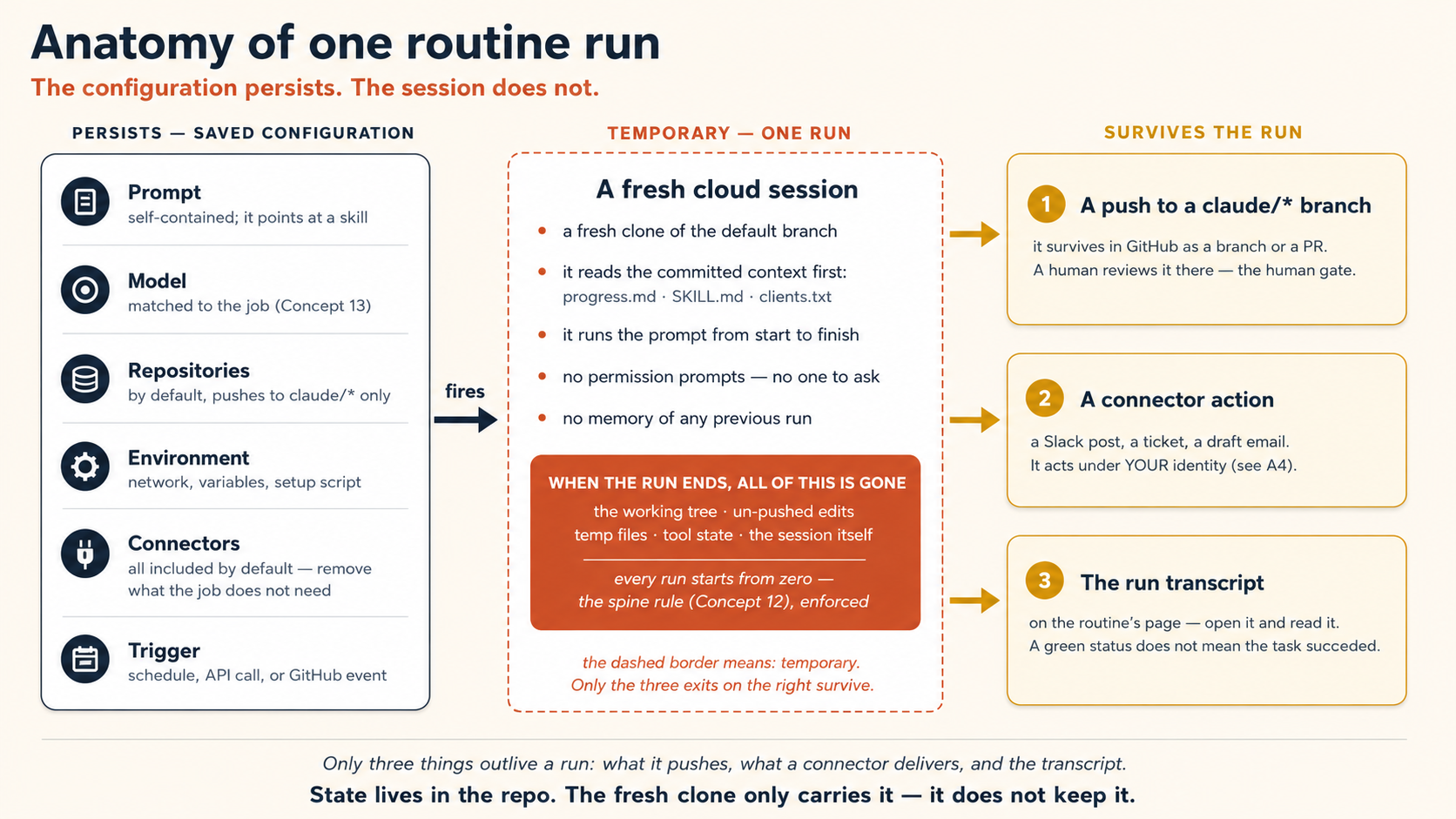
Make a routine at claude.ai/code/routines, in the Desktop app (Routines → New routine → Remote), or in plain language in the CLI with /schedule. All three write to the same account, and a routine made in one place shows up in the others. The CLI makes schedule-triggered routines only. API and GitHub triggers are added on the web afterwards. /schedule list, /schedule update, and /schedule run manage existing ones.
Name and prompt. The prompt is the whole job description, and it must be self-contained. A routine runs as a full autonomous cloud session with no permission prompts and nobody to ask mid-run. So everything Claude needs, meaning what to read, what to do, what success looks like, and what not to touch, must be in the prompt or in files the run can reach. This is where the course's advice adds up: point the prompt at a skill committed to the repo (Concept 9) and keep the routine's own text to a few lines. The prompt box has a model selector. The routine uses that model on every run, so match it to the job (Concept 13).
Repositories. Each repo you add is cloned fresh on every run, starting from the default branch. By default Claude can push only to branches whose names start with claude/. The Allow unrestricted branch pushes toggle (under Permissions) removes that limit per repository. Leave unrestricted pushes off unless you have a specific, reviewed reason to allow them. An unattended agent pushing to main on a bad run is exactly what the human gate exists to prevent.
Environment. Every routine runs inside a cloud environment that controls three things: network access, environment variables, and a setup script (for installing dependencies, whose result is cached, so it does not re-run every session). The Default environment ships with Trusted network access, meaning a fixed allowlist of package registries, cloud-provider APIs, container registries, and common development domains. Anything else fails with a 403 and x-deny-reason: host_not_allowed. If the routine must reach your own service, switch the environment to Custom and allow just that one domain (keeping the default list alongside it). Full access exists but grants more than most loops need. Widen it carefully.
Connectors. Here is the one default worth changing every time. All of your connected claude.ai connectors are included by default. Claude can use every tool on them, including writes, without asking. Remove everything the routine does not need before you save. Two more details. Connector traffic goes through Anthropic's servers, so connectors work without any network-allowlist changes. And MCP servers you added locally with claude mcp add live on your machine, not your account, so they are invisible to a routine. Either add them as connectors at claude.ai/customize/connectors, or declare them in a committed .mcp.json so they travel with the clone.
A3. The three triggers
Schedule. Presets are hourly, daily, weekdays, or weekly. Times are entered in your local timezone and converted for you, and runs may start a few minutes after the hour because of deliberate spacing (the offset is the same each time for a given routine). One hour is the floor, and cron expressions that fire more often are rejected. If you need higher frequency, use the API trigger and bring your own scheduler. Custom intervals (every two hours, first of the month) are set by picking the nearest preset and then running /schedule update in the CLI with a cron expression. A one-off schedule fires once at a set time, then turns itself off. And one-off scheduled runs do not count against the daily routine cap, which makes them the cheap way to rehearse a prompt before you commit it to a schedule. The CLI takes them in plain language: /schedule tomorrow at 9am, summarize yesterday's merged PRs.
API. An API trigger gives the routine its own /fire endpoint and a bearer token. The token is shown once when you generate it and cannot be retrieved later, so store it in your alerting tool's secret store right away (the same window can Regenerate or Revoke it). Any system that can send an authenticated POST can now fire the routine: an alerting webhook, a deploy pipeline, a form handler, a cron job on your own machine. The request body takes an optional text field for run-specific context, such as an alert body or a failing log, passed to the routine along with its saved prompt as freeform, unparsed text. The response returns the new session's ID and URL, so the caller can link straight to the run.
curl -X POST https://api.anthropic.com/v1/claude_code/routines/<routine-id>/fire \
  -H "Authorization: Bearer <routine-token>" \
  -H "anthropic-beta: experimental-cc-routine-2026-04-01" \
  -H "anthropic-version: 2023-06-01" \
  -H "Content-Type: application/json" \
  -d '{"text": "Sentry alert SEN-4521 fired in prod. Stack trace attached."}'
The dated beta header is required and will change as the preview evolves. The docs promise the two most recent previous versions keep working, so callers have time to migrate.
The /fire endpoint has no built-in deduplication, and webhook senders retry by default. So a retried alert is a duplicate run, and a misconfigured alert that retries all night is a loop you never designed. The money side is sharper than it looks. API-triggered runs count against your daily routine allowance, so a retry storm uses the whole day's cap before you wake, and with metered extra usage turned on, the cap stops being a ceiling and becomes a bill. Concept 13's rule applies to triggers, not just loops. Deduplicate or rate-limit at the sender. And write the prompt so it is safe to repeat, for example by checking whether the fix branch already exists before drafting it. This is exactly what the connector rules in Concept 10 taught.
GitHub events. A GitHub trigger starts a fresh session when a matching event lands on a connected repo. Two event kinds are supported: pull request (opened, closed, labeled, synchronized, and so on) and release. Each one can fire on a specific action or on all actions. It needs the Claude GitHub App installed on the repository. Note that /web-setup grants clone access but does not install the app, a difference that has confused many first attempts. Filters narrow which PRs fire the routine: author, title, body, base branch, head branch, labels, draft state, and merged state, with operators like contains, is one of, and matches regex. One important detail: matches regex tests the whole field, not a part of it. So hotfix matches only a title that is exactly hotfix. Write .*hotfix.*, or just use contains. Two more facts matter for loop design. First, during the preview, GitHub events have per-routine and per-account hourly caps, and events past the cap are dropped until the window resets. Dropped, not queued. So an event-heavy design needs a reconciliation sweep: a nightly scheduled run that catches anything the events missed. Second, each matching event starts its own separate session. Two pushes to one PR are two sessions that know nothing about each other. That is your Concept 12 spine lesson in a GitHub setting.
A4. Secrets, state, and identity
Secrets go in the environment variables panel, never in a .env file. The reason is mechanical: .env is gitignored, gitignored files never reach GitHub, and the cloud clone therefore never contains them. The routine fires, finds nothing, and fails (or worse, improvises). Put every key in the environment's variables panel and add one clear line to the prompt: "credentials are available as environment variables; do not look for a .env file". Without it, Claude may still try the .env path out of habit.
Every run starts from zero. Fresh clone, fresh environment, no working tree, no cookies, no leftovers. Anything the routine must remember has to leave the machine before the run ends: pushed to the repo, written to an external system through a connector, or sent through the API of a board. This is not a limitation to work around. It is the spine rule from Concept 12, enforced by infrastructure. The matching pattern is worth naming: context files in the repo. A clients.txt, a progress.md, or a triage-rules.md committed to the repository is readable on every run and can be updated without touching the prompt. When the client list changes, you edit the file and the routine's text never moves.
Routines act as you. They belong to your individual account, count against your daily allowance, and everything they do, meaning commits, PRs, Slack posts, Linear tickets, and drafted emails, carries your identity. A routine that replies to clients keeps replying as you while you are on vacation. Think through the identity side of anything externally visible before you schedule it.
There is no mid-run approval. A routine runs its prompt from start to finish. It cannot pause and ask you. So when a decision really needs a human, such as a payment, an outside email, or a deploy, build the gate between routines, not inside one. It works in three steps. Routine A drafts the work and posts it somewhere you can review it: a claude/ branch, a Slack message, or a draft email. A human reads it and approves. That approval fires Routine B through its API trigger, and Routine B does the action. That is the Part 5 human gate, written as two routines and a webhook.
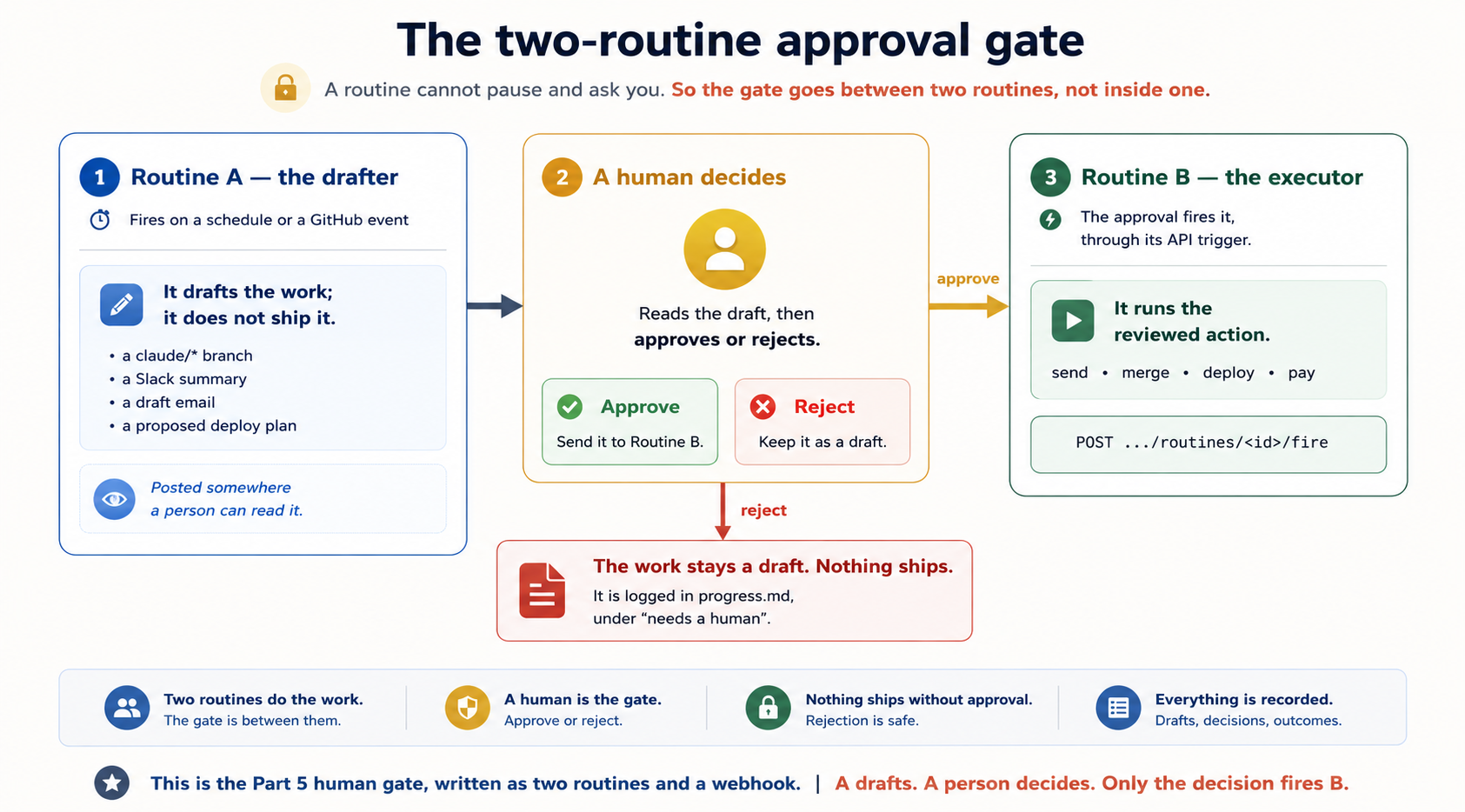
A5. Reading the runs
Every run shows up as a full session on the routine's detail page. The transcript shows each tool call, decision, and change, and you can continue the conversation by hand or turn the result into a PR. One warning the docs make clearly, and experience confirms: a green status means the session ended without an infrastructure error. It does not mean your task succeeded. Blocked network requests, missing connector tools, and plain task failures all live in the transcript, not in the status column. Open the run and read it. Concept 14 still applies, even though the scheduler is managed.
In simple terms: green means the platform completed the session. It does not prove that the requested work succeeded.
Run now starts a run immediately for testing. The pause toggle in the Repeats section stops the schedule without deleting the configuration. On cost: runs draw from your subscription usage and count against the daily routine cap. Past the cap, extra usage is billed at metered rates if you enabled it, and both are visible at claude.ai/settings/usage. And if /schedule seems to have vanished from your CLI, the usual causes are API-key or cloud-provider authentication (it needs a claude.ai login), telemetry-disabling environment variables, or an outdated CLI. The web UI works either way.
Every row above has a GitHub Actions equivalent, because the OpenCode approach solved these problems years earlier with plainer parts. The environment-variables panel is repository secrets (secrets.ANTHROPIC_API_KEY). The connector list is the mcp section of a committed opencode.json. The schedule and PR triggers are on: schedule and on: pull_request. Statelessness is the same (CI runners are also fresh every run, so the committed-context-file pattern carries over unchanged). The identity question is answered by the GitHub App or bot token instead of your personal account. And the branch guardrail is branch protection rules you set yourself. The names and configuration differ, but the underlying problems are the same. That is the course's central argument.
A6. The routine version of the checklist
The minimum safe loop checklist translates directly.
The success condition and the limit live in the prompt (the platform caps runs per day, not damage per run). Isolation is the claude/ branch prefix, so leave it on. The read-only checker is a reviewer subagent defined in the cloned repo. The state file is a committed context file, because the clone is fresh every time. The human gate is the two-routine pattern above, or simply "draft PRs only, never merge." And the log is the run transcript plus a connector post to somewhere you actually look, remembering that green does not mean done.
Run down this list every time. It takes one minute, and it is the difference between an appendix you read and a loop you trust:
- Repositories: the correct repo only, with unrestricted branch pushes off.
- Prompt: self-contained, with the success condition included and the limit included.
- Connectors: every connector the job does not need, removed.
- Environment: secrets in the variables panel, not
.env, and network access as narrow as the job allows. - Trigger: schedule, API, or GitHub chosen on purpose, with no accidental high-frequency fire, and safe-to-repeat handling if the trigger can retry.
- State: a committed progress or context file, or an external board, chosen before the first run.
- Human gate: draft PRs, branches, or messages only, with no direct merge, deploy, payment, or client-facing send.
- Test run: fire it once with a one-off schedule or Run now, then read the transcript, not the status color.
Practice: three routine drills
Reading a field guide is not the same as clicking through the form. These three drills deliberately reproduce the appendix's most important failure cases in a throwaway repository. This lets you experience each problem while the cost and risk are low. They are also designed around the daily run cap. The first drill uses one-off runs, which do not count against the cap at all. The other two need about five runs in total, which is one day of a Pro cap. The two rules from the main projects still apply: use a throwaway repo, and set limits first.
(Project 12, at the end of this section, is not a drill. It is a second capstone that builds on Projects 3 or 8, and it runs weekly, so plan its runs separately.) Difficulty: easy · Uses: A1, A3 (one-off schedules), A5 (reading runs). Build. In a throwaway repo, create a routine whose prompt does one small, checkable thing, for example summarizing yesterday's commits onto a Done when you have seen two green runs: one whose transcript shows success, and one whose transcript shows failure. You should be able to say, in one sentence, why the status column could not tell them apart. That sentence is the A5 lesson: green means the session ended without an infrastructure error, nothing more. Difficulty: easy to medium · Uses: A4 (secrets), A2 (the environment). Build. Write a prompt that needs one secret. A dummy token is fine, because the drill is about where the value lives, not what it unlocks. First run: put the token in a gitignored Done when the second run reads the token from the environment, and you can explain the mechanical reason the first run could not: gitignored files never reach GitHub, so the fresh cloud clone never contains them. Difficulty: medium to hard · Uses: A3 (the API trigger), A4 (the gate), A6 (the checklist). Build. Routine A, on a one-off schedule, drafts something reviewable: a Done when three things are true: B ran only because you fired it, B's transcript shows the action actually happened, and you have run the A6 checklist over both routines, with connectors pruned, unrestricted pushes off, and a state file chosen. This is the human gate from Part 5, and now you have built it out of real parts. Difficulty: capstone · Uses: Concept 12 (spine and improvement loop), Concept 11 (maker-checker), Concept 6 (schedule), Part 5 (human gate). Build. You need a loop that has already run for a week and left dated entries in Done when three things are true. The PR's proposed change traces to real, cited log entries, not a plausible-sounding guess. A deliberately planted repeated failure in the logs (add one by hand) gets caught and turned into a proposal. And nothing changed in your rules file without you merging it. If the loop proposes changes with no evidence attached, tighten the prompt: an improvement loop that guesses is worse than no improvement loop, because its guesses steer every future run.Project 920-30 minRehearse a routine for freeProve a prompt with one-off runs before you commit it to a schedule.
claude/summary branch. Do not put it on a repeating schedule. Fire it with a one-off run (/schedule tomorrow at 9am, … or Run now) and read the full transcript, not the status column. Then change the prompt so the task must fail, by having it read a file that does not exist, and fire it once more.Project 1030-45 minThe secrets drillFail the .env way once, on purpose, so you never do it by accident.
.env file and fire the routine. Watch it fail to find the value, and read the transcript to see what Claude tried instead. Second run: move the token into the environment-variables panel, and add the one prompt line the appendix recommends: "credentials are available as environment variables; do not look for a .env file."Project 111-2 hrsBuild the two-routine gateA drafts, you decide, and only your decision fires B.
claude/ branch, or a short summary posted through a connector. Routine B has an API trigger and performs one small follow-up action. Store B's bearer token the moment it is shown, because it is shown once. Review A's draft yourself. Then approve it by firing B with the curl call from A3.Project 122-3 hrsBuild a dreaming loopA weekly loop that reads your other loops' logs and proposes rule changes as a PR.
progress.md (Project 3 or Project 8 gives you one). Now build a second loop over it. On a weekly schedule, it reads all log entries since the date in its own dreaming-state.md, looks for any failure or correction that appears more than once, and drafts the smallest rules-file or skill change that would prevent it, as a PR on a claude/ branch, never a direct commit. The PR description must cite its evidence: which runs, how often, and why this line stops it. Have it also propose one deletion: a rule no recent run needed. Finish by updating dreaming-state.md.
Where to go next
- Running more than one loop? The moment a job is wider than one loop, you need the drawing between the loops: what runs side by side, what waits, and who checks whom. Graph Engineering, two steps ahead in this series, teaches it.
- Building loops for non-coding work? The Cowork & OpenWork crash course shows the same heartbeat idea for professionals, with scheduled tasks instead of cron.
- Running loops from the API instead of a terminal? The Claude Platform's Managed Agents now support scheduled deployments (public beta): give an agent a cron schedule and each firing starts a fresh session on Anthropic's infrastructure, with no scheduler for you to build or host. It is the Routines idea offered as a platform primitive, and the same shape applies. The schedule is the heartbeat, your prompt is the beat, and you still supply the spine.
- Want the improvement loop managed for you? The same Managed Agents platform includes memory and dreaming tooling, meaning the out-of-band improvement pass from Concept 12's note, offered as a product. The shape is unchanged: the batch job is the heartbeat, the memory store is the spine, and the approval step is the human gate.
- Want the checker managed for you too? Two research previews turn the verification-skills interlude into products. Code Review runs a managed multi-agent review pass on every PR in the repos you enable (home four as a service), and Rubrics in Claude Managed Agents (beta) is the rubric-with-a-bar from Concept 2 as a platform primitive, where a separate grader agent verifies outcomes and sends failed work back for another attempt. How far to trust a model's grade is the Trusting the Checker course.
- Tuning retries for unattended runs? Claude Code's Error reference documents the automatic-retry settings, including
CLAUDE_CODE_MAX_RETRIESand theCLAUDE_CODE_RETRY_WATCHDOGmode for CI-style unattended sessions. - Want clone-and-run starting points? The community repo cobusgreyling/loop-engineering (MIT) collects production loop patterns (daily triage, PR monitor, CI checker, dependency checker, changelog drafter) as starter kits with a readiness checklist, mapped across several agent CLIs. It is third-party and young, so check that it is maintained. But its primitives table is this course's six parts under other names, which makes it a useful second telling. For the reading trail itself, the community-curated awesome-loop-engineering collection on Hugging Face gathers the primary articles in one place.
- The spec you wrote in Spec-Driven Development is your loop's stopping condition: its acceptance criteria are what the checker grades against and what
/goalproves before it stops. When a loop feels unsafe to leave running, the fix is almost always a sharper spec, not more automation.
Sources & further reading
This course rests on a small set of primary sources. The framing and the quotes come from these. The technical details come from the official docs.
The origin of "loop engineering"
- Addy Osmani, Loop Engineering: the essay that named the pattern and set out the five-parts-plus-spine model. https://addyosmani.com/blog/loop-engineering/
- Avi Chawla, Loop Engineering, Clearly Explained: the inner-loop anatomy, the four nested engineering layers (prompt → context → harness → loop), the doom-loop framing, and the tool-design rules for loops. https://www.dailydoseofds.com/p/loop-engineering-clearly-explained/
- Data Science Dojo, The 4 Layers of AI Engineering: the one-failure-mode-per-layer framing and the "which layer are you still doing by hand" self-check, paraphrased in the Concept 1 note. https://www.facebook.com/share/p/1HCxfwo5aC/
- Rakesh Gohel, How to Actually Use Fable 5 (infographic): the self-learning versus self-improving distinction, and the contrast between prompt-harder-and-start-over and run, log, distill, repeat, paraphrased in the Concept 12 note. https://rakeshgohel.substack.com
- Sydney Runkle (LangChain), The Art of Loop Engineering: the four-loop stack (agent, verification, event-driven, hill-climbing) and the trace-driven improvement loop, and also the pointer to swyx's "loopcraft" framing of stacking loops. https://www.langchain.com/blog/the-art-of-loop-engineering
- Lamis (Anthropic, Applied AI), Context Engineering: Memory and Dreaming (AI DevCon 2026 talk): the in-band versus out-of-band memory split, the dreaming consolidation process, the production guardrails for shared memory stores paraphrased in Concept 14's note, and the school and head-teacher analogy paraphrased in the Concept 12 note. https://www.youtube.com/watch?v=tQ41RxfZZVg
- Letta (Charles Packer, Sarah Wooders, et al.), Sleep-time Compute (April 2025 paper and blog): the earliest productized version of the dreaming idea, a background agent that rewrites a primary agent's memory during idle time, from the MemGPT lineage, and also the caveat that offline consolidation pays off only when future tasks resemble past ones. https://www.letta.com/blog/sleep-time-compute/
- Stanford / SambaNova / UC Berkeley, Agentic Context Engineering (ACE): names the two failure modes of repeated memory rewriting, brevity bias and context collapse, and the fix paraphrased in the dreaming note, which is incremental delta updates instead of monolithic rewrites. https://arxiv.org/abs/2510.04618
- OWASP, Top 10 for Agentic Applications (2026): defines Memory and Context Poisoning as a distinct agentic threat, where injected content persists in memory and influences behavior after the original attack is gone. This is the basis for the poisoning warning in the dreaming note.
- Simon Willison, Designing agentic loops (September 2025): the earliest clear statement that designing the loop, not driving the agent, is the skill. It predates the term. https://simonwillison.net/
- TrueFoundry, Loop Engineering at Enterprise Grade: the failure-stacking math, the standing-permission framing of loop parts, and the team-scale inventory problem. It is representative of the governance analyses referenced in Concept 14's note. https://www.truefoundry.com/blog/loop-engineering-enterprise-agent-runtime
- The New Stack, "The Anthropic leader who built Claude Code says he ditched prompting — now he just writes loops." https://thenewstack.io/loop-engineering/
- Boris Cherny's "my job is to write loops" remark is from a CNBC interview, as reported by Business Insider. Peter Steinberger's "design loops that prompt your agents" line is from his post on X.
- Andrew Ng: the three product-development loops (coding in minutes, developer feedback in hours, external feedback in days) and the reframing of "taste" as the human's context advantage. From his post on X. https://x.com/AndrewYNg/status/2071988145667928442
- Andrej Karpathy: "Don't tell it what to do, give it success criteria and watch it go," and the AutoResearch project, an agent that tweaks a training script, measures the result, and keeps what works, with no human editing between rounds. From his posts on X.
Claude Code (official docs)
- Routines: cloud scheduled automations, triggers, run caps, and the launch announcement with per-plan daily limits: https://code.claude.com/docs/en/routines and https://claude.com/blog/introducing-routines-in-claude-code
- Channels: event-driven input into a running session: https://code.claude.com/docs/en/channels
- Scheduled tasks:
/loop, the cron tools, Desktop tasks, and the background-session carryover rule: https://code.claude.com/docs/en/scheduled-tasks - Changelog: where background sessions, the retry watchdog, the
ultracoderename, and every other mechanical detail in this chapter get superseded first: https://code.claude.com/docs/en/changelog - Memory:
CLAUDE.md, auto memory, and the consolidation pass behind the Auto Dream research preview: https://code.claude.com/docs/en/memory - Delba de Oliveira (Anthropic, Claude Code team), Building verification loops in Claude Code with skills (July 22, 2026): the source for the verification-skills interlude, covering checks packaged as skills, the four deployment homes (standalone, embedded, chained, on-every-PR), the graduation signals, the wrapper-skill pattern for skills you cannot edit, Anthropic's internal
/code-review→/simplify→/verify→/designchain, and the pointers to/verify, Code Review, and Rubrics in Managed Agents: https://claude.com/blog/building-verification-loops-in-claude-code-with-skills - Code Review and Rubrics in Managed Agents are research previews or beta at the time of writing. Check the live docs before relying on availability or behavior.
OpenCode (official docs)
- CLI:
opencode run,serve, and--attach: https://opencode.ai/docs/cli/ - Agents and subagents: primary agents, subagents, and per-agent models: https://opencode.ai/docs/agents/
- GitHub integration: the Action, schedule, PR and issue triggers, and
opencode github install: https://opencode.ai/docs/github/
Model identifiers
- Anthropic, What's new in Claude Sonnet 5: source for the
claude-sonnet-5model string, the direct migration from Sonnet 4.6, the adaptive-thinking default, and the new tokenizer: https://platform.claude.com/docs/en/about-claude/models/whats-new-sonnet-5 - Anthropic, Model IDs and versioning: dateless IDs are the pinned snapshot from the 4.6 generation onward, major-version releases such as Sonnet 5 omit the minor segment, and 4.5-generation models like Haiku 4.5 keep a dated canonical ID (
claude-haiku-4-5-20251001) plus a dateless alias: https://platform.claude.com/docs/en/about-claude/models/model-ids-and-versions - Anthropic, Introducing Claude Fable 5 and Mythos 5: the flagship generation above Opus, shipped mid-2026, and a reminder that the model examples in this chapter are illustrations, not the frontier: https://www.anthropic.com/news/claude-fable-5-mythos-5
All links current as of early July 2026. These tools update often, so confirm any specific limit, flag, or model string against the live docs before you rely on it.
The one-line summary
A prompt says what to do. A loop says when to stop. Stop prompting your agent turn by turn. Design the loop that prompts it for you, meaning a heartbeat, four working parts, and a spine that remembers, and stay the engineer who reads what it ships.