The Loop by Hand: The Anthropic Messages API
17 Concepts · About 90 minutes to read · 2-3 hours to build · From One API Call to a Working Agent Loop, With No Framework
Sooner or later, every agent developer needs to look below the framework.
Your agent may work well for weeks and then behave strangely. It may stop after a two-word reply. It may call the same tool twice. It may call one tool when you expected three.
You open the logs, but the SDK gives you a stream of objects that do not make the cause obvious.
At that point, you need to understand what the SDK is doing for you. You need to understand the loop itself.
In this course, you will build that loop yourself using the raw Messages API. There is no agent framework in the middle.
The complete loop is only about a hundred lines. Once you have written it, frameworks become easier to understand because you can see which parts they are handling for you.
There is another reason to learn the loop directly.
Many production agent failures are really loop failures.
The agent forgets something because the conversation history was not sent back. It stops early because the wrong signal was used for termination. It repeats a tool because the result never reached the model. A refusal is stored as a successful answer because the code never checked stop_reason.
The good news is that the loop is small enough to understand completely.
You will build three things:
- A single API call, read block by block, so the response shape is familiar rather than magic.
- A complete agentic loop that runs tools, feeds results back, and terminates correctly.
- The handling for the six other reasons a response can stop, which is what separates a loop that demonstrates from a loop that runs unattended.
This course is the foundation for everything in Phase 2. The Claude Agent SDK runs this loop for you. Structured Extraction Pipelines sends documents through the same basic pattern.
After you understand this course, both topics become easier because you can see what the higher-level tools are doing underneath.
This course covers the loop mechanics in Domain 1 (Agentic Architecture and Orchestration, 27%) of the Claude Certified Architect, Foundations exam. It also covers the tool_choice material in Domain 4 (Prompt Engineering and Structured Output, 20%).
The exam focuses on two stop_reason values. The live API can return seven. Concept 4 explains all seven and clearly marks the two the exam expects.
Prerequisites. Two things.
- You have done the Python in the AI Era crash course, or can read typed Python comfortably. Examples target Python 3.10 and above and use no framework beyond the
anthropicclient.- You have an Anthropic API key. Everything here runs on
claude-haiku-4-5for a few cents. Cap a project key at five dollars.
Setup (three minutes)
mkdir loop-by-hand && cd loop-by-hand
uv init --package --python 3.12 .
uv add anthropic python-dotenv
printf 'ANTHROPIC_API_KEY=\n' > .env.example
cp .env.example .env          # paste your key by hand
printf '.env\n.venv\n__pycache__\n' > .gitignore
One dependency. That is the point of the course.
Part 1: What the API Actually Is
Goal for this part: understand that the API has no memory. Then learn to read a response as a list of blocks rather than a string.
Concept 1: The API Remembers Nothing
Key idea: The Messages API is stateless. Every request carries the entire conversation, and there is no session on the server.
Start with the most important fact in the course. Many mistakes in Part 2 come from getting this wrong.
There is no conversation stored for you on Anthropic's servers. There is no session identifier. There is no thread. There is no hidden history.
Each request must contain everything the model needs for that turn.
A multi-turn conversation therefore works by resending the full message history on every request, then adding the newest message.
messages = [
    {"role": "user", "content": "What is the capital of France?"},
    {"role": "assistant", "content": "Paris."},
    {"role": "user", "content": "What is its population?"},
]
Three messages go to the API. The model reads all three and answers the last one. On the next turn you will send five.
This has two important consequences.
Cost grows with the conversation history. Turn twenty sends turns one through nineteen again. That means context discipline affects both quality and cost.
You can also construct conversation history yourself. Earlier assistant messages do not have to come from Claude. If you place an assistant message in the history, the model treats it as part of the conversation.
This is useful for tests, few-shot examples, and several patterns later in the course.
PRIMM: Predict. You call the API three times in a row with the same single-message array, containing only "What is the capital of France?". Does the third response cost more than the first? Confidence 1 to 5.
What you will see
No. All three cost the same, because all three send the same one message.
The cost grows only when you grow the messages array. The API does not add history for you.
If you repeatedly send the same one-message array, each call is roughly the same size. If you keep appending to the conversation, every new request becomes larger.
Keep this in mind for Part 2. When the loop becomes more expensive on later turns, the reason is simple: your own messages array is getting larger.
Concept 2: Read the Whole Response, Not Just the Text
Key idea: A response is a typed object with a content list, a stop_reason, and a usage record. All three matter.
# hello.py
from dotenv import load_dotenv

load_dotenv()

import anthropic  # noqa: E402

client = anthropic.Anthropic()

response = client.messages.create(
    model="claude-haiku-4-5",
    max_tokens=1024,
    messages=[{"role": "user", "content": "Hello, Claude"}],
)

print(response)
Run the file and inspect the whole response object. Do not look only at the text.
{
  "id": "msg_01XFDUDYJgAACzvnptvVoYEL",
  "type": "message",
  "role": "assistant",
  "content": [{ "type": "text", "text": "Hello!" }],
  "model": "claude-haiku-4-5",
  "stop_reason": "end_turn",
  "stop_sequence": null,
  "stop_details": null,
  "usage": { "input_tokens": 12, "output_tokens": 6 }
}
Focus on four fields. By Concept 7, three of them will control the loop directly.
content is a list, not a string. Concept 3 explains why that matters.
stop_reason tells you why generation stopped. Here it is end_turn, which means Claude finished naturally. Your loop will branch on this field.
stop_details is null here. It is used with refusal to report the policy category that caused the refusal.
usage contains the token counts used by the request. Print it during development so you can see the cost of your design decisions.
Concept 3: Content Is a List of Blocks
Key idea: One response can contain several blocks of different types. Reaching for content[0].text works until it does not.
Almost every tutorial prints a reply like this.
print(response.content[0].text) # works, until it does not
That line assumes two things: the response has at least one block, and the first block is text.
Those assumptions are usually true for simple chat. They stop being reliable as soon as tools enter the conversation.
One response can contain both text and a tool call.
"content": [
  { "type": "text", "text": "Let me look that up." },
  { "type": "tool_use", "id": "toolu_01A", "name": "get_weather",
    "input": { "location": "Karachi" } }
]
The block types you will meet in this course:
| Block type | Appears in | Carries |
|---|---|---|
text | Assistant messages | .text |
tool_use | Assistant messages | .id, .name, .input |
tool_result | User messages you construct | tool_use_id, content, is_error |
thinking | Assistant messages, when extended thinking is on | Reasoning content |
server_tool_use | Assistant messages, for tools Anthropic runs | Concept 13 |
The safe pattern is to filter blocks by type instead of assuming where they appear.
text = "".join(b.text for b in response.content if b.type == "text")
tool_calls = [b for b in response.content if b.type == "tool_use"]
This same pattern appears inside higher-level agent SDKs. The framework may hide it, but the logic is still there.
You know the API keeps no state, and you can read a response without assuming its shape. That is enough to build the loop.
Part 2: The Loop
Goal for this part: build a working agentic loop, and learn the two rules that govern how tool results go back.
Concept 4: stop_reason Is the Control Signal
Key idea: Branch on stop_reason. Never infer completion from the content of the reply.
After every model response, your loop needs to answer one question: Is the task finished, or does Claude need something from my code?
The API answers through stop_reason. There are seven possible values.
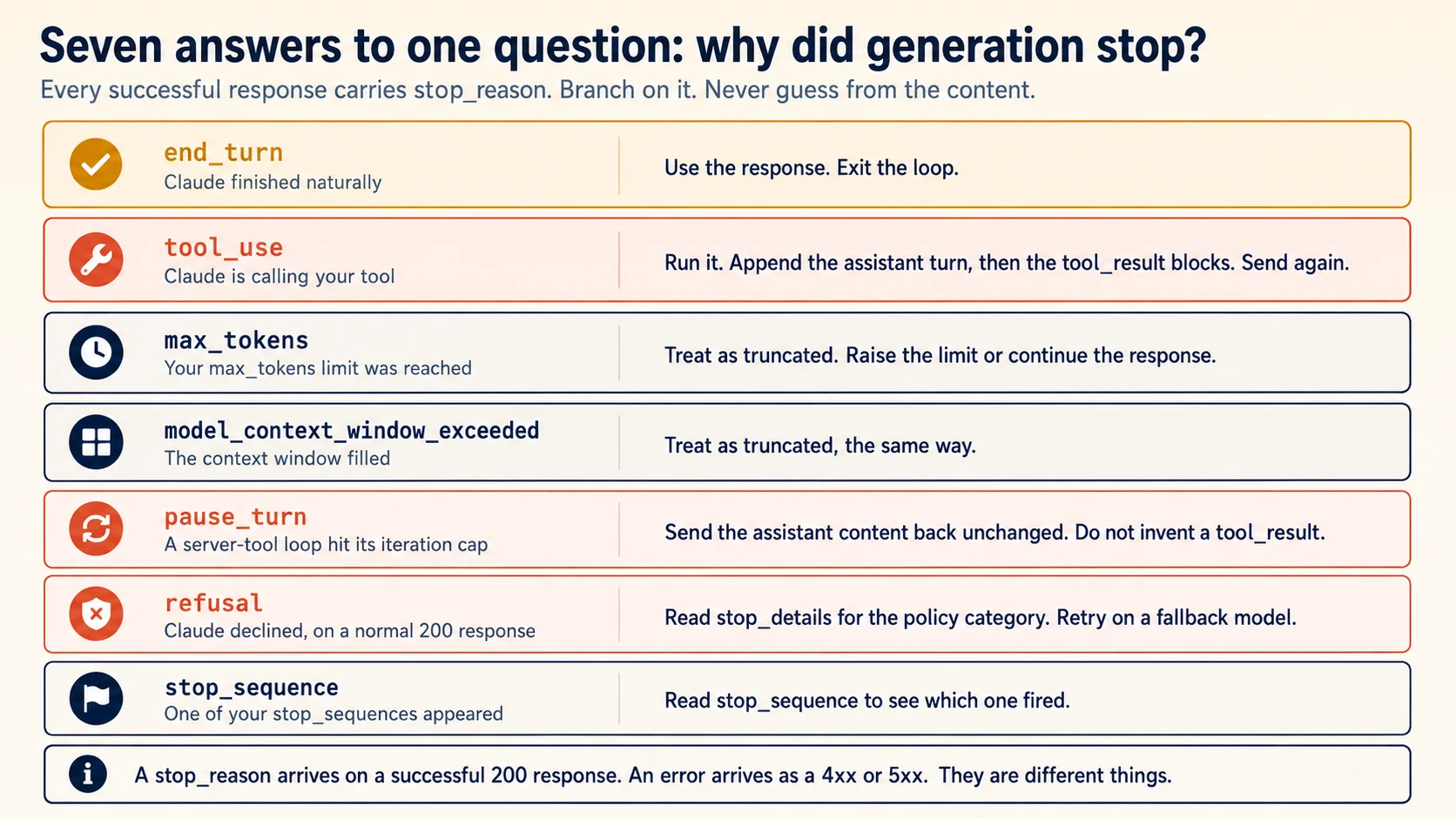
Two values drive the basic agent loop. tool_use means Claude needs your code to run a client tool. end_turn means Claude is finished.
The exam focuses on these two values, and they are enough for a simple local demonstration.
The other five matter when you want the loop to run reliably without supervision. Part 4 covers them one by one.
For now, use one rule: do not treat every non-end_turn response as tool_use. Check the actual value.
if response.stop_reason == "end_turn":
    ...      # done
elif response.stop_reason == "tool_use":
    ...      # run tools, continue
else:
    ...      # Part 4. Do not silently treat this as done.
Do not omit that final branch. If you do, an unexpected stop reason can quietly be treated as success. A refusal is the most dangerous example.
Concept 5: A Tool Is a Description, Not a Function
Key idea: A tool is a name, a description, and a JSON Schema. The description is how the model decides to call it.
A tool definition is only a description of a capability. It tells Claude what the tool is and what inputs it accepts. Your application still runs the actual function.
TOOLS = [
    {
        "name": "get_weather",
        "description": (
            "Get the current weather in a given location. Use this for questions "
            "about temperature, rain, or present conditions in a named place. "
            "Do not use this for forecasts more than 24 hours ahead."
        ),
        "input_schema": {
            "type": "object",
            "properties": {
                "location": {
                    "type": "string",
                    "description": "City and country, for example 'Karachi, Pakistan'.",
                }
            },
            "required": ["location"],
        },
    }
]
Claude does not execute your client tools. It returns a structured request that names the tool and provides arguments. Your code decides what happens next.
This separation is fundamental to agent safety because your application remains the execution boundary.
The tool description deserves as much attention as the schema because it helps Claude decide whether the tool fits the request.
A useful description explains four things:
- what the tool does
- what inputs it accepts
- what it returns
- when the tool should not be used
That final point often prevents the wrong tool from being selected.
Concept 6: The Two Rules for Sending Results Back
Key idea: Append the assistant turn verbatim, then a user message containing tool_result blocks and nothing else.
Most hand-written loop bugs happen here. The diagram shows the message sequence you must preserve.
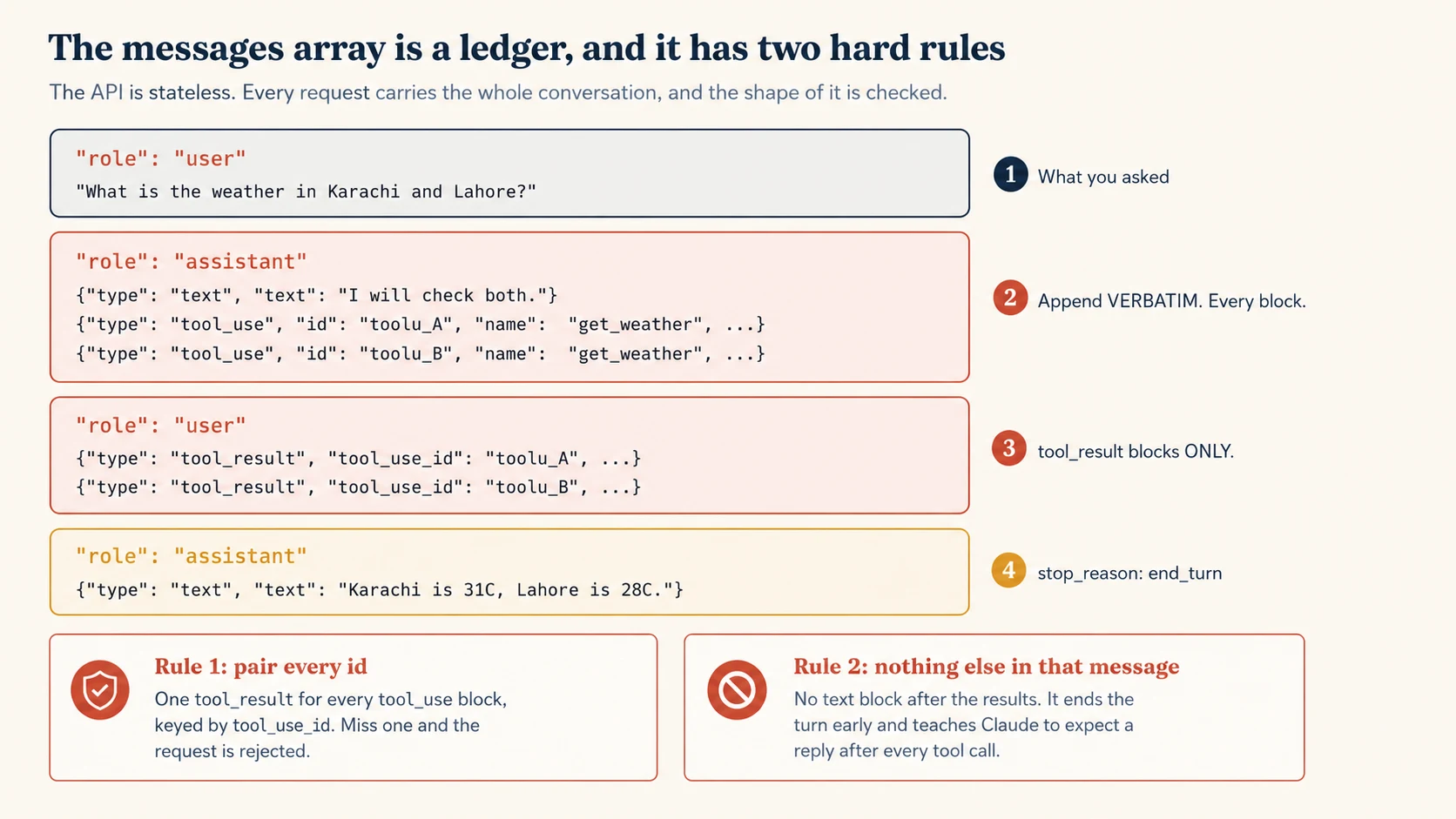
Rule One: Append the Assistant Message Exactly as It Arrived
Append every block exactly as Claude returned it, in the original order. Do not keep only the tool calls and do not replace the response with a summary.
The API checks the pairing. If a tool_result refers to a tool_use that is missing from the conversation, the next request fails.
messages.append({"role": "assistant", "content": response.content})
Rule Two: That User Message Contains Tool Results and Nothing Else
For every tool_use block, send one matching tool_result block using the same tool_use_id.
That user message should contain the tool results and nothing else.
results = [
    {
        "type": "tool_result",
        "tool_use_id": block.id,
        "content": run_tool(block.name, block.input),
    }
    for block in response.content
    if block.type == "tool_use"
]
messages.append({"role": "user", "content": results})
This second rule can fail quietly, which makes it harder to diagnose.
If you add ordinary user text after the tool_result blocks, the request may still succeed. But Claude can interpret that pattern as the human speaking after the tool call.
The next response may be only a few tokens long and end with stop_reason: "end_turn". The agent looks as if it simply gave up.
Why does this happen? The conversation history now looks like a human is expected to speak after each tool result. Claude follows the pattern you showed it and starts waiting for the next human turn.
If you need to add a normal user message, wait until the tool turn is complete and send it separately.
PRIMM: Predict. You append the tool results correctly, but you also drop the assistant message that contained the
tool_useblocks, because it seemed redundant. What happens? Confidence 1 to 5.
What you will see
The request fails with a 400. The message says that tool result blocks were sent without the matching tool use. The wording will be close to tool_use ids were found without tool_result blocks immediately after.
The pairing is structural. A tool_result answers one specific tool_use through its id. The API checks that the matching tool_use is present in the conversation you sent.
Because the Messages API is stateless, the API can only validate the history that you include in the current request.
This is one of the most common hand-written loop bugs. Fortunately, it usually fails loudly with a 400.
The more dangerous bug is the second rule, where the request succeeds but the conversation pattern becomes wrong.
Concept 7: The Loop, Complete
Key idea: Send, branch on stop_reason, execute, append both messages, repeat.
You now have everything needed for the basic loop. It fits in about forty lines.
# loop.py
from dotenv import load_dotenv

load_dotenv()

import anthropic  # noqa: E402

client = anthropic.Anthropic()

TOOLS = [...]        # Concept 5


def run_tool(name: str, args: dict) -> str:
    """Execute a tool and return a string result."""
    if name == "get_weather":
        return f"It is 31C and clear in {args['location']}."
    return f"ERROR: unknown tool {name}"


def agent(user_message: str, max_iterations: int = 10) -> str:
    messages: list[dict] = [{"role": "user", "content": user_message}]

    for _ in range(max_iterations):
        response = client.messages.create(
            model="claude-haiku-4-5",
            max_tokens=1024,
            tools=TOOLS,
            messages=messages,
        )

        if response.stop_reason == "end_turn":
            return "".join(b.text for b in response.content if b.type == "text")

        if response.stop_reason == "tool_use":
            # Rule 1: the assistant turn goes back verbatim.
            messages.append({"role": "assistant", "content": response.content})

            # Rule 2: tool results only, one per tool_use id.
            results = [
                {
                    "type": "tool_result",
                    "tool_use_id": block.id,
                    "content": run_tool(block.name, block.input),
                }
                for block in response.content
                if block.type == "tool_use"
            ]
            messages.append({"role": "user", "content": results})
            continue

        # Every other stop_reason. Part 4 fills this in.
        raise RuntimeError(f"unhandled stop_reason: {response.stop_reason}")

    raise RuntimeError("iteration cap reached without end_turn")


if __name__ == "__main__":
    print(agent("What is the weather in Karachi?"))
What to Notice Before You Move On
That small function is an agent loop. Higher-level frameworks add features around this same control flow.
Nothing in Your Code Chose the Tool
Read the loop again and look for the line that decides which tool runs. There is not one.
Your code dispatches on block.name after the fact. The choice was made by the model, from the descriptions, using the conversation so far. That is the property that makes this an agent rather than a program with a language model inside it.
The contrast worth holding is with the thing people build when they do not trust that property: a decision tree, or a fixed tool sequence. Classify the request, then run tool A, then tool B, then answer.
Both designs work. They fail differently, and that is how you choose.
A fixed sequence is predictable and cannot adapt. Every request costs the same three calls, including the one that needed none. A request the classifier has no branch for gets the closest branch instead of the right answer.
A model-driven loop adapts and cannot be predicted. It skips the lookup when the customer already gave the order number, and it calls a fourth tool you did not anticipate on a request you did not foresee. You get coverage you did not have to enumerate, and you give up knowing in advance what will run.
So the question is not which is better. It is whether the set of paths through your task is knowable in advance. If you can write the branches down, a sequence is cheaper and easier to test. If you cannot, enumerating them produces a tree that is wrong at the edges, and the loop is the design that handles what you did not list.
This is also why Concept 5 spends so long on descriptions. In a decision tree the routing lives in your code, where you can read it. In this loop the routing lives in the descriptions, and a thin description is a routing bug you cannot see.
One tool interaction usually requires at least two model calls. The first response requests the tool. After your code returns the result, the second response uses that result to continue or finish the answer.
Remember this when estimating latency and cost.
max_iterations is only a guardrail. It protects you from a runaway loop. It is not the normal stopping rule.
Normal completion happens when stop_reason is end_turn. Concept 9 shows why this distinction matters.
PRIMM: Predict. Set
max_iterations=1and ask a question that needs one tool call. What happens? Confidence 1 to 5.
What you will see
The loop raises iteration cap reached without end_turn, and no tool result ever reaches the model.
Follow the sequence. The first iteration sends the question and receives stop_reason: "tool_use". Your code runs the tool and appends the tool result correctly.
But the loop has no iterations left. Claude never gets the second model call that would read the tool result and compose the answer.
A limit of one permits only one model call. That is not enough to complete a client-tool round trip. As a rough planning rule, allow about two iterations per tool interaction.
Concept 8: Several Tools in One Response
Key idea: One response can contain several tool_use blocks. Handle the list, not the first element.
PRIMM: Predict. You ask "what is the weather in Karachi and Lahore". Your loop takes the first
tool_useblock, runs it, and sends back onetool_result. What comes back from the next request? Confidence 1 to 5.
What you will see
A 400 error. The response contained two tool_use blocks, and one of them now has no matching result.
The important detail is that Claude may return both tool calls in the same response. It does not have to ask for Karachi first and Lahore second.
Parallel tool requests are normal behaviour.
So the failure is loud and immediate. The line that causes it appears correct at first glance:
tool_call = next(b for b in response.content if b.type == "tool_use")
The code looks reasonable because it finds a valid tool call. The problem is that it silently ignores every additional tool_use block.
The loop in Concept 7 already avoids this bug because it collects all tool_use blocks before sending results back.
For a question such as "what is the weather in Karachi and Lahore", Claude may request two weather calls at once. Your loop should run both and return both results together in one user message.
If those tools make network requests, running them concurrently can reduce latency. Two two-second calls take about four seconds sequentially but about two seconds when they run together.
Concept 9: Four Ways to Terminate Wrongly
Key idea: Each of these looks reasonable in a code review, and each one breaks in a way that is hard to diagnose.
The correct normal terminator is stop_reason == "end_turn".
The following four alternatives often look reasonable in code review, but each creates a specific failure.
Reading the text to decide. Searching for a word such as DONE, or deciding that the reply "sounds finished", is unnecessary. The API already tells you why generation stopped. Text-based rules also break when the model changes its wording.
Treating any text as completion. A finished answer usually contains text, but text can also appear before a tool call in the same response.
If your loop stops as soon as it sees text, it may return "Let me look that up." as the final answer. The requested tool never runs.
Using the iteration cap as the stopping rule. Reaching the cap is a failure condition, not successful completion. If you return normally at the cap, partial work can be mistaken for a finished answer.
Not appending tool results. Your application may run the tool successfully, but Claude cannot use a result it never receives. From Claude's point of view, the request is still unresolved, so it may ask for the same tool again and again.
What the Four Have in Common
All four mistakes share the same root cause: they replace an explicit API signal with a guess.
stop_reason already tells you why generation stopped. Read it instead of inferring completion from the content.
The exam tests this pattern directly. For the basic loop, continue on tool_use, terminate on end_turn, and treat the iteration limit as a guardrail rather than the completion mechanism.
You have a working agent loop and you know the four ways loops are commonly broken. Part 3 is about directing it.
Part 3: Directing the Model
Goal for this part: control whether and which tools get called, and report tool failures in a way the model can act on.
Concept 10: Deciding Whether a Tool Runs at All
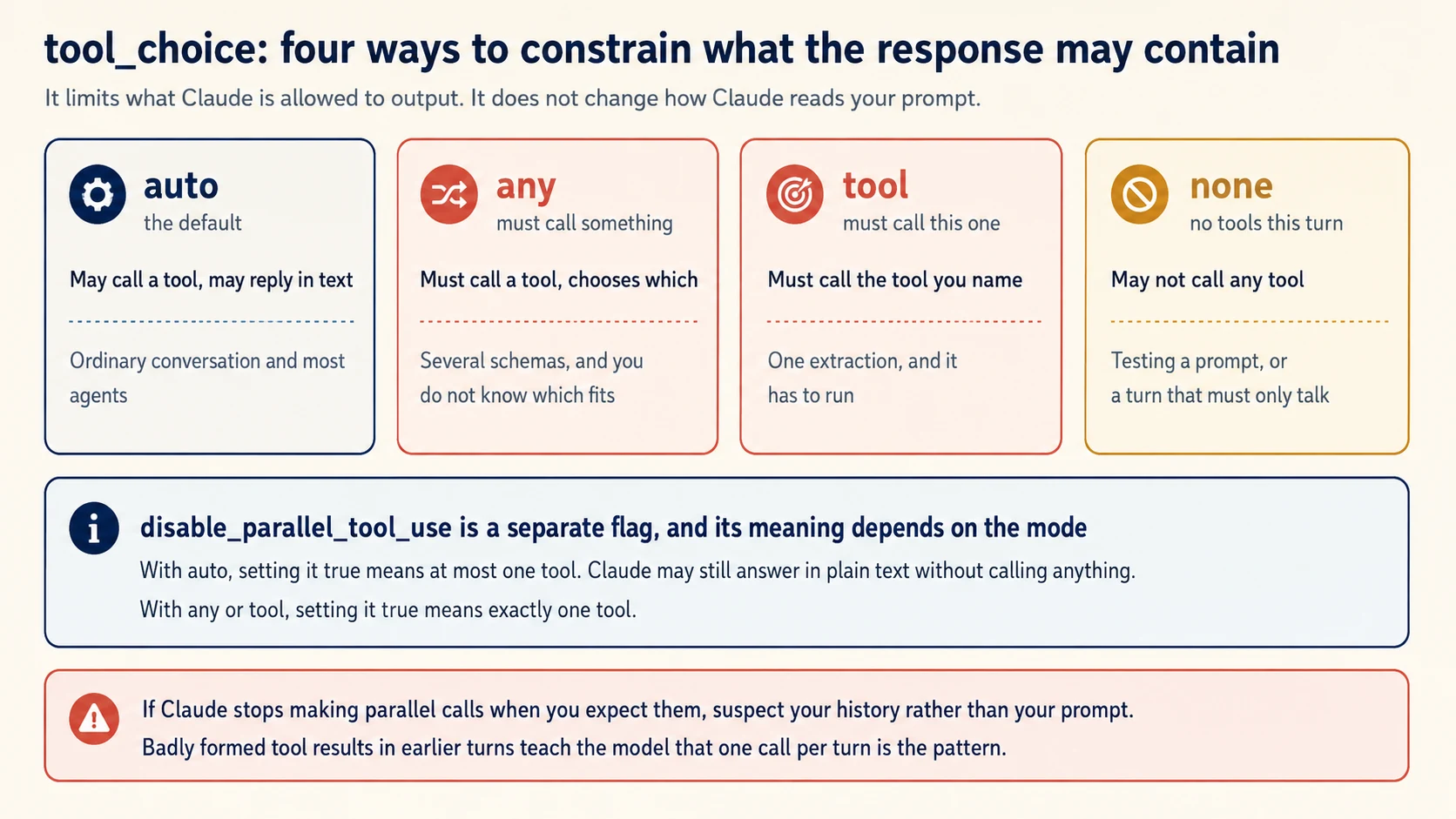
Key idea: Four modes control what the response is allowed to contain. The default lets Claude decide.
By default, Claude decides whether to call a tool. Sometimes your application needs to place tighter limits on that choice.
tool_choice={"type": "auto"}                              # the default
tool_choice={"type": "any"}                               # some tool, model picks
tool_choice={"type": "tool", "name": "get_weather"}       # this tool
tool_choice={"type": "none"}                              # no tools this turn
Be precise about what tool_choice does. It constrains the kinds of responses Claude may produce. It does not change the prompt or erase context.
Claude still reads the full request. You are controlling the allowed response shape.
any and forced tool are also useful for structured extraction. You can define a tool whose input schema matches the data you want, then require Claude to call it.
The returned tool arguments now have the shape of that schema. The tool itself does not even need to run. You will still see this pattern in existing code, especially code written before dedicated structured-output features were available.
The exam tests the difference between auto, any, and forced tool selection. Pay special attention to any when several schemas exist and the model must choose one. Also know when forced tool is required to select a specific tool.
Concept 11: One Tool at a Time
Key idea: disable_parallel_tool_use means different things depending on the mode it accompanies.
Parallel calls are not always safe. Two tools may modify the same resource, or a downstream service may require requests to run one at a time.
tool_choice={"type": "auto", "disable_parallel_tool_use": True}
The flag is separate from the mode, and the combination decides the behaviour.
| Mode | With the flag set true |
|---|---|
auto | At most one tool. Claude may still answer in plain text without calling anything. |
any or tool | Exactly one tool. |
The distinction is simple:
autoplus the flag means zero or one tool call.anyor forcedtoolplus the flag means exactly one tool call.
The mode decides whether a tool is required. The flag limits how many tool calls are allowed.
A useful debugging rule follows from this. If Claude unexpectedly stops making parallel calls, inspect the conversation history before rewriting the prompt.
Malformed tool-result history can teach Claude a one-call-per-turn pattern. The model may simply be following the example your own history provided.
Concept 12: Telling the Model a Tool Failed
Key idea: A tool failure is a result, not an exception. Return it as a tool_result with is_error set, and say what went wrong.
Suppose a tool raises an exception. The easiest response is to let the exception end the run.
That is often the wrong choice because Claude may be able to recover. A misspelled city, a timeout, or an invalid argument can all be useful information if you return the failure to the model.
{
    "type": "tool_result",
    "tool_use_id": block.id,
    "content": "ERROR: No weather station found for 'Karachi, France'. Check the country.",
    "is_error": True,
}
Two fields matter. is_error: True tells Claude that the tool failed. The content explains the failure.
"No weather station found for that city and country combination" is more useful than "Error 500". It gives Claude information it can reason about.
Use this rule: catch recoverable tool exceptions inside run_tool and return them as error results.
An exception that escapes usually ends the run. An error result keeps the loop alive and lets Claude decide what to do next.
def run_tool(name: str, args: dict) -> tuple[str, bool]:
    """Return (content, is_error)."""
    try:
        if name == "get_weather":
            return fetch_weather(args["location"]), False
        return f"ERROR: unknown tool {name}", True
    except TimeoutError:
        return "ERROR: The weather service timed out. It may work if retried.", True
    except KeyError as e:
        return f"ERROR: Missing required argument {e}.", True
Notice the difference in the error messages. The timeout says a retry may help. The missing argument does not. Good tool errors tell Claude whether retrying makes sense.
Update the Loop to Match
run_tool now returns two values instead of one: the content and the error flag. Update the loop immediately so it unpacks both values correctly.
            results = []
            for block in response.content:
                if block.type != "tool_use":
                    continue
                content, is_error = run_tool(block.name, block.input)   # unpack
                results.append(
                    {
                        "type": "tool_result",
                        "tool_use_id": block.id,
                        "content": content,
                        "is_error": is_error,                            # pass it on
                    }
                )
            messages.append({"role": "user", "content": results})
If you leave the old code in place, the entire tuple can end up inside content. Claude then sees something like ('It is 31C and clear in Karachi.', False) as the tool output.
Nothing crashes, which makes this kind of bug easy to miss.
One more detail: tool-result content does not have to be a string. It can also be a list of content blocks, which allows a tool to return richer data such as an image. This course uses strings because they keep the loop easy to see.
You can now control whether a tool is called, which tool is selected, and whether calls may run in parallel. You can also return tool failures without ending the conversation.
Part 4 covers the stop reasons that simple demonstrations often ignore.
Part 4: The Other Five Stop Reasons
Goal for this part: handle the responses that a laptop demonstration never produces and an unattended run eventually will.
Concept 13: pause_turn and Server Tools
Key idea: Some tools run on Anthropic's servers. When that loop hits its cap, send the response back unchanged.
The API has two broad kinds of tools, and your loop handles them differently.
Client tools run in your application. Claude requests the tool, your code executes it, and your code sends back the result. Every tool so far has been a client tool.
Server tools run on Anthropic's infrastructure. Web search is a common example. The API can execute these tools without sending a client-tool request back to your application.
The server-side tool loop has its own iteration limit, ten by default. If a long task reaches that limit, the response can stop with stop_reason: "pause_turn".
You may also see a server_tool_use block without a matching result. That is normal for this case.
PRIMM: Predict. A response arrives with
stop_reason: "pause_turn"and contains aserver_tool_useblock with no result beside it. You just learned that an unanswered tool call is an error. What do you send back? Confidence 1 to 5.
What you will see
Send the assistant content back unchanged as an assistant message. Do not invent a tool result.
This is different from Concept 6.
With tool_use, Claude is waiting for your code to run a client tool and return a result. With pause_turn, Anthropic's server-side tool loop paused itself. Your application has no tool result to create.
Do not create a tool_result for pause_turn. Doing so means your application is answering a client-tool request that never existed.
Use the stop reason as the signal. A response waiting for one of your client tools uses tool_use. A pause_turn indicates that a server-tool process paused.
How to Continue a Paused Turn
Continuing a paused server-tool turn uses a special pattern.
if response.stop_reason == "pause_turn":
    messages = [
        {"role": "user", "content": original_query},
        {"role": "assistant", "content": response.content},   # unchanged
    ]
    response = client.messages.create(
        model="claude-haiku-4-5",
        max_tokens=4096,
        messages=messages,
        tools=tools,
    )
Send the assistant content back unchanged. Do not construct a tool result.
Remember the contrast: tool_use needs a result from your code. pause_turn does not.
Two Continuations That Look Alike
| Stop reason | Who is waiting | What you send back |
|---|---|---|
tool_use | You, to run a client tool | A user message of tool_result blocks |
pause_turn | Nobody. The server paused itself | The assistant content, unchanged |
If Claude is waiting for one of your tools, the stop reason is tool_use, not pause_turn.
One important constraint remains: the continuation request must include the same tools array.
If you remove a server tool before the continuation request, the API can reject the request. The existing server-tool state no longer matches the tools you supplied.
Concept 14: Refusals Arrive as Successes
Key idea: A refusal is HTTP 200 with stop_reason "refusal". If your code assumes 200 means success, it will record a refusal as an answer.
PRIMM: Predict. Claude declines a request on safety grounds. What HTTP status does your client receive, does an exception get raised, and are you billed? Confidence 1 to 5.
What you will see
200. No exception. Yes, you are billed.
A refusal often surprises developers because it does not arrive as an HTTP error. Claude still generated a response, so the request can return HTTP 200 and consume tokens.
The important signals are stop_reason: "refusal" and the populated stop_details field.
Now consider a loop that treats every non-tool_use response as success. No exception fires. The HTTP status looks successful. The loop reaches its generic completion path and may store an empty or partial result as if the task succeeded.
The failure can look like a valid run that simply found no data. That is why refusal needs its own explicit branch.
refusal is especially dangerous because nothing about the HTTP response forces your code to notice it.
When Claude refuses, your HTTP client can still see a successful 200 response. No exception is required, and generated tokens are still billable.
Your code must inspect stop_reason. If it is refusal, use stop_details to understand the policy category.
Imagine an extraction pipeline processing ten thousand documents. One document triggers a refusal. If your loop treats every non-tool_use response as normal completion, that document may produce an empty record with no visible error.
The pipeline looks healthy until someone later discovers that the totals do not reconcile.
if response.stop_reason == "refusal":
    log.warning("refused", doc_id=doc_id, details=response.stop_details)
    route_to_review(doc_id)
    return
Two properties are worth remembering.
stop_details is used for refusal information. In this course's response model, a populated value tells you that the refusal branch needs attention.
A fallback model may handle a request differently. Retrying on another model can therefore be a useful recovery strategy in some systems.
Repeating the exact same request on the same model is usually not a meaningful recovery strategy and can simply add cost.
Concept 15: Two Kinds of Truncation
Key idea: max_tokens and model_context_window_exceeded are both truncation. Handle them the same way and tell the reader the output is incomplete.
max_tokens means Claude reached the output limit you set. The response may stop in the middle of a sentence or even in the middle of a tool call.
model_context_window_exceeded means the model ran out of available context space. The cause is different from max_tokens, but the practical result is the same: the output is incomplete.
Treat both values as truncation. If possible, retry with more room. If you cannot retry, mark the result as incomplete so downstream code or users do not mistake it for a finished answer.
if response.stop_reason in ("max_tokens", "model_context_window_exceeded"):
    text = "".join(b.text for b in response.content if b.type == "text")
    return f"{text}\n\n[Response was cut off before it finished.]"
This matters especially in pipelines. Once a truncated response is stored without a warning, it can look like a complete but concise answer.
Concept 16: stop_sequence, the One You Asked For
Key idea: This is the only stop reason you cause deliberately. It fires because you passed a string you wanted generation to halt on.
The other stop reasons describe decisions made by the model or API. stop_sequence means generation stopped because it encountered one of the strings you supplied.
response = client.messages.create(
    model="claude-haiku-4-5",
    max_tokens=1024,
    stop_sequences=["END", "---"],
    messages=[{"role": "user", "content": "List three cities, then write END."}],
)

if response.stop_reason == "stop_sequence":
    print(f"Halted on: {response.stop_sequence}")
Two details matter.
Read response.stop_sequence to see which string matched. You may have supplied several stop sequences, and each one can have a different meaning in your application.
The matched stop text is not included in the generated content. You receive the text that came before it.
stop_sequence is less common in ordinary tool-using agents. It is more useful in generation pipelines where you want a known text boundary between sections.
Choose stop strings carefully. If a stop sequence can appear naturally in the content, generation may end earlier than you intended and the result may simply look unusually short.
Concept 17: Stop Reasons Are Not Errors
Key idea: A stop_reason is a field on a successful response. An error is a 4xx or 5xx. Handling one in the other's code path is a category mistake.
Stop reasons and HTTP errors are different categories. Handle them in different parts of your code.
| Stop reasons | Errors | |
|---|---|---|
| Where | A field in the response body | An HTTP status of 4xx or 5xx |
| Meaning | Generation ended, and here is why | Your request was not processed |
| In Python | Read response.stop_reason | Catch anthropic.APIStatusError |
| Examples | refusal, max_tokens, pause_turn | 429 rate limit, 500 server error |
try:
    response = client.messages.create(...)
except anthropic.APIStatusError as e:
    if e.status_code == 429:
        ...      # back off and retry
    elif e.status_code >= 500:
        ...      # retry with backoff
    raise

if response.stop_reason == "refusal":
    ...          # a successful response that declined
This distinction prevents a common bug: code waits for an exception that never arrives while a refusal passes through the normal success path.
You now know how to handle all seven stop reasons explicitly. None has to fall through to an accidental success path.
That is the difference between a demonstration loop and a loop you can run with confidence. Part 5 puts the pieces together.
Part 5: The Worked Example
Now build a small research assistant. It will use two tools, handle all seven stop reasons, and report what happened during the run.
The build has four decisions. Think through each one before you implement it. Do not automatically accept the first design your coding agent proposes.
Decision 1: The Tools
Create
src/agent/tools.pywith two tools.search_notes(query)searches an in-memory list of ten short text notes and returns matching ids with a one-line preview of each.get_note(note_id)returns one note in full.run_tool(name, args)returns a tuple of content and an is_error flag, catching every exception and converting it to an error result.
The two tools are intentionally similar. Both work with notes and both take one string input.
That makes them a good test of Concept 5. Claude must rely on the descriptions to understand when to search and when to fetch a specific note.
What a Weak Pair Looks Like
A first draft may look like this.
{"name": "search_notes", "description": "Search the notes."}
{"name": "get_note",     "description": "Get a note."}
Both descriptions are technically correct, but neither explains the boundary between the tools.
Ask, "what did the note about the Karachi supplier say". Claude could reasonably interpret that as either search or fetch. It may call get_note with "Karachi" as the id, fail, and then try to recover on a later turn.
What a Working Pair Looks Like
TOOLS = [
    {
        "name": "search_notes",
        "description": (
            "Find which notes mention a topic. Takes a search phrase and returns "
            "a list of matching note ids, each with a one-line preview. Use this "
            "FIRST whenever you do not already know the exact note id, including "
            "when the user names a topic, a person, or a company rather than an "
            "id. This returns previews only, never the full text of a note. "
            "Do not use this when you already hold a note id: call get_note."
        ),
        "input_schema": {
            "type": "object",
            "properties": {
                "query": {
                    "type": "string",
                    "description": "A topic or phrase to search for, such as 'Karachi supplier'.",
                }
            },
            "required": ["query"],
        },
    },
    {
        "name": "get_note",
        "description": (
            "Read one note in full. Takes an exact note id, such as 'note-004', "
            "and returns the complete text of that note. Use this only after "
            "search_notes has given you an id, or when the user states an id "
            "directly. Do not pass a topic, a name, or a search phrase to this "
            "tool: it matches ids exactly and will fail. Use search_notes for that."
        ),
        "input_schema": {
            "type": "object",
            "properties": {
                "note_id": {
                    "type": "string",
                    "description": "An exact note id in the form 'note-NNN'.",
                }
            },
            "required": ["note_id"],
        },
    },
]
The stronger descriptions solve four separate problems.
Each description names the alternative. search_notes tells Claude to use get_note when it already has an id. get_note points back to search_notes when the input is a topic rather than an id.
That teaches the boundary between the tools.
Each explains the order. search_notes says to use it FIRST when no exact id is known. get_note says to use it only after an id is available.
The tools are not simply alternatives. They form a sequence.
Each explains its limit. search_notes returns previews, not full note text. get_note accepts exact ids, not topics or names.
Those limits prevent Claude from stopping after a preview or passing a topic such as "Karachi" where an id is required.
Each input includes a concrete example. The schema tells Claude that note_id is a string. The description tells Claude what that string should look like, such as note-004.
This is not a trick. It is the same information you would give a new teammate so they could choose the right function on their first day.
The Test That Tells You It Worked
Add
tests/test_selection.pywith six questions that could plausibly go to either tool, and assert which tool is called first for each. Include at least these four:
- A question naming a topic, with no id.
- A question naming an exact id.
- A follow-up referring to "that note" after a search.
- A question naming a topic that matches nothing.
Run the same test against the weak descriptions and the improved descriptions. Compare which tool Claude chooses first. That turns Concept 5 into something you can measure.
Done when:
- an unknown tool name returns an error result instead of raising
- an unknown note id produces an error message that names the id
- a topic-based question chooses
search_notesfirst
Decision 2: The Loop
Write
src/agent/loop.pywith anagent(question)function that branches on all seven stop reasons in one place:
end_turn: return the text.tool_use: execute every tool call in the response, then append both messages.max_tokensandmodel_context_window_exceeded: return the partial text with a truncation notice.refusal: return a refusal marker carryingstop_details.pause_turn: resend the assistant content unchanged.stop_sequence: return which sequence fired.Keep an iteration cap as a guardrail that raises. Never use it as a completion path.
Done when: all seven stop-reason branches are present and the final else raises.
If the API adds another stop reason later, your code should fail loudly until you decide how to handle it.
Decision 3: Make It Fail on Purpose
Now deliberately break the loop. Seeing these failures once makes them much easier to recognise later.
Write
tests/test_failures.pywith five cases that each break the loop deliberately:
- Append tool results without the assistant message. Assert a 400.
- Answer only the first of two
tool_useblocks. Assert a 400.- Add a text block after the tool_result blocks. Record what comes back.
- Set
max_iterations=1on a question needing a tool. Assert the guardrail raises.- Set
max_tokens=10on a question needing a long answer. Assertmax_tokens.
Case three is especially important because the API may not reject the request. Print the stop_reason and output token count.
If you receive a tiny reply with end_turn, you have reproduced the quiet failure from Concept 6.
Done when: you have reproduced all five cases and can identify which failures produce an explicit error and which ones quietly produce the wrong behaviour.
Decision 4: Watch the Cost Grow
Add a running total. After each API call, print the iteration number,
stop_reason,usage.input_tokens, andusage.output_tokens. At the end, print totals and the number of model calls.
Run one question that needs a single tool, then another that needs several. Compare the token counts and number of model calls.
Done when: you can see the input-token count rise on later iterations and explain why the growing messages history causes it.
That rising input-token count shows one of the basic economics of agentic systems. Every iteration sends the conversation again, so long-running tasks repeatedly pay for their own history.
Later context-management techniques are largely about controlling that growth.
What the SDK Does For You
You have now built the core loop that the Claude Agent SDK manages for you. The table below maps your hand-written pieces to the higher-level SDK features.
| You wrote | The SDK provides |
|---|---|
The while loop over stop_reason | The loop, run inside query() |
messages.append(...) twice per iteration | Session management, with resume and fork |
run_tool dispatch | Tool registration through a decorator |
Your max_iterations guardrail | max_turns, and a dollar ceiling |
| Nothing yet | Permission checks before a tool runs |
| Nothing yet | Hooks that can block a call outright |
| Nothing yet | Subagents with isolated context |
| Manual token counting | Usage and cost on the result |
You implemented the first four rows yourself. The remaining rows are higher-level features the SDK adds around that core loop.
Understanding the hand-written loop gives you a debugging model for the SDK.
If an SDK agent stops early, inspect the underlying stop condition. If it repeats a tool call, ask whether the tool result reached the conversation. If cost rises, remember that the history is being sent again.
The SDK may hide the mechanics, but the same mechanics still exist underneath.
How Hand-Written Loops Fail
When a hand-written loop misbehaves, the symptom often points directly to the mistake.
- "The agent forgot the previous turn" points to a messages array that was not carried forward (1).
- "It returns 'Let me look that up' as the final answer" points to terminating on the presence of text (9).
- "The API rejects my second request" points to a missing assistant message or an unanswered tool call (6, 8).
- "It calls the same tool again and again" points to results that never reached the conversation (9).
- "It stops after one tool call and waits" points to a text block added after the tool results (6).
- "The second tool call is ignored" points to taking the first
tool_useblock rather than all of them (8). - "My loop raises immediately on a simple question" points to an iteration cap of one, which allows no tools (7).
- "An extraction produced an empty record with no error" points to a refusal handled as completion (14).
- "The answer is cut off and nobody noticed" points to truncation stored without a marker (15).
- "My retry loop caught nothing while errors kept happening" points to confusing stop reasons with HTTP errors (17).
- "Parallel calls stopped happening" points to malformed tool results teaching a one-call-per-turn pattern (11).
- "The cost is far higher than expected" points to every iteration re-sending the whole conversation (1, Decision 4).
Carry two habits from this course into every agent framework you use later.
Branch on stop_reason, not on the shape or wording of the content. Use the API's explicit control signal instead of guessing.
Make the final else branch raise. Unknown control states should fail loudly. Silent fallthrough turns unexpected behaviour into false success.
Build It: Exam Prep Projects
Reading about stop_reason and branching on it are different skills, and the exam tests the second one. Every question you will meet describes a system already running and already misbehaving, then asks which change fixes the cause rather than the symptom. You get good at that by building something small, breaking it deliberately, and watching what the failure actually looks like.
These two projects cover Exercise 1 in the official preparation list.
Project 1: A Loop That Handles Every Way a Turn Can End
What you will have: a loop of about sixty lines that keeps running while Claude asks for tools, stops when it is finished, and does something sensible for the five other ways a response can end.
I want to write the agentic loop by hand against the Messages API, no framework. Give me two simple tools and a loop that keeps going while the model asks for them. Explain each branch as you write it.
Done when:
- The loop continues on
tool_useand exits onend_turn. - Every tool result goes back as a user message, and the assistant turn that requested it is still in the history above it.
max_tokens,refusal,pause_turn, andstop_sequenceeach hit a branch you wrote on purpose, not a fallthrough.
Then break it. Append the tool results but skip the assistant turn that requested them. The request fails, and the error tells you why: you answered a tool_use that is not in the conversation. Do it once and you will never mis-order a history again.
Project 2: Errors the Model Can Act On
What you will have: tools that fail in a way the model can recover from.
Change my tools so failures come back as structured data instead of a string. I want a category, a retryable flag, and a plain-English description. Then show me the model reacting differently to a timeout and to a business rule.
Done when:
- A failure returns an error category, a retryable boolean, and a human-readable message.
- A transient failure gets retried. A business-rule failure gets explained to the user instead.
- A permission failure escalates rather than looping.
Why this shows up. Domain 1 tests loop control flow directly, and the anti-patterns are named: parsing prose to decide when to stop, capping iterations as the primary stopping mechanism, or treating the presence of text as completion. Each one is a way of not reading stop_reason.
Sources
Every page below was checked on 30 August 2026. Where this course and a current page disagree, the page wins: these products move faster than any course can, which is why each concept names the behaviour to verify rather than asking you to trust a number.
- Messages API reference, the request and response shape, content blocks, and the
usagerecord Concept 2 reads. - Handling stop reasons, the seven values. Part 4 is this page turned into branches.
- Refusals and fallback, why a refusal is a billed 200 rather than an error, and what
stop_detailscarries. - Tool use overview, tool definitions, the
tool_choicemodes, and parallel tool use.