Just Delegate It: A Crash Course
11 concepts. 1 loop. 1 brief. Give AI the job. Watch it work.
Most people who say they use AI have been asking it things. The answers are often good, and the work stays exactly where it was: with you.
This course starts the other way. You hand AI a job, watch it work, check the result, and decide whether to accept it. You do that eleven times, each time a little better, with a free account in a browser. You already have enough AI to start delegating. What this page adds is the habit.
📚 Teaching Aid
View Full Presentation: Just Delegate
See it in two minutes
Open a free AI in a browser: Claude or ChatGPT, or another free assistant such as Gemini. Whichever you already have is the right one. Start a new chat and type this:
Find three free online courses for learning AI agents, using current
information, and put them in a table with the provider, the language,
the time needed, and a link to each.
Read what comes back. Then open one of the links and check two things on the page itself: is the course really free, and is it in the language the table says?
One of three things happens. The page agrees with the table. The page disagrees on a detail, often the language or the price. Or the link does not lead to the course at all. All three are normal, and nothing in the table told you which one you were about to get.
That is the whole course in one small moment. AI did an hour's work in a minute, and the one thing it could not do was tell you whether to trust the result. The rest of this page gives that moment a rhythm and a written form, and then makes you good at it.
Plan on about three hours, in two or three sittings. Reading: about 65 minutes in all. The eleven concepts take about 40 of those: Part 1 about 10 minutes, Part 2 about 11, Part 3 about 13, Part 4 about 6. Doing: about 90 minutes. Closing work: about 30 minutes, more if you do all six jobs. If you read slowly, add half an hour.
This is the first Foundations course. It assumes nothing except a free AI account in a browser. The courses after it explain what you will have done here.
| Topic | Taught in | In this course |
|---|---|---|
| What the machine is, and why it sounds sure when it is wrong | What AI Actually Is | Used in passing |
| The four human competencies: Delegation, Description, Discernment, Diligence | AI Fluency | The work order they fill in |
| Prompting technique: context, examples, formats, iteration | AI Prompting in 2026 | One brief shape, no technique |
| Work that runs while you are away: plans, permission modes, schedules | General Agents on the Web | Recordings only |
| Where each control lives in Claude and in ChatGPT | The ChatGPT and Claude Quick Reference | A control is named only when a job needs it |
| Giving AI a job and deciding whether to accept the result | This course | Taught directly |
The exercises are written for any free assistant. Where this course names a control, it names it for Claude and for ChatGPT.
In short: the job first, then the machine, then the collaboration, then the techniques.
Where a control sits, what a free plan allows, and what a model is called all change without notice. Every such statement on this page was checked against the vendors' own help pages on 8 September 2026. When this page and the live product disagree, the product is right.
Every required exercise here runs on a free plan. If you hit the free plan's limits every day, the path up is the same for every assistant. It goes free, then an affordable paid plan for more everyday capacity, then an advanced plan. After that comes an agentic environment for work that runs while you are away. This course names no prices and needs none of those steps. Paid access is an upgrade path, not a prerequisite.
The questions this course answers
Fourteen questions. Each entry in Answered in jumps to the place that closes it, so this table doubles as the map.
| # | Question | Answered in |
|---|---|---|
| 1 | What is the difference between asking AI something and giving it a job? | Concept 1 |
| 2 | What are the six steps of the Delegation Loop, and which of them stay yours? | Part 2 opener |
| 3 | Why does describing the result work better than dictating the steps? | Concept 2 |
| 4 | What six questions make a Delegation Brief, and how is a brief different from a prompt? | Concept 3 |
| 5 | When should AI search the web, and how do I know whether it did? | Concept 4 |
| 6 | How do I give AI a source, keep it inside that source, and keep private things out? | Concept 5 |
| 7 | What is the difference between an answer and a deliverable? | Concept 6 |
| 8 | How much of the job should AI decide, and how do I set a boundary it will keep? | Concept 7 |
| 9 | What do I do when the same job comes back next week, and what belongs in a Project? | Concept 8 |
| 10 | What are my moves when AI goes wrong, and when should I stop it? | Concept 9 |
| 11 | What is worth verifying, and how do I actually check a claim? | Concept 10 |
| 12 | What happens to accountability when AI does the work? | Concept 10 |
| 13 | Why run the same brief in a second AI, and what may I conclude from it? | Concept 11 |
| 14 | What does a finished delegation record look like? | Your Delegation Record |
For teachers using this table
Before. Ask the group to answer questions 1, 3, and 11 cold, in writing, before anyone reads. Answers that treat asking and delegating as the same thing, or describe verification as "reading it carefully", are your lesson plan.
During. Each concept closes one row and has a Do It Now designed for under ten minutes on a free account. If a session runs short, assign the rows you did not reach rather than skipping them.
After. Any question a learner cannot answer without scrolling up marks the concept that did not land.
Where each row sits on the Associate exam blueprint: rows 1, 3, 4, and 7 belong to Domain 1, Prompting and Task Execution. Row 11 belongs to Domain 2, Output Evaluation and Validation. Rows 5, 6, and 13 belong to Domain 3, Product and Model Selection. Row 9 belongs to Domain 5, Configuration and Knowledge Management. Rows 8 and 12 belong to Domain 6, Governance, Risk, and Responsible Use. Row 10 belongs to Domain 7, Troubleshooting and Optimization. Rows 2 and 14 are additive and not blueprint objectives. See Certifications.
Quick glossary
- Delegation Loop: the six-step rhythm of giving AI a job. Define, delegate, observe, intervene, verify, accept.
- Define: the first step. You say what result you want.
- Delegate: the second step. You give AI the responsibility for producing the result.
- Observe: the third step. You let AI do the routine work without directing every step.
- Intervene: the fourth step. You correct, redirect, constrain, or clarify when AI drifts.
- Verify: the fifth step. You check the claims, numbers, and actions that matter.
- Accept: the sixth step. You decide whether the result is fit for use, or send it back.
- Delegation Brief: six questions you answer before AI starts. Outcome, context, constraints, authority, deliverable, verification. A work order, not a form.
- Outcome: what should exist when the work is complete.
- Context: what AI needs to know that it cannot know on its own, including any source you give it.
- Constraints: the requirements and limits that apply to the job.
- Authority: what AI may decide without asking you. In a chat, decisions. Later, permissions.
- Deliverable: the form the result should take, shaped so that someone can use it. A table, a document, a file.
- Verification: what you will check before you accept the result, written before the work starts.
- Fresh chat: a new chat, so that nothing from the last conversation carries over.
- Running job: the one job you carry through this course, delegated again at every concept with one more line filled in.
- Need first, then tool: the rule for every control on the screen. You learn a control when a job needs it, not before.
- Plan-first: asking AI to list its steps and wait for your go-ahead before it starts.
- Project: a space in an assistant that holds your files and standing instructions, so that every chat inside it starts already informed.
- Knowledge: the files a Project holds. What AI may read, in every chat inside the Project.
- Standing instruction: a rule written once into a Project, which AI follows in every chat inside it.
- Temporary chat: a chat that is not saved to your history and does not add to memory. ChatGPT's name for it. Claude calls it an incognito chat.
- Identify, Trace, Challenge, Decide: the four steps inside Verify.
- Accept, Correct, Investigate, Reject: the four decisions verification ends in.
- Review thresholds: stakes, reversibility, audience, regulatory exposure. Four questions that push a result onto the must-check list. One crossed is enough.
- Delegation Record: the one-page record of a job. Brief, run, check, decision.
The eleven ideas in one line each
The whole course, one sentence per concept.
- Asking AI gets you an answer, and giving AI a job gets you a result you can check.
- Describe the result you want, and leave the steps to AI.
- A Delegation Brief answers six questions before AI starts, so that you have something to check the result against.
- When the job needs current facts, make AI search, and check that it did.
- When the job needs a source only you have, give it, tell AI to stay inside it, and check that it did.
- Ask for the finished thing, a table or a document, and check that every "unverified" mark survived.
- Say what AI may decide alone and what it must ask about, and read the plan before the work starts.
- When a job comes back, save what does not change, and put it where AI reads it by itself.
- When AI drifts, fix it with the smallest message that works, then write the lesson into the brief.
- Verification has four steps, and the accountability for the result stays with you.
- A good brief runs in a second AI without a rewrite, because it describes the job and not the tool.
Part 1: Stop Asking. Start Delegating.
What you did two minutes ago has a name. Part 1 gives it the name, shows the one decision that separates it from asking, and gives it a written form you will use for the rest of the book.
1. From Asking AI to Giving AI the Job
Most people begin with AI by asking questions.
What are some good courses for learning AI agents?
In the opener you gave AI a job instead. Put the two side by side.
Do It Now
Open a fresh chat, which is a new chat where nothing from the opener carries over. (An assistant with memory switched on may still remember things about you. That is fine here.) Type the question:
What are some good courses for learning AI agents?
Put this answer next to the table from the opener.
What Just Changed?
The question got you a list, and the next steps are yours: open each course, compare them, check what is current, decide.
The job got you a table with links. AI did the first pass. What is left for you is checking.
If the question also gave you a table, AI guessed what you wanted. The job removed the guessing.
The job is a longer sentence than the question, but not by much, and length is not the difference. The difference is that it asked for a thing to exist: three courses, in a table, with links. That is delegating. To delegate means to give AI the responsibility for producing the result. It does not depend on a paid plan or a special model. It depends on what kind of sentence you type.
What to Notice
Ask:
- Which answer is a thing you could hand to someone else, and which is advice you would still have to act on?
- Did it separate the facts it found from the advice it gave?
- Which of the two answers left you with something you could check?
Verify Before You Accept
You opened one link in the opener. Write down, in one line, which of the three outcomes you got: the page agreed, the page disagreed on a detail, or the link did not lead to the course.
Keep that line. You will do this at every concept, and by Concept 10 you will know exactly what is worth checking and how.
Your Turn
Replace "AI agents" with something you want to learn, in the language you learn best in: accounting, Excel, graphic design, managing projects, spoken English, public speaking, Python. Type the opener's job again with your subject in its place. Do not research it yourself first. Give AI the job.
Keep this chat. It is your running job: the one job you carry through the whole course. At each concept you will come back to it and add one thing. By Concept 10 you will have written a complete brief without ever filling in a form. If your subject has no courses with clear pages to check against, use "learning Python from zero" as the running job instead. It has many free courses with clear pages, and you can bring your own subject back in the closing work.
Check Your Work
- Did I ask for a thing to exist, rather than for advice?
- Did AI do work I would otherwise have done myself?
- Did I open at least one link and compare the page with the table?
If any answer is no, change the message and run it again before continuing.
2. Give AI the Outcome, Not the Clicks
There are two ways to hand over the same job. You have used one. Try the other.
Do It Now
In a fresh chat, hand over your running job as a recipe. Name two of the providers from your Concept 1 table and tell AI exactly what to do with each:
Look only at [provider one] and [provider two]. Find the three
highest-rated courses on each for learning [your subject]. For each
course copy the name, the price, and the length into a table. Then
tell me which is best.
If AI says it cannot browse those sites, tell it to search them instead and continue. Either way, notice who chose the sources.
Put the result next to the table from Concept 1.
What Just Changed?
The recipe told AI every step. If it followed them, it followed them even where a step was weak, because the plan was yours. If it refused, you had to supply the method yourself. Either way, your plan was the limit. If the two sites you named are not where the best free courses live, the table is neat, the recommendation is poor, and nothing in the result tells you so.
The one-sentence job named the outcome: what should exist when the work is done. AI chose where to look. You judged the result against the outcome you asked for, not against a plan you invented on the spot.
Steps still have a place. When a source or an order of work is required, that is a limit on the job, and Concept 3 gives limits a line of their own. What you should not do is write steps because you are nervous. That feeling belongs at the end, when you check, not at the start.
What to Notice
Ask:
- Did the recipe version stay inside the sites you named, even if better options existed elsewhere?
- Where did "highest-rated" come from? If the course page shows no rating, AI supplied one.
- Did the one-sentence version use sources you did not name?
- Which result could you judge without first having to trust your own plan?
Verify Before You Accept
Find one place where the two results disagree: a price, a length, or a "free" that one says and the other does not. Open the course page and settle it. If the two tables share no course at all, that is the finding: the recipe never saw what the job found. Check one price from each table instead. Either way, notice that being right had nothing to do with which message was longer.
Your Turn
Write the outcome for your running job as one sentence that begins "When this is done, I will have…". Add two limits that matter to you, one line each, such as "must be possible to start this week" and "no more than five hours a week". Run it in a fresh chat.
Check Your Work
- Does my sentence describe a result, not an action?
- Could someone else read it and know when the job is finished?
- Did I leave the method to AI?
If any answer is no, rewrite the sentence before continuing.
3. Write the Delegation Brief
You have been writing a brief without knowing it. Here is the opener's one-sentence job, grown into six labeled lines.
Give AI This
Outcome: three free online courses for learning AI agents, compared,
with one recommended for a complete beginner.

Context: I have never built or used an AI agent, and I do not know how
to program. I can study about five hours a week.

Constraints: only courses that can be started for free, and only
courses that do not expect programming knowledge. Search for current
information rather than answering from what you already know.

Authority: choose the sources yourself. If two courses are equal, pick
the shorter one without asking me. Say clearly if a course is paid, or
if it expects me to know how to program.

Deliverable: a short table with provider, language, time needed,
whether a certificate costs money, and a link. Then a two-sentence
recommendation.

Verification: mark anything you could not confirm as "unverified"
instead of guessing.
Do It Now
Rewrite your running job in the same six lines. Run it in a fresh chat. Put the result next to your Concept 1 table.
What Just Changed?
This is a Delegation Brief: six questions you answer before AI starts, so that when it finishes you have something to check it against. You had already answered three of them without labels. The outcome is the sentence you wrote in Concept 2. "Free" was one of the constraints, which are the requirements and limits that apply to the job. The table with links was the deliverable: the form the result takes, shaped so that someone can use it.
Three lines are new. Context is the easy one: what AI cannot know about you or the job unless you say it. The other two are the ones people skip.
Authority is the set of decisions you let AI make alone. It exists even in a chat window, where AI cannot send or buy anything. "Pick the shorter one without asking me" is authority. "Say clearly if a course is paid" is a limit on it. Without that line, AI decides for you, silently, and you never learn that a decision was made.
Verification is what you will check before accepting the result, written down before the work starts. Writing it first turns reading the result into checking it. You name what matters enough to open a source for, while you still know why it matters.
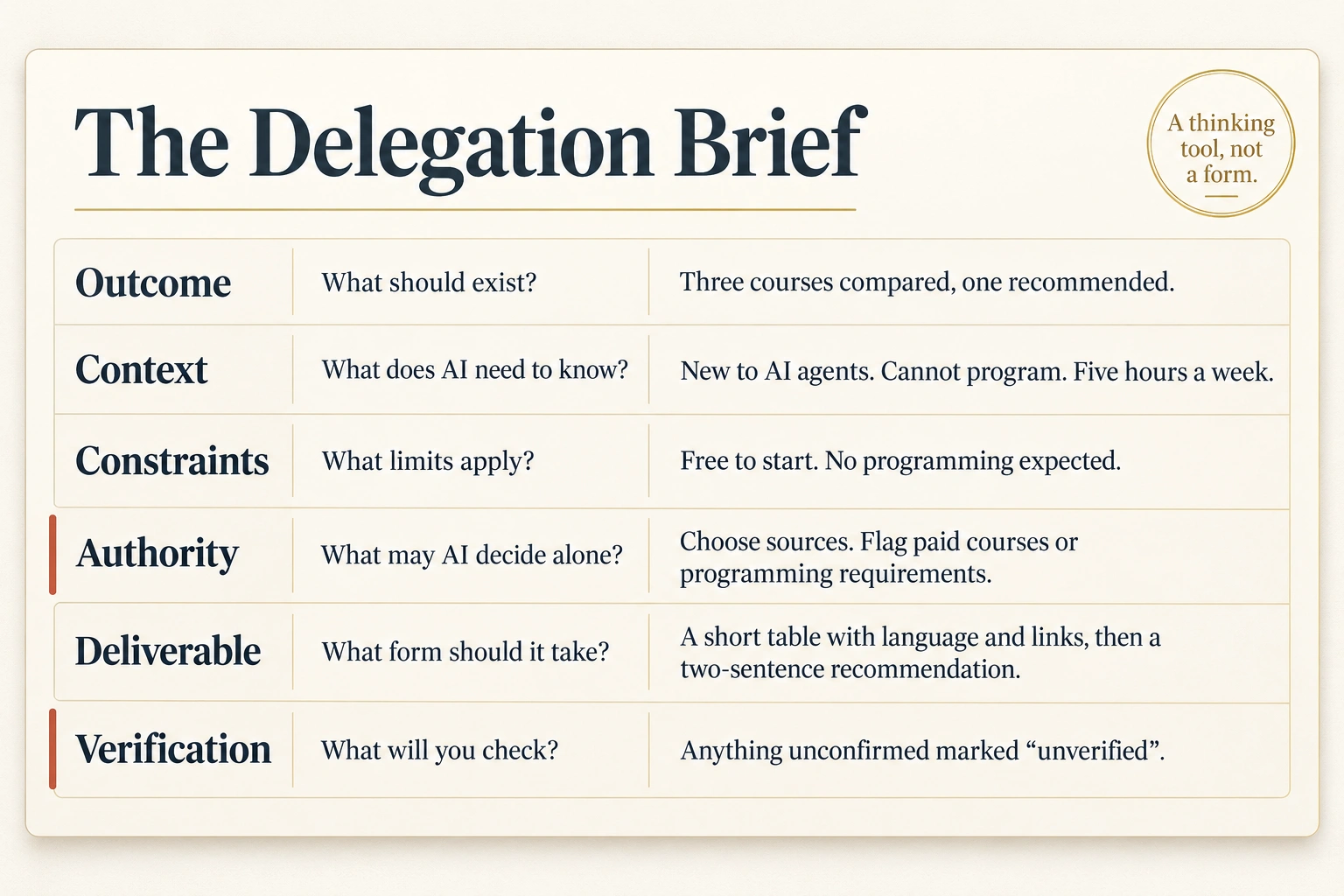
This is a thinking tool, not a form. Nobody fills in six boxes for a two-line job. But every time a result disappoints you, one of these six questions was unanswered, and now you can say which.
What to Notice
Ask:
- Did AI keep to the deliverable line, column for column?
- Did it mark anything as unverified? If it marked nothing, is that because everything was confirmed, or because the line was ignored? Open one link and find out.
- Did it say whether the recommended course is paid, or expects programming you do not have?
Verify Before You Accept
Take one item the result marked as unverified and check it yourself. If nothing was marked, open the recommended course and check, on the page, its price and what it expects you to know already. Write one line: what the brief asked to be checked, what you checked, and what you found.
Your Turn
Write a brief for a job you actually need done this week that is not a learning job: two phones you are choosing between, a long message thread you need summarized, a letter you need drafted. Six lines, one per question. If a question does not apply, write "none" rather than deleting the line, so you can see that you decided it did not apply. Before you paste anything real, remove names and anything private. Concept 5 says more. Then run it.
Check Your Work
Does your brief make these clear?
- What outcome should exist?
- What context does AI need that it cannot know on its own?
- What constraints matter?
- What may AI decide without asking?
- What deliverable should it produce, in what form?
- What will you check before accepting the result?
If a question matters for this job and the brief leaves it unanswered, fix the brief before continuing.
Ask Zia Tutor
Optional. Zia Tutor AI is one connector, available on the free plan. If you have added it to Claude, paste your six-line brief, the result, and your Check Your Work answers, and ask:
Judge my brief against its six questions. Name the one question my
brief answers worst for this particular job, tell me why it matters
here, and wait for my revision before you say anything else. When
the revision is good enough, say so in one line and tell me what
Concept 4, Give AI Something to Research, will ask of this brief.
The self-check above is the required path. The tutor coaches your work. It does not do the exercise for you.
The six lines are a work order, not a new theory. AI Fluency, two courses from here, teaches the four human competencies behind them: Delegation, Description, Discernment, and Diligence. The brief is not a fifth one. AI Prompting in 2026 teaches how to phrase each line so it works better. This course teaches the artifact.
How the six lines map to AI Fluency's four competencies
| Brief line | Competency behind it |
|---|---|
| Outcome | Delegation and Description |
| Context | Description |
| Constraints | Description and Diligence |
| Authority | Delegation and Diligence |
| Deliverable | Description |
| Verification | Discernment and Diligence |
Part 2: Give AI Real Work
Part 1 ran the same rhythm three times and never stopped to name it. It is the Delegation Loop: the six-step rhythm of giving AI a job.
- Define is the first step: say what result you want. In Part 1 that was the one-sentence outcome you wrote in Concept 2.
- Delegate is the second step: give AI the responsibility for producing it. That was every message you sent in Part 1 that asked for a thing to exist.
- Observe is the third step: let AI do the routine work without directing every step. That was reading the table instead of building it.
- Intervene is the fourth step: correct, redirect, constrain, or clarify when AI drifts. If AI refused the recipe in Concept 2 and you told it to search instead, you have done this once. Concept 9 is where you learn the moves.
- Verify is the fifth step: check the claims, numbers, and actions that matter. That was every link you opened.
- Accept is the sixth step: decide whether the result is fit for use, or send it back. That is the decision you have been making at each concept.
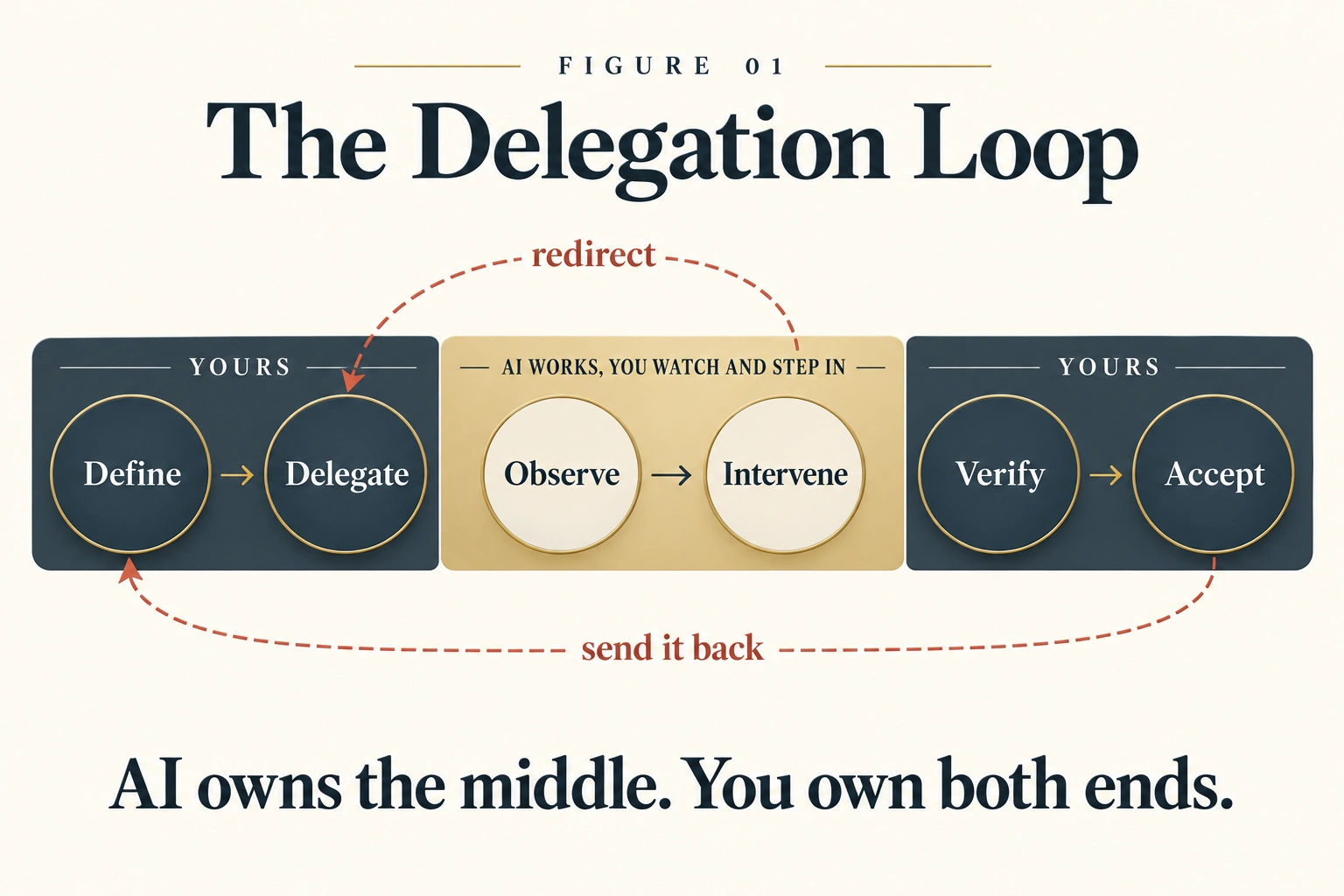
AI owns the middle. You own both ends: Define and Delegate at the start, Verify and Accept at the end. AI can help you with any of the four. It cannot take them, because what the job is and whether the result is fit for use are decisions you answer for.
Part 2 gives your running job real material. Each concept adds one thing the job needs, and with it the one control on the screen that answers the need. That is the rule for every button in this course, need first, then tool: a control is learned when a job needs it, not before.
The map below uses two names that Concept 8 teaches, so here is one line on each. A Project is a space in an assistant that holds your files and standing instructions, so that every chat inside it starts already informed. Knowledge means the files a Project holds, which AI may read in every chat inside it.
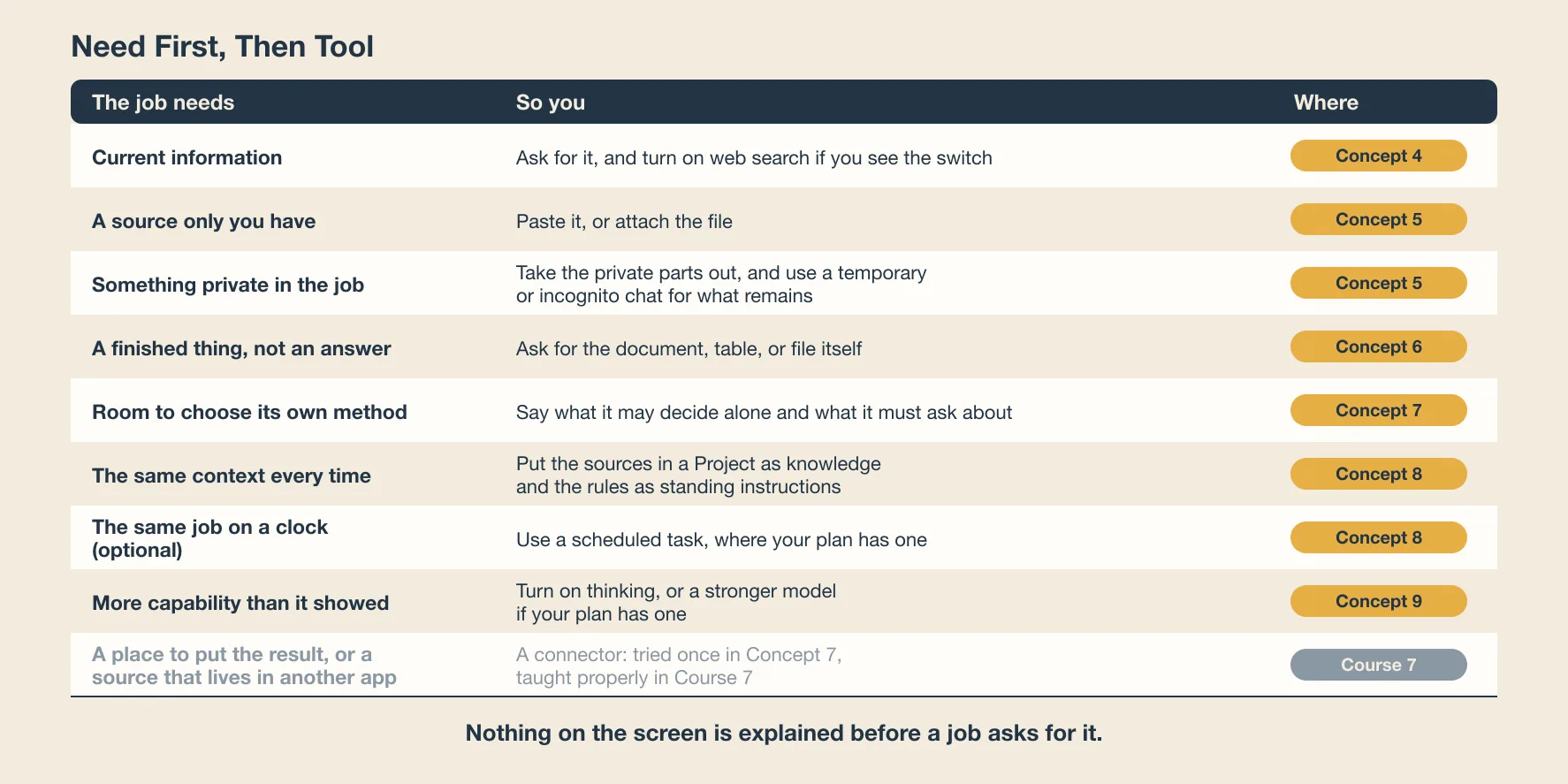
| The job needs | So you | Where |
|---|---|---|
| Current information | Ask for it, and turn on web search if you see the switch | Concept 4 |
| A source only you have | Paste it, or attach the file | Concept 5 |
| Something private in the job | Take the private parts out, and use a temporary or incognito chat for what remains | Concept 5 |
| A finished thing, not an answer | Ask for the document, table, or file itself | Concept 6 |
| Room to choose its own method | Say what it may decide alone and what it must ask about | Concept 7 |
| The same context every time | Put the sources in a Project as knowledge, and the rules as standing instructions | Concept 8 |
| The same job on a clock | A scheduled task, where your plan has one | Concept 8, optional |
| More capability than it showed | Turn on thinking, or a stronger model if your plan has one | Concept 9 |
| A place to put the result, or a source that lives in another app | A connector, tried once in Concept 7 and taught in Skills & Connectors | Concept 7, optional, and Course 7 |
4. Give AI Something to Research
The opener asked for current information. This concept is about what that line did, and how to tell whether AI obeyed it.
Do It Now
In a fresh chat, run your six-line brief with one line added at the end:
For each course, say whether you found it by searching just now or
already knew about it, and give the date of the page you used.
Read the answer for the two words that matter: "searched" and "knew". The word is a hint. The source and its date are the evidence.
What Just Changed?
An AI assistant has two ways of knowing things. It remembers what it read when it was built, which is large and out of date. Or it looks now, which is search. For a price, a start date, a link, or whether a course still exists, only looking will do. When you wrote "using current information" in the opener, you were telling it which of the two to use.
You can usually tell which one it used. A fact that came from looking should arrive with a source you can open. A fact that came from remembering arrives alone, and sounds just as sure. Two cautions go with that. If a current claim arrives with no source, do not assume AI looked, whatever the answer says about itself. And a source is not a date: pages go stale, so when it matters that a fact is current, find the date on the page yourself. If your opener link was stale, this is why: the job needed current information and AI answered from what it remembered, or from a page that had moved on.
Some assistants show a web search switch. Turn it on when the job needs today's facts. Some also have a deeper research mode that takes minutes and reads many pages before writing a report. That mode is for a job whose deliverable is the report, not for a fact that one search settles. What each plan includes changes often, so check the plans page rather than this course.
What to Notice
Ask:
- Did each course come with a source you can open? Did any current claim arrive with none?
- Did it say "knew" about anything? That is the fact to check first.
- Did the answer change from your Concept 3 run? If it did, was the world different, or was the search?
Verify Before You Accept
Choose one fact that came with a page. Open the page. Find the sentence that supports the fact. Check the date on the page. If the sentence is not there, or the date is old, the link was decoration.
A citation is not verification. Checking the citation is verification.
Your Turn
Add one constraint to your running brief that only current information can satisfy, for example "only courses with a start date or an open enrollment in the last year". Run the brief again in a fresh chat.
Check Your Work
- Did my brief say that the job needs current information?
- Could I tell which facts came with a source and which arrived alone?
- Did I open one page, find the sentence that supports the fact, and find its date?
If any answer is no, add the line, run it again, and open the page.
5. Give AI the Source
Some jobs need something AI cannot search for: the syllabus of the course you chose, a notice from your office, a message thread, a policy page. You have it. AI does not. You give it.
Before you paste anything real into an assistant, remove names, phone numbers, account numbers, and anything you would not pin to a public notice board. A free assistant is not your filing cabinet.
If a job holds something you do not want kept, both Claude and ChatGPT offer a chat that is not saved to your history and does not add to memory. ChatGPT's name for it is a temporary chat. Claude's name for it is an incognito chat. Neither makes a paste disappear, because the provider still holds a copy for a time, so the first rule stands. Where the switch sits is in the Quick Reference.
Whether a piece of work or a piece of data may go into AI at all is a bigger question. Governance, Risk & Responsible Use, the last course in Foundations, answers it properly. For now, take out what is private and keep going.
Do It Now
Open the page of the course AI recommended. Copy the text that describes it, a page or two at most. In a fresh chat, paste it after this:
Using only the text below, answer three questions: what will I be able
to do at the end, how many hours a week does it expect, and is any
previous knowledge required? For each answer, quote the sentence you
used. If the text does not say, write "not in the source".

[paste the text here]
What Just Changed?
The Context line of your brief has grown. It now carries a source, and the job is to stay inside it.
"Using only the text below" and "quote the sentence you used" are the two instructions that make a source a source. Without them, AI mixes what you gave it with what it remembers, and you cannot tell which is which. With them, every answer points back to a sentence you can find, and "not in the source" becomes a good answer instead of a gap AI fills for you.
For a page or two, paste. For a longer document, attach the file: the control is the plus or paperclip beside the message box, and one file is enough for this course. Either way the job is the same: give AI the source, tell it to stay inside, and check that it did.
When a long chat goes stale
A chat that has run for an hour starts to lose track of what you decided at the start. When answers begin to contradict earlier ones, do not argue with the chat. Ask AI to write a short summary of what you have decided so far and what remains, copy it, open a fresh chat, and paste it as the first message. The summary is a source too.
What to Notice
Ask:
- Did every answer come with a quoted sentence, or did some arrive without one?
- Did it write "not in the source" anywhere, or did it answer everything?
- Did it add anything the text did not say?
Verify Before You Accept
Take one quoted sentence and find it in the text you pasted. If it is there word for word, good. If it is close but not exact, AI paraphrased and called it a quote. If it is not there at all, AI invented it. Write down which.
Your Turn
Add a Context line to your running brief that names a source: "Use the course description I paste below as the source for the recommended course." Run the whole brief again with the text attached or pasted.
Check Your Work
- Did I remove names and anything private before pasting?
- Did my brief tell AI to use only the source and to quote it?
- Did I find one quoted sentence in the original, word for word?
If any answer is no, fix the brief before continuing.
6. Ask for the Deliverable, Not an Answer
Every job so far ended in a chat message. A real job ends in a thing someone can use.
Do It Now
In the chat with your latest running-job result, type:
Turn this into a one-page document I could send to a friend who asked
me the same question: a two-sentence introduction, the comparison
table, the recommendation, and the sources. Make it a file I can
download if you can. Keep every "unverified" mark exactly where it is.
What Just Changed?
The Deliverable line of your brief has done its work. An answer replies to you. A deliverable is shaped so that someone can use it, save it, hand it on, or act on it: a table with the columns you named, a document, a spreadsheet, a file. Your opener table was already a small deliverable. Most deliverables have to leave the chat to survive, which is why this concept asks for the document itself. Once you name the form, AI produces the form, and you check the result column for column against the line you wrote.
Where the deliverable appears depends on the assistant. Some open a separate panel beside the chat. Some produce a file you download. Both are the same move: the work product is separated from the conversation about the work product, so it can be kept and passed on. When the answer is data, ask for a table or a spreadsheet, not paragraphs.
The last line of the message matters more than it looks. Deliverables lose caveats. An "unverified" mark that survived three chat replies can vanish when the same content is poured into a tidy document, because tidy is what the document is for. Two later courses give you more control over the form itself. Markdown In, HTML Out teaches the document languages every assistant speaks. Code You Never Write is for the day the deliverable is a small program or a chart.
What to Notice
Ask:
- Does the document match the deliverable line column for column?
- Is every "unverified" mark from the chat still in the document?
- Could someone read the document without ever seeing the chat?
Verify Before You Accept
Count the caveats in the chat answer: every "unverified", every "may", every "check". Count them in the document. If the second number is smaller, find what was dropped and put it back.
Your Turn
Rewrite the Deliverable line of your running brief precisely: the form, the sections, the length, and the sentence "keep every unverified mark". Run the whole brief in a fresh chat and compare the deliverable with the one from Concept 3.
Check Your Work
- Did I name the form of the result, not just its content?
- Did the result match the form I named?
- Did every caveat survive the move from chat to document?
If any answer is no, fix the Deliverable line before continuing.
Part 3: Give AI More Responsibility
Part 3 widens what AI owns, shows what happens when the job comes back, and then breaks a job on purpose so you can practice the move that fixes it.
7. Decide How Much of the Job AI Owns
Authority was one line in Concept 3. Here it is the whole concept, because it has two faces and people usually see only one.
Do It Now
In a fresh chat, run your running brief with one instruction added at the top:
Before you start, list the steps you plan to take, in order, and wait
for my go-ahead. Do not begin until I say go.
Read the plan. Change one step: add a source, remove one, or change the order. Then type "go".
What Just Changed?
You have just used the cheapest moment in any job: before it runs. Plan-first means asking AI to list its steps and wait for your go-ahead before it starts. A plan costs a minute to read and a sentence to fix. The same mistake, found after the run, costs the run. Asking for the plan is how you Observe a job you cannot watch, and redirecting it is Intervene at its cheapest.
An approved plan is not a cage. AI may find a better route once it starts, and a good agent often does. What it may not do is cross a line you drew, or change something that matters without telling you. The failure is the silent change, not the change.
That was the first face of authority: how much of the method AI decides. You gave it the method and kept a veto. The second face is what AI may do without asking, and it needs boundaries. In a chat window the boundaries are about decisions, as in Concept 3. Write them anyway, in the form you will need later, because the same lines become permissions the day AI can act.
| Boundary | Why it exists |
|---|---|
| Research, but do not purchase | Money that moves is hard to move back |
| Draft, but do not send | Sending creates a promise someone else can see |
| Inspect, but do not delete | Deleting destroys the evidence you would need to check the work |
| Choose, but say when you chose | A silent decision is one you cannot review |
Trust grows with a record. The first time AI runs a job, read the plan and every step. The fifth time it runs the same job cleanly, read the plan. That is how General Agents on the Web will later turn these lines into permission modes for work you do not watch at all.
Four questions before AI touches anything real
When AI can reach a system rather than a chat, four questions come before the job. What may it read? What may it do? Do I trust where its information comes from? Am I allowed to give it this access at all? Skills & Connectors is where the first connection happens, and these four questions go with you.
What to Notice
Ask:
- Did the plan include a step you would not have chosen? Was it better or worse than yours?
- Did AI wait for "go", or start anyway? Starting anyway is an authority failure in miniature.
- Which boundary line did your job actually need?
Verify Before You Accept
After the run, put the plan you approved beside what AI did. Every difference is one question to ask it. A plan that was approved and then changed without telling you is the thing this concept exists to catch.
Your Turn
Rewrite the Authority line of your running brief with one thing AI may decide alone and one thing it must ask you about first. Run the brief with plan-first and check that both lines were honored.
Check Your Work
- Did I ask for the plan before the work?
- Did I change at least one step, so that I know the veto is real?
- Does my Authority line say both what AI may decide and what it must ask about?
If any answer is no, fix the line before continuing.
Not required for this course. Everything so far happened inside a chat. This exercise lets AI act in the world once, so that the Authority line has something real to hold.
The job needs a place on the web, so the tool is a connector to a hosting service. On Claude, open Customize, then Connectors, find Netlify, and connect it with a free Netlify account. If your assistant offers a Netlify connector on your plan, connect it the same way. If neither is open to you, the recording at the end of this concept shows the run, and nothing in the rest of this course needs it.
Then give this brief, with your own details, and watch where AI stops:
Outcome: a one-page website about what I do and how to reach me.
Context: [what you do, in three lines, and where you are based].
Constraints: no phone number. Use an email I am happy to make
public, or a contact form. Nothing I would not put on a poster.
Authority: build the page and show it to me first. Do not create
or publish anything on Netlify until I say go. Use the site name
I give you.
Deliverable: one HTML page, live at a Netlify address.
Verification: I will open the address, check that it loads, that
nothing private is on it, and that the contact method works.
AI should build the page, show it to you, and wait. If it publishes before you say go, that is the failure this whole concept is about, and you have just seen it for real. When you do say go, open the address it gives you. The page is public from that moment. Check that it loads, that nothing private is on it, and that the contact method works. If you want it gone, delete the site yourself in your Netlify account. Inspect, but do not delete: that one stays with you.
Putting a page on the web by hand is taught in AI Prompting in 2026 and Markdown In, HTML Out. How a connector works, and what to ask before you connect one, is Skills & Connectors.
8. Give AI the Job Again
Your running job has come back at every concept. Real jobs come back too: the same report every week, the same comparison every month. Repetition is a need, and it asks for two things.
Do It Now
Copy your complete brief into a note you keep, outside the chat. Then, in a fresh chat, run it again exactly as it is. Put the new result beside the last one and mark every difference.
What Just Changed?
Nothing in the brief changed, and the result did. Some differences are the world: a course closed, a price moved. Some are AI: a different source found, a different order. Telling the two apart is the beginning of running a job rather than doing it once. It is also the seed of every workflow this book goes on to build.
The first thing repetition asks for is the context you keep retyping. The third time you paste the same background, the same source, the same standing rules, put them somewhere AI reads by itself. On the assistants this course names, that place is a Project. The files are the Project's knowledge, what AI may read. The rules are its standing instructions, what AI must do every time. A standing instruction is a rule written once, which AI follows in every chat inside the Project, such as "mark anything you could not confirm as unverified". Where the button sits is in the Quick Reference. The rule is the same everywhere: instructions for rules that do not change, knowledge for sources that do not change, a Project for one stream of work, and the chat for today's job.
Anthropic's own test for the same decision asks three questions. Does this task come back? Is the background the same each time? Is the output shape the same each time? Two yes answers out of three, and the Project earns its place. "The third time you paste it" is the same rule felt from the inside.
The second thing repetition asks for is a clock, and here the two assistants this course names differ, so the course says so plainly. On ChatGPT, scheduled tasks are an ordinary chat feature on the paid plans, starting with the lowest one. On Claude they are also a paid-plan feature. How each one works is in the Quick Reference, and this course does not depend on either. The brief you saved today is the thing you will schedule, and General Agents on the Web teaches what has to be true before a job runs with nobody watching.
Stored context is a responsibility. What you put in a Project stays there and shapes every answer inside it. Both assistants also keep a memory of their own about you, if memory is switched on for your plan. You can read, edit, and delete it in settings. Once a month, look at both: what you stored and what AI remembered. Remove what is no longer true. A wrong line in a Project is a wrong line in every result the Project produces.
When a job stops being yours alone and becomes a team's, it has become a workflow, and Workflow Design & Diagnosis is where that step is taught.
When what repeats is the method, not the context
A Project holds what AI should know. If what repeats is the way the work is done, the same steps in the same order every time, that is a different thing again. The book calls it a Skill, and Skills & Connectors teaches it. This course stops at the Project.
What to Notice
Ask:
- Of the differences you marked, which were the world changing and which were AI choosing differently?
- Which lines of your brief did you retype unchanged? Those are the lines that belong in a Project: as knowledge if they are sources, as instructions if they are rules.
- What would you need to see, next week, to know the job still worked? If a scheduled run delivered it, would you check it any less?
Verify Before You Accept
Pick one fact that changed between the two runs. Open the page. Which run was right? Both can be, if the world moved between them. Write down which, and when.
Your Turn
If your assistant offers Projects on your plan, create one for your running job. Put the source text in it as knowledge. Then write one line of your brief as a standing instruction, the line you would never want to retype: "mark anything you could not confirm as unverified" is a good first one. Run the brief from inside the Project with that line taken out of it, and check that the marks still appear. If your plan has no Projects, your saved note does the same work by hand: paste it first, then the job. Either way, the next run should need one message, not three.
Check Your Work
- Did I save the brief somewhere outside the chat?
- Can I say, for each difference between the two runs, whether it was the world or AI?
- Does the context I keep retyping now live somewhere AI reads by itself?
- If I used a Project, did the standing instruction hold when I took the line out of the brief?
If any answer is no, fix it before continuing.
Not required for this course. If you use ChatGPT, ask it to run your saved brief once a week at a time you choose. Paste the whole brief into the request, because a task does not see your Project's files. If you use Claude on a paid plan with Cowork, create a scheduled task inside a Cowork project that holds your brief and your source. If you use Claude on the free plan, the recording at the end of this concept shows what a scheduled run looks like, and nothing in the rest of this course needs it. Whichever you do, apply Concept 10 to the first result that arrives on its own: a job that ran is not the same as a job that worked.
9. Intervene When AI Goes Wrong
Every job so far mostly worked. This one you break on purpose, so that the move that fixes it is yours before you need it.
Do It Now
In a fresh chat, run your running brief with the Constraints and Authority lines deleted. Watch where it drifts: paid courses, the wrong language, the wrong level, a decision you did not delegate. Then fix it with the smallest message you can write.
What Just Changed?
Intervene has six moves, and the symptom tells you which one.
| What you see | The move |
|---|---|
| It answered a different question | Stop, and restate the outcome in one line |
| One fact or one line is wrong | Correct: name the error and what should replace it |
| It is heading the wrong way but is not wrong yet | Redirect: name the direction, not the whole job again |
| The job itself was wrong | Change the requirement, and say that you changed it |
| It cannot do a step at the level the job needs | Escalate: turn on thinking, or a stronger model if your plan has one, and run it again |
| It keeps failing after that | Take the job back. Some jobs are yours |
The escalate move is the one people miss. Assistants offer a fast setting and slower, stronger ones. Start fast. When the job has several steps, needs a careful comparison or a calculation, or must be right, move up and run the same brief again. On a free plan the stronger model may not be there. Then the escalate move is to make the job smaller: one step at a time, each one checked. What the settings are called changes with every release, so the names live in the Quick Reference. The rule does not change: sometimes "AI failed" means "I used the wrong level". Escalate here means a stronger machine. Taking the job to a person who knows the field is the last row of the table, and Concept 10 says when that moment has come.
In a chat, Observe and Intervene are compressed into one act: you read the reply and you answer it. In an agent that works while you watch, they are separate and live, and stopping it mid-run is a real button. That is what the recording at the end of this concept shows. AI Fluency will give you a shape for the correction itself: what is wrong, why it matters, and which direction to go.
What to Notice
Ask:
- Which of the six moves did you use, and was it the smallest one that would work?
- Did AI do what you asked, or say it had? "I have corrected the table" is a sentence. Look at the table.
- What line would have prevented the drift? That line is a constraint you have now learned.
Verify Before You Accept
Check the one thing you corrected, in the result, not in AI's description of the result. A claimed fix that did not happen is the failure this step exists to catch.
Your Turn
Write the line you learned into your running brief as a Constraint or an Authority line. Run the full brief again in a fresh chat and confirm the drift is gone.
Check Your Work
- Did I fix the drift with one message rather than a rewrite of the whole job?
- Did I check the fix in the result itself?
- Did I write the lesson into the brief so it does not happen next time?
If any answer is no, do it now.
Ask Zia Tutor
Optional. Zia Tutor AI is one connector, available on the free plan. If you have added it to Claude, paste the drifted result, your correcting message, and the line you added to the brief, and ask:
Was my correction the smallest move that would have worked, and did
the line I added to the brief actually prevent the drift? Name one
better move if there was one, and wait for my reply. When we agree,
say in one line what I have shown I can do, and tell me what Concept
10, Verify Before You Accept, will ask me to check.
Part 4: Become the Supervisor
The loop ends where it began, with you. Verify and Accept are the far end, and however capable the machine becomes, deciding what to check and deciding whether to accept stay yours. Part 4 gives the first a method and the second a test.
10. Verify Before You Accept
"Check AI's work" is advice, not a method. This is the method, and you have been practicing its pieces since the opener.
Do It Now
Take your latest running-job result. Before you open anything, write down the two claims in it that matter most: the price, the language, whether the course still runs. Then, for one of them, do the four steps below and end with one of the four decisions.
What Just Changed?
Verification is four steps inside the Verify step of the loop. The four steps are Identify, Trace, Challenge, Decide. In plain words: pick the claims that matter, follow each one to its source, ask how it could be wrong, and choose what to do. The last step ends in one of four decisions, Accept, Correct, Investigate, Reject: use the result, fix one error, look further, or take the job back.
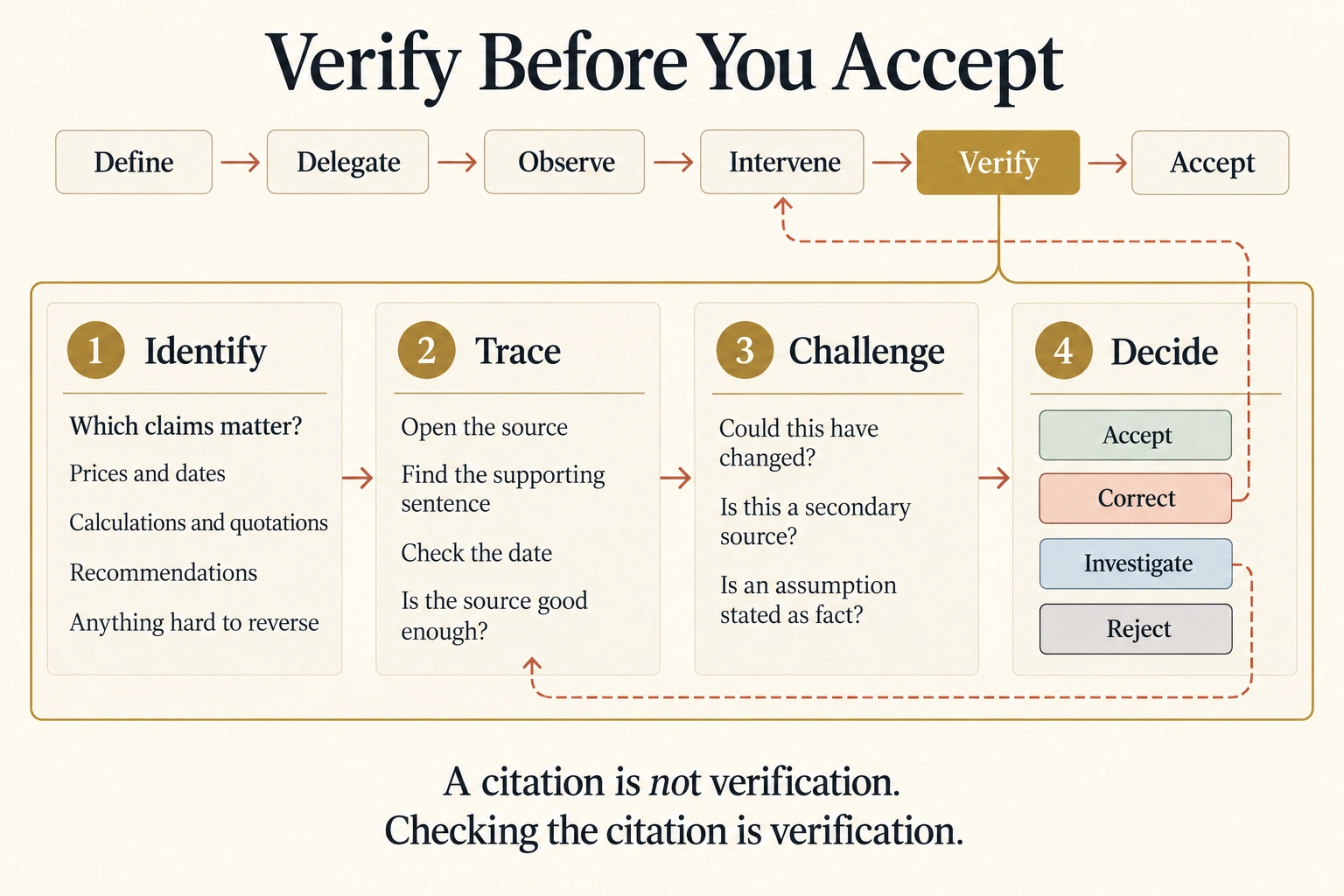
Identify. Which parts of this result matter enough to check? Not everything. Prices, dates, figures, calculations, quotations, legal or safety claims, the recommendation you will act on, and anything hard to reverse. Spend your checking where an error would cost you. Four review thresholds that push a result onto the must-check list. Stakes: what a mistake costs. Reversibility: whether it can be undone. Audience: who sees it, and a client or the public counts for more than you alone. Regulatory exposure: whether the data or the field is regulated. One threshold crossed is enough. The higher it sits, the more of the four steps below the result gets.
Trace. For one claim that matters: open the source, find the sentence that supports it, check the date, and ask whether the source is good enough. The provider's own page beats a blog about the provider. You did this in Concepts 4 and 5.
Challenge. Ask how the answer could be wrong. Could this have changed since the page was written? Is AI repeating a secondary source? Is an assumption being stated as a fact? When two credible sources disagree, the primary one usually wins, unless it is the older one.
Decide. Verification ends with a human decision, and there are four. Accept: the evidence is enough. Correct: a specific error can be fixed, which is Intervene. Investigate: the evidence is incomplete or contradictory, so trace again. Reject: the result is not reliable enough to use, so take the job back. AI Fluency uses three names for the same endings: ready to use, needs revision, needs human override.
Reject has a second form that people miss. You have corrected the same result three times, and each round improves it less than the last. That is a sign about the job, not about your prompts. Another round earns less than the one before, and the next move is a person who knows the field, not a better message. Concept 9's escalate move raises the machine's level. This one raises the reviewer.
Final client deliverables. Audit-critical or financially material calculations. Anything involving regulated, confidential, or highly sensitive data. Public or legal communications where a misstatement carries lasting consequences. For those four, a named person reads the result before it goes out, every time, however clean the run looked.
One rule sits under all four. AI doing the work does not transfer accountability to AI. The name on the result is yours. Later in the book this discipline becomes a whole practice, and Trusting the Checker is where it starts.
What to Notice
Ask:
- Which two claims did you pick, and why those rather than the others?
- Did the source support the claim, or only resemble it?
- Which of the four decisions did you reach, and can you say why in one sentence?
Verify Before You Accept
This concept is the Verify block. Record your decision and the one sentence behind it, in the chat or in your note. You will copy it into your Delegation Record at the end, which is the one-page record of the job: brief, run, check, decision.
Your Turn
The safest first real delegation is a job you have already finished and already trust. Pick a task you did last month, brief AI to do it, hold back your own result, and compare. Write down three things: what matched, what needed fixing, and what should stay with you. A pass earns AI similar jobs. It never earns your name on the result.
Check Your Work
- Did I decide what to check before I opened anything?
- Did I name which of the four thresholds, if any, the result crosses?
- Did I trace at least one claim to the sentence that supports it, and check the date?
- Did I ask how the answer could be wrong?
- Did I end with one of the four decisions, and can I say why?
If any answer is no, do that step now.
Ask Zia Tutor
Optional. Paste the claim you checked, what the page said, and your decision, and ask:
Judge my verification: did I check the claim that mattered most, did
my trace reach the sentence that supports it, and was my decision the
right one of accept, correct, investigate, or reject? Wait for my
reply before you continue. When we agree, say in one line what I have
shown I can do, and tell me what Concept 11, Same Job, Different AI,
will ask me to record.
11. Same Job, Different AI
You have written a brief. The test of a brief is that it works somewhere else.
Do It Now
Open a second free assistant, one you have not used in this course. If you have only one, open a fresh chat in the same assistant and treat that as the second run. Paste your complete running brief, unchanged. Then record, for this run only: did it finish the job, how many messages did you need, did it honor the Authority line, did it mark anything unverified, and how did the deliverable compare?
If you cannot open a second assistant, or do not want another account, run the same brief again in the assistant you have. Use a different model or setting if it offers one, and record the same five things. That tests how much one assistant varies from run to run rather than whether the brief travels, so write down which test you ran.
What Just Changed?
The brief traveled because it describes the job, not the tool. Nothing in your six lines names a button. The buttons differ between assistants, and their names change every few months. The discipline does not. Where each control lives in Claude and in ChatGPT is a page you look up, the Quick Reference, not a thing you learn.
What you wrote down is a record of two runs on one day. It is not a ranking of two assistants. Models change too fast for a ranking made today to be true next month, and this course never asks you to make one. When you need to choose an assistant for real work, Which AI Employees in 2026 is the page that stays current.
What to Notice
Ask:
- Did the brief need any change to run in the second assistant? If it did, which line, and was that a brief problem or an assistant problem?
- Where did the two results differ: in the facts, in the form, or only in the buttons?
- Which line of the brief did the second assistant handle worst?
Verify Before You Accept
Trace one claim in the second result, the same four steps as Concept 10. Then decide: accept, correct, investigate, or reject. The method did not change when the assistant did.
Your Turn
Write both runs into your Delegation Record below, side by side, as observations about this run. Not as a verdict about either assistant.
Check Your Work
- Did my brief run in a second assistant without a rewrite?
- Did I record what happened rather than which was better?
- Did I verify the second result by the same method as the first?
If any answer is no, that is the finding. Write it down.
A short recap before you practice
Eleven concepts, one line each.
- Asking gets you an answer and keeps the work. Giving AI the job gets you a result and leaves you the checking.
- Say what should exist when the job is done. Leave the clicks to the machine.
- A brief is six questions you answer before AI starts: outcome, context, constraints, authority, deliverable, verification.
- When the job needs what is true today, make AI look, and check that it looked.
- Give AI the source, tell it to stay inside it, and check that it did.
- Name the thing you want to hold at the end. Check that the caveats survived the trip.
- Say what AI may decide alone and what it must ask about. Ask for the plan first.
- The second time a job comes back, save what does not change. The third time, put it where AI reads it by itself.
- The smallest message that fixes it is the intervention. Then write the lesson into the brief.
- Identify, trace, challenge, decide. AI doing the work does not transfer accountability to AI.
- The job belongs to you. The model is replaceable.
Underneath all eleven is one rhythm, define, delegate, observe, intervene, verify, accept, and one rule for the screen, need first, then tool. If you remember one sentence from this course, remember this:
Give AI the job. Watch it work. Check what matters. Then decide.
Your Delegation Record: copy this
A course you only read is a course you did not take. This is the thing you ship: one page, for your running job, filled in from the work you have already done. Copy it into a note and keep it. Every later course in this book widens one of these lines.
DELEGATION RECORD

Job: ______________________________________  Date: __________

THE BRIEF
Outcome:
Context:
Constraints:
Authority:
Deliverable:
Verification:

THE RUN
Assistant used:                       Messages needed:
Plan asked for first?  yes / no       Plan changed by me?  yes / no
Where it drifted, and the move that fixed it:

THE CHECK
Claim 1 that mattered:            Source opened:         Finding:
Claim 2 that mattered:            Source opened:         Finding:
Anything AI marked "unverified":

THE DECISION
Accept / Correct / Investigate / Reject, and the one sentence behind it:

THE SECOND RUN (Concept 11)
Assistant:            Finished?    Brief changed?    Where the results differed:

WHAT I WILL SAVE FOR NEXT TIME (Concept 8)
Lines that did not change:
If a line is empty, that is a finding too. It means a step of the loop has not happened yet for this job.
Try this now: six jobs to delegate this week
The running job was a learning job. These six are the kind of job that fills a week. Each is a brief with the lines started for you. Finish the lines, run it in a fresh chat, and do the check. None needs a paid plan, a file upload, or more than a few messages. You do not need to do all six in one sitting.
1. A purchase you are actually going to make
Outcome: the two best options for [a phone / a laptop / a course
subscription] under [your budget], compared, with one recommended.
Context: [what you will use it for, and what you already own].
Constraints: available to buy in [your country] this month. Prices in
[your currency], with the date of each price.
Authority: choose the sources. Do not recommend anything above the
budget without saying so.
Deliverable: a table with price, where sold, and a link, then a
two-sentence recommendation.
Verification: mark any price you could not confirm as "unverified".
What to notice: prices are the claim most likely to be stale. Trace one before you believe the recommendation.
2. A weekly summary of something you follow
Outcome: a summary of what happened in [a topic you follow] this week.
Context: I follow this for [why]. I already know [the background].
Constraints: only sources dated in the last seven days. Say what you
searched.
Authority: choose the sources. Say when two sources disagree instead
of picking one silently.
Deliverable: eight bullet points at most, each with its source and date.
Verification: mark anything that comes from a single source.
What to notice: this is the job that comes back every week. After the second run, Concept 8 applies: save the brief, and put the context you retype into a Project.
3. A document you must reply to
Outcome: the three things this document asks me to do, and by when.
Context: [who sent it and why it matters], with names removed.
Constraints: use only the text I paste. Quote the sentence for each
item. Write "not in the source" if it does not say.
Authority: none. Do not draft a reply.
Deliverable: a three-row table: what, by when, the quoted sentence.
Verification: I will find each quoted sentence in the original.

[paste the text, with names and private details removed]
What to notice: an Authority line that says "none" is a real line. It tells AI to stop at understanding and leave the reply to you.
4. A letter or message you need to send
Outcome: a first draft of [the letter or message], for me to edit.
Context: [who it is to, what they know, what I want to happen].
Constraints: under [length]. [Tone.] No promises about dates or money.
Authority: draft, but do not send. Do not invent facts I did not give.
Deliverable: the draft, then a list of anything you assumed.
Verification: I will check every fact and every promise before sending.
What to notice: "draft, but do not send" is a habit now. The day your assistant can send, it is a permission.
5. A plan for a week
Outcome: a study plan for [your subject] for the next seven days.
Context: [hours available, when in the day, what you have finished].
Constraints: no more than [hours] a day. One rest day.
Authority: choose the order of topics. Ask me before including
anything paid.
Deliverable: a seven-row table: day, topic, time, the resource to use.
Verification: every resource must have a link I can open.
What to notice: the plan is a deliverable you will run. Check that every link opens before day one, not on day one.
6. Your own subject, done properly
Take the subject you named in Concept 1, or the one you set aside because it had no clear pages. Write the full six-line brief for it from nothing, without looking at the running job. Run it. Then put it beside the brief you built over eleven concepts and see what you left out.
What to notice: the lines you forgot are the lines you still need the course for.
Quick self-check
Ten questions. Answer with the page closed, then open the answers.
- What is the difference between asking AI and giving AI a job?
- Name the six steps of the Delegation Loop, and say which steps stay yours.
- Why does describing the outcome usually beat dictating the steps?
- Name the six lines of a Delegation Brief. Which two do people skip?
- How can you tell whether a fact came from searching or from remembering?
- What two instructions turn pasted text into a source?
- What is the cheapest moment to fix a job, and how do you get to it?
- What does repetition ask for, and what is the sign that context belongs in a Project?
- Name the six moves of Intervene. Which one do people miss?
- What are the four steps of verification and the four decisions it ends in?
Answers
- Asking gets you an answer and leaves the next steps with you. Giving a job asks for a thing to exist and leaves you the checking.
- Define, delegate, observe, intervene, verify, accept. Both ends stay yours: define and delegate at the start, verify and accept at the end. AI can help with them. It cannot take them.
- A recipe limits the result to the quality of your plan, and AI cannot tell you the plan was narrow. An outcome lets AI choose the method and lets you judge the result against what you asked for.
- Outcome, context, constraints, authority, deliverable, verification. Authority and verification are the two people skip.
- A found fact should arrive with a source you can open. A remembered fact arrives alone, and sounds just as sure. No source, do not assume it looked. And a source is not a date: find the date on the page yourself.
- "Use only the text below" and "quote the sentence you used". Together they make "not in the source" a good answer.
- Before the run. Ask for the plan and wait for your go-ahead, then change one step.
- Repetition asks for the context you keep retyping and, later, for a clock. The third time you paste the same background, it belongs in a Project.
- Stop, correct, redirect, change the requirement, escalate capability, take the job back. Escalate is the one people miss: sometimes "AI failed" means "I used the wrong level".
- Identify, trace, challenge, decide. Accept, correct, investigate, reject.
What this course leaves out, on purpose
Real topics, deliberately set aside, so you know they exist and where to find them.
| Left out here | Where it lives |
|---|---|
| What the machine is, and why it is confident when it is wrong | What AI Actually Is, next in Foundations |
| The four human competencies behind every line of the brief | AI Fluency |
| How to phrase each line so it works better: context, examples, formats, iteration | AI Prompting in 2026 |
| Teaching AI a method once, and connecting it to your apps | Skills & Connectors |
| Putting a page on the web by hand, and designing one properly | AI Prompting in 2026, Markdown In, HTML Out, and later Made, Not Generated in General Agents |
| Work that runs while you are away: plans, permission modes, schedules | General Agents on the Web |
| Agents on your own computer, with your own files | Cowork and OpenWork on the Desktop |
| A job that becomes a team's workflow, and what to do when it misbehaves | Workflow Design & Diagnosis |
| Whether AI may do this work, or touch this data, at all | Governance, Risk & Responsible Use |
| Where each control lives in Claude and in ChatGPT, and what each plan includes | The ChatGPT and Claude Quick Reference |
| Judging outputs in depth, and building checks you can trust | Trusting the Checker |
| When to reach for AI at all, and how to frame the problem | How to Think in the AI Era |
Terms this course adds
Every term this course adds, in one line each (the same 19 entries as the Quick glossary above)
- Delegation Loop. The six-step rhythm of giving AI a job: define, delegate, observe, intervene, verify, accept.
- Delegation Brief. Six questions answered before AI starts: outcome, context, constraints, authority, deliverable, verification. A work order, not a form.
- Outcome. What should exist when the work is complete.
- Context. What AI needs to know that it cannot know on its own, including any source you give it.
- Constraints. The requirements and limits that apply to the job.
- Authority. What AI may decide without asking you. In a chat, decisions. Later, permissions.
- Deliverable. The form the result should take, shaped so that someone can use it: a table, a document, a file. An answer replies. A deliverable can be handed on.
- Verification. What you will check before you accept, written before the work starts.
- Running job. The one job you carried through this course, re-delegated at every concept with one more line filled.
- Need first, then tool. The rule for every control on the screen: it is learned when a job needs it, not before.
- Plan-first. Asking AI to list its steps and wait for your go-ahead before it starts.
- Project. A space in an assistant that holds your files and standing instructions, so that every chat inside it starts already informed.
- Knowledge. The files a Project holds. What AI may read, in every chat inside the Project.
- Standing instruction. A rule written once into a Project, which AI follows in every chat inside it. The line leaves your brief and lives there instead.
- Temporary chat. A chat that is not saved to your history and does not add to memory. ChatGPT's name for it. Claude calls it an incognito chat.
- Identify, Trace, Challenge, Decide. The four steps inside Verify.
- Accept, Correct, Investigate, Reject. The four decisions verification ends in.
- Review thresholds. Stakes, reversibility, audience, regulatory exposure. Four questions that push a result onto the must-check list. One crossed is enough.
- Delegation Record. The one-page record of a job: brief, run, check, decision.
Where this leads
The next course is What AI Actually Is. You have watched the machine do a job. That course explains what did it, and why it is sure of itself even when it is wrong.
The brief grows as the work leaves your sight. The six lines you wrote are the smallest version of an artifact this book keeps enlarging.
| Where | What the brief becomes |
|---|---|
| This course | Six lines for a job you watch: outcome, context, constraints, authority, deliverable, verification |
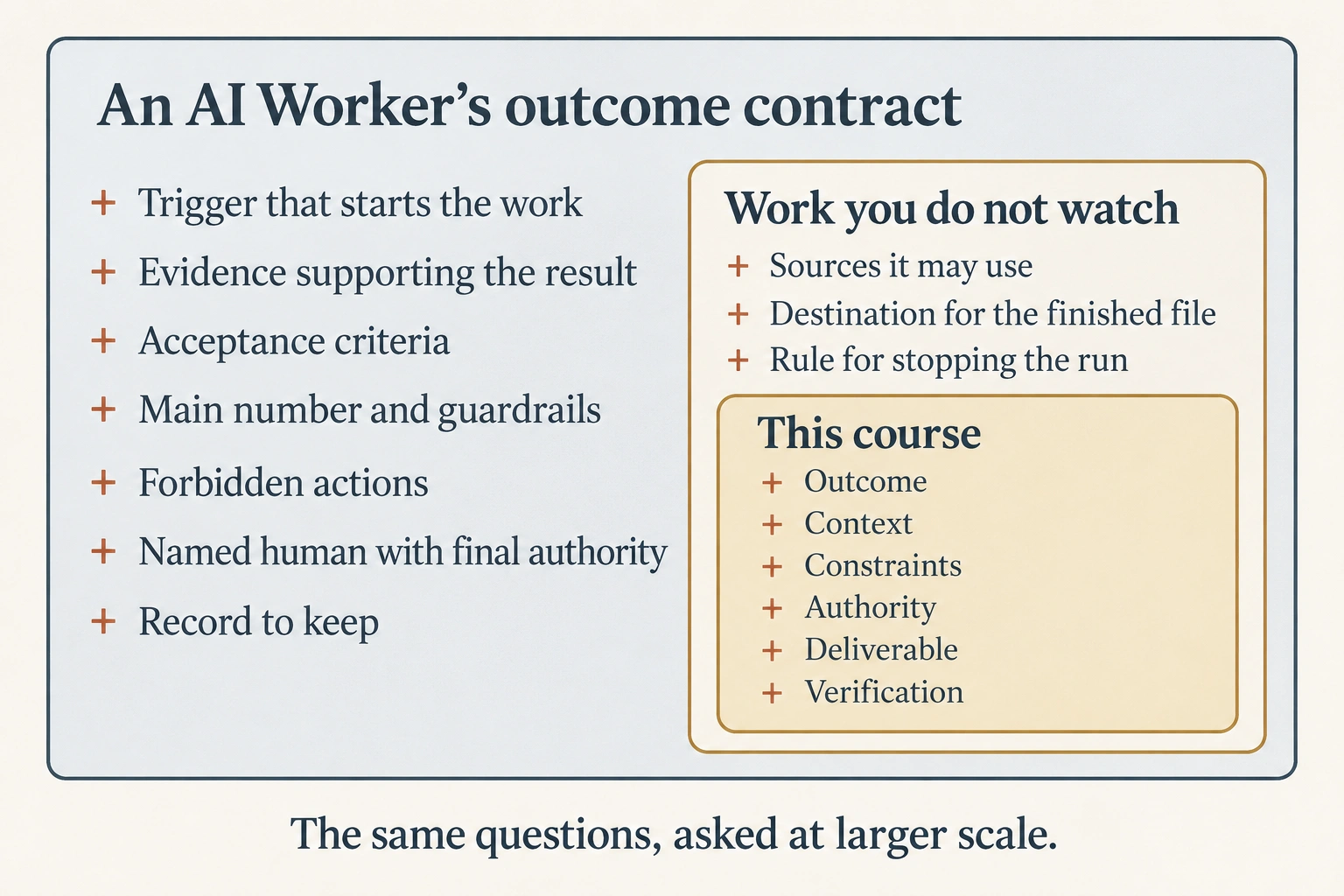
| General Agents on the Web | A brief for work you will not watch, which adds the sources it may use, a destination for the finished file, and a rule for what should stop the run and come back to you |
| Designing the Vertical System of Record | An outcome contract for an AI Worker that owns a result for a whole organization, which adds a trigger, evidence, acceptance criteria, a main number and guardrails, forbidden actions, a named human with final authority, and the record to keep |
The loop is the book's rhythm. The Thesis says it in one sentence: "Humans define intent. Agents execute. Humans verify outcomes." The book calls the proportions the 10-80-10 Rule: the first tenth is yours, the middle is the machine's, the last tenth is yours again. You ran it eleven times in a chat window. Everything after Foundations runs it at a larger scale.
Each course after this one makes the job bigger. The book grows delegated work in six steps. This course put you on the third step first, on purpose, because a job you can check is the easiest place to start.
| Step | What you say to AI | Where the book teaches it |
|---|---|---|
| Prompt | Tell me something. | AI Prompting in 2026 |
| Collaboration | Help me do something. | AI Fluency |
| Delegated job | Here is the outcome. Do the work. | This course |
| Workflow | This work happens again and again. | General Agents on the Web, then Workflow Design & Diagnosis |
| AI Worker, which the book also calls a Digital FTE | Own this responsibility, with the context, tools, authority, and accountability it needs. | Mode 2: Manufacturing, including Building a Digital FTE |
| Agent Factory | Build and run those workers as a method, not one at a time. | About this book and the Thesis |
The rest of Foundations teaches what this course used without explaining: the machine, the four competencies, the phrasing, the documents, the code, the connections, the judgment, the workflow, and the governance. If you are collecting credentials, the Objective column in the questions table maps each row to a domain of the Associate exam blueprint. Most rows sit under Prompting and Task Execution, or under Product and Model Selection. Fewer rows touch Output Evaluation and Validation, Configuration and Knowledge Management, Governance, Risk, and Responsible Use, and Troubleshooting and Optimization. All of them sit at an introductory level. See Certifications.
Sources and license note
The exercises in this course are the source. Every product statement was checked against Anthropic's and OpenAI's own help pages on 8 September 2026. That includes which controls exist, what a free plan allows, and what the settings are called. The plans pages are the authority whenever this page disagrees with them. The four human competencies named in Concept 3 and Concept 10 are taught in AI Fluency, which credits their authors. The Delegation Loop and the Delegation Brief are this book's own terms.
This crash course is an original work of this book.
Flashcards Study Aid
Test Your Understanding
Twelve scenarios. Each one drops you into a job someone handed to AI and asks what the course would do next. Answer from the reasoning, not the wording, and notice which step of the loop each one is really about.