Is This an Agent Problem? A Crash Course
3 Gates · 3 Wrong Turns · One Clear Path
Two people run a small online shop. On Monday, both get the same job: a pile of 400 customer messages has built up, and they need to sort the messages into groups (complaints, questions, orders, other) and write a short summary by Friday.
Ana stops and thinks for ten minutes before she opens any tool. She asks herself three simple questions. First: is this even a job for AI, or could the message app's own search and filters do it? The groups need judgment — deciding what counts as a "complaint" is not something a simple filter can do — so yes, this is an AI job. Second: will she do this once, or every week? Every week. So she makes a note to build something later that does this on its own, and for now does a quick version by hand to meet Friday. Third: what should the finished work look like? A spreadsheet with one row per message, plus a one-page summary. She opens the AI tool already knowing exactly what she wants.
Yusuf opens the AI tool right away and types "help me with these customer messages." The tool asks him what he wants. He is not sure, so he makes it up as he goes. Two hours later he has a summary he is not sure he can trust, no way to repeat the work next week, and the same pile waiting for him again on the next Monday — which he will, again, sort by hand.
Same job. Same tool. Ana passed the work through three gates before she typed anything. Yusuf walked straight into the tool and let it ask the questions. This course teaches those three gates.
Who this is for
Anyone who has one of these AI tools — Claude Code, OpenCode, Cowork, or OpenWork — and a pile of real work, and is not always sure the tool is the right place to put it. This course sits in between: after you have met these tools and seen what they can do, but before you learn to solve real problems with them. It is about deciding what to give the tool, and where the work should go.
This book is read all over the world, by people who work and study in many different languages. The examples on this page use plain English and everyday situations — a small shop, a folder of files, a pile of messages — that mean the same thing no matter where you live. You do not need to know any one country's tools, laws, or money to follow along.
A general agent is an AI tool that does not just talk — it does things. It can open your files, read them, write new ones, run small programs, and use other apps for you. The four general agents in this book are Claude Code, OpenCode, Cowork, and OpenWork — Claude Code and OpenCode are for people who work with code, while Cowork and OpenWork are for everyone else. The short way to remember it: a chatbot answers your question; an agent goes and does the task. That one difference is what this whole course is built on.
Two things before this page. First, finish How to Think in the AI Era — it teaches you how to keep your own judgment when working with AI. This course does not repeat that. Second, finish at least one tool course — Claude Code & OpenCode or Cowork & OpenWork — so you have seen what an agent can do. You cannot decide "is this an agent problem" until you know what an agent is.
📚 Teaching Aid
View Full Presentation — Is This an Agent Problem?
The rule in one line
The cheapest mistake to fix is the one you catch before you start.
Here is what that means. A mistake in your plan costs you nothing to fix — you just change your mind. A mistake you only notice after the agent has spent an hour doing the wrong thing costs you that whole hour. So the smartest place to spend your effort is at the very beginning, before you type anything.
Almost everything that goes wrong with an agent went wrong here, at the start:
- You used an agent for something a spreadsheet does in one step.
- You did the same task by hand every week for two months, when you could have built something to do it for you.
- You opened the agent with a fuzzy idea of what you wanted, so it did neat work — on the wrong thing.
None of those are caused by bad typing. They are caused by starting in the wrong place. No amount of clever wording fixes them, because a perfect answer to the wrong question is still wrong. This course gives you three checks — we call them gates — to pass your work through before you begin. Each gate stops one common mistake.
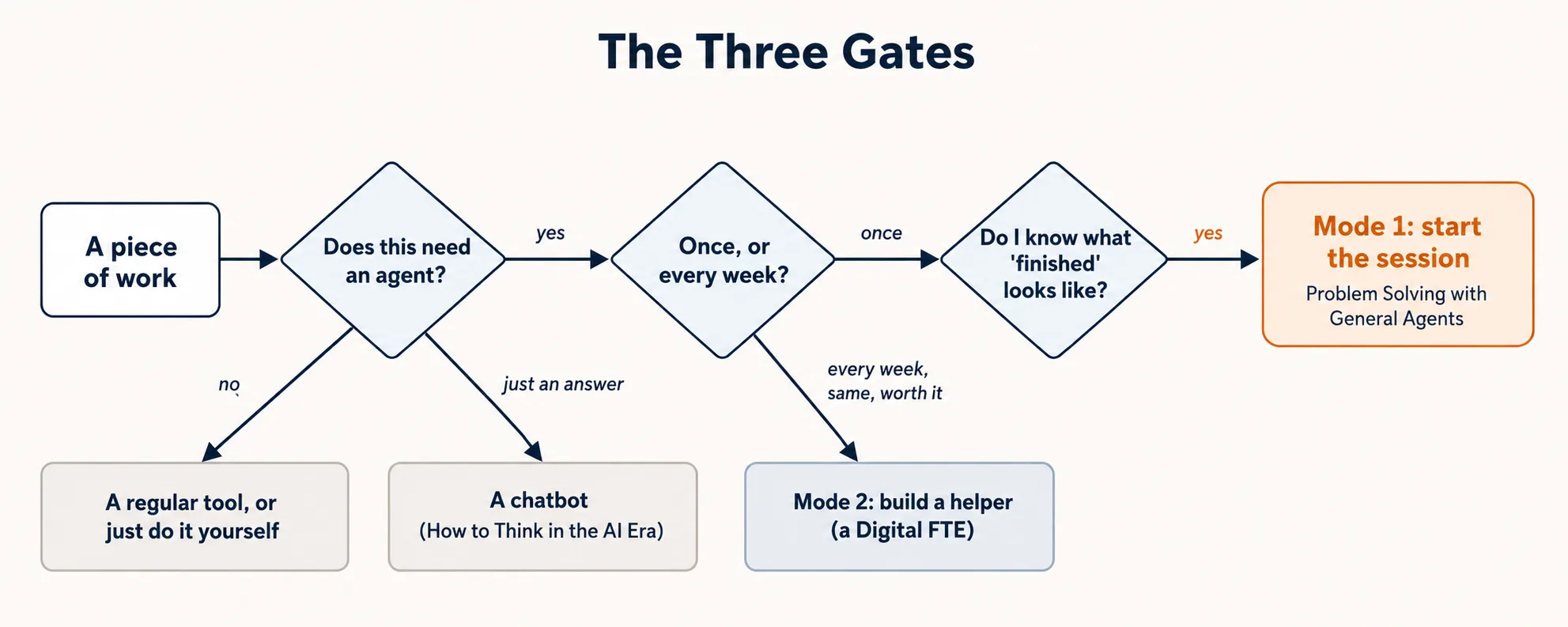 Three gates, and where each answer sends you. Most wasted time comes from skipping straight to the end.
The three gates, in order:
| Gate | The question | The mistake it stops |
|---|---|---|
| 1 | Does this need an agent at all? | Using a big tool for a tiny job — or a tiny tool for a big one |
| 2 | Once, or every week? | Building a helper for a one-time job — or doing a repeat job by hand forever |
| 3 | What does "finished" look like? | Neat work aimed at the wrong target |
Take them in order. Gate 2 only matters once Gate 1 says "yes, an agent." Gate 3 only matters once Gate 2 says "do it now." Skip a gate and you make its mistake.
How to read this page
| Time you have | What to read |
|---|---|
| 15 minutes | The rule, the picture above, and the short summary under each gate. Enough to sort your next task. |
| 45 minutes | All three gates with the examples, reading only. |
| A working day (best) | Everything, trying each "your turn" on a real task from your own week. |
These gates stick when you try them on your own work. Reading shows you the moves. Doing them on three real tasks is how they become a habit.
The short version (three bullets)
If you remember only these three, you have most of what matters:
- Not every job is an AI job, and not every AI job needs an agent. If a spreadsheet, a search box, or thirty seconds of your own time does it — do that. If you only need an answer, that is a chatbot. An agent is for work that is fuzzy, spread across different kinds of files, and needs the tool to actually do something with your files, data, or apps — not just talk about them.
- How often you do it decides everything. A task you do once → open an agent, solve it, done. A task you do every week, the same way → stop doing it by hand and build a helper that does it for you. The most common waste in the world is doing a "build-a-helper" task by hand, over and over.
- Decide what "finished" looks like before you open the agent. Name three things: what it works from, what you want at the end, and the one check that tells you it is correct. An agent with a clear target hits it. An agent with a fuzzy target makes something neat and wrong.
The rest of the page turns these three into gates you can actually run.
Gate 1 — Does this need an agent at all?
The mistake it stops: "I spent twenty minutes getting an agent to do something a spreadsheet does in one step — or I opened a whole agent just to answer a question a chatbot answers in five seconds."
This gate has two small checks, in order.
Check 1a — Does it need AI, or a regular tool you already have?
Agents are good at fuzzy work: work that needs judgment, that mixes different kinds of files, and that no normal app was built to do. They are not the best choice for work a regular tool already does perfectly.
Here is the simple test. If you can describe the task as one exact step that is the same every time, a regular tool is probably faster and more reliable:
- "Add up this column of numbers." → That is a spreadsheet. Not AI.
- "Find everyone in my contacts named Khan." → That is the search box in your contacts app. Not AI.
- "Change every '2024' to '2025' in this document." → That is find-and-replace. Not AI.
The moment the task needs judgment (like "sort these messages by topic," where you have to decide what each topic means), or mixes different kinds of files that no single app can open together (photos and PDFs and screenshots), or there is simply no app that does it — then you are past Check 1a. It is an AI job.
Check 1b — Does it need an agent, or just a chatbot?
This is the check people skip most often. Remember the rule from the reminder box: a chatbot answers, an agent does.
So ask: does this task need the tool to touch my actual stuff?
- "Explain the difference between a debit and a credit." → This needs an answer. It touches nothing of yours. That is a chatbot job. The skill for getting good chatbot answers is How to Think in the AI Era — not this course.
- "Go through my 400 customer messages and put each one in a group." → This needs the tool to open and act on your real files. That is an agent job.
The whole difference is answer vs. action. If you just need to know something, or want a draft or some ideas, that is answer work — a chatbot. If you need the tool to open your files, change them, run something, or use another app for you, that is action work — an agent.
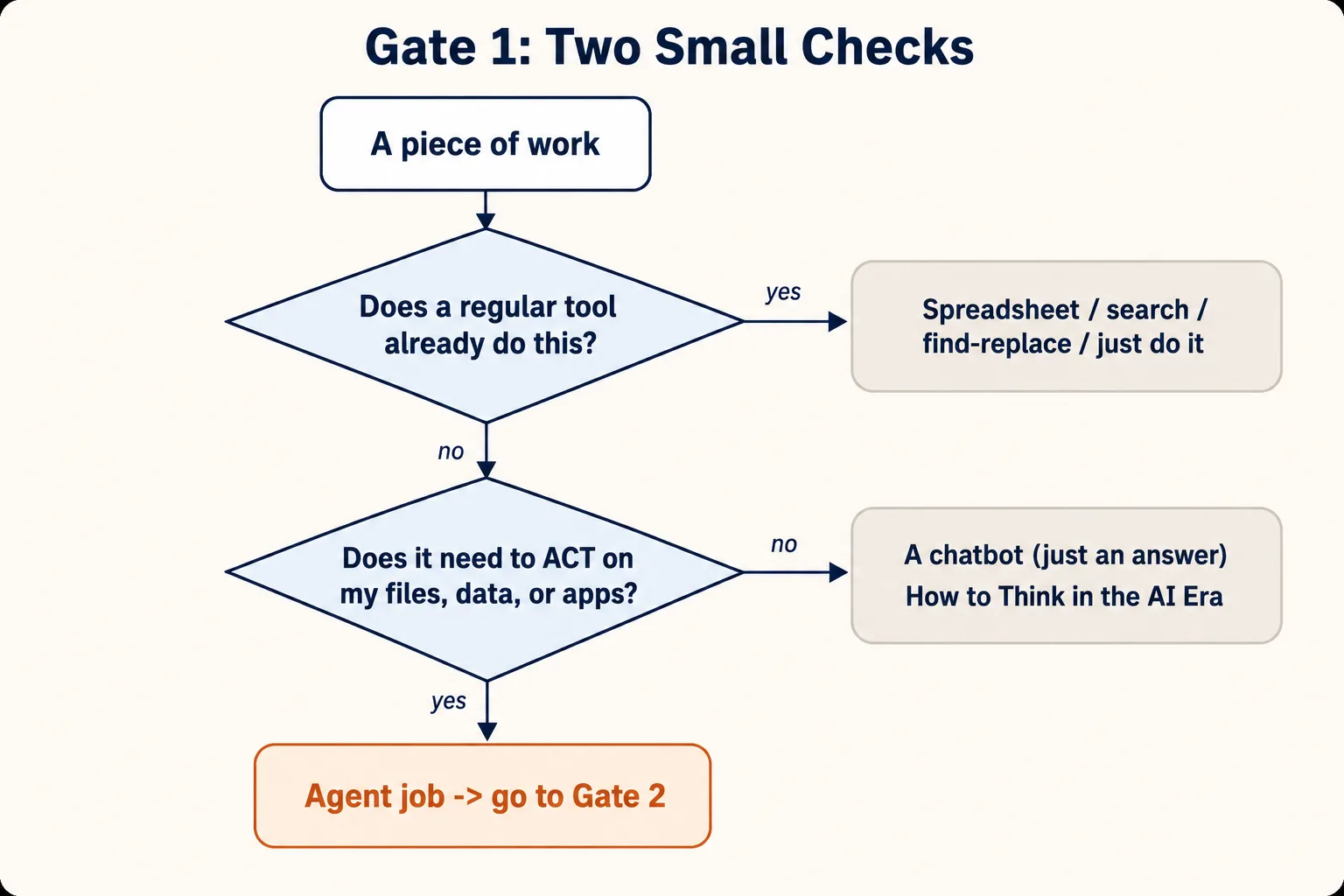 Two small questions, three exits. Only the bottom one is an agent.
An everyday example first
Think about cooking. "How long do I boil an egg?" is an answer — you ask, you get a number, done. That is a chatbot. But "look in my fridge, see what I have, and make me a shopping list for three dinners this week" needs someone to actually go and do several things. That is the kind of task an agent is for. And "add up the prices on my grocery receipt" is neither — that is just a calculator.
A work example
Mei helps run the office for a small company. Four jobs arrive on the same morning. She runs each through Gate 1:
- "What is the total of this list of expenses?" → A spreadsheet adds it up. Not even AI. Stop at 1a.
- "Explain what a purchase order is." → She just needs an answer; it touches nothing of hers. Chatbot. Stop at 1b.
- "Look through this folder of bills and find the ones missing a signature." → This needs judgment (reading each one) and acts on her files. Agent. Passes Gate 1.
- "Compare the bank's list of payments with our own list and tell me what does not match." → Two different files, needs judgment, acts on her data. Agent. Passes Gate 1.
Two of her four "AI tasks" were not agent tasks at all. That is normal and good. Gate 1 is not there to push work toward the agent. It is there to keep work that does not belong there from getting there.
Your turn
Take five tasks from your own week — anything you thought about "asking AI" to do. For each one, write which exit it takes: regular tool, chatbot, or agent. Then write one short sentence saying why.
List your five tasks below. The grader rates your sorting and flags the task you most likely got wrong, especially any task sent to "agent" that really just needs an answer.
Discuss with an AI. Question your scores.
Come back when you have your BEST evaluation.
If all five come out "agent," you are probably forcing it — look again and find the one that is really a spreadsheet or a chatbot. If none come out "agent," that is a real finding too. Maybe this week just did not have agent-shaped work in it. That is fine.
Why this works (the research behind it) — optional
The instinct to reach for one favourite tool for every job has a name. Abraham Kaplan called it the law of the instrument in 1964, and Abraham Maslow gave it its famous form two years later: if the only tool you own is a hammer, every problem starts to look like a nail. An agent is a powerful, exciting tool — so it becomes the new hammer, and Gate 1 is the habit that stops you swinging it at a screw.
There is also a measured version of the same idea. Goodhue and Thompson's Task-Technology Fit model (1995) asked why some software actually improves people's work while some does not, and found the gain depends less on how good or popular a tool is than on whether it fits the task. A well-liked tool used on the wrong task delivers little; a plainer tool that fits delivers a lot. Gate 1 is task-technology fit shrunk to two questions you can answer in ten seconds.
Sources: Kaplan, A. (1964). The Conduct of Inquiry. Maslow, A. (1966). The Psychology of Science. Goodhue, D. L., & Thompson, R. L. (1995). "Task-Technology Fit and Individual Performance," MIS Quarterly, 19(2), 213–236.
Gate 2 — Once, or every week?
The mistake it stops: "I built a whole permanent helper for something I will do exactly once — or, far more often, I have done the same task by hand every week for months, and never noticed I could have built a helper to do it for me."
Once Gate 1 says "yes, an agent," the next question is which kind of agent work this is. This is the most important idea in the whole book, so we give the two kinds names.
- Mode 1 — solve it once. You open an agent, do the task, take the result, and walk away. Nothing stays behind. This is most work, most of the time.
- Mode 2 — build a helper. You build a permanent AI worker that does the task again and again, on its own, without you doing it each time. (The book calls this worker a Digital FTE — a "digital full-time employee.") This takes more effort to set up, and it is only worth it if the task comes back often.
How do you tell which one you are looking at? Check three things. Picture each as a dial you can turn up or down. A task is Mode 2 only when all three dials are turned up:
- How often? Do you do this once or rarely (dial down → Mode 1), or again and again, every week or every day (dial up → Mode 2)?
- How same? Is it the same shape every time — same kind of input, same steps, same finished result (dial up → Mode 2)? Or does each time look different and need fresh thinking (dial down → Mode 1)?
- Worth it? Is the work big enough to repay the effort of building a helper (dial up → Mode 2)? Weigh more than how often it happens: how much time each run costs you, how many items it handles, how expensive a mistake would be, and the hassle of stopping other work to do it. A task you repeat every week but that takes four minutes, handles two items, and causes no harm if it slips may not be worth building. (This is why the gate's catchy name, "once or every week," is only the trigger — this dial is where the real decision lives.)
If even one dial is down — you do it rarely, or it changes every time, or it is too small to bother — stay in Mode 1. Build a helper only when the task is repeated, the same each time, and worth it.
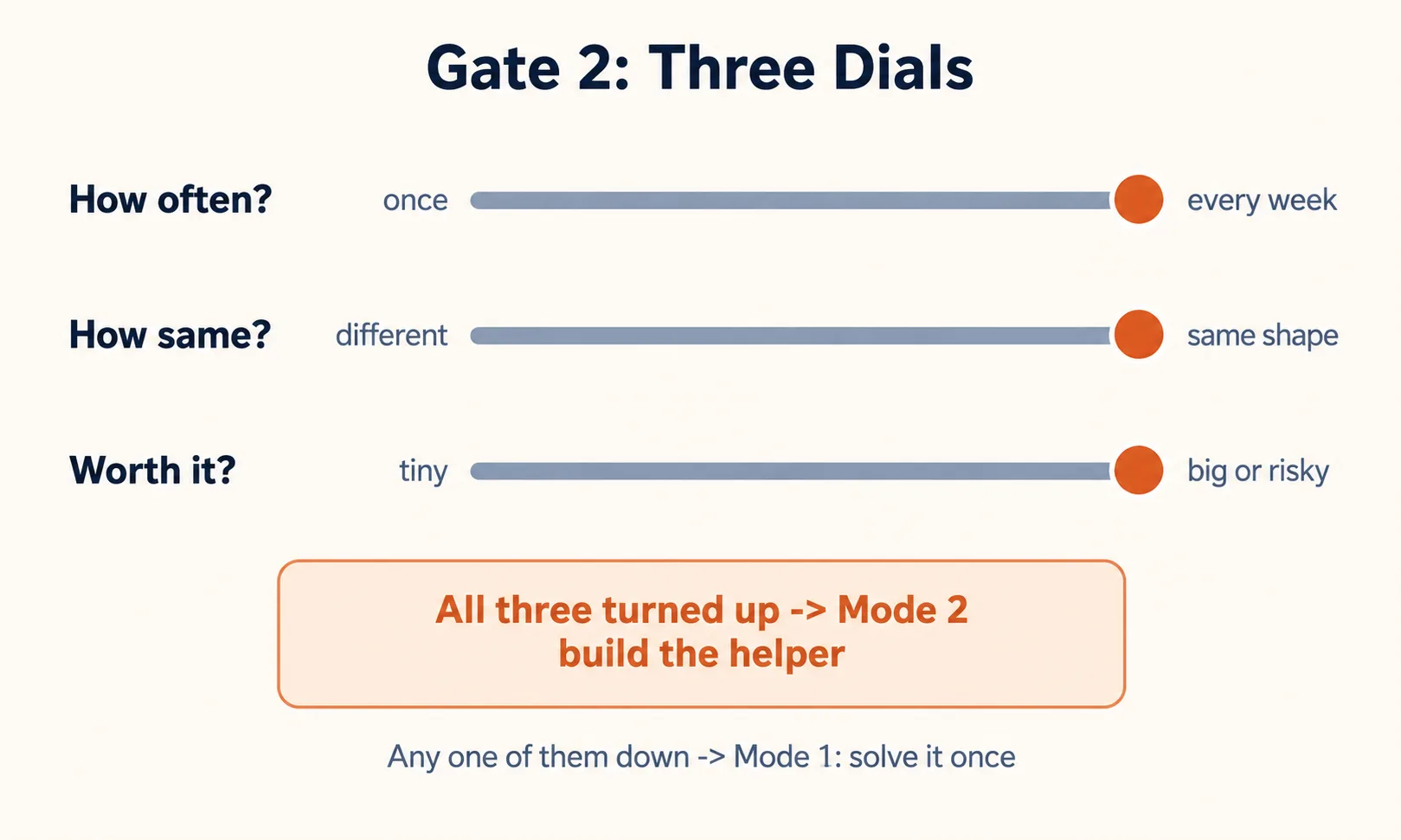 Mode 2 needs all three dials turned up. Any one of them down keeps you in Mode 1.
The most expensive mistake
There are two ways to get Gate 2 wrong. Building a permanent helper for a one-time job is the smaller mistake — you waste an afternoon, you notice, you move on.
The expensive one is quiet, and almost everyone makes it: doing a Mode 2 task by hand, over and over, forever.
It hides because each time feels small. Every Monday you spend twenty-five minutes getting an agent to gather the week's messages, sort them, and write a summary. It works fine each time. You never add it up. But over a year that is more than twenty hours spent by hand on a task that is repeated, the same each time, and clearly worth building once. You never built the helper because no single Monday ever felt big enough to make you stop and decide.
The fix is to make the decision a deliberate check, not something you wait to feel. There is an old, well-known cartoon by Randall Munroe called "Is It Worth the Time?" (xkcd comic 1205). It shows a simple table: if a task repeats often, you can spend a fair amount of time building something to do it, and still save time overall. You do not need the exact numbers. You just need the habit. So here is the simple rule:
The third time you do the same task the same way, stop and run Gate 2. If all three dials are up, you are not really solving a problem anymore — you are being the helper that you have not built yet. That is your cue to cross it into a worker.
A work example
David runs the day-to-day work at a 12-person company. Two tasks that both look like they repeat:
- Setting up accounts and access for a new employee. This happens maybe once every few months, and every new person is a little different — different role, different apps, different special cases. How often? Low. How same? Low. Two dials down. This stays Mode 1: solve it fresh each time with an agent. A rigid helper would break the first time someone unusual joins.
- The Monday message summary. Every week, same kind of input, same finished result, and it takes 25 minutes each time. How often? High. How same? High. Worth it? Yes. All three dials up. This is Mode 2. David's move is to cross it into a worker: keep solving it by hand until the method is proven, then promote it so it runs without him. From One-Off to Worker shows you how.
Same person, same week, two opposite answers. The new-employee task looks repeated, but it fails the "how same?" dial. The Monday summary passes all three. Gate 2 is what tells them apart — before you either over-build the first or keep hand-doing the second for a year.
Your turn
List three tasks you have done with an agent more than once. For each, set the three dials (how often, how same, worth it) and write the answer: Mode 1 or Mode 2.
List your three tasks below with their dials and verdicts. The grader checks whether your dial settings really support each Mode 1 or Mode 2 call, and flags any "Mode 2" task that actually varies too much each run to hand to a rigid worker.
Discuss with an AI. Question your scores.
Come back when you have your BEST evaluation.
The task that surprises you — the one you have been doing by hand that turns out to be Mode 2 — is the most valuable thing you will find on this whole page. Those are hours you are about to get back.
Why this works (the research behind it) — optional
Gate 2 is an old rule in new clothes. In software, Martin Fowler's Refactoring (1999) popularised the Rule of Three, which he credits to Don Roberts: the first time you do something, you just do it; the second time, you do it again even though it repeats; the third time, you stop and build the reusable version. The third repeat is the signal — not the first, because building too early means building the wrong thing before you understand the pattern. That is exactly Gate 2's trigger: the third time you do the same task the same way, stop and decide whether to build the helper.
The "worth it?" dial echoes a second well-known caution. Donald Knuth's line that premature optimization is the root of all evil (1974) is really about effort — do not pour work into making something automatic until you know it is worth automating. Building a permanent helper for a task you will do once is that mistake in reverse. And the rough arithmetic of when automating pays off is captured in Randall Munroe's "Is It Worth the Time?" table (xkcd 1205): the more often a task repeats, the more time you can spend building a helper and still save time overall.
Sources: Fowler, M. (1999). Refactoring: Improving the Design of Existing Code (Rule of Three, attributed to Don Roberts). Knuth, D. E. (1974). "Structured Programming with go to Statements," ACM Computing Surveys, 6(4). Munroe, R. "Is It Worth the Time?", xkcd 1205.
Gate 3 — What does "finished" look like?
The mistake it stops: "The agent did lovely work. It just was not the work I needed — and I only found out when it was already done."
You have decided it is an agent job (Gate 1) and you will solve it once (Gate 2). The last gate before you open the agent: decide what finished means, in writing, in three short lines.
- What it works from (the input). Exactly what the agent should look at — which folder, which files, which messages. Be specific. "My emails" is too vague. "The 400 messages in my Support folder from the last 7 days" is clear.
- What you want at the end (the output). The thing you want to exist when it is done — a spreadsheet, a one-page summary, a folder of renamed files. Say the shape, not just the topic.
- The check that means it is done (the done-check). The one thing you can look at to know the job is finished and correct. For example: "Every message is in exactly one group, and the group counts add up to 400." When that is true, you are done. When it is not, you are not.
That is all — three lines. You are not writing the full instructions yet, and you are not telling the agent how to do the work. You are only deciding the target, so that when the agent hits it, you will know.
Gate 3 decides what finished looks like — the target. The actual instructions you give the agent while it works (how to phrase the request, asking for tables, checking the result) are taught in the next course, Problem Solving with General Agents. Think of it this way: Gate 3 is choosing the target. The next course is learning to hit it. Pick the target here, then go to that course to learn the aiming.
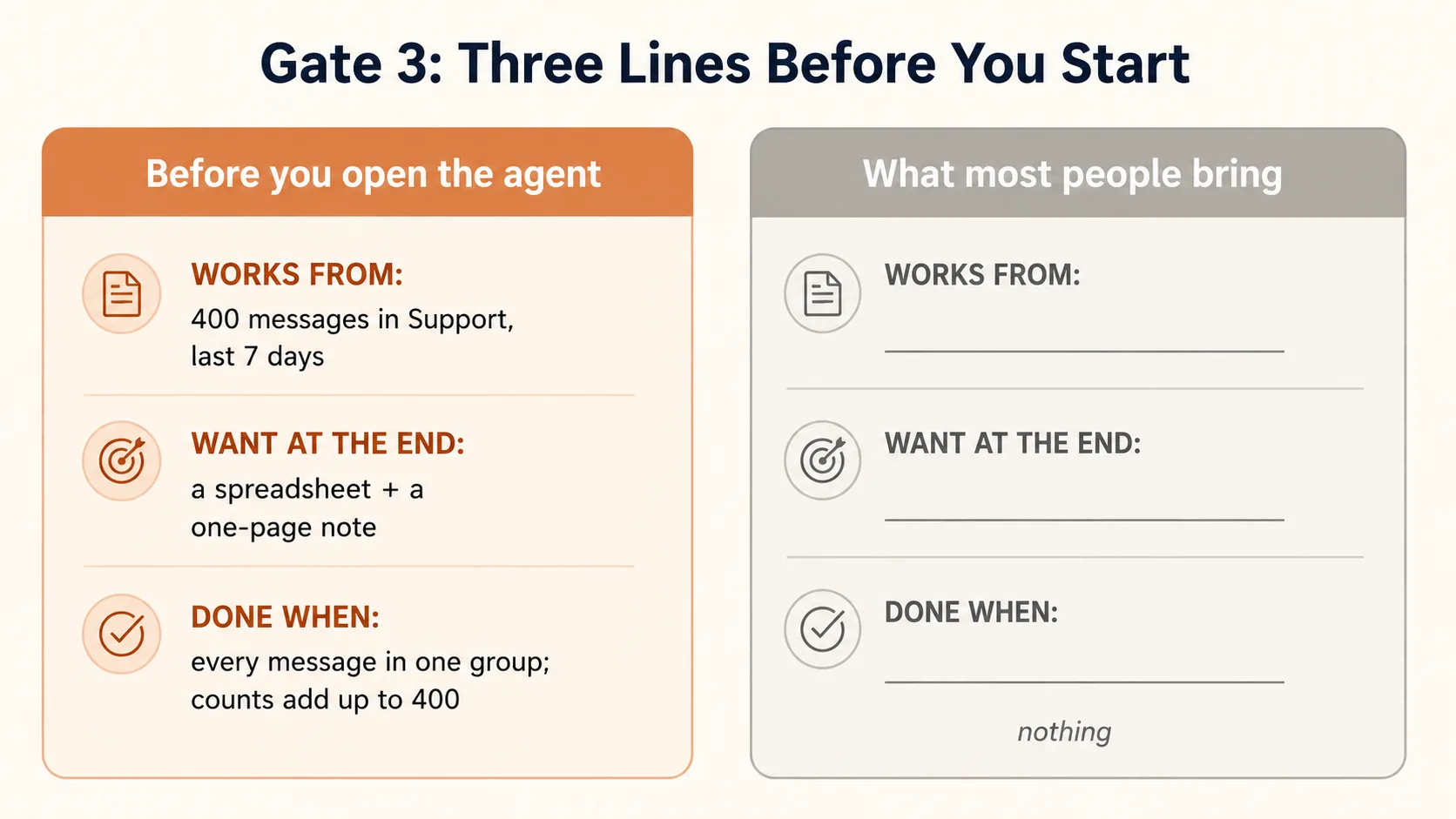 Three lines before you start. An agent can hit a target it can see.
A work example
Back to Ana from the opening, with her 400 customer messages. (Her task has a Mode 2 future, but until that worker exists she still solves it once each week, so Gate 3 applies to every run.) Before she opens the agent, she writes the three lines:
Works from: The 400 messages in my Support folder from the last 7 days.
I want at the end: A spreadsheet with one row per message — columns for who sent it, the date, the group (one of: complaint, question, order, other), and a one-line summary. Plus a one-page note with the count for each group and the three most common complaints.
Done when: Every message is in exactly one group, the group counts add up to 400, and the note's numbers match the spreadsheet.
Now she opens the agent. When it comes back, she has an exact way to check if it is truly finished — and the done-check ("counts add up to 400") is something she or the agent can confirm in seconds. Yusuf, who opened the agent with "help me with these messages," had none of this. That is exactly why his result was something he could not trust and could not check.
Your turn
Take the most recent real task you gave an agent — or the next one you are about to. Write the three lines: works from, want at the end, done when. Then look hard at the done-check: can you actually check it? Could you, or the agent, confirm it in under a minute? If your done-check is something vague like "the summary is good," it is not a real check yet. Make it sharper until it is something you can clearly test.
Write your three lines below. The grader's sharpest test is your "Done when" line: is it something you could actually check in under a minute, or a vague opinion in disguise?
Discuss with an AI. Question your scores.
Come back when you have your BEST evaluation.
Why this works (the research behind it) — optional
Decades of research on goals point the same way. Edwin Locke and Gary Latham's goal-setting theory (summarised in their 2002 paper in American Psychologist) found, across hundreds of studies, that specific and measurable goals lead to far better performance than vague "do your best" goals — because a specific goal tells you exactly what to aim at and exactly when you have hit it. A fuzzy instruction to an agent ("make a good summary") is a "do your best" goal. The three lines turn it into a specific one.
Software teams reached the same conclusion in practice and named it the Definition of Done. Before work starts, the team agrees on the exact checklist that marks a task complete, so that "finished" is a shared, checkable fact rather than an opinion argued about afterward. Gate 3 is your personal Definition of Done for a single task — written before the agent starts, so it has a target it can see.
Sources: Locke, E. A., & Latham, G. P. (2002). "Building a Practically Useful Theory of Goal Setting and Task Motivation," American Psychologist, 57(9), 705–717. "Definition of Done" — standard practice in Agile/Scrum software development.
Now run all three on one real task
The gates stay theory until you push one real task through all three gates in one sitting.
Pick something you need to do right now. Walk it through:
- Gate 1. Regular tool, chatbot, or agent? If it stops before "agent," you just saved yourself a whole session — use the right tool and move on.
- Gate 2. If it is an agent job: do it once (Mode 1), or build a helper (Mode 2)? If all three dials are up, it is a Mode 2 task: keep solving it by hand until the method stops changing, then cross it into a worker. From One-Off to Worker shows you when it is proven and how to promote it.
- Gate 3. If it is a solve-it-once agent job: write the three lines. Works from, want at the end, done when.
If the task comes out the far end — agent, Mode 1, three lines written — then you open the agent. And now you walk into Problem Solving with General Agents with a sorted, clear task and learn the seven principles for actually solving it.
Why this matters. The gates take about ten minutes. The mistakes they prevent take afternoons — and the Mode 2 ones take months. That is the whole trade: a little thinking before you start, in exchange for the hours you would otherwise lose starting in the wrong place.
The first decision was never how to talk to the agent. It was whether to, which kind of work it is, and toward what. Get that right, and the talking-to-the-agent part becomes easy.
Where each answer sends you (a reference card)
The three gates routed your work without ever naming a tool — on purpose. The gate you land in is the constant; the tool you use is the variable, and tools change every few months. Here is the variable as it stands in 2026. Read it starting from the gate you landed in, not the other way around.
| Where the gates sent you | What it means | Tools to use (2026) |
|---|---|---|
| Just an answer (Gate 1 → chatbot) | You needed knowledge, a draft, or ideas. Nothing of yours gets touched. | claude.ai, ChatGPT, or Gemini. The skill for this is How to Think in the AI Era. |
| Solve it once (Gate 1 → agent, then Gate 2 → Mode 1) | An agent you drive inside a session: it acts, you watch, you ship, you walk away. | Claude Code or OpenCode (terminal or code editor); Cowork or OpenWork (desktop app). This is what Problem Solving with General Agents teaches. |
| Own the worker (an ownership choice, not a mode) | You want a durable worker you run and own yourself — one that remembers across weeks and can answer when you are asleep. | A personal harness (software that keeps a worker alive and remembering for you): OpenClaw, which reaches you across many chat apps, or Hermes, which remembers your work in depth. See Personal Agent Harnesses. |
| Manufacture it (Gate 2 → Mode 2) | A worker built for an organization — a Digital FTE (a "digital full-time employee") deployed to run reliably and at scale. | The OpenAI Agents SDK, or a managed Claude agent setup. This is the whole Mode 2 — Manufacturing track; Choosing Agentic Architectures helps you pick. |
The one place these blur. Rows three and four are both "a durable worker that runs without you." The thing that tells them apart is who the worker is for. If it is for you — your inbox, your code, your errands — that is a personal harness, and you do not need the full Mode 2 track to build it. If it is for an organization — deployed, governed, meant to scale — that is Mode 2. Same activity, different owner.
And owning a personal harness is not a third mode. It is a separate question of ownership: you can run either Mode 1 (solve a one-off) or Mode 2 (build to last) on top of a harness you own. Two separate questions, and they never collide — ownership asks "do I drive it, or own it?"; mode asks "do I solve it once, or build it to last?"
Still unsure which tool fits? The book keeps a running comparison in Which AI Employees in 2026.
Flashcards Study Aid
Knowledge Check
A quick gated self-check on the ideas you just ran through.