How to Learn from This Book
Foundation First. Practice Early. Depth on Demand.
Most books ask one thing of you: start at the first page, stop at the last. This book asks something else, because it is not one single thing. The Agent Factory learning system has five layers, and each one wants to be used differently.
If you get that wrong, the book becomes harder to use. Read the reference material from beginning to end and you will give up partway, having built nothing. Skim the courses like reference material and you will finish with opinions instead of skills.
You do not need to know everything before you begin. You need enough foundation to begin safely, and then the ability to learn the rest at the moment you need it.
Read the introductions once, in order, for the vocabulary. Work through the Crash Courses in sequence, with your hands on the keyboard. Start real work early. When that work exposes a gap, open the references, ask Zia Tutor AI, and leave your question in the margin where the next reader will find it. Then verify that you understood it, and continue. Foundation first, depth on demand.
The Five Layers
The learning system has three content layers and two interactive layers. Which layer you are in tells you what to do with it.
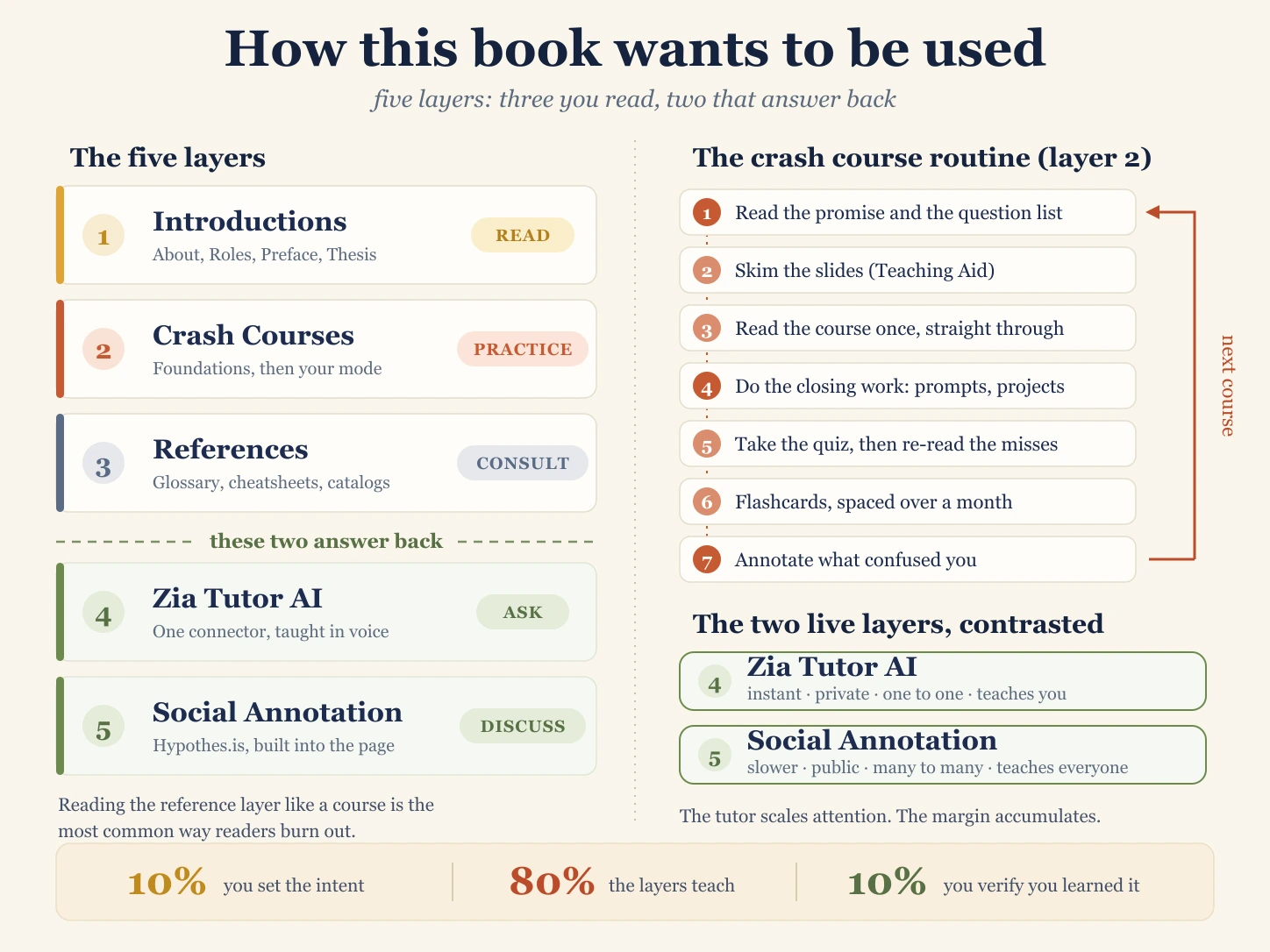
Five layers. Three of them sit still while you read them. Two of them answer back.
The content layers
| Layer | What it is | What you do | You are done when |
|---|---|---|---|
| 1. Introductions | The orientation pages: what this is, who it trains, and the argument the book rests on | Read once, in order. Two to three hours | You can define a Digital FTE in your own words |
| 2. Crash Courses | Short, high-leverage courses covering the 80% of agentic work you use daily | Practice them in sequence, one at a time, with a keyboard | You have shipped what the course asks you to ship |
| 3. References | The reference shelf: the glossary, the cheatsheets, and the catalogs | Consult it when real work surfaces a gap. Never front to back | Never. It stays open in a tab for years |
The interactive layers
| Layer | What it is | What you do | You are done when |
|---|---|---|---|
| 4. Zia Tutor AI | The book teaching itself, as a named teacher who remembers where you stopped | Ask whenever a page did not make sense | Never. It is a teacher, not a page |
| 5. Social Annotation | The shared margin: the space beside the text where readers leave notes for each other, built into every page with Hypothesis | Discuss the passage, in the margin beside it | Never. The margin grows as readers arrive |
The layers are not five difficulty levels. They are five relationships. Layers 1 to 3 are the book sitting still: written once, the same for every reader, waiting for you.
Layers 4 and 5 answer back, and they answer in opposite ways. Layer 4 replies instantly, privately, one to one, and teaches you: ask a beginner's question at two in the morning with nobody watching. Layer 5 replies slowly, publicly, many to many, and teaches everyone: your question stays on the page for the next reader who stumbles on the same sentence.
The tutor scales attention. The margin accumulates. Use both, for different moments.
The Learning Loop
The five layers describe the material. This loop describes what you do with it. Run it on every major topic.
Orient, Learn, Practice, Recall, Apply, Unblock, Discuss, Verify, Continue.
| Stage | What you do | Layer |
|---|---|---|
| 1. Orient | Place the topic: what it is for, and what it connects to | 1, and the course's opening promise |
| 2. Learn | Study the essential concepts once | 2 |
| 3. Practice | Run the prompts, build the project, type the commands | 2 |
| 4. Recall | Test yourself with the page closed | 2 (quiz and flashcards) |
| 5. Apply | Use the idea on a real task of your own | Your job, your startup, your coursework |
| 6. Unblock | Fill the specific gap the real work exposed | 3 and 4 |
| 7. Discuss | Ask, answer, and compare readings of the same passage | 5 |
| 8. Verify | Check the result, the sources, and your own understanding | You |
| 9. Continue | Take the next task, which will expose the next gap | The loop again |
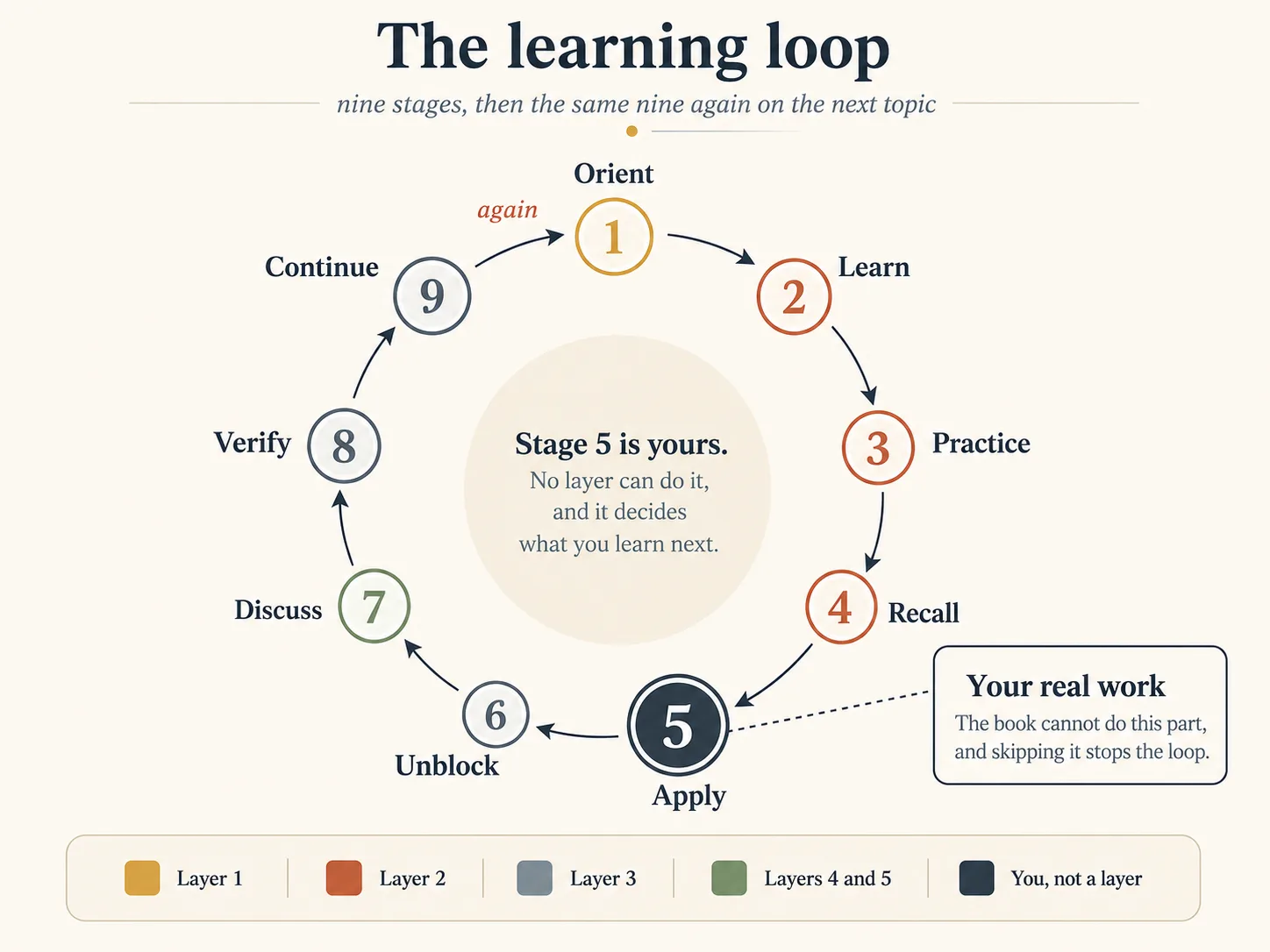
The nine-stage loop, which spans the whole book. Stage 9 leads straight back to stage 1 on the next topic. The colours show which layer owns each stage, and which three are yours alone.
The loop may take an hour for a small topic or several weeks for a large project. The sequence does not change. A reader who never reaches stage 5 studies material chosen by a table of contents instead of material chosen by a problem.
A note on stage 5, because it is where the loop most often breaks. Look at what the table offers as the source of your real task: your job, your startup, or your coursework. A student has coursework. An employed developer has a job. A developer who is between jobs has neither, and no amount of reading supplies one.
That is not a motivation problem, it is a missing input. Getting Paid as a Vertical FDE is the page that supplies it: what you can build and sell to a client right now, and what to own later. If your loop keeps stopping at Apply, read that page rather than starting another course.
Layer 1: The Introductions
These are the pages above the Crash Courses in the sidebar. Read them in this order, for orientation, taking only the notes you need to hold the vocabulary:
- About: What Is This Thing I'm Holding?
- How to Learn from This Book, the page you are reading now
- The Roles This Book Trains
- The Ecosystem
- Preface: Why Now, What's at Stake
- AI Is Non-Negotiable: Answering the Objections
- Thesis: The Architectural Argument
- The Operating Layer: The Interface Argument
- What You Carry In: The Ownership Argument
- Getting Paid as a Vertical FDE
Their job is not to teach a skill. It is to install the vocabulary every later page assumes: Digital FTE, AI Worker, general agent, AI-Native Company, the Two-Layer Model, the 10-80-10 Rule, the invariants, the Forward Deployed Engineer, and the vertical System of Record. You do not need to memorize these terms. You do need to recognize them when a course uses one without explanation.
Item 10 does one further job. The other nine explain what the book teaches. That one explains what it is worth, and it is the page to read on the day the courses feel like a lot of work for no visible return.
The Thesis is the page people are most tempted to skip, and it is the most expensive skip in the book. If you read only three pages of Layer 1, read the About page, the Thesis, and Getting Paid as a Vertical FDE: what this is, how it works, and what it pays.
Layer 2: The Crash Courses
Getting Started: Crash Courses holds the map, and the map is short: Foundations for everyone, then General Agents, then Personal Agent Harnesses, then one of two tracks (Mode 1 or Mode 2), then References and Companions.
Two rules govern this layer.
One course at a time. Six courses half-read teach you less than one course finished. The order in the sidebar is a dependency order, not a suggestion.
A course you only read is a course you did not take. Every Crash Course ends with prompts, projects, or a build. That closing section is where the learning happens, because it is the only part where the machine can prove you wrong.
Do not measure progress by pages finished. Measure it by what you can explain, apply, and verify.
The Crash Course Routine
The nine-stage loop above spans the whole book. Stages 1 through 4 all happen inside a single course, so they get a routine of their own: seven steps, every time. One loop, with one routine nested inside it. Those are the only two sequences worth memorizing. The numbered lists later on this page are checklists you consult, not stages you track.
1. Read the promise and the question list. Every course opens by saying what it covers, how long it takes, and what it assumes. Many also list the questions they answer. Read that list before the course and try to answer two or three in your head. Your wrong guesses are useful, because they show which of your mental models is about to be corrected.
2. Skim the slides. Where a course has a Teaching Aid near the top, click through it once, quickly. Five minutes of slides gives you the shape of the course, so the detail has somewhere to land.
3. Read the course once, for structure. On this first pass, read for the shape. You are not trying to master it yet. Avoid long side trips, but do pause when a missing term is blocking the next section: open the glossary, get the meaning, come back. Some confusion at this stage is normal. The second pass clears it up.
4. Do the closing work. Run the prompts. Build the project. Type the commands. This is the step that converts reading into skill, and the step people skip when they are tired. If you have time for only half a course, do the first half of the concepts and all of the closing work, not the other way around.
5. Take the quiz, with the page closed, before you re-read anything. Then re-read only what you missed. Details below.
6. Work the flashcards on a schedule. Details below.
7. Annotate what confused you. Before closing the tab, leave one note on the passage that gave you the most trouble. That is Layer 5, and it takes ninety seconds.
This book asks you to verify what AI produces. Apply the same discipline to yourself. Three questions, at the end of every course:
- Can I explain the core idea to a colleague in three sentences, without the page open?
- Can I do the main task again from a blank screen, without copying from the course?
- Can I name one thing in this course I still do not understand?
A confident yes, yes, and a specific answer to question three means you are done. A vague answer to question three usually means you are not, because a reader who understands a topic can always name the edge of their own understanding.
The Teaching Aid: The Presentation
The slideshow near the top of each course is a ready-made teaching structure. Instructors, trainers, and study-group leaders can teach from it after reviewing the material, and bootcamps, universities, and corporate training teams are welcome to use it as it stands. Use it before reading for the structure, after reading to revise, and one slide at a time later as a reminder.
Solo readers should use it one more way: teach the deck to somebody. A colleague, a study group, a patient friend, or an empty room. Explaining a concept out loud, in order, from slides you did not write, exposes the gaps you were still hiding from yourself.
The Practice Engine: Quiz and Flashcards
These two are not extras for keen students. The minutes you spend on them are the most valuable in any course, because these are the only parts that test retrieval rather than recognition.
The course teaches you. The quiz finds out whether it worked. The flashcards decide whether you still have it three months from now.
The quiz is retrieval, not judgment. Reading creates a feeling of understanding. Answering from memory tests whether that understanding is real, and the gap between the two is where most wasted study time lives. That is why the quiz comes before any re-reading: a wrong answer tells you where to look, and re-reading first throws that information away.
When you answer incorrectly, four moves in order:
- Return to the relevant section.
- Name what you misunderstood, precisely.
- Explain the correct answer in your own words, not the book's.
- Try the question again a day later.
Step 3 is the one people skip and the one that works. Recognizing the right answer is easy. Producing it is the skill. Quiz scores also feed the Leaderboard, which is there for motivation and is not the point.
The flashcards decide what survives. Crash Courses are fast, and fast learning fades unless something pulls it back. Spaced repetition is that something: read the question, answer aloud or in writing, reveal the answer, mark the hard cards, and review those more often. Do not do all the passes at once. Space them out: the same day, the next day, a week later, and a month later. Four short reviews across a month take far less time than repeated re-reading and stay in memory better than one long cramming session.
They are most useful for whatever you must recognize instantly while working, with no time to look it up: vocabulary, distinctions, principles, and mental models. In a live build, a term you only partly know will send you in the wrong direction.
Fair question, since Layers 4 and 5 were promoted and these were not. The test is whether a thing spans the book or lives inside one course.
Zia Tutor AI and the annotation margin reach every page, and both give you something new: an explanation, or another reader's perspective. They are sources, so they are layers. A quiz and a deck belong to one course and add no new knowledge. They work on what you already have, which is why they are effective. So they are not a sixth and seventh layer. They are stage 4 of the loop, Recall, and that stage is where most of the retention in this book is won.
Layer 3: The References
You are halfway through a build. One term on the screen is doing real work in the sentence, and you do not know what it means. You do not need a course. You need one answer, and then you need to get back to the build.
That is what the references are for: the Glossary, the Cheatsheets, and Which AI Employees Should You Use in 2026. They are the consult-on-demand layer.
You will spend less continuous time here than anywhere else in the book, because this layer is not designed to be read straight through. You enter it from a specific problem, question, or gap. You are meant to arrive from the side, take what you need, and leave.
You will typically open it when you need to:
- Check a term the current page assumes you know
- Look up a command, flag, or pattern in the middle of a build
- Compare AI workers and decide which one to use
The Crash Courses get you working. The references keep you working when a detail goes missing.
Just-In-Time Education
Traditional education follows a fixed sequence. Students study a broad subject over weeks, months, or years, usually long before they know when they will use the knowledge.
AI makes another model possible: just-in-time education. You learn a concept at the moment it becomes useful. Instead of studying the whole subject, you go straight to what the current problem requires, which may be a short explanation, a refresher, a worked example, or help finding the right course.
The moments when this helps most are easy to recognize. You need to refresh something you learned long ago. You meet an unfamiliar term. You are preparing for a decision, or beginning in a new area, or held up in the middle of a problem by one missing piece. Education becomes something you can get on demand, at any point in your working life.
The pattern is not confined to one layer. Asking Zia Tutor AI is a just-in-time move. So is reading the margin on the paragraph that just confused you. In real work you will often use all three within the same ten minutes: the reference gives the detail, the tutor explains the part you did not follow, and the margin tells you who else got stuck there.
On Demand Does Not Mean Foundation-Free
You cannot understand an agent architecture without first knowing what an agent, a tool, a context window, a specification, and a workflow are. Worse, without the foundation you cannot tell which question to ask, and an AI asked the wrong question will answer it fluently and confidently. That is why the book opens with Layer 1 and the Foundations courses.
Foundation first, then depth on demand.
The foundation lets you recognize the problem. Just-in-time learning gives you the knowledge to solve it.
Layer 4: Zia Tutor AI
Some questions are not answered by any page, because they are about the gap between a page and your situation. Layer 4 exists for those.
Zia Tutor AI is this book teaching itself, as a named teacher rather than a faceless system. It is a connector-native app, so there is no app to download and no subscription: it runs inside the AI app you already use, on that app's free tier.
Three steps:
- Add one connector in your AI app and authorize once.
- Open a normal chat and say "Teach me the Agent Factory."
- Learn in Zia's voice, then come back later and say "continue where I left off."
It greets you by name, teaches in Zia's own method and voice, checks that you understood the last piece before advancing, and remembers where you stopped across sessions and weeks. It reads the book's own content, not the open internet. So it teaches you the book's terminology and method, in the words the book uses.
Why this matters: students do not all learn the same way. One understands an idea the first time. Another needs it in simpler language, as an analogy, with an example from their own profession, or broken into smaller steps. A classroom teacher with a full room and a schedule cannot produce a different explanation for every learner. A tutor can, at any hour, without impatience.
Two Other Ways to Ask the Book
The tutor teaches you a course. These two are for grounding an agent you already use.
The System of Record connector (Beta 1). The Agent Factory System of Record serves the book over MCP, so any MCP-capable agent or client can answer from the book and cite the section it used. It is read-only, and Beta 1 covers the core content from About through the Glossary. Add it as a custom connector in claude.ai, or any MCP client, using the three fields on that page.
Copy as Markdown. For a single page, you need no setup at all. Every page has a Copy as Markdown button near the top (Cmd or Ctrl, plus Shift + C). Copy the page, paste it into your AI app, and ask your question against the actual text. The model then answers from the page in front of it, not from memory.
Questions Worth Asking
Vague requests get vague answers. These work:
- "Explain the context window in beginner-friendly language."
- "Explain this concept using an accounting example."
- "What is the difference between a Skill and a connector?"
- "Quiz me on the 10-80-10 Rule. One question at a time, and do not tell me the answer until I have tried."
- "Which course should I take before designing an approval workflow?"
- "I have finished Foundations and Mode 2. What can I actually sell, and to whom?"
- "Here is my explanation of a Digital FTE in my own words. Tell me what is wrong or missing, and do not soften it."
That last prompt matters more than it looks. AI leans toward agreement by default. Asking for correction explicitly is what turns it into a tutor.
Augmentation, Not Replacement
No AI tutor removes the need for human teachers. Teachers provide professional judgment, encouragement, discipline, social understanding, emotional support, ethical responsibility, and the recognition that a situation now needs a human being. They decide what should be taught, evaluate whether a learner has truly understood it, and carry responsibility for the learning environment.
Teacher plus AI tutor.
The teacher leads the learning process. The AI provides personalized, just-in-time assistance. Together they deliver what has always been hard at scale: good teaching plus individual attention for every learner.
Layer 5: Social Annotation with Hypothesis
Reading a technical book alone is quiet, and the quiet hides your questions. So this book has a margin.
Hypothesis, the open social annotation platform used across higher education, is built into every page of this book. There is nothing to install. You highlight a passage and attach a comment, question, explanation, link, or example directly to it, and other readers reply there. The discussion happens beside the exact sentence, which is why it works: your question sits where the confusion happened.
This is also the layer that improves the book. Every question in the margin is a signal about which paragraph is not doing its job.
How to Use It
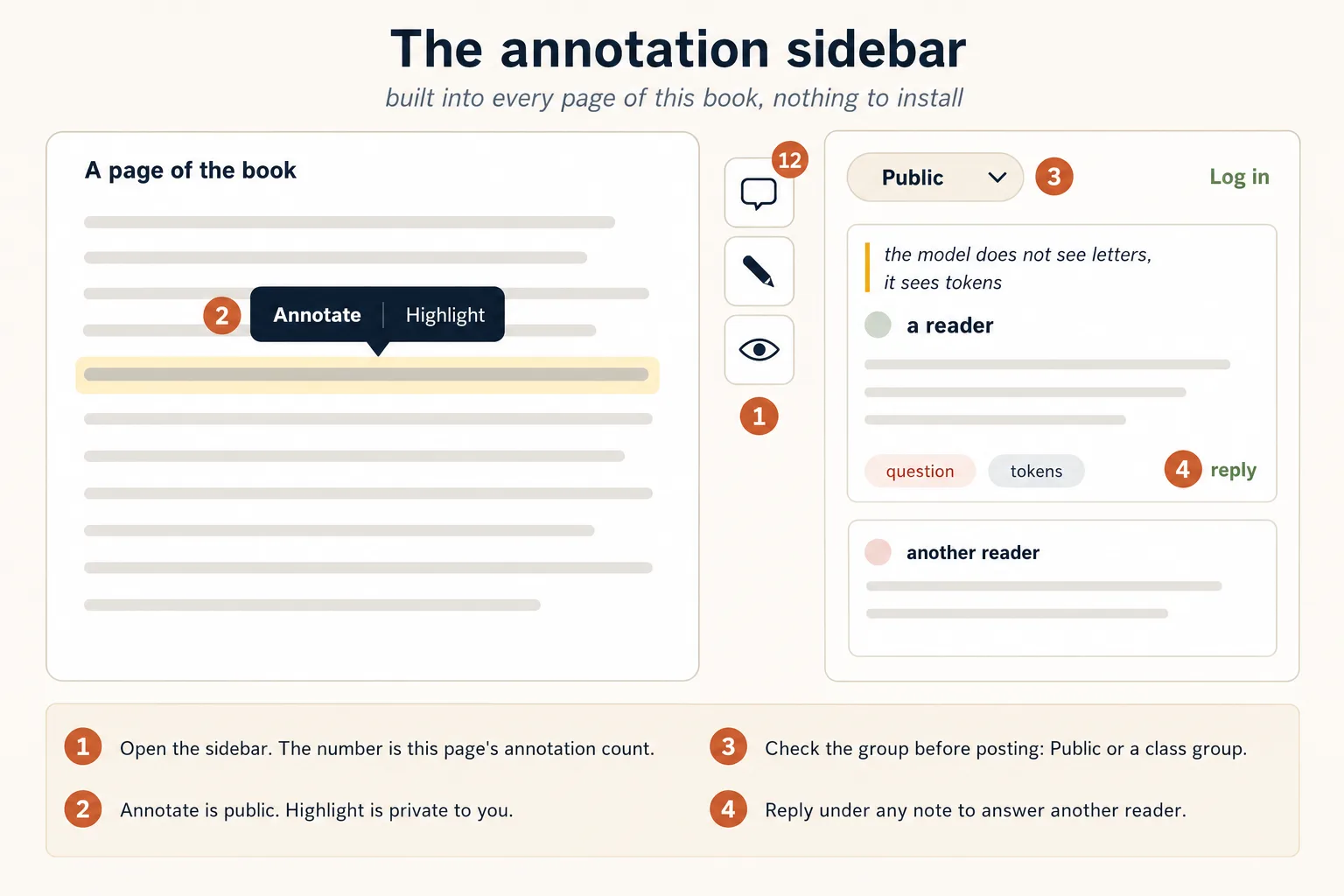
What the margin looks like in use. The numbers key to the four things worth knowing before you post.
1. Open the sidebar. In the toolbar above any lesson, open the menu at its right end and choose Notes & Highlights. There is also a small toolbar pinned to the right edge of every page: its top button opens the sidebar and carries a count of the annotations on that page, the eye shows or hides highlights, and the note icon leaves a page note for the whole page.
2. Read before you write. You do not need an account to read public annotations. Highlighted passages show where notes are attached, and clicking one jumps to its note. Reading the margin of a course before you take it is a good way to study.
3. Log in to write. Creating annotations needs a free Hypothesis account, which you can make from the sidebar in about a minute.
4. Check the group, then select a passage. The selector at the top controls who sees your note: Public means every reader of this book, and a private group means only that group. Then highlight any text and choose Annotate for a note others can see, or Highlight for a private mark that only you ever see.
5. Write it, tag it, post it. Annotations take plain text, links, and images. Click Reply under any note to answer another reader.
One thing that will confuse you eventually: if a page is edited after an annotation was made, the annotation can lose the text it was anchored to and appear as an orphan. Nothing is lost. It just no longer points at a passage.
Tags make the margin searchable, which is what turns a set of scattered comments into a resource. A convention that costs two seconds:
| Tag | Use it for |
|---|---|
question | Something you did not understand |
correction | Something stale, wrong, or renamed |
example | A worked example from your own field |
bridge | A link between two courses |
accounting, legal, medicine | Your domain, so professionals can find each other |
Search a tag later and you have a study guide nobody had to write.
Five Annotations Worth Writing
Most readers do not know what to write in the empty comment box. A good annotation does at least one of these five jobs.
1. Clarify. Say the passage again in simpler language.
"This means the agent needs an authoritative source to read from, instead of relying on what the model happens to remember."
2. Connect. Tie it to another course, another field, or your own experience.
"This is the same role the general ledger plays in an accounting system: one place everything is reconciled against."
3. Question. Name something unclear, incomplete, or debatable.
"Does this rule still hold when the agent only produces a draft that a human reviews before it goes out?"
4. Apply. Describe how the idea would be used in real work.
"A law firm could use this pattern to require partner approval before an agent sends advice to a client."
5. Correct. Flag something stale, and bring evidence.
"This command was renamed in the January release. The current flag is documented here: [link]."
The honest question is the most valuable of the five and the one people are most afraid to leave. Leave it anyway. Somebody arriving at that paragraph next week has the same question, and may be even less willing to ask it.
What not to write. "Great point" adds nothing to a margin, and neither does an argument about something other than the passage. Avoid highlighting half a page without saying why it matters. An annotation should answer at least one question: What does this mean? Why does it matter? Is it correct? Where else does it apply? What is still unclear? How would I use it?
For Teachers: Use a Private Group
Create a private Hypothesis group for your class before week one, and have students post there, not in the Public layer. Two things follow. Students write more honestly in a room with a door on it, so the confusions they will not raise their hands about appear in the margin instead. And you get a reading list of exactly what to teach: open the group before class, read what they flagged, and start the session there.
Hypothesis reports strong results from institutions using social annotation, including a 32% increase in class retention, roughly doubled comprehension scores, and improved grades. Treat these as figures reported by the company itself, not as independent studies. Different Hypothesis pages and case studies also give different grade numbers, so link the specific case study if you quote one.
The intended mechanism is straightforward: annotation turns reading into an active and social process, because it asks you to question, explain, connect, and respond rather than just move your eyes.
Getting started takes about two minutes. Notes & Highlights walks through it: opening the panel, making a free account, and the one setting worth getting right, which is choosing your group before you write rather than posting to Public by accident.
How to Spend the Time
In a single sitting, run the seven-step routine and reserve the last five minutes for one question: what real task will I try this week? Over longer horizons, pick the plan that matches the time you actually have.
| Plan | Time | What you do | Where you land |
|---|---|---|---|
| The weekend | About 8 hours | About page and Thesis, then the six Foundations courses, with quizzes and flashcards as you go | Productive with AI on your own work, ready to pick a mode |
| The month of evenings | 4 evenings a week, 15 to 20 hours total | Layer 1 in week one, then Foundations, then a general agent course, then your mode's track, one course per sitting | Your first Digital FTE shipped, and a portfolio artifact you can show a client |
| The cohort | One term | The same sequence, taught from the slide decks, with a private annotation group and quizzes as weekly checkpoints | A room of people who have all built something |
Learning becomes durable when you use the idea, not when you finish reading about it.
A Classroom Pattern
Teachers, trainers, and study-group leaders can run the same material as a structured lesson.
- Introduce the topic from the presentation.
- Assign the Crash Course, and ask every learner to annotate two passages in the class group: one they found important, one they found confusing.
- Open the session with the confusing ones. The annotations tell you what to teach before you start talking.
- Run the practical exercise together, then use the quiz as the checkpoint and assign the flashcards for later review.
- Give the class a real problem that needs the concept, and point them at the references and Zia Tutor AI when it exposes a gap.
- Ask each learner to explain and defend the decisions they made.
Steps 2 and 3 do the real work. Everything else is ordinary good teaching.
Your Responsibility as a Learner
AI can explain, summarize, quiz, guide, and personalize. It cannot take responsibility for your understanding. You remain responsible for thinking critically, testing claims, checking sources, naming your own uncertainty, practicing the skills, evaluating what AI produces, and asking for human help when the situation calls for it.
Six habits carry that in practice.
- Verify everything, including this book. Tools change, prices move, and the live product is always right when it disagrees with a page. When you find something stale, annotate it with a
correctiontag. - Keep the glossary open. One tab, permanently. A term you only partly know costs you a paragraph every time it reappears.
- One course at a time. Finish before you start.
- Ship something small, early. A tiny working thing teaches more than a large planned thing.
- Teach it back. Use the deck, a friend, or an empty room. Explanation is the test that cannot be faked.
- Do not read alone. You have a tutor on one side and a margin on the other.
Underneath all six is the rhythm this book teaches for building AI workers, turned on your own learning. You set the intent, the first 10%: decide what you are learning and why. The layers carry the execution, the 80%. You verify the outcome, the final 10%: prove to yourself that you understood it and can do it again.
You cannot hand those two parts to anyone else. That is exactly why they are worth practicing.
The Exit Check
You have used the whole system when you can tick all five, one per layer:
- I can define a Digital FTE without looking it up (Layer 1)
- I have shipped one Crash Course project (Layer 2)
- I have opened a reference because real work sent me there, not because a syllabus told me to (Layer 3)
- I have asked Zia Tutor AI one question I was embarrassed to ask a person (Layer 4)
- I have left one annotation that will help the next reader (Layer 5)
Any unticked box tells you which layer you are not using yet.
Start Here
Four moves, in order:
- Read the Thesis for the vocabulary everything else assumes.
- Open Getting Started: Crash Courses and begin with What AI Actually Is.
- Add the Zia Tutor AI connector, so the teacher is there before you need it.
- When the annotation margin reaches you, open the sidebar on the right edge of this page and leave your first note on whichever paragraph you disagreed with.
Then start real work as early as you can, because the work is what tells you what to learn next.
Learn enough to begin. Build enough to discover the gaps. Learn again when the work demands it.