Governance, Risk & Responsible Use: A Crash Course
Four questions. Three possible answers. One habit that keeps useful AI work safe enough to survive.
Start with an ordinary Tuesday
A logistics company has a good year with AI. Operations cuts reporting time. Marketing drafts campaigns faster. Finance automates routine matching. The tools become ordinary, so people stop treating each use as an "AI decision."
Then a project manager uploads a customer spreadsheet with names and account numbers into the AI chat she uses every day. She is not breaking a rule on purpose. She is answering a director's question before lunch.
The company freezes AI use while it investigates. Teams that did nothing wrong lose workflows they relied on, because one routine decision created a risk the organization could not ignore. The story is a made-up mix of real cases, and it is the shape real cases take. One ordinary decision that nobody framed as a decision.
A policy document cannot fix that on its own. It cannot look at the file on your screen. It cannot decide whether the task needs the customer names. It cannot notice that a new connector can now send messages as well as read them. Those decisions happen where the work happens, so they are yours.
This course gives you a small decision procedure for them. It is quick enough that you will run it, and written down in a form a manager can review.
Quick glossary
Skip this on a first read. Every term is also explained where the course teaches it.
- four questions: the Case, the Data, the Capability, the People.
- Delegation criteria: the four screens that decide whether AI should do a task.
- accountability: who stays answerable for the outcome. It cannot move to a tool.
- three answers: fully appropriate, appropriate with review, inappropriate.
- deciding factor: the one screen actually carrying the classification.
- defined gate: a review naming who checks, what they check, and when.
- data tier: how carefully information must be handled. Green, yellow, or red.
- discriminator: the one question that decides which branch of a decision you are on.
- redaction: removing fields the task does not need before AI sees the data.
- code execution sandbox: a walled-off space where AI can run code without touching your systems.
- pseudonymized: names replaced by labels while somebody still holds the list back to people.
- anonymized: changed so it no longer identifies a person, by your organization's standard.
- entry point: the route data takes into an AI system. Chat, upload, connector, API.
- API: a direct software-to-software link into an AI system, with no chat window.
- purpose: the reason the data was first collected. A new use needs that reason or fresh permission, at any tier.
- connector: an approved link that lets AI reach one of your apps, such as files or email.
- scopes: the exact list of things you allow a connector to do.
- Skill: a saved package of instructions, and sometimes scripts, that teaches AI to do a task your way.
- five checks: source, reach, fit, outside content, actions.
- three outcomes: enable, escalate, decline.
- read-only: AI may look but not change.
- prompt injection: instructions hidden in content AI reads, written to steer it.
- least privilege: giving a person, service, or agent only the access the task needs.
- shadow AI: work data flowing through tools your organization never approved.
- Diligence gap: the distance between what the policy says and what people actually do.
- residual risk: what can still go wrong after every planned control works.
- Governance Record: one page holding the four answers, the evidence, the owner, the re-check triggers.
- synthetic data: made-up data shaped like the real thing, safe to practice on.
The whole course in brief
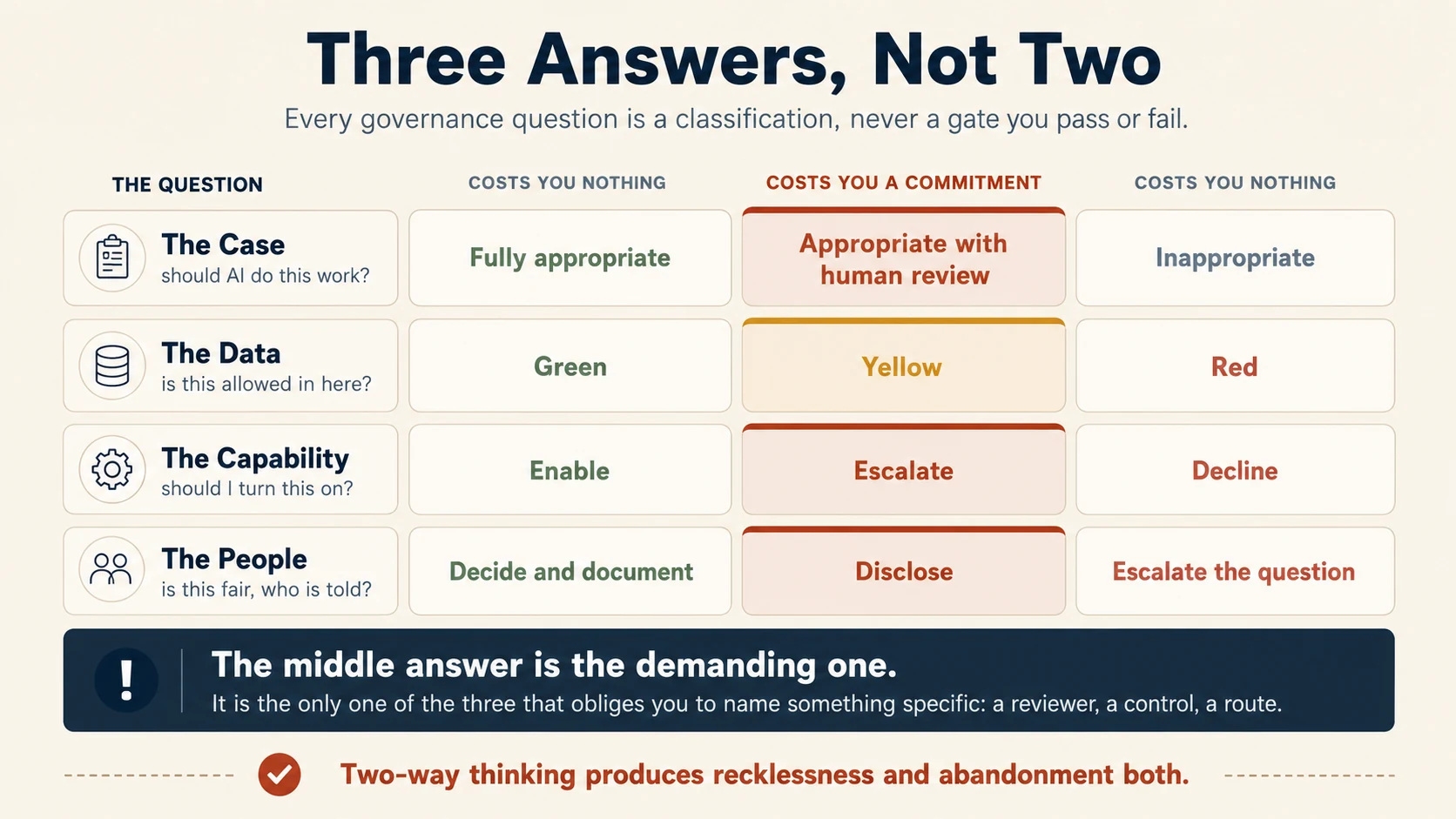
Before AI does meaningful work, ask four questions:
- The Case: Can AI do this work?
Yes · Yes, with a defined human review · No - The Data: Can this information go in?
Yes · Check first / add a control · Not through this route - The Capability: Can I turn this tool, Skill, connector, or action on?
Enable · Escalate for review · Decline - The People: Could this affect someone unfairly or require disclosure?
Decide and document · Disclose · Escalate the question
The middle answer is where most professional judgment lives, because it makes you name a reviewer, a control, an approved route, a disclosure, or an escalation.
Sections 5 to 8 put the four together: one workflow start to finish, the one-page Governance Record, what to do when something goes wrong, and why governance drifts. By the end you will have run all four on one workflow you own and written the answers on that page.
When not to run this. "Meaningful work" touches someone else's data, someone's money, or a decision about a person. Rewording your own email, summarizing a public article, or drafting notes nobody will act on does not qualify. A habit that costs ten minutes on every trivial task is dropped within a week, and then it protects nothing.
Pick a workflow now. Choose one real piece of work you own or influence, where AI already helps or soon will. Each question ends with a short Now do it block that fills in one part of a one-page record for it. Anything marked Going deeper is optional. The Now do it blocks are not.
Do not paste confidential, personal, regulated, privileged, or restricted work material into an AI tool just to finish an exercise here. Use a made-up example, synthetic data, or an approved entry point.
An AI assistant can help you apply a framework. It is not your policy owner, security reviewer, compliance function, legal adviser, or final authority on whether a data type or a tool is approved.
📚 Teaching Aid
View Full Presentation for Governance, Risk & Responsible Use
Part 1: The four questions
1. The Case: Can AI do this work?
A support agent has a billing complaint in the queue. The customer says they were charged twice, and the agent wants AI to draft the reply from the account record. Should AI do this work? Make the call before you read on: yes, yes with a review, or no.
This question comes first. If AI should not be doing the work at all, the later questions about data and tools do not matter.
Most everyday cases need four screening questions, not a risk matrix. Governance material built on the AI Fluency Framework, a published set of competencies for working well with AI, calls them the Delegation criteria. They are the same screens that decide which parts of a workflow to hand over. Accountability, the fourth screen, means who stays answerable for the outcome.
| Screen | Plain-English question |
|---|---|
| Reversibility | If the output is wrong, can we catch and undo it before harm happens? |
| Consequence of error | If it is wrong, is the cost trivial, expensive, harmful, regulated, or irreversible? |
| Human judgment or empathy | Does the task depend on relationship, care, or context a person should personally own? |
| Accountability | Who is answerable, and can that person really review and own what AI produced? |
1.1 Choose one of three answers
Every case gets one of three answers: fully appropriate, appropriate with review, or inappropriate.
Fully appropriate. Low consequence, reversible, easy to review as you go. AI can do it with no special governance gate. An internal FAQ drafted from approved sources, restructured notes, a first-pass meeting summary.
Appropriate with review. AI is useful, but a specific human check has to happen before the output is used, sent, or acted on. A customer reply about billing, a management summary from financial data, a shortlist that decides who gets attention next.
Inappropriate. The task stays human-owned, because the consequence, the difficulty of undoing it, or the human responsibility cannot be repaired by review. A final medical, legal, or disciplinary determination belongs here, where a qualified person must make and own the judgment. AI may support that work. It should not become the decision-maker because it can produce an answer.
1.2 Find the deciding factor
Professionals sometimes say "load-bearing criterion." In plain English that is the deciding factor, which is the one screen actually carrying the classification.
Ask:
If one of the four answers changed, which change would move this use case into a different classification?
For a condolence message, the deciding factor may be the human relationship, even though the message is easy to rewrite. For a billing reply, accountability decides it, because the company stays responsible for what it tells a customer about their money.
Naming it improves the discussion. Instead of "this feels risky," say:
"This is appropriate with review because the organization stays accountable for the factual claim."
That sentence can be checked, challenged, and improved.
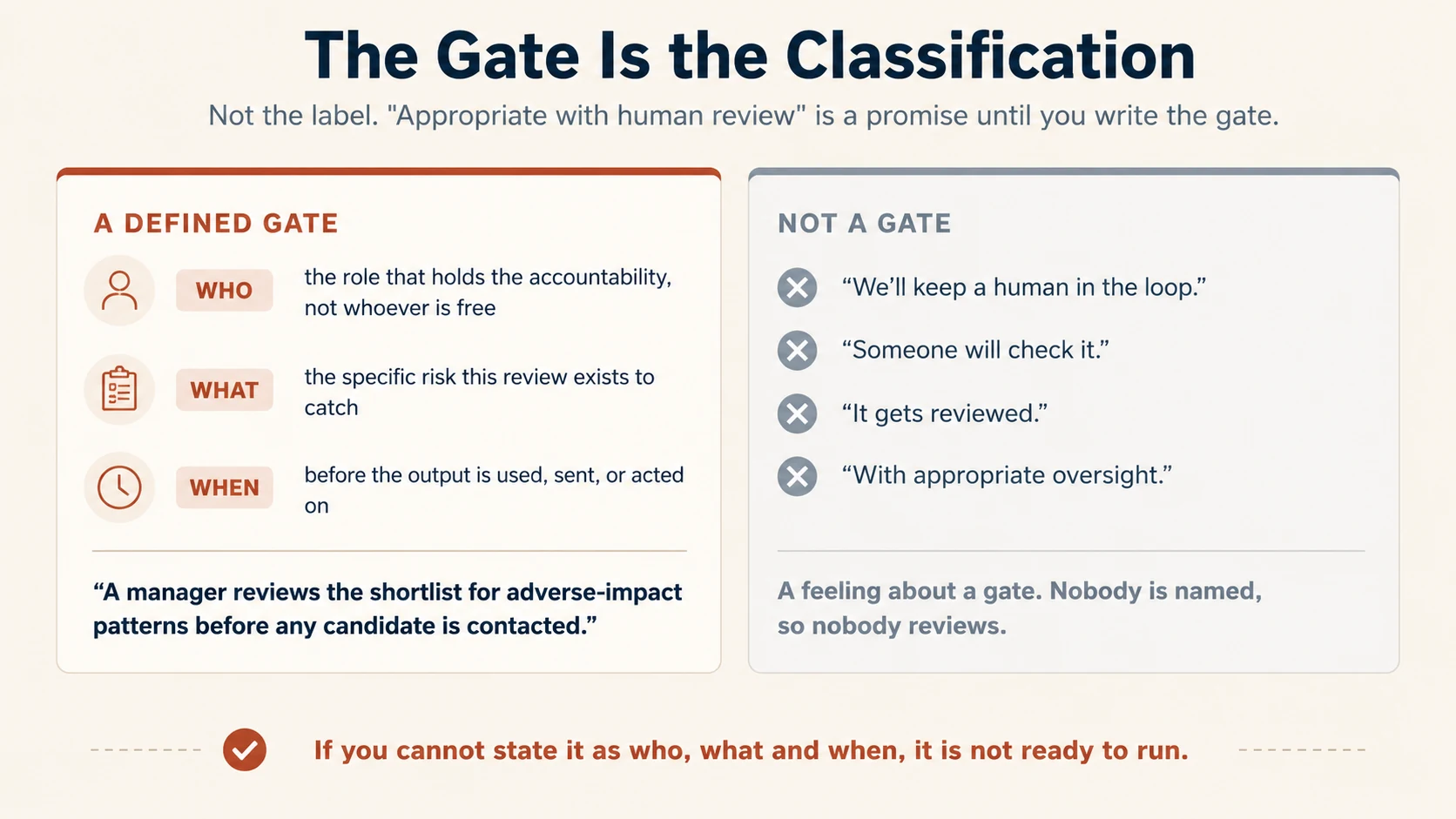
1.3 A human in the loop is not a gate
"A human will review it" sounds responsible and often means nothing in practice.
A defined gate is a review naming three things:
- who reviews: the role that actually holds the responsibility
- what they verify: the specific risk the review is meant to catch
- when they review: before the output becomes hard to undo.
Compare:
"Someone will check it."
with:
"The account manager checks delivery facts against the dispatch record before the report is sent to the customer."
The second is a control. The first is an intention. If you cannot write the gate in that form, the workflow is not ready to run.
Going deeper: consequence and accountability are different
A high-consequence task is not automatically prohibited. Sometimes a well-designed gate restores enough control. A low-consequence task can still require a human, because the relationship is the point of the task.
Do not score the four criteria and add them up. Use them to show why the case belongs in one category rather than another.
Accountability cannot transfer to a tool. A manager, clinician, lawyer, or employer does not become less responsible because an AI system drafted part of the work.
Worked examples
| Use case | Classification | Why | Gate, if needed |
|---|---|---|---|
| Approved policy documents into an internal FAQ | Appropriate | Reversible, low consequence, authoritative sources exist | Normal editorial review |
| Draft a customer response to a billing complaint | Appropriate with review | Company stays accountable for facts about the account | Support agent verifies account facts and tone before sending |
| Generate a final professional determination | Inappropriate as the final decision-maker | Accountability and consequence cannot transfer to the tool | Human professional makes and owns the determination |
| Summarize applications to help organize reading | Appropriate with strong review | Consequential to applicants, sensitive to unfair filtering | Hiring owner reviews inclusion and exclusion decisions before action |
If you said "yes, with a review" for the billing reply, you made the call the table makes.
Now do it: Block 1 of your record
For the workflow you picked, write in your own words:
- what AI does, and what the human still does
- the classification
- the deciding factor
- the gate, as who checks what, and when.
You may ask an AI assistant to challenge your reasoning. Do not ask it to approve the workflow.
Here is a workflow I am thinking of handing to AI: [describe it, using a fictional or already-approved example].
Push back on my reasoning. Screen it on reversibility, consequence of error, how much human judgment it needs, and who stays accountable. Say whether it looks fully appropriate, appropriate with review, or inappropriate, and which single factor is deciding that.
If it needs review, write the gate as who checks what, and when. Do not tell me it is approved or compliant. List anything I would have to confirm with my organization.
2. The Data: Can this information go in?
A project manager has a spreadsheet of customer names and account numbers and wants AI to find spending trends across the customer base. Company policy restricts regulated personal data. Upload it as it is, strip the identifiers first, upload it with an instruction not to retain it, or skip the analysis? Decide before you read on.
A reasonable AI task can still be run on data that should not go into that tool or route.
Use this order:
Classify the data → ask whether the task needs the identifying details → confirm the route → choose the control.
Do not start with a privacy feature and work backwards.
2.1 Use three practical tiers
A data tier is a label for how carefully information must be handled. This course uses three. Your organization may use different labels, so translate these to your policy rather than replacing it.
Green: generally permitted. Public material, aggregated figures, and internal material approved for broad use in your AI environment. It also covers anonymized data, which means data changed so it no longer identifies a person, by your organization's standard.
Yellow: check first or add a control. Internal-only documents, personal contact details, customer or employee identifiers, confidential drafts, unannounced deal or product information, or anything whose use depends on the route.
Red: do not use through an unapproved route. Credentials, secrets, highly regulated or specially protected data, privileged material, or third-party confidential information you may not disclose. Privileged means legally protected from disclosure, such as communication between a client and a lawyer. Licensed material held under terms that forbid copying it into another system belongs here too.
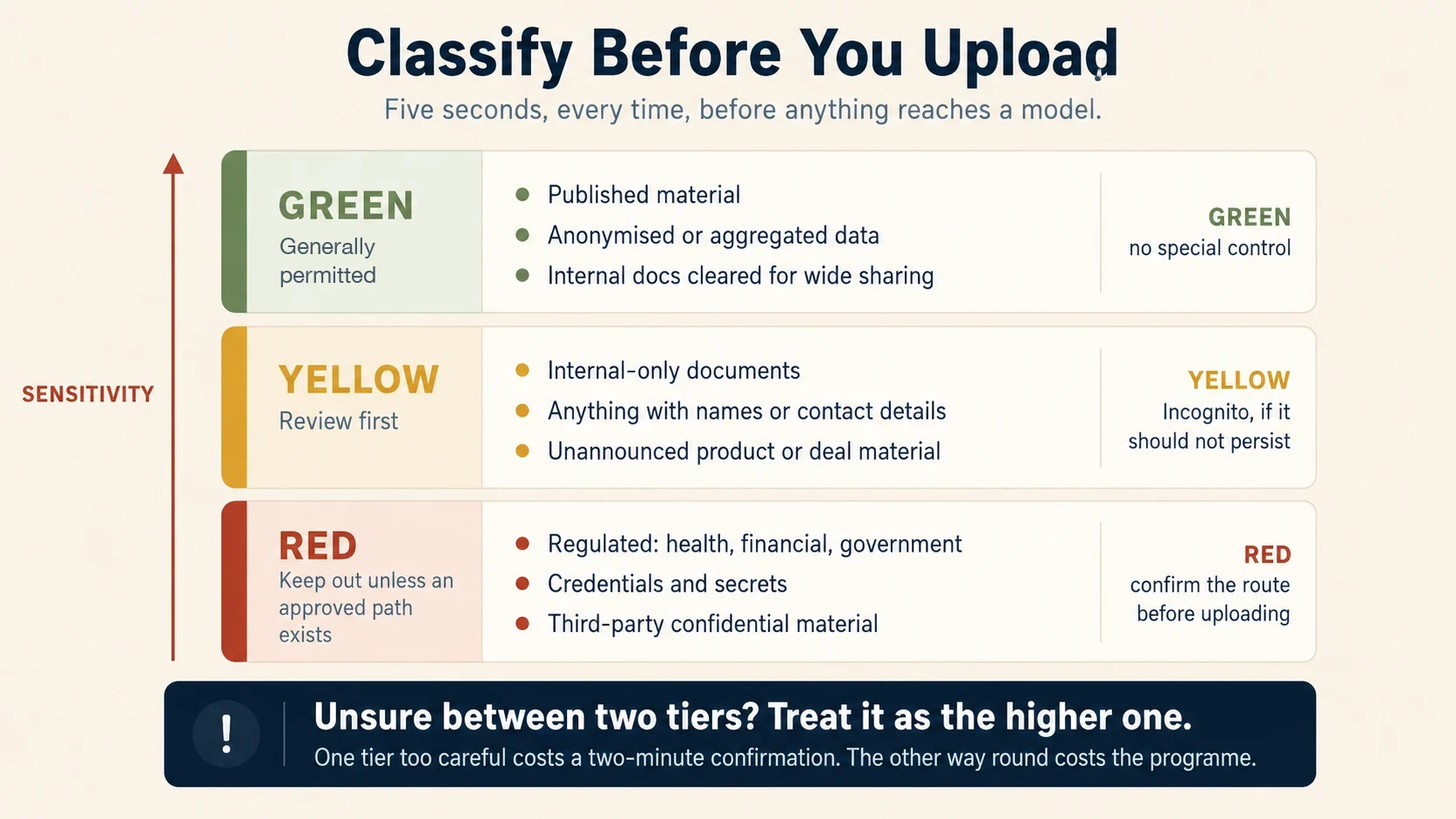
Unsure between two tiers? Use the more sensitive one until somebody authorized to read the policy says otherwise.
2.2 Ask the most useful data question
Before deciding a sensitive task is impossible, ask:
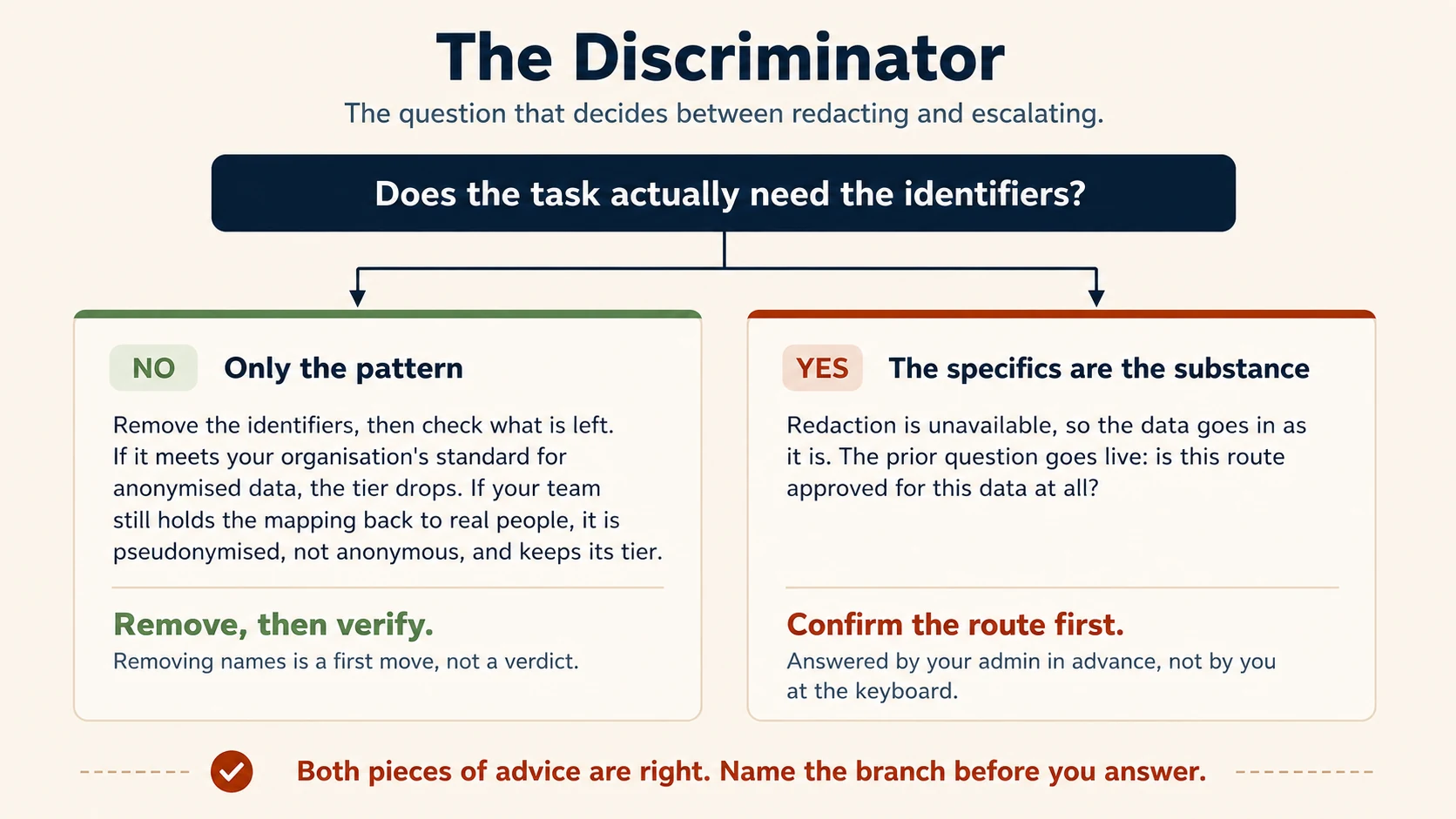
Does the task actually need the identifiers, or only the pattern?
This is the key branching question, and the course calls it the discriminator, because it decides which of two branches you are on. Spending trends may not need customer names. Reconciling one account may be impossible without the identifier.
If only the pattern is needed, the move is redaction, which means removing the fields the task does not need before the data reaches the model. Replacing names with "Customer 17" is a first move, not a verdict. Ask one more question after it. Does anyone still hold the list that maps Customer 17 back to a real person? If yes, the data is pseudonymized, which means the labels can still be traced back. It keeps its tier.
2.3 Redaction is useful, but it is not magic
Redaction fails in two common ways.
Failure 1, partial redaction. You removed the obvious identifier but left enough clues to identify the person. A rare job title, an exact date, a region, an age, or a combination of ordinary facts can identify somebody as reliably as a name.
Failure 2, redaction that breaks the task. You removed information the task needs. The result looks safe and is useless. If account identifiers are needed to reconcile transactions, redaction is not the control here.
Pseudonymized data must not be stored, reused, or shared as if it were anonymous. If the mapping list is gone and the task only needed the pattern, the analysis is no longer touching the protected fields, so the restriction no longer applies. That second case is the ordinary one. Your organization's standard for anonymized data is what lets the tier drop, not the relabeling.
2.4 The route matters as much as the tool name
An entry point is the route by which material reaches an AI system: a chat, a project or workspace, an incognito conversation, a file upload, a connector, an API, or a desktop agent. A connector is an approved link that lets AI reach one of your apps, such as files or email. Its scopes are the exact list of things you allow it to do, such as read files but never send email. Approved does not mean harmless, so you still check the scopes before you turn one on. An API is a direct software-to-software link, with no chat window.
Routes differ in retention, access, logging, and admin properties. They also differ in contract terms, and in whether the provider may use what you enter to train its models.
So the useful question is not:
"Is this AI product approved?"
It is the question below. Purpose in it means the reason the data was first collected.
"Is this route approved for this data and this purpose?"
For sensitive or regulated data, that approval comes from an administrator, policy owner, security function, compliance team, or contract. It does not come from a guess at the keyboard.
Data arrives with the reason it was collected attached. A gym holds members' phone numbers to send class reminders. Using the same numbers to sell supplements is a different purpose. The objection is not about the phone numbers. It is about the promise made when they were collected. Before you run customer, employee, or applicant data through a new AI workflow, ask whether the purpose it was collected for covers this use. If not, that question belongs to whoever owns the data.
2.5 Privacy and workspace controls answer narrower questions
Temporary conversations, memory controls, retention settings, sandboxed execution, encryption, projects, and managed workspaces each reduce a particular risk. None answers the earlier authorization question.
| Control | What it may help with | What it does not decide |
|---|---|---|
| Temporary or incognito conversation | History or memory persistence | Whether the data was permitted to enter the system |
| Memory controls | Cross-session reuse of information | Whether the upload was allowed, or how long the underlying data is kept |
| Code-execution sandbox | Limiting where code or file-processing can operate | Whether the data was authorized for that environment |
| Project or workspace | Keeping shared knowledge, instructions, and files together | Whether every file or data type is approved for that workspace |
| Organization-managed account and admin controls | Roles, retention, exports, audit, and who can disable memory org-wide | Blanket approval for every workflow, data type, or audience |
A sandbox is an execution boundary, not an approval boundary. It can limit what code reaches outside an isolated environment. But the information still entered a system, and outputs can still leave it. Ask separately whether the data is allowed in and whether the resulting files or actions are allowed out.
2.6 Claude routes and controls: five distinctions
Use these as routing distinctions, not as a substitute for your policy or contract. Claude is sold on individual plans, Free, Pro, and Max, and on organization plans, Team and Enterprise. On an organization plan, an Owner or a Primary Owner is an administrator who holds the account-wide settings.
- Memory is not retention, and the off switch depends on the plan. Memory affects what Claude carries forward across work. Chats and memory-related data still follow the applicable retention and export controls. Team plans have no organization-level controls for memory features. On Enterprise, Owners and Primary Owners can turn memory off for everyone. If a decision depends on memory being off, confirm the plan and who holds that setting.
- Incognito is not zero retention. Incognito chats do not appear in normal chat history or memory, but Anthropic currently documents a 30-day default retention period, with longer custom retention possible on Enterprise. Incognito is available only outside Projects.
- Training use depends on the plan. On Free, Pro, and Max, your privacy settings decide whether your chats may be used to improve Claude's models. Allowing it extends retention of those chats to five years. On Team, Enterprise, and the API, inputs and outputs are not used for training by default. Incognito chats are not used for training on any plan.
- A sandbox is not data authorization. A code execution sandbox is a walled-off space where AI can run code without touching the rest of your systems. Execution isolation can reduce the reach of code. It does not prove that a sensitive file was allowed into that environment.
- Private in the interface does not mean absent from organizational records. Team and Enterprise provide data-export mechanisms, and Enterprise adds compliance and audit mechanisms. Treat administrative visibility and exportability as part of the route assessment.
Product behavior changes quickly. If a decision depends on one of these, check current Anthropic documentation and your own configuration.
Worked examples
Meeting notes with no confidential material. Usually green, subject to your approved AI environment.
Anonymized survey responses for trend analysis. Green once the identifiers are really gone. If the output includes counts or totals somebody will act on, have them computed in the code execution sandbox. A number a decision rests on should be calculated, not written.
Credentials or API secrets. Red. Use your organization's approved secret-handling mechanism.
Patient, financial, or privileged records. Red until your organization has approved the specific route and use case. An enterprise plan or a security page is not permission.
The spreadsheet from the top of this question: spending trends need the pattern, not the people. Strip the identifiers, check that no mapping travels with the file, and run the analysis. Uploading it as it is breaks policy. Skipping the analysis protects nobody. And an instruction to the model not to retain the data is a wish, not a control.
Now do it: Block 2 of your record
For your workflow, record:
- what data enters, and its tier under your organization's policy
- whether the task needs the identifiers at all, and which fields you can remove
- the approved route if sensitive fields remain, and whether the purpose the data was collected for covers this use.
For redaction practice, use synthetic data, which means made-up data shaped like the real material. Do not paste a partly redacted sensitive document into an unapproved chat to ask whether the redaction was good enough.
3. The Capability: Can I turn this on?
A colleague sends you a Skill they found on a public forum. A Skill is a saved set of instructions that teaches AI how to do one task your way. This one turns meeting notes into summaries, it has worked well for them, and nothing in its instructions limits it to meeting notes. Enable it, escalate it, or decline it? Decide before you read on.
AI systems now do more than generate text. They can use Skills, tools, plugins, connectors, web pages, files, code, browsers, email, and calendars.
So the question is no longer just "do I trust the model?" It is:
What authority am I adding to this session or agent?
3.1 Treat extensions like software, not like prompts
A Skill may contain instructions, scripts, resources, or dependencies. A connector may expose data or actions in another system. A plugin may combine both. Do not judge them by the friendliness of the description, or by the fact that a colleague shared them.
A Skill does not carry its own permission list. A connector has scopes that you grant and can narrow. A Skill has no such dial. It runs with whatever access the session already has, so its reach is everything that session can reach, not only what its task needs. Where a Skill's definition carries a list of tools, that list pre-approves them so they run without prompting you. It widens what happens without your knowing. It does not narrow what the Skill can touch.
So the second check below asks what the Skill could reach, not what it asks for.
Run five checks:
- Source: who created or published it?
- Reach: what data, files, systems, tools, or credentials could it touch where it runs?
- Fit, which some governance material calls appropriateness: is that reach proportionate to the job?
- Outside content: will it read web pages, incoming email, customer files, or other content you did not write?
- Actions: can it send, pay, delete, publish, edit, approve, or cause another hard-to-reverse change?
The first three say whether the capability belongs in the workflow. The last two say how dangerous a mistake or a hostile instruction could become.
To answer the second check, open the package. Reading the files is the only way to know what it does rather than what its description claims. The warning sign is scope creep. A formatting Skill whose instructions go well beyond formatting is telling you something its summary line did not.
The hardest source case is not the anonymous forum download. It is the Skill built by another team inside your own company, because "internal" feels vetted without being vetted.
That team may have granted it broad reach for their own convenience, or built it against a policy that has since changed, or designed it for data less sensitive than yours. None of that is bad faith. It is context you do not share.
Before you enable it on your own data, confirm with the publisher what it accesses and why, and check that its reach still matches current policy.
3.2 Use three outcomes
Every capability decision ends in one of three outcomes: enable, escalate, or decline.
Enable. You know the source, the reach is proportionate, the task fits, the actions are controlled.
Escalate. The capability may be useful, but something important is unsettled. The source is uncertain, the reach is broad, the tool wants unnecessary access, or the security question is beyond your role.
Decline. Clearly disproportionate, untrustworthy, or unnecessary for the job.
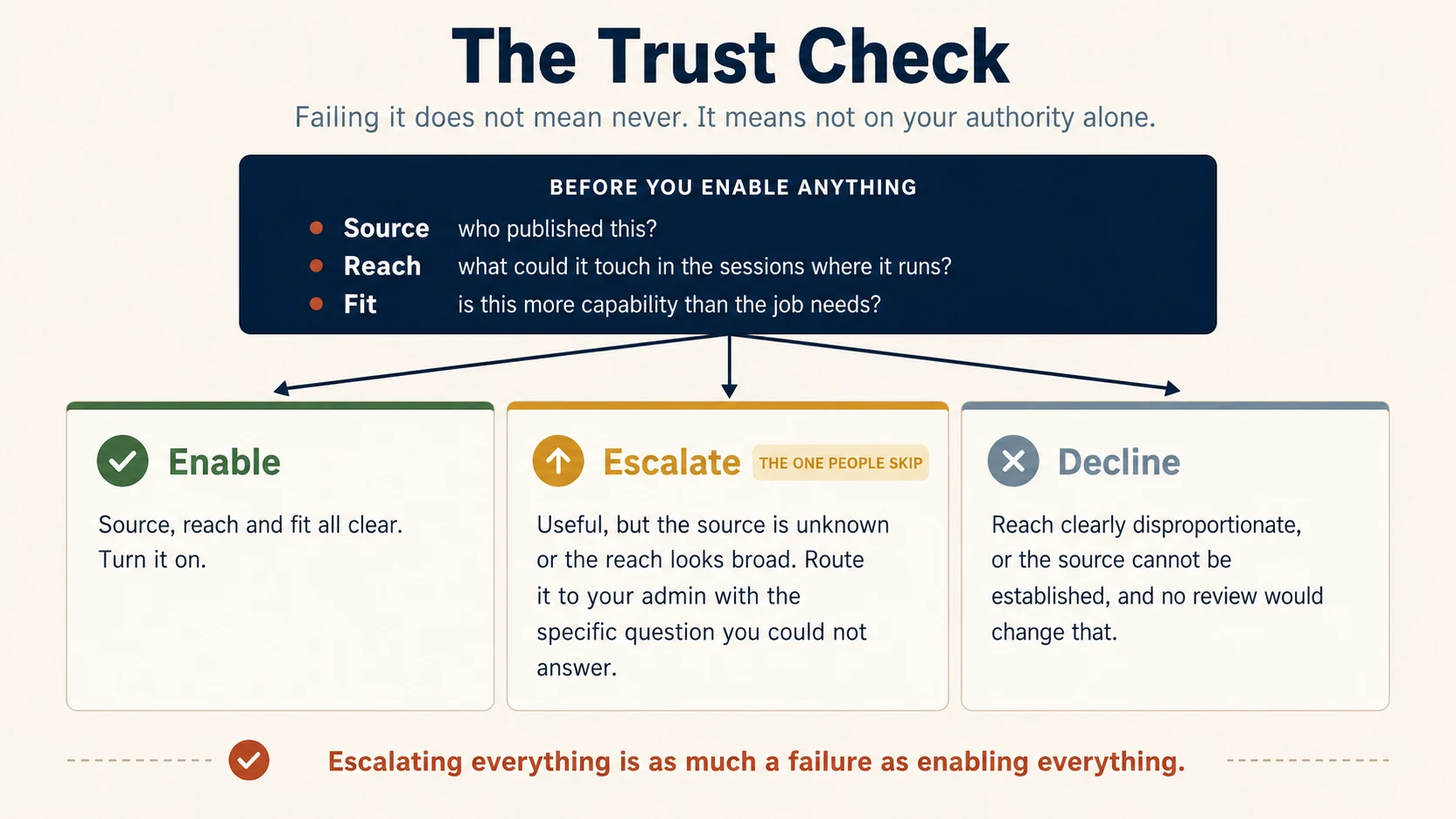
Escalating is not asking permission to be careful. A good escalation names the unresolved question:
"This tool is useful, but it requests write access to our shared drive even though the workflow only requires reading. Can security review whether that access can be narrowed?"
That is far better than "Can I use this?"
3.3 Trusted tool, untrusted content
A capability can come from a trusted publisher and still read content written by somebody you do not trust.
An email, web page, customer upload, or shared document can carry instructions that try to steer the model. This family of attacks is called prompt injection.
The key point is simple:
Who wrote the tool and who wrote the content are two different trust questions.
The risk rises sharply when an AI workflow both reads untrusted content and can take consequential actions.
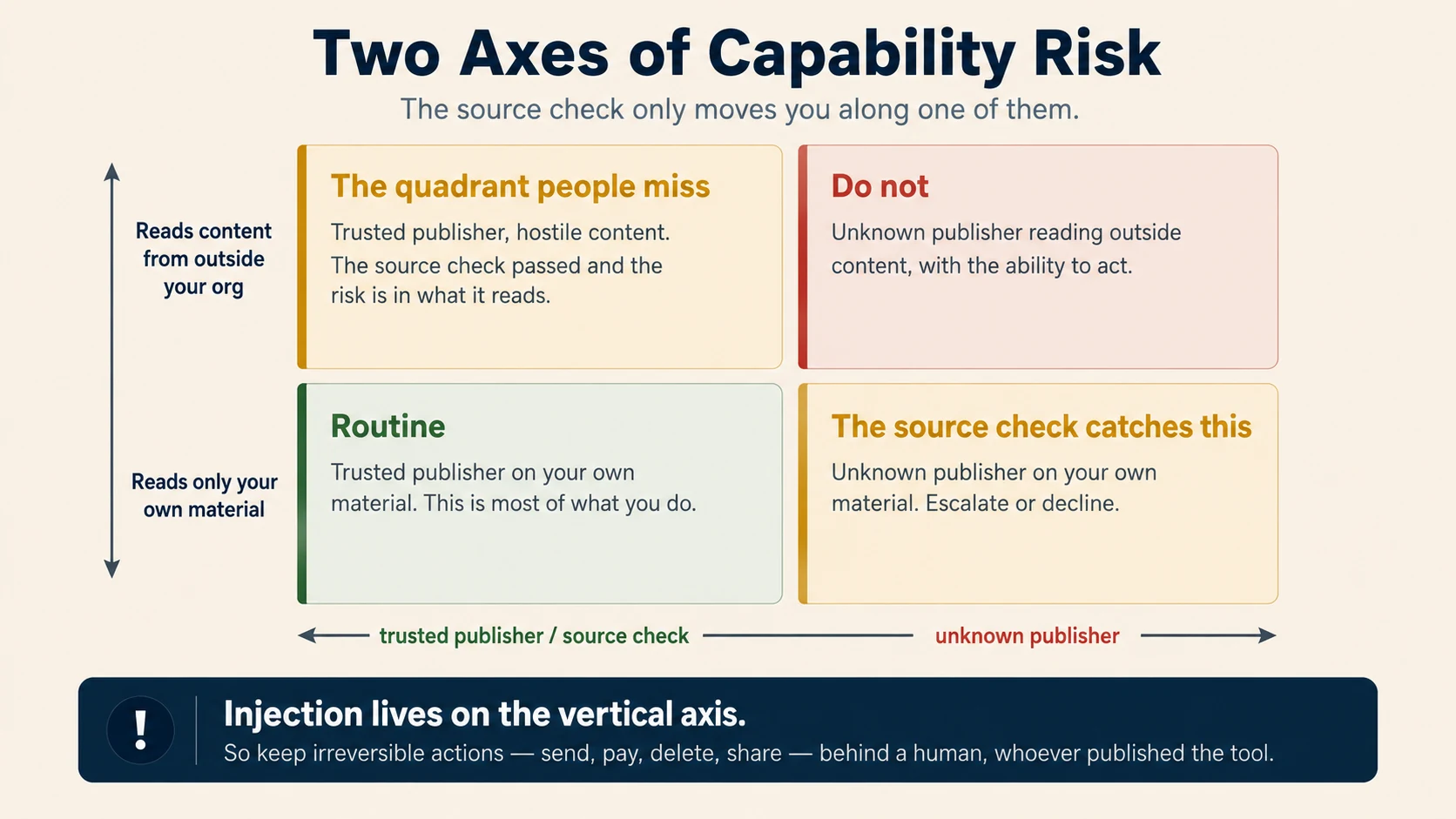
For ordinary knowledge work, a useful default is:
- let AI read only what it needs
- prefer read-only access when it is enough, which means AI may look but not change
- keep send, publish, pay, delete, approve, and irreversible edits behind a defined human gate until the workflow has earned more autonomy.
At system level, reach becomes architecture: scoped credentials, tool allow-lists, typed actions, confirmation policies, network restrictions, isolation, audit logs, and a clear split between reading content and executing actions.
The governing principle is least privilege, which means giving an agent the narrowest authority that finishes the job, then revisiting it when the job changes.
Going deeper: scanning helps, but it is not approval
Security scanning helps by catching some malicious Skills or plugins. It does not establish that the capability is appropriate for your data, environment, or intended use.
Anthropic's current Enterprise documentation describes skill and plugin scanning as a beta check for malicious content on certain new uploads and edits, and notes that a pass is not a guarantee of safety in every respect.
Keep the source, reach, and fit review even when a scanner passes the package.
Worked examples
Document-formatting Skill from a trusted publisher. Source known, purpose matches the job, no unnecessary authority. Enable in an approved environment.
Third-party "analytics booster" with broad instructions and unknown source. Useful idea, unresolved trust and reach. Escalate with the specific concerns rather than experimenting on real company data.
Read-only connector to a reporting database. If the route is approved and access is limited to the tables required, enable. Do not grant write access "just in case."
The forum Skill from the top of this question: the publisher is unknown, and it will run with everything your session can reach, out of all proportion to summarizing notes. A colleague's recommendation is warmth, not vetting. Escalate it with that concern, or decline it. Enabling it and watching for a week grants the access before the risk is understood.
Now do it: Block 3 of your record
For every Skill, connector, integration, browser, code tool, or action in your workflow, write:
- source, reach, and fit
- the outside content it reads
- the consequential actions it can take
- the outcome: enable, escalate, or decline.
If you ask an AI assistant to inspect a package, ask it to find concerns. Do not ask it to certify it as safe.
Read this package and tell me what it actually instructs the AI to do, including anything beyond what it says it is for.
Point out any file, network, credential, tool, or external-service access you can see. Explain what would become risky if the session it runs in can reach sensitive data or take consequential actions.
Do not certify it as safe. Finish with one of three lines: obvious concerns found, no obvious concerns found in this review, or not enough information to say.
4. The People: Could this affect someone unfairly or require disclosure?
A hiring coordinator uses AI to screen applications into a shortlist and forwards it as "the candidates who qualified." The manager interviews only those people and never sees the ones the screen dropped. What is the concern here, and is it the first one you would have named? Decide before you read on.
The first three questions mostly protect the organization and its information. This one looks outward.
Ask:
- Who is affected, including people who never see the output?
- What could go wrong for them?
- Would they be able to notice or challenge it?
- What would a fair process look like?
- Is disclosure required, or would AI involvement reasonably matter to them?
Bias does not only arrive with the data. It can enter through the prompt, through the way the task was framed, or through the patterns in how language gets generated. A request to rank "the strongest candidates" carries an unstated standard, and the output inherits it. So the check is not only whether the facts are right. It is whether a framing tilted the result, and the risk rises with the stakes for the person affected.
4.1 Look at who was excluded
The easiest AI risk to miss happens when the system narrows a set and humans inspect only the survivors.
Examples:
- candidate shortlists
- fraud or risk flags
- support tickets selected for escalation
- leads selected for attention
- documents selected as relevant
- people or cases ranked for priority.
If AI systematically removes a group, nobody notices when the review looks only at what remains. A practical control is to sample exclusions as well as inclusions.
This matters most in decisions about employment, access, benefits, education, finance, or health. Your organization may also have legal limits on automated decision-making in these areas. The framework here does not replace them.
That is the shortlist from the top of this question. The concern is not that AI was involved, and not only that the applicants were never told, though that may matter too. It is that nobody is looking at who was removed.
4.2 Disclosure: use rules first, judgment second
Ask in this order.
First: is disclosure required? Check law, policy, contract, professional rules, client commitments, and organizational standards. If one of them requires disclosure, the decision is already made.
Second: if no rule answers it, would AI involvement reasonably change this person's understanding of the work or the relationship? AI that reformats a table is different from AI that drafts what an employee will read as a manager's personal assessment. Routine tooling does not always need a label. Consequential or relational work often deserves more transparency.
Two disclosure cases come up often enough to deserve their own lines.
Authorship. Work that goes out under your name, or your organization's, is yours to stand behind, however much of the drafting AI did. Your organization may have a rule about labeling AI-assisted documents, and some professional bodies and publishers require it. Where no rule exists, use the test above. Would the reader's understanding change if they knew? A board paper, a reference letter, or a published article usually says yes. A tidied-up meeting agenda usually says no.
The notetaker in the meeting. An AI notetaker that joins a call touches all four at once. It is appropriate with a review of the summary before it circulates, because a summary that misattributes a commitment is a real error. The conversation may hold customer, employee, or deal information, so the recording needs the same route check as any upload. The notetaker is a participant with reach to the whole conversation. Everyone in the room is affected, so announce it at the start. Some jurisdictions require every participant's consent to a recording, and a colleague who finds out afterwards will not experience it as routine tooling.
When no rule settles it and the case is ordinary, disclose rather than conceal. Concealment is what damages trust when it surfaces later. When the case is not ordinary, escalation beats inventing a rule.
4.3 Escalate the question, not a verdict
Structured reasoning handles most ambiguous cases. Three signals mean it should not handle this one alone:
- the affected population is large
- the potential harm is significant
- the question touches an area your team does not have standing to resolve, such as law, contract, employment, or professional obligation.
Any one of them is enough. Escalating then is not timidity. It routes the decision to whoever actually holds it.
Weak escalation:
"I think this is fine. Can you approve it?"
Strong escalation:
"Here is the workflow, who is affected, the control we added, and the point the framework does not settle: whether our disclosure obligation applies to this audience."
A strong escalation gives the reviewer something specific to decide.
Worked example: performance-review drafting
The performance-review example, worked through all four questions
A manager wants AI to turn their own notes into draft performance-review summaries.
Case: appropriate with human review. The manager must own the assessment and verify every statement against the notes.
Data: employee information is sensitive internal material. Use an approved route and keep unnecessary personal details out.
Capability: ordinary drafting may need no new connector. If a system pulls data automatically from HR tools, access and scope need much stronger review.
People: employees are directly affected. The manager should check consistency across employees, not only whether each paragraph sounds right alone. Disclosure obligations depend on policy, contract, and context.
AI does not make a performance review automatically wrong. The point is that the workflow needs controls shaped around the way the output can affect people.
Now do it: Block 4 of your record
For your workflow, write:
- who is affected, including people who never see the output
- what harm or unfairness could credibly happen, and whether you review exclusions as well as inclusions
- what disclosure a rule requires, and what your own judgment adds
- what, if anything, needs escalation.
If the fairness question is the one you are least sure about, work it aloud:
Here is a workflow: [describe it, using a fictional or already-approved example].
Take me through the four People questions one at a time, and wait for my answer before you move on. Who is affected, including people who will never see the output? What could go wrong for them, and would they be able to tell? What would a fair outcome look like? What disclosure does a rule require, and what would only be my own judgment?
Then say whether this is mine to decide and document, or something to escalate. If it should be escalated, draft it as a question with my reasoning attached, not a request for approval. Do not tell me it is compliant.
Part 2: Put the four questions together
5. One ordinary workflow, start to finish
Ayesha leads operations at a regional logistics company. Her team writes a weekly service-exception report for large customers by hand. She proposes using AI to draft it from dispatch records, then having the account manager send it.
5.1 The Case
- Reversibility: high before sending, low after.
- Consequence of error: meaningful. Delivery failures may affect contracts and customer trust.
- Human element: moderate. The summary is mechanical, but tone matters on disputed accounts.
- Accountability: the company stays responsible for every factual claim.
Classification: appropriate with human review. Deciding factor: accountability.
Gate: the account manager checks delivery facts against the dispatch record and reviews the tone on disputed accounts before the report is sent.
5.2 The Data
Inputs include customer names, shipment information, delivery windows, failure reasons, and free-text operational notes. This is at least yellow, because it is internal customer data with identifiers.
Does the task need the identifiers? Yes. A customer report must identify the customer and the shipments. So stripping every identifier does not solve it. The team confirms instead that the specific workspace and integration route are approved for this information.
5.3 The Capability
The team wants a connector to the dispatch system.
- Source: internal platform team.
- Reach: only the reporting tables required.
- Fit: strong. It removes a manual export step.
- Outside content: some free-text fields hold text copied from customer communications.
- Actions: the workflow does not need permission to send the report.
Outcome: enable read-only access after scope confirmation. Keep sending with the account manager.
5.4 The People
Customers are affected, but so are drivers and operations staff described in failure notes. A summary could turn "weather delay" into "driver failure," or use harsher language for some teams than others.
Add a fairness and accuracy check. Attribution must match the dispatch record, and the team should compare phrasing across reports.
Disclosure: check contractual and organizational requirements first. If they are silent, a routine operational report may need no special customer notice. Employee-facing consequences still deserve separate thought.
5.5 The Evidence
A control is stronger when you can tell whether it works. For the first quarter:
- Success measure: account managers complete the factual and tone check before sending.
- Failure threshold: any AI-generated factual error big enough to matter reaches a customer.
- Monitor: Ayesha reviews a sample monthly.
- Residual risk: a consistent wording bias across all reports could survive individual checks, so the sample review compares across customers as well as within each report.
Residual risk means what can still go wrong after every planned control works as designed.
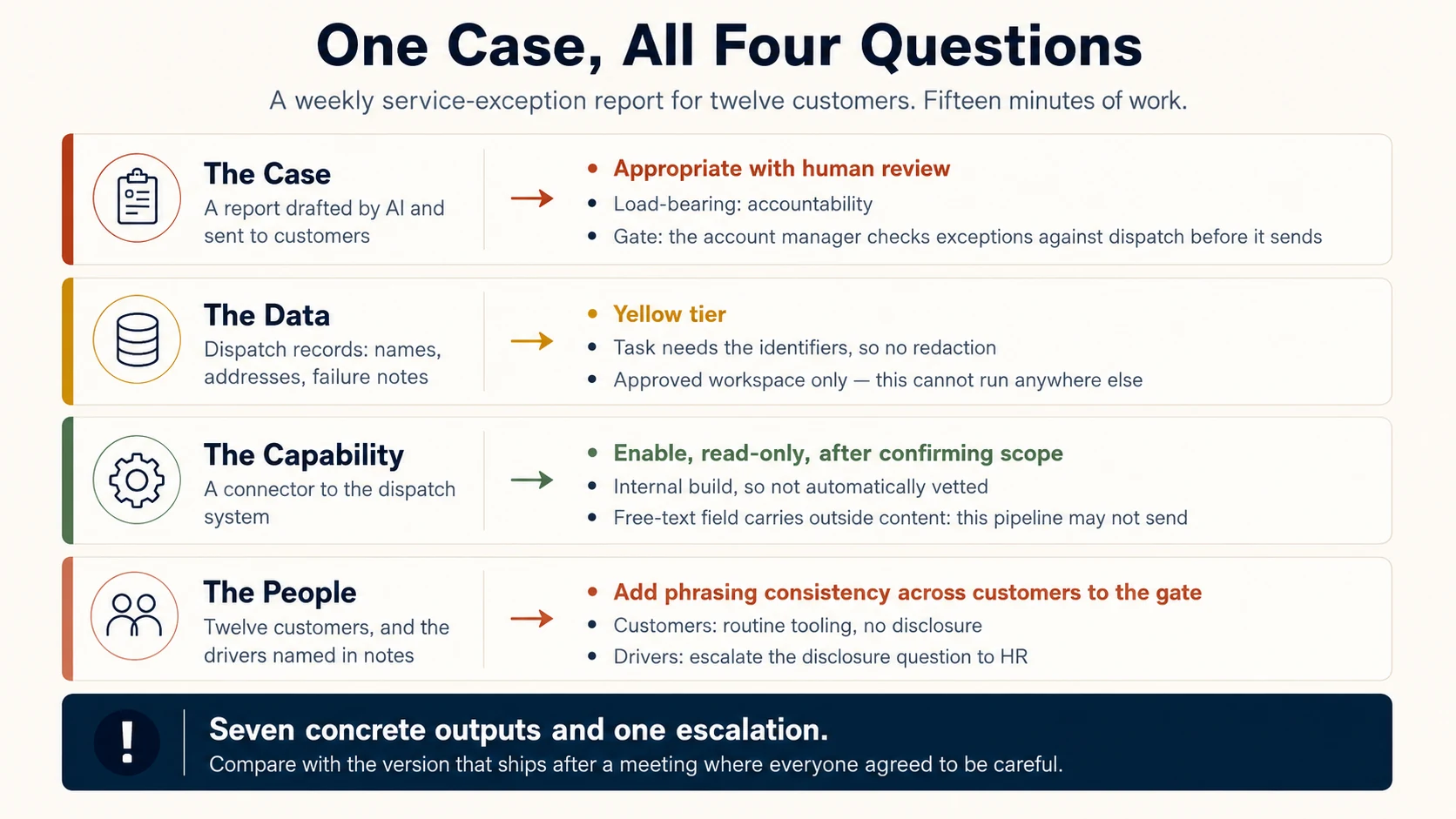
One modest workflow produced all of that, which is governance as work design, not paperwork added afterwards.
Run the four in order on one real workflow and the answers build on each other.
6. The Governance Record: one page that survives the meeting
The four questions are useful in your head. They become useful to an organization when the answers are written down.
A Governance Record is one page for one workflow. If you filled in the Now do it blocks, four of its five parts already exist.
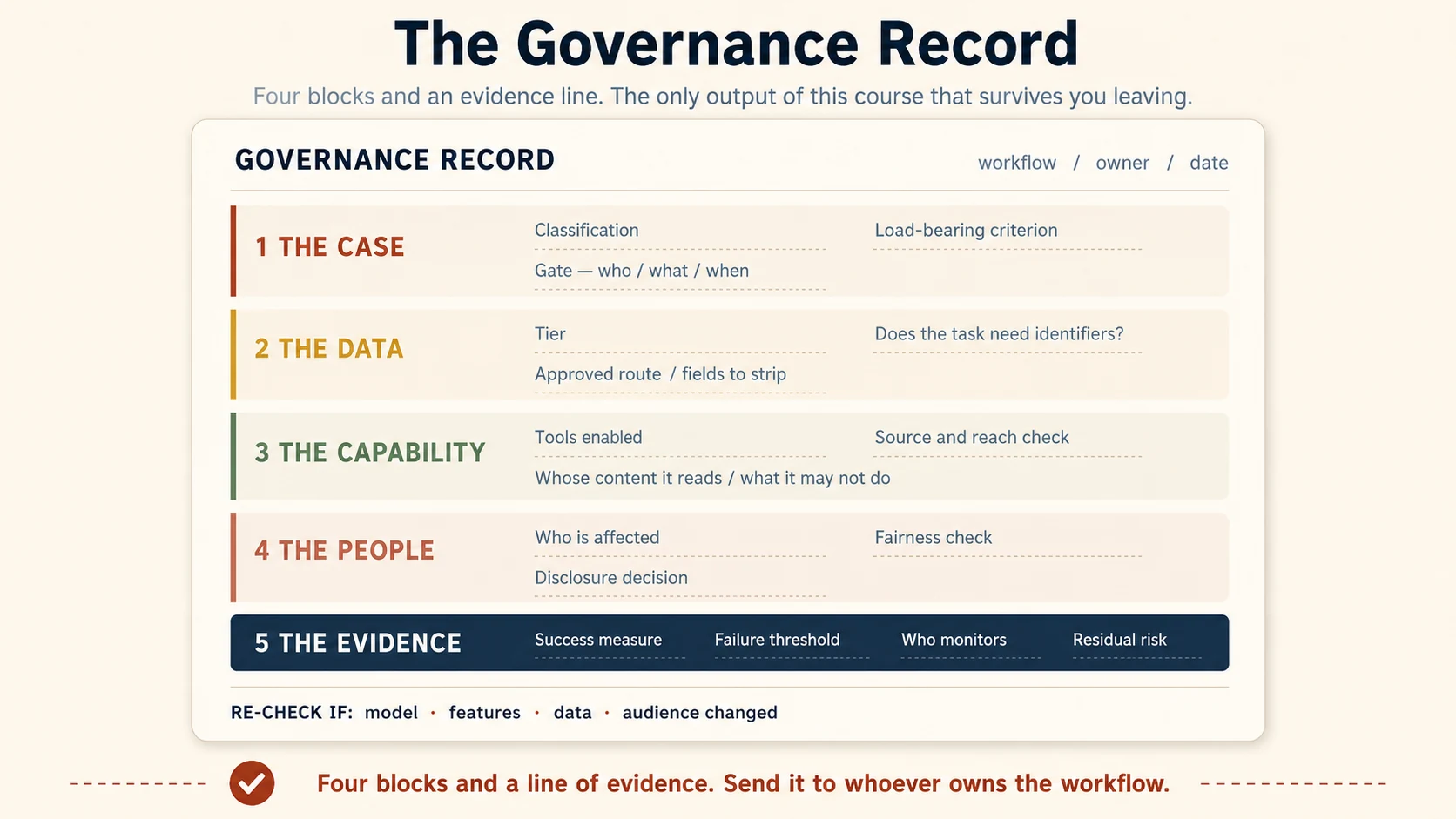
The fifth part is the Evidence line, which Ayesha's team wrote in 5.5: a success measure, a failure threshold, who monitors and how often, and the residual risk.
A blank field beats a guessed one. If the owner or the route is unknown, write OPEN QUESTION and send it to the right person. Section 10 has the whole record as one copyable block.
7. What to do when something goes wrong
Governance is not a promise that nobody will make a mistake. It is the ability to surface mistakes early enough to contain them.
Common incident types include:
- Data: information entered a route that was not approved for it
- Output: an AI-assisted output went out with a serious error or harmful framing
- Action: an AI tool sent, changed, deleted, approved, or shared something it should not have
- Security: untrusted content steered an AI system in an unintended way
- Fairness: a ranking or screening process appears to have disadvantaged people, and review did not catch it.
The first-hour procedure
- Stop the spread. Do not forward, repost, or create unnecessary new copies.
- Record the facts. What happened, what data, output, or action was involved, which route, when, and whether anything went onward.
- Report promptly through your organization's incident path. For sensitive or regulated cases, timing may matter legally, so do not wait for a perfect explanation.
- State the facts plainly. Do not guess and do not defend yourself. The incident owner needs a reliable account.
- Follow the incident owner's instructions. Do not decide deletion, notification, disclosure, or evidence preservation on your own. They may have legal, contractual, security, or forensic consequences.
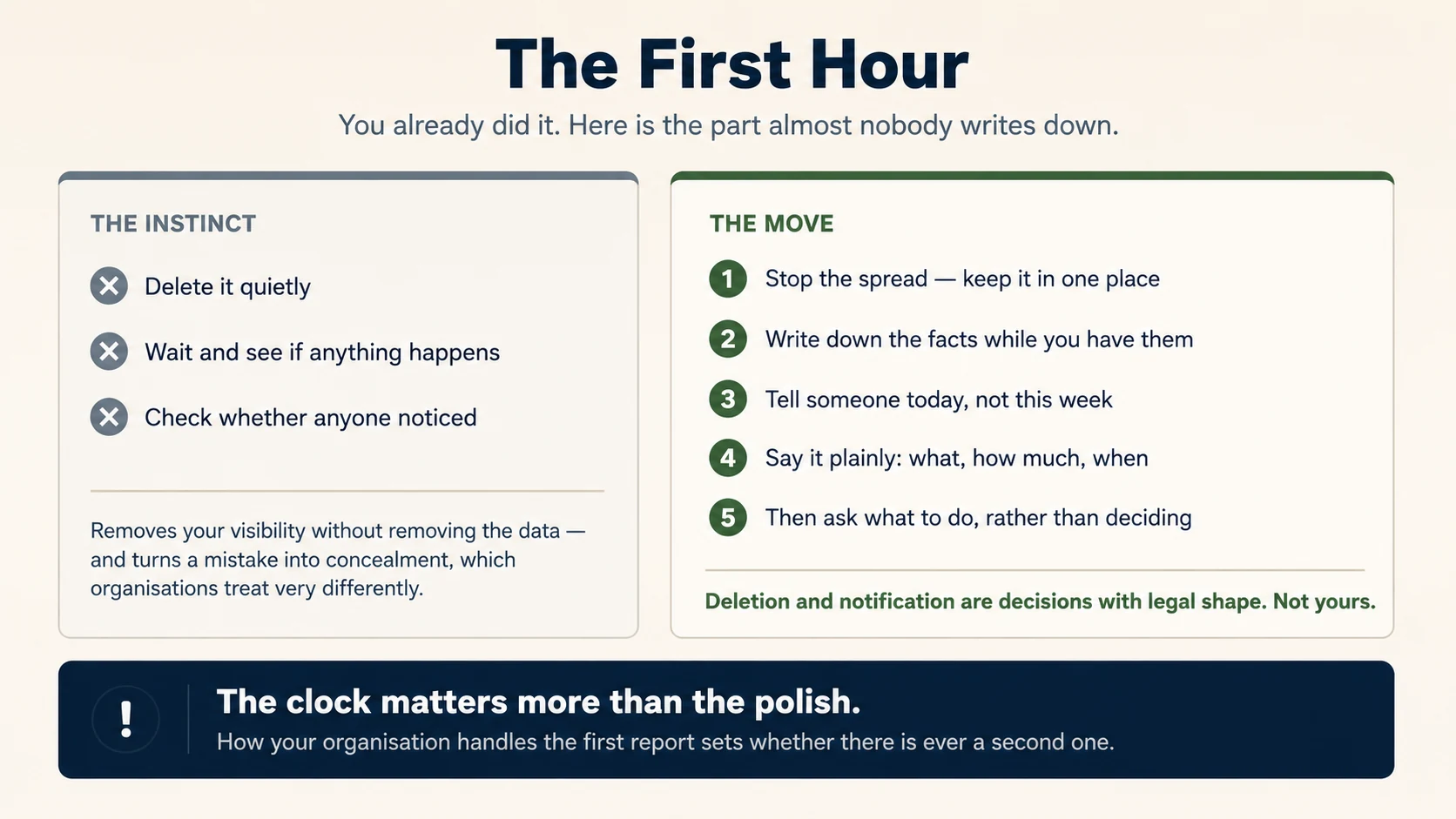
Do not delete evidence and hope the issue disappears. Deleting your visible copy may not delete organizational or vendor records, and it can interfere with an investigation or required preservation.
Report near misses too. A near miss shows where the process is confusing or the approved route is too hard, without the cost of a full incident.
How the organization treats the first person who reports a good-faith mistake decides whether the next ten mistakes are reported or hidden. Accountability matters, and so does a reporting path people can actually use.
Deleting your copy removes your visibility, not the data, and it turns a mistake into concealment.
Part 3: Make the habit survive real work
8. Why governance drifts
High-stakes decisions usually get attention, because everybody knows they are important. Routine decisions are more dangerous, because each one feels too small to count.
A person uses a slightly easier tool. A human review becomes a glance. A connector keeps permission after the project changes. A sensitive field starts appearing in a dataset that used to contain none.
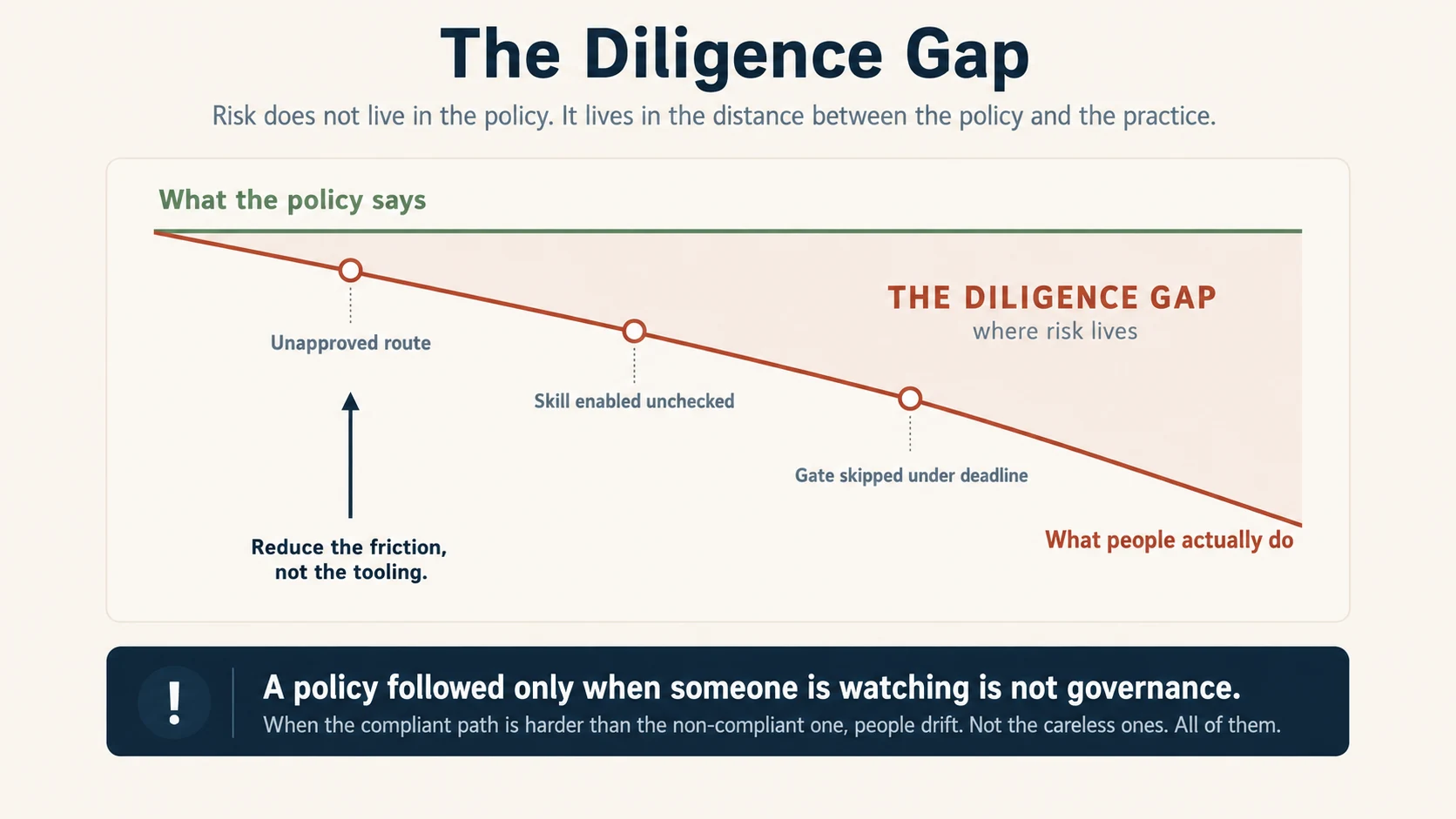
No single moment looks like a program-level failure. The risk is the distance that piles up between the intended process and the actual one. The Diligence gap is the distance between what the policy requires and what people actually do. The name comes from Diligence in the AI Fluency Framework, the competency of taking responsibility for how AI is used and for what happens to its output. At team scale that means auditing what people do, rather than assuming the policy is followed.
8.1 Run a usage audit on the work people actually do
A lightweight team audit should answer:
- Which AI workflows are actually in use?
- What data is actually going through them?
- Did defined human gates really run?
- What new tools, Skills, connectors, or permissions were added?
- What changed in the model, feature, route, data, or audience?
Here is what one turns up. A team lead reviews a month of the team's AI use and finds three gaps. A marketer uploaded an unreleased product spec to an entry point nobody had approved. A Skill was enabled with no source check. A client report skipped its review gate twice under deadline pressure. None of it was malicious. All of it was drift. The fixes are habit-level: a reminder on approved entry points, a Skill-vetting step built into Project setup, and a review gate treated as non-negotiable. The audit turned invisible risk into three actions someone can close.
A small quarterly sample is a reasonable start, with more frequent review during a rollout or after gaps are found. Frequency should match the risk, the policy, and the sector.
8.2 Audit the process, not the person
If a governance audit becomes a hidden performance review, people show auditors only their cleanest work. The organization then loses sight of the behavior it wanted to understand.
The purpose is to find system gaps: confusing rules, unnecessary friction, weak gates, stale permissions, or practices that grew without review.
8.3 The friction rule
If the approved path takes ten steps and the unapproved path takes one, people under deadline pressure will find the one-step route. Shadow AI is work data flowing through tools and accounts the organization never approved and cannot see.
That is not a reason to excuse policy violations. It is a reason to treat usability as part of the control system. The arrow in the figure reads reduce the friction, not the tooling. It means fix the slow approved path, not take the tools away. The flat policy line is a drawing convention, not a claim that the approved path is always right.
When you find repeated workarounds, ask:
"What makes the approved way harder than the unsafe way?"
Fixing that friction reduces more risk than another reminder email.
8.4 When there is no AI policy
If your organization has no AI policy, do not invent one and present it as official. Write an interim proposal for the right owner to endorse. A useful one-page start can contain:
- approved AI products and specific routes for work data
- a short list of data types that require confirmation before use
- the human-gate rule for external or consequential outputs
- the review rule for new Skills, connectors, and high-authority tools
- one named role or channel for questions and incidents.
In regulated environments, that guide does not substitute for legal, compliance, security, privacy, or contractual approval.
8.5 Re-check when the workflow changes
Calendar reminders help, but change is the stronger trigger. Re-check the Governance Record when any of these change:
- model or model family
- AI product feature or retention behavior
- connector, Skill, plugin, permission, or action
- data type or sensitivity
- source of outside content
- audience or population affected
- consequence of error
- law, policy, contract, or vendor terms.
"Approved last year" is not a reason to skip review if the thing that was approved is no longer the same thing.
Part 4: Use it tomorrow
9. Recap: the one-minute checklist
Before AI does meaningful work, run this:
| Question | Quick check | Middle answer requires | The trap it catches |
|---|---|---|---|
| Case | Can AI do this task responsibly? | A defined human gate: who, what, when | "A human will review it" with no loop defined |
| Data | Can this information go through this route? | A control, less data, or a confirmed approved route | Treating privacy mode as permission, or abandoning work the pattern alone could do |
| Capability | Should this tool or authority be enabled? | A specific security or admin review question | Assuming an extension can only do what its description says |
| People | Could this affect people or require disclosure? | A fairness check, disclosure, or escalation | Reviewing only what AI selected, never what it excluded |
Under all four sits one trap: forcing the question into a plain yes or no. That produces recklessness and abandonment in equal measure.
Then ask one final question:
What changed since the last time we decided this was okay?
If nothing changed, continue. If something important changed, re-check the relevant block.
10. Finish the Governance Record
If you worked the four Now do it blocks, you have Blocks 1 to 4 for a workflow you own. Two steps remain.
Step 5: The Evidence
Add:
- success measure
- failure threshold
- monitoring owner and cadence
- residual risk.
Step 6: Share the record
Send it to whoever owns the workflow, the policy, or the risk, with a simple request:
"This is how I propose to run the workflow. Please correct any assumption about approval, data route, reviewer, or control."
The goal is not signatures for every harmless task. It is turning hidden assumptions into visible decisions before they become incidents.
Here is the whole record as one copyable block. Fill it in, delete nothing, and write OPEN QUESTION wherever you do not yet know the answer.
GOVERNANCE RECORD
Workflow:                        Owner:                    Date:

THE CASE
  Classification:      appropriate / appropriate with review / inappropriate
  Deciding factor:
  Gate: who               what they verify              when

THE DATA
  Tier:                green / yellow / red
  Does the task need the identifiers?     yes / no
  Fields removed:
  Approved route:

THE CAPABILITY
  Tools, Skills, connectors enabled:
  Source:                                  Reach:
  Outside content it reads:
  Actions it must not take without review:

THE PEOPLE
  Who is affected:
  Fairness check (including exclusions):
  Disclosure decision:                     Required by / judgment
  Open question or escalation:

THE EVIDENCE
  Success measure:
  Failure threshold:
  Monitored by:                            How often:
  Residual risk:

RE-CHECK IF: model, feature, data, audience, permission, policy,
vendor term, or business consequence changes.
11. Plain-English glossary
The fuller glossary entries, with the caveats the course depends on
The Quick glossary near the top gives one line for each term. These entries add the caveats the course depends on.
Delegation criteria. The four screens that decide whether AI should do a piece of work: reversibility, consequence of error, human judgment or empathy, and accountability. They sit under Delegation in the AI Fluency Framework, the competency of deciding how work divides between the human and the AI.
Three answers. Fully appropriate, appropriate with review, and inappropriate. Appropriate with review means AI may do the task, but a named human gate must run before anyone uses the outcome.
Defined gate. A review that names who reviews, what they verify, and when it happens.
Deciding factor. The screen actually carrying the classification. If it changed, the classification would probably change too.
Accountability. Who stays answerable for the outcome. It cannot move to a tool, so delegating the task does not delegate the answerability.
Diligence gap. The distance between what the policy requires and what people actually do. Risk lives in that distance. The name comes from Diligence in the AI Fluency Framework, the competency of taking responsibility for how AI is used and for what its output causes. At team scale that means auditing what people actually do, rather than assuming the policy is followed.
Data tier. A label for how carefully information must be handled. This course teaches green, yellow, and red. Use your organization's real scheme at work.
Entry point. The route data takes into an AI system, such as chat, project, connector, API, or file upload.
API. A direct software-to-software link into an AI system, with no chat window.
Purpose. The reason the data was first collected. A new use of the same data must be covered by that reason or by fresh permission, whatever tier the data sits in.
Redaction. Removing the fields the task does not need before the information reaches the AI system.
Pseudonymized. Direct identifiers replaced by labels while a way to reconnect the data to people still exists.
Anonymized. Changed so that it meets the relevant standard for no longer identifying a person. The exact test depends on law, policy, and context.
Scopes. The exact list of things you allow a connector to do. You grant them and can narrow them. Skills have none.
The five checks. Source, reach, fit, outside content, and actions. The first three decide whether a capability belongs in the workflow. The last two decide how dangerous a mistake or a hostile instruction becomes. Some governance material calls fit appropriateness. It is the same question.
Prompt injection. Misleading instructions placed inside content an AI system reads, such as a web page, an email, or a document, written to steer its behavior.
Least privilege. Giving a person, service, or agent only the access the task needs.
Shadow AI. Work data flowing through AI tools or accounts the organization never approved and cannot see. It usually grows because the approved route is harder than the unapproved one.
Residual risk. What can still go wrong after the planned controls all work as designed.
Governance Record. The one-page summary of the Case, the Data, the Capability, the People, the evidence, the owner, and the re-check triggers for one workflow.
12. What this course does not replace
This framework does not replace:
- applicable law or sector regulation
- your organization's privacy, security, acceptable-use, records, HR, legal, procurement, or risk policies
- client contracts, confidentiality terms, or professional obligations
- formal security assessment of software or agent architecture
- structured model evaluation for high-impact systems
- legal advice about whether particular data is personal, anonymous, privileged, regulated, or permitted for a given AI provider.
It gives practitioners a way to recognize which question they face and to reach the right owner with useful reasoning.
If your organization runs a formal AI management system, it may be built on the NIST AI Risk Management Framework or on ISO/IEC 42001. These four questions are the practitioner's slice of such a system, not a substitute for it.
To keep the underlying judgment sharp, meaning the ability to notice when a fluent output is wrong, read How to Think in the AI Era. For the checklist on installing and scoping extensions, read Skills & Connectors.
If you are collecting credentials, see Certifications for the exams this material prepares you for.
13. Where this leads in The AI Agent Factory
The four questions scale into the rest of the book:
- The Case becomes autonomy design and the human-agent operating model in Human-Agent Teams.
- The Data becomes custody, context, data minimization, and approved routes across agent systems, worked through in General Agents on the Web and Cowork.
- The Capability becomes tool boundaries, scoped credentials, confirmations, typed actions, and audit logs in Designing Agent Experiences and the Mode 2 material.
- The People becomes evaluation, disclosure, fairness checks, monitoring, and recourse, and eventually the governance layer of a System of Record.
- The Governance Record becomes a compact input to design review, testing, launch criteria, and monitoring.
If you have not read AI Fluency, read it alongside this course. AI Fluency helps you delegate work well. This course helps you make that delegation defensible and repeatable inside an organization.
Appendix: Going deeper for managers and builders
Both sections are optional on a first read. They carry the four questions into the two places they must survive next: a review meeting, and a system design.
A.1 For managers: evidence, residual risk, and review quality
This section is for managers, governance leads, and risk owners who must defend the design later.
Add evidence to every important control. A control stated only as "the manager reviews it" is a belief until you can see that the review happens and catches the intended problem. Residual risk is not a confession that the design failed. Every real control leaves something outside its boundary, and naming that remainder is what lets the right owner decide whether it is acceptable.
Review quality matters more than review volume. A human gate does not make a workflow safe because a person clicked "approve." Good review has the source material, enough time, a specific risk to look for, authority to reject, and a position before the outcome becomes hard to reverse. If reviewers approve everything, ask whether the control is unnecessary, badly placed, or impossible to perform.
Sample the edge cases. Random samples are useful, but high-risk systems should also sample where failure is more likely or more expensive: unusual inputs, minority categories, escalations, low-confidence outputs, exclusions, and cases near thresholds. For AI systems that change over time, evaluation eventually moves into structured test sets, baselines, and monitoring. The Governance Record is the bridge to it.
A.2 For agent builders: the four questions as architecture
The framework changes shape when AI acts through software rather than waiting for a person to copy and paste.
- The Case becomes an autonomy level. The question is not "can the agent do this" but "what autonomy has this task earned." Draft only. Propose an action for confirmation. Act within a narrow reversible boundary. Act alone only where reliability, monitoring, and rollback justify it.
- The Data becomes custody and minimization. Design what the agent may read, where it stores data, what enters prompts and logs, how long it is kept, and which sensitive fields are excluded before the agent sees them. Do not rely on users remembering to redact what the architecture can remove.
- The Capability becomes scoped authority. Narrow credentials, read-only where that is enough, explicit tool allow-lists, confirmation for consequential actions, audit trails, and separate identities for agents rather than shared human credentials.
- The People becomes evaluation and recourse. Fairness testing across relevant groups, review of exclusions and false negatives, meaningful disclosure where required, a way to appeal or reverse consequential outcomes, and monitoring after deployment.
The practitioner framework and the architecture should tell the same story. If the Governance Record says "human approves before send" but the API token can send without confirmation, the architecture has already overruled the policy.
Sources and product notes
The screening approach builds on the AI Fluency Framework by Rick Dakan and Joseph Feller, especially its ideas around Delegation and Diligence. The three-answer structure, the deciding-factor test, route-first data reasoning, and the Governance Record are adaptations for this book.
Product behavior changes faster than governance principles. Claude examples here were re-checked on September 2, 2026 against Anthropic documentation. Before relying on a product feature for a real decision, verify the current source:
- Use incognito chats
- Is my data used for model training? (consumer plans)
- Is my data used for model training? (commercial products)
- Use Claude's chat search and memory
- What are Projects?
- How can I create and manage Projects?
- Roles and permissions
- Export your organization's data
- Configure custom data retention controls for Enterprise plans
- Claude Cowork architecture overview
- What are skills?
- Use skills in Claude
- Agent Skills, Claude Platform Docs
- Get started with skill and plugin scanning
The treatment of anonymized and regulated data is deliberately principle-based, because jurisdictions and sectors use different legal tests. Remove information the task does not need, then check the remaining dataset and the intended route against the standard that governs your organization.
Flashcards Study Aid
Test Your Understanding
The four questions read easily and run hard. These scenarios drop you into somebody else's decision with the pressure already applied. Twelve come up per sitting, drawn from a larger pool, so a second attempt is not the same paper.
Answer from the reasoning rather than the wording, and notice which of the four you are being asked. That identification is half the skill.
The sentence to remember
Classify before you act. If the answer is in the middle, name the commitment. Then write down why.