The Four Layers: Prompt, Context, Harness, Loop
12 concepts · about 50 minutes · nothing to install · the short one you keep coming back to
An agent runs for forty minutes. It spends fifty dollars. It produces nothing you can use. You read the log afterwards, and you can see what happened: it tried the same three things over and over, changing only a few words each time.
What do you change?
Almost everyone changes the prompt. It is the first thing they look at, and it is the only thing they can edit in ten seconds. So they rewrite it, start the run again, and watch it spend another forty minutes doing the same thing.
The prompt was fine. Nothing in that system was ever going to notice that the run had stopped making progress, so nothing ever stopped it. The fix was about eleven words, in a different file, on a layer most people cannot name.
This course gives you the names. There are four: prompt, context, harness, loop. They are not four skills you choose between, and not four steps you climb. They are four containers, each one inside the next, and each one is responsible for a different piece of work. Once you can see them, "my agent is broken" turns into a question with an address: which layer broke?
This is the shortest course in this section on purpose. It is a map, and a map you cannot remember is not doing its job.
You should have driven a general agent at least once, through either door: Claude Code and OpenCode if you work with code, or Cowork and OpenWork if you do not. Spec-Driven Development helps but is not required. Nothing here needs a repository, a database, or an install. A chat tab and one agent you have used before is the whole setup.
📚 Teaching Aid
View Full Presentation: The Four Layers: Prompt, Context, Harness, Loop
Why these words are confusing right now
If these words feel slippery when you read about them online, the problem is not you. This is a young field, and it received its vocabulary in the wrong order.
Not long ago there was only one layer anybody could touch. You typed a message and read what came back. "Prompt engineering" named the entire skill, because the prompt was the entire surface.
Then the tools grew outward, and they grew fast. A coding agent gave you a permissions file, a rules file, and hooks. That is a layer around the model, and you can configure it. Then schedules and routines arrived. That is another layer around the first, and you can configure that too. Two new surfaces appeared in a short time.
The vocabulary did not keep up. Each surface was named by whoever wrote about it first, and the names collided. "Context engineering" sometimes means the window, and sometimes means everything you did before the model ran. "Graph" is used for three different things, which Concept 11 separates. The word harness causes the most trouble of all. Most writing online uses it for the harness and the loop together, as if they were one layer. Some writing uses it for a third thing again: the platform that supplies your tools, your credentials, and your security boundary.
This would be a harmless argument about words, except for one thing. A missing permission rule and a missing schedule are different bugs. They live on different surfaces, and different people fix them. One word for both sends you looking in the wrong place, which is exactly what happened in the story above.
So this course does two things. It gives you the four layers as containers. And it gives you a test that keeps working after the words change again, which they will.
Key words in plain English
Read this once now. Come back whenever a term goes fuzzy. Every one of these gets a full explanation later.
| Term | Plain-English meaning |
|---|---|
| Prompt | The message you send. The ask, the examples, the format, the role. |
| Context window | Everything the model can see while it writes one response. What is not in it is not available as fact. |
| Curator | Whatever decides what goes into the window, in what order, and what gets left out. |
| Beat | One complete turn of an agent: your instruction, then every tool call it makes, until it goes quiet. |
| Harness | The code around the model that runs one beat. |
| Loop | The system around the harness that starts beats, judges them, and remembers between them. |
| Heartbeat | Whatever starts a beat: a schedule, an event, a condition. |
| Spine | State saved outside the model, so the next beat knows what the last one did. |
| Stopping condition | A testable rule that says the work is finished. Chosen and enforced by something other than the maker. |
| Maker-checker | One agent does the work. A different agent or command checks it. |
| Human gate | A point where a person decides before the run continues. |
| Sub-agent | A helper with its own window that does one job and hands back a summary. |
| Graph | Many of these stacks wired together: what runs next, what state moves along each edge, who checks whom. |
You will meet several of these words again in Loop Engineering and Harness Engineering, and that is deliberate. This course is the map. Those courses are the territory: they build what this one only names.
The picture: four containers, one inside the next
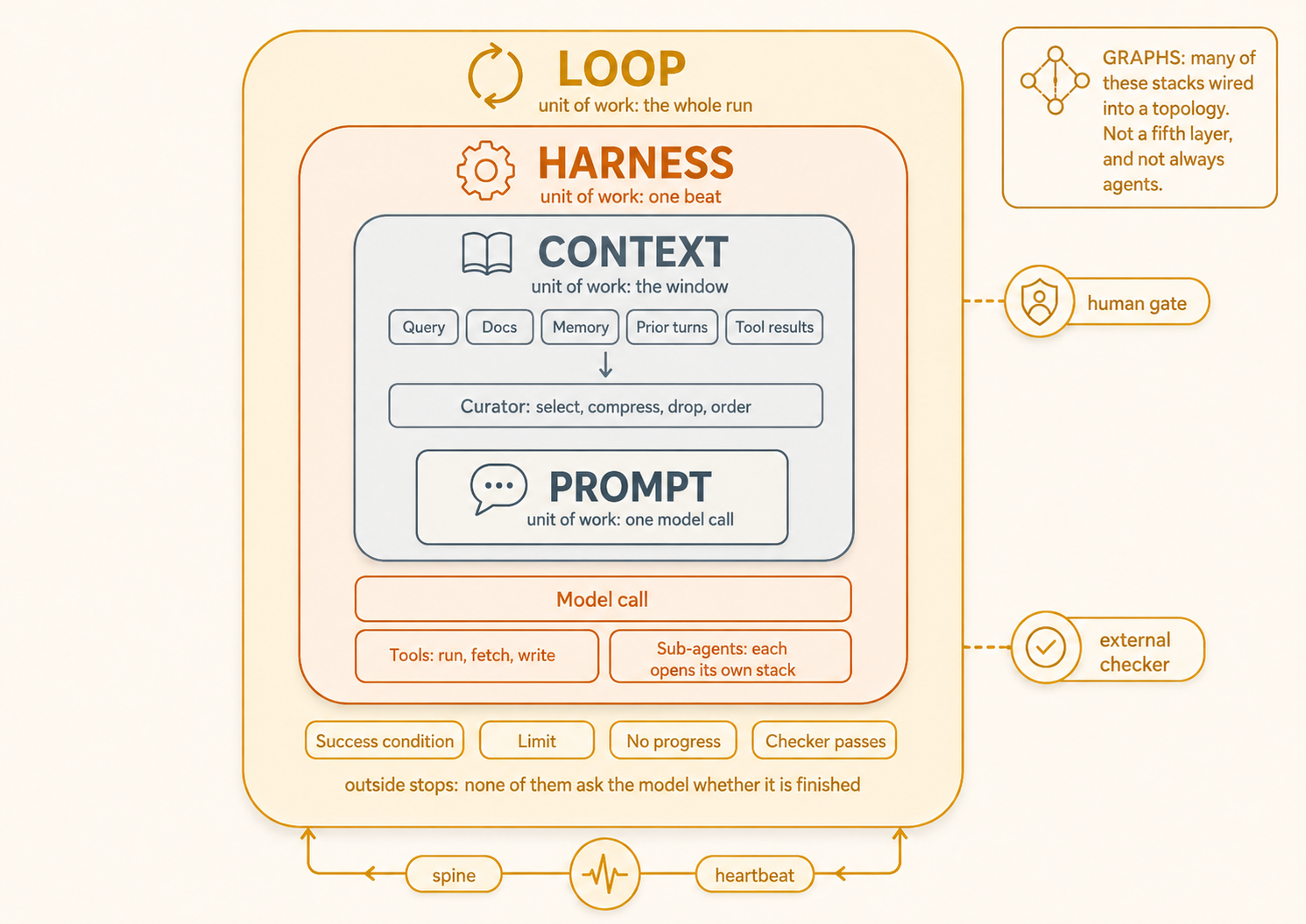
Containers, not steps. Every beat still builds a prompt. The checker and the human gate sit on the loop, not inside the beat, because the thing that made the work cannot be the thing that decides what counts as finished.
Here is the sentence the picture is really saying. It will come back three more times before you finish:
A good prompt fails inside bad context. Good context fails inside a bare harness. A good harness sits idle without a loop.
That is what "each one inside the next" means in practice. Nothing on an inner layer can rescue you from a missing outer one, and nothing on an outer layer can rescue a broken inner one.
Ninety seconds that prove the most important claim here
The one sentence this course exists to teach is easier to believe once you have watched it happen. Open the agent you already use. Point it at a small real task with a result you can check: a script that should run, a spreadsheet total that should balance, a link that should open.
Ask for the work, then read what comes back.
Fix this so it works, then tell me when you're done.
Now, before you trust the answer, go and check the thing yourself. Run the script. Add the column. Open the link.
Often enough that it will bother you, on any task with real work in it, you will find a confident "done, all fixed" attached to work that was never verified. This is not because the model lied, and not because your prompt was weak. It is because nothing in that setup was required to check, and nothing except the model itself decided what "done" meant. Remember that feeling. Concept 6 explains it, and the rest of the course depends on it.
Fifteen minutes: the picture above, Concept 2 (the four units of work), and the table in Concept 9. Keep that table somewhere you will see it during your next bad debugging session.
Fifty minutes: straight through, doing the two short observation exercises and the diagnosis drill at the end.
Later: come back for the drill, not the prose. These recipes are meant to be looked up, not memorized. Exactly one sentence in this course is for memory, and it is at the very end.
Part 1: The shape
Concept 1: Containers, not steps
The most common way these four words get drawn is as a ladder. Prompt at the bottom for beginners, loop at the top for experts. The picture quietly promises that once you are good enough, you leave the lower steps behind.
That picture is wrong, and it is wrong in a way that costs money.
Every beat still builds a prompt. A loop that has been running without supervision for six months, on a schedule, with a checker and a spine, is still sending a message to a model many times a day. If that message is vague, the loop produces vague work faster, and on a timer. You never leave the inner layers behind. You wrap them.
So the relationship is containment. The prompt sits inside the window. The window is built for one beat. The beat is started, judged, and remembered by the run.
Three wrong beliefs come easily from a picture like this. It is worth removing them now:
- Outer does not mean later. You do not build these in order. Most of the time you rent three of them and own one, which is Concept 10.
- Outer does not mean more important. A careless prompt inside a beautifully engineered loop produces bad work on a schedule, with a receipt. The layers are not ranked. They are nested.
- These are not four sizes of the same box. A nesting picture can suggest four versions of one object. They are four genuinely different objects, and the next concept is what tells them apart.
Concept 2: The unit-of-work test
Each layer is defined by the piece of work it is responsible for. Get these four straight, and you can identify any of them in the wild, no matter what someone decided to call it.
| Layer | Unit of work | In plain words |
|---|---|---|
| Prompt | One model call | The thing you typed and hit enter on. Change the words and it is a different prompt. |
| Context | The window | Everything the model can see while it answers that one time: your message, the files, the earlier turns, the rules file, the tool results. |
| Harness | One beat | The agent rarely answers once and stops. It calls a tool, reads the result, thinks again, calls another. All of that, from your instruction until it goes quiet, is one beat. The harness is the code that runs it. |
| Loop | The whole run | What happens when nobody is typing. Something starts a beat. Something decides whether the beat's work was any good. Something remembers between beats. |
Now the test. This is the part worth keeping when the vocabulary changes again:
When a blog post, a vendor, or a job description says "harness" or "context engineering" or "the agent loop," do not argue about the word. Ask this instead: what unit of work are they talking about? One model call, the window, one beat, or the whole run?
If their "harness" includes the schedule, they have drawn two of this book's layers as one. If their "harness" is the platform that supplies tools and credentials, they mean something wider again. Neither is wrong of them. They are different maps. Now you can translate instead of getting confused.
Part 2: The four layers, one at a time
Concept 3: Prompt, the unit is one model call
The prompt is the message you compose: who the model should be, what you want, what good work looks like, examples of it, and the shape the answer should come back in. All of that is a single input, and it produces a single response.
The craft here is narrower than most people think. You are looking for the weakest ingredient, and you fix only that one. If the shape of the output is wrong, add an example of the right shape. If the tone is wrong, name the audience. Rewriting all five ingredients at once tells you nothing about which one was the problem. AI Prompting in 2026 covers this layer properly.
This is the layer people over-invest in, and there are two honest reasons for that. It is the only layer you can practise without writing any code. And it is the only layer you can edit in ten seconds. Both of those are good things about it. Both become a trap the moment something goes wrong in production, because under pressure people reach for what is easy to change rather than for what broke.
What it looks like when the prompt really is the broken layer: the model clearly understood the task and did roughly the right work, but the answer comes back in the wrong shape, at the wrong length, in the wrong voice, or missing a section you assumed was obvious. Nothing is factually wrong. It is simply not what you asked for, and when you reread your own words, you can see why.
Concept 4: Context, the unit is the window
The window is everything the model can see while it writes one response. Take that literally in one direction. A file you did not attach is not available to the model as a fact. A conversation from yesterday is not available unless something put it back.
But do not take it literally in the other direction. The model is not empty when the window is thin. It still carries everything it learned during training, and that is what fills the gap. This is the mechanism behind the failure pattern at the end of this concept. A model that is missing your document does not go blank. It reaches for the most likely thing it already knows, and says that instead, with the same confidence it would have used for the truth.
That creates the problem that defines this layer. There is always more material than fits, so something has to choose what goes in and in what order. That something is the curator. Whether or not you ever write one, a curator exists. Three jobs land on it, and the window forces all three.
Order comes first. Position changes how strongly material lands. In a well-known study, accuracy was highest when the important passage sat at the beginning or the end of a long input, and it dropped when the passage sat in the middle. The result is documented well enough to have its own name, "lost in the middle."1 That study measured models available in 2023, so how strong the effect is in any model you use today is a question to test rather than assume. The lesson has not changed: burying your one important constraint in paragraph nine of an attachment is a real decision you made, even if you did not think you were making one.
Compression comes next, and it is not free. Summarizing forty pages into four is how you make them fit. But a summary that dropped the exception cannot get it back later. That information is gone from the run. This is the hidden cost of this layer: every compression is a bet about what will not matter.
Dropping comes last, and it is a policy. Something has to decide what leaves when the window fills. If you do not set that policy, your harness will set it for you, at the worst possible moment, using a rule you never read.
Here is a test you can run on any setup in a minute:
Point at any document in your window and say which rule put it there. If the honest answer is "the retriever returned it," you have a search box, not a curator. That is fine for some jobs and dangerous for others. Give Your AI Searchable Context is where the retrieval side actually gets built. Agentic Coding, Parts 2 to 4, is where you learn to manage a window by hand.
What it looks like when context is the broken layer: the answer is fluent, confident, and factually wrong. Often it is correct about something else: an older version of the file, a different customer, the example in the documentation rather than your case. Confident, wrong, and close to something true. Those three together are almost a signature, meaning a pattern reliable enough to identify the layer by. And now you know where the "something else" comes from.
Watch it yourself (two minutes). Take a question about a document you know well. Ask it twice, in two separate fresh chats. In the first chat, paste the whole document. In the second, paste only the first third, and ask the same question.
Here's the document. Based only on what I've given you, what does it say about [the thing that lives in the last third]?
The second chat will usually answer rather than say it does not know, and it will often answer confidently. That is not the model behaving badly. That is training knowledge filling a hole the window left. You just changed the answer without changing a single word of the prompt.
Concept 5: Harness, the unit is one beat
You give one instruction. The agent reads three files, runs a command, reads the error, edits something, runs it again, and then goes quiet. You typed once. Roughly a dozen things happened. That whole stretch is one beat, and the harness is the code that runs it.
The job list is short and ordinary. Assemble the context. Call the model. Run whatever tools the model asks for. Feed the results back in. Handle the errors. Enforce whatever the beat is required to prove before it is allowed to end. Go again until the model stops asking.
You are already using one. Claude Code includes a harness. So does OpenCode, and so does Cowork. Every permission prompt you have ever approved, every rules file that was read at startup, every automatic check that ran before a commit, all of that is harness. Harness Engineering is the course that teaches you to build one on purpose, rather than inherit one by default.
One thing here surprises people, and it matters more than it looks.
Sub-agents are called like tools and behave like something much bigger. In most systems you start a sub-agent through a tool call, which is exactly why the difference is easy to miss. A tool call goes out and comes back with a result: the contents of a file, an API response, an error. A sub-agent opens its own window and runs its own beat. What returns through that tool-shaped opening is the output of a nested copy of this entire stack.
That gives you something real. Forty documents can be read by the sub-agent and stay out of your window completely, and you get back three paragraphs instead of forty pages. It also costs you something real, and the cost is easy to miss. What comes back is a summary, written with full confidence, including the parts the sub-agent got wrong. You did not see the forty documents. Neither will anything downstream. How confident the summary sounds tells you nothing about how well it read.
Concept 6: The limit that defines the harness
This is the turning point of the course. Everything before it was description. Everything after it is consequence.
A beat can end for many reasons. A timeout fires. A token ceiling is reached. An error is thrown. A permission is denied. The model decides it is done. None of those proves that the work succeeded. They prove only that the beat ended.
A good harness can enforce real checks inside the beat. It can run a test suite after an edit, validate a schema, or compare an output with a known total. It can refuse to finish unless the command succeeds. That is verification, not the model's opinion, and you should build it wherever you can.
But the boundary matters:
A beat can prove that a specific check passed. It cannot decide that passing that check was enough.
A passing test proves the test passed. It does not prove that the test covered the case that mattered, or that the chosen test defines the whole task. Somebody must decide what "finished" means before the run begins.
Consider a bank-reconciliation agent. It proposes forty matches and reports that the statement balances, but it never compares the two totals. The context was assembled, the tools worked, and no error appeared. Every internal signal looks healthy. The claim is still false.
A checker inside the beat would catch this only if somebody had already required the two totals to match. That requirement is the important part. The maker cannot invent its own finish line and then certify that it crossed it.
Writing "verify your work" in the prompt does not solve that problem. The model can write "verified" as easily as it writes "done." The final definition of success must come from outside the work being judged. That is why it belongs to the next layer out.
Concept 7: Loop, the unit is the whole run
The loop supplies what one beat cannot provide for itself.
A heartbeat starts each beat: a schedule, an event, or a condition that keeps firing until something becomes true. Without one, you are the heartbeat. When you stop typing, the work stops.
A spine stores state outside the model, so the next beat knows what the last one did. It can be as simple as one file rewritten after every beat:
run: nightly reconciliation, 2026-03-14
done: pulled 412 payments and 388 open invoices
in progress: matching pass 3 of 5, 341 matched so far
needs a person: invoice 4471, two candidates both at 0.52
budget: 3 beats used of 12
Nothing in this file is clever, and that is why it works. The next beat reads it before acting, so it resumes from pass 3 instead of starting again. The fourth line records a decision the agent could not make. Concept 8 turns that line into a human gate.
Outside stops decide whether the whole run should continue:
- A success condition chosen in advance and proved by a command. The criterion comes from outside the maker.
- Limits on beats, spending, and elapsed time. The ceiling does not care how promising the next attempt sounds.
- A no-progress check. It notices repeated attempts with no meaningful change.
- A separate checker. The component that judges the work did not make it.
None of these asks the maker whether it is finished. Each rests on a fact established outside the maker's own judgment. That is the maker-checker rule in one sentence.
Now return to the opening failure: forty minutes, fifty dollars, and the same three attempts. The missing part was a no-progress check, not a better prompt. Rewriting the prompt could change the words of each attempt, but it could not make the run notice that it was stuck.
Loop Engineering builds the heartbeat, spine, stops, checker, and gate. Trusting the Checker asks whether the checker itself deserves trust.
Concept 8: The human gate is an exit, not a stop
There is one more way out of a run, and it is a different kind of thing from the four above.
The stops are ways for a run to fail safely. The gate is a way for a run to succeed with help.
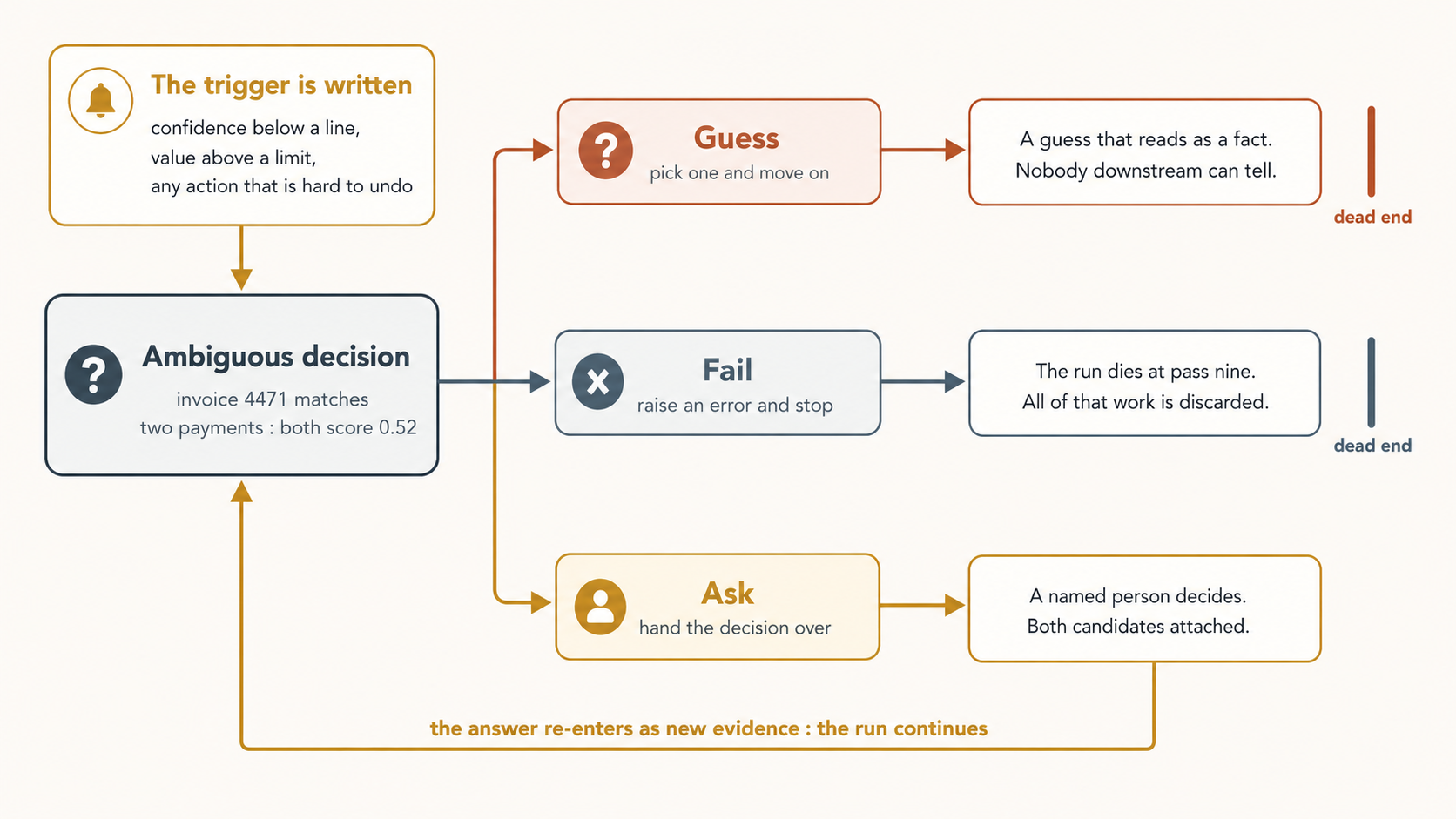
The reason this matters is one idea that is easy to say and hard to hold onto: ambiguity is not an error.
An agent that meets a genuinely two-sided decision has not malfunctioned. Invoice 4471 matches two payments, and both score 0.52. That is not a bug in the matcher. That is what the data looks like. But without a gate, the agent has exactly two options, and both are bad. It can fail, and throw away nine passes of legitimate work. Or it can guess.
Guessing is the dangerous one. This part is worth learning properly, because it is the opposite of what instinct suggests. A crash is loud. A guess is silent, and it comes out looking exactly like a correct answer: same format, same confidence, same place in the report. Nobody downstream can tell the difference. A run that fails is a run you fix. A run that guessed is a number in a spreadsheet that is quietly wrong.
A gate is written in advance, not decided in the moment. The triggers are the ones on the left of the picture: confidence below a line you set, a value above a limit you set, or any action that would be hard to undo. When the gate fires, the case goes to a named person. Ayesha in accounts payable opens it, sees invoice 4471 with both candidate payments attached, and picks the right one in about twenty seconds, because she remembers the customer paying twice in March.
And her answer does not end the run. It re-enters as new evidence, and the run continues from where it paused.
Part 3: Using the map
Concept 9: Which layer broke?
Here is what the map gives you. Each layer fails in its own recognizable way, so the symptom points at the surface.
| What you see | Where to look first | What to change |
|---|---|---|
| Output shape is wrong, or the tone is wrong, but it understood the task | Prompt | The weakest ingredient: examples, instructions, output shape |
| The answer is confident, fluent, and factually wrong | Context | The curator: what got in, in what order, what got dropped |
| It reports success it never demonstrated, or a failed tool call passes unnoticed | Harness | The tools, the error handling, and what the beat is required to prove |
| Wrong answers reach a person or a system unchecked | Loop | The checker, who chose its criteria, and whether it has ever failed anything |
| It never stops, stops too early, or guessed when it should have asked | Loop | The stops and the gate |
Two honest notes on this table.
It is a search order, not a verdict. Failures cross boundaries all the time. Read every row as "look here first," not as "the blame lands here." Concept 12 covers the cases where it gets genuinely unclear.
The habit this table exists to break. Most teams debug at the wrong layer for a completely predictable reason, and it is not stupidity. An agent spends fifty dollars repeating itself, and the response is to rewrite the system prompt. The prompt was fine. There was no no-progress check. But the prompt is the layer you can edit in ten seconds, and under pressure people reach for what is easy to change rather than for what broke. Naming the layer out loud, before touching anything, is the whole discipline. It costs five seconds, and it is the difference between one fix and six.
Concept 10: Which layers do you actually own?
You do not build all four on every project. Much of the time you are renting three of them. Knowing which is which changes what advice even applies to you.
| Layer | Mode 1: solving a problem with a general agent | Mode 2: manufacturing a worker |
|---|---|---|
| Prompt | Mostly yours. The platform owns its own system instructions and tool descriptions. | Yours, written once and reused. |
| Context | Partly yours: what you attach, when you clear. Compaction and retrieval belong to the harness. | Yours. You write the curator. |
| Harness | Rented, and partly configurable through tools, skills, hooks, and project instructions. | Yours. |
| Loop | Mostly rented. The platform sets the loop, though it may expose caps and approval settings. | Yours. Every stop is something you wrote. |
In Mode 1, "add a no-progress check" is not an instruction you can act on. There is no file for it. Your job at the outer two layers is a different one: know the rented behaviour. Where does your harness compact the window, and what does it throw away when it does? What does it retry silently? What happens when it runs out of room in the middle of a task? Those are answerable questions about a product you already use, and the answers change how you work.
In Mode 2, all four are yours, and nobody is going to cap your beats for you.
Reading a page like this in Mode 1 and concluding "I already do all of this, because my tool does all of this."
Your tool does it for its own work. The worker you are about to build has no tool doing it for yours. Claude Code caps its own beats. It does not cap the loop you write. That gap is exactly where a demo turns into a production incident.
Find out what you rented (four minutes). Pick the agent you use most. Before you look anything up, write down your guess for these three questions. Guessing first matters, because the distance between your guess and the real answer is the part you did not know you were trusting.
- When the window fills, what does your harness remove, and does it tell you when it happens?
- When a tool call fails, does it try again, how many times, and do you see it?
- When a run reaches its limit in the middle of a task, what happens to the work already done?
Now find out. The documentation answers some of it. The first question you can also test directly. Run one long session, agree on three specific decisions early, keep working until the tool compacts the conversation, then ask the agent to restate those three decisions. Whatever it cannot restate is what your harness decided you did not need.
Write the answers somewhere your team can read them. In Mode 1, that short document is your context work and your loop work. It is not a smaller version of the job. It is a different job.
Concept 11: Where graphs fit
Graph engineering is widely discussed, but a graph is not a fifth layer.
The four layers describe one execution path: one message, one window, one beat, one run. A graph describes a topology: what runs next, what moves along each edge, and who checks whom.
The four layers describe what happens inside one node. A graph describes what happens between nodes.
A node does not have to be an agent. It can be a function, a rule, a tool call, a human gate, a measurement, one beat, a whole loop, or a full agent. A multi-agent system is only one kind of graph.
This book separates three uses of the word:
- An execution graph decides what runs next and what state moves between steps.
- A memory graph preserves entities, findings, and sources for later runs.
- A governance graph records which components feed, check, approve, and constrain others.
These labels are this book's map, not standard industry vocabulary.
One real graph, six nodes, one agent.
Take the nightly accounts-payable pipeline from Concept 8:
- Pull. A function reads payments and open invoices, then puts both into one common format. No model is involved.
- Route. A fixed rule flags invoices above five hundred thousand rupees for human approval, regardless of confidence.
- Match. A full agent uses all four layers to propose matches and attach confidence scores.
- Gate. Ayesha decides low-confidence or high-value cases. Her answer returns to Match as new evidence.
- Prove. A function compares the matched total with the statement total. A mismatch stops the pipeline.
- Post. A function writes accepted matches and sends unresolved cases to review.
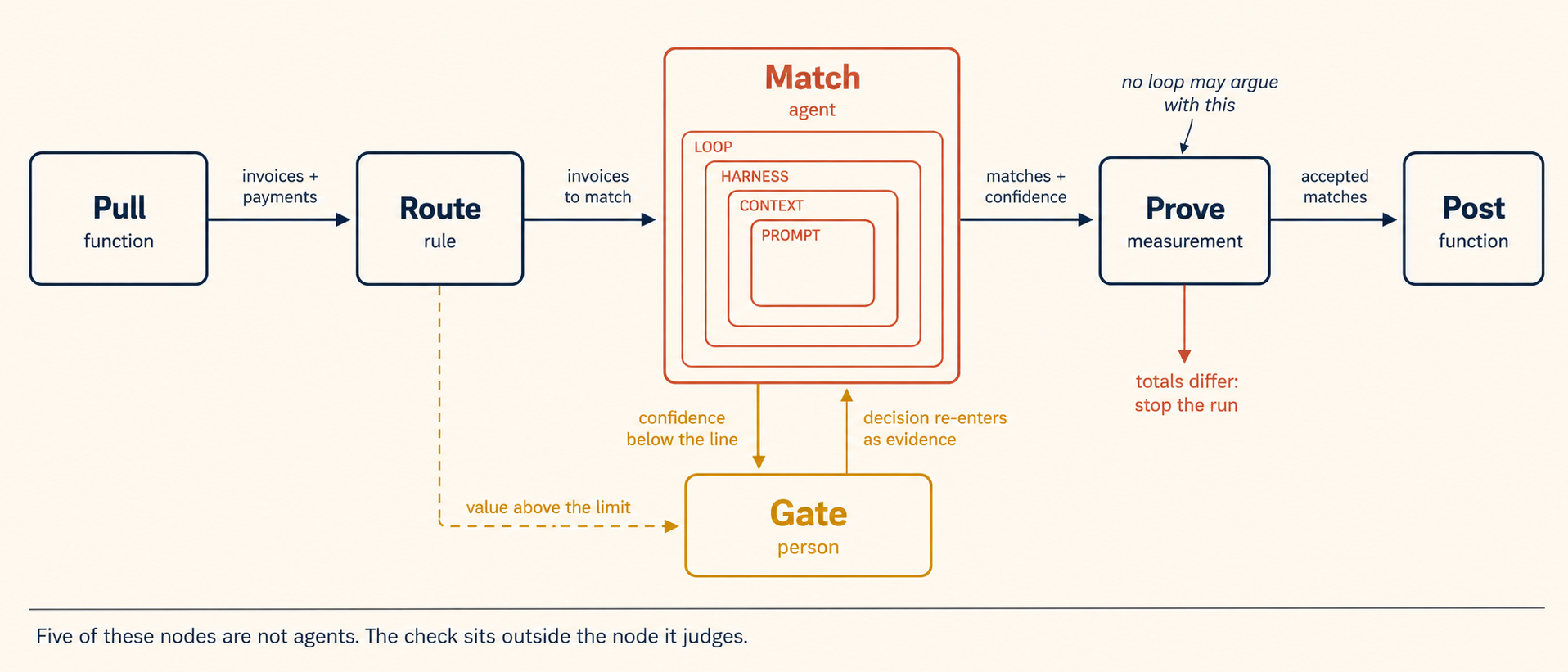
Two conditions send work to the Gate, and its decision returns to Match. Every edge names what it carries.
Only Match is an agent. The other nodes are deterministic code, a rule, a person, and a measurement. The graph coordinates them without pretending they are the same kind of thing.
Look inside Match and you see the first picture in this course: loop, harness, context, prompt. Everything Concepts 1 to 8 described happens inside that node. The graph begins when you ask what should happen before and after it.
The Prove node contains the check missing from Concept 6. It sits outside Match, cannot be skipped by Match, and receives only the values it needs. That placement is the governance design: the node that made the matches cannot overrule the measurement that judges them.
The edges matter just as much as the nodes. Pull sends normalized records. Match returns proposed matches and confidence scores. Gate returns one human decision. When graphs become hard to debug, unclear edge contracts are often the reason.
The token cost also sits mainly inside Match. Five of the six nodes cost almost nothing compared with the agent. Saying "we built a graph" therefore tells you little about cost. Count the agentic nodes, inspect how often they run, and measure them.
A six-node graph can therefore cost less than a single agentic workflow if only one node calls a model. The number of boxes is not the cost model. The adaptive work inside them is.
Two cautions remain. In June 2025, Anthropic reported roughly four times the tokens of chat for its single-agent research system and roughly fifteen times for its multi-agent system.2 Treat those as dated measurements from one system, not constants. Agent-heavy graphs must earn their cost.
Anthropic also warned that multi-agent designs fit poorly when workers need the same context or depend heavily on one another.3 Coding tools have changed since then, but the underlying constraint remains. The more workers need the same context and each other's intermediate results, the less parallel agents may buy you.
Graph Engineering is where this gets built, including when not to build it.
Concept 12: When the framework fights you
A map you never argue with stops being a map and becomes a ritual. So here is where this one gets uncomfortable, on purpose.
Some failures are genuinely two-layer. A dropping policy that quietly discards the oldest turns is a context decision. But it may only cause trouble because the loop lets runs go long enough to fill the window. Which layer broke? Both, honestly. You will find the cheaper fix on one of them, and which one is cheaper depends on your system, not on this table.
Some diagnoses point at one layer and place the fix on another. This is the most useful case, and it is not a flaw. When an agent reports success it never demonstrated, the diagnosis is layer 3, because that is a fact about what a beat can know about itself. The fix is usually layer 4, because a success criterion chosen from outside is what makes the claim trustworthy. The framework did its job precisely when it sent you somewhere other than where the symptom appeared.
Some failures are not any of the four. Sometimes the model simply cannot do the task at the quality you need, and no arrangement of containers creates a capability that is not there. Naming layers is a way to stop guessing. It is not a way to make a weak model strong. If you have genuinely cleared all four and the work is still bad, the honest next moves are a better model, a smaller task, or a different approach. Trusting the Checker is how you find out which.
And not every project wants all four. A task you will run once does not need a loop, and building one is its own kind of waste, expensive in exactly the way this section keeps warning about. The layers describe what exists. They do not oblige you to build each one.
Part 4: Practice
The drill: name the layer
Eight failures. For each one, name the layer you would look at first, and the one change you would make. Write your answer down before opening the key. Recognizing an answer is much easier than producing one, and only one of those is the skill.
1. You asked for a competitor summary as a table with five named columns. What came back is three excellent paragraphs of prose. The content is accurate.
Answer
Prompt. The model understood the task and did the work. Only the shape is wrong. The fix is an example of the table you want, not a longer explanation of why you want a table. This is the cleanest signature of this layer: right work, wrong container.
2. Your agent confidently explains that your pricing tier caps usage at 5,000 requests. Your pricing page says 50,000. The agent read the page.
Answer
Context. Confident, fluent, and wrong about a document that was supposedly in the window is almost a signature. Something got compressed, truncated, or replaced by an older copy, and training knowledge filled the hole with a plausible number. Run the curator test: which rule put that page in the window, and did it put in all of it?
3. An overnight run reports "all tests passing, changes committed." In the morning the test suite has never been run and the build is red.
Answer
Harness for the diagnosis, loop for the fix. This is Concept 6 exactly. Two things belong in the harness, and you should do both: give the beat a hook that actually runs the suite, and refuse to let the beat end without it. But that alone only proves the suite ran, and it was the run itself that decided the suite was the right bar. The trustworthy version is an outside stop: a success condition you chose in advance, enforced by something other than the maker. If you tried to solve this by adding "always run the tests" to the prompt, reread Concept 6.
4. A run spends your whole budget in an afternoon. The log shows the same three approaches attempted repeatedly, with slightly different wording.
Answer
Loop. No no-progress check, and probably no spending limit either. This is the story this course opened with. The prompt is the tempting place to look, and it will waste your afternoon too.
5. An invoice-matching agent processed 300 invoices overnight. It reports 300 matched. Checking a sample by hand finds a few where two payments were equally plausible and it picked one, silently.
Answer
Loop, specifically the missing gate. Nothing malfunctioned. The agent met a genuinely ambiguous decision and had only two options, guess or fail. It guessed, and the guess reads exactly like the 290 correct answers. Write the trigger in advance (confidence below a line, value above a limit) and route those cases to a person.
6. You sent a sub-agent to read forty support tickets. It came back with a clean three-paragraph summary. Two of the claims in it turn out to be wrong.
Answer
Harness. A sub-agent arrives through a tool call but runs a nested copy of the whole stack, so its summary carries full confidence regardless of how well it read. You did not see the forty tickets, and neither will anything downstream. The fix lives in what you require it to hand back: quotes, ticket IDs, and receipts you can check, rather than conclusions you have to trust.
7. A long session goes well for twenty turns. Then the agent starts contradicting a decision you both agreed on early, as if it had never happened.
Answer
Context. The window filled and something left. The dropping policy was set by your harness, not by you, and it dropped the thing you most needed kept. The fix is to make the decision durable outside the conversation, in a rules file, a spec, or a note that gets attached again, rather than trusting it to survive as chat history.
8. You have cleared all four layers on a hard research task. The prompt is precise, the window holds exactly the right material, the harness is verified, the loop stops and checks properly. The output is still mediocre.
Answer
None of them. This is the case Concept 12 exists for. The layers describe where things can break. They do not create capability. Honest next moves: a stronger model, a smaller and sharper task, a different approach, or accepting that this one needs a person. A framework that can never be wrong is not helping you.
Now do it on your own failure
The drill above is calibration. Now transfer the map to a real failure.
Think of the last time an agent produced something wrong or expensive. Answer these questions in order:
- What unit of work went wrong? One model call, the window, one beat, or the whole run?
- What did I change afterward? Was it on the same layer?
- What would have caught it? Name the mechanism, the layer, and who chose the criterion.
Here is one example.
The failure. A legal operations team asks an agent to find every supplier contract that renews automatically. It reports forty contracts reviewed and three renewals. Two months later, three more contracts renew because they used the phrase "evergreen term."
1. Which unit failed?
The report had the requested shape, and all forty contracts were available. The missing piece was the meaning of "reviewed." The run defined success as finding one phrase, then judged itself against that definition. The whole run failed.
2. What did the team change?
They added more phrases to the prompt: evergreen, rolling term, self-renewing. That fixes known examples but not the next unfamiliar wording. They changed layer 1 even though the failure was on layer 4.
3. What would have caught it?
A success condition chosen by the legal operations lead before the run:
- every contract must return a quoted renewal clause with a page number; or
- it must return no renewal clause found and go to a person.
A command can check that forty contracts produced forty complete results with no blanks. The legal lead chose the rule, and the agent cannot weaken it.
The missed contracts would then appear as visible questions rather than silent successes. The team might still need to improve the prompt, but the loop would expose the next unfamiliar phrase instead of certifying it as complete.
The useful skill is not naming the correct layer instantly. It is testing the tempting answer and refusing to stop at the easiest layer to edit.
This prompt can help you diagnose your own case:
Here's an agent failure I had recently: [describe what you asked for, what came back, and how you found out it was wrong]. I'm trying to work out which of four layers broke: the prompt (one model call), the context window (what the model could see), the harness (one beat, the code that runs tools and decides the beat is over), or the loop (the whole run: what starts it, what stops it, what checks it). Ask me whatever you need to narrow it down, then tell me your best guess and what would have caught it earlier. Push back if I've picked the wrong layer.
The eight drill cases have clean signatures. Your real failures will not. Working through one of them teaches more than recognizing all eight answers.
What to carry out of here
One line per concept, and then the sentence.
- Concept 1. Four containers, each one inside the next, not four steps on a ladder. Every beat still builds a prompt.
- Concept 2. Each layer is defined by its unit of work: one model call, the window, one beat, the whole run. That question survives any change in vocabulary.
- Concept 3. The prompt is one model call. Fix the weakest ingredient, not all five. It is the easiest layer to edit, which is exactly why it gets blamed for other layers' bugs.
- Concept 4. The window is what the model has as fact, and training knowledge fills whatever the window leaves out. A curator always exists: it orders, compresses, and drops. Point at any document and name the rule that put it there.
- Concept 5. A beat is one instruction and everything that follows until the agent goes quiet. Sub-agents arrive through a tool call and run a whole nested stack, handing back confidence they did not earn.
- Concept 6. A beat can prove a specific check passed. It cannot tell you that passing was enough, because the maker cannot judge what counts as finished.
- Concept 7. The loop supplies what the beat cannot: a heartbeat, a spine, and four outside stops, none of which let the maker define success.
- Concept 8. The human gate is an exit, not a stop. Ambiguity is not an error, and a guess is more dangerous than a crash because it looks like an answer.
- Concept 9. Each layer fails in its own recognizable way. Name the layer before you reach for a fix.
- Concept 10. In Mode 1 you rent three layers and configure one. In Mode 2 all four are yours. "My tool does this" is about your tool's work, not your worker's.
- Concept 11. Graphs are not a fifth layer. The four layers describe what happens inside one node, and a graph describes what happens between nodes. The nodes are not all agents, and the token multipliers are real enough to measure on your own task.
- Concept 12. The map is a search order, not a proof. Some failures cross layers, some are the model itself, and not every project wants all four.
And the one sentence, the only thing on this page worth memorizing:
A good prompt fails inside bad context. Good context fails inside a bare harness. A good harness sits idle without a loop. So when something breaks, name the layer before you reach for a fix.
That is why an agent that works in a demo so often fails in production. The demo needed only the inner layers. The outer ones were never built. The model was not the problem. The layers around it were missing.
Where to go next
You now have the map. The rest of this section is the territory, and each course owns exactly one layer:
- Harness Engineering builds layer 3, where a request you make becomes a rule that is enforced.
- Loop Engineering builds layer 4: the kinds of heartbeat, the spine, maker-checker, and the human gate.
- Trusting the Checker answers the question layer 4 raises the moment you build it, which is whether the checker at its centre is any good.
- Graph Engineering is the topology past one execution path, and it assumes the other two.
- Leaving the Laptop closes the section: once a loop is trusted, where should it actually live?
Layers 1 and 2 have homes too, behind you: AI Prompting in 2026 for the prompt, and Agentic Coding, Parts 2 to 4, for the window.
The people who build agents that actually work are not the ones writing the cleverest prompts. They are the ones whose loops know when to stop, and when to ask.