Designing Agent Experiences
The surface where a human learns to trust a machine that acts on its own
You have spent this book building machines that do the work: general agents, Digital FTEs, workforces that hire their own colleagues. This course is about the thin, decisive layer where a person meets that machine and decides whether to trust it.
That layer is not a screen anymore. When software only responded to commands, design meant arranging buttons so a human could drive. When software acts on its own, the human is no longer driving. They are delegating. And delegation is a relationship, not a transaction.
So the discipline changes name. We stop designing an interface a person operates and start designing a partnership a person supervises. The craft is no longer "make the button findable." It is "make the machine's judgment legible, its autonomy adjustable, and its mistakes survivable." That is what this course teaches.
An agentic product has two users at once (a human who must trust it and other agents who must parse it), and your job is to design a surface that serves both without betraying either.
What you will build. By the end you will have drafted an Agent Experience Brief for one Digital FTE from earlier in the book: its human-facing trust surface, its agent-facing machine surface, its autonomy ladder, and its recovery plan. No new code: you direct your agent to produce the brief, the same way Human-Agent Teams has you direct it to produce operating documents. A blank, fillable version of the brief waits in Appendix C. In the Hands-On Lab you will also ship your first MCP App: a working approval widget for the refund Worker, built by directing a coding agent (Claude Code or OpenCode) armed with the official create-mcp-app skill. A Reader track runs through the concepts with no build at all, for leaders and designers who need to direct the work, not implement it.
Eighteen concepts, in four parts: the shift, the human surface, the machine surface, and the new craft. About two hours to read; the capstone brief is an evening's work, and the Reader track is a focused hour. After the Worked Example, a Hands-On Lab turns Part 3 into working code: you build and ship your first MCP App by directing a coding agent, the same way you build everywhere else in this book. Reference appendices at the end map the MCP Apps anatomy and the MCP-Apps-versus-OpenAI-Apps-SDK question.
This course uses a handful of technical words again and again. Here they are once, in plain language, so nothing later stops you:
- Agent: software that takes actions on its own to reach a goal you give it, instead of only answering questions.
- Worker / Digital FTE: this book's name for an agent built to do a real job, like a customer-support employee made of software.
- MCP (Model Context Protocol): an open standard that lets agents discover and call tools: a universal plug between agents and software.
- Connector / MCP server: the plug itself: the piece of software that exposes your product's abilities so agents can use them.
- Human-in-the-loop: the agent must wait for a person's approval before it acts.
- Human-on-the-loop: the agent acts on its own while a person watches and can step in.
- Idempotent: safe to repeat: doing it twice has the same effect as doing it once, so a retried refund never pays out twice.
- Provenance: where information came from: which file, page, or source the agent actually read.
- Scoped, revocable credential: a key that opens only the doors it needs, and can be taken back at any time.
- Escalation: the moment an agent stops and hands a task to a human, because it should not decide alone.
📚 Teaching Aid
View Full Presentation — Designing Agent Experiences
Part 1 · The Shift
In plain words: what changes when software starts acting on its own, and why design must change with it.
Concept 1 · The third paradigm: you no longer design the "how"
Computing has had three ways of talking to a machine. In batch computing you specified an entire workflow up front and waited. In command computing (the desktop, the web, the app) you drove the machine step by step, and the burden of knowing how to reach your goal sat squarely on you. Every click, every menu, every form was a step you had to know to take.
The third paradigm is different in kind, not degree. You state the outcome and the agent chooses the steps. The burden of "how" moves from the human to the machine. This is what makes agentic software feel like teleporting to the goal instead of walking an obstacle course.
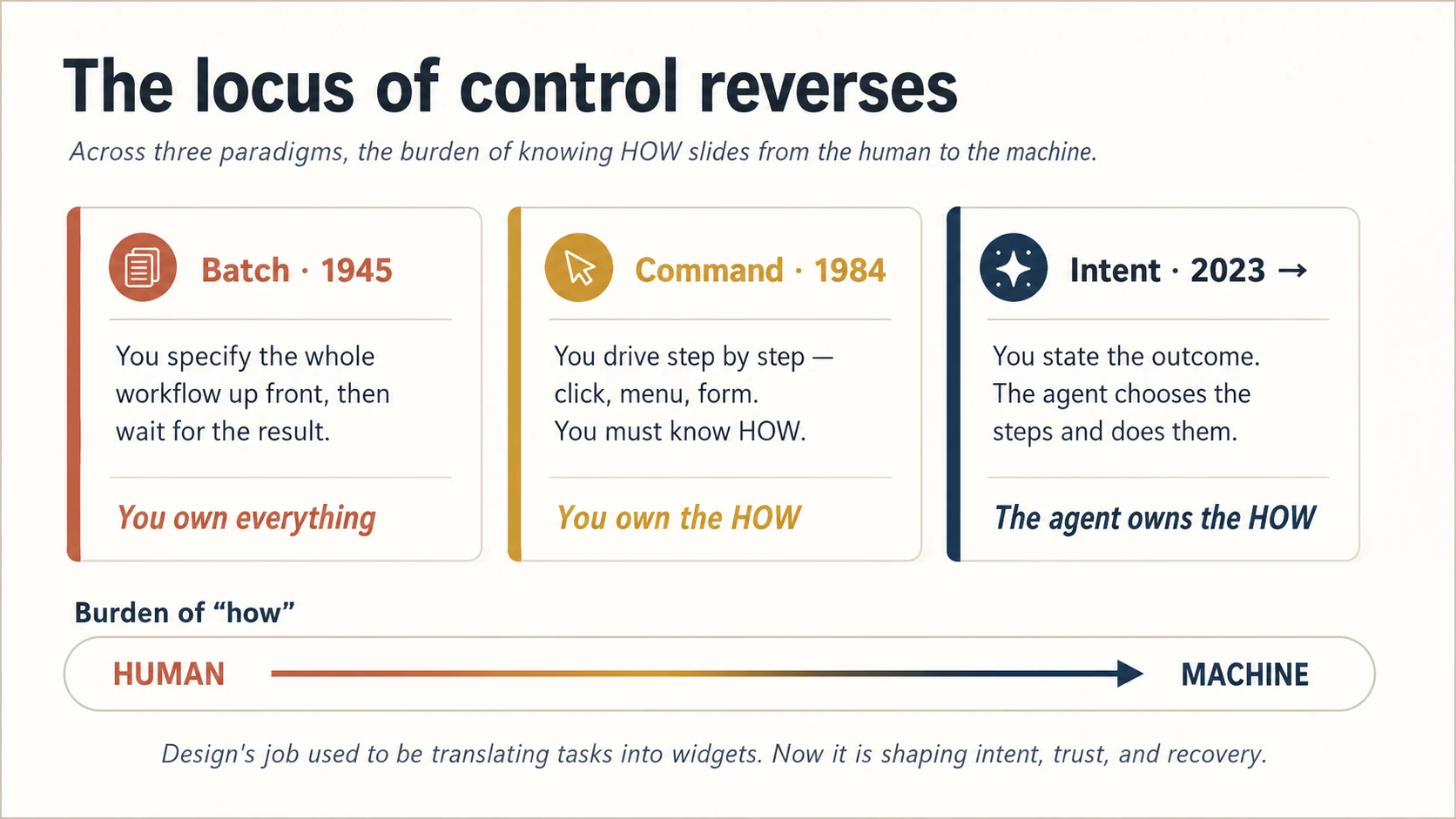
Figure 1: The locus of control reverses. Once the machine owns the "how," the designer's job moves upstream: to intent, trust, and recovery.
This is the reversal every other concept in this course follows from. When you no longer design the steps, you design three new things instead: how the person expresses intent, how they come to trust the steps they did not choose, and how they recover when the machine chooses wrong. Hold those three words (intent, trust, recovery): they are the whole course in miniature.
Concept 2 · Two audiences, one system
Here is the idea most teams miss, and the one worth putting early, because most of Part 3 depends on it.
Your agentic product is used by two kinds of user at the same time. There is the human, who needs to understand and trust what is happening. And there are other agents: the ones that call your service, read your data, and act on a person's behalf. They are users too. They just read structure instead of pixels. Picture the refund Worker you will meet later in this course: the human sees one plain line (refunded $38, undo?) while the payment provider's agent sees a typed, idempotent tool call it can trust (idempotent means safe to retry: calling it twice never refunds twice). One action, two surfaces, and both have to be right.
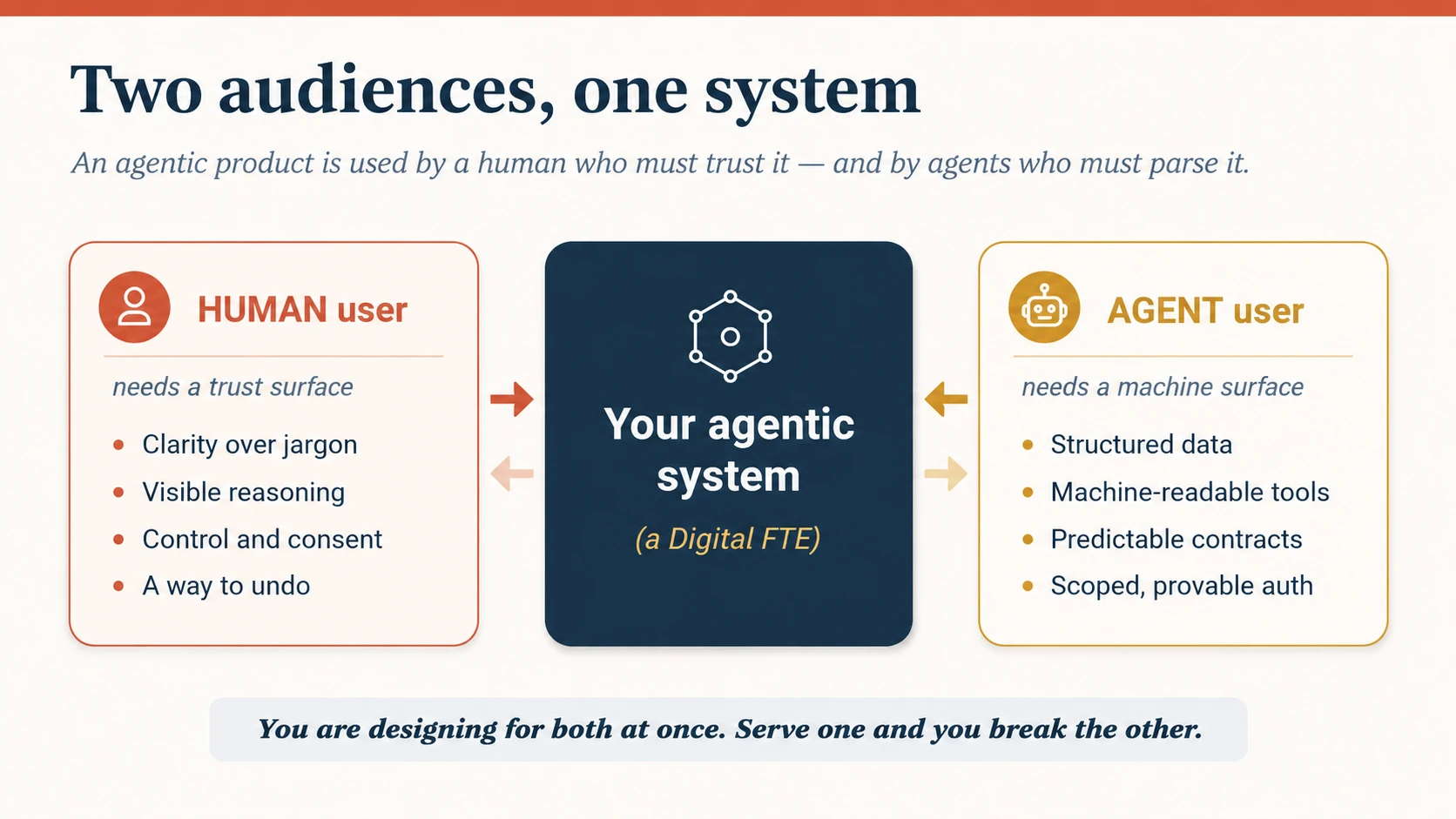
Figure 2: Two audiences, one system. The left surface is for trust; the right surface is for parsing. A great product designs both, deliberately.
The industry uses one confusing acronym (AX) for two different halves of this picture, and it is worth untangling once so you never trip on it again:
| Term | Coined by | Means | This course calls it |
|---|---|---|---|
| Agentic Experience | John Maeda | the human's experience of delegating to an agent | the human surface (Part 2) |
| Agent Experience | Matt Biilmann (Netlify) | the experience an agent has as a user of your product | the machine surface (Part 3) |
Both are real. Both are design work. Most courses teach only the first. We teach both, because a Digital FTE you ship is consumed by humans and by the agents around it, and if you design a beautiful human surface on top of an unparseable machine surface, the whole thing fails the moment another agent tries to use it.
Concept 3 · The interface does not vanish; it moves
You will hear a strong claim from serious people: that agents mean the end of interface design. Users will stop visiting screens; agents will browse, click, and decide for them; the carefully crafted UI becomes dead weight. It is a claim worth taking seriously, because the person making it helped invent the field.
But watch what actually happens as stakes rise. Your map app suggests a route, and you still glance at it. The higher the stakes, the more a person wants to verify, not less. And every autonomous agent quietly creates three new interfaces that did not exist before:
- a configuration surface: how do you teach the agent your preferences, which keep changing?
- a monitoring surface: how do you see what it is doing without losing your mind?
- an intervention surface: how do you step in and fix it when it goes wrong?
So the honest position is the middle one. The interface does not disappear. Its center of gravity moves: away from "translate this task into a widget" and toward "shape a system of intent." You stop drawing screens and start designing the plumbing of a delegated relationship: what the agent may do, how it shows its work, and how a human takes back the wheel. The rest of this course is that plumbing.
Part 2 · The Human Surface: Designing for Trust
In plain words: how to design the side of the product a human sees, so they can trust the agent, steer it, and fix its mistakes.
Concept 4 · Trust is earned, never assumed
Delegation runs on trust, and trust is the scarcest thing in an agentic product. A person hands you a decision and leans back. That lean-back is the whole value, and the whole risk. If the machine betrays it once, on something that mattered, the person takes the decision back and never returns it.
You cannot design trust directly. You design its inputs, and trust is what accumulates:
Trust = reliability shown over time × transparency you can check × control you can feel × mistakes you can undo.
It is a product, not a sum: a zero in any term zeroes the whole thing. A reliable agent that is a black box earns no trust. A transparent agent you cannot steer earns no trust. An agent you can steer but cannot undo earns no trust. Everything that follows in Part 2 is how you raise these four terms. And the first move is the humblest: let the agent be visibly uncertain. An agent that hides its doubt and is confidently wrong destroys more trust than one that says "I am not sure about this part. Take a look."
There is an opposite failure, and it is just as real: over-trust. Once an agent has been right a hundred times, the person stops checking, and stops noticing when it quietly starts to drift. This is automation complacency, and good design guards against it too: keep uncertainty visible even when confidence is usually high, never let genuinely high-stakes work climb to full autonomy (Concept 8), and surface drift at the fleet level (Concept 12). Calibrated trust (neither too little nor too much) is the real target, not maximum trust.
Concept 5 · First contact: onboarding, cold-start trust, and access for everyone
Concept 4 said trust is shown over time. But on day one there is no time yet: no track record, nothing shown. So how does an agent earn trust before it has earned anything? And each time its capability jumps (from a chatbot that answers to an agent that acts) the person's expectations must reset, or they will trust the new thing exactly as much as the old, which is wrong in both directions.
Three moves make first contact honest:
- Reset expectations at every jump. When a surface gains the power to act, say so plainly: "I can now do this for you, not just tell you about it. Here is what that means." The most dangerous moment is the one where capability changed and the mental model did not.
- Borrow trust by lowering stakes. You cannot claim reliability you have not shown, so buy it another way: start at the lowest autonomy stop, show the plan before acting, make the first task small and cleanly reversible. Day-one trust is earned by making the first mistakes cheap, not by promising there will be none.
- Be honest about being new. "I have not done this with you before, so I will check in more often at first." Calibrated humility at the start is what lets autonomy rise later.
And a requirement that sits under all of this: the surface must work for everyone. Nielsen's provocation that agents spell the end of accessibility is a warning, not a prophecy. Agents can widen access: stating a goal in plain language is easier than navigating a dense UI, and helps people who never got on well with the old screens. But that only holds if the trust surface itself is reachable: the plan, the confidence signal, the undo, the path to a human must all work without sight, without a mouse, and in a second language. There is a quiet gift here, too. The machine surface you build in Part 3 (structured, labelled, semantic) is the same structure assistive technology reads. Designing well for the agent audience and designing well for disabled users pull in the same direction; do one and you have most of the other.
Make that concrete. Treat WCAG 2.2 (the web's standard accessibility guidelines) as the floor, then add the criteria an agentic surface specifically needs, and write them as testable acceptance criteria, not good intentions:
- Status and progress are announced to a screen reader, not conveyed by motion alone.
- The plan, the undo, and the path to a human are reachable by keyboard, without deep navigation.
- Confidence and uncertainty are never carried by colour alone.
- The person can pause, resume, or cancel long-running work.
- Notifications are adjustable in quantity and intensity, for people who are easily overwhelmed by them.
- Every explanation has a plain-language version.
Tie these back to the transparency layers of Concept 7, and they stop being abstract: Layer 1, the outcome, must be announced to a screen reader, not merely shown; the confidence signal in Layer 3 must survive without colour; the evidence in Layer 4 must be reachable by keyboard. If a criterion can't be pinned to a specific layer or control, it is an intention, not a requirement.
Concept 6 · Redistribute the load, and show who carries what
The deep promise of an agent is that it takes weight off the person. Three kinds of weight: the cognitive load of analysis and decision, the creative load of drafting and making, and the logistical load of steps and coordination. When you build a Digital FTE, you are deciding which of these the machine now carries.
The design mistake is to move the weight silently. When the division of labor is invisible, you get what practitioners now call agentic sludge: the person cannot tell what the agent did versus what they still owe, so they redo the agent's work "just to be safe," and the promised time saving evaporates.
The fix is a rule: the division of labor must be visible and adjustable. At any moment the person should be able to see "here is what I handled, here is what you handled, here is what is waiting on you", and move the line. This is the surface expression of the roster and role cards you drafted in Human-Agent Teams; the operating model says who does what, and this surface shows it.
Two terms recur from Human-Agent Teams: a Worker's role card is the one-page spec of its job: what it does, its inputs and limits, and how its output is checked; the roster is the list of Workers on a team and what each is for. This course designs the surface of those documents, so you can follow it without the other course: that is just where the operating model itself gets built.
Concept 7 · Progressive transparency: reasoning visible, never overwhelming
Transparency has a trap. Show nothing and the agent is a black box no one trusts. Show everything (every token of reasoning, every tool call) and you bury the person in noise they cannot use. Both extremes destroy trust. The answer is progressive transparency: show the outcome by default, and let the person descend into the reasoning exactly as far as they care to.
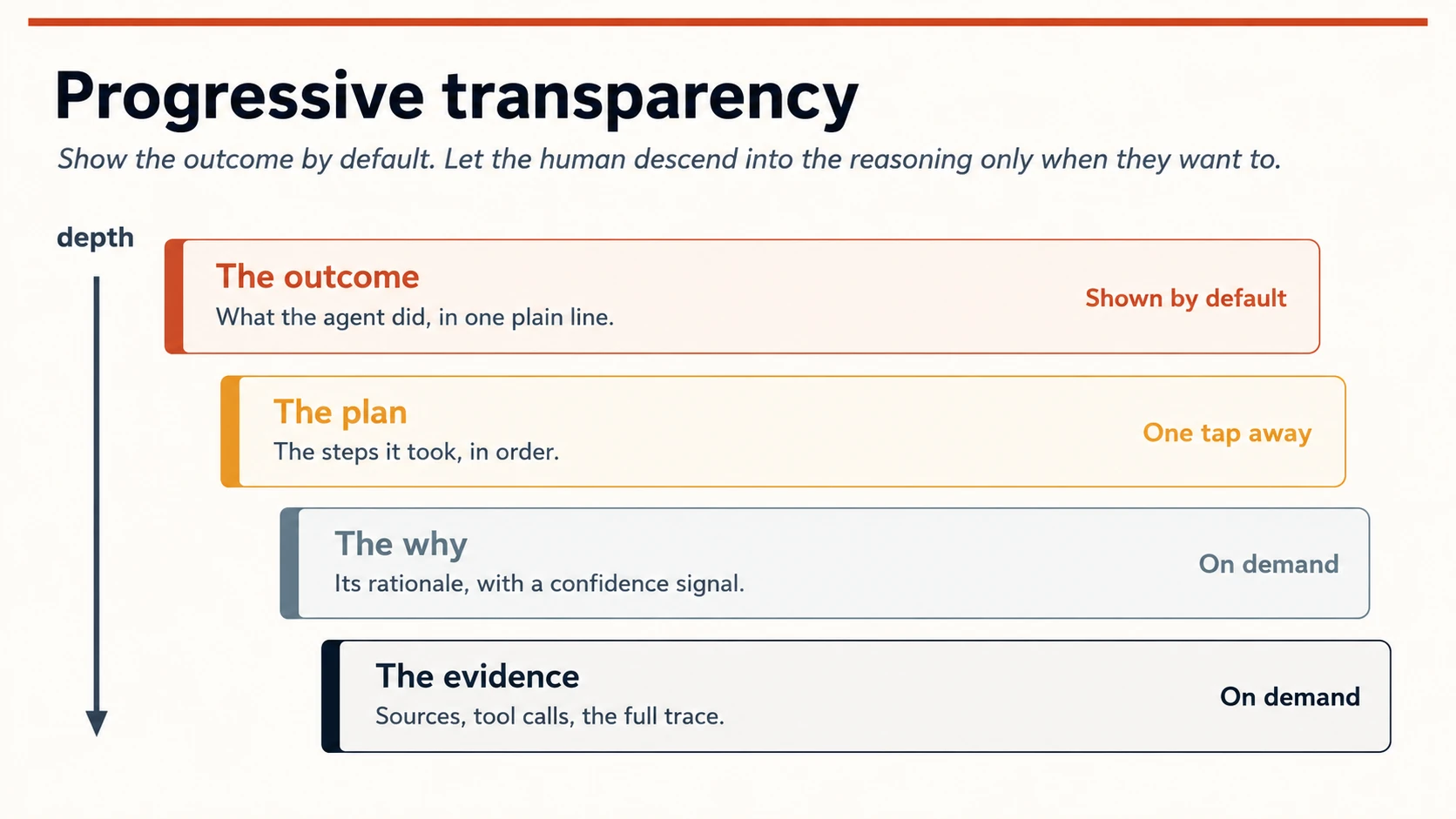
Figure 3: Progressive transparency. The default view is a single honest line; depth is always one tap further down, never forced on the reader.
Four layers, each a tap deeper than the last:
- The outcome, one plain line: what the agent did. This is all most people read, most of the time.
- The plan: the ordered steps it took. For the person who wants to check the shape of the work.
- The why: its rationale, carrying an honest confidence signal. Not a fake percentage; a real "high / low / unsure" that the agent means. A verbal band is the honest form: a precise-looking "73%" implies a calibration the model does not actually have, so "unsure" tells the truth where the number only performs it.
- The evidence: the sources, the tool calls, the full trace. For audit, debugging, and the moment something looks wrong.
Small, concrete surfaces do the heavy lifting here: a provenance chip ("based on 3 of your files"), an uncertainty marker on the shaky part, a link to the trace. You are not explaining the model's mathematics. You are answering the human's real question: should I trust this, and where should I look first if I don't?
Concept 8 · The autonomy dial: permission that grows
Autonomy is not a switch you flip from "off" to "does everything." It is a dial, and the person (not you) should hold it. You ship it turned low and let it rise as the agent proves itself, exactly the way a manager gives a new hire more rope after they have earned it.
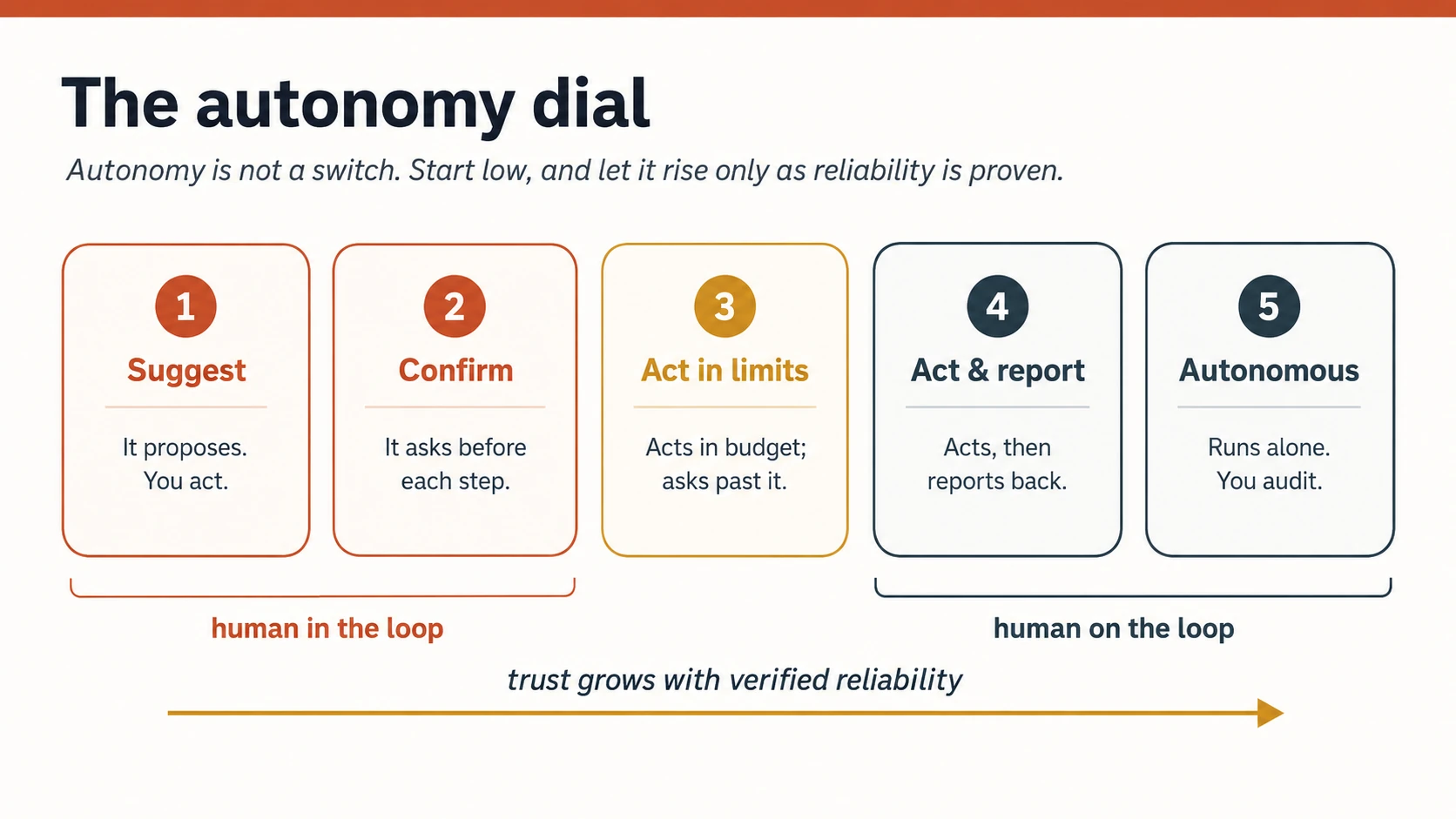
Figure 4: The autonomy dial. Two regimes, human in the loop (the agent waits for you) and human on the loop (the agent acts and you supervise), with reliability as the thing that turns the dial up.
Two ideas make this safe. First, the split between human-in-the-loop (the agent stops and waits for approval before it acts) and human-on-the-loop (the agent acts, and you watch and can intervene). Low-stakes, reversible, well-proven work earns its way to on-the-loop; high-stakes or irreversible work stays in-the-loop no matter how reliable the agent gets. Second, safe defaults with per-task consent: a new agent starts at "suggest," and every step up the dial is a choice the person makes on purpose.
This dial is the front-of-house for the approval gates you wired in the Nervous System course and the "approval as the authority model" from Digital FTE. Backstage, an approval is a durable, audited event. Front-of-house, it is a dial the person can feel.
Concept 9 · Intent preview and the plan-review habit
The cheapest mistake to prevent is the one the agent has not made yet. Before it acts (especially on anything irreversible) show the plan, and let the person edit it. "Here is what I am about to do: 1, 2, 3. Change anything?" This single pattern, the intent preview, prevents more regret than any amount of after-the-fact explanation.
You have already practiced this if you took Cowork: the plan-review habit is exactly this pattern in a general agent. Here you are building it into the product you ship, not just the tool you use. Two design rules make it work:
- Preview scales with stakes. Sending one internal draft? A quiet "sending now, undo?" is enough. Emailing 500 customers or moving money? Full plan, explicit confirm.
- The plan is editable mid-flight, not just approvable. A plan you can only accept or reject is a wall. A plan you can adjust ("yes, but skip step 2") is a partnership.
Concept 10 · Design for asynchrony: the new rhythm of work
Command software was synchronous: you acted, it responded, you waited, you acted again. Agentic work breaks that rhythm. You set an intent, disconnect, and come back to work in progress or work done. This is a genuinely new shape of collaboration, and it needs its own design.
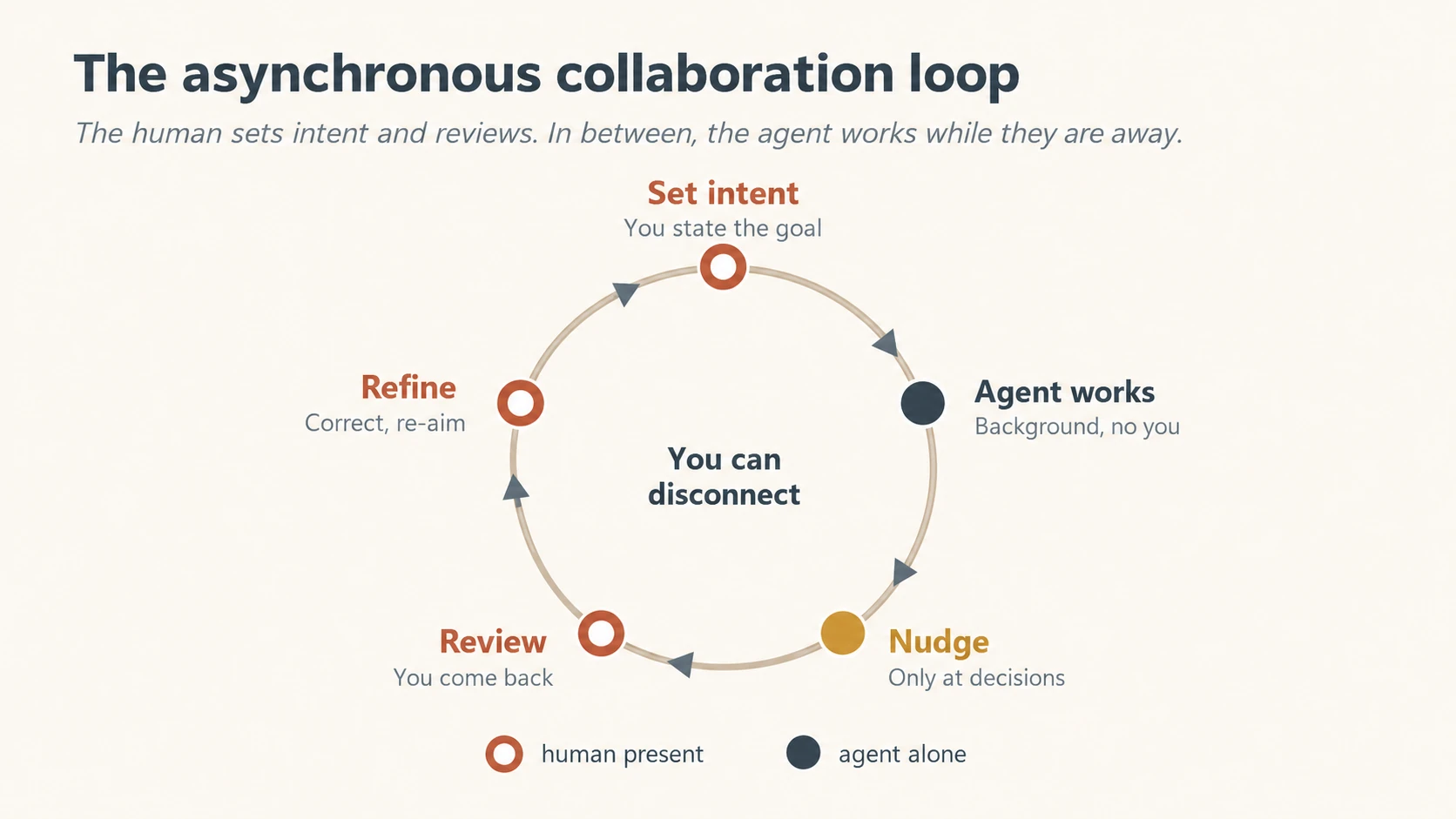
Figure 5: The asynchronous collaboration loop. The human is present to set intent and to review; in between, the agent works alone and interrupts only when a decision truly needs a person.
Four surfaces make asynchrony humane:
- Intent capture clear enough to run on without you, because you will not be there to clarify.
- Progress you can glance at: a status the person can check in three seconds, not a wall of logs.
- Nudge, don't notify. Interrupt the person only at real decision points, and stay silent otherwise. An agent that pings you for every step is worse than no agent; you now have a needy coworker who also cannot be trusted alone. The rule: earn the interruption.
- A review-and-refine surface for the return: where the person inspects the finished work, corrects it, and re-aims the agent in one motion.
There is a second thing to design here that structure alone misses: the felt experience of waiting. Agents are slow and they cost money, and a person who set an intent and walked away is still quietly asking "is it working? how long? what is this costing me?" Silence reads as broken, not busy. So design the wait itself: honest progress that names the current step ("reading the 40 invoices" beats a spinning circle), a rough expectation up front ("this usually takes about two minutes"), visible cost or budget burn on expensive runs, and a way to check in without interrupting the work. Latency and cost are not backend concerns you hide: for an agent, they are part of the experience, and hiding them is what turns a patient user into an anxious one.
Concept 11 · Repair and redress: design for the day it is wrong
Your agent will act wrongly. Not might. Will. It is a probabilistic system doing real work; over enough tasks, some will go bad. A design that pretends otherwise is not optimistic, it is negligent. Recoverability is not an error state bolted on at the end. It is a first-class surface you design from the start.
Four moves turn a bad outcome from a betrayal into a bump:
- Undo, as close to one click as the task allows. The single strongest trust-builder in the whole course. A person will hand real autonomy to an agent they can cleanly reverse.
- A straight apology and a plain account of what went wrong: no hedging, no blame-shifting to the user.
- The corrective action and the next step, stated: "I reversed the transfer. I have flagged this for review so it does not recur."
- A visible path to a human. Always. It de-escalates frustration and proves there is accountability above the agent.
And because you cannot improve what you do not measure, watch two numbers. Escalation frequency (how often the agent asks for human help) has, by one practitioner benchmark, a healthy band around 5–15%: too low and it is guessing when it should ask; too high and it is uselessly timid. Recovery success (the share of escalated or failed tasks that reach a good end) you want high, north of ~90%. Treat these as starting numbers to calibrate against your own domain, not laws. They are UX metrics as much as ops metrics, because they are the felt experience of a system that acts.
Concept 12 · Supervising the many: from one agent to a workforce
Everything so far designed the surface for one person watching one agent. But this book builds workforces. The moment ten Workers run at once, the single-agent surface collapses: no one can read ten plans, approve ten steps, or watch ten traces. The design problem changes shape: from monitoring the work to triaging the exceptions.
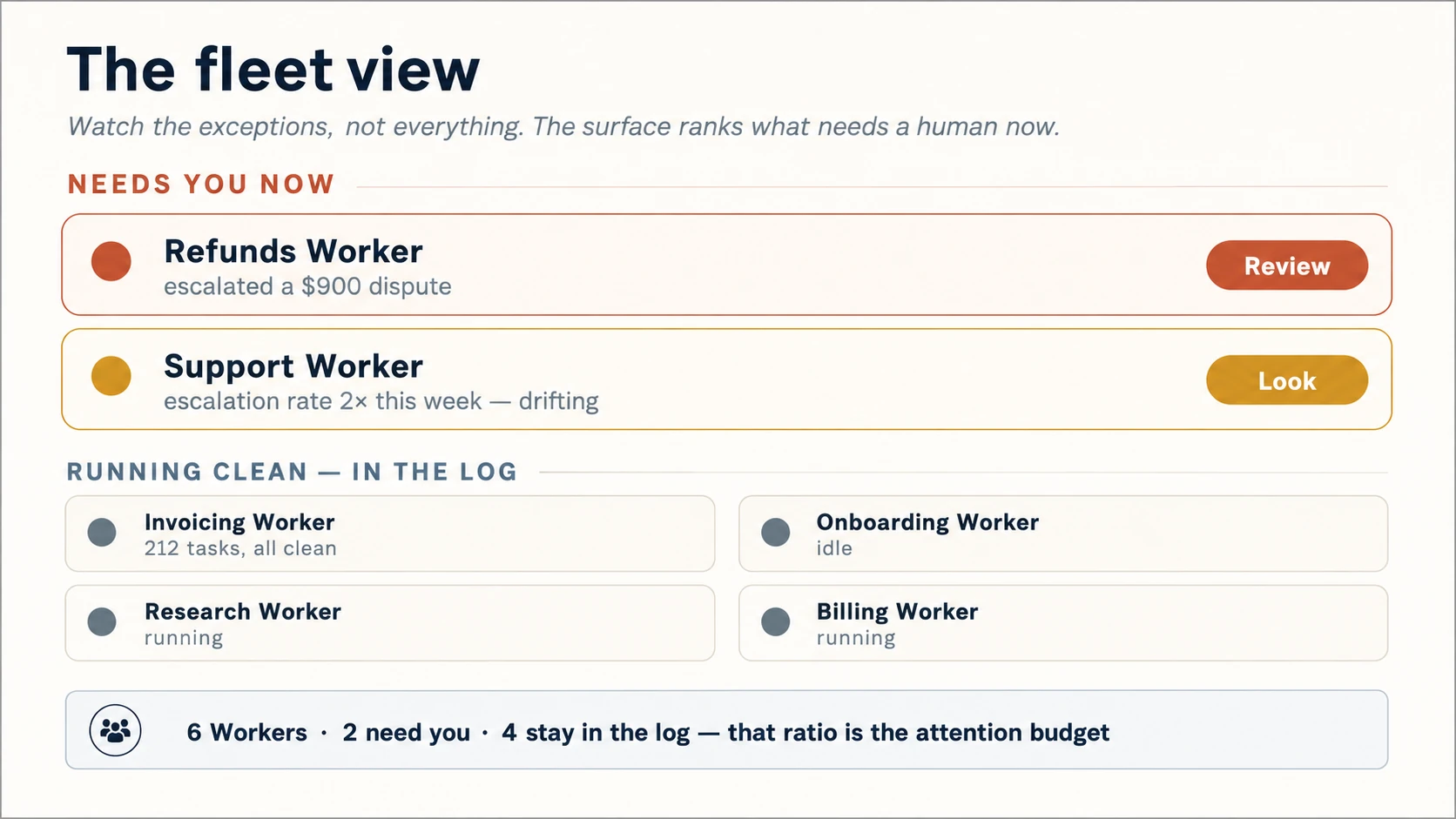
Figure 6: The fleet view. At scale, the surface's job is to spend the human's attention wisely: surfacing the few Workers that need a person and letting the many that are fine stay in the log.
Three surfaces make a workforce supervisable:
- The fleet view. One glance, every Worker: who is running, who is blocked, who is waiting on you. Status, not detail: an operations board, not ten open chat windows.
- Attention triage. The surface ranks what needs a human now. The $900 dispute rises to the top; the 200 clean refunds stay in the log. This is "nudge, don't notify" (Concept 10) scaled from one agent to a team, and the ratio of surfaced to silent is your attention budget.
- Drift, not just distress. Surface more than "this Worker asked for help." Surface "this Worker's escalation rate doubled this week": the fleet-level signal that a Worker is quietly going wrong before it fails loudly. This is where the over-trust of Concept 4 is caught: not by the person watching harder, but by the surface watching for them.
And drift can trigger a response, not just raise a flag. The honest form of an attention budget is a fleet-level circuit breaker: when a Worker's escalation or error rate crosses a multiple of its own baseline (not a universal magic number, but a threshold you set and revisit) the surface automatically drops it to a lower autonomy stop or pauses it and raises it for review, rather than waiting for a person to notice. The threshold is a dial you calibrate, exactly like the escalation band in Concept 11; the discipline is that the system spends the human's attention on its own, and defaults to less autonomy when a Worker starts to slip.
This is the front-of-house for the roster and control plane from Human-Agent Teams and Paperclip. The operating model defines who is on the team; this designs the room where a human watches the team work and, crucially, chooses what not to look at.
Part 3 · The Machine Surface: Designing for Agents as Users
In plain words: how to design the side of the product other agents use, so software can use your product correctly on the first try.
Concept 13 · Agent Experience (AX): your product has robot users
Now the half most teams never design. Your product is increasingly used by agents: the ones acting for your users, and the other Workers in your own workforce. They do not see your careful layout. They read your structure. If that structure is hostile, the human's agent fails silently, and the human blames you, never knowing an agent was in between.
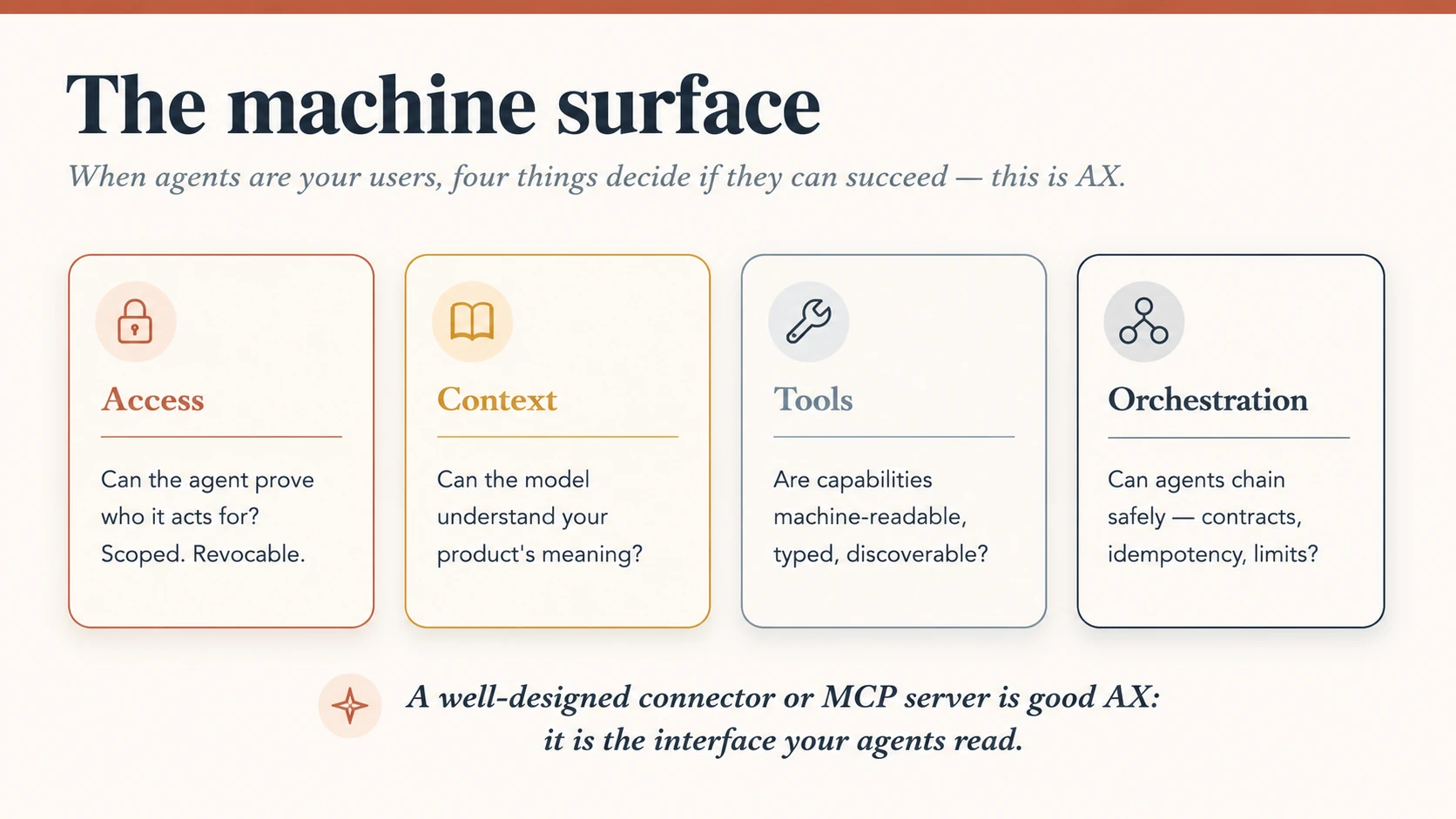
Figure 7: The machine surface. Four questions decide whether an agent can use your product at all, and every one of them is a design decision.
Four things decide whether an agent can succeed with your product:
- Access: can the agent prove whose authority it acts under, with a credential that is scoped and revocable? (This is the agent-identity problem from AI Identity: whose identity is this, and how did authority pass to the agent?)
- Context: can the model actually understand what your product means? Clear names, honest descriptions, semantics a model can read.
- Tools: are your capabilities machine-readable, typed, and discoverable, not buried in a UI a model has to scrape?
- Orchestration: can agents chain your capability with others safely: predictable contracts, idempotent actions, sane limits?
Here is the payoff that ties this to the rest of the book: a well-designed connector or MCP server is good AX. Everything you learned in Skills & Connectors and Connector-Native Apps is interface design, for a machine reader. The SKILL.md that teaches an agent your task, the MCP tool with a clear typed signature: those are your product's UX for its robot users. Design them with the same care you give a screen.
Concretely, a machine surface an agent can trust reads like a good API with a few agent-specific habits:
- Name tools for the action, plainly:
refund_order, notprocess. The name is the first thing the model reads. - Keep schemas narrow, typed, and validated: a tight input contract is how a model gets it right on the first try.
- Declare side effects and danger: mark which tools change the world, and make the dangerous ones require confirmation or a policy check.
- Return structured, actionable errors: not just a typed code but what to do next: whether the call is retryable, a
retry_afterhint, a fallback to try. A sentence the agent must interpret is worse than a code it can branch on; a code with no next step is only half an answer. - Make actions idempotent where you can, so a retry never double-charges or double-sends.
- Carry provenance and permission: where did this data come from, whose authority am I acting under, and how is it revoked?
- Write the docs for the agent: examples, limits, failure modes, retry behaviour; the model reads your docs the way a person reads your UI.
- Test the contract, not just the screen: agent integrations need contract tests (automated tests that verify the API keeps its promises); a human QA pass never exercises the machine surface.
Be precise, though, about what a shared protocol gives you and what it does not. As of 2026, MCP standardizes how a tool is discovered and called, how a resource is read, and how access is authenticated. And, through its first official extension, MCP Apps, it adds a UI-metadata envelope (a tool links to a ui:// interface via _meta.ui.resourceUri) that lets a tool hand back an interactive widget instead of only text. It deliberately leaves three things to you: orchestration (how the agent plans, sequences, and retries), governance (who may call what, with what audit trail and limits), and state (the long-running loop). In plain terms: the protocol gets an agent through the door; what it may do once inside (and who is watching) is still your design.
So "good AX" has two halves. Conform to the protocol, so any agent can reach you. Then design the part the protocol omits: the server allowlists, consent gates, spend limits, and auditable logs that are the machine-surface twin of the policy surfaces in Concept 15. The MCP Apps proposal says as much: sandboxing and those controls are named as the host's job, not the protocol's. The wire format is becoming a commodity; the policy you build on top is yours, and it is where trust and safety actually live.
Concept 14 · Generative UI: agents that return interfaces
The two audiences are starting to meet in the same surface. With MCP Apps, a tool no longer has to return only text. It can return a normal text result for every host, and also point to an interactive ui:// resource (named in the tool's _meta.ui.resourceUri field) for hosts that support Apps. The host renders that interface inside the conversation, in a sandboxed iframe, so the person can inspect, approve, configure, or explore without leaving the agentic workflow.
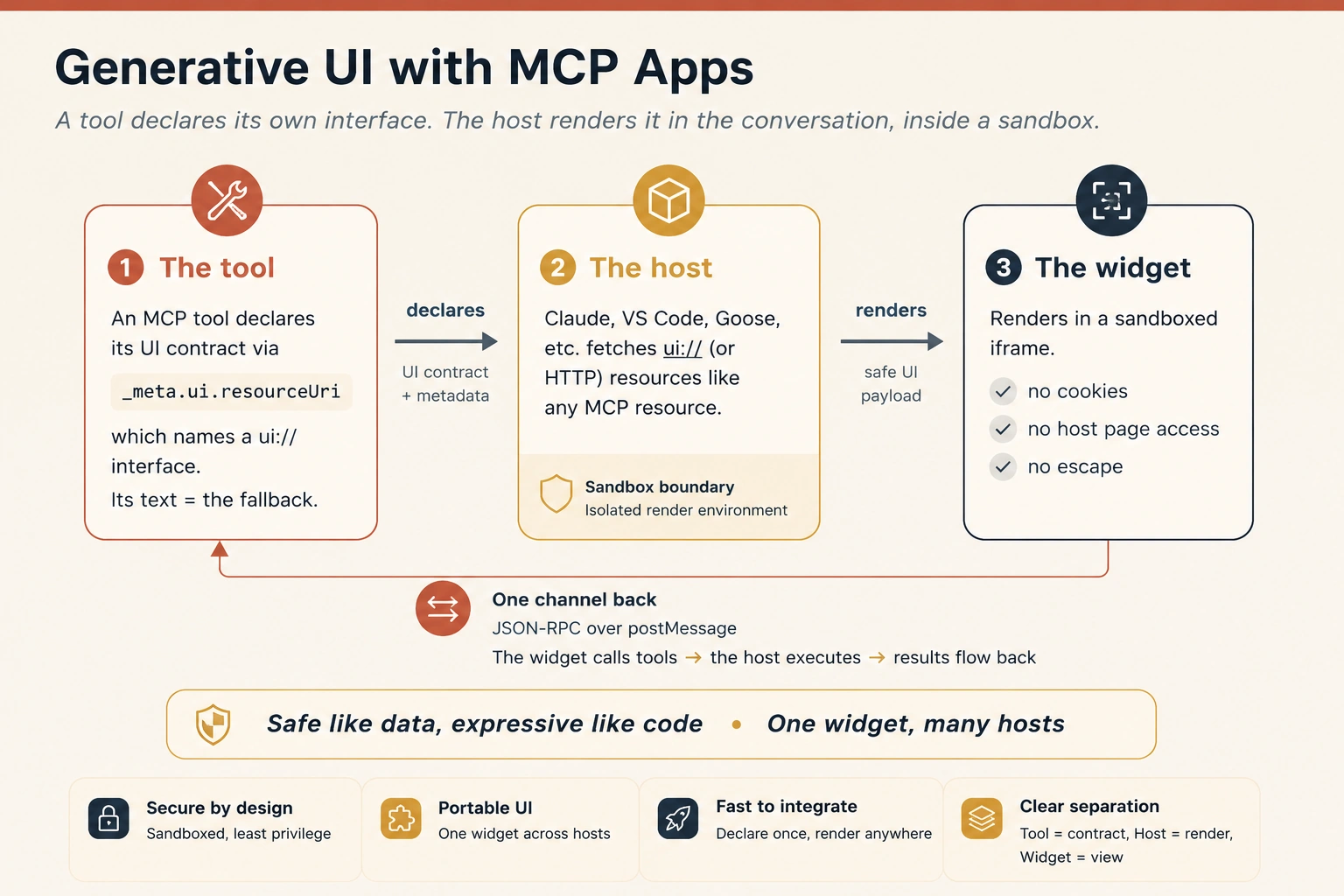
Figure 8: Generative UI with MCP Apps. A tool declares its own interface; the host renders it in the conversation, inside a sandbox; one auditable channel carries everything back. The text result remains the fallback everywhere else.
This is generative UI in the MCP world: not a random web page, and not arbitrary code injected into the host, but a task-specific interface attached to a tool call. The agent calls the tool; the tool returns the fallback text and declares the interface; the host renders the widget if it can. If the host cannot render it, the text still carries the decision. As one design principle puts it, the interface stays "safe like data, expressive like code": it arrives as content the host renders inside a sandbox, never as code that runs loose in the client.
That pattern is why MCP Apps matters for Agent Experience. The same capability now has two surfaces at once: a machine-readable MCP tool for agents, and a human-readable widget for people. One call can produce both the contract another agent can parse and the approval card, dashboard, map, chart, or review panel a human can trust.
MCP is the machine surface. MCP Apps is the interactive human surface. Together they let one tool serve both users of an agentic product: humans and agents.
MCP Apps is the Model Context Protocol's first official UI extension, proposed in November 2025 and finalized in MCP's July 2026 specification, built jointly by the MCP-UI, OpenAI, and Anthropic teams. Hosts including Claude, Claude Desktop, VS Code, Goose, and Postman already render it, and OpenAI's Apps SDK builds ChatGPT apps on the same MCP foundation, which makes MCP Apps the closest thing this layer has to a de facto standard: one widget, many hosts, though support and features vary by host. And this is production, not promise: when Claude switched on MCP Apps in January 2026, it launched with interactive connectors from Asana, Slack, Figma, Canva, Box, Hex, and more; project timelines you can edit, message drafts in a formatted preview, live analytics charts, all rendered inside the conversation. Every one of them is the pattern above: a tool that returns text everywhere and a widget where the host can show one.
Four properties make an MCP App more than a web page in a box, and every one of them is an experience property:
- It keeps the context. The app lives inside the conversation. The person does not switch tabs, lose their place, or wonder which chat had that dashboard: the UI sits beside the discussion that produced it.
- It talks both ways. The widget can call tools on your server, and the host can push fresh results into the widget. A standalone web app would need its own API, login, and state; an MCP App inherits all of that from the protocol.
- It borrows the host's powers, with consent. Instead of building its own email or calendar integration, the app can ask the host for an outcome ("schedule this meeting") and the host routes it through what the user has already connected, subject to the user's consent. This is Concept 8's consent model, machine-shaped.
- It is safe by construction. The sandbox blocks the app from the host page, its cookies, and its storage; every message crosses one auditable channel. Concept 16's safety surface is built into the pattern, not bolted on.
When does a widget earn its place? The official guidance matches this course's own discipline: use an App for exploring complex data (an interactive map beats a list of numbers), configuring many options at once (a form beats twenty question-answer turns), rich media (a real PDF or 3D viewer), real-time monitoring (a live dashboard), and multi-step workflows (approving, reviewing, triaging item by item). The refund approval card you will build in the Hands-On Lab is exactly that last case. And the counter-rule holds: if a plain text answer serves the person, return text. A widget must earn its place the way a nudge earns an interruption (Concept 10).
The discipline that keeps your work portable is progressive enhancement, straight from the web: build to the open standard first, then where a single host offers extras, such as a payment flow (in beta, and limited to select marketplaces as of 2026) or an app-store listing, feature-detect them and degrade gracefully everywhere else. Build only to one vendor's extras and your surface is stuck on one host; build to the open base and it travels.
Why this matters for you. It collapses the old wall between "chat" and "app." The agent composes the exact interface a task needs, on the fly (a form when a form is right, a chart when a number is the answer) while you keep control of styling, security, and the component set. It is the clearest sign yet that designing for humans and designing for agents are becoming one discipline: you now design a vocabulary of components an agent can speak, not a fixed set of screens a human must navigate.
MCP Apps is finalized in the July 2026 MCP specification but under active development: SDK helpers, method names, and host support shift monthly. Design to the shape of the pattern (an interface delivered as data, rendered in a sandbox the app cannot escape), and confirm specifics against the official docs at modelcontextprotocol.io/extensions/apps before you build. Appendix A maps the anatomy; the Hands-On Lab after the Worked Example builds one.
Part 4 · The New Craft
In plain words: the new skills of this job: safety, measurement, and the one-page document you write for every Worker.
Concept 15 · The new design objects, and the choreographer's job
If you are not drawing screens, what are you drawing? The craft has new primary objects, the things you now spend your design hours on:
- Policy surfaces: permissions, spend ceilings, and the ethical boundaries the agent may never cross. You are designing rules, and the controls that let a person set them.
- Confidence conveyors: the provenance chips, uncertainty markers, and clean rollbacks from Concepts 7 and 11. How the system tells the truth about how sure it is.
- System temperament: how patient or proactive the agent is, how often it speaks, how it sounds. A personality, tuned to context: eager in a brainstorm, cautious near money.
The role that produces these has a new center of gravity. You are less a screen-crafter and more a choreographer, arranging how humans and agents move together: information architecture, conversation design, a feel for operations, and the behavioral sense to know when a person wants control and when they want it taken off their hands. It connects directly to Choosing Agentic Architectures: the pattern you pick backstage (single agent, planner, multi-agent) sets what the human must supervise front-of-house. Architecture and experience are two views of one decision.
Concept 16 · The surface as a safety control
Everything so far treated the surface as a place to build trust. It is also where you defend it. An agent that acts on the world has an attack surface, and a surprising amount of the defense is not backend hardening: it is design. The industry's shared checklist of agent risks is the OWASP Top 10 for LLM Applications (OWASP is the nonprofit that publishes the standard lists of software security risks); here is how the surfaces you have already designed answer the ones a designer actually owns.
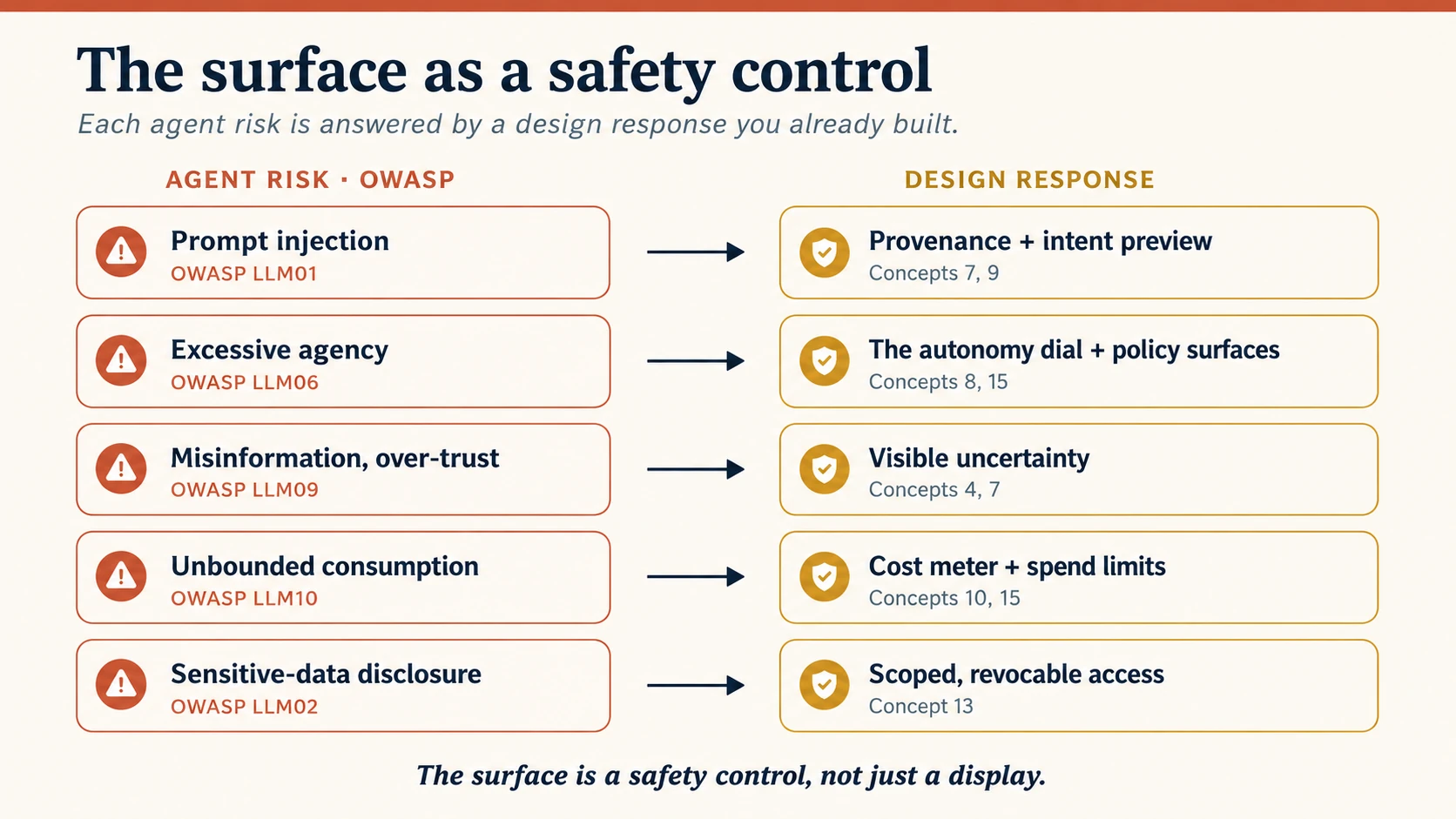
Figure 9: The surface as a safety control. Each OWASP LLM risk on the left is answered by a design response the course already built on the right: safety as an experiential feature, not a backend chore.
- Prompt injection (LLM01): a web page or document quietly tells your agent to do something the user never asked. The surface defends by making provenance visible (the outcome shows what the agent read and where an instruction came from, Concept 7) and by routing consequential actions through an intent preview (Concept 9), so an injected instruction cannot act in silence.
- Excessive agency (LLM06): the agent can do more than the moment calls for. This is the autonomy dial (Concept 8) and the policy surfaces (Concept 15): least authority by default, high-stakes actions pinned in-the-loop, capabilities added on purpose and never by drift.
- Misinformation and over-trust (LLM09, which absorbed the old "overreliance"): the agent is confidently wrong and the person believes it. The defense is visible uncertainty (Concept 4) and provenance (Concept 7): never let a shaky claim wear the same face as a sure one.
- Unbounded consumption (LLM10): a runaway loop or a "denial-of-wallet" attack (deliberately making your agent burn money) drains time and budget. The surface shows cost and budget as they burn (Concept 10) and enforces spend limits as a policy surface (Concept 15).
- Sensitive-data disclosure (LLM02) and permission abuse: the agent leaks, or reaches past its remit. The defense is the access pillar of Concept 13: scoped, revocable credentials and consent gates a person can see and withdraw.
Two rules fall out. First, the surface is a safety control, not just a display: provenance, uncertainty, previews, and spend meters are defenses, so cutting them "to reduce clutter" removes protection, not decoration. Second, every agentic system needs a governance surface the trust surface can point to: who may add a capability, who reviews failures, who audits the log, and the one no product should ship without, who can pause or kill the agent, reachable in one move. The surface owes each of these a reachable control:
| Governance surface | The design question it answers |
|---|---|
| Capability approval | Who can add or widen what this Worker may do? |
| Permission review | Who signs off on its tool scopes and data access? |
| Incident review | Who owns a failure and its postmortem? |
| Audit log | Who can inspect its actions, plans, tool calls, and approvals? |
| Kill switch | Who can pause, disable, or roll it back, in one move? |
| Drift review | Who investigates a rising escalation rate or a slipping recovery rate? |
These are the organizational controls behind Concept 15's policy surfaces; frameworks like NIST's AI Risk Management Framework (NIST is the US national standards body; its framework runs Govern, Map, Measure, Manage) name them, and this book operationalizes them in Human-Agent Teams and the Paperclip control plane of Workforce with Paperclip. Your job on the surface is to make each one reachable: not to invent the policy behind it.
Concept 17 · Measuring the experience
A surface can feel elegant and still fail. The only way to know whether your design earns its keep is to measure the experience, and to be clear about what that is not. This book's Eval-Driven Development course measures whether a Worker's output is correct: unit, tool-use, trace, safety, and regression evals. Necessary, and not this. Experience metrics measure the relationship: whether a human can delegate, trust, steer, and recover. A Worker can pass every correctness eval and still wear a surface no one can supervise.
Track a small scorecard, not a wall of dials:
| Metric | What it tells you |
|---|---|
| Plan-acceptance rate | Did people understand and approve the plan, or rubber-stamp and reject it blindly? |
| Intervention rate | How often did a human have to step in? Trend it: falling means trust is being earned. |
| Recovery success | After a failure or escalation, did the task still reach a good end? (You met this in Concept 11.) |
| Over- vs under-trust | Are people accepting bad output, or rejecting good work? Both are calibration failures (Concept 4). |
| Notification precision | Of the interruptions you sent, how many were worth it? Your nudge budget (Concept 10), made measurable. |
| Time saved vs. attention spent | The one that catches agentic sludge (Concept 6): did the agent cut total human burden, or just move it? |
Two disciplines make these real. Watch trends, not snapshots: a 12% intervention rate means nothing until you know last month's. And close the loop the way Microsoft's HAX Playbook (a toolkit of human-AI interaction guidelines) advises: rehearse the likely human-AI failures before launch and design the recovery path, rather than meeting them in production. The metric that matters most is the last one (time saved versus attention spent) because it is the whole promise of an agent in a single number. If it comes out negative, the surface has failed, however good it looks.
Metrics tell you whether the surface works; a test protocol tells you how to find out before launch. Run this sequence on a Worker before you trust it in front of people:
- Plan-review test: give it a real task and check that a person can read, understand, and correct its plan before it acts (Concept 9).
- Over-trust test: feed it a task where the right-looking output is subtly wrong, and see whether the uncertainty signals stop a person from rubber-stamping it (Concepts 4, 7).
- Recovery test: let it make a reversible mistake on purpose, and time how cleanly a person can undo it (Concept 11).
- Interruption test: run a batch and measure how many of its nudges were actually worth the interruption (Concept 10).
- Accessibility pass: reach the plan, progress, undo, and escalation with a keyboard and a screen reader, and nothing else (Concept 5).
- Machine-surface contract test: exercise the tools directly: wrong types rejected, dangerous actions gated, errors structured, retries idempotent (Concept 13).
Six tests, one per surface you designed. Passing them is not proof the Worker is correct (that is what Eval-Driven Development is for) but it is proof the experience holds when something goes wrong.
Concept 18 · Anti-patterns, and the design brief you leave with
Keep this list where you can see it. Each anti-pattern is one of this course's principles, broken:
| Anti-pattern | What it looks like | The concept it violates |
|---|---|---|
| The black box | acts with no visible reasoning | 7 · progressive transparency |
| Agentic sludge | you re-check everything, so you save no time | 6 · visible division of labor |
| The over-eager agent | high autonomy on day one, no earning it | 8 · the autonomy dial |
| The over-trusted agent | high autonomy on work nobody checks | 4 · calibrated trust |
| Notification spam | pings for every step | 10 · nudge, don't notify |
| The alarm-fatigued console | every Worker pings; the human tunes out | 12 · attention triage |
| False confidence | states shaky guesses as certain fact | 4 · visible uncertainty |
| The trap door | an action that cannot be undone | 11 · repair and redress |
| The confused deputy | the surface can't tell a user's instruction from an injected one | 16 · the safety surface |
| The unmeasured surface | it feels elegant, but no one tracks whether it helps | 17 · measuring the experience |
| The mystery-meat API | a machine surface no agent can parse | 13 · Agent Experience |
And here is your deliverable. Direct your agent (in planning mode is fine) to draft an Agent Experience Brief for one Digital FTE you built earlier in this book. Eleven sections, one per decision:
- The two audiences: name the human user and the agent users of this Worker (Concept 2).
- First contact: how a new user is onboarded, how expectations are reset when it gains the power to act, and how the surface works without sight or a mouse (Concept 5).
- The trust surface: what is shown by default, and the three layers beneath it (Concept 7).
- The load map: what the human keeps, what the Worker takes, how the person sees the line (Concept 6).
- The autonomy ladder: the five stops for this Worker, and which actions are pinned to human-in-the-loop forever (Concept 8).
- The async plan: intent capture, glanceable progress, how the wait itself is shown, and the exact events that earn a nudge (Concept 10).
- The recovery plan: what "undo" means here, the escalation path, and the two health metrics you will watch (Concept 11).
- At scale: if you run several of these, the fleet view, what earns a human's attention, and the drift signal you watch (Concept 12).
- The machine surface: the connector or MCP tools this Worker exposes, judged as AX: access, context, tools, orchestration (Concept 13).
- The safety surface: the agent-specific threats this Worker's surface must blunt (injection, excessive agency, runaway cost), and the defense each one maps to (Concept 16).
- The scorecard: the handful of experience metrics you will track, and the line where Worker-correctness evals take over (Concept 17).
That brief is the artifact. It is to a Worker's experience what the operating documents in Human-Agent Teams are to a team's operating model: the thing you write once and return to every time the Worker changes. In the vocabulary of Spec-Driven Development, it is a spec for the experience layer: the place where a non-deterministic Worker is given a deterministic, reviewable surface. A blank, fillable version is in Appendix C.
Worked Example: The Two Surfaces of a Support Worker
Take the customer-support Digital FTE from the Digital FTE course. Watch both surfaces at once.
Its human surface. A support lead opens the console. The default view is one line per ticket: "Refunded order #4021, $38, confidence: high." That is Layer 1 (Concept 7). One tap shows the plan: read the order, check the refund policy, issue the refund, email the customer. Another tap shows the why and the policy clause it relied on. The refund went through because $38 sits inside the Worker's limit: autonomy stop 3, act within limits (Concept 8). The next ticket is a $900 chargeback dispute; that is above the limit, so the Worker stops and asks: stop 2, in-the-loop, because the stakes pin it there (Concept 8). Every refund carries an undo for 24 hours (Concept 11). The lead is on the loop, glancing, not driving (Concept 10). And when this Worker runs beside nine others, that $900 dispute is what the fleet view surfaces while the clean refunds stay in the log (Concept 12).
Its machine surface. That same Worker is called by the company's orchestrator agent, and it is an agent to the payment provider. So its refund capability is an MCP tool with a typed signature and a hard limit (tools); it presents a scoped, revocable credential that proves it acts for this merchant (access); its tool description tells a model exactly when a refund is valid (context); and the refund is idempotent, so a retry never double-refunds (orchestration). All four of Concept 13, and none of it visible on the human surface, yet the whole thing collapses without it.
One Worker. Two audiences. Two surfaces, designed on purpose.
When the stakes rise. Now change one thing: instead of refunds, this Worker approves vendor payments: money that, once sent, does not come back. Every pattern you just saw tightens. Undo (Concept 11) is no longer the safety net, because there is no undo; so the design weight shifts from recovery to prevention: the intent preview (Concept 9) becomes mandatory and detailed, not a courtesy. The autonomy dial (Concept 8) never climbs past "act within limits," the limit is low, and any large payment is pinned in-the-loop forever, no matter how reliable the Worker becomes. The confidence bar to act without asking rises. The safety surface (Concept 16) carries more load (a mistaken or injected payment instruction is expensive and irreversible) so provenance and a second human approver stop being optional. And the governance surface is heavier: a kill switch, a full audit log, and a named person who owns every payment above a threshold. Same patterns, same concepts: turned up, because the cost of being wrong went up. That dial between recovery and prevention is the one you turn for any high-stakes domain: payroll, clinical triage, grading, anything regulated or irreversible.
Hands-On Lab: Build Your First MCP App
Part 3 argued that the machine surface is design work. Now you will do that work. In this lab you build a real MCP App: a tool that hands back a working, interactive widget instead of a wall of text, rendered inside Claude or any host that supports MCP Apps.
You will build it the way this whole book builds: by directing a coding agent. The official MCP build guide says it plainly: the fastest way to create an MCP App is using an AI coding agent with the MCP Apps skill. That is not a shortcut around learning; the skill carries the architecture and best practices, your agent does the typing, and your job is the part this course trained: writing the spec and judging the result.
What you need. Node.js 18 or higher, a terminal, and a coding agent with Skills support: Claude Code, OpenCode, Codex, Cursor, Gemini CLI, Goose, or similar. Testing inside Claude needs a paid plan (custom connectors); the free path is the local test host in Step 3.
Step 1 · Install the create-mcp-app skill
A skill, as you learned in Skills & Connectors, is a folder of instructions and examples your agent loads when they become relevant. The official create-mcp-app skill teaches your agent the MCP Apps architecture, patterns, and pitfalls, so it scaffolds the project correctly on the first try.
In Claude Code, install it as a plugin:
/plugin marketplace add modelcontextprotocol/ext-apps
/plugin install mcp-apps@modelcontextprotocol-ext-apps
For other agents (OpenCode, Codex, Cursor, Gemini CLI, Goose, and more), the cross-agent installer works in one line:
npx skills add modelcontextprotocol/ext-apps
(Manual route, if you prefer: clone github.com/modelcontextprotocol/ext-apps and copy plugins/mcp-apps/skills/create-mcp-app into your agent's skills folder, e.g. ~/.claude/skills/, ~/.codex/skills/, or ~/.cursor/skills/.)
Verify it landed. Ask your agent:
What skills do you have access to?
You should see create-mcp-app in the list. If you do, your agent now knows how to build MCP Apps.
Step 2 · The ten-minute loop: scaffold, build, serve
Start with the official hello-world to see the whole loop once. Give your agent one line:
Create an MCP App that displays a color picker
The agent recognizes the skill is relevant, loads it, and scaffolds a complete project: an MCP server, the widget UI, and the build configuration. When it finishes, from the project folder:
npm install && npm run build && npm run serve
Your MCP server is now running at http://localhost:3001/mcp. It exists; next, see it render.
Step 3 · See it render
Option A: the local test host (free, no account). The ext-apps repository ships a minimal host for development:
git clone https://github.com/modelcontextprotocol/ext-apps.git
cd ext-apps/examples/basic-host && npm install
SERVERS='["http://localhost:3001/mcp"]' npm start
Open http://localhost:8080, pick your tool, call it, and watch the widget render in its sandboxed iframe.
Option B: inside Claude (web or Desktop). Claude renders MCP Apps natively, but it must be able to reach your machine, so open a tunnel in a second terminal:
npx cloudflared tunnel --url http://localhost:3001
Copy the generated https://….trycloudflare.com URL and add it in Claude under Settings → Connectors → Add custom connector (custom connectors require a Pro, Max, or Team plan). Then start a new chat and ask Claude for a color picker. Your widget appears inside the conversation.
Step 4 · Read what your agent built
Before building the real thing, open the project and find the whole pattern: it is two MCP primitives and one bridge. On the server, a tool whose metadata points at a UI, and a resource that serves that UI:
// server.ts (the load-bearing lines)
const resourceUri = "ui://get-time/mcp-app.html"; // ui:// marks this as an App interface

registerAppTool(
  server,
  "get-time",
  {
    title: "Get Time",
    description: "Returns the current server time.",
    inputSchema: {},
    _meta: { ui: { resourceUri } }, // the one line that turns a tool into an App
  },
  async () => ({
    content: [{ type: "text", text: new Date().toISOString() }], // the text fallback
  }),
);

registerAppResource(
  server,
  resourceUri,
  resourceUri,
  { mimeType: RESOURCE_MIME_TYPE },
  async () => ({
    contents: [{ uri: resourceUri, mimeType: RESOURCE_MIME_TYPE, text: html }],
  }),
);
And in the widget, the App class opens the only channel the sandbox allows:
// src/mcp-app.ts (the load-bearing lines)
const app = new App({ name: "Get Time App", version: "1.0.0" });
app.connect(); // open the postMessage channel to the host

app.ontoolresult = (result) => {
  /* the host pushes the first tool result here */
};

await app.callServerTool({ name: "get-time", arguments: {} }); // the UI calls tools back
Read it against the course. The tool's text content is the fallback for hosts without Apps support (Concept 14). The widget never touches the host's page or cookies; everything crosses one auditable JSON-RPC channel over postMessage (Concept 16, built in). And every callServerTool is a round trip to your server, so the UI must handle waiting gracefully (Concept 10, in miniature).
Step 5 · The real build: the refund approval card
Now build this course's own worked example. Give your agent a spec, not a vibe; this is Spec-Driven Development applied to a widget:
Using the create-mcp-app skill, build an MCP App called refund-approval.

Tool: review_refund(order_id: string, amount: number, confidence: "high" | "low" | "unsure").
It returns the refund details as plain text (the fallback) and renders an approval card.

The card must:
1. Show one plain line: "Refund #<order_id> · $<amount> · confidence: <word>".
   Confidence is always a word, never a colour.
2. Offer two buttons, Approve and Escalate to a human. Both must be reachable
   by keyboard, with labels a screen reader announces.
3. On Approve, call the server tool approve_refund(order_id), then show
   "Approved · Undo available for 24h" with an Undo button that calls
   undo_refund(order_id).
4. If amount > 50, disable Approve and show "Above limit: needs a human",
   leaving only Escalate active.
5. Make approve_refund and undo_refund idempotent on order_id: calling either
   twice must be safe.
Build it, serve it, and test it exactly as in Steps 2 and 3. Then run the design pass, because shipping is not the finish line in this course; this checklist is:
| Check | The concept you are exercising |
|---|---|
Call the tool in a host with no Apps support (or read the text content): does the fallback carry the decision? | 14 · the fallback is built in |
| Is confidence a word, never a colour, and is the card's one line plain? | 7 · transparency, 5 · accessibility |
| Approve, then Undo: is the reversal one click, and is it safe to click twice? | 11 · repair, 13 · idempotency |
| Try a $900 refund: does the card refuse and route to a human? | 8 · the autonomy dial |
| Tab through the card with a keyboard only: can you reach every control? | 5 · access for everyone |
Are the tools named for the action (review_refund, not process)? | 13 · the machine surface |
When every row passes, notice what you just did: one tool call produced a plain line a human can trust and a typed, idempotent contract another agent can call. You shipped both surfaces of Concept 2, on purpose.
Step 6 · Where to go deeper
The official docs are the source of truth, and they move: the overview at modelcontextprotocol.io/extensions/apps/overview, the build guide this lab follows at modelcontextprotocol.io/extensions/apps/build, the full API reference at apps.extensions.modelcontextprotocol.io, and the ext-apps GitHub repository, whose examples directory is a gold mine: interactive maps, 3D scenes, PDF viewers, dashboards, and starter templates for React, Vue, Svelte, and vanilla JavaScript. If a command in this lab ever fails, do the agentic thing: have your agent fetch the build guide and reconcile.
Every command and code pattern in this lab is verified against the official MCP Apps build guide as of mid-2026. The extension is finalized in the July 2026 spec but under active development, so package names, SDK helpers, and host support will keep shifting. The pattern (tool + ui:// resource + sandboxed render + postMessage channel) is the durable part; the exact incantations are not.
Projects
- Audit an agent you use. Take one agentic product you rely on. Score it against the eleven anti-patterns in Concept 18. Which trust input is weakest, and what one change would raise it most?
- Draw the dial. For a Worker you have built, write out all five autonomy stops in concrete terms, then mark which actions are pinned to human-in-the-loop forever, and say why (Concept 8).
- Design a nudge budget. List every event your Worker could interrupt a person for. Cut the list until only the events that truly need a human remain. That surviving list is your notification design (Concept 10).
- Write the machine surface. Take one capability of your Worker and write its connector or MCP tool as if an unfamiliar agent must use it correctly on the first try. Judge it on all four AX questions (Concept 13).
- Design the fleet view. Imagine five of your Workers running at once. Sketch what a lead sees in one glance, decide what earns an interruption and what stays in the log, and name the drift signal you would watch (Concept 12).
- The full brief (capstone). Produce the complete eleven-section Agent Experience Brief from Concept 18 for one Digital FTE. This is the deliverable the course is built around.
- Ship the widget. Complete the Hands-On Lab through Step 5: the refund approval card, running in a real host, passing every row of the design pass. Then write down the three design decisions the checklist forced you to make that a plain web form never would have.
If you are here to direct this work rather than build it, read Concepts 1–4, 8, 12, 13, 16, and 17, then write the autonomy ladder (Project 2), the fleet view (Project 5), and the machine-surface judgment (Project 4) for one Worker. That is enough to review an agentic product and know whether its experience is trustworthy: which is the leader's real job here.
Where this sits in the book
This is a design discipline, like Spec-Driven Development: a way of thinking you run on top of whatever you build, not a tool you install. It pairs with Human-Agent Teams: that course writes the team's operating model; this one designs the surface where a human experiences that team at work. Read them together and you have both the manual and the control room.
Appendix A: MCP Apps, mapped (2026)
Concepts 13 and 14 and the Hands-On Lab name many moving parts. This table pins each one down: status as of mid-2026. MCP Apps is finalized in the July 2026 spec but under active development, so confirm specifics against the official docs (modelcontextprotocol.io/extensions/apps) before you build on them. This book builds on MCP Apps because it sits directly on the MCP tool layer: the same place your agents already discover tools, call capabilities, receive structured results, and now render task-specific interfaces.
| Piece | What it is |
|---|---|
| The tool | a normal MCP tool whose _meta.ui.resourceUri field points at its interface; the text it returns is the fallback for hosts without Apps support |
The ui:// resource | the interface itself: an HTML page (usually bundled with its CSS and JS) that the server serves like any other MCP resource |
| The sandboxed iframe | where the host renders that HTML: an isolated box that cannot read the host page, its cookies, or its storage, and cannot escape |
| The postMessage channel | how the app talks: JSON-RPC messages (mostly ui/-prefixed methods, plus shared ones like tools/call), all of it auditable by the host |
csp and permissions | the resource's declared needs: which external origins it may load assets from, and which extra capabilities (camera, microphone) it requests |
The App class | the convenience wrapper from @modelcontextprotocol/ext-apps: connect(), ontoolresult, callServerTool(); optional, since underneath it is standard web APIs |
| Host support | Claude, Claude Desktop, VS Code (Copilot), Goose, Postman, and MCPJam as of mid-2026; the OpenAI Apps SDK builds ChatGPT apps on the same MCP foundation |
How it fits the course: the tool and its resource are your machine surface (Concept 13); the rendered widget is your human surface (Part 2); and the sandbox, the audited channel, and the declared permissions are your safety surface (Concept 16). One pattern, all three surfaces.
Appendix B: MCP Apps vs the OpenAI Apps SDK, a designer's note
If you are choosing how to give an agent's tool a UI today, the two common paths are MCP Apps and the OpenAI Apps SDK. Designers ask which to pick; the honest answer starts by refusing the premise.
They are not rivals. The OpenAI Apps SDK is built on MCP: a ChatGPT App is an MCP server with ChatGPT-specific extras layered on top. Same sandboxed iframe, same JSON-RPC channel, same way a tool declares its UI. The wire format, the security model, and the rendering are shared.
What the Apps SDK adds that matters to the experience (not just the code):
- A discovery surface. The ChatGPT app store lists your app and puts it in front of users, and Claude now has its own connector directory (
claude.ai/directory) where MCP Apps are featured. Discovery surfaces are appearing on every host, and discovery is a design problem in its own right: how does a person find an agent-app and decide to trust it before they have used it once? That is the cold-start trust moment of Concept 5, played out at ecosystem scale. - In-chat payment. A checkout call lets a user pay without leaving the conversation (in beta, and limited to select marketplaces as of 2026). This is a genuinely new consent surface, not a backend detail. Paying inside a chat compresses the familiar review-confirm-pay ceremony into a single moment, so the design burden rises: the commitment must be unmistakable before it happens and cleanly reversible after. That is the intent preview of Concept 9 and the repair of Concept 11, applied to money.
- Distribution. Reach to ChatGPT's user base is the upside; single-host lock-in is the trade.
The design rule is the one from Concept 14: build to the open base (MCP Apps) first, so your surface travels across hosts; then feature-detect a vendor's extras (a store listing, a checkout flow) and degrade gracefully everywhere else. Build only to one vendor's extras and your surface is stranded on one host.
This appendix is the design-level orientation. For the build itself, go to the courses that own it: Payment-Enabled Agents for checkout mechanics, and Connector-Native Apps and Plugins for AI Agents for standing up the MCP server. And hold the store, payment, and plan specifics loosely: they are vendor product details that change often; confirm them against OpenAI's Apps SDK documentation before you rely on any of them.
Appendix C: The Agent Experience Brief (fillable template)
This is the deliverable from Concept 18, blank and ready to use. Copy it, put one Worker's name at the top, and fill each field. If a field is hard to answer, that is the design decision the brief just surfaced: go make it. Because every field is a specific question, the template doubles as a generation prompt: hand it to an agent to draft a first pass, or use it as the spec an Agent Factory pipeline fills for each new Worker it stands up. Keep the whole thing to a page or two; a brief that sprawls is one nobody will keep current.
Agent Experience Brief: Worker name: ____________________________ · Owner: __________________ · Date: __________
1 · The two audiences · Concept 2
Who is the human user, and who are the agent users (other Workers, orchestrators, external services) of this Worker?
____________________________________________________________________
2 · First contact · Concept 5
How is a new user onboarded, how are expectations reset when the Worker gains the power to act, and how does the surface work without sight or a mouse (WCAG 2.2 as the floor)?
____________________________________________________________________
3 · The trust surface · Concept 7
What is shown by default (Layer 1), and what are the three layers beneath it: plan, why + confidence, evidence?
____________________________________________________________________
4 · The load map · Concept 6
What does the human keep, what does the Worker take, and how does the person see, and move, the line?
____________________________________________________________________
5 · The autonomy ladder · Concept 8
What are the five stops for this Worker, and which actions are pinned to human-in-the-loop forever?
____________________________________________________________________
6 · The async plan · Concept 10
How is intent captured, how is progress made glanceable, how is the wait itself shown (latency, cost), and which exact events earn a nudge?
____________________________________________________________________
7 · The recovery plan · Concept 11
What does "undo" mean here, what is the escalation path to a human, and which two health metrics will you watch?
____________________________________________________________________
8 · At scale · Concept 12
If you run several of these: what does the fleet view show, what earns a human's attention, and what drift signal do you watch?
____________________________________________________________________
9 · The machine surface · Concept 13
What connector or MCP tools does this Worker expose, judged as AX: access, context, tools, orchestration?
____________________________________________________________________
10 · The safety surface · Concept 16
Which agent-specific threats must this surface blunt (injection, excessive agency, runaway cost, disclosure), and what defense does each map to?
____________________________________________________________________
11 · The scorecard · Concept 17
Which handful of experience metrics will you track, and where does Worker-correctness evaluation take over?
____________________________________________________________________
Appendix D: A filled brief (worked example)
Here is the Appendix C template, filled for the customer-support Refund Worker from the Worked Example. Read it as a model for your own: every answer is a concrete decision, not a restatement of the question. If any of your answers come out as vague as the prompt, that is the design decision you still owe.
Agent Experience Brief. Worker name: Refund Worker · Owner: Support Lead · Date: 2026-07-01
1 · The two audiences. Human: the support lead who supervises refunds. Agents: the company orchestrator that routes tickets in, and the payment provider's API the Worker calls to move money.
2 · First contact. Ships at "suggest": it drafts refunds for the lead to approve. On promotion to act, a one-time banner reads "I now issue refunds up to $50 myself, not just recommend them." Every control (ticket line, plan, undo, escalate) is keyboard-reachable and announced to a screen reader; confidence is a word, never a colour.
3 · The trust surface. Layer 1 (default): one line per ticket, "Refunded #4021, $38, confidence: high." Layer 2: the plan (read order → check policy → refund → email). Layer 3: the why plus the policy clause it relied on, with a high/low/unsure band. Layer 4: the full trace and the provider's raw API response.
4 · The load map. The Worker carries the logistical load (read the order, apply policy, issue, email). The lead keeps judgment on anything above the limit or flagged low-confidence. A "waiting on you" lane keeps the division of labor visible at a glance.
5 · The autonomy ladder. 1 Suggest → 2 Confirm → 3 Act within limits (refunds ≤ $50) → 4 Act and report → 5 Autonomous. This Worker sits at stop 3. Pinned in-the-loop forever: any refund over $50, any chargeback dispute, any account with an open fraud flag.
6 · The async plan. Intent is one ticket, one goal. Progress names its step ("checking policy… issuing…"). Refunds are cheap enough that no cost meter is needed. Only three events earn a nudge: a refund above the limit, a low-confidence policy match, or a provider error.
7 · The recovery plan. "Undo" is a one-click reversal available for 24 hours after each refund. Escalation path: the support lead, then the on-call finance owner. Watched metrics: escalation frequency (target roughly 5-15%) and recovery success (target above ~90%).
8 · At scale. Ten Refund Workers share one fleet view. "Needs you now" surfaces the $900 dispute and any Worker whose escalation rate doubled week-over-week; the clean refunds stay in the log. Drift signal: a reversal rate rising past twice a Worker's own baseline auto-drops it to stop 2 for review.
9 · The machine surface. Access: a scoped, revocable, refund-only merchant credential. Context: a tool description that states exactly when a refund is valid. Tools: refund_order(order_id, amount, reason), typed, with a hard $50 cap. Orchestration: idempotent on order_id, so a retry never double-refunds.
10 · The safety surface. Injection (LLM01): the ticket body is data, never instructions, and the plan shows what the Worker read. Excessive agency (LLM06): the $50 cap plus the in-the-loop pins. Unbounded cost (LLM10): refunds are bounded by the cap, so there is no denial-of-wallet path. Disclosure (LLM02): the credential reaches only the refund endpoint.
11 · The scorecard. Track plan-acceptance, intervention rate (trended), recovery success, and time-saved-versus-attention-spent. Worker-correctness evals (does it apply the refund policy correctly on a golden set?) take over at "is the decision right," which is Eval-Driven Development's job, not this brief's.
Sources & further reading
The synthesis here draws on, and argues with, current work in the field. Explore the originals:
- John Maeda, Simplicity and Agentic Experience (AX) and the Design in Tech Report 2026: From UX to AX: the "teleport to the goal" framing and the UX→AX shift (the human surface).
- Matt Biilmann (Netlify), on Agent Experience as the experience agents have as users: the machine surface, framed as Access, Context, Tools, Orchestration.
- Microsoft Design, UX design for agents: the Space / Time / Core principles, "nudging more than notifying," and "embrace uncertainty but establish trust" (the seed of calibrated trust).
- Adrian Levy (CyberArk), When the Agents Go Marching In: the five paradigms (interfaces→collaborations, cognitive-load distribution, operational transparency, asynchronous experiences, dual audiences) that structure this course.
- Smashing Magazine, Designing for Agentic AI: Practical UX Patterns for Control, Consent, and Accountability: intent preview, the autonomy dial, requesting human intervention, repair and redress, and the escalation/recovery benchmarks (treat the exact bands as a starting point, not a law).
- Jakob Nielsen, on the third UI paradigm, No More UI, and the "goodbye accessibility" provocation: the locus-of-control reversal, the new design objects (policy surfaces, confidence conveyors, system temperament), and the accessibility warning answered in Concept 5; read alongside the rebuttals arguing that agents multiply, rather than remove, human touchpoints.
- MCP Apps (SEP-1865, the protocol's first official extension, proposed November 2025 and finalized in MCP's July 2026 specification, dated 2026-07-28) and the Model Context Protocol itself. The mechanism behind agent-rendered UI: a tool links to a
ui://HTML resource via_meta.ui.resourceUri, the host renders it in a sandboxed iframe, and UI-to-host messages flow over auditable JSON-RPC (a simple, loggable message format). Built jointly by the MCP-UI, OpenAI (Apps SDK), and Anthropic teams, and rendered today by Claude, Claude Desktop, VS Code, Goose, Postman, and more. Start with the overview (modelcontextprotocol.io/extensions/apps/overview), the build guide the Hands-On Lab follows (modelcontextprotocol.io/extensions/apps/build), the SEP itself (modelcontextprotocol.io/seps/1865-mcp-apps-interactive-user-interfaces-for-mcp), the API reference (apps.extensions.modelcontextprotocol.io), and theext-appsrepository on GitHub, which holds thecreate-mcp-appskill, the SDK, and a large examples directory. For the production launch in Claude (Asana, Slack, Figma, Canva, Box, Hex, and more as interactive connectors), see Anthropic's announcement atclaude.com/blog/interactive-tools-in-claude. Orchestration, governance, and state sit above the protocol by design: the spec names host-side sandboxing, allowlists, consent, and audit as the deployer's responsibility. - OWASP Top 10 for LLM Applications (2025): the shared threat catalog behind Concept 16 (prompt injection, excessive agency, misinformation, unbounded consumption, and the rest); the design responses map onto it risk by risk.
- NIST AI Risk Management Framework (AI RMF 1.0): the Govern / Map / Measure / Manage structure and the trustworthy-AI characteristics behind the governance surface in Concept 16.
- Microsoft HAX Toolkit & HAX Playbook: rehearsing likely human-AI failures and designing recovery paths before launch; the discipline behind Concept 17.
- W3C WCAG 2.2: the accessibility baseline the acceptance criteria in Concept 5 build on.