Deploy Your Agent Harness to the Cloud: A Multi-Track Crash Course
*17 Concepts • Four learning tracks. Reader track: 3-4 hours pure conceptual reading (no setup, no deployment, for engineering leaders and architects deciding whether to commit team time). Beginner / Intermediate / Advanced tracks: 1-2 days, 3-5 days, 7-10 days each (conceptual reading plus increasing deployment depth on the five-component stack, with observability and the eval suite wired in). Pick your track before the lab, see the "Four learning tracks" section below.*
You have built agents across the earlier courses, but every one of them has only ever run on your laptop. This course takes the agent you designed and ships it as a real cloud service users can reach over the internet: its brain on a managed cloud runtime, its memory in a database, its files in object storage, and its risky code in a separate locked-down sandbox. Your coding agent builds and boots the whole thing from a companion brief you download. By the end, the harness is live and you understand every piece.
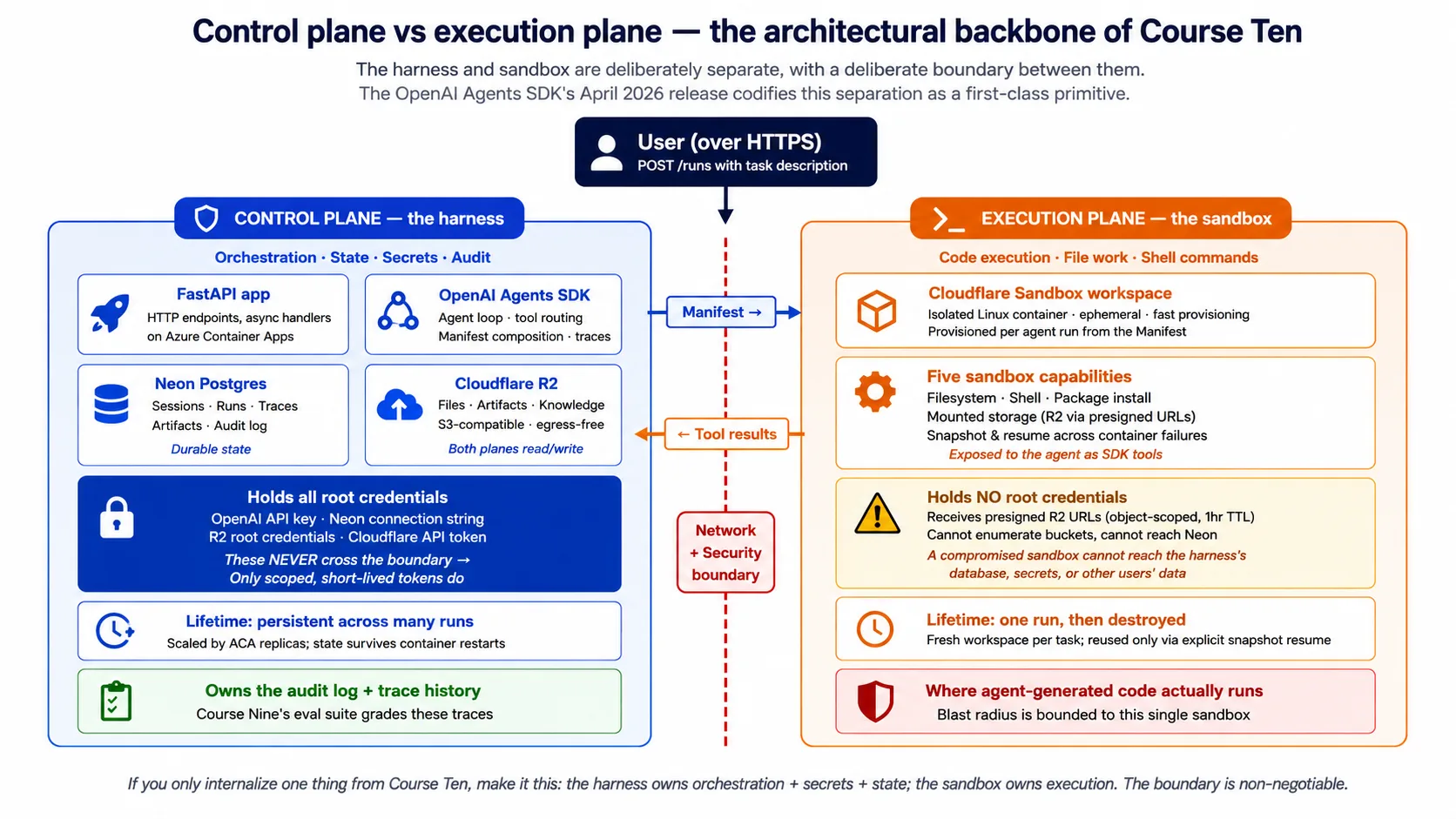
Here is the one idea the entire course reduces to. The harness is the control plane you own and keep running. The sandbox is the execution plane you create, use once, and throw away. The harness holds the keys, the state, and the audit log; the sandbox holds none of those and does the risky work. Every concept and every decision is an elaboration of that one split. If you internalize one sentence, make it that one.
🔤 Three terms this course leans on constantly. It is more infrastructure-heavy than the ones before it, and these three carry it:
- Harness. The agent's brain and controls: the code that runs the agent loop, picks which tool to call, holds the secrets, and keeps state across runs. It does not run the agent's generated code. In this course it is a FastAPI web app in the cloud.
- Sandbox. A separate, locked-down workspace where the agent's generated code actually runs. It reads files and runs shell commands, but has no access to the harness's secrets or database. Cheap to create, used once, thrown away.
- Manifest. A short description of what the sandbox needs: which files to mount, which storage to attach, which abilities (shell, filesystem) to turn on. You describe the workspace once, and the SDK runs it on any supported provider.
The full glossary below defines the rest (Azure Container Apps, Neon Postgres, and more).
🆕 What changed in April 2026, why this course exists now. OpenAI shipped a major Agents SDK update on April 15, 2026 that separates the agent harness from sandbox compute as a first-class part of the SDK. Before this release, teams deploying production agents had to stitch together model clients, container runtimes, credential isolation, state, and tool routing by hand. The April release turns the harness/sandbox split into a built-in primitive, not a pattern teams reinvent. That is what made this course teachable: a year earlier it would have been mostly speculative; now it is a recipe.
Source: OpenAI, "The next evolution of the Agents SDK," April 15, 2026.
Quick Win: boot the harness on your laptop in about 15 minutes
Before you touch the cloud, prove the harness runs on your own machine. The harness runs on your laptop before you touch the cloud. You will download the companion code, open it in your coding agent, and watch it boot and answer a health check. That is the whole win: the control plane, alive and reporting which pieces are wired up.
First, get the base: open the deploying-agents/ folder of the panaversity/agentfactory-manufacturing repo in your coding agent (Claude Code, OpenCode, or similar), or download the release zip and unzip it. The agent reads the AGENTS.md file at the root, which tells it how the project is built and how to boot it. Then paste the prompt below.
Paste this to your coding agent. Plan first; execute on approval.
Read AGENTS.md, then boot Maya's harness locally so I can see it run.
- Run the SDK probe at the end of AGENTS.md to confirm the installed
openai-agentsversion and that the core imports work.- Install dependencies (
make install) and copy.env.exampleto.env. Do not add any keys yet; the harness must boot without them.- Start the harness (
make run, which serves onhttp://localhost:8000).- In a second shell, request
GET /healthand show me the exact response.
Done when:
- Your coding agent reports the installed
openai-agentsversion (0.17.x). - The harness starts and stays running with no keys set.
GET /healthreturns exactly this:
{
  "status": "ok",
  "model": "gpt-5.4-mini",
  "backends": { "postgres": false, "sandbox": false, "r2": false }
}
That response is the harness telling you the truth: it is alive ("status": "ok"), it knows its model, and none of the optional backends are wired up yet (all false). Every later decision flips one of those flags to true. The harness boots with nothing but its own code, then you add one piece at a time.
Four learning tracks, pick yours
This course works for four different depths. Pick your track explicitly before the lab; the conceptual content is designed to work for all four, and the lab is designed for tracks 2-4.
| Track | Time commitment | What you complete | Who it's for |
|---|---|---|---|
| Reader (pure conceptual) | ~3-4 hours, no lab | The Quick Win, all 17 concepts, and the closing. No cloud accounts, no Docker, no Python setup. The architecture lands; the deployment is deferred. | Engineering leaders, platform architects, and ML platform owners deciding whether to commit team time to this deployment pattern. |
| Beginner | ~1-2 days (conceptual + local lab) | Reader track plus the SDK probe, the scaffold, and containerizing. The harness runs locally in Docker, talking to OpenAI and a local database. No cloud deployment yet. | Engineers new to cloud deployment of AI services. The goal is to internalize the harness/sandbox split and ship a containerized agent that runs end to end on a laptop. |
| Intermediate | ~3-5 days | Beginner track plus deploy to the cloud, wire durable state, wire file storage, and wire observability. The harness serves real users; the sandbox is still stubbed; the eval suite is deferred to Advanced. | Teams that want the harness deployed and observable, but are not yet wiring code execution or the full eval discipline. |
| Advanced | ~7-10 days | Intermediate track plus wire the sandbox, wire the eval suite, and the production checklist. The complete discipline: harness deployed, sandbox wired, observability live, eval suite gating CI and running nightly. | Production teams shipping the full discipline, the complete end-to-end deployment, observability, and quality-assurance path. |
Track-fork guidance. Leaders and architects deciding whether to invest should start with the Reader track: 3-4 hours, no accounts, no money, and by the end you know whether your team should commit to a higher one. Beginners need not reach Advanced on a first pass; teams typically graduate Reader to Beginner over a weekend, Beginner to Intermediate over a sprint, and Intermediate to Advanced over weeks. Standalone readers (not from the earlier courses) should default to Reader, using the lab's Simulated mode as the bridge.
Worked as a focused Advanced sprint (one engineer, 4-6 hours a day), the cadence below shows what each day produces. Day 5 is the natural shippable checkpoint: the harness is deployed and serving users, and Decisions 1-6 are done. Days 6-10 add the hardening (observability, the eval suite, the runbook) that is genuinely necessary for production but genuinely add-able after the harness is live.
| Day | Focus | Cumulative artifact |
|---|---|---|
| 1 | Concepts 1-4 + scaffold | Local FastAPI app with a stubbed /runs endpoint. |
| 2 | Containerize + deploy | Harness reachable on the public internet from your phone. |
| 3 | Wire Neon Postgres | Durable state that survives a container restart. |
| 4 | Wire Cloudflare R2 | File storage; the agent can read inputs and write outputs. |
| 5 | ⭐ Shippable checkpoint | A deployed harness real users can use. Stop here if MVP is your only goal. |
| 6 | Wire the sandbox | Code execution working; the agent runs code safely. |
| 7 | Wire observability | Navigate from an infrastructure alert to agent behavior fast. |
| 8-9 | Wire the eval suite | No agent regression ships without CI noticing; nightly behavior reports run. |
| 10 | Production checklist + handoff | A production-ready harness and a team that can operate it. |
Each track is internally complete: no lower-track deliverable depends on a higher one. The Reader track leaves you able to explain the split, the five components, and the cost; the build tracks leave you with the artifacts named in the table above, which the per-Decision "Done when" lines make concrete.
Vocabulary you'll meet in this course
Glossary, click to expand
- Harness. The agent's control plane: the code that runs the agent loop, holds secrets, and keeps state. In this course it is a FastAPI app in the cloud. It does not run the agent's generated code.
- Sandbox. The agent's execution plane: an isolated workspace where the agent's generated code runs, with no access to the harness's secrets or database.
- Control plane / execution plane. The principle that the agent's orchestration (secrets, database access, model keys) lives in a different security boundary from where the agent's generated code runs. Foundational to this course.
- Manifest. A short description of the sandbox workspace: file mounts, storage to attach, abilities to enable. Portable across supported sandbox providers.
- Container. A sealed bundle of your app plus everything it needs to run, so it runs the same on your laptop and in the cloud.
- FastAPI. A Python library for building web APIs. This course's choice for the harness's HTTP layer because it pairs naturally with the SDK's async Python client.
- Azure Container Apps (ACA). A managed cloud service that runs your container with autoscale, a public address, secrets, and revisions. This course's harness runtime.
- Neon Postgres. A serverless Postgres database with cheap branching. This course's durable state store.
- Cloudflare R2. S3-compatible object storage where reading your own files out is free. This course's file and artifact store.
- Presigned URL. A short-lived web link that lets the sandbox read or write one specific file in storage, without ever holding the storage password.
- Durable state. Memory that survives a restart: sessions, run history, and the audit log, kept in a database instead of in the container, which forgets everything when it stops.
- Observability. The tools that tell you what the running harness is doing, when something breaks, and how to find the cause.
- OpenTelemetry (OTel). An open standard for tracing a request as it moves across services.
- Phoenix. A tool that watches agent traces and turns bad ones into future tests.
- Eval. A test that measures the agent's behavior (was the answer right, the tool correct, the reasoning sound), not just whether the code ran.
- Blue/green. A way to ship a new version with no downtime: run the new version beside the old one, then shift traffic over.
- Scale-to-zero. When there is no traffic, the cloud runs zero copies of your app and you pay nothing; the first request after a quiet spell waits a few seconds for a copy to wake up.
- Connection pooling. A shared set of open database connections reused across requests, so the database does not fall over under thousands of connections at once.
Are you ready?
📦 Before anything else: the companion download. The companion zip is the on-ramp for everyone, especially standalone readers who have not done the earlier courses.
Download the release zip and unzip it (or clone
panaversity/agentfactory-manufacturingand open itsdeploying-agents/folder). It contains a booted scaffold of the harness (FastAPI plus the SDK plus stubbed clients), theAGENTS.mdbrief your coding agent reads, aschema.sqlfor the five database tables, aDockerfile, an Azure deploy script, and aMakefilefor the common commands. The stub agent inside (Maya's Tier-1 Support agent) is what makes the lab work even if you have not built Maya yourself, so the Simulated track has something real to point at.Open the folder in your coding agent before reading further if you intend to follow any track beyond Reader. Read-only browsing is fine for the Reader track.
- You've downloaded the companion zip (see callout above). Skip this if you are on the Reader track and do not plan to run anything.
- You're comfortable on the command line. You can install packages, run a few commands, and move around a filesystem. If you have never used a terminal, the Reader track is the right entry point.
- You can read Python code. The harness is in Python; you will see
async def,await, decorators, and type hints. You do not need to be an expert; reading it is enough.- You have an OpenAI API key with Agents SDK access (Beginner track and up). This is the model account, not just the chat account. Check platform.openai.com.
- You have an Azure account (Intermediate track and up). The lab deploys to Azure Container Apps; free credits cover the lab. Check portal.azure.com.
- You have a Neon account (Intermediate track and up). The free tier is enough. Check console.neon.com.
- You have a Cloudflare account with R2 enabled (Intermediate track and up). The R2 free tier is enough for the lab. The Cloudflare sandbox needs a paid Workers plan, so the lab uses E2B's free tier as the realistic free path for code execution.
If you are missing the cloud accounts, the Reader track is genuinely the right starting point: read first, sign up later. If you are missing the earlier courses, the companion zip's stub agent is your bridge, so you can follow the lab without having built Maya yourself.
Rough edges to know about up front
- The code here is traceable to a booted companion. The SDK code in this course matches the harness in the download, which was installed and booted against the real
openai-agentspackage before this course shipped. This is not "illustrative, untested" code.- The SDK moves fast. The April 2026 release is the first one that makes this pattern teachable, and the harness/sandbox APIs will keep evolving. So the lab's first step is a probe Decision: your coding agent installs the SDK, prints the installed version, fetches the live docs, and reconciles the companion brief against them. When the brief and the live docs disagree, the live docs win.
- Python only. The April 2026 release ships the harness and sandbox features in Python only. TypeScript support is planned but undated. If your app is in TypeScript, run the Python harness as a separate service your TypeScript app calls over HTTP.
- One cloud, one sandbox, one database, one storage provider. This course commits to one specific stack so it can teach a complete path. The principles transfer to other clouds in obvious ways; the course does not survey the substitutions, though Concept 9 and Concept 15 name the main ones.
- Cost is real. A fully deployed harness costs roughly a few tens of dollars a month for low-traffic personal use, up into the hundreds for moderate production traffic. The Reader and Beginner tracks cost nothing; the cloud tracks have real bills. Concept 13 has the breakdown. That breakdown covers infrastructure; for the model inference that usually dominates it, see Token Economics.
- No multi-region. This course deploys to one region. Multi-region active-active adds operational complexity that warrants its own treatment; Concept 14 names this honestly.
The shape of what you're building
This course introduces 17 concepts and walks through 9 deployment decisions. Before any of that, here is the whole architecture in one picture. Refer back to it whenever a concept or decision feels abstract.
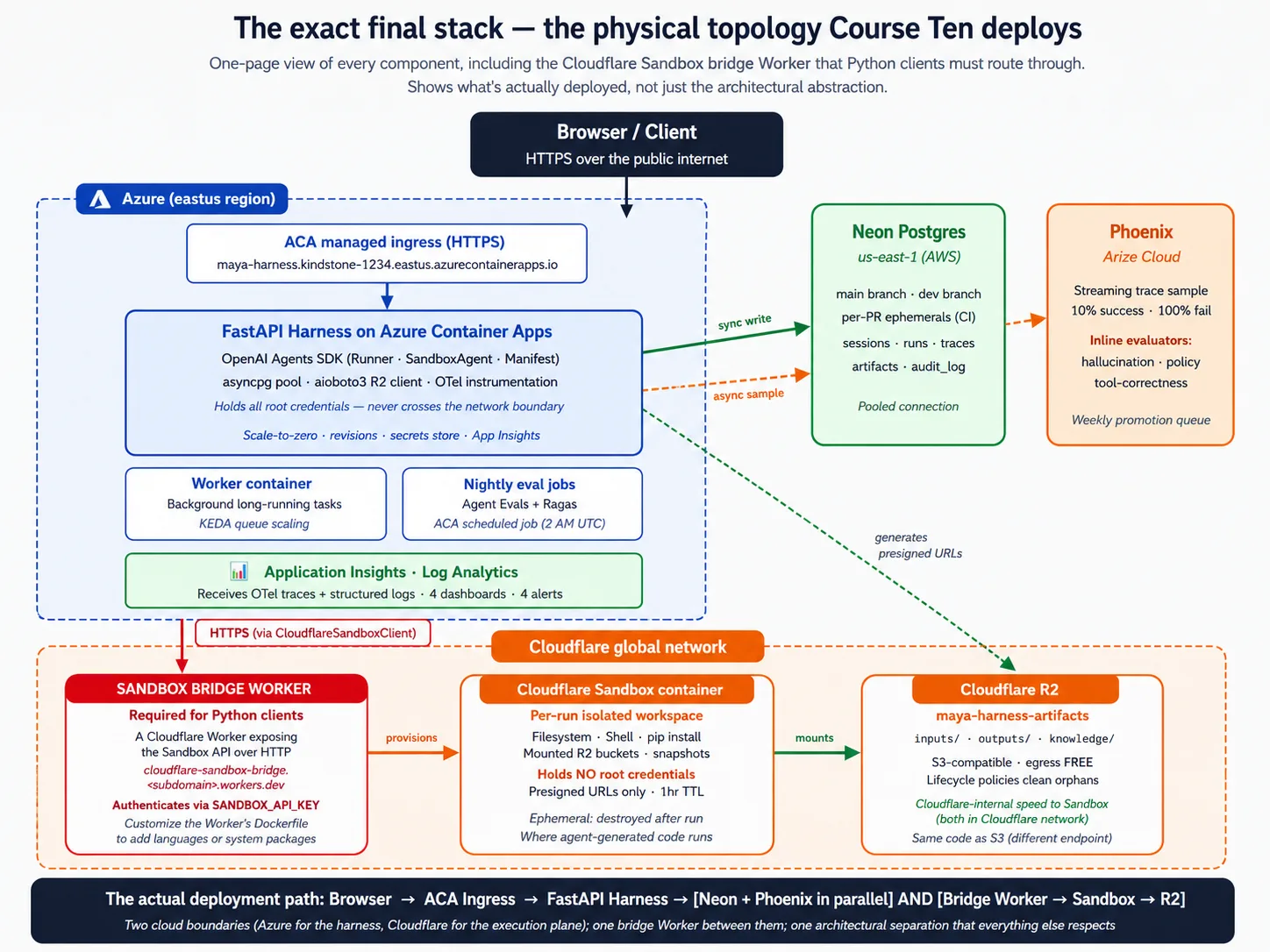
Stack primer: what each component actually is
Skip this section if you have shipped production web services before. Read it if the earlier courses are the most infrastructure you have done so far. This course depends on background most beginners have not built yet, and the lab will feel like incantations without it. Four short pieces: Docker, FastAPI, Neon, and Cloudflare R2. The goal is the minimum mental model to follow the lab, not deep mastery.
Stack primer 1: Docker and containers
A container is a sealed bundle of your app plus everything it needs to run: your code, its Python packages, the system libraries, even the operating-system pieces it depends on. You build the bundle once, then run it anywhere. The same bundle that runs on your laptop runs in the cloud unchanged.
The problem it solves is the oldest complaint in software: "it works on my machine." A Python script that runs on your laptop with your exact packages probably will not run on a colleague's laptop or a cloud server without a lot of fiddling. A container collapses that fiddling: build the image once, run it anywhere a container engine runs.
The vocabulary you will meet in the lab:
- A Dockerfile is the recipe for building the bundle: a plain text file that says "start from this base, copy these files in, run these commands."
- A base image is the starting point, usually a small Linux system with a language pre-installed. The harness starts from
python:3.12-slim. - A multi-stage build uses one image to build the app (with compilers and tools) and a different, smaller image to run it (with only the result). The runtime image stays small because the build tools do not ship in it.
- A registry is where built images are stored and shared. The deploy flow is: build the image, push it to a registry, the cloud pulls it and runs it.
The minimum mental model: think of a container as a snapshot of a working machine with your app installed and ready. Building the image takes the snapshot; running it boots an isolated copy. When the copy shuts down, everything inside it disappears. That is exactly why durable state needs an outside database and durable files need outside storage. The container is throwaway; the data is not.
Stack primer 2: FastAPI
FastAPI is a Python library for building web APIs: programs that listen for requests over a network and respond with data, usually JSON. It is "Fast" because it uses Python's async features for concurrency, and "API" because it is built for the request-and-response pattern, not for rendering web pages.
The problem it solves: your agent runs on a server, but real users (or other services) need to reach it from somewhere else, over the network. FastAPI is what turns your Python code into something the network can talk to.
The vocabulary you will meet in the lab:
- An endpoint is a specific path your API handles, like
POST /runsto start a task orGET /healthto check the harness is alive. - A route handler is the Python function that runs when an endpoint is called. You mark it with a decorator, like
@app.post("/runs"). async defandawaitare Python's keywords for code that waits. The harness uses them because most of its work is waiting: on the model, on the database, on the sandbox. Async code lets one process handle hundreds of waiting requests at once.- Pydantic models are Python classes that describe the shape of request and response data. FastAPI uses them to check incoming requests automatically and reject malformed ones before your code runs.
- Uvicorn is the program that actually runs a FastAPI app and connects the network to your handlers. You start it with a command like
uvicorn maya_harness.main:app.
The minimum mental model: a FastAPI app is a Python file that creates an app object and decorates functions as endpoints. Each function receives checked data, does its work (often awaiting other async operations), and returns data that FastAPI turns into JSON. Uvicorn is the server in front of it.
Stack primer 3: Neon Postgres
A database stores data on disk so it survives restarts, supports many readers and writers at once, and lets you query it with a language called SQL. Postgres is a specific open-source database, one of the most widely used in the world. Neon runs Postgres for you as a service, with two twists: it is serverless (it scales up and down on its own) and it supports branching (you can make a copy of your database that shares storage with the parent until you change it).
The problem it solves: your harness needs to remember things across requests and container restarts. Conversation state, run history, traces, the audit log. The container's local disk disappears every restart, so the harness needs to keep that data somewhere it survives. Neon specifically, because its scale-up and scale-down behavior matches the harness's: when the harness is idle, Neon can scale down too, and you stop paying.
The vocabulary you will meet in the lab:
- A table is a named collection of structured records, like a spreadsheet with strict types per column. The harness has five tables: sessions, runs, traces, artifacts, and an audit log.
- A schema is the definition of all your tables and their columns.
- A primary key is the column that uniquely identifies each row; a foreign key is a column that points at another table's primary key, which is what makes the data relational.
- A migration is a versioned SQL script that changes the schema, committed to the repo so every change is tracked.
- Connection pooling is a shared set of open connections reused across requests. Without it, every request opens a new connection, and Postgres has a limit. Neon provides a pooled endpoint that does this multiplexing for you.
The minimum mental model: Postgres stores data in tables with strict shapes, and you query it with SQL. The harness talks to it through the asyncpg Python library. Neon hosts the database and adds serverless scaling and branching on top.
Stack primer 4: Cloudflare R2
Object storage is a service for storing files on the internet. You give it a name (a "key") and some bytes, and it stores them; later you ask for the bytes by name and get them back. The first such service was AWS S3, and its API became a de facto standard that many providers implement. Cloudflare R2 is Cloudflare's object storage. It implements the S3 API, with one twist: reading your own files out is free. Reading data out of S3 costs about nine cents a gigabyte; out of R2 it costs nothing.
The problem it solves: your agent reads files (uploaded documents, knowledge content) and writes files (generated reports, artifacts). These need to live somewhere both the harness and the sandbox can reach, and they are too big or too numerous for a database. A database is not built for large files; a container's disk does not survive restarts; object storage is the right shape for files.
The vocabulary you will meet in the lab:
- A bucket is a named container for files, like a top-level folder. The harness's bucket holds the agent's artifacts.
- An object is one stored file, with a key (its path in the bucket) and a value (the bytes).
- A prefix is a portion of a key that groups related files, like
inputs/oroutputs/. - S3-compatible means R2 speaks the same API S3 invented, so any Python library that talks to S3 talks to R2 by changing one setting: the endpoint URL.
- A presigned URL is a short-lived link that grants access to one specific object. The harness holds the root credentials; when the sandbox needs one file, the harness hands it a presigned URL with a short expiry, and the sandbox can reach only that file.
- A lifecycle policy is a rule that deletes objects older than a set age, so storage does not become a write-only graveyard.
The minimum mental model: R2 is a place the harness puts files and reads files, reached through the S3 API. The harness holds the root credentials (read and write everything); the sandbox gets only presigned URLs (one file, short time).
What you don't need. You do not need Kubernetes, infrastructure-as-code, a service mesh, or a message broker to complete this course. The managed services above handle the operational machinery. You also do not need deep SQL fluency; recognizing what the lab's code is doing is enough.
Part 1: The deployment problem
Three concepts establish why this course exists and what "the deployment problem" actually is. Beginners benefit from grounding here; advanced readers can skim to Part 2.
Concept 1: "Works on my machine" is not deployment
You have an agent defined in Python, say Maya's Tier-1 Support agent: it calls tools, hands off to specialists, respects its limits, and passes the eval suite. You run it from your laptop and it works.
"Works on your laptop" means something specific. The agent runs as a Python process you started by hand; it reads its API keys from a file in the project folder; it writes its state to a local file beside them; it runs code by importing libraries into its own process. The model is called over the internet, but everything else lives on your machine.
Production breaks every one of those assumptions, and each break is a property a laptop script does not have:
- Real users reach the agent over the public internet. Not just you, from your laptop.
- Many users hit the agent at once. A single Python script handles one at a time.
- The agent's state survives the host restarting. A local file in a temp folder does not.
- The agent's generated code runs somewhere it cannot harm your data. Running it in your own process, next to your database credentials, is a serious security mistake.
- The agent's secrets are out of reach of the code the agent generates. A key file in the working directory is not.
- Each run is observable, auditable, and recoverable. A process that crashes is none of those.
How many of those six properties can you add to a laptop script with minor changes, a day or two of work? The honest answer is one or zero. Adding any one of them in a way that survives production is at least a week of focused infrastructure work; adding all six is the entire body of work this course teaches. Production deployment is not a thin wrapper around "works on my laptop." It is a different architecture.
The temptation, especially for teams new to deploying AI services, is to skip this realization. "We'll just run the script on a server." Two months later the team has a server that occasionally crashes, an agent that occasionally runs user-influenced code with full access to the production database, state that vanishes on every reboot, and no record of what the agent has done. That is the predictable result of treating production as a place to put the script rather than a different architecture.
The deployment problem is not "where do we run the script?" It is "how do we re-architect the agent so its harness has these six production properties while its execution stays safe?" This course teaches one complete answer.
Concept 2: The harness/sandbox split, control plane vs execution plane
The single most important idea in this course is the split between the harness (control plane) and the sandbox (execution plane). Every later concept and decision rests on it.
The harness is the agent's brain. It receives requests from users over the network. It runs the agent loop: calling the model, deciding which tool to call next, handling handoffs to specialist agents, applying guardrails. It keeps durable state across many runs: conversation history, run history, the audit log. It holds the secrets: the model key, the database credentials, the storage credentials. And it returns results to users.
The sandbox is the agent's hands. It receives a workspace description (the Manifest) from the harness. It provisions an isolated workspace matching that description. It runs shell commands, file reads and writes, and code as the agent requests. It returns results to the harness. And it has no access to the harness's secrets, database, or production systems beyond what the Manifest explicitly mounts.
The boundary between them is a network and security boundary. The harness talks to the sandbox over the network using sandbox credentials; it does not share its own secrets with the sandbox. The sandbox cannot read the harness's environment, database, or filesystem. This is the production discipline the April 2026 SDK release puts into the SDK itself.
Why does this split matter? Four reasons.
The security reason: an agent generates code. The code might be wrong, or subtly incorrect in ways that have side effects, or in an adversarial setting, malicious. You do not want that code running in the same process that holds your database credentials. The split puts a network and OS boundary between the generated code and the harness's secrets. If the agent generates a request that would delete files, the sandbox is the only thing harmed, and the sandbox is throwaway.
The durability reason: sandboxes are meant to be created and destroyed often. The harness has to survive a sandbox dying. A single task might provision a sandbox, run for ten minutes, lose the sandbox to a hiccup, restore from a checkpoint in a new one, and finish. The harness orchestrates that. If the harness lived inside the sandbox, the sandbox dying would lose everything.
The scalability reason: one harness coordinating many sandboxes scales far better than one harness-plus-sandbox lump. The harness's needs are modest (handle requests, call the model, talk to the database); the sandbox's needs are spiky (compile code, run tests, process files). Splitting them lets each scale on its own.
The observability reason: the harness owns the record. What the agent decided, what tools it called, what trace it produced, all of it lives with the harness. The sandbox is the execution; the harness is the audit log. When something goes wrong, the harness's record is what you read.
Two anti-patterns this course avoids:
- Running the harness inside the sandbox. Convenient for a prototype, wrong for production. Sandboxes are throwaway; the harness needs to persist. Sandboxes cannot be trusted with secrets; the harness must hold them.
- Running agent-generated code inside the harness. The original sin of AI deployment. The harness holds the database credentials, the model key, and access to your users' data. You cannot run agent-generated code with that access surface. Eventually it goes wrong, and when it does, the damage is unbounded.
Concept 3: What the SDK needs from cloud infrastructure, five surfaces
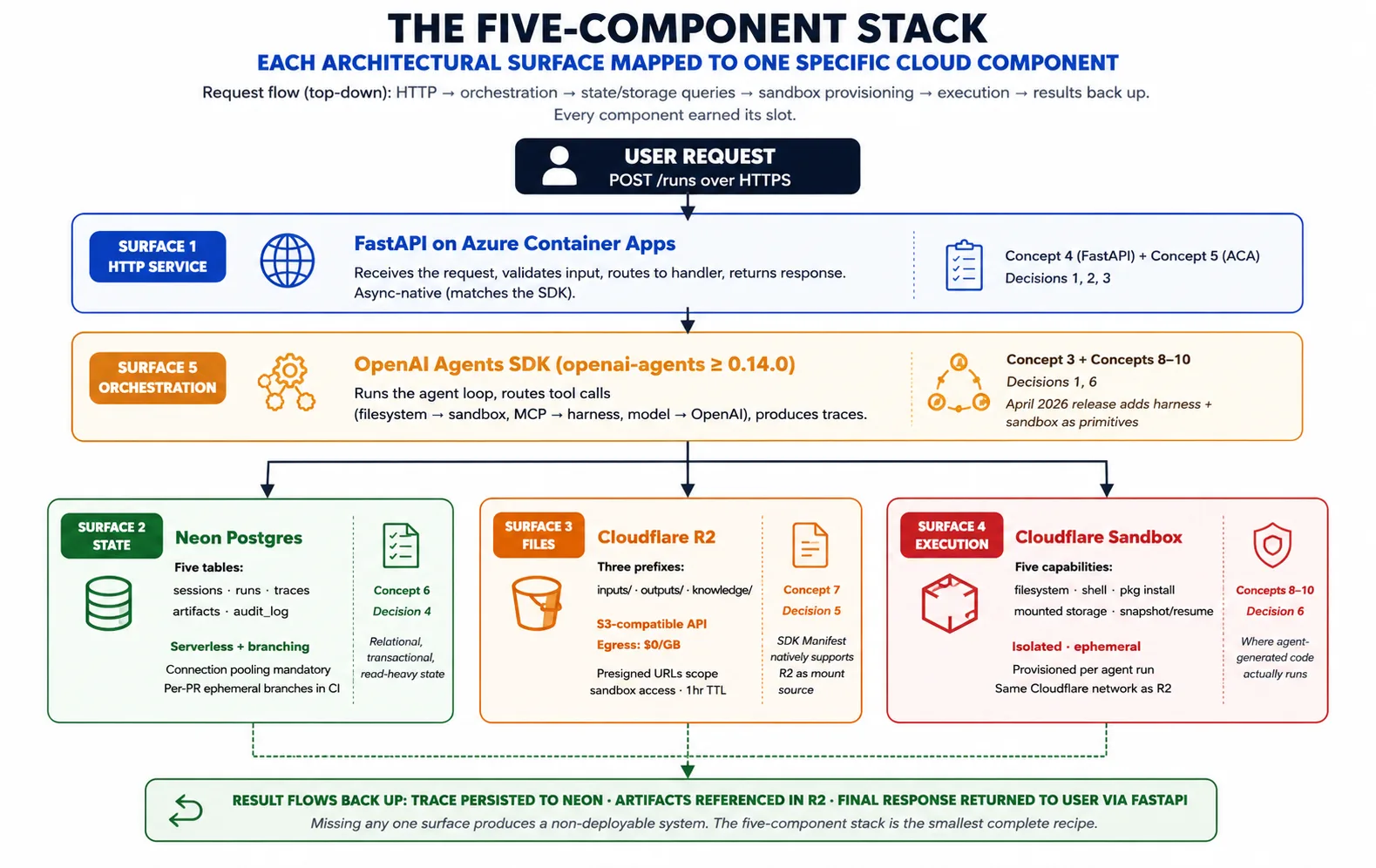
Given the harness/sandbox pattern, what does the OpenAI Agents SDK actually need from cloud infrastructure to realize it? Five surfaces, and the five-component stack maps one component to each.
Surface 1: a long-running HTTP service to host the harness. The harness is a Python process that has to accept requests from users, stay running indefinitely (a task can take seconds to hours), scale out when traffic rises and back when it falls, and survive its host failing. FastAPI on Azure Container Apps provides this. Concept 4 covers FastAPI; Concept 5 covers Azure Container Apps.
Surface 2: durable state across runs. The harness keeps sessions, runs, traces, approvals, and an audit log. Neon Postgres provides this: Postgres because it is the best-understood transactional database, Neon because its serverless scaling and branching match the harness's deployment patterns. Concept 6 covers Neon.
Surface 3: file and artifact storage both planes can reach. Agents produce files (reports, code, exports) and consume files (uploads, datasets, knowledge content). These need to live somewhere both the harness and the sandbox can reach. Cloudflare R2 provides this: an S3-compatible API, free reads of your own files out, and native support as a Manifest mount source in the April 2026 SDK. Concept 7 covers R2.
Surface 4: isolated execution for agent-generated code. When the agent runs a shell command, installs a package, or executes code, that work needs a home that is isolated from the harness's secrets, created on demand, and able to read inputs from storage and write outputs back. A code-execution sandbox provides this. Concepts 8-10 cover the sandbox layer in depth.
Surface 5: the orchestration that ties surfaces 1-4 together. This is the SDK itself. It runs the agent loop, routes tool calls (filesystem and shell to the sandbox, model calls to OpenAI), manages the Manifest, and produces traces. The harness imports the SDK and uses its primitives; it does not reinvent them.
The composition: a request arrives at FastAPI on Azure Container Apps. The harness loads the agent and prior state from Neon. It composes a Manifest describing the workspace the task needs. It asks the sandbox provider to provision that workspace. The SDK runs the agent loop, sending tool calls to the sandbox and recording the trace. Artifacts go to R2; the trace goes to Neon. The result returns to the user. That composition is the whole course; every concept and decision elaborates a piece of it.
🚫 Not on Python? The harness and sandbox features are Python-only as of the April 2026 release; TypeScript support is planned but undated. If your app is in TypeScript, run the Python harness as a separate service and have your TypeScript app call its endpoints over HTTP. The harness this course builds is exactly that service.
Part 2: The five-component stack
Part 1 established the pattern; Part 2 walks through the harness side of the stack (FastAPI, Azure Container Apps, Neon, R2) and why each component earned its slot. The fifth component, the sandbox, gets its own Part 3.
Concept 4: FastAPI as the harness web layer
The harness needs to be a long-running HTTP service, and several Python frameworks can host one: Flask, Django, FastAPI, Starlette. This course's choice is FastAPI, for reasons specific enough to name.
The async story: the OpenAI Agents SDK is built around Python's asyncio. Calls to the model, to tools, and to the sandbox are all await calls. FastAPI is async-native, so you write async def handlers that await the SDK directly, with no thread-pool workarounds. A sync-native framework would mean spinning up an event loop per request or running the SDK in a thread pool: both work, both add friction and lose concurrency. Use the framework whose concurrency model matches your dependencies.
The schema story: FastAPI generates an OpenAPI schema from your handlers' type hints. That pays off three ways here. The eval suite can hit the harness's endpoints with checked requests because the schema is machine-readable. Typed client libraries can be generated for any language, including the TypeScript app from the last sidebar. And the schema documents the API for your team and your future self, with no separate doc-writing effort.
The Pydantic story: FastAPI uses Pydantic to check request and response data, and the SDK uses Pydantic internally too. Validation happens once, at the boundary, with the same library the SDK already uses, where other frameworks need a separate validation layer. And as of May 2026, FastAPI is the dominant Python framework for AI services, so the tutorials and examples for this workload assume it.
What FastAPI is not. It is not a general web framework; if you need template-rendered HTML or a Django-style admin, it is the wrong choice, because the harness is an API server, not a web app. It is also not a queue: a task that runs longer than a request can stay open gets queued, and the client checks back rather than holding the connection open. The lab sets up that pattern around the harness's POST /runs endpoint, a short async def handler that loads the session, runs the agent, persists the run, and returns the reply, traceable to the booted harness in the companion download.
Concept 5: Azure Container Apps as the harness runtime
The harness is a containerized FastAPI service that needs to run continuously, scale with traffic, hold secrets safely, and survive its host failing. This course's choice is Azure Container Apps (ACA), which Microsoft positions for exactly this workload.
What it is: a managed cloud service. You give it a container image and a configuration; it runs the container, gives it a public address, handles autoscale, stores secrets, and tracks revisions. You do not manage servers, run Kubernetes by hand, or write infrastructure code for the underlying compute. You declare what you want; ACA makes it so.
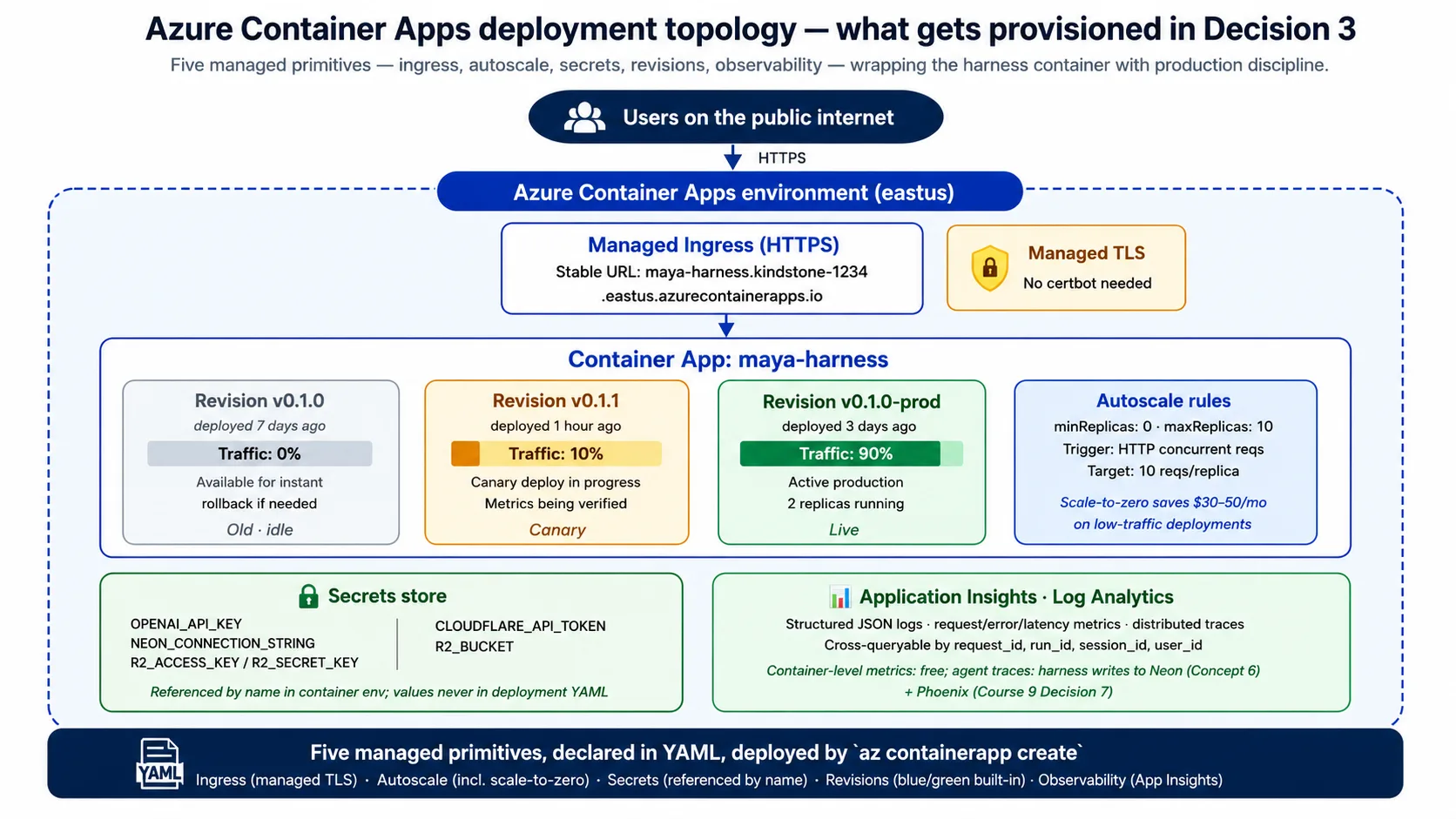
The five capabilities the harness needs from it:
- A public address. ACA gives every app a stable HTTPS address with managed certificates. No web-server config, no certificate setup, no DNS gymnastics.
- Autoscale. ACA scales the number of running copies based on rules you set, usually on the number of requests in flight. Scale-to-zero is the cost lever: with no traffic, ACA runs zero copies and you pay nothing; the first request after a quiet spell waits a few seconds for a copy to wake up.
- Secrets. ACA stores secrets and lets you reference them by name in environment variables; the actual values never appear in your configuration or image. This beats a key file on disk by a wide margin.
- Revisions. Every deploy creates an immutable revision, and ACA can split traffic across revisions in any percentage. That makes blue/green deploys and rollback built-in: rollback is a traffic change, not a redeploy.
- Observability. ACA feeds logs, metrics, and traces into Azure's monitoring tools, so you get request rate, error rate, and latency for free; the harness adds the agent's own traces on top.
Why ACA specifically, not Cloud Run or Fly.io or raw Kubernetes? Three honest reasons:
- Microsoft positions ACA for this exact profile: containerized APIs, background jobs, and microservices.
- Its revisions and traffic splitting are first-class, where many services treat blue/green as a bolt-on.
- Its scale-to-zero is honest: it really runs zero copies and bills you nothing, where some "managed" services keep one copy warm and bill for it.
Other clouds have clean equivalents (Google Cloud Run, AWS App Runner); the architectural shape is identical, and Concepts 9 and 15 cover the substitutions.
When ACA is the wrong choice: if you need more than roughly 25 copies at peak, its per-app limits get awkward and full Kubernetes is the better fit; if you need active-active multi-region, its multi-region story is less mature (Concept 14 names this). The container the harness deploys is small, built from python:3.12-slim with a multi-stage build, started by uvicorn, and checked with the same GET /health endpoint you hit in the Quick Win.
The lab's Decision 3 produces a short ACA configuration that declares the public address, the secrets referenced by name, the resource size, and the scale rule (from zero to a handful of copies on request volume). You will read it and recognize each line from this concept.
Concept 6: Neon Postgres for durable state
The harness needs to remember things across runs: conversation history, run records, traces, the audit log. All of it has to survive the container restarting, scaling, or being replaced. This course's choice is Neon Postgres.
Why Postgres at all, not Redis or a document store? Three properties of the harness's state point to a relational, transactional database:
- Relational in shape. Sessions have many runs; runs have traces and artifacts. Foreign keys and joins map cleanly to it.
- Transactional integrity. "Mark this run complete, insert its trace, and update the session's timestamp" should all happen or none happen, which Postgres transactions give you for free.
- Relational reads. "Give me the last ten runs for this session, with their traces" is a textbook SQL query.
A cache like Redis is faster for key lookups but is the wrong shape for the system of record.
Why Neon specifically, not RDS or a database on a VM? Three reasons:
- Serverless. Neon scales its compute up and down on its own, to near-zero when the harness is idle, matching the rest of the stack's cost model. A traditional managed instance bills you whether or not you query it.
- Branching. Neon lets you branch your database, a copy that shares storage with the parent until you change it, giving you per-developer copies and per-PR throwaway test databases in seconds.
- Real Postgres, not an approximation. The same SQL and the same client libraries, so moving on or off Neon is a connection-string change.
The harness's schema is five tables: sessions (a user's ongoing context), runs (each agent task), traces (the full SDK trace for a run), artifacts (pointers to files in R2), and an audit log (an immutable record of what happened, for the eval suite and for compliance). The lab's Decision 4 creates this schema from a schema.sql file in the companion download.
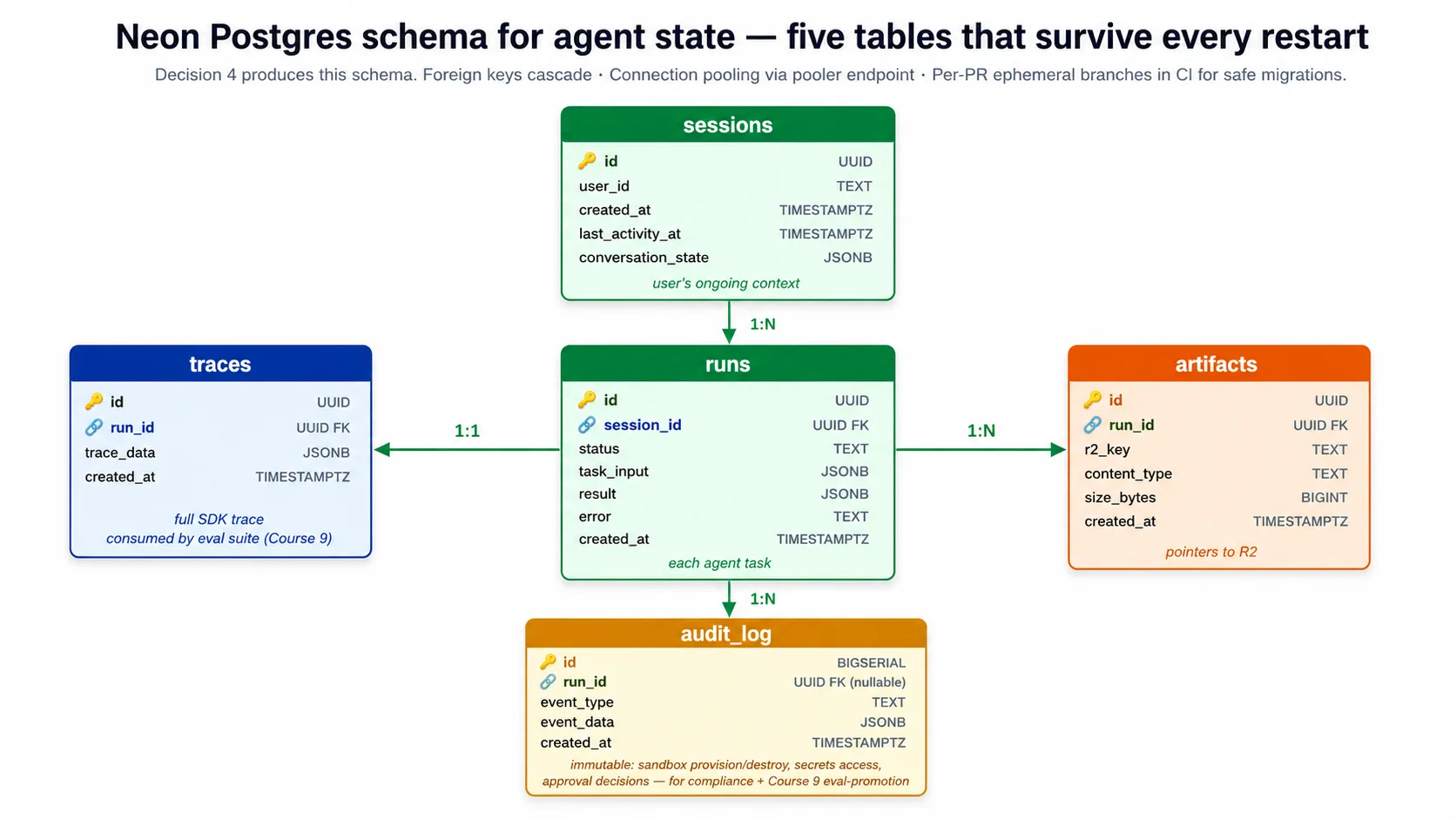
⚠️ The Neon footgun the lab handles for you. The pooled endpoint silently drops
search_pathserver settings, so the harness schema-qualifies every statement (public.runs,public.sessions) and you run the schema against the direct, non-pooled endpoint. One thing that looks like a second footgun but is not: Neon's copy-paste string includeschannel_binding=require(MITM protection for libpq clients likepsql).asyncpgis not libpq-based, so it ignores that parameter and connects fine with it left in. The companion trims it from the DSN for tidiness, but it is not a failure you have to prevent.
Connection pooling is not optional. The harness scales to many copies, each opening connections, and Postgres falls over above a few hundred at once. Neon provides a pooled endpoint that multiplexes thousands of harness connections into a small number of real Postgres connections. The harness connects to the pooled endpoint for normal work, and to the direct endpoint only for schema changes.
Concept 7: Cloudflare R2 for files and artifacts
The harness and the sandbox both need files: input documents the agent reads, output artifacts it produces, knowledge content it retrieves. This course's choice is Cloudflare R2, for three specific reasons.
Why object storage at all, not the database or the container's disk? Files are the wrong shape for a relational database: Postgres can hold a large file in a column, but you will regret it as backups balloon and the connection becomes the bottleneck. Use the database for relational state and store pointers to files; the file bytes live in object storage. Files are also wrong for a container's local disk, which disappears on restart and cannot easily be shared across copies. Object storage is the right shape when files need to outlive any one container and be reachable by many at once.
Why R2 specifically, not S3 or GCS? The egress story is the main reason. Reading your own files out of R2 is free. S3, Google Cloud Storage, and Azure Blob all charge for data transferred out, typically around five to twelve cents a gigabyte. For an agent that moves files between the harness and the sandbox repeatedly, that adds up fast. A harness moving a few terabytes a month would pay hundreds of dollars in egress on S3 and zero on R2; storage and request costs are roughly comparable between them, so the egress line simply disappears. For a low-traffic harness the difference is small, but for real volume, free egress is the difference between viable and unviable cloud costs.
R2 also speaks the S3 API, so any Python S3 library talks to it by changing one setting, the endpoint URL, with no client rewrite if you ever migrate. And the April 2026 SDK release lists R2 as a supported Manifest mount source alongside S3, GCS, and Azure Blob, so the harness declares R2 buckets in the Manifest and the sandbox mounts them with no custom bridging code.
The harness uses three prefixes in its bucket: inputs/ for files users upload, outputs/ for files the agent produces, and knowledge/ for long-lived knowledge content. The lab's Decision 5 sets this up.
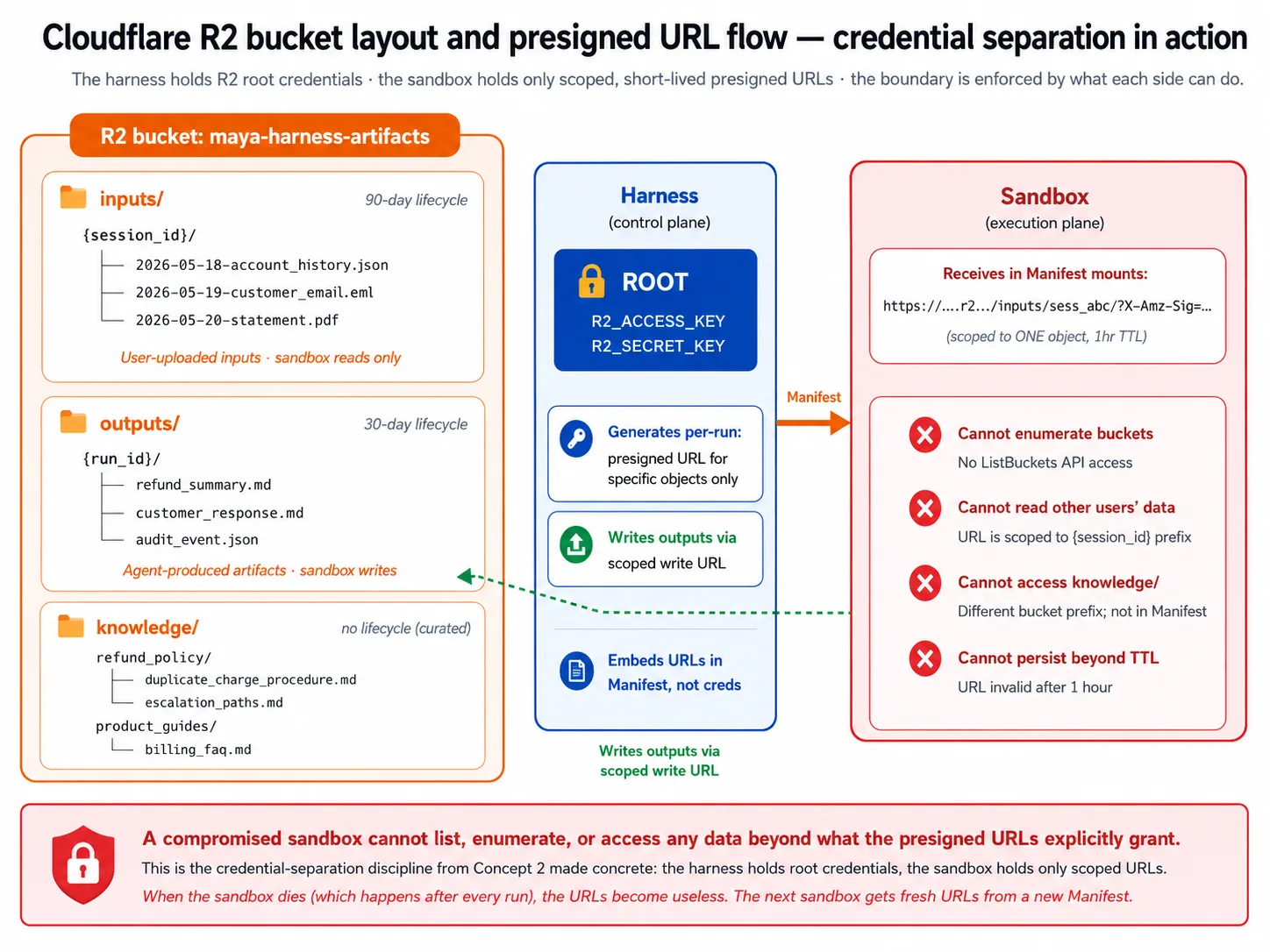
Presigned URLs are how the sandbox gets access without the root credentials. The harness holds the root credentials that can read or write anything. It does not share them with the sandbox. Instead, it mints a presigned URL for one specific object, with a short expiry, and hands that to the sandbox. The sandbox can reach only what the URL allows; when it dies, the URL is useless, and the next sandbox gets fresh ones. This is the credential separation from Concept 2 made concrete: a compromised sandbox cannot list buckets or reach another user's data.
Lifecycle policies keep storage from becoming a write-only graveyard: the lab sets a 30-day cleanup on outputs/, and none on the curated knowledge/.
Part 3: The execution plane
Part 2 covered the harness side: orchestration, state, and storage. Part 3 covers the execution side, the sandbox where the agent's generated code actually runs. Three concepts: what a sandbox provides, which provider to choose, and how the handoff between harness and sandbox works.
Concept 8: Sandbox execution capabilities
The sandbox is the execution plane: where the agent's code runs without access to the harness's secrets. So what does an agent actually need from one?
Five capabilities:
- Filesystem. The agent reads and writes files: inputs, intermediate artifacts, outputs. The sandbox provides a Unix-like filesystem with read, write, edit, and list operations exposed as tools. Without it, the agent cannot do file work.
- Shell. The agent runs commands: a test runner, a package install, a clone, a custom tool. The sandbox provides a shell where these run. Without it, the agent is limited to whatever the harness explicitly wraps.
- Package install. The agent installs packages on demand: "install this library, then read the file the user uploaded, then summarize it." Without it, the agent's capability is locked to whatever the base image shipped with.
- Mounted storage. The agent needs files too big for the local disk: uploads, knowledge content, datasets. The sandbox mounts external storage (R2, S3, GCS) as normal paths, and the Manifest declares which to mount where. Without it, the agent can only touch files small enough to ship in the image.
- Snapshot and resume. Sandboxes are throwaway and can fail mid-run. The sandbox can checkpoint its state and resume from that checkpoint in a fresh workspace, which is how the SDK makes long tasks survive a workspace dying. Without it, any task longer than a sandbox's lifetime is a failure waiting to happen.
Three properties separate a production-grade sandbox from a prototype:
- Isolation. The sandbox cannot reach the harness's network, filesystem, or other sandboxes, enforced by the provider's infrastructure rather than by trust, so a compromised sandbox harms only itself.
- Ephemerality. Each task gets a fresh sandbox, destroyed when the task ends, so even a compromised one does not carry into the next task.
- Fast provisioning. The sandbox starts in a few seconds. A thirty-second start would turn every task into a thirty-second-plus operation and make chat-style agents feel slow.
What a sandbox is not. It is not a long-lived VM you keep running across tasks; that reinvents the problem, accumulating state and entanglement with the harness's secrets. It is not a serverless function, which runs one function and returns; a sandbox is a workspace that persists across many tool calls within one run, holds state in its filesystem during the run, and gives shell access. And it is not Kubernetes; a sandbox provider abstracts container orchestration entirely, so you get isolation and ephemerality without running a cluster.
Concept 9: Choosing a sandbox provider
With the capabilities named, which provider runs them? This course is honest about the choice and about the realistic free path.
Start with the tradeoff that decides it for most readers. Cloudflare's sandbox needs a paid Workers plan, and it also needs a small bridge Worker between your Python harness and the sandbox. E2B has a free Hobby tier, a native client in the SDK, and no bridge to deploy. So if you want to complete the lab without spending money, E2B is the realistic free path; if you are already on a paid Cloudflare plan and using R2, the Cloudflare sandbox is worth its proximity benefit. The lab is written so either works, and the companion code defaults to E2B because it is the one you can actually test for free.
Why is Cloudflare's sandbox the course's named primary, when you do choose it? Proximity to R2. It runs in Cloudflare's network, and so does R2, so mounting R2 buckets happens at Cloudflare-internal speeds rather than over the public internet, and no other provider has that. It also has first-class SDK support and a cost structure that does not bill idle time, which matters because an agent waits on the model far more than it executes.
The catch is the paid plan and the bridge Worker. Non-Worker clients like a Python harness cannot create Cloudflare sandboxes directly, so a small separately-deployed Worker translates the harness's calls into sandbox operations. Other providers, including E2B, expose a Python API directly and need no bridge.
The honest alternatives, each with a use case where it wins:
- E2B. The realistic free-tier path and a polished general-purpose provider. It works equally well with S3, GCS, or Azure Blob, and the SDK has a native client for it. Use E2B when you are storage-agnostic, not on R2, or want to complete the lab for free.
- Modal. Strong on Python ML workloads; trivial to run agent tasks alongside GPU-backed inference. Use Modal if your agent includes custom model serving.
- Daytona. Runs in your own cloud account. Use it for regulated industries where data residency requires the sandbox to live in your specific cloud, at the cost of higher operational complexity.
- Vercel. Use it if your team is already deep in the Vercel ecosystem; less mature for non-JavaScript workloads.
- Bring-your-own. The SDK supports implementing the sandbox client against your own container infrastructure. Worth it only when your security team requires sandboxes in your cloud, period; operational complexity goes up a lot.
The substitution between providers is mostly mechanical. The Manifest is provider-agnostic, so you declare the same workspace shape regardless. The provider client class changes (a Cloudflare client for one, an E2B client for another). Storage mounting differs by network proximity (R2 with Cloudflare's sandbox is fast; R2 with E2B goes over the public internet, which still works). And the credential pattern is identical: the harness holds the provider credentials and hands the sandbox only short-lived access.
The recommendation, in one line: use the Cloudflare sandbox if you are on a paid Workers plan and using R2; use E2B otherwise, and especially if you want the free path; pick one and ship rather than surveying all of them.
Concept 10: The harness-to-sandbox handoff
The harness orchestrates; the sandbox executes. Concept 10 walks the handoff: how the harness tells the sandbox what to provision, how credentials cross the boundary safely, and how the sandbox's lifecycle is managed across a run.
The Manifest is the handoff contract. The harness composes a Manifest describing what the workspace needs; the provider receives it and provisions a matching workspace. In the April 2026 SDK, a Manifest is built from a set of entries: each entry is a path in the workspace mapped to what goes there, a file, a directory, a git repo, or a storage mount. Mounts (R2Mount, S3Mount, and the rest) live in agents.sandbox.entries and go inside those entries. There is no separate list of mounts and no base-image or resource-limit fields on the Manifest itself; the entries describe the workspace.
from agents.sandbox import Manifest
from agents.sandbox.entries import R2Mount
from agents.sandbox.entries.mounts.base import DockerVolumeMountStrategy

# Mounts go inside entries, keyed by their path in the workspace. An R2Mount
# attaches a bucket; it has no per-prefix field, so object-level scoping is
# the harness's job (the presigned URLs it mints, from Concept 7), not a mount.
manifest = Manifest(
    entries={
        "/workspace/inputs": R2Mount(
            mount_path="/workspace/inputs",
            bucket="maya-harness-artifacts",
            account_id=R2_ACCOUNT_ID,
            mount_strategy=DockerVolumeMountStrategy(driver="rclone"),
        ),
        "/workspace/outputs": R2Mount(
            mount_path="/workspace/outputs",
            bucket="maya-harness-artifacts",
            account_id=R2_ACCOUNT_ID,
            mount_strategy=DockerVolumeMountStrategy(driver="rclone"),
        ),
    }
)
Capabilities are chosen from the SDK's defaults, and a passed list replaces them. Capabilities.default() returns the standard set (filesystem, shell, and compaction). If you pass your own list, it replaces the default rather than adding to it, so to keep the defaults and add one more ability you concatenate:
from agents.sandbox.capabilities import Capabilities, Memory

# Keep the defaults and add one: a passed list REPLACES the default,
# so concatenate rather than passing [Memory()] alone.
capabilities = Capabilities.default() + [Memory()]
This is a real footgun: writing capabilities=[Shell()] silently drops the filesystem and compaction abilities the default included. Keep the default and add to it.
The sandbox is attached through RunConfig, not as a Runner.run argument. There is no Runner.run(..., sandbox=...) parameter. You build a SandboxRunConfig with the provider's client and its options object, put that on a RunConfig, and pass the RunConfig to the run. Each provider client pairs with its own options object, and the options ride in the SandboxRunConfig, not the client constructor:
from agents import Runner
from agents.run import RunConfig
from agents.sandbox import SandboxRunConfig
from agents.extensions.sandbox.e2b import E2BSandboxClient, E2BSandboxClientOptions

# The client reads E2B_API_KEY from the environment; the options carry the
# required sandbox_type. The sandbox rides on RunConfig, not a Runner kwarg.
sandbox = SandboxRunConfig(
    client=E2BSandboxClient(),
    options=E2BSandboxClientOptions(sandbox_type="e2b"),
)
result = await Runner.run(agent, message, run_config=RunConfig(sandbox=sandbox))
For the Cloudflare sandbox the shape is the same; only the client and options change (a CloudflareSandboxClient with CloudflareSandboxClientOptions(worker_url=...)). This is exactly the code in the companion download's sandbox.py and runner.py, booted against the installed SDK.
The credential discipline is the most important security point. The harness holds the storage root credentials and the provider credentials. It mints presigned URLs for specific objects, with short expiry, and those go into the workspace, never the root credentials. The sandbox receives only those scoped URLs, so it cannot:
- enumerate buckets;
- reach the harness's database (no connection string crosses the boundary); or
- reach the harness's other services (network policy restricts it to what it needs, like the model API and package registries).
Embedding root credentials or a database string in the workspace is exactly the security mistake the April 2026 release was designed to prevent.
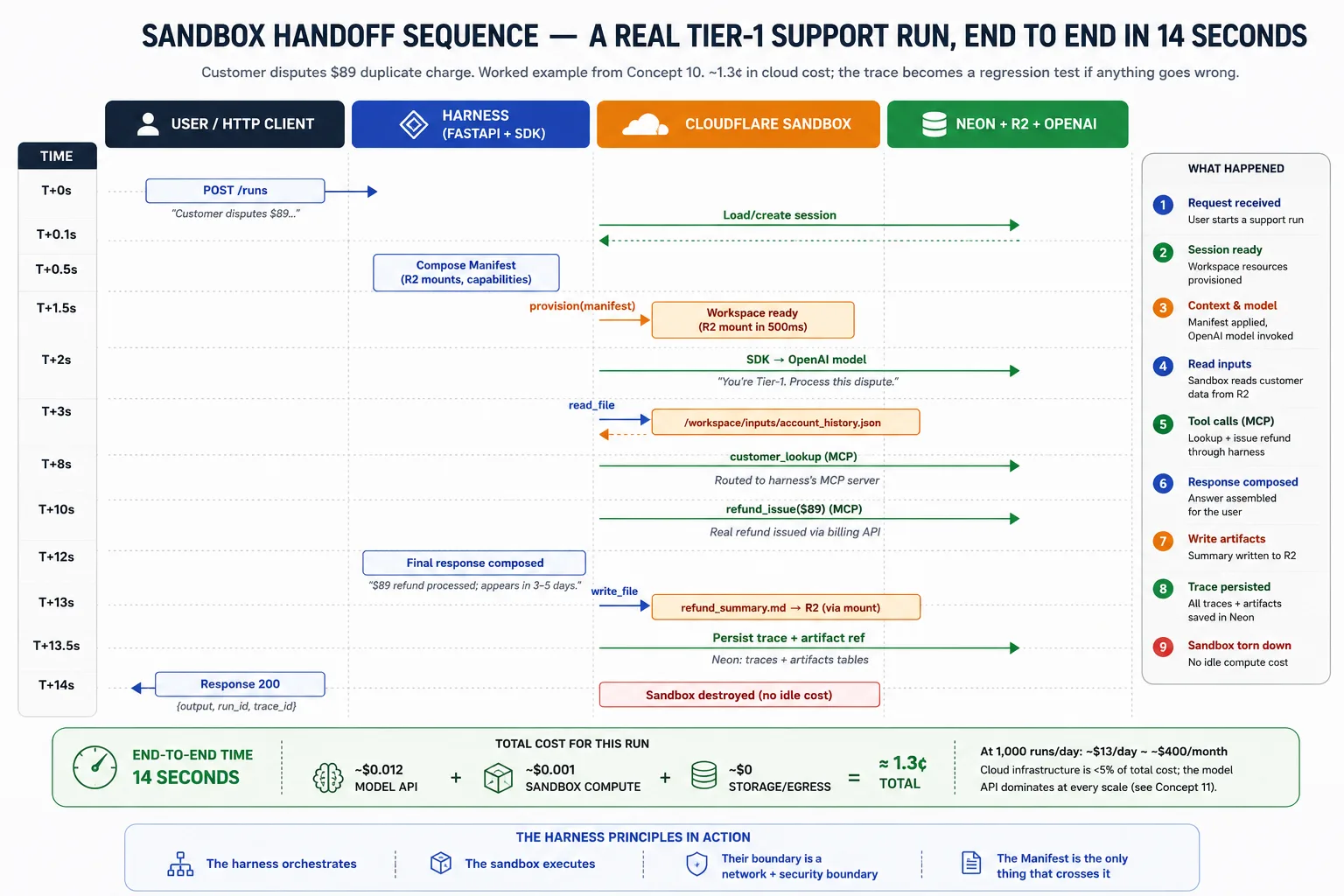
The lifecycle of a single run, end to end:
- The harness receives the request and loads session state.
- It composes the Manifest for the task and asks the provider to provision the workspace.
- The SDK runs the agent loop, routing filesystem and shell calls to the sandbox and recording the trace.
- If the workspace fails and snapshots are enabled, the SDK provisions a new one from the latest snapshot and continues.
- On completion, the harness reads any outputs from R2, persists the trace and artifact pointers to Neon, destroys the sandbox so nothing idles, and returns the result to the user.
Part 4: Observability and Evals as Architectural Surfaces
Parts 1-3 deployed the harness. Part 5's lab will build it. Part 4 sits between them and names the two surfaces that the harness/sandbox split from Part 1 still needs: the systems that tell you what the running harness is doing, and the systems that measure whether it is still doing the right thing. Teams that skip these ship a harness that works on day one and degrades quietly after. Two concepts, then the lab.
Concept 11: Observability as an architectural surface
Observability: the tools that tell you what the running harness is doing, when something breaks, and how to find the cause. Most production AI failures are observability failures. The agent does something wrong, nobody notices for days, and the cost of the delay grows. So observability is not a feature you bolt on at the end. It is one more architectural surface, planned from the start. Decision 7 wires it.
When the harness runs, four surfaces watch it at once. They look alike. They each own a different question.
| Surface | Owns the question |
|---|---|
| Application Insights | Is the harness's infrastructure healthy? |
| OpenTelemetry traces | How did one request flow through services? |
| OpenAI Agents SDK traces | What did the agent do during this run? |
| Phoenix | How is the agent's behavior changing over time? |
Application Insights is Azure's built-in monitor. It owns the container view: request rate, error rate, latency, CPU and memory, restart counts, log streams. When a replica crashes, it notices first. It cannot see the agent's behavior. To it, every request is "POST /runs returned 200 in 12 seconds"; whether the answer was right is invisible.
OpenTelemetry (OTel) is an open standard for tracing one request across services. A trace is the complete record of one run. When a single request fans out into a model call, three tool calls, and four database queries, OTel shows the parent-child timing across all of them. It does not see the agent's reasoning between tool calls; it records that the model was called, not why.
The OpenAI Agents SDK emits its own trace: which model decisions were made, which tools were called with what arguments, where handoffs went. It owns the agent-behavior view. It sees nothing outside the agent's execution.
Phoenix watches agent traces over time and turns bad ones into future tests. It samples SDK traces, scores them, and flags the worst for promotion into the eval suite. It owns the trend view: not just what the agent did, but which runs should become tomorrow's regression tests. It does not see transient infrastructure outages.
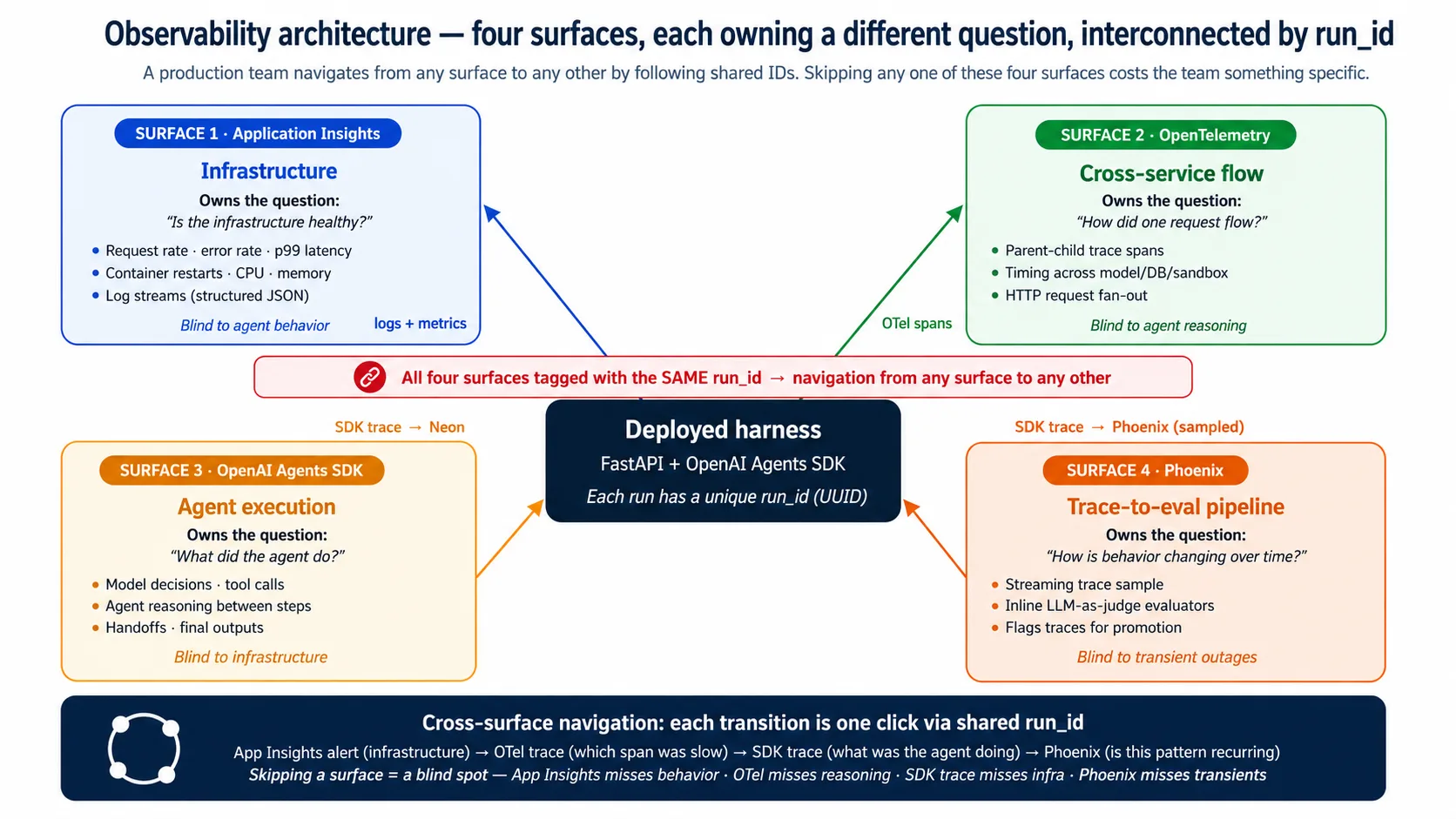
The surfaces overlap; they do not replace each other. They interconnect by a shared run_id, so a team can start at any surface and jump to any other in one click. An Application Insights alert flags an infrastructure spike; the OTel trace shows which span was slow; the SDK trace shows what the agent was doing; Phoenix shows whether the same pattern is recurring. Skip one surface and you lose one of those steps: skip Application Insights and you miss outages, skip OTel and you miss the slow span, skip the SDK trace and you miss the agent's decision, skip Phoenix and your eval suite goes stale.
A fifth surface appears only if you wrap runs in a durable-execution layer. That layer's own dashboard adds run-level operational lineage (which step failed, retried, then succeeded). It is the Production Worker course's territory, not this one. If you build it, see Production Worker with a Nervous System.
Concept 12: Evals as an architectural surface
Eval: a test that measures the agent's behavior (was the answer right, the tool correct, the reasoning sound), not just whether the code ran. The Eval-Driven Development course built four eval frameworks. This concept names where they attach to the deployed harness. The attachment is the whole point: without it, the eval suite is theory.
The boundary is one place: traces. Everything the eval suite grades reads from a trace, and traces live in two stores. Neon holds the durable record, queried by scheduled jobs and audit. Phoenix holds the real-time sample, displayed on the live dashboard. If you remember one thing from this concept, remember that the integration is mediated by traces, and traces live in Neon and Phoenix.
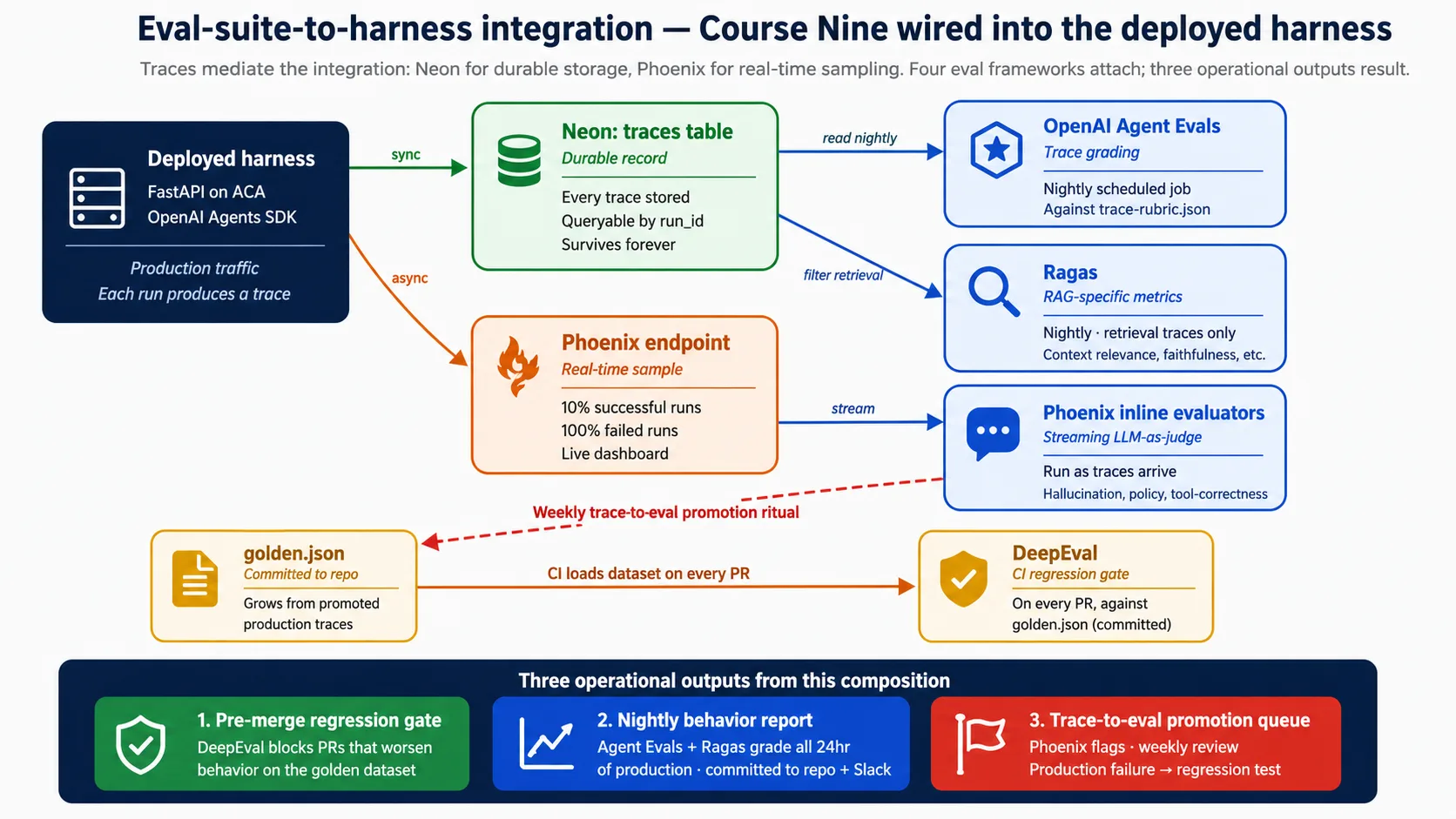
When a run finishes, the harness writes the trace to Neon synchronously (the durable record) and streams a sample to Phoenix asynchronously (the live view). From there, the eval frameworks attach at specific points: a CI gate runs on every pull request, scheduled jobs grade the prior day's traces nightly, and Phoenix's inline checks run as traces arrive. Decision 8 wires all of that in full. The reason to plan it now, not later, is simple: traces produced before observability is wired are gone, and the eval suite only grows from traces it actually saw.
Part 5: The Deployment Lab
Parts 1-4 covered the architecture and the surfaces. Part 5 builds the whole thing: ten Decisions that take you from an empty folder to a deployed, observable, eval-gated harness. The shape is the one the earlier courses use. You direct a coding agent; the agent writes and runs the code. Each Decision is a short brief you paste, a "Done when:" line you can observe, and a one-line note for readers who follow along without deploying.
The companion download carries the shared context. Inside it, AGENTS.md holds the project rules, the architecture, and the verified API shapes, so each brief stays short: the agent reads AGENTS.md for the details and you paste only the goal. Get the base now: the deploying-agents/ folder of panaversity/agentfactory-manufacturing, or the release zip.
Refer back to this diagram as you work. Every Decision adds one labeled piece.
Two ways to complete the lab.
Full build (Intermediate and Advanced tracks): you deploy to the cloud. Tear resources down after each session and the end-to-end bill stays small; leave them running and it grows. Concept 13 has the cost breakdown.
Simulated (Reader and Beginner tracks): you read the companion code instead of provisioning anything. The harness still boots locally with only
OPENAI_API_KEYset, so you can run every step that does not need a cloud account. The Simulated note in each Decision says what to read instead.
Decision 0: probe the SDK and reconcile the brief
In one line: install the SDK, print the installed version, fetch the live sandbox docs, and reconcile the companion AGENTS.md against them. The live docs win.
The OpenAI Agents SDK ships fast. Names, signatures, and defaults move between releases. The companion AGENTS.md is today's known-good, not forever's. So the first Decision is a probe: confirm every symbol the lab depends on against the SDK actually installed on your machine, and write down anything that drifted. Five minutes here saves an hour of "why does this attribute not exist" later.
Paste this to your coding agent. Plan first; execute on approval.
Open the companion download. Run the SDK probe from the bottom of
AGENTS.md:uv sync, then the import checks foragents,agents.sandbox,agents.sandbox.entries, and the E2B client. Print the installedopenai-agentsversion. Fetch the live sandbox API reference from the official docs. Compare every SDK symbol named inAGENTS.mdagainst what you actually imported. If anything differs, the live docs win: write a short "What changed since the brief" note at the top ofAGENTS.mdlisting each difference, and use the live name everywhere after. Do not change any code yet.
Done when:
- The agent reports the installed
openai-agentsversion (expect 0.17.x). - The agent reports any SDK names that differ from
AGENTS.md, and the live docs win on every difference. - A short "What changed since the brief" note sits at the top of
AGENTS.md, or the agent states the brief matched the installed SDK.
Simulated track. Read the SDK probe section at the end of
AGENTS.md. You do not need to run it; the point is to see the drift-resistance habit: confirm the brief against the live SDK before trusting any symbol, and let the live docs win.
Decision 1: scaffold the harness
In one line: a FastAPI app with the agent, the state layer, and the storage layer, all degrading gracefully when a key is missing, that boots locally on OPENAI_API_KEY alone.
This Decision sets up the project the next nine build on. The agent (Maya's Tier-1 Support) and its two tools come from the earlier courses; this Decision is the harness that wraps them, not the agent itself.
Paste this to your coding agent. Plan first; execute on approval.
Scaffold the harness from the companion
AGENTS.md. Follow its project rules and architecture exactly. Pinopenai-agents>=0.17,<0.18. Build the FastAPI app withGET /health(reports which backends are active) andPOST /runs(loads the session, runs Maya's agent, persists the run and trace, optionally writes an artifact). Wire graceful degradation: the app must import and boot with onlyOPENAI_API_KEYset, falling back to SQLite whenDATABASE_URLis unset and to a local directory when no R2 keys are set. Add the two tools (lookup_account,draft_reply) as@function_toolfunctions whose bodies run in the harness, not the sandbox. Commit the lockfile.
Done when:
uv run uvicorn maya_harness.main:appstarts the harness with no errors.GET /healthreturns{"status": "ok", ...}withpostgres,sandbox, andr2all reportedfalseon a bareOPENAI_API_KEY-only boot.GET /docsshows the auto-generated API for the two endpoints.
Simulated track. The companion already contains this scaffold. Read
src/maya_harness/main.py,agent.py, andsettings.py, and notice how every backend is optional: each missing key turns one component off and the harness still boots.
That boot is the early win this whole course promises. Before any cloud account, any Docker, any database, you have a real agent harness answering on /health from your own laptop. The harness/sandbox split is no longer a diagram; it is running on your machine. Everything after this adds one durable backend at a time.
Decision 2: containerize the harness
In one line: a small, reproducible container image of the harness that runs the same on your laptop and in the cloud.
Container: a sealed bundle of your app plus everything it needs to run, so it behaves the same everywhere. Decision 3 deploys this image; Decision 2 builds it.
Paste this to your coding agent. Plan first; execute on approval.
Build the harness container from the
Dockerfileshape in the companion. Usepython:3.12-slimwithuvfor a reproducible install from the committed lockfile. Install dependencies in a cached layer before copying the source. Expose port 8000 and runuvicorn maya_harness.main:app --host 0.0.0.0 --port 8000 --proxy-headers(the--proxy-headersflag matters because the cloud terminates TLS at its ingress). Add a.dockerignorethat excludes the virtualenv, caches, and.envfiles. Build the image and run it locally with your.envmounted.
Done when:
- The image builds with no errors.
- The container runs locally and
GET /healthreturnsokfrom inside it. - Changing a source file and rebuilding is fast (the dependency layer stays cached).
Simulated track. Read the companion
Dockerfile. The exercise is the multi-stage idea: dependencies install in a cached layer, the source copies after, and the image stays small. You do not need Docker installed.
Decision 3: deploy to Azure Container Apps
In one line: provision a managed cloud runtime, build the image in the cloud, and deploy the harness so it answers from the public internet over HTTPS.
Azure Container Apps (ACA): a managed service that runs your container in the cloud with autoscale and ingress, so you do not run servers yourself. This Decision is where the harness leaves your laptop.
Paste this to your coding agent. Plan first; execute on approval.
Deploy the harness to Azure Container Apps using the
infra/deploy.shshape in the companion. Create a resource group and a container registry. Build the image in the cloud withaz acr build(no local Docker needed). Create the Container Apps environment, then create the app with--ingress external,--target-port 8000, and--min-replicas 0for scale-to-zero. StoreOPENAI_API_KEYas a named secret and reference it withsecretref:, never baked into the image. Confirm the app's public URL and that/healthanswers over HTTPS. Pass the current environment through to any subprocess so the keys survive.
Done when:
- The deploy script finishes and prints a public
*.azurecontainerapps.ioURL. - Opening
https://<that-url>/healthfrom your phone returns{"status": "ok", ...}. - After a quiet spell the app scales to zero, and the next request wakes a copy within a few seconds (a scale-to-zero cold start).
Simulated track. Read
infra/deploy.shandinfra/containerapp.yaml. The shape to understand is: build in the cloud, deploy with external ingress and scale-to-zero, and store secrets by name. You do not need an Azure account.
You now have a deployed Container Apps app and its public URL from Decision 3. Decisions 4 through 9 redeploy onto this same app to add each backend. Keep it; do not run az group delete until you finish the lab or end a session on purpose.
Decision 4: wire Neon Postgres for durable state
In one line: provision a serverless Postgres database and point the harness at it, so sessions, runs, and traces survive a restart.
Durable state: memory that survives a restart, kept in a database instead of in the container, which forgets everything when it stops. Neon Postgres: a serverless Postgres database with cheap branching. After this Decision, restart the container and the run history is still there.
Paste this to your coding agent. Plan first; execute on approval.
Wire Neon Postgres as the harness's durable state, following the companion
state.pyandschema.sql. Create a Neon project at console.neon.com. Apply the five-table schema (sessions, runs, traces, artifacts, audit_log), schema-qualified topublic.*. Connect the harness throughasyncpg. One rule is not optional and prevents a silent failure against the pooler:
- Use the pooled endpoint for the running app, and the direct (non-pooled) endpoint for migrations. The pooled endpoint silently drops
search_path, which is why every statement is schema-qualified (public.runs,public.sessions).One thing that looks like a footgun but is not: Neon's copy-paste string includes
channel_binding=require(MITM protection for libpq clients likepsql).asyncpgis not libpq-based, so it ignores the parameter and connects fine with it left in. The companion'snormalize_neon_dsntrims it for a tidy DSN, but it needs no special handling.Add
DATABASE_URLas a local.envvalue and as an ACA secret, then redeploy. Confirm a run persists across a restart.
Done when:
/healthreports"postgres": trueafter the redeploy.- A
POST /runswrites a row you can read back from Neon'srunstable. - Restarting the container keeps the run history (state is durable, not in the container).
- Migrations ran against the direct endpoint; the running app uses the pooled endpoint and reads its schema-qualified tables.
Simulated track. Read
state.pyandschema.sql. The thing to notice: every table is written aspublic.runs,public.sessions, and so on, because the pooled endpoint ignoressearch_path. (Thenormalize_neon_dsnfunction also trimschannel_bindingfrom the DSN, but that is tidiness, not a fix: asyncpg ignores the parameter and connects fine either way.)
You now have a Neon project and two connection strings from Decision 4: pooled for the app, direct for migrations. Decision 6's sandbox and Decision 7's observability both write to this database. Keep it.
Decision 5: wire Cloudflare R2 for files and artifacts
In one line: provision object storage and hand the harness short-lived links to specific files, so the agent's outputs are downloadable without ever sharing the storage password.
Cloudflare R2: S3-compatible object storage where reading your files out is free. Presigned URL: a short-lived link that lets someone read or write one specific file, without ever holding the storage password. After this Decision, an agent reply can be saved as a file and handed back as a download link.
Paste this to your coding agent. Plan first; execute on approval.
Wire Cloudflare R2 as the harness's artifact store, following the companion
storage.py. Create an R2 bucket and scoped API credentials. Point a boto3 S3 client at the R2 endpointhttps://<account_id>.r2.cloudflarestorage.comwithregion_name="auto". On a run wheresave_artifactis true, write the reply to the bucket and return a presigned download URL with a short expiry (one hour). Add the fourR2_*values to.envand to ACA secrets, then redeploy.
Done when:
/healthreports"r2": trueafter the redeploy.- A
POST /runswithsave_artifacttrue returns anartifact_urlthat downloads the reply. - The presigned URL stops working after its expiry (it is scoped and short-lived, not a permanent password).
Simulated track. Read
storage.py. Notice the one detail that makes R2 work with boto3: point the S3 client at the R2 endpoint withregion_name="auto", and the rest of the S3 API is unchanged. The local-directory fallback is what runs when no R2 keys are set.
You now have an R2 bucket and scoped credentials from Decision 5. Decision 6's sandbox reads and writes files through presigned URLs into this bucket. Keep it.
Decision 6: wire sandbox execution
In one line: attach an isolated workspace where the agent's code can run, with no access to the harness's secrets or database.
Sandbox: a separate, locked-down workspace where the agent's generated code runs, holding none of the harness's keys. Manifest: a short description of what the sandbox needs (which files to mount, which abilities to turn on). This Decision adds the execution plane; the agent still answers without it, so the harness stays useful at every step.
A note on cost before you build. The course's primary sandbox provider, Cloudflare, needs a paid Workers plan and a small bridge Worker between the Python harness and the sandbox. E2B is the realistic free path: it has a free Hobby tier, a first-class client in the SDK, and no bridge Worker. The companion defaults to E2B for exactly this reason. Use E2B unless you specifically want Cloudflare.
Paste this to your coding agent. Plan first; execute on approval.
Wire sandbox execution following the companion
sandbox.pyand the verified shapes inAGENTS.md. Default to E2B (free tier). Build aSandboxRunConfigonly when a sandbox key is set, and attach it throughRunConfig, never as aRunner.runkwarg. Two verified shapes from the companion that the older draft got wrong:
- The E2B path is
SandboxRunConfig(client=E2BSandboxClient(), options=E2BSandboxClientOptions(sandbox_type="e2b")). The options object is required and carries the requiredsandbox_typefield; the client constructor takes nooptions=.- If you ever build a Manifest, it is
Manifest(entries={...})with mounts (R2Mount,S3Mount) imported fromagents.sandbox.entries. There is nobase_image=,mounts=[], orMountSpec. A passed capabilities list replaces the default, so keepCapabilities.default()or concatenate to it.Add
E2B_API_KEYto.envand to ACA secrets, then redeploy. Free-tier path: leave Cloudflare alone, set onlyE2B_API_KEY, and you need no bridge Worker and no paid plan.
Done when:
/healthreports"sandbox": trueafter you set the E2B key and redeploy.- A
POST /runsreturns"used_sandbox": true. - The sandbox imports from
agents.extensions.sandbox.e2b, and the agent still answers when no sandbox key is set (the harness stays useful without it).
Simulated track. Read
sandbox.py. Notice the deferred imports (the module loads even without the sandbox extras installed), the E2B-first default with Cloudflare as the paid alternative, and that the function returnsNonewhen no key is set, which is what keeps the harness running with the sandbox disabled.
The execution plane is wired (Decision 6) on top of the harness (Decision 1), its cloud runtime (Decision 3), its state (Decision 4), and its storage (Decision 5). Maya's agent is now deployed end-to-end on the five-component stack. Decisions 7 through 9 harden it.
Decision 7: wire observability
In one line: wire the four observability surfaces and tie them together with a shared run_id, so the team can navigate from any symptom to its cause.
Concept 11 named four surfaces. This Decision wires them and reconciles them. After it, a team can start at Application Insights, OpenTelemetry, the SDK trace, or Phoenix, and reach any of the other three by following one ID.
Paste this to your coding agent. Plan first; execute on approval.
Wire the four observability surfaces from Concept 11. Instrument the harness with OpenTelemetry (FastAPI, asyncpg, and HTTP spans) and export to Application Insights. Tag every surface with the same
run_id: attach it to the OTel parent span, include it in every structured log line, carry it on the SDK trace, and send it with the Phoenix sample. Stream completed SDK traces to Phoenix as fire-and-forget (if Phoenix is down, log it and continue; Neon is the durable record). Sample at roughly 10% of successful runs and 100% of failed runs, deterministic onrun_idso the sampling is stable. Redeploy with the observability keys as ACA secrets.
Done when:
- An OTel trace for a request appears in Application Insights within about a minute.
- Searching one
run_idin any surface returns the matching record in the others. - Phoenix shows recent traces, sampling all failures and a fraction of successes.
Simulated track. Read the observability wiring in the companion. The pattern to learn is the shared
run_id: it is the thread that lets one click move from an infrastructure alert to the agent's reasoning to the trend over time. Without it, the four surfaces are four disconnected dashboards.
Decision 8: wire the eval suite
In one line: connect the Eval-Driven Development course's four frameworks to the harness's traces, producing a CI regression gate, a nightly behavior report, and a weekly trace-to-eval promotion ritual.
Concept 12 fixed the boundary: traces in Neon and Phoenix. This Decision wires the four eval frameworks to those two surfaces. This is where the full eval wiring is taught; if you have not built the eval suite itself, do the Eval-Driven Development course first, since this Decision attaches that suite to the deployment.
Paste this to your coding agent. Plan first; execute on approval.
Wire the four eval frameworks from the Eval-Driven Development course to the deployed harness's traces. Attach each at its point:
- DeepEval as the CI regression gate. On every pull request that touches the agent or prompts, run DeepEval against the committed golden dataset by hitting a staging
POST /runs, and block the merge if a previously passing case now fails.- A nightly scheduled job (Container Apps Jobs) that reads the prior 24 hours of traces from Neon, grades them with OpenAI Agent Evals against the team's rubric, runs Ragas on the traces that used retrieval, writes a report to the repo, and posts the summary to Slack.
- Phoenix inline evaluators that run as traces arrive (hallucination, policy, tool-correctness), tagging scores without blocking runs.
- A weekly ritual, documented in a runbook: review Phoenix's flagged traces and promote the eval-worthy ones into the golden dataset, so each becomes a future regression test.
Done when:
- A pull request that intentionally worsens behavior is blocked by the DeepEval gate.
- The nightly job produces a behavior report in the repo and posts to Slack.
- Phoenix shows inline evaluator scores on recent traces, and the promotion ritual is documented and run once end-to-end.
Simulated track. Read the eval pipeline configs and the CI workflows in the companion. The shape to internalize is the three operational outputs: a pre-merge gate that catches regressions, a nightly report that catches drift, and a promotion queue that turns production failures into new tests.
Decision 9: production checklist
In one line: finish the operational discipline: secrets rotation, blue/green deploys, an on-call runbook, backup and recovery, and rate limits.
With the harness observable (Decision 7) and measured (Decision 8), this Decision adds what you need to leave it running without worry. Blue/green: ship a new version with no downtime by running it beside the old one, then shifting traffic over.
Paste this to your coding agent. Plan first; execute on approval.
Complete the production discipline for the harness, documented in a runbook. Cover:
- Secrets rotation: a procedure to add a new credential beside the old one, redeploy, verify, then revoke the old.
- Blue/green deploys: a script that creates a new revision at 0% traffic, checks
/healthon it, shifts 10% and watches Application Insights, then shifts to 100% and keeps the old revision for a day for rollback.- An on-call runbook with five scenarios (high error rate, high latency, sandbox provider down, Neon unreachable, R2 unreachable), each with investigation and remediation steps.
- Backup and recovery: Neon point-in-time recovery, R2 versioning, and ACA revision rollback.
- Per-user rate limits at the middleware layer, returning 429 with
Retry-Afterwhen exceeded.- Cost alerts that fire when daily spend jumps well above the recent average.
Done when:
- All secrets have a documented, tested rotation procedure.
- One blue/green deploy runs end-to-end: new revision verified, traffic shifted, old revision kept for rollback.
- Rate limiting works (the request past the limit returns 429), and cost alerts are configured.
Simulated track. Read the runbook and the deploy and rotation scripts in the companion. The discipline to absorb is that each failure mode has a named, rehearsed response, and that rate limiting and cost alerts are not optional: they are what stand between you and a runaway bill after a traffic spike.
Part 6: Honest Frontiers
The lab produces a working deployment. Part 6 names what it does not solve, where it costs more than expected, and where its boundary is. Four concepts and five anti-patterns.
Concept 13: Cost economics of a cloud agent harness
Cloud cost is the dimension most courses skip. This recipe has specific economics, and a team committing to it should know them at small, medium, and large scale.
The bill has five layers, one per component, and one layer dominates all the others.
| Layer | Share of the bill |
|---|---|
| Model API (OpenAI) | 90-98% at every scale |
| Sandbox execution | the largest of the rest at high volume |
| Harness compute (ACA) | small; scale-to-zero keeps it near zero when idle |
| Durable state (Neon) | small; free tier covers light use |
| File storage (R2) | small; egress is free |
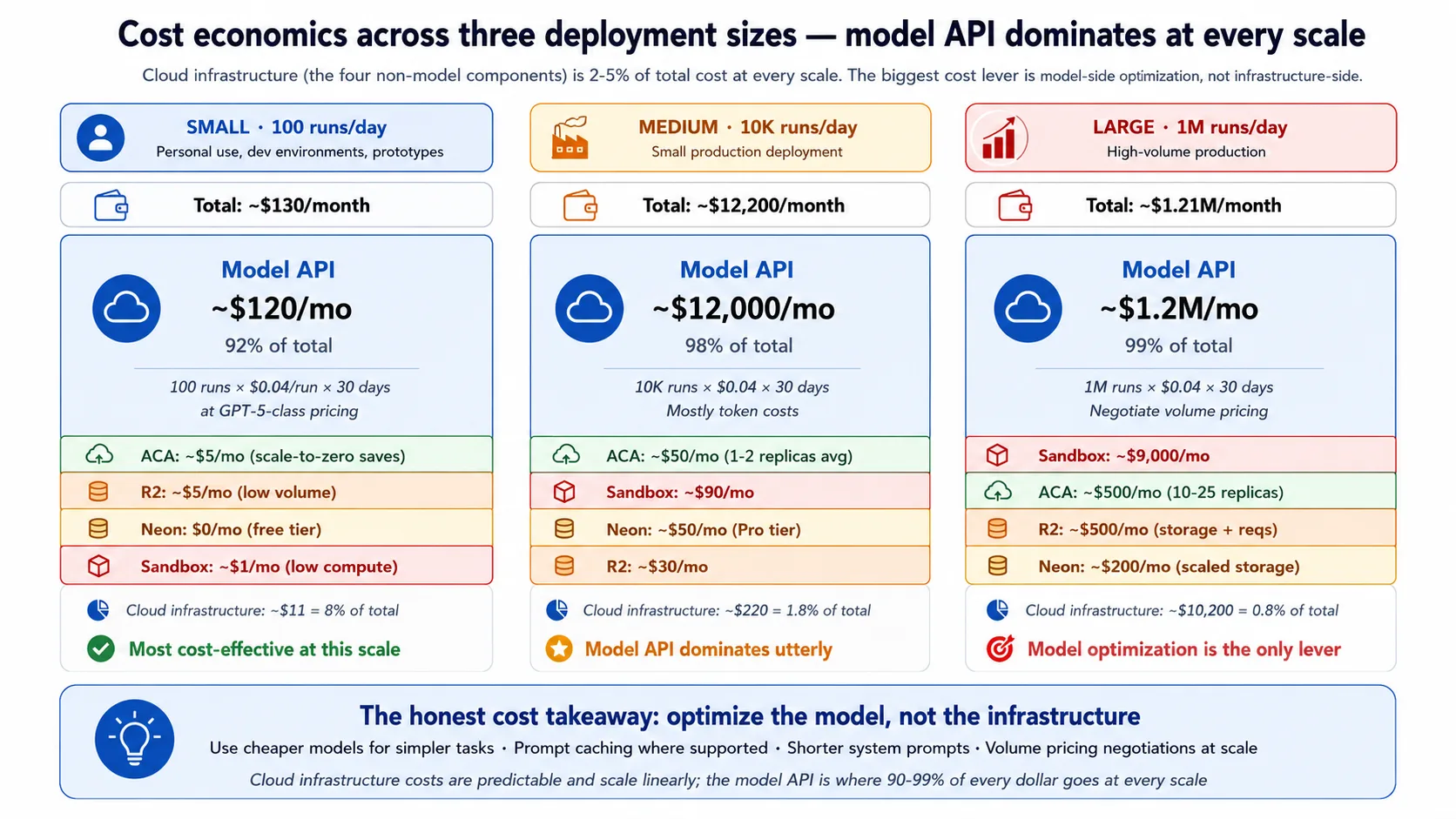
Hold the figures as rough ranges, not precise numbers. At a small scale (around 100 runs a day), the whole bill is on the order of a hundred-some dollars a month, and the model API is roughly nine-tenths of it. At a medium scale (around 10,000 runs a day), the bill is in the low tens of thousands a month, and the model API is about 98% of it. At a large scale (around a million runs a day), the bill runs into the seven figures a month, almost all of it model API. The infrastructure layers grow too, but they stay under 5% of the total throughout.
Four takeaways follow directly:
- Optimize the model, not the infrastructure. Cloud infrastructure is almost always under 5% of the bill, so the highest-leverage lever is the model: a cheaper model for simple decisions, prompt caching where the SDK supports it, short system prompts.
- Infrastructure cost is predictable, roughly linear with traffic. You do not get surprise bills from it.
- R2's free egress matters most for file-heavy workloads and barely registers for text-heavy ones like Maya's.
- Sandbox cost scales with execution time, so compute-heavy agents cost more there while agents that mostly wait on the model stay cheap.
Concept 14: Multi-region considerations
This recipe deploys to a single region on purpose. Multi-region active-active is a much harder problem, and most deployments do not need it. You need it for one of three reasons: latency, when your users span the globe and a single region adds noticeable round-trip delay; availability, when your uptime commitment is 99.99% or higher and a single region's outage is unacceptable; or compliance, when data-residency rules require user data to stay in a specific region.
The components differ in how hard multi-region is:
- R2 and the sandbox are already global on Cloudflare's network, so they need no extra work.
- ACA is single-region per environment, so going multi-region means several environments behind a global load balancer.
- Neon supports read replicas in other regions, but writes still go to the primary, so write-heavy agent state needs a more complex database design.
The honest recipe is more environments, read replicas, and a global front door, with operational cost rising for each region added. If your users are mostly in one region, your uptime target is 99.9%, and one region satisfies your data rules, single-region is the right answer: do not pay for complexity you do not need.
Concept 15: When to migrate off the recipe
This recipe is opinionated and fits a specific size and shape. Five triggers tell you when to move off it. The architectural pattern (control plane separate from execution plane) carries across every one of these migrations; only specific components change.
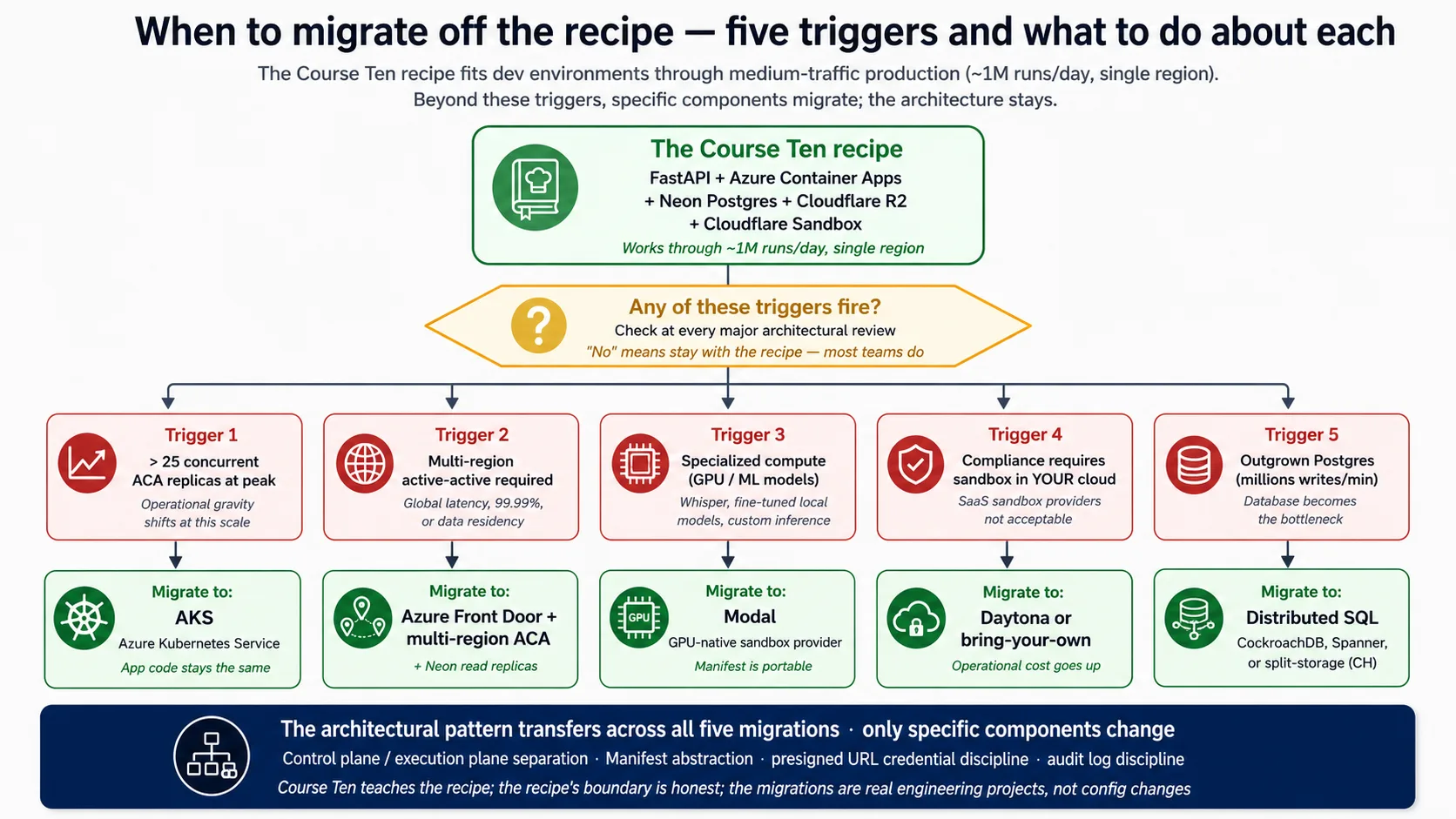
The five triggers, each pointing to the one component that changes:
- Sustained heavy concurrency past roughly 25 ACA replicas, where the economics and connection math favor moving the harness to Kubernetes (the app code stays the same).
- Multi-region active-active, per Concept 14.
- Specialized compute such as GPU work, where a GPU-native sandbox provider fits better and the portable Manifest moves with you.
- An in-cloud-only sandbox required by a compliance rule, which rules out a SaaS sandbox and pushes you to a bring-your-own provider.
- Outgrowing Postgres at very high write volumes, which points to distributed SQL or split storage and is the most invasive change of the five.
Concept 16: What the deployment doesn't solve
The lab produces a real production discipline, but it does not solve everything. Naming the gaps keeps you from false confidence and tells you what work would close them.
Six gaps are worth naming explicitly:
- Compliance certification. You get the technical controls a framework like SOC2 expects, but certification needs a third-party audit and months of evidence. Plan it as a separate workstream.
- An incident-response program. The runbook covers technical remediation, not who gets paged, how incidents are declared, or how post-mortems run. That people-and-process layer is yours to build.
- Legal liability for the agent's actions. The audit log records what happened, but the legal framework around agent decisions is still forming.
- Behavior-level prompt injection. The harness/sandbox split keeps injected code away from your secrets, but it does not stop a crafted message from steering the agent's reply. That needs guardrails, input checks, and red-teaming, much of it the eval suite's job.
- Model upgrades. The deployment does not test them for you; the eval suite is the discipline for vetting a new model before you switch.
- Cost runaway. Monitoring catches a spike in hours, but daily caps and kill switches are extra defenses you add on top.
Five things not to do
The recipe avoids five anti-patterns. Naming them helps a team avoid backsliding after the deployment ships.
- Do not run agent-generated code inside the harness. A call like
exec(model_output)in the harness process is worse than a SQL injection, because the attack surface is the whole model's reasoning. The sandbox boundary is non-negotiable; the harness holds the keys, the agent's code does not get to touch them. - Do not put root credentials in the Manifest. Anything in the Manifest crosses into the sandbox. Only presigned URLs and short-lived tokens cross the boundary; database strings and API keys stay in the harness.
- Do not skip scale-to-zero in development. A dev app kept warm around the clock, multiplied across people and services, quietly costs hundreds a month for compute that is idle most of the time. Accept the cold start in dev.
- Do not deploy without the eval suite wired in. Skipping it is the most expensive shortcut in agent deployment: you ship changes that pass code review, regress behavior, and surface as complaints weeks later. The eval gate is the difference between deploying agents and deploying agents that stay good.
- Do not run the harness without rate limiting. Day-one deployments without it are how teams discover, after one viral mention, that they paid a fortune to a model provider in a single day. Generous limits are fine; no limit is the dangerous setting.
Part 7: Closing
Concept 17: The deployed harness as the realization
The manufacturing track built and measured an AI-native company: the agent loop, the system of record, the workforce layer, the delegate, and the discipline that makes behavior measurable. This course ships it. The deployed harness is where all of that becomes a service real users can reach, observed across four surfaces and graded continuously against an eval suite that learns from production traffic.
The whole course rests on one idea: the harness is the control plane and the sandbox is the execution plane, and that single separation is what makes the deployment safe, durable, and scalable. Everything you wired in the lab serves it. The harness holds the keys, the state, and the orchestration; the sandbox runs the risky code with none of the keys; presigned URLs scope file access across the boundary; observability shows you what is happening; the eval suite tells you whether it is still right. Deviating from the recipe is fine. Deviating from the architecture is not. Run the harness and sandbox in separate planes, observe across the four surfaces, and grade behavior against an eval suite that grows from production, and the architecture works no matter which cloud components you pick.
What comes after this is the design discipline that runs before the build: choosing which agent shape fits the task in the first place. If you want that, read Choosing Agentic Architectures, the connective tissue between agent design and production deployment.
Three further frontiers are worth naming honestly, none of them shipped yet:
- Agent-to-agent commerce, where agents act as economic actors through payment protocols.
- Deployment for an owner-delegate agent, whose signed delegation and governance ledger are heavier than a worker's.
- Deeper multi-cloud, active-active multi-region, which is its own substantial topic.
Try with AI. Open your coding agent. Paste:
"I've completed the manufacturing track through this deployment course. List the three things I learned that I'll apply most often in the next year of building agents, and the three I'll apply rarely but that will be critical when I do. Explain each briefly. Then, for the composition this course wired (the Eval-Driven Development course's eval suite attached to a deployed harness), name what you expect to be the hardest part of operating it in practice: which discipline will be tempting to skip when the team is under deployment pressure?"
What you're learning. The track is wide, and most of it you will use unevenly: some parts daily, some rarely but critically. This reflection forces an honest read on which parts match your actual work, and surfaces the most common production failure mode, which is the eval discipline getting deprioritized under pressure until the harness drifts.
One-day workshop variant
The full set of concepts and Decisions is too much for a single day. Use this table to fit the course to the time you have.
| Time available | Keep | Cut |
|---|---|---|
| 8 hours (1-day intensive) | Stack primer (Docker and FastAPI only) · Concepts 1-3 (the architectural backbone) · Decisions 0-5 (probe through R2) · Concept 13 (cost) · Part 7 closing | Stack primer Neon and R2 (read on your own) · Concepts 4-12 (use as reference) · Decision 6 (sandbox: demo, do not build) · Decisions 7-9 (defer) · Concepts 14-16 (defer) |
| 2 days | Add Decisions 6-7 (sandbox and observability) · Concepts 8-11 | Decisions 8-9 deferred · Concepts 12, 14-16 deferred |
| 3-4 days | Add Decision 8 (eval suite) · Concept 12 | Decision 9 deferred · Concepts 14-16 deferred |
| Full week (5-7 days) | Everything: the Advanced track in full | Nothing |
For short workshops, keep the architectural backbone (the harness/sandbox split and the five-component stack) and the minimum deployment path (Decisions 0-5). The hardening and the honest-frontiers material can be self-study afterward. The architectural understanding is what students must leave with; the implementation depth is what they grow into.
Cheat sheet
| # | Concept | Key takeaway |
|---|---|---|
| 1 | "Works on my machine" is not deployment | Production means re-architecting the agent into a harness (control plane) plus a sandbox (execution plane), not wrapping a laptop script |
| 2 | Harness/sandbox separation | The backbone: the harness orchestrates with secrets and state; the sandbox executes code; the boundary is network and security |
| 3 | What the SDK needs from infra | Five surfaces (HTTP service, durable state, file storage, isolated execution, orchestration), each mapped to one stack component |
| 4 | FastAPI as the harness web layer | Async-native to match the SDK, auto-generated API schemas, Pydantic models |
| 5 | Azure Container Apps as the runtime | Ingress, autoscale including scale-to-zero, secrets, and revisions as managed primitives |
| 6 | Neon Postgres for durable state | Postgres for relational state; Neon for serverless scaling and cheap branching |
| 7 | Cloudflare R2 for files | Egress-free, S3-compatible, presigned URLs scope access to one file at a time |
| 8 | Sandbox execution capabilities | Filesystem, shell, package install, mounted storage, all isolated and ephemeral |
| 9 | Choosing a sandbox provider | E2B is the free path; Cloudflare is the paid primary; others fit specific needs |
| 10 | Harness-to-sandbox handoff | The Manifest declares the workspace; presigned URLs scope files; root credentials never cross |
| 11 | Observability as a surface | Four surfaces (Application Insights, OpenTelemetry, SDK trace, Phoenix), tied by a shared run_id |
| 12 | Evals as a surface | Mediated by traces in Neon (durable) and Phoenix (real-time); the eval frameworks attach at specific points |
| 13 | Cost economics | Infrastructure is under 5% of the bill; the model API is 90-98%; optimize the model, not the infrastructure |
| 14 | Multi-region | Single-region by default; go multi-region only for global latency, 99.99%+ uptime, or data residency |
| 15 | When to migrate off the recipe | Heavy concurrency, multi-region, GPU work, in-cloud-only sandbox, or extreme write volume |
| 16 | What deployment doesn't solve | Compliance certification, incident process, legal liability, behavior-level prompt injection, model upgrades, cost runaway |
| 17 | The deployed harness as the realization | This course ships what the manufacturing track built, with observability and the eval suite operationally wired |
| # | Decision | Deliverable |
|---|---|---|
| 0 | Probe the SDK | Installed version printed, brief reconciled against live docs, "What changed" note |
| 1 | Scaffold the harness | FastAPI app, agent, optional state and storage, boots on OPENAI_API_KEY alone |
| 2 | Containerize | Small, reproducible image that runs the same locally and in the cloud |
| 3 | Deploy to Azure Container Apps | Public HTTPS URL, scale-to-zero, secrets stored by name |
| 4 | Wire Neon Postgres | Five-table schema, pooled for the app and direct for migrations, every statement schema-qualified |
| 5 | Wire Cloudflare R2 | Bucket, scoped credentials, short-lived presigned download URLs |
| 6 | Wire sandbox execution | E2B free-tier client attached through RunConfig; Cloudflare as the paid alternative |
| 7 | Wire observability | Four surfaces tied by a shared run_id; fire-and-forget Phoenix sample |
| 8 | Wire the eval suite | CI regression gate, nightly behavior report, weekly trace-to-eval promotion |
| 9 | Production checklist | Secrets rotation, blue/green deploys, on-call runbook, backup and recovery, rate limits |
Quick reference: deployment commands
# Local dev (Beginner track)
uv sync                                         # install from the lockfile
uv run uvicorn maya_harness.main:app --reload   # boot the harness locally
# Pin: openai-agents>=0.17,<0.18
# Cloud deployment (Intermediate / Advanced): Azure Container Apps
az group create --name maya-rg --location eastus
az acr create --resource-group maya-rg --name <acr-name> --sku Basic --admin-enabled true
az acr build --registry <acr-name> --image maya-harness:latest .   # build in the cloud
az containerapp env create --name maya-env --resource-group maya-rg --location eastus
az containerapp create --name maya-harness --resource-group maya-rg \
  --environment maya-env --image <acr-name>.azurecr.io/maya-harness:latest \
  --target-port 8000 --ingress external --min-replicas 0 --max-replicas 3 \
  --secrets "openai-api-key=$OPENAI_API_KEY" \
  --env-vars "OPENAI_API_KEY=secretref:openai-api-key"

# Tear-down (cost discipline)
az group delete --name maya-rg --yes
# Neon Postgres (console.neon.com)
# asyncpg ignores channel_binding (not a libpq client), so the DSN works with it left in.
# Use the pooled endpoint for the app; the direct (non-pooled) endpoint for migrations.
psql "$DIRECT_BRANCH_URL" -f schema.sql          # migrations on the direct endpoint
Companion download
The base carries the booted harness, AGENTS.md (the brief, project rules, architecture, and the SDK probe), the verified code for every backend, the Dockerfile, the Azure deploy shapes, and schema.sql. Get it from the deploying-agents/ folder of panaversity/agentfactory-manufacturing or the release zip.
References
URLs current as of May 2026; verify before citing in your own work.
The agent-factory track:
- The agent loop and the SDK: Build AI Agents.
- The eval suite this course wires to the harness: Eval-Driven Development.
- The operational envelope (durable execution, the fifth observability surface): Production Worker with a Nervous System.
- The design discipline that comes before the build: Choosing Agentic Architectures.
- The thesis behind the track: /docs/thesis.
The five-component stack:
- OpenAI Agents SDK (Python): package
openai-agents>=0.17,<0.18; docs at https://openai.github.io/openai-agents-python; the Manifest and sandbox-provider reference live in the same source. The harness/sandbox separation shipped as a built-in part of the SDK in the April 15, 2026 release: https://openai.com/index/the-next-evolution-of-the-agents-sdk/. - FastAPI: async request handling and auto-generated API schemas. https://fastapi.tiangolo.com
- Azure Container Apps: ingress, autoscale, secrets, revisions. https://learn.microsoft.com/en-us/azure/container-apps/
- Neon Postgres: serverless Postgres with branching; the pooled endpoint dropping
search_pathis Decision 4's key footgun. https://neon.com - Cloudflare R2: S3-compatible storage with free egress; the SDK supports R2 as a Manifest mount. https://developers.cloudflare.com/r2/
- Code-execution sandbox: E2B (https://e2b.dev, free Hobby tier, native SDK client) is the free path; Cloudflare Sandbox (part of the Workers platform) is the paid primary. Modal and Daytona fit GPU and in-your-cloud needs.
Operational and security references:
- OpenTelemetry: the tracing standard the harness exports to. https://opentelemetry.io
- OWASP API Security Top 10: the security checklist Decision 9 covers in large part. https://owasp.org/API-Security/editions/2023/en/0x11-t10/
Course 51 of the getting-started track: the end-to-end deployment crash course for the agent-factory track. Harness, sandbox, observability, and the eval suite composed, with a stack primer for readers new to Docker, FastAPI, Neon, and R2.