Code You Never Write
Getting AI to do the real, tedious work of your job, and trust the result, without writing or reading a single line of code
You describe the problem. The AI picks the language, writes the code, runs it, and fixes it. You never write a line and never read its syntax. You do learn to check what it did. 13 concepts, 80% of real use.
Picture a bookkeeper at a small company. She has never written a line of code, and she never will. Every month, two files are supposed to agree: what her company recorded spending, and what the bank actually charged. Every month she loses an evening hunting, line by line, for the few that do not match.
Last month she tried something new. She opened an AI chat and typed, in plain English: "These two files should match, my own spending record and the bank statement. Find every transaction that is in one but not the other." A minute later the answer was on her screen. There were 23 mismatches, each with its amount and its date. The evening of hunting was gone.
She never learned to program, and she never read a line of the code.
The move has nothing to do with accounting. Describe the problem in plain words, let the AI write and run the code, then check what it did. A teacher with 200 grades, a nurse with a month of logs, a student with a folder of badly named files: same problem, same way out.
For seventy years, code had one gate: you had to write it yourself. That gate is now open. The most useful programming language in the world, Python, is now open to anyone who can describe a problem clearly. Not after a six-month course. Today, in the chat tab you already have open.
If you came here from the prompting course, you met the playful side of code there. You built a small game or a web page. This course is the other half, and the bigger one. Not toys, but the dull chores that eat whole days of real work, where the stakes are a grade, a paycheck, or a client's money.
None of those people need to learn Python, or any language. All of them need the thirteen concepts on this page.
You are not learning to write code. You are learning to be a good client for code. Good clients do not lay bricks. They write clear briefs, check the work against what they can measure, and keep what they paid for.
You never have to read code's syntax, which means the punctuation and the line-by-line grammar that takes months to learn. You will not even pick the language. What you will learn is how to check what the code did. Not reading the syntax is the freedom this course gives you. Checking the result is the responsibility it asks back.
📚 Teaching Aid
Prove it in two minutes
Open Claude.ai and paste this, fake data and all. A free account takes a minute, and ChatGPT or Gemini work too.
Here are my expenses for the month. Write and run code to total them by category, find my biggest category, and tell me the exact total. Show me that the code actually ran.
Groceries 4,250 Fuel 3,100 Groceries 2,890 Internet 2,499 Fuel 2,750 Eating out 1,850 Groceries 3,120 Mobile 1,200 Eating out 2,400 Fuel 2,950
The AI does not answer from a glance. It writes a small program, in a language it picks itself, runs it on your numbers, and reports the totals. Those numbers were computed, not estimated. Notice what you did not do. You did not choose a language, install anything, copy code, or press a run button.
Now the move that turns a trick into a skill. In the same conversation, paste:
Add up the Groceries lines yourself by hand-checking: 4,250 + 2,890 + 3,120. Does it match what your code reported?
It matches. That tiny check, comparing machine output against a sum small enough to do yourself, is the seed of Concept 6. It separates people who can trust AI-written code from people who only hope.
In two minutes you have done everything this course teaches, once. You described a problem, demanded code, watched it run, and checked one part of the answer. The thirteen concepts make each step deliberate, so it keeps working on your own real data.
This course builds on three Foundations courses. What AI Actually Is gives you the mental model of the machine. AI Prompting in 2026 covers writing and running code. Markdown In, HTML Out matters because the briefs here are Markdown and the reports are HTML. The tool walkthroughs are the Agentic Coding Crash Course and the Cowork & OpenWork Crash Course, and you need neither here. Later, Problem Solving with General Agents assumes this page.
Haven't read those two? The 60-second version
You can follow this whole page without them. Here is all you need carried over.
- From AI Prompting in 2026: modern AI can write a small program, run it, and use the result. It does this reliably only when your wording asks for it. The most valuable habit is the loop: give context, ask for options, react, ask again.
- From Markdown In, HTML Out: when you write to an AI, headings and bullets remove guesswork. That is all "Markdown" means here: text with a
#for a heading and a-for a bullet. When you want a result a human will read, ask for an HTML page, which means a designed, shareable document.
That is the whole dependency. If those two ideas make sense, you are ready.
You need:
- One free chat account. The examples use Claude.ai. The same patterns work in ChatGPT and Gemini, though file upload, code execution, and usage limits vary by plan. Claude.ai requires an account holder aged 18 or older. Younger readers can use ChatGPT or Gemini, which allow ages 13 and up with a parent's consent.
- One real spreadsheet or folder of your own. A bank export, a sales sheet, a grades file, a messy downloads folder. The exercises hit ten times harder on your data.
- Nothing installed. Parts 1 and 2 happen in the browser. Part 3 shows the surfaces where installing pays off, but reading about them requires nothing.
Reading takes about an hour. Running the 🔬 Do this now boxes as you go adds about thirty minutes. Do them. They are the whole point.
By the end, you'll be able to:
- Spot a code problem. Tell whether a task is a question for the AI's mind or a job for its hands.
- Write a five-section code brief. Goal, Input, Output, Rules, Edge cases, with no technical language.
- Force computation over estimation. Make the AI run code instead of guessing, and prove that it did.
- Check a result you cannot read. Test AI-written work against things you already know.
- Run scripts safely on real files. Backups, dry runs, and small folders.
- Keep what you build. Turn a one-time solution into a script anyone can run forever.
Quick glossary
One line each. Skip it now and come back when a word stops you.
- script: a small program saved as a file, so you can run it again.
- sandbox: a temporary computer on the AI company's side. Your own machine is never touched.
- Python: the programming language the AI writes for data, files, and reports.
- brief: the plain-English description of the job you give the AI.
- answer problem: a job the AI can reply to from its own reasoning.
- code problem: a job where the AI must write and run code on your real data.
- Volume, Precision, Repetition, Files: the four signals that mark a code problem.
- VPRF: the short name for those four signals.
- Rules: the limits a stranger would not know, written into your brief.
- Edge cases: what the code should do with imperfect data, decided in advance.
- CSV: a spreadsheet saved as plain rows of values separated by commas.
- known-answer test: running the code on a small part whose answer you already know.
- reality questions: questions you put to the output using what you already know.
- plain-English replay: the AI's own account, in plain words, of what its code did.
- adversarial pass: asking the AI to attack its own work.
- cross-model check: running the same brief in a second AI and comparing the numbers.
- wrong-but-running: no error message, but a number that contradicts what you know.
- Intent Layer: your written intentions, kept in files, exact enough for an AI to act on.
- surface: a place where the AI can run your code, such as a browser chat, a terminal, or a desktop app.
- terminal: a plain text window where you type instructions to your computer.
- agent: an AI that does multi-step work for you and can act on your files.
- plan-then-approve: the app writes a plan and waits for your approval before it acts.
- blast radius: the worst thing that can happen if a run goes wrong.
- dry run: a list of every change the code would make, shown before it makes any.
- Digital FTE: an AI worker built to carry a whole role, the way an employee would.
- market of one: a problem whose rules are yours alone, so no app can solve it.
If the length puts you off, this gets you the core skill fast. Read Concepts 3 to 6 and run each one's 🔬 Do this now box. Come back later for Part 3, Concept 12, and the Projects.
The four parts, in brief
- The deal. Code is no longer gated by the ability to write it, and four signals tell you when a job needs code.
- Commissioning code. Force the AI to compute, brief the problem, check work you cannot read, handle errors, and keep the script.
- Five surfaces. The same skills in a browser chat, in a terminal that sits inside your folder, and in a desktop app that plans before it acts.
- Power, safely held. Four rules shrink what a mistake can cost, plus an honest map of where one-prompt code ends.
Part 1: The deal
Three concepts that change what you believe you are allowed to ask for.
1. Code is no longer gated by coding
For the bookkeeper's whole career, the deal was the same. Either learn to program, or do it by hand. Reconciling two files meant an evening of hunting, or asking a developer for a script, which is a small program saved as a file so you can run it again. Then you waited two weeks for something that almost fit.
The new deal: AI is the developer, you are the client, and the developer works in seconds, for free, and never gets tired of your revisions.
What changed is not that AI can write code. It could do that in 2022, badly. Three things grew up together.
- AI writes working code for small, well-described problems. For one file, one folder, or one repeated task, it usually succeeds on the first or second try.
- AI runs the code itself. The AI runs it in a sandbox, which is a temporary computer the AI company creates for your conversation. On some tools it runs the code on your own machine instead, with your permission. Either way it sees the result.
- AI repairs the code itself. When something breaks, the error message goes back to the AI and the AI fixes it.
Part 3 walks through each place AI can write and run code: a browser, a folder on your computer, and a desktop app.
Back then, the AI handed you a block of code and walked away. Unless you had the language installed and knew where to paste the block, the conversation ended there. That era is over. Today the AI writes the code and runs it in the same reply. No step hands you code to deal with. The only things that reach you are the ones you wanted: the result, the chart, the cleaned file, the report.
So the unit of work changes. You no longer ask "can I write this?" You ask "can I describe this?" Description is a skill you already have. You describe problems to colleagues, contractors, and tailors every week.
From the field, six professions:
| Who | The problem they described | What the AI's code did |
|---|---|---|
| Bookkeeper | "These two sheets should match. Find every transaction in one but not the other." | Reconciled 1,400 rows. Flagged 23 mismatches. |
| Doctor (clinic owner) | "A year of appointments. Which days and slots have the worst no-show rates?" | No-show rates by weekday and hour. Monday 9 a.m. was 3× worse. |
| Marketer | "Four exports, four column layouts. One table: spend, leads, cost per lead." | Merged the formats and produced the table and a chart. |
| Teacher | "200 students. Weighted finals, letter grades, one comment line each." | Did all three. The comments alone saved an evening. |
| Student | "300 files named IMG_4501.jpg onward. Rename them by the date inside each." | Renamed all 300 in under a minute. |
| Network engineer | "Log into these devices each morning and write a health report." | Runs daily, before he reaches his desk. |
Six professions, zero lines of code read. In every row the problem was easy to describe, and until now you could not order it.
🔬 Do this now (1 min). You describe a real chore, the AI does it. Open Claude.ai and paste this:
Here are eight students, one per line: their average score, then how many days their final project is overdue. Tell me which students are BOTH below 50 AND more than 30 days late, so I know who to contact, and how many that is. Write and run code so the count is exact.
72, 12 41, 45 88, 60 35, 8 47, 38 29, 90 51, 33 44, 5
You did not sort or count anything by hand. You described which students matter and what to find. The AI wrote a small program, ran it, and handed back the answer. Three students qualify: the ones scoring 41, 47, and 29.
Stop asking "do I know how to do this?" Start asking "can I describe what done looks like?" If you can describe done, you can order the code.
Check yourself: Three things had to grow up together before this deal existed. What are they?
2. What code actually is (the 60-second version)
Already write code yourself? Skim this one and start at Concept 3. You will never read code here, but you do need to know what you are ordering, the way a homeowner who never lays bricks still knows what a wall is.
Code is a list of exact instructions that a computer follows perfectly, at any speed, any number of times. Here is one. "Open the file. For each row, read the category and the amount. Add the amount to that category's running total. When done, print every total." Written in English, that is a procedure. Written in a programming language, it is code, and the machine runs it a million times without one lapse of attention.
Code comes in many languages. They are not translations of each other, because each language is built for a different kind of job. You will meet two names on your screen.
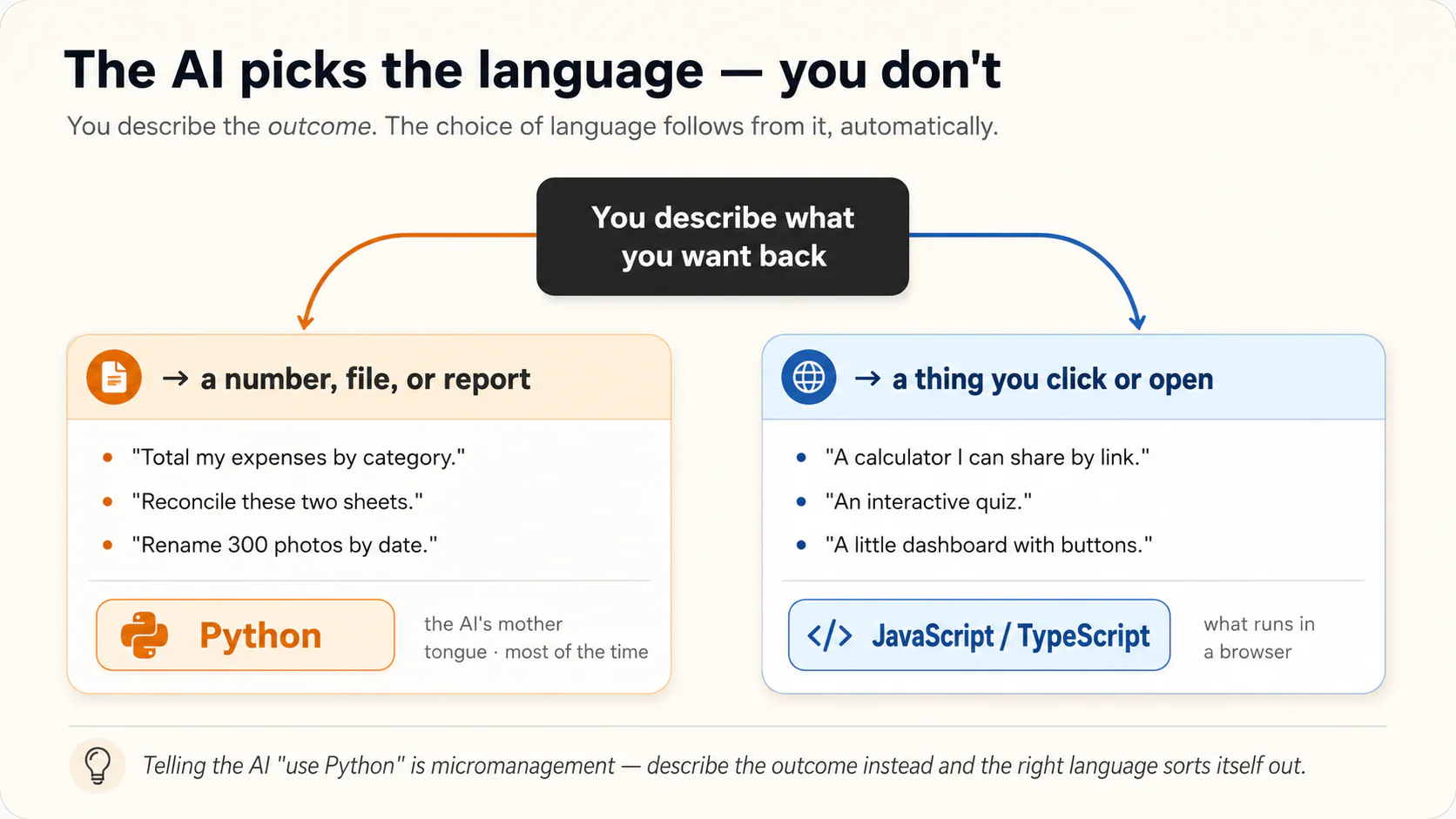
- Python is the language you will see most. It is the normal choice for your kind of problem: files, spreadsheets, data, charts, reports. It is also the language AI knows best, because more Python exists in AI training text than any other.
- JavaScript and TypeScript are what you see when you ask for something to click: a web tool, a small game, a calculator you share by link. TypeScript is JavaScript with extra safety checks, so for your purposes the two are the same thing in different clothes. That is the world the prompting course lived in. This course barely visits it. The work here is real data handled reliably, and that is Python's ground.
Here is the part that keeps your job simple. You never choose between them. Picking the language is a technical judgment, and technical judgments are what you are handing over. A number from a spreadsheet means Python. A button someone can click means JavaScript. You only need the two names so you recognize what is scrolling past.
What does code look like when it scrolls past? A scrap of Python looks like this:
totals = {}
for row in rows:
    totals[row.category] = totals.get(row.category, 0) + row.amount
Did your eyes slide right off that? That is fine. It is all the attention code ever asks of you here. You can half-read it anyway. "For each row, add the amount to that category's total" shows through the punctuation. That is the level of reading this course asks of you, and no more.
There are other languages, such as Go, Rust, and SQL. You may see one someday, but the rule never changes. You describe the outcome, and the AI picks the language.
You are allowed to look at the code, but you are not required to. Treat scrolling code the way you treat a mechanic's open engine bay. It is proof that real work is happening, not a test you have to pass. The picture stops there. An open engine bay does not prove the repair was right, and a code block does not prove the answer is right. Concept 6 is where you prove that.
One property of code is worth memorizing. Code is exact, in both directions. It computes your totals to the last cent with no arithmetic errors. It also does exactly what it was told, including the wrong thing, perfectly, at scale. A script built on a misunderstanding renames 300 files wrongly just as fast as it renames them rightly. Power and danger come from the same property.
A non-software analogy, from the kitchen. A recipe is code for a human. "Simmer 20 minutes" given to an attentive cook produces dinner. Given to an obedient robot that was told "simmer 20 hours" by mistake, it produces charcoal, flawlessly. The robot did not fail. The brief did, and a brief is the plain-English description of the job you hand over. A careful brief is not a guarantee, though. The AI can also misread a clear brief, so you check the result either way. Part 2 is about writing briefs that do not burn the kitchen down.
🔬 Do this now (1 min). See what "the AI writes the code and runs it" actually looks like. Paste this:
Write and run code to total these numbers, then tell me the average and how many are above 40: 12, 47, 8, 93, 21, 56. Show me the code you ran.
Back comes a short Python program, a "ran successfully" result, and the answers: total 237, average 39.5, three above 40. You asked for no language. Python is what this kind of work calls for, and it is what you will see for the rest of the course.
Code is exact in both directions. It computes to the last cent, and it does the wrong thing just as perfectly. The AI picks the language.
Check yourself: Why does the course tell you not to name the programming language yourself?
3. The dividing line: which problems are code problems
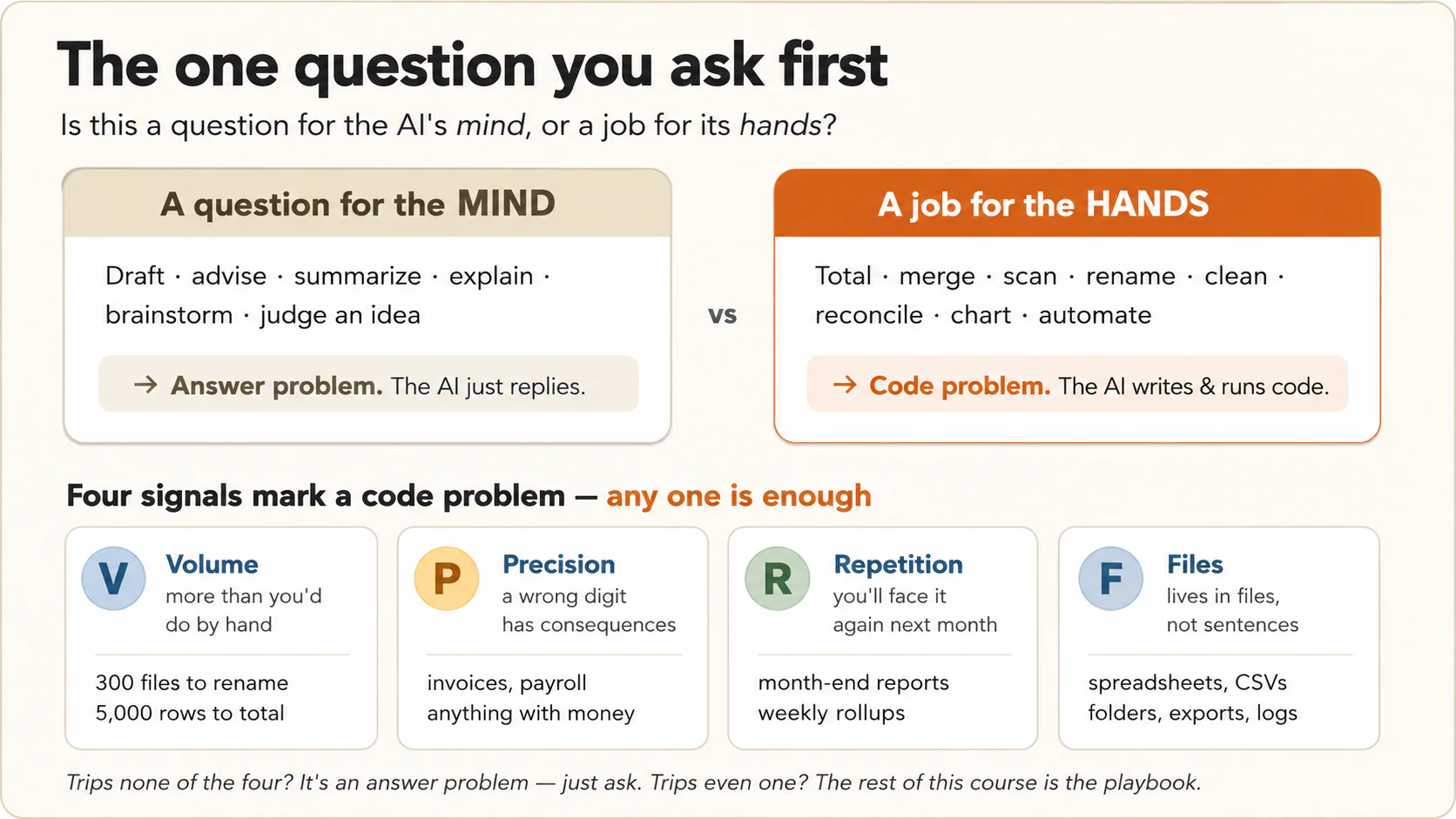
The whole course turns on one decision, and you make it before any prompt. Is this a question for the AI's mind, or a job for the AI's hands?
AI has two ways to help you. An answer problem is one the AI can reply to from its own reasoning: drafting, advising, summarizing, explaining. A code problem is one where the AI must write and run code on your real data. Most people only use the first, then wonder why the AI's summary of their spreadsheet had wrong totals. The AI answered when it should have computed. It skimmed your data instead of processing it.
Four signals tell you a problem is a code problem: Volume, Precision, Repetition, Files. Any one of them is enough.
| Signal | The test | Examples |
|---|---|---|
| Volume | More items than you would do by hand. | 300 files to rename, 5,000 rows to total. |
| Precision | A wrong digit has consequences. | Invoices, payroll, grades, dosage tables, reconciliations, anything with money. |
| Repetition | You will face this task again next month. | Month-end reports, daily health checks. |
| Files | The problem lives in files, not in sentences. | Spreadsheets, exported data files, folders of images, logs. |
VPRF is the short name for those four signals. If a task fires none of them, it is an answer problem. Use the skills from AI Prompting in 2026 and never think about code. If it fires even one, it is a code problem.
Run your own week through the filter:
| Task | Code problem? | Why |
|---|---|---|
| "Draft a polite email declining a meeting." | No | No volume, no precision, no files. Pure answer problem. |
| "Summarize this one contract." | No | One document, mostly judgment. The AI reads it directly. |
| "Which of these 80 contracts have a non-standard termination clause?" | Yes | Volume and Files. A glance would miss some. |
| "Is my business idea good?" | No | Judgment. Use the rubric pattern from the prompting course. |
| "What did I spend on fuel this year?" | Yes | Precision and Files. The number must be computed, not guessed. |
| "Explain what a mutual fund is." | No | Knowledge question. |
| "Rename these vacation photos by date taken." | Yes | Volume and Files. |
| "Every Monday I combine three exports into one report." | Yes | Repetition, the strongest signal. The script becomes an asset. |
The trap to watch for: problems that look like answer problems but fire Precision. "Roughly how did my sales trend this year?" feels conversational, so people ask conversationally and get an approximate answer. If a decision rests on the number, it is a code problem, no matter how casually you would phrase it. Concept 4 is the fix.
Which language does each of these get? (For curiosity only, since you never choose it)
Concept 2 said the AI picks the language, and the choice follows the output, not the task.
| If the result you want is… | The AI usually writes… | Examples from above |
|---|---|---|
| A number, a cleaned file, a report, a renamed folder | Python | Fuel total, contract scan, photo rename, Monday rollup |
| A thing someone clicks, types into, or opens in a browser | JavaScript / TypeScript | A shareable expense calculator, an interactive quiz, a little dashboard with buttons |
Almost everything here produces a number or a file, so you will see Python.
A non-software example, from real life. A school administrator asked an AI to "look at this fee spreadsheet and tell me which families are behind on payments." It listed eight families, confidently. The real number, computed later, was eleven. The AI had answered from a skim, and a skim reads a partial payment as paid. One sentence would have prevented it: "write and run code to find them."
🔬 Do this now (2 min). Make the course's one decision eight times in a row. Paste this:
Sort these 8 tasks into ANSWER problems (you just reply) or CODE problems (you write and run code). Give one short reason each, and name which signal fires: Volume, Precision, Repetition, or Files.
- Draft a polite email declining a meeting.
- Add up 2,000 rows of sales and break the total down by month.
- Is my business idea any good?
- Rename 300 photos using the date stored inside each one.
- Explain what a mutual fund is.
- Find which of 80 contracts have a non-standard cancellation clause.
- Summarize this one news article.
- Every Monday, combine three exported files into one report.
Check its answers against your own instinct before you read its reasons. The odd-numbered tasks are answer problems. The even-numbered ones are code problems. You just sorted mind-work from hands-work, the move you will make before every prompt from now on.
Four signals mark a code problem: Volume, Precision, Repetition, Files. Any one is enough. If none fires, it is an answer problem.
Check yourself: Which signal makes "roughly how did my sales trend this year?" a code problem?
Part 2: Commissioning code
You have decided it is a code problem. Five concepts cover the client's craft: making sure code actually runs, writing the brief, checking work you cannot read, handling failure, and keeping what you paid for.
4. Make the AI's hands move: automatic vs. explicit
Modern AI tools decide whether to write code based on how your prompt sounds. Upload a spreadsheet and ask "which products grew fastest?" and most will compute it. But on anything that sounds answerable from a glance, the AI may skip the code and estimate. An estimate looks exactly like a computation. Same confident tone, same tidy numbers. The failure is silent, because nothing on your screen tells you which one you got.
One habit removes it. Never leave the decision to the AI on anything that fires the Precision signal. Say the words.
The three lines, worth pinning above your desk:
Write and run code to answer this. Show me the code you ran. Before analyzing anything, tell me the exact row count, the column names, and the date range of the file.
Line one forces computation. Line two gives you proof. If no code block appears, no code ran, whatever the words claim. Line three is the cheapest lie detector in this course. If the AI is really reading your file, the row count and column names will be exactly right. If it is making things up, you get a round number and column names that sound right but are wrong.
Notice those lines say "code", not "Python". That is the rule for every prompt in this course. You tell the AI to compute. You never tell it which language to compute in. Adding "in Python" forces its hand on a guess you are not equipped to make. On the rare problem where Python is the wrong choice, you would have steered it wrong without knowing.
How your phrasing steers the AI, side by side:
| Your phrasing | What usually happens | Risk |
|---|---|---|
| "What does this data show?" | Glance-based summary, maybe code. | Estimates dressed as facts. |
| "Roughly how did costs trend?" | Almost always a glance. "Roughly" says precision does not matter. | Fine only if you truly do not care. |
| "Write and run code to compute cost by month." | Code, every time. | Minimal. |
| "Are you running code on this file, or estimating? If estimating, stop and run code instead." | The AI names its method, then computes. | The best move when you suspect a glance. |
The opposite matters too. Do not demand code for answer problems. "Write and run code to tell me if my essay is persuasive" wastes the tool. Concept 3's dividing line works in both directions.
A reply about your data with no code block, no row counts, and no "here is what I computed" is an opinion about your data, not an analysis of it. Treat it the way you would treat a builder's invoice for work you never saw.
🔬 Do this now (2 min). Make the AI prove it computed. Paste this small file and the three lines together:
Here is a small commute log.
Date,Mode,Minutes 2025-03-03,Bus,35 2025-03-03,Walk,10 2025-03-04,Bike,20 2025-03-05,Bus,40 2025-03-06,Walk,15 2025-03-07,Bike,25 2025-03-10,Bus,30 2025-03-11,Walk,12
Write and run code to total the minutes by mode. Show me the code you ran. Before anything else, tell me the exact number of rows, the column names, and the date range.
You can check the answer yourself. There are 8 rows, the columns are Date, Mode, Minutes, and every date is in March 2025. The AI will report exactly that, then a code block, then the totals, with Bus at 105. On a file of hundreds of rows, that same opening question is what catches the AI inventing numbers.
The AI decides whether to run code from how your prompt sounds. When a wrong number matters, say the three lines. No code block means no code ran.
Check yourself: What does the row-count-and-column-names line tell you that the totals cannot?
5. Brief the problem, not the program
The best code briefs contain no technical language at all. You do not name loops, libraries, file handling, or the programming language. You describe what a good outcome looks like, exactly as you would for a human assistant. People who half-know programming often write worse briefs than total beginners, because they over-manage the how and under-describe the what.
A complete brief answers five questions. You met the first three in the prompting course: Goal, Input, and Output. Code problems add two more. Rules are the limits a stranger would not know, such as the fact that your school year starts in August. Edge cases are your decisions about imperfect data, made before the work starts.
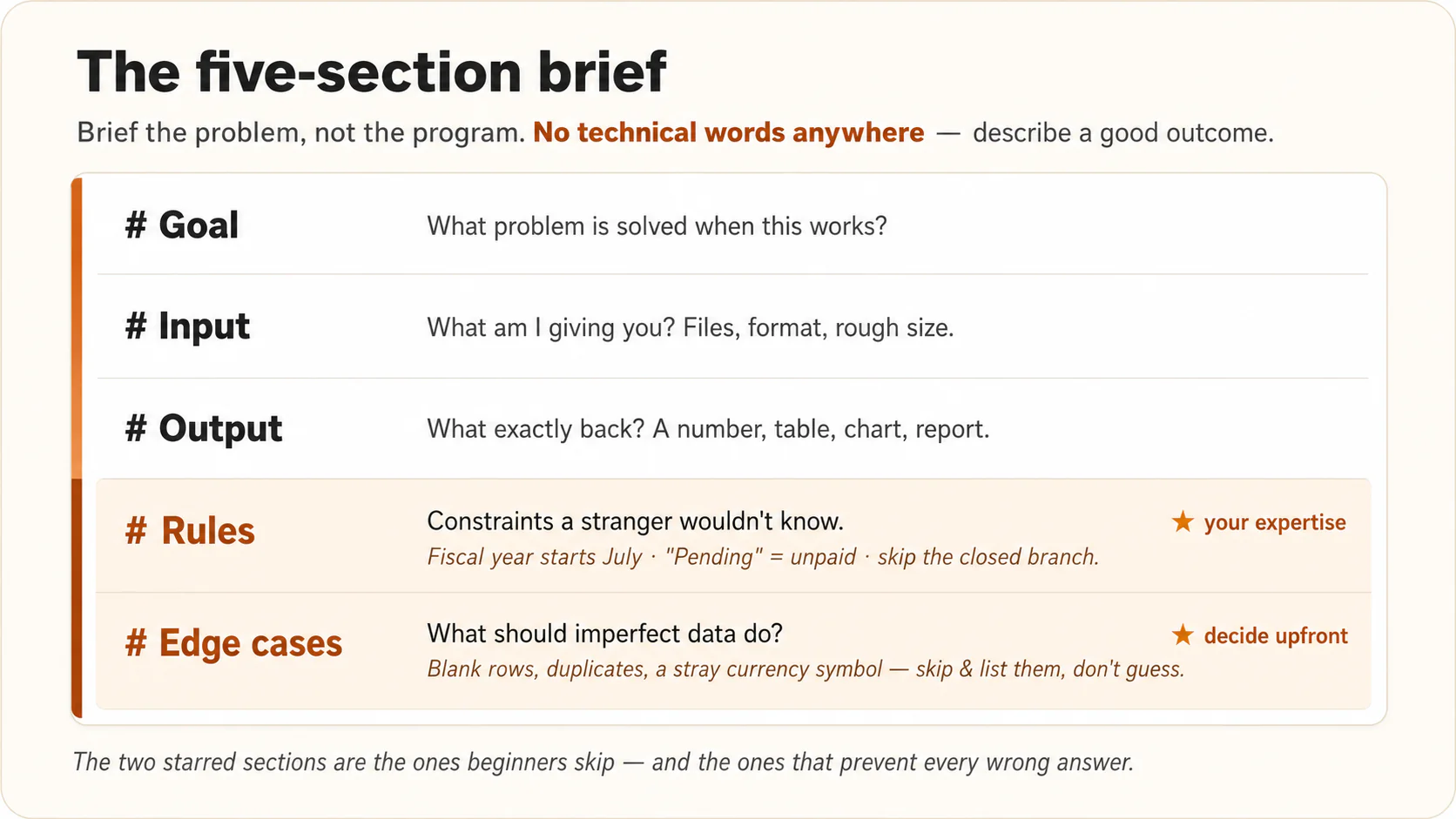
# Brief: [name the task]

## Goal
What problem is solved when this works?

## Input
What am I giving you? (files, their format, roughly how many rows/items)

## Output
What exactly do I want back? (a number, a table, a chart, a cleaned
file, an HTML report)

## Rules
The constraints a stranger wouldn't know. (The school year starts in
August. "Pending" means not yet submitted. Ignore rows before 2024.)

## Edge cases
What should happen when the data is imperfect? (blank rows, duplicates,
a date in the wrong format, an amount with a currency symbol)
That is a Markdown spec, the kind Markdown In, HTML Out trained you to write. Every heading is one more thing the AI need not guess.
Rules is where your professional knowledge lives. The AI knows Python. It does not know that "Pending" means not yet submitted in your system, or that the downtown store closed in March. Every wrong analysis you will ever get traces back to a rule you knew and did not state. The school administrator's missed partial payments in Concept 3 came from a missing rule: "a family with any unpaid balance counts as behind."
Edge cases is where you decide, in advance, what imperfect data should do. Your data is imperfect. Everyone's is. The professional move is one sentence. "If you hit a row you cannot read, do not guess. Skip it, and list every skipped row at the end." That turns silent damage into a visible report.
A worked brief, teacher edition. The inputs are two CSV files, which means spreadsheets saved as plain rows of values separated by commas.
# Brief: Who hasn't turned in the essay

## Goal
Find which students on my class list have NOT submitted the essay,
so I know exactly who to chase before grades are due.

## Input
Two files, attached. "class-list.csv": Name, Student ID (about 180
students). "submissions.csv": one row per file turned in, with
Student Name, Filename, Date.

## Output
A list of students with no matching submission, and a count, then a
one-line summary. Format it as an HTML page I can print for class.

## Rules
- Match on student name; names in the submissions may have extra
  spaces or different capitalization than the class list.
- A student who submitted twice still counts as submitted (once).

## Edge cases
- A submission whose name matches nobody on the class list: list it
  separately (a typo or a wrong upload), don't silently drop it.
- Any row you can't read: skip it and list it at the end.
No programming words anywhere. This brief succeeds on the first run far more often than "find who hasn't submitted", because every guess has been removed. Notice the Output line applying the previous course. The result a human reads is HTML.
You often will not know what is hiding in your data. So make discovery the first prompt. "Before doing anything, examine the files and tell me what could be unclear, inconsistent, or surprising in here." The AI comes back with "there are 14 rows with blank dates and two currency formats. What should I do with each?" Now you write the Edge cases section with knowledge instead of imagination. Inspect, ask, then brief.
🔬 Do this now (3 min). Write your first brief, on data that fights back. This file is messy on purpose: a stray unit, a comma inside a number, a row entered twice, a row with no date. Paste the file and the brief together, exactly as shown:
Here is my data, and my brief for it.

Date,Meal,Calories
2025-03-02,Breakfast,420
2025-03-02,Lunch,650 kcal
2025-03-02,Lunch,650 kcal
2025-03-05,Dinner,"1,100"
,Snack,200
2025-03-06,Breakfast,380

# Brief: Total my March calories by meal

## Goal
A clean total for each meal, so I can see where the calories went.

## Output
A table of meal and total, biggest first, then the grand total.

## Rules
- Calories may have a unit like "kcal" or a comma; treat them as plain numbers.
- The exact same row appearing twice is a double-entry; count it once.

## Edge cases
- A row with no date: do not guess. Skip it, and list it at the end.

Write and run code to do this, and tell me which rows you skipped or
treated as duplicates.
Watch it strip the kcal and the comma, drop the repeated Lunch row, set the blank-date row aside and tell you it did, then total the rest. The Rules and Edge cases lines made that happen. Delete those two sections, run it again, and the mess walks straight back in. Six messy rows here. Your real export has a few hundred, where one wrong number hides easily.
A code brief has five parts: Goal, Input, Output, Rules, Edge cases. Rules carry what only you know. Edge cases decide what imperfect data should do.
Check yourself: Which two sections do beginners skip, and what does each one carry?
6. Verifying work you cannot read
Remember from What AI Actually Is, Idea 3, that the model has no truth-checker of its own. With code you have one that it does not have. You can run it.
Every skeptic asks the same question, and they are right to ask. If you cannot read the code, how do you know it is correct?
The answer is older than computers. You check an expert whose craft you cannot follow by checking their results. You do not check your accountant by working out tax law again. You check totals against your records. You do not test a builder's cement. You check whether the wall is straight and the door closes. You test results against knowledge you already have, and you have knowledge about your own work that the AI never will.
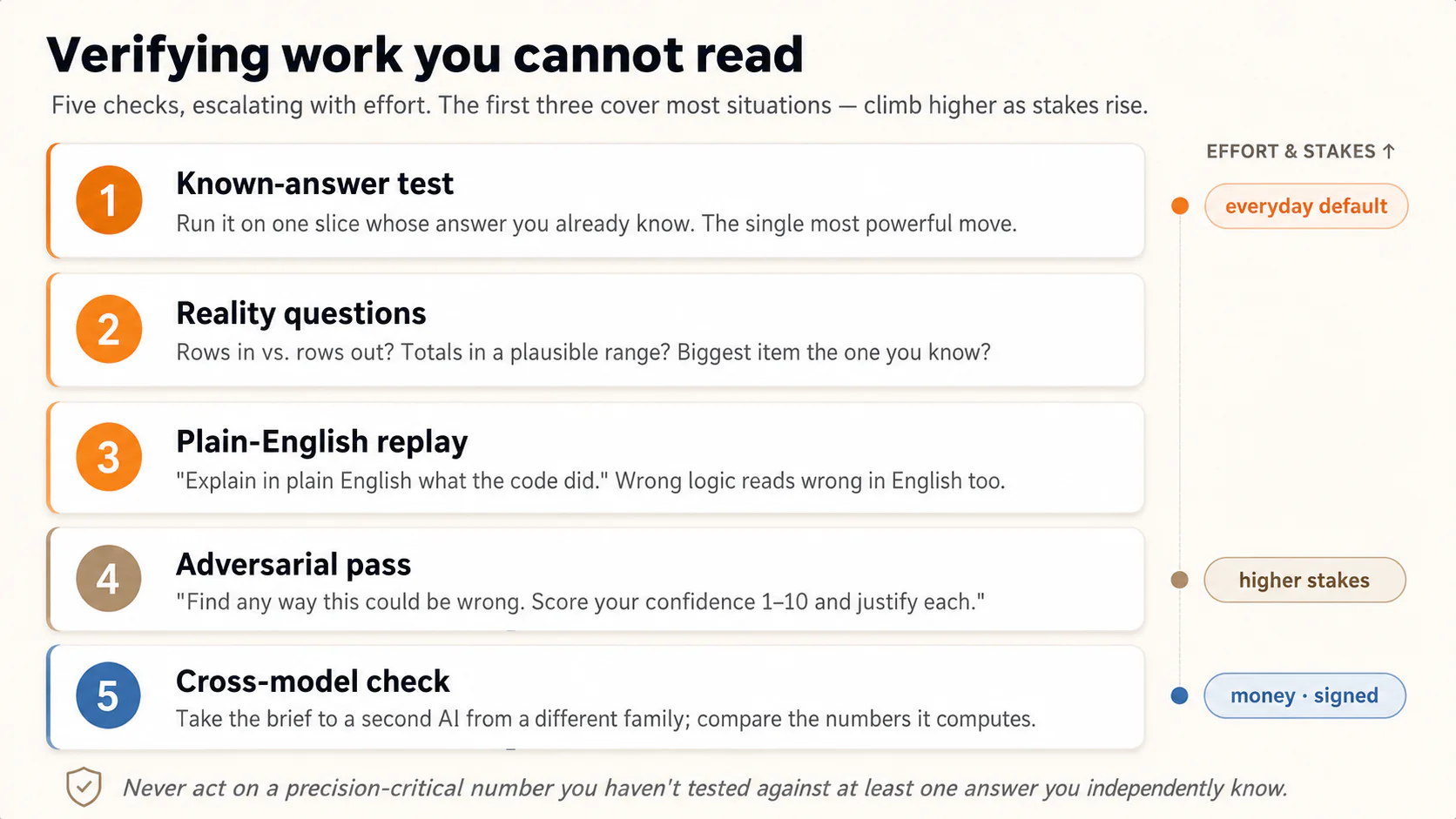
Five checks, in rising order of effort. The first three cover most situations. The single most powerful move on this page is the known-answer test, which means running the code on a small part whose answer you already know.
Known-answer test. Run the script on one month you have already closed by hand. Or work out one student's weighted grade on paper. If the script reproduces every answer you can check, your confidence in the rest is earned, not hoped for.
Before running on the full file, run the code on just March. I already know March's correct total is $184,250. Show me what the code gets.
Reality questions are questions you put to the output using what you already know. Count rows in versus rows out. If 1,400 went in and the report covers 1,381, where are the missing 19? Does the "biggest customer" match the one you know is biggest? Any answer that contradicts your professional sense deserves the next prompt. "Your report says X. Walk me through in plain English how you computed that number, and show me three of the rows behind it."
Plain-English replay means the AI's own account, in plain words, of what its code did. Ask for it as a procedure.
Explain, step by step in plain English, what this code does, as if describing it to a colleague who will check the logic but can't read code. Include what it does with blank rows and duplicates.
You cannot check Python, but you can check "I matched on amount and date within two days, treated debits as negative, and skipped 14 rows I could not read, listed below." If the procedure is wrong, through a wrong rule or a wrong assumption, it reads wrong in English too, and you catch it. Most real errors are procedure errors, not typing errors, which is why this works.
Adversarial pass means asking the AI to attack its own work. It comes straight from the prompting course's rubric habit. "Find any way this analysis could be wrong or misleading. What assumptions did the code make? What is the weakest link? Score your own confidence 1–10 per claim and justify each score."
Cross-model check means running the same brief and data in a second AI from a different company, then comparing the numbers. Use it for high-stakes results, such as a reconciliation going to an outside checker. Two programs written from the same brief that agree on 23 mismatches give you real outside confirmation. It has one limit. Both programs read your brief, so a rule you left out is a mistake they can both make and both agree on.
| Stakes | Minimum verification |
|---|---|
| Personal curiosity (your own spending) | Reality questions. |
| Work a colleague relies on | Known-answer test and plain-English replay. |
| Money, grades, health, anything signed | All five, and a human reviews the claims that matter. |
A non-software example, from real life. A pharmacist ordered a script to cross-check her dispensing log against stock counts. First she set a trap. She added one fake gap of 10 units to a copy of the data. The script caught her fake gap, plus four real ones she did not know about. Catching the fake one let her believe the four. Add one known error to your data and see if the code finds it. That is the known-answer test in its most elegant form, and it costs ninety seconds.
A worry sits under this whole course, and it deserves a straight answer. Is not reading the code a beginner's compromise, something a real programmer would never accept?
Robert C. Martin, known to programmers as Uncle Bob, wrote Clean Code, one of the most widely read programming books ever published. For forty years he taught that reading code carefully is the job. In July 2026 he posted that he no longer reads the code his agents write. Instead he surrounds them with what he calls "extreme constraints", which are layers of automatic checks the code has to survive before he believes it.
So no, it is not a compromise. It is where the most experienced people have arrived, by the same road you are walking.
But notice the order, because this is what most people online missed. He did not stop reading and then hope for the best. He built the checks first. Not reading was what the checks allowed. His confidence is not a feeling. It is the size of his checks.
One item on his list is mutation testing. Here a test means a small extra program that checks the main code and reports a pass or a fail. In mutation testing you break the main code on purpose, one small change at a time, and see whether any test notices. A test that stays silent while the code is wrong has just proved that it proves nothing.
Now look at the pharmacist again. She had never heard of mutation testing, and she invented it anyway, because it is the obvious move once you take checking seriously. Put in a fault you know about, and see whether the check catches it.
His version runs on code you cannot read. Yours runs on something he will never have. You already know what March's total was. You are not doing a simplified version of his job. You are doing the same job, from the other side.
You may skip any check on this list except one. Never act on a precision-critical number you have not tested against one answer you independently know. Code is exact, including exactly wrong. The known-answer test is your firewall.
🔬 Do this now (2 min). Run the one check you never skip. First add these three numbers yourself: 8,000 + 6,500 + 9,000 = 23,500. Now make the AI prove its code lands there.
Here are my steps for three days, one per line: Monday 8000 Tuesday 6500 Wednesday 9000 Write and run code to total the steps. I worked it out by hand and it should be 23,500. Show me the code and the total it gets.
If the code returns 23,500, you have watched the known-answer test work. You can now trust the same code on a full year of steps you could never add in your head. If it returns anything else, you just caught a bug for free.
You check work you cannot read by testing its results against knowledge you already have. Never act on a number that matters until the code has reproduced one answer you already knew.
Check yourself: Which check is the everyday default, and what makes it stronger than asking the AI how confident it is?
7. When it breaks: errors are dialogue, not failure
Something will go wrong. The script stops and red text appears. Or worse, it finishes and the output looks strange. Here is the shift that separates people who push through from people who give up. An error is not the project failing. It is the computer describing, very precisely, what it needs. An expert who reads that language is already in the conversation.
The entire skill, for red-text errors:
It stopped and showed this error. Diagnose it, fix the code, and run it again:
[paste the red text, all of it]
That is the whole skill. You do not interpret the error. You forward it. The AI reads its own error messages the way a mechanic reads engine noise, fixes the script, and runs it again. Most errors die on the first paste. A surface is a place where the AI can run your code, such as a browser chat or a tool on your own computer. On the Part 3 surfaces that run on your own machine, the AI usually sees the error itself and fixes it before you notice.
The harder case is wrong-but-running, which means no red text but numbers that look wrong. Do not say "it's wrong, fix it". The AI does not know which part. Report it like a symptom to a doctor.
The output shows total sales of 4.2 million, but I know this year was around 12 million. Something is being dropped or misread. Investigate: show me the row count you processed, the date range you found, and the first 5 rows as the code sees them.
A specific symptom, the value you expected, and a request to inspect before fixing. Nine times out of ten the cause appears at once. The code read only the first sheet of a three-sheet Excel file. Or it treated "1,200", with its comma, as text. Or your export stopped halfway. These are Concept 6's reality questions, used as a repair tool.
Three patterns cover nearly every breakdown:
| Symptom | The prompt |
|---|---|
| Red text, script stopped | Paste the full error and say "diagnose, fix, rerun." |
| Runs, but a number contradicts what you know | State the symptom and the value you expected. Ask it to show row counts and sample rows before fixing. |
| Same fix fails three times in a row | Stop digging. Say: "We have tried this three times. Step back, restate the problem fresh, and propose two completely different approaches." Three strikes means the approach is wrong, not the typing. If the chat has grown long and confused, start a clean one with the brief and what you learned. |
A non-software example, from real life. A marketer's script crashed with an error that mentioned a "codec". She pasted it without understanding one word of it. The AI replied that one export was saved in a different text encoding, and it adjusted the code. It ran again and worked. Total downtime was forty seconds. She never learned what a codec is. Reading errors is not required. Willingness to paste them is.
🔬 Do this now (2 min). Crash it on purpose, while nothing is at stake, so a real crash next month feels routine. Paste this, typo and all:
Here is a tiny reading log: Title,Genre,Pages Dune,SciFi,412 Hamlet,Drama,150 Sapiens,History,498 First write and run code to total the Pages by Genre. Then misspell the 'Pages' column as 'Pagse' in the data, rerun the same code WITHOUT fixing it, and show me the exact error.
Red text appears. If the AI helpfully fixes the typo instead of showing the error, tell it "no, run it exactly as written so I can see the failure." You will not understand a word of it, and that is the point. Now do the only thing the skill asks.
Here is the error. Diagnose it, fix the code, and run it again.
It reads its own error, repairs the column name, and finishes. You survived your first crash, and the whole skill was pasting the red text back. You never had to know what it meant.
An error is the computer saying exactly what it needs. Paste it back and ask for a fix. For a wrong number with no error, give the symptom and the value you expected.
Check yourself: What should you do after the same fix has failed three times?
8. Keep the script: a solved problem becomes a button
The Repetition signal from Concept 3 has a payoff the other three do not. A script written once is something you own forever. The teacher's submission-check brief takes effort the first time. On the next assignment the same job is one sentence. "Run my submission-check script on this new class list." This is the moment you stop using AI and start building up with it.
The habit has three parts:
Ask for the script as a file. When a result is one you will want again, end with this. "Save this as a script file, named clearly, with a plain-English description at the top of what it does, what files it expects, and the rules it applies." On Claude.ai you download it. On the Part 3 surfaces it is already in your folder.
Keep the brief next to the script. The script is the how, for machines. The brief is the what and why, for humans and for future AI sessions. Six months from now you hand any AI both and say "the late-cutoff rule changed, please update it." The previous course called this the Intent Layer, which means your written intentions kept in files, exact enough for an AI to act on.
Give the pair a home in one folder. Use my-scripts/, with one subfolder per task. Inside each one, put the brief, the script, and one small sample input file. That sample is tomorrow's known-answer test, ready to go.
my-scripts/
  essay-submissions/
    brief.md          ← what & why, in your words
    submissions.py    ← the code (you still never read it)
    sample-class/     ← inputs whose correct answer you know
  monthly-campaign-rollup/
    brief.md
    rollup.py
    sample-april/
Rerunning the script, surface by surface. On Claude.ai you re-upload the script with the new month's files and say "run this on these". On the Part 3 surfaces the script lives on your machine, so rerunning is one sentence in a tool that can already see your folder. Chat is where scripts are born. Your machine is where they live.
| Without the keep-the-script habit | With it |
|---|---|
| Every month, re-explain the task from memory. | Every month: "run the script on the new files." |
| Subtle rule drift: May's logic is not quite June's. | The rules are frozen in the script, so every run uses identical logic. |
| Your AI skill helps only you. | Hand the folder to a colleague: brief, script, sample. They're productive in minutes. |
A non-software example, from real life. A clinic manager built her no-show analysis in March and kept the script. By August, "run the no-show script on this month's export" was a 30-second Friday habit. When a new branch opened, she handed the folder to its manager, who ran it on day one without a question. Describe once, run forever, hand to anyone.
🔬 Do this now (1 min). Turn a result into something you own. Paste this:
Total this study log by subject, then save the code as a script file I can download: Math 3 History 2 Math 1.5 Science 2 At the very top of the script, put a plain-English note: what it does, what file it expects, and the rules it follows. Name it something I will recognize in a year.
You now hold a real file. Next time you paste new numbers and say "run this on these." The work you did once has become a button you press forever, and that is the first brick of every AI Worker later in this book.
Repetition is the signal worth the most. Ask for the script as a file, keep the brief beside it, and store both in one folder.
Check yourself: Why keep the brief as well as the script?
Part 3: One problem, five surfaces
Everything in Parts 1 and 2 works the same way everywhere. What changes is where the code runs and what it can touch. There are five surfaces and three kinds of place. A browser sandbox: Claude.ai, ChatGPT, and Gemini. A terminal, which is a plain text window where you type instructions to your computer, opened inside your own folder: Claude Code and OpenCode. A desktop app: Cowork and OpenWork.
A folder of twelve monthly expense CSVs. Merge them, total by category, flag duplicate transactions, and produce a one-page HTML report with a chart.
Your bank, your school portal, your fitness app, and almost every system with an "export" or "download" button produces CSV files, and Excel opens and saves them like any other spreadsheet. If your data is a normal Excel file instead, nothing changes. Every prompt in this course works the same on it.
9. Claude.ai: the home surface (and ChatGPT, Gemini)
The browser chat is where this course lives and where most of your code problems will be solved. When you ask Claude.ai to write and run code, the code runs in a sandbox on Anthropic's side. Your uploads go in. Results, files, and charts come out. Nothing on your computer is touched, which makes this the zero-risk surface to learn on. ChatGPT and Gemini work the same way.
The running job on Claude.ai:
Attached are 12 CSV files, one per month of my 2025 expenses (columns: Date, Description, Category, Amount).
Write and run code to:
- Merge all 12 into one dataset. Tell me the total row count and confirm all 12 months are present before going further.
- Total spending by category and by month.
- Flag likely duplicate transactions (same date, amount, and description). List them, and don't delete anything.
- Produce a one-page HTML report: monthly trend chart, category table, duplicates list, and three observations worth my attention.
Rules: amounts use commas as thousand separators. Refunds are negative. If any row can't be parsed, skip it and list it at the end.
A few minutes later a finished HTML page appears, as the Markdown In, HTML Out course promised. Your Markdown brief goes in, a designed page comes out, with Python working unseen in the middle. Run the Concept 6 checks. Does the row count match? Does one month you know well look right?
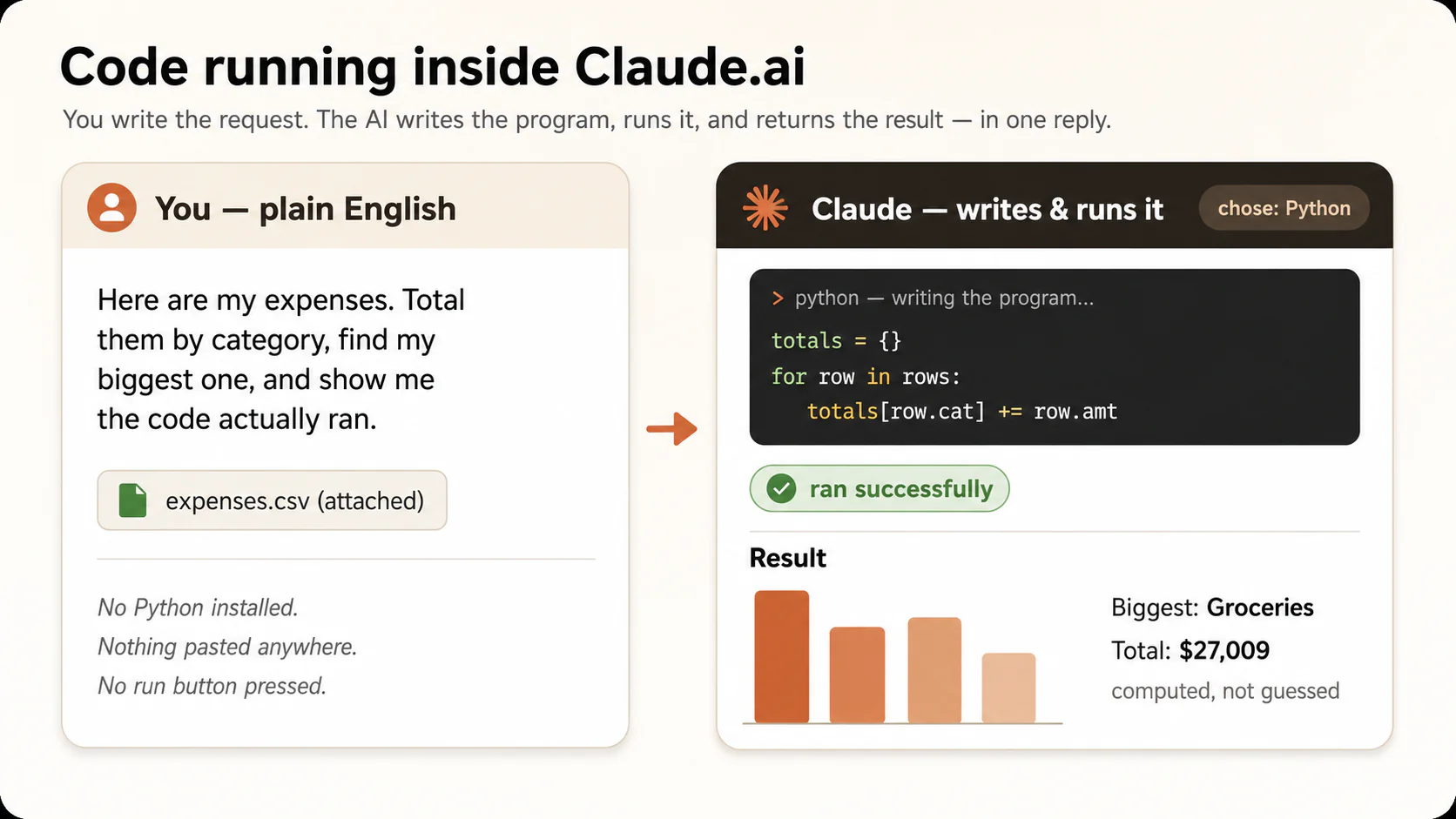
This is what "the AI runs the code" looks like. The program and its result appear together in one reply, and you pressed no run button.
What the home surface is best at, and where it ends:
| Strength | Limit |
|---|---|
| Zero installation, zero risk to your machine. | The sandbox sees only what you upload. Forty files means forty uploads, and "log into my network devices" is impossible from here. |
| Perfect for one-off and exploratory jobs. | The sandbox is temporary. Scripts must be downloaded (Concept 8) or they effectively die with the chat. |
| The full brief → code → verify → iterate loop, all visible. | Recurring jobs mean re-uploading every time. Fine monthly, tedious daily. |
The boundary, in one line. The chat sandbox is a workshop you visit. It is not where your files live. Once your problem is about your computer, its folders and its routines, you have outgrown the visit.
🔬 Do this now (2 min). Every exercise so far ran on Claude.ai. Here is its best move, the designed report. Paste this.
Here is last month's screen time, hours per app: Instagram,28 YouTube,41 Messages,12 Maps,6 Games,19 Produce a one-page HTML report: a headline with the total hours, a simple bar chart by app, the full table, and two observations worth my attention. Make it look good enough to send to someone.
A designed page appears, not a wall of text. Your plain words in, a real report out, code working unseen in between. That is "Markdown in, HTML out", now powered by code you never wrote.
The browser chat runs your code in a sandbox on the company's side, so nothing of yours is at risk. It sees only what you upload, and scripts die with the chat unless you download them.
Check yourself: What is the one thing the browser sandbox can never do for you?
10. Claude Code & OpenCode: the agent in your folder
Claude Code is Anthropic's. OpenCode is open-source and works with many AI models. Both live in the terminal. If the word makes you nervous, hold this picture. The terminal is a chat box that sits inside a folder. The picture is true only after you install one of these tools. A plain terminal on a new laptop is not a chat box, and it understands only computer commands. Once a tool is installed, you type sentences and an agent answers, which means an AI that does multi-step work for you and can act on your files. The agent sees the files already there, with no uploading. It runs code on them, saves scripts that stay forever, and fixes its own errors.
Both tools have grown beyond the terminal. Claude Code also runs inside code editors, a desktop app, and the browser. OpenCode runs in editors and a desktop app too. The "chat box in a folder" idea holds in all of them, so pick whichever entry point your tool offers.
The running job again. Notice what is missing.
The expenses-2025 folder contains 12 monthly CSVs. Merge them, total by category and month, flag duplicates (same date, amount, description), and produce report.html with a trend chart, category table, duplicates list, and three observations. Amounts use comma separators. Refunds are negative. Skip and list unparseable rows. Save the merge-and-report code as a reusable script named monthly-report (you choose the right file type) so I can rerun it next year.
No attachments. The files are simply there. The agent reads them, writes the code, runs it, hits the comma-separator problem, fixes that itself, and finishes. Open the folder and you find report.html and monthly-report.py, yours forever. Next January you type "run the monthly-report script on the 2026 folder." That is Concept 8's habit, with the keeping done for you.
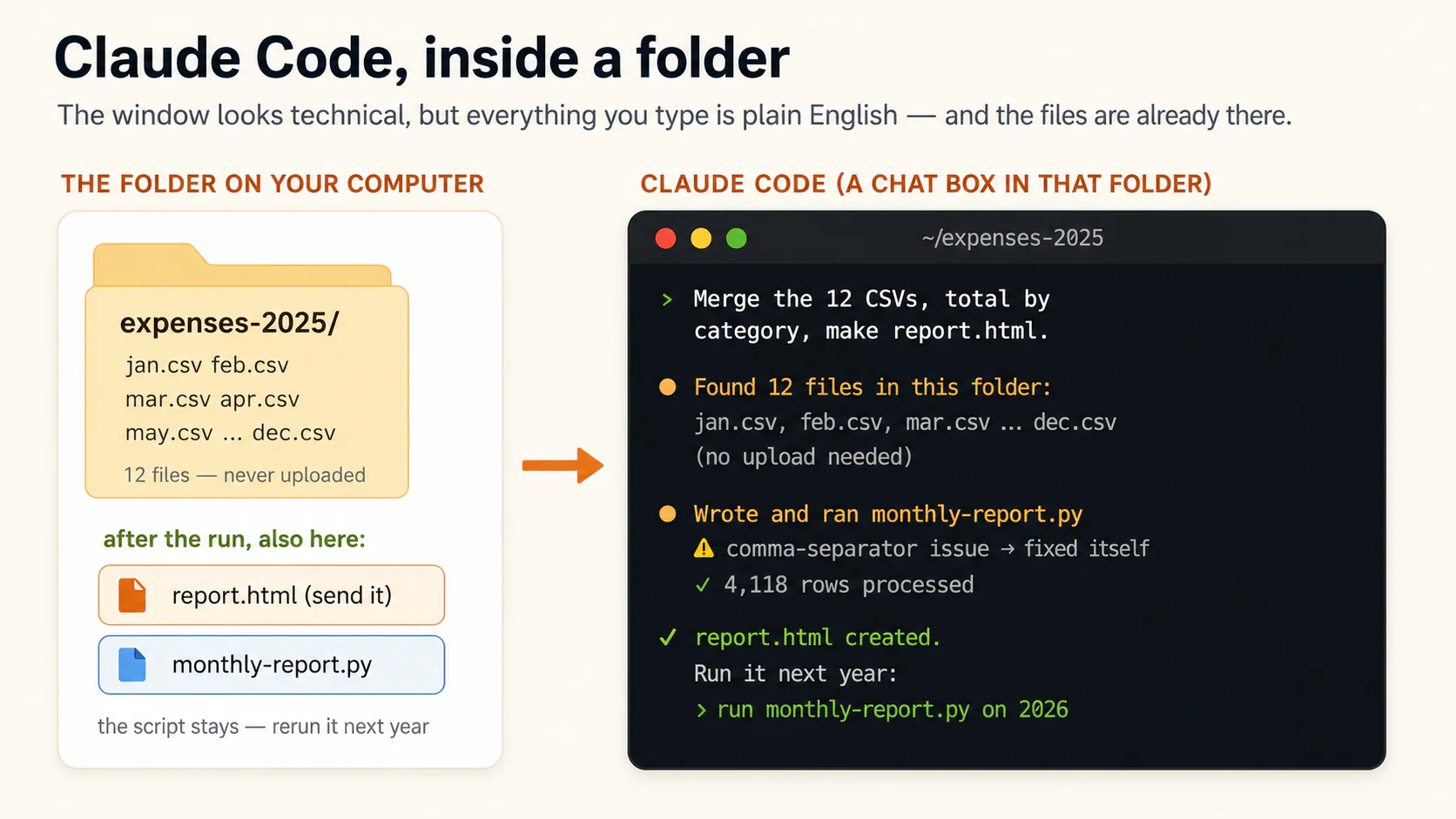
Claude Code in a folder. It lists files you never uploaded, because they were already there. The window looks technical, but everything you type is plain English.
This is the surface for the most demanding jobs: code that must run on your own machine, on a schedule, touching systems a browser tab can never reach. Picture a network engineer who logs into forty devices every morning to pull health reports. That work needs code running from his machine, on his network, before he reaches his desk. His whole workflow is: open the terminal, describe, check, schedule.
Which one, Claude Code or OpenCode? They give the same chat-in-a-folder experience. Claude Code is polished and runs Claude. OpenCode lets you pick your model, including free and self-hosted ones. Learn on either. The Agentic Coding Crash Course covers installing and operating both, and what you do inside them is what you learned here: brief, check, iterate, keep.
These tools are marketed at developers, and the marketing is wrong about the boundary. Nothing about "chat with an agent that can see this folder" requires knowing code. It requires knowing your files and your problem, which is the part you bring. Some of the heaviest users are accountants and researchers who got tired of uploading.
The terminal is a chat box that sits inside a folder. The agent sees your files without any upload, runs code on them, and keeps scripts forever.
Check yourself: Why can only this surface do the network engineer's morning job?
11. Cowork & OpenWork: delegation with a safety ritual
Claude Cowork is Anthropic's. OpenWork is open-source, from Different AI. Both are desktop apps with the same file-touching power as the terminal, in a normal application window, built for knowledge workers rather than developers. What is new here is what they are underneath. When Cowork reorganizes your folder or builds your report, it is very often writing and running code to do it. Same Python, different clothes.
Their defining feature is plan-then-approve, which means the app writes a plan and waits for your approval. Give Cowork the running job and it replies with a plan, then waits. "I will read the 12 CSVs, merge on these columns, treat refunds as negative, flag duplicates without deleting them, and produce report.html." You read the plan in plain English, catch the wrong assumption before anything runs, and approve. That is Concept 6's plain-English replay, moved before the work instead of after.
Choosing among the five, by the problem in front of you:
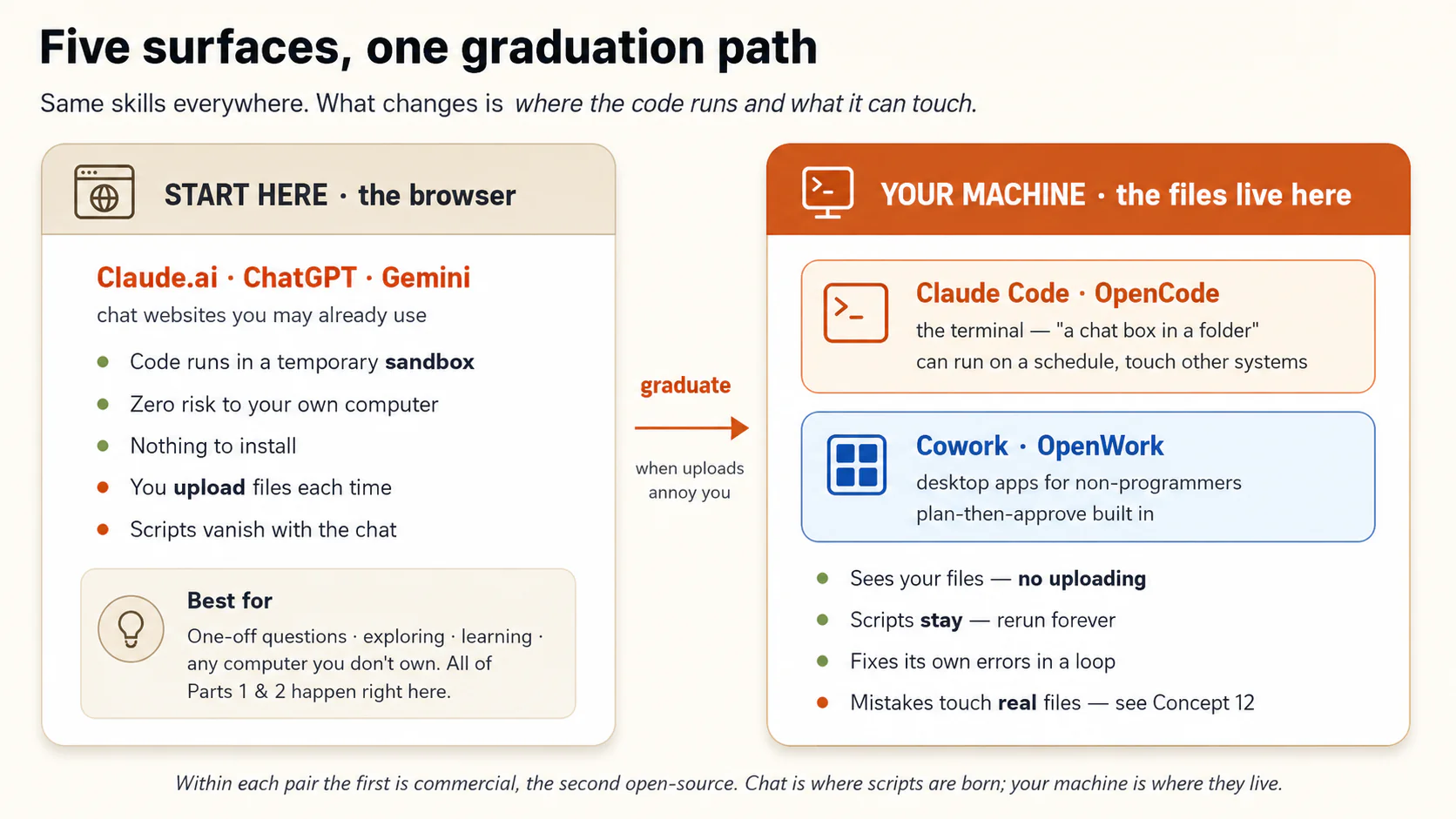
| Your situation | Reach for | Why |
|---|---|---|
| One-off question about a file or a few files | Claude.ai (or ChatGPT / Gemini) | Upload, compute, check, done. Nothing to install. |
| Learning, exploring, or working on a borrowed computer | Claude.ai | The sandbox cannot hurt anything. |
| The problem lives in your folders and you will repeat it | Claude Code or OpenCode | No uploading, scripts stay, errors heal themselves. |
| Same, but you want an app, and a plan to approve before anything moves | Cowork or OpenWork | Plan-then-approve is checking built into the surface. |
| The task must run on a schedule, or touch other systems | Claude Code or OpenCode | Only code on your own machine can run while you sleep. |
The honest advice on order. Stay on Claude.ai until uploading becomes the annoying part of your week. That annoyance is the graduation signal, and the tool-pair crash courses are waiting when you feel it.
You cannot try the terminal or the desktop app inside a browser tab. Trying them means a short install, which is what the Agentic Coding and Cowork & OpenWork courses are for. You have already practiced the real skills on Claude.ai: brief, force code, check, keep. These surfaces change where the code runs, not what you do.
Cowork and OpenWork are desktop apps with plan-then-approve built in. You read the plan in plain English and catch the wrong assumption before any file moves.
Check yourself: Which earlier check does plan-then-approve turn into a built-in habit?
Part 4: Power, safely held
Two closing concepts: the safety rules for code that can touch real things, and an honest map of where one-prompt code ends.
12. Blast radius: the rules for code that touches your files
On Claude.ai, mistakes are free. The sandbox is thrown away and your computer is never touched. The moment code runs on your machine, Concept 2's warning stops being theoretical. Code does exactly what it was told, perfectly, at scale, including the wrong thing. Two facts from the prompting course are worth repeating. Files deleted by an agent often skip the recycle bin, and files edited by a script keep no undo history.
Four rules, cheap to follow, remove nearly all of the risk. Together they shrink the blast radius, which means the worst thing that can happen if a run goes wrong.
Rule 1: Work on copies until a script has earned trust. Before any run that changes files, say "First copy the folder to expenses-2025-backup, then work only on the original." One sentence turns the first bad run into a shrug instead of a disaster. After a script has run cleanly several times on real data, you can relax this for that script.
Rule 2: See changes before they happen. A dry run is a list of every change the code would make, shown before it makes any. Before renaming, moving, deleting, or overwriting, say "Don't change anything yet. Show me the full list of operations you would perform, every rename, old name next to new name, and wait for my approval." Reading that list takes two minutes, and it catches the misunderstanding while it is still words instead of actions. Cowork and OpenWork do this by design. In the terminal you have to ask for it yourself, every time.
Rule 3: Point the agent at the smallest folder. Use the smallest folder that contains the problem. Never your home directory, which is the top folder that holds all of your personal files. Never "Documents", and never the whole disk. A script confused inside expenses-2025/ can damage twelve CSVs you backed up under Rule 1. A script confused at the top of your drive can damage your life.
Rule 4: Write output to new files, never over the originals. Say "Write results to a new file and leave the originals untouched." The original data stays clean, and every run can be undone by deleting the new file. Make it a standing line in every brief's Output section.
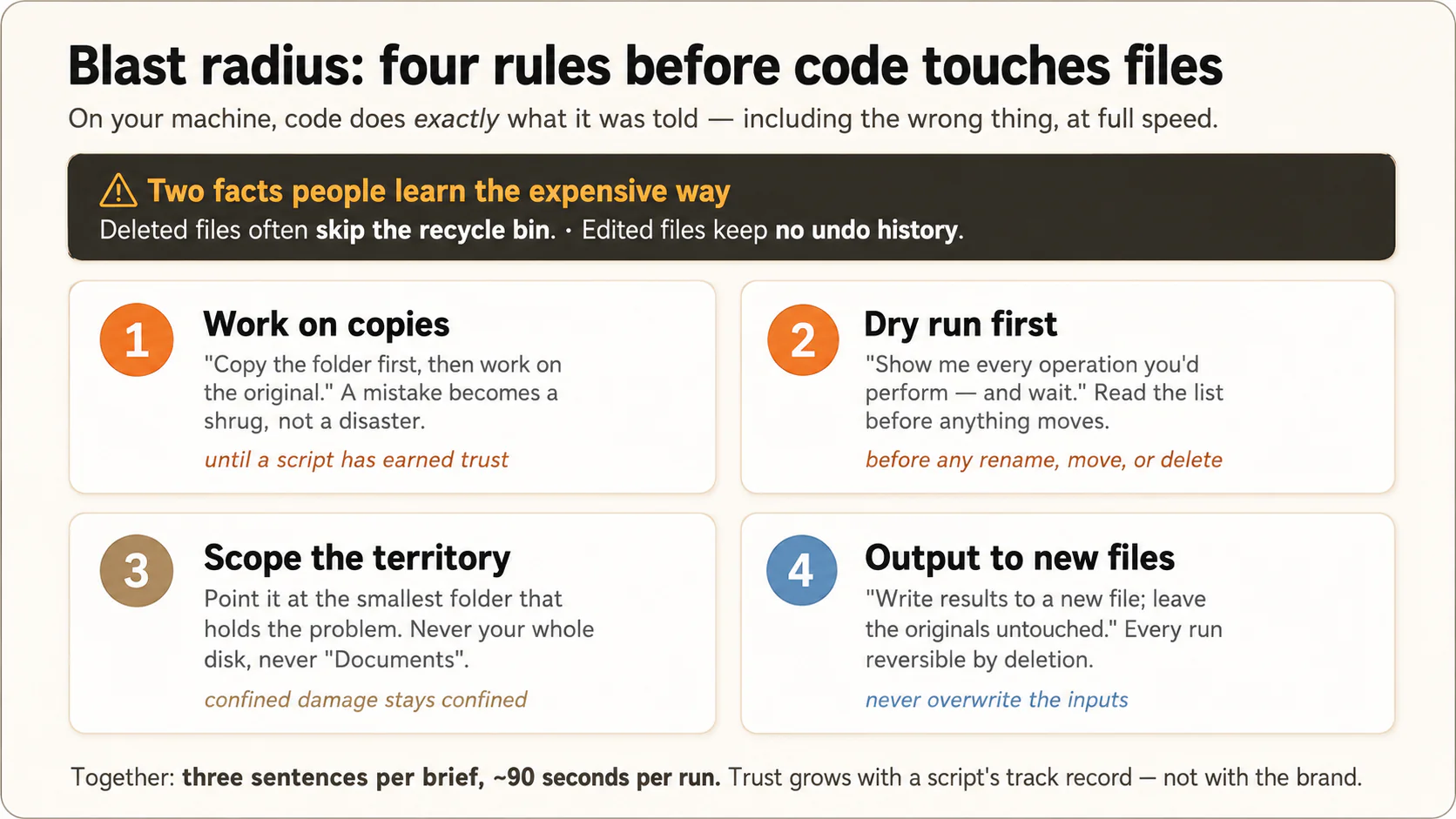
The four rules together cost three sentences per brief and about ninety seconds per run.
Copy the folder to a backup first. Show me your plan of operations before changing anything, and wait for approval. Write all output to new files. Never modify the originals.
The prompting course calls this a permission ladder. You give a tool a little freedom first, watch what it does, then give it more. Trust goes to specific scripts with a track record, not to the technology.
A non-software example, from real life. A researcher asked an agent to "clean up" a folder of interview recordings by removing duplicates. The dry-run list showed 40 proposed deletions. Six were files the rule had wrongly grouped, because two different interviews had identical lengths and similar names. She corrected the rule to "match on content, not name and size", ran the dry run again, and approved 34 true deletions. Those six interviews would have gone past the recycle bin, with no way to get them back. A two-minute read of a plan is what saved them.
🔬 Do this now (2 min). Practice the move that prevents disasters. Demand the plan before any change. Paste:
I have six files: report-jan.pdf, report-feb.pdf, notes.txt, report-mar.pdf, photo.jpg, report-apr.pdf. I want to rename only the "report-" PDFs to report-01.pdf, report-02.pdf, and so on, in date order. Before doing anything, show me your exact plan: every old name next to its new name. Change nothing yet, and wait for my approval.
It shows you a list, old name next to new name, and stops. Read it. Check that it leaves notes.txt and photo.jpg untouched. That two-minute read, before a single file moves, is the whole safety habit.
Four rules shrink the blast radius. Work on copies. Demand a dry run before anything is destroyed. Point at the smallest folder. Write output to new files.
Check yourself: Deleted files often skip the recycle bin. Which rule protects you from that?
13. The edge of the map, and what's across it
For problems that fit in a brief and live in your files, AI-written code you never read, and always check, is how this work is done now. But you should know where that territory ends.
Across the edge, needs more than one-prompt code:
- Software other people log into. Accounts, payments, many users at once, a service that must stay up at 3 a.m. Those are products, not scripts, and they need the discipline of Part 4 of this book.
- Always-on automation with real consequences. "Email my clients automatically every week" runs while nobody is watching, where Concept 6's checks cannot reach. A worker that runs itself is a Digital FTE, which means an AI worker built to carry a whole role, the way an employee would.
- High-stakes acts with no undo. Code that submits the tax filing, sends the mass email, or places the trade. Let code prepare these and let a human send them.
- Judgment wearing a computation costume. Take "compute which employees to promote". The arithmetic is easy. The criteria are the whole problem, and they are yours. Code computes. You decide.
Inside the territory, yours as of today: every reconciliation, rollup, rename, merge, clean, cross-check, chart, and report in your working life that fires one of the four signals. For most professionals that is hundreds of hours a year.
Remember the bookkeeper who got her evening back. That is code you ordered: described once, computed perfectly, kept forever, rerun for free. She, the clinic manager, and the pharmacist never became programmers. They became good clients. Now so are you.
Where the book goes from here. You now hold two big levers: exact documents, taught in Markdown In, HTML Out, and computation ordered through them, taught here. How to Think in the AI Era covers when to call on an agent and when not to. Then Problem Solving with General Agents takes both onto the agent surfaces from Part 3. The tool walkthroughs, Agentic Coding and Cowork & OpenWork, wait for the day uploading annoys you.
Multi-user software, unattended automation, no-undo actions, and judgment calls sit across the edge. Everything that fits in a brief is yours today.
Check yourself: Why is "compute which employees to promote" not a code problem?
A short recap before you try the prompts
Thirteen concepts, one line each.
- The AI writes the code and runs it. You ask "can I describe this?", not "can I build this?"
- Code is exact in both directions. The AI picks the language, and for this work it picks Python.
- Four signals mark a code problem. Volume, Precision, Repetition, Files. Any one is enough.
- Say the words. "Write and run code. Show me that the code ran. Give me row counts first."
- Brief the problem, not the program. Goal, Input, Output, Rules, Edge cases.
- Test results against knowledge you already have. The known-answer test is the everyday one.
- Errors are dialogue. Paste the red text. Report a wrong number as a symptom, with the value you expected.
- Keep the brief, the script, and a known-answer sample in one folder. Describe once, run forever.
- The browser chat runs code in a zero-risk sandbox. That is the home surface for learning.
- Claude Code and OpenCode put the agent inside your folder. No uploads, and scripts that stay.
- Cowork and OpenWork wrap the same power in a desktop app that plans before it acts.
- Copies first, a dry run before anything is destroyed, the smallest folder, output to new files.
- Multi-user software, unattended automation, no-undo actions, and judgment calls need the rest of this book.
Underneath all of it, one identity and one skill. The identity is that you are the client, not the contractor. The skill is one the prompting course never needed. You can trust work you cannot see, because you tested it against something you already knew.
You have already done it, ten times over
If you ran the do-this-now boxes above, you have already done six of the moves. You spotted code problems, forced the AI to compute, wrote a brief that tamed messy data, ran a known-answer test, survived a crash, and demanded a dry run.
Now run the same moves on your data, where the answers matter.
🚀 Projects
Those ten do-this-now boxes were rehearsals on data we handed you. These four projects are the real thing: your data, your stakes, and a catch at the end.
A catch is a true thing the AI's code finds that you did not already know, and that you can do something about. A subscription to cancel, a charge to dispute, a grade to rescue, a friend to chase for money owed. There is no link to send and no page to publish. What you walk away with is a sentence you can say to a real person, plus a small script you keep.
Before you point a project at some data, ask one question. Has a company already built an app for exactly this? If yes, such as Splitwise for splitting a bill, it is the wrong problem for here. An app exists only when the rules are the same for everybody, and then there is nothing of yours to brief.
The right problems are the opposite. They are a market of one, which means your rules, your mess, and an answer only you can confirm.
Start with Money Detective, because it teaches every move the others reuse. The first three hunt for a catch in data you can only read. The fourth turns the same discipline on your files, where code can delete. Each takes under an hour on a free account.
Project 145 minMoney DetectiveDon't track your money going forward. Hunt the leak hiding in your own real history.
"Money just disappears and I don't know where it goes." Everyone has said it. A budgeting app answers that going forward. This is the opposite move. You hunt backward through your own real history for the leak only you would recognize.
Rehearse once on a sample wallet whose answer you can check, then run it on your own real export. Paste this into the chat as your "file." It is a few months of a student's wallet. A positive amount is money in, a negative amount is money out.No export of your own yet? Rehearse on this wallet first
Date,What,Amount
2025-06-01,Pocket money,+5000
2025-06-04,PrimeVideo subscription,-199
2025-06-05,Spotify,-299
2025-06-07,Foodpanda,-650
2025-06-09,Careem ride,-300
2025-06-15,Tutoring received,+1500
2025-06-18,Foodpanda,-700
2025-06-28,Bank service fee,-50
2025-07-01,Pocket money,+5000
2025-07-04,PrimeVideo subscription,-199
2025-07-05,Spotify,-299
2025-07-08,Foodpanda,-650
2025-07-08,Foodpanda,-650
2025-07-14,Careem ride,-300
2025-07-28,Bank service fee,-50
2025-08-01,Pocket money,+5000
2025-08-04,PrimeVideo subscription,-199
2025-08-05,Spotify,-299
2025-08-10,Foodpanda,-700
2025-08-16,Careem ride,-350
2025-08-20,Tutoring received,+1500
2025-08-28,Bank service fee,-50
2025-09-01,Pocket money,+5000
2025-09-04,PrimeVideo subscription,-199
2025-09-05,Spotify,-299
2025-09-12,Foodpanda,-700
2025-09-17,Careem ride,-300
2025-09-28,Bank service fee,-50
Paste the wallet, then this brief:
Here's a few months of my wallet (a plus is money in, a minus is money out). Money keeps disappearing and I can't see where. Be my money detective: write and run code, and show me it ran, to find where it actually goes, anything that keeps charging me every month, and any charge billed twice on the same day. Then tell me what I'll have left by my next pocket money.
Earn your trust backstage first. Confirm two numbers you can check yourself. Total money in should be 23,000: four months of 5,000 pocket money plus tutoring twice at 1,500. PrimeVideo should appear every month, 796 so far, which is 199 times four. If the code reproduces both, the rest has earned your trust.
Now make it explain itself. Make the AI walk you through its thinking in words you can read.
Now explain it like I can't read code. Which language did you use, and how did you actually get these numbers, especially how you decided something was a duplicate?
This is Concept 6's plain-English replay. You cannot read the Python, but you can check the logic in plain English. "I summed by category. I treated a charge as recurring only when the same amount hit every month. I flagged same-day, same-amount charges as possible duplicates." If that logic is wrong, it reads wrong in English too. Notice also that you never told it to use Python. It picked the language itself.
What the detective actually catches. On this wallet it finds three true things you did not hand it. A PrimeVideo subscription taking 199 a month, 796 so far, that you forgot you had. A Foodpanda charge that hit twice on the same day, 8 July, which you can dispute. And the real leak, food delivery at roughly 4,050, more than every subscription combined. You are net positive, and you only feel broke because food delivery takes small bites. A good detective also says what its forecast leaned on. This one assumes your tutoring income keeps coming.
Your one sentence to a real person: "the AI found a subscription I forgot, 796 gone so far, plus a double charge I can dispute." That sentence ends in a verb. You cancel, you dispute, you eat at home twice a week.
Keep the tool for next month. Ask it to save the whole thing as a script with a plain-English header, named something like "my monthly money check". Next month you paste a fresh export and say "run this", and the hunt takes thirty seconds.
If the catch will drive a real decision, such as a refund worth chasing or a budget you will show someone, run the same brief in a second AI from a different family. See whether the two agree on the leak before you act. That is Concept 6's cross-model check, done for real.
Optional, if you want to keep a copy. To keep a copy or show a parent, package what you found with the skill from the last course, Markdown In and HTML Out.
For keeping or showing someone: turn what you found into one clean page I can save, with the leak, the forgotten subscription, the double charge, and your one-line verdict.
On Claude the report appears beside the chat as an artifact you can save. On ChatGPT it downloads as an .html file. A report of your own forgotten subscriptions is for your eyes or a parent's, never a link you publish. The project uses code both ways: Python to compute and catch the leak, and HTML to package it. This one is built from the practice wallet above, not anyone's real money, so it is safe to show. Yours would carry your own catches and stay yours. You can also open the sample in its own tab.▶ See a sample report (what your saved page can look like)
Done when all of these are true. The code reproduces the two numbers you already knew. It hands you at least one true thing you did not know and can act on this week. And you have a saved script you can rerun next month.
Project 230-45 minWhat's My Grade, ReallyEncode the one set of grading rules no app has, your teacher's, and find out where you really stand.
No gradebook app knows that your teacher drops your two lowest homeworks, counts the best 8 of 10 quizzes, and lets a strong final replace a weak midterm. That exact set of rules exists on one syllabus in the world, so only a brief you write can carry them. This is Concept 5 at its purest, because here the Rules section is the syllabus, in plain English.
Gather your real scores, copied straight from the portal, and your teacher's actual rules. Messy is fine. Rehearse on the sample if you do not have them in front of you.No scores handy? Rehearse on this, then do it for real
My homework scores: 60, 92, 88, 45, 90, 85
My quiz scores (best 8 of 10 count): 70, 95, 88, 100, 0, 91, 84, 77, 93, 80
Midterm: 72
Final: 86

My teacher's exact rules:
- Homework is 20% of the grade. Drop my two lowest homework scores, average the rest.
- Quizzes are 20%. Only my best 8 of 10 count (a 0 means I missed one).
- Midterm is 25%.
- Final is 35%. If my final percentage is higher than my midterm, the final replaces the midterm too.
Paste your scores and rules, then this brief:
Here are my scores and my teacher's exact grading rules. Write and run code, and show me it ran, to work out my real grade right now following every rule, and show each part's subtotal so I can check one by hand. Then tell me what I need on the final to reach 90 percent.
Earn your trust backstage first. Check one category yourself before you trust the whole grade. Drop the two lowest homeworks, 45 and 60, and average what is left: 92, 88, 90, 85. That comes to 88.75. If the code's homework subtotal reads 88.75, its arithmetic has earned your trust. On your own data, pick whichever category is easiest to work out on paper.
The catch. The number that comes back is almost never the number in your head. It is a true figure that matters, with a plan attached. "I am actually sitting at a 79, not the 85 I assumed, and I need an 88 on the final for an A." That changes what you study tonight, which is the point of running it.
Keep the tool for next time. Save it as a "what do I need on the final" script. Run it again every time a grade posts, and you always know where you stand and what the final has to clear.
Done when all of these are true. The code reproduces the one category you checked by hand. It hands you a real grade you did not know, plus the exact score you need next.
Project 345 minThe Books Don't MatchTwo records that should agree: your counted total and the messy digital one. Find the gap, name the person.
Remember the bookkeeper who opened this course. You have her problem at a smaller scale. You collected money for a class trip, a club, or a group gift. You counted what came in, so you know the true total. That count is your known answer, and no app can give it to you, because no app was in the room.
Now reconcile it against the messy digital record: payment memos full of free text, plus your paper list of who owes. Your private knowledge is the rules no app has. "Pizza in the memo is not dues, that is a friend paying me back." "Ali's 1,000 covers him and his brother." "A stray 500 from a number I do not recognize is probably someone's dues, but whose?" Those rules live in your head alone.No collection of your own to settle? Rehearse on this one
Everyone owes 500 for the class trip. Eight people: Ali, Omar, Sara,
Bilal, Hina, Zoya, Ayesha, Usman. So the books should show 4,000.

Digital record (JazzCash), exactly as it came in, messy memos and all:
Date,From,Amount,Memo
2025-09-02,Ali,1000,trip me + my brother Omar
2025-09-02,Sara,500,trip dues
2025-09-03,Bilal,500,
2025-09-03,Hina,500,class trip
2025-09-05,0300-unknown,500,
2025-09-05,Usman,300,pizza
2025-09-06,Zoya,500,dues
2025-09-08,Ayesha,500,trip

What only I know (the rules):
- Ali's 1,000 covers Ali AND his brother Omar. Count it for both.
- Usman's 300 with "pizza" is NOT dues; he was paying me back. Ignore it.
- The 500 from "0300-unknown" has no name I recognize. Do not assume; flag it.
Paste the dues list, the digital record, and your rules, then this brief:
Here's what everyone owes, the messy payment record, and the rules only I know. Write and run code, and show me it ran, to reconcile them: who's paid, who still owes, and how much is unaccounted for. List any payment you can't match to a person, and don't guess. My counted total is [your number]. Show me how the code's total compares with mine.
Earn your trust backstage first. Your counted figure, 4,000 owed across eight people, is the known answer here. It plays the same role as the closed-by-hand month in Concept 6. If the code's expected total comes back as anything but 4,000, something is wrong in the brief, before you even look at the catch.
The catch. On this sample the books come out 500 short. Seven people are covered: Ali and Omar by the 1,000, plus Sara, Bilal, Hina, Zoya, and Ayesha. Usman's only payment was pizza, so he still owes, and there is one 500 you cannot place. Either that mystery 500 is Usman paying under a name you did not know, or you are still owed, and one message settles it. The deliverable is a sentence you send to the group chat tonight. "Everyone is accounted for except Usman, and there is a mystery 500, so I will message him."
Keep the tool for next time. Save it as your reconciliation script. On the next trip, gift, or collection, paste the new record and the new dues list. An evening of hunting becomes a one-prompt check.
Done when all of these are true. The code reconciles against your counted total. It hands you a specific name to chase or a specific payment to place, in a sentence you could send to the group chat tonight.
Project 445 minPhoto Gallery RescueYour photo gallery is hiding duplicates eating real space. Find them, delete them safely, then sort what's left by date.
The other three projects read your data. This one changes it, which is why it teaches the safety habit the others cannot. Your photo gallery is full of duplicates, and whatever survives sits in no real order. You fix both here. Find and safely delete the duplicates, then sort what is left by date. The catch is the space the duplicates waste. The safety lesson is deleting them without losing a real photo.
First, find the duplicates, and notice the AI never "looks" at your photos. Telling two photos apart is ordinary code, not an AI judgment. The code shrinks each image to a tiny fingerprint and compares fingerprints. You ask for exactly that.
Write and run code to find duplicate and near-duplicate photos in this folder. Fingerprint each image with a perceptual hash, group the ones that match, and tell me how many duplicates there are and how much space they take. Don't delete anything yet.
The catch arrives as a number: "47 duplicates across 18 sets, 2.1 GB." That alone is worth the project.
Then the safety gate, because this step deletes. Concept 12 applies here. Deleted files skip the recycle bin, and a fingerprint match can be wrong, because two different sunsets look alike. So you make the code show its plan before it touches anything.
For each set, keep the largest copy and list the ones you would delete, with names and sizes. Change nothing yet. Copy the originals to a backup first, then wait for my approval.
Read the list. There is almost always one "duplicate" that is really a different moment. Spare it, then approve the rest. That review, before a file is deleted, is the whole safety lesson.
Finally, sort what is left, so the cleanup lasts. A gallery with the duplicates gone is still half-tidy if it is a thousand photos in upload order. One more instruction puts it in shape.
Now take the photos that are left and sort them by date, newest first, into a copy I can scan at a glance. Leave my originals untouched.
You end with your own gallery, cleaned and in order. Nothing published, nothing sent, just your files finally tidy. This is what the code does, made interactive. Drop a pile of photos in, and try the same one twice. It fingerprints each one to catch duplicates, lets you review before removing any, then sorts the rest by date. No AI, nothing uploaded. You can also open it in its own tab.▶ Try it yourself (live)
Done when all of these are true. The code hands you a real number for the duplicates found and the space they waste. You caught at least one false match before approving. A backup of the originals exists. And the survivors are sorted by date. Keep the script, and your gallery never piles up again.
🛟 If you get stuck mid-project
Find your symptom and paste the fix. None of them asks you to understand what went wrong. That is the AI's job.
1. "It can't open or read my export." Usually the file, not the AI. Paste this. "Tell me exactly what is wrong with this file. Its format, what you can and cannot read from it, and what I should re-export or save it as instead." If the download screen offered both CSV and Excel, try the other one. Nine times out of ten this is a re-export.
2. "It answered, but I never saw a code block." This is the silent estimate from Concept 4. Say the words again, firmly. "Stop. Write and run code to answer this, show me the code, and give me the row count first." No code block means no code ran, whatever the words claim.
3. "The number doesn't match what I counted or what I know." Do not say "it's wrong." Report it as a symptom, as Concept 7 showed. "Your total is X but I counted Y. Show me the row count you processed, the date range, and the first five rows as the code sees them." The cause almost always appears there. And in these projects a mismatch might be the catch rather than a bug.
4. "The same fix keeps failing." Three strikes means the approach is wrong, not the typing. Paste this. "We have tried this three times. Forget the current code. Restate the problem fresh and propose two completely different approaches."
5. "My file has private data and I'm nervous uploading it." Good instinct. Act on it. Paste this. "Before any analysis, make a cleaned copy with the names and account numbers removed, work only on that copy, and confirm what you removed." Or delete those columns yourself first, because the totals rarely need them. Check your tool's data policy before you upload anything sensitive. If your data really cannot leave, because of a workplace or school rule, practice on the sample and use these moves only inside a tool your workplace has approved.
6. "I ran out of free-tier usage mid-project." Every project here fits a free tier, but heavy iteration can hit a daily cap. Wait for the reset, since your saved brief means resuming costs nothing. Or paste the brief into a different model family and keep going. The skill transfers either way.
The pattern under all six: when stuck, describe the stuckness to the AI. The same skill that orders the code rescues the project.
You now order code. The next course teaches you to run the whole job: Problem Solving with General Agents →
Flashcards Study Aid
Test Your Understanding
Thirteen concepts, one identity. You are the client, not the contractor. These thirty-two scenarios drop you into other people's spreadsheets, folders, and broken runs, and ask the one question each concept turns on. None reward memorizing a definition. Every one rewards knowing what to do. Answer from the reasoning, not from the longest option.