Claude Managed Agents: Renting the Harness
15 Concepts · About 80 minutes to read · 2 hours to build · From Owning the Harness to Renting It
The Claude Agent SDK course spent twenty concepts teaching you to run an agent well: the loop, permissions, hooks, subagents, context management, sandboxing, and cost control.
This course is about a service that does much of that for you. So the obvious question is: why rent a harness after learning to build one?
Anthropic's own answer is more interesting than convenience. It appears in the first line of their engineering write-up:
Harnesses encode assumptions that go stale as models improve.
They give a specific example, and it is worth sitting with because it is not hypothetical.
Claude Sonnet 4.5 had a habit of wrapping up tasks early as it sensed its context limit approaching, a behaviour they called context anxiety.
So they added context resets to the harness. That is exactly the sort of careful engineering the Agent SDK course teaches.
Then they ran the same harness on Claude Opus 4.5, and the behaviour was gone.
The resets had become dead weight.
That is the argument for Managed Agents in one story.
Every accommodation for a model weakness is a bet that the weakness will persist.
Some bets keep paying. Others become code you maintain for a problem that has disappeared.
And you will not notice, because a harness that works does not announce which of its parts are load-bearing.
You will learn three things:
- What Anthropic actually built, meaning the three interfaces the service is shaped around, and why that shape matters to you rather than only to them.
- How to configure and run one, from an agent definition to a streaming session you can steer mid-execution.
- What you give up, which includes some compliance eligibility, and how to decide between this and the Agent SDK for a specific job.
Directly after the Claude Agent SDK course, which is the prerequisite. That course named Managed Agents twice as the alternative to building your own sandbox and session storage. This one is that alternative, examined properly.
Everything here was checked against Anthropic's Claude Platform documentation and engineering blog on 22 August 2026. Managed Agents is in beta. All endpoints require the managed-agents-2026-04-01 beta header, and Anthropic states that behaviours may be refined between releases. Concept 14 covers what that means for you.
Prerequisites. Three things.
- You have done the Agent SDK course. This course assumes you know what a harness is, because the whole argument is about who maintains one.
- A Claude Console account and an API key. Managed Agents is enabled by default for API accounts.
- You can read Python or a YAML file. The examples use both, and the CLI takes YAML.
Part 1: The Argument, and the Shape
Goal for this part: understand why a hosted harness exists, learn the four nouns the service is built from, and run one session.
Concept 1: The Assumption That Went Stale
Key idea: A harness encodes what the model cannot do yet. As the model improves, some of that code becomes maintenance you are performing for no reason.
Return to the context anxiety story, because it generalises.
A harness is a set of accommodations.
Compaction exists because context runs out. Approval gates exist because the model may do something you did not intend. Retry logic exists because tool calls fail.
Each mechanism is a response to an observed weakness.
Each mechanism is also a claim about the future: the weakness will still be there.
Anthropic tested that assumption on its own harness and found one accommodation that had quietly expired.
Why It Is Hard to Notice
A harness that works does not tell you which parts are load-bearing.
The context resets did not fail on Opus 4.5. They simply did nothing, at some cost in complexity and tokens. The only way to find out was to remove them and check.
That is the real argument for a hosted harness.
Somebody has to keep re-checking those assumptions. Managed Agents is Anthropic offering to do that work.
It is also not a universal argument, and Concept 15 is where you weigh it. The Agent SDK exists because some agents need decisions the hosted harness will not make for you.
PRIMM: Predict. You built an agent last year with a careful compaction strategy, a retry wrapper around flaky tools, and a rule that stops the agent before it runs out of context. A year of model releases later, which of those three is most likely to have become dead weight, and how would you find out? Confidence 1 to 5.
What you will see
The context rule is the most likely, and finding out means deleting it and measuring.
The three are not equally exposed.
The retry wrapper handles network failures, which are a property of the world, so it probably stays. Compaction handles a finite context window, which also stays, though the best strategy may change.
The context rule is different. It handles a behaviour of a specific model, and behaviours are exactly what changes between releases. Anthropic's own example was precisely this shape.
The uncomfortable part is how you discover this.
There is no warning, deprecation notice, or failing test. The accommodation keeps running and costing something. You learn that it is unnecessary only by removing it and comparing results.
That is the maintenance burden this course is really about. Not the code you wrote, but the annual question of whether it still earns its place.
Concept 2: Four Nouns
Key idea: Agent, environment, session, events. Everything in the API is one of these four, and they separate cleanly.
| Concept | What it is |
|---|---|
| Agent | The model, system prompt, tools, MCP servers, and skills |
| Environment | Where sessions run: an Anthropic-managed cloud sandbox, or a self-hosted sandbox on your own infrastructure |
| Session | A running agent instance within an environment, doing one task |
| Events | Messages exchanged between your application and the agent |
Why the Separation Matters
The separation is the useful part.
An agent is created once and referenced by ID across many sessions. The definition of the agent therefore lives apart from any one run, much like a class is separate from an instance.
The flow follows from the nouns:
- Create an agent, defining model, prompt, tools, MCP servers, and skills.
- Create an environment, choosing a cloud sandbox or a self-hosted one.
- Start a session that references both.
- Send user messages as events, and receive results streamed back over server-sent events.
- Steer or interrupt mid-execution by sending more events.
Event history is persisted server-side and can be fetched in full, which is the property Concept 6 is built on.
Concept 3: One Session, End to End
Key idea: Three objects and a stream. The smallest working example fits on one page.
Install the CLI and the SDK:
brew install anthropics/tap/ant     # macOS. curl and Go installers also exist
ant --version

pip install anthropic
export ANTHROPIC_API_KEY="your-api-key-here"
The Three Objects
An agent is a YAML file:
# coding-assistant.agent.yaml
name: Coding Assistant
model:
  id: claude-opus-5
system: You are a helpful coding assistant. Write clean, well-documented code.
tools:
  - type: agent_toolset_20260401
That single tool entry is doing a lot. agent_toolset_20260401 enables the full set of pre-built agent tools: bash, file operations, web search, and the rest. Concept 8 covers narrowing it.
An environment is another YAML file:
# quickstart.environment.yaml
name: quickstart-env
config:
  type: cloud
  networking:
    type: unrestricted
Create both, keeping the IDs:
AGENT_ID=$(ant beta:agents create --transform id --raw-output < coding-assistant.agent.yaml)
ENVIRONMENT_ID=$(ant beta:environments create --transform id --raw-output < quickstart.environment.yaml)
Then a session, and a stream:
session = client.beta.sessions.create(
    agent=agent.id,
    environment_id=environment.id,
    title="Quickstart session",
)

with client.beta.sessions.events.stream(session.id) as stream:
    client.beta.sessions.events.send(
        session.id,
        events=[{
            "type": "user.message",
            "content": [{"type": "text", "text": "Create a Python script that generates the first 20 Fibonacci numbers and saves them to fibonacci.txt"}],
        }],
    )

    for event in stream:
        match event.type:
            case "agent.message":
                for block in event.content:
                    print(block.text, end="")
            case "agent.tool_use":
                print(f"\n[Using tool: {event.name}]")
            case "session.status_idle":
                print("\n\nAgent finished.")
                break
What Your Code Became
Compare that with the Agent SDK course.
There you wrote the loop, registered tools, handled permissions, and managed sessions. Here the service owns the loop, tools, and sandbox. Your code mainly reads the event stream.
Note the shape of the ending. The agent emits session.status_idle when it has nothing more to do, and this example breaks on it.
That is right for a quickstart with no approval step, and it is not the whole rule. Concept 10 shows why, and it is the correction most likely to bite you.
You know why the service exists, the four nouns it is built from, and how to run one session. Part 2 is about the architecture underneath, which turns out to matter to you.
Part 2: The Architecture You Are Renting
Goal for this part: understand the three interfaces, because each one is a property you inherit rather than an implementation detail.
Concept 4: Brain, Hands, and Session
Key idea: Anthropic virtualised an agent into three interfaces so each can be replaced without disturbing the others. You are buying the interfaces, not what is behind them.
PRIMM: Predict. Anthropic virtualised an agent into three interfaces. Two of them can crash and be replaced without losing anything. Which is the third, and what does that tell you about where the durability guarantee has to live? Confidence 1 to 5.
What you will see
The session. The brain and the hands are both replaceable, and the session is what they are rebuilt from.
Follow the failure path.
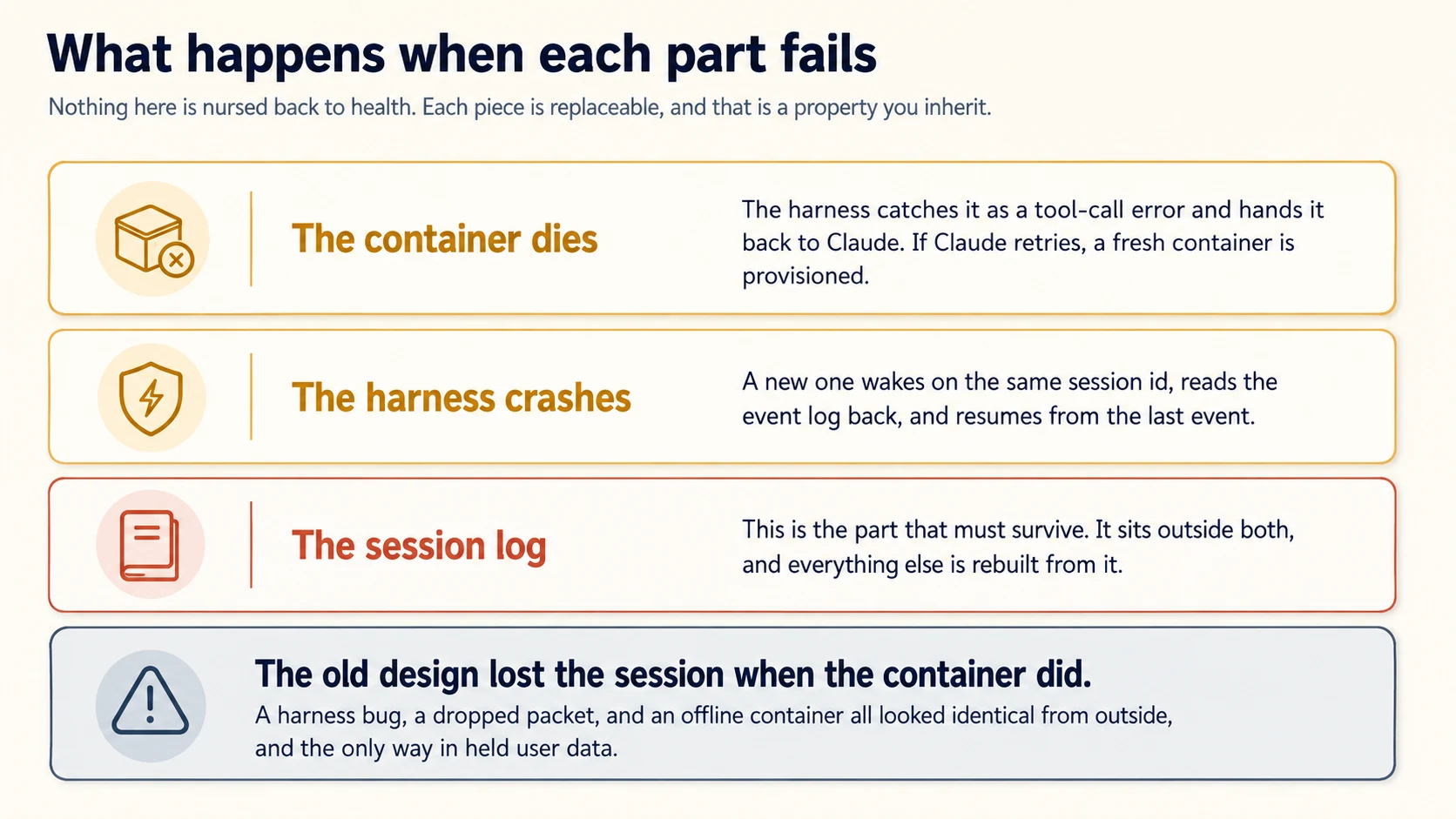
If a container dies, the harness turns that into a tool-call error and can provision a fresh container. If the harness crashes, a new harness wakes on the same session ID and reads the log back.
Neither loss is fatal, because neither held the only copy of anything.
That only works if the log is somewhere else. Durability has to live in exactly one place, and everything that can be reconstructed from it gets to be disposable.
Concept 6 follows directly from that choice.
If the session must be durable, it can also be queryable. It becomes more than a backup: it becomes a context object the agent can read in slices.
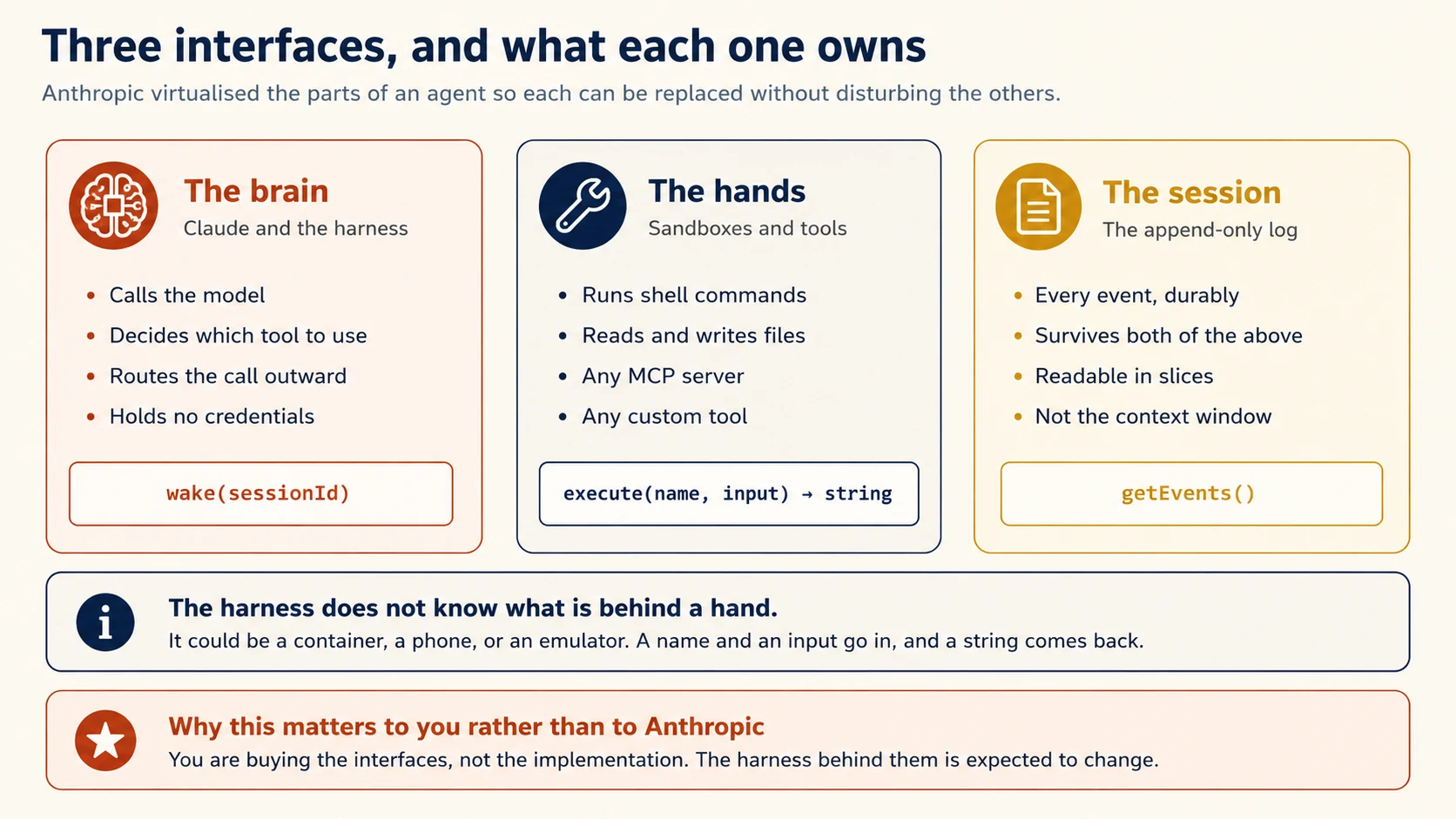
The design comes from an old problem, and Anthropic names it directly: how to build a system for programs as yet unthought of.
Their analogy is operating systems. Decades ago, an OS virtualised hardware into abstractions general enough for programs that did not exist yet: the process, the file.
read() does not care whether it is talking to a disk pack from the 1970s or a modern SSD. The abstractions outlasted the hardware.
Managed Agents applies the same pattern to an agent, and the three interfaces are the result.
The Interface Worth Studying
A hand is anything that satisfies execute(name, input) → string****. The harness does not know whether the thing behind it is a container, a phone, or an emulator.
That one interface covers any custom tool, any MCP server, and Anthropic's own tools, all through the same shape.
Why this matters to you. Concept 1 argued that harnesses go stale. This architecture is Anthropic's response.
The harness is expected to change. The interfaces are meant to survive those changes. When you build on Managed Agents, you are betting on the interfaces rather than today's harness implementation.
Anthropic's own word for it is a meta-harness: a system unopinionated about the specific harness Claude will need, offering general interfaces that allow many.
Concept 5: Everything Is Cattle
Key idea: No component is nursed back to health. The session log survives, and everything else is rebuilt from it.
What Went Wrong the First Time
The first design put the session, harness, and sandbox in one container. Anthropic's account of why that failed is worth reading as engineering rather than as history.
The container became a pet. In the pets-versus-cattle framing, a pet is a named individual you cannot afford to lose, and cattle are interchangeable. If a container failed, the session was lost. If it hung, somebody had to nurse it back.
Debugging was close to impossible. The event stream could show that something failed, but not where it failed.
A harness bug, a dropped packet, and an offline container looked the same from outside. Investigating meant opening a shell inside the container, which also held user data.
The repair was to move the harness out. Now the container is a tool the harness calls, so:
- A container dies and the harness catches it as a tool-call error, hands it back to Claude, and provisions a fresh one if Claude retries.
- A harness crashes and a new one wakes on the same session id, reads the log, and resumes from the last event.
The Footnote That Is Not One
In the coupled design, every session paid full container setup cost before any inference could start. That included sessions that would never touch the sandbox at all.
Once containers are provisioned only when a tool call needs one, the numbers moved sharply. Their p50 time to first token dropped roughly 60%, and p95 dropped over 90%.
That is what you are buying in the first second of every session, and it came from an architecture decision rather than a faster model.
Concept 6: The Session Is Not the Context Window
Key idea: The event log lives outside Claude's context, so context management stops being a set of irreversible decisions.
This concept is the one most likely to change how you think about long-running agents, including ones you build yourself.
The Agent SDK course spent a concept on context management: compaction, trimming, a facts block re-injected each turn.
Every one of those techniques makes an irreversible decision about what to keep, and you cannot know which tokens a future turn will need. Compact a message away and it is gone unless you stored it somewhere.
Managed Agents separates the two concerns. The session is a durable, append-only log that sits outside the context window, and the harness reads from it.
Reading the Log in Slices
The interface is getEvents(), and it takes positional slices. So the brain can:
- Pick up from wherever it last stopped reading
- Rewind a few events before a specific moment to see the lead-up
- Re-read the context before a particular action
Anything fetched can then be transformed before it reaches the context window, which is where compaction, ordering for cache hits, and any other context engineering lives.
Note how the responsibilities split. The session guarantees only that events are durable and interrogable. The harness decides what to do with them.
Anthropic's stated reason is that they cannot predict what context engineering future models will need. So they pushed that decision into the replaceable component, and kept the storage guarantee in the stable one.
Take this pattern even if you never use the product.
A durable, queryable history lets an agent reconsider what matters later. A context window that has already discarded information cannot do that.
Concept 7: Credentials the Sandbox Cannot Reach
Key idea: Claude's generated code runs where the tokens are not. Scoping a token narrowly is a weaker fix, because it assumes something about what Claude cannot do with it.
PRIMM: Predict. An agent runs code it wrote itself, in a container that also holds the API tokens for its tools. A prompt injection succeeds. What is the worst outcome, and would a narrowly scoped token prevent it? Confidence 1 to 5.
What you will see
Worse than one leaked token, and no.
The immediate outcome is that the injection only had to convince Claude to read its own environment, which is a much lower bar than convincing it to do something visibly wrong.
The worse part is what the tokens buy. With them, an attacker can spawn fresh, unrestricted sessions and delegate work to those.
The compromise does not stop at the session it started in. That is why this is a structural problem rather than a bad turn.
On the second half, most readers say a scoped token limits the damage. Anthropic considered that and rejected it as the fix.
Their reasoning is the one from Concept 1 pointed at security. A narrow scope encodes an assumption about what Claude cannot accomplish with a limited token, and Claude keeps getting smarter.
The fix they chose does not depend on that assumption holding. The token is not in the sandbox at all.
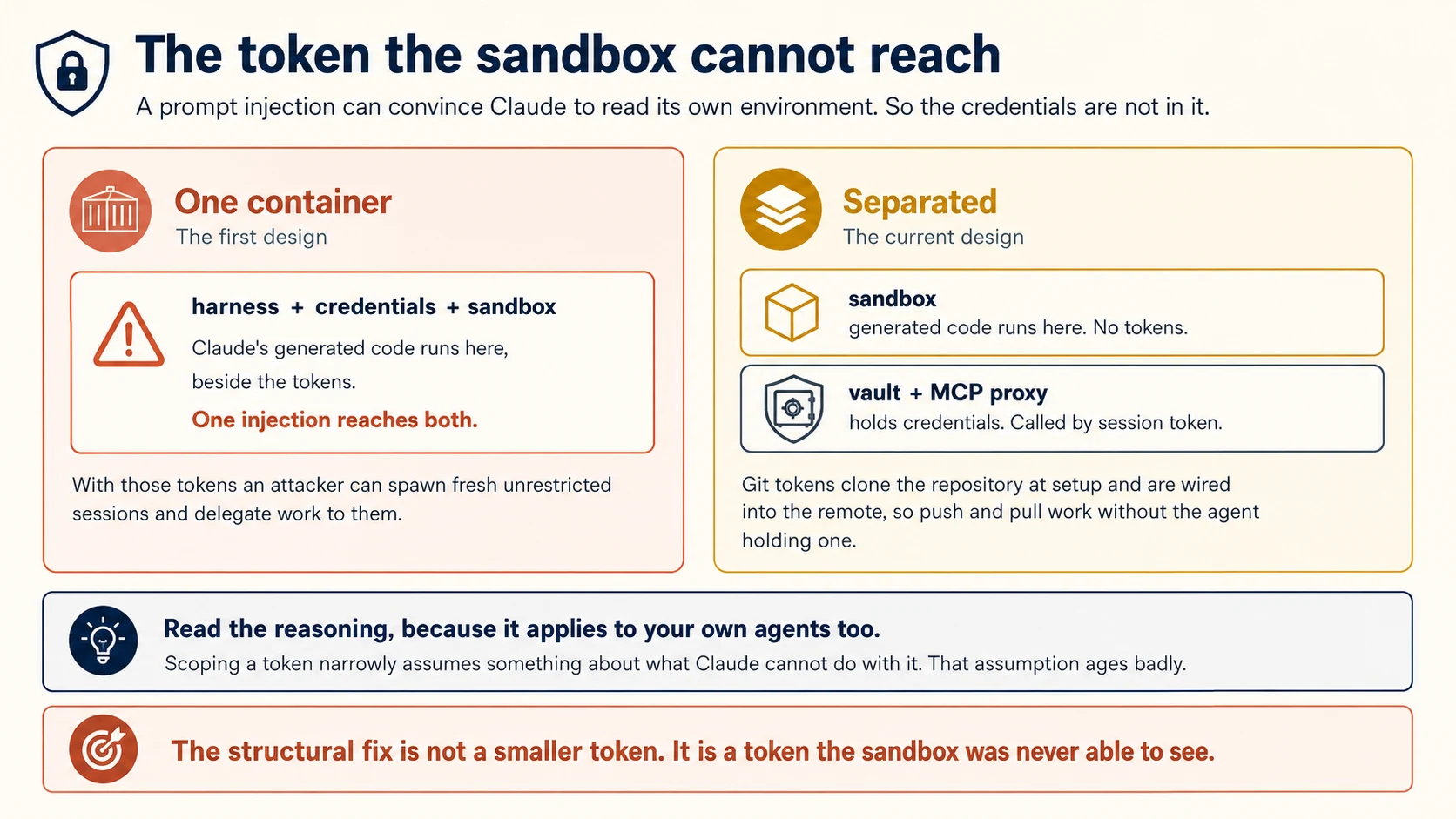
In the coupled design, untrusted code that Claude generated ran in the same container as the credentials. A prompt injection only had to convince Claude to read its own environment.
The consequence is worse than one leaked token.
With those tokens, an attacker can start fresh unrestricted sessions and delegate work to them. The compromise no longer stops at the original session.
Now the part worth arguing with, because it is a claim about your own systems too.
Narrow scoping is the obvious mitigation, and Anthropic rejected it as insufficient.
A narrow scope assumes there are things Claude cannot accomplish with that token. As Claude improves, that assumption may expire. This is Concept 1 applied to security.
The structural fix is not a smaller token. It is a token the sandbox was never able to see.
The Two Patterns
Two patterns implement it:
Bundle auth with the resource. For Git, the repository token is used during sandbox setup and wired into the local remote.
Push and pull then work without the agent ever handling the token itself.
Hold it in a vault outside the sandbox. MCP calls can go through a dedicated proxy.
The proxy receives a session-associated token, fetches the real credential from the vault, and makes the call. The harness never sees the credential.
The security guarantee is structural: vaulted credentials never enter the sandbox.
That means code running there, including code the agent writes, cannot read or exfiltrate a vaulted credential even after prompt injection.
The API is built to match. Secret fields you supply are write-only and never returned in responses. So a leaked read of your own configuration does not leak the secret either.
The Claude Code CI course used the same reasoning from the other side.
A -p session could run hooks from a checked-out repository. The strong fix was not to read those files at all, rather than hope the hook was harmless.
Removing the reachability beats narrowing the permission.
You understand the three interfaces and the two arguments behind them. Part 3 is about configuring a real agent.
Part 3: Configuring It
Goal for this part: define an agent narrowly, choose an environment, and drive a session you can steer.
Concept 8: Defining the Agent
Key idea: An agent is a reusable, versioned definition. The default toolset is generous, so narrowing it is your job.
An agent bundles the model, system prompt, tools, MCP servers, and skills.
Create it once and reference it by ID across sessions. Treat it like a versioned class, not a one-off script.
The Built-In Agent Toolset
The tools in agent_toolset_20260401:
| Tool | What it does |
|---|---|
| Bash | Runs shell commands in the sandbox |
| File operations | Read, write, edit, glob, and grep in the sandbox |
| Web search and fetch | Searches the web and retrieves URLs, optionally restricted to an allowlist or blocklist of domains |
The quickstart in Concept 3 used agent_toolset_20260401, which enables all eight built-in tools. That is right for a first run and wrong for most production agents.
The reason is familiar.
An agent with eighteen tools has a harder decision than the same agent with five. Every unnecessary tool also widens the blast radius of a bad turn.
Narrowing It
The toolset takes a default_config and a configs array, so you can flip the default off and opt in:
tools:
  - type: agent_toolset_20260401
    default_config:
      enabled: false
    configs:
      - name: bash
        enabled: true
      - name: read
        enabled: true
The individual tool names are bash, read, write, edit, glob, grep, web_fetch, and web_search.
Permission Policies
The same structure carries a permission policy, which is the mechanism the Agent SDK gave you as can_use_tool.
tools:
  - type: agent_toolset_20260401
    default_config:
      permission_policy:
        type: always_allow
    configs:
      - name: bash
        permission_policy:
          type: always_ask
That agent reads files and searches the web without interruption, and asks before running a shell command.
always_ask is where Concept 11's event stream stops being only an output channel. The flow has four steps, and the second one is the part that catches people:
- The session emits
agent.tool_useoragent.mcp_tool_use. - The session pauses with a
session.status_idleevent carryingstop_reason: requires_action****. The blocked event IDs are instop_reason.event_ids. - You send a
user.tool_confirmationfor each blocked ID. - Once all of them are resolved, the session transitions back to running.
{ "type": "user.tool_confirmation", "tool_use_id": "sevt_abc123", "result": "allow" }
A denial carries deny_message, and that message reaches the agent as the tool's result, so it adjusts instead of retrying the same call:
{ "type": "user.tool_confirmation", "tool_use_id": "sevt_def456",
  "result": "deny", "deny_message": "Read .env.example instead" }
Three details that a first implementation gets wrong.
tool_use_id is the event ID, not an Anthropic toolu_ id. It comes from the tool-use event, and the IDs you need are listed in stop_reason.event_ids.
Send confirmations together. Several can go in one request, and separate sends racing each other can be rejected while the session is resuming.
Step 2 is why Concept 10 matters. A session that has paused for approval looks, on the wire, exactly like a session that has finished.
MCP Tools Are a Separate Toolset
The table above is the built-in agent toolset. MCP servers are a different toolset, configured separately, and agent_toolset_20260401 does not enable them.
They take the same per-tool overrides, with name set to the tool name the server reports.
Custom tools are outside this system entirely. They are executed by your application rather than by Anthropic, so permission policies do not govern them.
When the agent invokes one you receive an agent.custom_tool_use event and reply with user.custom_tool_result. Sending a user.tool_confirmation for a custom tool is an error.
So the honest position on control is narrower than "you lose the approval gate."
You get a per-tool policy and a confirmation event. What you do not get is the Agent SDK's PreToolUse hook, which is arbitrary code of yours running before the call.
Concept 15 weighs that difference.
The domain allowlist on web fetch deserves attention specifically. An agent that browses the web is an agent reading content somebody else wrote, and Concept 7's reasoning applies. Restrict it to the domains the job actually requires.
Skills attach here too, so the skill authoring material transfers. A description precise enough to match real requests, and a body that is a procedure rather than reference material.
Concept 9: Environments and Networking
Key idea: An environment decides where sessions run. The self-hosted option exists for compliance and data residency, and it is why this product can be used in places a cloud sandbox cannot.
An environment is the second reusable object, and it answers one question: where does the sandbox live?
A cloud sandbox is Anthropic-managed, with pre-installed packages and network access. This is the default and it is what the quickstart used.
A self-hosted sandbox runs on infrastructure you control. Anthropic names three cases: data that cannot leave your network boundary, internal services that are not publicly routable, and running under your organisation's own compliance and audit controls.
Keep two ideas separate.
Self-hosting controls where the agent's code executes. MCP tunnels control how Anthropic reaches MCP servers inside your network.
They are independent. A cloud session can reach a private MCP server through a tunnel, and a self-hosted session can also use one. Use both when you need both execution and tool access inside your boundary.
Why Self-Hosting Is a Strategic Option
That option is more strategic than it looks. It is the difference between a product a regulated organisation can adopt and one it cannot. And it exists because of the decoupling in Concept 4.
When the harness lived inside the container, private-network access required network peering or running Anthropic's harness inside the customer's environment.
Moving the harness out removed that assumption.
Networking is configured per environment. The quickstart used type: unrestricted, which is the right setting for a first run and a decision you should make deliberately for anything real.
Concept 10: The Event Stream
Key idea: You send events and receive events. session.status_idle means the session paused, so stop_reason tells you whether to resume or finish.
Everything between your application and the agent is an event, and the stream is server-sent events.
The Events You Will Handle First
Three event types cover most of what a first implementation needs:
| Event | Meaning |
|---|---|
agent.message | Text from the agent. Iterate its content blocks |
agent.tool_use | The agent is calling a tool, named in event.name |
session.status_idle | The session has paused. Read stop_reason to learn why |
Idle Does Not Mean Finished
That third row is the one to get right, and the obvious reading of the name is wrong.
session.status_idle means the session paused. It does not mean the work is done.
A session waiting for tool approval emits the same event as a session whose turn has ended. The difference is in stop_reason.
So the branch has to go one level deeper:
case "session.status_idle":
    match event.stop_reason.type:
        case "requires_action":
            # blocked tool calls are in event.stop_reason.event_ids
            # answer each one, and the session resumes
            ...
        case _:
            break   # the turn is genuinely over
The common failure is confusing.
Your runner exits at exactly the moment the agent asks for approval. The session then remains paused while your code reports success.
This is the stop_reason lesson one level higher.
In the loop-by-hand course, you read tool_use versus end_turn. Here, the event name is only the coarse signal. stop_reason tells you why the session is idle.
session.status_terminated is the other ending worth handling.
The full event history is stored server-side, so disconnecting from the stream does not lose the conversation.
Two event types are exceptions: event_start and event_delta exist only on the live stream and are not stored.
Concept 11: Steering and Interrupting
Key idea: A session accepts new events while it is running. That is the feature a batch API cannot offer, and it changes what long-running means.
The Agent SDK course had a rule about unattended work: put every constraint in the prompt, because there is no one to ask. The Routines course had the same rule for the same reason.
Managed Agents relaxes it, and the relaxation is the point of the product for a whole class of work.
You can guide the agent while it is running, or interrupt it to change direction.
A session that has spent twenty minutes on a promising path can be nudged. One heading somewhere useless can be stopped.
Two Consequences
There is a third kind of event worth naming here, because it turns the stream into a two-way channel rather than a feed.
A tool whose policy is always_ask, from Concept 8, pauses and waits for a user.tool_confirmation event from you. So the same connection that reports what the agent is doing is the one that approves it.
Two consequences worth designing around.
Long-running no longer has to mean unattended.
A task that runs for hours with occasional human steering is different from one that runs alone. This API supports the supervised version directly.
A real front end becomes practical.
Anthropic's quickstarts pair Managed Agents with chat frameworks. The framework renders the UI while the session runs the loop server-side and streams events back. The model fits naturally because chat is also a long-lived event stream.
Managed Agents has more documented surface than fifteen concepts can carry. This course teaches the shape of the product and the arguments behind it. That is enough to decide whether to adopt it, and to read the rest with a working model.
Pages worth reading next, in roughly the order you will need them:
- Agent setup, for versioned agent definitions
- Tools, for the full per-tool configuration
- Environments, for networking and setup scripts
- Session operations, for deleting and managing sessions
- Events and streaming, for the complete event list
- Self-hosted sandboxes, if Concept 9 applies to you
- Session budgets, for spend ceilings
- Vaults, for the credential material in Concept 7
- Memory stores, which sit behind their own beta header :::
You can define an agent, place it in an environment, read its stream, and steer it. Part 4 is about running one in production and deciding whether you should.
Part 4: Running It, and Choosing It
Goal for this part: schedule work, know what statefulness costs you, and decide between this and the Agent SDK.
Concept 12: Scheduled Deployments
Key idea: Recurring agent runs on a cron schedule, without a scheduler of your own.
Managed Agents supports scheduled deployments, which run an agent on a recurring cron schedule.
If you did the Routines course, the shape is familiar and the audience is different.
A routine belongs to an individual claude.ai account and is configured through the web.
A scheduled deployment is an API-level resource defined alongside the agent and environment.
That ownership difference matters to teams.
A routine belongs to one person and leaves when they do. A scheduled deployment belongs to an API account, which a team can own.
Concept 13: What Statefulness Costs You
Key idea: Sessions store conversation history, sandbox state, and outputs server-side. That is the feature, and it is why some compliance options are unavailable.
PRIMM: Predict. Managed Agents stores conversation history, sandbox state, and outputs server-side. Name one capability from Part 2 that depends on this, and one compliance option it costs you. Confidence 1 to 5.
What you will see
Almost everything good in Part 2 depends on it, and it costs Zero Data Retention and HIPAA BAA eligibility.
On the first half, three capabilities come directly from durable server-side state.
Three examples depend directly on durable state.
Recovery from a harness crash works because a new harness can read the log. getEvents() works because the history was kept. Resumption after a pause works because the session outlives the connection.
On the second half, Anthropic states it plainly. Because the product is stateful by design, it is not currently eligible for Zero Data Retention or HIPAA Business Associate Agreement coverage.
Read that as a trade rather than an oversight. A version that retained nothing would be a different and worse product, and it would not be the one this course has been describing.
What you keep is control rather than avoidance: sessions and uploaded files can be deleted through the API at any time. So the design question is retention period, decided when you build.
This is the concept to read before you promise anything to a security review.
Managed Agents is stateful by design.
Sessions can run for a long time, resume after pauses, and keep conversation history, sandbox state, and outputs server-side. The capabilities in Concepts 5, 6, and 11 depend on that state.
What It Costs
Anthropic states the consequence directly:
Because of this, Managed Agents is not currently eligible for Zero Data Retention or HIPAA Business Associate Agreement coverage.
Read that as a design trade, not an oversight.
The durable session is part of the product. Without retained state, the service could not recover from a harness crash, offer getEvents(), or resume after a pause.
What you do keep is control. You can delete sessions through the API, and separately delete any files you uploaded, at any time.
So the position is not that data is retained indefinitely against your wishes. Retention is the default, and deletion is your action.
There is one operational limit to remember. Conversation history persists until you delete the session, but checkpointed sandbox state is preserved for only 30 days from sandbox creation. Activity does not extend that window.
After 30 days, a resumed session starts with a fresh sandbox, so save important artifacts to outputs before then.
Two practical consequences.
If your workload is under a BAA, this product is not currently the answer for it. Not "with care" or "if you are cautious with prompts". The eligibility is not there.
Deletion should be part of your design, not your incident response. If sessions carry anything sensitive, decide the retention period when you build, and implement the deletion call then.
If you did the Structured Extraction course, this pairs with the rule about schemas. There, the schema was cached outside prompt protections, so sensitive values belonged in message content.
Here, the session itself is durable. The question is not where the data goes, but how long it stays.
Concept 14: The Beta Surface
Key idea: Everything requires a dated beta header, and one part of the product is behind a further access request.
All Managed Agents endpoints require the managed-agents-2026-04-01 beta header. The SDK sets it automatically, which is a reason to prefer the SDK over hand-rolled requests. Memory store endpoints are the exception and use agent-memory-2026-07-22 instead.
Anthropic says behaviours may be refined between releases to improve outputs.
That goes beyond the usual beta warning about API shape. The agent's behaviour may change even while the interface stays stable.
That is consistent with the whole design. Concept 4 said the harness is meant to be replaceable, and a replaceable harness is one whose behaviour is not frozen. It is the trade you accepted by not maintaining your own.
Two Features Behind a Further Gate
Two features sit behind a further gate. MCP tunnels and dreaming are in a more limited research preview within the beta, and need a separate access request.
The practical habit is the same one this book recommends everywhere. Pin the date you verified against, and re-check before you depend on a specific behaviour.
A product whose stated policy is that behaviour may be refined is one where a course, including this one, ages faster than usual.
Concept 15: Managed Agents or the Agent SDK
Key idea: The question is whether the harness is where your product's value lives. If it is, own it. If it is not, renting it is not a compromise.
You now know both well enough to choose.
| Managed Agents | Agent SDK | |
|---|---|---|
| Who runs the loop | Anthropic | Your process |
| Who operates the sandbox | Anthropic, or you with a self-hosted environment | You |
| Session storage | Server-side, durable, queryable | Yours to build |
| Harness maintenance | Anthropic's, and it will change | Yours, and it will go stale |
| Permission control | Per-tool enabled and permission_policy, a confirmation event, environment, domain lists | Permission modes, can_use_tool, PreToolUse hooks, deny rules |
| Mid-run steering | Send an event | Whatever you built |
| Compliance | Not currently ZDR or HIPAA BAA eligible | Determined by your own infrastructure |
| Best for | Long-running and asynchronous work | Fine-grained control over the loop |
Four Questions, In Order
Stop at the first one that answers for you.
1. Is the harness where your product's value lives?
If yes, use the Agent SDK.
Some products are the harness.
If customers pay for your approval flow, decomposition strategy, or enforcement layer, giving the harness to a hosted service may give away part of your differentiator.
If the harness is plumbing on the way to something else, that answer flips.
2. Do you need a compliance posture the product does not currently offer?
If yes, use the Agent SDK, or use a self-hosted environment and check whether it changes your answer. ZDR and HIPAA BAA eligibility are not available, and no amount of careful configuration adds them.
3. Does the work run for minutes or hours, with state that must survive?
If yes, this is the case Managed Agents was built for.
Concept 19 of the Agent SDK course showed the work involved in sandboxing a long-running agent yourself. Rebuilding that infrastructure for one agent is rarely the best use of a team.
4. Do you need enforcement the hosted harness cannot express?
This question is narrower than it first appears.
Managed Agents already has per-tool permission policies and confirmation events. "Ask before any shell command" is therefore configuration, not a custom harness feature.
Dynamic rules are still possible.
always_ask pauses the session and hands the decision to your application. Your controller can query a database and deny the tool before it runs. The refund-ceiling pattern from the Agent SDK course can therefore be implemented here too.
The difference is where that logic lives and what it costs.
With the Agent SDK, the rule is a PreToolUse hook inside your own process. It is a function call, it runs in-process, and the harness is yours.
With Managed Agents, the rule lives in a controller outside the session. Approval requires an event round trip.
That controller is now part of your production system. If it is down, every always_ask tool call waits.
Ask two questions.
Can the rule be stated as allow, ask, or deny per tool? If yes, declarative policy is enough.
Does the rule need your own state? If yes, Managed Agents can still do it through a controller. If you do not want to operate that controller, the logic belongs in a harness you own.
Managed Agents clearly wins when the job is long-running but the harness is not the differentiator.
Examples include research, migrations, nightly analysis, and chat assistants that need a sandbox. Otherwise you may build a weaker version of the same infrastructure and then maintain it yourself.
You can schedule the work, you know what its statefulness costs, and you have a procedure for choosing between the two products. Part 5 builds one.
Part 5: The Worked Example
Build a repository analyst that runs for several minutes, can be steered, and reports what it found. Four decisions.
Decision 1: Define the Agent Narrowly
Write
analyst.agent.yaml. Set a model, and write a system prompt that states the task, the output format, and what the agent must not do. Do not useagent_toolset_20260401. Enable only the tools this job needs, and if it fetches anything from the web, restrict the domains.
Push back on two things.
The full toolset by default. It is the quickstart's setting, not a production one. Ask which tools the job needs and enable those.
A system prompt that only describes the task. It also has to say what the agent must not do, because the sandbox will let it do a great deal.
Here is the shape it should end up with. The default is off, three tools are enabled, and the one that can change the world asks first.
# analyst.agent.yaml
name: Repository Analyst
model:
  id: claude-opus-5
system: |
  You analyse a repository and report what you find. You do not change it.

  PRODUCE
  A report with three sections: what the codebase does, where the
  complexity is concentrated, and the three things you would fix first.
  Cite file paths for every claim.

  DO NOT
  - Write, edit, or delete any file.
  - Run any command that changes state, installs anything, or reaches
    the network.
  - Report anything you cannot point at a file for.

  WHEN YOU ARE DONE
  End with a one-line statement of what you did not examine and why.
tools:
  - type: agent_toolset_20260401
    default_config:
      enabled: false
    configs:
      - name: read
        enabled: true
      - name: glob
        enabled: true
      - name: grep
        enabled: true
      - name: bash
        enabled: true
        permission_policy:
          type: always_ask
Four choices in that file are the decision, and each maps to a concept.
enabled: false as the default is Concept 8. Three read tools are on, and write, edit, web_fetch, and web_search are simply absent rather than discouraged.
bash with always_ask keeps the tool available for things like git log while making every use a decision. Your runner in Decision 3 will answer these.
The DO NOT section is the prompt-level constraint, and it is belt as well as braces. The toolset already prevents writes, and stating it also stops the agent spending turns trying.
The closing instruction is the same self-reporting habit from the Routines course. What it did not examine is often more useful than what it did.
Done when: you can name why each enabled tool is present, write and edit are absent rather than merely discouraged, and the system prompt has a section on what not to do.
Decision 2: Choose the Environment Deliberately
Write
analyst.environment.yaml. Decide between a cloud sandbox and a self-hosted one on the basis of where the data may live, not on convenience. Set networking to the narrowest option the job tolerates rather thanunrestricted.
Done when: you have written one sentence justifying the networking setting, and one saying whether any data in this job would fail a compliance review under Concept 13.
Decision 3: Read the Stream Properly
Write a session runner that streams events and handles
agent.message,agent.tool_use, andsession.status_idle. On an idle event, branch onstop_reason.type: resolve the IDs instop_reason.event_idswhen it isrequires_action, and end the loop otherwise. Add a branch for any event type you do not recognise that logs it rather than ignoring it.
That constraint repeats a lesson from earlier courses.
Do not infer completion from message content. Do not infer it from the idle event alone either. Idle means paused, so read stop_reason.
The unknown-event branch matters more here than usual, because Concept 14 says behaviours may be refined between releases. An event type you have never seen is information.
# runner.py
from anthropic import Anthropic

client = Anthropic()

def run(session_id: str, prompt: str) -> None:
    client.beta.sessions.events.send(
        session_id,
        events=[{"type": "user.message",
                 "content": [{"type": "text", "text": prompt}]}],
    )

    pending: dict[str, dict] = {}          # tool-use event id -> the event

    with client.beta.sessions.events.stream(session_id) as stream:
        for event in stream:
            match event.type:
                case "agent.message":
                    for block in event.content:
                        print(block.text, end="")

                case "agent.tool_use" | "agent.mcp_tool_use":
                    print(f"\n[tool: {event.name}]")
                    pending[event.id] = event

                case "session.status_idle":
                    if event.stop_reason.type == "requires_action":
                        _answer(session_id, event.stop_reason.event_ids, pending)
                        continue                      # the session resumes
                    print("\n\nAgent finished.")
                    break

                case "session.status_terminated":
                    print("\n\nSession terminated.")
                    break

                case _:
                    # Behaviours may be refined between releases. Never drop one silently.
                    print(f"\n[unhandled event: {event.type}]")


def _answer(session_id: str, event_ids: list[str], pending: dict) -> None:
    """Approve read-only calls, refuse the rest. Send them in one request."""
    confirmations = []
    for eid in event_ids:
        allow = _is_read_only(pending.get(eid))
        confirmations.append({
            "type": "user.tool_confirmation",
            "tool_use_id": eid,
            "result": "allow" if allow else "deny",
            **({} if allow else
               {"deny_message": "This agent is read-only. Use read, glob, or grep."}),
        })
    client.beta.sessions.events.send(session_id, events=confirmations)
Four things in that runner are the lesson rather than the code.
The idle branch reads stop_reason before deciding. A requires_action idle is a question, not an ending, and continue returns to the stream so the resumed session keeps streaming into the same loop.
tool_use_id comes from stop_reason.event_ids, which is why the runner keeps a pending map. Those are event IDs rather than Anthropic toolu_ ids.
All confirmations go in one send. Separate sends racing each other can be rejected while the session is resuming.
deny_message explains the refusal to the agent, so it reaches Claude as the tool's result and it changes approach rather than retrying the same command.
Done when: an idle event carrying requires_action resumes the session instead of ending your loop, a denied bash call produces a deny_message the agent responds to, and an unrecognised event appears in your logs rather than disappearing.
Decision 4: Steer It Mid-Run
Start a task long enough to run for several minutes. While it is running, send a second user event that narrows the scope, for example asking it to focus on one directory. Watch what the stream does. Then run the same task again and interrupt it instead.
This is the decision that distinguishes the product from a batch job, and reading about it is not the same as watching a running agent change direction.
Done when: you have observed both a steer and an interrupt, and can describe what the event stream did in each case.
What You Have Built
You now have an agent with a narrow toolset, a deliberate environment, a runner that reads the real termination signal, and firsthand experience steering a live session.
Roughly eighty lines, with no sandbox infrastructure to operate.
How Managed Agent Projects Fail
Each symptom points to a concept.
- "We maintain a compaction strategy nobody has questioned in a year" points to a harness accommodation that may have expired (1).
- "Our agent has every tool and picks the wrong one" points to
agent_toolset_20260401left in from the quickstart (8). - "The agent browsed to somewhere it should not have" points to no domain allowlist on web fetch (8).
- "Security rejected the project late" points to ZDR and HIPAA eligibility not being available (13).
- "Our compliance team needs the data in-region" points to a self-hosted environment, which exists for this (9).
- "The behaviour changed and our code did not" points to a beta whose stated policy is that behaviours may be refined (14).
- "The run finished but our code kept waiting" points to not ending the loop when an idle event has a non-
requires_actionstop reason (10). - "An event type appeared that we silently dropped" points to no branch for unrecognised events (10, 14).
- "We rebuilt session storage that the product already provides" points to not reading Concept 6 before starting (6).
- "Our runner exits the moment the agent asks for approval" points to treating an idle event as an ending rather than reading
stop_reason(10). - "The session sits paused forever and our code reported success" points to the same cause, seen from the other side (10).
- "Our confirmation was rejected" points to sending racing requests during a resume, or to a custom tool, which takes
user.custom_tool_resultinstead (8). - "We assumed there was no approval mechanism and built our own" points to per-tool permission policies and the confirmation event (8).
- "Our rule needs to check our own database before allowing a call" points to using
always_askwith an external controller, or choosing the Agent SDK if you do not want to operate that controller (15). - "We built this on Managed Agents and our differentiator was the harness" points to question one of the decision procedure (15).
Two habits are worth carrying out of this course, whichever product you choose.
Ask which accommodations have expired. Once a year, remove one harness mechanism that compensates for model behaviour rather than a fact about the world. Then measure whether anything got worse.
Prefer removing reachability over narrowing permission. A token the sandbox cannot see beats a token scoped so tightly you believe it is harmless.
Build It: Exam Prep Projects
Like the routines course, this one sits outside the CCAR-F blueprint. The exam does not ask who runs your loop. It assumes you do, and every scenario is written from inside a system you control.
Read this section for the one decision that shows up in exam questions wearing different clothes, then move on.
Project: Write the Rent-or-Own Decision Down
What you will have: a one-page comparison for a system you are actually considering building, with the crossover point named.
Take the agent idea I have been describing. Compare running the loop myself against having it hosted, for my situation specifically. Be concrete about what I give up either way.
Done when:
- You can name the thing you lose by renting, in your case rather than in general.
- You can name what goes stale first when a harness is maintained by someone else.
- You can say what would have to change for your answer to flip.
The transferable part. The exam does not ask about managed agents, but it asks constantly about the shape of this decision: hooks versus prompt instructions, a scoped tool versus a round trip through a coordinator, plan mode versus direct execution, batch versus real time. Every one of those is a question about what you give up for what you gain, and the right answer is always the proportionate one rather than the most capable one. Three of the sample questions in the official guide are decided on exactly that basis, and each has a wrong answer that is technically more powerful and wrong because it is more than the problem needs.
Sources
Every page below was checked on 30 August 2026. Where this course and a current page disagree, the page wins: these products move faster than any course can, which is why each concept names the behaviour to verify rather than asking you to trust a number.
- Managed Agents, agents, environments, sessions, and events, plus the beta headers and retention position in Concepts 13 and 14.
- Agent SDK overview, the product this one is weighed against in Concept 15.