Claude Code for Teams: Configuration at Scale
16 Concepts · About 90 minutes to read · 2-3 hours to apply · From One Developer's Setup to One a Team Can Rely On
Here is a team configuration failure that produces no error.
Claude must never edit files in src/generated/. A build step recreates those files, so any manual edit disappears. You wrote the rule weeks ago, and Claude has followed it ever since.
Then a teammate joins. They clone the repository and open Claude Code. Within an hour, Claude edits three files in src/generated/. The next build erases their work.
Nothing crashed. No warning appeared.
The rule still exists, and it still works on your machine. The problem is where you put it: ~/.claude/CLAUDE.md. That file lives in your home directory, so your teammate never received it.
That is the core problem in this course. Team configuration can work perfectly for one person and silently fail for everyone else.
The Claude Code and OpenCode crash course taught the single-developer layer: a short rules file, plan mode, skills, hooks, subagents, and context discipline.
Everything there still applies. This course asks a new question: what changes when a second person shares the repository?
You will learn three things:
- Where an instruction can live, who receives it, and how to diagnose a missing rule quickly.
- How to move large rules onto cheaper surfaces that load only when needed.
- What belongs in git, what stays personal, and what an organisation should enforce centrally.
This is the second half of the Claude Code and OpenCode crash course, which is the prerequisite. Read that course first if you have not.
It also closes one topic the earlier course deliberately left open. That course said to ignore Claude Code plugins for the moment. Concept 12 brings them back.
This course covers the depth of Domain 3 (Claude Code Configuration and Workflows, 20%) of the Claude Certified Architect, Foundations exam.
The relevant topics are the configuration hierarchy, @import patterns, .claude/rules/ with glob frontmatter, and skill frontmatter options. Exam notes appear where the material lines up.
Everything here was checked against Anthropic's Claude Code documentation on 22 August 2026.
Claude Code changes quickly, especially skill frontmatter. If this page disagrees with your installed version, trust your installed version. Concept 16 shows how to inspect what loaded, and claude doctor shows what your version rejected.
Prerequisites. Two things.
- You have done the Claude Code and OpenCode crash course. This course assumes you already keep a short rules file, use plan mode, and have written at least one skill.
- You share a repository with someone. This material solves problems that only appear with a second person. If you work alone, read Concepts 1 to 4 and come back to the rest when you have a teammate.
Part 1: Where Instructions Actually Live
Goal for this part: learn the four instruction scopes, understand how they combine, and verify which files a session actually loaded.
Concept 1: The Failure With No Error Message
Key idea: A rule in your home directory never travels with the repository. Nothing tells you, and both people reach a wrong conclusion.
Start with the opening failure. The repository is the same on both machines. The rule is not.
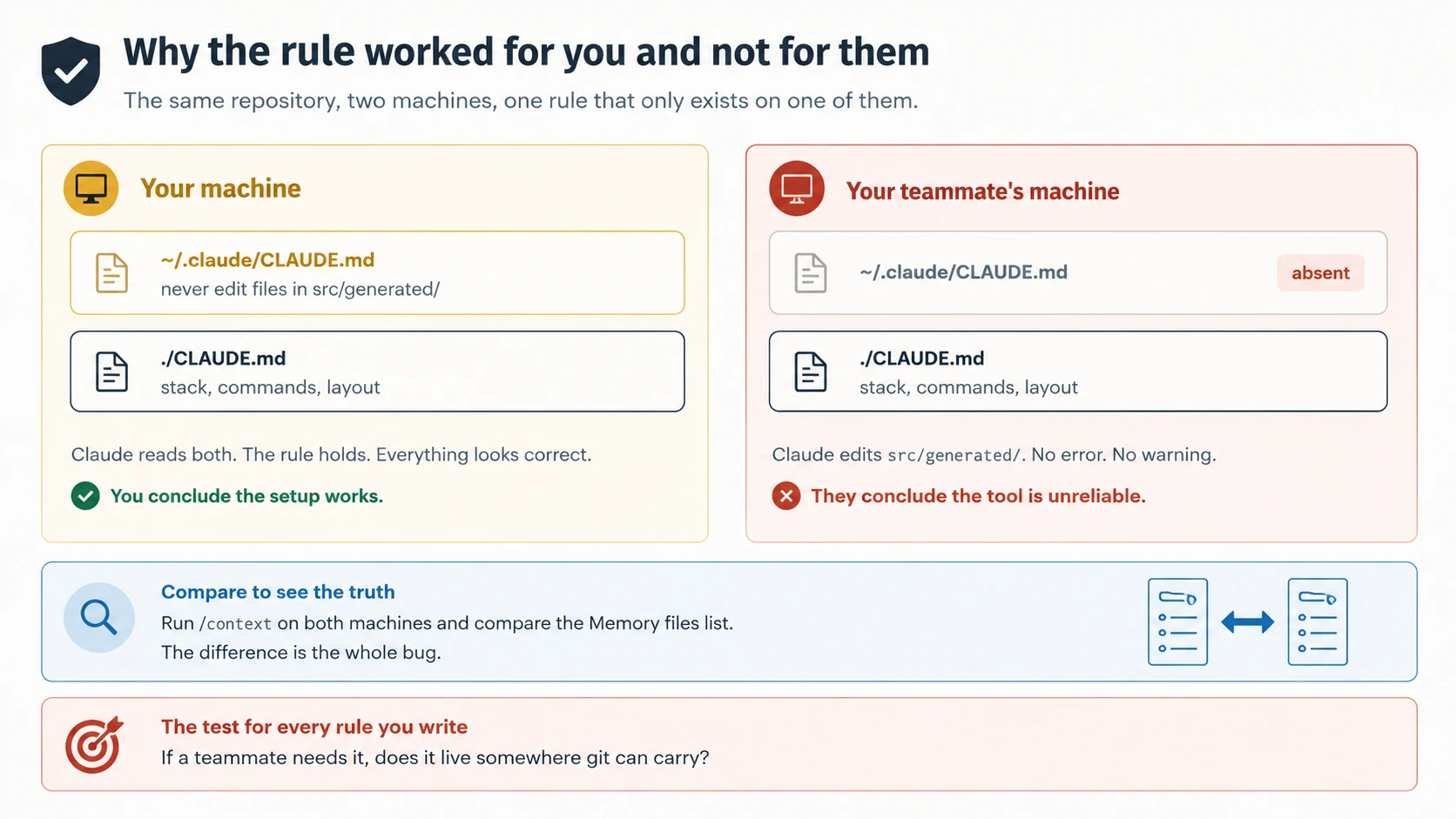
The failure is costly because both people reach a reasonable but wrong conclusion.
You conclude the setup works. You have weeks of evidence on your machine, so you naturally suspect the teammate's setup.
They conclude Claude is unreliable. They never received the rule, so from their point of view Claude simply edited files it should not edit.
The actual cause is simpler. The rule lives in a scope that ends at your home directory.
One question prevents this whole class of failure: if a teammate needs the instruction, does it live somewhere git can carry?
Concept 2: Four Places an Instruction Can Live
Key idea: Instructions can live in four places. Two travel with the repository, two do not, and the difference is invisible in a session.
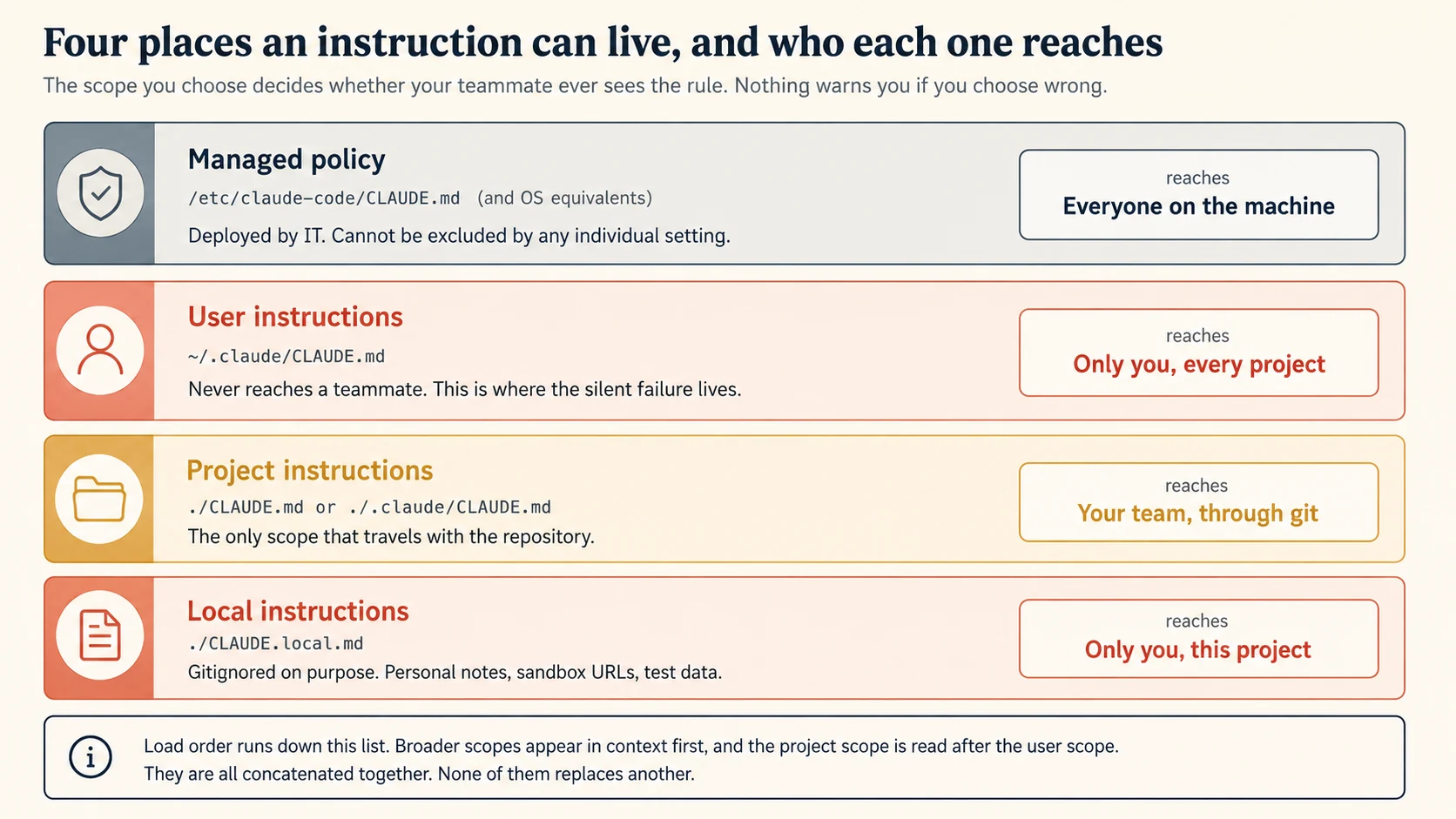
| Scope | Location | Reaches |
|---|---|---|
| Managed policy | /Library/Application Support/ClaudeCode/CLAUDE.md on macOS, /etc/claude-code/CLAUDE.md on Linux and WSL, C:\Program Files\ClaudeCode\CLAUDE.md on Windows | Everyone on the machine |
| User | ~/.claude/CLAUDE.md | Only you, in every project |
| Project | ./CLAUDE.md or ./.claude/CLAUDE.md | Your team, through version control |
| Local | ./CLAUDE.local.md | Only you, in this project |
Two of these deserve a note beyond the table.
Two Scopes That Need More Than a Table Row
Local instructions are intentionally personal. Use CLAUDE.local.md for details that belong only to you.
Examples include a sandbox URL, preferred test data, or a machine-specific note.
Add it to .gitignore. It loads beside the project file but does not travel with the repository.
Git worktrees add one wrinkle. A gitignored CLAUDE.local.md exists only in the worktree where you created it.
If you need the same personal instructions across worktrees, keep them in your home directory and import them.
# Individual Preferences
- @~/.claude/my-project-instructions.md
Project instructions have two valid locations: ./CLAUDE.md or ./.claude/CLAUDE.md.
They behave the same. Choose the root file if you want the instructions visible at the top level, or .claude/CLAUDE.md if you want Claude configuration grouped together.
PRIMM: Predict. A rule must apply to every company project and individual developers must not be able to disable it. Which scope should hold it? Confidence 1 to 5.
What you will see
Managed policy, and it is the only one that satisfies both halves.
The user scope is per-person, so it fails "every developer". The project scope is per-repository, so it fails "every project". Anyone who can edit the repository can also remove it.
Managed policy is deployed by IT through MDM, Group Policy, Ansible, or a similar tool. It cannot be excluded by any individual setting.
There is a second way to do the same thing. The claudeMd key inside managed-settings.json holds the instruction text directly rather than pointing at a separate file:
{
  "claudeMd": "Always run `make lint` before committing.\nNever push directly to main."
}
This key is honoured only in managed and policy settings. Setting it in user, project, or local settings has no effect at all, which is a small trap: the configuration looks valid and does nothing.
Concept 13 comes back to what belongs at this level and what does not.
Concept 3: The Files Are Combined, Not Ranked
Key idea: Every discovered file is concatenated into context. A more specific file does not replace a broader one, so two rules that disagree both arrive.
Most people start with the wrong mental model for this.
A configuration hierarchy usually suggests override. CSS works that way, and many settings systems do too. A more specific value replaces a broader one.
CLAUDE.md files do not work that way. Claude concatenates every discovered instruction file into context.
When people use the word "precedence" here, they mean read order, not authority. A later file does not erase an earlier one.
Which File Is Read Last
The order is worth knowing precisely, because it is the only lever you have.
Across the directory tree, Claude reads from broader directories toward your working directory.
If you launch in foo/bar/, it reads foo/CLAUDE.md before foo/bar/CLAUDE.md. The closer file therefore appears later in context.
Within each directory, CLAUDE.local.md is appended after CLAUDE.md, so your personal notes are the last thing Claude reads at that level.
Below your working directory, loading becomes lazy. Claude can discover CLAUDE.md files in subdirectories, but it does not load them at startup.
They enter context when Claude reads files in those directories. This keeps startup smaller while still applying local instructions when they become relevant.
What This Means When Two Rules Disagree
Here is the team consequence: if two files disagree, both instructions reach Claude. The system does not resolve the conflict for you.
That is not a hierarchy resolving a conflict. It is a contradiction handed to a model to sort out.
The predecessor course quoted Anthropic's own experience of this inside Claude Code. One instruction said "leave documentation as appropriate". Another said "do not add comments".
Claude may infer what you meant, but that spends attention before the real task even begins.
Treat conflicting rules as configuration debt. Review project files, nested files, and .claude/rules/ periodically, and remove contradictions instead of expecting Claude to choose correctly.
Concept 4: What Exists Against What Loaded
Key idea: /memory lists the places instructions can live. /context shows which ones actually loaded. When something is not applying, you need the second one.
PRIMM: Predict. A teammate says Claude is ignoring a rule in your project
CLAUDE.md. You have two commands available,/memoryand/context. Which one answers the question, and what would the other one tell you instead? Confidence 1 to 5.
What you will see
/context answers the question. /memory answers a different one.
/memory lists places where instructions can live. It can even show locations whose files do not exist yet.
That means seeing a project entry in /memory does not prove that the current session loaded the file.
/context shows what this session actually loaded, under a heading called Memory files. If the file is missing there, Claude cannot see it, and the wording of the rule is irrelevant.
Think of /memory as the map and /context as the receipt. When a rule is missing, start with the receipt.
These two commands are easy to confuse and they answer different questions.
/memory lists your CLAUDE.md, CLAUDE.local.md, and other memory file locations across user and project scopes. It includes entries for files that do not exist yet, and selecting one creates it. It also toggles auto memory and opens the auto memory folder for you. Think of it as the map of where things could be.
/context shows what the current session actually loaded, under a heading called Memory files. Think of it as the receipt.
Check What Loaded Before You Rewrite Anything
The first diagnostic rule is simple: if a file is missing from /context, Claude cannot see it.
Do not rewrite the instruction yet. First fix the loading problem.
Apply that to the opening failure. You and your teammate run /context and compare the Memory files lists.
Your session shows a file that theirs does not. The bug is now located.
If /context is not enough, use the InstructionsLoaded hook. It logs which instruction files loaded, when they loaded, and why.
This is especially useful for path-scoped rules and subdirectory files, because both depend on which files Claude reads.
One more fact explains why instructions are followed imperfectly even when they load correctly.
CLAUDE.md is guidance, not an enforcement boundary. Its content is delivered after the system prompt as a user message.
Claude tries to follow it, but vague or conflicting instructions can still be ignored or interpreted differently.
That leads to an important design rule: if something must happen every time, do not rely on CLAUDE.md.
Use a hook or another enforcement mechanism that runs regardless of what Claude decides.
The exam covers user, project, and directory-level configuration. It also tests why a new teammate may not receive instructions and how /memory exposes memory-file locations.
In a real session, use /context when the question is what actually loaded.
You can now name the four scopes, explain how they combine, and locate a missing instruction quickly.
Part 2 deals with a different problem: the instruction file loads correctly, but it has grown too large.
Part 2: Splitting a Rules File That Grew
Goal for this part: move instructions onto surfaces that cost nothing until they are needed, and write glob patterns that match what you meant.
Concept 5: Imports Organise, They Do Not Save Context
Key idea: An @import splits a file for human readers. The imported content still loads at launch and still costs tokens on every turn.
Suppose your project file has grown past two hundred lines. Splitting it with @import looks like the obvious fix.
See @README for project overview and @package.json for available npm commands.

# Additional Instructions
- git workflow @docs/git-instructions.md
The mechanics are worth knowing exactly.
Relative imports resolve from the file that contains the import, not from your current working directory.
An imported file can import another file, up to four levels deep.
Claude ignores import syntax inside code spans and fenced code blocks. So `@README` mentions the path, while @README outside code imports it.
Now the part that surprises people.
Imports do not reduce context cost. Claude expands the imported files and loads their content at startup.
A 300-line file split into six 50-line imports still gives Claude the same 300 lines. The split helps people maintain the file, but it does not make the context smaller.
Imports are still useful. They make a large rules file easier for people to organise and review.
Where an Import Genuinely Earns Its Place
There is one shape where importing beats both a single file and a path-scoped rule, and it is the monorepo.
A repository with packages/api/, packages/web/, and packages/jobs/ has standards that are real but not shared. The API package cares about error envelopes and pagination. The web package cares about component conventions. Putting all three in the root file means every session carries two thirds of a standards document that does not apply to it.
Give each package its own CLAUDE.md and import only the standards that package actually follows:
# packages/api/CLAUDE.md

@../../standards/error-handling.md
@../../standards/api-versioning.md

This package owns the public HTTP surface. Breaking changes need a version bump.
# packages/web/CLAUDE.md

@../../standards/component-conventions.md
@../../standards/accessibility.md
One copy of each standard, referenced by the packages it governs. When the error-handling rule changes you edit one file, and every package that imported it gets the change.
The judgment call is which standards each package imports, and it is not mechanical. It is the maintainer's knowledge of what their package actually does. A package that never serves HTTP should not import the API conventions, however tempting it is to import everything and let Claude sort it out.
Remember Concept 3 while you do this: files below your working directory load lazily. Start a session in packages/api/ and you get the root file plus that package's file. That is the behaviour making this worth doing.
Skills follow the same shape. A nested .claude/skills/ directory inside a package becomes available when Claude reads a file there, and a nested skill that shares a name with a root one stays reachable under a directory-qualified name such as apps/web:deploy. So a package can ship both its standards and its procedures, and neither reaches sessions working elsewhere in the repository.
Anthropic's Monorepos and large repos page carries the full layout if you are setting one of these up for real.
But if your goal is lower context cost, imports are the wrong tool. Concept 6 shows the surface that actually loads lazily.
Concept 6 is the surface that actually reduces the cost.
PRIMM: Predict. A teammate commits a project
CLAUDE.mdcontaining@~/.claude/company-standards.md, an import that points outside the repository. You pull it and start a session. What happens? Confidence 1 to 5.
What you will see
Claude Code shows an approval dialog listing the external files, and waits for you.
An import in a project-level file is external when its path resolves outside your working directory.
The approval dialog protects you from a shared repository importing files from outside the working directory.
If you decline, those imports remain disabled and the dialog does not keep returning.
The trust model is deliberately asymmetric.
Imports inside your own user-scope files, such as ~/.claude/CLAUDE.md and ~/.claude/rules/, load without a dialog. Those are files you wrote yourself, and they are trusted like the rest of your personal configuration.
A project file is written by whoever pushed last.
Cowork sessions on the desktop are stricter still, skipping user-scope imports that resolve outside the session's working directory.
One Import Worth Knowing: AGENTS.md
Claude Code reads CLAUDE.md. It does not read AGENTS.md.
This matters when a team uses several coding agents. If the repository already has an AGENTS.md, do not maintain a second copy of the same rules for Claude. Import it instead:
@AGENTS.md

## Claude Code

Use plan mode for changes under `src/billing/`.
Claude loads AGENTS.md at startup through the import, then reads the Claude-specific instructions below it. Shared rules stay in one place.
A symlink works too, when you have nothing Claude-specific to add:
ln -s AGENTS.md CLAUDE.md
On Windows a symlink needs Administrator privileges or Developer Mode. For a mixed team, the import is the more portable choice.
Concept 6: Rules That Load Only When They Apply
Key idea: A rule with a paths: field enters context only when Claude reads a matching file. This is the surface that actually reduces cost.
Testing rules matter when Claude works on tests. They are unnecessary context during a deployment task.
.claude/rules/ is where that distinction becomes real. Place markdown files in the directory, one topic per file:
your-project/
├── .claude/
│   ├── CLAUDE.md           # Main project instructions
│   └── rules/
│       ├── code-style.md   # Code style guidelines
│       ├── testing.md      # Testing conventions
│       └── security.md     # Security requirements
All .md files are discovered recursively, so rules/frontend/ and rules/backend/ work if the flat list becomes unwieldy.
The Frontmatter Field That Changes the Cost
Now the field that changes the economics. Add YAML frontmatter with paths: and the rule becomes conditional:
---
paths:
  - "src/api/**/*.ts"
---

# API Development Rules

- All API endpoints must include input validation
- Use the standard error response format
- Include OpenAPI documentation comments
That rule stays out of context until Claude reads a matching file under src/api/.
Before the match, it costs nothing.
A rule without paths: loads at startup. A rule with paths: waits for a matching read.
That frontmatter is the difference between always-on context and context that appears only when relevant.
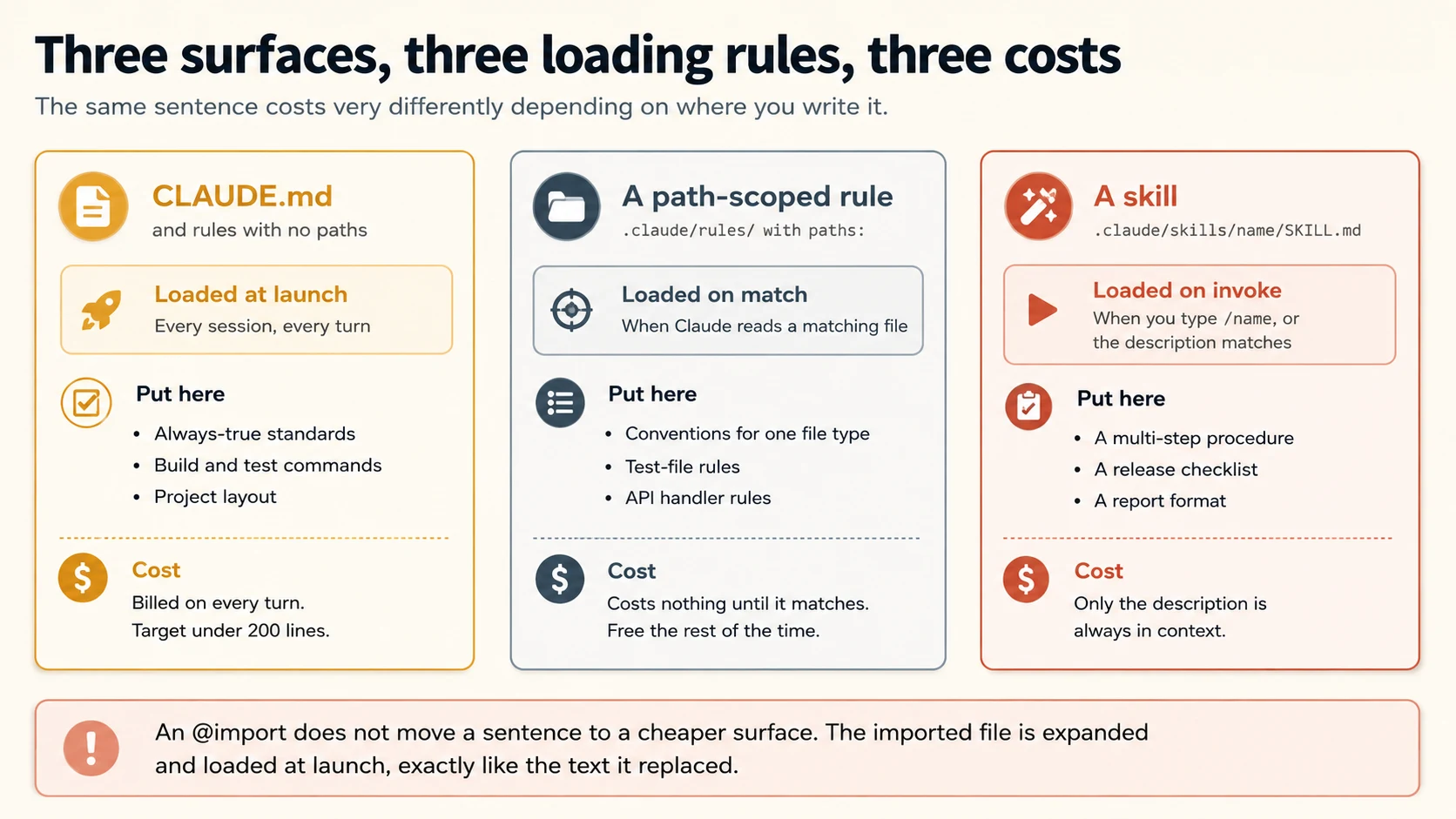
Keep rules and skills separate in your mental model.
A rule is a standard. It applies while Claude works on matching files.
A skill is a procedure. You invoke it to perform a task such as cutting a release.
Concept 7: Writing Globs That Match What You Meant
Key idea: Glob patterns have edges that fail quietly. A pattern that matches nothing looks exactly like a rule nobody needed.
The paths: field takes glob patterns.
| Pattern | Matches |
|---|---|
**/*.ts | All TypeScript files in any directory |
src/**/* | All files under src/ |
*.md | Markdown files in the project root only |
src/components/*.tsx | React components in one specific directory |
You can list several patterns, and brace expansion covers multiple extensions in one:
---
paths:
  - "src/**/*.{ts,tsx}"
  - "lib/**/*.ts"
  - "tests/**/*.test.ts"
---
Three Edges That Fail Quietly
Three glob behaviours cause quiet failures.
Brace expansion multiplies patterns. src/*.{ts,tsx} becomes two patterns. {a,b}/{c,d}/*.{ts,tsx} becomes eight.
One rule can expand to at most 1,000 patterns and 4 MiB. Patterns without braces do not count toward that expansion budget. If expansion would exceed the limit, Claude uses the pattern literally, so the braces match nothing.
A square bracket starts a character class. Glob syntax treats [ as special.
So photos [2024/** is invalid and matches nothing. To match a real bracket in a filename, escape it: photos \[2024/**.
Path-scoped rules trigger on file reads. They do not load on every tool call.
If Claude never opens a file under src/api/, the API rule never enters context. That is expected behaviour.
The dangerous part is silence. A rule whose glob matches nothing looks exactly like a rule that was never needed.
Nothing errors. The rule simply never appears.
Test the rule directly. Open a file it should match, run /context, and confirm the rule appears.
For several rules, use the InstructionsLoaded hook from Concept 4 to log each load and its reason.
Path-scoped rules with YAML frontmatter globs are directly tested. So is the choice between a glob rule and a subdirectory CLAUDE.md. The exam's canonical case is test files spread across a codebase. A pattern such as **/*.test.tsx follows the file type wherever it lives. A directory file is bound to one location.
Concept 8: Sharing Rules, and the Monorepo Problem
Key idea: Symlinks let several projects share one rule set. In a monorepo, the opposite problem appears, and claudeMdExcludes is the answer.
Two team problems sit at opposite ends of the same axis.
Sharing Rules Between Projects
Not enough sharing. A company-wide rule copied into many repositories will eventually drift.
The .claude/rules/ directory supports symlinks, and they are resolved and loaded normally. Circular symlinks are detected and handled.
ln -s ~/shared-claude-rules .claude/rules/shared
ln -s ~/company-standards/security.md .claude/rules/security.md
There is also ~/.claude/rules/ for personal rules that apply to every project on your machine. User-level rules load before project rules, which follows the same broad-to-specific order as everything in Concept 3.
A symlink does not distribute the rule to your team. It points to a path on your machine.
For team sharing, commit the rules or deploy them through managed policy.
The Monorepo Problem
Too much sharing. In a large monorepo, Claude can load CLAUDE.md files from teams whose code you never touch.
Those instructions consume context and may contradict your own rules.
claudeMdExcludes skips specific files by path or glob:
{
  "claudeMdExcludes": [
    "**/monorepo/CLAUDE.md",
    "/home/user/monorepo/other-team/.claude/rules/**"
  ]
}
claudeMdExcludes patterns match absolute paths, and the arrays merge across settings layers.
For a monorepo, .claude/settings.local.json is usually the right place. Which teams count as irrelevant often depends on the part of the repository you personally work in.
One exclusion is not permitted, and the exception is deliberate. Managed policy CLAUDE.md files cannot be excluded. An organisation-wide instruction applies regardless of individual settings, which is what makes it an organisation-wide instruction.
You can now choose a loading surface based on when an instruction is needed. You can also test globs and control unwanted monorepo instructions.
Part 3 moves from standards to reusable procedures.
Part 3: Skills at Team Scale
Goal for this part: use the frontmatter fields that matter for shared skills, and understand what
allowed-toolsdoes and does not do.
Concept 9: The Frontmatter Beyond Name and Description
Key idea: A skill's frontmatter controls who can invoke it, which model runs it, and where it runs. Shared skills need those fields.
For a personal skill, name and description may be enough. A shared skill usually needs more control.
First, the Thing That Used to Be Two Things
If you have read about Claude Code before, you have met custom slash commands: a markdown file in .claude/commands/, committed to the repository, invoked as /name.
Custom commands have been merged into skills. A file at .claude/commands/deploy.md and a skill at .claude/skills/deploy/SKILL.md both create /deploy, and both behave the same way. Existing .claude/commands/ files keep working, so nothing you already wrote is broken.
What the skill form adds is optional, and each addition is a reason you would move one:
- A directory, so a procedure can ship with the files it needs rather than inlining them.
- Invocation-control frontmatter, which is
disable-model-invocationbelow. - Automatic loading, so Claude can reach for it when a request matches the description, instead of waiting to be asked.
If both exist under one name, the skill wins.
The practical guidance for a team is short. Write new shared procedures as skills. Leave working .claude/commands/ files alone until you need one of the three things above.
Task 3.2 is worded as "custom slash commands and skills", and the exam's snapshot treats them as two mechanisms: project-scoped commands in .claude/commands/ shared through version control, against user-scoped commands in ~/.claude/commands/ that stay personal.
Answer in those terms. An item asking where a team-wide /review command belongs wants .claude/commands/ in the project repository, and that answer is still correct in the product: the file works, and it is version-controlled and shared exactly as the exam describes.
What has changed since the snapshot is that the two are one system now. Knowing that costs you nothing on the exam and saves you an argument afterwards, when someone points at a SKILL.md and asks why the docs call it a command.
---
name: cut-release
description: Cut a tagged release, run the full check suite, and draft the changelog entry.
argument-hint: "[version, for example 2.4.0]"
disable-model-invocation: true
allowed-tools: Bash, Read, Write
model: sonnet
---

Cut release $ARGUMENTS following our release procedure.

1. Confirm the working tree is clean.
2. Run `npm run check:all` and stop if anything fails.
...
The Fields a Shared Skill Needs
The fields worth knowing:
argument-hint shows users what arguments to enter in slash-command autocomplete. It changes the display only, not parsing.
disable-model-invocation: true prevents Claude from choosing the skill automatically. A person must invoke it, for example with /cut-release.
Use this for releases, deployments, or other procedures with real-world effects. You do not want a fuzzy description match to trigger them by accident.
model chooses the model for the skill. It can be an alias such as sonnet, opus, or haiku, a full model ID, or inherit.
inherit is the default and uses the main conversation's model. A mechanical procedure may be a good place to use a cheaper model.
$ARGUMENTS becomes the text the user supplied. $0, $1, and similar forms pick individual arguments.
If the body never mentions $ARGUMENTS, Claude appends the arguments at the end. That is often not where you wanted them.
One naming rule matters for teams: the slash command comes from the directory name, not the name field.
A skill stored at .claude/skills/cut-release/SKILL.md runs as /cut-release. The frontmatter name is only the display label.
Claude Code supports more skill frontmatter than the cross-tool Agent Skills specification.
The portable fields are name, description, allowed-tools, compatibility, license, and metadata. Claude Code adds fields such as argument-hint, context, and disable-model-invocation.
Those Claude Code-only fields may fail on stricter surfaces such as claude.ai or the Skills API.
If a skill is only ever used through Claude Code, use the extras. If it is meant to be portable across tools, keep the frontmatter to the six spec fields.
Concept 10: allowed-tools Does Not Restrict Anything
Key idea: It pre-approves the listed tools so they run without a prompt. Every other tool is still callable.
The name allowed-tools sounds restrictive. It sounds like a list of the only tools the skill may use.
It is not a restriction. allowed-tools pre-approves the listed tools for the turn that invokes the skill.
Other tools still exist. Your normal permission rules decide what happens when Claude tries to use them.
The grant is temporary. It applies for the invoking turn and clears after your next message.
The skill content may remain in context, but the permission does not. For session-wide approval, use permission settings instead.
So allowed-tools: Read Grep does not create a read-only skill. It only removes prompts for those reads and searches.
A write may still happen if your permission mode allows it.
The Field That Does Restrict
There is a companion field, and the pair is easier to remember together.
allowed-tools grants. disallowed-tools removes.
---
name: nightly-audit
description: Audit dependencies and report findings. Runs unattended.
disallowed-tools: AskUserQuestion
---
disallowed-tools does the opposite. It removes listed tools from Claude's available set while the skill is active.
For example, an unattended skill can remove AskUserQuestion because nobody is present to answer.
Like allowed-tools, the restriction is temporary. It clears after your next message.
For a restriction that should hold across every prompt and skill, use permission deny rules or another enforcement layer.
Three mechanisms, and they are not interchangeable:
| Mechanism | Scope | Effect |
|---|---|---|
allowed-tools | One turn | Pre-approves. Removes the prompt, not the tool |
disallowed-tools | One turn | Removes the tool from the pool while the skill is active |
Permission deny rules and hooks | Every turn, every skill | Blocks regardless of what any skill declares |
The Part Your Teammates Should Worry About
Here is the property that matters most when skills arrive from a repository you cloned.
Workspace trust does not gate allowed-tools. A project skill's grant applies when the skill runs, even in an untrusted -p folder.
This has an important security consequence. A project skill can grant itself broad tool access, and workspace trust does not block that grant.
Review allowed-tools in repository skills before you run them. Treat it as a code-review concern, not a protection supplied by workspace trust.
PRIMM: Predict. You are reviewing a teammate's pull request. It adds a skill with
allowed-tools: Read, Grep, Globand a description saying it "safely explores the codebase without making changes." Is the claim accurate? Confidence 1 to 5.
What you will see
No. The description promises a guarantee the field does not provide.
The skill can still call Write, Edit, or Bash.
allowed-tools only removes prompts for the listed tools. Everything else follows the normal permission flow. Under a permissive configuration, a write may therefore proceed without interruption.
If you really need read-only behaviour, use a mechanism that actually restricts tools.
disallowed-tools can remove write tools for that turn.
context: fork with agent: Explore runs the skill in a read-only subagent, which Concept 11 covers.
A PreToolUse hook can block write tools regardless of what the skill requests.
This is a good thing to catch in review, because the description is the part your teammates will read and believe.
Concept 11: context: fork and the Self-Contained Skill
Key idea: A forked skill runs in its own context window and returns only its result. It also has no conversation history, so it must carry everything it needs.
Some skills create a lot of temporary context. A codebase survey may read forty files to answer one question. A dependency audit may inspect hundreds of lines to identify two packages.
Run that work in the main conversation and its intermediate output stays in your main context.
context: fork runs the skill in a forked subagent with its own context window. The skill body becomes the task prompt, and only the final output returns to your conversation.
---
name: deep-research
description: Research a topic thoroughly across the codebase and report findings.
context: fork
agent: Explore
---

Research $ARGUMENTS across this codebase:

1. Find every file that mentions the topic.
2. Trace how the pieces connect.
3. Report the files, the flow, and anything that looks inconsistent.
Two companion fields matter.
agent chooses the subagent type and therefore its tool and permission surface. agent: Explore gives you a read-only research skill.
background: false waits for the forked result in the invoking turn instead of running it in the background.
The Constraint People Meet the Hard Way
Now the constraint that produces the most confusing failure.
A forked skill does not receive your conversation history. It starts with a fresh context.
So a body such as "now do the same for the other module" may work inline but fail when forked. The fork does not know what "the same" or "the other module" means.
A second failure is even easier to miss. Reference material alone is not a task.
If a forked skill contains only background information, the subagent receives knowledge but no instruction to act. Use context: fork for skills with an explicit procedure or question.
One limit follows from the fork being a subagent. It has a version history worth knowing.
Subagents can nest, up to a depth cap. For a long time they could not, and much older writing still says so. Nesting shipped in v2.1.172 at five levels. The default dropped to one in v2.1.217, and v2.1.219 raised it to three.
So a skill running in a forked subagent can spawn another, within the depth your version allows.
Two practical notes. Depth is a budget rather than headroom, because each level costs a context window that receives only a dispatch prompt and returns only a summary. A separate concurrency cap also applies, so spawning past the running-subagent limit fails rather than queues.
Check your own version before designing around a depth. This claim was true, stopped being true, and lives on in older material.
The exam covers project versus user scope for skills, context: fork, allowed-tools, and argument-hint. It also tests when to use a skill instead of CLAUDE.md.
Remember Concept 6: CLAUDE.md carries standards. A skill carries a procedure you invoke.
Concept 12: What Gets Committed
Key idea: Every configuration surface is either shared through git or personal to a machine. Deciding which, on purpose, is most of team configuration.
Here is the whole system sorted by one question: does a teammate get this when they clone?
| Committed, and your team gets it | Personal, and stays on your machine |
|---|---|
./CLAUDE.md or ./.claude/CLAUDE.md | ~/.claude/CLAUDE.md |
.claude/rules/ | ~/.claude/rules/ |
.claude/skills/ | ~/.claude/skills/ |
.claude/agents/ | ~/.claude/agents/ |
.claude/settings.json | .claude/settings.local.json |
.mcp.json | ~/.claude.json |
./CLAUDE.local.md | |
| Auto memory (Concept 15) |
Two entries in the right column are worth calling out, because both look shared and are not.
Skills in ~/.claude/skills/ do not sync between your machines. A skill you write there is a local file. Your other workstation will not have it unless you copy it.
That same directory has a use worth knowing, and it is the polite way to disagree with a shared skill.
Suppose the team's /cut-release stops before tagging, and you want a variant that also pushes a signed tag because you are the one who does releases. Editing the committed skill changes it for everyone, and doing that to suit one person's workflow is how shared configuration rots.
Put your variant in ~/.claude/skills/ under a different name. cut-release-signed/SKILL.md runs as /cut-release-signed, sits beside the team's version rather than replacing it, and reaches nobody else.
The different name is the part that matters, and the reason is not that the alternative is ambiguous. It is that the alternative is perfectly well defined and silent.
Across levels, personal overrides project. Name your variant cut-release too, and /cut-release runs yours from now on. The team's committed skill is still there, still reviewed, still what everyone else gets, and you will never see it again.
That is the expensive version. Your releases quietly differ from your colleagues' releases, the difference lives in a file no one can review, and the first sign of trouble is a release that behaved differently on your machine for reasons nobody can reconstruct. It is Concept 1's failure with the direction reversed: not a rule that failed to reach them, but a rule of theirs that stopped reaching you.
A distinct name has none of that. Two skills, two commands, both visible, and /cut-release still means what the team agreed it means.
The full resolution order is worth knowing once. Enterprise beats personal, personal beats project, and a skill at any of those levels replaces a bundled skill of the same name. Plugin skills sidestep it entirely through a plugin-name:skill-name namespace. And nested .claude/skills/ directories below your working directory stay available under a directory-qualified name such as apps/web:deploy, which is how a monorepo package ships skills that only apply to that package.
If the variant turns out to be better for everyone, that is the moment to move it into .claude/skills/ and let the team review it.
One exception looks like a contradiction and is not. Skills you enable for your claude.ai account can download into ~/.claude/skills/synced/, and Cowork and cloud sessions load those account skills directly. That is a sync path for account-enabled skills, not for the ones you author on disk. A skill that exists only in your local folder is reported as not found when a cloud session tries to invoke it.
.claude/settings.local.json is the personal counterpart to the project settings file.
It is usually the right place for claudeMdExcludes and for permissions you want personally but do not want to share with the team.
Treat shared configuration as code. A pull request that changes a rule or skill changes how Claude behaves for everyone.
Review those changes the same way you review a shared script. The "one earned line per mistake" practice still works at team scale. The important part is committing the line where everyone can review it.
The predecessor course deliberately postponed Claude Code plugins.
A Claude Code plugin packages skills, agents, hooks, and MCP servers into one distributable unit. A team can install that package instead of copying configuration files individually.
This is different from an OpenCode plugin, which the predecessor course used for automatic rules.
Plugins sit just beyond this course. One detail matters here: plugin skills support the same Claude Code skill frontmatter, including hooks.
You can write a skill a team can share, and you know that the field named allowed-tools does not restrict anything. Part 4 moves up one level, to what an organisation can require rather than suggest.
Part 4: The Organisation Layer
Goal for this part: understand what an organisation can enforce, what only guides, and why one memory system is not a team feature at all.
Concept 13: What an Organisation Can Actually Enforce
Key idea: Managed settings are enforced by the client. A managed CLAUDE.md only guides. Putting a requirement in the wrong one produces a policy that does not hold.
An organisation has two different levers: managed settings and managed instructions. They solve different problems.
| Concern | Configure in |
|---|---|
| Block specific tools, commands, or file paths | Managed settings: permissions.deny |
| Enforce sandbox isolation | Managed settings: sandbox.enabled |
| Environment variables and API provider routing | Managed settings: env |
| Login method and organisation restrictions | Managed settings: forceLoginMethod, forceLoginOrgUUID |
| Code style and quality guidelines | Managed CLAUDE.md |
| Data handling and compliance reminders | Managed CLAUDE.md |
| Behavioural instructions for Claude | Managed CLAUDE.md |
Guidance Can Be Argued With, Settings Cannot
The distinction is fundamental.
Managed settings are enforced by the client. Managed CLAUDE.md guides the model.
A setting can block an action. An instruction can only tell Claude not to take it.
Follow that into a concrete mistake.
Suppose security writes "never read files under /secrets/" into managed CLAUDE.md.
That is still guidance. It reaches everyone, but it does not become a hard boundary. Claude can still be influenced by conflicting instructions or content.
Put the same requirement in a managed permissions.deny rule and the client enforces it. Prompt wording cannot override it.
Use one test: if even one violation in a hundred sessions is unacceptable, use enforcement rather than guidance.
Concept 14 is how those settings resolve, and it works differently from everything in Part 1.
Concept 14: Settings Really Do Override
Key idea: Unlike instruction files, settings resolve by precedence, key by key. Learning that the two systems behave differently removes most of the confusion around configuration.
Concept 3 gave you one model for instruction files: concatenate them.
Settings use a different model: precedence. Keeping those two models separate prevents a great deal of confusion.
Five levels, highest priority first:
| Priority | Source | Shared? | Purpose |
|---|---|---|---|
| 1 | Managed settings (managed-settings.json) | Deployed by IT | Policy that cannot be overridden |
| 2 | Command line arguments | Per session | Temporary override for one run |
| 3 | .claude/settings.local.json | No, gitignored | Your own tweaks on this project |
| 4 | .claude/settings.json | Yes, committed | Team agreements |
| 5 | ~/.claude/settings.json | No, personal | Your defaults across all projects |
Three properties of that table decide how you use it.
Settings resolve per key, not per file. A higher source overrides the same scalar key below it.
Keys you do not mention still come from lower levels. Your local settings file therefore does not replace the project settings file.
Local settings beat project settings. That makes .claude/settings.local.json a useful place to test a permission or hook before proposing it to the team.
Managed settings have the highest priority, even above command-line flags.
A developer cannot disable an organisation policy by passing a different flag for one session.
// .claude/settings.local.json — yours, gitignored
{
  "claudeMdExcludes": ["/home/you/monorepo/other-team/**"],
  "permissions": {
    "allow": ["Bash(npm run test:*)"]
  }
}
One Exception That Prevents a Debugging Session
The override rule holds for ordinary values. Lists behave differently: Claude Code combines them across files instead of picking one.
permissions.allow is the common example. Organisation, project, and local files can all contribute allow rules.
Claude combines those lists instead of replacing one with another.
So the mental model has two halves:
A scalar setting overrides by precedence. A list setting usually merges across scopes.
That prevents a specific confusion. When your organisation's allow rules keep applying alongside yours, nothing is broken. That is the merge working as designed.
Two list settings behave differently.
fallbackModel is ordered, so the highest-precedence file that defines it supplies the whole chain.
If managed settings define availableModels, that managed list applies as-is and lower levels cannot add to it.
Two more details matter at organisation scale.
Managed settings support drop-in files. A managed-settings.d/ directory beside the base file holds separate .json files, merged alphabetically, with later filenames winning. That lets independent teams ship policy without editing one shared file:
/etc/claude-code/
├── managed-settings.json      # base
└── managed-settings.d/
    ├── 10-security.json       # merged first
    ├── 20-mcp-allowlist.json  # merged second
    └── 30-model-limits.json   # merged last, wins on conflict
Some settings are not allowed in project or local files. This protects you from repositories changing sensitive machine behaviour.
Those keys only work from safer sources such as managed settings, user settings, or --settings. So a setting can look valid in a repository file and still do nothing by design.
Verifying Settings, the Way You Verified Memory
Concept 4 gave you /context for instruction files. Settings have their own equivalent.
Run /status to see which settings sources loaded for the current session.
Its Status tab includes a Setting sources line such as User settings or Project local settings. Managed settings also show how they reached the machine.
That line answers one question only: which sources loaded?
It does not tell you which source supplied a particular resolved key.
For the next layer down, run claude doctor, which lists the entries Claude Code rejected.
That distinction matters because settings files are strict JSON. A // comment or a trailing comma is a syntax error, and Claude Code reports it at the next start in one of two ways:
- Settings Error: the file's JSON is invalid or a value is rejected, so the whole file is affected.
- Settings Warning: only individual entries fail, such as a malformed permission rule. Those values are skipped and the rest of the file still applies.
A -p run does not show the interactive warning. It skips invalid settings and continues.
After an unattended run, use claude doctor to see what Claude Code rejected.
The course now has four diagnostic questions and four answers:
| Question | Command |
|---|---|
| Where can instructions live? | /memory |
| Which instruction files loaded? | /context |
| Which settings sources loaded? | /status |
| What did Claude Code reject? | claude doctor |
/config opens an interactive menu for changing settings without editing JSON by hand, which avoids the broken-JSON failure entirely.
When a Committed Key Does Not Reach Your Teammates
This is Concept 1 again, in a different file format, and it has two causes worth knowing separately.
Some keys cannot be set by a repository. A setting may be limited to user, local, or managed sources.
This is a security boundary. A repository you clone should not be able to change every aspect of your machine.
When a committed setting does nothing, check the setting's allowed scope in the reference.
Some project settings wait for workspace trust. Examples include permissions.allow, permissions.additionalDirectories, and most env values.
Until a teammate trusts the folder, those grants do not take effect.
The asymmetry is intentional. deny and ask rules apply immediately, while grants wait for consent.
The reverse can also surprise you. "Yes, and don't ask again" writes a local allow rule.
But a local allow does not outrank a project or managed ask rule. You can therefore approve something permanently and still be prompted.
Two settings worth knowing for the next concept:
autoMemoryEnabled toggles the memory system in Concept 15, and can be set per project.
autoMemoryDirectory moves where auto memory is stored. It must be an absolute path or start with ~/.
Concept 15: Auto Memory Is Not a Team Feature
Key idea: Claude writes its own notes per repository, and they never leave the machine. Treating them as shared knowledge is the mistake.
PRIMM: Predict. You correct Claude about a project convention on Monday. It saves the correction to auto memory. On Wednesday your colleague hits the same issue on their machine. Do they get the benefit of your correction? Confidence 1 to 5.
What you will see
No. Auto memory is machine-local, and the files never leave your computer.
The phrase per repository is easy to misunderstand.
Auto memory is stored at ~/.claude/projects/<project>/memory/. The repository name is only the key for a directory under your home folder. The memory itself is not inside the repository.
The practical consequence extends further than teammates. Your own second workstation does not get it either, and neither does a cloud environment.
That gives you a simple rule.
Auto memory is for your working habits. If a correction matters to everyone, move it into project instructions or a committed rule.
Alongside the files you write, Claude Code keeps notes it writes itself. As you work, it saves four kinds:
user: your role, expertise, and working preferencesfeedback: corrections you gave, and approaches you confirmedproject: ongoing work, deadlines, and decisions it cannot derive from the code or git historyreference: where to find information outside the project, such as an issue tracker
It deliberately skips anything derivable from the codebase, such as architecture and file paths, and anything your CLAUDE.md files already say.
The storage layout matters for the team question:
~/.claude/projects/<project>/memory/
├── MEMORY.md           # Index, one line per memory, loaded every session
├── user_role.md        # One memory
├── feedback_testing.md # One memory
└── ...
MEMORY.md is the index. Claude loads only its first 200 lines or 25KB, whichever limit comes first.
Topic files are different. They stay unloaded at startup and Claude reads them only when needed.
The key property is simple: auto memory is machine-local.
Worktrees and subdirectories of the same repository share it on one machine. Other machines and cloud environments do not.
So it is a personal accelerator, not a team artifact. A correction you gave Claude on Tuesday does not reach your colleague. You also cannot rely on it reaching your own second workstation.
For a team, the boundary is clear.
Auto memory stores personal learning. Committed files store team knowledge.
When a correction becomes a team standard, move it into project CLAUDE.md or .claude/rules/.
Two operational details matter.
Use /memory to open the auto memory folder. The files are plain Markdown, so you can edit or delete them.
Auto memory is also excluded from the normal transcript-retention cleanup. It stays until you or Claude changes it.
Subagents add one more boundary. The main conversation's auto memory does not automatically load into a subagent.
A fork inherits the parent conversation. A subagent's own memory, when enabled, lives separately.
Concept 16: Diagnosing a Configuration That Is Not Applying
Key idea: Work from what loaded, to what conflicts, to what the instruction says. In that order.
When someone reports that Claude ignored a rule, resist the urge to rewrite the rule. It is the last thing to check, not the first.
Step one: did it load? Run /context and check Memory files.
If the file is absent, stop debugging the wording. First check its location and loading rules from Concept 2.
Step two: does another instruction contradict it? Because instruction files are concatenated, both rules may be present.
Check the project file, nested files, and .claude/rules/. In a monorepo, also inspect other teams' files and consider claudeMdExcludes.
Step three: is the file too large? Aim for fewer than 200 lines.
Adherence drops as instruction files grow, and Claude Code skips a CLAUDE.md larger than 4 MiB. /doctor can suggest trims for a checked-in file.
It tends to remove information Claude can derive from the repository and keep the parts it cannot infer, such as pitfalls, rationale, and non-default conventions.
Step four: is the instruction specific enough? Only now should you inspect the wording.
"Use 2-space indentation" is testable. "Format code properly" is not.
Step five: should this be an instruction at all? If it must happen at a specific lifecycle moment, use a hook.
Hooks run at fixed events. They do not depend on Claude remembering an instruction.
One Case That Looks Like Forgetting
One report needs separate treatment: "the rule worked until /compact."
A project-root CLAUDE.md survives compaction. Claude re-reads it from disk and re-injects it. So if that is where your rule lives, compaction is not the explanation.
What disappears is content that existed only in the conversation.
Nested files and path-scoped rules can also look absent temporarily because they reload only when Claude reads matching files again.
So there are two likely causes.
The instruction was spoken in the conversation and never written to a file, or it lives on a conditional surface that has not reloaded yet.
If it existed only in conversation, write it down.
You can now separate enforcement from guidance, explain why auto memory is personal, and diagnose a rule that is not applying.
Part 5 applies all of this to a real repository.
Part 5: The Worked Example
Convert a repository configured by one person into one a team can rely on. Four decisions.
The Situation
You have been the only Claude Code user on this repository. Over three months, useful configuration accumulated wherever it was convenient, mostly in your home directory.
Two teammates are joining next week. Your job is to turn a personal setup into a team setup.
Decision 1: Find Out What You Are Actually Relying On
Before moving anything, discover what your sessions load. Guessing here is how a rule gets left behind.
Start a session in the repository and run
/context. List every entry under Memory files, with its full path. Then run/memoryand list every location it offers, including files that do not exist yet. Save both lists todocs/config-audit.md.
Now sort every file in that list into three groups. Team rules are the ones anyone working here needs. Personal preferences are yours alone. Obsolete lines no longer serve any purpose.
Done when: every loaded file is in one of the three groups, and you can name which group each line of your ~/.claude/CLAUDE.md belongs to.
Expect to find team rules in personal files. That is normal in a setup that grew while only one person used it.
Decision 2: Move the Team Rules Into the Repository
Move the team group into the project. Always-true standards go into
./CLAUDE.md. Anything that applies to one file type or one area goes into.claude/rules/with apaths:frontmatter field. Keep./CLAUDE.mdunder 200 lines. Leave personal preferences in~/.claude/CLAUDE.mdand put anything project-specific but personal into./CLAUDE.local.md, and add that to.gitignore.
Push back on two things your coding agent will propose.
Splitting with imports to reduce context. Imports help organisation, not token cost. If you want lazy loading, use paths: rules instead.
Making every rule path-scoped. Always-true rules belong in CLAUDE.md. If you path-scope a universal rule, it may arrive too late or not at all.
Here is the shape you are aiming for.
your-repo/
├── CLAUDE.md                     # committed. always-true standards, under 200 lines
├── CLAUDE.local.md               # gitignored. your sandbox URL, your test data
├── .gitignore                    # add CLAUDE.local.md and .claude/settings.local.json
└── .claude/
    ├── settings.json             # committed. permissions and hooks the team shares
    ├── settings.local.json       # gitignored. your own overrides
    ├── rules/
    │   ├── testing.md            # paths: ["**/*.test.ts", "**/*.test.tsx"]
    │   └── api.md                # paths: ["src/api/**/*.ts"]
    └── skills/
        └── cut-release/
            └── SKILL.md          # committed. the team runs /cut-release
Here is a rule that deserves its paths: field. It is true of test files and irrelevant everywhere else.
---
paths:
  - "**/*.test.ts"
  - "**/*.test.tsx"
---

# Testing conventions

- Use the fixtures in `tests/fixtures/`. Do not invent test data inline.
- One assertion per test where practical. Name the test after the behaviour.
- Never mock the database layer. The suite runs against a disposable instance.
Now compare it with an always-true rule: "Run npm test before committing."
That belongs in CLAUDE.md. A session may need that rule even if Claude never opens a test file.
Done when: ./CLAUDE.md is under 200 lines, at least one rule has a paths: field, and both CLAUDE.local.md and .claude/settings.local.json are gitignored.
Decision 3: Verify From the Other Side
This step catches configuration that still depends on your machine. It is easy to skip and important not to.
Clone the repository into a fresh directory that has no relationship to your usual working copy. Start a session there and run
/context. Compare the Memory files list against the audit from Decision 1.
Every team rule should appear. Anything present in your original session and missing here is still sitting in a personal scope.
For a stronger test, temporarily rename ~/.claude/CLAUDE.md and start another session.
If the repository still behaves correctly, you have removed the dependency on your personal file. This approximates a new teammate's environment.
Done when: the fresh clone loads every team rule, and you have run at least one real task against it without your personal file present.
Decision 4: Add One Shared Skill and One Path-Scoped Rule
Create
.claude/skills/with one skill your team will actually use, such as a release checklist or a review procedure. Give it adescriptionspecific enough to match real requests,argument-hintif it takes an argument, anddisable-model-invocation: trueif it changes anything in the world. Then add one path-scoped rule to.claude/rules/covering a convention that applies to a single file type.
A shared skill looks like this. Note that the command comes from the directory name, cut-release, rather than from the name field:
---
name: cut-release
description: Cut a tagged release, run the full check suite, and draft the changelog entry.
argument-hint: "[version, for example 2.4.0]"
disable-model-invocation: true
---

Cut release $ARGUMENTS.

1. Confirm the working tree is clean. Stop if it is not.
2. Run `npm run check:all`. Stop on any failure and report which check failed.
3. Update the version in `package.json` to $ARGUMENTS.
4. Draft the changelog entry from commits since the last tag.
5. Show me the diff. Do not tag or push.
Two choices are deliberate.
disable-model-invocation: true prevents Claude from starting a release procedure automatically.
Step five also stops before tagging or pushing. The skill prepares the release, and a person performs the final irreversible action.
Then test the rule, since a glob that matches nothing fails silently.
Open a file the rule should govern. Run
/contextand confirm the rule appears. Then open a file it should not govern and confirm it does not.
Done when: both halves of that test pass, and a teammate can run the skill on a fresh clone without setup.
What You Have Built
You now have a repository where configuration travels with the code.
New teammates receive team standards when they clone. Personal preferences remain personal. Conditional rules load only when needed. And when something fails, you diagnose it from /context instead of guessing.
How Team Configurations Fail
Each symptom points to a concept.
- "It works for me but not for my teammate" points to a rule in a personal scope (1, 2).
- "Both rules are in the repo and Claude follows the wrong one" points to concatenation rather than override, so remove the contradiction (3).
- "I rewrote the instruction three times and nothing changed" points to a file that never loaded, which
/contextwould have shown in seconds (4). - "I split the file into imports and the cost did not drop" points to imports loading at launch (5).
- "A dialog appeared asking about imports I did not write" points to an external import in a committed project file (5).
- "My rule never applies" points to a glob that matches nothing, or a file Claude never read (7).
- "Other teams' instructions keep appearing in my monorepo sessions" points to
claudeMdExcludes(8). - "The skill said it was read-only and it wrote a file" points to
allowed-toolspre-approving rather than restricting, wheredisallowed-toolswas the field needed (10). - "My forked skill produced no output" points to a body that is reference material rather than instructions (11).
- "My teammate does not have the skill I wrote" points to
~/.claude/skills/, which does not sync (12). - "Our security rule is in the managed CLAUDE.md and someone got past it" points to guidance where enforcement was needed (13).
- "Our allow rules and the organisation's both apply" points to list settings merging rather than overriding, which is correct behaviour (14).
- "I committed a setting and it does nothing for the team" points to a key that cannot come from a repository, or a setting waiting for workspace trust (14).
- "I approved a command permanently and I am still asked" points to a local allow rule losing to a project or managed ask rule (14).
- "Claude remembered my correction but my colleague's session did not" points to auto memory being machine-local (15).
- "The instruction stopped working after
/compact" points to something that lived only in the conversation (16).
Two habits prevent most of these failures.
Ask the scope question before you write. If a teammate needs the rule, put it somewhere git can carry.
Read /context before you rewrite anything. First verify that Claude actually loaded the instruction. Wording comes later.
Build It: Exam Prep Projects
Exercise 2 in the official preparation list is a full Claude Code team configuration, and it is the single densest source of Domain 3 questions. Domain 3 is a fifth of the exam and it is the domain where the answers are most concrete: a file lives in a specific place or it does not work.
Do this on a real repository with real conventions. A toy repo will not produce the collisions that make the concepts stick.
Project: Configure a Repository for a Team That Is Not You
What you will have: a repository any teammate can clone and immediately get your standards from, plus a clear picture of which instruction wins when two disagree.
Set this repo up so a new teammate gets our conventions automatically. Project-level standards everyone shares, plus rules that only load when someone is editing tests or API handlers.
Done when:
- A project-level
CLAUDE.mdcarries the standards that apply everywhere. - Files in
.claude/rules/use frontmatter glob patterns so testing conventions load for test files wherever they sit in the tree, and API conventions load only under the API path. - A project-scoped skill in
.claude/skills/runs withcontext: forkand a restrictedallowed-tools, and you have watched it do its work without filling the main conversation. - An MCP server is configured in
.mcp.jsonwith credentials supplied by environment variable expansion rather than pasted in. - A second, personal MCP server in your user config is available at the same time as the project one.
Then create a collision. Put an instruction in your personal configuration that contradicts one in the project file. Both reach Claude. Nothing resolves it for you, and watching that happen is worth more than reading it, because a question will ask you where a shared team command belongs and the wrong answers are all plausible-sounding places.
Companion: Plan Mode Against Three Different Tasks
The guide asks you to test plan mode against tasks of varying size, and the point is calibration rather than a rule.
Try the same three tasks twice, once in plan mode and once straight in: a one-file bug fix, a migration across many files, and a new feature with more than one reasonable design.
Done when: you can say which of the three plan mode earned its overhead on, and why the answer is about how many valid approaches exist rather than how many files change.
Configuration hierarchy, path-scoped rules, skill frontmatter, MCP scope, and plan mode versus direct execution are all named objectives. The exam phrases them as placement questions: given this requirement, where does the file go.
Sources
Every page below was checked on 30 August 2026. Where this course and a current page disagree, the page wins: these products move faster than any course can, which is why each concept names the behaviour to verify rather than asking you to trust a number.
- How Claude remembers your project, the four scopes, concatenation rather than override,
@import,.claude/rules/, and auto memory. - Extend Claude with skills, frontmatter fields, the merge of custom commands into skills, and the name-resolution order in Concept 12.
- Monorepos and large repos, the per-package layout behind Concept 5.
- Settings, precedence, where each file lives, and which keys a repository may not set.
- Permissions, deny, ask, and allow rules, and what managed policy can enforce.