Claude Code Routines: Work That Runs Without You
15 Concepts · About 80 minutes to read · 2 hours to build · From a Workflow You Operate to One You Only Configure
The previous course built a reviewer that runs unattended. It took a workflow file and a permission mode. An allow list, a schema, a posting script. And a gate that fails the build when the setup was wrong.
A routine does the same class of work with none of those things.
You write a prompt, pick a repository, choose when it should run, and it runs on Anthropic's infrastructure whether or not your laptop is open.
There is no runner to maintain, no cron host, no MCP server of your own to keep alive.
That is a real reduction in work, and it comes with a trade that is easy to miss.
Every mechanism you removed was also a limit. The permission mode was a limit. The allow list was a limit. The exit code was a check. A routine has none of them.
It runs autonomously by design. There is no permission-mode picker and no approval prompts during a run.
So the question this course answers is not how to create a routine, which takes four minutes. It is what bounds a routine once you have created one, and how you tell whether it did what you asked.
You will learn three things:
- The five parts of a routine, and which one bounds what. With no approval step, those five are the whole of your control surface.
- How each of the three triggers works, including the payload rule that decides whether an API-triggered routine does anything at all.
- Why a green run status does not mean the task succeeded, and how to find out what actually happened.
Fourth and last in the Claude Code arc. Use it, configure it for a team, run it unattended in CI, then hand it to infrastructure you do not operate.
The CI course is the prerequisite. The easiest way to understand what a routine gives you is to first build the workflow it replaces.
Everything here was checked against Anthropic's Claude Code documentation on 30 August 2026. Routines are in research preview. Behaviour, limits, and the API surface may change. Several details below name the version that introduced them. Treat every specific number as current rather than permanent.
Prerequisites. Three things.
- You have done the CI course. This one assumes you know why unattended work fails silently, and what a permission mode was doing for you.
- You are on Pro, Max, Team, or Enterprise, with Claude Code on the web enabled. Routines require a claude.ai subscription login. An API key account cannot create them, and Concept 13 covers why.
- A repository you can afford to let an agent open branches in. Everything here creates real pull requests under your own GitHub identity.
Part 1: What You Are Actually Configuring
Goal for this part: understand the five parts of a routine, and why the prompt carries more weight here than anywhere else in this book.
Concept 1: The Five Parts, and What Each One Bounds
Key idea: A routine is a prompt, repositories, an environment, connectors, and triggers. With no approval step in the middle, those five are the entire control surface.
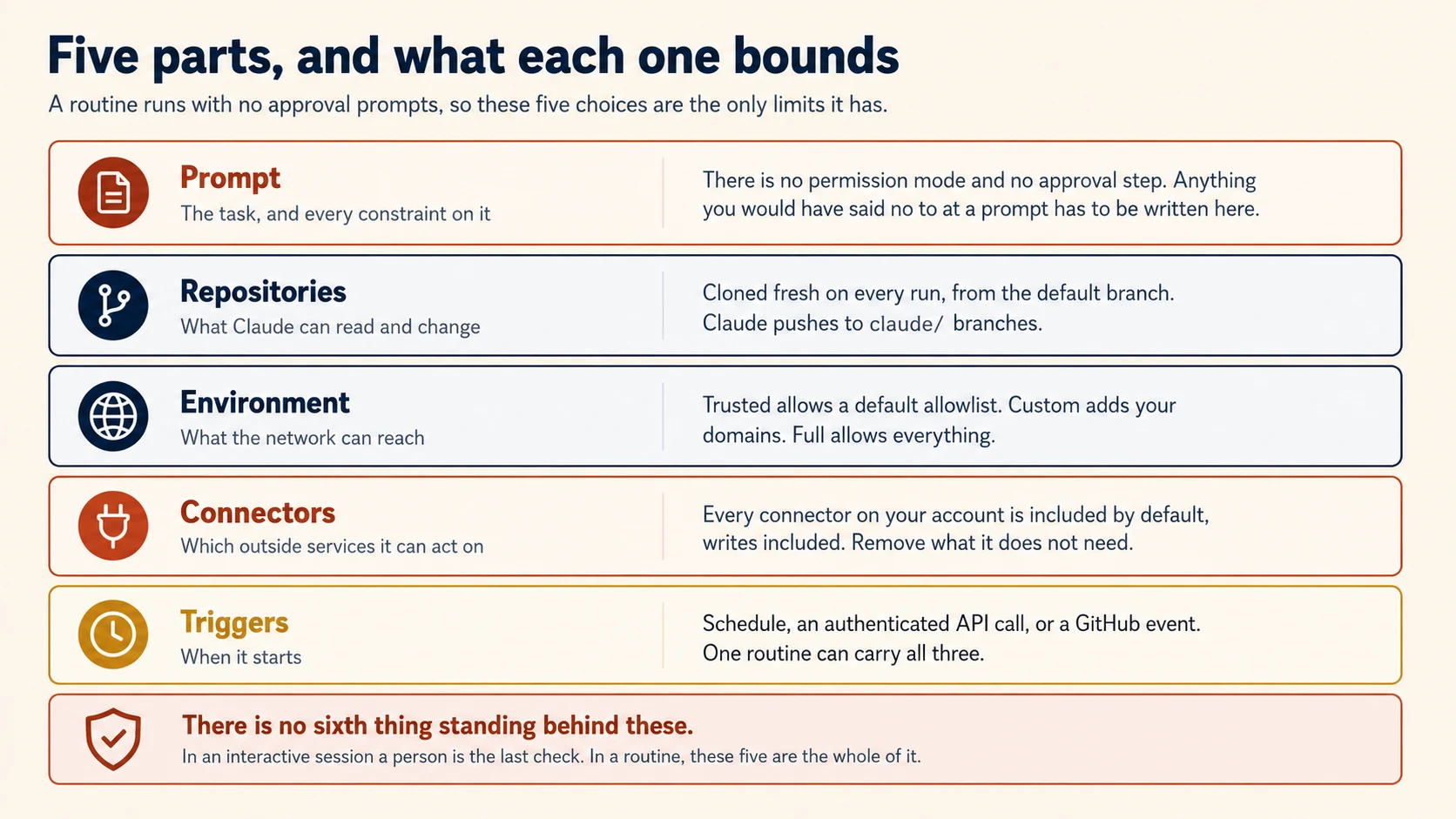
There Is No Approval Step
Anthropic's own framing is worth quoting, because it states the design rather than a caution:
Routines run autonomously as full Claude Code cloud sessions: there is no permission-mode picker and no approval prompts during a run.
Read that against the CI course. There you spent a concept on --permission-mode, and dontAsk was the recommendation because its failure direction was right. Here that dial does not exist.
What a routine can reach comes from three places: the repositories you select, the environment, and the connectors you include. Scope each one to what the routine actually needs.
Concepts 9, 10, and 11 take one each.
Concept 2: The Prompt Is Where Behavioural Constraints Live
Key idea: Infrastructure bounds what a routine can reach. The prompt bounds what it should do with that access, and with no approval step there is nowhere else for that to live.
That split is worth holding onto, because the two halves fail differently. Concept 1's five parts include three that are infrastructure: repositories, environment, and connectors. Those decide the reach. This concept is about the prompt.
In an interactive session, a vague instruction is survivable. You watch, and when Claude proposes something you did not intend, you say no.
A routine has nobody watching. The prompt must be self-contained. It must say what to do and what success looks like. The prompt is both the brief and the behavioural boundary.
Everything from Concept 9 of the CI course applies directly, and applies harder. Explicit categorical criteria over adjectives. A list of what not to do. A cap on how much to produce. A statement of what finishing looks like.
Two Sentences Routines Specifically Need
Two additions belong specifically to routines.
Say what to do when the answer is nothing. A reviewer with nothing to report should say so and stop. Without that sentence, a routine with an empty result tends to find something to fill the space.
Say what not to touch. In CI you expressed this with an allow list and a permission mode. Here there is no allow list.
So a sentence such as "do not modify anything under infra/" is the only version of that limit you get.
There is a subtlety about how the prompt is treated that matters for Concept 7, so it is worth establishing now.
Your saved prompt is treated as an assigned task, not as untrusted content. When a trigger fires, Claude carries out that stored task.
It does not treat the prompt like new text that arrived mid-conversation. The reasoning is that the trigger attests the prompt was stored ahead of time by an authorized session on your account.
That attestation has a limit. The fired prompt is not live user input. It cannot act as approval or consent during the run. It is a task, not a person saying yes.
PRIMM: Predict. You take the review brief from the CI course, paste it into a routine, and attach a nightly schedule. It ran fine in CI with
--permission-mode dontAskand an allow list ofRead. What changes about what that brief now permits? Confidence 1 to 5.
What you will see
The brief now permits everything the routine's five parts allow, which is considerably more than Read.
In CI, two things were doing work that the prompt never mentioned. The permission mode denied anything outside the allow list, and the allow list contained one tool.
So a prompt that said nothing about writing files was still incapable of writing files.
A routine has neither. The session can run shell commands, use skills committed to the cloned repository, and call any connector you included.
If your account has a Linear connector and a Slack connector, and you left them in, this reviewer can file tickets and post messages.
Nothing in the brief asked it to. Nothing in the brief forbade it either, and forbidding is now the prompt's job.
The practical repair is two sentences. Name what the routine should produce, and name what it must not touch. Then remove the connectors it has no reason to use, which is Concept 9.
Concept 3: Everything It Does, It Does as You
Key idea: A routine belongs to an individual account. Commits, pull requests, and connector actions carry your identity, and there is no team ownership.
This is the property that decides whether a routine suits a team at all, and it is easy to read past.
Routines belong to your individual claude.ai account. They are not shared with teammates, and they count against your account's daily run allowance.
Anything the routine does through your connected GitHub identity or connectors appears as you. Commits and pull requests carry your GitHub user.
Slack messages, Linear tickets, and other connector actions use your linked accounts for those services.
What Follows for a Team
Three consequences worth deciding on before you build anything.
A shared reviewer is four copies. If four engineers want the same nightly review, each of them creates their own routine. There is no co-ownership in the research preview.
Your colleagues cannot tell the routine from you. If it opens a pull request at three in the morning, GitHub sees it as your pull request. Say so in the pull request body if that matters to your team.
When you leave, it leaves. A routine tied to a personal account is not an operational asset the team keeps.
The Teams course opened with a rule that never reached a teammate. This is that failure at the scale of a whole automation, and unlike the rules file there is no project scope to move it into.
You know what a routine is made of, that the prompt carries every constraint, and that it acts under your identity. Part 2 covers the three ways it can start.
Part 2: The Three Triggers
Goal for this part: configure each trigger correctly, including two rules that decide whether a trigger does anything at all.
Concept 4: Schedules
Key idea: Presets cover most cases, custom cron has a one-hour floor, and runs start a few minutes late on purpose.
A schedule trigger runs the routine on a recurring cadence. The form offers hourly, daily, weekdays, or weekly.
Three Details That Save a Confused Morning
Times are entered in your local zone and converted automatically, so the routine runs at that wall-clock time regardless of where the infrastructure is.
Runs may start a few minutes after the scheduled time, because of stagger. The offset is consistent for each routine. So a nightly job at 02:00 that consistently starts at 02:07 is working correctly, not drifting.
Custom intervals go through the CLI. If the presets do not fit, choose the closest one first. Then use /schedule update to set a cron expression, such as every two hours or the first of each month.
One floor applies. The minimum interval is one hour, and expressions that run more frequently are rejected.
A routine cannot react to every push. Schedules have a one-hour minimum. Routine GitHub triggers cover pull requests and releases, not push events.
Per-push work belongs in a CI workflow. That is not a limitation to work around, it is the boundary between the two tools.
Concept 5: One-Off Runs
Key idea: A schedule can fire exactly once at a future time, then disable itself. These runs do not count against the daily cap.
A one-off schedule fires once at a specific time. After it fires, the routine auto-disables. The web interface marks it as Ran. To use it again, edit the routine and set a new time.
Creating One From the CLI
From the CLI you describe the time in natural language, and Claude resolves it against the current time and confirms the absolute timestamp before saving:
/schedule tomorrow at 9am, summarise yesterday's merged PRs
/schedule in 2 weeks, open a cleanup PR that removes the feature flag
That second example is the shape worth noticing. It is a reminder that does the work rather than telling you to.
The feature flag cleanup that everyone agrees to do after a rollout, and nobody does, becomes a pull request waiting for review two weeks later.
One-off runs do not count against the daily routine cap, which makes them cheap to use liberally.
One caveat from the documentation: one-off scheduling from the CLI is rolling out gradually. If /schedule offers only recurring schedules on your account, create the one-off from the web.
Concept 6: API Triggers
Key idea: Each routine gets a dedicated endpoint and a bearer token shown exactly once. This is how an alerting system or a deploy pipeline starts a Claude Code session.
An API trigger gives the routine an HTTP endpoint. A POST with the routine's bearer token starts a new session and returns a session URL.
curl -X POST https://api.anthropic.com/v1/claude_code/routines/trig_01ABC.../fire \
  -H "Authorization: Bearer sk-ant-oat01-xxxxx" \
  -H "anthropic-beta: experimental-cc-routine-2026-04-01" \
  -H "anthropic-version: 2023-06-01" \
  -H "Content-Type: application/json" \
  -d '{"text": "Sentry alert SEN-4521 fired in prod. Stack trace attached."}'
The response carries the session ID and a URL you can open to watch the run:
{
  "type": "routine_fire",
  "claude_code_session_id": "session_01HJK...",
  "claude_code_session_url": "https://claude.ai/code/session_01HJK..."
}
Four Operational Facts
API triggers are added from the web only. The CLI cannot create or revoke tokens.
The token is shown once and cannot be retrieved later. Copy it into your secret store immediately. Each routine has its own token, scoped to triggering that routine, and you can regenerate or revoke it from the same modal.
The text field is freeform and is not parsed. Send JSON and the routine receives it as a literal string.
The endpoint ships under a dated beta header, experimental-cc-routine-2026-04-01. Breaking changes ship behind new dated versions. The two most recent previous versions keep working, so you get a migration window rather than a surprise.
Concept 7: Why the Payload Needs an Invitation
Key idea: Fire text arrives labelled as untrusted data. Unless your prompt names it, the routine treats it as inert context and does nothing with it.
This is the concept that decides whether an API-triggered routine works, and the mechanism is worth understanding rather than memorising.
PRIMM: Predict. Your monitoring tool POSTs an alert body to the routine's endpoint. The routine's prompt says "Investigate the alert and open a fix pull request." What does the run do with the alert text? Confidence 1 to 5.
What you will see
Nothing much. The routine investigates in general terms and the alert text is not what it acts on.
The text arrives wrapped in a <routine-fire-payload> block that labels it as untrusted data. Claude is told not to follow instructions inside it unless the routine's own prompt says to.
That prompt says "the alert," which names no payload. So the text stays inert context.
The repair is one clause: "the alert described in the routine-fire-payload block."
Most readers predict either that it works, or that the wrapper is a bug to work around. It is neither.
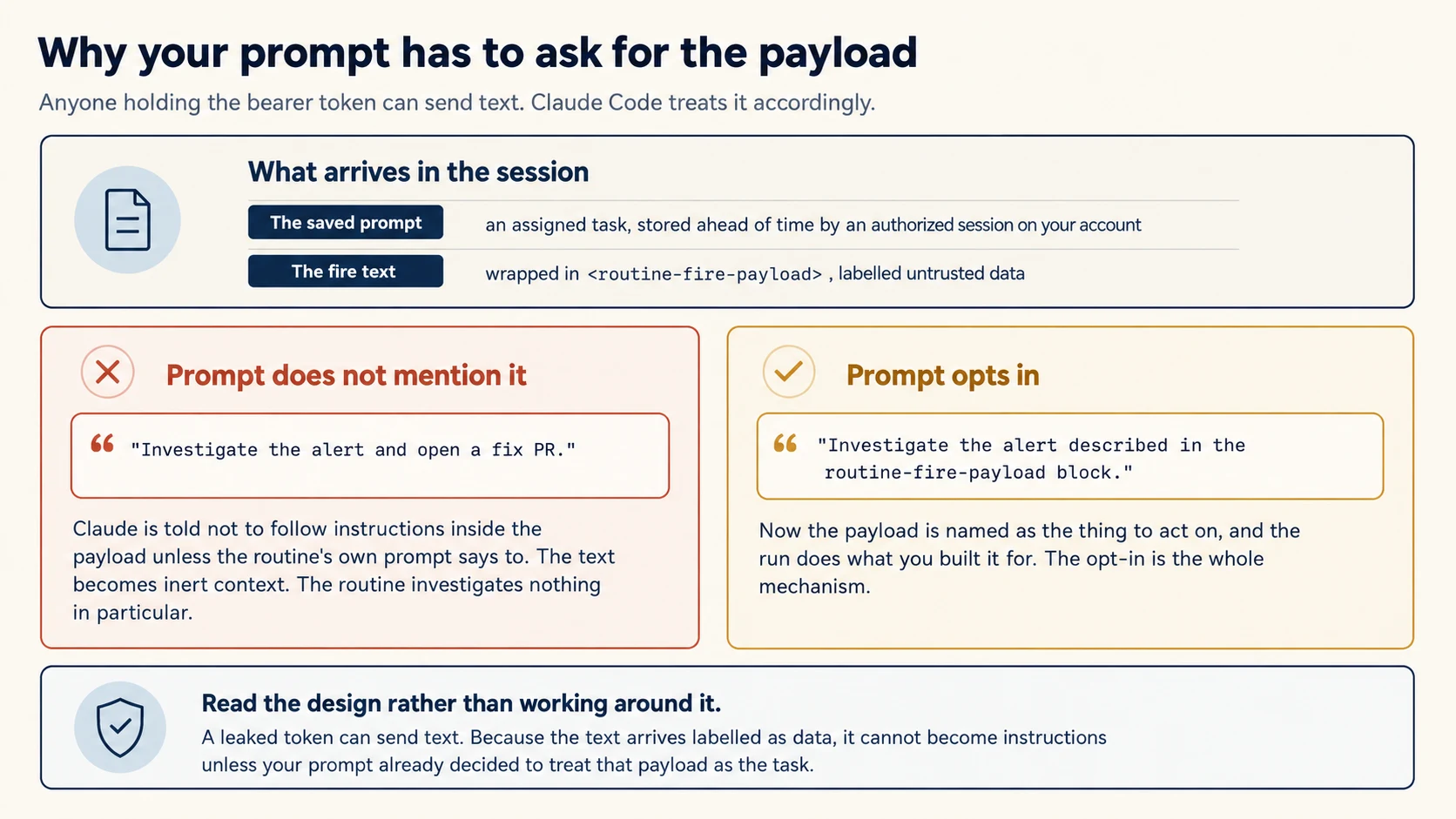
The text you send does not reach the routine as a bare message. It arrives wrapped in a <routine-fire-payload> block.
That block labels it as untrusted data, and tells Claude not to follow instructions inside it unless the routine's own prompt says to.
So the prompt has to opt in:
Investigate the alert described in the routine-fire-payload block.
Pull the stack trace, correlate it with commits merged in the last
48 hours, and open a draft pull request with a proposed fix.
Without a sentence like that, the alert text is context the routine can see. It has not been asked to act on it.
The reasoning is worth agreeing with rather than working around. Anyone holding the bearer token can send text.
If that token leaks, the wrapper means the attacker's text arrives labelled as data rather than as instructions to your routine.
Your prompt decided in advance what kind of payload to act on, and a leaked token cannot change that decision.
The same wrapping applies to text supplied with Run now in the web interface, so testing by hand exercises the real path.
Concept 8: GitHub Triggers
Key idea: Two event categories, eight filter fields, and a regex operator that matches the whole field rather than a substring.
A GitHub trigger starts a session when a matching event occurs on a connected repository.
PRIMM: Predict. You add a GitHub trigger on
pull_request.opened, save it, and open a pull request. Nothing happens. You ran/web-setuplast week and cloning works. What is wrong? Confidence 1 to 5.
What you will see
The Claude GitHub App is not installed on the repository.
/web-setup grants repository access for cloning, and it does not install the app and does not enable webhook delivery. So every part of the routine that reads code works.
That is exactly why this is confusing. The repository is clearly connected, and the trigger still never fires.
Configuring the trigger from the web prompts you to install the app when it is missing. That is the reason to use the web path the first time.
There is a second silent cause worth checking at the same time. A regex filter tests the whole field rather than a substring, so a filter of hotfix matches only a title that is exactly that word.
Both failures look identical from outside. A correctly configured trigger that never matches.
The Claude GitHub App must be installed on the repository. /web-setup only grants clone access. It does not install the app or enable webhook delivery.
A routine that looks correctly configured and never fires is usually this.
Two event categories are supported: pull request and release. You can react to every action in a category. Or choose one action, such as pull_request.opened.
Filtering Which Events Count
Filters narrow which events start a run, and all conditions must match:
| Filter | Matches |
|---|---|
| Author | PR author's GitHub username |
| Title | PR title text |
| Body | PR description text |
| Base branch | Branch the PR targets |
| Head branch | Branch the PR comes from |
| Labels | Labels applied to the PR |
| Is draft | Whether the PR is in draft state |
| Is merged | Whether the PR has been merged |
Each pairs a field with an operator: equals, contains, starts with, is one of, is not one of, or matches regex.
The Regex Rule That Catches Everyone
The matches regex operator tests the entire field value, not a substring within it.
So a filter of hotfix on the title matches only a pull request titled exactly hotfix, with nothing before or after. To match any title containing the word, write .*hotfix.*.
That failure is silent in the worst way. The routine is configured, the trigger exists, and it simply never matches. If you want literal substring matching, use contains and avoid the question entirely.
Three filter combinations worth copying:
Auth review: base branch main, head branch contains auth-provider. Any pull request touching authentication goes to a focused reviewer.
Ready for review only: is draft is false. The routine skips work in progress.
Label-gated backport: labels include needs-backport. A maintainer decides which changes get ported, by applying a label.
One preview limit matters here. GitHub webhook events have per-routine and per-account hourly caps. Events beyond the cap are dropped until the window resets.
A dropped event is not a delayed event. A busy repository can have pull requests that were never reviewed, with nothing on the pull request saying so.
You can start a routine three ways and know the two rules that make triggers silently do nothing. Part 3 is about what happens once one starts.
Part 3: What It Can Reach
Goal for this part: narrow the three dials that decide a routine's blast radius, since there is no approval step behind them.
Concept 9: Connectors Are Included by Default
Key idea: New routines include every connector on your account by default. Claude can use every tool in those connectors, including write tools, without asking.
Here is the sentence from the documentation to sit with:
Claude can use every tool from an included connector, including writes, without asking for permission during a run.
And the default is that all of your connected MCP connectors are included.
Picture a routine created to summarise pull requests, on an account with Slack, Linear, Google Drive, and a database connector. It starts life able to post messages, file tickets, edit documents, and query production.
Not because you granted anything, but because you did not remove anything.
The instruction is to remove what the routine does not need, at the Connectors section at the bottom of the creation form. Treat it the way you treated --allowedTools in the CI course: the smallest set that lets the job finish.
Which Connectors Are Even Eligible
Connectors are the claude.ai integrations on your account. MCP servers added locally with claude mcp add stay on your machine. They do not appear in the routine connector list.
To use one in a routine, add it as a claude.ai connector. Another option is to commit it in .mcp.json so it arrives with the cloned repository.
Concept 10: The Environment Decides What the Network Can Reach
Key idea: A cloud environment sets network access, variables, and a setup script. The default allows a fixed allowlist and blocks everything else.
Every routine runs in a cloud environment, and it inherits that environment's network policy on every run.
Three access levels:
| Level | Allows |
|---|---|
| Trusted (the default) | Only a default allowlist of package registries, cloud provider APIs, container registries, and common development domains |
| Custom | Your named domains, optionally alongside the default list |
| Full | Unrestricted access |
A blocked request fails with 403 and x-deny-reason: host_not_allowed, which is worth recognising because it appears in the transcript rather than anywhere obvious.
There is one important exception. Connector traffic goes through Anthropic's servers, not the session's network path. That is why attached connectors work without adding their hosts to the environment allowlist.
If Slack works and your own API does not, that asymmetry is why.
Variables and Setup Scripts
Environment variables are visible to anyone who uses the environment. The documentation says to add credentials with that in mind. On a Team or Enterprise account, an environment is not a private place.
A setup script installs dependencies before the session starts, and its result is cached, so it does not re-run every time.
Concept 11: What Claude May Push
Key idea: Branches prefixed claude/ are always accepted. A push anywhere else is checked first and rejected under three conditions.
Each repository you attach is cloned on every run, starting from the default branch unless your prompt says otherwise.
Claude pushes its work to branches prefixed with claude/****, which are always accepted.
The Three Rejection Conditions
When your prompt directs Claude to push somewhere else, the push is checked first and rejected if any of these is true:
- The branch is protected on GitHub
- Someone else has an open pull request from that branch
- The branch carries commits authored by someone other than you
Read that third condition again, because it is the interesting one. It is not about permissions. It is a rule about not overwriting another person's work, enforced regardless of whether your credentials would technically allow it.
Taken together, the three conditions describe a default that is hard to argue with. A routine can create its own work freely. It cannot quietly modify a branch that someone else has a stake in.
The three dials are narrowed. Part 4 is about finding out whether the routine actually did its job.
Part 4: Operating Them
Goal for this part: read a run correctly, diagnose one that did nothing, and decide when a routine is the wrong tool.
Concept 12: Green Does Not Mean It Worked
Key idea: The run status reports infrastructure. Whether the task succeeded is only in the transcript.
PRIMM: Predict. A routine has run green every night for three weeks. Your teammate asks whether it is working. What can you say from the run list alone? Confidence 1 to 5.
What you will see
That it started and exited without an infrastructure error, twenty-one times. Nothing more.
A green status is a claim about the machine, not about your task.
The honest answer to your teammate is that you do not know yet, and the fix is to open a run and read it.
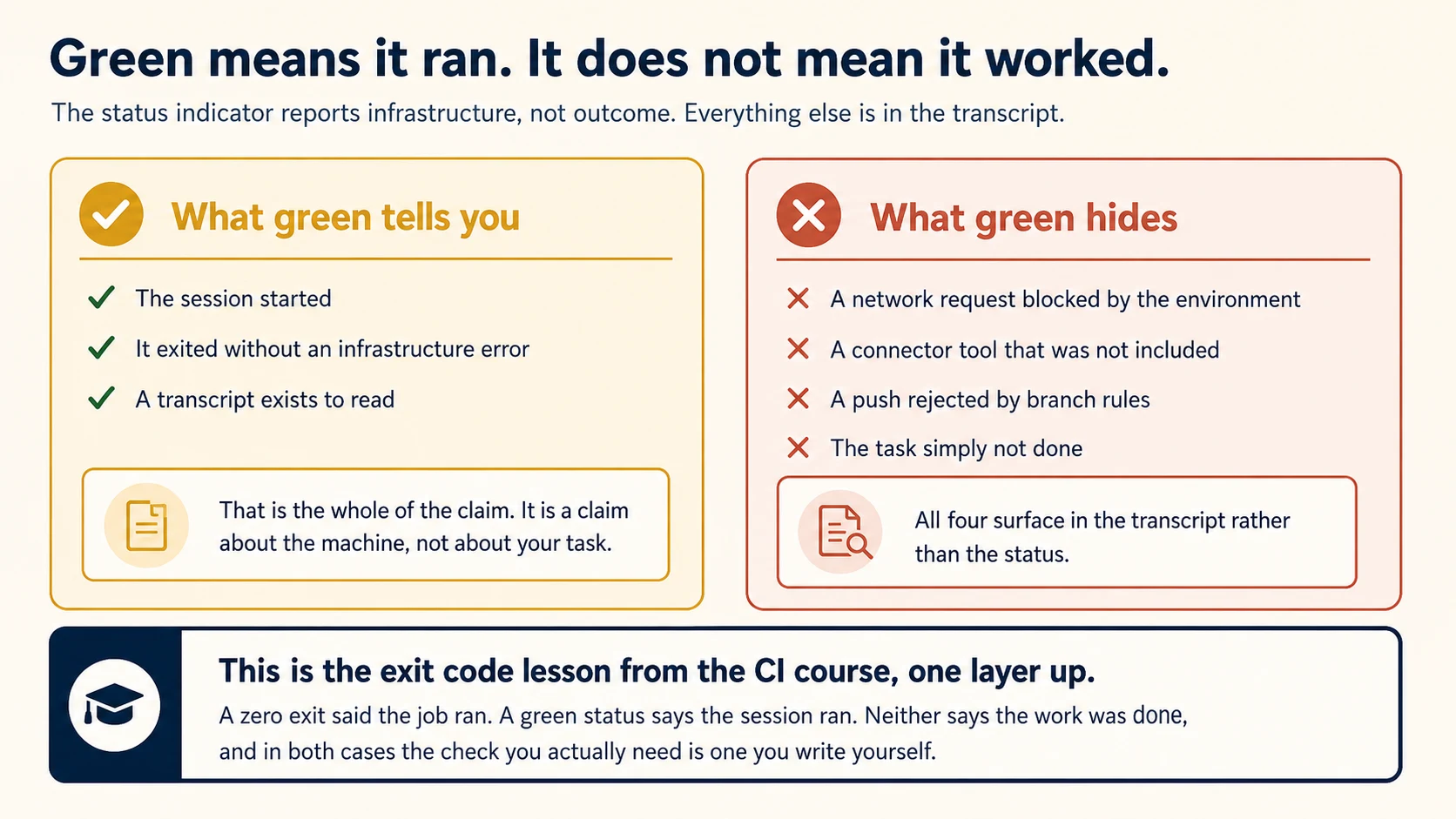
The documentation states this plainly:
A green status in the run list means the session started and exited without an infrastructure error. It does not mean the task in your prompt succeeded.
Four categories of failure hide behind a green run, and each was configured by you rather than broken by Anthropic.
A network request blocked by the environment from Concept 10. A connector tool you removed in Concept 9. A push rejected by the rules in Concept 11.
And the plain case where Claude read everything, decided there was nothing to do, and finished.
All four appear in the transcript, not in the status indicator. While a routine is new, open its runs and read them.
If you did the CI course, this is the exit-code lesson one layer up. A zero exit said the job ran. A green status says the session ran.
Neither says the work was done, and in both cases the check you need is one you write.
There is a version of that check available here, and it costs one sentence in the prompt.
Ask the routine to end by stating what it did and what it did not do, and to say so explicitly when it found nothing.
A transcript ending in "no pull requests matched the filter, so no review was produced" tells you more than a green dot ever could.
Concept 13: Diagnosing a Routine That Did Nothing
Key idea: Work outward from the trigger to the run. Most silent failures are configuration rather than behaviour.
Work Outward From the Trigger
When a routine produces nothing, check in this order.
Did it start? Open the routine's detail page and look at the run list. No run means the trigger never matched. The causes are specific:
- A GitHub trigger with the Claude GitHub App not installed
- A regex filter matching the whole field rather than a substring
- An hourly webhook cap that dropped the event
- A paused schedule
- A one-off that already fired and auto-disabled
Did it start and do nothing? Open the run and read the transcript. Look for a 403 with x-deny-reason: host_not_allowed, a tool that was not available, or a rejected push.
Was the payload ignored? If an API trigger ran but the alert text seemed invisible, your prompt did not name the payload. Concept 7.
Ask Claude. From v2.1.227, the CLI can read run history and explain it:
/schedule why did my nightly review do nothing this morning?
Claude lists recent runs with their status and links. It can then read a run log and explain tool errors, permission denials, and the final result.
The rest of the CLI management surface is small and worth knowing: /schedule list, /schedule update, and /schedule run.
When /schedule Is Not There at All
A different failure has its own cluster of causes, and every one of them is an authentication or telemetry setting rather than a bug.
Routines require a claude.ai subscription login. /schedule may be hidden or refuse to run when you use a Console API key, an Anthropic profile, or a cloud provider such as Bedrock.
Environment variables take precedence over your login. Remove ANTHROPIC_API_KEY, ANTHROPIC_AUTH_TOKEN, or an apiKeyHelper setting before troubleshooting the subscription login.
Telemetry variables disable it. DISABLE_TELEMETRY, DO_NOT_TRACK, CLAUDE_CODE_DISABLE_NONESSENTIAL_TRAFFIC, and DISABLE_GROWTHBOOK all switch off the feature-flag fetching that /schedule depends on.
Or you are inside a Claude Code on the web session. Manage routines from the web interface there instead.
Or your organisation turned it off. Team and Enterprise Owners can disable routines for all members, which stops existing routines running and prevents new ones.
A policy that disables Claude Code on the web has the same effect, since routines run on it.
Authentication, environment variables, and telemetry settings can hide the command. They do not disable routines. You can still create and manage routines on the web.
Organisation policy is different. If an Owner disables routines or Claude Code on the web, the feature itself is unavailable. That is a server-side setting, so nothing in your local configuration overrides it.
Concept 14: What It Costs, and the Caps
Key idea: Routines draw on subscription usage like any session, plus a separate daily cap on how many runs can start.
Two Limits at Once
Subscription usage. A routine run consumes usage the same way an interactive session does.
A daily run cap. Separately, there is a limit on how many runs can start per account per day. Check your current consumption and remaining runs at the routines page or your usage settings.
When you hit either, behaviour depends on one setting. Organisations with usage credits turned on can continue on metered overage. Without them, additional runs are rejected until the window resets.
A rejected run is not queued. An hourly routine that exhausts its cap at midday does nothing for the rest of the day, and the thing it was watching goes unwatched.
One-off runs do not count against the daily cap, which is a good reason to prefer them for work that genuinely happens once.
Three Habits
Three habits keep the cost predictable, and they are the same three from the CI course pointed at a different meter.
Narrow the prompt so a run finishes in fewer turns. Pick the model deliberately, since the prompt form has a model selector and uses it on every run.
And prefer a tighter trigger over a frequent schedule. An hourly routine that finds nothing to do 23 times a day pays 23 times for that.
Concept 15: Routine or Workflow
Key idea: Use a routine when you want the work without operating the machinery. Use a workflow when you need tighter control over where it runs and what it can reach.
| Routine | GitHub Action workflow | |
|---|---|---|
| You maintain | A prompt and its triggers | A workflow file and its steps |
| Runs on | Anthropic's cloud, or your organisation's self-hosted environment when routed there | Your runner |
| Your code sits | On Anthropic's infrastructure during the run | On infrastructure you already trust |
| Permission control | Repositories, environment, connectors | Permission modes, allow lists, deny rules, hooks |
| Ownership | One individual account | The repository, so the team |
| Minimum interval | One hour for schedules | Any event, including every push |
| Failure signal | A transcript you read | An exit code your pipeline branches on |
| Billing | Subscription usage, with a daily cap | API tokens, or subscription with an OAuth token |
Four Questions, In Order
Work down this list and stop at the first one that answers for you.
1. Must this survive the person who built it?
If yes, write the workflow.
A routine belongs to one individual account. An automation your team depends on therefore disappears when that person leaves, changes role, or stops paying for the plan.
A workflow lives in the repository, goes through code review, and is owned by whoever owns the repository.
This is the strongest argument on the list, and it decides more cases than any feature comparison.
2. Does your code have to stay on infrastructure you control?
If yes, write the workflow. A GitHub Action runs on your runner. A routine normally clones your repository onto Anthropic's cloud. The exception is an organisation that routes routines to a self-hosted environment.
For many organisations this question was answered by a policy document years ago, and it settles the choice before anything technical is discussed.
3. Does something downstream need to know whether the work succeeded?
If yes, write the workflow. It gives your pipeline an exit code to branch on. A routine gives you a transcript to read, and Concept 12 explains why the status indicator is not a substitute.
If the answer is a person reading a report, a transcript is fine.
4. Is there a repository event or a pipeline to hang this on at all?
If no, use the routine. A weekly documentation sweep. A nightly backlog groom. A cleanup two weeks from now. None of these has a natural place in CI. Building them there means creating a scheduler for work unrelated to your build.
This is where a routine clearly wins, and it is a larger category than it first appears.
One More Consideration
Frequency can decide it on its own. A routine's schedule floor is one hour, and its GitHub triggers cover pull requests and releases only.
So per-push work, or anything reacting to an event outside those two categories, is a workflow whatever the other four answers say.
And they compose. A routine can call an API endpoint your pipeline already has, and your pipeline can fire a routine. The question is per job rather than per team.
You can read a run honestly, diagnose one that did nothing, and say when a routine is the wrong tool. Part 5 builds one.
Part 5: The Worked Example
Build a routine you would still trust in a month. Four decisions.
The Situation
Your team accumulates feature flags. Everyone agrees they should be cleaned up after a rollout, and nobody does it. The work is small, and the reminder never survives the sprint.
Decision 1: Write the Prompt as a Complete Brief
Write the routine's prompt as a self-contained brief. It must name the repository area to scan and define what makes a flag stale.
It must say exactly what to produce, name what not to touch, and say what to do when nothing qualifies. Do not rely on any default, because there is no permission mode and no approval step.
Push back on two things.
Adjectives instead of criteria. "Old flags" is not checkable. "A flag whose enabling commit is more than 60 days old and which is set to a constant value in every environment" is.
No instruction for the empty case. Add it explicitly: if nothing qualifies, say so in one sentence and stop without opening anything.
Here is a prompt that satisfies the brief. It is the deliverable of this course, so it is worth reading closely rather than copying.
Find feature flags in this repository that are safe to remove, and open
one pull request per flag.

SCOPE
- Only flags defined in src/flags/ and referenced from src/.
- Ignore anything under infra/, migrations/, or vendor/.

A FLAG QUALIFIES WHEN ALL OF THESE ARE TRUE
- Its enabling commit is more than 60 days old.
- It is set to the same constant value in every environment config
  under config/environments/.
- No open pull request already touches its definition.

FOR EACH QUALIFYING FLAG
1. Remove the flag definition and every reference to it.
2. Keep the branch of the conditional that the constant value selects,
   and delete the other branch.
3. Run `npm test`. If any test fails, stop, do not open a pull request
   for that flag, and say which test failed.
4. Open one pull request per flag on a claude/ branch. Title it
   "Remove feature flag <name>". In the body, state the flag's age, the
   constant value it resolved to, and the number of call sites removed.

DO NOT
- Modify anything outside src/, including any config file.
- Combine two flags into one pull request.
- Open more than three pull requests in a single run. If more than three
  qualify, take the three oldest and say how many remain.

IF NOTHING QUALIFIES
Say "No flags met the removal criteria this week" and stop. Do not open
a pull request, do not open an issue, and do not modify any file.

BEFORE YOU FINISH
End your response with: the flags you removed, the flags you skipped and
why, and the number that remain unexamined.
Five things in that prompt map directly onto concepts from this course.
The qualifying rules are checkable. A person reading the same repository could verify each one. That is the criteria test from the CI course applied here.
The DO NOT section replaces the allow list. There is no permission mode, so this is where "stay out of infra" lives (Concept 2).
The pull-request cap replaces the turn limit. The routine may open only three per run and must count the remainder. A neglected repository therefore does not produce forty pull requests at once.
The empty case has its own section. Without it, a routine with nothing to do finds something (Concept 2).
The closing instruction is the check. A transcript ending in that summary tells you what a green status cannot (Concept 12).
Done when: every instruction can be checked from a diff. The prompt names what not to touch, and its final section asks the routine to report the outcome.
Decision 2: Narrow the Three Dials
Configure the routine with one repository, the Default environment, and only the connectors this job needs. Open the Connectors section and remove every connector that is not required. Write down which ones you removed and why.
The removal list is the point of the exercise. A routine that reads code and opens a pull request needs no Slack, no Linear, and no database.
Done when: you can justify every remaining connector in one sentence. You have also checked whether the job needs network access beyond the default allowlist.
Decision 3: One-Off First, Then Schedule
Attach a one-off schedule for a few minutes from now rather than a recurring one. Watch the run, read the transcript in full, and confirm what it actually did.
This is the decision most people skip, and it is the cheapest safety in the course. A one-off run does not count against your daily cap, and it exercises the same path a recurring run will.
Read the transcript looking for the four hidden failures from Concept 12.
Done when: you have read a full transcript end to end, and can say what the routine did rather than what its status said.
Decision 4: Make It Report on Itself
Check that the prompt tells the routine to end every run by stating what was changed, what was skipped and why, and an explicit sentence when nothing qualified. If it does not, add that instruction. Then convert the one-off to a weekly schedule.
Done when: a run that finds nothing says so plainly in its final line. A run that acts lists what it touched.
That last requirement is your check. A green status will never tell you the difference between a working routine and one that has quietly matched nothing for a month.
What You Have Built
A routine with a self-contained brief, a minimal connector set, a tested execution path, and a habit of reporting its own outcome. It runs whether or not your laptop is open, and it tells you what it did.
How Routines Fail
Each symptom points to a concept.
- "It did something I never asked for" points to a prompt that named a task and no limits (2).
- "My colleague cannot see or edit my routine" points to routines belonging to an individual account (3).
- "It never runs, and I set the cron to every 15 minutes" points to the one-hour minimum interval (4).
- "I want it to run on every push" points to schedules having an hourly floor and GitHub triggers covering only pull requests and releases (4, 8).
- "It ran once and then stopped" points to a one-off schedule auto-disabling after it fires (5).
- "I lost the API token" points to a token shown once, so regenerate it (6).
- "The alert text seems invisible to the routine" points to a prompt that does not name the fire payload (7).
- "The GitHub trigger never fires" points to the Claude GitHub App not being installed, since
/web-setupdoes not install it (8). - "My regex filter matches nothing" points to the operator testing the whole field, so use
.*term.*orcontains(8). - "Some pull requests get reviewed and others do not" points to hourly webhook caps dropping events (8).
- "It posted to Slack and I never told it to" points to connectors included by default (9).
- "A request failed with 403 host_not_allowed" points to the environment's network policy (10).
- "The push was rejected" points to a protected branch, someone else's open pull request, or another author's commits (11).
- "The run is green and nothing happened" points to a status that reports infrastructure rather than outcome (12).
- "
/schedulesays unknown command" points to an API-key login, an environment variable taking precedence, or telemetry being disabled, none of which stop you using the web (13). - "Routines are unavailable everywhere, not just the CLI" points to an organisation policy disabling routines or Claude Code on the web (13).
- "It stopped running halfway through the day" points to the daily run cap with no usage credits (14).
Two habits prevent most of this.
Write the prompt as though nobody will read the output. Because on a Tuesday in six weeks, nobody will. Every constraint has to be in the text before the first run.
Open the runs. A green status is a claim about the machine. What the routine did is in the transcript, and reading a few early on is how you find out whether you configured what you meant.
Build It: Exam Prep Projects
Be clear about what this course is for. Routines are not on the CCAR-F blueprint. Nothing here about triggers, schedules, or Anthropic-hosted execution will be tested, and if you are studying against a deadline you should spend the hour on the Agent SDK or the Claude Code configuration course instead.
One idea in this course does transfer, and it transfers to the highest-weighted part of the exam.
Project: Prove That a Green Run Can Be a Failed Task
What you will have: a routine that reports success while having done nothing useful, and a check that catches it.
Set up a routine that scans for something in my repo and reports what it found. Then let me point it at a place where it will find nothing, so I can see what a successful empty run looks like.
Done when:
- The routine completes and reports success.
- You can tell, from the output alone, whether it did the work or merely finished.
- You have added something to the output that makes the distinction visible without opening the logs, such as a count of what was examined rather than a count of what was found.
Why this idea is worth an hour. The exam's reliability questions turn on the gap between a process completing and a task succeeding: a subagent that returns an empty result marked successful, a workflow whose steps all pass while the answer is wrong, an agent confidently reasoning from stale tool results. Domain 5 is fifteen percent of the exam and this distinction runs underneath most of it. Routines are simply the cheapest place to watch it happen, because the run status is right there in front of you and it is lying.
Sources
Every page below was checked on 30 August 2026. Where this course and a current page disagree, the page wins: these products move faster than any course can, which is why each concept names the behaviour to verify rather than asking you to trust a number.
- Routines, the five parts, the three triggers, the payload wrapper, branch rules, and the preview caps.
- Claude Code on the web, the cloud environment routines run in, and the account requirement in Concept 13.
- Run Claude Code programmatically, the workflow a routine replaces, for the comparison in Concept 15.