Claude Code as a CI Worker
16 Concepts · About 90 minutes to read · 2-3 hours to build · From a Session You Watch to a Worker That Runs Without You
A team switches on an automated reviewer. Within two weeks, nobody reads it.
The comments are not wrong, exactly.
They are repetitive, because every push produces the same three observations about code that has not changed. They are vague, because the prompt said to be conservative and flag anything concerning.
And they arrive on files the CI linter already checked, so the reviewer is saying in prose what a tool already said in red.
Developers do what people do with an alarm that is usually wrong. They stop reading it. Six weeks later somebody suggests turning it off, and nobody argues.
That failure is not about model quality. The same model, given a specific brief and its own previous output, produces a review that engineers read. The difference is entirely in how the job around it was built.
This course is about building that job.
The Claude Code and OpenCode crash course taught the tool as something you use.
Claude Code for Teams taught it as something a team configures. This one completes the arc: Claude Code as something that runs without you.
You will learn three things:
- How a
-prun differs from a session, including what a cloned repository can run on your build machine when you do not stop it. - How to produce output a pipeline can branch on, and how to fail a build when the setup was wrong rather than when the review was.
- How to write a reviewer that engineers keep reading, and how to tell whether it is working.
Third in a three-course arc. Use it, configure it for a team, run it unattended. The Teams course is the prerequisite. A CI worker inherits the same configuration surfaces and the same trust questions, with the human removed from all of them.
This course covers the CI half of Domain 3 (Claude Code Configuration and Workflows, 20%) of the Claude Certified Architect, Foundations exam. Exam Scenario 5 is built on this material. Exam notes appear where the material lines up.
Everything here was checked against Anthropic's Claude Code documentation on 22 August 2026. CLI flags change, and several features below name the version that introduced them. Where this page and your installed version disagree, your version is correct.
Prerequisites. Three things.
- You have done Claude Code for Teams. This course assumes you know the four instruction scopes, what
--bareis for, and thatallowed-toolspre-approves rather than restricts.- You have a repository, and permission to add a file to it. You do not need to know GitHub Actions. Concept 13 teaches what a workflow is from scratch, and the ideas transfer to GitLab, Jenkins, or anything that runs a shell command.
- You have a CI authentication method. A raw
claude --bare -prun needs an Anthropic API key or anapiKeyHelper, because bare mode never reads your subscription login. Concept 3 explains why. The GitHub Action is more flexible: it also accepts a long-lived subscription token fromclaude setup-token, or workload identity federation with no stored secret at all.
Why This Is a Digital FTE, Not a Script
One framing decision shapes everything in this course, so it belongs at the front.
A CI reviewer looks like automation. It is a command in a YAML file, it runs on a trigger, and it prints something. That framing leads you to build it like a linter and judge it like a linter.
The book's frame is more useful here. A reviewer is a Digital FTE.
It is a worker doing a job a person currently does, on the same queue and producing the same artifact.
Follow what that changes.
A linter is judged by whether it runs. A worker is judged by whether its output is used.
Nobody asks whether a linter's findings are worth reading, because a linter only reports what it is certain about. A reviewer makes judgment calls, so whether engineers act on its comments is the only question that matters.
A linter has no onboarding. A worker does. Your standards, your fixtures, and what counts as worth reporting in this codebase are things a new colleague would be told in their first week. This worker needs them too.
A linter is not measured after launch. A worker is. Concept 15 is about the numbers, and it is the concept most teams skip.
Keep that frame in mind and the rest of the course reads as one argument. Parts 1 and 2 are the mechanics of running the worker.
Parts 3 and 4 are the difference between a worker people rely on and one they mute.
Part 1: What Changes When Nobody Is Watching
Goal for this part: understand the mechanical differences between a session and a job, and close the security gap that
-popens by default.
Concept 1: Every Human Fallback Has to Be Replaced
Key idea: A CI job is not a session with the screen turned off. It is the same agent with every person-shaped dependency removed.
Start by listing what a person silently supplies during an ordinary session.
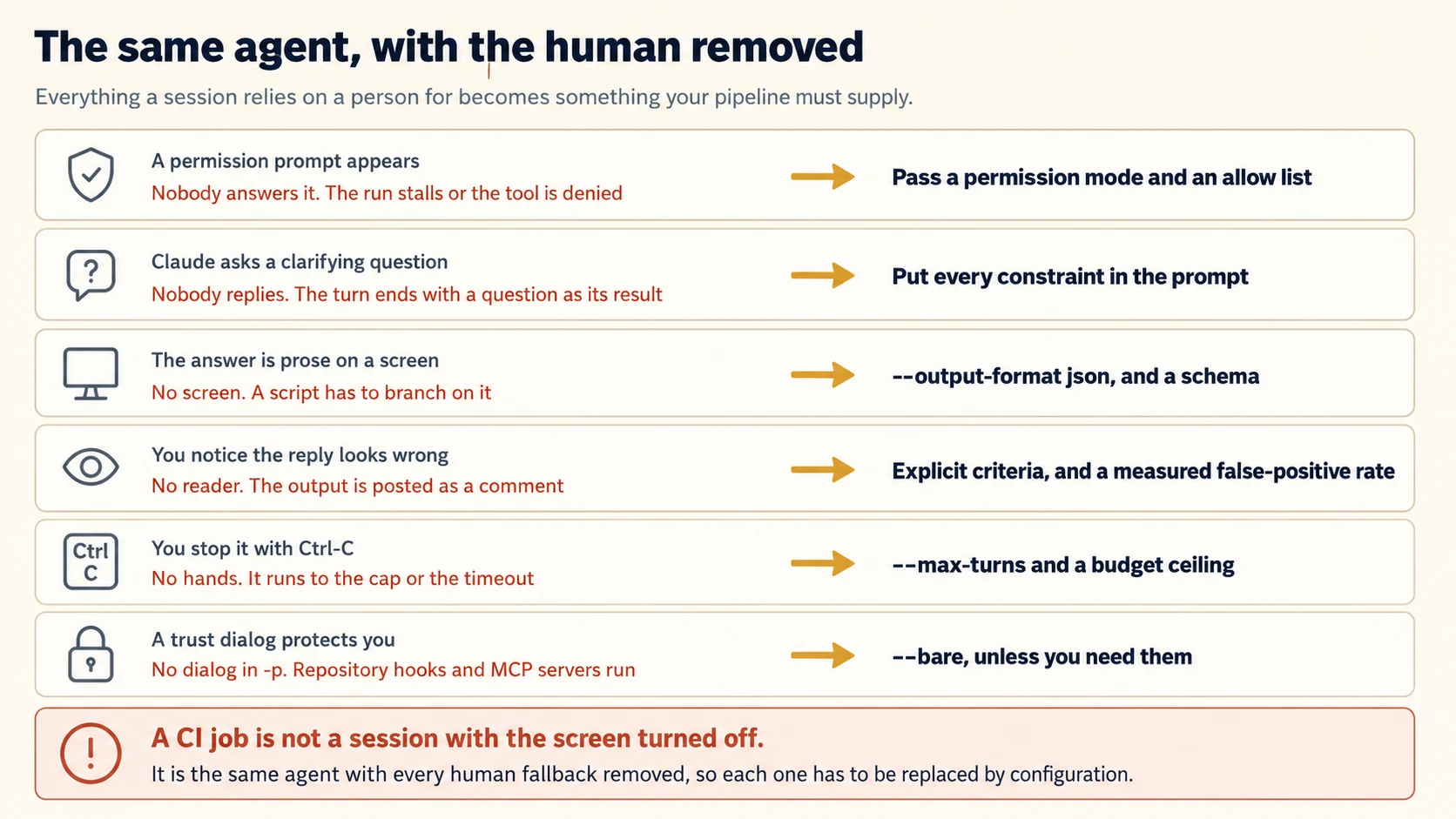
Read that table as a checklist rather than a warning. Every row is something you will otherwise discover in production, and each has a specific replacement.
The one at the bottom is the one people do not expect, and Concept 3 is about it.
Concept 2: -p and the Exit Code Contract
Key idea: -p makes the run non-interactive and gives your pipeline a status code to branch on.
claude -p "Review the staged diff for security issues"
Without -p, Claude Code starts the interactive interface. In CI, that means a job waiting for input that will never arrive, until the runner's timeout kills it.
Recognise that symptom, because it produces no error message. It is simply a job that never finishes.
The Exit Codes
The exit code is the contract your pipeline works from.
Zero on success. Non-zero when the run fails. An invalid flag is reported to stderr before the run starts. A failure inside the run, such as missing authentication, is printed as the result on stdout.
143 on SIGTERM. If a supervisor or kill stops the run, Claude Code exits 143. The current turn remains unfinished and has no result.
Claude Code also stops the process tree of any Bash command still running, runs SessionEnd hooks, and starts no new work.
One behaviour is worth knowing before it confuses you.
Background work has two different endings.
If Claude starts a background Bash task, such as a dev server, that shell is stopped about five seconds after the final result.
Background subagents are different. Their output belongs to the result, so the run waits for them, up to ten minutes by default.
Piping and Skills
Two more mechanics you will use.
stdin is read. You can pipe data in, which is often better than granting a tool permission to fetch it:
git diff main | claude -p "Report every typo as filename:line, then the issue on the next line. Return nothing else."
Piping the diff means Claude needs no Bash permission to read it. Piped stdin is capped at 10 MB, and beyond that you write to a file and reference the path in the prompt.
Skills work in -p****. Include /skill-name in the prompt string and Claude Code expands it before running. Built-in commands that only exist in the terminal interface, such as /login, do not.
Concept 3: What a Repository Runs on Your Build Machine
Key idea: A -p session shows no workspace trust dialog. Without --bare, it loads and runs what the repository configures.
This is the most important concept in Part 1, and it follows directly from the workspace trust material in the Teams course.
The important rule is simple.
Without --bare, a -p session can run project hooks and connect project MCP servers. That can happen even in a folder you have never trusted.
There is no workspace trust dialog and no per-server approval prompt in that headless run.
Now put that in a CI context. Your workflow checks out a branch and runs Claude Code on it.
If that branch can modify .claude/settings.json, it can add a hook. A hook is a shell command that runs at a lifecycle event.
The trust dialog that would have stopped this in an interactive session does not exist here.
What Bare Mode Turns Off
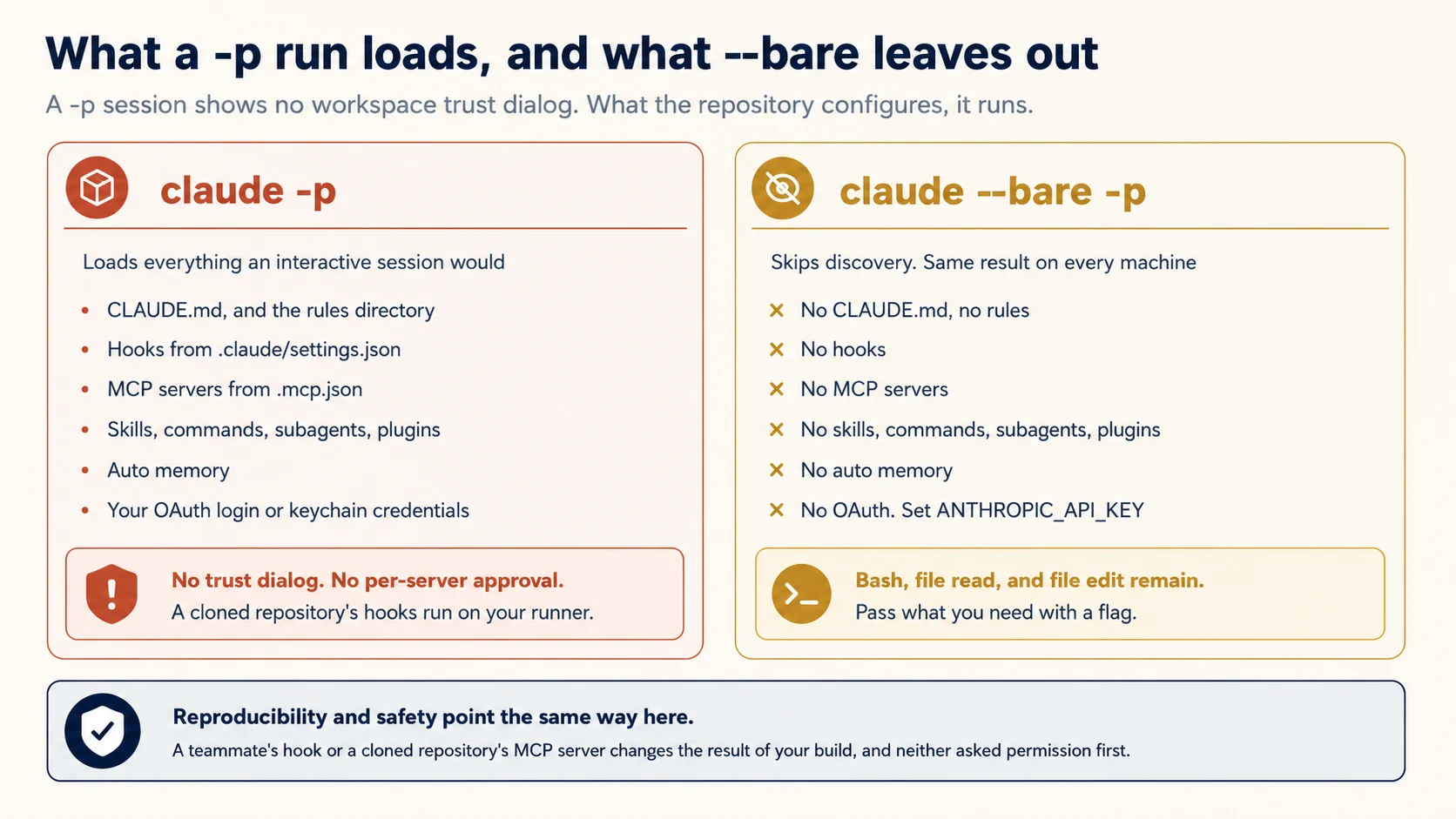
--bare is the answer. It skips auto-discovery of hooks, skills, custom commands, subagents, plugins, MCP servers, auto memory, and CLAUDE.md.
This removes project discovery, not the underlying capabilities. You can still supply agents explicitly with --agents, and a -p run can still use subagents.
claude --bare -p "Summarize README.md" --allowedTools "Read"
One consequence surprises many people.
Bare mode does not read Claude subscription OAuth credentials or the system keychain.
For a raw Anthropic API run, set ANTHROPIC_API_KEY. You can also provide an apiKeyHelper through --settings.
Bedrock, Google Cloud, and Microsoft Foundry continue to use their own provider credentials.
Bare mode leaves Bash, file read, and file edit available. Everything else you pass explicitly:
| To load | Use |
|---|---|
| System prompt additions | --append-system-prompt, --append-system-prompt-file |
| Settings | --settings <file-or-json> |
| MCP servers | --mcp-config <file-or-json> |
| Custom agents | --agents <json> |
| A plugin | --plugin-dir <path>, --plugin-url <url> |
Anthropic recommends bare mode for scripted and SDK calls, and says it will become the default for -p in a future release.
PRIMM: Predict. Your review workflow runs
claude -pwithout--bareon a pull request branch. What could an author of that branch cause to happen on your runner, and what would stop them? Confidence 1 to 5.
What you will see
They could add a hook to .claude/settings.json and have it run on your build machine. Nothing in Claude Code stops them, because a -p session shows no trust dialog.
The reflex answer is that the workspace trust step protects you. It does not, in -p. That step exists in the interactive interface, and a headless run does not have it.
The second reflex is: a code reviewer will catch the change.
Maybe. A pull request can hide a .claude/settings.json change among dozens of other files. That is easy to skim past.
In this case, the reviewer may even be the automated worker you are building.
Three things do help, in order of strength.
--bare never reads those files at all. That removes the class of problem rather than mitigating it.
Fork pull requests do not receive repository secrets by default, which is why Concept 14 treats forks separately.
And branch protection on .claude/ turns the configuration into a reviewed path.
Note the shape of this. The vulnerability is not in the model. It is in a build that trusts a checkout.
Concept 4: Permissions With Nobody to Ask
Key idea: In -p, the starting permission mode is Manual on every plan. If you pass nothing, prompts have no one to answer them.
A permission prompt in CI is not a safety feature. It is a stalled job or a denied tool, depending on the mode.
And you should never let the mode be decided for you.
Two Levers, Both Needed
There are two levers, and using only the first is a common mistake.
--allowedTools pre-approves specific tools. It uses permission rule syntax, so prefix matching works:
claude -p "Look at my staged changes and create an appropriate commit" \
  --allowedTools "Bash(git diff *),Bash(git log *),Bash(git status *),Bash(git commit *)"
The space before * matters. Bash(git diff *) allows commands starting with git diff. Without the space, Bash(git diff*) would also match git diff-index.
One qualification matters before the modes.
A bare -p run starts in Manual mode. A non-bare run can inherit a configured defaultMode from settings.
Passing --permission-mode overrides either case. In CI, set it explicitly instead of relying on inherited state.
A permission mode sets the baseline for everything else. Three are worth knowing for CI:
| Mode | Behaviour | Use for |
|---|---|---|
dontAsk | Denies anything not in your allow rules or the read-only command set | Locked-down CI runs |
acceptEdits | Writes files without prompting, auto-approves common filesystem commands | Jobs that should apply changes |
auto | A classifier reviews most actions instead of you | Runs where you want judgment rather than a fixed list |
dontAsk is the right default for a reviewer because it fails in the safer direction.
Anything outside the allow list is denied rather than approved. If the reviewer lacks a capability, the result should be a smaller review, not broader access.
Note that under dontAsk, AskUserQuestion is denied even when an allow rule matches, along with connector tools your organisation set to ask. That is the mode working as intended: there is no user to question.
You can run Claude Code unattended, branch on its exit code, and stop a checked-out branch from running code on your machine. Part 2 is about making the output something a pipeline can act on.
Part 2: Output a Pipeline Can Act On
Goal for this part: produce machine-readable findings, and fail the build for the right reasons.
Concept 5: The JSON Envelope
Key idea: --output-format json wraps the result with metadata, including cost and a session id you can resume from.
The Three Formats
Three output formats exist:
text, the default. Plain output.json, a structured object with the result, session id, and metadata.stream-json, newline-delimited JSON events for real-time consumption.
claude -p "Summarize this project" --output-format json | jq -r '.result'
The text answer lives in .result. Two other fields earn their place in CI.
session_id lets a later invocation continue the same conversation:
session_id=$(claude -p "Start a review" --output-format json | jq -r '.session_id')
claude -p "Now check the database queries" --resume "$session_id"
Sessions are found by id anywhere on the machine, so the two commands need not run from the same directory.
total_cost_usd and a per-model breakdown arrive in the same payload, so a scripted caller can track spend per invocation without opening a dashboard. Both are client-side estimates and can differ from your bill.
Concept 6: Schemas Make Findings Machine-Readable
Key idea: --json-schema puts validated data in structured_output, which is what lets a pipeline post inline comments rather than a blob of prose.
A review that arrives as prose can only be posted as one comment. A review that arrives as structured findings can be posted as one comment per line of code.
That is the difference between a reviewer people read and one they scroll past.
claude -p "Review the staged diff" \
  --output-format json \
  --json-schema '{
    "type": "object",
    "properties": {
      "findings": {
        "type": "array",
        "items": {
          "type": "object",
          "properties": {
            "file": {"type": "string"},
            "line": {"type": "integer"},
            "severity": {"type": "string", "enum": ["blocking", "significant", "nit"]},
            "category": {"type": "string"},
            "detected_pattern": {"type": "string"},
            "message": {"type": "string"}
          },
          "required": ["file", "line", "severity", "message"]
        }
      }
    },
    "required": ["findings"]
  }' | jq '.structured_output.findings'
What Each Severity Level Means
An enum with three values is not criteria. Two reviewers, or the same reviewer twice, will sort the same finding differently unless each level is anchored to something concrete. Write the anchor as an example, not an adjective.
| Level | The test | A finding that qualifies |
|---|---|---|
blocking | Merging it causes incorrect behaviour, data loss, or exposure | A query that filters by user but not by tenant, so one customer can read another's rows |
significant | Correct today, and the next reasonable change breaks it | An error path that swallows a failed write and returns success, so a retry never fires |
nit | A preference with no behavioural consequence | A helper named getData where the file's other helpers say fetch |
Give the model these three examples rather than the three words. The words are where inconsistency comes from: everyone agrees blocking means serious, and nobody agrees on which findings are serious.
Then hold the line on the bottom row. A reviewer that reports nits alongside tenant-scope bugs is teaching people that its severity field carries no information, and once they learn that they stop reading the top row too.
Two Mechanics Worth Knowing
Two mechanics to know.
One field in there is not for the reader, and it is the one that lets you improve the reviewer later.
detected_pattern records what in the code triggered the finding, as opposed to category, which records what kind of problem it is. A finding might be category: "security" with detected_pattern: "db.query without tenant filter".
The distinction pays when developers start dismissing findings. category tells you security findings are being dismissed, which is a fact you can do nothing with. detected_pattern tells you that eleven of the fourteen dismissals were the same construct, and now you have something to fix: one criterion, or one example pair.
Concept 16 is where that data gets read. Capture it from the first run, because you cannot analyse dismissals of findings you did not label.
An invalid schema is now a real error. Claude Code returns Error: --json-schema is not a valid JSON Schema together with the validator's diagnostic.
Before v2.1.205, an invalid schema could be ignored and the run could return unstructured text. Keep that older behaviour in mind when debugging an existing pipeline.
The format keyword is accepted but not enforced. A property with "format": "email" is treated as an annotation. If your pipeline depends on the shape of a value, validate it yourself after parsing.
If you have done the Structured Extraction crash course, the schema design rules transfer directly.
The one that matters most here concerns required fields. A required field the model cannot fill from the diff is an instruction to invent a value. So make line nullable if a finding can be file-level rather than line-level.
Concept 7: Fail the Build for the Right Reason
Key idea: A run can succeed while its setup silently failed. The stream-json events tell you which, and a CI gate should check.
PRIMM: Predict. Your review workflow passes
--mcp-configso the reviewer can query your issue tracker. The config file has a typo in one entry. What is the exit code, and what does the review contain? Confidence 1 to 5.
What you will see
Exit code zero, and a review missing everything that needed the tracker.
Claude Code validates each config entry at startup and skips the ones that fail. The run then continues normally and exits cleanly. From Claude Code's point of view, it completed the review it was able to perform.
Most readers predict a startup failure, and that would be the kinder behaviour. What you get instead is the worst combination for CI, which is a successful-looking run with a quietly reduced capability.
There is a second detail that makes this harder to catch than it should be.
Run the command by hand and Claude Code prints a warning to stderr naming the skipped entries. When a CI runner captures stderr, no warning is printed at all.
So the version you test interactively tells you about the problem. The version that runs unattended does not.
Here is a failure that looks like a clean review.
Your workflow passes --mcp-config so the reviewer can query your issue tracker. The config has a typo.
Claude Code validates each entry at startup and skips entries that fail validation. The run continues and exits cleanly.
You get a review. It is missing everything that needed the tracker, and your exit code is zero.
The Fields a Gate Can Check
The system/init event reports what actually loaded, and two of its fields exist for exactly this check:
| Field | Contains |
|---|---|
mcp_servers | Servers in the session, each with name and status |
mcp_server_errors | --mcp-config entries skipped by validation, each with name, type, and message |
plugins | Plugins that loaded, each with name and path |
plugin_errors | Plugin load-time errors, each with plugin, type, and message |
The error keys are omitted entirely when there are nothing to report, which is the property that makes the gate simple to write:
claude --bare -p "$PROMPT" --output-format stream-json --verbose --mcp-config ./mcp.json > run.jsonl

if jq -e 'select(.type=="system" and .subtype=="init") | .mcp_server_errors // empty | length > 0' run.jsonl > /dev/null; then
  echo "A configured MCP server did not load. Failing before the review is trusted."
  jq -r 'select(.subtype=="init") | .mcp_server_errors[]? | "  \(.name): \(.message)"' run.jsonl
  exit 1
fi
There is a detail that makes this necessary rather than optional.
When you run the command by hand, Claude Code prints a startup warning to stderr. When a CI runner captures stderr, no warning is printed at all, and the skipped entries are reported only in that field.
So the interactive experience hides the problem you will have in CI.
Two other events are useful in a pipeline.
system/api_retry fires before a retryable error is retried, carrying attempt, max_retries, retry_delay_ms, and an error category such as rate_limit or overloaded. Log those and a slow job stops being mysterious.
Messages from subagents carry parent_tool_use_id, so you can attribute work to the subagent that did it.
The -p flag, --output-format json with --json-schema, and structured findings for a pipeline are directly tested. Exam Scenario 5 is built on this material.
Concept 8: What a Run Costs, and Capping It
Key idea: Two caps bound an unattended run, and they bound different things.
An unattended job has no one to notice it is spending money.
--max-turns caps the agentic round trips. A review of a diff needs few. Something exploring a codebase needs more.
A dollar ceiling stops the run at a spend estimate, which is the cap that matters when one turn carries a very large context.
Set both. They fail differently: a turn cap catches a loop, a budget cap catches an expensive single pass.
Three Habits
Three habits keep the bill predictable.
Pipe the diff instead of letting Claude fetch it. A diff is small. A repository is not, and an agent given Bash and a vague brief will read more than you expected.
Use a small model for mechanical passes. Pass --model per job rather than accepting one default everywhere. A typo linter and an architecture review do not need the same model.
Read total_cost_usd from the JSON envelope and log it. A cost you can see per invocation is a cost you can act on. One that appears monthly is one you argue about.
Your job produces structured findings, fails when its setup was wrong, and cannot spend without limit. Part 3 is about whether anyone reads what it produces.
Part 3: Reviews Worth Reading
Goal for this part: write a brief that produces useful findings, and stop the reviewer repeating itself.
Concept 9: "Be Conservative" Is Not a Criterion
Key idea: Vague instructions produce vague findings. A criterion is something you could check the output against.
PRIMM: Predict. Two review prompts. One says "be conservative and only flag high-confidence issues." The other lists four specific patterns to always report and four categories never to report. Which produces fewer false positives, and why is the reason not what it first appears? Confidence 1 to 5.
What you will see
The specific one, and the reason is not that it is stricter.
"Be conservative" reads like a tightening, and it constrains nothing, because it names no threshold the output could be checked against. The model has to decide what conservative means, and that decision is not visible to you or repeatable across runs.
The specific brief works for two reasons, and the second is the one people miss.
The always-report list gives a decidable test. A finding either matches a named pattern or it does not.
The never-report list removes the largest source of noise, which is a reviewer restating what your linter and type checker already said.
That second half is doing more work than the first. Most ignored reviewers are not wrong. They are redundant. No amount of asking for restraint fixes redundancy, because the model cannot know what your CI already covers unless you tell it.
The prompt that produces an ignored reviewer usually looks reasonable:
Review this pull request. Be conservative and only flag high-confidence issues. Point out anything concerning.
Every phrase in it sounds like restraint and none of it constrains anything. "Conservative" has no threshold.
"High-confidence" is the model's own estimate, which the Structured Extraction course showed is uncalibrated until you measure it. "Anything concerning" is an invitation.
Compare a brief that decides things:
Review the diff against these criteria, in this order.

ALWAYS REPORT
- A new API route with no integration test
- A log line containing a user ID, an email, or a request body
- A database query not scoped to the caller's tenant
- An error path that swallows an exception without logging it

REPORT IF CLEAR
- A comment that contradicts the code beneath it
- A public function whose name states a different behaviour than its body

DO NOT REPORT
- Anything the linter or type checker already enforces
- Formatting, import order, or naming style
- Files under src/generated/ or any *.lock file
- Test code that intentionally violates a production rule

LIMITS
- At most five findings. If there are more, report the five most severe
  and add one line saying how many similar items remain.
- Every finding names a file and a line, and says what to change.
- If you find nothing in the ALWAYS REPORT list, say so in one sentence
  and stop.
Why That Brief Works
Three properties make that work, and they are the transferable part.
A DO NOT REPORT list does most of the work.
The biggest source of ignored comments is a reviewer repeating what CI already enforces. Naming those categories removes the noise directly, rather than hoping "be conservative" covers it.
Categories beat confidence. "A database query not scoped to the caller's tenant" is checkable. "High-confidence security issues" is a request for a judgment you cannot audit.
A cap forces prioritisation. Without one, a reviewer that finds twenty things reports twenty things and gets skimmed. With one, it has to decide which five matter, which is the work you actually wanted.
The Category That Criteria Cannot Fix
One category will resist every rule you write, and recognising it saves you a week of rewording.
Your criteria say to report a database query not scoped to the caller's tenant. That is checkable, and the reviewer still flags a repository method where the scoping happens one layer up in a base class. The rule is right. The reviewer cannot tell your acceptable pattern from the genuine issue, because both look the same in a diff.
A criterion draws the line. An example shows which side a real case falls on. When a category keeps producing false positives against a rule you agree with, add two examples rather than a sixth adjective.
EXAMPLES FOR THE TENANT-SCOPING RULE

Acceptable, do not report:
  db.query(Order).filter_by(status="open")
  Inside a TenantScopedRepository subclass, where the base class already
  applies the tenant filter. Scoping is one layer up.

Report this:
  db.query(Order).filter_by(status="open")
  Inside a module-level helper with no repository base class. Identical
  line, no scoping anywhere in the call path.

The two lines are the same. The surrounding class is what decides.
Note what that pair teaches that no adjective could. The distinguishing fact is not in the flagged line at all, so an instruction to be careful, or confident, or conservative has nothing to act on. The example points at where to look.
Two is usually enough, and it should be a pair that disagrees. One example of a genuine issue teaches the model to match that issue. One of each teaches it the boundary between them, which is what generalises to the case you did not think of.
The same technique fixes a second complaint, and it is the one developers voice first: findings that are correct but unusable.
A schema guarantees the fields are present. It says nothing about whether message is a sentence anyone can act on. "Potential security concern here" fills the field and helps nobody.
So show one finding written the way you want them written:
A FINDING THAT IS USEFUL LOOKS LIKE THIS

  file:     src/api/orders.py
  line:     142
  severity: blocking
  category: tenant-isolation
  message:  This query returns orders for every tenant. Add
            .filter_by(tenant_id=ctx.tenant_id) as the repository
            methods above it do.

The message names what is wrong, and what to change. Not "review
this query" and not "possible data leak".
That single example does what the schema cannot: it fixes location, issue, severity, and suggested fix as one shape. Findings that name the change get acted on; findings that name a worry get dismissed, and Concept 16 will show you that as a false-positive rate you did not earn.
Keep them with the criteria, in the same versioned file. An example is a review standard, and it belongs where the rest of your standards go.
Where does this brief live? If your job uses --bare, pass it with --append-system-prompt-file, or in the prompt itself. If it does not, CLAUDE.md reaches it.
Keeping it in a file that versions with the workflow has one advantage worth having. A change to the review criteria goes through code review like any other change.
Explicit categorical criteria outperforming vague instructions such as "be conservative" is a named objective. When an item offers a stronger adjective against a specific checkable rule, the specific rule is the answer.
The examples above are Task 4.2, and the exam names this exact use: few-shot examples that distinguish acceptable code patterns from genuine issues, to cut false positives while still generalising to cases you did not list.
The order matters when both appear as options. Criteria first, examples second. Criteria decide which categories exist at all, and no number of examples rescues a category you should not have been reporting. Examples then resolve the boundary cases inside a category you have already decided is worth reporting.
Concept 10: The Independent Reviewer
Key idea: A session that wrote the code is a weaker reviewer of its own assumptions. This is a property of the context, not of the model.
A tempting optimisation is to reuse the same session. The agent just generated the code, so why not ask it to review its own work? One invocation instead of two.
It does not work as well, and the reason is worth understanding rather than memorising.
A session that produced the code also carries the reasoning that produced it.
It remembers why each decision seemed correct. Asking the same session to review the code asks it to challenge conclusions it still holds.
A fresh reviewer sees the code without that history. That is exactly the perspective you want from a reviewer.
The instruction does not substitute. "Review your own work carefully" does not remove the context that biases the review. The bias sits in what the session is holding, not in how carefully it reads.
So run review as a separate invocation. In practice, use a fresh -p run against the diff. The second invocation is not wasted cost. It is what gives you an independent reviewer.
The same principle scales up. When you want two kinds of review, such as security and testing, two focused runs beat one that tries both. Each gets a full attention budget and a specific brief.
This is the per-pass decomposition from the Agent SDK course applied to CI. Local passes for what one file contains, and an integration pass for what only the whole change reveals.
PRIMM: Predict. Your workflow has Claude implement a fix from an issue, then adds "now review your changes for bugs" to the same prompt. What kind of bug is that review most likely to miss? Confidence 1 to 5.
What you will see
The kind that comes from a wrong assumption rather than a wrong line.
A session that wrote the code will usually catch its own typos and obvious slips, because those contradict what it intended.
What it will not catch is the case where the intention was wrong. A misunderstanding of the requirement. An edge case it decided did not apply. An interface it assumed behaved one way.
Those are exactly the errors that need a reader who does not already believe the reasoning. The generating session holds the belief, so questioning it means arguing with itself.
Two rules follow.
Review in a separate invocation. Do not add "now review your work" to the end of the generation prompt.
Give the reviewer the diff, not the conversation that produced it. The conversation contains the assumptions you want the reviewer to question.
Concept 11: Suppressing What You Already Said
Key idea: The reviewer is stateless. Every run is its first, so the pipeline has to hand back what it said last time.
This is the failure from the opening of this course, and it has a mechanical cause.
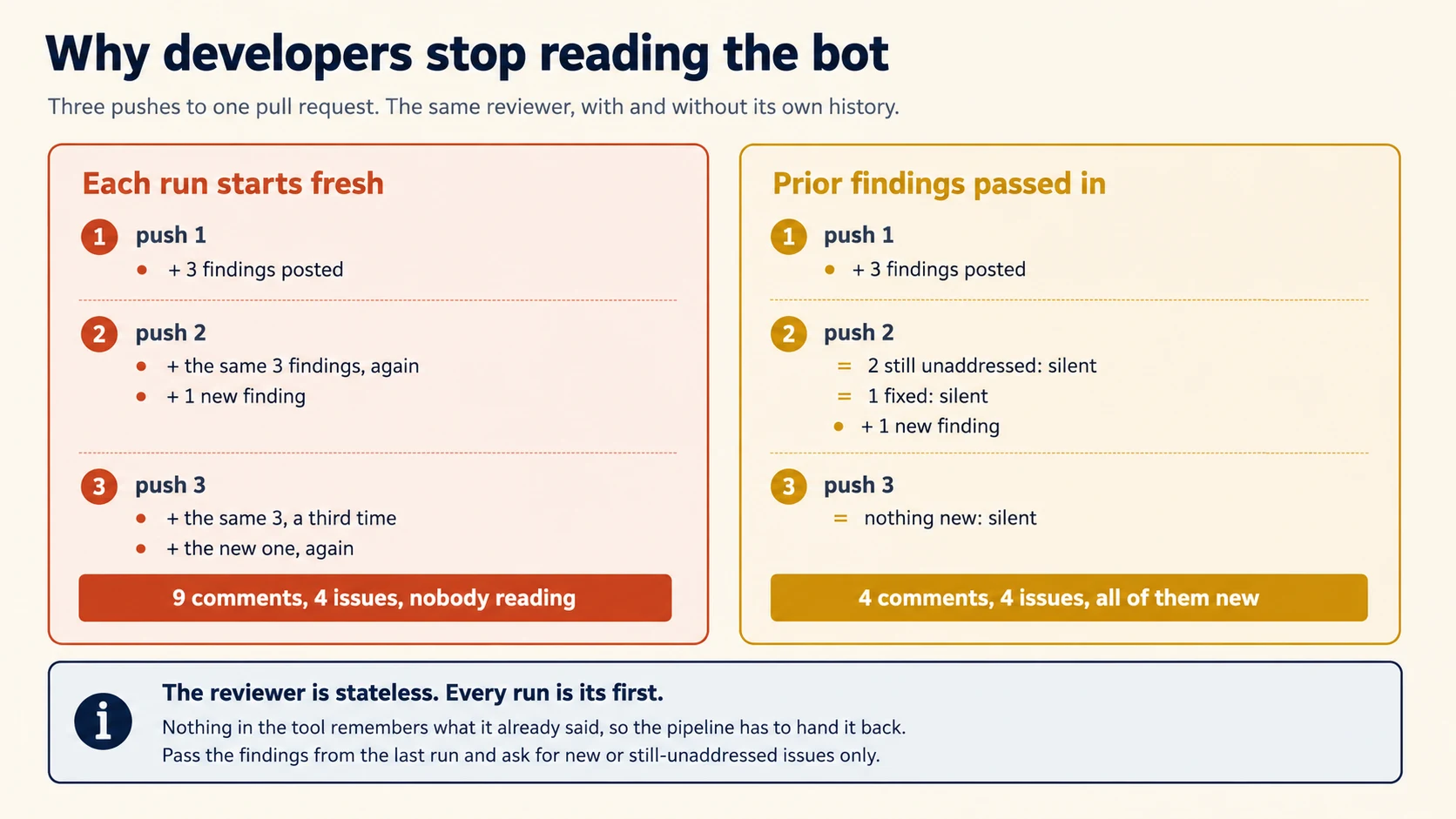
Passing the Findings Back
The repair is to make the previous findings part of the input:
gh pr view "$PR" --json comments \
  | jq '[.comments[] | select(.author.login == "github-actions") | .body]' \
  > previous.json

claude --bare -p "$(cat <<EOF
Review the diff below against the criteria in the system prompt.

You reviewed an earlier version of this pull request and reported the
findings in PREVIOUS FINDINGS. For each one, decide whether the current
diff still has the problem.

Report only:
  - findings from PREVIOUS FINDINGS that are still unaddressed AND that
    the author has not replied to
  - new problems introduced since that review

Report nothing else. If there is nothing in either category, return an
empty findings array.

PREVIOUS FINDINGS:
$(cat previous.json)

DIFF:
$(git diff origin/main...HEAD)
EOF
)" --output-format json --json-schema "$SCHEMA"
Two details in that prompt do the work.
Say "still unaddressed", not merely "not already reported."
A fixed finding should disappear. A finding you already reported should also stay quiet unless your policy says it needs another reminder.
Repeating a correct comment on every push still turns the reviewer into noise.
"That the author has not replied to." A disagreement is a conversation, not an unfixed bug. If someone explained why the pattern is intentional, saying it again is worse than saying nothing.
There is a lighter alternative. --output-format json returns a session_id, and --resume continues that session from anywhere on the machine.
A long-lived runner could therefore resume the review instead of sending the full brief again.
In practice, CI runners are ephemeral and sessions are machine-local, so passing findings explicitly is the portable choice for a workflow you write. Concept 15 of the Teams course explains why anything machine-local is not a team mechanism.
This Applies to Routines Too
It would be reasonable to hope that a cloud-hosted automation solves this for you. It does not, and the documentation is explicit about why.
A GitHub trigger starts a new session for each matching event. Claude Code does not reuse sessions across events, so two pushes to one pull request produce two independent sessions.
A routine that reviews pull requests has the same problem.
Its second run knows nothing about its first. If you do not fetch and pass back the earlier findings, the routine repeats itself.
That is how a technically correct reviewer gets muted.
This is not a GitHub-specific problem.
Statelessness belongs to the runner, not the integration. Every option in Concept 14 inherits it.
The repair is always the same: put the previous findings back in front of the reviewer.
Concept 12: Showing It What Already Exists
Key idea: An agent asked to write tests will write tests. Whether they duplicate your suite depends entirely on whether you showed it your suite.
The same shape as Concept 11, applied to generation rather than review.
Ask Claude to add tests for a changed file and it produces tests for that file.
It has no way to know your suite already covers three of those cases, in a different directory under different names. So you get duplicates.
A reviewer rejects them, and the workflow acquires a reputation for producing work that has to be thrown away.
Passing the Suite In
The fix is to put the existing coverage in the prompt:
claude --bare -p "$(cat <<EOF
Write tests for the changed functions in the diff below.

EXISTING TESTS lists the test files that already cover this area, with
their test names. Do not write a test that duplicates one of these, even
under a different name. If a changed function is already fully covered,
say so and write nothing for it.

Follow the conventions in the existing tests: same fixtures, same naming
pattern, same assertion style.

EXISTING TESTS:
$(rg --files tests/ | xargs rg '^\s*(def test_|it\(|test\()' -N)

DIFF:
$(git diff origin/main...HEAD)
EOF
)" --allowedTools "Read,Write" --permission-mode acceptEdits
Note the second instruction. Handing over the existing tests does more than prevent duplicates. It shows the conventions.
Fixtures, naming, assertion style, and the decision about what to mock are all visible in the files you just passed. A generated test that matches them is one a reviewer can merge instead of rewrite.
Concepts 11 and 12 share one general rule:
An agent produces output from what it can see. A fresh process starts with almost nothing.
Missing context causes duplicate comments, duplicate tests, and reinvented conventions.
For every CI worker, ask one question: what would a person need to see before doing this job, and am I passing it?
Your reviewer has a brief it can be held to, reviews independently of whoever wrote the code, and does not repeat itself. Part 4 is about running it on real pull requests and knowing whether it works.
Part 4: Shipping It and Owning It
Goal for this part: understand what a CI platform does, wire the reviewer to real pull requests, handle the fork case, and measure the worker.
Concept 13: What a Workflow Actually Is
Key idea: A CI platform watches your repository for events and runs commands on a fresh machine when one happens. Everything else is detail.
If you have never written a CI workflow, this concept is the one that makes Part 4 usable. If you have, skim it and move on.
The Mechanism, in One Paragraph
A workflow file answers two questions:
- Which event should start the job?
- Which commands should run when that event happens?
The CI platform watches the repository. When the event occurs, it starts a fresh machine, runs the commands, records the result, and discards the machine.
The last step matters.
The machine is new every time. Software you installed during the previous run is gone. Files you wrote to disk are gone too.
Concept 11 showed the reviewer forgetting between runs. Here the runner forgets as well.
On GitHub the file lives at .github/workflows/something.yml. GitLab, Jenkins, and the rest use different filenames and slightly different words for the same four ideas.
The Four Ideas
Here is the smallest complete workflow, with every line explained.
name: Hello                      # what this workflow is called in the UI

on:                              # 1. WHEN it runs
  pull_request:
    types: [opened, synchronize]

jobs:                            # 2. WHAT runs
  greet:
    runs-on: ubuntu-latest       # 3. WHERE it runs
    steps:                       # 4. the ordered list of things to do
      - uses: actions/checkout@v6
      - run: echo "This pull request has changed."
on: is the trigger. Here the workflow runs when a pull request opens.
It runs again on synchronize, the event GitHub emits when a new commit is pushed to that pull request.
Other common triggers are push, schedule, and workflow_dispatch.
jobs: holds one or more units of work. Jobs run in parallel unless you say otherwise. This one has a single job named greet.
runs-on: picks the machine. ubuntu-latest is a fresh Linux virtual machine that GitHub provides.
steps: is the ordered list. Each step is one of two kinds. A step with uses: runs a published action, which is a reusable piece someone else wrote. A step with run: executes a shell command.
That is the whole model. A trigger, a machine, a list of steps.
Two Steps You Will Always Need
actions/checkout@v6 clones your repository onto the runner.
Without that step, the runner starts without your code. This surprises people once.
By default it makes a shallow clone, fetching only the most recent commit to save time. That is fine for many jobs and wrong for ours, because comparing a branch against main needs both. Hence:
      - uses: actions/checkout@v6
        with:
          fetch-depth: 0        # 0 means full history
Leave that out and git diff origin/main...HEAD fails or returns nothing, which produces a review of an empty diff rather than an error.
Secrets, and Why They Are Not Environment Variables
Do not put the API key in the workflow file. The workflow lives in the repository, so anyone who can read the repository could read the key.
GitHub stores secrets separately, in the repository settings. It injects them into a run on request:
        with:
          anthropic_api_key: ${{ secrets.ANTHROPIC_API_KEY }}
The ${{ ... }} syntax is GitHub's expression form, evaluated when the workflow runs. Secret values are masked in the logs, so a secret printed by accident appears as ***.
You set the value once through the repository's Settings, under Secrets and variables. The /install-github-app command mentioned in the next concept walks you through this for the Anthropic key specifically.
Permissions, and the Token You Did Not Create
Every run receives an automatic credential called GITHUB_TOKEN, which lets steps act on the repository: read files, post comments, push commits. You do not create it and you do not store it.
What you do control is how much it is allowed to do, through a permissions: block:
permissions:
  contents: read              # read the code
  pull-requests: write        # post comments on pull requests
Grant only what the job needs. A reviewer reads code and writes comments, so those two scopes are exactly right. It has no reason to push commits, so it does not get contents: write.
This is the same principle as the permission mode in Concept 4, at the platform layer rather than the agent layer. Both answer the question of what this run may do when nobody is watching, and both are safer set narrowly.
Where the Job Reports Its Result
The platform reads the exit code of each step. A non-zero exit fails the step, which fails the job, which shows as a red mark on the pull request.
That is why Concept 2 spent time on exit codes, and why Decision 2 insists that finding problems must exit zero.
In this system, a non-zero exit means the job broke.
Do not use it merely to mean "the reviewer found something." That turns review comments into merge blockers.
PRIMM: Predict. Your review workflow works perfectly when a pull request is opened, and produces an empty review on every subsequent push. The YAML has
on: pull_request:withtypes: [opened], and a checkout step with nowith:block. Which line is causing which symptom? Confidence 1 to 5.
What you will see
Two separate bugs, and the question deliberately mixes them.
types: [opened] means later pushes do not run the workflow.
A new commit on an open pull request produces the synchronize event. Because that event is missing, there is no second review at all.
What looks like an empty review is actually no run.
The missing with: fetch-depth: 0 is the second bug, and it is the one that produces a genuinely empty review. A shallow clone has only the latest commit, so a diff against main has nothing to compare against.
Both are silent. Neither produces an error message, and both look like the reviewer having nothing to say. That is the pattern worth taking from this concept: a misconfigured workflow usually fails by doing less, not by failing loudly.
Concept 14: Choosing an Integration, and Making It Post
Key idea: A managed service, a routine, and a workflow you write solve different problems. Write the workflow when you need control over where it runs and what it can reach. Then expect to do real work before it posts anything a person sees.
This is the longest concept in the course, and it does two jobs in sequence. Read it in two sittings if you need to.
Choosing comes first: the three options, the triggers each supports, and who is allowed to set one off. Stop there if you are picking a tool rather than building one.
Making it post is everything from Automation Mode Does Not Comment by Default onward. That half exists because a workflow that runs correctly and writes its review into a log nobody opens is the most common way this project fails, and none of it is obvious from the Action's documentation.
Three Options, Three Trade-offs
Three products share this territory, and choosing wrongly costs you either capability or maintenance.
Code Review is Anthropic's hosted option through the Claude GitHub app. You build and host nothing.
It posts findings directly on the pull request, usually as inline comments or a summary when nothing is found. Some pull requests, such as drafts, may be skipped.
A routine packages a prompt, one or more repositories, and connectors into a saved Claude Code job.
It can run on a schedule, from an API call, or from a GitHub event. The execution happens on Anthropic-managed infrastructure, so you do not maintain the runner yourself.
Two properties matter for the comparison below.
Each triggered event starts a fresh session.
Two pushes to the same pull request therefore create two separate runs with no shared session memory.
And routines run without approval prompts. That makes Part 3 essential. The prompt must define the task, the connectors to use, and what success looks like.
The GitHub Action, anthropics/claude-code-action@v1, runs Claude Code inside a workflow on your runner.
Setup can start with /install-github-app, which walks you through installing the app and configuring authentication. The Action can run from @claude mentions, schedules, or other GitHub events.
Anthropic's GitHub Actions documentation carries the full input list and the troubleshooting section. There is a GitLab CI/CD page for the equivalent pipeline.
The Other Two Triggers
Two patterns were named above and deserve a line of shape each, since Concept 13 gave you the vocabulary.
Mention-triggered. The Action responds to @claude in a comment, which means a human asks for work in the place the work belongs:
on:
  issue_comment:
    types: [created]
Scheduled. A cron expression runs the job on a timetable with no human involved.
That suits work such as a weekly dependency audit or nightly report:
on:
  schedule:
    - cron: "0 6 * * 1"      # 06:00 UTC every Monday
A scheduled run may have no pull request to comment on.
Its output must go somewhere else, such as an issue, a committed file, or a message. Decide the destination before writing the prompt because the destination changes the job you are asking Claude to do.
Three constraints catch scheduled workflows specifically.
GitHub runs scheduled workflows only from the default branch, so a schedule you add on a feature branch never fires.
In public repositories, GitHub disables a schedule after 60 days without repository activity. A quiet project silently stops being audited.
The Action rejects a bot actor unless you list it in allowed_bots.
GitHub attributes a scheduled run to a repository user, usually whoever last edited the cron line. If that account is a bot, your schedule fails the actor check every time.
Who Can Trigger a Run
The Action runs two checks on the triggering actor before Claude starts, and the run fails when either rejects it.
Write access. On issue and pull request events, the triggering user must have write access. To allow specific users without it, set allowed_non_write_users and pass your own github_token.
Human actor. On every event, a bot actor is rejected unless listed in allowed_bots. That is what stops two bots triggering each other in a loop.
Both are worth knowing before you debug a workflow that appears to do nothing. A rejected actor is not a silent failure, but it is an unfamiliar one.
If you have used /schedule in the CLI, that command now creates a scheduled routine rather than a local task. Existing tasks became routines without a migration step.
One limit shapes what a routine can replace. A cron expression more frequent than hourly is rejected, so a workflow triggered on every push is not something a schedule can imitate.
| Code Review | Routines | GitHub Action | |
|---|---|---|---|
| You maintain | Nothing | A prompt, repositories, and triggers | A workflow file and its steps |
| Runs on | Anthropic's infrastructure | Claude Code's web infrastructure | Your runner |
| Triggers | Pull requests | Schedule, API call, or repository event | Any GitHub event |
| Memory across runs | None you control | None. Each event is a fresh session | None. You pass findings back |
| Billing | Subscription | Subscription usage, with daily run limits by plan | API tokens, or your subscription with an OAuth token |
| You control the tools it can reach | No | Through configured connectors | Fully, through CLI flags |
Read the last two rows as the decision.
Use Code Review when you want review and nothing else. No file to write, no runner to pay for.
Use a routine for recurring or event-driven work when you do not want to operate infrastructure.
You do not maintain a cron host, runner, or your own MCP server process.
Write the workflow when you need full control.
That includes the model, available tools, output schema, where the code runs, and what counts as a failed build.
Parts 1 and 2 exist to teach that control.
One more consideration decides it for some organisations.
A GitHub Action runs on your runner. Your code therefore stays on infrastructure you already trust with it.
A managed service or routine runs elsewhere.
That is a policy question rather than a technical one, and it is worth asking before you build.
The rest of this course builds the workflow because that is where the mechanics stay visible.
A routine hides many of those details. That convenience is useful in production, but it is not the best way to learn what is happening underneath.
Routines are covered properly in the next course. Four things about them are worth carrying forward from here, and the first two decide whether a routine suits a team at all.
A routine belongs to one person's account, not to the team or organisation.
Its commits and pull requests appear under that person's GitHub identity. During the research preview there is no shared ownership.
If four engineers need the same routine, each person sets up a copy. This is the team-scope problem from the Teams course, now applied to an entire automation.
Webhook events are capped hourly during the preview, and events past the cap are dropped. A dropped event is not a delayed event. A busy repository can therefore have pull requests that were never reviewed and nothing in the pull request saying so.
They run without approval prompts, which makes the prompt the only place your constraints can live. Part 3 is not optional here.
They were introduced as a research preview, so behaviour, limits, and the API surface may change. Check the current documentation before relying on any specific number above.
A minimal review workflow:
name: Claude Review
on:
  pull_request:
    types: [opened, synchronize]

permissions:
  contents: read
  pull-requests: write
  id-token: write         # required for the Action's default GitHub App authentication
  actions: read           # lets Claude read CI results on the pull request

jobs:
  review:
    runs-on: ubuntu-latest
    steps:
      - uses: actions/checkout@v6
        with:
          fetch-depth: 0        # full history, so the diff against main resolves
      - uses: anthropics/claude-code-action@v1
        with:
          anthropic_api_key: ${{ secrets.ANTHROPIC_API_KEY }}
          claude_args: "--max-turns 5 --model claude-sonnet-5"
          prompt: |
            Review the diff of this pull request.

            ALWAYS REPORT
            - A new API route with no integration test
            - A log line containing a user ID, an email, or a request body
            - A database query not scoped to the caller's tenant
            - An error path that swallows an exception without logging it

            DO NOT REPORT
            - Anything the linter or type checker already enforces
            - Formatting, import order, or naming style
            - Files under src/generated/ or any *.lock file
            - Test code that intentionally violates a production rule

            LIMITS
            - At most five findings. If there are more, report the five most
              severe and add one line saying how many similar items remain.
            - Every finding names a file and a line, and says what to change.
            - If you find nothing in the ALWAYS REPORT list, say so in one
              sentence and stop.
Notice that the prompt is the brief from Concept 9, pasted whole. That is the point of writing it as a file first. It moves into a workflow unchanged, and a change to it goes through code review like any other change.
claude_args accepts Claude Code CLI arguments. That is where you pass options such as --bare, --max-turns, --model, and --mcp-config.
The CLI reference lists the flags. Run Claude Code programmatically covers -p in more detail.
Automation Mode Does Not Comment by Default
This is the detail most likely to make a working workflow look broken.
The Action picks its mode from your configuration. With no prompt input, the Action runs in interactive mode.
It waits for @claude and posts progress and results on the triggering issue or pull request.
With a prompt input it runs in automation mode, and by default the results appear in the workflow run log rather than a comment.
The workflow above has a prompt. So as written, it reviews the pull request and writes the review somewhere nobody looks.
Claude can post when the prompt directs it to and it has a tool that can post. Anthropic's own review example shows both halves:
          prompt: "/code-review:code-review --comment ${{ github.repository }}/pull/${{ github.event.pull_request.number }}"
          claude_args: '--allowedTools "mcp__github_inline_comment__create_inline_comment"'
Those two lines do different jobs.
--comment tells the skill to post the review.
claude_args makes posting possible by naming the inline-comment MCP tool in --allowedTools. The Action uses that argument to start the MCP server the skill needs.
The second point is easy to miss.
The skill's own allowed-tools frontmatter is not enough. Keep the claude_args entry as well.
The Action decides which supporting servers to start from claude_args, so the tool must be named there.
From Findings to Comments on the Line
So if you are running the CLI yourself, as the worked example does, posting is entirely your job. You have to turn the structured findings from Concept 6 into comments attached to specific lines.
That step is ordinary scripting, and it is short:
      - name: Review
        env:
          ANTHROPIC_API_KEY: ${{ secrets.ANTHROPIC_API_KEY }}
        run: |
          git diff origin/${{ github.base_ref }}...HEAD > diff.txt
          claude --bare -p "$(cat prompt.txt)$(cat diff.txt)" \
            --output-format json \
            --json-schema "$(cat schema.json)" \
            --permission-mode dontAsk \
            --max-turns 5 > result.json

      - name: Post findings
        env:
          GH_TOKEN: ${{ secrets.GITHUB_TOKEN }}
        run: |
          jq -c '.structured_output.findings[]' result.json | while read -r f; do
            file=$(echo "$f" | jq -r '.file')
            line=$(echo "$f" | jq -r '.line')
            body=$(echo "$f" | jq -r '"**\(.severity)** \(.category): \(.message)"')
            gh api "repos/${{ github.repository }}/pulls/${{ github.event.number }}/comments" \
              -f body="$body" \
              -f commit_id="${{ github.event.pull_request.head.sha }}" \
              -f path="$file" \
              -F line="$line" \
              -f side=RIGHT
          done
Four details in that second step are worth reading rather than copying.
GH_TOKEN is the automatic token from Concept 13, and it works here only because the permissions: block granted pull-requests: write. Narrow that block and this step fails.
commit_id, path, line, and side attach the comment to code instead of the general conversation.
side: RIGHT means the new version of the file.
One CLI detail matters: gh api uses -f for strings and -F for typed values. line is an integer, so it uses -F.
The line must be part of the pull request diff.
If you try to attach a comment to an unchanged line, GitHub rejects it with a 422. The error message is not always obvious.
A reviewer that reads whole files may eventually report an unchanged line, so your posting code must handle that case.
A finding with a null line cannot become an inline comment.
Concept 6 made line nullable so the model can report a file-level issue honestly. Your posting script therefore needs a second path for those findings, such as the general review body.
Without that branch, file-level findings disappear.
Post One Review, Not Five Comments
The loop above is the version that reads most clearly, and it is not the version to ship. Two problems come from posting each finding separately.
The endpoint triggers notifications. Posting several comments quickly can also hit secondary rate limiting.
A tight loop over five findings is exactly the kind of pattern that can cause it.
Five separate comments look like five separate reviews to everyone watching the pull request.
The pull request reviews endpoint takes them all at once, as a comments array, and posts a single review:
jq -c '{
  commit_id: $sha,
  event: "COMMENT",
  body: "Automated review",
  comments: [ .structured_output.findings[]
    | select(.line != null)
    | {path: .file, line: .line, side: "RIGHT", body: ("**\(.severity)** \(.category): \(.message)")} ]
}' --arg sha "${{ github.event.pull_request.head.sha }}" result.json > review.json

gh api "repos/${{ github.repository }}/pulls/${{ github.event.number }}/reviews" \
  --input review.json
One request, one review, one notification. The select(.line != null) handles the null-line case.
It removes file-level findings from the inline-comment array so you can place them in the review body instead.
Verify this against the current GitHub REST documentation before relying on it.
Endpoint parameters are stable, but not frozen. A 422 response also gives little help about which field caused the problem.
One related surprise matters when the worker commits code.
GitHub does not trigger new workflows from commits made with the default GITHUB_TOKEN.
A worker can push a fix and still fail to start the test suite.
Use the Claude GitHub App authentication, or another custom app token, when you need those follow-on workflows to run.
The Fork Case
One security property shapes what you can build, and it is a GitHub behaviour rather than a Claude Code one.
On public repositories, GitHub withholds secrets from runs triggered by fork pull requests. Without the authentication secret, the job cannot run. That is the platform protecting you from an untrusted branch spending your credits or reading your secrets.
Two supportable patterns follow. Accept that fork pull requests are not reviewed by your workflow, and use the managed service if you need them covered.
Or run a manual workflow that a maintainer triggers on a fork pull request after looking at the diff.
What you should not do is reach for a trigger that gives an untrusted branch access to secrets. Read Concept 3 alongside this one. A fork pull request is a checkout you have good reason not to trust, so the protections reinforce each other.
Concept 15: The Reviewer Is a Worker, So Onboard It
Key idea: The worker needs the same operational context you would give a new colleague. Without it, the same predictable mistakes appear.
Return to the Digital FTE frame from the opening, because Part 3 gave it substance.
Imagine a competent engineer joining your team and reviewing pull requests on day one, with no onboarding.
They would flag things the linter already catches, because nobody told them the linter exists. They would suggest patterns your codebase deliberately avoids.
They would repeat a comment another reviewer already made, because they did not read the thread. And they would write tests that duplicate the suite, because nobody showed them the suite.
Every one of those is a concept in this course. The reviewer is not failing because it is a model. It is failing because it was hired and never onboarded.
The Onboarding Checklist
That gives a checklist with a familiar shape:
| A new colleague is told | The worker gets it from |
|---|---|
| What we enforce automatically, so do not repeat it | The DO NOT REPORT list (9) |
| What matters most in this codebase | The ALWAYS REPORT list (9) |
| What was already said on this thread | Prior findings passed in (11) |
| How we write tests here | Existing tests passed in (12) |
| How much to say before people stop listening | The findings cap (9) |
| Which systems you may touch | --allowedTools and the permission mode (4) |
The frame is useful because it predicts the next problem. When this worker starts doing something unhelpful, the useful question is not "how do I prompt around it."
Ask instead: "What would a person need to know here, and where would that information come from?"
That question leads to a mechanism, not another adjective in the prompt.
Concept 16: Knowing Whether It Is Working
Key idea: A worker gets measured. Two numbers tell you almost everything, and neither of them is how many findings it produced.
PRIMM: Predict. Your reviewer has been running for a month. Somebody asks whether it is worth keeping. What would you measure to answer, and what is wrong with counting findings per pull request? Confidence 1 to 5.
What you will see
Findings per pull request tells you the reviewer is running. It says nothing about whether it should be.
A noisy reviewer scores well on that metric. So does a reviewer duplicating your linter. The number goes up when quality goes down, which makes it worse than no measurement at all.
Two measures answer the question. The action rate is the fraction of findings a person responded to, by changing code or replying. The false positive rate broken down by category is the second.
The category breakdown is what makes the measurement useful.
One aggregate rate says, "improve the reviewer." Split the same data by category and you may discover that security is working while performance is not.
Now you know which criterion to fix.
If that reasoning is familiar, it should be. It is the same shape as the segmented accuracy problem in the extraction pipeline: an average hides the segment that is failing.
Most teams measure the wrong thing, because the wrong thing is easy to count. Findings per pull request tells you the reviewer is running. It says nothing about whether it should be.
The Two Numbers
Two measurements matter.
The action rate. Of the findings posted, what fraction did somebody act on, by changing the code or replying to the comment? A finding that receives neither is one nobody thought was worth a response.
This is countable from your pull request API without labelling anything by hand. For each finding, ask two questions. Did a subsequent commit touch that file near that line? Did a human reply to the thread?
The false positive rate, by category. Take a sample of findings each week and have a person mark each one correct or not. Then group by the category in your schema, which is the reason Concept 6 put category in the findings.
The grouping is what makes the number actionable.
An aggregate false positive rate of 15% tells you to improve the reviewer. The same data split by category might show security findings at 4% and performance findings at 40%.
That tells you something specific. Drop performance from the ALWAYS REPORT list, or write a checkable criterion to replace the vague one.
Dropping a category is a real move and it is worth naming, because teams treat it as defeat. Temporarily disabling a high false-positive category restores trust in the categories that work.
A reviewer at 40% false positives on performance is not only wasting attention on performance. It is teaching developers that this bot is often wrong, and they carry that belief to the security findings that are running at 4%. Turn performance off, keep shipping the accurate categories, and fix the criterion offline. Turn it back on when a sample says it is ready.
Then go one level finer with detected_pattern. Group the dismissed findings by the construct that triggered them rather than by category.
An aggregate says performance is noisy. The pattern grouping says nine of eleven dismissals fired on a comprehension inside a loop that your codebase treats as idiomatic. That is not a category to disable, it is one example pair to add, and the rest of the category keeps working.
If that reasoning feels familiar, it is Concept 12 of the Structured Extraction course. An average hides the segment that is failing, and the response to a bad average is almost never "improve everything."
Two habits keep those numbers honest.
Sample from what was actually posted, not from memory. Memorable findings are not a representative sample.
Re-measure after every meaningful criteria change. The brief behaves like software, and an edit can introduce a regression.
The threshold question is a business one rather than a technical one.
A reviewer at 10% false positives may be excellent for security findings, where a missed issue is expensive. The same rate is unacceptable for style nits, where the cost of a wrong comment is a developer's attention.
Decide that per category, with the numbers in front of you.
You can ship the worker on real pull requests, handle the fork case correctly, and say whether it is earning its place. Part 5 builds it.
Part 5: The Worked Example
Build a reviewer your team will still be reading in six weeks. Five decisions.
Decision 1: Write the Brief Before Any YAML
The brief is the part that decides whether this works. Write it first, in a file, where it can be reviewed.
Create
.github/claude/review-criteria.mdwith four sections: ALWAYS REPORT, REPORT IF CLEAR, DO NOT REPORT, and LIMITS. Every entry under ALWAYS REPORT must be checkable by reading a diff, not a judgment call. The DO NOT REPORT section must name every check your CI already runs.
Push back on two things your coding agent will produce.
Adjectives in the criteria. "Significant security issues" is not checkable. "A database query not scoped to the caller's tenant" is. Ask for the second form every time.
A DO NOT REPORT section that is thin. It should be at least as long as ALWAYS REPORT.
Open your CI config and list what already runs: linter, formatter, type checker, coverage gate. Each of those is a category the reviewer must not duplicate.
Done when: every ALWAYS REPORT item points to something visible in a diff. DO NOT REPORT should also name every automated check your pipeline already performs.
Decision 2: The Local Runner
Get it working outside CI first, where iteration takes seconds.
Write
scripts/review.shthat pipesgit diff origin/main...HEADtoclaude --bare -p, passing the criteria file with--append-system-prompt-file,--output-format jsonwith a schema whose findings carry file, line, severity, category, and message,--permission-mode dontAsk,--allowedTools "Read", and--max-turns 5. Print the findings with jq. Exit non-zero only if Claude Code itself failed, never because findings were found.
That last constraint is a decision, not a detail. A review job that fails the build on findings turns every comment into a blocker. Post the findings and let humans decide. Reserve a non-zero exit for the job being broken.
Done when: a deliberate problem produces structured findings. A clean branch should produce an empty array instead of invented findings.
Decision 3: Make It Fail on Purpose
Reading about these failures is not the same as watching them.
Write
scripts/test-review.shwith four cases:
- Remove
--bareand add a hook to.claude/settings.jsonthat writes a file. Confirm it runs. Then restore--bareand confirm it does not.- Pass a
--mcp-configwith a typo. Confirm the run still exits zero, then confirmmcp_server_errorsis present in thestream-jsonoutput.- Pass an invalid
--json-schema. Record the error.- Run with no
--permission-modeon a task needing a tool outside the allow list. Record what happens.
Predict each outcome before you run it, then compare.
What you will see
Case 1, the hook. Without --bare, the hook runs and the file appears. No trust dialog appears, and the output does not announce that the hook existed.
Restore --bare and the file no longer appears because the project settings were never loaded.
Both outcomes are quiet. That is what makes the first case dangerous.
Case 2, the bad MCP config. The review completes and the exit code is zero.
Run it by hand and stderr warns you about the skipped entry. Capture stderr as CI does and that warning disappears, while mcp_server_errors remains in the event stream.
Loud by hand, quiet in CI. That is why the explicit gate exists.
Case 3, the bad schema. Claude Code returns Error: --json-schema is not a valid JSON Schema, the validator diagnostic, and a non-zero exit.
This failure is loud, which is what you want in CI.
Before v2.1.205, invalid schemas could fail silently. An older pipeline may therefore be returning unstructured text without telling you.
Case 4, no permission mode. In a bare -p run, Manual mode does not approve a tool outside the allow list.
The run can still finish with a result explaining what it could not do. The exit code may look fine while part of the review is missing.
That is another quiet failure.
Three of the four are silent. That ratio is the lesson: in unattended work, most failures are absences rather than errors, and each needs a check you wrote on purpose.
Case one is the security demonstration from Concept 3, on your own machine, in two minutes. Case two is the silent-success failure from Concept 7, and it is the one worth building a gate for.
Done when: you have observed all four and can say which are loud and which are silent.
Decision 4: Wire It to Pull Requests
Write
.github/workflows/claude-review.ymltriggering onpull_requestforopenedandsynchronize. Check out withfetch-depth: 0. Fetch the previous findings from the bot's own comments. Pass them in with the "still unaddressed and not replied to" instruction from Concept 11. Post the new findings as inline comments, using file and line from the schema. Setpermissionstocontents: readandpull-requests: write.
Done when: a second push comments only on new or still-unaddressed issues. A third push with nothing new should produce no comment.
That third push is the test that matters. A reviewer that can stay silent is one people trust when it speaks.
Decision 5: Start Measuring Before You Need To
Write
scripts/review-metrics.shthat pulls the last 30 days of bot comments and reports, per category: the number posted, the fraction where a later commit touched that file, and the fraction where a human replied. Print counts alongside every percentage.
Run it in week one, when the numbers are boring. The point is to have a baseline before somebody claims the reviewer is noisy, so the conversation is about data rather than impressions.
Done when: the report breaks down by category rather than giving one number, and you have written down the action rate you would consider unacceptable.
What You Have Built
You now have a reviewer with clear operating boundaries.
It runs on pull requests and reads the diff. The branch cannot silently configure the worker because the run uses bare mode.
It produces structured findings that the pipeline can post. It stays quiet when there is nothing new to say.
And it produces measurements you can use when someone asks whether the reviewer is worth keeping.
That last property is what makes it a Digital FTE rather than an experiment.
How CI Workers Fail
Each symptom points to a concept.
- "The job hangs until the runner times out" points to a missing
-p(2). - "A branch ran a shell command on our runner" points to
-ploading repository hooks with no trust dialog (3). - "It works locally and fails in CI with an auth error" points to bare mode not reading OAuth credentials (3).
- "The tool was denied and the review came back empty" points to no permission mode passed, so the default is Manual (4).
- "We cannot post inline comments" points to prose output where a schema was needed (6).
- "Posting a comment returns 422" points to a line outside the diff, or a null line with no fallback branch (14).
- "Some comments post and then the job fails" points to secondary rate limiting from posting findings one at a time (14).
- "The review passed but half of it was missing" points to an MCP server that failed validation and was skipped silently (7).
- "One job cost more than the rest of the month" points to no turn cap and no budget ceiling (8).
- "Every comment is something the linter already said" points to a missing DO NOT REPORT list (9).
- "One category false-positives against a rule we agree with" points to a boundary the criteria state but never show, which wants a pair of examples rather than another adjective (9).
- "It reviewed its own changes and found nothing" points to review in the generating session (10).
- "Developers muted the bot" points to repeated findings across pushes (11).
- "The generated tests duplicate our suite" points to not passing the existing tests (12).
- "The reviewer runs when the PR opens and never again" points to a trigger list missing
synchronize(13). - "Every review is empty" points to a shallow checkout, so there is no history to diff against (13).
- "Fork pull requests are never reviewed" points to secrets not being available to forks, which is correct behaviour (14).
- "We rebuilt in a workflow something a routine does out of the box" points to not comparing the three options first (14).
- "Our routine reviews some pull requests and silently skips others" points to hourly webhook caps dropping events during the research preview (14).
- "The routine works but only for the person who made it" points to routines being owned by an individual account (14).
- "The review runs and posts nothing" points to automation mode writing to the workflow log, with no posting tool granted in
claude_args(14). - "Our scheduled review stopped firing" points to a schedule on a non-default branch, or a public repository quiet for 60 days (14).
- "Claude pushed a fix and CI never ran" points to commits made with the default token not triggering workflows (14).
- "Nobody can agree whether it is working" points to no measurement (16).
Two habits prevent most of this.
Ask what a person would need to see.
Duplicate comments, duplicate tests, and reinvented conventions all come from missing inputs in a process that starts with almost nothing.
In this course's architecture, findings are evidence for humans. A non-zero exit means the reviewer itself failed.
Some organisations intentionally gate merges on a blocking category. That is a valid governance choice.
Make that choice explicitly. Failing on every finding turns every review comment into a merge blocker.
Build It: Exam Prep Projects
The official preparation list asks you to design multi-pass review architectures, write explicit review criteria to cut false positives, and produce output a pipeline can act on. All three are in this course, and all three are graded on judgment rather than syntax.
Project 1: A Reviewer Engineers Do Not Mute
What you will have: a review job whose comments people read, because it stopped producing ones they had to skip.
Run a review on this pull request in the pipeline and post findings as inline comments. I want structured output, not prose I have to parse.
Done when:
- The job runs non-interactively and exits on its own, rather than waiting for input that will never come.
- Findings come back as structured data your pipeline turns into comments.
- Review criteria are explicit enough that a borderline case gets a consistent verdict twice in a row.
Then measure the noise. Run it across ten merged pull requests and count how many findings a maintainer would actually act on. If it is under half, tighten the criteria rather than the model. False positive rate is the metric the exam cares about, because it is the one that decides whether the tool survives contact with a team.
Project 2: One Pass Versus Several
What you will have: a direct comparison that explains why big reviews go shallow.
Review a pull request touching a dozen or more files in one pass. Then review the same one file by file, with a separate pass just for cross-file effects. Show me where the two disagree.
Done when:
- You have a single-pass run and a multi-pass run over the same diff.
- You can point to a file the single pass treated superficially and the focused pass did not.
- You can point to at least one inconsistency in the single pass, where near-identical code was flagged in one file and approved in another.
Why this is worth the hour. A question on this exam describes exactly this symptom: detailed feedback on some files, superficial on others, contradictory verdicts on identical code. The tempting answer is a model with a larger context window. The right answer is that attention dilutes across a large input regardless of whether it fits, so the fix is structural. Having seen your own two runs disagree makes that answer obvious instead of theoretical.
Non-interactive execution, structured output for automation, explicit criteria for false positive reduction, and multi-pass review architecture are all named objectives.
Sources
Every page below was checked on 30 August 2026. Where this course and a current page disagree, the page wins: these products move faster than any course can, which is why each concept names the behaviour to verify rather than asking you to trust a number.
- Run Claude Code programmatically,
-p,--bare, the output formats,--json-schema, and thesystem/initfields the Concept 7 gate reads. - CLI reference, the full flag list, including the permission-rule syntax in
--allowedTools. - Choose a permission mode, why
dontAskis the right default for a reviewer. - GitHub Actions, the Action's inputs, its modes, and the authentication options in Concept 14.
- GitLab CI/CD, the same shape on another platform, for the ideas in Concept 13 to transfer to.