ChatGPT & Claude Quick Reference
The reference companion to Just Delegate It: where every control lives in the two AI assistants you are most likely to use, and the one discipline that works in both.
This is a reference, not a numbered course. Read it when a job in Just Delegate It, or in your own work, needs a control you have not met yet: an upload, a project, memory, a research mode. Nothing here is required to finish Foundations. You already know the basic idea: give AI the job, then check the result. What you may not know yet is where everything is.
Then you open Claude or ChatGPT and hit a different problem: where is everything?
📚 Teaching Aid
View Full Presentation: Claude and ChatGPT 101
There is a model picker. A plus menu. Projects. Memory. Skills. Plugins. Connectors or apps. Search. Research. Thinking modes.
The ideas are familiar. The controls are not.
This course fixes that problem.
You will learn Claude and ChatGPT side by side. The goal is not to memorize every button. Buttons move. Product names change. Plans change.
The goal is to learn the pattern underneath the interface.
Projects keep work together. Memory keeps useful context about you. Skills package repeatable ways of working. Connectors and apps let the assistant reach external systems. Research modes gather and study information for you.
The discipline stays the same even when the product changes.
That is why this reference teaches two cockpits, not one.
Reading time: about 30 to 35 minutes, plus about 25 minutes for the practice prompts and self-check.
Software changes quickly. Every product claim on this page was verified against Anthropic's and OpenAI's public documentation on 25 August 2026.
If a button has moved by the time you read this, do not panic. Keep the mental model from this reference, then check the current help pages at support.claude.com and help.openai.com.
Plan availability changes even faster than features, so confirm current pricing and plan limits before relying on them.
This page lives in References & Companions, not in the numbered Foundations sequence. It is the companion to Just Delegate It, the first Foundations course, which teaches you to give AI a job and check the result. That course introduces each control at the moment a job needs it. This page is where you come when you want the whole map of both workspaces at once.
It assumes the ideas from:
It does not reteach those ideas. It shows you where they live inside Claude and ChatGPT.
| Topic | Taught in | What this reference does |
|---|---|---|
| How models and context windows work | What AI Actually Is | Uses those ideas |
| The 4D framework | AI Fluency | Applies it to product features |
| Prompting technique | AI Prompting in 2026 | Uses it in real workflows |
| Skills and MCP as concepts | Skills & Connectors | Introduces the controls |
| Desktop apps, coding tools, agentic hand-off | Cowork & OpenWork for Professionals and the General Agents courses | Gives a short orientation only |
| The Claude and ChatGPT chat workspaces | This reference | Teaches them directly |
In short: this reference stays inside the chat workspace. Desktop agents, coding environments, and larger agentic systems come later.
See it in two minutes
Before any of the tour, let the cockpit describe itself.
Open Claude. Paste this and read what comes back:
List every control I can see in this workspace right now, and tell me
in one line what each one is for. Just the controls, no advice.
Now open ChatGPT in another tab and paste exactly the same thing.
Put the two lists side by side.
You will see two vocabularies for mostly the same seven things. One says artifact, the other says writing block. One says connector, the other says app. One says project knowledge, the other says project files. Both say model, memory, instructions, search, research.
That is this entire reference in one screenshot. The controls are named differently. The work you do with them is the same work.
One honest warning, and it is a useful one. An assistant is not always reliable about its own interface, so a list may include something that is not really there, or miss something that is. Notice that. Checking a confident answer against the thing itself is Concept 9, and you just met it two minutes in.
The questions this reference answers
You should be able to answer all of these by the end.
Part 1: The cockpit
| # | Question | Answered in |
|---|---|---|
| 1 | Why learn both Claude and ChatGPT instead of picking one? | Concept 1 |
| 2 | What is the same between them, and what is different? | Concept 1 |
| 3 | How do I choose a model when the model names keep changing? | Concept 2 |
| 4 | When should I use thinking mode? | Concept 2 |
| 5 | What actually happens when I upload a file? | Concept 3 |
Part 2: Making the workspace yours
| # | Question | Answered in |
|---|---|---|
| 6 | What is a project, and when should I create one? | Concept 4 |
| 7 | What is the difference between instructions, memory, and projects? | Concept 5 |
| 8 | What are artifacts and writing blocks? | Concept 6 |
| 9 | What are skills and plugins, and how do they differ from projects and custom GPTs? | Concept 7 |
Part 3: Extending reach
| # | Question | Answered in |
|---|---|---|
| 10 | What does a connector or app let the assistant reach? | Concept 8 |
| 11 | When should I use search, thinking, or research? | Concept 8 |
| 12 | How do I know whether the assistant is actually good at my work? | Concept 9 |
| 13 | What does testing on old work prove, and what does it not prove? | Concept 9 |
Part 1: The cockpit
1. Two cockpits, one discipline
Open Claude and ChatGPT side by side. They look surprisingly similar.
Both give you:
- a list of previous chats
- a message box
- a model or reasoning control
- a menu for files and tools
- projects or workspaces
- memory and instructions
- search and research features
That similarity matters.
You do not need to learn two completely different ways of working. You need to learn one discipline and then find where each product put the controls.
The skills that transfer:
- describing the task clearly
- giving useful context
- choosing what to delegate
- checking the answer
- knowing when to reach for a stronger model
- protecting sensitive information
The products differ in names, layout, and strengths. Those differences change over time.
The underlying work does not.
The cockpit comparison is worth one moment of honesty, because it can mislead. Pilots do not treat two aircraft as interchangeable. They learn to fly once, then spend a short time learning where a particular aircraft keeps its switches. That is the right expectation here too. Flying is the transferable part. The switch layout is the part you look up, and re-look-up after an update.
There is also a practical reason to know both products. Claude and ChatGPT do not perform identically on every task. A model that is excellent at one kind of work can be weaker at another.
For work that matters, a good habit is to run the same task in both and compare.
That is platform awareness: knowing what each tool is good at, instead of becoming loyal to one interface.
One more orientation point. Both companies now offer far more than chat: desktop apps, coding tools, browser agents, and other agentic products. Those come later in this book.
For now, stay inside the chat window.
The most important beginner habit
Talk to the assistant the way you would talk to a capable colleague.
Before you send a serious request, cover three things:
- Set the stage. Who are you, and what are you trying to achieve?
- Define the task. What exactly should the assistant do?
- Set the rules. What tone, format, constraints, or examples should it follow?
The interface does not replace a good description. It gives your description somewhere to live.
Remember: learn the pattern, not the button placement.
2. Models and thinking modes
Both Claude and ChatGPT let you choose how much capability to spend on a task.
Beginners tend to start with model names. That is the wrong place to start, because names change fast.
Learn the three-level pattern instead.
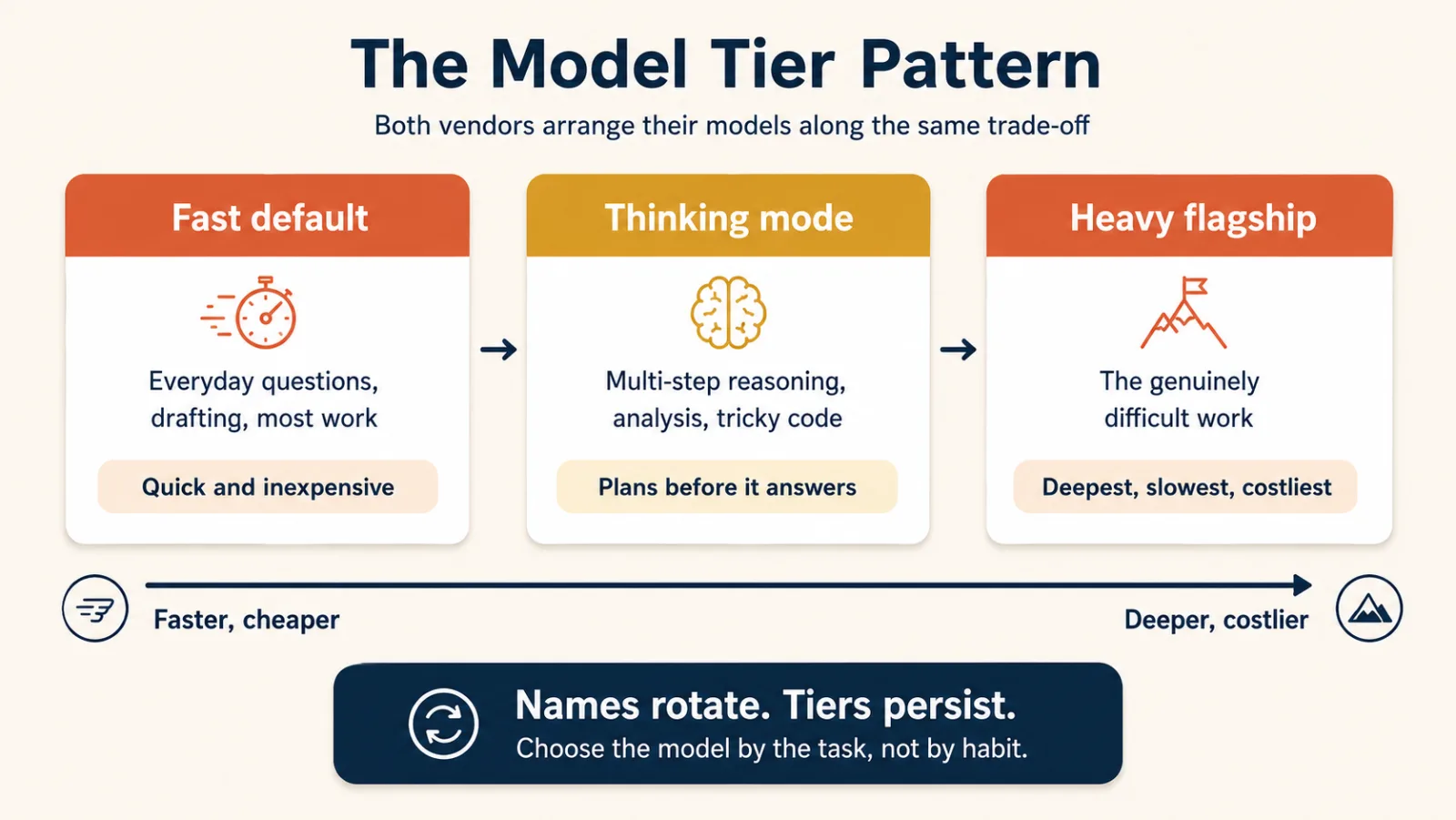
| Level | Best for | Trade-off |
|---|---|---|
| Fast default | Everyday questions, drafting, summaries, routine work | Fast and cheap, less depth on hard problems |
| Thinking or reasoning | Multi-step reasoning, analysis, math, tricky code | Slower, more careful |
| Heavy flagship | The hardest analysis and long, demanding tasks | Slowest and most expensive, most capable |
Claude and ChatGPT expose these controls differently, and the names are what you will actually meet: in the model picker, in a vendor's update notes, and in a colleague's message that says "run it on Opus."
On Claude the model names are Haiku (the fastest and cheapest), Sonnet (the everyday choice), and Opus (the heavy flagship). Haiku and Sonnet both sit on the fast level and Opus on the flagship level. Thinking on Claude is a separate switch you turn on, not a model name.
On ChatGPT the labels currently run from Instant for everyday work up to Pro for the hardest tasks, with the thinking levels in between.
Knowing which name sits on which level tells you that "run it on Opus" asks for the heavy flagship and "turn on thinking" asks for the switch. Anthropic's own certification exams ask for the Claude names too.
Know the labels, but do not build your mental model around them.
Build it around the trade-off:
fast, then more reasoning, then maximum capability
Two simple rules
Rule 1: Start fast.
Use the normal fast mode for most everyday work.
Do not wait on heavy reasoning for a short rewrite, a summary, or a simple explanation.
Rule 2: Escalate when the task is hard.
Use thinking mode or a stronger model when the job involves:
- several steps of logic
- careful comparison
- mathematics
- difficult debugging
- code that has to be correct
- complex analysis
Sometimes "the AI failed" really means "I used the wrong level of capability."
Choose the model by the task, not by habit.
- Fast for everyday work
- Thinking for hard reasoning
- Flagship for the genuinely difficult
When the names change, the pattern still works.
Remember: choose the level of reasoning first, and learn the current model names second.
3. Context you attach
A language model can only work with the information in front of it.
That is why attachments matter.
Both Claude and ChatGPT let you upload things like:
- PDFs
- Word documents
- spreadsheets
- CSV files
- images
- screenshots
- code files
When you attach a file, you are giving the assistant more context for that conversation.
Compare these two requests:
Summarize this contract.
and
Summarize this contract. (with the contract attached)
The words are nearly identical. The second one is useful because the assistant can actually see the contract.
The same goes for screenshots. If you want help with a dashboard, an error message, a chart, or an interface, showing it usually beats describing it from memory.
Both products can also search the live web. Search brings current information into the conversation when the model's built-in knowledge is not enough.
And both keep track of the current conversation, so what you said earlier still shapes later answers.
That tracking has a limit, and on a long piece of work you will reach it. Say you have spent a whole day in one chat drafting the quarterly board report. Three signs tell you the chat has gone stale:
- it forgets a rule you set that morning, such as "no bullet points," and the bullets come back
- it contradicts a figure it gave you earlier
- its answers drift into generic advice that could be about any report
When you see one of those, do not keep pushing, and do not just abandon the chat either. Ask for a state summary first, a short record of where the work stands:
Summarize what we have decided so far, what is still open, and every
rule I gave you. Keep it short enough to paste into a new chat.
Read it, correct anything wrong, paste it into a fresh chat with the files attached again, and carry on. If you find yourself pasting the same summary every week, that is the signal for a project, which is Concept 4.
The habit to build
Before you ask an important question, ask yourself:
What would a capable human colleague need to see before they could answer this well?
Then give the assistant that material.
Remember: better context usually improves the answer more than a cleverer prompt does.
Part 2: Making the workspace yours
4. Projects: a room for one stream of work
After a few weeks of using AI, your sidebar gets messy.
You end up with:
- one chat about a client
- another chat about the same client
- a third chat that has the useful file in it
- a fourth chat where you explained the same background all over again
Projects solve exactly this.
A project is a workspace for one stream of work.
Think of it as a room where everything about one topic stays together.
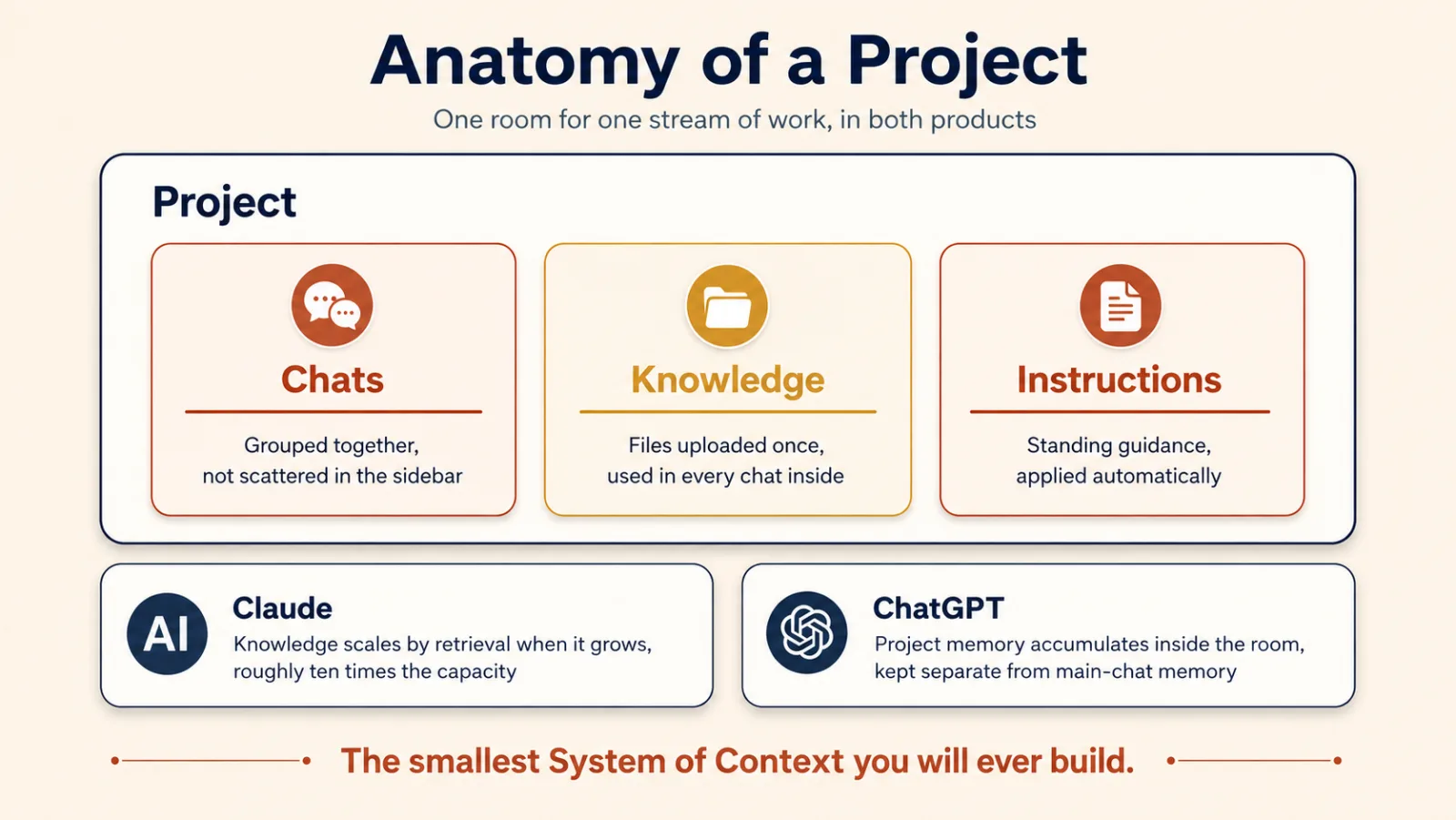
A project normally holds three things:
- Chats related to that work
- Knowledge, meaning files you upload for that project
- Instructions, meaning standing guidance for how the assistant should work inside the project
Say you create a project called Quarterly Board Reporting.
Inside it you might put:
- last quarter's board deck
- the current financial model
- your reporting style guide
- instructions about tone and audience
- every conversation about the board report
Now you never re-upload the same files or repeat the same instructions.
That is the whole point: a project makes context persistent for one stream of work.
In the language of this book, a project is a small System of Context.
Claude and ChatGPT differ slightly
Claude handles growth by retrieval. When project knowledge grows past what fits directly in the context window, Claude switches to searching that knowledge instead of loading all of it, which Anthropic describes as expanding capacity by up to ten times. That switch happens automatically, and it is a paid-plan feature.
ChatGPT adds project memory. A project can use either:
- default memory, where your wider memory can still take part
- project-only memory, where the project becomes a real boundary and outside memories stay out
So a project always helps you organize. Project-only memory is what turns it into isolation.
When should you create a project?
Use this test:
If you have explained the same background or uploaded the same file three times, that work deserves a project.
One-off questions do not need one.
Remember: projects are for work that continues.
5. Memory and standing instructions
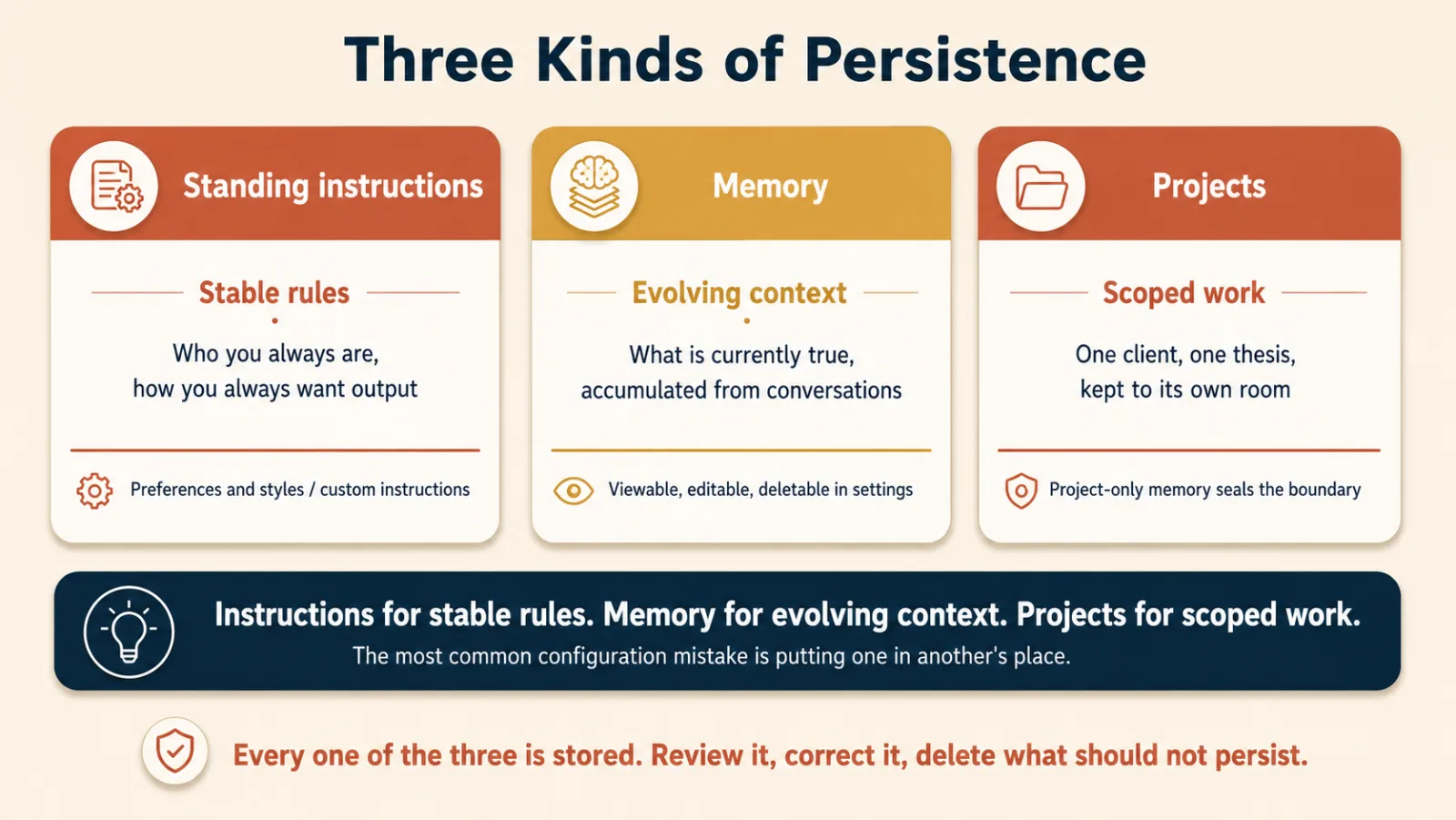
Three features make context persist:
- standing instructions
- memory
- projects
Beginners mix these up constantly. Here is the clean separation.
Standing instructions: stable rules
Standing instructions are rules you write once and want applied broadly.
For example:
- "Give me the answer before the explanation."
- "Use simple language unless I ask for technical detail."
- "I write for business leaders, not software engineers."
Claude keeps this kind of preference in its settings and styles. ChatGPT keeps it in Custom Instructions, under Settings and Personalization.
Use standing instructions for things that are stable.
Memory: evolving context about you
Memory is what the assistant picks up from your conversations and may use later.
That can include:
- preferences you have expressed
- recurring goals
- facts about how you work
- anything you explicitly asked it to remember
Both products let you review, edit, and delete memory. On a work account, check first whether it is even on: Claude turns memory on by default for individual plans, and leaves it off on Team and Enterprise until an owner enables it.
Both also offer a mode that keeps a conversation out of normal history and out of memory: Claude calls it an incognito chat, ChatGPT calls it a temporary chat. Both vendors still retain a copy for a limited period, around thirty days, for safety and abuse review. So treat these modes as memory-free, not trace-free.
Projects: context for one stream of work
Projects are different from both.
A project holds context around one particular client, course, research topic, product, or other ongoing stream of work.
The rule of thumb
Instructions for stable rules. Memory for evolving context. Projects for scoped work.
That one rule prevents most configuration mistakes.
Convenience is not the only issue here. Stored context can hold sensitive or private information. It also goes stale, and stale context fails quietly: there is no error message, just an answer that sounds sure and is wrong. If last quarter's financial model is still in the Quarterly Board Reporting project, this quarter's board deck will quote last quarter's numbers, neatly formatted. The assistant cannot tell that what you gave it is out of date.
So review what is stored on a schedule: monthly, or whenever your role or a project changes. For each item, keep it, correct it, or delete it. Do this for memory, for standing instructions, and for each project's files. Use incognito or temporary chats when the subject calls for it. On a work account, follow your organization's policy.
Stored context is useful because it compounds over time. It is also a place where care matters.
A well-configured assistant often gets more useful after weeks of use. The model did not change. The context around it improved.
Remember: persistence only helps when the right information is in the right place.
6. Artifacts and writing blocks: work you can take away
Chat is good for conversation.
It is a poor container for finished work.
If you ask for a 2,000-word report, a working calculator, a diagram, or a small application, you want the result to be a separate object, not one more message in a scroll.
Claude and ChatGPT solve this differently.
Claude: artifacts
Claude uses artifacts.
An artifact is a separate output that opens beside the conversation. It can be:
- a document
- code
- a web page
- a diagram
- a vector image
- a calculator
- a dashboard
- a small interactive application
You keep talking to Claude while the artifact stays there as the thing being built and revised.
Claude also has separate file-creation abilities for Word, Excel, PowerPoint, and PDF files.
ChatGPT: writing blocks and code blocks
Older ChatGPT tutorials talk about canvas, a side-by-side editing panel.
That is out of date. In 2026 OpenAI retired canvas on its current models and moved the same work into the conversation itself, as writing blocks and code blocks: editable regions that sit inline in the thread. If a tutorial tells you to open canvas and you cannot find it, this is why.
The design is different. The idea is identical:
keep the work product separate from the discussion about the work product.
How to get better results
Do not ask for "a dashboard" or "a report."
Describe what the finished thing should do.
For example:
Build a monthly budget tracker. I should be able to enter expenses by category, see a pie chart, and get a warning when I go over budget.
That beats:
Build a budget tracker.
Also say who it is for. A flowchart for new employees is not the same object as a flowchart for experienced engineers.
Say what format you want, too.
If the answer is data, ask for structured output: a table or a spreadsheet file, not a paragraph. Data here means things like twelve vendors with prices and lead times, a delivery schedule, or anything a colleague will load into Excel. A paragraph about twelve vendors cannot be sorted, filtered, or pasted into a sheet. A table can.
Both assistants will make the spreadsheet file if you ask, and you can download it.
If the answer is a number somebody will act on, ask for it computed, not written. Say "write and run code to get this, and show me the code you ran." Both assistants have a code tool for this. Anthropic counts it as a fourth home for output, beside inline chat, artifacts, and structured data, and calls the result code-executed. One limit comes with it. The run is exact, but the assistant wrote the code, and the code can still add up the wrong column, so check which column it used. AI Prompting in 2026 teaches the habit in full.
Then revise one change at a time.
This concept is where a lot of beginners get their first genuine surprise: you describe a useful piece of software, and working software appears.
Two later courses take that apart properly:
Remember: chat is the conversation; artifacts, writing blocks, and code blocks hold the work. Data goes in a table, and a number you will act on gets computed.
7. Skills and plugins: packaged ways of working
Projects answer one question:
How do I keep the right knowledge together?
Repetition raises a different one:
How do I make the assistant follow the same method every time?
That is what skills are for.
What is a skill?
A skill is a packaged way of doing a task.
It can contain:
- instructions
- examples
- supporting resources
- sometimes code
The assistant loads the skill when a matching task shows up.
You might build a skill for:
- writing quarterly business reviews
- checking a contract against a checklist
- preparing a customer meeting brief
- turning raw notes into your preferred report format
Instead of re-teaching the method in every chat, you package the method once.
Claude has skills. ChatGPT has skills too.
The products differ on where skills are available and how they are managed, but the underlying idea is now shared.
Why that matters
Both vendors build on the Agent Skills open standard, published at agentskills.io.
A skill is a folder of Markdown files with no server and no runtime behind it, which is exactly why it travels. Dozens of tools across several companies now read the same format, so a skill written for one product can be installed in another.
That turns a workflow into something more durable than a prompt trapped inside one vendor.
It is also the lesson this reference opened with:
the discipline is the constant; the tool is the variable.
What is a plugin?
A plugin packages capabilities for a broader kind of work. It bundles skills together with connections to outside apps, and sometimes commands and sub-agents as well, into one installable package aimed at a job function.
The relationship, in one line each:
- a skill teaches a method
- an app or connector gives access to an outside system
- a plugin wraps those together
Claude now lists skills, connectors, and plugins in a single directory at claude.ai/directory, which is the fastest way to see what already exists before you build your own.
What about custom GPTs?
ChatGPT also has custom GPTs.
A custom GPT is a separately configured assistant that you open on purpose. It has its own instructions, persona, knowledge, and tools.
That is a different thing from a skill.
A short comparison:
- Project: stores the context for a stream of work
- Skill: stores the method for doing a task
- Custom GPT: gives you a separately configured assistant
- Plugin: packages capabilities together
The line to keep:
Projects store knowledge. Skills perform tasks.
A customer-preparation skill can use the customer files stored in a project.
The project supplies the what. The skill supplies the how.
You will study the mechanics in Skills & Connectors.
Remember: when a method repeats, package the method.
Part 3: Extending reach
8. Connectors, apps, and routing the question
So far the assistant has mostly worked with information you put in front of it.
But most of your real information lives somewhere else:
- calendar
- cloud storage
- project-management tools
- chat systems
- company knowledge bases
Connectors and apps let the assistant reach those systems.
Connector or app?
Claude says connector.
ChatGPT says app for the same product category. It used to say connector too, and renamed it.
The words differ. The purpose is the same.
A connector or app can let the assistant search, read, and sometimes act in another system, depending on the permissions you grant.
For example:
- "Find the email where we discussed the vendor contract."
- "What meetings do I have tomorrow?"
- "Summarize last week's project notes."
- "What are my highest-priority tasks?"
Now the assistant can answer from your real systems, instead of making you copy everything into the chat.
MCP: the shared integration standard
Both ecosystems support the Model Context Protocol, or MCP.
The usual shorthand is USB-C for AI tools: one standard plug, so a tool built once can be used by many different assistants. Claude's custom connectors run on MCP, and ChatGPT's apps are built on it too, through the Apps SDK.
That is genuinely useful, and the shorthand hides one thing you should not lose. Plugging in a USB-C cable is not a decision about trust. Connecting an MCP tool is. The plug is standard; the access is not.
Connections are permission decisions
Connecting a tool is not only a productivity choice. It is a security and governance choice, meaning a choice about who is allowed to see and do what.
Before you connect anything, ask:
- What can it read?
- Can it write, send, delete, buy, or take some other action in the outside world?
- Do I trust the source?
- Am I allowed to connect this account or system?
Connecting work email can expose a large amount of information, even though the assistant only sees what your own account can already see.
Treat connectors and apps the way you treat installing software: useful, and permission-gated on purpose.
Those four questions have a limit of their own. A connector or app can only do what it was built to do. If the work you are planning needs the assistant to send something, confirm that sending is one of the actions the tool offers. Permissions choose among the actions a tool has. They do not add new ones.
Search, thinking, or research?
Beginners routinely pick the wrong mode for the job.
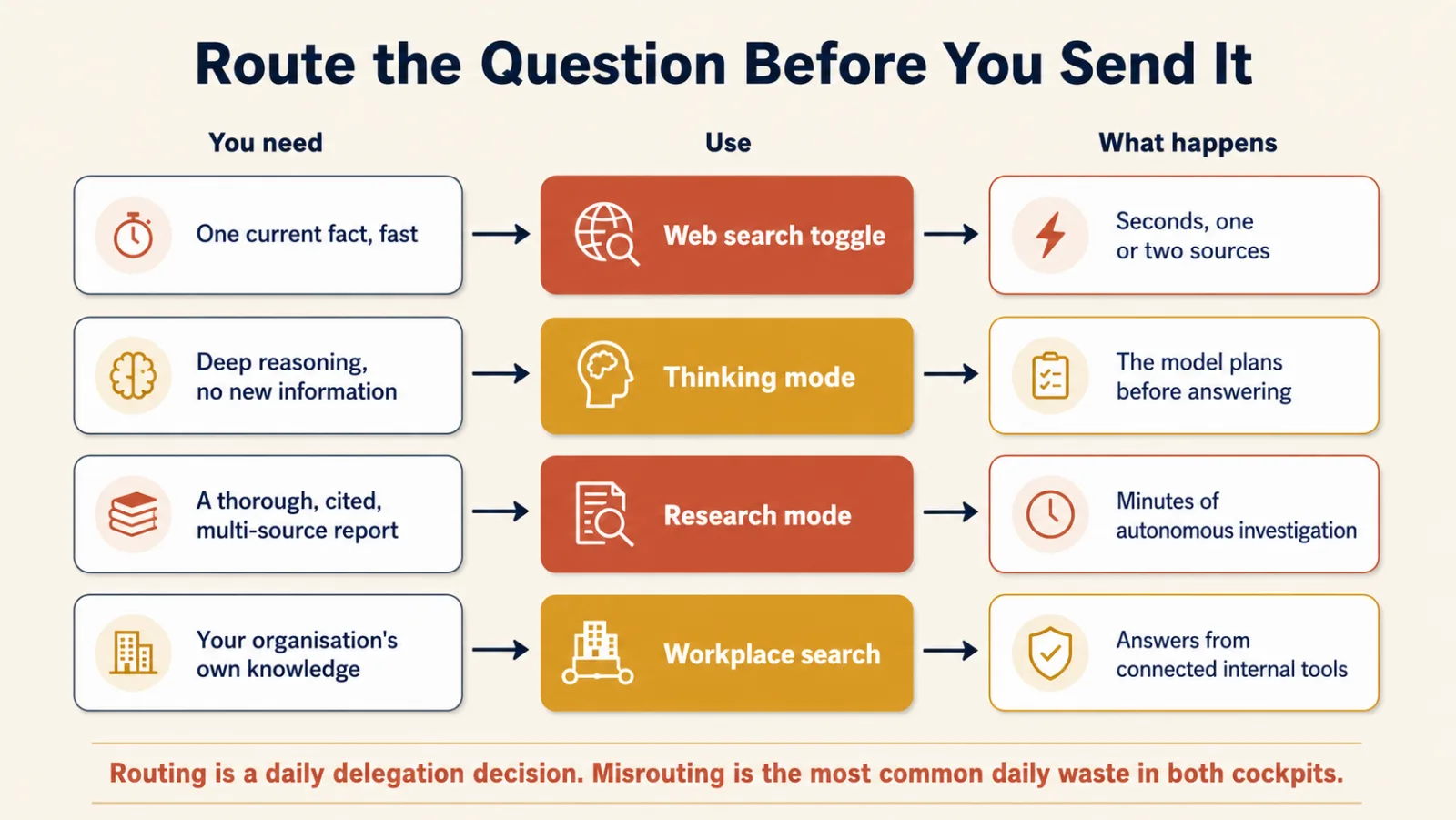
| What you need | Use | Example |
|---|---|---|
| One current fact | Web search | "What is today's exchange rate?" |
| Hard reasoning, no new information | Thinking mode | "Compare these three pricing strategies." |
| A thorough, cited investigation | Research mode | "Research the current market for warehouse robotics." |
| Information from your organization | Workplace search or connected apps | "Find the latest approved pricing policy." |
The question to ask first is:
What kind of work am I asking the assistant to do?
Do not spend deep research on a fact that search answers in seconds. Do not reach for search when the real problem is reasoning. Do not use ordinary chat when the job needs a multi-source investigation.
Research mode is a different animal
Research mode is not "better search."
The assistant plans an investigation, runs many searches, follows leads, reads sources, and hands back a structured report with citations.
That takes minutes, not seconds.
You are delegating an investigation, not asking a quick question.
Which also means judgment does not go away when the report arrives. Check the claims that matter. Open the citations. Research extends your reach. It does not move your accountability.
Remember: route the question before you send it.
9. Prove it on work you already know
Now the most important question in the course:
How do you know whether the assistant is actually good at your work?
Not at a benchmark.
Not at a demo.
At your task, with your data, to your standard.
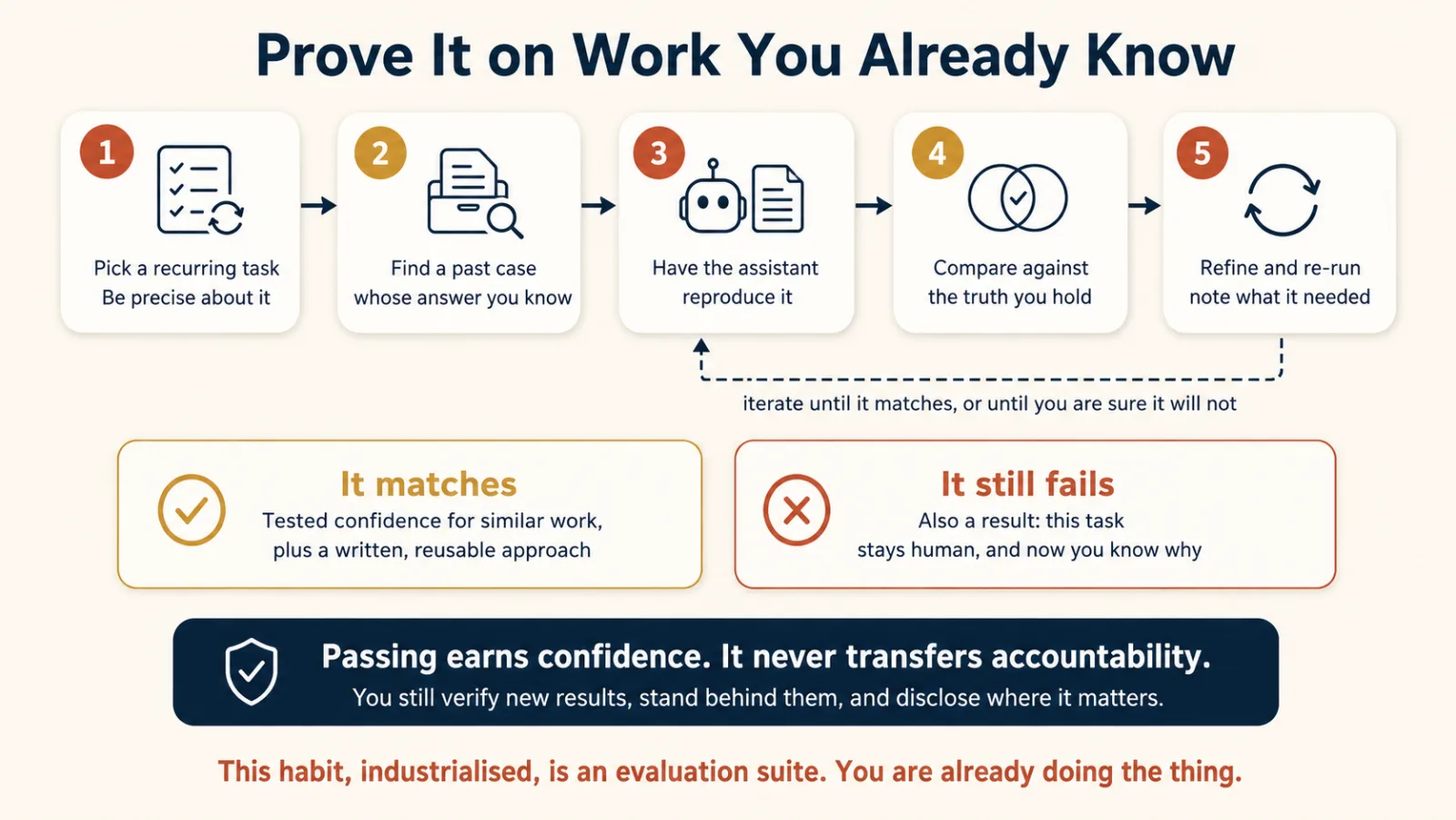
The best beginner method is simple:
Test the assistant on work you have already finished and already trust.
Example
A program director analyzes attendance and employment outcomes every quarter.
He wants AI to help with the next report.
He should not start by trusting it with new data.
Instead he gives the assistant last quarter's raw data, because he already knows what the correct analysis looks like.
Then he asks it to reproduce the work.
Now he has something real to compare against.
If the assistant misses an important pattern, he can improve the instructions.
If the data turns out not to contain something the analysis needs, he has found a data problem.
If the assistant still cannot do part of the work reliably, that part stays human.
All three outcomes are useful.
The five-step proving loop
- Pick one recurring task. Be precise.
- Find an old example. One where you already know the correct result.
- Ask the assistant to reproduce it. Give it the context you would normally have had.
- Compare. What matched? What failed? What instruction was missing?
- Refine and run again. Continue until it is good enough, or until you conclude the task should not be delegated.
That last outcome is not a failure.
Learning what not to delegate is worth the hour.
What does passing actually prove?
It gives you earned confidence for similar future work.
It does not prove the assistant will be right on every future case.
And it does not transfer responsibility. You still have to:
- check whether new results make sense
- stand behind the final work
- disclose AI assistance where that is appropriate
- keep high-risk decisions under proper human control
If you can, run the same test in both Claude and ChatGPT. Comparing two assistants on a task you already understand is the fastest way to build platform awareness.
This small exercise is your first evaluation suite.
Later, Trusting the Checker and Eval-Driven Development turn the same habit into a real engineering discipline.
Remember: trust should be earned against known work, not assumed from a good-looking answer.
A short recap before you try the prompts
You now have the map of both products.
Claude and ChatGPT are different tools built around many of the same ideas.
- Models and thinking modes control how much capability you spend.
- Attachments give the assistant the context it needs right now.
- Projects keep context together for one stream of work.
- Standing instructions hold stable rules.
- Memory holds evolving context about you.
- Artifacts, writing blocks, and code blocks keep finished work out of the chat scroll.
- Skills package repeatable methods.
- Plugins bundle capabilities for a whole kind of work.
- Connectors in Claude and apps in ChatGPT reach external systems.
- MCP is the shared integration standard under both.
- Search, thinking, and research are three different routes for three different questions.
- Testing on work you already know is how trust gets earned.
The products will keep changing.
This mental model should outlast the current interface by a long way.
Try this now: six prompts
Reading about the cockpit is not the same as sitting in it. These six exercises take about twenty-five minutes.
1. Ask for a guided tour
Before you run it, predict two features you expect the assistant to mention.
Give me a guided tour of this workspace as it exists today.
Walk through:
- how I change models and when I should
- what happens when I upload a file
- what projects are for
- what you remember about me and where I control that
- where the research option lives

Keep it practical. One short paragraph per feature, and tell me which
features need a paid plan.
What to notice: compare it against your prediction, then against what you can actually see on screen. Where it is wrong about its own interface is the most interesting part.
2. Run one task in both assistants
Pick one small, real task from your week: a paragraph you need to draft, a table you need to summarize, a short analysis.
Before you run it, predict which assistant will do better, and why.
Here is a real task from my work: [paste the task and its context].
Complete it.

Then, in three sentences, tell me what additional context would have
helped you do it better.
What to notice: compare the outputs, and then compare what each one said it was missing. The second comparison usually teaches more than the first.
3. Set up your first project
Pick a stream of work where you have already repeated the same background or re-uploaded the same documents.
I want to set up a project for this stream of work: [describe it].

Interview me briefly. Then give me two things I can paste into the
project settings:

1. project instructions covering my role, audience, tone, and standing rules
2. a priority-ordered list of five to ten documents I should upload as
   project knowledge
What to notice: the questions it asks you are the context you have been re-typing by hand every week.
4. Audit what is remembered
Show me what you currently remember about me from our conversations,
as a plain list.

For each item I will tell you: keep, correct, or delete.

Then tell me where in settings I can manage memory myself.
What to notice: whether anything in that list would embarrass you on a shared screen, and whether anything in it is simply out of date. The first is the real reason this exercise exists. The second is why this check belongs on your calendar.
5. Route three real questions
Pick three questions from your actual work:
- one that needs a quick current fact
- one that needs hard reasoning
- one that deserves a proper report
Before you ask each one, choose the route: search, thinking, or research.
Then send it that way and see whether the fit was right.
What to notice: the mismatches. A research run that should have been a search is the single most common waste in both products.
6. Prove the assistant on your own history
I want to test whether you can take over a recurring task of mine.

The task: [describe it precisely].

I am giving you a past example where I already know the correct result:
[attach the old input data or material].

Reproduce the analysis or output the way I would have done it.
I will compare your result with what I know to be correct, and we
will iterate.

I am holding back my original answer until we finish, so your work is
not shaped by it.
When you finish the comparison, write down three things:
- what the assistant matched
- what extra description it needed
- what should stay human
What to notice: that list is your first evaluation record. Keep it.
Quick self-check
Answer these without looking back.
- Why should you learn the model tier pattern before the current model names?
- When should you use thinking mode?
- What is the rule separating instructions, memory, and projects?
- What is the difference between ordinary chat and an artifact or writing block, and what changes when the work is data, or a number you will act on?
- Complete the sentence: projects store ___; skills perform ___.
- What is MCP, and why does it matter when you use more than one assistant?
- Why should your first AI test use an old case whose correct result you already know?
- What does passing that test give you, and what does it never transfer?
Answers
- Model names and versions change fast. The pattern (fast, thinking, flagship) lasts longer and lets you choose by task. Then learn the current names and which level each one sits on, because the picker and your colleagues use the names.
- For multi-step reasoning, careful analysis, math, difficult code, and anything where extra reasoning is worth the wait.
- Instructions for stable rules, memory for evolving context, projects for scoped work.
- Ordinary chat is the conversation. Artifacts, writing blocks, and code blocks hold a distinct work product you can edit and use separately. If that work product is data, ask for it as a table or a spreadsheet file so it can be sorted and loaded, not as a paragraph. If it is a number somebody will act on, ask for it computed by code, and check which column the code used.
- Projects store knowledge; skills perform tasks.
- MCP is the Model Context Protocol, an open standard for connecting AI systems to outside tools and data. It matters because the integration concepts, and often the tools themselves, carry across products.
- Because you need a trusted answer to compare against. Without known truth you cannot tell whether the assistant reproduced the work or just sounded like it did.
- It gives you tested confidence for similar future work. It never transfers accountability: you still verify important outputs and stand behind the final result.
If question 8 slowed you down, reread Concept 9 alongside the Diligence competency in AI Fluency. Together they are the professional core of this reference.
Terms this reference adds
Model picker. The control you use to choose a model, or a level of reasoning effort.
Thinking mode, or extended thinking. A mode that gives the model more reasoning effort before it answers. Slower, and worth it on hard tasks.
State summary. A short record of what a long chat has decided, what is still open, and every rule you gave it, written so you can paste it into a fresh chat.
Project. A workspace for one ongoing stream of work, holding chats, knowledge, and instructions.
Project knowledge. Files stored at project level so every conversation in that project can use them.
Standing instructions. Stable rules that apply broadly across conversations: tone, role, output preferences.
Memory. Context the assistant keeps about you across conversations and may use later.
Incognito chat, or temporary chat. A conversation kept out of history and out of memory. Vendors still retain a copy for a limited period for safety, so it is memory-free rather than trace-free.
Artifact. In Claude, a separate output such as a document, code file, diagram, page, or interactive app, created beside the chat.
Writing block, code block. In current ChatGPT, an editable region inside the conversation that holds written or coded work as a distinct object. These replaced canvas.
Skill. A packaged method made of instructions, examples, resources, and sometimes code, loaded when a matching task appears.
Agent Skills standard. The open specification at agentskills.io that defines a portable way to package a skill, now read by tools from several different vendors.
Plugin. A bundle that packages capabilities such as skills, connectors, and commands for a whole kind of work.
Custom GPT. In ChatGPT, a separately configured assistant with its own instructions, persona, knowledge, and optional tools.
Connector. Claude's word for a permissioned connection to an outside system such as email, calendar, storage, or another tool.
App. ChatGPT's word for the same category of external-tool integration. These used to be called connectors.
Model Context Protocol (MCP). An open standard that lets AI systems connect to outside tools and data through a common interface.
Research mode. A multi-step mode that plans an investigation, searches across sources, and returns a cited report.
Enterprise Search. Claude's organization-wide search, which treats connected company tools as one searchable knowledge base.
Where this leads
You can now find your way around the main chat workspace in both Claude and ChatGPT. If you came here from Just Delegate It, go back to the concept that sent you. The rest of Foundations explains the ideas behind the controls.
Markdown In, HTML Out comes next. It explains the document layer behind most of the outputs you just met.
Code You Never Write explains what happened when you described software and working code appeared.
Skills & Connectors goes deeper into the two capabilities introduced in Concepts 7 and 8.
How to Think in the AI Era develops the judgment that Concept 9 turned into a practical proving method.
Later, Cowork & OpenWork for Professionals and the General Agents courses move past the chat window into desktop and agentic systems.
And the simple proving loop you used here becomes a serious engineering discipline in Trusting the Checker.
If you are collecting credentials, both vendors publish free product-learning resources, and Certifications maps the exams this material supports.
Sources and license note
This reference is an original work of this book. Product claims were verified on 25 August 2026 against Anthropic's and OpenAI's public documentation.
Anthropic's free Claude 101 course and OpenAI's help resources informed which product topics to cover, but this reference does not reproduce their text, structure, or exercises.
Features, names, plan limits, and pricing change often. Where this page and the live product disagree, the vendor's current documentation is the authority.
- Anthropic Help Center and Claude documentation
- OpenAI Help Center
- Retrieval augmented generation (RAG) for projects, Anthropic Help Center
- Use incognito chats, Anthropic Help Center
- Use Claude's chat search and memory, Anthropic Help Center
- Browse skills, connectors, and plugins in one directory, Anthropic Help Center
- Skills in ChatGPT, OpenAI Help Center
- Apps in ChatGPT, OpenAI Help Center
- Using projects in ChatGPT, OpenAI Help Center
- Claude directory of skills, connectors, and plugins
- Model Context Protocol
- Agent Skills open standard
Flashcards Study Aid
Test Your Understanding
These scenarios put you inside somebody else's workspace with a decision already waiting. Answer from the pattern rather than the product name, and notice which concept each one is really testing.