Axiom IX: Verification is a Pipeline
Axiom VIII gave James a disciplined git history: every decision recorded, every change traceable. But git records what happened. It does not verify whether it should have happened. James had tests, types, and database constraints each running separately, on his machine, when he remembered to run them. He had never run all of them together, in order, automatically.
His first push to main since adopting the previous eight axioms failed in four minutes.
The formatter caught inconsistent indentation the AI had introduced in shipping.py: tabs mixed with spaces that looked identical in his editor. The linter found an unused import in discount.py that ruff check flagged but James had never run locally. The type checker discovered that calculate_shipping() returned Optional[float] in one branch but the calling code assumed float, a mismatch his tests never triggered because they only tested the happy path. And pip-audit reported a known vulnerability in a package the AI had suggested three weeks earlier.
None of these failures were exotic. They were routine, the kind of mistakes that slip through when the only verification is "I ran pytest on my machine and it passed." James had done everything right within each axiom. But he had never run all the checks together, in order, automatically.
"I ran pytest before every push," James messaged Emma, frustrated. "All fifty-three tests passed. How is this a failure on my part?"
"What else did you run?" Emma asked.
"Pytest. I just said..."
"What about the formatter? The linter? The type checker? The security auditor?"
James went quiet. He had run pytest. He had not run ruff format --check. He had not run ruff check. He had not run pyright. He had not run pip-audit. He had treated "tests pass" as "everything works," but tests only catch one category of error. The tabs-versus-spaces, the unused import, the Optional[float] mismatch, the vulnerable dependency: four different tools would have caught four different problems. He had run one tool and assumed the other four agreed.
"I was verifying," James said. "But only one dimension."
"You need a pipeline," Emma told him. "A sequence that runs every check, every time, automatically. If the pipeline fails, the code does not ship. No exceptions."
This is Axiom IX.
The Problem Without This Axiom
James's failed push exposed a pattern that every developer who works with AI will recognize. He had verified his code, but only partially. He ran pytest. He did not run the formatter, the linter, the type checker, or the security auditor. Each tool catches a different category of error, and skipping any one of them leaves a gap.
The "Works on My Machine" trap. James's code passed on his laptop because he had Python 3.12, a specific OS, and packages installed from previous experiments. The GitHub Actions runner used a clean Ubuntu environment with Python 3.11. The generic function syntax def first[T](items: list[T]) -> T: that the AI generated works on 3.12 but is a syntax error on 3.11, and production ran 3.11. Without a standardized verification environment, "it works on my machine" means nothing.
The "I Already Tested It" illusion. James ran pytest and saw green. But he did not run ruff format --check. He did not run ruff check. He did not run pyright. He did not run pip-audit. Manual verification is inherently incomplete because developers skip steps, especially late at night, especially when the AI assured them the code was correct.
The "Review Fatigue" problem. The AI had generated five hundred lines of order management code in thirty seconds. James could not meaningfully review every line. He skimmed, trusted the types, trusted the tests, and pushed. Without automated checks catching the issues his eyes missed, subtle bugs accumulated. The more code the AI generated, the more essential automated verification became.
The Axiom Defined
Axiom IX: Verification is a Pipeline. CI/CD automates the verification of all changes (formatting, linting, type checking, tests, security audits) every time, without exception. If the pipeline fails, the code does not ship.
This axiom transforms verification from a human discipline problem into an infrastructure guarantee. James did not need to remember to run the linter; the pipeline ran it. He did not need to trust that tests passed; the pipeline proved it. He did not need to hope there were no security vulnerabilities; the pipeline checked.
"The pipeline is the gatekeeper that never sleeps," Emma told him. "It never gets tired. It never decides 'it is probably fine.' It runs every check, every time, and it does not care that you are in a hurry."
From Principle to Axiom
In Chapter 18, you learned Principle 3: Verification as Core Step, the mindset that every action should be verified. You saw what happens without it: the CSV parser that looked correct but split "Smith, John" into two fields, the file operations accepted without confirming the output existed. That principle taught you to check that files exist after creating them, to confirm commands succeeded before moving on, to validate outputs before declaring victory.
Axiom IX elevates that principle from personal discipline to infrastructure enforcement:
| Principle 3 (Mindset) | Axiom IX (Infrastructure) |
|---|---|
| "Always verify your work" | "The pipeline always verifies all work" |
| Relies on human discipline | Runs automatically on every push |
| Can be forgotten or skipped | Cannot be bypassed (branch protection) |
| Checks what you remember to check | Checks everything, every time |
| Individual responsibility | Team-wide guarantee |
The principle taught you why to verify. The axiom teaches you how to make verification unavoidable. James had internalized the principle (he ran pytest before pushing). But the principle relies on human discipline, and human discipline has gaps. James forgot to run the linter. He forgot to run the type checker. He forgot to audit dependencies. The pipeline forgets nothing.
The Discipline That Preceded CI
The idea that integration should be continuous, not a painful event at the end of a project, emerged from the Extreme Programming movement in the late 1990s. In 2000, Martin Fowler published his influential article "Continuous Integration," describing a practice his team at ThoughtWorks had refined: every developer integrates their work at least daily, and every integration is verified by an automated build that runs the full test suite.
Before CI, integration was a dreaded phase. Teams worked in isolation for weeks or months, then spent days or weeks merging their changes together, a process so painful it earned the name "integration hell." Bugs that could have been caught in minutes festered for months because nobody verified how the pieces fit together until the end.
Fowler's insight was that integration pain grows exponentially with delay. If you integrate daily, each integration is small and manageable. If you integrate monthly, each integration is a nightmare. The solution was automation: a server that watches your repository, detects every change, and runs the full verification suite automatically. CruiseControl (2001) was one of the first CI servers. Jenkins (2011) made it mainstream. GitHub Actions (2019) made it accessible to every project with a repository.
James's failed push was a textbook example of what CI was designed to prevent. He had been working locally for two weeks, verifying only the checks he remembered to run. The pipeline ran all the checks, and found four problems that manual verification had missed.
The Verification Pyramid
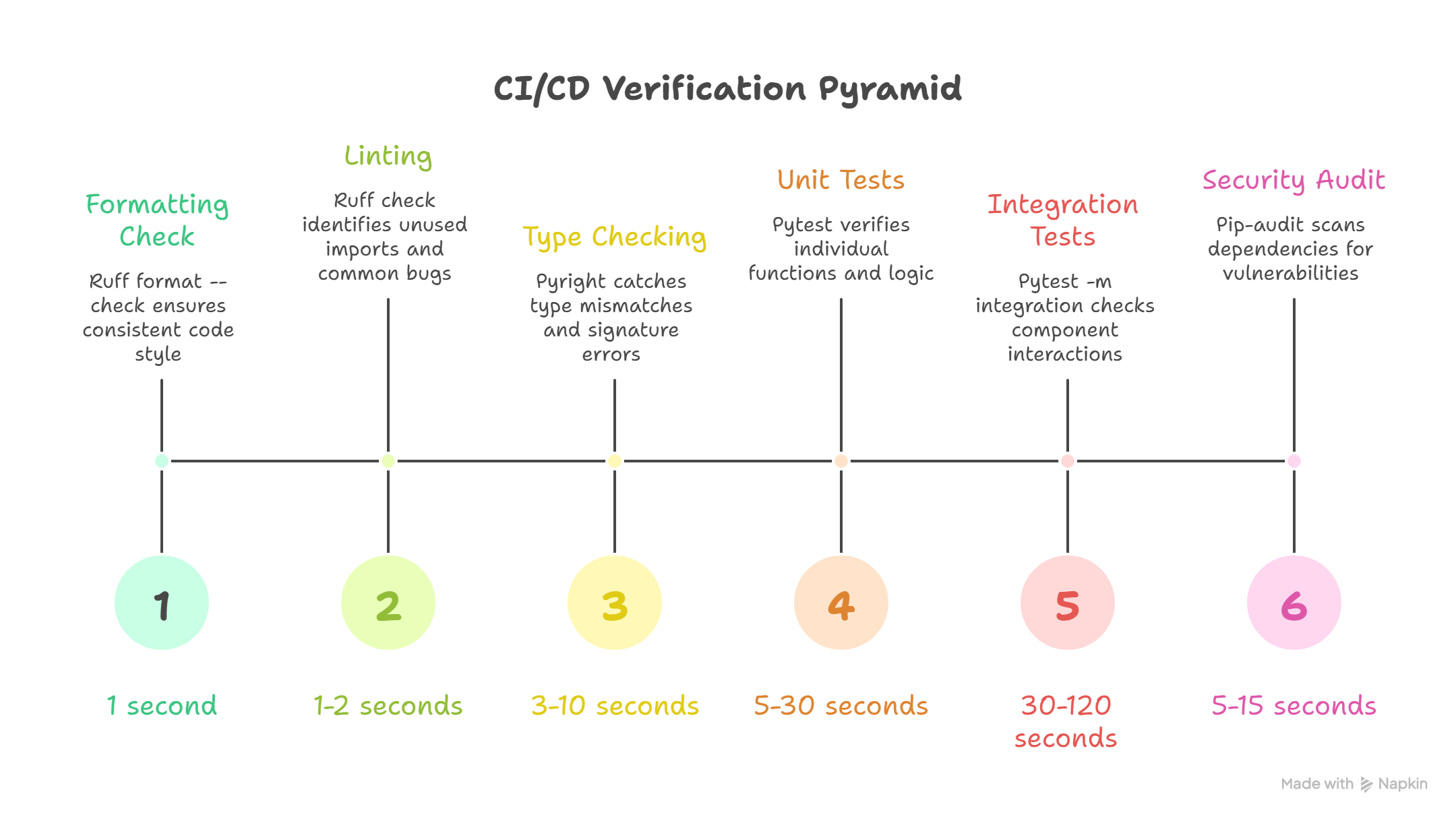
After James's failed push, Emma walked him through the architecture of a proper CI pipeline. "Not all checks are equal," she said. "They form a pyramid: fast, cheap checks at the base catch the most common issues, while slower, more thorough checks at the top catch deeper problems."
Each level catches different categories of problems:
| Level | Tool | What It Catches | Speed |
|---|---|---|---|
| 1. Formatting | ruff format --check | Inconsistent style, whitespace | < 1 second |
| 2. Linting | ruff check | Unused imports, bad patterns, common bugs | 1-2 seconds |
| 3. Type Checking | pyright | Type mismatches, missing attributes, wrong signatures | 3-10 seconds |
| 4. Unit Tests | pytest | Logic errors, broken functions, regressions | 5-30 seconds |
| 5. Integration Tests | pytest -m integration | Component interaction failures | 30-120 seconds |
| 6. Security Audit | pip-audit | Known vulnerabilities in dependencies | 5-15 seconds |
Why the pyramid matters: If formatting fails, there is no need to wait for tests to run. Each level gates the next. Fast failures save time, and James learned to appreciate this when a one-second formatting check saved him from a three-minute test run.
Why Each Level Exists
Emma walked James through each level, connecting it to a specific failure from his own project:
Level 1: Formatting catches the trivial but distracting. The AI had introduced tabs mixed with spaces in shipping.py, invisible in James's editor but a failure in ruff format --check. This is the cheapest possible check: if the code cannot even be formatted consistently, there is no point running deeper analysis.
Level 2: Linting catches the bugs hiding in plain sight. James's discount.py had an unused import os that the AI left behind from a previous generation. ruff check also catches variables assigned but never read, f-strings without placeholders, and assert statements with tuples (always truthy). These patterns look correct to a casual reader but indicate real problems.
Level 3: Type Checking catches the structural errors. James's calculate_shipping() returned Optional[float] in one branch but the calling code assumed float, a mismatch his tests never triggered. pyright catches type mismatches, missing attributes, and wrong signatures statically, without running the code. It is like having a compiler for Python.
Level 4: Unit Tests catch the logic errors, the exact category that produced the $12,000 discount bug. If assert apply_discount(order, 0.15).total == 85.0 had existed in the pipeline, the wrong implementation would never have reached main. These are semantic bugs that only running the code can reveal.
Level 5: Integration Tests catch the interaction failures. James's discount function worked in isolation, but when the shipping calculator called it with a large order, the rounding produced a one-cent discrepancy that compounded across line items. Components that work alone may fail together.
Level 6: Security Audit catches the invisible threats. The AI had suggested pip install requests==2.28.0 for James's order notification system. pip-audit flagged it: that version had a known vulnerability (PYSEC-2023-74). Three levels deep in the dependency tree, a package James had never heard of was compromised.
GitHub Actions: Your Pipeline
The sections below show real configuration files (YAML workflows and Makefiles) that professional teams use. You do not need to memorize this syntax. Focus on what each section accomplishes (which check runs, what it catches, why it's in that order). If you covered version control in Chapter 23, you already understand the push-and-merge workflow these pipelines protect.
After understanding the pyramid, James was ready to build it. Emma showed him GitHub Actions, the CI platform that runs verification pipelines on every push and pull request, using YAML workflow files stored in the repository itself.
"The pipeline lives in your code," Emma told him. "Version-controlled, reviewed, and permanent, just like the commit messages from Axiom VIII."
Here is the complete CI workflow James created for his order management project:
GitHub Actions uses YAML configuration files to automate verification. You will set up your own pipeline in Part 7. For now, read the structure: each step runs one tool from your discipline stack, and they execute in order from fastest to slowest.
The pattern:
  step 1: check formatting (fastest, catches style issues)
  step 2: check for common mistakes (linting)
  step 3: check types (catches structural mismatches)
  step 4: run tests (catches logic errors)
  step 5: run integration tests (catches cross-module issues)
  step 6: check security (catches vulnerable dependencies)
  if any step fails, stop immediately
# .github/workflows/ci.yml
name: CI Pipeline

on:
  push:
    branches: [main]
  pull_request:
    branches: [main]

jobs:
  verify:
    runs-on: ubuntu-latest
    strategy:
      matrix:
        python-version: ["3.11", "3.12"]

    steps:
      - name: Checkout code
        uses: actions/checkout@v4

      - name: Set up Python ${{ matrix.python-version }}
        uses: actions/setup-python@v5
        with:
          python-version: ${{ matrix.python-version }}

      - name: Cache pip dependencies
        uses: actions/cache@v4
        with:
          path: ~/.cache/pip
          key: ${{ runner.os }}-pip-${{ hashFiles('requirements*.txt') }}
          restore-keys: |
            ${{ runner.os }}-pip-

      - name: Install dependencies
        run: |
          python -m pip install --upgrade pip
          pip install -r requirements.txt
          pip install -r requirements-dev.txt

      # Level 1: Formatting - catches tabs-vs-spaces in shipping.py
      - name: Check formatting
        run: ruff format --check .

      # Level 2: Linting - catches unused imports like `import os` in discount.py
      - name: Run linter
        run: ruff check .

      # Level 3: Type checking - catches Optional[float] vs float mismatches
      - name: Type check
        run: pyright

      # Level 4: Unit tests - catches logic errors like the $12,000 discount bug
      - name: Run unit tests
        run: pytest tests/ -v --tb=short

      # Level 5: Integration tests - catches rounding errors across modules
      - name: Run integration tests
        run: pytest tests/ -m integration -v --tb=short

      # Level 6: Security audit - catches vulnerable dependencies like requests 2.28.0
      - name: Security audit
        run: pip-audit
Each section serves a specific purpose:
Triggers (on:): The pipeline runs on every push to main and every pull request targeting main. No code reaches main without passing all checks. This was the rule James had been violating: pushing directly to main without any automated gate.
Advanced: matrix testing and caching (expand)
Matrix Testing (strategy.matrix): The pipeline runs against both Python 3.11 and 3.12. This catches version-specific issues, exactly the kind James hit when the AI generated the def first[T](...) generic syntax that works on 3.12 but fails on older versions. If the AI generates code using a newer Python feature, the matrix catches it.
Caching (actions/cache): Dependencies are cached between runs using a hash of the requirements files. First run installs everything; subsequent runs restore from cache unless dependencies change. This cut James's pipeline from three minutes to forty-five seconds.
Sequential Steps: The verification pyramid runs top-to-bottom. If formatting fails, linting never runs. This "fail fast" approach gives the quickest possible feedback. James's tab-vs-space error was caught in one second, not after a three-minute test suite.
Branch Protection: Making CI Mandatory
"A pipeline that runs but can be ignored is theater, not verification," Emma told James. The concept is straightforward: you configure your repository so that the pipeline is not advisory; it is a gate. If CI fails, the merge button is disabled. No exceptions, no overrides.
Branch protection is a setting you configure in your repository's hosting platform (like GitHub). The exact steps (which settings page to visit, which checkboxes to enable) are something you will walk through when you set up your own projects. What matters here is the idea: the pipeline should be mandatory, not optional. Infrastructure enforces what discipline alone cannot.
With branch protection enabled, James could no longer push broken code to main even if he wanted to. The infrastructure enforced what discipline alone could not.
Local CI: The Makefile
A Makefile is a file that lets you run multiple commands with a single short command (like typing make ci instead of running six separate tools). The important thing below is the concept: running all your checks locally before pushing, so you catch problems in seconds rather than waiting minutes for a remote server. You will write your own Makefiles in hands-on chapters.
After two days of waiting three minutes for GitHub Actions to tell him about formatting errors, James asked Emma if there was a faster way. "Run the same checks locally before pushing," she said. "A Makefile gives you a single command that mirrors your CI pipeline."
# Makefile

.PHONY: format lint typecheck test test-integration security ci clean

# Individual targets
format:
	ruff format --check .

lint:
	ruff check .

typecheck:
	pyright

test:
	pytest tests/ -v --tb=short

test-integration:
	pytest tests/ -m integration -v --tb=short

security:
	pip-audit

# Fix targets (auto-correct what can be fixed)
fix-format:
	ruff format .

fix-lint:
	ruff check --fix .

# The full CI pipeline - same checks as GitHub Actions
ci: format lint typecheck test security
	@echo "All CI checks passed."
Additional Makefile targets: ci-full, quick, clean (expand)
# Run everything including integration tests
ci-full: format lint typecheck test test-integration security
	@echo "All CI checks (including integration) passed."

# Quick check - just formatting and linting (< 5 seconds)
quick:
	ruff format --check . && ruff check .

clean:
	find . -type d -name __pycache__ -exec rm -rf {} +
	find . -type d -name .pytest_cache -exec rm -rf {} +
	find . -type d -name .ruff_cache -exec rm -rf {} +
The clean target uses rm -rf, which permanently deletes directories without confirmation. These specific targets remove only cache directories (__pycache__, .pytest_cache, .ruff_cache), but always verify cleanup paths before running them.
The Workflow With Local CI
The commands below show James's daily workflow. You do not need to memorize them. What matters is the pattern: quick check first, fix problems, full check, then push. Notice how each step builds confidence before the next one. You will run these exact commands yourself in hands-on chapters.
James's daily development workflow became a consistent sequence:
- Write tests first (TDG from Axiom VII), then have AI generate the implementation
- Quick check: run just formatting and linting (catches 80% of issues in 2 seconds)
- Auto-fix: let the tools fix formatting and linting issues automatically
- Full CI check: run all checks locally before pushing (the same checks GitHub will run)
- Push only if CI passes: commit and push with confidence
# The actual commands for each step:
make quick                  # Step 2: fast check
make fix-format && make fix-lint  # Step 3: auto-fix
make ci                     # Step 4: full local CI
git add src/shipping.py tests/test_shipping.py
git commit -m "feat(shipping): add international surcharge calculation"
git push                    # Step 5: push with confidence
$ make quick
ruff format --check .
All checks passed!
ruff check .
All checks passed!

$ make ci
ruff format --check .
All checks passed!
ruff check .
All checks passed!
pyright
0 errors, 0 warnings, 0 informations
pytest tests/ -v --tb=short
========================= 53 passed in 1.24s =========================
pip-audit
No known vulnerabilities found
All CI checks passed.
This workflow meant James almost never saw CI failures on GitHub. The pipeline became a safety net, not a bottleneck. He caught issues in five seconds locally rather than waiting three minutes for a remote failure.
Why a Makefile?
James asked Emma why a Makefile instead of a shell script. A Makefile is a standard way to define named tasks. Think of it as a menu of commands where each item runs a specific job. The Makefile has specific advantages:
- Convention: Most open-source projects use Makefiles. When a developer joins a project, they know to look for one, the same way you know to look for a table of contents at the front of a book.
- Self-documenting: Run
makewith no arguments to see all available tasks listed by name. - Composable: The
citask is justformat + lint + typecheck + test + securitychained together. Each small task can also run independently. - Widely available: Make comes pre-installed on most development systems. On Windows, it is included with common development setups you will configure in hands-on chapters.
- Matches CI exactly: Each Makefile task corresponds to one pipeline step. If
make cipasses locally, GitHub Actions will pass remotely. Same checks, same order, same guarantee.
Why CI Matters More With AI-Generated Code
Traditional CI protects against human error. With AI-generated code, the case for CI becomes overwhelming, and James experienced each reason firsthand:
AI generates faster than humans can review. The AI had generated five hundred lines of order management code in thirty seconds. James could not meaningfully verify every line. His eyes skipped the unused import, missed the type mismatch, and never noticed the vulnerable dependency. The pipeline caught all three in four minutes.
AI makes confident-looking mistakes. When a human writes buggy code, there are often signals: commented-out attempts, TODO markers, inconsistent naming that reveals uncertainty. The AI's calculate_shipping() had a perfect docstring, clean type annotations, and logical structure. It still returned None in one branch instead of 0.0. The pipeline did not care how polished the code looked; it checked whether it worked.
AI does not remember project conventions. James had told the AI "use ruff for linting" in his CLAUDE.md, but it generated code with unused imports anyway. He specified "all functions need type annotations" but the AI forgot on the helper functions. The pipeline enforced conventions the AI forgot between prompts.
AI introduces dependency risks. The AI had suggested pip install requests==2.28.0 for the order notification feature. Without pip-audit in the pipeline, James would never have known that version had a known security vulnerability.
Anti-Patterns: What Bad CI Looks Like
Ask a team lead about their CI pipeline and watch their face. If they wince, you already know the story. The badge has been red so long that nobody looks at it anymore. "Just re-run it" is the standard response to failures. The pipeline technically exists but checks so little that it provides false confidence instead of real verification.
A developer merged a pull request while CI was still running because "it is probably fine." Flaky tests were disabled one by one until the suite tested nothing meaningful. The security audit was removed because "it kept failing on things we cannot fix." The pipeline takes forty-five minutes, so developers push without waiting and discover failures the next morning, if they check at all.
None of this happened in a single decision. It happened in a hundred five-second shortcuts: ignoring a red badge, skipping a slow check, disabling a noisy test. A hundred five-second shortcuts became a team that ships unverified code with confidence.
These specific patterns destroy the pipeline's value. Recognize and avoid them:
| Anti-Pattern | Why It Fails | The Fix |
|---|---|---|
| "I tested it on my machine" | Different environment, different results | CI runs in a standardized container |
| CI that only runs tests | Types, linting, security all skipped | Implement the full verification pyramid |
| Ignoring flaky tests | "It's just flaky" normalizes CI failures | Fix or quarantine flaky tests immediately |
| No local CI equivalent | Surprises at push time, slow feedback | Create make ci that mirrors the pipeline |
| CI takes 30+ minutes | Developers push without waiting, bypass CI | Cache aggressively, parallelize jobs, fail fast |
| Optional CI (no branch protection) | "I'll merge anyway, it's urgent" | Required status checks, no exceptions |
| Secrets in code | API keys committed, exposed in logs | Use GitHub Secrets and environment variables |
| CI that passes but doesn't check enough | False confidence from green checkmarks | Audit what CI actually verifies quarterly |
The Most Dangerous Anti-Pattern
The single most destructive CI anti-pattern is normalizing failures. James saw it on a previous team: it started small: "That test is flaky, just re-run it." Then it became: "CI is red but it is not related to my change." Then: "We will fix CI next sprint." Within weeks, the pipeline was permanently red, nobody looked at it, and the team had lost their automated safety net entirely.
The rule Emma insisted on: CI must always be green on main. If a test is flaky, fix it or delete it. If a check is wrong, fix the check. Never let "red is normal" become the culture.
CI as Culture
The deepest lesson of Axiom IX is not technical; it is cultural. Emma taught James three rules that shaped how he thought about his pipeline:
"If it is not in CI, it is not enforced." James had written "always use type annotations" in CLAUDE.md. The AI forgot on three helper functions. He had written "run ruff check before committing" in his project README. He forgot at 11pm. The only standards that actually got followed were the ones enforced by the pipeline. His CLAUDE.md was a request. His CI pipeline was a guarantee.
"The pipeline is the source of truth." At the post-mortem, the team lead had asked "does this code work?" and nobody could answer. With CI, the answer was never "I think so" or "it worked when I tested it." The answer was: "CI is green." The pipeline was the objective arbiter, the same pipeline that would have caught the $12,000 discount bug if it had existed two months earlier.
"Fast CI is kind CI." A pipeline that takes thirty minutes punishes developers for pushing code. They batch changes, push less frequently, and avoid small improvements because "it is not worth waiting for CI." James's pipeline took forty-five seconds with caching, fast enough that he ran make ci after every AI generation, exactly the way he ran TDG tests after every implementation. Small, frequent verification cycles from Axiom VII, encoded into infrastructure by Axiom IX.
The Verification Chain
Axiom IX does not stand alone. It connects to the axioms before and after it:
- Axiom VII (Tests Are the Specification) gives you tests. Axiom IX runs them automatically. James wrote TDG specifications; the pipeline executed them on every push.
- Axiom VIII (Version Control is Memory) gives you commits. Axiom IX verifies them before they reach main. The disciplined commits from Axiom VIII flow through the pipeline from Axiom IX.
- Axiom X (Observability Extends Verification) takes over where CI stops, monitoring the code after it ships.
Together, they form a continuous verification chain: tests define correctness, the pipeline proves it before deployment, and observability confirms it in production. But the chain has a gap. James's pipeline verified that calculate_shipping() returned the right values for eleven test inputs. It could not verify that the function would survive ten thousand concurrent requests, a network timeout at 3am, or a database connection pool exhaustion under holiday traffic. The pipeline proves code is correct. It does not prove code is resilient, and that is where Axiom X begins.
The Shallow Pipeline
A month after setting up CI, James helped a colleague on another team configure their pipeline. The colleague's ci.yml had two steps: ruff format --check and ruff check. That was it. No type checking. No tests. No security audit. The badge on their README was green, permanently green, and the colleague pointed to it proudly: "Our CI always passes."
"Your pipeline is shallow," Emma told them when James asked her to review it. "It checks formatting and linting, Level 1 and Level 2 of the pyramid. It does not check types, run tests, or audit dependencies. The green badge means your code is consistently formatted. It does not mean your code is correct, type-safe, or secure."
The Shallow Pipeline is the CI equivalent of the Green Bar Illusion from Axiom VII: a green badge that creates false confidence. The pipeline technically passes, but it verifies so little that passing means almost nothing. The colleague's project had a type error that crashed in production, a logic bug that doubled invoices, and a vulnerable dependency, all invisible to a pipeline that only checked formatting.
The fix is the full verification pyramid. Every level exists because it catches problems invisible to the levels below it. A pipeline without tests is like a spell-checker without grammar-checking. It catches some problems but misses the ones that matter most.
This is a natural stopping point. If you need a break, bookmark this spot and return when you are ready. Everything above covers the core concept; everything below applies it through exercises and practice.
CI secrets are also part of pipeline discipline. Never put secrets directly in workflow files:
# WRONG - secret exposed in code
- name: Deploy
  run: curl -H "Authorization: Bearer sk-abc123..." https://api.example.com/deploy

# RIGHT - secret stored in GitHub Secrets
- name: Deploy
  run: curl -H "Authorization: Bearer ${{ secrets.DEPLOY_TOKEN }}" https://api.example.com/deploy
# What GitHub Actions shows when using secrets correctly:
Run curl -H "Authorization: Bearer ***" https://api.example.com/deploy
James remembered the Permanent Record from Axiom VIII: once a secret is committed, it exists in git history forever. The same principle applies to CI: secrets stored in workflow files are visible to anyone with repository access. Store them in GitHub Settings > Secrets, never echo them in logs, and rotate them quarterly.
Try With AI
Prompt 1: Design a Quality Checklist for a Team Project
A team of 4 students is submitting a 20-page research report. Before
submission, they need to check for problems. Here are the types of
checks they could run:

- Formatting: consistent fonts, headings, margins, page numbers
- Spelling and grammar: no typos, proper sentence structure
- Content accuracy: all facts cited, statistics verified, no plagiarism
- Completeness: all required sections present, all questions answered
- Consistency: no contradictions between sections written by different people
- References: all citations formatted correctly, all sources accessible

Design a verification checklist that:
1. Orders these checks from fastest to slowest
2. Explains WHY each check should run in that position
3. Identifies which checks should STOP the process if they fail
   (no point checking citations if an entire section is missing)
4. Assigns each check to the best person (the writer, a teammate, or everyone)

Then explain: what goes wrong if they only check spelling and formatting
but skip completeness and consistency?
What you're learning: The verification pyramid applied to a real team workflow. Notice how the ordering mirrors James's CI pipeline: fast, surface-level checks first (formatting), then structural checks (completeness), then deep checks (accuracy, consistency). The key insight is the same: skipping a layer creates a gap. A well-formatted report that contradicts itself across sections is worse than one with a few typos, because the deeper problem is harder to catch and more costly to fix.
Prompt 2: Diagnose What Went Wrong Without Checks
A student submitted a school assignment and got a poor grade.
The teacher's feedback listed these problems:

Problem 1: "The essay uses inconsistent formatting: some sections are
double-spaced, others single-spaced, and the font changes twice."

Problem 2: "You cited a statistic that says '73% of scientists agree'
but the actual source says 37%. The digits are reversed."

Problem 3: "Your essay is about climate change but Question 3 asked
about renewable energy. You answered the wrong question."

Problem 4: "Your bibliography lists 8 sources but only 5 appear in
the text. Three citations are missing from the essay body."

Problem 5: "Section 2 says 'solar is the cheapest option' but Section 4
says 'wind is the cheapest option.' These contradict each other."

For each problem:
- What type of check would have caught it? (formatting, content,
  accuracy, completeness, or consistency)
- Why didn't a simpler check catch it?
- Which problem is the MOST costly (hardest to fix after submission)?
- If the student could only run 3 checks, which 3 would have
  prevented the most damage?
What you're learning: Diagnosing failures by category, the same skill James needed when his CI pipeline showed five different errors from five different tools. Problem 3 (wrong question) is the most costly because no amount of polishing fixes a fundamental specification error. This mirrors James's experience: his code was well-formatted and passed linting, but it returned the wrong values, a deeper problem that only tests could catch.
Prompt 3: Design a Verification System for a Group Project
You are leading a team of 5 students on a semester-long group project.
Every week, each person submits their section to be merged into the
main document. Last semester, a different team had these disasters:

- Two people wrote about the same topic (duplicate work)
- One section contradicted another (nobody compared them)
- A major section was missing from the final submission (nobody checked)
- The formatting was inconsistent (everyone used different styles)
- A key statistic was wrong (nobody verified it)

Design a verification system with THREE tiers:

Tier 1 (Quick check, every submission): What do you check every
single time someone submits work? These should take under 5 minutes.

Tier 2 (Weekly review): What do you check once a week when merging
everyone's work? These take 30-60 minutes.

Tier 3 (Final check, before submission): What do you check once
before the final deadline? These take 2-3 hours.

For each tier, explain: what it catches, what it costs to skip,
and who is responsible for running it.
What you're learning: Designing a tiered verification system where different checks run at different frequencies, the same architecture behind professional CI pipelines. Quick checks (formatting, completeness) run on every submission. Weekly checks (consistency, contradictions) catch cross-section problems. Final checks (accuracy, full review) are thorough but slow. This is exactly how James's pipeline evolved: fast checks on every push, deeper checks on pull requests, and comprehensive checks before release.
PRIMM-AI+ Practice: Verification is a Pipeline
Predict [AI-FREE]
Enter Plan Mode in Claude Code (Shift+Tab). Before submitting a school assignment, you could run these checks:
- (A) Is it neat and properly formatted?
- (B) Is the spelling correct?
- (C) Does it actually answer the question that was asked?
- (D) Are the facts and references accurate?
- (E) Is it the right length (within the word limit)?
You only have time for 3 checks. Predict: Which 3 would you choose, and in what ORDER would you run them? What is the risk of skipping each of the two you leave out?
Write your answers. Rate your confidence from 1 to 5.
Run
In Claude Code, type: "If I can only do 3 checks on a school assignment before submitting, from these five: formatting, spelling, answers the question, facts are accurate, correct length, which 3 matter most and in what order? Why should quick checks like formatting come before slow checks like fact-checking?"
Compare. Did the AI prioritize the same checks you did? Did it explain the ordering in a way that changed your thinking?
Answer Key: What to Look For
The AI should recommend a priority order something like this:
- C: Does it answer the question? This is the most critical check. A perfectly formatted, spell-checked, factually accurate essay that answers the wrong question gets a zero. This is the "specification check," verifying you built the right thing before checking whether you built it well.
- D: Are the facts accurate? or B: Spelling correct? The order between these depends on the assignment type. For a research paper, facts matter more. For a cover letter, spelling matters more. Either way, both rank above formatting.
- E: Right length? or A: Neat and formatted? These are quick checks, but they matter less than content correctness.
The key insight is ordering by cost of failure: answering the wrong question is catastrophic (zero marks), wrong facts lose significant marks, spelling errors lose some marks, and formatting issues lose few marks. Run the highest-stakes checks first so you don't waste time polishing work that has fundamental problems.
If your prediction put C (answers the question) in the top 2, your instinct for verification ordering is strong. If you put formatting first, notice how that mirrors James's mistake. He ran pytest (one check) and assumed everything was fine, when the most damaging problems were in categories he never checked.
Investigate
Write in your own words why running checks in ORDER matters: why you should check formatting before content, and content before factual accuracy. What happens if you spend 30 minutes fact-checking an essay that does not even answer the assigned question?
Now connect this to James's story. He ran pytest and saw green (one check, passed). But he never ran the formatter, the linter, the type checker, or the security auditor. His first push failed on four different checks he had never run. This is exactly like checking only spelling on your essay and discovering at submission time that you answered the wrong question, contradicted yourself, and forgot an entire section. James's mistake was not that he skipped verification; it was that he ran one check and assumed the others would pass. A single check is not a pipeline. A pipeline runs every check, every time, in order.
Apply the Error Taxonomy: skipping the "does it answer the question" check = specification error. The work might be perfect in every other dimension (well-formatted, correctly spelled, factually accurate, right length), but if it answers the wrong question, none of that matters.
Modify
Your assignment checking pipeline has 5 checks. A classmate says: "I just check spelling and submit." What risks are they taking? List at least 3 specific things that could go wrong. What is the minimum set of checks that still protects them from the most costly failures?
Make [Mastery Gate]
Design a 5-step checklist for something you submit regularly (homework, an email to a professor, a social media post, a job application). Order the checks from fastest to slowest. For each check, write:
- What it catches (the type of error this check prevents)
- What slips through if you skip it (what goes wrong without this check)
- How long it takes (seconds, minutes, or longer)
This ordered checklist is your mastery gate. The ordering should ensure that fast, cheap checks run first so you do not waste time on slow checks for work that has basic problems.
This checklist IS Rung 4 of the Verification Ladder: multiple checks coordinated into a pipeline. Each check catches errors that the others miss. The ordering ensures you fail fast on cheap checks before investing in expensive ones.
James watched his first automated pipeline run. Four failures on checks he had never thought to run manually. "I had tests passing. I thought I was fine."
"I made the same mistake on a project two years ago," Emma said. "Shipped code that passed every test but failed the linter so badly it broke the formatter on the next run. Took down the entire team's CI for half a day because nobody could merge. I learned the hard way that verification is a pyramid, not a single check."
"It's like quality audits in operations," James said. "You don't just check the finished product. You check raw materials, then assembly, then packaging, then shipping. Each stage catches problems the others miss. And you run the fast, cheap checks first."
"Exactly. Formatting in one second, linting in two, types in five, tests in thirty. If formatting fails, no point running tests." Emma pointed at his Makefile. "And make ci runs the same checks locally that GitHub Actions runs remotely. Five seconds instead of three minutes."
"The part that worries me is the shallow pipeline. A green badge that only checks formatting."
"If it's not in CI, it's not enforced. And if CI is always red, nobody pays attention. Fast, comprehensive, always green." Emma straightened. "But here's what the pipeline can't tell you. It proves your shipping calculator returns correct values for test inputs. It can't prove the system handles ten thousand concurrent requests at 3am."
"So what watches it after deployment?"
"Observability. That's the final axiom, and it extends verification into the real world."