Axiom V: Types Are Guardrails
Axioms I through IV gave you the structure: shell orchestration, markdown knowledge, disciplined programs, composed systems. James's refactored order system had all four. But structure tells you how code is organized. It does not tell you what shape the data should be. That gap is where the next mistake was waiting.
The team needed a new endpoint: fetch a customer's order history and return a summary. James's composed architecture was clean, Emma had signed off, so he asked his AI assistant to generate it. The code came back clean: readable variable names, sensible logic, a helper function called customer.get_orders() that returned a list of order summaries.
James reviewed it, liked what he saw, and merged it. The endpoint crashed in staging twenty minutes later. AttributeError: 'dict' object has no attribute 'total_amount'. The AI had generated code that treated the API response as objects with attributes, but the actual response was a list of plain dictionaries. The code looked correct. The variable names suggested correctness. But nothing in the codebase had told the AI (or James) what shape the data actually was.
"The AI wrote bad code," James said. "The variable names made sense: customer, orders, total_amount. I read every line. It looked right."
"Pull up the actual API response," Emma said.
James did. Plain dictionaries ({"total_amount": 42.50}), not objects with .total_amount attributes. The variable names had made the code look correct. The code was not correct. And James had reviewed it line by line and missed the mismatch, because readable code and correct code are not the same thing.
Emma pulled up the diff. "Your composed functions from last week had typed interfaces: ValidatedOrder, PricedOrder, PaidOrder. The type checker would have caught any mismatch."
"So the types would have flagged this before staging?" James asked.
"Yes. But this new code has no types at all. You gave the AI a blank canvas and hoped it would guess your data model."
"I thought I could verify it by reading it," James said. "But I can't read every assumption the AI makes about data shapes. That's what the types do: they make the assumptions explicit so a machine can check them."
She added a CustomerOrder dataclass with typed fields, annotated the function's return type, and ran Pyright. Three errors appeared instantly, the same errors that had crashed staging. Fixed in five minutes. The types had turned a runtime mystery into a development-time checklist.
The Problem Without This Axiom
James's staging crash was not a one-time mistake. It was the predictable result of untyped AI collaboration. Without type annotations, every AI-generated function operates in a world of implicit assumptions. A function returns "something," but what shape is that something? A parameter accepts "data," but what structure does that data have? A method exists on an object, but does it really, or did the AI invent it?
When humans write untyped code, they carry mental models of what each variable contains. When AI writes untyped code, it has token probabilities: patterns that look plausible but may not correspond to your codebase. The AI does not know which methods exist on your objects. It generates what looks right based on training data. James's customer.get_orders() looked right. It was not.
The trajectory is the same every time:
| Stage | What Happens | Cost |
|---|---|---|
| Generation | AI produces clean, readable code | Free |
| Review | Developer reads code, sees no obvious issues | Minutes |
| Merge | Code enters the codebase | Seconds |
| Runtime crash | AttributeError, KeyError, TypeError | Hours of debugging |
| Root cause | AI assumed an interface that does not exist | Could have been caught in seconds with types |
Types shift error detection from runtime to development time. They turn implicit assumptions into explicit contracts. And critically, they give AI a specification to generate against: not a vague intent, but a precise description of what goes in, what comes out, and what is guaranteed.
The Axiom Defined
Axiom V: Types Are Guardrails. Type systems prevent errors before they happen. In the AI era, types are essential because they give AI a specification to generate against and catch hallucinations at compile time.
Types are not bureaucracy. They are not "extra work for no benefit." They are the code-level equivalent of a specification: a machine-verifiable contract that constrains what valid code looks like.
When Emma rewrote James's endpoint as def get_order_history(customer_id: int) -> list[CustomerOrder], she stated three things in a single line:
- What goes in: an integer (not a string, not a UUID object, not None)
- What comes out: a list of
CustomerOrderobjects (not dictionaries, not None, not a tuple) - What is guaranteed: if this function returns without raising, you have valid, typed data
This contract is enforced by the type checker before your code ever runs. No test needed. No manual review needed. The machine verifies it automatically, every time. James's AI-generated code would have failed Pyright the moment it tried to access .total_amount on a dict.
From Principle to Axiom
In Chapter 18, you learned Principle 6: Constraints and Safety: the insight that boundaries enable capability. You saw how permission models, sandboxing, and approval workflows create the safety that lets you give AI more autonomy. The paradox: more constraints lead to more freedom, because you trust the system enough to let it operate.
Axiom V applies the same insight at the code level:
| Principle 6 (Workflow Level) | Axiom V (Code Level) |
|---|---|
| Permission models constrain AI actions | Type annotations constrain AI-generated code |
| Sandbox environments isolate risk | Type checkers isolate errors before execution |
| Destructive operations require approval | Type mismatches require correction before running |
| Trust builds through verified safety | Trust builds through verified type correctness |
Principle 6 says "don't let AI delete files without permission." Axiom V says "don't let AI return a dict where a UserProfile is expected." Both are guardrails. Both prevent damage. Both enable confident collaboration by making boundaries explicit and machine-enforced.
The constraint is the same: explicit boundaries, automatically enforced, enabling greater autonomy. At the workflow level, this is permissions and sandboxing. At the code level, this is types and type checking.
The Long Argument for Types
The idea that types could catch errors before runtime is older than most programmers realize. In 1978, Robin Milner at the University of Edinburgh published "A Theory of Type Polymorphism in Programming," introducing the type inference system for the ML programming language. Milner proved a property that became the foundation of typed programming: well-typed programs cannot go wrong. If the type checker accepted your program, an entire class of runtime errors (accessing fields that do not exist, passing arguments of the wrong shape, returning values the caller cannot use) was mathematically impossible.
For decades, this guarantee lived only in academic languages like ML, Haskell, and OCaml. Mainstream languages like Python, JavaScript, and Ruby chose dynamism over discipline: faster to write, easier to prototype, no compiler standing between you and your running code. The trade-off was acceptable when humans wrote all the code, because humans carried mental models that compensated for the missing types.
The trade-off stopped being acceptable when AI entered the picture. AI carries no mental model. It generates code from statistical patterns, and those patterns can produce functions that look typed but are not: variables named user_profile that are actually dictionaries, methods called get_orders() that do not exist on the actual class. James's staging crash was a textbook example of what Milner's type system was designed to prevent.
Python's answer came in 2014, when Guido van Rossum, Jukka Lehtosalo, and Łukasz Langa authored PEP 484: "Type Hints." The proposal gave Python an opt-in type annotation syntax that preserved the language's dynamic nature while enabling static analysis. You could still write untyped Python. But if you chose to annotate, tools like Mypy and later Pyright could verify Milner's guarantee: well-typed programs cannot go wrong. The discipline was available. The question was whether you would opt in.
Milner's insight (that a machine could verify program correctness before execution) earned him the Turing Award in 1991. Decades later, his guarantee protects developers from a collaborator he never imagined: AI that generates code with absolute confidence and zero understanding.
In the AI era, the answer is not optional. Types are the specification that constrains what AI generates. Without them, you are James, reviewing code by reading it, hoping you catch what the machine would have caught automatically.
Types in Python: The Discipline Stack
Python is dynamically typed; it does not require type annotations. But "does not require" does not mean "should not have." Python's type system is opt-in, and the return on that opt-in is enormous.
Emma walked James through the three layers she used on every project: the same layers that would have caught his staging crash before the code ever left his machine.
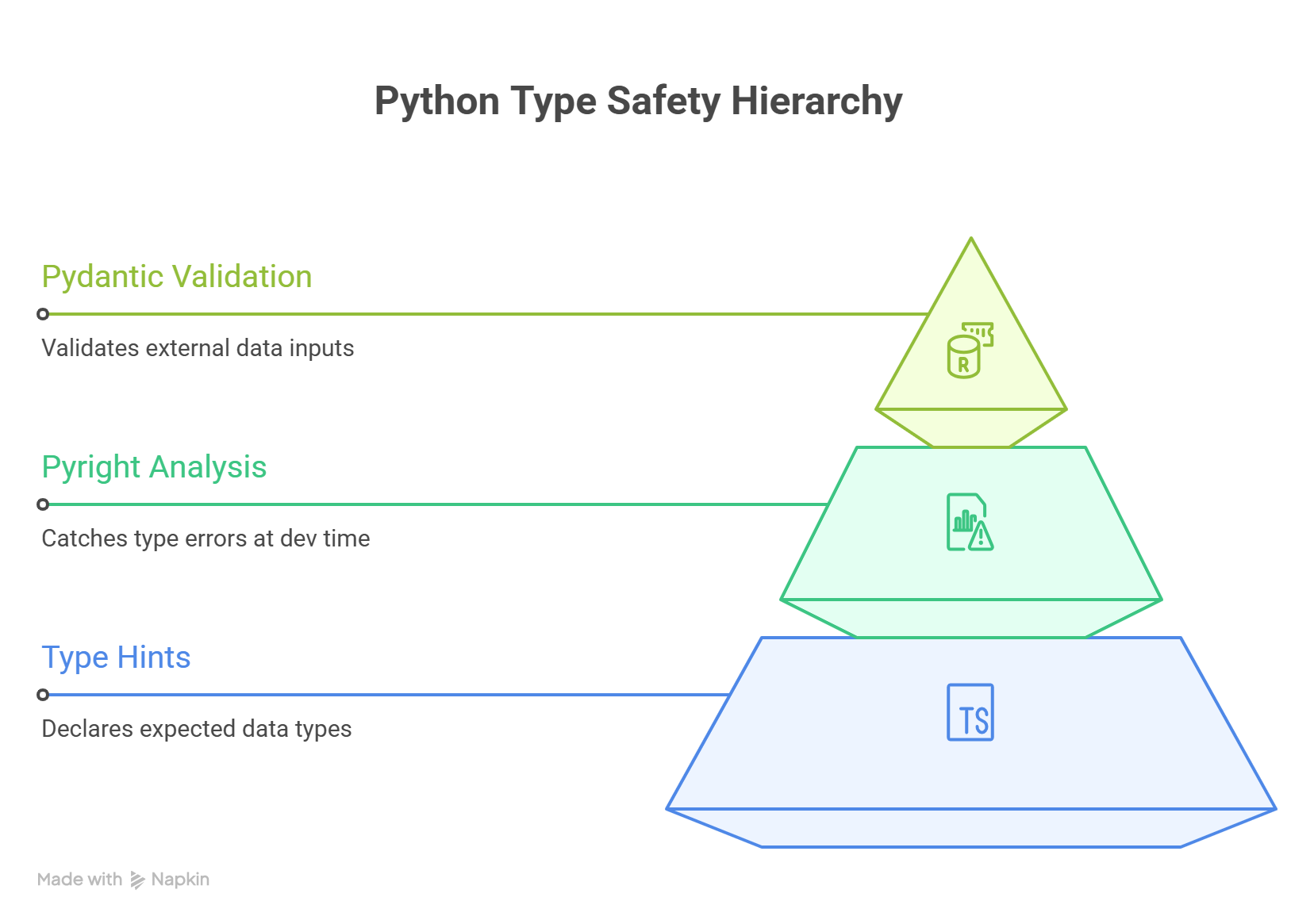
The Python code below uses type annotations and data structures you will learn in Chapters 47-48. For now, focus on the pattern: every piece of data has a declared type, and the tools catch mismatches automatically.
The pattern:
  every variable gets a type label
  every function declares what it accepts and returns
  the type checker catches mismatches before the code runs
Layer 1: Type Hints (The Annotations)
Type hints are Python's built-in syntax for declaring types. This is the CustomerOrder dataclass Emma added after James's crash: the one that made the AI's mistakes visible:
from dataclasses import dataclass
from datetime import datetime


@dataclass
class CustomerOrder:
    order_id: int
    customer_name: str
    total_amount: float
    created_at: datetime
    items: list[str]


def get_order_history(customer_id: int) -> list[CustomerOrder]:
    """Fetch all orders for a customer."""
    ...
Type hints alone do not enforce anything at runtime (Python ignores them during execution). But they serve two critical purposes:
- Documentation that never goes stale: Unlike comments, type hints are part of the code structure. They cannot drift from reality without the type checker flagging it.
- Machine-readable specification: Type checkers and AI systems can read these annotations to understand what code expects and provides.
Layer 2: Pyright in Strict Mode (The Enforcer)
Pyright is a static type checker that reads your annotations and finds errors before you run anything. This is exactly what would have caught James's crash: Pyright sees the mismatch between dict and CustomerOrder and refuses to proceed:
# pyright: strict

# James's AI-generated code (BROKEN):
def get_order_history(customer_id: int) -> list[CustomerOrder]:
    response = fetch_api(f"/customers/{customer_id}/orders")
    return response  # Error: list[dict] is not list[CustomerOrder]

# Pyright also catches attribute hallucinations:
def summarize_orders(orders: list[CustomerOrder]) -> float:
    return sum(o.total_price for o in orders)
    # Error: "CustomerOrder" has no attribute "total_price"
    # Did you mean "total_amount"?
$ uv run pyright src/orders.py
src/orders.py:5:12 - error: Return type "list[dict[str, Any]]" is not
  assignable to declared return type "list[CustomerOrder]"
  (reportReturnType)
src/orders.py:9:20 - error: Cannot access attribute "total_price" for
  class "CustomerOrder"
  Attribute "total_price" is unknown. Did you mean "total_amount"?
  (reportAttributeAccessIssue)
2 errors, 0 warnings, 0 informations
To enable Pyright strict mode, add a pyrightconfig.json to your project:
{
  "typeCheckingMode": "strict",
  "pythonVersion": "3.12"
}
Strict mode means Pyright will reject:
- Functions without return type annotations
- Variables with ambiguous types
- Operations that might fail on certain types
- Missing None checks for optional values
Layer 3: Pydantic (The Validator)
Pydantic adds runtime validation on top of static types. Where Pyright catches errors at development time, Pydantic catches errors when external data enters your system (like the API response that James's endpoint consumed):
from pydantic import BaseModel, Field


class OrderCreateRequest(BaseModel):
    """Validates incoming order data from the API."""

    customer_id: int
    item_ids: list[int] = Field(min_length=1)
    discount_code: str | None = None
    total_amount: float = Field(gt=0)


# Pydantic validates at runtime:
try:
    order = OrderCreateRequest(customer_id=42, item_ids=[], total_amount=-5)
except Exception as e:
    print(e)
2 validation errors for OrderCreateRequest
item_ids
  List should have at least 1 item after validation, not 0
    [type=too_short, input_value=[], input_type=list]
total_amount
  Input should be greater than 0
    [type=greater_than, input_value=-5, input_type=int]
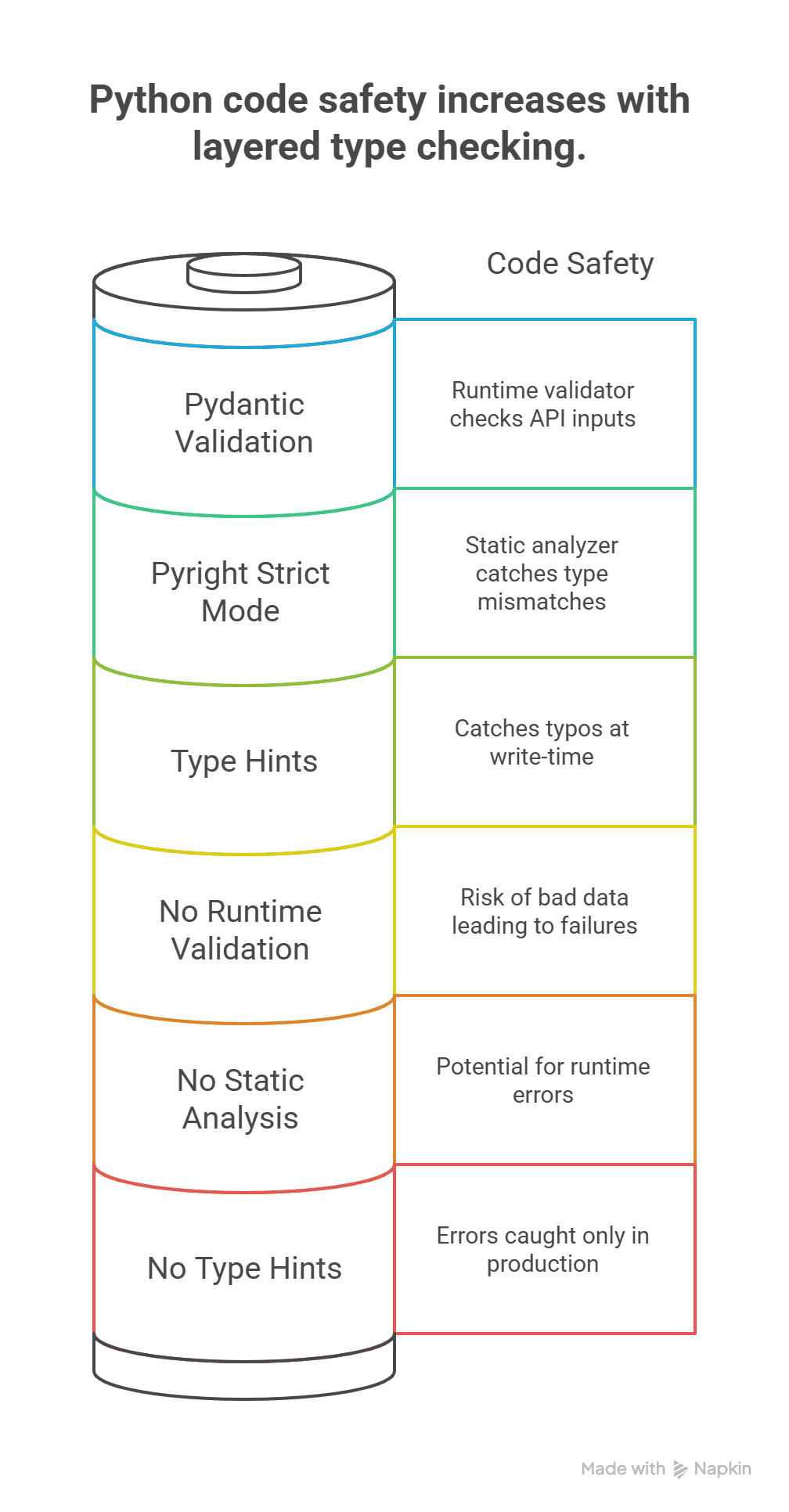
The three layers work together:
| Layer | What It Does | When It Catches Errors |
|---|---|---|
| Type Hints | Declare contracts | Never (documentation only) |
| Pyright | Verify contracts statically | Development time (before running) |
| Pydantic | Validate data at boundaries | Runtime (when data arrives) |
Types and AI: Why They Are Non-Negotiable
Here is the core insight of this axiom, and the lesson James learned in staging: types matter more with AI-generated code than with human-written code. Here is why.
AI Hallucination: Methods That Do Not Exist
AI confidently generates calls to methods that do not exist on your objects, exactly what happened with James's customer.get_orders():
# AI generates this (looks reasonable):
def get_active_tasks(manager: TaskManager) -> list[Task]:
    return manager.get_active()  # Does this method exist?


# With types, Pyright catches it immediately:
# Error: "TaskManager" has no attribute "get_active"
# Did you mean "get_tasks"?
$ uv run pyright src/tasks.py
src/tasks.py:3:20 - error: Cannot access attribute "get_active" for
  class "TaskManager"
  Attribute "get_active" is unknown. Did you mean "get_tasks"?
  (reportAttributeAccessIssue)
1 error, 0 warnings, 0 informations
Without types, this error only surfaces at runtime. With types, it surfaces the instant the AI generates the code.
AI Confusion: Wrong Return Types
AI can misunderstand what a function should return:
# You asked for "a function that finds a user by email"
# AI generates:
def find_user(email: str) -> dict[str, str]:
    # Returns a dictionary...
    return {"name": "Alice", "email": email}


# But your codebase expects:
def find_user(email: str) -> User | None:
    # Returns a User object or None if not found
    ...
If you typed the function signature first, the AI generates against your type. If you did not, the AI guesses, and may guess wrong.
AI Interface Drift: Wrong Assumptions About Your Code
AI doesn't have access to your full codebase context when generating code. It makes assumptions about interfaces:
# AI assumes your database module works like this:
from db import get_connection

def save_task(task: Task) -> bool:
    conn = get_connection()
    conn.execute("INSERT INTO tasks ...", task.to_dict())
    conn.commit()
    return True


# But your actual db module exposes:
from db import get_session

def save_task(task: Task) -> Task:
    session = get_session()
    session.add(task)
    session.flush()
    return task  # Returns the task with generated ID
With typed imports and function signatures, the type checker catches every mismatch: wrong function name, wrong parameter types, wrong return type.
The Pattern: Types as AI Specification
The pattern (the one Emma drilled into James after the staging incident) is clear. When you work with AI:
- Define types first (the specification)
- Let AI generate implementations (constrained by types)
- Type checker verifies (catches hallucinations automatically)
This is the same pattern as Principle 6's permission model, applied to code:
Principle 6: Define permissions → AI operates → Safety system verifies
Axiom V:     Define types     → AI generates → Type checker verifies
Dataclasses vs Pydantic: Internal Types vs Boundary Types
After adopting types across the order system, James asked Emma a question that every developer encounters: "When do I use @dataclass and when do I use Pydantic's BaseModel?" Emma's answer was a single principle: it depends on where the data lives in your system.
| Characteristic | Dataclass | Pydantic BaseModel |
|---|---|---|
| Purpose | Internal data structures | External data validation |
| Validation | None (trusts the caller) | Full (validates all input) |
| Performance | Faster (no validation overhead) | Slower (validates on creation) |
| Where used | Inside your system boundaries | At system boundaries (APIs, files, user input) |
| Mutability | Mutable by default | Mutable by default (opt into frozen=True) |
| Serialization | Manual (or asdict()) | Built-in .model_dump(), .model_dump_json() |
| Error handling | None (garbage in, garbage out) | Rich validation errors |
When to Use Each
The rule is simple: Pydantic at the edges, dataclasses at the core. Use dataclasses for internal domain objects (trusted data that already passed validation). Use Pydantic's BaseModel for boundaries where external data enters your system (API requests, file imports, user input). Data entering your system gets validated. Data inside your system is already trusted.
Code example: Dataclass vs. Pydantic in practice
Use dataclasses for internal domain objects:
from dataclasses import dataclass, field
from datetime import datetime


@dataclass
class Task:
    """Internal representation - trusted data only."""

    id: int
    title: str
    created_at: datetime
    tags: list[str] = field(default_factory=list)
    completed: bool = False
Use Pydantic for boundaries where external data enters:
from pydantic import BaseModel, Field
from datetime import datetime


class TaskCreateRequest(BaseModel):
    """API request validation - untrusted data."""

    title: str = Field(min_length=1, max_length=200)
    tags: list[str] = Field(default_factory=list, max_length=10)
    priority: int = Field(ge=1, le=5, default=3)


class TaskResponse(BaseModel):
    """API response serialization."""

    id: int
    title: str
    created_at: datetime
    completed: bool
The conversion pattern (boundary to internal):
def create_task(request: TaskCreateRequest) -> Task:
    """Convert validated boundary type to internal type."""
    return Task(
        id=generate_id(),
        title=request.title,
        created_at=datetime.now(),
        tags=request.tags,
        completed=False,
    )
The Python code below shows common mistakes and how to fix them. Focus on the pattern: what goes wrong when types are missing, and what changes when they are added. You will write Python yourself in the hands-on chapters.
This is a natural stopping point. If you need a break, bookmark this spot and return when you are ready. Everything above covers the core concept; everything below applies it through exercises and practice.
Anti-Patterns: How Types Get Undermined
You have seen the untyped codebase. Every team has one. It is the project where every function accepts data and returns result, where dict[str, Any] is the universal type, where the AI generates beautiful code that crashes at runtime because nothing in the codebase told it what shape anything is.
It is the project where debugging means adding print(type(x)) on every other line, where new developers spend their first week asking "what does this function actually return?" and getting the answer "it depends." It is the project where the type checker was turned off because "it was too strict" (meaning it found real errors that nobody wanted to fix).
The untyped codebase is not missing types by accident. It is missing types because each developer chose the two-second shortcut of skipping the annotation, and a thousand two-second shortcuts became a codebase that no human or AI can safely modify without running it first and praying.
These are the specific patterns that destroy type safety:
| Anti-Pattern | Why It's Harmful | What to Do Instead |
|---|---|---|
dict[str, Any] everywhere | Loses all type information; any key/value accepted | Define a dataclass or TypedDict for the structure |
| Functions without return types | Caller doesn't know what to expect; AI can't constrain output | Always annotate return type, even if -> None |
| Disabling type checker ("too strict") | Removes the entire safety net | Fix the types; strictness IS the value |
| Untyped AI output shipped directly | Hallucinations reach production unchecked | Type-annotate AI code, run Pyright before committing |
The Any Anti-Pattern in Detail
Any is Python's escape hatch from the type system. It means "I do not know the type, and I do not want the checker to care." Every Any in your code is a hole in your guardrails, and James discovered that AI loves to fill those holes with hallucinations. The fix is to replace Any with explicit types (dataclasses or typed structures) so that Pyright can verify every data access. The typed version requires more structure, but that structure is the specification. When you give this to an AI, it knows exactly what data contains, what operations are valid, and what the function must return. When James added Any to "get things working quickly," he was removing the guardrail that would have saved him hours.
Code example: Any vs. explicit types
# BAD: Any disables all checking. AI can return anything
def process_data(data: Any) -> Any:
    return data["result"]["items"][0]["name"]  # Five unchecked assumptions

# GOOD: Explicit types make every access checkable
@dataclass
class ResultItem:
    name: str

@dataclass
class ApiResponse:
    result: ResultData

@dataclass
class ResultData:
    items: list[ResultItem]

def process_data(data: ApiResponse) -> str:
    return data.result.items[0].name  # Every access verified by Pyright
# Running Pyright on the BAD version:
$ uv run pyright src/bad_process.py
src/bad_process.py:2:5 - error: Return type "Any" is not allowed in
  strict mode (reportUnknownParameterType)
0 type safety. Pyright cannot verify any of the 5 chained accesses

# Running Pyright on the GOOD version:
$ uv run pyright src/good_process.py
0 errors, 0 warnings, 0 informations
Advanced Preview: Generics and Protocols, Flexible but Safe
Generics and Protocols are advanced type system features you will explore in depth when you learn Python. For now, the key concept is simple: types do not make code rigid. They can be flexible AND safe at the same time. Skim for the idea; do not worry about the syntax.
James initially worried that types meant rigid code: that every function would need a specific class for every parameter. Emma showed him that Python's type system offers flexibility without sacrificing safety, through two mechanisms (generics and protocols).
Generics: One Implementation, Many Types
from typing import TypeVar

T = TypeVar("T")


def first_or_none(items: list[T]) -> T | None:
    """Return first item or None if empty. Works with any type."""
    return items[0] if items else None


# Works with any list - fully typed:
task: Task | None = first_or_none([task1, task2])
name: str | None = first_or_none(["alice", "bob"])
count: int | None = first_or_none([1, 2, 3])
Protocols: Duck Typing with Safety
When James needed the order pipeline to handle both domestic and international orders (each with different tax rules and shipping logic), Emma showed him Protocols: a way to define what an object must do without forcing it into an inheritance tree. Protocols define the shape an object must have, and the type checker verifies conformance automatically:
from typing import Protocol


class Completable(Protocol):
    """Anything that can be marked complete."""

    completed: bool

    def mark_complete(self) -> None: ...


def complete_all(items: list[Completable]) -> int:
    """Mark all items complete. Returns count."""
    count = 0
    for item in items:
        if not item.completed:
            item.mark_complete()
            count += 1
    return count


# Any class with 'completed' and 'mark_complete()' works:
@dataclass
class Task:
    title: str
    completed: bool = False

    def mark_complete(self) -> None:
        self.completed = True


@dataclass
class Milestone:
    name: str
    completed: bool = False

    def mark_complete(self) -> None:
        self.completed = True


# Both work with complete_all(), no inheritance needed:
result = complete_all([Task("Write tests"), Milestone("v1.0")])
print(result)  # Output: 2
Protocols are particularly powerful with AI: you define the interface (Protocol), and AI generates implementations that must satisfy it. The type checker verifies conformance automatically.
Try With AI
Use these prompts to explore type systems hands-on in Claude Code. Each targets a different skill in the type discipline stack.
Prompt 1: The Unlabeled Filing Cabinet
I want to understand why labeling data with its type prevents errors.

Imagine a filing cabinet with 4 drawers. In version A, every drawer is
labeled "STUFF." In version B, each drawer is labeled specifically:
"Invoices (numbers only)", "Contracts (signed PDFs)", "Employee Records
(name + ID + start date)", "Meeting Notes (date + attendees + summary)."

Help me explore:
1. A new employee needs to file a document. How do they decide which
   drawer to use in version A vs version B?
2. Someone puts a meeting note in the Invoices drawer by mistake.
   How quickly is this caught in version A vs version B?
3. A manager asks "pull all invoices from Q3." How easy is this in
   version A vs version B?
4. Now connect this to software: what is the "drawer label" equivalent
   in code? What happens when code has no labels (no types) and an AI
   assistant tries to file data into the right place?
What you're learning: Types are labels that make the right action obvious and the wrong action impossible. An unlabeled filing cabinet is like untyped code: everything goes anywhere, and errors hide until someone needs to find something. James's staging crash happened because his code had no labels, so the AI filed dictionaries where typed objects were expected.
Prompt 2: Spot the Type Errors in Everyday Life
Here are five real-world scenarios where the wrong "type" of data was
entered. For each one, identify what type was expected, what was actually
provided, and what breaks:

1. A spreadsheet column for "phone number" contains "call me later"
2. A calendar event for "meeting duration" says "a couple hours"
   instead of "2:00"
3. A recipe calls for "2 cups flour" but someone enters "some flour"
4. A shipping form asks for "ZIP code" and receives "New York"
5. A survey asks "rate 1-5" and someone writes "pretty good"

For each scenario:
- What is the expected type (number, date, specific format)?
- What was the actual input?
- What breaks downstream when the system tries to USE this data?
- How would you redesign the input to make the error IMPOSSIBLE?

Then explain: James's AI generated code that treated API responses as
objects when they were actually dictionaries. Which of these 5 scenarios
is most similar to James's error, and why?
What you're learning: Recognizing type errors in systems you already use. Every time data of the wrong shape enters a system, the same class of error occurs, whether it is a spreadsheet, a form, or AI-generated code. By identifying type mismatches in everyday contexts, you build the pattern recognition needed to catch them in code.
Prompt 3: Design a Data Specification
I want to practice the pattern from this lesson: define the shape of
data BEFORE anyone (human or AI) works with it.

Pick one of these scenarios:
- A school wants to track student attendance (name, date, present/absent,
  reason if absent)
- A small business needs to record customer orders (customer name, items,
  quantities, prices, date, payment status)
- A sports league needs to store game results (teams, scores, date,
  location, referee)

For the one you choose, help me create a data specification:
1. List every field with its exact type (text, whole number, decimal,
   date, yes/no, list of items)
2. For each field, define what values are valid and what should be
   rejected
3. Identify which fields are required vs optional
4. Identify which fields come from outside (user input, needing strict
   validation) vs which are generated internally (trusted, needing less
   validation)

Then explain: if I gave this specification to an AI assistant and asked
it to build the system, how would the spec prevent the AI from making
the kind of mistake James made?
What you're learning: The core discipline of Axiom V: defining data shapes before implementation. When you specify that "score" is a whole number between 0 and 100 (not a string, not a negative number, not blank), you have created exactly what Emma created for James: a machine-verifiable contract that catches errors automatically. You will apply this same thinking to Python types in the hands-on chapters.
PRIMM-AI+ Practice: Types Are Guardrails
Predict [AI-FREE]
Enter Plan Mode in Claude Code (Shift+Tab). A form asks for your "age." Consider two scenarios:
Scenario A: The form has an open text box. You type "twenty" instead of "20." Scenario B: The form has a number-only field with a dropdown that only allows digits.
Predict: What goes wrong in Scenario A when a computer tries to calculate "twenty + 1"? Would the same error be possible in Scenario B? Write your predictions. Rate your confidence from 1 to 5.
Run
In Claude Code, type: "What happens when a computer tries to add the word 'twenty' to the number 1? Why do forms use dropdowns and number-only fields instead of open text boxes for things like age?"
Compare the AI's explanation to your prediction. Did you correctly identify why the text input fails?
Answer Key: What actually happens
Scenario A fails because a computer stores "twenty" as text (a sequence of characters), not as a number. When it tries to compute "twenty + 1," it has no idea that "twenty" represents the value 20. It sees the letters t-w-e-n-t-y and cannot perform arithmetic on them. Depending on the system, this produces an error, a crash, or a nonsensical result like "twenty1" (string concatenation instead of addition).
Scenario B makes the error impossible. A number-only field rejects "twenty" at the point of entry. The user can only input digits, so the system never encounters text where it expects a number. The constraint is structural: it is not a warning that can be ignored, but a restriction that physically prevents the wrong type of data from entering the system.
The key insight: Scenario A tries to catch the error after it happens (and often fails). Scenario B prevents the error from ever occurring. This is the difference between validation ("check if it's right") and type safety ("make it impossible to be wrong").
Investigate
Write in your own words, without asking AI, why labeling things with their type (this is a number, this is text, this is a date) prevents errors. What is it about the label itself that makes the error impossible rather than just unlikely?
Now connect this back to the lesson's story. James's untyped function was the open text box: it accepted any data in any shape, and the wrong shape crashed staging. Emma's dataclass was the number-only dropdown: it declared exactly what fields existed, what type each field must be, and what values were valid. The crash became impossible not because someone remembered to check, but because the structure itself rejected bad data.
Apply the Error Taxonomy: putting text ("twenty") where a number (20) belongs = type error. The system expected data of one shape and received data of a different shape. James's staging crash was the same error at a larger scale: untyped data flowing through a function that assumed a specific shape. The dropdown (or the dataclass) prevents this by making it structurally impossible to enter the wrong type.
Modify
A signup form has one open text field for "date of birth." A user types "June fifth" instead of "2005-06-05." What breaks downstream? (Think about sorting users by age, calculating eligibility, comparing dates.)
Redesign the form field so this error is impossible, not just unlikely. What specific constraints would you add?
Make [Mastery Gate]
Design a simple form for a school club registration with these five fields: name, age, grade, email, number of years in the club. For each field, specify:
- What type of data it accepts (text, number, date, email, etc.)
- What format it must be in (e.g., "whole number between 5 and 19")
- What values are NOT allowed (e.g., "age cannot be negative or over 120")
This form specification is your mastery gate. A developer should be able to build the form from your spec and know exactly what to accept and reject, with zero ambiguity.
In the Predict step, you caught a type error by reasoning about what kind of data a field should accept. That is Rung 2 of the Verification Ladder: types catch structural errors before anything runs. You do not need to execute code to know that "twenty + 1" will fail.
The Annotation Illusion
After adopting types, James went through a phase Emma recognized. He typed everything meticulously, ran Pyright, saw zero errors, and assumed his code was correct. Then a test failed: calculate_discount() returned 0.15 when it should have returned 0.85. The types were perfect (float in, float out). The logic was wrong. He had subtracted the discount from 1.0 in the wrong order.
"Types catch structural errors," Emma told him. "Wrong shapes, missing fields, interface mismatches: the machine finds those. But types cannot catch logical errors. A function that returns int when it should return float will be caught. A function that returns 42 when it should return 7 will not. Types and tests are different layers in the same defense."
The Annotation Illusion is the belief that typed code is correct code. It is not. Types guarantee that the pieces fit together, that you are not connecting a square peg to a round hole. Tests guarantee that the assembled machine produces the right output. Code review guarantees that the design makes sense. No single layer is sufficient. Together, they form the defense-in-depth that makes AI collaboration safe. James learned to treat Pyright's green checkmark not as "this code is correct" but as "this code is structurally sound; now test the logic."
James stared at the Pyright output: zero errors. "It's like incoming inspection at a receiving dock," he said. "In my old job, we had three checkpoints for inbound goods. First, does the packing slip match the purchase order? That's the type hint: declaring what you expect. Second, does a scanner verify the actual contents against the slip? That's Pyright: checking before anything moves to the floor. Third, does quality control test a sample from each batch? That's Pydantic at the boundary: validating real data at runtime."
"Three layers, three different failure classes," Emma said. "And they stack."
"But here's what tripped me up. I got Pyright to zero errors and assumed the code was correct. Turns out the discount function returned 0.15 when it should've returned 0.85. The types were perfect; the logic was wrong."
"I made that exact mistake on my second year," Emma said. "Shipped a billing module with perfect types and a sign error in the rate calculation. Cost us a weekend of refunds. Types tell you the pieces fit together. Tests tell you the machine produces the right output. I learned the hard way that green on the type checker is not the same as correct."
James nodded. "So types are guardrails, not proof. Got it. But right now, all my typed objects are standalone. A CustomerOrder, a Task, a User, they each describe one thing. What happens when a customer has orders, and orders contain items? How do you model those connections without losing everything we just built?"
"That's exactly the next question," Emma said. "Individual types aren't enough when your data has relationships."